KR101962445B1 - Mobile terminal having touch screen and method for providing user interface - Google Patents
Mobile terminal having touch screen and method for providing user interface Download PDFInfo
- Publication number
- KR101962445B1 KR101962445B1 KR1020110087060A KR20110087060A KR101962445B1 KR 101962445 B1 KR101962445 B1 KR 101962445B1 KR 1020110087060 A KR1020110087060 A KR 1020110087060A KR 20110087060 A KR20110087060 A KR 20110087060A KR 101962445 B1 KR101962445 B1 KR 101962445B1
- Authority
- KR
- South Korea
- Prior art keywords
- touch
- input
- palm
- touch input
- finger
- Prior art date
- Legal status (The legal status is an assumption and is not a legal conclusion. Google has not performed a legal analysis and makes no representation as to the accuracy of the status listed.)
- Active
Links
Images




Classifications
-
- G—PHYSICS
- G06—COMPUTING OR CALCULATING; COUNTING
- G06F—ELECTRIC DIGITAL DATA PROCESSING
- G06F3/00—Input arrangements for transferring data to be processed into a form capable of being handled by the computer; Output arrangements for transferring data from processing unit to output unit, e.g. interface arrangements
- G06F3/01—Input arrangements or combined input and output arrangements for interaction between user and computer
- G06F3/03—Arrangements for converting the position or the displacement of a member into a coded form
- G06F3/041—Digitisers, e.g. for touch screens or touch pads, characterised by the transducing means
- G06F3/0416—Control or interface arrangements specially adapted for digitisers
-
- G—PHYSICS
- G06—COMPUTING OR CALCULATING; COUNTING
- G06F—ELECTRIC DIGITAL DATA PROCESSING
- G06F3/00—Input arrangements for transferring data to be processed into a form capable of being handled by the computer; Output arrangements for transferring data from processing unit to output unit, e.g. interface arrangements
- G06F3/01—Input arrangements or combined input and output arrangements for interaction between user and computer
- G06F3/048—Interaction techniques based on graphical user interfaces [GUI]
- G06F3/0487—Interaction techniques based on graphical user interfaces [GUI] using specific features provided by the input device, e.g. functions controlled by the rotation of a mouse with dual sensing arrangements, or of the nature of the input device, e.g. tap gestures based on pressure sensed by a digitiser
- G06F3/0488—Interaction techniques based on graphical user interfaces [GUI] using specific features provided by the input device, e.g. functions controlled by the rotation of a mouse with dual sensing arrangements, or of the nature of the input device, e.g. tap gestures based on pressure sensed by a digitiser using a touch-screen or digitiser, e.g. input of commands through traced gestures
- G06F3/04883—Interaction techniques based on graphical user interfaces [GUI] using specific features provided by the input device, e.g. functions controlled by the rotation of a mouse with dual sensing arrangements, or of the nature of the input device, e.g. tap gestures based on pressure sensed by a digitiser using a touch-screen or digitiser, e.g. input of commands through traced gestures for inputting data by handwriting, e.g. gesture or text
-
- G—PHYSICS
- G06—COMPUTING OR CALCULATING; COUNTING
- G06F—ELECTRIC DIGITAL DATA PROCESSING
- G06F3/00—Input arrangements for transferring data to be processed into a form capable of being handled by the computer; Output arrangements for transferring data from processing unit to output unit, e.g. interface arrangements
- G06F3/16—Sound input; Sound output
-
- H—ELECTRICITY
- H04—ELECTRIC COMMUNICATION TECHNIQUE
- H04M—TELEPHONIC COMMUNICATION
- H04M1/00—Substation equipment, e.g. for use by subscribers
- H04M1/02—Constructional features of telephone sets
- H04M1/0202—Portable telephone sets, e.g. cordless phones, mobile phones or bar type handsets
- H04M1/026—Details of the structure or mounting of specific components
- H04M1/0266—Details of the structure or mounting of specific components for a display module assembly
-
- H—ELECTRICITY
- H04—ELECTRIC COMMUNICATION TECHNIQUE
- H04M—TELEPHONIC COMMUNICATION
- H04M1/00—Substation equipment, e.g. for use by subscribers
- H04M1/72—Mobile telephones; Cordless telephones, i.e. devices for establishing wireless links to base stations without route selection
- H04M1/724—User interfaces specially adapted for cordless or mobile telephones
-
- H—ELECTRICITY
- H04—ELECTRIC COMMUNICATION TECHNIQUE
- H04M—TELEPHONIC COMMUNICATION
- H04M2250/00—Details of telephonic subscriber devices
- H04M2250/22—Details of telephonic subscriber devices including a touch pad, a touch sensor or a touch detector
Landscapes
- Engineering & Computer Science (AREA)
- Theoretical Computer Science (AREA)
- General Engineering & Computer Science (AREA)
- Human Computer Interaction (AREA)
- Physics & Mathematics (AREA)
- General Physics & Mathematics (AREA)
- Signal Processing (AREA)
- Computer Networks & Wireless Communication (AREA)
- General Health & Medical Sciences (AREA)
- Health & Medical Sciences (AREA)
- Audiology, Speech & Language Pathology (AREA)
- User Interface Of Digital Computer (AREA)
- Telephone Function (AREA)
- Position Input By Displaying (AREA)
Abstract
본 발명은 터치 스크린을 갖는 휴대 단말기 및 그의 사용자 인터페이스 제공 방법에 관한 것으로, 터치 스크린에서 터치가 감지되면, 터치에 대응하는 터치 면적을 검출하고, 터치 면적이 미리 설정된 면적 임계치 이상인지의 여부 또는 터치의 이동 여부 중 적어도 어느 하나에 따라 상이한 기능을 수행하도록 구성된다. 본 발명에 따르면, 휴대 단말기에서 터치 스크린을 통해 감지하기 위한 다양한 터치 동작들이 제안되며, 각각의 터치 동작에 대응하는 사용자 인터페이스가 제공된다. The present invention relates to a portable terminal having a touch screen and a method of providing a user interface thereof. When a touch is detected on a touch screen, a touch area corresponding to a touch is detected. Whether or not the touch area is greater than a predetermined area threshold, Or whether or not the mobile terminal 100 is moving. According to the present invention, various touch operations for sensing through a touch screen in a portable terminal are proposed, and a user interface corresponding to each touch operation is provided.
Description
본 발명은 휴대 단말기 및 그의 동작 방법에 관한 것으로, 특히 터치 스크린을 갖는 휴대 단말기 및 그의 사용자 인터페이스 제공 방법에 관한 것이다. The present invention relates to a portable terminal and an operation method thereof, and more particularly, to a portable terminal having a touch screen and a method of providing a user interface thereof.
일반적으로 휴대 단말기는 다양한 기능들이 부가되어 복합적인 기능을 수행한다. 이때 휴대 단말기는 각종 기능들을 수행하기 위한 키보드(keyboard)나 마우스(mouse) 등의 입력부를 구비하고 있으나, 휴대가 용이하지 않은 문제점이 있다. 이에 따라, 상기 문제점을 극복하기 위하여, 현재의 휴대 단말기는 키보드나 마우스를 대신하여 터치 패널(touch panel)을 구비하고 있다. 이 때 터치 패널은 다수개의 터치 센서(touch sensor)들로 이루어진다. 즉 휴대 단말기는 터치 센서에서 감지되는 터치 동작을 위한 사용자 인터페이스(User Interface; UI)를 제공하며, 해당 터치 동작에 대응하여 특정 기능을 실행한다. In general, a portable terminal performs various functions by adding various functions. At this time, the portable terminal has an input unit such as a keyboard or a mouse for performing various functions, but it is not easy to carry. Accordingly, in order to overcome the above problem, the present portable terminal has a touch panel instead of a keyboard or a mouse. At this time, the touch panel includes a plurality of touch sensors. That is, the portable terminal provides a user interface (UI) for a touch operation sensed by the touch sensor, and executes a specific function corresponding to the touch operation.
그런데, 상기와 같은 휴대 단말기에서 다양한 터치 동작들에 대응하는 사용자 인터페이스들을 제공하는 데 한계가 있다. However, there is a limitation in providing user interfaces corresponding to various touch operations in the portable terminal.
따라서, 본 발명의 목적은 다양한 터치 동작들에 대응하는 사용자 인터페이스들을 제공하는 데 있다. 즉 본 발명은 다양한 터치 동작들을 제안하고, 각각의 터치 동작에 대응하는 사용자 인터페이스를 제공하기 위한 것이다. Accordingly, it is an object of the present invention to provide user interfaces corresponding to various touch operations. That is, the present invention proposes various touch operations and provides a user interface corresponding to each touch operation.
상기 과제를 해결하기 위한 본 발명에 따른 터치 스크린을 갖는 휴대 단말기의 사용자 인터페이스 제공 방법은, 터치 스크린에서 터치가 감지되면, 상기 터치에 대응하는 터치 면적을 검출하는 과정과, 상기 터치 면적이 미리 설정된 면적 임계치 이상인지의 여부에 따라 상이한 기능을 수행하는 과정을 포함하는 것을 특징으로 한다. According to another aspect of the present invention, there is provided a method of providing a user interface for a mobile terminal having a touch screen, the method comprising the steps of: detecting a touch area corresponding to the touch when a touch is sensed on the touch screen; And performing a different function depending on whether the area is equal to or greater than a threshold value.
이 때 본 발명에 따른 사용자 인터페이스 제공 방법에 있어서, 상기 수행 과정은, 상기 터치의 이동 여부에 따라 상이한 기능을 수행한다. 여기서, 본 발명에 따른 사용자 인터페이스 제공 방법에 있어서, 상기 수행 과정은, 상기 터치의 이동이 있으면, 상기 터치의 이동 거리 및 이동 방향에 따라 상이한 기능을 수행할 수 있다. 그리고 본 발명에 따른 사용자 인터페이스 제공 방법에 있어서, 상기 수행 과정은, 상기 터치의 이동이 없으면, 상기 터치의 유지 시간에 따라 상이한 기능을 수행할 수 있다. At this time, in the user interface providing method according to the present invention, the performing process performs different functions depending on whether the touch is moved or not. Here, in the method of providing a user interface according to the present invention, when performing the movement of the touch, the performing process may perform different functions according to the movement distance and the movement direction of the touch. According to another aspect of the present invention, there is provided a method for providing a user interface, the method comprising:
한편, 상기 과제를 해결하기 위한 본 발명에 따른 사용자 인터페이스를 제공하기 위한 휴대 단말기는, 터치를 감지하기 위한 터치 스크린과, 상기 터치에 대응하는 터치 면적을 검출하기 위한 면적 검출부와, 상기 터치 면적이 미리 설정된 면적 임계치 이상인지의 여부에 따라 상이한 기능을 수행하기 위한 제어부를 포함하는 것을 특징으로 한다. According to another aspect of the present invention, there is provided a portable terminal for providing a user interface including a touch screen for sensing a touch, an area detecting unit for detecting a touch area corresponding to the touch, And a controller for performing a different function depending on whether or not the predetermined area threshold value is equal to or greater than a predetermined area threshold value.
이 때 본 발명에 따른 휴대 단말기에 있어서, 상기 제어부는, 상기 터치의 이동 여부에 따라 상이한 기능을 수행한다. 여기서, 본 발명에 따른 휴대 단말기에 있어서, 상기 제어부는, 상기 터치의 이동이 있으면, 상기 터치의 이동 거리 및 이동 방향에 따라 상이한 기능을 수행할 수 있다. 그리고 본 발명에 따른 휴대 단말기에 있어서, 상기 제어부는, 상기 터치의 이동이 없으면, 상기 터치의 유지 시간에 따라 상이한 기능을 수행할 수 있다. At this time, in the portable terminal according to the present invention, the control unit performs different functions depending on whether the touch is moved or not. Here, in the portable terminal according to the present invention, when the touch is moved, the controller may perform a different function depending on the movement distance and the movement direction of the touch. In the portable terminal according to the present invention, the controller may perform a different function according to the holding time of the touch, if there is no movement of the touch.
본 발명에 따른 터치 스크린을 갖는 휴대 단말기 및 그의 사용자 인터페이스 제공 방법은, 휴대 단말기에서 터치 스크린을 통해 감지하기 위한 다양한 터치 동작들이 제안되며, 각각의 터치 동작에 대응하는 사용자 인터페이스가 제공된다. 즉 휴대 단말기는 터치 스크린을 통해 감지되는 터치의 터치 면적, 이동 여부, 이동 거리, 이동 방향 또는 유지 시간 중 적어도 어느 하나로 터치 동작을 결정한다. 그리고 휴대 단말기는 각각의 터치 동작에 대응하여 기능을 수행하기 위한 사용자 인터페이스를 제공한다. 이로 인하여, 휴대 단말기를 사용하는 데 있어서 편의성을 향상시킬 수 있다. A portable terminal having a touch screen and a method of providing a user interface thereof according to the present invention are proposed various touch operations for sensing through a touch screen in a portable terminal, and a user interface corresponding to each touch operation is provided. That is, the portable terminal determines a touch operation by at least one of a touch area, a movement distance, a movement distance, a movement direction, or a retention time of a touch sensed through the touch screen. The portable terminal provides a user interface for performing a function corresponding to each touch operation. Thus, convenience in using the portable terminal can be improved.
도 1은 본 발명의 실시예에 따른 휴대 단말기의 내부 구성을 도시하는 블록도,
도 2는 본 발명의 실시예에 따른 휴대 단말기의 사용자 인터페이스 제공 절차를 도시하는 순서도,
도 3은 도 2에서 팜 터치 모드 수행 절차를 도시하는 순서도,
도 4 내지 도 7은 도 2에서 팜 터치 모드 수행 절차를 예시적으로 설명하기 위한 예시도들,
도 8은 도 2에서 핑거 터치 모드 수행 절차를 도시하는 순서도, 그리고
도 9 및 도 10은 도 2에서 핑거 터치 모드 수행 절차를 예시적으로 설명하기 위한 예시도들이다. 1 is a block diagram illustrating an internal configuration of a mobile terminal according to an embodiment of the present invention;
2 is a flowchart illustrating a user interface providing procedure of a portable terminal according to an embodiment of the present invention;
FIG. 3 is a flowchart showing a palm-touch mode performing procedure in FIG.
FIGS. 4 to 7 illustrate exemplary procedures for performing the palm-touch mode in FIG. 2,
FIG. 8 is a flowchart showing a finger touch mode performing procedure in FIG. 2, and FIG.
FIGS. 9 and 10 are exemplary diagrams for illustrating a procedure of performing the finger-touch mode in FIG.
이하, 첨부된 도면을 참조하여 본 발명의 실시예들을 보다 상세하게 설명하고자 한다. 이 때 첨부된 도면에서 동일한 구성 요소는 가능한 동일한 부호로 나타내고 있음에 유의해야 한다. 그리고 본 발명의 요지를 흐리게 할 수 있는 공지 기능 및 구성에 대한 상세한 설명은 생략할 것이다. Hereinafter, embodiments of the present invention will be described in detail with reference to the accompanying drawings. It should be noted that the same components are denoted by the same reference symbols as possible in the accompanying drawings. Further, the detailed description of known functions and configurations that may obscure the gist of the present invention will be omitted.
하기 설명에서, "터치(touch)"라는 용어는 휴대 단말기에서 터치 스크린에 접촉하거나 접근하는 행위를 나타낸다. 이 때 터치는 휴대 단말기 사용자의 손 또는 스타일러스(stylus)에 의해 발생될 수 있다. 이러한 터치는 터치 스크린에서 터치 면적, 이동 여부, 이동 거리, 이동 방향 또는 유지 시간 중 적어도 어느 하나에 따라 다양한 터치 동작들로 제공된다. "팜 터치(palm touch)"라는 용어는 터치 면적이 미리 설정된 면적 임계치 이상인 경우에 해당하는 터치를 나타낸다. 예를 들면, 팜 터치는 터치 스크린에 휴대 단말기 사용자의 손바닥 또는 손날(hand blade)이 접촉하거나 접근하는 것을 나타낼 수 있다. "핑거 터치(finger touch)"라는 용어는 터치 면적이 면적 임계치 미만인 경우에 해당하는 터치를 나타낸다. 예를 들면, 핑거 터치는 터치 스크린에 휴대 단말기 사용자의 손가락이 접촉하거나 접근하는 것을 나타낼 수 있다. In the following description, the term "touch" refers to the act of contacting or accessing the touch screen in the portable terminal. At this time, the touch may be generated by a hand or a stylus of the portable terminal user. Such a touch is provided on the touch screen in various touch operations according to at least one of a touch area, a movement distance, a movement distance, a movement direction, or a holding time. The term " palm touch "refers to a touch when the touch area is equal to or greater than a preset area threshold. For example, the PalmTouch may indicate that the palm or hand blade of the handset user is touching or approaching the touch screen. The term "finger touch" refers to a touch when the touch area is less than the area threshold. For example, the finger touch may indicate that the finger of the handset user touches or approaches the touch screen.
도 1은 본 발명의 실시예에 따른 휴대 단말기의 내부 구성을 도시하는 블록도이다. 이 때 본 실시예에서 휴대 단말기가 휴대 전화기인 경우를 가정하여 설명한다. 1 is a block diagram illustrating an internal configuration of a mobile terminal according to an embodiment of the present invention. Here, it is assumed that the portable terminal is a mobile phone in the present embodiment.
도 1을 참조하면, 본 실시예의 휴대 단말기(100)는 무선 통신부(110), 터치 스크린(120), 제어부(130), 메모리(140), 오디오 처리부(150) 및 키 입력부(160)를 포함한다. 1, the
무선 통신부(110)는 휴대 단말기(100)의 무선 통신 기능을 수행한다. 이러한 무선 통신부(110)는 송신되는 신호의 주파수를 상승변환 및 증폭하는 RF 송신기와, 수신되는 신호를 잡음 증폭하고 주파수를 하강변환하는 RF 수신기 등을 포함한다.The
터치 스크린(120)은 표시부(121)와 터치 패널(123)을 포함한다. 표시부(121)는 휴대 단말기(100)의 상태를 표시한다. 이 때 표시부(121)는 LCD로 구현되며, LCD 제어부, 표시 데이터를 저장할 수 있는 메모리 및 LCD 표시소자 등을 구비한다. 터치 패널(123)은 표시부(121)에 장착되어, 표시부(121) 상에서 터치 동작을 감지한다. 이러한 터치 패널(123)은 터치 감지부(125)와 신호 변환부(127)로 이루어진다. 터치 감지부(125)는 물리량, 예컨대 저항, 정전용량 등의 변화를 검출하여 터치 동작을 감지한다. 신호 변환부(127)는 물리량의 변화를 터치 신호로 변환한다. The
제어부(130)는 휴대 단말기(100)의 전반적인 동작을 제어하는 기능을 수행한다. 이러한 제어부(130)는 송신되는 신호를 부호화 및 변조하는 송신기와, 수신되는 신호를 복조 및 복호화하는 수신기 등을 구비하는 데이터 처리부를 포함한다. 데이터 처리부는 모뎀(MODEM) 및 코덱(CODEC)으로 구성될 수 있다. 코덱은 패킷 데이터 등을 처리하는 데이터 코덱과 음성 등의 오디오 신호를 처리하는 오디오 코덱을 구비한다. 그리고 제어부(130)는 본 발명의 실시예에 따라 다양한 터치 동작들에 대응하는 사용자 인터페이스들을 제공한다. 즉 제어부(130)는 터치 동작 별로 상이한 기능을 수행한다. 이 때 제어부(130)는 터치에 대응하는 터치 면적, 이동 여부, 이동 거리, 이동 방향 또는 유지 시간 중 적어도 어느 하나에 따라 터치 동작을 식별하고, 그에 대응하는 기능을 수행한다. 이를 위해, 제어부(130)는 면적 검출부(131), 이동 추적부(133) 및 시간 검출부(135)를 포함한다. 면적 검출부(131)는 터치에 대응하는 터치 위치 및 터치 면적을 검출한다. 이동 추적부(133)는 터치의 이동 여부를 판단한다. 또한 이동 추적부(133)는 터치에 대응하는 이동 방향을 추적하고, 이동 거리를 검출한다. 시간 검출부(135)는 터치에 대응하여 터치 위치로부터 미리 설정된 유지 범위 내에서 터치의 유지 시간을 검출한다. The
메모리(140)는 프로그램 메모리 및 데이터 메모리들로 구성될 수 있다. 프로그램 메모리는 휴대 단말기(100)의 일반적인 동작을 제어하기 위한 프로그램들을 저장한다. 그리고 프로그램 메모리는 본 발명의 실시예에 따라 다양한 터치 동작들에 대응하는 사용자 인터페이스들을 제공하기 위한 프로그램들을 저장할 수 있다. 데이터 메모리는 프로그램들을 수행하는 중에 발생되는 데이터들을 저장하는 기능을 수행한다. 이 때 메모리(140)는 본 발명의 실시예에 따라 각각의 터치 동작에 대응하여 각각의 기능을 연관시켜 저장하고 있다. 그리고 메모리(140)는 터치에 대응하는 터치 면적, 이동 여부, 이동 거리, 이동 방향 또는 유지 시간과 개별적으로 비교하기 위한 임계치들을 저장하고 있다. The
오디오 처리부(150)는 데이터 처리부의 오디오 코덱에서 출력되는 수신 오디오 신호를 스피커(SPK)를 통해 재생하거나, 마이크(MIC)로부터 발생되는 송신 오디오 신호를 데이터 처리부의 오디오 코덱에 전송하는 기능을 수행한다. The
키 입력부(160)는 각종 기능 등을 설정하고 실행시키기 위한 기능 키들을 구비한다. The
도 2는 본 발명의 실시예에 따른 휴대 단말기의 사용자 인터페이스 제공 절차를 도시하는 순서도이다. 2 is a flowchart illustrating a user interface providing procedure of the portable terminal according to the embodiment of the present invention.
도 2를 참조하면, 본 실시예의 사용자 인터페이스 제공 절차는, 제어부(130)가 211단계에서 동작 화면을 표시하는 것으로부터 출발한다. 즉 제어부(130)는 터치 스크린(120)을 활성화하여, 터치 스크린(120)을 통해 동작 화면을 표시한다. 이 때 제어부(130)는 현재 실행되고 있는 메뉴(menu) 또는 어플리케이션(application)에 대응하여 동작 화면을 표시한다. Referring to FIG. 2, the user interface providing procedure of the present embodiment starts with the
다음으로, 터치 스크린(120)에서 터치가 발생되면, 제어부(130)가 213단계에서 이를 감지하고, 215단계에서 터치에 대응하는 터치 면적을 검출한다. 이 때 제어부(130)는 터치 위치를 더 검출한다. 예를 들면, 제어부(130)는 터치 스크린(120)에서 터치가 감지되는 영역의 사이즈를 터치 면적으로 검출하고, 해당 영역의 다수개의 좌표들 중 어느 하나를 터치 위치로 검출할 수 있다. 그리고 제어부(130)는 217단계에서 터치 면적을 미리 설정된 면적 임계치와 비교한다. 여기서, 면적 임계치는 단일 수치일 수 있으며, 일정 범위에 해당하는 수치들로 이루어질 수 있다. 이 때 제어부(130)는 터치 면적에서 전체적인 사이즈를 면적 임계치와 비교할 수 있으며, 터치 면적에서 특정 방향에 해당하는 길이를 면적 임계치와 비교할 수도 있다. 즉 제어부(130)는 터치 면적이 면적 임계치 이상인지의 여부를 판단한다. Next, when a touch is generated in the
다음으로, 217단계에서 터치 면적이 면적 임계치 이상인 것으로 판단되면, 제어부(130)는 219단계에서 터치를 팜 터치로 파악하고 팜 터치에 대응하는 기능을 실행하기 위한 팜 터치 모드를 수행한다. 이 때 터치 면적이 면적 임계치에 해당하는 수치들 중 상한값 이상이면, 제어부(130)는 팜 터치 모드를 수행할 수 있다. 여기서, 제어부(130)는 팜 터치의 이동 여부, 이동 거리, 이동 방향 또는 유지 시간 중 적어도 어느 하나에 따라 터치 동작을 더 구분하고, 그에 대응하는 기능을 수행한다. 이러한 제어부(130)의 팜 터치 수행 절차를 보다 상세하게 설명하면 다음과 같다. Next, if it is determined in
도 3은 도 2에서 팜 터치 모드 수행 절차를 도시하는 순서도이다. 그리고 도 4 내지 도 7은 도 2에서 팜 터치 모드 수행 절차를 예시적으로 설명하기 위한 예시도들이다. FIG. 3 is a flowchart illustrating a procedure for performing the palm-touch mode in FIG. And FIGS. 4 to 7 are exemplary diagrams for explaining the procedure of performing the palm-touch mode in FIG.
도 3을 참조하면, 제어부(130)는 311단계에서 팜 터치에 이동이 있는지의 여부를 판단한다. 이 때 제어부(130)는, 팜 터치가 터치 위치로부터 미리 설정된 유지 범위 내에 해당하는 영역으로부터 이탈하는지의 여부를 확인하여, 팜 터치의 이동 여부를 판단할 수 있다. Referring to FIG. 3, in
다음으로, 311단계에서 팜 터치에 이동이 있는 것으로 판단되면, 제어부(130)는 313단계에서 팜 터치의 이동 방향을 추적하고, 이동 거리를 검출한다. 이 때 팜 터치의 이동은 팜 터치의 드래그(drag), 스윕(sweep) 및 트위스트(twist) 등을 포함한다. 그리고 제어부(130)는 315단계에서 이동 거리를 미리 설정된 거리 임계치와 비교한다. 여기서, 거리 임계치는 단일 수치일 수 있으며, 일정 간격으로 구분되는 다수개의 수치들로 이루어질 수 있다. 또한 거리 임계치는 특정 방향에 대응하여 설정될 수 있다. 이 때 제어부(130)는 이동 거리를 거리 임계치와 비교할 수 있으며, 이동 거리를 이동 방향과 연관시켜 거리 임계치와 비교할 수 있다. 즉 제어부(130)는 이동 거리가 거리 임계치 이상인지의 여부를 판단한다. Next, if it is determined in
다음으로, 315단계에서 이동 거리가 거리 임계치 이상인 것으로 판단되면, 제어부(130)는 321단계에서 팜 터치의 터치 동작을 결정하고 그에 대응하는 기능을 수행한다. 이 때 이동 거리가 거리 임계치에 해당하는 수치들 중 하한값 이상이면, 제어부(130)는 이동 거리를 거리 임계치에 해당하는 각각의 수치와 비교한다. 그리고 제어부(130)는 이동 거리에 대응하는 수치를 검출하여 팜 터치의 터치 동작을 결정하고 그에 대응하는 기능을 수행한다. 이 때 제어부(130)는 터치 스크린(120)에서 팜 터치의 해제에 대응하여, 터치 동작을 결정하고 그에 대응하는 기능을 수행할 수 있다. 이 후 제어부(130)는 도 2로 리턴한다. 한편, 315단계에서 이동 거리가 거리 임계치 미만인 것으로 판단되면, 제어부(130)는 도 2로 리턴한다. Next, if it is determined in
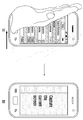
예를 들면, 도 4의 (a)에 도시된 바와 같이 동작 화면 표시 중 터치 스크린(120)의 좌에서 우로 휴대 단말기(100) 사용자의 손날이 통과하면, 제어부(130)는 팜 터치의 이동을 감지할 수 있다. 이 때 제어부(130)는 팜 터치의 이동 방향을 추적하고, 이동 거리를 검출할 수 있다. 그리고 이동 거리가 거리 임계치 이상이면, 제어부(130)는 도 4의 (b)에 도시된 바와 같이 동작 화면을 이미지로 획득(capture)할 수 있다. For example, as shown in FIG. 4 (a), when the hand of the user of the portable terminal 100 passes through the
또는 도 5의 (a)에 도시된 바와 같이 동작 화면 표시 중 터치 스크린(120)의 상부에서 하부로 휴대 단말기(100) 사용자의 손날이 통과하면, 제어부(130)는 팜 터치의 이동을 감지할 수 있다. 이 때 제어부(130)는 팜 터치의 이동 방향을 추적하고, 이동 거리를 검출할 수 있다. 그리고 이동 거리가 거리 임계치 이상이면, 제어부(130)는 도 5의 (b)에 도시된 바와 같이 동작 화면에서 다른 화면으로 전환하여 표시할 수 있다. 이 때 다른 화면은 제어부(130)에서 미리 설정될 수 있으며, 예컨대 홈 화면일 수 있다. 여기서, 제어부(130)는 현재 실행되고 있는 메뉴 또는 어플리케이션을 종료할 수 있다. 또는 제어부(130)는 현재 실행되고 있는 메뉴 또는 어플리케이션을 종료하지 않고, 홈 화면을 표시할 수도 있다. 5 (a), when the hand of the user of the portable terminal 100 passes through the
또는 도 6의 (a)에 도시된 바와 같이 동작 화면 표시 중 터치 스크린(120)에서 휴대 단말기(100) 사용자의 손바닥이 트위스트되면, 제어부(130)는 팜 터치의 이동을 감지할 수 있다. 이 때 제어부(130)는 팜 터치의 터치 위치의 변화를 감지하여 팜 터치의 이동을 감지할 수 있다. 여기서, 제어부(130)는 팜 터치에 해당하는 영역의 경계부에 배치되는 좌표들의 변화를 감지하여 팜 터치의 이동을 감지할 수 있다. 또는 제어부(130)는 팜 터치에 해당하는 영역의 경계부에 배치되는 좌표들을 연결하는 축들 중 장축의 방향 변화를 감지하여 팜 터치의 이동을 감지할 수 있다. 그리고 제어부(130)는 팜 터치의 이동 방향을 추적하고, 이동 거리를 검출할 수 있다. 또한 이동 거리가 거리 임계치 이상이면, 제어부(130)는 도 6의 (b)에 도시된 바와 같이 터치 스크린(120)에 잠금을 설정할 수 있다. 이 때 제어부(130)는 오디오 처리부(150)를 통해 터치 스크린(120)의 잠금을 알리기 위한 오디오 신호를 출력할 수 있다. 6 (a), when the palm of the user of the
한편, 311단계에서 팜 터치에 이동이 없는 것으로 판단되면, 제어부(130)는 317단계에서 팜 터치의 유지 시간을 검출한다. 즉 팜 터치가 유지 범위 내에 해당하는 영역에서 이탈하지 않으면, 제어부(130)는 팜 터치가 이동 없이 유지되고 있는 것으로 판단할 수 있다. 그리고 제어부(130)는 319단계에서 유지 시간을 미리 설정된 시간 임계치와 비교한다. 여기서, 시간 임계치는 단일 수치일 수 있으며, 일정 간격으로 구분되는 다수개의 수치들로 이루어질 수 있다. 즉 제어부(130)는 유지 시간이 시간 임계치 이상인지의 여부를 판단한다. On the other hand, if it is determined in
다음으로, 319단계에서 유지 시간이 시간 임계치 이상인 것으로 판단되면, 제어부(130)는 321단계에서 팜 터치의 터치 동작을 결정하고 그에 대응하는 기능을 수행한다. 이 때 유지 시간이 시간 임계치에 해당하는 수치들 중 하한값 이상이면, 제어부(130)는 유지 시간을 시간 임계치에 해당하는 각각의 수치와 비교한다. 그리고 제어부(130)는 유지 시간에 대응하는 수치를 검출하여 팜 터치의 터치 동작을 결정하고 그에 대응하는 기능을 수행한다. 이 때 제어부(130)는 터치 스크린(120)에서 팜 터치의 해제에 대응하여, 터치 동작을 결정하고 그에 대응하는 기능을 수행할 수 있다. 이 후 제어부(130)는 도 2로 리턴한다. 한편, 319단계에서 유지 시간이 시간 임계치 미만인 것으로 판단되면, 제어부(130)는 도 2로 리턴한다. Next, if it is determined in
예를 들면, 제어부(130)는 도 7의 (a)에 도시된 바와 같이 동작 화면을 표시할 수 있다. 이 때 제어부(130)는 화상 통화 또는 디지털 방송 수신 등을 수행하여 영상 또는 음성 중 적어도 어느 하나를 재생할 수 있다. 그리고 도 7의 (b)에 도시된 바와 같이 동작 화면 표시 중 터치 스크린(120)에서 휴대 단말기(100) 사용자의 손바닥이 접촉되면, 제어부(130)는 팜 터치의 유지를 감지할 수 있다. 이 때 제어부(130)는 팜 터치의 유지 시간을 검출할 수 있다. 그리고 유지 시간이 시간 임계치 이상이면, 제어부(130)는 동작 화면에 대응하여 영상 또는 음성의 재생을 정지시킬 수 있다. 또한 도 7의 (b)에 도시된 바와 같이 영상 또는 음성의 재생이 정지된 상태에서 터치 스크린(120)에서 휴대 단말기(100) 사용자의 손바닥 접촉이 해제되면, 제어부(130)는 도 7의 (a)에 도시된 바와 같이 영상 또는 음성의 재생을 진행할 수 있다. For example, the
또는 제어부(130)는 도 7의 (a)에 도시된 바와 같이 동작 화면을 표시할 수 있다. 이 때 제어부(130)는 영상 또는 음성 중 적어도 어느 하나의 재생을 정지시키고 있을 수 있다. 여기서, 동작 화면은 영상의 정지 화면일 수 있다. 그리고 도 7의 (b)에 도시된 바와 같이 동작 화면 표시 중 터치 스크린(120)에서 휴대 단말기(100) 사용자의 손바닥이 접촉되면, 제어부(!30)는 팜 터치의 유지를 감지할 수 있다. 이 때 제어부(130)는 팜 터치의 유지 시간을 검출할 수 있다. 그리고 유지 시간이 시간 임계치 이상이면, 제어부(130)는 동작 화면에 대응하여 영상 또는 음성의 재생을 진행할 수 있다. Alternatively, the
한편, 217단계에서 터치 면적이 면적 임계치 미만인 것으로 판단되면, 제어부(130)는 221단계에서 터치를 핑거 터치로 파악하고 핑거 터치에 대응하는 기능을 실행하기 위한 핑거 터치 모드를 수행한다. 이 때 터치 면적이 면적 임계치에 해당하는 수치들 중 하한값 미만이면, 제어부(130)는 핑거 터치 모드를 수행할 수 있다. 여기서, 제어부(130)는 핑거 터치의 이동 여부, 이동 거리, 이동 방향 또는 유지 시간 중 적어도 어느 하나에 따라 터치 동작을 더 구분하고, 그에 대응하는 기능을 수행한다. 이러한 핑거 터치 수행 절차를 보다 상세하게 설명하면 다음과 같다. On the other hand, if it is determined in
도 8은 도 2에서 핑거 터치 모드 수행 절차를 도시하는 순서도이다. 그리고 도 9 및 도 10은 도 2에서 핑거 터치 모드 수행 절차를 예시적으로 설명하기 위한 예시도들이다. FIG. 8 is a flowchart illustrating a finger touch mode performing procedure in FIG. And FIGS. 9 and 10 are exemplary diagrams for explaining the finger touch mode performing procedure in FIG. 2 by way of example.
도 8을 참조하면, 제어부(130)는 811단계에서 핑거 터치에 이동이 있는지의 여부를 판단한다. 이 때 제어부(130)는, 핑거 터치가 터치 위치로부터 미리 설정된 유지 범위 내에 해당하는 영역으로부터 이탈하는지의 여부를 확인하여, 핑거 터치의 이동 여부를 판단할 수 있다. Referring to FIG. 8, in
다음으로, 811단계에서 핑거 터치에 이동이 있는 것으로 판단되면, 제어부(130)는 813단계에서 핑거 터치의 이동 방향을 추적하고, 이동 거리를 검출한다. 이 때 핑거 터치의 이동은 핑거 터치의 드래그, 스윕 및 트위스트 등을 포함한다. 그리고 제어부(130)는 815단계에서 이동 거리를 미리 설정된 거리 임계치와 비교한다. 여기서, 거리 임계치는 단일 수치일 수 있으며, 일정 간격으로 구분되는 다수개의 수치들로 이루어질 수 있다. 또한 거리 임계치는 특정 방향에 대응하여 설정될 수 있다. 이 때 제어부(130)는 이동 거리를 거리 임계치와 비교할 수 있으며, 이동 거리를 이동 방향과 연관시켜 거리 임계치와 비교할 수 있다. 즉 제어부(130)는 이동 거리가 거리 임계치 이상인지의 여부를 판단한다. If it is determined in
다음으로, 815단계에서 이동 거리가 거리 임계치 이상인 것으로 판단되면, 제어부(130)는 817단계에서 핑거 터치의 터치 면적이 변경되는지의 여부를 판단한다. 그리고 제어부(130)는 823단계에서 핑거 터치의 터치 면적 변경 여부에 따라 터치 동작을 결정하고 그에 대응하는 기능을 수행한다. 이 때 이동 거리가 거리 임계치에 해당하는 수치들 중 하한값 이상이면, 제어부(130)는 이동 거리를 거리 임계치에 해당하는 각각의 수치와 비교한다. 그리고 제어부(130)는 이동 거리에 대응하는 수치를 검출하여 핑거 터치의 터치 동작을 결정하고 그에 대응하는 기능을 수행한다. 이 때 제어부(130)는 터치 스크린(120)에서 핑거 터치의 해제에 대응하여, 터치 동작을 결정하고 그에 대응하는 기능을 수행할 수 있다. 이 후 제어부(130)는 도 2로 리턴한다. 한편, 815단계에서 이동 거리가 거리 임계치 미만인 것으로 판단되면, 제어부(130)는 도 2로 리턴한다. Next, if it is determined in
예를 들면, 도 9의 (a)에 도시된 바와 같이 동작 화면 표시 중 터치 스크린(120)에서 휴대 단말기(100) 사용자의 손가락이 트위스트되면, 제어부(130)는 핑거 터치의 이동을 감지할 수 있다. 이 때 제어부(130)는 핑거 터치의 터치 위치의 변화를 감지하여 팜 터치의 이동을 감지할 수 있다. 여기서, 제어부(130)는 핑거 터치에 해당하는 영역의 경계부에 배치되는 좌표들의 변화를 감지하여 핑거 터치의 이동을 감지할 수 있다. 또는 제어부(130)는 핑거 터치에 해당하는 영역의 경계부에 배치되는 좌표들을 연결하는 축들 중 장축의 방향 변화를 감지하여 핑거 터치의 이동을 감지할 수 있다. 그리고 제어부(130)는 핑거 터치의 이동 방향을 추적하고, 이동 거리를 검출할 수 있다. 또한 이동 거리가 거리 임계치 이상이면, 제어부(130)는 도 9의 (b)에 도시된 바와 같이 동작 화면을 회전시킬 수 있다. For example, as shown in FIG. 9A, when the finger of the user of the
또는 도 10의 (a)에 도시된 바와 같이 동작 화면 표시 중 터치 스크린(120)일 모서리(corner)의 가장자리에서 내부로 휴대 단말기(100) 사용자의 손가락이 진행(drag)하면, 제어부(130)는 핑거 터치의 이동을 감지할 수 있다. 이 때 제어부(130)는 핑거 터치의 이동 방향을 추적하고, 이동 거리를 검출할 수 있다. 그리고 이동 거리가 거리 임계치 이상이면, 제어부(130)는 도 10의 (b)에 도시된 바와 같이 동작 화면에서 대응하는 모서리를 접는 효과를 표현할 수 있다. 이 후 도 10의 (c)에 도시된 바와 같이 터치 스크린(120)에서 휴대 단말기(100) 사용자의 손가락이 유지되면, 제어부(130)는 핑거 터치에 대응하는 터치 면적이 변경되는지의 여부를 판단할 수 있다. 또한 터치 면적이 변경된 것으로 판단되면, 제어부(130)는 도 10의 (d)에 도시된 바와 같이 동작 화면에 북마크(bookmark) 처리할 수 있다. 즉 제어부(130)는 동작 화면의 위치를 즐겨찾기 목록에 추가하여 기록할 수 있다. When the finger of the user of the
한편, 811단계에서 핑거 터치에 이동이 없는 것으로 판단되면, 제어부(130)는 819단계에서 핑거 터치의 유지 시간을 검출한다. 즉 핑거 터치가 유지 범위 내에 해당하는 영역에서 이탈하지 않으면, 제어부(130)는 핑거 터치가 이동 없이 유지되고 있는 것으로 판단할 수 있다. 그리고 제어부(130)는 821단계에서 유지 시간을 미리 설정된 시간 임계치와 비교한다. 여기서, 시간 임계치는 단일 수치일 수 있으며, 일정 간격으로 구분되는 다수개의 수치들로 이루어질 수 있다. 즉 제어부(130)는 유지 시간이 시간 임계치 이상인지의 여부를 판단한다. On the other hand, if it is determined in
다음으로, 821단계에서 유지 시간이 시간 임계치 이상인 것으로 판단되면, 제어부(130)는 823단계에서 핑거 터치의 터치 동작을 결정하고 그에 대응하는 기능을 수행한다. 이 때 유지 시간이 시간 임계치에 해당하는 수치들 중 하한값 이상이면, 제어부(130)는 유지 시간을 시간 임계치에 해당하는 각각의 수치와 비교한다. 그리고 제어부(130)는 유지 시간에 대응하는 수치를 검출하여 핑거 터치의 터치 동작을 결정하고 그에 대응하는 기능을 수행한다. 이 때 제어부(130)는 터치 스크린(120)에서 핑거 터치의 해제에 대응하여, 터치 동작을 결정하고 그에 대응하는 기능을 수행할 수 있다. 이 후 제어부(130)는 도 2로 리턴한다. 한편, 821단계에서 유지 시간이 시간 임계치 미만인 것으로 판단되면, 제어부(130)는 도 2로 리턴한다. Next, if it is determined in
한편, 전술된 실시예에서 휴대 단말기에서 터치 면적에 따라 팜 터치와 핑거 터치로 구분되는 것으로 기재하였으나, 이에 한정하는 것은 아니다. 즉 휴대 단말기에 다수개의 면적 임계치들이 설정됨에 따라, 휴대 단말기는 면적 임계치들을 이용하여 터치 면적을 다양한 기준 범위에 따라 구분할 수 있다. 그리고 휴대 단말기는 터치 면적을 터치의 이동 여부, 이동 거리, 이동 방향 또는 유지 시간 중 적어도 어느 하나와 조합하여 터치 동작을 결정하고 그에 대응하는 기능을 수행할 수 있다. In the above-described embodiment, the palm touch and the finger touch are classified according to the touch area in the portable terminal, but the present invention is not limited thereto. That is, since a plurality of area threshold values are set in the portable terminal, the portable terminal can distinguish the touch area according to various reference ranges using area thresholds. The portable terminal can determine a touch operation by combining the touch area with at least one of movement, movement distance, movement direction, or holding time of the touch, and perform a corresponding function.
본 발명에 따르면, 휴대 단말기에서 터치 스크린을 통해 감지하기 위한 다양한 터치 동작들이 제안되며, 각각의 터치 동작에 대응하는 사용자 인터페이스가 제공된다. 즉 휴대 단말기는 터치 스크린을 통해 감지되는 터치의 터치 면적, 이동 여부, 이동 거리, 이동 방향 또는 유지 시간 중 적어도 어느 하나로 터치 동작을 결정한다. 그리고 휴대 단말기는 각각의 터치 동작에 대응하여 기능을 수행하기 위한 사용자 인터페이스를 제공한다. 이로 인하여, 휴대 단말기를 사용하는 데 있어서 편의성을 향상시킬 수 있다. According to the present invention, various touch operations for sensing through a touch screen in a portable terminal are proposed, and a user interface corresponding to each touch operation is provided. That is, the portable terminal determines a touch operation by at least one of a touch area, a movement distance, a movement distance, a movement direction, or a retention time of a touch sensed through the touch screen. The portable terminal provides a user interface for performing a function corresponding to each touch operation. Thus, convenience in using the portable terminal can be improved.
한편, 본 명세서와 도면에 개시된 본 발명의 실시예들은 본 발명의 기술 내용을 쉽게 설명하고 본 발명의 이해를 돕기 위해 특정 예를 제시한 것일 뿐이며, 본 발명의 범위를 한정하고자 하는 것은 아니다. 즉 본 발명의 기술적 사상에 바탕을 둔 다른 변형예들이 실시 가능하다는 것은 본 발명이 속하는 기술 분야에서 통상의 지식을 가진 자에게 자명한 것이다. It should be noted that the embodiments of the present invention disclosed in the present specification and drawings are only illustrative of the present invention in order to facilitate the understanding of the present invention and are not intended to limit the scope of the present invention. That is, it will be apparent to those skilled in the art that other modifications based on the technical idea of the present invention are possible.
Claims (20)
스피커;
터치 입력을 수신하는 터치 스크린; 및
프로세서를 포함하고,
상기 프로세서는,
전화 통화를 수신 시, 상기 스피커가 상기 전화 통화에 대응하는 사운드를 출력하도록 제어하고,
상기 사운드 출력 중 수신한 터치 입력이 핑거(finger) 입력 또는 팜(palm) 입력인지 판단하고,
상기 터치 입력이 핑거 입력인 경우 상기 스피커가 상기 사운드를 계속하여 출력하도록 제어하고, 상기 터치 입력이 팜 입력인 경우 상기 스피커가 상기 사운드의 출력을 멈추도록 제어하고,
상기 사운드의 출력이 멈춘 이후, 상기 팜 입력의 지속 시간이 설정된 시간을 초과하여 유지되는 경우 상기 휴대 단말기의 모드 또는 상태를 변경하는 동작을 실행하는 휴대 단말기.
In a portable terminal,
speaker;
A touch screen for receiving a touch input; And
A processor,
The processor comprising:
Upon receiving a telephone call, controlling the speaker to output a sound corresponding to the telephone call,
Determines whether the touch input received during the sound output is a finger input or a palm input,
Controls the speaker to continuously output the sound when the touch input is a finger input, controls the speaker to stop outputting the sound when the touch input is a palm input,
And changing the mode or state of the portable terminal when the duration of the input of the palm is maintained beyond a predetermined time after the output of the sound stops.
상기 프로세서는,
상기 터치 입력에 대응하는 복수의 좌표들 중 적어도 하나에 의해 정의되는 상기 터치 스크린의 터치된 영역을 검출하고,
상기 터치된 영역에 대응하는 복수의 좌표들 중 적어도 하나에 기반하여 상기 터치 입력이 상기 핑거 입력 또는 상기 팜 입력인지 판단하는 휴대 단말기.
The method according to claim 1,
The processor comprising:
Detecting a touched area of the touch screen defined by at least one of a plurality of coordinates corresponding to the touch input,
And determines whether the touch input is the finger input or the palm input based on at least one of a plurality of coordinates corresponding to the touched area.
상기 프로세서는,
상기 터치된 영역이 설정된 영역 임계값을 초과하는 경우, 상기 터치 입력을 상기 팜 입력으로 판단하고,
상기 터치된 영역이 설정된 영역 임계값을 초과하지 않는 경우, 상기 터치 입력을 상기 핑거 입력으로 판단하는 휴대 단말기.
3. The method of claim 2,
The processor comprising:
Determining that the touch input is the input of the palm if the touched area exceeds a set threshold value,
And determines the touch input as the finger input when the touched area does not exceed the set threshold value.
상기 모드 또는 상태를 설정하는 동작은 오디오 신호의 출력을 제어하는 동작을 포함하는 휴대 단말기.
The method according to claim 1,
Wherein the setting of the mode or state includes controlling an output of an audio signal.
상기 모드 또는 상태를 변경하는 동작은 전화 통화와 관련된 동작인 것을 특징으로 하는 휴대 단말기.
The method according to claim 1,
Wherein the mode or state changing operation is an operation related to a telephone call.
상기 프로세서는,
상기 터치 입력이 팜 입력인 경우 실행 중인 어플리케이션을 종료하는 동작, 및 오디오 또는 비디오의 출력을 멈추는 동작 중 적어도 하나를 수행하는 휴대 단말기.
The method according to claim 1,
The processor comprising:
Ending an application being executed when the touch input is a palm input, and stopping outputting audio or video.
전화 통화를 수신 시, 상기 전화 통화에 대응하는 사운드를 출력하는 동작;
상기 사운드 출력 중 터치 입력을 수신하는 동작;
상기 터치 입력이 핑거(finger) 입력 또는 팜(palm) 입력인지 판단하는 동작; 및
상기 터치 입력이 핑거 입력인 경우 상기 사운드를 계속하여 출력하고, 상기 터치 입력이 팜 입력인 경우 상기 사운드의 출력을 멈추는 동작; 및
상기 사운드의 출력이 멈춘 이후, 상기 팜 입력의 지속 시간이 설정된 시간을 초과하여 유지되는 경우 상기 휴대 단말기의 모드 또는 상태를 변경하는 동작을 포함하는 사용자 인터페이스 제공 방법.
A method for providing a user interface in a portable terminal having a touch screen,
Upon receiving a telephone call, outputting a sound corresponding to the telephone call;
Receiving a touch input during the sound output;
Determining whether the touch input is a finger input or a palm input; And
Continuously outputting the sound when the touch input is a finger input, and stopping outputting the sound when the touch input is a palm input; And
And changing the mode or state of the portable terminal when the duration of the input of the palm is maintained beyond a predetermined time after the output of the sound stops.
상기 터치 입력이 핑거 입력 또는 팜 입력인지 판단하는 동작은,
상기 터치 입력에 대응하는 복수의 좌표들 중 적어도 하나에 의해 정의되는 상기 터치 스크린의 터치된 영역을 검출하는 동작; 및
상기 검출된 터치된 영역에 기반하여 상기 터치 입력이 상기 핑거 입력 또는 상기 팜 입력인지 판단하는 동작을 포함하는 사용자 인터페이스 제공 방법.
12. The method of claim 11,
The operation of determining whether the touch input is a finger input or a palm input includes:
Detecting a touched area of the touch screen defined by at least one of a plurality of coordinates corresponding to the touch input; And
And determining whether the touch input is the finger input or the palm input based on the detected touched area.
상기 검출된 터치된 영역에 기반하여 상기 터치 입력이 상기 핑거 입력 또는 상기 팜 입력인지 판단하는 동작은,
상기 터치된 영역이 설정된 영역 임계값을 초과하는 경우, 상기 터치 입력을 상기 팜 입력으로 판단하는 동작; 및
상기 터치된 영역이 설정된 영역 임계값을 초과하지 않는 경우, 상기 터치 입력을 상기 핑거 입력으로 판단하는 동작을 포함하는 사용자 인터페이스 제공 방법.
13. The method of claim 12,
Determining whether the touch input is the finger input or the palm input based on the detected touched area,
Determining the touch input as the palm input if the touched area exceeds a set threshold value; And
And determining the touch input as the finger input if the touched area does not exceed the set threshold value.
상기 모드 또는 상태를 변경하는 동작은 오디오 신호의 출력을 제어하는 동작을 포함하는 사용자 인터페이스 제공 방법.
12. The method of claim 11,
Wherein the changing of the mode or state comprises controlling an output of an audio signal.
상기 모드 또는 상태를 변경하는 동작은 전화 통화와 관련된 동작인 것을 특징으로 하는 사용자 인터페이스 제공 방법.
12. The method of claim 11,
Wherein the mode or state changing operation is an operation related to a telephone call.
상기 터치 입력이 팜 입력인 경우, 실행 중인 어플리케이션을 종료하는 동작, 및 오디오 또는 비디오의 출력을 멈추는 동작 중 적어도 하나를 포함하는 사용자 인터페이스 제공 방법.
12. The method of claim 11,
And terminating an application that is running when the touch input is a palm input; and stopping outputting audio or video when the touch input is a palm input.
Priority Applications (12)
| Application Number | Priority Date | Filing Date | Title |
|---|---|---|---|
| KR1020110087060A KR101962445B1 (en) | 2011-08-30 | 2011-08-30 | Mobile terminal having touch screen and method for providing user interface |
| US13/546,643 US9134902B2 (en) | 2011-08-30 | 2012-07-11 | Mobile terminal having a touch screen and method for providing a user interface therein |
| CN201210300818.6A CN102968267B (en) | 2011-08-30 | 2012-08-22 | Mobile terminal with touch screen and method for providing user interface on mobile terminal |
| CN201710929097.8A CN107608558B (en) | 2011-08-30 | 2012-08-22 | Mobile terminal having touch screen and method for providing user interface in mobile terminal |
| EP12182042.7A EP2565768B1 (en) | 2011-08-30 | 2012-08-28 | Mobile terminal and method of operating a user interface therein |
| EP20216687.2A EP3859505B1 (en) | 2011-08-30 | 2012-08-28 | Mobile terminal and method of operating a user interface therein |
| JP2012188765A JP2013050952A (en) | 2011-08-30 | 2012-08-29 | Mobile terminal having touch screen and user interface providing method thereof |
| US14/833,830 US20150373170A1 (en) | 2011-08-30 | 2015-08-24 | Mobile terminal having a touch screen and method for providing a user interface therein |
| US15/444,488 US10809844B2 (en) | 2011-08-30 | 2017-02-28 | Mobile terminal having a touch screen and method for providing a user interface therein |
| JP2018085165A JP6921781B2 (en) | 2011-08-30 | 2018-04-26 | A mobile terminal having a touch screen and a method for providing a user interface thereof |
| JP2020038253A JP6983932B2 (en) | 2011-08-30 | 2020-03-05 | A mobile terminal having a touch screen and a method for providing a user interface thereof |
| US17/073,499 US11275466B2 (en) | 2011-08-30 | 2020-10-19 | Mobile terminal having a touch screen and method for providing a user interface therein |
Applications Claiming Priority (1)
| Application Number | Priority Date | Filing Date | Title |
|---|---|---|---|
| KR1020110087060A KR101962445B1 (en) | 2011-08-30 | 2011-08-30 | Mobile terminal having touch screen and method for providing user interface |
Related Child Applications (1)
| Application Number | Title | Priority Date | Filing Date |
|---|---|---|---|
| KR1020190031982A Division KR102133272B1 (en) | 2019-03-20 | 2019-03-20 | Mobile terminal having touch screen and method for providing user interface |
Publications (2)
| Publication Number | Publication Date |
|---|---|
| KR20130023943A KR20130023943A (en) | 2013-03-08 |
| KR101962445B1 true KR101962445B1 (en) | 2019-03-26 |
Family
ID=46888293
Family Applications (1)
| Application Number | Title | Priority Date | Filing Date |
|---|---|---|---|
| KR1020110087060A Active KR101962445B1 (en) | 2011-08-30 | 2011-08-30 | Mobile terminal having touch screen and method for providing user interface |
Country Status (5)
| Country | Link |
|---|---|
| US (4) | US9134902B2 (en) |
| EP (2) | EP2565768B1 (en) |
| JP (3) | JP2013050952A (en) |
| KR (1) | KR101962445B1 (en) |
| CN (2) | CN102968267B (en) |
Cited By (3)
| Publication number | Priority date | Publication date | Assignee | Title |
|---|---|---|---|---|
| KR20190032339A (en) * | 2019-03-20 | 2019-03-27 | 삼성전자주식회사 | Mobile terminal having touch screen and method for providing user interface |
| US10809844B2 (en) | 2011-08-30 | 2020-10-20 | Samsung Electronics Co., Ltd. | Mobile terminal having a touch screen and method for providing a user interface therein |
| US12360577B2 (en) | 2020-06-05 | 2025-07-15 | Samsung Electronics Co., Ltd. | Image capture method and electronic device therefor |
Families Citing this family (78)
| Publication number | Priority date | Publication date | Assignee | Title |
|---|---|---|---|---|
| US10705701B2 (en) | 2009-03-16 | 2020-07-07 | Apple Inc. | Device, method, and graphical user interface for moving a current position in content at a variable scrubbing rate |
| US10706096B2 (en) | 2011-08-18 | 2020-07-07 | Apple Inc. | Management of local and remote media items |
| WO2013032187A1 (en) * | 2011-09-01 | 2013-03-07 | Samsung Electronics Co., Ltd. | Mobile terminal for performing screen unlock based on motion and method thereof |
| US9002322B2 (en) | 2011-09-29 | 2015-04-07 | Apple Inc. | Authentication with secondary approver |
| US9846799B2 (en) | 2012-05-18 | 2017-12-19 | Apple Inc. | Efficient texture comparison |
| US9135496B2 (en) | 2012-05-18 | 2015-09-15 | Apple Inc. | Efficient texture comparison |
| US9202099B2 (en) | 2012-06-29 | 2015-12-01 | Apple Inc. | Fingerprint sensing and enrollment |
| US9715616B2 (en) | 2012-06-29 | 2017-07-25 | Apple Inc. | Fingerprint sensing and enrollment |
| US20140003683A1 (en) * | 2012-06-29 | 2014-01-02 | Apple Inc. | Far-Field Sensing for Rotation of Finger |
| US8707454B1 (en) | 2012-07-16 | 2014-04-22 | Wickr Inc. | Multi party messaging |
| JP5842062B2 (en) * | 2012-08-24 | 2016-01-13 | 株式会社Nttドコモ | Apparatus and program for controlling display direction of image |
| CN103106035B (en) * | 2013-02-05 | 2016-05-18 | 惠州Tcl移动通信有限公司 | A kind of mobile terminal and application controls method thereof |
| US9111125B2 (en) | 2013-02-08 | 2015-08-18 | Apple Inc. | Fingerprint imaging and quality characterization |
| US10068120B2 (en) | 2013-03-15 | 2018-09-04 | Apple Inc. | High dynamic range fingerprint sensing |
| WO2014143776A2 (en) | 2013-03-15 | 2014-09-18 | Bodhi Technology Ventures Llc | Providing remote interactions with host device using a wireless device |
| KR101496212B1 (en) * | 2013-03-28 | 2015-02-27 | 주식회사 투게더 | The data transmiting apparatus for recording visiting data of a wireless communication device |
| CN103389876A (en) * | 2013-07-04 | 2013-11-13 | 深圳市创凯电子有限公司 | Function switching method based on touch display equipment and touch display equipment |
| TWI505135B (en) * | 2013-08-20 | 2015-10-21 | Utechzone Co Ltd | Control system for display screen, control apparatus and control method |
| KR102197912B1 (en) * | 2013-08-23 | 2021-01-04 | 삼성전자주식회사 | Method, apparatus and recovering medium for executing a funtion according to a gesture recognition |
| US10463914B2 (en) | 2013-09-10 | 2019-11-05 | Lg Electronics Inc. | Electronic device |
| KR102138516B1 (en) * | 2013-10-11 | 2020-07-28 | 엘지전자 주식회사 | Mobile terminal and method for controlling thereof |
| JP2015090648A (en) * | 2013-11-07 | 2015-05-11 | シャープ株式会社 | Electronic apparatus |
| CN103593140A (en) * | 2013-11-29 | 2014-02-19 | 深圳市金立通信设备有限公司 | Method and terminal for touch screen terminal screen locking |
| US9544649B2 (en) * | 2013-12-03 | 2017-01-10 | Aniya's Production Company | Device and method for capturing video |
| CN104714675B (en) * | 2013-12-13 | 2017-12-05 | 华为终端(东莞)有限公司 | A kind of gesture identification method and device |
| KR102223277B1 (en) * | 2014-01-06 | 2021-03-05 | 엘지전자 주식회사 | Mobile terminal and control method for the mobile terminal |
| US20150205350A1 (en) * | 2014-01-23 | 2015-07-23 | Lenovo (Singapore) Pte. Ltd. | Skin mounted input device |
| EP3101995A4 (en) * | 2014-01-28 | 2017-05-31 | Huawei Device Co., Ltd. | Terminal equipment processing method and terminal equipment |
| CN104915088B (en) * | 2014-03-10 | 2018-10-12 | 联想(北京)有限公司 | A kind of information processing method and electronic equipment |
| JP6328797B2 (en) | 2014-05-30 | 2018-05-23 | アップル インコーポレイテッド | Transition from using one device to using another device |
| KR20160022583A (en) | 2014-08-20 | 2016-03-02 | 삼성전기주식회사 | Touchscreen apparatus and method for sensing touch input |
| KR20160025802A (en) | 2014-08-28 | 2016-03-09 | 삼성전기주식회사 | Touchscreen apparatus and method for sensing touch input |
| CN113824998B (en) | 2014-09-02 | 2024-07-12 | 苹果公司 | Method and apparatus for a music user interface |
| CN105373327B (en) * | 2014-09-02 | 2019-06-25 | 联想(北京)有限公司 | A kind of information processing method and electronic equipment |
| KR20160045233A (en) | 2014-10-16 | 2016-04-27 | 삼성디스플레이 주식회사 | Display apparatus and display apparatus controlling method |
| KR102250780B1 (en) * | 2014-10-20 | 2021-05-11 | 삼성전자주식회사 | Method for controlling security and electronic device thereof |
| CN104461366A (en) * | 2014-12-16 | 2015-03-25 | 小米科技有限责任公司 | Method and device for activating operation state of mobile terminal |
| JP6415344B2 (en) | 2015-02-04 | 2018-10-31 | キヤノン株式会社 | Electronic device and control method thereof |
| CN104991458B (en) * | 2015-06-30 | 2018-10-12 | 联想(北京)有限公司 | Control method and electronic equipment |
| KR20170036424A (en) * | 2015-09-24 | 2017-04-03 | 삼성전자주식회사 | Method for providing event corresponding to touch attribute and electronic device thereof |
| WO2017113357A1 (en) * | 2015-12-31 | 2017-07-06 | 华为技术有限公司 | Floating touch control apparatus and method |
| CN105681553B (en) * | 2016-01-06 | 2020-07-10 | 惠州Tcl移动通信有限公司 | Handheld terminal and misoperation preventing method thereof |
| JP2017183799A (en) * | 2016-03-28 | 2017-10-05 | 京セラ株式会社 | Portable apparatus, control method of portable apparatus, controller of portable apparatus and control program |
| DK179186B1 (en) | 2016-05-19 | 2018-01-15 | Apple Inc | REMOTE AUTHORIZATION TO CONTINUE WITH AN ACTION |
| DK201670622A1 (en) | 2016-06-12 | 2018-02-12 | Apple Inc | User interfaces for transactions |
| CN105867829B (en) * | 2016-06-15 | 2019-05-17 | 维沃移动通信有限公司 | Method and terminal for controlling switching of terminal display interface |
| US11287951B2 (en) * | 2016-09-16 | 2022-03-29 | Google Llc | Systems and methods for a touchscreen user interface for a collaborative editing tool |
| US11431836B2 (en) | 2017-05-02 | 2022-08-30 | Apple Inc. | Methods and interfaces for initiating media playback |
| US10992795B2 (en) | 2017-05-16 | 2021-04-27 | Apple Inc. | Methods and interfaces for home media control |
| US10928980B2 (en) | 2017-05-12 | 2021-02-23 | Apple Inc. | User interfaces for playing and managing audio items |
| CN111343060B (en) | 2017-05-16 | 2022-02-11 | 苹果公司 | Method and interface for home media control |
| US12526361B2 (en) | 2017-05-16 | 2026-01-13 | Apple Inc. | Methods for outputting an audio output in accordance with a user being within a range of a device |
| JP2019028692A (en) * | 2017-07-28 | 2019-02-21 | アルプス電気株式会社 | Input control device, electronic device, input control method, and input control program |
| CN107957812B (en) * | 2017-11-15 | 2021-06-08 | 苏州佳世达电通有限公司 | Touch device and touch device identification method |
| CN108536386A (en) * | 2018-03-30 | 2018-09-14 | 联想(北京)有限公司 | Data processing method, equipment and system |
| CN108664190B (en) | 2018-04-18 | 2019-07-12 | Oppo广东移动通信有限公司 | Page display method, device, mobile terminal and storage medium |
| CN108595078A (en) * | 2018-05-07 | 2018-09-28 | 深圳市万普拉斯科技有限公司 | Touch operation method, device, mobile terminal and computer readable storage medium |
| US11030813B2 (en) * | 2018-08-30 | 2021-06-08 | Snap Inc. | Video clip object tracking |
| KR102667978B1 (en) * | 2019-02-26 | 2024-05-23 | 삼성전자주식회사 | Electronic apparatus and controlling method thereof |
| CA3131489A1 (en) | 2019-02-27 | 2020-09-03 | Louisiana-Pacific Corporation | Fire-resistant manufactured-wood based siding |
| DK201970533A1 (en) | 2019-05-31 | 2021-02-15 | Apple Inc | Methods and user interfaces for sharing audio |
| EP4525423A3 (en) | 2019-05-31 | 2025-05-28 | Apple Inc. | User interfaces for audio media control |
| US10904029B2 (en) | 2019-05-31 | 2021-01-26 | Apple Inc. | User interfaces for managing controllable external devices |
| US10996917B2 (en) | 2019-05-31 | 2021-05-04 | Apple Inc. | User interfaces for audio media control |
| CN110221767A (en) * | 2019-06-13 | 2019-09-10 | 广州视源电子科技股份有限公司 | Control method and device of intelligent interaction equipment |
| CN112417928B (en) * | 2019-08-22 | 2024-03-29 | 深圳富泰宏精密工业有限公司 | Under-screen fingerprint identification method and electronic device |
| US10607432B1 (en) * | 2019-09-04 | 2020-03-31 | Motorola Mobility Llc | Locking a touch screen of a mobile device |
| US11232646B2 (en) | 2019-09-06 | 2022-01-25 | Snap Inc. | Context-based virtual object rendering |
| US10769682B1 (en) * | 2019-09-11 | 2020-09-08 | James Trevor McDonald | Touch and hold system and method to activate and control mobile content |
| EP3846014A1 (en) * | 2019-12-30 | 2021-07-07 | Dassault Systèmes | Unlock of a 3d view |
| CN112306360A (en) * | 2020-02-13 | 2021-02-02 | 北京字节跳动网络技术有限公司 | Man-machine interaction method and device for learning machine |
| US10955988B1 (en) | 2020-02-14 | 2021-03-23 | Lenovo (Singapore) Pte. Ltd. | Execution of function based on user looking at one area of display while touching another area of display |
| US11079913B1 (en) | 2020-05-11 | 2021-08-03 | Apple Inc. | User interface for status indicators |
| US11392291B2 (en) * | 2020-09-25 | 2022-07-19 | Apple Inc. | Methods and interfaces for media control with dynamic feedback |
| WO2022260876A1 (en) | 2021-06-06 | 2022-12-15 | Apple Inc. | User interfaces for audio routing |
| US11847378B2 (en) | 2021-06-06 | 2023-12-19 | Apple Inc. | User interfaces for audio routing |
| CN113849084B (en) * | 2021-09-27 | 2025-07-22 | 联想(北京)有限公司 | Information processing method and electronic equipment |
| KR102512943B1 (en) * | 2022-11-25 | 2023-03-22 | (주) 아하 | Method for identifying user processing touch input on in-cell type touch screen and interactive flat panel display thereof |
Citations (2)
| Publication number | Priority date | Publication date | Assignee | Title |
|---|---|---|---|---|
| US20100020026A1 (en) * | 2008-07-25 | 2010-01-28 | Microsoft Corporation | Touch Interaction with a Curved Display |
| WO2011094936A1 (en) * | 2010-02-04 | 2011-08-11 | Nokia Corporation | User input |
Family Cites Families (76)
| Publication number | Priority date | Publication date | Assignee | Title |
|---|---|---|---|---|
| US5463725A (en) * | 1992-12-31 | 1995-10-31 | International Business Machines Corp. | Data processing system graphical user interface which emulates printed material |
| JP2002373057A (en) | 2001-06-15 | 2002-12-26 | Oki Electric Ind Co Ltd | Method and device for input operation, and program |
| JP3842617B2 (en) * | 2001-10-31 | 2006-11-08 | 株式会社ケンウッド | Touch panel input device, audio device and input method |
| US8698751B2 (en) * | 2010-10-01 | 2014-04-15 | Z124 | Gravity drop rules and keyboard display on a multiple screen device |
| EP1639439A2 (en) | 2003-06-13 | 2006-03-29 | The University Of Lancaster | User interface |
| US7231231B2 (en) * | 2003-10-14 | 2007-06-12 | Nokia Corporation | Method and apparatus for locking a mobile telephone touch screen |
| JP4070745B2 (en) * | 2004-05-21 | 2008-04-02 | 三洋電機株式会社 | Broadcast receiving mobile terminal |
| WO2006006173A2 (en) * | 2004-07-15 | 2006-01-19 | N-Trig Ltd. | Automatic switching for a dual mode digitizer |
| US20060075250A1 (en) * | 2004-09-24 | 2006-04-06 | Chung-Wen Liao | Touch panel lock and unlock function and hand-held device |
| US20060206815A1 (en) * | 2005-03-08 | 2006-09-14 | Pathiyal Krishna K | Handheld electronic device having improved word correction, and associated method |
| US20060227115A1 (en) * | 2005-03-31 | 2006-10-12 | Tyco Electronic Corporation | Method and apparatus for touch sensor with interference rejection |
| US7577925B2 (en) * | 2005-04-08 | 2009-08-18 | Microsoft Corporation | Processing for distinguishing pen gestures and dynamic self-calibration of pen-based computing systems |
| US7813774B2 (en) * | 2006-08-18 | 2010-10-12 | Microsoft Corporation | Contact, motion and position sensing circuitry providing data entry associated with keypad and touchpad |
| US20080055263A1 (en) * | 2006-09-06 | 2008-03-06 | Lemay Stephen O | Incoming Telephone Call Management for a Portable Multifunction Device |
| US20080084400A1 (en) * | 2006-10-10 | 2008-04-10 | Outland Research, Llc | Touch-gesture control of video media play on handheld media players |
| US7770136B2 (en) * | 2007-01-24 | 2010-08-03 | Microsoft Corporation | Gesture recognition interactive feedback |
| KR20080079007A (en) * | 2007-02-26 | 2008-08-29 | 삼성전자주식회사 | Electronic device capable of entering user commands |
| US7884805B2 (en) * | 2007-04-17 | 2011-02-08 | Sony Ericsson Mobile Communications Ab | Using touches to transfer information between devices |
| JP2008305087A (en) * | 2007-06-06 | 2008-12-18 | Toshiba Matsushita Display Technology Co Ltd | Display device |
| US8302033B2 (en) * | 2007-06-22 | 2012-10-30 | Apple Inc. | Touch screen device, method, and graphical user interface for providing maps, directions, and location-based information |
| JP4956292B2 (en) * | 2007-06-25 | 2012-06-20 | パナソニック株式会社 | Information security apparatus and counter control method |
| JP5430572B2 (en) * | 2007-09-14 | 2014-03-05 | インテレクチュアル ベンチャーズ ホールディング 67 エルエルシー | Gesture-based user interaction processing |
| US8004498B1 (en) * | 2007-10-22 | 2011-08-23 | Adobe Systems Incorporated | Systems and methods for multipoint temporary anchoring |
| JP4697551B2 (en) * | 2007-12-21 | 2011-06-08 | ソニー株式会社 | COMMUNICATION DEVICE, INPUT CONTROL METHOD, AND INPUT CONTROL PROGRAM |
| US8099526B2 (en) * | 2008-01-22 | 2012-01-17 | Research In Motion Limited | Method and apparatus for enabling and disabling a lock mode by squeezing or pinching the sides of a portable electronic device towards one another |
| KR20090085470A (en) | 2008-02-04 | 2009-08-07 | 삼성전자주식회사 | Method of providing touch WI for detecting a plurality of touch methods on an item or a desktop and a multimedia device using the same |
| FR2928257B1 (en) * | 2008-03-04 | 2011-01-14 | Super Sonic Imagine | ELECTRONIC SYSTEM FOR DOUBLE SCREEN DISPLAY. |
| US8723811B2 (en) | 2008-03-21 | 2014-05-13 | Lg Electronics Inc. | Mobile terminal and screen displaying method thereof |
| US8421483B2 (en) * | 2008-06-13 | 2013-04-16 | Sony Ericsson Mobile Communications Ab | Touch and force sensing for input devices |
| KR101517967B1 (en) * | 2008-07-07 | 2015-05-06 | 엘지전자 주식회사 | Controlling a Mobile Terminal |
| US8169414B2 (en) * | 2008-07-12 | 2012-05-01 | Lim Seung E | Control of electronic games via finger angle using a high dimensional touchpad (HDTP) touch user interface |
| JP5161690B2 (en) * | 2008-07-31 | 2013-03-13 | キヤノン株式会社 | Information processing apparatus and control method thereof |
| US20100031202A1 (en) * | 2008-08-04 | 2010-02-04 | Microsoft Corporation | User-defined gesture set for surface computing |
| US8604364B2 (en) * | 2008-08-15 | 2013-12-10 | Lester F. Ludwig | Sensors, algorithms and applications for a high dimensional touchpad |
| JP4605279B2 (en) * | 2008-09-12 | 2011-01-05 | ソニー株式会社 | Information processing apparatus, information processing method, and program |
| KR101503835B1 (en) * | 2008-10-13 | 2015-03-18 | 삼성전자주식회사 | Method and apparatus for object management using multi-touch |
| KR101019335B1 (en) * | 2008-11-11 | 2011-03-07 | 주식회사 팬택 | Application control method and system of mobile terminal using gesture |
| KR101556147B1 (en) | 2008-11-12 | 2015-09-30 | 엘지전자 주식회사 | A mobile terminal and a power input method therefor |
| US20100149099A1 (en) * | 2008-12-12 | 2010-06-17 | John Greer Elias | Motion sensitive mechanical keyboard |
| US9134798B2 (en) * | 2008-12-15 | 2015-09-15 | Microsoft Technology Licensing, Llc | Gestures, interactions, and common ground in a surface computing environment |
| JP5261217B2 (en) | 2009-01-30 | 2013-08-14 | キヤノン株式会社 | Display device and display method |
| US8584050B2 (en) * | 2009-03-16 | 2013-11-12 | Apple Inc. | Methods and graphical user interfaces for editing on a multifunction device with a touch screen display |
| US20100238123A1 (en) * | 2009-03-17 | 2010-09-23 | Ozias Orin M | Input Device Gesture To Generate Full Screen Change |
| JP5428436B2 (en) * | 2009-03-25 | 2014-02-26 | ソニー株式会社 | Electronic device, display control method and program |
| JP2010244132A (en) | 2009-04-01 | 2010-10-28 | Mitsubishi Electric Corp | User interface device with touch panel, user interface control method, and user interface control program |
| US20100265185A1 (en) | 2009-04-17 | 2010-10-21 | Nokia Corporation | Method and Apparatus for Performing Operations Based on Touch Inputs |
| JP5206587B2 (en) | 2009-05-26 | 2013-06-12 | ソニー株式会社 | Editing device, editing method and editing program |
| JP5282661B2 (en) * | 2009-05-26 | 2013-09-04 | ソニー株式会社 | Information processing apparatus, information processing method, and program |
| JP2011014044A (en) | 2009-07-03 | 2011-01-20 | Sony Corp | Apparatus and method for controlling operation and computer program |
| US8347232B1 (en) * | 2009-07-10 | 2013-01-01 | Lexcycle, Inc | Interactive user interface |
| CN101615409B (en) * | 2009-07-31 | 2013-03-27 | 华为终端有限公司 | Media playing controlling method, system, media player and earphone wire device |
| CA2771918C (en) * | 2009-08-25 | 2015-06-09 | Google Inc. | Direct manipulation gestures |
| JP5310389B2 (en) | 2009-08-27 | 2013-10-09 | ソニー株式会社 | Information processing apparatus, information processing method, and program |
| US20110057886A1 (en) * | 2009-09-10 | 2011-03-10 | Oliver Ng | Dynamic sizing of identifier on a touch-sensitive display |
| CA2775007A1 (en) * | 2009-09-23 | 2011-03-31 | Dingnan Han | Method and interface for man-machine interaction |
| US9079498B2 (en) * | 2009-10-05 | 2015-07-14 | Tesla Motors, Inc. | Morphing vehicle user interface |
| JP5424475B2 (en) * | 2009-10-13 | 2014-02-26 | 株式会社ジャパンディスプレイ | Information input device, information input method, information input / output device, information input program, and electronic device |
| JP2011101184A (en) | 2009-11-05 | 2011-05-19 | Sony Corp | Photographing device, and method and program for controlling photographing |
| US8487888B2 (en) * | 2009-12-04 | 2013-07-16 | Microsoft Corporation | Multi-modal interaction on multi-touch display |
| KR101657963B1 (en) | 2009-12-08 | 2016-10-04 | 삼성전자 주식회사 | Operation Method of Device based on a alteration ratio of touch area And Apparatus using the same |
| JP2011134271A (en) * | 2009-12-25 | 2011-07-07 | Sony Corp | Information processor, information processing method, and program |
| US10007393B2 (en) * | 2010-01-19 | 2018-06-26 | Apple Inc. | 3D view of file structure |
| CN101866259A (en) * | 2010-01-28 | 2010-10-20 | 宇龙计算机通信科技(深圳)有限公司 | Touch screen unlocking method, system and touch screen device |
| KR101642725B1 (en) * | 2010-04-14 | 2016-08-11 | 삼성전자 주식회사 | Method and apparatus for managing lock function in mobile terminal |
| CA2792987C (en) * | 2010-04-21 | 2014-09-09 | Research In Motion Limited | Method of interacting with a scrollable area on a portable electronic device |
| US8797280B2 (en) * | 2010-05-26 | 2014-08-05 | Atmel Corporation | Systems and methods for improved touch screen response |
| US9110589B1 (en) * | 2010-07-21 | 2015-08-18 | Google Inc. | Tab bar control for mobile devices |
| US20120084728A1 (en) * | 2010-10-05 | 2012-04-05 | Wen-Liang Huang | Button control system for medical touch screen and method thereof |
| JP2011048848A (en) * | 2010-10-27 | 2011-03-10 | Kyocera Corp | Input device and method for controlling the same |
| EP2469389B1 (en) * | 2010-12-24 | 2018-10-10 | Lg Electronics Inc. | Mobile terminal and method for changing page thereof |
| US9235340B2 (en) * | 2011-02-18 | 2016-01-12 | Microsoft Technology Licensing, Llc | Modal touch input |
| US8787984B2 (en) * | 2011-08-03 | 2014-07-22 | Kyocera Corporation | Mobile electronic device and control method for changing setting of locked state on touch screen display |
| KR101962445B1 (en) | 2011-08-30 | 2019-03-26 | 삼성전자 주식회사 | Mobile terminal having touch screen and method for providing user interface |
| US10031586B2 (en) * | 2013-06-12 | 2018-07-24 | Amazon Technologies, Inc. | Motion-based gestures for a computing device |
| WO2015071800A1 (en) | 2013-11-15 | 2015-05-21 | Semiconductor Energy Laboratory Co., Ltd. | Data processor |
| KR102133272B1 (en) | 2019-03-20 | 2020-07-13 | 삼성전자 주식회사 | Mobile terminal having touch screen and method for providing user interface |
-
2011
- 2011-08-30 KR KR1020110087060A patent/KR101962445B1/en active Active
-
2012
- 2012-07-11 US US13/546,643 patent/US9134902B2/en active Active
- 2012-08-22 CN CN201210300818.6A patent/CN102968267B/en active Active
- 2012-08-22 CN CN201710929097.8A patent/CN107608558B/en active Active
- 2012-08-28 EP EP12182042.7A patent/EP2565768B1/en active Active
- 2012-08-28 EP EP20216687.2A patent/EP3859505B1/en active Active
- 2012-08-29 JP JP2012188765A patent/JP2013050952A/en active Pending
-
2015
- 2015-08-24 US US14/833,830 patent/US20150373170A1/en not_active Abandoned
-
2017
- 2017-02-28 US US15/444,488 patent/US10809844B2/en active Active
-
2018
- 2018-04-26 JP JP2018085165A patent/JP6921781B2/en active Active
-
2020
- 2020-03-05 JP JP2020038253A patent/JP6983932B2/en active Active
- 2020-10-19 US US17/073,499 patent/US11275466B2/en active Active
Patent Citations (2)
| Publication number | Priority date | Publication date | Assignee | Title |
|---|---|---|---|---|
| US20100020026A1 (en) * | 2008-07-25 | 2010-01-28 | Microsoft Corporation | Touch Interaction with a Curved Display |
| WO2011094936A1 (en) * | 2010-02-04 | 2011-08-11 | Nokia Corporation | User input |
Cited By (5)
| Publication number | Priority date | Publication date | Assignee | Title |
|---|---|---|---|---|
| US10809844B2 (en) | 2011-08-30 | 2020-10-20 | Samsung Electronics Co., Ltd. | Mobile terminal having a touch screen and method for providing a user interface therein |
| US11275466B2 (en) | 2011-08-30 | 2022-03-15 | Samsung Electronics Co., Ltd. | Mobile terminal having a touch screen and method for providing a user interface therein |
| KR20190032339A (en) * | 2019-03-20 | 2019-03-27 | 삼성전자주식회사 | Mobile terminal having touch screen and method for providing user interface |
| KR102133272B1 (en) * | 2019-03-20 | 2020-07-13 | 삼성전자 주식회사 | Mobile terminal having touch screen and method for providing user interface |
| US12360577B2 (en) | 2020-06-05 | 2025-07-15 | Samsung Electronics Co., Ltd. | Image capture method and electronic device therefor |
Also Published As
| Publication number | Publication date |
|---|---|
| EP3859505B1 (en) | 2024-03-27 |
| US11275466B2 (en) | 2022-03-15 |
| US20210034190A1 (en) | 2021-02-04 |
| US10809844B2 (en) | 2020-10-20 |
| EP2565768A2 (en) | 2013-03-06 |
| CN102968267B (en) | 2017-11-03 |
| JP2020091912A (en) | 2020-06-11 |
| US20130053107A1 (en) | 2013-02-28 |
| KR20130023943A (en) | 2013-03-08 |
| JP2013050952A (en) | 2013-03-14 |
| CN102968267A (en) | 2013-03-13 |
| US9134902B2 (en) | 2015-09-15 |
| EP2565768B1 (en) | 2020-12-23 |
| JP6921781B2 (en) | 2021-08-18 |
| JP2018120636A (en) | 2018-08-02 |
| US20150373170A1 (en) | 2015-12-24 |
| CN107608558B (en) | 2022-01-14 |
| EP2565768A3 (en) | 2017-03-01 |
| CN107608558A (en) | 2018-01-19 |
| EP3859505C0 (en) | 2024-03-27 |
| US20170168645A1 (en) | 2017-06-15 |
| EP3859505A1 (en) | 2021-08-04 |
| JP6983932B2 (en) | 2021-12-17 |
Similar Documents
| Publication | Publication Date | Title |
|---|---|---|
| KR101962445B1 (en) | Mobile terminal having touch screen and method for providing user interface | |
| KR101870848B1 (en) | Side menu displaying method and apparatus and terminal | |
| KR101648747B1 (en) | Method for providing user interface using a plurality of touch sensor and mobile terminal using the same | |
| CN107466077B (en) | Network switching method and mobile terminal | |
| KR102209910B1 (en) | Coordinate measuring apparaturs which measures input position of coordinate indicating apparatus and method for controlling thereof | |
| CN104536684B (en) | interface display method and device | |
| KR20130099717A (en) | Apparatus and method for providing user interface based on touch screen | |
| KR20090066368A (en) | A mobile terminal having a touch screen and a method of controlling the function thereof | |
| CN102782631A (en) | Screen control method and apparatus for mobile terminal having multiple touch screens | |
| KR20120074490A (en) | Apparatus and method for displaying menu of portable terminal | |
| CN104657689B (en) | A kind of contact action control method and device of mobile terminal | |
| CN109032447B (en) | Icon processing method and mobile terminal | |
| KR102133272B1 (en) | Mobile terminal having touch screen and method for providing user interface | |
| KR102249182B1 (en) | Mobile terminal having touch screen and method for providing user interface | |
| KR102197912B1 (en) | Method, apparatus and recovering medium for executing a funtion according to a gesture recognition | |
| CN105468194B (en) | Touch-control response method and device | |
| CN116449977A (en) | Ghost point detection method and device, electronic equipment and storage medium | |
| KR20150081496A (en) | Method for controlling audio device using touch sensors | |
| CN105573642A (en) | Method and device for triggering application programs of terminal |
Legal Events
| Date | Code | Title | Description |
|---|---|---|---|
| PA0109 | Patent application |
Patent event code: PA01091R01D Comment text: Patent Application Patent event date: 20110830 |
|
| PG1501 | Laying open of application | ||
| AMND | Amendment | ||
| PA0201 | Request for examination |
Patent event code: PA02012R01D Patent event date: 20160830 Comment text: Request for Examination of Application Patent event code: PA02011R01I Patent event date: 20110830 Comment text: Patent Application |
|
| E902 | Notification of reason for refusal | ||
| PE0902 | Notice of grounds for rejection |
Comment text: Notification of reason for refusal Patent event date: 20170804 Patent event code: PE09021S01D |
|
| AMND | Amendment | ||
| E601 | Decision to refuse application | ||
| PE0601 | Decision on rejection of patent |
Patent event date: 20180323 Comment text: Decision to Refuse Application Patent event code: PE06012S01D Patent event date: 20170804 Comment text: Notification of reason for refusal Patent event code: PE06011S01I |
|
| AMND | Amendment | ||
| PX0901 | Re-examination |
Patent event code: PX09011S01I Patent event date: 20180323 Comment text: Decision to Refuse Application Patent event code: PX09012R01I Patent event date: 20171103 Comment text: Amendment to Specification, etc. Patent event code: PX09012R01I Patent event date: 20160830 Comment text: Amendment to Specification, etc. |
|
| E90F | Notification of reason for final refusal | ||
| PE0902 | Notice of grounds for rejection |
Comment text: Final Notice of Reason for Refusal Patent event date: 20180524 Patent event code: PE09021S02D |
|
| AMND | Amendment | ||
| PX0701 | Decision of registration after re-examination |
Patent event date: 20181220 Comment text: Decision to Grant Registration Patent event code: PX07013S01D Patent event date: 20180821 Comment text: Amendment to Specification, etc. Patent event code: PX07012R01I Patent event date: 20180425 Comment text: Amendment to Specification, etc. Patent event code: PX07012R01I Patent event date: 20180323 Comment text: Decision to Refuse Application Patent event code: PX07011S01I Patent event date: 20171103 Comment text: Amendment to Specification, etc. Patent event code: PX07012R01I Patent event date: 20160830 Comment text: Amendment to Specification, etc. Patent event code: PX07012R01I |
|
| X701 | Decision to grant (after re-examination) | ||
| A107 | Divisional application of patent | ||
| GRNT | Written decision to grant | ||
| PA0107 | Divisional application |
Comment text: Divisional Application of Patent Patent event date: 20190320 Patent event code: PA01071R01D |
|
| PR0701 | Registration of establishment |
Comment text: Registration of Establishment Patent event date: 20190320 Patent event code: PR07011E01D |
|
| PR1002 | Payment of registration fee |
Payment date: 20190321 End annual number: 3 Start annual number: 1 |
|
| PG1601 | Publication of registration | ||
| PR1001 | Payment of annual fee |
Payment date: 20220225 Start annual number: 4 End annual number: 4 |
|
| PR1001 | Payment of annual fee |
Payment date: 20240228 Start annual number: 6 End annual number: 6 |