KR101257983B1 - Input device - Google Patents
Input device Download PDFInfo
- Publication number
- KR101257983B1 KR101257983B1 KR1020107003650A KR20107003650A KR101257983B1 KR 101257983 B1 KR101257983 B1 KR 101257983B1 KR 1020107003650 A KR1020107003650 A KR 1020107003650A KR 20107003650 A KR20107003650 A KR 20107003650A KR 101257983 B1 KR101257983 B1 KR 101257983B1
- Authority
- KR
- South Korea
- Prior art keywords
- input
- character
- function
- key
- display
- Prior art date
- Legal status (The legal status is an assumption and is not a legal conclusion. Google has not performed a legal analysis and makes no representation as to the accuracy of the status listed.)
- Expired - Fee Related
Links
Images


Classifications
-
- G—PHYSICS
- G06—COMPUTING OR CALCULATING; COUNTING
- G06F—ELECTRIC DIGITAL DATA PROCESSING
- G06F3/00—Input arrangements for transferring data to be processed into a form capable of being handled by the computer; Output arrangements for transferring data from processing unit to output unit, e.g. interface arrangements
- G06F3/01—Input arrangements or combined input and output arrangements for interaction between user and computer
- G06F3/048—Interaction techniques based on graphical user interfaces [GUI]
- G06F3/0487—Interaction techniques based on graphical user interfaces [GUI] using specific features provided by the input device, e.g. functions controlled by the rotation of a mouse with dual sensing arrangements, or of the nature of the input device, e.g. tap gestures based on pressure sensed by a digitiser
- G06F3/0489—Interaction techniques based on graphical user interfaces [GUI] using specific features provided by the input device, e.g. functions controlled by the rotation of a mouse with dual sensing arrangements, or of the nature of the input device, e.g. tap gestures based on pressure sensed by a digitiser using dedicated keyboard keys or combinations thereof
-
- G—PHYSICS
- G06—COMPUTING OR CALCULATING; COUNTING
- G06F—ELECTRIC DIGITAL DATA PROCESSING
- G06F3/00—Input arrangements for transferring data to be processed into a form capable of being handled by the computer; Output arrangements for transferring data from processing unit to output unit, e.g. interface arrangements
- G06F3/01—Input arrangements or combined input and output arrangements for interaction between user and computer
- G06F3/02—Input arrangements using manually operated switches, e.g. using keyboards or dials
- G06F3/023—Arrangements for converting discrete items of information into a coded form, e.g. arrangements for interpreting keyboard generated codes as alphanumeric codes, operand codes or instruction codes
- G06F3/0233—Character input methods
- G06F3/0236—Character input methods using selection techniques to select from displayed items
-
- H—ELECTRICITY
- H04—ELECTRIC COMMUNICATION TECHNIQUE
- H04M—TELEPHONIC COMMUNICATION
- H04M1/00—Substation equipment, e.g. for use by subscribers
- H04M1/02—Constructional features of telephone sets
- H04M1/23—Construction or mounting of dials or of equivalent devices; Means for facilitating the use thereof
-
- H—ELECTRICITY
- H04—ELECTRIC COMMUNICATION TECHNIQUE
- H04M—TELEPHONIC COMMUNICATION
- H04M2250/00—Details of telephonic subscriber devices
- H04M2250/70—Details of telephonic subscriber devices methods for entering alphabetical characters, e.g. multi-tap or dictionary disambiguation
Landscapes
- Engineering & Computer Science (AREA)
- General Engineering & Computer Science (AREA)
- Theoretical Computer Science (AREA)
- Human Computer Interaction (AREA)
- Physics & Mathematics (AREA)
- General Physics & Mathematics (AREA)
- Input From Keyboards Or The Like (AREA)
- Telephone Function (AREA)
- Telephone Set Structure (AREA)
Abstract
효율적인 문자 입력과 기능 실행을 가능하게 하여 조작성을 향상시킬 수 있는 입력 장치를 제공한다.
누른 문자 입력 키(14)에 할당된 다른 복수의 문자 종류에 대응하는 각각의 문자 코드를 주 제어부(121)가 생성하고, 이 생성된 상이한 복수의 문자 종류의 문자 코드를 RAM(121b)에 기억해 두고, RAM(121b)으로부터 판독한 각각의 문자 코드를 캐릭터 생성기 ROM(117a)에 의해 각각의 문자 캐릭터 코드로 변환하고, 이 변환된 상이한 복수의 문자 종류의 문자 캐릭터 코드를 디스플레이부(21)의 동일한 화면에 표시한다. Provides an input device that can improve the operability by enabling efficient character input and function execution.
The main control unit 121 generates each character code corresponding to the plurality of different character types assigned to the pressed character input keys 14, and stores the generated character codes of the plurality of different character types in the RAM 121b. Each character code read from the RAM 121b is converted into each character character code by the character generator ROM 117a, and the converted character character codes of the plurality of different character types are converted into the character strings of the display unit 21. Display on the same screen.
Description
본 발명은 입력 장치에 관한 것이며, 예컨대, 분할 화면으로의 효율적인 문자 입력과 기능 실행을 제공할 수 있는 입력 장치에 관한 것이다.
The present invention relates to an input device, for example, to an input device capable of providing efficient character input and function execution to a split screen.
종래의 휴대 전화기에 있어서는, 메일(mail) 기능 등을 실행하고, 메모 등의 문장을 문자 입력 기능을 이용하여 메모장에 써서 보존하는 기술이나, 문장을 본문에 기재하여 메일을 송신하는 기술 등이 공지의 기술로서 알려져 있다. Background Art In the conventional cellular phone, a technique for executing a mail function or the like and storing a sentence such as a memo on a notepad using a text input function, a technique for writing a sentence in the body and sending a mail are known. It is known as a technique.
종래의 문자 입력 기능에서는, 우선 유저가, 예컨대 메모장 기능 등의 문자 입력을 행하기 위한 기능을 실행하고 나서, 문자 입력을 행하도록 기능 구성되어 있었다. 종래의 휴대 전화기에서는, 예컨대, 메모장 기능을 호출하는 경우, 「수신 대기 화면」 ⇒ 「메인 메뉴」 ⇒ 「편리한 기능」 ⇒ 「메모장」 ⇒ 「신규 작성」의 5 단계의 호출 조작을 행할 필요가 있다. In the conventional character input function, a function is configured so that a user inputs a character after performing a function for inputting a character such as a memo pad function first. In the conventional mobile phone, for example, when calling the memo pad function, it is necessary to perform the call operation of five steps of "reception wait screen" ⇒ "main menu" ⇒ "convenient function" ⇒ "notepad" ⇒ "new creation" .
또한, 특허 문헌 1에는, 기존의 문장을 2개 판독하고, 화면상에서 분할 표시하고, 하나의 문장으로서 편집하기 위한 기술이 기재되어 있다. 또한, 특허 문헌 2에는, 화면의 영역을 구분하여 선택하게 함으로써 화면상의 포인터의 이동을 쉽게 하기 위한 기술이 기재되어 있다.
(특허 문헌 1) 일본 공개 특허 공보 평 5-342206 호 (Patent Document 1) JP 5-342206 A
(특허 문헌 2) 일본 공개 특허 공보 제 2002-14773 호
(Patent Document 2) Japanese Unexamined Patent Publication No. 2002-14773
그러나 종래의 문자 입력 기능에서는, 우선 유저가 문자 입력을 행하기 위한 기능을 개시하고 나서, 문자 입력을 행하도록 기능 구성되어 있다. 그 때문에, 전화중에 바로 메모를 하고 싶은 경우, 우선 메모장 기능을 호출할 필요가 있고, 다단계의 호출 조작을 하는 동안에 메모하고자 했던 것을 잊어 버린다는 것도 생각된다. However, in the conventional character input function, the function is configured so that the user first starts a function for inputting a character and then enters a character. For this reason, if you want to take notes right on the phone, you need to call the notepad function first, and you may forget that you wanted to take notes during the multi-level call operation.
이와 같이, 종래의 휴대 전화기에서는, 소정의 기능(예컨대 메모 작성이나 메일 작성 등)을 행하기 위해서 문자를 입력할 때, 사전에 소망하는 기능을 실행해 두고, 그 다음에 문자 입력(문장, 수신인 주소나 성명 등)을 행하기 때문에, 번잡한 키 조작을 행할 필요가 있었다. 이 때문에, 유저의 조작성을 나쁘게 하는 경우가 있었다. As described above, in the conventional cellular phone, when a character is input in order to perform a predetermined function (for example, writing a memo or writing a mail), the desired function is executed in advance, and then the character input (a sentence, a recipient) is performed. Address, name, etc.), it is necessary to perform complicated key operation. For this reason, the operability of a user may worsen.
본 발명은, 상기에 감안하여 이루어진 것으로, 그 목적으로서는, 효율적인 문자 입력과 기능 실행을 가능하게 하여 조작성을 향상시킬 수 있는 입력 장치를 제공하는 것에 있다.
SUMMARY OF THE INVENTION The present invention has been made in view of the above, and an object thereof is to provide an input device capable of enabling efficient character input and function execution and improving operability.
본 발명에 따른 입력 장치는, 상기 과제를 해결하기 위해서, 조작된 키에 할당된 적어도 2 이상의 입력 종별의 각각에 대응하는 입력 정보를 각각 생성하는 제 1 생성 수단과, 상기 각각 입력 정보에 대응하는 화상 정보를 생성하는 제 2 생성 수단과, 상기 각각 화상 정보에 근거하는 화상을 동일한 화면에 표시하는 표시 수단을 구비하는 것을 특징으로 한다. In order to solve the said subject, the input device which concerns on this invention is the 1st generation means which respectively produces | generates the input information corresponding to each of the at least 2 or more input types assigned to the operated key, and respond | corresponds to said each input information. And second display means for generating image information, and display means for displaying images based on the image information on the same screen, respectively.
또한, 입력 장치에서는, 상기 표시되는 화상에 대응하는 기능 키로서, 소정의 기능의 실행을 지시하는 기능 키가 조작된 것을 검지하는 검지 수단과, 상기 기능 키의 조작의 검지에 근거하여, 상기 화상의 입력 정보에 근거한 상기 소정의 기능을 실행하는 제 1 실행 수단을 구비하는 것이 바람직하다. Further, in the input device, as the function key corresponding to the displayed image, detection means for detecting that a function key for instructing execution of a predetermined function has been operated, and the image based on detection of the operation of the function key. It is preferable to include a first execution means for executing the predetermined function based on the input information of.
또한, 입력 장치에서는, 상기 기능 키의 조작 시간에 근거하여, 상기 소정의 기능을 변경하는 제 1 변경 수단을 구비하는 것이 바람직하다. Moreover, it is preferable that an input device is provided with the 1st change means which changes the said predetermined function based on the operation time of the said function key.
또한, 입력 장치에서는, 상기 화면에 표시된 문자 종류를 선택하기 위한 문자 종류 선택 키를 구비하고, 상기 문자 종류 선택 키의 조작에 의해 문자 종류가 선택된 경우에, 상기 선택된 문자 종류에 대응한 소정의 기능을 실행하는 제 2 실행 수단을 구비하는 것이 바람직하다. Further, the input device includes a character type selection key for selecting a character type displayed on the screen, and when a character type is selected by the operation of the character type selection key, a predetermined function corresponding to the selected character type. It is preferable to have a second execution means for executing.
또한, 입력 장치에서는, 상기 화면에 표시된 문자 종류를 선택하기 위한 커서를 구비하고, 상기 표시 수단은 문자 종류와 함께 상기 문자 종류를 선택한 경우에 실행되는 기능을 표시하고, 상기 커서로부터의 입력에 의해 상기 문자 종류가 선택된 경우에, 상기 문자 종류와 함께 실행되는 기능을 실행하는 제 3 실행 수단을 구비하는 것이 바람직하다. In addition, the input device includes a cursor for selecting a character type displayed on the screen, and the display means displays a function to be executed when the character type is selected together with the character type, and by input from the cursor. In the case where the character type is selected, it is preferable to include third execution means for executing a function to be executed together with the character type.
본 발명에 따른 입력 장치는, 상기 과제를 해결하기 위해서, 상기 화면에 표시되는 화상 중 어느 하나의 화상을 선택하는 선택 수단과, 상기 선택 수단에 의한 선택에 근거하여, 상기 화면에 표시되는 적어도 1 이상의 소프트 키의 표시를 변경하는 제 2 변경 수단과, 상기 소프트 키의 표시에 대응하는 키가 조작되는 것에 의해, 상기 선택된 화상의 입력 정보에 근거한 상기 소프트 키의 기능을 실행하는 제 3 실행 수단을 구비하는 것이 바람직하다. In order to solve the said subject, the input device which concerns on this invention is a selection means which selects any one image of the image displayed on the said screen, and at least 1 displayed on the said screen based on the selection by the said selection means. Second changing means for changing the display of the soft key described above, and third execution means for executing the function of the soft key based on input information of the selected image by operating a key corresponding to the display of the soft key. It is preferable to provide.
또한, 입력 장치에서는, 상기 입력 종별이, 히라가나, 숫자, 영자, 가타카나 및 기호 중 적어도 어느 하나의 입력 종별을 포함하는 것이 바람직하다. Moreover, in an input device, it is preferable that the said input type contains the input type of at least any one of a hiragana, a number, an English alphabet, a katakana, and a symbol.
또한, 입력 장치에서는, 상기 입력 종별 중에서 상기 화면에 표시하는 입력 종별을 설정하는 설정 수단을 구비하는 것이 바람직하다. Moreover, it is preferable that an input device is provided with the setting means which sets the input type displayed on the said screen among the said input types.
또한, 입력 장치에서는, 상기 화상이 표시되는 화면 또는 상기 화상이 표시되기 직전의 화면은 유저로부터의 입력을 수신 대기하는 수신 대기 화면인 것이 바람직하다.
In the input device, it is preferable that the screen on which the image is displayed or the screen immediately before the image is displayed is a reception waiting screen for receiving an input from a user.
본 발명에 따르면, 효율적인 문자 입력과 기능 실행을 가능하게 하여 조작성을 향상시킬 수 있다.
According to the present invention, the operability can be improved by enabling efficient character input and function execution.
도 1은 본 발명에 따른 휴대 단말 장치의 일례인 휴대 전화 장치(1)의 외관 사시도를 나타내는 도면이다.
도 2는 휴대 전화 장치(1)를 접은 상태의 사시도를 나타내는 도면이다.
도 3은 조작부측 하우징(2)에 내장되는 부재의 분해 사시도를 나타내는 도면이다.
도 4는 표시부측 하우징(3)에 내장되는 부재의 분해 사시도를 나타내는 도면이다.
도 5a는 조작부측 하우징(2)의 전면(前面) 패널(2a)에 마련된 키의 배치도(배치도 1)를 나타내는 도면이다.
도 5b는 조작부측 하우징(2)의 전면 패널(2a)에 마련된 키의 텐 키(ten key) 부분의 확대 배치도(배치도 2)를 나타내는 도면이다.
도 6은 휴대 전화 장치(1)의 기능을 설명하기 위한 블록도를 나타내는 도면이다.
도 7은 본 발명의 제 1 실시예에 대하여 설명하기 위한 흐름도이다.
도 8은 ROM(121a)에 기억되는 숫자 코드, 히라가나 코드, 영자 코드, 가타카나 코드, 기호 코드, 그 외의 코드를 나타내는 도면이다.
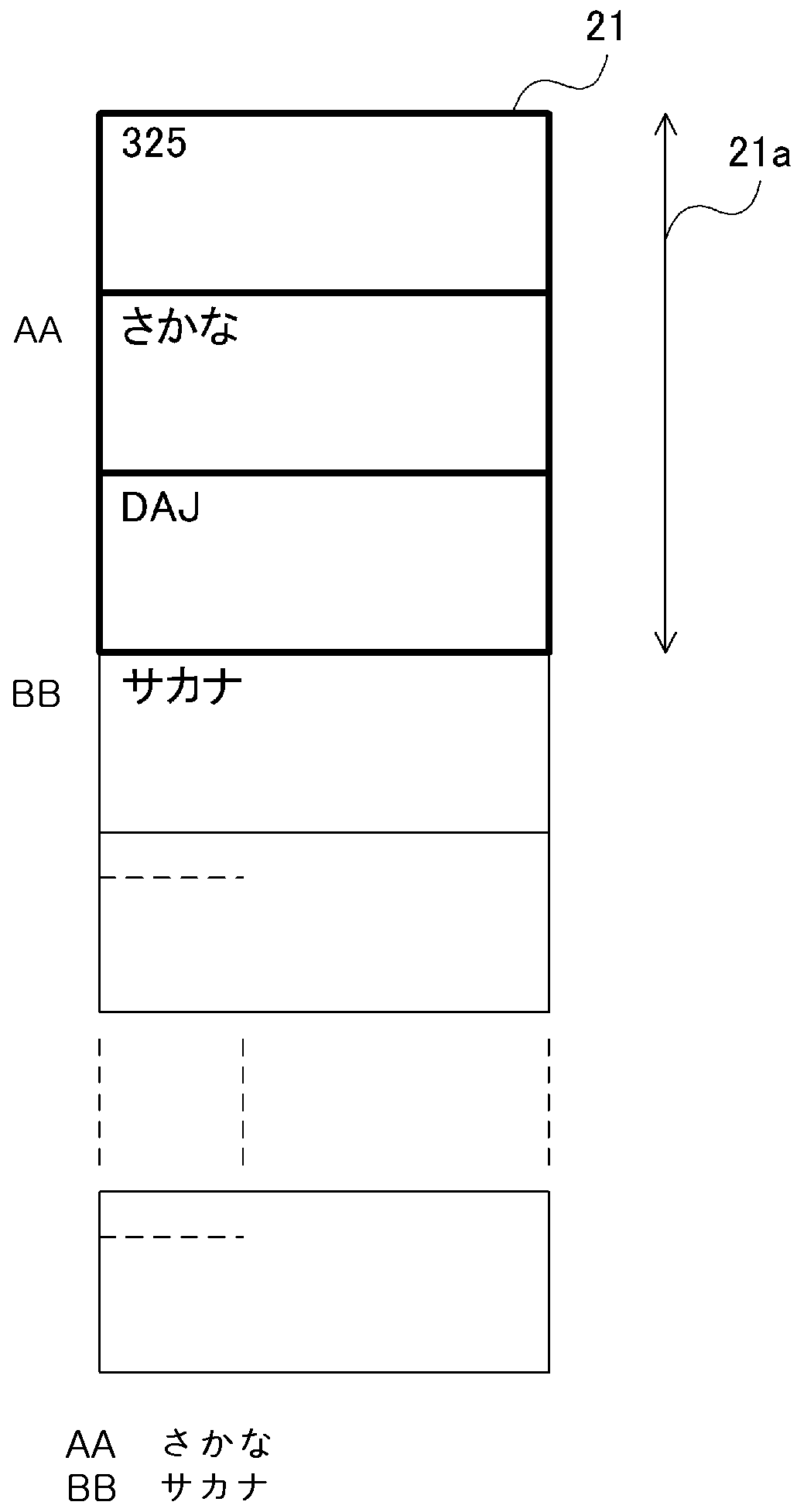
도 9는 디스플레이부(21)의 표시 영역(21a)에 표시되는 다른 문자 캐릭터(character)의 화상을 나타내는 도면이다.
도 10은 휴대 전화 장치(1)의 기능 처리를 실행하기 위한 서브루틴을 나타내는 흐름도이다.
도 11은 본 발명의 제 2 실시예에 대하여 설명하기 위한 흐름도이다.
도 12는 휴대 전화 장치(1)의 기능 처리를 실행하기 위한 서브루틴을 나타내는 흐름도이다.
도 13은 본 발명의 제 3 실시예에 대하여 설명하기 위한 흐름도이다.
도 14는 디스플레이부(21)의 표시 영역(21a)에 표시되는 다른 문자 캐릭터의 화상을 나타내는 도면이다.
도 15는 휴대 전화 장치(1)의 기능 처리를 실행하기 위한 서브루틴을 나타내는 흐름도이다.
도 16은 본 발명의 제 4 실시예에 대하여 설명하기 위한 흐름도이다.
도 17은 휴대 전화 장치(1)의 기능 처리를 실행하기 위한 서브루틴을 나타내는 흐름도이다.
도 18은 디스플레이부(21)의 수신 대기 화면에 표시되는 다른 문자 종류의 문자 캐릭터의 화상과 문자 종류에 대응하는 기능 소프트 키를 나타내는 도면이다.
도 19는 주 제어부(121)에 의해 참조되는 기능 소프트 키 테이블의 내용을 나타내는 도면이다. 1 is a view showing an external perspective view of a
2 is a diagram illustrating a perspective view of a state in which the
3 is an exploded perspective view of a member incorporated in the operation
4 is an exploded perspective view of the member incorporated in the display
FIG. 5: A is a figure which shows the layout (arrangement figure 1) of the key provided in the
FIG. 5B is a diagram illustrating an enlarged arrangement view (arrangement diagram 2) of a ten key portion of a key provided on the
6 is a block diagram for explaining the function of the
7 is a flowchart for explaining the first embodiment of the present invention.
8 is a diagram showing a numeric code, a hiragana code, an English code, a katakana code, a symbol code, and other codes stored in the
9 is a diagram illustrating an image of another character character displayed on the
10 is a flowchart showing a subroutine for executing the functional processing of the
11 is a flowchart for explaining a second embodiment of the present invention.
12 is a flowchart showing a subroutine for executing the functional processing of the
13 is a flowchart for explaining a third embodiment of the present invention.
14 is a diagram illustrating an image of another character character displayed on the
15 is a flowchart showing a subroutine for executing the functional processing of the
16 is a flowchart for explaining a fourth embodiment of the present invention.
17 is a flowchart showing a subroutine for executing the functional processing of the
18 is a diagram showing images of character characters of different character types and function soft keys corresponding to the character types displayed on the reception standby screen of the
19 is a diagram illustrating the contents of the function soft key table referenced by the
이하, 도면을 참조하여 본 발명을 실시하기 위한 형태를 설명한다. 한편, 이하, 휴대 단말 장치의 일례로서 휴대 전화 장치에 대하여 설명하지만, 본 발명은 이것에 한정되는 것이 아니라, PHS(Personal Handy phone System), PDA(Personal Digital Assistant), 휴대 가능 네비게이션(portability navigation) 장치, 노트북 컴퓨터 등의 다른 휴대 단말 장치이더라도 좋다.
EMBODIMENT OF THE INVENTION Hereinafter, the form for implementing this invention is demonstrated with reference to drawings. On the other hand, hereinafter, a mobile telephone apparatus will be described as an example of a portable terminal apparatus. However, the present invention is not limited to this, but the personal handy phone system (PHS), personal digital assistant (PDA), and portability navigation are described. It may be another portable terminal device such as a device or a notebook computer.
<제 1 실시예> ≪
도 1은 본 발명에 따른 휴대 단말 장치의 일례인 휴대 전화 장치(1)의 외관 사시도를 나타낸다. 1 shows an external perspective view of a
휴대 전화 장치(1)는, 표면이 전면 패널(2a)과 전면 케이스(2b)와 후면 케이스(2c)와 도시하지 않는 후면 패널(2d)에 의해 구성되는 조작부측 하우징(2)(제 1 하우징)과, 표면이 전면 패널(3a)과 전면 케이스(3b)와 후면 케이스(3c)(도 2)와 후면 패널(3d)(도 2)에 의해 구성되는 표시부측 하우징(3)(제 2 하우징)을 구비하고 있다. The
조작부측 하우징(2)은, 조작 키 군(11)과, 휴대 전화 장치(1)의 사용자가 통화시에 말한 음성이 입력되는 음성 입력부(12)가 전면 패널(2a)의 표면에 노출되어 있다. 조작 키 군(11)은, 각종 설정이나 전화 번호부 기능이나 메일 기능 등의 각종 기능을 작동시키기 위한 기능 설정 조작 키(13)와, 전화 번호의 숫자나 메일 등의 문자 등을 입력하기 위한 문자 입력 키(14)와, 각종 조작에 있어서의 결정이나 스크롤 등을 행하는 결정 조작 키(15)로 구성되어 있다. 조작부측 하우징(2)의 측면에는, 외부 기기(예컨대, 호스트 장치)와 통신을 행하기 위한 인터페이스를 덮는 캡(cap)이 마련되어 있다. As for the operation
표시부측 하우징(3)은, 전면 패널(3a)에, 각종 정보를 표시하기 위한 디스플레이부(21)와, 통화 상대측의 음성을 출력하는 음성 출력부(22)가 노출되어 있다. In the display
조작부측 하우징(2)의 상단부와 표시부측 하우징(3)의 하단부는, 도 1에 나타낸 바와 같이, 힌지(hinge) 기구(4)(연결부)를 통해서 연결되어 있다. 즉, 힌지 기구(4)는 조작부측 하우징(2)의 일단부측(상단부)과 표시부측 하우징(3)의 일단부측(하단부)을 회전 운동 가능하게 연결한다. 또한, 휴대 전화 장치(1)는, 힌지 기구(4)를 통해서 연결된 조작부측 하우징(2)과 표시부측 하우징(3)을 상대적으로 움직이는 것에 의해, 조작부측 하우징(2)과 표시부측 하우징(3)이 접힌 상태(서로 겹치는 제 1 상태, 접힌 상태)로 하거나, 조작부측 하우징(2)과 표시부측 하우징(3)을 서로 열린 상태(겹치는 정도가 접힌 상태보다도 낮은 제 2 상태, 열린 상태)로 하거나 할 수 있다. 한편, 본 실시예에 있어서, 힌지 기구(4)에 의한 접이식의 휴대 전화 장치(1)의 설명을 하고 있지만, 접이식이 아니라, 하우징부(2, 3) 양쪽을 겹친 상태로부터 한쪽의 하우징부를 1 방향으로 슬라이드하도록 한 슬라이드식이나, 겹친 방향을 따르는 축선을 중심으로 한쪽의 하우징부를 회전시키도록 한 회전식이나, 하우징(2, 3) 양쪽을 2축 힌지를 통해서 연결한 것이나, 접을 수 없는 스트레이트 식이라도 좋다. As shown in FIG. 1, the upper end part of the operation
도 2는 휴대 전화 장치(1)를 접은 상태의 사시도를 나타내는 도면이다. 조작부측 하우징(2)은, 한쪽의 측면에, 소정의 기능이 할당되는 사이드 키(30)와, 외부 메모리의 삽입 및 착탈이 행하여지는 인터페이스용의 캡(31)을 구비하고 있다. 표시부측 하우징(3)은, 한쪽의 측면에 슬라이드 키(32)를 구비하고 있다. 표시부측 하우징(3)은, 피사체를 촬상하는 카메라(33)와, 피사체에 빛을 조사하는 라이트(light)(34)를 구비하고 있다. 카메라(33)와 라이트(34)는 전면 케이스(3b) 표면에 노출되어 있다. 2 is a diagram illustrating a perspective view of a state in which the
도 3은 조작부측 하우징(2)에 내장되는 부재의 분해 사시도이다. 도 3에 나타낸 바와 같이, 조작부측 하우징(2)은, 전면 패널(2a)와, 전면 케이스(2b)와(본 도면에서는 전면 패널(2a)과 전면 케이스(2b)는 결합되어 있다), 상술한 조작 키 군(11)을 구성하는 키 시트(40)와, 가요성 배선 기판(45)과, 기준 전위 패턴층 및 휴대 전화 장치(1)용의 RF(Radio Frequency) 모듈 등의 각종 전자 부품을 구비하는 프린트 기판(50)(제 1 회로 기판)과, 힌지 기구(4)(4a, 4b)와, 안테나 소자(element)(55)와, 근거리 통신용 안테나 소자(56)와, 후면 케이스(2c)와, 배터리(60)를 보호하는 후면 패널(2d)을 구비한다. 3 is an exploded perspective view of the member incorporated in the operation
조작부측 하우징(2)에 있어서, 전면 케이스(2b)와, 키 시트(40)와, 프린트 기판(50)과, 후면 케이스(2c)가 적층되어 배치된다. 배터리(60)는 후면 패널(2d)의 외측으로부터 탈착가능하게 수납된다. In the operation
도 3에 나타낸 바와 같이, 전면 케이스(2b)와 후면 케이스(2c)는, 서로의 오목부 형상의 내측면이 마주하도록 배치되고, 서로의 외주 가장자리가 겹치도록 하여 결합된다. 또한, 전면 케이스(2b)와 후면 케이스(2c) 사이에는, 키 시트(40)와 프린트 기판(50)이 끼이도록 하여 내장된다. 즉, 프린트 기판(50)의 상면에 키 시트(40)가 적층 배치된다. As shown in FIG. 3, the
프린트 기판(50)에는 도시하지 않은 각종 전자 부품이 배치된다. 각종 전자 부품은 소정의 조합에 의해 복수의 회로 블록을 형성한다. 예컨대, 무선 회로, 전원 회로, 디지털 회로 등을 포함하는 각종 회로 블록이 형성된다. Various electronic components (not shown) are disposed on the printed
전면 패널(2a)에는, 휴대 전화 장치(1)를 접은 상태로 표시부측 하우징(3)의 디스플레이부(21)와 대향하는 내측면에, 키 구멍이 복수 형성된다. 복수의 키 구멍 각각으로부터는, 키 시트(40) 상에 형성되는 기능 설정 조작 키(13), 및 문자 입력 키(14) 및 결정 조작 키(15)의 누름면이 노출된다. 이 노출된 조작 키 군(11)을 구성하는 기능 설정 조작 키(13), 및 문자 입력 키(14) 및 결정 조작 키(15)를 조작(이하, 누름이라고 함)하는 것으로, 대응하는 키 스위치 각각에 있어서의 메탈 돔(metal dome)(그릇 형상)의 정점(頂点)이 눌러진다. 이것에 의해, 메탈 돔이 스위치 단자에 접촉하여 메탈 돔과 스위치 단자가 전기적으로 도통한다. A plurality of key holes are formed in the
후면 케이스(2c)의 하나의 단부측에는 힌지 기구(4)가 배치되어 있다. 후면 케이스(2c)의 하나의 단부측과는 반대측인 다른 한쪽의 단부측에는, 베이스에 수납된 안테나 소자(55)(안테나)가 배치된다. 또한, 안테나 소자(55)는 띠 형상의 판금으로 형성된다. The
안테나 소자(55)는 통화나 전자 메일 등에 관한 전자파의 송수신을 행하는 안테나이며, 도시하지 않은 급전 단자를 통해서 프린트 기판(50)으로부터 급전된다. 안테나 소자(55)는, 상기 급전 단자를 통해서, 프린트 기판(50)에 마련된 RF 모듈 등과 접속된다. 본 실시예에서는, 안테나 소자(55)의 위치를 후면 케이스(2c)의 일단부에 마련하도록 했지만, 조작부측 하우징(2)의 내부의 어느 한 장소에 배치할 수도 있다. 안테나 소자(55)의 위치를 표시부측 하우징(3)의 내부의 어느 한 장소에 배치할 수도 있다. The
도 4는 표시부측 하우징(3)에 내장되는 부재의 분해 사시도이다. 도 4에 나타낸 바와 같이, 표시부측 하우징(3)은, 전면 패널(3a)과, 전면 케이스(3b)와, 힌지 기구(4)와, 스피커(70a, 70b)와, 모터(75)와, 디스플레이부(21)와, 디스플레이부(21)가 접속된 프린트 기판(80)(제 2 회로 기판)과, 후면 케이스(3c)와, 후면 패널(3d)을 구비한다. 표시부측 하우징(3)에서, 전면 패널(3a)과, 전면 케이스(3b)와, 디스플레이부(21)와, 프린트 기판(80)과, 후면 케이스(3c)와, 후면 패널(3d)이 적층되어 배치된다. 4 is an exploded perspective view of the member incorporated in the display
도 4에 나타낸 바와 같이, 전면 케이스(3b)와 후면 케이스(3c)는, 서로의 오목부 형상의 내측면이 마주하도록 배치되고, 서로의 외주 가장자리가 겹치도록 하여 결합된다. 디스플레이부(21)와 프린트 기판(80)은 전면 케이스(3b)와 후면 케이스(3c) 사이에 내장된다. 스피커(70a, 70b)와 모터(75)는 프린트 기판(80)에 접속된다. As shown in FIG. 4, the
도 5a는 조작부측 하우징(2)의 전면 패널(2a)에 마련된 키의 배치도(배치도 1)를 나타내는 도면이다. 도 5b는 조작부측 하우징(2)의 전면 패널(2a)에 마련된 키의 텐 키 부분의 확대 배치도(배치도 2)를 나타내는 도면이다. FIG. 5: A is a figure which shows the layout (arrangement drawing 1) of the key provided in the
전면 패널(2a)에 형성된 복수의 키 구멍으로부터는, 키 시트(40) 상에 형성되는 기능 설정 조작 키(13), 문자 입력 키(14) 및 결정 조작 키(15)가 노출된다. From the plurality of key holes formed in the
기능 설정 조작 키(13)에는, 문자 종류 선택 키(13a), 「WEB」 키(13b), 「메일」 키(13c), 「전화 번호부」 키(13d)가 마련되어 있다. In the function
문자 입력 키(14)에는, 「통화 종료」 키(14a), 「3」 키(14b), 「6」 키(14c), 「9」 키(14d), 「#」 키(14e), 「클리어」 키(14f), 「2」 키(14g), 「5」 키(14h), 「8」 키(14i), 「0」 키(14j), 「발신」 키(14k), 「1」 키(14m), 「4」 키(14n), 「7」 키(14p), 「*」 키(14q)가 마련되어 있다. The
이 노출된 조작 키 군(11)을 구성하는 기능 설정 조작 키(13), 문자 입력 키(14), 소프트 키로서 커서 키와 결정 키로 이루어지는 결정 조작 키(15)를 누름으로써, 대응하는 키 스위치 각각에서의 메탈 돔(그릇 형상)이 눌러진다. 이것에 의해, 메탈 돔이 스위치 단자에 접촉하여 메탈 돔과 스위치 단자가 전기적으로 도통한다. By pressing the function
조작 키 군(11)을 구성하는 각 키 각각에는 소정의 기능이 할당된다. 소정의 기능은, 조작부측 하우징(2)과 표시부측 하우징(3)의 개폐 상태나 표리(表裏) 상태 등의 변형 상태나, 기동되고 있는 애플리케이션의 종류에 따라 할당된다(키·할당). 휴대 전화 장치(1)에서, 조작 키 군(11)을 구성하는 각 키가 사용자에 의해 눌러짐으로써, 각 키에 할당되는 기능에 따른 동작이 실행된다. A predetermined function is assigned to each key constituting the operation
도 6은 휴대 전화 장치(1)의 기능을 나타내는 기능 블록도의 일례를 나타내는 도면이다. 다음에, 도 6에 나타내는 블록도를 참조하여, 휴대 전화 장치(1)의 각부의 기능에 대하여 설명한다. 한편, 이하에 설명하는 휴대 전화 장치(1)의 기능 중 임의의 기능을 CPU 및 ROM이나 RAM에 저장된 프로그램과 함께 동작하여 실현할 수도 있다. 6 is a diagram illustrating an example of a functional block diagram illustrating the functions of the
본 실시예의 휴대 전화 장치(1)는, 전화 수신부(103)와, 전화 발신부(105)와, 메일 수신부(107)와, 메일 송신부(109)와, 브라우저부(111)를 구비한다. 전화 수신부(103)는, 안테나부(101)로부터 수신하는 전파를 복조하여 소정의 통신 방식(이동 통신망, 예컨대, CDMA(Code Division Mulitiple Access) 2000_1x 등에 준거)에 근거하여, 기지국을 통해서 다른 통신 단말 장치와의 사이에서 전화에 의한 수신이나 메일에 의한 수신이나, 인터넷상으로부터 소정의 URL을 갖는 웹 페이지의 다운로드 등을 행한다. 전화 발신부(105)는, 상기 소정의 통신 방식에 근거하여, 기지국을 통해서 다른 통신 단말 장치와의 사이에서 전화에 의한 발신이나 메일에 의한 송신이나, 인터넷상에 소정의 URL을 송신하기 위해서, 데이터를 변조하여 안테나부(101)로부터 전파를 송신한다. 메일 수신부(107)는 상기 소정의 통신 방식에 근거하여 전화 수신부(103)를 통해서 메일을 수신하는 메일러(mailer) 기능을 갖는다. 메일 송신부(109)는 상기 소정의 통신 방식에 근거하여 전화 발신부(105)를 통해서 메일을 송신하는 메일러 기능을 갖는다. 브라우저부(111)는 상기 소정의 통신 방식에 근거하여 전화 발신부(105)를 통해서 인터넷상에 소정의 URL을 송신하는 것과 아울러, 전화 수신부(103)를 통해서 인터넷상으로부터 소정의 URL을 갖는 웹 페이지를 다운로드한다. The
또한, 본 실시예의 휴대 전화 장치(1)는, 조작 입력부(113)와, 입력 데이터 취득부(115)와, 표시 제어부(117)와, 디스플레이부(21)를 구비한다. 조작 입력부(113)는, 조작 키 군(11)에 마련된 어느 하나의 키가 눌러진 것을 검출하여 전기적 신호로 변환한다. 입력 데이터 취득부(115)는 조작 입력부(113)로부터 전기적 신호를 입력하여 조작 키 군(11)에 마련된 각각의 키에 대응하는 입력 데이터를 취득한다. 표시 제어부(117)는, 캐릭터 코드를 VRAM(119)에 기입해 두고, VRAM(119)로부터 판독한 캐릭터 코드를 캐릭터 생성기 ROM(117a)에 의해 캐릭터 데이터로 변환하여 화상 데이터를 생성하는 본 발명의 표시 수단으로서 기능한다. 디스플레이부(21)는 표시 제어부(117)에 의해 생성된 화상 데이터를 표시한다. 또한, 본 실시예의 휴대 전화 장치(1)는 ROM(121a)와, RAM(121b)와, 주 제어부(121)를 구비한다. ROM(121a)는 휴대 전화 장치(1)의 각부를 제어하기 위한 제어 프로그램이나 기능 모듈을 기억한다. RAM(121b)는 제어 프로그램의 실행시에 일시적으로 사용하는 기억 영역으로 되는 워크용의 RAM이다. 주 제어부(121)는 ROM(121a)으로부터 판독한 제어 프로그램에 따라서 휴대 전화 장치(1)의 각부를 제어하는 CPU(121c)를 갖는다. In addition, the
이하, 본 발명의 실시예에 대하여 구체적으로 설명한다. 한편, 각 실시예의 구성은 동일(설명 완료)하기 때문에, 도 7에 나타내는 흐름도를 참조하여 동작에 대하여 설명한다. EMBODIMENT OF THE INVENTION Hereinafter, the Example of this invention is described concretely. In addition, since the structure of each Example is the same (it completes description), operation | movement is demonstrated with reference to the flowchart shown in FIG.
도 7은 본 발명의 제 1 실시예에 대하여 설명하기 위한 흐름도이다. 휴대 전화 장치(1)는, 유저가 가지고 다닐 때의 대기 상태, 환언하면 유저로부터의 입력을 수신 대기하는 상태에서는, 디스플레이부(21)에 수신 대기 화면을 표시한다. 제 1 실시예에서는, 수신 대기 화면이 표시된 상태로부터, 하나의 키를 누른 경우에, 그 키에 할당된 복수의 문자(히라가나, 가타카나, 영자, 숫자 등의 문자 외, 기호, 도형 등을 포함한다)를 분할된 화면에 동시에 표시하기까지의 동작을 설명한다. 한편, 본 발명에서는 키에 할당된 문자의 종별을 입력 종별로 한다. 7 is a flowchart for explaining the first embodiment of the present invention. The
우선, 단계 S5에서, 주 제어부(121)는 RAM(121b) 및 VRAM(19)의 복수의 기억 영역에 대응하는 포인터 주소를 각각 소정의 개시값으로 초기화하고, 단계 S10으로 진행한다. First, in step S5, the
이어서, 단계 S10에서, 주 제어부(121)는 문자 입력 키가 눌러졌는지 여부를 검출한다. 단계 S20에서, 문자 입력 키가 눌러졌는지 여부를 판단한다. 문자 입력 키가 눌러진 경우에는 단계 S30으로 진행한다. 문자 입력 키가 눌러지지 않은 경우에는 단계 S10으로 되돌아간다. Next, in step S10, the
단계 S30에서, 주 제어부(121)는, 조작 입력부(113)에 의해 눌러진 키의 키 데이터를, 입력 데이터 취득부(115)를 통해서 취득한다. 다음에, 주 제어부(121)는, 이 키 데이터에 할당된 문자 코드를 ROM(121a)으로부터 판독하는 것으로 문자 코드를 생성한다. ROM(121a)에는, 도 8에 나타낸 바와 같이, 입력되는 하나의 키 데이터에 대하여, 숫자 코드, 히라가나 코드, 영자 코드, 가타카나 코드, 기호 코드, 그 밖의 코드 등의 복수의 문자 종류마다의 문자 코드가 입력 정보로서 기억되어 있다. 따라서, 주 제어부(121)는, 입력되는 하나의 키 데이터에 대하여 ROM(121a)으로부터 다른 문자 종류마다의 문자 코드를 판독할 수 있다. 따라서, 다른 복수의 키 데이터에 대하여, 다른 문자 종류마다 대응하는 복수의 문자 코드를 ROM(121a)으로부터 판독할 수 있다. In step S30, the
이어서, 단계 S40에서, 도 8에 나타낸 바와 같이, ROM(121a)으로부터 판독한 복수의 문자 종류마다의 문자 코드가 RAM(121b)의 각각의 문자 종류마다의 기억 영역에 기억된다. Next, in step S40, as shown in FIG. 8, the character codes for the plurality of character types read from the
단계 S50에서, 주 제어부(121)는, 우선, RAM(121b)의 각각의 기억 영역에 기억되는 다른 문자 코드를 판독한다. 다음에, 주 제어부(121)는 판독한 문자 코드를 표시 제어부(117)에 출력한다. 이것에 의해, 표시 제어부(117)에 접속되는 VRAM(119)에 RAM(121b)으로부터 판독한 다른 문자 코드가 기억되어, 전송이 완료된다. 이 결과, 도 8에 나타낸 바와 같이, VRAM(119)의 각각의 기억 영역에 다른 문자 캐릭터 코드가 기억된다. In step S50, the
표시 제어부(117)는 소정의 표시 레이트로 VRAM(119)로부터 문자 캐릭터 코드를 판독하고 있다. 표시 제어부(117)는, VRAM(119)으로부터 판독한 문자 캐릭터 코드에 대응하는 캐릭터 데이터를, 캐릭터 생성기 ROM(117a)으로부터 판독한다. 표시 제어부(117)는 판독한 캐릭터 데이터를 디스플레이부(21)에 표시한다. 이 결과, 도 9에 나타낸 바와 같이, 디스플레이부(21)의 표시 영역(21a)에 각각 다른 문자 캐릭터의 화상이 표시된다. 한편, 도 9에 나타내는 표시는 수신 대기 화면의 직후에 표시되는 화면이지만, 수신 대기 화면에 문자 캐릭터의 화상을 겹쳐 표시하는 것으로 해도 좋다. The
단계 S60에서, 주 제어부(121)는 문자 입력 키가 눌러졌는지 여부를 검출한다. 단계 S70에서, 문자 입력 키가 눌러졌는지 여부를 판단한다. 문자 입력 키가 눌러진 경우에는 단계 S80으로 진행한다. 문자 입력 키가 눌러지지 않은 경우에는 단계 S90으로 진행한다. In step S60, the
단계 S80에서, 주 제어부(121)는, RAM(121b) 및 VRAM(19)의 기억 영역에 대응하는 포인터 주소를 증감(+1)시키고, 단계 S30으로 되돌아간다. In step S80, the
단계 S90에서, 주 제어부(121)는 본 발명의 검지 수단으로서 기능한다. 주 제어부(121)는 소정의 기능을 실행하기 위한 기능 키가 눌러졌는지 여부를 판단한다. 기능 키가 눌러진 경우에는 단계 S100으로 진행한다. 기능 키가 눌러지지 않은 경우에는 단계 S70으로 되돌아가, 문자 입력 키 또는 기능 키가 입력될 때까지, 단계 S70 및 단계 S90에서의 판단 처리를 반복한다. In step S90, the
단계 S90에서, 주 제어부(121)는 본 발명의 제 1 실행 수단으로서 기능한다. 주 제어부(121)는, 소정의 기능을 실행하기 위한 기능 키가 눌러졌다고 검출한 경우, 단계 S100으로 진행한다. 단계 S100는 기능 처리를 실행하기 위한 서브루틴이며, 이 서브루틴의 흐름도를 도 10에 나타낸다. In step S90, the
도 10으로 이동하여, 단계 S105에서, 주 제어부(121)는 기능 키로서 「메일」 키(13d)가 눌러졌는지 여부를 판단한다. 입력 데이터 취득부(115)로부터 입력되는 키 데이터에 근거하여, 「메일」 키(13d)가 눌러졌다고 판단한 경우에는 단계 S110으로 진행한다. 단계 S110에서, 이 기능 키에 대응하는 상기 화면에 표시되는 하나의 문자 종류의 문자 코드를 RAM(121b)의 기억 영역으로부터 선택하여 판독하고, RAM(121b)의 워크 영역에 기억한다. 「메일」 키(13d)가 눌러진 경우, 주 제어부(121)는 RAM(121b)에 마련된 「히라가나 코드」의 기억 영역을 선택하고, 이 기억 영역으로부터 문자 코드를 판독하고, RAM(121b)의 워크 영역에 기억한다. 10, in step S105, the
이어서, 단계 S115에서, 주 제어부(121)는, 이 선택된 문자 종류의 문자 코드에 근거하여 메일 기능을 실행하기 위해서, ROM(121a)에 기억되는 메일 기능 모듈을 판독하여 실행한다. 이 경우, 히라가나 입력에 의한 메일 본문의 입력 조작을 계속하여 행할 수 있다. Subsequently, in step S115, the
한편, 단계 S105에서, 「메일」 키(13d)가 눌러지지 않은 경우, 단계 S120으로 진행한다. 단계 S120에서, 주 제어부(121)는 기능 키로서 「전화 번호부」 키(13c)가 눌러졌는지 여부를 판단한다. 주 제어부(121)는, 입력 데이터 취득부(115)로부터 입력되는 키 데이터에 근거하여, 「전화 번호부」 키(13c)가 눌러졌다고 판단한 경우에는 단계 S125로 진행한다. 단계 S125에서, 주 제어부(121)는 이 기능 키에 대응하는 상기 화면에 표시되는 하나의 문자 종류의 문자 코드를 RAM(121b)의 기억 영역으로부터 선택하여 판독하고, RAM(121b)의 워크 영역에 기억한다. 「전화 번호부」 키(13c)가 눌러진 경우, 주 제어부(121)는 RAM(121b)에 마련된 「가타카나 코드」의 기억 영역을 선택하고, 이 기억 영역으로부터 문자 코드를 판독하고, RAM(121b)의 워크 영역에 기억한다. On the other hand, in step S105, if the "mail" key 13d is not pressed, the flow advances to step S120. In step S120, the
이어서, 단계 S130에서, 주 제어부(121)는, 이 선택된 문자 종류의 문자 코드에 근거하여 전화 번호부 기능을 실행하기 위해서, 전화 번호부 기능 모듈을 실행한다. 이 경우, 가타카나 입력에 의한 이름의 입력 조작에 근거하여, 전화 번호부를 검색할 수 있다. Subsequently, in step S130, the
상기 단계 S120에서, 「전화 번호부」 키(13c)가 눌러지지 않은 경우, 단계 S135로 진행하고, 주 제어부(121)는 기능 키로서 「웹」 키(13b)가 눌러졌는지 여부를 판단한다. 주 제어부(121)는, 입력 데이터 취득부(115)로부터 입력되는 키 데이터에 근거하여, 「웹」 키(13b)가 눌러졌다고 판단한 경우에는 단계 S140으로 진행한다. 단계 S140에서, 주 제어부(121)는 이 기능 키에 대응하는 상기 화면에 표시되는 하나의 문자 종류의 문자 코드를 RAM(121b)의 기억 영역으로부터 선택하여 판독하고, RAM(121b)의 워크 영역에 기억한다. 「웹」 키(13b)가 눌러진 경우, 주 제어부(121)는 RAM(121b)에 마련된 「영자 코드」의 기억 영역을 선택하고, 이 기억 영역으로부터 문자 코드를 판독하고, RAM(121b)의 워크 영역에 기억한다. If the "telephone book" key 13c is not pressed in step S120, the flow advances to step S135, and the
이어서, 단계 S145에서, 주 제어부(121)는 이 선택된 문자 종류의 문자 코드에 근거하여 웹 기능을 실행하기 위해서, 웹 기능 모듈을 실행하고, 브라우저부(111)를 기동한다. 이 경우, 브라우저부는, 「영자 코드」의 기억 영역에 기억된 영자 입력에 의한 URL 주소에 액세스하고, 유저는 웹 사이트를 열람할 수 있다. Subsequently, in step S145, the
단계 S135에서, 「웹」 키(13b)가 눌러지지 않은 경우, 단계 S150으로 진행하고, 주 제어부(121)는 기능 키로서 「발신」 키(14k)가 눌러졌는지 여부를 판단한다. 입력 데이터 취득부(115)로부터 입력되는 키 데이터에 근거하여, 「발신」 키(14k)가 눌러졌다고 판단한 경우에는 단계 S155로 진행한다. 단계 S155에서, 주 제어부(121)는 이 기능 키에 대응하는 화면에 표시되는 하나의 문자 종류의 문자 코드를 RAM(121b)의 기억 영역으로부터 선택하여 판독하고, RAM(121b)의 워크 영역에 기억한다. 「발신」 키(14k)가 눌러진 경우, 주 제어부(121)는 RAM(121b)에 마련된 「숫자 코드」의 기억 영역을 선택하고, 이 기억 영역으로부터 문자 코드를 판독하고, RAM(121b)의 워크 영역에 기억한다. If the "web" key 13b is not pressed in step S135, the flow advances to step S150, and the
이어서, 단계 S160에서, 주 제어부(121)는, 이 선택된 문자 종류의 문자 코드에 근거하여 발신 기능을 실행하기 위해서, 전화 기능 모듈을 실행하고, 전화 발신부(105)를 기동한다. 이 경우, 유저는, 「숫자 코드」의 기억 영역에 저장된 문자 코드의 숫자에 대응하는 전화 번호에 근거하여, 상대방의 전화에 발신할 수 있다. Subsequently, in step S160, the
상기 단계 S150에서, 「발신」 키(14k)가 눌러지지 않은 경우, 단계 S170으로 진행하고, 주 제어부(121)는 상기 이외의 기능 키를 접수하기 위해서 예외 처리를 행하고, 메인 루틴으로 복귀하여 처리를 종료한다. If the " send " key 14k is not pressed in step S150, the flow advances to step S170, where the
이상과 같이, 제 1 실시예에서는, 휴대 전화 장치(1)가 수신 대기 화면으로부터 문자 키의 누름을 검출한 경우에, 그 키에 할당된 복수의 문자(문자 외, 기호, 도형 등을 포함한다)를 분할된 화면에 동시에 표시한다. 따라서, 용이하게 효율적인 입력을 행할 수 있다. 또한, 기능 키가 눌러진 경우에, 미리 입력된 문자 코드 중 상기 기능 키에 적절한 문자 코드를 취득할 수 있기 때문에, 상기 기능에 대응하는 기능 조작을 용이하게 행할 수 있다. As described above, in the first embodiment, when the
한편, 제 1 실시예에서, 기능 키의 누름 시간이 소정의 기준 시간보다도 짧은지를 검출하도록 해 두고, 기능 키의 누름 시간이 소정의 기준 시간보다도 긴 경우에는, 특정한 문자 종류의 문자 코드에 근거하여 기능을 실행하고, 이 누름 시간이 소정의 기준 시간보다도 짧은 경우에는, 이 특정의 문자 종류와 다른 문자 종류의 문자 코드에 근거하여 기능을 실행하는 것이 바람직하다. 이 경우, 주 제어부(121)가 기능 키의 누름 시간에 근거하여 기능을 변경하는 제 1 변경 수단으로서 기능을 한다. On the other hand, in the first embodiment, it is made to detect whether the pressing time of the function key is shorter than the predetermined reference time, and when the pressing time of the function key is longer than the predetermined reference time, based on the character code of the specific character type. If the function is executed and this pressing time is shorter than the predetermined reference time, it is preferable to execute the function based on a character code of a character type different from this specific character type. In this case, the
상기 제 1 실시예에서는, 웹 기능에 대한 기능 호출의 간략화에 대하여 설명했지만, 본 발명은 이러한 경우에 한정되는 것이 아니라, 웹 기능 키의 누름 시간이 소정의 기준 시간과 비교하여 길게 눌러졌는지 짧게 눌러졌는지를 검출하도록 구성하여도 좋다. 그리고, 길게 눌러졌을 때에는, 「영자」의 문자 코드를 이용하여 URL 주소를 지정하여 웹에 접속하도록 구성할 수도 있고, 짧게 눌러졌을 때에는 「영자」의 문자 코드를 이용하여 검색 사이트에 접속하여 검색 처리를 행하게 하도록 구성할 수도 있다. In the above first embodiment, the simplification of the function call for the web function has been described. However, the present invention is not limited to this case, and the short press of the press time of the web function key is long pressed in comparison with the predetermined reference time. It may also be configured to detect whether or not it is lost. When the key is pressed for a long time, the user may be configured to connect to the web by designating a URL address using the letter code of "English". When the key is pressed shortly, the search site is accessed by using the letter code of "English". It can also be configured to.
제 1 실시예에서는, 메일 기능에 대한 기능 호출의 간략화에 대하여 설명했지만, 본 발명은 이러한 경우에 한정되는 것이 아니라, 메일 기능 키의 누름 시간이 소정의 기준 시간과 비교하여 길게 눌러졌는지 짧게 눌러졌는지를 검출하도록 구성하여도 좋다. 그리고, 길게 눌러졌을 때에는 「영자」의 문자 코드를 이용하여 주소를 지정하여 메일 기능을 실행하도록 구성할 수도 있고, 한편, 짧게 눌러졌을 때에는 「히라가나」의 문자 코드를 이용하여 메일 기능의 본문 작성 화면을 기동하도록 구성할 수도 있다. In the first embodiment, the simplification of the function call for the mail function has been described. However, the present invention is not limited to this case, and the pressing time of the mail function key is pressed long or short compared with the predetermined reference time. It may be configured to detect the. The long press can be configured to execute an e-mail function by designating an address using a letter code of "English". On the other hand, the main text creation screen of the mail function using a letter code of "Hiragana" when a short press is performed. It can also be configured to start.
제 1 실시예에서는, 전화 번호부 기능에 대한 기능 호출의 간략화에 대하여 설명했지만, 본 발명은 이러한 경우에 한정되는 것이 아니라, 전화 번호부 기능 키의 누름 시간이 소정의 기준 시간과 비교하여 길게 눌러졌는지 짧게 눌러졌는지를 검출하도록 구성하여도 좋다. 그리고, 길게 눌러졌을 때에는 「히라가나」의 문자 코드를 이용하여 이름을 지정하여 전화 번호부 기능을 실행하도록 구성할 수도 있고, 한편, 짧게 눌러졌을 때에는 「숫자」의 문자 코드를 이용하여 전화 번호부 기능을 기동하도록 구성할 수도 있다. 또한, 본 발명에서는, 각 기능 키와 선택되는 문자 코드와의 조합은 상기 제 1 실시예에 나타내는 경우에 한정되는 것이 아니라, 다른 적절한 조합도 좋다.
In the first embodiment, the simplification of the function call for the phone book function has been described. However, the present invention is not limited to this case, and the present invention is not limited to this case. It may be configured to detect whether it is pressed. It is also possible to configure the phone book function to execute a phone book function by specifying a name using a character code of "Hiragana" when pressed for a long time, and to activate the phone book function using a character code of "number" when pressed shortly. It can also be configured to. In addition, in this invention, the combination of each function key and the selected character code is not limited to the case shown in the said 1st Example, Other suitable combination may be sufficient.
<제 2 실시예> ≪
도 11은 본 발명의 제 2 실시예에 대하여 설명하기 위한 흐름도이다. 제 2 실시예에서는, 문자 종류 선택 키의 누름 검출에 따라, 선택된 문자 종류에 근거하는 기능 처리를 실행한다. 한편, 도 11에 나타내는 흐름도는, 도 7에 나타내는 흐름도와 기본적인 단계에서 공통이고, 상이한 단계에만 다른 부호를 부여하는 것으로 한다. 11 is a flowchart for explaining a second embodiment of the present invention. In the second embodiment, the function processing based on the selected character type is executed in accordance with the detection of pressing of the character type selection key. In addition, the flowchart shown in FIG. 11 is common in a basic step with the flowchart shown in FIG. 7, and will attach a different code only to a different step.
도 11에 나타내는 단계 S200에서, 주 제어부(121)는 문자 종류를 선택하기 위한 문자 종류 선택 키(13a)가 눌러졌는지 여부를 판단한다. 즉, 문자 종류 선택 키(13a)에는, 히라가나를 입력하여 한자로 변환하기 위한 「히라가나」 모드, 가타카나를 입력하기 위한 「가타카나」 모드, 영자를 입력하기 위한 「영자」 모드, 숫자를 입력하기 위한 「숫자」 모드가 마련되어 있다. 그리고, 문자 종류 선택 키(13a)를 누른 회수에 따라, 예컨대 「히라가나」 →「가타카나」 →「영자」 → 「숫자」 → 「히라가나」로 되도록 전환 선택된 현재의 모드 상태를 문자 종류로서 RAM(121b)의 워크 영역에 기입 출력하는 문자 종류 출력 기능을 구비할 수 있다. 그리고, 문자 종류 선택 키(13a)로부터 입력이 있은 후, 소정 시간(예컨대 2초간) 문자 종류 선택 키(13a)로부터 입력이 없으면, 최후에 선택되는 문자 종류가 결정된 것으로 한다. 그래서, 문자 종류 선택 키(13a)가 눌러진 경우에는 단계 S210으로 진행한다. 문자 종류 선택 키(13a)가 눌러지지 않은 경우에는 단계 S70으로 되돌아가, 문자 입력 키 또는 문자 종류 선택 키(13a)가 입력될 때까지, 단계 S70 및 단계 S200에서의 판단 처리를 반복한다. In step S200 shown in FIG. 11, the
주 제어부(121)는, 문자 종류를 선택하기 위한 문자 종류 선택 키(13a)가 눌러진 것을 검출한 경우에는, 단계 S210에서, 기능 처리를 실행하기 위한 서브루틴을 실행한다. When the
도 12로 이동하여, 단계 S215에서, 주 제어부(121)는 문자 종류 선택 키(13a)가 눌러진 것에 의해 문자 종류로서 「히라가나」 문자가 선택되었는지 여부를 판단한다. 주 제어부(121)는, RAM(121b)의 워크 영역으로부터 판독한 「문자 종류」 데이터에 근거하여, 「히라가나」가 선택된 것으로 판단한 경우에는 단계 S220으로 진행한다. 단계 S220에서, 주 제어부(121)는 이 문자 종류에 대응하는 화면에 표시되는 문자 종류의 문자 코드를 RAM(121b)의 기억 영역으로부터 선택하여 판독하고, RAM(121b)의 워크 영역에 기억한다. 「히라가나」가 선택된 경우, 주 제어부(121)는, RAM(121b)에 마련된 「히라가나 코드」의 기억 영역을 선택하고, 이 기억 영역으로부터 문자 코드를 판독하고, RAM(121b)의 워크 영역에 기억한다. 12, in step S215, the
이어서, 단계 S225에서, 주 제어부(121)는 본 발명의 제 2 실행 수단으로서 기능한다. 주 제어부(121)는, 이 선택된 문자 종류의 문자 코드에 근거하여 메일 기능을 실행하기 위해서, 메일 기능 모듈을 실행한다. 이 경우, 히라가나 입력에 의한 메일 본문의 입력 조작을 계속하여 행할 수 있다. Subsequently, in step S225, the
한편, 상기 단계 S215에서, 문자 종류로서 「히라가나」 문자가 선택되지 않은 경우, 단계 S230으로 진행하고, 주 제어부(121)는 문자 종류로서 「가타카나」 문자가 선택되었는지 여부를 판단한다. 주 제어부(121)는, RAM(121b)의 워크 영역으로부터 판독한 「문자 종류」 데이터에 근거하여, 「가타카나」가 선택된 것으로 판단한 경우에는 단계 S235로 진행한다. 단계 S235에서, 이 문자 종류에 대응하는 화면에 표시되는 문자 종류의 문자 코드를 RAM(121b)의 기억 영역으로부터 선택하여 판독하고, RAM(121b)의 워크 영역에 기억한다. 「가타카나」가 선택된 경우, 주 제어부(121)는 RAM(121b)에 마련된 「가타카나 코드」의 기억 영역을 선택하고, 이 기억 영역으로부터 문자 코드를 판독하고, RAM(121b)의 워크 영역에 기억한다. On the other hand, in step S215, when the "Hiragana" character is not selected as the character type, the flow advances to step S230, and the
이어서, 단계 S240에서, 주 제어부(121)는, 이 선택된 문자 종류의 문자 코드에 근거하여 전화 번호부 기능을 실행하기 위해서, 전화 번호부 기능 모듈을 실행한다. 이 경우, 가타카나 입력에 의한 이름의 입력 조작에 근거하여, 전화 번호부를 검색할 수 있다. Next, in step S240, the
상기 단계 S230에서, 문자 종류로서 「가타카나」 문자가 선택되지 않은 경우, 단계 S245로 진행한다. 주 제어부(121)는 문자 종류 선택 키(13a)가 눌러진 것에 의해 문자 종류로서 「영자」 문자가 선택되었는지 여부를 판단한다. 주 제어부(121)는, RAM(121b)의 워크 영역으로부터 판독한 「문자 종류」 데이터에 근거하여, 「영자」가 선택된 것으로 판단한 경우에는 단계 S250으로 진행한다. 단계 S250에서, 주 제어부(121)는 이 문자 종류에 대응하는 화면에 표시되는 문자 종류의 문자 코드를 RAM(121b)의 기억 영역으로부터 선택하여 판독하고, RAM(121b)의 워크 영역에 기억한다. 「영자」가 선택된 경우, 주 제어부(121)는 RAM(121b)에 마련된 「영자 코드」의 기억 영역을 선택하고, 이 기억 영역으로부터 문자 코드를 판독하고, RAM(121b)의 워크 영역에 기억한다. In step S230, when the "katakana" character is not selected as the character type, the flow proceeds to step S245. The
이어서, 단계 S255에서, 주 제어부(121)는, 이 선택된 문자 종류의 문자 코드에 근거하여 웹 기능을 실행하기 위해서, 웹 기능 모듈을 실행하고, 브라우저부(111)를 기동한다. 이 경우, 영자 입력에 의한 URL 주소의 입력 조작에 근거하여, 웹 사이트를 열람할 수 있다. Next, in step S255, the
상기 단계 S245에서, 문자 종류로서 「영자」 문자가 선택되지 않은 경우, 단계 S260으로 진행한다. 주 제어부(121)는 문자 종류 선택 키(13a)가 눌러진 것에 의해 문자 종류로서 「숫자」 문자가 선택되었는지 여부를 판단한다. 주 제어부(121)는, RAM(121b)의 워크 영역으로부터 판독한 「문자 종류」 데이터에 근거하여, 「숫자」가 선택된 것으로 판단한 경우에는 단계 S265로 진행한다. 단계 S265에서, 주 제어부(121)는 이 문자 종류에 대응하는 상기 화면에 표시되는 문자 종류의 문자 코드를 RAM(121b)의 기억 영역으로부터 선택하여 판독하고, RAM(121b)의 워크 영역에 기억한다. 「숫자」가 선택된 경우, 주 제어부(121)는 RAM(121b)에 마련된 「숫자 코드」의 기억 영역을 선택하고, 이 기억 영역으로부터 문자 코드를 판독하고, RAM(121b)의 워크 영역에 기억한다. In step S245, when the letter of the alphabet is not selected as the character type, the flow proceeds to step S260. The
이어서, 단계 S270에서, 주 제어부(121)는, 이 선택된 문자 종류의 문자 코드에 근거하여 발신 기능을 실행하기 위해서, 전화 기능 모듈을 실행하고, 전화 발신부(105)를 기동한다. 이 경우, 「숫자 코드」의 기억 영역에 저장된 문자 코드의 숫자에 대응하는 전화 번호에 근거하여, 상대방의 전화에 발신할 수 있다. Subsequently, in step S270, the
상기 단계 S260에서, 문자 종류로서 「숫자」가 선택되지 않은 경우, 단계 S280으로 진행하고, 주 제어부(121)는, 상기 이외의 문자 종류를 접수하기 위해서 예외 처리를 행하고, 메인 루틴으로 복귀하여 처리를 종료한다. In step S260, when " number " is not selected as the character type, the flow advances to step S280, where the
이상과 같이, 제 2 실시예에서는, 휴대 전화 장치(1)가 수신 대기 화면으로부터 문자 키의 누름을 검출한 경우에, 그 키에 할당된 복수의 문자(문자 외, 기호, 도형 등을 포함한다)를 분할된 화면에 동시에 표시한다. 따라서, 용이하게 효율적인 입력을 행할 수 있다. 또한, 문자 종류 키가 눌러진 경우에, 미리 입력된 문자 코드 중 상기 문자 종류에 대응하는 문자 코드를 취득할 수 있기 때문에, 상기 문자 종류에 대응하는 기능 조작을 용이하게 행할 수 있다. 한편, 본 발명에서는, 선택되는 문자 종류와 실행되는 기능의 조합은 상기 제 2 실시예로 되는 예에 한정되지 않고 다른 적절한 조합이여도 좋다.
As described above, in the second embodiment, when the
<제 3 실시예> Third Embodiment
도 13은 본 발명의 제 3 실시예에 대하여 설명하기 위한 흐름도이다. 제 3 실시예에서는, 문자 종류마다 화면상에 마련한 소 영역마다 기능명을 각각 표시해 두고, 결정 조작 키(15)의 커서 이동에 따라 유효한 문자 종류와 기능을 동시에 선택하여 기능 처리를 실행한다. 한편, 도 13에 나타내는 흐름도는 도 7에 나타내는 흐름도와 기본적인 단계에서 공통이고, 상이한 단계에만 다른 부호를 부여하는 것으로 한다. 13 is a flowchart for explaining a third embodiment of the present invention. In the third embodiment, the function name is displayed for each small area provided on the screen for each character type, and the effective character type and function are simultaneously selected in accordance with the cursor movement of the determination operation key 15 to execute the function processing. In addition, the flowchart shown in FIG. 13 is common in the basic stage with the flowchart shown in FIG. 7, and a different code | symbol is attached only to a different stage.
도 13에 나타내는 단계 S7에서, 주 제어부(121)는 ROM(121a)로부터 다른 기능명을 나타내는 문자 코드를 판독한다. 다음에 이것을 표시 제어부(117)에 출력하는 것으로, 표시 제어부(117)에 접속되는 VRAM(119)에 기능명을 나타내는 다른 문자 코드를 기억하고, 전송을 완료한다. 이 결과, VRAM(119)의 각각의 기억 영역에 다른 기능명을 나타내는 문자 캐릭터 코드가 기억된다. In step S7 shown in FIG. 13, the
여기서, 표시 제어부(117)는 소정의 표시 레이트로 VRAM(119)로부터 문자 캐릭터 코드를 판독하고, VRAM(119)로부터 판독한 문자 캐릭터 코드에 대응하는 캐릭터 데이터를 캐릭터 생성기 ROM(117a)로부터 판독한다. 표시 제어부(117)는 판독한 캐릭터 데이터를 디스플레이부(21)에 표시한다. 이 결과, 도 14에 나타낸 바와 같이 디스플레이부(21)의 표시 영역(21a)에, 문자 종류마다의 문자와 기능이 각각 표시된다. Here, the
도 13에 나타내는 단계 S300에서, 주 제어부(121)는 본 발명의 제 3 실행 수단으로서 기능하고, 문자 종류와 이 문자 종류에 대응하는 기능을 선택하기 위한 결정 조작 키(15)가 눌러졌는지 여부를 판단한다. 결정 조작 키(15)가 눌러진 경우에는 단계 S310으로 진행한다. 결정 조작 키(15)가 눌러지지 않은 경우에는 단계 S70으로 되돌아가, 문자 입력 키 또는 결정 조작 키(15)가 입력될 때까지, 단계 S70 및 단계 S300에서의 판단 처리를 반복한다. In step S300 shown in FIG. 13, the
문자 종류와 이 문자 종류에 대응하는 기능을 선택하기 위한 결정 조작 키(15)가 눌러진 것을 검출한 경우에는, 단계 S310에서, 도 15에 나타내는 기능 처리를 실행하기 위한 서브루틴을 실행한다. When it is detected that the
도 15로 이동하여, 단계 S313에서, 주 제어부(121)는, 커서 이동에 따라 표시 영역의 색 강조를 행한다. 즉, 주 제어부(121)는, 입력 데이터 취득부(115)로부터 입력되는 키 데이터에 근거하여, 결정 조작 키(15)의 커서가 눌러진 경우에, 표시 제어부(117)에 의해 관리되는 VRAM(119)의 표시 영역의 하나를 색 강조한다. 이 결과, 도 14에 나타낸 바와 같이, 예컨대, 「히라가나」 문자로 「さかな」라고 표시되고, 또한 해당 기능이 「메일」로 표시되는 표시 영역(21b)이 다른 영역보다도 색 강조되어 표시된다. 또한, 도 14에서는 화살표 22로 나타내고 있는 범위의 표시 영역(21a, 21b, 21c)이 디스플레이부(21) 상에 유효하게 표시되어 있지만, 커서의 이동량에 따라 표시중인 표시 영역과 강조 영역을 세로 방향으로 이동할 수 있다. 또한, 커서의 이동량에 따라 표시 영역의 화면이 스크롤되고, 예컨대 표시 영역(21a, 21b, 21c) 대신에 순차적으로, 표시 영역(21d, 21e …, 21z)이 표시되어도 좋다. 한편, 도 14에 나타내는 예에서는, 표시 영역은 표시 영역(21a)부터 표시 영역(21z)까지의 26개를 나타내고 있지만, 본 발명은 표시 영역의 개수로서 26개에 한정되는 것이 아니라, 임의의 개수이어도 좋다. Moving to FIG. 15, in step S313, the
이어서, 단계 S315에서, 주 제어부(121)는, 결정 조작 키(15)의 커서가 눌러진 것에 의해, 색 강조 영역으로서 「메일」이 선택되었는지 여부를 판단한다. 즉, 주 제어부(121)는, VRAM(119)의 색 강조 영역으로부터 「메일」을 나타내는 캐릭터 코드를 판독한 경우에는 단계 S220으로 진행하고, 상기 단계 S220, 상기 단계 S225의 처리를 실행하는 것으로, 메일 기능 모듈을 실행한다. 이 경우, 히라가나 입력에 의한 메일 본문의 입력 조작을 계속하여 행할 수 있다. Next, in step S315, the
이어서, 단계 S330에서, 주 제어부(121)는, 결정 조작 키(15)의 커서가 눌러진 것에 의해, 색 강조 영역으로서 「전화 번호부」가 선택되었는지 여부를 판단한다. 즉, 주 제어부(121)는, VRAM(119)의 색 강조 영역으로부터 「전화 번호부」를 나타내는 캐릭터 코드를 판독한 경우에는 단계 S235로 진행한다. 주 제어부(121)는, 상기 단계 S235, 상기 단계 S240의 처리를 실행하는 것으로, 전화 번호부 기능 모듈을 실행한다. 이 경우, 가타카나 입력에 의한 이름의 입력 조작에 근거하여, 전화 번호부를 검색할 수 있다. Subsequently, in step S330, the
이어서, 단계 S345에서, 주 제어부(121)는, 결정 조작 키(15)의 커서가 눌러진 것에 의해, 색 강조 영역으로서 「웹」이 선택되었는지 여부를 판단한다. 즉, 주 제어부(121)는 VRAM(119)의 색 강조 영역으로부터 「웹」을 나타내는 캐릭터 코드를 판독한 경우에는 단계 S250으로 진행한다. 주 제어부(121)는, 상기 단계 S250,상기 단계 S255의 처리를 실행하는 것으로, 웹 기능 모듈을 실행하고, 브라우저부(111)를 기동한다. 이 경우, 영자 입력에 의한 URL 주소의 입력 조작에 근거하여, 웹 사이트를 열람할 수 있다. Next, in step S345, the
이어서, 단계 S360에서, 주 제어부(121)는, 결정 조작 키(15)의 커서가 눌러진 것에 의해, 색 강조 영역으로서 「전화」가 선택되었는지 여부를 판단한다. 즉, 주 제어부(121)는 VRAM(119)의 색 강조 영역으로부터 「전화」를 나타내는 캐릭터 코드를 판독한 경우에는 단계 S265로 진행한다. 주 제어부(121)는, 상기 단계 S265, 상기 단계 S270의 처리를 실행하는 것으로, 전화 기능 모듈을 실행하고, 전화 발신부(105)를 기동한다. 이 경우, 「숫자 코드」의 기억 영역에 저장된 문자 코드의 숫자에 대응하는 전화 번호에 근거하여, 상대방의 전화에 발신할 수 있다. Next, in step S360, the
상기 단계 S360에서, 결정 조작 키(15)의 커서가 눌러진 것에 의해, 색 강조 영역이 선택되지 않은 경우, 단계 S380으로 진행하고, 주 제어부(121)는 상기 이외의 문자 종류를 접수하기 위해서 예외 처리를 행하고, 메인 루틴으로 복귀하여 처리를 종료한다. If the color highlighting region is not selected because the cursor of the
이상과 같이, 제 3 실시예에서는, 휴대 전화 장치(1)가 수신 대기 화면으로부터 문자 키의 누름을 검출한 경우에, 그 키에 할당된 복수의 문자(문자 외, 기호, 도형 등을 포함한다)를 분할된 화면에 동시에 표시하기 때문에, 용이하게 효율적인 입력을 행할 수 있다. 또한, 결정 조작 키(15)의 커서가 눌러진 경우에, 미리 입력된 문자 코드 중 색 강조 영역에 대응하는 문자 코드를 취득할 수 있다. 따라서, 상기 문자 종류에 대응하는 기능 조작을 용이하게 행할 수 있다. 한편, 본 발명에서는, 기능과 선택되는 문자 종류의 관계는 상기 제 3 실시예에 나타내는 예에 한정되는 것이 아니라, 다른 적당한 조합이어도 좋다.
As described above, in the third embodiment, when the
<제 4 실시예> <Fourth Embodiment>
도 16은 본 발명의 제 4 실시예에 대하여 설명하기 위한 흐름도이다. 제 4 실시예에서는, 주 제어부(121)는 화면상에 표시되는 복수의 문자 종류 중에서 선택된 하나의 문자 종류에 따른 동일 또는 다른 기능 소프트 키를 복수로 표시시켜 놓는다. 다음에, 주 제어부(121)는 선택된 기능 소프트 키에 근거하여 원하는 기능 처리를 실행한다. 한편, 도 16에 나타내는 흐름도는 도 7에 나타내는 흐름도와 기본적인 단계에서 공통이고, 상이한 단계에만 다른 부호를 부여하는 것으로 한다. 또한, 도 19는 주 제어부(121)에 의해서 참조되는 기능 소프트 키 테이블의 내용을 나타내는 도면이다. 16 is a flowchart for explaining a fourth embodiment of the present invention. In the fourth embodiment, the
여기서, 도 19에 나타내는 기능 소프트 키 테이블(24)에 대하여 설명한다. 기능 소프트 키 테이블(24)은, 복수의 상이한 문자 종류와, 이들 복수의 문자 종류에 대응하는 예컨대 3 종류의 기능을 각각의 표시 위치에 연관시켜 [A], [B], [C]로서 구별하여 할당한 기능명의 문자 코드를 ROM(121a)에 기억하고 있다. 주 제어부(121)로부터 문자 종류가 지정되면, 기능 소프트 키 테이블(24)은, 지정된 문자 종류에 대응하는 기능 소프트 키의 기능명을 나타내는 문자 코드에 표시 위치를 부가하여 주 제어부(121)에 돌려주는 역할을 한다. Here, the function soft key table 24 shown in FIG. 19 is demonstrated. The function soft key table 24 distinguishes a plurality of different character types and, for example, three kinds of functions corresponding to the plurality of character types into respective display positions and distinguishes them as [A], [B], and [C]. The character code assigned to the function name is stored in the
도 16에 나타내는 단계 S403에서, 주 제어부(121)는 기능 소프트 키의 초기 화면을 표시한다. 즉, 주 제어부(121)는, 도 19에 나타낸 바와 같이 ROM(121a)에 기억되는 기능 소프트 키 테이블(24)로부터 예컨대 문자 종류 「숫자」에 관한 다른 기능명을 나타내는 문자 코드를 판독한다. 다음에, 판독한 문자 코드를 표시 제어부(117)에 출력한다. 이것에 의해 표시 제어부(117)에 접속되는 VRAM(119)에 기능명을 나타내는 다른 문자 코드가 기억되고, 전송을 완료한다. 이 결과, VRAM(119)의 각각의 기억 영역에 다른 기능명을 나타내는 문자 캐릭터 코드가 기억된다. In step S403 shown in FIG. 16, the
여기서, 표시 제어부(117)에서는, 소정의 표시 레이트로 VRAM(119)로부터 문자 캐릭터 코드를 판독해 두고, VRAM(119)로부터 판독한 문자 캐릭터 코드에 대응하는 캐릭터 데이터를 캐릭터 생성기 ROM(117a)으로부터 판독한다. 표시 제어부(117)는 판독한 캐릭터 데이터를 디스플레이부(21)에 표시한다. 이 결과, 디스플레이부(21)의 표시 영역(21)의 최하단에, 도 18에 나타낸 바와 같이, 문자 종류 「숫자」에 대한 기능 소프트 키의 초기 화면으로서, 화면(21)의 최하단에 기능 소프트 키 「메모」(23a), 기능 소프트 키 「발신」(23b), 기능 소프트 키 「메일」(23c)이 표시된다. Here, the
도 16에 나타내는 단계 S473에서, 주 제어부(121)는, 입력 데이터 취득부(115)로부터 입력되는 키 데이터에 근거하여, 본 발명의 선택 수단으로서 기능하는 결정 조작 키(15)의 커서가 세로 방향으로 눌러진 경우, 문자 종류 선택이 있는지 여부를 판단한다. 여기서, 문자 종류 선택이 있는 경우에는 RAM(121b)의 워크 영역에 선택된 「문자 종류」 데이터가 기억되고 나서 단계 S475로 진행한다. 한편, 문자 종류 선택이 없는 경우에는 단계 S70으로 되돌아간다. In step S473 shown in FIG. 16, the
한편, 상기 단계 S473에서, 화면(21) 상에 표시되는 문자 종류를 선택하기 위해서 커서를 세로 방향으로 이동한 경우, 주 제어부(121)는 커서 이동에 따라 표시 영역의 색 강조를 행한다. 즉, 입력 데이터 취득부(115)로부터 입력되는 키 데이터에 근거하여, 주 제어부(121)는, 결정 조작 키(15)의 커서가 눌러진 경우에, 표시 제어부(117)에 의해 관리되는 VRAM(119)의 표시 영역의 하나를 색 강조한다. 이 결과, 도 18에 나타낸 바와 같이, 예컨대, 「숫자」 문자로 「325」라고 표시되고, 또한 「325」라고 표시되는 표시 영역(21a)이 다른 영역보다도 색 강조되어 표시된다. 커서의 이동량에 따라 표시중인 표시 영역과 강조 영역이 세로 방향으로 이동할 수 있다. 또한, 도 18에 나타내고 있는 기능 소프트 키(23a, 23b, 23c)는, 커서의 가로 방향의 이동량에 따라 유효하게 되는 기능 소프트 키의 강조 영역을 가로 방향으로 이동할 수 있다. On the other hand, in step S473, when the cursor is moved in the vertical direction to select the type of characters displayed on the
이어서, 단계 S475에서, 주 제어부(121)는 본 발명의 제 2 변경 수단으로서 기능하고, 색 강조하여 선택된 문자 종류에 따라 기능 소프트 키의 표시를 변경한다. 즉, 주 제어부(121)는 단계 S473에서 선택된 문자 종류 데이터를 RAM(121b)의 워크 영역으로부터 판독해 두고, 이 문자 종류에 따라 기능 소프트 키의 표시 내용을 변경한다. Subsequently, in step S475, the
여기서, 주 제어부(121)는 선택된 문자 종류에 근거하여 ROM(121a)에 기억되는 기능 소프트 키 테이블(24)(도 19에 도시)로부터 다른 기능명을 나타내는 문자 코드와 표시 위치를 판독하고, 이것을 표시 제어부(117)에 출력한다. 이것에 의해서 주 제어부(121)는 표시 제어부(117)에 접속되는 VRAM(119)에 기능명을 나타내는 다른 문자 코드를 기억하고, 전송을 완료한다. 이 결과, VRAM(119)의 각각의 기억 영역에 다른 기능명을 나타내는 문자 캐릭터 코드가 기억된다. 이어서, 디스플레이부(21)의 표시 영역(21)에, 예컨대, 문자 종류 「히라가나」에 대한 기능 소프트 키의 화면으로서, 화면(21)의 최하단에 기능 소프트 키 「전화 번호부 등록」(23a), 기능 소프트 키 「메모」(23b), 기능 소프트 키 「메일」(23c)이 갱신 표시된다. Here, the
이어서, 단계 S490에서, 주 제어부(121)는 화면상의 기능 소프트 키가 선택되었는지 여부를 판단한다. 즉, 주 제어부(121)는, 색 강조되는 문자 종류에 대응하는 기능을 선택하기 위해서 결정 조작 키(15)의 가로 방향 커서가 눌러지고, 또한, 결정 키가 눌러졌는지 여부를 판단한다. 결정 조작 키(15)의 결정 키가 눌러진 경우에는 단계 S500으로 진행한다. 결정 조작 키(15)가 눌러지지 않은 경우에는 단계 S70으로 되돌아가, 결정 조작 키(15)의 결정 키가 입력될 때까지, 단계 S70, 단계 S475 및 단계 S490에서의 판단 처리를 반복한다. Next, in step S490, the
주 제어부(121)는, 결정 조작 키(15)의 누름에 따라 기능 소프트 키가 선택된 것을 검출한 경우에는, 단계 S500에서, 주 제어부(121)는 커서 이동에 따라 선택된 기능 키의 표시 영역의 색 강조를 행한다. 즉, 주 제어부(121)는, 입력 데이터 취득부(115)로부터 입력되는 키 데이터에 근거하여, 결정 조작 키(15)의 커서가 눌러진 경우에, 표시 제어부(117)에 의해 관리되는 VRAM(119)의 기능 소프트 키의 표시 영역(23a, 23b, 23c) 중의 하나를 색 강조한다. 이어서, 단계 S500에서, 주 제어부(121)는 기능 처리를 실행하기 위한 서브루틴을 실행한다. When the
도 17로 이동하여, 단계 S510에서, 주 제어부(121)는 문자 종류로서 「숫자」 문자가 선택되었는지 여부를 판단한다. 주 제어부(121)는, RAM(121b)의 워크 영역으로부터 판독한 「문자 종류」 데이터에 근거하여, 「숫자」가 선택된 것으로 판단한 경우에는 단계 S512로 진행한다. 단계 S512에서, 주 제어부(121)는 이 문자 종류에 대응하는 상기 화면에 표시되는 「숫자」 문자 종류의 문자 코드를 RAM(121b)의 기억 영역으로부터 선택하여 판독하고, RAM(121b)의 워크 영역에 기억한다. Moving to FIG. 17, in step S510, the
이어서, 단계 S514에서, 주 제어부(121)는 본 발명의 제 3 실행 수단으로서 기능하고, 기능 소프트 키에 의한 선택에 따라 표시 영역(23a)을 나타내는 표시 위치 [A]가 선택되었는지 여부를 판단한다. 표시 위치 [A]가 선택된 경우에는, 단계 S516으로 진행하고, 주 제어부(121)는 메모 기능 모듈을 실행한다. 이 경우, 문자 종류로서 선택된 숫자에 대하여 숫자 입력에 의한 메모 본문의 입력 조작을 계속하여 행할 수 있다. Subsequently, in step S514, the
한편, 단계 S512에서, 표시 위치 [A]가 선택되지 않은 경우에는, 단계 S518로 진행하고, 주 제어부(121)는 기능 소프트 키에 의한 선택에 따라 표시 영역(23b)을 나타내는 표시 위치 [B]가 선택되었는지 여부를 판단한다. 표시 위치 [B]가 선택된 경우에는, 단계 S522로 진행하고, 주 제어부(121)는 전화 발신 기능 모듈을 실행한다. 이 경우, 문자 종류로서 선택된 숫자를 전화 번호로서 이용하는 것으로 전화 발신 조작을 계속하여 행할 수 있다. On the other hand, if the display position [A] is not selected in step S512, the flow advances to step S518, where the
또한, 단계 S518에서, 표시 위치 [B]가 선택되지 않은 경우에는, 단계 S524로 진행하고, 주 제어부(121)는 기능 소프트 키에 의한 선택에 따라 표시 영역(23c)을 나타내는 표시 위치 [C]가 선택되었는지 여부를 판단한다. 표시 위치 [C]가 선택된 경우에는, 단계 S528로 진행하고, 주 제어부(121)는 메일 기능 모듈을 실행한다. 이 경우, 유저는 문자 종류로서 선택된 숫자를 이용하여 메일 본문의 입력 조작을 계속하여 행할 수 있다. If the display position [B] is not selected in step S518, the flow advances to step S524, where the
상기 단계 S510에서, 주 제어부(121)는 문자 종류로서 「숫자」 문자가 선택되지 않은 것으로 판단한 경우에는, 단계 S530으로 진행하고, 주 제어부(121)는 문자 종류로서 「히라가나」 문자가 선택되었는지 여부를 판단한다. 주 제어부(121)는, RAM(121b)의 워크 영역으로부터 판독한 「문자 종류」 데이터에 근거하여, 「히라가나」가 선택된 것으로 판단한 경우에는 단계 S532로 진행한다. If the
단계 S532에서, 주 제어부(121)는 이 문자 종류에 대응하는 상기 화면에 표시되는 「히라가나」 문자 종류의 문자 코드를 RAM(121b)의 기억 영역으로부터 선택하여 판독하고, RAM(121b)의 워크 영역에 기억한다. In step S532, the
이어서, 단계 S534에서, 주 제어부(121)는 기능 소프트 키에 의한 선택에 따라 표시 영역(23a)을 나타내는 표시 위치 [A]가 선택되었는지 여부를 판단한다. 표시 위치 [A]가 선택된 경우에는, 단계 S536으로 진행하고, 주 제어부(121)는 전화 번호부 등록 기능 모듈을 실행한다. 이 경우, 유저는 문자 종류로서 선택된 「히라가나」에 대하여 「히라가나」 입력에 의한 전화 번호부의 등록 조작을 계속하여 행할 수 있다. Next, in step S534, the
한편, 단계 S534에서, 표시 위치 [A]가 선택되지 않은 경우에는, 단계 S538로 진행하고, 주 제어부(121)는 기능 소프트 키에 의한 선택에 따라 표시 영역(23b)을 나타내는 표시 위치 [B]가 선택되었는지 여부를 판단한다. 표시 위치 [B]가 선택된 경우에는, 단계 S542로 진행하고, 주 제어부(121)는 메모 기능 모듈을 실행한다. 이 경우, 유저는 문자 종류로서 선택된 「히라가나」에 대하여 「히라가나」 입력에 의한 메모 본문의 입력 조작을 계속하여 행할 수 있다. On the other hand, if the display position [A] is not selected in step S534, the flow advances to step S538, where the
또한, 단계 S538에서, 표시 위치 [B]가 선택되지 않은 경우에는, 단계 S544로 진행하고, 주 제어부(121)는 기능 소프트 키에 의한 선택에 따라 표시 영역(23c)을 나타내는 표시 위치 [C]가 선택되었는지 여부를 판단한다. 표시 위치 [C]가 선택된 경우에는, 단계 S548로 진행하고, 주 제어부(121)는 메일 기능 모듈을 실행한다. 이 경우, 문자 종류로서 선택된 「히라가나」를 이용하여 메일 본문의 입력 조작을 계속하여 행할 수 있다. If the display position [B] is not selected in step S538, the flow advances to step S544, where the
상기 단계 S530에서, 주 제어부(121)는 문자 종류로서 「히라가나」 문자가 선택되지 않은 것으로 판단한 경우에는, 단계 S550으로 진행하고, 주 제어부(121)는 문자 종류로서 「영자」 문자가 선택되었는지 여부를 판단한다. 주 제어부(121)는, RAM(121b)의 워크 영역으로부터 판독한 「문자 종류」 데이터에 근거하여, 「영자」가 선택된 것으로 판단한 경우에는 단계 S552로 진행한다. In step S530, if the
단계 S552에서, 주 제어부(121)는 이 문자 종류에 대응하는 상기 화면에 표시되는 「영자」 문자 종류의 문자 코드를 RAM(121b)의 기억 영역으로부터 선택하여 판독하고, RAM(121b)의 워크 영역에 기억한다. In step S552, the
이어서, 단계 S554에서, 주 제어부(121)는 기능 소프트 키에 의한 선택에 따라 표시 영역(23a)을 나타내는 표시 위치 [A]가 선택되었는지 여부를 판단한다. 표시 위치 [A]가 선택된 경우에는, 단계 S556으로 진행하고, 주 제어부(121)는 전화 번호부 등록 기능 모듈을 실행한다. 이 경우, 유저는 문자 종류로서 선택된 「영자」에 대하여 「영자」 입력에 의한 전화 번호부의 등록 조작을 계속하여 행할 수 있다. Subsequently, in step S554, the
한편, 단계 S554에서, 표시 위치 [A]가 선택되지 않은 경우에는, 단계 S558로 진행하고, 주 제어부(121)는 기능 소프트 키에 의한 선택에 따라 표시 영역(23b)을 나타내는 표시 위치 [B]가 선택되었는지 여부를 판단한다. 표시 위치 [B]가 선택된 경우에는, 단계 S562로 진행하고, 주 제어부(121)는 메일 기능 모듈을 실행한다. 이 경우, 유저는 문자 종류로서 선택된 「영자」에 대하여 「영자」 입력에 의한 메일 주소의 입력 조작을 계속하여 행할 수 있다. On the other hand, if the display position [A] is not selected in step S554, the flow advances to step S558, and the
또한, 단계 S558에서, 표시 위치 [B]가 선택되지 않은 경우에는, 단계 S564로 진행하고, 주 제어부(121)는 기능 소프트 키에 의한 선택에 따라 표시 영역(23c)을 나타내는 표시 위치 [C]가 선택되었는지 여부를 판단한다. 표시 위치 [C]가 선택된 경우에는, 단계 S568로 진행하고, 주 제어부(121)는 웹 기능 모듈을 실행한다. 이 경우, 문자 종류로서 선택된 「영자」를 이용하여 브라우저에 대한 URL 주소의 입력 조작을 계속하여 행할 수 있다. If the display position [B] is not selected in step S558, the flow advances to step S564, where the
이상과 같이, 제 4 실시예에서는, 휴대 전화 장치(1)의 수신 대기 화면에 대하여, 우선, 화면상에 표시되는 복수의 문자 종류 중에서 선택된 하나의 문자 종류에 따른 다른 기능 소프트 키를 복수로 표시해 둔다. 다음에, 선택된 기능 소프트 키에 근거하여 원하는 기능 처리를 실행하기 때문에, 용이하게 효율적인 입력을 행할 수 있다. 또한, 결정 조작 키(15)의 결정 키가 눌러진 경우에, 미리 입력된 문자 코드 중 색 강조 영역에 대응하는 문자 코드를 취득할 수 있기 때문에, 상기 문자 종류에 대응하는 기능 조작을 용이하게 행할 수 있다. As described above, in the fourth embodiment, a plurality of different function soft keys according to one type of character selected from among a plurality of types of characters displayed on the screen are first displayed on the reception standby screen of the
상기 제 1 내지 제 4 실시예의 효과에 더하여, 유저가 목적으로 하는 기능을 실행하기까지의 소요 시간을 단축할 수 있다. 예컨대, 지나가는 차의 번호를 유저가 본 경우에도, 본 발명에 따른 문자 입력 방법을 채용한 휴대 단말 장치를 이용 하는 것으로, 차의 번호를 용이하게 기억해 둘 수 있다. 한편, 본 발명에 있어서, 문자 종류와 기능 소프트 키의 조합은 상기 제 4 실시예에 나타내는 예에 한정되는 것이 아니라, 다른 적절한 조합도 좋다.
In addition to the effects of the above first to fourth embodiments, the time required for the user to execute the desired function can be shortened. For example, even when the user sees the number of cars passing by, the number of cars can be easily stored by using the portable terminal apparatus employing the character input method according to the present invention. In addition, in this invention, the combination of a character type and a function soft key is not limited to the example shown in the said 4th Example, Another suitable combination may be sufficient.
<다른 실시예> <Other Embodiments>
제 1 내지 제 4 실시예에서는, 디스플레이부(21) 상에 표시되는 수신 대기 화면을, 예컨대 3 분할하여 문자 캐릭터를 표시하도록 구성했지만, 본 발명은 이러한 경우에 한정되는 것이 아니다. 예컨대 수신 대기 화면을 2 분할, 4 분할 등의 복수 분할이 가능하도록 표시 제어부(117)를 설정할 수도 있다. 이러한 경우에도, 분할 화면에 대하여 효율적인 문자 입력과 기능 실행을 가능하게 하여 조작성을 향상시킬 수 있다. In the first to fourth embodiments, the reception standby screen displayed on the
또한, 제 1 내지 제 4 실시예에서는, 디스플레이부(21) 상에 표시되는 수신 대기 화면에, 예컨대 3 분할하여 3 종류의 문자 종류에 대응한 캐릭터를 표시하도록 구성했지만, 본 발명은 이러한 경우에 한정되는 것이 아니다. 예컨대 수신 대기 화면에 표시 가능한 문자 종류를 「가타카나」, 「영자」만으로 「숫자」는 표시하지 않는 등, 문자 종류를 한정 설정할 수도 있고, 분할 화면에 대하여 효율적인 문자 입력과 기능 실행을 가능하게 하여 조작성을 향상시킬 수 있다. 이 경우, 주 제어부(121)가 이 설정을 행하고, 본 발명의 설정 수단으로서 기능한다. Further, in the first to fourth embodiments, a character corresponding to three kinds of character types is displayed on the reception standby screen displayed on the
또한, 제 1 내지 제 4 실시예에서는, 조작부측 하우징(2)에 마련된 기능 키를 이용하도록 구성했지만, 본 발명은 이러한 경우에 한정되는 것이 아니다. 유저가 목적으로 하는 기능으로 설정 가능한 키를 조작부측 하우징(2) 또는 표시부측 하우징(3)의 케이스에 마련하여도 좋다. In the first to fourth embodiments, the function key provided in the operation
또한, 제 1 내지 제 4 실시예에서는, 목적 기능에 관련되는 문자 정보를 선택하여 기능을 실행하기 위해서, 「웹」 키가 눌러진 때에는 표시되는 「영자」의 문자 코드를 이용하여 URL 주소를 지정하여 웹에 접속하도록 구성했지만, 본 발명은 이러한 경우에 한정되는 것이 아니다. 「영자」의 문자 코드를 이용하여 검색 사이트에 접속하여 검색 처리를 행하게 하도록 구성할 수도 있다. Further, in the first to fourth embodiments, in order to execute the function by selecting the character information related to the target function, the URL address is designated by using the character code of "English" displayed when the "Web" key is pressed. Although the present invention is configured to connect to the web, the present invention is not limited to this case. The character code of " English " can be used to connect to a search site and perform a search process.
또한, 제 1 내지 제 4 실시예에서는, 메일 기능, 전화 번호부 기능, 웹 기능, 전화 발신 기능에 대한 기능 호출의 간략화에 대하여 설명했지만, 본 발명은 이러한 경우에 한정되는 것이 아니다. 휴대 단말 장치에 「메모」 키를 구비하는 경우에는 메모장 기능을 호출할 수 있도록 하더라도 좋다.
Further, in the first to fourth embodiments, the simplification of the function call for the mail function, the phone book function, the web function, and the call origination function has been described, but the present invention is not limited to this case. When the portable terminal device is provided with a "note" key, the memo pad function may be called.
21 : 디스플레이부 101 : 안테나부
103 : 전화 수신부 105 : 전화 발신부
107 : 메일 수신부 109 : 메일 송신부
111 : 브라우저부 113 : 조작 입력부
115 : 입력 데이터 취득부 117 : 표시 제어부
117a : 캐릭터 생성기 ROM 119 : VRAM
121 : 주 제어부 121a : ROM
121b : RAM 121c : CPU 21: display unit 101: antenna unit
103: call receiver 105: call transmitter
107: mail receiver 109: mail transmitter
111: browser section 113: operation input section
115: input data acquisition unit 117: display control unit
117a: Character Generator ROM 119: VRAM
121:
121b:
Claims (11)
전화 발신을 행하기 위한 발신 수단과,
상기 입력 수단의 조작에 근거하여 상기 입력 수단에 함께 할당된 복수의 입력 종별의 문자를 각각 표시 수단에 표시시킨 상태에서, 상기 발신 수단이 조작된 경우에, 상기 입력 수단의 조작에 근거하여 표시된 숫자를 이용하여 전화 발신의 처리를 행하는 제어 수단
을 구비하는 입력 장치.
Input means to which characters corresponding to each of the plurality of input types are assigned together;
Calling means for making a call;
A number displayed based on the operation of the input means when the transmitting means is operated in a state in which characters of a plurality of input types assigned together with the input means are displayed on the display means, respectively, based on the operation of the input means. Control means for performing telephone call processing using
Input device having a.
전화 발신의 처리와는 다른 기능의 기동을 지시하는 기능 기동 수단과,
상기 입력 수단의 조작에 근거하여 상기 입력 수단에 함께 할당된 복수의 입력 종별의 문자를 각각 표시 수단에 표시시킨 상태에서, 상기 기능 기동 수단이 조작된 경우에, 상기 입력 수단의 조작에 근거하여 표시된 복수의 입력 종별 중에서 어느 하나의 입력 종별의 문자를 입력시킨 뒤에 조작된 상기 기능 기동 수단에 할당되는 기능을 기동시키는 제어 수단
을 구비하는 입력 장치.
Input means to which characters corresponding to each of the plurality of input types are assigned together;
Function start-up means for instructing the start of a function different from the processing of the telephone call;
Based on the operation of the input means, when the function activation means is operated in a state in which characters of a plurality of input types assigned together with the input means are displayed on the display means, respectively, based on the operation of the input means. Control means for starting a function assigned to the function activation means operated after inputting a character of any one of a plurality of input types;
Input device having a.
전화 발신을 행하기 위한 발신 수단과,
상기 전화 발신의 처리와는 다른 기능의 기동을 지시하는 기능 기동 수단과,
상기 입력 수단의 조작에 근거하여 상기 입력 수단에 함께 할당된 복수의 입력 종별의 문자를 각각 표시 수단에 표시시킨 상태에서,
상기 발신 수단이 조작된 경우에, 상기 입력 수단의 조작에 근거하여 표시된 숫자를 이용하여 전화 발신의 처리를 행하고,
상기 기능 기동 수단이 조작된 경우에, 상기 입력 수단의 조작에 근거하여 표시된 복수의 입력 종별 중에서 어느 하나의 입력 종별의 문자를 입력시킨 뒤에 조작된 상기 기능 기동 수단에 할당되는 기능을 기동시키는 제어 수단
을 구비하는 입력 장치.
Input means to which characters corresponding to each of the plurality of input types are assigned together;
Calling means for making a call;
Function start-up means for instructing the start of a function different from the process of the telephone call;
In a state in which characters of a plurality of input types assigned together to the input means are displayed on the display means, respectively, based on the operation of the input means,
In the case where the originating means has been operated, the telephone outgoing process is carried out using a number displayed based on the operation of the input means,
Control means for activating a function assigned to the function activation means operated after inputting a character of any one of the plurality of input types displayed on the basis of the operation of the input means when the function activation means is operated;
Input device having a.
상기 표시 수단은 복수의 입력 종별의 문자를, 각각 분할된 화면에 동시에 표시하는 입력 장치.
The method according to any one of claims 1 to 3,
And the display means displays characters of a plurality of input types simultaneously on divided screens, respectively.
상기 기능 기동 수단은 복수의 기능이 할당되어 있고,
상기 제어 수단은 조작된 상기 기능 기동 수단의 선택 또는 누름의 시간에 따라 상기 기능 기동 수단에 할당되는 기능을 변경시키는
입력 장치.
The method according to claim 2 or 3,
The function activation means is assigned a plurality of functions,
The control means for changing the function assigned to the function activation means in accordance with the time of selection or pressing of the operated function activation means.
Input device.
상기 기능 기동 수단은 상기 복수의 입력 종별 중 2이상의 입력 종별이 대응지어져 있고,
상기 제어 수단은 조작된 상기 기능 기동 수단의 선택 또는 누름의 시간에 따라 상기 기능 기동 수단에 대응지어진 입력 종별을 변경시키는
입력 장치.
The method according to claim 2 or 3,
In the function activation means, two or more input types of the plurality of input types are associated with each other,
The control means changes an input type corresponding to the function activation means according to the time of selection or pressing of the operated function activation means.
Input device.
상기 표시 수단에 표시된 문자 종류를 선택하기 위한 커서를 더 구비하며,
상기 표시 수단은 문자 종류와 함께 상기 문자 종류를 선택한 경우에 실행되는 기능을 표시하고,
상기 커서로부터의 입력에 의해 상기 문자 종류가 선택된 경우에, 상기 문자 종류와 함께 실행되는 기능을 실행하는
입력 장치.
The method according to any one of claims 1 to 3,
And a cursor for selecting a character type displayed on the display means,
The display means displays a function to be executed when the character type is selected together with the character type,
Executing the function executed together with the character type when the character type is selected by the input from the cursor;
Input device.
상기 표시 수단에 표시되어 있는 화상 중 어느 하나의 화상을 선택하는 선택 수단과,
상기 선택 수단에 의한 선택에 근거하여, 상기 표시 수단에 표시되어 있는 적어도 1 이상의 소프트 키의 표시를 변경하는 변경 수단과,
상기 소프트 키의 표시에 대응하는 키가 조작되는 것에 의해, 상기 선택된 화상의 입력 정보에 근거한 상기 소프트 키의 기능을 실행하는 실행 수단
을 더 구비하는 입력 장치.
The method according to any one of claims 1 to 3,
Selecting means for selecting any one of images displayed on the display means;
Changing means for changing the display of at least one or more soft keys displayed on the display means based on the selection by the selection means;
Execution means for executing a function of the soft key based on input information of the selected image by operating a key corresponding to the display of the soft key;
Input device further comprising.
상기 입력 종별은 히라가나, 숫자, 영자, 가타카나 및 기호 중 적어도 어느 하나의 입력 종별을 포함하는 입력 장치.
The method according to any one of claims 1 to 3,
The input type includes an input type of at least one of hiragana, numbers, alphabets, katakana, and symbols.
상기 입력 종별 중에서 상기 표시 수단에 표시하는 입력 종별을 설정하는 설정 수단을 더 구비하는 입력 장치.
The method according to any one of claims 1 to 3,
And setting means for setting an input type to be displayed on the display means among the input types.
상기 표시 수단에 화상이 표시되는 화면 또는 상기 화상이 표시되기 직전의 화면은 유저로부터의 입력을 대기하는 대기 화면인 입력 장치.The method according to any one of claims 1 to 3,
And a screen on which an image is displayed on the display means or a screen immediately before the image is displayed is a standby screen waiting for input from a user.
Applications Claiming Priority (3)
| Application Number | Priority Date | Filing Date | Title |
|---|---|---|---|
| JP2007198203A JP4657265B2 (en) | 2007-07-30 | 2007-07-30 | Character input device and display control method |
| JPJP-P-2007-198203 | 2007-07-30 | ||
| PCT/JP2008/063707 WO2009017176A1 (en) | 2007-07-30 | 2008-07-30 | Input device |
Publications (2)
| Publication Number | Publication Date |
|---|---|
| KR20100036369A KR20100036369A (en) | 2010-04-07 |
| KR101257983B1 true KR101257983B1 (en) | 2013-04-24 |
Family
ID=40304406
Family Applications (1)
| Application Number | Title | Priority Date | Filing Date |
|---|---|---|---|
| KR1020107003650A Expired - Fee Related KR101257983B1 (en) | 2007-07-30 | 2008-07-30 | Input device |
Country Status (5)
| Country | Link |
|---|---|
| US (1) | US20110006986A1 (en) |
| JP (1) | JP4657265B2 (en) |
| KR (1) | KR101257983B1 (en) |
| CN (1) | CN101779181B (en) |
| WO (1) | WO2009017176A1 (en) |
Families Citing this family (11)
| Publication number | Priority date | Publication date | Assignee | Title |
|---|---|---|---|---|
| CN101909311A (en) * | 2009-06-08 | 2010-12-08 | 鸿富锦精密工业(深圳)有限公司 | Method for testing wireless networking function of mobile phone |
| JP5197531B2 (en) * | 2009-08-27 | 2013-05-15 | 京セラ株式会社 | Portable electronic device and display method of portable electronic device |
| US8390583B2 (en) * | 2009-08-31 | 2013-03-05 | Qualcomm Incorporated | Pressure sensitive user interface for mobile devices |
| JP5306973B2 (en) * | 2009-11-27 | 2013-10-02 | 京セラ株式会社 | Portable electronic device, authentication system, and control method for portable electronic device |
| WO2011099632A1 (en) | 2010-02-15 | 2011-08-18 | 京セラ株式会社 | Electronic device |
| JP5475580B2 (en) * | 2010-07-15 | 2014-04-16 | 京セラ株式会社 | Portable electronic device and control method thereof |
| CN103262514B (en) | 2010-12-20 | 2016-11-16 | 上海触乐信息科技有限公司 | Method and system for automatic service dialing |
| US9690532B2 (en) | 2011-05-27 | 2017-06-27 | Kyocera Corporation | Mobile electronic device and character input method |
| JP5894499B2 (en) | 2011-05-27 | 2016-03-30 | 京セラ株式会社 | Portable electronic device and input method |
| KR101921161B1 (en) * | 2012-05-15 | 2018-11-22 | 삼성전자 주식회사 | Control method for performing memo function and terminal thereof |
| CN117597640A (en) * | 2021-06-23 | 2024-02-23 | 发那科株式会社 | Numerical control device, screen generation system, and storage medium storing commands readable by the numerical control device |
Citations (2)
| Publication number | Priority date | Publication date | Assignee | Title |
|---|---|---|---|---|
| JP2000222106A (en) * | 1999-02-02 | 2000-08-11 | Toshiba Corp | Data input device, data input method, and recording medium |
| JP3448193B2 (en) * | 1997-10-23 | 2003-09-16 | シャープ株式会社 | Electronic telephone directory and communication device having the same |
Family Cites Families (18)
| Publication number | Priority date | Publication date | Assignee | Title |
|---|---|---|---|---|
| JP3459674B2 (en) * | 1993-12-29 | 2003-10-20 | ノーテル・ネットワークス・リミテッド | Cordless telephone terminal and its operation method |
| JPH0923261A (en) * | 1995-07-07 | 1997-01-21 | Kokusai Electric Co Ltd | Mobile phone device and character input method therefor |
| US6489976B1 (en) * | 1998-12-15 | 2002-12-03 | International Business Machines Corporation | System and method for displaying pop-up symbols for indicating accelerator keys for implementing computer software options |
| US7551899B1 (en) * | 2000-12-04 | 2009-06-23 | Palmsource, Inc. | Intelligent dialing scheme for telephony application |
| JP2002199080A (en) * | 2000-12-22 | 2002-07-12 | Toshiba Corp | Mobile radio terminal |
| US6847310B1 (en) * | 2002-06-21 | 2005-01-25 | Bsquare Corporation | Keyboard |
| US7256769B2 (en) * | 2003-02-24 | 2007-08-14 | Zi Corporation Of Canada, Inc. | System and method for text entry on a reduced keyboard |
| WO2005117400A1 (en) * | 2004-05-31 | 2005-12-08 | Sharp Kabushiki Kaisha | Portable communication terminal |
| JP2006025326A (en) * | 2004-07-09 | 2006-01-26 | Toshiyuki Tani | Entry method of telephone number and telephone set |
| JP4932167B2 (en) * | 2004-07-21 | 2012-05-16 | 株式会社ジェイデータ | mobile phone |
| CN1604018A (en) * | 2004-08-02 | 2005-04-06 | 魏新成 | Mobile phone operational method based on full alphabetic keyboard |
| JP2006128990A (en) * | 2004-10-28 | 2006-05-18 | Chisato Ishii | Telephone number substitute word transmission system and transmission method |
| JP2006261726A (en) * | 2005-03-15 | 2006-09-28 | Iwatsu Electric Co Ltd | Phone function search method |
| JP4503516B2 (en) * | 2005-09-09 | 2010-07-14 | 株式会社ジェイデータ | mobile phone |
| JP2007081951A (en) * | 2005-09-15 | 2007-03-29 | Matsushita Electric Ind Co Ltd | Mobile terminal and activation method |
| JP4130458B2 (en) * | 2005-11-25 | 2008-08-06 | ウン イクス | Japanese input method for mobile devices |
| US7539795B2 (en) * | 2006-01-30 | 2009-05-26 | Nokia Corporation | Methods and apparatus for implementing dynamic shortcuts both for rapidly accessing web content and application program windows and for establishing context-based user environments |
| JP4189004B2 (en) * | 2007-01-10 | 2008-12-03 | シャープ株式会社 | Portable information terminal and control program |
-
2007
- 2007-07-30 JP JP2007198203A patent/JP4657265B2/en not_active Expired - Fee Related
-
2008
- 2008-07-30 US US12/671,203 patent/US20110006986A1/en not_active Abandoned
- 2008-07-30 KR KR1020107003650A patent/KR101257983B1/en not_active Expired - Fee Related
- 2008-07-30 WO PCT/JP2008/063707 patent/WO2009017176A1/en not_active Ceased
- 2008-07-30 CN CN200880025617.1A patent/CN101779181B/en not_active Expired - Fee Related
Patent Citations (2)
| Publication number | Priority date | Publication date | Assignee | Title |
|---|---|---|---|---|
| JP3448193B2 (en) * | 1997-10-23 | 2003-09-16 | シャープ株式会社 | Electronic telephone directory and communication device having the same |
| JP2000222106A (en) * | 1999-02-02 | 2000-08-11 | Toshiba Corp | Data input device, data input method, and recording medium |
Also Published As
| Publication number | Publication date |
|---|---|
| CN101779181B (en) | 2012-09-26 |
| KR20100036369A (en) | 2010-04-07 |
| US20110006986A1 (en) | 2011-01-13 |
| JP2009032209A (en) | 2009-02-12 |
| CN101779181A (en) | 2010-07-14 |
| JP4657265B2 (en) | 2011-03-23 |
| WO2009017176A1 (en) | 2009-02-05 |
Similar Documents
| Publication | Publication Date | Title |
|---|---|---|
| KR101257983B1 (en) | Input device | |
| WO2009156589A1 (en) | Text input | |
| KR101376244B1 (en) | Electronic device | |
| US20160240171A1 (en) | Method and device for displaying images and text in accordance with a selected pattern | |
| JP2012008866A (en) | Portable terminal, key display program, and key display method | |
| US8600449B2 (en) | Mobile communication device, display method, and display program of mobile communication device | |
| JP5030564B2 (en) | Mobile phone and control method thereof | |
| US9928084B2 (en) | Electronic device and method for activating application | |
| JP5280429B2 (en) | Character input device and display control method | |
| JP2009075815A (en) | Mobile terminal device | |
| JP5021067B2 (en) | Telephone and display control method | |
| JP4980164B2 (en) | Character input device, portable electronic device, and character input method | |
| JP5227366B2 (en) | Mobile phone device, character input device, and display control method | |
| JP5537198B2 (en) | Portable electronic devices | |
| JP2000276288A (en) | Mobile terminal | |
| JP4856001B2 (en) | Information communication terminal | |
| JP5385744B2 (en) | Electronic device and application startup method | |
| JP2008065674A (en) | Mobile phone | |
| JP2010026909A (en) | Portable terminal device and program | |
| JP5352417B2 (en) | Electronic device and application startup method | |
| JP5231976B2 (en) | Portable electronic devices | |
| KR20050022560A (en) | Letter input method using the shift key in mobile communication terminal | |
| JP5843741B2 (en) | Portable electronic device, program, and control method | |
| JP5468355B2 (en) | Portable electronic device and method for controlling portable electronic device | |
| WO2011037230A1 (en) | Electronic device and method for activating application |
Legal Events
| Date | Code | Title | Description |
|---|---|---|---|
| A201 | Request for examination | ||
| P11-X000 | Amendment of application requested |
St.27 status event code: A-2-2-P10-P11-nap-X000 |
|
| P13-X000 | Application amended |
St.27 status event code: A-2-2-P10-P13-nap-X000 |
|
| PA0105 | International application |
St.27 status event code: A-0-1-A10-A15-nap-PA0105 |
|
| PA0201 | Request for examination |
St.27 status event code: A-1-2-D10-D11-exm-PA0201 |
|
| PG1501 | Laying open of application |
St.27 status event code: A-1-1-Q10-Q12-nap-PG1501 |
|
| R17-X000 | Change to representative recorded |
St.27 status event code: A-3-3-R10-R17-oth-X000 |
|
| E902 | Notification of reason for refusal | ||
| PE0902 | Notice of grounds for rejection |
St.27 status event code: A-1-2-D10-D21-exm-PE0902 |
|
| P11-X000 | Amendment of application requested |
St.27 status event code: A-2-2-P10-P11-nap-X000 |
|
| P13-X000 | Application amended |
St.27 status event code: A-2-2-P10-P13-nap-X000 |
|
| PE0902 | Notice of grounds for rejection |
St.27 status event code: A-1-2-D10-D21-exm-PE0902 |
|
| T11-X000 | Administrative time limit extension requested |
St.27 status event code: U-3-3-T10-T11-oth-X000 |
|
| P11-X000 | Amendment of application requested |
St.27 status event code: A-2-2-P10-P11-nap-X000 |
|
| P13-X000 | Application amended |
St.27 status event code: A-2-2-P10-P13-nap-X000 |
|
| PE0902 | Notice of grounds for rejection |
St.27 status event code: A-1-2-D10-D21-exm-PE0902 |
|
| P11-X000 | Amendment of application requested |
St.27 status event code: A-2-2-P10-P11-nap-X000 |
|
| P13-X000 | Application amended |
St.27 status event code: A-2-2-P10-P13-nap-X000 |
|
| E701 | Decision to grant or registration of patent right | ||
| PE0701 | Decision of registration |
St.27 status event code: A-1-2-D10-D22-exm-PE0701 |
|
| GRNT | Written decision to grant | ||
| PR0701 | Registration of establishment |
St.27 status event code: A-2-4-F10-F11-exm-PR0701 |
|
| PR1002 | Payment of registration fee |
St.27 status event code: A-2-2-U10-U12-oth-PR1002 Fee payment year number: 1 |
|
| PG1601 | Publication of registration |
St.27 status event code: A-4-4-Q10-Q13-nap-PG1601 |
|
| FPAY | Annual fee payment |
Payment date: 20160318 Year of fee payment: 4 |
|
| PR1001 | Payment of annual fee |
St.27 status event code: A-4-4-U10-U11-oth-PR1001 Fee payment year number: 4 |
|
| FPAY | Annual fee payment |
Payment date: 20170322 Year of fee payment: 5 |
|
| PR1001 | Payment of annual fee |
St.27 status event code: A-4-4-U10-U11-oth-PR1001 Fee payment year number: 5 |
|
| FPAY | Annual fee payment |
Payment date: 20180403 Year of fee payment: 6 |
|
| PR1001 | Payment of annual fee |
St.27 status event code: A-4-4-U10-U11-oth-PR1001 Fee payment year number: 6 |
|
| FPAY | Annual fee payment |
Payment date: 20190328 Year of fee payment: 7 |
|
| PR1001 | Payment of annual fee |
St.27 status event code: A-4-4-U10-U11-oth-PR1001 Fee payment year number: 7 |
|
| PC1903 | Unpaid annual fee |
St.27 status event code: A-4-4-U10-U13-oth-PC1903 Not in force date: 20200419 Payment event data comment text: Termination Category : DEFAULT_OF_REGISTRATION_FEE |
|
| PC1903 | Unpaid annual fee |
St.27 status event code: N-4-6-H10-H13-oth-PC1903 Ip right cessation event data comment text: Termination Category : DEFAULT_OF_REGISTRATION_FEE Not in force date: 20200419 |