JP4228542B2 - Information providing apparatus and information providing method - Google Patents
Information providing apparatus and information providing method Download PDFInfo
- Publication number
- JP4228542B2 JP4228542B2 JP2000586091A JP2000586091A JP4228542B2 JP 4228542 B2 JP4228542 B2 JP 4228542B2 JP 2000586091 A JP2000586091 A JP 2000586091A JP 2000586091 A JP2000586091 A JP 2000586091A JP 4228542 B2 JP4228542 B2 JP 4228542B2
- Authority
- JP
- Japan
- Prior art keywords
- screen
- display
- operator
- display screen
- operated
- Prior art date
- Legal status (The legal status is an assumption and is not a legal conclusion. Google has not performed a legal analysis and makes no representation as to the accuracy of the status listed.)
- Expired - Fee Related
Links
Images




Classifications
-
- H—ELECTRICITY
- H04—ELECTRIC COMMUNICATION TECHNIQUE
- H04N—PICTORIAL COMMUNICATION, e.g. TELEVISION
- H04N21/00—Selective content distribution, e.g. interactive television or video on demand [VOD]
- H04N21/40—Client devices specifically adapted for the reception of or interaction with content, e.g. set-top-box [STB]; Operations thereof
- H04N21/41—Structure of client; Structure of client peripherals
- H04N21/422—Input-only peripherals, i.e. input devices connected to specially adapted client devices, e.g. global positioning system [GPS]
- H04N21/42204—User interfaces specially adapted for controlling a client device through a remote control device; Remote control devices therefor
-
- H—ELECTRICITY
- H04—ELECTRIC COMMUNICATION TECHNIQUE
- H04N—PICTORIAL COMMUNICATION, e.g. TELEVISION
- H04N21/00—Selective content distribution, e.g. interactive television or video on demand [VOD]
- H04N21/40—Client devices specifically adapted for the reception of or interaction with content, e.g. set-top-box [STB]; Operations thereof
- H04N21/41—Structure of client; Structure of client peripherals
- H04N21/422—Input-only peripherals, i.e. input devices connected to specially adapted client devices, e.g. global positioning system [GPS]
- H04N21/42204—User interfaces specially adapted for controlling a client device through a remote control device; Remote control devices therefor
- H04N21/42206—User interfaces specially adapted for controlling a client device through a remote control device; Remote control devices therefor characterized by hardware details
-
- H—ELECTRICITY
- H04—ELECTRIC COMMUNICATION TECHNIQUE
- H04N—PICTORIAL COMMUNICATION, e.g. TELEVISION
- H04N21/00—Selective content distribution, e.g. interactive television or video on demand [VOD]
- H04N21/40—Client devices specifically adapted for the reception of or interaction with content, e.g. set-top-box [STB]; Operations thereof
- H04N21/41—Structure of client; Structure of client peripherals
- H04N21/422—Input-only peripherals, i.e. input devices connected to specially adapted client devices, e.g. global positioning system [GPS]
- H04N21/42204—User interfaces specially adapted for controlling a client device through a remote control device; Remote control devices therefor
- H04N21/42206—User interfaces specially adapted for controlling a client device through a remote control device; Remote control devices therefor characterized by hardware details
- H04N21/42212—Specific keyboard arrangements
- H04N21/42213—Specific keyboard arrangements for facilitating data entry
-
- H—ELECTRICITY
- H04—ELECTRIC COMMUNICATION TECHNIQUE
- H04N—PICTORIAL COMMUNICATION, e.g. TELEVISION
- H04N21/00—Selective content distribution, e.g. interactive television or video on demand [VOD]
- H04N21/40—Client devices specifically adapted for the reception of or interaction with content, e.g. set-top-box [STB]; Operations thereof
- H04N21/43—Processing of content or additional data, e.g. demultiplexing additional data from a digital video stream; Elementary client operations, e.g. monitoring of home network or synchronising decoder's clock; Client middleware
- H04N21/431—Generation of visual interfaces for content selection or interaction; Content or additional data rendering
- H04N21/4312—Generation of visual interfaces for content selection or interaction; Content or additional data rendering involving specific graphical features, e.g. screen layout, special fonts or colors, blinking icons, highlights or animations
-
- H—ELECTRICITY
- H04—ELECTRIC COMMUNICATION TECHNIQUE
- H04N—PICTORIAL COMMUNICATION, e.g. TELEVISION
- H04N21/00—Selective content distribution, e.g. interactive television or video on demand [VOD]
- H04N21/40—Client devices specifically adapted for the reception of or interaction with content, e.g. set-top-box [STB]; Operations thereof
- H04N21/43—Processing of content or additional data, e.g. demultiplexing additional data from a digital video stream; Elementary client operations, e.g. monitoring of home network or synchronising decoder's clock; Client middleware
- H04N21/443—OS processes, e.g. booting an STB, implementing a Java virtual machine in an STB or power management in an STB
- H04N21/4438—Window management, e.g. event handling following interaction with the user interface
-
- H—ELECTRICITY
- H04—ELECTRIC COMMUNICATION TECHNIQUE
- H04N—PICTORIAL COMMUNICATION, e.g. TELEVISION
- H04N21/00—Selective content distribution, e.g. interactive television or video on demand [VOD]
- H04N21/40—Client devices specifically adapted for the reception of or interaction with content, e.g. set-top-box [STB]; Operations thereof
- H04N21/47—End-user applications
-
- H—ELECTRICITY
- H04—ELECTRIC COMMUNICATION TECHNIQUE
- H04N—PICTORIAL COMMUNICATION, e.g. TELEVISION
- H04N21/00—Selective content distribution, e.g. interactive television or video on demand [VOD]
- H04N21/40—Client devices specifically adapted for the reception of or interaction with content, e.g. set-top-box [STB]; Operations thereof
- H04N21/47—End-user applications
- H04N21/482—End-user interface for program selection
-
- H—ELECTRICITY
- H04—ELECTRIC COMMUNICATION TECHNIQUE
- H04N—PICTORIAL COMMUNICATION, e.g. TELEVISION
- H04N21/00—Selective content distribution, e.g. interactive television or video on demand [VOD]
- H04N21/40—Client devices specifically adapted for the reception of or interaction with content, e.g. set-top-box [STB]; Operations thereof
- H04N21/43—Processing of content or additional data, e.g. demultiplexing additional data from a digital video stream; Elementary client operations, e.g. monitoring of home network or synchronising decoder's clock; Client middleware
- H04N21/431—Generation of visual interfaces for content selection or interaction; Content or additional data rendering
- H04N21/4312—Generation of visual interfaces for content selection or interaction; Content or additional data rendering involving specific graphical features, e.g. screen layout, special fonts or colors, blinking icons, highlights or animations
- H04N21/4316—Generation of visual interfaces for content selection or interaction; Content or additional data rendering involving specific graphical features, e.g. screen layout, special fonts or colors, blinking icons, highlights or animations for displaying supplemental content in a region of the screen, e.g. an advertisement in a separate window
-
- H—ELECTRICITY
- H04—ELECTRIC COMMUNICATION TECHNIQUE
- H04N—PICTORIAL COMMUNICATION, e.g. TELEVISION
- H04N21/00—Selective content distribution, e.g. interactive television or video on demand [VOD]
- H04N21/40—Client devices specifically adapted for the reception of or interaction with content, e.g. set-top-box [STB]; Operations thereof
- H04N21/43—Processing of content or additional data, e.g. demultiplexing additional data from a digital video stream; Elementary client operations, e.g. monitoring of home network or synchronising decoder's clock; Client middleware
- H04N21/436—Interfacing a local distribution network, e.g. communicating with another STB or one or more peripheral devices inside the home
- H04N21/43615—Interfacing a Home Network, e.g. for connecting the client to a plurality of peripherals
-
- H—ELECTRICITY
- H04—ELECTRIC COMMUNICATION TECHNIQUE
- H04N—PICTORIAL COMMUNICATION, e.g. TELEVISION
- H04N21/00—Selective content distribution, e.g. interactive television or video on demand [VOD]
- H04N21/40—Client devices specifically adapted for the reception of or interaction with content, e.g. set-top-box [STB]; Operations thereof
- H04N21/43—Processing of content or additional data, e.g. demultiplexing additional data from a digital video stream; Elementary client operations, e.g. monitoring of home network or synchronising decoder's clock; Client middleware
- H04N21/442—Monitoring of processes or resources, e.g. detecting the failure of a recording device, monitoring the downstream bandwidth, the number of times a movie has been viewed, the storage space available from the internal hard disk
- H04N21/44227—Monitoring of local network, e.g. connection or bandwidth variations; Detecting new devices in the local network
-
- H—ELECTRICITY
- H04—ELECTRIC COMMUNICATION TECHNIQUE
- H04N—PICTORIAL COMMUNICATION, e.g. TELEVISION
- H04N21/00—Selective content distribution, e.g. interactive television or video on demand [VOD]
- H04N21/40—Client devices specifically adapted for the reception of or interaction with content, e.g. set-top-box [STB]; Operations thereof
- H04N21/47—End-user applications
- H04N21/482—End-user interface for program selection
- H04N21/4826—End-user interface for program selection using recommendation lists, e.g. of programs or channels sorted out according to their score
-
- H—ELECTRICITY
- H04—ELECTRIC COMMUNICATION TECHNIQUE
- H04N—PICTORIAL COMMUNICATION, e.g. TELEVISION
- H04N5/00—Details of television systems
- H04N5/44—Receiver circuitry for the reception of television signals according to analogue transmission standards
- H04N5/445—Receiver circuitry for the reception of television signals according to analogue transmission standards for displaying additional information
- H04N5/45—Picture in picture, e.g. displaying simultaneously another television channel in a region of the screen
-
- H—ELECTRICITY
- H04—ELECTRIC COMMUNICATION TECHNIQUE
- H04N—PICTORIAL COMMUNICATION, e.g. TELEVISION
- H04N5/00—Details of television systems
- H04N5/44—Receiver circuitry for the reception of television signals according to analogue transmission standards
- H04N5/50—Tuning indicators; Automatic tuning control
Landscapes
- Engineering & Computer Science (AREA)
- Multimedia (AREA)
- Signal Processing (AREA)
- Human Computer Interaction (AREA)
- Software Systems (AREA)
- Details Of Television Systems (AREA)
- Selective Calling Equipment (AREA)
Description
【0001】
【技術分野】
本発明は、情報提供装置及び情報の提供方法に関し、例えばディジタル衛星放送のセットトップボックスに適用することができる情報提供装置及び情報提供方法に関する。また、本発明は、第1の操作子が操作されている期間の間だけ、所定の表示画面を表示し、他の操作子の操作によりこの所定の表示画面における処理を受け付けることにより、多数の番組等を種々の選択手法により提供する場合等にあっても、遠隔制御装置における操作子の数の増大を防止して使い勝手を向上する情報提供装置及び情報提供方法に関する。
【0002】
【背景技術】
従来、ディジタル衛星放送のセットトップボックス等においては、多数のチャンネルより所望のチャンネルを簡易に選択できるように、例えばマルチ画面により各チャンネルの放送内容等を表示するようになされている。
【0003】
ところでこの種の映像機器においては、例えば光ディスク装置、ハードディスク装置等の記録再生装置を接続して、単に放送による番組だけでなく、種々のメディアの番組を提供することが考えられる。また放送による番組の数も増大すると考えられる。
【0004】
このような提供する情報の増大に伴い、必要とする情報を迅速かつ的確に選択することができれば、この種の情報機器の使い勝手を向上できると考えられる。
【0005】
この場合に、単に放送チャンネル、メディアといった従来と同様の分類により情報を選択するのではなく、必要に応じて種々の選択手法により所望の情報にアプローチすることができれば、このように多くの情報より所望の情報を選択する場合に、使い勝手を向上できると考えられる。
【0006】
ところがこのようにして情報選択の手段を多く提供すればする程、遠隔制御装置であるリモートコマンダにおいては、操作子の数が増大し、却って使い勝手が悪くなる問題がある。
【0007】
【発明の開示】
【発明が解決しようとする課題】
本発明は以上の点を考慮してなされたもので、情報選択の手段を多く提供する場合等にあっても、遠隔制御装置における操作子の数の増大を防止することができる情報提供装置及び情報提供方法を提供することを目的とする。
【0008】
【課題を解決するための手段】
本発明の情報提供装置は、ワイヤレスの遠隔制御装置より出力される遠隔制御信号が入力される入力手段を有し、上記遠隔制卸信号に応じて表示画面を切り換え、所定のメニュー画面における選択により種々の情報を提供する情報提供装置であり、上記遠隔制卸装置において第1の操作子が操作されているか否かを判別する第1の判別手段と、上記第1の判別手段により上記第1の操作子が操作されていると判別された際に、上記表示画面を第1の表示画面から第2の表示画面に切り換え、上記第1の操作子が操作されている期間、上記第2の表示画面を表示する画面切換手段と、上記第1の操作子が操作されている期間に上記遠隔制御装置の第2の操作子が操作されたかを判別する第2の判別手段と、を有し、上記第2の判別手段により、上記第1の操作子が操作されている期間に上記第2の操作子が操作されたと判別された際に、上記第2の操作子の操作に基づく上記第2の表示画面における処理を受け付けることを特徴とする。
【0009】
ここで本発明の情報提供装置において、上記第1の判別手段により、上記第1の操作子が操作されている状態から上記第1の操作子が操作されていない状態になったことが判別された際に、上記画面切換手段は、上記表示画面を第2の表示画面から第1の表示画面に切り換える。
【0010】
また、本発明の情報提供装置は、第1の階層の画面と、上記第1の階層の画面より下位の階層の第2の階層の画面とを少なくとも表示させる階層画面表示手段と、上記遠隔制御装置からの制御信号に基づいて、上記第1の階層の画面と上記第2の階層の画面とを切換える階層切換手段とを有し、上記第1の表示画面は上記第2の階層の画面であり、上記表示画面に上記第2の階層画面が表示されている間に、上記第1の判別手段により上記第1の操作子が操作されていると判別されたならば、上記表示画面を上記第2の階層の画面から上記第2の表示画面に切り換え、上記表示画面が第1の階層画面である際、上記第1の判別手段により上記第1の操作子が操作されていると判別されるとともに、上記第2の判別手段により上記第2の操作子が操作されていると判別されたならば、上記表示画面を第1の階層画面から第3の表示画面に切り換える。
【0011】
また、本発明の情報提供装置において、上記遠隔制御装置は、片手により把持できる把持部と、片手により上記把持部を把持した際に、人指し指により操作可能な位置に設けられた第1の操作手段と、片手により上記把持部を把持した際に親指により操作可能な位置に設けられた第2の操作手段とを有し、上記第1の操作子は上記第1の操作手段であり、上記第2の操作手段は上記第2の操作子である。
【0012】
さらに、上記情報は映像信号による一連の映像情報であり、上記第2の表示画面は、上記映像信号による一連の映像の各シーンを案内するインデックスの画像を時系列に配置した画面である。
【0013】
次に、本発明の情報提供方法は、ワイヤレスの遠隔制御装置より出力される遠隔制御信号が入力される入力手段を有し、上記遠隔制御信号に応じて表示画面を切り換え、所定のメニュー画面における選択により種々の情報を提供する情報提供方法であり、上記遠隔制御装置において第1の操作子が操作されているか否かを判別する第1の判別工程と、上記第1の判別手段により上記第1の操作子が操作されていると判別された際に、上記表示画面を第1の表示画面から第2の表示画面に切り換え、上記第1の操作子が操作されている期間、上記第2の表示画面を表示する画面切換工程と、上記第1の操作子が操作されている期間に上記遠隔制御装置の第2の操作子の操作されたかを判別する第2の判別工程と、を有し、上記第2の判別手段により、上記第1の操作子が操作されている期間に上記第2の操作子が操作されたと判別された際に、上記第2の操作子の操作に基づく上記第2の表示画面における処理を受け付けることを特徴とする。
【0014】
ここで、本発明の情報提供方法において、上記第1の判別工程で、上記第1の操作子が操作されている状態から上記第1の操作子が操作されていない状態になったことが判別された際に、上記画面切換工程では、上記表示画面を第2の表示画面から第1の表示画面に切り換える。
【0015】
また、本発明の情報提供方法は、第1の階層の画面と、上記第1の階層の画面より下位の階層の第2の階層の画面とを少なくとも表示させる階層画面表示工程と、上記遠隔制御装置からの制御信号に基づいて、上記第1の階層の画面と上記第2の階層の画面とを切換える階層切換工程とを有し、上記第1の表示画面は上記第2の階層の画面であり、上記表示画面に上記第2の階層の画面が表示されている間に、上記第1の操作子が操作されていると判別されたならば、上記表示画面を上記第2の階層の画面から上記第2の表示画面に切り換え、上記表示画面が第1の階層画面である際、上記第1の操作子が操作されていると判別されるとともに、上記第2の操作子が操作されていると判別されたならば、上記表示画面を第1の階層画面から第3の表示画面に切り換える。
【0016】
また、本発明の情報提供方法において、上記遠隔制御装置は片手により把持される把持工程と、片手により上記把持部を把持した際に、人指し指により操作可能な位置に設けられた第1の操作子を操作する第1の操作工程と、片手により上記把持部を把持した際に、親指により操作可能な位置に設けられた第2の操作子を操作する第2の操作工程とを有する。
【0017】
さらに、本発明の情報提供方法において、上記情報は映像信号による一連の映像情報であり、上記第2の表示画面は、上記映像信号による一連の映像の各シーンを案内するインデックスの画像を時系列に配置した画面である。
【0018】
【発明を実施するための最良の形態】
以下、適宜図面を参照しながら本発明の実施の形態を詳述する。
【0019】
(1)実施の形態の構成
(1−1)全体構成
図1は、本発明の実施の形態に係るセットトップボックスを示すブロック図である。このセットトップボックス1において、チューナ2は、アンテナ3よりダウンコンバートされたディジタル衛星放送の放送波、ディジタル地上波の放送波を受け、内部制御部4の制御に従ってこれらの放送波より所望のトランスポートストリームを復調する。さらにチューナ2は、内部制御部4の制御に従ってこの復調したトランスポートストリームより画像データ及び音声データを復調して電子番組情報(EPG:Electronic Program Guide)と共に出力する。
【0020】
番組情報抽出部5は、このチューナ2の出力データより電子番組情報を抽出して内部制御部4に出力すると共に、画像データ及び音声データをそれぞれ映像信号処理部6及び音声信号処理部7に出力する。
【0021】
映像信号処理部6は、内部制御部4の制御により、この番組情報抽出部5より出力される画像データ、外部機器であるビデオディスクレコーダー8より入力される画像データをデータ伸長して出力する。なおここでこの画像データにあっては、例えばMPEG(Moving Picture Experts Group)のフォーマットによりデータ圧縮されて伝送されてきたものである。
【0022】
また映像信号処理部6は、内部制御部4の制御により、所望の番組をビデオディスクレコーダー8で記録する場合、番組情報抽出部5より出力される画像データをビデオディスクレコーダー8に出力する。このとき映像信号処理部6は、連続するフレームの比較によりシーンチェンジの場面を検出し、このシーンチェンジした画像を静止画像(以下インデックス画像と呼ぶ)により記録中のビデオディスクレコーダー8に出力して記録する。これにより映像信号処理部6は、番組を構成する各シーンのインデックス画像をビデオディスクレコーダー8に記録する。また映像信号処理部6は、このようにして記録した静止画像と本来の画像データとの関連を示す時間情報を内部制御部4に通知する。これによりこのセットトップボックス1においては、このようにして記録したインデックス画像を使用してユーザーの所望するシーンを簡易に選択できるようになされている。
【0023】
映像ミックス部9は、この映像信号処理部6より出力される画像データとグラフィックス表示信号作成部10より出力される画像データとを合成してモニタ装置11に出力する。これによりセットトップボックス1においては、所望の番組をモニタ装置11により視聴できるようになされ、またこの番組の選択に必要な種々のメニュー画面を目視できるようになされている。このとき映像ミックス部9は、内部制御部4の制御により、クロスフェード等の処理によりこれら2つの画像データを合成して出力し、また映像信号処理部6より出力される画像データによる画像を、グラフィックス表示信号作成部10より出力される画像データによる画像の一部にはめ込んで表示するように、画像データをキーイングして合成する。
【0024】
音声信号処理部7は、番組情報抽出部5より出力される音声データ、外部機器であるビデオディスクレコーダー8より入力される音声データをデータ伸長し、スピーカ12に出力する。これによりセットトップボックス1においては、所望の番組についてスピーカ12により音声を視聴できるようになされている。また音声信号処理部7は、内部制御部4の制御により、所望の番組を記録する場合にけ、映像信号処理部6と連動して、番組情報抽出部5より出力される音声データをビデオディスクレコーダー8に出力する。
【0025】
ビデオディスクレコーダー8は、このセットトップボックス1に接続可能な各種メディアであり、この実施の形態においては、ビデオテープレコーダ、コンパクトディスクプレイヤー、ハードディスク装置、光ディスク装置が適用されるようになされている。
【0026】
ホームネット入出力制御部13は、IEEE1394インターフェースを介してビデオディスクレコーダー8等を接続してなるホームネットワークに対して、このセットトップボックス1におけるインターフェースの制御部であり、内部制御部4の制御によりビデオディスクレコーダー8の動作を制御する。これによりセットトップボックス1においては、ディジタル衛星放送、ディジタル地上波放送による番組をビデオディスクレコーダー8に記録できるようになされ、またこのビデオディスクレコーダー8に記録した番組、光ディスク等により提供される番組を視聴できるようになされている。
【0027】
またホームネット入出力制御部13は、このようにしてディジタル衛星放送、ディジタル地上波放送による番組をビデオディスクレコーダー8に記録する際に、内部制御部4の制御により、併せてこれらの番組に関する番組情報、インデックス画像等を記録し、また内部制御部4の制御によりこれらの情報、インデックス画像を選択的に再生して内部制御部4等に通知する。
【0028】
またホームネット入出力制御部13は、これらの処理に加えて、このホームネットワークに接続された通信機器14より、例えば電話回線を介して所定のサーバーより取得した詳細な番組情報、録画予約のデータ等を内部制御部4に通知する。またビデオディスクレコーダー8に装填されたCD−ROMより取得した詳細な番組情報ついても、同様に内部制御部4に通知する。これによりセットトップボックス1は、ユーザーに提供可能な各種番組に関して、種々の情報源より詳細な番組情報を取得できるようになされている。
【0029】
グラフィックス表示信号作成部10は、内部制御部4の制御により、このようにして取得した情報により後述する種々の表示画面による画像データを生成して出力する。このときグラフィックス表示信号作成部10は、必要に応じてビデオディスクレコーダー8に記録したインデックス画像により画像データを生成して映像ミックス部9に出力し、これによりセットトップボックス1は、ユーザーの所望する番組を簡易に選択できるようになされている。
【0030】
通信制御部15は、内部制御部4の制御により課金処理に必要な番組について、電話回線を介して所定の課金センターをアクセスし、必要なデータ交換の処理を実行する。これによりセットトップボックス1は、いわゆるペイパービュー等の番組を視聴できるようになされている。
【0031】
操作制御部16は、リモートコマンダ18より送出される赤外線による遠隔制御信号を受信して、またこのセットトップボックス1の操作パネルに配置された操作子の操作を検出して、内部制御部4に対応する制御信号を送出する。
【0032】
内部制御部4は、このセットトップボックス1の動作を制御すると共に、必要に応じてビデオディスクレコーダー8の動作を制御するマイクロコンピュータであり、図2に示すように、メモリ19に格納した制御プログラムの実行により一連の制御を実行する。
【0033】
すなわちメモリ19は、制御プログラムを格納した領域と、中央処理ユニット(CPU)4Aのワークエリアであるデータエリアの領域とで構成される。内部制御部4は、中央処理ユニット4Aによりこの制御プログラムを実行し、必要に応じてI/O制御部4Bを介して各回路ブロックに制御コマンドを発行すると共に、これら各回路ブロックより種々のデータを取得し、これにより全体の動作を制御する。
【0034】
これらの制御において、内部制御部4は、このセットトップボックス1に接続されたモニタ装置11、スピーカ12により提供可能な全ての番組について、番組情報抽出部5より出力される電子番組情報、サーバーより取得した詳細な番組情報、ビデオディスクレコーダー8に装填されたCD−ROMより取得した詳細な番組情報、光ディスクより提供される番組情報、さらにはビデオディスクレコーダー8に記録した番組に関するこれらの情報を取得し、これらの情報を総合的に体系化した番組情報によるメニュー画面を表示するように、グラフィックス表示信号作成部10の動作を制御する。
【0035】
またビデオディスクレコーダー8によりディジタル衛星放送等の番組を記録する場合には、このようにして取得した番組情報を併せて記録し、この記録した番組情報によりビデオディスクレコーダー8に記録した番組についても管理できるようになされている。
【0036】
この番組の管理において、内部制御部4は、これらセットトップボックス1により提供可能な番組を簡易に選択できるように、一元的にこれらの番組情報を管理し、さらには階層化したメニュー画面によりユーザーの選択操作を受け付ける。
【0037】
また内部制御部4は、このセットトップボックス1を使用するユーザーにおける番組視聴の履歴を記録し、この履歴に従ってユーザーの好みのチャンネルを優先的に選択可能に表示するように、グラフィックス表示信号作成部10の動作を制御する。
【0038】
これらによりセットトップボックス1は、放送番組、光ディスク等のメディアにより供給される番組等の情報を画面表示して、種々の情報である情報画面を提供する情報提供装置を構成する。
【0039】
(1−2)リモートコマンダの構成
図3は、リモートコマンダ18の外観構成を示す斜視図である。このリモートコマンダ18は、略棒形状により形成され、先端側の端面に赤外線を送出する窓18Aが形成される。リモートコマンダ18は、この先端側の上面にテンキー等の操作子18Bが配置され、これらの操作子18Bの操作により所望の番組を選択できるようになされている。
【0040】
リモートコマンダ18は、このようにテンキー等の操作子18Bより手前側の上面が緩やかな曲面を描いて階段状に立ち下がり、この立ち下がった手前側が片手により把持できるように形成される。リモートコマンダ18は、親指を上面側にしてこの手前側を把持した際に、親指の当たる部分に、比較的大径のボタン18Cが配置され、このボタン18Cの手前側にキャンセルの操作子18Dが配置される。
【0041】
ここでボタン18Cは、選択及び決定の操作子であり、矢印A〜Dにより示すように、上下左右に操作してメニュー画面におけるアイコンのフォーカスを切り換えることができるようになされ、また矢印Eにより示すように、押圧してフォーカスしたアイコンを開くことができるようになされている。このようにボタン18Cは、矢印A〜Dに示す方向に操作されて選択の操作子として機能することにより、この場合は以下において選択の操作子と記述する。またボタン18Cは、矢印Eにより示すように押圧操作されて決定の操作子として機能することにより、この場合は以下において決定の操作子と記述する。これに対してキャンセルの操作子18Dは、現在表示中の画面より、1階層上位のメニュー画面に戻る操作子である。
【0042】
さらにリモートコマンダ18は、親指を上面側にして手前側を把持した際に、人指し指が引っ掛かるように、下面が階段状に立ち下がり、この立ち下がって人指し指が引っ掛かる部分に、拳銃の引き金に類似した押圧操作子(以下シフト操作子と呼ぶ)18Eが配置されるようになされている。ここでこのシフト操作子18Eは、表示モード切り換えの操作子であり、このセットトップボックス1においては、このシフト操作子18Eを押圧操作した状態で所定の操作子を操作することにより、表示画面を番組案内の画面、サーチ画面に切り換えることができるようになされている。
【0043】
これらによりセットトップボックス1においては、片手によりリモートコマンダ18を把持して所望の番組を選択できるようになされ、また必要に応じて片手によりリモートコマンダ18を把持したままシフト操作子18Eを押圧操作して表示画面を切り換えることができるようになされている。
【0044】
図4は、このリモートコマンダ18を示すブロック図である。リモートコマンダ18は、所定のインターフェースを介して中央処理ユニット(CPU)18Gにより操作子18B、18C、18D、18Eの操作を検出し、この検出結果に基づいて送信部18Hを駆動することにより、赤外線による遠隔制御信号を送出する。このとき中央処理ユニット18Gは、シフト操作子18Eが押圧操作された状態で、他の操作子18C、18Dが操作されると、一定の周期で他の操作子18C、18Dが操作されていることを示す遠隔制御信号を介挿して、シフト操作子18Eの押圧操作を示す遠隔制御信号を連続して送出し、これによりこれらの操作子が同時に操作されていることをセットトップボックス1側で検出可能に遠隔制御信号を出力する。
【0045】
(1−3)メニュー画面の階層表示
図5は、このセットトップボックス1によりモニタ装置11に表示されるメインメニュー画面を示す平面図である。内部制御部4は、このセットトップボックス1の動作が立ち上げられると、またこのメインメニュー画面の下位階層のメニュー画面における操作に応動して、このメインメニュー画面を表示する。なお以下の説明において、各アイコンは、目視により内容を把握できるように、内部に図形と文字を表示して形成されるが、図面上は一部記載を省略して示す。
【0046】
ここでこのメインメニュー画面は、それぞれ9個のアイコンを表示した推奨チャンネルのメニュー(Recommended)、カテゴリーのメニュー(Categories)、メディアのメニュー(Media)とにより構成される。推奨チャンネルのメニュー(Recommended)は、推奨チャンネルのメニュー画面を選択するためのアイコンであり、この推奨チャンネルは、チューナ2を介して受信可能なチャンネルから、過去の履歴を基準にして選択頻度の高い上位のチャンネルを割り振った仮想のチャンネルである。
【0047】
これに対してカテゴリーのメニュー(Categories)は、カテゴリーにより分類されたメニュー画面を開くためのアイコンであり、このカテゴリーにより分類されたメニュー画面は、このセットトップボックス1により視聴可能な各番組(現在放送中の番組に加えて、ビデオディスクレコーダー8に記録された番組を含む)をカテゴリー別に開くメニュー画面である。またメディアのメニュー(Media)は、このセットトップボックス1により視聴可能なメディア選択のメニュー画面を開くアイコンである。
【0048】
これらによりこのメインメニュー画面における各メニューは、下位階層のメニュー画面を開くアイコンを構成するようになされている。なお、このメインメニュー画面を含めて、各表示画面には、画面の上部に現在フォーカスしているメニュー画面、チャンネル等を示すタイトルが表示され、画面の下部に、操作の案内、番組の詳細な解説等が表示されるようになされている。
【0049】
内部制御部4は、グラフィックス表示信号作成部10を制御して、電源を立ち上げた直後の初期状態において、このメインメニューの中央にカテゴリーのメニュー(Categories)を表示し、このカテゴリーのメニュー(Categories)の左右に、それぞれ推奨チャンネルのメニュー(Recommended)、メディアのメニュー(Media)を表示する。さらに内部制御部4は、この初期状態において、中央のカテゴリーのメニュー(Categories)を囲むように、枠形状の表示W(以下フォーカスの表示と呼ぶ)を表示し、中央のメニュー(Categories)に現在フォーカスしていることをこのフォーカスの表示Wによりユーザーに通知する。なおこのフォーカスの表示Wには、選択の操作子18Cの操作可能な方向を示す矢印の表示が併せて表示され、これによりユーザーの使い勝手を向上するようになされている。
【0050】
さらに内部制御部4は、リモートコマンダ18における選択の操作子18Cの左右方向の操作に応動して、このフォーカスの表示Wを画面中央に表示したまま、推奨チャンネルのメニュー(Recommended)、カテゴリーのメニュー(Categories)、メディアのメニュー(Media)によるメインメニュー画面全体を左右に移動させ、これによりこの選択の操作子18Cの左右方向の操作に応動してフォーカスの合ったメニューを切り換える。なお、下位階層のメニュー画面よりこのメインメニュー画面に表示を切り換えた場合、内部制御部4は、直前のメニュー画面に対応するメニューにフォーカスを合わせてこのメインメニュー画面を表示する。
【0051】
このように当該実施の形態によれば、上述のようなメニュー画面において、内部制御部4は、画面中央に固定したフォーカスの領域を形成し、操作子18Cの操作によりメニュー画面全体をスクロールさせて、このフォーカスの領域にフォーカスのアイコンを表示する。これによりセットトップボックス1においては、視点の移動を低減し、簡易にユーザーの選択したアイコンを確認できるようになされている。
【0052】
これに対して図6http://www8.ipdl.inpit.go.jp/Tokujitu/tjitemdrw.ipdl?N0000=235&N0500=1E_N%3e????%3c%3c:99///&N0001=43&N0552=9&N0553=000009は、推奨チャンネルのメニュー(Recommended)について、このメインメニュー画面と下位階層のメニュー画面との関係を示す略線図である。内部制御部4は、推奨チャンネルのメニュー(Recommended)がフォーカスされた状態で、決定の操作子18Cが押圧操作されると、推奨チャンネルのメニュー画面を開く。さらにこの推奨チャンネルのメニュー画面を表示した状態で決定の操作子18Cが押圧操作されると、この推奨チャンネルのメニュー画面で選択されたチャンネルについて、最下位の階層である番組を表示する。またこれとは逆に、キャンセルの操作子18Dが押圧操作されると、順次上位階層のメニュー画面に表示を切り換える。
【0053】
これに対して推奨チャンネルのメニュー画面を表示した状態で、シフト操作子18Eと決定の操作子18Cが同時に押圧操作されると、フォーカスされている推奨チャンネルについての番組案内に表示画面を切り換え、さらにこの番組案内の表示画面において、キャンセルの操作子18Dが押圧操作されると、元の推奨チャンネルのメニュー画面に戻る。これによりこの実施の形態では、シフト操作子18Eと決定の操作子18Cとが併せて操作された場合には、単に決定の操作子18Cが操作された場合とは異なる画面を表示するようになされている。
【0054】
図7は、推奨チャンネルのメニュー(Recommended)の下位階層のメニュー画面である推奨チャンネルのメニュー画面を示す平面図である。内部制御部4は、この推奨チャンネルのメニュー画面において、メインメニュー画面で表示した推奨チャンネル数に対応して、8個のアイコンと1つの子画面を表示する。内部制御部4は、過去の履歴より最も選択頻度の高い上位9チャンネルのアイコン、子画面をこの初期画面に表示する。すなわち内部制御部4は、メニュー画面の中央に子画面を配置し、この中央の子画面に、中央のチャンネルである第5チャンネルの仮想チャンネルに割り当てた番組を表示する。またこの中央のチャンネルを囲むように、第1チャンネル〜第4チャンネル(1ch〜4ch)のアイコン、第6チャンネル〜第9チャンネル(6ch〜9ch)のアイコンを表示する。
【0055】
内部制御部4は、この推奨チャンネルのメニュー画面の表示を切り換える際に、所定の遷移画面を間に挟んで表示を切り換えるように、グラフィックス表示信号作成部10の動作を制御する。すなわち図8において矢印Fにより示すように、フォーカスの表示Wを表示したまま、フォーカスされたメニューを徐々に拡大させ(図8(A)及び図8(B))、最終的な初期画面の大きさまでこのメニューを拡大すると、画面中央である第5チャンネルのアイコンがフォーカスの表示Wにより囲まれるようにする。
【0056】
これにより内部制御部4は、ユーザーの選択したアイコンをズームインするように表示画面を遷移させる。続いて矢印Gにより示すように、このフォーカスの表示Wで囲まれた第5チャンネル(5ch)のアイコンを徐々に拡大し(図8(C))、このアイコンの拡大表示に伴い、アイコンの表示が徐々にこの第5チャンネル(5ch)に割り当てた番組の表示に切り換わるように、映像ミックス部9にクロスフェードの処理を指示する。
【0057】
これにより内部制御部4は、最終的にこの推奨チャンネルのメニュー画面を図7について上述したような表示に設定する。
【0058】
これに対してこの推奨チャンネルのメニュー画面を表示した状態でユーザーが選択の操作子18Cを操作すると、図9に示すように、この操作に応動してフォーカスの表示Wは画面中央に保持したまま、矢印Hにより示すように、メニュー画面全体をスクロールさせ(図9(A))、この枠形状の表示Wに囲まれたアイコンにフォーカスを切り換える。このとき画面全体の移動と同時に、それまでフォーカスの表示Wで囲まれて番組の子画面が割り当てられていた表示を徐々に縮小してアイコンの表示に切り換える。さらにこの縮小の表示と相補的に、続いてフォーカスの表示Wで囲まれるアイコンの表示を徐々に拡大すると共に、クロスフェードによりこの拡大表示のアイコンを番組の子画面に切り換える(図9(B)及び図9(C))。
【0059】
内部制御部4は、このようにして表示した推奨チャンネルのメニュー画面において、選択の操作子18Cの操作によりユーザーによる仮想チャンネルの選択操作を受け付け、決定の操作子18Cが押圧操作されると、フォーカスされた番組に表示を切り換える。この場合図10に示すように、メニュー画面において、画面中央でフォーカスされた子画面を徐々に拡大表示し(図10(A)〜図10(D))最終的にこの子画面の表示を表示画面全体に拡大する。これにより内部制御部4は、仮想チャンネルのメニュー画面における選択操作により現在放送中の番組を選択できるようになされている。
【0060】
これに対してこのように選択した番組を表示した状態で、キャンセルの操作子18Dが操作されると、上述の説明とは逆に元のメニュー画面にズームアウトするように、表示画面を徐々に縮小して表示を切り換える。このとき内部制御部4は、それまで表示していた番組に対応するアイコンが画面中央でフォーカスの表示Wで囲まれるように、メニュー画面をズームアウトさせる。これによりセットトップボックス1においては、上位階層のメニュー画面に遷移する場合でも、それまでフォーカスされていたアイコンを簡易に確認できるようになされている。
【0061】
また内部制御部4は、推奨チャンネルのメニュー画面を表示した状態でユーザーがキャンセルの操作子18Cを押圧操作すると、同様に、上述の説明とは逆に元のメインメニュー画面にズームアウトするように、表示画面を徐々に縮小して表示を切り換える。この場合にも、内部制御部4は、それまで選択されていた推奨チャンネルのメニューが画面中央にてフォーカスの表示Wで囲まれるように、メインメニュー画面にズームアウトする。
【0062】
図11は、図6について説明した番組案内の画面を示す平面図である。この番組案内は、上側より番組の放送開始時間、番組の内容とを順次配置して形成される。さらにカテゴリー別に文字の色を代えて表示され、これにより視覚的に番組のジャンルを簡易に認識できるようになされている。
【0063】
図12は、メインメニュー画面のカテゴリーのメニュー(Categories)について、このメインメニュー画面と下位階層のメニュー画面との関係を示す路線図である。内部制御部4は、カテゴリーのメニュー(Categories)がフォーカスされた状態で、決定の操作子18Cが押圧操作されると、カテゴリーのメニュー画面を開く。さらにこのカテゴリーのメニュー画面を表示した状態で決定の操作子18Cが押圧操作されると、このカテゴリーのメニュー画面で選択されたカテゴリーについてさらに下位階層のメニュー画面に遷移する。さらにこの下位階層のメニュー画面において、決定の操作子18Cが押圧操作されると、内部制御部4は、フォーカスされている番組に表示を切り換える。
【0064】
またこれらとは逆に、キャンセルの操作子18Dが押圧操作されると、順次上位階層のメニュー画面に表示を切り換える。
【0065】
さらにカテゴリーのメニュー画面を表示した状態で、シフト操作子18Eと決定の操作子18Cが同時に押圧操作されると、フォーカスされているカテゴリーに関する番組案内に表示画面を切り換え、さらにこの番組案内の表示画面において、キャンセルの操作子18Dが押圧操作されると、元のカテゴリーのメニュー画面に戻る。これによりこの実施の形態では、シフト操作子18Eと決定の操作子18Cとが併せて操作された場合には、単に決定の操作子18Cが操作された場合とは異なる画面を表示するようになされている。
【0066】
図13は、カテゴリーのメニュー画面を示す平面図である。内部制御部4は、このメニュー画面において、9個のアイコンを表示する。ここで内部制御部4は、番組情報によりこのセットトップボックス1で提供可能な番組を9つのカテゴリーに分類する。このカテゴリーのメニュー画面は、これらのカテゴリーを示すスポーツ、映画、ニュース、趣味、音楽、教育等の9個のアイコンにより構成される。このメニュー画面は、初期状態において、メニュー画面の中央にフォーカスされたアイコンが拡大表示される。
【0067】
内部制御部4は、メインメニュー画面より推奨チャンネルのメニュー画面に表示を切り換えた場合と同様にして、メインメニュー画面よりこのカテゴリーのメニュー画面に表示を切り換える。すなわち内部制御部4は、遷移画面を間に挟んで表示を切り換え、この遷移画面において、ズームインするようにカテゴリーのメニューを徐々に拡大し、またフォーカスの表示Wにより囲まれる中央のアイコンを徐々に拡大する(図8参照)。
【0068】
これに対してこのカテゴリーのメニュー画面を表示した状態でユーザーが選択の操作子18Cを操作すると、推奨チャンネルのメニュー画面における場合と同様に(図9参照)、フォーカスの表示Wを画面中央に保持したままメニュー画面全体をスクロールさせ、このフォーカスの表示Wに囲まれたアイコンにフォーカスを切り換える。このとき画面全体の移動と同時に、それまでフォーカスの表示Wで囲まれて拡大表示されていたアイコンの表示を徐々に縮小すると共に、続いてフォーカスの表示Wで囲まれるアイコンの表示を徐々に拡大する。
【0069】
図14は、このカテゴリーのメニュー画面における1のアイコンに対応する下位階層の番組選択のメニュー画面と、この下位階層にグループ分けされた全アイコンとの関係を示す平面図である。ここでこの実施の形態において、内部制御部4は、例えばカテゴリーのメニュー画面に配置した1つのジャンルについて、提供可能な番組のメニューをこの下位階層のメニュー画面で表示する。このとき内部制御部4は、例えばカテゴリーのメニュー画面に配置した1つのアイコンに対応する音楽のジャンルに関して、9種類以上の番組を提供可能な場合、これらの提供可能な全ての番組にそれぞれアイコンを割り当て、これら全てのアイコンを配列した全体画面を形成する。
【0070】
内部制御部4は、この全体画面の一部をズームインして9個のアイコンを表示し、この9個のアイコンの表示によりこの番組選択のメニュー画面を作成する。さらにこのとき画面中央のアイコンについては、このアイコンの内容である番組を子画面により表示する。
【0071】
内部制御部4は、カテゴリーのメニュー画面からこの番組選択のメニュー画面に表示を切り換える際に、所定の遷移画面を間に挟んで表示を切り換えるように、グラフィック表示信号作成部10の動作を制御する。すなわち図15及び図16に示すように、フォーカスの表示Wを表示したまま、フォーカスされたメニューを徐々に拡大させ(図15(A)及び図15(B))、このメニューが所定値以上大きくなると、このアイコンの表示を徐々に透明化して下位階層のアイコンを目視できるようにする。
【0072】
さらに続いて内部制御部4は、図14について上述した全体画面を表示し(図15(C))、この全体画面を徐々に拡大して番組選択のメニュー画面を表示する(図16(A)及び図16(B))。これによりセットトップボックス1においては、この番組選択のメニュー画面に属するアイコンの全体像を視覚的に把握できるようになされている。
【0073】
さらにこのとき中央のフォーカスの表示Wにより囲まれるアイコンについては、徐々に拡大して所定値以上になると、このアイコンの表示を子画面の表示に切り換える(図16(B))。
【0074】
これに対してこの番組選択のメニュー画面を表示した状態でユーザーが選択の操作子18Cを操作すると、推奨チャンネルのメニュー画面における場合と同様に(図9参照)、フォーカスの表示Wを画面中央に保持したままメニュー画面全体(この場合、全てのアイコンを表示した全体画面)をスクロールさせ、このフォーカスの表示Wに囲まれたアイコンにフォーカスを切り換える。このとき画面全体の移動と同時に、それまでフォーカスの表示Wで囲まれて拡大表示されていた子画面の表示をアイコンの表示に切り換えて徐々に縮小すると共に、続いてフォーカスの表示Wで囲まれるアイコンの表示を徐々に拡大して子画面の表示に切り換える。
【0075】
また内部制御部4は、このようにして表示した番組選択のメニュー画面において、決定の操作子18Cが押圧操作されると、フォーカスされた番組に表示を切り換える。この場合番組選択の、メニュー画面において、画面中央でフォーカスされた子画面を徐々に拡大表示し(図10参照)、最終的にこの子画面の表示を表示画面全体に拡大する。
【0076】
これに対してこのように選択した番組を表示した状態で、キャンセルの操作子18Cが操作されると、上述の説明とは逆に元の番組選択のメニュー画面にズームアウトするように、表示画面を徐々に縮小して表示を切り換える。このとき内部制御部4は、それまで表示していた番組に対応するアイコンが画面中央でフォーカスの表示Wで囲まれるように、メニュー画面にズームアウトする。
【0077】
また内部制御部4は、番組選択のメニュー画面を表示した状態でユーザーがキャンセルの操作子18Cを押圧操作すると、同様に、上述の説明とは逆に元のカテゴリーのメニュー画面にズームアウトするように、表示画面を徐々に縮小して表示を切り換える。このとき図15及び図16について上述した場合とは逆に、内部制御部4は、ズームアウトの際に、それまでフォーカスしていたアイコンによる全体画面が表示されるまで、全体をズームアウトした後、対応するカテゴリーのアイコンに表示を切り換え、このカテゴリーのアイコンをズームアウトさせる。
【0078】
なおこの場合にも、内部制御部4は、それまで選択されていたカテゴリーのアイコンが画面中央にてフォーカスの表示Wで囲まれるように、カテゴリーのメニュー画面にズームアウトする。
【0079】
さらにこのカテゴリーのメニュー画面において、ユーザーがキャンセルの操作子18Cを押圧操作すると、同様に、上述の説明とは逆に元のメインメニュー画面にズームアウトするように、表示画面を徐々に縮小して表示を切り換える。この場合にも、内部制御部4は、それまで選択されていたカテゴリーのメニューが画面中央にてフォーカスの表示Wで囲まれるように、メインメニュー画面にズームアウトさせる。
【0080】
図17は、図12について説明した番組案内の画面を示す平面図である。この番組案内は、上側より番組の放送開始時間、番組の内容とを順次配置して形成される。なおこの図17においては、ネットワークに何ら外部機器が接続されていないような場合であって、セットトップボックス1よりチューナ2を介して取得される番組のみ提供可能な場合である。
【0081】
図18は、メインメニュー画面のメディアのメニュー(Media)について、このメインメニュー画面と下位階層のメニュー画面との関係を示す略線図である。内部制御部4は、メインメニュー画面においてメディアのメニュー(Media)がフォーカスされた状態で、決定の操作子18Cが押圧操作されると、メディアのメニュー画面を開く。さらにこのメディアのメニュー画面を表示した状態で番組を記録したソースが選択されると、対応する下位階層のメニュー画面である番組選択のメニュー画面に表示を切り換える。さらにこの番組選択のメニュー画面において、決定の操作子18Cが押圧操作されると、内部制御部4は、フォーカスされている番組に表示を切り換える。
【0082】
またこれらとは逆に、キャンセルの操作子18Dが押圧操作されると、順次上位階層のメニュー画面に表示を切り換える。
【0083】
さらに最下位の階層である番組を表示した状態で、シフトの操作子18Eが押圧操作されると、動作モードを第1のサーチモードに切り換えると共に、表示画面を対応する第1のサーチ画面に切り換え、シフトの操作子18Eの押圧が解除されると、元の番組表示の画面に切り換える。
【0084】
これに対して番組選択のメニュー画面において、シフトの操作子18Eが押圧操作された状態で決定の操作子18Cが押圧操作されると、動作モードを第2のサーチモードに切り換えると共に、表示画面を対応する第2のサーチ画面に切り換える。なお内部制御部4においては、このメディアのメニュー画面において、検索等の特定のメニューが選択された場合、この図18について説明した階層構造の表示とは異なる表示の切り換えにより目的とする処理に対応する表示画面を表示する。
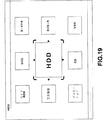
【0085】
図19は、メディアのメニュー画面を示す平面図である。内部制御部4は、このメニュー画面において、9個のアイコンを表示する。すなわち内部制御部4は、左端の上側より、CD−ROMを用いた番組案内を開くアイコン(ガイドROM)、文字検索による番組検索のメニューを開くアイコン(文字検索)、ディジタル衛星放送によるプロモーションのチャンネルを開くアイコン(プロモーション)が配置される。内部制御部4においては、これら3つのアイコンが選択された場合には、図17について上述した階層構造によるメニュー画面とは異なる表示画面への切り換えにより対応する処理を実行する。
【0086】
また中央上側より、ディジタルビデオディスク(DVD)、ハードディスク装置(HDD)、コンパクトディスクプレイヤー(CD)をそれぞれ指定するアイコンが配置され、右側の上側より、D−VHS、DVD−R、VHSの装置を指定するアイコンが順次配置される。内部制御部4は、この場合もメニュー画面の中央のフォーカスされたアイコンを拡大表示する。これらメニュー画面の中央、右側に配置されるアイコンは、図1について上述したビデオディスクレコーダー8等の、ホームネットワークを介してこのセットトップボックス1に接続可能な各種メディアである。
【0087】
内部制御部4は、メインメニュー画面より推奨チャンネルのメニュー画面に表示を切り換えた場合と同様にして、メインメニュー画面よりこのメディアのメニュー画面に表示を切り換える。すなわち内部制御部4は、遷移画面を間に挟んで表示を切り換え、この遷移画面において、ズームインするようにメディアのメニューを徐々に拡大し、またフォーカスの表示Wにより囲まれる中央のアイコンを徐々に拡大する(図8参照)。
【0088】
これに対してこのメディアのメニュー画面を表示した状態でユーザーが選択の操作子18Cを操作すると、推奨チャンネルのメニュー画面における場合と同様に(図9参照)、フォーカスの表示Wを画面中央に保持したままメニュー画面全体をスクロールさせ、この枠形状の表示Wに囲まれたアイコンにフォーカスを切り換える。このとき画面全体の移動と同時に、それまでフォーカスの表示Wで囲まれて拡大表示されていたアイコンの表示を徐々に縮小すると共に、続いてフォーカスの表示Wで囲まれるアイコンの表示を徐々に拡大する。
【0089】
図20は、このメディアのメニュー画面における1のアイコンに対応する下位階層の番組選択のメニュー画面を示す平面図である。内部制御部4は、例えば記録時に付加したインデックス画像のうち、各番組開始時のインデックス画像を配置してこの番組選択のメニュー画面を形成する。なお、例えば再生専用のメディアであるDVD等による番組選択メニューにあっては、このDVDディスクに記録されたインデックス画像を表示し、また必要に応じて例えば先頭部分を再生してこのメニュー画面を形成する。
【0090】
このとき例えばハードディスク装置に9種類以上の番組が記録されていることも考えられることにより、内部制御部4は、図14について上述したと同様にして、ハードディスク装置等のアイコンにグループ化される全ての番組について、それぞれアイコンを割り当てると共に、この全てのアイコンの配列による全体画面を形成する。
【0091】
内部制御部4は、この全体画面の一部をズームインして9個のアイコンを表示し、この9個のアイコンの表示によりこの番組選択のメニュー画面を作成する。さらにこのとき画面中央のアイコンについては、このアイコンの内容である番組を子画面により表示する。
【0092】
内部制御部4は、メディアのメニュー画面からこの番組選択のメニュー画面に表示を切り換える際に、図15及び図16にについて上述したと同様の遷移画面を間に挟んで表示を切り換える。すなわちフォーカスの表示Wを表示したまま、フォーカスされたメニューを徐々に拡大させ、このメニューが所定値以上大きくなると、このアイコンの表示を徐々に透明化し、下位階層のアイコンを目視できるようにする。さらに続いて内部制御部4は、全てのアイコンによる全体画面を表示し、この全体画面を徐々に拡大して番組選択のメニュー画面を表示する。さらにこのとき中央のフォーカスの表示Wにより囲まれるアイコンについては、徐々に拡大して所定値以上になると、このアイコンの表示を子画面の表示に切り換える。
【0093】
これに対してこの番組選択のメニュー画面を表示した状態でユーザーが選択の操作子18Cを操作すると、推奨チャンネルのメニュー画面における場合と同様に(図9参照)、フォーカスの表示Wを画面中央に保持したままメニュー画面全体(この場合、全てのアイコンを表示した全体画面)をスクロールさせ、このフォーカスの表示Wに囲まれたアイコンにフォーカスを切り換える。このとき画面全体の移動と同時に、それまでフォーカスの表示Wで囲まれて拡大表示されていた子画面の表示をアイコンの表示に切り換えて徐々に縮小すると共に、続いてフォーカスの表示Wで囲まれるアイコンの表示を徐々に拡大して子画面の表示に切り換える。
【0094】
また内部制御部4は、このようにして表示した番組選択のメニュー画面において、決定の操作子18Cが押圧操作されると、フォーカスされた番組に表示を切り換える。この場合番組選択のメニュー画面において、画面中央でフォーカスされた子画面を徐々に拡大表示し(図10参照)、最終的にこの子画面の表示を表示画面全体に拡大する。
【0095】
これに対してこのように選択した番組を表示した状態で、キャンセルの操作子18Cが操作されると、上述の説明とは逆に元の番組選択のメニュー画面にズームアウトするように、表示画面を徐々に縮小して表示を切り換える。このとき内部制御部4は、それまで表示していた番組に対応するアイコンが画面中央でフォーカスの表示Wで囲まれるように、メニュー画面にズームアウトさせる。
【0096】
また内部制御部4は、番組選択のメニュー画面を表示した状態でユーザーがキャンセルの操作子18Cを押圧操作すると、同様に、上述の説明とは逆に元のメディアのメニュー画面にズームアウトするように、表示画面を徐々に縮小して表示を切り換える。このときそれまでフォーカスしていたアイコンによる全体画面が表示されるまで、全体をズームアウトした後、対応するメディアのアイコンに表示を切り換え、このメディアのアイコンをズームアウトさせる。なおこの場合にも、内部制御部4は、それまで選択されていたメディアのアイコンが画面中央にてフォーカスの表示Wで囲まれるように、メディアのメニュー画面にズームアウトする。
【0097】
さらにこのメディアのメニュー画面において、ユーザーがキャンセルの操作子18Cを押圧操作すると、同様に、上述の説明とは逆に元のメインメニュー画面にズームアウトするように、表示画面を徐々に縮小して表示を切り換える。この場合にも、内部制御部4は、それまで選択されていたメディアのメニューが画面中央にてフォーカスの表示Wで囲まれるように、メインメニュー画面にズームアウトする。
【0098】
(1−4)階層表示における内部制御部4の処理手順
図21及び図22は、このようなアイコンの拡大縮小によるズーミング処理によりメニュー画面等を切り換える場合の、内部制御部4の処理手順を示すフローチャートである。この処理手順において、内部制御部4は、ステップSP1からステップSP2に移り、表示に供する選択肢より対応するアイコンを選択し、またこの選択したアイコンの配置等を決定する。
【0099】
続いて内部制御部4は、ステップSP3に移り、ここで該当する全アイコンによる全体画面を表示した後、続くステップSP4において、目的とするメニュー画面を表示する。このとき内部制御部4は、全体画面よりズームインするように、メニュー画面を表示する。これにより、例えばメインメニュー画面のように、表示に供するアイコンが限られている場合であって、全体画面がメニュー画面と等しいような場合、内部制御部4においては、直接メニュー画面を表示することになる。
【0100】
続いて内部制御部4は、ステップSP5に移り、画面中央のフォーカスしたアイコンについて、これを拡大表示する。なおこの場合、最下位階層である番組選択のメニュー画面においては、この拡大表示に子画面が割り当てられることになる。
【0101】
続いて内部制御部4は、ステップSP6に移り、選択の操作子(選択キー)18Cが操作されたか否か判断し、ここで肯定結果が得られると、ステップSP7に移り、画面中央のアイコンを縮小させる。続いて内部制御部4は、ステップSP8に移り、メニュー画面をスクロールさせてフォーカスを切り換え、続いてステップSP5に戻って、この新たにフォーカスされたアイコンを拡大表示する。
【0102】
これに対して何ら選択の操作子(選択キー)18Cが操作されていない場合、内部制御部4は、ステップSP6からステップSP9に移る(図22)。ここで内部制御部4は、決定の操作子(決定キー)18Cが押圧操作されたか否か判断し、否定結果が得られると、ステップSP10に移る。ここで内部制御部4は、キャンセルの操作子(キャンセルキー)18Dが操作されたか否か判断し、否定結果が得られると、ステップSP6に戻る。
【0103】
これにより内部制御部4は、決定の操作子18C、キャンセルの操作子18D、選択の操作子18Cが操作されるまでの間、ステップSP6−SP9−SP10−SP6の処理手順を繰り返すことになる。
【0104】
内部制御部4は、このようにして処理手順を繰り返している際に、決定の操作子18Cが操作されると、ステップSP9で肯定結果が得られることにより、ステップSP9からステップSP11に移る。ここで内部制御部4は、画面中央の画像が番組にリンクを張られた画像か否か、すなわち画面中央の画像が番組を紹介する子画面か否か判断する。
【0105】
ここで現在表示中のメニュー画面が番組選択のメニュー画面以外のメニュー画面の場合、内部制御部4は、否定結果が得られることにより、ステップSP11からステップSP12に移り、更に下位階層のメニュー画面に表示を切り換えるように、この画面中央のアイコンにズームインした後、ステップSP2に戻る。これにより内部制御部4は、決定の操作子18Cの操作に応動して、順次メニュー画面を下位段層に切り換えるようになされている。
【0106】
これに対して現在表示中のメニュー画面が番組選択のメニュー画面の場合、ステップSP11において肯定結果が得られることにより、この場合内部制御部4は、ステップSP11からステップSP13に移る。ここで内部制御部4は、この子画面による番組を表示画面の全体に表示するように全体の動作を切り換える。これにより内部制御部4は、順次階層を辿ってユーザーの選択した番組を表示するようになされている。
【0107】
続いて内部制御部4は、ステップSP14に移り、キャンセルの操作子18Dが操作されたか否か判断し、否定結果が得られると、ステップSP14を繰り返す。これにより内部制御部4は、キャンセルの操作子18Dが操作されるまで、番組の表示を継続する。
【0108】
これに対して番組を表示中にキャンセルの操作子18Dが操作されると、内部制御部4は、ステップSP14からステップSP15に移り、ここで直前のメニュー画面である番組選択のメニュー画面にズームアウトするよう表示を切り換えた後、ステップSP4に戻る。これにより内部制御部4は、必要に応じて視聴中のチャンネル等を切り換えることができるようになされている。
【0109】
内部制御部4は、このようにして番組選択のメニュー画面に戻った場合、さらには誤ってメニュー画面等を選択した場合等にあっては、キャンセルの操作子18Dの操作によりステップSP10からステップSP16に移る。ここで内部制御部4は、現在表示中のメニュー画面に対して上位階層のメニュー画面が存在するか否か判断し、ここでメインメニュー画面を表示している場合にあっては、否定結果が得られることにより、ステップSP16からステップSP6に戻る。
【0110】
これに対して上位階層が存在する場合、ステップSP16において肯定結果が得られることにより、内部制御部4は、ステップSP16からステップSP17に移り、上位階層のメニュー画面に対してズームアウトするように表示を切り換える。さらに内部制御部4は、続くステップSP18において、この上位階層のメニュー画面について、選択肢よりアイコンを選択すると共に、配置等を決定し、ステップSP4に戻る。
【0111】
(1−5)サーチ画面の表示
図23は、番組を表示した状態でシフトの操作子18Eが押圧操作された場合の、第1のサーチ画面を示す平面図である。内部制御部4は、番組を表示中のメディアがランダムアクセス可能なハードディスク装置等の場合、この表示画面を表示する。
【0112】
この第1のサーチ画面において、内部制御部4は、画面中央に、それまで全画面により表示していた番組を縮小して表示する。さらに画面の下側に、左側より時系列で並べて、この番組のインデックス画像を表示する。このとき内部制御部4は、画面中央に表示した現在表示中の画像に対して、対応するインデックス画像(すなわちフォーカスしているインデックス画像)を下側の中央に、他の静止画像に比して拡大して表示する。
【0113】
さらにこのシフトの操作子18Eが継続して押圧操作された状態で、選択の操作子18Cが操作されると、この操作に応動して下側に配置した静止画像を左右に移動させる。このときこの画像の移動に伴い、下側中央に表示される静止画像にフォーカスを切り換え、このフォーカスのインデックス画像を拡大すると共に、それまで拡大していたインデックス画像を他の画像と同じ大きさに切り換える。
【0114】
これに対してこのシフトの操作子18Eが継続して押圧操作された状態で、決定の操作子18Cが押圧操作されると、このフォーカスしているインデックス画像に対応するように、画面中央の表示画像を切り換える。
【0115】
これに対してシフトの操作子18Eの押圧操作が解除されると、内部制御部4は、画面中央に表示した画面を全体に表示し、元の表示画面に戻る。これによりセットトップボックス1においては、シフトの操作子18Eを押圧している期間の間、この第1のサーチ画面を表示して、あたかもビデオテープレコーダにおける早送り、巻き戻しのように、所望のシーンを選択できるようになされ、さらにこの早送り、巻き戻しに相当する処理を瞬時に実行できるようになされている。
【0116】
内部制御部4は、これらの処理を実行するにつき、必要に応じてハードディスク装置等に発行する制御コマンドを切り換えることにより、このサーチ画面に形成に必要なインデックス画像をグラフィックス表示信号作成部10に供給する。
【0117】
これに対して図24は、メディアがビデオテープレコーダ等のランダクアクセス困難な場合に表示する第1のサーチ画面を示す平面図である。この場合ランダムアクセスして簡易に頭だしすることが困難なことにより、内部制御部4は、時系列による静止画像に代えて、ビデオテープレコーダの操作子と同様のアイコンを表示する。
【0118】
さらにシフトの操作子18Eが継続して押圧操作された状態で、選択の操作子18Cが操作されると、この操作に応動してこれらのアイコンの明るさを切り換え、これによりフォーカスのアイコンを目視できるようにする。さらに内部制御部4は、シフトの操作子18Eが継続して押圧操作された状態で、決定の操作子18Cが押圧操作されると、フォーカスしているアイコンに対応して、例えば早送り、巻き戻し等による制御コマンドをビデオテープレコーダ等に出力し、その結果得られる再生画像を画面中央に表示する。
【0119】
これに対してシフトの操作子18Eの押圧操作が解除されると、内部制御部4は、画面中央に表示した画面を全体に表示し、元の表示画面に戻る。
【0120】
これに対して図25は、メディアにおける番組選択のメニュー画面を表示した状態で、シフトの操作子18Eと決定の操作子18Cとが同時に操作された場合の、第2のサーチ画面を示す平面図である。内部制御部4は、子画面により表示中のメディアがランダムアクセス可能なハードディスク装置等のメディアの場合、この表示画面を表示する。
【0121】
ここでこの第2のサーチ画面においては、画面中央の下側に、現在フォーカスされている番組についての先頭のインデックス画像が、フォーカスの表示Wに囲まれて表示される。さらにこのインデックス画像より反時計回りに、表示画面の中心に向かってらせん状に、順次時間軸に沿った方向に、このフォーカスされている番組に関するインデックス画像が順次縮小して表示される。さらに外周側よりらせん状の中心に近づくに従って徐々に表示が薄くなって背景が透過するように表示される。
【0122】
これに対して、フォーカスされているインデックス画像の時計方向には、現在フォーカスされているインデックス画像より早い時点のインデックス画像が、らせん状のインデックス画像の配置において順次変化する表示の大きさに対応して表示される。なおこのインデックス画像においても、背景が透過するように薄く表示される。ちなみに図25においては、現在フォーカスされているインデックス画像が番組の先頭であることから、この現在フォーカスされているインデックス画像より早い時点のインデックス画像の表示領域には、編掛によるダミーのインデックス画像が表示される。
【0123】
さらに第2のサーチ画面は、これらのインデックス画像が、らせんの中心より放射状に広がる背景の上に表示される。これによりこのセットトップボックス1においては、遠近法を利用した時間軸に沿った配置により、フォーカスされたインデックス画像を基準にして、時間経過と共に変化する番組の流れを視覚的に把握できるようになされ、所望のシーンを簡易に選択できるようになされている。
【0124】
すなわち図26に示すように、内部制御部4は、選択の操作子18Eが右向きに操作されると、この操作に応動して図26(B)との対比により図26(A)により示すように、フォーカスの表示Wを現在の表示位置に保持したまま、時計方向に、各インデックス画像の表示位置を1画面分過去側の表示位置に移動させ、さらにこの移動の際に各インデックス画像を移動後の位置に対応する大きさに変化させる(なお、らせん状の内部に存在する画像ほど過去になるようにして、時計方向に各インデックス画像の表示位置を1画面分未来側の表示位置に移動させるようにしてもよい。)さらに内部制御部4は、この移動によりインデックス画像が失われる最も内周側のインデックス画像配置位置に、続く未来のインデックス画像を配置する。さらに内部制御部4は、フォーカスの表示Wの内側に移動したインデックス画像にフォーカスを設定し、これによりフォーカスのインデックス画像を時間軸方向に切り換える。
【0125】
これに対してこれとは逆に選択の操作子18Cが左向きに操作されると、この操作に応動して図26(B)との対比により図26(C)により示すように、フォーカスの表示Wを現在の表示、位置に保持したまま、反時計方向に、各インデックス画像の表示位置を1画面分将来側の表示位置に移動させ、さらにこの移動の際に、各インデックス画像を移動後の位置に対応する大きさに変化させる(なお、らせん状の内部に存在する画像ほど過去になるようにして、反時計方向に各インデックス画像の表示位置を1画面分過去側の表示位置に移動させるようにしてもよい。)。またこの移動によりインデックス画像が失われる最も外周側のインデックス画像配置位置に、続くインデックス画像を配置する。同時に内部制御部4は、フォーカスの表示Wの内側に移動したインデックス画像にフォーカスを切り換え、これによりフォーカスのインデックス画像を時間軸を遡る方向に切り換える。
【0126】
これに対して選択の操作子18Cが上向きに操作されると、この操作に応動して図27(B)との対比により図27(A)により示すように、フォーカスの表示Wを現在の表示位置に保持したまま、らせん状に配置した各インデックス画像を外周側のインデックス画像の表示位置に移動させ、さらにこの移動の際に、各インデックス画像を移動後の位置に対応する大きさに変化させる。さらにこの移動によりインデックス画像が失われる内周側のインデックス画像配置位置に、続くインデックス画像を順次配置する。同時に内部制御部4は、フォーカスの表示Wの内側に移動したインデックス画像にフォーカスを切り換え、これによりインデックス画像を時間軸方向に切り換える。これにより内部制御部4は、あたかも手前側かららせん状に配置したインデックス画像について、らせん状の配列の中心軸に沿って1周分視点を奥に移動させたようにサーチ画面の表示を切り換え、このらせん状の配置によるインデックス画像の1周分をジャンプして、時間軸に沿った方向にフォーカスのインデックス画像を切り換える。
【0127】
これに対して選択の操作子18Cが下向きに操作されると、この操作に応動して図27(B)との対比により図27(C)により示すように、フォーカスの表示Wを現在の表示位置に保持したまま、らせん状に配置した各インデックス画像を内周側のインデックス画像の表示位置に移動させ、さらにこの移動の際に各インデックス画像を移動後の位置に対応する大きさに変化させる。さらにこの移動によりインデックス画像が失われる外周側のインデックス画像配置位置に、続くインデックス画像を順次配置する。同時に内部制御部4は、フォーカスの表示Wの内側に移動したインデックス画像にフォーカスを切り換え、これによりインデックス画像を時間軸を遡る方向に切り換える。これにより内部制御部4は、あたかも手前側かららせん状に配置したインデックス画像について、らせん状の配列の中心軸に沿って1周分視点を手前側に移動させたようにサーチ画面の表示を切り換え、このらせん状の配置によるインデックス画像の1周分をジャンプして、時間軸を遡った方向にフォーカスのインデックス画像を切り換える。
【0128】
これに対して決定の操作子18Cが押圧操作されると、内部制御部4は、フォーカスしているインデックス画像を全体に表示し、このインデックス画像より記録された映像の再生を開始する。
【0129】
さらにこのようにして第2のサーチ画面を介して番組表示を開始した場合にあって、この番組の表示中に決定の操作子18Cが操作されると、内部制御部4は、この第2のサーチ画面に表示を切り換え、上述したと同様にしてインデックス画像を表示する。
【0130】
これに対して第2のサーチ画面を表示した状態でキャンセルの操作子18Dが操作されると、元の番組選択のメニュー画面に戻る。
【0131】
(1−6)サーチ画面、検索画面の表示における内部制御部4の処理手順
図28は、このサーチ画面の表示及び検索画面の表示における内部制御部4の処理手順について、シフトの操作子18Eの操作を基準にして示すフローチャートである。内部制御部4は、電源が立ち上げられると、ステップSP20からステップSP21に移り、シフトの操作子18E(シフトキー)が押圧操作されているか否か判断する。ここでシフトの操作子18Eが押圧操作されていない場合、内部制御部4は、ステップSP22に移り、メニュー画面の階層表示について上述した通常の画面表示モードに動作を切り換える。
【0132】
続いて内部制御部4は、ステップSP23に移り、他の操作子が操作されているか否か判断し、操作されていない場合には、ステップSP21に戻るのに対し、操作されている場合には、ステップSP24に移り、操作子の操作に応動して上位階層、下位階層等に表示を切り換えた後、ステップSP21に戻る。
【0133】
これに対してシフトの操作子18Eが押圧操作された場合、内部制御部4は、ステップSP21において肯定結果が得られることにより、ステップSP25に移り、特別な画面表示モードに移る。さらに続いて内部制御部4は、ステップSP26に移り、他の操作子が操作されているか否か判断し、操作されていない場合には、ステップSP21に戻るのに対し、操作されている場合には、ステップSP27に移り、操作子の操作に応動して表示画面を番組案内の表示画面又はサーチ画面に切り換えた後、ステップSP21に戻る。
【0134】
これにより内部制御部4は、シフトの操作子18Eが押圧操作された場合に限って、通常とは異なる画面を表示し、その分少ない操作子により種々の操作を実行できるようになされている。番組を表示している場合には、この処理手順において、シフトの操作子18Eが押圧操作されている期間の間、第1のサーチ画面を表示することになる。
【0135】
図29及び図30は、第1のサーチ画面における内部制御部4の処理手順を示すフローチャートである。内部制御部4は、ステップSP40からステップSP41に移り、モニタ装置11の全画面にユーザーの選択した番組を表示し、ステップSP42に移る。ここで内部制御部4は、シフトの操作子18Eが操作されたか否か判断し、否定結果が得られるとステップSP41に戻る。
【0136】
これに対してステップSP42で肯定結果が得られると、内部制御部4は、ステップSP43に移り、番組である動画の表示を縮小する(図23参照)。続いて内部制御部4は、ステップSP44に移り、再生中の動画についての位置情報(タイムコード等である)を取得した後、ステップSP45に移り、この位置情報を基準にして前後するインデックス画像をビデオディスクレコーダー8より取得し、このインデックス画像を縮小した動画の下側に配列して表示する。
【0137】
続いて内部制御部4は、ステップSP46に移り、シフトの操作子18Eの押圧操作が継続されているか否か判断し、ここで否定結果が得られるとステップSP47に移り、表示画面よりインデックス画像を消去すると共に、続くステップSP48において縮小して表示していた動画を元の大きさに戻し、ステップSP42に戻る。
【0138】
これにより内部制御部4は、シフトの操作子18Eが押圧操作されると、第1のサーチ画面を表示し、このシフトの操作子18Eの押圧操作が解除されると、元の表示画面を表示する。
【0139】
これに対してシフトの操作子18Eが継続して押圧操作されている場合、内部制御部4は、ステップSP46からステップSP49に移り(図30)、ここでこのシフトの操作子18Eに加えて、選択の操作子18Cが操作されたか否か判断する。ここで肯定結果が得られると、内部制御部4は、ステップSP50に移り、選択の操作子18Cの操作に応動してインデックス画像の位置を移動させてフォーカスのインデックス画像を切り換え、ステップSP46に戻る。
【0140】
これに対してステップSP49において否定結果が得られると、内部制御部4は、ステップSP51に移り、シフトの操作子18Eに加えて、決定の操作子18Cが操作されたか否か判断する。ここで否定結果が得られると、内部制御部4は、ステップSP46に戻るのに対し、肯定結果が得られると、ステップSP52に移り、フォーカスされているインデックス画像のシーンについて、対応する再生画像に表示を切り換え、ステップSP46に戻る。
【0141】
これにより内部制御部4は、シフトの操作子18Eを押圧した状態で操作子18Cを操作して所望のシーンより番組を視聴できるようになされている。
【0142】
図31、図32及び図33は、第2のサーチ画面に関する内部制御部4の処理手順を示すフローチャートである。なおこの処理手順においては、番組を記録する際の処理手順を併せて示す。すなわち内部制御部4は、ステップSP60からステップSP61に移り、記録時、例えば順次ディジタル衛星放送により提供される画像データをビデオディスクレコーダー8に記録しながら、インデックス画像の候補を選択する。さらに内部制御部4は、続くステップSP62において、この選択したインデックス画像の候補より各シーン毎にインデックス画像を設定し、このインデックス画像をサムネイル画像により番組録画中のメディアに記録する。
【0143】
このようにして番組録画を完了した後、メディアの番組選択メニューにおいて、シフトの操作子18Eが押圧操作された状態で決定の操作子18Cが操作されると、内部制御部4は、ステップSP63に移り、インデックス画像を指定するカウント値(count)を値0にセットし、また画面に表示するインデックス画像の数(max)を第2のサーチ画面において表示可能な最大値にセットする。
【0144】
続いて内部制御部4は、ステップSP64に移り、フォーカスされた番組のシーケンスの先頭より変数(max)−(count)で表されるインデックス画像をビデオディスクレコーダー8より取得した後、ステップSP65に移り、このインデックス画像の表示位置を示す座標、大きさ、透過度、奥行きを計算する。
【0145】
続くステップSP66において、内部制御部4は、この計算した結果に従って取得したインデックス画像を表示画面に表示した後、ステップSP67に移り、カウント値(count)を値1だけインクリメントする。続いて内部制御部4は、ステップSP68に移り、カウント値(count)が第2のサーチ画面において表示可能な最大値(max)以下か否か判断し、ここで肯定結果が得られると、ステップSP64に戻る。
【0146】
これにより内部制御部4は、ステップSP64−SP65−SP66−SP67−SP68−SP64の処理手順を繰り返して、順次インデックス画像をらせん状に配置した後、ステップSP70に移る(図32)。
【0147】
内部制御部4は、このステップSP70において、何れかの操作子が操作されたか否か判断し、ここで否定結果が得られるとステップSP70を繰り返す。これに対して何れかの操作子が操作されると、肯定結果が得られることにより、内部制御部4は、ステップSP70からステップSP71に移り、ここで決定の操作子18Cが押圧操作されたか否か判断する。ここで否定結果が得られると、内部制御部4は、ステップSP72に移り、選択の操作子18Cが右方向又は左方向に操作されたか否か判断する。
【0148】
ここで肯定結果が得られると、内部制御部4は、ステップSP73に移り、らせん状に配置したインデックス画像を操作子18Cの操作方向に応動してらせん状の配列方向に又はこれとは逆方向に移動させると共に大きさを可変し(図26参照)、ステップSP70に戻る。
これに対してステップSP72において否定結果が得られると、内部制御部4は、ステップSP72からステップSP74に移り、選択の操作子18Cが上方向又は下方向に操作されたか否か判断する。
【0149】
ここで肯定結果が得られると、内部制御部4は、ステップSP75に移り、らせん状に配置したインデックス画像を操作子18Cの操作方向に応動して外周側又は内周側に移動させると共に大きさを可変し(図27参照)、ステップSP70に戻る。
【0150】
これに対してステップSP74においてで否定結果が得られると、内部制御部4は、ステップSP76に移り、キャンセルの操作子17Dが操作されたか否か判断する。ここで否定結果が得られると、内部制御部4は、ステップSP70に戻るのに対し、肯定結果が得られると、ステップSP77に移り、表示画面を番組選択のメニュー画面(図20)に切り換える。
【0151】
これに対して決定の操作子18Cが押圧操作されると、内部制御部4は、ステップSP71からステップSP78に移る(図33)。ここで内部制御部4は、フォーカスの表示Wで囲まれた位置であるカレントポジションに配置されたインデックス画像を全画面に拡大する。続いて内部制御部4は、ステップSP79に移り、このインデックス画像により特定されるシーンより再生を開始するように、ビデオディスクレコーダー8に再生を指示し、この再生結果をモニタ装置11に表示する。これによりセットトップボックス1は、時間の流れを視覚的に把握して所望のシーンを簡易に選択できるようになされている。
【0152】
続いて内部制御部4は、ステップSP80に移り、決定の操作子18Cが再び押圧操作されたか否か判断する。ここで否定結果が得られると、内部制御部4は、ステップSP80を繰り返すのに対し、肯定結果が得られると、ステップSP81に移る。
【0153】
ここで内部制御部4は、現在表示中の場面に対応するインデックス画像をビデオディスクレコーダー8より取得し、続くステップSP82において、ビデオディスクレコーダー8による動画の再生を中止する。同時に、内部制御部4は、動画の表示をインデックス画像に切り換えた後、ステップSP83に移り、このインデックス画像を徐々に縮小して第2のサーチ画面のカレントポジションに配置する。さらにこのとき内部制御部4は、同時に、この第2のサーチ画面に必要な前後するインデックス画像をビデオディスクレコーダー8より取得して配置する。
【0154】
内部制御部4は、このようにして第2のサーチ画面を表示すると、ステップSP70に戻って続く操作を待機する。これによりセットトップボックス1においては、第2のサーチ画面により所望のシーンを取得して視聴する場合には、必要に応じて速やかにこの第2のサーチ画面に戻ることができるようになされている。
【0155】
このようにセットトップボックス1より提供可能な各種番組をメインメニュー画面等により体系化して管理する場合、外部機器であるビデオディスクレコーダー8等より提供可能な番組情報の取得が必要となる。このため内部制御部4は、電源が立ち上げられると、また他の機器の電源が立ち上げられると、さらには記録媒体を交換したビデオディスクレコーダー8等の通知により、図34に示す処理手順を実行し、これによりこのような体系化した管理に必要となる各種番組情報を取得する。
【0156】
すなわち内部制御部4は、ステップSP90からステップSP91に移り、ここでホームネットワークに接続された外部機器の有無を判定する。なおここでこの判定は、ブロードキャストによりIEEE1394バスに所定のコマンドを送出して応答を監視することにより実行される。なお、外部機器が新たに加わると、バスリセットが生じるので、このバスリセット時に外部機器の有無を判定してもよい。
【0157】
ここで否定結果が得られると、内部制御部4は、ステップSP92に移ってこの処理手順を終了するのに対し、肯定結果が得られると、ステップSP93に移る。ここで内部制御部4は、ブロードキャストに対する応答に基づいて、機器個別に順次制御コマンドを発行して応答を取得することにより、又はブロードキャストの応答に付加された機器の属性情報により、ホームネットワークに接続された機器が電子番組情報を有しているか否か判断する。
【0158】
ここで否定結果が得られると、内部制御部4は、ステップSP92に移ってこの処理手順を終了するのに対し、肯定結果が得られると、ステップSP94に移る。このステップSP94において、内部制御部4は、電子番組情報を有する機器に対して制御コマンドを発行して全ての電子番組情報を取得する。
【0159】
このようにして取得した電子番組情報に従って、上述した操作子の操作により検索のメニューが選択されると、またメディアのメニュー画面に割り当てられたCD−ROMを用いた番組案内を開くアイコン(ガイドROM)、文字検索による番組検索のメニューを開くアイコン(文字検索)等が選択されると、内部制御部4は、ステップSP95に移り、対応する表示画面における電子番組情報の表示位置を計算し、続くステップSP96においてこの計算した位置に電子番組情報による文字情報を表示した後、ステップSP92に移ってこの処理手順を終了する。
【0160】
またこの処理に加えて内部制御部4においては、例えば1週間毎に、通信機器14を起動して所定のサーバーより詳細な番組情報を取得し、これにより放送波により提供される番組情報を補う。
【0161】
(2)実施の形態の動作
以上の構成において、セットトップボックス1は(図1)、ユーザーがディジタル衛星放送、ディジタル地上波による番組の視聴を選択すると、アンテナ3を介して得られる放送波がチューナ2により選局されてトランスポートストリームが復調され、このトランスポートストリームより所望のチャンネルが選択される。さらにこのチャンネルの画像データ及び音声データがモニタ装置11、スピーカ12に出力され、これによりユーザーの所望する番組が提供される。
【0162】
またこの番組の記録をユーザーが選択すると、映像信号処理部6、音声信号処理部7を介して得られる画像データ及び音声データがホームネットワークによりビデオディスクレコーダー8に出力され、このビデオディスクレコーダー8であるハードディスク装置、光ディスク装置等により記録される。
【0163】
またこのとき放送波より取得される電子番組情報、電話回線を介して所定のサーバーより取得した詳細な番組情報、ビデオディスクレコーダー8に装填されたCD−ROMより取得した詳細な番組情報等により、この記録に供する番組の番組情報が併せて記録される。
【0164】
またハードディスク装置等のランダムアクセス可能な記録媒体に記録する場合には、連続する画像データよりシーンチェンジの位置が検出され、このシーンチェンジの画像である各シーンの先頭画像がサムネイル画像に縮小されて、インデックス画像として併せて記録される。
【0165】
またこのようにしてビデオディスクレコーダー8に記録された番組の視聴、さらには市販の記録媒体を介して提供される番組の視聴をユーザーが選択すると、ビデオディスクレコーダー8より得られる画像データ及び音声データがホームネットワークにより映像信号処理部6、音声信号処理部7に入力され、この映像信号処理部6、音声信号処理部7の出力信号によりモニタ装置11、スピーカ12が駆動され、この場合もユーザーの所望する番組が提供される。
【0166】
このようにしてユーザーがディジタル衛星放送、ディジタル地上波による番組を視聴する場合、さらにはビデオディスクレコーダー8より提供される番組を視聴する場合、セットトップボックス1においては、これら各番組の番組情報により簡易かつ迅速に目的とする番組を視聴できるように、メニュー画面が提供される。
【0167】
すなわちセットトップボックス1においては(図34)、電源が立ち上げられると、また他の機器の電源が立ち上げられると、さらには記録媒体を交換したビデオディスクレコーダー8等の通知により、内部制御部4からホームネットワークに接続された外部機器が認証され(ステップSP91、93)、この認証に基づいて外部機器より記録時に付加した番組情報、さらには再生専用の記録媒体より提供される映画等の番組について、この記録媒体より番組情報を取得する。
【0168】
さらに放送波に付加された電子番組情報より番組情報を取得し、さらには専用のCD−ROMより提供される番組情報、所定のサーバーより提供される番組情報より、受信可能な番組、再生可能な番組についての番組情報を取得する。セットトップボックス1においては、これらの番組情報より提供可能な番組が映画、音楽等のカテゴリーに分類される。
【0169】
またセットトップボックス1においては、過去にユーザーの視聴した番組の情報が記録され、この記録に従って、放送されるチャンネルよりユーザーの好みのチャンネルが選択され、選択頻度の高い順に、この選択された放送チャンネルが第1の仮想チャンネルから第9の仮想チャンネルまでに分類される。
【0170】
このようにして過去の履歴、番組情報に従って、このセットトップボックス1により提供可能な番組が分類され、セットトップボックス1においては、電源が立ち上げられると、この分類にメディアによる分類を加えたメニューがメインメニュー画面として表示され(図5)、さらにこのメインメニュー画面上における操作により順次階層を辿って所望の番組を選択することが可能となる。
【0171】
これによりセットトップボックス1においては、情報画面である番組を一元的に管理してメニュー画面を表示し、複数の情報源より番組を取得して多数の番組を提供可能な場合でも、情報源を意識させることなく、情報の内容を主体に情報を選択することが可能となる。従ってユーザーにおいては、例えばビデオテープレコーダ、光ディスク装置等のメディアを意識することなく、簡易、迅速かつ的に所望の番組を選択するこができ、その分使い勝手を向上することができる。
【0172】
すなわち例えばユーザーにおいて、ディジタル衛星放送、地上波の放送を視聴する場合には、メインメニュー画面において、推奨チャンネルのメニュー(Recommended)を選択して順次階層を辿ることにより(図6)、ディジタル衛星放送、地上波の放送、チャンネル等を意識することなく、所望の放送チャンネルの番組を視聴することができる。
【0173】
またユーザーが音楽、映画等の番組の視聴を望む場合には、メインメニュー画面において、カテゴリーのメニュー(Categories)を選択して順次階層を辿ることにより(図12)、所望のジャンルについて一覧のメニューが表示され、このメニューより目的の番組を選択することにより、現在放送中の番組、過去に録画した番組等を意識することなく、所望の番組を視聴することができる。
【0174】
さらにユーザーが市販のソフトを視聴するような場合には、メインメニュー画面において、メディアのメニュー(Media)を選択して順次階層を辿ることにより(図18)、所望のメディアについて番組一覧のメニューが表示され、このメニューより目的の番組を選択することにより、従来と同様の操作により、さらには他の推奨チャンネルのメニュー、カテゴリーのメニューを操作する場合と同様にして所望の番組を視聴することができる。
【0175】
このようにしてメインメニュー画面より階層を辿る際に、メインメニュー画面においては、画面中央にフォーカスの領域が形成され、この領域を囲むようにフォーカスの表示Wが形成される。さらにリモードコマンダ18に配置した選択の操作子18Cの操作に応動して、フォーカスの領域を示すフォーカスの表示Wを固定したまま、メインメニュー画面がスクロールしてフォーカスが切り換わる。
【0176】
これによりメインメニュー画面において、所望のメニューを選択する場合に、視点をいちいち移動させててフォーカスされたメニューを探すことなく、所望のメニューを選択することが可能となり、その分使い勝手を向上することが可能となる。
【0177】
またメインメニュー画面において、何れのメニューを選択した場合でも、続く推奨チャンネルのメニュー画面(図7)、カテゴリーのメニュー画面(図13)、メディアのメニュー画面(図19)においては、それぞれメニュー画面における推奨チャンネルのメニュー、カテゴリーのメニュー、メディアのメニューにズームインするように、各メニューが徐々に拡大して表示される(図8)。
【0178】
これによりセットトップボックス1においては、ユーザー自ら選択した操作の結果を目視確認してメニュー画面の切り換わりを確認することができ、階層化により種々の番組を管理する場合でも、誤操作を有効に回避することができる。またユーザーにおいては、表示画面の切り換えの前後における関係を目視により把握して画面の切り換わりを見守ることができ、画面が瞬時に切り換わる場合のように、現在の表示画面が何れの階層、分類に位置するかのような、いわゆる迷った状態を回避することができる。これによっても使い勝手を向上することができる。
【0179】
このようにして移行した各メニュー画面においては、メインメニュー画面の場合と同様に、画面中央にフォーカスの領域が形成され、この領域を囲むようにフォーカスの表示Wが形成される。さらにそれぞれ9個のメニューが配置され、このうちの画面中央のフォーカスに領域に配置されてフォーカスの表示Wにより囲まれるメニューにおいては、拡大表示される。
【0180】
これにより所望のメニューを選択する場合に、迅速にフォーカスされたメニューを探すことが可能となり、その分使い勝手を向上することが可能となる。
【0181】
またこれらのメニューは、中央以外のメニューにおいては、アイコンにより表示されるのに対し、中央のフォーカスされたメニューにおいては、さらに下位階層のメニュー画面が存在する場合にはアイコンにより(図13及び図19))、下位階層のメニュー画面が存在しない場合にはその番組を示す子画面により(図7)により表示される。
【0182】
これによりセットトップボックス1においては、この子画面を目視して所望の番組か否か判断することができ、これによっても所望の番組を迅速かつ的確に選択することが可能となる。
【0183】
またこのようなメニュー画面においても、リモートコマンダ18に配置した選択の操作子18Cの操作に応動して、フォーカスの領域を示すフォーカスの表示Wは固定したまま、各画面がスクロールしてフォーカスが切り換わる。またこのスクロールに伴い、フォーカスの外れたメニューの表示が小さなアイコンの表示に切り換わり、新たにフォーカスされたアイコンが拡大表示され、下位階層のメニュー画面が存在しない場合には子画面に切り換わる(図9)。
【0184】
これによりメインメニュー画面より1階層下の各メニュー画面においても、所望のメニューを選択する場合に、視点をいちいち移動させてフォーカスされたメニューを探すことなく、簡易かつ確実に所望のメニューを選択することが可能となり、その分使い勝手を向上することが可能となる。またメインメニューと統一した操作により所望のメニューを選択でき、その分使い勝手を向上することができる。
【0185】
かくしてこのメインメニュー画面の続くメニュー画面が最も下位階層である推奨チャンネルにおいては、このようにして選択したメニューを開くことにより、順次階層を辿って所望の番組を視聴することが可能となる(図10)。
【0186】
これに対してさらに下位階層のメニュー画面が存在するカテゴリー及びメディアにおいては、さらに各メニュー画面でメニューを選択して開くことにより、続く下位階層のメニュー画面に表示画面を切り換えることができる。
【0187】
この場合にも、セットトップボックス1においては、メインメニュー画面より下位階層のメニュー画面に表示を切り換えた場合と同様に、フォーカスされたメニューにズームインするように、メニューの表示が徐々に拡大されてメニュー画面が切り換わる(図15)。
【0188】
これによりメインメニューより下位階層のメニュー画面の表示を切り換えた場合と同様に、ユーザー自ら選択した操作の結果を目視確認してメニュー画面の切り換わりを確認することができ、階層化により種々の番組を管理する場合でも、誤操作を有効に回避することができ、さらには使い勝手を向上することができる。またメインメニューと統一した操作により所望のメニューを選択でき、その分使い勝手を向上することができる。
【0189】
このようにしてズームインによりメニュー画面を切り換える際に、アイコンが所定値以上に大きく拡大されると、このアイコンにおいては、透明化の処理により、表示が徐々に薄くなり、続くメニュー画面が表示される。これによりスムーズにメニュー画面の切り換わりが知覚され、違和感なくメニュー画面を切り換えることが可能となる。
【0190】
さらにこのようにしてメニュー画面を切り換える際に、ズームインするメニューに9個以上の多くのメニューが割り当てられている場合、各メニューに対する全てのアイコンを配列してなる全体画面が一度表示され、この全体画面にズームインするようにしてメニュー画面が切り換えられる(図15及び図16)。
【0191】
これによりユーザーにおいては、例えば映画のカテゴリーについで膨大な番組を記録してあるような場合でも、映画のカテゴリーについてのこの膨大な番組数の全体像を把握して次のメニュー画面を操作することができる。従って例えばこのように映画の下位階層側メニューにおいて、メニュー画面に表示されていない映画を選択するような場合でも、いちいち元の階層のメニュー画面に戻ることなく所望する映画のメニューを選択することができ、その分迅速かつ確実に所望の番組を選択することが可能となる。
【0192】
さらにこのようにして表示した下位階層のメニュー画面においても、セットトップボックス1においては、フォーカスの領域が画面中央に固定されたまま、各メニュー画面、さらには全体画面がスクロールしてフォーカスが切り換わり、またこれに伴いフォーカスの外れたメニューの表示が小さなアイコンの表示に切り換わり、新たにフォーカスされたアイコンが拡大表示され、下位階層のメニュー画面が存在しない場合には子画面に切り換わる(図9)。
【0193】
これによりこの下位階層のメニュー画面においても、所望のメニューを選択する場合に、視点をいちいち移動させてフォーカスされたメニューを探すことなく、簡易かつ確実に所望のメニューを選択することが可能となり、その分使い勝手を向上することが可能となる。またメインメニューと統一した操作により所望のメニューを選択でき、その分使い勝手を向上することができる。
【0194】
かくしてセットトップボックス1においては、カテゴリー及びメディアにおいてこのようにして選択したメニュー画面が最下位階層の番組選択のメニュー画面であることから、所望のメニューを選択して開くことにより、目的の番組を簡易かつ迅速に視聴することが可能となる。
【0195】
このようにして選択したメニューについて、下位階層のメニュー画面に移行する場合、さらには番組を選択する場合、セットトップボックス1においては、何れの場合でも、リモートコマンダ18に配置した選択の操作子18Cを押圧操作して決定の操作子18Cとして操作することにより、順次下位階層側に表示画面を切り換え、また番組を選択することができる。
【0196】
またこれとは逆に、キャンセルの操作子18Dを操作することにより、上位階層側のメニュー画面に戻ることができる。これにより階層化したメニュー画面を辿る場合に、統一化された操作により番組を選択することができ、その分誤操作を防止して使い勝手を向上することができる。
【0197】
さらにこのようにしてキャンセルの操作子18Dの操作により上位階層側のメニュー画面に戻る場合にあっては、下位階層側に移行する場合とは逆に、ズームアウトするように表示画面が切り換わり、さらには必要に応じて全体画面が表示される。
【0198】
これにより上位階層に戻る場合でも、迷うことなく、また全体像を把握して、上位階層に戻ることができ、これによっても迅速かつ的確に所望の番組を選択することが可能となる。
【0199】
このようにして順次メニュー画面を切り換えるにつき、推奨チャンネル及びカテゴリーにおける最下位階層の番組選択メニュー画面において(図6及び図12)、シフトの操作子18Eを押圧操作して決定の操作子18Cを操作すると、番組案内の画面に切り換わり、また各番組案内の画面を表示した状態でキャンセルの操作子18Dを操作すると元のメニュー画面に戻る。
【0200】
この番組案内の画面は、推奨チャンネルにおいては、フォーカスされていた各仮想チャンネルについての放送予定が順次カテゴリー別に色分けされて放送時間の順序で表示され、これにより放送予定の番組を確認して必要に応じてタイマー録画等の設定処理を実行することが可能となる。これに対してカテゴリーにおいては、フォーカスされたカテゴリーについて、放送予定と各種メディアより視聴可能な番組とが一覧表により表示され、これによりタイトル等より所望の番組を視聴することが可能となる。
【0201】
これにより階層を辿って番組を選択する通常の番組選択の操作とは異なる操作により番組を選択する場合には、シフトの操作子18Eを加えた、階層を辿る場合と同様の操作により所望の番組を選択することができ、その分操作の統一性が図られて、使い勝手が向上される。
【0202】
これに対してメディアの番組選択メニューにおいて、シフトの操作子18Eと決定の操作子18Cが操作されると(図18)、第2のサーチ画面に表示が切り換えられる(図25)。
【0203】
この第2のサーチ画面においては、フォーカスされた番組について、記録時に各シーン毎に設定されたインデックス画像が内周側より順次拡大されてらせん状に配置されて表示される。これによりユーザーにおいては、順次拡大された画像による遠近感により各インデックス画像の前後関係を視覚的に把握することができ、またらせん状の配置により全体の時間経過を視覚的に把握することができる。これにより番組の流れ、各シーンを容易に理解することができ、所望のシーンを簡易かつ迅速に頭出しすることができる。従ってその分使い勝手を向上することができる。また、拡大された画像を時系列の順序により内周側かららせん状に表示すれば、未来の画像が現在に近い画像の上に重なることはない。
【0204】
またこの第2のサーチ画面においては、詳細に検討することが多い現在時点に近いインデックス画像については、比較的大きく表示されるのに対し、またこれとは逆に、現在時点に比して詳細に検討することの少ない現在時点より遠いインデックス画像については、小さく表示され、これによりユーザーの視聴したい画面については詳細に表示して表示画面を有効に利用することができる。
【0205】
またこのときらせん状の中央に向かうに従って、表示が徐々に薄くなって背景が透過するように表示されることにより、表示に奥行感が与えられ、これによっても時間経過を容易に把握することができる。
【0206】
またこのときこのらせん状の配置の中心より放射状に広がる背景に、これらのインデックス画像が配置されていることより、この背景によっても遠近感が付加され、この遠近感により容易に時間経過を把握することができる。
【0207】
このようにして各インデックス画像により所望のシーンを頭出しする場合にあっては、選択の操作子18Cの左右方向の操作に応動して、フォーカスの領域が固定されたまま、円周方向にインデックス画像が移動すると共に、インデックス画像の大きさが移動後の位置に対応する大きさに変化する(図26)。これにより視覚的に時間軸を辿るようにインデックス画像を切り換えることができ、その分使い勝手を向上することができる。またこのときもフォーカスの領域が固定されていることにより、視点の移動を防止して、簡易にフォーカスされたインデックス画像を発見することができる。
【0208】
また選択の操作子18Cの上下方向の操作に応動して、フォーカスの領域が固定されたまま、内外周方向にインデックス画像が移動すると共に、インデックス画像の大きさが移動後の位置に対応する大きさに変化する(図27)。これによりこのらせん状の配置の1周分を単位にして、時間軸に沿って大きくジャンプするようにインデックス画像を切り換えることができ、この時間軸方向のジャンプを視覚的に把握することができる。従ってその分使い勝手を向上することができる。またこのときもフォーカスの領域が固定されていることにより、視点の移動を防止して、簡易にフォーカスされたインデックス画像を発見することができる。
【0209】
このようにしてインデックス画像を移動させてフォーカスを切り換える際に、インデックス画像においては、内周側に向かうに従って徐々に表示が薄くなり、また時間方向の手前側であるインデックス画像についても表示が薄く設定されていることにより、例えば時間軸に沿った方向にフォーカスを切り換える場合には、あたかもらせんの中心よりインデックス画像が浮き上がって接近して来るように表示される。またこれとは逆に時間軸を遡る方向にフォーカスを切り換える場合には、それまで視野に入っていなかったインデックス画像が視野に入るように表示が切り換えられる。
【0210】
これによりこの第2のサーチ画面においては、あたかも時間軸を基準にして立体的に配置したインデックス画像の中で視点を移動させたかのように表示が切り換えられ、使い勝手を一段と向上することができる。
【0211】
このようしてインデックス画像を選択した後、下位階層のメニューに移行する場合と同様に、決定の操作子18Cを操作することにより、フォーカスしたインデックス画像を先頭にしたシーンより所望の番組を再生することができ(図18)、またこれとは逆に上位階層のメニュー画面に戻る場合と同様にキャンセルの操作子18Dの操作により元の番組選択メニューに戻ることができ、これにより他のメニュー画面との間で統一された操作により所望のシーンを頭出しすることができる。
【0212】
これに対してメディアによる番組表示の画面において、シフトの操作子18Eを押圧すると、このシフトの操作子18Eが押圧操作されている期間の間だけ第1のメニュー画面が表示される(図18)。
【0213】
ここでこの第1のメニュー画面においては(図23)、メディアがランダムアクセス可能な場合、それまで表示されていた画面が縮小されて表示され、画面の下側にインデックス画像が順次横並びで配置される。さらにフォーカスの領域が中央のインデックス画像に設定され、このフォーカスされたインデックス画像が他のインデックス画像より拡大されて表示される。
【0214】
この第1のメニュー画面においても、選択の操作子18Cの操作に応動して、フォーカスの領域は固定されたまま、インデックス画像の配列がスクロールすることによりフォーカスのインデックス画像が切り換えられ、これによりユーザーにおいて簡易にフォーカスされたインデックス画像を見つけ出すことが可能となる。またこのようにインデックス画像を選択した後、決定の操作子18Cを押圧することにより、大きく表示された画像をこのインデックス画像によるシーンに切り換えることができ、このように所望のシーンを選択した後、シフトの操作子18Eの押圧を解除することにより、この頭出ししたシーンにより元の番組表示の画面に戻って番組を視聴することができる。
【0215】
これにより番組の視聴中に必要に応じてシーンをジャンプして番組の視聴を継続することができ、その分使い勝手を向上することができる。
【0216】
このときこのセットトップボックス1においては、シフトの操作子18Eが操作されている期間の間だけ、第1のサーチ画面を表示することにより、リモートコマンダ18(図3)における操作子の増大を防止して、この第1のサーチ画面のような他とは異なる情報選択のメニューを提供することが可能となり、その分多量の情報を提供する場合に、この種の情報提供装置の使い勝手を向上することができる。
【0217】
また、このように操作するシフトの操作子18Eにおいては、リモートコマンダ18を把持して、人指し指により操作できるように構成されるのに対し、決定、選択の操作子18Cにおいては、同様に把持して親指により操作できるように構成されていることにより、片手でリモートコマンダ18を操作して簡易に所望のシーンを頭出しすることができる。
【0218】
また、このときこのシフトの操作子18Eにおいては、他の操作子18A、18B、18C、18Dの配置とは切り離して配置されていることにより、他とは異なる情報選択の表示画面であるサーチ画面を、他の情報選択画面であるメニュー画面とは区別させてユーザーに操作させることができ、その分このサーチ画面を選択する操作子を単に他の操作子と区別することなく配置する場合に比して誤操作を防止でき、その分使い勝手を向上することができる。
【0219】
また、このシフトの操作子18Eを操作した状態で同時に操作を受け付ける操作子18Cについては、他の情報選択画面であるメニュー画面と同様に選択、決定の機能が割り振られていることにより、その分他のメニュー画面との間で統一された操作により所望のシーンを頭出しすることができる。
【0220】
これに対して、この第1のメニュー画面を選択する操作をビデオテープレコーダ等のランダムアクセス困難なメディアについて実行した場合、インデックス画像に代えて、ビデオテープレコーダの操作子に類似するアイコンが表示され、このアイコンの操作により同様に頭出しすることができ、またシフトの操作子18Eの押圧操作の解除により、元の画面に戻ることができる。
【0221】
この場合も、他のメニュー画面における選択、決定の操作、第1のメニュー画面等との間で統一された操作により所望のシーンを頭出しすることができ、その分使い勝手を向上することができる。
【0222】
(3)実施の形態の効果
以上の構成によれば、メディアの番組表示において、シフトの操作子18Eが押圧操作されている期間の間だけ、第1のサーチ画面に表示画面を切り換えることにより、この第1のサーチ画面により所望のシーンを選択する場合にあっても、操作子の数の増大を防止することができる。従ってその分このような第1のサーチ画面による情報選択手段を提供する場合等にあっても、リモートコマンダにおける操作子の数の増大を防止して使い勝手を向上することができる。
【0223】
また、このとき他の操作子の配置とは切り離してこのシフトの操作子を配置することにより、他とは異なる情報選択の表示画面であるサーチ画面を、他の情報選択画面であるメニュー画面とは区別させてユーザーに操作させることができ、その分このサーチ画面を選択する操作子を単に他の操作子と区別することなく配置する場合に比して誤操作を防止でき、その分使い勝手を向上することができる。
【0224】
また、このシフトの操作子を引き金状に形成して、片手によりリモートコマンダを把持した状態で、他の操作子と共に操作できるようにしたことにより、その分使い勝手を向上することができる。
【0225】
また、このシフトの操作子を操作した状態で同時に操作を受け付ける操作子については、他の情報選択画面であるメニュー画面と同様に各操作子に機能を割り振ったことにより、その分操作を体系化して誤操作を防止することができる。
【0226】
(4)他の実施の形態
なお、上述の実施の形態においては、第1のサーチ画面についてだけ、シフトの操作子が操作されている期間の間、表示する場合について述べたが、本発明はこれに限らず、例えば第2のサーチ画面、番組案内等についても、シフトの操作子が操作されている期間の間だけ表示するようにしてもよい。
【0227】
またこの場合、例えばシフトの操作子が操作されている期間の間だけ、選択可能なアイコンの全てを表示した全体画面を表示するようにしてもよい。なおこの場合例えば図35に示すような処理手順の実行により、全体画面を一時的に表示することができる。
【0228】
すなわちこの場合、内部制御部4は、ステップSP100からステップSP101に移り、選択肢を表すメニュー画面について、表示するアイコンの位置等を計算した後、ステップSP102に移り、カテゴリーのメニュー画面等を表示する。
【0229】
続いて内部制御部4は、ステップSP103に移り、シフトの操作子18Eが操作されたか否か判断し、ここで否定結果が得られると、ステップSP104に移り、他の操作子が操作されたか否か判断する。このステップSP104において否定結果が得られると、内部制御部4は、ステップSP103に戻るのに対し、ステップSP104において肯定結果が得られると、ステップSP105に移って例えば上述したメニュー画面の切り換え等の対応する処理を実行した後、ステップSP106に移ってこの処理手順を終了する。
【0230】
これに対してシフトの操作子18Eが操作された場合、ステップSP107に移り、選択肢の全てである全選択肢を配列した全体画面を表示する。続いて内部制御部4は、ステップSP108に移り、他の操作子が操作されたか否か判断し、ここで否定結果が得られると、ステップSP103に戻る。これに対してステップSP108において肯定結果が得られると、内部制御部4は、ステップSP109に移り、操作子の操作に応動して、例えばこの全体画面をスクロールさせてフォーカスを切り換え、またフォーカスしたアイコンを開いた後、ステップSP106に移ってこの処理手順を終了する。
【0231】
このように一時的に全体画面を表示すれば、必要に応じて同じ階層に配置された選択肢を確認して選択することができ、所望の番組を簡易かつ迅速に選択することが可能となる。
【0232】
また上述の実施の形態においては、セットトップボックスに本発明を適用して種々の番組である情報を提供する場合について述べたが、本発明はこれに限らず、例えば編集装置等、インデックスの画像を基準にして静止画像等の種々の情報を提供する情報提供装置、情報の提供方法に広く適用することができる。
【0233】
【産業上の利用可能性】
上述のように本発明によれば、第1の操作子が操作されている期間の間だけ、表示画面を所定の表示画面に切り換え、他の操作子の操作によりこの所定の表示画面における処理を受け付けることにより、多数の番組等を種々の選択手法により提供する場合等にあっても、遠隔制御装置における操作子の数の増大を防止して使い勝手を向上することができる。
【図面の簡単な説明】
【図1】本発明の実施の形態に係るセットトップボックスを示すブロック図である。
【図2】図1のセットトップボックスの内部制御部を示すブロック図である。
【図3】図1のセットトップボックスのリモートコマンダを示す斜視図である。
【図4】図3のリモートコマンダを示すブロック図である。
【図5】メインメニュー画面を示す平面図である。
【図6】推奨チャンネルについて、メインメニュー画面とその下位階層のメニューとの関係を示す路線図である。
【図7】図6の推奨チャンネルのメニュー画面を示す平面図である。
【図8】メインメニュー画面から推奨チャンネルのメニュー画面への遷移の説明に用いる平面図である。
【図9】推奨チャンネルのメニュー画面におけるフォーカスの切り換えの説明に用いる平面図である。
【図10】推奨チャンネルのメニュー画面から番組の表示への遷移の説明に用いる平面図である。
【図11】推奨チャンネルにおける番組案内を示す平面図である。
【図12】カテゴリーについて、メインメニュー画面とその下位階層のメニューとの関係を示す路線図である。
【図13】図12のカテゴリーのメニュー画面を示す平面図である。
【図14】カテゴリーの番組選択のメニュー画面を示す平面図である。
【図15】カテゴリーのメニュー画面から番組選択のメニュー画面への遷移の説明に用いる平面図である。
【図16】図15の続きの説明に用いる平面図である。
【図17】カテゴリーにおける番組案内を示す平面図である。
【図18】メディアについて、メインメニュー画面とその下位階層のメニューとの関係を示す路線図である。
【図19】図18のメディアのメニュー画面を示す平面図である。
【図20】メディアの番組選択のメニュー画面を示す平面図である。
【図21】メニュー画面の切り換えにおける内部制御部の処理手順を示すフローチャートである。
【図22】図21の続きを示すフローチャートである。
【図23】第1のサーチ画面を示す平面図である。
【図24】メディアがランダムアクセス困難な場合の第1のサーチ画面を示す平面図である。
【図25】第2のサーチ画面を示す平面図である。
【図26】第2のサーチ画面における円周方向のフォーカスの切り換えの説明に用いる平面図である。
【図27】第2のサーチ画面における内外周方向のフォーカスの切り換の説明に用いる平面図である。
【図28】第1のサーチ画面の表示における内部制御部の処理手順を示すフローチャートである。
【図29】第1のサーチ画面の表示における内部制御部の処理手順を示すフローチャートである。
【図30】図29の続きを示すフローチャートである。
【図31】第2のサーチ画面の表示における内部制御部の処理手順を示すフローチャートである。
【図32】図31の続きを示すフローチャートである。
【図33】図32の続きを示すフローチャートである。
【図34】番組情報の取得の説明に供するフローチャートである。
【図35】他の実施の形態に係る内部制御部の処理手順を示すフローチャートである。[0001]
【Technical field】
The present invention relates to an information providing apparatus and an information providing method, and more particularly to an information providing apparatus and an information providing method that can be applied to a set top box for digital satellite broadcasting. In addition, the present invention displays a predetermined display screen only during a period during which the first operator is operated, and accepts processing on the predetermined display screen by operating other operators. The present invention relates to an information providing apparatus and an information providing method for preventing an increase in the number of operators in a remote control device and improving usability even when a program is provided by various selection methods.
[0002]
[Background]
2. Description of the Related Art Conventionally, in a digital satellite broadcast set-top box or the like, broadcast contents of each channel are displayed on, for example, a multi-screen so that a desired channel can be easily selected from a large number of channels.
[0003]
By the way, in this kind of video equipment, for example, it is conceivable to connect not only a broadcast program but also various media programs by connecting a recording / playback device such as an optical disk device or a hard disk device. The number of broadcast programs is also expected to increase.
[0004]
With the increase in information to be provided, if the required information can be selected quickly and accurately, it is considered that the usability of this type of information equipment can be improved.
[0005]
In this case, if information can be approached by various selection methods as needed rather than simply selecting information according to the conventional classification such as broadcast channels and media, more information than this can be obtained. It is considered that the usability can be improved when selecting desired information.
[0006]
However, as more information selection means are provided in this way, the remote commander, which is a remote control device, has a problem that the number of operation elements increases and the usability is worsened.
[0007]
DISCLOSURE OF THE INVENTION
[Problems to be solved by the invention]
The present invention has been made in consideration of the above points, and an information providing device capable of preventing an increase in the number of operators in the remote control device even when a large number of information selection means are provided. An object is to provide an information providing method.
[0008]
[Means for Solving the Problems]
The information providing apparatus of the present invention has an input means for inputting a remote control signal output from a wireless remote control apparatus, switches a display screen in accordance with the remote control signal, and makes a selection on a predetermined menu screen. An information providing device for providing various information, wherein the first discriminating unit discriminates whether or not the first operator is operated in the remote control device, and the first discriminating unit performs the first discriminating operation. When the operator is determined to be operated, the display screen is switched from the first display screen to the second display screen, and the second operator is operated for a period during which the first operator is operated. Screen switching means for displaying a display screen and a second operator of the remote control device during a period in which the first operator is being operated But Second discriminating means for discriminating whether or not an operation has been performed, and the second discriminating means discriminates that the second operating element has been operated during a period in which the first operating element has been operated. In this case, the process on the second display screen based on the operation of the second operator is received.
[0009]
Here, in the information providing apparatus of the present invention, it is determined by the first determining means that the first operating element has changed from being operated to a state where the first operating element has not been operated. In this case, the screen switching means switches the display screen from the second display screen to the first display screen.
[0010]
Further, the information providing apparatus of the present invention includes a hierarchy screen display means for displaying at least a first hierarchy screen and a second hierarchy screen lower than the first hierarchy screen, and the remote control. Hierarchy switching means for switching between the first hierarchy screen and the second hierarchy screen based on a control signal from the apparatus; The And the first display screen is a screen of the second hierarchy, and the first operation is performed by the first determination unit while the second hierarchy screen is displayed on the display screen. If it is determined that the child is operated, the display screen is switched from the second layer screen to the second display screen, and when the display screen is the first layer screen, the first screen is displayed. When the first operator is operated by the determining means Size Separated At the same time, it is determined by the second determination means that the second operator is being operated. If so, the display screen is switched from the first layer screen to the third display screen.
[0011]
Further, in the information providing apparatus of the present invention, the remote control device has a grip portion that can be gripped with one hand and a grip portion that is gripped with one hand. Pointing When the first operating means provided at a position where it can be operated by a finger and the grip portion is gripped by one hand parent A second operating means provided at a position operable by a finger; The The first operating element is the first operating means, and the second operating means is the second operating element.
[0012]
Further, the information is a series of video information based on video signals, and the second display screen is a screen in which images of indexes that guide scenes of a series of videos based on the video signals are arranged in time series.
[0013]
Next, the information providing method of the present invention has input means for receiving a remote control signal output from a wireless remote control device, and switches the display screen in accordance with the remote control signal. An information providing method for providing various types of information by selection, wherein a first determination step for determining whether or not a first operator is operated in the remote control device and the first determination means by the first determination unit. When it is determined that one operator is operated, the display screen is switched from the first display screen to the second display screen, and the second operator is operated for a period during which the first operator is operated. A screen switching step for displaying a display screen of the first remote control device, and a second determination step for determining whether the second operator of the remote control device is operated during a period in which the first operator is operated. In the second discrimination means Thus, when it is determined that the second operator is operated during the period in which the first operator is being operated, the process on the second display screen based on the operation of the second operator is performed. It is characterized by accepting.
[0014]
Here, in the information providing method of the present invention, it is determined in the first determining step that the first operating element is not operated from the operating state of the first operating element. In this case, in the screen switching step, the display screen is switched from the second display screen to the first display screen.
[0015]
In addition, the information providing method of the present invention includes a hierarchy screen display step for displaying at least a first hierarchy screen and a second hierarchy screen lower than the first hierarchy screen, and the remote control. A hierarchy switching step of switching between the first hierarchy screen and the second hierarchy screen based on a control signal from the apparatus; The The first display screen is a screen of the second hierarchy, and the first operator is operated while the screen of the second hierarchy is displayed on the display screen. When the display screen is switched from the second layer screen to the second display screen, and the display screen is the first layer screen, the first operator is operated. And Size Separated And it is determined that the second operator is being operated. If so, the display screen is switched from the first layer screen to the third display screen.
[0016]
Further, in the information providing method of the present invention, when the remote control device grips the grip portion with one hand and grips the grip portion with one hand, Pointing When a first operation step of operating a first operator provided at a position operable by a finger and when the grip part is gripped by one hand, parent A second operation step of operating a second operator provided at a position operable by a finger; The Have.
[0017]
Furthermore, in the information providing method of the present invention, the information is a series of video information based on a video signal, and the second display screen displays an index image that guides each scene of the series of video based on the video signal in time series. It is a screen arranged in.
[0018]
BEST MODE FOR CARRYING OUT THE INVENTION
Hereinafter, embodiments of the present invention will be described in detail with reference to the drawings as appropriate.
[0019]
(1) Configuration of the embodiment
(1-1) Overall configuration
FIG. 1 is a block diagram showing a set-top box according to an embodiment of the present invention. In this set-
[0020]
The program
[0021]
Under the control of the
[0022]
The video signal processing unit 6 outputs the image data output from the program
[0023]
The
[0024]
The audio
[0025]
The video disk recorder 8 is a variety of media that can be connected to the set-
[0026]
The home net input /
[0027]
The home net input /
[0028]
In addition to these processes, the home net input /
[0029]
The graphics display
[0030]
The
[0031]
The
[0032]
The
[0033]
That is, the
[0034]
In these controls, the
[0035]
When a program such as a digital satellite broadcast is recorded by the video disk recorder 8, the program information acquired in this way is recorded together, and the program recorded on the video disk recorder 8 is also managed by the recorded program information. It has been made possible.
[0036]
In managing the program, the
[0037]
Further, the
[0038]
Accordingly, the set
[0039]
(1-2) Configuration of remote commander
FIG. 3 is a perspective view showing an external configuration of the
[0040]
In this way, the
[0041]
Here, the
[0042]
Furthermore, the
[0043]
As a result, in the set
[0044]
FIG. 4 is a block diagram showing the
[0045]
(1-3) Menu screen hierarchy display
FIG. 5 is a plan view showing a main menu screen displayed on the
[0046]
Here, the main menu screen includes a recommended channel menu (Recommended), a category menu (Categories), and a media menu (Media) each displaying nine icons. The recommended channel menu (Recommended) is an icon for selecting the recommended channel menu screen, and this recommended channel is frequently selected from channels that can be received via the
[0047]
On the other hand, the category menu (Categories) is an icon for opening a menu screen classified according to the category, and the menu screen classified according to the category indicates each program (currently viewable by the set top box 1). This is a menu screen for opening programs (including programs recorded on the video disc recorder 8 in addition to programs being broadcast) by category. The media menu (Media) is an icon that opens a menu screen for selecting media that can be viewed by the set
[0048]
Thus, each menu on the main menu screen constitutes an icon for opening a lower-level menu screen. Each display screen, including this main menu screen, displays the menu screen, the channel, and other titles that are currently focused at the top of the screen, and the operation guide and detailed program information at the bottom of the screen. Explanations are displayed.
[0049]
The
[0050]
Further, the
[0051]
As described above, according to this embodiment, in the menu screen as described above, the
[0052]
On the other hand, FIG. 6 http://www8.ipdl.inpit.go.jp/Tokujitu/tjitemdrw.ipdl?N0000=235&N0500=1E_N%3e????%3c%3c:99///&&N0001=43&N0552=9&N0553 = 000009 is a schematic diagram showing the relationship between the main menu screen and the lower-level menu screen for the recommended channel menu (Recommended). The
[0053]
On the other hand, when the
[0054]
FIG. 7 is a plan view showing a menu screen of a recommended channel, which is a menu screen in a lower hierarchy of the recommended channel menu (Recommended). In the recommended channel menu screen, the
[0055]
The
[0056]
Thereby, the
[0057]
As a result, the
[0058]
On the other hand, when the user operates the
[0059]
In the recommended channel menu screen displayed in this way, the
[0060]
On the other hand, when the cancel
[0061]
When the user presses the cancel
[0062]
FIG. 11 is a plan view showing a program guide screen described with reference to FIG. This program guide is formed by sequentially arranging the broadcast start time of the program and the contents of the program from the upper side. Furthermore, the characters are displayed in different categories for different categories so that the program genre can be easily recognized visually.
[0063]
FIG. 12 is a route diagram showing the relationship between the main menu screen and the lower-level menu screen for the category menu (Categories) on the main menu screen. The
[0064]
On the contrary, when the cancel
[0065]
Further, when the
[0066]
FIG. 13 is a plan view showing a category menu screen. The
[0067]
The
[0068]
On the other hand, when the user operates the
[0069]
FIG. 14 is a plan view showing a relationship between a menu screen for selecting a program in a lower hierarchy corresponding to one icon in the menu screen of this category and all icons grouped in this lower hierarchy. Here, in this embodiment, the
[0070]
The
[0071]
When switching the display from the category menu screen to the program selection menu screen, the
[0072]
Subsequently, the
[0073]
Further, at this time, when the icon surrounded by the central focus display W is gradually enlarged and exceeds a predetermined value, the display of this icon is switched to the display of the sub-screen (FIG. 16B).
[0074]
On the other hand, when the user operates the
[0075]
The
[0076]
On the other hand, when the cancel
[0077]
When the user presses the cancel
[0078]
Also in this case, the
[0079]
Further, when the user presses the cancel
[0080]
FIG. 17 is a plan view showing the program guide screen described with reference to FIG. This program guide is formed by sequentially arranging the broadcast start time of the program and the contents of the program from the upper side. FIG. 17 shows a case where no external device is connected to the network, and only a program acquired from the set
[0081]
FIG. 18 is a schematic diagram showing the relationship between the main menu screen and the lower-level menu screen for the media menu (Media) on the main menu screen. The
[0082]
On the contrary, when the cancel
[0083]
Further, when the
[0084]
On the other hand, in the program selection menu screen, when the
[0085]
FIG. 19 is a plan view showing a media menu screen. The
[0086]
In addition, icons for designating a digital video disc (DVD), a hard disk device (HDD), and a compact disc player (CD) are arranged from the upper center side, and D-VHS, DVD-R, and VHS devices are arranged from the upper right side. The specified icons are arranged sequentially. Also in this case, the
[0087]
The
[0088]
On the other hand, when the user operates the
[0089]
FIG. 20 is a plan view showing a menu screen for selecting a lower layer program corresponding to one icon on the menu screen of this media. For example, among the index images added at the time of recording, the
[0090]
At this time, for example, it may be possible that nine or more types of programs are recorded in the hard disk device, so that the
[0091]
The
[0092]
When switching the display from the media menu screen to the program selection menu screen, the
[0093]
On the other hand, when the user operates the
[0094]
The
[0095]
On the other hand, when the cancel
[0096]
When the user presses the cancel
[0097]
Further, when the user presses the cancel
[0098]
(1-4) Processing procedure of
FIG. 21 and FIG. 22 are flowcharts showing the processing procedure of the
[0099]
Subsequently, the
[0100]
Subsequently, the
[0101]
Subsequently, the
[0102]
On the other hand, when the selection operator (selection key) 18C is not operated, the
[0103]
Thus, the
[0104]
When the
[0105]
If the currently displayed menu screen is a menu screen other than the program selection menu screen, the
[0106]
On the other hand, when the currently displayed menu screen is a program selection menu screen, an affirmative result is obtained in step SP11. In this case, the
[0107]
Subsequently, the
[0108]
On the other hand, when the cancel
[0109]
When the
[0110]
On the other hand, if an upper layer exists, an affirmative result is obtained in step SP16, so that the
[0111]
(1-5) Search screen display
FIG. 23 is a plan view showing a first search screen when the
[0112]
In the first search screen, the
[0113]
Further, when the
[0114]
On the other hand, when the
[0115]
In contrast, when the pressing operation of the
[0116]
When executing these processes, the
[0117]
On the other hand, FIG. 24 is a plan view showing a first search screen displayed when the medium is difficult to access to a random access such as a video tape recorder. In this case, the
[0118]
Further, when the
[0119]
In contrast, when the pressing operation of the
[0120]
On the other hand, FIG. 25 is a plan view showing a second search screen when the
[0121]
Here, on the second search screen, the top index image of the currently focused program is displayed surrounded by the focus display W on the lower side of the center of the screen. Further, the index image relating to the focused program is sequentially reduced and displayed in a spiral manner toward the center of the display screen in a counterclockwise direction from the index image in the direction along the time axis. Further, the display gradually becomes thinner as the spiral center is approached from the outer peripheral side, and the background is transmitted.
[0122]
On the other hand, in the clockwise direction of the focused index image, the index image at a point earlier than the currently focused index image corresponds to the display size that sequentially changes in the arrangement of the spiral index images. Displayed. This index image is also displayed lightly so that the background is transparent. Incidentally, in FIG. 25, since the currently focused index image is the head of the program, a dummy index image by stitching is displayed in the index image display area at an earlier point than the currently focused index image. Is displayed.
[0123]
Furthermore, the second search screen displays these index images on a background that spreads radially from the center of the helix. As a result, the set-
[0124]
That is, as shown in FIG. 26, when the
[0125]
On the other hand, when the
[0126]
On the other hand, when the
[0127]
On the other hand, when the
[0128]
On the other hand, when the
[0129]
Further, when the program display is started via the second search screen in this way, and the
[0130]
On the other hand, if the cancel
[0131]
(1-6) Search screen, processing procedure of
FIG. 28 is a flowchart showing the search screen display and the processing procedure of the
[0132]
Subsequently, the
[0133]
On the other hand, when the
[0134]
As a result, the
[0135]
FIGS. 29 and 30 are flowcharts showing the processing procedure of the
[0136]
On the other hand, if a positive result is obtained in step SP42, the
[0137]
Subsequently, the
[0138]
Thus, the
[0139]
On the other hand, when the
[0140]
On the other hand, if a negative result is obtained in step SP49, the
[0141]
As a result, the
[0142]
FIGS. 31, 32 and 33 are flowcharts showing the processing procedure of the
[0143]
After the program recording is completed in this way, in the media program selection menu, when the
[0144]
Subsequently, the
[0145]
In subsequent step SP66, the
[0146]
Thereby, the
[0147]
In step SP70, the
[0148]
If an affirmative result is obtained here, the
On the other hand, if a negative result is obtained in step SP72, the
[0149]
If a positive result is obtained here, the
[0150]
On the other hand, if a negative result is obtained in step SP74, the
[0151]
On the other hand, when the
[0152]
Subsequently, the
[0153]
Here, the
[0154]
When the second search screen is displayed in this way, the
[0155]
Thus, when various programs that can be provided from the set
[0156]
That is, the
[0157]
If a negative result is obtained here, the
[0158]
If a negative result is obtained here, the
[0159]
When a search menu is selected by operating the above-described operator in accordance with the electronic program information acquired in this way, an icon for opening a program guide using a CD-ROM assigned to the menu screen of the media (guide ROM) ) When an icon (character search) or the like for opening a program search menu by character search is selected, the
[0160]
In addition to this processing, the
[0161]
(2) Operation of the embodiment
In the above configuration, the set-top box 1 (FIG. 1) is configured such that when a user selects digital satellite broadcasting or digital terrestrial program viewing, a broadcast wave obtained via the
[0162]
When the user selects recording of the program, image data and audio data obtained via the video signal processing unit 6 and the audio
[0163]
In addition, electronic program information acquired from the broadcast wave at this time, detailed program information acquired from a predetermined server via a telephone line, detailed program information acquired from a CD-ROM loaded in the video disk recorder 8, etc. The program information of the program used for this recording is also recorded.
[0164]
When recording on a randomly accessible recording medium such as a hard disk device, the position of the scene change is detected from continuous image data, and the first image of each scene, which is the scene change image, is reduced to a thumbnail image. Are recorded together as an index image.
[0165]
In addition, when the user selects viewing of the program recorded on the video disc recorder 8 in this way, and further viewing of the program provided through a commercially available recording medium, image data and audio data obtained from the video disc recorder 8 are obtained. Is input to the video signal processing unit 6 and the audio
[0166]
In this way, when the user views a digital satellite broadcast or digital terrestrial program, or when viewing a program provided from the video disk recorder 8, the set
[0167]
That is, in the set-top box 1 (FIG. 34), when the power is turned on or when the power of another device is turned on, the internal control unit is notified by the notification from the video disk recorder 8 or the like whose recording medium has been replaced. The external device connected to the home network is authenticated from step 4 (steps SP91 and SP93), program information added at the time of recording from the external device based on this authentication, and a program such as a movie provided from a reproduction-only recording medium The program information is acquired from this recording medium.
[0168]
Further, the program information is acquired from the electronic program information added to the broadcast wave, and further, the program information provided from a dedicated CD-ROM and the program information provided from a predetermined server can be received and reproduced. Get program information about a program. In the set
[0169]
In the set-
[0170]
In this way, the programs that can be provided by the set
[0171]
As a result, in the set
[0172]
That is, for example, when a user views a digital satellite broadcast or a terrestrial broadcast, the digital satellite broadcast is selected by selecting a recommended channel menu (Recommended) on the main menu screen and sequentially following the hierarchy (FIG. 6). It is possible to view a program of a desired broadcast channel without being conscious of terrestrial broadcasts, channels, and the like.
[0173]
When the user wishes to view a program such as music or movie, a menu of a list for a desired genre is selected by selecting a category menu (Categories) on the main menu screen and sequentially following the hierarchy (FIG. 12). By selecting a target program from this menu, a desired program can be viewed without being conscious of the program currently being broadcast, the program recorded in the past, or the like.
[0174]
Further, when the user views commercially available software, the menu of the program list for the desired media can be obtained by selecting the media menu (Media) on the main menu screen and sequentially following the hierarchy (FIG. 18). By selecting the desired program from this menu, the user can view the desired program in the same manner as in the past, and in the same manner as when operating the menu of other recommended channels and the menu of the category. it can.
[0175]
When the hierarchy is traced from the main menu screen in this way, on the main menu screen, a focus area is formed at the center of the screen, and a focus display W is formed so as to surround this area. Further, in response to the operation of the
[0176]
As a result, when selecting a desired menu on the main menu screen, it is possible to select the desired menu without moving the viewpoint one by one and searching for the focused menu, thereby improving usability accordingly. Is possible.
[0177]
In addition, regardless of which menu is selected on the main menu screen, the recommended channel menu screen (FIG. 7), the category menu screen (FIG. 13), and the media menu screen (FIG. 19) are displayed on the menu screen. Each menu is gradually enlarged and displayed so as to zoom in on the recommended channel menu, category menu, and media menu (FIG. 8).
[0178]
As a result, the set
[0179]
In each menu screen shifted in this way, a focus area is formed at the center of the screen as in the case of the main menu screen, and a focus display W is formed so as to surround this area. In addition, nine menus are arranged, and among these, the menus arranged in the area at the focus at the center of the screen and surrounded by the focus display W are enlarged.
[0180]
As a result, when a desired menu is selected, it is possible to quickly find a focused menu, and it is possible to improve usability accordingly.
[0181]
In addition, these menus are displayed by icons in menus other than the center, whereas in the focused menu in the center, if there is a lower-level menu screen, the menu is displayed by an icon (FIGS. 13 and 19)) When there is no lower-level menu screen, it is displayed by a sub-screen showing the program (FIG. 7).
[0182]
Thereby, in the set
[0183]
Also in such a menu screen, in response to the operation of the
[0184]
As a result, even in each menu screen one level lower than the main menu screen, when selecting a desired menu, the desired menu is selected easily and reliably without searching for a focused menu by moving the viewpoint one by one. It is possible to improve usability accordingly. In addition, a desired menu can be selected by an operation unified with the main menu, and the usability can be improved accordingly.
[0185]
Thus, in the recommended channel in which the menu screen following the main menu screen is the lowest hierarchy, it is possible to view a desired program by sequentially tracing the hierarchy by opening the menu selected in this way (see FIG. 10).
[0186]
On the other hand, in the category and media in which the lower-level menu screen exists, the display screen can be switched to the subsequent lower-level menu screen by further selecting and opening the menu on each menu screen.
[0187]
Also in this case, in the set
[0188]
As a result, the user can visually check the result of the operation selected by the user and check the switching of the menu screen in the same way as when switching the display of the menu screen lower than the main menu. Even when managing the system, it is possible to effectively avoid erroneous operations and further improve usability. In addition, a desired menu can be selected by an operation unified with the main menu, and the usability can be improved accordingly.
[0189]
In this way, when the menu screen is switched by zooming in, if the icon is greatly enlarged to a predetermined value or more, the display of the icon is gradually thinned by the transparency processing, and the subsequent menu screen is displayed. . Thus, the menu screen can be smoothly switched and the menu screen can be switched without a sense of incongruity.
[0190]
Furthermore, when switching between menu screens in this way, if more than nine menus are assigned to the menu to be zoomed in, the entire screen in which all the icons for each menu are arranged is displayed once. The menu screen is switched to zoom in on the screen (FIGS. 15 and 16).
[0191]
This allows the user to grasp the overall picture of this enormous number of programs for the movie category and to operate the next menu screen even if, for example, the enormous number of programs are recorded after the movie category. Can do. Therefore, for example, even in the case of selecting a movie that is not displayed on the menu screen in the lower-level menu of the movie as described above, it is possible to select the desired movie menu without returning to the menu screen of the original level. This makes it possible to select a desired program quickly and reliably.
[0192]
Further, in the lower-level menu screen displayed in this way, in the set-
[0193]
As a result, even in this lower-level menu screen, when selecting a desired menu, it is possible to easily and surely select the desired menu without searching for the focused menu by moving the viewpoint one by one. It is possible to improve usability accordingly. In addition, a desired menu can be selected by an operation unified with the main menu, and the usability can be improved accordingly.
[0194]
Thus, in the set
[0195]
When the menu selected in this way is shifted to a lower-level menu screen, and further when a program is selected, in the set
[0196]
On the contrary, by operating the cancel
[0197]
Further, when returning to the upper layer menu screen by operating the cancel
[0198]
Thereby, even when returning to the upper layer, it is possible to return to the upper layer without grasping the whole image and to select the desired program quickly and accurately.
[0199]
In order to switch the menu screen sequentially in this way, on the program selection menu screen of the lowest hierarchy in the recommended channel and category (FIGS. 6 and 12), the
[0200]
In the recommended channel, the broadcast schedule for each virtual channel that has been focused on is displayed in the order of the broadcast time in the order of the colors in the category, and it is necessary to check the program scheduled for broadcast. Accordingly, setting processing such as timer recording can be executed. On the other hand, in the category, for the focused category, broadcast schedules and programs that can be viewed from various media are displayed in a list, thereby allowing a desired program to be viewed from a title or the like.
[0201]
Thus, when selecting a program by an operation different from the normal program selection operation for selecting a program by tracing the hierarchy, a desired program is obtained by an operation similar to that for tracing a hierarchy, with the addition of the
[0202]
On the other hand, when the
[0203]
On the second search screen, for the focused program, the index images set for each scene at the time of recording are sequentially enlarged from the inner peripheral side and displayed in a spiral shape. As a result, the user can visually grasp the front-to-back relationship of each index image by the perspective of the sequentially enlarged images, and can visually grasp the entire time passage by the spiral arrangement. . As a result, the program flow and each scene can be easily understood, and the desired scene can be easily and quickly cued. Therefore, usability can be improved accordingly. Further, if the enlarged images are displayed in a spiral form from the inner periphery side in time series order, the future image will not overlap the image close to the present.
[0204]
In the second search screen, the index image close to the current time point, which is often examined in detail, is displayed relatively large, and conversely, the index image is more detailed than the current time point. The index image far from the current time point, which is rarely considered, is displayed in a small size, so that the screen that the user wants to view can be displayed in detail and the display screen can be used effectively.
[0205]
At this time, the display gradually fades toward the center of the spiral and the background is transmitted so that the background is transmitted, giving a sense of depth to the display, which also makes it easy to grasp the passage of time. it can.
[0206]
At this time, since these index images are arranged on the background that radiates from the center of the spiral arrangement, a perspective is also added by this background, and the time passage can be easily grasped by this perspective. be able to.
[0207]
In this way, when a desired scene is cued by each index image, the index is adjusted in the circumferential direction while the focus area is fixed in response to the left / right operation of the
[0208]
Further, in response to the vertical operation of the
[0209]
When the focus is switched by moving the index image in this way, the display on the index image gradually becomes lighter toward the inner circumference, and the display is also made lighter for the index image on the near side in the time direction. Thus, for example, when the focus is switched in the direction along the time axis, the index image is displayed as if it is lifted and approached from the center of the spiral. On the contrary, when the focus is switched in the direction going back the time axis, the display is switched so that the index image that has not been in the field of view until then enters the field of view.
[0210]
As a result, on the second search screen, the display is switched as if the viewpoint was moved in the index image arranged three-dimensionally with respect to the time axis, and the usability can be further improved.
[0211]
After selecting the index image in this manner, the desired program is reproduced from the scene starting from the focused index image by operating the
[0212]
On the other hand, when the
[0213]
Here, in this first menu screen (FIG. 23), when the medium is randomly accessible, the screen that has been displayed so far is reduced and displayed, and index images are sequentially arranged side by side at the bottom of the screen. The Further, the focus area is set to the central index image, and the focused index image is enlarged and displayed as compared with the other index images.
[0214]
Also in the first menu screen, in response to the operation of the
[0215]
As a result, it is possible to continue watching the program by jumping the scene as necessary while watching the program, and the usability can be improved accordingly.
[0216]
At this time, in the set
[0217]
The
[0218]
At this time, the
[0219]
In addition, the
[0220]
On the other hand, when the operation for selecting the first menu screen is executed for a medium that is difficult to access at random, such as a video tape recorder, an icon similar to the operator of the video tape recorder is displayed instead of the index image. The operation can be similarly performed by operating this icon, and the original screen can be returned by releasing the pressing operation of the
[0221]
In this case as well, a desired scene can be cued by a unified operation with selection and determination operations on the other menu screens, the first menu screen, etc., and the usability can be improved accordingly. .
[0222]
(3) Effects of the embodiment
According to the above configuration, in the media program display, the display screen is switched to the first search screen only during a period in which the
[0223]
Also , At this time, by arranging this shift operation element separately from the arrangement of other operation elements, the search screen, which is a display screen for selecting information different from the others, is distinguished from the menu screen, which is another information selection screen. It is possible to let the user operate, and accordingly, it is possible to prevent erroneous operation compared to the case where the operation element for selecting this search screen is simply not distinguished from other operation elements, and to improve usability accordingly. Can do.
[0224]
Also , By forming the shift operation element in a trigger shape so that the remote commander can be operated with another hand while holding the remote commander with one hand, the usability can be improved accordingly.
[0225]
Also , For the controls that accept operations simultaneously while operating these shift controls, the functions are assigned to the controls in the same way as the menu screen, which is another information selection screen. Can be prevented.
[0226]
(4) Other embodiments
In addition , In the above-described embodiment, the case where only the first search screen is displayed during the period during which the shift operator is operated has been described. However, the present invention is not limited to this, and for example, the second search screen is displayed. Screens, program guides, etc. may also be displayed only during the period during which the shift operator is being operated.
[0227]
In this case, for example, an entire screen displaying all selectable icons may be displayed only during a period during which the shift operator is operated. In this case, for example, the entire screen can be temporarily displayed by executing a processing procedure as shown in FIG.
[0228]
That is, in this case, the
[0229]
Subsequently, the
[0230]
On the other hand, when the
[0231]
If the entire screen is temporarily displayed in this way, it is possible to check and select options arranged in the same hierarchy as necessary, and it is possible to easily and quickly select a desired program.
[0232]
Further, in the above-described embodiment, the case where the present invention is applied to a set-top box to provide information that is various programs has been described. However, the present invention is not limited thereto, and an index image such as an editing device can be used. Can be widely applied to information providing apparatuses and information providing methods that provide various information such as still images.
[0233]
[Industrial applicability]
As described above, according to the present invention, the display screen is switched to the predetermined display screen only during the period in which the first operation element is operated, and the processing on the predetermined display screen is performed by the operation of the other operation elements. By accepting, even when a large number of programs are provided by various selection methods, it is possible to improve the usability by preventing an increase in the number of operators in the remote control device.
[Brief description of the drawings]
FIG. 1 is a block diagram showing a set top box according to an embodiment of the present invention.
FIG. 2 is a block diagram showing an internal control unit of the set top box of FIG. 1;
FIG. 3 is a perspective view showing a remote commander of the set top box of FIG. 1;
4 is a block diagram showing the remote commander of FIG. 3. FIG.
FIG. 5 is a plan view showing a main menu screen.
FIG. 6 is a route diagram showing a relationship between a main menu screen and a menu in a lower hierarchy with respect to recommended channels.
7 is a plan view showing a recommended channel menu screen of FIG. 6; FIG.
FIG. 8 is a plan view used for explaining the transition from the main menu screen to the recommended channel menu screen.
FIG. 9 is a plan view used for explaining focus switching on a recommended channel menu screen;
FIG. 10 is a plan view used for explaining the transition from the recommended channel menu screen to the program display.
FIG. 11 is a plan view showing program guide in a recommended channel.
FIG. 12 is a route diagram showing a relationship between a main menu screen and a menu in a lower hierarchy for categories.
13 is a plan view showing a menu screen of the category of FIG. 12. FIG.
FIG. 14 is a plan view showing a menu screen for selecting a category program;
FIG. 15 is a plan view used for explaining the transition from the category menu screen to the program selection menu screen.
FIG. 16 is a plan view used for explaining the continuation of FIG. 15;
FIG. 17 is a plan view showing program guide in a category.
FIG. 18 is a route diagram showing a relationship between a main menu screen and a menu in a lower hierarchy for media.
FIG. 19 is a plan view showing the menu screen of the medium shown in FIG.
FIG. 20 is a plan view showing a menu screen for media program selection.
FIG. 21 is a flowchart showing a processing procedure of the internal control unit in switching of menu screens.
FIG. 22 is a flowchart showing a continuation of FIG.
FIG. 23 is a plan view showing a first search screen.
FIG. 24 is a plan view showing a first search screen when random access to media is difficult.
FIG. 25 is a plan view showing a second search screen.
FIG. 26 is a plan view used for explaining switching of the focus in the circumferential direction on the second search screen.
FIG. 27 is a plan view used for explaining focus switching in the inner and outer peripheral directions on the second search screen.
FIG. 28 is a flowchart showing a processing procedure of the internal control unit in the display of the first search screen.
FIG. 29 is a flowchart showing a processing procedure of the internal control unit in the display of the first search screen.
FIG. 30 is a flowchart showing a continuation of FIG. 29;
FIG. 31 is a flowchart showing a processing procedure of the internal control unit in displaying a second search screen.
FIG. 32 is a flowchart showing a continuation of FIG. 31;
FIG. 33 is a flowchart showing a continuation of FIG. 32;
FIG. 34 is a flowchart for explaining acquisition of program information.
FIG. 35 is a flowchart showing a processing procedure of an internal control unit according to another embodiment.
Claims (10)
上記遠隔制御装置において第1の操作子が操作されているか否かを判別する第1の判別手段と、
上記第1の判別手段により上記第1の操作子が操作されていると判別された際に、上記表示画面を第1の表示画面から第2の表示画面に切り換え、上記第1の操作子が操作されている期間、上記第2の表示画面を表示する画面切換手段と、
上記第1の操作子が操作されている期間に上記遠隔制御装置の第2の操作子が操作されたかを判別する第2の判別手段とを有し、
上記第2の判別手段により、上記第1の操作子が操作されている期間に上記第2の操作子が操作されたと判別された際に、上記第2の操作子の操作に基づく上記第2の表示画面における処理を受け付ける情報提供装置。An information providing apparatus having input means for inputting a remote control signal output from a wireless remote control apparatus, switching a display screen in accordance with the remote control signal, and providing various information by selection on a predetermined menu screen In
First determination means for determining whether or not the first operator is operated in the remote control device;
When the first determining means determines that the first operator is being operated, the display screen is switched from the first display screen to the second display screen, and the first operator is Screen switching means for displaying the second display screen during the period of operation;
And a second determining means for determining whether the second operating element of the remote control device during a period in which the first operator is operated has been operated,
When it is determined by the second determination means that the second operation element has been operated during a period in which the first operation element is operated, the second operation based on the operation of the second operation element. information accepting an processing in the display screen providing device.
上記画面切換手段は、上記表示画面を第2の表示画面から第1の表示画面に切り換える請求項1記載の情報提供装置。When it is determined by the first determining means that the first operating element is not operated from the operating state of the first operating element,
The screen switching means, the display screen of the second display screen from the first screen information providing device switching Ru claim 1, wherein the.
上記遠隔制御装置からの制御信号に基づいて、上記第1の階層の画面と上記第2の階層の画面とを切換える階層切換手段とを有し、
上記第1の表示画面は上記第2の階層の画面であり、上記表示画面に上記第2の階層画面が表示されている間に、上記第1の判別手段により上記第1の操作子が操作されていると判別されたならば、上記表示画面を上記第2の階層の画面から上記第2の表示画面に切り換え、
上記表示画面が第1の階層画面である際、上記第1の判別手段により上記第1の操作子が操作されていると判別されるとともに、上記第2の判別手段により上記第2の操作子が操作されていると判別されたならば、上記表示画面を第1の階層画面から第3の表示画面に切り換える請求項1記載の情報提供装置。Hierarchy screen display means for displaying at least a first hierarchy screen and a second hierarchy screen lower than the first hierarchy screen;
Based on a control signal from the remote control device, and a hierarchical switching means for switching the screen of the first hierarchy screen and the second layer,
The first display screen is a screen of the second hierarchy. While the second hierarchy screen is displayed on the display screen, the first operator operates the first operator. If it is determined that the display has been performed, the display screen is switched from the second layer screen to the second display screen.
When the display screen is the first hierarchy picture, the first determining means by the first operator is the determine by being operated Rutotomoni, the second discriminating means by said second operation if the child is determined to have been operated, the display screen of the first hierarchy picture from the third display information providing device switching Ru claim 1, wherein the screen.
上記第1の操作子は上記第1の操作手段であり、上記第2の操作手段は上記第2の操作子である請求項1記載の情報提供装置。The remote control device includes a gripping portion that can be gripped by one hand, upon gripping the grip portion by one hand, a first operating means provided in operable position by the human pointing finger, the grip portion by one hand upon gripping, and a second operating means provided on the operable position by thumb,
The first operating element is in the first operating means, said second operating means information providing apparatus Oh Ru claim 1, wherein in the second operator.
上記第2の表示画面は、上記映像信号による一連の映像の各シーンを案内するインデックスの画像を時系列に配置した画面である請求項1記載の情報提供装置。The above information is a series of video information by video signal,
The second display screen, the image information providing apparatus of the screen der Ru claim 1, wherein arranged in time series of the index for guiding each scene of a series of images by the video signal.
上記遠隔制御装置において第1の操作子が操作されているか否かを判別する第1の判別工程と、
上記第1の判別手段により上記第1の操作子が操作されていると判別された際に、上記表示画面を第1の表示画面から第2の表示画面に切り換え、上記第1の操作子が操作されている期間、上記第2の表示画面を表示する画面切換工程と、
上記第1の操作子が操作されている期間に上記遠隔制御装置の第2の操作子が操作されたかを判別する第2の判別工程とを有し、
上記第2の判別手段により、上記第1の操作子が操作されている期間に上記第2の操作子が操作されたと判別された際に、上記第2の操作子の操作に基づく上記第2の表示画面における処理を受け付ける情報提供方法。An information providing method having input means for inputting a remote control signal output from a wireless remote control device, switching a display screen in accordance with the remote control signal, and providing various information by selection on a predetermined menu screen In
A first determination step of determining whether or not the first operator is operated in the remote control device;
When the first determining means determines that the first operator is being operated, the display screen is switched from the first display screen to the second display screen, and the first operator is A screen switching step for displaying the second display screen during the period of operation;
And a second determination step of determining whether the second operating element of the remote control device during a period in which the first operator is operated has been operated,
When it is determined by the second determination means that the second operation element has been operated during a period in which the first operation element is operated, the second operation based on the operation of the second operation element is performed. how to provide information to accepting an processing in the display screen.
上記画面切換工程で、上記表示画面を第2の表示画面から第1の表示画面に切り換える請求項6記載の情報提供方法。When it is determined in the first determining step that the first operating element is not operated from the operating state of the first operating element,
The screen switching換工in about information providing method of switching Ru claim 6, wherein the display screen from the second display screen on the first display screen.
上記遠隔制御装置からの制御信号に基づいて、上記第1の階層の画面と上記第2の階層の画面とを切換える階層切換工程とを有し、
上記第1の表示画面は上記第2の階層の画面であり、上記表示画面に上記第2の階層の画面が表示されている間に、上記第1の操作子が操作されていると判別されたならば、上記表示画面を上記第2の階層の画面から上記第2の表示画面に切り換え、
上記表示画面が第1の階層画面である際、上記第1の操作子が操作されていると判別されるとともに、上記第2の操作子が操作されていると判別されたならば、上記表示画面を第1の階層画面から第3の表示画面に切り換える請求項6記載の情報提供方法。A hierarchy screen display step of displaying at least a first hierarchy screen and a second hierarchy screen lower than the first hierarchy screen;
A hierarchy switching step of switching between the first hierarchy screen and the second hierarchy screen based on a control signal from the remote control device;
The first display screen is the second layer screen, and it is determined that the first operator is being operated while the second layer screen is displayed on the display screen. If so, the display screen is switched from the second layer screen to the second display screen.
When the display screen is the first hierarchy picture, the first operator is operated when the determine specific Rutotomoni, if the second operator is determined to have been operated, the third display switching Ru claim 6 information providing method according to the screen a display screen from the first hierarchy picture.
上記第2の表示画面は、上記映像信号による一連の映像の各シーンを案内するインデックスの画像を時系列に配置した画面である請求項6記載の情報提供方法。The above information is a series of video information by video signal,
The second display screen, image information providing method according to claim 6 wherein Ru screen der arranged in time series of the index for guiding each scene of a series of images by the video signal.
Applications Claiming Priority (3)
| Application Number | Priority Date | Filing Date | Title |
|---|---|---|---|
| JP33863298 | 1998-11-30 | ||
| JP10-338632 | 1998-11-30 | ||
| PCT/JP1999/006708 WO2000033566A1 (en) | 1998-11-30 | 1999-11-30 | Information providing device and method |
Publications (2)
| Publication Number | Publication Date |
|---|---|
| JPWO2000033566A1 JPWO2000033566A1 (en) | 2002-03-19 |
| JP4228542B2 true JP4228542B2 (en) | 2009-02-25 |
Family
ID=18320011
Family Applications (1)
| Application Number | Title | Priority Date | Filing Date |
|---|---|---|---|
| JP2000586091A Expired - Fee Related JP4228542B2 (en) | 1998-11-30 | 1999-11-30 | Information providing apparatus and information providing method |
Country Status (3)
| Country | Link |
|---|---|
| US (1) | US6978472B1 (en) |
| JP (1) | JP4228542B2 (en) |
| WO (1) | WO2000033566A1 (en) |
Families Citing this family (73)
| Publication number | Priority date | Publication date | Assignee | Title |
|---|---|---|---|---|
| US7610599B1 (en) * | 1998-11-30 | 2009-10-27 | Sony Corporation | Information providing device and method for index information for scene changes |
| US20010030667A1 (en) * | 2000-04-10 | 2001-10-18 | Kelts Brett R. | Interactive display interface for information objects |
| US20080060011A1 (en) | 2000-12-22 | 2008-03-06 | Hillcrest Laboratories, Inc. | Zoomable user interfaces for television |
| US20030117427A1 (en) * | 2001-07-13 | 2003-06-26 | Universal Electronics Inc. | System and method for interacting with a program guide displayed on a portable electronic device |
| US20050134578A1 (en) | 2001-07-13 | 2005-06-23 | Universal Electronics Inc. | System and methods for interacting with a control environment |
| US7735102B1 (en) | 2001-08-29 | 2010-06-08 | Billmaier James A | System and method for focused navigation within a user interface |
| US20030046695A1 (en) * | 2001-08-29 | 2003-03-06 | Digeo, Inc. | System and method for enabling focused navigation using filtering and direct-tune buttons |
| US7107532B1 (en) | 2001-08-29 | 2006-09-12 | Digeo, Inc. | System and method for focused navigation within a user interface |
| US7055104B1 (en) | 2002-03-29 | 2006-05-30 | Digeo, Inc. | System and method for focused navigation using filters |
| US7159176B2 (en) * | 2001-08-29 | 2007-01-02 | Digeo, Inc. | System and method for focused navigation within a user interface |
| US7594246B1 (en) * | 2001-08-29 | 2009-09-22 | Vulcan Ventures, Inc. | System and method for focused navigation within a user interface |
| US20030046693A1 (en) | 2001-08-29 | 2003-03-06 | Digeo, Inc. | System and method for focused navigation within an interactive television user interface |
| US7650569B1 (en) | 2001-08-29 | 2010-01-19 | Allen Paul G | System and method for focused navigation within a user interface |
| US7159177B2 (en) * | 2001-08-29 | 2007-01-02 | Digeo, Inc. | System and method for focused navigation within a user interface |
| TWI238348B (en) * | 2002-05-13 | 2005-08-21 | Kyocera Corp | Portable information terminal, display control device, display control method, and recording media |
| EP2704032A3 (en) * | 2003-05-08 | 2014-05-14 | Hillcrest Laboratories, Inc. | Zoomable graphical user interface for organizing, selecting and launching media items and corresponding method |
| US8555165B2 (en) * | 2003-05-08 | 2013-10-08 | Hillcrest Laboratories, Inc. | Methods and systems for generating a zoomable graphical user interface |
| US20040266396A1 (en) * | 2003-06-25 | 2004-12-30 | Henry Steven G | Digital transmitter displays |
| JP2005311874A (en) * | 2004-04-23 | 2005-11-04 | Toshiba Corp | Device operating device and device operating method |
| US7239301B2 (en) | 2004-04-30 | 2007-07-03 | Hillcrest Laboratories, Inc. | 3D pointing devices and methods |
| US8629836B2 (en) | 2004-04-30 | 2014-01-14 | Hillcrest Laboratories, Inc. | 3D pointing devices with orientation compensation and improved usability |
| WO2005120067A2 (en) * | 2004-06-03 | 2005-12-15 | Hillcrest Laboratories, Inc. | Client-server architectures and methods for zoomable user interface |
| US8137195B2 (en) | 2004-11-23 | 2012-03-20 | Hillcrest Laboratories, Inc. | Semantic gaming and application transformation |
| KR100619071B1 (en) * | 2005-03-18 | 2006-08-31 | 삼성전자주식회사 | Recording medium recording menu display device and method thereof and program for performing the same |
| KR100719023B1 (en) * | 2005-10-08 | 2007-05-17 | 삼성전자주식회사 | Display device and content information display method |
| KR100813978B1 (en) * | 2006-02-22 | 2008-03-17 | 삼성전자주식회사 | Method and apparatus for recording and reproducing multimedia data |
| GB0605587D0 (en) * | 2006-03-20 | 2006-04-26 | British Broadcasting Corp | Graphical user interface methods and systems |
| JP4684147B2 (en) | 2006-03-28 | 2011-05-18 | 任天堂株式会社 | Inclination calculation device, inclination calculation program, game device, and game program |
| US8112714B2 (en) * | 2006-09-22 | 2012-02-07 | Microsoft Corporation | Customizing application page loading in a discovery interface |
| US8015506B2 (en) * | 2006-09-22 | 2011-09-06 | Microsoft Corporation | Customizing a menu in a discovery interface |
| US20080155433A1 (en) * | 2006-12-21 | 2008-06-26 | Microsoft Corporation | Zooming task management |
| US20080178125A1 (en) * | 2007-01-23 | 2008-07-24 | Microsoft Corporation | Providing dynamic content in a user interface in an application |
| KR20080073869A (en) * | 2007-02-07 | 2008-08-12 | 엘지전자 주식회사 | Terminal and Menu Display Method |
| KR20080073868A (en) * | 2007-02-07 | 2008-08-12 | 엘지전자 주식회사 | Terminal and Menu Display Method |
| USD571821S1 (en) * | 2007-03-23 | 2008-06-24 | A9.Com, Inc. | User interface for a portion of a display screen |
| USD573605S1 (en) * | 2007-03-23 | 2008-07-22 | A9.Com, Inc. | User interface for a portion of a display screen |
| US20080256454A1 (en) * | 2007-04-13 | 2008-10-16 | Sap Ag | Selection of list item using invariant focus location |
| US8201096B2 (en) * | 2007-06-09 | 2012-06-12 | Apple Inc. | Browsing or searching user interfaces and other aspects |
| US8458612B2 (en) * | 2007-07-29 | 2013-06-04 | Hewlett-Packard Development Company, L.P. | Application management framework for web applications |
| WO2009033216A1 (en) * | 2007-09-11 | 2009-03-19 | Smart Internet Technology Crc Pty Ltd | An interface element for a computer interface |
| US9053529B2 (en) * | 2007-09-11 | 2015-06-09 | Smart Internet Crc Pty Ltd | System and method for capturing digital images |
| US20100281395A1 (en) * | 2007-09-11 | 2010-11-04 | Smart Internet Technology Crc Pty Ltd | Systems and methods for remote file transfer |
| EP2201443A4 (en) * | 2007-09-11 | 2013-05-01 | Smart Internet Technology Crc Pty Ltd | A system and method for manipulating digital images on a computer display |
| KR100890643B1 (en) * | 2007-09-20 | 2009-03-27 | 주식회사 알티캐스트 | Program Guide Service Delivery Method and System |
| JP4505760B2 (en) * | 2007-10-24 | 2010-07-21 | ソニー株式会社 | Information processing apparatus and method, program, and recording medium |
| US20110138319A1 (en) * | 2007-11-08 | 2011-06-09 | David Sidman | Apparatuses, Methods and Systems for Hierarchical Multidimensional Information Interfaces |
| JP2011523739A (en) * | 2008-05-19 | 2011-08-18 | スマート・インターネット・テクノロジー・シーアールシー・プロプライエタリー・リミテッド | System and method for collaborative interaction |
| US20090327969A1 (en) * | 2008-06-27 | 2009-12-31 | Microsoft Corporation | Semantic zoom in a virtual three-dimensional graphical user interface |
| JP4636131B2 (en) * | 2008-07-04 | 2011-02-23 | ソニー株式会社 | Information providing apparatus, information providing method, and program |
| KR20100006845A (en) * | 2008-07-10 | 2010-01-22 | 삼성전자주식회사 | A method of displaying osd items and a display apparatus using the same |
| US20100077431A1 (en) * | 2008-09-25 | 2010-03-25 | Microsoft Corporation | User Interface having Zoom Functionality |
| USD692456S1 (en) * | 2009-05-26 | 2013-10-29 | Htc Corporation | Display screen with graphic user interface |
| USD666632S1 (en) * | 2010-04-28 | 2012-09-04 | IndiePlaya, Inc. | Display panel portion or screen portion with transitional indicator of the operation of a computer-programmed device |
| US20120260167A1 (en) * | 2011-04-07 | 2012-10-11 | Sony Corporation | User interface for audio video display device such as tv |
| EP2528339B1 (en) * | 2011-05-26 | 2019-12-04 | Lg Electronics Inc. | Display apparatus for processing multiple applications and method for controlling the same |
| US20130055165A1 (en) * | 2011-08-23 | 2013-02-28 | Paul R. Ganichot | Depth Adaptive Modular Graphical User Interface |
| CA152185S (en) | 2013-01-28 | 2014-08-11 | Abb Ab | Display screen with graphical user interface |
| KR20140131165A (en) * | 2013-05-03 | 2014-11-12 | 삼성전자주식회사 | Display apparatus and controllng method thereof |
| US10074400B2 (en) | 2013-06-05 | 2018-09-11 | Snakt, Inc. | Methods and systems for creating, combining, and sharing time-constrained videos |
| USD741353S1 (en) * | 2013-06-10 | 2015-10-20 | Apple Inc. | Display screen or portion thereof with animated graphical user interface |
| JP6120793B2 (en) * | 2014-03-24 | 2017-04-26 | 株式会社ドワンゴ | Terminal device, moving image distribution device, and program |
| CN105808182B (en) | 2015-01-15 | 2019-09-17 | 财团法人工业技术研究院 | Display control method and system, advertisement breach judging device and video and audio processing device |
| USD766928S1 (en) | 2015-02-12 | 2016-09-20 | Snakt, Inc. | Video viewing display screen with transitional graphical user interface |
| USD766929S1 (en) * | 2015-02-13 | 2016-09-20 | Snakt, Inc. | Video viewing display screen with graphical user interface |
| JP1568511S (en) * | 2016-01-25 | 2020-01-20 | ||
| CN108027706B (en) * | 2016-08-31 | 2020-10-09 | 华为技术有限公司 | Application interface display method and terminal equipment |
| US10805688B1 (en) * | 2016-12-02 | 2020-10-13 | Didja, Inc. | Locally relayed broadcast and community service television |
| USD863344S1 (en) * | 2018-04-08 | 2019-10-15 | Go Gladys, Inc. | Display screen with animated graphical user interface |
| JP1628737S (en) * | 2018-09-18 | 2019-04-08 | ||
| CA186536S (en) * | 2018-09-18 | 2020-09-15 | Sony Interactive Entertainment Inc | Display screen with transitional graphical user interface |
| CA186537S (en) * | 2018-09-18 | 2020-09-15 | Sony Interactive Entertainment Inc | Display screen with transitional graphical user interface |
| USD969840S1 (en) * | 2020-12-28 | 2022-11-15 | Pearson Education, Inc. | Display screen or portion thereof with graphical user interface |
| US11568041B2 (en) | 2020-12-28 | 2023-01-31 | Pearson Education, Inc. | Secure authentication for young learners |
Family Cites Families (15)
| Publication number | Priority date | Publication date | Assignee | Title |
|---|---|---|---|---|
| US4947244A (en) * | 1989-05-03 | 1990-08-07 | On Command Video Corporation | Video selection and distribution system |
| US5068734B1 (en) * | 1989-05-31 | 1993-10-26 | Beery Jack | Apparatus for controlling a television receiver |
| US5526034A (en) * | 1990-09-28 | 1996-06-11 | Ictv, Inc. | Interactive home information system with signal assignment |
| JPH07115690A (en) | 1993-10-15 | 1995-05-02 | Sony Corp | Remote control method with remote control |
| US5596373A (en) * | 1995-01-04 | 1997-01-21 | Sony Corporation | Method and apparatus for providing program oriented information in a multiple station broadcast system |
| US5724106A (en) * | 1995-07-17 | 1998-03-03 | Gateway 2000, Inc. | Hand held remote control device with trigger button |
| JP3539452B2 (en) * | 1995-07-21 | 2004-07-07 | ソニー株式会社 | Electronic program guide display control apparatus and method |
| US6016144A (en) * | 1996-08-14 | 2000-01-18 | Samsung Electronics Co., Ltd. | Multi-layered television graphical user interface |
| US5977974A (en) * | 1996-09-17 | 1999-11-02 | Canon Kabushiki Kaisha | Information processing apparatus and method |
| JPH10260671A (en) * | 1997-03-21 | 1998-09-29 | Sony Corp | Image display control device and method |
| US6118493A (en) * | 1997-04-01 | 2000-09-12 | Ati Technologies, Inc. | Method and apparatus for selecting a channel from a multiple channel display |
| EP0916222B1 (en) * | 1997-06-03 | 2007-04-04 | Koninklijke Philips Electronics N.V. | Navigating through television programs |
| US5956025A (en) * | 1997-06-09 | 1999-09-21 | Philips Electronics North America Corporation | Remote with 3D organized GUI for a home entertainment system |
| US6219837B1 (en) * | 1997-10-23 | 2001-04-17 | International Business Machines Corporation | Summary frames in video |
| US6766526B1 (en) * | 1998-12-03 | 2004-07-20 | United Video Properties, Inc. | Smart channel entry system |
-
1999
- 1999-11-30 JP JP2000586091A patent/JP4228542B2/en not_active Expired - Fee Related
- 1999-11-30 WO PCT/JP1999/006708 patent/WO2000033566A1/en not_active Ceased
- 1999-11-30 US US09/601,161 patent/US6978472B1/en not_active Expired - Fee Related
Also Published As
| Publication number | Publication date |
|---|---|
| WO2000033566A1 (en) | 2000-06-08 |
| US6978472B1 (en) | 2005-12-20 |
Similar Documents
| Publication | Publication Date | Title |
|---|---|---|
| JP4228542B2 (en) | Information providing apparatus and information providing method | |
| JP4306127B2 (en) | Information providing apparatus and information providing method | |
| JP4264614B2 (en) | Information providing apparatus and information providing method | |
| JP4314743B2 (en) | Information providing apparatus and information providing method | |
| JPWO2000033566A1 (en) | Information providing device and information providing method | |
| JPWO2000033572A1 (en) | Information providing device and information providing method | |
| JPWO2000033571A1 (en) | Information providing device and information providing method | |
| JPWO2000033570A1 (en) | Information providing device and information providing method | |
| US20080005690A1 (en) | Apparatus for Enabling to Control at Least One Media Data Processing Device, and Method Thereof | |
| CN100410863C (en) | Playback device and menu display method | |
| EP1671483B1 (en) | System and method of playback and feature control for video players | |
| KR20090060311A (en) | Television systems, playlist generation systems, digital video recording systems, television control methods, methods of pausing display of video, playlist creation methods and digital video recording methods | |
| US20060136246A1 (en) | Hierarchical program guide | |
| CN101677375A (en) | Display apparatus and display method | |
| WO2005109165A2 (en) | User interface apparatus, program, and recording medium | |
| KR20090096713A (en) | Select media | |
| CN101594500A (en) | Method for browsing contents using metadata and electronic program guide system | |
| JP2008305274A (en) | Item selection apparatus and method, computer program, and recording medium | |
| JP3912307B2 (en) | Video signal recording and playback device | |
| HK1080885B (en) | On-vehicle device and content providing method | |
| HK1080885A1 (en) | On-vehicle device and content providing method |
Legal Events
| Date | Code | Title | Description |
|---|---|---|---|
| A621 | Written request for application examination |
Free format text: JAPANESE INTERMEDIATE CODE: A621 Effective date: 20060308 |
|
| A131 | Notification of reasons for refusal |
Free format text: JAPANESE INTERMEDIATE CODE: A131 Effective date: 20080805 |
|
| A521 | Request for written amendment filed |
Free format text: JAPANESE INTERMEDIATE CODE: A523 Effective date: 20081006 |
|
| TRDD | Decision of grant or rejection written | ||
| A01 | Written decision to grant a patent or to grant a registration (utility model) |
Free format text: JAPANESE INTERMEDIATE CODE: A01 Effective date: 20081111 |
|
| A01 | Written decision to grant a patent or to grant a registration (utility model) |
Free format text: JAPANESE INTERMEDIATE CODE: A01 |
|
| A61 | First payment of annual fees (during grant procedure) |
Free format text: JAPANESE INTERMEDIATE CODE: A61 Effective date: 20081124 |
|
| FPAY | Renewal fee payment (event date is renewal date of database) |
Free format text: PAYMENT UNTIL: 20111212 Year of fee payment: 3 |
|
| FPAY | Renewal fee payment (event date is renewal date of database) |
Free format text: PAYMENT UNTIL: 20121212 Year of fee payment: 4 |
|
| FPAY | Renewal fee payment (event date is renewal date of database) |
Free format text: PAYMENT UNTIL: 20131212 Year of fee payment: 5 |
|
| R250 | Receipt of annual fees |
Free format text: JAPANESE INTERMEDIATE CODE: R250 |
|
| R250 | Receipt of annual fees |
Free format text: JAPANESE INTERMEDIATE CODE: R250 |
|
| LAPS | Cancellation because of no payment of annual fees |