CN1612591A - Photographic apparatus - Google Patents
Photographic apparatus Download PDFInfo
- Publication number
- CN1612591A CN1612591A CNA2004100861539A CN200410086153A CN1612591A CN 1612591 A CN1612591 A CN 1612591A CN A2004100861539 A CNA2004100861539 A CN A2004100861539A CN 200410086153 A CN200410086153 A CN 200410086153A CN 1612591 A CN1612591 A CN 1612591A
- Authority
- CN
- China
- Prior art keywords
- unit
- camera
- memory
- cpu
- button
- Prior art date
- Legal status (The legal status is an assumption and is not a legal conclusion. Google has not performed a legal analysis and makes no representation as to the accuracy of the status listed.)
- Granted
Links
- 238000001514 detection method Methods 0.000 claims abstract description 39
- 238000012937 correction Methods 0.000 claims description 51
- 238000003384 imaging method Methods 0.000 claims description 13
- 239000000203 mixture Substances 0.000 abstract description 24
- 238000012545 processing Methods 0.000 description 38
- 238000000034 method Methods 0.000 description 17
- 230000006870 function Effects 0.000 description 13
- 238000010586 diagram Methods 0.000 description 9
- 230000008569 process Effects 0.000 description 8
- 230000001186 cumulative effect Effects 0.000 description 6
- 230000001133 acceleration Effects 0.000 description 3
- 238000009825 accumulation Methods 0.000 description 3
- 230000008859 change Effects 0.000 description 3
- 230000000875 corresponding effect Effects 0.000 description 3
- 238000011156 evaluation Methods 0.000 description 3
- 230000003287 optical effect Effects 0.000 description 3
- 230000006835 compression Effects 0.000 description 2
- 238000007906 compression Methods 0.000 description 2
- 230000006837 decompression Effects 0.000 description 2
- 238000003825 pressing Methods 0.000 description 2
- 230000009467 reduction Effects 0.000 description 2
- 101000860173 Myxococcus xanthus C-factor Proteins 0.000 description 1
- 241000593989 Scardinius erythrophthalmus Species 0.000 description 1
- 230000003321 amplification Effects 0.000 description 1
- 230000008901 benefit Effects 0.000 description 1
- 238000006243 chemical reaction Methods 0.000 description 1
- 239000002131 composite material Substances 0.000 description 1
- 238000012790 confirmation Methods 0.000 description 1
- 230000001276 controlling effect Effects 0.000 description 1
- 230000002596 correlated effect Effects 0.000 description 1
- 230000003111 delayed effect Effects 0.000 description 1
- 239000000284 extract Substances 0.000 description 1
- 230000007274 generation of a signal involved in cell-cell signaling Effects 0.000 description 1
- 239000004973 liquid crystal related substance Substances 0.000 description 1
- 238000005259 measurement Methods 0.000 description 1
- 238000003199 nucleic acid amplification method Methods 0.000 description 1
- 201000005111 ocular hyperemia Diseases 0.000 description 1
- 229920001690 polydopamine Polymers 0.000 description 1
- 238000001454 recorded image Methods 0.000 description 1
- 238000005070 sampling Methods 0.000 description 1
- 230000001360 synchronised effect Effects 0.000 description 1
Images


Classifications
-
- H—ELECTRICITY
- H04—ELECTRIC COMMUNICATION TECHNIQUE
- H04N—PICTORIAL COMMUNICATION, e.g. TELEVISION
- H04N23/00—Cameras or camera modules comprising electronic image sensors; Control thereof
- H04N23/60—Control of cameras or camera modules
- H04N23/64—Computer-aided capture of images, e.g. transfer from script file into camera, check of taken image quality, advice or proposal for image composition or decision on when to take image
Landscapes
- Engineering & Computer Science (AREA)
- Multimedia (AREA)
- Signal Processing (AREA)
- Studio Devices (AREA)
- Details Of Cameras Including Film Mechanisms (AREA)
- Indication In Cameras, And Counting Of Exposures (AREA)
- Accessories Of Cameras (AREA)
Abstract
本发明公开了一种摄影装置。该摄影装置能够在委托他人帮助摄影时,拍摄到符合自己所希望构图的照片。该装置通过委托摄影模式决定构图,当完全按下快门按钮(26)时,位置检测传感器(152)检测出当时照相机机身(12)的位置,并把它作为基本位置记忆在EEPROM(118)中。在这种状态下进行委托摄影时,被委托者只要半按快门按钮(26),就能求出对于基本位置的偏移量,为修正偏移量,在监视器(30)上会显示出必要修正方向的信息。摄影者可根据此信息修正照相机机身(12)的位置,进行摄影。
The invention discloses a photographing device. The photographic device can capture photos that meet one's desired composition when entrusting others to help with photography. The device determines the composition by entrusting the photography mode. When the shutter button (26) is fully pressed, the position detection sensor (152) detects the position of the camera body (12) at that time, and stores it in the EEPROM (118) as the basic position. middle. When entrusting photography in this state, as long as the entrusted person presses the shutter button (26) halfway, the amount of deviation from the basic position can be obtained. Necessary to correct direction information. The photographer can correct the position of the camera body (12) according to this information, and take pictures.
Description
技术领域technical field
本发明涉及一种摄影装置,特别涉及能够检测摄影装置本体位置的摄影装置。The invention relates to a photographing device, in particular to a photographing device capable of detecting the position of the photographing device body.
背景技术Background technique
在旅游景点观光时,为拍摄包括自己在内的纪念照片,经常要委托他人帮助拍摄。When visiting tourist attractions, in order to take commemorative photos including yourself, you often have to ask others to help you take photos.
然而,当委托他人帮助拍摄时,常常拍摄的照片和自己希望的构图不同,出现很难拍摄到能够使自己满意照片的问题。However, when entrusting others to help with shooting, often the composition of the photos taken is different from the one you want, and it is difficult to take photos that satisfy you.
因此,日本专利特开2002-94854号公报提出了如下方案:首先拍摄自己所希望构图的图像,当委托他人拍摄照片时,将其图像重迭在连续画面上,并显示在监视器上,这样,就能很容易地拍摄符合自己构图意图的照片了。Therefore, Japanese Patent Application Laid-Open No. 2002-94854 proposes the following scheme: first take an image of one's desired composition, and when entrusting others to take a photo, the image is superimposed on the continuous screen and displayed on the monitor, so that , you can easily take photos that match your composition intention.
然而,如上述专利文献所述的那样,让其图像重迭显示在监视器上,反而会出现看不清连续图像,影响拍摄的缺点。However, as described in the above-mentioned patent documents, if the images are overlapped and displayed on the monitor, the continuous images will not be seen clearly, which will affect the shooting.
另外,当图像不完全一致时,还会使被委托拍摄的人不知所措。Plus, it can be overwhelming for those commissioned when the images don't match up perfectly.
发明内容Contents of the invention
鉴于上述情况,本发明的目的是提供一种摄影装置,这种摄影装置能够让他人帮助拍摄到符合自己所希望的构图的照片。In view of the above circumstances, the object of the present invention is to provide a photographic device that allows others to help others to take photos that meet their desired composition.
为实现上述目的,本发明的权利要求1提供了一种摄影装置,其特征为:这种摄影装置配备有:检测摄影装置本体位置的位置检测单元;利用上述检测单元,指示记忆检测位置的记忆指示单元;根据上述记忆指示单元的指示,记忆用上述位置检测单元检测出位置的位置记忆单元;把在上述位置记忆单元中记忆的位置和利用上述检测单元检测出的实际位置进行比较,计算出实际位置对于在上述位置记忆单元中记忆位置的偏移量的偏移量计算单元;根据上述偏移量计算单元算出的偏移量,把实际位置定为上述位置记忆单元中记忆的位置,而产生修正信息的修正信息产生单元。In order to achieve the above object,
在本发明中,当用记忆指示单元指示摄影装置本体位置的记忆时,就把位置检测单元检测出的摄影装置本体的位置,记忆在位置记忆单元中。用偏移量计算单元计算出,现实摄影装置本体的位置对于记忆在位置记忆单元中的位置的偏移量,根据算出的偏移量,为把实际位置变成记忆在记忆单元中的位置,而从修正信息产生单元中产生修正信息。摄影者可根据此修正信息产生单元产生的修正信息修正摄影装置本体的位置,由此,就可以利用和从记忆指示单元中下达记忆指示时的相同位置进行摄影。In the present invention, when the memory indicating unit is used to instruct the memory of the position of the photographing device body, the position of the photographing device body detected by the position detecting unit is stored in the position memory unit. Use the offset calculation unit to calculate the offset of the position of the real camera body to the position stored in the position memory unit. According to the calculated offset, in order to change the actual position into the position stored in the memory unit, And the correction information is generated from the correction information generating unit. The photographer can correct the position of the photographing device body according to the correction information generated by the correction information generation unit, thereby taking pictures at the same position as when the memory instruction is issued from the memory instruction unit.
为实现上述目的,本发明的权利要求2提供了根据权利要求1所述的摄影装置,其特征为:上述修正信息产生单元,根据上述偏移量计算单元算出的偏移量,把上述摄影装置本体位置的修正方向显示在显示单元上,使其产生修正信息。In order to achieve the above object, claim 2 of the present invention provides the photographing device according to
在本发明中,由于修正方向被显示在显示单元上,就可轻而易举地修正摄影装置本体的位置。In the present invention, since the correction direction is displayed on the display unit, the position of the camera body can be easily corrected.
为实现上述目的,本发明的权利要求3提供了根据权利要求2所述的摄影装置,其特征为:上述摄影装置为用电子摄像元件拍摄,把电子图像数据记录在记录媒体中的电子照相机,并在上述显示单元上,显示用上述摄像元件拍摄的实时图像,在该实时图像上重迭显示上述修正方向。In order to achieve the above object, claim 3 of the present invention provides the photographing device according to claim 2, characterized in that: the above-mentioned photographing device is an electronic camera that takes pictures with an electronic imaging element and records electronic image data in a recording medium, And on the above-mentioned display unit, display the real-time image captured by the above-mentioned imaging element, and display the above-mentioned correction direction superimposed on the real-time image.
在本发明中,由于在显示单元上显示的实时图像(连续画面)上面,重迭显示了修正信息,被拍摄的人就能更明确地把自己的构图意图传达给摄影者。In the present invention, since the correction information is superimposed and displayed on the real-time image (continuous picture) displayed on the display unit, the person being photographed can more clearly convey his composition intention to the photographer.
本发明的优点是:当委托他人帮助拍摄时,可明确地把自己所希望拍摄的照片的构图传达给拍摄者。The advantage of the present invention is: when entrusting others to assist in shooting, the composition of the photo that one wishes to take can be clearly communicated to the photographer.
附图说明Description of drawings
图1为适用于本发明的数字照相机的正面斜视图。Fig. 1 is a front oblique view of a digital camera suitable for use in the present invention.
图2为适用于本发明的数字照相机的背面斜视图。Fig. 2 is a rear perspective view of a digital camera suitable for use in the present invention.
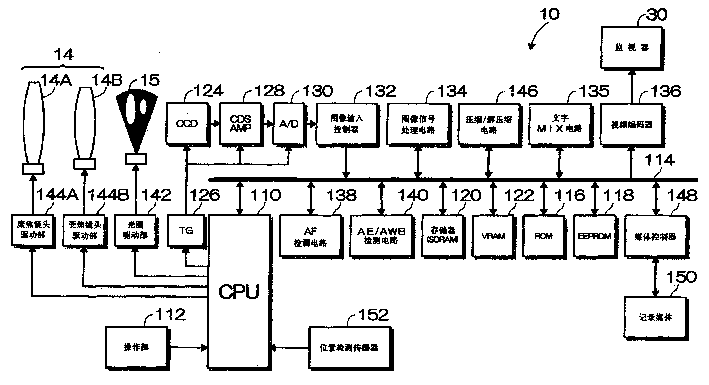
图3为适用于本发明数字照相机的内部结构示意框图。Fig. 3 is a schematic block diagram of the internal structure of the digital camera suitable for the present invention.
图4为位置检测传感器的构成图。FIG. 4 is a configuration diagram of a position detection sensor.
图5为位置检测传感器的检测角度说明图。FIG. 5 is an explanatory diagram of a detection angle of a position detection sensor.
图6为位置检测传感器的检测角度说明图。Fig. 6 is an explanatory diagram of a detection angle of a position detection sensor.
图7为位置检测传感器的检测角度说明图。Fig. 7 is an explanatory diagram of a detection angle of a position detection sensor.
图8为摄影菜单的示例显示图。FIG. 8 is an example display diagram of a photography menu.
图9为表示委托摄影模式的摄影处理顺序程序框图。Fig. 9 is a flow chart showing the imaging processing procedure in the imaging request mode.
图10为表示记录位置的处理顺序的程序框图。Fig. 10 is a flow chart showing the processing procedure of recording position.
图11为表示修正方向显示处理顺序的程序框图。Fig. 11 is a flowchart showing the procedure of correction direction display processing.
图12为修正方向图标的示例图。FIG. 12 is an example diagram of a correction direction icon.
图13为修正方向图标的示例图。FIG. 13 is an example diagram of a correction direction icon.
图14第2实施方式中数字照相机摄影处理顺序的程序框图。Fig. 14 is a flow chart of the digital camera imaging processing procedure in the second embodiment.
图15为委托摄影模式下的摄影处理顺序的程序框图。FIG. 15 is a flowchart of the imaging processing procedure in the imaging request mode.
具体实施方式Detailed ways
下面根据附图说明本发明所述摄影装置的最佳实施方式。The best implementation mode of the photographing device of the present invention will be described below with reference to the accompanying drawings.
图1、图2分别为适用于本发明的数字照相机10的正面斜视图和背面斜视图。1 and 2 are respectively a front perspective view and a rear perspective view of a
如图1所示,在照相机机身12的正面设置有镜头14、闪光灯16、取景窗18、自拍灯20等,在机身12的上面设置有快门按钮26、电源按钮28等。As shown in FIG. 1 , a
如图2所示,在照相机机身12的背面设置有监视器30、取景观察窗32、闪光按钮34、宏按钮36、变焦镜头操纵柄38、显示按钮40、BACK按钮42、菜单/OK按钮44、十字按钮48、模式开头50等。As shown in FIG. 2, a
快门按钮26由半按和全按的两段式开关构成,半按快门按钮26,照相机进行AE/AF工作,全按则进行摄影工作。The
监视器30由彩色液晶显示器构成,可显示记录图像的画面,也可作为用户接口的显示画面。另外,也可作为摄影时用于视场角定位的电子取景。显示按钮40是指示切换监视器30显示内容的按钮。The
闪光按钮34是指示闪光模式转换的按钮,每按一次闪光按钮34,摄影的闪光模式由“自动闪光”→“减轻红眼闪光”→“强制闪光”→“延迟闪光”→“禁止闪光”进行切换。The flash button 34 is a button indicating the flash mode conversion, and every time the flash button 34 is pressed, the flash mode of photography is switched from "automatic flash" → "red-eye reduction flash" → "forced flash" → "delayed flash" → "prohibited flash" .
宏按钮36是指示宏功能ON/OFF的转换按钮,每按一次宏按钮36摄影中宏功能的ON/OFF被转换。The macro button 36 is a switching button for instructing ON/OFF of the macro function, and the ON/OFF of the macro function during shooting is switched every time the macro button 36 is pressed.
变焦镜头操纵柄38在摄影时是指示摄影画面变焦(远/近)的按钮,重放时指示显示画面远近(扩大/缩小)的按钮。变焦镜头操纵柄38上下方向活动自如,向上方向推,把聚焦点推远,向下拉,把聚焦点拉近。The zoom lens handle 38 is a button for instructing zooming (far/near) of the shooting screen during shooting, and a button for instructing the distance (enlargement/reduction) of the display screen during playback. The zoom lens handle 38 can move freely in the up and down directions. Pushing upwards will push the focal point far away, and pulling it downwards will bring the focal point closer.
菜单/OK按钮44是指示从各种模式的普通画面转向菜单画面的按钮。菜单按钮的功能还有确定选择内容、指示实行按钮(OK按钮)的功能。BACK按钮42是指示撤消输入的操作等按钮。The menu/OK button 44 is a button for instructing to switch from the normal screen of each mode to the menu screen. The function of the menu button is also the function of confirming the selected content and instructing the execution button (OK button). The BACK button 42 is a button instructing to cancel an input operation or the like.
十字按钮48是输入上下左右四个方向指示的按钮,在菜单画面上使用于菜单项目的选择等。The cross button 48 is a button for inputting directions in four directions: up, down, left, and right, and is used for selecting menu items and the like on the menu screen.
模式开关50是指示模式转换的开关,可在“摄影位置”和“重放位置”之间自由滑动。数字照相机10把模式开关50置于“摄影位置”,就设定为“摄影模式”,置于“重放位置”就设定为“重放模式”。The mode switch 50 is a switch indicating mode switching, and is slidable between the "shooting position" and the "playback position". When the
图3为图1及图2所示数字照相机10的内部结构概略框图。FIG. 3 is a schematic block diagram of the internal structure of the
数字照相机10由中央处理装置(CPU)110统一控制所有操作。CPU110根据操作部112(快门按钮26、电源按钮28、闪光按钮34、宏按钮36、变焦镜头操纵柄38、显示按钮40、BACK按钮42、菜单/OK按钮44、十字按钮48、模式开头50等)输入的信息,按照所定程序控制本照相机系统。All operations of the
通过总线114和CPU110连接的ROM116中,存储有CPU执行的程序及用于控制的各种数据,在EEPROM118中,存储有文件夹管理信息等的有关操作数字照相机10的各种设定信息等。另外,存储器(SDRAM)120在负责CPU110的运算工作的同时,还是暂时记忆图像数据及音频数据的领域。VRAM122为图像数据专用的暂存记忆领域。
数字照相机10把模式开关50设置在摄影模式上就可进行摄影,并供给包括固态摄像元件(CCD)124的摄像部的电源。The
透过镜头14的光通过光圈15在CCD124的受光面上成像。在CCD124的受光面上成二维排列着多个光电二极管(受光元件),对应于光电二极管按所定的排列结构(拜耳排列、G带状排列等),配置有红(R)、绿(G)、蓝(B)原色滤色器。另外,CCD124具有控制各光电二极管的电荷累积时间(快门速度)的电子快门功能。CPU110通过计时震荡器(TG)126控制CCD124的电荷累积时间。The light transmitted through the
在CCD124的受光面上成像的被摄物体图像,由各光电二极管对应入射光量变换成信号电荷。在各光电二极管累积的信号电荷,按照CPU110的指令,根据从计时震荡器(TG)126发出的驱动脉冲,被顺次读出对应于信号电荷的电压信号(图像信号)。The image of the subject formed on the light-receiving surface of the
从CCD124输出的图像信号被送往模拟处理部(CDS/AMP)128,在这里每个像素的R、G、B信号被同步取样选择(相关二次取样处理)后,增幅送到A/D转换器130。The image signal output from the CCD124 is sent to the analog processing unit (CDS/AMP) 128, where the R, G, and B signals of each pixel are synchronously sampled and selected (correlated sub-sampling processing), and then sent to the A/D for amplification.
A/D转换器130把模拟处理部128输出的模拟R、G、B信号,转换成数字R、G、B信号。从A/D转换器130输出的数字R、G、B信号,通过图像输入控制器132记忆在存储器120中。The A/
图像信号处理电路134按照CPU110的指令,处理记忆在存储器120中的R、G、B信号。即,图像信号处理电路134,通过同步电路(插补与单板CCD彩色滤光器排列相符的色信号的空间偏移,把色信号转换成同步的处理电路)、白平衡修正电路、伽马修正电路、轮廓修正电路、辉度·色差信号生成电路等处理图像单元,按照CPU110的指令,灵活运用存储器120进行所定信号的处理。输入到图像信号处理电路134的R、G、B信号,在图像信号处理电路134中,转换成辉度信号(Y信号)及色差信号(Cr、Cb信号),同时,进行伽马修正等规定的处理后,存入VRAM122中。The image
当把摄影图像输送到监视器30时,从VRAM122通过文字MIX电路135传送到视频编码器136。视频编码器136,把输入的图像数据转换成规定的显示用信号(例如,NTSC方式的彩色复合映像信号),传送给监视器30。由此,CCD124捕捉到的图像就被显示在监视器30上。When the captured image is sent to the
定期收取CCD124的图像信号,根据其图像信号生成的图像数据定期改写VRAM122内的图像数据,并输出到监视器30。由此,CCD124捕捉到的图像被实时显示。摄影者可根据实时显示在监视器30上的图像(连续画面)确定摄影视场角。The image signal of CCD124 is received periodically, and the image data generated based on the image signal is periodically rewritten with the image data in VRAM122, and it outputs to monitor 30. Thereby, the image captured by CCD124 is displayed in real time. The photographer can determine the angle of view for photography based on the images (sequence) displayed on the
另外,文字MIX电路135,按照CPU110的指令,把存储器120添加的所定文字、符号数据和VRAM122添加的图像数据合成输出到视频编码器136中。这样,文字及符号等信息就重迭在连续画面上显示了。In addition, the
摄影由按下快门26进行。首先,半按快门26,S1接通信号输入到CPU110,CPU110开始AE/AF处理。Photography is performed by pressing the
首先,通过图像输入控制器132,把从CCD124获取的图像信号输入到AF检测电路138和AE/AWB检测电路140中。First, an image signal acquired from the
AE/AWB检测电路140,把一幅画面分割成多个区域(例如、16×16),在每一分割区中有累积R、G、B信号的电路,其累积值提供给CPU110。CPU110根据AE/AWB检测电路140算出的累积值,检测被摄物体的亮度(被摄物体辉度),并算出适合摄影的曝光值(摄影EV值)。然后,从求出的摄影EV值和所定程序图表中确定光圈值及快门速度,根据这些,控制CCD124的电子快门和光圈驱动部142,获得适合的曝光量。The AE/
另外,AE/AWB检测电路140,在自动白平衡调整时,算出每一分割区中R、G、B信号的平均累积值,把算出结果提供给CPU110。CPU110从获得的R累积值、B累积值、G累积值中,求出每个分割区的R/G及B/G的比,根据求出的R/G及B/G的值在R/G及B/G色空间的分布等,进行光源种类的判别。然后,按照适于被判别光源种类的白平衡调整值,例如,为使各比值大体为1(即,在一个画面中RGB的累积比率为R∶G∶B1∶1∶1),控制对于白平衡调整电路的R、G、B信号增益值(白平衡修正值),加以修正各色信道的信号。In addition, the AE/
AF检测电路138由只允许G信号的高频成分通过的高通滤波器、绝对值化处理部、抽取所定聚焦区(如画面的中央部分)内信号的AF区抽出部及累积AF区内绝对值数据的累积部构成。AF检测电路138求出的累积值数据,通知给CPU110。CPU110控制聚焦镜头驱动部144A,使其聚焦镜头14A移动,同时,用多个AF检测点计算焦点评价值(AF评价值),把评价值最大的镜头位置作为聚焦位置。然后,控制聚焦镜头驱动部144A,使聚焦镜头14A移动到求出的聚焦位置上。The
如上所述,随着半按下快门按钮,进行AE/AF处理。As described above, AE/AF processing is performed as the shutter button is pressed halfway.
另外,摄影者根据需要操作变焦镜头操纵柄38,推拉镜头14调整视场角。向上(远方向)操作变焦镜头操纵柄38,远方目标输入CPU110,CPU110相应地驱动变焦镜头驱动部144B,使变焦镜头14B向远方移动。另外,向下(近方向)操作变焦镜头操纵柄38,近处目标输入CPU110,CPU110相应地驱动变焦镜头驱动部144B,使变焦镜头14B向近处移动。In addition, the photographer operates the zoom lens handle 38 as needed, and pushes and pulls the
其后,全按快门按纽26,S2接通信号输入CPU110,CPU110开始摄影、记录处理。即,一接通S2信号,所获取的图像数据,在图像处理电路134中转换成辉度/色差信号(Y/C信号),实施伽马修正等的即定处理后,存入存储器120。Thereafter, when the
存入在存储器120中的图像数据,通过压缩/解压缩电路146,按照规定的格式(例如,JPEG格式)压缩后,通过媒体控制器148记录在记录媒体150中。The image data stored in the
当通过模式开关50选择重放模式时,就会从记录媒体150中读出图像数据(最后记录在记录媒体150中的图像数据)。被读出的图像数据经过压缩/解压缩电路146,解压缩成非压缩的YC信号后,通过图像信号处理电路134、文字MIX电路135、视频编码器136,输出到监视器30。由此,记录在记录媒体150中的图像,被重放显示在监视器30上。When the playback mode is selected by the mode switch 50, image data (image data last recorded on the recording medium 150) is read from the
图像的帧移动由操作十字键48进行,按十字键48的右键,从记录媒体150中读出后一帧图像数据,重放显示在监视器30上。按下十字键48的左键,从记录媒体150中读出前一帧图像数据,重放显示在监视器30上。The frame movement of the image is performed by operating the cross key 48 , and the right key of the cross key 48 is pressed to read out the image data of the next frame from the
进而,如上所述,本实施方式的数字照相机10,不仅能进行静止画面的摄影及重放,其摄影功能还包括委托他人拍摄符合自己构图意图的照片。这种功能是,把符合自己构图意图的、照相机拍摄时的位置,事先记忆在照相机中,使被委托拍摄的他人,可用和其照相机记忆的位置相同的位置进行拍摄。下面,就此委托拍摄的功能加以说明。Furthermore, as described above, the
如图4所示,在照相机机身12的内部,设置有检测照相机机身12位置的位置检测传感器152。As shown in FIG. 4 , inside the
位置检测传感器152,当把平行于照相机机身12横轴的平行轴定为X轴、把平行于照相机机身12纵轴的平行轴定为Y轴、把平行于镜头14的光轴L的平行轴定为Z轴时,检测出各轴的倾斜角θX、θY、θz。For the
倾斜角θX如图5所示,以X轴定为水平时为基准(0度),用加速度传感器(X)检测和水平状态的倾斜角(X轴绕Z轴的旋转角)。The inclination angle θ X is shown in Figure 5, with the X axis as the reference (0 degrees), the acceleration sensor (X) is used to detect the inclination angle of the horizontal state (the rotation angle of the X axis around the Z axis).
倾斜角θY如图6所示,以Y轴定为垂直水平时为基准(0度),用加速度传感器(Y)检测和垂直状态的倾斜角(Y轴绕X轴的旋转角)。The inclination angle θ Y is shown in Figure 6. When the Y axis is set as vertical and horizontal as the reference (0 degrees), the acceleration sensor (Y) is used to detect the inclination angle of the vertical state (the rotation angle of the Y axis around the X axis).
倾斜角θZ如图7所示,以Z轴指向南方时为基准(0度),用加速度传感器(Z)检测和正南方向的倾斜角(Z轴绕Y轴的旋转角)。The inclination angle θ Z is shown in Figure 7, with the Z axis pointing to the south as the reference (0 degrees), the acceleration sensor (Z) detects the inclination angle in the south direction (the rotation angle of the Z axis around the Y axis).
用位置检测传感器152,检测出的位置数据输入到CPU110。Position data detected by the
委托摄影功能设定为从摄影菜单中调出。即,在摄影模式下,按下菜单/OK按钮44,如图8(a)所示,摄影菜单的画面显示在监视器30上,选择此摄影菜单项目中的“委托摄影”项目。菜单项目的选择,用十字键48移动光标进行,被选择的项目用反色显示。把光标移动到所要选择的菜单项目上,按下菜单/OK按钮44,确定选择。The commissioned shooting function is set to be called up from the shooting menu. That is, in the shooting mode, the menu/OK button 44 is pressed, and as shown in FIG. The menu item is selected by moving the cursor with the cross key 48, and the selected item is displayed in reverse color. Move the cursor to the menu item to be selected, and press the menu/OK button 44 to confirm the selection.
这样,由于从摄影菜单中选择了“委托摄影”,数字照相机10就进入了委托摄影模式。CPU110判断是否进入了委托摄影模式,一旦确认为进入了委托摄影模式,就按照图9所示的程序流程图开始处理委托摄影。In this way, the
进入委托摄影模式后,首先,进行位置记忆的处理(步骤S11)。即,确定委托他人摄影时的构图,把那时照相机的位置记忆在照相机中。这种位置记忆的处理,由图10所示的顺序进行。After entering the photography request mode, first, the position storage process is performed (step S11). That is, determine the composition when commissioning others to take pictures, and store the position of the camera at that time in the camera. Such position memorization processing is performed by the procedure shown in FIG. 10 .
当选择图8(a)所示的摄影菜单中的“委托摄影”项目时,如图8(b)所示,在监视器30的画面上变成了连续图像,并且与此同时,在连续图像上重迭显示提示位置记忆用摄影的信息(“确定构图,请按快门按钮”)。用户(委托摄影者)根据此显示,确定委托他人摄影的构图。即,操作镜头变焦,确定希望摄影的视场角。When the "entrusted shooting" item in the shooting menu shown in Fig. 8(a) is selected, as shown in Fig. 8(b), a continuous image becomes on the screen of the
这时,CPU110判断变焦镜头操纵柄38是否向上方向(远方向)动作(步骤S20)。向上方向动作时,向变焦镜头驱动部144B输出指令,把变焦镜头14B移向远方一侧(步骤S21)。另外,判定变焦镜头操纵柄38没有向上方向(远方向)动作时,判断是否向下方向(近方向)动作(步骤S22)。向下方向动作时,向变焦镜头驱动部144B输出指令,把变焦镜头14B移向近方一侧(步骤S23)。At this time, the
这样,用户操作变焦镜头,确定希望摄影的视场角,确定时全按快门按纽26。CPU110判断快门按纽26是否完全按下(步骤S24)。当判断为完全按下时,从CCD124获取图像数据的同时,从位置检测传感器152获取位置数据(θX1、θY1、θz1)(步骤S25)。In this way, the user operates the zoom lens, determines the angle of field desired to be photographed, and fully presses the
如图8(c)所示,使所获取的图像数据在监视器30上进行预览显示的同时,还显示是否需要记忆的信息(“要记忆吗?”)(步骤S26)。用户根据监视器30的显示判断是否需要记忆。需要记忆时,按菜单/OK按钮44,重新进行时,按BACK按钮42。As shown in FIG. 8( c ), the obtained image data is previewed and displayed on the
CPU110根据此操作部112的输入,判断是否需要记忆(步骤S27)。而当按下BACK按钮42,确定为不记忆时,返回步骤20,重新从确定视场角开始进行。
另一方面,当按下菜单/OK按钮44,确定为记忆时,把所获取的位置数据(θX1、θY1、θz1)作为基本位置数据(θX1、θY1、θz1)记录在EEPROM118中(步骤S28)。On the other hand, when the menu/OK button 44 is pressed and it is determined as memory, the acquired position data (θ X1 , θ Y1 , θ z1 ) are recorded as basic position data (θ X1 , θ Y1 , θ z1 ) in in the EEPROM 118 (step S28).
在这里,CPU110判断在EEPROM118记忆范围中,是否存在以前获取的基本位置数据(θX1、θY1、θz1)(步骤S29)。当判定为没有时,把从位置检测传感器152获取的基本位置数据(θX1、θY1、θz1)直接写入(步骤S30)。另一方面,以前获取的基本位置数据(θX1、θY1、θz1)仍然存在的情况下,把从位置检测传感器152获取的基本位置数据(θX1、θY1、θz1)复盖写入(步骤S31)。Here, the
其后,CPU110为防止无意间操作变焦镜头改变视场角,可锁上变焦镜头,使其不能操作变焦镜头(步骤S32)。Thereafter, in order to prevent unintentional operation of the zoom lens to change the angle of view, the
经过以上步骤,位置记录处理完毕后,用户(委托摄影者)就可以把数字照相机10交给被委托摄影的人,进行委托摄影。After the above steps, after the location recording process is completed, the user (the entrusted photographer) can hand over the
用户进入到自己确定的构图中位置,被委托摄影者在用户(委托摄影者)进行记录位置摄影的地方进行摄影。The user enters the position in the composition determined by the user, and the entrusted photographer takes pictures at the place where the user (the entrusted photographer) takes pictures of the recorded position.
首先,被委托摄影者半按下快门按钮26进行调焦。CPU110判断是否半按下快门按钮26(步骤S12),确定为半按下时,进行AE/AF处理,同时,从位置检测传感器152中获取位置数据(θX2、θY2、θz2)(步骤S13)。First, the entrusted photographer half-presses the
并且,把获取的位置数据(θX2、θY2、θz2)和记忆在EEPROM118中的基本位置数据(θX1、θY1、θz1)进行比较,判断是否一致(步骤S14)。其判断结果,不一致时,实施对应偏移量修正方向的显示处理(步骤S15)。Then, the obtained position data (θ X2 , θ Y2 , θ z2 ) is compared with the basic position data (θ X1 , θ Y1 , θ z1 ) stored in the
其修正方向的显示处理,按照图11所示的程序框图,以下面的顺序进行。The display processing of the correction direction is performed in the following procedure according to the flow chart shown in FIG. 11 .
首先,CPU110判断横轴(X轴)的斜度(测定倾斜角θX2),对于基本位置的斜度(基本倾斜角θX1)是否在±5度范围内。即,判断测定倾斜角θX2是否满足不等式(θX1-5)<θX2<(θX1+5)(步骤S40)。First,
当测定倾斜角θX2被确定为不满足不等式(θX1-5)<θX2<(θX1+5)时,CPU110判断X轴是否偏离基本位置(倾斜角θX1)+5度以上。即,判断测定倾斜角θX2是否满足不等式(θX1+5)≤θX2(步骤S41)。When the measured inclination angle θ X2 is determined not to satisfy the inequality (θ X1 −5)<θ X2 <(θ X1 +5),
当判断X轴偏离基本位置(倾斜角θX1)+5度以上时,应当进行修正,把向负方向修正照相机机身12横轴倾斜度的图标显示在监视器上(步骤S42)。例如,如图12(a)所示,带L型箭头标记的图标被显示在监视器30的左上角。When it is judged that the X-axis deviates from the basic position (inclination angle θ X1 )+5 degrees or more, it should be corrected, and an icon to correct the inclination of the
另一方面,当判断X轴偏离基本位置(倾斜角θX1)-5度以下时,把向正方向修正照相机机身12横轴倾斜度的图标显示在监视器上(步骤S43)。例如,如图12(c)所示,带L型箭头的图标被显示在监视器30的右上角。On the other hand, when it is judged that the X-axis deviates from the basic position (inclination angle θ X1 ) by -5 degrees or less, an icon for correcting the inclination of the
当测定倾斜角θX2被确定为满足不等式(θX1-5)<θX2<(θX1+5)时,不显示使其修正照相机机身12横轴(X轴)的图标(步骤S44)。转向判断照相机机身12纵轴(Y轴)倾斜度。When the measured inclination angle θ X2 is determined to satisfy the inequality (θ X1 −5)<θ X2 <(θ X1 +5), the icon for correcting the horizontal axis (X axis) of the
即,CPU110判断纵轴(Y轴)的斜度(测定倾斜角θY2),对于基本位置的斜度(基本倾斜角θY1)是否在±5度范围内。也就是判断测定倾斜角θY2是否满足不等式(θY1-5)<θY2<(θY1+5)(步骤S45)。That is,
当测定倾斜角θY2被确定为不满足不等式(θX1-5)<θY2<(θY1+5)时,CPU110判断Y轴是否偏离基本位置(倾斜角θY1)+5度以上。即,判断测定倾斜角θY2是否满足不等式(θY1+5)≤θY2(步骤S46)。When the measured inclination angle θ Y2 is determined not to satisfy the inequality (θ X1 −5)<θ Y2 <(θ Y1 +5),
当判断Y轴偏离基本位置(倾斜角θY1)+5度以上时,应当进行修正,把向负方向修正照相机机身12纵轴倾斜度的图标显示在监视器上(步骤S47)。例如,如图13(b)所示,指向下方箭头标记的图标被显示在监视器30的下部中央位置。When it is judged that the Y axis deviates from the basic position (inclination angle θ Y1 )+5 degrees or more, it should be corrected, and an icon to correct the inclination of the longitudinal axis of the
另一方面,当判断Y轴偏离基本位置(倾斜角θY1)-5度以下时,把向正方向修正照相机机身12纵轴倾斜度的图标显示在监视器上(步骤S48)。例如,如图13(h)所示,指向上方箭头的图标被显示在监视器30的上部中央位置上。On the other hand, when it is judged that the Y axis deviates from the basic position (inclination angle θ Y1 ) by -5 degrees or less, an icon for correcting the inclination of the longitudinal axis of the
当测定倾斜角θY2被确定为满足不等式(θY1-5)<θY2<(θY1+5)时,不显示使其修正照相机机身12纵轴(Y轴)的图标(步骤S49)。转向判断照相机机身12的Z轴倾斜度。When the measured inclination angle θ Y2 is determined to satisfy the inequality (θ Y1 −5)<θ Y2 <(θ Y1 +5), the icon for correcting the longitudinal axis (Y axis) of the
即,CPU110判断照相机机身12的Z轴斜度(测定倾斜角θZ2),对于基本位置的斜度(基本倾斜角θZ1)是否在±5度范围内。也就是判断测定倾斜角θZ2是否满足不等式(θZ1-5)<θZ2<(θZ1+5)(步骤S50)。That is, the
当测定倾斜角θZ2被确定为不满足不等式(θZ1-5)<θZ2<(θZ1+5)时,CPU110判断Z轴是否偏离基本位置(倾斜角θZ1)+5度以上。即,判断测定倾斜角θZ2是否满足不等式(θZ1+5)≤θZ2(步骤S51)。When the measured inclination angle θ Z2 is determined not to satisfy the inequality (θ Z1 −5)<θ Z2 <(θ Z1 +5),
当判断Z轴偏离基本位置(倾斜角θZ1)+5度以上时,应当进行修正,把光轴倾斜度向负方向修正的图标显示在监视器上(步骤S52)。例如,如图13(f)所示,指向右侧箭头标记的图标被显示在监视器30的右侧中央位置上。When it is judged that the Z axis deviates from the basic position (inclination angle θ Z1 )+5 degrees or more, correction should be performed, and an icon for correcting the optical axis inclination to the negative direction is displayed on the monitor (step S52). For example, as shown in FIG. 13( f ), an icon of an arrow mark pointing to the right is displayed on the right center position of the
另一方面,当判断Z轴偏离基本位置(倾斜角θZ1)-5度以下时,使光轴倾斜度向正方向修正的图标显示在监视器上(步骤S53)。例如,如图13(d)所示,指向左侧箭头的图标被显示在监视器30的左侧中央位置上。On the other hand, when it is judged that the Z axis deviates from the basic position (inclination angle θ Z1 ) by -5 degrees or less, an icon for correcting the optical axis inclination to the positive direction is displayed on the monitor (step S53). For example, as shown in FIG. 13( d ), an icon of an arrow pointing to the left is displayed on the left central position of the
当测定倾斜角θZ2被确定为满足不等式(θZ1-5)<θZ2<(θZ1+5)时,不显示使其修正照相机机身12的Z轴图标(步骤S54)。结束修正方向的显示处理。When the measured inclination angle θ Z2 is determined to satisfy the inequality (θ Z1 −5)<θ Z2 <(θ Z1 +5), the Z-axis icon to correct the
这时,摄影者(被用户委托的摄影者)利用监视器30显示的图标信息,把照相机机身12的位置修正到原来的状态。At this time, the photographer (the photographer entrusted by the user) uses the icon information displayed on the
其后,CPU110再次判断快门按钮26是否半按下(步骤S16)。当确定快门按钮26是半按下时,返回步骤13再次从位置检测传感器152中获取位置数据。并根据获取的位置数据判断修正方向,显示必要的修正方向图标。Thereafter,
这样,每半按一次快门按钮26,修正方向的图标就被新的信息更新。只要摄影者半按快门按钮26,就会反复进行位置修正,直到此修正方向的图标消失。而且,当修正方向的图标消失时,完全按下快门按钮26。In this way, every time the
CPU110判断快门按钮26是否完全按下(步骤S17)。确定完全按下时,进行图像数据的记录处理(步骤S18)。即,从CCD124中读取图像数据,实施必要的信号处理,记录在记录媒体150中。由此,拍摄用户希望构图的图像。
用以上一系列的过程,完成了委托摄影。而后,CPU110解开变焦镜头锁(步骤S19),返回到可操作变焦镜头状态,同时,把摄影模式恢复到通常的摄影模式。With the above series of processes, commissioned photography is completed. Then, the
这样,依靠本实施方式的数字照相机10,当用户确定想让人帮助摄影的构图时,就可把照相机机身12的位置(基本位置)记忆在照相机中。而且,为便于用其被记忆的位置(基本位置)摄影,把必要的修正信息显示在监视器30上。因此,即使是委托他人摄影时,也可使被委托摄影者容易地拍摄到用户希望构图的图像。另外,修正信息也只用图标在监视器30上显示修正方向,从而可以明确地把握必要的修正量,被委托摄影者也不会对摄影感到困惑。另外,也不影响连续图像的可视性。In this way, with the
另外,在本实施方式中,是把修正方向的图标重迭显示在连续图像上的,但也可以单独显示修正方向的图标。In addition, in this embodiment, the icon of the correction direction is superimposed and displayed on the continuous image, but the icon of the correction direction may be displayed independently.
图标的显示例也不限于本实施方式的,只要是能分清必要的修正方向的就可以。The display example of the icon is not limited to the present embodiment, and any icon can be displayed as long as the necessary correction direction can be distinguished.
另外,照相机机身12备有扬声器时,也可以用声音告知修正信息进行指示。In addition, when the
在本实施方式中,对于基本位置,各轴只是在倾斜+5度以上或倾斜-5度以下时,显示修正方向的图标,这是由于设定了在±5度范围内的偏移作为误差而被允许的。因此,在精确修正时,也可以把允许范围限定的更窄。In this embodiment, for the basic position, the icon of the correction direction is displayed only when each axis is tilted above +5 degrees or tilted below -5 degrees, because the deviation within the range of ±5 degrees is set as the error And is allowed. Therefore, in precise correction, the allowable range can also be limited narrower.
图14为数字照相机10的第2实施方式中摄影控制顺序的程序框图。FIG. 14 is a flow chart of the imaging control procedure in the second embodiment of the
本实施方式的数字照相机10,在通常摄影时半按下快门按钮,于是从位置检测传感器152中,获取当时照相机机身12的位置数据,记忆在EEPROM118中。In the
用模式开关50确定照相机的模式为摄影模式时,CPU110判断是否设定为委托摄影模式(步骤S60)。委托摄影模式的确定,同上述第1实施方式相同,在摄影菜单上确定。When the mode of the camera is determined to be the shooting mode by the mode switch 50, the
在这里,确定没有设定委托摄影模式时,作为通常摄影模式进行如下动作。Here, when it is determined that the requested shooting mode is not set, the normal shooting mode operates as follows.
首先,CPU110判断变焦镜头操纵柄38是否向上方向(远方向)操作(步骤S61),向上方向操作时,给变焦镜头驱动部114B输出指令,使变焦镜头14B向远方一侧移动(步骤S62)。另外,确定变焦镜头操纵柄38没有向上方向(远方向)操作时,判断是否向下方向(近方向)操作(步骤S63),在向下方向操作时,给变焦镜头驱动部114B输出指令,使变焦镜头14B向近处一侧移动(步骤S64)。First, the
接着,CPU110判断快门按钮26是否半按下(步骤S65)。确定为半按下时,进行AE/AF处理,同时,从位置检测传感器152中获取位置数据(θX1、θY1、θz1)(步骤S66)。并且,将其获取的位置数据(θX1、θY1、θz1),作为基本位置数据(θX1、θY1、θz1)记录在EEPROM118中(步骤S67)。Next,
这里,CPU110判断在EEPROM118的记忆范围中,是否存在着以前获取的基本位置数据(θX1、θY1、θz1)(步骤S68)。确定为没有时,把从位置检测传感器152获取的基本位置数据(θX1、θY1、θz1)直接写入(步骤S69)。另一方面,以前获取的基本位置数据(θX1、θY1、θz1)仍然存在时,把从位置检测传感器152获取的基本位置数据(θX1、θY1、θz1)复盖写入(步骤S70)。Here, the
此后,CPU110判断快门按钮26是否完全按下(步骤S71)。当确定为完全按下时,进行图像数据的记录处理(步骤S72)。即,从CCD124获取图像数据,实施必要的信号处理,记录在记录媒体150中。Thereafter,
以上为通常摄影模式的工作顺序,用这种通常摄影模式下的摄影过程,把照相机机身的位置数据记忆在照相机中。所以,当委托他人进行摄影时,有必要确定是拍摄刚委托摄影之前所希望的构图的图像,还是半按快门按钮26确定构图。The above is the working order of the normal shooting mode, and the position data of the camera body is stored in the camera by the shooting process in the normal shooting mode. Therefore, when commissioning another person to perform photography, it is necessary to determine whether to capture an image with the desired composition immediately before commissioning photography, or to press the
用上述步骤60确定使用委托摄影模式时,数字照相机10在委托摄影模式下工作。在委托摄影模式下,按照图15所示的程序框图,按如下进行摄影处理。When it is determined to use the commissioned photography mode in step 60 above, the
首先,为防止无意操作变焦镜头,改变视场角,CPU110锁住变焦镜头,使其不能操作变焦镜头(步骤S80)。First, in order to prevent unintentional operation of the zoom lens to change the angle of view, the
在这种情况下,用户委托他人摄影,并进入到自己决定的摄影点。另一方面,被委托摄影者,继续半按快门按钮26,进行调焦。CPU110判断快门按钮26是否被半按下(步骤581),当确定为半按下时,进行AE/AF处理,同进,从位置检测传感器152中获取位置数据(θX2、θY2、θz2)(步骤S82)。In this case, the user entrusts another person to take a photo, and enters a photo spot decided by himself. On the other hand, the commissioned photographer continues to press the
并且,把获得的位置数据(θX2、θY2、θz2)和EEPROM118中记忆的基本位置数据(θX1、θY1、θz1)相比较,判断是否一致(步骤S83)。其判结果在不一致的情况下,实施修正方向的显示处理(步骤S84)。And, compare the obtained position data (θ X2 , θ Y2 , θ z2 ) with the basic position data (θ X1 , θ Y1 , θ z1 ) stored in
并且,修正方向的显示处理,同上述第1实施方式相同,因此,在这里省略其说明。In addition, the display processing of the correction direction is the same as that of the above-mentioned first embodiment, so the description thereof will be omitted here.
摄影者(被用户委托摄影的人)按照监视器30显示的修正方向图标信息,修正照相机机身12的位置,使其到原来的位置。The photographer (the person requested by the user) corrects the position of the
CPU110再次判断是否半按下快门按钮26(步骤S85),当确定为半按下快门按钮26时,返回到步骤82,再一次从位置检测传感器152中获取位置数据。并且,根据所获取的位置数据,判断修正方向,显示必要的修正方向的图标。当修正方向的图标消失时,完全按下快门按钮26。The
CPU110判断快门按钮26是否完全按下(步骤S86),当确定为完全按下时,进行图像数据的记录处理(步骤S87)。也就是从CCD124中取出图像数据,实施必要的信号处理,记录在记录媒体150中。由此,用户就可以拍摄和先前拍摄的图像相同构图的图像。
其后,CPU110解开变焦镜头锁(步骤S88),返回到变焦镜头可操作状态,同时,把摄影模式恢复到通常摄影模式。Thereafter, the
这样,利用本实施方式的数字照相机10,在通常摄影时,半按下快门按钮26,就可从位置检测传感器152中获取当时的照相机机身12的位置数据,并记忆在EEPROM118中。In this way, with the
和上述第1实施方式相同,即使是委托他人摄影时,也能使其容易地拍摄到用户所希望构图的图像。Similar to the above-mentioned first embodiment, even when commissioning another person to take pictures, it is possible to make it easy to take an image with a composition desired by the user.
并且,在本实施方式中,在通常摄影模式下,半按快门按钮26时,位置数据被记忆在EEPROM118中,完全按下快门按钮26即进行摄影时,也可以把位置数据记忆在EEPROM118中。Furthermore, in this embodiment, in the normal shooting mode, the position data is stored in the
另外,在委托摄影时,当半按下快门按钮时,就可根据当时获取的位置数据,把修正方向的图标显示在监视器30上,但也可以短时间定期地获取位置数据,随时更新修正方向的图标,显示在监视器30上。In addition, when commissioning photography, when the shutter button is pressed halfway, the icon of the correction direction can be displayed on the
进而,就检测照相机机身12位置的位置检测传感器来说,若可以检测3轴(X轴、Y轴、Z轴)的倾斜角度,并不限定于本实施方式。Furthermore, the position detection sensor for detecting the position of the
并且,在上述一系列实施方式中,以适用于可以记录/重放静止画面的数字照相机为例说明了本发明,但也可以同样适用于记录/重放除静止画面以外的动画画面的数字照相机。In addition, in the above-mentioned series of embodiments, the present invention has been described as being applied to a digital camera capable of recording/reproducing still images as an example, but it can also be similarly applied to a digital camera capable of recording/reproducing moving images other than still images. .
另外,上述一系列的实施方式以适用于数字照相机为例说明了本发明,但本发明的适用范围并不限定数字照相机,也完全适用于数字摄像机、有照相功能的手持电话机、带照相功能的PDA、带照相功能的个人计算机等配备有摄影功能的电器(摄影装置)。In addition, above-mentioned a series of implementation modes have described the present invention by being applicable to digital cameras as an example, but the scope of application of the present invention is not limited to digital cameras, and is also fully applicable to digital cameras, hand-held phones with camera functions, and digital cameras with camera functions. PDAs, personal computers with camera functions, and other electrical appliances (photographic devices) equipped with camera functions.
Claims (3)
Applications Claiming Priority (2)
| Application Number | Priority Date | Filing Date | Title |
|---|---|---|---|
| JP366317/2003 | 2003-10-27 | ||
| JP2003366317A JP2005128437A (en) | 2003-10-27 | 2003-10-27 | Photographing device |
Publications (2)
| Publication Number | Publication Date |
|---|---|
| CN1612591A true CN1612591A (en) | 2005-05-04 |
| CN1332555C CN1332555C (en) | 2007-08-15 |
Family
ID=34510231
Family Applications (1)
| Application Number | Title | Priority Date | Filing Date |
|---|---|---|---|
| CNB2004100861539A Expired - Lifetime CN1332555C (en) | 2003-10-27 | 2004-10-27 | Photographic apparatus |
Country Status (3)
| Country | Link |
|---|---|
| US (1) | US7532235B2 (en) |
| JP (1) | JP2005128437A (en) |
| CN (1) | CN1332555C (en) |
Cited By (3)
| Publication number | Priority date | Publication date | Assignee | Title |
|---|---|---|---|---|
| CN101815171B (en) * | 2009-02-24 | 2011-11-23 | 华晶科技股份有限公司 | Image capture device and its method for automatically indicating shooting position |
| CN103443820A (en) * | 2011-03-15 | 2013-12-11 | 富士通株式会社 | Portable terminal, work assisting program, information providing method, and information providing program |
| CN104735342A (en) * | 2013-12-18 | 2015-06-24 | 卡西欧计算机株式会社 | Dynamic image processing device and dynamic image processing method |
Families Citing this family (57)
| Publication number | Priority date | Publication date | Assignee | Title |
|---|---|---|---|---|
| JP2007041097A (en) * | 2005-08-01 | 2007-02-15 | Casio Comput Co Ltd | Electronic camera, photographing method, and program |
| GB2428927A (en) * | 2005-08-05 | 2007-02-07 | Hewlett Packard Development Co | Accurate positioning of a time lapse camera |
| CN102271222B (en) * | 2005-09-09 | 2014-04-30 | 佳能株式会社 | Image pickup apparatus |
| US20080002963A1 (en) * | 2006-06-28 | 2008-01-03 | Media Tek Inc. | Systems and methods for capturing images of objects |
| JP2008017385A (en) * | 2006-07-10 | 2008-01-24 | Matsushita Electric Ind Co Ltd | Imaging device |
| JP4258539B2 (en) * | 2006-08-31 | 2009-04-30 | 株式会社日立製作所 | Multiple angle of view camera |
| JP4990056B2 (en) * | 2007-07-27 | 2012-08-01 | 株式会社リコー | Imaging apparatus and control method thereof |
| US8089549B2 (en) | 2007-09-19 | 2012-01-03 | Ricoh Company, Ltd. | Imaging apparatus capable of detecting and displaying information with respect to an incline thereof |
| US20100318941A1 (en) * | 2008-01-28 | 2010-12-16 | Akira Yamada | Electronic device |
| JP5287226B2 (en) * | 2008-12-25 | 2013-09-11 | ペンタックスリコーイメージング株式会社 | Imaging device |
| JP5262693B2 (en) * | 2008-12-25 | 2013-08-14 | ペンタックスリコーイメージング株式会社 | Imaging device |
| JP5191879B2 (en) * | 2008-12-25 | 2013-05-08 | ペンタックスリコーイメージング株式会社 | Imaging device |
| JP5337975B2 (en) * | 2008-12-25 | 2013-11-06 | リコーイメージング株式会社 | Imaging device |
| JP5244579B2 (en) * | 2008-12-25 | 2013-07-24 | ペンタックスリコーイメージング株式会社 | Imaging device |
| KR20110004083A (en) * | 2009-07-07 | 2011-01-13 | 삼성전자주식회사 | Digital image processing device and method |
| JP5532735B2 (en) * | 2009-08-12 | 2014-06-25 | 日本電気株式会社 | Imaging apparatus, imaging support method, and imaging support program |
| KR101613529B1 (en) * | 2009-10-07 | 2016-04-19 | 엘지이노텍 주식회사 | camera module |
| JP2011142574A (en) * | 2010-01-08 | 2011-07-21 | Nikon Corp | Digital camera, image processor, and image processing program |
| CN102713948A (en) * | 2010-02-01 | 2012-10-03 | 日本电气株式会社 | Portable terminal, action history depiction method, and action history depiction system |
| JP2011166444A (en) * | 2010-02-09 | 2011-08-25 | Sanyo Electric Co Ltd | Imaging apparatus |
| JP5861395B2 (en) | 2011-11-02 | 2016-02-16 | リコーイメージング株式会社 | Portable device |
| WO2014107634A2 (en) | 2013-01-05 | 2014-07-10 | Tinz Optics, Inc. | Methods and apparatus relating to the use of multipe optical chains |
| JP2014167552A (en) * | 2013-02-28 | 2014-09-11 | Ichikoh Ind Ltd | On-vehicle video display system |
| WO2014140354A1 (en) * | 2013-03-15 | 2014-09-18 | Freefly Systems Inc. | Method and system for correcting camera pointing angle in an actively stabilized system to compensate for translational movements |
| US9197816B2 (en) * | 2013-10-18 | 2015-11-24 | The Lightco Inc. | Zoom related methods and apparatus |
| US9557519B2 (en) | 2013-10-18 | 2017-01-31 | Light Labs Inc. | Methods and apparatus for implementing a camera device supporting a number of different focal lengths |
| US9374514B2 (en) | 2013-10-18 | 2016-06-21 | The Lightco Inc. | Methods and apparatus relating to a camera including multiple optical chains |
| US9736365B2 (en) | 2013-10-26 | 2017-08-15 | Light Labs Inc. | Zoom related methods and apparatus |
| US9426365B2 (en) | 2013-11-01 | 2016-08-23 | The Lightco Inc. | Image stabilization related methods and apparatus |
| JP5761307B2 (en) * | 2013-11-08 | 2015-08-12 | カシオ計算機株式会社 | Portable terminal device and program |
| JP5676727B2 (en) * | 2013-12-03 | 2015-02-25 | オリンパスイメージング株式会社 | Image capturing apparatus, image capturing apparatus control method, and program |
| US9554031B2 (en) | 2013-12-31 | 2017-01-24 | Light Labs Inc. | Camera focusing related methods and apparatus |
| US10931866B2 (en) | 2014-01-05 | 2021-02-23 | Light Labs Inc. | Methods and apparatus for receiving and storing in a camera a user controllable setting that is used to control composite image generation performed after image capture |
| US9979878B2 (en) | 2014-02-21 | 2018-05-22 | Light Labs Inc. | Intuitive camera user interface methods and apparatus |
| EP3164831A4 (en) | 2014-07-04 | 2018-02-14 | Light Labs Inc. | Methods and apparatus relating to detection and/or indicating a dirty lens condition |
| WO2016007799A1 (en) | 2014-07-09 | 2016-01-14 | The Lightco Inc. | Camera device including multiple optical chains and related methods |
| US9912865B2 (en) | 2014-10-17 | 2018-03-06 | Light Labs Inc. | Methods and apparatus for supporting burst modes of camera operation |
| EP3235243A4 (en) | 2014-12-17 | 2018-06-20 | Light Labs Inc. | Methods and apparatus for implementing and using camera devices |
| US9544503B2 (en) | 2014-12-30 | 2017-01-10 | Light Labs Inc. | Exposure control methods and apparatus |
| CN104754234B (en) * | 2015-04-13 | 2018-07-03 | 广东欧珀移动通信有限公司 | A kind of photographic method and device |
| US9824427B2 (en) | 2015-04-15 | 2017-11-21 | Light Labs Inc. | Methods and apparatus for generating a sharp image |
| US10075651B2 (en) | 2015-04-17 | 2018-09-11 | Light Labs Inc. | Methods and apparatus for capturing images using multiple camera modules in an efficient manner |
| US10091447B2 (en) | 2015-04-17 | 2018-10-02 | Light Labs Inc. | Methods and apparatus for synchronizing readout of multiple image sensors |
| US9967535B2 (en) | 2015-04-17 | 2018-05-08 | Light Labs Inc. | Methods and apparatus for reducing noise in images |
| US9857584B2 (en) | 2015-04-17 | 2018-01-02 | Light Labs Inc. | Camera device methods, apparatus and components |
| US9930233B2 (en) | 2015-04-22 | 2018-03-27 | Light Labs Inc. | Filter mounting methods and apparatus and related camera apparatus |
| JP6052339B2 (en) * | 2015-05-29 | 2016-12-27 | カシオ計算機株式会社 | Portable terminal device and program |
| US10129483B2 (en) | 2015-06-23 | 2018-11-13 | Light Labs Inc. | Methods and apparatus for implementing zoom using one or more moveable camera modules |
| US10491806B2 (en) * | 2015-08-03 | 2019-11-26 | Light Labs Inc. | Camera device control related methods and apparatus |
| US10365480B2 (en) | 2015-08-27 | 2019-07-30 | Light Labs Inc. | Methods and apparatus for implementing and/or using camera devices with one or more light redirection devices |
| US10051182B2 (en) | 2015-10-05 | 2018-08-14 | Light Labs Inc. | Methods and apparatus for compensating for motion and/or changing light conditions during image capture |
| US9749549B2 (en) | 2015-10-06 | 2017-08-29 | Light Labs Inc. | Methods and apparatus for facilitating selective blurring of one or more image portions |
| US10003738B2 (en) | 2015-12-18 | 2018-06-19 | Light Labs Inc. | Methods and apparatus for detecting and/or indicating a blocked sensor or camera module |
| US10225445B2 (en) | 2015-12-18 | 2019-03-05 | Light Labs Inc. | Methods and apparatus for providing a camera lens or viewing point indicator |
| US10306218B2 (en) | 2016-03-22 | 2019-05-28 | Light Labs Inc. | Camera calibration apparatus and methods |
| US10091414B2 (en) * | 2016-06-24 | 2018-10-02 | International Business Machines Corporation | Methods and systems to obtain desired self-pictures with an image capture device |
| CN111913501B (en) * | 2020-08-31 | 2024-09-03 | 上海光联照明有限公司 | Lamp control system based on lamp with adjustable posture and lamp posture adjusting method |
Family Cites Families (25)
| Publication number | Priority date | Publication date | Assignee | Title |
|---|---|---|---|---|
| JP3339155B2 (en) * | 1993-12-13 | 2002-10-28 | 株式会社ニコン | camera |
| JPH07325338A (en) | 1994-05-31 | 1995-12-12 | Canon Inc | Optical device |
| JPH08294025A (en) | 1995-04-24 | 1996-11-05 | Olympus Optical Co Ltd | Camera |
| US6011585A (en) * | 1996-01-19 | 2000-01-04 | Apple Computer, Inc. | Apparatus and method for rotating the display orientation of a captured image |
| JP3943674B2 (en) * | 1996-10-25 | 2007-07-11 | キヤノン株式会社 | Camera control system, camera server and control method thereof |
| AUPO918697A0 (en) * | 1997-09-15 | 1997-10-09 | Canon Information Systems Research Australia Pty Ltd | Enhanced information gathering apparatus and method |
| US6097353A (en) * | 1998-01-20 | 2000-08-01 | University Of Washington | Augmented retinal display with view tracking and data positioning |
| US6563535B1 (en) * | 1998-05-19 | 2003-05-13 | Flashpoint Technology, Inc. | Image processing system for high performance digital imaging devices |
| JP4037548B2 (en) * | 1998-11-24 | 2008-01-23 | 富士フイルム株式会社 | Anti-theft device |
| US6679782B2 (en) * | 1999-09-03 | 2004-01-20 | Callaway Golf Company | Putter head |
| US6893358B2 (en) * | 1999-09-03 | 2005-05-17 | Callaway Golf Company | Putter-type golf club head with an insert |
| US6238302B1 (en) * | 1999-09-03 | 2001-05-29 | Callaway Golf Company | Golf club head with an insert having integral tabs |
| US6506125B2 (en) * | 1999-09-03 | 2003-01-14 | Callaway Golf Company | Putter head |
| US6471600B2 (en) * | 1999-09-03 | 2002-10-29 | Callaway Golf Company | Putter head |
| JP3980234B2 (en) * | 2000-01-07 | 2007-09-26 | ペンタックス株式会社 | Digital camera |
| JP3925059B2 (en) | 2000-09-14 | 2007-06-06 | カシオ計算機株式会社 | Electronic camera and fixed point photographing method |
| US7375755B2 (en) * | 2001-08-30 | 2008-05-20 | Canon Kabushiki Kaisha | Image processing apparatus and method for displaying an image and posture information |
| JP3768135B2 (en) * | 2001-09-28 | 2006-04-19 | 三洋電機株式会社 | Digital camera |
| JP3690346B2 (en) * | 2001-12-27 | 2005-08-31 | ヤマハ株式会社 | Shooting device |
| US6967759B2 (en) * | 2001-12-31 | 2005-11-22 | Texas Instruments Incorporated | Pulse width modulation sequence generation |
| US6982697B2 (en) * | 2002-02-07 | 2006-01-03 | Microsoft Corporation | System and process for selecting objects in a ubiquitous computing environment |
| JP2003279310A (en) * | 2002-03-22 | 2003-10-02 | Canon Inc | Position and orientation correction apparatus and position and orientation correction method |
| US7359712B2 (en) * | 2002-07-11 | 2008-04-15 | Motorola, Inc. | Method and apparatus for confirming position of a mobile station |
| JP4218348B2 (en) * | 2003-01-17 | 2009-02-04 | オムロン株式会社 | Imaging device |
| US7265790B2 (en) * | 2003-07-07 | 2007-09-04 | Hewlett-Packard Development Company, L.P. | System and method for setting an image capture device to an operational mode |
-
2003
- 2003-10-27 JP JP2003366317A patent/JP2005128437A/en active Pending
-
2004
- 2004-10-26 US US10/972,535 patent/US7532235B2/en active Active
- 2004-10-27 CN CNB2004100861539A patent/CN1332555C/en not_active Expired - Lifetime
Cited By (5)
| Publication number | Priority date | Publication date | Assignee | Title |
|---|---|---|---|---|
| CN101815171B (en) * | 2009-02-24 | 2011-11-23 | 华晶科技股份有限公司 | Image capture device and its method for automatically indicating shooting position |
| CN103443820A (en) * | 2011-03-15 | 2013-12-11 | 富士通株式会社 | Portable terminal, work assisting program, information providing method, and information providing program |
| CN103443820B (en) * | 2011-03-15 | 2017-11-10 | 富士通株式会社 | Mancarried device, operation auxiliary program, information providing method and information provision procedure |
| CN104735342A (en) * | 2013-12-18 | 2015-06-24 | 卡西欧计算机株式会社 | Dynamic image processing device and dynamic image processing method |
| CN104735342B (en) * | 2013-12-18 | 2018-08-28 | 卡西欧计算机株式会社 | Moving image processing apparatus, dynamic image processing method and recording medium |
Also Published As
| Publication number | Publication date |
|---|---|
| US7532235B2 (en) | 2009-05-12 |
| US20050088546A1 (en) | 2005-04-28 |
| CN1332555C (en) | 2007-08-15 |
| JP2005128437A (en) | 2005-05-19 |
Similar Documents
| Publication | Publication Date | Title |
|---|---|---|
| CN1612591A (en) | Photographic apparatus | |
| US10469737B2 (en) | Display control device and display control method | |
| JP4904108B2 (en) | Imaging apparatus and image display control method | |
| JP4135100B2 (en) | Imaging device | |
| US7769287B2 (en) | Image taking apparatus and image taking method | |
| JP4288612B2 (en) | Image processing apparatus and method, and program | |
| JP4697606B2 (en) | Imaging apparatus and focus control method | |
| US9374520B2 (en) | Digital image processing apparatus and method of controlling the same | |
| TW200808044A (en) | Imaging apparatus and computer readable recording medium | |
| JP2008236534A (en) | Digital camera, information display method, and information display control program | |
| CN1661458A (en) | Automatic focus device and automatic focus control method | |
| JP2008311817A (en) | Image photographing apparatus, image photographing method, and computer program | |
| CN1740900A (en) | Method of controlling digital photographing apparatus, and digital photographing apparatus utilizing the method | |
| JP2009048136A (en) | Focus adjustment device and focus adjustment method | |
| JP4730553B2 (en) | Imaging apparatus and exposure control method | |
| JP2010141609A (en) | Imaging apparatus | |
| JP2012049841A (en) | Imaging apparatus and program | |
| JP2009088688A (en) | Imaging device, imaging method thereof, and setting switching method thereof | |
| JP4257530B2 (en) | Digital camera and printing system | |
| JP5054209B2 (en) | Imaging apparatus and focus control method | |
| US8243181B2 (en) | Digital image processing apparatus and method of controlling the same | |
| JP2005328225A (en) | Digital camera | |
| JP5849532B2 (en) | Imaging apparatus and imaging method | |
| EP3041219B1 (en) | Image processing device and method, and program | |
| JP2004080478A (en) | Camera and control method of camera |
Legal Events
| Date | Code | Title | Description |
|---|---|---|---|
| C06 | Publication | ||
| PB01 | Publication | ||
| C10 | Entry into substantive examination | ||
| SE01 | Entry into force of request for substantive examination | ||
| C14 | Grant of patent or utility model | ||
| GR01 | Patent grant | ||
| CX01 | Expiry of patent term | ||
| CX01 | Expiry of patent term |
Granted publication date: 20070815 |