CN114339346B - Display device and image recognition result display method - Google Patents
Display device and image recognition result display method Download PDFInfo
- Publication number
- CN114339346B CN114339346B CN202011104522.8A CN202011104522A CN114339346B CN 114339346 B CN114339346 B CN 114339346B CN 202011104522 A CN202011104522 A CN 202011104522A CN 114339346 B CN114339346 B CN 114339346B
- Authority
- CN
- China
- Prior art keywords
- person
- similarity
- displaying
- control
- display
- Prior art date
- Legal status (The legal status is an assumption and is not a legal conclusion. Google has not performed a legal analysis and makes no representation as to the accuracy of the status listed.)
- Active
Links
Images



Landscapes
- User Interface Of Digital Computer (AREA)
- Controls And Circuits For Display Device (AREA)
Abstract
Description
本申请要求在2020年09月30日提交中国专利局、申请号为202011060304.9、发明名称为“显示设备及图像识别结果显示方法”的中国专利申请的优先权,其全部内容通过引用结合在本申请中。This application claims the priority of the Chinese patent application with the application number 202011060304.9 and the title of the invention "display device and image recognition result display method" submitted to the China Patent Office on September 30, 2020, the entire contents of which are incorporated in this application by reference middle.
技术领域technical field
本申请涉及显示设备技术领域,尤其涉及一种显示设备及图像识别结果显示方法。The present application relates to the technical field of display devices, in particular to a display device and a method for displaying image recognition results.
背景技术Background technique
显示设备,如智能电视,可以为用户提供诸如音频、视频、图片等播放画面。相比于通过数据广播为用户提供直播电视节目的传统电视,智能电视一般侧重于在线互动媒体、互联网电视和点播式流媒体,其能为用户更加丰富的内容和服务,如网络视频、网络游戏等各种应用和服务内容。A display device, such as a smart TV, can provide users with playback images such as audio, video, and pictures. Compared with traditional TVs that provide users with live TV programs through data broadcasting, smart TVs generally focus on online interactive media, Internet TV and on-demand streaming media, which can provide users with richer content and services, such as online video and online games. and other applications and services.
因此,为了提升用户对智能电视产品的使用体验,如何通过用户界面为用户提供更加丰富的信息内容,显得尤为重要。Therefore, in order to improve the user experience of the smart TV product, how to provide the user with richer information content through the user interface is particularly important.
发明内容Contents of the invention
本申请提供一种显示设备及图像识别结果显示方法,可以使用户通过用户界面为用户提供更加丰富的信息内容。The present application provides a display device and a method for displaying image recognition results, which enable users to provide users with richer information content through a user interface.
第一方面,本申请提供一种显示设备,包括:显示器;控制器,被配置为:In a first aspect, the present application provides a display device, including: a display; a controller configured to:
接收输入的截图指令;根据所述截图指令截取视频播放窗口中的目标图像以识别所述目标图像中的人物;在视频播放窗口中继续播放视频,并在视频窗口上方的第一图层中显示识别出的所述人物对应的人物名称。Receive an input screenshot instruction; intercept the target image in the video playback window according to the screenshot instruction to identify the characters in the target image; continue to play the video in the video playback window, and display it in the first layer above the video window The name of the person corresponding to the identified person.
第二方面,本申请还提供一种显示设备,包括:显示器;控制器,被配置为:In a second aspect, the present application also provides a display device, including: a display; a controller configured to:
响应于触发截图的用户输入,在继续播放内容的同时,显示识别内容显示区,所述识别内容显示区用于显示与截图图像中至少一个人物的相关信息,其中,在所述相关信息与对应人物的相似度不符合预定数值范围时,显示所述相关信息的同时显示和所述相关信息关联的相似度指示信息,所述相似度指示信息用于指示所述相关信息与所述对应对象的相似程度。In response to a user input triggering a screenshot, while continuing to play the content, an identification content display area is displayed, the identification content display area is used to display information related to at least one character in the screenshot image, wherein the related information corresponds to When the similarity of the person does not meet the predetermined value range, displaying the similarity indication information associated with the related information while displaying the related information, the similarity indication information is used to indicate the relationship between the related information and the corresponding object similarity.
第三方面,本申请提供一种图像识别结果显示方法,所述方法包括:接收输入的截图指令;根据所述截图指令截取视频播放窗口中的目标图像以识别所述目标图像中的人物;在视频播放窗口中继续播放视频,并在视频窗口上方的第一图层中显示识别出的所述人物对应的人物名称。In a third aspect, the present application provides a method for displaying image recognition results, the method comprising: receiving an input screenshot instruction; intercepting a target image in a video playback window according to the screenshot instruction to identify a person in the target image; The video continues to be played in the video playback window, and the name of the person corresponding to the recognized person is displayed on the first layer above the video window.
第四方面,本申请提供一种图像识别结果显示方法,所述方法包括:响应于触发截图的用户输入,在继续播放内容的同时,显示识别内容显示区,所述识别内容显示区用于显示与截图图像中至少一个人物的相关信息,其中,在所述相关信息与对应人物的相似度不符合预定数值范围时,显示所述相关信息的同时显示和所述相关信息关联的相似度指示信息,所述相似度指示信息用于指示所述相关信息与所述对应对象的相似程度。In a fourth aspect, the present application provides a method for displaying image recognition results, the method comprising: in response to user input triggering a screenshot, displaying a recognition content display area while continuing to play the content, the recognition content display area is used to display Information related to at least one person in the screenshot image, wherein when the similarity between the related information and the corresponding person does not meet the predetermined value range, displaying the similarity indication information associated with the related information while displaying the related information , the similarity indication information is used to indicate the degree of similarity between the related information and the corresponding object.
附图说明Description of drawings
为了更清楚地说明本申请的技术方案,下面将对实施例中所需要使用的附图作简单地介绍,显而易见地,对于本领域普通技术人员而言,在不付出创造性劳动性的前提下,还可以根据这些附图获得其他的附图。In order to illustrate the technical solution of the present application more clearly, the accompanying drawings used in the embodiments will be briefly introduced below. Obviously, for those of ordinary skill in the art, on the premise of not paying creative labor, Additional drawings can also be derived from these drawings.
图1中示例性示出了根据一些实施例的显示设备与控制装置之间操作场景的示意图;FIG. 1 exemplarily shows a schematic diagram of an operation scene between a display device and a control device according to some embodiments;
图2中示例性示出了根据一些实施例的显示设备200的硬件配置框图;FIG. 2 exemplarily shows a hardware configuration block diagram of a
图3中示例性示出了根据一些实施例的控制设备100的硬件配置框图;FIG. 3 exemplarily shows a hardware configuration block diagram of a
图4中示例性示出了根据一些实施例的显示设备200中软件配置示意图;FIG. 4 exemplarily shows a schematic diagram of software configuration in the
图5中示例性示出了根据一些实施例的显示设备200中应用程序的图标控件界面显示示意图;FIG. 5 exemplarily shows a schematic diagram of displaying an icon control interface of an application program in the
图6为本申请在一些实施例中示出的一种用户界面;FIG. 6 is a user interface shown in some embodiments of the present application;
图7a至图7b为本申请在一些实施例中示出的一种用户界面;Figures 7a to 7b are user interfaces shown in some embodiments of the present application;
图8为本申请在一些实施例中示出的一种用户界面;FIG. 8 is a user interface shown in some embodiments of the present application;
图9a至图9e为本申请在一些实施例中示出的一种用户界面;Figures 9a to 9e are user interfaces shown in some embodiments of the present application;
图10为本申请在一些实施例中示出的一种用户界面;Figure 10 is a user interface shown in some embodiments of the present application;
图11a至图11f为本申请在一些实施例中示出的一种用户界面。Figures 11a to 11f are user interfaces shown in some embodiments of the present application.
具体实施方式Detailed ways
下面将详细地对实施例进行说明,其示例表示在附图中。下面的描述涉及附图时,除非另有表示,不同附图中的相同数字表示相同或相似的要素。以下实施例中描述的实施方式并不代表与本申请相一致的所有实施方式。仅是与权利要求书中所详述的、本申请的一些方面相一致的系统和方法的示例。The embodiments will be described in detail hereinafter, examples of which are illustrated in the accompanying drawings. When the following description refers to the accompanying drawings, the same numerals in different drawings refer to the same or similar elements unless otherwise indicated. The implementations described in the following examples do not represent all implementations consistent with this application. These are merely examples of systems and methods consistent with aspects of the present application as recited in the claims.
基于本申请描述的示例性实施例,本领域普通技术人员在没有作出创造性劳动前提下所获得的所有其他实施例,都属于本申请所附权利要求保护的范围。此外,虽然本申请中公开内容按照示范性一个或几个实例来介绍,但应理解,可以就这些公开内容的各个方面也可以单独构成一个完整实施方式。Based on the exemplary embodiments described in this application, all other embodiments obtained by persons of ordinary skill in the art without making creative efforts fall within the protection scope of the appended claims of this application. In addition, although the disclosures in this application are introduced as exemplary one or several examples, it should be understood that each aspect of these disclosures can also independently constitute a complete implementation.
需要说明的是,本申请中对于术语的简要说明,仅是为了方便理解接下来描述的实施方式,而不是意图限定本申请的实施方式。除非另有说明,这些术语应当按照其普通和通常的含义理解。It should be noted that the brief description of the terms in this application is only for the convenience of understanding the implementations described below, and is not intended to limit the implementations of this application. These terms are to be understood according to their ordinary and usual meaning unless otherwise stated.
本申请中说明书和权利要求书及上述附图中的术语“第一”、“第二”、“第三”等是用于区别类似或同类的对象或实体,而不必然意味着限定特定的顺序或先后次序,除非另外注明(Unless otherwise indicated)。应该理解这样使用的用语在适当情况下可以互换,例如能够根据本申请实施例图示或描述中给出那些以外的顺序实施。The terms "first", "second", and "third" in the description and claims of this application and the above drawings are used to distinguish similar or similar objects or entities, and do not necessarily mean limiting specific Sequential or sequential order, unless otherwise indicated (Unless otherwise indicated). It should be understood that the terms used in this way can be interchanged under appropriate circumstances, for example, they can be implemented in a sequence other than those shown in the illustrations or descriptions of the embodiments of the present application.
此外,术语“包括”和“具有”以及他们的任何变形,意图在于覆盖但不排他的包含,例如,包含了一系列组件的产品或设备不必限于清楚地列出的那些组件,而是可包括没有清楚地列出的或对于这些产品或设备固有的其它组件。Furthermore, the terms "comprising" and "having" and any variations thereof, are intended to cover but not exclusively include, for example, a product or device comprising a series of components need not be limited to those components explicitly listed, but may include other components not expressly listed or inherent in these products or equipment.
本申请中使用的术语“模块”,是指任何已知或后来开发的硬件、软件、固件、人工智能、模糊逻辑或硬件或/和软件代码的组合,能够执行与该元件相关的功能。The term "module" as used in this application refers to any known or later developed hardware, software, firmware, artificial intelligence, fuzzy logic or combination of hardware and/or software codes capable of performing the functions associated with that element.
本申请中使用的术语“遥控器”,是指电子设备(如本申请中公开的显示设备)的一个组件,通常可在较短的距离范围内无线控制电子设备。一般使用红外线和/或射频(RF)信号和/或蓝牙与电子设备连接,也可以包括WiFi、无线USB、蓝牙、动作传感器等功能模块。例如:手持式触摸遥控器,是以触摸屏中用户界面取代一般遥控装置中的大部分物理内置硬键。The term "remote control" used in this application refers to a component of an electronic device (such as the display device disclosed in this application), which can usually control the electronic device wirelessly within a relatively short distance. Infrared rays and/or radio frequency (RF) signals and/or Bluetooth are generally used to connect with electronic devices, and functional modules such as WiFi, wireless USB, Bluetooth, and motion sensors may also be included. For example: a hand-held touch remote controller replaces most of the physical built-in hard keys in a general remote control device with a user interface in a touch screen.
图1中示例性示出了根据实施例中显示设备与控制装置之间操作场景的示意图。如图1中示出,用户可通过移动终端300和控制装置100操作显示设备200。Fig. 1 exemplarily shows a schematic diagram of an operation scene between a display device and a control device according to an embodiment. As shown in FIG. 1 , a user may operate the
在一些实施例中,控制装置100可以是遥控器,遥控器和显示设备的通信包括红外协议通信或蓝牙协议通信,及其他短距离通信方式等,通过无线或其他有线方式来控制显示设备200。用户可以通过遥控器上按键,语音输入、控制面板输入等输入用户指令,来控制显示设备200。如:用户可以通过遥控器上音量加减键、频道控制键、上/下/左/右的移动按键、语音输入按键、菜单键、开关机按键等输入相应控制指令,来实现控制显示设备200的功能。In some embodiments, the
在一些实施例中,也可以使用移动终端、平板电脑、计算机、笔记本电脑、和其他智能设备以控制显示设备200。例如,使用在智能设备上运行的应用程序控制显示设备200。该应用程序通过配置可以在与智能设备关联的屏幕上,在直观的用户界面(UI)中为用户提供各种控制。In some embodiments, mobile terminals, tablet computers, computers, notebook computers, and other smart devices can also be used to control the
在一些实施例中,移动终端300可与显示设备200安装软件应用,通过网络通信协议实现连接通信,实现一对一控制操作的和数据通信的目的。如:可以实现用移动终端300与显示设备200建立控制指令协议,将遥控控制键盘同步到移动终端300上,通过控制移动终端300上用户界面,实现控制显示设备200的功能。也可以将移动终端300上显示音视频内容传输到显示设备200上,实现同步显示功能。In some embodiments, the
如图1中还示出,显示设备200还与服务器400通过多种通信方式进行数据通信。可允许显示设备200通过局域网(LAN)、无线局域网(WLAN)和其他网络进行通信连接。服务器400可以向显示设备200提供各种内容和互动。示例的,显示设备200通过发送和接收信息,以及电子节目指南(EPG)互动,接收软件程序更新,或访问远程储存的数字媒体库。服务器400可以是一个集群,也可以是多个集群,可以包括一类或多类服务器。通过服务器400提供视频点播和广告服务等其他网络服务内容。As also shown in FIG. 1 , the
显示设备200,可以液晶显示器、OLED显示器、投影显示设备。具体显示设备类型,尺寸大小和分辨率等不作限定,本领技术人员可以理解的是,显示设备200可以根据需要做性能和配置上一些改变。The
显示设备200除了提供广播接收电视功能之外,还可以附加提供计算机支持功能的智能网络电视功能,包括但不限于,网络电视、智能电视、互联网协议电视(IPTV)等。In addition to providing the function of broadcasting and receiving TV, the
图2中示例性示出了根据示例性实施例中显示设备200的硬件配置框图。FIG. 2 exemplarily shows a hardware configuration block diagram of a
在一些实施例中,显示设备200中包括控制器250、调谐解调器210、通信器220、检测器230、输入/输出接口255、显示器275,音频输出接口285、存储器260、供电电源290、用户接口265、外部装置接口240中的至少一种。In some embodiments, the
在一些实施例中,显示器275,用于接收源自第一处理器输出的图像信号,进行显示视频内容和图像以及菜单操控界面的组件。In some embodiments, the
在一些实施例中,显示器275,包括用于呈现画面的显示屏组件,以及驱动图像显示的驱动组件。In some embodiments, the
在一些实施例中,显示视频内容,可以来自广播电视内容,也可以是说,可通过有线或无线通信协议接收的各种广播信号。或者,可显示来自网络通信协议接收来自网络服务器端发送的各种图像内容。In some embodiments, the displayed video content may be from broadcast television content, or various broadcast signals that may be received through wired or wireless communication protocols. Alternatively, various image contents received from the network server can be displayed through the network communication protocol.
在一些实施例中,显示器275用于呈现显示设备200中产生且用于控制显示设备200的用户操控UI界面。In some embodiments, the
在一些实施例中,根据显示器275类型不同,还包括用于驱动显示的驱动组件。In some embodiments, according to different types of the
在一些实施例中,显示器275为一种投影显示器,还可以包括一种投影装置和投影屏幕。In some embodiments, the
在一些实施例中,通信器220是用于根据各种通信协议类型与外部设备或外部服务器进行通信的组件。例如:通信器可以包括Wifi芯片,蓝牙通信协议芯片,有线以太网通信协议芯片等其他网络通信协议芯片或近场通信协议芯片,以及红外接收器中的至少一种。In some embodiments, the
在一些实施例中,显示设备200可以通过通信器220与外部控制设备100或内容提供设备之间建立控制信号和数据信号发送和接收。In some embodiments, the
在一些实施例中,用户接口265,可用于接收控制装置100(如:红外遥控器等)红外控制信号。In some embodiments, the
在一些实施例中,检测器230是显示设备200用于采集外部环境或与外部交互的信号。In some embodiments, the
在一些实施例中,检测器230包括光接收器,用于采集环境光线强度的传感器,可以通过采集环境光可以自适应性显示参数变化等。In some embodiments, the
在一些实施例中,检测器230还可以包括图像采集器232,如相机、摄像头等,可以用于采集外部环境场景,以及用于采集用户的属性或与用户交互手势,可以自适应变化显示参数,也可以识别用户手势,以实现与用户之间互动的功能。In some embodiments, the
在一些实施例中,检测器230还可声音采集器231等,如麦克风,可以用于接收用户的声音。示例性的,包括用户控制显示设备200的控制指令的语音信号,或采集环境声音,用于识别环境场景类型,使得显示设备200可以自适应适应环境噪声。In some embodiments, the
在一些实施例中,如图2所示,输入/输出接口(第一接口,第二接口,第n接口)255被配置为,可进行控制器250与外部其他设备或其他控制器250之间的数据传输。如接收外部设备的视频信号数据和音频信号数据、或命令指令数据等。In some embodiments, as shown in FIG. 2 , the input/output interface (the first interface, the second interface, the nth interface) 255 is configured to allow communication between the
在一些实施例中,外部装置接口240可以包括,但不限于如下:可以高清多媒体接口HDMI接口、模拟或数据高清分量输入接口、复合视频输入接口、USB输入接口、RGB端口等任一个或多个接口。也可以是上述多个接口形成复合性的输入/输出接口。In some embodiments, the
在一些实施例中,如图2所示,调谐解调器210被配置为,通过有线或无线接收方式接收广播电视信号,可以进行放大、混频和谐振等调制解调处理,从多多个无线或有线广播电视信号中解调出音视频信号,该音视频信号可以包括用户所选择电视频道频率中所携带的电视音视频信号,以及EPG数据信号。In some embodiments, as shown in FIG. 2 , the tuner-
在一些实施例中,控制器250和调谐解调器210可以位于不同的分体设备中,即调谐解调器210也可在控制器250所在的主体设备的外置设备中,如外置机顶盒等。这样,机顶盒将接收到的广播电视信号调制解调后的电视音视频信号输出给主体设备,主体设备经过第一输入/输出接口接收音视频信号。In some embodiments, the
在一些实施例中,控制器250可以控制显示设备200的整体操作。例如:响应于接收到用于选择在显示器275上显示UI对象的用户命令,控制器250便可以执行与由用户命令选择的对象有关的操作。In some embodiments, the
在一些实施例中,所述对象可以是可选对象中的任何一个,例如超链接或图标。与所选择的对象有关操作,例如:显示连接到超链接页面、文档、图像等操作,或者执行与所述图标相对应程序的操作。用于选择UI对象用户命令,可以是通过连接到显示设备200的各种输入装置(例如,鼠标、键盘、触摸板等)输入命令或者与由用户说出语音相对应的语音命令。In some embodiments, the object may be any of selectable objects, such as a hyperlink or an icon. Operations related to the selected object, for example: displaying operations connected to hyperlink pages, documents, images, etc., or executing operations corresponding to the icon. The user command for selecting a UI object may be a command input through various input means (eg, mouse, keyboard, touch pad, etc.) connected to the
如图2所示,控制器250包括随机存取存储器251(Random Access Memory,RAM)、只读存储器252(Read-Only Memory ,ROM)、视频处理器270、音频处理器280、其他处理器253(例如:图形处理器(Graphics Processing Unit, GPU)、中央处理器254(CentralProcessing Unit,CPU)、通信接口(Communication Interface),以及通信总线256(Bus)中的至少一种。其中,通信总线连接各个部件。As shown in FIG. 2 , the
在一些实施例中,处理器254,用于执行存储在存储器中操作系统和应用程序指令。以及根据接收外部输入的各种交互指令,来执行各种应用程序、数据和内容,以便最终显示和播放各种音视频内容。In some embodiments,
在一些实施例中,图形处理器253可以和视频处理器可以集成设置,也可以分开设置,集成设置的时候可以执行输出给显示器的图形信号的处理,分离设置的时候可以分别执行不同的功能,例如GPU +FRC(Conversion) Rate Frame)架构。In some embodiments, the
在一些实施例中,音频输出,在控制器250的控制下接收音频处理器280输出的声音信号,如:扬声器286,以及除了显示设备200自身携带的扬声器之外,可以输出至外接设备的发生装置的外接音响输出端子,如:外接音响接口或耳机接口等,还可以包括通信接口中的近距离通信模块,例如:用于进行蓝牙扬声器声音输出的蓝牙模块。In some embodiments, the audio output receives the sound signal output by the
用户接口265,用于接收用户的输入信号,然后,将接收用户输入信号发送给控制器250。用户输入信号可以是通过红外接收器接收的遥控器信号,可以通过网络通信模块接收各种用户控制信号。The
在一些实施例中,用户通过控制装置100或移动终端300输入用户命令,用户输入接口则根据用户的输入,显示设备200则通过控制器250响应用户的输入。In some embodiments, the user inputs user commands through the
在一些实施例中,用户可在显示器275上显示的图形用户界面(GUI)输入用户命令,则用户输入接口通过图形用户界面(GUI)接收用户输入命令。或者,用户可通过输入特定的声音或手势进行输入用户命令,则用户输入接口通过传感器识别出声音或手势,来接收用户输入命令。In some embodiments, the user can input user commands through a graphical user interface (GUI) displayed on the
在一些实施例中,“用户界面”,是应用程序或操作系统与用户之间进行交互和信息交换的介质接口,它实现信息的内部形式与用户可以接受形式之间的转换。用户界面常用的表现形式是图形用户界面(Graphic User Interface,GUI),是指采用图形方式显示的与计算机操作相关的用户界面。它可以是在电子设备的显示屏中显示的一个图标、窗口、控件等界面元素,其中控件可以包括图标、按钮、菜单、选项卡、文本框、对话框、状态栏、导航栏、Widget等可视的界面元素。In some embodiments, "user interface" is a medium interface for interaction and information exchange between an application program or an operating system and a user, and it realizes the conversion between the internal form of information and the form acceptable to the user. A commonly used expression form of a user interface is a graphical user interface (Graphic User Interface, GUI), which refers to a user interface related to computer operations displayed in a graphical manner. It can be an icon, window, control and other interface elements displayed on the display screen of the electronic device, where the control can include icons, buttons, menus, tabs, text boxes, dialog boxes, status bars, navigation bars, widgets, etc. Visual interface elements.
图3示例性示出了根据示例性实施例中控制设备100的配置框图。如图3所示,控制设备100包括控制器110、通信接口130、用户输入/输出接口、存储器190、供电电源180。Fig. 3 exemplarily shows a configuration block diagram of the
控制设备100被配置为控制显示设备200,以及可接收用户的输入操作指令,且将操作指令转换为显示设备200可识别和响应的指令,起用用户与显示设备200之间交互中介作用。如:用户通过操作控制设备100上频道加减键,显示设备200响应频道加减的操作。The
在一些实施例中,控制设备100可是一种智能设备。如:控制设备100可根据用户需求安装控制显示设备200的各种应用。In some embodiments, the
在一些实施例中,如图1所示,移动终端300或其他智能电子设备,可在安装操控显示设备200的应用之后,可以起到控制设备100类似功能。如:用户可以通过安装应用,在移动终端300或其他智能电子设备上可提供的图形用户界面的各种功能键或虚拟按钮,以实现控制设备100实体按键的功能。In some embodiments, as shown in FIG. 1 , a
控制器110包括处理器112和RAM 113和ROM 114、通信接口130以及通信总线。控制器用于控制控制设备100的运行和操作,以及内部各部件之间通信协作以及外部和内部的数据处理功能。The
通信接口130在控制器110的控制下,实现与显示设备200之间控制信号和数据信号的通信。如:将接收到的用户输入信号发送至显示设备200上。通信接口130可包括WiFi芯片131、蓝牙模块132、NFC模块133等其他近场通信模块中至少之一种。The
用户输入/输出接口140,其中,输入接口包括麦克风141、触摸板142、传感器143、按键144等其他输入接口中至少一者。如:用户可以通过语音、触摸、手势、按压等动作实现用户指令输入功能,输入接口通过将接收的模拟信号转换为数字信号,以及数字信号转换为相应指令信号,发送至显示设备200。A user input/
输出接口包括将接收的用户指令发送至显示设备200的接口。在一些实施例中,可以红外接口,也可以是射频接口。如:红外信号接口时,需要将用户输入指令按照红外控制协议转化为红外控制信号,经红外发送模块进行发送至显示设备200。再如:射频信号接口时,需将用户输入指令转化为数字信号,然后按照射频控制信号调制协议进行调制后,由射频发送端子发送至显示设备200。The output interface includes an interface for transmitting received user instructions to the
参见图4,在一些实施例中,将系统分为四层,从上至下分别为应用程序(Applications)层(简称“应用层”),应用程序框架(Application Framework)层(简称“框架层”),安卓运行时(Android runtime)和系统库层(简称“系统运行库层”),以及内核层。Referring to Fig. 4, in some embodiments, the system is divided into four layers, from top to bottom are the application program (Applications) layer (abbreviated as "application layer"), application framework (Application Framework) layer (abbreviated as "framework layer") "), Android runtime (Android runtime) and system library layer (referred to as "system runtime layer"), and the kernel layer.
在一些实施例中,应用程序层中运行有至少一个应用程序,这些应用程序可以是操作系统自带的窗口(Window)程序、系统设置程序、时钟程序、相机应用等;也可以是第三方开发者所开发的应用程序,比如嗨见程序、K歌程序、魔镜程序等。在具体实施时,应用程序层中的应用程序包不限于以上举例,实际还可以包括其它应用程序包,本申请实施例对此不做限制。In some embodiments, there is at least one application program running in the application program layer, and these application programs can be window (Window) programs, system setting programs, clock programs, camera applications, etc. The application program developed by the author, such as hi see program, karaoke program, magic mirror program, etc. During specific implementation, the application packages in the application layer are not limited to the examples above, and may actually include other application packages, which are not limited in this embodiment of the present application.
框架层为应用程序层的应用程序提供应用编程接口(application programminginterface,API)和编程框架。应用程序框架层包括一些预先定义的函数。应用程序框架层相当于一个处理中心,这个中心决定让应用层中的应用程序做出动作。应用程序通过API接口,可在执行中访问系统中的资源和取得系统的服务。The framework layer provides an application programming interface (application programming interface, API) and a programming framework for applications in the application layer. The application framework layer includes some predefined functions. The application framework layer is equivalent to a processing center, which decides to make the applications in the application layer take actions. Through the API interface, the application program can access the resources in the system and obtain the services of the system during execution.
如图4所示,本申请实施例中应用程序框架层包括管理器(Managers),内容提供者(Content Provider)等,其中管理器包括以下模块中的至少一个:活动管理器(ActivityManager)用与和系统中正在运行的所有活动进行交互;位置管理器( Location Manager)用于给系统服务或应用提供了系统位置服务的访问;文件包管理器(Package Manager)用于检索当前安装在设备上的应用程序包相关的各种信息;通知管理器(NotificationManager)用于控制通知消息的显示和清除;窗口管理器(Window Manager)用于管理用户界面上的括图标、窗口、工具栏、壁纸和桌面部件。As shown in Figure 4, the application framework layer in this embodiment of the application includes managers (Managers), content providers (Content Provider), etc., wherein the manager includes at least one of the following modules: Activity Manager (ActivityManager) and Interact with all activities running in the system; Location Manager (Location Manager) is used to provide system services or applications with access to system location services; Package Manager (Package Manager) is used to retrieve the currently installed on the device Various information related to the application package; Notification Manager (NotificationManager) is used to control the display and removal of notification messages; Window Manager (Window Manager) is used to manage icons, windows, toolbars, wallpapers and desktops on the user interface part.
在一些实施例中,窗口管理器用于管理所有的窗口程序,比如获取显示屏大小,判断是否有状态栏,锁定屏幕,截取屏幕,控制显示窗口变化(例如将显示窗口缩小显示、抖动显示、扭曲变形显示等)等。In some embodiments, the window manager is used to manage all window programs, such as obtaining the size of the display screen, judging whether there is a status bar, locking the screen, capturing the screen, and controlling changes in the display window (such as reducing the display window, shaking it, distorting it) deformed display, etc.), etc.
在一些实施例中,图4中的软件架构对应的软件程序和/或模块存储在图2或图3所示的第一存储器或第二存储器中。In some embodiments, the software programs and/or modules corresponding to the software architecture in FIG. 4 are stored in the first memory or the second memory shown in FIG. 2 or FIG. 3 .
在一些实施例中,如图5中所示,应用程序层包含至少一个应用程序可以在显示器中显示对应的图标控件,如:直播电视应用程序图标控件、视频点播应用程序图标控件、媒体中心应用程序图标控件、应用程序中心图标控件、游戏应用图标控件等。In some embodiments, as shown in FIG. 5 , the application layer includes at least one application program that can display a corresponding icon control in the display, such as: live TV application icon control, video on demand application icon control, media center application Program Icon Control, App Center Icon Control, Game App Icon Control, etc.
图6为本申请在一些实施例中示出的一种用户界面。如图6所示,用户界面包括多个视图显示区601-603,分别用于显示不同的内容,如播放视频内容的窗口、与当前显示内容相关的面板导航栏、信息展示区和/或功能选项栏等,其中,信息展示区是指主要用于展示各类信息,功能选项栏是指主要用于指示用户据此打开对应服务、应用程序等。Fig. 6 is a user interface shown in some embodiments of the present application. As shown in Figure 6, the user interface includes a plurality of view display areas 601-603, which are respectively used to display different content, such as a window for playing video content, a panel navigation bar related to the currently displayed content, information display area and/or function The option bar, etc., wherein the information display area is mainly used to display various information, and the function option bar is mainly used to instruct the user to open corresponding services, applications, etc. accordingly.
在如图6所示的用户界面中,不同的视图显示区可以是同一图层中不同的区域,也可以是不同图层中的区域。在一些实施例中,不同的视图显示区,尤其是分别属于不同图层中的视图显示区,可以部分重叠或者完全重叠。应当理解,这里提及的图层可以是OSD层(用户界面层),也可以是Video层(视频层)。In the user interface shown in FIG. 6 , different view display areas may be different areas in the same layer, or areas in different layers. In some embodiments, different view display areas, especially view display areas belonging to different layers, may overlap partially or completely. It should be understood that the layer mentioned here may be an OSD layer (user interface layer) or a Video layer (video layer).
在一些实施例中,视图显示区601是指播放窗口,视图显示区602和/或视图显示区603位于设置在视频播放窗口上方的OSD层中。In some embodiments, the
在一些实施例中,视频播放窗口上方的OSD层中还可以包括用于其他显示区以展示设定的内容。In some embodiments, the OSD layer above the video playback window may also include other display areas to display set content.
在一些实施例中,视频播放窗口上方的OSD层中可以不区分视图显示区602、视图显示区603,而作为截图展示区直接进行展示控件的设置。In some embodiments, the
在一些实施例中,在显示任何内容的情况下,用户可以输入触发图像识别的指令,以控制显示设备对当前显示的部分或者全部内容进行图像识别。例如,用户在观看视频节目时,通过输入触发图像识别的指令,控制显示设备对当前显示的视频画面进行图像识别;再如,用户在观看不包含视频画面的系统主页时,通过输入触发图像识别的指令,控制显示设备对当前显示的用户界面进行图像识别。又如,用户在浏览本地图片时,通过输入触发图像识别的指令,控制显示设备对当前播放的本地图片文件进行图像识别。In some embodiments, when any content is displayed, the user may input an instruction to trigger image recognition, so as to control the display device to perform image recognition on part or all of the currently displayed content. For example, when watching a video program, the user controls the display device to perform image recognition on the currently displayed video screen by inputting an instruction to trigger image recognition; instructions to control the display device to perform image recognition on the currently displayed user interface. In another example, when browsing local pictures, the user controls the display device to perform image recognition on the currently played local picture file by inputting an instruction to trigger image recognition.
截图是指对显示器当前显示的部分或者全部内容的画面进行截取,获得截图图像。用于触发截图的用户输入可以是按键形式的用户输入、语音形式的用户输入或者用户手势输入。Taking a screenshot refers to intercepting part or all of the content currently displayed on the display to obtain a screenshot image. The user input for triggering the screenshot may be a user input in the form of a button, a user input in the form of a voice, or a user gesture input.
在一些实施例中,用于触发截图的用户输入,同时也是上述用户触发图像识别的用户输入。当接收到用户在不同场景下指示截图的用户输入时,根据场景的不同,执行相同或者不同的截图流程。比如,当在显示任何内容的情况下接收到截图指令时,获取与当前显示内容完全一致的截图内容,也可以是当显示图片或者视频的情况下接收到截图指令时,获取与当前显示图片或者视频画面一致的截图内容。不同的是,前者截图操作在视频层与OSD层合成后执行,或者是分别截取视频层与OSD层的画面后再整合得到的内容,后者截图操作在视频层与与OSD层合成前执行,或者仅对视频层画面进行截图。In some embodiments, the user input for triggering the screenshot is also the user input for triggering image recognition by the above-mentioned user. When the user input indicating to take screenshots in different scenarios is received, the same or different screenshot processes are executed according to different scenarios. For example, when a screenshot instruction is received while displaying any content, obtain the screenshot content that is completely consistent with the currently displayed content, or when a screenshot instruction is received while displaying a picture or video, obtain a screenshot that is consistent with the currently displayed picture or Screenshot content consistent with the video screen. The difference is that the former screenshot operation is performed after the video layer and the OSD layer are synthesized, or the content obtained by intercepting the images of the video layer and the OSD layer respectively and then integrating them, while the latter screenshot operation is performed before the video layer is synthesized with the OSD layer. Or just take a screenshot of the video layer screen.
在一些实施例中,对当前播放内容进行截图的时间点可以是接收到截图输入时的时间,也可以是提前或延迟预设时长后的时间。In some embodiments, the time point for taking a screenshot of the currently playing content may be the time when the screenshot input is received, or may be a time earlier or delayed by a preset time period.
图7a -7b为本申请在一些实施例中示出的一种用户界面示意图,图7a中,视频在显示器上全屏播放。当显示设备播放视频节目时,可以通过遥控器按键、触摸屏软键、语音指令、手势等多种方式,触发截图及截图图像的识别。7a-7b are schematic diagrams of a user interface shown in some embodiments of the present application. In FIG. 7a, the video is played in full screen on the display. When the display device is playing a video program, the recognition of screenshots and screenshot images can be triggered through various methods such as remote control buttons, soft keys on the touch screen, voice commands, and gestures.
在一些实施例中,对截图图像的识别可以是对图像中人物的识别,如图7b所示,图7b中的A-E为待识别的人脸信息,当显示设备接收到触发截图的用户输入后,显示通过识别截图图像中的待识别的人脸信息所得到的识别结果。在一些实施例中,对截图图像的识别也可是对图像中商品、植物等的识别。In some embodiments, the recognition of the screenshot image can be the recognition of the person in the image, as shown in Figure 7b, A-E in Figure 7b is the face information to be recognized, when the display device receives the user input that triggers the screenshot , to display the recognition result obtained by recognizing the face information to be recognized in the screenshot image. In some embodiments, the recognition of the screenshot image can also be the recognition of commodities, plants, etc. in the image.
在一些实施例中,当显示设备接收到触发截图的用户输入后,显示包含当前播放内容显示区和截图内容显示区的用户界面,在当前播放内容显示区中继续显示当前播放内容的画面,在截图内容显示区中展示多个选项栏,多个选项栏中,至少一个选项栏用于显示对图像中对象(如人物、物品、服饰等等)的识别结果或者表征识别结果的文字/图像,其他选项栏则可以用于显示截图图像的缩略图、与识别结果(对象)相关的推荐内容、或与截图关联功能的操作控件。In some embodiments, after the display device receives a user input that triggers a screenshot, it displays a user interface including the display area of the current playback content and the display area of the screenshot content, and continues to display the screen of the current playback content in the display area of the current playback content. Multiple option bars are displayed in the screenshot content display area. Among the multiple option bars, at least one option bar is used to display the recognition results of objects (such as people, objects, clothing, etc.) in the image or the text/image representing the recognition results, Other option bars can be used to display thumbnails of screenshot images, recommended content related to recognition results (objects), or operation controls for functions associated with screenshots.
在一些实施例中,在当前播放内容显示区的播放窗口中显示当前播放内容的画面,可以是继续进行当前视频内容的播放,也可以暂停当前视频内容的播放后而显示的暂停画面。In some embodiments, the picture of the currently playing content displayed in the playing window of the currently playing content display area may be to continue playing the current video content, or to pause the playing of the current video content and display a pause picture.
在一些实施例中,选项栏中显示的识别结果具体可以为与截图图像中的对象最为相关的关键词以及与关键词相关的内容简述、图片,和/或,内容来源或类型。示例性的,当显示如图7a的视频播放画面时,若接收到触发截图的用户输入,则响应于该用户输入,通过截图获取前视频播放画面的截图图像,并获取与截图图像中的对象匹配的关键词及关键词相关的内容表述,和/或,内容来源或类型。如,获取截图中人物对象的面部信息,以识别截图图像中的人物对象,从而得到与饰演剧中人物的演员面部信息相匹配的关键词“乔某”,再例如,通过识别截图图像中人物的服饰,得到与剧中人物的服饰相匹配的关键词“连衣裙”、“乔某同款连衣裙”等。进而,在用于显示识别结果的选项栏中显示上述关键词和与关键词相关的内容简述、图片,和/或,内容来源或类型。In some embodiments, the recognition results displayed in the options column may specifically include the keywords most related to the objects in the screenshot image and the content briefs, pictures, and/or content sources or types related to the keywords. Exemplarily, when a video playback screen as shown in Figure 7a is displayed, if a user input triggering a screenshot is received, in response to the user input, a screenshot image of the previous video playback screen is obtained through a screenshot, and objects in the screenshot image are obtained Matching keywords and content expressions associated with the keywords, and/or, content sources or types. For example, obtain the facial information of the character object in the screenshot to identify the character object in the screenshot image, so as to obtain the keyword "Joe" that matches the facial information of the actor who plays the character in the play. For example, by identifying the character in the screenshot image Clothing of the characters in the play, and keywords such as "dress" and "Joe's same style of dress" are obtained that match the costumes of the characters in the play. Furthermore, the above-mentioned keywords and content brief descriptions, pictures, and/or content sources or types related to the keywords are displayed in the option bar for displaying the recognition results.
在如上述示例描述的实施场景中,为保证向用户展示出的图像识别结果的准确性,在识别结果与图像中对应对象的相似度达到预设阈值时,才展示识别结果,否则不展示识别结果,即无识别结果。例如,若通过图像识别技术识别确定截图中的面部信息与数据库中该关键词对应的面部信息的相似度大于预设值(如90%),则将该关键词及相关内容简述作等作为识别结果进行展示,若通过图像识别技术识别确定截图中的面部信息与数据库该关键词对应的面部信息的相似度不大于预设值,则认为无识别结果。这样一来,设定的相似度阈值越高,展示给用户的识别结果的准确性越高,但由于相似度阈值越高,符合条件的识别结果数量越少甚至无识别结果,即能识别出来的对象数量就越少甚至无法识别,因此展示给用户的识别结果信息量越小,且很容易丢失识别结果。反之,设定的相似度阈值越低,符合条件的识别结果数量越多,即能识别出来的对象数量就越多,但展示给用户的识别结果的准确性越低。In the implementation scenario described in the above example, in order to ensure the accuracy of the image recognition results displayed to the user, the recognition result will only be displayed when the similarity between the recognition result and the corresponding object in the image reaches the preset threshold, otherwise the recognition result will not be displayed. As a result, there is no recognition result. For example, if it is determined through image recognition technology that the similarity between the facial information in the screenshot and the facial information corresponding to the keyword in the database is greater than the preset value (such as 90%), then the keyword and related content are briefly described as etc. The recognition results are displayed. If the similarity between the facial information in the screenshot and the facial information corresponding to the keyword in the database is not greater than the preset value through image recognition technology, it is considered that there is no recognition result. In this way, the higher the set similarity threshold, the higher the accuracy of the recognition results displayed to the user, but because the higher the similarity threshold is, the fewer or no recognition results that meet the conditions can be recognized. The number of objects is less or even unrecognizable, so the amount of recognition result information displayed to the user is smaller, and the recognition result is easily lost. Conversely, the lower the set similarity threshold, the more qualified recognition results, that is, the more objects can be recognized, but the lower the accuracy of the recognition results displayed to the user.
示例性的,在图7b所示截图图像中,存在包含A、B、C、D、E五个对象。假设,在接收到输入的截图指令后,通过图像识别,得到对象A、B、C、D、E对应的识别结果分别为关键词“乔某”、“刘某”、“王某某”、“杨某”、“蒋某”及相应的内容简述等,且,“乔某”的面部信息与对象A的面部信息的相似度为95%、“刘某”的面部信息与对象B的面部信息的相似度为81%、“王某某”的面部信息与对象C的面部信息的相似度为87%、“杨某”的面部信息与对象D的面部信息的相似度为75%、“蒋某”的面部信息与对象E的面部信息的相似度为50%。Exemplarily, in the screenshot image shown in FIG. 7b, there are five objects including A, B, C, D, and E. Assume that after receiving the input screenshot command, through image recognition, the recognition results corresponding to the objects A, B, C, D, and E are respectively keywords "Qiao", "Liu", "Wang", "Yang", "Jiang" and the corresponding brief descriptions, etc., and the facial information of "Qiao" is 95% similar to that of object A, and the facial information of "Liu" is similar to that of object B. The similarity of the facial information is 81%, the similarity between the facial information of "Wang Moumou" and the facial information of object C is 87%, the similarity of the facial information of "Yang" and the facial information of object D is 75%, The facial information of "Jiang" is 50% similar to that of subject E.
在上述示例中,若将相似度的预设阈值设定为90%,以用于判断各对象对应的识别结果是否满足展示条件,则满足该展示条件的识别结果仅包括与对象A对应的“乔某”。图8为本申请在一些实施例中示出的一种用户界面示意图,其具体为在显示图7a所示画面时接收到截图指令后,显示的用户界面。如图8所示,该用户界面包括当前内容显示区810和截图内容显示区820。截图内容显示区820中,截图内容显示栏8210中显示截图图像的缩略图,及截图关联功能的用户指令输入接口,如可以是用于获取截图二维码的操作控件、用户将截图图像分享到新浪微博的操作控件等,识别人物显示栏8210中显示图7b所示截图图像中对象A对应的截图区域(人脸区域)、与对象A相匹配的关键词“乔某”和与“乔某”相关的内容简述“乔某,1993年11月23日出生于……,因参演家庭剧《七九河开》从而正式进入演艺圈……”。可见,在该示例中,向用户展示出了一个对象的识别结果,展示的识别结果的准确度在90%以上。In the above example, if the preset threshold of similarity is set to 90%, it is used to judge whether the recognition results corresponding to each object meet the display conditions, and the recognition results that meet the display conditions only include the " Joe". Fig. 8 is a schematic diagram of a user interface shown in some embodiments of the present application, which is specifically a user interface displayed after receiving a screenshot instruction when displaying the screen shown in Fig. 7a. As shown in FIG. 8 , the user interface includes a current
若将相似度的预设阈值设定为85%,则满足该展示条件的识别结果包括与对象A对应的“乔某”和与对象C对应的“王某某”。此时,将会在截图内容显示区中展示至少两个选项栏,其中一个用于显示图7b所示截图图像中对象A对应的截图区域(人脸区域)、与对象A与相匹配的关键词“乔某”和与“乔某”相关的内容简述,另一个则用于显示图7b所示截图图像中对象C对应的截图区域(人脸区域)、与对象C与相匹配的关键词“王某某”和与“王某某”相关的内容简述。可见,在该示例中,向用户展示出了两个对象的识别结果,展示的识别结果的准确度在85%以上。需要说明的是,在截图内容显示区中,还可以显示用于显示其他内容的选项栏,如,用于显示最新推广信息的选项栏,用于显示识别到的商品信息的选项栏,等等。If the preset threshold of similarity is set to 85%, the recognition results satisfying the presentation condition include "Qiao" corresponding to object A and "Wang XX" corresponding to object C. At this point, at least two option bars will be displayed in the screenshot content display area, one of which is used to display the screenshot area (face area) corresponding to object A in the screenshot image shown in Figure 7b, and the key matching object A The word "Qiao" and a brief description of the content related to "Qiao", and the other is used to display the screenshot area (face area) corresponding to object C in the screenshot image shown in Figure 7b, and the key matching object C and A brief description of the word "Wang Moumou" and the content related to "Wang Moumou". It can be seen that in this example, the recognition results of two objects are displayed to the user, and the accuracy of the displayed recognition results is above 85%. It should be noted that, in the screenshot content display area, an option bar for displaying other content may also be displayed, for example, an option bar for displaying the latest promotional information, an option bar for displaying recognized product information, etc. .
由以上示例可以看出,设定的相似度阈值越高,展示给用户的识别结果的准确性越高,但由于相似度阈值越高,符合条件的识别结果数量越少甚至无识别结果,即能识别出来的对象数量就越少甚至无法识别,因此展示给用户的识别结果信息量越小,且很容易丢失识别结果。反之,设定的相似度阈值越低,符合条件的识别结果数量越多,即能识别出来的对象数量就越多,但展示给用户的识别结果的准确性越低。It can be seen from the above example that the higher the set similarity threshold, the higher the accuracy of the recognition results displayed to the user, but because the higher the similarity threshold is, the fewer or no recognition results meet the conditions, namely The number of objects that can be recognized is less or even unrecognizable, so the amount of information of the recognition results displayed to the user is smaller, and the recognition results are easily lost. Conversely, the lower the set similarity threshold, the more qualified recognition results, that is, the more objects can be recognized, but the lower the accuracy of the recognition results displayed to the user.
为解决上述问题,在一些实施例中,视频播放窗口用来进行视频的播放,视频播放窗口上方的第一浮层用于显示识别结果。在一些实施例中,当前内容显示区810可以是视频播放窗口所在的区域,截图内容显示区820可以是第一浮层所包括的区域。To solve the above problem, in some embodiments, the video playback window is used to play the video, and the first floating layer above the video playback window is used to display the recognition result. In some embodiments, the current
在一些实施例中,对象可以是人物,或人物的人脸信息,关键词可以是人物或人脸信息对应的人物名称。In some embodiments, the object may be a person, or the face information of the person, and the keyword may be the name of the person corresponding to the person or the face information.
在一些实施例中,是否显示相似度指示信息是根据截图图像中的对象和数据库中的对象的相似度确定的,示例性的,设置第一预设值为90%,第二预设值为90%,第三预设值为80%,则在相似度大于第一预设值的时候,仅显示识别结果,不显示相似度指示信息,在相似度大于第三预设值小于等于第二预设值的时候,显示识别结果的同时显示相似度指示信息。示例性的,截图图像中第一人脸信息(如图7中对象A的人脸信息)和数据库中的乔某的人脸图像的匹配程度为95%,则在显示识别结果的选项栏中显示人物名称“乔某”,且不显示相似度指示信息。截图图像中第二人脸信息(如图7中对象C的人脸信息)和数据库中的王某某的人脸图像的匹配程度为87%,则在显示识别结果的控件中显示“像王某某”,其中,“王某某”是根据截图图像中第二人脸信息识别出的人物名称,“像”是相似度指示信息。即,相似度指示信息位于人物名称前。截图图像中第三人脸信息(如图7中对象B的人脸信息)和数据库中的刘某的人脸图像的匹配程度为82%,则在显示识别结果的控件中显示“像刘某”。In some embodiments, whether to display the similarity indication information is determined according to the similarity between the object in the screenshot image and the object in the database. For example, the first preset value is set to 90%, and the second preset value is set to 90%, the third preset value is 80%, then when the similarity is greater than the first preset value, only the recognition result will be displayed, and the similarity indication information will not be displayed; when the similarity is greater than the third preset value and less than or equal to the second When the default value is set, the similarity indication information will be displayed while the recognition result is displayed. Exemplarily, the matching degree of the first face information in the screenshot image (such as the face information of object A in Figure 7) and the face image of Qiao in the database is 95%, then in the option bar displaying the recognition result The character name "Joe" is displayed, and the similarity indication information is not displayed. The matching degree of the second face information in the screenshot image (the face information of object C in Figure 7) and the face image of Wang Moumou in the database is 87%, and "Like Wang XX", where "Wang XX" is the name of the person recognized based on the second face information in the screenshot image, and "Like" is the similarity indication information. That is, the similarity indication information is placed before the person's name. The matching degree of the third face information in the screenshot image (the face information of object B in Figure 7) and Liu's face image in the database is 82%, and "Like Liu ".
通过区分化的显示,在展示准确识别效果的基础上,可以提供次准确的识别结果给用户参考。对比而言,相关技术中仅采用一个相似度识别阈值,阈值设置低时,显示的结果中出现错误的概率高,阈值设置低时,识别出的结果少。本方案可以均衡两种设计,在一些实施例中,三个阈值均可以按照需求设置,只需满足第二预设值小于等于第一预设值,第三预设值小于第二预设值即可。Through differentiated display, on the basis of displaying the accurate recognition effect, the sub-accurate recognition result can be provided for the user's reference. In contrast, only one similarity recognition threshold is used in the related art. When the threshold is set low, the probability of errors in the displayed results is high, and when the threshold is set low, the recognized results are few. This solution can balance the two designs. In some embodiments, the three thresholds can be set according to requirements, as long as the second preset value is less than or equal to the first preset value, and the third preset value is less than the second preset value. That's it.
在一些实施例中,相似度指示信息还可以是第一浮层上方的提示语。In some embodiments, the similarity indication information may also be a prompt above the first floating layer.
在一些实施例中,服务器不反馈相似度小于第三预设值的识别结果,或者,服务器反馈全部识别结果但显示设备筛选出相似度小于第三预设值的识别结果不进行显示。In some embodiments, the server does not feed back the recognition results whose similarity is less than the third preset value, or the server feeds back all the recognition results but the display device screens out the recognition results whose similarity is smaller than the third preset value and does not display them.
在一些实施例中,在选项栏中,根据相似度的大小依次显示识别结果,即在视频播放窗口上方的图层中,显示截屏图像的缩略图,在缩略图的一侧显示选项栏,相似度较低的识别结果的选项栏,相较于相似度较高的识别结果的选项栏,远离所述缩略图。这样方面使用户的关注优先落在相似度较高的识别结果上。另外,在一些实施例中,还在截图缩略图上显示当前识别出的人脸识别焦点框,以人脸识别焦点框标识出识别出的人物对象。在一些实施例中,人脸识别焦点框用于框出识别出的人物对象的面部区域。例如,在图8所示示例中,在截图内容显示栏8210中显示的截图缩略图上,通过人脸识别焦点框标识出了对象A的面部区域,该人脸焦点识别框可以提示用户右侧识别人物显示栏8210显示的识别结果是对截图图像中对象A的识别结果。In some embodiments, in the option bar, the recognition results are displayed sequentially according to the similarity, that is, in the layer above the video playback window, the thumbnail of the screenshot image is displayed, and the option bar is displayed on one side of the thumbnail, similar to The option bar of the recognition result with a lower degree of similarity is farther away from the thumbnail than the option bar of the recognition result with a higher degree of similarity. In this way, the user's attention is prioritized on the recognition results with higher similarity. In addition, in some embodiments, the currently recognized face recognition focus frame is also displayed on the screenshot thumbnail, and the recognized human object is identified by the face recognition focus frame. In some embodiments, the face recognition focus frame is used to frame the facial area of the recognized human object. For example, in the example shown in FIG. 8 , on the screenshot thumbnail displayed in the screenshot
在一些实施例中,在识别出的对象为一个或截图图像中的对象为一个时,用于显示截图图像缩略图和识别结果的第一浮层上,在显示截图图像缩略图的同时,仅显示一个识别结果。In some embodiments, when there is one recognized object or one object in the screenshot image, on the first floating layer for displaying the thumbnail image of the screenshot image and the recognition result, while displaying the thumbnail image of the screenshot image, only Displays a recognition result.
在一些实施例中,在识别出的对象为一个或截图图像中的对象为多个时,用于显示截图图像缩略图和识别结果的第一浮层上,在显示截图图像缩略图的同时,显示一个识别结果且显示切换指示键控件,在接收到对应切换指示键控件的信号后,切换显示其他识别结果。In some embodiments, when one object is recognized or there are multiple objects in the screenshot image, on the first floating layer for displaying the thumbnail image of the screenshot image and the recognition result, while displaying the thumbnail image of the screenshot image, Displaying a recognition result and displaying the switching indication key control, after receiving the signal corresponding to the switching indication key control, switching to display other recognition results.
上述示例中,当显示设备接收到触发图像识别的用户输入后,同时显示目标图像中多个对象对应的识别结果;其中,在识别结果与对应对象的相似度不符合预定数值范围时,识别结果与相似度指示信息关联显示,相似度指示信息用于指示识别结果与对应对象的相似程度。这样,便可以通过降低相似度阈值来保证将足够丰富的识别结果展示给用户,同时,通过将相似度指示信息与识别结果关联展示,使用户了解到每个对象的识别结果的准确性。In the above example, when the display device receives a user input that triggers image recognition, it simultaneously displays the recognition results corresponding to multiple objects in the target image; wherein, when the similarity between the recognition result and the corresponding object does not meet the predetermined value range, the recognition result It is displayed in association with the similarity indication information, which is used to indicate the degree of similarity between the recognition result and the corresponding object. In this way, it is possible to ensure that sufficient recognition results are displayed to the user by lowering the similarity threshold, and at the same time, by associating the similarity indication information with the recognition result, the user can know the accuracy of the recognition result of each object.
在一些实施例中,触发识别目标图像的用户输入可以为触发截图的用户输入,相应的,待识别的目标图像即为响应于触发截图的用户输入而获取的截图图像,目标图像中对象对应的识别结果,即为与对象匹配的相关信息。在这些实施例中,显示设备响应于触发截图的用户输入,可以在继续播放内容的同时,显示识别内容显示区,识别内容显示区用于显示与截图图像中至少一个对象的相关信息,其中,在相关信息与对应对象的相似度不符合预定数值范围时,显示的相关信息关联有相似度指示信息,相似度指示信息用于指示相关信息与对应对象的相似程度。In some embodiments, the user input that triggers recognition of the target image may be a user input that triggers a screenshot. Correspondingly, the target image to be recognized is a screenshot image obtained in response to the user input that triggers a screenshot, and the object corresponding to the object in the target image The recognition result is the relevant information matched with the object. In these embodiments, in response to the user input triggering the screenshot, the display device may display an identification content display area while continuing to play the content, and the identification content display area is used to display information related to at least one object in the screenshot image, wherein, When the similarity between the related information and the corresponding object does not meet the predetermined value range, the displayed related information is associated with similarity indicating information, and the similarity indicating information is used to indicate the similarity between the related information and the corresponding object.
以下,以对截图图像进行图像识别及识别结果的展示场景为例,对本申请技术方案的具体实现方式予以介绍。In the following, the specific implementation of the technical solution of the present application will be introduced by taking the image recognition of the screenshot image and the display scene of the recognition result as an example.
在触发识别目标图像的用户输入是触发截图的用户输入时,显示设备通过对显示器当前显示的画面内容进行截图,以获取截图图像,作为目标图像。When the user input triggering recognition of the target image is the user input triggering screenshot, the display device captures the screen content currently displayed on the display to obtain a screenshot image as the target image.
在一些实施例中,显示设备将目标图像发送给服务器,由服务器对目标图像进行特征识别,并与预置的特征数据库进行比对,得到对目标图像中所包含对象的识别结果。In some embodiments, the display device sends the target image to the server, and the server performs feature recognition on the target image and compares it with a preset feature database to obtain a recognition result of the object contained in the target image.
在另一些实施例中,由显示设备识别目标图像中的对象,然后将识别出的对象信息发送给服务器,由服务器根据显示设备发送的对象信息完成对该对象的识别,得到该对象对应的识别结果。其中,目标图像中的对象为人物对象时,显示设备识别目标图像中的对象即是识别人脸信息,将识别出的对象信息发送给服务器即是将人脸区域图像发送给服务器。In some other embodiments, the display device identifies the object in the target image, and then sends the identified object information to the server, and the server completes the identification of the object according to the object information sent by the display device, and obtains the corresponding identification of the object. result. Wherein, when the object in the target image is a human object, identifying the object in the target image by the display device is recognizing face information, and sending the recognized object information to the server is sending the face area image to the server.
在另一些实施例中,由显示设备独立完成对目标图像中对象的识别,即提取目标图像的图像特征,然后将提取出的图像特征与预置特征库进行比对,以得到对象对应的识别结果。In other embodiments, the display device independently completes the recognition of the object in the target image, that is, extracts the image features of the target image, and then compares the extracted image features with the preset feature library to obtain the corresponding recognition of the object. result.
应当理解,由于会受目标图像中对象对应的图像部分的尺寸、分辨率等因素,以及特征数据库所包含特征数据的全面性的影响,对于目标图像中各个对象的识别结果的准确度不尽相同。例如,有些对象的识别结果与对应对象具有较高的相似度,即识别结果较为准确,有些对象的识别结果与对应对象具有较低的相似度,即识别结果不够准确。It should be understood that due to factors such as the size and resolution of the image part corresponding to the object in the target image, and the comprehensiveness of the feature data contained in the feature database, the accuracy of the recognition results for each object in the target image is not the same . For example, the recognition results of some objects have a high degree of similarity with the corresponding objects, that is, the recognition results are relatively accurate, and the recognition results of some objects have a low similarity with the corresponding objects, that is, the recognition results are not accurate enough.
在一些实施例中,通过判断每个识别结果与对应对象的相似度是否大于预设值,判断每个识别结果是否符合展示条件,将符合展示条件的识别结果展示给用户。In some embodiments, by judging whether the similarity between each recognition result and the corresponding object is greater than a preset value, it is judged whether each recognition result meets the display condition, and the recognition result that meets the display condition is displayed to the user.
具体的,服务器完成图像识别后,将目标图像中全部对象对应的识别结果即相应相似度数据,返回给显示设备,由显示设备保留符合展示条件的识别结果,丢弃不符合展示条件的识别结果。在另一些实施例中,服务器完成图像识别后,将符合展示条件的识别结果及相应相似度返回给显示设备,将不符合展示条件的识别结果直接删除。Specifically, after the server completes the image recognition, it returns the recognition results corresponding to all objects in the target image, that is, the corresponding similarity data, to the display device, and the display device retains the recognition results that meet the display conditions, and discards the recognition results that do not meet the display conditions. In other embodiments, after the server completes the image recognition, it returns the recognition results that meet the display conditions and the corresponding similarity to the display device, and directly deletes the recognition results that do not meet the display conditions.
这样,通过调整预设值的大小,便可以调整符合展示条件的识别结果数量。In this way, by adjusting the size of the preset value, the number of recognition results meeting the display conditions can be adjusted.
在一些实施例中,对于符合展示条件的识别结果,将相似度符合预定数值范围的识别结果,视为准确识别结果,将相似度不符合预定数值范围的识别结果,视为相似识别结果。对于相似识别结果,通过将其与相似度指示信息关联展示,使用户了解到每个识别结果与对应对象的相似程度及各识别结果之间的准确度差异。In some embodiments, for the recognition results that meet the display conditions, the recognition results whose similarity meets the predetermined numerical range are regarded as accurate recognition results, and the recognition results whose similarity does not meet the predetermined numerical range are regarded as similar recognition results. For the similar recognition results, by associating them with the similarity indication information, the user can understand the degree of similarity between each recognition result and the corresponding object and the difference in accuracy between the recognition results.
在一些实施例中,将与对应对象的相似度符合第一数值范围的识别结果正常显示,即不关联相似度指示信息,将与对应对象的相似度符合第二数值范围的识别结果与相似度指示信息关联显示。第一数值范围和第二数值范围不存在重合的数值区间。示例性的,第一数值范围可以为(90%,100%),第二数值范围为(80%,90%]。In some embodiments, the recognition result whose similarity with the corresponding object meets the first numerical range is normally displayed, that is, the similarity indication information is not associated, and the recognition result whose similarity with the corresponding object meets the second numerical range is displayed with the similarity The indication information is displayed in association. There is no overlapping numerical interval between the first numerical range and the second numerical range. Exemplarily, the first numerical range may be (90%, 100%), and the second numerical range may be (80%, 90%].
在一些实施例中,对截图图像中对象的识别结果包括与该对象匹配的关键词,即与该对象的人脸信息匹配的人物名称。如,通过识别图7b所示截图图像中的对象A,得到与饰演剧中人物的演员相匹配的关键词“乔某”。In some embodiments, the recognition result of the object in the screenshot image includes a keyword matching the object, that is, a name of a person matching the face information of the object. For example, by identifying object A in the screenshot image shown in Figure 7b, the keyword "Joe" matching the actor playing the character in the play is obtained.
示例性的,在图7b所示示例中,若将预设值设定为80%,以用于判断各对象对应的识别结果是否满足展示条件,则满足该展示条件的识别结果包括与对象A对应的“乔某”、与对象B对应的“刘某”和与对象C对应的“王某某”。若将预定数值范围设为(>90%),以用于判断各对象对应的识别结果是否为准确识别结果,则对象A的识别结果“乔某”为准确识别结果,对象B对应的识别结果“刘某”和对象C对应的识别结果“王某某”均为相似识别结果。那么,当在显示图7b所示画面时,若接收到触发截图的用户输入,将为用户展示对象A、B、C对应的识别结果,即“乔某”、“刘某”、“王某某”等,且将对象B、C对应的识别结果与对应的相似度指示信息关联展示,以通过相似度指示信息提示用户“刘某”与对象B的相似度及“王某某”与对象C的相似度小于或者等于90%。Exemplarily, in the example shown in Figure 7b, if the preset value is set to 80%, it is used to judge whether the recognition results corresponding to each object meet the display conditions, and the recognition results that meet the display conditions include objects A Corresponding "Qiao", "Liu" corresponding to object B, and "Wang XX" corresponding to object C. If the predetermined value range is set to (>90%) to judge whether the recognition result corresponding to each object is an accurate recognition result, then the recognition result "Qiao" of object A is an accurate recognition result, and the recognition result corresponding to object B is Both "Liu" and the recognition result "Wang XX" corresponding to object C are similar recognition results. Then, when the screen shown in Figure 7b is displayed, if a user input triggering a screenshot is received, the recognition results corresponding to objects A, B, and C will be displayed to the user, that is, "Qiao", "Liu", "Wang". ", etc., and display the recognition results corresponding to objects B and C in association with the corresponding similarity indication information, so as to remind the user of the similarity between "Liu" and object B and the similarity between "Wang Moumou" and object B through the similarity indication information The similarity of C is less than or equal to 90%.
在一些实施例中,将符合展示条件的识别结果以选项栏的形式展示在用户界面中。In some embodiments, the recognition results meeting the display conditions are displayed in the user interface in the form of an option bar.
在一些实施例中,识别结果中的人物名称和人物图像可以共用一个选项栏,如图9a-9e所示,在一些实施例中,人物名称和人物图像可以分别使用不同的选项栏,如图11b、11d-11f所示。In some embodiments, the character names and character images in the recognition results can share one option bar, as shown in Figures 9a-9e, in some embodiments, the character names and character images can use different option bars, respectively, as shown in Figure 9a-9e 11b, 11d-11f shown.
图9a为本申请在一些实施例中示出的一种用户界面示意图,其具体为在显示图7a或7b所示画面时接收到图像识别指令后,显示的用户界面。如图9a所示,该用户界面包括当前内容显示区910和选项栏显示区920。当前内容显示区910中继续显示当前播放视频的画面,即,视频播放窗口继续播放视频,选项栏显示区920中,选项栏921中显示截图图像的缩略图,还可以突出显示截图关联功能的用户指令输入接口,选项栏922中显示截图图像中对象A对应的截图区域(示例性的,人脸区域图像或人脸区域图像的缩略图)、与对象A匹配的关键词“乔某”,选项栏924中显示截图图像中对象B对应的截图区域、与对象B匹配的关键词“刘某”及相似度指示信息“像”,选项栏923中显示截图图像中对象C对应的截图区域、与对象C匹配的关键词“王某某”及相似度指示信息“像”。需要说明的是,相似度指示信息的可选形式有多种,包括但不限于在与对象匹配的关键词前添加“像”字,还可以通过在识别结果选项栏中增加标识位的方式,将识别结果与对应对象的相似度直接显示在标识位中。Fig. 9a is a schematic diagram of a user interface shown in some embodiments of the present application, which is specifically a user interface displayed after receiving an image recognition instruction when displaying the screen shown in Fig. 7a or 7b. As shown in FIG. 9 a , the user interface includes a current
在一些实施例中,以对象对应的截图区域代替数据库中人物名称对应的参考图片,无需在识别及传输过程中携带数据库中的参考图片,可以提升识别结果的加载速度,并且容易和当前视频中的人物对象进行关联。In some embodiments, the reference picture corresponding to the character name in the database is replaced by the screenshot area corresponding to the object, without carrying the reference picture in the database during the recognition and transmission process, which can improve the loading speed of the recognition result, and is easy to integrate with the current video. The person object is associated.
在一些实施例中,选项栏中包含两个控件,一个控件用于加载图像,即加载截图图像中对象对应的截图区域,另一个控件根据识别结果加载文字信息(例如人物名称)。在一些实施例中,服务器或其自身生成的识别结果中对对应的字段做了标记,控件根据该标记加载识别结果中对应的文字信息的字段。In some embodiments, the option bar contains two controls, one control is used to load the image, that is, load the screenshot area corresponding to the object in the screenshot image, and the other control loads text information (such as the name of the person) according to the recognition result. In some embodiments, the corresponding field is marked in the recognition result generated by the server or itself, and the control loads the field of the corresponding text information in the recognition result according to the mark.
在一些实施例中,根据相似度的比较结果,在相似度不满足预设条件的识别结果的对应的文字信息的字段中增加相似度指示信息,示例性的,进行人脸比对后,对相似度满足预设条件的识别结果的对应的文字信息的字段写入表征人物名称的文字信息,对相似度不满足预设条件的识别结果的对应的文字信息的字段写入相似度指示信息和表征人物名称的文字信息。In some embodiments, according to the comparison result of the similarity, the similarity indication information is added in the field of the corresponding text information of the recognition result whose similarity does not meet the preset condition. For example, after the face comparison is performed, the The field of the corresponding text information of the recognition result whose similarity meets the preset condition is written into the text information representing the name of the person, and the field of the corresponding text information of the recognition result whose similarity does not meet the preset condition is written into the similarity indication information and Text information that represents the name of a person.
在一些实施例中,根据相似度的比较结果,在相似度不满足预设条件的识别结果的对应的文字信息的字段仅写入表征人物名称的文字信息,示例性的,进行人脸比对后,对所有识别结果的对应的文字信息的字段写入表征人物名称的文字信息,在加载选项栏的过程中,显示设备对相似度满足预设条件的识别结果的对应的文字信息的字段直接加载进行显示,对相似度不满足预设条件的识别结果的对应的文字信息的字段增加相似度指示信息后进行显示。In some embodiments, according to the comparison result of the similarity, only the text information representing the name of the person is written in the field of the corresponding text information of the recognition result whose similarity does not meet the preset condition, for example, face comparison is performed Finally, write the text information representing the name of the person into the corresponding text information fields of all recognition results. Loading and displaying, adding similarity indication information to the field of the corresponding text information of the recognition result whose similarity does not meet the preset condition is displayed.
在一些实施例中,显示设备对截图图像中的对象区域进行标记和采集,并将采集的结果给服务器进行比对,此时可以将对象对应的截图区域和比对请求进行关联或使用标识标记,在服务器反馈识别结果后,根据关联关系或标识,在对应该识别结果的选项栏中直接加载截图图像中的对象区域。In some embodiments, the display device marks and collects the object area in the screenshot image, and compares the collected results to the server. At this time, the screenshot area corresponding to the object can be associated with the comparison request or an identification mark can be used. , after the server feeds back the recognition result, directly load the object area in the screenshot image in the option column corresponding to the recognition result according to the association relationship or the identifier.
在一些实施例中,多个识别结果分别以选项栏的形式同时显示在截图内容显示区中。在截图内容显示区,以内容选择焦点框指示出用户选择或者预选择的项目,如识别结果选项栏或功能控件。内容选择焦点框的显示位置可以响应于移动焦点框的用户输入而移动。In some embodiments, multiple recognition results are simultaneously displayed in the screenshot content display area in the form of option bars. In the screenshot content display area, the content selection focus frame indicates the item selected or pre-selected by the user, such as the recognition result option bar or function control. The display position of the content selection focus frame may move in response to user input to move the focus frame.
在一些实施例中,人脸识别焦点框在截图缩略图上的显示位置,与内容选择焦点框的显示位置相关联,或者说,人脸识别焦点框的显示位置随内容选择焦点框的移动而移动,从而保证人脸识别焦点框所框出的人物对象,与用户选择或者预选择的识别结果选项栏相对应。例如,在图9a所示示例中,由于内容选择焦点框位于显示“乔某”的选项栏上,因此人脸识别焦点框显示在对象A的面部区域。如图9b所示,当响应于用户输入,内容选择焦点框移动到显示“像王某某”的选项栏上时,人脸识别焦点框将移动到对象C的面部区域。In some embodiments, the display position of the face recognition focus frame on the screenshot thumbnail is associated with the display position of the content selection focus frame, or in other words, the display position of the face recognition focus frame changes with the movement of the content selection focus frame Move, so as to ensure that the person object framed by the face recognition focus frame corresponds to the recognition result option bar selected or pre-selected by the user. For example, in the example shown in FIG. 9 a , since the content selection focus frame is located on the option bar displaying "Joe", the face recognition focus frame is displayed on the face area of object A. As shown in FIG. 9b, when the content selection focus frame is moved to the option bar displaying "Like Wang XX" in response to user input, the face recognition focus frame will move to the face area of object C.
在一些实施例中,人脸识别焦点框仅用于表述对象在缩略图的位置,不能作为焦点被选择。这是为了方便人们观看对象在缩略图的位置的同时,避免焦点在缩略图常产生停留,影响用户常操作体验。In some embodiments, the face recognition focus frame is only used to represent the position of the object in the thumbnail, and cannot be selected as the focus. This is to facilitate people to view the position of the object in the thumbnail, while avoiding the focus to stay on the thumbnail, affecting the user's normal operation experience.
需要说明的是,人脸识别焦点框和内容选择焦点框可以是如图9a和9b所示的、显示在人物对象面部区域的方框和显示在选项栏周围的方框。应当理解,虽然本申请说明书中以方框的形式示例性示出了人脸识别焦点框和内容选择焦点框,但人脸识别焦点框和内容选择焦点框也可以是其他形式的、可以标识出人物对象和用户选择的内容的图标。例如,除方框外,内容选择焦点框还可以基于各式的图标、文本、背景,因而具有不同的颜色、阴影或色彩。It should be noted that the focus frame for face recognition and the focus frame for content selection may be the frame displayed on the face area of the person object and the frame displayed around the option bar as shown in FIGS. 9a and 9b. It should be understood that although the focus frame for face recognition and the focus frame for content selection are exemplarily shown in the form of blocks in the specification of this application, the focus frame for face recognition and the focus frame for content selection can also be in other forms, which can be identified Icons for people objects and user-selected content. For example, in addition to boxes, content selection focus boxes can also be based on various icons, text, backgrounds, and thus have different colors, shades or tints.
在一些实施例中,识别结果选项栏中可以不显示对应对象的截图区域,而是显示识别结果中关键词相应的图片,例如图9c所示,选项栏922中显示与对象A匹配的关键词“乔某”和“乔某”的百科封面、微博头像或者任意一张精选图片,选项栏924中显示与对象B匹配的关键词“刘某”、“刘某”的百科封面、微博头像或者任意一张精选图片,以及相似度指示信息“像”,选项栏923中与对象C匹配的关键词“王某某”、王某某”的百科封面、微博头像或者任意一张精选图片及相似度指示信息“像”。此时,识别结果中的图像可以是图像库中预存的参考图片,相较与展示截图中的人脸区域,这可以展示公众更熟悉的人物形象。In some embodiments, the screenshot area of the corresponding object may not be displayed in the recognition result option column, but the image corresponding to the keyword in the recognition result is displayed, for example, as shown in FIG. 9c, the keyword matching object A is displayed in the
在一些实施例中,在截图内容显示区或者选项栏显示区,可以不显示截图图像的缩略图及相应选项栏。如图9d所示,在选项栏显示区920中,不再显示截图图像的缩略图(图9a-9c中的选项栏921)。In some embodiments, in the screenshot content display area or the option bar display area, the thumbnail of the screenshot image and the corresponding option bar may not be displayed. As shown in FIG. 9d, in the option
在一些实施例中,对截图图像的识别是指同时对截图图像中的人物对象和商品对象进行识别,进而,识别结果包括上述实施例介绍的人物识别结果,还包括商品识别结果。In some embodiments, the recognition of the screenshot image refers to the recognition of the person object and the product object in the screenshot image at the same time, and further, the recognition result includes the person recognition result introduced in the above embodiments, and also includes the product recognition result.
在一些实施例中,在截图内容显示区或者选项栏显示区,除了显示截图图像的缩略图选项栏、人物识别结果选项栏以外,还可以显示相似商品选项栏,在相似商品选项栏中显示商品识别结果,如与截图图像中商品对象匹配的商品介绍信息(标题、品类、风格等)、商品购买链接等等。例如,在图9e中,除显示截图图像的缩略图选项栏和人物识别结果以外,还显示出用于显示商品识别结果的相似商品选项栏。In some embodiments, in the screenshot content display area or the option bar display area, in addition to displaying the thumbnail option bar of the screenshot image and the person recognition result option bar, a similar product option bar can also be displayed, and the product can be displayed in the similar product option bar. Recognition results, such as product introduction information (title, category, style, etc.), product purchase links, etc. that match the product object in the screenshot image. For example, in FIG. 9e , in addition to the thumbnail option bar for displaying the screenshot image and the person recognition result, a similar product option bar for displaying the product recognition result is also displayed.
在一些实施例中,显示相似商品选项栏可以仅仅作为一个二级页面的入口。In some embodiments, displaying the option column of similar products may only be used as an entry to a secondary page.
图10为本申请在一些实施例中示出的一种用户界面示意图,其具体为在显示图7a所示画面时接收到截图指令后,显示的用户界面。与图9a所示用户界面不同的是,选项栏1023包括标识位,标识位中显示有相似度指示信息“相似度87%”,用于指示关键词“王某某”与对象C的相似度为“87%”,选项栏1024包括标识位,标识位中显示有相似度指示信息“相似度81%”,用于指示关键词“刘某”与对象B的相似度为“81%”。Fig. 10 is a schematic diagram of a user interface shown in some embodiments of the present application, which is specifically a user interface displayed after receiving a screenshot instruction when displaying the screen shown in Fig. 7a. The difference from the user interface shown in FIG. 9a is that the
在一些实施例中,该标识位可以位于选项栏所在的第一图层的上方图层中。In some embodiments, the identification bit may be located in a layer above the first layer where the option bar is located.
在一些实施例中,在选项栏显示区中,用于显示识别结果的选项栏,按照其显示的识别结果与对应对象的相似度递减顺序排列。例如,在图9a和图10所示用户界面中,将对象A对应的识别结果选项栏显示在前,将对象C对应的识别结果选项栏显示在中,将对象B对应的识别结果选项栏显示在后。In some embodiments, in the option bar display area, the option bars for displaying the recognition results are arranged in descending order of similarity between the displayed recognition results and corresponding objects. For example, in the user interface shown in Figure 9a and Figure 10, the recognition result option column corresponding to object A is displayed in the front, the recognition result option column corresponding to object C is displayed in the center, and the recognition result option column corresponding to object B is displayed is behind.
应当理解,用户可以通过系统设置,设置选项栏显示区可显示的选项栏数量,例如,不超过3个。用户可以通过调整选项栏显示区的进度条控件,将隐藏的选项栏拖出,和/或将显示的选项栏隐藏。It should be understood that the user can set the number of option bars that can be displayed in the option bar display area through system settings, for example, no more than three. The user can drag out the hidden option bar and/or hide the displayed option bar by adjusting the progress bar control in the option bar display area.
在一些实施例中,在选项栏显示区以焦点框标识出用户所选择的选项栏。例如,图10中,焦点框为位于选项栏1022周围的方框。基于用户移动焦点框所在位置的用户输入,用户可以查看所选中的选项栏对应的详细信息或者激活所选中的选项栏关联的应用程序、网页、服务等。例如,当用户选中选项栏1022并确定时,则在显示与关键词“乔某”相关的内容简述。In some embodiments, the option bar selected by the user is identified by a focus frame in the option bar display area. For example, in FIG. 10 , the focus frame is the box around options bar 1022 . Based on the user's input of moving the position of the focus frame, the user can view the detailed information corresponding to the selected option bar or activate the application, web page, service, etc. associated with the selected option bar. For example, when the user selects the
在另一些实施例中,多个符合展示条件的识别结果与对应对象的截图以类似列表的形式显示在识别结果显示区中。显示设备接收到截图指令后,显示包含当前播放内容显示区、选项栏显示区和识别内容显示区的用户界面,其中,前播放内容显示区用于继续显示当前播放内容的画面;选项栏显示区用于显示多个选项栏,例如用于显示目标图像的选项栏、用于显示推广信息的选项栏等;识别内容显示区则用于以类似列表的形式显示符合展示条件的识别结果和对应对象的截图。In other embodiments, multiple recognition results meeting the display conditions and screenshots of corresponding objects are displayed in the recognition result display area in a similar list form. After receiving the screenshot command, the display device displays a user interface including the current playback content display area, the option bar display area and the identification content display area, wherein the previous playback content display area is used to continue to display the screen of the current playback content; the option bar display area It is used to display multiple option bars, such as the option bar for displaying the target image, the option bar for displaying promotional information, etc.; the recognition content display area is used to display the recognition results and corresponding objects that meet the display conditions in a similar list form screenshot of .
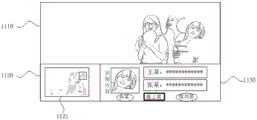
示例性的,图11a为在显示图7a所示画面时接收到截图指令后,显示的用户界面。如图11a所示,当前播放内容显示区1110中继续显示当前播放内容的画面,选项栏显示区1120中显示截图图像选项栏1121,截图图像选项栏1121中显示截图图像的缩略图,还可以显示人脸识别焦点框,人脸识别焦点框显示的对象A的面部区域,识别内容显示区1130中显示有截图图像中对象A的截图和匹配的关键词“乔某”、对象C的截图和匹配的关键词及关联的相似度指示信息“像王某”、对象B的截图和匹配的关键词及关联的相似度指示信息“像刘某”,内容选择焦点框显示在“乔某”对应的控件上。Exemplarily, Fig. 11a is a user interface displayed after a screenshot instruction is received when the screen shown in Fig. 7a is displayed. As shown in Figure 11a, the screen of the current playing content continues to be displayed in the currently playing
在一些实施例中,关键词和对象图像位于选项栏的不同的控件上,同一识别结果的关键词和对象图像分别对应的控件,不能同时获取焦点。In some embodiments, the keyword and the object image are located on different controls of the option bar, and the controls respectively corresponding to the keyword and the object image of the same recognition result cannot acquire focus at the same time.
在一些实施例中,关键词、对象图像、内容简述信息位于选项栏的不同的控件上,同一识别结果的关键词、对象图像、内容简述信息分别对应的控件,不能同时获取焦点。In some embodiments, keywords, object images, and brief content information are located on different controls in the option bar, and controls corresponding to keywords, object images, and brief content information of the same recognition result cannot simultaneously acquire focus.
在一些实施例中,关键词相关的内容简述等详细信息显示在可被操作的选项栏或者控件中,用户可以通过操作选项栏而触发显示内容简述等详细信息的全文。In some embodiments, keyword-related content brief descriptions and other detailed information are displayed in an operable option bar or control, and the user can trigger the display of the full text of content brief descriptions and other detailed information by operating the option bar.
在一些实施例中,响应于用户对用于显示内容简述的选项栏的操作,可以撤销其他识别结果显示,而仅在识别内容显示区中显示所选择的内容简述的全文。还可以将内容简述全文放大显示,和/或,扩大其显示区域,如可以扩大识别内容显示区,以使识别内容显示区的大小可以适应于内容简述全文的体量。例如,在图11c所示用户界面中,在识别内容显示区显示截图图像中对象A对应的截图区域、关键词“乔某”及相关的内容简述全文。In some embodiments, in response to the user's operation on the option bar for displaying the brief description of the content, the display of other recognition results may be canceled, and only the full text of the selected brief description of the content is displayed in the recognition content display area. The full text of the brief description can also be enlarged and displayed, and/or its display area can be enlarged, for example, the identification content display area can be enlarged, so that the size of the identification content display area can adapt to the volume of the full text of the brief description. For example, in the user interface shown in FIG. 11c, the screenshot area corresponding to object A in the screenshot image, the keyword "Qiao" and the full text of the related brief description are displayed in the identification content display area.
与图9a至图9b示出的人脸识别焦点框显示位置变化过程类似,在显示图11a所示用户界面时,若用户通过输入操作将内容选择焦点框由“乔某”移动到“像王某”,人脸识别焦点框将由对象A的面部区域移动到对象C的面部区域。Similar to the process of changing the display position of the face recognition focus frame shown in Figures 9a to 9b, when the user interface shown in Figure 11a is displayed, if the user moves the content selection focus frame from "Joe" to "Like Wang" through an input operation ", the face recognition focus frame will move from the face area of object A to the face area of object C.
在一些实施例中,对于准确识别结果,在识别结果显示区中显示包含关键词的控件,对于相似识别结果,在识别结果显示区中显示包含关键词及相应的相似度指示信息的控件,同时,显示内容选择焦点框以指示用户选择和预选择的项目,当内容选择焦点框落在前述包含关键词或者包含关键词和相似度指示信息的控件上时,触发显示用户所选择的关键词相关的内容简述等关键词详细信息,当用户通过输入操作将内容选择焦点框移动到其他关键词控件上时,触发显示其他关键词相关的内容简述。例如,在图11b所示用户界面中,依次显示“乔某”、“像王某”和“像刘某”的控件,由于内容选择焦点框落在控件“乔某”上,所以在识别内容显示区中还显示“乔某”相关的内容简述“乔某,1993年11月23日出生于……”。当用户将内容选择焦点框移动到控件“像王某某”上时,由图11b所示用户界面变化到图11d所示界面。在图11d所示用户界面中,依次显示“乔某”、“像王某某”和“像刘某”的控件,由于内容选择焦点框落在控件“像王某某”上,所以在识别内容显示区中还显示“王某某”相关的内容简述“王某某,******”。也即,在符合预定条件时,仅显示人物名称,在不符合预定条件时才在名称前增加“像”。In some embodiments, for accurate recognition results, controls containing keywords are displayed in the recognition result display area; for similar recognition results, controls containing keywords and corresponding similarity indication information are displayed in the recognition result display area, and at the same time , to display the content selection focus frame to indicate the items selected and pre-selected by the user. When the content selection focus frame falls on the aforementioned control that contains keywords or contains keywords and similarity indication information, it triggers to display the keywords related to the user selected When the user moves the content selection focus box to other keyword controls through an input operation, it will trigger the display of brief content related to other keywords. For example, in the user interface shown in Figure 11b, the controls of "Joe", "Like Wang" and "Like Liu" are displayed in sequence, since the content selection focus frame falls on the control "Qiao", so when identifying the content The display area also displays a brief description of the content related to "Joe" "Qiao, born on November 23, 1993...". When the user moves the content selection focus frame to the control "Like Wang Moumou", the user interface shown in Figure 11b changes to the interface shown in Figure 11d. In the user interface shown in Figure 11d, the controls of "Qiao", "Like Wang" and "Like Liu" are displayed in sequence. Since the content selection focus frame falls on the control "Like Wang", the recognition The content display area also displays a brief description of the content related to "Wang XX", "Wang XX, ****". That is, when the predetermined condition is met, only the name of the person is displayed, and when the predetermined condition is not met, "like" is added before the name.
在一些实施例中,如图11b和11d所示用户界面中,依次显示“乔某”、“像王某”和“像刘某”的控件,由于内容选择焦点框落在控件“乔某”上,所以在识别内容显示区中还显示“乔某”相关的内容简述“乔某,1993年11月23日出生于……”。当用户将内容选择焦点框移动到控件“像王某某”上时,由图11b所示用户界面变化到图11d所示界面。此时,用于显示对象图像和介绍信息的识别内容显示区是同一个控件,关键字位于一个单独的控件(选项栏),在不同对象的选项栏被选中时,识别内容显示区对应的控件加载对应选项栏的识别结果中的图像和介绍信息。In some embodiments, in the user interface as shown in Figures 11b and 11d, the controls "Qiao", "Like Wang" and "Like Liu" are displayed in sequence, because the content selection focus frame falls on the control "Qiao". Therefore, in the identification content display area, a brief description of the content related to "Qiao" is also displayed "Qiao, born on November 23, 1993...". When the user moves the content selection focus frame to the control "Like Wang Moumou", the user interface shown in Figure 11b changes to the interface shown in Figure 11d. At this time, the recognition content display area used to display the object image and introduction information is the same control, and the keyword is located in a separate control (option bar). When the option bar of a different object is selected, the control corresponding to the identification content display area Load the image and introduction information in the recognition result of the corresponding option bar.
在一些实施例中,当内容选择焦点框落在某一人物对象的相似识别结果控件上时,除了显示与该对象匹配的第一关键词及第一内容简述外,还可以显示对象关联的第二关键词及第二内容简述,其中,第二关键词可以是影响第一关键词对应人物与截图中人物相似性的人物关键词,例如,截图中人物与第一关键词人物相似性不足,是因为截图中人物的眉眼与第二关键词人物更为相似;另外,第二关键词还可以是第一关键词人物在当前内容中所饰演角色的关键词。In some embodiments, when the content selection focus frame falls on the similar recognition result control of a certain character object, in addition to displaying the first keyword and the first brief description of the content matching the object, the object-related information may also be displayed. The second keyword and a brief description of the second content, wherein the second keyword can be a character keyword that affects the similarity between the character corresponding to the first keyword and the character in the screenshot, for example, the similarity between the character in the screenshot and the first keyword Insufficient, because the eyebrows and eyes of the character in the screenshot are more similar to the second keyword character; in addition, the second keyword can also be the keyword of the role played by the first keyword character in the current content.
例如,在图11e所示用户界面中,当内容选择焦点框落在控件“像王某”上时,在内容识别显示区显示关键词“王某”相关的内容简述,和与对象C关联的另一关键词“张某”及其内容简述。示例性,由于该对象和数据库中王某的图像的相似度为81%,同时和数据库中张某的图像的相似度为60%,即张某是和该对象相似度排在第二位的人物的人物名称。由于该识别结果不是准确识别结果,因此同时显示和该对象相似的至少两个人物的信息。For example, in the user interface shown in Figure 11e, when the content selection focus frame falls on the control "Like Wang", a brief description of the content related to the keyword "Wang" is displayed in the content identification display area, and it is associated with object C Another keyword "Zhang" and a brief description of its content. Exemplarily, since the similarity between the object and the image of Wang in the database is 81%, and the similarity with the image of Zhang in the database is 60%, that is, the similarity between Zhang and the object ranks second The character's character name. Since the recognition result is not an accurate recognition result, the information of at least two persons similar to the object is displayed at the same time.
再如,在图11f所示用户界面中,当内容选择焦点框落在控件“像王某某”上时,在内容识别显示区显示关键词“王某某”相关的内容简述,和“王某某”在当前播放内容中所饰演的角色名称“叶子”及其内容简述。即,识别结果中的介绍信息除包含人物本身的介绍信息外,还包含人物在该视频中的角色介绍信息。For another example, in the user interface shown in Figure 11f, when the content selection focus frame falls on the control "Like Wang XX", a brief content description related to the keyword "Wang XX" is displayed in the content recognition display area, and " "Wang Moumou" is playing the role name "Leaf" in the current broadcast content and a brief description of its content. That is, the introduction information in the recognition result includes not only the introduction information of the character itself, but also the introduction information of the character's role in the video.
在一些实施例中,在完成对象识别获得人物名称后,根据识别请求中的视频标识,获取视频对应的演员表,然后根据人物名称和演员表确定对象对应的角色名称,然后根据角色名称确定角色介绍信息,并将角色名称和角色介绍信息作为识别结果中的一部分。In some embodiments, after the object recognition is completed to obtain the character name, according to the video identification in the recognition request, the actor list corresponding to the video is obtained, and then the role name corresponding to the object is determined according to the character name and the actor list, and then the role is determined according to the role name Introduce information, and use the role name and role introduction information as part of the recognition result.
在一些实施例中,确定角色介绍信息可以采取爬虫,搜索,数据库比对等手段,在具体实现过程中不做限定,只要能获取角色介绍信息即可。In some embodiments, crawling, searching, database comparison and other means may be used to determine the role introduction information, and there is no limitation in the specific implementation process, as long as the role introduction information can be obtained.
在一些实施例中,用户可以通过系统设置,设置识别结果显示区可显示的识别结果数量,例如,不超过3项识别结果。用户可以通过调整识别结果显示区的进度条控件调整识别结果显示区中显示的内容,如将隐藏的识别结果拖出,将显示的识别结果隐藏。In some embodiments, the user can set the number of recognition results that can be displayed in the recognition result display area through system settings, for example, no more than 3 recognition results. The user can adjust the content displayed in the recognition result display area by adjusting the progress bar control in the recognition result display area, such as dragging out the hidden recognition results to hide the displayed recognition results.
在一些实施例中,识别内容显示区和/或选项栏显示区的显示不干扰当前内容播放显示区的显示,即,在显示识别内容显示区和/或选项栏显示区时,用户仍可观看到当前播放内容显示区的内容。例如,识别内容显示区和/或选项栏显示区可以是半透明的,以透视出当前播放内容显示区中显示的内容。又如,响应于对识别内容显示区和/或选项栏显示区的显示,将显示当前播放内容的区域压缩到与识别内容显示区和/或选项栏显示区相适应的尺寸,作为当前播放内容显示区。In some embodiments, the display of the identification content display area and/or the option bar display area does not interfere with the display of the current content playback display area, that is, when the identification content display area and/or the option bar display area are displayed, the user can still watch Go to the content in the display area of the currently playing content. For example, the identification content display area and/or the option bar display area may be translucent, so as to see through the content displayed in the currently playing content display area. As another example, in response to the display of the identification content display area and/or the option column display area, compress the area displaying the current playback content to a size suitable for the identification content display area and/or the option column display area as the current playback content display area.
在一些实施例中,在识别内容显示区中,多个识别结果按照其与对应对象的相似度递减顺序排列。例如,在图11a所示用户界面中,将对象A的识别结果显示在前,将对象C的识别结果显示在中,将对象B的识别结果显示在后。In some embodiments, in the recognition content display area, multiple recognition results are arranged in descending order of similarity with corresponding objects. For example, in the user interface shown in FIG. 11a, the recognition result of object A is displayed in the front, the recognition result of object C is displayed in the center, and the recognition result of object B is displayed in the back.
由以上实施例可知,本申请实施例提供的显示设备,当其接收到触发图像识别的用户输入后,同时显示目标图像中多个对象对应的识别结果;其中,在识别结果与对应对象的相似度不符合预定数值范围时,识别结果与相似度指示信息关联显示,相似度指示信息用于指示识别结果与对应对象的相似程度。这样,便可以通过降低相似度阈值来保证将足够丰富的识别结果展示给用户,同时,通过将相似度指示信息与识别结果关联展示,使用户了解到每个对象的识别结果的准确性。As can be seen from the above embodiments, the display device provided by the embodiments of the present application, when it receives the user input that triggers image recognition, simultaneously displays the recognition results corresponding to multiple objects in the target image; where the recognition results are similar to the corresponding objects When the degree does not meet the predetermined numerical range, the recognition result is displayed in association with the similarity indication information, and the similarity indication information is used to indicate the degree of similarity between the recognition result and the corresponding object. In this way, it is possible to ensure that sufficient recognition results are displayed to the user by lowering the similarity threshold, and at the same time, by associating the similarity indication information with the recognition result, the user can know the accuracy of the recognition result of each object.
具体实现中,本发明还提供一种计算机存储介质,其中,该计算机存储介质可存储有程序,该程序执行时可包括本发明提供的图像识别结果显示方法的各实施例中的部分或全部步骤。所述的存储介质可为磁碟、光盘、只读存储记忆体(英文:read-only memory,简称:ROM)或随机存储记忆体(英文:random access memory,简称:RAM)等。In a specific implementation, the present invention also provides a computer storage medium, wherein the computer storage medium can store a program, and when the program is executed, it can include some or all of the steps in each embodiment of the image recognition result display method provided by the present invention . The storage medium may be a magnetic disk, an optical disk, a read-only memory (English: read-only memory, ROM for short), or a random access memory (English: random access memory, RAM for short), and the like.
本领域的技术人员可以清楚地了解到本发明实施例中的技术可借助软件加必需的通用硬件平台的方式来实现。基于这样的理解,本发明实施例中的技术方案本质上或者说对现有技术做出贡献的部分可以以软件产品的形式体现出来,该计算机软件产品可以存储在存储介质中,如ROM/RAM、磁碟、光盘等,包括若干指令用以使得一台计算机设备(可以是个人计算机,服务器,或者网络设备等)执行本发明各个实施例或者实施例的某些部分所述的方法。Those skilled in the art can clearly understand that the technologies in the embodiments of the present invention can be implemented by means of software plus a necessary general-purpose hardware platform. Based on this understanding, the essence of the technical solutions in the embodiments of the present invention or the part that contributes to the prior art can be embodied in the form of software products, and the computer software products can be stored in storage media, such as ROM/RAM , magnetic disk, optical disk, etc., including several instructions to enable a computer device (which may be a personal computer, server, or network device, etc.) to execute the methods described in various embodiments or some parts of the embodiments of the present invention.
本说明书中各个实施例之间相同相似的部分互相参见即可。尤其,对于方法实施例而言,由于其基本相似于显示设备实施例,所以描述的比较简单,相关之处参见方法实施例中的说明即可。For the same and similar parts among the various embodiments in this specification, refer to each other. In particular, for the method embodiment, since it is basically similar to the display device embodiment, the description is relatively simple, and for relevant parts, refer to the description in the method embodiment.
以上所述的本发明实施方式并不构成对本发明保护范围的限定。The embodiments of the present invention described above are not intended to limit the protection scope of the present invention.
Claims (11)
Priority Applications (3)
| Application Number | Priority Date | Filing Date | Title |
|---|---|---|---|
| CN202180060814.2A CN116325770A (en) | 2020-05-25 | 2021-05-19 | Display device and image recognition result display method |
| PCT/CN2021/094553 WO2021238733A1 (en) | 2020-05-25 | 2021-05-19 | Display device and image recognition result display method |
| US17/849,640 US11863829B2 (en) | 2020-05-25 | 2022-06-25 | Display apparatus and method for displaying image recognition result |
Applications Claiming Priority (2)
| Application Number | Priority Date | Filing Date | Title |
|---|---|---|---|
| CN2020110603049 | 2020-09-30 | ||
| CN202011060304 | 2020-09-30 |
Publications (2)
| Publication Number | Publication Date |
|---|---|
| CN114339346A CN114339346A (en) | 2022-04-12 |
| CN114339346B true CN114339346B (en) | 2023-06-23 |
Family
ID=81032294
Family Applications (2)
| Application Number | Title | Priority Date | Filing Date |
|---|---|---|---|
| CN202011104522.8A Active CN114339346B (en) | 2020-05-25 | 2020-10-15 | Display device and image recognition result display method |
| CN202011104623.5A Pending CN114339347A (en) | 2020-05-25 | 2020-10-15 | Display device and image recognition result display method |
Family Applications After (1)
| Application Number | Title | Priority Date | Filing Date |
|---|---|---|---|
| CN202011104623.5A Pending CN114339347A (en) | 2020-05-25 | 2020-10-15 | Display device and image recognition result display method |
Country Status (1)
| Country | Link |
|---|---|
| CN (2) | CN114339346B (en) |
Families Citing this family (3)
| Publication number | Priority date | Publication date | Assignee | Title |
|---|---|---|---|---|
| CN115955596A (en) * | 2022-12-21 | 2023-04-11 | 北京字跳网络技术有限公司 | Method, apparatus, device and medium for providing video-related information |
| CN120151599A (en) * | 2023-12-12 | 2025-06-13 | 海信视像科技股份有限公司 | Display device and external device joint control method |
| CN119166838B (en) * | 2024-08-29 | 2025-04-15 | 深圳前海可染服饰设计有限公司 | A clothing design and customization method and system based on artificial intelligence |
Citations (2)
| Publication number | Priority date | Publication date | Assignee | Title |
|---|---|---|---|---|
| CN108461129A (en) * | 2018-03-05 | 2018-08-28 | 余夏夏 | A kind of medical image mask method, device and user terminal based on image authentication |
| CN111460180A (en) * | 2020-03-30 | 2020-07-28 | 维沃移动通信有限公司 | Information display method and device, electronic equipment and storage medium |
Family Cites Families (14)
| Publication number | Priority date | Publication date | Assignee | Title |
|---|---|---|---|---|
| JPH1021326A (en) * | 1996-06-28 | 1998-01-23 | Ricoh Co Ltd | Recognition result display method, character recognition system, and information recording medium |
| JP4314016B2 (en) * | 2002-11-01 | 2009-08-12 | 株式会社東芝 | Person recognition device and traffic control device |
| JP4896838B2 (en) * | 2007-08-31 | 2012-03-14 | カシオ計算機株式会社 | Imaging apparatus, image detection apparatus, and program |
| CN102521619A (en) * | 2011-11-22 | 2012-06-27 | 汉王科技股份有限公司 | Information presentation method and device based on face recognition and face recognition printing system |
| CN108573268A (en) * | 2017-03-10 | 2018-09-25 | 北京旷视科技有限公司 | Image-recognizing method and device, image processing method and device and storage medium |
| CN107105340A (en) * | 2017-03-21 | 2017-08-29 | 百度在线网络技术(北京)有限公司 | People information methods, devices and systems are shown in video based on artificial intelligence |
| CN107832662B (en) * | 2017-09-27 | 2022-05-27 | 百度在线网络技术(北京)有限公司 | Method and system for acquiring image annotation data |
| CN108176049B (en) * | 2017-12-28 | 2021-05-25 | 珠海豹好玩科技有限公司 | Information prompting method, device, terminal and computer readable storage medium |
| CN109922363A (en) * | 2019-03-15 | 2019-06-21 | 青岛海信电器股份有限公司 | A kind of graphical user interface method and display equipment of display screen shot |
| CN109389169A (en) * | 2018-10-08 | 2019-02-26 | 百度在线网络技术(北京)有限公司 | Method and apparatus for handling image |
| CN109858371B (en) * | 2018-12-29 | 2021-03-05 | 深圳云天励飞技术有限公司 | Face recognition method and device |
| CN109993125B (en) * | 2019-04-03 | 2022-12-23 | 腾讯科技(深圳)有限公司 | Model training method, face recognition device, face recognition equipment and storage medium |
| JP6839366B2 (en) * | 2019-04-18 | 2021-03-10 | キヤノンマーケティングジャパン株式会社 | Information processing equipment, information processing system, its control method, and program |
| CN110245559A (en) * | 2019-05-09 | 2019-09-17 | 平安科技(深圳)有限公司 | Real-time object recognition method, device and computer equipment |
-
2020
- 2020-10-15 CN CN202011104522.8A patent/CN114339346B/en active Active
- 2020-10-15 CN CN202011104623.5A patent/CN114339347A/en active Pending
Patent Citations (2)
| Publication number | Priority date | Publication date | Assignee | Title |
|---|---|---|---|---|
| CN108461129A (en) * | 2018-03-05 | 2018-08-28 | 余夏夏 | A kind of medical image mask method, device and user terminal based on image authentication |
| CN111460180A (en) * | 2020-03-30 | 2020-07-28 | 维沃移动通信有限公司 | Information display method and device, electronic equipment and storage medium |
Non-Patent Citations (1)
| Title |
|---|
| "用直方图面积法进行图像相似度计算";朱爽;《测绘通报》;全文 * |
Also Published As
| Publication number | Publication date |
|---|---|
| CN114339346A (en) | 2022-04-12 |
| CN114339347A (en) | 2022-04-12 |
Similar Documents
| Publication | Publication Date | Title |
|---|---|---|
| CN111722768B (en) | Display device and application program interface display method | |
| CN114945102B (en) | Display device and method for character recognition and display | |
| CN111836109A (en) | Display device, server and method for automatically updating column frame | |
| CN112511882B (en) | Display device and voice call-out method | |
| CN111770370A (en) | Display device, server and media asset recommendation method | |
| CN111914134B (en) | A kind of association recommendation method, intelligent device and service device | |
| CN112004157B (en) | Multi-round voice interaction method and display device | |
| CN112165641A (en) | Display device | |
| CN113766164B (en) | Display device and signal source interface display method | |
| CN114339346B (en) | Display device and image recognition result display method | |
| CN112380420A (en) | Searching method and display device | |
| CN112272331B (en) | Method for rapidly displaying program channel list and display equipment | |
| CN112203154A (en) | Display device | |
| CN111954059A (en) | Screen saver display method and display device | |
| CN111950288B (en) | Entity labeling method in named entity recognition and intelligent device | |
| CN112235621B (en) | Display method and display equipment for visual area | |
| CN112162809B (en) | Display device and user favorite display method | |
| CN111939561B (en) | Display devices and interaction methods | |
| CN114630171A (en) | Display device and configuration switching method | |
| CN114554266A (en) | Display apparatus and display method | |
| CN112073787A (en) | Display device and home page display method | |
| CN111831377A (en) | A display method, display device and server | |
| CN112199560B (en) | Search method of setting items and display equipment | |
| CN111857936B (en) | User interface display method and display device of application program | |
| CN114155846B (en) | A semantic slot extraction method and display device |
Legal Events
| Date | Code | Title | Description |
|---|---|---|---|
| PB01 | Publication | ||
| PB01 | Publication | ||
| SE01 | Entry into force of request for substantive examination | ||
| SE01 | Entry into force of request for substantive examination | ||
| GR01 | Patent grant | ||
| GR01 | Patent grant | ||
| TR01 | Transfer of patent right |
Effective date of registration: 20250508 Address after: 266061 No. 399 Songling Road, Laoshan District, Qingdao, Shandong (A6 3rd floor) Patentee after: QINGDAO JUKANYUN TECHNOLOGY CO.,LTD. Country or region after: China Address before: 266100 Songling Road, Laoshan District, Qingdao, Shandong Province, No. 399 Patentee before: JUHAOKAN TECHNOLOGY Co.,Ltd. Country or region before: China |
|
| TR01 | Transfer of patent right |