Single-hand control method and device for terminal
Technical Field
The embodiment of the invention relates to an electronic equipment application technology, in particular to a single-hand control method and a single-hand control device for a terminal.
Background
With the continuous development of electronic equipment, the screen area of the intelligent terminal is continuously increased.
In the prior art, a plurality of icons are uniformly displayed in an icon interface in a manner as shown in fig. 1; and outputting the menu interface in a grid form as shown in fig. 2 in the menu interface, wherein the left side is description text, and the right side is a hang button so as to fully utilize screen space.
However, for a user who is accustomed to holding a mobile phone with one hand, when a screen of the smart terminal is too large, due to the limited length of the thumb, for content (such as an icon or a button) far from the root of the thumb, it may be difficult for the user to operate the content (the icon or the button) with the thumb. Therefore, the intelligent terminal with the larger touch screen has the problem of inconvenient single-hand operation and poor user experience.
Disclosure of Invention
The invention provides a single-hand control method and a single-hand control device for a terminal, so that a user can operate contents in a screen by one hand, and user experience is improved.
In a first aspect, an embodiment of the present invention provides a method for controlling a terminal with one hand, including:
acquiring a target track input by a user through at least one preset area in at least two preset areas in a terminal screen;
if the target track is consistent with a preset track, determining a left-right holding state according to the position information of the at least one preset area of the obtained target track;
and adjusting the output position of at least one target data according to the left and right holding states.
In a second aspect, an embodiment of the present invention further provides a single-handed control device for a terminal, including:
the terminal comprises a target track acquisition unit, a target track acquisition unit and a target track display unit, wherein the target track acquisition unit is used for acquiring a target track input by a user through at least one preset area in at least two preset areas in a terminal screen;
a holding state determining unit, configured to determine a left and right holding state according to the position information of the at least one preset region where the target trajectory is obtained, if the target trajectory obtained by the target trajectory obtaining unit matches a preset trajectory;
and the adjusting unit is used for adjusting the output position of at least one target datum according to the left and right holding states determined by the holding state determining unit.
According to the invention, the target track input by the user can be acquired through the preset area in the terminal screen, and then when the target track is consistent with the preset track, the left-right holding state (left-hand holding or right-hand holding) is determined according to the position information of the at least one preset area for receiving the target track. And after the left-right holding state is determined, adjusting the output position of the target data according to the determined left-right holding state. Compared with the prior art that the target data are uniformly output to the whole screen, the method and the device can determine the left-right holding state of the user according to the target track input by the user, adjust the output position of the target data in the screen according to the left-right holding state, avoid the situation that the position of the target data exceeds the touchable range of the thumb of the user, enable the user to operate any target data in the adjusted interface when holding the target data with one hand, and improve the user experience.
Drawings
FIG. 1 is a schematic diagram of a prior art icon interface;
FIG. 2 is a diagram of a menu interface in the prior art;
FIG. 3 is a flowchart of a one-handed control method of a terminal according to a first embodiment of the invention;
FIG. 4 is a schematic diagram illustrating a location of a predetermined area according to a first embodiment of the present invention;
FIG. 5 is a schematic diagram illustrating the location of another default region in the first embodiment of the present invention;
FIG. 6 is a diagram of an icon interface when held by a single hand according to a second embodiment of the present invention;
FIG. 7 is a diagram of a menu interface when held by a single hand according to a second embodiment of the present invention;
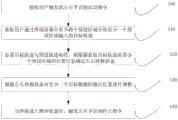
fig. 8 is a flowchart of a one-handed control method of the first terminal according to the second embodiment of the present invention;
FIG. 9 is a schematic diagram of a touch-enabled area according to a second embodiment of the invention;
fig. 10 is a flowchart of a one-handed control method of the second terminal according to the second embodiment of the present invention;
fig. 11 is a schematic view of another touchable area according to a second embodiment of the invention;
fig. 12 is a flowchart of a one-handed control method of a third terminal according to a second embodiment of the present invention;
fig. 13 is a schematic structural diagram of a one-handed control device of a first terminal according to a third embodiment of the present invention;
fig. 14 is a schematic structural diagram of a one-handed control device of a second terminal according to a third embodiment of the present invention;
fig. 15 is a schematic structural diagram of a single-handed control device of a third terminal according to a third embodiment of the present invention.
Detailed Description
The present invention will be described in further detail with reference to the accompanying drawings and examples. It is to be understood that the specific embodiments described herein are merely illustrative of the invention and are not limiting of the invention. It should be further noted that, for the convenience of description, only some of the structures related to the present invention are shown in the drawings, not all of the structures.
Example one
Fig. 3 is a flowchart of a one-hand control method for a terminal according to an embodiment of the present invention, where the method is applicable to a situation where a terminal is touched by a single hand, the method may be executed by the terminal with a touch screen, and the terminal is an intelligent terminal, such as a smart phone and a tablet computer, and the method specifically includes the following steps:
step 110, acquiring a target track input by a user through at least one of at least two preset areas in a terminal screen.
At least two preset areas are divided from the screen of the terminal, and the preset areas can be adjacent or not. The target trajectory may be a continuous curve or a straight line, or may be a combination of different coordinate points. When the terminal is in a working state, monitoring each preset area, and acquiring a target track when a user triggers the target track in the preset area.
In one implementation, two preset regions are divided from the screen of the terminal, and as shown in fig. 4, the two preset regions are a preset region a located on the left long side of the screen and a preset region B located on the right long side of the screen. The length of each preset area is equal to the length of the screen, and the width of each preset area is smaller than the width of the screen. Optionally, the width of each preset area is 1/20 of the screen width, or the width of each preset area is 0.5-1.5 mm, preferably 1 mm. The user inputs a coherence curve a, which is a target trajectory, through the preset area B.
In another implementation manner, four preset regions are partitioned from the screen of the terminal, and as shown in fig. 5, the four preset regions are a preset region C located above the left long side of the screen, a preset region D located below the left long side of the screen, a preset region E located below the right long side of the screen, and a preset region F located above the right long side of the screen. Each preset area has a length of 1/3 times the length of the side of the screen and a width of 1/20 mm or 0.5-1.5 mm, preferably 1 mm, times the width of the screen. The user inputs a coherence curve b, which is a target trajectory, through the preset area F. Or, the user performs one click operation c in the preset area E and performs another click operation d in the preset area E within a preset time interval (e.g., 1 second), so that the click operation c in the preset area E and the click operation in the preset area E form a target track.
Furthermore, since the present invention is suitable for the situation that the user holds the mobile terminal with one hand to operate, when the target trajectory input by the user is received by the at least two preset regions, the at least two preset regions should be the preset regions corresponding to the same side of the terminal or two adjacent sides.
And step 120, if the target track is consistent with the preset track, determining a left-right holding state according to the position information of at least one preset area of the obtained target track.
The preset track is a sliding track preset by a user or a system. The preset trajectory is different from a common touch operation, such as sliding from left to right, sliding from top to bottom, clicking operation at a certain position, long-time pressing operation at a certain position, and the like. In one implementation, the predetermined trajectory is a sliding trajectory that slides first from top to bottom and then from bottom to top. In another implementation, the preset trajectory may be a continuous click operation respectively located in different preset areas.
When one or more preset areas receive a target track input by a user, the left and right holding states of the user are determined according to the position information of the preset areas. The position information is coordinate information of the preset area. The left and right holding states may be left or right hand holding.
For example, in the scenario shown in fig. 4, when the preset area a receives the target track input by the user, since the preset area a is located on the left side of the terminal, it may be determined that the target track is input in the preset area a by the user through the left thumb according to the position information of the preset area a, and the left-right holding state is left-hand holding.
For example, in the scenario shown in fig. 5, when the preset region E, F receives the target trajectory input by the user, since the preset region E, F is located at the right side of the terminal, it may be determined that the target trajectory is input by the user in the preset region E, F by the thumb of the right hand according to the position information of the preset region E, F, and the determined left-right holding state is a right-hand holding.
And step 130, adjusting the output position of at least one target datum according to the left and right holding states.
The target data is data which can be operated by a user in a screen, such as icons, texts, buttons and the like. In a desktop interface such as that shown in FIG. 1, the target data may be an application icon. In the menu interface shown in fig. 2, the target data may be text in the menu or may be a button in the menu interface. The target data can also be pictures or multimedia data in the interface, etc.
And adjusting the output position of at least one target data to one side screen corresponding to the left and right holding states according to the left and right holding states determined in the step 120. Wherein at least one target data is part or all of the target data. When the target data in the screen can not be completely placed in the screen at one side corresponding to the left-right holding state, part of the target data is prevented from being placed in the screen at the side. The selection rule may be determined according to a usage scenario, and for example, the location of the target data focused by the user is adjusted, where the target data focused by the user may be target data clicked more frequently, or target data used by the user in a recent period (e.g., 1 day).
According to the technical scheme provided by the embodiment, the target track input by the user can be acquired through the preset area in the terminal screen, and then when the target track is consistent with the preset track, the left-right holding state (left-hand holding or right-hand holding) is determined according to the position information of the at least one preset area for receiving the target track. And after the left-right holding state is determined, adjusting the output position of the target data according to the determined left-right holding state. Compared with the prior art, the target data are uniformly output to the whole screen, the embodiment can determine the left-right holding state of the user according to the target track input by the user, and adjust the output position of the target data in the screen according to the left-right holding state, so that the situation that the position of the target data exceeds the touch range of the thumb of the user is avoided, the user can operate any target data in the adjusted interface when holding the target data with one hand, and the user experience is improved.
Example two
As a further description of the first embodiment, step 130, adjusting the output position of the target data according to the left and right holding states, may be implemented in the following manner:
and step 130a, if the target data is a button, outputting the button to one side of the screen corresponding to the left-right holding state.
The target data can be a button, a key or a control with a slider, such as a volume adjustment control.
If the left and right holding states are left holding, the screen on the corresponding side is the left side of the screen; similarly, if the left-right holding state is right-hand holding, the corresponding screen is the right side of the screen.
For the menu interface shown in fig. 2, if the left-right holding state obtained in step 120 is right-hand holding, there is no need to adjust the position of the target data in the drawing. The reason is that the buttons operable by the user have been placed on the right side of the screen in fig. 2. If the left-right holding state obtained in step 120 is left-hand holding, the position of the target data (button) is adjusted to the left side of the screen because the target data (button) is located on the right side of the interface, so as to obtain the menu interface shown in fig. 6, and further enable the user to perform touch operation on all icons by using the thumb of the right hand.
According to the technical scheme, the positions of the target data such as the buttons are adjusted, so that the user can operate the touch control in the screen by one hand, and the operation efficiency and the user experience are improved.
Optionally, step 130, adjusting the output position of the target data according to the left and right holding states, may also be implemented in the following manner:
and step 130b, if at least one target datum is an icon, zooming each icon according to a preset proportion, and outputting the zoomed icon to a screen on one side corresponding to the left-right holding state.
The predetermined ratio may be 2/3, 3/4, 1/2, 1/3, etc. And reducing the target data and simultaneously reducing the gaps among the target data in a same ratio to obtain a reduced interface of the original interface (the interface before reduction). The preset proportion can be fixed, and can also be determined according to different use requirements. For example, for a user with a longer finger, a larger zoom-out scale may be used to zoom out, such as 3/4 or 4/5; for users with shorter fingers, a smaller scale may be used to zoom out, such as 1/2 or 2/5. In one implementation, the length of the user's finger may be estimated from the user's age information or the like.
For the icon interface shown in fig. 1, when the left and right holding states are left-handed holding and the preset reduction ratio is 1/2, the reduced icon interface is as shown in fig. 7, wherein the size of each icon is reduced to 1/2 of the original icon, and the gap between the icons is reduced to 1/2 of the gap between the original icons, so that the user can perform touch operation on all the icons by using the left thumb.
According to the technical scheme, the icons and the gaps between the icons are reduced, so that the whole interface is reduced, a user can perform touch operation on all the icons in the interface through a single-hand thumb, the operation of the user is facilitated, and the user experience is improved.
In the process of implementing the above embodiments, the inventor finds that when the user holds the bottom of the terminal with one hand, since the length of the thumb is smaller than the length of the side of the terminal, a situation may occur in which the user cannot touch the target data at the top of the screen with the thumb. Based on this, as further explanation on the above embodiment, as shown in fig. 8, before adjusting the output position of the target data according to the left-right holding state in step 130, an embodiment of the present invention further provides a method for controlling a terminal with one hand, where the method further includes:
step 140, the length of the thumb of the user is obtained.
The user is prompted to prevent the thumb from being placed along the diagonal of the screen, and the length of the thumb is determined based on the position of contact of the thumb with the screen.
Accordingly, step 130, adjusting the output position of the target data according to the left and right holding states, may be implemented in the following manner:
and step 130c, adjusting the output position of the target data according to the length of the thumb and the left-right holding state.
And determining a target vertex angle in the screen according to the left and right holding states, establishing a touch area from the position of the target vertex angle by taking the length of the thumb as the length of a diagonal line, and outputting target data to the touch area. When the left-right holding state is left-hand holding, determining the vertex angle of the lower left corner of the screen as a target vertex angle; and when the left-right holding state is the right-hand holding state, determining the vertex angle at the lower right corner of the screen as the target vertex angle.
For example, as shown in fig. 9, when the left-right holding state is right-handed holding, the vertex at the lower right corner of the screen is determined as the target vertex, and the length of the thumb is used as the length of the diagonal line to establish the touchable area.
The technical scheme that this embodiment provided can adjust the output position of target data according to user's thumb length, avoids adjusting the back according to preset proportion, leads to the user to let the problem that can't carry out touch-control to whole target data because of the undersize of preset proportion for the output position of target data adjusts the back, can match with user's thumb length, when realizing that the user can carry out touch-control operation to target data, rational utilization screen space improves the screen utilization ratio.
As a further description of the foregoing embodiment, as shown in fig. 10, step 130, adjusting the output position of the target data according to the length of the thumb and the left-right holding state, may also be implemented in the following manner:
and step 131, determining a touch area according to the length of the thumb.
The controllable area may be a rectangle, or a sector with an arc edge. And determining a target vertex angle in the screen according to the left and right holding states, establishing a touch area from the position of the target vertex angle by taking the length of the thumb as a radius, and outputting target data to the touch area. When the left-right holding state is left-hand holding, determining the vertex angle of the lower left corner of the screen as a target vertex angle; and when the left-right holding state is the right-hand holding state, determining the vertex angle at the lower right corner of the screen as the target vertex angle.
For example, as shown in fig. 11, when the left-right holding state is a right-hand holding state, a lower-right corner vertex of the screen is determined as a target vertex, and a touchable area is established with a thumb length as a radius. Since the length of the thumb is greater than the width of the screen, when the boundary of the controllable area determined by the length of the thumb exceeds the screen, the corresponding side of the screen is determined as the boundary of the controllable area.
Optionally, the touchable area may be obtained by:
and outputting a prompt interface to prompt a user to hold the terminal with one hand and straighten the thumb to draw an arc on the screen so as to determine the touch area of the thumb according to the arc. For example, an arc drawn by the user on the screen determines a screen area on the center side of the arc as a touchable area.
Step 132, in the touch-controllable area, adjusting the output position of the target data according to the left and right holding states.
And controlling the output position of the target data to be in the touch-controllable area, and outputting the rest data in the screen to an area outside the touch-controllable area. The rest of the data is data that cannot receive the touch operation of the user or that is less likely to receive the user operation (for example, the touch operation of the user is received for more than 3 days), such as a function description, a title text, and the like.
In the embodiments of the present invention, the number of times that the target data (e.g., the control) is touched (e.g., clicked) may be counted, so as to obtain the touch frequency of the target data by the user.
According to the technical scheme provided by the embodiment of the invention, the touch area adaptive to the motion range of the thumb can be drawn according to the length of the thumb, and the shape of the touch area is adaptive to the motion track of the thumb, so that a user can obtain better operation experience when performing touch operation on target data, and the operation efficiency is improved.
As the preset area in step 110 is an area divided from the screen, power consumption of the terminal is increased if the preset area is in a normally open state, and based on this, an embodiment of the present invention further provides a method for controlling a terminal with one hand, as shown in fig. 12, before obtaining a target trajectory input by a user through at least one preset area of at least two preset areas in the screen of the terminal in step 110, the method further includes:
step 100, receiving a left-right hand identification starting instruction triggered by a user.
The left-hand and right-hand recognition starting instructions can be controlled through a system menu, and can also be switched on and off through a shortcut key. When the shortcut key is in an open state, starting left-hand and right-hand identification; and when the shortcut key is in a closed state, the left-hand and right-hand recognition is stopped.
Accordingly, after the adjusting the output position of the at least one target data according to the left and right holding states in step 130, the method further includes:
and 150, triggering a left-hand and right-hand recognition stop instruction when the terminal enters a screen locking state.
In the technical scheme provided by the embodiment, the user can start and stop the left-right hand recognition according to the use requirement of the user. When the terminal enters a screen locking state, the system automatically triggers a left-hand and right-hand recognition stop instruction so as to save the energy consumption of the terminal and improve the service life of the terminal.
It should be noted that, when the user holds the terminal with one hand, the terminal can be held with fingers in addition to the longitudinal direction. The steps executed by the horizontal handheld terminal and the bus handheld terminal are the same, and the steps provided in the above embodiments may be referred to specifically.
EXAMPLE III
An embodiment of the present invention further provides a single-handed control device 1 of a terminal, configured to implement the method, where the device 1 is located in the terminal, the terminal is an intelligent terminal, such as a smart phone, a tablet computer, and the like, and as shown in fig. 13, the device 1 includes:
the target track acquiring unit 11 is configured to acquire a target track input by a user through at least one preset area of at least two preset areas in a terminal screen;
a holding state determining unit 12, configured to determine, if the target trajectory acquired by the target trajectory acquiring unit 11 matches a preset trajectory, a left and right holding state according to position information of the at least one preset region where the target trajectory is acquired;
an adjusting unit 13, configured to adjust an output position of at least one target data according to the left and right grip states determined by the grip state determining unit 12.
Further, the adjusting unit 13 is further configured to:
if the target data is a button, outputting the button to a side screen corresponding to the left-right holding state determined by the holding state determination unit 12;
or;
if the at least one target data is an icon, zooming each icon according to a preset proportion, and outputting the zoomed icon to a screen corresponding to the left-right holding state determined by the holding state determining unit 12.
Further, as shown in fig. 14, the apparatus 1 further includes:
a thumb length acquiring unit 14 for acquiring a thumb length of the user;
correspondingly, the adjusting unit 13 is further configured to adjust the output position of the target data according to the thumb length acquired by the thumb length acquiring unit 14 and the left and right holding states determined by the holding state determining unit 12.
Further, the adjusting unit 13 includes:
a touchable area determining subunit 131, configured to determine a touchable area according to the thumb length acquired by the thumb length acquiring unit 14;
an adjusting subunit 132, configured to adjust an output position of the target data according to the left and right holding states determined by the holding state determining unit 12 in the touchable region determined by the touchable region determining subunit 131.
Further, as shown in fig. 15, the apparatus 1 further includes:
a starting instruction receiving unit 15, configured to receive a left-right hand identification starting instruction triggered by a user;
and the stop instruction triggering unit 16 is used for triggering a left-hand and right-hand recognition stop instruction when the terminal enters a screen locking state.
The device 1 can execute the methods provided by the first embodiment and the second embodiment of the present invention, and has corresponding functional modules and beneficial effects for executing the methods. For details of the technology that are not described in detail in this embodiment, reference may be made to the methods provided in the first embodiment and the second embodiment of the present invention.
In various embodiments of the present invention, the terms "length," "upper," "lower," "left," "right," "top," "bottom," and the like, indicate an orientation or positional relationship based on that shown in the drawings, merely to facilitate the description of the invention and to simplify the description, and do not indicate or imply that the referenced device or element must have a particular orientation, be constructed in a particular orientation, and be operated, and therefore should not be construed as limiting the invention.
It is to be noted that the foregoing is only illustrative of the preferred embodiments of the present invention and the technical principles employed. It will be understood by those skilled in the art that the present invention is not limited to the particular embodiments described herein, but is capable of various obvious changes, rearrangements and substitutions as will now become apparent to those skilled in the art without departing from the scope of the invention. Therefore, although the present invention has been described in greater detail by the above embodiments, the present invention is not limited to the above embodiments, and may include other equivalent embodiments without departing from the spirit of the present invention, and the scope of the present invention is determined by the scope of the appended claims.