CN103176717A - User interface method and apparatus for mobile terminal having touchscreen - Google Patents
User interface method and apparatus for mobile terminal having touchscreen Download PDFInfo
- Publication number
- CN103176717A CN103176717A CN2013101145179A CN201310114517A CN103176717A CN 103176717 A CN103176717 A CN 103176717A CN 2013101145179 A CN2013101145179 A CN 2013101145179A CN 201310114517 A CN201310114517 A CN 201310114517A CN 103176717 A CN103176717 A CN 103176717A
- Authority
- CN
- China
- Prior art keywords
- toolbar
- function
- icon
- screen
- touch
- Prior art date
- Legal status (The legal status is an assumption and is not a legal conclusion. Google has not performed a legal analysis and makes no representation as to the accuracy of the status listed.)
- Pending
Links
Images




Classifications
-
- G—PHYSICS
- G06—COMPUTING OR CALCULATING; COUNTING
- G06F—ELECTRIC DIGITAL DATA PROCESSING
- G06F3/00—Input arrangements for transferring data to be processed into a form capable of being handled by the computer; Output arrangements for transferring data from processing unit to output unit, e.g. interface arrangements
- G06F3/01—Input arrangements or combined input and output arrangements for interaction between user and computer
- G06F3/048—Interaction techniques based on graphical user interfaces [GUI]
- G06F3/0484—Interaction techniques based on graphical user interfaces [GUI] for the control of specific functions or operations, e.g. selecting or manipulating an object, an image or a displayed text element, setting a parameter value or selecting a range
- G06F3/0486—Drag-and-drop
-
- G—PHYSICS
- G06—COMPUTING OR CALCULATING; COUNTING
- G06F—ELECTRIC DIGITAL DATA PROCESSING
- G06F3/00—Input arrangements for transferring data to be processed into a form capable of being handled by the computer; Output arrangements for transferring data from processing unit to output unit, e.g. interface arrangements
- G06F3/01—Input arrangements or combined input and output arrangements for interaction between user and computer
- G06F3/03—Arrangements for converting the position or the displacement of a member into a coded form
- G06F3/041—Digitisers, e.g. for touch screens or touch pads, characterised by the transducing means
-
- G—PHYSICS
- G06—COMPUTING OR CALCULATING; COUNTING
- G06F—ELECTRIC DIGITAL DATA PROCESSING
- G06F3/00—Input arrangements for transferring data to be processed into a form capable of being handled by the computer; Output arrangements for transferring data from processing unit to output unit, e.g. interface arrangements
- G06F3/01—Input arrangements or combined input and output arrangements for interaction between user and computer
- G06F3/048—Interaction techniques based on graphical user interfaces [GUI]
- G06F3/0481—Interaction techniques based on graphical user interfaces [GUI] based on specific properties of the displayed interaction object or a metaphor-based environment, e.g. interaction with desktop elements like windows or icons, or assisted by a cursor's changing behaviour or appearance
- G06F3/04817—Interaction techniques based on graphical user interfaces [GUI] based on specific properties of the displayed interaction object or a metaphor-based environment, e.g. interaction with desktop elements like windows or icons, or assisted by a cursor's changing behaviour or appearance using icons
-
- G—PHYSICS
- G06—COMPUTING OR CALCULATING; COUNTING
- G06F—ELECTRIC DIGITAL DATA PROCESSING
- G06F3/00—Input arrangements for transferring data to be processed into a form capable of being handled by the computer; Output arrangements for transferring data from processing unit to output unit, e.g. interface arrangements
- G06F3/01—Input arrangements or combined input and output arrangements for interaction between user and computer
- G06F3/048—Interaction techniques based on graphical user interfaces [GUI]
- G06F3/0481—Interaction techniques based on graphical user interfaces [GUI] based on specific properties of the displayed interaction object or a metaphor-based environment, e.g. interaction with desktop elements like windows or icons, or assisted by a cursor's changing behaviour or appearance
- G06F3/0482—Interaction with lists of selectable items, e.g. menus
-
- G—PHYSICS
- G06—COMPUTING OR CALCULATING; COUNTING
- G06F—ELECTRIC DIGITAL DATA PROCESSING
- G06F3/00—Input arrangements for transferring data to be processed into a form capable of being handled by the computer; Output arrangements for transferring data from processing unit to output unit, e.g. interface arrangements
- G06F3/01—Input arrangements or combined input and output arrangements for interaction between user and computer
- G06F3/048—Interaction techniques based on graphical user interfaces [GUI]
- G06F3/0487—Interaction techniques based on graphical user interfaces [GUI] using specific features provided by the input device, e.g. functions controlled by the rotation of a mouse with dual sensing arrangements, or of the nature of the input device, e.g. tap gestures based on pressure sensed by a digitiser
- G06F3/0488—Interaction techniques based on graphical user interfaces [GUI] using specific features provided by the input device, e.g. functions controlled by the rotation of a mouse with dual sensing arrangements, or of the nature of the input device, e.g. tap gestures based on pressure sensed by a digitiser using a touch-screen or digitiser, e.g. input of commands through traced gestures
-
- G—PHYSICS
- G06—COMPUTING OR CALCULATING; COUNTING
- G06F—ELECTRIC DIGITAL DATA PROCESSING
- G06F3/00—Input arrangements for transferring data to be processed into a form capable of being handled by the computer; Output arrangements for transferring data from processing unit to output unit, e.g. interface arrangements
- G06F3/01—Input arrangements or combined input and output arrangements for interaction between user and computer
- G06F3/048—Interaction techniques based on graphical user interfaces [GUI]
- G06F3/0487—Interaction techniques based on graphical user interfaces [GUI] using specific features provided by the input device, e.g. functions controlled by the rotation of a mouse with dual sensing arrangements, or of the nature of the input device, e.g. tap gestures based on pressure sensed by a digitiser
- G06F3/0488—Interaction techniques based on graphical user interfaces [GUI] using specific features provided by the input device, e.g. functions controlled by the rotation of a mouse with dual sensing arrangements, or of the nature of the input device, e.g. tap gestures based on pressure sensed by a digitiser using a touch-screen or digitiser, e.g. input of commands through traced gestures
- G06F3/04886—Interaction techniques based on graphical user interfaces [GUI] using specific features provided by the input device, e.g. functions controlled by the rotation of a mouse with dual sensing arrangements, or of the nature of the input device, e.g. tap gestures based on pressure sensed by a digitiser using a touch-screen or digitiser, e.g. input of commands through traced gestures by partitioning the display area of the touch-screen or the surface of the digitising tablet into independently controllable areas, e.g. virtual keyboards or menus
-
- G—PHYSICS
- G06—COMPUTING OR CALCULATING; COUNTING
- G06F—ELECTRIC DIGITAL DATA PROCESSING
- G06F9/00—Arrangements for program control, e.g. control units
- G06F9/06—Arrangements for program control, e.g. control units using stored programs, i.e. using an internal store of processing equipment to receive or retain programs
- G06F9/44—Arrangements for executing specific programs
- G06F9/451—Execution arrangements for user interfaces
-
- G—PHYSICS
- G06—COMPUTING OR CALCULATING; COUNTING
- G06T—IMAGE DATA PROCESSING OR GENERATION, IN GENERAL
- G06T3/00—Geometric image transformations in the plane of the image
- G06T3/60—Rotation of whole images or parts thereof
-
- H—ELECTRICITY
- H04—ELECTRIC COMMUNICATION TECHNIQUE
- H04M—TELEPHONIC COMMUNICATION
- H04M1/00—Substation equipment, e.g. for use by subscribers
- H04M1/72—Mobile telephones; Cordless telephones, i.e. devices for establishing wireless links to base stations without route selection
- H04M1/724—User interfaces specially adapted for cordless or mobile telephones
- H04M1/72469—User interfaces specially adapted for cordless or mobile telephones for operating the device by selecting functions from two or more displayed items, e.g. menus or icons
-
- G—PHYSICS
- G06—COMPUTING OR CALCULATING; COUNTING
- G06F—ELECTRIC DIGITAL DATA PROCESSING
- G06F2200/00—Indexing scheme relating to G06F1/04 - G06F1/32
- G06F2200/16—Indexing scheme relating to G06F1/16 - G06F1/18
- G06F2200/161—Indexing scheme relating to constructional details of the monitor
- G06F2200/1614—Image rotation following screen orientation, e.g. switching from landscape to portrait mode
-
- H—ELECTRICITY
- H04—ELECTRIC COMMUNICATION TECHNIQUE
- H04M—TELEPHONIC COMMUNICATION
- H04M1/00—Substation equipment, e.g. for use by subscribers
- H04M1/72—Mobile telephones; Cordless telephones, i.e. devices for establishing wireless links to base stations without route selection
- H04M1/724—User interfaces specially adapted for cordless or mobile telephones
- H04M1/72403—User interfaces specially adapted for cordless or mobile telephones with means for local support of applications that increase the functionality
- H04M1/72409—User interfaces specially adapted for cordless or mobile telephones with means for local support of applications that increase the functionality by interfacing with external accessories
- H04M1/72415—User interfaces specially adapted for cordless or mobile telephones with means for local support of applications that increase the functionality by interfacing with external accessories for remote control of appliances
-
- H—ELECTRICITY
- H04—ELECTRIC COMMUNICATION TECHNIQUE
- H04M—TELEPHONIC COMMUNICATION
- H04M2250/00—Details of telephonic subscriber devices
- H04M2250/22—Details of telephonic subscriber devices including a touch pad, a touch sensor or a touch detector
Landscapes
- Engineering & Computer Science (AREA)
- Theoretical Computer Science (AREA)
- General Engineering & Computer Science (AREA)
- Human Computer Interaction (AREA)
- Physics & Mathematics (AREA)
- General Physics & Mathematics (AREA)
- Software Systems (AREA)
- Computer Networks & Wireless Communication (AREA)
- Signal Processing (AREA)
- User Interface Of Digital Computer (AREA)
- Telephone Function (AREA)
- Digital Computer Display Output (AREA)
Abstract
提出了一种用于具有触摸屏的移动终端的用户界面方法和设备。该方法和设备使用工具栏菜单模式屏幕改进了交互性,该屏幕允许用户通过在触摸屏上对诸如工具栏、图标、和其他活动对象之类的图形对象的拖放行为来执行功能和命令。界面设备包括用于显示屏幕的触摸屏单元,该屏幕包括:第二区域,用于呈现具有至少一个代表特定功能的用户界面(UI)元件的工具栏;以及第一区域,用于在该UI元件被从该工具栏拖动并被放到该触摸屏的第一区域中时,激活该UI元件所代表的功能。该界面设备还包括:控制单元,用于检测该UI元件的拖放动作,并且用于在检测到拖放动作时以活动功能对象的形式激活与该UI元件相关联的功能。本发明的界面设备以图标的形式将频繁使用的功能登记到工具栏,以使得当将图标从工具栏拖动到主窗口时,该图标所代表的功能被激活。

A user interface method and device for a mobile terminal with a touch screen are presented. The method and apparatus improve interactivity using a toolbar menu mode screen that allows users to perform functions and commands through drag and drop actions on graphical objects such as toolbars, icons, and other active objects on a touch screen. The interface device comprises a touch screen unit for displaying a screen comprising: a second area for presenting a toolbar having at least one user interface (UI) element representing a specific function; When being dragged from the toolbar and dropped into the first area of the touch screen, the function represented by the UI element is activated. The interface device also includes: a control unit for detecting a dragging and dropping action of the UI element, and for activating a function associated with the UI element in the form of an active function object when the dragging and dropping action is detected. The interface device of the present invention registers frequently used functions in the toolbar in the form of icons, so that when the icons are dragged from the toolbar to the main window, the functions represented by the icons are activated.
Description
本申请是2008年12月30日向中国专利局递交的题为“用于具有触摸屏的移动终端的用户界面方法和设备”的发明专利申请No.200810191036.7的分案申请。This application is a divisional application of Invention Patent Application No. 200810191036.7 entitled "User Interface Method and Device for Mobile Terminal with Touch Screen" submitted to the Chinese Patent Office on December 30, 2008.
技术领域technical field
本发明涉及对移动终端的控制。更具体地,本发明涉及用于具有触摸屏的移动终端的用户界面方法和设备。The present invention relates to the control of mobile terminals. More particularly, the present invention relates to a user interface method and device for a mobile terminal having a touch screen.
背景技术Background technique
随着近来向功能集中的方向发展,移动终端正在向多功能的多媒体设备变化,其包括各种综合附加功能,例如电子词典、游戏、日程安排功能等等。因为移动终端的能力和功能多种多样,所以便利的用户界面正变成提高移动终端利用的重要因素。因此,开发并提出了各种用户界面机制,以方便对移动终端的操控。一种有发展前景的用户界面设备是触摸屏。With the recent development toward function concentration, mobile terminals are changing to multi-functional multimedia devices including various comprehensive additional functions such as electronic dictionaries, games, scheduling functions, and the like. Since the capabilities and functions of mobile terminals are diverse, a convenient user interface is becoming an important factor for improving the utilization of mobile terminals. Therefore, various user interface mechanisms have been developed and proposed to facilitate manipulation of the mobile terminal. One promising user interface device is the touch screen.
触摸屏是能检测到显示区域内触摸的存在和位置的显示设备,用户从而能够通过用手指或诸如触控笔之类的设备接触显示区域上的特定位置来执行命令或放置光标。有三种类型的触摸屏机制,可以通过它们识别触摸的方式区分为:电阻式、电容式、和表面声波式(SAW)。电阻式触摸屏机制通过检测触摸屏面板的两个分隔层之间的位置处的、由触摸事件引起的电阻变化来感测屏幕上的触摸。电容式触摸屏机制通过检测电容层上的电荷减少的位置来感测屏幕上的触摸。最后,SAW触摸屏机制通过检测经过面板的诸如红外波之类的超声波被吸收的位置来感测屏幕上的触摸。A touch screen is a display device that can detect the presence and location of a touch within a display area so that a user can execute commands or place a cursor by touching a specific location on the display area with a finger or a device such as a stylus. There are three types of touch screen mechanisms, which can be distinguished by the way they recognize touch: resistive, capacitive, and surface acoustic wave (SAW). A resistive touch screen mechanism senses a touch on the screen by detecting a change in resistance caused by a touch event at a location between two separation layers of the touch screen panel. Capacitive touch screen mechanisms sense touches on the screen by detecting where the charge on the capacitive layer decreases. Finally, the SAW touchscreen mechanism senses a touch on the screen by detecting where ultrasonic waves, such as infrared waves, passing through the panel are absorbed.
然而,大多数基于传统触摸屏的用户界面技术已经被开发出来,以供相对较大的交互式显示面板使用,并且由于移动终端有限的显示尺寸,很难将传统触摸屏用户界面用于移动终端。因此,需要开发一种能够使与具有更小显示尺寸的移动终端的交互变得方便的、基于触摸屏的用户界面方法和设备。However, most conventional touch screen-based user interface technologies have been developed for use with relatively large interactive display panels, and it is difficult to use a conventional touch screen user interface for a mobile terminal due to the limited display size of the mobile terminal. Therefore, there is a need to develop a touch screen-based user interface method and device capable of facilitating interaction with a mobile terminal having a smaller display size.
发明内容Contents of the invention
本发明的一个方面是至少解决上述问题和/或缺点并至少提供下述优点。相应地,本发明的一个方面是提供一种用于具有触摸屏的移动终端的用户界面方法和设备,其能够使用工具栏菜单模式屏幕提高与移动终端的交互性,该工具栏菜单模式屏幕允许用户通过在触摸屏上对诸如工具栏、图标、和其他活动对象的拖放行为来执行功能和命令。An aspect of the present invention is to address at least the above-mentioned problems and/or disadvantages and to provide at least the advantages described below. Accordingly, an aspect of the present invention is to provide a user interface method and apparatus for a mobile terminal having a touch screen capable of improving interactivity with a mobile terminal using a toolbar menu mode screen that allows a user to Functions and commands are executed by dragging and dropping actions such as toolbars, icons, and other active objects on the touch screen.
根据本发明的一个方面,提供了一种用于移动终端的界面设备。该设备包括:触摸屏单元,用于显示包括第二区域和第一区域的屏幕,该第二区域用于呈现具有至少一个代表特定功能的用户界面(UI)元件的工具栏,该第一区域用于在该UI元件被从该工具栏拖动并被放到该触摸屏的第一区域中时,激活该UI元件所代表的功能;以及控制单元,用于检测该UI元件的拖放动作,并且用于在检测到拖放动作时以活动功能对象的形式激活与该UI元件相关联的功能。According to one aspect of the present invention, an interface device for a mobile terminal is provided. The device includes a touch screen unit for displaying a screen comprising a second area for presenting a toolbar having at least one user interface (UI) element representing a specific function, and a first area for displaying a toolbar with When the UI element is dragged from the toolbar and dropped into the first area of the touch screen, activate the function represented by the UI element; and the control unit is used to detect the drag and drop action of the UI element, and Used to activate the function associated with this UI element in the form of an active function object when a drag-and-drop action is detected.
根据本发明的另一个方面,提供了一种用于具有触摸屏的移动终端的界面方法。该方法包括:显示包括第二区域和第一区域的屏幕,该第二区域用于呈现具有代表功能的至少一个用户界面(UI)元件的工具栏;以及当将该UI元件从该工具栏拖动并放到该触摸屏的第一区域中时,以该第一区域内的活动功能对象的形式激活该UI元件所代表的功能。According to another aspect of the present invention, an interface method for a mobile terminal having a touch screen is provided. The method includes: displaying a screen comprising a second area and a first area, the second area being used to present a toolbar having at least one user interface (UI) element representing a function; and dragging the UI element from the toolbar When moved and dropped in the first area of the touch screen, the function represented by the UI element is activated in the form of an active function object in the first area.
以下详细说明结合附图公开了本发明的示例性实施例,通过这些详细说明,本发明的其他方面、优点、和显著特征对本领域的技术人员来说是显而易见的。Other aspects, advantages, and salient features of the invention will become apparent to those skilled in the art from the following detailed description, which discloses exemplary embodiments of the invention in conjunction with the accompanying drawings.
附图说明Description of drawings
通过以下说明并参考附图,本发明的特定示例性实施例的上述和其他方面、特征和优点将更加明显,附图中:The above and other aspects, features and advantages of certain exemplary embodiments of the present invention will become more apparent from the following description, with reference to the accompanying drawings, in which:
图1a是示出了根据本发明一个示例性实施例的移动终端的工具栏菜单模式屏幕的图;FIG. 1a is a diagram illustrating a toolbar menu mode screen of a mobile terminal according to an exemplary embodiment of the present invention;
图1b是示出了图1a的工具栏菜单模式屏幕的截图;Figure 1b is a screenshot showing the toolbar menu mode screen of Figure 1a;
图2a是示出了根据本发明一个示例性实施例的移动终端的常规菜单模式屏幕的图;FIG. 2a is a diagram illustrating a general menu mode screen of a mobile terminal according to an exemplary embodiment of the present invention;
图2b是示出了图2a的常规菜单模式屏幕的截图;Figure 2b is a screenshot showing the conventional menu mode screen of Figure 2a;
图3是示出了根据本发明一个示例性实施例的具有触摸屏的移动终端的配置的图;FIG. 3 is a diagram illustrating a configuration of a mobile terminal having a touch screen according to an exemplary embodiment of the present invention;
图4是示出了图3的示例性工具栏驱动器的配置的图;FIG. 4 is a diagram illustrating a configuration of an exemplary toolbar driver of FIG. 3;
图5是示出了在根据本发明一个示例性实施例的移动终端的触摸屏单元上显示的工具栏菜单登记设置屏幕的图;5 is a diagram illustrating a toolbar menu registration setting screen displayed on a touch screen unit of a mobile terminal according to an exemplary embodiment of the present invention;
图6a和6b是示出了根据本发明一个示例性实施例的、对工具栏菜单模式屏幕进行初始化以及在工具栏菜单模式屏幕中显示出工具栏的过程的图;6a and 6b are diagrams illustrating a process of initializing a toolbar menu mode screen and displaying a toolbar in the toolbar menu mode screen according to an exemplary embodiment of the present invention;
图6c和6d是示出了根据本发明示例性实施例的、重新排列工具栏菜单模式屏幕的过程的图;6c and 6d are diagrams illustrating a process of rearranging a toolbar menu mode screen according to an exemplary embodiment of the present invention;
图6e和6f是示出了根据本发明一个示例性实施例的、在工具栏菜单模式屏幕中激活与置于工具栏上的图标匹配的功能的过程的图;6e and 6f are diagrams illustrating a process of activating a function matching an icon placed on a toolbar in a toolbar menu mode screen according to an exemplary embodiment of the present invention;
图6g和6h是示出了根据本发明一个示例性实施例的、在工具栏菜单模式屏幕中去激活活动功能的过程的图;6g and 6h are diagrams illustrating a process of deactivating an active function in a toolbar menu mode screen according to an exemplary embodiment of the present invention;
图7是示出了根据本发明一个示例性实施例的、在工具栏菜单模式屏幕中通知与在工具栏上选择的图标匹配的功能的过程的图;7 is a diagram illustrating a process of notifying a function matching an icon selected on a toolbar in a toolbar menu mode screen according to an exemplary embodiment of the present invention;
图8a和8b是示出了根据本发明一个示例性实施例的、在工具栏菜单模式屏幕中激活多个功能的过程的图;8a and 8b are diagrams illustrating a process of activating a plurality of functions in a toolbar menu mode screen according to an exemplary embodiment of the present invention;
图9是示出了根据本发明一个示例性实施例的、在工具栏菜单模式屏幕中重新排列活动功能对象的过程的图;9 is a diagram illustrating a process of rearranging active function objects in a toolbar menu mode screen according to an exemplary embodiment of the present invention;
图10a和10b是示出了根据本发明一个示例性实施例的、在工具栏菜单模式屏幕中放大活动功能对象的过程的图;10a and 10b are diagrams illustrating a process of enlarging an active function object in a toolbar menu mode screen according to an exemplary embodiment of the present invention;
图10c是示出了图10a和10b的放大过程中显示出的工具栏菜单模式屏幕的截图;Figure 10c is a screenshot showing the toolbar menu mode screen displayed during zoom-in of Figures 10a and 10b;
图11是示出了根据本发明一个示例性实施例的用户界面方法中向工具栏登记功能的流程的流程图;FIG. 11 is a flow chart illustrating a process of registering a function with a toolbar in a user interface method according to an exemplary embodiment of the present invention;
图12是示出了根据本发明一个示例性实施例的用户界面方法中激活已向工具栏登记的功能的流程的流程图;FIG. 12 is a flowchart illustrating a flow of activating a function registered with a toolbar in a user interface method according to an exemplary embodiment of the present invention;
图13a和13b是示出了根据本发明一个示例性实施例的用户界面方法的工具栏菜单模式中功能的操作的图;13a and 13b are diagrams illustrating operations of functions in a toolbar menu mode of a user interface method according to an exemplary embodiment of the present invention;
图14是示出了图13a和13b的示例性功能执行过程的流程图;Figure 14 is a flowchart illustrating the exemplary function execution process of Figures 13a and 13b;
图15a至15c是示出了根据本发明一个示例性实施例的用户界面方法的工具栏菜单模式中功能的操作的图;15a to 15c are diagrams illustrating operations of functions in a toolbar menu mode of a user interface method according to an exemplary embodiment of the present invention;
图16是示出了示例性功能执行过程的流程图;FIG. 16 is a flowchart illustrating an exemplary function execution process;
图17a至17c是示出了根据本发明一个示例性实施例的用户界面方法的工具栏菜单模式中功能的操作的图;17a to 17c are diagrams illustrating operations of functions in a toolbar menu mode of a user interface method according to an exemplary embodiment of the present invention;
图18是示出了示例性功能执行过程的流程图;FIG. 18 is a flowchart illustrating an exemplary function execution process;
图19a和19b是示出了根据本发明一个示例性实施例的用户界面方法的工具栏菜单模式中功能的操作的图;19a and 19b are diagrams illustrating operations of functions in a toolbar menu mode of a user interface method according to an exemplary embodiment of the present invention;
图19c是示出了与图19a和19b的功能执行过程相关联地显示的工具栏菜单模式屏幕的截图;以及Figure 19c is a screenshot showing the toolbar menu mode screen displayed in association with the function execution process of Figures 19a and 19b; and
图20是示出了示例性功能执行过程的流程图。FIG. 20 is a flowchart illustrating an exemplary function execution process.
应当注意,在所有附图中,相似的附图标记被用来表示相同或相似的元件、特征和结构。It should be noted that throughout the drawings, like reference numerals are used to represent the same or similar elements, features, and structures.
具体实施方式Detailed ways
提供了以下参照附图的说明,以帮助全面理解由权利要求及其等价物所限定的本发明的示例性实施例。该说明包括各种特定细节以帮助理解,但这些细节仅被视作示例性的。相应地,本领域普通技术人员应当意识到,可以对这里描述的实施例做出各种改变和修改而不背离本发明的范围和精神。此外,为了清楚简明,还省略了对已知功能和构造的说明。The following description with reference to the accompanying drawings is provided to assist in a comprehensive understanding of exemplary embodiments of the present invention as defined by the claims and their equivalents. This description includes various specific details to aid in understanding, but these are to be regarded as exemplary only. Accordingly, those of ordinary skill in the art will recognize that various changes and modifications of the embodiments described herein can be made without departing from the scope and spirit of the invention. Also, descriptions of well-known functions and constructions are omitted for clarity and conciseness.
以下说明书和权利要求中使用的术语和词语不限于其书面含义,而是仅被发明人用来使对本发明的理解清楚和一致。相应地,本领域技术人员应当理解,仅出于示例目的,而不是出于限制由所附权利要求及其等价物所限定的本发明的目的,提供对本发明示例性实施例的以下说明。The terms and words used in the following description and claims are not limited to their bibliographical meanings, but, are merely used by the inventor to enable a clear and consistent understanding of the invention. Accordingly, it should be understood by those skilled in the art that the following descriptions of exemplary embodiments of the present invention are provided for illustration purpose only and not for the purpose of limiting the invention as defined by the appended claims and their equivalents.
通过术语“基本上”来表示不需要精确实现所列举的特性、参数或值,但是在没有将特性要提供的效果排除在外的量值上可能出现偏差或变化,包括例如容限、测量误差、测量精度限制以及本领域技术人员已知的其他因素。By the term "substantially" is meant that the recited characteristic, parameter or value is not required to be exactly achieved, but that deviations or variations in magnitude may occur, including, for example, tolerances, measurement errors, Measurement precision limitations and other factors known to those skilled in the art.
在以下说明中,移动终端可以是个人数字助理(PDA)、智能电话和蜂窝网络终端中的任何一个,该蜂窝网络终端包括码分多址(CDMA)终端、宽带CDMA(WCDMA)终端、通用移动通信系统(GSM)终端、通用分组无线系统(GPRS)终端和它们的等价设备。此外,该移动终端配备有部分触摸屏或全触摸屏。In the following description, a mobile terminal may be any of a personal digital assistant (PDA), a smart phone, and a cellular network terminal, including a code division multiple access (CDMA) terminal, a wideband CDMA (WCDMA) terminal, a general mobile Telecommunications System (GSM) terminals, General Packet Radio System (GPRS) terminals and their equivalents. In addition, the mobile terminal is equipped with a partial touch screen or a full touch screen.
在以下说明中,术语“触摸”表示用手指或诸如触控笔之类的物体在触摸屏上所进行的接触事件。术语“拖”表示在触摸屏上以一个方向滑动手指或物体的行为。In the following description, the term 'touch' denotes a contact event made on a touch screen with a finger or an object such as a stylus. The term "drag" means the act of sliding a finger or object in one direction on the touch screen.
术语“工具栏菜单模式”表示一种操作模式,其中在触摸屏上激活具有多个图标的工具栏,这样,当这些图标中的一个图标被从工具栏拖动并且放到主显示窗口中时,该图标所代表的应用程序被激活。如以下将要解释的,工具栏可以位于触摸屏的一侧。The term "toolbar menu mode" means a mode of operation in which a toolbar with a plurality of icons is activated on the touch screen such that when one of the icons is dragged from the toolbar and dropped on the main display window, The application represented by this icon is activated. As will be explained below, the toolbar can be located on one side of the touch screen.
术语“顶部-3图标”表示以关于从电话簿中选出的多个订约人的信息来呈现以立即进行语音呼叫、消息呼叫、或视频呼叫的快捷图标。尽管在该术语中使用了数字“3”,但是不应当将其认为是对订约人数的限制,其可以是包括3的任何数量。The term 'top-3 icon' means a shortcut icon presented with information on a plurality of contractors selected from a phone book to immediately make a voice call, message call, or video call. Although the number "3" is used in this term, it should not be construed as limiting the number of contractors, which may be any number including three.
工具栏可以包括至少一个与特定功能相关联的用户界面(UI)元件。该UI元件可以以图标的形式来呈现。A toolbar may include at least one user interface (UI) element associated with a particular function. The UI element may be presented in the form of an icon.
在以下说明中,术语“活动图标”表示指示应用程序的活动状态的图标,该应用程序是通过从工具栏拖动相应的UI元件(例如图标)并将该UI元件放到主显示窗口中来激活的。In the following description, the term "active icon" refers to an icon indicating the active state of an application by dragging a corresponding UI element (such as an icon) from a toolbar and dropping the UI element into the main display window. active.
在以下说明中,应当理解,如果上下文没有另外明确指示,则单数形式“一个”、“该”包括复数个所指对象。因此,例如对“一个组件表面”的提及包括对一个或多个这样的表面的提及。In the following description, it should be understood that the singular forms "a" and "the" include plural referents, unless the context clearly indicates otherwise. Thus, for example, reference to "a component surface" includes reference to one or more of such surfaces.
图1a是示出了根据本发明一个示例性实施例的移动终端的工具栏菜单模式屏幕的图。该工具栏菜单屏幕配备有工具栏120、多个排列在工具栏上的代表相应应用程序的图标110、作为移动终端的主显示区域的第一区域130、用于放置工具栏120的第二区域140、用于隐藏和显示工具栏120的标记150、以及多个用于执行移动终端的相应功能的菜单按钮160a、160b、160c和160d。在图1a的示例中,工具栏120位于显示区域的左侧。然而,这个位置仅用作示例,应当理解,工具栏120可以位于其他位置。FIG. 1a is a diagram illustrating a toolbar menu mode screen of a mobile terminal according to an exemplary embodiment of the present invention. The toolbar menu screen is equipped with a
用表现相应应用程序的功能的图像或符号来设计图标110,以便用户直观地识别应用程序。The
工具栏120向用户提供了应用程序激活界面,使得用户可以如所期望的那样理解并激活应用程序。可以以水平或垂直方向来排列图标110。在图1a中,在工具栏120上以垂直方向排列了图标110。The
第一区域130是主显示窗口,在该窗口中执行应用程序并且以视觉信息形式显示执行结果。第一区域130可配置用于以特定的颜色主题来显示特定的图像。在这个示例中,如果在工具栏120上排列的任何图标110被移动到第一区域130,则该图标所代表的应用程序被激活。The
可以将第二区域140定义在触摸屏的一侧以用于放置工具栏120,并且可以根据工具栏120是被隐藏还是被显示出来,在一个方向上调整第二区域140的大小。后面将参考附图6a至6h更详细地说明对第二区域140的行为。The
可以在触摸屏的菜单栏上提供菜单按钮160a至160d以快速执行所期望的菜单或应用程序。在所示的示例中,菜单按钮160a至160d位于触摸屏的底部。然而,菜单按钮可以如用户所期望或如其他显示操作的执行所需要而位于别处。此外,尽管在这个示例中,利用用于进行呼叫的拨号按钮160a、用于加载电话簿的电话簿按钮160b、用于检查来话或去话消息框的消息按钮160c、以及用于加载移动终端的主菜单的主菜单按钮160d来示出菜单栏,然而这些菜单按钮也可以由其他菜单按钮替代或是从菜单栏中移除。
图1b是示出了图1a的工具栏菜单模式屏幕的截图。尽管没有单独标注,但是所示工具栏菜单模式屏幕示出了可被显示在触摸屏上的图标110、工具栏120、标记150、和菜单按钮160a至160d。Figure 1b is a screenshot showing the toolbar menu mode screen of Figure 1a. Although not separately labeled, the toolbar menu mode screen is shown showing
如图1b所示,工具栏120位于第二区域140上,在工具栏120上以垂直方向排列图标110。图标110包括日期和星期图标、计划启动日(D-day)图标、相簿图标、无线因特网接入图标、顶部-3功能图标和其他图标。在第一区域130中,时钟和地铁地图被激活。As shown in FIG. 1 b , the
当将图标从工具栏120拖动并将其放到第一区域130中时,该图标所代表的应用程序在第一区域130中被激活,由此,用户能直观地执行该应用程序。When an icon is dragged from the
图2a是示出了根据本发明一个示例性实施例的移动终端的常规菜单模式屏幕的图。在常规菜单模式中,移动终端显示常规菜单模式屏幕,该常规菜单模式屏幕具有:多个菜单图标210、220、230、240、250和260以及带有多个菜单按钮270a、270b、270c和270d的菜单栏。FIG. 2a is a diagram illustrating a general menu mode screen of a mobile terminal according to an exemplary embodiment of the present invention. In the regular menu mode, the mobile terminal displays a regular menu mode screen having: a plurality of
菜单图标210至260是代表用户最常使用的应用程序或功能的图标。可以用其他图标替代菜单图标,可以包括另外的图标,或者可以从常规菜单模式屏幕中移除某些菜单图标。在这个示例性实施例中,常规菜单模式屏幕显示出了照相机图标210、相簿图标220、游戏图标230、TV图标240、音乐图标250、和设置图标260。当然,这些图标所代表的功能仅作为示例。The
在常规菜单模式屏幕的菜单栏上提供了菜单按钮270a至270d,以快速执行经常使用的菜单。在所示的示例中,菜单栏位于常规菜单模式屏幕的底部。然而,菜单栏可以位于常规菜单模式屏幕的其他位置。尽管利用用于进行呼叫的拨号按钮270a、用于加载电话簿的电话簿按钮270b、用于检查来话和去话消息框的消息按钮270c、以及用于切换到工具栏菜单模式的模式切换按钮270d来示出菜单栏,然而这些菜单按钮可以被其他菜单按钮替代或是从菜单栏中移除。
当选择了模式切换按钮270d时,菜单模式屏幕从常规菜单模式屏幕切换到工具栏菜单模式屏幕,图1a示出了这种情况的示例。在选择了工具栏菜单模式屏幕的情况下,显示器切换到用先前的工具栏菜单模式会话而呈现的工具栏菜单模式屏幕。When the
图2b是示出了图2a的常规菜单模式屏幕的截图。所示常规菜单模式屏幕显示出可被呈现在移动终端的触摸屏上的图标和菜单栏。Figure 2b is a screenshot showing the conventional menu mode screen of Figure 2a. The conventional menu mode screen is shown showing icons and a menu bar that can be presented on the touch screen of the mobile terminal.
如图2b所示,触摸屏的主窗口呈现了按照3×4行列排列的无线因特网接入图标、照相机图标、相簿图标、游戏图标、TV图标、音乐图标、备忘录图标、功能图标、日程安排图标、闹钟和时间图标、词典图标、和设置图标。然而,用户可以改变这些图标的数量、类型和排列。As shown in Figure 2b, the main window of the touch screen presents wireless Internet access icons, camera icons, album icons, game icons, TV icons, music icons, memo icons, function icons, and schedule icons arranged in 3×4 rows and columns , Alarm and Time icons, Dictionary icon, and Settings icon. However, the user can change the number, type and arrangement of these icons.
图3是示出了根据本发明一个示例性实施例的具有触摸屏的移动终端的配置的图。如图3所示,移动终端包括射频(RF)单元310、蓝牙单元320、音频处理单元330、感测单元340、存储单元350、触摸屏单元360、和控制单元370。控制单元370包括工具栏管理器370a和工具栏驱动器370b。FIG. 3 is a diagram illustrating a configuration of a mobile terminal having a touch screen according to an exemplary embodiment of the present invention. As shown in FIG. 3 , the mobile terminal includes a Radio Frequency (RF)
RF单元310包括:用于处理移动终端的RF信号发射和接收的RF收发信机和双工器。The
蓝牙单元320包括:用于与蓝牙使能设备的蓝牙链路进行通信的蓝牙发射机和蓝牙接收机。The
音频处理单元330配备有:用于将声音转换成音频信号的麦克风(MIC)和用于将音频信号转换成可听声的扬声器(SPK)。The
感测单元340感测移动终端的旋转。在一示例性实现方式中,可以用地磁传感器实现感测单元340。地磁传感器测量地磁的强度和方向并输出测量值。在一示例性实施例中,感测单元340感测移动终端的旋转并将测量输出给控制单元370,以使控制单元370控制置于工具栏上的图标根据移动终端的旋转来旋转。即,控制图标旋转以使用户能容易观看。The
存储单元350可以包括:长期存储器,例如只读存储器(ROM)或闪存;以及短期存储器,例如随机存取存储器(RAM)。长期存储器存储移动终端的操作所需的应用程序以及用户输入的数据,例如电话号码。短期存储器存储在移动终端操作期间产生的临时数据。The
触摸屏单元360包括显示面板360a和触摸面板或触摸薄膜360b。触摸屏单元360可以显示移动终端中产生的各种视觉数据、用户输入的移动终端数据操作状态等等。触摸屏单元360还感测触摸薄膜360b上的触摸并将接触点的坐标输出给控制单元370。可以用电阻式、电容式或表面声波式(SAW)机制中的任何一个实现触摸屏单元360。The
在一示例性实施例中,实现触摸屏单元360的显示面板360a,以将工具栏菜单模式屏幕和常规菜单模式屏幕显示为可切换的用户界面,以便在其上执行移动终端的功能。In an exemplary embodiment, the
控制单元370控制移动终端的通用操作。例如,控制单元370控制蓝牙单元320与位于其蓝牙无线电范围内的蓝牙设备建立蓝牙链路。此外,控制单元370还分析感测单元340(即地磁传感器)发送的测量信号并进行控制,使得位于工具栏上的图标根据移动终端的旋转来旋转。The
在一示例性实施例中,控制单元370包括工具栏管理器370a和工具栏驱动器370b。In an exemplary embodiment, the
当移动终端进入工具栏菜单登记设置模式时,工具栏管理器370a产生用于列举可被登记到工具栏120的功能的功能列表,并在触摸屏单元360的显示面板360a上显示该功能列表。如果从功能列表中选出功能,则工具栏管理器370a通过将该功能与相应的图标110进行匹配来更新设置信息。表1示出了示例性设置信息文件。When the mobile terminal enters the toolbar menu registration setting mode, the
表】surface】

图标110是用与该图标所代表的功能相关联的图画、符号、或字符来设计的,以便用户能直观地识别该功能。例如,照相机功能与用照相机图画所设计的图标匹配。The
当移动终端进入工具栏菜单模式时,工具栏驱动器370b检索登记到该工具栏的功能,并显示包括与其所登记的功能相匹配的图标的工具栏。工具栏驱动器370b还从工具栏管理器370a接收设置信息文件(例如表1)并将接收到的设置信息文件存储。如果检测到从工具栏120移动特定图标110到第一区域130,则工具栏驱动器370b查找设置信息文件并激活与被移动到第一区域130的该图标匹配的功能。When the mobile terminal enters the toolbar menu mode, the
图4是示出了图3的示例性工具栏驱动器的配置的图。工具栏驱动器370b包括工具栏信息配置模块410、工具栏呈现模块420、和功能执行模块430。FIG. 4 is a diagram showing a configuration of an exemplary toolbar driver of FIG. 3 . The
参考图4,工具栏信息配置单元410接收并存储以将图标110与某些功能相匹配的表格的形式所产生的设置信息文件,假定当相应的图标被移动到工具栏菜单模式屏幕的第一区域130时将执行这些功能。当移动电话进入工具栏菜单模式时,工具栏呈现模块420检索登记到该工具栏的功能,并在显示面板上呈现包括与所登记的功能相匹配的图标的工具栏。当从工具栏120移动特定图标到第一区域130时,功能执行模块430查找设置信息文件并执行与被移动到第一区域130的该图标相对应的功能。Referring to FIG. 4, the toolbar
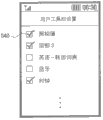
图5是示出了在根据本发明一个示例性实施例的移动终端的触摸屏单元上显示的工具栏菜单登记设置屏幕的图。FIG. 5 is a diagram illustrating a toolbar menu registration setting screen displayed on a touch screen unit of a mobile terminal according to an exemplary embodiment of the present invention.
当移动终端进入工具栏菜单登记设置模式时,工具栏管理器370a检索功能列表并呈现用于列举功能项的功能列表。在某一示例性实现方式中,还呈现复选框以使用户能够通过选择性地在复选框上进行标记来选择哪些图标需要在工具栏上呈现的功能。当然,也可以执行其他选择所期望的功能的方法,例如突出显示所选择的功能。When the mobile terminal enters the toolbar menu registration setting mode, the
以下参考图6a至6h、图7、图8a和8b、图9、以及图10a至10c来描述工具栏菜单模式中的触摸屏的示例性操作。Exemplary operations of the touch screen in the toolbar menu mode are described below with reference to FIGS. 6a to 6h, FIG. 7, FIGS. 8a and 8b, FIGS. 9, and FIGS. 10a to 10c.
第一示例性实施例first exemplary embodiment
图6a和6b是示出了根据本发明一示例性实施例的、对工具栏菜单模式屏幕进行初始化以及在工具栏菜单模式屏幕中显示出工具栏的过程的图。6a and 6b are diagrams illustrating a process of initializing a toolbar menu mode screen and displaying a toolbar in the toolbar menu mode screen according to an exemplary embodiment of the present invention.
参考图6a,如果移动终端首先进入工具栏菜单模式,则如图6a所示,触摸屏单元360显示除标记610外基本上空白的工具栏菜单模式屏幕。如果在标记610a上检测到触摸,则如图6b所示,触摸屏单元360在工具栏菜单模式屏幕中呈现工具栏120。Referring to FIG. 6a, if the mobile terminal first enters the toolbar menu mode, as shown in FIG. 6a, the
以这种方式,可以配置控制单元370以使得工具栏菜单模式开始于空白工具栏菜单模式屏幕且工具栏通过选择标记610而出现。在一示例性实现方式中,标记610可以被设计为暗示方向的图标对象。例如,标记610可以具有等边三角形的形式的箭头形状。在显示工具栏120之前,标记610在空白工具栏菜单模式屏幕中显示为指向右侧。如果选择了标记610并且工具栏120出现在工具栏菜单模式屏幕中,则标记610的指示方向可能改变为左侧,以朝向现在所显示的工具栏120。In this way, the
也就是说,控制单元370控制以使得当工具栏被激活以显示在工具栏菜单模式屏幕中时,标记610旋转180°以指向反方向。此外,当检测到标记610上的触摸而工具栏出现时,控制单元370还控制以使得标记610改变为指向左侧并且工具栏120消失。That is, the
图6c和6d是示出了根据本发明示例性实施例的、重新排列工具栏菜单模式屏幕的过程的图。6c and 6d are diagrams illustrating a process of rearranging a toolbar menu mode screen according to an exemplary embodiment of the present invention.
当移动终端的定向改变时,感测单元340感测该移动终端的改变,并将感测到的改变值输出到控制单元370,使得控制单元基于该改变值确定该移动终端的定向。控制单元370能够控制以使得当移动终端的定向改变时,工具栏及位于工具栏上的图标的定向随着该移动终端的改变后定向的方向而改变。When the orientation of the mobile terminal changes, the
在该示例性实施例中,如图6c所示,当移动终端的定向从纵向定向改变为横向定向时,位于工具栏上的图标和位于菜单栏上的菜单按钮的定向发生改变,而工具栏和菜单栏的位置和定向没有改变。In this exemplary embodiment, as shown in FIG. 6c, when the orientation of the mobile terminal is changed from portrait orientation to landscape orientation, the orientations of the icons located on the toolbar and the menu buttons located on the menu bar are changed, and the orientation of the toolbar And the position and orientation of the menu bar has not changed.
例如,当控制单元370检测到移动终端的定向按顺时针方向旋转90°时,控制单元370控制以使得位于工具栏上的图标按逆时针方向旋转90°。同样地,当控制单元370检测到移动终端按逆时针方向旋转90°,从纵向定向旋转到横向定向时,控制单元370控制以使得位于工具栏上的图标按顺时针方向旋转90°。For example, when the
控制单元370还以同样的方式控制工具栏菜单模式屏幕中位于菜单栏上的菜单按钮160a至160d以及位于状态指示栏上的指示器(例如电池指示器、无线电强度指示器、和当前时间指示器)的旋转。The
如图6d所示,可以配置工具栏菜单模式屏幕以使得当移动终端的定向按顺时针方向从纵向定向旋转到横向定向时,工具栏、菜单栏、和状态指示栏相对于显示面板以相反的方向旋转。As shown in Figure 6d, the toolbar menu mode screen can be configured so that when the orientation of the mobile terminal is rotated clockwise from a portrait orientation to a landscape orientation, the toolbar, the menu bar, and the status indication bar are in opposite directions relative to the display panel. direction rotation.
例如,当控制单元370检测到移动终端的定向按顺时针方向旋转90°时,控制单元370控制以使得工具栏、菜单栏、和状态指示栏相对于显示面板按逆时针方向旋转。同样地,当控制单元370检测到移动终端按逆时针方向旋转90°,从纵向定向旋转到横向定向时,控制单元370控制以使得工具栏、菜单栏、和状态指示栏相对于显示面板按顺时针方向旋转。For example, when the
图6e和6f是示出了根据本发明一个示例性实施例的、在工具栏菜单模式屏幕中激活与位于工具栏上的图标匹配的功能的过程的图。6e and 6f are diagrams illustrating a process of activating a function matching an icon located on a toolbar in a toolbar menu mode screen according to an exemplary embodiment of the present invention.
如图6e所示,如果用户从工具栏120拖动特定图标630a并将图标630a放到第一区域中,则工具栏驱动器370b查找被存储为设置信息文件的匹配表并激活匹配表中与图标630a匹配的功能。这里,如图6f所示,控制单元370控制以使得当从工具栏120拖动出图标630a并在第一区域中执行其相应功能630b时,另一个功能图标640被放置到这个位置。可以从登记到工具栏120的候选功能图标中选出代替图标630a的功能图标640。As shown in Figure 6e, if the user drags a
图6g和6h是示出了根据本发明一个示例性实施例的、在工具栏菜单模式屏幕中去激活活动功能的过程的图。6g and 6h are diagrams illustrating a process of deactivating an active function in a toolbar menu mode screen according to an exemplary embodiment of the present invention.
如图6g所示,用户能够从主窗口拖动活动功能对象并将该活动功能对象放置在工具栏120。在这种情况下,工具栏驱动器370控制以使得与从设置信息文件中检索到的活动功能对象相匹配的图标被放置在工具栏120上。As shown in FIG. 6g , the user can drag the active function object from the main window and place the active function object on the
例如,如图6h所示,如果用户从主窗口拖动活动功能对象630b并将该活动功能对象630b放到工具栏120上的图标650和660之间,则与该活动功能对象630b匹配的图标630a被放置在图标650和660之间。For example, as shown in Figure 6h, if the user drags the active
图7是示出了根据本发明一个示例性实施例的、在工具栏菜单模式屏幕中通知与在工具栏上选择的图标匹配的功能的过程的图。FIG. 7 is a diagram illustrating a process of notifying a function matching an icon selected on a toolbar in a toolbar menu mode screen according to an exemplary embodiment of the present invention.
在某些情况下,粗略看一下时或由于视力低下时,用户可能无法识别与位于工具栏上的各个图标110相关联的功能。In some cases, the user may not be able to recognize the functions associated with the
因此,为了给用户提供与图标110匹配的功能的有关信息,控制单元370控制以使得当在图标上检测到触摸时,以气球文本710的形式呈现该图标所代表的功能的有关信息。如图7所示,如果用户触摸在“ABC”图标上,则控制单元370控制以使得气球文本710显示为文本“词典”,从而告知用户该图标代表词典功能。Therefore, in order to provide the user with information about the function matched with the
可以通过另一方法来提供所选择的图标所代表的功能的附加信息,例如通过放大的图标或语音通告。Additional information about the function represented by the selected icon may be provided through another method, such as through an enlarged icon or a voice announcement.
因此,即使当用户视力很差或不能识别图标所代表的功能时,也能通过触摸在该图标上来获得与该图标相关联的功能的有关信息,从而方便了用户。Therefore, even when the user has poor eyesight or cannot recognize the function represented by the icon, he can obtain information about the function associated with the icon by touching the icon, thereby facilitating the user.
图8a和8b是示出了根据本发明一个示例性实施例的、在工具栏菜单模式屏幕中激活多个功能的过程的图。8a and 8b are diagrams illustrating a process of activating a plurality of functions in a toolbar menu mode screen according to an exemplary embodiment of the present invention.
因为工具栏菜单模式屏幕的第一区域130在尺寸上受限,所以允许在第一区域130中重叠显示活动功能对象810和820,活动功能对象810和820是通过将与它们对应的图标从工具栏移动到第一区域130来激活的。Because the
在图8a中,第一活动功能对象810与第二活动功能对象820部分重叠。在这种情况下,能够在控制单元370的控制下调整第一和第二活动功能对象810和820透明度,使得即使当第一和第二活动功能对象重叠时,用户也能够同时获取第一和第二活动功能对象所提供的信息。In FIG. 8 a , a first
图8b示出了另一种示例性情形,其中两个活动功能对象810和820被重叠显示在第一区域130中。在这种情况下,不透明地呈现第一和第二活动功能对象810和820,以使得在重叠部分中第二活动功能对象820被第一活动功能对象810遮住。FIG. 8 b shows another exemplary situation, in which two
图9是示出了根据本发明一个示例性实施例的、在工具栏菜单模式屏幕中重新排列活动功能对象的过程的图。在图9中,两个活动功能对象810和820被重叠地排列在工具栏菜单模式屏幕的不同深度的平面上。FIG. 9 is a diagram illustrating a process of rearranging active function objects in a toolbar menu mode screen according to an exemplary embodiment of the present invention. In FIG. 9, two
如图8a和8b所示,如果在第一活动功能对象810重叠在第二活动功能对象820上面时通过触摸事件选择第二活动功能对象820,则控制单元370控制以使得第二活动功能对象820位于更高平面,这样第二活动功能对象820就重叠在第一活动功能对象810的上面。As shown in Figures 8a and 8b, if the second active
在这种情况下,控制单元能够控制以使得即使第一活动功能对象810位于更低平面,第一活动功能对象810的某些部分(在图9中为时钟的时针和分针)也会位于更高平面,以提高第一活动功能对象810所提供的信息(在图9中为时钟的当前时间)的可读性。In this case, the control unit can control so that even if the first movable
图10a和10b是示出了根据本发明一个示例性实施例的、在工具栏菜单模式屏幕中放大活动功能对象的过程的图,图10c是示出了图10a和10b的放大过程中显示出的工具栏菜单模式屏幕的截图。Figures 10a and 10b are diagrams showing the process of enlarging the active function object in the toolbar menu mode screen according to an exemplary embodiment of the present invention, and Figure 10c is a diagram showing the A screenshot of the toolbar menu modal screen.
如图10a所示,在工具栏菜单模式屏幕的第一区域130中呈现作为第一活动功能对象的时钟1020和作为第二活动功能对象的地铁地图1030。因为时钟是以简单图像的形式提供的并且时钟所提供的信息(当前时间)也相对简单,所以用户能够没有困难地读取信息(当前时间)。然而,地铁地图1030包括许多信息(包括站点、枢纽站、地铁线路的类型、以及途经站),使得在显示地铁地图1030的信息时用户难以读取。As shown in FIG. 10a, a
在该示例性实施例中,当通过触摸选择可缩放活动功能对象(例如,地铁地图1030)时,具有放大和缩小按钮1012和1014的缩放功能对象1010被激活。In this exemplary embodiment, when a zoomable active functional object (eg, subway map 1030 ) is selected by touch, a zoom
如果在放大按钮1012上检测到触摸,则控制单元370控制以放大可缩放活动功能对象。在图10b所示的示例中,用户能够通过触摸放大按钮1012来放大地铁地图1030,以便能够读取在该地铁地图1030被放大前难以看到的信息。以这种方式,用户能够从地铁地图1030获取诸如站名、枢纽站、地铁线路和途经站之类的信息。此外,当地铁地图1030被缩放时,用户还能够更容易地浏览地铁地图1030。If a touch is detected on the
控制单元370还能够控制以使得当在放大按钮1012上检测到触摸时,第一区域130以一定的百分比被放大。在这种情况下,当在缩小按钮1014上检测到触摸时,控制单元370控制以使得第一区域130以一定的百分比被缩小。The
如图10c所示,工具栏菜单模式屏幕配备有放大和缩小按钮1012和1014,并且通过放大按钮1012上的触摸来放大第一区域130。As shown in FIG. 10c, the toolbar menu mode screen is equipped with zoom-in and zoom-out
使用放大和缩小按钮1012和1014,用户能够以一定的百分比放大和缩小第一区域130。Using the zoom in and zoom out
图11是示出了在根据本发明一个示例性实施例的用户界面方法中向工具栏登记功能的流程的流程图。FIG. 11 is a flowchart illustrating a procedure of registering a function with a toolbar in a user interface method according to an exemplary embodiment of the present invention.
参考图11,在步骤S1110中,移动终端的控制单元370确定是否检测到工具栏菜单登记模式命令。Referring to FIG. 11, in step S1110, the
如果检测到工具栏菜单登记模式命令,则控制单元370在步骤S1130中检索用于列举可被登记到工具栏的功能的工具栏菜单功能列表,并在步骤S1140中显示这些功能。在一示例性实施例中,可以用如图5所示的复选框或者其他选项来显示这些功能。当显示功能时,在步骤S1150中,控制单元370确定是否选择这些功能之一用于登记。例如,用户可以通过在配备有功能的复选框上做标记来选择将要向工具栏登记的功能。如果选择了某功能,则控制单元370在步骤S1160中创建(或更新)设置信息,即其中功能图标与用户所选择的功能匹配的匹配表(见表1),并且在步骤S1170中将该匹配表存储在存储单元350中。If a toolbar menu registration mode command is detected, the
图12是示出了在根据本发明一个示例性实施例的用户界面方法中激活向工具栏登记的功能的流程的流程图。FIG. 12 is a flowchart illustrating a flow of activating a function registered with a toolbar in a user interface method according to an exemplary embodiment of the present invention.
参考图12,在步骤S1210中,控制单元370确定移动终端是否操作于工具栏菜单模式。如果移动终端不是操作于工具栏菜单模式,则在步骤S1220中,控制单元370确定移动终端操作于常规菜单模式并控制以提供常规菜单模式业务。Referring to FIG. 12, in step S1210, the
另外,如果在步骤S1210中确定移动终端操作于工具栏菜单模式,则在步骤S1230中控制单元等待检测到工具栏菜单模式屏幕上所提供的标记上的触摸。如果检测到标记上的触摸,则在步骤S1240中,控制单元检查向工具栏登记的功能并控制以在工具栏菜单模式屏幕中呈现与功能匹配的图标所处的工具栏。在工具栏菜单模式屏幕没有标记的情况下,响应于对触摸屏上的任何位置的触摸的检测,控制单元检查向工具栏登记的功能,并将工具栏和与功能匹配的图标一起呈现在工具栏菜单模式屏幕中。在一示例性实现方式中,该位置可以是预定位置或没有任何图标的空白区域。Also, if it is determined in step S1210 that the mobile terminal is operating in the toolbar menu mode, the control unit waits for detection of a touch on a marker provided on the toolbar menu mode screen in step S1230. If a touch on the marker is detected, the control unit checks functions registered to the toolbar and controls to present the toolbar where the icon matching the function is located in the toolbar menu mode screen in step S1240. In the case where the toolbar menu mode screen is unmarked, in response to detection of a touch anywhere on the touch screen, the control unit checks the functions registered with the toolbar, and presents the toolbar with an icon matching the function on the toolbar in the menu mode screen. In an exemplary implementation, the location may be a predetermined location or a blank area without any icon.
接下来,在步骤S1250中,控制单元确定位于工具栏上的图标是否被拖放到工具栏菜单模式屏幕的主窗口130中。如果检测到图标被从工具栏拖动并被放到主窗口130中,则控制单元在步骤S1260中参考匹配表检查与该图标匹配的功能,并在步骤S1270在主窗口中激活与该图标匹配的功能。Next, the control unit determines whether an icon located on the toolbar is dragged and dropped into the
参考图13a和13b、图14、图15a至15c、图16、图17a至17c、图18、图19a至19c、和图20描述根据本发明第二至第五示例性实施例的用户界面方法。13a and 13b, FIG. 14, FIGS. 15a to 15c, FIG. 16, FIGS. 17a to 17c, FIG. 18, FIGS. 19a to 19c, and FIG. .
第二示例性实施例second exemplary embodiment
图13a和13b是示出了根据本发明一个示例性实施例的用户界面方法的工具栏菜单模式中功能的操作的图。在该示例性实施例中,参考时钟功能的激活来描述功能执行过程,时钟功能的激活是通过如下操作完成的:从工具栏拖动代表时钟功能的时钟图标并且将该时钟图标放到工具栏菜单模式屏幕的主窗口中。13a and 13b are diagrams illustrating operations of functions in a toolbar menu mode of a user interface method according to an exemplary embodiment of the present invention. In this exemplary embodiment, the function execution process is described with reference to the activation of the clock function, which is accomplished by dragging a clock icon representing the clock function from the toolbar and dropping the clock icon on the toolbar in the main window of the menu mode screen.
如图13a所示,代表显示出当前时间的时钟功能的时钟图标1310a位于工具栏120上。如果时钟图标1310a被从工具栏120拖动并且被放到主窗口130中,则控制单元370检测时钟图标的移动并参考匹配表(设置信息文件)检查与时钟图标1310a匹配的时钟功能。接下来,控制单元370激活该时钟功能,以使得如图13b所示,指示当前时间的活动时钟功能对象1310b出现在主窗口130中。在该示例性实施例中,活动时钟功能对象1310b可以以模拟时钟图像或数字时钟图像的形式出现。As shown in FIG. 13 a , a
图14是示出了图13a和13b的示例性功能执行过程的流程图。Fig. 14 is a flowchart illustrating an exemplary function execution process of Figs. 13a and 13b.
参考图13a、图13b和图14,在步骤S1410中控制单元370检测到时钟图标1310a从工具栏120到主窗口130的移动。在步骤S1420中控制单元370识别与该时钟功能图标匹配的时钟功能并检查当前时间。最后,在步骤S1430中控制单元370在主窗口130中显示指示当前时间的活动时钟功能对象1310b。13a, 13b and 14, the
第三示例性实施例third exemplary embodiment
图15a至15c是示出了根据本发明一个示例性实施例的用户界面方法的工具栏菜单模式中功能的操作的图。在该示例性实施例中,参考照相簿功能的激活来描述功能执行过程,照相簿功能的激活是通过如下操作完成的:从工具栏拖动代表照相簿功能的照相簿图标并将该照相簿图标放到主窗口中。15a to 15c are diagrams illustrating operations of functions in a toolbar menu mode of a user interface method according to an exemplary embodiment of the present invention. In this exemplary embodiment, the function execution process is described with reference to the activation of the photobook function, which is accomplished by dragging the photobook icon representing the photobook function from the toolbar and icon in the main window.
如图15a所示,代表照相簿功能的照相簿图标1510位于工具栏120上。如果照相簿图标1510被从工具栏120拖动并被放到主窗口130中,则控制单元370检测照相簿图标的移动并参考匹配表检查与照相簿图标1510匹配的照相簿功能。接下来,控制单元370激活照相簿功能,以使得如图15b所示,活动照相簿功能对象1520出现在主窗口130中。在图15b所示的示例中,活动照相簿功能对象1520由用于呈现与照相簿功能一起存储的照片的呈现窗口1520a、以及分别用于执行与照相簿功能相关联的子功能的相簿和设置按钮1520b和1520c组成。相簿按钮1520b可以配置为用于在包含照片的文件夹间进行切换的按钮,设置按钮1520c可以配置为用于将照相簿功能所提供的照片选作移动终端背景图像的按钮。As shown in FIG. 15 a , a
活动照相簿对象1520配备有一对导航按钮,使得当在一个导航按钮上检测到触摸时,控制单元370控制以使得呈现窗口中呈现的照片转换为被触摸的导航按钮所指示的方向。此外,当在相簿按钮1520b上检测到触摸时,控制单元还控制以呈现文件夹列表,以便从文件夹列表中选择文件夹。The
此外,如图15c所示,当在设置按钮1520c上检测到触摸时,控制单元370还控制以将呈现窗口1520a中呈现的当前图像设置为移动终端背景图像。In addition, as shown in FIG. 15c, when a touch is detected on the
图16是示出了示例性功能执行过程的流程图。Fig. 16 is a flowchart showing an exemplary function execution process.
参考图15a至15c和图16,控制单元370在步骤S1610中检测照相簿功能图标1510从工具栏120到主窗口130的移动,并在步骤S1620中呈现针对照相簿功能图标1510所代表的照相簿功能登记的图像。控制单元370检测触摸屏面板360b上的触摸并在步骤S1630中确定在导航按钮1530上是否检测到触摸。如果在导航按钮1530上检测到触摸,则在步骤S1640中控制单元370控制以与导航按钮1530对应地转换图像。另外,如果在导航按钮1530上没有检测到触摸,则在步骤S1650中控制单元370确定在照相簿功能对象1520的相簿按钮1520b上是否检测到触摸。如果在相簿按钮1520b上检测到触摸,则在步骤S1660中控制单元370控制以呈现文件夹列表,以便用户从文件夹列表中选择文件夹。如果在相簿按钮1520上没有检测到触摸,则在步骤S1670中控制单元370确定在设置按钮1520c上是否检测到触摸。如果在设置按钮1520c上检测到触摸,则在步骤S1680中控制单元控制以将呈现窗口1520a中呈现的当前图像设置为移动终端背景图像。15a to 15c and FIG. 16, the
第四示例性实施例Fourth Exemplary Embodiment
图17a至17c是示出了根据本发明一个示例性实施例的用户界面方法的工具栏菜单模式中功能的操作的图。在该示例中,参考顶部-3功能的激活来描述功能执行过程,顶部-3功能的激活是通过如下操作完成的:从工具栏拖动代表顶部-3功能的顶部-3功能图标并将顶部-3功能图标放到主窗口中。17a to 17c are diagrams illustrating operations of functions in a toolbar menu mode of a user interface method according to an exemplary embodiment of the present invention. In this example, the function execution process is described with reference to the activation of the top-3 function. The activation of the top-3 function is done by dragging the top-3 function icon representing the top-3 function from the toolbar and -3 function icons are placed in the main window.
顶部-3功能是指如下功能:在工具栏菜单模式屏幕上同时呈现与从电话簿中选出的已登记成员有关的信息,使得用户能够立即向已登记成员发出语音呼叫、视频呼叫或消息呼叫。为了使用顶部-3功能,用户必须针对顶部-3功能登记成员。还应当理解,用户的数量不限于三个,而是根据用户的选择可以包括更多或更少的用户。The top-3 function refers to the function of simultaneously presenting information related to registered members selected from the phone book on the toolbar menu mode screen so that the user can immediately make a voice call, video call or message call to the registered member . In order to use the top-3 functionality, the user must register a member for the top-3 functionality. It should also be understood that the number of users is not limited to three, but more or fewer users may be included at the user's option.
如图17a所示,代表顶部-3功能的顶部-3功能图标1710位于工具栏120上。如果顶部-3功能图标1710被从工具栏120拖动并被放到主窗口130中,则控制单元370检测顶部-3功能图标1710的移动并参考匹配表检查与顶部-3功能图标1710匹配的顶部-3功能。接下来,控制单元370激活顶部-3功能,以使得在如图17b所示,活动顶部-3功能对象1720出现主窗口130中。活动顶部-3功能对象1720由用于呈现与已登记成员相关联的图像的三个呈现窗口1720a、1720b、和1720c组成。这三个呈现窗口1720a、1720b和1720c可以以垂直或水平方向排列。例如在图17b中,这三个呈现窗口1720a、1720b和1720c以垂直方向排列。控制单元370控制以使得这三个呈现窗口1720a、1720b和1720c呈现与各个已登记成员相关联地设置的图像。当在三个呈现窗口1720a、1720b和1720c中的一个上检测到触摸时,控制单元370控制以用一定百分比放大被触摸的呈现窗口。这时,如图17c所示,被放大的呈现窗口呈现出子菜单按钮1730a、1730b和1730c,并且另外两个呈现窗口排列在被放大的呈现窗口的一侧。As shown in FIG. 17 a , a top-3
如图17c所示,如果在第一呈现窗口1720a上检测到触摸,则控制单元370控制以使得如图17c所示,用一定百分比放大第一呈现窗口1720a,被放大的呈现窗口1720a底部的子菜单按钮1730a、1730b和1730c也连同被放大。在该示例性实施例中,子菜单按钮被指定为语音呼叫按钮1730a、消息按钮1730b、和视频呼叫按钮1730c。当在语音呼叫按钮1730a上检测到触摸时,控制单元370控制以向针对在被放大的呈现窗口上呈现的图像而登记的电话号码发出语音呼叫。当然,子菜单按钮可以被指定为如移动终端所支持的其他功能或如另外的适当功能。As shown in Figure 17c, if a touch is detected on the
如图17c所示,控制单元370还控制以使得另外的两个呈现窗口1720b和1720c排列在被放大的呈现窗口1720a的一侧。As shown in FIG. 17c, the
图18是示出了图17a至17c的示例性功能执行过程的流程图。Fig. 18 is a flowchart illustrating an exemplary function execution process of Figs. 17a to 17c.
参考图17a至17c和图18,控制单元370在步骤S1810中检测顶部-3功能图标1710从工具栏120到主窗口130的移动,并在步骤S1820中显示具有呈现窗口1720a、1720b和1720c的活动顶部-3功能对象1720,这些呈现窗口用于呈现与针对顶部-3功能而登记的成员相关联的各个图像。在步骤S1830中控制单元370确定是否在呈现窗口1720a、1720b、和1720c中的任何一个上检测到触摸。如果在呈现窗口中检测到触摸,则在步骤S1840中控制单元370控制以用一定百分比放大被触摸的呈现窗口,子菜单按钮1730a、1730b、和1730c也连同被放大。接下来,在步骤S1850中控制单元370控制以使得未被触摸的呈现窗口排列在被放大的呈现窗口的一侧。接下来,在步骤S1860中控制单元370确定是否在子菜单按钮1730a、1730b、和1730c中的任何一个上检测到触摸。如果在子菜单按钮上检测到触摸,则在步骤S1870中控制单元370控制以执行链接到被触摸的子菜单按钮的功能。17a to 17c and FIG. 18, the
第五示例性实施例Fifth Exemplary Embodiment
图19a至19b是示出了根据本发明一个示例性实施例的用户界面方法的工具栏菜单模式中功能的操作的图,图19c是示出了与图19a和19b的功能执行过程相关联地显示的工具栏菜单模式屏幕的截图。在该示例中,参考蓝牙功能的激活来描述功能执行过程。因为移动终端和蓝牙设备之间的蓝牙链路建立流程对本领域的技术人员来说是显而易见的,所以为方便起见,省略了对蓝牙链路建立流程的详细描述。19a to 19b are diagrams showing the operation of functions in the toolbar menu mode of the user interface method according to an exemplary embodiment of the present invention, and FIG. A screenshot of the toolbar menu modal screen displayed. In this example, the function execution process is described with reference to the activation of the Bluetooth function. Since the Bluetooth link establishment process between the mobile terminal and the Bluetooth device is obvious to those skilled in the art, for convenience, a detailed description of the Bluetooth link establishment process is omitted.
当移动终端操作于蓝牙通信模式时,控制单元370控制以扫描蓝牙射频,从而发现其蓝牙无线电范围内的蓝牙设备。在本示例中,移动终端在蓝牙无线电范围内发现四个蓝牙设备A、B、C和D。相应地,如图19a所示,控制单元控制以在蓝牙功能图标1910周围排列代表在蓝牙无线电范围内发现的蓝牙设备A、B、C和D的设备图标1920、1930、1940和1950。When the mobile terminal operates in the Bluetooth communication mode, the
如图19b所示,如果设备图标1920、1930、1940和1950中的一个图标(在该示例中为设备图标1940)被拖放到位于蓝牙通信模式屏幕中央的蓝牙功能图标1910上,控制单元370检测设备图标1940的移动,并控制蓝牙单元320(见图3)以使得蓝牙单元320建立同设备图标1940所代表的蓝牙设备C的蓝牙链路。As shown in Figure 19b, if one icon (in this example, the device icon 1940) in the
如图19c所示,移动终端所发现的蓝牙设备以设备图标以及蓝牙模式屏幕中的各个设备名称的形式排列在蓝牙图标的周围。As shown in FIG. 19c, the Bluetooth devices discovered by the mobile terminal are arranged around the Bluetooth icon in the form of device icons and respective device names in the Bluetooth mode screen.
图20是示出了示例性功能执行过程的流程图。FIG. 20 is a flowchart illustrating an exemplary function execution process.
参考图19a至19c和图20,控制单元370在步骤S2010中检测移动终端进入蓝牙通信模式,并在步骤S2020中扫描蓝牙射频,从而发现相邻的蓝牙设备。随后,在步骤S2030中控制单元370排列代表被发现的蓝牙设备A、B、C和D的设备图标1920、1930、1940和1950。在步骤S2040中控制单元370确定是否有设备图标1920、1930、1940和1950中任何一个图标被拖放到排列于蓝牙通信模式屏幕中央的蓝牙功能图标1910上。如果某设备图标被拖放到蓝牙功能图标1910上,则在步骤S2050中控制单元370控制以使得蓝牙单元320(见图3)建立该移动终端和该设备图标所代表的蓝牙设备之间的蓝牙链路。19a to 19c and FIG. 20, the
如上所述,根据本发明示例性实施例的用户界面方法和设备通过如下操作使对功能进行激活得以实现:从工具栏拖动代表该功能的图标并将该图标放到在移动终端的触摸屏上显示的工具栏菜单模式屏幕中所提供的主窗口中。由此用户能够以直观的方式执行该终端所提供的功能。As described above, the user interface method and device according to the exemplary embodiments of the present invention enable the activation of a function by dragging an icon representing the function from the toolbar and dropping the icon on the touch screen of the mobile terminal Displays the main window provided in the toolbar menu modal screen. The user can thereby perform the functions provided by the terminal in an intuitive manner.
此外,本发明的用户界面方法和设备允许用户排列图形对象,例如工具栏和位于工具栏上的功能图标、以及用于呈现由触摸屏上的功能图标代表的功能所提供的信息的活动功能对象,从而改进了装饰效果以及作为用户界面的触摸屏的交互性。In addition, the user interface method and device of the present invention allow the user to arrange graphical objects, such as toolbars and function icons located on the toolbar, and active function objects for presenting information provided by the functions represented by the function icons on the touch screen, Thereby, the decorative effect and the interactivity of the touch screen as a user interface are improved.
虽然参考本发明特定示例性实施例示出和描述了本发明,但本领域的技术人员应当理解,可以在不背离所附权利要求及其等同物所限定的本发明的精神和范围的前提下,在本发明中作出形式和细节上的各种改变。While the present invention has been shown and described with reference to certain exemplary embodiments thereof, it should be understood by those skilled in the art that, without departing from the spirit and scope of the invention as defined by the appended claims and their equivalents, Various changes in form and details have been made throughout the present invention.
Claims (44)
Applications Claiming Priority (2)
| Application Number | Priority Date | Filing Date | Title |
|---|---|---|---|
| KR1020080021559A KR101012300B1 (en) | 2008-03-07 | 2008-03-07 | User interface device of portable terminal with touch screen and method thereof |
| KR10-2008-0021559 | 2008-03-07 |
Related Parent Applications (1)
| Application Number | Title | Priority Date | Filing Date |
|---|---|---|---|
| CN200810191036A Division CN101527745A (en) | 2008-03-07 | 2008-12-30 | User interface method and apparatus for mobile terminal having touch screen |
Publications (1)
| Publication Number | Publication Date |
|---|---|
| CN103176717A true CN103176717A (en) | 2013-06-26 |
Family
ID=41054901
Family Applications (2)
| Application Number | Title | Priority Date | Filing Date |
|---|---|---|---|
| CN200810191036A Pending CN101527745A (en) | 2008-03-07 | 2008-12-30 | User interface method and apparatus for mobile terminal having touch screen |
| CN2013101145179A Pending CN103176717A (en) | 2008-03-07 | 2008-12-30 | User interface method and apparatus for mobile terminal having touchscreen |
Family Applications Before (1)
| Application Number | Title | Priority Date | Filing Date |
|---|---|---|---|
| CN200810191036A Pending CN101527745A (en) | 2008-03-07 | 2008-12-30 | User interface method and apparatus for mobile terminal having touch screen |
Country Status (5)
| Country | Link |
|---|---|
| US (3) | US9104301B2 (en) |
| EP (3) | EP3249508A1 (en) |
| JP (2) | JP2009217815A (en) |
| KR (1) | KR101012300B1 (en) |
| CN (2) | CN101527745A (en) |
Cited By (7)
| Publication number | Priority date | Publication date | Assignee | Title |
|---|---|---|---|---|
| CN105100494A (en) * | 2015-08-14 | 2015-11-25 | 努比亚技术有限公司 | Mobile terminal and method for starting application |
| CN106325740A (en) * | 2016-08-11 | 2017-01-11 | 成都高合盛科技有限责任公司 | Page information display method and device |
| CN110209134A (en) * | 2014-06-13 | 2019-09-06 | 哈曼国际工业有限公司 | Media system controller |
| CN112506393A (en) * | 2021-02-07 | 2021-03-16 | 北京聚通达科技股份有限公司 | Icon display method and device and storage medium |
| CN116137639A (en) * | 2021-11-16 | 2023-05-19 | 华为终端有限公司 | Method and electronic device for cross-device audio data transmission |
| WO2023093753A1 (en) * | 2021-11-25 | 2023-06-01 | 华为技术有限公司 | Window management method and apparatus, and terminal device |
| CN116198637A (en) * | 2021-11-30 | 2023-06-02 | 广州六环信息科技有限公司 | A control method, device, equipment and storage medium |
Families Citing this family (432)
| Publication number | Priority date | Publication date | Assignee | Title |
|---|---|---|---|---|
| US7454707B2 (en) * | 2002-09-30 | 2008-11-18 | Canon Kabushiki Kaisha | Image editing method, image editing apparatus, program for implementing image editing method, and recording medium recording program |
| US8564544B2 (en) | 2006-09-06 | 2013-10-22 | Apple Inc. | Touch screen device, method, and graphical user interface for customizing display of content category icons |
| US9933937B2 (en) | 2007-06-20 | 2018-04-03 | Apple Inc. | Portable multifunction device, method, and graphical user interface for playing online videos |
| KR20100044341A (en) * | 2008-10-22 | 2010-04-30 | 엘지전자 주식회사 | Mobile terminal and method of providing scheduler using same |
| US8839154B2 (en) * | 2008-12-31 | 2014-09-16 | Nokia Corporation | Enhanced zooming functionality |
| US20100164878A1 (en) * | 2008-12-31 | 2010-07-01 | Nokia Corporation | Touch-click keypad |
| TW201031172A (en) * | 2009-02-13 | 2010-08-16 | Htc Corp | Communication management systems and methods, and computer program products thereof |
| JP5169901B2 (en) * | 2009-02-23 | 2013-03-27 | Necカシオモバイルコミュニケーションズ株式会社 | Terminal device and program |
| KR101640460B1 (en) * | 2009-03-25 | 2016-07-18 | 삼성전자 주식회사 | Operation Method of Split Window And Portable Device supporting the same |
| TW201035829A (en) * | 2009-03-31 | 2010-10-01 | Compal Electronics Inc | Electronic device and method of operating screen |
| US8370762B2 (en) * | 2009-04-10 | 2013-02-05 | Cellco Partnership | Mobile functional icon use in operational area in touch panel devices |
| KR101576292B1 (en) * | 2009-05-21 | 2015-12-09 | 엘지전자 주식회사 | The method for executing menu in mobile terminal and mobile terminal using the same |
| EP2447857A4 (en) * | 2009-06-26 | 2016-05-11 | Kyocera Corp | COMMUNICATION DEVICE AND ELECTRONIC DEVICE |
| WO2011037558A1 (en) | 2009-09-22 | 2011-03-31 | Apple Inc. | Device, method, and graphical user interface for manipulating user interface objects |
| US9310907B2 (en) | 2009-09-25 | 2016-04-12 | Apple Inc. | Device, method, and graphical user interface for manipulating user interface objects |
| US8832585B2 (en) | 2009-09-25 | 2014-09-09 | Apple Inc. | Device, method, and graphical user interface for manipulating workspace views |
| KR20110037657A (en) * | 2009-10-07 | 2011-04-13 | 삼성전자주식회사 | Method for providing Wi-Fi using motion and display device using the same |
| US10101898B2 (en) * | 2009-10-23 | 2018-10-16 | Autodesk, Inc. | Multi-touch graphical user interface for interacting with menus on a handheld device |
| US20110105094A1 (en) * | 2009-10-29 | 2011-05-05 | Microsoft Corporation | Location integration in software defined radio |
| KR101600091B1 (en) * | 2009-11-25 | 2016-03-04 | 엘지전자 주식회사 | Method for displaying data in mobile terminal having touch screen and mobile termimnal thereof |
| US9003290B2 (en) * | 2009-12-02 | 2015-04-07 | T-Mobile Usa, Inc. | Image-derived user interface enhancements |
| KR101649142B1 (en) * | 2009-12-15 | 2016-08-30 | 엘지전자 주식회사 | Mobile terminal and operation control method thereof |
| CN101765236B (en) * | 2009-12-23 | 2014-04-02 | 宇龙计算机通信科技(深圳)有限公司 | Mobile terminal interface switching method and mobile terminal |
| KR20110073857A (en) * | 2009-12-24 | 2011-06-30 | 엘지전자 주식회사 | Mobile terminal and its control method |
| CN101778488B (en) * | 2009-12-29 | 2013-08-14 | 宇龙计算机通信科技(深圳)有限公司 | Method and system for prompting customized information |
| CN101795316B (en) * | 2009-12-29 | 2013-06-12 | 宇龙计算机通信科技(深圳)有限公司 | Prompting method and system of custom information and mobile terminal |
| CN101800805B (en) * | 2009-12-29 | 2013-08-14 | 宇龙计算机通信科技(深圳)有限公司 | Prompting method and system of customized information and mobile terminal |
| CN101789993B (en) * | 2009-12-29 | 2013-06-12 | 宇龙计算机通信科技(深圳)有限公司 | Prompting method of customization information, system and mobile terminal |
| CN101727287B (en) * | 2009-12-29 | 2012-11-14 | 宇龙计算机通信科技(深圳)有限公司 | Prompting method, prompting system and mobile terminal of customizing information |
| CN101771751B (en) * | 2009-12-29 | 2014-06-18 | 宇龙计算机通信科技(深圳)有限公司 | Method, system and mobile terminal for prompting customized information |
| US8479107B2 (en) * | 2009-12-31 | 2013-07-02 | Nokia Corporation | Method and apparatus for fluid graphical user interface |
| US8698845B2 (en) | 2010-01-06 | 2014-04-15 | Apple Inc. | Device, method, and graphical user interface with interactive popup views |
| US8736561B2 (en) * | 2010-01-06 | 2014-05-27 | Apple Inc. | Device, method, and graphical user interface with content display modes and display rotation heuristics |
| CN105511726B (en) * | 2010-01-20 | 2019-02-12 | 诺基亚公司 | user input |
| CN102770835B (en) * | 2010-01-20 | 2016-01-06 | 诺基亚公司 | Method and apparatus for organizing graphic items |
| CN101763270B (en) | 2010-01-28 | 2011-06-15 | 华为终端有限公司 | Components display processing methods and user devices |
| JP5471626B2 (en) * | 2010-03-09 | 2014-04-16 | ソニー株式会社 | Information processing apparatus, map update method, program, and information processing system |
| CN102193712A (en) * | 2010-03-11 | 2011-09-21 | 龙旗科技(上海)有限公司 | Man-machine interaction mode for functional switch set of mobile terminal |
| US20110258086A1 (en) * | 2010-03-26 | 2011-10-20 | Select2gether, Inc. | Computer interface for online commerce with community features |
| DE102010013170A1 (en) * | 2010-03-27 | 2011-09-29 | Audi Ag | Device for operating different functions of a motor vehicle |
| US9823831B2 (en) | 2010-04-07 | 2017-11-21 | Apple Inc. | Device, method, and graphical user interface for managing concurrently open software applications |
| US9513801B2 (en) | 2010-04-07 | 2016-12-06 | Apple Inc. | Accessing electronic notifications and settings icons with gestures |
| US20110252357A1 (en) | 2010-04-07 | 2011-10-13 | Imran Chaudhri | Device, Method, and Graphical User Interface for Managing Concurrently Open Software Applications |
| US8502856B2 (en) | 2010-04-07 | 2013-08-06 | Apple Inc. | In conference display adjustments |
| KR20110113844A (en) * | 2010-04-12 | 2011-10-19 | 엘지전자 주식회사 | Mobile terminal and its control method |
| KR101668240B1 (en) * | 2010-04-19 | 2016-10-21 | 엘지전자 주식회사 | Mobile terminal and operation control method thereof |
| US9753605B2 (en) | 2010-05-27 | 2017-09-05 | Oracle International Corporation | Action tool bar for mobile applications |
| USD666209S1 (en) * | 2010-06-05 | 2012-08-28 | Apple Inc. | Display screen or portion thereof with graphical user interface |
| KR101782639B1 (en) * | 2010-06-16 | 2017-09-27 | 삼성전자주식회사 | Method for using A PORTABLE TERMINAL |
| US20140068484A1 (en) * | 2010-06-16 | 2014-03-06 | Samsung Electronics Co., Ltd. | Interface method for a portable terminal |
| CN102314298A (en) * | 2010-07-06 | 2012-01-11 | 宏碁股份有限公司 | Electronic device and display method of toolbar |
| JP2012028955A (en) * | 2010-07-22 | 2012-02-09 | Sharp Corp | Image forming apparatus |
| KR101742986B1 (en) | 2010-07-26 | 2017-06-15 | 엘지전자 주식회사 | Image display apparatus and method for operating the same |
| US9098182B2 (en) | 2010-07-30 | 2015-08-04 | Apple Inc. | Device, method, and graphical user interface for copying user interface objects between content regions |
| US9081494B2 (en) | 2010-07-30 | 2015-07-14 | Apple Inc. | Device, method, and graphical user interface for copying formatting attributes |
| US8972879B2 (en) * | 2010-07-30 | 2015-03-03 | Apple Inc. | Device, method, and graphical user interface for reordering the front-to-back positions of objects |
| KR20120012541A (en) | 2010-08-02 | 2012-02-10 | 삼성전자주식회사 | Method and device for operating folder in touch device |
| KR20120020247A (en) * | 2010-08-27 | 2012-03-08 | 삼성전자주식회사 | Portable electronic device, apparatus and method for playing contents |
| CN101931704A (en) * | 2010-08-31 | 2010-12-29 | 深圳市五巨科技有限公司 | Mobile terminal desktop shortcut optimizing method and device |
| US8976129B2 (en) | 2010-09-24 | 2015-03-10 | Blackberry Limited | Portable electronic device and method of controlling same |
| GB2497383A (en) | 2010-09-24 | 2013-06-12 | Qnx Software Systems Ltd | Alert display on a portable electronic device |
| CA2811253C (en) | 2010-09-24 | 2018-09-04 | Research In Motion Limited | Transitional view on a portable electronic device |
| KR101107118B1 (en) | 2010-09-29 | 2012-01-30 | (주)블루지앤씨 | Method and apparatus for setting touch input unit location of mobile terminal |
| US9323442B2 (en) * | 2010-09-30 | 2016-04-26 | Apple Inc. | Managing items in a user interface |
| JP2012083831A (en) * | 2010-10-07 | 2012-04-26 | Pioneer Electronic Corp | Touch panel device, display method for touch panel, display processing program for touch panel and recording medium |
| US20120096349A1 (en) * | 2010-10-19 | 2012-04-19 | Microsoft Corporation | Scrubbing Touch Infotip |
| CN102467318B (en) * | 2010-11-08 | 2015-07-08 | 北京风灵创景科技有限公司 | Method and device for fast desktop switching of touch screen |
| US8533623B2 (en) * | 2010-11-17 | 2013-09-10 | Xerox Corporation | Interface that allows a user to riffle through pages of an electronic document |
| CN102467332B (en) * | 2010-11-17 | 2014-11-12 | 三竹资讯股份有限公司 | Device and method for switching operation of product detailed information of financial watch software |
| CN102467734B (en) * | 2010-11-17 | 2015-07-29 | 三竹资讯股份有限公司 | Device and method for combining detailed information of financial watch software |
| CN102467335B (en) * | 2010-11-17 | 2014-10-08 | 三竹资讯股份有限公司 | Polymorphic button device and method for mobile device financial watch software |
| CN102479028A (en) * | 2010-11-24 | 2012-05-30 | 上海三旗通信科技股份有限公司 | Method for intelligent standby function |
| CN102566856A (en) * | 2010-12-09 | 2012-07-11 | 三竹资讯股份有限公司 | Apparatus and method for marking the latest price and high and low prices of financial watch software for mobile devices |
| US8265866B2 (en) | 2010-12-15 | 2012-09-11 | The Boeing Company | Methods and systems for augmented navigation |
| US9244606B2 (en) | 2010-12-20 | 2016-01-26 | Apple Inc. | Device, method, and graphical user interface for navigation of concurrently open software applications |
| US8464174B2 (en) * | 2010-12-27 | 2013-06-11 | Sony Corporation | User interface for exploring media content |
| CN102541426B (en) * | 2010-12-31 | 2014-11-05 | 联想(北京)有限公司 | Electronic equipment and object processing method thereof |
| WO2012089157A1 (en) * | 2010-12-31 | 2012-07-05 | 联想(北京)有限公司 | Electronic device and method for processing objects thereof |
| EP4343525A3 (en) | 2011-02-10 | 2024-06-26 | Samsung Electronics Co., Ltd. | Portable device comprising a touch-screen display, and method for controlling same |
| US20120210200A1 (en) * | 2011-02-10 | 2012-08-16 | Kelly Berger | System, method, and touch screen graphical user interface for managing photos and creating photo books |
| KR101842906B1 (en) | 2011-02-10 | 2018-05-15 | 삼성전자주식회사 | Apparatus having a plurality of touch screens and screen changing method thereof |
| EP3336672B1 (en) | 2011-02-11 | 2020-11-11 | Samsung Electronics Co., Ltd. | Method and apparatus for providing a graphic user interface in a mobile terminal |
| KR101831641B1 (en) * | 2011-02-11 | 2018-04-05 | 삼성전자 주식회사 | Method and apparatus for providing graphic user interface in mobile terminal |
| CN102650926B (en) * | 2011-02-25 | 2015-02-04 | 华硕电脑股份有限公司 | Electronic device with touch screen and display control method thereof |
| CN102654817A (en) * | 2011-03-03 | 2012-09-05 | 国基电子(上海)有限公司 | Electronic device with function of rapidly activating menu and method |
| USD679729S1 (en) * | 2011-03-12 | 2013-04-09 | Omron Corporation | Display screen portion with icon |
| EP2500814B1 (en) * | 2011-03-13 | 2019-05-08 | LG Electronics Inc. | Transparent display apparatus and method for operating the same |
| CN102184072B (en) * | 2011-03-15 | 2014-07-16 | 宇龙计算机通信科技(深圳)有限公司 | Method and terminal for opening folder |
| KR101861593B1 (en) * | 2011-03-15 | 2018-05-28 | 삼성전자주식회사 | Apparatus and method for operating in portable terminal |
| KR101864333B1 (en) * | 2011-03-21 | 2018-07-05 | 삼성전자 주식회사 | Supporting Method For Icon Change Function And Portable Device thereof |
| KR20120116207A (en) * | 2011-04-12 | 2012-10-22 | 엘지전자 주식회사 | A display device and a refrigerator comprising the display device |
| KR101948645B1 (en) * | 2011-07-11 | 2019-02-18 | 삼성전자 주식회사 | Method and apparatus for controlling contents using graphic object |
| JP5799628B2 (en) * | 2011-07-15 | 2015-10-28 | ソニー株式会社 | Information processing apparatus, information processing method, and program |
| KR101830653B1 (en) * | 2011-07-18 | 2018-02-21 | 엘지전자 주식회사 | Mobile device and control method for the same |
| US9417754B2 (en) | 2011-08-05 | 2016-08-16 | P4tents1, LLC | User interface system, method, and computer program product |
| USD687845S1 (en) * | 2011-08-10 | 2013-08-13 | Samsung Electronics Co., Ltd. | Display screen or portion thereof with generated image |
| US8806369B2 (en) | 2011-08-26 | 2014-08-12 | Apple Inc. | Device, method, and graphical user interface for managing and interacting with concurrently open software applications |
| CN105930146B (en) * | 2011-08-26 | 2019-08-06 | 珠海市魅族科技有限公司 | The display methods and terminal of a kind of file and/or folder information |
| USD710865S1 (en) * | 2011-08-31 | 2014-08-12 | Samsung Electronics Co., Ltd. | Display screen or portion thereof with graphic user interface |
| USD715816S1 (en) * | 2011-08-31 | 2014-10-21 | Samsung Electronics Co., Ltd. | Display screen with generated user interface |
| USD687848S1 (en) * | 2011-08-31 | 2013-08-13 | Samsung Electronics Co., Ltd. | Display screen or portion thereof with generated image |
| USD687849S1 (en) * | 2011-08-31 | 2013-08-13 | Samsung Electronics Co., Ltd. | Display screen or portion thereof with generated image |
| USD715817S1 (en) * | 2011-08-31 | 2014-10-21 | Samsung Electronics Co., Ltd. | Display screen with generated user interface |
| USD687847S1 (en) * | 2011-08-31 | 2013-08-13 | Samsung Electronics Co., Ltd. | Display screen or portion thereof with generated image |
| USD687846S1 (en) * | 2011-08-31 | 2013-08-13 | Samsung Electronics Co., Ltd. | Display screen or portion thereof with generated image |
| USD725132S1 (en) * | 2011-08-31 | 2015-03-24 | Samsung Electronics Co., Ltd. | Display screen or portion thereof with a graphical user interface |
| KR101864618B1 (en) * | 2011-09-06 | 2018-06-07 | 엘지전자 주식회사 | Mobile terminal and method for providing user interface thereof |
| US9001625B2 (en) * | 2011-09-08 | 2015-04-07 | Timex Group Usa, Inc. | Wearable electronic device |
| KR101563150B1 (en) * | 2011-09-09 | 2015-10-28 | 주식회사 팬택 | Method for providing shortcut in lock screen and portable device employing the same |
| KR101860342B1 (en) * | 2011-09-15 | 2018-05-23 | 엘지전자 주식회사 | Mobile terminal and control method therof |
| TW201314553A (en) * | 2011-09-23 | 2013-04-01 | Qisda Corp | Method for executing an application program |
| WO2013046935A1 (en) * | 2011-09-26 | 2013-04-04 | Necカシオモバイルコミュニケーションズ株式会社 | Display device |
| WO2013047023A1 (en) | 2011-09-26 | 2013-04-04 | Necカシオモバイルコミュニケーションズ株式会社 | Display apparatus, display method, and program |
| US9347791B2 (en) | 2011-10-07 | 2016-05-24 | The Boeing Company | Methods and systems for operating a touch screen display |
| WO2013051259A1 (en) | 2011-10-07 | 2013-04-11 | パナソニック株式会社 | Image pickup device and image pickup method |
| USD722080S1 (en) * | 2011-10-12 | 2015-02-03 | Sony Corporation | Portion of display panel or screen with an icon |
| US20130104032A1 (en) * | 2011-10-19 | 2013-04-25 | Jiyoun Lee | Mobile terminal and method of controlling the same |
| CN103092487A (en) * | 2011-10-27 | 2013-05-08 | 腾讯科技(深圳)有限公司 | Method and device for uploading and downloading files |
| KR101905038B1 (en) * | 2011-11-16 | 2018-10-08 | 삼성전자주식회사 | Apparatus having a touch screen under multiple applications environment and method for controlling thereof |
| USD687857S1 (en) * | 2011-12-02 | 2013-08-13 | Microsoft Corporation | Display screen with icon |
| US9645733B2 (en) | 2011-12-06 | 2017-05-09 | Google Inc. | Mechanism for switching between document viewing windows |
| CN102541445A (en) | 2011-12-08 | 2012-07-04 | 华为技术有限公司 | Interaction method and interaction equipment |
| EP2791766A4 (en) * | 2011-12-14 | 2015-07-22 | Nokia Corp | METHODS, APPARATUSES, AND COMPUTER PROGRAM PRODUCTS FOR MERGING ZONES IN USER INTERFACE VIEWS |
| EP2791767A4 (en) * | 2011-12-14 | 2015-07-22 | Nokia Corp | METHODS, APPARATUSES, AND COMPUTER PROGRAM PRODUCTS FOR MANAGING VARIOUS VISUAL VARIANTS OF OBJECTS VIA USER INTERFACES |
| CN103167099B (en) * | 2011-12-15 | 2015-12-16 | 基信康信息技术(上海)有限公司 | The implementation method of mobile terminal and virtual message |
| CN103176726B (en) * | 2011-12-23 | 2017-10-24 | 腾讯科技(深圳)有限公司 | Page touch control and terminal |
| CN102411479B (en) * | 2011-12-27 | 2014-02-12 | 汉王科技股份有限公司 | Split screen switching method and device of portable electronic equipment |
| CN102566926A (en) * | 2011-12-27 | 2012-07-11 | 中兴通讯股份有限公司 | Method and device for displaying menu of mobile terminal, and mobile terminal |
| CN102520964B (en) * | 2011-12-27 | 2014-08-06 | 北京神州泰岳软件股份有限公司 | Method and device for management of application icon on client interface |
| CN103186321A (en) * | 2011-12-27 | 2013-07-03 | 上海博泰悦臻电子设备制造有限公司 | Method and device for controlling menu on screen |
| USD733724S1 (en) * | 2012-01-06 | 2015-07-07 | Samsung Electronics Co., Ltd. | Display screen or portion thereof with graphical user interface |
| USD726745S1 (en) * | 2012-01-06 | 2015-04-14 | Samsung Electronics Co., Ltd. | Display screen or portion thereof with graphical user interface |
| USD726197S1 (en) * | 2012-01-06 | 2015-04-07 | Samsung Electronics Co., Ltd. | Display screen or portion thereof with transitional graphical user interface |
| USD727339S1 (en) * | 2012-01-06 | 2015-04-21 | Samsung Electronics Co., Ltd. | Display screen or portion thereof with transitional graphical user interface |
| KR101515629B1 (en) | 2012-01-07 | 2015-04-27 | 삼성전자주식회사 | Method and apparatus for providing event of portable device having flexible display unit |
| USD726744S1 (en) * | 2012-01-09 | 2015-04-14 | Samsung Electronics Co., Ltd. | Display screen or portion thereof with graphical user interface |
| US20130191781A1 (en) * | 2012-01-20 | 2013-07-25 | Microsoft Corporation | Displaying and interacting with touch contextual user interface |
| US9928562B2 (en) | 2012-01-20 | 2018-03-27 | Microsoft Technology Licensing, Llc | Touch mode and input type recognition |
| KR101819513B1 (en) | 2012-01-20 | 2018-01-17 | 엘지전자 주식회사 | Mobile terminal and method for controlling the same |
| KR101863197B1 (en) * | 2012-01-31 | 2018-05-31 | 삼성전자주식회사 | Apparatus and method for informing of available devices in contents sharing network |
| USD725662S1 (en) * | 2012-02-02 | 2015-03-31 | Samsung Electronics Co., Ltd. | Display screen or portion thereof with graphical user interface on mobile device |
| CN103246442B (en) * | 2012-02-02 | 2015-12-16 | 宏碁股份有限公司 | Information Display Method of User Interface |
| USD709900S1 (en) * | 2012-02-09 | 2014-07-29 | Samsung Electronics Co., Ltd. | Display screen or portion thereof with graphical user interface |
| US9128605B2 (en) * | 2012-02-16 | 2015-09-08 | Microsoft Technology Licensing, Llc | Thumbnail-image selection of applications |
| KR101880921B1 (en) * | 2012-02-17 | 2018-08-16 | 삼성전자 주식회사 | Selective Operation Method of tilt function and Portable Device supporting the same |
| KR101892216B1 (en) * | 2012-02-24 | 2018-08-27 | 삼성전자주식회사 | Apparatas and method of handing a touch input in a portable terminal |
| KR101919008B1 (en) | 2012-02-24 | 2018-11-19 | 삼성전자주식회사 | Method for providing information and mobile terminal thereof |
| KR102008495B1 (en) * | 2012-02-24 | 2019-08-08 | 삼성전자주식회사 | Method for sharing content and mobile terminal thereof |
| KR101894395B1 (en) | 2012-02-24 | 2018-09-04 | 삼성전자주식회사 | Method for providing capture data and mobile terminal thereof |
| USD717339S1 (en) * | 2012-02-28 | 2014-11-11 | Microsoft Corporation | Display screen with icon |
| USD704212S1 (en) | 2012-03-06 | 2014-05-06 | Apple Inc. | Display screen or portion thereof with graphical user interface |
| CN103309548B (en) * | 2012-03-13 | 2016-05-18 | 宇龙计算机通信科技(深圳)有限公司 | The management method of terminal and application icon |
| KR20130107974A (en) * | 2012-03-23 | 2013-10-02 | 삼성전자주식회사 | Device and method for providing floating user interface |
| USD719180S1 (en) * | 2012-03-30 | 2014-12-09 | Huawei Technologies Co., Ltd. | Display screen or portion thereof with graphical user interface |
| USD724101S1 (en) * | 2012-04-05 | 2015-03-10 | Welch Allyn, Inc. | Patient monitoring device with graphical user interface |
| CN103365548B (en) * | 2012-04-06 | 2016-01-06 | 腾讯科技(深圳)有限公司 | The display packing of touch screen mobile terminal menu button and device |
| CN104484118B (en) * | 2012-04-06 | 2018-05-25 | 优视科技有限公司 | Pass through the method, apparatus and mobile terminal of gesture control application interface |
| USD730370S1 (en) * | 2012-04-10 | 2015-05-26 | Google Inc. | Display screen of a communication terminal with a graphical user interface |
| CN102681847B (en) * | 2012-04-28 | 2015-06-03 | 华为终端有限公司 | Touch screen terminal object processing method and touch screen terminal |
| CN103389860A (en) * | 2012-05-07 | 2013-11-13 | 观致汽车有限公司 | Interactive system and interactive method thereof |
| WO2013169865A2 (en) | 2012-05-09 | 2013-11-14 | Yknots Industries Llc | Device, method, and graphical user interface for moving a user interface object based on an intensity of a press input |
| DE112013002409T5 (en) | 2012-05-09 | 2015-02-26 | Apple Inc. | Apparatus, method and graphical user interface for displaying additional information in response to a user contact |
| WO2013169843A1 (en) | 2012-05-09 | 2013-11-14 | Yknots Industries Llc | Device, method, and graphical user interface for manipulating framed graphical objects |
| DE112013002381T5 (en) | 2012-05-09 | 2015-02-26 | Apple Inc. | Apparatus, method and graphical user interface for moving and dropping a user interface object |
| WO2013169849A2 (en) | 2012-05-09 | 2013-11-14 | Industries Llc Yknots | Device, method, and graphical user interface for displaying user interface objects corresponding to an application |
| EP2847658B1 (en) | 2012-05-09 | 2017-06-21 | Apple Inc. | Device, method, and graphical user interface for providing tactile feedback for operations performed in a user interface |
| WO2013169851A2 (en) | 2012-05-09 | 2013-11-14 | Yknots Industries Llc | Device, method, and graphical user interface for facilitating user interaction with controls in a user interface |
| EP3096218B1 (en) | 2012-05-09 | 2018-12-26 | Apple Inc. | Device, method, and graphical user interface for selecting user interface objects |
| WO2013169845A1 (en) | 2012-05-09 | 2013-11-14 | Yknots Industries Llc | Device, method, and graphical user interface for scrolling nested regions |
| JP6002836B2 (en) | 2012-05-09 | 2016-10-05 | アップル インコーポレイテッド | Device, method, and graphical user interface for transitioning between display states in response to a gesture |
| WO2013169842A2 (en) | 2012-05-09 | 2013-11-14 | Yknots Industries Llc | Device, method, and graphical user interface for selecting object within a group of objects |
| WO2013169875A2 (en) | 2012-05-09 | 2013-11-14 | Yknots Industries Llc | Device, method, and graphical user interface for displaying content associated with a corresponding affordance |
| CN104471521B (en) | 2012-05-09 | 2018-10-23 | 苹果公司 | Apparatus, method and graphical user interface for providing feedback for changing the activation state of a user interface object |
| EP2669786A3 (en) | 2012-05-29 | 2017-09-13 | Samsung Electronics Co., Ltd | Method for displaying item in terminal and terminal using the same |
| USD722610S1 (en) * | 2012-05-31 | 2015-02-17 | Blackberry Limited | Display screen with graphical user interface |
| USD722318S1 (en) * | 2012-05-31 | 2015-02-10 | Blackberry Limited | Display screen with transitional graphical user interface |
| USD722319S1 (en) * | 2012-05-31 | 2015-02-10 | Blackberry Limited | Display screen with transitional graphical user interface |
| USD722611S1 (en) * | 2012-05-31 | 2015-02-17 | Blackberry Limited | Display screen with graphical user interface |
| CN102799347B (en) * | 2012-06-05 | 2017-01-04 | 北京小米科技有限责任公司 | User interface interaction method and device applied to touch screen equipment and touch screen equipment |
| US9164972B2 (en) * | 2012-06-07 | 2015-10-20 | Microsoft Technology Licensing, Llc | Managing objects in panorama display to navigate spreadsheet |
| USD705804S1 (en) * | 2012-06-20 | 2014-05-27 | Microsoft Corporation | Display screen with animated graphical user interface |
| US9264304B2 (en) | 2012-06-20 | 2016-02-16 | Reliance Jio Infocomm Usa, Inc. | Method and procedure for dynamic services orchestration that runs within an on device software container |
| KR102064836B1 (en) * | 2012-06-25 | 2020-01-13 | 삼성전자주식회사 | An apparatus displaying a menu for mobile apparatus and a method thereof |
| CN103513911B (en) * | 2012-06-29 | 2018-07-06 | 联想(北京)有限公司 | A kind of information processing method and electronic equipment |
| CN102830906B (en) * | 2012-07-04 | 2016-08-03 | 华为终端有限公司 | Method and the terminal unit of file process is carried out based on user interface |
| JP2014013530A (en) * | 2012-07-05 | 2014-01-23 | Sharp Corp | Image processing system and display device |
| CN102855056B (en) * | 2012-07-09 | 2015-09-30 | 宇龙计算机通信科技(深圳)有限公司 | terminal and terminal control method |
| CN102799382A (en) * | 2012-07-16 | 2012-11-28 | 华为终端有限公司 | Control method for system bar of user equipment, and user equipment |
| CN102819573B (en) * | 2012-07-20 | 2016-08-24 | 宇龙计算机通信科技(深圳)有限公司 | Terminal, file memory method and file extraction method |
| US9329755B2 (en) | 2012-08-16 | 2016-05-03 | Opera Software Ireland Limited | Mobile device toolbar architecture |
| KR20140025941A (en) * | 2012-08-23 | 2014-03-05 | 삼성전자주식회사 | Apparatas and method for merging and sharing a image in an electronic device |
| CN102880385A (en) * | 2012-08-28 | 2013-01-16 | 腾讯科技(深圳)有限公司 | Interface display method and interface display device |
| CN103632576A (en) * | 2012-08-29 | 2014-03-12 | 富志科技股份有限公司 | Teaching system |
| US9696879B2 (en) * | 2012-09-07 | 2017-07-04 | Google Inc. | Tab scrubbing using navigation gestures |
| CN102915185B (en) * | 2012-09-20 | 2018-11-16 | 广州市动景计算机科技有限公司 | Application interface and the method and apparatus of control application interface operation |
| CN103677531B (en) * | 2012-09-24 | 2018-02-27 | 联想(北京)有限公司 | A kind of information processing method and electronic equipment |
| KR101957173B1 (en) | 2012-09-24 | 2019-03-12 | 삼성전자 주식회사 | Method and apparatus for providing multi-window at a touch device |
| JP6082554B2 (en) * | 2012-09-26 | 2017-02-15 | 京セラ株式会社 | Mobile terminal device, program, and control method for mobile terminal device |
| WO2014064862A1 (en) * | 2012-10-22 | 2014-05-01 | Necカシオモバイルコミュニケーションズ株式会社 | Portable terminal device, information presentation method, and program |
| CN102981698A (en) * | 2012-10-23 | 2013-03-20 | 天津三星通信技术研究有限公司 | Method and device of management application for portable terminal |
| US9448694B2 (en) * | 2012-11-09 | 2016-09-20 | Intel Corporation | Graphical user interface for navigating applications |
| CN102981725A (en) * | 2012-11-26 | 2013-03-20 | 上海量明科技发展有限公司 | Method for triggering output of instant messaging interface and client end |
| US20140146074A1 (en) * | 2012-11-27 | 2014-05-29 | Futurewei Technologies, Inc. | Intelligent Homescreen for Mobile Devices |
| CN103024415B (en) * | 2012-12-07 | 2015-11-18 | 深圳Tcl新技术有限公司 | Based on the two aobvious information source recognition methods of a screen and device |
| CN102968406A (en) * | 2012-12-17 | 2013-03-13 | 珠海金山办公软件有限公司 | Showing/hiding method and device for remark column of remark system and presentation equipment |
| CN103902135B (en) * | 2012-12-24 | 2017-09-29 | 联想(北京)有限公司 | Display processing method and equipment, information processing method and equipment |
| CN103902203B (en) * | 2012-12-24 | 2017-08-29 | 联想(北京)有限公司 | Display processing method and equipment, information processing method and equipment |
| US10203835B2 (en) | 2012-12-24 | 2019-02-12 | Beijing Lenovo Software Ltd. | Display processing method and apparatus |
| JP6097843B2 (en) | 2012-12-29 | 2017-03-15 | アップル インコーポレイテッド | Device, method and graphical user interface for determining whether to scroll or select content |
| EP3435220B1 (en) | 2012-12-29 | 2020-09-16 | Apple Inc. | Device, method and graphical user interface for transitioning between touch input to display output relationships |
| EP2939095B1 (en) | 2012-12-29 | 2018-10-03 | Apple Inc. | Device, method, and graphical user interface for moving a cursor according to a change in an appearance of a control icon with simulated three-dimensional characteristics |
| KR20170081744A (en) | 2012-12-29 | 2017-07-12 | 애플 인크. | Device, method, and graphical user interface for forgoing generation of tactile output for a multi-contact gesture |
| WO2014105279A1 (en) | 2012-12-29 | 2014-07-03 | Yknots Industries Llc | Device, method, and graphical user interface for switching between user interfaces |
| EP3467634B1 (en) | 2012-12-29 | 2020-09-23 | Apple Inc. | Device, method, and graphical user interface for navigating user interface hierarchies |
| US20140195980A1 (en) * | 2013-01-04 | 2014-07-10 | Samsung Electronics Co., Ltd. | Display apparatus and method for providing user interface thereof |
| KR102032449B1 (en) | 2013-01-07 | 2019-10-15 | 삼성전자주식회사 | Method for displaying image and mobile terminal |
| EP2757458A3 (en) * | 2013-01-17 | 2017-11-08 | Samsung Electronics Co., Ltd | Method and electronic device for displaying application |
| US10082949B2 (en) | 2013-01-17 | 2018-09-25 | Samsung Electronics Co., Ltd. | Apparatus and method for application peel |
| CN103941956B (en) * | 2013-01-21 | 2017-12-26 | 联想(北京)有限公司 | A kind of display methods and electronic equipment |
| KR102133410B1 (en) * | 2013-01-31 | 2020-07-14 | 삼성전자 주식회사 | Operating Method of Multi-Tasking and Electronic Device supporting the same |
| CN103970400B (en) * | 2013-02-04 | 2016-04-06 | 腾讯科技(深圳)有限公司 | The method of process dock and device |
| CN104007919B (en) * | 2013-02-27 | 2017-04-12 | 宏达国际电子股份有限公司 | Electronic device and control method thereof |
| CN106208350B (en) | 2013-03-06 | 2020-12-01 | 华为技术有限公司 | A power supply method and device |
| USD736817S1 (en) * | 2013-03-14 | 2015-08-18 | Microsoft Corporation | Display screen with graphical user interface |
| US9658740B2 (en) | 2013-03-15 | 2017-05-23 | Apple Inc. | Device, method, and graphical user interface for managing concurrently open software applications |
| JP6157885B2 (en) * | 2013-03-15 | 2017-07-05 | 中国電力株式会社 | Display control method for portable terminal device |
| US9477404B2 (en) | 2013-03-15 | 2016-10-25 | Apple Inc. | Device, method, and graphical user interface for managing concurrently open software applications |
| CN103150086B (en) * | 2013-03-26 | 2016-11-02 | 深圳开立生物医疗科技股份有限公司 | One householder interface and control method, Apparatus and system |
| TWD165211S (en) * | 2013-03-27 | 2015-01-01 | 三星電子股份有限公司 | Display screen portion with icon |
| CN104077040B (en) * | 2013-03-28 | 2019-10-18 | 腾讯科技(深圳)有限公司 | The method, apparatus and touch panel device of big figure switching are carried out in wap page |
| CN103197888B (en) * | 2013-03-29 | 2018-03-13 | 深圳众为兴技术股份有限公司 | The display control method and device of a kind of parameter interface |
| CN103226473B (en) * | 2013-04-08 | 2016-08-17 | 小米科技有限责任公司 | A kind of arrangement figure calibration method, device and equipment |
| US10564836B2 (en) | 2013-05-01 | 2020-02-18 | Apple Inc. | Dynamic moveable interface elements on a touch screen device |
| USD807433S1 (en) * | 2013-05-09 | 2018-01-09 | Patrick Gee | Hook and loop backed bag labels set |
| KR101821381B1 (en) | 2013-05-10 | 2018-01-23 | 삼성전자주식회사 | Display apparatus and user interface screen displaying method using the smae |
| USD726765S1 (en) * | 2013-06-09 | 2015-04-14 | Apple Inc. | Display screen or portion thereof with icon |
| USD744529S1 (en) | 2013-06-09 | 2015-12-01 | Apple Inc. | Display screen or portion thereof with icon |
| USD737833S1 (en) | 2013-06-09 | 2015-09-01 | Apple Inc. | Display screen or portion thereof with graphical user interface |
| USD755240S1 (en) | 2013-06-09 | 2016-05-03 | Apple Inc. | Display screen or portion thereof with graphical user interface |
| USD819649S1 (en) | 2013-06-09 | 2018-06-05 | Apple Inc. | Display screen or portion thereof with graphical user interface |
| USD738905S1 (en) | 2013-06-09 | 2015-09-15 | Apple Inc. | Display screen or portion thereof with animated graphical user interface |
| USD737319S1 (en) * | 2013-06-09 | 2015-08-25 | Apple Inc. | Display screen or portion thereof with graphical user interface |
| USD737847S1 (en) * | 2013-06-10 | 2015-09-01 | Apple Inc. | Display screen or portion thereof with graphical user interface |
| KR20150000278A (en) * | 2013-06-24 | 2015-01-02 | 삼성전자주식회사 | Display apparatus and control method thereof |
| KR102044701B1 (en) * | 2013-07-10 | 2019-11-14 | 엘지전자 주식회사 | Mobile terminal |
| KR101584590B1 (en) | 2013-07-11 | 2016-01-13 | 삼성전자주식회사 | user terminal device for displaying application and methods thereof |
| KR101465653B1 (en) * | 2013-07-15 | 2014-11-27 | 성균관대학교산학협력단 | Mobile terminal apparatus and control method using semitransparency toolbar |
| KR101504236B1 (en) * | 2013-07-23 | 2015-03-19 | 엘지전자 주식회사 | Mobile terminal |
| CN104346087A (en) * | 2013-07-29 | 2015-02-11 | 海尔集团公司 | Touch screen based implicit control method and touch screen |
| CN104423925B (en) * | 2013-08-26 | 2018-12-14 | 联想(北京)有限公司 | A kind of information processing method and electronic equipment |
| CN103455278B (en) | 2013-08-28 | 2018-02-06 | 华为终端(东莞)有限公司 | Application association processing method and device |
| KR102153366B1 (en) | 2013-08-30 | 2020-10-15 | 삼성전자 주식회사 | Method and apparatus for switching screen in electronic device |
| KR102202899B1 (en) * | 2013-09-02 | 2021-01-14 | 삼성전자 주식회사 | Method and apparatus for providing multiple applications |
| USD739424S1 (en) * | 2013-09-06 | 2015-09-22 | Microsoft Corporation | Display screen with animated graphical user interface |
| USD741362S1 (en) | 2013-09-10 | 2015-10-20 | Apple Inc. | Display screen or portion thereof with graphical user interface |
| USD746831S1 (en) | 2013-09-10 | 2016-01-05 | Apple Inc. | Display screen or portion thereof with graphical user interface |
| USD760752S1 (en) * | 2013-09-10 | 2016-07-05 | Apple Inc. | Display screen or portion thereof with graphical user interface |
| USD741890S1 (en) | 2013-09-10 | 2015-10-27 | Apple Inc. | Display screen or portion thereof with animated graphical user interface |
| CN103530017A (en) * | 2013-09-12 | 2014-01-22 | 宇龙计算机通信科技(深圳)有限公司 | Application-icon-related page searching method and communication terminal |
| WO2015049715A1 (en) * | 2013-10-04 | 2015-04-09 | パナソニック インテレクチュアル プロパティ コーポレーション オブ アメリカ | Electronic device |
| US9971473B2 (en) | 2013-10-04 | 2018-05-15 | Panasonic Intellectual Property Corporation Of America | Electronic device |
| CN103501412A (en) * | 2013-10-12 | 2014-01-08 | 深圳市中兴移动通信有限公司 | Shooting method, shooting interface setting method and shooting equipment |
| US8923096B1 (en) | 2013-10-17 | 2014-12-30 | Timex Group Usa, Inc. | Method of displaying elapsed time on a wristworn device and wristworn device displaying same |
| USD711427S1 (en) | 2013-10-22 | 2014-08-19 | Apple Inc. | Display screen or portion thereof with icon |
| KR102085181B1 (en) * | 2013-10-23 | 2020-03-05 | 삼성전자주식회사 | Method and device for transmitting data and method and device for receiving data |
| USD761320S1 (en) * | 2013-11-08 | 2016-07-12 | Samsung Electronics Co., Ltd. | Display screen or portion thereof with icon |
| CN103677523A (en) * | 2013-12-10 | 2014-03-26 | 乐视网信息技术(北京)股份有限公司 | Method and device for displaying application software interface |
| USD760754S1 (en) | 2013-12-18 | 2016-07-05 | Apple Inc. | Display screen or portion thereof with graphical user interface |
| CN103713847A (en) * | 2013-12-25 | 2014-04-09 | 华为终端有限公司 | System bar control method of user equipment and user equipment |
| JP2015125637A (en) * | 2013-12-26 | 2015-07-06 | Kddi株式会社 | Tool screen control device, portable terminal device, tool screen control method, and computer program |
| JP6325250B2 (en) * | 2013-12-26 | 2018-05-16 | Kddi株式会社 | Tool screen control device, portable terminal device, tool screen control method, and computer program |
| USD755234S1 (en) * | 2013-12-30 | 2016-05-03 | Samsung Electronics Co., Ltd. | Display screen or portion thereof with icon |
| CN104169854B (en) * | 2014-01-07 | 2018-06-05 | 华为终端(东莞)有限公司 | A kind of icon arrangement method and terminal |
| US20150193129A1 (en) * | 2014-01-07 | 2015-07-09 | Samsung Electronics Co., Ltd. | Method for executing application and electronic apparatus |
| USD759667S1 (en) * | 2014-01-13 | 2016-06-21 | Samsung Electronics Co., Ltd. | Display screen or portion thereof with graphical user interface |
| KR102108069B1 (en) * | 2014-01-22 | 2020-05-08 | 엘지전자 주식회사 | Mobile terminal and method for controlling the same |
| IN2014MU00227A (en) | 2014-01-22 | 2015-09-04 | Reliance Jio Infocomm Ltd | |
| US10303324B2 (en) * | 2014-02-10 | 2019-05-28 | Samsung Electronics Co., Ltd. | Electronic device configured to display three dimensional (3D) virtual space and method of controlling the electronic device |
| KR102309027B1 (en) * | 2014-02-17 | 2021-10-06 | 삼성전자 주식회사 | Combination display method and mobile device |
| USD765092S1 (en) | 2014-03-03 | 2016-08-30 | Apple Inc. | Display screen or portion thereof with graphical user interface |
| CN104914738B (en) * | 2014-03-12 | 2018-06-01 | 佛山市恒力泰机械有限公司 | A kind of ceramic powder press human-computer interaction interface display methods |
| US9329761B2 (en) | 2014-04-01 | 2016-05-03 | Microsoft Technology Licensing, Llc | Command user interface for displaying and scaling selectable controls and commands |
| US20150277682A1 (en) * | 2014-04-01 | 2015-10-01 | Microsoft Corporation | Scalable user interface display |
| USD756397S1 (en) * | 2014-04-04 | 2016-05-17 | Adp, Llc | Display screen or portion thereof with a graphical user interface |
| US9614724B2 (en) | 2014-04-21 | 2017-04-04 | Microsoft Technology Licensing, Llc | Session-based device configuration |
| US10111099B2 (en) | 2014-05-12 | 2018-10-23 | Microsoft Technology Licensing, Llc | Distributing content in managed wireless distribution networks |
| US9874914B2 (en) | 2014-05-19 | 2018-01-23 | Microsoft Technology Licensing, Llc | Power management contracts for accessory devices |
| USD761269S1 (en) * | 2014-05-26 | 2016-07-12 | Synology Incorporated | Display screen portion with icon |
| USD755848S1 (en) | 2014-06-01 | 2016-05-10 | Apple Inc. | Display screen or portion thereof with icon |
| USD753678S1 (en) | 2014-06-01 | 2016-04-12 | Apple Inc. | Display screen or portion thereof with animated graphical user interface |
| USD762711S1 (en) * | 2014-06-06 | 2016-08-02 | Le Shi Internet Information Technology Corp. Beijing | Display screen with an animated graphical user interface |
| US9717006B2 (en) | 2014-06-23 | 2017-07-25 | Microsoft Technology Licensing, Llc | Device quarantine in a wireless network |
| CN104049846A (en) * | 2014-06-24 | 2014-09-17 | 联想(北京)有限公司 | Information processing method and electronic device |
| CN105334955B (en) * | 2014-07-31 | 2019-02-05 | 联想(北京)有限公司 | A kind of information processing method and electronic equipment |
| US9727296B2 (en) * | 2014-06-27 | 2017-08-08 | Lenovo (Beijing) Co., Ltd. | Display switching method, information processing method and electronic device |
| WO2016004116A1 (en) * | 2014-06-30 | 2016-01-07 | Reliance Jio Infocomm Usa, Inc. | System and method for providing a user-controlled overlay for user interface |
| WO2016027169A1 (en) * | 2014-08-18 | 2016-02-25 | Van Zutphen Stephen B | Graphical user interface for assisting an individual to uniformly manage computer-implemented activities |
| AU361972S (en) * | 2014-08-27 | 2015-05-27 | Janssen Pharmaceutica Nv | Display screen with icon |
| USD771113S1 (en) * | 2014-08-28 | 2016-11-08 | Samsung Electronics Co., Ltd. | Display screen or portion thereof with graphical user interface |
| USD760764S1 (en) * | 2014-08-28 | 2016-07-05 | Samsung Electronics Co., Ltd. | Display screen or portion thereof with graphical user interface |
| USD753696S1 (en) | 2014-09-01 | 2016-04-12 | Apple Inc. | Display screen or portion thereof with graphical user interface |
| USD771123S1 (en) | 2014-09-01 | 2016-11-08 | Apple Inc. | Display screen or portion thereof with multi-state graphical user interface |
| USD757079S1 (en) * | 2014-09-02 | 2016-05-24 | Apple Inc. | Display screen or portion thereof with graphical user interface |
| USD765114S1 (en) | 2014-09-02 | 2016-08-30 | Apple Inc. | Display screen or portion thereof with graphical user interface |
| USD753697S1 (en) | 2014-09-02 | 2016-04-12 | Apple Inc. | Display screen or portion thereof with graphical user interface |
| CN105373328A (en) * | 2014-09-02 | 2016-03-02 | 中兴通讯股份有限公司 | Application processing method and apparatus |
| USD762693S1 (en) | 2014-09-03 | 2016-08-02 | Apple Inc. | Display screen or portion thereof with graphical user interface |
| USD755839S1 (en) * | 2014-09-09 | 2016-05-10 | Apple Inc. | Display screen or portion thereof with graphical user interface |
| EP3192323B1 (en) | 2014-09-15 | 2021-02-24 | Reliance JIO Infocomm USA, Inc. | Extending communication services to a consumption device using a proxy device |
| CN105487743A (en) * | 2014-09-19 | 2016-04-13 | 阿里巴巴集团控股有限公司 | Application configuration method and apparatus and mobile terminal |
| KR20160066951A (en) * | 2014-12-03 | 2016-06-13 | 엘지전자 주식회사 | Mobile terminal and method for controlling the same |
| US9927957B1 (en) * | 2014-12-11 | 2018-03-27 | Audible, Inc. | Rotary navigation of synchronized content |
| USD810125S1 (en) * | 2014-12-22 | 2018-02-13 | Adtile Technologies Inc. | Display screen with motion-activated graphical user interface |
| USD764541S1 (en) * | 2014-12-30 | 2016-08-23 | Asustek Computer Inc. | Portion of a display screen with transitional icon |
| US10048856B2 (en) | 2014-12-30 | 2018-08-14 | Microsoft Technology Licensing, Llc | Configuring a user interface based on an experience mode transition |
| KR102252225B1 (en) * | 2015-02-27 | 2021-05-14 | 삼성전자주식회사 | A method for managing one or more notifications and an electronic device therefor |
| US9632664B2 (en) | 2015-03-08 | 2017-04-25 | Apple Inc. | Devices, methods, and graphical user interfaces for manipulating user interface objects with visual and/or haptic feedback |
| US10095396B2 (en) | 2015-03-08 | 2018-10-09 | Apple Inc. | Devices, methods, and graphical user interfaces for interacting with a control object while dragging another object |
| US9645732B2 (en) | 2015-03-08 | 2017-05-09 | Apple Inc. | Devices, methods, and graphical user interfaces for displaying and using menus |
| US10048757B2 (en) | 2015-03-08 | 2018-08-14 | Apple Inc. | Devices and methods for controlling media presentation |
| US9785305B2 (en) | 2015-03-19 | 2017-10-10 | Apple Inc. | Touch input cursor manipulation |
| US9639184B2 (en) | 2015-03-19 | 2017-05-02 | Apple Inc. | Touch input cursor manipulation |
| CN104731456B (en) * | 2015-03-31 | 2018-01-19 | 努比亚技术有限公司 | Desktop widget display methods and device |
| US20170045981A1 (en) | 2015-08-10 | 2017-02-16 | Apple Inc. | Devices and Methods for Processing Touch Inputs Based on Their Intensities |
| US11209972B2 (en) * | 2015-09-02 | 2021-12-28 | D&M Holdings, Inc. | Combined tablet screen drag-and-drop interface |
| US9891811B2 (en) | 2015-06-07 | 2018-02-13 | Apple Inc. | Devices and methods for navigating between user interfaces |
| US10346030B2 (en) | 2015-06-07 | 2019-07-09 | Apple Inc. | Devices and methods for navigating between user interfaces |
| US9860451B2 (en) | 2015-06-07 | 2018-01-02 | Apple Inc. | Devices and methods for capturing and interacting with enhanced digital images |
| US9830048B2 (en) | 2015-06-07 | 2017-11-28 | Apple Inc. | Devices and methods for processing touch inputs with instructions in a web page |
| US9674426B2 (en) | 2015-06-07 | 2017-06-06 | Apple Inc. | Devices and methods for capturing and interacting with enhanced digital images |
| US10200598B2 (en) | 2015-06-07 | 2019-02-05 | Apple Inc. | Devices and methods for capturing and interacting with enhanced digital images |
| KR101692324B1 (en) * | 2015-06-12 | 2017-01-03 | 대신증권 주식회사 | A mobile terminal device be capable of setting a menu button displayed on a displaying picture and a program installed into the mobile terminal device |
| KR20160147441A (en) * | 2015-06-15 | 2016-12-23 | 엘지전자 주식회사 | Mobile terminal and operating method thereof |
| CN104898953B (en) | 2015-06-16 | 2016-10-26 | 深圳市腾讯计算机系统有限公司 | Control method based on touch screen and device |
| JP6541462B2 (en) * | 2015-06-25 | 2019-07-10 | キヤノン株式会社 | INFORMATION PROCESSING APPARATUS, INFORMATION PROCESSING METHOD, AND PROGRAM |
| US20190095074A1 (en) * | 2015-06-29 | 2019-03-28 | Orange | Method for controlling the execution of a program configurable into a disabled state and enabled state |
| KR20170008041A (en) * | 2015-07-13 | 2017-01-23 | 엘지전자 주식회사 | Mobile terminal and control method thereof |
| CN105183338B (en) * | 2015-07-20 | 2019-02-01 | 西安拾忆信息科技有限公司 | Object processing method |
| CN105094554B (en) * | 2015-07-25 | 2019-05-07 | 上海修源网络科技有限公司 | A kind of display methods and system |
| US10531358B2 (en) | 2015-07-30 | 2020-01-07 | Reliace Jio Infocomm Usa, Inc. | Method and system for routing IP based messaging, voice and video calling based on the network parameters the device is connected to and the location |
| US10416800B2 (en) | 2015-08-10 | 2019-09-17 | Apple Inc. | Devices, methods, and graphical user interfaces for adjusting user interface objects |
| US10235035B2 (en) | 2015-08-10 | 2019-03-19 | Apple Inc. | Devices, methods, and graphical user interfaces for content navigation and manipulation |
| US9880735B2 (en) | 2015-08-10 | 2018-01-30 | Apple Inc. | Devices, methods, and graphical user interfaces for manipulating user interface objects with visual and/or haptic feedback |
| US10248308B2 (en) | 2015-08-10 | 2019-04-02 | Apple Inc. | Devices, methods, and graphical user interfaces for manipulating user interfaces with physical gestures |
| USD768720S1 (en) * | 2015-08-24 | 2016-10-11 | Huawei Technologies Co., Ltd. | Portion of a display screen with icon |
| USD788161S1 (en) | 2015-09-08 | 2017-05-30 | Apple Inc. | Display screen or portion thereof with graphical user interface |
| CN105183304B (en) * | 2015-09-15 | 2018-10-23 | 崔毅 | Based on the navigation menu display methods and device under human-computer interaction |
| USD771710S1 (en) * | 2015-09-25 | 2016-11-15 | Goodbit Technologies, Inc. | Display screen of mobile device with animated graphical user interface |
| CN106610830B (en) * | 2015-10-26 | 2020-04-03 | 北京国双科技有限公司 | Page element drag-and-drop method and device |
| US9723114B2 (en) | 2015-10-30 | 2017-08-01 | Essential Products, Inc. | Unibody contact features on a chassis shell of a mobile device |
| US9762781B2 (en) | 2015-10-30 | 2017-09-12 | Essential Products, Inc. | Apparatus and method to maximize the display area of a mobile device by increasing the size of the display without necessarily increasing the size of the phone |
| US9736383B2 (en) | 2015-10-30 | 2017-08-15 | Essential Products, Inc. | Apparatus and method to maximize the display area of a mobile device |
| KR20170088229A (en) * | 2016-01-22 | 2017-08-01 | 삼성전자주식회사 | User terminal and control method of the same |
| CN107436822A (en) * | 2016-05-27 | 2017-12-05 | 宇龙计算机通信科技(深圳)有限公司 | A kind of method and device for freezing application |
| USD797147S1 (en) * | 2016-06-03 | 2017-09-12 | Samsung Electronics Co., Ltd. | Display screen or portion thereof with icon |
| JP6786892B2 (en) * | 2016-06-09 | 2020-11-18 | 富士ゼロックス株式会社 | Server equipment, information processing systems and programs |
| US10637986B2 (en) | 2016-06-10 | 2020-04-28 | Apple Inc. | Displaying and updating a set of application views |
| USD804502S1 (en) | 2016-06-11 | 2017-12-05 | Apple Inc. | Display screen or portion thereof with graphical user interface |
| USD818002S1 (en) * | 2016-07-22 | 2018-05-15 | Samsung Electronics Co., Ltd. | Display screen or portion thereof with transitional icon |
| US9720639B1 (en) | 2016-09-02 | 2017-08-01 | Brent Foster Morgan | Systems and methods for a supplemental display screen |
| US10009933B2 (en) * | 2016-09-02 | 2018-06-26 | Brent Foster Morgan | Systems and methods for a supplemental display screen |
| USD962954S1 (en) | 2016-09-06 | 2022-09-06 | Apple Inc. | Display screen or portion thereof with graphical user interface |
| USD875106S1 (en) * | 2016-12-27 | 2020-02-11 | Harman International Industries, Incorporated | Display screen or a portion thereof with a graphical user interface |
| KR101938362B1 (en) * | 2016-12-30 | 2019-01-15 | 성균관대학교산학협력단 | Method for operating multi-touch display for multiple users and multi-touch display performing the method |
| US10599319B2 (en) | 2017-03-13 | 2020-03-24 | Microsoft Technology Licensing, Llc | Drag and drop insertion control object |
| US12242707B2 (en) | 2017-05-15 | 2025-03-04 | Apple Inc. | Displaying and moving application views on a display of an electronic device |
| USD829235S1 (en) * | 2017-06-02 | 2018-09-25 | Life Technologies Corporation | Electrophoresis and imaging system display screen with graphical user interface |
| CN107715454B (en) * | 2017-09-01 | 2018-12-21 | 网易(杭州)网络有限公司 | Information processing method, device, electronic equipment and storage medium |
| WO2019047184A1 (en) * | 2017-09-08 | 2019-03-14 | 广东欧珀移动通信有限公司 | Information display method, apparatus, and terminal |
| USD851111S1 (en) | 2017-09-09 | 2019-06-11 | Apple Inc. | Electronic device with graphical user interface |
| USD843442S1 (en) | 2017-09-10 | 2019-03-19 | Apple Inc. | Type font |
| USD910046S1 (en) * | 2017-09-29 | 2021-02-09 | Apple Inc. | Electronic device with graphical user interface |
| USD856371S1 (en) * | 2017-10-23 | 2019-08-13 | Samsung Electronics Co., Ltd. | Display screen or portion thereof with graphical user interface |
| USD872120S1 (en) * | 2017-10-26 | 2020-01-07 | Herdx, Inc. | Flat soft touch control panel user interface |
| JP2019087036A (en) * | 2017-11-07 | 2019-06-06 | 京セラ株式会社 | Electronic apparatus, program, and control method |
| JP6374590B1 (en) * | 2017-11-07 | 2018-08-15 | 京セラ株式会社 | Electronic device, program, and control method |
| KR102417418B1 (en) | 2017-12-12 | 2022-07-07 | 삼성전자 주식회사 | Display apparatus, method for controlling display apparatus and recording media thereof |
| CN110494835A (en) * | 2017-12-20 | 2019-11-22 | 华为技术有限公司 | A control method and device |
| USD865799S1 (en) | 2018-05-03 | 2019-11-05 | Caterpillar Paving Products Inc. | Display screen with animated graphical user interface |
| DK201870364A1 (en) | 2018-05-07 | 2019-12-03 | Apple Inc. | MULTI-PARTICIPANT LIVE COMMUNICATION USER INTERFACE |
| CN110543248B (en) * | 2018-05-29 | 2023-11-03 | 华硕电脑股份有限公司 | electronic device |
| USD879132S1 (en) | 2018-06-03 | 2020-03-24 | Apple Inc. | Electronic device with graphical user interface |
| CN108845734A (en) * | 2018-06-08 | 2018-11-20 | Oppo广东移动通信有限公司 | icon display method, device and terminal |
| CA3049058C (en) * | 2018-07-11 | 2023-06-06 | Total Safety U.S., Inc. | Centralized monitoring of confined spaces |
| CN109101160B (en) * | 2018-08-20 | 2021-07-09 | 深圳市创凯智能股份有限公司 | Terminal control method, terminal, and computer-readable storage medium |
| CN109144649B (en) * | 2018-08-22 | 2020-12-29 | Oppo广东移动通信有限公司 | Icon display method, device, terminal and storage medium |
| USD885428S1 (en) * | 2018-08-31 | 2020-05-26 | Butterfly Network, Inc. | Display panel or portion thereof with graphical user interface |
| USD885427S1 (en) * | 2018-08-31 | 2020-05-26 | Butterfly Network, Inc. | Display panel or portion thereof with graphical user interface |
| USD938968S1 (en) | 2018-09-06 | 2021-12-21 | Apple Inc. | Electronic device with animated graphical user interface |
| CN109407938A (en) * | 2018-09-30 | 2019-03-01 | 联想(北京)有限公司 | A kind of information processing method, device and electronic equipment |
| US10346122B1 (en) | 2018-10-18 | 2019-07-09 | Brent Foster Morgan | Systems and methods for a supplemental display screen |
| USD909412S1 (en) * | 2018-11-01 | 2021-02-02 | Samsung Electronics Co., Ltd. | Display screen or portion thereof with graphical user interface |
| USD902221S1 (en) | 2019-02-01 | 2020-11-17 | Apple Inc. | Electronic device with animated graphical user interface |
| USD900871S1 (en) | 2019-02-04 | 2020-11-03 | Apple Inc. | Electronic device with animated graphical user interface |
| USD914702S1 (en) * | 2019-03-29 | 2021-03-30 | Snap Inc. | Display screen or portion thereof with a transitional graphical user interface |
| US11230189B2 (en) * | 2019-03-29 | 2022-01-25 | Honda Motor Co., Ltd. | System and method for application interaction on an elongated display screen |
| CN111273825B (en) * | 2019-04-29 | 2022-02-11 | 深圳市鸿合创新信息技术有限责任公司 | Toolbar adjusting method and device and interactive display device |
| US11231847B2 (en) * | 2019-05-06 | 2022-01-25 | Apple Inc. | Drag and drop for a multi-window operating system |
| CN111970312A (en) * | 2019-05-20 | 2020-11-20 | 北京小米移动软件有限公司 | File transmission method and device and computer readable storage medium |
| USD913315S1 (en) | 2019-05-31 | 2021-03-16 | Apple Inc. | Electronic device with graphical user interface |
| CN110531920B (en) * | 2019-08-29 | 2021-05-14 | Oppo广东移动通信有限公司 | Display method and device of sidebar, terminal and storage medium |
| USD924912S1 (en) | 2019-09-09 | 2021-07-13 | Apple Inc. | Display screen or portion thereof with graphical user interface |
| USD921029S1 (en) * | 2019-09-09 | 2021-06-01 | Apple Inc. | Electronic device with graphical user interface |
| USD945454S1 (en) * | 2019-09-24 | 2022-03-08 | Beijing Xiaomi Mobile Software Co., Ltd. | Mobile phone with graphical user interface |
| USD944825S1 (en) * | 2019-09-24 | 2022-03-01 | Beijing Xiaomi Mobile Software Co., Ltd. | Mobile phone with graphical user interface |
| US20210096715A1 (en) * | 2019-10-01 | 2021-04-01 | Microsoft Technology Licensing, Llc | Drag and drop operations on a touch screen display |
| CN110727496B (en) * | 2019-10-22 | 2024-01-23 | 中国工商银行股份有限公司 | Layout method and device of graphical user interface, electronic equipment and storage medium |
| USD1018575S1 (en) * | 2019-12-09 | 2024-03-19 | Caterpillar Inc. | Display screen having a graphical user interface |
| USD947863S1 (en) * | 2019-12-09 | 2022-04-05 | Monday.com Ltd. | Display screen or portion thereof with animated graphical user interface |
| USD942481S1 (en) * | 2019-12-09 | 2022-02-01 | Monday.com Ltd. | Display screen or portion thereof with graphical user interface |
| US11079913B1 (en) | 2020-05-11 | 2021-08-03 | Apple Inc. | User interface for status indicators |
| USD931318S1 (en) * | 2020-05-22 | 2021-09-21 | Caterpillar Inc. | Electronic device with graphical user interface |
| US11372541B2 (en) * | 2020-09-08 | 2022-06-28 | Microsoft Technology Licensing, Llc | Adjusting operating system posture for a touch-enabled computing device based on user input modality signals |
| JP2022089541A (en) * | 2020-12-04 | 2022-06-16 | 旭化成ホームズ株式会社 | Information input / output support device and program |
| US12301979B2 (en) | 2021-01-31 | 2025-05-13 | Apple Inc. | User interfaces for wide angle video conference |
| US11907605B2 (en) | 2021-05-15 | 2024-02-20 | Apple Inc. | Shared-content session user interfaces |
| CN120881039A (en) | 2021-05-15 | 2025-10-31 | 苹果公司 | Real-time communication user interface |
| US11822761B2 (en) | 2021-05-15 | 2023-11-21 | Apple Inc. | Shared-content session user interfaces |
| US12449961B2 (en) | 2021-05-18 | 2025-10-21 | Apple Inc. | Adaptive video conference user interfaces |
| KR102902816B1 (en) * | 2021-07-08 | 2025-12-22 | 현대모비스 주식회사 | Display control system using knob |
| US12141376B2 (en) * | 2021-07-08 | 2024-11-12 | Hyundai Mobis Co., Ltd. | Display control system using knobs |
| USD995561S1 (en) * | 2021-08-06 | 2023-08-15 | Genentech, Inc. | Display screen or a portion thereof with an icon |
| CN115705569A (en) * | 2021-08-12 | 2023-02-17 | 荣耀终端有限公司 | Information display method and electronic equipment |
| US11770600B2 (en) | 2021-09-24 | 2023-09-26 | Apple Inc. | Wide angle video conference |
| US12368946B2 (en) | 2021-09-24 | 2025-07-22 | Apple Inc. | Wide angle video conference |
| US12267622B2 (en) | 2021-09-24 | 2025-04-01 | Apple Inc. | Wide angle video conference |
| CN113949683B (en) * | 2021-09-30 | 2023-12-19 | 北京达佳互联信息技术有限公司 | Operation method and device for reminding object, electronic equipment and storage medium |
| CN115993885A (en) * | 2021-10-20 | 2023-04-21 | 华为技术有限公司 | A kind of touch feedback method and electronic equipment |
| USD971945S1 (en) * | 2022-03-17 | 2022-12-06 | Hangzhou Ruisheng Software Co., Ltd. | Display screen with graphical user interface |
| USD1077842S1 (en) * | 2022-05-18 | 2025-06-03 | Huawei Technologies Co., Ltd. | Display screen or portion thereof with graphical user interface |
| US12405631B2 (en) | 2022-06-05 | 2025-09-02 | Apple Inc. | Displaying application views |
| WO2025009796A1 (en) * | 2023-07-03 | 2025-01-09 | 삼성전자 주식회사 | Electronic device and method for providing 3d image including graphic object |
Citations (4)
| Publication number | Priority date | Publication date | Assignee | Title |
|---|---|---|---|---|
| JPH11249782A (en) * | 1998-03-04 | 1999-09-17 | Toshiba Corp | Terminal device having a plurality of windows, window display method, and recording medium recording window display control program |
| US20020115476A1 (en) * | 2001-02-16 | 2002-08-22 | Microsoft Corporation | Shortcut system for use in a mobile electronic device and method thereof |
| CN1949905A (en) * | 2005-10-14 | 2007-04-18 | Lg电子株式会社 | Method for displaying multimedia contents and mobile communications terminal capable of implementing the same |
| WO2007069835A1 (en) * | 2005-12-13 | 2007-06-21 | Samsung Electronics Co., Ltd. | Mobile device and operation method control available for using touch and drag |
Family Cites Families (55)
| Publication number | Priority date | Publication date | Assignee | Title |
|---|---|---|---|---|
| US5432720A (en) * | 1992-11-13 | 1995-07-11 | International Business Machines Corporation | Rotatable pen-based computer |
| US5644737A (en) | 1995-06-06 | 1997-07-01 | Microsoft Corporation | Method and system for stacking toolbars in a computer display |
| US5675755A (en) | 1995-06-07 | 1997-10-07 | Sony Corporation | Window system preventing overlap of multiple always-visible windows |
| JPH09114633A (en) | 1995-10-19 | 1997-05-02 | Dainippon Printing Co Ltd | Graphic sequential selection method and device |
| JP3354549B2 (en) | 1996-07-01 | 2002-12-09 | 株式会社日立国際電気 | Mobile phone equipment |
| JPH1124881A (en) | 1997-06-30 | 1999-01-29 | Hitachi Ltd | Email system |
| JP2000135373A (en) | 1998-10-29 | 2000-05-16 | Enix Corp | Portable electronic equipment |
| JP2000300538A (en) | 1999-04-23 | 2000-10-31 | Ge Yokogawa Medical Systems Ltd | Image display method, image display apparatus and MRI apparatus |
| JP2003529161A (en) * | 2000-03-31 | 2003-09-30 | ボルグワード、グレン ロールス | Universal digital mobile device |
| US6907118B2 (en) * | 2001-02-13 | 2005-06-14 | At&T Corp. | Method and system for facilitating call-related activities |
| US20050024341A1 (en) * | 2001-05-16 | 2005-02-03 | Synaptics, Inc. | Touch screen with user interface enhancement |
| US20030117427A1 (en) * | 2001-07-13 | 2003-06-26 | Universal Electronics Inc. | System and method for interacting with a program guide displayed on a portable electronic device |
| US7088994B2 (en) * | 2001-07-18 | 2006-08-08 | International Business Machines Corporation | Network address lookup for telephony devices |
| US8091042B2 (en) * | 2001-11-15 | 2012-01-03 | Siebel Systems, Inc. | Apparatus and method for displaying selectable icons in a toolbar for a user interface |
| JP4417721B2 (en) | 2002-01-22 | 2010-02-17 | 富士通株式会社 | Electronic device and menu item selection method and program thereof |
| GB2386707B (en) * | 2002-03-16 | 2005-11-23 | Hewlett Packard Co | Display and touch screen |
| US7364314B2 (en) * | 2002-05-15 | 2008-04-29 | Reflexite Corporation | Optical structures |
| JP2004134984A (en) | 2002-10-09 | 2004-04-30 | Olympus Corp | Apparatus, method, and program for data editing |
| JP4895609B2 (en) * | 2002-12-16 | 2012-03-14 | マイクロソフト コーポレーション | System and method for interfacing with a computer device |
| US20040223004A1 (en) * | 2003-05-05 | 2004-11-11 | Lincke Scott D. | System and method for implementing a landscape user experience in a hand-held computing device |
| JP2005070898A (en) | 2003-08-20 | 2005-03-17 | Toshiba Corp | Information processing apparatus and display control method |
| KR100663513B1 (en) * | 2004-03-16 | 2007-01-02 | 삼성전자주식회사 | How to control external device through mobile terminal |
| US7092802B2 (en) * | 2004-03-25 | 2006-08-15 | General Motors Corporation | Vehicle website audio/video communication link |
| JP3978682B2 (en) | 2004-05-28 | 2007-09-19 | 三菱電機株式会社 | Graphical user interface device |
| JP2005346202A (en) * | 2004-05-31 | 2005-12-15 | Toshiba Corp | Electronics |
| JP4284239B2 (en) | 2004-06-22 | 2009-06-24 | 京セラ株式会社 | Communication terminal |
| US7761800B2 (en) | 2004-06-25 | 2010-07-20 | Apple Inc. | Unified interest layer for user interface |
| US7490295B2 (en) * | 2004-06-25 | 2009-02-10 | Apple Inc. | Layer for accessing user interface elements |
| US8281241B2 (en) * | 2004-06-28 | 2012-10-02 | Nokia Corporation | Electronic device and method for providing extended user interface |
| EP1637979A1 (en) * | 2004-09-15 | 2006-03-22 | Research In Motion Limited | User interface having viewing area with non-transparent and semi-transparent regions |
| KR20060133389A (en) * | 2005-06-20 | 2006-12-26 | 엘지전자 주식회사 | Method and apparatus for processing data of mobile terminal |
| KR100751553B1 (en) * | 2005-08-24 | 2007-08-23 | 엘지전자 주식회사 | A mobile communication terminal having a dual display device having an image editing function and a method thereof |
| US7665032B2 (en) * | 2005-08-18 | 2010-02-16 | Microsoft Corporation | Sidebar engine, object model and schema |
| JP2007067724A (en) | 2005-08-30 | 2007-03-15 | Matsushita Electric Ind Co Ltd | Portable terminal device and display method |
| JP2007086633A (en) | 2005-09-26 | 2007-04-05 | Clarion Co Ltd | Navigation apparatus, its control method, and control program |
| US7844301B2 (en) | 2005-10-14 | 2010-11-30 | Lg Electronics Inc. | Method for displaying multimedia contents and mobile communications terminal capable of implementing the same |
| US9104294B2 (en) * | 2005-10-27 | 2015-08-11 | Apple Inc. | Linked widgets |
| US7707514B2 (en) * | 2005-11-18 | 2010-04-27 | Apple Inc. | Management of user interface elements in a display environment |
| US7599362B2 (en) * | 2005-11-28 | 2009-10-06 | Sony Ericsson Mobile Communications Ab | Method and device for communication channel selection |
| KR20070113025A (en) * | 2006-05-24 | 2007-11-28 | 엘지전자 주식회사 | Touch screen device and its operation method |
| JP2007304669A (en) * | 2006-05-09 | 2007-11-22 | Fuji Xerox Co Ltd | Method and program for controlling electronic equipment |
| JP2008033763A (en) | 2006-07-31 | 2008-02-14 | Xanavi Informatics Corp | On-vehicle electronic apparatus and navigation device |
| US7791594B2 (en) * | 2006-08-30 | 2010-09-07 | Sony Ericsson Mobile Communications Ab | Orientation based multiple mode mechanically vibrated touch screen display |
| US8106856B2 (en) | 2006-09-06 | 2012-01-31 | Apple Inc. | Portable electronic device for photo management |
| US8564543B2 (en) * | 2006-09-11 | 2013-10-22 | Apple Inc. | Media player with imaged based browsing |
| US20080104537A1 (en) * | 2006-10-30 | 2008-05-01 | Sherryl Lee Lorraine Scott | Method of improved viewing of visual objects on a display, and handheld electronic device |
| US7779363B2 (en) * | 2006-12-05 | 2010-08-17 | International Business Machines Corporation | Enabling user control over selectable functions of a running existing application |
| KR100831721B1 (en) * | 2006-12-29 | 2008-05-22 | 엘지전자 주식회사 | Display device and method of portable terminal |
| KR100801650B1 (en) * | 2007-02-13 | 2008-02-05 | 삼성전자주식회사 | How to execute a function on the standby screen of the mobile terminal |
| KR101377949B1 (en) * | 2007-04-13 | 2014-04-01 | 엘지전자 주식회사 | Method of searching for object and Terminal having object searching function |
| US7884807B2 (en) * | 2007-05-15 | 2011-02-08 | Synaptics Incorporated | Proximity sensor and method for indicating a display orientation change |
| US8711102B2 (en) * | 2007-06-15 | 2014-04-29 | Microsoft Corporation | Graphical communication user interface with graphical position user input mechanism for selecting a display image |
| US20090049392A1 (en) * | 2007-08-17 | 2009-02-19 | Nokia Corporation | Visual navigation |
| KR101468259B1 (en) * | 2007-09-19 | 2014-12-03 | 톰슨 라이센싱 | Method and apparatus for providing picture caller identification feature |
| US20120258692A1 (en) * | 2011-04-09 | 2012-10-11 | Tai Wai Luk | Bluetooth Display System and Method Thereof |
-
2008
- 2008-03-07 KR KR1020080021559A patent/KR101012300B1/en active Active
- 2008-12-30 EP EP17180759.7A patent/EP3249508A1/en not_active Withdrawn
- 2008-12-30 CN CN200810191036A patent/CN101527745A/en active Pending
- 2008-12-30 CN CN2013101145179A patent/CN103176717A/en active Pending
- 2008-12-30 EP EP08173098A patent/EP2113830A3/en not_active Ceased
- 2008-12-30 US US12/346,156 patent/US9104301B2/en active Active
- 2008-12-30 EP EP19201731.7A patent/EP3611608B1/en active Active
-
2009
- 2009-01-05 JP JP2009000442A patent/JP2009217815A/en active Pending
-
2012
- 2012-12-07 JP JP2012268445A patent/JP5611313B2/en not_active Expired - Fee Related
-
2015
- 2015-06-19 US US14/744,873 patent/US9983777B2/en active Active
-
2018
- 2018-05-04 US US15/971,489 patent/US20180253206A1/en not_active Abandoned
Patent Citations (4)
| Publication number | Priority date | Publication date | Assignee | Title |
|---|---|---|---|---|
| JPH11249782A (en) * | 1998-03-04 | 1999-09-17 | Toshiba Corp | Terminal device having a plurality of windows, window display method, and recording medium recording window display control program |
| US20020115476A1 (en) * | 2001-02-16 | 2002-08-22 | Microsoft Corporation | Shortcut system for use in a mobile electronic device and method thereof |
| CN1949905A (en) * | 2005-10-14 | 2007-04-18 | Lg电子株式会社 | Method for displaying multimedia contents and mobile communications terminal capable of implementing the same |
| WO2007069835A1 (en) * | 2005-12-13 | 2007-06-21 | Samsung Electronics Co., Ltd. | Mobile device and operation method control available for using touch and drag |
Cited By (7)
| Publication number | Priority date | Publication date | Assignee | Title |
|---|---|---|---|---|
| CN110209134A (en) * | 2014-06-13 | 2019-09-06 | 哈曼国际工业有限公司 | Media system controller |
| CN105100494A (en) * | 2015-08-14 | 2015-11-25 | 努比亚技术有限公司 | Mobile terminal and method for starting application |
| CN106325740A (en) * | 2016-08-11 | 2017-01-11 | 成都高合盛科技有限责任公司 | Page information display method and device |
| CN112506393A (en) * | 2021-02-07 | 2021-03-16 | 北京聚通达科技股份有限公司 | Icon display method and device and storage medium |
| CN116137639A (en) * | 2021-11-16 | 2023-05-19 | 华为终端有限公司 | Method and electronic device for cross-device audio data transmission |
| WO2023093753A1 (en) * | 2021-11-25 | 2023-06-01 | 华为技术有限公司 | Window management method and apparatus, and terminal device |
| CN116198637A (en) * | 2021-11-30 | 2023-06-02 | 广州六环信息科技有限公司 | A control method, device, equipment and storage medium |
Also Published As
| Publication number | Publication date |
|---|---|
| US20090228820A1 (en) | 2009-09-10 |
| KR20090096149A (en) | 2009-09-10 |
| US20180253206A1 (en) | 2018-09-06 |
| JP5611313B2 (en) | 2014-10-22 |
| US9104301B2 (en) | 2015-08-11 |
| EP3249508A1 (en) | 2017-11-29 |
| US9983777B2 (en) | 2018-05-29 |
| EP3611608A1 (en) | 2020-02-19 |
| EP2113830A2 (en) | 2009-11-04 |
| EP3611608B1 (en) | 2024-06-12 |
| EP3611608C0 (en) | 2024-06-12 |
| KR101012300B1 (en) | 2011-02-08 |
| US20150286358A1 (en) | 2015-10-08 |
| JP2013101630A (en) | 2013-05-23 |
| CN101527745A (en) | 2009-09-09 |
| JP2009217815A (en) | 2009-09-24 |
| EP2113830A3 (en) | 2013-02-20 |
Similar Documents
| Publication | Publication Date | Title |
|---|---|---|
| CN103176717A (en) | User interface method and apparatus for mobile terminal having touchscreen | |
| US10564826B2 (en) | Device, method, and graphical user interface for manipulating user interface objects | |
| US9280275B2 (en) | Device, method, and storage medium storing program | |
| CA2807031C (en) | Method and apparatus for adjusting a user interface to reduce obscuration | |
| US8510665B2 (en) | Methods and graphical user interfaces for editing on a multifunction device with a touch screen display | |
| US20100088598A1 (en) | Function execution method and mobile terminal operating with the same | |
| JP2012527686A (en) | Method for transferring a specific function through a touch event on a communication-related list and a portable terminal using the method | |
| US20130254719A1 (en) | Device, method, and program | |
| JP2009266220A (en) | Method and device for operating graphic menu bar and recording medium using the same | |
| CA2865193A1 (en) | Method of accessing and performing quick actions on an item through a shortcut menu | |
| WO2013124469A1 (en) | Method and apparatus for providing a user interface on a device that indicates content operators | |
| WO2013124470A1 (en) | Method of accessing and performing quick actions on an item through a shortcut menu | |
| KR20160079443A (en) | Digital device and controlling method thereof | |
| US20140240262A1 (en) | Apparatus and method for supporting voice service in a portable terminal for visually disabled people | |
| JP2011170603A (en) | Portable terminal | |
| JP2013065295A (en) | Device, method, and program | |
| JP5878850B2 (en) | Portable information device, portable information device program, recording medium storing portable information device program, and method of operating portable information device | |
| JP5854796B2 (en) | Apparatus, method, and program |
Legal Events
| Date | Code | Title | Description |
|---|---|---|---|
| C06 | Publication | ||
| PB01 | Publication | ||
| C10 | Entry into substantive examination | ||
| SE01 | Entry into force of request for substantive examination | ||
| RJ01 | Rejection of invention patent application after publication | ||
| RJ01 | Rejection of invention patent application after publication |
Application publication date: 20130626 |