CN102662556A - Control method, apparatus and system for computer terminal - Google Patents
Control method, apparatus and system for computer terminal Download PDFInfo
- Publication number
- CN102662556A CN102662556A CN201210058021XA CN201210058021A CN102662556A CN 102662556 A CN102662556 A CN 102662556A CN 201210058021X A CN201210058021X A CN 201210058021XA CN 201210058021 A CN201210058021 A CN 201210058021A CN 102662556 A CN102662556 A CN 102662556A
- Authority
- CN
- China
- Prior art keywords
- control command
- moving
- computer terminal
- contact
- mouse
- Prior art date
- Legal status (The legal status is an assumption and is not a legal conclusion. Google has not performed a legal analysis and makes no representation as to the accuracy of the status listed.)
- Pending
Links
Images


Classifications
-
- G—PHYSICS
- G06—COMPUTING OR CALCULATING; COUNTING
- G06F—ELECTRIC DIGITAL DATA PROCESSING
- G06F3/00—Input arrangements for transferring data to be processed into a form capable of being handled by the computer; Output arrangements for transferring data from processing unit to output unit, e.g. interface arrangements
- G06F3/01—Input arrangements or combined input and output arrangements for interaction between user and computer
- G06F3/048—Interaction techniques based on graphical user interfaces [GUI]
- G06F3/0487—Interaction techniques based on graphical user interfaces [GUI] using specific features provided by the input device, e.g. functions controlled by the rotation of a mouse with dual sensing arrangements, or of the nature of the input device, e.g. tap gestures based on pressure sensed by a digitiser
- G06F3/0488—Interaction techniques based on graphical user interfaces [GUI] using specific features provided by the input device, e.g. functions controlled by the rotation of a mouse with dual sensing arrangements, or of the nature of the input device, e.g. tap gestures based on pressure sensed by a digitiser using a touch-screen or digitiser, e.g. input of commands through traced gestures
-
- G—PHYSICS
- G06—COMPUTING OR CALCULATING; COUNTING
- G06F—ELECTRIC DIGITAL DATA PROCESSING
- G06F3/00—Input arrangements for transferring data to be processed into a form capable of being handled by the computer; Output arrangements for transferring data from processing unit to output unit, e.g. interface arrangements
- G06F3/01—Input arrangements or combined input and output arrangements for interaction between user and computer
- G06F3/048—Interaction techniques based on graphical user interfaces [GUI]
- G06F3/0484—Interaction techniques based on graphical user interfaces [GUI] for the control of specific functions or operations, e.g. selecting or manipulating an object, an image or a displayed text element, setting a parameter value or selecting a range
-
- G—PHYSICS
- G06—COMPUTING OR CALCULATING; COUNTING
- G06F—ELECTRIC DIGITAL DATA PROCESSING
- G06F1/00—Details not covered by groups G06F3/00 - G06F13/00 and G06F21/00
- G06F1/26—Power supply means, e.g. regulation thereof
- G06F1/32—Means for saving power
- G06F1/3203—Power management, i.e. event-based initiation of a power-saving mode
- G06F1/3206—Monitoring of events, devices or parameters that trigger a change in power modality
- G06F1/3215—Monitoring of peripheral devices
- G06F1/3218—Monitoring of peripheral devices of display devices
-
- G—PHYSICS
- G06—COMPUTING OR CALCULATING; COUNTING
- G06F—ELECTRIC DIGITAL DATA PROCESSING
- G06F1/00—Details not covered by groups G06F3/00 - G06F13/00 and G06F21/00
- G06F1/26—Power supply means, e.g. regulation thereof
- G06F1/32—Means for saving power
- G06F1/3203—Power management, i.e. event-based initiation of a power-saving mode
- G06F1/3234—Power saving characterised by the action undertaken
- G06F1/325—Power saving in peripheral device
- G06F1/3265—Power saving in display device
-
- G—PHYSICS
- G06—COMPUTING OR CALCULATING; COUNTING
- G06F—ELECTRIC DIGITAL DATA PROCESSING
- G06F1/00—Details not covered by groups G06F3/00 - G06F13/00 and G06F21/00
- G06F1/26—Power supply means, e.g. regulation thereof
- G06F1/32—Means for saving power
- G06F1/3203—Power management, i.e. event-based initiation of a power-saving mode
- G06F1/3234—Power saving characterised by the action undertaken
- G06F1/3287—Power saving characterised by the action undertaken by switching off individual functional units in the computer system
-
- G—PHYSICS
- G06—COMPUTING OR CALCULATING; COUNTING
- G06F—ELECTRIC DIGITAL DATA PROCESSING
- G06F3/00—Input arrangements for transferring data to be processed into a form capable of being handled by the computer; Output arrangements for transferring data from processing unit to output unit, e.g. interface arrangements
- G06F3/01—Input arrangements or combined input and output arrangements for interaction between user and computer
- G06F3/048—Interaction techniques based on graphical user interfaces [GUI]
- G06F3/0487—Interaction techniques based on graphical user interfaces [GUI] using specific features provided by the input device, e.g. functions controlled by the rotation of a mouse with dual sensing arrangements, or of the nature of the input device, e.g. tap gestures based on pressure sensed by a digitiser
- G06F3/0488—Interaction techniques based on graphical user interfaces [GUI] using specific features provided by the input device, e.g. functions controlled by the rotation of a mouse with dual sensing arrangements, or of the nature of the input device, e.g. tap gestures based on pressure sensed by a digitiser using a touch-screen or digitiser, e.g. input of commands through traced gestures
- G06F3/04883—Interaction techniques based on graphical user interfaces [GUI] using specific features provided by the input device, e.g. functions controlled by the rotation of a mouse with dual sensing arrangements, or of the nature of the input device, e.g. tap gestures based on pressure sensed by a digitiser using a touch-screen or digitiser, e.g. input of commands through traced gestures for inputting data by handwriting, e.g. gesture or text
-
- Y—GENERAL TAGGING OF NEW TECHNOLOGICAL DEVELOPMENTS; GENERAL TAGGING OF CROSS-SECTIONAL TECHNOLOGIES SPANNING OVER SEVERAL SECTIONS OF THE IPC; TECHNICAL SUBJECTS COVERED BY FORMER USPC CROSS-REFERENCE ART COLLECTIONS [XRACs] AND DIGESTS
- Y02—TECHNOLOGIES OR APPLICATIONS FOR MITIGATION OR ADAPTATION AGAINST CLIMATE CHANGE
- Y02D—CLIMATE CHANGE MITIGATION TECHNOLOGIES IN INFORMATION AND COMMUNICATION TECHNOLOGIES [ICT], I.E. INFORMATION AND COMMUNICATION TECHNOLOGIES AIMING AT THE REDUCTION OF THEIR OWN ENERGY USE
- Y02D10/00—Energy efficient computing, e.g. low power processors, power management or thermal management
Landscapes
- Engineering & Computer Science (AREA)
- Theoretical Computer Science (AREA)
- General Engineering & Computer Science (AREA)
- Physics & Mathematics (AREA)
- General Physics & Mathematics (AREA)
- Human Computer Interaction (AREA)
- Computer Hardware Design (AREA)
- Computing Systems (AREA)
- Position Input By Displaying (AREA)
Abstract
本发明公开了一种计算机终端的控制方法、装置及系统。其中,该方法包括:检测与手持电子终端的触敏显示器的接触;判断接触的接触姿态是否与预设接触姿态相匹配;如果是,生成与接触姿态对应的控制命令,向计算机终端发送控制命令,该控制命令用于控制计算机终端执行鼠标点击操作和/或鼠标光标移动操作。通过本发明,在不增加硬件成本的条件下,利用手持电子终端实现了鼠标功能,提高了手持电子终端的用户体验。
The invention discloses a computer terminal control method, device and system. Wherein, the method includes: detecting contact with the touch-sensitive display of the handheld electronic terminal; judging whether the contact gesture of the contact matches the preset contact gesture; if so, generating a control command corresponding to the contact gesture, and sending the control command to the computer terminal , the control command is used to control the computer terminal to perform a mouse click operation and/or a mouse cursor movement operation. Through the present invention, under the condition of not increasing the hardware cost, the mouse function is realized by using the handheld electronic terminal, and the user experience of the handheld electronic terminal is improved.
Description
技术领域 technical field
本发明涉及通信领域,具体而言,涉及一种计算机终端的控制方法、装置及系统。The present invention relates to the communication field, in particular to a computer terminal control method, device and system.
背景技术 Background technique
作为一种移动通讯终端产品,在人们的日常生活中发挥着越来越大的作用,拥有手机的用户也越来越多。随着手机产品的不断推陈出新,手机除了具有基本的通讯功能外,越来越多的其他功能也应用在了手机上,如上网功能、摄像功能、音乐播放功能、指南针功能等,这些附加功能的增加使得手机能够一机多用,有效的提高资源利用。另一方面,电脑用户也越来越多,那么将手机增加鼠标的功能,可以节省资源,减少出差携带或者移动办公随时携带鼠标的麻烦,方便电脑用户的日常办公特别是移动办公需要,并且增加手机用户的用户体验。As a mobile communication terminal product, it plays an increasingly important role in people's daily life, and more and more users own mobile phones. With the continuous innovation of mobile phone products, in addition to the basic communication functions of mobile phones, more and more other functions are also applied to mobile phones, such as Internet access, camera functions, music playback functions, compass functions, etc. These additional functions The increase enables the mobile phone to be used for multiple purposes, effectively improving the utilization of resources. On the other hand, there are more and more computer users, so adding the mouse function to the mobile phone can save resources, reduce the trouble of carrying the mouse on business trips or mobile office at any time, and facilitate the daily office of computer users, especially the needs of mobile office, and increase User experience for mobile users.
目前,相关技术中已有将鼠标与手机二者功能结合一体的解决方案。例如,相关技术中的一种手机实现鼠标功能的方法,将设置在触摸屏手机上的鼠标模块连接到个人电脑(PersonalComputer,简称为PC)上,加载触摸屏手机的鼠标功能;在触摸屏手机的显示屏上显示出鼠标输入界面;操作触摸屏结合触摸屏手机的动作生成操作指令,转换成相应按键以及鼠标光标动作的键值,传输至所述PC机完成鼠标输入。该方案采用了加速度传感器来计算鼠标光标的移动矢量,并通过手机的倾斜角度的操作以综合实现鼠标的功能,该方法增加了加速度传感器的成本,并且由于操作中需要倾斜角度,用户实际操作不便。At present, there is already a solution in the related art that combines the functions of the mouse and the mobile phone. For example, a kind of mobile phone in the related art realizes the method for mouse function, the mouse module that is arranged on the touch-screen mobile phone is connected on the personal computer (PersonalComputer, be called for short PC) on, load the mouse function of touch-screen mobile phone; The mouse input interface is displayed on the screen; the operation command generated by operating the touch screen combined with the action of the touch screen mobile phone is converted into the corresponding key and the key value of the mouse cursor action, and is transmitted to the PC to complete the mouse input. This solution uses the acceleration sensor to calculate the movement vector of the mouse cursor, and the operation of the tilt angle of the mobile phone is used to comprehensively realize the function of the mouse. This method increases the cost of the acceleration sensor, and because the tilt angle is required in the operation, the actual operation of the user is inconvenient. .
在另一种方案中,所采用的方法是在手机基带部分包括一个光学手指导航模块,光学手指导航模块通过检查操作者手指移动而产生相应鼠标的操作,手机与电脑建立连接从而实现鼠标的功能,该方法在手机现有构造的前提下,加入了光学手指导航模块来对手指的移动做判断,增加了成本,并在技术实现有一定局限性。In another solution, the method adopted is to include an optical finger navigation module in the baseband part of the mobile phone. The optical finger navigation module generates corresponding mouse operations by checking the movement of the operator's fingers, and the mobile phone establishes a connection with the computer to realize the mouse function. , under the premise of the existing structure of the mobile phone, this method adds an optical finger navigation module to judge the movement of the finger, which increases the cost and has certain limitations in technical implementation.
针对相关技术中手持电子终端实现鼠标功能成本高且作为鼠标时操作不便的问题,目前尚未提出有效的解决方案。Aiming at the problems in the related art that the handheld electronic terminal realizes the mouse function with high cost and inconvenient operation when used as a mouse, no effective solution has been proposed yet.
发明内容 Contents of the invention
针对手持电子终端实现鼠标功能成本高且作为鼠标时操作不便的问题,本发明提供了一种计算机终端的控制方法、装置及系统,以至少解决上述问题。Aiming at the problems of high cost and inconvenient operation when a handheld electronic terminal realizes the mouse function as a mouse, the present invention provides a computer terminal control method, device and system to at least solve the above problems.
根据本发明的一个方面,提供了一种计算机终端的控制方法,包括:检测与手持电子终端的触敏显示器的接触;判断接触的接触姿态是否与预设接触姿态相匹配;如果是,生成与接触姿态对应的控制命令,向计算机终端发送控制命令,该控制命令用于控制计算机终端执行鼠标点击操作和/或鼠标光标移动操作。According to one aspect of the present invention, a method for controlling a computer terminal is provided, including: detecting contact with a touch-sensitive display of a handheld electronic terminal; judging whether the contact gesture of the contact matches a preset contact gesture; The control command corresponding to the contact gesture is sent to the computer terminal, and the control command is used to control the computer terminal to perform a mouse click operation and/or a mouse cursor movement operation.
优选地,所述接触姿态为在保持与所述触敏显示器的持续接触的同时沿任意方向的移动;生成与所述接触姿态对应的控制命令包括:获取所述移动的参数信息,其中,所述参数信息包括:移动距离和移动方向,或者,移动距离、移动方向和移动速度;对所述移动的移动速度,或者移动速度和移动距离进行线性放大或缩小;根据所述移动方向,以及线性放大或缩小后的所述移动速度或者移动速度和移动距离,生成所述控制命令。Preferably, the contact gesture is a movement in any direction while maintaining continuous contact with the touch-sensitive display; generating a control command corresponding to the contact gesture includes: acquiring parameter information of the movement, wherein the The parameter information includes: moving distance and moving direction, or moving distance, moving direction and moving speed; linearly zoom in or out on the moving speed of the moving, or moving speed and moving distance; according to the moving direction, and linear The enlarged or reduced moving speed or moving speed and moving distance are used to generate the control command.
优选地,所述接触姿态为单击或双击时,生成与接触姿态对应的控制命令,包括:获取所述接触姿态在所述触敏显示器上的位置区域;生成与所述位置区域和所述接触姿态对应的控制命令。Preferably, when the contact gesture is single-click or double-click, generating a control command corresponding to the contact gesture includes: acquiring a position area of the contact gesture on the touch-sensitive display; generating a command corresponding to the position area and the The control command corresponding to the contact gesture.
优选地,生成与所述位置区域和所述接触姿态对应的控制命令,包括:如果所述位置区域为预设的第一位置区域,生成与单击或双击鼠标右键对应的控制命令;如果所述位置区域为预设的第二位置区域,生成与单击或双击鼠标左键对应的控制命令。Preferably, generating a control command corresponding to the position area and the contact gesture includes: if the position area is a preset first position area, generating a control command corresponding to clicking or double-clicking the right mouse button; The above-mentioned location area is a preset second location area, and a control command corresponding to single-clicking or double-clicking the left mouse button is generated.
优选地,向计算机终端发送所述控制命令之后,所述方法还包括:所述计算机终端接收所述控制命令,执行与所述控制命令对应的操作。Preferably, after sending the control command to the computer terminal, the method further includes: the computer terminal receives the control command, and executes an operation corresponding to the control command.
优选地,所述接触姿态为在保持与所述触摸屏的持续接触的同时沿任意方向的移动;向计算机终端发送所述控制命令之后,所述方法还包括:所述计算机终端接收所述控制命令,其中,所述参数信息包括:移动距离和移动方向,或者,移动距离、移动方向和移动速度;对所述移动的移动速度,或者所述移动的移动速度和移动距离进行线性放大或缩小;按照所述移动方向,以及线性放大或缩小后的移动距离或者移动速度和移动距离移动所述鼠标光标。Preferably, the contact gesture is moving in any direction while maintaining continuous contact with the touch screen; after sending the control command to the computer terminal, the method further includes: the computer terminal receiving the control command , wherein the parameter information includes: moving distance and moving direction, or moving distance, moving direction and moving speed; linearly zooming in or out on the moving speed of the moving, or the moving speed and moving distance of the moving; The mouse cursor is moved according to the moving direction and the linearly enlarged or reduced moving distance or moving speed and moving distance.
优选地,检测与手持电子终端的触敏显示器的接触之前,所述方法还包括:建立与所述计算机终端的连接。Preferably, before detecting contact with a touch-sensitive display of a handheld electronic terminal, the method further comprises: establishing a connection with the computer terminal.
根据本发明的另一方面,提供了一种计算机终端的控制装置,包括:检测模块,用于检测与手持电子终端的触敏显示器的接触;判断模块,用于判断接触的接触姿态是否与预设接触姿态相匹配;生成模块,用于若判断结果为是,生成与接触的接触姿态对应的控制命令,生成的控制命令用于控制计算机终端执行鼠标点击操作和/或鼠标光标移动操作;发送模块,用于向计算机终端发送生成的控制命令。According to another aspect of the present invention, a control device for a computer terminal is provided, including: a detection module for detecting contact with a touch-sensitive display of a handheld electronic terminal; a judgment module for judging whether the contact gesture of the contact is consistent with the preset The contact posture is set to match; the generation module is used to generate a control command corresponding to the contact posture of the contact if the judgment result is yes, and the generated control command is used to control the computer terminal to perform a mouse click operation and/or a mouse cursor movement operation; send A module for sending the generated control commands to the computer terminal.
优选地,所述接触姿态为在保持与所述触敏显示器的持续接触的同时沿任意方向的移动;所述生成模块,包括:第一获取单元,用于获取所述移动的参数信息,其中,所述参数信息包括:移动距离和移动方向,或者,移动距离、移动方向和移动速度;缩放单元,用于对所述移动的移动速度,或者移动速度和移动距离进行线性放大或缩小;第一生成单元,用于根据所述移动方向,以及线性放大或缩小后的所述移动速度或者移动速度和移动距离,生成所述控制命令。Preferably, the contact gesture is a movement in any direction while maintaining continuous contact with the touch-sensitive display; the generation module includes: a first acquisition unit, configured to acquire parameter information of the movement, wherein , the parameter information includes: moving distance and moving direction, or moving distance, moving direction and moving speed; a scaling unit for linearly enlarging or shrinking the moving speed, or moving speed and moving distance; the second A generating unit, configured to generate the control command according to the moving direction and the linearly enlarged or reduced moving speed or the moving speed and moving distance.
优选地,所述接触姿态为单击或双击,所述生成模块包括:第二获取单元,用于获取所述接触姿态在所述触敏显示器上的位置区域;第二生成单元,用于生成所述位置区域和所述接触姿态对应的控制命令。Preferably, the contact gesture is single-click or double-click, and the generating module includes: a second acquiring unit, configured to acquire a position area of the contact gesture on the touch-sensitive display; a second generating unit, configured to generate A control command corresponding to the location area and the contact gesture.
优选地,所述第二生成单元,按照以下方式生成所述位置区域和所述接触姿态对应的控制命令:如果所述位置区域为预设的第一位置区域,生成与单击或双击鼠标右键对应的控制命令;如果所述位置区域为预设的第二位置区域,生成与单击或双击鼠标左键对应的控制命令。Preferably, the second generating unit generates the control command corresponding to the position area and the contact gesture in the following manner: if the position area is a preset first position area, generate A corresponding control command; if the location area is a preset second location area, generate a control command corresponding to clicking or double-clicking the left mouse button.
优选地,所述装置还包括:建立模块,用于建立与所述计算机终端的连接。Preferably, the device further includes: an establishing module, configured to establish a connection with the computer terminal.
根据本发明的又一个方面,提供了一种计算机终端的控制系统,包括:手持电子终端,包括本发明提供的上述装置;计算机终端,包括:接收模块,用于接收所述控制命令;执行模块,用于执行与所述控制命令对应的操作。According to yet another aspect of the present invention, a computer terminal control system is provided, including: a handheld electronic terminal, including the above-mentioned device provided by the present invention; a computer terminal, including: a receiving module for receiving the control command; an execution module , used to execute the operation corresponding to the control command.
优选地,所述接触姿态为在保持与所述触摸屏的持续接触的同时沿任意方向的移动;所述控制命令携带的参数信息包括:所述移动的移动距离和移动方向,或者,移动距离、移动方向和移动速度;所述计算机终端,还包括:缩放模块,用于对所述移动的移动速度,或者所述移动的移动速度和移动距离进行线性放大或缩小;所述执行模块,还用于按照所述移动方向,以及线性放大或缩小后的移动距离或者移动速度和移动距离移动所述鼠标光标。Preferably, the contact gesture is moving in any direction while maintaining continuous contact with the touch screen; the parameter information carried by the control command includes: the moving distance and moving direction of the moving, or the moving distance, moving direction and moving speed; the computer terminal also includes: a scaling module, which is used to linearly enlarge or reduce the moving speed of the moving, or the moving speed and moving distance of the moving; the execution module also uses The mouse cursor is moved according to the moving direction and the linearly enlarged or reduced moving distance or moving speed and moving distance.
通过本发明,手持电子终端检测与触敏显示器的接触,判断接触的接触姿态与预设接触姿态相匹配,则生成与该接触姿态对应的控制命令,并向计算机终端发送生成的控制命令,完成鼠标操作命令的输入。从而实现了通过手持电子终端对计算机终端的控制,在不增加硬件成本的条件下,利用手持电子终端实现了鼠标功能。Through the present invention, the handheld electronic terminal detects the contact with the touch-sensitive display, judges that the contact posture of the contact matches the preset contact posture, generates a control command corresponding to the contact posture, and sends the generated control command to the computer terminal, and completes Input for mouse operation commands. Therefore, the computer terminal is controlled by the handheld electronic terminal, and the mouse function is realized by using the handheld electronic terminal without increasing the hardware cost.
附图说明 Description of drawings
此处所说明的附图用来提供对本发明的进一步理解,构成本申请的一部分,本发明的示意性实施例及其说明用于解释本发明,并不构成对本发明的不当限定。在附图中:The accompanying drawings described here are used to provide a further understanding of the present invention and constitute a part of the application. The schematic embodiments of the present invention and their descriptions are used to explain the present invention and do not constitute improper limitations to the present invention. In the attached picture:
图1是根据本发明实施例一的计算机终端的控制系统的示意图;FIG. 1 is a schematic diagram of a control system of a computer terminal according to Embodiment 1 of the present invention;
图2是根据本发明实施例一优选的计算机终端的控制系统的示意图;2 is a schematic diagram of a preferred computer terminal control system according to an embodiment of the present invention;
图3是根据本发明实施例一的计算机终端的控制装置的示意图;3 is a schematic diagram of a control device for a computer terminal according to Embodiment 1 of the present invention;
图4是根据本发明实施例一优选的生成模块的示意图;Fig. 4 is a schematic diagram of a preferred generation module according to Embodiment 1 of the present invention;
图5是根据本发明实施例一另一优选的生成模块的示意图;Fig. 5 is a schematic diagram of another preferred generating module according to an embodiment of the present invention;
图6是根据本发明实施例一又一优选的计算机终端的控制装置的示意图;Fig. 6 is a schematic diagram of yet another preferred control device of a computer terminal according to an embodiment of the present invention;
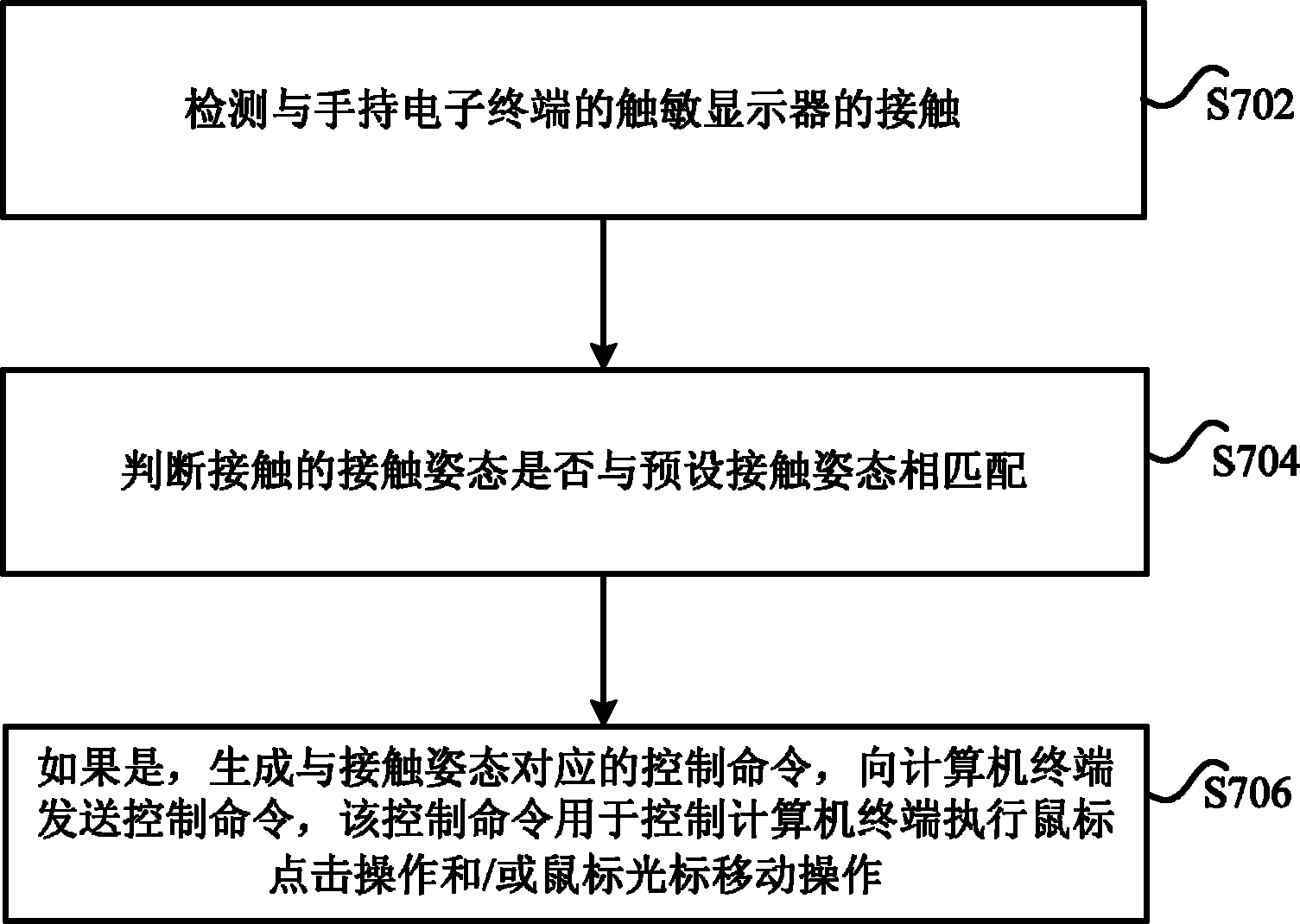
图7是根据本发明实施例一的计算机终端的控制方法的流程图;7 is a flowchart of a method for controlling a computer terminal according to Embodiment 1 of the present invention;
图8是根据本发明实施例二的手机电路组成原理的示意图;Fig. 8 is a schematic diagram of the circuit composition principle of the mobile phone according to Embodiment 2 of the present invention;
图9是根据本发明实施例二的具有鼠标功能的手机的示意图;9 is a schematic diagram of a mobile phone with a mouse function according to Embodiment 2 of the present invention;
图10是根据本发明实施例二的手机与计算机终端有线连接的示意图;10 is a schematic diagram of a wired connection between a mobile phone and a computer terminal according to Embodiment 2 of the present invention;
图11是根据本发明实施例二的手机与计算机终端无线连接的示意图;11 is a schematic diagram of a wireless connection between a mobile phone and a computer terminal according to Embodiment 2 of the present invention;
图12是根据本发明实施例二的手机作为鼠标时的流程图。Fig. 12 is a flow chart when the mobile phone is used as a mouse according to Embodiment 2 of the present invention.
具体实施方式 Detailed ways
下文中将参考附图并结合实施例来详细说明本发明。需要说明的是,在不冲突的情况下,本申请中的实施例及实施例中的特征可以相互组合。Hereinafter, the present invention will be described in detail with reference to the drawings and examples. It should be noted that, in the case of no conflict, the embodiments in the present application and the features in the embodiments can be combined with each other.
针对相关技术中,在手持电子终端上实现鼠标功能控制计算机终端时,需要改变手持电子终端的硬件结构,增加手持电子终端的硬件成本,且相关技术中的实现方法操作不便、用户体验较低的问题,本发明实施例提供了一种计算机终端的控制方法、装置及系统。无需增加手持电子终端现有的硬件成本,利用手持电子终端的触敏显示器及通用接口,在手持电子终端上实现了简单方便、控制灵活的鼠标操作。In the related art, when realizing the mouse function on the handheld electronic terminal to control the computer terminal, it is necessary to change the hardware structure of the handheld electronic terminal, increase the hardware cost of the handheld electronic terminal, and the implementation method in the related art is inconvenient to operate and has a low user experience. Problem, the embodiment of the present invention provides a computer terminal control method, device and system. Without increasing the existing hardware cost of the hand-held electronic terminal, a simple, convenient and flexible mouse operation is realized on the hand-held electronic terminal by using the touch-sensitive display and the general interface of the hand-held electronic terminal.
实施例一Embodiment one
根据本发明实施例,提供了一种计算机终端的控制系统,通过该系统实现了利用手持电子终端控制计算机终端。According to an embodiment of the present invention, a computer terminal control system is provided, through which the computer terminal is controlled by a handheld electronic terminal.
图1是根据本发明实施例一的计算机终端的控制系统的示意图,如图1所示,该系统主要包括:手持电子终端10和计算机终端20。其中,手持电子终端10,用于检测与手持电子终端的触敏显示器的接触;判断接触的接触姿态是否与预设接触姿态相匹配;如果是,生成与接触姿态对应的控制命令,并向计算机终端20发送生成的控制命令,其中,该控制命令用于控制计算机终端20执行鼠标点击操作和/或鼠标光标移动操作。计算机终端20,用于接收手持电子终端10发送的控制命令,并执行与该控制命令对应的操作。FIG. 1 is a schematic diagram of a computer terminal control system according to Embodiment 1 of the present invention. As shown in FIG. 1 , the system mainly includes: a handheld
通过本发明是实施例,手持电子终端检测与触敏显示器的接触,判断接触的接触姿态与预设接触姿态相匹配,则生成与该接触姿态对应的控制命令,并向计算机终端发送生成的控制命令。计算机终端接收控制命令,并执行与接收到得控制命令对应的操作。通过手持电子终端实现了对计算机终端的控制,在不增加硬件成本的条件下,利用手持电子终端实现了鼠标功能。Through the embodiment of the present invention, the handheld electronic terminal detects the contact with the touch-sensitive display, judges that the contact gesture matches the preset contact gesture, generates a control command corresponding to the contact gesture, and sends the generated control command to the computer terminal Order. The computer terminal receives the control command and executes the operation corresponding to the received control command. The computer terminal is controlled by the hand-held electronic terminal, and the mouse function is realized by using the hand-held electronic terminal without increasing the hardware cost.
在本发明实施例中,如图1所示,可以通过接收模块22和执行模块24实现计算机终端20的功能。其中,接收模块22,用于接收手持电子终端10发送的控制命令;执行模块24,与接收模块22相耦合,用于执行与该控制命令对应的操作。执行模块24所执行的操作主要是控制命令所对应的鼠标操作,该鼠标操作包括但不限于鼠标点击操作以及鼠标光标移动操作。In the embodiment of the present invention, as shown in FIG. 1 , the functions of the computer terminal 20 can be realized by the receiving module 22 and the executing module 24 . Wherein, the receiving module 22 is used for receiving the control command sent by the handheld
在本发明实施例的一个优选实施方式中,与触敏显示器的接触可以是在保持与触敏显示器的持续接触的同时沿任意方向的移动,从而实现鼠标光标移动操作。手持电子终端10检测到接触姿态为与触敏显示器的持续接触的同时沿任意方向的移动,获取移动的参数信息,并根据该参数信息生成控制命令,控制计算机终端20执行鼠标光标移动操作。优选地,获取到的参数信息可以包括移动距离和移动方向,进一步的,还可以包括移动速度。手持电子终端10根据移动距离和移动方向(优选地,还可以包括移动速度)生成控制命令,并向计算机终端20发送生成的控制命令,计算机终端20的接收模块22接收生成的控制命令,触发执行模块24按照控制命令指示的移动方向、移动距离及移动速度执行鼠标光标移动操作。In a preferred implementation of the embodiment of the present invention, the contact with the touch-sensitive display can be moving along any direction while maintaining continuous contact with the touch-sensitive display, so as to realize the operation of moving the mouse cursor. The handheld
手持电子终端作为便携式电子设备(例如,手机),与计算机终端的显示器相比其显示器较小,在手持电子终端上的移动距离有限,在手持电子终端的显示器上移动一定距离,而计算机终端的鼠标光标移动距离较小,需要多次进行移动操作。在本发明实施例的一个优选实施方式中,生成与接触姿态对应的控制命令时,手持电子终端先获取移动的参数信息,并对移动距离进行线性处理(可以是方法或缩小),手持电子终端根据线性处理后的参数信息生成控制命令。进一步的,还可以对移动的移动速度进行线性处理。As a portable electronic device (such as a mobile phone), a handheld electronic terminal has a smaller display compared with a computer terminal display, and the moving distance on the handheld electronic terminal is limited. The moving distance of the mouse cursor is small, and multiple moving operations are required. In a preferred implementation of the embodiment of the present invention, when generating the control command corresponding to the contact gesture, the handheld electronic terminal first obtains the parameter information of the movement, and performs linear processing on the moving distance (can be method or reduction), and the handheld electronic terminal A control command is generated according to the linearly processed parameter information. Further, linear processing can also be performed on the moving speed of the movement.
在本发明实施例的另一个优选实施方式中,可以由计算机终端对移动的参数进行线性处理。此时,手持电子终端检测到与接触姿态为与触敏显示器的持续接触的同时沿任意方向的移动,获取移动的参数信息,根据获取到的参数信息生成控制命令,并向计算机设备发送生成的控制命令。计算机终端20的接收模块22接收手持电子终端发送的控制命令,对控制命令中的移动参数进行线性处理,执行模块24按照线性处理后的参数执行鼠标光标移动操作。In another preferred implementation manner of the embodiment of the present invention, the moving parameters may be linearly processed by the computer terminal. At this time, the handheld electronic terminal detects that the contact gesture is continuous contact with the touch-sensitive display and moves in any direction, acquires the parameter information of the movement, generates a control command according to the acquired parameter information, and sends the generated command to the computer device. control commands. The receiving module 22 of the computer terminal 20 receives the control command sent by the handheld electronic terminal, and performs linear processing on the movement parameters in the control command, and the execution module 24 executes the mouse cursor moving operation according to the linearly processed parameters.
因此,在本发明实施例的一个优选实施方式中,计算机终端20的接收模块22接收的控制命令携带的参数信息包括:移动的移动距离和移动方向,或者,移动距离、移动方向和移动速度。为了对移动的参数进行线性处理,如图2所示,计算机终端20还可以包括:缩放模块26,与接收模块22相耦合,用于对移动的移动速度,或者移动的移动速度和移动距离进行线性放大或缩小。执行模块24,与缩放模块26相耦合,还用于按照移动的移动方向,以及线性放大或缩小后的移动距离或者移动速度和移动距离移动鼠标光标。Therefore, in a preferred implementation of the embodiment of the present invention, the parameter information carried by the control command received by the receiving module 22 of the computer terminal 20 includes: moving distance and moving direction, or moving distance, moving direction and moving speed. In order to perform linear processing on the parameters of the movement, as shown in Figure 2, the computer terminal 20 may also include: a scaling module 26, coupled with the receiving module 22, for performing a linear processing on the moving speed of the moving, or the moving speed and the moving distance of the moving Zoom in or out linearly. The execution module 24 is coupled with the scaling module 26, and is further configured to move the mouse cursor according to the moving direction, the linearly enlarged or reduced moving distance, or the moving speed and moving distance.
在实际应用中,手持电子终端或计算机终端可以根据显示器的比例关系,对移动的参数进行线性放大。例如,手持电子终端的显示器大小为计算机终端显示器大小的1/5,手持电子终端10或计算机终端20可以将移动的移动距离放大5倍,即如果在触敏显示器上移动了1厘米,那么计算机终端20的鼠标光标将在计算机终端上移动5厘米。此外,还可以根据需求设置线性放大的倍数,或者也可以统计用户的使用习惯将线性放大倍数调整至最佳值。In practical applications, the handheld electronic terminal or computer terminal can linearly amplify the moving parameters according to the proportional relationship of the display. For example, the display size of a handheld electronic terminal is 1/5 of the display size of a computer terminal, and the handheld
在本发明实施例的另一个优选实施方式中,为了实现鼠标的按键操作,接触姿态可以是单击或双击,在生成与接触姿态对应的控制命令时,手持电子终端获取接触的接触姿态在触敏显示器上的位置区域,并生成与位置区域和接触姿态对应的控制命令。优选地,可以按照以下方式生成与接触姿态和位置区域对应的控制命令:如果位置区域为预设的第一位置区域,生成与单击或双击鼠标右键对应的控制命令;如果位置区域为预设的第二位置区域,生成与单击或双击鼠标左键对应的控制命令。计算机终端20的执行模块24,可以根据控制命令执行相应的鼠标点击操作。In another preferred implementation of the embodiment of the present invention, in order to realize the button operation of the mouse, the contact gesture can be single-click or double-click. position area on the sensitive display, and generate control commands corresponding to the position area and contact gesture. Preferably, the control command corresponding to the contact posture and the position area can be generated in the following manner: if the position area is a preset first position area, generate a control command corresponding to clicking or double-clicking the right mouse button; if the position area is a preset The second location area of the , generating control commands corresponding to a single or double click of the left mouse button. The execution module 24 of the computer terminal 20 can execute the corresponding mouse click operation according to the control command.
在本发明实施例中,为了实现手持电子终端与计算机终端的交互,可以通过手持电子终端10的蓝牙模块或通用串行总线(Universal Serial Bus,简称为USB)接口与计算机终端20建立连接。手持电子终端10与计算机终端20建立连接后,手持电子终端10的驱动程序在计算机终端20中被初始化,手持电子终端10的触敏显示器被设置成为一个触摸控制面板,用户可以在触摸控制面板上完成对计算机终端的控制。优选地,在手持电子终端作为鼠标的操作过程中,无需显示屏的显示,因此,触敏显示器可以处于关闭黑屏状态,以降低手持电子终端功耗,能够更好的提高手持电子终端的待机使用时间。In the embodiment of the present invention, in order to realize the interaction between the handheld electronic terminal and the computer terminal, a connection can be established with the computer terminal 20 through the Bluetooth module of the handheld
根据本发明实施例,还提供了一种计算机终端的控制装置,可以位于本发明上述实施例提供的手持电子终端10中,实现对计算机终端的控制。According to the embodiment of the present invention, a computer terminal control device is also provided, which can be located in the handheld
图3是根据本发明实施例一的计算机终端的控制装置的示意图,如图3所示,该装置主要包括:检测模块12、判断模块14、生成模块16和发送模块18。其中,检测模块12,用于检测与手持电子终端的触敏显示器的接触;判断模块14,与检测模块12相耦合,用于判断接触的接触姿态是否与预设接触姿态相匹配;生成模块16,与判断模块14相耦合,用于若判断结果为是,生成与接触的接触姿态对应的控制命令,生成的控制命令用于控制计算机终端执行鼠标点击操作和/或鼠标光标移动操作;发送模块18,与生成模块16相耦合,用于向计算机终端发送生成的控制命令。FIG. 3 is a schematic diagram of a computer terminal control device according to Embodiment 1 of the present invention. As shown in FIG. Among them, the detection module 12 is used to detect the contact with the touch-sensitive display of the handheld electronic terminal; the judgment module 14 is coupled with the detection module 12, and is used to judge whether the contact posture of the contact matches the preset contact posture; the generation module 16 , coupled with the judging module 14, used to generate a control command corresponding to the contact gesture of the contact if the judging result is yes, the generated control command is used to control the computer terminal to perform a mouse click operation and/or a mouse cursor movement operation; the sending module 18, coupled with the generation module 16, for sending the generated control command to the computer terminal.
通过本发明实施例,手持电子终端中的检测模块12检测与触敏显示器的接触,判断模块14判断接触的接触姿态与预设接触姿态相匹配,则生成模块16生成与该接触姿态对应的控制命令,并由发送模块18向计算机终端发送生成的控制命令,完成鼠标操作命令的输入。从而实现了通过手持电子终端对计算机终端的控制,在不增加硬件成本的条件下,利用手持电子终端实现了鼠标功能。Through the embodiment of the present invention, the detection module 12 in the handheld electronic terminal detects the contact with the touch-sensitive display, the judging module 14 judges that the contact posture of the contact matches the preset contact posture, and the generation module 16 generates a control corresponding to the contact posture. command, and send the generated control command to the computer terminal by the sending module 18 to complete the input of the mouse operation command. Therefore, the computer terminal is controlled by the handheld electronic terminal, and the mouse function is realized by using the handheld electronic terminal without increasing the hardware cost.
在本发明实施例的另一个优选实施方式中,可以由计算机终端对移动的参数进行线性处理。在如图3所示的装置中,检测模块12检测到与接触姿态为与触敏显示器的持续接触的同时沿任意方向的移动,生成模块16获取移动的参数信息,根据获取到的参数信息生成控制命令,并向计算机设备发送生成的控制命令。计算机终端20的接收模块22接收手持电子终端发送的控制命令,缩放模块26对控制命令中的移动参数进行线性处理,执行模块24按照线性处理后的参数执行鼠标光标移动操作。In another preferred implementation manner of the embodiment of the present invention, the moving parameters may be linearly processed by the computer terminal. In the device shown in FIG. 3 , the detection module 12 detects movement in any direction while the contact posture is continuous contact with the touch-sensitive display, and the generation module 16 obtains the parameter information of the movement, and generates control commands, and send the generated control commands to the computer device. The receiving module 22 of the computer terminal 20 receives the control command sent by the handheld electronic terminal, the scaling module 26 performs linear processing on the moving parameters in the control command, and the executing module 24 executes the mouse cursor moving operation according to the linearly processed parameters.
或者,在本发明实施例的另一个优选实施方式中,也可以由手持电子终端对移动的参数信息进行线性处理后发送给计算机终端。例如,可以由生成模块16来执行,如图4所示,在该优选实施方式中,生成模块16主要包括:第一获取单元162,用于获取移动的参数信息,该参数信息主要包括:移动距离和移动方向,或者,移动距离、移动方向和移动速度;缩放单元164,与第一获取单元162相耦合,用于对移动的移动速度,或者移动速度和移动距离进行线性放大或缩小;第一生成单元166,与缩放单元164相耦合,用于根据移动方向,以及线性放大或缩小后的移动速度或者移动速度和移动距离,生成所述控制命令。通过本优选实施方式,避免了手持电子终端作为便携式电子设备显示器较小,在手持电子终端上的移动距离有限,在手持电子终端的显示器上移动一定距离,而计算机终端的鼠标光标移动距离较小,导致需要多次进行移动操作的问题,提高了用户体验。Alternatively, in another preferred implementation manner of the embodiment of the present invention, the mobile parameter information may also be linearly processed by the handheld electronic terminal and then sent to the computer terminal. For example, it can be executed by the generation module 16, as shown in Figure 4, in this preferred embodiment, the generation module 16 mainly includes: a first acquisition unit 162, used to acquire the parameter information of the movement, the parameter information mainly includes: distance and moving direction, or moving distance, moving direction and moving speed; scaling unit 164, coupled with the first acquiring unit 162, is used to linearly enlarge or reduce the moving speed of moving, or moving speed and moving distance; the second A generating unit 166, coupled with the scaling unit 164, is configured to generate the control command according to the moving direction and the linearly enlarged or reduced moving speed or the moving speed and moving distance. Through this preferred embodiment, it is avoided that the hand-held electronic terminal has a small display as a portable electronic device, and the moving distance on the hand-held electronic terminal is limited, and a certain distance is moved on the display of the hand-held electronic terminal, while the mouse cursor of the computer terminal has a small moving distance , resulting in the need for multiple mobile operations, improving user experience.
在实际应用中,与触敏显示器的接触的接触姿态还可以是单击或双击,因此,在本发明实施例的另一优选实施方式中,生成模块16还可以采用如图5所示的结构,如图5所示,在该优选实施方式中,生成模块16主要包括:第二获取单元168,用于获取接触的接触姿态在触敏显示器上的位置区域;第二生成单元1610,与第二获取单元168相耦合,用于生成与接触姿态和获取的位置区域对应的控制命令。优选地,第二生成单元1610,按照以下方式生成与接触姿态和位置区域对应的控制命令:如果位置区域为预设的第一位置区域,生成与单击或双击鼠标右键对应的控制命令;如果位置区域为预设的第二位置区域,生成与单击或双击鼠标左键对应的控制命令。In practical applications, the contact gesture of contact with the touch-sensitive display can also be single-click or double-click. Therefore, in another preferred implementation of the embodiment of the present invention, the generating module 16 can also adopt the structure shown in FIG. 5 , as shown in FIG. 5 , in this preferred embodiment, the generating module 16 mainly includes: a second acquiring unit 168, configured to acquire the position area of the contact gesture on the touch-sensitive display; the second generating unit 1610, and the second acquiring unit 1610 The two acquisition units 168 are coupled to generate a control command corresponding to the contact gesture and the acquired location area. Preferably, the second generation unit 1610 generates the control command corresponding to the contact gesture and the position area in the following manner: if the position area is the preset first position area, generate the control command corresponding to single-clicking or double-clicking the right mouse button; if The location area is a preset second location area, which generates a control command corresponding to single or double click of the left mouse button.
在实际应用中,为了实现鼠标的按键操作,可以将触敏显示器的整个操作区域划分成左右两个对称区域,右半边区域(第一位置区域)设定为鼠标右键区域,左半边区域(第二位置区域)设定为鼠标左键区域。第二生成单元1610可以根据点击区域来判断进行的是鼠标左键还是右键的点击/双击输入操作。具体的,如果位置区域为右半边区域,生成与单击或双击鼠标右键对应的控制命令;如果位置区域为左半边区域,生成与单击或双击鼠标左键对应的控制命令。也可以将触敏显示器的整个操作区域划分成上下两个区域,上半边区域(第一位置区域)设定为鼠标右键区域,下半边区域(第二位置区域)设定为鼠标左键区域。In practical applications, in order to realize the button operation of the mouse, the entire operating area of the touch-sensitive display can be divided into two symmetrical areas on the left and right, the right half area (the first position area) is set as the right mouse button area, and the left half area (the first position area) 2 position area) is set as the left mouse button area. The second generating unit 1610 may judge according to the click area whether the click/double click input operation is performed on the left mouse button or the right mouse button. Specifically, if the location area is the right half area, a control command corresponding to clicking or double-clicking the right mouse button is generated; if the location area is the left half area, a control command corresponding to single-clicking or double-clicking the left mouse button is generated. The entire operating area of the touch-sensitive display can also be divided into upper and lower areas, the upper half area (the first position area) is set as the right mouse button area, and the lower half area (the second position area) is set as the left mouse button area.
图6是根据本发明实施例一又一优选的计算机终端的控制装置的示意图,如图6所示,该装置还可以包括:建立模块110,用于建立与计算机终端的连接。在实际应用中,可以通过有线或无线方式建立手持电子终端与计算机终端的连接。例如,通过手持电子终端的蓝牙模块与计算机终端建立无线连接,手持电子终端通过蓝牙以无线方式与计算机终端进行交互,完成鼠标操作命令的输入。此外,还可以通过手持电子终端的USB接口与计算机终端建立有线连接,手持电子终端通过USB接口以有线方式与计算机终端进行交互,完成鼠标操作命令的输入。Fig. 6 is a schematic diagram of yet another preferred computer terminal control device according to an embodiment of the present invention. As shown in Fig. 6, the device may further include: an establishment module 110, configured to establish a connection with the computer terminal. In practical applications, the connection between the handheld electronic terminal and the computer terminal can be established in a wired or wireless manner. For example, a wireless connection is established between the Bluetooth module of the handheld electronic terminal and the computer terminal, and the handheld electronic terminal interacts with the computer terminal wirelessly through Bluetooth to complete the input of mouse operation commands. In addition, a wired connection can also be established with the computer terminal through the USB interface of the handheld electronic terminal, and the handheld electronic terminal interacts with the computer terminal in a wired manner through the USB interface to complete the input of mouse operation commands.
根据本发明实施例,还提供了一种计算机终端的控制方法,可以通过本发明上述实施例提供的系统及装置,实现利用手持电子终端对计算机终端的控制。According to an embodiment of the present invention, a method for controlling a computer terminal is also provided, which can realize the control of a computer terminal by a handheld electronic terminal through the system and device provided in the above embodiments of the present invention.
图7是根据本发明实施例一的计算机终端的控制方法的流程图,如图7所示,该方法可以包括以下几个步骤(步骤S702-步骤S706):FIG. 7 is a flowchart of a computer terminal control method according to Embodiment 1 of the present invention. As shown in FIG. 7, the method may include the following steps (step S702-step S706):
步骤S702,检测与手持电子终端的触敏显示器的接触。Step S702, detecting contact with the touch-sensitive display of the handheld electronic terminal.
步骤S704,判断接触的接触姿态是否与预设接触姿态相匹配。Step S704, judging whether the contact gesture of the contact matches the preset contact gesture.
步骤S706,如果是,生成与接触姿态对应的控制命令,向计算机终端发送控制命令,该控制命令用于控制计算机终端执行鼠标点击操作和/或鼠标光标移动操作。Step S706, if yes, generate a control command corresponding to the contact gesture, and send the control command to the computer terminal, where the control command is used to control the computer terminal to perform a mouse click operation and/or a mouse cursor movement operation.
通过本发明实施例,手持电子终端检测与触敏显示器的接触,判断接触的接触姿态与预设接触姿态相匹配,则生成与该接触姿态对应的控制命令,并向计算机终端发送生成的控制命令,完成鼠标操作命令的输入。从而实现了通过手持电子终端对计算机终端的控制,在不增加硬件成本的条件下,利用手持电子终端实现了鼠标功能。Through the embodiment of the present invention, the handheld electronic terminal detects the contact with the touch-sensitive display, judges that the contact gesture of the contact matches the preset contact gesture, generates a control command corresponding to the contact gesture, and sends the generated control command to the computer terminal to complete the input of the mouse operation command. Therefore, the computer terminal is controlled by the handheld electronic terminal, and the mouse function is realized by using the handheld electronic terminal without increasing the hardware cost.
在本发明实施例中,为了实现手持电子终端与计算机终端的交互,可以通过手持电子终端的蓝牙模块或USB接口与计算机终端建立连接。手持电子终端与计算机终端建立连接后,手持电子终端的驱动程序在计算机终端中被初始化,手持电子终端的触敏显示器被设置成为一个触摸控制面板,用户可以在触摸控制面板上完成对计算机终端的控制。优选地,在手持电子终端作为鼠标的操作过程中,无需显示屏的显示,因此触敏显示器可以处于关闭黑屏状态,以降低手持电子终端功耗,能够更好的提高手持电子终端的待机使用时间。In the embodiment of the present invention, in order to realize the interaction between the handheld electronic terminal and the computer terminal, a connection can be established with the computer terminal through the Bluetooth module or the USB interface of the handheld electronic terminal. After the handheld electronic terminal is connected to the computer terminal, the driver program of the handheld electronic terminal is initialized in the computer terminal, and the touch-sensitive display of the handheld electronic terminal is set as a touch control panel, and the user can complete the computer terminal on the touch control panel. control. Preferably, during the operation of the handheld electronic terminal as a mouse, there is no need for display on the display screen, so the touch-sensitive display can be in a state of turning off the black screen, so as to reduce the power consumption of the handheld electronic terminal, and can better improve the standby time of the handheld electronic terminal .
手持电子终端对计算机终端的控制主要包括控制计算机终端的鼠标操作,鼠标操作可以是鼠标的点击操作(单击、双击),及鼠标光标的移动操作等。在本发明实施例的一个优选实施方式中,与触敏显示器的接触可以是在保持与触敏显示器的持续接触的同时沿任意方向的移动,从而实现鼠标光标移动操作。手持电子终端检测到接触姿态为与触敏显示器的持续接触的同时沿任意方向的移动,获取移动的参数信息,并根据该参数信息生成控制命令,控制计算机终端执行鼠标光标移动操作。优选地,获取到的参数信息可以包括移动距离和移动方向,进一步的,还可以包括移动速度。手持电子终端根据移动距离和移动方向(优选地,还可以包括移动速度)生成控制命令,并向计算机终端发送生成的控制命令,计算机终端接收生成的控制命令,并按照控制命令指示的移动方向、移动距离及移动速度执行鼠标光标移动操作。The control of the computer terminal by the handheld electronic terminal mainly includes controlling the mouse operation of the computer terminal. The mouse operation may be a click operation (click, double click) of the mouse, and a movement operation of the mouse cursor. In a preferred implementation of the embodiment of the present invention, the contact with the touch-sensitive display can be moving along any direction while maintaining continuous contact with the touch-sensitive display, so as to realize the operation of moving the mouse cursor. The handheld electronic terminal detects that the contact gesture is continuous contact with the touch-sensitive display while moving in any direction, obtains the parameter information of the movement, and generates a control command according to the parameter information, and controls the computer terminal to perform the mouse cursor movement operation. Preferably, the obtained parameter information may include moving distance and moving direction, further, moving speed may also be included. The hand-held electronic terminal generates a control command according to the moving distance and the moving direction (preferably, it can also include the moving speed), and sends the generated control command to the computer terminal, and the computer terminal receives the generated control command, and according to the moving direction indicated by the control command, Move the distance and speed to perform the mouse cursor movement operation.
手持电子终端作为便携式电子设备(例如,手机),与计算机终端的显示器相比其显示器较小,在手持电子终端上的移动距离有限,在手持电子终端的显示器上移动一定距离,而计算机终端的鼠标光标移动距离较小,需要多次进行移动操作。在本发明实施例的一个优选实施方式中,生成与接触姿态对应的控制命令时,手持电子终端先获取移动的参数信息,并对移动距离进行线性处理(可以是方法或缩小),手持电子终端根据线性处理后的参数信息生成控制命令。进一步的,还可以对移动的移动速度进行线性处理。As a portable electronic device (such as a mobile phone), a handheld electronic terminal has a smaller display compared with a computer terminal display, and the moving distance on the handheld electronic terminal is limited. The moving distance of the mouse cursor is small, and multiple moving operations are required. In a preferred implementation of the embodiment of the present invention, when generating the control command corresponding to the contact gesture, the handheld electronic terminal first obtains the parameter information of the movement, and performs linear processing on the moving distance (can be method or reduction), and the handheld electronic terminal A control command is generated according to the linearly processed parameter information. Further, linear processing can also be performed on the moving speed of the movement.
优选地,为了符合用户的使用习惯,可以将手机的触摸屏规划设置X轴、Y轴两个方向,手指在触摸屏上X轴方向的移动映射到计算机终端显示屏上即为鼠标在计算机终端上的横向移动,手指在触摸屏上Y轴方向的移动映射到计算机终端显示屏上即为鼠标在计算机终端上的纵向移动;以此类推实现手机触摸屏上不同角度不同方向的移动从而达到对计算机终端显示屏上鼠标光标的相应方向的移动距离、移动速度的对应关系。Preferably, in order to meet the user's usage habits, the touch screen of the mobile phone can be planned to set two directions of the X axis and the Y axis, and the movement of the finger on the touch screen in the X axis direction is mapped to the display screen of the computer terminal, which is the movement of the mouse on the computer terminal. Horizontal movement, the movement of the finger in the Y-axis direction on the touch screen is mapped to the display screen of the computer terminal, which is the vertical movement of the mouse on the computer terminal; and so on to realize the movement of different angles and directions on the touch screen of the mobile phone. The corresponding relationship between the moving distance and moving speed of the mouse cursor in the corresponding direction.
在本发明实施例的另一个优选实施方式中,可以由计算机终端对移动的参数进行线性处理。此时,手持电子终端检测到与接触姿态为与触敏显示器的持续接触的同时沿任意方向的移动,获取移动的参数信息,根据获取到的参数信息生成控制命令,并向计算机设备发送生成的控制命令。计算机终端接收手持电子终端发送的控制命令,对控制命令中的移动参数进行线性处理,并按照线性处理后的参数执行鼠标光标移动操作。In another preferred implementation manner of the embodiment of the present invention, the moving parameters may be linearly processed by the computer terminal. At this time, the handheld electronic terminal detects that the contact gesture is continuous contact with the touch-sensitive display and moves in any direction, acquires the parameter information of the movement, generates a control command according to the acquired parameter information, and sends the generated command to the computer device. control commands. The computer terminal receives the control command sent by the handheld electronic terminal, performs linear processing on the movement parameters in the control command, and executes the mouse cursor movement operation according to the linearly processed parameters.
在实际应用中,手持电子终端或计算机终端可以根据显示器的比例关系,对移动的参数进行线性放大。例如,手持电子终端的显示器大小为计算机终端显示器大小的1/4,手持电子终端或计算机终端可以将移动的移动距离放大4倍,即如果在触敏显示器上移动了1厘米,那么计算机终端的鼠标光标将在计算机终端上移动4厘米。此外,还可以根据需求设置线性放大的倍数,或者也可以统计用户的使用习惯将线性放大倍数调整至最佳值。In practical applications, the handheld electronic terminal or computer terminal can linearly amplify the moving parameters according to the proportional relationship of the display. For example, the display size of a handheld electronic terminal is 1/4 of the display size of a computer terminal, and the handheld electronic terminal or computer terminal can magnify the moving distance by 4 times, that is, if it moves 1 cm on the touch-sensitive display, then the computer terminal's The mouse cursor will move 4 cm on the computer terminal. In addition, the linear magnification factor can also be set according to requirements, or the linear magnification factor can be adjusted to an optimal value based on the user's usage habits.
在本发明实施例的另一个优选实施方式中,为了实现鼠标的点击操作,接触姿态可以是单击或双击,在生成与接触姿态对应的控制命令时,手持电子终端获取接触的接触姿态在触敏显示器上的位置区域,并生成与位置区域和接触姿态对应的控制命令。优选地,可以按照以下方式生成与接触姿态和位置区域对应的控制命令:如果位置区域为预设的第一位置区域,生成与单击或双击鼠标右键对应的控制命令;如果位置区域为预设的第二位置区域,生成与单击或双击鼠标左键对应的控制命令。计算机终端,可以根据控制命令执行相应的鼠标点击操作。In another preferred implementation of the embodiment of the present invention, in order to realize the click operation of the mouse, the contact gesture can be single-click or double-click. position area on the sensitive display, and generate control commands corresponding to the position area and contact gesture. Preferably, the control command corresponding to the contact posture and the position area can be generated in the following manner: if the position area is a preset first position area, generate a control command corresponding to clicking or double-clicking the right mouse button; if the position area is a preset The second location area of the , generating control commands corresponding to a single or double click of the left mouse button. The computer terminal can perform corresponding mouse click operations according to control commands.
在实际应用中,为了区分鼠标左右键的点击操作,可以将触敏显示器的整个操作区域划分成左右两个对称区域,右半边区域(第一位置区域)设定为鼠标右键区域,左半边区域(第二位置区域)设定为鼠标左键区域,手持电子终端可以根据点击区域来判断进行的是鼠标左键还是右键的点击/双击输入操作。具体的,如果位置区域为右半边区域,生成与单击或双击鼠标右键对应的控制命令;如果位置区域为左半边区域,生成与单击或双击鼠标左键对应的控制命令。In practical applications, in order to distinguish the click operation of the left and right buttons of the mouse, the entire operation area of the touch-sensitive display can be divided into two symmetrical areas, the right half area (the first position area) is set as the right mouse button area, and the left half area (The second location area) is set as the left button area of the mouse, and the handheld electronic terminal can judge according to the click area whether the click/double click input operation is performed on the left button or the right button of the mouse. Specifically, if the location area is the right half area, a control command corresponding to clicking or double-clicking the right mouse button is generated; if the location area is the left half area, a control command corresponding to single-clicking or double-clicking the left mouse button is generated.
实施例二Embodiment two
在本发明实施例中以手机为例,对本发明的计算机终端的控制方案进行说明。根据本发明实施例,提供了一种计算机终端的控制方法,其无需增加手机的现有硬件成本,仅利用目前智能手机中通用几个基本的通用模块,通过USB接口或者蓝牙功能,将手机与计算机终端之间建立有线或者无线的连接,实现手机作为计算机终端有线鼠标或者无线鼠标的功能。本发明实施例的方案,操作简单方便、控制灵活,极大的提高了手机的用户体验。In the embodiment of the present invention, a mobile phone is taken as an example to describe the control scheme of the computer terminal of the present invention. According to the embodiment of the present invention, a computer terminal control method is provided, which does not need to increase the existing hardware cost of the mobile phone, and only uses several basic common modules commonly used in smart phones at present, and connects the mobile phone to the mobile phone through the USB interface or Bluetooth function. A wired or wireless connection is established between computer terminals to realize the function of the mobile phone as a computer terminal wired or wireless mouse. The solution of the embodiment of the present invention has simple and convenient operation and flexible control, which greatly improves the user experience of the mobile phone.
在本发明实施例中,实现鼠标功能的手机具有现在通用手机中所具有的触摸显示屏(即触敏显示器)、USB接口或者蓝牙功能。In the embodiment of the present invention, the mobile phone that implements the mouse function has a touch display screen (ie, a touch-sensitive display), a USB interface, or a bluetooth function that are currently available in general-purpose mobile phones.
通过用户操作,如通过蓝牙或者USB接口与计算机终端建立连接后,经用户确认进入鼠标功能后,手机的驱动程序在计算机终端中被初始化,手机的触摸显示屏被设置成为一个触摸控制面板,该触摸控制面板的长宽方向与计算机的显示屏之间形成对应的鼠标光标移动对应关系。Through user operations, such as establishing a connection with a computer terminal through Bluetooth or a USB interface, after the user confirms that the mouse function is enabled, the driver of the mobile phone is initialized in the computer terminal, and the touch screen of the mobile phone is set as a touch control panel. The length and width directions of the touch control panel and the display screen of the computer form a corresponding relationship of mouse cursor movement.
当触摸介质(例如,手指)在手机的触摸屏上触摸移动时,其移动距离、移动方向、移动速度的数据被相应的做线性的转化,并将携带有移动控制命令的信息通过USB接口或者蓝牙传输到计算机终端中,计算机终端将接收得到的相关数据及控制命令做相应的转换,将移动控制命令转换成光标的移动指令,将相应的移动距离、移动方向、移动速度转换为计算机终端显示屏中的鼠标光标的移动,从而实现了触摸介质在手机触摸屏上的移动转换为计算机终端显示器中光标的移动。When the touch medium (for example, a finger) touches and moves on the touch screen of the mobile phone, the data of its moving distance, moving direction, and moving speed are correspondingly converted linearly, and the information carrying the moving control command is passed through the USB interface or Bluetooth. Transmit to the computer terminal, and the computer terminal will convert the received relevant data and control commands accordingly, convert the movement control commands into cursor movement instructions, and convert the corresponding moving distance, moving direction, and moving speed into computer terminal display screen The movement of the mouse cursor in the mobile phone, thereby realizing the conversion of the movement of the touch medium on the touch screen of the mobile phone into the movement of the cursor in the computer terminal display.
在本发明实施例中,上述线性的对应关系即触摸介质在手机触摸屏上做横向移动时计算机终端显示屏中的鼠标光标也做相应的横向移动,当触摸介质在手机触摸屏上做竖向的移动时计算机终端显示屏中的鼠标光标也做相应的竖向移动,以此类推达到触摸介质在触摸屏上任意角度、任意长度及不同速度的移动可以线性的在计算机终端显示屏上得到转换,实现了触摸介质操作手机实现计算机终端显示屏中鼠标光标移动的功能。In the embodiment of the present invention, the above-mentioned linear correspondence means that when the touch medium moves horizontally on the touch screen of the mobile phone, the mouse cursor in the display screen of the computer terminal also moves correspondingly horizontally, and when the touch medium moves vertically on the touch screen of the mobile phone At the same time, the mouse cursor in the display screen of the computer terminal also moves vertically accordingly. By analogy, the movement of the touch medium at any angle, length and speed on the touch screen can be converted linearly on the display screen of the computer terminal, realizing The touch medium operates the mobile phone to realize the function of moving the mouse cursor in the display screen of the computer terminal.
同时,为了实现的鼠标的左键单击、双击,及右键点击的鼠标功能,可以将手机触摸屏的整个操作区域默认的由软件划分成左右两个对称区域,以实现左右键点击区域的划分。At the same time, in order to realize the mouse functions of left-click, double-click, and right-click of the mouse, the entire operation area of the touch screen of the mobile phone can be divided into two symmetrical areas by software by default, so as to realize the division of the left and right key click areas.
优选的,左半边区域设定为鼠标左键区域,手指单击/双击该区域手机可以根据其点击区域的坐标位置来判断该点击发生在整个触摸屏的左半区域,其进行的是一个鼠标左键的点击/双击输入操作,手机将相应的左键单击/双击操作控制命令通过有线或者无线的方式传递到计算机终端中,计算机终端接收到相应的命令再去控制显示屏上的鼠标做左键单击/双击操作,从而实现对计算机终端鼠标的单击或者双击操作。Preferably, the left half area is set as the left mouse button area, and the mobile phone can judge that the click occurs in the left half area of the entire touch screen according to the coordinate position of the clicked/double-clicked area of the finger. key click/double-click input operation, the mobile phone will transmit the corresponding left-click/double-click operation control command to the computer terminal through wired or wireless means, and the computer terminal will control the mouse on the display screen to do the left button after receiving the corresponding command. Single-click/double-click operation, so as to realize the single-click or double-click operation of the computer terminal mouse.
另一方面,手机触摸屏右半边区域设定为右键区域,即点击该区域手机根据输入点的相对位置判断这个点击操作发生在整个触摸屏的右半区域,会判断该点击是一个鼠标的右键点击操作,那么手机将相应的右键操作控制命令传递到计算机终端中,计算机终端转换该命令后去控制自身显示屏上的鼠标右键操作,从而实现对计算机终端的右键的操作。On the other hand, the right half area of the mobile phone touch screen is set as the right-click area, that is, the mobile phone judges that the click operation occurs in the right half area of the entire touch screen according to the relative position of the input point when clicking this area, and judges that the click is a right-click operation of a mouse. , then the mobile phone transmits the corresponding right-click operation control command to the computer terminal, and the computer terminal converts the command to control the right-click operation of the mouse on its own display screen, thereby realizing the right-click operation of the computer terminal.
通过本发明实施例,手机与计算机终端建立有线或者无线的鼠标连接,手指对手机触摸屏的移动操作、左右区域位置点击控制转化成为对计算机终端的显示屏上的鼠标指针的左右键命令的输入,从而实现了手机作为计算机终端鼠标的功能。由于本发明实施例实现鼠标功能的操作手机摆放不依赖与通用鼠标对放置平面的要求,具有极大的空间自由度,人机交互更加友好。且符合一定的人机工程学和操作习惯,作为鼠标使用时灵敏度高、操作简单,增加了手机的又一个用户体验,丰富了手机的应用场景。Through the embodiment of the present invention, the mobile phone establishes a wired or wireless mouse connection with the computer terminal, and the movement operation of the finger on the touch screen of the mobile phone and the click control of the left and right area positions are converted into the input of the left and right key commands of the mouse pointer on the display screen of the computer terminal, Thereby the function of the mobile phone as a computer terminal mouse is realized. Since the embodiment of the present invention realizes the operation of the mouse function, the placement of the mobile phone does not depend on the requirements of the common mouse on the placement plane, so it has a great degree of spatial freedom, and the human-computer interaction is more friendly. And it conforms to certain ergonomics and operating habits. When used as a mouse, it has high sensitivity and simple operation, which adds another user experience of mobile phones and enriches the application scenarios of mobile phones.
下面结合图例对本发明实施例进行描述。Embodiments of the present invention will be described below with reference to figures.
图8是根据本发明实施例二的手机电路组成原理的示意图,如图8所示的手机具有通用的手机结构。其中,CPU主控单元实现手机主控部分的操作控制;射频(Radio Frequency,简称为RF)部分及RF天线部分实现射频信号的收发功能,实现手机的语音通信、数据通信等射频电路功能;手机主控程序或者各记录文件放置在存储器单元;锂电池模块是手机工作时的电源供给源,用于给整个手机供电;USB接口用于为手机充电、下载程序或提供USB的物理接口,在本发明实施例中可以用于与计算机终端建立鼠标功能的有线连接;蓝牙模块部分用于与其他蓝牙设备建立蓝牙连接,在本发明实施例中可以用于与计算机终端建立无线的蓝牙连接实现手机作为鼠标时的无线控制链路物理层。触摸屏(Liquid Crystal Display,简称为LCD)部分,作为手机的通用触摸屏,是手机的信息输入主要界面,在本发明实施例中触摸介质在触摸屏上触摸移动用以实现对应计算机终端显示屏上鼠标光标的移动输入操作,同时将手机触摸屏幕设置为左右两个控制区域以实现左键区域和右键区域的划分,单击或双击对应区域,以达到对鼠标的左右键点击的操作。FIG. 8 is a schematic diagram of the circuit composition principle of a mobile phone according to Embodiment 2 of the present invention. The mobile phone shown in FIG. 8 has a general mobile phone structure. Among them, the CPU main control unit realizes the operation control of the main control part of the mobile phone; the radio frequency (Radio Frequency, referred to as RF) part and the RF antenna part realize the sending and receiving function of radio frequency signals, and realize the radio frequency circuit functions such as voice communication and data communication of the mobile phone; The main control program or each record file is placed in the memory unit; the lithium battery module is the power supply source for the mobile phone when it is working, and is used to supply power to the entire mobile phone; the USB interface is used to charge the mobile phone, download programs or provide a USB physical interface. In the embodiment of the invention, it can be used to establish a wired connection with the mouse function with the computer terminal; the bluetooth module part is used to establish a bluetooth connection with other bluetooth devices, and in the embodiment of the invention, it can be used to establish a wireless bluetooth connection with the computer terminal to realize the mobile phone as The physical layer of the wireless control link when the mouse is used. The touch screen (Liquid Crystal Display, referred to as LCD) part, as the general touch screen of the mobile phone, is the main interface for information input of the mobile phone. In the embodiment of the present invention, the touch medium is touched and moved on the touch screen to realize the mouse cursor on the display screen of the corresponding computer terminal. At the same time, set the touch screen of the mobile phone as two control areas on the left and right to realize the division of the left button area and the right button area, and click or double-click the corresponding area to achieve the operation of clicking the left and right buttons of the mouse.
图9是根据本发明实施例二的具有鼠标功能的手机的示意图,在如图9所示的手机中,触摸屏303位于手机30上,301为手机的受话器开孔,用以手机做语音通信时听者接受声音。手机开关机及其他功能按键304位于触摸屏下方或者其他部位;机壳上具有USB接口302与手机内部主板的USB信号连接,实现手机的USB连接功能、程序下载功能以及充电接口功能。Fig. 9 is a schematic diagram of a mobile phone with a mouse function according to Embodiment 2 of the present invention. In the mobile phone as shown in Fig. 9, the touch screen 303 is located on the
图10是根据本发明实施例二的手机与计算机终端有线连接的示意图,如图10所示,手机整机30做鼠标应用时可以将计算机终端40的USB接口402与手机的USB接口302通过USB线401建立有线的连接,USB连接线提供在手机作为鼠标控制计算机终端时作为有线的物理链路。10 is a schematic diagram of a wired connection between a mobile phone and a computer terminal according to Embodiment 2 of the present invention. As shown in FIG.
图11是根据本发明实施例二的手机与计算机终端无线连接的示意图,如图11所示,通过手机的蓝牙模块及计算机终端的蓝牙单元建立蓝牙连接,计算机终端与手机间的蓝牙无线链路为手机作为计算机终端的鼠标操作时提供了无线的控制链路。计算机终端的蓝牙单元可以是计算机终端内部具有的蓝牙功能模块也可以是外置的蓝牙适配器。Figure 11 is a schematic diagram of the wireless connection between the mobile phone and the computer terminal according to Embodiment 2 of the present invention. It provides a wireless control link when the mobile phone is used as the mouse of the computer terminal. The bluetooth unit of the computer terminal may be a bluetooth function module inside the computer terminal or an external bluetooth adapter.
图12是根据本发明实施例二的手机作为鼠标时的流程图,如图12所示,手机在通常情况下作为其基本功能使用,处于待机模式或者通讯模式。当应用其鼠标功能时,首先判断是进行有线连接还是无线连接,若为有线连接则需将手机与计算机终端间通过USB线连接好,手机通过菜单进入有线的鼠标模式,并由手机内部的CPU主控单元做相应驱动操作,控制手机进入鼠标操作模式并进行有线的USB信号发送,鼠标操作完成后即可拔出USB线退出鼠标操作;若为无线连接则将手机的蓝牙功能及计算机终端的蓝牙功能打开,建立手机与计算机终端的蓝牙连接,手机通过菜单进入到无线的鼠标模式,同样手机内部的CPU主控单元做相应的驱动操作,控制手机进入鼠标操作模式并进行无线的鼠标信号发送,鼠标操作完成时关闭蓝牙退出鼠标模式。无论是在有线的鼠标连接方式时还是无线的鼠标连接方式时,手机射频单元部分及内部控制环节均不受影响,因此手机均能够正常的实时接收电话、短信等,不影响其正常操作。另外,在上述操作过程中,无需要手机显示屏的显示,因此LCD可完全处于关闭黑屏状态,有效了降低了功耗,能够更好的提高整个手机的待机使用时间。Fig. 12 is a flow chart when the mobile phone is used as a mouse according to Embodiment 2 of the present invention. As shown in Fig. 12, the mobile phone is used as its basic function under normal circumstances and is in standby mode or communication mode. When using its mouse function, first judge whether it is a wired connection or a wireless connection. If it is a wired connection, you need to connect the mobile phone and the computer terminal through a USB cable. The mobile phone enters the wired mouse mode through the menu, and the CPU inside the mobile phone The main control unit performs corresponding driving operations, controls the mobile phone to enter the mouse operation mode and sends wired USB signals, and after the mouse operation is completed, the USB cable can be pulled out to exit the mouse operation; if it is a wireless connection, the Bluetooth function of the mobile phone and the computer terminal Turn on the Bluetooth function, establish a Bluetooth connection between the mobile phone and the computer terminal, the mobile phone enters the wireless mouse mode through the menu, and the CPU main control unit inside the mobile phone performs corresponding driving operations to control the mobile phone to enter the mouse operation mode and send wireless mouse signals , when the mouse operation is completed, turn off the Bluetooth and exit the mouse mode. No matter in the wired mouse connection mode or the wireless mouse connection mode, the radio frequency unit and internal control links of the mobile phone are not affected, so the mobile phone can receive calls and text messages in real time normally without affecting its normal operation. In addition, during the above operation process, there is no need to display the display screen of the mobile phone, so the LCD can be completely turned off and black, which effectively reduces power consumption and can better improve the standby time of the entire mobile phone.
手机与计算机终端建立了有线或者无线的连接,经手机用户的菜单确认,完成手机驱动程序的载入和对计算机终端的驱动初始化,这样使得手机进入到鼠标功能模式中对相应的计算机终端可进行鼠标光标操作的软件加载。当手机进入到鼠标功能模式后,即完成鼠标功能的软件加载后,人体手指在触摸屏303上移动,手指的移动速度、移动方向、移动距离通过触摸屏被手机内部的CPU主控单元进行记录、处理,手机将相应的移动数据并夹带有移动控制命令的信息通过有线的方式或者蓝牙无线的方式发送到计算机终端中,计算机终端接收到移动速度、移动方向、移动距离的数据信息后将该所有移动信息做相应的线性变换并根据接收到的移动控制命令去操作自身显示屏上的鼠标光标去做相应的移动,这样实现了计算机终端的鼠标的移动操作。The mobile phone and the computer terminal have established a wired or wireless connection, and after the menu confirmation of the mobile phone user, the loading of the mobile phone driver and the driver initialization of the computer terminal are completed, so that the mobile phone enters the mouse function mode and can be used for the corresponding computer terminal. Software loading for mouse cursor operation. After the mobile phone enters the mouse function mode, after the software loading of the mouse function is completed, the human finger moves on the touch screen 303, and the moving speed, moving direction, and moving distance of the finger are recorded and processed by the CPU main control unit inside the mobile phone through the touch screen , the mobile phone sends the corresponding mobile data and the information with the mobile control command to the computer terminal through wired or bluetooth wireless. The information is correspondingly transformed linearly and the mouse cursor on its own display screen is operated to move accordingly according to the received movement control command, thus realizing the movement operation of the mouse of the computer terminal.
在实际应用中,如图9所示,可以将手机的触摸屏规划设置X轴、Y轴两个方向,手指在触摸屏上X轴方向的移动映射到计算机终端显示屏上即为鼠标在计算机终端上的横向移动,手指在触摸屏上Y轴方向的移动映射到计算机终端显示屏上即为鼠标在计算机终端上的纵向移动;以此类推实现手机触摸屏上不同角度不同方向的移动从而达到对计算机终端显示屏上鼠标光标的相应方向的移动距离、移动速度的对应关系。In practical applications, as shown in Figure 9, the touch screen of the mobile phone can be planned to set two directions of X-axis and Y-axis, and the movement of the finger on the touch screen in the X-axis direction is mapped to the display screen of the computer terminal, that is, the mouse is on the computer terminal. The horizontal movement of the finger on the touch screen in the Y-axis direction is mapped to the display screen of the computer terminal, which is the vertical movement of the mouse on the computer terminal; and so on to realize the movement of different angles and directions on the touch screen of the mobile phone so as to achieve the display of the computer terminal. The corresponding relationship between the moving distance and moving speed of the mouse cursor in the corresponding direction on the screen.
为了实现鼠标的左键、右键的点击操作,将手机触摸屏303划分成左右两个区域,该两个区域是对称关系的,规定左半边屏幕区域设置成为左键区域,即手指单击或者双击该区域的点击操作时,手机内部CPU主控单元通过侦测判断该单击/双击操作的坐标是发生在整个触摸屏的左半边区域,那么手机将左键的单击/双击相应的控制命令发送到计算机终端上,计算机终端接收到相应控制命令后,对自身的鼠标去执行相应的左键的单击/双击操作,这样通过对触摸屏的左半区域的单击/双击操作实现了计算机终端中鼠标的左键单击/双击操作。右半屏幕用以设置成为右键区域,点击该区域,手机内部CPU主控单元通过侦测判断该点击操作的坐标是发生在整个触摸屏的右半区域,那么手机将右键相应控制命令发送到计算机终端中,计算机终端接收到该命令后,去控制自身鼠标去执行右键的操作指令,这样通过对手机触摸屏的右半区域的点击操作实现了计算机终端中鼠标的右键点击操作。In order to realize the click operation of the left button and the right button of the mouse, the touch screen 303 of the mobile phone is divided into two regions, the left and the right, which are symmetrical. During the click operation of the area, the CPU main control unit inside the mobile phone judges that the coordinates of the single-click/double-click operation occur in the left half of the entire touch screen through detection, then the mobile phone sends the corresponding control command of the left-click/double-click to On the computer terminal, after the computer terminal receives the corresponding control command, it executes the corresponding left-click/double-click operation on its own mouse, so that the mouse in the computer terminal can be realized through the single-click/double-click operation on the left half area of the touch screen. left-click/double-click actions. The right half of the screen is used to set the right-click area. Click this area, and the CPU main control unit inside the mobile phone will detect and judge that the coordinates of the click operation occurred in the right half area of the entire touch screen. Then the mobile phone will send the corresponding control command of the right key to the computer terminal. Among them, after the computer terminal receives the command, it controls its own mouse to execute the operation command of the right button, so that the right button click operation of the mouse in the computer terminal is realized by clicking on the right half area of the touch screen of the mobile phone.
通过上述方法,实现了手机与计算机终端之间建立无线或者USB有线的连接,并且使得手机进入鼠标模式,相应的鼠标控制命令能够发送到计算机终端中实现对计算机终端中鼠标光标的操作。手指在触摸屏上的X轴、Y轴方向上的移动距离、移动速度通过相应的线性变换映射到计算机终端显示屏中的横向或者竖向的移动,以此类推其他方向或者角度的变换移动也能映射到计算机终端显示屏中,实现鼠标光标的移动操作;将手机的左右屏幕区域分别设置成左键区域和右键区域,点击左半屏幕手机向计算机终端发出左键操作,点击右键区域手机向计算机终端发出右键操作命令,这样手机作为鼠标操作能够控制计算机终端屏幕中鼠标指针的运动及点击操作,达到了鼠标的作用。手机触摸屏的整个过程中,不依赖手机显示屏的显示,因此无需LCD的点亮,为整个手机的使用节省了电量。Through the above method, a wireless or USB wired connection is established between the mobile phone and the computer terminal, and the mobile phone enters the mouse mode, and the corresponding mouse control commands can be sent to the computer terminal to operate the mouse cursor in the computer terminal. The moving distance and speed of the finger on the X-axis and Y-axis on the touch screen are mapped to the horizontal or vertical movement in the computer terminal display screen through the corresponding linear transformation, and so on. Mapped to the display screen of the computer terminal to realize the movement operation of the mouse cursor; set the left and right screen areas of the mobile phone as the left button area and the right button area respectively, click the left half of the screen on the mobile phone to send the left button operation to the computer terminal, and click on the right button area to send the mobile phone to the computer The terminal issues a right-click operation command, so that the mobile phone can be used as a mouse to control the movement and click operation of the mouse pointer on the computer terminal screen, achieving the function of a mouse. During the whole process of touching the mobile phone screen, it does not rely on the display of the mobile phone display screen, so there is no need to light up the LCD, which saves power for the use of the entire mobile phone.
通过本发明实施例,具有鼠标功能的手机作为鼠标功能使用时操作简单实用,不增加现有手机的硬件成本,用户操作时手机摆放不依赖操作平面的放置位置,具有极大的空间自由度,有效的提高了用户的体验,作为手机使用过程中的又一个用户体验,能够丰富用户的使用场景具有极大的市场应用价值。Through the embodiment of the present invention, the mobile phone with the mouse function is simple and practical to operate when used as a mouse function, without increasing the hardware cost of the existing mobile phone, and the mobile phone is placed independently of the placement position of the operation plane when the user operates, and has a great degree of spatial freedom , which effectively improves the user experience. As another user experience in the process of using the mobile phone, it can enrich the user's usage scenarios and has great market application value.
从以上的描述中,可以看出,本发明实现了如下技术效果:手持电子终端检测与触敏显示器的接触,判断接触的接触姿态与预设接触姿态相匹配,则生成与该接触姿态对应的控制命令,并向计算机终端发送生成的控制命令,完成鼠标操作命令的输入。从而实现了通过手持电子终端对计算机终端的控制,在不增加硬件成本的条件下,利用手持电子终端实现了鼠标功能。同时,本发明实施例实现鼠标功能的操作手持电子终端摆放不依赖与通用鼠标对放置平面的要求,具有极大的空间自由度,人机交互更加友好,且符合一定的人机工程学和操作习惯,作为鼠标使用时灵敏度高、操作简单,增加了手持电子终端的又一个用户体验,丰富了手持电子终端的应用场景。From the above description, it can be seen that the present invention achieves the following technical effects: the hand-held electronic terminal detects the contact with the touch-sensitive display, judges that the contact gesture of the contact matches the preset contact gesture, and then generates the contact gesture corresponding to the contact gesture control command, and send the generated control command to the computer terminal to complete the input of the mouse operation command. Therefore, the computer terminal is controlled by the handheld electronic terminal, and the mouse function is realized by using the handheld electronic terminal without increasing the hardware cost. At the same time, the embodiment of the present invention realizes the operation of the mouse function. The placement of the handheld electronic terminal does not depend on the requirements of the general mouse on the placement plane. It has a great degree of spatial freedom, more friendly human-computer interaction, and meets certain ergonomics and The operating habit, when used as a mouse, has high sensitivity and simple operation, which adds another user experience of the handheld electronic terminal and enriches the application scenarios of the handheld electronic terminal.
显然,本领域的技术人员应该明白,上述的本发明的各模块或各步骤可以用通用的计算装置来实现,它们可以集中在单个的计算装置上,或者分布在多个计算装置所组成的网络上,可选地,它们可以用计算装置可执行的程序代码来实现,从而,可以将它们存储在存储装置中由计算装置来执行,并且在某些情况下,可以以不同于此处的顺序执行所示出或描述的步骤,或者将它们分别制作成各个集成电路模块,或者将它们中的多个模块或步骤制作成单个集成电路模块来实现。这样,本发明不限制于任何特定的硬件和软件结合。Obviously, those skilled in the art should understand that each module or each step of the above-mentioned present invention can be realized by a general-purpose computing device, and they can be concentrated on a single computing device, or distributed in a network formed by multiple computing devices Alternatively, they may be implemented in program code executable by a computing device so that they may be stored in a storage device to be executed by a computing device, and in some cases in an order different from that shown here The steps shown or described are carried out, or they are separately fabricated into individual integrated circuit modules, or multiple modules or steps among them are fabricated into a single integrated circuit module for implementation. As such, the present invention is not limited to any specific combination of hardware and software.
以上所述仅为本发明的优选实施例而已,并不用于限制本发明,对于本领域的技术人员来说,本发明可以有各种更改和变化。凡在本发明的精神和原则之内,所作的任何修改、等同替换、改进等,均应包含在本发明的保护范围之内。The above descriptions are only preferred embodiments of the present invention, and are not intended to limit the present invention. For those skilled in the art, the present invention may have various modifications and changes. Any modifications, equivalent replacements, improvements, etc. made within the spirit and principles of the present invention shall be included within the protection scope of the present invention.
Claims (14)
Priority Applications (5)
| Application Number | Priority Date | Filing Date | Title |
|---|---|---|---|
| CN201210058021XA CN102662556A (en) | 2012-03-07 | 2012-03-07 | Control method, apparatus and system for computer terminal |
| PCT/CN2012/076105 WO2013131327A1 (en) | 2012-03-07 | 2012-05-25 | Method, device, and system for controlling computer terminal |
| US14/383,427 US20150026649A1 (en) | 2012-03-07 | 2012-05-25 | Method, apparatus and system for controlling computer terminal |
| EP12870476.4A EP2824551A4 (en) | 2012-03-07 | 2012-05-25 | Method, device, and system for controlling computer terminal |
| KR1020147026293A KR20140138189A (en) | 2012-03-07 | 2012-05-25 | Method, device, and system for controlling computer terminal |
Applications Claiming Priority (1)
| Application Number | Priority Date | Filing Date | Title |
|---|---|---|---|
| CN201210058021XA CN102662556A (en) | 2012-03-07 | 2012-03-07 | Control method, apparatus and system for computer terminal |
Publications (1)
| Publication Number | Publication Date |
|---|---|
| CN102662556A true CN102662556A (en) | 2012-09-12 |
Family
ID=46772059
Family Applications (1)
| Application Number | Title | Priority Date | Filing Date |
|---|---|---|---|
| CN201210058021XA Pending CN102662556A (en) | 2012-03-07 | 2012-03-07 | Control method, apparatus and system for computer terminal |
Country Status (5)
| Country | Link |
|---|---|
| US (1) | US20150026649A1 (en) |
| EP (1) | EP2824551A4 (en) |
| KR (1) | KR20140138189A (en) |
| CN (1) | CN102662556A (en) |
| WO (1) | WO2013131327A1 (en) |
Cited By (13)
| Publication number | Priority date | Publication date | Assignee | Title |
|---|---|---|---|---|
| CN103218162A (en) * | 2013-03-26 | 2013-07-24 | 广东欧珀移动通信有限公司 | Terminal operation method and device |
| CN103942002A (en) * | 2014-05-13 | 2014-07-23 | 上海天奕达电子科技有限公司 | Method and device for controlling virtual mouse based on mobile terminal |
| CN104679524A (en) * | 2015-03-17 | 2015-06-03 | 郑波 | Method for controlling computer through mobile phone |
| CN104850332A (en) * | 2015-03-19 | 2015-08-19 | 惠州Tcl移动通信有限公司 | Control method of intelligent terminal and intelligent terminal |
| CN104991645A (en) * | 2015-06-24 | 2015-10-21 | 宇龙计算机通信科技(深圳)有限公司 | Cursor control method and apparatus |
| CN105069217A (en) * | 2015-07-31 | 2015-11-18 | 南京邮电大学 | Road dynamic partitioning model based city rescue simulation method |
| CN105373242A (en) * | 2015-12-10 | 2016-03-02 | 南京信息工程大学 | Somatosensory mobile phone mouse control system and control method thereof |
| CN105653068A (en) * | 2015-12-28 | 2016-06-08 | 联想(北京)有限公司 | Mobile communication terminal |
| CN106020666A (en) * | 2016-05-17 | 2016-10-12 | 青岛海信移动通信技术股份有限公司 | Mouse function realization method and apparatus |
| WO2017045283A1 (en) * | 2015-09-14 | 2017-03-23 | 百度在线网络技术(北京)有限公司 | Method and device for controlling screen between terminals, and storage medium |
| CN109885234A (en) * | 2019-02-25 | 2019-06-14 | 宁波江丰生物信息技术有限公司 | A kind of slice reading method based on mobile phone |
| CN110456927A (en) * | 2019-08-13 | 2019-11-15 | 腾讯科技(深圳)有限公司 | Operation mapping method, device and the computer equipment of equipment room |
| CN112764623A (en) * | 2021-01-26 | 2021-05-07 | 维沃移动通信有限公司 | Content editing method and device |
Families Citing this family (6)
| Publication number | Priority date | Publication date | Assignee | Title |
|---|---|---|---|---|
| KR102015347B1 (en) * | 2013-01-07 | 2019-08-28 | 삼성전자 주식회사 | Method and apparatus for providing mouse function using touch device |
| CN106873881B (en) * | 2015-12-11 | 2021-06-18 | 富泰华工业(深圳)有限公司 | Electronic equipment and toy control method |
| CN106055237B (en) | 2016-05-31 | 2017-11-17 | 广东欧珀移动通信有限公司 | One kind slides booster response method and equipment |
| US10411799B1 (en) * | 2017-01-11 | 2019-09-10 | VLNCOMM, Inc. | Optical wireless communication systems with hadamard coded modulation |
| JP6852543B2 (en) * | 2017-04-24 | 2021-03-31 | ティアック株式会社 | Audio equipment |
| US10262471B2 (en) * | 2017-05-23 | 2019-04-16 | Uber Technologies, Inc. | Autonomous vehicle degradation level monitoring |
Citations (6)
| Publication number | Priority date | Publication date | Assignee | Title |
|---|---|---|---|---|
| CN1655094A (en) * | 2004-02-13 | 2005-08-17 | 联想(北京)有限公司 | Method for carrying out remote operation of computer |
| WO2009142871A2 (en) * | 2008-05-23 | 2009-11-26 | Microsoft Corporation | Panning content utilizing a drag operation |
| CN101667079A (en) * | 2009-09-16 | 2010-03-10 | 中兴通讯股份有限公司南京分公司 | Method for controlling computer by touch screen of mobile terminal, system and mobile terminal |
| CN101943957A (en) * | 2010-07-23 | 2011-01-12 | 康佳集团股份有限公司 | Touch screen mobile phone with acceleration transducer and mouse input method |
| US20110227845A1 (en) * | 2010-03-17 | 2011-09-22 | Sentelic Corporation | Method for controlling an electronic device that includes a touch pad and a display screen, and the electronic device |
| US20120054671A1 (en) * | 2010-08-30 | 2012-03-01 | Vmware, Inc. | Multi-touch interface gestures for keyboard and/or mouse inputs |
Family Cites Families (7)
| Publication number | Priority date | Publication date | Assignee | Title |
|---|---|---|---|---|
| US20070176900A1 (en) * | 2006-02-02 | 2007-08-02 | Samsung Electronics Co., Ltd. | Controlling cursor speed from a pointing device |
| TWI351224B (en) * | 2006-12-28 | 2011-10-21 | Pixart Imaging Inc | Cursor controlling method and apparatus using the same |
| US8754855B2 (en) * | 2008-06-27 | 2014-06-17 | Microsoft Corporation | Virtual touchpad |
| KR101670352B1 (en) * | 2009-12-03 | 2016-10-28 | 엘지전자 주식회사 | Mobile Terminal, Electronic Device and Method Of Controlling Electronic Device |
| JP2011170538A (en) * | 2010-02-17 | 2011-09-01 | Sony Corp | Information processor, information processing method and program |
| US9727227B2 (en) * | 2011-07-28 | 2017-08-08 | Microsoft Technology Licensing, Llc | Multi-touch remoting |
| US8698746B1 (en) * | 2012-04-24 | 2014-04-15 | Google Inc. | Automatic calibration curves for a pointing device |
-
2012
- 2012-03-07 CN CN201210058021XA patent/CN102662556A/en active Pending
- 2012-05-25 WO PCT/CN2012/076105 patent/WO2013131327A1/en not_active Ceased
- 2012-05-25 EP EP12870476.4A patent/EP2824551A4/en not_active Withdrawn
- 2012-05-25 US US14/383,427 patent/US20150026649A1/en not_active Abandoned
- 2012-05-25 KR KR1020147026293A patent/KR20140138189A/en not_active Ceased
Patent Citations (7)
| Publication number | Priority date | Publication date | Assignee | Title |
|---|---|---|---|---|
| CN1655094A (en) * | 2004-02-13 | 2005-08-17 | 联想(北京)有限公司 | Method for carrying out remote operation of computer |
| WO2009142871A2 (en) * | 2008-05-23 | 2009-11-26 | Microsoft Corporation | Panning content utilizing a drag operation |
| CN102037434A (en) * | 2008-05-23 | 2011-04-27 | 微软公司 | Use drag and drop to pan content |
| CN101667079A (en) * | 2009-09-16 | 2010-03-10 | 中兴通讯股份有限公司南京分公司 | Method for controlling computer by touch screen of mobile terminal, system and mobile terminal |
| US20110227845A1 (en) * | 2010-03-17 | 2011-09-22 | Sentelic Corporation | Method for controlling an electronic device that includes a touch pad and a display screen, and the electronic device |
| CN101943957A (en) * | 2010-07-23 | 2011-01-12 | 康佳集团股份有限公司 | Touch screen mobile phone with acceleration transducer and mouse input method |
| US20120054671A1 (en) * | 2010-08-30 | 2012-03-01 | Vmware, Inc. | Multi-touch interface gestures for keyboard and/or mouse inputs |
Cited By (14)
| Publication number | Priority date | Publication date | Assignee | Title |
|---|---|---|---|---|
| CN103218162A (en) * | 2013-03-26 | 2013-07-24 | 广东欧珀移动通信有限公司 | Terminal operation method and device |
| CN103942002A (en) * | 2014-05-13 | 2014-07-23 | 上海天奕达电子科技有限公司 | Method and device for controlling virtual mouse based on mobile terminal |
| CN104679524A (en) * | 2015-03-17 | 2015-06-03 | 郑波 | Method for controlling computer through mobile phone |
| CN104850332A (en) * | 2015-03-19 | 2015-08-19 | 惠州Tcl移动通信有限公司 | Control method of intelligent terminal and intelligent terminal |
| CN104850332B (en) * | 2015-03-19 | 2018-10-09 | 惠州Tcl移动通信有限公司 | Intelligent terminal control method and intelligent terminal |
| CN104991645A (en) * | 2015-06-24 | 2015-10-21 | 宇龙计算机通信科技(深圳)有限公司 | Cursor control method and apparatus |
| CN105069217A (en) * | 2015-07-31 | 2015-11-18 | 南京邮电大学 | Road dynamic partitioning model based city rescue simulation method |
| WO2017045283A1 (en) * | 2015-09-14 | 2017-03-23 | 百度在线网络技术(北京)有限公司 | Method and device for controlling screen between terminals, and storage medium |
| CN105373242A (en) * | 2015-12-10 | 2016-03-02 | 南京信息工程大学 | Somatosensory mobile phone mouse control system and control method thereof |
| CN105653068A (en) * | 2015-12-28 | 2016-06-08 | 联想(北京)有限公司 | Mobile communication terminal |
| CN106020666A (en) * | 2016-05-17 | 2016-10-12 | 青岛海信移动通信技术股份有限公司 | Mouse function realization method and apparatus |
| CN109885234A (en) * | 2019-02-25 | 2019-06-14 | 宁波江丰生物信息技术有限公司 | A kind of slice reading method based on mobile phone |
| CN110456927A (en) * | 2019-08-13 | 2019-11-15 | 腾讯科技(深圳)有限公司 | Operation mapping method, device and the computer equipment of equipment room |
| CN112764623A (en) * | 2021-01-26 | 2021-05-07 | 维沃移动通信有限公司 | Content editing method and device |
Also Published As
| Publication number | Publication date |
|---|---|
| WO2013131327A1 (en) | 2013-09-12 |
| EP2824551A4 (en) | 2015-05-06 |
| KR20140138189A (en) | 2014-12-03 |
| US20150026649A1 (en) | 2015-01-22 |
| EP2824551A1 (en) | 2015-01-14 |
Similar Documents
| Publication | Publication Date | Title |
|---|---|---|
| CN102662556A (en) | Control method, apparatus and system for computer terminal | |
| JP5759660B2 (en) | Portable information terminal having touch screen and input method | |
| CN102830909B (en) | User interface icon management method and touch device | |
| US20170199662A1 (en) | Touch operation method and apparatus for terminal | |
| CN110737374A (en) | Operation method and electronic equipment | |
| CN106445340B (en) | Method and device for displaying stereoscopic image by double-screen terminal | |
| CN108415641B (en) | Icon processing method and mobile terminal | |
| CN106445339A (en) | Three-dimensional image display method and device for double-screen terminal | |
| CN110531915B (en) | Screen operation method and terminal device | |
| WO2020181955A1 (en) | Interface control method and terminal device | |
| CN111338530A (en) | Application icon control method and electronic device | |
| CN110795189A (en) | Application starting method and electronic equipment | |
| CN106371749A (en) | Method and device for terminal control | |
| CN109407949B (en) | A display control method and terminal | |
| US20210109699A1 (en) | Data Processing Method and Mobile Device | |
| WO2019011335A1 (en) | Mobile terminal and control method therefor, and readable storage medium | |
| CN110007835A (en) | A kind of method for managing object and mobile terminal | |
| WO2021115103A1 (en) | Display control method and terminal device | |
| CN111338529A (en) | Icon display method and electronic device | |
| CN111610904B (en) | Icon arrangement method, electronic device and storage medium | |
| CN108170329B (en) | Display control method and terminal equipment | |
| CN105045522A (en) | Touch control method and device for handheld terminal | |
| CN111324257A (en) | Application icon arrangement method and mobile terminal | |
| WO2019047129A1 (en) | Method for moving application icons, and terminal | |
| CN107479799B (en) | Method and device for displaying window |
Legal Events
| Date | Code | Title | Description |
|---|---|---|---|
| C06 | Publication | ||
| PB01 | Publication | ||
| C10 | Entry into substantive examination | ||
| SE01 | Entry into force of request for substantive examination | ||
| RJ01 | Rejection of invention patent application after publication | ||
| RJ01 | Rejection of invention patent application after publication |
Application publication date: 20120912 |