WO2016134415A1 - Generation of combined videos - Google Patents
Generation of combined videos Download PDFInfo
- Publication number
- WO2016134415A1 WO2016134415A1 PCT/AU2016/050117 AU2016050117W WO2016134415A1 WO 2016134415 A1 WO2016134415 A1 WO 2016134415A1 AU 2016050117 W AU2016050117 W AU 2016050117W WO 2016134415 A1 WO2016134415 A1 WO 2016134415A1
- Authority
- WO
- WIPO (PCT)
- Prior art keywords
- video
- generated
- user
- electronic device
- portable electronic
- Prior art date
- Legal status (The legal status is an assumption and is not a legal conclusion. Google has not performed a legal analysis and makes no representation as to the accuracy of the status listed.)
- Ceased
Links
Classifications
-
- H—ELECTRICITY
- H04—ELECTRIC COMMUNICATION TECHNIQUE
- H04N—PICTORIAL COMMUNICATION, e.g. TELEVISION
- H04N5/00—Details of television systems
- H04N5/222—Studio circuitry; Studio devices; Studio equipment
- H04N5/262—Studio circuits, e.g. for mixing, switching-over, change of character of image, other special effects ; Cameras specially adapted for the electronic generation of special effects
- H04N5/265—Mixing
-
- H—ELECTRICITY
- H04—ELECTRIC COMMUNICATION TECHNIQUE
- H04N—PICTORIAL COMMUNICATION, e.g. TELEVISION
- H04N5/00—Details of television systems
- H04N5/222—Studio circuitry; Studio devices; Studio equipment
- H04N5/262—Studio circuits, e.g. for mixing, switching-over, change of character of image, other special effects ; Cameras specially adapted for the electronic generation of special effects
-
- G—PHYSICS
- G11—INFORMATION STORAGE
- G11B—INFORMATION STORAGE BASED ON RELATIVE MOVEMENT BETWEEN RECORD CARRIER AND TRANSDUCER
- G11B27/00—Editing; Indexing; Addressing; Timing or synchronising; Monitoring; Measuring tape travel
- G11B27/02—Editing, e.g. varying the order of information signals recorded on, or reproduced from, record carriers
- G11B27/031—Electronic editing of digitised analogue information signals, e.g. audio or video signals
-
- G—PHYSICS
- G11—INFORMATION STORAGE
- G11B—INFORMATION STORAGE BASED ON RELATIVE MOVEMENT BETWEEN RECORD CARRIER AND TRANSDUCER
- G11B27/00—Editing; Indexing; Addressing; Timing or synchronising; Monitoring; Measuring tape travel
- G11B27/02—Editing, e.g. varying the order of information signals recorded on, or reproduced from, record carriers
- G11B27/031—Electronic editing of digitised analogue information signals, e.g. audio or video signals
- G11B27/038—Cross-faders therefor
-
- H—ELECTRICITY
- H04—ELECTRIC COMMUNICATION TECHNIQUE
- H04H—BROADCAST COMMUNICATION
- H04H60/00—Arrangements for broadcast applications with a direct linking to broadcast information or broadcast space-time; Broadcast-related systems
- H04H60/02—Arrangements for generating broadcast information; Arrangements for generating broadcast-related information with a direct linking to broadcast information or to broadcast space-time; Arrangements for simultaneous generation of broadcast information and broadcast-related information
- H04H60/04—Studio equipment; Interconnection of studios
-
- H—ELECTRICITY
- H04—ELECTRIC COMMUNICATION TECHNIQUE
- H04N—PICTORIAL COMMUNICATION, e.g. TELEVISION
- H04N21/00—Selective content distribution, e.g. interactive television or video on demand [VOD]
- H04N21/80—Generation or processing of content or additional data by content creator independently of the distribution process; Content per se
- H04N21/85—Assembly of content; Generation of multimedia applications
-
- H—ELECTRICITY
- H04—ELECTRIC COMMUNICATION TECHNIQUE
- H04N—PICTORIAL COMMUNICATION, e.g. TELEVISION
- H04N23/00—Cameras or camera modules comprising electronic image sensors; Control thereof
- H04N23/60—Control of cameras or camera modules
- H04N23/61—Control of cameras or camera modules based on recognised objects
-
- H—ELECTRICITY
- H04—ELECTRIC COMMUNICATION TECHNIQUE
- H04N—PICTORIAL COMMUNICATION, e.g. TELEVISION
- H04N23/00—Cameras or camera modules comprising electronic image sensors; Control thereof
- H04N23/60—Control of cameras or camera modules
- H04N23/63—Control of cameras or camera modules by using electronic viewfinders
-
- H—ELECTRICITY
- H04—ELECTRIC COMMUNICATION TECHNIQUE
- H04N—PICTORIAL COMMUNICATION, e.g. TELEVISION
- H04N5/00—Details of television systems
- H04N5/222—Studio circuitry; Studio devices; Studio equipment
- H04N5/28—Mobile studios
-
- H—ELECTRICITY
- H04—ELECTRIC COMMUNICATION TECHNIQUE
- H04R—LOUDSPEAKERS, MICROPHONES, GRAMOPHONE PICK-UPS OR LIKE ACOUSTIC ELECTROMECHANICAL TRANSDUCERS; DEAF-AID SETS; PUBLIC ADDRESS SYSTEMS
- H04R3/00—Circuits for transducers, loudspeakers or microphones
-
- G—PHYSICS
- G06—COMPUTING OR CALCULATING; COUNTING
- G06T—IMAGE DATA PROCESSING OR GENERATION, IN GENERAL
- G06T1/00—General purpose image data processing
- G06T1/0021—Image watermarking
-
- G—PHYSICS
- G06—COMPUTING OR CALCULATING; COUNTING
- G06V—IMAGE OR VIDEO RECOGNITION OR UNDERSTANDING
- G06V2201/00—Indexing scheme relating to image or video recognition or understanding
- G06V2201/07—Target detection
-
- G—PHYSICS
- G06—COMPUTING OR CALCULATING; COUNTING
- G06V—IMAGE OR VIDEO RECOGNITION OR UNDERSTANDING
- G06V40/00—Recognition of biometric, human-related or animal-related patterns in image or video data
- G06V40/10—Human or animal bodies, e.g. vehicle occupants or pedestrians; Body parts, e.g. hands
- G06V40/16—Human faces, e.g. facial parts, sketches or expressions
- G06V40/161—Detection; Localisation; Normalisation
-
- H—ELECTRICITY
- H04—ELECTRIC COMMUNICATION TECHNIQUE
- H04N—PICTORIAL COMMUNICATION, e.g. TELEVISION
- H04N5/00—Details of television systems
- H04N5/04—Synchronising
-
- H—ELECTRICITY
- H04—ELECTRIC COMMUNICATION TECHNIQUE
- H04N—PICTORIAL COMMUNICATION, e.g. TELEVISION
- H04N5/00—Details of television systems
- H04N5/76—Television signal recording
- H04N5/765—Interface circuits between an apparatus for recording and another apparatus
- H04N5/77—Interface circuits between an apparatus for recording and another apparatus between a recording apparatus and a television camera
- H04N5/772—Interface circuits between an apparatus for recording and another apparatus between a recording apparatus and a television camera the recording apparatus and the television camera being placed in the same enclosure
Definitions
- the present invention generally relates to apparatuses, devices, systems, machine-readable media, and methods for generation of combined videos by combining at least portions of a plurality of pre-existing images and/or videos.
- a method of generating video data on a portable electronic device including steps of: a. the portable electronic device accessing pre-generated data representing a pre-generated video synchronized with pre-generated audio; b. the portable electronic device accessing user-generated content (UGC) data representing a user-generated photo or video generated by a camera of the portable electronic device; and c. the portable electronic device generating combined data representing a combined video that includes a portion of each of the pre-generated video, and the user-generated photo or video.
- pre-generated data representing a pre-generated video synchronized with pre-generated audio
- URC user-generated content
- the present invention also provides a method for generating a combined video, the method including steps of:
- URC user- generated content
- the portable electronic device accessing, from a remote server system, externally generated content (EGC) data that represent a pre-generated video including pre-generated audio;
- ECC externally generated content
- the portable electronic device accessing, on the portable electronic device or from the remote server system, transition data that represent a transition image or video;
- the portable electronic device generating combined data representing a combined video by combining at least a portion of each of the user-generated image or video and the pre-generated video.
- the present invention also provides a method of generating video data, the method including steps of:
- a portable electronic device accessing pre-generated data representing a pre- generated video synchronized with pre-generated audio
- the portable electronic device accessing user-generated content (UGC) data representing a user-generated photo or video generated by a camera of the portable electronic device;
- ULC user-generated content
- the portable electronic device accessing transition data representing a transition image
- the portable electronic device generating combined data representing a combined video that includes a portion of each of the pre-generated video, the user- generated photo or video, and the transition image, synchronised with at least a portion of the pre-generated audio.
- the present invention also provides: apparatuses, portable electronic devices, and computer systems configured to perform the above methods; and machine-readable media including machine-readable instructions to control one or more electronic microprocessors to perform the above methods.
- Figure 1 is a schematic diagram of a system for generating combined videos
- Figure 2 is a block diagram of software modules and data structures in the system
- Figure 3 is a diagram of components in the combined videos
- Figure 4 is a flowchart of a method of video generation performed by the system.
- Figures 5A to 5C is a flowchart of a method of generating a combined video performed by the system.
- a method for generating a combined video including steps of: a portable electronic device accessing, on the portable electronic device, user-generated content (UGC) data that represent a user-generated image or video; the portable electronic device accessing, from a remote server system, externally generated content (EGC) data that represent a pre-generated video including pre-generated audio; the portable electronic device accessing, on the portable electronic device or from the remote server system, transition data that represent a transition image or video; and the portable electronic device generating combined data representing a combined video by combining at least a portion of each of the user-generated image or video and the pre-generated video.
- URC user-generated content
- ECC externally generated content
- the generating step may include the portable electronic device synchronizing the user-generated image or video with at least a portion of the pre-generated audio.
- the method may include a step of the portable electronic device storing the
- the method may include a step of the portable electronic device fading in the pre-generated audio over a fade-in duration at a start of the combined video to generate the combined data.
- the method may include a step of the portable electronic device fading out the pre-generated audio over a fade-out duration at an end of the combined video to generate the combined data.
- the method may include a step of the portable electronic device cross-fading the pre-generated audio to the user-generated audio, and/or cross- fading the user-generated audio to the pre-generated audio, over at least one cross-fade duration in at least one corresponding intermediate portion of the combined video to generate the combined data.
- the method may include a step of the portable electronic device accessing, on the portable electronic device or from the remote server system, watermark data representing a watermark image or video, and the generating step may include the portable electronic device inserting the watermark image or video into the combined video.
- the watermark may be inserted into at least a portion of the pre-generated video, and/or at least a portion of the user-generated image or video.
- the watermark image or video may be placed over the user-generated video or image.
- the watermark image or video may be anywhere on at least one portion of the user-generated image or video and/or on the pre- generated video. Alternatively, the watermark may be on the bottom or on the right-hand side or in the bottom right-hand corner of the user-generated video or image.
- the method may include a step of generating intermediate UGC data representing an intermediate UGC video including a plurality of video frames based on the user-generated image, and the generating step may include a step of combining the intermediate UGC video with at least the portion of the pre-generated video.
- the method may include a step of generating intermediate transition data representing an intermediate transition video including a plurality of video frames based on the transition image, and the generating step may include a step of combining the intermediate transition video with at least the portion of each of the pre-generated video and the user-generated image or video.
- the method may include a step of generating intermediate watermark data representing an intermediate watermark video including a plurality of video frames based on the watermark image, and the generating step may include a step of combining the intermediate watermark video with at least the portion of each of the pre-generated video and the user-generated image or video.
- the combined data may represent a plurality of seconds of the pre-generated video, a plurality of seconds of the transition image or video, and a plurality of seconds of the user-generated image or video, synchronized with the pre-generated audio.
- the UGC data may represent a locally stored video or a locally stored image on the portable electronic device.
- the UGC data may be an image file or a video file.
- the UGC image may be a photograph.
- the transition data may represent a transition video or a transition image.
- the method may include steps of accessing the EGC data and the transition data on the remote server system using a telecommunications network.
- the transition image may define one or more two-dimensional (2D) shapes.
- the portable electronic device may be a smartphone or tablet computer with a communications module that communicates over the Internet, e.g. , using a WiFi or cellular telephone protocol.
- the portable electronic device is a form of physical, electronic apparatus, and acts as a component in a computer system that includes other components (including the remote server) in electronic communication with each other.
- the steps of the methods described herein are performed under the control of one or more electronic microprocessors that follow machine-readable instructions stored on machine-readable media (e.g. , hard disc drives).
- the remote server system may include a content management system (CMS) that provides access to the stored EGC data.
- CMS content management system
- a method of generating video data including steps of: a portable electronic device accessing pre-generated data representing a pre-generated video synchronized with pre-generated audio; the portable electronic device accessing user-generated content (UGC) data representing a user-generated photo or video generated by a camera of the portable electronic device; the portable electronic device accessing transition data representing a transition image; and the portable electronic device generating combined data representing a combined video that includes a portion of each of the pre-generated video, the user-generated photo or video and the transition image, synchronised with at least a portion of the pre-generated audio.
- URC user-generated content
- the generating step may include the portable electronic device generating a transition component from one of the pre-generated video to the user-generated photo or video, or from the user-generated photo or video to the pre-generated video, based on a shape in the transition image.
- the shape may include a plurality of regions.
- the transition image may include pixel values defining masks in the transition image.
- the generating step may include a step of generating a masking transition between the user-generated video or image and the video based on the image mask.
- the transition is a transparent image (PNG) or video (MP4) that is uploaded to the CMS. This image may be converted into a corresponding video, as described hereinafter, e.g. , a 2-second key frame animation.
- the described methods may allow for one or more of:
- the transition between the two pieces of content provide a branded media piece using a brand image or a brand video pre-selected and delivered via the remote server system;
- the footage may be quality video having pre-generated high-quality audio, that may associate the user with a live event or location.
- a system 100 for generation of combined videos includes a client side 102 and a server side 104.
- the client side 102 interacts with at least one user and at least one administrator of the system 100.
- the server side 104 interacts with the client side 102.
- the client side 102 sends data to, and receives data from, the server side 104.
- the administration portal 106 sends (or uploads) event data and event media data from the client side 102 to the server side 104 based on input from the administrator.
- the uploaded event data and event media may represent the event name, date and location.
- the client side 102 includes an administration portal 106 that receives analytics data and event data from the server side 104 for use by the administrator.
- the analytics and event data may represent any one or more of: time, date, location, number of pieces of content, number of views, number of shares, networks shared to, number of people 'starring' the event and social profile of this user.
- the administration portal 106 allows the administrator to create the events, upload the pre-selected official content, and view analytics based on the analytics data.
- the client side 102 includes a portable electronic device 108 (which is a form of portable electronic apparatus) that allows the user to interact with the system 100.
- the device 108 allows the user to create combined videos, and to share the combined videos.
- the device 108 sends (or uploads) the combined videos to the server side 104.
- the device 108 receives event data representing the relevant events from the server side 104.
- the device 108 receives media data representing externally generated content (EGC) from the server side 104.
- ECC externally generated content
- the device 108 shares the combined videos by sending (or publishing) the combined videos or links (which may be universal resource locators, URLs) to the combined videos to other devices 110 or servers which may be associated with social network systems (which may include systems provided by Facebook Inc, Twitter Inc and/or Instagram Inc).
- the combined videos or links which may be universal resource locators, URLs
- social network systems which may include systems provided by Facebook Inc, Twitter Inc and/or Instagram Inc.
- the server side 104 includes a plurality of remote server systems, including one or more data servers 112 and one or more media content servers 114.
- the media content servers 114 provide the content management system (CMS).
- CMS content management system
- the data servers 112 may be cloud data servers (e.g. , provided by Amazon Inc) that send the data to, and receive the data from, the administration portal 106, and receive the data from, and send non-media content data to, the user device 108.
- the non-media data represent locations of the EGC data, and the transition data, which are stored in the media servers 114.
- the media servers 114 which may also be cloud servers, receive media data
- the administration portal 106 may be a Web client implemented in a standard personal computer, such as a commercially available desk-top or laptop computer.
- the user device 108 may include the hardware of a commercially available smartphone or tablet computer or laptop computer with Internet connectivity.
- the user device 108 includes a plurality of standard software modules, including an operating system (e.g. , iOS from Apple Inc., or Android OS from Google Inc).
- the herein-described methods executed and performed by the user device 108 are implemented in the form of machine-readable instructions of one or more software components or modules stored on non- volatile (e.g. , hard disk) computer-readable storage in the user device 108.
- the machine-readable instructions control the user device 108 using operating system commands.
- the user device 108 includes a data bus, random access memory (RAM), at least one electronic computer processor, and external computer interfaces.
- RAM random access memory
- the external computer interfaces include user-interface devices, including output devices and input devices.
- the output devices include a digital display and audio speaker.
- the input devices include a touch- sensitive screen (e.g., capacitive or resistive), a microphone and at least one camera.
- the external interfaces include network interface connectors that connect the user device 108 to a data communications network (e.g. , a cellular telecommunications network) and the Internet.
- modules and components which may also be referred to as “classes” or “methods”, e.g. , depending on which computer-language is used
- modules and components are exemplary, and alternative embodiments may merge modules or impose an alternative decomposition of functionality of modules.
- the modules discussed herein may be decomposed into submodules to be executed as multiple computer processes, and, optionally, on multiple processors in the user device 108.
- alternative embodiments may merge modules or impose an alternative decomposition of functionality of modules.
- the modules discussed herein may be decomposed into submodules to be executed as multiple computer processes, and, optionally, on multiple processors in the user device 108.
- alternative embodiments may merge modules or impose an alternative decomposition of functionality of modules.
- the modules discussed herein may be decomposed into submodules to be executed as multiple computer processes, and, optionally, on multiple processors in the user device 108.
- alternative embodiments may merge modules or impose an alternative decomposition of functionality of modules.
- embodiments may combine multiple instances of a particular module or submodule.
- the operations may be combined or the functionality of the operations may be distributed in additional.
- such actions may be embodied in the structure of circuitry that implements such functionality, such as the micro-code of a complex instruction set computer (CISC), reduced instruction set computer (RISC), firmware programmed into programmable or erasable/programmable devices, the configuration of a field- programmable gate array (FPGA), the design of a gate array or full-custom application- specific integrated circuit (ASIC), or the like.
- the data servers 112 may be Amazon data servers and databases
- the media-data servers 114 may include the Amazon "S3" system that allows rapid download of large files to the user device 108.
- the data servers 112 store and make accessible: the analytics data; the event data; the event media data; and settings data.
- the settings data represent settings for operation of the system 100: the settings data may be controlled and accessed by the administrator through the administration portal 106.
- the media servers 114 store data representing the following: the EGC data, including EGC files, each with the pre-generated video and the pre-generated audio; the transition data; and the watermark data and the generated combined videos (generated by the user device 108). For example, these data can be stored in an MP4 format.
- the EGC data, the transition data and the watermark data may be uploaded to the media server 114 from the administration portal 106 via the data servers 112. For example, each of these data files may be uploaded by an administrator opening a web browser and navigating to an administrator portal, filling out a form, picking a video from an administrator computer, and clicking a submit button.
- the device 108 includes a device client 202.
- the device client 202 includes a communications module 204 that communicates with the server side 104 by sending and receiving communications data to and from the data servers 112, and receiving media data from the media servers 114.
- the device client 202 includes a generator module 206 that generates the combined videos.
- the device client 202 includes a user-interface (UI) module 208 that generates display data for display on the device 108 for the user, and receives user input data from the user-interface devices of the user device 108 to control the system 100.
- UI user-interface
- the device 108 includes preferences data representing the preferences of the device client 202, which may be user-specific preferences of the device client 202, which may be user-specific preferences, for example: location, social log-ins, phone unique identifier, previous combined videos, other profile data or social data that is available.
- the device 108 includes computer-readable storage 210 that stores the UGC data, and that sends the UGC data to the generator module 206 for generating the combined videos.
- the device 108 includes a camera module 212 that provides an application programming interface (API) allowing the user to capture images or videos and store them in the UGC data in the storage 210.
- the camera module 212 is configured to allow the device client 202 to capture images and/or videos using the camera of the device 108.
- API application programming interface
- the device 108 includes a sharing module 214 that provides an API for the device client 202 to send the combined videos, or the references to the combined videos, to the safe networking systems.
- All of the modules in the device 108 including modules 204, 206 and 208 provide APIs for interfacing with them.
- the combined video 300 includes a plurality of video and audio components, which may be referred to as "tracks".
- the video components include a first pure component 302 and a last pure component 304.
- the first pure component 302 may be a pure-UGC component generated from the user-generated image or video
- the last pure component 304 may be a pure-EGC component generated from the pre-generated video
- the combined video 300 may be a "selfie-first" combined video.
- the first pure component 302 may be the pure-EGC component
- the second pure component 304 may be the pure-UGC component
- the combined video 300 may be a "selfie-last" combined video.
- the pure-UGC component may be preceded and followed by pure-EGC components, i.e., "bookended” by EGC.
- the pure-EGC component may be preceded and followed by pure-UGC components, i.e., "bookended” by UGC.
- the combined video 300 includes an audio component 306 generated from the pre-generated audio of the EGC data.
- the first component 302 is synchronized or overlayed with the EGC audio component 306, and the second component 304 is also synchronized or overlayed with the EGC audio component 306, so that the EGC audio plays while both the UGC video and the EGC video are shown.
- the pure-EGC component and the audio component 306 are synchronized as in the pre-generated video represented by the EGC data in the remote server.
- the combined video 300 may include an initial fade-in component 314, in which the video fades from black to display the first pure content 302.
- the combined video 300 may include a final fade-out component 316 during which the last pure component fades to black.
- the initial fade-in component 314 may be applied to the audio component 306 such that the volume fades in from zero.
- the final fade-out component 316 may be applied to the audio component 306 so that the audio fades out to zero at the end of the combined video 300.
- the combined video 300 includes a transition component 308.
- the transition component 308 includes a cross-fade component 310 in which the first pure component 302 (which may be the pure-UGC component 302 or the pure-EGC component 304) fades out and the last pure component (which may be the pure-EGC component 304 or the pure- UGC component 302 respectively) fades in.
- the transition component 308 includes a transition display component 312 in which the transition image or video is displayed in the middle, or at the beginning, or at the end, or elsewhere in the transition component 308.
- the transition display component 312 may be a transparency behind which the first pure component 302 cross fades to the second pure component 304.
- the cross fade may be linear, as defined in the settings data, the preferences data, and/or the generator module 206.
- the cross fade may be a gradient-wipe transition based on gradients in the transition image.
- the cross fade may be a mask transition based on a mask in the transition image or video.
- a first component 318 based on the EGC or UGC data, is at least partially displayed for a greater duration than the first pure component 302.
- a last component 320 is at least partially displayed for a greater duration than the last pure component 302.
- Each of the components is displayed for a pre- selected period of time (referred to as a duration) that is defined in the settings data and accessed by the generator module 206.
- the initial fade-in component 314 may have a duration of 0.2 seconds and the final fade-out component 316 may have a duration of 0.2 seconds.
- the first pure component 302 may have a duration of 5 seconds.
- the transition component 308 may have a duration of 1.5 seconds.
- the transition display component 312 may have a duration of 0.2 seconds or of 1.0 seconds.
- the second pure component 304 may have a duration of 7.5 seconds.
- the total first component 318 may have a total duration of 6.5 seconds.
- the total last component 320 may have a total duration of 9 seconds.
- the durations of the first and second components 318, 320 may be selected based on the types of the components 318, 320, 308.
- the types may be the UGC component and the EGC component: the UGC component may be selected to have a duration of 5 seconds, and the EGC component may have a selected duration of 9 seconds, regardless of which is first. If the UGC data represent a user-generated image only (and not a user-generated video), the duration of the UGC component may be selected to be less than the duration if the UGC data represent a user-generated video.
- the UGC component may be generated from a user-generated image (which may be a photo) rather than a user-generated video.
- the UGC component may show the user-generated image as a static video, or a moving video that zooms and pans across the user-generated video (this may be referred to as a "Ken Burns effect").
- the pan and zoom values for the transition may be defined in the setting data, the preferences data and/or the generator module 206.
- the zoom value may be from 1.0 to 1.4, where " 1.0” means not zoomed in or zoomed out (i.e., 100%), “2.0” means zoomed in to the point of not being able to display half of pixels in the image, "0.0” means zoomed out to where double the amount of pixels in the image are displayed (e.g. , the extra area would normally be rendered as black), and the values between 0.0 and 2.0 are related generally linearly to the fraction of displayed pixels.
- the duration of the UGC component may be 5 seconds, whereas for a user-generated image, the duration of the UGC component may be 3 seconds.
- the total duration of content based on the UGC data may be less (3 seconds pure), and the total duration of the EGC component may be increased by the same amount (to 11 seconds pure) so the total duration of the combined video 300 is the same regardless of the type of the UGC data.
- the watermark may be applied over the first component 302 and/or the second component 304.
- application of the watermark may be determined based on the type of component (UGC or EGC) regardless of which is first.
- the system 100 performs a method 400 of video generation including the following steps, which may be implemented in part using one or more processors executing machine-readable commands:
- the user device 108 receiving user input to select one of the thumbnails, and to download (from the media servers 114) and play the clip in its totality (step 404);
- the user device 108 receiving user input to mark events as favourites, and record these markings in the preferences data and/or the settings data (step 406);
- the data servers 112 determining which events are popular when the user uploads the event to the system controlled through an admin rating system (-infinity to infinity) (step 408);
- the user device 108 generating display data for the display of the user device 108 to display simultaneously two pre-combined images or pre-combined videos from the UGC data and the EGC data (in different places on the screen) prior to generating the combined video, and allowing selection and previewing of both through pre-combined images/videos through the user interface of the user device 108 (which may include the user swiping left to right to select different UGC files or EGC files) (step 410);
- the user device 108 adding a user-generated video or photo while executing the method (which may be referred to as being "in the app") by accessing the camera module or the stored photos in the user device 108 using pre-existing modules in the operating system of the user device 108 (step 412);
- the user device 108 receiving a user input to select a transition instance, including a transition style and a transition duration, for the transition component 308;
- the user device 108 receiving a single user input (which may be a button press on the user interface) to initiate the generating step once the EGC and UGC clips / images have been selected in the user interface (step 414);
- step 416 the system 100 generating the combined video by the performing the generating method 500 described hereinafter (step 416);
- the user device 108 accepting user input to log into one of the hereinbefore- mentioned social media systems using one of the APIs on the user device 108, and to share the generated combined video using the APIs on the user device 108 (e.g. , to Facebook, Twitter, Instagram, etc.), which may be by means of a reference to a location in the data servers 112 (e.g. , a Website provided by the system 100), or by means of a media file containing the combined data (step 418).
- the data servers 112 e.g. , a Website provided by the system 100
- the method 500 of generating the combined video may be performed at least in part by the generator module 206 which may perform (i.e., implement, execute or carry out), at least in examples, steps defined in objective C commands that are included hereinafter in the computer code Appendix A.
- the videos and images may be referred to as "assets”.
- the modules may be referred to as “methods” or "classes”.
- the combined video may be referred to as a " Kombie”.
- Generating the combined video following the method 500 thus may include the following steps:
- the duration values may be access in the settings data (step 502), or determined automatically (e.g., from an analysis of the EGC file duration), or selected by the user using the user interface;
- step 510 initializing a function to control a progress bar for display by the user interface module 208 showing progress of the generating step for the user (code lines 98 to 102) (step 510);
- N Dictionary that is an array or list of file locations, including file paths (for local files on the user device 108), and remote locations for files in the media servers 114 (which may include universal resource locators, URLs), and filling the dictionary in the generator module 206 with the file locations in their preferences data (code lines 103 to 149) (step 512);
- step 514 fetching the assets from the remote storage or the local storage each in separate operational threads (code lines 147 to 148), including fetching the three audio visual (AV) assets using the three locations (which may be URLs) is commenced by one method for each set that run in parallel and on background threads of the operating system (see code lines 152 to 287) (step 514); [82] accessing and retrieving the user asset, which includes the user-generated image or video, and associated dimensions data and meta data associated with the user- generated image or video (code lines 168 to 208), including counting the number of video sets retrieved by the plurality of parallel threads (code lines 176, 219 and 247) and calling the combined video creation process once all the assets have been retrieved (code lines 179 to 185, 222 to 228, or 257 to 263) (step 516);
- step 524 accessing and retrieving the transition image or video from the media servers 114, or from the storage of the user device 108 (code lines 239 to 271) (step 524);
- transition data represent a transition image
- conversion method is in code lines 416 and 455) (step 526);
- transition data represent a transition video
- accessing and downloading the transition video from the determined location code line 237) (step 528);
- the audio asset may be accessed from a separate location defined by the dictionary rather than being extracted from the pre-generated video (code lines 366 and 369, which are commented out) (step 534);
- step 542 [95] creating the second video component from the second video asset to include only video and no audio (code lines 407 to 412) (step 542): [96] setting the second time track range as start to finish of the second video asset: i.e., using the entire track range of the second video asset (EGC) as a marker for how long the created combined video will be, allowing the method to operate if a file conversation mishap occurs, e.g., if the duration of the EGC gets shortened from 14 seconds to 13 seconds when encoded/decoding/transferring between servers (code lines 415 to 417) (step 544);
- EGC entire track range of the second video asset
- step 548 creating a main composition instruction to hold instructions containing the video tracks, in which the layer instructions denote how and when to present to video tracks (code lines 437 to 493) (step 548);
- Ken Burns effect or a different effect based on a selected theme setting, to transform the appropriate video asset (code lines 458 to 469) (step 550);
- creating core animation layers for the transition image asset to be applied including creating animation instructions to fade the transition image asset in and out, and applying the core animation layers to the main video composition (code lines 515 to 573) (step 554);
- combining the pre-generated video with the user-generated image or video without the transition image or video, by appending two video sets and one audio asset to an AV track step 556;
- step 558 preparing and exporting the main video composition, including using a temporary file path (code lines 577 to 659) (step 558);
- setting fade-in durations and fade-out durations for the three tracks, including the fade-in and fade-out durations pre-set in the settings data which may be performed by adjusting the opacity of the video tracks from 0 to 1 , (for fading in) and from 1 to 0 (for fading out) (step 560);
- step a watermark to one of the components (step a)
- the step of creating the intermediate transition video from the transition image, or the intermediate user-generated video from the user-generated image may include converting the static images into a video file using routines from the AV Foundation framework from Apple Inc. This includes ensuring the image corresponds to a pre-defined size in the settings data, e.g., 320 by 320 pixels (code lines 1143 to 1144).
- a buffer is created and filled with pixels to create the video by repeatedly adding the image to the buffer (lines 1166 to 1208) including grabbing each image and appending it to the video until the maximum duration of the intermediate video is reached, and each image is displayed for a pre-selected duration, e.g., one second (code lines 1185 to 1186).
- the intermediate video creation process finishes by returning a location (e.g. , a URL) of the created file which is stored in temporary memory of the user device 108.
- the dictionary referred to as "NS dictionary" in the code, includes image data and metadata used by a video writer, e.g., from the AV Foundation framework.
- the video settings may be passed to video creation sub-routines using the dictionary.
- the generator module 206 instead of generating and appending the video assets (i.e. , the first video asset, the second video asset, the transition asset, and audio track) in steps 536 to 558 of method 500, the generator module 206 assembles the combined video frame- by-frame. Each frame is selected from one of the data sources comprising the UGC data, the EGC data, or the transition data. The generator module 206 determines which data source to use for each frame based on a theme setting in preferences data.
- the theme setting includes data accessed by the generator module 206 for each frame as the combined video is assembled.
- Each frame can include a UGC frame from the UGC data, an EGC frame from the EGC data, a transition frame from the transition data, or a blend frame that includes a blend of the UGC, EGC and/or transition data.
- One of a plurality of blending methods, which is used to generate the blend frame, can be selected based on the theme setting.
- An example theme is a "cross-fade with mask” theme, in which an initial frame is purely from one UGC/EGC data source, a final frame is purely from the other UGC/EGC data source, and the intermediate frames incorporate increasing pixels from the other source in a cross-fade transition, and during the transition, a selected mask of pixels is applied to a series of the frames.
- Example computer code implementing the "cross-fade with mask” theme is included in Appendix B.
- the combined audio track is by default the EGC audio track.
- the UGC audio is mixed into the combined audio track.
- Adding the audio track is implemented separately from the frame-by-frame assembly process.
- the generator module 206 adds the EGC audio track to the video, e.g. , using processes defined in the AV Foundation framework.
- the generated combined video can be generated in less than 2 seconds on older commercially available devices, and in even less time on newer devices.
- the user interface may include a screen transition during this generation process, and there may therefore be no substantial noticeable delay by the user of the generation of the combined video before it can be viewed using the device 108.
- the combined video is transcoded from its raw combined format into a different sharing format for sharing to the devices 110 or the servers associated with social network systems.
- the transcoding process is an intensive task for central processing unit (CPU) and input-output components of the device 108.
- CPU central processing unit
- the transcoding may take 12 seconds on an Apple iPhone 4s, or 2.5 seconds on an iPhone 6.
- the transcoding process is initiated when viewing of the combined video is commenced, thus, for a typical combined video length of 14 seconds, the transcoded file or files are ready for sharing before viewing of the combined video is finished.
- the system 100 can use locally generated EGC, i.e., "local" EGC generated on the client side 102, including local EGC captured (using the camera) and stored in the device 108.
- the EGC is user-generated in the same way as the UGC, and thus the EGC is not "external" to the device 108, although the combined video generation process still uses the local EGC in the same way as it uses the external EGC.
- the device 108 is configured to access the local EGC content (the photo or the video) on the portable electronic device itself (i.e., the EGC data is stored in the device 108), rather than accessing the EGC from the server side 104.
- the user device 108 can display available pre-recorded images and videos in the device 108 in step 402.
- the locally sourced EGC is subsequently treated in the same way as the externally sourced EGC.
- an instance of the transition component 308 is selected by the user through the user interface after the EGC and the UGC have been selected.
- the method 400 includes a step of the device 108 receiving user instructions, via the user interface, to select a style and a duration of the transition instance. Available pre-defined transition styles, and available transition durations, are made available through the user interface, and the user can select a style and a duration for the instance of the transition component 308 to be inserted in between the EGC and the UGC.
- the duration for an instance of the combined video 300 can be determined from the pre-existing of the EGC video that is selected for that instance, rather than being pre- set for all instances.
- the combined-video duration can be equal to the EGC duration, or can be equal to the EGC duration plus a pre-selected or user-selected time for the other components, including the fade-in component 314 (can be pre-selected), the fade-out component 316 (can be pre-selected), the transition component 308 (can be user- selected), and/or the UGC component 318 (can be user-selected).
- the duration of the EGC can be determined from a duration value represented in metadata associated with the EGC file, or using a duration-identification step on the server side 104 (e.g., in the media content servers 114) or on the client side 102 (e.g., in the user device 108), e.g., using a duration-identification tool in the AVFoundation framework.
- the combined video 300 can include a plurality of transitions, and a plurality of instances of UGC components and/or EGC components.
- the selected EGC can define the duration of the combined video instance
- the user can select a plurality of UGC components (e.g., by recording a plurality of selfie videos)
- the user can select a transition instance at the start and/or end of each UGC component, and the combined video can be generated from these components.
- the audio component 306 of the combined video 300 is generated from the audio of the UGC data.
- the first component 302 is synchronized or overlayed with the UGC audio component
- the second component 304 is also synchronized or overlayed with the UGC audio component, so that the UGC audio plays while both the UGC video and the EGC video are shown.
- the pure-UGC component and the audio component 306 are synchronized as in the original UGC video. INTERPRETATION
- This appendix includes details of a portion of an implementation using objective C.
Landscapes
- Engineering & Computer Science (AREA)
- Multimedia (AREA)
- Signal Processing (AREA)
- Physics & Mathematics (AREA)
- Acoustics & Sound (AREA)
- Information Transfer Between Computers (AREA)
- Television Signal Processing For Recording (AREA)
Abstract
A method of generating video data on a portable electronic device, the method including steps of: the portable electronic device accessing pre-generated data representing a pre-generated video synchronized with pre-generated audio; the portable electronic device accessing user-generated content (UGC) data representing a user-generated photo or video generated by a camera of the portable electronic device; and the portable electronic device generating combined data representing a combined video that includes a portion of each of the pre-generated video, and the user-generated photo or video.
Description
GENERATION OF COMBINED VIDEOS
TECHNICAL FIELD
[01] The present invention generally relates to apparatuses, devices, systems, machine-readable media, and methods for generation of combined videos by combining at least portions of a plurality of pre-existing images and/or videos.
BACKGROUND
[02] Existing professional video-editing and generation packages used by movie studios, or video production houses, are generally inefficient and difficult to use for small- scale applications, e.g. , users without technical training with hand-held portable electronic devices such as portable smartphones and tablets (which may be iPhones or iPads from Apple Inc, or Galaxy products from Samsung Group, or Lumia products from Microsoft Corporation).
[03] Existing smartphone applications (which may be known as "apps") may allow for combination of video files on the smartphones; however, these applications are limited to simply concatenating existing files on the smartphone, and generation of richer videos incorporating images and/or video from more varied sources is slow and/or laborious and/or impossible.
[04] It is desired to address or ameliorate one or more disadvantages or limitations associated with the prior art, or to at least provide a useful alternative.
SUMMARY
[05] In accordance with the present invention, there is provided a method of generating video data on a portable electronic device, the method including steps of: a. the portable electronic device accessing pre-generated data representing a pre-generated video synchronized with pre-generated audio;
b. the portable electronic device accessing user-generated content (UGC) data representing a user-generated photo or video generated by a camera of the portable electronic device; and c. the portable electronic device generating combined data representing a combined video that includes a portion of each of the pre-generated video, and the user-generated photo or video.
[06] The present invention also provides a method for generating a combined video, the method including steps of:
a portable electronic device accessing, on the portable electronic device, user- generated content (UGC) data that represent a user-generated image or video;
the portable electronic device accessing, from a remote server system, externally generated content (EGC) data that represent a pre-generated video including pre-generated audio;
the portable electronic device accessing, on the portable electronic device or from the remote server system, transition data that represent a transition image or video; and
the portable electronic device generating combined data representing a combined video by combining at least a portion of each of the user-generated image or video and the pre-generated video.
[07] The present invention also provides a method of generating video data, the method including steps of:
a portable electronic device accessing pre-generated data representing a pre- generated video synchronized with pre-generated audio;
the portable electronic device accessing user-generated content (UGC) data representing a user-generated photo or video generated by a camera of the portable electronic device;
the portable electronic device accessing transition data representing a transition image; and
the portable electronic device generating combined data representing a
combined video that includes a portion of each of the pre-generated video, the user- generated photo or video, and the transition image, synchronised with at least a portion of the pre-generated audio.
[08] The present invention also provides: apparatuses, portable electronic devices, and computer systems configured to perform the above methods; and machine-readable media including machine-readable instructions to control one or more electronic microprocessors to perform the above methods.
BRIEF DESCRIPTION OF THE DRAWINGS
[09] Preferred embodiments of the present invention are hereinafter described, by way of non-limiting example only, with reference to the accompanying drawings, in which:
[10] Figure 1 is a schematic diagram of a system for generating combined videos;
[11] Figure 2 is a block diagram of software modules and data structures in the system;
[12] Figure 3 is a diagram of components in the combined videos;
[13] Figure 4 is a flowchart of a method of video generation performed by the system; and
[14] Figures 5A to 5C is a flowchart of a method of generating a combined video performed by the system.
DETAILED DESCRIPTION
Overview
[15] Described herein is a method for generating a combined video, the method including steps of: a portable electronic device accessing, on the portable electronic device, user-generated content (UGC) data that represent a user-generated image or video; the
portable electronic device accessing, from a remote server system, externally generated content (EGC) data that represent a pre-generated video including pre-generated audio; the portable electronic device accessing, on the portable electronic device or from the remote server system, transition data that represent a transition image or video; and the portable electronic device generating combined data representing a combined video by combining at least a portion of each of the user-generated image or video and the pre-generated video.
[16] The generating step may include the portable electronic device synchronizing the user-generated image or video with at least a portion of the pre-generated audio.
[17] The method may include a step of the portable electronic device storing the
UGC data on the device using a camera of the device.
[18] The method may include a step of the portable electronic device fading in the pre-generated audio over a fade-in duration at a start of the combined video to generate the combined data. The method may include a step of the portable electronic device fading out the pre-generated audio over a fade-out duration at an end of the combined video to generate the combined data. The method may include a step of the portable electronic device cross-fading the pre-generated audio to the user-generated audio, and/or cross- fading the user-generated audio to the pre-generated audio, over at least one cross-fade duration in at least one corresponding intermediate portion of the combined video to generate the combined data.
[19] The method may include a step of the portable electronic device accessing, on the portable electronic device or from the remote server system, watermark data representing a watermark image or video, and the generating step may include the portable electronic device inserting the watermark image or video into the combined video. The watermark may be inserted into at least a portion of the pre-generated video, and/or at least a portion of the user-generated image or video. The watermark image or video may be placed over the user-generated video or image. The watermark image or video may be anywhere on at least one portion of the user-generated image or video and/or on the pre- generated video. Alternatively, the watermark may be on the bottom or on the right-hand side or in the bottom right-hand corner of the user-generated video or image.
[20] The method may include a step of generating intermediate UGC data representing an intermediate UGC video including a plurality of video frames based on the user-generated image, and the generating step may include a step of combining the intermediate UGC video with at least the portion of the pre-generated video.
[21] The method may include a step of generating intermediate transition data representing an intermediate transition video including a plurality of video frames based on the transition image, and the generating step may include a step of combining the intermediate transition video with at least the portion of each of the pre-generated video and the user-generated image or video.
[22] The method may include a step of generating intermediate watermark data representing an intermediate watermark video including a plurality of video frames based on the watermark image, and the generating step may include a step of combining the intermediate watermark video with at least the portion of each of the pre-generated video and the user-generated image or video.
[23] The combined data may represent a plurality of seconds of the pre-generated video, a plurality of seconds of the transition image or video, and a plurality of seconds of the user-generated image or video, synchronized with the pre-generated audio. The UGC data may represent a locally stored video or a locally stored image on the portable electronic device. The UGC data may be an image file or a video file. The UGC image may be a photograph. The transition data may represent a transition video or a transition image. The method may include steps of accessing the EGC data and the transition data on the remote server system using a telecommunications network.
[24] The transition image may define one or more two-dimensional (2D) shapes.
[25] The portable electronic device may be a smartphone or tablet computer with a communications module that communicates over the Internet, e.g. , using a WiFi or cellular telephone protocol. The portable electronic device is a form of physical, electronic apparatus, and acts as a component in a computer system that includes other components (including the remote server) in electronic communication with each other. The steps of
the methods described herein are performed under the control of one or more electronic microprocessors that follow machine-readable instructions stored on machine-readable media (e.g. , hard disc drives).
[26] The remote server system may include a content management system (CMS) that provides access to the stored EGC data.
[27] Also described herein is a method of generating video data, the method including steps of: a portable electronic device accessing pre-generated data representing a pre-generated video synchronized with pre-generated audio; the portable electronic device accessing user-generated content (UGC) data representing a user-generated photo or video generated by a camera of the portable electronic device; the portable electronic device accessing transition data representing a transition image; and the portable electronic device generating combined data representing a combined video that includes a portion of each of the pre-generated video, the user-generated photo or video and the transition image, synchronised with at least a portion of the pre-generated audio.
[28] The generating step may include the portable electronic device generating a transition component from one of the pre-generated video to the user-generated photo or video, or from the user-generated photo or video to the pre-generated video, based on a shape in the transition image. The shape may include a plurality of regions. The transition image may include pixel values defining masks in the transition image. The generating step may include a step of generating a masking transition between the user-generated video or image and the video based on the image mask. In embodiments, the transition is a transparent image (PNG) or video (MP4) that is uploaded to the CMS. This image may be converted into a corresponding video, as described hereinafter, e.g. , a 2-second key frame animation.
[29] The described methods may allow for one or more of:
[30] combining the two pieces of media content (the UGC and the EGC) directly on the device, where one is delivered to the user and one created by the user, thus giving the user the ability to add their content to content delivered to them (e.g. , using Apple's
iOS frameworks as described hereinafter, or HTML5 for Web, or Java and C++ for Android operating systems);
[31] combining the two pieces of media content on a server (remote from the device) using Adobe's "Flash" platform, and converting to a device-friendly format (e.g. , "MP4" format) prior to transmitting the combined video to another device for sharing;
[32] the transition between the two pieces of content provide a branded media piece using a brand image or a brand video pre-selected and delivered via the remote server system; and
[33] rapid and easy-to-use sharing of pre-existing footage that the user wishes to share, and the footage may be quality video having pre-generated high-quality audio, that may associate the user with a live event or location.
System 100
[34] As shown in Figure 1, a system 100 for generation of combined videos includes a client side 102 and a server side 104. The client side 102 interacts with at least one user and at least one administrator of the system 100. The server side 104 interacts with the client side 102. The client side 102 sends data to, and receives data from, the server side 104.
[35] The administration portal 106 sends (or uploads) event data and event media data from the client side 102 to the server side 104 based on input from the administrator. The uploaded event data and event media may represent the event name, date and location.
[36] The client side 102 includes an administration portal 106 that receives analytics data and event data from the server side 104 for use by the administrator. The analytics and event data may represent any one or more of: time, date, location, number of pieces of content, number of views, number of shares, networks shared to, number of people 'starring' the event and social profile of this user.
[37] The administration portal 106 allows the administrator to create the events, upload the pre-selected official content, and view analytics based on the analytics data.
[38] The client side 102 includes a portable electronic device 108 (which is a form of portable electronic apparatus) that allows the user to interact with the system 100. The device 108 allows the user to create combined videos, and to share the combined videos. The device 108 sends (or uploads) the combined videos to the server side 104. The device 108 receives event data representing the relevant events from the server side 104. The device 108 receives media data representing externally generated content (EGC) from the server side 104. The device 108 shares the combined videos by sending (or publishing) the combined videos or links (which may be universal resource locators, URLs) to the combined videos to other devices 110 or servers which may be associated with social network systems (which may include systems provided by Facebook Inc, Twitter Inc and/or Instagram Inc).
[39] The server side 104 includes a plurality of remote server systems, including one or more data servers 112 and one or more media content servers 114. The media content servers 114 provide the content management system (CMS).
[40] The data servers 112 may be cloud data servers (e.g. , provided by Amazon Inc) that send the data to, and receive the data from, the administration portal 106, and receive the data from, and send non-media content data to, the user device 108. The non-media data represent locations of the EGC data, and the transition data, which are stored in the media servers 114.
[41] The media servers 114, which may also be cloud servers, receive media data
(representing images and videos) including the EGC data, and any remote transition data and watermark data, from the data servers 112 for rapid sending (or provisioning) to the user device 108.
[42] On the client side 102, the administration portal 106 may be a Web client implemented in a standard personal computer, such as a commercially available desk-top or laptop computer.
[43] The user device 108 may include the hardware of a commercially available smartphone or tablet computer or laptop computer with Internet connectivity. The user
device 108 includes a plurality of standard software modules, including an operating system (e.g. , iOS from Apple Inc., or Android OS from Google Inc). The herein-described methods executed and performed by the user device 108 are implemented in the form of machine-readable instructions of one or more software components or modules stored on non- volatile (e.g. , hard disk) computer-readable storage in the user device 108. The machine-readable instructions control the user device 108 using operating system commands. The user device 108 includes a data bus, random access memory (RAM), at least one electronic computer processor, and external computer interfaces. The external computer interfaces include user-interface devices, including output devices and input devices. The output devices include a digital display and audio speaker. The input devices include a touch- sensitive screen (e.g., capacitive or resistive), a microphone and at least one camera. The external interfaces include network interface connectors that connect the user device 108 to a data communications network (e.g. , a cellular telecommunications network) and the Internet.
[44] The boundaries between the modules and components (which may also be referred to as "classes" or "methods", e.g. , depending on which computer-language is used) are exemplary, and alternative embodiments may merge modules or impose an alternative decomposition of functionality of modules. For example, the modules discussed herein may be decomposed into submodules to be executed as multiple computer processes, and, optionally, on multiple processors in the user device 108. Moreover, alternative
embodiments may combine multiple instances of a particular module or submodule.
Furthermore, the operations may be combined or the functionality of the operations may be distributed in additional. Alternatively, such actions may be embodied in the structure of circuitry that implements such functionality, such as the micro-code of a complex instruction set computer (CISC), reduced instruction set computer (RISC), firmware programmed into programmable or erasable/programmable devices, the configuration of a field- programmable gate array (FPGA), the design of a gate array or full-custom application- specific integrated circuit (ASIC), or the like.
[45] On the server side 104, the data servers 112 may be Amazon data servers and databases, and the media-data servers 114 may include the Amazon "S3" system that allows rapid download of large files to the user device 108.
[46] As shown in Figure 2, the data servers 112 store and make accessible: the analytics data; the event data; the event media data; and settings data. The settings data represent settings for operation of the system 100: the settings data may be controlled and accessed by the administrator through the administration portal 106.
[47] The media servers 114 store data representing the following: the EGC data, including EGC files, each with the pre-generated video and the pre-generated audio; the transition data; and the watermark data and the generated combined videos (generated by the user device 108). For example, these data can be stored in an MP4 format. The EGC data, the transition data and the watermark data may be uploaded to the media server 114 from the administration portal 106 via the data servers 112. For example, each of these data files may be uploaded by an administrator opening a web browser and navigating to an administrator portal, filling out a form, picking a video from an administrator computer, and clicking a submit button.
[48] The device 108 includes a device client 202. The device client 202 includes a communications module 204 that communicates with the server side 104 by sending and receiving communications data to and from the data servers 112, and receiving media data from the media servers 114. The device client 202 includes a generator module 206 that generates the combined videos. The device client 202 includes a user-interface (UI) module 208 that generates display data for display on the device 108 for the user, and receives user input data from the user-interface devices of the user device 108 to control the system 100.
[49] The device 108 includes preferences data representing the preferences of the device client 202, which may be user-specific preferences of the device client 202, which may be user-specific preferences, for example: location, social log-ins, phone unique identifier, previous combined videos, other profile data or social data that is available.
[50] The device 108 includes computer-readable storage 210 that stores the UGC data, and that sends the UGC data to the generator module 206 for generating the combined videos. The device 108 includes a camera module 212 that provides an application programming interface (API) allowing the user to capture images or videos and store them in the UGC data in the storage 210. The camera module 212 is configured to allow the device client 202 to capture images and/or videos using the camera of the device 108.
[51] The device 108 includes a sharing module 214 that provides an API for the device client 202 to send the combined videos, or the references to the combined videos, to the safe networking systems.
[52] All of the modules in the device 108, including modules 204, 206 and 208 provide APIs for interfacing with them.
Combined Video
[53] As shown in Figure 3, the combined video 300 includes a plurality of video and audio components, which may be referred to as "tracks". The video components include a first pure component 302 and a last pure component 304. The first pure component 302 may be a pure-UGC component generated from the user-generated image or video, and the last pure component 304 may be a pure-EGC component generated from the pre-generated video, and the combined video 300 may be a "selfie-first" combined video. Alternatively, the first pure component 302 may be the pure-EGC component, and the second pure component 304 may be the pure-UGC component, and the combined video 300 may be a "selfie-last" combined video. Alternatively, the pure-UGC component may be preceded and followed by pure-EGC components, i.e., "bookended" by EGC. Alternatively, the pure-EGC component may be preceded and followed by pure-UGC components, i.e., "bookended" by UGC.
[54] The combined video 300 includes an audio component 306 generated from the pre-generated audio of the EGC data. The first component 302 is synchronized or overlayed with the EGC audio component 306, and the second component 304 is also
synchronized or overlayed with the EGC audio component 306, so that the EGC audio plays while both the UGC video and the EGC video are shown. The pure-EGC component and the audio component 306 are synchronized as in the pre-generated video represented by the EGC data in the remote server.
[55] The combined video 300 may include an initial fade-in component 314, in which the video fades from black to display the first pure content 302. The combined video 300 may include a final fade-out component 316 during which the last pure component fades to black. The initial fade-in component 314 may be applied to the audio component 306 such that the volume fades in from zero. Similarly, the final fade-out component 316 may be applied to the audio component 306 so that the audio fades out to zero at the end of the combined video 300.
[56] The combined video 300 includes a transition component 308. The transition component 308 includes a cross-fade component 310 in which the first pure component 302 (which may be the pure-UGC component 302 or the pure-EGC component 304) fades out and the last pure component (which may be the pure-EGC component 304 or the pure- UGC component 302 respectively) fades in. The transition component 308 includes a transition display component 312 in which the transition image or video is displayed in the middle, or at the beginning, or at the end, or elsewhere in the transition component 308. During the transition component 308, the transition display component 312 may be a transparency behind which the first pure component 302 cross fades to the second pure component 304. The cross fade may be linear, as defined in the settings data, the preferences data, and/or the generator module 206. Alternatively, the cross fade may be a gradient-wipe transition based on gradients in the transition image. Alternatively, the cross fade may be a mask transition based on a mask in the transition image or video.
[57] Due to the fade-in component 314 and the transition component 308, a first component 318, based on the EGC or UGC data, is at least partially displayed for a greater duration than the first pure component 302. Similarly, due to the fade-out component 316 and the transition component 308, a last component 320, based on the other of the EGC or
UGC data, is at least partially displayed for a greater duration than the last pure component 302.
[58] Each of the components is displayed for a pre- selected period of time (referred to as a duration) that is defined in the settings data and accessed by the generator module 206. The initial fade-in component 314 may have a duration of 0.2 seconds and the final fade-out component 316 may have a duration of 0.2 seconds. The first pure component 302 may have a duration of 5 seconds. The transition component 308 may have a duration of 1.5 seconds. The transition display component 312 may have a duration of 0.2 seconds or of 1.0 seconds. The second pure component 304 may have a duration of 7.5 seconds. The total first component 318 may have a total duration of 6.5 seconds. The total last component 320 may have a total duration of 9 seconds. The durations of the first and second components 318, 320 (and thus the durations of the first and second pure components 302, 304), and the duration of the transition component 308, may be selected based on the types of the components 318, 320, 308. The types may be the UGC component and the EGC component: the UGC component may be selected to have a duration of 5 seconds, and the EGC component may have a selected duration of 9 seconds, regardless of which is first. If the UGC data represent a user-generated image only (and not a user-generated video), the duration of the UGC component may be selected to be less than the duration if the UGC data represent a user-generated video.
[59] The UGC component may be generated from a user-generated image (which may be a photo) rather than a user-generated video. The UGC component may show the user-generated image as a static video, or a moving video that zooms and pans across the user-generated video (this may be referred to as a "Ken Burns effect"). The pan and zoom values for the transition may be defined in the setting data, the preferences data and/or the generator module 206. The zoom value may be from 1.0 to 1.4, where " 1.0" means not zoomed in or zoomed out (i.e., 100%), "2.0" means zoomed in to the point of not being able to display half of pixels in the image, "0.0" means zoomed out to where double the amount of pixels in the image are displayed (e.g. , the extra area would normally be rendered as black), and the values between 0.0 and 2.0 are related generally linearly to the fraction of displayed pixels.
[60] For a user-generated video, the duration of the UGC component may be 5 seconds, whereas for a user-generated image, the duration of the UGC component may be 3 seconds. When the UGC data is determined to represent only the user-generated image, the total duration of content based on the UGC data may be less (3 seconds pure), and the total duration of the EGC component may be increased by the same amount (to 11 seconds pure) so the total duration of the combined video 300 is the same regardless of the type of the UGC data.
[61] The watermark may be applied over the first component 302 and/or the second component 304. Alternatively, application of the watermark may be determined based on the type of component (UGC or EGC) regardless of which is first.
Method 400
[62] The system 100 performs a method 400 of video generation including the following steps, which may be implemented in part using one or more processors executing machine-readable commands:
[63] the user device 108 accessing low-resolution images and/or descriptions
(which may be referred to as "thumbnails") of available EGC videos (which may be referred to as "clips") for display on the user device 108 (step 402);
[64] the user device 108 receiving user input to select one of the thumbnails, and to download (from the media servers 114) and play the clip in its totality (step 404);
[65] the user device 108 receiving user input to mark events as favourites, and record these markings in the preferences data and/or the settings data (step 406);
[66] the data servers 112 determining which events are popular when the user uploads the event to the system controlled through an admin rating system (-infinity to infinity) (step 408);
[67] the user device 108 generating display data for the display of the user device 108 to display simultaneously two pre-combined images or pre-combined videos from the UGC data and the EGC data (in different places on the screen) prior to generating
the combined video, and allowing selection and previewing of both through pre-combined images/videos through the user interface of the user device 108 (which may include the user swiping left to right to select different UGC files or EGC files) (step 410);
[68] the user device 108 adding a user-generated video or photo while executing the method (which may be referred to as being "in the app") by accessing the camera module or the stored photos in the user device 108 using pre-existing modules in the operating system of the user device 108 (step 412);
[69] optionally, the user device 108 receiving a user input to select a transition instance, including a transition style and a transition duration, for the transition component 308;
[70] the user device 108 receiving a single user input (which may be a button press on the user interface) to initiate the generating step once the EGC and UGC clips / images have been selected in the user interface (step 414);
[71] the system 100 generating the combined video by the performing the generating method 500 described hereinafter (step 416); and
[72] the user device 108 accepting user input to log into one of the hereinbefore- mentioned social media systems using one of the APIs on the user device 108, and to share the generated combined video using the APIs on the user device 108 (e.g. , to Facebook, Twitter, Instagram, etc.), which may be by means of a reference to a location in the data servers 112 (e.g. , a Website provided by the system 100), or by means of a media file containing the combined data (step 418).
[73] The method 500 of generating the combined video may be performed at least in part by the generator module 206 which may perform (i.e., implement, execute or carry out), at least in examples, steps defined in objective C commands that are included hereinafter in the computer code Appendix A. In the computer code, the videos and images may be referred to as "assets". The modules may be referred to as "methods" or "classes". The combined video may be referred to as a "Kombie".
[74] Generating the combined video following the method 500 thus may include the following steps:
[75] defining hard-coded duration values for the combined video 300 (see code lines 19-28); alternatively, the duration values may be access in the settings data (step 502), or determined automatically (e.g., from an analysis of the EGC file duration), or selected by the user using the user interface;
[76] allocating memory in the user device 108 for handling the assets (including the accessed and generated video and audio assets) used in the generating step (code lines 34 to 54) (step 504);
[77] initializing operation of the generator module 206 from the parent module in the user interface of the device client 202 (code lines 56 to 73) (step 506);
[78] setting the values of the variables used by the generator module 206 to 0 or nil, thus clearing the memory (code lines 74 to 97) (step 508);
[79] initializing a function to control a progress bar for display by the user interface module 208 showing progress of the generating step for the user (code lines 98 to 102) (step 510);
[80] accessing a dictionary in the preferences data which may be referred to as
"NS Dictionary", that is an array or list of file locations, including file paths (for local files on the user device 108), and remote locations for files in the media servers 114 (which may include universal resource locators, URLs), and filling the dictionary in the generator module 206 with the file locations in their preferences data (code lines 103 to 149) (step 512);
[81] fetching the assets from the remote storage or the local storage each in separate operational threads (code lines 147 to 148), including fetching the three audio visual (AV) assets using the three locations (which may be URLs) is commenced by one method for each set that run in parallel and on background threads of the operating system (see code lines 152 to 287) (step 514);
[82] accessing and retrieving the user asset, which includes the user-generated image or video, and associated dimensions data and meta data associated with the user- generated image or video (code lines 168 to 208), including counting the number of video sets retrieved by the plurality of parallel threads (code lines 176, 219 and 247) and calling the combined video creation process once all the assets have been retrieved (code lines 179 to 185, 222 to 228, or 257 to 263) (step 516);
[83] if the UGC data represent a user-generated video, saving it to local memory in the user device 108 (code lines 196 to 200) (step 518);
[84] if the UGC data represent a user-generated image, calling a method to generate an AV asset from a local image object (code lines 201 to 204) (step 520);
[85] accessing and retrieving the pre-generated video from the remote server
(code lines 211 to 236) (step 522);
[86] accessing and retrieving the transition image or video from the media servers 114, or from the storage of the user device 108 (code lines 239 to 271) (step 524);
[87] in some embodiments (not in the Appendix A), if the transition data represent a transition image, calling a method to convert the transition image to an intermediate transition video, as described hereinafter (conversion method is in code lines 416 and 455) (step 526);
[88] in some embodiments, if the transition data represent a transition video, accessing and downloading the transition video from the determined location (code line 237) (step 528);
[89] after retrieving all AV assets in the background, calling the combination engine (code lines 302 to 342), including passing the created combined video back to the parent module (which may be referred to as a "class"), including passing an asset dictionary that includes the three AV assets (all videos, which may have been converted from images in the asset retrieval step) to the combination engine (step 530);
[90] in some embodiments, retrieving one or more videos from the remote server, and writing them to a local file in memory, which may be called by the asset- retrieval method, and thus included in the asset-retrieval step (code lines 1263 to 1312), which includes accessing and retrieving the remote data based on allocation identifier for a location of the remote data, retrieving an AV asset from a local location, retrieving an AV asset from a remote image location (and converting to a video if necessary), and retrieving an AV asset from a local image location (see code lines 968 to 1112) (step 532);
[91] creating the combined video using the asset dictionary (code lines 344 to
966), including accessing the asset dictionary with the three assets, assigning the first video asset to local memory (code line 360), assigning the second video asset to local memory, where the first and second video assets can be pre-generated video and the user-generated video or an intermediate user-generated video that has been automatically generated based on the user-generated image (code line 361), and assigning the transition video, which may be the original transition video or an intermediate transition video automatically generated based on the transition image, to local memory (code line 362), and in embodiments assigning a fourth AV asset, including only the audio from the pre-generated video in the EGC data, to local memory (code line 363)— in alternative embodiments, the audio asset may be accessed from a separate location defined by the dictionary rather than being extracted from the pre-generated video (code lines 366 and 369, which are commented out) (step 534);
[92] creating a digital composition object to hold the assets during the combination process (line 386) (step 536);
[93] generating a first video component by adding only video of the first video asset (lines 394 to 399) (step 538);
[94] setting the first track time range to start at the finish of the first video asset
(code lines 402 to 403) (step 540);
[95] creating the second video component from the second video asset to include only video and no audio (code lines 407 to 412) (step 542):
[96] setting the second time track range as start to finish of the second video asset: i.e., using the entire track range of the second video asset (EGC) as a marker for how long the created combined video will be, allowing the method to operate if a file conversation mishap occurs, e.g., if the duration of the EGC gets shortened from 14 seconds to 13 seconds when encoded/decoding/transferring between servers (code lines 415 to 417) (step 544);
[97] creating an audio track from the first video asset (code lines 421 to 431)
(step 546);
[98] creating a main composition instruction to hold instructions containing the video tracks, in which the layer instructions denote how and when to present to video tracks (code lines 437 to 493) (step 548);
[99] in embodiments, if an image was used to create the UGC data, applying the
Ken Burns effect, or a different effect based on a selected theme setting, to transform the appropriate video asset (code lines 458 to 469) (step 550);
[100] creating a main video composition to hold the main instruction including setting the video dimensions (code lines 499 to 507) (step 552);
[101] creating core animation layers for the transition image asset to be applied, including creating animation instructions to fade the transition image asset in and out, and applying the core animation layers to the main video composition (code lines 515 to 573) (step 554);
[102] in embodiments, combining the pre-generated video with the user-generated image or video without the transition image or video, by appending two video sets and one audio asset to an AV track (step 556);
[103] preparing and exporting the main video composition, including using a temporary file path (code lines 577 to 659) (step 558);
[104] in embodiments, setting fade-in durations and fade-out durations for the three tracks, including the fade-in and fade-out durations pre-set in the settings data, which
may be performed by adjusting the opacity of the video tracks from 0 to 1 , (for fading in) and from 1 to 0 (for fading out) (step 560);
[105] setting the size for all of the video sets and components in the combined video to be the same (code lines 504 to 506) (step 562);
[106] setting a common frame rate for all of the video components (code line 507)
(step 564);
[107] in some embodiments, adding a watermark to one of the components (step
566);
[108] in some embodiments, pulling the audio out of the original EGC data, and inserting it as a track for the entire duration (step 568); and
[109] saving and exporting the created combined video to file, including to a combined album in the computer-readable memory of the user device 108 (step 570).
[110] In some instances, the step of creating the intermediate transition video from the transition image, or the intermediate user-generated video from the user-generated image may include converting the static images into a video file using routines from the AV Foundation framework from Apple Inc. This includes ensuring the image corresponds to a pre-defined size in the settings data, e.g., 320 by 320 pixels (code lines 1143 to 1144). A buffer is created and filled with pixels to create the video by repeatedly adding the image to the buffer (lines 1166 to 1208) including grabbing each image and appending it to the video until the maximum duration of the intermediate video is reached, and each image is displayed for a pre-selected duration, e.g., one second (code lines 1185 to 1186). The intermediate video creation process finishes by returning a location (e.g. , a URL) of the created file which is stored in temporary memory of the user device 108.
[Ill] The dictionary, referred to as "NS dictionary" in the code, includes image data and metadata used by a video writer, e.g., from the AV Foundation framework. The video settings may be passed to video creation sub-routines using the dictionary.
[112] In some instances, instead of generating and appending the video assets (i.e. , the first video asset, the second video asset, the transition asset, and audio track) in steps 536 to 558 of method 500, the generator module 206 assembles the combined video frame- by-frame. Each frame is selected from one of the data sources comprising the UGC data, the EGC data, or the transition data. The generator module 206 determines which data source to use for each frame based on a theme setting in preferences data. The theme setting includes data accessed by the generator module 206 for each frame as the combined video is assembled. Each frame can include a UGC frame from the UGC data, an EGC frame from the EGC data, a transition frame from the transition data, or a blend frame that includes a blend of the UGC, EGC and/or transition data. One of a plurality of blending methods, which is used to generate the blend frame, can be selected based on the theme setting. An example theme is a "cross-fade with mask" theme, in which an initial frame is purely from one UGC/EGC data source, a final frame is purely from the other UGC/EGC data source, and the intermediate frames incorporate increasing pixels from the other source in a cross-fade transition, and during the transition, a selected mask of pixels is applied to a series of the frames. Example computer code implementing the "cross-fade with mask" theme is included in Appendix B.
[113] The combined audio track is by default the EGC audio track. In embodiments, the UGC audio is mixed into the combined audio track. Adding the audio track is implemented separately from the frame-by-frame assembly process. Once the frame-by- frame assembly is completed, the generator module 206 adds the EGC audio track to the video, e.g. , using processes defined in the AV Foundation framework.
[114] In some instances, the generated combined video can be generated in less than 2 seconds on older commercially available devices, and in even less time on newer devices. The user interface may include a screen transition during this generation process, and there may therefore be no substantial noticeable delay by the user of the generation of the combined video before it can be viewed using the device 108.
[115] In some instances, the combined video is transcoded from its raw combined format into a different sharing format for sharing to the devices 110 or the servers
associated with social network systems. The transcoding process is an intensive task for central processing unit (CPU) and input-output components of the device 108. For example, using the AV Foundation and Core Image processing modules, the transcoding may take 12 seconds on an Apple iPhone 4s, or 2.5 seconds on an iPhone 6. The transcoding process is initiated when viewing of the combined video is commenced, thus, for a typical combined video length of 14 seconds, the transcoded file or files are ready for sharing before viewing of the combined video is finished.
Alternatives
[116] In some instances, the system 100 can use locally generated EGC, i.e., "local" EGC generated on the client side 102, including local EGC captured (using the camera) and stored in the device 108. In these instances, the EGC is user-generated in the same way as the UGC, and thus the EGC is not "external" to the device 108, although the combined video generation process still uses the local EGC in the same way as it uses the external EGC. In these instances, the device 108 is configured to access the local EGC content (the photo or the video) on the portable electronic device itself (i.e., the EGC data is stored in the device 108), rather than accessing the EGC from the server side 104. This can be selected by the user using the user interface, e.g., using a menu system or folder system or thumbnail system to select EGC on the server or pre-generated videos / photos (also referred to as local "EGC" in this context) on the portable electronic device 108 itself. In these instances, the user device 108 can display available pre-recorded images and videos in the device 108 in step 402. Once selected in the processing method 400, the locally sourced EGC is subsequently treated in the same way as the externally sourced EGC.
[117] In some instances, an instance of the transition component 308 is selected by the user through the user interface after the EGC and the UGC have been selected. Thus the method 400 includes a step of the device 108 receiving user instructions, via the user interface, to select a style and a duration of the transition instance. Available pre-defined transition styles, and available transition durations, are made available through the user
interface, and the user can select a style and a duration for the instance of the transition component 308 to be inserted in between the EGC and the UGC.
[118] In some instances, the duration for an instance of the combined video 300 can be determined from the pre-existing of the EGC video that is selected for that instance, rather than being pre- set for all instances. The combined-video duration can be equal to the EGC duration, or can be equal to the EGC duration plus a pre-selected or user-selected time for the other components, including the fade-in component 314 (can be pre-selected), the fade-out component 316 (can be pre-selected), the transition component 308 (can be user- selected), and/or the UGC component 318 (can be user-selected). The duration of the EGC can be determined from a duration value represented in metadata associated with the EGC file, or using a duration-identification step on the server side 104 (e.g., in the media content servers 114) or on the client side 102 (e.g., in the user device 108), e.g., using a duration-identification tool in the AVFoundation framework.
[119] In some instances, the combined video 300 can include a plurality of transitions, and a plurality of instances of UGC components and/or EGC components. For example, the selected EGC can define the duration of the combined video instance, the user can select a plurality of UGC components (e.g., by recording a plurality of selfie videos), the user can select a transition instance at the start and/or end of each UGC component, and the combined video can be generated from these components.
[120] In some instances, the audio component 306 of the combined video 300 is generated from the audio of the UGC data. The first component 302 is synchronized or overlayed with the UGC audio component, and the second component 304 is also synchronized or overlayed with the UGC audio component, so that the UGC audio plays while both the UGC video and the EGC video are shown. The pure-UGC component and the audio component 306 are synchronized as in the original UGC video.
INTERPRETATION
[121] The reference in this specification to any prior publication (or information derived from it), or to any matter which is known, is not, and should not be taken as an acknowledgment or admission or any form of suggestion that that prior publication (or information derived from it) or known matter forms part of the common general knowledge in the field of endeavour to which this specification relates.
[122] Many modifications will be apparent to those skilled in the art without departing from the scope of the present invention as hereinbefore described with reference to the accompanying drawings.
APPENDIX A
This appendix includes details of a portion of an implementation using objective C.

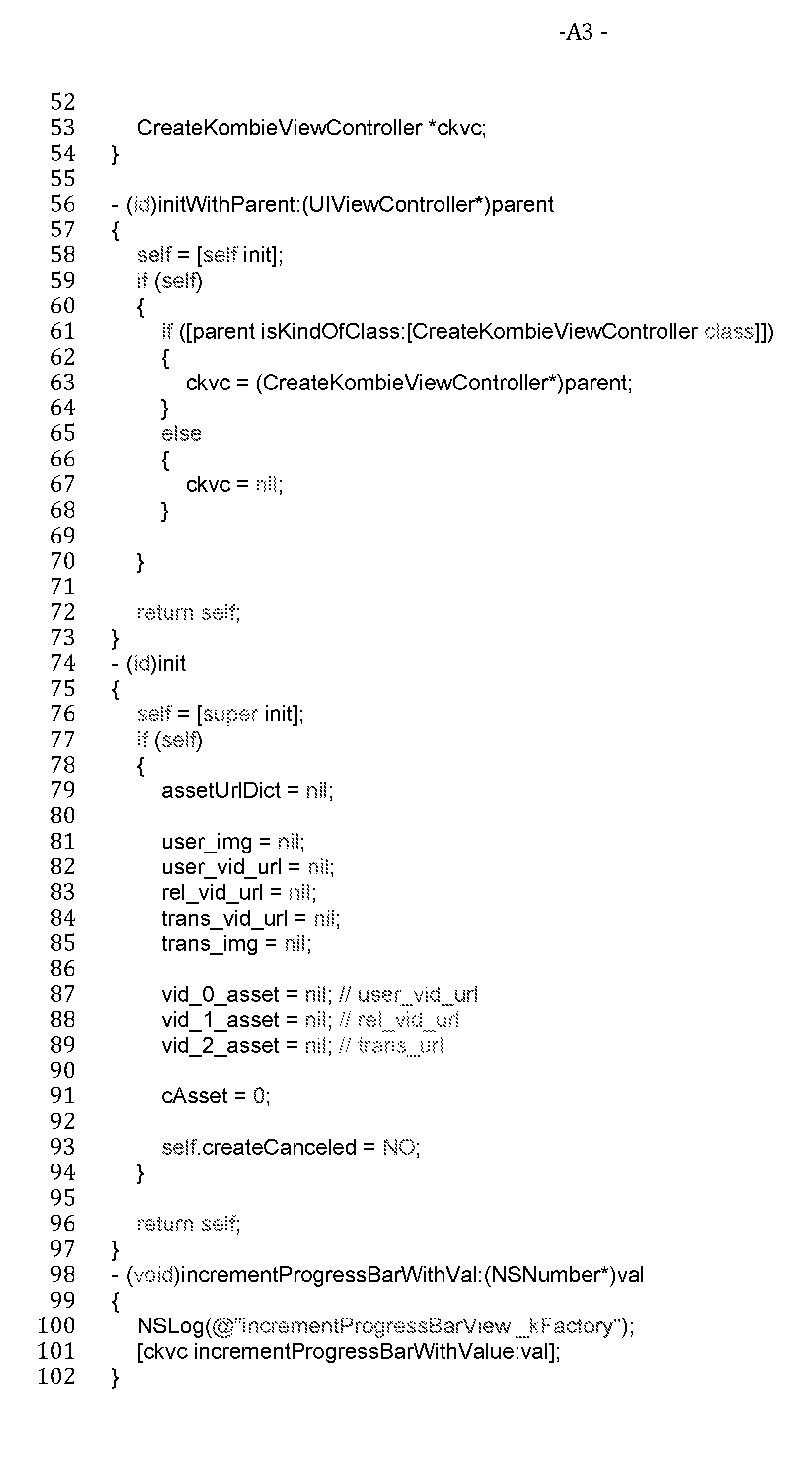


Claims
1. A method of generating video data on a portable electronic device, the method including steps of:
the portable electronic device accessing pre-generated data representing a pre- generated video synchronized with pre-generated audio;
the portable electronic device accessing user-generated content (UGC) data representing a user-generated photo or video generated by a camera of the portable electronic device; and
the portable electronic device generating combined data representing a combined video that includes a portion of each of the pre-generated video, and the user-generated photo or video.
2. The method of claim 1, including the portable electronic device accessing transition data representing a transition image or transition video, and generating the combined data by including the transition image or transition video in the combined video.
3. The method of claim 2, wherein the generating step includes the portable electronic device generating a transition component from the pre-generated video to the user- generated photo or video, or from the user-generated photo or video to the pre-generated video, based on a transition shape in the transition image, wherein the transition image defines one or more two-dimensional (2D) shapes, wherein the transition shape includes a plurality of regions, wherein the transition image includes pixel values defining masks in the transition image, wherein the generating step includes a step of generating a masking transition between the user-generated video or image and the video based on the image mask, and/or, wherein the portable electronic device accesses the transition data on the remote server system using a telecommunications network.
- 26 -
4. The method of claim 2 or 3, including a step of generating intermediate transition data representing an intermediate transition video including a plurality of video frames based on the transition image, wherein the generating step includes a step of combining the intermediate transition video with at least the portion of each of the pre-generated video and the user-generated image or video.
5. The method of any one of claims 2 to 4, wherein the combined data represent a plurality of seconds of the pre-generated video, a plurality of seconds of the transition image or video, and a plurality of seconds of the user- generated image or video, synchronized with the pre-generated audio.
6. The method of any one of claims 1 - 5, including the portable electronic device generating combined data by synchronizing at least a portion of the pre-generated audio with each of the pre-generated video, and the user- generated photo or video.
7. The method of any one of claims 1 - 5, including the portable electronic device generating combined data by synchronizing at least a portion of user-generated audio, from the UGC, with each of the pre-generated video, and the user-generated photo or video.
8. The method of any one of claims 1 - 7, including the portable electronic device accessing the pre-generated video from a remote server system.
9. The method of any one of claims 1 - 7, including the portable electronic device accessing the pre-generated video on the portable electronic device, wherein the pre- generated video is generated from a user-generated photo or video on the portable electronic device.
10. The method of any one of claims 1 - 9, including a step of the portable electronic device fading in the pre-generated audio over a fade-in duration at a start of the combined video to generate the combined data; and/or including a step of the portable electronic device fading out the pre-generated audio over a fade-out duration at an end of the combined video to generate the combined data.
- 27 -
11. The method of any one of claims 1 - 9, including a step of the portable electronic device fading in UGC audio in the UGC data over a fade-in duration at a start of the combined video to generate the combined data; and/or including a step of the portable electronic device fading out the UGC audio over a fade-out duration at an end of the combined video to generate the combined data.
12. The method of any one of claims 1 to 11, including a step of the portable electronic device cross-fading the pre-generated audio to the user-generated audio, and/or cross- fading the user-generated audio to the pre-generated audio, over at least one cross-fade duration in at least one corresponding intermediate portion of the combined video to generate the combined data.
13. The method of any one of claims 1 to 12, including a step of the portable electronic device accessing, on the portable electronic device or from the remote server system, watermark data representing a watermark image or video, and the generating step including the portable electronic device inserting the watermark image or video into the combined video.
14. The method of claim 13, wherein the watermark is inserted into at least a portion of the pre-generated video, and/or at least a portion of the user-generated image or video, wherein the watermark image or video is placed over the user-generated video or image, wherein the watermark image or video is anywhere on at least one portion of the user-generated image or video and/or on the pre-generated video, and/or wherein the watermark is on the bottom or on the right-hand side or in the bottom right-hand corner of the user-generated video or image.
15. The method of claim 13 or 14, including a step of generating intermediate watermark data representing an intermediate watermark video including a plurality of video frames based on the watermark image, and the generating step including a step of
- 28 - combining the intermediate watermark video with at least the portion of each of the pre- generated video and the user-generated image or video.
16. The method of any one of claims 1 to 15, including a step of generating intermediate UGC data representing an intermediate UGC video including a plurality of video frames based on the user-generated image, and the generating step including a step of combining the intermediate UGC video with at least the portion of the pre-generated video.
17. A method for generating a combined video, the method including steps of:
a portable electronic device accessing, on the portable electronic device, user- generated content (UGC) data that represent a user-generated image or video;
the portable electronic device accessing, from a remote server system, externally generated content (EGC) data that represent a pre-generated video including pre-generated audio;
the portable electronic device accessing, on the portable electronic device or from the remote server system, transition data that represent a transition image or video; and the portable electronic device generating combined data representing a combined video by combining at least a portion of each of the user-generated image or video and the pre-generated video.
18. A method of generating video data, the method including steps of:
a portable electronic device accessing pre-generated data representing a pre- generated video synchronized with pre-generated audio;
the portable electronic device accessing user-generated content (UGC) data representing a user-generated photo or video generated by a camera of the portable electronic device;
the portable electronic device accessing transition data representing a transition image; and
the portable electronic device generating combined data representing a combined video that includes a portion of each of the pre-generated video, the user-generated photo
- 29 - or video, and the transition image, synchronised with at least a portion of the pre-generated audio.
19. An apparatus configured to perform the method of any one of claims 1 - 18.
20. A system configured to perform the method of any one of claims 1 - 18.
21. Machine-readable media including machine-readable instructions that control one or more electronic microprocessors to perform the method of any one of claims 1- 18.
22. A portable electronic device configured to perform the method of any one of claims 1 - 18.
Priority Applications (1)
| Application Number | Priority Date | Filing Date | Title |
|---|---|---|---|
| US15/682,420 US20180048831A1 (en) | 2015-02-23 | 2017-08-21 | Generation of combined videos |
Applications Claiming Priority (4)
| Application Number | Priority Date | Filing Date | Title |
|---|---|---|---|
| AU2015900632A AU2015900632A0 (en) | 2015-02-23 | Generation of combined videos | |
| AU2015900632 | 2015-02-23 | ||
| AU2015901112A AU2015901112A0 (en) | 2015-03-27 | Generation of combined videos | |
| AU2015901112 | 2015-03-27 |
Related Child Applications (1)
| Application Number | Title | Priority Date | Filing Date |
|---|---|---|---|
| US15/682,420 Continuation-In-Part US20180048831A1 (en) | 2015-02-23 | 2017-08-21 | Generation of combined videos |
Publications (1)
| Publication Number | Publication Date |
|---|---|
| WO2016134415A1 true WO2016134415A1 (en) | 2016-09-01 |
Family
ID=56787773
Family Applications (1)
| Application Number | Title | Priority Date | Filing Date |
|---|---|---|---|
| PCT/AU2016/050117 Ceased WO2016134415A1 (en) | 2015-02-23 | 2016-02-22 | Generation of combined videos |
Country Status (2)
| Country | Link |
|---|---|
| US (1) | US20180048831A1 (en) |
| WO (1) | WO2016134415A1 (en) |
Families Citing this family (25)
| Publication number | Priority date | Publication date | Assignee | Title |
|---|---|---|---|---|
| US9190110B2 (en) | 2009-05-12 | 2015-11-17 | JBF Interlude 2009 LTD | System and method for assembling a recorded composition |
| US11232458B2 (en) | 2010-02-17 | 2022-01-25 | JBF Interlude 2009 LTD | System and method for data mining within interactive multimedia |
| US9792957B2 (en) | 2014-10-08 | 2017-10-17 | JBF Interlude 2009 LTD | Systems and methods for dynamic video bookmarking |
| US10582265B2 (en) | 2015-04-30 | 2020-03-03 | JBF Interlude 2009 LTD | Systems and methods for nonlinear video playback using linear real-time video players |
| US10460765B2 (en) | 2015-08-26 | 2019-10-29 | JBF Interlude 2009 LTD | Systems and methods for adaptive and responsive video |
| US11856271B2 (en) | 2016-04-12 | 2023-12-26 | JBF Interlude 2009 LTD | Symbiotic interactive video |
| US11050809B2 (en) | 2016-12-30 | 2021-06-29 | JBF Interlude 2009 LTD | Systems and methods for dynamic weighting of branched video paths |
| US11895369B2 (en) * | 2017-08-28 | 2024-02-06 | Dolby Laboratories Licensing Corporation | Media-aware navigation metadata |
| CN107995187A (en) * | 2017-11-30 | 2018-05-04 | 上海哔哩哔哩科技有限公司 | Video main broadcaster, live broadcasting method, terminal and system based on HTML5 browsers |
| US10257578B1 (en) | 2018-01-05 | 2019-04-09 | JBF Interlude 2009 LTD | Dynamic library display for interactive videos |
| US11601721B2 (en) | 2018-06-04 | 2023-03-07 | JBF Interlude 2009 LTD | Interactive video dynamic adaptation and user profiling |
| US11653072B2 (en) | 2018-09-12 | 2023-05-16 | Zuma Beach Ip Pty Ltd | Method and system for generating interactive media content |
| US12337244B1 (en) * | 2018-10-26 | 2025-06-24 | Snap Inc. | Generating a live streaming video having real-time special effects |
| US11490047B2 (en) | 2019-10-02 | 2022-11-01 | JBF Interlude 2009 LTD | Systems and methods for dynamically adjusting video aspect ratios |
| US11205459B2 (en) * | 2019-11-08 | 2021-12-21 | Sony Interactive Entertainment LLC | User generated content with ESRB ratings for auto editing playback based on a player's age, country, legal requirements |
| US11245961B2 (en) | 2020-02-18 | 2022-02-08 | JBF Interlude 2009 LTD | System and methods for detecting anomalous activities for interactive videos |
| US12096081B2 (en) | 2020-02-18 | 2024-09-17 | JBF Interlude 2009 LTD | Dynamic adaptation of interactive video players using behavioral analytics |
| KR20210110068A (en) * | 2020-02-28 | 2021-09-07 | 삼성전자주식회사 | Method for editing video based on gesture recognition and electronic device supporting the same |
| US12047637B2 (en) * | 2020-07-07 | 2024-07-23 | JBF Interlude 2009 LTD | Systems and methods for seamless audio and video endpoint transitions |
| US11882337B2 (en) | 2021-05-28 | 2024-01-23 | JBF Interlude 2009 LTD | Automated platform for generating interactive videos |
| US12155897B2 (en) | 2021-08-31 | 2024-11-26 | JBF Interlude 2009 LTD | Shader-based dynamic video manipulation |
| US11934477B2 (en) | 2021-09-24 | 2024-03-19 | JBF Interlude 2009 LTD | Video player integration within websites |
| US11763496B2 (en) * | 2021-09-30 | 2023-09-19 | Lemon Inc. | Social networking based on asset items |
| US12494056B2 (en) | 2021-09-30 | 2025-12-09 | Lemon Inc. | Social networking based on asset items |
| US20230376179A1 (en) | 2022-05-23 | 2023-11-23 | Snap Inc. | Combining third-party content with user content |
Citations (4)
| Publication number | Priority date | Publication date | Assignee | Title |
|---|---|---|---|---|
| US20100031149A1 (en) * | 2008-07-01 | 2010-02-04 | Yoostar Entertainment Group, Inc. | Content preparation systems and methods for interactive video systems |
| US20120308209A1 (en) * | 2011-06-03 | 2012-12-06 | Michael Edward Zaletel | Method and apparatus for dynamically recording, editing and combining multiple live video clips and still photographs into a finished composition |
| US20130305287A1 (en) * | 2012-05-14 | 2013-11-14 | United Video Properties, Inc. | Systems and methods for generating a user profile based customized media guide that includes an internet source |
| US20140245334A1 (en) * | 2013-02-26 | 2014-08-28 | Rawllin International Inc. | Personal videos aggregation |
Family Cites Families (59)
| Publication number | Priority date | Publication date | Assignee | Title |
|---|---|---|---|---|
| US7483891B2 (en) * | 2004-01-09 | 2009-01-27 | Yahoo, Inc. | Content presentation and management system associating base content and relevant additional content |
| US8126312B2 (en) * | 2005-03-31 | 2012-02-28 | Apple Inc. | Use of multiple related timelines |
| IL173222A0 (en) * | 2006-01-18 | 2006-06-11 | Clip In Touch Internat Ltd | Apparatus and method for creating and transmitting unique dynamically personalized multimedia messages |
| US20080208692A1 (en) * | 2007-02-26 | 2008-08-28 | Cadence Media, Inc. | Sponsored content creation and distribution |
| IL182391A0 (en) * | 2007-04-10 | 2007-07-24 | Nario C | System, method and device for presenting video signals |
| US9106804B2 (en) * | 2007-09-28 | 2015-08-11 | Gracenote, Inc. | Synthesizing a presentation of a multimedia event |
| US20090164034A1 (en) * | 2007-12-19 | 2009-06-25 | Dopetracks, Llc | Web-based performance collaborations based on multimedia-content sharing |
| US8860865B2 (en) * | 2009-03-02 | 2014-10-14 | Burning Moon, Llc | Assisted video creation utilizing a camera |
| JP5550385B2 (en) * | 2009-03-04 | 2014-07-16 | キヤノン株式会社 | Image processing apparatus, control method therefor, and storage medium |
| US8769589B2 (en) * | 2009-03-31 | 2014-07-01 | At&T Intellectual Property I, L.P. | System and method to create a media content summary based on viewer annotations |
| US8736561B2 (en) * | 2010-01-06 | 2014-05-27 | Apple Inc. | Device, method, and graphical user interface with content display modes and display rotation heuristics |
| US20120017150A1 (en) * | 2010-07-15 | 2012-01-19 | MySongToYou, Inc. | Creating and disseminating of user generated media over a network |
| US20120240061A1 (en) * | 2010-10-11 | 2012-09-20 | Teachscape, Inc. | Methods and systems for sharing content items relating to multimedia captured and/or direct observations of persons performing a task for evaluation |
| US20120185772A1 (en) * | 2011-01-19 | 2012-07-19 | Christopher Alexis Kotelly | System and method for video generation |
| US8464304B2 (en) * | 2011-01-25 | 2013-06-11 | Youtoo Technologies, LLC | Content creation and distribution system |
| US20120236201A1 (en) * | 2011-01-27 | 2012-09-20 | In The Telling, Inc. | Digital asset management, authoring, and presentation techniques |
| US9336512B2 (en) * | 2011-02-11 | 2016-05-10 | Glenn Outerbridge | Digital media and social networking system and method |
| ITRM20110469A1 (en) * | 2011-09-08 | 2013-03-09 | Hyper Tv S R L | SYSTEM AND METHOD FOR THE PRODUCTION BY A AUTHOR OF COMPLEX MULTIMEDIA CONTENT AND FOR THE USE OF SUCH CONTENT BY A USER |
| US20130117671A1 (en) * | 2011-10-25 | 2013-05-09 | Triparazzi, Inc. | Methods and systems for editing video clips on mobile devices |
| US20130259446A1 (en) * | 2012-03-28 | 2013-10-03 | Nokia Corporation | Method and apparatus for user directed video editing |
| US9674580B2 (en) * | 2012-03-31 | 2017-06-06 | Vipeline, Inc. | Method and system for recording video directly into an HTML framework |
| US10255227B2 (en) * | 2012-05-21 | 2019-04-09 | Oath Inc. | Computerized system and method for authoring, editing, and delivering an interactive social media video |
| US20140108400A1 (en) * | 2012-06-13 | 2014-04-17 | George A. Castineiras | System and method for storing and accessing memorabilia |
| KR101899819B1 (en) * | 2012-08-03 | 2018-09-20 | 엘지전자 주식회사 | Mobile terminal and method for controlling thereof |
| US20140074712A1 (en) * | 2012-09-10 | 2014-03-13 | Sound Halo Pty. Ltd. | Media distribution system and process |
| US20140133832A1 (en) * | 2012-11-09 | 2014-05-15 | Jason Sumler | Creating customized digital advertisement from video and/or an image array |
| US9277300B2 (en) * | 2012-11-15 | 2016-03-01 | Compass Electro Optical Systems Ltd. | Passive connectivity optical module |
| US8745500B1 (en) * | 2012-12-10 | 2014-06-03 | VMIX Media, Inc. | Video editing, enhancement and distribution platform for touch screen computing devices |
| US20140258865A1 (en) * | 2013-03-11 | 2014-09-11 | Matthew D Papish | Systems and methods for enhanced video service |
| US9653116B2 (en) * | 2013-03-14 | 2017-05-16 | Apollo Education Group, Inc. | Video pin sharing |
| US9736448B1 (en) * | 2013-03-15 | 2017-08-15 | Google Inc. | Methods, systems, and media for generating a summarized video using frame rate modification |
| US20150318020A1 (en) * | 2014-05-02 | 2015-11-05 | FreshTake Media, Inc. | Interactive real-time video editor and recorder |
| EP3000238B1 (en) * | 2013-05-20 | 2019-02-20 | Intel Corporation | Elastic cloud video editing and multimedia search |
| US20140359448A1 (en) * | 2013-05-31 | 2014-12-04 | Microsoft Corporation | Adding captions and emphasis to video |
| US10037129B2 (en) * | 2013-08-30 | 2018-07-31 | Google Llc | Modifying a segment of a media item on a mobile device |
| US9530454B2 (en) * | 2013-10-10 | 2016-12-27 | JBF Interlude 2009 LTD | Systems and methods for real-time pixel switching |
| US20160173960A1 (en) * | 2014-01-31 | 2016-06-16 | EyeGroove, Inc. | Methods and systems for generating audiovisual media items |
| US9116912B1 (en) * | 2014-01-31 | 2015-08-25 | EyeGroove, Inc. | Methods and devices for modifying pre-existing media items |
| US9207844B2 (en) * | 2014-01-31 | 2015-12-08 | EyeGroove, Inc. | Methods and devices for touch-based media creation |
| US9519644B2 (en) * | 2014-04-04 | 2016-12-13 | Facebook, Inc. | Methods and devices for generating media items |
| US10356022B2 (en) * | 2014-07-06 | 2019-07-16 | Movy Co. | Systems and methods for manipulating and/or concatenating videos |
| CN105376612A (en) * | 2014-08-26 | 2016-03-02 | 华为技术有限公司 | Video playing method, media equipment, playing equipment and multimedia system |
| US20160337718A1 (en) * | 2014-09-23 | 2016-11-17 | Joshua Allen Talbott | Automated video production from a plurality of electronic devices |
| US10276029B2 (en) * | 2014-11-13 | 2019-04-30 | Gojo Industries, Inc. | Methods and systems for obtaining more accurate compliance metrics |
| US9734870B2 (en) * | 2015-01-05 | 2017-08-15 | Gopro, Inc. | Media identifier generation for camera-captured media |
| US9679605B2 (en) * | 2015-01-29 | 2017-06-13 | Gopro, Inc. | Variable playback speed template for video editing application |
| US20160292511A1 (en) * | 2015-03-31 | 2016-10-06 | Gopro, Inc. | Scene and Activity Identification in Video Summary Generation |
| US10460765B2 (en) * | 2015-08-26 | 2019-10-29 | JBF Interlude 2009 LTD | Systems and methods for adaptive and responsive video |
| US20180308524A1 (en) * | 2015-09-07 | 2018-10-25 | Bigvu Inc. | System and method for preparing and capturing a video file embedded with an image file |
| US10356456B2 (en) * | 2015-11-05 | 2019-07-16 | Adobe Inc. | Generating customized video previews |
| US20170316807A1 (en) * | 2015-12-11 | 2017-11-02 | Squigl LLC | Systems and methods for creating whiteboard animation videos |
| US10623801B2 (en) * | 2015-12-17 | 2020-04-14 | James R. Jeffries | Multiple independent video recording integration |
| US9996750B2 (en) * | 2016-06-01 | 2018-06-12 | Gopro, Inc. | On-camera video capture, classification, and processing |
| US9824477B1 (en) * | 2016-11-30 | 2017-11-21 | Super 6 LLC | Photo and video collaboration platform |
| US10362340B2 (en) * | 2017-04-06 | 2019-07-23 | Burst, Inc. | Techniques for creation of auto-montages for media content |
| US10269381B1 (en) * | 2017-10-25 | 2019-04-23 | Seagate Technology Llc | Heat assisted magnetic recording with exchange coupling control layer |
| US10567321B2 (en) * | 2018-01-02 | 2020-02-18 | Snap Inc. | Generating interactive messages with asynchronous media content |
| US10397636B1 (en) * | 2018-07-20 | 2019-08-27 | Facebook, Inc. | Methods and systems for synchronizing data streams across multiple client devices |
| US11653072B2 (en) * | 2018-09-12 | 2023-05-16 | Zuma Beach Ip Pty Ltd | Method and system for generating interactive media content |
-
2016
- 2016-02-22 WO PCT/AU2016/050117 patent/WO2016134415A1/en not_active Ceased
-
2017
- 2017-08-21 US US15/682,420 patent/US20180048831A1/en not_active Abandoned
Patent Citations (4)
| Publication number | Priority date | Publication date | Assignee | Title |
|---|---|---|---|---|
| US20100031149A1 (en) * | 2008-07-01 | 2010-02-04 | Yoostar Entertainment Group, Inc. | Content preparation systems and methods for interactive video systems |
| US20120308209A1 (en) * | 2011-06-03 | 2012-12-06 | Michael Edward Zaletel | Method and apparatus for dynamically recording, editing and combining multiple live video clips and still photographs into a finished composition |
| US20130305287A1 (en) * | 2012-05-14 | 2013-11-14 | United Video Properties, Inc. | Systems and methods for generating a user profile based customized media guide that includes an internet source |
| US20140245334A1 (en) * | 2013-02-26 | 2014-08-28 | Rawllin International Inc. | Personal videos aggregation |
Non-Patent Citations (1)
| Title |
|---|
| DEBORD S.: "3 Steps to Professional Quality Listing Videos From Your Smartphone", 17 October 2014 (2014-10-17), Retrieved from the Internet <URL:https://www.warealtor.org/resources/REmagazine/blog_post/remagazine-ontine/2014/10/17/3-steps-to-professional-quality-listing-videos-from-your-smartphone> [retrieved on 20160329] * |
Also Published As
| Publication number | Publication date |
|---|---|
| US20180048831A1 (en) | 2018-02-15 |
Similar Documents
| Publication | Publication Date | Title |
|---|---|---|
| WO2016134415A1 (en) | Generation of combined videos | |
| US11049522B2 (en) | Digital media editing | |
| US10735798B2 (en) | Video broadcast system and a method of disseminating video content | |
| CN105493512B (en) | A video processing method, video processing device and display device | |
| US10728354B2 (en) | Slice-and-stitch approach to editing media (video or audio) for multimedia online presentations | |
| US10359927B2 (en) | Methods and systems for photo, page, and spread arrangement on space-constrained user devices | |
| JP5903187B1 (en) | Automatic video content generation system | |
| US9530452B2 (en) | Video preview creation with link | |
| US20140341527A1 (en) | Creating, Editing, and Publishing a Video Using a Mobile Device | |
| WO2020029526A1 (en) | Method for adding special effect to video, device, terminal apparatus, and storage medium | |
| US20140282069A1 (en) | System and Method of Storing, Editing and Sharing Selected Regions of Digital Content | |
| US20130254259A1 (en) | Method and system for publication and sharing of files via the internet | |
| US20140193138A1 (en) | System and a method for constructing and for exchanging multimedia content | |
| CA3001480C (en) | Video-production system with dve feature | |
| CN107005458A (en) | Unscripted digital media message generation | |
| US20160226806A1 (en) | Digital media messages and files | |
| US20160275989A1 (en) | Multimedia management system for generating a video clip from a video file | |
| US9973459B2 (en) | Digital media message generation | |
| US10783319B2 (en) | Methods and systems of creation and review of media annotations | |
| JP6569876B2 (en) | Content generation method and apparatus | |
| WO2015074568A1 (en) | Method and device for collaborative document review | |
| WO2016184193A1 (en) | Method and apparatus for generating media files | |
| WO2017176940A1 (en) | Digital media messages and files | |
| CA2871075A1 (en) | Method and system for publication and sharing of files via the internet | |
| CN106709971A (en) | Operation guide compiling method and device and terminal |
Legal Events
| Date | Code | Title | Description |
|---|---|---|---|
| 121 | Ep: the epo has been informed by wipo that ep was designated in this application |
Ref document number: 16754668 Country of ref document: EP Kind code of ref document: A1 |
|
| NENP | Non-entry into the national phase |
Ref country code: DE |
|
| 122 | Ep: pct application non-entry in european phase |
Ref document number: 16754668 Country of ref document: EP Kind code of ref document: A1 |