US11204662B2 - Input device with touch sensitive surface that assigns an action to an object located thereon - Google Patents
Input device with touch sensitive surface that assigns an action to an object located thereon Download PDFInfo
- Publication number
- US11204662B2 US11204662B2 US16/345,871 US201716345871A US11204662B2 US 11204662 B2 US11204662 B2 US 11204662B2 US 201716345871 A US201716345871 A US 201716345871A US 11204662 B2 US11204662 B2 US 11204662B2
- Authority
- US
- United States
- Prior art keywords
- touch sensitive
- input
- action
- user
- image
- Prior art date
- Legal status (The legal status is an assumption and is not a legal conclusion. Google has not performed a legal analysis and makes no representation as to the accuracy of the status listed.)
- Expired - Fee Related
Links
Images



Classifications
-
- G—PHYSICS
- G06—COMPUTING OR CALCULATING; COUNTING
- G06F—ELECTRIC DIGITAL DATA PROCESSING
- G06F3/00—Input arrangements for transferring data to be processed into a form capable of being handled by the computer; Output arrangements for transferring data from processing unit to output unit, e.g. interface arrangements
- G06F3/01—Input arrangements or combined input and output arrangements for interaction between user and computer
- G06F3/048—Interaction techniques based on graphical user interfaces [GUI]
- G06F3/0484—Interaction techniques based on graphical user interfaces [GUI] for the control of specific functions or operations, e.g. selecting or manipulating an object, an image or a displayed text element, setting a parameter value or selecting a range
- G06F3/04842—Selection of displayed objects or displayed text elements
-
- G—PHYSICS
- G06—COMPUTING OR CALCULATING; COUNTING
- G06F—ELECTRIC DIGITAL DATA PROCESSING
- G06F3/00—Input arrangements for transferring data to be processed into a form capable of being handled by the computer; Output arrangements for transferring data from processing unit to output unit, e.g. interface arrangements
- G06F3/01—Input arrangements or combined input and output arrangements for interaction between user and computer
- G06F3/03—Arrangements for converting the position or the displacement of a member into a coded form
- G06F3/041—Digitisers, e.g. for touch screens or touch pads, characterised by the transducing means
- G06F3/0416—Control or interface arrangements specially adapted for digitisers
-
- G—PHYSICS
- G06—COMPUTING OR CALCULATING; COUNTING
- G06F—ELECTRIC DIGITAL DATA PROCESSING
- G06F3/00—Input arrangements for transferring data to be processed into a form capable of being handled by the computer; Output arrangements for transferring data from processing unit to output unit, e.g. interface arrangements
- G06F3/01—Input arrangements or combined input and output arrangements for interaction between user and computer
- G06F3/017—Gesture based interaction, e.g. based on a set of recognized hand gestures
-
- G—PHYSICS
- G06—COMPUTING OR CALCULATING; COUNTING
- G06F—ELECTRIC DIGITAL DATA PROCESSING
- G06F3/00—Input arrangements for transferring data to be processed into a form capable of being handled by the computer; Output arrangements for transferring data from processing unit to output unit, e.g. interface arrangements
- G06F3/01—Input arrangements or combined input and output arrangements for interaction between user and computer
- G06F3/03—Arrangements for converting the position or the displacement of a member into a coded form
- G06F3/0304—Detection arrangements using opto-electronic means
-
- G—PHYSICS
- G06—COMPUTING OR CALCULATING; COUNTING
- G06F—ELECTRIC DIGITAL DATA PROCESSING
- G06F3/00—Input arrangements for transferring data to be processed into a form capable of being handled by the computer; Output arrangements for transferring data from processing unit to output unit, e.g. interface arrangements
- G06F3/01—Input arrangements or combined input and output arrangements for interaction between user and computer
- G06F3/03—Arrangements for converting the position or the displacement of a member into a coded form
- G06F3/033—Pointing devices displaced or positioned by the user, e.g. mice, trackballs, pens or joysticks; Accessories therefor
- G06F3/0354—Pointing devices displaced or positioned by the user, e.g. mice, trackballs, pens or joysticks; Accessories therefor with detection of 2D relative movements between the device, or an operating part thereof, and a plane or surface, e.g. 2D mice, trackballs, pens or pucks
- G06F3/03547—Touch pads, in which fingers can move on a surface
-
- G—PHYSICS
- G06—COMPUTING OR CALCULATING; COUNTING
- G06F—ELECTRIC DIGITAL DATA PROCESSING
- G06F3/00—Input arrangements for transferring data to be processed into a form capable of being handled by the computer; Output arrangements for transferring data from processing unit to output unit, e.g. interface arrangements
- G06F3/01—Input arrangements or combined input and output arrangements for interaction between user and computer
- G06F3/03—Arrangements for converting the position or the displacement of a member into a coded form
- G06F3/033—Pointing devices displaced or positioned by the user, e.g. mice, trackballs, pens or joysticks; Accessories therefor
- G06F3/039—Accessories therefor, e.g. mouse pads
- G06F3/0393—Accessories for touch pads or touch screens, e.g. mechanical guides added to touch screens for drawing straight lines, hard keys overlaying touch screens or touch pads
-
- G—PHYSICS
- G06—COMPUTING OR CALCULATING; COUNTING
- G06F—ELECTRIC DIGITAL DATA PROCESSING
- G06F3/00—Input arrangements for transferring data to be processed into a form capable of being handled by the computer; Output arrangements for transferring data from processing unit to output unit, e.g. interface arrangements
- G06F3/01—Input arrangements or combined input and output arrangements for interaction between user and computer
- G06F3/048—Interaction techniques based on graphical user interfaces [GUI]
- G06F3/0481—Interaction techniques based on graphical user interfaces [GUI] based on specific properties of the displayed interaction object or a metaphor-based environment, e.g. interaction with desktop elements like windows or icons, or assisted by a cursor's changing behaviour or appearance
- G06F3/0482—Interaction with lists of selectable items, e.g. menus
-
- G—PHYSICS
- G06—COMPUTING OR CALCULATING; COUNTING
- G06F—ELECTRIC DIGITAL DATA PROCESSING
- G06F3/00—Input arrangements for transferring data to be processed into a form capable of being handled by the computer; Output arrangements for transferring data from processing unit to output unit, e.g. interface arrangements
- G06F3/01—Input arrangements or combined input and output arrangements for interaction between user and computer
- G06F3/048—Interaction techniques based on graphical user interfaces [GUI]
- G06F3/0487—Interaction techniques based on graphical user interfaces [GUI] using specific features provided by the input device, e.g. functions controlled by the rotation of a mouse with dual sensing arrangements, or of the nature of the input device, e.g. tap gestures based on pressure sensed by a digitiser
- G06F3/0488—Interaction techniques based on graphical user interfaces [GUI] using specific features provided by the input device, e.g. functions controlled by the rotation of a mouse with dual sensing arrangements, or of the nature of the input device, e.g. tap gestures based on pressure sensed by a digitiser using a touch-screen or digitiser, e.g. input of commands through traced gestures
-
- G—PHYSICS
- G06—COMPUTING OR CALCULATING; COUNTING
- G06F—ELECTRIC DIGITAL DATA PROCESSING
- G06F3/00—Input arrangements for transferring data to be processed into a form capable of being handled by the computer; Output arrangements for transferring data from processing unit to output unit, e.g. interface arrangements
- G06F3/01—Input arrangements or combined input and output arrangements for interaction between user and computer
- G06F3/048—Interaction techniques based on graphical user interfaces [GUI]
- G06F3/0487—Interaction techniques based on graphical user interfaces [GUI] using specific features provided by the input device, e.g. functions controlled by the rotation of a mouse with dual sensing arrangements, or of the nature of the input device, e.g. tap gestures based on pressure sensed by a digitiser
- G06F3/0488—Interaction techniques based on graphical user interfaces [GUI] using specific features provided by the input device, e.g. functions controlled by the rotation of a mouse with dual sensing arrangements, or of the nature of the input device, e.g. tap gestures based on pressure sensed by a digitiser using a touch-screen or digitiser, e.g. input of commands through traced gestures
- G06F3/04886—Interaction techniques based on graphical user interfaces [GUI] using specific features provided by the input device, e.g. functions controlled by the rotation of a mouse with dual sensing arrangements, or of the nature of the input device, e.g. tap gestures based on pressure sensed by a digitiser using a touch-screen or digitiser, e.g. input of commands through traced gestures by partitioning the display area of the touch-screen or the surface of the digitising tablet into independently controllable areas, e.g. virtual keyboards or menus
-
- G—PHYSICS
- G06—COMPUTING OR CALCULATING; COUNTING
- G06T—IMAGE DATA PROCESSING OR GENERATION, IN GENERAL
- G06T7/00—Image analysis
- G06T7/70—Determining position or orientation of objects or cameras
Definitions
- Input devices associated with computing devices are developed to allow better interaction between the computing device and the user. Keyboards, mice, screens, and graphical input devices, among others, all have been developed to increase and provide relatively better user interaction with the computing device.
- FIG. 1 is a block diagram of an input device according to one example of the principles described herein.
- FIG. 2 is a flowchart diagram showing method of creating an input device according to an example of the principles described herein.
- FIG. 3 is a block diagram of a computing device according to one example of the principles described herein.
- FIG. 4 is a front view diagram of an input system according to an example of the principles described herein.
- FIG. 5 is a top view block diagram of a touch sensitive device overlaid with a number of objects according to an example of the principles described herein.
- FIG. 6 is a block diagram of a processor according to one example of the principles described herein.
- FIG. 7 is a block diagram of an input device according to one example of the principles described herein.
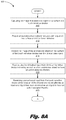
- FIGS. 8 a and 8 b depict a flowchart showing a method of creating an input device according to an example of the principles described herein.
- Input devices associated with a computing system generally come in a set form.
- Keyboards for example, include a number of rows of letters, numbers, and symbols laid out in a set predetermined manner.
- a QWERTY keyboard for example, includes the Latin script letters of the alphabet set out in a specific arrangement such that each user may easily implement the device based on the user's previous experience with such a keyboard.
- such an arrangement may not be beneficial to all persons.
- a keyboard is used by a plurality of users who may or may not be trained to use a QWERTY keyboard, it may prove difficult for those not trained to use the QWERTY keyboard to assimilate to the that style of keyboard.
- a QWERTY keyboard input device may reduce productivity, a user may be left to purchase or transport their own style of keyboard so as to actually interface with the computing device effectively.
- Such an issue with exiting input devices may not necessarily be limited to keyboards but also may extend to other types of input devices and user-perceived ergonomic disadvantages of the input device.
- certain keyboards have been manufactured such that at least a portion of the keys are not aligned in a straight row. This has been done to allow a user the address the keys on the keyboard in a relatively more comfortable way.
- this ergonomic change is a permanent change that may not be beneficial to all users.
- Other input devices such as video game controllers may also have similar disadvantages due to the rigidly of the “one shape fits all users” form. Instead of being ergonomically advantageous to all users, these input devices are made to be ergonomically advantageous to most users leaving some user to accept the ergonomic form and actuation of the input device and struggle to learn the actions associated with each button or key.
- the present specification therefore describes an input device that includes a touch sensitive surface and a camera wherein the camera scans the touch sensitive surface with at least one object on the touch sensitive surface and creates an image and, with a processor, maps the at least one object to a location on the touch sensitive surface wherein an input action is assigned to the object.
- the present specification further describes a method of creating an input device that includes capturing an image of at least one object on a surface of a touch sensitive device; receiving user actuated input from the touch sensitive device at the location of the at least one object; mapping the received user actuated input to the surface of the touch sensitive device; and receiving instructions to assign an action to the at least one object.
- the present specification also describes a computing device that includes a processor and an input device that includes a touch sensitive mat, a projector, and a camera wherein the processor receives an image of at least one object positioned on the touch sensitive mat and derives positional data of the at least one object; and wherein the processor receives an indication of an action to be assigned to the at least one object.
- touch sensitive surface or “touch sensitive device” are meant to be understood as any surface or device that can detect a human touch.
- the detected touch is that of a touch applied to any number of layers of material placed over the surface or device.
- FIG. 1 is a block diagram of an input device ( 105 ) according to one example of the principles described herein.
- the input device ( 105 ) may be communicatively coupled to a computing device. Examples of computing devices include servers, desktop computers, laptop computers, personal digital assistants (PDAs), mobile devices, smartphones, gaming systems, and tablets, among other electronic devices.
- the input device ( 105 ) may provide input to the computing device as described herein.
- the computing device may be utilized in any data processing scenario including, stand-alone hardware, mobile applications, through a computing network, or combinations thereof. Further, the computing device may be used in a computing network, a public cloud network, a private cloud network, a hybrid cloud network, other forms of networks, or combinations thereof.
- the computing device associated with the input device ( 105 ) includes various hardware components.
- these hardware components may be a number of processors, a number of data storage devices, a number of peripheral device adapters, and a number of network adapters. These hardware components may be interconnected through the use of a number of busses and/or network connections.
- the processor, data storage device, peripheral device adapters, and a network adapter may be communicatively coupled via a bus.
- the processor may include the hardware architecture to retrieve executable code from the data storage device, receive input from the input device ( 105 ), and execute the executable code while processing the input.
- the executable code may, when executed by the processor, cause the processor to implement at least the functionality of capturing an image of at least one object on a surface of a touch sensitive device, receiving user actuated input from the touch sensitive device at the location of the at least one object, mapping the received user actuated input to the surface of the touch sensitive device, and receiving instructions to assign an action to the at least one object according to the methods of the present specification described herein.
- the processor may receive input from and provide output to a number of the remaining hardware units.
- the data storage device may store data such as executable program code that is executed by the processor or other processing device.
- the data storage device may specifically store computer code representing a number of applications that the processor executes to implement at least the functionality described herein.
- the data storage device may include various types of memory modules, including volatile and nonvolatile memory.
- the data storage device of the present example includes Random Access Memory (RAM), Read Only Memory (ROM), and Hard Disk Drive (HDD) memory.
- RAM Random Access Memory
- ROM Read Only Memory
- HDD Hard Disk Drive
- Many other types of memory may also be utilized, and the present specification contemplates the use of many varying type(s) of memory in the data storage device as may suit a particular application of the principles described herein.
- different types of memory in the data storage device may be used for different data storage needs.
- the processor may boot from Read Only Memory (ROM), maintain nonvolatile storage in the Hard Disk Drive (HDD) memory, and execute program code stored in Random Access Memory (RAM).
- ROM Read Only Memory
- HDD Hard Disk Drive
- the data storage device may include a computer readable medium, a computer readable storage medium, or a non-transitory computer readable medium, among others.
- the data storage device may be, but not limited to, an electronic, magnetic, optical, electromagnetic, infrared, or semiconductor system, apparatus, or device, or any suitable combination of the foregoing.
- a computer readable storage medium may include, for example, the following: an electrical connection having a number of wires, a portable computer diskette, a hard disk, a random-access memory (RAM), a read-only memory (ROM), an erasable programmable read-only memory (EPROM or Flash memory), a portable compact disc read-only memory (CD-ROM), an optical storage device, a magnetic storage device, or any suitable combination of the foregoing.
- a computer readable storage medium may be any tangible medium that can contain, or store computer usable program code for use by or in connection with an instruction execution system, apparatus, or device.
- a computer readable storage medium may be any non-transitory medium that can contain, or store a program for use by or in connection with an instruction execution system, apparatus, or device.
- the hardware adapters of the computing device enable the processor to interface with various other hardware elements, external and internal to the computing device.
- the peripheral device adapters may provide an interface to input/output devices such as the input device ( 105 ) a display device, a mouse, and/or a keyboard.
- the peripheral device adapters may also provide access to other external devices such as an external storage device, a number of network devices such as, for example, servers, switches, and routers, client devices, other types of computing devices, and combinations thereof.
- the display device may be provided to allow a user of the input device ( 105 ) and computing device to interact with and implement the functionality of the input device ( 105 ).
- the peripheral device adapters may also create an interface between the processor and the display device, a printer, or other media output devices.
- the network adapter may provide an interface to other computing devices within, for example, a network, thereby enabling the transmission of data between the computing device and other devices located within the network.
- the display device may, when executed by the processor, display the number of graphical user interfaces (GUIs) with the executable program code representing the number of applications stored on the data storage device.
- GUIs may include aspects of the executable code including instructions to a user and requests for instructions from a user.
- the GUIs may display, for example, a number of GUIs that direct a user to setup and implement the input device ( 105 ) as described below. Examples of display devices include a computer screen, a laptop screen, a mobile device screen, a personal digital assistant (PDA) screen, and a tablet screen, among other display devices.
- PDA personal digital assistant
- the touch sensitive surface ( 110 ) may be any surface or pad incorporated into a touch sensitive device that senses a touch from a user and interprets that touch as an assigned input to the processor of the computing device.
- the touch sensitive surface ( 110 ) may receive user actuated input on touch sensitive surface ( 110 ) at the location of the at least one object that has been placed on the touch sensitive surface ( 110 ).
- the touch sensitive surface ( 110 ) receives user actuated input from the touch sensitive surface ( 110 ) at a location of a projection of at least one object that has been recorded by a camera ( 115 ) and projected onto the touch sensitive surface ( 110 ) by, for example, a projector.
- the touch sensitive surface ( 110 ) may receive user actuated input from a display device such as a touch sensitive screen after the image has been presented on the display device.
- a user may interface with a display device rather than a projected image on the touch sensitive surface ( 110 ). This may provide a user with further options during the assignment of actions to the object described herein.
- the touch sensitive surface ( 110 ) may be overlaid with a user-formed surface onto which the at least one object has been coupled.
- the user-formed surface in an example, may include a sheet of paper or other thin surface with at least one foam, plastic, or other physically touchable object removably or non-removably coupled to the surface.
- the at least one object is a preformed piece of cardboard, a piece of ethylene-vinyl acetate (EVA), or other physically touchable object.
- the camera ( 115 ) may be any device that is capable of capturing an image the at least one object on the touch sensitive surface ( 110 ) as well as the touch sensitive surface ( 110 ) itself.
- the image captured by the camera ( 115 ) may be used to detect the position of the at least one object on the touch sensitive surface ( 110 ) and allow a user to confirm the position of the at least one object on the touch sensitive surface ( 110 ). This will be described in more detail below.
- a user may place the at least one object onto the touch sensitive surface ( 110 ).
- the arrangement of the at least one object allows a user to customize a layout of the at least one object to ergonomically fit the user's hands and fingers such that a user more easily access the object for future input via the input device ( 105 ) as described herein.
- the layout of the number of objects may include placing a number of physically touchable objects directly onto the touch sensitive surface ( 110 ) and/or coupling the number of physically touchable objects onto a surface of a sheet of paper or other pliable surface and then laying that pliable surface onto the touch sensitive surface ( 110 ).
- the touch sensitive surface ( 110 ) may detect a touch from the user as the user touches the number of objects.
- the camera ( 115 ) may capture an image of the at least one object laid out by the user on the touch sensitive surface ( 110 ).
- a mapping process may then be initiated that determines the position of the at least one object and receives input from the user via the touch sensitive surface ( 110 ) to assign an action to the at least one object.
- a projector may project the image over the at least one object to be mapped.
- GUI projected graphical user interface
- the user may be requested to touch the at least one object to allow the touch sensitive surface ( 110 ) to determine the position of the at least on object on the touch sensitive surface ( 110 ).
- the at least one object to be mapped may be outlined or indicated using this GUI.
- the indicated at least one object to be mapped may be so indicated using a laser or a projected outline of the at least one object.
- the detection of the at least one object by the camera ( 115 ) and projector may be accomplished through the use of an image analyzing software executed by a processor associated with the input device ( 105 ).
- the captured image of the at least one object on the touch sensitive surface ( 110 ) is analyzed and the outline of the at least one object is determined.
- the user is requested to touch the at least one object to map the at least one object on the touch sensitive surface ( 110 ).
- a user may indicate the position of the at least one object manually.
- the projector may project a number of actuatable tools onto the touch sensitive surface ( 110 ) that the user may implement to manually indicate the position of the at least one object.
- the GUI may include a pen tool for the user to select and for the user to freehand draw an outline around the at least one object.
- Further tools may also include shape tools that the user can select to also manually indicate the position of the at least one object. These shape tools may include a polygon tool, a circle tool, and/or a line tool, among others.
- the processor associated with the input device ( 105 ) may receive the touch input and object position indication input from the touch sensitive surface ( 110 ) and map the at least one object accordingly.
- the user may be provided with the option to assign a specific action to the at least one object.
- the GUI projected onto the touch sensitive surface ( 110 ) may again highlight a mapped object and provide an option to assign an action to that specific object.
- a drop-down menu may be provided to a user to select an action to be assigned to the object when touched by the user. The user may select an action by interfacing with the drop-down menu and touching a portion of the touch sensitive surface ( 110 ) where the desired action is located
- a user may be provided with an entry box next to the object to have an action assigned to.
- the user may implement a standard keyboard to assign the action to the at least one object.
- a physical keyboard associated with the input device ( 105 ) may be used to provided data within the entry box.
- the user may actuate at least one key on the standard keyboard and the entry box may reflect the actuation of that key in the entry box.
- the projector may project a keyboard layout onto the touch sensitive surface ( 110 ) using the projector.
- the user may also actuate at least one key on the projected keyboard in order to reflect the actuation of that key in the entry box.
- the at least one object may be assigned an action when the user interacts with the input device and during the setup process described herein.
- the types of actions assigned may include, for example, any keyboard key, any mouse button click, any joystick buttons, and any system actions, among others.
- an action may include the opening or execution of certain applications being executed on a computing device associated with the input device ( 105 ).
- an action may include the opening of a website via a browser application executed on a computing device associated with the input device ( 105 ).
- the action may include, forwarding, replying to, and/or sending an email via an email application executed on a computing device associated with the input device ( 105 ).
- the action may include a combination of keys used as shortcuts or hotkeys that execute certain functions within an application being executed on a computing device associated with the input device ( 105 ).
- the projector may project a GUI onto the touch sensitive surface ( 110 ) requesting whether the user would like to assign the current layout a specific profile name. In doing so, the specific profile may be used later.
- the user may assign a name to that profile for later use.
- the user may simply remove the pliable media and the at least one object from the touch sensitive surface ( 110 ) and store it away for later use.
- the input device may further allow a user to open the profile and once again use the arrangement of objects on the pliable media again.
- the user may remove the pliable media and the at least one object from storage and place it on the touch sensitive surface ( 110 ).
- the camera ( 115 ) of the input device ( 105 ) may detect the layout of the at least one object and present a GUI to the user via the projector inquiring if the layout is a previously defined profile.
- the user may then interact with the touch sensitive surface ( 110 ) to select an option of which profile is being requested.
- the user may proceed with using the pre-defined profile by interacting with the at least one object on the pliable media placed on the touch sensitive surface ( 110 ).
- the present specification has described the use of a physical object being placed on the touch sensitive surface ( 110 ) as an object that may be assigned an action.
- a physical object such as the at least one object described above, provides for a physical object a user may interact with during input on the input device ( 105 ). This allows for tactile interaction with a physical object rather than virtual interaction with a projected “object” on the touch sensitive surface ( 110 ) by the projector. As such, a user may be relatively more confident that the objects he/she is interacting with are the desired objects.
- the above-described projector may simply project an image on to the touch sensitive surface ( 110 ) of the at least one object previously placed on the touch sensitive surface ( 110 ) during the above described action assignment process.
- the user does not or will not have a tactile object to interface with.
- the use will not have to store the pliable media and the at least one object for later use.
- the present specification describes the input device ( 105 ) as using the at least one object coupled to the pliable media, this is meant merely as an example and the alternative described above is also contemplated.
- a user may further be provided with the option to adjust a saved profile.
- the user may be provided with a GUI on the touch sensitive surface ( 110 ) via the projector that allows the user to complete the adjustment of the at least one object on the surface of the touch sensitive surface ( 110 ) and pliable media.
- the GUI projected onto the touch sensitive surface ( 110 ) may include an adjustment button that, when selected, indicates the position of the at least one object on the pliable media and requests a user to move or alter the layout of the at least one object.
- the detection process of the new position of the at least one object may be accomplished as described above with a new image being captured by the camera ( 115 ) and an analysis of the position of the at least one object on the touch sensitive surface ( 110 ).
- the user may maintain the assignment of the action assigned to the at least one object but only change the position of the at least one object. This allows a user to try a certain layout of the at least one object and adjust the position to better fit a user's needs.
- a user may create a profile that is ergonomically best for the user. Such customization could not be accomplished using a standard keyboard or other premanufactured input device.
- FIG. 2 is a flowchart diagram showing method ( 200 ) of creating an input device according to an example of the principles described herein.
- the method ( 20 ) may begin with capturing ( 205 ) an image of at least one object on a surface of a touch sensitive device.
- the at least on object may be mapped to the surface of the touch sensitive device such that the physical location of the at least one object may be known.
- this may include user confirmation that the at least one object is in the location as analyzed and detected by the camera ( 115 ), processor, and input device ( 105 ) as described above.
- this may also include user interaction with a number of tools projected onto the surface of the touch sensitive device to mark or otherwise indicate where the at least one object is located on the surface of the touch sensitive device.
- the method ( 200 ) may continue with mapping ( 215 ) the received user activated input to the surface of the touch sensitive device.
- the input device ( 105 ) may receive input from the touch sensitive surface ( 110 ) indicative of locational information of the at least one object.
- the image captured by the camera ( 115 ) may be analyzed using image analyzing software executed by a processor of a computing device associated with the input device ( 105 ). The analysis of the image may confirm the location of the at least one object or indicate the location of the at least one object on the surface of the touch sensitive device.
- the method ( 200 ) may continue with receiving ( 220 ) instructions to assign an action to the at least one object.
- the touch sensitive device may include a projector that projects any number of images onto the surface of the touch sensitive device.
- the projector may further project nay number of GUIs.
- One such GUI may include a drop-down box. The drop down box is provided such that the user may select from the drop-down box an action to be assigned to the at least one object.
- the projector may project an input box next to or at least associated with the at least one object into which the user may manually input an action to be assigned to the at least one object. It is understood that the assignment of the at least one object using the above described methods is not limited to these methods. Instead, the present specification contemplates the use of any action and/or GUI to provide for the receipt ( 220 ) of instructions to assign an action to the at least one object.
- a GUI may be presented to the user requesting a profile assignment to the current layout of the at least one object on the touch sensitive device.
- a user may provide a name to the profile such that the current layout may be removed from the touch sensitive device for later use. This allows a user to use multiple different layouts for multiple different purposes.
- a keyboard layout comprising letters and numbers indicated by a number of objects assigned by the user may be assigned a profile name of “Profile 1 .”
- Profile 1 may be used in connection with a word processing application being executed on a computing device associated with the input device ( 105 ).
- a gaming profile comprising a number of directional arrows and avatar actuation buttons also indicated by a number of objects may be saved under the profile name “Profile 2 .”
- Profile 2 may be used in connection with a gaming application being executed on a computing device associated with the input device ( 105 ).
- a calculator profile comprising a number pad indicated by a number of objects and mathematical operations also indicated by a number of objects may be assigned a profile name of “Profile 3 .”
- Profile 3 may be used in connection with a calculating application being executed on a computing device associated with the input device ( 105 ).
- Each of these profiles may be saved for later use by the user.
- a user could switch from using Profile 2 in use for a gaming application to Profile 1 in order to engage in, for example, word processing tasks.
- the change from profile to profile may be indicated by the user using the touch sensitive surface ( 110 ).
- a GUI may be presented on the surface of the touch sensitive device that allows a user to indicate the switching between profiles.
- the user may remove the appropriate physical pliable media and objects from storage and place them on the surface of the touch sensitive device as described above.
- any number of layouts may be created by a user for any number of tasks to be completed when the input device ( 105 ) provides input to a processor of a computing device.
- FIG. 3 is a block diagram of a computing device ( 300 ) according to one example of the principles described herein.
- the input device ( 105 , 310 ) may be associated with a computing device such that the user may engage with software applications being executed by a processor ( 305 ) of the computing device ( 300 ).
- the computing device ( 300 ) may include the input device ( 105 , 310 ) as a physical hardware device coupled to the computing device ( 300 ).
- the input device ( 105 , 310 ) is in communication with the computing device ( 300 ) either wirelessly or via a cable.
- the computing device ( 300 ) may include any hardware adapter that allows communication between the computing device ( 300 ) and the input device ( 105 , 310 ) to be accomplished.
- the processor ( 305 ) may, at least, analyze an image captured by a camera ( 115 , 320 ) by executing image analyzing software, receive input from the input device ( 105 ) and its touch sensitive mat ( 315 ), and provide output to, for example, a projector ( 325 ) and/or computer screen associated with the computing device ( 300 ).
- the processor ( 305 ) may be configured to execute any software including applications and drivers in order to accomplish the methods and tasks described herein.
- a user may direct the captured image from the camera ( 320 ) to be displayed on a display device associated with the computing device ( 300 ).
- a user may interact with the display device by using a mouse or, in the case where the display device is a touch sensitive screen, interfacing with the display device itself. Further, in this example, the user may be presented with the same or similar GUIs as described above that the touch sensitive mat ( 315 ). The user may then provide input to the computing device ( 300 ) indicating the location of the at least one object as well as instructions on which objects are to be assigned which action.
- FIG. 4 is a front view diagram of an input system ( 400 ) according to an example of the principles described herein.
- the input system ( 400 ) may include a display device ( 405 ) such as a computer screen, a touch sensitive device ( 410 ), a projector ( 415 ), a camera ( 420 ), and a number of objects ( 425 ) arranged on the surface of the touch sensitive device ( 405 ) and coupled to a pliable sheet of media ( 430 ).
- the input system ( 400 ) may allow a user to interact with a number of applications executed by a computing device ( 300 ) and its associated GUIs presented on the display device ( 405 ).
- the projector ( 415 ) may project additional GUIs onto the surface of the touch sensitive device ( 405 ) that allow a user to interact with the number of objects ( 425 ) and coupled to the pliable sheet of media ( 430 ).
- These additional interactions may include the assignment of actions to the individual number of objects ( 425 ); the assignment of a profile to the arrangement of the number of objects ( 425 ); the indication and confirmation of the placement of the number of objects ( 425 ) on the surface of the touch sensitive device ( 405 ); and the switching from a profile to another profile; among other tasks described herein.
- FIG. 5 is a top view block diagram of a touch sensitive device ( 500 ) overlaid with a number of objects ( 505 ) according to an example of the principles described herein.
- the projector ( FIG. 4, 415 ) may project a number of GUIs on to the surface of the touch sensitive device ( 500 ).
- One GUI may include an autodetection indicator ( 510 ) that indicates to the user that a number of objects ( 505 ) have been detected within the image captured by the camera ( FIG. 4, 405 ).
- the processor ( FIG. 3, 305 ) of the computing device ( FIG. 3, 300 ) may analyze the image captured by the camera ( FIG. 4, 405 ) for the number of objects ( 505 ) placed on the surface of the touch sensitive device ( 500 ).
- the processor may indicate the detected position on the surface of the touch sensitive device ( 500 ) by projecting the autodetection indicator ( 510 ) around the number of objects ( 505 ). This allows a user to know which of the number of objects ( 505 ) have been discovered and which are to be specifically indicated by the user using the mapping tools ( 515 ).
- the projector ( FIG. 4, 415 ) may further project a drop down menu ( 520 ) and line ( 525 ) indicating a suggested assignment of an action to a specific object ( 505 ).
- the drop-down menu ( 520 ) may list a number of possible actions to be associated with the specific object ( 505 ). In the example shown in FIG. 5 , the suggested actions are geared towards a gaming theme.
- the actions suggested in the drop-down menu ( 520 ) may be provided based on the shape of the object detected.
- the actions suggested in the drop-down menu ( 520 ) may be provided based on the layout of the number of objects ( 505 ) or the specific object ( 505 ) relative to other objects ( 505 ).
- a computing device may provide the suggested actions based on an indicated software application or software application currently running on the computing device ( FIG. 3, 300 ).
- the drop-down menu ( 520 ) may include application specific actions arrange by application and provided in sub-menus.
- the computing device via the processor ( FIG. 3, 305 ), may provide the input device ( 105 , 310 ) with a list of applications installed on the computing device ( FIG. 3, 300 ) as well as their respective potential actions. This information may be presented to the user in the drop-down menu ( 520 ).
- the touch sensitive device ( 500 ) By touching the surface of the touch sensitive device ( 500 ) at the location of the action to be assigned to the specific object ( 505 ), the touch sensitive device ( 500 ) registers that touch, coordinates it with the action displayed, and sends an assignment signal to the processor ( FIG. 3, 305 ). The processor ( FIG. 3, 305 ) then assigns that action to the object in preparation for use of the object on the touch sensitive device ( 500 ) as well as saving the assignment information as a profile.
- the projector ( FIG. 4, 415 ) may further project a mapping tools menu ( 530 ) onto, at least, a portion of the touch sensitive device ( 500 ).
- the mapping tools menu ( 530 ) allows a user to select a tool in order to draw a manual indicator around an object not detected by the camera ( FIG. 4, 405 ) and processor ( FIG. 3, 305 ).
- a user is to indicate the position of the object manually.
- the user may do so by touching the point on the surface of the touch sensitive device ( 500 ) where a tool is located and then, as the tool is in a selected state, use the tool to draw an indicator around the undetected object.
- the available tools of the mapping tools menu ( 530 ) may include a box tool, a circle tool, a freeform tool, and an arrow tool, among others. Any number of tools may be available in the mapping tools menu ( 530 ) and the present disclosure is not meant to limit the actions available to the user. Instead, any tool may be provided that allows a user to draw an outline or other indicator around or near an object located on the surface of the touch sensitive device ( 500 ).
- the number of objects ( 505 ) may be coupled to a pliable sheet of media ( 535 ).
- the pliable sheet of media ( 535 ) may be thin and pliable enough in order for the touch sensitive device ( 500 ) to detect a touch of the number of objects ( 505 ) above the pliable sheet of media ( 535 ).
- the pliable sheet of media ( 535 ) may be thin such that when a user touches a top surface of the number of objects ( 505 ), the pressure may be detected through the number of objects ( 505 ), through the pliable sheet of media ( 535 ), and onto the surface of the touch sensitive device ( 500 ).
- FIG. 6 is a block diagram of a processor 305 according to one example of the principles described herein.
- the computing device ( 300 ) may include a processor ( 305 ) to execute various functionalities.
- the processor ( 305 ) may map the at least one object to a location on the touch sensitive surface, project an indication of which objects on the touch sensitive surface were detected; assign an input action to the at least one object, wherein the touch sensitive surface detects input when the at least one object is touched; and save, as a profile to be used at a later point in time, input actions assigned to different objects.
- the processor ( 305 ) may also receive an image of at least one object positioned on the touch sensitive mat derive positional data of the at least one object via iterative prompts for the user to touch the at least one object.
- the processor ( 306 ) may also receive an indication of an action to be assigned to the at least one object.
- the action may include executing an application.
- the processor ( 305 ) receives touch data from the touch sensitive mat indicating a position of the at least one object on the touch sensitive mat.
- the touch data is compared to the positional data of the at least one object derived from the image to confirm the position of the at least one object on the touch sensitive mat.
- the processor ( 305 ) also receives input from the touch sensitive mat indicating the position of the at least one object when the position of the at least one object cannot be confirmed.
- the processor ( 305 ) may suggest an action based on a shape of an object.
- FIG. 7 is a block diagram of the input device ( 310 ) according to one example of the principles described herein.
- the input device ( 310 ) may include a touch sensitive mat that detects input when the at least one object is touched.
- the touch sensitive mat ( 315 ) detects a touch input on the at least one object through a pliable sheet of media positioned on the touch sensitive mat.
- FIG. 7 also depicts the projector ( 325 ) which projects 1) the image of the at least one object positioned on the touch sensitive mat and 2) an autodetection indicator around each object on the touch sensitive mat which has been detected.
- FIGS. 8A and 8B depict a flowchart showing a method ( 800 ) of creating an input device according to an example of the principles described herein.
- the method ( 800 ) may include capturing ( 805 ) an image of at least one object on a surface of a touch sensitive device.
- the method ( 800 ) may include projecting ( 810 ) an autodetection indicator around each object on the surface which has been detected.
- the method ( 800 ) may include projecting ( 815 ) the image of the at least one object on the surface of the touch sensitive device over the at least one object.
- the method ( 80 ) may include receiving ( 820 ) user identification input from the touch sensitive device indicating an outline of an undetected object to have an action assigned thereto.
- the method ( 800 ) includes receiving ( 825 ) user actuated input from the touch sensitive device at the location of the at least one object after the at least one object has been identified as an object to have an action assigned thereto.
- the method ( 800 ) may continue with mapping ( 830 ) the received user actuated input from the at least one object to the surface of the touch sensitive device.
- the method ( 800 ) may continue with receiving ( 835 ) instructions to assign an action to the at least one object.
- the method ( 800 ) may include receiving ( 840 ) instructions to assign a plurality of assigned actions associated with a plurality of objects as a profile and saving (block 845 ) as a profile to be used at a later point in time, actions assigned to different objects.
- a first profile and a second profile comprise same objects and an arrangement of the objects in the first profile differs from an arrangement of the objects in the second profile.
- the method ( 800 ) also includes displaying ( 850 ) a tool bar on the surface of the touch sensitive device using a projector.
- the computer usable program code may be provided to a processor of a general-purpose computer, special purpose computer, or other programmable data processing apparatus to produce a machine, such that the computer usable program code, when executed via, for example, processor ( FIG. 3, 305 ) of the computing device ( FIG. 3, 300 ) or other programmable data processing apparatus, implement the functions or acts specified in the flowchart and/or block diagram block or blocks.
- the computer usable program code may be embodied within a computer readable storage medium; the computer readable storage medium being part of the computer program product.
- the computer readable storage medium is a non-transitory computer readable medium.
- the specification and figures describe and input device that allows a user to customize the layout of actionable buttons or objects on the surface of a touch sensitive device. Further the assignment of the actions may be personalized such that a user may assign any available action to any of the available objects. This allows a user to create a relatively more ergonomic input device customized to the user. Not only could the assignment of the number of objects to tailored actions and arrangement of the number of objects on the surface of the touch sensitive device be customized to the user, but the arrangement may also be application specific and assigned a profile associated with an application to be executed on the computing device. This allows a user to have the most customize and ergonomic input device to assist the user. This may be helpful to users who also suffer from disfigurements in their hands and cannot physically interact with a standard keyboard or other input device.
Landscapes
- Engineering & Computer Science (AREA)
- Theoretical Computer Science (AREA)
- General Engineering & Computer Science (AREA)
- Physics & Mathematics (AREA)
- General Physics & Mathematics (AREA)
- Human Computer Interaction (AREA)
- Computer Vision & Pattern Recognition (AREA)
- User Interface Of Digital Computer (AREA)
Abstract
Description
Claims (20)
Applications Claiming Priority (1)
| Application Number | Priority Date | Filing Date | Title |
|---|---|---|---|
| PCT/US2017/013720 WO2018136029A1 (en) | 2017-01-17 | 2017-01-17 | Input device with touch sensitive surface |
Publications (2)
| Publication Number | Publication Date |
|---|---|
| US20190324589A1 US20190324589A1 (en) | 2019-10-24 |
| US11204662B2 true US11204662B2 (en) | 2021-12-21 |
Family
ID=62908507
Family Applications (1)
| Application Number | Title | Priority Date | Filing Date |
|---|---|---|---|
| US16/345,871 Expired - Fee Related US11204662B2 (en) | 2017-01-17 | 2017-01-17 | Input device with touch sensitive surface that assigns an action to an object located thereon |
Country Status (2)
| Country | Link |
|---|---|
| US (1) | US11204662B2 (en) |
| WO (1) | WO2018136029A1 (en) |
Families Citing this family (1)
| Publication number | Priority date | Publication date | Assignee | Title |
|---|---|---|---|---|
| TWI734024B (en) * | 2018-08-28 | 2021-07-21 | 財團法人工業技術研究院 | Direction determination system and direction determination method |
Citations (19)
| Publication number | Priority date | Publication date | Assignee | Title |
|---|---|---|---|---|
| US6504530B1 (en) * | 1999-09-07 | 2003-01-07 | Elo Touchsystems, Inc. | Touch confirming touchscreen utilizing plural touch sensors |
| US20030174125A1 (en) * | 1999-11-04 | 2003-09-18 | Ilhami Torunoglu | Multiple input modes in overlapping physical space |
| US20050168448A1 (en) | 2004-01-30 | 2005-08-04 | Simpson Zachary B. | Interactive touch-screen using infrared illuminators |
| US20100259633A1 (en) * | 2009-04-14 | 2010-10-14 | Sony Corporation | Information processing apparatus, information processing method, and program |
| US8044942B1 (en) * | 2011-01-18 | 2011-10-25 | Aevoe Inc. | Touch screen protector |
| WO2013019217A1 (en) * | 2011-08-02 | 2013-02-07 | Hewlett-Packard Development Company, L.P. | Projection capture system and method |
| US20130346924A1 (en) * | 2012-06-25 | 2013-12-26 | Microsoft Corporation | Touch interactions with a drawing application |
| US20140176735A1 (en) | 2011-08-02 | 2014-06-26 | David Bradley Short | Portable projection capture device |
| US20140325435A1 (en) * | 2013-04-26 | 2014-10-30 | Samsung Electronics Co., Ltd. | User terminal device and display method thereof |
| WO2015016864A1 (en) * | 2013-07-31 | 2015-02-05 | Hewlett-Packard Development Company, L.P. | System with projector unit and computer |
| WO2015047223A1 (en) | 2013-09-24 | 2015-04-02 | Hewlett-Packard Development Company, L.P. | Identifying a target touch region of a touch-sensitive surface based on an image |
| US9064246B1 (en) * | 2009-10-13 | 2015-06-23 | Sprint Communications Company L.P. | Payment service and platform authentication integration |
| US20160117061A1 (en) | 2013-06-03 | 2016-04-28 | Miworld Technologies Inc. | System and method for image based interactions |
| US20160202843A1 (en) | 2013-08-22 | 2016-07-14 | Hewlett Packard Development Company, L.P. | Projective computing system |
| WO2016118173A1 (en) | 2015-01-23 | 2016-07-28 | Hewlett-Packard Development Company, L.P. | Tracking a handheld device on surfaces with optical patterns |
| US20160313820A1 (en) * | 2015-04-21 | 2016-10-27 | Dell Products L.P. | Adaptable Input Active Zones at an Information Handling System Projected User Interface |
| US20160320920A1 (en) * | 2014-01-13 | 2016-11-03 | T1V, Inc. | Display capable of object recognition |
| US20170018120A1 (en) * | 2015-07-15 | 2017-01-19 | Oracle International Corporation | System and method for superimposing spatially correlated data over live real-world images |
| US20180121076A1 (en) * | 2016-10-17 | 2018-05-03 | Gree, Inc. | Drawing processing method, drawing program, and drawing device |
-
2017
- 2017-01-17 US US16/345,871 patent/US11204662B2/en not_active Expired - Fee Related
- 2017-01-17 WO PCT/US2017/013720 patent/WO2018136029A1/en not_active Ceased
Patent Citations (19)
| Publication number | Priority date | Publication date | Assignee | Title |
|---|---|---|---|---|
| US6504530B1 (en) * | 1999-09-07 | 2003-01-07 | Elo Touchsystems, Inc. | Touch confirming touchscreen utilizing plural touch sensors |
| US20030174125A1 (en) * | 1999-11-04 | 2003-09-18 | Ilhami Torunoglu | Multiple input modes in overlapping physical space |
| US20050168448A1 (en) | 2004-01-30 | 2005-08-04 | Simpson Zachary B. | Interactive touch-screen using infrared illuminators |
| US20100259633A1 (en) * | 2009-04-14 | 2010-10-14 | Sony Corporation | Information processing apparatus, information processing method, and program |
| US9064246B1 (en) * | 2009-10-13 | 2015-06-23 | Sprint Communications Company L.P. | Payment service and platform authentication integration |
| US8044942B1 (en) * | 2011-01-18 | 2011-10-25 | Aevoe Inc. | Touch screen protector |
| WO2013019217A1 (en) * | 2011-08-02 | 2013-02-07 | Hewlett-Packard Development Company, L.P. | Projection capture system and method |
| US20140176735A1 (en) | 2011-08-02 | 2014-06-26 | David Bradley Short | Portable projection capture device |
| US20130346924A1 (en) * | 2012-06-25 | 2013-12-26 | Microsoft Corporation | Touch interactions with a drawing application |
| US20140325435A1 (en) * | 2013-04-26 | 2014-10-30 | Samsung Electronics Co., Ltd. | User terminal device and display method thereof |
| US20160117061A1 (en) | 2013-06-03 | 2016-04-28 | Miworld Technologies Inc. | System and method for image based interactions |
| WO2015016864A1 (en) * | 2013-07-31 | 2015-02-05 | Hewlett-Packard Development Company, L.P. | System with projector unit and computer |
| US20160202843A1 (en) | 2013-08-22 | 2016-07-14 | Hewlett Packard Development Company, L.P. | Projective computing system |
| WO2015047223A1 (en) | 2013-09-24 | 2015-04-02 | Hewlett-Packard Development Company, L.P. | Identifying a target touch region of a touch-sensitive surface based on an image |
| US20160320920A1 (en) * | 2014-01-13 | 2016-11-03 | T1V, Inc. | Display capable of object recognition |
| WO2016118173A1 (en) | 2015-01-23 | 2016-07-28 | Hewlett-Packard Development Company, L.P. | Tracking a handheld device on surfaces with optical patterns |
| US20160313820A1 (en) * | 2015-04-21 | 2016-10-27 | Dell Products L.P. | Adaptable Input Active Zones at an Information Handling System Projected User Interface |
| US20170018120A1 (en) * | 2015-07-15 | 2017-01-19 | Oracle International Corporation | System and method for superimposing spatially correlated data over live real-world images |
| US20180121076A1 (en) * | 2016-10-17 | 2018-05-03 | Gree, Inc. | Drawing processing method, drawing program, and drawing device |
Non-Patent Citations (2)
| Title |
|---|
| Agarwal, A. et al., High Precision Multi-touch Sensing on Surfaces Using Overhead Cameras, 2007 < https://www.microsoft.com/en-us/research/wp-content/uploads/2007/10/cslate2.pdf >. |
| Katz, I et al., A Multi-touch Surface Using Multiple Cameras, Jun. 3, 2007, < http://airlab.stanford.edu/WSNL/papers/acivs07_hand.pdf >. |
Also Published As
| Publication number | Publication date |
|---|---|
| WO2018136029A1 (en) | 2018-07-26 |
| US20190324589A1 (en) | 2019-10-24 |
Similar Documents
| Publication | Publication Date | Title |
|---|---|---|
| AU2023270188B2 (en) | User interfaces for customizing graphical objects | |
| US10732725B2 (en) | Method and apparatus of interactive display based on gesture recognition | |
| US9430145B2 (en) | Dynamic text input using on and above surface sensing of hands and fingers | |
| US9448642B2 (en) | Systems and methods for rendering keyboard layouts for a touch screen display | |
| US9965039B2 (en) | Device and method for displaying user interface of virtual input device based on motion recognition | |
| US8754861B2 (en) | Touch-screen keyboard facilitating touch typing with minimal finger movement | |
| CN102262504A (en) | User interaction gestures with virtual keyboard | |
| US20150242038A1 (en) | Filter module to direct audio feedback to a plurality of touch monitors | |
| US9864516B2 (en) | Universal keyboard | |
| CN105980965A (en) | Systems, devices and methods for contactless typing | |
| US11706476B2 (en) | User terminal apparatus, electronic apparatus, system, and control method thereof | |
| JP5713418B1 (en) | Information transmission system and information transmission method for transmitting information with arrangement of contact imparting portion | |
| US9489086B1 (en) | Finger hover detection for improved typing | |
| CN102939574A (en) | character selection | |
| US20250088697A1 (en) | User terminal apparatus, electronic apparatus, system, and control method thereof | |
| KR20150024247A (en) | Method and apparatus for executing application using multiple input tools on touchscreen device | |
| TW201604719A (en) | Method and apparatus of controlling a smart device | |
| CN105474164B (en) | Disambiguation of indirect input | |
| US11216145B1 (en) | Method and apparatus of providing a customized user interface | |
| CN111565320A (en) | Barrage-based interaction method and device, storage medium and electronic equipment | |
| US10146424B2 (en) | Display of objects on a touch screen and their selection | |
| CN109976553A (en) | Operation processing method, device, equipment and medium based on keyboard | |
| US11204662B2 (en) | Input device with touch sensitive surface that assigns an action to an object located thereon | |
| TWI613569B (en) | Display devices with virtual representations of electronic devices and related method and non-transitory computer-readable storage medium | |
| US10860120B2 (en) | Method and system to automatically map physical objects into input devices in real time |
Legal Events
| Date | Code | Title | Description |
|---|---|---|---|
| AS | Assignment |
Owner name: HEWLETT-PACKARD DEVELOPMENT COMPANY, L.P., TEXAS Free format text: ASSIGNMENT OF ASSIGNORS INTEREST;ASSIGNORS:PEDROSO MOSCHINI, ALEXANDRE;PEREIRA, JOSUE;REEL/FRAME:049020/0954 Effective date: 20170113 |
|
| FEPP | Fee payment procedure |
Free format text: ENTITY STATUS SET TO UNDISCOUNTED (ORIGINAL EVENT CODE: BIG.); ENTITY STATUS OF PATENT OWNER: LARGE ENTITY |
|
| STPP | Information on status: patent application and granting procedure in general |
Free format text: NON FINAL ACTION MAILED |
|
| STPP | Information on status: patent application and granting procedure in general |
Free format text: DOCKETED NEW CASE - READY FOR EXAMINATION |
|
| STPP | Information on status: patent application and granting procedure in general |
Free format text: NON FINAL ACTION MAILED |
|
| STPP | Information on status: patent application and granting procedure in general |
Free format text: RESPONSE TO NON-FINAL OFFICE ACTION ENTERED AND FORWARDED TO EXAMINER |
|
| STPP | Information on status: patent application and granting procedure in general |
Free format text: FINAL REJECTION MAILED |
|
| STPP | Information on status: patent application and granting procedure in general |
Free format text: NOTICE OF ALLOWANCE MAILED -- APPLICATION RECEIVED IN OFFICE OF PUBLICATIONS |
|
| STPP | Information on status: patent application and granting procedure in general |
Free format text: PUBLICATIONS -- ISSUE FEE PAYMENT VERIFIED |
|
| STCF | Information on status: patent grant |
Free format text: PATENTED CASE |
|
| FEPP | Fee payment procedure |
Free format text: MAINTENANCE FEE REMINDER MAILED (ORIGINAL EVENT CODE: REM.); ENTITY STATUS OF PATENT OWNER: LARGE ENTITY |
|
| LAPS | Lapse for failure to pay maintenance fees |
Free format text: PATENT EXPIRED FOR FAILURE TO PAY MAINTENANCE FEES (ORIGINAL EVENT CODE: EXP.); ENTITY STATUS OF PATENT OWNER: LARGE ENTITY |
|
| STCH | Information on status: patent discontinuation |
Free format text: PATENT EXPIRED DUE TO NONPAYMENT OF MAINTENANCE FEES UNDER 37 CFR 1.362 |