US10747264B1 - Hinge actions and virtual extended display modes for multi-form factor information handling system (IHS) - Google Patents
Hinge actions and virtual extended display modes for multi-form factor information handling system (IHS) Download PDFInfo
- Publication number
- US10747264B1 US10747264B1 US16/374,609 US201916374609A US10747264B1 US 10747264 B1 US10747264 B1 US 10747264B1 US 201916374609 A US201916374609 A US 201916374609A US 10747264 B1 US10747264 B1 US 10747264B1
- Authority
- US
- United States
- Prior art keywords
- display
- ihs
- hinge
- angle
- processor
- Prior art date
- Legal status (The legal status is an assumption and is not a legal conclusion. Google has not performed a legal analysis and makes no representation as to the accuracy of the status listed.)
- Active
Links
Images




Classifications
-
- G—PHYSICS
- G06—COMPUTING OR CALCULATING; COUNTING
- G06F—ELECTRIC DIGITAL DATA PROCESSING
- G06F1/00—Details not covered by groups G06F3/00 - G06F13/00 and G06F21/00
- G06F1/16—Constructional details or arrangements
- G06F1/1613—Constructional details or arrangements for portable computers
- G06F1/1615—Constructional details or arrangements for portable computers with several enclosures having relative motions, each enclosure supporting at least one I/O or computing function
- G06F1/1616—Constructional details or arrangements for portable computers with several enclosures having relative motions, each enclosure supporting at least one I/O or computing function with folding flat displays, e.g. laptop computers or notebooks having a clamshell configuration, with body parts pivoting to an open position around an axis parallel to the plane they define in closed position
-
- G—PHYSICS
- G06—COMPUTING OR CALCULATING; COUNTING
- G06F—ELECTRIC DIGITAL DATA PROCESSING
- G06F1/00—Details not covered by groups G06F3/00 - G06F13/00 and G06F21/00
- G06F1/16—Constructional details or arrangements
- G06F1/1613—Constructional details or arrangements for portable computers
- G06F1/1633—Constructional details or arrangements of portable computers not specific to the type of enclosures covered by groups G06F1/1615 - G06F1/1626
- G06F1/1637—Details related to the display arrangement, including those related to the mounting of the display in the housing
- G06F1/1641—Details related to the display arrangement, including those related to the mounting of the display in the housing the display being formed by a plurality of foldable display components
-
- G—PHYSICS
- G06—COMPUTING OR CALCULATING; COUNTING
- G06F—ELECTRIC DIGITAL DATA PROCESSING
- G06F1/00—Details not covered by groups G06F3/00 - G06F13/00 and G06F21/00
- G06F1/16—Constructional details or arrangements
- G06F1/1613—Constructional details or arrangements for portable computers
- G06F1/1633—Constructional details or arrangements of portable computers not specific to the type of enclosures covered by groups G06F1/1615 - G06F1/1626
- G06F1/1637—Details related to the display arrangement, including those related to the mounting of the display in the housing
- G06F1/1647—Details related to the display arrangement, including those related to the mounting of the display in the housing including at least an additional display
-
- G—PHYSICS
- G06—COMPUTING OR CALCULATING; COUNTING
- G06F—ELECTRIC DIGITAL DATA PROCESSING
- G06F1/00—Details not covered by groups G06F3/00 - G06F13/00 and G06F21/00
- G06F1/16—Constructional details or arrangements
- G06F1/1613—Constructional details or arrangements for portable computers
- G06F1/1633—Constructional details or arrangements of portable computers not specific to the type of enclosures covered by groups G06F1/1615 - G06F1/1626
- G06F1/1637—Details related to the display arrangement, including those related to the mounting of the display in the housing
- G06F1/1652—Details related to the display arrangement, including those related to the mounting of the display in the housing the display being flexible, e.g. mimicking a sheet of paper, or rollable
-
- G—PHYSICS
- G06—COMPUTING OR CALCULATING; COUNTING
- G06F—ELECTRIC DIGITAL DATA PROCESSING
- G06F1/00—Details not covered by groups G06F3/00 - G06F13/00 and G06F21/00
- G06F1/16—Constructional details or arrangements
- G06F1/1613—Constructional details or arrangements for portable computers
- G06F1/1633—Constructional details or arrangements of portable computers not specific to the type of enclosures covered by groups G06F1/1615 - G06F1/1626
- G06F1/1662—Details related to the integrated keyboard
- G06F1/1669—Detachable keyboards
-
- G—PHYSICS
- G06—COMPUTING OR CALCULATING; COUNTING
- G06F—ELECTRIC DIGITAL DATA PROCESSING
- G06F1/00—Details not covered by groups G06F3/00 - G06F13/00 and G06F21/00
- G06F1/16—Constructional details or arrangements
- G06F1/1613—Constructional details or arrangements for portable computers
- G06F1/1633—Constructional details or arrangements of portable computers not specific to the type of enclosures covered by groups G06F1/1615 - G06F1/1626
- G06F1/1675—Miscellaneous details related to the relative movement between the different enclosures or enclosure parts
- G06F1/1677—Miscellaneous details related to the relative movement between the different enclosures or enclosure parts for detecting open or closed state or particular intermediate positions assumed by movable parts of the enclosure, e.g. detection of display lid position with respect to main body in a laptop, detection of opening of the cover of battery compartment
-
- G—PHYSICS
- G06—COMPUTING OR CALCULATING; COUNTING
- G06F—ELECTRIC DIGITAL DATA PROCESSING
- G06F1/00—Details not covered by groups G06F3/00 - G06F13/00 and G06F21/00
- G06F1/16—Constructional details or arrangements
- G06F1/1613—Constructional details or arrangements for portable computers
- G06F1/1633—Constructional details or arrangements of portable computers not specific to the type of enclosures covered by groups G06F1/1615 - G06F1/1626
- G06F1/1675—Miscellaneous details related to the relative movement between the different enclosures or enclosure parts
- G06F1/1681—Details related solely to hinges
-
- G—PHYSICS
- G06—COMPUTING OR CALCULATING; COUNTING
- G06F—ELECTRIC DIGITAL DATA PROCESSING
- G06F1/00—Details not covered by groups G06F3/00 - G06F13/00 and G06F21/00
- G06F1/16—Constructional details or arrangements
- G06F1/1613—Constructional details or arrangements for portable computers
- G06F1/1633—Constructional details or arrangements of portable computers not specific to the type of enclosures covered by groups G06F1/1615 - G06F1/1626
- G06F1/1684—Constructional details or arrangements related to integrated I/O peripherals not covered by groups G06F1/1635 - G06F1/1675
- G06F1/1686—Constructional details or arrangements related to integrated I/O peripherals not covered by groups G06F1/1635 - G06F1/1675 the I/O peripheral being an integrated camera
-
- G—PHYSICS
- G06—COMPUTING OR CALCULATING; COUNTING
- G06F—ELECTRIC DIGITAL DATA PROCESSING
- G06F1/00—Details not covered by groups G06F3/00 - G06F13/00 and G06F21/00
- G06F1/16—Constructional details or arrangements
- G06F1/1613—Constructional details or arrangements for portable computers
- G06F1/1633—Constructional details or arrangements of portable computers not specific to the type of enclosures covered by groups G06F1/1615 - G06F1/1626
- G06F1/1684—Constructional details or arrangements related to integrated I/O peripherals not covered by groups G06F1/1635 - G06F1/1675
- G06F1/1694—Constructional details or arrangements related to integrated I/O peripherals not covered by groups G06F1/1635 - G06F1/1675 the I/O peripheral being a single or a set of motion sensors for pointer control or gesture input obtained by sensing movements of the portable computer
-
- G—PHYSICS
- G06—COMPUTING OR CALCULATING; COUNTING
- G06F—ELECTRIC DIGITAL DATA PROCESSING
- G06F3/00—Input arrangements for transferring data to be processed into a form capable of being handled by the computer; Output arrangements for transferring data from processing unit to output unit, e.g. interface arrangements
- G06F3/01—Input arrangements or combined input and output arrangements for interaction between user and computer
- G06F3/048—Interaction techniques based on graphical user interfaces [GUI]
- G06F3/0481—Interaction techniques based on graphical user interfaces [GUI] based on specific properties of the displayed interaction object or a metaphor-based environment, e.g. interaction with desktop elements like windows or icons, or assisted by a cursor's changing behaviour or appearance
- G06F3/04815—Interaction with a metaphor-based environment or interaction object displayed as three-dimensional, e.g. changing the user viewpoint with respect to the environment or object
-
- G—PHYSICS
- G06—COMPUTING OR CALCULATING; COUNTING
- G06F—ELECTRIC DIGITAL DATA PROCESSING
- G06F3/00—Input arrangements for transferring data to be processed into a form capable of being handled by the computer; Output arrangements for transferring data from processing unit to output unit, e.g. interface arrangements
- G06F3/14—Digital output to display device ; Cooperation and interconnection of the display device with other functional units
- G06F3/1423—Digital output to display device ; Cooperation and interconnection of the display device with other functional units controlling a plurality of local displays, e.g. CRT and flat panel display
- G06F3/1446—Digital output to display device ; Cooperation and interconnection of the display device with other functional units controlling a plurality of local displays, e.g. CRT and flat panel display display composed of modules, e.g. video walls
-
- G—PHYSICS
- G06—COMPUTING OR CALCULATING; COUNTING
- G06F—ELECTRIC DIGITAL DATA PROCESSING
- G06F2200/00—Indexing scheme relating to G06F1/04 - G06F1/32
- G06F2200/16—Indexing scheme relating to G06F1/16 - G06F1/18
- G06F2200/161—Indexing scheme relating to constructional details of the monitor
- G06F2200/1614—Image rotation following screen orientation, e.g. switching from landscape to portrait mode
-
- G—PHYSICS
- G09—EDUCATION; CRYPTOGRAPHY; DISPLAY; ADVERTISING; SEALS
- G09G—ARRANGEMENTS OR CIRCUITS FOR CONTROL OF INDICATING DEVICES USING STATIC MEANS TO PRESENT VARIABLE INFORMATION
- G09G2340/00—Aspects of display data processing
- G09G2340/04—Changes in size, position or resolution of an image
- G09G2340/045—Zooming at least part of an image, i.e. enlarging it or shrinking it
-
- G—PHYSICS
- G09—EDUCATION; CRYPTOGRAPHY; DISPLAY; ADVERTISING; SEALS
- G09G—ARRANGEMENTS OR CIRCUITS FOR CONTROL OF INDICATING DEVICES USING STATIC MEANS TO PRESENT VARIABLE INFORMATION
- G09G2340/00—Aspects of display data processing
- G09G2340/04—Changes in size, position or resolution of an image
- G09G2340/0464—Positioning
-
- G—PHYSICS
- G09—EDUCATION; CRYPTOGRAPHY; DISPLAY; ADVERTISING; SEALS
- G09G—ARRANGEMENTS OR CIRCUITS FOR CONTROL OF INDICATING DEVICES USING STATIC MEANS TO PRESENT VARIABLE INFORMATION
- G09G2354/00—Aspects of interface with display user
-
- G—PHYSICS
- G09—EDUCATION; CRYPTOGRAPHY; DISPLAY; ADVERTISING; SEALS
- G09G—ARRANGEMENTS OR CIRCUITS FOR CONTROL OF INDICATING DEVICES USING STATIC MEANS TO PRESENT VARIABLE INFORMATION
- G09G2380/00—Specific applications
- G09G2380/02—Flexible displays
Definitions
- FIG. 1 is a perspective view of a multi-form factor Information Handling System (IHS) with a removable keyboard, according to some embodiments.
- IHS Information Handling System
Landscapes
- Engineering & Computer Science (AREA)
- Theoretical Computer Science (AREA)
- Computer Hardware Design (AREA)
- Physics & Mathematics (AREA)
- General Engineering & Computer Science (AREA)
- Human Computer Interaction (AREA)
- General Physics & Mathematics (AREA)
- Mathematical Physics (AREA)
- Multimedia (AREA)
- Controls And Circuits For Display Device (AREA)
- User Interface Of Digital Computer (AREA)
Abstract
Systems and methods for hinge actions and virtual extended display modes for a multi-form factor Information Handling System (IHS) are described. In an embodiment, an IHS may include: a processor; and a memory coupled to the processor, the memory having program instructions stored thereon that, upon execution by the processor, cause the IHS to: detect a change in an angle of a hinge coupling a first display to a second display; and in response to the detection, provide a Graphical User Interface (GUI) feature.
Description
This disclosure relates generally to Information Handling Systems (IHSs), and more specifically, to systems and methods for enabling hinge actions and virtual extended display modes for multi-form factor IHSs.
As the value and use of information continues to increase, individuals and businesses seek additional ways to process and store information. One option available to users is Information Handling Systems (IHSs). An IHS generally processes, compiles, stores, and/or communicates information or data for business, personal, or other purposes thereby allowing users to take advantage of the value of the information. Because technology and information handling needs and requirements vary between different users or applications, IHSs may also vary regarding what information is handled, how the information is handled, how much information is processed, stored, or communicated, and how quickly and efficiently the information may be processed, stored, or communicated. The variations in IHSs allow for IHSs to be general or configured for a specific user or specific use such as financial transaction processing, airline reservations, enterprise data storage, or global communications. In addition, IHSs may include a variety of hardware and software components that may be configured to process, store, and communicate information and may include one or more computer systems, data storage systems, and networking systems.
Nowadays, users can choose among many different types of mobile IHS devices. Each type of device (e.g., tablets, 2-in-1s, mobile workstations, notebooks, netbooks, ultra-books, etc.) has unique portability, performance, and usability features; however, each also has its own trade-offs and limitations. For example, tablets have less compute power than notebooks and workstations, while notebooks and workstations lack the portability of tablets. A conventional 2-in-1 device combines the portability of a tablet with the performance of a notebook, but with a small display—an uncomfortable form factor in many use-cases.
The inventors hereof have determined that, as productivity continues to be a core tenet of modern computing, mobile IHS devices should provide versatility for many use-cases and display postures in use today (e.g., tablet mode, laptop mode, etc.), as well as future display postures (e.g., digital notebooks, new work surfaces, etc.). Additionally, mobile IHS devices should provide larger display area with reduced size and weight.
Embodiments of systems and methods for enabling hinge actions and virtual extended display modes for multi-form factor Information Handling Systems (IHSs) are described. In an illustrative, non-limiting embodiment, an IHS may include: a processor; and a memory coupled to the processor, the memory having program instructions stored thereon that, upon execution by the processor, cause the IHS to: detect a change in an angle of a hinge coupling a first display to a second display; and in response to the detection, provide a Graphical User Interface (GUI) feature.
The detection may indicate an opening of the first display relative to the second display, and providing the GUI feature may include dynamically increasing a size of a rendered image in coordination with the opening. Providing the GUI feature may also include dynamically unfolding a plurality of pages of an electronic document rendered across the first and second displays in coordination with the opening. Alternatively, the detection may indicate a closing of the first display relative to the second display and providing the GUI feature may include dynamically reducing a size of a rendered image of an application in coordination with the closing. Providing the GUI feature may include dynamically folding a plurality of pages of an electronic document rendered across the first and second displays in coordination with the closing.
The program instructions, upon execution by the processor, may cause the IHS to determine that the second display moves by a greater distance than the first display during the change in the angle of the hinge, such that providing the GUI feature may include flipping a page of an electronic document rendered across the first and second displays in a forward direction. Additionally, or alternatively, the program instructions, upon execution by the processor, may cause the IHS to determine that the first display moves by a greater distance than the second display during the change in the angle of the hinge, and providing the GUI feature may include flipping a page of an electronic document rendered across the first and second displays in a backward direction.
The program instructions, upon execution by the processor, may cause the IHS to determine that the first display moves approximately the same as the second display during the change in the angle of the hinge, and providing the GUI feature may include maximizing an application window across the first and second displays. The program instructions, upon execution by the processor, may cause the IHS to detect a touch event on the second display during the change in the angle of the hinge, such that providing the GUI feature may include moving content from the second display to the first display.
In some cases, the program instructions, upon execution by the processor, may cause the IHS to detect a head position of a user operating the IHS in laptop posture, and providing the GUI feature may include applying a perspective correction to content rendered on the second display based upon the head position. For example, applying the perspective correction may include rendering content on a trapezoidal area of the second display that appears, to the user, to be at a straight angle with respect to a display surface of the first display.
The program instructions, upon execution by the processor, may also cause the IHS to apply a fading gradient to a portion of the trapezoidal area farthest from the hinge. The program instructions, upon execution by the processor, may further cause the IHS to apply a parallax adjustment to the second display. The program instructions, upon execution by the processor, may cause the IHS to detect a gaze point of the user, and to calculate the parallax adjustment based, at least in part, upon the gaze point.
In another illustrative, non-limiting embodiment, a method may include: detecting a change in an angle of a hinge coupling a first display to a second display of an IHS; and in response to the detection, providing a GUI feature. The change may indicate opening or closing of the first display relative to the second display, and providing the GUI feature may include dynamically unfolding or folding a plurality of pages of an electronic document rendered across the first and second displays in synchronization with the opening or closing, respectively. The method may also include determining that the second display moves by a greater or lesser distance than the first display during the change in the angle of the hinge, such that providing the GUI feature comprises flipping a page of an electronic document in a forward or backward direction, respectively.
In yet another illustrative, non-limiting embodiment, a hardware memory device may have program instructions stored thereon that, upon execution by a processor of an IHS, cause the IHS to: detect an angle of a hinge coupling a first display to a second display when the IHS is in a laptop posture; detect a head position of the user; and apply a perspective correction to content rendered on the second display based, at least in part, upon on the head position.
Applying the perspective correction further comprises rendering content on a trapezoidal area of the second display that appears, to the user, to be at a straight angle with respect to a display surface of the first display, and applying a fading gradient to a portion of the trapezoidal area farthest from the hinge. The program instructions, upon execution by the processor, may also cause the IHS to apply a parallax adjustment to touch inputs received via the second display.
The present invention(s) is/are illustrated by way of example and is/are not limited by the accompanying figures, in which like references indicate similar elements. Elements in the figures are illustrated for simplicity and clarity and have not necessarily been drawn to scale.
Embodiments described herein provide systems and methods for enabling hinge actions and virtual extended display modes for multi-form factor Information Handling Systems (IHSs). In various implementations, a mobile IHS device may include a dual-display, foldable IHS. Each display may include, for example, a Liquid Crystal Display (LCD), Organic Light-Emitting Diode (OLED), or Active Matrix OLED (AMOLED) panel or film, equipped with a touchscreen configured to receive touch inputs. The dual-display, foldable IHS may be configured by a user in any of a number of display postures, including, but not limited to: laptop, tablet, book, clipboard, stand, tent, and/or display.
A user may operate the dual-display, foldable IHS in various modes using a virtual, On-Screen Keyboard (OSK), or a removable, physical keyboard. In some use cases, a physical keyboard may be placed atop at least one of the screens to enable use of the IHS as a laptop, with additional User Interface (UI) features (e.g., virtual keys, touch input areas, etc.) made available via the underlying display, around the keyboard. In other use cases, the physical keyboard may be placed in front of the IHS to expose a larger display area. The user may also rotate the dual-display, foldable IHS, to further enable different modalities with the use of the physical keyboard. In some cases, when not in use, the physical keyboard may be placed or stored inside the dual-display, foldable IHS.
According to various embodiments, each of displays 101 and 102 may implement a display surface and an integrated touch screen digitizer. Examples of touchscreens or digitizers include, but are not limited to, a resistive touch surface, a surface acoustic wave touch surface, a capacitive touch surface, an infrared detection touch surface, etc. Moreover, touch instruments operable with displays 101 and 102 may include one or more fingers, a stylus or pen 108, a manually controlled pointing device, a totem (e.g., a DELL totem), etc.
In operation, in this particular laptop posture, second display 102 may sit horizontally on a work surface with its display surface facing up, and keyboard 103 may be positioned on top of second display 102, occluding a part of its display surface. In response to this posture and keyboard position, IHS 100 may dynamically produce a first UI feature in the form of at least one configurable secondary display area 106 (a “ribbon area” or “touch bar”), and/or a second UI feature in the form of at least one configurable touch input area 107 (a “virtual trackpad”), using the touchscreen of second display 102.
To identify a current posture of IHS 100 and a current physical relationship or spacial arrangement (e.g., distance, position, speed, etc.) between display(s) 101/102 and keyboard 103, IHS 100 may be configured to use one or more sensors disposed in first display 101, second display 102, keyboard 103, and/or hinge 104. Based upon readings from these various sensors, IHS 100 may then select, configure, modify, and/or provide (e.g., content, size, position, etc.) one or more UI features.
In various embodiments, displays 101 and 102 may be coupled to each other via hinge 104 to thereby assume a plurality of different postures, including, but not limited, to: laptop, tablet, book, or display.
When display 102 is disposed horizontally in laptop posture, keyboard 103 may be placed on top of display 102, thus resulting in a first set of UI features (e.g., ribbon area or touch bar 106, and/or touchpad 107). Otherwise, with IHS 100 still in the laptop posture, keyboard 103 may be placed next to display 102, resulting in a second set of UI features.
As used herein, the term “ribbon area” or “touch bar” 106 refers to a dynamic horizontal or vertical strip of selectable and/or scrollable items, which may be dynamically selected for display and/or IHS control depending upon a present context, use-case, or application. For example, when IHS 100 is executing a web browser, ribbon area or touch bar 106 may show navigation controls and favorite websites. Then, when IHS 100 operates a mail application, ribbon area or touch bar 106 may display mail actions, such as replying or flagging. In some cases, at least a portion of ribbon area or touch bar 106 may be provided in the form of a stationary control strip, providing access to system features such as brightness and volume. Additionally, or alternatively, ribbon area or touch bar 106 may enable multitouch, to support two or more simultaneous inputs.
In some cases, ribbon area 106 may change position, location, or size if keyboard 103 is moved alongside a lateral or short edge of second display 102 (e.g., from horizontally displayed alongside a long side of keyboard 103 to being vertically displayed alongside a short side of keyboard 103). Also, the entire display surface of display 102 may show rendered video frames if keyboard 103 is moved alongside the bottom or long edge of display 102. Conversely, if keyboard 103 is removed of turned off, yet another set of UI features, such as an OSK, may be provided via display(s) 101/102. As such, in many embodiments, the distance and/or relative position between keyboard 103 and display(s) 101/102 may be used to control various aspects the UI.
During operation, the user may open, close, flip, swivel, or rotate either of displays 101 and/or 102, via hinge 104, to produce different postures. In each posture, a different arrangement between IHS 100 and keyboard 103 results in different UI features being presented or made available to the user. For example, when second display 102 is folded against display 101 so that the two displays have their backs against each other, IHS 100 may be said to have assumed a canvas posture (e.g., FIGS. 7A-F ), a tablet posture (e.g., FIG. 7G-J ), a book posture (e.g., FIG. 8D ), a stand posture (e.g., FIGS. 9A and 9B ), or a tent posture (e.g., FIGS. 9C and 9D ), depending upon whether IHS 100 is stationary, moving, horizontal, resting at a different angle, and/or its orientation (landscape vs. portrait).
In many of these scenarios, placement of keyboard 103 upon or near display(s) 101/102, and subsequent movement or removal, may result in a different set of UI features than when IHS 100 is in laptop posture.
In many implementations, different types of hinges 104 may be used to achieve and maintain different display postures, and to support different keyboard arrangements. Examples of suitable hinges 104 include, but are not limited to, the 360-hinge shown in FIGS. 12A-D ). Hinge 104 may include wells or compartments for docking, cradling, charging, or storing accessories. Moreover, one or more aspects of hinge 104 may be monitored via one or more sensors (e.g., to determine whether an accessory is charging) when controlling the different UI features.
For purposes of this disclosure, an IHS may include any instrumentality or aggregate of instrumentalities operable to compute, calculate, determine, classify, process, transmit, receive, retrieve, originate, switch, store, display, communicate, manifest, detect, record, reproduce, handle, or utilize any form of information, intelligence, or data for business, scientific, control, or other purposes. For example, an IHS may be a personal computer (e.g., desktop or laptop), tablet computer, mobile device (e.g., Personal Digital Assistant (PDA) or smart phone), server (e.g., blade server or rack server), a network storage device, or any other suitable device and may vary in size, shape, performance, functionality, and price. An IHS may include Random Access Memory (RAM), one or more processing resources such as a Central Processing Unit (CPU) or hardware or software control logic, Read-Only Memory (ROM), and/or other types of nonvolatile memory. Additional components of an IHS may include one or more disk drives, one or more network ports for communicating with external devices as well as various I/O devices, such as a keyboard, a mouse, touchscreen, and/or a video display. An IHS may also include one or more buses operable to transmit communications between the various hardware components.
Each of display devices 101 and 102 may include a flexible display that is deformable (e.g., bent, folded, rolled, or stretched) by an external force applied thereto. For example, display devices 101 and 102 may include LCD, OLED, or AMOLED, plasma, electrophoretic, or electrowetting panel(s) or film(s). Each display device 101 and 102 may include a plurality of pixels arranged in a matrix, configured to display visual information, such as text, two-dimensional images, video, three-dimensional images, etc.
Display device(s) 101/102 may be configured to sense haptic and/or physical touch events, and to generate touch information. To this end, display device(s) 101/102 may include a touchscreen matrix (e.g., a layered capacitive panel or the like) and/or touch controller configured to receive and interpret multi-touch gestures from a user touching the screen with a stylus or one or more fingers. In some cases, display and touch control aspects of display device(s) 101/102 may be collectively operated and controlled by display controller(s) 204.
In some cases, display device(s) 101/102 may also comprise a deformation or bending sensor configured to generate deformation or bending information including, but not limited to: the bending position of a display (e.g., in the form of a “bending line” connecting two or more positions at which bending is detected on the display), bending direction, bending angle, bending speed, etc. In these implementations, display device(s) 101/102 may be provided as a single continuous display, rather than two discrete displays.
Upon booting of IHS 100, processor(s) 201 may utilize Basic Input/Output System (BIOS) 209 instructions to initialize and test hardware components coupled to IHS 100 and to load an Operating System (OS) for use by IHS 100. BIOS 209 provides an abstraction layer that allows the OS to interface with certain hardware components that are utilized by IHS 100. Via the hardware abstraction layer provided by BIOS 209, software stored in memory 203 and executed by the processor(s) 201 of IHS 100 is able to interface with certain I/O devices that are coupled to the IHS 100. The Unified Extensible Firmware Interface (UEFI) was designed as a successor to BIOS. As a result, many modern IHSs utilize UEFI in addition to or instead of a BIOS. As used herein, BIOS is intended to also encompass UEFI.
In certain embodiments, chipset 202 may also provide an interface for communications with one or more sensors 210. Sensors 210 may be disposed within displays 101/102 and/or hinge 104, and may include, but are not limited to: electric, magnetic, radio, optical, infrared, thermal, force, pressure, acoustic, ultrasonic, proximity, position, deformation, bending, direction, movement, velocity, gyroscope, rotation, and/or acceleration sensor(s). In some cases, each of disaplys 101/102 may include a corresponding 9-DOF (degrees of freedom) sensor 210, or the like.
In some cases, a magnetic attachment and alignment system(s) may enable keyboard 103 to be attached to second display 102 (on the display surface, or on the back of display 102), and/or to be aligned on/off the surface of display 102, at predetermined locations. Moreover, display and/or hinge sensors 210 may be configured to determine which of a plurality of magnetic devices are presently engaged, so that the current position of keyboard 103 may be ascertained with respect to IHS 100. For example, keyboard 103 may have magnetic devices disposed along its short sides at selected locations. Moreover, second display 102 may include magnetic devices at locations that correspond to the keyboard's magnetic devices, and which snap keyboard 103 into any number of predetermined locations over the display surface of second display 102 alongside its short sides.
In various embodiments, systems and methods for on-screen keyboard detection may include a “fixed-position via Hall sensors” solution implemented as hardware/firmware that reads the multiple Hall sensors' information, calculates where a keyboard is detected, and sends the keyboard location (fixed positions) information to an OS. Additionally, or alternatively, these systems and methods may include a “variable-position via Hall sensors” solution implemented as hardware/firmware that reads a single Hall sensor's information based on the variable Gauss value of magnet(s) on keyboard 103.
Additionally, or alternatively, these systems and methods may include a “variable position via magnetometer” solution implemented as hardware/firmware that reads a single magnetometer's information based the relative location a single magnet on keyboard 103. Additionally, or alternatively, these systems and methods may include a “variable position via 3D Hall sensor” solution implemented as hardware/firmware that reads a 3D Hall sensor's information based the relative location a programmed magnet (different polarities) or array of magnets in different orientations on keyboard 103.
In some cases, by using magnetic keyboard detection, instead of relying upon touch sensors or the digitizer built into display 102, systems and methods described herein may be made less complex, using less power and fewer compute resources. Moreover, by employing a separate magnetic sensing system, IHS 100 may turn off touch in selected areas of display 102 such as, for example, in the areas of display 102 covered by keyboard 103.
In various embodiments, IHS 100 and/or keyboard 103 may not include all of components 200 and/or 300 shown in FIGS. 2 and 3 , respectively. Additionally, or alternatively, IHS 100 and/or keyboard 103 may include components in addition to those shown in FIGS. 2 and 3 , respectively. Additionally, or alternatively, components 200 and/or 300, represented as discrete in FIGS. 2 and 3 , may be integrated with other components. For example, all or a portion of the functionality provided by components 200 and/or 300 may be provided as a System-On-Chip (SOC), or the like.
In various implementations, program instructions for executing multi-form factor configuration engine 401 may be stored in memory 203. For example, engine 401 may include one or more standalone software applications, drivers, libraries, or toolkits, accessible via an Application Programming Interface (API) or the like. Additionally, or alternatively, multi-form factor configuration engine 401 may be included the IHS's OS.
In other embodiments, however, multi-form factor configuration engine 401 may be implemented in firmware and/or executed by a co-processor or dedicated controller, such as a Baseband Management Controller (BMC), or the like.
As illustrated, multi-form factor configuration engine 401 receives Graphical User Interface (GUI) input or feature 402, and produces GUI output or feature 403, in response to receiving and processing one or more or: display sensor data 406, hinge sensor data 407, and/or keyboard sensor data 408. Additionally, or alternatively, multi-form factor configuration engine 401 may produce touch control feature 404 and/or other commands 405.
In various embodiments, GUI input 402 may include one or more images to be rendered on display(s) 101/102, and/or one or more entire or partial video frames. Conversely, GUI output 403 may include one or more modified images (e.g., different size, color, position on the display, etc.) to be rendered on display(s) 101/102, and/or one or more modified entire or partial video frames.
For instance, in response to detecting, via display and/or hinge sensors 406/407, that IHS 100 has assumed a laptop posture from a closed or “off” posture, GUI OUT 403 may allow a full-screen desktop image, received as GUI IN 402, to be displayed first display 101 while second display 102 remains turned off or darkened. Upon receiving keyboard sensor data 408 indicating that keyboard 103 has been positioned over second display 102, GUI OUT 403 may produce a ribbon-type display or area 106 around the edge(s) of keyboard 103, for example, with interactive and/or touch selectable virtual keys, icons, menu options, pallets, etc. If keyboard sensor data 408 then indicates that keyboard 103 has been turned off, for example, GUI OUT 403 may produce an OSK on second display 102.
Additionally, or alternatively, touch control feature 404 may be produced to visually delineate touch input area 107 of second display 102, to enable its operation as a user input device, and to thereby provide an UI interface commensurate with a laptop posture. Touch control feature 404 may turn palm or touch rejection on or off in selected parts of display(s) 101/102. Also, GUI OUT 403 may include a visual outline displayed by second display 102 around touch input area 107, such that palm or touch rejection is applied outside of the outlined area, but the interior of area 107 operates as a virtual trackpad on second display 102.
Multi-form factor configuration engine 401 may also produce other commands 405 in response to changes in display posture and/or keyboard state or arrangement, such as commands to turn displays 101/102 on or off, enter a selected power mode, charge or monitor a status of an accessory device (e.g., docked in hinge 104), etc.
At block 502, method 500 selects a UI feature corresponding to the identified posture. Examples of UI features include, but are not limited to: turning a display on or off; displaying a full or partial screen GUI; displaying a ribbon area; providing a virtual trackpad area; altering touch control or palm rejection settings; adjusting the brightness and contrast of a display; selecting a mode, volume, and/or or directionality of audio reproduction; etc.
At block 503, method 500 may detect the status of keyboard 103. For example, block 503 may determine that keyboard 103 is on or off, resting between two closed displays, horizontally sitting atop display(s) 101/102, or next to display(s) 101/102. Additionally, or alternatively, block 503 may determine the location or position of keyboard 103 relative to display 102, for example, using Cartesian coordinates. Additionally, or alternatively, block 503 may determine an angle between keyboard 103 and displays 101/102 (e.g., a straight angle if display 102 is horizontal, or a right angle if display 102 is vertical).
Then, at block 504, method 500 may modify the UI feature in response to the status of keyboard 103. For instance, block 504 may cause a display to turn on or off, it may change the size or position of a full or partial screen GUI or a ribbon area, it may change the size or location of a trackpad area with changes to control or palm rejection settings, etc. Additionally, or alternatively, block 504 may produce a new interface feature or remove an existing feature, associated with a display posture, in response to any aspect of the keyboard status meeting a selected threshold of falling within a defined range of values.
Particularly, FIGS. 6A-C show a laptop posture, where a first display surface of first display 101 is facing the user at an obtuse angle with respect to a second display surface of second display 102, and such that second display 102 is disposed in a horizontal position, with the second display surface facing up. In FIG. 6A , state 601 shows a user operating IHS 100 with a stylus or touch on second display 102. In FIG. 6B , state 602 shows IHS 100 with keyboard 103 positioned off the bottom edge or long side of second display 102, and in FIG. 6C , state 603 shows the user operating keyboard 103 atop second display 102.
In FIG. 7G , state 707 shows first display 101 rotated around second display 102 via hinge 104 such that the display surface of second display 102 is horizontally facing down, and first display 101 rests back-to-back against second display 102, without keyboard 103; and in FIG. 7H , state 708 shows the same configuration, but with keyboard 103 placed off the bottom or long edge of display 102. In FIGS. 71 and 7J , states 709 and 710 correspond to states 707 and 708, respectively, but with IHS 100 in a portrait orientation.
It should be noted that the aforementioned postures, and their various respective keyboard states, are described for sake of illustration. In different embodiments, however, other postures and keyboard states may be used, for example, depending upon the type of hinge coupling the displays, the number of displays used, or other accessories. For instance, when IHS 100 is chargeable via a charging or docking station, the connector in the docking station may be configured to hold IHS 100 at angle selected to facility one of the foregoing postures (e.g., keyboard states 905 and 906).
In state 1000B of FIG. 10B , in response to execution of method 500 by multi-form factor configuration engine 401, first display 101 continues to show main display area 1001, but keyboard 103 has been moved off of display 102. In response, second display 102 now shows secondary display area 1004 and also second ribbon area 1005. In some cases, second ribbon area 1005 may include the same UI features (e.g., icons, etc.) as also shown in area 1002, but here repositioned to a different location of display 102 nearest the long edge of keyboard 103. Alternatively, the content of second ribbon area 1005 may be different from the content of first ribbon area 1002.
In state 1000C of FIG. 10C , during execution of method 500 by multi-form factor configuration engine 401, IHS 100 detects that physical keyboard 103 has been removed (e.g., out of wireless range) or turned off (e.g., low battery), and in response display 102 produces a different secondary display area 1006 (e.g., smaller than 1004), as well as OSK 1007.
In state 1100B of FIG. 11B , keyboard 103 is detected off of the surface of display 102. In response, first display 101 shows modified main display area 1103 and modified ribbon area 1104. In some cases, modified ribbon area 1104 may include the same UI features as area 1102, but here repositioned to a different location of display 102 nearest the long edge of keyboard 103. Alternatively, the content of second ribbon area 1104 may be different from the content of first ribbon area 1102. In some cases, the content and size of modified ribbon area 1104 may be selected in response to a distance between keyboard 103 and display 102.
In state 1100C of FIG. 11C , during continued execution of method 500, multi-form factor configuration engine 401 detects that physical keyboard 103 has been removed or turned off, and in response display 102 produces yet another display area 1105 (e.g., larger than 1003 or 1002), this time without an OSK.
In various embodiments, the different UI behaviors discussed in the aforementioned use-cases may be set, at least in part, by policy and/or profile, and stored in a preferences database for each user. In this manner, UI features and modifications of blocks 502 and 504, such as whether touch input area 1003 is produced in state 1000A (and/or its size and position on displays 101/102), or such as whether ribbon area 1102 is produced in state 1100A (and/or its size and position on displays 101/102), may be configurable by a user.
In various embodiments, dual-screen foldables, such as IHS 100, have a multi-planar I/O surface in displays 101/102 and therefore present opportunities for new UI features and interactions based upon hinge sensor data 407 (e.g., current hinge angle, changes in hinge angle, speed of change, etc.) collected from hinge sensors 210. In various implementations, the different UI features discussed below may be provided by the operation of method 500, as performed by multi-form factor configuration engine 401, under execution of processor 201 of IHS 100.
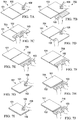
For example, FIGS. 13A-E illustrate a notebook feature with responsive action(s) produced using hinge sensor data 407. As shown in views 1300A-E, a user opens display 101 relative to display 102 and gradually changes the hinge angle (in hinge sensor data 407) as follows: view 1300A shows a hinge angle of 30° with booklet portion 1301R on first display 101 (portion 1301L on second display 102 is not shown), view 1300B shows a hinge angle of 70° with booklet portion 1302R on first display 101 (portion 1302L on second display 102 is not shown), view 1300C shows a hinge angle of 110° with booklet portion 1303L on second display 102 and portion 1303R on first display 101, view 1300D shows a hinge angle of 140° with booklet portion 1304L on second display 102 and portion 1304R on first display 101, and view 1300E shows a hinge angle of 180° with booklet portion 1305L on second display 102 and portion 1305R on first display 101.
As the hinge angle changes, displays 101/102 render a spread booklet view of an electronic document (e.g., with two or more pages). In the opening direction 1300A→1300E, IHS 100 may dynamically increase a size of (e.g., it may magnify or zoom in) the rendered booklet in coordination with the opening. For example, IHS 100 may progressively unfold a plurality of pages of the document in coordination with the opening.
Conversely, when IHS 100 detects a closing of first display 101 relative to second display 102 in the closing direction 1300E→ 1300A, IHS 100 may dynamically reduce a size of the rendered booklet view in coordination with the closing. For instance, IHS 100 may progressively fold a plurality of pages of the document in coordination with the closing.
If IHS 100 is executing a notetaking or document processing application, for example, when opening a booklet (in dual-screen mode) IHS 100 may present the last activity the user was engaged in (on any synchronized device) within its context. As IHS 100 is opened, the notetaking application expands and opens in synchronization with the opening of the physical hinge 104.
Now starting from the same initial condition, but in configuration 1400B, IHS 100 detects that a user has changed the hinge angle when display 101 is moved by amount 1402 (e.g., −20°), causing a page flipping or back-and-forth movement. In response to first display 101 moving by a greater distance than second display 102 (during the change in the angle of hinge 104), IHS 100 flips a page of the electronic document in a backward direction, such that second display 102 now renders page 2, and first display 102 renders page 1.
In some cases, IHS 100 may determine that first display 101 moves by approximately the same amount as second display 102 (as the hinge angle changes). In response, as shown in configuration 1500B, IHS 100 may render maximized application window 1504, covering all or most of the display surfaces of displays 101/102.
In some cases, in response to the detection of the press-and-hold event along with the opening or increase of the angle of hinge 104, IHS 100 may move content 1601 from second display 102 to first display 101. Additionally, or alternatively, IHS 100 may maximize content 1601 (e.g., an application window) on display 101.
In other cases, in response to the detection of the press-and-hold event along with the closing or decrease of the angle of hinge 104, IHS 100 may dismiss content 1601 from second display 102 (e.g., close or minimize an application window). Additionally, or alternatively, IHS 100 may change access settings or privileges associated with content 1601 (e.g., make the content private, password-protected, move to trash or delete it, etc.).
In various applications, a headtracking system may be added to IHS 100 to enable additional operating modes, such as, for example, a virtual extended display mode. FIG. 17 illustrates headtracking system 1700. In some implementations, headtracking system 1700 may include a visual image camera as headtracking sensor 1702, configured to determine the spatial position of the head of user 1701 (e.g., in X-Y-Z coordinates). Based upon the user's head position and/or based upon the current angle of hinge 104, IHS 100 may calculate perspective lines 1703L and/or 1703R, with respect to the display surface of second display 102. As the user's head 1701 moves in space and/or as the angle of hinge 104 changes, perspective lines 1703L and/or 1703R are updated to provide a continuous line with respect to the edges of display 101, from the visual or physical perspective of user 1701.
In some cases, headtracking system 1700 may also include a projector/camera assembly mounted or built into display 101, as sensor 1702, which may be configured to create a pattern of infrared or (near-infrared) light on eyes of the user 1701. The projector/camera assembly may be configured to take high-frame-rate images of the user's eyes and their reflection patterns. Then, IHS 100 may be configured to find specific details in the user's eyes that enable it to calculate the eye's position and gaze point or focus. As such, IHS 100 may be configured to identify a specific window or other area of a screen, and/or a graphical entity being visually inspected by user 1701 in real-time.
In some cases, IHS 100 the aforementioned perspective correction may be augmented by a parallax adjustment. Particularly, in each of displays 101/102, a touchscreen or digitizer may be overlaid onto an LCD. As part of the manufacturing process of displays 101/102, a location on the touchscreen or digitizer layer within a display (e.g., a “contact location” in touchscreen coordinates) may be perpendicularly mapped to a corresponding location on the LCD layer of that same display (a “display location” in display coordinates).
In normal use, however, if a user is not perfectly perpendicularly aligned with the intended contact and display locations, a “parallax effect” associated with the user's viewing angle may result in errors, such as, for example, accidental touch input selections. Hence, IHS 100 often undergoes a calibration process, sometimes managed by the IHS's OS or configuration utility, whereby a set of visual targets is presented to a user, and the user touches stylus 108 (or a tip of their finger) to a contact location where the user perceives each target to be displayed.
Data is collected for each target location, and then used to estimate offsets, in the x axis and in the y axis, between the actual contact location (e.g., the portion of the touchscreen or digitizer that is actually touched by the tip of stylus 108 or the user's finger), or the location that actually senses any hovering, and an intended contact location (e.g., the portion of digitizer that corresponds, perpendicularly, to the display location of a visual target). These offset values, also referred to as parallax values, correspond to the difference between a contact location on the touch surface perpendicular to a displayed object and a perceived location on the touch surface corresponding to the displayed object.
In some cases, parallax values may be normalized or otherwise used to estimate other offsets for other touch points or visual targets at different locations from those presented during the calibration process. After calibration is completed, parallax values may be used to correct touch events—actual touch or hovering—in a manner that compensates for parallax effects (e.g., by subtracting an x-y offset from each touch event).
During operation of IHS 100, the user may transition or manipulate displays 101 and 102 into different postures (e.g., laptop, tablet, etc.) using hinge 104 and/or orientations. To maintain high-accuracy of the touch input interface in different postures, in response to a change in hinge angle, IHS 100 may correct one or more touch input setting(s) or parameter(s) in first display 101 and/or second display 102, such as one or more parallax values, specifically for its current posture and/or orientation.
In some embodiments, parallax value(s) may be calculated, at least in part, based upon a current posture and/or orientation of IHS 100. Additionally, or alternatively, parallax value(s) derived during an original calibration procedure may be adjusted or corrected to account for the current posture and/or orientation of IHS 100.
Corrected or newly calculated parallax values may be used to offset rendered objects on the LCD, such that objects are within the line of sight of the user in the present posture and/or orientation (which again may be different from the posture and/or orientation used during calibration). Additionally, or alternatively, by remapping contact locations on the touchscreen or digitizer to display locations on the LCD using corrected parallax value(s), touch inputs provided via stylus 108 may be offset and/or shifted to their intended contact locations.
In some implementations, adjusted or corrected parallax values may be calculated for every contact location. In other embodiments, one or more adjusted or corrected parallax values calculated for one or more contact locations may be used to derive parallax values for one or more other contact locations, for example, by mathematical interpolation or extrapolation.
One or more corrected parallax values may be calculated, derived, and/or retrieved based on current posture, orientation, and/or hinge angle of IHS 100. A service may be configured to read context information from an OS and applications, identify the posture that IHS 100 is currently in (for example, based on an angle of hinge 104), and manage touch input operations, for example, by re-calculating and/or normalizing calibration tables and/or values for the current posture, orientation, and/or hinge angle.
In some cases, parallax values may be calculated that take the hinge angle into account. In other cases, parallax values derived or stored for configuration may be adjusted, corrected, re-calculated, normalized, or retrieved using the hinge angle and/or the position/orientation changes of displays 101/102.
In some cases, IHS 100 may be configured to determine whether angle of hinge 104 has changed. In response, IHS 100 may normalize or re-calculate the touch input calibration or parallax values for each contact point on displays 101/102 using the hinge angle change (e.g., relative to the hinge angle used during calibration). Additionally, or alternatively, IHS 100 may retrieve new touch input calibration or parallax values to be applied to displays 101/102, for a detected hinge angle, from the LUT or database.
In some implementations, in addition providing to perspective correction, IHS 100 may be configured to apply a horizontally fading gradient 1902 to trapezoidal area 1804 of second display 102, while leaving top area 1901 (nearest hinge 104) intact. As such, it appears to user 1701 that second display 102 is “bottomless,” and/or that the content rendered in display 101 virtually extends into second display 102 into infinity.
It should be understood that various operations described herein may be implemented in software executed by logic or processing circuitry, hardware, or a combination thereof. The order in which each operation of a given method is performed may be changed, and various operations may be added, reordered, combined, omitted, modified, etc. It is intended that the invention(s) described herein embrace all such modifications and changes and, accordingly, the above description should be regarded in an illustrative rather than a restrictive sense.
Although the invention(s) is/are described herein with reference to specific embodiments, various modifications and changes can be made without departing from the scope of the present invention(s), as set forth in the claims below. Accordingly, the specification and figures are to be regarded in an illustrative rather than a restrictive sense, and all such modifications are intended to be included within the scope of the present invention(s). Any benefits, advantages, or solutions to problems that are described herein with regard to specific embodiments are not intended to be construed as a critical, required, or essential feature or element of any or all the claims.
Unless stated otherwise, terms such as “first” and “second” are used to arbitrarily distinguish between the elements such terms describe. Thus, these terms are not necessarily intended to indicate temporal or other prioritization of such elements. The terms “coupled” or “operably coupled” are defined as connected, although not necessarily directly, and not necessarily mechanically. The terms “a” and “an” are defined as one or more unless stated otherwise. The terms “comprise” (and any form of comprise, such as “comprises” and “comprising”), “have” (and any form of have, such as “has” and “having”), “include” (and any form of include, such as “includes” and “including”) and “contain” (and any form of contain, such as “contains” and “containing”) are open-ended linking verbs. As a result, a system, device, or apparatus that “comprises,” “has,” “includes” or “contains” one or more elements possesses those one or more elements but is not limited to possessing only those one or more elements. Similarly, a method or process that “comprises,” “has,” “includes” or “contains” one or more operations possesses those one or more operations but is not limited to possessing only those one or more operations.
Claims (17)
1. An Information Handling System (IHS), comprising:
a processor; and
a memory coupled to the processor, the memory having program instructions stored thereon that, upon execution by the processor, cause the IHS to:
detect a change in an angle of a hinge coupling a first display to a second display;
detect a head position of a user operating the IHS in laptop posture; and
in response to the detections, provide a Graphical User Interface (GUI) feature, wherein providing the GUI feature comprises applying a perspective correction to content rendered on the second display based upon the head position, at least in part, by: (a) rendering content on a trapezoidal area of the second display that appears, to the user, to be at a straight angle with respect to a display surface of the first display, or (b) applying a parallax adjustment to the second display.
2. The IHS of claim 1 , wherein the detection indicates an opening of the first display relative to the second display, and wherein providing the GUI feature comprises dynamically increasing a size of a rendered image in coordination with the opening.
3. The IHS of claim 2 , wherein providing the GUI feature further comprises dynamically unfolding a plurality of pages of an electronic document rendered across the first and second displays in coordination with the opening.
4. The IHS of claim 1 , wherein the detection indicates a closing of the first display relative to the second display, and wherein providing the GUI feature comprises dynamically reducing a size of a rendered image of an application in coordination with the closing.
5. The IHS of claim 4 , and wherein providing the GUI feature further comprises dynamically folding a plurality of pages of an electronic document rendered across the first and second displays in coordination with the closing.
6. The IHS of claim 1 , wherein the program instructions, upon execution by the processor, further cause the IHS to determine that the second display moves by a greater distance than the first display during the change in the angle of the hinge, and wherein providing the GUI feature comprises flipping a page of an electronic document rendered across the first and second displays in a forward direction.
7. The IHS of claim 1 , wherein the program instructions, upon execution by the processor, further cause the IHS to determine that the first display moves by a greater distance than the second display during the change in the angle of the hinge, and wherein providing the GUI feature comprises flipping a page of an electronic document rendered across the first and second displays in a backward direction.
8. The IHS of claim 1 , wherein the program instructions, upon execution by the processor, further cause the IHS to determine that the first display moves approximately the same as the second display during the change in the angle of the hinge, and wherein providing the GUI feature comprises maximizing an application window across the first and second displays.
9. The IHS of claim 1 , wherein the program instructions, upon execution by the processor, further cause the IHS to detect a touch event on the second display during the change in the angle of the hinge, and wherein providing the GUI feature comprises moving content from the second display to the first display.
10. The IHS of claim 1 , wherein the program instructions, upon execution by the processor, further cause the IHS to apply a fading gradient to a portion of the trapezoidal area farthest from the hinge.
11. The IHS of claim 1 , wherein the program instructions, upon execution by the processor, further cause the IHS to detect a gaze point of the user, and to calculate the parallax adjustment based, at least in part, upon the gaze point.
12. A method, comprising:
detecting a change in an angle of a hinge coupling a first display to a second display of an Information Handling System (IHS);
detecting a head position of a user operating the IHS in laptop posture; and
in response to the detections, providing a Graphical User Interface (GUI) feature, wherein providing the GUI feature comprises applying a perspective correction to content rendered on the second display based upon the head position, at least in part, by: (a) rendering content on a trapezoidal area of the second display that appears, to the user, to be at a straight angle with respect to a display surface of the first display, or (b) applying a parallax adjustment to the second display.
13. The method of claim 12 , wherein the change indicates opening or closing of the first display relative to the second display, and wherein providing the GUI feature comprises dynamically unfolding or folding a plurality of pages of an electronic document rendered across the first and second displays in synchronization with the opening or closing, respectively.
14. The method 12, further comprising determining that the second display moves by a greater or lesser distance than the first display during the change in the angle of the hinge, and wherein providing the GUI feature comprises flipping a page of an electronic document in a forward or backward direction, respectively.
15. A hardware memory device having program instructions stored thereon that, upon execution by a processor of an Information Handling System (IHS), cause the IHS to:
detect an angle of a hinge coupling a first display to a second display when the IHS is in a laptop posture;
detect a head position of the user; and
in response to the detections, provide a Graphical User Interface (GUI) feature, wherein providing the GUI feature comprises applying a perspective correction to content rendered on the second display based upon the head position, at least in part, by: (a) rendering content on a trapezoidal area of the second display that appears, to the user, to be at a straight angle with respect to a display surface of the first display, or (b) applying a parallax adjustment to the second display.
16. The hardware memory device of claim 15 , wherein applying the perspective correction further comprises rendering content on a trapezoidal area of the second display that appears, to the user, to be at a straight angle with respect to a display surface of the first display, and applying a fading gradient to a portion of the trapezoidal area farthest from the hinge.
17. The hardware memory device of claim 16 , wherein the program instructions, upon execution by the processor, further cause the IHS to apply a parallax adjustment to touch inputs received via the second display.
Priority Applications (1)
| Application Number | Priority Date | Filing Date | Title |
|---|---|---|---|
| US16/374,609 US10747264B1 (en) | 2019-04-03 | 2019-04-03 | Hinge actions and virtual extended display modes for multi-form factor information handling system (IHS) |
Applications Claiming Priority (1)
| Application Number | Priority Date | Filing Date | Title |
|---|---|---|---|
| US16/374,609 US10747264B1 (en) | 2019-04-03 | 2019-04-03 | Hinge actions and virtual extended display modes for multi-form factor information handling system (IHS) |
Publications (1)
| Publication Number | Publication Date |
|---|---|
| US10747264B1 true US10747264B1 (en) | 2020-08-18 |
Family
ID=72046047
Family Applications (1)
| Application Number | Title | Priority Date | Filing Date |
|---|---|---|---|
| US16/374,609 Active US10747264B1 (en) | 2019-04-03 | 2019-04-03 | Hinge actions and virtual extended display modes for multi-form factor information handling system (IHS) |
Country Status (1)
| Country | Link |
|---|---|
| US (1) | US10747264B1 (en) |
Cited By (17)
| Publication number | Priority date | Publication date | Assignee | Title |
|---|---|---|---|---|
| US10929016B1 (en) | 2020-01-28 | 2021-02-23 | Dell Products L.P. | Touch calibration at keyboard location |
| US10983567B1 (en) | 2020-01-28 | 2021-04-20 | Dell Products L.P. | Keyboard magnetic guard rails |
| US10983570B1 (en) | 2020-01-28 | 2021-04-20 | Dell Products L.P. | Keyboard charging from an information handling system |
| US10989978B1 (en) | 2020-01-28 | 2021-04-27 | Dell Products L.P. | Selectively transparent and opaque keyboard bottom |
| US10990204B1 (en) * | 2020-01-28 | 2021-04-27 | Dell Products L.P. | Virtual touchpad at keyboard location |
| US20210294926A1 (en) * | 2020-03-18 | 2021-09-23 | Jvckenwood Corporation | User interface manipulation in a foldable screen device |
| USD933059S1 (en) * | 2018-09-28 | 2021-10-12 | Intel Corporation | Convertible electronic device |
| USD933060S1 (en) * | 2018-09-26 | 2021-10-12 | Intel Corporation | Convertible electronic device |
| US11275404B2 (en) * | 2019-12-10 | 2022-03-15 | Samsung Display Co., Ltd. | Foldable display device and driving method thereof |
| EP4020137A1 (en) * | 2020-12-24 | 2022-06-29 | INTEL Corporation | Dynamically reconfiguring a display in a multi-display device |
| CN115131925A (en) * | 2021-03-25 | 2022-09-30 | 东芝泰格有限公司 | Information processing device and storage medium |
| US20220408142A1 (en) * | 2021-06-17 | 2022-12-22 | Microsoft Technology Licensing, Llc | Multiple Device Content Management |
| US20230045610A1 (en) * | 2021-08-03 | 2023-02-09 | Dell Products, L.P. | Eye contact correction in a communication or collaboration session using a platform framework |
| US11586296B2 (en) | 2020-01-28 | 2023-02-21 | Dell Products L.P. | Dynamic keyboard support at support and display surfaces |
| US20240220180A1 (en) * | 2022-12-31 | 2024-07-04 | Lenovo (Beijing) Limited | Electronic device |
| USD1035644S1 (en) * | 2019-10-31 | 2024-07-16 | Samsung Electronics Co., Ltd. | Notebook computer |
| US20250085805A1 (en) * | 2022-04-15 | 2025-03-13 | Chengdu Boe Optoelectronics Technology Co., Ltd. | Touch interaction method and device |
Citations (33)
| Publication number | Priority date | Publication date | Assignee | Title |
|---|---|---|---|---|
| US5739810A (en) | 1995-08-21 | 1998-04-14 | Compaq Computer Corporation | Computer input device and methods of manufacturing same |
| US5847698A (en) | 1996-09-17 | 1998-12-08 | Dataventures, Inc. | Electronic book device |
| US6510048B2 (en) | 2001-01-04 | 2003-01-21 | Apple Computer, Inc. | Keyboard arrangement |
| US20040001049A1 (en) | 2002-06-27 | 2004-01-01 | Oakley Nicholas W. | Multiple mode display apparatus |
| US6700773B1 (en) | 2000-11-03 | 2004-03-02 | Revolutionary Learning Systems, Inc. | Method and apparatus for implementing a configurable personal computing device |
| US6922333B2 (en) | 2003-03-26 | 2005-07-26 | Benq Corporation | Detachable keyboard structure |
| US7061472B1 (en) | 1999-05-28 | 2006-06-13 | Jopet Gmbh & Co. Kg | Presentation device |
| US20060183505A1 (en) | 2005-02-15 | 2006-08-17 | Willrich Scott Consulting Group, Inc. | Digital mobile planner |
| US7551428B2 (en) | 2006-08-31 | 2009-06-23 | Hewlett-Packard Development Company, L.P. | Automatic power control |
| US20090244016A1 (en) | 2008-03-31 | 2009-10-01 | Dell Products, Lp | Information handling system display device and methods thereof |
| US7663602B2 (en) | 2004-04-14 | 2010-02-16 | Microsoft Corporation | Removable wireless keyboard with base |
| US20100238620A1 (en) | 2009-03-23 | 2010-09-23 | Ram David Adva Fish | Magnetic Notebooks and Tablets |
| US20100321275A1 (en) | 2009-06-18 | 2010-12-23 | Microsoft Corporation | Multiple display computing device with position-based operating modes |
| US7991442B2 (en) | 2005-01-03 | 2011-08-02 | Lg Electronics Inc. | Multiple opening and closing type mobile communication terminal |
| US7990702B2 (en) | 2009-07-31 | 2011-08-02 | Hewlett-Packard Development Company, L.P. | Configurable input in a portable computing device |
| US8310823B2 (en) | 2007-04-25 | 2012-11-13 | Henning Stoltz | Portable digital computer |
| US8331098B2 (en) | 2010-06-18 | 2012-12-11 | Research In Motion Limited | Mobile device with a flip-around keyboard |
| US8803816B2 (en) | 2008-09-08 | 2014-08-12 | Qualcomm Incorporated | Multi-fold mobile device with configurable interface |
| US8988876B2 (en) | 2011-01-31 | 2015-03-24 | Apple Inc. | Magnetic attachment unit |
| US20150103014A1 (en) | 2012-10-10 | 2015-04-16 | Samsung Electronics Co., Ltd. | Multi display apparatus, input pen, multi display apparatus controlling method, and multi display system |
| US20150227225A1 (en) * | 2014-02-10 | 2015-08-13 | Samsung Electronics Co., Ltd. | User terminal device and displaying method thereof |
| US9524030B2 (en) * | 2013-04-26 | 2016-12-20 | Immersion Corporation | Haptic feedback for interactions with foldable-bendable displays |
| US20170069299A1 (en) | 2015-09-03 | 2017-03-09 | Samsung Electronics Co., Ltd. | Electronic device including hidden display and method for displaying information thereof |
| US9684342B2 (en) | 2009-01-09 | 2017-06-20 | Samsung Electronics Co., Ltd. | Mobile terminal having foldable display and operation method for the same |
| US9740237B2 (en) | 2012-03-30 | 2017-08-22 | Hewlett-Packard Development Company, L.P. | Assembly for removable display and input devices |
| US20170255320A1 (en) | 2016-03-07 | 2017-09-07 | Intel Corporation | Virtual input device using second touch-enabled display |
| US20170344120A1 (en) | 2016-05-24 | 2017-11-30 | Intel Corporattion | User-input interaction for movable-panel mobile device |
| US9874908B2 (en) | 2014-12-24 | 2018-01-23 | Samsung Electronics Co., Ltd. | Electronic devices |
| US20180088632A1 (en) | 2016-09-23 | 2018-03-29 | Apple Inc. | Dynamic Function Row Customization |
| US20180121012A1 (en) | 2016-11-01 | 2018-05-03 | Google Inc. | Controlling input and output on multiple sides of a computing device |
| US20180129391A1 (en) | 2016-11-10 | 2018-05-10 | Dell Products L. P. | Auto-scrolling input in a dual-display computing device |
| US20180188774A1 (en) | 2016-12-31 | 2018-07-05 | Lenovo (Singapore) Pte. Ltd. | Multiple display device |
| US20180232010A1 (en) | 2011-05-03 | 2018-08-16 | DISH Technologies L.L.C. | Communications Device with Extendable Screen |
-
2019
- 2019-04-03 US US16/374,609 patent/US10747264B1/en active Active
Patent Citations (33)
| Publication number | Priority date | Publication date | Assignee | Title |
|---|---|---|---|---|
| US5739810A (en) | 1995-08-21 | 1998-04-14 | Compaq Computer Corporation | Computer input device and methods of manufacturing same |
| US5847698A (en) | 1996-09-17 | 1998-12-08 | Dataventures, Inc. | Electronic book device |
| US7061472B1 (en) | 1999-05-28 | 2006-06-13 | Jopet Gmbh & Co. Kg | Presentation device |
| US6700773B1 (en) | 2000-11-03 | 2004-03-02 | Revolutionary Learning Systems, Inc. | Method and apparatus for implementing a configurable personal computing device |
| US6510048B2 (en) | 2001-01-04 | 2003-01-21 | Apple Computer, Inc. | Keyboard arrangement |
| US20040001049A1 (en) | 2002-06-27 | 2004-01-01 | Oakley Nicholas W. | Multiple mode display apparatus |
| US6922333B2 (en) | 2003-03-26 | 2005-07-26 | Benq Corporation | Detachable keyboard structure |
| US7663602B2 (en) | 2004-04-14 | 2010-02-16 | Microsoft Corporation | Removable wireless keyboard with base |
| US7991442B2 (en) | 2005-01-03 | 2011-08-02 | Lg Electronics Inc. | Multiple opening and closing type mobile communication terminal |
| US20060183505A1 (en) | 2005-02-15 | 2006-08-17 | Willrich Scott Consulting Group, Inc. | Digital mobile planner |
| US7551428B2 (en) | 2006-08-31 | 2009-06-23 | Hewlett-Packard Development Company, L.P. | Automatic power control |
| US8310823B2 (en) | 2007-04-25 | 2012-11-13 | Henning Stoltz | Portable digital computer |
| US20090244016A1 (en) | 2008-03-31 | 2009-10-01 | Dell Products, Lp | Information handling system display device and methods thereof |
| US8803816B2 (en) | 2008-09-08 | 2014-08-12 | Qualcomm Incorporated | Multi-fold mobile device with configurable interface |
| US9684342B2 (en) | 2009-01-09 | 2017-06-20 | Samsung Electronics Co., Ltd. | Mobile terminal having foldable display and operation method for the same |
| US20100238620A1 (en) | 2009-03-23 | 2010-09-23 | Ram David Adva Fish | Magnetic Notebooks and Tablets |
| US20100321275A1 (en) | 2009-06-18 | 2010-12-23 | Microsoft Corporation | Multiple display computing device with position-based operating modes |
| US7990702B2 (en) | 2009-07-31 | 2011-08-02 | Hewlett-Packard Development Company, L.P. | Configurable input in a portable computing device |
| US8331098B2 (en) | 2010-06-18 | 2012-12-11 | Research In Motion Limited | Mobile device with a flip-around keyboard |
| US8988876B2 (en) | 2011-01-31 | 2015-03-24 | Apple Inc. | Magnetic attachment unit |
| US20180232010A1 (en) | 2011-05-03 | 2018-08-16 | DISH Technologies L.L.C. | Communications Device with Extendable Screen |
| US9740237B2 (en) | 2012-03-30 | 2017-08-22 | Hewlett-Packard Development Company, L.P. | Assembly for removable display and input devices |
| US20150103014A1 (en) | 2012-10-10 | 2015-04-16 | Samsung Electronics Co., Ltd. | Multi display apparatus, input pen, multi display apparatus controlling method, and multi display system |
| US9524030B2 (en) * | 2013-04-26 | 2016-12-20 | Immersion Corporation | Haptic feedback for interactions with foldable-bendable displays |
| US20150227225A1 (en) * | 2014-02-10 | 2015-08-13 | Samsung Electronics Co., Ltd. | User terminal device and displaying method thereof |
| US9874908B2 (en) | 2014-12-24 | 2018-01-23 | Samsung Electronics Co., Ltd. | Electronic devices |
| US20170069299A1 (en) | 2015-09-03 | 2017-03-09 | Samsung Electronics Co., Ltd. | Electronic device including hidden display and method for displaying information thereof |
| US20170255320A1 (en) | 2016-03-07 | 2017-09-07 | Intel Corporation | Virtual input device using second touch-enabled display |
| US20170344120A1 (en) | 2016-05-24 | 2017-11-30 | Intel Corporattion | User-input interaction for movable-panel mobile device |
| US20180088632A1 (en) | 2016-09-23 | 2018-03-29 | Apple Inc. | Dynamic Function Row Customization |
| US20180121012A1 (en) | 2016-11-01 | 2018-05-03 | Google Inc. | Controlling input and output on multiple sides of a computing device |
| US20180129391A1 (en) | 2016-11-10 | 2018-05-10 | Dell Products L. P. | Auto-scrolling input in a dual-display computing device |
| US20180188774A1 (en) | 2016-12-31 | 2018-07-05 | Lenovo (Singapore) Pte. Ltd. | Multiple display device |
Non-Patent Citations (16)
| Title |
|---|
| Binary Fortress Software, "Precise Monitor Controls," 2017-2018, 2 pages, retrieved Oct. 15, 2018, available at https://www.displayfusion.com/Features/MonitorConfig/. |
| Microsoft, "Application User Model IDs (AppUserModelIDs)," published May 30, 2018, 8 pages, retrieved Oct. 15, 2018, available at https://docs.microsoft.com/en-us/windows/desktop/shell/appids. |
| Microsoft, "ChangeDisplaySettingsExA function," 7 pages, retrieved Oct. 15, 2018, available at https://msdn.microsoft.com/en-us/library/dd183413(v=vs.85).aspx VS. https://docs.microsoft.com/en-us/windows/desktop/api/winuser/nf-winuser-changedisplaysettingsexa. |
| Microsoft, "DoDragDrop function," 4 pages, retrieved Oct. 11, 2018, available at https://msdn.microsoft.com/en-us/library/windows/desktop/ms678486(v=vs.85).aspx. |
| Microsoft, "Flow Do I Detect a Window Open Event," 11 pages, retrieved Oct. 15, 2018, available at https://social.msdn.microsoft.com/Forums/vstudio/en-US/1953f400-6f1c-49e0-a63e-d724bccc7676/how-do-i-detect-a-window-open-event?forum=csharpgeneral. |
| Microsoft, "GetWindowRect function," 3 pages, retrieved Oct. 11, 2018, available at https://msdn.microsoft.com/en-us/library/windows/desktop/ms633519(v=vs.85).aspx. |
| Microsoft, "How Do I Maximize/Minimize Applications Programmatically in C#?," 2 pages, retrieved Oct. 15, 2018, available at https://social.msdn.microsoft.com/Forums/vstudio/en-US/9bde4870-1599-4958-9ab4-902fa98ba53a/how-do-i-maximizeminimize-applications-programmatically-in-c?forum=csharpgeneral. |
| Microsoft, "InkSystemGesture Enumeration," 3 pages, retrieved Oct. 11, 2018, available at https://msdn.microsoft.com/en-us/library/windows/desktop/ms695579(v=vs.85).aspx. |
| Microsoft, "Mouse Events in Windows Forms," published Mar. 29, 2017, 6 pages, retrieved Oct. 15, 2018, available at https://docs.microsoft.com/en-us/dotnet/framework/winforms/mouse-events-in-windows-forms. |
| Microsoft, "PointerRoutedEventArgs Class," 9 pages, retrieved Oct. 11, 2018, available at https://docs.microsoft.com/en-us/uwp/api/Windows.UI.Xaml.Input.PointerRoutedEventArgs#Windows_UI_Xaml_Input_PointerRoutedEventArgs_GetCurrentPoint_Windows_UI_Xaml_UIElement_. |
| Microsoft, "SendKeys.Send(String) Method," 6 pages, retrieved Oct. 11, 2018, available at https://msdn.microsoft.com/en-us/library/system.windows.forms.sendkeys.send(v=vs.110).aspx. |
| Microsoft, "SetWindowPos function," 7 pages, retrieved Oct. 11, 2018, available at https://msdn.microsoft.com/en-us/library/windows/desktop/ms633545(v=vs.85).aspx. |
| Microsoft, "System Events and Mouse Messages," published May 30, 2018, 4 pages, retrieved Oct. 11, 2018, available at https://msdn.microsoft.com/en-us/library/windows/desktop/ms703320(v=vs.85).aspx. |
| Microsoft, "Time Functions," published May 30, 2018, 5 pages, retrieved Oct. 11, 2018, available at https://msdn.microsoft.com/en-us/library/windows/desktop/ms725473(v=vs.85).aspx. |
| Microsoft, "WinMain Entry Point," 7 pages, retrieved Oct. 15, 2018, available at https://msdn.microsoft.com/en-us/library/ms633559(vs.85).aspx. |
| Stack Overflow, "How Can I Split a Window in Two in Windows API," 6 pages, retrieved Oct. 15, 2018, available at https://stackoverflow.com/questions/10467112/how-can-i-split-a-window-in-two-in-windows-api. |
Cited By (28)
| Publication number | Priority date | Publication date | Assignee | Title |
|---|---|---|---|---|
| USD1075744S1 (en) | 2018-09-26 | 2025-05-20 | Intel Corporation | Convertible electronic device |
| USD933060S1 (en) * | 2018-09-26 | 2021-10-12 | Intel Corporation | Convertible electronic device |
| USD933059S1 (en) * | 2018-09-28 | 2021-10-12 | Intel Corporation | Convertible electronic device |
| USD1035644S1 (en) * | 2019-10-31 | 2024-07-16 | Samsung Electronics Co., Ltd. | Notebook computer |
| US11836003B2 (en) | 2019-12-10 | 2023-12-05 | Samsung Display Co., Ltd. | Foldable display device including a first and second digitizer and driving method thereof |
| US11275404B2 (en) * | 2019-12-10 | 2022-03-15 | Samsung Display Co., Ltd. | Foldable display device and driving method thereof |
| US11586296B2 (en) | 2020-01-28 | 2023-02-21 | Dell Products L.P. | Dynamic keyboard support at support and display surfaces |
| US10983570B1 (en) | 2020-01-28 | 2021-04-20 | Dell Products L.P. | Keyboard charging from an information handling system |
| US10990204B1 (en) * | 2020-01-28 | 2021-04-27 | Dell Products L.P. | Virtual touchpad at keyboard location |
| US10983567B1 (en) | 2020-01-28 | 2021-04-20 | Dell Products L.P. | Keyboard magnetic guard rails |
| US10929016B1 (en) | 2020-01-28 | 2021-02-23 | Dell Products L.P. | Touch calibration at keyboard location |
| US10989978B1 (en) | 2020-01-28 | 2021-04-27 | Dell Products L.P. | Selectively transparent and opaque keyboard bottom |
| US12518065B2 (en) | 2020-03-18 | 2026-01-06 | Jvckenwood Corporation | User interface manipulation in a flexible screen device |
| US11574081B2 (en) * | 2020-03-18 | 2023-02-07 | Jvckenwood Corporation | User interface manipulation in a foldable screen device |
| US12056265B2 (en) | 2020-03-18 | 2024-08-06 | Jvckenwood Corporation | User interface manipulation in a flexible screen device |
| US20210294926A1 (en) * | 2020-03-18 | 2021-09-23 | Jvckenwood Corporation | User interface manipulation in a foldable screen device |
| EP4020137A1 (en) * | 2020-12-24 | 2022-06-29 | INTEL Corporation | Dynamically reconfiguring a display in a multi-display device |
| US12299190B2 (en) | 2020-12-24 | 2025-05-13 | Intel Corporation | Dynamically reconfiguring a display in a multi-display device |
| CN115131925B (en) * | 2021-03-25 | 2024-03-01 | 东芝泰格有限公司 | Information processing apparatus and storage medium |
| CN115131925A (en) * | 2021-03-25 | 2022-09-30 | 东芝泰格有限公司 | Information processing device and storage medium |
| US11678006B2 (en) * | 2021-06-17 | 2023-06-13 | Microsoft Technology Licensing, Llc | Multiple device content management |
| US20220408142A1 (en) * | 2021-06-17 | 2022-12-22 | Microsoft Technology Licensing, Llc | Multiple Device Content Management |
| US12132768B2 (en) * | 2021-08-03 | 2024-10-29 | Dell Products, L.P. | Eye contact correction in a communication or collaboration session using a platform framework |
| US20230045610A1 (en) * | 2021-08-03 | 2023-02-09 | Dell Products, L.P. | Eye contact correction in a communication or collaboration session using a platform framework |
| US20250085805A1 (en) * | 2022-04-15 | 2025-03-13 | Chengdu Boe Optoelectronics Technology Co., Ltd. | Touch interaction method and device |
| US12455653B2 (en) * | 2022-04-15 | 2025-10-28 | Chengdu Boe Optoelectronics Technology Co., Ltd. | Touch interaction method and device |
| US20240220180A1 (en) * | 2022-12-31 | 2024-07-04 | Lenovo (Beijing) Limited | Electronic device |
| US12393387B2 (en) * | 2022-12-31 | 2025-08-19 | Lenovo (Beijing) Limited | Electronic device |
Similar Documents
| Publication | Publication Date | Title |
|---|---|---|
| US10747264B1 (en) | Hinge actions and virtual extended display modes for multi-form factor information handling system (IHS) | |
| US11836012B2 (en) | Foldable case for a multi-form factor information handling system (IHS) with a detachable keyboard | |
| US10996719B2 (en) | Multi-form factor information handling system (IHS) with layered, foldable, bendable, flippable, rotatable, removable, displaceable, and/or slideable component(s) | |
| US10592051B1 (en) | Touch input correction for multi-form factor information handling system (IHS) | |
| EP3830668B1 (en) | Multi-form factor information handling system (ihs) with removable keyboard | |
| US11157047B2 (en) | Multi-form factor information handling system (IHS) with touch continuity across displays | |
| US10503207B1 (en) | Dock for a multi-form factor information handling system (IHS) | |
| US10852769B2 (en) | Display management for multi-form factor information handling system (IHS) | |
| US11157094B2 (en) | Touch input switching for multi-form factor information handling system (IHS) | |
| US11099605B2 (en) | Charger stand for multi-form factor information handling systems (IHSs) | |
| US10712832B2 (en) | On-screen keyboard detection for multi-form factor information handling systems (IHSs) | |
| US11150703B2 (en) | Systems and methods for detecting the position of a keyboard with respect to a display of a multi-form factor information handling system (IHS) | |
| US10928855B2 (en) | Dock with actively controlled heatsink for a multi-form factor Information Handling System (IHS) |
Legal Events
| Date | Code | Title | Description |
|---|---|---|---|
| FEPP | Fee payment procedure |
Free format text: ENTITY STATUS SET TO UNDISCOUNTED (ORIGINAL EVENT CODE: BIG.); ENTITY STATUS OF PATENT OWNER: LARGE ENTITY |
|
| STCF | Information on status: patent grant |
Free format text: PATENTED CASE |
|
| MAFP | Maintenance fee payment |
Free format text: PAYMENT OF MAINTENANCE FEE, 4TH YEAR, LARGE ENTITY (ORIGINAL EVENT CODE: M1551); ENTITY STATUS OF PATENT OWNER: LARGE ENTITY Year of fee payment: 4 |