KR20170025400A - Display apparatus and control method thereof - Google Patents
Display apparatus and control method thereof Download PDFInfo
- Publication number
- KR20170025400A KR20170025400A KR1020150121795A KR20150121795A KR20170025400A KR 20170025400 A KR20170025400 A KR 20170025400A KR 1020150121795 A KR1020150121795 A KR 1020150121795A KR 20150121795 A KR20150121795 A KR 20150121795A KR 20170025400 A KR20170025400 A KR 20170025400A
- Authority
- KR
- South Korea
- Prior art keywords
- content
- display device
- image
- channel
- user
- Prior art date
- Legal status (The legal status is an assumption and is not a legal conclusion. Google has not performed a legal analysis and makes no representation as to the accuracy of the status listed.)
- Withdrawn
Links
Images








Classifications
-
- H—ELECTRICITY
- H04—ELECTRIC COMMUNICATION TECHNIQUE
- H04N—PICTORIAL COMMUNICATION, e.g. TELEVISION
- H04N5/00—Details of television systems
- H04N5/222—Studio circuitry; Studio devices; Studio equipment
- H04N5/262—Studio circuits, e.g. for mixing, switching-over, change of character of image, other special effects ; Cameras specially adapted for the electronic generation of special effects
- H04N5/268—Signal distribution or switching
-
- H—ELECTRICITY
- H04—ELECTRIC COMMUNICATION TECHNIQUE
- H04N—PICTORIAL COMMUNICATION, e.g. TELEVISION
- H04N5/00—Details of television systems
- H04N5/44—Receiver circuitry for the reception of television signals according to analogue transmission standards
- H04N5/445—Receiver circuitry for the reception of television signals according to analogue transmission standards for displaying additional information
-
- H—ELECTRICITY
- H04—ELECTRIC COMMUNICATION TECHNIQUE
- H04N—PICTORIAL COMMUNICATION, e.g. TELEVISION
- H04N21/00—Selective content distribution, e.g. interactive television or video on demand [VOD]
- H04N21/40—Client devices specifically adapted for the reception of or interaction with content, e.g. set-top-box [STB]; Operations thereof
- H04N21/41—Structure of client; Structure of client peripherals
- H04N21/4104—Peripherals receiving signals from specially adapted client devices
- H04N21/4126—The peripheral being portable, e.g. PDAs or mobile phones
- H04N21/41265—The peripheral being portable, e.g. PDAs or mobile phones having a remote control device for bidirectional communication between the remote control device and client device
-
- H—ELECTRICITY
- H04—ELECTRIC COMMUNICATION TECHNIQUE
- H04N—PICTORIAL COMMUNICATION, e.g. TELEVISION
- H04N21/00—Selective content distribution, e.g. interactive television or video on demand [VOD]
- H04N21/40—Client devices specifically adapted for the reception of or interaction with content, e.g. set-top-box [STB]; Operations thereof
- H04N21/41—Structure of client; Structure of client peripherals
- H04N21/422—Input-only peripherals, i.e. input devices connected to specially adapted client devices, e.g. global positioning system [GPS]
- H04N21/42204—User interfaces specially adapted for controlling a client device through a remote control device; Remote control devices therefor
-
- H—ELECTRICITY
- H04—ELECTRIC COMMUNICATION TECHNIQUE
- H04N—PICTORIAL COMMUNICATION, e.g. TELEVISION
- H04N21/00—Selective content distribution, e.g. interactive television or video on demand [VOD]
- H04N21/40—Client devices specifically adapted for the reception of or interaction with content, e.g. set-top-box [STB]; Operations thereof
- H04N21/41—Structure of client; Structure of client peripherals
- H04N21/422—Input-only peripherals, i.e. input devices connected to specially adapted client devices, e.g. global positioning system [GPS]
- H04N21/42204—User interfaces specially adapted for controlling a client device through a remote control device; Remote control devices therefor
- H04N21/42206—User interfaces specially adapted for controlling a client device through a remote control device; Remote control devices therefor characterized by hardware details
- H04N21/4221—Dedicated function buttons, e.g. for the control of an EPG, subtitles, aspect ratio, picture-in-picture or teletext
-
- H—ELECTRICITY
- H04—ELECTRIC COMMUNICATION TECHNIQUE
- H04N—PICTORIAL COMMUNICATION, e.g. TELEVISION
- H04N21/00—Selective content distribution, e.g. interactive television or video on demand [VOD]
- H04N21/40—Client devices specifically adapted for the reception of or interaction with content, e.g. set-top-box [STB]; Operations thereof
- H04N21/43—Processing of content or additional data, e.g. demultiplexing additional data from a digital video stream; Elementary client operations, e.g. monitoring of home network or synchronising decoder's clock; Client middleware
- H04N21/438—Interfacing the downstream path of the transmission network originating from a server, e.g. retrieving encoded video stream packets from an IP network
- H04N21/4383—Accessing a communication channel
- H04N21/4384—Accessing a communication channel involving operations to reduce the access time, e.g. fast-tuning for reducing channel switching latency
-
- H—ELECTRICITY
- H04—ELECTRIC COMMUNICATION TECHNIQUE
- H04N—PICTORIAL COMMUNICATION, e.g. TELEVISION
- H04N21/00—Selective content distribution, e.g. interactive television or video on demand [VOD]
- H04N21/40—Client devices specifically adapted for the reception of or interaction with content, e.g. set-top-box [STB]; Operations thereof
- H04N21/45—Management operations performed by the client for facilitating the reception of or the interaction with the content or administrating data related to the end-user or to the client device itself, e.g. learning user preferences for recommending movies, resolving scheduling conflicts
- H04N21/4508—Management of client data or end-user data
- H04N21/4532—Management of client data or end-user data involving end-user characteristics, e.g. viewer profile, preferences
-
- H—ELECTRICITY
- H04—ELECTRIC COMMUNICATION TECHNIQUE
- H04N—PICTORIAL COMMUNICATION, e.g. TELEVISION
- H04N21/00—Selective content distribution, e.g. interactive television or video on demand [VOD]
- H04N21/40—Client devices specifically adapted for the reception of or interaction with content, e.g. set-top-box [STB]; Operations thereof
- H04N21/47—End-user applications
-
- H04N5/44582—
-
- H—ELECTRICITY
- H04—ELECTRIC COMMUNICATION TECHNIQUE
- H04N—PICTORIAL COMMUNICATION, e.g. TELEVISION
- H04N5/00—Details of television systems
- H04N5/44—Receiver circuitry for the reception of television signals according to analogue transmission standards
- H04N5/445—Receiver circuitry for the reception of television signals according to analogue transmission standards for displaying additional information
- H04N5/45—Picture in picture, e.g. displaying simultaneously another television channel in a region of the screen
-
- H—ELECTRICITY
- H04—ELECTRIC COMMUNICATION TECHNIQUE
- H04N—PICTORIAL COMMUNICATION, e.g. TELEVISION
- H04N21/00—Selective content distribution, e.g. interactive television or video on demand [VOD]
- H04N21/40—Client devices specifically adapted for the reception of or interaction with content, e.g. set-top-box [STB]; Operations thereof
- H04N21/47—End-user applications
- H04N21/482—End-user interface for program selection
Landscapes
- Engineering & Computer Science (AREA)
- Multimedia (AREA)
- Signal Processing (AREA)
- Human Computer Interaction (AREA)
- Databases & Information Systems (AREA)
- Controls And Circuits For Display Device (AREA)
- Two-Way Televisions, Distribution Of Moving Picture Or The Like (AREA)
- User Interface Of Digital Computer (AREA)
Abstract
본 발명의 실시예에 따른 디스플레이장치는, 영상신호를 수신하는 통신부와; 수신된 영상신호에 기초하여 영상을 표시할 수 있는 디스플레이부와; 사용자의 지시가 입력되는 사용자입력부와; 디스플레이부에 제1컨텐츠영상을 표시하는 중에 사용자입력부로부터의 컨텐츠 전환 명령이 입력되면, 컨텐츠 전환 명령에 따라서 전환된 컨텐츠의 영상을 디스플레이부에 표시되게 하며 컨텐츠 전환 UI가 영상 위에 표시되게 처리하는 적어도 하나의 프로세서를 포함하는 것을 특징으로 한다.A display device according to an embodiment of the present invention includes a communication unit for receiving a video signal; A display unit capable of displaying an image based on the received video signal; A user input unit to which an instruction of a user is input; When a content switching command from a user input unit is inputted while displaying the first content image on the display unit, the image of the content switched according to the content switching command is displayed on the display unit and the content switching UI is displayed on the image And a single processor.
Description
본 발명은 다양한 입력 소스로부터 제공되는 컨텐츠를 처리하여 컨텐츠 영상을 표시하는 디스플레이장치 및 그 제어방법에 관한 것으로서, 상세하게는 리모트 컨트롤러와 같은 사용자 입력 인터페이스를 통해 입력 소스 또는 채널 사이를 탐색함으로써 현재 표시되는 컨텐츠를 타 컨텐츠로 전환함에 있어서, 컨텐츠의 전환을 위한 사용자 입력 환경을 개선한 구조의 디스플레이장치 및 그 제어방법에 관한 것이다.The present invention relates to a display device for displaying content images by processing content provided from various input sources and a control method thereof, and more particularly, to a display device for searching for an input source or channels through a user input interface such as a remote controller, To a display device having a structure for improving a user input environment for switching contents and a control method thereof.
디스플레이장치는 디스플레이 패널을 구비하여 방송신호 또는 다양한 포맷의 영상신호/영상데이터를 표시할 수 있는 장치로서, TV 또는 모니터 등으로 구현된다. 디스플레이 패널은 입력되는 영상신호를 유효 영상표시면 상에 영상으로 표시하는 구성인 바, 그 특성에 따라서 액정 패널, 플라즈마 패널 등과 같은 다양한 구성 형식으로 구현되어 각종 디스플레이장치에 적용되고 있다.The display device includes a display panel and is capable of displaying a broadcast signal or image signal / image data in various formats, and is implemented as a TV or a monitor. The display panel is configured to display an input video signal on an effective image display surface as an image, and is implemented in various display formats such as a liquid crystal panel and a plasma panel according to the characteristics thereof, and is applied to various display devices.
디스플레이장치가 구비하는 디스플레이 패널은 영상을 표시하기 위한 광이 어떤 방식으로 생성되는가에 따라서, 수광 패널 구조 및 자발광 패널 구조로 분류할 수 있다. 수광 패널 구조는 디스플레이 패널이 자체적으로 발광하지 않는 비발광 구조이므로, 광을 생성하여 디스플레이 패널에 공급하는 별도의 백라이트(backlight)가 해당 디스플레이 패널의 후방에 배치될 필요가 있다. 예를 들면 액정 디스플레이 패널이 수광 패널 구조에 해당한다. 반면, 자발광 패널 구조는 패널이 자체적으로 발광하므로 별도의 백라이트를 필요로 하지 않는 바, 예를 들면 유기발광 다이오드(organic light emitting diode, OLED) 패널이 자체발광 패널 구조에 해당한다.The display panel of the display device can be classified into a light-receiving panel structure and a self-luminescent panel structure depending on how the light for displaying an image is generated. Since the light-receiving panel structure is a non-light-emitting structure in which the display panel itself does not emit light, a separate backlight for generating light and supplying the light to the display panel needs to be disposed behind the display panel. For example, a liquid crystal display panel corresponds to a light receiving panel structure. On the other hand, the self-luminous panel structure does not require a separate backlight because the panel itself emits light. For example, an organic light emitting diode (OLED) panel corresponds to a self-luminous panel structure.
디스플레이장치는 영상을 표시하기 위한 컨텐츠의 데이터 또는 신호를 다양한 입력 소스로부터 제공받을 수 있다. 예를 들면 디스플레이장치가 TV인 경우에, 디스플레이장치는 셋탑박스로부터 영상신호를 제공받거나, 안테나를 통해 RF 신호를 수신하거나, 스트리밍 서버로부터 네트워크를 통해 스트리밍 데이터 패킷을 수신하거나, 로컬 접속된 광학디스크 장치로부터 광학디스크의 재생 데이터를 수신할 수 있다. 디스플레이장치는 사용자 입력에 따라서, 이와 같이 다양한 입력 소스로부터의 컨텐츠를 선택하여 처리 및 표시한다. 디스플레이장치의 사용자 입력은 여러 가지 방식이 가능하나, 가장 일반적인 예시로는 디스플레이장치의 본체와 이격 설치된 리모트 컨트롤러(remote controller)가 있다.The display device can receive data or signals of contents for displaying an image from various input sources. For example, when the display device is a TV, the display device receives the video signal from the set-top box, receives the RF signal through the antenna, receives the streaming data packet from the streaming server via the network, It is possible to receive reproduction data of the optical disk from the apparatus. The display device selects, processes, and displays contents from the various input sources in accordance with user input. There are various types of user input of the display device, but the most common example is a remote controller which is installed separately from the main body of the display device.
기본적인 구조의 리모트 컨트롤러는 상하방향 및 좌우방향을 각각 지시하는 4개의 방향 버튼과, 선택 결정을 지시하는 엔터(enter) 버튼을 포함한다. 사용자는 방향 버튼을 누름으로써 컨텐츠의 채널을 탐색하며, 엔터 버튼을 누름으로써 탐색중의 어느 한 채널을 선택한다. 이에 의하여, 디스플레이장치는 탐색된 채널의 컨텐츠 영상을 표시한다.The remote controller of the basic structure includes four direction buttons for respectively indicating the up-down direction and the left-right direction, and an enter button for instructing the selection. The user searches for the channel of the content by pressing the direction button, and selects a channel during the search by pressing the enter button. Thus, the display device displays the content image of the searched channel.
그런데, 사용자가 리모트 컨트롤러를 통해 원하는 채널 또는 원하는 입력 소스로 전환하도록 지시하고자 할 때에는, 여러 개의 계층화된 UI의 선택 과정을 거쳐야 되며, 이러한 선택 과정은 특히 리모트 컨트롤러의 버튼을 사용하는 경우에 사용자가 방향 버튼 및 엔터 버튼을 여러 번 눌러야 하는 불편함이 있다. 이러한 관점에서, 디스플레이장치는 사용자가 보다 적은 조작을 통해 원하는 채널 또는 입력 소스로 전환할 수 있도록 하는 환경을 제공하는 것이 사용 편의성 측면에서 중요할 수 있다.However, when the user wants to instruct the remote controller to switch to a desired channel or a desired input source, it is necessary to select a plurality of layered UIs. In this case, in the case of using the buttons of the remote controller, There are inconveniences to press the direction button and the enter button several times. In view of this, it may be important from a usability standpoint that the display device provides an environment that allows the user to switch to the desired channel or input source with fewer operations.
본 발명의 실시예에 따른 디스플레이장치는, 영상신호를 수신하는 통신부와; 상기 수신된 영상신호에 기초하여 영상을 표시할 수 있는 디스플레이부와; 사용자의 지시가 입력되는 사용자입력부와; 상기 디스플레이부에 제1컨텐츠영상을 표시하는 중에 상기 사용자입력부로부터의 컨텐츠 전환 명령이 입력되면, 상기 컨텐츠 전환 명령에 따라서 전환된 컨텐츠의 영상을 상기 디스플레이부에 표시되게 하며 컨텐츠 전환 UI가 상기 영상 위에 표시되게 처리하는 적어도 하나의 프로세서를 포함하는 것을 특징으로 하는 디스플레이장치. 이로써, 사용자가 사용자입력부를 통한 지시에 의해 제1컨텐츠영상으로부터 다른 컨텐츠영상으로 용이하게 전환 표시되도록 할 수 있다.A display device according to an embodiment of the present invention includes a communication unit for receiving a video signal; A display unit capable of displaying an image based on the received video signal; A user input unit to which an instruction of a user is input; When a content switching command from the user input unit is inputted while the first content image is being displayed on the display unit, an image of the content switched according to the content switching command is displayed on the display unit, And at least one processor for processing the display data to be displayed. Thereby, the user can easily switch from the first content image to the other content image according to an instruction through the user input unit.
여기서, 상기 적어도 하나의 프로세서는, 상기 컨텐츠 전환 UI의 표시 중에 상기 사용자입력부로부터의 상기 컨텐츠 전환 UI의 선택 지시에 응답하여 상기 디스플레이부에 표시되는 영상이 제2컨텐츠영상으로 전환되게 처리하는 적어도 하나의 프로세서를 포함할 수 있다. 이로써, 제1컨텐츠영상으로부터 제2컨텐츠영상으로 용이하게 전환 표시되도록 할 수 있다.Wherein the at least one processor is configured to process at least one of the at least one processor to process the video displayed on the display unit in response to a selection instruction of the content switching UI from the user input unit during display of the content switching UI, Of processors. Thereby, it is possible to easily switch from the first content image to the second content image.
여기서, 상기 적어도 하나의 프로세서는, 상기 제1컨텐츠영상으로의 복귀를 지시하는 컨텐츠 복귀 UI를 상기 전환 표시된 상기 제2컨텐츠영상 위에 표시하고, 상기 사용자입력부로부터의 상기 컨텐츠 복귀 UI의 선택 지시에 응답하여 상기 디스플레이부에 상기 제1컨텐츠영상이 전환 표시되게 처리할 수 있다. 이로써, 제2컨텐츠영상으로 전환한 직후에 다시 제1컨텐츠영상으로 용이하게 복귀하도록 할 수 있다.The at least one processor may display a content return UI instructing to return to the first content image on the switched second content image and respond to a selection instruction of the content return UI from the user input unit So that the first content image is switched on the display unit. Thereby, it is possible to easily return to the first content image immediately after switching to the second content image.
또한, 상기 적어도 하나의 프로세서는, 사용자의 컨텐츠 시청 이력에 기초하여 상기 컨텐츠 전환 UI가 전환을 지시하는 상기 제2컨텐츠영상의 컨텐츠를 판단할 수 있다. 여기서, 상기 적어도 하나의 프로세서는, 복수의 컨텐츠 중에서 기 설정된 시간 동안에 사용자의 시청 빈도가 최상위 순위인 컨텐츠를 상기 제2컨텐츠영상의 상기 컨텐츠로 판단할 수 있다. 또는, 상기 적어도 하나의 프로세서는, 복수의 컨텐츠 중에서 상기 제1컨텐츠영상이 표시되는 시점으로부터 가장 근접한 시점에 표시했던 상기 컨텐츠를 상기 제2컨텐츠영상의 상기 컨텐츠로 판단할 수 있다. 이로써, 컨텐츠 전환 UI가 지시하는 컨텐츠의 예측이 사용자의 선호도를 반영하여 수행되도록 할 수 있다.In addition, the at least one processor may determine the content of the second content image, in which the content switching UI instructs switching, based on the content viewing history of the user. Here, the at least one processor can determine, as the content of the second content image, a content having a highest viewing frequency of the user during a predetermined period of time among a plurality of contents. Alternatively, the at least one processor may determine the content displayed at the closest point from a time point when the first content image is displayed, as the content of the second content image, among the plurality of contents. In this way, the prediction of the content indicated by the content switching UI can be performed in accordance with the user's preference.
또한, 상기 컨텐츠 전환 UI는, 상기 디스플레이장치에 컨텐츠를 제공하는 입력소스 사이의 전환을 지시하게 마련될 수 있다. 이로써, 컨텐츠 전환 UI를 통해 서로 상이한 입력소스의 컨텐츠 사이를 전환하도록 할 수 있다.In addition, the content switching UI may be configured to instruct switching between input sources for providing content to the display device. Thereby, it is possible to switch between contents of input sources which are different from each other through the contents switching UI.
또한, 상기 사용자입력부는, 상기 디스플레이장치에 컨텐츠를 제공하는 입력소스에 대응하는 코드 셋에 따라서 상기 입력 소스를 제어 가능하도록 마련된 리모트 컨트롤러를 포함하며, 상기 적어도 하나의 프로세서는, 기 설정된 코드 셋 전송기능이 선택적으로 활성화되게 마련되며, 상기 코드 셋 전송기능이 활성화된 동안에 상기 리모트 컨트롤러로부터 상기 컨텐츠 전환 명령이 수신되면, 기 저장된 상기 코드 셋을 상기 리모트 컨트롤러에 전송할 수 있다.The user input unit may include a remote controller configured to control the input source according to a code set corresponding to an input source for providing contents to the display apparatus, Function is selectively activated and when the content switching command is received from the remote controller while the code set transmission function is activated, the previously stored code set can be transmitted to the remote controller.
여기서, 상기 적어도 하나의 프로세서는, 상기 코드 셋 전송기능이 비활성화된 동안에 상기 리모트 컨트롤러로부터 상기 컨텐츠 전환 명령이 수신되면, 상기 컨텐츠 전환 UI가 표시되게 처리할 수 있다.Here, the at least one processor may process the content switching UI to be displayed when the content switching command is received from the remote controller while the code set transmitting function is inactivated.
또는, 상기 사용자입력부는, 상기 디스플레이장치에 컨텐츠를 제공하는 입력소스에 대응하는 코드 셋에 따라서 상기 입력 소스를 제어 가능하도록 마련된 모바일 입력장치를 포함하며, 상기 적어도 하나의 프로세서는, 상기 통신부와 무선 통신이 가능한 기 설정된 범위 내에 상기 모바일 입력장치가 진입한 것으로 판단되면, 상기 모바일 입력장치에 대한 데이터의 전송이 가능하게 페어링을 수행하고, 상기 모바일 입력장치에 상기 코드 셋을 전송할 수 있다.Alternatively, the user input unit may include a mobile input device arranged to control the input source in accordance with a code set corresponding to an input source providing content to the display device, wherein the at least one processor comprises: If it is determined that the mobile input device has entered a predetermined range in which communication can be performed, pairing is performed so that data can be transmitted to the mobile input device, and the code set can be transmitted to the mobile input device.
이로써, 입력소스의 코드 셋이 저장되지 않은 리모트 컨트롤러를 사용하여, 컨텐츠 전환 UI가 표시되게 할 수 있다.Thereby, the content switching UI can be displayed by using the remote controller in which the code set of the input source is not stored.
또한, 본 발명의 실시예에 따른 디스플레이장치의 제어방법은, 제1컨텐츠영상을 표시하는 단계와; 상기 제1컨텐츠영상을 표시하는 동안 사용자로부터의 컨텐츠 전환 명령이 입력되면, 상기 컨텐츠 전환 명령에 따라서 전환된 컨텐츠의 영상을 표시하는 단계와; 컨텐츠 전환 UI를 상기 영상 위에 표시하는 단계를 포함하는 것을 특징으로 한다. 이로써, 사용자가 사용자입력부를 통한 지시에 의해 제1컨텐츠영상으로부터 다른 컨텐츠영상으로 용이하게 전환 표시되도록 할 수 있다.According to another aspect of the present invention, there is provided a method of controlling a display device, including: displaying a first content image; Displaying an image of the content switched according to the content switching command when a content switching command from the user is input while displaying the first content image; And displaying the content switching UI on the image. Thereby, the user can easily switch from the first content image to the other content image according to an instruction through the user input unit.
여기서, 상기 컨텐츠 전환 UI의 표시 중에 사용자로부터의 상기 컨텐츠 전환 UI의 선택 지시에 응답하여, 상기 영상을 제2컨텐츠영상으로 전환 표시하는 단계를 더 포함할 수 있다. 이로써, 제1컨텐츠영상으로부터 제2컨텐츠영상으로 용이하게 전환 표시되도록 할 수 있다.The method may further include the step of switching the image to a second content image in response to a selection instruction of the content conversion UI from the user during display of the content conversion UI. Thereby, it is possible to easily switch from the first content image to the second content image.
여기서, 상기 제2컨텐츠영상으로 전환 표시하는 단계는, 상기 제1컨텐츠영상으로의 복귀를 지시하는 컨텐츠 복귀 UI를 상기 전환 표시된 상기 제2컨텐츠영상 위에 표시하는 단계와; 사용자로부터의 상기 컨텐츠 복귀 UI의 선택 지시에 응답하여 상기 제1컨텐츠영상을 전환 표시하는 단계를 포함할 수 있다. 이로써, 제2컨텐츠영상으로 전환한 직후에 다시 제1컨텐츠영상으로 용이하게 복귀하도록 할 수 있다.The step of switching to the second content image may include displaying a content return UI instructing to return to the first content image on the switched second content image; And switching and displaying the first content image in response to a selection instruction of the content return UI from the user. Thereby, it is possible to easily return to the first content image immediately after switching to the second content image.
또한, 상기 컨텐츠 전환 UI가 전환을 지시하는 상기 제2컨텐츠영상의 컨텐츠는, 사용자의 컨텐츠 시청 이력에 기초하여 판단할 수 있다. 여기서, 상기 제2컨텐츠영상의 상기 컨텐츠는, 복수의 컨텐츠 중에서 기 설정된 시간 동안에 사용자의 시청 빈도가 최상위 순위인 컨텐츠로 판단될 수 있다. 또는, 상기 제2컨텐츠영상의 상기 컨텐츠는, 복수의 컨텐츠 중에서 상기 제1컨텐츠영상이 표시되는 시점으로부터 가장 근접한 시점에 표시했던 상기 컨텐츠로 판단될 수 있다. 이로써, 컨텐츠 전환 UI가 지시하는 컨텐츠의 예측이 사용자의 선호도를 반영하여 수행되도록 할 수 있다.In addition, the content of the second content image for which the content switching UI instructs switching can be determined based on the content viewing history of the user. Here, the content of the second content image may be determined as a content having a highest viewing frequency of the user during a predetermined period of time among a plurality of contents. Alternatively, the content of the second content image may be determined as the content displayed at a point nearest to the point of time when the first content image is displayed among a plurality of contents. In this way, the prediction of the content indicated by the content switching UI can be performed in accordance with the user's preference.
또한, 상기 컨텐츠 전환 UI는, 상기 디스플레이장치에 컨텐츠를 제공하는 입력소스 사이의 전환을 지시하게 마련될 수 있다. 이로써, 컨텐츠 전환 UI를 통해 서로 상이한 입력소스의 컨텐츠 사이를 전환하도록 할 수 있다.In addition, the content switching UI may be configured to instruct switching between input sources for providing content to the display device. Thereby, it is possible to switch between contents of input sources which are different from each other through the contents switching UI.
또한, 상기 디스플레이장치는, 상기 디스플레이장치에 컨텐츠를 제공하는 입력소스에 대응하는 코드 셋에 따라서 상기 입력 소스를 제어 가능하도록 마련된 리모트 컨트롤러와 통신하고, 기 설정된 코드 셋 전송기능이 선택적으로 활성화되게 마련되며, 상기 코드 셋 전송기능이 활성화된 동안에 상기 리모트 컨트롤러로부터 상기 컨텐츠 전환 명령이 수신되면, 기 저장된 상기 코드 셋을 상기 리모트 컨트롤러에 전송하는 단계를 더 포함할 수 있다.In addition, the display device may communicate with a remote controller that is capable of controlling the input source according to a code set corresponding to an input source for providing contents to the display device, and the predetermined code set transmission function is selectively activated And transmitting the pre-stored code set to the remote controller when the content switching command is received from the remote controller while the code set transmission function is activated.
여기서, 상기 코드 셋 전송기능이 비활성화된 동안에 상기 리모트 컨트롤러로부터 상기 컨텐츠 전환 명령이 수신되면, 상기 컨텐츠 전환 UI를 표시하는 단계를 더 포함할 수 있다.The method may further include displaying the content switching UI when the content switching command is received from the remote controller while the code set transmission function is inactivated.
또는, 상기 디스플레이장치는, 상기 디스플레이장치에 컨텐츠를 제공하는 입력소스에 대응하는 코드 셋에 따라서 상기 입력 소스를 제어 가능하도록 마련된 모바일 입력장치와 통신 가능하게 마련되며, 상기 디스플레이장치가 무선 통신이 가능한 기 설정된 범위 내에 상기 모바일 입력장치가 진입한 것으로 판단되면, 상기 모바일 입력장치에 대한 데이터의 전송이 가능하게 페어링을 수행하는 단계와; 상기 모바일 입력장치에 상기 코드 셋을 전송하는 단계를 더 포함할 수 있다.Alternatively, the display device may be configured to be capable of communicating with a mobile input device provided to control the input source in accordance with a code set corresponding to an input source for providing contents to the display device, Performing pairing to enable transmission of data to the mobile input device when it is determined that the mobile input device has entered within a predetermined range; And transmitting the code set to the mobile input device.
이로써, 입력소스의 코드 셋이 저장되지 않은 리모트 컨트롤러를 사용하여, 컨텐츠 전환 UI가 표시되게 할 수 있다.Thereby, the content switching UI can be displayed by using the remote controller in which the code set of the input source is not stored.
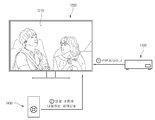
도 1은 본 발명의 제1실시예에 따른 시스템의 예시도,
도 2는 본 발명의 제2실시예에 따른 디스플레이장치의 구성 블록도,
도 3은 본 발명의 제3실시예에 따른 리모트 컨트롤러의 사시도,
도 4는 도 3과 상이한 구현 형태의 리모트 컨트롤러의 사시도,
도 5는 본 발명의 제3실시예에 따른 리모트 컨트롤러의 구성 블록도,
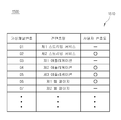
도 6은 본 발명의 제3실시예에 따른 리모트 컨트롤러에 저장되는 코드 셋의 일부를 나타내는 예시도,
도 7은 본 발명의 제4실시예에 따른 디스플레이장치가 어느 한 영상입력 소스로부터 수신되는 영상신호를 처리하여 영상을 표시하는 모습을 나타내는 예시도,
도 8은 본 발명의 제4실시예에 따른 디스플레이장치가 표시하는 계층 구조의 UI를 나타내는 예시도,
도 9는 본 발명의 제4실시예에 따른 디스플레이장치가 도 8과 같은 UI를 통한 영상입력 소스의 변경 지시에 따라서, 영상을 변경하여 표시하는 모습을 나타내는 예시도,
도 10은 본 발명의 제5실시예에 따른 디스플레이장치에서 제1컨텐츠영상 상에 진입점 UI 및 채널 배너를 표시하는 모습을 나타내는 예시도,
도 11은 본 발명의 제5실시예에 따른 디스플레이장치에서 복귀 진입점 UI 및 채널 배너를 표시하는 모습을 나타내는 예시도,
도 12는 본 발명의 제5실시예에 따른 디스플레이장치에서 제2컨텐츠영상만을 표시하는 모습을 나타내는 예시도,
도 13은 본 발명의 제5실시예에 따른 디스플레이장치에서 제2컨텐츠영상 위에 진입점 UI가 표시되는 모습을 나타내는 예시도,
도 14는 본 발명의 제5실시예에 따른 디스플레이장치에서 제3컨텐츠영상을 표시하는 모습을 나타내는 예시도,
도 15는 본 발명의 제6실시예에 따른 디스플레이장치에서 진입점 UI가 표시되어 있는 동안에, 사용자가 채널전환용 방향 버튼을 누르는 경우의 동작을 나타내는 예시도,
도 16은 본 발명의 제7실시예에 따른 디스플레이장치에서 제4컨텐츠영상을 표시하는 모습을 나타내는 예시도,
도 17은 본 발명의 제7실시예에 따른 디스플레이장치에서 제1컨텐츠영상을 표시하는 모습을 나타내는 예시도,
도 18은 본 발명의 제7실시예에 따른 디스플레이장치에서 사용자 입력에 응답하여 채널변경 동작 및 진입점 UI의 표시 동작을 수행하는 모습을 나타내는 예시도,
도 19는 본 발명의 제8실시예에 따른 디스플레이장치에서 삭제 오브젝트의 안내 정보를 표시하는 모습을 나타내는 예시도,
도 20은 본 발명의 제9실시예에 따른 디스플레이장치에서 진입점 UI가 활성화되지 않았음을 안내하는 안내창을 표시하는 모습을 나타내는 예시도,
도 21은 본 발명의 제10실시예에 따른 디스플레이장치에서 채널 배너를 닫았을 때에 표시되는 안내창의 예시도,
도 22 및 도 23은 본 발명의 제11실시예에 따른 디스플레이장치가 진입점 UI를 사용하여 채널을 변경하는 방법을 나타내는 플로우차트,
도 24는 본 발명의 제12실시예에 따른 디스플레이장치가 참조하는 사용자의 컨텐츠 시청 이력에 기반한 리스트의 예시도,
도 25는 본 발명의 제13실시예에 따른 디스플레이장치가 참조하는 사용자의 컨텐츠 시청 이력에 기반한 리스트의 예시도,
도 26은 본 발명의 제14실시예에 따른 디스플레이장치가 진입점 UI를 표시하기 위해 전환 대상의 채널을 선택하는 방법을 나타내는 플로우차트,
도 27은 본 발명의 제15실시예에 따른 디스플레이장치가 진입점 UI를 표시하기 위해 전환 대상의 채널을 선택하는 방법을 나타내는 플로우차트,
도 28은 본 발명의 제16실시예에 따른 디스플레이장치의 구성 블록도,
도 29는 본 발명의 제16실시예에 따른 디스플레이장치가 사용자의 제스쳐를 감지하는 모습을 나타내는 예시도,
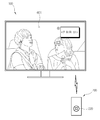
도 30은 본 발명의 제17실시예에 따른 디스플레이장치의 사용 환경을 나타내는 예시도,
도 31은 본 발명의 제17실시예에 따른 리모트 컨트롤러의 구성 블록도,
도 32는 본 발명의 제17실시예에 따른 디스플레이장치가 컨텐츠영상을 표시하는 모습을 나타내는 예시도,
도 33은 본 발명의 제17실시예에 따른 디스플레이장치가 진입점 UI를 표시하는 모습을 나타내는 예시도,
도 34는 본 발명의 제17실시예에 따른 디스플레이장치에 표시된 진입점 UI를 클릭하는 모습을 나타내는 예시도,
도 35는 본 발명의 제17실시예에 따른 디스플레이장치에서의 표시 영상이 제2컨텐츠영상으로 전환된 모습을 나타내는 예시도,
도 36은 본 발명의 제17실시예에 따른 디스플레이장치에서 제1컨텐츠영상으로 복귀한 모습을 나타내는 예시도,
도 37은 본 발명의 제17실시예에 따른 디스플레이장치에서 진입점 UI가 표시되도록 하는 과정에서의 신호 전송 관계를 나타내는 예시도,
도 38은 본 발명의 제17실시예에 따른 디스플레이장치에서 진입점 UI의 실행에 따라서 컨텐츠가 전환 표시되도록 하는 과정에서의 신호 전송 관계를 나타내는 예시도,
도 39는 본 발명의 제18실시예에 따른 디스플레이장치가 제1컨텐츠영상을 표시하는 모습을 나타내는 예시도,
도 40은 본 발명의 제18실시예에 따른 디스플레이장치가 진입점 UI를 표시하는 모습을 나타내는 예시도,
도 41은 본 발명의 제18실시예에 따른 디스플레이장치에서 표시되는 영상이 제2컨텐츠영상으로 전환된 모습을 나타내는 예시도,
도 42는 본 발명의 제18실시예에 따른 디스플레이장치에서 제1컨텐츠영상으로 복귀한 모습을 나타내는 예시도,
도 43은 본 발명의 제18실시예에 따른 디스플레이장치 및 리모트 컨트롤러 사이에서의 신호 전송 관계를 나타내는 예시도,
도 44는 본 발명의 제19실시예에 따른 디스플레이장치가 제공받는 컨텐츠에 따라서 채널 리스트를 구성하는 원리를 나타내는 구성 블록도,
도 45는 본 발명의 제19실시예에 따른 디스플레이장치가 구성하는 가상채널 리스트의 예시도,
도 46은 본 발명의 제20실시예에 따른 디스플레이장치에서 실행되는 어플리케이션의 구조를 나타내는 구성 블록도,
도 47은 본 발명의 제20실시예에 따른 디스플레이장치에서 LWA 영상이 표시되는 모습을 나타내는 예시도,
도 48은 본 발명의 제20실시예에 따른 디스플레이장치에서 풀 앱 영상이 표시되는 모습을 나타내는 예시도,
도 49는 본 본 발명의 제20실시예에 따른 디스플레이장치가 어플리케이션을 실행하는 과정을 나타내는 예시도,
도 50은 본 발명의 제21실시예에 따른 디스플레이장치에서 사용되는 채널리스트의 구조를 나타내는 예시도,
도 51은 본 발명의 제22실시예에 따른 디스플레이장치에서 사용되는 채널리스트의 구조를 나타내는 예시도,
도 52는 본 발명의 제23실시예에 따른 디스플레이장치의 화면에 진입점 UI가 표시되는 모습을 나타내는 예시도,
도 53은 본 발명의 제23실시예에 따른 디스플레이장치의 화면에 채널 리스트가 표시되는 모습을 나타내는 예시도,
도 54는 본 발명의 제24실시예에 따른 디스플레이장치에서 MLS 방식으로 화면 상에 영상을 표시하는 모습을 나타내는 예시도,
도 55는 본 발명의 제24실시예에 따른 디스플레이장치에서 MLS 방식을 지원하지 않는 채널로 전환할 때 표시되는 배너의 예시도,
도 56은 본 발명의 제25실시예에 따른 디스플레이장치에서 PIP 방식으로 화면 상에 영상을 표시하는 모습을 나타내는 예시도,
도 57은 본 발명의 제25실시예에 따른 디스플레이장치에서 PIP 방식을 지원하지 않는 채널로 전환할 때 표시되는 배너의 예시도,
도 58은 본 발명의 제26실시예에 따른 디스플레이장치에 제1영상입력 소스로부터 신호가 수신되지 않는 상태를 나타내는 예시도,
도 59는 본 발명의 제26실시예에 따른 디스플레이장치에서 제2영상입력 소스로 전환한 모습을 나타내는 예시도,
도 60은 본 발명의 제27실시예에 따른 디스플레이장치에서 리모트 컨트롤러에 코드 셋을 전송하는 방법을 나타내는 예시도이다.1 is an illustration of a system according to a first embodiment of the present invention,
2 is a block diagram of a display device according to a second embodiment of the present invention.
3 is a perspective view of a remote controller according to a third embodiment of the present invention,
FIG. 4 is a perspective view of a remote controller of an embodiment different from FIG. 3,
5 is a block diagram of a configuration of a remote controller according to a third embodiment of the present invention;
6 is a diagram illustrating a portion of a code set stored in a remote controller according to a third embodiment of the present invention;
FIG. 7 is a diagram illustrating an example in which a display device according to a fourth exemplary embodiment of the present invention processes an image signal received from a video input source to display an image;
8 is an exemplary view showing a hierarchical UI displayed by the display device according to the fourth embodiment of the present invention;
FIG. 9 is an exemplary view showing a state in which a display device according to a fourth embodiment of the present invention changes and displays an image according to an instruction to change an image input source through the UI as shown in FIG. 8;
10 is an exemplary view showing an entry point UI and a channel banner displayed on a first content image in a display device according to a fifth embodiment of the present invention;
11 is an exemplary view showing a return entry point UI and a channel banner in a display device according to a fifth embodiment of the present invention,
12 is an exemplary view showing a display of only a second content image in a display device according to a fifth embodiment of the present invention,
13 is an exemplary view illustrating an entry point UI displayed on a second content image in a display device according to a fifth embodiment of the present invention,
FIG. 14 is an exemplary view showing a display of a third content image in a display device according to a fifth embodiment of the present invention; FIG.
15 is an exemplary view showing an operation when the user presses a directional button for channel switching while the entry point UI is displayed in the display device according to the sixth embodiment of the present invention;
16 is an exemplary view showing a display of a fourth content image in a display device according to a seventh embodiment of the present invention,
17 is an exemplary view showing a display of a first content image in a display device according to a seventh embodiment of the present invention,
FIG. 18 is a diagram illustrating an example of performing a channel change operation and a display operation of an entry point UI in response to a user input in a display device according to a seventh embodiment of the present invention;
FIG. 19 is a diagram showing an example of displaying guide information of a delete object in a display device according to an eighth embodiment of the present invention; FIG.
20 is a diagram illustrating an example of displaying a guide window for notifying that the entry point UI is not activated in the display device according to the ninth embodiment of the present invention,
21 is an exemplary view of a guide window displayed when a channel banner is closed in a display device according to a tenth embodiment of the present invention,
22 and 23 are flowcharts showing a method of changing a channel using the entry point UI according to an eleventh embodiment of the present invention,
24 is an exemplary view of a list based on a content viewing history of a user referred to by a display device according to a twelfth embodiment of the present invention,
25 is an exemplary view of a list based on a content viewing history of a user referred to by a display device according to a thirteenth embodiment of the present invention,
26 is a flowchart showing a method of selecting a channel to be switched to display the entry point UI according to the fourteenth embodiment of the present invention;
27 is a flowchart showing a method of selecting a channel to be switched to display the entry point UI according to the fifteenth embodiment of the present invention;
28 is a block diagram of a configuration of a display device according to a sixteenth embodiment of the present invention;
FIG. 29 is an exemplary view showing a display device according to a sixteenth embodiment of the present invention sensing a user's gesture; FIG.
30 is an exemplary view showing a use environment of a display device according to a seventeenth embodiment of the present invention;
31 is a block diagram of a configuration of a remote controller according to a seventeenth embodiment of the present invention;
32 is an exemplary view showing a display device displaying a content image according to a seventeenth embodiment of the present invention;
33 is an exemplary view showing a display device UI according to a seventeenth embodiment of the present invention,
FIG. 34 is an exemplary view showing an entry point UI displayed on a display device according to a seventeenth embodiment of the present invention; FIG.
35 is an exemplary view showing a display image in a display device according to a seventeenth embodiment of the present invention being switched to a second content image,
FIG. 36 is an exemplary view showing a return to a first content image in a display device according to a seventeenth embodiment of the present invention; FIG.
FIG. 37 is an exemplary diagram illustrating a signal transmission relationship in a process of displaying an entry point UI in a display device according to a seventeenth embodiment of the present invention; FIG.
38 is an exemplary view showing a signal transmission relationship in the process of switching display of content according to execution of an entry point UI in a display device according to a seventeenth embodiment of the present invention;
FIG. 39 is an exemplary view showing a display device displaying a first content image according to an eighteenth embodiment of the present invention; FIG.
40 is an exemplary view showing a display device UI according to an eighteenth embodiment of the present invention,
41 is an exemplary view showing an image displayed on a display device according to an eighteenth embodiment of the present invention is converted into a second content image,
FIG. 42 is an exemplary view showing a return to the first content image in the display device according to the eighteenth embodiment of the present invention; FIG.
43 is an exemplary view showing a signal transmission relationship between a display device and a remote controller according to an eighteenth embodiment of the present invention;
FIG. 44 is a block diagram illustrating a principle of constructing a channel list according to contents provided by a display apparatus according to a nineteenth embodiment of the present invention; FIG.
45 is an exemplary view of a virtual channel list constituted by the display device according to the nineteenth embodiment of the present invention,
46 is a configuration block diagram showing a structure of an application executed in a display device according to a twentieth embodiment of the present invention;
FIG. 47 is an exemplary view showing a display of an LWA image in a display device according to a twentieth embodiment of the present invention,
FIG. 48 is an exemplary view showing a display of a full app image in a display device according to a twentieth embodiment of the present invention; FIG.
49 is an exemplary view showing a process of executing an application by a display device according to a twentieth embodiment of the present invention;
50 is an exemplary view showing a structure of a channel list used in a display device according to a twenty-first embodiment of the present invention;
51 is an exemplary view showing a structure of a channel list used in a display device according to a twenty-second embodiment of the present invention;
52 is an exemplary view showing an entry point UI displayed on a screen of a display device according to a 23rd embodiment of the present invention,
53 is an exemplary view showing a channel list displayed on a screen of a display device according to a twenty-third embodiment of the present invention;
FIG. 54 is an exemplary view showing an image displayed on a screen in an MLS system in a display device according to a twenty-fourth embodiment of the present invention;
FIG. 55 is an exemplary view of a banner displayed when switching from a display device according to a twenty-fourth embodiment of the present invention to a channel not supporting the MLS scheme,
FIG. 56 is an exemplary view showing an image displayed on a screen in a PIP method in a display device according to a twenty-fifth embodiment of the present invention; FIG.
57 is an exemplary view of a banner displayed when a display device according to a twenty-fifth embodiment of the present invention switches to a channel that does not support the PIP scheme,
58 is an exemplary diagram illustrating a state in which a signal is not received from a first video input source in a display device according to a 26th embodiment of the present invention;
FIG. 59 is an exemplary view showing a state in which a display device according to a twenty-sixth embodiment of the present invention switches from a second video input source to a second video input source;
60 is an exemplary view showing a method of transmitting a code set to a remote controller in a display device according to a 27th embodiment of the present invention.
이하에서는 첨부도면을 참조하여 본 발명에 따른 실시예들에 관해 상세히 설명한다. 이하 실시예들의 설명에서는 첨부된 도면들에 기재된 사항들을 참조하는 바, 각 도면에서 제시된 동일한 참조번호 또는 부호는 실질적으로 동일한 기능을 수행하는 구성요소를 나타낸다.Hereinafter, embodiments according to the present invention will be described in detail with reference to the accompanying drawings. DETAILED DESCRIPTION OF THE PREFERRED EMBODIMENTS Reference will now be made in detail to embodiments of the present invention, examples of which are illustrated in the accompanying drawings, wherein like reference numerals refer to like elements throughout.
만일, 실시예에서 제1구성요소, 제2구성요소 등과 같이 서수를 포함하는 용어가 있다면, 이러한 용어는 다양한 구성요소들을 설명하기 위해 사용되는 것이며, 용어는 하나의 구성요소를 다른 구성요소와 구별하기 위하여 사용되는 바, 이들 구성요소는 용어에 의해 그 의미가 한정되지 않는다. 실시예에서 사용하는 용어는 해당 실시예를 설명하기 위해 적용되는 것으로서, 본 발명의 사상을 한정하지 않는다.If the term includes an ordinal such as a first component, a second component, or the like in the embodiment, such term is used to describe various components, and the term is used to distinguish one component from another And these components are not limited in meaning by their terms. The terms used in the embodiments are applied to explain the embodiments, and do not limit the spirit of the present invention.
또한, 실시예에서는 본 발명의 사상과 직접적인 관련이 있는 구성들에 관해서만 설명하며, 그 외의 구성에 관해서는 설명을 생략한다. 그러나, 본 발명의 사상이 적용된 장치 또는 시스템을 구현함에 있어서, 이와 같이 설명이 생략된 구성이 불필요함을 의미하는 것이 아님을 밝힌다. 실시예에서 "포함하다" 또는 "가지다"와 같은 용어는 명세서 상에 기재된 특징, 숫자, 단계, 동작, 구성요소 또는 이들의 조합이 존재함을 지정하기 위한 것이며, 하나 이상의 다른 특징, 숫자, 단계, 동작, 구성요소 또는 이들의 조합이 존재하거나 부가되는 가능성을 배제하는 것은 아니다.In addition, in the embodiment, only the configurations directly related to the concept of the present invention will be described, and the other configurations will not be described. However, it is to be understood that, in the implementation of the apparatus or system to which the spirit of the present invention is applied, it is not meant that the configuration omitted from the description is unnecessary. It should be understood that terms such as " comprise "or" have "in the embodiments are intended to specify that there is a feature, number, step, operation, , ≪ / RTI > an operation, an element, or a combination thereof.
도 1은 본 발명의 제1실시예에 따른 시스템(1)의 예시도이다.1 is an exemplary diagram of a
도 1에 도시된 바와 같이, 제1실시예에 따른 시스템(1)은 영상표시를 구현하기 위해 복수의 장치들이 통신 가능하게 접속됨으로써 구현된다. 본 시스템(1)은 복수의 장치를 포함하지만, 각 장치들의 접속 방식, 각 장치들의 구현 형태, 각 장치들의 수 등은 본 실시예에 의해 한정되는 사항이 아니며, 본 실시예는 다양한 구현 형태 중에서 한 가지의 예시에 불과함을 밝힌다.As shown in Fig. 1, the
시스템(1)은 영상을 표시하는 디스플레이장치(10)와, 디스플레이장치(10)에 영상신호를 제공하는 셋탑박스(20)를 포함한다. 본 실시예의 디스플레이장치(10)는 TV이지만, TV 이외에도 영상을 표시 가능한 기타 전자장치로 구현될 수도 있다.The
셋탑박스(20)는 디스플레이장치(10)에 유선 또는 무선으로 접속되며, 외부로부터 수신되는 영상신호를 처리하여 디스플레이장치(10)로 출력한다. 해당 영상신호가 방송신호인 경우에, 셋탑박스(20)는 튜너를 포함하거나 또는 튜너를 포함하지 않을 수도 있다. 셋탑박스(20)의 튜너를 포함하지 않는 경우에, 해당 영상신호는 디스플레이장치(10)의 튜너에 의해 튜닝된다.The set-
셋탑박스(20)는 IPTV(Internet Protocol Television) 서비스를 지원할 수도 있다. IPTV는 광대역 네트워크 상에서 인터넷 프로토콜을 사용하여 사용자의 디스플레이장치(10)에 디지털 텔레비전 서비스(Digital Television Service, DTV Service)를 제공하는 플랫폼을 지칭한다. 이에 의하여, 디스플레이장치(10)는 이러한 플랫폼을 사용하는 VOD(Video on Demand)는 물론, 기존의 웹에서 수행되는 웹 서핑, VoIP(Voice over Internet Protocol) 등과 같은 인터넷 서비스를 부가적으로 제공받을 수 있는 바, 사용자와 컨텐츠 제공자 사이의 활발한 상호작용을 가능하게 한다.The set-
IPTV는 VoIP와 같은 고속통신망 서비스와 통합된 인터넷 프로토콜 기반의 플랫폼이기 때문에 다양한 장점들을 제공할 수 있다. 일반적인 케이블 또는 위성을 통해 영상신호를 제공하는 플랫폼은, 컨텐츠 제공자가 스트림을 일방적으로 전송하기 때문에, 사용자 입장에서는 볼 수 있는 컨텐츠 및 컨텐츠를 보는 시간에 제약이 발생한다. 그러나, IPTV는 사용자 및 컨텐츠 제공자 사이의 양방향 통신을 기반으로 하는 서비스이기 때문에, 사용자가 원하는 시간에 원하는 컨텐츠를 선택하여 볼 수 있다. 또한, IPTV는 사용자에게 컨텐츠의 제공과 함께, 고속통신망을 이용한 부가적인 네트워크 서비스를 제공할 수 있다.Because IPTV is an Internet protocol-based platform integrated with high-speed network services such as VoIP, it can offer a variety of advantages. In a platform for providing a video signal through a general cable or satellite, since a content provider unilaterally transmits a stream, there is a restriction on a time for viewing contents and contents that can be viewed by a user. However, because IPTV is a service based on bidirectional communication between a user and a content provider, the user can select desired content at a desired time. In addition, IPTV can provide additional network services using a high-speed communication network in addition to providing contents to users.
IPTV 서비스를 지원하는 경우에, 셋탑박스(20)는 고속통신망에 접속된 라우터(router)(30)에 접속되며, 라우터(30)를 통해 IPTV 서비스를 제공하는 서버(40)와 통신한다. 셋탑박스(20)는 유선으로 라우터(30)에 접속할 수 있다. 만일 셋탑박스(20)가 무선통신을 지원한다면, 셋탑박스(20)는 무선으로 억세스 포인트(access point, AP)(미도시)에 접속하고, 이 AP를 통해 라우터(30)에 접속할 수도 있다. 또는, 셋탑박스(20) 및 라우터(30) 모두 무선통신 방식을 지원하면, 셋탑박스(20) 및 라우터(30)는 AP 없이 상호간에 다이렉트로 무선 접속할 수도 있다.When the IPTV service is supported, the set-
라우터(30)는 기본적으로 각기 독립된 네트워크들을 연결시키는 장치이며, 또는 각 네트워크를 구분하여 연결하는 장치이다. 라우터(30)는 하나의 포트로 데이터 패킷을 수신하여 다른 포트로 전송하는 패킷 스위칭 기능인 포워딩(forwarding), 라우터(30)들이 상호 연결된 복잡한 네트워크에서 패킷의 전송경로를 배정하고 제어하는 경로 설정 기능인 라우팅(routing), 네트워크의 논리적 구조를 습득하는 기능인 러닝(learning), 라우터(30)로부터 출력되는 복수의 출력단에 대한 트래픽 양을 고르게 분산시키는 기능인 로드 밸런싱(load balancing), 링크 중 하나가 사용 불능 상태에 빠지면 우회 경로를 구성하는 기능 등을 수행한다.The
라우터(30)는 네트워크를 통해 서버(40)에 접속하며, 서버(40)로부터 제공되는 컨텐츠 데이터 패킷을 셋탑박스(20)에 제공한다. 또한, 라우터(30)는 셋탑박스(20)로부터 전달되는 데이터 패킷을 서버(40)에 전송할 수 있다.The
디스플레이장치(10)는 다양한 루트를 통해 수신되는 컨텐츠 데이터를 처리하여 영상을 표시한다. 디스플레이장치(10)가 컨텐츠 데이터를 수신하는 루트는 다양한 바, 셋탑박스(20)로부터 컨텐츠 데이터를 수신하거나 또는 RF 안테나(50)를 통해 RF 신호를 수신할 수 있다. 또는, 디스플레이장치(10)는 통신 가능하게 접속된 모바일 장치와 같은 외부장치(70)로부터 영상컨텐츠의 재생 데이터를 수신할 수 있으며, 자체적으로 내장되거나 또는 로컬 접속된 메모리(미도시)로부터 컨텐츠 데이터를 취득할 수도 있다. 또는, 디스플레이장치(10)는 직접 라우터(30)를 통해 네트워크에 접속함으로써, 서버(40) 등이 제공하는 웹 컨텐츠를 수신하여 재생할 수도 있다.The
본 실시예에서, 디스플레이장치(10)는 서버(40)로부터 IPTV 서비스에 기반하여 제공되는 컨텐츠 데이터를 셋탑박스(20)로부터 수신하여 처리하거나, 또는 RF 안테나(50)를 통해 수신되는 RF 방송신호를 튜닝하여 표시할 수 있다. 디스플레이장치(10)는 이와 같이 다양한 영상공급 소스 중 어느 하나를 선택하고, 선택한 영상공급 소스로부터 수신되는 컨텐츠 데이터를 처리하여 컨텐츠 영상을 표시한다. 디스플레이장치(10)는 영상공급 소스 중 어느 하나를 사용자가 선택하도록 하는 다양한 사용자 인터페이스 환경을 제공하는 바, 사용자 인터페이스 환경의 한 가지 예시로는 리모트 컨트롤러(60)가 있다.In the present embodiment, the
리모트 컨트롤러(60)는 기본적으로 디스플레이장치(10)의 본체와 물리적으로 분리 및 이격된 디바이스로 구현되는 바, 사용자가 용이하게 파지 및 휴대할 수 있게 마련된다. 리모트 컨트롤러(60)는 디스플레이장치(10)의 제조 단계에서 디스플레이장치(10)에 대응하도록 설계 및 제조되는 바, 이 경우에 리모트 컨트롤러(60)는 디스플레이장치(10)의 하위 구성으로 볼 수 있다.The
리모트 컨트롤러(60)가 디스플레이장치(10)에 대응한다는 의미는 다음과 같다. 리모트 컨트롤러(60)가 사용자의 조작에 따라서 디스플레이장치(10)의 동작을 제어하기 위해서는, 리모트 컨트롤러(60)가 전송하는 제어신호를 디스플레이장치(10)가 인식할 수 있어야 한다. 이에 따라서, 리모트 컨트롤러(60)로부터 전송되는 제어신호에 대응하는 디스플레이장치(10)의 각 동작의 정보가 사전에 규정된다. 이러한 정보는 코드 셋(code set)이라고 지칭하며, 코드 셋은 리모트 컨트롤러(60)에 의한 디스플레이장치(10)의 제어 이전 시점에, 리모트 컨트롤러(60) 및 디스플레이장치(10)가 각각 설치 또는 저장되어야 한다.The meaning that the
다만, 리모트 컨트롤러(60)가 반드시 디스플레이장치(10)의 제조 단계에서 디스플레이장치(10)에 대응하도록 설계 및 제조되는 경우만 있는 것은 아니다. 리모트 컨트롤러(60)는 디스플레이장치(10)와 상이한 제조사에서 제조되는 입력장치이지만, 디스플레이장치(10)의 제어를 위한 코드 셋이 차후에 설치됨으로써 디스플레이장치(10)를 제어 가능하도록 마련될 수도 있다.However, the
이하, 디스플레이장치(10)의 내부 구성에 관해 설명한다.Hereinafter, the internal configuration of the
도 2는 본 발명의 제2실시예에 따른 디스플레이장치(100)의 구성 블록도이다. 본 실시예의 디스플레이장치(100)는 앞선 제1실시예의 디스플레이장치에 적용할 수 있다.2 is a block diagram of the configuration of a
도 2에 도시된 바와 같이, 제2실시예에 따른 디스플레이장치(100)는 외부와 통신을 수행하게 마련된 통신부(110)와, 통신부(110)에 수신되는 전송스트림(transport stream)의 영상데이터에 기초하여 영상을 표시하는 디스플레이부(120)와, 통신부(110)에 수신되는 전송스트림의 음성데이터에 기초하여 음성을 출력하는 스피커(130)와, 사용자에 의한 입력 동작이 실행되는 입력부(140)와, 데이터가 저장되는 저장부(150)와, 디스플레이장치(100)의 제반 동작의 제어 및 연산을 실행하는 신호처리부(160)와, 신호처리부(160)의 동작을 위한 연산 및 제어를 수행하는 CPU(central processing unit)(164)를 포함한다. 본 실시예에서는 CPU(164)가 독립적인 구성인 것으로 설명하지만, 실시예에 따라서 CPU(164)는 신호처리부(160)를 비롯한 다양한 기능의 칩셋과 통합되어 단일 SOC로 구현될 수도 있다.2, the
통신부(110)는 양방향 통신을 수행하는 바, 다양한 영상소스로부터 전송되는 전송스트림을 수신하며 또는 신호처리부(160)로부터 전달되는 데이터를 외부로 전송한다. 통신부(110)는 복수의 통신규격에 각기 대응하는 통신포트 또는 통신모듈의 집합체에 의해 구현되는 바, 지원 가능한 프로토콜 및 통신접속대상이 어느 하나의 종류 또는 형식으로 한정되지 않는다. 예를 들면, 통신부(110)는 RF 신호를 수신하는 RFIC(미도시), 무선 네트워크 통신을 위한 무선통신모듈(미도시), 유선 네트워크 통신을 위한 이더넷(Ethernet) 모듈(미도시), USB 메모리(미도시) 등의 로컬 접속을 위한 USB 포트(미도시), 리모트 컨트롤러(60, 도 1 참조)가 적외선을 투사하는 경우에 해당 적외선을 감지하는 적외선감지부(미도시) 등을 포함할 수 있다The
본 실시예의 통신부(110)는 RF 안테나(50, 도 1 참조), 셋탑박스(20, 도 1 참조) 및 그 외의 다양한 영상소스에 접속됨으로써, 각 영상소스로부터 제공되는 컨텐츠 데이터를 수신한다. 여기서, 통신부(110)가 각 영상소스로부터 수신되는 컨텐츠 데이터를 신호처리부(160)에 선택적으로 전달하는 방식은 여러 가지 형태가 가능하다.The
예를 들면, 통신부(110)는 각 영상소스로부터의 통신을 담당하는 단위모듈이 신호처리부(160)에 의해 개별적으로 비활성화될 수 있는 바, 활성화된 단위모듈에 수신되는 컨텐츠 데이터를 신호처리부(160)에 전달한다. 또는, 통신부(110)는 각 단위모듈이 개별적으로 컨텐츠 데이터를 수신하는 동안, 신호처리부(160)에 의해 지정된 단위모듈의 컨텐츠 데이터를 신호처리부(160)에 전달할 수도 있다.For example, the
디스플레이부(120)는 신호처리부(160)에 의해 처리되는 영상신호를 영상으로 표시한다. 디스플레이부(120)의 구현 방식은 한정되지 않으며, 액정 방식과 같은 수광 구조 또는 OLED 방식과 같은 자발광 구조의 표시패널을 포함할 수 있다. 또한, 디스플레이부(120)는 표시패널 이외에, 표시패널의 구현 방식에 따라서 부가적인 구성을 추가적으로 포함할 수 있다. 예를 들면, 액정 방식인 경우에, 디스플레이부(120)는 액정 디스플레이 패널(미도시)과, 액정 디스플레이 패널(미도시)에 광을 공급하는 백라이트유닛(미도시)과, 액정 디스플레이 패널(미도시)을 구동시키는 패널구동기판(미도시) 등을 포함한다.The
스피커(130)는 신호처리부(270)에 의해 처리되는 음성신호를 음성으로 출력한다. 스피커(130)는 음성신호에 따라서 공기를 진동시킴으로써 기압을 변화시키는 원리로 음성을 전달한다. 스피커(130)는 어느 한 채널의 음성신호에 대응하게 마련된 단위 스피커를 포함하며, 복수 채널의 음성신호에 각기 대응하도록 복수의 단위 스피커를 포함할 수 있다.The
스피커(130)는 출력하는 음성의 주파수 대역에 따라서 다양한 종류가 있다. 스피커(130)는 20Hz 내지 99Hz 대역에 대응하는 서브우퍼(sub-woofer), 100Hz 내지 299Hz 대역의 우퍼(woofer), 300Hz 내지 499Hz 대역의 미드우퍼(mid-woofer), 500Hz 내지 2.9KHz 대역의 미드레인지(mid-range) 스피커, 3KHz 내지 6.9KHz 대역의 트위터(tweeter) 스피커, 7KHz 내지 20KHz 대역의 수퍼트위터(super-tweeter) 스피커 등이 있으며, 이 중에서 하나 이상의 종류가 선택되어 디스플레이장치(100)에 적용된다.The
입력부(140)는 사용자의 조작 또는 입력에 따라서 기 설정된 다양한 제어 커맨드 또는 정보를 신호처리부(160)에 전달한다. 입력부(140)는 사용자의 의도에 따라서 사용자의 조작에 의해 발생하는 다양한 이벤트를 신호처리부(160)에 전달한다. 입력부(140)는 정보의 입력방식에 따라서 다양한 형태로 구현될 수 있으나, 본 실시예에서의 입력부(140)는 디스플레이장치(100)에 설치된 사용자 인터페이스 환경을 지칭한다. 예를 들면, 입력부(140)는 디스플레이장치(100) 외측에 설치된 버튼, 디스플레이부(120)에 설치된 터치스크린, 사용자의 발화가 입력되는 마이크로폰(미도시), 디스플레이장치(100) 외부의 환경을 촬영 또는 감지하기 위한 카메라(미도시) 등이 가능하다. 리모트 컨트롤러(60, 도 1 참조) 또한 사용자 인터페이스 환경의 한 가지 구성이라고 볼 수 있는데, 다만 이 경우는 디스플레이장치(100)와 분리된 구성으로서 통신부(110)를 통해 디스플레이장치(100)에 제어신호를 전송한다.The
저장부(150)는 신호처리부(160)의 처리 및 제어에 따라서 다양한 데이터가 저장된다. 저장부(150)는 신호처리부(160)에 의해 억세스됨으로써, 데이터의 독취(read), 기록(write), 수정(edit), 삭제(delete), 갱신(update) 등이 수행된다. 저장부(150)는 디스플레이장치(100)의 시스템 전원의 제공 유무와 무관하게 데이터를 보존할 수 있도록 플래시메모리(flash-memory), 하드디스크 드라이브(hard-disc drive)와 같은 비휘발성 메모리로 구현된다.The
신호처리부(160)는 통신부(110)에 수신되는 전송스트림에 대해 다양한 프로세스를 수행한다. 통신부(110)에 전송스트림이 수신되면, 신호처리부(160)는 전송스트림으로부터 추출되는 영상신호에 대해 영상처리 프로세스를 수행하고, 영상처리 프로세스가 수행된 영상신호를 디스플레이부(120)에 출력함으로써 디스플레이부(120)에 영상이 표시되게 한다.The
신호처리부(160)가 수행하는 영상처리 프로세스의 종류는 한정되지 않으며, 예를 들면 입력되는 전송스트림을 영상신호, 음성신호, 부가데이터의 각 하위 스트림으로 구분하는 디멀티플렉싱(de-multiplexing), 영상신호의 영상 포맷에 대응하는 디코딩(decoding), 인터레이스(interlace) 방식의 영상신호를 프로그레시브(progressive) 방식으로 변환하는 디인터레이싱(de-interlacing), 영상신호를 기 설정된 해상도로 조정하는 스케일링(scaling), 영상 화질 개선을 위한 노이즈 감소(noise reduction), 디테일 강화(detail enhancement), 프레임 리프레시 레이트(frame refresh rate) 변환 등을 포함할 수 있다.The type of the image processing process performed by the
신호처리부(160)는 신호 또는 데이터의 종류, 특성에 따라서 다양한 프로세스를 수행할 수 있게 마련되므로 신호처리부(160)가 수행 가능한 프로세스를 영상처리 프로세스로 한정할 수 없으며, 또한 신호처리부(160)가 처리 가능한 데이터가 통신부(110)에 수신되는 것만으로 한정할 수 없다. 예를 들면, 신호처리부(160)는 전송스트림으로부터 추출되는 음성신호에 대해 음성처리 프로세스를 수행하고, 이러한 프로세스가 수행된 음성신호를 스피커(130)로 출력한다. 또한, 신호처리부(160)는 디스플레이장치(100)에 사용자의 발화가 입력되면 기 설정된 음성인식 프로세스에 따라서 해당 발화를 처리한다. 신호처리부(160)는 이러한 여러 기능을 통합시킨 SOC(system-on-chip)로 구현되거나, 또는 각 프로세스를 독자적으로 수행할 수 있는 개별적인 칩셋(chip-set)들이 인쇄회로기판 상에 장착된 영상처리보드(미도시)로 구현된다.Since the
디스플레이장치(100)의 이와 같은 하드웨어적인 구성은, 디스플레이장치(100)의 구현 형태 및 지원 기능에 따라서 세부적으로 차이가 있을 수 있다. 예를 들면, 디스플레이장치(100)가 TV라면 방송신호를 특정 주파수로 튜닝하기 위한 구성을 필요로 하겠지만, 디스플레이장치(100)가 태블릿이라면 방송신호를 튜닝하는 구성은 제외될 수도 있다.Such a hardware configuration of the
이하, 디스플레이장치(100)가 TV인 경우의 신호처리부(160)의 구체적인 구성에 관해 설명한다.Hereinafter, a specific configuration of the
본 도면에서의 통신부(110) 및 신호처리부(160)는 제품에서 실제로 구현되는 구성 중에서 기본적인 것만을 나타낸 바, 디스플레이장치(100)가 실제 제품으로 구현될 때에는 본 실시예에서 설명하는 것 이외의 구성을 추가적으로 포함한다.The
또한, 본 실시예에서는 신호처리부(160)를 실행 기능에 따라서 복수의 처리부(161, 162, 163)로 구분하고 있지만, 실제 제품에서는 이와 같은 구성들이 하드웨어적으로 분류되거나 또는 분류되지 않을 수도 있으며, 하드웨어 및 소프트웨어가 혼재되어 구현될 수도 있다. 또한, 본 실시예에서는 신호처리부(160)가 영상처리부(162) 및 음성처리부(163)를 포함하는 것으로 설명하지만, 신호처리부(160)는 지원하는 기능에 따라서 다양한 처리부를 더 포함할 수 있다.In this embodiment, the
통신부(110)는 방송스트림을 특정 주파수로 튜닝하는 튜너(111)와, 외부와의 무선통신을 위한 무선통신모듈(112)과, 외부와의 유선통신을 위한 이더넷모듈(113)을 포함한다.The
한편, 신호처리부(160)는 통신부(110)로부터 전달되는 전송스트림을 복수의 서브신호들로 구분하여 출력하는 디먹스(deMUX)(161)와, 디먹스(161)로부터 출력되는 서브신호 중 영상신호를 영상처리 프로세스에 따라서 처리하여 디스플레이부(120)로 출력하는 영상처리부(162)와, 디먹스(161)로부터 출력되는 서브신호 중 음성신호를 음성처리 프로세스에 따라서 처리하여 스피커(130)로 출력하는 음성처리부(163)를 포함한다.The
튜너(111)는 방송스트림이 수신되면, 지정된 특정 채널의 주파수로 방송스트림을 튜닝하여 전송스트림으로 변환한다. 튜너(111)는 고주파 반송파를 중간주파수 대역으로 변환하고, 이를 디지털 신호로 변환함으로써, 전송스트림을 생성한다. 이를 위해 튜너(111)는 A/D 컨버터(미도시)를 가질 수 있는데, 설계 방식에 따라서는 A/D 컨버터(미도시)는 튜너(111)가 아닌 디모듈레이터(demodulator)(미도시)에 포함될 수도 있다.When the broadcast stream is received, the
무선통신모듈(112)은 다양한 프로토콜에 따른 무선통신을 수행한다. 이러한 프로토콜에는 와이파이(Wi-Fi), 와이파이 다이렉트(Wi-Fi Direct), 블루투스, UPNP(Universal Plug And Play), NFC(Near Field Communication) 등이 있으며, 무선통신모듈(112)은 지원하는 각 프로토콜 별로, 해당 프로토콜의 통신을 위한 단위모듈을 포함한다.The
이하, 언급된 각 프로토콜에 관해 개략적으로 설명한다.Hereinafter, each of the protocols mentioned above will be schematically described.
와이파이는 IEEE 802.11 기반의 무선LAN 연결과 PAN/LAN/WAN 구성 등을 지원하는 프로토콜이다. 와이파이는 인프라스트럭쳐(infrastructure) 모드인 경우에, AP에 의해 중계되는 장치들 사이의 무선통신을 제공한다. 와이파이는 IEEE 802.11n 기반인 경우에 최대 300Mbps 급의 전송속도를 보장한다. AP는 외부 WAN(Wide Area Network)에 접속된 라우터에 접속되며, 폐쇄되지 않은 공간 내에 소정 범위의 핫스팟(hot-spot)을 형성한다. 디스플레이장치(0)는 AP 주위의 핫스팟 내에 위치함으로써 AP에 무선으로 접속하며, AP를 경유하여 네트워크에 통신 접속할 수 있다. 여기서, 신호 증폭을 위한 리피터(repeater)와 같은 장비를 추가로 설치함으로써 핫스팟의 범위가 확장될 수도 있다. 그러나, 대체적으로 핫스팟의 범위는 넓지 않기 때문에, 사용자가 이동하면서 와이파이 기반으로 무선통신을 수행하는 것은 적합하지 않다.Wi-Fi is a protocol that supports IEEE 802.11 based wireless LAN connection and PAN / LAN / WAN configuration. When WiFi is in infrastructure mode, it provides wireless communication between devices relayed by the AP. Wi-Fi guarantees transmission speeds of up to 300Mbps when based on IEEE 802.11n. The AP is connected to a router connected to an external wide area network (WAN), and forms a predetermined range of hot-spots in the unclosed space. The display device 0 can be wirelessly connected to the AP by being located in a hot spot around the AP, and can be communicatively connected to the network via the AP. Here, the range of the hot spot may be extended by installing additional equipment such as a repeater for signal amplification. However, since the range of hotspots is generally not wide, it is not suitable for a user to perform wireless communication on a Wi-Fi basis while moving.
와이파이 다이렉트는 와이파이 기술에서 AP를 필요로 하지 않는, peer-to-peer(P2P) 방식의 프로토콜이다. 와이파이 다이렉트 기반으로, 디스플레이장치(100)는 AP 없이 타 장치에 다이렉트로 통신 접속할 수 있다. 와이파이 다이렉트는 대체로 장치 간 거리가 200m 범위 내에서 최대 250Mbps의 전송 속도를 보장한다.Wi-Fi Direct is a peer-to-peer (P2P) protocol that does not require an AP in Wi-Fi technology. On the basis of the Wi-Fi direct, the
와이파이 다이렉트는 와이파이 기술 중에서 애드혹(ad-hoc) 관련 기술을 활용한다. 애드혹 네트워크는 고정된 유선망을 가지지 않고 이동 호스트(mobile host)로만 구성되는 통신망으로서, 유선망을 구성하기 어렵거나 또는 망을 구성한 이후에 단시간 사용되는 경우에 적합하다. 애드혹 네트워크에서는 호스트의 이동에 제약이 없고 유선망 및 기지국이 필요하지 않으므로 빠른 망 구성과 저렴한 비용의 장점이 있다. 애드혹 네트워크에서 각각의 이동 노드는 단지 호스트가 아니라 하나의 라우터로 동작하게 되며, 다른 노드에 대해 다중 경로를 가질 수 있고, 또한 동적으로 경로를 설정할 수 있다. 와이파이 다이렉트는 애드혹 기술의 단점인 전송속도 및 보안문제를 향상시켜 구현된 기술이다.Wi-Fi Direct uses ad-hoc technology among Wi-Fi technologies. An ad-hoc network is a communication network that does not have a fixed wired network but consists only of a mobile host, and is suitable for a case where it is difficult to construct a wired network or is used for a short time after the network is constructed. In the ad hoc network, there is no restriction on the movement of the host, and there is no need of the wired network and the base station, so there is a merit of fast network configuration and low cost. In an ad hoc network, each mobile node acts as a router, not just a host, it can have multiple paths to other nodes, and can also dynamically route. Wi-Fi Direct is a technology implemented by improving the transmission speed and security problem, which is a disadvantage of ad-hoc technology.
와이파이 다이렉트는 1:N 접속이 가능하기는 하지만, 기본적으로 1:1 접속에 관한 방식이다. 예를 들어 디스플레이장치(100)가 와이파이 다이렉트 프로토콜에 따라서 모바일장치와 같은 외부장치와 통신 접속하기 위해서는 다음과 같은 절차로 진행된다. 모바일장치는 푸시(push) 방식으로 연결 요청 메시지를 디스플레이장치(100)에 전달한다. 디스플레이장치(100)가 모바일장치로부터의 연결 요청을 수락함으로써, 모바일장치 및 디스플레이장치(100) 사이에 통신 접속이 가능하도록 페어링이 완료된다.Wi-Fi direct is basically a 1: 1 connection, although 1: N connection is possible. For example, in order for the
블루투스는 IEEE 802.15.1 규격을 사용하는 기기 간의 다이렉트 통신 방식이다. 블루투스는 ISM(Industrial Scientific and Medical) 주파수 대역인 2400 내지 2483.5MHz를 사용한다. 블루투스는 이 중에서, 위아래 주파수를 쓰는 다른 시스템들의 간섭을 막기 위해 2400MHz 이후 2MHz, 2483.5MHz 이전 3.5MHz까지의 범위를 제외한 2402 내지 2480MHz, 총 79개 채널을 사용한다.Bluetooth is a direct communication method between devices using the IEEE 802.15.1 standard. Bluetooth uses the Industrial Scientific and Medical (ISM) frequency band of 2400 to 2483.5 MHz. Bluetooth uses a total of 79 channels, 2402 to 2480 MHz, except for the range from 2 MHz after 2400 MHz to 3.5 MHz before 2483.5 MHz to prevent interference with other systems using up and down frequencies.
여러 시스템들과 같은 주파수 대역을 이용하기 때문에 시스템간 전파 간섭이 생길 우려가 있는데, 이를 예방하기 위해 블루투스는 주파수 호핑(Frequency Hopping) 방식을 취한다. 주파수 호핑이란 많은 수의 채널을 특정 패턴에 따라 빠르게 이동하며 패킷(데이터)을 조금씩 전송하는 기법이다. 블루투스는 할당된 79개 채널을 1초당 1600번 호핑한다. 이 호핑 패턴이 블루투스 기기 간에 동기화되어야 통신이 이루어진다. 블루투스는 기기 간 마스터(Master)와 슬레이브(slave) 구성으로 연결되는데, 마스터 기기가 생성하는 주파수 호핑에 슬레이브 기기를 동기화시키지 못하면 두 기기 간 통신이 이루어지지 않는다. 이로 인해 다른 시스템의 전파 간섭을 피해 안정적으로 연결될 수 있게 된다. 참고로 하나의 마스터 기기에는 최대 7대의 슬레이브 기기를 연결할 수 있으며, 마스터 기기와 슬레이브 기기 간 통신만 가능할 뿐 슬레이브 기기 간의 통신은 불가능하다. 그러나 마스터와 슬레이브의 역할은 고정된 것이 아니기 때문에 상황에 따라 서로 역할을 바꿀 수 있다.Since the system uses the same frequency band as many systems, interference between systems may occur. To prevent this, Bluetooth adopts a frequency hopping method. Frequency hopping is a technique for quickly moving a large number of channels according to a specific pattern and transmitting the packets (data) little by little. Bluetooth hopes 1600 times per second to the assigned 79 channels. This hopping pattern must be synchronized between the Bluetooth devices before the communication is established. Bluetooth is connected to the master and slave configurations between devices. If the slave device can not be synchronized with the frequency hopping generated by the master device, communication between the two devices is not performed. As a result, it is possible to stably connect to other systems by avoiding radio interference. For reference, up to seven slave devices can be connected to one master device, communication between master device and slave devices is possible, and communication between slave devices is impossible. However, since the roles of master and slave are not fixed, they can change roles depending on the situation.
UPNP는 DLNA(Digital Living Network Alliance)에 따라서, 장치 간을 P2P 방식으로 연결시키는 프로토콜이다. UPNP는 IP, TCP, UDP, HTTP, XML과 같은 기존의 프로토콜을 활용한다. UPNP는 와이어 프로토콜에 기반을 두고 있으며, 기기 간에 교환되는 정보는 XML로 표현되고, HTTP 프로토콜을 통해서 통신한다.The UPNP is a protocol for connecting the devices according to the DLNA (Digital Living Network Alliance) by the P2P method. UPNP leverages existing protocols such as IP, TCP, UDP, HTTP, and XML. The UPNP is based on a wire protocol, and the information exchanged between the devices is expressed in XML and communicated through the HTTP protocol.
와이파이 또는 블루투스 등의 프로토콜이 통신모듈의 고유 식별자로서 48비트 MAC 어드레스를 사용하는 것에 비해, UPNP는 UUID(Universally Unique Identifier)라는 식별자를 사용한다. UUID는 16옥테트(octet), 즉 128비트의 식별자이며, 32 lowercase hexadecimal digits에 의해 표현된다. UUID는 32개의 문자나숫자와, 4개의 하이픈에 의해 구성되는 바, 8-4-4-4-12의 총 36개의 자리수의 형식을 가진다.Whereas a protocol such as Wi-Fi or Bluetooth uses a 48-bit MAC address as a unique identifier of a communication module, the UPNP uses an identifier called a UUID (Universally Unique Identifier). The UUID is an octet, an identifier of 128 bits, represented by 32 lowercase hexadecimal digits. A UUID has the form of 32 characters or digits and four hyphens, and a total of 36 digits of 8-4-4-4-12.
NFC는 RFID(Radio Frequency Identification)의 하나로서 13.56Mhz 주파수 대역을 사용하는 비접촉식 근거리 무선통신 프로토콜이다. 대략 NFC는 10cm 정도의 가까운 거리에서 기기 간 데이터를 전송하는 기술이며, ISO/IEC 14443을 확장한 것이다. NFC 통신은 상호 근접한 자기 필드 내에 있는 두 개의 루프 안테나 사이의 전자기 유도작용에 기반하여 동작한다.NFC is a radio frequency identification (RFID), a non-contact, near field wireless communication protocol using the 13.56Mhz frequency band. Approximately NFC is a technology for transmitting data between devices at a distance of about 10 cm and is an extension of ISO / IEC 14443. NFC communications operate based on electromagnetic induction between two loop antennas in close proximity to magnetic fields.
NFC는 수동통신모드 및 능동통신모드의 두 가지 모드를 지원한다. 수동통신모드에서는 시동장치가 캐리어 필트를 제공하고, 타겟장치가 제공된 필드를 변조하면서 동작한다. 수동통신모드의 타겟장치는 동작 전원을 시동장치가 제공하는 전자기 필드에서 획득하며, 이로 인하여 타겟장치도 송수신기로서 동작할 수 있다. 한편, 능동통신모드에서는 시동장치 및 타겟장치 모두 자체 전자기 필드를 생성하여 통신한다. 능동통신모드에서 하나의 장치는 상대방으로부터 데이터가 전송될 때까지 자신의 전자기 필드를 해제하고, 자신이 상대방에게 데이터를 전송할 때에 자신의 전자기 필드를 활성화시킨다.NFC supports two modes: passive communication mode and active communication mode. In the passive communication mode, the starter device provides a carrier filter, and the target device operates while modulating the provided field. The target device in the passive communication mode obtains the operating power in the electromagnetic field provided by the starter so that the target device can also act as a transceiver. On the other hand, in the active communication mode, both the starter and the target device create their own electromagnetic fields and communicate. In the active communication mode, one device releases its electromagnetic field until data is transmitted from the other, and activates its own electromagnetic field when it transmits data to the other.
디먹스(161) 또는 디멀티플렉서(demultiplexer)(161)는 기본적으로 멀티플렉서(미도시)와 반대의 역할을 수행한다. 즉, 디먹스(161)는 하나의 입력단을 복수의 출력단과 연결하여, 입력단에 입력되는 스트림을 선택신호에 따라서 각 출력단에 출력하는 분배 역할을 수행한다. 예를 들면, 하나의 입력단에 대해 네 개의 출력단이 있다면, 디먹스(161)는 0 또는 1의 상태를 가지는 두 개의 선택신호의 상태를 조합함으로써 네 개의 출력단 각각을 선택할 수 있다. 디먹스(161)는 특히 디스플레이장치(100)에 적용되는 경우에, 통신부(110)로부터 전달되는 전송스트림을 영상신호 및 음성신호의 서브신호들로 구분하여 각 출력단으로 출력한다.The
디먹스(161)가 전송스트림을 서브신호들로 구분하는 방법은 여러 가지가 적용될 수 있는데, 예를 들면 디먹스(161)는 전송스트림 내의 패킷들에 각기 부여된 식별자인 PID(packet identifier)에 따라서 전송스트림을 각 서브신호들로 구분한다. 전송스트림 내의 채널 별 서브신호는 독립적으로 압축되어 패킷화되어 있으며, 어느 한 채널에 해당하는 패킷에는 동일한 PID가 부여됨으로써 다른 채널의 패킷과 구별되도록 마련된다. 디먹스(161)는 전송스트림에서 PID 별로 패킷들을 분류하여, 동일한 PID를 가지는 서브신호들을 추출한다.For example, the
영상처리부(162)는 디먹스(161)로부터 출력되는 영상신호를 디코딩 및 스케일링하여 디스플레이부(120)에 출력한다. 이를 위해, 영상처리부(162)는 특정 포맷에 의해 인코딩된 상태의 영상신호에 대해 해당 인코딩 과정을 역으로 수행함으로써 영상신호를 인코딩 이전 상태로 복원시키는 디코더(decoder)(미도시)와, 디코딩된 영상신호를 디스플레이부(120)의 해상도 또는 별도로 지정된 해상도에 맞게 스케일링하는 스케일러(scaler)(미도시)를 포함한다. 만일 디먹스(161)로부터 출력되는 영상신호가 특정 포맷으로 인코딩되어 있지 않은 무압축 상태라면, 영상처리부(162)는 해당 영상신호에 대해 디코더(미도시)에 의한 처리를 수행하지 않는다.The
음성처리부(163)는 디먹스(161)로부터 출력되는 음성신호를 증폭 처리하여 스피커(130)에 출력한다. 이를 위해, 음성처리부(163)는 음성신호인 디지털신호를 출력하는 디지털신호 공급부(미도시)와, 디지털신호 공급부(미도시)로부터 출력되는 디지털신호에 기초하여 펄스폭 변조(pulse width modulation, PWM) 신호를 출력하는 PWM 처리부(미도시)와, PWM 처리부(미도시)로부터 출력되는 PWM 신호를 증폭시키는 증폭부(미도시)와, 증폭부(미도시)에 의해 증폭된 PWM 신호를 특정 수파수 대역으로 필터링함으로써 PWM 신호를 복조하는 LC 필터(미도시)를 포함한다.The
CPU(164)는 신호처리부(160) 내의 제반 구성들이 동작하기 위한 중심적인 연산을 수행하는 구성으로서, 기본적으로 데이터의 해석 및 연산의 중심 역할을 수행한다. CPU(164)는 내부적으로, 처리할 명령어들이 저장되는 프로세서 레지스터(미도시)와, 비교, 판단, 연산을 담당하는 산술논리 연산 유닛(arithmetic logic unit, ALU)(미도시)와, 명령어의 해석과 올바른 실행을 위하여 CPU(164)를 내부적으로 제어하는 컨트롤 유닛(control unit)(미도시)과, 내부 버스(BUS)(미도시)와, 캐시(cache)(미도시) 등을 포함한다.The
CPU(164)는 디먹스(161), 영상처리부(162) 및 음성처리부(163)와 같은 신호처리부(160)의 각 구성의 동작에 필요한 연산을 수행한다. 다만, 신호처리부(160)의 설계 방식에 따라서, 신호처리부(160)의 구성 중에는 CPU(164)의 데이터 연산 없이 동작하거나 또는 별도의 마이크로 컨트롤러(micro-controller)(미도시)에 의해 동작하는 구성도 있을 수 있다.The
이하, 디스플레이장치(100)의 동작을 사용자가 제어하도록 마련된 리모트 컨트롤러에 관해 설명한다.Hereinafter, a remote controller provided for the user to control the operation of the
도 3은 본 발명의 제3실시예에 따른 리모트 컨트롤러(200)의 사시도이다. 본 실시예의 리모트 컨트롤러(200)는 앞선 제1실시예에서의 리모트 컨트롤러(60, 도 1 참조)를 대체하여 적용할 수 있는 구성이다.3 is a perspective view of a
도 3에 도시된 바와 같이, 제3실시예에 따른 리모트 컨트롤러(200)는 하우징(210)과, 하우징(210) 상에 설치되며 사용자에 의해 조작되는 리모컨입력부(220)와, 하우징(210) 전방에 설치되며 리모컨입력부(220)의 조작에 대응하는 제어신호를 전송하는 신호전송부(230)를 포함한다. 본 실시예에서 설명하는 리모트 컨트롤러(200)의 형태는 하나의 단순한 예시일 뿐이므로, 리모트 컨트롤러(200)는 다양한 형태 및 구조로 구현될 수 있다.3, the
리모컨입력부(220)는 사용자의 조작에 의한 입력을 수행하도록 리모트 컨트롤러(200)에 마련된 사용자 인터페이스 환경이다. 사용자 인터페이스 환경은 기본적으로 사용자 입력을 위한 제반 수단을 통칭하므로, 마이크로폰, 터치패드, 터치스크린, 가속도 센서, 모션감지 센서 등 다양한 형태의 입력 수단을 포함할 수 있다. 다만, 본 실시예에서의 리모컨입력부(220)는 사용자가 누를 수 있는 버튼 구조이다. 이러한 버튼 구조는 제조 시 구현이 쉽고 비용이 저렴하며 사용자가 직관적으로 용이하게 사용할 수 있기 때문에, 리모트 컨트롤러(200)와 같은 입력기기에 많이 적용된다.The remote
본 실시예의 리모컨입력부(220)는 리모트 컨트롤러(200)의 전원을 온 또는 오프시키는 파워 버튼(221)과, 상하좌우 4방향의 이동을 각기 지시하는 방향 버튼(222, 223, 224, 225)과, 결정 및 실행을 지시하는 엔터 버튼(226)을 포함한다. 다만, 이와 같은 리모컨입력부(220)의 구현 형태는 가장 간단한 버튼 구조를 나타낸 것일 뿐이므로, 실제의 리모컨입력부(220)는 지원 가능한 기능에 따라서 추가적인 버튼들을 포함할 수 있다.The remote
방향 버튼(222, 223, 224, 225)은 사용자가 채널을 변환할 때에 사용될 수 있다. 예를 들면, 상방향 버튼(222) 및 하방향 버튼(223)이 채널의 탐색에 사용되고 좌방향 버튼(224) 및 우방향 버튼(225)이 음량의 조절에 사용될 수 있다. 또는, 좌방향 버튼(224) 및 우방향 버튼(225)이 채널의 탐색에 사용될 수도 있다.The
엔터 버튼(226)은 커서의 클릭 동작에 대응한다. 예를 들면, 디스플레이장치(100)에 표시된 UI가 복수의 선택 가능한 오브젝트를 포함하고 커서가 어느 한 오브젝트를 지시하고 있는 상태에서, 사용자가 엔터 버튼(226)을 누르면 커서가 지시하고 있는 오브젝트가 클릭되며, 해당 오브젝트에 대응하게 지정된 동작이 실행된다. 또는, 어느 한 오브젝트가 하이라이트된 상태에서 사용자가 엔터 버튼(226)을 누르면, 해당 오브젝트가 클릭되도록 마련될 수도 있다. 즉, 엔터 버튼(226)은 디스플레이장치(100)에서 탐색이 수행되는 동안에, 현재 탐색 상태를 결정하도록 지시하기 위해 마련된다.The
신호전송부(230)는 사용자가 리모컨입력부(220)의 조작을 통해 입력에 대응하는 제어신호를 디스플레이장치(100)에 전송함으로써, 디스플레이장치(100)가 해당 제어신호에 대응하는 동작을 실행하도록 한다. 신호전송부(230)는 제어신호를 디스플레이장치(100)에 전송할 수 있다면 그 구조가 한정되지 않는데, 본 실시예에서는 제어신호를 적외선으로 변환하여 투사하는 구조로 마련된다.The
앞선 실시예에서는 방향 버튼(222, 223, 224, 225)이 사용자가 채널을 변환할 때에 사용되는 경우에 관해 설명하였다. 그러나, 리모트 컨트롤러(200)의 구현 방식에 따라서는, 방향 버튼(222, 223, 224, 225) 이외에 채널을 변환하기 위한 입력 구성이 구현되는 것도 가능하다.In the above embodiment, the
도 4는 도 3과 상이한 구현 형태의 리모트 컨트롤러(200a)의 사시도이다.4 is a perspective view of a
도 4에 도시된 바와 같이, 리모트 컨트롤러(200a)는 하우징(210a)과, 하우징(210a) 상에 설치되며 사용자에 의해 조작되는 리모컨입력부(220a)와, 하우징(210a) 전방에 설치되며 리모컨입력부(220a)의 조작에 대응하는 제어신호를 전송하는 신호전송부(230a)를 포함한다.4, the
리모컨입력부(220a)는 리모트 컨트롤러(200a)의 전원을 온 또는 오프시키는 파워 버튼(221a)과, 상하좌우 4방향의 이동을 각기 지시하는 방향 버튼(222a, 223a, 224a, 225a)과, 결정 및 실행을 지시하는 엔터 버튼(226a)을 포함한다. 추가적으로, 리모컨입력부(220a)는 채널 탐색을 위해 마련된 채널탐색 버튼(261a, 262a)를 더 포함할 수 있다.The remote
이와 같은 구조에서, 방향 버튼(222a, 223a, 224a, 225a)은 커서(미도시)의 이동 제어 등에 사용되고, 채널탐색 버튼(261a, 262a)은 채널의 상방향 또는 하방향 탐색 또는 전환에 사용될 수 있다.In this structure, the
이와 같이, 리모트 컨트롤러(200, 200a)의 구현 형태에 따라서, 채널 탐색에 사용되는 입력 구조는 다양한 방식이 적용될 수 있다.As described above, according to the implementation form of the
이하, 리모트 컨트롤러(200)의 내부 구성에 관해 설명한다.The internal configuration of the
도 5는 본 발명의 제3실시예에 따른 리모트 컨트롤러(200)의 구성 블록도이다.5 is a block diagram of the configuration of the
도 5에 도시된 바와 같이, 리모트 컨트롤러(200)는 리모컨입력부(220)와, 신호전송부(230)와, 기 설정된 코드 셋을 저장하는 리모컨저장부(240)와, 리모트 컨트롤러(200)를 제어하는 리모컨제어부(250)를 포함한다.5, the
리모컨저장부(240)가 저장하는 코드 셋은 리모컨제어부(250)가 제어신호를 생성하기 위해 참조된다. 리모컨입력부(220)의 각 버튼에는, 해당 버튼에 대응하는 키 ID 또는 버튼 ID가 할당된다. 코드 셋은 이와 같은 버튼 ID에 대응하여, 디스플레이장치가 인식할 수 있게 마련된 동작 코드가 맵핑된다.The code set stored in the remote
리모컨제어부(250)는 특정한 버튼 ID를 가지고 코드 셋(241)을 검색함으로써, 해당 버튼 ID에 대응하는 동작 코드를 도출한다. 그리고, 리모컨제어부(250)는 도출된 동작 코드에 대응하는 제어신호를 생성하고, 이를 신호전송부(230)를 통해 디스플레이장치에 전송한다. 이로써, 디스플레이장치는 리모트 컨트롤러(200)로부터 수신되는 제어신호로부터 동작 코드를 추출하고, 추출된 동작 코드에 대응하게 설정된 동작을 실행한다.The remote
도 6은 본 발명의 제3실시예에 따른 리모트 컨트롤러에 저장되는 코드 셋(241)의 일부를 나타내는 예시도이다.FIG. 6 is a diagram illustrating a portion of a code set 241 stored in a remote controller according to the third embodiment of the present invention.
도 6에 도시된 바와 같이, 코드 셋(241)은 리모트 컨트롤러의 각 버튼의 ID와, 각 ID에 대응하는 동작 코드가 맵핑된다. 버튼 ID 및 동작 코드는 사전에 규정된 문법에 따르는 바, 리모트 컨트롤러 및 디스플레이장치에 적용되는 규격에 따라서 다양한 문법이 적용될 수 있다.As shown in FIG. 6, the code set 241 maps the ID of each button of the remote controller and the operation code corresponding to each ID. The button ID and the operation code conform to the predetermined grammar, and various grammars can be applied according to the standard applied to the remote controller and the display device.
예를 들면, 상방향 버튼의 버튼 ID는 21이며, 이에 대응하는 동작 코드는 DAA001이다. 만일 사용자가 상방향 버튼을 누르면 리모컨제어부는 버튼 ID가 21인 버튼이 눌린 것으로 판단하고, 코드 셋(241)으로부터 21인 버튼 ID에 대응하는 동작 코드인 DAA001을 도출한다. 리모컨제어부는 도출된 동작 코드 DAA001에 기초하여 생성한 제어신호를 디스플레이장치에 전송한다. 디스플레이장치는 리모트 컨트롤러로부터 수신되는 제어신호로부터 DAA001의 동작 코드를 도출하고, 이에 대응하여 채널을 위로 탐색하는 동작을 실행한다.For example, the button ID of the upward button is 21, and the corresponding operation code is DAA001. If the user presses the UP direction button, the remote control control unit determines that the
또 하나의 예를 들면, 사용자가 엔터 버튼을 누르면 리모컨제어부는 버튼 ID가 30인 버튼이 눌린 것으로 판단하고, 코드 셋(241)으로부터 30인 버튼 ID에 대응하는 동작 코드인 DAB001을 도출한다. 리모컨제어부는 도출된 동작 코드 DAB001에 기초하여 생성한 제어신호를 디스플레이장치에 전송한다. 디스플레이장치는 리모트 컨트롤러로부터 수신되는 제어신호로부터 DAB001의 동작 코드를 도출하고, 이에 대응하여 클릭 동작을 실행한다.As another example, when the user presses the enter button, the remote control control unit determines that the button having the
이와 같이, 코드 셋(241)은 리모트 컨트롤러에 마련된 버튼의 ID에 대응하는 동작 코드를 지정하는 바, 리모트 컨트롤러는 이와 같은 코드 셋(241)에 기초하여 디스플레이장치의 동작을 제어하기 위한 제어신호를 생성할 수 있다. 만일, 리모트 컨트롤러에 저장되는 디스플레이장치에 대응하는 코드 셋(241)에서 타 장치에 대응하는 코드 셋(241)으로 변경한다면, 해당 리모트 컨트롤러로 타 장치를 제어할 수도 있다.In this manner, the code set 241 designates an operation code corresponding to the ID of the button provided in the remote controller, and the remote controller controls the operation of the display device based on the code set 241 Can be generated. If the code set 241 corresponding to the display device stored in the remote controller is changed to the code set 241 corresponding to another device, the remote controller can control the other device.
다시 도 5에 도시된 바와 같이, 사용자가 리모컨입력부(220)의 특정 버튼을 누르면, 해당 버튼의 ID가 리모컨입력부(220)로부터 리모컨제어부(250)에 전달된다. 예를 들면, 사용자가 리모컨입력부(220)의 하방향 버튼을 누르면, 하방향 버튼의 ID인 22를 나타내는 신호가 리모컨제어부(250)에 전달된다.5, when the user presses a specific button on the remote
리모컨제어부(250)는 리모컨저장부(240)의 코드 셋(241)에서, 버튼 ID에 대응하는 동작 코드를 검색한다. 예를 들면, 리모컨제어부(250)는 코드 셋(241)으로부터 버튼 ID 22에 대응하는 동작 코드 DAA002를 도출한다.The remote
리모컨제어부(250)는 도출된 동작 코드 DAA002를 신호전송부(230)에 전달하고, 신호전송부(230)는 동작 코드 DAA002에 대응하는 제어신호를 생성하여 디스플레이장치에 전송한다. 또는, 리모컨제어부(250)는 도출된 동작 코드 DAA002에 대응하는 제어신호를 생성하여 신호전송부(230)에 전달하고, 신호전송부(230)는 이 제어신호를 디스플레이장치에 전송한다.The
디스플레이장치는 리모트 컨트롤러(200)로부터 수신되는 제어신호로부터 동작 코드 DAA002를 도출하고, 이에 대응하는 동작, 예를 들면 채널 아래로 탐색하는 동작을 실행한다. 이와 같은 원리에 따라서, 리모트 컨트롤러(200)는 디스플레이장치의 동작을 제어할 수 있다.The display device derives an operation code DAA002 from the control signal received from the
이와 같은 구조 하에서, 디스플레이장치의 영상입력 소스를 전환하는 방법에 관해 이하 설명한다.A method of switching the image input source of the display device under such a structure will be described below.
도 7은 본 발명의 제4실시예에 따른 디스플레이장치(100)가 어느 한 영상입력 소스(101)로부터 수신되는 영상신호를 처리하여 영상을 표시하는 모습을 나타내는 예시도이다.FIG. 7 is an exemplary diagram illustrating a
도 7에 도시된 바와 같이, 디스플레이장치(100)는 복수의 영상입력 소스(101, 102)로부터 각기 영상신호를 수신 가능하도록 각 영상입력 소스(101, 102)에 접속된다. 디스플레이장치(100)는 제1영상입력 소스(101)로부터 제1영상신호를 수신하고 제2영상입력 소스(102)로부터 제2영상신호를 수신할 수 있다.7, the
예를 들면, 디스플레이장치(100)는 복수의 영상입력 소스(101, 102) 중에서 제1영상입력 소스(101)로부터 수신되는 제1영상신호를 선택하고, 제1영상신호에 의한 제1영상(310)을 표시한다. 이와 같은 상태에서, 사용자가 만일 디스플레이장치(100)에 영상신호를 공급하는 소스를 제1영상입력 소스(101)로부터 제2영상입력 소스(102)로 바꾸고자 할 때, 디스플레이장치(100)는 사용자가 이러한 동작을 지시할 수 있도록 제공하는 UI를 표시한다. 본 UI에 관한 설명은 차후에 도 8과 관련하여 설명한다.For example, the
사용자는 디스플레이장치(100)에서 이와 같은 UI가 표시되면, 제2영상입력 소스(200)의 리모컨입력부(220)를 조작함으로써 원하는 동작을 지시할 수 있다.The user can instruct a desired operation by operating the remote
도 8은 본 발명의 제4실시예에 따른 디스플레이장치(100)가 표시하는 계층 구조의 UI(320)를 나타내는 예시도이다.FIG. 8 is an exemplary view showing a
도 8에 도시된 바와 같이, 디스플레이장치(100)는 복수의 시퀀스 UI(321, 322, 323)을 포함하는 UI(320)를 사용자 입력에 응답하여 순차적으로 표시할 수 있다.As shown in FIG. 8, the
사용자의 기 설정된 버튼 입력에 응답하여, 디스플레이장치(100)는 영상입력 소스의 선택 동작의 지시를 포함하는 UI(321)를 1차적으로 표시한다. 사용자는 방향 버튼을 눌러서, 해당 UI(321)에 포함된 지시 커맨드 중에서 영상입력 소스를 변경하는 항목을 선택하고, 엔터 버튼을 눌러서 클릭한다.In response to the user's predetermined button input, the
다음, 디스플레이장치(100)는 현재 디스플레이장치(100)에 접속된 영상입력 소스들을 선택 가능하게 제공하는 UI(322)를 표시한다. 사용자는 해당 UI(322)에 표시된 영상입력 소스 중에서, 예를 들면 제2영상입력 소스를 선택하여 클릭한다.Next, the
다음, 디스플레이장치(100)는 선택된 제2영상입력 소스에서 유효한 복수의 채널 중 어느 하나를 선택하도록 제공하는 UI(323)를 표시한다. 사용자는 해당 UI(323)에 표시된 여러 채널 중에서 어느 한 채널, 예를 들면 제2-1채널을 선택하여 클릭한다. 물론, 제2영상입력 소스에서 유효한 채널이 하나뿐이라면, 디스플레이장치(100)는 해당 채널을 자동으로 선택하고 UI(323)의 표시는 생략할 수 있다.Next, the
이와 같은 일련의 UI(320)를 통한 사용자 입력에 의해, 디스플레이장치(100)는 현재 표시되는 영상을 제2영상입력 소스의 제2-1채널의 영상으로 전환한다.By the user input through such a series of
도 9는 본 발명의 제4실시예에 따른 디스플레이장치(100)가 도 8과 같은 UI를 통한 영상입력 소스(102)의 변경 지시에 따라서, 영상을 변경하여 표시하는 모습을 나타내는 예시도이다.9 is an exemplary view showing a state in which the
도 9에 도시된 바와 같이, 디스플레이장치(100)는 복수의 영상입력 소스(101, 102) 중에서 제1영상입력 소스(101)로부터의 제1영상신호 대신 제2영상입력 소스(102)로부터의 제2영상신호를 선택하고, 선택한 제2영상신호를 처리하여 제2영상(330)을 표시한다.9, the
도 7 내지 도 9까지의 일련의 과정을 볼 때, 디스플레이장치(100)가 입력 소스를 제1영상입력 소스(101)로부터 제2영상입력 소스(102)로 전환하기 위해서, 본 실시예에 따른 디스플레이장치(100)는 사용자의 리모컨입력부(220)의 조작에 따라서 여러 계층의 UI(321, 322, 323, 도 8 참조)를 거치는 과정을 필요로 한다. 이와 같은 과정은 사용자로 하여금 컨텐츠의 전환에 있어서 불편함을 주게 된다.7 to 9, in order for the
이하, 앞선 제4실시예에서 사용자가 경험할 수 있는 불편함을 해소하기 위한 제5실시예에 관해 설명한다.Hereinafter, a fifth embodiment for solving the inconvenience that the user may experience in the fourth embodiment will be described.
도 10 내지 도 16은 본 발명의 제5실시예에 따른 디스플레이장치(100)에서 표시 영상의 컨텐츠를 전환하는 과정의 모습을 나타내는 예시도이다. 본 실시예에서의 디스플레이장치(100)의 기본적인 구성은 앞선 실시예의 내용을 응용할 수 있다.FIGS. 10 to 16 illustrate a process of switching the content of a display image in the
도 10은 본 발명의 제5실시예에 따른 디스플레이장치(100)에서 제1컨텐츠영상(410) 상에 진입점 UI(420) 및 채널 배너(430)를 표시하는 모습을 나타내는 예시도이다.10 is an exemplary view showing an
도 10에 도시된 바와 같이, 제5실시예에 따른 디스플레이장치(100)는 일 영상입력 소스로부터 수신되는 제1컨텐츠 데이터를 처리하여 제1컨텐츠영상(410)을 표시한다. 여기서, 영상입력 소스가 제공하는 제1컨텐츠 데이터는 하나의 채널만을 포함하는 단일 컨텐츠일 수도 있지만, 복수의 채널을 포함할 수도 있다. 만일 제1컨텐츠 데이터가 복수의 채널을 포함하는 경우에, 디스플레이장치(100)는 어느 하나의 채널의 컨텐츠를 처리하여 제1컨텐츠영상(410)을 표시한다.As shown in FIG. 10, the
이와 같이 제1컨텐츠영상(410)이 표시되고 있는 상태에서, 사용자가 다른 컨텐츠가 표시되도록 지시하고자 하는 경우를 고려한다. 이 경우에, 사용자는 리모트 컨트롤러(200)의 리모컨입력부(220)에서, 채널 전환을 위해 마련된 방향 버튼을 직관적으로 누르게 될 것이다. 사용자의 이러한 동작은 기본적으로 리모트 컨트롤러(200)를 사용하는 일반적인 사용 형태에 따른 것이다. 본 실시예에서는 채널 전환 또는 채널 탐색을 위해 방향 버튼의 조작이 적용되는 경우에 관해 설명한다. 그러나 앞선 도 4와 관련하여 설명한 바와 같이, 특정 방향으로의 이동 지시를 하는 방향 버튼 이외에 채널 탐색을 위한 버튼이 별도로 마련되는 경우도 가능하다. 이 경우에, 채널 탐색은 해당 버튼의 조작을 통해 수행된다.In this way, in the state where the
제1컨텐츠영상(410)이 표시되어 있는 동안에 사용자가 리모트 컨트롤러(200)의 리모컨입력부(220) 중에서 채널 전환을 위한 방향 버튼을 누르면, 디스플레이장치(100)는 진입점 UI(420) 및 채널 배너(channel banner)(430)를 제1컨텐츠영상(410) 위에 표시한다. 본 도면에서는 진입점 UI(420)가 제1컨텐츠영상(410)의 좌측 위에 표시되고 채널 배너(430)가 제1컨텐츠영상(410)의 하측에 가로방향으로 길게 표시되는 것으로 나타내고 있지만, 진입점 UI(420) 및 채널 배너(430)는 제1컨텐츠영상(410) 위에 표시되기만 하면 그 위치가 한정되지 않는다.When the user presses a direction button for channel switching among the remote
진입점 UI(420) 또는 채널전환 UI(420)는 디스플레이장치(100)에 사전 지정된 기준에 따라서 결정된 컨텐츠의 채널로 전환하도록 마련되는 UI이다. 즉, 디스플레이장치(100)는 사용자가 컨텐츠 전환을 위한 방향 버튼을 누르면, 사용자가 전환하고자 하는 컨텐츠의 채널을 기 설정된 기준에 따라서 결정하고, 결정된 채널로 전환하도록 마련된 진입점 UI(420)를 표시한다. 사용자가 전환하고자 하는 컨텐츠의 채널을 결정하기 위한 기준은 다양한 형태가 가능하며, 이에 관한 자세한 설명은 후술한다.The
진입점 UI(420)는 사용자가 해당 진입점 UI(420)를 클릭하는 입력 동작에 응답하여, 현재 상태로부터 사전 지정된 채널, 컨텐츠 또는 영상입력 소스로 전환하기 위한 구성이다. 진입점 UI(420)에 포함되는 정보는 전환하고자 하는 채널의 이미지 로고, 타이틀, 채널번호 등과 같이, 해당 채널의 개략적인 정보이다.The
추가적으로, 진입점 UI(420)는 해당 진입점 UI(420)를 표시되지 않도록 하기 위한 오브젝트(421)를 가질 수 있다. 오브젝트(421)는 진입점 UI(420)에 근접하게 표시되거나 또는 진입점 UI(420) 내의 오브젝트로서 표시된다. 사용자가 오브젝트(421)를 클릭하면, 디스플레이장치(100)는 오브젝트(421) 및 진입점 UI(420)를 표시되지 않게 한다.In addition, the
채널 배너(430) 또는 컨텐츠 배너(430)는 현재 표시되고 있는 제1컨텐츠영상(410)의 채널, 컨텐츠 또는 영상입력 소스의 정보를 포함하는 UI이다. 채널 배너(430)는 전환 대상인 제2컨텐츠에 관한 진입점 UI(420)가 제1컨텐츠의 제1컨텐츠영상(410) 위에 표시될 때에 제1컨텐츠에 관한 정보를 제공함으로써, 사용자가 진입점 UI(420)에 나타난 제2컨텐츠에 관한 정보와 채널 배너(430)에 나타난 제1컨텐츠에 관한 정보를 간단히 비교할 수 있도록 제공한다.The
디스플레이장치(100)는 진입점 UI(420)를 표시할 때에 채널 배너(430)도 함께 표시하지만, 실시예에 따라서는 채널 배너(430)를 표시하지 않고 진입점 UI(420)만 표시할 수도 있다. 디스플레이장치(100)는 진입점 UI(420) 및 채널 배너(430)의 표시 여부를 사용자가 지정하도록 제공할 수 있다.The
사용자는 제1컨텐츠영상(410) 위에 진입점 UI(420)가 표시된 상태에서, 진입점 UI(420)를 선택하고 리모컨입력부(220)의 엔터 버튼을 누름으로써 진입점 UI(420)를 선택한다. 여기서, 진입점 UI(420)의 선택은 커서(미도시)를 진입점 UI(420)의 위치로 이동시키거나 또는 표시되어 있는 여러 UI 또는 오브젝트 중에서 진입점 UI(420)를 하이라이트시킨 상태에서, 진입점 UI(420)를 클릭하는 동작에 의해 수행될 수 있다. 또는, 디스플레이장치(100)는 진입점 UI(420)를 선택 가능한 상태로 진입점 UI(420)를 표시할 수 있는 바, 이 경우에 사용자는 단지 엔터 버튼을 누름으로써 진입점 UI(420)를 클릭할 수 있다.The user selects the
도 11은 본 발명의 제5실시예에 따른 디스플레이장치(100)에서 복귀 진입점 UI(450) 및 채널 배너(460)를 표시하는 모습을 나타내는 예시도이다. 본 도면은 앞선 도 10에서부터 이어지는 과정을 나타낸다.FIG. 11 is an exemplary view showing a return
도 11에 도시된 바와 같이, 디스플레이장치(100)는 앞선 진입점 UI(420, 도 10 참조)의 클릭 동작에 응답하여, 상기한 진입점 UI(420, 도 10 참조)에 대응하는 제2영상입력 소스의 제2컨텐츠 데이터를 처리하여, 현재 표시되는 영상을 제2컨텐츠영상(440)으로 전환한다.11, in response to a click operation of the previous entry point UI 420 (see Fig. 10), the
그리고, 디스플레이장치(100)는 제2컨텐츠영상(440)의 표시와 함께, 제2컨텐츠영상(440) 위에 복귀 진입점 UI(450) 및 채널 배너(460)를 표시한다. 본 도면에서 나타난 복귀 진입점 UI(450) 및 채널 배너(460) 각각의 표시 위치는 기본적으로 앞선 도 10에서의 진입점 UI(420, 도 10 참조) 및 채널 배너(430, 도 10 참조)의 표시 위치와 각기 동일하게 지정된다. 다만, 복귀 진입점 UI(450) 및 채널 배너(460) 각각의 표시 위치는 반드시 이와 같이 정해질 필요는 없는 바, 진입점 UI(420, 도 10 참조) 및 채널 배너(430, 도 10 참조)의 표시 위치와 상이하게 지정될 수도 있다. 다만, 복귀 진입점 UI(450) 및 채널 배너(460) 각각의 표시 위치가 진입점 UI(420, 도 10 참조) 및 채널 배너(430, 도 10 참조)의 표시 위치와 각기 동일하게 지정되면, 사용자가 디스플레이장치(100)에 연속적으로 표시되는 정보를 취득하는 측면에서 일관성 및 연속성을 보장할 수 있다.The
복귀 진입점 UI(450) 또는 채널복귀 UI(450)는 특정 컨텐츠의 채널로 전환하도록 마련되는 UI라는 측면에 있어서는 앞선 진입점 UI(420, 도 10 참조)과 유사하다. 그러나, 진입점 UI(420, 도 10 참조)가 디스플레이장치(100)에 사전 지정된 기준에 따라서 결정된 컨텐츠의 채널로 전환하도록 마련되는 구성인 것에 비해, 복귀 진입점 UI(450)는 현재 표시되는 제2컨텐츠영상(440) 이전 단계에 표시되었던 영상의 컨텐츠, 즉 진입점 UI(420, 도 10 참조)가 표시되는 동안에 표시되었던 제1컨텐츠영상(410, 도 10 참조)의 채널로 전환하도록 마련되는 구성이다.The return
즉, 본 실시예에서 제1컨텐츠의 제1컨텐츠영상(410, 도 10 참조) 상에 표시되는 진입점 UI(420, 도 10 참조)가 제2컨텐츠의 제2컨텐츠영상(440)으로 전환하는 구성이라면, 제2컨텐츠영상(440) 상에 표시되는 복귀 진입점 UI(450)는 제1컨텐츠영상(410, 도 10 참조)으로 복귀 전환하는 구성이다. 이와 같이, 진입점 UI(420, 도 10 참조)에 대응하는 채널은 디스플레이장치(100)에 기 설정된 기준에 따라서 결정되는 것에 비해, 복귀 진입점 UI(450)에 대응하는 채널은 현지 표시되는 영상의 직전에 표시되었던 영상의 채널로 결정된다는 차이가 있다.That is, in this embodiment, the entry point UI 420 (see FIG. 10) displayed on the first content image 410 (see FIG. 10) of the first content is switched to the
복귀 진입점 UI(450) 또한, 사용자가 복귀 진입점 UI(450)를 클릭하는 입력 동작에 응답하여, 지정된 채널, 컨텐츠 또는 영상입력 소스로 전환하기 위한 구성이다. 복귀 진입점 UI(450)에 포함되는 정보는 전환하고자 하는 채널의 이미지 로고, 타이틀, 채널번호 등과 같이, 해당 채널의 개략적인 정보이다.The return
복귀 진입점 UI(450)도 해당 복귀 진입점 UI(450)를 표시되지 않도록 하기 위한 오브젝트(451)를 가질 수 있다. 오브젝트(451)는 복귀 진입점 UI(450)에 근접하게 표시되거나 또는 복귀 진입점 UI(450) 내의 오브젝트로서 표시된다. 사용자가 오브젝트(451)를 클릭하면, 디스플레이장치(100)는 오브젝트(451) 및 복귀 진입점 UI(450)를 표시되지 않게 한다.The return
채널 배너(460)는 현재 표시되고 있는 제2컨텐츠영상(440)의 채널, 컨텐츠 또는 영상입력 소스의 정보를 포함하는 UI이다. 채널 배너(460)는 현재 표시되고 있는 영상에 관련된 정보를 나타내는 구성이다. 채널 배너(460)는 전환 대상인 제1컨텐츠에 관한 복귀 진입점 UI(450)가 제2컨텐츠의 제2컨텐츠영상(440) 위에 표시될 때에 제2컨텐츠에 관한 정보를 제공함으로써, 사용자가 복귀 진입점 UI(450)에 나타난 제1컨텐츠에 관한 정보와 채널 배너(460)에 나타난 제2컨텐츠에 관한 정보를 간단히 비교할 수 있도록 제공한다. 즉, 본 도면의 채널 배너(460)와 앞선 도 10의 채널 배너(430)는 현재 시점에서 표시되고 있는 영상의 채널 또는 컨텐츠 정보를 포함한다는 점에서는 동일하지만, 현재 표시되는 영상이 서로 상이하므로 각기 포함하는 채널 또는 컨텐츠 정보의 내용은 서로 상이하다.The
디스플레이장치(100)는 복귀 진입점 UI(450)를 표시할 때에 채널 배너(460)도 함께 표시하지만, 실시예에 따라서는 채널 배너(460)를 표시하지 않고 복귀 진입점 UI(450)만 표시할 수도 있다. 디스플레이장치(100)는 복귀 진입점 UI(450) 및 채널 배너(460)의 표시 여부를 사용자가 지정하도록 제공할 수 있다.The
도 12는 본 발명의 제5실시예에 따른 디스플레이장치(100)에서 제2컨텐츠영상(440)만을 표시하는 모습을 나타내는 예시도이다. 본 도면은 앞선 도 11에서부터 이어지는 과정을 나타낸다.FIG. 12 is an exemplary view showing a display of only the
도 12에 도시된 바와 같이, 만일 복귀 진입점 UI(450, 도 11 참조)가 표시되어 있는 상태에서 기 설정된 시간 동안 사용자로부터 어떠한 입력도 없다면, 디스플레이장치(100)는 복귀 진입점 UI(450, 도 11 참조) 및 채널 배너(460, 도 11 참조)를 표시하지 않고 제2컨텐츠영상(440)만을 표시한다. 여기서, 기 설정된 시간은 구체적인 수치로 한정되는 사항은 아니며, 예를 들면 3초 정도가 가능하다. 또한, 여기서 말하는 사용자로부터의 입력은 리모트 컨트롤러(200)의 리모컨입력부(220)를 통한 입력 뿐만 아니라, 그 외에 디스플레이장치(100) 또는 리모트 컨트롤러(200)가 제공하는 제반 사용자 인터페이스 환경을 모두 포함할 수 있다.12, if there is no input from the user for a predetermined time while the return entry point UI 450 (see FIG. 11) is displayed, the
이와 같은 상태에서 다시 사용자가 채널 전환을 위해 리모컨입력부(220)의 방향 버튼을 누르면, 다시 진입점 UI가 표시된다.In this state, when the user again presses the direction button of the remote
도 13는 본 발명의 제5실시예에 따른 디스플레이장치(100)에서 제2컨텐츠영상(440) 위에 진입점 UI(470)가 표시되는 모습을 나타내는 예시도이다. 본 도면은 앞선 도 12에서부터 이어지는 과정을 나타낸다.FIG. 13 is an exemplary view showing an
도 13에 도시된 바와 같이, 제2컨텐츠영상(440)이 표시되고 있는 동안에 사용자가 리모트 컨트롤러(200)의 리모컨입력부(220)에서 채널 전환을 위한 방향 버튼을 누르면, 디스플레이장치(100)는 제2컨텐츠영상(440) 위에 진입점 UI(470) 및 채널 배너(480)를 표시한다.13, when the user presses the direction button for channel switching on the remote
본 도면에서의 채널 배너(480)는 현재 표시되고 있는 제2컨텐츠영상(440)에 대응하는 제2컨텐츠의 관련 정보를 포함하는 바, 앞선 도 11의 채널 배너(460, 도 11 참조)와 실질적으로 동일하다.The
진입점 UI(470)에 대응하는 채널, 컨텐츠 또는 영상입력 소스는, 앞선 도 10의 진입점 UI(420, 도 10 참조)에 대응하는 채널, 컨텐츠 또는 영상입력 소스와 동일하지 않다. 다만, 디스플레이장치(100)는 진입점 UI(470)에 대응하는 채널을 기 설정된 기준에 따라서 결정하는 바, 이러한 기준은 진입점 UI(420, 도 10 참조)에 대한 기준과 동일하거나 적어도 유사하게 마련된다. 이에 관한 보다 구체적인 내용은 후술한다.The channel, content, or image input source corresponding to the
예를 들어 진입점 UI(470)가 제3컨텐츠로의 전환에 대응하게 마련되면, 디스플레이장치(100)는 진입점 UI(470)의 클릭 동작에 응답하여 제2컨텐츠 데이터의 처리에서 제3컨텐츠 데이터의 처리로 전환한다.For example, if the
도 14은 본 발명의 제5실시예에 따른 디스플레이장치(100)에서 제3컨텐츠영상(510)을 표시하는 모습을 나타내는 예시도이다. 본 도면은 앞선 도 13에서부터 이어지는 과정을 나타낸다.FIG. 14 is an exemplary view showing a display of a
도 14에 도시된 바와 같이, 디스플레이장치(100)는 사용자에 의한 진입점 UI(470, 도 13 참조)의 클릭에 응답하여, 진입점 UI(470, 도 13 참조)에 대응하게 지정된 채널의 제3컨텐츠영상(510)을 표시한다. 그리고, 디스플레이장치(100)는 제3컨텐츠영상(510) 위에 복귀 진입점 UI(520) 및 채널 배너(530)를 표시한다.14, in response to a click of the entry point UI 470 (see Fig. 13) by the user, the
본 도면에서의 채널 배너(530)는 현재 표시되고 있는 제3컨텐츠영상(510)의 제3컨텐츠에 관련된 간단한 정보를 포함한다.The
복귀 진입점 UI(520)는 앞선 도 11에서의 복귀 진입점 UI(450, 도 11 참조)와 기본적으로 동일한 원리가 적용된다. 즉, 복귀 진입점 UI(520)는 현재 표시되고 있는 제3컨텐츠영상(510)의 직전에 표시되었던 제2컨텐츠영상(440, 도 13 참조)으로 복귀할 수 있도록 마련된다. 사용자가 복귀 진입점 UI(520)를 클릭하면, 디스플레이장치(100)는 제3컨텐츠영상(510)에서 제2컨텐츠영상(440, 도 13 참조)으로 전환시켜 표시한다.The return
만일 복귀 진입점 UI(520) 및 채널 배너(530)가 표시된 시점에서부터 기 설정된 시간 동안 사용자로부터 특별한 입력이 없다면, 디스플레이장치(100)는 복귀 진입점 UI(520) 및 채널 배너(530)를 표시하지 않고 제3컨텐츠영상(510)만 표시한다.The
이와 같이, 사용자가 영상을 보고 있는 동안에 리모트 컨트롤러(200)에 마련된 채널전환용 방향 버튼을 누르면, 디스플레이장치(100)는 사전에 마련된 기준 또는 알고리즘에 따라서 사용자가 보고자 하는 채널을 예측하고, 예측된 채널로 전환하도록 마련된 진입점 UI를 표시한다. 그리고, 디스플레이장치(100)는 사용자가 진입점 UI를 선택하는 동작에 응답하여, 진입점 UI에 대응하는 채널의 영상을 표시한다. 이로써, 디스플레이장치(100)는 사용자가 리모트 컨트롤러(200)의 버튼을 조작함으로써 용이하게 채널 또는 영상입력 소스를 변경하도록 제공한다.As described above, when the direction button for channel switching provided in the
한편, 진입점 UI가 표시되어 있는 동안에, 사용자가 진입점 UI를 클릭하지 않고 리모트 컨트롤러(200)의 방향 버튼을 누르는 경우도 가능한 바, 이러한 경우의 동작에 관해 이하 설명한다.On the other hand, while the entry point UI is being displayed, the user may press the direction button of the
도 15은 본 발명의 제6실시예에 따른 디스플레이장치(100)에서 진입점 UI(550)가 표시되어 있는 동안에, 사용자가 채널전환용 방향 버튼(220)을 누르는 경우의 동작을 나타내는 예시도이다. 본 도면은 앞선 도 10에서부터 이어지는 동작을 나타낸다.15 is an exemplary view showing an operation when the user presses the channel
제6실시예에 따른 디스플레이장치(100)는 제1컨텐츠영상(410, 도 10 참조) 및 진입점 UI(420, 도 10 참조)가 표시되어 있는 동안에, 리모트 컨트롤러(200)로부터 진입점 UI(550)의 클릭을 지시하는 제어신호 대신, 채널전환을 위한 방향 버튼(220)에 대응하는 제어신호를 수신할 수 있다.The
도 15에 도시된 바와 같이, 디스플레이장치(100)는 이러한 제어신호에 응답하여, 해당 제어신호가 지시하는 채널, 컨텐츠 또는 영상입력 소스를 판단한다. 예를 들면 해당 제어신호가 지시하는 채널이 제4컨텐츠라면, 디스플레이장치(100)는 현재 표시되고 있는 영상을 제4컨텐츠의 제4컨텐츠영상(540)으로 전환한다. 그리고, 디스플레이장치(100)는 제4컨텐츠영상(540) 위에 진입점 UI(550) 및 채널 배너(560)를 표시한다.As shown in Fig. 15, in response to this control signal, the
채널 배너(560)는 제4컨텐츠영상(540)의 제4컨텐츠에 관련된 기본 정보를 포함한다.The
여기서, 디스플레이장치(100)가 앞선 도 10의 상태에서 수신하는 제어신호는 채널전환을 위한 방향 버튼(220)에 대응하는 것이지 진입점 UI(550)의 클릭을 지시하는 신호가 아니므로, 진입점 UI(550)의 설정 및 표시 내용은 변화시키지 않고 그대로 유지한다. 즉, 본 도면의 진입점 UI(550)는 도 10의 진입점 UI(420, 도 10 참조)와 동일한 구성인 바, 진입점 UI(550)에 대응하는 채널은 진입점 UI(420, 도 10 참조)에 대응하는 채널과 동일하다.10, the control signal received by the
그런데, 사용자가 채널전환을 위해 방향 버튼(220)을 누름으로써 결정된 채널이 진입점 UI(550)에 지정된 채널과 동일할 수도 있다. 이러한 실시예에 관해 이하 설명한다.However, the channel determined by the user pressing the
도 16은 본 발명의 제7실시예에 따른 디스플레이장치(100)에서 제4컨텐츠영상(570)을 표시하는 모습을 나타내는 예시도이다. 본 도면은 앞선 도 10에서부터 이어지는 과정을 나타낸다.FIG. 16 is an exemplary view showing a display of a
제7실시예에 따른 디스플레이장치(100)는 제1컨텐츠영상(410, 도 10 참조) 및 진입점 UI(420, 도 10 참조)가 표시되어 있는 동안에, 리모트 컨트롤러(200)로부터 진입점 UI(420, 도 10 참조)의 클릭을 지시하는 제어신호 대신, 채널전환을 위한 방향 버튼(220)에 대응하는 제어신호를 수신할 수 있다.The
도 16에 도시된 바와 같이, 디스플레이장치(100)는 이러한 제어신호에 응답하여, 해당 제어신호가 지시하는 채널, 컨텐츠 또는 영상입력 소스를 판단한다. 예를 들면 해당 제어신호가 지시하는 채널이 제4컨텐츠라면, 디스플레이장치(100)는 현재 표시되고 있는 영상을 제4컨텐츠의 제4컨텐츠영상(570)으로 전환한다.As shown in Fig. 16, in response to the control signal, the
여기서, 해당 제어신호가 지시하는 채널과 진입점 UI(420, 도 10 참조)에 대응하는 채널이 동일하다면, 설사 사용자가 채널 전환을 위한 방향 버튼을 눌렀다고 하더라도, 그 결과는 진입점 UI(420, 도 10 참조)를 클릭한 경우와 동일하게 된다.Here, if the channel indicated by the corresponding control signal and the channel corresponding to the entry point UI 420 (see FIG. 10) are the same, even if the user presses the direction button for channel switching, , See Fig. 10) is clicked.
이에, 디스플레이장치(100)는 제4컨텐츠영상(570) 위에 복귀 진입점 UI(580) 및 채널 배너(590)를 표시한다.Accordingly, the
이상 설명한 실시예에서 진입점 UI 및 복귀 진입점 UI의 차이를 정리하면 다음과 같다. 사용자가 채널변경 또는 채널탐색 지시를 입력하는 동작에 응답하여 디스플레이장치가 진입점 UI를 표시한다. 그리고, 진입점 UI를 선택하여 채널 전환 또는 입력소스 전환이 수행되면, 디스플레이장치는 채널 전환 또는 입력소스 전환 이후에, 이전 채널 또는 입력소스로의 복귀를 위한 복귀 진입점 UI를 표시한다.The difference between the entry point UI and the return entry point UI in the embodiment described above is summarized as follows. In response to the user entering a channel change or channel search instruction, the display device displays the entry point UI. Then, when the channel switching or input source switching is performed by selecting the entry point UI, the display device displays a return entry point UI for returning to the previous channel or input source after channel switching or input source switching.
채널 배너(590)는 제4컨텐츠영상(570)의 제4컨텐츠에 관련된 기본 정보를 포함한다.The
복귀 진입점 UI(580)는 제4컨텐츠영상(570)의 표시 직전에 표시되었던 제1컨텐츠영상(410, 도 10 참조)으로 복귀하도록 마련된다. 만일 사용자가 복귀 진입점 UI(580)를 클릭하면, 디스플레이장치(100)는 표시 영상을 복귀 진입점 UI(580)에 대응하는 제1컨텐츠영상(410, 도 10 참조)으로 전환시킨다.The return
한편, 앞선 실시예들에서 설명한 바와 같은 진입점 UI, 복귀 진입점 UI, 채널 배너 등은 표시되거나 또는 표시되지 않도록 사용자에 의해 지정될 수 있으며, 디스플레이장치(100)는 이를 지정할 수 있는 환경을 제공할 수 있다.On the other hand, the entry point UI, the return entry point UI, the channel banner, and the like as described in the previous embodiments may be designated by the user to be displayed or not displayed, and the
한편, 앞선 실시예에서는 디스플레이장치에 영상이 최초 표시된 상태에서 사용자가 채널탐색 버튼을 누르면, 디스플레이장치가 단지 해당 영상 위에 진입점 UI를 표시하는 경우에 관해 설명하였다. 이와 같은 진입점 UI는 동일한 입력소스 내에서 채널을 전환하도록 지시하거나 또는 상이한 입력소스 사이를 전환하도록 지시할 수 있으며, 이는 기 설정된 알고리즘에 따라서 결정될 수 있다.In the above embodiment, when the user first presses the channel search button while the image is displayed on the display device, the display device displays the entry point UI on the corresponding image. Such an entry point UI may indicate to switch channels within the same input source or to switch between different input sources, which may be determined according to a predetermined algorithm.
다만, 사용자의 사용 형태를 고려하면, 사용자의 채널탐색 버튼을 누르는 동작에 응답하여, 디스플레이장치는 현재 표시되는 채널을 동일 입력소스의 타 채널로 전환되는 제1동작과, 컨텐츠 데이터를 제공하는 여러 입력소스 중에서 현재 입력소스와 상이한 입력소스로 전환하는 제2동작을 함께 수행할 수도 있다. 이러한 실시예에 관해 이하 설명한다.However, in consideration of the usage form of the user, in response to the operation of pressing the channel search button of the user, the display device performs the first operation in which the currently displayed channel is switched to the other channel of the same input source, A second operation of switching from a current input source to an input source different from the input source may be performed together. Such an embodiment will be described below.
도 17은 본 발명의 제7실시예에 따른 디스플레이장치(100)에서 제1컨텐츠영상(601)을 표시하는 모습을 나타내는 예시도이다.17 is a diagram illustrating an example of displaying a
도 17에 도시된 바와 같이, 디스플레이장치(100)는 영상컨텐츠를 제공하는 복수의 영상입력 소스 중에서 제1영상입력 소스로부터 컨텐츠데이터를 수신하고, 수신한 컨텐츠데이터의 제1채널의 제1컨텐츠영상(601)을 표시한다.17, the
이와 같이 디스플레이장치(100)에 제1컨텐츠영상(601)이 표시되는 동안에, 사용자는 리모컨입력부(220)를 조작함으로써 채널변경을 지시할 수 있다.In this way, while the
도 18은 본 발명의 제7실시예에 따른 디스플레이장치(100)에서 사용자 입력에 응답하여 채널변경 동작 및 진입점 UI(581)의 표시 동작을 수행하는 모습을 나타내는 예시도이다. 본 도면은 앞선 도 17에서부터 이어지는 모습을 나타낸다.FIG. 18 is an exemplary view illustrating a channel change operation and a display operation of an
도 18에 도시된 바와 같이, 디스플레이장치(100)는 제1영상입력 소스로부터의 제1컨텐츠영상(601, 도 17 참조)이 표시되는 동안에 리모트 컨트롤러(200)로부터 채널변경 지시를 수신한다. 이러한 지시에 응답하여, 디스플레이장치(100)는 다음과 같은 두 가지 동작을 수행한다.As shown in FIG. 18, the
디스플레이장치(100)는 채널변경 지시에 따라서, 제1컨텐츠영상(601, 도 17 참조)과 동일한 제1영상입력 소스가 제공하는 타 채널의 제2컨텐츠영상(602)으로 전환 표시하는 제1동작을 수행한다. 즉, 제1동작은 동일한 제1영상입력 소스 내에서의 채널 전환을 나타낸다.The
그리고, 디스플레이장치(100)는 채널변경 지시에 응답하여, 제1컨텐츠영상(601, 도 17 참조)을 제공하는 제1영상입력 소스와 상이한 제2영상입력 소스로의 전환을 지시하는 진입점 UI(581)를 제2컨텐츠영상(602) 위에 표시하는 제2동작을 수행한다. 디스플레이장치(100)에 컨텐츠를 제공하는 여러 영상입력 소스 중에서 제2영상입력 소스로 어느 것을 선택할지는 다양한 방법이 가능한 바, 이에 관한 내용은 후술한다.In response to the channel change instruction, the
이와 같은 상태에서 사용자가 기 설정된 시간 동안 어떠한 입력도 수행하지 않으면, 디스플레이장치(100)는 진입점 UI(581)를 표시하지 않고 제2컨텐츠영상(602)만을 표시한다. 반면, 사용자가 진입점 UI(581)를 선택하는 조작을 수행하면, 디스플레이장치(100)는 진입점 UI(581)가 지시하는 제2영상입력 소스로 전환하고, 전환된 제2영상입력 소스가 제공하는 채널의 컨텐츠영상을 표시한다.In this state, if the user does not perform any input for a predetermined time, the
이와 같이, 본 실시예에 따르면, 디스플레이장치는 사용자의 채널변경 지시에 응답하여, 현재 채널 영상을 현재 영상입력 소스 내의 타 채널의 영상으로 전환하고, 전환된 영상 위에 현재 영상입력 소스와 상이한 타 영상입력 소스로의 전환을 위한 진입점 UI를 표시할 수 있다. 이로써, 사용자가 채널변경 조작을 통해 보다 용이하게 영상입력 소스 사이를 전환하도록 제공할 수 있다.As described above, according to the present embodiment, in response to the user's channel change instruction, the display device converts the current channel image into the image of the other channel in the current image input source, An entry point UI for switching to an input source can be displayed. Thereby, the user can more easily switch between the image input sources through the channel change operation.
한편, 사용자가 진입점 UI(581)를 선택하면, 디스플레이장치(100)는 진입점 UI(581)가 지시하는 제3컨텐츠영상을 표시하고, 제3컨텐츠영상 위에 복귀 진입점 UI를 표시한다. 여기서, 복귀 진입점 UI가 지시하는 영상은 제1컨텐츠영상(601, 도 17 참조) 또는 제2컨텐츠영상(602)가 될 수 있다.On the other hand, when the user selects the
진입점 UI(581)가 지시하는 제3컨텐츠영상 이전에 표시된 제1컨텐츠영상(601, 도 17 참조) 또는 제2컨텐츠영상(602) 중에서, 진입점 UI(581)가 표시된 시점에 따라서 제2컨텐츠영상(602)이 복귀 진입점 UI에 대응하는 것으로 선택될 수 있고, 진입점 UI(581)를 표시하기 위한 사용자 입력 시점에 따라서 제1컨텐츠영상(601, 도 17 참조)이 복귀 진입점 UI에 대응하는 것으로 선택될 수도 있다.From the first content image 601 (see FIG. 17) or the
도 19는 본 발명의 제8실시예에 따른 디스플레이장치(100)에서 오브젝트(621)의 안내 정보(622)를 표시하는 모습을 나타내는 예시도이다.FIG. 19 is an exemplary view showing a state in which
도 19에 도시된 바와 같이, 제8실시예에 따른 디스플레이장치(100)는 사용자 입력에 응답하여 특정 채널, 컨텐츠 또는 영상입력 소스로의 전환을 수행하는 진입점 UI(620)를 컨텐츠영상(610) 위에 표시한다. 이 때, 진입점 UI(620)는 해당 진입점 UI(620)를 삭제하도록, 즉 표시되지 않도록 지시하는 오브젝트(621)를 가진다. 사용자가 오브젝트(621)를 클릭하면, 디스플레이장치(100)는 진입점 UI(620) 및 오브젝트(621)를 표시되지 않도록 삭제한다.As shown in FIG. 19, the
여기서, 오브젝트(621)는 오브젝트(621)의 기능 또는 역할을 설명하는 풍선 형태의 UI인 안내 정보(622)를 가질 수 있다. 안내 정보(622)는 오브젝트(621)를 클릭했을 때에 발생하는 동작을 간단히 설명한다. 안내 정보(622)는 오브젝트(621)가 표시되어 있는 동안에 계속적으로 표시되어 있을 수도 있고, 오브젝트(621)를 클릭할 수 있도록 커서(미도시)가 오브젝트(621) 상에 위치한 경우에 표시될 수도 있다. 안내 정보(622)는 진입점 UI(620)가 삭제될 때에, 진입점 UI(620) 및 오브젝트(621)와 함께 삭제된다.Here, the
채널 배너 또한, 본 실시예와 같은 구성이 적용될 수 있다. 즉, 채널 배너의 경우에도 오브젝트(621) 및 안내 정보(622)를 가질 수 있으며, 각 구성은 본 실시예에서 설명한 바와 동일한 원리로 동작한다.Channel banner The same configuration as the present embodiment can also be applied. That is, even in the case of the channel banner, it can have the
도 20은 본 발명의 제9실시예에 따른 디스플레이장치(100)에서 진입점 UI가 활성화되지 않았음을 안내하는 안내창(640)을 표시하는 모습을 나타내는 예시도이다.20 is an exemplary view showing a
도 20에 도시된 바와 같이, 제9실시예에 따른 디스플레이장치(100)는 컨텐츠영상(630)을 표시하는 동안에 사용자가 리모트 컨트롤러(200)의 리모컨입력부(220) 채널전환을 위한 방향 버튼을 누르면, 디스플레이장치(100)의 설정에서 진입점 UI가 표시 가능하도록 활성화되어 있는지 판단한다.20, the
만일 진입점 UI의 표시가 활성화되어 있으면, 디스플레이장치(100)는 리모트 컨트롤러(200)로부터의 제어신호에 응답하여 진입점 UI를 표시한다.If the display of the entry point UI is activated, the
반면, 진입점 UI의 표시가 활성화되어 있지 않으면, 디스플레이장치(100)는 리모트 컨트롤러(200)로부터의 제어신호에 응답하여, 진입점 UI의 표시가 활성화되어 있지 않다는 것을 사용자에게 안내하는 안내창(640)을 컨텐츠영상(630) 위에 표시한다. 안내창(640)의 표시 위치는 한정되지 않지만, 사용자가 직관적으로 볼 수 있도록 진입점 UI의 표시 위치와 동일하게 지정되는 것이 바람직하다.On the other hand, if the display of the entry point UI is not activated, the
안내창(640)은 이와 같은 안내 정보 이외에, 진입점 UI를 활성화시키도록 선택 가능하게 마련된 오브젝트를 더 포함하는 것이 편의성 측면에서 바람직하다. 이러한 오브젝트는, 예를 들면 "활성화"라는 라벨이 붙은 UI 버튼의 형식을 가질 수 있다. 사용자가 안내창(640)에서 이러한 오브젝트를 클릭하면, 디스플레이장치(100)는 안내창(640) 대신 진입점 UI를 표시한다.In addition to such guide information, the
도 21은 본 발명의 제10실시예에 따른 디스플레이장치(100)에서 채널 배너를 닫았을 때에 표시되는 안내창(660)의 예시도이다.21 is an exemplary view of a
도 21에 도시된 바와 같이, 제10실시예에 따른 디스플레이장치(100)는 사용자가 채널 배너를 표시되지 않게 닫도록 입력하는 것에 응답하여, 사용자의 입력을 확인하는 안내창(660)을 표시한다.As shown in Fig. 21, the
안내창(660)은 채널 배너를 닫도록 사용자가 입력하였다는 상황에 대한 확인과, 채널 배너를 복구하는 방법에 관한 안내와, 채널 배너를 닫는 동작을 확정하거나 또는 취소하기 위한 UI 버튼을 포함한다. 사용자는 이러한 안내창(660)을 통해, 현재 표시되고 있는 컨텐츠영상(650)의 컨텐츠 정보를 제공하는 채널 배너를 삭제하거나 또는 취소할 수 있으며, 또한 채널 배너의 복구 방법에 관한 안내를 받을 수 있다.The
이하, 디스플레이장치가 진입점 UI를 사용하여 채널을 변경하는 과정에 관해 설명한다.Hereinafter, a process of changing the channel by using the entry point UI will be described.
도 22 및 도 23은 본 발명의 제11실시예에 따른 디스플레이장치가 진입점 UI를 사용하여 채널을 변경하는 방법을 나타내는 플로우차트이다.22 and 23 are flowcharts illustrating a method of changing a channel using the entry point UI according to an eleventh embodiment of the present invention.
도 22에 도시된 바와 같이, S110 단계에서 디스플레이장치는 제1채널의 제1채널영상을 표시한다.As shown in FIG. 22, in step S110, the display device displays the first channel image of the first channel.
S120 단계에서 디스플레이장치는 사용자로부터 채널전환 지시를 수신한다. 채널전환 지시는 사용자가 리모트 컨트롤러의 채널전환을 위한 방향 버튼, 또는 방향 버튼과 별도로 마련된 채널전환용 버튼을 조작함으로써 발생한다.In step S120, the display device receives a channel switching instruction from the user. The channel switching instruction is generated by the user operating a direction button for channel switching of the remote controller or a channel switching button provided separately from the direction button.
S130 단계에서 디스플레이장치는 채널전환 지시에 따라서, 제1채널영상으로부터 동일 영상입력 소스의 제2채널에 의한 제2채널영상으로 전환 표시한다.In step S130, the display device switches from the first channel image to the second channel image based on the second channel of the same image input source in accordance with the channel switching instruction.
S140 단계에서 디스플레이장치는 진입점 UI의 표시가 활성화되었는지 여부를 판단한다.In step S140, the display device determines whether or not the display of the entry point UI is activated.
진입점 UI의 표시가 활성화된 것으로 판단하면, S150 단계에서 디스플레이장치는 기 설정된 기준에 따라서 전환 대상의 제3채널을 판단한다. 여기서, 제3채널은 현재 표시되는 제2채널영상의 영상입력 소스와는 상이한 영상입력 소스로부터 제공된다. S160 단계에서 디스플레이장치는 판단한 제3채널로 전환하도록 설정된 진입점 UI를 표시한다.If it is determined that the display of the entry point UI is activated, the display device determines the third channel to be switched according to the preset criteria in step S150. Here, the third channel is provided from an image input source different from the image input source of the currently displayed second channel image. In step S160, the display device displays the entry point UI set to switch to the determined third channel.
반면, 진입점 UI의 표시가 활성화되지 않은 것으로 판단하면, S170 단계에서 디스플레이장치는 진입점 UI의 비활성화를 안내하는 안내창을 표시한다.On the other hand, if it is determined that the display of the entry point UI is not activated, the display device displays a guide window to guide the deactivation of the entry point UI in step S170.
도 23에 도시된 바와 같이, S180 단계에서 디스플레이장치는 사용자로부터 진입점 UI의 클릭 입력을 수신한다.As shown in FIG. 23, in step S180, the display device receives a click input of the entry point UI from the user.
S190 단계에서 디스플레이장치는 사용자 입력에 응답하여, 진입점 UI에 대응하게 설정된 제3채널로 전환하여 제3채널영상을 표시한다.In step S190, the display device switches to the third channel set corresponding to the entry point UI in response to the user input, and displays the third channel image.
S200 단계에서 디스플레이장치는 제3채널영상 상에, 제3채널영상의 이전에 표시되었던 제2채널영상의 제2채널로 전환하도록 설정된 복귀 진입점 UI를 표시한다.In step S200, the display device displays a return entry point UI set to switch to the second channel of the second channel image previously displayed on the third channel image.
S210 단계에서 디스플레이장치는 기 설정된 시간 동안에 사용자 입력이 수신되는지 판단한다.In step S210, the display device determines whether a user input is received within a predetermined time.
기 설정된 시간 동안에 사용자 입력이 수신되면, S220 단계에서 디스플레이장치는 사용자가 복귀 진입점 UI를 클릭하였는지 판단한다.If the user input is received within the preset time, the display device determines in step S220 whether the user has clicked the return entry point UI.
사용자가 복귀 진입점 UI를 클릭한 것으로 판단하면, S230 단계에서 디스플레이장치는 복귀 진입점 UI에 대응하게 설정된 제2채널로 전환하여 제2채널영상을 표시한다. 또는, 디스플레이장치의 설계 방식에 따라서, 디스플레이장치는 제1채널로 전환하여 제1채널영상을 표시할 수도 있다.If it is determined that the user has clicked the return entry point UI, the display device switches to the second channel set corresponding to the return entry point UI and displays the second channel image in step S230. Alternatively, the display device may switch to the first channel and display the first channel image, depending on the design method of the display device.
한편, S210 단계에서 기 설정된 시간 동안에 사용자 입력이 수신되지 않거나 또는 S220 단계에서 사용자가 복귀 진입점 UI를 클릭하지 않은 것으로 판단하면, S240 단계에서 디스플레이장치는 복귀 진입점 UI를 삭제하고 제3채널영상의 표시를 유지한다.On the other hand, if it is determined in step S210 that the user input is not received within a preset time or if the user does not click on the return entry point UI in step S220, the display device deletes the return entry point UI, .
앞서 S120 단계에서, 디스플레이장치는 사용자로부터 채널전환 지시를 수신하며, 채널전환 지시는 사용자가 리모트 컨트롤러의 채널전환을 위한 방향 버튼을 조작함으로써 발생한다고 설명한 바 있다. 그러나, 이러한 채널전환 지시 또는 채널탐색 지시는 방향 버튼의 조작에 의해서만 발생하는 것은 아니며, 리모트 컨트롤러의 번호 키와 같이 여러 버튼 조작에 의해서 발생할 수도 있다. 즉, 디스플레이장치는 특정한 키 신호들을 포함하는 채널탐색 신호 그룹이 기 저장되며, 리모트 컨트롤러로부터 수신되는 키 신호가 기 저장된 채널탐색 신호 그룹에 포함되는 것으로 판단하면, 채널탐색 지시 또는 채널전환 지시가 리모트 컨트롤러로부터 수신되는 것으로 판단할 수 있다.In step S120, the display device receives the channel switching instruction from the user, and the channel switching instruction is generated by the user operating the direction button for channel switching of the remote controller. However, such a channel switching instruction or channel search instruction is not generated only by the operation of the direction button, but may also be generated by various button operations such as the number key of the remote controller. That is, when the display device determines that the channel search signal group including specific key signals is stored in advance and that the key signal received from the remote controller is included in the previously stored channel search signal group, It can be determined that it is received from the controller.
한편, 앞선 실시예들에서는 디스플레이장치가 진입점 UI를 표시함에 있어서, 기 설정된 기준 또는 알고리즘에 따라서 진입점 UI가 전환을 지시하는 채널, 컨텐츠 또는 영상입력 소스를 결정한다고 설명한 바 있다. 이와 같은 기준은 다양한 방법 또는 원리에 의해 결정될 수 있으므로 어떠한 구체적인 예시로 한정할 수 있는 것은 아니다. 다만, 디스플레이장치가 서버와 달리 각 사용자가 개별적으로 사용하는 장치라는 점을 고려하면, 상기한 기준은 디스플레이장치의 사용자의 컨텐츠 시청 이력을 기반으로 결정되는 것이 사용자의 선호도를 보다 정확하게 반영할 수 있을 것이다.In the above embodiments, the display device determines the channel, content, or image input source to which the entry point UI instructs to switch according to a preset reference or algorithm when the display device displays the entry point UI. Such a criterion can be determined by various methods or principles, and thus can not be limited to any concrete example. However, considering that the display device is a device that each user individually uses, unlike a server, the above-described criteria are determined based on the content viewing history of the user of the display device, which can more accurately reflect the user's preference will be.
이하, 진입점 UI가 지시하는 채널을 결정하는 방법에 관해 설명한다.Hereinafter, a method for determining a channel indicated by the entry point UI will be described.
도 24는 본 발명의 제12실시예에 따른 디스플레이장치가 참조하는 사용자의 컨텐츠 시청 이력에 기반한 리스트(710)의 예시도이다.24 is an exemplary view of a
도 24에 도시된 바와 같이, 본 발명의 제12실시예에 따른 디스플레이장치는 기 설정된 기간 동안에 사용자가 시청한 컨텐츠의 시청 이력을 축적하고, 각 컨텐츠 별로 컨텐츠의 시청 빈도에 따른 순위를 매길 수 있다. 본 리스트(710)는 이와 같은 순위 별 컨텐츠의 예시를 나타낸 것이다.As shown in FIG. 24, the display device according to the twelfth exemplary embodiment of the present invention accumulates viewing history of contents viewed by a user during a predetermined period of time, and can rank the contents according to the viewing frequency of each content . This
단순히 컨텐츠의 시청 빈도라고 해도, 각 컨텐츠는 회당 러닝타임이 서로 상이하며, 동일한 기간 동안에도 회수가 서로 상이할 수 있다. 예를 들면, 어떤 컨텐츠는 주 1회 방송에 회당 러닝타임이 1시간이고, 다른 컨텐츠는 주 4회 방송에 회당 러닝타임이 10분이라고 예를 들도록 한다. 만일 시청 빈도를 1주간의 총 시청시간으로 결정하면, 전자의 총 시청시간이 1시간인 것에 비해 후자의 총 시청시간이 40분이므로, 전자가 후자보다 시청 빈도가 높다고 볼 수 있다. 반면, 시청 빈도를 1주간의 총 시청 회수로 결정하면, 전자의 총 시청 회수가 1회인 것에 비해 후자의 총 시청 회수가 4회이므로, 후자가 전자보다 시청 빈도가 높다고 볼 수 있다.Even if the content is simply watched, the contents may have different running times per game, and the times may be different even during the same period. For example, let us say that some contents have a running time of 1 hour per week on broadcasting once a week, and 10 minutes of running time per week on other contents four times a week. If the viewing frequency is determined as the total viewing time of one week, the total viewing time of the former is one hour, whereas the latter viewing time is 40 minutes, so that the former is higher than the latter. On the other hand, if the viewing frequency is determined as the total number of times of viewing for one week, the former total viewing frequency is four times, whereas the latter viewing frequency is higher than that of the former.
이와 같이, 설계 단계에서 서로 다른 다양한 기준이 디스플레이장치에 적용될 수 있으므로, 어느 한 가지 예시로 본 발명의 사상의 구현 형태를 한정할 수 없다.As such, various different criteria may be applied to the display device at the designing stage, so that the embodiment of the present invention can not be limited to any one example.
본 리스트(710)에서와 같이, 예를 들어 기 설정된 시간 동안의 총 시청시간의 순위에 따라서, 제1채널, 제2채널, 제3채널, 제4채널, 제5채널 및 제6채널이 순서대로 있다고 예시한다. 또한, 기 설정된 시간 동안의 총 시청 회수의 순위에 따르면, 제1채널, 제3채널, 제4채널, 제2채널, 제5채널 및 제6채널의 순서가 된다고 예시한다. 또한, 제1채널, 제2채널 및 제5채널은 제1영상입력 소스로부터 제공되며, 제3채널 및 제4채널은 제2영상입력 소스로부터 제공되며, 제6채널은 제3영상입력 소스로부터 제공된다고 예시한다.As shown in this
진입점 UI의 표시 이벤트가 발생하면, 디스플레이장치는 이와 같은 리스트(710)에 기초하여 진입점 UI의 클릭 시에 전환될 채널을 판단한다. 여기서, 디스플레이장치는 동일한 리스트(710)를 기반으로 하더라도, 사전에 마련된 기준에 따라서 상이한 채널을 선택할 수 있다.When the display event of the entry point UI occurs, the display device determines the channel to be switched to upon entry of the entry point UI based on the
한 가지 예시로서, 디스플레이장치는 영상입력 소스를 구별하지 않고, 기 설정된 시간 동안의 총 시청시간 순위가 가장 높은 채널을 선택한다. 이러한 기준에 따르면, 디스플레이장치는 리스트(710)에서 총 시청시간 순위가 가장 높은 제1채널을 선택하고, 사용자에 의한 클릭 시 제1채널로 전환되도록 진입점 UI를 표시한다.As one example, the display device does not distinguish the video input source, but selects the channel with the highest total viewing time order for a preset time. According to this criterion, the display device selects the first channel having the highest total viewing time ranking in the
만일 현재 제1채널의 영상이 표시되고 있는 상태라면, 디스플레이장치는 리스트(710)에서 총 시청시간 순위가 제1채널 다음으로 높은 제2채널을 선택한다.If the current image of the first channel is currently being displayed, the display device selects a second channel having a total viewing time ranking next to the first channel in the
한 가지 예시로서, 디스플레이장치는 영상입력 소스를 구별하지 않고, 기 설정된 시간 동안의 시청 회수 순위가 가장 높은 채널을 선택한다. 이러한 기준에 따르면, 디스플레이장치는 리스트(710)에서 시청 회수 순위가 가장 높은 제1채널을 선택하고, 사용자에 의한 클릭 시 제1채널로 전환되도록 진입점 UI를 표시한다.As one example, the display device does not distinguish the video input source, but selects the channel having the highest viewing frequency for a preset time. According to this criterion, the display device selects the first channel having the highest viewing frequency in the
만일 현재 제1채널의 영상이 표시되고 있는 상태라면, 디스플레이장치는 리스트(710)에서 시청 회수 순위가 제1채널 다음으로 높은 제3채널을 선택한다.If the current image of the first channel is being displayed, the display device selects a third channel having a viewing frequency ranking higher than the first channel in the
한 가지 예시로서, 디스플레이장치는 현재 표시되어 있는 채널의 영상입력 소스와 상이한 영상입력 소스 중에서 총 시청시간 순위가 가장 높은 채널을 선택한다. 예를 들어 현재 제2채널의 영상이 표시되고 있는 상태라면, 디스플레이장치는 제2채널을 제공하는 제1영상입력 소스 이외의 영상입력 소스가 제공하는 채널 중에서 총 시청시간 순위가 가장 높은 채널을 판단한다. 리스트(710)에는 제2영상입력 소스가 제공하는 제3채널 및 제4채널과, 제3영상입력 소스가 제공하는 제6채널이 있다. 이 중에서 제3채널의 총 시청시간 순위가 가장 높은 바, 디스플레이장치는 제3채널을 선택하고, 사용자에 의한 클릭 시 제3채널로 전환하도록 진입점 UI를 표시한다.As one example, the display device selects a channel having the highest total viewing time among the image input sources different from the image input source of the currently displayed channel. For example, if the current image of the second channel is being displayed, the display device determines the channel having the highest total viewing time among the channels provided by the image input sources other than the first image input source providing the second channel do. The
한 가지 예시로서, 디스플레이장치는 현재 표시되어 있는 채널의 영상입력 소스와 상이한 영상입력 소스 중에서 시청회수 순위가 가장 높은 채널을 선택한다. 예를 들어 현재 제3채널의 영상이 표시되고 있는 상태라면, 디스플레이장치는 제3채널을 제공하는 제2영상입력 소스 이외의 영상입력 소스가 제공하는 채널 중에서 시청 회수 순위가 가장 높은 채널을 판단한다. 리스트(710)에는 제1영상입력 소스가 제공하는 제1채널, 제2채널 및 제5채널과, 제3영상입력 소스가 제공하는 제6채널이 있다. 이 중에서 제1채널의 시청 회수 순위가 가장 높은 바, 디스플레이장치는 제1채널을 선택하고, 사용자에 의한 클릭 시 제1채널로 전환하도록 진입점 UI를 표시한다.As one example, the display device selects a channel having the highest viewing frequency among the image input sources different from the image input source of the currently displayed channel. For example, if the current image of the third channel is being displayed, the display device determines a channel having the highest viewing frequency among the channels provided by the image input sources other than the second image input source providing the third channel . The
앞서 디스플레이장치는 기 설정된 기간 동안에 사용자가 시청한 컨텐츠의 시청 이력을 축적하고 이를 기반으로 채널을 선택한다고 설명하였으나, 시청 이력의 활용 방법이 본 리스트(710)를 활용한 상기한 방법으로만 한정되는 것은 아니다.The display device stores the viewing history of the content viewed by the user during the predetermined period and selects the channel based on the accumulated viewing history. However, the method of utilizing the viewing history is limited to the above-described method using the
한 가지 예시로서, 디스플레이장치는 영상입력 소스를 구별하지 않고, 현재 표시되는 영상의 채널이 표시되기 직전에 표시되었던 영상의 채널을 선택한다. 또는, 디스플레이장치는 현재 표시되는 영상의 채널과 상이한 영상입력 소스에 의해 제공되는 영상의 채널 중에서, 시간적으로 현재 표시되는 영상의 채널과 시간적으로 가장 근접하게 표시했던 채널을 선택한다.As one example, the display device does not distinguish the image input source, but selects the channel of the image that was displayed just before the channel of the currently displayed image is displayed. Alternatively, the display device selects a channel that is closest in time to the channel of the currently displayed image among the channels of the image provided by the image input source different from the channel of the currently displayed image.
예를 들면, 현재 표시되고 있는 영상이 제1채널이고, 제1채널의 표시 직전에 표시되었던 영상이 제2채널이며, 제2채널의 표시 직전에 표시되었던 영상이 제6채널이라고 할 때, 디스플레이장치는 시간적으로 제6채널, 제2채널, 제1채널을 순서대로 표시한 것이 된다.For example, when the image currently displayed is the first channel, the image displayed immediately before the display of the first channel is the second channel, and the image displayed immediately before the display of the second channel is the sixth channel, The device is displayed in order of the sixth channel, the second channel, and the first channel in time.
만일 영상입력 소스를 구별하지 않고, 현재 표시되는 영상의 채널이 표시되기 직전에 표시되었던 영상의 채널을 선택하는 기준이라면, 디스플레이장치는 제1채널 직전에 표시했던 제2채널을 선택한다.If the image input source is not discriminated and the reference of selecting the channel of the image that was displayed just before the channel of the currently displayed image is displayed, the display device selects the second channel displayed immediately before the first channel.
반면, 현재 표시되는 영상의 채널과 상이한 영상입력 소스에 의해 제공되는 영상의 채널 중에서, 시간적으로 현재 표시되는 영상의 채널과 시간적으로 가장 근접하게 표시했던 채널을 선택하는 기준이 적용되는 경우를 고려한다. 이 경우에, 제2채널은 제1채널과 동일한 제1영상입력 소스에 의해 제공되므로 선택될 수 없다. 이에, 디스플레이장치는 제1영상입력 소스 이외의 영상입력 소스에 의해 제공되며 현재 시점에 시간적으로 가장 근접한 제6채널을 선택한다.On the other hand, a case is considered in which a criterion for selecting a channel that is displayed closest in time to a channel of an image currently displayed is applied, among channels of an image provided by an image input source different from a channel of the currently displayed image . In this case, the second channel can not be selected because it is provided by the same first video input source as the first channel. Accordingly, the display device selects a sixth channel which is provided by a video input source other than the first video input source and closest in time to the current time.
본 실시예에서는 채널 또는 컨텐츠의 경우를 예시로 들었으나, 영상입력 소스의 경우 또한 본 실시예에 준하는 원리를 적용할 수 있다.In the present embodiment, the case of a channel or a content is exemplified, but the principle according to the present embodiment can also be applied to an image input source.
도 25는 본 발명의 제13실시예에 따른 디스플레이장치가 참조하는 사용자의 컨텐츠 시청 이력에 기반한 리스트(720)의 예시도이다.25 is an exemplary view of a
도 25에 도시된 바와 같이, 본 발명의 제13실시예에 따른 디스플레이장치는 기 설정된 기간 동안에 사용자가 시청한 컨텐츠를 제공하는 영상입력 소스의 시청 이력을 축적하고, 각 영상입력 소스에 대한 시청 빈도에 따른 순위를 매길 수 있다. 본 리스트(720)는 이와 같은 순위 별 영상입력 소스의 예시를 나타낸 것이다.25, the display device according to the thirteenth exemplary embodiment of the present invention accumulates a viewing history of a video input source that provides contents viewed by a user during a predetermined period of time, . ≪ / RTI > This
본 실시예에서의 시청 빈도는 앞선 실시예의 경우를 응용할 수 있는 바, 자세한 설명을 생략한다. 예를 들면, 시청 빈도는 영상입력 소스 별로 각 컨텐츠의 총 시청시간을 총합하여 순위를 매기거나, 영상입력 소스 별로 각 컨텐츠의 시청 회수를 총합하여 순위를 매기거나, 그 외의 다양한 기준이 적용될 수 있다.The viewing frequency in this embodiment can be applied to the case of the above embodiment, and a detailed description thereof will be omitted. For example, the viewing frequency may be determined by summing and ranking the total viewing time of each content according to the video input source, ranking the viewing times of each content by the video input source, or various other criteria .
본 리스트(720)에서는 시청 빈도 순위에 따라서, 제1영상입력 소스, 제2영상입력 소스, 제3영상입력 소스, 제4영상입력 소스가 순차적으로 있다고 예시한다.The
한 가지 예시로서, 디스플레이장치는 현재 표시되고 있는 채널을 제공하는 영상입력 소스 이외의 영상입력 소스 중에서, 시청 빈도 순위가 가장 높은 영상입력 소스를 선택한다. 예를 들면 현재 표시되고 있는 영상의 채널이 제1영상입력 소스로부터 제공된다면, 디스플레이장치는 제1영상입력 소스를 제외한 나머지 영상입력 소스 중에서, 시청 빈도 순위가 가장 높은 제2영상입력 소스를 선택한다.As one example, the display device selects an image input source having the highest viewing frequency among the image input sources other than the image input source that provides the currently displayed channel. For example, if a currently displayed video channel is provided from the first video input source, the display device selects a second video input source having the highest viewing frequency among the remaining video input sources except for the first video input source .
또는, 한 가지 예시로서, 디스플레이장치는 현재 표시되고 있는 채널을 제공하는 영상입력 소스 이외의 영상입력 소스 중에서, 현재 시점으로부터 시간적으로 가장 근접한 표시 이력이 있는 영상입력 소스를 선택한다. 즉, 디스플레이장치는 현재 제1영상입력 소스가 제공하는 영상이 표시되고 그 직전에 제3영상입력 소스가 제공하는 영상이 표시되었다면, 제3영상입력 소스를 선택하여 진입점 UI를 표시한다.Alternatively, as one example, the display device selects a video input source having a display history closest in time from the current viewpoint among the video input sources other than the video input source providing the currently displayed channel. That is, if the image provided by the first image input source is currently displayed and the image provided by the third image input source is displayed, the display device displays the entry point UI by selecting the third image input source.
이와 같이, 본 실시예에 따른 디스플레이장치는 진입점 UI에 대응하는 채널, 컨텐츠 또는 영상입력 소스를 선택함에 있어서, 다양한 기준을 적용할 수 있다.As described above, the display device according to the present embodiment can apply various criteria in selecting a channel, a content, or an image input source corresponding to the entry point UI.
이하, 디스플레이장치가 진입점 UI를 표시하기 위해 전환 대상의 채널을 선택하는 방법에 관해 설명한다.A method of selecting a channel to be switched to display the entry point UI will now be described.
도 26은 본 발명의 제14실시예에 따른 디스플레이장치가 진입점 UI를 표시하기 위해 전환 대상의 채널을 선택하는 방법을 나타내는 플로우차트이다.26 is a flowchart showing a method of selecting a channel to be switched to display the entry point UI according to the fourteenth embodiment of the present invention.
도 26에 도시된 바와 같이, S310 단계에서 디스플레이장치는 일 채널의 영상을 표시한다.As shown in FIG. 26, in step S310, the display device displays an image of one channel.
S320 단계에서 디스플레이장치는 사용자로부터 채널 전환 지시를 수신한다.In step S320, the display device receives a channel switching instruction from the user.
S330 단계에서 디스플레이장치는 채널 전환 지시에 응답하여, 전환된 채널의 영상을 표시한다.In step S330, the display device displays an image of the switched channel in response to the channel switching instruction.
S340 단계에서 디스플레이장치는 해당 디스플레이장치의 사용자의 채널 시청 이력을 호출한다.In step S340, the display device calls a channel viewing history of the user of the display device.
S350 단계에서 디스플레이장치는 호출한 채널 시청 이력에 기초하여, 시청 빈도의 순위가 가장 높은 채널을 선택한다.In step S350, the display device selects a channel having the highest viewing frequency based on the called channel viewing history.
S360 단계에서 디스플레이장치는 선택한 채널이 현재 표시하고 있는 채널과 상이한지를 판단한다.In step S360, the display device determines whether the selected channel is different from the currently displayed channel.
선택한 채널이 현재 표시하고 있는 채널과 상이하다고 판단하면, S370 단계에서 디스플레이장치는 선택한 채널에 대응하도록 진입점 UI를 표시한다.If it is determined that the selected channel is different from the currently displayed channel, the display device displays the entry point UI corresponding to the selected channel in step S370.
반면, 선택한 채널이 현재 표시하고 있는 채널과 동일하다고 판단하면, S380 단계에서 디스플레이장치는 현재 표시하고 있는 채널의 다음으로 순위가 높은 채널을 선택하고, S370 단계로 이행한다.On the other hand, if it is determined that the selected channel is the same as the currently displayed channel, the display device selects a channel having the next highest rank of the currently displayed channel in step S380, and proceeds to step S370.
도 27은 본 발명의 제15실시예에 따른 디스플레이장치가 진입점 UI를 표시하기 위해 전환 대상의 채널을 선택하는 방법을 나타내는 플로우차트이다.FIG. 27 is a flowchart illustrating a method of selecting a channel to be switched to display an entry point UI according to a fifteenth embodiment of the present invention.
도 27에 도시된 바와 같이, S410 단계에서 디스플레이장치는 일 채널의 영상을 표시한다.As shown in FIG. 27, in step S410, the display device displays an image of one channel.
S420 단계에서 디스플레이장치는 사용자로부터 채널 전환 지시를 수신한다.In step S420, the display device receives a channel switching instruction from the user.
S430 단계에서 디스플레이장치는 채널 전환 지시에 응답하여, 전환된 채널의 영상을 표시한다.In step S430, the display device displays an image of the switched channel in response to the channel switching instruction.
S440 단계에서 디스플레이장치는 해당 디스플레이장치의 사용자의 채널 시청 이력을 호출한다.In step S440, the display device calls a channel viewing history of the user of the display device.
S450 단계에서 디스플레이장치는 호출한 채널 시청 이력에 기초하여, 현재 표시되고 있는 영상의 직전에 표시된 영상의 채널을 판단한다.In step S450, the display device determines a channel of the image displayed immediately before the currently displayed image based on the called channel viewing history.
S460 단계에서 디스플레이장치는 판단한 채널에 대응하도록 진입점 UI를 표시한다.In step S460, the display device displays an entry point UI corresponding to the determined channel.
한편, 앞선 실시예들에서는 사용자가 채널 전환 지시를 입력하기 위한 수단으로서 리모트 컨트롤러에 설치된 상하방향 또는 좌우방향 버튼의 경우를 예로 들었으나, 상기한 수단이 이러한 예시로 한정되는 것은 아니다.In the above embodiments, the user is provided with the up / down or left / right buttons provided on the remote controller as a means for inputting the channel switching instruction, but the above means is not limited to these examples.
도 28은 본 발명의 제16실시예에 따른 디스플레이장치(800)의 구성 블록도이다.Fig. 28 is a block diagram of the configuration of a
도 28에 도시된 바와 같이, 제16실시예에 따른 디스플레이장치(800)는 외부와 통신을 수행하게 마련된 통신부(810)와, 통신부(810)에 수신되는 전송스트림의 영상데이터에 기초하여 영상을 표시하는 디스플레이부(820)와, 통신부(810)에 수신되는 전송스트림의 음성데이터에 기초하여 음성을 출력하는 스피커(830)와, 사용자의 제스쳐를 감지하는 감지부(840)와, 데이터가 저장되는 저장부(850)와, 디스플레이장치(800)의 제반 동작의 제어 및 연산을 실행하는 신호처리부(860)를 포함한다. 여기서, 감지부(840)를 제외한 통신부(810), 디스플레이부(820), 스피커(830), 저장부(850) 및 신호처리부(860)의 기본적인 동작에 관해서는 앞선 실시예들을 응용할 수 있다.28, the
감지부(840)는 다양한 종류의 센서로 구현될 수 있지만, 기본적으로는 카메라로 구현된다. 감지부(840)는 소정 시간 동안의 사용자 모션 또는 제스쳐를 촬영하고, 이 촬영한 영상을 신호처리부(860)에 전달한다. 이에, 신호처리부(860)는 감지부(840)로부터의 촬영 영상의 내용을 분석함으로써, 촬영 영상 내의 사용자가 시간 경과에 따라서 어떠한 모션 또는 제스쳐를 취하였는지 판단한다. 이러한 동작을 위한 감지부(840) 및 신호처리부(860)의 구조 및 동작 방식에는 다양한 공지기술이 적용될 수 있는 바, 자세한 설명을 생략한다.The
도 29는 본 발명의 제16실시예에 따른 디스플레이장치(800)가 사용자의 제스쳐를 감지하는 모습을 나타내는 예시도이다.FIG. 29 is an exemplary view showing a
도 29에 도시된 바와 같이, 디스플레이장치(800)의 감지부(840)는 전방의 사용자를 감지한다. 예를 들어 사용자가 한 손을 들고 상하좌우 4방향으로 이동시키는 제스쳐를 취하면, 감지부(840)는 이를 감지하여 사용자의 제스쳐의 방향을 판단하도록 한다.As shown in FIG. 29, the
리모트 컨트롤러(870)에 상하좌우 4방향 버튼이 있고, 이 중에서 상방향 버튼 및 하방향 버튼이 채널탐색 지시를 하도록 마련되었다고 할 때, 디스플레이장치(800)는 감지부(840)에 감지되는 사용자의 상방향 및 하방향의 제스쳐가 리모트 컨트롤러(870)의 상방향 및 하방향 버튼의 입력에 해당하는 것으로 판단할 수 있다.When the
이로써, 디스플레이장치(800)는 사용자가 리모트 컨트롤러(870) 뿐만 아니라 사용자의 제스쳐를 통해서도 채널탐색 지시를 할 수 있도록 제공할 수 있다.Accordingly, the
앞선 실시예들에서는 리모트 컨트롤러가 디스플레이장치 전용으로 마련되는 경우에 관해 설명하였다. 그러나, 리모트 컨트롤러는 디스플레이장치 전용이 아닌, 여러 장치에 공통적으로 사용할 수 있는 범용으로 마련될 수도 있다. 리모트 컨트롤러가 특정 장치의 전용으로 마련되는 경우는, 리모트 컨트롤러를 해당 장치에 대해서만 사용할 수 있지만, 타 장치의 사용을 고려할 필요가 없으므로 해당 장치에서만 사용되는 기능의 버튼 등과 같은 장치 특화된 입력환경을 제공할 수 있다. 반면, 리모트 컨트롤러가 범용으로 마련되는 경우는, 전용으로 마련되는 경우에 비해 제한된 입력환경을 제공하게 되는 단점이 있는 반면, 하나의 리모트 컨트롤러로 여러 장치를 제어할 수 있는 편의성이 있다.In the above embodiments, the case where the remote controller is provided only for the display device has been described. However, the remote controller may not be dedicated to a display device, but may be provided for general purpose which can be commonly used for various devices. When the remote controller is dedicated to a specific device, the remote controller can be used only for the device. However, since it is not necessary to consider using the other device, it is possible to provide a device-specific input environment such as a function button used only in the device . On the other hand, when a remote controller is provided for general purpose, it has a disadvantage that it provides a limited input environment compared to a case where it is provided exclusively, but it is convenient to control various devices with a single remote controller.
이하, 리모트 컨트롤러가 범용으로 마련될 때에 본 발명의 사상이 적용되는 실시예에 관해 설명한다.Hereinafter, embodiments in which the concept of the present invention is applied when a remote controller is provided for general purpose will be described.
도 30은 본 발명의 제17실시예에 따른 디스플레이장치(900)의 사용 환경을 나타내는 예시도이다.30 is an exemplary view showing an operating environment of a
도 30에 도시된 바와 같이, 제17실시예에 따른 디스플레이장치(900)는 영상신호를 제공하게 마련된 셋탑박스(1000)에 로컬 접속된다. 디스플레이장치(900) 및 셋탑박스(1000)의 기본적인 구조 및 동작은 앞선 실시예를 응용할 수 있다. 디스플레이장치(900)는 예를 들면 TV로 마련되며, 셋탑박스(1000)로부터 수신되는 컨텐츠 데이터를 처리하여 컨텐츠영상을 표시한다. 다만, 디스플레이장치(900)가 컨텐츠 데이터를 수신하는 소스는 셋탑박스(1000)만으로 한정할 수 없으며, 디스플레이장치(900)가 로컬, 네트워크 또는 RF 안테나를 통해 별도의 영상입력 소스로부터 컨텐츠 데이터를 수신받을 수 있다.As shown in Fig. 30, the
다만, 본 실시예의 디스플레이장치(900)는 MBR(Multi Brand Remote) 설정 기능을 지원한다. MBR 설정은 디스플레이장치(900)의 전용 리모트 컨트롤러가 아닌, 범용 리모트 컨트롤러(1100) 또는 이에 준하는 범용 입력장치를 사용할 수 있도록 지원하는 기능이다. 디스플레이장치(900)는 범용 리모트 컨트롤러(1100)에 관련된 정보를 입력받으면, 리모트 컨트롤러(1100)가 일 장치를 제어할 수 있도록 해당 장치에 대응하는 코드 셋을 해당 리모트 컨트롤러(1100)에 제공한다. 디스플레이장치(900)의 MBR 설정은 사용자에 의해 활성화되거나 또는 비활성화될 수 있다.However, the
사용자는 리모트 컨트롤러(1100)를 조작함으로써 디스플레이장치(900) 또는 셋탑박스(1000)를 제어할 수 있지만, 만일 초기단계에서 리모트 컨트롤러(1100)가 디스플레이장치(900) 또는 셋탑박스(1000)의 동작 제어를 위한 코드 셋이 저장되지 않은 상태라면, 해당 장치들의 지원 가능한 제반 동작을 리모트 컨트롤러(1100)에 의해 제어하는 것은 곤란하다. 따라서, 디스플레이장치(900) 또는 셋탑박스(1000)의 제반 동작의 제어를 위해서는, 리모트 컨트롤러(1100)가 디스플레이장치(900) 또는 셋탑박스(1000)의 동작 제어를 위한 코드 셋을 외부로부터 수신하여 저장해야 한다. 이에, 리모트 컨트롤러(1100)는 MBR 설정이 활성화된 디스플레이장치(900)로부터 제어 대상의 코드 셋을 수신할 수 있게 마련된다.The user can control the
도 31은 본 발명의 제17실시예에 따른 리모트 컨트롤러(1100)의 구성 블록도이다.31 is a block diagram of the configuration of a
도 31에 도시된 바와 같이, 리모트 컨트롤러(1100)는 리모컨입력부(1110)와, 리모컨저장부(1120)와, 적외선조사부(1130)와, 무선통신모듈(1140)과, 리모트 컨트롤러(1100)를 제어하는 리모컨제어부(1150)를 포함한다.31, the
리모컨입력부(1110)는 사용자에 의해 조작되는 복수의 버튼을 포함한다. 예를 들면, 리모컨입력부(1110)는 상하좌우 4방향 버튼 및 엔터 버튼을 포함하며, 그 이외에 지원하는 기능 별 버튼을 추가적으로 포함한다.The remote
리모컨저장부(1120)는 무선통신모듈(1140)을 통해 외부로부터 코드 셋이 수신되면, 해당 코드 셋을 저장한다. 리모컨저장부(1120)는 리모컨입력부(1110)에서 입력이 발생하면, 리모컨제어부(1150)가 해당 입력에 대응하는 동작 코드를 판단할 수 있도록 코드 셋을 제공한다.The remote
적외선조사부(1130)는 리모컨제어부(1150)에 의해 생성된 제어신호를 적외선으로 조사하게 마련된다. 적외선조사부(1130)는 외부로부터 정보나 신호를 수신할 수는 없으며, 제어신호를 외부로 전송하는 일방향 통신을 수행한다.The infrared
무선통신모듈(1140)은 양방향 통신이 가능한 구성인 바, 외부로부터 데이터를 수신하거나 또는 데이터를 외부로 전송할 수 있다. 무선통신모듈(1140)을 예를 들면 블루투스 모듈로 구현될 수 있는 바, 이 경우에 무선통신모듈(1140)은 적외선조사부(1130)에 비해 두 가지 장점이 있다. 하나는 외부로부터 데이터를 수신할 수 있다는 점과, 다른 하나는 외부에 데이터를 전송함에 있어서 적외선조사부(1130)보다 많은 데이터를 전송할 수 있다는 점이다.Since the
물론, 무선통신모듈(1140)이 적외선조사부(1130) 대신 제어신호를 전송할 수 있으며, 이 경우에는 리모트 컨트롤러(1100)에서 적외선조사부(1130)가 제거될 수도 있다. 다만, 적외선조사부(1130)는 상대적으로 구조가 간단하고 및 소모 전원이 적으므로, 리모컨입력부(1110)의 조작에 대응하는 일반적인 제어신호는 적외선조사부(1130)에 의해 적외선을 사용하여 전송하고, 그 이외의 특별한 데이터의 송수신은 무선통신모듈(1140)을 사용하는 것이 바람직하다. 무선통신모듈(1140)은 리모컨제어부(1150)에 의해 활성화 및 비활성화가 가능하며, 사용하지 않는 동안에는 전원 소모를 절감하도록 비활성화될 수 있다.Of course, the
리모컨제어부(1150)는 무선통신모듈(1140)에 의해 특정 장치의 코드 셋이 수신되면, 해당 코드 셋을 리모컨저장부(1120)에 저장한다. 이 경우에는 리모트 컨트롤러(1110)가 저장된 코드 셋을 사용하여 차후에도 해당 장치를 제어할 수 있다. 또는, 리모트 컨트롤러(1110)는 코드 셋을 리모컨저장부(1120)에 저장하지 않고, 필요할 때마다 디스플레이장치(900)로부터 새로 코드 셋을 수신하도록 마련될 수도 있다. 물론, 이러한 경우에도, 리모트 컨트롤러(1110)는 코드 셋을 사용하는 동안에 버퍼(미도시) 등에 임시로 저장하며, 해당 코드 셋을 사용하지 않을 때에 삭제한다. 리모컨저장부(1120)에 저장되는 코드 셋이 복수 개이면, 리모컨제어부(1150)는 이 중에서 어느 하나를 선택하여 호출한다. 코드 셋의 선택은 주로 사용자에 의해 결정된다.When the code set of a specific device is received by the
리모컨제어부(1150)는 리모컨입력부(1110)의 일 버튼이 조작되면, 해당 버튼의 버튼 ID에 대응하는 동작 코드를 코드 셋에서 검색한다. 리모컨제어부(1150)는 검색한 동작 코드에 대응하는 제어신호를 생성하고, 이를 적외선조사부(1130)를 통해 전송한다. 이에, 리모트 컨트롤러(1100)는 저장된 코드 셋에 대응하는 장치의 동작을 제어할 수 있다.When one button of the remote
이하, 이러한 구조 하에서, 디스플레이장치(900)가 진입점 UI를 표시하는 방법에 관해 설명한다.Hereinafter, a method of displaying the entry point UI by the
도 32는 본 발명의 제17실시예에 따른 디스플레이장치(900)가 컨텐츠영상(901)을 표시하는 모습을 나타내는 예시도이다.FIG. 32 is an exemplary diagram showing a
도 32에 도시된 바와 같이, 디스플레이장치(900)는 셋탑박스(1000)로부터 컨텐츠 데이터를 수신하며, 해당 컨텐츠 데이터를 처리하여 컨텐츠영상(901)을 표시한다. 현재 시점에서는 리모트 컨트롤러(1100)는 어떠한 코드 셋도 저장하고 있지 않은 상태이다.As shown in FIG. 32, the
이러한 상태에서 사용자가 채널 탐색을 위해 리모트 컨트롤러(1100)의 방향 버튼을 누르는 경우를 고려한다. 사용자는 직관적으로 리모트 컨트롤러(1100)를 디스플레이장치(900)를 향한 상태에서 방향 버튼을 누를 것이다. 리모트 컨트롤러(1100)는 현재 시점에서 어떠한 코드 셋도 저장하고 있지 않으므로 사용자가 누른 방향 버튼에 대응하는 동작 코드를 도출할 수 없으나, 리모트 컨트롤러(1100)는 사용자가 누른 방향 버튼의 버튼 ID에 대응하는 적외선 신호를 디스플레이장치(900)에 전송할 수 있다.In this state, it is considered that the user presses the direction button of the
적외선을 통한 제어신호의 통신 규격에 따르면, 디스플레이장치(900)는 방향 버튼이나 엔터 버튼과 같이 모든 장치에서 기본적으로 사용되는 버튼의 경우에는 해당 버튼 ID를 인식할 수 있게 마련된다.According to the communication standard of the control signal through infrared rays, the
디스플레이장치(900)는 리모트 컨트롤러(1100)로부터 수신되는 적외선 신호로부터, 리모트 컨트롤러(1100)의 방향 버튼이 눌린 것으로 판단한다. 사용자가 누른 방향 버튼은 채널 탐색을 위한 것이므로, 사용자가 채널 탐색을 원한다는 것으로 판단될 수 있다. 또한, 디스플레이장치(900)는 셋탑박스(1000)로부터 채널 별 컨텐츠 데이터를 수신하므로, 채널 변경을 위해서는 리모트 컨트롤러(1100)에 의한 셋탑박스(1000)의 제어가 필요하다고 판단될 수 있다.The
디스플레이장치(900)는 MBR 설정이 활성화되어 있는지 여부를 판단한다. 디스플레이장치(900)는 MBR 설정이 활성화되어 있다고 판단되면 다음과 같은 동작을 수행한다. 디스플레이장치(900)는 리모트 컨트롤러(1100)에서 사용자가 채널 탐색을 위한 방향 버튼을 누르는 동작에 응답하여, 리모트 컨트롤러(1100)에 셋탑박스(1000)의 코드 셋을 전송한다. 리모트 컨트롤러(1100)는 무선통신모듈(1140, 도 31 참조)을 통해 해당 코드 셋을 수신하여 저장한다.The
디스플레이장치(900)에서 MBR 설정이 활성화되어 있지 않은 경우에 관한 내용은 별도의 실시예로서 차후에 설명한다.The case where the MBR setting is not activated in the
디스플레이장치(900)는 셋탑박스(1000)의 코드 셋을 사전에 취득하여 저장함으로써, 리모트 컨트롤러(1100)에게 코드 셋을 전송할 수 있다. 디스플레이장치(900)는 셋탑박스(1000)를 비롯한 여러 장치의 코드 셋을 제조 단계에서 저장하거나, 서버(미도시)로부터 제공받아 저장할 수도 있다.The
리모트 컨트롤러(1100)는 셋탑박스(1000)의 코드 셋을 저장하고 있는 상태이므로 셋탑박스(1000)에 제어신호를 보낼 수 있다. 이 상태에서 사용자가 리모트 컨트롤러(1100)의 방향 버튼을 누르면, 리모트 컨트롤러(1100)는 셋탑박스(1000)에 방향 버튼에 대응하는 채널 탐색의 제어신호를 셋탑박스(1000)에 전송한다.Since the
이 때, 셋탑박스(1000)는 디스플레이장치(900)에 컨텐츠영상(901)이 표시되도록 컨텐츠 데이터를 제공하고 있다. 셋탑박스(1000)는 리모트 컨트롤러(1100)로부터 방향 버튼에 대응하는 제어신호를 수신한다.At this time, the set-
도 33은 본 발명의 제17실시예에 따른 디스플레이장치(900)가 진입점 UI(920)를 표시하는 모습을 나타내는 예시도이다. 본 도면은 앞선 도 32에서부터 이어지는 과정이다.FIG. 33 is an exemplary diagram showing a
도 33에 도시된 바와 같이, 셋탑박스(1000)는 리모트 컨트롤러(1100)로부터 방향 버튼에 대응하는 제어신호에 응답하여 디스플레이장치(900)에 변경된 컨텐츠 데이터를 제공함으로써, 디스플레이장치(900)에 컨텐츠영상(901, 도 32 참조)으로부터 제1컨텐츠영상(910)으로 전환되어 표시되게 한다. 이 때, 디스플레이장치(900)는 제1컨텐츠영상(910) 위에, 제1컨텐츠영상(910)에 관련된 정보를 포함하는 채널 배너(930)와, 다른 컨텐츠로 전환하기 위한 진입점 UI(920)를 표시한다. 본 실시예에서의 진입점 UI(920) 및 채널 배너(930)에 관해서는 앞선 실시예들을 응용할 수 있다.33, the set-
도 34는 본 발명의 제17실시예에 따른 디스플레이장치(900)에 표시된 진입점 UI(920)를 클릭하는 모습을 나타내는 예시도이다. 본 도면은 앞선 도 33에서부터 이어지는 과정이다.FIG. 34 is an exemplary view showing how the
도 34에 도시된 바와 같이, 디스플레이장치(900)가 진입점 UI(920)를 표시하고 있는 동안, 사용자는 리모트 컨트롤러(1100)에서 진입점 UI(920)를 선택하도록 엔터 버튼을 누를 수 있다. 리모트 컨트롤러(1100)는 엔터 버튼에 대응하는 제어신호를 디스플레이장치(900)에 전송한다.As shown in Fig. 34, while the
디스플레이장치(900)는 MBR 설정이 활성화되어 있을 때에, 디스플레이장치(900)에 진입점 UI(920)가 표시되어 있는 상태에서 엔터 버튼에 대응하는 제어신호가 수신된 것이므로, 디스플레이장치(900)는 MBR 설정이 활성화되어 있더라도 리모트 컨트롤러(1100)에 코드 셋을 전송하지 않는다.The
대신, 디스플레이장치(900)는 리모트 컨트롤러(1100)로부터 수신된 제어신호가 엔터 버튼에 대응하는 것으로 판단하고, 제어신호의 지시에 따라서 현재 표시되고 있는 제1컨텐츠영상(910)을 진입점 UI(920)에 대응하는 컨텐츠의 영상으로 전환시킨다.Instead, the
도 35는 본 발명의 제17실시예에 따른 디스플레이장치(900)에서의 표시 영상이 제2컨텐츠영상으로 전환된 모습을 나타내는 예시도이다. 본 도면은 앞선 도 34에서부터 이어지는 과정이다.FIG. 35 is an exemplary view showing a display image in a
도 35에 도시된 바와 같이, 디스플레이장치(900)는 리모트 컨트롤러(1100)로부터의 엔터 버튼에 대응하는 제어신호에 응답하여, 진입점 UI(920, 도 34 참조)에 대응하게 지정된 컨텐츠를 판단하고, 해당 컨텐츠를 처리함으로써 제1컨텐츠영상(910, 도 34 참조)으로부터 제2컨텐츠영상(940)으로 전환시켜 표시한다. 만일 제2컨텐츠영상(940)에 대응하는 컨텐츠를 제공하는 영상입력 소스가 셋탑박스(1000)가 아니라면, 디스플레이장치(900)는 셋탑박스(1000)로부터 컨텐츠 데이터를 제공받는 대신에 해당 영상입력 소스로부터 제2컨텐츠영상(940)을 위한 컨텐츠 데이터를 수신한다.As shown in Fig. 35, the
디스플레이장치(900)는 제2컨텐츠영상(940) 위에, 복귀 진입점 UI(950) 및 채널 배너(960)를 표시한다. 복귀 진입점 UI(950)는 현재 표시되는 제2컨텐츠영상(940) 직전에 표시되었던 제1컨텐츠영상(910, 도 34 참조)으로 복귀하도록 제1컨텐츠영상(910, 도 34 참조)의 컨텐츠로 전환을 지시하는 UI이다. 채널 배너(960)는 제2컨텐츠영상(940)에 관련된 정보를 나타낸다.The
이 상태로부터 기 설정된 시간 동안 리모트 컨트롤러(1100)로부터의 입력이 없으면, 디스플레이장치(900)는 복귀 진입점 UI(950) 및 채널 배너(960)를 더 이상 표시하지 않고 제2컨텐츠영상(940)만을 표시한다.If there is no input from the
디스플레이장치(900)는 복귀 진입점 UI(950)이 표시되는 동안에 사용자가 리모트 컨트롤러(1100)의 엔터 버튼을 누르면, 리모트 컨트롤러(1100)로부터 엔터 버튼에 대응하는 제어신호를 수신할 수 있다.The
디스플레이장치(900)는 리모트 컨트롤러(1100)로부터 수신된 제어신호가 엔터 버튼에 대응하는 것으로 판단하고, 제어신호의 지시에 따라서 현재 표시되고 있는 제2컨텐츠영상(940)을 복귀 진입점 UI(950)에 대응하는 제1컨텐츠영상으로 전환시킨다.The
도 36은 본 발명의 제17실시예에 따른 디스플레이장치(900)에서 제1컨텐츠영상(970)으로 복귀한 모습을 나타내는 예시도이다. 본 도면은 앞선 도 35에서부터 이어지는 과정이다.FIG. 36 is an exemplary view showing a return to the
도 36에 도시된 바와 같이, 디스플레이장치(900)는 리모트 컨트롤러(1100)로부터의 엔터 버튼에 대응하는 제어신호에 응답하여, 복귀 진입점 UI(950, 도 35 참조)에 대응하는 동작을 실행시킨다. 즉, 디스플레이장치(900)는 제2컨텐츠영상(940, 도 35 참조)으로부터 제1컨텐츠영상(970)으로 복귀하도록, 셋탑박스(1000)로부터 제1컨텐츠영상(970)의 컨텐츠 데이터를 수신한다. 그리고, 디스플레이장치(900)는 제1컨텐츠영상(970)을 표시한다.36, the
이와 같이, 본 실시예에 따른 디스플레이장치(900)는 진입점 UI를 통한 컨텐츠 전환을 위해, 사용자가 범용 리모트 컨트롤러(1100)를 사용할 수 있도록 제공한다.As described above, the
이하, 본 실시예에 따른 디스플레이장치(900), 셋탑박스(1000), 리모트 컨트롤러(1100)에서 실행되는 과정에 관해 설명한다.Hereinafter, a process executed by the
도 37는 본 발명의 제17실시예에 따른 디스플레이장치(900)에서 진입점 UI가 표시되도록 하는 과정에서의 신호 전송 관계를 나타내는 예시도이다. 본 실시예에서는 디스플레이장치(900)에 MBR 설정이 활성화된 상태이다.37 is an exemplary diagram showing a signal transmission relationship in the process of displaying an entry point UI in a
도 37에 도시된 바와 같이, S510 단계에서 셋탑박스(1000)는 디스플레이장치(900)에 컨텐츠 데이터를 전송한다. S520 단계에서 디스플레이장치(900)는 컨텐츠 데이터를 처리함으로써 제1컨텐츠영상을 표시한다.As shown in FIG. 37, in step S510, the set-
S530 단계에서 리모트 컨트롤러(1100)는 방향 버튼에 대응하는 제어신호를 디스플레이장치(900)에 전송한다. S540 단계에서 디스플레이장치(900)는 제어신호에 응답하여, 셋탑박스(1000)의 동작 제어를 위한 코드 셋을 리모트 컨트롤러(1100)에 저장한다. S550 단계에서 리모트 컨트롤러(1100)는 디스플레이장치(900)로부터 수신한 코드 셋을 저장한다.In step S530, the
S560 단계에서 리모트 컨트롤러(1100)는 셋탑박스(1000)에 방향 버튼에 대응하는 제어신호를 전송한다.In step S560, the
S570 단계에서 셋탑박스(1000)는 디스플레이장치(900)에 제어신호에 대응하여 변경된 컨텐츠데이터를 전송한다. S580 단계에서 디스플레이장치(900)는 수신되는 컨텐츠데이터에 따라서 제2컨텐츠영상을 표시한다. 그리고, S590 단계에서 디스플레이장치(900)는 제2컨텐츠영상 위에 진입점 UI를 표시한다.In step S570, the set-
도 38은 본 발명의 제17실시예에 따른 디스플레이장치(900)에서 진입점 UI의 실행에 따라서 컨텐츠가 전환 표시되도록 하는 과정에서의 신호 전송 관계를 나타내는 예시도이다. 본 도면에서의 과정은 앞선 도 37의 과정에서부터 이어진다.38 is an exemplary diagram showing a signal transmission relationship in the process of switching display of content according to execution of an entry point UI in a
도 38에 도시된 바와 같이, S610 단계에서 디스플레이장치(900)는 진입점 UI를 표시한다.As shown in FIG. 38, in step S610, the
S620 단계에서 리모트 컨트롤러(1100)는 디스플레이장치(900)에 엔터 버튼에 대응하는 제어신호를 전송한다. S630 단계에서 디스플레이장치(900)는 제어신호에 응답하여 진입점 UI를 실행한다.In step S620, the
S640 단계에서 디스플레이장치(900)는 제2컨텐츠영상으로부터, 진입점 UI에 대응하게 지정된 제3컨텐츠영상으로 전환하여 표시한다.In step S640, the
S650 단계에서 디스플레이장치(900)는 제2컨텐츠영상으로의 복귀를 위한 복귀 진입점 UI를 표시한다.In step S650, the
만일, S660 단계에서 리모트 컨트롤러(1100)가 디스플레이장치(900)에 엔터 버튼에 대응하는 제어신호를 전송하면, S670 단계에서 디스플레이장치(900)는 복귀 진입점 UI를 실행한다.If the
S680 단계에서 디스플레이장치(900)는 셋탑박스(1000)로부터 제2컨텐츠영상의 컨텐츠 데이터를 수신한다. S690 단계에서 디스플레이장치(900)는 제3컨텐츠영상으로부터 제2컨텐츠영상으로 복귀시켜 표시한다.In step S680, the
이상 실시예는 디스플레이장치(900)에서 MBR 설정이 활성화된 경우에 관한 것이다. 이하, 디스플레이장치(900)에서 MBR 설정이 활성화되지 않은 경우의 실시예에 관해 설명한다.The above embodiment relates to the case where the MBR setting is activated in the
도 39은 본 발명의 제18실시예에 따른 디스플레이장치(1200)가 제1컨텐츠영상(1210)을 표시하는 모습을 나타내는 예시도이다.FIG. 39 is an exemplary view showing a
도 39에 도시된 바와 같이, 디스플레이장치(1200)는 셋탑박스(1300)로부터 컨텐츠 데이터를 수신하며, 해당 컨텐츠 데이터를 처리하여 제1컨텐츠영상(1210)을 표시한다. 현재 시점에서는 리모트 컨트롤러(1400)는 어떠한 코드 셋도 저장하고 있지 않은 상태이다.As shown in FIG. 39, the
이러한 상태에서 사용자는 채널 탐색을 위해 리모트 컨트롤러(1400)의 방향 버튼을 누른다. 리모트 컨트롤러(1400)는 현재 시점에서 어떠한 코드 셋도 저장하고 있지 않으므로 사용자가 누른 방향 버튼에 대응하는 동작 코드를 도출할 수 없으나, 리모트 컨트롤러(1400)는 사용자가 누른 방향 버튼의 버튼 ID에 대응하는 적외선 신호를 디스플레이장치(1200)에 전송할 수 있다.In this state, the user presses the direction button of the
적외선을 통한 제어신호의 통신 규격에 따르면, 디스플레이장치(1200)는 방향 버튼이나 엔터 버튼과 같이 모든 장치에서 기본적으로 사용되는 버튼의 경우에는 해당 버튼 ID를 인식할 수 있게 마련된다.According to the communication standard of the control signal through infrared rays, the
디스플레이장치(1200)는 MBR 설정이 활성화되어 있는지 여부를 판단한다. 디스플레이장치(1200)는 MBR 설정이 활성화되어 있지 않다고 판단되면 셋탑박스(1300)의 코드 셋을 리모트 컨트롤러(1400)에 전송하지 않는다.The
도 40는 본 발명의 제18실시예에 따른 디스플레이장치(1200)가 진입점 UI(1220)를 표시하는 모습을 나타내는 예시도이다. 본 도면은 앞선 도 39에서부터 이어지는 과정을 나타낸다.FIG. 40 is an exemplary view showing a
도 40에 도시된 바와 같이, 디스플레이장치(1200)는 리모트 컨트롤러(1400)로부터 수신되는 방향 버튼에 대응하는 제어신호에 응답하여, 제1컨텐츠영상(1210) 위에 진입점 UI(1220) 및 채널 배너(1230)를 표시한다. 진입점 UI(1220) 및 채널 배너(1230)에 관한 내용은 앞선 실시예들에서의 설명을 적용할 수 있다.40, the
앞서 설명한 바와 같이 리모트 컨트롤러(1400)는 디스플레이장치(1200)로부터 셋탑박스(1300)의 코드 셋을 수신하지 않았으므로, 셋탑박스(1300)의 동작을 제어할 수는 없다. 그러나, 디스플레이장치(1200)는 리모트 컨트롤러(1400)의 방향 버튼에 대응하는 제어신호를 인식할 수 있으므로, 해당 제어신호에 응답하여 진입점 UI(1220)를 표시한다.As described above, since the
진입점 UI(1220)가 표시된 상태에서 기 설정된 시간 동안에 어떠한 사용자 입력도 없으면, 디스플레이장치(1200)는 진입점 UI(1220) 및 채널 배너(1230)를 제거하고 제1컨텐츠영상(1210)만을 표시한다.The
반면, 진입점 UI(1220)가 표시된 상태에서 사용자가 리모트 컨트롤러(1400)의 엔터 버튼을 누르면, 디스플레이장치(1200)는 리모트 컨트롤러(1400)로부터 엔터 버튼에 대응하는 제어신호를 수신한다. 디스플레이장치(1200)는 MBR 설정이 비활성화되었음을 확인하며, 리모트 컨트롤러(1400)에 코드 셋을 전송하지 않는다. 다만, 디스플레이장치(1200)는 해당 제어신호에 응답하여, 진입점 UI(1220)를 실행시킨다.On the other hand, if the user presses the enter button of the
도 41은 본 발명의 제18실시예에 따른 디스플레이장치(1200)에서 표시되는 영상이 제2컨텐츠영상(1240)으로 전환된 모습을 나타내는 예시도이다. 본 도면은 앞선 도 40에서부터 이어지는 과정을 나타낸다.FIG. 41 is an exemplary view showing an image displayed on a
도 41에 도시된 바와 같이, 디스플레이장치(1200)는 리모트 컨트롤러(1400)로부터의 엔터 버튼에 대응하는 제어신호에 응답하여, 진입점 UI(1220, 도 40 참조)에 대응하게 지정된 컨텐츠를 판단하고, 해당 컨텐츠를 처리함으로써 제1컨텐츠영상(1210, 도 40 참조)으로부터 제2컨텐츠영상(1240)으로 전환시켜 표시한다. 만일 제2컨텐츠영상(1240)에 대응하는 컨텐츠를 제공하는 영상입력 소스가 셋탑박스(1300)가 아니라면, 디스플레이장치(1200)는 셋탑박스(1300)로부터 컨텐츠 데이터를 제공받는 대신에 해당 영상입력 소스로부터 제2컨텐츠영상(1240)을 위한 컨텐츠 데이터를 수신한다.As shown in Fig. 41, the
디스플레이장치(1200)는 제2컨텐츠영상(1240) 위에, 복귀 진입점 UI(1250) 및 채널 배너(1260)를 표시한다. 복귀 진입점 UI(1250)는 현재 표시되는 제2컨텐츠영상(1240) 직전에 표시되었던 제1컨텐츠영상(1210, 도 40 참조)으로 복귀하도록 제1컨텐츠영상(1210, 도 40 참조)의 컨텐츠로 전환하게 마련된다.The
이 상태로부터 기 설정된 시간 동안 리모트 컨트롤러(1400)로부터의 입력이 없으면, 디스플레이장치(1200)는 복귀 진입점 UI(1250) 및 채널 배너(1260)를 표시하지 않고 제2컨텐츠영상(1240)만을 표시한다.The
디스플레이장치(1200)는 복귀 진입점 UI(1250)이 표시되는 동안에 사용자가 리모트 컨트롤러(1400)의 엔터 버튼을 누르면, 리모트 컨트롤러(1400)로부터 엔터 버튼에 대응하는 제어신호를 수신할 수 있다.The
이러한 제어신호를 수신하면, 디스플레이장치(1200)는 MBR 설정이 활성화되어 있는지 판단한다. 디스플레이장치(1200)는 MBR 설정이 활성화되지 않은 상태이므로 리모트 컨트롤러(1400)에 코드 셋을 전송하지는 않으나, 엔터 버튼에 대응하는 제어신호를 인식할 수 있으므로 복귀 진입점 UI(1250)를 실행시킬 수 있다.Upon receiving such a control signal, the
도 42는 본 발명의 제18실시예에 따른 디스플레이장치(1200)에서 제1컨텐츠영상(1270)으로 복귀한 모습을 나타내는 예시도이다. 본 도면은 앞선 도 41에서부터 이어지는 과정이다.FIG. 42 is an exemplary view showing a return to the
도 42에 도시된 바와 같이, 디스플레이장치(1200)는 리모트 컨트롤러(1400)로부터의 엔터 버튼에 대응하는 제어신호에 응답하여, 복귀 진입점 UI(1250, 도 41 참조)에 대응하는 동작을 실행시킨다. 즉, 디스플레이장치(1200)는 제2컨텐츠영상(1240, 도 41 참조)으로부터 제1컨텐츠영상(1270)으로 복귀하도록, 셋탑박스(1300)로부터 제1컨텐츠영상(1270)의 컨텐츠 데이터를 수신한다. 이에, 디스플레이장치(1200)는 제1컨텐츠영상(1270)을 표시한다.42, the
이와 같이, 본 실시예에 따른 디스플레이장치(1200)는 진입점 UI를 통한 컨텐츠 전환을 위해, 사용자가 범용 리모트 컨트롤러(1400)를 사용할 수 있도록 제공한다.As described above, the
이하, 본 실시예에 따른 디스플레이장치(1200), 셋탑박스(1300), 리모트 컨트롤러(1400)에서 실행되는 과정에 관해 설명한다.Hereinafter, a process executed in the
도 43은 본 발명의 제18실시예에 따른 디스플레이장치(1200) 및 리모트 컨트롤러(1400) 사이에서의 신호 전송 관계를 나타내는 예시도이다. 본 실시예에서는 디스플레이장치(1200)에 MBR 설정이 비활성화된 상태이다.43 is an exemplary diagram showing a signal transmission relationship between the
도 43에 도시된 바와 같이, S710 단계에서 디스플레이장치(1200)는 제1컨텐츠영상을 표시한다.As shown in FIG. 43, in step S710, the
S720 단계에서 리모트 컨트롤러(1400)는 방향 버튼에 대응하는 제어신호를 디스플레이장치(1200)에 전송한다. S730 단계에서 디스플레이장치(1200)는 제어신호에 응답하여 진입점 UI를 표시한다.In step S720, the
S740 단계에서 리모트 컨트롤러(1400)는 디스플레이장치(1200)에 엔터 버튼에 대응하는 제어신호를 전송한다. S750 단계에서 디스플레이장치(1200)는 제어신호에 응답하여 진입점 UI를 실행한다.In step S740, the
S760 단계에서 디스플레이장치(1200)는 제1컨텐츠영상으로부터, 진입점 UI에 대응하게 지정된 제2컨텐츠영상으로 전환하여 표시한다.In step S760, the
S770 단계에서 디스플레이장치(1200)는 제1컨텐츠영상으로의 복귀를 위한 복귀 진입점 UI를 표시한다.In step S770, the
한편, 앞선 실시예들에서도 설명한 바와 같이, 디스플레이장치에 대해 복수의 영상입력 소스가 각기 컨텐츠 데이터를 제공할 수 있으며, 각 영상입력 소스가 제공하는 컨텐츠 데이터는 개별적인 단위 컨텐츠에 각기 대응하는 복수의 채널을 포함할 수 있다. 따라서, 디스플레이장치를 사용하는 사용자 입장에서, 여러 개의 영상입력 소스를 구별하고 또한 각 영상입력 소스 내에서 해당 영상입력 소스가 제공하는 복수의 채널을 구별하는 것은 용이하지 않을 수 있다.As described in the foregoing embodiments, a plurality of video input sources may provide content data to the display device, and the content data provided by each video input source may include a plurality of channels corresponding to individual unit contents . ≪ / RTI > Therefore, it may not be easy for a user using the display device to distinguish between a plurality of image input sources and to distinguish a plurality of channels provided by corresponding image input sources within each image input source.
예를 들어, 디스플레이장치는 RF 안테나 또는 케이블을 통해 방송국의 송출장비로부터 주파수 별로 채널이 할당된 방송신호를 수신할 수 있다. 또한, 디스플레이장치는 추가적으로 인터넷 프로토콜 기반으로 스트리밍 서비스, 웹 서비스, 게임 서비스, 소셜 네트워크 서비스 등 다양한 컨텐츠를 제공받을 수 있다.For example, the display device can receive a frequency-channel-allocated broadcast signal from an output device of a broadcasting station via an RF antenna or a cable. In addition, the display device can receive various contents such as a streaming service, a web service, a game service, and a social network service based on Internet protocol.
종래의 경우에, 특히 인터넷 프로토콜 기반으로 제공되는 컨텐츠들은, 각 컨텐츠 별로 각기 채널번호가 부여되지 못하였다. 이러한 컨텐츠들로는 IP 스트리밍, 어플리케이션, 웹 페이지 등이 있다. 따라서, 방송신호의 채널과 상이하게, 이러한 컨텐츠들은 하나의 채널 리스트로 정리되기 곤란한 바, 사용자에 의한 관리가 용이하지 못하였다. 이에, 인터넷 프로토콜 기반으로 제공되는 컨텐츠들에 채널번호를 부여함으로써, 사용자로 하여금 EPG, 채널리스트, 채널 업다운, 채널번호 입력 등 일반적인 방송채널의 경우와 동일한 경험을 통해 컨텐츠에 접근하여 바로 시청할 수 있게 하는 서비스가 필요한 바, 이러한 서비스를 가상채널(virtual channel) 서비스라고 지칭한다.In the conventional case, in particular, the contents provided on the basis of the internet protocol are not given channel numbers for respective contents. These include IP streaming, applications, and Web pages. Therefore, unlike the channel of a broadcast signal, it is difficult to organize such contents into a single channel list, which is difficult to manage by a user. By providing the channel numbers to the contents provided on the basis of the internet protocol, the user can access the contents through the same experience as the ordinary broadcasting channels such as EPG, channel list, channel up-down, , And this service is referred to as a virtual channel service.
도 44은 본 발명의 제19실시예에 따른 디스플레이장치(1500)가 제공받는 컨텐츠에 따라서 채널 리스트를 구성하는 원리를 나타내는 구성 블록도이다.FIG. 44 is a block diagram illustrating a principle of constructing a channel list according to contents provided by a
도 44에 도시된 바와 같이, 제19실시예에 따른 디스플레이장치(1500)는 하나 이상의 서버(1501)로부터 IP 기반 컨텐츠를 제공받을 수 있으며, 또한 방송국의 방송송출장비(1502)로부터 방송 컨텐츠를 제공받을 수 있다. IP 기반 컨텐츠는 IP를 기반으로 하는 광역 네트워크 통신을 통해 데이터 패킷 형태로 디스플레이장치(1500)에 제공된다. 방송 컨텐츠는 각 채널에 대응하게 주파수가 분할된 아날로그 신호의 형태, 또는 데이터 패킷 형태로 디스플레이장치(1500)에 제공될 수 있다.As shown in FIG. 44, the
가상채널 서비스는, 디스플레이장치(1500)가 제공받는 컨텐츠의 환경 하에서, 인터넷 프로토콜 기반으로 제공받는 각 컨텐츠에 대해 가상으로 채널번호를 할당하고, 이러한 할당 상태를 리스트로 만들어서 관리하는 것이다. 따라서, 가상채널 리스트(1510)는 형태상 일반적인 방송채널 리스트(1520)와 유사하다.Under the environment of the content provided by the
방송채널 리스트(1520)는 일반적으로 방송송출장비(1502)로부터 전송되는 방송신호로부터 추출되거나, 또는 별도의 서버(미도시)로부터 EPG로 제공될 수 있다. 다만, IP 기반 컨텐츠의 경우에는 각 디스플레이장치(1500) 별로 컨텐츠를 제공받는 환경이 상이하므로, 이와 같은 가상채널 리스트(1510)는 각 디스플레이장치(1500)에서 구성되는 것이 바람직하다. 다만, 별도의 관리 서버(미도시)가 디스플레이장치(1500)로부터 IP 기반 컨텐츠의 수신 환경에 관한 정보를 수신하고, 해당 디스플레이장치(1500)에 맞게 가상채널 서비스를 제공하는 것도 가능하다.The
디스플레이장치(1500)는 가상채널 리스트(1510) 및 방송채널 리스트(1520) 중 어느 하나를 선택하여 사용할 수 있다. 다만, 가상채널 리스트(1510)의 채널번호 및 방송채널 리스트(1520)의 채널번호는 서로 상이한 컨텐츠를 지시한다. 따라서, 디스플레이장치(1500)는 가상채널 리스트(1510)를 사용하는 모드 및 방송채널 리스트(1520)를 사용하는 모드 중 어느 하나로 이행하며, 어느 한 모드로 동작 시에는 해당 모드에 대응하는 리스트만을 사용하도록 마련된다.The
도 45은 본 발명의 제19실시예에 따른 디스플레이장치(1500)가 구성하는 가상채널 리스트(1510)의 예시도이다.FIG. 45 is an exemplary view of a
도 45에 도시된 바와 같이, 디스플레이장치(1500)는 제공받는 여러 종류의 IP 기반 컨텐츠 각각에 대해 채널번호를 할당함으로써 가상채널 리스트(1510)를 구성한다. 물론, 가상채널 리스트(1510)에서의 채널번호는 방송채널 리스트(1520, 도 44 참조)에서의 채널번호와 상이한 컨텐츠를 지시한다.As shown in FIG. 45, the
디스플레이장치(1500)는 채널번호의 순서를 결정함에 있어서, 각 컨텐츠의 종류 또는 속성에 따라서 우선순위를 부여한다. 예를 들면, 디스플레이장치(1500)는 IP 스트리밍 서비스, 어플리케이션, 웹 사이트의 순서대로 채널번호를 부여할 수 있다. 즉, 여러 개의 스트리밍 서비스, 어플리케이션, 웹 페이지가 디스플레이장치(1500)에 제공될 때, 디스플레이장치(1500)는 먼저 스트리밍 서비스들에 대해 우선적으로 채널번호를 부여하고, 그 다음에 어플리케이션들에 대해 부여하고, 그 다음에 웹 페이지에 대해 부여한다.In determining the order of the channel numbers, the
예를 들면, 디스플레이장치(1500)는 제1스트리밍 서비스 및 제2스트리밍 서비스에 대해 각각 1번 및 2번의 가상채널번호를 각각 부여한다. 디스플레이장치(1500)는 제1어플리케이션, 제2어플리케이션 및 제3어플리케이션에 대해, 그 다음 순위의 가상채널번호인 3번, 4번 및 5번을 각각 부여한다. 디스플레이장치(1500)는 제1웹페이지, 제2웹페이지에 대해, 그 다음 순위의 가상채널번호인 6번, 7번을 각각 부여한다.For example, the
이와 같이 구현된 가상채널 리스트(1510)는 방송채널 리스트(1520, 도 44 참조)의 경우와 마찬가지로, 사용자에 의해 임의로 수정되지 않도록 하는 것이 바람직하다. 다만, 디스플레이장치(1500)는 가상채널 리스트(1510)의 채널 별 컨텐츠 중에서, 사용자가 선호하는 컨텐츠들을 별도로 관리하는 추가 리스트를 작성할 수 있도록 제공할 수 있다. 예를 들면, 가상채널 리스트(1510) 중에서 2번, 4번, 5번, 6번 채널을 사용자가 선호한다고 할 때, 디스플레이장치(1500)는 이들 채널만을 포함하는 선호채널 리스트를 작성하여 사용자에게 제공할 수도 있다. 다만, 일부 유럽 국가와 같이 사용자가 채널번호 및 순서를 임의로 변경할 수 있도록 제공되는 지역에서는, 가상채널은 변경 가능한 채널에 속하지 않는 것이 바람직하다.As in the case of the broadcast channel list 1520 (see FIG. 44), it is preferable that the
디스플레이장치(1500)의 가상채널 서비스에 관련된 동작의 몇 가지 예시에 관해 설명한다.Some examples of operations related to the virtual channel service of the
디스플레이장치(1500)는 가상채널 서비스에서 시스템 전원이 턴오프되면, 차후 시스템 전원의 턴온 시에 가상채널 서비스가 실행되도록 한다.When the system power is turned off in the virtual channel service, the
가상채널을 시청 예약하는 경우에, RTS(real-time streaming) 타입의 채널 또는 프로그램에 한하여 가능하다.In the case of viewing and reserving a virtual channel, it is possible only for a real-time streaming (RTS) type channel or program.
디스플레이장치(1500)는 가상채널 서비스에 대해 PIP(picture-in-picture) 기능 및 MLS(multi-link screen) 기능을 지원하거나 또는 지원하지 않을 수도 있다. PIP 기능 및 MLS 기능 모두 둘 이상의 컨텐츠영상을 함께 표시하는 기능이지만, PIP 기능은 메인영상이 전체 표시화면에 표시되고 그 안에서 작은 크기의 서브영상이 표시되는 형태이며, MLS 기능은 전체 표시화면을 둘 이상으로 분할하고 각 분할영역에 각기 영상이 표시되는 형태이다.The
가상채널 서비스에 대해 PIP 기능 및 MLS 기능을 지원하지 않는 경우에, 디스플레이장치(1500)는 PIP 모드 또는 MLS 모드로 진입하면 가상채널의 시청이 불가능함을 알리는 통지를 표시할 수 있다. 예를 들면 디스플레이장치(1500)가 가상채널을 표시하는 상태에서 MLS 모드로 진입하면, 지원불가 배너를 표시한다. 또는, 디스플레이장치(1500)가 RF 채널을 표시하는 상태에서 MLS 모드로 진입한 이후에 가상채널로 튜닝하면, 디스플레이장치(1500)는 가상채널로 튜닝하는 시점에서 지원불가 배너를 표시한다.In the case where the PIP function and the MLS function are not supported for the virtual channel service, the
한편, 가상채널 리스트(1510) 중에서 사용자가 어플리케이션에 할당된 채널을 클릭하면, 디스플레이장치(1500)는 해당 채널의 어플리케이션을 실행시킨다. 여기서, 어플리케이션은 풀 앱(Full App.)과 LWA(Lightweight App.)으로 구분될 수 있다.On the other hand, when the user clicks a channel allocated to the application in the
도 46는 본 발명의 제20실시예에 따른 디스플레이장치(1500)에서 실행되는 어플리케이션의 구조를 나타내는 구성 블록도이다.46 is a configuration block diagram showing the structure of an application executed in the
도 46에 도시된 바와 같이, 제20실시예에 따른 디스플레이장치(1500)는 사용자가 가상채널을 선택할 수 있도록 가상채널 리스트(1510)를 표시한다. 가상채널 리스트(1510) 중에서 사용자가 채널 3번이 실행되도록 선택한 경우를 예시로 한다.As shown in FIG. 46, the
가상채널 리스트(1510)에서 채널 3번이 선택되면, 디스플레이장치(1500)는 채널 3번이 할당된 제1어플리케이션(1530)을 실행시킨다. 여기서, 제1어플리케이션(1530)은 두 가지의 하위 어플리케이션, 즉 LWA(1531) 및 풀 앱(1532)으로 구분된다.When
풀 앱(1532)은 제1어플리케이션(1530)이 제공하는 모든 기능을 포함하며, 사용상에 아무런 제한을 받지 않는다. 즉, 풀 앱(1532)은 사용자가 실행되기를 원하는 제1어플리케이션(1530)의 모든 기능 및 동작을 실행하도록 마련되므로, 실질적으로 제1어플리케이션(1530) 그 자체를 의미한다고 볼 수 있다.The
LWA(1531)는 풀 앱(1532)과 달리, 제1어플리케이션(1530)의 기능 중에서 제한된 일부 기능만을 포함한다. 따라서, LWA(1531)는 실행 시에 풀 앱(1532)에 비해 시스템 자원을 덜 소모하며, 실행 시의 부담이 적다. LWA(1531)는 가상채널 리스트(1510)로부터 채널이 선택되었을 때에 먼저 실행되는 어플리케이션이다.Unlike the
LWA(1531)는 다음과 같은 몇 가지 속성을 가질 수 있다. 다만, 이는 예시일 뿐으로, LWA(1531)가 가질 수 있는 속성을 제한하지는 않는다.The
LWA(1531)는 일반 어플리케이션 패널 및 앱스토어(App. store)에서는 사용자에게 노출되지 않도록 Hidden 속성을 가질 수 있다. 풀 앱(1532)은 Hidden 속성을 가지지 않으며, LWA(1531)의 경우에 가상채널 서비스에서만 노출되는 경우에 Hidden 속성을 가질 수 있다.The
LWA(1531)는 사용자에 의해 단독으로 임의 삭제될 수 없으며, 디스플레이장치(1500)에 대한 설치를 위해 사용자의 별도 액션을 필요로 하지 않는다. 예를 들면, 사용자가 제1어플리케이션(1530)을 디스플레이장치(1500)에 설치하도록 지시하면, 사용자의 지시 없이 풀 앱(1532)과 LWA(1531)가 함께 설치된다. 반대로, 사용자가 제1어플리케이션(1530)을 디스플레이장치(1500)로부터 삭제하도록 지시하면, 풀 앱(1532)과 LWA(1531)가 함께 삭제된다.The
또는, LWA(1531)는 풀 앱(1532)의 설치 여부와 무관하게 실행될 수 있다. 이 경우에, 사용자가 LWA(1531)가 실행되는 동안에 풀 앱(1532)으로 전환하도록 지시하면, 디스플레이장치(1500)는 풀 앱(1532)을 다운로드 및 설치하도록 제공한다.Alternatively, the
이와 같이 채널 선택 시에 풀 앱(1532)이 아닌 LWA(1531)가 먼저 실행되는 이유는 다음과 같다. 사용자는 리모트 컨트롤러의 방향 버튼 또는 숫자 버튼 등을 사용하여 가상채널 리스트(1510) 상의 가상채널을 탐색할 수 있다. 이 경우에 필요한 것은 각 채널의 컨텐츠가 신속하게 실행 및 표시되는 것인 바, 사용자는 연속적인 채널 전환을 통해 원하는 채널을 선택한다.The reason why the
그런데, 이와 같은 채널탐색 과정에서 채널 선택 시에 풀 앱(1532)이 실행되도록 마련되면, 연속적으로 채널을 탐색할 때에 풀 앱(1532)의 실행 및 전환으로 인해 어플리케이션의 실행 시간이 지연되고 시스템의 부담이 커진다. 이는 사용자에게 쾌적하지 못한 채널탐색 환경을 제공하는 원인이 된다. 반면, 채널탐색 과정에서 LWA(1531)가 실행되도록 하면, 어플리케이션을 실행하기 위한 시스템의 부담을 줄일 수 있으므로 어플리케이션의 실행 시간이 줄어들며, 결과적으로 쾌적한 채널탐색 환경이 사용자에게 제공될 수 있다.If the
따라서, 본 실시예에서는 가상채널 리스트(1510)를 통해 선택하거나 또는 그 이외의 방법에 따라서 제1어플리케이션(1530)이 실행될 때에, 1차적으로 LWA(1531)가 실행되도록 한다.Accordingly, in the present embodiment, when the
도 47은 본 발명의 제20실시예에 따른 디스플레이장치(1500)에서 LWA 영상(1540)이 표시되는 모습을 나타내는 예시도이다.FIG. 47 is an exemplary view showing an
도 47에 도시된 바와 같이, 사용자가 제1어플리케이션을 선택 및 실행시키면, 디스플레이장치(1500)는 제1어플리케이션의 풀 앱과 LWA 중에서 LWA를 실행시키고, LWA 영상(1540)을 표시한다. 이 때, 디스플레이장치(1500)는 LWA 영상(1540) 위에 풀 앱의 실행을 지시하는 진입점 UI(1550)를 표시한다.As shown in FIG. 47, when the user selects and executes the first application, the
만일 사용자가 제1어플리케이션이 아닌 다른 채널을 탐색하도록 채널 이동지시를 입력하면, 디스플레이장치(1500)는 다른 채널에 대응하는 영상을 표시한다. 이 과정에서, 제1어플리케이션의 풀 앱이 아닌 제한된 기능의 LWA가 실행되므로, 풀 앱을 실행하는 것보다 디스플레이장치(1500)의 시스템 부담과 제1어플리케이션을 실행하기 위한 소요시간을 줄일 수 있다.If the user inputs a channel movement instruction to search for a channel other than the first application, the
만일 사용자가 제1어플리케이션을 그대로 실행시키고자 한다면, LWA 영상(1540) 위에 표시된 진입점 UI(1550)를 클릭한다. 이에, 디스플레이장치(1500)는 LWA의 실행을 종료하고, 진입점 UI(1550)에 대응하게 지정된 제1어플리케이션의 풀 앱을 실행시킬 수 있다. 또는 구현 예시가 이에 한정되지 않고, 디스플레이장치(1500)가 멀티태스킹을 지원하는 경우라면 디스플레이장치(1500)는 LWA의 실행을 종료시키지 않고 풀 앱을 실행시킬 수도 있다.If the user wishes to run the first application as is, the user clicks the
도 48은 본 발명의 제20실시예에 따른 디스플레이장치(1500)에서 풀 앱 영상(1560)이 표시되는 모습을 나타내는 예시도이다.FIG. 48 is an exemplary view illustrating a display of a
도 48에 도시된 바와 같이, 진입점 UI(1550, 도 47)의 실행에 따라서, 디스플레이장치(1500)는 제1어플리케이션의 풀 앱을 실행하고 풀 앱 영상(1560)을 표시한다. 이와 같이, 디스플레이장치(1500)는 제1어플리케이션의 실행 시에 풀 앱이 아닌 LWA를 먼저 실행함으로써 채널탐색 시의 부하를 줄이고, LWA의 실행 시에 풀 앱으로 이행하기 위한 UI를 제공함으로써 사용자가 제1어플리케이션의 풀 앱의 실행 지시를 용이하게 할 수 있도록 제공한다.As shown in FIG. 48, in accordance with the execution of the entry point UI 1550 (FIG. 47), the
도 49는 본 본 발명의 제20실시예에 따른 디스플레이장치가 어플리케이션을 실행하는 과정을 나타내는 예시도이다.FIG. 49 is an exemplary diagram showing a process of executing an application by a display device according to a twentieth embodiment of the present invention. FIG.
도 49에 도시된 바와 같이, S810 단계에서 디스플레이장치는 가상채널 리스트로부터 어플리케이션의 선택 지시를 수신한다.As shown in FIG. 49, in step S810, the display device receives an application selection instruction from the virtual channel list.
S820 단계에서 디스플레이장치는 해당 어플리케이션의 LWA를 실행한다.In step S820, the display device executes the LWA of the application.
S830 단계에서 디스플레이장치는 LWA 영상 위에, 어플리케이션의 풀 앱으로의 전환을 지시하는 진입점 UI를 표시한다.In step S830, the display device displays an entry point UI for instructing switching of the application to the full application on the LWA image.
S840 단계에서 디스플레이장치는 진입점 UI가 클릭되었는지 판단한다.In step S840, the display device determines whether the entry point UI is clicked.
진입점 UI가 클릭된 것으로 판단하면, S850 단계에서 디스플레이장치는 LWA에서 풀 앱으로 전환하여 실행시킨다.If it is determined that the entry point UI has been clicked, the display device switches from the LWA to the full app in step S850 and executes it.
한편, 앞선 실시예에서는 가상채널 리스트 및 방송채널 리스트가 별개로 구성되고, 디스플레이장치가 두 리스트 중에서 어느 한 가지 리스트를 선택하여 사용하는 모드로 동작하는 실시예에 관해 설명하였다. 이 경우에는 가상채널 리스트 및 방송채널 리스트의 채널번호가 중복되더라도, 어느 한 리스트만을 사용하면 채널의 선택에는 문제가 없다.On the other hand, in the above embodiment, the embodiment has been described in which the virtual channel list and the broadcast channel list are separately configured, and the display device operates in a mode in which any one of the two lists is selected and used. In this case, even if the channel numbers of the virtual channel list and the broadcast channel list are duplicated, there is no problem in selecting a channel if only one list is used.
만일 가상채널 리스트 및 방송채널 리스트를 함께 사용하게 되면, 이 경우에는 두 리스트 사이에서 채널번호가 중복되는 것이 문제가 된다. 이하, 이러한 문제를 해소하기 위한 실시예에 관해 설명한다.If a virtual channel list and a broadcast channel list are used together, it is a problem that channel numbers overlap between two lists in this case. Hereinafter, an embodiment for solving such a problem will be described.
도 50은 본 발명의 제21실시예에 따른 디스플레이장치(1600)에서 사용되는 채널 리스트(1630)의 구조를 나타내는 예시도이다.50 is an exemplary view showing a structure of a
도 50에 도시된 바와 같이, 제21실시예에 따른 디스플레이장치(1600)는 유효한 IP 기반 컨텐츠(1620) 및 방송 컨텐츠(1610)를 포함하는 채널 리스트(1630)를 사용한다. 채널 리스트(1630)는 디스플레이장치(1600)가 생성할 수 있고, 또는 별도의 서버(미도시)가 생성하여 디스플레이장치(1600)에 제공할 수도 있다.As shown in FIG. 50, the
채널 리스트(1630)는 IP 기반 컨텐츠(1620) 및 방송 컨텐츠(1610)를 모두 포함하는 바, 양자간에 채널번호가 중복되지 않도록 각 컨텐츠(1610, 1620)에 대해 채널번호가 부여된다. 여기서, 채널 리스트(1630)는 방송 컨텐츠(1610)를 기준으로 하여, 방송 컨텐츠(1610)에 부여된 채널번호 중에서 가장 마지막의 채널번호 이후의 채널번호를 IP 기반 컨텐츠(1620)에 부여한다.The
예를 들면, 방송 컨텐츠(1610)가 1번부터 100번까지의 채널번호가 부여되었다면, IP 기반 컨텐츠(1620)는 방송 컨텐츠(1610)가 부여받은 가장 마지막 채널번호인 100번 이후의 채널번호가 부여된다. 본 실시예에서는 채널번호가 100번 다음의 101번부터 IP 기반 컨텐츠(1620)에 대해 부여된 것으로 나타나지만, 보다 뒤의 번호에서부터 부여될 수도 있다. 방송 컨텐츠(1610)의 채널 수가 증가할 수도 있으므로, 방송 컨텐츠(1610)의 마지막 채널번호 및 IP 기반 컨텐츠(1620)의 첫 번째 채널번호 사이에는 예비 채널번호가 다수 있는 것이 바람직하다.For example, if the
도 51는 본 발명의 제22실시예에 따른 디스플레이장치(1700)에서 사용되는 채널 리스트(1730)의 구조를 나타내는 예시도이다.51 is an exemplary view showing the structure of a
도 51에 도시된 바와 같이, 제22실시예에 따른 디스플레이장치(1700)는 유효한 IP 기반 컨텐츠(1720) 및 방송 컨텐츠(1710)를 포함하는 채널 리스트(1730)를 사용한다. 본 채널 리스트(1730)는 앞선 도 50의 채널리스트(1630, 도 50 참조)와는 채널번호의 부여 형태가 상이하다.As shown in FIG. 51, the
채널 리스트(1730)는 IP 기반 컨텐츠(1720) 및 방송 컨텐츠(1710)를 모두 포함하는 바, 양자간에 채널번호가 중복되지 않도록 각 컨텐츠(1710, 1720)에 대해 채널번호가 부여된다. 여기서, 채널 리스트(1730)는 방송 컨텐츠(1710)를 기준으로 하여, 방송 컨텐츠(1710)에 부여되지 않은 채널번호를 IP 기반 컨텐츠(1720)에 순차적으로 부여한다.The
예를 들면, 방송 컨텐츠(1710)가 채널번호 1번, 2번, 3번, 5번, 7번에 대해 부여되었다면, 그 중간의 4번, 6번은 빈 채널번호가 된다. 이에, IP 기반 컨텐츠(1720)에 대해 4번, 6번의 채널번호가 부여될 수 있다. 이와 같이 채널번호가 부여되면, 채널 리스트(1730) 상에서 방송 컨텐츠(1710)의 사이사이에 IP 기반 컨텐츠(1720)가 배치되는 형태를 가진다.For example, if the
이상의 실시예에 따라서, 방송 컨텐츠 및 IP 기반 컨텐츠를 채널번호의 중복 없이 하나의 채널리스트에 포함시켜 사용할 수 있다.According to the embodiment described above, broadcast contents and IP-based contents can be included in one channel list without duplication of channel numbers.
이하, 진입점 UI의 몇 가지 활용 예시에 관해 설명한다.Hereinafter, some examples of utilization of the entry point UI will be described.
도 52는 본 발명의 제23실시예에 따른 디스플레이장치의 화면(1810)에 진입점 UI(1820)가 표시되는 모습을 나타내는 예시도이다.52 is an exemplary view showing an
도 52에 도시된 바와 같이, 제23실시예에 따른 디스플레이장치는 화면(1810) 상에 진입점 UI(1820)와, 채널 배너(1830)와, 채널리스트 오브젝트(1840)를 표시할 수 있다. 진입점 UI(1820) 및 채널 배너(1830)에 관해서는 앞서 설명한 실시예들과 동일한 원리를 적용할 수 있다.As shown in FIG. 52, the display device according to the 23rd embodiment can display an
채널리스트 오브젝트(1840)는 화면(1810)에 채널 리스트를 표시하도록 지정된다. 여기서, 채널 리스트는 앞선 실시예에서 설명한 방송채널 리스트이거나, 가상채널 리스트이거나, 아니면 이들을 통합한 리스트일 수도 있다.The
사용자가 채널리스트 오브젝트(1840)를 클릭하면, 디스플레이장치는 기 저장된 채널 리스트를 화면(1810) 상에 표시하도록 처리한다.When the user clicks on the
도 53은 본 발명의 제23실시예에 따른 디스플레이장치의 화면(1810)에 채널 리스트(1850)가 표시되는 모습을 나타내는 예시도이다. 본 도면은 앞선 도 52에서부터 이어지는 과정을 나타낸다.FIG. 53 is an exemplary view showing a
도 53에 도시된 바와 같이, 디스플레이장치는 채널리스트 오브젝트(1840, 도 52 참조)의 클릭에 응답하여, 화면(1810) 상에 채널 리스트(1850)를 표시한다. 채널 리스트(1850)는 각 채널이 상하로 배치되며, 사용자로부터의 상하방향 이동 지시에 따라서 화면(1810) 중앙에 위치하는 채널이 바뀐다. 사용자가 엔터 버튼을 누르면, 채널 리스트(1850) 중에서 화면(1810) 중앙에 위치한 채널이 클릭되며, 해당 채널의 영상이 화면(1810)에 표시된다. 각 채널은 해당 채널의 로고가 표시되는 로고영역(L1, L2, L3, L4, L5)과, 해당 채널의 타이틀 및 간단한 설명이 표시되는 설명영역(D1, D2. D3. D4. D5)을 포함한다.As shown in FIG. 53, the display device displays a
일반적으로는 로고영역(L1, L2, L3, L4, L5)에 채널의 로고가 표시되고, 설명영역(D1, D2. D3. D4. D5)에 채널번호, 타이틀, 채널의 설명 또는 부제목 등이 표시된다. 만일 채널에 로고가 없다면, 로고영역(L1, L2, L3, L4, L5)에 채널번호가 표시되거나, 또는 로고영역(L1, L2, L3, L4, L5)에 디폴트로 지정된 썸네일 이미지가 표시될 수도 있다.Generally, the logo of the channel is displayed in the logo areas L1, L2, L3, L4, and L5, and the description of the channel number, the title, the channel, or the sub title is displayed in the description area D1, D2. Is displayed. If there is no logo on the channel, the channel number is displayed in the logo areas L1, L2, L3, L4, and L5, or a thumbnail image designated by default in the logo areas L1, L2, L3, L4, It is possible.
도 54은 본 발명의 제24실시예에 따른 디스플레이장치에서 MLS 방식으로 화면(1860) 상에 영상을 표시하는 모습을 나타내는 예시도이다.FIG. 54 is an exemplary view showing an image displayed on the
도 54에 도시된 바와 같이, 제24실시예에 따른 디스플레이장치는 MLS, 즉 멀티링크 스크린 방식으로 화면(1860) 상에 영상을 표시할 수 있다. 예를 들면, 디스플레이장치는 화면(1860)을 좌우 2개로 분할하고, 좌측분할화면 상에 제1영상(1861)과, 우측분할화면 상에 제2영상(1862)을 표시할 수 있다. 예를 들면, 제1영상(1861)은 방송영상이고, 제2영상(1862)은 웹 페이지일 수 있다.As shown in FIG. 54, the display device according to the twenty-fourth embodiment can display an image on the
이러한 상태에서, 사용자가 제1영상(1861)이 표시되고 있는 좌측분할화면에 대한 영상입력 소스를 가상채널 서비스의 채널로 전환하도록 지시한 경우를 고려한다. 가상채널 서비스의 채널이 MLS 기능을 지원한다면, 디스플레이장치는 좌측분할화면 상에 제1영상(1861) 대신 해당 채널의 영상을 표시할 수 있다.In this state, it is considered that the user instructs to switch the video input source for the left split screen in which the
그러나, 가상채널 서비스의 채널이 MLS 기능을 지원하지 않을 수도 있다.However, the channel of the virtual channel service may not support the MLS function.
도 55은 본 발명의 제24실시예에 따른 디스플레이장치에서 MLS 방식을 지원하지 않는 채널로 전환할 때 표시되는 배너(1863)의 예시도이다. 본 도면은 앞선 도 54에서부터 이어지는 과정을 나타낸다.FIG. 55 is an exemplary view of a
도 55에 도시된 바와 같이, 디스플레이장치는 화면(1860)에서 좌측분할화면에 표시하도록 사용자가 지시한 채널이 MLS 기능을 지원하지 않는다면, 해당 채널이 MLS 기능을 지원하지 않는다는 정보를 포함하는 배너(1863)를 좌측분할화면에 표시한다. 이 때, 디스플레이장치는 우측분할화면에는 제2영상(1862)의 표시를 그대로 유지한다.As shown in FIG. 55, if the channel instructed by the user to display on the left split screen on the
도 56는 본 발명의 제25실시예에 따른 디스플레이장치에서 PIP 방식으로 화면(1870) 상에 영상을 표시하는 모습을 나타내는 예시도이다.FIG. 56 is an exemplary view showing an image displayed on a
도 56에 도시된 바와 같이, 제25실시예에 따른 디스플레이장치는 PIP 방식으로 동작할 때, 화면(1870) 전체에 메인영상으로서의 제1영상(1871)을 표시하고, 제1영상(1871) 내에 보다 작은 크기의 서브영상으로서의 제2영상(1872)을 표시한다.As shown in FIG. 56, the display device according to the twenty-fifth embodiment displays a
이러한 상태에서, 사용자가 서브영상에 대한 영상입력 소스를 가상채널 서비스의 채널로 전환하도록 지시한 경우를 고려한다. 가상채널 서비스의 채널이 PIP 기능을 지원한다면, 디스플레이장치는 서브영상으로 제2영상(1872) 대신 해당 채널의 영상을 표시할 수 있다.In this state, it is considered that the user instructs to switch the image input source for the sub image to the channel of the virtual channel service. If the channel of the virtual channel service supports the PIP function, the display device can display the image of the corresponding channel instead of the
그러나, 가상채널 서비스의 채널이 PIP 기능을 지원하지 않을 수도 있다.However, the channel of the virtual channel service may not support the PIP function.
도 57은 본 발명의 제25실시예에 따른 디스플레이장치에서 PIP 방식을 지원하지 않는 채널로 전환할 때 표시되는 배너(1873)의 예시도이다. 본 도면은 앞선 도 56에서부터 이어지는 과정을 나타낸다.57 is an exemplary diagram of a
도 57에 도시된 바와 같이, 디스플레이장치는 PIP의 서브영상으로 표시하도록 사용자가 지시한 채널이 PIP 기능을 지원하지 않는다면, 해당 채널이 PIP 기능을 지원하지 않는다는 정보를 포함하는 배너(1873)를 메인영상 위에 표시한다. 이 때, 디스플레이장치는 메인영상으로서 제1영상(1871)의 표시를 그대로 유지하며, 서브영상에는 어떠한 영상도 표시하지 않는다.As shown in FIG. 57, if the channel instructed by the user to display a sub-image of the PIP does not support the PIP function, the display device displays a
한편, 디스플레이장치에 진입점 UI를 표시하는 앞선 여러 실시예들과 관련하여, 디스플레이장치가 현재 영상입력 소스로부터 컨텐츠데이터를 수신할 수 없는 상태인 경우도 있는 바, 이하 이러한 실시예에 관해 설명한다.On the other hand, there are cases where the display device is unable to receive the content data from the current video input source in connection with the above-mentioned various embodiments in which the entry point UI is displayed on the display device. Hereinafter, such an embodiment will be described .
도 58은 본 발명의 제26실시예에 따른 디스플레이장치(2000)에 제1영상입력 소스(2110)로부터 신호가 수신되지 않는 상태를 나타내는 예시도이다.58 is an exemplary diagram illustrating a state in which no signal is received from the first
도 58에 도시된 바와 같이, 제26실시예에 따른 디스플레이장치(2000)는 복수의 영상입력 소스(2110, 2120) 중 어느 하나로부터 영상신호를 수신하여 영상을 표시할 수 있다. 예를 들면, 디스플레이장치(2000)는 제1영상입력 소스(2110)로부터 영상신호를 수신하게 설정되어 있는 상태에서, 제1영상입력 소스(2110)로부터 영상신호를 수신한다.As shown in FIG. 58, the
그런데, 제1영상입력 소스(2110)로부터 영상신호를 수신하게 설정되어 있는 상태에서, 제1영상입력 소스(2110)가 턴오프되거나 또는 제1영상입력 소스(2110)에 대한 통신 접속이 끊긴 경우가 발생할 수 있다. 이 경우에, 디스플레이장치(2000)는 제1영상입력 소스(2110)에 대한 영상신호의 수신 상태에 있다고 하더라도, 제1영상입력 소스(2110)로부터 영상신호가 제공되지 않는 No signal 상태가 된다.However, when the first
이러한 상태에서, 디스플레이장치(2000)는 리모트 컨트롤러(2010)로부터 채널변경 지시를 수신할 수 있다. 디스플레이장치(2000)는 리모트 컨트롤러(2010)로부터의 채널변경 지시에 응답하여, 현재 디스플레이장치(2000)가 접속 상태에 있는 제1영상입력 소스(2110)를 제2영상입력 소스(2120)와 같은 타 입력 소스로 전환시키는 진입점 UI(2020)를 표시한다.In this state, the
사용자가 진입점 UI(2020)를 선택하면, 디스플레이장치(2000)는 진입점 UI(2020)가 지시하는 제2영상입력 소스(2120)로 전환을 수행한다.When the user selects the
도 59는 본 발명의 제26실시예에 따른 디스플레이장치(2000)에서 제2영상입력 소스(2120)로 전환한 모습을 나타내는 예시도이다.FIG. 59 is an exemplary view showing a transition from a
도 59에 도시된 바와 같이, 디스플레이장치(2000)는 진입점 UI(2020, 도 58 참조)의 선택 입력에 응답하여, 영상신호를 수신하기 위한 접속 설정을 제1영상입력 소스(2110)로부터 제2영상입력 소스(2120)로 전환한다.59, in response to the selection input of the entry point UI 2020 (see FIG. 58), the
디스플레이장치(2000)는 이와 같은 전환에 따라서 제2영상입력 소스(2120)로부터 컨텐츠 데이터를 수신하고, 수신되는 컨텐츠 데이터를 처리하여 컨텐츠영상(2030)을 표시한다.The
이와 같은 방법에 따라서, 제1영상입력 소스(2110)가 영상신호를 제공할 수 없는 비활성화된 상태에 있다고 하더라도, 진입점 UI(2020)를 통해 영상신호를 제공할 수 있는 활성화된 제2영상입력 소스(2120)로 전환시킬 수 있다.According to this method, even if the first
한편, 디스플레이장치가 범용 리모트 컨트롤러에 대해 코드 셋을 전송하기 위한 MBR 기능에 관해 앞선 실시예에서 설명한 바 있다. MBR 기능이 활성화된 상태에서 디스플레이장치가 리모트 컨트롤러에 코드 셋을 전송하는 방식은 여러 가지가 있는 바, 그 중에서 한 가지 방법에 관해 이하 설명한다.On the other hand, the MBR function for the display device to transmit the code set to the universal remote controller has been described in the foregoing embodiments. There are various ways in which the display device transmits a code set to the remote controller in a state where the MBR function is activated, and one method will be described below.
도 60은 본 발명의 제27실시예에 따른 디스플레이장치(2200)에서 리모트 컨트롤러(2300)에 코드 셋을 전송하는 방법을 나타내는 예시도이다.60 is an exemplary view showing a method of transmitting a code set to a remote controller 2300 in a
도 60에 도시된 바와 같이, 제27실시예에 따른 디스플레이장치(2200)는 사방 또는 일 방향을 향해 전파를 방사하며, 기 설정된 거리 범위 k내에 통신 가능한 장치가 감지되는지 모니터링한다. 디스플레이장치(2200)는 이와 같은 전파의 방사 및 모니터링 동작을 수행하는 센서(미도시)를 포함할 수 있다. 상기한 전파는 특정한 종류 또는 방식이 한정되지 않으며, 다양한 무선 통신 규격이 적용될 수 있다.As shown in Fig. 60, the
예를 들어 리모트 컨트롤러(2300)가 해당 거리 범위 k내로 진입한 것이 감지되면, 디스플레이장치(2200)는 리모트 컨트롤러(2300)와 무선 통신 접속을 위한 페어링을 자동으로 수행한다. 디스플레이장치(2200) 및 리모트 컨트롤러(2300) 사이에 페어링이 완성됨으로써 데이터의 무선 송수신이 가능하게 되면, 디스플레이장치(2200)는 특정 장치를 제어하기 위한 코드 셋을 리모트 컨트롤러(2300)에 전송한다.For example, when it is detected that the remote controller 2300 has entered the distance range k, the
이로써, 리모트 컨트롤러(2300)는 디스플레이장치(2200)로부터 용이하게 코드 셋을 수신할 수 있다. 다만, 본 실시예는 리모트 컨트롤러(2300)의 경우에만 한정할 수 없으며, 디스플레이장치(2200)와 무선 통신이 가능하게 마련된 모바일 폰 등과 같은 다양한 입력장치(미도시)에도 적용할 수 있다.Thereby, the remote controller 2300 can easily receive the code set from the
본 발명의 예시적 실시예에 따른 방법들은 다양한 컴퓨터 수단을 통하여 수행될 수 있는 프로그램 명령 형태로 구현되어 컴퓨터 판독 가능 매체에 기록될 수 있다. 이러한 컴퓨터 판독 가능 매체는 프로그램 명령, 데이터 파일, 데이터 구조 등을 단독으로 또는 조합하여 포함할 수 있다. 예를 들어, 컴퓨터 판독 가능 매체는 삭제 가능 또는 재기록 가능 여부와 상관없이, ROM 등의 저장 장치와 같은 휘발성 또는 비휘발성 저장 장치, 또는 예를 들어, RAM, 메모리 칩, 장치 또는 집적 회로와 같은 메모리, 또는 예를 들어 CD, DVD, 자기 디스크 또는 자기 테이프 등과 같은 광학 또는 자기적으로 기록 가능함과 동시에 기계(예를 들어, 컴퓨터)로 읽을 수 있는 저장 매체에 저장될 수 있다. 이동 단말 내에 포함될 수 있는 메모리는 본 발명의 실시 예들을 구현하는 지시들을 포함하는 프로그램 또는 프로그램들을 저장하기에 적합한 기계로 읽을 수 있는 저장 매체의 한 예임을 알 수 있을 것이다. 본 저장 매체에 기록되는 프로그램 명령은 본 발명을 위하여 특별히 설계되고 구성된 것들이거나 컴퓨터 소프트웨어의 기술 분야에서 숙련된 기술자에게 공지되어 사용 가능한 것일 수도 있다.The methods according to exemplary embodiments of the present invention may be implemented in the form of program instructions that can be executed through various computer means and recorded on a computer readable medium. Such computer readable media may include program instructions, data files, data structures, etc., alone or in combination. For example, the computer-readable medium may be a volatile or non-volatile storage device, such as a storage device such as a ROM, or a memory such as a RAM, a memory chip, a device, or an integrated circuit, whether removable or rewritable. , Or a storage medium readable by a machine (e.g., a computer), such as a CD, a DVD, a magnetic disk, or a magnetic tape, as well as being optically or magnetically recordable. It will be appreciated that the memory that may be included in the mobile terminal is an example of a machine-readable storage medium suitable for storing programs or programs containing instructions for implementing the embodiments of the present invention. The program instructions recorded on the storage medium may be those specially designed and constructed for the present invention or may be those known to those skilled in the art of computer software.
상기한 실시예는 예시적인 것에 불과한 것으로, 당해 기술 분야의 통상의 지식을 가진 자라면 다양한 변형 및 균등한 타 실시예가 가능하다. 따라서, 본 발명의 진정한 기술적 보호범위는 하기의 특허청구범위에 기재된 발명의 기술적 사상에 의해 정해져야 할 것이다.The above-described embodiments are merely illustrative, and various modifications and equivalents may be made by those skilled in the art. Accordingly, the true scope of protection of the present invention should be determined by the technical idea of the invention described in the following claims.
100 : 디스플레이장치
200 : 리모트 컨트롤러
220 : 리모컨입력부
410, 440, 510, 540, 570 : 컨텐츠영상
420, 470, 550 : 진입점 UI
430, 460, 480, 530, 560, 590 : 채널 배너
440, 520, 580 : 복귀 진입점 UI100: display device
200: remote controller
220: remote control input unit
410, 440, 510, 540, 570: content video
420, 470, 550: entry point UI
430, 460, 480, 530, 560, 590: Channel banner
440, 520, 580: return entry point UI
Claims (20)
영상신호를 수신하는 통신부와;
상기 수신된 영상신호에 기초하여 영상을 표시할 수 있는 디스플레이부와;
사용자의 지시가 입력되는 사용자입력부와;
상기 디스플레이부에 제1컨텐츠영상을 표시하는 중에 상기 사용자입력부로부터의 컨텐츠 전환 명령이 입력되면, 상기 컨텐츠 전환 명령에 따라서 전환된 컨텐츠의 영상을 상기 디스플레이부에 표시되게 하며 컨텐츠 전환 UI가 상기 영상 위에 표시되게 처리하는 적어도 하나의 프로세서를 포함하는 것을 특징으로 하는 디스플레이장치.In the display device,
A communication unit for receiving a video signal;
A display unit capable of displaying an image based on the received video signal;
A user input unit to which an instruction of a user is input;
When a content switching command from the user input unit is inputted while the first content image is being displayed on the display unit, an image of the content switched according to the content switching command is displayed on the display unit, And at least one processor for processing the display data to be displayed.
상기 적어도 하나의 프로세서는, 상기 컨텐츠 전환 UI의 표시 중에 상기 사용자입력부로부터의 상기 컨텐츠 전환 UI의 선택 지시에 응답하여 상기 디스플레이부에 표시되는 영상이 제2컨텐츠영상으로 전환되게 처리하는 적어도 하나의 프로세서를 포함하는 것을 특징으로 하는 디스플레이장치.The method according to claim 1,
Wherein the at least one processor comprises at least one processor for processing an image displayed on the display unit in response to a selection instruction of the content switching UI from the user input unit during the display of the content switching UI, And a display device.
상기 적어도 하나의 프로세서는, 상기 제1컨텐츠영상으로의 복귀를 지시하는 컨텐츠 복귀 UI를 상기 전환 표시된 상기 제2컨텐츠영상 위에 표시하고, 상기 사용자입력부로부터의 상기 컨텐츠 복귀 UI의 선택 지시에 응답하여 상기 디스플레이부에 상기 제1컨텐츠영상이 전환 표시되게 처리하는 것을 특징으로 하는 디스플레이장치.3. The method of claim 2,
Wherein the at least one processor displays a content return UI instructing to return to the first content image on the switched second content image, and in response to a selection instruction of the content return UI from the user input unit, And displays the first content image on the display unit.
상기 적어도 하나의 프로세서는, 사용자의 컨텐츠 시청 이력에 기초하여 상기 컨텐츠 전환 UI가 전환을 지시하는 상기 제2컨텐츠영상의 컨텐츠를 판단하는 것을 특징으로 하는 디스플레이장치.3. The method of claim 2,
Wherein the at least one processor determines content of the second content image in which the content switching UI instructs switching, based on a content viewing history of the user.
상기 적어도 하나의 프로세서는, 복수의 컨텐츠 중에서 기 설정된 시간 동안에 사용자의 시청 빈도가 최상위 순위인 컨텐츠를 상기 제2컨텐츠영상의 상기 컨텐츠로 판단하는 것을 특징으로 하는 디스플레이장치.5. The method of claim 4,
Wherein the at least one processor determines the content having the highest viewing frequency of the user as the content of the second content image within a predetermined time from among the plurality of contents.
상기 적어도 하나의 프로세서는, 복수의 컨텐츠 중에서 상기 제1컨텐츠영상이 표시되는 시점으로부터 가장 근접한 시점에 표시했던 상기 컨텐츠를 상기 제2컨텐츠영상의 상기 컨텐츠로 판단하는 것을 특징으로 하는 디스플레이장치.The method of claim 4, wherein
Wherein the at least one processor determines the content displayed at a closest point from a point of time when the first content image is displayed, as the content of the second content image, among the plurality of contents.
상기 컨텐츠 전환 UI는, 상기 디스플레이장치에 컨텐츠를 제공하는 입력소스 사이의 전환을 지시하게 마련된 것을 특징으로 하는 디스플레이장치.The method according to claim 1,
Wherein the content switching UI instructs switching between input sources for providing contents to the display device.
상기 사용자입력부는, 상기 디스플레이장치에 컨텐츠를 제공하는 입력소스에 대응하는 코드 셋에 따라서 상기 입력 소스를 제어 가능하도록 마련된 리모트 컨트롤러를 포함하며,
상기 적어도 하나의 프로세서는, 기 설정된 코드 셋 전송기능이 선택적으로 활성화되게 마련되며, 상기 코드 셋 전송기능이 활성화된 동안에 상기 리모트 컨트롤러로부터 상기 컨텐츠 전환 명령이 수신되면, 기 저장된 상기 코드 셋을 상기 리모트 컨트롤러에 전송하는 것을 특징으로 하는 디스플레이장치.The method according to claim 1,
Wherein the user input unit includes a remote controller configured to control the input source according to a code set corresponding to an input source for providing contents to the display apparatus,
Wherein the at least one processor is configured to selectively activate a predetermined code set transmission function and, when the content switching command is received from the remote controller while the code set transmission function is activated, To the controller.
상기 적어도 하나의 프로세서는, 상기 코드 셋 전송기능이 비활성화된 동안에 상기 리모트 컨트롤러로부터 상기 컨텐츠 전환 명령이 수신되면, 상기 컨텐츠 전환 UI가 표시되게 처리하는 것을 특징으로 하는 디스플레이장치.9. The method of claim 8,
Wherein the at least one processor processes the content switching UI to be displayed when the content switching command is received from the remote controller while the code set transmission function is inactivated.
상기 사용자입력부는, 상기 디스플레이장치에 컨텐츠를 제공하는 입력소스에 대응하는 코드 셋에 따라서 상기 입력 소스를 제어 가능하도록 마련된 모바일 입력장치를 포함하며,
상기 적어도 하나의 프로세서는, 상기 통신부와 무선 통신이 가능한 기 설정된 범위 내에 상기 모바일 입력장치가 진입한 것으로 판단되면, 상기 모바일 입력장치에 대한 데이터의 전송이 가능하게 페어링을 수행하고, 상기 모바일 입력장치에 상기 코드 셋을 전송하는 것을 특징으로 하는 디스플레이장치.The method according to claim 1,
Wherein the user input comprises a mobile input device arranged to control the input source according to a code set corresponding to an input source providing content to the display device,
Wherein the at least one processor performs pairing so as to enable transmission of data to the mobile input device when it is determined that the mobile input device has entered a predetermined range capable of wireless communication with the communication part, And transmits the code set to the display device.
제1컨텐츠영상을 표시하는 단계와;
상기 제1컨텐츠영상을 표시하는 동안 사용자로부터의 컨텐츠 전환 명령이 입력되면, 상기 컨텐츠 전환 명령에 따라서 전환된 컨텐츠의 영상을 표시하는 단계와;
컨텐츠 전환 UI를 상기 영상 위에 표시하는 단계를 포함하는 것을 특징으로 하는 디스플레이장치의 제어방법.A method of controlling a display device,
Displaying a first content image;
Displaying an image of the content switched according to the content switching command when a content switching command from the user is input while displaying the first content image;
And displaying the content switching UI on the image.
상기 컨텐츠 전환 UI의 표시 중에 사용자로부터의 상기 컨텐츠 전환 UI의 선택 지시에 응답하여, 상기 영상을 제2컨텐츠영상으로 전환 표시하는 단계를 더 포함하는 것을 특징으로 하는 디스플레이장치의 제어방법.12. The method of claim 11,
Further comprising switching the image to a second content image in response to a selection instruction of the content switching UI from the user during display of the content switching UI.
상기 제2컨텐츠영상으로 전환 표시하는 단계는,
상기 제1컨텐츠영상으로의 복귀를 지시하는 컨텐츠 복귀 UI를 상기 전환 표시된 상기 제2컨텐츠영상 위에 표시하는 단계와;
사용자로부터의 상기 컨텐츠 복귀 UI의 선택 지시에 응답하여 상기 제1컨텐츠영상을 전환 표시하는 단계를 포함하는 것을 특징으로 하는 디스플레이장치의 제어방법.13. The method of claim 12,
The method of claim 1,
Displaying a content return UI instructing to return to the first content image on the switched second content image;
And switching and displaying the first content image in response to a selection instruction of the content return UI from the user.
상기 컨텐츠 전환 UI가 전환을 지시하는 상기 제2컨텐츠영상의 컨텐츠는, 사용자의 컨텐츠 시청 이력에 기초하여 판단하는 것을 특징으로 하는 디스플레이장치의 제어방법.13. The method of claim 12,
Wherein the content of the second content image for which the content switching UI instructs switching is determined based on a content viewing history of the user.
상기 제2컨텐츠영상의 상기 컨텐츠는, 복수의 컨텐츠 중에서 기 설정된 시간 동안에 사용자의 시청 빈도가 최상위 순위인 컨텐츠로 판단되는 것을 특징으로 하는 디스플레이장치의 제어방법.15. The method of claim 14,
Wherein the content of the second content image is determined as a content having a highest viewing frequency of the user during a predetermined period of time among a plurality of contents.
상기 제2컨텐츠영상의 상기 컨텐츠는, 복수의 컨텐츠 중에서 상기 제1컨텐츠영상이 표시되는 시점으로부터 가장 근접한 시점에 표시했던 상기 컨텐츠로 판단되는 것을 특징으로 하는 디스플레이장치의 제어방법.The method of claim 14, wherein
Wherein the content of the second content image is determined as the content that has been displayed at a point nearest to a point of time when the first content image is displayed among a plurality of contents.
상기 컨텐츠 전환 UI는, 상기 디스플레이장치에 컨텐츠를 제공하는 입력소스 사이의 전환을 지시하게 마련된 것을 특징으로 하는 디스플레이장치의 제어방법.12. The method of claim 11,
Wherein the content switching UI instructs switching between input sources for providing content to the display device.
상기 디스플레이장치는, 상기 디스플레이장치에 컨텐츠를 제공하는 입력소스에 대응하는 코드 셋에 따라서 상기 입력 소스를 제어 가능하도록 마련된 리모트 컨트롤러와 통신하고, 기 설정된 코드 셋 전송기능이 선택적으로 활성화되게 마련되며,
상기 코드 셋 전송기능이 활성화된 동안에 상기 리모트 컨트롤러로부터 상기 컨텐츠 전환 명령이 수신되면, 기 저장된 상기 코드 셋을 상기 리모트 컨트롤러에 전송하는 단계를 더 포함하는 것을 특징으로 하는 디스플레이장치의 제어방법.12. The method of claim 11,
Wherein the display device is configured to communicate with a remote controller capable of controlling the input source according to a code set corresponding to an input source for providing contents to the display device,
Further comprising the step of transmitting the pre-stored code set to the remote controller when the content switching command is received from the remote controller while the code set transmission function is activated.
상기 코드 셋 전송기능이 비활성화된 동안에 상기 리모트 컨트롤러로부터 상기 컨텐츠 전환 명령이 수신되면, 상기 컨텐츠 전환 UI를 표시하는 단계를 더 포함하는 것을 특징으로 하는 디스플레이장치의 제어방법.19. The method of claim 18,
Further comprising the step of displaying the content switching UI when the content switching command is received from the remote controller while the code set transmission function is inactivated.
상기 디스플레이장치는, 상기 디스플레이장치에 컨텐츠를 제공하는 입력소스에 대응하는 코드 셋에 따라서 상기 입력 소스를 제어 가능하도록 마련된 모바일 입력장치와 통신 가능하게 마련되며,
상기 디스플레이장치가 무선 통신이 가능한 기 설정된 범위 내에 상기 모바일 입력장치가 진입한 것으로 판단되면, 상기 모바일 입력장치에 대한 데이터의 전송이 가능하게 페어링을 수행하는 단계와;
상기 모바일 입력장치에 상기 코드 셋을 전송하는 단계를 더 포함하는 것을 특징으로 하는 디스플레이장치의 제어방법.12. The method of claim 11,
Wherein the display device is capable of communicating with a mobile input device provided to control the input source according to a code set corresponding to an input source for providing contents to the display device,
Performing pairing so that transmission of data to the mobile input device is possible if it is determined that the mobile input device has entered the predetermined range within which the display device can perform wireless communication;
Further comprising the step of transmitting the code set to the mobile input device.
Priority Applications (6)
| Application Number | Priority Date | Filing Date | Title |
|---|---|---|---|
| KR1020150121795A KR20170025400A (en) | 2015-08-28 | 2015-08-28 | Display apparatus and control method thereof |
| CN201680049384.3A CN107925736A (en) | 2015-08-28 | 2016-08-25 | Display device and its control method |
| PCT/KR2016/009409 WO2017039223A1 (en) | 2015-08-28 | 2016-08-25 | Display apparatus and control method thereof |
| EP16842189.9A EP3286911A4 (en) | 2015-08-28 | 2016-08-25 | Display apparatus and control method thereof |
| US15/248,795 US20170064215A1 (en) | 2015-08-28 | 2016-08-26 | Display apparatus and control method thereof |
| US15/827,331 US20180084202A1 (en) | 2015-08-28 | 2017-11-30 | Display apparatus and control method thereof |
Applications Claiming Priority (1)
| Application Number | Priority Date | Filing Date | Title |
|---|---|---|---|
| KR1020150121795A KR20170025400A (en) | 2015-08-28 | 2015-08-28 | Display apparatus and control method thereof |
Publications (1)
| Publication Number | Publication Date |
|---|---|
| KR20170025400A true KR20170025400A (en) | 2017-03-08 |
Family
ID=58097084
Family Applications (1)
| Application Number | Title | Priority Date | Filing Date |
|---|---|---|---|
| KR1020150121795A Withdrawn KR20170025400A (en) | 2015-08-28 | 2015-08-28 | Display apparatus and control method thereof |
Country Status (5)
| Country | Link |
|---|---|
| US (2) | US20170064215A1 (en) |
| EP (1) | EP3286911A4 (en) |
| KR (1) | KR20170025400A (en) |
| CN (1) | CN107925736A (en) |
| WO (1) | WO2017039223A1 (en) |
Cited By (3)
| Publication number | Priority date | Publication date | Assignee | Title |
|---|---|---|---|---|
| KR20190041690A (en) * | 2017-10-13 | 2019-04-23 | 삼성전자주식회사 | Remote Controller, Display apparatus, System and Method for controlling thereof |
| WO2019168217A1 (en) * | 2018-02-28 | 2019-09-06 | 엘지전자 주식회사 | Display device and control method therefor |
| US10432999B2 (en) | 2017-04-14 | 2019-10-01 | Samsung Electronics Co., Ltd. | Display device, display system and method for controlling display device |
Families Citing this family (18)
| Publication number | Priority date | Publication date | Assignee | Title |
|---|---|---|---|---|
| KR20170025400A (en) * | 2015-08-28 | 2017-03-08 | 삼성전자주식회사 | Display apparatus and control method thereof |
| JP2019522424A (en) * | 2016-06-28 | 2019-08-08 | インターデジタル ヴイシー ホールディングス, インコーポレイテッド | Method and apparatus for transmitting zone backlight metadata for high dynamic range |
| USD798275S1 (en) * | 2016-12-23 | 2017-09-26 | Shanghai Knorvay Technology Ltd. | Wireless presenter |
| USD798274S1 (en) * | 2016-12-23 | 2017-09-26 | Shanghai Knorvay Technology Ltd. | Wireless presenter |
| KR102668431B1 (en) * | 2017-01-17 | 2024-05-24 | 삼성전자주식회사 | Electronic apparatus and control method thereof |
| US11323763B2 (en) * | 2017-04-28 | 2022-05-03 | Samsung Electronics Co., Ltd. | Display apparatus and method of operating the same |
| EP3396968B1 (en) * | 2017-04-28 | 2021-05-05 | Samsung Electronics Co., Ltd. | Display apparatus and method of operating the same |
| KR102351542B1 (en) * | 2017-06-23 | 2022-01-17 | 삼성전자주식회사 | Application Processor including function of compensation of disparity, and digital photographing apparatus using the same |
| US10743070B2 (en) * | 2017-12-01 | 2020-08-11 | At&T Intellectual Property I, L.P. | Fast channel change for a set top box based on channel viewing behaviors |
| CN108810588A (en) * | 2018-06-15 | 2018-11-13 | 深圳市炬力北方微电子有限公司 | A kind of mobile device attachment device and mobile device insert system at a distance |
| CN108924305A (en) * | 2018-07-18 | 2018-11-30 | 苏州天为幕烟花科技有限公司 | A kind of full-screen mobile phone |
| CN108924309A (en) * | 2018-07-18 | 2018-11-30 | 苏州天为幕烟花科技有限公司 | A kind of mobile phone realized by eyes retention effect shields technology comprehensively |
| CN108683764A (en) * | 2018-07-18 | 2018-10-19 | 苏州天为幕烟花科技有限公司 | The mobile phone of the local removable realization of cell phone back tabula rasa shields technology comprehensively |
| CN108900674A (en) * | 2018-07-18 | 2018-11-27 | 苏州天为幕烟花科技有限公司 | A kind of camera suitable for comprehensive screen mobile phone |
| CN111314630B (en) * | 2018-12-11 | 2023-03-03 | 中强光电股份有限公司 | Display device and display method thereof |
| CN109451254A (en) * | 2018-12-14 | 2019-03-08 | 广州市科虎电子有限公司 | A kind of smart television digital receiver |
| CN110187856B (en) * | 2019-05-31 | 2021-02-19 | 联想(北京)有限公司 | Control method, electronic device, and computer-readable medium |
| TWI832061B (en) * | 2021-06-08 | 2024-02-11 | 宏正自動科技股份有限公司 | Device and method for image control |
Family Cites Families (76)
| Publication number | Priority date | Publication date | Assignee | Title |
|---|---|---|---|---|
| JP3341290B2 (en) * | 1991-09-10 | 2002-11-05 | ソニー株式会社 | Video display device |
| JPH0575944A (en) * | 1991-09-10 | 1993-03-26 | Sony Corp | Television receiver |
| US5682511A (en) * | 1995-05-05 | 1997-10-28 | Microsoft Corporation | Graphical viewer interface for an interactive network system |
| JP3814903B2 (en) * | 1996-12-25 | 2006-08-30 | 株式会社日立製作所 | Video / data display method and apparatus |
| US6141003A (en) * | 1997-03-18 | 2000-10-31 | Microsoft Corporation | Channel bar user interface for an entertainment system |
| US6202212B1 (en) * | 1997-04-01 | 2001-03-13 | Compaq Computer Corporation | System for changing modalities |
| US6266098B1 (en) * | 1997-10-22 | 2001-07-24 | Matsushita Electric Corporation Of America | Function presentation and selection using a rotatable function menu |
| KR100301015B1 (en) * | 1998-10-15 | 2001-09-06 | 윤종용 | Indicator position control method |
| US7202915B2 (en) * | 1998-10-30 | 2007-04-10 | Sony Corporation | Systems, methods, and apparatus for simultaneous viewing of differing video program sources |
| US7287232B2 (en) * | 2000-05-08 | 2007-10-23 | Fujitsu Limited | Information display system having graphical user interface switchingly controlling information display on display screen |
| JP3649994B2 (en) * | 2000-05-22 | 2005-05-18 | 三洋電機株式会社 | Digital broadcast receiver |
| US6501516B1 (en) * | 2000-06-16 | 2002-12-31 | Intel Corporation | Remotely controlling video display devices |
| KR20020068134A (en) * | 2001-02-20 | 2002-08-27 | 엘지전자주식회사 | Method for displaying PIP of a digital TV |
| JP4612779B2 (en) * | 2001-06-14 | 2011-01-12 | キヤノン株式会社 | COMMUNICATION DEVICE AND COMMUNICATION DEVICE VIDEO DISPLAY CONTROL METHOD |
| US20030005443A1 (en) * | 2001-06-27 | 2003-01-02 | Karin Axelsson | EPG having PIP window history and sample view functionality |
| JP4109902B2 (en) * | 2002-05-27 | 2008-07-02 | キヤノン株式会社 | Display device |
| KR100513281B1 (en) * | 2002-12-31 | 2005-09-09 | 삼성전자주식회사 | Extension type integration remote controller and method of operating remote controller |
| US8614676B2 (en) * | 2007-04-24 | 2013-12-24 | Kuo-Ching Chiang | User motion detection mouse for electronic device |
| JP4792842B2 (en) * | 2005-07-06 | 2011-10-12 | ソニー株式会社 | Information processing apparatus, information processing method, and computer program |
| US8935634B2 (en) * | 2005-12-21 | 2015-01-13 | International Business Machines Corporation | Displaying dynamic graphical content in graphical user interface (GUI) controls |
| US8793620B2 (en) * | 2011-04-21 | 2014-07-29 | Sony Computer Entertainment Inc. | Gaze-assisted computer interface |
| KR20070102901A (en) * | 2006-04-17 | 2007-10-22 | 삼성전자주식회사 | Display apparatus, image processing apparatus, and control method thereof capable of changing menu items |
| KR20080035308A (en) * | 2006-10-19 | 2008-04-23 | 엘지전자 주식회사 | Broadcasting terminal and broadcasting data reproduction method using same |
| JP4337062B2 (en) * | 2007-02-13 | 2009-09-30 | ソニー株式会社 | Display control apparatus, display method, and program |
| JP2009065268A (en) * | 2007-09-04 | 2009-03-26 | Alpine Electronics Inc | Electronic equipment |
| US9021534B2 (en) * | 2007-09-18 | 2015-04-28 | Disney Enterprises, Inc. | Guided television method and system |
| JP4999649B2 (en) * | 2007-11-09 | 2012-08-15 | キヤノン株式会社 | Display device |
| KR101379337B1 (en) * | 2007-12-04 | 2014-03-31 | 삼성전자주식회사 | Image apparatus for providing three dimensional PIP image and displaying method thereof |
| US20090150786A1 (en) * | 2007-12-10 | 2009-06-11 | Brown Stephen J | Media content tagging on a social network |
| US9965035B2 (en) * | 2008-05-13 | 2018-05-08 | Apple Inc. | Device, method, and graphical user interface for synchronizing two or more displays |
| US8176506B2 (en) * | 2008-06-10 | 2012-05-08 | Verizon Patent And Licensing Inc. | Predictive content presentation |
| US8397262B2 (en) * | 2008-09-30 | 2013-03-12 | Echostar Technologies L.L.C. | Systems and methods for graphical control of user interface features in a television receiver |
| US8793735B2 (en) * | 2008-09-30 | 2014-07-29 | EchoStar Technologies, L.L.C. | Methods and apparatus for providing multiple channel recall on a television receiver |
| JP2010118047A (en) * | 2008-10-16 | 2010-05-27 | Sharp Corp | Communication terminal device, communication method, and communication program |
| US20110047501A1 (en) * | 2009-08-21 | 2011-02-24 | Avaya Inc. | Sequenced applications with user playback or other user controls utilizing a single window or dialog box |
| KR101708682B1 (en) * | 2010-03-03 | 2017-02-21 | 엘지전자 주식회사 | Apparatus for displaying image and and method for operationg the same |
| TWI398775B (en) * | 2010-03-10 | 2013-06-11 | Aten Int Co Ltd | Equipment with dual screens for controlling multi-computers and the operating method thereof |
| KR20110116525A (en) * | 2010-04-19 | 2011-10-26 | 엘지전자 주식회사 | Image display apparatus for providing 3D object, system thereof, and operation control method thereof |
| CN102835125B (en) * | 2010-04-21 | 2016-11-23 | Lg电子株式会社 | Image display and the method being used for operating image display |
| WO2011136458A1 (en) * | 2010-04-28 | 2011-11-03 | Lg Electronics Inc. | Image display apparatus and method for operating the same |
| US8675138B2 (en) * | 2010-07-15 | 2014-03-18 | Broadcom Corporation | Method and apparatus for fast source switching and/or automatic source switching |
| KR101709470B1 (en) * | 2010-09-02 | 2017-02-23 | 엘지전자 주식회사 | Image display apparatus and method for operating the same |
| JP5599741B2 (en) * | 2011-02-21 | 2014-10-01 | シャープ株式会社 | Electronic device, content display method, and content display program |
| KR101852818B1 (en) * | 2011-04-29 | 2018-06-07 | 엘지전자 주식회사 | A digital receiver and a method of controlling thereof |
| KR101788006B1 (en) * | 2011-07-18 | 2017-10-19 | 엘지전자 주식회사 | Remote Controller and Image Display Device Controllable by Remote Controller |
| US8584165B1 (en) * | 2011-05-27 | 2013-11-12 | Imdb.Com, Inc. | Facilitating access to content provided from multiple providers |
| TW201304536A (en) * | 2011-07-04 | 2013-01-16 | Amtran Technology Co Ltd | Method for switching channel for video content |
| JP5781394B2 (en) * | 2011-08-12 | 2015-09-24 | 株式会社ソニー・コンピュータエンタテインメント | Electronics |
| JP2013046306A (en) * | 2011-08-25 | 2013-03-04 | Sony Corp | Information processing device, information processing system and information processing method |
| JP5444310B2 (en) * | 2011-11-17 | 2014-03-19 | 株式会社東芝 | Bidirectional communication interface device, transmission device, and reception device |
| WO2013127470A1 (en) * | 2012-03-02 | 2013-09-06 | Telefonaktiebolaget L M Ericsson (Publ) | Dislike button and associated action on remote control |
| EP2658227B1 (en) * | 2012-04-27 | 2018-12-05 | LG Electronics Inc. | Exchange of hand-drawings on touch-devices |
| KR20140027606A (en) * | 2012-08-01 | 2014-03-07 | 삼성전자주식회사 | Comtrol method for terminal using text recognition and terminal thereof |
| US20140071039A1 (en) * | 2012-09-07 | 2014-03-13 | Kabushiki Kaisha Toshiba | Electronic Apparatus and Display Control Method |
| KR20140046902A (en) * | 2012-10-11 | 2014-04-21 | 엘지전자 주식회사 | Image display apparatus and method for operating the same |
| KR101984590B1 (en) * | 2012-11-14 | 2019-05-31 | 엘지전자 주식회사 | Display device and controlling method thereof |
| KR20140078354A (en) * | 2012-12-17 | 2014-06-25 | 삼성전자주식회사 | Display apparatus and Method for providing User Interface thereof |
| US20140196094A1 (en) * | 2013-01-07 | 2014-07-10 | Samsung Electronics Co., Ltd. | Method and apparatus for automatically switching channels |
| US9898187B2 (en) * | 2013-06-09 | 2018-02-20 | Apple Inc. | Managing real-time handwriting recognition |
| US10063802B2 (en) * | 2013-08-28 | 2018-08-28 | Lg Electronics Inc. | Multimedia device and method for controlling external devices of the same |
| WO2015099343A1 (en) * | 2013-12-24 | 2015-07-02 | 엘지전자 주식회사 | Digital device and method for controlling same |
| EP3087749A1 (en) * | 2013-12-26 | 2016-11-02 | Arçelik Anonim Sirketi | Image display device with program-based automatic channel switching function |
| US10085061B2 (en) * | 2014-05-30 | 2018-09-25 | Rovi Guides, Inc. | Methods and systems for presenting customized options on a second device |
| US20160041998A1 (en) * | 2014-08-05 | 2016-02-11 | NFL Enterprises LLC | Apparatus and Methods for Personalized Video Delivery |
| US10009657B2 (en) * | 2014-10-01 | 2018-06-26 | Lg Electronics Inc. | Image display apparatus |
| JP6062123B1 (en) * | 2015-04-20 | 2017-01-18 | 三菱電機株式会社 | Information display device and information display method |
| US10180968B2 (en) * | 2015-07-23 | 2019-01-15 | Netflix, Inc. | Gaussian ranking using matrix factorization |
| KR20170025400A (en) * | 2015-08-28 | 2017-03-08 | 삼성전자주식회사 | Display apparatus and control method thereof |
| KR102349861B1 (en) * | 2015-09-16 | 2022-01-12 | 삼성전자주식회사 | Display apparatus and method for controlling a display of display apparatus |
| KR102462671B1 (en) * | 2015-10-28 | 2022-11-04 | 삼성전자 주식회사 | Display Apparatus and Display Control Method Thereof |
| KR102484135B1 (en) * | 2016-02-15 | 2023-01-04 | 엘지전자 주식회사 | Display device and operating method thereof |
| KR20170097375A (en) * | 2016-02-18 | 2017-08-28 | 삼성전자주식회사 | Display apparatus and control method thereof |
| KR102575230B1 (en) * | 2016-07-29 | 2023-09-06 | 엘지전자 주식회사 | Remote controlling apparatus, and method for operating the same |
| KR102362850B1 (en) * | 2017-04-14 | 2022-02-15 | 삼성전자주식회사 | Display apparatus, display system and controlling method of display apparatus |
| US11323763B2 (en) * | 2017-04-28 | 2022-05-03 | Samsung Electronics Co., Ltd. | Display apparatus and method of operating the same |
| KR102424355B1 (en) * | 2017-08-28 | 2022-07-22 | 삼성전자주식회사 | Image display apparatus and operating method for the same |
-
2015
- 2015-08-28 KR KR1020150121795A patent/KR20170025400A/en not_active Withdrawn
-
2016
- 2016-08-25 EP EP16842189.9A patent/EP3286911A4/en not_active Ceased
- 2016-08-25 CN CN201680049384.3A patent/CN107925736A/en active Pending
- 2016-08-25 WO PCT/KR2016/009409 patent/WO2017039223A1/en not_active Ceased
- 2016-08-26 US US15/248,795 patent/US20170064215A1/en not_active Abandoned
-
2017
- 2017-11-30 US US15/827,331 patent/US20180084202A1/en not_active Abandoned
Cited By (5)
| Publication number | Priority date | Publication date | Assignee | Title |
|---|---|---|---|---|
| US10432999B2 (en) | 2017-04-14 | 2019-10-01 | Samsung Electronics Co., Ltd. | Display device, display system and method for controlling display device |
| US11082737B2 (en) | 2017-04-14 | 2021-08-03 | Samsung Electronics Co., Ltd. | Display device, display system and method for controlling display device |
| KR20190041690A (en) * | 2017-10-13 | 2019-04-23 | 삼성전자주식회사 | Remote Controller, Display apparatus, System and Method for controlling thereof |
| WO2019168217A1 (en) * | 2018-02-28 | 2019-09-06 | 엘지전자 주식회사 | Display device and control method therefor |
| US11178466B2 (en) | 2018-02-28 | 2021-11-16 | Lg Electronics Inc. | Display device and control method therefor |
Also Published As
| Publication number | Publication date |
|---|---|
| WO2017039223A1 (en) | 2017-03-09 |
| EP3286911A1 (en) | 2018-02-28 |
| CN107925736A (en) | 2018-04-17 |
| US20170064215A1 (en) | 2017-03-02 |
| EP3286911A4 (en) | 2018-04-11 |
| US20180084202A1 (en) | 2018-03-22 |
Similar Documents
| Publication | Publication Date | Title |
|---|---|---|
| KR20170025400A (en) | Display apparatus and control method thereof | |
| CN108668153B (en) | Intelligent control equipment and control method thereof | |
| EP3029650B1 (en) | Electronic device, audio device, and methods of controlling electronic device and audio device power supply | |
| US11317169B2 (en) | Image display apparatus and method of operating the same | |
| KR101917126B1 (en) | Apparatus and method for displaying contents in home network system | |
| US9257023B2 (en) | Media device and control method thereof | |
| KR101829834B1 (en) | Image display apparatus and image displaying method thereof | |
| US20080065247A1 (en) | Calibration of a Home Entertainment System Using a Wireless Home Entertainment Hub | |
| JP5711261B2 (en) | Method and apparatus for interference mitigation of home gateway radio interface | |
| KR102514443B1 (en) | Digital device and method of processing data the same | |
| KR20120124908A (en) | Display apparatus for providing channel guide function and method for controlling the same | |
| KR20120013033A (en) | Image display device controlled by wireless communication terminal and control method thereof | |
| KR101924062B1 (en) | Image display apparatus and method for operating the same | |
| EP3833035A1 (en) | Display device | |
| JP5950151B2 (en) | Electronic device, power supply control method, and program | |
| KR20170052364A (en) | Display apparatus and control method thereof | |
| KR20130062477A (en) | A method for transmitting and receiving data and display apparatus using it | |
| KR101990866B1 (en) | Method and apparatus of providing broadcast service | |
| EP3145202A1 (en) | Display apparatus and control method thereof | |
| US20230049905A1 (en) | Display device and method for controlling the same | |
| WO2016006087A1 (en) | Control device, method, and program | |
| JP5434097B2 (en) | Mobile terminal device, viewing control method and program for viewing broadcast program in mobile terminal device, and viewing control system | |
| KR101849563B1 (en) | Image display apparatus, and method for operating the same | |
| JP6568018B2 (en) | Electronic device, power supply control method, and wireless device | |
| JP2017060062A (en) | Program, portable communication equipment and television operation method |
Legal Events
| Date | Code | Title | Description |
|---|---|---|---|
| PA0109 | Patent application |
Patent event code: PA01091R01D Comment text: Patent Application Patent event date: 20150828 |
|
| PG1501 | Laying open of application | ||
| PC1203 | Withdrawal of no request for examination |