KR20110029435A - Printer and method for outputting document of mobile terminal and mobile terminal - Google Patents
Printer and method for outputting document of mobile terminal and mobile terminal Download PDFInfo
- Publication number
- KR20110029435A KR20110029435A KR1020090087112A KR20090087112A KR20110029435A KR 20110029435 A KR20110029435 A KR 20110029435A KR 1020090087112 A KR1020090087112 A KR 1020090087112A KR 20090087112 A KR20090087112 A KR 20090087112A KR 20110029435 A KR20110029435 A KR 20110029435A
- Authority
- KR
- South Korea
- Prior art keywords
- printer
- document
- information
- mobile terminal
- computer
- Prior art date
- Legal status (The legal status is an assumption and is not a legal conclusion. Google has not performed a legal analysis and makes no representation as to the accuracy of the status listed.)
- Ceased
Links
Images


Classifications
-
- G—PHYSICS
- G06—COMPUTING OR CALCULATING; COUNTING
- G06F—ELECTRIC DIGITAL DATA PROCESSING
- G06F3/00—Input arrangements for transferring data to be processed into a form capable of being handled by the computer; Output arrangements for transferring data from processing unit to output unit, e.g. interface arrangements
- G06F3/12—Digital output to print unit, e.g. line printer, chain printer
- G06F3/1201—Dedicated interfaces to print systems
- G06F3/1202—Dedicated interfaces to print systems specifically adapted to achieve a particular effect
- G06F3/1203—Improving or facilitating administration, e.g. print management
- G06F3/1206—Improving or facilitating administration, e.g. print management resulting in increased flexibility in input data format or job format or job type
-
- G—PHYSICS
- G06—COMPUTING OR CALCULATING; COUNTING
- G06F—ELECTRIC DIGITAL DATA PROCESSING
- G06F3/00—Input arrangements for transferring data to be processed into a form capable of being handled by the computer; Output arrangements for transferring data from processing unit to output unit, e.g. interface arrangements
- G06F3/12—Digital output to print unit, e.g. line printer, chain printer
-
- G—PHYSICS
- G06—COMPUTING OR CALCULATING; COUNTING
- G06F—ELECTRIC DIGITAL DATA PROCESSING
- G06F15/00—Digital computers in general; Data processing equipment in general
- G06F15/16—Combinations of two or more digital computers each having at least an arithmetic unit, a program unit and a register, e.g. for a simultaneous processing of several programs
-
- G—PHYSICS
- G06—COMPUTING OR CALCULATING; COUNTING
- G06F—ELECTRIC DIGITAL DATA PROCESSING
- G06F3/00—Input arrangements for transferring data to be processed into a form capable of being handled by the computer; Output arrangements for transferring data from processing unit to output unit, e.g. interface arrangements
- G06F3/12—Digital output to print unit, e.g. line printer, chain printer
- G06F3/1201—Dedicated interfaces to print systems
- G06F3/1202—Dedicated interfaces to print systems specifically adapted to achieve a particular effect
- G06F3/1211—Improving printing performance
-
- G—PHYSICS
- G06—COMPUTING OR CALCULATING; COUNTING
- G06F—ELECTRIC DIGITAL DATA PROCESSING
- G06F3/00—Input arrangements for transferring data to be processed into a form capable of being handled by the computer; Output arrangements for transferring data from processing unit to output unit, e.g. interface arrangements
- G06F3/12—Digital output to print unit, e.g. line printer, chain printer
- G06F3/1201—Dedicated interfaces to print systems
- G06F3/1223—Dedicated interfaces to print systems specifically adapted to use a particular technique
- G06F3/1224—Client or server resources management
- G06F3/1228—Printing driverless or using generic drivers
-
- G—PHYSICS
- G06—COMPUTING OR CALCULATING; COUNTING
- G06F—ELECTRIC DIGITAL DATA PROCESSING
- G06F3/00—Input arrangements for transferring data to be processed into a form capable of being handled by the computer; Output arrangements for transferring data from processing unit to output unit, e.g. interface arrangements
- G06F3/12—Digital output to print unit, e.g. line printer, chain printer
- G06F3/1201—Dedicated interfaces to print systems
- G06F3/1223—Dedicated interfaces to print systems specifically adapted to use a particular technique
- G06F3/1229—Printer resources management or printer maintenance, e.g. device status, power levels
- G06F3/1231—Device related settings, e.g. IP address, Name, Identification
-
- G—PHYSICS
- G06—COMPUTING OR CALCULATING; COUNTING
- G06F—ELECTRIC DIGITAL DATA PROCESSING
- G06F3/00—Input arrangements for transferring data to be processed into a form capable of being handled by the computer; Output arrangements for transferring data from processing unit to output unit, e.g. interface arrangements
- G06F3/12—Digital output to print unit, e.g. line printer, chain printer
- G06F3/1201—Dedicated interfaces to print systems
- G06F3/1223—Dedicated interfaces to print systems specifically adapted to use a particular technique
- G06F3/1237—Print job management
- G06F3/1244—Job translation or job parsing, e.g. page banding
- G06F3/1247—Job translation or job parsing, e.g. page banding by conversion to printer ready format
-
- G—PHYSICS
- G06—COMPUTING OR CALCULATING; COUNTING
- G06F—ELECTRIC DIGITAL DATA PROCESSING
- G06F3/00—Input arrangements for transferring data to be processed into a form capable of being handled by the computer; Output arrangements for transferring data from processing unit to output unit, e.g. interface arrangements
- G06F3/12—Digital output to print unit, e.g. line printer, chain printer
- G06F3/1201—Dedicated interfaces to print systems
- G06F3/1278—Dedicated interfaces to print systems specifically adapted to adopt a particular infrastructure
- G06F3/1285—Remote printer device, e.g. being remote from client or server
- G06F3/129—Remote printer device, e.g. being remote from client or server in server-printer device-client configuration, e.g. print flow goes from server to printer and then bidirectional from printer to client, i.e. the client does not communicate with the server
-
- G—PHYSICS
- G06—COMPUTING OR CALCULATING; COUNTING
- G06F—ELECTRIC DIGITAL DATA PROCESSING
- G06F3/00—Input arrangements for transferring data to be processed into a form capable of being handled by the computer; Output arrangements for transferring data from processing unit to output unit, e.g. interface arrangements
- G06F3/12—Digital output to print unit, e.g. line printer, chain printer
- G06F3/1201—Dedicated interfaces to print systems
- G06F3/1278—Dedicated interfaces to print systems specifically adapted to adopt a particular infrastructure
- G06F3/1292—Mobile client, e.g. wireless printing
-
- G—PHYSICS
- G06—COMPUTING OR CALCULATING; COUNTING
- G06F—ELECTRIC DIGITAL DATA PROCESSING
- G06F3/00—Input arrangements for transferring data to be processed into a form capable of being handled by the computer; Output arrangements for transferring data from processing unit to output unit, e.g. interface arrangements
- G06F3/12—Digital output to print unit, e.g. line printer, chain printer
- G06F3/1201—Dedicated interfaces to print systems
- G06F3/1202—Dedicated interfaces to print systems specifically adapted to achieve a particular effect
- G06F3/1218—Reducing or saving of used resources, e.g. avoiding waste of consumables or improving usage of hardware resources
- G06F3/122—Reducing or saving of used resources, e.g. avoiding waste of consumables or improving usage of hardware resources with regard to computing resources, e.g. memory, CPU
-
- G—PHYSICS
- G06—COMPUTING OR CALCULATING; COUNTING
- G06F—ELECTRIC DIGITAL DATA PROCESSING
- G06F3/00—Input arrangements for transferring data to be processed into a form capable of being handled by the computer; Output arrangements for transferring data from processing unit to output unit, e.g. interface arrangements
- G06F3/12—Digital output to print unit, e.g. line printer, chain printer
- G06F3/1201—Dedicated interfaces to print systems
- G06F3/1223—Dedicated interfaces to print systems specifically adapted to use a particular technique
- G06F3/1237—Print job management
- G06F3/1244—Job translation or job parsing, e.g. page banding
- G06F3/1248—Job translation or job parsing, e.g. page banding by printer language recognition, e.g. PDL, PCL, PDF
-
- G—PHYSICS
- G06—COMPUTING OR CALCULATING; COUNTING
- G06F—ELECTRIC DIGITAL DATA PROCESSING
- G06F3/00—Input arrangements for transferring data to be processed into a form capable of being handled by the computer; Output arrangements for transferring data from processing unit to output unit, e.g. interface arrangements
- G06F3/12—Digital output to print unit, e.g. line printer, chain printer
- G06F3/1201—Dedicated interfaces to print systems
- G06F3/1278—Dedicated interfaces to print systems specifically adapted to adopt a particular infrastructure
- G06F3/128—Direct printing, e.g. sending document file, using memory stick, printing from a camera
Landscapes
- Engineering & Computer Science (AREA)
- Theoretical Computer Science (AREA)
- Physics & Mathematics (AREA)
- General Engineering & Computer Science (AREA)
- General Physics & Mathematics (AREA)
- Human Computer Interaction (AREA)
- Computer Networks & Wireless Communication (AREA)
- Computer Hardware Design (AREA)
- Software Systems (AREA)
- Accessory Devices And Overall Control Thereof (AREA)
Abstract
본 발명은 이동 단말의 문서를 별도의 프린터 설정 절차 없이도 출력할 수 있는 방법을 제안한다. 이를 위해 본 발명은 프린터 근방에 위치한 이동 단말과 그 프린터 간에 무선 자동 연결하는 과정과, 그 이동 단말에서 그 프린터로 출력하고자 하는 문서를 전달하면, 그 프린터가 그 문서 출력이 가능한 컴퓨터를 찾아 그 문서를 전달하고, 그 컴퓨터로부터 전달된 출력 명령에 따라 그 프린터에서 문서를 출력하는 과정으로 이루어진다. 이렇게 함으로써 이동 단말에 저장된 다양한 문서을 그 프린터에 대한 정보 없이도 프린터가 있는 곳이면 어디에서든지 문서를 출력할 수 있게 된다. The present invention proposes a method of outputting a document of a mobile terminal without a separate printer setting procedure. To this end, the present invention provides a process for wireless automatic connection between a mobile terminal located near a printer and the printer, and when the mobile terminal transmits a document to be output to the printer, the printer searches for a computer capable of outputting the document. And outputting a document in the printer according to an output command transmitted from the computer. In this way, various documents stored in the mobile terminal can be output wherever the printer is located without information on the printer.
Description
본 발명은 장치 및 방법에 관한 것으로, 특히 이동 단말에서 무선 통신을 이용하여 사용자가 별도의 프린터 설정 절차 없이 프린터를 이용해서 이동 단말의 문서를 출력하기 위한 장치 및 방법에 관한 것이다.The present invention relates to an apparatus and a method, and more particularly, to an apparatus and a method for a user to output a document of a mobile terminal using a printer without a separate printer setting procedure by using wireless communication in the mobile terminal.
일반적으로 데스트톱 PC(PersonalComputer:이하 컴퓨터)에서 문서를 프린터로 인쇄하기 위해서는 문서 파일, 문서를 읽을 수 있는 응용 소프트웨어 및 프린터 모델에 맞는 드라이버 소프트웨어가 운영체제가 함께 필요하다. 이에 따라 컴퓨터에서는 사용자의 문서 출력 요청이 있으면 응용 소프트웨어에서 문서 파일을 읽어 해석함으로써 GDI(Graphic Device Interface)를 통해 출력 대상 장치인 프린터에 적합한 형태의 문서 이미지를 생성한다. 이어, 컴퓨터는 프린터 드라이버를 통해 프린터에 그 문서 이미지 데이터를 전송함으로써 문서를 출력한다.Generally, in order to print a document to a printer from a desktop PC (personal computer), an operating system is required along with a document file, an application software capable of reading the document, and a driver software suitable for the printer model. Accordingly, when a user requests a document output, the computer reads and interprets the document file to generate a document image suitable for a printer that is an output target device through the Graphic Device Interface (GDI). The computer then outputs the document by sending the document image data to the printer via the printer driver.
이러한 컴퓨터 환경에서와 달리 휴대 전화와 같은 이동 단말(mobile terminal)에서는 컴퓨터에서 사용하는 응용 소프트웨어를 동일하게 사용할 수 있는 것은 아니다. 왜냐하면 컴퓨터에 비해 이동 단말은 휴대를 목적으로 하기 때문에 성능이 상대적으로 부족하고 이를 지원하기 위한 운영 체제가 다른 경우가 많을 뿐만 아니라 컴퓨터용 응용 소프트웨어를 동일하게 모바일용으로 기능 구현하는데 한계가 있기 때문이다. 따라서 이러한 모바일 환경에서 다양한 문서를 확인하기 위해 문서 보기만 가능한 전용 뷰어(Viewer) 소프트웨어를 사용한다. Unlike in such a computer environment, a mobile terminal such as a mobile phone may not use the same application software used in a computer. This is because the mobile terminal is more portable than the computer, and thus, the performance is relatively low, and there are many cases in which the operating systems for supporting the mobile terminal are different. . Therefore, in order to check various documents in such a mobile environment, a dedicated viewer software capable of only viewing documents is used.
또한 이동 단말에 저장된 문서를 출력하기 위해서는 컴퓨터와 이동 단말을 연결해야 하는데, 이러한 연결 방식에는 이동 단말에 직접 외부 저장 장치를 삽입하여 복사한 후, 컴퓨터에서 다시 그 외부 저장 장치의 복사 문서를 가져와서 출력하는 간접 연결 방식, 별도의 데이터 케이블 또는 근거리 무선 연결 방식을 이용하여 출력하는 직접 연결 방식이 있다. 그러나 외부 저장 장치를 사용하거나 데이터 케이블을 이용하는 경우에는 연결에 있어 번거로움이 있으며 근거리 무선 연결 방식의 경우에는 사용자가 무선 연결을 위한 소프트웨어의 사용법을 알아야한다. In addition, in order to output a document stored in the mobile terminal, the computer and the mobile terminal must be connected. In this connection method, an external storage device is directly inserted into the mobile terminal and copied. There is an indirect connection method for outputting, a direct connection method for outputting using a separate data cable or a short range wireless connection method. However, when using an external storage device or a data cable, the connection is cumbersome, and in the case of a short-range wireless connection, the user needs to know how to use the software for wireless connection.
상기한 바와 같이 이동 단말에서 컴퓨터의 문서를 읽기 위해서는 전용 뷰어 소프트웨어를 사용해야 한다. 그러나 전용 뷰어 소프트웨어를 사용하는 경우 문서의 포맷의 개수가 정해져 있으므로, 만일 컴퓨터에서와 같이 이동 단말에서 문서 소프트웨어의 문서 포맷을 지원하는 뷰어 소프트웨어가 없다면 이동 단말의 사용자는 해당 문서를 읽을 수 없다. 또한 문서 소프트웨어의 기능 개선에 따른 버전 업 때 문서 포맷이 바뀌는 경우가 많은데 이런 경우에도 전용 뷰어 소프트웨어의 빠른 업데이트가 없으면 더 이상 사용할 수 없게 된다. 이처럼 모바일 버전 문서 소프트웨어의 부재 문제와 이를 해결하기 위한 전용 뷰어 소프트웨어가 사용되고 있지만 이 또한 컴퓨터의 모든 문서 포맷을 다 지원할 수 없다는 것을 알 수 있다. 게다가 프린터 드라이버를 설치해야만 문서를 출력할 수 있는데, 이동 단말은 이동성을 가지고 있기 때문에 컴퓨터와 달리 사용하는 프린터가 고정되어 있지 않아 매번 적합한 프린터 드라이버를 찾아 설치해야만 한다. 또한 컴퓨터와 이동 단말을 연결하는 방법에 있어서도 근거리 무선 통신을 위해서는 무선 통신 연결을 위해 사용자가 매단계마다 정보를 입력하는 설정 절차를 거쳐야 하는 번거로움이 있다. 이에 따라 사용자가 일일이 정보를 입력하는 것은 비효율적이고, 이동이 잦아 설정을 계속 바꿔야 하는 사용자 입장에서는 매우 불편한 일이다.As described above, in order to read the document of the computer in the mobile terminal, the dedicated viewer software must be used. However, since the number of document formats is determined when the dedicated viewer software is used, the user of the mobile terminal cannot read the document if there is no viewer software that supports the document format of the document software in the mobile terminal. In addition, the document format is often changed during the version upgrade due to the enhancement of the document software, but even in this case, it can no longer be used without a quick update of the dedicated viewer software. As such, the lack of mobile version document software and dedicated viewer software to solve this problem are being used, but it can also be seen that it cannot support all document formats on the computer. In addition, it is possible to print a document only by installing a printer driver. Since a mobile terminal has mobility, a printer to be used unlike a computer is not fixed, and a suitable printer driver must be found and installed every time. In addition, in the method of connecting the computer and the mobile terminal, there is a hassle that a user must go through a setting procedure for inputting information every step for the wireless communication connection for the short range wireless communication. Accordingly, it is inconvenient for the user to input the information one by one, and it is inconvenient for the user who needs to continuously change the setting due to frequent movement.
따라서 이동 단말이 프린터 근방에 위치한 상태에서 간단하게 프린터와 무선으로 연결된 후 문서 출력을 위한 프린터 드라이버 설치없이도 원하는 문서를 출력 할 수 있는 방법이 요구된다. Therefore, there is a need for a method of outputting a desired document without a printer driver for printing a document after simply connecting wirelessly with the printer while the mobile terminal is located near the printer.
따라서 본 발명은 이동 단말의 문서를 출력하는 데 있어 각 문서에 대응하는 응용 소프트웨어 및 프린터 드라이버 등 별도의 프린터 설정 절차 없이도 이동 단말의 문서를 출력하기 위한 장치 및 방법을 제공한다. Accordingly, the present invention provides an apparatus and method for outputting a document of a mobile terminal without a separate printer setting procedure such as application software and printer driver corresponding to each document in outputting a document of the mobile terminal.
또한 본 발명은 이동 단말에서 무선 통신을 이용하여 사용자가 손쉽게 프린터와 연결하고 그 프린터를 이용해서 이동 단말의 문서를 출력하기 위한 장치 및 방법을 제공한다. The present invention also provides an apparatus and method for a user to easily connect to a printer using a wireless communication in the mobile terminal and output a document of the mobile terminal using the printer.
상기한 바를 달성하기 위한 본 발명은, 하나 이상의 컴퓨터와 연결되는 프린터에서 이동 단말의 문서를 출력하기 위한 방법에 있어서, 상기 프린터와 연결된 적어도 하나의 컴퓨터로부터 문서 지원 정보를 획득하는 과정과, 상기 이동 단말과 무선 자동 연결 절차를 수행하는 과정과, 상기 연결된 이동 단말로부터 출력 대상 문서를 포함하는 프린트 요청을 수신하는 과정과, 상기 프린트 요청이 수신되면 상기 획득한 문서 지원 정보를 참조하여 상기 출력 대상 문서를 출력할 컴퓨터를 선택하는 과정과, 상기 선택된 컴퓨터에 의한 프린트 명령에 대응하여 상기 출력 대상 문서를 프린트하는 과정을 포함함을 한다.According to an aspect of the present invention, there is provided a method for outputting a document of a mobile terminal in a printer connected to one or more computers, the method comprising: acquiring document support information from at least one computer connected to the printer; Performing a wireless automatic connection procedure with a terminal; receiving a print request including an output target document from the connected mobile terminal; and when the print request is received, the output target document with reference to the obtained document support information. Selecting a computer to output the document; and printing the output target document in response to a print command by the selected computer.
또한 본 발명은, 이동 단말에서 하나 이상의 컴퓨터와 연결되는 프린터를 통해 상기 이동 단말의 문서를 출력하기 위한 방법에 있어서, 문서 종류별로 출력 가능한 컴퓨터를 맵핑한 문서 정보를 관리하는 상기 프린터와의 무선 자동 연결 절차를 수행하는 과정과, 상기 프린터와의 연결이 완료되면, 상기 프린터로 하여금 상 기 문서 정보를 참조하여 대상 컴퓨터를 선택하도록 출력 대상 문서를 포함하는 프린트 요청을 상기 프린터로 전송하는 과정을 포함함을 특징으로 한다.In addition, the present invention is a method for outputting a document of a mobile terminal through a printer connected to one or more computers in a mobile terminal, the wireless automatic with the printer for managing document information mapped to a computer that can be output for each document type Performing a connection procedure, and when the connection with the printer is completed, sending a print request including an output target document to the printer so that the printer selects a target computer with reference to the document information. It is characterized by.
또한 본 발명은, 하나 이상의 컴퓨터와 연결되는 프린터를 통해 이동 단말의 문서를 출력하기 위한 상기 이동 단말에 있어서, 문서 종류별로 출력 가능한 컴퓨터를 맵핑한 문서 정보를 관리하는 상기 프린터와의 무선 자동 연결 절차를 수행하는 무선 자동 설정부와, 상기 연결된 프린터와의 디스커버리 동작을 수행하는 디스커버리부와, 출력할 대상 문서의 선택과 프린트 옵션 선택을 위한 프린트 메뉴를 제공하는 그래픽 사용자인터페이스와, 상기 프린트 메뉴를 통해 상기 출력 대상 문서 및 프린트 옵션이 정해지면, 상기 프린터로 하여금 상기 문서 정보를 참조하여 대상 컴퓨터를 선택하도록 출력 대상 문서를 포함하는 프린트 요청을 상기 프린터로 전송하는 프린팅 에이전트를 포함함을 특징으로 한다.In another aspect, the present invention, in the mobile terminal for outputting a document of the mobile terminal through a printer connected to one or more computers, a wireless automatic connection procedure with the printer for managing document information mapped to the computer that can be output for each document type A wireless user setting unit configured to perform an operation, a discovery unit performing a discovery operation with the connected printer, a graphic user interface providing a print menu for selecting a target document to be printed and a print option, and the print menu And a printing agent for transmitting a print request including an output target document to the printer so that the printer selects a target computer with reference to the document information when the output target document and the print option are determined.
본 발명에 따르면, 사용자는 이동 단말에 저장된 다양한 문서를 프린터가 있는 곳이면 어디에서든지 문서를 출력할 수 있는 이점이 있다. 게다가 사용자는 그 프린터에 대한 정보 없이도 이동 단말의 문서를 출력할 수 있을 뿐만 아니라 이동 단말을 프린터 근방에 위치시킨 상태에서 문서 출력 명령을 내리므로 프린트된 문서를 바로 얻을 수 있는 이점이 있다. 이에 따라 사용자는 매번 문서 어플리케이션을 찾고 프린터에 맞는 프린터 드라이버를 설치하지 않아도 되므로 사용상 편의성이 향상되게 된다. 게다가 본 발명에서는 프린터와 이동 단말 간의 단순한 무선 접속 방법을 제안함으로써 사용자는 이동 단말과 프린터를 손쉽게 연결할 수 있는 이 점이 있다.According to the present invention, the user has the advantage that the document can be output anywhere the printer is a variety of documents stored in the mobile terminal. In addition, the user can output the document of the mobile terminal without information on the printer, and also has the advantage of directly obtaining the printed document because the document output command is issued while the mobile terminal is located near the printer. Accordingly, the user does not need to find a document application every time and install a printer driver for the printer, thereby improving convenience in use. In addition, the present invention has the advantage that the user can easily connect the mobile terminal and the printer by proposing a simple wireless connection method between the printer and the mobile terminal.
이하, 첨부된 도면을 참조하여 본 발명에 따른 바람직한 일실시예를 상세히 설명한다. 도면에서 동일한 구성요소들에 대해서는 비록 다른 도면에 표시되더라도 가능한 한 동일한 참조번호 및 부호로 나타내고 있음에 유의해야 한다. 또한, 본 발명을 설명함에 있어서, 관련된 공지기능 혹은 구성에 대한 구체적인 설명이 본 발명의 요지를 불필요하게 흐릴 수 있다고 판단되는 경우 그 상세한 설명은 생략한다.Hereinafter, exemplary embodiments of the present invention will be described in detail with reference to the accompanying drawings. Note that the same components in the drawings are represented by the same reference numerals and symbols as much as possible even though they are shown in different drawings. In the following description of the present invention, a detailed description of known functions and configurations incorporated herein will be omitted when it may make the subject matter of the present invention rather unclear.
본 발명은 이동 단말의 문서를 별도의 프린터 설정 절차 없이도 출력할 수 있는 방법을 제안한다. 이를 위해 본 발명은 프린터 근방에 위치한 이동 단말과 그 프린터 간에 무선 자동 연결하는 과정과, 그 이동 단말에서 그 프린터로 출력하고자 하는 문서를 전달하면, 그 프린터가 그 문서 출력이 가능한 컴퓨터를 찾아 그 문서를 전달하고, 그 컴퓨터로부터 전달된 출력 명령에 따라 그 프린터에서 문서를 출력하는 과정으로 이루어진다. 이렇게 함으로써 이동 단말에 저장된 다양한 문서를 그 프린터에 대한 정보 없이도 프린터가 있는 곳이면 어디에서든지 문서를 출력할 수 있게 된다. The present invention proposes a method of outputting a document of a mobile terminal without a separate printer setting procedure. To this end, the present invention provides a process for wireless automatic connection between a mobile terminal located near a printer and the printer, and when the mobile terminal transmits a document to be output to the printer, the printer searches for a computer capable of outputting the document. And outputting a document in the printer according to an output command transmitted from the computer. In this way, various documents stored in the mobile terminal can be output wherever the printer is located without information about the printer.
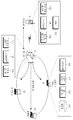
도 1은 본 발명의 실시예에 따른 네트워크 프린팅을 위한 시스템의 구성도이다. 도 1에 도시된 바와 같이, 이동 단말의 문서를 출력하기 위한 시스템은 이동 단말(10), 문서를 출력하는 프린터(20) 및 그 프린터(20)와 로컬영역망(Local Area Network:LAN)으로 연결된 하나 이상의 컴퓨터(40, 50, 60)를 포함하여 구성된다. 1 is a block diagram of a system for network printing according to an embodiment of the present invention. As shown in FIG. 1, a system for outputting a document of a mobile terminal includes a
그 중에서도 이동 단말(10)은 휴대 전화 등을 의미하며, 근거리 무선 통신 방식을 이용하여 근방의 프린터(20)와 무선 연결 동작을 수행하고, 그 프린터(20)와 연결되면 프린트 요청을 하면서 출력하고자 하는 문서를 프린터(2)로 전달한다. 이러한 이동 단말(10)은 무선 자동 설정부(Wireless Auto Setup Module)(102), 디스커버리부(Discovery Module)(104), 프린팅 에이전트(Printing Agent Module)(106) 및 GUI(Graphic User Interface)(108)을 포함한다. In particular, the
무선 자동 설정부(102)는 이동 단말(10)과 프린터(20) 간 무선 자동 연결 설정을 제공하는 역할을 한다. The wireless
디스커버리부(104)는 이동 단말(20) 가까이에 있는 프린터를 찾는 역할을 한다. 이러한 디스커버리부(104)는 프린터 디스커버리 요청을 멀티캐스팅한 후, 그 디스커버리 요청에 대한 응답이 수신되면, 그 응답으로부터 연결 대상 프린터(20)의 이름, IP 주소, 포트 정보 등을 얻는다. 이렇게 얻은 프린터(20)의 정보는 출력할 문서를 그 프린터(20)로 전달하는 데 이용된다. The
프린팅 에이전트(106)는 프린터(20)의 프린팅 관리부(114)와 통신을 수행하며, 프린터(20)의 각종 상태 정보를 송수신하고 관리하는 역할을 한다. 구체적으로, 이러한 프린팅 에이전트(106)는 무선 연결된 프린터(20)의 온라인, 오프라인, 전원 온/오프, 용지 공급 등의 상태 정보를 관리한다. 또한 프린팅 에이전트(106)는 프린터(20)로 문서 출력을 요청하는 역할을 하는데, 구체적으로 출력하고자 하는 문서의 출력 가능 여부를 프린터(20)로 질의한 후 응답을 수신함으로써 출력 가능 여부를 파악하는 역할을 한다. 또한 프린팅 에이전트(106)는 출력에 사용되는 각종 속성 예컨대, 출력 매수, 용지, 페이지, 흑백/컬러 등의 정보를 요청하여 획득하는 역할을 한다. 그리고나서 프린팅 에이전트(106)는 획득한 속성 정보를 GUI(108)로 전달한 후, GUI(108)를 통해 사용자에 의해 프린트 옵션 정보와 출력 대상 문서가 선택되면, 그 출력 대상 문서와 함께 프린트 옵션 정보를 프린터(20)로 전송하는 역할을 수행한다. The
이러한 GUI(108)는 프린팅 에이전트(106)로부터 전달된 속성 정보를 기반으로 무선 연결된 프린터의 상태 확인, 출력 매수 선택, 용지 선택, 문서 출력 가능 여부 등의 정보와, 설정 가능한 프린트 옵션을 사용자에게 제공한다. 또한 GUI(108)를 통해 사용자는 출력 대상 문서를 선택할 수 있다. The
한편, 프린터(20)는 무선 자동 설정부(Wireless Auto Setup Module)(110), 디스커버리부(Discovery Module)(112), 프린팅 관리부(Printing Manager Module)(106) 및 GUI(Graphic User Interface)(114)를 포함한다. The
무선 자동 설정부(110)는 이동 단말(10)의 무선 자동 설정부(102)와 마찬가지로 이동 단말(10)과의 무선 자동 연결을 설정하는 역할을 한다. 이러한 무선 자동 연결 과정은 하기에서 상세히 후술하기로 한다.The wireless
또한 디스커버리부(112)는 이동 단말(10)의 디스커버리부(104)에서의 동작과 유사하며, 이동 단말(10)로부터 디스커버리 요청 수신 시 자신의 이름, IP 주소, 포트 등의 정보를 포함하는 응답을 제공하는 역할을 한다. In addition, the
프린팅 관리부(114)는 현재 프린터(20)를 통해 문서 출력이 가능한 대상 컴퓨터(40, 50, 60)들을 문서의 종류별로 맵핑시켜 테이블 형태로 관리한다. 이러한 테이블 구조를 예시하면 하기 표 1과 같으며, 그 형태는 이에 한정되지 않는다. The
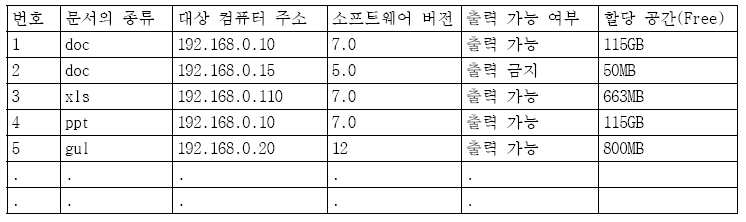
상기 표 1에서와 같이, 테이블의 내용에는 문서의 종류(확장자), 상기 프린터(20)와 로컬영역망으로 연결된 각 컴퓨터의 네트워크 주소, 각 컴퓨터에 설치된 문서 소프트웨어의 버전, 출력 가능 여부, 각 컴퓨터에 할당된 문서 저장 공간 등의 문서 지원 정보가 포함된다. As shown in Table 1, the contents of the table include the document type (extension), the network address of each computer connected to the
또한 프린팅 관리부(114)는 사용자가 출력을 요청한 문서를 이동 단말(10)의 프린팅 에이전트(106)로부터 수신한 후, 그 수신된 문서를 상기 표 1에서와 같은 테이블을 참조하여 그 수신된 문서를 출력할 수 있는 컴퓨터를 찾은 후 그 검색된 컴퓨터로 그 수신된 문서를 전송한다. In addition, the
상기한 바와 같이 이동 단말과 자동 연결된 프린터에서 네트워크로 연결된 컴퓨터들 중 출력하고자 하는 문서에 대응하는 컴퓨터를 이용하여 문서를 출력함으로써 이동 단말 입장에서는 각 문서에 대응하는 응용 소프트웨어 및 프린터 드라이버를 설치하지 않고도 원하는 문서를 출력할 수 있게 된다.As described above, a document is output from a printer that is automatically connected to the mobile terminal by using a computer corresponding to a document to be printed among computers connected to the network, so that the mobile terminal does not need to install an application software and a printer driver corresponding to each document. You can print the document you want.
한편, 컴퓨터1(30)는 디스커버리부(Discovery Module)(120), 프린트 제어부(Print Control Module)(122), 문서 제어부(Document Control Module)(124) 및 저장부(Storage)(126)를 포함하며, 이하의 설명에서는 컴퓨터1(30)의 구성을 예로 들어 설명하나, 컴퓨터2(40) 및 컴퓨터3(50)의 내부 블록 구성도 이와 동일하며 그 동작도 동일하다. The computer 1 30 may include a
디스커버리부(120)는 컴퓨터1(30)와 프린터(20)와의 디스커버리를 수행하며, 로컬 컴퓨터인 자신의 문서 제어부(124)에서 수집한 출력 가능한 문서 형태 정보와 네트워크 주소, 수용 가능한 문서 할당 공간 등을 프린터(20)의 프린팅 관리부(114)에 등록한다. The
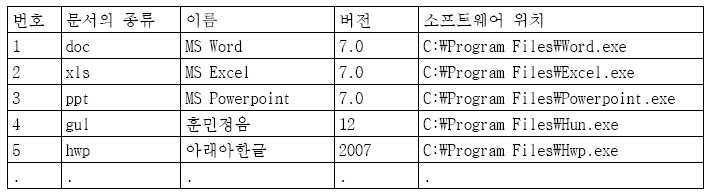
문서 제어부(124)는 로컬 컴퓨터1(30)에 설치된 문서 소프트웨어를 검색하고 그 컴퓨터1(30)에서 출력 가능한 문서 형태를 관리한다. 이때, 문서 제어부(124)에서 관리되는 정보는 문서의 종류(확장자), 소프트웨어 이름, 버전, 설치 위치 등이 포함된다. 이러한 관리 정보의 테이블 구조를 예시하면 하기 표 2와 같으며, 그 형태는 이에 한정되지 않는다. The
또한 문서 제어부(124)는 프린터(20)의 프린팅 관리부(114)로부터 출력 대상 문서와 사용자가 설정한 출력 옵션을 수신한 후 저장부(126)에 저장한다. 또한 문서 제어부(124)는 문서의 삭제, 복사 방지, 변조 방지 등의 문서보안도 수행한다. In addition, the
프린트 제어부(122)는 문서 소프트웨어의 출력 기능을 이용해 수신된 출력옵션을 적용하여 프린터(20)에서 문서를 출력하도록 제어한다. The
상기한 바와 같은 구성을 가지는 네트워크 프린팅 시스템에서의 프린팅 방법을 도 2를 참조하여 설명하기로 한다. 도 2는 본 발명의 실시예에 따른 프린팅 과정을 간단히 나타낸 도면으로써, 이동 단말(10)이 프린터(20)와 무선 자동 연결된 후, 출력하고자 하는 문서를 프린터(20)로 전달하면 그 프린터(20)가 그 문서에 대응하는 컴퓨터를 찾아 그 컴퓨터로 그 문서 출력을 요청하는 과정에 대한 것이다. The printing method in the network printing system having the configuration as described above will be described with reference to FIG. 2 is a diagram briefly illustrating a printing process according to an exemplary embodiment of the present invention. After the
먼저, 프린터(20)는 전원 온되면 200단계 및 205단계에서 미리 정해진 디스커버리 프로토콜에 의해 LAN에 연결되어 있는 하나 이상의 컴퓨터1, 2(30, 40)를 검색하는 디스커버리 동작을 수행한 후, 검색된 컴퓨터1, 2(30, 40)에서 출력 가능한 문서를 파악함으로써 출력 가능 문서를 등록해놓는다. 이러한 상기 도 2의 200단계 및 205단계에 해당하는 프린터와 컴퓨터 간의 디스커버리 과정 및 출력 가능 문서를 등록하는 과정은 도 3을 참조하여 상세히 설명하기로 한다. First, when the power supply is turned on, the
이후, 210단계에서 이동 단말(10)과 프린터(20)간에 무선 자동 연결 절차가 수행되는데, 본 발명의 실시예에서는 사용자의 편의성을 향상시키기 위해 손쉽게 무선 연결할 수 있는 방법을 제안한다. 이러한 무선 자동 연결 절차는 도 4 및 도 5를 참조하여 하기에서 후술하기로 한다. 도 4 및 도 5는 상기 도 2에서의 무선 자동 연결 절차를 설명하기 위한 일실시예 동작 흐름도이다. Thereafter, in step 210, a wireless automatic connection procedure is performed between the
이러한 과정을 통해 이동 단말(10)과 프린터(20)가 연결되면 215단계에서 디스커버리 동작을 수행한다. 이를 통해 이동 단말(10)은 프린터(20)의 속성 정보를 얻을 수 있으며, 이를 기반으로 이동 단말(10)은 프린터(20)의 상태를 알려줄 수 있게 된다. 이어, 이동 단말(10)의 사용자에 의해 프린트 옵션 및 출력할 문서가 선택되면, 이동 단말(10)은 220단계에서 출력하고자 하는 문서를 프린터(20)로 전달한다. 이때, 그 문서와 함께 사용자에 의해 선택된 프린트 옵션도 함께 전달된다. 그러면 프린터(20)는 표 1과 같은 테이블을 참조하여 그 문서를 출력할 수 있는 컴퓨터를 찾는다. 만일 그 문서에 대응하는 컴퓨터2(40)를 찾게 되면, 프린터(20)는 225단계에서 그 컴퓨터2(40)로 문서를 전달한다. 이어, 컴퓨터2(40)는 230단계에서 출력 명령을 프린터(20)로 전달함으로써 프린터(20)에서는 문서를 출력한다. When the
상기한 바와 같이 본 발명의 실시예에서는 프린터(20)에서 자신과 로컬 네트워크로 연결된 컴퓨터들 중 문서 출력에 적합한 대상 컴퓨터를 직접 찾아 그 컴퓨터로 문서 출력을 요청한다. 이렇게 함으로써 이동 단말(10)은 프린터(20)를 이용하기 위해 별도의 프린터 드라이버를 설치할 필요가 없으며, 또한 프린터(20)와 LAN으로 연결된 컴퓨터 중 출력하고자 하는 문서에 대응하는 응용 소프트웨어를 가지는 컴퓨터로 프린트 요청을 하기 때문에 이동 단말(10)에 저장된 다양한 종류의 문서 출력이 가능하게 된다.As described above, in the embodiment of the present invention, the
이와 같이 다양한 종류의 문서 출력을 위해서는 프린터(20)는 일단 각각의 컴퓨터(30, 40, 50)에서 지원하는 문서 정보를 알고 있어야 한다. 이에 따라 본 발명의 실시예에서는 200단계 및 205단계에서와 같이 프린터와 컴퓨터 간의 디스커버리 및 출력 가능 문서를 등록하는 과정을 제안하는 것이다. 이러한 과정을 도 3을 참조하여 설명하며, 도 3에서는 프린터(20)와 컴퓨터1, 2(30, 40) 간의 동작을 예로 들어 설명하기로 한다. In order to output various types of documents as described above, the
구체적으로 프린터(20)의 디스커버리부(112)는 300단계에서 디스커버리 프로토콜에 의해 LAN에 연결되어 있는 컴퓨터1, 2(30, 40)에게 각각의 컴퓨터1,2(30, 40)에서 프린트 가능한 문서 정보의 제공 요청을 멀티캐스트한다. 즉, 프린터(20)는 각각의 컴퓨터1, 2(30, 40)마다 문서 출력을 위해 어떠한 문서 지원 정보를 가지고 있는지를 파악하기 위해 이러한 요청을 전송하는 것이다. 이러한 요청은 각각의 컴퓨터1,2(30, 40)의 디스커버리부(120, 130)로 전달된다. 305단계 및 310단계에서 각각의 디스커버리부(120, 130)는 문서 제어부(124, 134)로 프린트 가능한 문서 리스트가 무엇인지를 질의하고, 이에 따라 각각의 문서 제어부(124, 134)는 315단계 및 320단계에서 어플리케이션 정보를 획득한다. 이때, 어플리케이션 정보란 지원하는 문서의 종류와 컴퓨터에 설치된 문서 소프트웨어의 버전, 출력 가능 여부 및 수용 가능한 문서 할당 공간 등의 문서 정보를 의미한다. 그리고나서 문서 제어부(124, 134)가 335단계 및 340단계에서 각각의 디스커버리부(120, 130)로 그 문서 정보를 전달하면, 그 디스커버리부(120, 130)는 전달된 문서 정보를 포함하는 응답 메시지를 생성하여 345단계 및 350단계에서 그 응답 메시지를 프린터(20)로 전달한다. 이때, 응답 메시지는 그 문서 정보뿐만 아니라 네트워크 주소를 더 포함한다. In detail, the
이와 같이 각각의 컴퓨터1,2(30, 40)에서는 프린트 가능한 문서 정보 요청에 대응하여 디스커버리 프로토콜에 의해 자신이 지원하는 문서의 종류와 버전, 수용 가능한 문서 할당 공간, 출력 가능 여부, 네트워크 주소 등의 문서 지원 정보를 프린터(20)에 미리 제공한다. 만일 디스커버리 동작 이후에 컴퓨터3(50)이 전원 온되면, 그 컴퓨터3(50)의 디스커버리부에서 사전에 등록된 프린터(20)로 자신이 지원하는 문서 정보를 직접 등록할 수도 있다. As described above, each computer 1 or 2 (30, 40) responds to a request for printable document information by using the discovery protocol, such as the type and version of a document supported by the discovery protocol, an acceptable document allocation space, printability, and network address. The document support information is provided to the
위와 같은 과정을 통해 프린터(20)가 각각의 컴퓨터1, 2(30, 40)로부터 각각의 문서 정보를 포함하는 응답 메시지를 수신하면, 그 각각의 문서 정보를 근거로 상기 표 1에서와 같은 테이블을 생성하게 된다. 이러한 테이블은 이동 단말(10)로부터 전달되는 문서를 출력할 수 있는 컴퓨터를 찾는 데 이용된다.When the
한편, 본 발명의 실시예에서는 무선 자동 연결 설정(WAS:Wireless Auto Setup) 절차에 의해 사용자가 쉽게 이동 단말(10)과 프린터(20)를 연결할 수 있는 방법을 제공한다. 이러한 도 2의 210단계에 해당하는 무선 자동 연결 절차를 도 4 및 도 5를 참조하여 구체적으로 설명하면 다음과 같다. Meanwhile, an embodiment of the present invention provides a method for a user to easily connect the
먼저, 도 4는 근거리 무선 통신 방식 중 WiFi를 이용한 무선 자동 연결 절차에 관한 것으로, 이동 단말(10)과 프린터(20)간에 WiFi 통신을 위해 SSID(Service Set Identifier)와 인증 및 암호화를 위한 보안키가 필요하며, IP 통신을 위해 IP 주소를 설정해야 하며, WEP(Wired Equivalent Privacy) 방식으로 인증 및 암호화가 이루어지므로 WEP Key값이 필요하다. 본 발명의 실시예에서는 이러한 무선 연결에 필요한 모든 정보를 자동으로 생성 및 설정하는 방식을 사용한다. 구체적으로, 이동 단말(10)과 프린터(20)간에는 동일한 정보를 이용하여 SSID, 보안키 및 IP 주소를 자동으로 생성해야 하는데, 본 발명에서는 동일한 정보로써 랜덤(random) 정보를 사용한다. 이때, 이 랜덤 정보는 이동 단말(10) 또는 프린터(20)에서 랜덤하게 생성되는 랜덤 넘버일 수 있다. 이렇게 함으로써 사용자 입장에서는 매번 무선랜 연결을 위한 각각의 정보를 입력하지 않고도 편리하게 프린터(20)와 자동 연결하는 것이 가능하게 된다. 게다가 연결 시도때마다 변경되는 랜덤 정보의 특성으로 인해 더욱 강화된 보안 특성도 얻을 수 있다.First, FIG. 4 relates to a wireless automatic connection procedure using WiFi in a short range wireless communication method, and includes a SSID (Service Set Identifier) and a security key for authentication and encryption for WiFi communication between the
도 4를 참조하면, 이동 단말(10)과 프린터(20)간에는 동일한 무선 연결 소프트웨어가 실행되고, 사용자에 의해 각각 WiFi 연결 설정이 시작된다. 이러한 자동 무선랜 연결 절차의 시작 요구가 있을 경우 상기 무선 자동 연결을 위해 프린터(20)는 400단계에서 상기 이동 단말과 공통으로 사용되는 랜덤 정보를 생성하여 표시부를 통해 출력한다. 그러면 이동 단말(10)의 사용자는 프린터(20)의 표시부를 통해 출력된 랜덤 넘버를 보고 405단계에서 그 프린터의 랜덤 넘버를 입력한다. 이러한 랜덤 넘버는 무선 자동 연결에 필요한 정보를 생성 및 설정하는 데 이용된다. 구체적으로 410단계 및 415단계에서와 같이 각각 랜덤넘버를 이용하여 동일한 해쉬 함수에 의해 SSID, WEP 등을 자동 생성 및 설정함으로써 WiFi 연결이 완료되게 된다. Referring to FIG. 4, the same wireless connection software is executed between the
도 5는 근거리 무선 통신 방식 중 BT(BlueTooth) 방식을 이용한 무선 자동 연결 절차에 관한 것으로, 도 4에서와 마찬가지로 랜덤 넘버를 이용하여 기기명, PIN 코드를 이동 단말(10)과 프린터(20) 각각에서 동일 해쉬 함수를 이용하여 생성한다. 이동 단말(10)과 프린터(20)에서 블루투스 연결 설정이 시작되면, 프린터(20)는 500단계에서 랜덤 넘버를 생성 및 출력한 후, 이를 본 사용자가 이동 단말(10)을 통해 505단계에서 그 랜덤 넘버를 입력한다. 그러면 프린터(20)에서는 510단계 및 515단계에서와 같이 랜덤 넘버를 이용한 기기명 설정 및 PIN 코드 자동 생성 및 설정 과정이 수행되며, 이동 단말(10)에서는 520단계에서 그 랜덤 넘버를 이용하여 프린터 디스커버리 동작 및 525단계에서 PIN 코드 자동 생성 및 설정 과정이 수행된다. 이렇게 함으로써, 사용자는 간편하게 랜덤 넘버를 입력하기만 하면 이동 단말(10)과 프린터(20) 간의 무선 연결이 자동으로 완료되게 된다.FIG. 5 illustrates a wireless automatic connection procedure using a BT (BlueTooth) method in a short range wireless communication method. As shown in FIG. 4, a device name and a PIN code are assigned to each of the
이하, 상기 도 2에서의 215단계 내지 230단계에 해당하는 이동 단말과 프린터간 디스커버리 및 문서 출력 과정을 구체적으로 설명하기 위해 도 6을 참조한다. 이다. Hereinafter, the discovery and document output process between the mobile terminal and the printer corresponding to steps 215 to 230 in FIG. 2 will be described in detail with reference to FIG. 6. to be.
도 6을 참조하면, 사용자는 GUI(108)에서 제공하는 "프린트" 메뉴를 통해 네트워크 프린팅 기능을 시작할 수 있다. 이러한 시작 요청이 입력됨에 따라 이동 단말(10)의 디스커버리부(104)는 600단계에서 디스커버리 프로토콜을 실행함으로써 프린터(20)의 디스커버리부(112)에게 프린터 디스커버리를 요청한다. 이러한 요청을 위해 DISCOVERY_PRINTER 메시지가 멀티캐스팅된다. 이러한 DISCOVERY_PRINTER 메시지를 수신한 프린터(20)는 605단계에서 자신의 프린터 이름, IP 주소, Port 정보 등의 프린터 정보를 포함하는 응답 메시지인 RESPONSE_PRINTER 메시지를 이용하여 이동 단말(10)의 디스커버리부(104)로 전달한다. 디스커버리부(104)는 610단계에서 이러한 디스커버리를 통해 획득한 프린터 정보를 프린팅 에이전트(106)로 전달한다. Referring to FIG. 6, a user may start a network printing function through a “print” menu provided by the
이어, GUI(108)는 615단계에서 프린팅 에이전트(106)로 프린터(20)에 대한 속성 정보 요청을 위해 PRINTING_CAPABILITY_REQUEST 메시지를 전달한다. 이러한 속성 정보 요청은 사용자가 프린터의 상태를 확인한 후 원하는 옵션을 설정할 수 있도록 하는 "프린트" 메뉴를 준비하기 위함이다. In step 615, the
이에 따라 프린팅 에이전트(106)는 620단계에서 프린터(20)의 프린팅 관리부(114)로 속성 정보 요청을 위해 PRINTING_CAPABILITY_REQUEST 메시지를 전송한다. 그러면 프린팅 관리부(114)는 625단계에서 이 속성 정보 요청에 대응하여 PRINTING_CAPABILITY_RESPONSE 메시지를 이용하여 응답한다. 이러한 응답에는 이동 단말(10)에 의해 요청된 속성 정보가 포함된다. 여기서, 속성 정보란 출력과 관련한 각종 정보로서, 출력 가능한 문서 종류와 프린터의 상태, 설정 가능한 각종 옵션 정보들을 포함한다.Accordingly, the
PRINTING_CAPABILITY_RESPONSE 메시지를 수신한 프린팅 에이전트(106)는 630단계에서 이를 GUI(108)로 전달한다. 그러면 GUI(108)에서는 수신한 속성 정보를 기반으로 한 "프린트" 메뉴를 제공한다. 이러한 "프린트" 메뉴는 프린터의 상태 정보, 출력 가능한 문서 종류, 컬러/흑백 설정, 가로/세로 설정 등의 다양한 옵션 기능을 포함한다. "프린트" 메뉴를 이용하여 출력할 대상 문서와 각종 프린트 옵션이 정해지면, GUI(108)는 635단계에서 SELECT_DOCUMENT 메시지를 이용하여 프린팅 에이전트(106)로 그 출력 대상 문서를 전달한다. 그러면 프린팅 에이전트(106)는 640단계에서 그 문서와 그 지정된 프린트 옵션을 결합한 후 이를 PRINT_REQUEST 메시지를 이용하여 전달한다. The
이러한 PRINT_REQUEST 메시지를 통해 그 지정된 프린트 옵션과 함께 출력 대상 문서가 프린터(20)의 프린팅 관리부(114)로 전달된다. 그러면 프린팅 관리부(114)는 642단계에서 상기 표 1에서와 같은 테이블을 참조하여 그 문서 출력이 가능한 컴퓨터를 선택한다. 구체적으로, 프린터(20)는 자신이 관리하고 있는 표 1에서와 같은 무서와 컴퓨터 맵핑 테이블을 참조하여 수신한 문서의 종류 및 문서 용량, 사용 권한 등을 비교하여 출력 가능한 컴퓨터를 선택한다. 만일 컴퓨터1(30)이 선택된 경우, 프린팅 관리부(114)는 650단계에서 그 컴퓨터1(30)의 문서 제어부(124)로 PRINT_REQUEST 메시지를 전송함으로써 문서와 프린트 옵션을 전달한다. Through this PRINT_REQUEST message, the output target document along with the designated print option is transmitted to the
이러한 PRINT_REQUEST 메시지를 수신한 문서 제어부(124)는 일단 655단계에서 저장부(126)의 로컬 저장 공간에 그 문서를 저장한 후, 660단계에서 프린트 제어부(122)로 저장된 문서의 위치와 프린트 옵션을 PRINT_REQUEST 메시지를 이용하여 전달한다. 그러면 프린트 제어부(122)는 프린터(20)의 프린팅 관리부(114)에서 실제 문서를 프린트할 수 있도록 상기 표 2에서와 같은 문서-어플리케이션 테이블을 참조하여 그 문서에 해당하는 어플리케이션 또는 그 어플리케이션의 출력 API를 프린트 옵션에 적용하여 실행시킨다. 이에 따라 프린트 제어부(122)에서 665단계에서 프린트 이미지를 포함하는 PRINT 메시지를 프린팅 관리부(114)로 전달함으로써 프린터 드라이버를 통해 실제 프린트가 실행된다. After receiving the PRINT_REQUEST message, the
도 1은 본 발명의 실시예에 따른 네트워크 프린팅을 위한 시스템의 구성도,1 is a configuration diagram of a system for network printing according to an embodiment of the present invention;
도 2는 본 발명의 실시예에 따른 전체 프린팅 과정을 간단히 나타낸 도면,Figure 2 is a simplified view showing the entire printing process according to an embodiment of the present invention,
도 3은 상기 도 2의 프린터와 컴퓨터 간 디스커버리 및 출력 가능 문서 등록 절차를 설명하기 위한 일실시예 동작 흐롬도,FIG. 3 is a flowchart illustrating an embodiment for explaining a discovery and outputtable document registration procedure between the printer and the computer of FIG. 2;
도 4 및 도 5는 상기 도 2에서의 무선 자동 연결 절차를 설명하기 위한 일실시예 동작 흐름도,4 and 5 are flowcharts illustrating an embodiment for explaining a wireless automatic connection procedure in FIG. 2;
도 6은 상기 도 2에서의 이동 단말과 프린터간 디스커버리 및 문서 출력 과정을 설명하기 위한 일실시예 동작 흐름도.FIG. 6 is a flowchart illustrating an example operation for explaining discovery and document output between a mobile terminal and a printer in FIG. 2; FIG.
Claims (17)
Priority Applications (4)
| Application Number | Priority Date | Filing Date | Title |
|---|---|---|---|
| KR1020090087112A KR20110029435A (en) | 2009-09-15 | 2009-09-15 | Printer and method for outputting document of mobile terminal and mobile terminal |
| US12/869,984 US20110063663A1 (en) | 2009-09-15 | 2010-08-27 | Method for printing document of mobile terminal through printer, and mobile terminal therefor |
| EP10175131.1A EP2302504A3 (en) | 2009-09-15 | 2010-09-02 | Method for printing document of mobile terminal through printer, and mobile terminal therefor |
| CN2010102830719A CN102023829A (en) | 2009-09-15 | 2010-09-15 | Method for printing document of mobile terminal through printer, and mobile terminal therefor |
Applications Claiming Priority (1)
| Application Number | Priority Date | Filing Date | Title |
|---|---|---|---|
| KR1020090087112A KR20110029435A (en) | 2009-09-15 | 2009-09-15 | Printer and method for outputting document of mobile terminal and mobile terminal |
Publications (1)
| Publication Number | Publication Date |
|---|---|
| KR20110029435A true KR20110029435A (en) | 2011-03-23 |
Family
ID=42829405
Family Applications (1)
| Application Number | Title | Priority Date | Filing Date |
|---|---|---|---|
| KR1020090087112A Ceased KR20110029435A (en) | 2009-09-15 | 2009-09-15 | Printer and method for outputting document of mobile terminal and mobile terminal |
Country Status (4)
| Country | Link |
|---|---|
| US (1) | US20110063663A1 (en) |
| EP (1) | EP2302504A3 (en) |
| KR (1) | KR20110029435A (en) |
| CN (1) | CN102023829A (en) |
Cited By (1)
| Publication number | Priority date | Publication date | Assignee | Title |
|---|---|---|---|---|
| US11755257B2 (en) | 2020-01-06 | 2023-09-12 | Hewlett-Packard Development Company, L.P. | Automatic output of document |
Families Citing this family (42)
| Publication number | Priority date | Publication date | Assignee | Title |
|---|---|---|---|---|
| JP5104921B2 (en) * | 2010-07-26 | 2012-12-19 | ブラザー工業株式会社 | Communication control program and communication device |
| JP5170183B2 (en) | 2010-07-29 | 2013-03-27 | ブラザー工業株式会社 | Communication control program and communication device |
| KR101702361B1 (en) | 2010-11-03 | 2017-02-03 | 삼성전자주식회사 | Method and apparatus for connecting wireless network in a digital device |
| CN102368202A (en) * | 2011-10-26 | 2012-03-07 | 苏州工业园区鑫海胜电子有限公司 | Webpage selectable printing method for mobile terminal based on local area network |
| CN102426513A (en) * | 2011-10-26 | 2012-04-25 | 苏州工业园区鑫海胜电子有限公司 | Mobile terminal webpage printing method based on local area network |
| US20130135674A1 (en) * | 2011-11-29 | 2013-05-30 | Toshiba Tec Kabushiki Kaisha | Network connectable device and method of changing device's own name |
| KR20150114765A (en) | 2014-04-02 | 2015-10-13 | 삼성전자주식회사 | Image forming apparatus supporting function of NFC(near field communication) and method for setting NFC operation mode thereof |
| EP2608625B1 (en) * | 2011-12-12 | 2015-12-09 | Samsung Electronics Co., Ltd | Image forming apparatus supporting peer to peer connection and method of performing image forming operation thereof |
| JP5505406B2 (en) * | 2011-12-16 | 2014-05-28 | コニカミノルタ株式会社 | Image processing apparatus, image processing system, image processing method, and program |
| JP5994261B2 (en) * | 2012-01-31 | 2016-09-21 | ブラザー工業株式会社 | Communication device |
| JP5929399B2 (en) * | 2012-03-26 | 2016-06-08 | 富士ゼロックス株式会社 | Information providing apparatus, information providing system, and program |
| JP5962896B2 (en) | 2012-03-26 | 2016-08-03 | ブラザー工業株式会社 | Printer |
| JP6265607B2 (en) * | 2013-02-22 | 2018-01-24 | キヤノン株式会社 | COMMUNICATION DEVICE, COMMUNICATION DEVICE CONTROL METHOD, PROGRAM |
| JP5962564B2 (en) * | 2013-03-28 | 2016-08-03 | ブラザー工業株式会社 | Communication control program and communication device |
| JP5838988B2 (en) | 2013-03-28 | 2016-01-06 | ブラザー工業株式会社 | Communication program and communication device |
| KR102077821B1 (en) * | 2013-06-03 | 2020-02-14 | 휴렛-팩커드 디벨롭먼트 컴퍼니, 엘.피. | System and method for mobile printing using near field communication |
| JP6163947B2 (en) * | 2013-07-31 | 2017-07-19 | ブラザー工業株式会社 | Image recording device |
| CN104598174A (en) * | 2013-10-30 | 2015-05-06 | 诚研科技股份有限公司 | Printing apparatus and method of operating the same |
| CN104750438A (en) * | 2013-12-27 | 2015-07-01 | 腾讯科技(深圳)有限公司 | Method and device for printing based on mobile terminal |
| JP2015133572A (en) * | 2014-01-10 | 2015-07-23 | キヤノン株式会社 | Information processing system and control method of the same, and program |
| CN103984510B (en) * | 2014-05-30 | 2019-11-01 | 深圳开立生物医疗科技股份有限公司 | A kind of printer modes reminding method and device based on Android |
| CN105320473B (en) * | 2014-07-22 | 2019-03-29 | 珠海金山办公软件有限公司 | A kind of document printing method and device |
| JP6350073B2 (en) * | 2014-07-29 | 2018-07-04 | セイコーエプソン株式会社 | Device control apparatus, device control method, and device control program |
| EP3210104B1 (en) | 2014-10-23 | 2020-04-29 | Hewlett-Packard Development Company, L.P. | Printing device discovery |
| JP6511926B2 (en) * | 2015-04-09 | 2019-05-15 | 富士ゼロックス株式会社 | INFORMATION PROCESSING APPARATUS, IMAGE FORMING APPARATUS, INFORMATION PROCESSING SYSTEM, AND PROGRAM |
| US9549089B1 (en) | 2015-08-25 | 2017-01-17 | Xerox Corporation | System and method for network access discovery |
| JP6724338B2 (en) * | 2015-10-30 | 2020-07-15 | ブラザー工業株式会社 | Communication equipment |
| JP6641928B2 (en) * | 2015-11-27 | 2020-02-05 | ブラザー工業株式会社 | program |
| CN106853721A (en) * | 2015-12-09 | 2017-06-16 | 王彦明 | Ink jet numbering machine control method |
| US9819832B2 (en) | 2015-12-29 | 2017-11-14 | Kabushiki Kaisha Toshiba | Image forming apparatus and authentication method |
| JP6672945B2 (en) * | 2016-03-28 | 2020-03-25 | 富士ゼロックス株式会社 | Information processing system, terminal device, information processing device and program |
| EP3465410B1 (en) * | 2016-05-27 | 2023-09-06 | Hewlett-Packard Development Company, L.P. | Encrypted document printing utilizing multiple networks |
| JP6845630B2 (en) * | 2016-07-11 | 2021-03-17 | シャープ株式会社 | Server device and image formation control method |
| CN106126137A (en) * | 2016-08-31 | 2016-11-16 | 安徽天斯努信息技术股份有限公司 | A kind of self-help print method and apparatus |
| US10756917B2 (en) * | 2016-09-16 | 2020-08-25 | Xerox Corporation | System and method for network selection and service pairing using historical data mining |
| CN108563409B (en) * | 2018-04-28 | 2022-04-01 | 北京金豆包儿科技发展中心(有限合伙) | Printing method and advertisement pushing method |
| US10694053B1 (en) | 2019-01-22 | 2020-06-23 | Xerox Corporation | Wireless location tracking tag for monitoring real time location-tracking apparatus for an electronic device |
| CN110673804A (en) * | 2019-09-30 | 2020-01-10 | 林志辉 | File printing method and system |
| US11026048B1 (en) | 2020-03-05 | 2021-06-01 | Xerox Corporation | Indoor positioning system for a mobile electronic device |
| US11244470B2 (en) | 2020-03-05 | 2022-02-08 | Xerox Corporation | Methods and systems for sensing obstacles in an indoor environment |
| US11356800B2 (en) | 2020-08-27 | 2022-06-07 | Xerox Corporation | Method of estimating indoor location of a device |
| CN115840544A (en) * | 2021-09-18 | 2023-03-24 | 腾讯科技(深圳)有限公司 | File printing method, computer program product, device, terminal and storage medium |
Family Cites Families (19)
| Publication number | Priority date | Publication date | Assignee | Title |
|---|---|---|---|---|
| JPH11184649A (en) * | 1997-07-25 | 1999-07-09 | Seiko Epson Corp | Printing system, method and printer |
| US6798530B1 (en) * | 1999-12-07 | 2004-09-28 | Xerox Corporation | Systems, methods and graphical user interfaces for printing object optimized images using virtual printers |
| US6587835B1 (en) * | 2000-02-09 | 2003-07-01 | G. Victor Treyz | Shopping assistance with handheld computing device |
| US7609402B2 (en) * | 2001-01-19 | 2009-10-27 | Flexiworld, Inc. | Methods for universal data output |
| WO2002046867A2 (en) * | 2000-11-01 | 2002-06-13 | Flexiworld Technologies, Inc. | Controller and manager for device-to-device pervasive digital output |
| US7016062B2 (en) * | 2000-11-30 | 2006-03-21 | Ricoh Company, Ltd. | Apparatus, method and system for printing from a wireless mobile device over the internet |
| US7272788B2 (en) * | 2000-12-29 | 2007-09-18 | Fotomedia Technologies, Llc | Client-server system for merging of metadata with images |
| US7197531B2 (en) * | 2000-12-29 | 2007-03-27 | Fotomedia Technologies, Llc | Meta-application architecture for integrating photo-service websites for browser-enabled devices |
| US6690918B2 (en) * | 2001-01-05 | 2004-02-10 | Soundstarts, Inc. | Networking by matching profile information over a data packet-network and a local area network |
| US7190476B2 (en) * | 2001-06-29 | 2007-03-13 | Hewlett-Packard Development Company, L.P. | Print by reference service communication protocol and interface |
| US20030002072A1 (en) * | 2001-06-29 | 2003-01-02 | Berkema Alan C. | Print by reference communication methods for portable wireless device printing |
| US7460261B2 (en) * | 2002-12-27 | 2008-12-02 | Ricoh Company, Ltd. | Printing system, printing management device, print server, printing method, and storage medium |
| JP4367929B2 (en) * | 2004-08-27 | 2009-11-18 | キヤノン株式会社 | Mobile phone, printing system and control method thereof |
| US7991778B2 (en) * | 2005-08-23 | 2011-08-02 | Ricoh Co., Ltd. | Triggering actions with captured input in a mixed media environment |
| US20060077421A1 (en) * | 2004-10-08 | 2006-04-13 | Sharp Laboratories Of America, Inc. | System and method for driverless printers |
| US8050709B2 (en) * | 2004-11-16 | 2011-11-01 | Marvell International Technology Ltd. | Wireless printer configuration module |
| JP2006261938A (en) * | 2005-03-16 | 2006-09-28 | Sony Corp | COMMUNICATION SYSTEM, COMMUNICATION DEVICE AND METHOD, RECORDING MEDIUM, AND PROGRAM |
| KR100709072B1 (en) * | 2005-08-16 | 2007-04-18 | 삼성전자주식회사 | Network printing system and data processing method |
| KR100765768B1 (en) * | 2005-12-07 | 2007-10-15 | 삼성전자주식회사 | Method and apparatus for automatically setting connection on wireless communication network, wireless communication network using same |
-
2009
- 2009-09-15 KR KR1020090087112A patent/KR20110029435A/en not_active Ceased
-
2010
- 2010-08-27 US US12/869,984 patent/US20110063663A1/en not_active Abandoned
- 2010-09-02 EP EP10175131.1A patent/EP2302504A3/en not_active Withdrawn
- 2010-09-15 CN CN2010102830719A patent/CN102023829A/en active Pending
Cited By (1)
| Publication number | Priority date | Publication date | Assignee | Title |
|---|---|---|---|---|
| US11755257B2 (en) | 2020-01-06 | 2023-09-12 | Hewlett-Packard Development Company, L.P. | Automatic output of document |
Also Published As
| Publication number | Publication date |
|---|---|
| EP2302504A2 (en) | 2011-03-30 |
| EP2302504A3 (en) | 2013-06-19 |
| US20110063663A1 (en) | 2011-03-17 |
| CN102023829A (en) | 2011-04-20 |
Similar Documents
| Publication | Publication Date | Title |
|---|---|---|
| KR20110029435A (en) | Printer and method for outputting document of mobile terminal and mobile terminal | |
| US11711481B2 (en) | Communication apparatus | |
| US9883543B2 (en) | Method of connecting to device and apparatus for supporting Wi-Fi direct for performing the method | |
| US9357094B2 (en) | Image forming apparatus supporting peer-to-peer connection and method of managing channel thereof | |
| US9612777B2 (en) | Pull printing method, apparatus and system | |
| US9608985B2 (en) | Image forming apparatus supporting peer-to-peer connection and method of controlling job authority thereof | |
| CN102984197A (en) | Image forming apparatus supporting peer-to-peer connection and method of managing address book thereof | |
| US10194047B2 (en) | Information processing device and non-transitory recording medium | |
| JP6667476B2 (en) | Communication device, control method, and program | |
| JP2014165593A (en) | Communication device, communication system, communication device control method and computer program | |
| JP7140493B2 (en) | Information processing device, its control method, program, and storage medium | |
| JP2024097928A (en) | Information processing device, control method thereof, and program | |
| US9128645B2 (en) | System including image forming apparatus and information processing apparatus, method performed under the system, image forming apparatus and information processing apparatus directed to the system, and non-transitory storage medium encoded with program directed to the apparatuses | |
| US9596367B2 (en) | Function performing device, non-transitory computer-readable recording medium storing computer-readable instructions for terminal device, and function performing system | |
| KR101606831B1 (en) | Image forming apparatus, host device and method for controlling print | |
| JP2020198503A (en) | Information processing device, control method, and program | |
| KR20140145051A (en) | Method and Apparatus for pull printing using a mobile device | |
| JP2019155832A (en) | Image forming device and image forming method | |
| KR20170119388A (en) | Remote Printing System using Mobile Apparatus | |
| JP2015129820A (en) | Image forming apparatus, control method thereof, printing system, and program |
Legal Events
| Date | Code | Title | Description |
|---|---|---|---|
| PA0109 | Patent application |
Patent event code: PA01091R01D Comment text: Patent Application Patent event date: 20090915 |
|
| PG1501 | Laying open of application | ||
| A201 | Request for examination | ||
| PA0201 | Request for examination |
Patent event code: PA02012R01D Patent event date: 20140915 Comment text: Request for Examination of Application Patent event code: PA02011R01I Patent event date: 20090915 Comment text: Patent Application |
|
| E902 | Notification of reason for refusal | ||
| PE0902 | Notice of grounds for rejection | ||
| E601 | Decision to refuse application | ||
| PE0601 | Decision on rejection of patent |
Patent event date: 20150702 Comment text: Decision to Refuse Application Patent event code: PE06012S01D Patent event date: 20150428 Comment text: Notification of reason for refusal Patent event code: PE06011S01I |