KR20100082147A - Method for enlarging and changing captured image, and phographed apparatus using the same - Google Patents
Method for enlarging and changing captured image, and phographed apparatus using the same Download PDFInfo
- Publication number
- KR20100082147A KR20100082147A KR1020090001494A KR20090001494A KR20100082147A KR 20100082147 A KR20100082147 A KR 20100082147A KR 1020090001494 A KR1020090001494 A KR 1020090001494A KR 20090001494 A KR20090001494 A KR 20090001494A KR 20100082147 A KR20100082147 A KR 20100082147A
- Authority
- KR
- South Korea
- Prior art keywords
- screen
- zoom
- information
- guide information
- area
- Prior art date
- Legal status (The legal status is an assumption and is not a legal conclusion. Google has not performed a legal analysis and makes no representation as to the accuracy of the status listed.)
- Ceased
Links
Images


Classifications
-
- H—ELECTRICITY
- H04—ELECTRIC COMMUNICATION TECHNIQUE
- H04N—PICTORIAL COMMUNICATION, e.g. TELEVISION
- H04N5/00—Details of television systems
- H04N5/222—Studio circuitry; Studio devices; Studio equipment
- H04N5/262—Studio circuits, e.g. for mixing, switching-over, change of character of image, other special effects ; Cameras specially adapted for the electronic generation of special effects
- H04N5/2628—Alteration of picture size, shape, position or orientation, e.g. zooming, rotation, rolling, perspective, translation
-
- H—ELECTRICITY
- H04—ELECTRIC COMMUNICATION TECHNIQUE
- H04N—PICTORIAL COMMUNICATION, e.g. TELEVISION
- H04N23/00—Cameras or camera modules comprising electronic image sensors; Control thereof
- H04N23/60—Control of cameras or camera modules
- H04N23/63—Control of cameras or camera modules by using electronic viewfinders
- H04N23/633—Control of cameras or camera modules by using electronic viewfinders for displaying additional information relating to control or operation of the camera
- H04N23/634—Warning indications
-
- H—ELECTRICITY
- H04—ELECTRIC COMMUNICATION TECHNIQUE
- H04N—PICTORIAL COMMUNICATION, e.g. TELEVISION
- H04N23/00—Cameras or camera modules comprising electronic image sensors; Control thereof
- H04N23/60—Control of cameras or camera modules
- H04N23/62—Control of parameters via user interfaces
-
- H—ELECTRICITY
- H04—ELECTRIC COMMUNICATION TECHNIQUE
- H04N—PICTORIAL COMMUNICATION, e.g. TELEVISION
- H04N23/00—Cameras or camera modules comprising electronic image sensors; Control thereof
- H04N23/60—Control of cameras or camera modules
- H04N23/63—Control of cameras or camera modules by using electronic viewfinders
- H04N23/631—Graphical user interfaces [GUI] specially adapted for controlling image capture or setting capture parameters
- H04N23/632—Graphical user interfaces [GUI] specially adapted for controlling image capture or setting capture parameters for displaying or modifying preview images prior to image capturing, e.g. variety of image resolutions or capturing parameters
-
- H—ELECTRICITY
- H04—ELECTRIC COMMUNICATION TECHNIQUE
- H04N—PICTORIAL COMMUNICATION, e.g. TELEVISION
- H04N23/00—Cameras or camera modules comprising electronic image sensors; Control thereof
- H04N23/60—Control of cameras or camera modules
- H04N23/64—Computer-aided capture of images, e.g. transfer from script file into camera, check of taken image quality, advice or proposal for image composition or decision on when to take image
-
- H—ELECTRICITY
- H04—ELECTRIC COMMUNICATION TECHNIQUE
- H04N—PICTORIAL COMMUNICATION, e.g. TELEVISION
- H04N23/00—Cameras or camera modules comprising electronic image sensors; Control thereof
- H04N23/60—Control of cameras or camera modules
- H04N23/68—Control of cameras or camera modules for stable pick-up of the scene, e.g. compensating for camera body vibrations
- H04N23/681—Motion detection
-
- H—ELECTRICITY
- H04—ELECTRIC COMMUNICATION TECHNIQUE
- H04N—PICTORIAL COMMUNICATION, e.g. TELEVISION
- H04N23/00—Cameras or camera modules comprising electronic image sensors; Control thereof
- H04N23/60—Control of cameras or camera modules
- H04N23/69—Control of means for changing angle of the field of view, e.g. optical zoom objectives or electronic zooming
-
- H—ELECTRICITY
- H04—ELECTRIC COMMUNICATION TECHNIQUE
- H04N—PICTORIAL COMMUNICATION, e.g. TELEVISION
- H04N23/00—Cameras or camera modules comprising electronic image sensors; Control thereof
- H04N23/60—Control of cameras or camera modules
- H04N23/695—Control of camera direction for changing a field of view, e.g. pan, tilt or based on tracking of objects
Landscapes
- Engineering & Computer Science (AREA)
- Multimedia (AREA)
- Signal Processing (AREA)
- Human Computer Interaction (AREA)
- Studio Devices (AREA)
Abstract
촬영되는 화면의 확대 방법과 변경 방법, 그리고, 이를 이용한 촬영 장치가 개시된다. 본 확대 방법에 따르면, 줌-인 영역에 대한 가이드 정보를 부가하고, 줌-인 명령에 기초하여 가이드 정보를 보정한다. 이에 의해, 촬영되는 화면을 확대하여 사용자가 의도한 피사체에 보다 쉽고 용이하게 접근할 수 있다.A method of enlarging and changing a screen to be photographed and a photographing apparatus using the same are disclosed. According to this magnification method, the guide information for the zoom-in area is added, and the guide information is corrected based on the zoom-in command. As a result, the screen to be photographed can be enlarged to allow easier and easier access to a subject intended by the user.
Description
본 발명은 촬영되는 화면의 확대 방법과 변경 방법, 그리고, 이를 이용한 촬영 장치에 관한 것으로, 더욱 상세하게는, 촬영되는 화면 중 지정된 영역을 확대하기 위한 방법과 지정된 영역이 확대된 화면으로 변경하기 위한 방법, 그리고, 이를 이용한 촬영 장치에 관한 것이다.The present invention relates to a method of enlarging and capturing a screen to be photographed, and to a photographing apparatus using the same. A method and a photographing apparatus using the same.
디지털 카메라 및 캠코더와 같은 촬영 장치의 보급이 활성화되고, 촬영 장치가 내재된 이동통신 단말기의 사용이 일반화되어, 영상을 손쉽게 촬영할 수 있게 되었다. 또한, 촬영 장치의 대중화와 함께 진행된 촬영 장치의 고급화에 힘입어, 오늘날의 촬영 장치는, 피사체를 50배 배율로 줌-인하여 사용자에게 제공하기에 이르렀다.The proliferation of photographing devices such as digital cameras and camcorders has been activated, and the use of mobile communication terminals inherent with photographing devices has become common, so that images can be easily taken. In addition, thanks to the advancement of the photographing apparatus advanced with the popularization of the photographing apparatus, today's photographing apparatus has come to provide a user by zooming in a subject at 50 times magnification.
그러나, 이와 같이, 줌-인이 가능한 배율이 커짐에 따라, 사용자가 확대하고자 의도했던 피사체를 용이하게 탐색하는 것이 어려워졌다. 이러한 문제는, 주로 피사체가 광축의 중앙에 있지 않는 경우에 발생하며, 줌-인시 발생하는 손떨림 또 는 패닝과 틸팅과 같은 카메라 워크에 의해 극대화된다. However, as the magnification which can be zoomed-in in this way increases, it has become difficult for the user to easily search for a subject intended to be enlarged. This problem is mainly caused when the subject is not in the center of the optical axis, and is maximized by camera shake such as panning and tilting caused by zoom-in.
따라서, 확대하고자 의도했던 피사체를, 사용자로 하여금 보다 쉽게 탐색할 수 있도록 하기 위한 방안의 모색이 요청된다.Accordingly, a search for a method for enabling a user to more easily navigate a subject intended to be enlarged is required.
본 발명은 상기와 같은 문제점을 해결하기 위하여 안출된 것으로서, 본 발명의 목적은, 촬영 장치를 줌-인하는 경우, 사용자로 하여금 보다 쉽게 확대하고자 의도했던 피사체를 탐색할 수 있도록 하는 확대 방법과 변경 방법, 그리고, 이를 이용한 촬영 장치를 제공함에 있다.SUMMARY OF THE INVENTION The present invention has been made to solve the above problems, and an object of the present invention is to enlarge and change a zooming method that allows a user to easily navigate a subject intended to zoom in when zooming-in a photographing apparatus. A method and a photographing apparatus using the same are provided.
상기 목적을 달성하기 위한 본 발명의 일 실시예에 따른 촬영 장치에서 촬영되는 화면을 확대하기 위한 방법은, 상기 화면에서 줌-인 영역이 지정되면, 상기 줌-인 영역에 대한 가이드 정보를 상기 화면에 부가하는 단계; 및 줌-인 명령이 입력되면, 상기 줌-인 명령에 기초하여 상기 화면을 확대하고 상기 가이드 정보를 보정하는 단계;를 포함한다.According to an aspect of the present invention, a method for enlarging a screen photographed by a photographing apparatus according to an embodiment of the present invention includes: when a zoom-in area is designated on the screen, guide information about the zoom-in area is displayed on the screen. Adding to; And when the zoom-in command is input, enlarging the screen based on the zoom-in command and correcting the guide information.
여기서, 상기 보정 단계는, 상기 줌-인 명령에 대응되는 줌-인 배율에 따라 상기 가이드 정보가 확대되도록 보정할 수 있다.In the correcting step, the guide information may be corrected to be enlarged according to a zoom-in magnification corresponding to the zoom-in command.
또한, 본 실시예에 따른 화면 확대 방법은, 상기 촬영 장치의 광축이 변경되면, 상기 광축의 변경 정보를 기초로 상기 가이드 정보를 보정하는 단계;를 더 포함할 수 있다.The screen magnification method according to the present embodiment may further include correcting the guide information based on the change information of the optical axis when the optical axis of the photographing apparatus is changed.
그리고, 상기 변경 정보는, 틸팅 정보, 패닝 정보 및 손떨림 정보 중 적어도 하나를 포함할 수 있다.The change information may include at least one of tilting information, panning information, and camera shake information.
또한, 상기 보정단계는, 상기 변경 정보와 상기 줌-인 명령에 대응되는 줌-인 배율을 조합하여, 상기 가이드 정보를 보정할 수 있다.In the correcting step, the guide information may be corrected by combining the change information and the zoom-in magnification corresponding to the zoom-in command.
그리고, 본 실시예에 따른 화면 확대 방법은, 상기 가이드 정보가 부가된 화면을 저장하는 단계;를 더 포함하고, 상기 보정 단계는, 상기 저장된 화면과 상기 확대된 화면을 매칭시켜 상기 가이드 정보를 보정할 수 있다.The screen enlargement method according to the present embodiment may further include storing a screen to which the guide information is added, and the correcting step corrects the guide information by matching the stored screen with the enlarged screen. can do.
또한, 상기 보정 단계는, 상기 확대된 화면과 상기 저장된 화면 중 적어도 하나를 축소 또는 확대하여, 상기 확대된 화면을 상기 저장된 화면의 일부에 매칭시키는 단계; 및 상기 저장된 화면의 일부에 표시된 가이드 정보와 동일한 가이드 정보가 상기 확대된 화면에 표시되도록 상기 가이드 정보를 보정하는 단계;를 포함할 수 있다.The correcting may include reducing or enlarging at least one of the enlarged screen and the stored screen to match the enlarged screen to a portion of the stored screen; And correcting the guide information such that the same guide information displayed on a part of the stored screen is displayed on the enlarged screen.
여기서, 상기 가이드 정보는, 상기 줌-인 영역을 중심으로 하는 복수의 동심원 및 상기 줌-인 영역을 지시하는 인디케이터 중 적어도 하나를 포함할 수 있다.Here, the guide information may include at least one of a plurality of concentric circles centered on the zoom-in area and an indicator indicating the zoom-in area.
한편, 상기 목적을 달성하기 위한 본 발명의 일 실시예에 따른 촬영 장치에서 촬영되는 화면을 변경시키기 위한 방법은, 상기 화면 중 지정된 영역에 대한 가이드 정보를 부가하는 단계; 및 수평 이동 정보 및 수직 이동 정보 중 적어도 하나를 이용하여, 상기 화면을 변경시키고 상기 가이드 정보를 보정하는 단계;를 포함한다.On the other hand, the method for changing the screen shot in the photographing apparatus according to an embodiment of the present invention for achieving the above object, the step of adding guide information for the designated area of the screen; And changing the screen and correcting the guide information by using at least one of horizontal movement information and vertical movement information.
여기서, 상기 수평 이동 정보는, 틸팅, 패닝 및 손떨림 중 적어도 하나에 의해 발생하는 화면과 평행한 방향으로의 화면 이동 정보이고, 상기 수직 이동 정보는, 줌-인 및 줌-아웃 중 적어도 하나에 의해 발생하는상기 화면에 수직한 방향으 로의 화면 이동 정보일 수 있다.Here, the horizontal movement information is screen movement information in a direction parallel to the screen generated by at least one of tilting, panning, and camera shake, and the vertical movement information is determined by at least one of zoom-in and zoom-out. It may be screen movement information in a direction perpendicular to the generated screen.
한편, 상기 목적을 달성하기 위한 본 발명의 일 실시예에 따른 촬영 장치는, 촬영되는 화면을 표시하는 디스플레이부; 및 상기 화면에서 줌-인 영역이 지정되면, 상기 줌-인 영역에 대한 가이드 정보가 상기 화면에 부가되도록 하고, 줌-인 명령이 입력되면, 상기 줌-인 명령에 기초하여 상기 화면이 확대되고 상기 가이드 정보가 보정되도록 하는 제어부;를 포함한다.On the other hand, the imaging apparatus according to an embodiment of the present invention for achieving the above object, a display unit for displaying a screen to be photographed; And when a zoom-in area is designated on the screen, guide information for the zoom-in area is added to the screen, and when a zoom-in command is input, the screen is enlarged based on the zoom-in command. And a controller configured to correct the guide information.
여기서, 상기 제어부는, 상기 줌-인 명령에 대응되는 줌-인 배율에 따라 상기 가이드 정보가 확대보정되도록 할 수 있다.Here, the controller may allow the guide information to be enlarged and corrected according to the zoom-in magnification corresponding to the zoom-in command.
또한, 본 실시예에 따른 촬영 장치는, 상기 촬영 장치의 광축이 변경되었는지 여부를 감지하는 움직임 감지 센서;를 더 포함하고, 상기 제어부는, 상기 광축의 변경 정보를 기초로 상기 가이드 정보가 보정되도록 할 수 있다.The photographing apparatus according to the present embodiment may further include a motion detection sensor configured to detect whether the optical axis of the photographing apparatus is changed, and wherein the controller is configured to correct the guide information based on the change information of the optical axis. can do.
그리고, 상기 변경 정보는, 틸팅 정보, 패닝 정보 및 손떨림 정보 중 적어도 하나를 포함할 수 있다.The change information may include at least one of tilting information, panning information, and camera shake information.
또한, 상기 제어부는, 상기 변경 정보와 상기 줌-인 명령에 대응되는 줌-인 배율을 조합하여, 상기 가이드 정보가 보정되도록 할 수 있다.The controller may combine the change information and a zoom-in magnification corresponding to the zoom-in command to correct the guide information.
그리고, 본 발명의 일 실시예에 따른 촬영 장치는, 상기 가이드 정보가 부가된 화면을 저장하는 저장부;를 더 포함하고, 상기 제어부는, 상기 저장된 화면과 상기 확대된 화면을 매칭시켜 상기 가이드 정보가 보정되도록 할 수 있다.The photographing apparatus according to an exemplary embodiment may further include a storage unit configured to store a screen to which the guide information is added, and the controller may match the stored screen and the enlarged screen to match the guide information. Can be corrected.
또한, 본 발명의 일 실시예에 따른 촬영 장치는, 상기 확대된 화면과 상기 저장된 화면 중 적어도 하나를 축소 또는 확대시키는 영상 처리부;를 더 포함하고, 상기 제어부는, 상기 확대된 화면을 상기 저장된 화면의 일부에 매칭시켜, 상기 저장된 화면의 일부에 표시된 가이드 정보와 동일한 가이드 정보가 상기 확대된 화면에 표시되도록 할 수 있다.The photographing apparatus may further include an image processing unit configured to reduce or enlarge at least one of the enlarged screen and the stored screen. The controller may further include storing the enlarged screen as the stored screen. The same guide information as the guide information displayed on a part of the stored screen may be displayed on the enlarged screen by matching a portion of the.
그리고, 상기 가이드 정보는, 상기 줌-인 영역을 중심으로 하는 복수의 동심원 및 상기 줌-인 영역을 지시하는 인디케이터 중 적어도 하나를 포함할 수 있다.The guide information may include at least one of a plurality of concentric circles centered on the zoom-in area and an indicator indicating the zoom-in area.
한편, 상기 목적을 달성하기 위한 본 발명의 일 실시예에 따른 촬영 장치는, 촬영되는 화면을 표시하는 디스플레이부; 및 상기 화면 중 지정된 영역에 대한 가이드 정보가 부가되면, 수평 이동 정보 및 수직 이동 정보 중 적어도 하나를 이용하여, 상기 화면이 변경되고 상기 가이드 정보가 보정되도록 하는 제어부;를 포함한다.On the other hand, the imaging apparatus according to an embodiment of the present invention for achieving the above object, a display unit for displaying a screen to be photographed; And a controller configured to change the screen and correct the guide information by using at least one of horizontal movement information and vertical movement information when guide information about a designated area of the screen is added.
여기서, 상기 수평 이동 정보는, 틸팅, 패닝 및 손떨림 중 적어도 하나에 의해 발생하는 화면과 평행한 방향으로의 화면 이동 정보이고, 상기 수직 이동 정보는, 줌-인 및 줌-아웃 중 적어도 하나에 의해 발생하는상기 화면에 수직한 방향으로의 화면 이동 정보일 수 있다.Here, the horizontal movement information is screen movement information in a direction parallel to the screen generated by at least one of tilting, panning, and camera shake, and the vertical movement information is determined by at least one of zoom-in and zoom-out. It may be screen movement information in a direction perpendicular to the generated screen.
이에 의해, 촬영되는 화면을 확대하여 사용자가 의도한 피사체에 보다 쉽고 용이하게 접근할 수 있다.As a result, the screen to be photographed can be enlarged to allow easier and easier access to a subject intended by the user.
이하에서는 도면을 참조하여 본 발명을 보다 상세하게 설명한다.Hereinafter, with reference to the drawings will be described the present invention in more detail.
도 1은 본 발명의 일 실시예에 따른 촬영 장치(100)에 대한 블럭도이다. 본 촬영 장치(100)는, 촬영되는 화면에서 줌-인 영역이 지정되면, 줌-인 영역에 대한 가이드 정보를 화면에 부가하고, 줌-인 명령이 입력되면, 줌-인 명령에 기초하여 가이드 정보를 보정한다.1 is a block diagram of a photographing
가이드 정보란, 지정된 줌-인 영역을 지시하여 사용자로 하여금 줌-인 영역을 보다 용이하게 파악할 수 있도록 하는 정보를 의미한다. 이하에서는, 이러한 가이드 정보로서, 줌-인 영역을 중심으로 하는 복수의 동심원들을 예로 들어 설명하기로 한다. 또는 줌-인 영역을 지시하는 화살표 등의 인디케이터 등을 예로 들 수 있다.The guide information refers to information that indicates a designated zoom-in area so that a user can more easily grasp the zoom-in area. Hereinafter, as the guide information, a plurality of concentric circles centering on the zoom-in area will be described as an example. Or an indicator such as an arrow indicating a zoom-in area.
도시된 바와 같이 촬영 장치(100)는, 촬영부(110), 영상 처리부(120), 제어부(130), 코덱(140), 저장부(150), 움직임 감지부(160), 조작부(170) 및 영상 출력부(180)를 구비한다.As shown, the photographing
촬영부(110)는 렌즈(미도시)를 통해 입사되는 광신호를 전기신호로 광전변환하고, 전기신호에 대해 소정의 신호처리를 수행한다.The photographing
이와 같은 기능을 수행하는 촬영부(110)는, 아날로그 형태의 영상신호를 출력하기 위한 이미지 센서(미도시) 및 아날로그 형태의 영상신호를 디지털 형태의 영상신호로 변환하기 위한 AD 컨버터(Analog-Digital converter)(미도시)를 구비할 수 있다.The
영상 처리부(120)는 촬영부(110)로부터 인가받은 영상신호에 대해 포맷변환과 영상 스케일을 조정하기 위한 디지털 줌, AWB(Auto White Balance), AF(Auto Focus), AE(Auto Exposure)등의 신호처리를 하여, 후술할 영상 출력부(180)에 인가한다. The
영상 처리부(120)는 촬영된 영상을 저장하기 위해 신호처리된 영상신호를 코덱(140)으로 전송한다.The
코덱(140)은 촬영된 영상을 저장하기 위해 인코딩을 하고, 저장된 영상을 디스플레이하기 위해 디코딩을 수행한다. 이에 따라, 코덱(140)은 영상 처리부(120)로부터 전달받은 영상신호를 인코딩하여 인코딩된 영상신호를 저장부(150)로 전송하고, 저장부(150)에 저장된 인코딩된 영상신호를 디코딩하여 디코딩된 영상신호를 영상 처리부(120)로 전송한다.The codec 140 encodes to store the captured image and decodes to display the stored image. Accordingly, the codec 140 encodes the video signal received from the
영상 출력부(180)는, 영상 처리부(120)로부터 수신된 영상신호를 내부 디스플레이 장치 또는 외부 출력 단자로 출력한다.The
저장부(150)는, 촬영부(110)에서 촬영된 영상을 압축된 형태로 저장하며, 촬영 장치(100)의 시스템을 제어하는데 필요한 프로그램 정보 및 설정정보를 저장한다. 이러한 저장부(150)는 플래쉬 메모리, 하드디스크, DVD 등이 될 수 있다. The storage unit 150 stores the image photographed by the photographing
움직임 감지부(160)는, 모션 센서라고도 불리며, 촬영 장치(100)의 움직임을 감지한다. 움직임 감지부(160)는, 물체의 회전을 감지하기 위한 각속도 센서(미도시) 또는 물체의 가속도, 진동 등을 감지하기 위한 가속도 센서(미도시)로 구성될 수 있으며, 이들의 조합으로 구성될 수도 있다. 또한, 지자계 센서 등이 추가되어 구성될 수 있다.The
각속도 센서는, 2축 또는 3축에 대한 각속도가 존재하는지 여부를 검출하여 물체의 회전을 감지하고, 가속도 센서는, x축, y축 및 z축에 대한 가속도가 존재하는지 여부를 검출하여, 물체의 이동 여부를 감지한다.The angular velocity sensor detects the rotation of the object by detecting whether there is an angular velocity with respect to two or three axes, and the acceleration sensor detects whether there is acceleration with respect to the x, y and z axes, Detect whether or not to move.
움직임 감지부(160)는, 감지된 움직임에 대한 신호를 후술할 제어부(130)로 전달한다.The
조작부(170)는. 사용자의 조작명령을 입력받아 후술할 제어부(130)로 전달하고, 제어부(130)는, 사용자의 조작명령에 따라 촬영 장치(100)의 작동 전반을 제어한다. The
구체적으로, 제어부(130)는, 광신호가 전기신호로 광전변환되고, 전기신호에 대해 소정의 신호처리가 수행되도록 촬영부(110)와 영상 처리부(120)를 제어하고, 신호처리된 영상신호가 인코딩되고, 인코딩된 영상이 디코딩되도록 코덱(140)을 제어한다. Specifically, the
또한, 제어부(130)는, 조작부(170)를 통해 입력된 사용자의 명령에 따라 촬영되는 화면에 줌-인 영역이 표시되고, 줌-인 영역에 대한 가이드 정보가 화면에 부가되도록 한다. 이러한 줌-인 영역의 표시는, 촬영되는 화면 중 사용자가 확대하기를 원하는 영역을 터치하는 방식에 의해 표시될 수 있다. In addition, the
제어부(130)는, 조작부(170)를 통해 입력된 사용자의 줌-인 명령에 따라 화면이 확대되도록 하고, 확대된 화면에 맞게 가이드 정보가 보정되도록 한다. 또한, 제어부(130)는, 움직임 감지부(160)에서 감지된 사용자의 손떨림이나, 틸팅(tilting)과 패닝(panning) 등의 카메라 워크(camerra work)에 대한 정보를 이용하여, 변경된 광축에 따라 가이드 정보가 보정되도록 한다.The
이에 대한 설명을 위해, 도 2 내지 도 3d를 참조하기로 한다. 도 2는, 본 발명의 일 실시예에 따른 가이드 정보 보정방법을 설명하기 위한 흐름도이다.For description thereof, reference will be made to FIGS. 2 to 3D. 2 is a flowchart illustrating a guide information correction method according to an embodiment of the present invention.
우선, 제어부(130)는, 촬영되는 화면이 디스플레이에 표시되도록 한다(S210). 제어부(130)는, 촬영되는 화면 중 일부가 터치되는 방식 등을 통해 줌-인 영역이 지정되었는지 여부를 판단하고(S220), 줌-인 영역이 지정된 것으로 판단되면(S220-Y), 줌-인 영역을 중심으로 하는 동심원들이 화면에 생성되도록 한다(S230). 전술한 바와 같이, 이러한 동심원들이 가이드 정보가 되며, 동심원들은 가이드 정보에 대한 예시적 사항이다.First, the
이후, 제어부(130)는, 조작부(170)를 통한 사용자의 줌-인 명령이 입력되었는지 여부를 판단하고(S240), 줌-인 명령이 입력된 것으로 판단되면(S240-Y), 줌-인 명령에 따라 화면이 확대되도록 하고, 동심원들도 화면과 함께 확대되도록 한다(S250).Thereafter, the
또한, 제어부(130)는, 손떨림, 틸팅, 패닝 등에 의해 촬영 장치(100)의 광축이 변경되었는지 여부를 판단하고(S260), 광축이 변경된 정도를 반영하여 화면에서 확대된 동심원들을 이동시킨다(S270). In addition, the
도 3a 내지 도 3d는, 화면이 확대되고 가이드 정보가 보정되는 과정을 설명하기 위해 제공되는 도면이다. 도 3a에 도시된 바와 같이, 사용자의 화면 확대 의도에 따라 촬영되는 화면(310) 중 일부가 터치되어 줌-인 영역이 설정되면, 제어부(130)는, 사용자가 터치한 부분에 줌-인 영역을 나타내는 정보(320)(이하 '줌-인 정보(320)'로 총칭)가 표시되도록 한다.3A to 3D are diagrams provided to explain a process of enlarging a screen and correcting guide information. As shown in FIG. 3A, when a part of the
한편, 줌-인 영역이 설정되면, 줌-인 영역과 함께 광축(330)도 설정된다. 이에 따라, 사용자의 손떨림, 틸팅, 패닝 등이 존재하여 광축(330)이 변경되더라고, 기설정된 광축(330)을 기준으로 줌-인 영역을 알 수 있게 된다. 따라서, 줌-인 영역이 변경되지 않게 되며, 아울러, 줌-인 정보(320)도 변경되지 않게 된다. 물론, 줌-인 정보(320)가 변경되지 않는 것은 별론으로 하고, 광축(330)은 사용자의 손떨림, 틸팅, 패닝 등에 의해 변경될 수 있다. On the other hand, when the zoom-in area is set, the
이후, 제어부(130)는, 도 3b에 도시된 바와 같이, 촬영되는 화면(310)에 줌-인 영역을 중심으로 하는 동심원들(340)이 가이드 정보로서 디스플레이되도록 한다.Thereafter, as shown in FIG. 3B, the
또한, 사용자의 줌-인 명령이 입력되면, 도 3c에 도시된 바와 같이, 제어부(130)는, 화면(310)이 확대됨과 동시에 동심원들(340)도 보정되어 화면(310)에 표시되도록 한다. 보정된 동심원들(340)을 보면, 동심원들(340)의 중심이 어디에 위치하는지 여부를 직관적으로 알 수 있으며, 이러한 동심원들(340)의 중심이 줌-인 영역이 된다. 따라서, 사용자는, 촬영 장치(100)를 좌측 하단으로 이동하여야 줌-인 영역을 찾을 수 있다는 점을 알게 된다. In addition, when a user's zoom-in command is input, as shown in FIG. 3C, the
이와 같은 방식에 의해, 사용자는, 도 3d에 도시된 바와 같이, 원하는 줌-인 영역을 쉽게 찾아갈 수 있게 된다.In this manner, the user can easily navigate to the desired zoom-in area, as shown in FIG. 3D.
한편, 동심원들(340)을 보정하는 방법에는 두 가지 방법이 있을 수 있다. 하나는, 법선 벡터를 이용하여 줌-인 배율에 따라 동심원들을 보정하는 방법이고, 다른 하나는, 영상 처리를 통해 최초 화면과 확대 화면을 비교하여 동심원들을 보정하는 방법이다. Meanwhile, two methods may be used to correct the
이하에서는, 광축이 변경되지 않은 채 줌-인 명령만 입력된 경우, 줌-인 배 율에 따라 동심원들을 보정하는 방법에 대해 도 4 및 도 5를 참조하여 설명하기로 한다.Hereinafter, when only the zoom-in command is input without changing the optical axis, a method of correcting concentric circles according to the zoom-in magnification will be described with reference to FIGS. 4 and 5.
도 4는, 줌-인 명령이 입력된 경우, 동심원들을 보정하는 방법을 설명하기 위한 흐름도이다. 우선, 제어부(130)는, 줌-인 영역이 설정되면, 광축에서 줌-인 영역을 향하는 법선 벡터(이하, '제1 법선 벡터'로 총칭)를 생성한다(S410). 이후, 제어부(130)는, 줌-인 명령이 입력되었는지 여부를 판단하고(S420), 줌-인 명령이 입력된 것으로 판단되면(S420-Y), 줌-인 명령에 대응되는 줌-인 배율에 따라 화면을 확대시킨다(S430).4 is a flowchart for describing a method of correcting concentric circles when a zoom-in command is input. First, when the zoom-in area is set, the
그리고, 제어부(130)는, 줌-인 배율에 따라 생성된 제1 법선 벡터를 연장시킨다(S440). 예를 들어, 3배 줌-인 명령이 입력된 경우, 기생성된 제1 법선 벡터의 길이를 3배로 연장시킨다. The
또한, 제어부(130)는, 연장된 제1 법선 벡터의 종점인 줌-인 영역을 중심으로 하여, 줌-인 배율에 따라 동심원들의 간격이 확대되도록 한다(S450). 예를 들어, 연장 이전의 제1 법선 벡터가 5개의 동심원들을 지나가고 있었다면, 제어부(130)는, 연장된 제1 법선 벡터도 5개의 동심원들을 지나가도록, 동심원들을 확대시키는 것이다. In addition, the
이에 대한 보다 상세한 설명을 위해, 도 5를 참조하기로 한다. 도 5는, 제1 법선 벡터가 연장되는 모습을 도시한 도면이다. For a detailed description thereof, reference will be made to FIG. 5. 5 is a diagram showing how the first normal vector extends.
도 5의 좌측에는 확대 이전의 화면(이하, '최초 화면'으로 총칭)(510)이 표시되고 있으며, 최초 화면(510)의 내부에 확대 이후의 화면(이하, '확대 화면'으 로 총칭)(520)이 표시되고 있다. 즉, 도 5의 좌측에서는, 사용자의 줌-인 명령이 입력되기 이전의 최초 화면(510)과 사용자가 확대하고자 하는 확대 화면(520)을 함께 도시한 것이다. On the left side of FIG. 5, the screen before magnification (hereinafter, collectively referred to as 'first screen') 510 is displayed. 520 is displayed. That is, the left side of FIG. 5 illustrates the
또한, 도 5의 좌측에는, 광축(530)과 줌-인 영역을 연결한 제1 법선 벡터가 표시되고 있으며, 이러한 제1 법선 벡터는 5개의 동심원들(540)을 지나고 있다. 구체적으로, 인접한 동심원들 간의 간격을 한 칸이라고 할 때, 제1 법선 벡터는, 총 5.5 칸을 지나고 있다. 5, a first normal vector connecting the
한편, 도 5의 우측에는 확대 화면(520)이 표시되고 있으며, 광축(530)과 연장된 제1 법선 벡터가 표시되고 있다. 도 5의 좌측과 달리, 도 5의 우측 도면에서는, 확대 화면(520)이 표시되고 있기 때문에, 줌-인 영역을 알 수 없다. 즉, 줌-인 영역이 확대 화면(520)의 외부로 벗어나 있는 것이다. Meanwhile, an
이 경우, 촬영 장치(100)는 연장된 제1 법선 벡터를 이용하여 확대 화면(520)에 표시되지 않은 가상의 줌-인 영역을 알 수 있다. 즉, 연장된 제1 법선 벡터는, 연장 이전의 제1 법선 벡터와 동일한 방향을 가지고 있고, 제1 법선 벡터와 광축이라는 동일한 시점을 가지기 때문에, 줌-인 배율만큼 제1 법선 벡터를 연장하면 제1 법선 벡터의 종점을 알 수 있는 것이다. In this case, the photographing
이에 의해, 제어부(130)는, 동심원들의 중심이 되는 가상의 줌-인 영역을 알 수 있게 된다.As a result, the
또한, 동심원들을 보정하기 위해, 동심원들의 중심인 줌-인 영역과 함께 동심원들의 간격을 알 필요가 있다. 즉, 줌-인 영역을 파악하여 동심원들의 모양(줌- 인 영역이 어디인지, 즉, 동심원들이 어디를 중심으로 생성되는지)을 알 수 있지만, 이는 동심원들의 간격과는 별개 문제이다. In addition, to correct the concentric circles, it is necessary to know the spacing of the concentric circles together with the zoom-in area which is the center of the concentric circles. In other words, by knowing the zoom-in area, it is possible to know the shape of the concentric circles (where the zoom-in area is, that is, where the concentric circles are generated).
따라서, 제어부(130)는, 최초 화면(510)에서 제1 법선 벡터가 지나는 동심원들의 칸 수를 파악한 후, 확대 화면(520)에서 연장된 제1 법선 벡터가 지나는 동심원들의 칸 수가 동일하도록 동심원들을 보정한다. 즉, 최초 화면(510)에서 제1 법선 벡터가 5.5 칸의 동심원들을 지나고 있었기 때문에, 제어부(130)는, 확대 화면(520)에서도 연장된 제1 법선 벡터가 5.5칸의 동심원들(540)을 지나도록 동심원들(540) 간의 간격을 확대하는 보정을 하여 생성하는 것이다.Accordingly, the
이에 의해, 도 5의 우측과 같은 화면을 얻을 수 있다. 물론, 도 5에 도시된 제1 법선 벡터는 개념의 설명을 위해 제공되는 것이며, 실제 화면에서는 이러한 제1 벡터가 디스플레이되지 않도록 할 수 있음은 물론이다.Thereby, the screen similar to the right side of FIG. 5 can be obtained. Of course, the first normal vector shown in FIG. 5 is provided for illustration of the concept, and of course, the first vector may not be displayed on the actual screen.
이하에서는, 줌-인 명령이 입력되지 않은 채 광축만 변경된 경우, 동심원들을 보정하는 방법에 대해 도 6 내지 도 8을 참조하여 설명하기로 한다. Hereinafter, a method of correcting concentric circles when only the optical axis is changed without a zoom-in command will be described with reference to FIGS. 6 to 8.
도 6은, 광축이 변경된 경우, 동심원들을 보정하는 방법을 설명하기 위한 흐름도이다. 우선, 제어부(130)는, 줌-인 영역이 설정되면, 광축에서 줌-인 영역을 향하는 제1 법선 벡터를 생성한다(S610). 이후, 제어부(130)는, 사용자의 손떨림, 틸팅, 패닝 등에 의해 광축이 변경되었는지 여부를 판단하고(S620), 광축이 변경된 것으로 판단되면(S620-Y), 이전 광축에서 현재 광축을 향하는 제2 법선 벡터를 생성한다(S630).6 is a flowchart illustrating a method of correcting concentric circles when the optical axis is changed. First, when the zoom-in area is set, the
이후, 제어부(130)는, 제1 법선 벡터와 제2 법선 벡터의 차벡터를 생성하 고(S640), 차벡터의 종점을 줌-인 영역으로 하여, 동심원들이 줌-인 영역을 중심으로 생성되도록 동심원들을 보정한다(S650). 이 경우, 줌-인 명령이 입력된 것은 아니기 때문에, 광축 변경 이전의 동심원들과 동일한 간격을 가지는 동심원들로 보정된다.Subsequently, the
이에 대한 보다 상세한 설명을 위해, 도 7을 참조하기로 한다. 도 7은, 차벡터가 생성되는 모습을 도시한 도면이다. 한편, 이하에서는, 설명의 편의를 위해, 도 5의 확대 화면(520)에서 광축이 변경된 것으로 상정하기로 한다. 즉, 줌-인 명령에 의해 화면이 확대되어 이미 광축이 변경된 상태에서 다시 손떨림, 틸팅, 패닝 등이 발생한 경우를 상정하기로 한다.For a more detailed description thereof, reference will be made to FIG. 7. 7 is a diagram showing how a vector is generated. In the following description, it is assumed that the optical axis is changed on the
촬영 장치(100)의 광축이 이전 광축(530)에서 현재 광축(730)으로 변경되면, 촬영 장치(100)에는 확대 화면(520) 대신 현재 광축(730)으로 변경된 화면(710)(이하, '변경 화면(710)'으로 총칭)이 표시된다. When the optical axis of the photographing
이에 따라, 제어부(130)는, 이전 광축에서 현재 광축을 향하는 제2 법선 벡터를 생성하며, 이러한 제2 법선 벡터는, 전술한 움직임 감지부(160)를 통해 촬영 장치(100)의 각속도 등을 감지하여 얻을 수 있다.Accordingly, the
이에 대한 설명을 위해, 도 8을 참조하기로 한다. 도 8은, 줌-인 배율과 제2 법선 벡터 간의 관계를 도시한 도면이다. For description thereof, reference is made to FIG. 8. 8 is a diagram illustrating a relationship between the zoom-in magnification and the second normal vector.
촬영 장치(100)의 각속도 등이 감지되어, θ가 구해지면, 제어부(130)는, 현재의 촬영 장치(100)의 배율을 판단하여 제2 법선 벡터의 크기를 구할 수 있다. 즉, 도시된 바와 같이 제2 법선 벡터의 크기는 촬영 장치(100)의 배율과 비례하기 때문에, 제어부(130)는, 촬영 장치(100)의 배율에 따라 제2 법선 벡터의 크기를 알 수 있는 것이다.When the angular velocity or the like of the photographing
다시 도 7에 대해 설명하면, 제2 법선 벡터가 생성되었다는 것은, 제2 법선 벡터의 크기 및 방향을 알 수 있다는 것을 의미한다. 따라서, 제어부(130)는 현재 광축(730)과 제2 법선 벡터의 생성으로 알게된 제2 법선 벡터의 크기 및 방향을 이용하여 이전 광축(530)을 파악할 수 있다.Referring to FIG. 7 again, the generation of the second normal vector means that the magnitude and direction of the second normal vector can be known. Therefore, the
이에 의해, 제어부(130)는, 파악된 이전 광축(530)에 대한 정보를 동심원들의 보정에 참고할 수 있다.As a result, the
한편, 본 실시예에서는 줌-인 명령에 의해 이미 확대된 화면이, 손떨림, 틸팅, 패닝 등에 의해 다시 이동된 것을 상정하였기 때문에, 제2 법선 벡터만 가지고는 동심원들을 보정할 수 없다. 즉, 줌-인과 광축 변경이 함께 실시되었기 때문에, 동심원들을 보정하기 위해서, 즉, 줌-인 영역을 알기 위해서는, 제2 법선 벡터와 함께 도 5 및 도 6에서 설명한 제1 법선 벡터가 필요하게 된다.On the other hand, in the present embodiment, since it is assumed that the screen that has already been enlarged by the zoom-in command has been moved again by hand shake, tilting, and panning, concentric circles cannot be corrected using only the second normal vector. That is, since the zoom-in and the optical axis change were performed together, the first normal vector described in FIGS. 5 and 6 together with the second normal vector is needed to correct the concentric circles, that is, to know the zoom-in area. .
이 경우, 도 7에 도시된 바와 같이, 제1 법선 벡터와 제2 법선 벡터의 조합을 이용해, 줌-인 영역을 알 수 있으며, 제1 법선 벡터와 제2 법선 벡터의 연산식은 다음과 같다.In this case, as shown in FIG. 7, the zoom-in region may be known using a combination of the first normal vector and the second normal vector, and an operation equation of the first normal vector and the second normal vector is as follows.
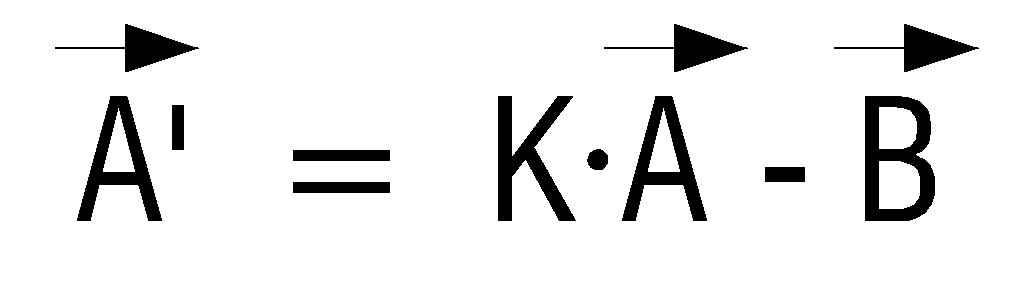
여기서, 


이에 의해, 제어부(130)는, 줌-인 영역을 중심으로 하는 동심원들을 생성하여 가이드 정보를 보정할 수 있다. As a result, the
이하에서는, 영상 처리를 통해 최초 화면과 확대 화면을 비교하여 동심원들을 보정하는 방법에 대해 도 9 내지 도 10b를 참조하여 설명하기로 한다. Hereinafter, a method of correcting concentric circles by comparing an initial screen and an enlarged screen through image processing will be described with reference to FIGS. 9 to 10B.
도 9는, 영상 처리를 통해 동심원들을 보정하는 방법을 설명하기 위한 흐름도이다. 우선, 제어부(130)는, 동심원이 부가된 최초 화면을 저장부(150)에 저장한다(S910). 제어부(130)는, 줌-인 명령이 입력되었는지 여부를 판단하고(S920), 줌-인 명령이 입력된 것으로 판단되면(S920-Y), 최초 화면을 확대하여 확대 화면을 생성한다(S930).9 is a flowchart illustrating a method of correcting concentric circles through image processing. First, the
이후, 제어부(130)는, 화면의 확대로 인해 광축이 이동되었는지 여부를 판단한다(S940). 여기서, 화면의 확대로 인해 광축이 이동되지 않는 경우는, 줌-인 영역이 최초 화면의 광축과 동일한 경우라고 할 것이다. 따라서, 대부분의 경우, 줌-인 영역과 최초 화면의 광축이 동일하지 않기 때문에, 줌-인 명령이 입력되면 화면의 확대로 인해 광축이 이동되게 된다.Thereafter, the
광축이 이동된 것으로 판단되면(S940-Y), 제어부(130)는, 확대 화면을 다시 축소시켜 저장부(150)에 저장된 최초 화면의 일부분과 매칭되는 부분을 탐색한 다(S950). 즉, 확대 화면이 다시 축소된 재축소 화면은 최초 화면의 일부분이 되기 때문에, 제어부(130)는, 최초 화면에서 재축소 화면과 매칭되는 영역을 탐색하게 되는 것이다. 이 경우, 매칭되는 영역의 탐색은, 화면의 색상을 비교하는 컬러 매칭, 화면에 표시된 영상의 테두리들을 비교하는 에지 매칭 등의 방법으로 수행될 수 있다.If it is determined that the optical axis is moved (S940-Y), the
최초 화면에서 재축소 화면과 매칭되는 영역이 탐색되면, 제어부(130)는, 매칭되는 영역에 표시된 동심원들과 동일한 동심원들을 재축소 화면에 부가시키고, 동심원들이 부가된 재축소 화면을 재확대시킨다(S960). When an area matching the re-shrink screen is found on the initial screen, the
물론, 동심원들을 재축소 화면에 부가시킨 후 동심원들이 부가된 재축소 화면을 재확대시키는 것은 설명의 편의를 위한 예시적 사항에 불과하다. 따라서, 매칭되는 영역에 표시된 동심원들을 줌-인 배율에 따라 확대시킨 후, 재축소 이전의 확대 화면에 부가시키는 경우에도 본 발명의 기술적 사상이 그대로 적용될 수 있음은 물론이다. Of course, it is merely an example for convenience of explanation that the concentric circles are added to the recompression screen, and then the reconstruction of the reconstruction screen to which the concentric circles are added is merely an example. Accordingly, the technical concept of the present invention may be applied to the case where the concentric circles displayed on the matching area are enlarged according to the zoom-in magnification and then added to the enlarged screen before the reduction.
한편, S940 단계에서, 광축이 이동되지 않은 경우(S940-N)에는, 전술한 바와 같이, 줌-인 영역과 최초 화면의 광축이 동일한 경우이기 때문에, 제어부(130)는, 단순히 줌-인 배율에 따라 동심원들을 확대하여 확대 화면에 부가한다(S970).On the other hand, in step S940, when the optical axis is not moved (S940-N), as described above, since the optical axis of the zoom-in area and the first screen is the same, the
이와 같이, 법선 벡터를 이용하지 않고, 영상 처리만을 통해 최초 화면과 확대 화면을 비교하여 동심원들을 보정할 수 있다. In this way, the concentric circles may be corrected by comparing the initial screen and the enlarged screen only through image processing without using a normal vector.
이에 대한 보다 상세한 설명을 위해, 도 10a 및 도 10b를 참조하기로 한다. 도 10a 및 도 10b는, 확대 화면을 재축소하여 동심원들을 보정하는 모습을 도시한 도면이다. For a detailed description thereof, reference will be made to FIGS. 10A and 10B. 10A and 10B illustrate a state in which concentric circles are corrected by re-zoom the enlarged screen.
도 10a에는, 확대 화면(1010)을 재축소하여 재축소 화면(1020)을 생성한 후, 최초 화면(1030)에서 재축소 화면(1020)과 일치하는 부분을 탐색하는 모습이 도시되어 있다. 탐색 영역(1040)은 최초 화면(1030)의 일부분이기 때문에 동심원들이 포함되어 있으나, 제어부(130)는, 동심원들을 제외한 화면과 재축소 화면(1020)을 비교하여 매칭되는 영역을 파악한다.In FIG. 10A, after the zoomed-
도 10b에는, 매칭되는 영역이 파악된 경우, 매칭되는 영역에 표시되는 동심원들(1040)만을 추출하고, 추출된 동심원들(1040)을 확대하여 확대된 동심원들(1050)을 생성하며, 확대된 동심원들(1050)을 재축소 이전의 확대 화면(1010)에 부가하는 모습이 도시되어 있다.In FIG. 10B, when the matching region is found, only the
이에 의해, 법선 벡터를 이용하지 않고도 영상 처리만을 통해 보다 정밀하게 동심원들을 보정할 수 있게 된다. As a result, it is possible to more accurately correct concentric circles through image processing without using a normal vector.
이상에서는, 동심원들을 보정하는 방법으로서 법선 벡터를 이용하는 방법과 영상 처리를 이용하는 방법을 예로 들었으나, 두 가지 방법을 모두 사용하여 동심원들을 보정하는 경우에도 본 발명의 기술적 사상이 그대로 적용될 수 있음은 물론이다. In the above, as a method of correcting concentric circles, a method using a normal vector and an image processing method are used as examples, but the technical idea of the present invention may be applied as it is, even when correcting concentric circles using both methods. to be.
특히, 법선 벡터를 이용하는 방법은, 간단한 수식을 이용해 법선 벡터를 쉽게 구할 수 있다는 장점이 있으나, 이와 역으로 정확성이 떨어진다는 단점이 존재할 수 있다. 또한, 영상 처리를 이용하는 방법은, 정밀하게 동심원들을 보정할 수 있다는 장점이 있으나, 확대 화면 또는 광축 변경 화면의 광축이 최초 화면의 광축 에서 너무 많이 떨어진 경우, 또는 최초 화면에 움직이는 물체가 포함된 경우, 에러가 발생할 우려가 있다는 단점이 있다.In particular, the method of using a normal vector has the advantage that the normal vector can be easily obtained using a simple equation, but in contrast, there may be a disadvantage in that the accuracy is low. In addition, the method using image processing has an advantage of correcting concentric circles precisely, but when the optical axis of the enlarged screen or the optical axis changing screen is too far from the optical axis of the initial screen, or the moving object is included in the initial screen. There is a disadvantage that an error may occur.
따라서, 법선 벡터를 이용하는 방법과 영상 처리를 이용하는 방법을 모두 사용함으로써, 보다 정밀하게 동심원들을 보정할 수 있다. 특히, 법선 벡터를 이용해 변경된 광축을 개략적으로 탐색한 후, 법선 벡터를 이용해 탐색된 개략적 범위 내에서 영상 처리를 이용해 동심원들을 보정할 경우, 정밀성의 측면이나 시간적인 측면에서 보다 효과적일 수 있다.Therefore, by using both a method using a normal vector and a method using image processing, concentric circles can be corrected more precisely. In particular, when the modified optical axis is roughly searched using the normal vector and then the concentric circles are corrected by image processing within the schematic range searched by the normal vector, it may be more effective in terms of precision or time.
이러한 내용이 도 11에 도시되어 있다. 도 11은, 법선 벡터를 이용하는 방법과 영상 처리를 이용하는 방법을 모두 사용한 모습을 도시한 도면이다. This is illustrated in FIG. 11. FIG. 11 is a diagram showing the use of both a method of using a normal vector and a method of using image processing.
도시된 바와 같이, 최초 화면(1110)에서 사용자가 줌-인 명령을 입력하고, 줌-인 명령과 동시에 손떨림, 틸팅 또는 패닝이 발생한 경우, 제어부(130)는, 법선 벡터를 이용하여 정밀 탐색 영역(1140)을 추출한다. 이후, 제어부(130)는, 영상 처리를 이용하여 정밀 탐색 영역(1140) 내에서의 정밀 탐색을 통해 확대된 광축 변경 화면(1130)에 동심원들이 보정되어 부가되도록 한다. As illustrated, when the user inputs a zoom-in command on the
또한, 이상에서는, 가이드 정보로서 동심원들을 예로 들어 설명하였으나, 전술한 바와 같이, 가이드 정보는 동심원들로 한정되지 않으며, 줌-인 영역을 지시하는 화살표 등의 인디케이터로 구현되는 경우에도 본 발명이 적용될 수 있음은 물론이다.In addition, although the above has been described using concentric circles as an example, as described above, the guide information is not limited to the concentric circles, and the present invention may be applied even when implemented with an indicator such as an arrow indicating a zoom-in area. Of course it can.
이러한 내용이 도 12에 도시되어 있다. 도 12는, 화살표 가이드 정보를 이용한 화면 확대 방법을 설명하기 위한 도면이다. This is illustrated in FIG. 12. 12 is a diagram for explaining a screen enlargement method using arrow guide information.
도시된 바와 같이, 최초 화면(1210-1)에서 사용자가 줌-인 영역(1220-1)을 지정하면, 광축(1230-1)에서 줌-인 영역(1220-1)까지의 화살표 가이드 정보가 생성된다. 이러한 최초 화면(1210-1)에 대해, 사용자의 줌-인 명령이 입력되고, 줌-인 명령과 동시에 손떨림, 틸팅 또는 패닝이 발생한 경우, 확대 화면(1210-2)이 표시된다. As shown, when the user designates the zoom-in area 1220-1 on the initial screen 1210-1, arrow guide information from the optical axis 1230-1 to the zoom-in area 1220-1 is displayed. Is generated. A zoom-in command of the user is input to the initial screen 1210-1, and when the hand shake, tilting or panning occurs simultaneously with the zoom-in command, the enlarged screen 1210-2 is displayed.
확대 화면(1210-2)에는, 변경된 광축(1230-2)에서 줌-인 영역(1220-2)까지의 화살표 가이드 정보(1240-2)가 보정되어 표시된다. 특히, 이러한 화살표 가이드 정보(1240-2)는, 최초 화면(1210-1)의 화살표 가이드 정보(1240-1)보다 더욱 굵고 크게 표시되어, 사용자로 하여금 줌-인 영역(1220-2)이 더 가까워졌음을 알려준다.On the enlarged screen 1210-2, arrow guide information 1240-2 from the changed optical axis 1230-2 to the zoom-in area 1220-2 is corrected and displayed. In particular, the arrow guide information 1240-2 is displayed to be thicker and larger than the arrow guide information 1240-1 of the initial screen 1210-1 so that the user can further increase the zoom-in area 1220-2. Indicate that you are near.
이와 같이, 화살표의 크기나 굵기를 변경시키는 경우에도, 본 발명의 기술적 사상이 적용될 수 있음은 자명하다.As described above, even when the size or thickness of the arrow is changed, it is obvious that the technical spirit of the present invention can be applied.
그리고, 이상에서는, 줌-인 영역을 지정하여 화면을 확대하는 경우를 예로 들어 설명하였으나, 줌-아웃 영역을 지정하여 화면을 축소시키는 경우에도 본 발명의 기술적 사상이 그대로 적용될 수 있을 것이다.In the above description, the case where the screen is enlarged by designating the zoom-in area is described as an example. However, the technical idea of the present invention may be applied as it is when the screen is reduced by designating the zoom-out area.
그리고, 이상에서는, 가이드 정보 또는 줌-인 정보가 촬영되는 화면에 표시되는 것으로 상정하였으나, 이외의 부가정보가 화면에 함께 표시되도록 하는 경우에도 본 발명의 기술적 사상이 그대로 적용될 수 있을 것이다.In the above description, it is assumed that the guide information or the zoom-in information is displayed on the screen to be photographed. However, the technical idea of the present invention may be applied as it is when the additional information is displayed on the screen.
이러한 내용이 도 13에 도시되어 있다. 도 13은, 썸네일 영상이 화면에 함께 표시되는 경우를 도시한 도면이다. This is illustrated in FIG. 13. 13 is a diagram illustrating a case where a thumbnail image is displayed together on the screen.
썸네일 영상(1300)은 부가정보의 일종으로서, 전체 화면(1310) 중에서 현재 화면(1350)이 차지하는 위치와 크기에 대한 정보를 사용자에게 제공한다. 따라서, 사용자는, 화면에 표시된 썸네일 영상(1300)을 통해, 전체 화면(1310) 중에서 현재 화면(1350)이 해당하는 위치를 개략적으로 알 수 있으며, 현재 확대된 배율에 대해서도 개략적으로 알 수 있다. The thumbnail image 1300 is a kind of additional information and provides the user with information about the position and size of the
물론, 도면에 도시된 바와 달리, 이러한 썸네일 영상(1300)에도 가이드 정보 또는 줌-인 정보가 표시되도록 할 수 있음은 물론이다.Of course, unlike shown in the figure, the guide information or zoom-in information may be displayed on the thumbnail image 1300 as well.
이상에서는 썸네일 영상(1300)을 부가정보의 대표적 예로 설명하였으나, 가이드 정보 또는 줌-인 정보의 모양을 변경시키는 등의 목적을 위한 아이콘이나, 가이드 정보 또는 줌-인 정보와 관련없는 별도의 아이콘이 부가정보로서 화면에 표시되는 경우에도 본 발명이 적용될 수 있을 것이다.Although the thumbnail image 1300 has been described as a representative example of the additional information, an icon for the purpose of changing the shape of the guide information or the zoom-in information or a separate icon not related to the guide information or the zoom-in information is provided. The present invention may be applied even when displayed on the screen as additional information.
또한, 이상에서는 본 발명의 바람직한 실시예에 대하여 도시하고 설명하였지만, 본 발명은 상술한 특정의 실시예에 한정되지 아니하며, 청구범위에서 청구하는 본 발명의 요지를 벗어남이 없이 당해 발명이 속하는 기술분야에서 통상의 지식을 가진자에 의해 다양한 변형실시가 가능한 것은 물론이고, 이러한 변형실시들은 본 발명의 기술적 사상이나 전망으로부터 개별적으로 이해되어져서는 안될 것이다.In addition, although the preferred embodiment of the present invention has been shown and described above, the present invention is not limited to the specific embodiments described above, but the technical field to which the invention belongs without departing from the spirit of the invention claimed in the claims. Of course, various modifications can be made by those skilled in the art, and these modifications should not be individually understood from the technical spirit or the prospect of the present invention.
도 1은, 본 발명의 일 실시예에 따른 촬영 장치에 대한 블럭도,1 is a block diagram of a photographing apparatus according to an embodiment of the present invention;
도 2는, 본 발명의 일 실시예에 따른 가이드 정보 보정방법을 설명하기 위한 흐름도,2 is a flowchart illustrating a guide information correction method according to an embodiment of the present invention;
도 3a 내지 도 3d는, 화면이 확대되고 가이드 정보가 보정되는 과정을 설명하기 위해 제공되는 도면,3A to 3D are views provided to explain a process in which a screen is enlarged and guide information is corrected;
도 4는, 줌-인 명령이 입력된 경우, 동심원들을 보정하는 방법을 설명하기 위한 흐름도,4 is a flowchart illustrating a method of correcting concentric circles when a zoom-in command is input;
도 5는, 제1 법선 벡터가 연장되는 모습을 도시한 도면,5 is a diagram illustrating a state in which a first normal vector is extended;
도 6은, 광축이 변경된 경우, 동심원들을 보정하는 방법을 설명하기 위한 흐름도,6 is a flowchart for explaining a method of correcting concentric circles when the optical axis is changed;
도 7은, 차벡터가 생성되는 모습을 도시한 도면,7 is a diagram illustrating a state in which a car vector is generated;
도 8은, 줌-인 배율과 제2 법선 벡터 간의 관계를 도시한 도면,8 shows the relationship between the zoom-in magnification and the second normal vector,
도 9는, 영상 처리를 통해 동심원들을 보정하는 방법을 설명하기 위한 흐름도,9 is a flowchart illustrating a method of correcting concentric circles through image processing;
도 10a 및 도 10b는, 확대 화면을 재축소하여 동심원들을 보정하는 모습을 도시한 도면, 10A and 10B are views illustrating a state in which concentric circles are corrected by re-zoom the enlarged screen;
도 11은, 법선 벡터를 이용하는 방법과 영상 처리를 이용하는 방법을 모두 사용한 모습을 도시한 도면,FIG. 11 is a diagram showing the use of both a method of using a normal vector and a method of using image processing;
도 12는, 화살표 가이드 정보를 이용한 화면 확대 방법을 설명하기 위한 도 면, 그리고,12 is a diagram for explaining a screen enlargement method using arrow guide information;
도 13은, 썸네일 영상이 화면에 함께 표시되는 경우를 도시한 도면이다. 13 is a diagram illustrating a case where a thumbnail image is displayed together on the screen.
***도면의 주요 부분에 대한 부호의 설명****** Description of the symbols for the main parts of the drawings ***
110 : 촬영부 120 : 영상 처리부110: recording unit 120: image processing unit
130 : 제어부 140 : 코덱130 control unit 140 codec
150 : 저장부 160 : 움직임 감지부150: storage unit 160: motion detection unit
170 : 조작부 180 : 영상 출력부170: operation unit 180: image output unit
Claims (20)
Priority Applications (4)
| Application Number | Priority Date | Filing Date | Title |
|---|---|---|---|
| KR1020090001494A KR20100082147A (en) | 2009-01-08 | 2009-01-08 | Method for enlarging and changing captured image, and phographed apparatus using the same |
| US12/649,432 US20100171863A1 (en) | 2009-01-08 | 2009-12-30 | Method to enlarge and change displayed image and photographing apparatus using the same |
| CN201010001537A CN101778216A (en) | 2009-01-08 | 2010-01-08 | Method for enlarging and changing captured image, and phographed apparatus using the same |
| US13/420,861 US20120169914A1 (en) | 2009-01-08 | 2012-03-15 | Method to enlarge and change displayed image and photographing apparatus using the same |
Applications Claiming Priority (1)
| Application Number | Priority Date | Filing Date | Title |
|---|---|---|---|
| KR1020090001494A KR20100082147A (en) | 2009-01-08 | 2009-01-08 | Method for enlarging and changing captured image, and phographed apparatus using the same |
Publications (1)
| Publication Number | Publication Date |
|---|---|
| KR20100082147A true KR20100082147A (en) | 2010-07-16 |
Family
ID=42311445
Family Applications (1)
| Application Number | Title | Priority Date | Filing Date |
|---|---|---|---|
| KR1020090001494A Ceased KR20100082147A (en) | 2009-01-08 | 2009-01-08 | Method for enlarging and changing captured image, and phographed apparatus using the same |
Country Status (3)
| Country | Link |
|---|---|
| US (2) | US20100171863A1 (en) |
| KR (1) | KR20100082147A (en) |
| CN (1) | CN101778216A (en) |
Cited By (1)
| Publication number | Priority date | Publication date | Assignee | Title |
|---|---|---|---|---|
| KR20180108280A (en) * | 2017-03-24 | 2018-10-04 | 삼성전자주식회사 | Electronic device for providing a graphic indicator related to a focus and method of operating the same |
Families Citing this family (15)
| Publication number | Priority date | Publication date | Assignee | Title |
|---|---|---|---|---|
| US8913176B2 (en) | 2008-09-05 | 2014-12-16 | Lg Electronics Inc. | Mobile terminal and method of performing multi-focusing and photographing image including plurality of objects using the same |
| US10469738B2 (en) | 2008-09-05 | 2019-11-05 | Telefonaktiebolaget Lm Ericsson (Publ) | Mobile terminal and method of performing multi-focusing and photographing image including plurality of objects using the same |
| KR101689171B1 (en) * | 2010-10-11 | 2016-12-23 | 엘지전자 주식회사 | Mobile Terminal And Method Of Photographing Image Using The Same |
| KR20100082147A (en) * | 2009-01-08 | 2010-07-16 | 삼성전자주식회사 | Method for enlarging and changing captured image, and phographed apparatus using the same |
| EP2611151B1 (en) * | 2011-12-29 | 2014-01-22 | Axis AB | Method and mobile unit for facilitating installation of a surveillance camera |
| KR101324250B1 (en) * | 2011-12-29 | 2013-11-01 | 삼성테크윈 주식회사 | optical axis error compensation method using image processing, the method of the same, and the zoom camera provided for the compensation function of the optical axis error |
| CN102629140A (en) * | 2012-03-22 | 2012-08-08 | 圆展科技股份有限公司 | Camera positioning system and control method thereof |
| US8965172B2 (en) * | 2012-04-06 | 2015-02-24 | Realtek Semiconductor Inc. | Multi-screen video playback system and related computer program product for dynamically generating scaled video |
| KR20140113032A (en) * | 2013-03-15 | 2014-09-24 | 삼성전자주식회사 | Method and apparatus for displaying screen in a portable terminal |
| JP2014241547A (en) * | 2013-06-12 | 2014-12-25 | ソニー株式会社 | Display control apparatus, display control method, program, and image pickup apparatus |
| JP6071866B2 (en) * | 2013-12-18 | 2017-02-01 | キヤノン株式会社 | Display control device, display device, imaging system, display control method, and program |
| KR20170016211A (en) * | 2015-08-03 | 2017-02-13 | 엘지전자 주식회사 | Mobile terminal and control method for the mobile terminal |
| US10547790B2 (en) * | 2018-06-14 | 2020-01-28 | Google Llc | Camera area locking |
| CN112533021B (en) | 2019-09-19 | 2023-04-11 | Vidaa(荷兰)国际控股有限公司 | Display method and display equipment |
| KR102848616B1 (en) * | 2020-11-14 | 2025-08-20 | 파게룩스 (난징) 바이오-테크 컴퍼니,. 리미티드. | Pseudomonas syringae phage and compositions, kits, and applications thereof |
Family Cites Families (16)
| Publication number | Priority date | Publication date | Assignee | Title |
|---|---|---|---|---|
| US4527201A (en) * | 1983-03-29 | 1985-07-02 | Panavision, Inc. | Zoom indicating apparatus for video camera or the like |
| JP4643773B2 (en) * | 1996-12-17 | 2011-03-02 | テセラ・テクノロジーズ・ハンガリー・ケイエフティー | Electronic zoom image input method |
| JP4040951B2 (en) * | 2002-01-11 | 2008-01-30 | 株式会社リコー | Imaging apparatus, imaging method, program, and recording medium |
| EP1613060A1 (en) * | 2004-07-02 | 2006-01-04 | Sony Ericsson Mobile Communications AB | Capturing a sequence of images |
| JP4603319B2 (en) * | 2004-09-01 | 2010-12-22 | パナソニック株式会社 | Image input device |
| US20070222859A1 (en) * | 2006-03-23 | 2007-09-27 | Coban Research And Technologies, Inc. | Method for digital video/audio recording with backlight compensation using a touch screen control panel |
| US7548814B2 (en) * | 2006-03-27 | 2009-06-16 | Sony Ericsson Mobile Communications Ab | Display based on location information |
| JP2008096584A (en) * | 2006-10-10 | 2008-04-24 | Nikon Corp | camera |
| KR20080061629A (en) * | 2006-12-28 | 2008-07-03 | 삼성전자주식회사 | Photographing device and its control method for optimizing center point of image sensor |
| JP2008311804A (en) * | 2007-06-13 | 2008-12-25 | Sony Corp | Imaging apparatus and imaging method |
| KR101373333B1 (en) * | 2007-07-11 | 2014-03-10 | 엘지전자 주식회사 | Portable terminal having touch sensing based image photographing function and image photographing method therefor |
| KR20090066368A (en) * | 2007-12-20 | 2009-06-24 | 삼성전자주식회사 | A mobile terminal having a touch screen and a method of controlling the function thereof |
| US8237807B2 (en) * | 2008-07-24 | 2012-08-07 | Apple Inc. | Image capturing device with touch screen for adjusting camera settings |
| KR20100071754A (en) * | 2008-12-19 | 2010-06-29 | 삼성전자주식회사 | Photographing method according to multi input scheme through touch and key manipulation and photographing apparatus using the same |
| KR20100082147A (en) * | 2009-01-08 | 2010-07-16 | 삼성전자주식회사 | Method for enlarging and changing captured image, and phographed apparatus using the same |
| JP5742179B2 (en) * | 2010-11-05 | 2015-07-01 | ソニー株式会社 | Imaging apparatus, image processing apparatus, image processing method, and program |
-
2009
- 2009-01-08 KR KR1020090001494A patent/KR20100082147A/en not_active Ceased
- 2009-12-30 US US12/649,432 patent/US20100171863A1/en not_active Abandoned
-
2010
- 2010-01-08 CN CN201010001537A patent/CN101778216A/en active Pending
-
2012
- 2012-03-15 US US13/420,861 patent/US20120169914A1/en not_active Abandoned
Cited By (1)
| Publication number | Priority date | Publication date | Assignee | Title |
|---|---|---|---|---|
| KR20180108280A (en) * | 2017-03-24 | 2018-10-04 | 삼성전자주식회사 | Electronic device for providing a graphic indicator related to a focus and method of operating the same |
Also Published As
| Publication number | Publication date |
|---|---|
| US20120169914A1 (en) | 2012-07-05 |
| US20100171863A1 (en) | 2010-07-08 |
| CN101778216A (en) | 2010-07-14 |
Similar Documents
| Publication | Publication Date | Title |
|---|---|---|
| KR20100082147A (en) | Method for enlarging and changing captured image, and phographed apparatus using the same | |
| EP2574041B1 (en) | Image capturing apparatus and control method thereof | |
| JP6678122B2 (en) | Image processing apparatus, image processing method, and image processing program | |
| US10848662B2 (en) | Image processing device and associated methodology for determining a main subject in an image | |
| US9344634B2 (en) | Imaging apparatus having subject detection function, method for controlling the imaging apparatus, and storage medium | |
| US9215375B2 (en) | Photographing apparatus, image display apparatus, and display control method of image display apparatus | |
| US9225947B2 (en) | Image pickup apparatus, method of providing composition of image pickup and computer-readable recording medium | |
| JP5040760B2 (en) | Image processing apparatus, imaging apparatus, display control method, and program | |
| US20140240577A1 (en) | Image pickup apparatus, image pickup method, and non-transitory computer-readable medium | |
| CN107850753B (en) | Testing equipment, testing methods, testing procedures and imaging equipment | |
| US8756009B2 (en) | Portable apparatus | |
| US20170111574A1 (en) | Imaging apparatus and imaging method | |
| JP2014146989A (en) | Image pickup device, image pickup method, and image pickup program | |
| US11196934B2 (en) | Image capturing apparatus and control method thereof | |
| TWI693828B (en) | Image-capturing device and method for operating the same | |
| KR102669853B1 (en) | Camera switchover control techniques for multiple-camera systems | |
| JP5888986B2 (en) | Image processing apparatus and control method thereof | |
| US11805314B2 (en) | Control device, control method, and information processing system | |
| JP2009246700A (en) | Imaging apparatus | |
| JP6836306B2 (en) | Imaging control device, its control method, program and recording medium | |
| JP2011234310A (en) | Imaging apparatus | |
| JP5562479B2 (en) | Image processing apparatus, image processing method, and program | |
| JP2012147082A (en) | Image pickup device and control method thereof | |
| JP2017055268A (en) | IMAGING DEVICE, IMAGING DEVICE CONTROL METHOD, AND PROGRAM | |
| KR101798019B1 (en) | Terminal having camera and method for processing image thereof |
Legal Events
| Date | Code | Title | Description |
|---|---|---|---|
| PA0109 | Patent application |
Patent event code: PA01091R01D Comment text: Patent Application Patent event date: 20090108 |
|
| PG1501 | Laying open of application | ||
| A201 | Request for examination | ||
| PA0201 | Request for examination |
Patent event code: PA02012R01D Patent event date: 20131205 Comment text: Request for Examination of Application Patent event code: PA02011R01I Patent event date: 20090108 Comment text: Patent Application |
|
| E902 | Notification of reason for refusal | ||
| PE0902 | Notice of grounds for rejection |
Comment text: Notification of reason for refusal Patent event date: 20141125 Patent event code: PE09021S01D |
|
| E601 | Decision to refuse application | ||
| PE0601 | Decision on rejection of patent |
Patent event date: 20150514 Comment text: Decision to Refuse Application Patent event code: PE06012S01D Patent event date: 20141125 Comment text: Notification of reason for refusal Patent event code: PE06011S01I |