KR102739862B1 - Method for integrated work platform based on facilities usage information of physical office - Google Patents
Method for integrated work platform based on facilities usage information of physical office Download PDFInfo
- Publication number
- KR102739862B1 KR102739862B1 KR1020220127525A KR20220127525A KR102739862B1 KR 102739862 B1 KR102739862 B1 KR 102739862B1 KR 1020220127525 A KR1020220127525 A KR 1020220127525A KR 20220127525 A KR20220127525 A KR 20220127525A KR 102739862 B1 KR102739862 B1 KR 102739862B1
- Authority
- KR
- South Korea
- Prior art keywords
- user
- information
- office
- management system
- seat
- Prior art date
- Legal status (The legal status is an assumption and is not a legal conclusion. Google has not performed a legal analysis and makes no representation as to the accuracy of the status listed.)
- Active
Links
Images




Classifications
-
- G—PHYSICS
- G06—COMPUTING OR CALCULATING; COUNTING
- G06Q—INFORMATION AND COMMUNICATION TECHNOLOGY [ICT] SPECIALLY ADAPTED FOR ADMINISTRATIVE, COMMERCIAL, FINANCIAL, MANAGERIAL OR SUPERVISORY PURPOSES; SYSTEMS OR METHODS SPECIALLY ADAPTED FOR ADMINISTRATIVE, COMMERCIAL, FINANCIAL, MANAGERIAL OR SUPERVISORY PURPOSES, NOT OTHERWISE PROVIDED FOR
- G06Q10/00—Administration; Management
- G06Q10/10—Office automation; Time management
-
- G—PHYSICS
- G06—COMPUTING OR CALCULATING; COUNTING
- G06Q—INFORMATION AND COMMUNICATION TECHNOLOGY [ICT] SPECIALLY ADAPTED FOR ADMINISTRATIVE, COMMERCIAL, FINANCIAL, MANAGERIAL OR SUPERVISORY PURPOSES; SYSTEMS OR METHODS SPECIALLY ADAPTED FOR ADMINISTRATIVE, COMMERCIAL, FINANCIAL, MANAGERIAL OR SUPERVISORY PURPOSES, NOT OTHERWISE PROVIDED FOR
- G06Q10/00—Administration; Management
- G06Q10/02—Reservations, e.g. for tickets, services or events
-
- G—PHYSICS
- G06—COMPUTING OR CALCULATING; COUNTING
- G06Q—INFORMATION AND COMMUNICATION TECHNOLOGY [ICT] SPECIALLY ADAPTED FOR ADMINISTRATIVE, COMMERCIAL, FINANCIAL, MANAGERIAL OR SUPERVISORY PURPOSES; SYSTEMS OR METHODS SPECIALLY ADAPTED FOR ADMINISTRATIVE, COMMERCIAL, FINANCIAL, MANAGERIAL OR SUPERVISORY PURPOSES, NOT OTHERWISE PROVIDED FOR
- G06Q50/00—Information and communication technology [ICT] specially adapted for implementation of business processes of specific business sectors, e.g. utilities or tourism
- G06Q50/10—Services
-
- G—PHYSICS
- G06—COMPUTING OR CALCULATING; COUNTING
- G06Q—INFORMATION AND COMMUNICATION TECHNOLOGY [ICT] SPECIALLY ADAPTED FOR ADMINISTRATIVE, COMMERCIAL, FINANCIAL, MANAGERIAL OR SUPERVISORY PURPOSES; SYSTEMS OR METHODS SPECIALLY ADAPTED FOR ADMINISTRATIVE, COMMERCIAL, FINANCIAL, MANAGERIAL OR SUPERVISORY PURPOSES, NOT OTHERWISE PROVIDED FOR
- G06Q50/00—Information and communication technology [ICT] specially adapted for implementation of business processes of specific business sectors, e.g. utilities or tourism
- G06Q50/50—Business processes related to the communications industry
Landscapes
- Business, Economics & Management (AREA)
- Engineering & Computer Science (AREA)
- Tourism & Hospitality (AREA)
- Strategic Management (AREA)
- Human Resources & Organizations (AREA)
- General Business, Economics & Management (AREA)
- General Physics & Mathematics (AREA)
- Marketing (AREA)
- Theoretical Computer Science (AREA)
- Physics & Mathematics (AREA)
- Economics (AREA)
- Entrepreneurship & Innovation (AREA)
- Health & Medical Sciences (AREA)
- General Health & Medical Sciences (AREA)
- Primary Health Care (AREA)
- Operations Research (AREA)
- Quality & Reliability (AREA)
- Development Economics (AREA)
- Data Mining & Analysis (AREA)
- Management, Administration, Business Operations System, And Electronic Commerce (AREA)
Abstract
임직원의 업무 편의성, 업무 생산성 증대에 일조할 수 있는 통합 업무 플랫폼이 제공된다. 본 개시의 몇몇 실시예들에 따르면, 물리 오피스 관리 시스템에서 생성된 정보가 업무용 소프트웨어 관리 시스템 또는 가상 오피스 관리 시스템에 소정의 액션을 유발하고, 가상 오피스 관리 시스템에서 생성된 정보가 업무용 소프트웨어 관리 시스템 또는 물리 오피스 관리 시스템에 소정의 액션을 유발하며, 업무용 소프트웨어 관리 시스템에서 생성된 정보가 물리 오피스 관리 시스템 또는 가상 오피스 관리 시스템에 소정의 액션을 유발할 수 있다.An integrated work platform that can contribute to the convenience of employees' work and increased work productivity is provided. According to some embodiments of the present disclosure, information generated in a physical office management system can cause a predetermined action in a work software management system or a virtual office management system, information generated in a virtual office management system can cause a predetermined action in the work software management system or the physical office management system, and information generated in the work software management system can cause a predetermined action in the physical office management system or the virtual office management system.
Description
본 개시는 통합 업무 플랫폼에 관한 것이다. 보다 자세하게는, 임직원의 업무 편의성, 업무 생산성 증대에 일조할 수 있는 통합 업무 플랫폼에 관한 것이다.The present disclosure relates to an integrated business platform. More specifically, it relates to an integrated business platform that can contribute to the convenience of employees' work and increased work productivity.
오피스 등 업무 공간을 디지털 기술 기반으로 관리하는 기술이 제공된다. 예를 들어, 임직원의 단말을 이용하여, 회의실 예약, 방문객 예약, 자율좌석 예약, 직원식당 예약, 사무실 환경 조절 요청 등이 처리되고 있다. 한편, 임직원들은 ERP, 업무용 메일, 사내 메신저 등 다양한 업무용 툴을 이용하여 업무를 진행하고 있다. 업무가 전산화 됨에 따라, 재택 근무도 일반화되고 있다.Technology is provided to manage office and other work spaces based on digital technology. For example, using employees’ terminals, conference room reservations, visitor reservations, self-seat reservations, employee cafeteria reservations, and office environment adjustment requests are processed. Meanwhile, employees are using various work tools such as ERP, work email, and in-house messengers to conduct work. As work becomes computerized, working from home is also becoming more common.
또한, 임직원의 근무 공간의 한계를 과감히 없애면서도 임직원의 기업에 대한 소속감이 유지될 수 있도록 하는 가상 오피스 관련 기술이 제공된다. 아울러, 임직원이 업무를 볼 때 사용하는 다양한 업무용 소프트웨어들 간의 통합(integration)을 통하여 생산성을 향상시킬 수 있도록 하는 업무용 소프트웨어 관리 시스템도 제공된다.In addition, virtual office technology is provided to boldly eliminate the limitations of employees' work spaces while maintaining employees' sense of belonging to the company. In addition, a business software management system is also provided to improve productivity through integration between various business software used by employees when performing work.
본 개시의 몇몇 실시예들에서 해결하고자 하는 기술적 과제는, 물리 오피스 관리 시스템과, 가상 오피스 관리 시스템과 업무용 소프트웨어 관리 시스템이 서로 정보를 주고받으면서 연계 동작하는 형태의 통합 업무 플랫폼을 제공하는 것이다.A technical problem to be solved in some embodiments of the present disclosure is to provide an integrated business platform in which a physical office management system, a virtual office management system, and a business software management system exchange information with each other and operate in conjunction with each other.
본 개시의 몇몇 실시예들에서 해결하고자 하는 다른 기술적 과제는, 업무용 소프트웨어에서 발생된 정보를 기반으로 하는 통합 업무 플랫폼과 관련된 컴퓨팅 시스템 수행 방법들을 제공하는 것이다.Another technical problem to be solved in some embodiments of the present disclosure is to provide computing system execution methods related to an integrated business platform based on information generated from business software.
본 개시의 몇몇 실시예들에서 해결하고자 하는 다른 기술적 과제는, 사용자가 업무에 집중하고 있을 때, 가상 오피스의 상기 사용자의 아바타에 대한 다른 사용자의 컨택을 최대한 억제하는 방법을 제공하는 것이다.Another technical problem to be solved by some embodiments of the present disclosure is to provide a method to suppress, as much as possible, contact of another user to the avatar of the user in a virtual office when the user is concentrating on work.
본 개시의 몇몇 실시예들에서 해결하고자 하는 또 다른 기술적 과제는, 사용자가 업무에 집중하고 있을 때, 상기 사용자가 착석한 물리 오피스의 좌석 환경을 집중할 수 있는 세팅으로 자동으로 조정하는 방법을 제공하는 것이다.Another technical problem to be solved in some embodiments of the present disclosure is to provide a method for automatically adjusting the seating environment of a physical office in which a user is seated to a setting that allows the user to concentrate when the user is concentrating on work.
본 개시의 몇몇 실시예들에서 해결하고자 하는 또 다른 기술적 과제는, 사용자의 업무 진척이 미미한 경우, 상기 사용자가 가상 오피스에서 리프레시(refresh) 효과를 얻을 수 있도록 하는 방법을 제공하는 것이다.Another technical challenge to be solved in some embodiments of the present disclosure is to provide a method for enabling a user to obtain a refreshing effect in a virtual office when the user's work progress is minimal.
본 개시의 몇몇 실시예들에서 해결하고자 하는 또 다른 기술적 과제는, 사용자의 업무 진척이 미미한 경우, 상기 사용자가 물리 오피스에서 리프레시(refresh) 효과를 얻을 수 있도록 하는 방법을 제공하는 것이다.Another technical challenge to be solved in some embodiments of the present disclosure is to provide a method for enabling a user to obtain a refresh effect in a physical office when the user's work progress is minimal.
본 개시의 몇몇 실시예들에서 해결하고자 하는 또 다른 기술적 과제는, 사용자의 업무가 일시 중지된 경우, 그 시점의 물리 오피스 이슈 시설에 대한 정보를 자동으로 인지할 수 있도록 정보를 제공하는 방법을 제공하는 것이다.Another technical problem to be solved in some embodiments of the present disclosure is to provide a method for automatically recognizing information about physical office issue facilities at a time when a user's work is suspended.
본 개시의 몇몇 실시예들에서 해결하고자 하는 또 다른 기술적 과제는, 입사 초기의 사용자의 업무용 소프트웨어 조작 정보를 기반으로, 가상 오피스에서 온보딩(onboarding) 관련 액티비티가 활발하게 수행될 수 있도록 하는 방법을 제공하는 것이다.Another technical problem to be solved in some embodiments of the present disclosure is to provide a method for enabling onboarding related activities to be actively performed in a virtual office based on information on the user's initial operation of business software.
본 개시의 몇몇 실시예들에서 해결하고자 하는 또 다른 기술적 과제는, 입사 초기의 사용자의 업무용 소프트웨어 조작 정보를 기반으로, 상기 사용자의 온보딩이 원활하게 이뤄질 수 있도록 물리 오피스의 좌석을 할당하는 방법을 제공하는 것이다.Another technical problem to be solved in some embodiments of the present disclosure is to provide a method for assigning a seat in a physical office so that the onboarding of a user can be smoothly performed based on information on the user's initial operation of business software.
본 개시의 몇몇 실시예들에서 해결하고자 하는 또 다른 기술적 과제는, 임직원의 물리 오피스 근무 환경에 따라, 상기 임직원의 업무용 소프트웨어의 UI 테마를 자동으로 조정하는 방법을 제공하는 것이다.Another technical problem to be solved in some embodiments of the present disclosure is to provide a method for automatically adjusting the UI theme of an employee's work software according to the employee's physical office working environment.
본 개시의 몇몇 실시예들에서 해결하고자 하는 또 다른 기술적 과제는, 입사 초기의 사용자가 물리 오피스에서의 온보딩에 어려움을 겪는 것으로 판단된 경우, 가상 오피스에서 온보딩 관련 액티비티가 활발하게 수행될 수 있도록 하는 방법을 제공하는 것이다.Another technical challenge to be addressed by some embodiments of the present disclosure is to provide a method for enabling onboarding-related activities to be actively performed in a virtual office when it is determined that a new user is having difficulty with onboarding in a physical office.
본 개시의 몇몇 실시예들에서 해결하고자 하는 또 다른 기술적 과제는, 임직원의 물리 오피스에서의 활동 등이 가상 오피스에 가능한 범위에서 동일하게 반영되는 디지털 트랜스포메이션(digital transformation) 방법을 제공하는 것이다. 예를 들어, 상기 디지털 트랜스포메이션은 미러 월드(mirror world)에서의 라이프 로깅(life logging) 기술인 것으로 이해될 수 있을 것이다.Another technical problem to be solved in some embodiments of the present disclosure is to provide a digital transformation method in which activities of employees in a physical office are reflected in a virtual office to the same extent possible. For example, the digital transformation may be understood as a life logging technology in a mirror world.
본 개시의 몇몇 실시예들에서 해결하고자 하는 또 다른 기술적 과제는, 임직원의 가상 오피스에서의 활동량에 기반하여, 상기 임직원이 착석한 물리 오피스의 환경을 자동으로 조정하는 방법을 제공하는 것이다.Another technical challenge to be addressed in some embodiments of the present disclosure is to provide a method for automatically adjusting the environment of a physical office in which an employee is seated based on the employee's level of activity in the virtual office.
본 개시의 몇몇 실시예들에서 해결하고자 하는 또 다른 기술적 과제는, 임직원이 가상 오피스에서 특정 액티비티를 수행하는 경우, 상기 임직원이 착석한 물리 오피스의 환경을 상기 특정 액티비티에 대응되는 설정으로 자동으로 조정하는 방법을 제공하는 것이다.Another technical problem to be solved in some embodiments of the present disclosure is to provide a method for automatically adjusting the environment of a physical office in which an employee is seated to a setting corresponding to a specific activity when the employee performs a specific activity in a virtual office.
본 개시의 몇몇 실시예들에서 해결하고자 하는 또 다른 기술적 과제는, 임직원이 가상 오피스에서 특정 액티비티를 수행하는 경우, 상기 임직원의 업무용 소프트웨어의 프리전스(presence) 정보를 상기 특정 액티비티에 대응되는 상태로 자동 반영하는 방법을 제공하는 것이다.Another technical problem to be solved in some embodiments of the present disclosure is to provide a method for automatically reflecting the presence information of an employee's work software into a state corresponding to a specific activity when the employee performs a specific activity in a virtual office.
본 개시의 기술적 과제들은 이상에서 언급한 기술적 과제들로 제한되지 않으며, 언급되지 않은 또 다른 기술적 과제들은 아래의 기재로부터 본 개시의 기술분야에서의 통상의 기술자에게 명확하게 이해될 수 있을 것이다.The technical problems of the present disclosure are not limited to the technical problems mentioned above, and other technical problems not mentioned will be clearly understood by those skilled in the art from the description below.
본 개시의 일 실시예에 따른 통합 업무 플랫폼 제공 방법은, 제1 사용자의 제1 업무용 소프트웨어에 대한 조작 정보를 획득하는 단계와, 상기 획득된 조작 정보를 이용하여, 상기 제1 사용자의 방해 금지 모드의 활성화 여부를 판정하는 단계와, 상기 방해 금지 모드를 활성화하는 것으로 판정된 경우, 가상 오피스 공간에 배치되는 상기 제1 사용자의 아바타(avatar)의 상태 정보를 방해 금지 모드로 자동 전환하는 단계와, 본 개시의 다른 실시예에 따른 통합 업무 플랫폼 제공 방법은, 제1 사용자의 제1 업무용 소프트웨어에 대한 조작 정보를 획득하는 단계와, 상기 획득된 조작 정보를 이용하여, 상기 제1 사용자의 방해 금지 모드의 활성화 여부를 판정하는 단계와, 상기 방해 금지 모드를 활성화하는 것으로 판정된 경우, 상기 제1 사용자의 착석 좌석의 환경을 조정하는 제1 제어 신호를 출력하는 단계와, 상기 제1 제어 신호를 물리 오피스 관리 시스템에 송신하는 단계를 포함할 수 있다.A method for providing an integrated work platform according to one embodiment of the present disclosure may include the steps of: obtaining operation information on a first work software of a first user; determining whether a do-not-disturb mode of the first user is activated using the obtained operation information; and, if it is determined that the do-not-disturb mode is activated, automatically switching status information of an avatar of the first user arranged in a virtual office space to the do-not-disturb mode; and a method for providing an integrated work platform according to another embodiment of the present disclosure may include the steps of: obtaining operation information on a first work software of the first user; determining whether a do-not-disturb mode of the first user is activated using the obtained operation information; and, if it is determined that the do-not-disturb mode is activated, outputting a first control signal for adjusting the environment of a seating seat of the first user; and transmitting the first control signal to a physical office management system.
본 개시의 또 다른 실시예에 따른 통합 업무 플랫폼 제공 방법은, 제1 사용자의 제1 업무용 소프트웨어의 사용에 따른 작업 진척 정보를 획득하는 단계와, 상기 획득된 작업 진척 정보를 이용하여, 상기 제1 사용자의 리프레시(refresh) 모드의 활성화 여부를 판정하는 단계와, 상기 리프레시 모드를 활성화하는 것으로 판정된 경우, 가상 오피스 공간에 배치되는 상기 제1 사용자의 아바타(avatar)의 상태 정보를 리프레시 모드로 자동 전환하는 단계와, 본 개시의 또 다른 실시예에 따른 통합 업무 플랫폼 제공 방법은, 제1 사용자의 제1 업무용 소프트웨어의 사용에 따른 작업 진척 정보를 획득하는 단계와, 상기 획득된 작업 진척 정보를 이용하여, 상기 제1 사용자의 리프레시 모드의 활성화 여부를 판정하는 단계와, 상기 리프레시 모드를 활성화하는 것으로 판정된 경우, 물리 오피스 관리 시스템에 좌석 이동 프로세스의 수행을 요청하는 단계와, 상기 좌석 이동 프로세스의 수행 결과로서 출력된 추천 좌석을 가리키는 좌석 이동 추천 메시지를 출력하는 단계를 포함할 수 있다. 이 때, 상기 물리 오피스 관리 시스템에 의하여 수행되는 상기 좌석 이동 프로세스는, 상기 제1 사용자의 착석 좌석에 대한 정보를 획득하는 것과, 상기 획득된 착석 좌석을 클러스터링 모델에 입력하여, 상기 착석 좌석의 클러스터를 제1 클러스터로 결정하는 것과, 상기 제1 클러스터와 기준치 이상 클러스터 속성 값이 상이한 제2 클러스터에 속한 빈 좌석을 조회하는 것과, 상기 조회된 빈 좌석에 대한 정보를 출력하는 것을 포함한다.According to another embodiment of the present disclosure, a method for providing an integrated work platform may include the steps of: obtaining work progress information according to use of a first work software by a first user; determining whether a refresh mode of the first user is activated using the obtained work progress information; and, if it is determined that the refresh mode is activated, automatically switching status information of an avatar of the first user arranged in a virtual office space to the refresh mode; According to another embodiment of the present disclosure, a method for providing an integrated work platform may include the steps of: obtaining work progress information according to use of a first work software by a first user; determining whether a refresh mode of the first user is activated using the obtained work progress information; and, if it is determined that the refresh mode is activated, requesting a physical office management system to perform a seat movement process; and outputting a seat movement recommendation message indicating a recommended seat output as a result of performing the seat movement process. At this time, the seat movement process performed by the physical office management system includes obtaining information on the seat of the first user, inputting the obtained seat into a clustering model to determine a cluster of the seat as a first cluster, searching for empty seats belonging to a second cluster having a cluster attribute value different from a reference value or more from the first cluster, and outputting information on the searched empty seats.
본 개시의 또 다른 실시예에 따른 통합 업무 플랫폼 제공 방법은, 제1 사용자의 제1 업무용 소프트웨어에 대한 조작 정보를 실시간 획득하는 단계와, 상기 획득된 조작 정보를 분석하는 단계와, 상기 분석의 결과, 상기 업무 일시 중지 여부를 결정하는 단계와, 상기 제1 사용자가 상기 업무 일시 중지 상태인 것으로 결정된 경우, 물리 오피스 관리 시스템으로부터 현재 시간의 이슈 시설에 대한 이용 정보를 획득하는 단계와, 상기 현재 시간의 이슈 시설에 대한 이용 정보가 상기 제1 사용자의 사용자 단말에 자동으로 표시되도록, 상기 이용 정보를 상기 제1 사용자의 사용자 단말에 송신하는 단계를 포함할 수 있다.A method for providing an integrated work platform according to another embodiment of the present disclosure may include the steps of: obtaining real-time operation information on a first work software of a first user; analyzing the obtained operation information; determining, as a result of the analysis, whether or not the work is temporarily suspended; obtaining usage information on an issue facility at the current time from a physical office management system when the first user is determined to be in a state of work temporary suspension; and transmitting the usage information to a user terminal of the first user so that the usage information on the issue facility at the current time is automatically displayed on the user terminal of the first user.
본 개시의 또 다른 실시예에 따른 통합 업무 플랫폼 제공 방법은, 입사일로부터 지정기간 이내의 신규 입사자인 제1 사용자의 업무용 커뮤니케이션 툴에 대한 조작 정보를 획득하는 단계와, 상기 획득된 조작 정보를 이용하여, 상기 제1 사용자의 밍글링(mingling) 필요 여부를 판정하는 단계와, 상기 판정에서 상기 제1 사용자의 밍글링이 필요한 것으로 판정된 경우, 가상 오피스 공간에서의 상기 제1 사용자의 아바타(avatar) 및 참여자의 아바타들 간의 밍글링 액티비티의 수행을 위한 알림 메시지가 상기 제1 사용자의 사용자 단말에 표시되도록, 상기 알림 메시지를 상기 제1 사용자의 사용자 단말에 송신하는 단계를 포함할 수 있다.A method for providing an integrated work platform according to another embodiment of the present disclosure may include the steps of: obtaining operation information on a work communication tool of a first user who is a new employee within a specified period from the date of employment; determining whether mingling of the first user is necessary using the obtained operation information; and, if it is determined in the determination that mingling of the first user is necessary, transmitting a notification message to a user terminal of the first user so that a notification message for performing a mingling activity between an avatar of the first user and avatars of participants in a virtual office space is displayed on the user terminal of the first user.
본 개시의 또 다른 실시예에 따른 통합 업무 플랫폼 제공 방법은, 입사일로부터 지정기간 이내의 신규 입사자인 제1 사용자의 업무용 커뮤니케이션 툴에 대한 조작 정보를 획득하는 단계와, 상기 획득된 조작 정보를 이용하여, 상기 제1 사용자의 밍글링(mingling) 필요 여부를 판정하는 단계와, 상기 제1 사용자의 단말로부터 좌석 할당 요청을 수신하는 단계와, 상기 판정에서 상기 제1 사용자의 밍글링이 필요한 것으로 판정된 경우, 상기 제1 사용자의 팀원들의 좌석과 기준치 미만의 거리의 빈 좌석을 상기 좌석 할당 요청에 따른 응답으로써 할당하는 단계와, 본 개시의 또 다른 실시예에 따른 통합 업무 플랫폼 제공 방법은, 물리 오피스 관리 시스템으로부터, 제1 사용자의 착석 좌석 정보를 획득하는 단계와, 상기 획득된 착석 좌석 정보를 이용하여, 상기 제1 사용자의 업무용 소프트웨어에 적용되는 UI 테마를 자동으로 조정하는 단계를 포함할 수 있다.According to another embodiment of the present disclosure, a method for providing an integrated work platform may include: a step of obtaining operation information on a work communication tool of a first user who is a new employee within a specified period from the date of employment; a step of determining whether mingling is necessary for the first user using the obtained operation information; a step of receiving a seat allocation request from a terminal of the first user; and, if it is determined in the determination that mingling is necessary for the first user, a step of allocating an empty seat within a distance less than a reference value from the seats of team members of the first user as a response to the seat allocation request; and according to another embodiment of the present disclosure, a method for providing an integrated work platform may include a step of obtaining seat information of the first user from a physical office management system; and a step of automatically adjusting a UI theme applied to work software of the first user using the obtained seat information.
본 개시의 또 다른 실시예에 따른 통합 업무 플랫폼 제공 방법은, 입사일로부터 지정기간 이내의 신규 입사자인 제1 사용자의 착석 좌석 히스토리 정보를 획득하는 단계와, 상기 획득된 제1 사용자의 착석 좌석 히스토리 정보와, 상기 제1 사용자 소속 부서원들의 착석 좌석 히스토리 정보를 이용하여, 상기 제1 사용자의 밍글링(mingling) 필요 여부를 판정하는 단계와, 상기 판정에서 상기 제1 사용자의 밍글링이 필요한 것으로 판정된 경우, 가상 오피스 공간에서의 상기 제1 사용자의 아바타(avatar) 및 소속 부서원들 중 적어도 일부의 아바타들 간의 밍글링 액티비티의 수행을 위한 알림 메시지가 상기 제1 사용자의 사용자 단말에 표시되도록, 상기 알림 메시지를 상기 제1 사용자의 사용자 단말에 송신하는 단계를 포함할 수 있다.According to another embodiment of the present disclosure, a method for providing an integrated work platform may include the steps of: acquiring seating history information of a first user who is a new employee within a specified period from a date of employment; determining whether mingling of the first user is necessary by using the acquired seating history information of the first user and the seating history information of members of a department to which the first user belongs; and, if it is determined in the determination that mingling of the first user is necessary, transmitting a notification message to a user terminal of the first user so that a notification message for performing a mingling activity between an avatar of the first user and at least some avatars of members of the department in a virtual office space is displayed on the user terminal of the first user.
본 개시의 또 다른 실시예에 따른 통합 업무 플랫폼 제공 방법은, 물리 오피스 관리 시스템으로부터, 제1 사용자의 물리 오피스의 시설 이용 정보를 획득하는 단계와, 상기 획득된 시설 이용 정보를 이용하여, 상기 물리 오피스 관리 시스템에 의하여 관리되는 물리 오피스와 디지털 트윈(digital twin) 관계인 가상 오피스의 상기 제1 사용자의 아바타(avatar)의 상기 가상 오피스 상 위치를 업데이트 하는 단계를 포함할 수 있다.A method for providing an integrated work platform according to another embodiment of the present disclosure may include a step of obtaining facility usage information of a physical office of a first user from a physical office management system, and a step of updating a location of an avatar of the first user in a virtual office that is a digital twin relationship with a physical office managed by the physical office management system using the obtained facility usage information.
본 개시의 또 다른 실시예에 따른 통합 업무 플랫폼 제공 방법은, 가상 오피스 상에서의 제1 사용자의 활동량을 모니터링하는 단계와, 물리 오피스 관리 시스템으로부터 상기 제1 사용자의 착석 좌석에 대한 정보를 획득하는 단계와, 상기 제1 사용자의 활동량이 제1 기준 활동량을 초과하는 경우, 물리 오피스 관리 시스템에 상기 착석 좌석의 환경을 조정하는 제어 신호를 제공하는 단계를 포함할 수 있다. A method for providing an integrated work platform according to another embodiment of the present disclosure may include a step of monitoring an activity of a first user in a virtual office, a step of obtaining information about a seat of the first user from a physical office management system, and a step of providing a control signal for adjusting an environment of the seat to the physical office management system when the activity of the first user exceeds a first reference activity amount.
본 개시의 또 다른 실시예에 따른 통합 업무 플랫폼 제공 방법은, 물리 오피스 관리 시스템으로부터 상기 제1 사용자의 착석 좌석에 대한 정보를 획득하는 단계와, 가상 오피스 상에서 상기 제1 사용자가 제1 타입의 액티비티를 수행하는 것을 감지하는 것에 응답하여, 물리 오피스 관리 시스템에 상기 착석 좌석의 환경을 조정하는 제어 신호를 제공하는 단계를 포함할 수 있다. 이 때, 상기 제어 신호는, 상기 제1 타입의 액티비티에 대응되는 착석 좌석 환경 세팅으로의 조정을 위한 것일 수 있다.A method for providing an integrated work platform according to another embodiment of the present disclosure may include the steps of obtaining information about a seating seat of the first user from a physical office management system, and, in response to detecting that the first user performs a first type of activity in a virtual office, providing a control signal for adjusting an environment of the seating seat to the physical office management system. At this time, the control signal may be for adjusting the seating seat environment setting corresponding to the first type of activity.
본 개시의 또 다른 실시예에 따른 통합 업무 플랫폼 제공 방법은, 가상 오피스 상의 제1 사용자의 기 지정된 제1 타입의 액티비티의 수행 정보를 감지하는 단계와, 상기 제1 타입의 액티비티의 수행이 감지된 것에 응답하여, 상기 제1 사용자의 프리전스(presence) 정보가 상기 제1 타입의 액티비티 수행 중으로 업데이트되는 단계와, 상기 프리전스 정보는 업무용 커뮤니케이션 툴의 각 사용자의 프리전스 정보일 수 있다. 또한, 상기 업무용 커뮤니케이션 툴은 상기 가상 오피스에 진입하기 위한 애플리케이션과 상이한 것일 수 있다.According to another embodiment of the present disclosure, a method for providing an integrated work platform comprises the steps of: detecting performance information of a first type of activity specified by a first user in a virtual office; and, in response to the detection of performance of the first type of activity, updating presence information of the first user to indicate that the first type of activity is being performed; and the presence information may be presence information of each user of a work communication tool. In addition, the work communication tool may be different from an application for entering the virtual office.
도 1은 본 개시의 일 실시예에 따른 통합 업무 플랫폼 제공 시스템의 구성도이다.
도 2는 본 개시의 몇몇 실시예들에서 사용자 단말에 표시될 수 있는 예시적인 물리 오피스 관리 페이지 화면을 도시한 도면이다.
도 3는 본 개시의 몇몇 실시예들에서 물리 오피스 관리 시스템에 의하여 생성되고 관리될 수 있는 예시적인 데이터셋을 도시한 도면이다.
도 4는 본 개시의 몇몇 실시예들에서 사용자 단말에 표시될 수 있는 예시적인 업무용 소프트웨어 포털(portal)의 화면을 도시한 도면이다.
도 5는 본 개시의 몇몇 실시예들에서 업무용 소프트웨어 관리 시스템에 의하여 생성되고 관리될 수 있는 예시적인 데이터셋을 도시한 도면이다.
도 6은 본 개시의 몇몇 실시예들에서 사용자 단말에 표시될 수 있는 예시적인 가상 오피스 내비게이터(navigator)의 화면을 도시한 도면이다.
도 7는 본 개시의 몇몇 실시예들에서 가상 오피스 관리 시스템에 의하여 생성되고 관리될 수 있는 예시적인 데이터셋을 도시한 도면이다.
도 8은 본 개시의 다른 실시예에 따른 정보 연계 시스템(100)의 블록 구성도이다.
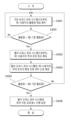
도 9는 본 개시의 또 다른 실시예에 따른 통합 업무 플랫폼 제공 방법의 순서도이다.
도 10은 본 개시의 또 다른 실시예에 따른 업무용 소프트웨어 조작 정보 기반 통합 업무 플랫폼 제공 방법의 순서도이다.
도 11 내지 도 13은 도 10을 참조하여 설명되는 업무용 소프트웨어 조작 정보 기반 통합 업무 플랫폼 제공 방법의 일부 동작에 대한 상세 순서도들이다.
도 14는 본 개시의 또 다른 실시예에 따른 업무용 소프트웨어 조작 정보 기반 통합 업무 플랫폼 제공 방법의 순서도이다.
도 15는 도 14를 참조하여 설명되는 업무용 소프트웨어 조작 정보 기반 통합 업무 플랫폼 제공 방법의 일부 동작에 대한 상세 순서도들이다.
도 16은 본 개시의 또 다른 실시예에 따른 업무용 소프트웨어 조작 정보 기반 통합 업무 플랫폼 제공 방법의 순서도이다.
도 17 내지 도 19는 도 16을 참조하여 설명되는 업무용 소프트웨어 조작 정보 기반 통합 업무 플랫폼 제공 방법의 일부 동작에 대한 상세 순서도들이다.
도 20은 본 개시의 또 다른 실시예에 따른 업무용 소프트웨어 작업 진척 정보 기반 통합 업무 플랫폼 제공 방법의 순서도이다.
도 21 내지 도 22는 도 20을 참조하여 설명되는 업무용 소프트웨어 작업 진척 정보 기반 통합 업무 플랫폼 제공 방법의 몇몇 실시예들에서 사용자 단말에 표시될 수 있는 예시적인 알림 메시지의 도면들이다.
도 23 내지 도 24는 도 20을 참조하여 설명되는 업무용 소프트웨어 작업 진척 정보 기반 통합 업무 플랫폼 제공 방법의 몇몇 실시예들에서 사용자 단말에 표시될 수 있는 예시적인 가상 오피스 화면의 도면들이다.
도 25는 본 개시의 또 다른 실시예에 따른 업무용 소프트웨어 작업 진척 정보 기반 통합 업무 플랫폼 제공 방법의 순서도이다.
도 26은 본 개시의 또 다른 실시예에 따른 업무용 소프트웨어 조작 정보 기반 통합 업무 플랫폼 제공 방법의 순서도이다.
도 27 내지 도 28은 도 26을 참조하여 설명되는 업무용 소프트웨어 조작 정보 기반 통합 업무 플랫폼 제공 방법의 몇몇 실시예들에서 사용자 단말에 표시될 수 있는 예시적인 알림 메시지의 도면들이다.
도 29는 도 26을 참조하여 설명되는 업무용 소프트웨어 조작 정보 기반 통합 업무 플랫폼 제공 방법의 몇몇 실시예들에서 사용자 단말에 표시될 수 있는 예시적인 가상 오피스 화면의 도면이다.
도 30은 본 개시의 또 다른 실시예에 따른 업무용 소프트웨어 조작 정보 기반 통합 업무 플랫폼 제공 방법의 순서도이다.
도 31은 본 개시의 몇몇 실시예들에서 사용자 단말에 표시될 수 있는 액티비티 진행 상황에서의 예시적인 가상 오피스 화면의 도면이다.
도 32는 본 개시의 또 다른 실시예에 따른 업무용 소프트웨어 조작 정보 기반 통합 업무 플랫폼 제공 방법의 순서도이다.
도 33은 도 32를 참조하여 설명되는 업무용 소프트웨어 조작 정보 기반 통합 업무 플랫폼 제공 방법의 몇몇 실시예들에서 사용자 단말에 표시될 수 있는 예시적인 가상 오피스 화면의 도면이다.
도 34는 도 32를 참조하여 설명되는 업무용 소프트웨어 조작 정보 기반 통합 업무 플랫폼 제공 방법의 팀원 인접 좌석 할당 방법을 설명하기 위한 도면이다.
도 35는 본 개시의 또 다른 실시예에 따른 물리 오피스의 착석 좌석 정보 기반 통합 업무 플랫폼 제공 방법의 순서도이다.
도 36 내지 도 37은 도 35를 참조하여 설명되는 물리 오피스의 착석 좌석 정보 기반 통합 업무 플랫폼 제공 방법에 따른 업무용 소프트웨어의 UI 테마 자동 조정 및 맞춤형 UX 제공에 대한 몇몇 실시예들을 설명하기 위한 도면들이다.
도 38은 본 개시의 또 다른 실시예에 따른 물리 오피스의 착석 좌석 정보 기반 통합 업무 플랫폼 제공 방법의 순서도이다.
도 39는 본 개시의 또 다른 실시예에 따른 물리 오피스의 시설 이용 정보 기반 통합 업무 플랫폼 제공 방법의 순서도이다.
도 40은 본 개시의 또 다른 실시예에 따른 가상 오피스 활동량 정보 기반 통합 업무 플랫폼 제공 방법의 순서도이다.
도 41 및 도 42는 본 개시의 또 다른 실시예들에 따른 가상 오피스 수행 액티비티 정보 기반 통합 업무 플랫폼 제공 방법의 순서도들이다.
도 43은 본 개시의 몇몇 실시예들에서 언급되는 컴퓨팅 시스템의 하드웨어 구성도이다.FIG. 1 is a configuration diagram of an integrated business platform providing system according to one embodiment of the present disclosure.
FIG. 2 is a diagram illustrating an exemplary physical office management page screen that may be displayed on a user terminal in some embodiments of the present disclosure.
FIG. 3 is a diagram illustrating an exemplary dataset that may be generated and managed by a physical office management system in some embodiments of the present disclosure.
FIG. 4 is a diagram illustrating a screen of an exemplary business software portal that may be displayed on a user terminal in some embodiments of the present disclosure.
FIG. 5 is a diagram illustrating an exemplary dataset that may be generated and managed by a business software management system in some embodiments of the present disclosure.
FIG. 6 is a diagram illustrating a screen of an exemplary virtual office navigator that may be displayed on a user terminal in some embodiments of the present disclosure.
FIG. 7 is a diagram illustrating an exemplary dataset that may be generated and managed by a virtual office management system in some embodiments of the present disclosure.
FIG. 8 is a block diagram of an information linkage system (100) according to another embodiment of the present disclosure.
FIG. 9 is a flowchart of a method for providing an integrated business platform according to another embodiment of the present disclosure.
FIG. 10 is a flowchart of a method for providing an integrated business platform based on business software operation information according to another embodiment of the present disclosure.
FIGS. 11 to 13 are detailed flowcharts of some operations of a method for providing an integrated business platform based on business software operation information described with reference to FIG. 10.
FIG. 14 is a flowchart of a method for providing an integrated business platform based on business software operation information according to another embodiment of the present disclosure.
FIG. 15 is a detailed flowchart of some operations of a method for providing an integrated business platform based on business software operation information described with reference to FIG. 14.
FIG. 16 is a flowchart of a method for providing an integrated business platform based on business software operation information according to another embodiment of the present disclosure.
FIGS. 17 to 19 are detailed flowcharts of some operations of a method for providing an integrated business platform based on business software operation information described with reference to FIG. 16.
FIG. 20 is a flowchart of a method for providing an integrated work platform based on work progress information of business software according to another embodiment of the present disclosure.
FIGS. 21 and 22 are diagrams of exemplary notification messages that may be displayed on a user terminal in some embodiments of a method for providing an integrated work platform based on work software work progress information described with reference to FIG. 20.
FIGS. 23 to 24 are diagrams of exemplary virtual office screens that may be displayed on a user terminal in some embodiments of a method for providing an integrated work platform based on work software work progress information described with reference to FIG. 20.
FIG. 25 is a flowchart of a method for providing an integrated work platform based on work progress information of business software according to another embodiment of the present disclosure.
FIG. 26 is a flowchart of a method for providing an integrated business platform based on business software operation information according to another embodiment of the present disclosure.
FIGS. 27 to 28 are diagrams of exemplary notification messages that may be displayed on a user terminal in some embodiments of a method for providing an integrated business platform based on business software operation information described with reference to FIG. 26.
FIG. 29 is a diagram of an exemplary virtual office screen that may be displayed on a user terminal in some embodiments of a method for providing an integrated business platform based on business software operation information described with reference to FIG. 26.
FIG. 30 is a flowchart of a method for providing an integrated business platform based on business software operation information according to another embodiment of the present disclosure.
FIG. 31 is a diagram of an exemplary virtual office screen in an activity progress situation that may be displayed on a user terminal in some embodiments of the present disclosure.
FIG. 32 is a flowchart of a method for providing an integrated business platform based on business software operation information according to another embodiment of the present disclosure.
FIG. 33 is a diagram of an exemplary virtual office screen that may be displayed on a user terminal in some embodiments of a method for providing an integrated business platform based on business software operation information described with reference to FIG. 32.
FIG. 34 is a drawing for explaining a method for assigning adjacent seats to team members in a method for providing an integrated work platform based on business software operation information described with reference to FIG. 32.
FIG. 35 is a flowchart of a method for providing an integrated work platform based on seating information of a physical office according to another embodiment of the present disclosure.
FIGS. 36 to 37 are drawings for explaining several embodiments of automatic adjustment of UI theme and provision of customized UX of business software according to the method for providing an integrated business platform based on seating information of a physical office described with reference to FIG. 35.
FIG. 38 is a flowchart of a method for providing an integrated work platform based on seating information of a physical office according to another embodiment of the present disclosure.
FIG. 39 is a flowchart of a method for providing an integrated work platform based on facility use information of a physical office according to another embodiment of the present disclosure.
FIG. 40 is a flowchart of a method for providing an integrated work platform based on virtual office activity information according to another embodiment of the present disclosure.
FIGS. 41 and 42 are flowcharts of a method for providing an integrated work platform based on virtual office performance activity information according to further embodiments of the present disclosure.
FIG. 43 is a hardware configuration diagram of a computing system mentioned in some embodiments of the present disclosure.
이하, 첨부된 도면을 참조하여 본 개시의 바람직한 실시예들을 상세히 설명한다. 본 발명의 이점 및 특징, 그리고 그것들을 달성하는 방법은 첨부되는 도면과 함께 상세하게 후술되어 있는 실시예들을 참조하면 명확해질 것이다. 그러나 본 발명의 기술적 사상은 이하의 실시예들에 한정되는 것이 아니라 서로 다른 다양한 형태로 구현될 수 있으며, 단지 이하의 실시예들은 본 발명의 기술적 사상을 완전하도록 하고, 본 발명이 속하는 기술분야에서 통상의 지식을 가진 자에게 본 발명의 범주를 완전하게 알려주기 위해 제공되는 것이며, 본 발명의 기술적 사상은 청구항의 범주에 의해 정의될 뿐이다. 본 개시를 설명함에 있어, 관련된 공지 구성 또는 기능에 대한 구체적인 설명이 본 발명의 요지를 흐릴 수 있다고 판단되는 경우에는 그 상세한 설명은 생략한다. 이하, 도면들을 참조하여 본 개시의 몇몇 실시예들을 설명한다.Hereinafter, preferred embodiments of the present disclosure will be described in detail with reference to the accompanying drawings. The advantages and features of the present disclosure, and the methods for achieving them, will become apparent with reference to the embodiments described in detail below together with the accompanying drawings. However, the technical idea of the present disclosure is not limited to the embodiments described below, but may be implemented in various different forms, and the following embodiments are provided only to complete the technical idea of the present disclosure and to fully inform those skilled in the art of the scope of the present disclosure, and the technical idea of the present disclosure is defined only by the scope of the claims. In describing the present disclosure, if it is determined that a specific description of a related known configuration or function may obscure the gist of the present disclosure, the detailed description thereof will be omitted. Hereinafter, several embodiments of the present disclosure will be described with reference to the drawings.
후술되는 본 개시의 각 실시예로부터 이해될 수 있는 기술 사상은, 별도로 명기하지 않더라도 다른 실시예에 자명하게 적용될 수 있다.Technical ideas that can be understood from each embodiment of the present disclosure described below can be obviously applied to other embodiments even if not stated separately.
1. 통합 업무 플랫폼1. Integrated business platform
먼저, 본 개시의 일 실시예에 따른 통합 업무 플랫폼 제공 시스템을 도 1을 참조하여 설명하기로 한다. 도 1에 도시된 바와 같이 본 실시예에 따른 통합 업무 플랫폼 제공 시스템(10)은, 사용자 단말에 업무 포털을 서비스하는 하나 이상의 서비스 서버(미도시)를 포함할 수 있다.First, an integrated business platform providing system according to one embodiment of the present disclosure will be described with reference to FIG. 1. As illustrated in FIG. 1, the integrated business platform providing system (10) according to the present embodiment may include one or more service servers (not illustrated) that provide a business portal to a user terminal.
상기 서비스 서버는 업무 포털 화면을 렌더링하기 위한 업무 포털 화면 데이터를 사용자 단말(30)에 송신하고, 사용자 단말(30)은 상기 업무 포털 화면 데이터이용 하여 업무 포털 화면을 디스플레이 할 것이다. 예를 들어, 사용자 단말(30)은 사용자 개인이 사용하는 단말 장치이거나, 공용의 키오스크(kiosk)일 수 있을 것이다. 상기 업무 포털(Work Portal)은 임직원의 업무 수행을 위한 다양한 기능들을 통합적으로 제공하는 서비스로 이해될 수 있을 것이다. The above service server transmits work portal screen data for rendering the work portal screen to the user terminal (30), and the user terminal (30) will display the work portal screen using the work portal screen data. For example, the user terminal (30) may be a terminal device used by an individual user or a public kiosk. The work portal may be understood as a service that provides various functions for employees to perform their work in an integrated manner.
본 실시예에 따른 통합 업무 플랫폼 제공 시스템(10)은 업무용 소프트웨어 관리 시스템(200), 가상 오피스 관리 시스템(300), 물리 오피스 관리 시스템(400) 및 정보 연계 시스템(100)을 포함할 수 있다.The integrated business platform provision system (10) according to the present embodiment may include a business software management system (200), a virtual office management system (300), a physical office management system (400), and an information linkage system (100).
물리 오피스 관리 시스템(400)은 물리 오피스의 다양한 시설을 제어하기 위한 소프트웨어 및 하드웨어 모듈과, 물리 오피스의 다양한 시설에서 발생되는 데이터를 저장하고 관리하기 위한 소프트웨어 및 하드웨어 모듈을 포함한다.The physical office management system (400) includes software and hardware modules for controlling various facilities of the physical office, and software and hardware modules for storing and managing data generated from various facilities of the physical office.
가상 오피스 관리 시스템(300)은 사용자 단말(30)에 가상 오피스 화면을 서비스한다. 사용자 단말(30)의 사용자는 자신의 아바타(avatar)의 조작 명령을 사용자 단말(30)에 입력하고, 사용자 단말(30)은 상기 조작 명령을 가상 오피스 관리 시스템(300)에 송신하며, 가상 오피스 관리 시스템(300)은 상기 조작 명령을 반영한 가상 오피스 화면을 생성하고, 상기 생성된 가상 오피스 화면의 렌더링 데이터를 사용자 단말(30)에 송신한다.The virtual office management system (300) provides a virtual office screen to a user terminal (30). A user of the user terminal (30) inputs an operation command of his/her avatar into the user terminal (30), and the user terminal (30) transmits the operation command to the virtual office management system (300). The virtual office management system (300) generates a virtual office screen reflecting the operation command and transmits rendering data of the generated virtual office screen to the user terminal (30).
업무용 소프트웨어 관리 시스템(200)은 사용자 단말(30)에 설치된 복수의 업무용 소프트웨어의 통합 서버 역할을 수행하고, 사용자 단말(30)에 설치된 복수의 업무용 소프트웨어 간에 데이터가 연계되도록 지원한다. 예를 들어, 상기 복수의 업무용 소프트웨어는, 문서 작성 툴, 프레젠테이션 자료 작성 툴, 스프레드시트, 메일 클라이언트 및 일정 관리 툴 등의 애플리케이션을 포함할 수 있다. 또한, 복수의 업무용 소프트웨어 간에 데이터가 연계된다는 것은, 예를 들어 상기 메일 클라이언트에서 상기 일정 관리 툴의 일정 정보를 불러올 수 있는 것과 같이, 제1 업무용 소프트웨어에서 생성된 데이터가 제2 업무용 소프트웨어에서 활용될 수 있음을 의미한다.The business software management system (200) performs the role of an integrated server for a plurality of business software installed in a user terminal (30) and supports data linking between the plurality of business software installed in the user terminal (30). For example, the plurality of business software may include applications such as a document creation tool, a presentation material creation tool, a spreadsheet, a mail client, and a schedule management tool. In addition, data linking between the plurality of business software means that data created in the first business software can be utilized in the second business software, such as, for example, the schedule information of the schedule management tool can be retrieved from the mail client.
정보 연계 시스템(100)은 업무용 소프트웨어 관리 시스템(200), 가상 오피스 관리 시스템(300) 및 물리 오피스 관리 시스템(400) 각각에서 생성된 정보 중 기 지정된 일부를 취합할 수 있다. 도 1에는 정보의 취합을 위한 데이터 패스(data path)(101, 102, 103)가 도시된다. 이를 통해, 정보 연계 시스템(100)은 이종 시스템으로의 액션 연계가 필요한지 여부를 판정할 수 있다. 이종 시스템으로의 액션 연계는, 제1 시스템에서 발생된 정보가 제2 시스템에 영향을 미치는 것을 가리킨다. 통합 업무 플랫폼 제공 시스템(10)은, 이러한 이종 시스템으로의 액션 연계를 통하여, 임직원이 특정 상황에 처했을 때, 다양한 시스템의 지원 조치를 자동으로 제공할 수 있다.The information linkage system (100) can collect a designated portion of information generated from each of the business software management system (200), the virtual office management system (300), and the physical office management system (400). Data paths (101, 102, 103) for information collection are illustrated in FIG. 1. Through this, the information linkage system (100) can determine whether action linkage to a heterogeneous system is necessary. Action linkage to a heterogeneous system refers to information generated in a first system affecting a second system. The integrated business platform provision system (10) can automatically provide support measures from various systems when employees are in a specific situation through such action linkage to heterogeneous systems.
정보 연계 시스템(100)은 상기 취합된 정보가 이종 시스템으로의 액션 연계가 필요한 상황을 가리키는지 여부를 판정하기 위하여, 룰 셋(rule set)을 관리할 수 있다. 상기 룰 셋에 포함된 각각의 룰은 이벤트 정보와 액션 정보의 조합일 수 있다. 상기 이벤트 정보는 각 룰에 대응되는 이벤트를 정의하는 정보로서, 어떠한 시스템으로부터 발생된 정보가 어떠한 조건을 만족하는지를 정의할 수 있다. 상기 이벤트 정보는 복수의 이벤트 정의를 포함할 수 있다. 즉, 각 룰은 복수의 이벤트에 대응될 수 있다. The information linkage system (100) can manage a rule set to determine whether the collected information indicates a situation requiring action linkage to a heterogeneous system. Each rule included in the rule set can be a combination of event information and action information. The event information is information that defines an event corresponding to each rule, and can define which information generated from which system satisfies which condition. The event information can include multiple event definitions. That is, each rule can correspond to multiple events.
또한, 상기 액션 정보는 업무용 소프트웨어 관리 시스템(200), 가상 오피스 관리 시스템(300) 및 물리 오피스 관리 시스템(400) 중 어떠한 시스템에서 액션이 수행되는지를 가리키는 반응 시스템 정보와, 수행되는 액션은 어떤 것인지를 가리키는 액션 명세 정보를 포함할 수 있다. 상기 이벤트 정보와 동일하게 상기 액션 명세 정보 역시 복수의 이벤트 정의를 포함할 수 있다.In addition, the action information may include response system information indicating which system among the business software management system (200), the virtual office management system (300) and the physical office management system (400) the action is performed in, and action specification information indicating which action is performed. Similar to the event information, the action specification information may also include multiple event definitions.
정보 연계 시스템(100)은 상기 룰 셋을 참조하여, 취합된 정보를 분석하고, 분석 결과 상기 룰 셋의 룰들 중에서 이벤트 정보를 만족시키는 하나 이상의 룰을 찾고, 찾아진 룰의 액션 정보를 확인하며, 확인된 액션 정보의 반응 시스템 정보에 따른 액션 수행 시스템 측에 액션 명세 정보에 따른 액션의 수행을 지시하는 데이터를 송신할 수 있다.The information linkage system (100) can analyze the collected information by referring to the rule set, find one or more rules that satisfy event information among the rules of the rule set as a result of the analysis, check the action information of the found rule, and transmit data instructing the execution of an action according to the action specification information to the action execution system according to the response system information of the confirmed action information.
한편, 정보 연계 시스템(100)은 주기적, 비주기적으로 업무용 소프트웨어 관리 시스템(200), 가상 오피스 관리 시스템(300) 및 물리 오피스 관리 시스템(400)으로부터 취합된 정보를 기 정의된 포맷으로 정규화 하여 업무 활동 데이터 아카이브(20)에 저장할 수 있다. 업무 활동 데이터 아카이브(20)는 레이드 스토리지(RAID STORAGE) 등 대규모 데이터 저장에 적합한 다양한 스토리지 장치로 구성될 수 있으며, 도 1에 도시된 바와 달리 통합 업무 플랫폼 제공 시스템(10)의 외부에 연결될 수 있음은 물론이다.Meanwhile, the information linkage system (100) can periodically or irregularly collect information from the business software management system (200), the virtual office management system (300), and the physical office management system (400) and normalize it into a predefined format and store it in the business activity data archive (20). The business activity data archive (20) can be composed of various storage devices suitable for large-scale data storage, such as RAID STORAGE, and, unlike as shown in FIG. 1, it can of course be connected to the outside of the integrated business platform provision system (10).
몇몇 실시예들에서, 비주기적으로 업무용 소프트웨어 관리 시스템(200), 가상 오피스 관리 시스템(300) 및 물리 오피스 관리 시스템(400)이 서로 간에 정보 연계 시스템(100)을 경유하지 않고 직접 이종 시스템으로의 액션 연계의 정보 송수신을 수행할 수 있다. 이 경우, 비주기적으로 업무용 소프트웨어 관리 시스템(200), 가상 오피스 관리 시스템(300) 및 물리 오피스 관리 시스템(400) 각각은 상술한 룰 셋을 저장할 수 있을 것이다. 상기 룰 셋은 정보 연계 시스템(100)이 비주기적으로 업무용 소프트웨어 관리 시스템(200), 가상 오피스 관리 시스템(300) 및 물리 오피스 관리 시스템(400)에 배포할 수 있다.In some embodiments, the business software management system (200), the virtual office management system (300), and the physical office management system (400) may perform information transmission and reception of action linkage to heterogeneous systems directly without going through the information linkage system (100) on an aperiodical basis. In this case, the business software management system (200), the virtual office management system (300), and the physical office management system (400) may each store the above-described rule set. The information linkage system (100) may distribute the rule set to the business software management system (200), the virtual office management system (300), and the physical office management system (400) on an aperiodical basis.
가상 오피스 관리 시스템(300) 및 물리 오피스 관리 시스템(400)이 서로 간에 정보 연계 시스템(100)을 경유하지 않고 직접 이종 시스템으로의 액션 연계의 정보 송수신을 수행하는 대상 룰은 짧은 레이턴시(latency)를 요하는 긴급 룰이다. 즉, 룰 셋에 긴급 룰을 가리키는 식별 필드가 포함될 수 있다.The target rule for performing information transmission and reception of action linkage between the virtual office management system (300) and the physical office management system (400) without going through the information linkage system (100) is an emergency rule requiring short latency. That is, the rule set may include an identification field indicating an emergency rule.
몇몇 실시예들에서 긴급 룰은 전체 룰 대비 최대 비율이 지정되거나, 긴급 룰이 되기 위한 이벤트 정보 및 액션 정보 중 적어도 하나의 요건이 제한될 수 있다. 이로 인해, 긴급 룰이 남용되어 과도하게 지정되는 것이 방지될 수 있을 것이다.In some embodiments, emergency rules may be assigned a maximum ratio relative to the total number of rules, or at least one of the event information and action information requirements for becoming an emergency rule may be restricted. This may prevent emergency rules from being overused and over-designated.
정보 연계 시스템(100)에 몰릴 수 있는 룰 처리 관련 부하(load)로 인하여 이벤트 발생과 대응 액션 수행 간의 레이턴시(latency)가 발생될 수 있다. 액션 연계 정보 직접 송수신을 요하는 상기 긴급 룰과 일반 룰을 차등화 하여 운영함으로써, 즉각적인 대응 액션 수행이 필요한 룰에 대하여는 짧은 레이턴시를 만족시킬 수 있을 것이다. 도 1에는 가상 오피스 관리 시스템(300) 및 물리 오피스 관리 시스템(400)이 서로 간에 정보 연계 시스템(100) 간의 직접 연결 데이터 패스들(104, 105, 106)이 도시된다. 즉, 직접 연결 데이터 패스들(104, 105, 106)을 통하여, 상기 긴급 룰과 관련된 데이터가 송수신됨으로써, 이벤트 발생과 대응 액션 수행 간의 레이턴시를 기준치 미만으로 낮추는 것을 보장할 수 있을 것이다.Due to the load related to rule processing that may be imposed on the information linkage system (100), latency may occur between the occurrence of an event and the execution of a response action. By operating the emergency rules and general rules that require direct transmission and reception of action linkage information differently, it will be possible to satisfy a short latency for rules that require immediate execution of a response action. FIG. 1 illustrates direct connection data paths (104, 105, 106) between the virtual office management system (300) and the physical office management system (400) in the information linkage system (100). That is, by transmitting and receiving data related to the emergency rule through the direct connection data paths (104, 105, 106), it will be possible to ensure that the latency between the occurrence of an event and the execution of a response action is lowered below a reference value.
몇몇 실시예들에서, 가상 오피스 관리 시스템(300) 및 물리 오피스 관리 시스템(400) 각각에는 정보 연계 시스템(100)으로 부터 수신된 액션 수행 지시를 처리하는 일반 액션 수행 모듈(미도시)과, 이종 시스템으로부터 직접 연결 데이터 패스들(104, 105, 106) 중 어느 하나를 통하여 수신된 액션 수행 지시를 처리하는 긴급 액션 수행 모듈(미도시)을 포함할 수 있다.In some embodiments, the virtual office management system (300) and the physical office management system (400) may each include a general action execution module (not shown) that processes an action execution instruction received from the information linkage system (100), and an emergency action execution module (not shown) that processes an action execution instruction received from a heterogeneous system through one of the direct connection data paths (104, 105, 106).
상술한 바와 같이, 상기 긴급 룰은 전체 룰 대비 최대 비율이 지정되거나, 상기 긴급 룰이 되기 위한 요건이 제한될 수 있는 바, 상기 긴급 액션 수행 모듈은 상기 일반 액션 수행 모듈 대비 작업 부하(load)가 덜할 것이고, 이에 따라 빠르게 액션을 수행할 수 있을 것이다.As described above, the emergency rule may have a maximum ratio specified for the entire rules, or the requirements for becoming the emergency rule may be limited, so that the emergency action performing module will have a lesser workload than the general action performing module, and thus, the action can be performed quickly.
이하, 물리 오피스 관리 시스템이 제공하는 예시적인 사용자 서비스 화면을 도 2를 참조하여 설명한다.Below, an exemplary user service screen provided by the physical office management system is described with reference to Fig. 2.
스마트 오피스 포털(11)은 물리 오피스에서 임직원들의 업무 및 생활 전반에 대한 서비스를 제공한다. 상기 물리 오피스는 예를 들어 임직원들이 근무하는 기업의 사옥일 수 있으며, 상기 기업이 복수의 사옥을 가지는 경우, 임직원들의 사용자 단말은 자신이 근무하는 사옥에 따라 서로 다른 스마트 오피스 포털(11)을 표시할 수 있을 것이다.The smart office portal (11) provides services for the overall work and life of employees in a physical office. The physical office may be, for example, the office building of the company where the employees work, and if the company has multiple office buildings, the user terminals of the employees may display different smart office portals (11) depending on the office building where they work.
물리 오피스 관리 시스템(400)은 근로자 근무형태 및 환경데이터를 수집하는 CCTV, 온도 센서, 습도 센서, 공기질 센서, 음향 센서, 진동 센서, 조도 센서 등의 IoT 센서, 안면 인식 및 카드 인식 기반 출입 통제 솔루션, 좌석 및 회의실 예약 및 이용을 예약하고 표시하는 전자 명패, 식당/카페 POS, 위치 인식 및 재실 감지 센서와 솔루션, 유/무선 네트워크, 전자 칠판 및 화상 회의 솔루션, 화재/지진 등 재난 및 비상 상황 감지 솔루션, 서비스 로봇 및 관제 솔루션, 주차 관제/결재 및 전기차 충전 솔루션, 전력 제어 솔루션, 조명 제어 솔루션, 공조 제어 솔루션, 엘리베이터 제어 솔루션, 에너지 제어 및 빌딩 통합 관리 솔루션 등 물리 오피스에 설치된 다양한 장치들과 데이터를 송수신 함으로써 동작할 수 있다.The physical office management system (400) can operate by transmitting and receiving data with various devices installed in a physical office, such as CCTVs that collect worker work patterns and environmental data, IoT sensors such as temperature sensors, humidity sensors, air quality sensors, sound sensors, vibration sensors, and illuminance sensors, access control solutions based on facial recognition and card recognition, electronic nameplates that reserve and display seat and conference room reservations and use, restaurant/cafe POS, location recognition and occupancy detection sensors and solutions, wired/wireless networks, electronic whiteboards and video conferencing solutions, disaster and emergency situation detection solutions such as fire/earthquake, service robots and control solutions, parking control/payment and electric vehicle charging solutions, power control solutions, lighting control solutions, air conditioning control solutions, elevator control solutions, energy control, and building integrated management solutions.
물리 오피스 관리 시스템(400)은 빌딩의 환경을 측정하는 센서 및 빌딩의 각 시설을 제어하는 제어 장치를 관리하는 빌딩 관리 시스템(미도시)과 데이터를 송수신할 수 있을 것이다. 즉, 스마트 오피스 포털(11)은 물리 오피스에서의 통합적인 서비스를 제공하기 위하여 하위의 다양한 장치 및 솔루션의 데이터를 수집하고, 일부 혹은 전체기능을 연동하여 각 장치, 솔루션을 제어하거나 서비스할 수 있다.The physical office management system (400) may be able to transmit and receive data with a building management system (not shown) that manages sensors that measure the building environment and control devices that control each facility of the building. That is, the smart office portal (11) may collect data from various lower devices and solutions and control or service each device and solution by linking some or all of the functions in order to provide an integrated service in a physical office.
또한, 도 2에 도시된 바와 같이, 스마트 오피스 포털(11)은 임직원의 편의를 위해, 물리 오피스의 다양한 시설에 대한 예약 서비스(11a)를 제공할 수 있다. 예를 들어, 스마트 오피스 포털(11)은 AI 기반의 좌석 추천 기능을 포함하는 자율 좌석 예약 서비스와, AI 기반의 회의실 추천 기능을 포함하는 회의실 예약 서비스와, 출입 통제 솔루션과 연동되는 방문객 예약 서비스를 제공할 수 있다. 또한, 스마트 오피스 포털(11)은 사내 식당 또는 사내 카페의 POS(Point Of Service) 장치와 연동되는 주문 서비스(11b)도 제공할 수 있다.In addition, as illustrated in FIG. 2, the smart office portal (11) can provide a reservation service (11a) for various facilities of the physical office for the convenience of employees. For example, the smart office portal (11) can provide an autonomous seat reservation service including an AI-based seat recommendation function, a conference room reservation service including an AI-based conference room recommendation function, and a visitor reservation service linked with an access control solution. In addition, the smart office portal (11) can also provide an ordering service (11b) linked with a POS (Point Of Service) device of an in-house restaurant or in-house cafe.
또한, 몇몇 실시예들에서, 스마트 오피스 포털(11)은 특정 액티비티 수행이 필요한 상황에서 선택적으로 표시되는 보안/통제 관련 영역(11c)을 더 포함할 수 있다. 보안/통제 관련 영역(11c)은 전사적으로, 또는 특정 부서별로 수행이 필요한 액티비티가 존재하는 경우, 해당 액티비티의 수행을 위한 버튼 또는 링크를 표시할 수 있다. 또한, 보안/통제 관련 영역(11c)에 보안/통제 사항과 관련된 긴급도 또는 주목 요구도가 높은 정보가 바로 표시될 수도 있다. 스마트 오피스 포털(11)이 임직원 단말에 빈번하게 표시될 것인바, 상기 긴급도 또는 주목 요구도가 높은 정보는 효과적으로 임직원에 노출될 수 있을 것이다.In addition, in some embodiments, the smart office portal (11) may further include a security/control-related area (11c) that is selectively displayed in a situation where a specific activity needs to be performed. The security/control-related area (11c) may display a button or link for performing an activity that needs to be performed company-wide or by a specific department. In addition, information with a high level of urgency or attention required related to security/control may be directly displayed in the security/control-related area (11c). Since the smart office portal (11) will be frequently displayed on employee terminals, the information with a high level of urgency or attention required may be effectively exposed to employees.
예를 들어, 보안/통제 관련 영역(11c)은 재난상황 발생 시 임직원의 대피 동선을 안내하거나, 재난 대응훈련을 진행하기 위한 인터페이스 역할을 수행하거나, 재난대응 페이지로 연결되는 버튼을 포함할 수 있을 것이다. 또한, 예를 들어, 보안/통제 관련 영역(11c)은 출입 통제 시스템의 페이지로 연결되는 버튼을 포함할 수도 있을 것이다. 또한, 예를 들어, 보안/통제 관련 영역(11c)은 출입 통제 시스템에서 푸시(push)한 중요 정보를 바로 표시할 수도 있을 것이다.For example, the security/control related area (11c) may serve as an interface for guiding the evacuation route of employees in the event of a disaster, conducting disaster response training, or may include a button that links to a disaster response page. In addition, for example, the security/control related area (11c) may include a button that links to a page of an access control system. In addition, for example, the security/control related area (11c) may directly display important information pushed by the access control system.
스마트 오피스 포털(11)을 참조하여 이해될 수 있는 물리 오피스 관리 시스템(400)의 예시적인 관리 데이터(410)가 도 3에 도시된다. 도 3에 도시된 데이터 이외에도 다수의 데이터가 물리 오피스 관리 시스템(400)에 의하여 관리될 수 있음은 물론이다.Exemplary management data (410) of a physical office management system (400) that can be understood by referring to the smart office portal (11) is illustrated in FIG. 3. It goes without saying that a plurality of data can be managed by the physical office management system (400) in addition to the data illustrated in FIG. 3.
이하, 업무용 소프트웨어 관리 시스템(200)에 의하여 서비스될 수 있는 예시적인 업무용 소프트웨어 포털(12)을 도 4를 참조하여 설명한다. 업무용 소프트웨어 포털(12)은 업무를 수행하는 과정에서 사용하거나, 업무를 수행한 후 그 결과를 입력하는 과정에서 사용하는 다양한 기능들의 선택 수단을 포함한다. 상기 선택 수단이 버튼 형태가 될 수 있음은 물론이다.Hereinafter, an exemplary business software portal (12) that can be serviced by the business software management system (200) is described with reference to Fig. 4. The business software portal (12) includes a selection means for various functions used in the process of performing a task or in the process of inputting the results after performing the task. It goes without saying that the selection means can be in the form of a button.
업무용 소프트웨어 포털(12)은 웹 문서 형태로 구현될 수 있으며, 상기 선택 수단이 선택되면, 웹 브라우저 상에서 선택된 기능의 업무용 소프트웨어 기능이 실행되거나, 사용자 단말에 미리 설치된 클라이언트 애플리케이션으로서 선택된 기능의 클라이언트 애플리케이션이 실행될 수 있다.The business software portal (12) can be implemented in the form of a web document, and when the above selection means is selected, the business software function of the selected function can be executed on a web browser, or the client application of the selected function can be executed as a client application pre-installed on the user terminal.
예를 들어, 업무용 소프트웨어 포털(12)은, 프로젝트 협업 툴(12a), 업무용 인스턴트 메신저 등 채팅/커뮤니케이션 툴(12b), 협업 좌석 추천 툴(12c), 일정 관리 툴(12e), 영상 회의 툴(12f), RPA(Robotics Process Automation), 전자 비서(virtual assistant) 등 코워킹(co-working) 로봇 툴(12g), 클라우드 스토리지 서비스(12h), 전자 결재 및 근태 관리 서비스(12i), 챗봇 서비스(12j) 및 문서, 스프레드시트 또는 프레젠테이션 자료 등 다양한 형태의 컨텐츠 저작 툴(12k)을 포함할 수 있다.For example, a business software portal (12) may include a project collaboration tool (12a), a chat/communication tool such as a business instant messenger (12b), a collaboration seat recommendation tool (12c), a schedule management tool (12e), a video conference tool (12f), a co-working robot tool such as an RPA (Robotics Process Automation) and a virtual assistant (12g), a cloud storage service (12h), an electronic approval and attendance management service (12i), a chatbot service (12j), and various forms of content authoring tools such as documents, spreadsheets, or presentation materials (12k).
업무용 소프트웨어 포털(12)을 참조하여 이해될 수 있는 업무용 소프트웨어 관리 시스템(200)의 예시적인 관리 데이터(210)가 도 5에 도시된다. 도 5에 도시된 데이터 이외에도 다수의 데이터가 소프트웨어 관리 시스템(200)에 의하여 관리될 수 있음은 물론이다.Exemplary management data (210) of a business software management system (200) that can be understood by referring to the business software portal (12) is illustrated in FIG. 5. It goes without saying that a plurality of data can be managed by the software management system (200) in addition to the data illustrated in FIG. 5.
이하, 가상 오피스 관리 시스템(300)에 의하여 서비스됨으로써, 사용자 단말(30)에 표시될 수 있는 예시적인 가상 오피스 화면(310-1)을 도 6을 참조하여 설명한다.Hereinafter, an exemplary virtual office screen (310-1) that can be displayed on a user terminal (30) by being serviced by a virtual office management system (300) is described with reference to FIG. 6.
'가상 오피스'는 임직원이 실제 물리 오피스에 출근하는 것 대신, 소프트웨어에 의하여 창출된 가상의 공간에 접속함으로써 출근하기 위한 온라인 서비스로 이해될 수 있을 것이다. 가상 오피스는, 높은 수준의 현실감을 통하여 임직원들이 소속감을 느낄 수 있도록 3차원 가상 공간의 형태로 구현될 수 있을 것이다. 가상 현실(Virtual Reality)의 기술이 접목됨으로써, 가상 오피스의 현실감을 더 증강시킬 수 있을 것이다.'Virtual office' can be understood as an online service that allows employees to go to work by accessing a virtual space created by software instead of going to the actual physical office. The virtual office can be implemented in the form of a three-dimensional virtual space so that employees can feel a sense of belonging through a high level of realism. By incorporating virtual reality technology, the realism of the virtual office can be further enhanced.
'가상 오피스'는 물리 오피스와 반드시 대척점에 있는 것은 아니다. 즉, 물리 오피스에 출근한 임직원이 '가상 오피스'에도 함께 접속할 수 있으며, 물리 오피스와 가상 오피스에 동시 존재하는 상황을 유도함으로써, 기존에 제공되지 못한 다양한 임직원들의 업무 경험(Working Experience)을 제공할 수 있다. 이처럼 다양한 업무 경험을 제공하기 위한 다양한 실시예들이 후술될 것이다.A 'virtual office' is not necessarily the opposite of a physical office. That is, employees who go to the physical office can also access the 'virtual office', and by inducing a situation where they exist simultaneously in the physical office and the virtual office, it is possible to provide various working experiences for employees that were not previously available. Various examples for providing such diverse working experiences will be described later.
몇몇 실시예들에서, '가상 오피스'의 접속은 기 지정된 지리적 위치에서만 가능할 수도 있다. 예를 들어, 재택 근무의 요건으로서 가상 오피스 출근이 요구되는 경우, 임직원들은 사전에 가상 오피스에 접속할 지리적 위치를 등록할 수 있으며, 이러한 지리적 위치의 사전 등록을 통하여, 기업의 HR(Human Resource) 부서는 재택 근무 등 원격 근무 제도 운영제도를 보다 효율적으로 운영할 수 있을 것이다. In some embodiments, access to the 'virtual office' may only be possible from a pre-designated geographic location. For example, if commuting to a virtual office is required as a requirement for working from home, employees may register the geographic location from which they will access the virtual office in advance, and through such pre-registration of geographic locations, the company's HR (Human Resource) department will be able to operate the remote work system, such as working from home, more efficiently.
몇몇 실시예들에서, 가상 오피스에 접속한 각 임직원은 자신의 아바타(avatar)를 조작함으로써, 가상 오피스 내부에서의 업무 행위를 수행할 수 있다. 예를 들어, 가상 오피스에 접속한 다른 임직원들 과의 업무 협의를 하거나, 가상 오피스 내부의 특정 공간으로 자신의 아바타를 이동시켜서, 상기 특정 공간에서만 수행할 수 있는 업무 행위를 수행할 수 있을 것이다.In some embodiments, each employee who has accessed the virtual office may perform work activities within the virtual office by manipulating his or her avatar. For example, he or she may hold work discussions with other employees who have accessed the virtual office, or move his or her avatar to a specific space within the virtual office and perform work activities that can only be performed in that specific space.
사용자 단말에 표시되는 예시적인 가상 오피스 화면(310-1)은 사용자 단말에 설치된 가상 오피스 내비게이션(navigation) 애플리케이션이 디스플레이 하는 것이거나, 웹 브라우저 등 범용 애플리케이션을 이용하여 가상 오피스 관리 시스템(300)에 접속함으로써 디스플레이 될 수 있다.An exemplary virtual office screen (310-1) displayed on a user terminal may be displayed by a virtual office navigation application installed on the user terminal, or may be displayed by accessing the virtual office management system (300) using a general-purpose application such as a web browser.
가상 오피스 화면(310-1)은, 복수의 그래픽 요소들(graphic elements)을 포함할 수 있다. 상기 복수의 그래픽 요소들은 물리적 오피스 공간과 유사한 형태로 건물, 가구, 자연, 조경요소 등을 가상 오피스 공간에 배치하는 디지털 오피스 요소, 임직원의 아바타, 챗봇, NPC(non-player character)등 가상 오피스에서 활동하고 임직원의 아바타와 상호 커뮤니케이션하는 메타 휴먼(meta human) 요소를 포함할 수 있다.The virtual office screen (310-1) may include a plurality of graphic elements. The plurality of graphic elements may include digital office elements that place buildings, furniture, nature, and landscape elements in a virtual office space in a form similar to a physical office space, meta human elements such as employee avatars, chatbots, and NPCs (non-player characters) that are active in the virtual office and communicate with employee avatars.
예시적인 가상 오피스 화면(310-1)은 가상 오피스 내부의 신속한 이동을 위한 버튼들을 포함하는 툴바(320)와 함께 표시될 수 있다. 도 6의 툴바(320)는 착석 좌석, 회의실 및 간단한 협의를 할 수 있는 공간 등이 배치된 사무실 구역으로 이동하기 위한 버튼(321), 회사의 구성원들이 의도적이지 않은 만남 및 대화를 쉽게 나눌 수 있도록 함으로써 세렌디피티(serendipity) 협업을 유도하기 위한 스퀘어 구역으로 이동하기 위한 버튼(322), 임직원 간의 대화를 나누기에 적합한 분위기의 가상 공간으로서, 물리 오피스의 사내 카페에 대한 스마트 오더 형태의 주문이 가능한 카페 구역으로 이동하기 위한 버튼(323), 사내 세미나, 법정 교육 등이 진행되는 강의실 구역으로 이동하기 위한 버튼(324) 및 외부인의 아바타도 위치할 수 있는 구역인 접견 로비로 이동하기 위한 버튼(325)을 포함할 수 있다.An exemplary virtual office screen (310-1) may be displayed with a toolbar (320) including buttons for rapid movement within the virtual office. The toolbar (320) of FIG. 6 may include a button (321) for moving to an office area where seating, conference rooms, and spaces for simple discussions are arranged, a button (322) for moving to a square area for inducing serendipity collaboration by allowing company members to easily have unintentional encounters and conversations, a button (323) for moving to a cafe area where smart ordering is possible for the in-house cafe of the physical office as a virtual space with an atmosphere suitable for conversations between employees, a button (324) for moving to a lecture room area where in-house seminars, legal training, etc. are held, and a button (325) for moving to a reception lobby where avatars of outsiders can also be located.
몇몇 실시예들에서, 임직원 아바타의 가상 오피스 상의 행위는 프리전스(presence) 정보의 자동화된 변경을 가져올 수 있다. 예를 들어, 가상 오피스 상에서 제1 임직원의 아바타와 제2 임직원의 아바타가 대화를 나누는 상황에서, 제1, 2 임직원의 가상 오피스의 프리전스 정보는 '대화중'으로 자동 변경될 것이다.In some embodiments, actions of employee avatars in the virtual office may result in automated changes to presence information. For example, in a situation where the avatars of the first employee and the second employee are having a conversation in the virtual office, the presence information of the virtual offices of the first and second employees will automatically change to 'in conversation'.
몇몇 실시예들에서, 가상 오피스의 제1 프리전스 정보와 업무용 소프트웨어의 제2 프리전스 정보는 개별적으로 관리될 수 있다. 가상 오피스의 프리전스 정보와 업무용 소프트웨어의 프리전스 정보를 구분함으로써, 가상 오피스 상의 임직원 활동과, 업무용 소프트웨어를 조작하고 있는 임직원 활동을 구분하여 표현하고자 하는 임직원들의 필요를 만족시킬 수 있을 것이다. 여러 캐릭터를 갖고자 하는 성향을 가지는 임직원들은 가상 오피스의 프리전스 정보와 업무용 소프트웨어의 프리전스 정보를 구분하기를 원할 것이다.In some embodiments, the first presence information of the virtual office and the second presence information of the business software can be managed separately. By separating the presence information of the virtual office and the presence information of the business software, the needs of employees who want to express their activities in the virtual office and their activities operating the business software separately can be satisfied. Employees who tend to have multiple characters will want to separate the presence information of the virtual office and the presence information of the business software.
다른 몇몇 실시예들에서는, 가상 오피스의 프리전스 정보와 업무용 소프트웨어의 프리전스 정보가 동기화 되어 통합 관리될 수도 있다. 이 경우, 임직원이 가상 오피스 상에서 수행한 행위가 가상 오피스의 프리전스 정보 뿐만 아니라 업무용 소프트웨어의 프리전스 정보도 변경할 것이고, 반대로 임직원의 업무용 소프트웨어 조작이 업무용 소프트웨어의 프리전스 정보 뿐만 아니라 가상 오피스의 프리전스 정보도 변경할 것이다.In some other embodiments, the presence information of the virtual office and the presence information of the business software may be synchronized and managed in an integrated manner. In this case, actions performed by employees in the virtual office will change not only the presence information of the virtual office but also the presence information of the business software, and conversely, the operation of the business software by employees will change not only the presence information of the business software but also the presence information of the virtual office.
가상 오피스의 제1 프리전스 정보와 업무용 소프트웨어의 제2 프리전스 정보를 개별적으로 관리할 것인지, 아니면 동일하게 동기화할 것인지 여부는 임직원의 개별 설정 사항이거나, 부서별 설정 사항이거나, 기업의 전체 정책에 따른 설정 사항일 수 있다.Whether to manage the primary presence information of the virtual office and the secondary presence information of the business software separately or to synchronize them identically can be a setting for each employee, a setting for each department, or a setting according to the overall policy of the company.
도 6을 참조하여 설명한 예시적인 가상 오피스 화면(310-1)을 참조하여 이해될 수 있는 가상 오피스 관리 시스템(300)의 예시적인 관리 데이터(330)가 도 7에 도시된다. 도 7에 도시된 데이터 이외에도 다수의 데이터가 가상 오피스 관리 시스템(300)에 의하여 관리될 수 있음은 물론이다.Exemplary management data (330) of a virtual office management system (300) that can be understood with reference to the exemplary virtual office screen (310-1) described with reference to FIG. 6 is illustrated in FIG. 7. It goes without saying that a plurality of data can be managed by the virtual office management system (300) in addition to the data illustrated in FIG. 7.
이하, 본 개시의 다른 실시예에 따른 정보 연계 시스템의 구성 및 동작을 도 8을 참조하여 설명한다. 본 실시예에 따른 정보 연계 시스템(100)은 도 1을 참조하여 설명한 통합 업무 플랫폼 제공 시스템(10)에 포함되는 구성 요소로서 설명된 바 있다. 본 실시예에 따른 정보 연계 시스템(100)은 도 43을 참조하여 후술할 컴퓨팅 시스템의 형태로 구현될 수 있으며, 클라우드 기술 기반의 하나 이상의 가상 머신(virtual machine) 또는 컨테이너(container)의 형태로 가상화 된 하드웨어 자원을 이용하여 구현될 수 있음은 물론이다.Hereinafter, the configuration and operation of an information linkage system according to another embodiment of the present disclosure will be described with reference to FIG. 8. The information linkage system (100) according to the present embodiment has been described as a component included in the integrated business platform provision system (10) described with reference to FIG. 1. The information linkage system (100) according to the present embodiment may be implemented in the form of a computing system described below with reference to FIG. 43, and of course, may be implemented using hardware resources virtualized in the form of one or more virtual machines or containers based on cloud technology.
정보 연계 시스템(100)은 물리 오피스 대응 모듈(110), 가상 오피스 대응 모듈(120) 및 업무용 소프트웨어 대응 모듈(130)을 포함할 수 있다. 상술한 바와 같이, 정보 연계 시스템(100)은 업무용 소프트웨어 관리 시스템, 가상 오피스 관리 시스템 및 물리 오피스 관리 시스템 각각에서 생성된 정보 중 기 지정된 일부를 취합할 수 있다. 또한, 정보 연계 시스템(100)은 이종 시스템으로의 액션 연계가 필요한지 여부를 판정할 수 있다. 정보 연계 시스템(100)은 상기 취합된 정보가 이종 시스템으로의 액션 연계가 필요한 상황을 가리키는지 여부를 판정하기 위하여, 룰 셋(rule set)을 관리할 수 있다.The information linkage system (100) may include a physical office response module (110), a virtual office response module (120), and a business software response module (130). As described above, the information linkage system (100) may collect a designated portion of information generated from each of the business software management system, the virtual office management system, and the physical office management system. In addition, the information linkage system (100) may determine whether action linkage to a heterogeneous system is required. The information linkage system (100) may manage a rule set to determine whether the collected information indicates a situation in which action linkage to a heterogeneous system is required.
즉, 정보 연계 시스템(100)은 업무용 소프트웨어 관리 시스템, 가상 오피스 관리 시스템 및 물리 오피스 관리 시스템 등 통합 업무 플랫폼을 구성하는 단위 시스템(unit system) 각각에서 발생되는 정보를 분석하고, 분석 결과를 이용하여 정보가 발생된 단위 시스템이 아닌 다른 단위 시스템에서 액션이 수행될 필요가 있는지 여부를 판단하는 컨트롤 타워(control tower)의 역할을 수행하는 것이다.That is, the information linkage system (100) analyzes information generated from each unit system that constitutes an integrated business platform, such as a business software management system, a virtual office management system, and a physical office management system, and uses the analysis results to determine whether an action needs to be performed in a unit system other than the unit system where the information was generated, thereby performing the role of a control tower.
다시 말하자면, 정보 연계 시스템(100)이 다른 단위 시스템으로의 액션 연계 여부를 전담하여 결정한다. 따라서, 통합 업무 플랫폼을 구성하는 각각의 단위 시스템은 발생 정보를 정보 연계 시스템(100)에 송신하기만 할 뿐, 다른 단위 시스템으로의 액션 연계와 관련하여는 별도의 연산을 수행하지 않을 것이다. 이로 인해, 통합 업무 플랫폼의 운영에 할당된 연산 자원을 효율적으로 활용할 수 있으며, 다른 단위 시스템으로의 액션 연계와 관련된 기능을 추가하거나 기존 기능을 변경할 때 정보 연계 시스템(100)의 업데이트만 필요하므로, 기능 업데이트 프로세스 측면에서 효율적이다.In other words, the information linkage system (100) exclusively determines whether to link actions to other unit systems. Accordingly, each unit system constituting the integrated business platform only transmits occurrence information to the information linkage system (100) and does not perform separate operations related to linking actions to other unit systems. As a result, the computational resources allocated to the operation of the integrated business platform can be efficiently utilized, and when adding a function related to linking actions to other unit systems or changing an existing function, only an update of the information linkage system (100) is required, which is efficient in terms of the function update process.
몇몇 실시예들에서, 업무용 소프트웨어 관리 시스템, 가상 오피스 관리 시스템 및 물리 오피스 관리 시스템 각각은 생성된 정보 중 기 지정된 일부만을 정보 연계 시스템(100)에 송신할 수 있다. 이는, 시스템 간의 데이터 송수신 트래픽을 경감하고, 정보 연계 시스템(100)의 정보 분석 부하(load)를 감소시키기 위함이다.In some embodiments, the business software management system, the virtual office management system, and the physical office management system may each transmit only a pre-designated portion of the generated information to the information linkage system (100). This is to reduce data transmission and reception traffic between the systems and to reduce the information analysis load of the information linkage system (100).
그런데, 다른 단위 시스템으로의 액션 연계와 관련된 기능이 추가됨으로써, 기존에는 수신되지 않던 정보가 필요할 수 있다. 예를 들어, 신규 액션 연계 기능 업데이트로 인하여, 정보 연계 시스템(100)이 물리 오피스 관리 시스템으로부터 기존에는 수신되지 않던 입문 및 출문 정보를 분석해야 할 수 있다. 이 경우, 정보 연계 시스템(100)은 상기 입문 및 출문 정보의 정보 ID를 포함한 정보 제공 요청을 물리 오피스 관리 시스템에 송신할 수 있다.However, as a function related to action linkage to another unit system is added, information that was not previously received may be required. For example, due to a new action linkage function update, the information linkage system (100) may need to analyze entry and exit information that was not previously received from the physical office management system. In this case, the information linkage system (100) may transmit an information provision request including the information ID of the entry and exit information to the physical office management system.
상기 정보 ID는, 통합 업무 플랫폼 측면에서 관리되는 전체 정보의 목록을 관리하는 마스터 데이터(master data)에서 관리되는 정보의 ID일 수 있다.The above information ID may be an ID of information managed in master data that manages a list of all information managed in terms of an integrated business platform.
물리 오피스 대응 모듈(110)은 상술한 룰 셋을 참조하여 물리 오피스 관리 시스템에서 발생된 정보를 분석하는 물리 오피스 시설 데이터 모니터링 유닛(111)을 포함할 수 있다. 물리 오피스 시설 데이터 모니터링 유닛(111)의 분석 결과 가상 오피스 관리 시스템에서의 액션 수행이 필요한 경우, 가상 오피스 제어 유닛(112)이 상기 룰 셋과 관련하여 상술한 상기 액션 명세 정보를 가상 오피스 관리 시스템에 송신할 수 있을 것이다. 또한, 물리 오피스 시설 데이터 모니터링 유닛(111)의 분석 결과 업무용 소프트웨어 관리 시스템에서의 액션 수행이 필요한 경우, 업무용 소프트웨어 제어 유닛(113)이 상기 액션 명세 정보를 업무용 소프트웨어 관리 시스템에 송신할 수 있을 것이다.The physical office response module (110) may include a physical office facility data monitoring unit (111) that analyzes information generated in a physical office management system with reference to the above-described rule set. If the analysis result of the physical office facility data monitoring unit (111) indicates that an action needs to be performed in a virtual office management system, the virtual office control unit (112) may transmit the above-described action specification information related to the above-described rule set to the virtual office management system. In addition, if the analysis result of the physical office facility data monitoring unit (111) indicates that an action needs to be performed in a business software management system, the business software control unit (113) may transmit the above-described action specification information to the business software management system.
가상 오피스 대응 모듈(120)은 상술한 룰 셋을 참조하여 가상 오피스 관리 시스템에서 발생된 정보를 분석하는 가상 오피스 시설 데이터 모니터링 유닛(121)을 포함할 수 있다. 가상 오피스 시설 데이터 모니터링 유닛(121)의 분석 결과 물리 오피스 관리 시스템에서의 액션 수행이 필요한 경우, 물리 오피스 제어 유닛(122)이 상기 액션 명세 정보를 물리 오피스 관리 시스템에 송신할 수 있을 것이다. 또한, 가상 오피스 시설 데이터 모니터링 유닛(121)의 분석 결과 업무용 소프트웨어 관리 시스템에서의 액션 수행이 필요한 경우, 업무용 소프트웨어 제어 유닛(123)이 상기 액션 명세 정보를 업무용 소프트웨어 관리 시스템에 송신할 수 있을 것이다.The virtual office response module (120) may include a virtual office facility data monitoring unit (121) that analyzes information generated in a virtual office management system by referring to the above-described rule set. If the analysis result of the virtual office facility data monitoring unit (121) indicates that an action needs to be performed in a physical office management system, the physical office control unit (122) may transmit the action specification information to the physical office management system. In addition, if the analysis result of the virtual office facility data monitoring unit (121) indicates that an action needs to be performed in a business software management system, the business software control unit (123) may transmit the action specification information to the business software management system.
업무용 소프트웨어 대응 모듈(130)은 상술한 룰 셋을 참조하여 업무용 소프트웨어 관리 시스템에서 발생된 정보를 분석하는 업무용 소프트웨어 로그 모니터링 유닛(131)을 포함할 수 있다. 업무용 소프트웨어 로그 모니터링 유닛(131)의 분석 결과, 물리 오피스 관리 시스템에서의 액션 수행이 필요한 경우, 물리 오피스 제어 유닛(132)이 상기 액션 명세 정보를 물리 오피스 관리 시스템에 송신할 수 있을 것이다. 또한, 업무용 소프트웨어 로그 모니터링 유닛(131)의 분석 결과 가상 오피스 관리 시스템에서의 액션 수행이 필요한 경우, 가상 오피스 제어 유닛(133)이 상기 액션 명세 정보를 가상 오피스 관리 시스템에 송신할 수 있을 것이다.The business software response module (130) may include a business software log monitoring unit (131) that analyzes information generated in the business software management system by referring to the above-described rule set. If the analysis result of the business software log monitoring unit (131) indicates that an action needs to be performed in the physical office management system, the physical office control unit (132) may transmit the action specification information to the physical office management system. In addition, if the analysis result of the business software log monitoring unit (131) indicates that an action needs to be performed in the virtual office management system, the virtual office control unit (133) may transmit the action specification information to the virtual office management system.
몇몇 실시예들에서, 정보 연계 시스템(100)은 물리 오피스 대응 모듈(110), 가상 오피스 대응 모듈(120) 및 업무용 소프트웨어 대응 모듈(130) 중 적어도 일부를 자동적으로 비활성화 시키는 리소스 절약 모듈(미도시)을 더 포함할 수 있다. 정보 연계 시스템(100)이 수행하는 동작은 각 단위 시스템, 즉 업무용 소프트웨어 관리 시스템, 가상 오피스 관리 시스템 및 물리 오피스 관리 시스템 각각의 기능의 수행에는 영향을 주지 않는 것이다. 따라서, 정보 연계 시스템(100)이 동작을 수행하지 않는다 하여 각 단위 시스템의 동작에 문제가 생기는 것도 아니다. 이러한 점을 고려하여, 상기 리소스 절약 모듈은 통합 업무 플랫폼 전체의 부하 정보 또는 상황 정보(context information)를 이용하여 물리 오피스 대응 모듈(110), 가상 오피스 대응 모듈(120) 및 업무용 소프트웨어 대응 모듈(130) 중 적어도 일부를 자동적으로 비활성화 시킬 수 있다.In some embodiments, the information linkage system (100) may further include a resource saving module (not shown) that automatically deactivates at least some of the physical office response module (110), the virtual office response module (120), and the business software response module (130). The operation performed by the information linkage system (100) does not affect the performance of the functions of each unit system, i.e., the business software management system, the virtual office management system, and the physical office management system. Accordingly, even if the information linkage system (100) does not perform the operation, there is no problem in the operation of each unit system. Considering this point, the resource saving module may automatically deactivate at least some of the physical office response module (110), the virtual office response module (120), and the business software response module (130) by using load information or context information of the entire integrated business platform.
상기 리소스 절약 모듈은, 비활성화 대상 모듈을 위하여 운영 체제에 등록되어 백그라운드에서 상시 실행되는 서비스(예를 들어, 마이크로소프트 윈도우즈 서비스(MicrosoftTM Windows service)를 종료하거나, 비활성화 대상 모듈의 프로세스를 모두 종료할 수 있다. 이에 더하여, 상기 리소스 절약 모듈은 비활성화 대상 모듈을 위하여 독점적으로 할당된 가상 컴퓨팅 리소스를 회수할 수도 있다. 예를 들어, 상기 리소스 절약 모듈은 비활성화 대상 모듈을 위하여 할당된 가상 머신을 회수하여, 다른 모듈에 할당해 줄 수 있을 것이다.The above resource saving module can terminate a service (e.g., a Microsoft TM Windows service) that is registered with the operating system and constantly runs in the background for the module to be disabled, or terminate all processes of the module to be disabled. In addition, the resource saving module can reclaim virtual computing resources exclusively allocated for the module to be disabled. For example, the resource saving module can reclaim a virtual machine allocated for the module to be disabled and allocate it to another module.
상기 상황 정보는 시간대 정보를 포함할 수 있다. 예를 들어, 상기 리소스 절약 모듈은 기 지정된 시간대 또는 주말에는 물리 오피스 대응 모듈(110)을 자동적으로 비활성화 시킬 수 있다.The above situation information may include time zone information. For example, the resource saving module may automatically deactivate the physical office response module (110) during a pre-designated time zone or on weekends.
예를 들어, 상기 리소스 절약 모듈은 평일 오후 9시부터 다음날 오전 7시까지의 시간대와 주말에는 물리 오피스 대응 모듈(110)을 자동적으로 비활성화 시킬 수 있다. 상술한 시간대에는 물리 오피스의 이용도가 크게 떨어지는 점을 반영한 것으로 이해될 수 있을 것이다.For example, the above resource saving module can automatically deactivate the physical office response module (110) during the time period from 9:00 PM to 7:00 AM the following day on weekdays and on weekends. It can be understood that this reflects the fact that the utilization of the physical office is significantly reduced during the above-mentioned time period.
또한, 예를 들어, 상기 리소스 절약 모듈은 기 지정된 식사 시간대에는 업무용 소프트웨어 대응 모듈(130)을 자동적으로 비활성화 시킬 수 있다. 식사 시간대에는 업무용 소프트웨어의 이용도가 크게 떨어지는 점을 반영한 것으로 이해될 수 있을 것이다.In addition, for example, the resource saving module can automatically deactivate the business software response module (130) during a designated meal time. This can be understood as reflecting the fact that the use of business software is greatly reduced during meal time.
또한, 상기 리소스 절약 모듈은 통합 업무 플랫폼 전체의 부하 정보가 기준치를 초과한 경우, 물리 오피스 대응 모듈(110), 가상 오피스 대응 모듈(120) 및 업무용 소프트웨어 대응 모듈(130) 중 적어도 일부를 자동적으로 비활성화 시킬 수 있다.In addition, the resource saving module can automatically deactivate at least some of the physical office response module (110), the virtual office response module (120), and the business software response module (130) when the load information of the entire integrated business platform exceeds a reference value.
예를 들어, 통합 업무 플랫폼 전체에 1000개의 가상 머신이 할당되고, 그 중 50개의 가상 머신이 정보 연계 시스템(100)에 할당된 상황을 가정한다. 즉, 950개의 가상 머신은 물리 오피스 관리 시스템, 가상 오피스 관리 시스템 및 업무용 소프트웨어 관리 시스템에 할당될 것이다. 또한, 통합 업무 플랫폼은 오토 스케일링(auto scaling) 기능이 제공되는 클라우드 시스템 기반으로 동작한다고 가정한다. 이 때, 물리 오피스 관리 시스템, 가상 오피스 관리 시스템 및 업무용 소프트웨어 관리 시스템에 연산 부하가 늘어남에 따라 상기 오토 스케일링 기능에 따른 스케일-아웃이 반복됨에 따라, 가용 가상 머신의 개수가 기준 개수 미만으로 떨어지면, 정보 연계 시스템(100)에 할당된 가상 머신을 초기화 하고 가용 가상 머신을 확보하며, 물리 오피스 관리 시스템, 가상 오피스 관리 시스템 및 업무용 소프트웨어 관리 시스템 중 가용 가상 머신이 부족한 단위 시스템의 스케일-아웃을 위해 상기 확보된 가용 가상 머신을 이용할 필요가 있을 것이다. 즉, 상기 리소스 절약 모듈은 가용 가상 머신의 확보를 위해 물리 오피스 대응 모듈(110), 가상 오피스 대응 모듈(120) 및 업무용 소프트웨어 대응 모듈(130) 중 적어도 일부를 자동적으로 비활성화 시키고, 그 결과로 가용 가상 머신을 확보할 수 있을 것이다.For example, assume that 1,000 virtual machines are allocated to the entire integrated business platform, and 50 of them are allocated to the information linkage system (100). In other words, 950 virtual machines will be allocated to the physical office management system, the virtual office management system, and the business software management system. In addition, assume that the integrated business platform operates based on a cloud system that provides an auto scaling function. At this time, as the computational load on the physical office management system, the virtual office management system, and the business software management system increases, and as the scale-out according to the auto scaling function is repeated, if the number of available virtual machines falls below the standard number, it will be necessary to initialize the virtual machines allocated to the information linkage system (100), secure available virtual machines, and utilize the secured available virtual machines for scale-out of the unit system that lacks available virtual machines among the physical office management system, the virtual office management system, and the business software management system. That is, the resource saving module automatically deactivates at least some of the physical office response module (110), the virtual office response module (120), and the business software response module (130) to secure available virtual machines, and as a result, it is possible to secure available virtual machines.
물론, 상기 리소스 절약 모듈의 가상 머신을 기준으로 한 상술 동작은, 컨테이너(container)를 기준으로 하여도 유사한 방식으로 수행될 수 있을 것이다. 즉, 상기 리소스 절약 모듈은 가용 컨테이너의 확보를 위해 물리 오피스 대응 모듈(110), 가상 오피스 대응 모듈(120) 및 업무용 소프트웨어 대응 모듈(130) 중 적어도 일부를 자동적으로 비활성화 시키고, 그 결과로 가용 컨테이너를 확보할 수 있을 것이다.Of course, the above-described operation based on the virtual machine of the above-described resource saving module can be performed in a similar manner based on a container. That is, the above-described resource saving module can automatically deactivate at least some of the physical office response module (110), the virtual office response module (120), and the business software response module (130) to secure available containers, and as a result, can secure available containers.
상술한 리소스 절약 모듈의 동작에 의하여, 통합 업무 플랫폼의 운영에 투입되는 예산 범위 안에서 정보 연계 시스템(100)의 동작을 탄력적으로 조정할 수 있을 것이다.By operating the resource saving module described above, it will be possible to flexibly adjust the operation of the information linkage system (100) within the budget range invested in the operation of the integrated business platform.
이하, 본 개시의 또 다른 실시예에 따른 통합 업무 플랫폼 제공 방법을 도 9를 참조하여 설명한다. 본 실시예에 따른 방법은, 상술한 정보 연계 시스템의 동작 방법으로 이해될 수도 있을 것이다. 본 실시예에 따른 방법은 하나 이상의 컴퓨팅 장치에 의하여 수행될 수 있다. 즉, 본 실시예에 따른 방법은 하나의 컴퓨팅 장치에 의하여 모든 동작이 수행될 수도 있고, 일부의 동작이 다른 컴퓨팅 장치에 의하여 수행될 수도 있다. 예를 들어, 일부의 동작은 제1 서버 시스템에 의하여 수행되고, 다른 동작은 제2 서버 시스템에 의하여 수행될 수도 있다.Hereinafter, a method for providing an integrated business platform according to another embodiment of the present disclosure will be described with reference to FIG. 9. The method according to the present embodiment may be understood as an operation method of the information linkage system described above. The method according to the present embodiment may be performed by one or more computing devices. That is, the method according to the present embodiment may perform all operations by one computing device, or some operations may be performed by other computing devices. For example, some operations may be performed by a first server system, and other operations may be performed by a second server system.
또한, 서버 시스템이 클라우드 컴퓨팅 노드 상에 구현됨에 따라, 하나의 서버 시스템에 의하여 수행되는 동작들도 복수의 클라우드 컴퓨팅 노드 상에서 나뉘어 수행될 수도 있을 것이다. 이하, 본 실시예에 따른 방법을 설명함에 있어서, 일부 동작의 수행 주체에 대한 기재가 생략될 수 있으며, 이 경우 그 수행 주체는 도 8을 참조하여 설명한 정보 연계 시스템(100)일 수 있다.In addition, as the server system is implemented on a cloud computing node, operations performed by one server system may also be divided and performed on multiple cloud computing nodes. Hereinafter, in describing the method according to the present embodiment, descriptions of the performers of some operations may be omitted, and in this case, the performers may be the information linkage system (100) described with reference to FIG. 8.
단계 S100에서, 정보 연계 시스템은 통합 업무 플랫폼의 각 단위 시스템에서 발생된 데이터를 모니터링 한다. 상술한 바와 같이, 각 단위 시스템, 즉 물리 오피스 관리 시스템, 가상 오피스 관리 시스템 및 업무용 소프트웨어 관리 시스템 각각 으로부터 수신된 데이터가 모니터링 될 수 있다.In step S100, the information linkage system monitors data generated from each unit system of the integrated business platform. As described above, data received from each unit system, i.e., the physical office management system, the virtual office management system, and the business software management system, can be monitored.
정보 연계 시스템은 물리 오피스 관리 시스템으로부터 수신된 데이터, 즉 물리 오피스의 각 시설의 이용에 대한 데이터에 대한 분석 결과, 사전 정의된 이벤트가 발생된 것인지 여부를 판단한다(S210). 상술한 바와 같이, 정보 연계 시스템은 룰 셋을 참조하여, 물리 오피스 관리 시스템에서 수신된 데이터가 상기 룰 셋에 포함된 각각의 룰 중 적어도 하나의 룰에 따른 이벤트 정보를 만족시키는지 여부를 판정할 수 있다.The information linkage system determines whether a predefined event has occurred based on the analysis results of data received from the physical office management system, i.e., data on the use of each facility of the physical office (S210). As described above, the information linkage system can determine whether the data received from the physical office management system satisfies event information according to at least one rule among each rule included in the rule set by referring to the rule set.
정보 연계 시스템은 물리 오피스 관리 시스템에서 수신된 데이터가 이벤트 발생을 의미하는 것으로 판단되면(S210), 발생된 이벤트가 다른 시스템에 그 효력을 적용하는 이벤트인지 여부를 확인한다. 상술한 바와 같이, 룰의 액션 정보에는 반응 시스템 정보가 포함되고, 상기 반응 시스템 정보는 상기 룰에 따라 수행되어야 하는 액션이 어떤 시스템에서 수행되어야 하는지를 가리키므로, 정보 연계 시스템은 룰의 액션 정보를 참조하여, 물리 오피스 관리 시스템에서 발생된 이벤트의 액션이 물리 오피스 관리 시스템이 아닌 다른 시스템에서 수행되어야 하는 것인지 여부를 판정할 수 있고, 아울러, 그 반응 시스템이 무엇인지도 판정할 수 있을 것이다.If the information linkage system determines that data received from the physical office management system indicates an event occurrence (S210), it verifies whether the occurred event is an event that applies its effect to another system. As described above, the action information of the rule includes response system information, and the response system information indicates in which system an action to be performed according to the rule should be performed, so the information linkage system can determine, by referring to the action information of the rule, whether the action of the event occurred in the physical office management system should be performed in a system other than the physical office management system, and can also determine what the response system is.
정보 연계 시스템은 물리 오피스 관리 시스템에서 발생된 이벤트의 액션이 물리 오피스 관리 시스템에서만 수행되면 되는 것이라면 특별한 동작을 수행하지 않고 다시 데이터 모니터링을 수행할 수 있다(S100). 또한, 정보 연계 시스템은 가상 오피스 관리 시스템에서 발생된 이벤트의 액션이 가상 오피스 관리 시스템에서만 수행되면 되는 것일 때도 특별한 동작을 수행하지 않고 다시 데이터 모니터링을 수행할 수 있다(S100). 또한, 정보 연계 시스템은 업무용 소프트웨어 관리 시스템에서 발생된 이벤트의 액션이 업무용 소프트웨어 관리 시스템에서만 수행되면 되는 것일 때도 특별한 동작을 수행하지 않고 다시 데이터 모니터링을 수행할 수 있다(S100).The information linkage system can perform data monitoring again without performing any special operation if the action of an event occurring in a physical office management system only needs to be performed in the physical office management system (S100). In addition, the information linkage system can perform data monitoring again without performing any special operation if the action of an event occurring in a virtual office management system only needs to be performed in the virtual office management system (S100). In addition, the information linkage system can perform data monitoring again without performing any special operation if the action of an event occurring in a business software management system only needs to be performed in the business software management system (S100).
도 9에는, 물리 오피스 관리 시스템에서 발생된 이벤트의 액션이 물리 오피스 관리 시스템이 아닌 다른 시스템에서 수행되어야 하는 것이고(S211), 상기 이벤트의 룰에 따른 반응 시스템 정보가 가상 오피스 관리 시스템을 가리키는 것일 때, 가상 오피스 제어 유닛이 개입되어(S320), 가상 오피스 관리 시스템이 상기 액션을 수행하도록 가상 오피스 제어 유닛이 제어 신호를 출력할 수 있는 점이 도시된다. 도 9에는 가상 오피스를 표현하는 약어로서 MWP(Meta Work Place)가 기재되고, 물리 오피스를 표현하는 약어로서 SWP(Smart Work Place)가 기재되며, 업무용 소프트웨어를 표현하는 약어로서 SWT(Smart Work Tool)가 기재되었음을 참조한다.FIG. 9 illustrates a point where, when an action of an event generated in a physical office management system must be performed in a system other than the physical office management system (S211) and the response system information according to the rule of the event points to a virtual office management system, a virtual office control unit intervenes (S320) and the virtual office control unit can output a control signal so that the virtual office management system performs the action. Note that FIG. 9 illustrates MWP (Meta Work Place) as an abbreviation representing a virtual office, SWP (Smart Work Place) as an abbreviation representing a physical office, and SWT (Smart Work Tool) as an abbreviation representing business software.
이와 유사하게, 물리 오피스 관리 시스템에서 발생된 이벤트의 액션이 물리 오피스 관리 시스템이 아닌 다른 시스템에서 수행되어야 하는 것이고(S211), 상기 이벤트의 룰에 따른 반응 시스템 정보가 업무용 소프트웨어 관리 시스템을 가리키는 것일 때, 업무용 소프트웨어 제어 유닛이 개입되어(S330), 업무용 소프트웨어 관리 시스템이 상기 액션을 수행하도록 가상 오피스 제어 유닛이 제어 신호를 출력할 수 있는 점이 도시된다.Similarly, when an action of an event that occurred in a physical office management system must be performed in a system other than the physical office management system (S211), and the response system information according to the rule of the event points to a business software management system, the business software control unit intervenes (S330), and the virtual office control unit can output a control signal so that the business software management system performs the action.
또한, 도 9에는, 가상 오피스 관리 시스템에서 수신된 데이터가 이벤트 발생을 의미하는 것이고(S220), 발생된 이벤트가 다른 시스템에 그 효력을 적용하는 이벤트이며(S221), 상기 이벤트의 룰에 따른 반응 시스템 정보가 물리 오피스 관리 시스템을 가리키는 것일 때, 물리 오피스 제어 유닛이 개입되어(S310), 물리 오피스 관리 시스템이 상기 액션을 수행하도록 물리 오피스 제어 유닛이 제어 신호를 출력할 수 있는 점도 도시된다. 이와 유사하게, 상기 이벤트의 룰에 따른 반응 시스템 정보가 업무용 소프트웨어 관리 시스템을 가리키는 것일 때, 업무용 소프트웨어 제어 유닛이 개입되어(S330), 업무용 소프트웨어 관리 시스템이 상기 액션을 수행하도록 업무용 소프트웨어 제어 유닛이 제어 신호를 출력할 수 있는 점도 도시된다.In addition, FIG. 9 illustrates that when data received from a virtual office management system indicates an event occurrence (S220), and the occurred event is an event that applies its effect to another system (S221), and the response system information according to the rule of the event indicates a physical office management system, a physical office control unit may intervene (S310) and the physical office control unit may output a control signal so that the physical office management system performs the action. Similarly, when the response system information according to the rule of the event indicates a business software management system, a business software control unit may intervene (S330) and the business software control unit may output a control signal so that the business software management system performs the action.
또한, 도 9에는, 업무용 소프트웨어 관리 시스템에서 수신된 데이터가 이벤트 발생을 의미하는 것이고(S230), 발생된 이벤트가 다른 시스템에 그 효력을 적용하는 이벤트이며(S231), 상기 이벤트의 룰에 따른 반응 시스템 정보가 물리 오피스 관리 시스템을 가리키는 것일 때, 물리 오피스 제어 유닛이 개입되어(S310), 물리 오피스 관리 시스템이 상기 액션을 수행하도록 물리 오피스 제어 유닛이 제어 신호를 출력할 수 있는 점도 도시된다. 이와 유사하게, 상기 이벤트의 룰에 따른 반응 시스템 정보가 가상 오피스 관리 시스템을 가리키는 것일 때, 가상 오피스 제어 유닛이 개입되어(S320), 가상 오피스 관리 시스템이 상기 액션을 수행하도록 가상 오피스 제어 유닛이 제어 신호를 출력할 수 있는 점도 도시된다.In addition, FIG. 9 illustrates that when data received from a business software management system indicates an event occurrence (S230), the occurred event is an event that applies its effect to another system (S231), and the response system information according to the rule of the event indicates a physical office management system, a physical office control unit may intervene (S310) and the physical office control unit may output a control signal so that the physical office management system performs the action. Similarly, when the response system information according to the rule of the event indicates a virtual office management system, a virtual office control unit may intervene (S320) and the virtual office control unit may output a control signal so that the virtual office management system performs the action.
2. 업무용 소프트웨어에서 발생된 정보의 물리 오피스 또는 가상 오피스로의 연계2. Linking information generated from business software to physical or virtual offices
이하, 업무용 소프트웨어에서 발생된 정보가 물리 오피스 또는 가상 오피스로 액션이 연계될 이벤트의 발생을 가리킬 때의 실시예들을 설명하기로 한다. '업무용 소프트웨어에서 발생된 정보'는 임직원이 업무용 소프트웨어에 대한 조작 자체에 대한 기록, 임직원의 업무용 소프트웨어 조작에 대한 평가 정보, 업무용 소프트웨어에 대한 조작에 따른, 업무용 소프트웨어 상의 업무 진행 상황 정보 등을 포함할 수 있다.Hereinafter, examples will be described of when information generated from business software indicates the occurrence of an event that will be linked to an action in a physical office or virtual office. 'Information generated from business software' may include records of employees' operations of business software, evaluation information on employees' operations of business software, information on the progress of work on business software according to operations of business software, etc.
본 목차에서는, 임직원이 업무용 소프트웨어를 조작하는 것 자체, 또는 업무용 소프트웨어를 조작함에 따라 파생적으로 업무용 소프트웨어 또는 정보 연계 시스템에 의하여 생성되는 상황 정보 또는 평가 정보가, 해당 임직원에 대한 물리 오피스의 환경 변화를 야기하거나, 해당 임직원이 물리 오피스의 특정 행동을 취하도록 하는 자동화된 제안을 야기하거나, 해당 임직원이 물리 오피스의 몇몇 유관 시설들을 이용할 때의 제안 또는 자동화된 추천을 야기하거나, 해당 임직원의 가상 오피스에서의 상태의 자동화된 변경을 야기하거나, 해당 임직원이 가상 오피스에서 특정 액티비티를 수행하도록 하는 제안을 야기할 수 있음을 예시적인 몇몇 실시예들을 참고하여 설명할 것이다.This table of contents will explain, with reference to several exemplary embodiments, that the operation of business software by an employee, or situational information or evaluation information derived from the operation of business software by the employee or the business software or an information linkage system may cause a change in the environment of the physical office for the employee, cause an automated suggestion for the employee to take a specific action in the physical office, cause a suggestion or automated recommendation for the employee to use some related facilities of the physical office, cause an automated change in the status of the employee in the virtual office, or cause a suggestion for the employee to perform a specific activity in the virtual office.
상술한 바와 같이, "목차 1. 통합 업무 플랫폼"에서 설명된 실시예들로부터 이해될 수 있는 기술 사상이, 별도의 언급이 없더라도 본 목차에서 설명되는 각 실시예들에 자명하게 적용될 수 있다. 또한, 본 목차에서 설명되는 실시예들에 따른 방법들은, 상술한 정보 연계 시스템의 동작 방법으로 이해될 수 있을 것이다. 상기 방법들은 하나 이상의 컴퓨팅 장치에 의하여 수행될 수 있다. 즉, 상기 방법들은 하나의 컴퓨팅 장치에 의하여 모든 동작이 수행될 수도 있고, 일부의 동작이 다른 컴퓨팅 장치에 의하여 수행될 수도 있다. 이하, 상기 방법들을 설명함에 있어서, 일부 동작의 수행 주체에 대한 기재가 생략될 수 있으며, 이 경우 그 수행 주체는 예를 들어, 도 8을 참조하여 설명한 정보 연계 시스템(100)일 수 있다. 또한, 서버 시스템이 클라우드 컴퓨팅 노드 상에 구현됨에 따라, 하나의 서버 시스템에 의하여 수행되는 동작들도 복수의 클라우드 컴퓨팅 노드 상에서 나뉘어 수행될 수도 있을 것이다. 또한, 상기 방법들은 하나의 가상 머신 또는 하나의 물리 서버 상에 생성된 복수의 컨테이너(container)에서 하나 이상의 동작들이 나뉘어 실행될 수도 있다.As described above, the technical ideas that can be understood from the embodiments described in "Table of
이하, 본 개시의 또 다른 실시예에 따른 업무용 소프트웨어 조작 정보 기반 통합 업무 플랫폼 제공 방법을 도 10 내지 도 15를 참조하여 설명한다.Hereinafter, a method for providing an integrated business platform based on business software operation information according to another embodiment of the present disclosure will be described with reference to FIGS. 10 to 15.
단계 S1001에서, 정보 연계 시스템은 특정 사용자의 특정 업무용 소프트웨어에 대한 조작 정보를 획득할 수 있다. 상기 '특정 사용자'를 '제1 사용자'로, 상기 '특정 업무용 소프트웨어'를 '제1 업무용 소프트웨어'로 지칭하기로 한다. 상기 제1 업무용 소프트웨어는 문서 작성 툴, 프레젠테이션 자료 작성 툴 등의 저작 툴일 수 있다.In step S1001, the information linkage system can obtain operation information on specific business software of a specific user. The 'specific user' is referred to as the 'first user', and the 'specific business software' is referred to as the 'first business software'. The first business software may be an authoring tool such as a document creation tool or a presentation material creation tool.
단계 S1002에서, 정보 연계 시스템은 상기 조작 정보를 분석할 수 있다. 이 때, 정보 연계 시스템은 상기 조작 정보를 이용하여 제1 사용자의 업무 집중 스코어를 연산할 수 있다. 예를 들어, 정보 연계 시스템은 상기 조작 정보에 포함된 단위 시간 당 조작 입력 건수, 단위 시간 당 상기 제1 업무용 소프트웨어가 아닌 다른 애플리케이션으로 포커스(focus)가 이동된 건수, 제1 애플리케이션의 지속 사용 시간 및 단위 시간당 산출물의 데이터 사이즈가 증가하는 속도 중 적어도 하나의 집중도 평가 인자를 이용하여 상기 업무 집중 스코어를 연산할 수 있다. 단계 S1002의 몇몇 추가적 실시예들이 도 11 내지 도 13을 참조하여 상세히 후술될 것이다.In step S1002, the information linkage system can analyze the manipulation information. At this time, the information linkage system can calculate the work concentration score of the first user by using the manipulation information. For example, the information linkage system can calculate the work concentration score by using at least one concentration evaluation factor among the number of manipulation inputs per unit time included in the manipulation information, the number of times focus is moved to an application other than the first work software per unit time, the continuous use time of the first application, and the speed at which the data size of the output per unit time increases. Some additional embodiments of step S1002 will be described in detail below with reference to FIGS. 11 to 13.
단계 S1003에서, 정보 연계 시스템은 단계 S1002에서의 분석 결과를 이용하여 제1 사용자에 대한 방해 금지 모드 활성화 여부를 결정할 수 있다. 예를 들어, 단계 S1003에서의 결정 결과, 제1 사용자에 대한 방해 금지 모드 비활성화가 결정되면, 정보 연계 시스템은 가상 오피스 상 제1 사용자의 프리전스 상태를 '대화 가능' 상태로 변경함으로써, 방해 금지 모드가 불필요하게 계속 유지되는 것을 방지할 수 있다(S1004).In step S1003, the information linkage system can use the analysis result in step S1002 to determine whether to activate the do-not-disturb mode for the first user. For example, if the determination result in step S1003 determines that the do-not-disturb mode for the first user is to be deactivated, the information linkage system can prevent the do-not-disturb mode from being unnecessarily maintained by changing the presence status of the first user in the virtual office to the 'available for conversation' status (S1004).
단계 S1003에서의 결정 결과, 제1 사용자에 대한 방해 금지 모드 활성화가 결정되면, 업무용 소프트웨어 관리 시스템은 제1 사용자에 대한 업무용 소프트웨어 상의 프리전스 상태를 '방해 금지 모드'로 자동 변경할 수 있다(S1005). 업무용 소프트웨어 관리 시스템은, 제1 업무용 소프트웨어 외의 하나 이상의 다른 업무용 소프트웨어의 알람 표시 기능을 적어도 부분적으로 제한하도록, 상기 하나 이상의 다른 업무용 소프트웨어를 제어함으로써, 적어도 업무용 소프트웨어들은 제1 사용자의 집중 상태를 '방해'하지 않도록 지원할 수 있다.As a result of the decision in step S1003, if it is determined that the do not disturb mode for the first user is to be activated, the business software management system can automatically change the presence status of the business software for the first user to the 'do not disturb mode' (S1005). The business software management system can control one or more other business software other than the first business software to at least partially limit an alarm display function of the other business software, thereby supporting at least the business software not to 'disturb' the concentration status of the first user.
또한, 정보 연계 시스템은 가상 오피스 상 제1 사용자의 프리전스 상태도 '방해 금지' 상태로 변경함으로써, 제1 사용자의 업무 집중 상태가 가상 오피스 상에서의 타 임직원의 대화 요청 등 방해 행위에 의하여 방해받는 것을 방지할 수 있을 것이다.In addition, the information linkage system can prevent the first user's work concentration from being interrupted by other employees' requests for conversation or other disruptive behavior in the virtual office by changing the presence status of the first user in the virtual office to 'Do Not Disturb'.
아울러, 몇몇 실시예들에서는 제1 사용자의 업무 집중 상태가 계속 유지될 수 있도록, 물리 오피스 관리 시스템이 제1 사용자의 착석 좌석의 환경 및 착석 좌석에 대응되는 단위 공간의 환경 중 적어도 하나를 조정하는 동작(S1007)이 추가로 수행될 수도 있다. 상기 착석 좌석의 환경은, 제1 사용자에 한하여 영향을 미치는 환경 요소의 자동 변경을 통하여 변경될 수 있을 것이며, 예를 들어, 착석 좌석의 조도, 착석 좌석의 조명의 색온도, 착석 좌석에 설치된 자동 칸막이의 확대 및 착석 좌석에 구비된 개인용 노이즈 캔슬링 장치의 가동 중 적어도 하나가 수행됨으로써, 제1 사용자가 착석한 좌석이 집중에 최적화된 환경을 제공할 수 있을 것이다.In addition, in some embodiments, in order to continuously maintain the work concentration state of the first user, an operation (S1007) may be additionally performed in which the physical office management system adjusts at least one of the environment of the seat of the first user and the environment of the unit space corresponding to the seat. The environment of the seat may be changed through automatic change of an environmental element that affects only the first user, and for example, at least one of the illuminance of the seat, the color temperature of the lighting of the seat, the expansion of an automatic partition installed in the seat, and the operation of a personal noise canceling device equipped in the seat may be performed, thereby providing the seat where the first user is seated with an environment optimized for concentration.
또한, 몇몇 실시예들에서, 정보 연계 시스템은 상기 제1 사용자의 방해 금지 모드 시 착석 좌석 환경 세팅의 히스토리 정보를 조회하고, 상기 조회된 히스토리 정보를 이용하여, 상기 착석 좌석의 환경 설정을 결정하며, 상기 결정된 환경 설정에 맞추어 상기 착석 좌석의 환경이 조정되도록 제어 신호를 생성하고, 상기 생성된 제어 신호를 물리 오피스 관리 시스템에 송신할 수 있다. 또는, 정보 연계 시스템이 아닌 물리 오피스 관리 시스템이 상기 제1 사용자의 방해 금지 모드 시 착석 좌석 환경 세팅의 히스토리 정보를 확인하고, 상기 확인된 히스토리 정보를 이용하여, 상기 착석 좌석의 환경 설정을 결정하며, 상기 결정된 환경 설정에 맞추어 상기 착석 좌석의 환경이 조정되도록 착석 좌석 컨트롤러에 제어 신호를 송신할 수도 있을 것이다. 본 실시예에 따르면, 제1 사용자의 개인적 선호 집중 환경을 착석 좌석에 자동으로 연출해 줄 수 있을 것이다.In addition, in some embodiments, the information linking system may check the history information of the seating environment setting of the first user in the do-not-disturb mode, determine the environment setting of the seating seat using the checked history information, generate a control signal so that the environment of the seating seat is adjusted according to the determined environment setting, and transmit the generated control signal to a physical office management system. Alternatively, a physical office management system, not the information linking system, may check the history information of the seating environment setting of the first user in the do-not-disturb mode, determine the environment setting of the seating seat using the checked history information, and transmit a control signal to a seating seat controller so that the environment of the seating seat is adjusted according to the determined environment setting. According to the present embodiment, the first user's personal preferred concentration environment may be automatically provided to the seating seat.
이 때, 착석 좌석의 환경은 제1 업무용 소프트웨어의 타입에 따라 다르게 최적화될 수도 있다. 예를 들어, 제1 업무용 소프트웨어가 문서 작성 툴일 경우의 최적화된 착석 좌석의 환경과, 제1 업무용 소프트웨어가 프레젠테이션 자료 작성 툴인 경우의 최적화된 착석 좌석의 환경과, 제1 업무용 소프트웨어가 소프트웨어 개발 툴인 경우의 최적화된 착석 좌석의 환경은 서로 다를 수 있다.At this time, the seating environment may be optimized differently depending on the type of the first business software. For example, the optimized seating environment when the first business software is a document creation tool, the optimized seating environment when the first business software is a presentation material creation tool, and the optimized seating environment when the first business software is a software development tool may be different from each other.
또한, 착석 좌석에 대응되는 단위 공간의 환경을 조정한다는 것은, 제1 사용자의 착석 좌석에 속한 단위 공간의 온도, 습도, 조도 등을 조정하는 것을 의미할 수 있다. 상기 단위 공간은 다른 단위 공간과 독립적으로 환경을 조정할 수 있는 공간을 가리키며, 예를 들어 상기 단위 공간은 특정 사무 공간의 셀(cell) 단위로 구성될 수 있을 것이다.In addition, adjusting the environment of a unit space corresponding to a seated seat may mean adjusting the temperature, humidity, illuminance, etc. of the unit space belonging to the seated seat of the first user. The unit space refers to a space whose environment can be adjusted independently from other unit spaces, and for example, the unit space may be composed of cell units of a specific office space.
물리 오피스 관리 시스템이 착석 좌석에 대응되는 단위 공간의 환경을 조정할 때, 상기 단위 공간에 위치한 착석 좌석에 착석한 각 임직원의 상황이 고려될 수 있을 것이다. 예를 들어, 상기 단위 공간에 총 5개의 착석 좌석이 위치하는데, 그 중 4개의 좌석이 임직원 착석 중이고, 4명의 임직원 모두가 방해 금지 모드에 있다면, 상기 단위 공간의 환경이 방해 금지 모드에 대응되는 설정으로 자동 최적화될 것이나, 착석 중인 임직원 중 한명이라도 방해 금지 모드가 아닌 다른 모드에 있다면, 상기 단위 공간의 환경을 방해 금지 모드에 대응되는 설정으로 자동 최적화하는 것 대신, 방해 금지 모드 유지 시간이 기준 시간을 초과한 임직원의 단말에 착석 좌석의 이동 제안 알림이 자동 송신될 수 있을 것이다. 이를 통해, 방해 금지 모드 유지 시간이 기준 시간을 초과한 임직원은 방해 금지 모드의 환경으로 최적화된 다른 단위 공간의 빈 착석 좌석으로 좌석을 옮길 것을 추천받을 수 있을 것이다.When the physical office management system adjusts the environment of a unit space corresponding to a seat, the situation of each employee seated in the seat located in the unit space may be considered. For example, if there are a total of five seats located in the unit space, and four of them are occupied by employees, and all four employees are in the Do Not Disturb mode, the environment of the unit space may be automatically optimized to a setting corresponding to the Do Not Disturb mode. However, if at least one of the employees seated in the unit space is in a mode other than the Do Not Disturb mode, instead of automatically optimizing the environment of the unit space to a setting corresponding to the Do Not Disturb mode, a notification suggesting the movement of the seat may be automatically sent to the terminal of the employee whose Do Not Disturb mode maintenance time exceeds the standard time. Through this, the employee whose Do Not Disturb mode maintenance time exceeds the standard time may be recommended to move the seat to an empty seat in another unit space optimized for the Do Not Disturb mode environment.
제1 사용자에 대한 도 10의 방법은 제1 사용자가 업무를 종료하고 통합 업무 플랫폼에서 로그-오프 할 때까지 지속적으로 수행될 수 있을 것이다(S1010).The method of FIG. 10 for the first user may be performed continuously until the first user ends work and logs off from the integrated work platform (S1010).
이하, 도 10을 참조하여 상술한 방법에 따른 조작 정보의 분석 단계(S1002)의 몇몇 실시예들을 도 11 내지 도 13을 참조하여 보다 상세히 설명한다.Hereinafter, some embodiments of the analysis step (S1002) of the operation information according to the method described above with reference to FIG. 10 will be described in more detail with reference to FIGS. 11 to 13.
먼저, 도 11 내지 도 12는 상기 업무 집중 스코어가 제1 업무용 애플리케이션의 지속 사용 시간을 이용하여 측정되는 경우의 제1 사용자의 프리전스 상태 판정 관련 동작들을 도시한다. 상기 판정되는 제1 사용자의 프리전스 상태는 가상 오피스의 프리전스 상태일 수 있다. 몇몇 실시예들에서는, 상기 판정되는 제1 사용자의 프리전스 상태가 가상 오피스이면서 동시에 업무용 소프트웨어의 프리전스 상태일 수도 있다.First, FIGS. 11 and 12 illustrate operations related to determining the presence status of a first user when the work concentration score is measured using the continuous use time of the first work application. The determined presence status of the first user may be the presence status of a virtual office. In some embodiments, the determined presence status of the first user may be the presence status of a virtual office and the presence status of work software at the same time.
컨텐츠 저작 툴인 제1 업무용 애플리케이션에 대한 지속 사용 시간이 과도하게 길어지면, 방해 금지 모드가 자동으로 해제될 수 있다. 이로써, 정보 연계 시스템은 제1 사용자가 과도하게 장시간 업무에 몰입하는 것을 방해(interrupt)할 수 있을 것이다. 즉, 제1 사용자의 업무용 소프트웨어의 프리전스 상태 또는 가상 오피스의 프리전스 상태가 방해 금지 모드에 있으면 다른 임직원이 제1 사용자에 대화를 걸지 않을 것이나, 제1 사용자의 프리전스 상태가 방해 금지 모드에서 해제되면, 다른 임직원이 제1 사용자에 대화를 걸게 될 것이므로, 이로 인하여, 정보 연계 시스템은 제1 사용자가 과도하게 오랫동안 업무에 몰입하는 것을 '방해'할 수 있을 것이다.If the continuous use time of the first work application, which is a content authoring tool, becomes excessively long, the do not disturb mode may be automatically released. As a result, the information linkage system may be able to interrupt the first user from being excessively immersed in work for an excessively long time. That is, if the presence status of the first user's work software or the presence status of the virtual office is in the do not disturb mode, other employees will not talk to the first user, but if the presence status of the first user is released from the do not disturb mode, other employees will talk to the first user, and thus, the information linkage system may be able to 'interrupt' the first user from being excessively immersed in work for an excessively long time.
이러한 실시예를 수행하기 위해, 단계 S1002-1에서, 컨텐츠 저작 툴의 지속 사용 시간이 측정되고, 상기 지속 사용 시간이 제1 기준 시간은 초과하지만, 제2 기준 시간을 초과하지는 않는 경우라면 제1 사용자의 프리전스 상태가 방해 금지 모드로 세팅 되고(S1002-5), 상기 지속 사용 시간이 제2 기준 시간도 초과한다면 제1 사용자의 프리전스 상태가 방해 금지 모드에서 해제될 것이다(S1002-4). To perform this embodiment, in step S1002-1, a continuous usage time of the content authoring tool is measured, and if the continuous usage time exceeds a first reference time but does not exceed a second reference time, the presence status of the first user is set to a do-not-disturb mode (S1002-5), and if the continuous usage time exceeds the second reference time, the presence status of the first user is released from the do-not-disturb mode (S1002-4).
몇몇 실시예들에서, 상기 지속 사용 시간이 제2 기준 시간을 초과함에 따라 프리전스 상태가 방해 금지 모드에서 해제되면, 자동으로 상기 프리전스 상태가 대화 가능 상태, 일반 상태 등 다른 임직원과의 소통이 가능한 상태로 변경될 수 있다.In some embodiments, when the continuous usage time exceeds the second reference time and the presence state is released from the do not disturb mode, the presence state may automatically be changed to a state that allows communication with other employees, such as a talkable state, a normal state, etc.
상기 제2 기준 시간은 상기 제1 기준 시간보다 긴 시간이다. 상기 제1 기준 시간 및 상기 제2 기준 시간은 정보 연계 시스템의 시스템 설정 값으로서, 정보 연계 시스템의 관리자에 의하여 설정되고, 모든 사용자에게 통일적으로 적용되는 값일 수 있다. 또한, 상기 제1 기준 시간 및 상기 제2 기준 시간은 상기 정보 연계 시스템의 시스템 전체 설정 값이 아니라 부서 별 설정 값 또는 사용자 그룹 별 설정 값일 수 있다. 이 경우, 부서 별로 상기 제1 기준 시간 및 상기 제2 기준 시간이 다르게 적용될 수 있을 것이다. 또한, 상기 제1 기준 시간 및 상기 제2 기준 시간은 사용되는 컨텐츠 저작 툴 별로 설정되는 기본 값을 가질 수도 있다. 예를 들어, 문서 작성 툴의 제1 기준 시간 및 제2 기준 시간 기본 값과, 프리젠테이션 자료 작성 툴의 제1 기준 시간 및 제2 기준 시간 기본 값이 서로 다르게 설정될 수 있을 것이다.The second reference time is a longer time than the first reference time. The first reference time and the second reference time may be system setting values of the information linkage system, set by an administrator of the information linkage system, and uniformly applied to all users. In addition, the first reference time and the second reference time may not be system-wide setting values of the information linkage system, but may be setting values by department or by user group. In this case, the first reference time and the second reference time may be applied differently by department. In addition, the first reference time and the second reference time may have default values set for each content authoring tool used. For example, the first reference time and the second reference time default values of a document writing tool and the first reference time and the second reference time default values of a presentation material writing tool may be set differently from each other.
또한, 상기 제1 기준 시간 및 상기 제2 기준 시간은 상술된 설정 값으로 그 초기값이 결정되더라도, 시간이 지나면서 각 사용자 별로 개인화 값으로서 조정될 수도 있다. 예를 들어, 단계 S1002-4의 수행 결과로 제1 사용자의 프리전스 상태가 방해 금지 모드에서 해제된 상태에서, 제1 사용자의 사용자 단말을 통해 프리전스 상태를 방해 금지 모드로 수동 변경하는 입력이 있다면, 상기 제2 기준 시간은 기존의 제2 기준 시간보다 더 길어지도록 자동으로 조정될 수 있을 것이다. 또한, 예를 들어, 지속 사용 시간이 제1 기준 시간에 못 미친 상황에서, 제1 사용자의 사용자 단말을 통해 프리전스 상태를 방해 금지 모드로 수동 변경하는 입력이 있다면, 상기 제1 기준 시간은 기존의 제1 기준 시간보다 더 짧아지도록 자동으로 조정될 수 있을 것이다. 상술된 예시에서, 제1 기준 시간 또는 제2 기준 시간의 조정은 상기 제1 사용자에만 적용되는 것이다. 이처럼 상기 제1 기준 시간 및 상기 제2 기준 시간은 사용자의 행위에 기반하여 자동으로 조정될 수 있다. 또한, 몇몇 실시예들에서, 상기 제1 기준 시간 및 상기 제2 기준 시간에 대한 수동 조정을 위한 설정 화면이 제1 사용자의 사용자 단말에 표시될 수도 있을 것이다.In addition, even if the first reference time and the second reference time are initially determined as the above-described setting values, they may be adjusted as personalized values for each user over time. For example, if, as a result of performing step S1002-4, the presence status of the first user is released from the Do Not Disturb mode, and there is an input to manually change the presence status to the Do Not Disturb mode through the user terminal of the first user, the second reference time may be automatically adjusted to be longer than the existing second reference time. In addition, for example, in a situation where the continuous use time does not reach the first reference time, if there is an input to manually change the presence status to the Do Not Disturb mode through the user terminal of the first user, the first reference time may be automatically adjusted to be shorter than the existing first reference time. In the above-described example, the adjustment of the first reference time or the second reference time is applied only to the first user. In this way, the first reference time and the second reference time may be automatically adjusted based on the user's behavior. Additionally, in some embodiments, a settings screen for manual adjustment of the first reference time and the second reference time may be displayed on the user terminal of the first user.
도 12에 도시된 바와 같이, 몇몇 실시예들에서, 제1 사용자의 제1 업무용 애플리케이션에 대한 지속 사용 시간이 제2 기준 시간을 초과하여(S1002-3), 제2 기준 시간보다 더 길게 설정된 제3 기준 시간마저 초과한다면(S1002-6), 제1 사용자의 프리전스 상태는, 방해 금지 모드 해제 및 대화 요청 모드 활성화 상태로 자동 변경될 것이다(S1002-7).As illustrated in FIG. 12, in some embodiments, if the continuous usage time of the first user for the first work application exceeds the second reference time (S1002-3) and even exceeds the third reference time set longer than the second reference time (S1002-6), the presence status of the first user will automatically be changed to the do-not-disturb mode deactivated and the conversation request mode activated (S1002-7).
상기 대화 요청 모드는 다른 사용자로 하여금 제1 사용자에 대화를 걸어줄 것을 요청하는 프리전스 상태를 의미하며, 대화 요청 모드 상태의 사용자에 대화를 걸어준 다른 사용자에 소정의 리워드가 지급될 수 있다. 대화 요청 모드에 있는 사용자에 대화를 걸어준 다른 사용자에 리워드가 지급되는 만큼, 상기 대화 요청 모드는 사용자가 수동으로 변경할 수 있는 프리전스 상태가 아니고, 시스템 만이 설정해줄 수 있는 프리전스 상태로 이해될 수 있을 것이다.The above conversation request mode refers to a presence state in which another user requests a conversation with the first user, and a certain reward may be paid to another user who has started a conversation with a user in the conversation request mode. Since a reward is paid to another user who has started a conversation with a user in the conversation request mode, the above conversation request mode may be understood as a presence state that can only be set by the system, not a presence state that a user can manually change.
도 12를 참조하여 설명한 실시예에 따르면, 제1 사용자는 제1 업무용 소프트웨어를 지속 사용하는 시간이 길어질수록, 그 프리전스 상태가 '일반 모드', '방해 금지 모드', '일반 모드' 및 '대화 요청 모드'의 순서로 순차적으로 자동 변경될 것이다. 즉, 본 실시예는 컨텐츠 저작 툴을 집중적, 지속적으로 사용하고 있는 제1 사용자가 다른 사용자에 의하여 그 집중 상태를 방해받는 것을 차단하지만, 너무 오랜 시간 동안 집중 상태를 유지함으로써 장기적으로 피로가 누적되는 것은 방지할 수 있는 것이다.According to the embodiment described with reference to FIG. 12, as the time for which the first user continuously uses the first business software increases, the presence state of the first user will be automatically sequentially changed in the order of 'normal mode', 'do not disturb mode', 'normal mode', and 'conversation request mode'. That is, the present embodiment can prevent the first user, who is intensively and continuously using the content authoring tool, from being interrupted in that state of concentration by another user, but can also prevent fatigue from accumulating in the long term by maintaining the state of concentration for too long.
도 13은 상기 업무 집중 스코어가 제1 업무용 애플리케이션의 조작 집중도를 이용하여 측정되는 경우의 제1 사용자의 프리전스 상태 판정 관련 동작들을 도시한다. 상기 판정되는 제1 사용자의 프리전스 상태는 가상 오피스의 프리전스 상태일 수 있다. 몇몇 실시예들에서는, 상기 판정되는 제1 사용자의 프리전스 상태가 가상 오피스 및 업무용 소프트웨어의 프리전스 상태일 수도 있다.FIG. 13 illustrates operations related to determining the presence status of a first user when the work concentration score is measured using the operational concentration of a first work application. The determined presence status of the first user may be the presence status of a virtual office. In some embodiments, the determined presence status of the first user may be the presence status of a virtual office and work software.
도 13에 도시된 바와 같이, 단계 S1002-7에서 컨텐츠 저작 툴인 제1 업무용 애플리케이션의 조작 집중도가 측정되고, 측정된 조작 집중도가 기준 집중도를 초과하지 않으면(S1002-8), 정보 연계 시스템은 제1 사용자의 가상 오피스 상 프리전스 상태를 '대화 가능' 상태로 변경함으로써, 방해 금지 모드가 불필요하게 계속 유지되는 것을 방지할 수 있다(S1002-4). 또한, 측정된 조작 집중도가 기준 집중도를 초과하지 않으면(S1002-8), 제1 사용자의 가상 오피스 상 프리전스 상태는, 방해 금지 모드 활성화 상태로 자동 변경될 것이고(S1002-5)이다.As illustrated in FIG. 13, in step S1002-7, the operational concentration of the first business application, which is a content authoring tool, is measured, and if the measured operational concentration does not exceed the reference concentration (S1002-8), the information linkage system can prevent the do-not-disturb mode from being unnecessarily maintained by changing the presence status of the first user in the virtual office to the 'conversation-available' state (S1002-4). In addition, if the measured operational concentration does not exceed the reference concentration (S1002-8), the presence status of the first user in the virtual office will automatically be changed to the do-not-disturb mode activated state (S1002-5).
조작 집중도가 측정(S1002-7)될 때, 상기 조작 정보에 포함된 단위 시간 당 조작 입력 건수, 단위 시간 당 상기 제1 업무용 소프트웨어가 아닌 다른 애플리케이션으로 포커스(focus)가 이동된 건수 및 단위 시간당 산출물의 데이터 사이즈가 증가하는 속도 중 적어도 하나의 평가 인자를 이용하여 상기 조작 집중도가 연산 될 수 있다. 상술한 평가 인자는 예시적으로 제시된 것으로, 저작 툴의 조작 집중도 평가에 있어서 다른 평가 인자가 더 고려될 수도 있다.When the operational concentration is measured (S1002-7), the operational concentration can be calculated by using at least one evaluation factor among the number of operational inputs per unit time included in the operational information, the number of cases in which the focus is shifted to an application other than the first business software per unit time, and the rate at which the data size of the output per unit time increases. The evaluation factors described above are provided as examples, and other evaluation factors may be further considered when evaluating the operational concentration of the authoring tool.
몇몇 실시예들에서, 방해 금지 모드는 방해 금지 모드에 자동으로 진입하게 된 이유에 따라 세분화될 수 있다. 예를 들어, 제1 문서를 작성하기 위한 문서 작성 툴에 대한 조작 정보를 기반으로 연산된 업무 집중 스코어가 기준치를 초과한 이유로 방해 금지 모드로 자동 진입하게 된 경우, 상기 방해 금지 모드는 상기 제1 문서의 중요도에 따라 그 레벨이 결정될 수 있다. 예를 들어, 상기 제1 문서의 중요도가 낮은 경우 상기 방해 금지 모드의 레벨도 낮을 것이고, 상기 제1 문서의 중요도가 높은 경우 상기 방해 금지 모드의 레벨도 높을 것이다. 또한, 예를 들어, 상기 방해 금지 모드는 상기 문서 작성 툴의 타입에 따라 그 레벨이 결정될 수도 있다.In some embodiments, the Do Not Disturb mode may be subdivided according to the reason for automatically entering the Do Not Disturb mode. For example, if the Do Not Disturb mode is automatically entered because the work concentration score calculated based on the operation information for the document writing tool for writing the first document exceeds a reference value, the Do Not Disturb mode may have its level determined according to the importance of the first document. For example, if the importance of the first document is low, the level of the Do Not Disturb mode may be low, and if the importance of the first document is high, the level of the Do Not Disturb mode may be high. In addition, for example, the Do Not Disturb mode may have its level determined according to the type of the document writing tool.
또한, 예를 들어, 방해 금지 모드는 문서 작성 툴을 이용한 조작의 종류에 따라 그 레벨이 결정될 수도 있다. 예를 들어, 문서 작성 툴을 이용한 문서 작성 작업을 진행함에 따라 방해 금지 모드에 진입했을 때의 방해 금지 모드의 레벨 보다는, 문서 작성 툴을 이용한 발표 또는 미팅 중에 방해 금지 모드에 진입했을 때의 방해 금지 모드의 레벨이 더 높을 수 있다.Also, for example, the Do Not Disturb mode may have its level determined by the type of operation using the document creation tool. For example, the Do Not Disturb mode level may be higher when entering the Do Not Disturb mode during a presentation or meeting using the document creation tool than when entering the Do Not Disturb mode while performing a document creation task using the document creation tool.
몇몇 실시예들에서, 방해 금지 모드의 레벨이 저레벨인 경우, 프리전스 상태만 방해 금지 모드로 바뀌고, 방해 금지 모드의 레벨이 중레벨인 경우, 프리전스 상태가 방해 금지 모드로 바뀌는 것과 동시에 가상 오피스에서 말을 거는 행위가 금지되며, 방해 금지 모드의 레벨이 고레벨인 경우, 프리전스 상태가 방해 금지 모드로 바뀌고, 가상 오피스에서 말을 거는 행위뿐만 아니라 업무용 소프트웨어를 통한 커뮤니케이션도 일시적으로 비활성화 될 수 있다. 이 경우, 방해 금지 모드 해제와 함께 그 동안 수신된 커뮤니케이션이 한번에 표시될 수 있을 것이다.In some embodiments, when the level of the do not disturb mode is low, only the presence state is changed to the do not disturb mode, when the level of the do not disturb mode is medium, the presence state is changed to the do not disturb mode and speaking in the virtual office is prohibited at the same time, and when the level of the do not disturb mode is high, the presence state is changed to the do not disturb mode and not only speaking in the virtual office but also communication via work software may be temporarily disabled. In this case, the communication received during the time the do not disturb mode is released may be displayed at once.
도 14 내지 도 15를 참조하여 설명한 '대화 요청 모드'를 보다 상세히 설명한다.The 'conversation request mode' described with reference to FIGS. 14 and 15 is described in more detail.
도 14를 참조하면, 단계 S1001 내지 단계 S1007에서, 도 10을 참조하여 설명한 바와 같이 제1 사용자의 제1 업무용 소프트웨어에 대한 조작 정보 분석을 통해 방해 금지 모드의 활성화가 결정되면, 제1 사용자의 업무용 소프트웨어상 프리전스 상태 및 가상 오피스상 프리전스 상태가 방해 금지 모드로 자동 변경되고, 그에 따른 물리 오피스의 착석 좌석의 환경 조정도 수행될 수 있다.Referring to FIG. 14, in steps S1001 to S1007, if activation of the do-not-disturb mode is determined through analysis of operation information on the first work software of the first user as described with reference to FIG. 10, the presence status of the first user's work software and the presence status in the virtual office are automatically changed to the do-not-disturb mode, and environmental adjustment of the seating position in the physical office can also be performed accordingly.
단계 S1008에서, 상술한 '대화 요청 모드'의 활성화가 결정되면, 제1 사용자의 가상 오피스상 프리전스 상태가 대화 요청 모드로 자동 변경된다. 또한, 제1 사용자에 대한 다른 사용자의 대화 요청을 유도하기 위해, 제1 사용자의 아바타가, 가상 오피스에서 자동 순회할 수 있다(S1009-2).In step S1008, if the activation of the above-described 'conversation request mode' is determined, the presence status of the first user in the virtual office is automatically changed to the conversation request mode. In addition, in order to induce a conversation request from another user to the first user, the avatar of the first user can automatically circulate in the virtual office (S1009-2).
도 15의 예시적인 가상 오피스 화면(310-2)을 참조하면, 제1 사용자의 아바타(313)는 기 설정된 자동 순회(311) 액션을 수행하고, 제1 사용자의 프리전스 모드는 자동으로 대화 요청 모드로 변경(312) 상태임을 확인할 수 있다. 또한, 몇몇 실시예들에서, 제1 사용자가 대화 요청 모드에 있음을 다른 사용자들이 가상 오피스 상에서 쉽게 인지할 수 있도록, 대화 요청 아이콘(314)이 제1 사용자의 아바타(313)에 인접하여 디스플레이 될 수도 있을 것이다.Referring to an exemplary virtual office screen (310-2) of FIG. 15, it can be confirmed that the first user's avatar (313) performs a preset automatic traversal (311) action, and the first user's presence mode is automatically changed to a conversation request mode (312). In addition, in some embodiments, a conversation request icon (314) may be displayed adjacent to the first user's avatar (313) so that other users can easily recognize in the virtual office that the first user is in the conversation request mode.
도 15는 제1 사용자의 아바타(313)가 스퀘어(322)에서 자동 순회(311)하는 것을 도시한다. 몇몇 실시예들에서, 자동 순회(311)의 가상 오피스 상 위치 및 자동 순회(311)의 경로는, 제1 업무용 애플리케이션의 종류 및 상기 제1 업무용 애플리케이션을 이용하여 작성 중이던 컨텐츠에 포함된 키워드들에 의하여 자동 결정될 수도 있다.Figure 15 illustrates an avatar (313) of a first user performing an automatic traversal (311) in a square (322). In some embodiments, the virtual office location of the automatic traversal (311) and the path of the automatic traversal (311) may be automatically determined based on the type of the first business application and keywords included in the content being created using the first business application.
예를 들어, 제1 업무용 애플리케이션의 종류가 저작 툴인 경우, 대화 요청 모드에서 제1 사용자가 머리를 식힐 수 있도록, 스퀘어(322) 또는 카페(323)가 자동 순회(311)의 장소가 될 수 있다.For example, if the type of the first business application is an authoring tool, Square (322) or Cafe (323) can be the location of the automatic traversal (311) so that the first user can cool his head in the conversation request mode.
예를 들어, 제1 업무용 애플리케이션의 종류가 업무용 메신저인 경우, 대화 요청 모드에서 제1 사용자가 타 사용자와의 업무용 커뮤니케이션 과정에서 발생된 스트레스를 해소할 수 있도록, 강의실(324)이 자동 순회(311)의 장소가 될 수 있다.For example, if the type of the first business application is a business messenger, the classroom (324) can be a location for automatic circulation (311) so that the first user can relieve stress caused by business communication with other users in conversation request mode.
예를 들어, 상기 제1 업무용 애플리케이션을 이용하여 작성 중이던 컨텐츠에 '메타버스'라는 키워드가 빈번하게 등장 했다면, 대화 요청 모드에서 제1 사용자가 우연히 만난 다른 사용자와 '메타버스'와 관련된 대화를 나누면서 인사이트를 얻을 수 있도록, 최근 작성한 컨텐츠에 '메타버스'가 등장한 바 있는 사용자들의 아바타가 많이 위치한 장소가 자동 순회(311)의 장소가 될 수도 있으며, 자동 순회(311)의 경로 또한, 최근 작성한 컨텐츠에 '메타버스'가 등장한 바 있는 사용자들의 아바타를 지나도록 자동 설정될 수 있을 것이다.For example, if the keyword 'metaverse' frequently appeared in content being written using the first business application, in the conversation request mode, a place where many avatars of users in whose recently written content 'metaverse' appeared are located may be an automatic navigation (311) location so that the first user can gain insight by having a conversation related to 'metaverse' with another user he or she meets by chance, and the path of the automatic navigation (311) may also be automatically set to pass through the avatars of users in whose recently written content 'metaverse' appeared.
한편, 제1 사용자의 가상 오피스 상 프리전스 상태가 대화 요청 모드로 자동 변경되었다 하여, 자동으로 가상 오피스 화면(310-2)이 표시되는 것은 아닐 수 있다. 즉, 제1 사용자의 가상 오피스 상 프리전스 상태가 대화 요청 모드로 자동 변경되는 것은, 다른 사용자의 대화 요청이 있을 때에 한하여 제1 사용자의 집중 상태를 '방해'하겠다는 '소극적 방해'이고, 제1 사용자의 가상 오피스 상 프리전스 상태가 대화 요청 모드로 자동 변경되더라도 여전히 제1 사용자는 제1 업무용 애플리케이션을 이용하여 집중적인 업무를 수행할 수 있을 것이다.Meanwhile, even if the presence status of the first user in the virtual office is automatically changed to the conversation request mode, the virtual office screen (310-2) may not be automatically displayed. In other words, the automatic change of the presence status of the first user in the virtual office to the conversation request mode is a 'passive interference' that 'disturbs' the first user's concentration state only when there is a conversation request from another user, and even if the presence status of the first user in the virtual office is automatically changed to the conversation request mode, the first user will still be able to perform concentrated work using the first work application.
다만, 가상 오피스 상에서 다른 사용자가 대화 요청 모드의 제1 사용자에 대화를 신청한 경우, 도 15에 도시된 것과 같은 가상 오피스 화면(310-2)이 자동으로 표시됨으로써, 제1 사용자의 집중 상태를 잠시 중단하고 대화를 통해 주의를 환기하도록 유도할 수 있을 것이다.However, if another user in the virtual office requests a conversation with the first user in conversation request mode, the virtual office screen (310-2) as shown in Fig. 15 is automatically displayed, thereby temporarily interrupting the first user's concentration and inducing the user to pay attention through conversation.
지금까지, 업무용 소프트웨어 조작 정보 기반 통합 업무 플랫폼 제공 방법을 도 10 내지 도 15를 참조하여 설명하였다. 도 10 내지 도 13을 참조하여 설명한 방법은, 업무용 소프트웨어 조작 정보를 바탕으로 제1 사용자에 대한 가상 오피스 상 프리전스 상태로서 방해 금지 모드를 자동으로 활성화해주는 것을 특징 동작들 중 하나로 한다.So far, a method for providing an integrated business platform based on business software operation information has been described with reference to FIGS. 10 to 15. The method described with reference to FIGS. 10 to 13 has as one of its characteristic operations automatically activating a do-not-disturb mode as a virtual office presence state for a first user based on business software operation information.
다만, 몇몇 실시예들에서는, 제1 사용자의 업무용 소프트웨어 조작 정보를 바탕으로 방해 금지 모드의 활성화가 판단되면 제1 사용자의 착석 좌석의 환경을 자동 조정하는 것을 특징 동작으로 할 수도 있을 것이다. 즉, 제1 사용자에 대한 방해 금지 모드의 활성화에 따라, 제1 사용자의 착석 좌석의 환경을 방해 금지 모드에 대응되도록 조정하는 것이 우선하여 수행되고, 가상 오피스 상 프리전스 상태를 방해 금지 모드로 전환하는 것은 선택적으로 수행될 수도 있는 것이다.However, in some embodiments, a characteristic operation may be to automatically adjust the environment of the first user's seat when it is determined that the do-not-disturb mode is activated based on the first user's work software operation information. That is, when the do-not-disturb mode is activated for the first user, adjusting the environment of the first user's seat to correspond to the do-not-disturb mode is performed with priority, and switching the presence status in the virtual office to the do-not-disturb mode may be performed selectively.
이 때, 제1 사용자의 착석 좌석의 환경에 더하여, 착석 좌석에 대응되는 단위 공간의 환경이 추가적으로 조정될 수도 있음은 물론이다.At this time, in addition to the environment of the first user's seat, it goes without saying that the environment of the unit space corresponding to the seat may be additionally adjusted.
다음으로, 도 16 내지 도 25를 참조하여, 본 개시의 또 다른 실시예에 따른 업무용 소프트웨어 조작 정보 기반 통합 업무 플랫폼 제공 방법을 설명한다. 도 16 내지 도 25를 참조하여 설명되는 실시예들은, 제1 애플리케이션에 대한 작업 진척 정보를 기반으로, 제1 사용자에 대한 '리프레시 모드(refresh mode)'가 자동으로 활성화되는 것을 특징 동작들 중 하나로 한다.Next, with reference to FIGS. 16 to 25, a method for providing an integrated work platform based on work software operation information according to another embodiment of the present disclosure will be described. The embodiments described with reference to FIGS. 16 to 25 have as one of their characteristic operations a 'refresh mode' for a first user that is automatically activated based on work progress information for a first application.
먼저, 도 16을 참조하여 설명한다. 도 16을 참조하여 설명되는 방법은, 제1 사용자의 작업 진척이 느려진 경우, 제1 사용자가 리프레시 활동을 수행하는 것을 자동으로 제안하기 위한 것이다.First, a description will be given with reference to Fig. 16. The method described with reference to Fig. 16 is for automatically suggesting that the first user perform a refresh activity when the work progress of the first user is slow.
단계 S1601에서, 정보 연계 시스템은 제1 사용자의 제1 업무용 소프트웨어의 작업 진척 정보를 획득한다. 예를 들어, 상기 제1 업무용 소프트웨어는 컨텐츠 저작 툴이고, 상기 작업 진척 정보는 작성 중인 컨텐츠의 분량, 작성 중인 컨텐츠의 분량의 증가 속도 및 작성 중인 컨텐츠의 작업 대상 페이지 정보 중 적어도 하나를 포함할 수 있다. 다음으로, 정보 연계 시스템은 상기 획득된 작업 진척 정보를 분석할 수 있다(S1602). 정보 연계 시스템은 작업 진척 정보의 분석 결과를 이용하여 제1 사용자에 대한 리프레시 모드의 활성화 여부를 결정할 수 있다(S1603). 제1 사용자에 대한 리프레시 모드 활성화가 결정되면(S1603), 업무용 소프트웨어 상 제1 사용자의 프리전스 상태가 리프레시 모드로 자동 변경되거나(S1604), 가상 오피스 상 제1 사용자의 프리전스 상태가 리프레시 모드로 자동 변경될 수 있을 것이다(S1605). 제1 사용자에 대한 도 16의 방법은 제1 사용자가 업무를 종료하고 통합 업무 플랫폼에서 로그-오프 할 때까지 지속적으로 수행될 수 있을 것이다(S1610).In step S1601, the information linking system acquires work progress information of the first business software of the first user. For example, the first business software is a content authoring tool, and the work progress information may include at least one of the amount of content being created, the increase rate of the amount of content being created, and information on the work target page of the content being created. Next, the information linking system may analyze the acquired work progress information (S1602). The information linking system may determine whether to activate the refresh mode for the first user using the analysis result of the work progress information (S1603). If it is determined that the refresh mode for the first user is activated (S1603), the presence status of the first user in the business software may be automatically changed to the refresh mode (S1604), or the presence status of the first user in the virtual office may be automatically changed to the refresh mode (S1605). The method of FIG. 16 for the first user may be performed continuously until the first user ends work and logs off from the integrated work platform (S1610).
도 17 내지 도 20을 참조하여, 상기 작업 진척 정보의 분석과 관련된 몇몇 실시예들을 설명한다.Referring to FIGS. 17 to 20, several embodiments related to analysis of the work progress information are described.
도 17에 도시된 바와 같이, 상기 작업 진척 정보의 컨텐츠 분량의 확인(S1602-1) 및 컨텐츠 분량의 증가 속도가 연산 될 수 있다(S1602-2). 상기 컨텐츠 분량은 제1 업무용 애플리케이션의 타입에 따라서 그 기준 단위가 결정될 수 있다. 예를 들어, 문서 작성 툴에 적용되는 컨텐츠 분량은 페이지의 수를 기준으로 결정되거나, 포함되는 단어의 수를 기준으로 결정될 수 있을 것이다. 또한, 프레젠테이션 자료 작성 툴에 적용되는 컨텐츠 분량은 자료에 포함되는 오브젝트의 수 또는 페이지의 수를 기준으로 결정될 수 있을 것이다. 상기 연산 된 증가 속도가, 상기 제1 업무용 애플리케이션의 타입에 따른 제2 기준 속도를 하회한다면(S1602-3), 제1 사용자에 대한 리프레시 모드 활성화가 결정될 수 있다(S1602-7).As illustrated in FIG. 17, the content volume of the work progress information can be verified (S1602-1) and the content volume increase speed can be calculated (S1602-2). The content volume can have a standard unit determined according to the type of the first business application. For example, the content volume applied to a document writing tool can be determined based on the number of pages or the number of words included. In addition, the content volume applied to a presentation material writing tool can be determined based on the number of objects included in the material or the number of pages. If the calculated increase speed is lower than the second standard speed according to the type of the first business application (S1602-3), the activation of the refresh mode for the first user can be determined (S1602-7).
몇몇 실시예들에서, 정보 연계 시스템은 상기 연산 된 증가 속도에 하나 이상의 추가 평가 요소를 더 고려하여 제1 사용자에 대한 리프레시 모드 활성화 여부를 결정할 수 있다. 상기 추가 평가 요소는, 당일의 리프레시 모드 자동 전환 횟수 및 연산 된 증가 속도가 제1 기준 속도를 하회하고 있는 지속 시간 중 적어도 하나를 포함할 수 있다.In some embodiments, the information linkage system may further consider one or more additional evaluation factors in addition to the calculated increase rate to determine whether to activate the refresh mode for the first user. The additional evaluation factors may include at least one of the number of refresh mode automatic switching times for the day and the duration during which the calculated increase rate is below the first reference rate.
몇몇 실시예들에서, 상기 연산 된 증가 속도가 느린 정도에 따라 서로 다른 동작이 수행될 수도 있다. 이와 관련하여, 도 18을 참조하여 설명한다.In some embodiments, different operations may be performed depending on how slow the computed increase rate is. In this regard, an explanation is given with reference to FIG. 18.
도 18에 도시된 바와 같이, 상기 작업 진척 정보의 컨텐츠 분량의 확인(S1602-1) 및 컨텐츠 분량의 증가 속도 연산이 수행되고(S1602-2), 연산 된 증가 속도를 제1 기준 속도, 제2 기준 속도 및 제3 기준 속도와 비교하는 동작(S1602-3, S1602-4, S1602-5)이 수행될 수 있다. 상기 제1 기준 속도 보다 상기 제2 기준 속도가 더 느리고, 상기 제2 기준 속도 보다 상기 제3 기준 속도가 더 느린 것이다. 상기 연산 된 증가 속도가 제3 기준 속도 보다도 느린 경우, 디지털 비서 개입(S1602-6)이 수행될 수 있다. 상기 연산 된 증가 속도가 제3 기준 속도 보다는 빠르지만 제2 기준 속도 보다는 느린 경우, 상술한 바와 같이 제1 사용자의 프리전스 상태가 리프레시 모드로 자동 변경될 수 있다(S1602-7). 상기 연산 된 증가 속도가 제2 기준 속도 보다는 빠르지만 제1 기준 속도 보다는 느린 경우, 제1 사용자의 프리전스 상태가 상술된 방해 금지 모드로 자동 변경될 수 있다(S1602-8).As illustrated in FIG. 18, the content volume of the work progress information may be verified (S1602-1) and the content volume increase speed calculation may be performed (S1602-2), and an operation of comparing the calculated increase speed with a first reference speed, a second reference speed, and a third reference speed (S1602-3, S1602-4, S1602-5) may be performed. The second reference speed is slower than the first reference speed, and the third reference speed is slower than the second reference speed. If the calculated increase speed is slower than the third reference speed, digital assistant intervention (S1602-6) may be performed. If the calculated increase speed is faster than the third reference speed but slower than the second reference speed, the presence status of the first user may be automatically changed to refresh mode as described above (S1602-7). If the calculated increase rate is faster than the second reference rate but slower than the first reference rate, the presence status of the first user may be automatically changed to the do not disturb mode described above (S1602-8).
즉, 도 18을 참조하여 설명한 실시예에서는, 작업 분량의 증가 속도가 느려지는 순서로 '프리전스 상태 방해 금지 모드로 자동 전환', '프리전스 상태 리프레시 모드로 자동 전환' 및 '디지털 비서 개입'의 순서로 제1 사용자의 비효율적 작업 상태를 타개하기 위한 액션들이 자동 수행될 수 있는 것이다.That is, in the embodiment described with reference to FIG. 18, actions for overcoming the inefficient work state of the first user can be automatically performed in the order of 'automatic switching to presence state do not disturb mode', 'automatic switching to presence state refresh mode', and 'digital secretary intervention' in the order of slowing down the increase speed of the workload.
디지털 비서 개입(S1602-6)은, 챗봇을 통한 컨텐츠 저작 도움 컨텐츠 자동 안내 또는 가상 오피스의 NPC를 통한 컨텐츠 저작 도움 컨텐츠 자동 안내를 의미할 수 있다. 예를 들어, 정보 연계 시스템은 업무용 소프트웨어 관리 시스템으로부터 제1 사용자의 저작 중 컨텐츠를 수신하고, 현재 제1 사용자가 저작 중인 부분의 키워드를 추출한 후, 추출된 키워드에 대한 상기 컨텐츠 저작 도움 컨텐츠를 발견할 수 있을 것이다.Digital assistant intervention (S1602-6) may mean automatic guidance of content authoring assistance through a chatbot or automatic guidance of content authoring assistance through an NPC in a virtual office. For example, the information linkage system may receive content being authored by a first user from a business software management system, extract keywords of a part currently being authored by the first user, and then discover content authoring assistance content for the extracted keywords.
몇몇 실시예들에서는, 도 19에 도시된 바와 같이 상기 연산 된 증가 속도가 제3 기준 속도 보다도 느린 경우, 제1 사용자의 프리전스 상태가 리프레시 모드로 자동 변경될 수 있다(S1602-7). 상기 연산 된 증가 속도가 제3 기준 속도 보다는 빠르지만 제2 기준 속도 보다는 느린 경우, 디지털 비서 개입(S1602-6)이 수행될 수 있다. 상기 연산 된 증가 속도가 제2 기준 속도 보다는 빠르지만 제1 기준 속도 보다는 느린 경우, 제1 사용자의 프리전스 상태가 상술된 방해 금지 모드로 자동 변경될 수 있다(S1602-8).In some embodiments, if the computed increasing speed is slower than the third reference speed as illustrated in FIG. 19, the presence state of the first user may be automatically changed to the refresh mode (S1602-7). If the computed increasing speed is faster than the third reference speed but slower than the second reference speed, digital assistant intervention (S1602-6) may be performed. If the computed increasing speed is faster than the second reference speed but slower than the first reference speed, the presence state of the first user may be automatically changed to the do-not-disturb mode described above (S1602-8).
즉, 도 19를 참조하여 설명한 실시예에서는, 작업 분량의 증가 속도가 느려지는 순서로 '프리전스 상태 방해 금지 모드로 자동 전환', '디지털 비서 개입' 및 '프리전스 상태 리프레시 모드로 자동 전환'의 순서로 제1 사용자의 비효율적 작업 상태를 타개하기 위한 액션들이 자동 수행될 수 있는 것이다.That is, in the embodiment described with reference to FIG. 19, actions for overcoming the inefficient work state of the first user can be automatically performed in the order of 'automatic switching to presence state do not disturb mode', 'digital assistant intervention', and 'automatic switching to presence state refresh mode' in the order of slowing down the increase speed of the workload.
정보 연계 시스템은, 제1 사용자의 작업 분량의 증가 속도가 느려짐에 따라 순차적으로 취할 액션으로서, 도 18을 참조한 실시예를 따를 것인지, 또는 도 19를 참조한 실시예를 따를 것인지를, 제1 사용자의 디지털 비서 활용도를 고려하여 결정할 수 있다. 즉, 정보 연계 시스템은, 제1 사용자의 디지털 비서 제안에 대한 순응도가 기준 순응도를 초과한다면, 도 19의 실시예를 따를 것이고, 제1 사용자의 디지털 비서 제안에 대한 순응도가 상기 기준 순응도에 미치지 못한다면, 도 18의 실시예를 따를 것이다. 이로써, 연산 비용(computation cost)이 비싼 디지털 비서가 비용 효과적이지 않은 방식으로 남용되는 것을 막을 수 있다.The information linking system can determine whether to follow the embodiment of FIG. 18 or the embodiment of FIG. 19 as sequential actions to be taken as the rate of increase in the workload of the first user slows down, taking into consideration the digital assistant utilization of the first user. That is, if the compliance of the first user with the digital assistant suggestion exceeds a standard compliance, the information linking system will follow the embodiment of FIG. 19, and if the compliance of the first user with the digital assistant suggestion does not reach the standard compliance, the information linking system will follow the embodiment of FIG. 18. This can prevent a digital assistant with expensive computational cost from being abused in a cost-ineffective manner.
다른 몇몇 실시예들에서, 정보 연계 시스템은, 제1 사용자의 작업 분량의 증가 속도가 느려짐에 따라 순차적으로 취할 액션으로서, 도 18을 참조한 실시예를 따를 것인지, 또는 도 19를 참조한 실시예를 따를 것인지를, 제1 사용자의 당일 리프레시 모드 자동 전환 횟수를 고려하여 결정할 수 있다. 즉, 정보 연계 시스템은, 제1 사용자의 당일 리프레시 모드 자동 전환 횟수가 기준 자동 전환 횟수를 초과한다면 도 19의 실시예를 따를 것이고, 제1 사용자의 당일 리프레시 모드 자동 전환 횟수가 상기 기준 자동 전환 횟수에 미치지 못한다면 도 18의 실시예를 따를 것이다. 이로써, 너무 빈번한 리프레시 모드 활용에 따라 리프레시 모드의 효과가 줄어드는 것을 방지할 수 있다.In some other embodiments, the information linking system may determine whether to follow the embodiment of FIG. 18 or the embodiment of FIG. 19, taking into consideration the number of times the first user automatically switches to the refresh mode on the day, as the sequential action to be taken as the rate of increase in the workload of the first user slows down. That is, the information linking system may follow the embodiment of FIG. 19 if the number of times the first user automatically switches to the refresh mode on the day exceeds a reference number of automatic switchings, and may follow the embodiment of FIG. 18 if the number of times the first user automatically switches to the refresh mode on the day does not reach the reference number of automatic switchings. This prevents the effect of the refresh mode from being reduced due to excessively frequent use of the refresh mode.
도 20을 참조하여 다른 몇몇 실시예들을 설명한다.Some other embodiments are described with reference to FIG. 20.
단계 S1601에서, 정보 연계 시스템은 제1 사용자의 제1 업무용 소프트웨어의 작업 진척 정보를 획득하고, 상기 획득된 작업 진척 정보를 분석하며(S1602), 작업 진척 정보의 분석 결과를 이용하여 제1 사용자에 대한 리프레시 모드의 활성화 여부를 결정할 수 있다(S1603). 제1 사용자에 대한 리프레시 모드 활성화가 결정되면(S1603), 업무용 소프트웨어 상 제1 사용자의 프리전스 상태가 리프레시 모드로 자동 변경되거나(S1604), 가상 오피스 상 제1 사용자의 프리전스 상태가 리프레시 모드로 자동 변경될 수 있을 것이다(S1605).In step S1601, the information linkage system obtains work progress information of the first business software of the first user, analyzes the obtained work progress information (S1602), and determines whether to activate the refresh mode for the first user using the analysis result of the work progress information (S1603). If it is determined to activate the refresh mode for the first user (S1603), the presence status of the first user in the business software may be automatically changed to the refresh mode (S1604), or the presence status of the first user in the virtual office may be automatically changed to the refresh mode (S1605).
상술한 바와 같이, 정보 연계 시스템은 업무용 소프트웨어 관리 시스템으로부터 수신한 작업 진척 정보가 특정 룰의 이벤트 요건을 만족시키는 것이고, 상기 특정 룰에 따를 때, 상기 특정 룰의 액션이 가상 오피스 관리 시스템 또는 물리 오피스 관리 시스템에서 수행되어야 하는 것이라면, 가상 오피스 관리 시스템 또는 물리 오피스 관리 시스템을 제어하여 상기 액션이 수행될 수 있도록 할 수 있다.As described above, if the work progress information received from the business software management system satisfies the event requirement of a specific rule, and if an action of the specific rule is to be performed in the virtual office management system or the physical office management system according to the specific rule, the information linkage system can control the virtual office management system or the physical office management system so that the action can be performed.
본 실시예에서, 상기 특정 룰은, 제1 사용자의 제1 업무용 애플리케이션의 작업 진척 정보가 기준 시간 이상의 시간동안 진척이 없음을 가리키는 경우, 제1 사용자의 가상 오피스 상 프리전스 상태를 상기 리프레시 모드로 자동 전환하는 것일 수 있다.In this embodiment, the specific rule may be to automatically switch the presence status of the first user's virtual office to the refresh mode when the work progress information of the first work application of the first user indicates that there is no progress for a period of time longer than a reference time.
본 실시예에서, 상기 특정 룰은, 제1 사용자의 제1 업무용 애플리케이션의 작업 진척 정보가 기준에 미달할 때, 제1 사용자의 가상 오피스 상 프리전스 상태를 리프레시 모드로 자동 전환하고 가상 오피스 상 소통 추천 프로세스를 수행하는 것일 수 있다.In this embodiment, the specific rule may be to automatically switch the presence status of the first user's virtual office to a refresh mode and perform a communication recommendation process on the virtual office when the work progress information of the first work application of the first user falls below a standard.
본 실시예에서, 상기 특정 룰은, 제1 사용자의 제1 업무용 애플리케이션의 작업 진척 정보가 기준에 미달할 때, 제1 사용자의 가상 오피스 상 프리전스 상태를 리프레시 모드로 자동 전환하고 가상 오피스 상 소통 추천 프로세스를 수행하며, 물리 오피스 관리 시스템을 통하여 좌석 이동 프로세스가 수행되는 것일 수도 있다.In this embodiment, the specific rule may be such that when the work progress information of the first work application of the first user falls below the standard, the presence status in the virtual office of the first user is automatically switched to refresh mode, a communication recommendation process is performed in the virtual office, and a seat movement process is performed through the physical office management system.
즉, 정보 연계 시스템은 상기 특정 룰의 정의에 따라, 가상 오피스 상 제1 사용자의 프리전스 상태를 리프레시 모드로 자동 전환하거나(S1605), 가상 오피스 상 소통 추천 프로세스를 수행하거나(S1616), 물리 오피스 관리 시스템이 좌석 이동 프로세스를 수행하도록 하는 것(S1607) 중의 적어도 하나를 수행할 수 있는 것이다.That is, the information linkage system can perform at least one of the following: automatically switching the presence status of the first user in the virtual office to refresh mode (S1605), performing a communication recommendation process in the virtual office (S1616), or causing the physical office management system to perform a seat movement process (S1607), according to the definition of the above-mentioned specific rule.
예를 들어, 작성 중인 컨텐츠의 페이지 진척이 기준 시간 이상의 시간동안 없음을 가리키는 경우, 상기 리프레시 모드가 활성화될 수 있을 것이다. 즉, 문서 작성 툴을 통하여 보고서를 작성하고 있으며 어려운 주제로 인하여 작업 진척이 잘 되지 않고 있는 제1 사용자는, 본 실시예에 따라 가상 오피스에서 작업 진척에 도움이 될 수 있는 다른 임직원 들과의 대화를 추천받을 수 있을 것이다. 이 때, 대화의 상대방은 상기 제1 업무용 소프트웨어를 이용하여 작성 중인 컨텐츠의 마지막 페이지에 기재된 텍스트를 이용하여 자동 선정된 것일 수 있다.For example, if the page progress of the content being written indicates that there is no progress for a period of time longer than a reference time, the refresh mode may be activated. That is, a first user who is writing a report through a document writing tool and is not making much progress due to a difficult subject may be recommended to have a conversation with other employees in the virtual office who can help with the progress of the work according to this embodiment. In this case, the conversation partner may be automatically selected using the text written on the last page of the content being written using the first business software.
도 21 내지 도 23을 참조하여 설명한다.This is explained with reference to FIGS. 21 to 23.
제1 사용자의 사용자 단말 화면(1606)에 표시된 문서 작성 툴(1606-1)을 통하여 작성 중인 현재 페이지(1606-1d)는 상당 기간 동안 진척이 없는 상태이다(S1606-1c). 정보 연계 시스템은 업무용 소프트웨어 관리 시스템으로부터 작업 진척 정보를 수신하고, 제1 사용자가 상당 기간 동안 진척이 없는 상태(S1606-1c)임을 탐지할 수 있다. The current page (1606-1d) being written through the document writing tool (1606-1) displayed on the user terminal screen (1606) of the first user has not made any progress for a considerable period of time (S1606-1c). The information linkage system receives work progress information from the business software management system and can detect that the first user has not made any progress for a considerable period of time (S1606-1c).
정보 연계 시스템은 업무용 소프트웨어 관리 시스템으로부터 현재 페이지(1606-1d)의 키워드(1606-1a, 1606-1b)를 더 수신할 수 있다. 정보 연계 시스템은 업무용 소프트웨어 관리 시스템 또는 가상 오피스 관리 시스템에 키워드(1606-1a, 1606-1b)에 관련된 임직원의 정보를 요청하여 제공받을 수 있다. 키워드(1606-1a, 1606-1b)에 관련된 임직원은, 업무 정의에 상기 키워드가 포함되거나, 최근 작성한 컨텐츠에 상기 키워드가 핵심 키워드로서 포함되거나, 상기 키워드가 포함된 가상 오피스 상의 대화를 빈번하게 나눈 임직원들일 수 있다. 정보 연계 시스템은 상기 키워드에 관련된 임직원들 중에서, 현재 가상 오피스에 연결되어 대화 가능 상태에 있는 임직원들을 대화 추천 임직원으로 결정할 수 있다.The information linking system can further receive keywords (1606-1a, 1606-1b) of the current page (1606-1d) from the business software management system. The information linking system can request and receive information on employees related to the keywords (1606-1a, 1606-1b) from the business software management system or the virtual office management system. The employees related to the keywords (1606-1a, 1606-1b) may be employees whose job definition includes the keywords, employees whose recently written content includes the keywords as core keywords, or employees who frequently have conversations in a virtual office that include the keywords. The information linking system can determine, among the employees related to the keywords, employees who are currently connected to the virtual office and available for conversation as employees recommended for conversation.
정보 연계 시스템은 상기 대화 추천 임직원과의 가상 오피스 상 대화를 추천하는 알림 메시지(1606-2)가 사용자 단말의 화면에 표시되도록, 사용자 단말 화면(1606)에 표시(1606-3)되는 알림 메시지(1606-2)를 제1 사용자의 사용자 단말에 송신할 수 있다. 제1 사용자가 알림 메시지(1606-2)의 승인 버튼(1606-4)을 누르면, 도 23의 예시적인 가상 오피스 화면(310-3)이 사용자 단말 화면(1606)에 표시될 수 있을 것이다. 이 때, 리프레시 효과 극대화를 위해, 가상 오피스 화면(310-3)은 전체화면 모드로 사용자 단말 화면(1606)에 표시될 수 있다.The information linkage system can transmit a notification message (1606-2) displayed (1606-3) on the user terminal screen (1606) to the user terminal of the first user so that the notification message (1606-2) recommending a virtual office conversation with the above-mentioned conversation recommendation employee is displayed on the screen of the user terminal. When the first user presses the approval button (1606-4) of the notification message (1606-2), the exemplary virtual office screen (310-3) of FIG. 23 can be displayed on the user terminal screen (1606). At this time, in order to maximize the refresh effect, the virtual office screen (310-3) can be displayed on the user terminal screen (1606) in full screen mode.
물론, 제1 사용자는 좀더 고민의 시간을 갖고자, 알림 메시지(1606-2)의 거부 버튼(1606-5)을 눌러서 대화 추천을 거부할 수도 있을 것이다.Of course, the first user may reject the conversation recommendation by clicking the reject button (1606-5) in the notification message (1606-2) to take more time to think.
몇몇 실시예들에서, 정보 연계 시스템은 제1 사용자에게 다른 임직원과의 대화를 추천하는 것 대신, 상기 키워드를 포함하는 참조 정보를 자동 생성하여 제1 사용자에게 제공할 수 있을 것이다. 상기 정보 연계 시스템은, 예를 들어 기존에 기록된 프로젝트 수행 기록 아카이브에서 상기 키워드를 조회하여 복수의 후보 자료를 추출하고, 상기 복수의 후보 자료 중에서 상기 제1 사용자가 작성 중인 현재 페이지의 앞 부분에 포함된 다른 키워드들을 추가로 포함하면서, 상기 제1 사용자가 현재 수행 중인 프로젝트의 기본 정보와 기준치 이상의 유사도를 가진 프로젝트의 자료를 상기 참조 정보로 최종 선정할 수 있을 것이다.In some embodiments, instead of recommending conversations with other employees to the first user, the information linking system may automatically generate reference information including the keyword and provide the reference information to the first user. The information linking system may, for example, search for the keyword in an archive of previously recorded project execution records to extract a plurality of candidate materials, and further include other keywords included in the front part of the current page being written by the first user among the plurality of candidate materials, and finally select, as the reference information, materials of a project that has a similarity level higher than a threshold value with basic information of a project currently being performed by the first user.
몇몇 실시예들에서, 도 22에 도시된 바와 같이, 정보 연계 시스템은 알림 메시지(1606-2)가 문서 작성 툴(1606-1)에서 표시되도록 업무용 소프트웨어 관리 시스템을 제어할 수도 있다. 이 경우, 알림 메시지(1606-2)는 문서 작성 툴(1606-1)의 윈도우 내부에서 표시될 것이므로, 문서 작성 툴(1606-1)을 주시하고 있는 제1 사용자의 알림 메시지(1606-2)에 대한 주목도를 획기적으로 증대 시킬 수 있을 것이다.In some embodiments, as illustrated in FIG. 22, the information linkage system may control the business software management system to display the notification message (1606-2) in the document creation tool (1606-1). In this case, the notification message (1606-2) will be displayed within the window of the document creation tool (1606-1), thereby dramatically increasing the attention of the first user who is watching the document creation tool (1606-1) to the notification message (1606-2).
도 23의 예시적인 가상 오피스 화면(310-3)에는 제1 사용자의 아바타(313)가 상기 대화 추천 임직원(317, 319)과 가상 오피스 상에서 대화를 나누는 상황이 도시된다. 제1 사용자의 프리전스 모드는 자동으로 리프레시 모드로 변경(316)된 상태임을 확인할 수 있다. 또한, 몇몇 실시예들에서, 제1 사용자가 리프레시 모드에 있음을 다른 사용자들이 가상 오피스 상에서 쉽게 인지할 수 있도록, 리프레시 모드 아이콘(315)이 제1 사용자의 아바타(313)에 인접하여 디스플레이 될 수도 있을 것이다.An exemplary virtual office screen (310-3) of FIG. 23 illustrates a situation in which a first user's avatar (313) is having a conversation with a conversation recommendation employee (317, 319) in a virtual office. It can be confirmed that the first user's presence mode is automatically changed to a refresh mode (316). In addition, in some embodiments, a refresh mode icon (315) may be displayed adjacent to the first user's avatar (313) so that other users can easily recognize that the first user is in the refresh mode in the virtual office.
가상 오피스 상에서 제1 사용자의 아바타(313)에 인접한 다른 임직원들은 제1 사용자의 리프레시 모드 자동 전환 이유가 궁금할 수 있을 것이다. 몇몇 실시예들에서, 리프레시 모드 아이콘(315)에 대한 마우스 오버 또는 클릭 입력에 응답하여, 제1 사용자의 리프레시 모드 자동 전환 이유가 표시될 수 있을 것이다. 예를 들어, 상기 리프레시 모드 자동 전환 이유는, 현재 페이지(1606-1d)의 키워드(1606-1a, 1606-1b)일 수 있다.Other employees adjacent to the first user's avatar (313) in the virtual office may be curious about the reason for the first user's automatic switching to refresh mode. In some embodiments, in response to a mouse over or click input for the refresh mode icon (315), the reason for the first user's automatic switching to refresh mode may be displayed. For example, the reason for the automatic switching to refresh mode may be a keyword (1606-1a, 1606-1b) of the current page (1606-1d).
즉, 제1 사용자가 업무 진척의 어려움을 겪고 있을 때, 제1 사용자는 가상 오피스 상에서 리프레시 모드로 자동 전환되고, 다른 임직원들은 제1 사용자의 업무 진척의 어려움과 관련된 키워드를 알 수 있게 되는 바, 제1 사용자의 어려움 해결에 도움을 줄 수 있을 것이다.That is, when the first user is having difficulty progressing with work, the first user is automatically switched to refresh mode in the virtual office, and other employees are able to know keywords related to the first user's difficulty progressing with work, which will help resolve the first user's difficulty.
상술한 기재들을 통해, 리프레시 모드로 자동 전환된 사용자가 다른 임직원들과의 대화를 나눔으로써 업무 진척의 어려움을 해소하는 실시예들을 설명하였다. 이하에서, 리프레시 모드로 자동 전환된 사용자의 사용자 단말에 다른 임직원과의 대화 유도 외 다른 제안이 표시되는 다른 몇몇 실시예들을 추가 설명한다.Through the descriptions above, examples have been described in which users who have been automatically switched to refresh mode can resolve difficulties in progressing their work by engaging in conversations with other employees. Below, several other examples in which suggestions other than those for encouraging conversations with other employees are displayed on the user terminal of users who have been automatically switched to refresh mode are additionally described.
몇몇 실시예들에서, 정보 연계 시스템은 리프레시 모드로 자동 전환된 사용자의 사용자 단말에, 물리 오피스의 추천 시설에 또는 가상 오피스의 추천 시설에 대한 이용 제안 메시지가 표시될 수 있도록 관련 데이터를 송신할 수 있다. 상기 추천 시설은 하나 이상의 룰을 포함하는 룰셋(rule-set) 기반으로 결정될 수 있다. 상기 룰셋은 상황(context)과 추천 시설을 매칭하는 하나 이상의 룰을 포함할 수 있다. 예를 들어, 상기 룰셋은 특정 시간 구간에는 사내 카페를 상기 추천 시설로 매칭하도록 생성된 시간대 기반 룰과, 리프레시 모드로 자동 전환된 사유에 따라 추천 시설을 매칭하는 사유 기반 룰과, 신체 상태와 추천 시설을 매칭하는 신체 상태 기반 룰을 포함할 수도 있다. 이 때, 정보 연계 시스템은 사용자의 신체 상태를 결정하기 위하여, 사용자의 신체 상태를 예측하기 위한 센서의 측정 값을 추가적으로 이용할 수도 있다. 예를 들어, 좌석에 설치된 센서 또는, 데스크에 설치된 움직임 감지 센서 등을 통하여 사용자가 얼마나 오랫동안 같은 자세를 취하고 있었는지 판정하고, 같은 자세를 취한 시간이 기준치를 초과한 경우, 상기 상황을 스트레칭 요구 상황으로 결정할 수 있다.In some embodiments, the information linkage system may transmit related data so that a user terminal of a user who has been automatically switched to the refresh mode may display a usage suggestion message for a recommended facility of a physical office or a recommended facility of a virtual office. The recommended facility may be determined based on a rule set including one or more rules. The rule set may include one or more rules that match a context with a recommended facility. For example, the rule set may include a time zone-based rule generated to match an in-house cafe with the recommended facility during a specific time period, a reason-based rule that matches a recommended facility based on a reason for automatically switching to the refresh mode, and a body condition-based rule that matches a body condition with a recommended facility. At this time, the information linkage system may additionally use a measurement value of a sensor for predicting the body condition of the user in order to determine the body condition of the user. For example, the information linkage system may determine how long the user has been in the same posture through a sensor installed on a seat or a motion detection sensor installed on a desk, and if the time for which the user has been in the same posture exceeds a reference value, the situation may be determined as a stretching requirement situation.
상술한 바와 같이, 상기 추천 시설은 가상 오피스에 포함된 특정 공간일 수도 있다. 예를 들어, 상기 추천 시설은 휴양지 등의 분위기로 구현된 가상 오피스의 휴게 공간이거나, 가상 오피스의 음악 감상 공간으로서 방문 시 사용자 단말을 통하여 음악이 재생되는 공간이거나, 근육 이완 등 신체적 효과가 입증된 디지털 치료제(Digital Therapeutics)의 콘텐츠를 플레이할 수 있는 가상 오피스의 공간이거나, 요가 또는 스트레칭 컨텐츠가 재생되는 가상 오피스의 스트레칭 공간일 수도 있는 것이다.As described above, the recommended facility may be a specific space included in the virtual office. For example, the recommended facility may be a resting space in the virtual office implemented with the atmosphere of a resort, a music appreciation space in the virtual office where music is played through the user terminal when visiting, a space in the virtual office where content of digital therapeutics with proven physical effects such as muscle relaxation can be played, or a stretching space in the virtual office where yoga or stretching content is played.
또한, 몇몇 실시예들에서, 정보 연계 시스템은 리프레시 모드로 자동 전환된 사용자의 좌석에 리프레시를 위한 환경 변화가 구현되도록, 물리 오피스 관리 시스템에 제어 신호를 송신할 수도 있을 것이다. 예를 들어, 정보 연계 시스템은 리프레시 모드로 자동 전환된 사용자의 좌석에 백색 소음이 재생되도록 제어할 수 있다.Additionally, in some embodiments, the information linkage system may also transmit a control signal to the physical office management system to cause environmental changes to be implemented for refreshing the seat of a user who has automatically switched to the refresh mode. For example, the information linkage system may control white noise to be played at the seat of a user who has automatically switched to the refresh mode.
이상으로, 리프레시 모드로 자동 전환된 사용자에 대한 다양한 조치들을 설명하였다. 정보 연계 시스템은 리프레시 모드로 자동 전환된 사용자에 대한 조치 이후에, 사용자의 업무 진척 상황이 개선되는지 여부를 업무용 소프트웨어 관리 시스템을 통하여 모니터링할 수 있다. 예를 들어, 상기 업무 진척 상황은 작업 중인 페이지의 정체 상황이 해소되는지 여부를 통하여 모니터링 될 수 있을 것이다. 이를 통해, 정보 연계 시스템은 리프레시 모드로 자동 전환된 제1 사용자에 대한 효과적인 조치를 저장해 두고, 상기 제1 사용자에 대하여는 추후 리프레시 모드로 자동 전환될 때 기 저장된 효과적인 조치를 수행할 수 있다. 보다 세부적인 조치를 위해, 정보 연계 시스템은 리프레시 모드로 자동 전환된 제1 사용자에 대한 효과적인 조치를 리프레시 모드로 자동 전환된 상황 별로 구분하여 저장해 둘 수도 있을 것이다.Above, various measures for a user who is automatically switched to refresh mode have been described. The information linkage system can monitor whether the user's work progress improves after taking measures for a user who is automatically switched to refresh mode through the business software management system. For example, the work progress can be monitored by whether the congestion of the page being worked on is resolved. Through this, the information linkage system can store effective measures for the first user who is automatically switched to refresh mode, and perform the stored effective measures for the first user when the first user is automatically switched to refresh mode later. For more detailed measures, the information linkage system can store effective measures for the first user who is automatically switched to refresh mode by dividing them into situations in which the user is automatically switched to refresh mode.
한편, 도 24에 도시된 바와 같이, 제1 사용자(313)가 대화 추천 임직원(317, 319)과 기 설정된 시간 이상 가상 오피스에서 대화를 나누고 있으며, 제1 사용자(313), 대화 추천 임직원(317, 319) 모두 물리 오피스에 출근한 상태인 경우, 정보 연계 시스템은 물리 오피스 관리 시스템에 가용 회의실로서, 제1 사용자(313) 및 대화 추천 임직원(317, 319)의 착석 좌석에 근접한 회의실에 대한 조회 요청을 송신할 수 있다.Meanwhile, as illustrated in FIG. 24, if the first user (313) is having a conversation with a conversation recommendation employee (317, 319) in a virtual office for a preset period of time or longer, and both the first user (313) and the conversation recommendation employee (317, 319) are in the physical office, the information linkage system can send an inquiry request to the physical office management system for a conference room that is close to the seats where the first user (313) and the conversation recommendation employee (317, 319) are seated as available conference rooms.
정보 연계 시스템은 물리 오피스 관리 시스템으로부터 상기 조회 요청에 따른 회의실 예약 여부 확인이 수신되면, 가상 오피스 화면(310-4)에 회의실 예약 제안을 위한 알림 메시지(317)가 표시되도록(330) 가상 오피스 관리 시스템을 제어할 수 있을 것이다. 제1 사용자(313) 및 대화 추천 임직원(317, 319)이 모두 승인 버튼(318)을 누르면, 정보 연계 시스템은 회의실 예약 여부 확인에 대하여 컨펌(confirm) 응답을 물리 오피스 관리 시스템에 송신할 수 있다. 또한, 정보 연계 시스템은, 상기 제1 사용자의 아바타(avatar)와, 대화 추천 임직원(317, 319)의 아바타를 예약된 물리 오피스 회의실에 대응되는 가상 오피스 회의실로 자동 이동시킬 수 있을 것이다.When the information linkage system receives confirmation of whether a conference room has been reserved according to the above inquiry request from the physical office management system, the information linkage system may control the virtual office management system to display (330) a notification message (317) for a conference room reservation proposal on the virtual office screen (310-4). When both the first user (313) and the conversation recommendation employee (317, 319) press the approval button (318), the information linkage system may transmit a confirmation response regarding the confirmation of whether a conference room has been reserved to the physical office management system. In addition, the information linkage system may automatically move the avatar of the first user and the avatar of the conversation recommendation employee (317, 319) to the virtual office conference room corresponding to the reserved physical office conference room.
지금까지 도 10 내지 도 24를 참조하여, 사용자의 업무용 소프트웨어 조작 등의 정보를 바탕으로 가상 오피스에서 상기 사용자의 상태 정보가 자동으로 변경되는 것과 관련된 실시예들을 설명하였다. 구체적으로는, 사용자의 업무용 소프트웨어 조작 등의 정보를 기반으로 상기 사용자가 업무에 집중하고 있는 상황으로 판단되면, 상기 사용자의 가상 오피스 상의 프리전스 상태가 방해금지를 가리키는 모드로 자동 변경되고, 사용자의 업무용 소프트웨어 조작 등의 정보를 기반으로 상기 사용자가 업무 진척에 어려움을 겪고 있는 상황으로 판단되면, 상기 사용자의 가상 오피스 상의 프리전스 상태가 리프레시가 필요한 상태를 가리키는 모드로 자동 변경될 수 있는 점을 설명하였다.So far, with reference to FIGS. 10 to 24, embodiments have been described in which user status information is automatically changed in a virtual office based on information such as the user's operation of work software. Specifically, it has been described that when the user is determined to be concentrating on work based on information such as the user's operation of work software, the user's presence status in the virtual office can be automatically changed to a mode indicating a do not disturb mode, and when the user is determined to be having difficulty progressing with work based on information such as the user's operation of work software, the user's presence status in the virtual office can be automatically changed to a mode indicating a need for refresh.
본 개시의 몇몇 실시예들에서, 사용자의 업무용 소프트웨어 조작 등의 정보, 업무용 소프트웨어 관리 시스템에 저장되는 사용자의 스케줄 정보, 업무용 소프트웨어 관리 시스템에 저장되는 사용자의 프로젝트 수행 정보 또는 업무용 소프트웨어 관리 시스템에 저장되는 사용자의 커뮤니케이션 로그 등을 바탕으로, 상기 가상 오피스 상의 상기 사용자의 아바타에 인접한 위치의 환경이 자동 변경될 수도 있다.In some embodiments of the present disclosure, the environment of a location adjacent to the user's avatar in the virtual office may be automatically changed based on information such as the user's operation of business software, the user's schedule information stored in the business software management system, the user's project performance information stored in the business software management system, or the user's communication log stored in the business software management system.
예를 들어, 제1 사용자가 집중해야 할 가상 오피스 상의 구역 또는 상대 아바타를 대상으로 하여 조명 효과가 렌더링 될 수 있다. 그리고, 상술한 바와 같이 제1 사용자가 집중해야 할 가상 오피스 상의 구역 또는 상대 아바타는, 업무용 소프트웨어 관리 시스템에서 관리하는 정보를 이용하여 결정될 수 있는 것이다.For example, a lighting effect may be rendered targeting an area in a virtual office or a relative avatar on which the first user should focus. And, as described above, the area in a virtual office or a relative avatar on which the first user should focus can be determined using information managed by a business software management system.
그 일 예로, 가상 오피스에서 제1 사용자의 아바타가 이동하는 과정에서, 제1 사용자와의 이메일 또는 메신저를 통한 소통 이력이 있거나, 제1 사용자와의 소통이 필요한 임직원의 아바타를 대상으로 한 조명 효과가 렌더링 됨으로써, 제1 사용자는 조명이 비춰지고 있는 소통 대상자의 아바타를 쉽게 식별할 수 있을 것이다. 여기서 제1 사용자와의 소통이 필요한 임직원은, 예를 들어 제1 사용자와 함께 프로젝트를 진행하고 있는 임직원으로서 완결되지 않은 커뮤니케이션 이슈를 공유하고 있는 임직원이거나, 제1 사용자가 조작 중인 업무용 커뮤니케이션 툴을 통하여 서로 메시지를 송수신하고 있던 임직원일 수 있다.For example, when the avatar of the first user moves in a virtual office, a lighting effect may be rendered for the avatars of employees who have a history of communication with the first user via email or messenger, or who need to communicate with the first user, so that the first user can easily identify the avatars of the communication targets whose lights are shining. Here, the employees who need to communicate with the first user may be, for example, employees who are working on a project together with the first user and sharing an unresolved communication issue, or employees who are sending and receiving messages to and from each other through a business communication tool that the first user is operating.
또한, 가상 오피스에서 제1 사용자가 집중해야 할 가상 오피스 상의 구역 또는 오브젝트를 대상으로 하여 조명 효과가 렌더링 될 수 있다. 예를 들어, 제1 사용자의 스케줄 정보에 가상 오피스 내 특정 회의실에서의 미팅이 포함되어 있고, 현재 시간이 미팅 시간에 인접한 경우, 제1 사용자의 아바타가 상기 특정 회의실에 인접한 상황에서, 상기 특정 회의실을 대상으로 한 조명 효과가 렌더링 될 수 있는 것이다. 이로써, 제1 사용자는 상기 특정 회의실의 위치를 빠르게 파악할 수 있을 것이다.In addition, a lighting effect may be rendered targeting an area or object in the virtual office that the first user should focus on. For example, if the schedule information of the first user includes a meeting in a specific conference room in the virtual office and the current time is close to the meeting time, a lighting effect targeting the specific conference room may be rendered when the first user's avatar is close to the specific conference room. As a result, the first user will be able to quickly identify the location of the specific conference room.
다음으로, 도 25를 참조하여, 본 개시의 또 다른 실시예에 따른 업무용 소프트웨어 조작 정보 기반 통합 업무 플랫폼 제공 방법을 설명한다. 본 실시예는, 제1 애플리케이션에 대한 작업 진척 정보를 기반으로, 제1 사용자에 대한 물리 오피스의 착석 좌석 이동 추천이 수행되는 것을 특징 구성 중 하나로 한다.Next, referring to FIG. 25, a method for providing an integrated work platform based on work software operation information according to another embodiment of the present disclosure is described. This embodiment is characterized in that, as one of its features, a recommendation for moving a physical office seat for a first user is performed based on work progress information for a first application.
단계 S1601에서, 정보 연계 시스템은 제1 사용자의 제1 업무용 소프트웨어의 작업 진척 정보를 획득하고, 상기 획득된 작업 진척 정보를 분석하며(S1602), 작업 진척 정보의 분석 결과를 이용하여 제1 사용자에 대한 리프레시 모드의 활성화 여부를 결정할 수 있다(S1603). 제1 사용자에 대한 리프레시 모드 활성화가 결정되면(S1603), 업무용 소프트웨어 상 제1 사용자의 프리전스 상태가 리프레시 모드로 자동 변경될 수 있다(S1604).In step S1601, the information linkage system obtains work progress information of the first business software of the first user, analyzes the obtained work progress information (S1602), and determines whether to activate the refresh mode for the first user using the analysis result of the work progress information (S1603). If it is determined to activate the refresh mode for the first user (S1603), the presence status of the first user in the business software can be automatically changed to the refresh mode (S1604).
또한, 정보 연계 시스템은 물리 오피스 관리 시스템에 좌석 이동 프로세스의 수행을 요청할 수 있다(S1608). 상기 좌석 이동 프로세스는, 리프레시가 필요한 제1 사용자에게, 분위기 전환을 위한 새로운 좌석으로의 변경을 제안하기 위한 것이다.In addition, the information linkage system can request the physical office management system to perform a seat movement process (S1608). The seat movement process is intended to suggest a change to a new seat for a change of atmosphere to the first user who needs to refresh.
상기 물리 오피스 관리 시스템에 의하여 수행되는 상기 좌석 이동 프로세스는, 상기 제1 사용자의 착석 좌석에 대한 정보를 획득하는 것과, 상기 획득된 착석 좌석을 클러스터링 모델에 입력하여 상기 착석 좌석의 클러스터를 제1 클러스터로 결정하는 것과, 상기 제1 클러스터와 기준치 이상 클러스터 속성 값이 상이한 제2 클러스터에 속한 빈 좌석을 조회하는 것과, 상기 조회된 빈 좌석에 대한 정보를 출력하는 것을 포함할 수 있다.The seat movement process performed by the physical office management system may include obtaining information on a seat of the first user, inputting the obtained seat into a clustering model to determine a cluster of the seat as a first cluster, searching for an empty seat belonging to a second cluster having a cluster attribute value different from a reference value or more from the first cluster, and outputting information on the searched empty seat.
몇몇 실시예들에서, 상기 제2 클러스터는, 상기 클러스터링 모델에 따른 특징 공간 상의 상기 제1 클러스터와의 거리가 기준 거리 이상인 클러스터일 수 있다.In some embodiments, the second cluster may be a cluster whose distance from the first cluster in the feature space according to the clustering model is greater than or equal to a reference distance.
즉, 상기 물리 오피스 관리 시스템은 상기 제1 사용자의 현재 착석 좌석의 속성 정보를 기 학습된 클러스터링 모델에 입력함으로써 상기 현재 착석 좌석의 클러스터를 결정하고, 상기 클러스터링 모델에 따른 상기 현재 착석 좌석의 클러스터와 다른 클러스터 소속의 좌석 중 빈 좌석을, 추천 후보 좌석으로 결정할 수 있을 것이다.That is, the physical office management system may determine a cluster of the current seated seat by inputting attribute information of the current seated seat of the first user into a pre-learned clustering model, and may determine an empty seat among seats belonging to a cluster different from the cluster of the current seat according to the clustering model as a recommended candidate seat.
또한, 상기 물리 오피스 관리 시스템은 상기 추천 후보 좌석이 복 수개 인 경우, 각 추천 후보 좌석에 대한 적정성을 스코어링 할 수 있다. 예를 들어, 단계 S1602에서 수행된 작업 진척 정보의 분석 결과가 심각한 작업 진척 부진 상태를 나타낼수록, 상기 현재 착석 좌석의 클러스터와 상기 클러스터링 모델에 따른 특징 공간 상의 거리가 먼 클러스터에 속한 추천 후보 좌석의 적정성 스코어가 높게 평가될 수 있을 것이다. 이로써, 상기 물리 오피스 관리 시스템은 작업 진척 부진 상태가 심각할수록, 착석 좌석의 주변 환경을 대폭적으로 변경할 것을 제안할 수 있을 것이다.In addition, the physical office management system can score the suitability of each of the recommended candidate seats when there are multiple recommended candidate seats. For example, when the analysis result of the work progress information performed in step S1602 indicates a serious state of work progress stagnation, the suitability score of the recommended candidate seat belonging to a cluster that is farther away from the cluster of the current seat in the feature space according to the clustering model may be evaluated higher. Accordingly, the physical office management system can propose to drastically change the surrounding environment of the seat when the state of work progress stagnation is serious.
몇몇 실시예들에서, 상기 물리 오피스 관리 시스템에 의하여 수행되는 상기 좌석 이동 프로세스는, 상기 제1 클러스터와 기준치 이상 클러스터 속성 값이 상이한 제2 클러스터에 속한 빈 좌석이 존재하지 않는 경우, 가상 오피스의 좌석에 대한 정보를 추천 좌석으로서 출력해 줄 것을, 가상 오피스 관리 시스템에 요청할 수도 있을 것이다. 즉, 물리 오피스 상의 착석 좌석 중 이동에 적합한 빈 좌석이 존재하지 않는 경우 등, 다양한 상황에서, 가상 오피스의 특정 좌석에 대한 착석 제안 메시지가 사용자 단말에 출력될 수도 있는 것이다. 즉, 물리 오피스에 출근한 임직원에 대한 리프레시 모드 활성화 상황에서, 정보 연계 시스템은 가상 오피스의 특정 좌석에 착석할 것을 제안함으로써, 제1 임직원이 물리 오피스를 떠날 것을 간접적으로 유도할 수 있는 것이다.In some embodiments, the seat movement process performed by the physical office management system may request the virtual office management system to output information about a seat in the virtual office as a recommended seat when there is no empty seat belonging to the second cluster having a different cluster attribute value than the first cluster by a threshold value or more. That is, in various situations, such as when there is no empty seat suitable for movement among the seats in the physical office, a seating suggestion message for a specific seat in the virtual office may be output to the user terminal. That is, in a situation where the refresh mode is activated for an employee who has come to work at the physical office, the information linkage system can indirectly induce the first employee to leave the physical office by suggesting that he/she sit in a specific seat in the virtual office.
한편, 제1 사용자가 디지털 트윈(digital twin) 방식으로 물리 오피스와 착석 좌석의 배치가 동일하게 구현된 가상 오피스의 특정 좌석에 착석한 상태에서, 리프레시 모드가 자동으로 활성화된 상태에도 본 실시예가 적용될 수 있다.Meanwhile, this embodiment can also be applied to a state where the refresh mode is automatically activated while the first user is seated in a specific seat in a virtual office where the physical office and seating arrangement are implemented identically in a digital twin manner.
즉, 제1 사용자는 가상 오피스의 특정 좌석에 착석한 상태이나, 상기 가상 오피스의 착석 좌석에 대응되는 물리 오피스의 좌석에 착석한 것으로 전제하고, 상기 좌석 이동 프로세스가 수행될 수도 있을 것이다. 그 결과, 가상 오피스에 연결된 제1 사용자에게, 물리 오피스의 특정 좌석으로의 좌석 이동이 추천될 수 있다. 물론, 상기 제1 사용자의 사용자 단말의 위치가 물리 오피스의 지리적 위치와 기준 거리 이내에 위치한 경우에 한하여, 가상 오피스에 연결된 제1 사용자에게, 물리 오피스의 특정 좌석으로의 좌석 이동이 추천될 수 있다.That is, the first user is seated in a specific seat of the virtual office, but the seat movement process may be performed assuming that the first user is seated in a seat of the physical office corresponding to the seat of the virtual office. As a result, a seat movement to a specific seat of the physical office may be recommended to the first user connected to the virtual office. Of course, a seat movement to a specific seat of the physical office may be recommended to the first user connected to the virtual office only when the location of the user terminal of the first user is located within a standard distance from the geographical location of the physical office.
단계 S1609에서, 정보 연계 시스템은 상기 물리 오피스 관리 시스템으로부터 상기 좌석 이동 프로세스의 수행 결과로서 수신된 추천 좌석 정보를 이용하여 사용자 단말 장치의 화면에 표시될 좌석 이동 추천 메시지를 생성하고, 생성된 메시지의 데이터를 제1 사용자의 사용자 단말에 송신할 수 있다.In step S1609, the information linkage system can generate a seat movement recommendation message to be displayed on a screen of a user terminal device using recommended seat information received as a result of performing the seat movement process from the physical office management system, and transmit data of the generated message to the user terminal of the first user.
제1 사용자에 대한 도 25의 방법은 제1 사용자가 업무를 종료하고 통합 업무 플랫폼에서 로그-오프 할 때까지 지속적으로 수행될 수 있을 것이다(S1610).The method of FIG. 25 for the first user may be performed continuously until the first user ends work and logs off from the integrated work platform (S1610).
다음으로, 도 26 내지 도 29를 참조하여, 본 개시의 또 다른 실시예에 따른 업무용 소프트웨어 조작 정보 기반 통합 업무 플랫폼 제공 방법을 설명한다. 본 실시예는, 제1 사용자의 제1 애플리케이션에 대한 조작 정보를 기반으로 제1 사용자의 업무 일시 중지 여부를 판정하고, 업무 일시 중지 시점의 물리 오피스의 이슈 시설에 대한 정보가 자동으로 제공되는 것을 특징 구성 중 하나로 한다.Next, referring to FIGS. 26 to 29, a method for providing an integrated work platform based on information on operation of business software according to another embodiment of the present disclosure is described. One of the features of this embodiment is that it determines whether the first user's work is suspended based on operation information on the first application of the first user, and information on issue facilities in the physical office at the time of suspension of work is automatically provided.
단계 S2601에서, 정보 연계 시스템은 제1 사용자의 제1 업무용 소프트웨어의 조작 정보를 실시간 획득할 수 있다. 정보 연계 시스템은 이슈 시간대에 한하여 상기 조작 정보를 실시간 획득할 수 있다. 예를 들어, 상기 이슈 시간대는 사전 정의된 점심 시간대일 수 있다.In step S2601, the information linkage system can obtain real-time operation information of the first business software of the first user. The information linkage system can obtain the operation information in real-time only during the issue time period. For example, the issue time period may be a predefined lunch time period.
단계 S2602에서, 정보 연계 시스템은 상기 획득된 조작 정보를 분석하며(S2602), 작업 진척 정보의 분석 결과를 이용하여 제1 사용자가 업무 일시 중지 상태인지 여부를 판정한다(S2603). 예를 들어, 정보 연계 시스템은 상기 조작 정보에 따를 때, 단위 시간 당 입력 조작 횟수가 기준 조작 횟수에 미달한 상태가 기준 시간 이상 유지되면, 업무 일시 중지 상태로 판정할 수 있다.In step S2602, the information linkage system analyzes the acquired operation information (S2602) and determines whether the first user is in a work suspension state using the analysis result of the work progress information (S2603). For example, the information linkage system can determine that the work is in a work suspension state if, according to the operation information, the number of input operations per unit time is less than the standard number of operations and continues for a standard time or longer.
정보 연계 시스템은 제1 사용자가 업무 일시 중지 상태로 판정된 시점의 이슈 시설이 존재하는지 여부를 물리 오피스 관리 시스템에 조회할 수 있다(S2604). 예를 들어, 상기 업무 일시 중지 상태의 판정 시점이 점심 시간대인 경우, 상기 이슈 시설은 구내 식당일 수 있다. 또한, 상기 업무 일시 중지 상태의 판정 시점이 퇴근 시간대인 경우, 상기 이슈 시설은 퇴근 셔틀 버스 또는 출문 게이트일 수 있다. 물리 오피스 관리 시스템은 시간대 별 이슈 시설 테이블을 관리할 수 있다.The information linkage system can inquire the physical office management system whether there is an issue facility at the time when the first user is judged to be in a work suspension state (S2604). For example, if the time when the work suspension state is judged to be in a work suspension state is lunch time, the issue facility may be an in-house restaurant. In addition, if the time when the work suspension state is judged to be in a work-off state is off-hours, the issue facility may be a work-off shuttle bus or an exit gate. The physical office management system can manage an issue facility table by time zone.
정보 연계 시스템은 물리 오피스 관리 시스템으로부터 이슈 시설에 대한 이용 정보를 획득할 수 있다(S2605). 예를 들어, 정보 연계 시스템은 물리 오피스 관리 시스템으로부터 구내 식당 별 혼잡도 정보를 획득할 수 있을 것이다. 정보 연계 시스템은 획득된 이슈 시설 이용 정보를 이용하여 알림 메시지를 생성하고, 제1 사용자의 사용자 단말에 표시될 상기 알림 메시지의 데이터를 상기 제1 사용자의 사용자 단말에 송신할 수 있다(S2606).The information linkage system can obtain usage information on the issue facility from the physical office management system (S2605). For example, the information linkage system can obtain congestion information for each in-house restaurant from the physical office management system. The information linkage system can use the obtained issue facility usage information to generate a notification message and transmit data of the notification message to be displayed on the user terminal of the first user to the user terminal of the first user (S2606).
제1 사용자에 대한 도 26의 방법은 제1 사용자가 업무를 종료하고 통합 업무 플랫폼에서 로그-오프 할 때까지 지속적으로 수행될 수 있을 것이다(S2610).The method of FIG. 26 for the first user may be performed continuously until the first user ends work and logs off from the integrated work platform (S2610).
도 27은, 제1 사용자의 사용자 단말 화면(2606)에 표시되는 예시적인 알림 메시지(2606-2)를 도시한다. 제1 사용자가 제1 업무용 소프트웨어(2606-1)의 특정 페이지(2606-1a)를 작성하다가, 단위 시간 당 입력 조작 횟수가 기준 조작 횟수에 미달한 상태를 기준 시간 이상 유지하였고(2606-1b), 그 결과 알림 메시지(2606-2)가 표시(2606-2a)될 수 있을 것이다.Fig. 27 illustrates an exemplary notification message (2606-2) displayed on a user terminal screen (2606) of a first user. When the first user is writing a specific page (2606-1a) of the first business software (2606-1), the number of input operations per unit time is maintained below the standard number of operations for a standard time period or longer (2606-1b), and as a result, a notification message (2606-2) may be displayed (2606-2a).
한편, 상기 이슈 시설에 대한 이용 정보가 현재 상기 이슈 시설의 혼잡도가 제1 기준치를 초과하는 것을 가리키는 경우, 소통 추천 프로세스가 수행될 수 있다. 도 27에 도시된 상황과 같이, 대부분의 구내 식당이 혼잡 또는 매우 혼잡 상태에 있으므로, 제1 사용자는 바로 구내 식당에 내려가는 것 보다는, 그 시간에 다른 임직원과의 유익한 대화를 나누는 것이 더 효율적일 것이다. 이러한 니즈를 만족시키기 위해, 도 28에 도시된 바와 같이 제1 업무용 소프트웨어(2606-1)와 같은 화면(2606)에 표시(2606-3a)되는 알림 메시지(2606-3)는 대화 추천 메시지(2606-3b)를 포함할 수 있다.Meanwhile, if the usage information for the above-mentioned issue facility indicates that the current congestion of the above-mentioned issue facility exceeds the first criterion, a communication recommendation process may be performed. As in the situation illustrated in FIG. 27, since most of the in-house cafeterias are congested or very congested, it would be more efficient for the first user to have a useful conversation with other employees during that time rather than going down to the in-house cafeteria right away. In order to satisfy this need, as illustrated in FIG. 28, a notification message (2606-3) displayed (2606-3a) on a screen (2606) such as the first business software (2606-1) may include a conversation recommendation message (2606-3b).
대화 추천 메시지(2606-3b)의 대화 상대방은, 가상 오피스 공간에 존재하는 사용자의 아바타 중에서 자동 선정될 수 있다. 상기 자동 선정은, 예를 들어 무작위(random)한 선정일 수 있다.The conversation partner of the conversation recommendation message (2606-3b) can be automatically selected from among the user's avatars existing in the virtual office space. The automatic selection can be, for example, a random selection.
또한, 상기 자동 선정은, 작업 중이던 페이지(2606-1a)에 포함된 키워드(미도시)에 관련된 임직원으로서, 현재 가상 오피스 공간에 연결된 임직원 중에서 선정될 수도 있다. 상기 키워드에 관련된 임직원은 업무 정의에 상기 키워드가 포함되거나, 최근 작성한 컨텐츠에 상기 키워드가 핵심 키워드로서 포함되거나, 상기 키워드가 포함된 가상 오피스 상의 대화를 빈번하게 나눈 임직원들일 수 있다.In addition, the automatic selection may be made from among employees currently connected to the virtual office space who are related to the keyword (not shown) included in the page (2606-1a) being worked on. Employees related to the keyword may be employees whose job definition includes the keyword, employees whose recently written content includes the keyword as a core keyword, or employees who frequently have conversations in the virtual office that include the keyword.
한편, 상기 이슈 시설에 대한 이용 정보가 현재 상기 이슈 시설의 혼잡도가 제1 기준치를 초과하는 것을 가리키는 경우, 가벼운 업무 추천 프로세스가 수행될 수 있다. 여기서 가벼운 업무는, 예를 들어 제1 사용자의 작업 목록에 포함된 작업 중 이메일 회신 등 짧은 시간에 끝낼 수 있는 업무일 수 있으며, 상기 가벼운 업무 추천 프로세스가 수행되면, 제1 사용자의 작업 목록 또는 스케줄러에서 상기 가벼운 업무가 추출되고, 추출된 가벼운 업무 중 적어도 일부에 대한 수행 추천 메시지가 제1 사용자의 사용자 단말에 표시될 수 있다.Meanwhile, if the usage information for the issue facility indicates that the current congestion of the issue facility exceeds the first criterion, a light task recommendation process may be performed. Here, the light task may be, for example, a task that can be completed in a short time, such as replying to an email, among the tasks included in the task list of the first user, and if the light task recommendation process is performed, the light tasks are extracted from the task list or scheduler of the first user, and a performance recommendation message for at least some of the extracted light tasks may be displayed on the user terminal of the first user.
한편, 상기 이슈 시설에 대한 이용 정보가 현재 상기 이슈 시설의 혼잡도가 제1 기준치를 초과하는 것을 가리키는 경우, 추천 컨텐츠 제공 프로세스가 수행될 수도 있다. 상기 추천 컨텐츠 제공 프로세스가 수행되면, 제1 사용자의 수행 대상 작업 또는 최근 작성 컨텐츠의 분석에 따른 키워드의 추출, 추출된 키워드 중 기 저장된 이슈 키워드 목록에 포함된 키워드의 선정, 선정된 키워드에 대한 기 저장된 추천 컨텐츠의 표시가 수행될 수 있다.Meanwhile, if the usage information for the above issue facility indicates that the current congestion of the above issue facility exceeds the first criterion, a recommended content provision process may be performed. If the recommended content provision process is performed, extraction of keywords based on analysis of the first user's target task or recently created content, selection of keywords included in a previously stored issue keyword list among the extracted keywords, and display of previously stored recommended content for the selected keywords may be performed.
대화 승인 버튼(2606-3c)과 대화 거부 버튼(2606-3d)은 대화 추천 메시지(2606-3b)에 인접하여 표시될 수 있다. 도 29는 대화 승인 버튼(2606-3c)을 눌렀을 때 예시적으로 표시될 수 있는 가상 오피스 화면(310-5)을 도시하며, 제1 사용자의 아바타(313)가, 알림 메시지(2606-3)에서 추천된 대화 상대방(317)과 대화를 하는 도중, 상기 이슈 시설의 혼잡도가 제2 기준치 미만으로 내려가면, 상기 가상 오피스 공간의 화면에 상기 이슈 시설의 이용에 대한 정보(331)가 자동으로 표시(333)되는 것을 도시한다. 도 29에는 제1 사용자의 프리전스 상태가 정상 상태(332)인 점도 도시된다. 상기 제1 사용자가 상기 알람에 응하여 상기 자동 선정된 대화 상대방과의 대화를 진행하는 동안, 상기 이슈 시설의 혼잡도가 모니터링될 수 있을 것이다.The conversation approval button (2606-3c) and the conversation rejection button (2606-3d) may be displayed adjacent to the conversation recommendation message (2606-3b). FIG. 29 illustrates a virtual office screen (310-5) that may be displayed by way of example when the conversation approval button (2606-3c) is pressed, and illustrates that when the avatar (313) of the first user is having a conversation with the conversation partner (317) recommended in the notification message (2606-3), if the congestion level of the issue facility falls below the second threshold, information (331) about the use of the issue facility is automatically displayed (333) on the screen of the virtual office space. FIG. 29 also illustrates that the presence status of the first user is a normal state (332). While the first user is having a conversation with the automatically selected conversation partner in response to the alarm, the congestion level of the issue facility may be monitored.
몇몇 실시예들에서, 상기 제2 기준치와 상기 제1 기준치는 동일한 값일 수 있다.In some embodiments, the second criterion and the first criterion may be the same value.
다른 몇몇 실시예들에서, 상기 제2 기준치와 상기 제1 기준치는 상이한 값이며, 제1 사용자와 대화 상대방(317) 사이의 시간당 대화 트래픽에 따라 자동으로 조정될 수도 있다. 예를 들어, 제1 사용자와 대화 상대방(317) 사이의 시간당 대화 트래픽이 높을수록 상기 제2 기준치를 상기 제1 기준치 대비 더 낮은 값으로 조정함으로써, 제1 사용자와 대화 상대방(317) 사이의 대화가 끊기지 않도록 할 수 있을 것이다.In some other embodiments, the second threshold and the first threshold may have different values and may be automatically adjusted according to the hourly conversation traffic between the first user and the conversation partner (317). For example, the higher the hourly conversation traffic between the first user and the conversation partner (317), the lower the second threshold may be adjusted compared to the first threshold, thereby preventing the conversation between the first user and the conversation partner (317) from being interrupted.
다음으로, 도 30 내지 도 34를 참조하여, 본 개시의 또 다른 실시예에 따른 업무용 소프트웨어 조작 정보 기반 통합 업무 플랫폼 제공 방법을 설명한다. 본 실시예는, 제1 사용자의 제1 애플리케이션에 대한 조작 정보를 기반으로 제1 사용자에 대한 가상 오피스에서의 밍글링(mingling) 액티비티의 수행 필요 여부 또는 물리 오피스에서의 좌석 할당에 있어서의 밍글링 요소 고려 필요여부를 판정하는 것을 주요 특징 구성으로 한다.Next, with reference to FIGS. 30 to 34, a method for providing an integrated work platform based on operation information of business software according to another embodiment of the present disclosure is described. The present embodiment mainly features a configuration of determining whether it is necessary to perform a mingling activity in a virtual office for a first user or whether it is necessary to consider a mingling element in seat allocation in a physical office based on operation information for a first application of a first user.
본 실시예에서, 상기 제1 사용자는, 입사일로부터 기 지정된 일자 이내의 신규 입사자일 수 있다. 또는, 상기 제1 사용자는 HR(Human Resource) 부서에 의하여 관리 대상으로 등록된 임직원을 더 포함할 수도 있다.In this embodiment, the first user may be a new employee hired within a specified number of days from the date of employment. Alternatively, the first user may further include an employee registered as a management target by the HR (Human Resource) department.
먼저, 도 30 내지 도 31을 참조하여, 본 개시의 또 다른 실시예에 따른 업무용 소프트웨어 조작 정보 기반 통합 업무 플랫폼 제공 방법을 설명한다. First, referring to FIGS. 30 and 31, a method for providing an integrated business platform based on business software operation information according to another embodiment of the present disclosure is described.
도 30을 참조하여 설명한다. 정보 연계 시스템은 제1 사용자의 업무용 커뮤니케이션 툴에 대한 조작 정보를 획득한다(S3001). Referring to Figure 30, the information linkage system obtains operation information on the first user's business communication tool (S3001).
정보 연계 시스템은 상기 획득된 조작 정보를 분석하고(S3002), 상기 제1 사용자의 밍글링 필요 여부를 판정할 수 있다.The information linkage system can analyze the acquired operation information (S3002) and determine whether the first user needs to mingle.
정보 연계 시스템은 상기 획득된 조작 정보가 기준치 미만의 커뮤니케이션 트래픽을 포함하는 경우, 상기 제1 사용자의 밍글링이 필요한 것으로 판정할 수 있다. 또한, 정보 연계 시스템은 상기 획득된 조작 정보가 기준 인원 미만의 소수 인원과의 커뮤니케이션 트래픽 만을 포함하는 경우, 상기 제1 사용자의 밍글링이 필요한 것으로 판정할 수도 있다.The information linking system may determine that mingling of the first user is necessary if the acquired manipulation information includes communication traffic less than a standard value. In addition, the information linking system may determine that mingling of the first user is necessary if the acquired manipulation information includes communication traffic only with a small number of people less than a standard number of people.
또한, 정보 연계 시스템은 상기 획득된 조작 정보가 기준 비율 미만의 발신/수신 커뮤니케이션 트래픽 비율을 가리키는 경우, 상기 제1 사용자의 밍글링이 필요한 것으로 판정할 수도 있다. 즉, 신규 입사자의 커뮤니케이션이 수신 위주로 이뤄지는 경우, 밍글링 액티비티가 필요한 것으로 판정될 수 있는 것이다.In addition, the information linkage system may determine that mingling of the first user is necessary if the acquired manipulation information indicates a transmission/reception communication traffic ratio below a standard ratio. In other words, if the communication of a new employee is mainly reception-oriented, mingling activity may be determined to be necessary.
상기 제1 사용자의 밍글링이 필요한 것으로 판정된 경우(S3003), 정보 연계 시스템은 가상 오피스 공간에서의 상기 제1 사용자의 아바타 및 참여자의 아바타들 간의 밍글링 액티비티의 수행을 위한 알림 메시지가 상기 제1 사용자의 사용자 단말에 표시되도록, 상기 알림 메시지를 상기 제1 사용자의 사용자 단말에 송신할 수 있다(S3004). 상기 밍글링 액티비티의 참여자는 상기 제1 사용자의 소속 부서를 이용하여 선정된 복수의 임직원들일 수 있다.If it is determined that mingling of the first user is necessary (S3003), the information linkage system can transmit a notification message to the user terminal of the first user so that a notification message for performing a mingling activity between the avatar of the first user and the avatars of the participants in the virtual office space is displayed on the user terminal of the first user (S3004). The participants of the mingling activity can be multiple employees selected using the department to which the first user belongs.
상기 알림 메시지는 상기 업무용 커뮤니케이션 툴의 화면에 표시되는 것일 수 있다. 상기 알림 메시지에 따른 밍글링 액티비티 초대에 수락하는 경우, 가상 오피스 공간에 진입하기 위한 가상 오피스 내비게이션 애플리케이션이 실행되거나 활성화되어 가상 오피스 화면이 디스플레이 될 것이다. 상기 가상 오피스 내비게이션 애플리케이션과, 상기 업무용 커뮤니케이션 툴은 서로 상이한 것이다. The above notification message may be displayed on the screen of the business communication tool. If the invitation to the Mingling activity according to the above notification message is accepted, the virtual office navigation application for entering the virtual office space will be executed or activated, and the virtual office screen will be displayed. The virtual office navigation application and the business communication tool are different from each other.
상기 알림 메시지의 송신 시점은, 참여율을 높이기 위해 상기 참여자 및 상기 제1 사용자의 스케줄을 이용하여 결정될 수 있다. The timing of sending the above notification message can be determined using the schedules of the participants and the first user to increase the participation rate.
상기 밍글링 액티비티는, 아이스 브레이킹 토픽이 자동으로 제시되고, 밍글링 액티비티 한정의 아바타 간 상호 작용 및 밍글링 액티비티 한정의 가상 오피스 오브젝트가 제공되는 가상 오피스 상의 특수 목적 액티비티이다. 이러한 밍글링 액티비티 한정의 상호 작용 및 가상 오피스 오브젝트는 재미 요소로 작용하여 밍글링 액티비티 참여도를 높일 수 있을 것이다.The above Mingling activity is a special purpose activity in a virtual office where ice-breaking topics are automatically presented, Mingling activity-limited avatar interactions and Mingling activity-limited virtual office objects are provided. These Mingling activity-limited interactions and virtual office objects can serve as fun elements and increase Mingling activity participation.
도 31에 도시된 예시적인 밍글링 액티비티의 가상 오피스 화면(310-6)을 참조하면, 밍글링 액티비티 상태(336)의 제1 사용자(313, 319) 및 밍글링 액티비티 참여자(317, 318)가 수행 중인 밍글링 액티비티에서, 시스템에 의하여 자동으로 제공되는 아이스 브레이킹 토픽(335, 338, 339)이 자동으로 표시(337)될 수 있다. 이러한 아이스 브레이킹 토픽을 통해 제1 사용자(313, 319) 및 밍글링 액티비티 참여자(317, 318) 간에 자연스럽게 대화가 이뤄질 수 있을 것이다.Referring to the virtual office screen (310-6) of the exemplary mingling activity illustrated in FIG. 31, in the mingling activity state (336) being performed by the first user (313, 319) and the mingling activity participant (317, 318), an ice-breaking topic (335, 338, 339) automatically provided by the system can be automatically displayed (337). Through this ice-breaking topic, a natural conversation can be held between the first user (313, 319) and the mingling activity participant (317, 318).
또한, 가상 오피스에서 제1 사용자(313)의 아바타를 지나는 다른 사용자는 제1 사용자(313)에 인접하여 표시되는 밍글링 아이콘(330)을 보고 자연스럽게 대화에 합류할 수 있을 것이다.Additionally, other users passing by the avatar of the first user (313) in the virtual office will be able to see the mingling icon (330) displayed adjacent to the first user (313) and naturally join the conversation.
몇몇 실시예들에서, 신규 입사자가 아닌 이슈 임직원에 대한 밍글링 액티비티도 수행될 수 있다. 상기 이슈 임직원은 신규 입사자는 아니지만, 팀을 옮겼거나, 업무 재배치를 받은 임직원 중에서 적응에 어려움을 겪고 있는 임직원일 수 있다. 이 때, 상기 참여자는 상기 이슈 임직원의 소속 부서장 및 기업의 인사 관리자 중 적어도 1인에 의하여 지정된 임직원일 수 있다. 즉, 밍글링 액티비티의 효과를 높이기 위해 상기 참여자는 상기 이슈 임직원의 관리자는 아닐 수 있다.In some embodiments, the mingling activity may also be performed on issue employees who are not new employees. The issue employees may not be new employees, but may be employees who have transferred teams or have been reassigned to work and are having difficulty adjusting. In this case, the participant may be an employee designated by at least one of the department heads of the issue employees and the human resources manager of the company. That is, in order to increase the effectiveness of the mingling activity, the participant may not be the manager of the issue employees.
이슈 임직원을 위한 밍글링 액티비티와, 신규 입사자를 위한 밍글링 액티비티는, 시스템에 의하여 자동으로 생성되는 아이스 브레이킹 토픽이 서로 상이할 수 있다. 예를 들어, 신규 입사자를 위한 밍글링 액티비티의 아이스 브레이킹 토픽은 참여자들에 대한 정보를 맞추는 퀴즈 등 서로 친해지기 위한 토픽일 수 있으나, 이슈 임직원을 위한 밍글링 액티비티의 아이스 브레이킹 토픽은 이슈 임직원의 업무와 관련된 토픽일 수 있다.The ice-breaking topics automatically generated by the system for the Mingling activity for issue employees and the Mingling activity for new employees may be different. For example, the ice-breaking topic for the Mingling activity for new employees may be a topic for getting to know each other, such as a quiz that matches information about the participants, but the ice-breaking topic for the Mingling activity for issue employees may be a topic related to the work of the issue employees.
몇몇 실시예들에서, 밍글링 액티비티 참여자(317, 318)에 대하여는 소정의 리워드가 주어질 수 있다. 이러한 리워드는 밍글링 액티비티 참여를 활성화할 수 있고, 이러한 밍글링 액티비티 활성화는 신규 입사자의 성공적인 온보딩(onboarding)에 도움이 될 수 있다.In some embodiments, a reward may be given to a mingling activity participant (317, 318). This reward may encourage participation in the mingling activity, and this mingling activity activation may aid in the successful onboarding of new employees.
상술한 본 실시예는, 신규 입사자의 업무용 커뮤니케이션 툴에 대한 조작 정보의 분석을 통하여 신규 입사자가 다른 임직원들과의 커뮤니케이션을 힘들어하고 있다면 가상 오피스에서 수행되는 밍글링 액티비티의 수행이 자동으로 제안된다. 이로써, 신규 입사자가 주요 커뮤니케이션 상대방과의 커뮤니케이션 장애를 극복하는데 도움을 줄 수 있을 것이다.The above-described embodiment automatically suggests the performance of a mingling activity in a virtual office if the new employee is having difficulty communicating with other employees through analysis of the operation information of the new employee's business communication tool. This will help the new employee overcome communication difficulties with the main communication partners.
도 32 내지 도 34를 참조하여, 본 개시의 또 다른 실시예에 따른 업무용 소프트웨어 조작 정보 기반 통합 업무 플랫폼 제공 방법을 설명한다. Referring to FIGS. 32 to 34, a method for providing an integrated business platform based on business software operation information according to another embodiment of the present disclosure is described.
도 32를 참조하여 설명한다. 정보 연계 시스템은 제1 사용자의 업무용 커뮤니케이션 툴에 대한 조작 정보를 획득한다(S3001). 정보 연계 시스템은 상기 획득된 조작 정보를 분석하고(S3002), 상기 제1 사용자의 밍글링 필요 여부를 판정할 수 있다. 정보 연계 시스템은 상기 획득된 조작 정보가 기준치 미만의 커뮤니케이션 트래픽을 포함하는 경우, 상기 제1 사용자의 밍글링이 필요한 것으로 판정할 수 있다(S3003). 또한, 정보 연계 시스템은 상기 획득된 조작 정보가 기준 인원 미만의 소수 인원과의 커뮤니케이션 트래픽 만을 포함하는 경우, 상기 제1 사용자의 밍글링이 필요한 것으로 판정할 수도 있다. 또한, 정보 연계 시스템은 상기 획득된 조작 정보가 기준 비율 미만의 발신/수신 커뮤니케이션 트래픽 비율을 가리키는 경우, 상기 제1 사용자의 밍글링이 필요한 것으로 판정할 수도 있다(S3003). 즉, 신규 입사자의 커뮤니케이션이 수신 위주로 이뤄지는 경우, 밍글링 액티비티가 필요한 것으로 판정될 수 있는 것이다.Referring to Fig. 32, the information linking system obtains operation information on a business communication tool of a first user (S3001). The information linking system analyzes the obtained operation information (S3002) and can determine whether mingling of the first user is necessary. If the obtained operation information includes communication traffic below a reference value, the information linking system can determine that mingling of the first user is necessary (S3003). In addition, the information linking system can determine that mingling of the first user is necessary if the obtained operation information includes communication traffic with only a small number of people below a reference number of people. In addition, the information linking system can determine that mingling of the first user is necessary if the obtained operation information indicates a transmission/reception communication traffic ratio below a reference ratio (S3003). In other words, if a new employee's communication is mainly reception-oriented, mingling activity can be determined to be necessary.
다음으로, 정보 연계 시스템은 물리 오피스 관리 시스템으로부터 상기 제1 사용자의 좌석 할당 요청이 수신된 것을 전달받을 수 있다(S3005). 즉, 물리 오피스 관리 시스템은 사전 등록된 사용자로부터 좌석 할당 요청이 수신되면, 그 사실을 정보 연계 시스템에 공유할 수 있는 것이다. 상기 사전 등록된 사용자는 상술한 바와 같이 신규 입사자 또는 이슈 임직원일 수 있다.Next, the information linkage system can receive from the physical office management system that the seat allocation request of the first user has been received (S3005). That is, when the physical office management system receives a seat allocation request from a pre-registered user, it can share the fact with the information linkage system. The pre-registered user can be a new employee or an issue employee as described above.
정보 연계 시스템은 상기 제1 사용자에게 상기 제1 사용자의 팀원들과 인접한 좌석이 할당될 수 있도록 상기 물리 오피스 관리 시스템을 제어할 수 있다(S3006). 이하, 상기 제1 사용자에게 상기 제1 사용자의 팀원들과 인접한 좌석이 할당되도록 하는 방법에 대하여 도 33 내지 도 34를 참조하여 보다 자세히 설명한다.The information linkage system can control the physical office management system so that the first user can be assigned a seat adjacent to the first user's team members (S3006). Hereinafter, a method for assigning the first user a seat adjacent to the first user's team members will be described in more detail with reference to FIGS. 33 and 34.
도 33의 예시적인 가상 오피스 화면(310-7)이 디지털 트윈 방식으로 실제 물리 오피스 좌석의 착석 상태를 그대로 반영하고 있는 것을 전제로 하여 설명한다. 즉, 도 33의 가상 오피스 화면(310-7)은 물리 오피스의 착석 상태를 컴퓨터 화면에 디스플레이 하고 있는 것이다. 상기 제1 사용자가 6층의 좌석 할당을 요청한 사항으로 가정한다. 도 33에 도시된 바와 같이, 6층에는 3명의 제1 사용자의 팀원(341, 340, 342)이 착석 중이다. 6층에는 7석의 빈 좌석(343, 344, 345, 346, 347, 348, 349)이 존재한다. 정보 연계 시스템은 7석의 빈 좌석 중 팀원(341, 340, 342) 들 사이에 위치하는 빈 좌석(344)이 제1 사용자에 할당되도록 상기 물리 오피스 관리 시스템을 제어할 수 있을 것이다.Hereinafter, the description will be made on the premise that the exemplary virtual office screen (310-7) of Fig. 33 reflects the seating status of an actual physical office seat in a digital twin manner. That is, the virtual office screen (310-7) of Fig. 33 displays the seating status of a physical office on a computer screen. It is assumed that the first user has requested seat allocation on the 6th floor. As shown in Fig. 33, three team members (341, 340, 342) of the first user are seated on the 6th floor. There are seven empty seats (343, 344, 345, 346, 347, 348, 349) on the 6th floor. The information linkage system may control the physical office management system so that the empty seat (344) located between the team members (341, 340, 342) among the seven empty seats is allocated to the first user.
제1 사용자에게 제1 사용자의 팀원들과 인접한 좌석이 할당되도록 하는 방법에 대하여 도 34를 더 참조하여 설명한다. 도 34는 각 좌석의 배치를 좌표화 하여 팀원들과의 의사 소통이 가장 쉽고, 팀원들과 가장 인접한 빈 좌석을 선정하는 예시적인 방법을 설명하기 위한 도면이다. 제1 사용자가 좌석 할당을 요청한 사무 공간에 총 64석(7 X 9)의 좌석이 있는 것으로 가정한다. 그리고, 팀원 4인이 착석 중이다(350, 351, 353, 352). 정보 연계 시스템은 팀원 착석 좌석의 중심점(354)을 연산할 수 있다. 그 다음, 정보 연계 시스템은 중심점(354)과의 거리가 가장 가까운 빈 좌석을 제1 사용자 할당 대상 좌석으로 결정할 수 있다. 도 34에 도시된 예시적 상황에서, 제1 빈좌석(355)은 중심점(354)과의 거리가 2이고, 제2 빈좌석(356)은 중심점(354)과의 거리가 1이므로, 제1 사용자에게 제2 빈좌석(356)이 할당될 것이다.A method for assigning a seat adjacent to the team members of the first user to the first user is further described with reference to FIG. 34. FIG. 34 is a diagram for explaining an exemplary method for selecting an empty seat that is easiest to communicate with and closest to the team members by coordinating the arrangement of each seat. It is assumed that there are a total of 64 seats (7 X 9) in an office space where the first user has requested seat assignment. And, four team members are seated (350, 351, 353, 352). The information linkage system can calculate the center point (354) of the team member seating seats. Then, the information linkage system can determine the empty seat that is closest to the center point (354) as the seat to be assigned to the first user. In the exemplary situation illustrated in Fig. 34, the first empty seat (355) has a distance of 2 from the center point (354), and the second empty seat (356) has a distance of 1 from the center point (354), so the second empty seat (356) will be assigned to the first user.
몇몇 실시예들에서, 상술한 팀원 인접 좌석 할당 방법은, 물리 오피스 뿐만 아니라 가상 오피스 상의 좌석 할당 요청시에도 수행될 수 있음은 물론이다.In some embodiments, the above-described team member adjacent seat assignment method may be performed upon seat assignment request in a virtual office as well as a physical office.
3. 물리 오피스 시설에서 발생된 정보의 가상 오피스 또는 업무용 소프트웨어로의 연계3. Linking information generated in physical office facilities to virtual offices or business software
이하, 물리 오피스의 시설에서 발생된 정보가, 액션이 가상 오피스 또는 업무용 소프트웨어 관리 시스템으로 연계될 이벤트의 발생을 가리킬 때의 실시예들을 설명하기로 한다.Below, examples are described of events in which information generated in the facilities of a physical office indicates the occurrence of an event that will result in an action being linked to a virtual office or business software management system.
본 목차에서는, 임직원의 물리 오피스에서의 활동에 따라 생성된 정보가, 해당 임직원이 사용하는 업무용 소프트웨어에 대한 설정 변경 등을 야기하거나, 해당 임직원의 가상 오피스에서의 상태의 자동화된 변경을 야기하거나, 해당 임직원이 가상 오피스에서 특정 액티비티를 수행하도록 하는 제안을 야기할 수 있음을 예시적인 몇몇 실시예들을 참고하여 설명할 것이다.This table of contents will illustrate, with reference to several exemplary embodiments, how information generated based on an employee's activities in a physical office may result in changes to settings for business software used by the employee, automated changes to the status of the employee's virtual office, or suggestions for the employee to perform certain activities in the virtual office.
상술한 바와 같이, "목차 1. 통합 업무 플랫폼"과 "2. 업무용 소프트웨어에서 발생된 정보의 물리 오피스 또는 가상 오피스로의 연계"에서 설명된 실시예들로부터 이해될 수 있는 기술 사상이, 별도의 언급이 없더라도 본 목차에서 설명되는 각 실시예들에 자명하게 적용될 수 있다. 또한, 본 목차에서 설명되는 실시예들에 따른 방법들은, 상술한 정보 연계 시스템의 동작 방법으로 이해될 수 있을 것이다. 상기 방법들은 하나 이상의 컴퓨팅 장치에 의하여 수행될 수 있다. 즉, 상기 방법들은 하나의 컴퓨팅 장치에 의하여 모든 동작이 수행될 수도 있고, 일부의 동작이 다른 컴퓨팅 장치에 의하여 수행될 수도 있다. 이하, 상기 방법들을 설명함에 있어서, 일부 동작의 수행 주체에 대한 기재가 생략될 수 있으며, 이 경우 그 수행 주체는 예를 들어, 도 8을 참조하여 설명한 정보 연계 시스템(100)일 수 있다. 또한, 서버 시스템이 클라우드 컴퓨팅 노드 상에 구현됨에 따라, 하나의 서버 시스템에 의하여 수행되는 동작들도 복수의 클라우드 컴퓨팅 노드 상에서 나뉘어 수행될 수도 있을 것이다. 또한, 상기 방법들은 하나의 가상 머신 또는 하나의 물리 서버 상에 생성된 복수의 컨테이너(container)에서 하나 이상의 동작들이 나뉘어 실행될 수도 있다.As described above, the technical ideas that can be understood from the embodiments described in "Table of
이하, 도 35를 참조하여 본 개시의 또 다른 실시예에 따른 물리 오피스 시설 발생 정보 기반 통합 업무 플랫폼 제공 방법을 설명한다. 도 35에서는 제1 사용자의 물리 오피스의 좌석 착석 정보를 분석하고, 그 결과를 이용하여 제1 사용자의 업무용 소프트웨어에 적용되는 UI 테마 등 환경 설정 사항이 자동으로 조정되거나, 제1 사용자의 물리 오피스의 좌석 착석 정보의 분석 결과를 이용하여 제1 사용자에게 맞춤형 UX 경험을 제공하기 위한 동작이 설명될 것이다.Hereinafter, a method for providing an integrated work platform based on physical office facility occurrence information according to another embodiment of the present disclosure will be described with reference to FIG. 35. In FIG. 35, an operation will be described for analyzing seat seating information of a physical office of a first user and automatically adjusting environment settings such as UI themes applied to work software of the first user using the results, or for providing a customized UX experience to the first user using the analysis results of seat seating information of the physical office of the first user.
단계 S3501에서, 정보 연계 시스템은 물리 오피스 관리 시스템으로부터 제1 사용자의 착석 좌석 정보를 획득할 수 있다. 또한, 단계 S3502에서, 정보 연계 시스템은 물리 오피스 관리 시스템으로부터 제1 사용자의 착석 좌석에 대응되는 단위 공간의 환경 정보를 획득할 수 있다. 정보 연계 시스템은 획득한 착석 좌석 정보 및 단위 공간의 환경 정보를 분석할 수 있다(S3503, S3504).In step S3501, the information linkage system can obtain the seating seat information of the first user from the physical office management system. In addition, in step S3502, the information linkage system can obtain the environmental information of the unit space corresponding to the seating seat of the first user from the physical office management system. The information linkage system can analyze the obtained seating seat information and the environmental information of the unit space (S3503, S3504).
또한, 몇몇 실시예들에서, 정보 연계 시스템은 제1 사용자의 제1 업무용 소프트웨어에 대한 조작 정보를 획득하고, 상기 조작 정보를 이용하여 제1 사용자에 대한 방해 금지 모드 활성화 여부를 판정할 수 있다(S3505, S3506).Additionally, in some embodiments, the information linkage system may obtain operation information on the first work software of the first user and use the operation information to determine whether to activate the do-not-disturb mode for the first user (S3505, S3506).
다음으로, 정보 연계 시스템은 착석 좌석 정보의 분석 결과, 단위 공간의 환경 정보의 분석 결과 및 방해 금지 모드 활성화 여부 중 적어도 하나를 이용하여 제1 사용자의 제1 업무용 소프트웨어에 적용되는 UI 테마 등 환경 설정 값을 자동으로 조정할 수 있다.Next, the information linkage system can automatically adjust environment setting values, such as UI theme, applied to the first user's first work software by using at least one of the analysis results of seating information, the analysis results of environmental information of a unit space, and whether the do-not-disturb mode is activated.
예를 들어, 도 36에 도시된 바와 같이, 사무 공간(420)에 포함된 제1 사용자의 착석 좌석이 집중형 좌석 구역(421)에 소속된 것인 경우, 제1 사용자의 제1 업무용 소프트웨어에 다크 모드의 UI 테마가 적용됨으로써, 제1 사용자의 업무 집중을 보조할 수 있을 것이다. 즉, 상기 착석 좌석 정보에 포함된 착석 좌석의 타입 정보가 집중형 타입을 가리키는 경우, 상기 UI 테마가 상기 집중형 타입에 대응되는 속성을 가진 것으로 자동으로 조정될 수 있고, 집중형 타입에 대응되는 속성을 가진 예시적인 UI 테마가 상기 다크 모드인 것으로 이해될 수 있을 것이다.For example, as illustrated in FIG. 36, if the seat of a first user included in an office space (420) belongs to a concentrated seating area (421), a dark mode UI theme may be applied to the first user's first work software to assist the first user's work concentration. That is, if the type information of the seat included in the seat information indicates a concentrated type, the UI theme may be automatically adjusted to have an attribute corresponding to the concentrated type, and it may be understood that an exemplary UI theme having an attribute corresponding to the concentrated type is the dark mode.
또한, 몇몇 실시예에서 상기 착석 좌석 정보에 포함된 착석 좌석의 타입 정보가 집중형 타입을 가리키고, 상기 방해 금지 모드를 활성화하는 것으로 판정된 경우, 상기 UI 테마를 상기 집중형 타입에 대응되는 속성을 가진 것으로 자동으로 조정할 수도 있을 것이다. 즉, 상기 UI 테마를 상기 집중형 타입에 대응되는 속성을 가진 것으로 자동으로 조정할지 여부는 착석 좌석의 타입과, 업무용 소프트웨어의 조작 형태를 모두 고려하여 결정될 수 있는 것이다.In addition, in some embodiments, if the type information of the seat included in the seat information indicates a concentrated type and it is determined that the do-not-disturb mode is to be activated, the UI theme may be automatically adjusted to one having an attribute corresponding to the concentrated type. That is, whether or not to automatically adjust the UI theme to one having an attribute corresponding to the concentrated type may be determined by considering both the type of the seat and the operating form of the business software.
또한, 사무 공간(420)에 포함된 제1 사용자의 착석 좌석이 소통형 좌석 구역(422)에 소속된 것인 경우, 제1 사용자의 제1 업무용 소프트웨어에 라이트 모드의 UI 테마가 적용됨으로써, 제1 사용자의 소통에 도움이 되는 심리 상태를 유도할 수 있을 것이다.In addition, if the seat of the first user included in the office space (420) belongs to the communication-type seating area (422), a UI theme of light mode can be applied to the first work software of the first user, thereby inducing a psychological state helpful for communication of the first user.
몇몇 실시예들에서, 착석 좌석 정보에 포함된 착석 좌석의 타입 정보가 소통형 타입을 가리키고, 상기 방해 금지 모드를 활성화하는 것으로 판정된 경우, 상기 UI 테마가 상기 집중형 타입에 대응되는 속성을 가진 것으로 자동으로 조정될 수도 있을 것이다. 즉, 소통형 타입의 좌석에 착석하였지만, 방해 금지 모드가 자동으로 활성화될 정도로 업무용 소프트웨어를 집중하여 조작하고 있는 제1 사용자에 대하여는, UI 테마가 집중을 보조하기 위해 업무용 소프트웨어가 다크 모드와 같이 집중에 도움이 되는 것으로 자동 조정될 수 있는 것이다.In some embodiments, if the type information of the seat included in the seat information indicates a communicative type and it is determined that the do not disturb mode is activated, the UI theme may be automatically adjusted to have an attribute corresponding to the focused type. That is, for a first user who is seated in a communicative type seat but is concentrating on operating business software to the extent that the do not disturb mode is automatically activated, the UI theme may be automatically adjusted to a type that helps concentration, such as a dark mode, of the business software to assist concentration.
몇몇 실시예들에서, 단위 공간의 환경 정보의 분석 결과가 더 고려되어 제1 사용자의 제1 업무용 소프트웨어의 UI 테마가 자동 조정될 수 있다. 예를 들어, 도 37에 도시된 바와 같이 소통형 좌석 구역(422)이 독립적으로 환경이 연출될 수 있는 4개의 독립 셀(422a, 422b, 422c, 422d)로 구분된다고 가정하자. 도 37에 도시된 바와 같이, 4개의 독립 셀(422a, 422b, 422c, 422d)은 각각 그 환경이 상이하다. 따라서, 제1 사용자의 착석 좌석이 소통형 좌석 구역(422)에 소속된 것인 경우, 보다 자세하게 어느 셀에 위치한 좌석에 착석했는지에 따라, 다크 모드의 UI 테마의 각 속성이 미세 조정될 수 있다.In some embodiments, the analysis result of the environmental information of the unit space may be further taken into consideration so that the UI theme of the first work software of the first user may be automatically adjusted. For example, as illustrated in FIG. 37, assume that the communicative seating area (422) is divided into four independent cells (422a, 422b, 422c, 422d) in which the environment can be independently produced. As illustrated in FIG. 37, the four independent cells (422a, 422b, 422c, 422d) each have different environments. Accordingly, if the seat of the first user belongs to the communicative seating area (422), each property of the UI theme of the dark mode may be finely adjusted depending on which cell the seat is located in more detail.
예를 들어, 조도가 높은 셀(422b)의 좌석에 착석한 제1 사용자의 제1 업무용 소프트웨어의 다크 모드 UI 테마는 밝기가 상대적으로 더 어둡게 미세 조정될 수 있고, 조도가 낮은 셀(422d)의 좌석에 착석한 제1 사용자의 제1 업무용 소프트웨어의 다크 모드 UI 테마는 밝기가 상대적으로 더 밝게 미세 조정될 수 있으며, 온도가 낮은 셀(422b)의 좌석에 착석한 제1 사용자의 제1 업무용 소프트웨어의 다크 모드 UI 테마는 일부 따뜻한 느낌을 주는 색상 배열이 포함되도록 미세 조정될 수 있고, 온도가 높은 셀(422c)의 좌석에 착석한 제1 사용자의 제1 업무용 소프트웨어의 다크 모드 UI 테마는 일부 차가운 느낌을 주는 색상 배열이 포함되도록 미세 조정될 수 있다.For example, the dark mode UI theme of the first work software of the first user seated in the seat of the cell (422b) with high brightness can be fine-tuned to have relatively darker brightness, the dark mode UI theme of the first work software of the first user seated in the seat of the cell (422d) with low brightness can be fine-tuned to have relatively brighter brightness, the dark mode UI theme of the first work software of the first user seated in the seat of the cell (422b) with low temperature can be fine-tuned to include some color arrangements that give a warm feeling, and the dark mode UI theme of the first work software of the first user seated in the seat of the cell (422c) with high temperature can be fine-tuned to include some color arrangements that give a cool feeling.
이하, 도 38을 참조하여 본 개시의 또 다른 실시예에 따른 물리 오피스 시설 발생 정보 기반 통합 업무 플랫폼 제공 방법을 설명한다. 도 38에서는 제1 사용자의 물리 오피스의 좌석 착석 정보를 분석하고, 그 결과를 이용하여 제1 사용자를 대상으로 하는 가상 오피스에서의 밍글링 액티비티가 자동으로 제안되는 동작이 설명될 것이다.Hereinafter, a method for providing an integrated business platform based on information on occurrence of physical office facilities according to another embodiment of the present disclosure will be described with reference to FIG. 38. In FIG. 38, an operation will be described in which seat seating information of a physical office of a first user is analyzed and a mingling activity in a virtual office targeting the first user is automatically proposed using the result.
단계 S3801에서, 정보 연계 시스템은 물리 오피스 관리 시스템으로부터 제1 사용자의 착석 좌석 히스토리 정보를 획득하고, 분석할 수 있다. 예를 들어, 정보 연계 시스템은 상기 제1 사용자의 착석 좌석 히스토리 정보와, 상기 제1 사용자 소속 부서원들의 착석 좌석 히스토리 정보를 이용하여, 상기 제1 사용자의 착석 좌석의 위치와 상기 제1 사용자 소속 부서원들의 착석 좌석의 위치 사이의 거리에 대한 통계치를 연산하고, 상기 연산된 통계치를 이용하여, 상기 제1 사용자의 밍글링 필요 여부를 판정할 수 있다(S3802).In step S3801, the information linkage system can obtain and analyze the seating history information of the first user from the physical office management system. For example, the information linkage system can use the seating history information of the first user and the seating history information of the department members to which the first user belongs to calculate statistics on the distance between the position of the seating seat of the first user and the positions of the seating seats of the department members to which the first user belongs, and can use the calculated statistics to determine whether the first user needs mingling (S3802).
단계 S3804에서, 정보 연계 시스템은 가상 오피스 공간에서의 상기 제1 사용자의 아바타 및 참여자의 아바타들 간의 밍글링 액티비티의 수행을 위한 알림 메시지가 상기 제1 사용자의 사용자 단말에 표시되도록, 상기 알림 메시지를 상기 제1 사용자의 사용자 단말에 송신할 수 있다. 상기 밍글링 액티비티와 관련하여, 도 30 내지 도 31을 참조하여 설명한 실시예 관련 구성이 참조될 수 있을 것이다.In step S3804, the information linkage system may transmit a notification message to the user terminal of the first user so that the notification message for performing a mingling activity between the avatar of the first user and the avatars of the participants in the virtual office space is displayed on the user terminal of the first user. With respect to the mingling activity, reference may be made to the configuration related to the embodiment described with reference to FIGS. 30 to 31.
이하, 도 39를 참조하여 본 개시의 또 다른 실시예에 따른 물리 오피스 시설 발생 정보 기반 통합 업무 플랫폼 제공 방법을 설명한다. 도 39에서는 제1 사용자의 물리 오피스의 좌석 착석 정보를 분석하고, 그 결과를 이용하여 가상 오피스에서의 제1 사용자의 아바타 위치가 자동으로 업데이트 되는 동작이 설명될 것이다.Hereinafter, a method for providing an integrated work platform based on information on occurrence of physical office facilities according to another embodiment of the present disclosure will be described with reference to FIG. 39. In FIG. 39, an operation will be described in which seat seating information of a first user's physical office is analyzed and the position of the first user's avatar in a virtual office is automatically updated using the result.
단계 S3801에서, 정보 연계 시스템은 물리 오피스 관리 시스템으로부터 제1 사용자의 착석 좌석 정보와 같은 시설 이용 정보를 획득한다. 가상 오피스가 물리 오피스의 디지털 트윈(digital twin)인 경우, 물리 오피스 관리 시스템으로부터 획득한 제1 사용자의 시설 이용 정보를 이용하여 디지털 트랜스포메이션이 수행될 필요가 있을 것이므로(S3902), 가상 오피스에서의 제1 사용자의 아바타 위치가 물리 오피스의 착석 좌석에 대응되는 위치로 자동 업데이트 될 수 있을 것이다(S3903).In step S3801, the information linkage system acquires facility usage information, such as seating information of the first user, from the physical office management system. If the virtual office is a digital twin of the physical office, digital transformation may need to be performed using the facility usage information of the first user acquired from the physical office management system (S3902), so that the avatar location of the first user in the virtual office may be automatically updated to a location corresponding to the seating seat of the physical office (S3903).
예를 들어, 상기 시설 이용 정보가 자유 좌석에 대한 제1 사용자의 착석 정보인 경우, 정보 연계 시스템은 상기 제1 사용자의 상기 가상 오피스 상 착석 정보를 상기 시설 이용 정보의 착석 정보를 이용하여 업데이트할 수 있을 것이다.For example, if the facility use information is seating information of a first user for a free seat, the information linkage system may update the seating information of the first user in the virtual office using the seating information of the facility use information.
예를 들어, 상기 시설 이용 정보가 사내 카페에 대한 제1 사용자의 구매 정보인 경우, 정보 연계 시스템은 상기 제1 사용자의 상기 가상 오피스 상 위치를 카페로 업데이트할 수 있을 것이다.For example, if the facility usage information is a purchase information of a first user for an in-house cafe, the information linking system may update the location of the first user's virtual office to the cafe.
예를 들어, 상기 시설 이용 정보가 물리 오피스 회의실에 대한 예약 정보인 경우, 정보 연계 시스템은 상기 제1 사용자의 상기 가상 오피스 상 위치를 상기 예약 정보에 대응되는 회의실로 업데이트 하고, 상기 예약 정보에 따른 회의 참여자의 아바타의 위치를 상기 예약 정보에 대응되는 회의실로 업데이트할 수 있을 것이다.For example, if the facility use information is reservation information for a physical office conference room, the information linking system may update the location of the first user in the virtual office to the conference room corresponding to the reservation information, and update the location of the avatar of the conference participant according to the reservation information to the conference room corresponding to the reservation information.
4. 가상 오피스에서 발생된 정보의 물리 오피스 또는 업무용 소프트웨어로의 연계4. Linking information generated in the virtual office to the physical office or business software
이하, 가상 오피스에서 발생된 정보가, 액션이 물리 오피스 또는 업무용 소프트웨어 관리 시스템으로 연계될 이벤트의 발생을 가리킬 때의 실시예들을 설명하기로 한다.Below, examples are described of information generated in a virtual office that indicates the occurrence of an event that will result in an action being linked to a physical office or business software management system.
본 목차에서는, 임직원의 가상 오피스에서의 활동에 따라 생성된 정보가, 해당 임직원이 사용하는 업무용 소프트웨어에 대한 설정 변경 등을 야기하거나, 해당 임직원의 물리 오피스에서의 상태의 자동화된 변경을 야기할 수 있음을 예시적인 몇몇 실시예들을 참고하여 설명할 것이다.This table of contents will illustrate, with reference to several exemplary embodiments, how information generated based on an employee's activities in a virtual office may result in changes to settings in business software used by the employee, or in automated changes to the status of the employee's physical office.
상술한 바와 같이, "목차 1. 통합 업무 플랫폼"과 "2. 업무용 소프트웨어에서 발생된 정보의 물리 오피스 또는 가상 오피스로의 연계"와 "3. 물리 오피스 시설에서 발생된 정보의 가상 오피스 또는 업무용 소프트웨어로의 연계"에서 설명된 실시예들로부터 이해될 수 있는 기술 사상이, 별도의 언급이 없더라도 본 목차에서 설명되는 각 실시예들에 자명하게 적용될 수 있다. 또한, 본 목차에서 설명되는 실시예들에 따른 방법들은, 상술한 정보 연계 시스템의 동작 방법으로 이해될 수 있을 것이다. 상기 방법들은 하나 이상의 컴퓨팅 장치에 의하여 수행될 수 있다. 즉, 상기 방법들은 하나의 컴퓨팅 장치에 의하여 모든 동작이 수행될 수도 있고, 일부의 동작이 다른 컴퓨팅 장치에 의하여 수행될 수도 있다. 이하, 상기 방법들을 설명함에 있어서, 일부 동작의 수행 주체에 대한 기재가 생략될 수 있으며, 이 경우 그 수행 주체는 예를 들어, 도 8을 참조하여 설명한 정보 연계 시스템(100)일 수 있다. 또한, 서버 시스템이 클라우드 컴퓨팅 노드 상에 구현됨에 따라, 하나의 서버 시스템에 의하여 수행되는 동작들도 복수의 클라우드 컴퓨팅 노드 상에서 나뉘어 수행될 수도 있을 것이다. 또한, 상기 방법들은 하나의 가상 머신 또는 하나의 물리 서버 상에 생성된 복수의 컨테이너(container)에서 하나 이상의 동작들이 나뉘어 실행될 수도 있다.As described above, the technical ideas that can be understood from the embodiments described in "Table of
이하, 도 40을 참조하여 본 개시의 또 다른 실시예에 따른 가상 오피스 발생 정보 기반 통합 업무 플랫폼 제공 방법을 설명한다. 도 40에서는 제1 사용자의 가상 오피스의 활동량에 따라, 정보 연계 시스템이 제1 사용자의 착석 좌석의 환경을 조정해 주거나, 착석 좌석의 이동을 자동으로 제안하는 동작이 설명될 것이다.Hereinafter, a method for providing an integrated work platform based on virtual office occurrence information according to another embodiment of the present disclosure will be described with reference to FIG. 40. In FIG. 40, an operation in which an information linkage system adjusts the environment of a first user's seat or automatically suggests movement of the seat according to the amount of activity in the first user's virtual office will be described.
단계 S4001에서, 정보 연계 시스템은 가상 오피스 관리 시스템으로부터 제1 사용자의 활동량 정보를 획득하고, 분석한다. 상기 활동량 정보는, 대화 트래픽, 가상 오피스 내부 이동 경로의 길이, 가상 오피스에서 수행한 작업의 건수 및 소요 시간, 가상 오피스에서 수행한 미팅의 건수 및 소요 시간등을 포함할 수 있다. 예를 들어, 정보 연계 시스템은 상기 제1 사용자의 상기 가상 오피스 상에서의 대화 트래픽, 미팅 건수 및 미팅 시간을 이용하여 활동량 지표를 연산할 수 있다.In step S4001, the information linkage system obtains and analyzes activity information of the first user from the virtual office management system. The activity information may include conversation traffic, the length of the internal movement path of the virtual office, the number and duration of tasks performed in the virtual office, the number and duration of meetings performed in the virtual office, and the like. For example, the information linkage system may calculate an activity index using the conversation traffic, the number of meetings, and the meeting duration of the first user in the virtual office.
상기 활동량 지표가 제1 기준 활동량을 초과하는 경우, 정보 연계 시스템은 물리 오피스 관리 시스템으로부터 제1 사용자의 착석 좌석 정보를 획득하고, 제1 사용자의 착석 좌석의 환경을 조정하기 위한 제어 신호를 물리 오피스 관리 시스템에 송신할 수 있다(S4003, 4004). 예를 들어, 제1 사용자가 가상 오피스에서 활동량이 많았다면, 물리 오피스에서 활동량이 많았던 것과 유사하게 제1 사용자의 에너지 소모가 상당했을 것이므로, 착석 좌석의 환경을 집중할 때와 유사하게 만들어 줄 수 있다.If the above activity index exceeds the first reference activity, the information linkage system can obtain the seating information of the first user from the physical office management system and transmit a control signal for adjusting the environment of the seating seat of the first user to the physical office management system (S4003, 4004). For example, if the first user was highly active in the virtual office, the energy consumption of the first user would have been significant, similar to when the first user was highly active in the physical office, and therefore the environment of the seating seat can be made similar to when the user is concentrated.
몇몇 실시예들에서, 상기 활동량 지표가 상기 제1 기준 활동량보다 높은 제2 기준 활동량도 초과하는 경우, 정보 연계 시스템은 물류 오피스 관리 시스템에, 물리 오피스 관리 시스템에 좌석 이동 프로세스의 수행을 요청하고(S4006), 상기 좌석 이동 프로세스의 수행 결과로서 출력된 추천 좌석을 가리키는 좌석 이동 추천 메시지를 출력할 수 있다. 즉, 정보 연계 시스템은 가상 오피스에서의 활동량이 많은 제1 사용자가, 가상 오피스에서의 활동에 적합한 좌석으로 쉽게 옮길 수 있도록 할 수 있는 것이다.In some embodiments, when the activity indicator also exceeds a second reference activity amount that is higher than the first reference activity amount, the information linkage system may request the logistics office management system to perform a seat movement process in the physical office management system (S4006), and output a seat movement recommendation message indicating a recommended seat output as a result of performing the seat movement process. That is, the information linkage system may enable a first user with a high level of activity in the virtual office to easily move to a seat suitable for the activity in the virtual office.
상기 물리 오피스 관리 시스템에 의하여 수행되는 상기 좌석 이동 프로세스는, 상기 제1 사용자의 착석 좌석에 대한 정보를 획득하는 것과, 상기 획득된 착석 좌석을 클러스터링 모델에 입력하여, 상기 착석 좌석의 클러스터를 제1 클러스터로 결정하는 것과, 상기 제1 클러스터와 기준치 이상 클러스터 속성 값이 상이한 제2 클러스터에 속한 빈 좌석을 조회하는 것과, 상기 조회된 빈 좌석에 대한 정보를 출력하는 것을 포함할 수 있다. The seat movement process performed by the physical office management system may include obtaining information on a seat of the first user, inputting the obtained seat into a clustering model to determine a cluster of the seat as a first cluster, searching for an empty seat belonging to a second cluster having a cluster attribute value different from a reference value or more from the first cluster, and outputting information on the searched empty seat.
이 때, 가상 오피스에서의 활동량이 많다는 것은 가상 오피스에서의 미팅이 많거나 커뮤니케이션이 많다는 것을 의미하므로, 이동 후의 착석 좌석의 환경은 다른 임직원들에게 방해가 안되도록 소음도가 높아야 할 것이고, 활동량이 많은 것을 상쇄하기 위해 시원해야 할 것이다. 즉, 상기 제2 클러스터의 소음도는 상기 제1 클러스터의 소음도보다 높고, 상기 제2 클러스터의 온도는 상기 제1 클러스터의 온도보다 낮은 것을 특징으로 할 수 있다. At this time, since a high level of activity in the virtual office means a high level of meetings or communication in the virtual office, the environment of the seating seat after moving should have a high level of noise so as not to disturb other employees, and should be cool to offset the high level of activity. That is, the noise level of the second cluster may be higher than that of the first cluster, and the temperature of the second cluster may be lower than that of the first cluster.
이하, 도 41을 참조하여 본 개시의 또 다른 실시예에 따른 가상 오피스 발생 정보 기반 통합 업무 플랫폼 제공 방법을 설명한다. 도 41에서는 제1 사용자의 가상 오피스에서 수행되는 액티비티의 타입에 따라, 정보 연계 시스템이 제1 사용자의 착석 좌석의 환경을 조정해 주거나, 착석 좌석의 이동을 자동으로 제안하는 동작이 설명될 것이다.Hereinafter, a method for providing an integrated work platform based on virtual office occurrence information according to another embodiment of the present disclosure will be described with reference to FIG. 41. In FIG. 41, an operation in which an information linkage system adjusts the environment of a first user's seat or automatically suggests movement of the seat according to the type of activity performed in the first user's virtual office will be described.
단계 S4101에서, 정보 연계 시스템은 가상 오피스 관리 시스템으로부터 제1 사용자가 액티비티의 수행을 시작했다는 알림을 획득한다. 상기 액티비티의 타입이 기 지정된 제1 타입인 경우(S4102), 정보 연계 시스템은 물리 오피스 관리 시스템에 제1 사용자의 착석 좌석 정보를 요청하여 획득하고(S4103), 제1 사용자가 착석한 좌석의 환경을 제1 타입의 액티비티에 대응되는 환경으로 조정하도록 하는 제어 신호를 물리 오피스 관리 시스템에 송신할 수 있다(S4104).In step S4101, the information linkage system obtains a notification from the virtual office management system that the first user has started performing the activity. If the type of the activity is a pre-specified first type (S4102), the information linkage system may request and obtain information on the seat where the first user is seated from the physical office management system (S4103), and may transmit a control signal to the physical office management system to adjust the environment of the seat where the first user is seated to an environment corresponding to the first type of activity (S4104).
상기 제1 타입의 액티비티는, 리프레시(refresh) 액티비티이고, 상기 리프레시 액티비티에 대응되는 착석 좌석 환경 세팅은 배경음 재생 및 조명 조정 신호 중 적어도 하나를 포함할 수 있다. 또한, 정보 연계 시스템은 제1 사용자의 제1 업무용 소프트웨어에 적용되는 UI 테마를 리프레시 타입에 대응되는 속성을 가진 것으로 자동으로 조정할 수도 있다. 예를 들어, 리프레시 타입에 대응되는 속성을 가지는 UI 테마는, 휴양지의 이미지를 이용하여 디자인된 것일 수 있을 것이다.The first type of activity is a refresh activity, and the seating environment setting corresponding to the refresh activity may include at least one of background sound playback and lighting adjustment signals. In addition, the information linkage system may automatically adjust the UI theme applied to the first work software of the first user to one having an attribute corresponding to the refresh type. For example, the UI theme having an attribute corresponding to the refresh type may be designed using an image of a resort.
또한, 몇몇 실시예들에서, 정보 연계 시스템은 상기 제1 업무용 소프트웨어 및 상기 제1 업무용 소프트웨어 외의 하나 이상의 다른 업무용 소프트웨어의 알람 표시 기능을 적어도 부분적으로 제한하도록, 상기 제1 업무용 소프트웨어와 상기 하나 이상의 다른 업무용 소프트웨어를 업무용 소프트웨어 관리 시스템을 통하여 제어할 수 있다. 한편, 알람 표시 제한으로 인한 무분별한 알람 무시가 발생되지 않도록, 이러한 알람 표시 제한은, 상기 리프레시 액티비티의 수행이 상기 제1 사용자에 대한 시스템의 리프레시 추천 버튼이 선택됨으로써 시작된 경우에 한하여 수행될 수 있을 것이다.In addition, in some embodiments, the information linking system may control the first business software and the one or more other business software through the business software management system to at least partially limit an alarm display function of the first business software and the one or more other business software other than the first business software. Meanwhile, in order to prevent indiscriminate alarm ignoring due to the alarm display limitation, the alarm display limitation may be performed only when the performance of the refresh activity is initiated by selecting a refresh recommendation button of the system for the first user.
한편, 상기 제1 타입의 액티비티는 가상 오피스 관리 시스템에 의하여 주어지는 퀘스트(quest)를 수행하는 것을 가리킬 수 있다.Meanwhile, the first type of activity may refer to performing a quest given by a virtual office management system.
한편, 상기 제1 타입의 액티비티는 제1 사용자에 의하여 기 지정된 상대방과, 상기 가상 오피스 상에서 대화하는 것을 가리킬 수도 있다.Meanwhile, the first type of activity may refer to a conversation between the first user and a designated counterparty in the virtual office.
몇몇 실시예들에서, 정보 연계 시스템은 가상 오피스 관리 시스템으로부터 제1 사용자의 활동량 정보를 획득하고, 분석할 수 있다. 상기 활동량 정보는 상기 제1 사용자의 상기 액티비티 수행 동안에 수집된 것으로 한정될 수 있을 것이다.In some embodiments, the information linkage system may obtain and analyze activity information of a first user from a virtual office management system. The activity information may be limited to that collected while the first user is performing the activity.
얘를 들어, 정보 연계 시스템은 상기 제1 사용자의 상기 가상 오피스 상에서의 대화 트래픽, 미팅 건수 및 미팅 시간을 이용하여 활동량 지표를 연산할 수 있다. 상기 활동량 지표가 상기 제2 기준 활동량을 초과하는 경우, 정보 연계 시스템은 물류 오피스 관리 시스템에, 물리 오피스 관리 시스템에 좌석 이동 프로세스의 수행을 요청하고(S4106), 상기 좌석 이동 프로세스의 수행 결과로서 출력된 추천 좌석을 가리키는 좌석 이동 추천 메시지를 출력할 수 있다. For example, the information linkage system can calculate an activity index using the conversation traffic, number of meetings, and meeting time of the first user on the virtual office. If the activity index exceeds the second reference activity, the information linkage system can request the logistics office management system to perform a seat movement process in the physical office management system (S4106), and output a seat movement recommendation message indicating a recommended seat output as a result of performing the seat movement process.
이하, 도 42를 참조하여 본 개시의 또 다른 실시예에 따른 가상 오피스 발생 정보 기반 통합 업무 플랫폼 제공 방법을 설명한다. 도 41에서는 제1 사용자의 가상 오피스에서 수행되는 액티비티의 타입에 따라, 정보 연계 시스템이 업무용 커뮤니케이션 툴의 프리전스 정보를 액티비티 수행 중으로 자동 변경하거나, 업무용 소프트웨어의 UI 테마를 가상 오피스에서 수행되는 액티비티의 타입에 따라 자동 조정하는 동작이 설명될 것이다. 상기 업무용 커뮤니케이션 툴은 상기 가상 오피스에 진입하기 위한 애플리케이션과 상이한 것으로 이해될 수 있을 것이다.Hereinafter, a method for providing an integrated work platform based on virtual office occurrence information according to another embodiment of the present disclosure will be described with reference to FIG. 42. In FIG. 41, an operation will be described in which, depending on the type of activity performed in a virtual office of a first user, an information linkage system automatically changes the presence information of a work communication tool to an activity being performed, or automatically adjusts the UI theme of work software according to the type of activity performed in a virtual office. The work communication tool may be understood to be different from an application for entering the virtual office.
즉, 본 실시예는 특정 사용자가 가상 오피스에서 특정 액티비티를 수행하면, 그에 대한 액션이 업무용 소프트웨어 측에서 발현됨으로써, 다른 임직원들이 액티비티 수행 상황을 인지하도록 하거나, 업무용 소프트웨어의 UI 테마 등 환경 설정이 상기 특정 액티비티의 수행 상황에 연계되도록 할 수 있는 것이다.That is, in this embodiment, when a specific user performs a specific activity in a virtual office, an action for that activity is triggered on the business software side, so that other employees can be made aware of the activity performance status, or the environment settings, such as the UI theme of the business software, can be linked to the performance status of the specific activity.
단계 S4201에서, 정보 연계 시스템은 가상 오피스 관리 시스템으로부터 제1 사용자가 액티비티의 수행을 시작했다는 알림을 획득한다. 상기 액티비티의 타입이 기 지정된 제1 타입인 경우(S4202), 정보 연계 시스템은 업무용 소프트웨어 관리 시스템에 제1 사용자의 프리전스 정보를 액티비티 수행중으로 업데이트할 것을 요청할 수 있다(S4203).In step S4201, the information linkage system obtains a notification from the virtual office management system that the first user has started performing an activity. If the type of the activity is a pre-specified first type (S4202), the information linkage system may request the business software management system to update the presence information of the first user to the activity being performed (S4203).
상기 액티비티는, 가상 오피스 관리 시스템에 의하여 주어지는 퀘스트(quest)를 수행하는 것으로서, 아바타의 이동을 통한 가상 오피스 둘러보기, 다른 아바타 간의 대화를 제외한 것일 수 있다. 상기 제1 타입의 액티비티는 리프레시(refresh) 액티비티, 밍글링(mingling) 액티비티 및 재난 대응 훈련 액티비티 중 적어도 하나를 포함할 수 있다.The above activity may be performing a quest given by a virtual office management system, excluding looking around a virtual office through movement of an avatar and conversations between other avatars. The first type of activity may include at least one of a refresh activity, a mingling activity, and a disaster response training activity.
또한, 정보 연계 시스템은 제1 사용자의 제1 업무용 소프트웨어에 적용되는 UI 테마를 제1 사용자가 수행하는 액티비티의 타입에 대응되는 속성을 가진 것으로 자동으로 조정할 수도 있다(S4204). 이와 관련하여 도 41을 참조하여 설명한 실시예를 참조할 수 있을 것이다.In addition, the information linkage system may automatically adjust the UI theme applied to the first work software of the first user to one having an attribute corresponding to the type of activity performed by the first user (S4204). In this regard, reference may be made to the embodiment described with reference to FIG. 41.
5. 하드웨어 구성5. Hardware Configuration
도 43은 본 개시의 몇몇 실시예들을 통하여 설명된 컴퓨팅 시스템들의 예시적인 하드웨어 구성도이다. 즉, 본 개시의 실시예들에서 설명한 컴퓨팅 시스템 또는 컴퓨팅 장치는 도 43을 참조하여 설명하는 하드웨어 구조를 가지는 것으로 이해될 수 있을 것이다. 컴퓨팅 시스템(1000)은 하나 이상의 프로세서(1100), 시스템 버스(1600), 통신 인터페이스(1200), 프로세서(1100)에 의하여 수행되는 컴퓨터 프로그램(1500)을 로드(load)하는 메모리(1400)와, 컴퓨터 프로그램(1500)을 저장하는 스토리지(1300)를 포함할 수 있다.FIG. 43 is an exemplary hardware configuration diagram of computing systems described through some embodiments of the present disclosure. That is, the computing system or computing device described in the embodiments of the present disclosure may be understood to have the hardware structure described with reference to FIG. 43. The computing system (1000) may include one or more processors (1100), a system bus (1600), a communication interface (1200), a memory (1400) that loads a computer program (1500) executed by the processor (1100), and a storage (1300) that stores the computer program (1500).
프로세서(1100)는 컴퓨팅 시스템(1000)의 각 구성의 전반적인 동작을 제어한다. 프로세서(1100)는 본 개시의 다양한 실시예들에 따른 방법/동작을 실행하기 위한 적어도 하나의 애플리케이션 또는 프로그램에 대한 연산을 수행할 수 있다. 메모리(1400)는 각종 데이터, 명령 및/또는 정보를 저장한다. 메모리(1400)는 본 개시의 다양한 실시예들에 따른 방법/동작들을 실행하기 위하여 스토리지(1300)로부터 하나 이상의 컴퓨터 프로그램(1500)을 로드(load) 할 수 있다. 버스(1600)는 컴퓨팅 시스템(1000)의 구성 요소 간 통신 기능을 제공한다. 통신 인터페이스(1200)는 컴퓨팅 시스템(1000)의 인터넷 통신을 지원한다. 스토리지(1300)는 하나 이상의 컴퓨터 프로그램(1500)을 비임시적으로 저장할 수 있다. 컴퓨터 프로그램(1500)은 본 개시의 다양한 실시예들에 따른 방법/동작들이 구현된 하나 이상의 인스트럭션들(instructions)을 포함할 수 있다. 컴퓨터 프로그램(1500)이 메모리(1400)에 로드 되면, 프로세서(1100)는 상기 하나 이상의 인스트럭션들을 실행시킴으로써 본 개시의 다양한 실시예들에 따른 방법/동작들을 수행할 수 있다. 컴퓨터 프로그램(1500)은 본 개시의 다양한 실시예들에 따른 방법/동작들을 수행하기 위한 인스트럭션들(instructions)을 포함할 수 있다. The processor (1100) controls the overall operation of each component of the computing system (1000). The processor (1100) can perform operations for at least one application or program for executing methods/operations according to various embodiments of the present disclosure. The memory (1400) stores various data, commands, and/or information. The memory (1400) can load one or more computer programs (1500) from the storage (1300) to execute methods/operations according to various embodiments of the present disclosure. The bus (1600) provides a communication function between components of the computing system (1000). The communication interface (1200) supports Internet communication of the computing system (1000). The storage (1300) can non-temporarily store one or more computer programs (1500). The computer program (1500) may include one or more instructions implementing methods/operations according to various embodiments of the present disclosure. When the computer program (1500) is loaded into the memory (1400), the processor (1100) may perform the methods/operations according to various embodiments of the present disclosure by executing the one or more instructions. The computer program (1500) may include instructions for performing the methods/operations according to various embodiments of the present disclosure.
도면에서 동작들이 특정한 순서로 도시되어 있지만, 반드시 동작들이 도시된 특정한 순서로 또는 순차적 순서로 실행 되어야만 하거나 또는 모든 도시 된 동작들이 실행 되어야만 원하는 결과를 얻을 수 있는 것으로 이해되어서는 안 된다. 특정 상황에서는, 멀티태스킹 및 병렬 처리가 유리할 수도 있다. 이상 첨부된 도면을 참조하여 본 개시의 실시예들을 설명하였지만, 본 개시가 속하는 기술분야에서 통상의 지식을 가진 자는 그 기술적 사상이나 필수적인 특징을 변경하지 않고서 본 발명이 다른 구체적인 형태로도 실시될 수 있다는 것을 이해할 수 있다. 그러므로 이상에서 기술한 실시예들은 모든 면에서 예시적인 것이며 한정적인 것이 아닌 것으로 이해해야만 한다. 본 발명의 보호 범위는 아래의 청구범위에 의하여 해석되어야 하며, 그와 동등한 범위 내에 있는 모든 기술 사상은 본 개시에 의해 정의되는 기술적 사상의 권리범위에 포함되는 것으로 해석되어야 할 것이다.Although the operations are depicted in the drawings in a particular order, it should not be understood that the operations must be performed in the particular order depicted or in a sequential order, or that all depicted operations must be performed to achieve the desired results. In certain circumstances, multitasking and parallel processing may be advantageous. While the embodiments of the present disclosure have been described above with reference to the accompanying drawings, those skilled in the art to which the present disclosure pertains will appreciate that the present disclosure can be implemented in other specific forms without changing the technical spirit or essential characteristics thereof. Therefore, it should be understood that the embodiments described above are illustrative in all respects and not restrictive. The scope of protection of the present invention should be interpreted by the claims below, and all technical ideas within a scope equivalent thereto should be interpreted as being included in the scope of the technical ideas defined by the present disclosure.
Claims (11)
상기 정보 연계 시스템이, 물리 오피스 관리 시스템으로부터, 제1 사용자의 착석 좌석의 타입 정보를 획득하는 단계; 및
상기 정보 연계 시스템이, 상기 획득된 착석 좌석의 타입 정보를 이용하여, 상기 제1 사용자의 업무용 소프트웨어에 적용되는 UI 테마를 자동으로 조정하는 단계를 포함하고,
상기 착석 좌석의 타입 정보는,
집중형 타입을 가리키거나, 소통형 타입을 가리키는 것인,
통합 업무 플랫폼 제공 방법.A method performed in a computing system including a physical office management system, a virtual office management system and an information linkage system,
The above information linkage system obtains information on the type of seat of the first user from the physical office management system; and
The above information linking system includes a step of automatically adjusting the UI theme applied to the business software of the first user using the acquired seat type information,
The type information of the above seating is:
Whether it refers to the focused type or the communicative type,
How to provide an integrated business platform.
상기 정보 연계 시스템이, 상기 물리 오피스 관리 시스템으로부터, 상기 착석 좌석에 대응되는 단위 공간의 환경 정보를 더 획득하는 단계를 더 포함하고,
UI 테마를 자동으로 조정하는 단계는,
상기 더 획득된 환경 정보를 더 이용하여 상기 UI 테마를 자동으로 조정하는 단계를 포함하는,
통합 업무 플랫폼 제공 방법.In the first paragraph,
The above information linkage system further includes a step of obtaining environmental information of a unit space corresponding to the seating seat from the physical office management system,
Steps to automatically adjust UI theme are:
Including a step of automatically adjusting the UI theme by further utilizing the acquired environmental information.
How to provide an integrated business platform.
UI 테마를 자동으로 조정하는 단계는,
상기 착석 좌석 정보에 포함된 착석 좌석의 타입 정보가 집중형 타입을 가리키는 경우, 상기 UI 테마를 집중형 타입에 대응되는 속성을 가진 것으로 자동으로 조정하는 단계를 포함하는,
통합 업무 플랫폼 제공 방법.In the first paragraph,
Steps to automatically adjust UI theme are:
If the type information of the seat included in the above seat information indicates a concentrated type, a step of automatically adjusting the UI theme to one having an attribute corresponding to the concentrated type is included.
How to provide an integrated business platform.
UI 테마를 자동으로 조정하는 단계는,
상기 제1 사용자의 제1 업무용 소프트웨어에 대한 조작 정보를 획득하는 단계;
상기 획득된 조작 정보를 이용하여, 상기 제1 사용자의 방해 금지 모드의 활성화 여부를 판정하는 단계; 및
상기 착석 좌석 정보에 포함된 착석 좌석의 타입 정보가 집중형 타입을 가리키고, 상기 방해 금지 모드를 활성화하는 것으로 판정된 경우, 상기 UI 테마를 집중형 타입에 대응되는 속성을 가진 것으로 자동으로 조정하는 단계를 포함하는,
통합 업무 플랫폼 제공 방법.In the third paragraph,
Steps to automatically adjust UI theme are:
A step of obtaining operation information on the first work software of the first user;
A step of determining whether the do-not-disturb mode of the first user is activated using the acquired operation information; and
If the type information of the seat included in the above seat information indicates a concentrated type and it is determined that the do not disturb mode is activated, a step of automatically adjusting the UI theme to one having an attribute corresponding to the concentrated type is included.
How to provide an integrated business platform.
UI 테마를 자동으로 조정하는 단계는,
상기 제1 사용자의 제1 업무용 소프트웨어에 대한 조작 정보를 획득하는 단계;
상기 획득된 조작 정보를 이용하여, 상기 제1 사용자의 방해 금지 모드의 활성화 여부를 판정하는 단계; 및
상기 착석 좌석 정보에 포함된 착석 좌석의 타입 정보가 소통형 타입을 가리키고, 상기 방해 금지 모드를 활성화하는 것으로 판정된 경우, 상기 UI 테마를 집중형 타입에 대응되는 속성을 가진 것으로 자동으로 조정하는 단계를 포함하는,
통합 업무 플랫폼 제공 방법.In the first paragraph,
Steps to automatically adjust UI theme are:
A step of obtaining operation information on the first work software of the first user;
A step of determining whether the do-not-disturb mode of the first user is activated using the acquired operation information; and
If the type information of the seat included in the above seat information indicates a communication type and it is determined that the do not disturb mode is activated, a step of automatically adjusting the UI theme to one having an attribute corresponding to the concentration type is included.
How to provide an integrated business platform.
상기 정보 연계 시스템이, 상기 물리 오피스 관리 시스템으로부터 입사일로부터 지정기간 이내의 신규 입사자인 제1 사용자의 착석 좌석 히스토리 정보를 획득하는 단계;
상기 정보 연계 시스템이, 상기 획득된 제1 사용자의 착석 좌석 히스토리 정보와, 상기 물리 오피스 관리 시스템으로부터 획득한 상기 제1 사용자 소속 부서원들의 착석 좌석 히스토리 정보를 이용하여, 상기 제1 사용자의 밍글링(mingling) 필요 여부를 판정하는 단계; 및
상기 판정에서 상기 제1 사용자의 밍글링이 필요한 것으로 판정된 경우, 가상 오피스 공간에서의 상기 제1 사용자의 아바타(avatar) 및 소속 부서원들 중 적어도 일부의 아바타들 간의 밍글링 액티비티의 수행을 위한 알림 메시지가 상기 제1 사용자의 사용자 단말에 표시되도록, 상기 정보 연계 시스템이 상기 알림 메시지를 상기 제1 사용자의 사용자 단말에 송신하는 단계를 포함하는,
통합 업무 플랫폼 제공 방법.A method performed in a computing system including a physical office management system, a virtual office management system and an information linkage system,
A step in which the above information linkage system acquires, from the physical office management system, information on the seating history of a first user who is a new employee within a specified period from the date of employment;
The step of the above information linkage system determining whether mingling of the first user is necessary by using the acquired first user's seating history information and the seating history information of the department members belonging to the first user acquired from the physical office management system; and
In the above judgment, if it is determined that mingling of the first user is necessary, the information linking system includes a step of transmitting the notification message to the user terminal of the first user so that a notification message for performing mingling activity between the avatar of the first user and at least some avatars of the affiliated department members in the virtual office space is displayed on the user terminal of the first user.
How to provide an integrated business platform.
상기 제1 사용자의 밍글링 필요 여부를 판정하는 단계는,
상기 제1 사용자의 착석 좌석 히스토리 정보와, 상기 제1 사용자 소속 부서원들의 착석 좌석 히스토리 정보를 이용하여, 상기 제1 사용자의 착석 좌석의 위치와 상기 제1 사용자 소속 부서원들의 착석 좌석의 위치 사이의 거리에 대한 통계치를 연산하는 단계;
상기 연산된 통계치를 이용하여, 상기 제1 사용자의 밍글링 필요 여부를 판정하는 단계를 포함하는,
통합 업무 플랫폼 제공 방법.In Article 6,
The step of determining whether the first user needs to mingle is as follows:
A step of calculating statistics on the distance between the seating position of the first user and the seating position of the department members of the first user by using the seating position history information of the first user and the seating position history information of the department members of the first user;
A step of determining whether the first user needs to mingle using the calculated statistics,
How to provide an integrated business platform.
상기 정보 연계 시스템이, 물리 오피스 관리 시스템으로부터, 제1 사용자의 물리 오피스의 시설 이용 정보를 획득하는 단계; 및
상기 정보 연계 시스템이, 상기 획득된 시설 이용 정보를 이용하여, 상기 물리 오피스 관리 시스템에 의하여 관리되는 물리 오피스와 디지털 트윈(digital twin) 관계인 가상 오피스의 상기 제1 사용자의 아바타(avatar)의 상기 가상 오피스 상 위치를 업데이트 하는 단계를 포함하는,
통합 업무 플랫폼 제공 방법.A method performed in a computing system including a physical office management system, a virtual office management system and an information linkage system,
The above information linkage system obtains facility usage information of the physical office of the first user from the physical office management system; and
The information linkage system includes a step of updating the location of the first user's avatar in the virtual office, which is a digital twin relationship with the physical office managed by the physical office management system, using the acquired facility use information.
How to provide an integrated business platform.
상기 시설 이용 정보는,
상기 사용자가 상기 물리 오피스 상의 자유 좌석을 착석하였다는 정보이고,
제1 사용자의 아바타의 상기 가상 오피스 상 위치를 업데이트 하는 단계는,
상기 제1 사용자의 상기 가상 오피스 상 위치를 상기 시설 이용 정보를 이용하여 업데이트 하는 단계를 포함하는,
통합 업무 플랫폼 제공 방법.In Article 8,
Information on using the above facilities is:
Information that the above user has taken a free seat in the above physical office,
The step of updating the above virtual office location of the first user's avatar is as follows:
Including a step of updating the location of the virtual office of the first user using the facility usage information.
How to provide an integrated business platform.
상기 시설 이용 정보는,
카페의 구매 정보이고,
제1 사용자의 아바타의 상기 가상 오피스 상 위치를 업데이트 하는 단계는,
상기 제1 사용자의 상기 가상 오피스 상 위치를 카페로 업데이트 하는 단계를 포함하는,
통합 업무 플랫폼 제공 방법.In Article 8,
Information on using the above facilities is:
This is the purchase information for the cafe,
The step of updating the above virtual office location of the first user's avatar is as follows:
Comprising the step of updating the location of the virtual office of the first user to a cafe,
How to provide an integrated business platform.
상기 시설 이용 정보는,
회의실의 예약 정보이고,
제1 사용자의 아바타의 상기 가상 오피스 상 위치를 업데이트 하는 단계는,
상기 제1 사용자의 상기 가상 오피스 상 위치를 상기 예약 정보에 대응되는 회의실로 업데이트 하는 단계; 및
상기 예약 정보에 따른 회의 참여자의 아바타의 위치를 상기 예약 정보에 대응되는 회의실로 업데이트 하는 단계를 포함하는,
통합 업무 플랫폼 제공 방법.
In Article 8,
Information on using the above facilities is:
This is the reservation information for the conference room,
The step of updating the above virtual office location of the first user's avatar is as follows:
A step of updating the location of the virtual office of the first user to a conference room corresponding to the reservation information; and
Including a step of updating the location of the avatar of the meeting participant according to the above reservation information to the meeting room corresponding to the above reservation information.
How to provide an integrated business platform.
Priority Applications (1)
| Application Number | Priority Date | Filing Date | Title |
|---|---|---|---|
| KR1020220127525A KR102739862B1 (en) | 2022-10-06 | 2022-10-06 | Method for integrated work platform based on facilities usage information of physical office |
Applications Claiming Priority (1)
| Application Number | Priority Date | Filing Date | Title |
|---|---|---|---|
| KR1020220127525A KR102739862B1 (en) | 2022-10-06 | 2022-10-06 | Method for integrated work platform based on facilities usage information of physical office |
Publications (2)
| Publication Number | Publication Date |
|---|---|
| KR20240048124A KR20240048124A (en) | 2024-04-15 |
| KR102739862B1 true KR102739862B1 (en) | 2024-12-06 |
Family
ID=90715945
Family Applications (1)
| Application Number | Title | Priority Date | Filing Date |
|---|---|---|---|
| KR1020220127525A Active KR102739862B1 (en) | 2022-10-06 | 2022-10-06 | Method for integrated work platform based on facilities usage information of physical office |
Country Status (1)
| Country | Link |
|---|---|
| KR (1) | KR102739862B1 (en) |
Citations (1)
| Publication number | Priority date | Publication date | Assignee | Title |
|---|---|---|---|---|
| KR102312457B1 (en) * | 2020-12-30 | 2021-10-12 | 주식회사 피치솔루션 | Method of establishing remote work environment with position information of user terminal |
Family Cites Families (2)
| Publication number | Priority date | Publication date | Assignee | Title |
|---|---|---|---|---|
| KR101454437B1 (en) * | 2011-11-30 | 2014-11-04 | 한국전자통신연구원 | System and method for providing services using a characteristic of space |
| KR20200022936A (en) | 2018-08-24 | 2020-03-04 | 주식회사 케이티 | Method for providing virtual working environment by using user context-aware and virtual desktop infrastructure server using the same |
-
2022
- 2022-10-06 KR KR1020220127525A patent/KR102739862B1/en active Active
Patent Citations (1)
| Publication number | Priority date | Publication date | Assignee | Title |
|---|---|---|---|---|
| KR102312457B1 (en) * | 2020-12-30 | 2021-10-12 | 주식회사 피치솔루션 | Method of establishing remote work environment with position information of user terminal |
Also Published As
| Publication number | Publication date |
|---|---|
| KR20240048124A (en) | 2024-04-15 |
Similar Documents
| Publication | Publication Date | Title |
|---|---|---|
| US11908445B2 (en) | Conversation-aware proactive notifications for a voice interface device | |
| Zack et al. | Social context and interaction in ongoing computer-supported management groups | |
| KR102050244B1 (en) | Interactive chatbot operation method and system based on natural language processing for activation of messenger group chat room | |
| US20190392356A1 (en) | Occupancy sensing system for personalized desk reservation | |
| US20150193739A1 (en) | Conference Room Scheduling Based on Attendee Locations | |
| US11489733B2 (en) | System and method for moveable cloud cluster functionality usage and location forecasting | |
| KR20180135097A (en) | Chat-based support of communications and related functions | |
| JP2020013596A (en) | Information processing device, and control method and program thereof | |
| US20230289486A1 (en) | Systems and Methods for Adaptive Workspace Layout and Usage Optimization | |
| WO2022201564A1 (en) | Community assistance device, server and community assistance method | |
| KR20250048422A (en) | Method and apparatus for managing space of physical office and virtual office | |
| US20230144231A1 (en) | Method, apparatus and computer program for managing booking of an office resource | |
| KR102765867B1 (en) | Method for integrated work platform based on information generated on the virtual office | |
| KR102765877B1 (en) | Method for integrated work platform based on information from working tool software | |
| CN104094300A (en) | Indicates remotely available users by the Working Elsewhere status | |
| US20230262199A1 (en) | Meeting management apparatus, meeting management method and non-transitory computer-readable medium | |
| US20210278941A1 (en) | Collaboration User Interface for Computing Device | |
| KR102739862B1 (en) | Method for integrated work platform based on facilities usage information of physical office | |
| Yao et al. | Access distance to free-floating services considering uncertain availability and smartphone activeness | |
| Brunger | Governance, accountability and neighbourhood policing in Northern Ireland: analysing the role of public meetings | |
| KR20240006411A (en) | customer service system and method based on Metaverse | |
| KR20230134951A (en) | Method and system for optimal seat recommendation based on data analysis of physical and virtual office work | |
| JP2012006711A (en) | Group control system for elevator | |
| Li et al. | SmartRide: Intelligent reservation and scheduling for elevators | |
| JP2005182596A (en) | Device and method for supporting conversation formation |
Legal Events
| Date | Code | Title | Description |
|---|---|---|---|
| PA0109 | Patent application |
Patent event code: PA01091R01D Comment text: Patent Application Patent event date: 20221006 |
|
| PA0201 | Request for examination | ||
| PE0902 | Notice of grounds for rejection |
Comment text: Notification of reason for refusal Patent event date: 20240206 Patent event code: PE09021S01D |
|
| PG1501 | Laying open of application | ||
| E601 | Decision to refuse application | ||
| PE0601 | Decision on rejection of patent |
Patent event date: 20240717 Comment text: Decision to Refuse Application Patent event code: PE06012S01D |
|
| AMND | Amendment | ||
| PX0901 | Re-examination |
Patent event code: PX09012R01I Patent event date: 20240930 Comment text: Amendment to Specification, etc. |
|
| PX0701 | Decision of registration after re-examination |
Patent event date: 20241104 Comment text: Decision to Grant Registration Patent event code: PX07013S01D |
|
| X701 | Decision to grant (after re-examination) | ||
| GRNT | Written decision to grant | ||
| PR0701 | Registration of establishment |
Comment text: Registration of Establishment Patent event date: 20241203 Patent event code: PR07011E01D |
|
| PR1002 | Payment of registration fee |
Payment date: 20241203 End annual number: 3 Start annual number: 1 |
|
| PG1601 | Publication of registration |