KR102342555B1 - Mobile terminal and control method thereof - Google Patents
Mobile terminal and control method thereof Download PDFInfo
- Publication number
- KR102342555B1 KR102342555B1 KR1020140155712A KR20140155712A KR102342555B1 KR 102342555 B1 KR102342555 B1 KR 102342555B1 KR 1020140155712 A KR1020140155712 A KR 1020140155712A KR 20140155712 A KR20140155712 A KR 20140155712A KR 102342555 B1 KR102342555 B1 KR 102342555B1
- Authority
- KR
- South Korea
- Prior art keywords
- area
- displayed
- screen
- region
- screen information
- Prior art date
- Legal status (The legal status is an assumption and is not a legal conclusion. Google has not performed a legal analysis and makes no representation as to the accuracy of the status listed.)
- Active
Links
Images


Classifications
-
- G—PHYSICS
- G06—COMPUTING OR CALCULATING; COUNTING
- G06F—ELECTRIC DIGITAL DATA PROCESSING
- G06F3/00—Input arrangements for transferring data to be processed into a form capable of being handled by the computer; Output arrangements for transferring data from processing unit to output unit, e.g. interface arrangements
- G06F3/01—Input arrangements or combined input and output arrangements for interaction between user and computer
-
- G—PHYSICS
- G06—COMPUTING OR CALCULATING; COUNTING
- G06F—ELECTRIC DIGITAL DATA PROCESSING
- G06F1/00—Details not covered by groups G06F3/00 - G06F13/00 and G06F21/00
- G06F1/16—Constructional details or arrangements
- G06F1/1613—Constructional details or arrangements for portable computers
- G06F1/1633—Constructional details or arrangements of portable computers not specific to the type of enclosures covered by groups G06F1/1615 - G06F1/1626
- G06F1/1637—Details related to the display arrangement, including those related to the mounting of the display in the housing
- G06F1/1652—Details related to the display arrangement, including those related to the mounting of the display in the housing the display being flexible, e.g. mimicking a sheet of paper, or rollable
-
- G—PHYSICS
- G06—COMPUTING OR CALCULATING; COUNTING
- G06F—ELECTRIC DIGITAL DATA PROCESSING
- G06F1/00—Details not covered by groups G06F3/00 - G06F13/00 and G06F21/00
- G06F1/16—Constructional details or arrangements
- G06F1/1613—Constructional details or arrangements for portable computers
- G06F1/1633—Constructional details or arrangements of portable computers not specific to the type of enclosures covered by groups G06F1/1615 - G06F1/1626
- G06F1/1637—Details related to the display arrangement, including those related to the mounting of the display in the housing
- G06F1/1643—Details related to the display arrangement, including those related to the mounting of the display in the housing the display being associated to a digitizer, e.g. laptops that can be used as penpads
-
- G—PHYSICS
- G06—COMPUTING OR CALCULATING; COUNTING
- G06F—ELECTRIC DIGITAL DATA PROCESSING
- G06F1/00—Details not covered by groups G06F3/00 - G06F13/00 and G06F21/00
- G06F1/16—Constructional details or arrangements
- G06F1/1613—Constructional details or arrangements for portable computers
- G06F1/1633—Constructional details or arrangements of portable computers not specific to the type of enclosures covered by groups G06F1/1615 - G06F1/1626
- G06F1/1675—Miscellaneous details related to the relative movement between the different enclosures or enclosure parts
- G06F1/1681—Details related solely to hinges
-
- G—PHYSICS
- G06—COMPUTING OR CALCULATING; COUNTING
- G06F—ELECTRIC DIGITAL DATA PROCESSING
- G06F3/00—Input arrangements for transferring data to be processed into a form capable of being handled by the computer; Output arrangements for transferring data from processing unit to output unit, e.g. interface arrangements
- G06F3/01—Input arrangements or combined input and output arrangements for interaction between user and computer
- G06F3/048—Interaction techniques based on graphical user interfaces [GUI]
- G06F3/0481—Interaction techniques based on graphical user interfaces [GUI] based on specific properties of the displayed interaction object or a metaphor-based environment, e.g. interaction with desktop elements like windows or icons, or assisted by a cursor's changing behaviour or appearance
- G06F3/04817—Interaction techniques based on graphical user interfaces [GUI] based on specific properties of the displayed interaction object or a metaphor-based environment, e.g. interaction with desktop elements like windows or icons, or assisted by a cursor's changing behaviour or appearance using icons
-
- G—PHYSICS
- G06—COMPUTING OR CALCULATING; COUNTING
- G06F—ELECTRIC DIGITAL DATA PROCESSING
- G06F3/00—Input arrangements for transferring data to be processed into a form capable of being handled by the computer; Output arrangements for transferring data from processing unit to output unit, e.g. interface arrangements
- G06F3/01—Input arrangements or combined input and output arrangements for interaction between user and computer
- G06F3/048—Interaction techniques based on graphical user interfaces [GUI]
- G06F3/0481—Interaction techniques based on graphical user interfaces [GUI] based on specific properties of the displayed interaction object or a metaphor-based environment, e.g. interaction with desktop elements like windows or icons, or assisted by a cursor's changing behaviour or appearance
- G06F3/0482—Interaction with lists of selectable items, e.g. menus
-
- G—PHYSICS
- G06—COMPUTING OR CALCULATING; COUNTING
- G06F—ELECTRIC DIGITAL DATA PROCESSING
- G06F3/00—Input arrangements for transferring data to be processed into a form capable of being handled by the computer; Output arrangements for transferring data from processing unit to output unit, e.g. interface arrangements
- G06F3/01—Input arrangements or combined input and output arrangements for interaction between user and computer
- G06F3/048—Interaction techniques based on graphical user interfaces [GUI]
- G06F3/0487—Interaction techniques based on graphical user interfaces [GUI] using specific features provided by the input device, e.g. functions controlled by the rotation of a mouse with dual sensing arrangements, or of the nature of the input device, e.g. tap gestures based on pressure sensed by a digitiser
- G06F3/0488—Interaction techniques based on graphical user interfaces [GUI] using specific features provided by the input device, e.g. functions controlled by the rotation of a mouse with dual sensing arrangements, or of the nature of the input device, e.g. tap gestures based on pressure sensed by a digitiser using a touch-screen or digitiser, e.g. input of commands through traced gestures
- G06F3/04883—Interaction techniques based on graphical user interfaces [GUI] using specific features provided by the input device, e.g. functions controlled by the rotation of a mouse with dual sensing arrangements, or of the nature of the input device, e.g. tap gestures based on pressure sensed by a digitiser using a touch-screen or digitiser, e.g. input of commands through traced gestures for inputting data by handwriting, e.g. gesture or text
-
- G—PHYSICS
- G06—COMPUTING OR CALCULATING; COUNTING
- G06F—ELECTRIC DIGITAL DATA PROCESSING
- G06F3/00—Input arrangements for transferring data to be processed into a form capable of being handled by the computer; Output arrangements for transferring data from processing unit to output unit, e.g. interface arrangements
- G06F3/14—Digital output to display device ; Cooperation and interconnection of the display device with other functional units
- G06F3/147—Digital output to display device ; Cooperation and interconnection of the display device with other functional units using display panels
-
- G—PHYSICS
- G06—COMPUTING OR CALCULATING; COUNTING
- G06F—ELECTRIC DIGITAL DATA PROCESSING
- G06F2203/00—Indexing scheme relating to G06F3/00 - G06F3/048
- G06F2203/048—Indexing scheme relating to G06F3/048
- G06F2203/04803—Split screen, i.e. subdividing the display area or the window area into separate subareas
-
- G—PHYSICS
- G09—EDUCATION; CRYPTOGRAPHY; DISPLAY; ADVERTISING; SEALS
- G09G—ARRANGEMENTS OR CIRCUITS FOR CONTROL OF INDICATING DEVICES USING STATIC MEANS TO PRESENT VARIABLE INFORMATION
- G09G2340/00—Aspects of display data processing
- G09G2340/04—Changes in size, position or resolution of an image
-
- G—PHYSICS
- G09—EDUCATION; CRYPTOGRAPHY; DISPLAY; ADVERTISING; SEALS
- G09G—ARRANGEMENTS OR CIRCUITS FOR CONTROL OF INDICATING DEVICES USING STATIC MEANS TO PRESENT VARIABLE INFORMATION
- G09G2340/00—Aspects of display data processing
- G09G2340/04—Changes in size, position or resolution of an image
- G09G2340/0464—Positioning
-
- G—PHYSICS
- G09—EDUCATION; CRYPTOGRAPHY; DISPLAY; ADVERTISING; SEALS
- G09G—ARRANGEMENTS OR CIRCUITS FOR CONTROL OF INDICATING DEVICES USING STATIC MEANS TO PRESENT VARIABLE INFORMATION
- G09G2340/00—Aspects of display data processing
- G09G2340/14—Solving problems related to the presentation of information to be displayed
-
- G—PHYSICS
- G09—EDUCATION; CRYPTOGRAPHY; DISPLAY; ADVERTISING; SEALS
- G09G—ARRANGEMENTS OR CIRCUITS FOR CONTROL OF INDICATING DEVICES USING STATIC MEANS TO PRESENT VARIABLE INFORMATION
- G09G2354/00—Aspects of interface with display user
-
- G—PHYSICS
- G09—EDUCATION; CRYPTOGRAPHY; DISPLAY; ADVERTISING; SEALS
- G09G—ARRANGEMENTS OR CIRCUITS FOR CONTROL OF INDICATING DEVICES USING STATIC MEANS TO PRESENT VARIABLE INFORMATION
- G09G2358/00—Arrangements for display data security
-
- G—PHYSICS
- G09—EDUCATION; CRYPTOGRAPHY; DISPLAY; ADVERTISING; SEALS
- G09G—ARRANGEMENTS OR CIRCUITS FOR CONTROL OF INDICATING DEVICES USING STATIC MEANS TO PRESENT VARIABLE INFORMATION
- G09G2380/00—Specific applications
- G09G2380/02—Flexible displays
-
- G—PHYSICS
- G09—EDUCATION; CRYPTOGRAPHY; DISPLAY; ADVERTISING; SEALS
- G09G—ARRANGEMENTS OR CIRCUITS FOR CONTROL OF INDICATING DEVICES USING STATIC MEANS TO PRESENT VARIABLE INFORMATION
- G09G2380/00—Specific applications
- G09G2380/14—Electronic books and readers
-
- G—PHYSICS
- G09—EDUCATION; CRYPTOGRAPHY; DISPLAY; ADVERTISING; SEALS
- G09G—ARRANGEMENTS OR CIRCUITS FOR CONTROL OF INDICATING DEVICES USING STATIC MEANS TO PRESENT VARIABLE INFORMATION
- G09G5/00—Control arrangements or circuits for visual indicators common to cathode-ray tube indicators and other visual indicators
- G09G5/14—Display of multiple viewports
Landscapes
- Engineering & Computer Science (AREA)
- Theoretical Computer Science (AREA)
- General Engineering & Computer Science (AREA)
- Physics & Mathematics (AREA)
- General Physics & Mathematics (AREA)
- Human Computer Interaction (AREA)
- Computer Hardware Design (AREA)
- User Interface Of Digital Computer (AREA)
Abstract
플렉서블 디스플레이를 이용한 이동 단말기 및 그것의 제어방법이 개시된다. 본 발명에 의하면, 단말이 열린 상태에서 단말의 내면에 배치된 제1디스플레이 영역에 제1애플리케이션에 대응되는 제1화면정보를 디스플레이하고, 특정영역에 접힘 이벤트가 발생하면, 단말의 제어부는, 상기 제1화면정보를 상기 제1화면정보와 연관된 제2화면정보로 전환시킬 수 있다. 또한, 상기 제어부는, 상기 접힘 이벤트에 대응되는 상기 제1디스플레이 영역의 사이각이 기준범위 미만이면, 상기 제1화면정보나 제2화면정보를 상기 제2화면정보와 다른 제3화면정보로 전환시킬 수 있다.Disclosed are a mobile terminal using a flexible display and a method for controlling the same. According to the present invention, when the terminal is opened, the first screen information corresponding to the first application is displayed on the first display area disposed on the inner surface of the terminal, and when a folding event occurs in the specific area, the control unit of the terminal, The first screen information may be converted into second screen information related to the first screen information. In addition, when the angle between the first display areas corresponding to the folding event is less than a reference range, the control unit converts the first screen information or the second screen information to third screen information different from the second screen information can do it
Description
본 발명은 플렉서블 디스플레이를 이용한 이동 단말기 및 그것의 제어방법에 관한 것이다.The present invention relates to a mobile terminal using a flexible display and a method for controlling the same.
단말기는 이동 가능여부에 따라 이동 단말기(mobile/portable terminal) 및 고정 단말기(stationary terminal)으로 나뉠 수 있다. 다시 이동 단말기는 사용자의 직접 휴대 가능 여부에 따라 휴대(형) 단말기(handheld terminal) 및 거치형 단말기(vehicle mounted terminal)로 나뉠 수 있다. The terminal may be divided into a mobile/portable terminal and a stationary terminal according to whether the terminal can be moved. Again, the mobile terminal can be divided into a handheld terminal and a vehicle mounted terminal according to whether the user can carry it directly.
이동 단말기의 기능은 다양화 되고 있다. 예를 들면, 데이터와 음성통신, 카메라를 통한 사진촬영 및 비디오 촬영, 음성녹음, 스피커 시스템을 통한 음악파일 재생 그리고 디스플레이부에 이미지나 비디오를 출력하는 기능이 있다. 일부 단말기는 전자게임 플레이 기능이 추가되거나, 멀티미디어 플레이어 기능을 수행한다. 특히 최근의 이동 단말기는 방송과 비디오나 텔레비전 프로그램과 같은 시각적 컨텐츠를 제공하는 멀티캐스트 신호를 수신할 수 있다. The functions of mobile terminals are diversifying. For example, there are functions for data and voice communication, photo and video shooting through a camera, voice recording, music file playback through a speaker system, and output of images or videos to the display unit. Some terminals add an electronic game play function or perform a multimedia player function. In particular, recent mobile terminals can receive multicast signals that provide visual content such as broadcast and video or television programs.
이와 같은 단말기(terminal)는 기능이 다양화됨에 따라 예를 들어, 사진이나 동영상의 촬영, 음악이나 동영상 파일의 재생, 게임, 방송의 수신 등의 복합적인 기능들을 갖춘 멀티미디어 기기(Multimedia player) 형태로 구현되고 있다. As such terminals are diversified in functions, for example, in the form of a multimedia device (Multimedia player) equipped with complex functions such as taking pictures or videos, playing music or video files, playing games, and receiving broadcasts. is being implemented.
이러한 단말기의 기능 지지 및 증대를 위해, 단말기의 구조적인 부분 및/또는 소프트웨어적인 부분을 개량하는 것이 고려될 수 있다. 이러한 구조적인 변화 및 개량의 하나로, 내면의 디스플레이가 외면까지 연장된 구조의 플렉서블 디스플레이부가 구비될 수 있고, 이러한 플렉서블 디스플레이부를 접거나 펼치는 동작을 이용하여 대화면을 제어하기 위한 새로운 유저 인터페이스 환경이 고려될 수 있다.In order to support and increase the function of the terminal, it may be considered to improve the structural part and/or the software part of the terminal. As one of these structural changes and improvements, a flexible display unit having a structure in which the inner display extends to the outer surface may be provided, and a new user interface environment for controlling a large screen using the operation of folding or unfolding the flexible display unit will be considered. can
이에, 본 발명의 일 목적은 내면의 디스플레이를 접거나 펼치는 동작을 이용하여 디스플레이에 출력되는 화면을 제어하는 것이 가능한 이동 단말기 및 그것의 제어방법을 제공하는데 있다.Accordingly, an object of the present invention is to provide a mobile terminal capable of controlling a screen output to the display using an operation of folding or unfolding an inner display and a method for controlling the same.
또한, 본 발명의 다른 목적은 내면의 디스플레이가 접힌 정도 또는 펼쳐진 정도에 따라 서로 다른 정보를 제공하는 것이 가능한 이동 단말기 및 그것의 제어방법을 제공하는데 있다.Another object of the present invention is to provide a mobile terminal capable of providing different information according to a folded or unfolded degree of an inner display and a method for controlling the same.
또한, 본 발명의 다른 목적은 내면의 디스플레이를 접거나 펼치는 동작과 내면의 디스플레이의 특정영역에 가해진 터치입력을 이용하여 다양한 형태의 제어명령을 입력하는 것이 가능한 이동 단말기 및 그것의 제어방법을 제공하는데 있다.Another object of the present invention is to provide a mobile terminal capable of inputting various types of control commands using an operation of folding or unfolding an inner display and a touch input applied to a specific area of the inner display, and a control method thereof. have.
상기한 목적을 달성하기 위한 본 발명의 실시 예에 따른 이동 단말기는, 내면 및 외면을 구비하고, 상기 내면이 노출되는 열린 상태와 상기 내면을 덮고 상기 외면이 노출되는 닫힌 상태로 전환가능하도록 형성된 단말기 본체와; 상기 내면에 배치되는 제1디스플레이 영역을 구비하고, 특정영역을 기준으로 상기 제1디스플레이 영역이 접히거나 펼쳐져서 제1영역 및 제2영역으로 구분되도록 플렉서블하게 이루어진 디스플레이부와; 상기 열린 상태에서 상기 제1디스플레이 영역에 제1애플리케이션에 대응되는 제1화면정보를 디스플레이하고, 상기 특정영역에 접힘 이벤트가 발생하면, 상기 제1화면정보를 상기 제1화면정보와 연관된 제2화면정보로 전환시키는 제어부를 포함하여 이루어진다. 또한, 상기 제어부는, 상기 접힘 이벤트에 대응하는 상기 제1영역 및 제2영역의 사이각이 기준범위 미만이면, 상기 제1화면정보나 상기 제2화면정보를 상기 제2화면정보와 다른 제3화면정보로 전환하여 상기 제1영역 및 제2영역 중 어느 하나에 디스플레이하는 것을 특징으로 한다.A mobile terminal according to an embodiment of the present invention for achieving the above object has an inner surface and an outer surface, and is formed to be switchable between an open state in which the inner surface is exposed and a closed state in which the inner surface is covered and the outer surface is exposed a body; a display unit having a first display area disposed on the inner surface and being flexible such that the first display area is folded or unfolded based on a specific area to be divided into a first area and a second area; In the open state, first screen information corresponding to a first application is displayed on the first display area, and when a folding event occurs in the specific area, the first screen information is displayed on a second screen associated with the first screen information. and a control unit for converting the information into information. Also, when the angle between the first area and the second area corresponding to the folding event is less than a reference range, the control unit may be configured to set the first screen information or the second screen information to a third screen information different from the second screen information. It is characterized in that it is converted into screen information and displayed in any one of the first area and the second area.
일 실시 예에서, 상기 특정영역은 상기 제1영역 및 제2영역의 사이에 배치될 수 있으며, 상기 제1영역 및 제2영역의 사이각은, 상기 특정영역을 기준으로 상기 제1영역 및 제2영역이 상대 회전한 정도에 따라 결정될 수 있다.In an embodiment, the specific region may be disposed between the first region and the second region, and the angle between the first region and the second region may be between the first region and the second region based on the specific region. 2 may be determined according to the degree of relative rotation.
일 실시 예에서, 상기 제1화면정보는 상기 제1디스플레이 영역 전체에 디스플레이되는 단일의 실행화면일 수 있고, 상기 제2화면정보는 상기 제1영역 및 제2영역에 각각 디스플레이되는 복수의 실행화면들일 수 있다. 또는 상기 제1화면정보는 제1디스플레이 영역 전체에 디스플레이되는 제1 디스플레이 모드에 대응되는 화면이고, 상기 제2화면정보는 상기 제1화면정보가 상기 제1영역 및 제2영역 중 적어도 하나에 디스플레이되는 제2 디스플레이 모드에 대응되는 화면일 수 있다.In an embodiment, the first screen information may be a single execution screen displayed in the entire first display area, and the second screen information may be a plurality of execution screens displayed in the first area and the second area, respectively. can take Alternatively, the first screen information is a screen corresponding to a first display mode displayed in the entire first display area, and the second screen information is a screen in which the first screen information is displayed in at least one of the first area and the second area It may be a screen corresponding to the second display mode to be used.
일 실시 예에서, 상기 제3화면정보는 상기 제1영역 및 제2영역 중 상대 회전한 정도가 작은 영역에 디스플레이되는 단일의 실행화면의 일부일 수 있다. 또는 상기 제3화면정보는 기설정된 제2애플리케이션에 대응되는 실행화면일 수 있다.In an embodiment, the third screen information may be a part of a single execution screen displayed in an area having a relatively small degree of rotation among the first area and the second area. Alternatively, the third screen information may be an execution screen corresponding to a preset second application.
일 실시 예에서, 상기 제3화면정보는, 상기 제1화면정보에서 보안과 관련된 정보를 입력하기 위한 입력영역을 포함하고, 상기 제어부는, 상기 입력영역에 보안과 관련된 정보가 입력된 후에, 상기 본체가 열린 상태가 되면 상기 제3화면정보를 보안 해제된 제2화면정보로 바로 전환시킬 수 있다. 또한, 상기 제어부는, 상기 입력영역에 보안과 관련된 정보가 입력된 후에, 상기 본체가 닫힌 상태가 되면 본체의 외면에 배치된 제2 디스플레이영역에 보안이 해제되었음을 알려주는 정보를 출력시킬 수 있다. 그에 따라, 보안과 관련된 정보가 제3자에게 노출되지 않으면서 단말을 접거나 펼침에 의하여 다음 실행화면이 이어서 디스플레이될 수 있다.In an embodiment, the third screen information includes an input area for inputting security-related information in the first screen information, and the controller includes, after security-related information is input to the input area, the When the main body is in an open state, the third screen information can be directly converted into the security released second screen information. Also, when the main body is in a closed state after security-related information is input to the input area, the controller may output information informing that the security is released on the second display area disposed on the outer surface of the main body. Accordingly, the next execution screen may be continuously displayed by folding or unfolding the terminal without exposing security-related information to a third party.
일 실시 예에서, 상기 제3화면정보는, 상기 접힘 이벤트에 대응되는 상기 제1영역 및 제2영역의 사이각이 기준범위 미만인 상태가 일정 시간 유지되는 것을 조건으로, 또는 상기 제1디스플레이 영역에 가해진 터치입력이 일정 시간 동안 유지되는 것을 조건으로 하여 상기 제1영역 및 제2영역 중 어느 하나에 디스플레이될 수 있다. 이때, 제1디스플레이 영역에 가해지는 터치입력은 특정지점 또는 특정영역으로 제한될 수 있다. In an embodiment, the third screen information may be displayed on the condition that the angle between the first region and the second region corresponding to the folding event is less than a reference range is maintained for a predetermined time, or in the first display region. On the condition that the applied touch input is maintained for a predetermined time, the display may be displayed in any one of the first area and the second area. In this case, the touch input applied to the first display area may be limited to a specific point or a specific area.
일 실시 예에서, 상기 제어부는, 상기 특정영역에 접힘 이벤트가 발생하면, 상기 특정영역의 일단에 상기 제1화면정보의 디스플레이 설정을 변경하기 위한 제1이미지객체를 출력시킬 수 있다. 여기서, 상기 제1이미지객체는 터치입력을 가이드하는 정보를 포함할 수 있다. In an embodiment, when a folding event occurs in the specific region, the controller may output a first image object for changing the display setting of the first screen information to one end of the specific region. Here, the first image object may include information for guiding a touch input.
일 실시 예에서, 상기 제어부는, 상기 일단에서 상기 특정영역의 타단을 향하는 드래그 입력이 상기 제1이미지객체에 가해지면, 상기 드래그 입력의 경로를 따라 상기 제1화면정보의 디스플레이 설정을 변경하기 위한 아이콘 리스트를 상기 특정영역에 디스플레이할 수 있다. 이때, 상기 아이콘 리스트는 상기 드래그 입력이 드래그된 정도에 따라 변경되며, 상기 드래그된 정도가 기준범위를 초과하면 상기 리스트는 특정영역의 타단에 고정될 수 있다. 또한, 상기 제어부는, 상기 리스트에서 어느 하나의 아이콘에 인가된 터치가 좌우 또는 상하로 드래그된 정도에 따라, 상기 어느 하나의 아이콘에 대응되는 디스플레이 설정의 설정값을 조절하여 상기 제1화면정보에 적용시킬 수 있다.In an embodiment, when a drag input from one end to the other end of the specific region is applied to the first image object, the controller is configured to change the display setting of the first screen information along the path of the drag input. An icon list can be displayed in the specific area. In this case, the icon list is changed according to the degree to which the drag input is dragged, and when the dragged degree exceeds a reference range, the list may be fixed to the other end of the specific area. In addition, the control unit, according to the degree to which a touch applied to any one of the icons in the list is dragged left and right or up and down, adjusts a setting value of a display setting corresponding to the one of the icons to display the first screen information. can be applied.
일 실시 예에서, 상기 특정영역의 일단에 상기 제1이미지객체가 출력된 상태에서 소정 시간이 경과하면 상기 제1이미지객체가 사라지고, 상기 접힘 이벤트에 대응되는 접힌 정도가 유지된 상태에서 상기 특정영역에 터치가 가해지면, 상기 특정영역에 상기 제1이미지객체가 다시 출력될 수 있다.In an embodiment, when a predetermined time elapses in a state in which the first image object is output to one end of the specific area, the first image object disappears and the specific area is maintained in a state in which the degree of folding corresponding to the folding event is maintained. When a touch is applied to , the first image object may be output again in the specific region.
일 실시 예에서, 상기 제어부는, 상기 특정영역에 터치 이벤트가 발생하면, 상기 특정영역의 타단에 상기 제1애플리케이션과 다른 제2애플리케이션을 실행하기 위한 제2이미지객체를 출력시킬 수 있다. 여기에서, 상기 제2이미지객체는 상기 제1이미지객체와 다른 이미지일 수 있다.In an embodiment, when a touch event occurs in the specific region, the controller may output a second image object for executing a second application different from the first application at the other end of the specific region. Here, the second image object may be an image different from the first image object.
일 실시 예에서, 상기 제어부는, 상기 타단에서 상기 특정영역의 일단을 향하는 드래그 입력이 상기 제2이미지객체에 가해지면, 상기 드래그 입력의 경로를 따라 상기 제2애플리케이션에 대응되는 아이콘 리스트를 상기 특정영역에 디스플레이할 수 있다. 이때, 상기 아이콘 리스트는 상기 드래그 입력이 드래그된 정도에 따라 변경되며, 상기 드래그된 정도가 기준범위를 초과하면 상기 리스트는 특정영역의 타단에 고정될 수 있다. 또한, 상기 제어부는, 상기 아이콘 리스트에서 어느 하나의 아이콘이 선택되면, 상기 제1화면정보를 상기 선택된 아이콘에 대응되는 애플리케이션의 실행화면으로 전환시킬 수 있다. 한편, 상기 특정영역을 기준으로 제1영역 및 제2영역이 뒤로 접혔다가 펼쳐지면 상기 선택된 아이콘에 대응되는 애플리케이션의 실행화면이 다시 상기 제1화면정보로 전환될 수 있다.In an embodiment, when a drag input from the other end toward one end of the specific region is applied to the second image object, the control unit selects an icon list corresponding to the second application along a path of the drag input. area can be displayed. In this case, the icon list is changed according to the degree to which the drag input is dragged, and when the dragged degree exceeds a reference range, the list may be fixed to the other end of the specific area. Also, when any one icon is selected from the icon list, the controller may convert the first screen information to an execution screen of an application corresponding to the selected icon. On the other hand, when the first area and the second area are folded back and unfolded based on the specific area, the execution screen of the application corresponding to the selected icon may be switched back to the first screen information.
일 실시 예에서, 상기 제어부는, 상기 열린 상태에서 상기 특정영역의 일단에서 시작된 터치가 기설정된 방향으로 드래그되면, 상기 드래그의 경로를 따라 상기 특정영역에 기설정된 설정 아이콘 리스트를 출력할 수 있다. 그리고, 상기 설정 아이콘 리스트에서 어느 하나의 설정 아이콘이 선택되면, 상기 특정영역을 기준으로 상기 제1영역 및 제2영역이 회전한 정도에 따라, 상기 제1화면정보를 유지하면서 상기 선택된 설정 아이콘에 대응되는 설정값을 변경할 수 있다.In an embodiment, when a touch started from one end of the specific region in the open state is dragged in a preset direction, the controller may output a preset setting icon list to the specific region along the drag path. In addition, when any one setting icon is selected from the setting icon list, the selected setting icon is displayed on the selected setting icon while maintaining the first screen information according to the degree of rotation of the first region and the second region based on the specific region. You can change the corresponding setting value.
일 실시 예에서, 상기 제어부는, 상기 열린 상태에서 상기 특정영역의 타단에서 시작된 터치가 기설정된 방향으로 드래그되면, 상기 드래그의 경로를 따라 상기 특정영역에 기설정된 애플리케이션과 관련된 아이콘 리스트를 출력할 수 있다. 그리고, 상기 아이콘 리스트에서 어느 하나의 아이콘에 인가된 터치가 상기 제1영역 및 제2영역 중 어느 하나로 드래그되면, 상기 제1화면정보를 유지하면서 상기 드래그가 해제된 영역에 상기 아이콘을 배치할 수 있다. 여기에서, 상기 제1화면정보는 홈 스크린(Home Screen) 페이지일 수 있다.In an embodiment, when a touch started from the other end of the specific area is dragged in a preset direction in the open state, the controller may output an icon list related to a preset application to the specific area along the drag path. have. And, when a touch applied to any one icon in the icon list is dragged to one of the first area and the second area, the icon can be arranged in the area where the drag is released while maintaining the first screen information. have. Here, the first screen information may be a home screen page.
일 실시 예에서, 상기 제어부는, 상기 열린 상태에서 상기 특정영역에 기설정된 터치입력이 가해지면, 상기 특정영역에 기설정된 애플리케이션과 관련된 제1 아이콘 리스트를 출력할 수 있다. 그리고, 상기 제1아이콘 리스트가 출력된 상태에서 상기 특정영역을 기준으로 상기 제1영역 및 제2영역이 뒤로 젖혀지면, 상기 제1아이콘 리스트를 상기 제1아이콘 리스트와 다른 제2아이콘 리스트로 전환시킬 수 있다. In an embodiment, when a preset touch input is applied to the specific region in the open state, the controller may output a first icon list related to a preset application to the specific region. And, when the first area and the second area are turned back based on the specific area while the first icon list is output, the first icon list is converted into a second icon list different from the first icon list can do it
일 실시 예에서, 상기 디스플레이부는, 상기 제1 디스플레이 영역과 연접하고 상기 외면에 배치된 제2 디스플레이 영역을 더 구비하고, 상기 제어부는, 상기 닫힌 상태에서 애플리케이션의 이벤트가 발생하면, 상기 이벤트의 발생을 알려주는 알림 아이콘을 상기 제2 디스플레이 영역에 디스플레이할 수 있다. 다음, 상기 닫힌 상태에서 열림 이벤트가 발생하고, 상기 열림 이벤트에 대응하는 펼쳐진 정도가 기준범위 이내이면, 상기 본체가 펼쳐진 정도에 따라 상기 이벤트와 관련된 정보의 일부를 상기 제1영역 및 제2영역 중 어느 하나의 일부에 디스플레이할 수 있다. 이때, 상기 이벤트와 관련된 정보의 일부는 상대 노출된 정도가 큰 영역에 디스플레이될 수 있다.In an embodiment, the display unit may further include a second display area adjacent to the first display area and disposed on the outer surface, and the control unit may generate the event when an application event occurs in the closed state. A notification icon for notifying may be displayed on the second display area. Next, if an opening event occurs in the closed state and the unfolding degree corresponding to the open event is within a reference range, a portion of the event-related information is displayed among the first area and the second area according to the unfolded degree of the main body. It can be displayed on any one part. In this case, a portion of the information related to the event may be displayed in an area having a relatively high degree of exposure.
일 실시 예에서, 상기 열림 이벤트에 대응하는 펼쳐진 정도는, 상기 특정영역을 기준으로 상기 제1영역 및 제2영역이 상대 회전한 정도에 따라 다르게 결정될 수 있다. 이때, 상기 제어부는, 펼쳐진 정도가 기설정된 기준범위를 초과하면, 상기 알림 아이콘에 대응되는 애플리케이션의 실행화면을 상기 제1영역 및 제2영역 중 어느 하나의 전체에 디스플레이하고, 다른 하나에는 상기 실행화면과 다른 화면정보를 디스플레이할 수 있다. In an embodiment, the unfolding degree corresponding to the opening event may be determined differently according to the degree of relative rotation of the first area and the second area with respect to the specific area. At this time, when the unfolding degree exceeds a preset reference range, the control unit displays the execution screen of the application corresponding to the notification icon in any one of the first area and the second area, and the execution screen in the other one. Screen information different from the screen can be displayed.
일 실시 예에서, 상기 제어부는, 상기 열린 상태에서 애플리케이션의 이벤트가 발생하면, 상기 이벤트의 발생을 알려주는 알림 아이콘을 상기 제1 디스플레이 영역에 디스플레이하고, 상기 특정영역에 기설정된 드래그 입력이 가해지면, 상기 드래그 입력의 경로를 따라 크기가 점차적으로 변하는 아이콘 이미지를 출력할 수 있다. 이때, 상기 아이콘 이미지가 상기 제1영역 및 제2영역 중 어느 하나의 영역으로 드래그되면, 상기 드래그가 해제된 영역에 상기 아이콘 이미지에 대응되는 애플리케이션의 실행화면을 디스플레이할 수 있다.In an embodiment, when an application event occurs in the open state, the controller displays a notification icon informing of the occurrence of the event on the first display area, and when a preset drag input is applied to the specific area , an icon image whose size is gradually changed along the path of the drag input may be output. In this case, when the icon image is dragged to any one of the first area and the second area, an execution screen of an application corresponding to the icon image may be displayed in the area where the drag is released.
일 실시 예에서, 상기 제어부는, 상기 제1영역 및 제2영역에 상기 제1화면정보 또는 제2화면정보가 디스플레이된 상태에서 상기 특정영역에 젖힘 이벤트가 발생하면, 상기 제1화면정보 또는 제2화면정보를 기설정된 애플리케이션의 실행화면으로 전환시킬 수 있다. In an embodiment, the control unit may include, when a folding event occurs in the specific area while the first screen information or the second screen information is displayed in the first area and the second area, the first screen information or the
일 실시 예에서, 상기 제어부는, 상기 제1화면정보 또는 제2화면정보가 기설정된 애플리케이션의 실행화면으로 전환된 상태에서 상기 특정영역에 접힘 이벤트가 발생하면, 상기 실행화면을 이전에 출력되었던 화면정보로 전환시킬 수 있다.In an embodiment, when a folding event occurs in the specific area in a state in which the first screen information or the second screen information is switched to the execution screen of a preset application, the control unit displays the execution screen to a previously output screen can be converted into information.
또한, 일 실시 예에서, 상기 제어부는, 상기 열린 상태 및 닫힌 상태 중 어느 하나가 다른 하나로 전환되기 이전 또는 이후에 상기 특정영역에 기설정된 터치입력이 가해지면, 상기 제1 디스플레이영역에 출력되었던 제1화면정보를 상기 외면에 배치된 제2 디스플레이 영역에 이어서 표시하거나, 또는 상기 제2 디스플레이 영역에 출력되었던 화면정보를 상기 제1 디스플레이 영역에 이어서 표시할 수 있다.Also, in an embodiment, when a preset touch input is applied to the specific region before or after any one of the open state and the closed state is switched to the other, the control unit may include The first screen information may be displayed following the second display area disposed on the outer surface, or screen information output to the second display area may be displayed following the first display area.
본 발명에 따른 이동 단말기 및 그 제어 방법의 효과에 대해 설명하면 다음과 같다.The effects of the mobile terminal and its control method according to the present invention will be described as follows.
본 발명의 실시예들 중 적어도 하나에 의하면, 플렉서블 디스플레이를 접거나 펼치는 동작을 이용하여 디스플레이에 출력되는 화면의 디스플레이 방식을 쉽게 전환할 수 있고, 디스플레이가 접힌 정도에 따라 사용 목적에 부합하는 다른 정보 예를 들어 보안이 필요한 정보를 타인에게 노출시키지 않고 입력하는 것이 가능하다. According to at least one of the embodiments of the present invention, the display method of the screen output to the display can be easily switched using the operation of folding or unfolding the flexible display, and other information meeting the purpose of use according to the degree of folding of the display For example, it is possible to enter information that requires security without exposing it to others.
또한, 본 발명의 실시 예들 중 적어도 하나에 의하면, 플렉서블 디스플레이를 접거나 펼치는 동작과 특정영역에 대한 터치입력을 이용하여, 현재 디스플레이 상태를 유지하면서 단말의 동작 상태를 변경하기 위한 다양한 제어명령의 입력할 수 있어서, 사용자 편의를 제공한다. In addition, according to at least one of the embodiments of the present invention, by using the operation of folding or unfolding the flexible display and the touch input for a specific region, input of various control commands for changing the operation state of the terminal while maintaining the current display state This can be done to provide user convenience.
본 발명의 적용 가능성의 추가적인 범위는 이하의 상세한 설명으로부터 명백해질 것이다. 그러나 본 발명의 사상 및 범위 내에서 다양한 변경 및 수정은 당업자에게 명확하게 이해될 수 있으므로, 상세한 설명 및 본 발명의 바람직한 실시 예와 같은 특정 실시 예는 단지 예시로 주어진 것으로 이해되어야 한다.
Further scope of applicability of the present invention will become apparent from the following detailed description. However, it should be understood that the detailed description and specific embodiments such as preferred embodiments of the present invention are given by way of example only, since various changes and modifications within the spirit and scope of the present invention may be clearly understood by those skilled in the art.
도 1a는 본 발명과 관련된 이동 단말기를 설명하기 위한 블록도이다.
도 1b는 본 발명에 따른 변형 가능한 이동 단말기의 다른 예를 설명하기 위한 개념도이다.
도 2a 및 도 2b는 본 발명의 일 실시예에 따른 이동 단말기를 닫힌 상태에서 서로 다른 방향에서 바라본 도면이다.
도 2c, 도 2d, 및 도 2e는 본 발명의 일 실시예에 따른 이동 단말기가 일부 또는 전부 열린 상태에서 위에서 바라본 도면이다.
도 3a는 본 발명의 일 실시예에 따른 이동 단말기의 평면도이고, 도 3b는 도 3a의 이동 단말기 일부가 열린 상태의 사시도이다.
도 4a 내지 도 4h는 본 발명의 일 실시예에 따른 이동 단말기의 일부를 다양한 각도에서 절단한 부분을 보인 예시 도면들이다.
도 5a 및 도 5b는 본 발명의 일 실시예에 따른 이동 단말기의 특정영역과 관련된 힌지(hinge)에 의하여 단말에서 발생하는 접힘 이벤트를 설명하기 위한 도면들이다.
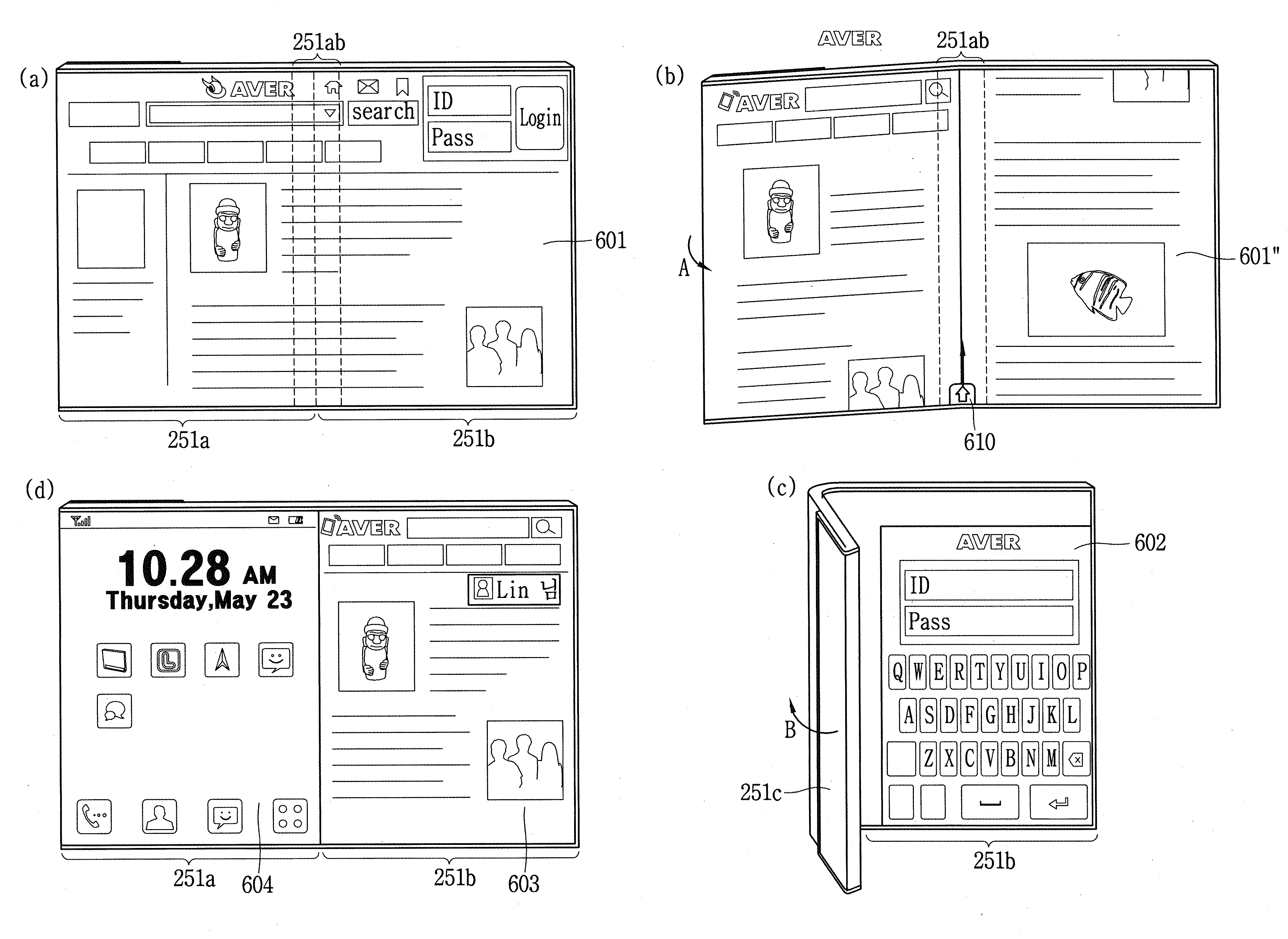
도 6은 본 발명의 일 실시예에 따른 이동 단말기에서, 특정영역이 접힌 정도에 따라 서로 다른 화면정보를 디스플레이하는 방법을 설명하기 위한 대표 예시도이다.
도 7은 본 발명의 실시예에 따른 이동 단말기의 동작방법을 설명하기 위한 대표 흐름도이다.
도 8a는 본 발명의 실시예에 따른 이동 단말기에서 특정영역을 기준으로 디스플레이부를 접거나 펼친 정도에 따라 서로 다른 화면정보가 디스플레이되는 것을 보인 도면이고, 도 8b는 특정영역에 기설정된 터치입력을 가함에 의하여 서로 다른 화면정보가 디스플레이되는 것을 보인 도면이다.
도 9는 본 발명의 실시예에 따른 이동 단말기가 닫힌 상태에서 이벤트가 발생한 경우, 단말기를 펼친 정도에 따라 이벤트와 관련된 정보가 다르게 표시되는 예시를 설명하기 위한 도면이다.
도 10은 본 발명의 실시예에 따른 이동 단말기가 열린 상태에서, 특정영역을 기준으로 꺾인 상태로 전환됨에 따라 서로 다른 애플리케이션이 실행되는 예시를 보인 도면이다.
도 11a, 도 11b, 및 도 11c는 본 발명의 실시예에 따른 이동 단말기가 소정 각도 접힌 상태에서, 특정영역에 가해진 터치입력을 이용하여 디스플레이 설정을 변경하는 방법을 설명하기 위한 예시 도면들이다.
도 12a, 도 12b, 및 도 12c는 본 발명의 실시예에 따른 이동 단말기가 열린 상태에서, 특정영역에 가해진 터치입력을 이용하여 단말의 동작 상태를 변경하는 방법을 설명하기 위한 도면들이다.
도 13a 및 도 13b는 본 발명의 실시예에 따른 이동 단말기가 잠금 상태에서, 특정영역에 가해진 터치입력을 이용하여 화면을 제어하는 방법을 설명하기 위한 도면들이다.
도 14a 및 도 14b는 본 발명의 실시예에 따른 이동 단말기가 닫힌 상태에서 열린 상태로 전환된 경우, 특정영역에 가해진 터치입력을 이용하여 내면에 디스플레이되는 정보를 제어하는 방법을 설명하기 위한 도면들이다.
도 14c는 본 발명의 실시예에 따른 이동 단말기가 열린 상태에서 닫힌 상태로 전환되기 전에, 특정영역에 가해진 터치입력을 이용하여 외면에 디스플레이되는 정보를 제어하는 방법을 설명하기 위한 도면이다.
도 15는 본 발명의 실시예에 따른 이동 단말기의 특정영역에 디스플레이된 제1 아이콘 리스트를 제2 아이콘 리스트로 변경하는 방법을 설명하기 위한 도면이다.1A is a block diagram illustrating a mobile terminal related to the present invention.
1B is a conceptual diagram for explaining another example of a deformable mobile terminal according to the present invention.
2A and 2B are views viewed from different directions in a closed state of a mobile terminal according to an embodiment of the present invention.
2C, 2D, and 2E are views viewed from above in a partially or fully opened state of a mobile terminal according to an embodiment of the present invention.
3A is a plan view of a mobile terminal according to an embodiment of the present invention, and FIG. 3B is a perspective view of a partially opened state of the mobile terminal of FIG. 3A.
4A to 4H are exemplary views showing parts of a mobile terminal cut at various angles according to an embodiment of the present invention.
5A and 5B are diagrams for explaining a folding event occurring in a terminal by a hinge related to a specific region of the mobile terminal according to an embodiment of the present invention.
6 is a representative exemplary diagram for explaining a method of displaying different screen information according to a folding degree of a specific region in a mobile terminal according to an embodiment of the present invention.
7 is a representative flowchart for explaining a method of operating a mobile terminal according to an embodiment of the present invention.
8A is a view showing that different screen information is displayed according to the extent to which the display unit is folded or unfolded based on a specific area in a mobile terminal according to an embodiment of the present invention, and FIG. 8B is a preset touch input applied to a specific area It is a diagram showing that different screen information is displayed by
9 is a diagram for explaining an example in which event-related information is displayed differently depending on the degree to which the terminal is unfolded when an event occurs while the mobile terminal is closed according to an embodiment of the present invention.
10 is a diagram illustrating an example in which different applications are executed as the mobile terminal is switched from an open state to a bent state based on a specific region according to an embodiment of the present invention.
11A, 11B, and 11C are exemplary views for explaining a method of changing a display setting by using a touch input applied to a specific area in a state in which the mobile terminal is folded at a predetermined angle according to an embodiment of the present invention.
12A, 12B, and 12C are diagrams for explaining a method of changing an operating state of a mobile terminal by using a touch input applied to a specific region in an open state according to an embodiment of the present invention.
13A and 13B are diagrams for explaining a method of controlling a screen by using a touch input applied to a specific area in a locked state of a mobile terminal according to an embodiment of the present invention.
14A and 14B are diagrams for explaining a method of controlling information displayed on an inner surface by using a touch input applied to a specific region when the mobile terminal is switched from a closed state to an open state according to an embodiment of the present invention .
14C is a diagram for explaining a method of controlling information displayed on an outer surface by using a touch input applied to a specific region before the mobile terminal is switched from an open state to a closed state according to an embodiment of the present invention.
15 is a diagram for explaining a method of changing a first icon list displayed on a specific area of a mobile terminal to a second icon list according to an embodiment of the present invention.
이하, 첨부된 도면을 참조하여 본 명세서에 개시된 실시 예를 상세히 설명하되, 도면 부호에 관계없이 동일하거나 유사한 구성요소는 동일한 참조 번호를 부여하고 이에 대한 중복되는 설명은 생략하기로 한다. 이하의 설명에서 사용되는 구성요소에 대한 접미사 "모듈" 및 "부"는 명세서 작성의 용이함만이 고려되어 부여되거나 혼용되는 것으로서, 그 자체로 서로 구별되는 의미 또는 역할을 갖는 것은 아니다. 또한, 본 명세서에 개시된 실시 예를 설명함에 있어서 관련된 공지 기술에 대한 구체적인 설명이 본 명세서에 개시된 실시 예의 요지를 흐릴 수 있다고 판단되는 경우 그 상세한 설명을 생략한다. 또한, 첨부된 도면은 본 명세서에 개시된 실시 예를 쉽게 이해할 수 있도록 하기 위한 것일 뿐, 첨부된 도면에 의해 본 명세서에 개시된 기술적 사상이 제한되지 않으며, 본 발명의 사상 및 기술 범위에 포함되는 모든 변경, 균등물 내지 대체물을 포함하는 것으로 이해되어야 한다. Hereinafter, the embodiments disclosed in the present specification will be described in detail with reference to the accompanying drawings, but the same or similar components are assigned the same reference numbers regardless of reference numerals, and redundant description thereof will be omitted. The suffixes "module" and "part" for components used in the following description are given or mixed in consideration of only the ease of writing the specification, and do not have distinct meanings or roles by themselves. In addition, in describing the embodiments disclosed in the present specification, if it is determined that detailed descriptions of related known technologies may obscure the gist of the embodiments disclosed in this specification, the detailed description thereof will be omitted. In addition, the accompanying drawings are only for easy understanding of the embodiments disclosed in the present specification, and the technical idea disclosed herein is not limited by the accompanying drawings, and all changes included in the spirit and scope of the present invention , should be understood to include equivalents or substitutes.
제1, 제2 등과 같이 서수를 포함하는 용어는 다양한 구성요소들을 설명하는데 사용될 수 있지만, 상기 구성요소들은 상기 용어들에 의해 한정되지는 않는다. 상기 용어들은 하나의 구성요소를 다른 구성요소로부터 구별하는 목적으로만 사용된다.Terms including an ordinal number such as 1st, 2nd, etc. may be used to describe various elements, but the elements are not limited by the terms. The above terms are used only for the purpose of distinguishing one component from another.
어떤 구성요소가 다른 구성요소에 "연결되어" 있다거나 "접속되어" 있다고 언급된 때에는, 그 다른 구성요소에 직접적으로 연결되어 있거나 또는 접속되어 있을 수도 있지만, 중간에 다른 구성요소가 존재할 수도 있다고 이해되어야 할 것이다. 반면에, 어떤 구성요소가 다른 구성요소에 "직접 연결되어" 있다거나 "직접 접속되어" 있다고 언급된 때에는, 중간에 다른 구성요소가 존재하지 않는 것으로 이해되어야 할 것이다.When an element is referred to as being “connected” or “connected” to another element, it is understood that it may be directly connected or connected to the other element, but other elements may exist in between. it should be On the other hand, when it is said that a certain element is "directly connected" or "directly connected" to another element, it should be understood that the other element does not exist in the middle.
단수의 표현은 문맥상 명백하게 다르게 뜻하지 않는 한, 복수의 표현을 포함한다. The singular expression includes the plural expression unless the context clearly dictates otherwise.
본 출원에서, "포함한다" 또는 "가지다" 등의 용어는 명세서상에 기재된 특징, 숫자, 단계, 동작, 구성요소, 부품 또는 이들을 조합한 것이 존재함을 지정하려는 것이지, 하나 또는 그 이상의 다른 특징들이나 숫자, 단계, 동작, 구성요소, 부품 또는 이들을 조합한 것들의 존재 또는 부가 가능성을 미리 배제하지 않는 것으로 이해되어야 한다.In the present application, terms such as “comprises” or “have” are intended to designate that a feature, number, step, operation, component, part, or combination thereof described in the specification exists, but one or more other features It should be understood that this does not preclude the existence or addition of numbers, steps, operations, components, parts, or combinations thereof.
본 명세서에서 설명되는 이동 단말기에는 휴대폰, 스마트 폰(smart phone), 노트북 컴퓨터(laptop computer), 디지털방송용 단말기, PDA(personal digital assistants), PMP(portable multimedia player), 네비게이션, 슬레이트 PC(slate PC), 태블릿 PC(tablet PC), 울트라북(ultrabook), 웨어러블 디바이스(wearable device, 예를 들어, 워치형 단말기 (smartwatch), 글래스형 단말기 (smart glass), HMD(head mounted display)) 등이 포함될 수 있다. The mobile terminal described in this specification includes a mobile phone, a smart phone, a laptop computer, a digital broadcasting terminal, a personal digital assistant (PDA), a portable multimedia player (PMP), a navigation system, and a slate PC. , tablet PCs, ultrabooks, wearable devices, for example, watch-type terminals (smartwatch), glass-type terminals (smart glass), HMD (head mounted display), etc. may be included. have.
그러나, 본 명세서에 기재된 실시 예에 따른 구성은 이동 단말기에만 적용 가능한 경우를 제외하면, 디지털 TV, 데스크탑 컴퓨터, 디지털 사이니지 등과 같은 고정 단말기에도 적용될 수도 있음을 본 기술분야의 당업자라면 쉽게 알 수 있을 것이다.However, it will be readily apparent to those skilled in the art that the configuration according to the embodiment described in this specification may be applied to a fixed terminal such as a digital TV, a desktop computer, a digital signage, etc., except when applicable only to a mobile terminal. will be.
도 1a를 참조하면, 도 1a는 본 발명과 관련된 이동 단말기를 설명하기 위한 블록도이다.Referring to FIG. 1A, FIG. 1A is a block diagram illustrating a mobile terminal related to the present invention.
상기 이동 단말기(100)는 무선 통신부(110), 입력부(120), 센싱부(140), 출력부(150), 인터페이스부(160), 메모리(170), 제어부(180) 및 전원 공급부(190) 등을 포함할 수 있다. 도 1a에 도시된 구성요소들은 이동 단말기를 구현하는데 있어서 필수적인 것은 아니어서, 본 명세서 상에서 설명되는 이동 단말기는 위에서 열거된 구성요소들 보다 많거나, 또는 적은 구성요소들을 가질 수 있다. The
보다 구체적으로, 상기 구성요소들 중 무선 통신부(110)는, 이동 단말기(100)와 무선 통신 시스템 사이, 이동 단말기(100)와 다른 이동 단말기(100) 사이, 또는 이동 단말기(100)와 외부서버 사이의 무선 통신을 가능하게 하는 하나 이상의 모듈을 포함할 수 있다. 또한, 상기 무선 통신부(110)는, 이동 단말기(100)를 하나 이상의 네트워크에 연결하는 하나 이상의 모듈을 포함할 수 있다.More specifically, among the components, the
이러한 무선 통신부(110)는, 방송 수신 모듈(111), 이동통신 모듈(112), 무선 인터넷 모듈(113), 근거리 통신 모듈(114), 위치정보 모듈(115) 중 적어도 하나를 포함할 수 있다.The
입력부(120)는, 영상 신호 입력을 위한 카메라(121) 또는 영상 입력부, 오디오 신호 입력을 위한 마이크로폰(microphone, 122), 또는 오디오 입력부, 사용자로부터 정보를 입력받기 위한 사용자 입력부(123, 예를 들어, 터치키(touch key), 푸시키(mechanical key) 등)를 포함할 수 있다. 입력부(120)에서 수집한 음성 데이터나 이미지 데이터는 분석되어 사용자의 제어명령으로 처리될 수 있다.The
센싱부(140)는 이동 단말기 내 정보, 이동 단말기를 둘러싼 주변 환경 정보 및 사용자 정보 중 적어도 하나를 센싱하기 위한 하나 이상의 센서를 포함할 수 있다. 예를 들어, 센싱부(140)는 근접센서(141, proximity sensor), 조도 센서(142, illumination sensor), 터치 센서(touch sensor), 가속도 센서(acceleration sensor), 자기 센서(magnetic sensor), 중력 센서(G-sensor), 자이로스코프 센서(gyroscope sensor), 모션 센서(motion sensor), RGB 센서, 적외선 센서(IR 센서: infrared sensor), 지문인식 센서(finger scan sensor), 초음파 센서(ultrasonic sensor), 광 센서(optical sensor, 예를 들어, 카메라(121 참조)), 마이크로폰(microphone, 122 참조), 배터리 게이지(battery gauge), 환경 센서(예를 들어, 기압계, 습도계, 온도계, 방사능 감지 센서, 열 감지 센서, 가스 감지 센서 등), 화학 센서(예를 들어, 전자 코, 헬스케어 센서, 생체 인식 센서 등) 중 적어도 하나를 포함할 수 있다. 한편, 본 명세서에 개시된 이동 단말기는, 이러한 센서들 중 적어도 둘 이상의 센서에서 센싱되는 정보들을 조합하여 활용할 수 있다.The
출력부(150)는 시각, 청각 또는 촉각 등과 관련된 출력을 발생시키기 위한 것으로, 디스플레이부(151), 음향 출력부(152), 햅팁 모듈(153), 광 출력부(154) 중 적어도 하나를 포함할 수 있다. 디스플레이부(151)는 터치 센서와 상호 레이어 구조를 이루거나 일체형으로 형성됨으로써, 터치 스크린을 구현할 수 있다. 이러한 터치 스크린은, 이동 단말기(100)와 사용자 사이의 입력 인터페이스를 제공하는 사용자 입력부(123)로써 기능함과 동시에, 이동 단말기(100)와 사용자 사이의 출력 인터페이스를 제공할 수 있다.The
인터페이스부(160)는 이동 단말기(100)에 연결되는 다양한 종류의 외부 기기와의 통로 역할을 수행한다. 이러한 인터페이스부(160)는, 유/무선 헤드셋 포트(port), 외부 충전기 포트(port), 유/무선 데이터 포트(port), 메모리 카드(memory card) 포트, 식별 모듈이 구비된 장치를 연결하는 포트(port), 오디오 I/O(Input/Output) 포트(port), 비디오 I/O(Input/Output) 포트(port), 이어폰 포트(port) 중 적어도 하나를 포함할 수 있다. 이동 단말기(100)에서는, 상기 인터페이스부(160)에 외부 기기가 연결되는 것에 대응하여, 연결된 외부 기기와 관련된 적절할 제어를 수행할 수 있다.The interface unit 160 serves as a passage with various types of external devices connected to the
또한, 메모리(170)는 이동 단말기(100)의 다양한 기능을 지원하는 데이터를 저장한다. 메모리(170)는 이동 단말기(100)에서 구동되는 다수의 응용 프로그램(application program 또는 애플리케이션(application)), 이동 단말기(100)의 동작을 위한 데이터들, 명령어들을 저장할 수 있다. 이러한 응용 프로그램 중 적어도 일부는, 무선 통신을 통해 외부 서버로부터 다운로드 될 수 있다. 또한 이러한 응용 프로그램 중 적어도 일부는, 이동 단말기(100)의 기본적인 기능(예를 들어, 전화 착신, 발신 기능, 메시지 수신, 발신 기능)을 위하여 출고 당시부터 이동 단말기(100)상에 존재할 수 있다. 한편, 응용 프로그램은, 메모리(170)에 저장되고, 이동 단말기(100) 상에 설치되어, 제어부(180)에 의하여 상기 이동 단말기의 동작(또는 기능)을 수행하도록 구동될 수 있다.In addition, the
제어부(180)는 상기 응용 프로그램과 관련된 동작 외에도, 통상적으로 이동 단말기(100)의 전반적인 동작을 제어한다. 제어부(180)는 위에서 살펴본 구성요소들을 통해 입력 또는 출력되는 신호, 데이터, 정보 등을 처리하거나 메모리(170)에 저장된 응용 프로그램을 구동함으로써, 사용자에게 적절한 정보 또는 기능을 제공 또는 처리할 수 있다.In addition to the operation related to the application program, the
또한, 제어부(180)는 메모리(170)에 저장된 응용 프로그램을 구동하기 위하여, 도 1a와 함께 살펴본 구성요소들 중 적어도 일부를 제어할 수 있다. 나아가, 제어부(180)는 상기 응용 프로그램의 구동을 위하여, 이동 단말기(100)에 포함된 구성요소들 중 적어도 둘 이상을 서로 조합하여 동작시킬 수 있다.In addition, the
전원공급부(190)는 제어부(180)의 제어 하에서, 외부의 전원, 내부의 전원을 인가 받아 이동 단말기(100)에 포함된 각 구성요소들에 전원을 공급한다. 이러한 전원공급부(190)는 배터리를 포함하며, 상기 배터리는 내장형 배터리 또는 교체가능한 형태의 배터리가 될 수 있다.The
상기 각 구성요소들 중 적어도 일부는, 이하에서 설명되는 다양한 실시 예들에 따른 이동 단말기의 동작, 제어, 또는 제어방법을 구현하기 위하여 서로 협력하여 동작할 수 있다. 또한, 상기 이동 단말기의 동작, 제어, 또는 제어방법은 상기 메모리(170)에 저장된 적어도 하나의 응용 프로그램의 구동에 의하여 이동 단말기 상에서 구현될 수 있다. At least some of the respective components may operate in cooperation with each other in order to implement an operation, control, or control method of a mobile terminal according to various embodiments to be described below. Also, the operation, control, or control method of the mobile terminal may be implemented on the mobile terminal by driving at least one application program stored in the
이하에서는, 위에서 살펴본 이동 단말기(100)를 통하여 구현되는 다양한 실시 예들을 살펴보기에 앞서, 위에서 열거된 구성요소들에 대하여 도 1a를 참조하여 보다 구체적으로 살펴본다.Hereinafter, before looking at the various embodiments implemented through the
먼저, 무선 통신부(110)에 대하여 살펴보면, 무선 통신부(110)의 방송 수신 모듈(111)은 방송 채널을 통하여 외부의 방송 관리 서버로부터 방송 신호 및/또는 방송 관련된 정보를 수신한다. 상기 방송 채널은 위성 채널, 지상파 채널을 포함할 수 있다. 적어도 두 개의 방송 채널들에 대한 동시 방송 수신 또는 방송 채널 스위칭을 위해 둘 이상의 상기 방송 수신 모듈이 상기 이동단말기(100)에 제공될 수 있다.First, referring to the
이동통신 모듈(112)은, 이동통신을 위한 기술표준들 또는 통신방식(예를 들어, GSM(Global System for Mobile communication), CDMA(Code Division Multi Access), CDMA2000(Code Division Multi Access 2000), EV-DO(Enhanced Voice-Data Optimized or Enhanced Voice-Data Only), WCDMA(Wideband CDMA), HSDPA(High Speed Downlink Packet Access), HSUPA(High Speed Uplink Packet Access), LTE(Long Term Evolution), LTE-A(Long Term Evolution-Advanced) 등)에 따라 구축된 이동 통신망 상에서 기지국, 외부의 단말, 서버 중 적어도 하나와 무선 신호를 송수신한다.
상기 무선 신호는, 음성 호 신호, 화상 통화 호 신호 또는 문자/멀티미디어 메시지 송수신에 따른 다양한 형태의 데이터를 포함할 수 있다. The wireless signal may include various types of data according to transmission/reception of a voice call signal, a video call signal, or a text/multimedia message.
무선 인터넷 모듈(113)은 무선 인터넷 접속을 위한 모듈을 말하는 것으로, 이동 단말기(100)에 내장되거나 외장될 수 있다. 무선 인터넷 모듈(113)은 무선 인터넷 기술들에 따른 통신망에서 무선 신호를 송수신하도록 이루어진다.The
무선 인터넷 기술로는, 예를 들어 WLAN(Wireless LAN), Wi-Fi(Wireless-Fidelity), Wi-Fi(Wireless Fidelity) Direct, DLNA(Digital Living Network Alliance), WiBro(Wireless Broadband), WiMAX(World Interoperability for Microwave Access), HSDPA(High Speed Downlink Packet Access), HSUPA(High Speed Uplink Packet Access), LTE(Long Term Evolution), LTE-A(Long Term Evolution-Advanced) 등이 있으며, 상기 무선 인터넷 모듈(113)은 상기에서 나열되지 않은 인터넷 기술까지 포함한 범위에서 적어도 하나의 무선 인터넷 기술에 따라 데이터를 송수신하게 된다.As wireless Internet technology, for example, WLAN (Wireless LAN), Wi-Fi (Wireless-Fidelity), Wi-Fi (Wireless Fidelity) Direct, DLNA (Digital Living Network Alliance), WiBro (Wireless Broadband), WiMAX (World Interoperability for Microwave Access), High Speed Downlink Packet Access (HSDPA), High Speed Uplink Packet Access (HSUPA), Long Term Evolution (LTE), Long Term Evolution-Advanced (LTE-A), etc., and the wireless Internet module ( 113) transmits and receives data according to at least one wireless Internet technology within a range including Internet technologies not listed above.
WiBro, HSDPA, HSUPA, GSM, CDMA, WCDMA, LTE, LTE-A 등에 의한 무선인터넷 접속은 이동통신망을 통해 이루어진다는 관점에서 본다면, 상기 이동통신망을 통해 무선인터넷 접속을 수행하는 상기 무선 인터넷 모듈(113)은 상기 이동통신 모듈(112)의 일종으로 이해될 수도 있다.From the point of view that wireless Internet access by WiBro, HSDPA, HSUPA, GSM, CDMA, WCDMA, LTE, LTE-A, etc. is made through a mobile communication network, the
근거리 통신 모듈(114)은 근거리 통신(Short range communication)을 위한 것으로서, 블루투스(Bluetooth™), RFID(Radio Frequency Identification), 적외선 통신(Infrared Data Association; IrDA), UWB(Ultra Wideband), ZigBee, NFC(Near Field Communication), Wi-Fi(Wireless-Fidelity), Wi-Fi Direct, Wireless USB(Wireless Universal Serial Bus) 기술 중 적어도 하나를 이용하여, 근거리 통신을 지원할 수 있다. 이러한, 근거리 통신 모듈(114)은, 근거리 무선 통신망(Wireless Area Networks)을 통해 이동 단말기(100)와 무선 통신 시스템 사이, 이동 단말기(100)와 다른 이동 단말기(100) 사이, 또는 이동 단말기(100)와 다른 이동 단말기(100, 또는 외부서버)가 위치한 네트워크 사이의 무선 통신을 지원할 수 있다. 상기 근거리 무선 통신망은 근거리 무선 개인 통신망(Wireless Personal Area Networks)일 수 있다.Short-
여기에서, 다른 이동 단말기(100)는 본 발명에 따른 이동 단말기(100)와 데이터를 상호 교환하는 것이 가능한(또는 연동 가능한) 웨어러블 디바이스(wearable device, 예를 들어, 스마트워치(smartwatch), 스마트 글래스(smart glass), HMD(head mounted display))가 될 수 있다. 근거리 통신 모듈(114)은, 이동 단말기(100) 주변에, 상기 이동 단말기(100)와 통신 가능한 웨어러블 디바이스를 감지(또는 인식)할 수 있다. 나아가, 제어부(180)는 상기 감지된 웨어러블 디바이스가 본 발명에 따른 이동 단말기(100)와 통신하도록 인증된 디바이스인 경우, 이동 단말기(100)에서 처리되는 데이터의 적어도 일부를, 상기 근거리 통신 모듈(114)을 통해 웨어러블 디바이스로 전송할 수 있다. 따라서, 웨어러블 디바이스의 사용자는, 이동 단말기(100)에서 처리되는 데이터를, 웨어러블 디바이스를 통해 이용할 수 있다. 예를 들어, 이에 따르면 사용자는, 이동 단말기(100)에 전화가 수신된 경우, 웨어러블 디바이스를 통해 전화 통화를 수행하거나, 이동 단말기(100)에 메시지가 수신된 경우, 웨어러블 디바이스를 통해 상기 수신된 메시지를 확인하는 것이 가능하다.Here, the other
위치정보 모듈(115)은 이동 단말기의 위치(또는 현재 위치)를 획득하기 위한 모듈로서, 그의 대표적인 예로는 GPS(Global Positioning System) 모듈 또는 WiFi(Wireless Fidelity) 모듈이 있다. 예를 들어, 이동 단말기는 GPS모듈을 활용하면, GPS 위성에서 보내는 신호를 이용하여 이동 단말기의 위치를 획득할 수 있다. 다른 예로서, 이동 단말기는 Wi-Fi모듈을 활용하면, Wi-Fi모듈과 무선신호를 송신 또는 수신하는 무선 AP(Wireless Access Point)의 정보에 기반하여, 이동 단말기의 위치를 획득할 수 있다. 필요에 따라서, 위치정보모듈(115)은 치환 또는 부가적으로 이동 단말기의 위치에 관한 데이터를 얻기 위해 무선 통신부(110)의 다른 모듈 중 어느 기능을 수행할 수 있다. 위치정보모듈(115)은 이동 단말기의 위치(또는 현재 위치)를 획득하기 위해 이용되는 모듈로, 이동 단말기의 위치를 직접적으로 계산하거나 획득하는 모듈로 한정되지는 않는다.The
다음으로, 입력부(120)는 영상 정보(또는 신호), 오디오 정보(또는 신호), 데이터, 또는 사용자로부터 입력되는 정보의 입력을 위한 것으로서, 영상 정보의 입력을 위하여, 이동 단말기(100) 는 하나 또는 복수의 카메라(121)를 구비할 수 있다. 카메라(121)는 화상 통화모드 또는 촬영 모드에서 이미지 센서에 의해 얻어지는 정지영상 또는 동영상 등의 화상 프레임을 처리한다. 처리된 화상 프레임은 디스플레이부(151)에 표시되거나 메모리(170)에 저장될 수 있다. 한편, 이동 단말기(100)에 구비되는 복수의 카메라(121)는 매트릭스 구조를 이루도록 배치될 수 있으며, 이와 같이 매트릭스 구조를 이루는 카메라(121)를 통하여, 이동 단말기(100)에는 다양한 각도 또는 초점을 갖는 복수의 영상정보가 입력될 수 있다. 또한, 복수의 카메라(121)는 입체영상을 구현하기 위한 좌 영상 및 우 영상을 획득하도록, 스트레오 구조로 배치될 수 있다.Next, the
마이크로폰(122)은 외부의 음향 신호를 전기적인 음성 데이터로 처리한다. 처리된 음성 데이터는 이동 단말기(100)에서 수행 중인 기능(또는 실행 중인 응용 프로그램)에 따라 다양하게 활용될 수 있다. 한편, 마이크로폰(122)에는 외부의 음향 신호를 입력 받는 과정에서 발생되는 잡음(noise)을 제거하기 위한 다양한 잡음 제거 알고리즘이 구현될 수 있다.The
사용자 입력부(123)는 사용자로부터 정보를 입력받기 위한 것으로서, 사용자 입력부(123)를 통해 정보가 입력되면, 제어부(180)는 입력된 정보에 대응되도록 이동 단말기(100)의 동작을 제어할 수 있다. 이러한, 사용자 입력부(123)는 기계식 (mechanical) 입력수단(또는, 메커니컬 키, 예를 들어, 이동 단말기(100)의 전·후면 또는 측면에 위치하는 버튼, 돔 스위치 (dome switch), 조그 휠, 조그 스위치 등) 및 터치식 입력수단을 포함할 수 있다. 일 예로서, 터치식 입력수단은, 소프트웨어적인 처리를 통해 터치스크린에 표시되는 가상 키(virtual key), 소프트 키(soft key) 또는 비주얼 키(visual key)로 이루어지거나, 상기 터치스크린 이외의 부분에 배치되는 터치 키(touch key)로 이루어질 수 있다. 한편, 상기 가상키 또는 비주얼 키는, 다양한 형태를 가지면서 터치스크린 상에 표시되는 것이 가능하며, 예를 들어, 그래픽(graphic), 텍스트(text), 아이콘(icon), 비디오(video) 또는 이들의 조합으로 이루어질 수 있다. The
한편, 센싱부(140)는 이동 단말기 내 정보, 이동 단말기를 둘러싼 주변 환경 정보 및 사용자 정보 중 적어도 하나를 센싱하고, 이에 대응하는 센싱 신호를 발생시킨다. 제어부(180)는 이러한 센싱 신호에 기초하여, 이동 단말기(100)의 구동 또는 동작을 제어하거나, 이동 단말기(100)에 설치된 응용 프로그램과 관련된 데이터 처리, 기능 또는 동작을 수행 할 수 있다. 센싱부(140)에 포함될 수 있는 다양한 센서 중 대표적인 센서들의 대하여, 보다 구체적으로 살펴본다.On the other hand, the
먼저, 근접 센서(141)는 소정의 검출면에 접근하는 물체, 혹은 근방에 존재하는 물체의 유무를 전자계의 힘 또는 적외선 등을 이용하여 기계적 접촉이 없이 검출하는 센서를 말한다. 이러한 근접 센서(141)는 위에서 살펴본 터치 스크린에 의해 감싸지는 이동 단말기의 내부 영역 또는 상기 터치 스크린의 근처에 근접 센서(141)가 배치될 수 있다. First, the
근접 센서(141)의 예로는 투과형 광전 센서, 직접 반사형 광전 센서, 미러 반사형 광전 센서, 고주파 발진형 근접 센서, 정전 용량형 근접 센서, 자기형 근접 센서, 적외선 근접 센서 등이 있다. 터치 스크린이 정전식인 경우에, 근접 센서(141)는 전도성을 갖는 물체의 근접에 따른 전계의 변화로 상기 물체의 근접을 검출하도록 구성될 수 있다. 이 경우 터치 스크린(또는 터치 센서) 자체가 근접 센서로 분류될 수 있다. Examples of the
한편, 설명의 편의를 위해, 터치 스크린 상에 물체가 접촉되지 않으면서 근접되어 상기 물체가 상기 터치 스크린 상에 위치함이 인식되도록 하는 행위를 "근접 터치(proximity touch)"라고 명명하고, 상기 터치 스크린 상에 물체가 실제로 접촉되는 행위를 "접촉 터치(contact touch)"라고 명명한다. 상기 터치 스크린 상에서 물체가 근접 터치 되는 위치라 함은, 상기 물체가 근접 터치될 때 상기 물체가 상기 터치 스크린에 대해 수직으로 대응되는 위치를 의미한다. 상기 근접 센서(141)는, 근접 터치와, 근접 터치 패턴(예를 들어, 근접 터치 거리, 근접 터치 방향, 근접 터치 속도, 근접 터치 시간, 근접 터치 위치, 근접 터치 이동 상태 등)을 감지할 수 있다. 한편, 제어부(180)는 위와 같이, 근접 센서(141)를 통해 감지된 근접 터치 동작 및 근접 터치 패턴에 상응하는 데이터(또는 정보)를 처리하며, 나아가, 처리된 데이터에 대응하는 시각적인 정보를 터치 스크린상에 출력시킬 수 있다. 나아가, 제어부(180)는, 터치 스크린 상의 동일한 지점에 대한 터치가, 근접 터치인지 또는 접촉 터치인지에 따라, 서로 다른 동작 또는 데이터(또는 정보)가 처리되도록 이동 단말기(100)를 제어할 수 있다.On the other hand, for convenience of description, the act of approaching an object on the touch screen without contacting it so that the object is recognized that it is located on the touch screen is called “proximity touch”, and the touch The act of actually touching an object on the screen is called "contact touch". The position where the object is touched in proximity on the touch screen means a position where the object is perpendicular to the touch screen when the object is touched in proximity. The
터치 센서는 저항막 방식, 정전용량 방식, 적외선 방식, 초음파 방식, 자기장 방식 등 여러 가지 터치방식 중 적어도 하나를 이용하여 터치 스크린(또는 디스플레이부(151))에 가해지는 터치(또는 터치입력)을 감지한다.The touch sensor receives a touch (or touch input) applied to the touch screen (or the display unit 151) using at least one of various touch methods such as a resistive film method, a capacitive method, an infrared method, an ultrasonic method, and a magnetic field method. detect
일 예로서, 터치 센서는, 터치 스크린의 특정 부위에 가해진 압력 또는 특정 부위에 발생하는 정전 용량 등의 변화를 전기적인 입력신호로 변환하도록 구성될 수 있다. 터치 센서는, 터치 스크린 상에 터치를 가하는 터치 대상체가 터치 센서 상에 터치 되는 위치, 면적, 터치 시의 압력, 터치 시의 정전 용량 등을 검출할 수 있도록 구성될 수 있다. 여기에서, 터치 대상체는 상기 터치 센서에 터치를 인가하는 물체로서, 예를 들어, 손가락, 터치펜 또는 스타일러스 펜(Stylus pen), 포인터 등이 될 수 있다. As an example, the touch sensor may be configured to convert a change in pressure applied to a specific part of the touch screen or a change in capacitance occurring in a specific part of the touch screen into an electrical input signal. The touch sensor may be configured to detect a position, an area, a pressure at the time of touch, an electrostatic capacitance at the time of touch, etc. in which a touch object applying a touch on the touch screen is touched on the touch sensor. Here, the touch object is an object that applies a touch to the touch sensor, and may be, for example, a finger, a touch pen, a stylus pen, or a pointer.
이와 같이, 터치 센서에 대한 터치 입력이 있는 경우, 그에 대응하는 신호(들)는 터치 제어기로 보내진다. 터치 제어기는 그 신호(들)를 처리한 다음 대응하는 데이터를 제어부(180)로 전송한다. 이로써, 제어부(180)는 디스플레이부(151)의 어느 영역이 터치 되었는지 여부 등을 알 수 있게 된다. 여기에서, 터치 제어기는, 제어부(180)와 별도의 구성요소일 수 있고, 제어부(180) 자체일 수 있다. As such, when there is a touch input to the touch sensor, a signal(s) corresponding thereto is sent to the touch controller. The touch controller processes the signal(s) and then transmits corresponding data to the
한편, 제어부(180)는, 터치 스크린(또는 터치 스크린 이외에 구비된 터치키)을 터치하는, 터치 대상체의 종류에 따라 서로 다른 제어를 수행하거나, 동일한 제어를 수행할 수 있다. 터치 대상체의 종류에 따라 서로 다른 제어를 수행할지 또는 동일한 제어를 수행할 지는, 현재 이동 단말기(100)의 동작상태 또는 실행 중인 응용 프로그램에 따라 결정될 수 있다. Meanwhile, the
한편, 위에서 살펴본 터치 센서 및 근접 센서는 독립적으로 또는 조합되어, 터치 스크린에 대한 숏(또는 탭) 터치(short touch), 롱 터치(long touch), 멀티 터치(multi touch), 드래그 터치(drag touch), 플리크 터치(flick touch), 핀치-인 터치(pinch-in touch), 핀치-아웃 터치(pinch-out 터치), 스와이프(swype) 터치, 호버링(hovering) 터치 등과 같은, 다양한 방식의 터치를 센싱할 수 있다.On the other hand, the above-described touch sensor and proximity sensor independently or in combination, a short (or tap) touch on the touch screen (short touch), long touch (long touch), multi touch (multi touch), drag touch (drag touch) ), flick touch, pinch-in touch, pinch-out touch, swype touch, hovering touch, etc. It can sense touch.
초음파 센서는 초음파를 이용하여, 감지대상의 위치정보를 인식할 수 있다. 한편 제어부(180)는 광 센서와 복수의 초음파 센서로부터 감지되는 정보를 통해, 파동 발생원의 위치를 산출하는 것이 가능하다. 파동 발생원의 위치는, 광이 초음파보다 매우 빠른 성질, 즉, 광이 광 센서에 도달하는 시간이 초음파가 초음파 센서에 도달하는 시간보다 매우 빠름을 이용하여, 산출될 수 있다. 보다 구체적으로 광을 기준 신호로 초음파가 도달하는 시간과의 시간차를 이용하여 파동 발생원의 위치가 산출될 수 있다.The ultrasonic sensor may recognize position information of a sensing target by using ultrasonic waves. Meanwhile, the
한편, 입력부(120)의 구성으로 살펴본, 카메라(121)는 카메라 센서(예를 들어, CCD, CMOS 등), 포토 센서(또는 이미지 센서) 및 레이저 센서 중 적어도 하나를 포함한다.On the other hand, the
카메라(121)와 레이저 센서는 서로 조합되어, 3차원 입체영상에 대한 감지대상의 터치를 감지할 수 있다. 포토 센서는 디스플레이 소자에 적층될 수 있는데, 이러한 포토 센서는 터치 스크린에 근접한 감지대상의 움직임을 스캐닝하도록 이루어진다. 보다 구체적으로, 포토 센서는 행/열에 Photo Diode와 TR(Transistor)를 실장하여 Photo Diode에 인가되는 빛의 양에 따라 변화되는 전기적 신호를 이용하여 포토 센서 위에 올려지는 내용물을 스캔한다. 즉, 포토 센서는 빛의 변화량에 따른 감지대상의 좌표 계산을 수행하며, 이를 통하여 감지대상의 위치정보가 획득될 수 있다.The
디스플레이부(151)는 이동 단말기(100)에서 처리되는 정보를 표시(출력)한다. 예를 들어, 디스플레이부(151)는 이동 단말기(100)에서 구동되는 응용 프로그램의 실행화면 정보, 또는 이러한 실행화면 정보에 따른 UI(User Interface), GUI(Graphic User Interface) 정보를 표시할 수 있다. The
또한, 상기 디스플레이부(151)는 입체영상을 표시하는 입체 디스플레이부로서 구성될 수 있다.Also, the
상기 입체 디스플레이부에는 스테레오스코픽 방식(안경 방식), 오토 스테레오스코픽 방식(무안경 방식), 프로젝션 방식(홀로그래픽 방식) 등의 3차원 디스플레이 방식이 적용될 수 있다. A three-dimensional display method such as a stereoscopic method (glasses method), an auto stereoscopic method (glassesless method), or a projection method (holographic method) may be applied to the stereoscopic display unit.
음향 출력부(152)는 호신호 수신, 통화모드 또는 녹음 모드, 음성인식 모드, 방송수신 모드 등에서 무선 통신부(110)로부터 수신되거나 메모리(170)에 저장된 오디오 데이터를 출력할 수 있다. 음향 출력부(152)는 이동 단말기(100)에서 수행되는 기능(예를 들어, 호신호 수신음, 메시지 수신음 등)과 관련된 음향 신호를 출력하기도 한다. 이러한 음향 출력부(152)에는 리시버(receiver), 스피커(speaker), 버저(buzzer) 등이 포함될 수 있다.The
햅틱 모듈(haptic module)(153)은 사용자가 느낄 수 있는 다양한 촉각 효과를 발생시킨다. 햅틱 모듈(153)이 발생시키는 촉각 효과의 대표적인 예로는 진동이 될 수 있다. 햅틱 모듈(153)에서 발생하는 진동의 세기와 패턴 등은 사용자의 선택 또는 제어부의 설정에 의해 제어될 수 있다. 예를 들어, 상기 햅틱 모듈(153)은 서로 다른 진동을 합성하여 출력하거나 순차적으로 출력할 수도 있다.The
햅틱 모듈(153)은, 진동 외에도, 접촉 피부면에 대해 수직 운동하는 핀 배열, 분사구나 흡입구를 통한 공기의 분사력이나 흡입력, 피부 표면에 대한 스침, 전극(electrode)의 접촉, 정전기력 등의 자극에 의한 효과와, 흡열이나 발열 가능한 소자를 이용한 냉온감 재현에 의한 효과 등 다양한 촉각 효과를 발생시킬 수 있다.In addition to vibration, the
햅틱 모듈(153)은 직접적인 접촉을 통해 촉각 효과를 전달할 수 있을 뿐만 아니라, 사용자가 손가락이나 팔 등의 근 감각을 통해 촉각 효과를 느낄 수 있도록 구현할 수도 있다. 햅틱 모듈(153)은 이동 단말기(100)의 구성 태양에 따라 2개 이상이 구비될 수 있다.The
광출력부(154)는 이동 단말기(100)의 광원의 빛을 이용하여 이벤트 발생을 알리기 위한 신호를 출력한다. 이동 단말기(100)에서 발생 되는 이벤트의 예로는 메시지 수신, 호 신호 수신, 부재중 전화, 알람, 일정 알림, 이메일 수신, 애플리케이션을 통한 정보 수신 등이 될 수 있다.The
광출력부(154)가 출력하는 신호는 이동 단말기가 전면이나 후면으로 단색이나 복수색의 빛을 발광함에 따라 구현된다. 상기 신호 출력은 이동 단말기가 사용자의 이벤트 확인을 감지함에 의하여 종료될 수 있다.The signal output from the
인터페이스부(160)는 이동 단말기(100)에 연결되는 모든 외부 기기와의 통로 역할을 한다. 인터페이스부(160)는 외부 기기로부터 데이터를 전송받거나, 전원을 공급받아 이동 단말기(100) 내부의 각 구성요소에 전달하거나, 이동 단말기(100) 내부의 데이터가 외부 기기로 전송되도록 한다. 예를 들어, 유/무선 헤드셋 포트(port), 외부 충전기 포트(port), 유/무선 데이터 포트(port), 메모리 카드(memory card) 포트(port), 식별 모듈이 구비된 장치를 연결하는 포트(port), 오디오 I/O(Input/Output) 포트(port), 비디오 I/O(Input/Output) 포트(port), 이어폰 포트(port) 등이 인터페이스부(160)에 포함될 수 있다.The interface unit 160 serves as a passage with all external devices connected to the
한편, 식별 모듈은 이동 단말기(100)의 사용 권한을 인증하기 위한 각종 정보를 저장한 칩으로서, 사용자 인증 모듈(user identify module; UIM), 가입자 인증 모듈(subscriber identity module; SIM), 범용 사용자 인증 모듈(universal subscriber identity module; USIM) 등을 포함할 수 있다. 식별 모듈이 구비된 장치(이하 '식별 장치')는, 스마트 카드(smart card) 형식으로 제작될 수 있다. 따라서 식별 장치는 상기 인터페이스부(160)를 통하여 단말기(100)와 연결될 수 있다.On the other hand, the identification module is a chip storing various types of information for authenticating the use authority of the
또한, 상기 인터페이스부(160)는 이동 단말기(100)가 외부 크래들(cradle)과 연결될 때 상기 크래들로부터의 전원이 상기 이동 단말기(100)에 공급되는 통로가 되거나, 사용자에 의해 상기 크래들에서 입력되는 각종 명령 신호가 상기 이동 단말기(100)로 전달되는 통로가 될 수 있다. 상기 크래들로부터 입력되는 각종 명령 신호 또는 상기 전원은 상기 이동 단말기(100)가 상기 크래들에 정확히 장착되었음을 인지하기 위한 신호로 동작될 수 있다.In addition, when the
메모리(170)는 제어부(180)의 동작을 위한 프로그램을 저장할 수 있고, 입/출력되는 데이터들(예를 들어, 폰북, 메시지, 정지영상, 동영상 등)을 임시 저장할 수도 있다. 상기 메모리(170)는 상기 터치 스크린 상의 터치 입력시 출력되는 다양한 패턴의 진동 및 음향에 관한 데이터를 저장할 수 있다.The
메모리(170)는 플래시 메모리 타입(flash memory type), 하드디스크 타입(hard disk type), SSD 타입(Solid State Disk type), SDD 타입(Silicon Disk Drive type), 멀티미디어 카드 마이크로 타입(multimedia card micro type), 카드 타입의 메모리(예를 들어 SD 또는 XD 메모리 등), 램(random access memory; RAM), SRAM(static random access memory), 롬(read-only memory; ROM), EEPROM(electrically erasable programmable read-only memory), PROM(programmable read-only memory), 자기 메모리, 자기 디스크 및 광디스크 중 적어도 하나의 타입의 저장매체를 포함할 수 있다. 이동 단말기(100)는 인터넷(internet)상에서 상기 메모리(170)의 저장 기능을 수행하는 웹 스토리지(web storage)와 관련되어 동작될 수도 있다.
한편, 앞서 살펴본 것과 같이, 제어부(180)는 응용 프로그램과 관련된 동작과, 통상적으로 이동 단말기(100)의 전반적인 동작을 제어한다. 예를 들어, 제어부(180)는 상기 이동 단말기의 상태가 설정된 조건을 만족하면, 애플리케이션들에 대한 사용자의 제어 명령의 입력을 제한하는 잠금 상태를 실행하거나, 해제할 수 있다. Meanwhile, as described above, the
또한, 제어부(180)는 음성 통화, 데이터 통신, 화상 통화 등과 관련된 제어 및 처리를 수행하거나, 터치 스크린 상에서 행해지는 필기 입력 또는 그림 그리기 입력을 각각 문자 및 이미지로 인식할 수 있는 패턴 인식 처리를 행할 수 있다. 나아가 제어부(180)는 이하에서 설명되는 다양한 실시 예들을 본 발명에 따른 이동 단말기(100) 상에서 구현하기 위하여, 위에서 살펴본 구성요소들을 중 어느 하나 또는 복수를 조합하여 제어할 수 있다.In addition, the
전원 공급부(190)는 제어부(180)의 제어에 의해 외부의 전원, 내부의 전원을 인가 받아 각 구성요소들의 동작에 필요한 전원을 공급한다. 전원공급부(190)는 배터리를 포함하며, 배터리는 충전 가능하도록 이루어지는 내장형 배터리가 될 수 있으며, 충전 등을 위하여 단말기 바디에 착탈 가능하게 결합될 수 있다.The
또한, 전원공급부(190)는 연결포트를 구비할 수 있으며, 연결포트는 배터리의 충전을 위하여 전원을 공급하는 외부 충전기가 전기적으로 연결되는 인터페이스(160)의 일 예로서 구성될 수 있다.In addition, the
다른 예로서, 전원공급부(190)는 상기 연결포트를 이용하지 않고 무선방식으로 배터리를 충전하도록 이루어질 수 있다. 이 경우에, 전원공급부(190)는 외부의 무선 전력 전송장치로부터 자기 유도 현상에 기초한 유도 결합(Inductive Coupling) 방식이나 전자기적 공진 현상에 기초한 공진 결합(Magnetic Resonance Coupling) 방식 중 하나 이상을 이용하여 전력을 전달받을 수 있다.As another example, the
한편, 이하에서 다양한 실시 예는 예를 들어, 소프트웨어, 하드웨어 또는 이들의 조합된 것을 이용하여 컴퓨터 또는 이와 유사한 장치로 읽을 수 있는 기록매체 내에서 구현될 수 있다. Meanwhile, various embodiments below may be implemented in a computer-readable recording medium using, for example, software, hardware, or a combination thereof.
한편, 본 발명에서는 이동 단말기에서 처리되는 정보를 플렉서블 디스플레이(flexible display)를 이용하여 표시할 수 있다. 이하, 첨부된 도면을 바탕으로 이에 대하여 보다 구체적으로 살펴본다.Meanwhile, in the present invention, information processed in the mobile terminal may be displayed using a flexible display. Hereinafter, based on the accompanying drawings, this will be described in more detail.
도 1b는 본 발명에 따른 변형 가능한 이동 단말기(100)의 다른 예를 설명하기 위한 개념도이다.1B is a conceptual diagram for explaining another example of a deformable
도시된 바와 같이, 디스플레이부(151)는 외력에 의하여 변형 가능하게 구성될 수 있다. 상기 변형은 디스플레이부(151)의 휘어짐, 구부러짐, 접힘, 비틀림, 말림 중 적어도 하나일 수 있다. 이러한 변형 가능한 디스플레이부(251)는 '플렉서블 디스플레이부'로 명명될 수 있다. 여기에서, 플렉서블 디스플레이부(251)는 일반적인 플렉서블 디스플레이와 전자 종이(e-paper) 및 그 조합을 모두 포함할 수 있다. 일반적으로 이동 단말기(200)는 도 1a 및 도 1b의 이동 단말기(100)의 특징 또는 그와 유사한 특징을 포함할 수 있다. As shown, the
일반적인 플렉서블 디스플레이는 기존의 평판 디스플레이의 특성을 유지하면서, 종이와 같이 휘어짐, 구부러짐, 접힘, 비틀림 또는 말림이 가능한 얇고 유연한 기판 위에 제작되어, 가볍고 쉽게 깨지지 않는 튼튼한 디스플레이를 말한다.A general flexible display refers to a light and strong display that is not easily broken because it is manufactured on a thin and flexible substrate that can be bent, bent, folded, twisted or curled like paper while maintaining the characteristics of a conventional flat panel display.
또한, 전자 종이는 일반적인 잉크의 특징을 적용한 디스플레이 기술로서, 반사광을 사용하는 점이 기존의 평판 디스플레이와 다른 점일 수 있다. 전자 종이는 트위스트 볼을 이용하거나, 캡슐을 이용한 전기영동(電氣泳動, electrophoresis)을 이용하여, 정보를 변경할 수 있다.In addition, electronic paper is a display technology to which the characteristics of general ink are applied, and may differ from the conventional flat panel display in that it uses reflected light. Electronic paper can change information by using a twisted ball or by using electrophoresis using a capsule.
플렉서블 디스플레이부(151)가 변형되지 않는 상태(예를 들어, 무한대의 곡률반경을 가지는 상태, 이하 제1 상태라 한다)에서, 플렉서블 디스플레이부(151)의 디스플레이 영역은 평면이 된다. 상기 제1 상태에서 외력에 의하여 변형된 상태(예를 들어, 유한의 곡률반경을 가지는 상태, 이하, 제2 상태라 한다)에서는 상기 디스플레이 영역이 곡면이 될 수 있다. 도시된 바와 같이, 상기 제2 상태에서 표시되는 정보는 곡면상에 출력되는 시각 정보가 될 수 있다. 이러한 시각 정보는 매트릭스 형태로 배치되는 단위 화소(sub-pixel)의 발광이 독자적으로 제어됨에 의하여 구현된다. 상기 단위 화소는 하나의 색을 구현하기 위한 최소 단위를 의미한다.In a state in which the
플렉서블 디스플레이부(151)는 상기 제1 상태에서 평평한 상태가 아닌, 휘어진 상태(예를 들어, 상하 또는 좌우로 휘어진 상태)에 놓일 수 있다. 이 경우, 플렉서블 디스플레이부(151)에 외력이 가해지면, 플렉서블 디스플레이부(151)는 평평한 상태(혹은 보다 덜 휘어진 상태) 또는 보다 많이 휘어진 상태로 변형될 수 있다.The
한편, 플렉서블 디스플레이부(251)는 터치센서와 조합되어 플렉서블 터치 스크린을 구현할 수 있다. 플렉서블 터치 스크린에 대하여 터치가 이루어지면, 제어부(180, 도 1a 참조)는 이러한 터치입력에 상응하는 제어를 수행할 수 있다. 플렉서블 터치 스크린은 상기 제1 상태뿐만 아니라 상기 제2 상태에서도 터치입력을 감지하도록 이루어질 수 있다.Meanwhile, the flexible display unit 251 may be combined with a touch sensor to implement a flexible touch screen. When a touch is made to the flexible touch screen, the controller 180 (refer to FIG. 1A ) may perform a control corresponding to the touch input. The flexible touch screen may be configured to sense a touch input not only in the first state but also in the second state.
한편, 본 변형 예에 따른 이동 단말기(100)에는 플렉서블 디스플레이부(151)의 변형을 감지할 수 있는 변형감지수단이 구비될 수 있다. 이러한 변형감지수단은 센싱부(140, 도 1a 참조)에 포함될 수 있다.On the other hand, the
상기 변형감지수단은 플렉서블 디스플레이부(151) 또는 케이스(101)에 구비되어, 플렉서블 디스플레이부(151)의 변형과 관련된 정보를 감지할 수 있다. 여기에서, 변형과 관련된 정보는, 플렉서블 디스플레이부(151)가 변형된 방향, 변형된 정도, 변형된 위치, 변형된 시간 및 변형된 플렉서블 디스플레이부(151)가 복원되는 가속도 등이 될 수 있으며, 이 밖에도 플렉서블 디스플레이부(151)의 휘어짐으로 인하여 감지 가능한 다양한 정보일 수 있다.The deformation detecting means may be provided in the
또한, 제어부(180)는 상기 변형감지수단에 의하여 감지되는 플렉서블 디스플레이부(151)의 변형과 관련된 정보에 근거하여, 플렉서블 디스플레이부(151) 상에 표시되는 정보를 변경하거나, 이동 단말기(100)의 기능을 제어하기 위한 제어신호를 생성할 수 있다.In addition, the
한편, 본 변형 예에 따른 이동 단말기(100)는 플렉서블 디스플레이부(151)를 수용하는 케이스(101)를 포함할 수 있다. 케이스(101)는 플렉서블 디스플레이부(151)의 특성을 고려하여, 외력에 의하여 플렉서블 디스플레이부(151)와 함께 변형 가능하도록 구성될 수 있다.Meanwhile, the
아울러, 이동 단말기(100)에 구비되는 배터리(미도시) 또한 플렉서블 디스플레이부(151)의 특성을 고려하여, 외력에 의하여 플렉서블 디스플레이부(151)와 함께 변형 가능하도록 구성될 수 있다. 상기 배터리를 구현하기 위하여, 배터리 셀을 위로 쌓은 스택앤폴딩(stack and folding) 방식이 적용될 수 있다.In addition, the battery (not shown) provided in the
플렉서블 디스플레이부(151)의 상태 변형은 외력에 의한 것으로만 국한되지는 않는다. 예를 들어, 플렉서블 디스플레이부(151)가 제 1 상태를 가지고 있을 때, 사용자 혹은 애플리케이션의 명령에 의해서, 제 2 상태로 변형될 수도 있다.The state transformation of the
이하에서는 이와 같이 구성된 이동 단말기에서 구현될 수 있는 제어 방법과 관련된 실시 예들에 대해 첨부된 도면을 참조하여 살펴보겠다. 본 발명은 본 발명의 정신 및 필수적 특징을 벗어나지 않는 범위에서 다른 특정한 형태로 구체화될 수 있음은 당업자에게 자명하다. Hereinafter, embodiments related to a control method that can be implemented in a mobile terminal configured as described above will be described with reference to the accompanying drawings. It is apparent to those skilled in the art that the present invention may be embodied in other specific forms without departing from the spirit and essential characteristics of the present invention.
도 2a 및 도 2b는 본 발명의 일 실시예에 따른 이동 단말기를 닫힌 상태에서 서로 다른 방향에서 바라본 도면이다. 2A and 2B are views viewed from different directions in a closed state of a mobile terminal according to an embodiment of the present invention.
본 발명의 실시 예에 따른 폴더 형태의 단말기 바디는 제1바디(101a) 및 제1바디(101a)의 적어도 일측이 폴딩 또는 언폴딩되게 형성된 제2바디(101b)를 구비할 수 있다. 도 2a 및 도 2b에 도시된 바와 같이, 제1바디(101a)와 제2바디(101b)가 서로 중첩되게 포개지도록 배치된 상태, 즉 제1 및 제2바디가 힌지부(102)를 중심으로 폴딩된 상태를, "닫힌 상태(closed configuration)"로 명명할 수 있다. 닫힌 상태에서 제1 및 제2바디(101a, 101b)는 서로 마주보도록 배치된다. The folder-shaped terminal body according to an embodiment of the present invention may include a
'닫힌 상태'에서는 외면에 배치된 디스플레이영역(251c) 및 디스플레이영역(251c)으로부터 연장되어 측면에 배치된, 측면 연장 디스플레이영역(251c")이 더 마련될 수 있다. 그러한 경우, 측면 연장 디스플레이영역(미도시)의 일 측은 제1바디(101a) 및 제2바디(101b)에 의해 덮혀 있는 디스플레이영역들(251a, 251b)의 일 측에 연장될 수 있다. 또한, 외면에 배치된 디스플레이영역(251c)과 측면 연장 디스플레이영역(251c")의 일 측(예, 가장자리영역)은 케이스나 커버로 일부 덮혀질 수 있다.In the 'closed state', the
본 발명에서, 디스플레이부(151, 도 1a 참조)는 서로 연접한 복수의 영역들을 갖도록 형성되며, 복수의 영역들의 적어도 일부를 기 설정된 방향으로 접거나 펼칠 수 있다. 또한, 본 발명에서 상기 디스플레이부(151)는 '열린 상태'에서 복수의 영역들을 전부 펼쳐서 디스플레이가 가능하고(이를 내면의 디스플레이영역들(251a, 251b)만 전면에 노출되는 경우와 구별할 수 있도록, 이하에서는 '확장된 열린 상태'로 명명하기로 하겠다), '닫힌 상태'에서도 적어도 외면의 디스플레이 영역(251c), 또는 외면의 디스플레이 영역(251c) 및 측면 연장 디스플레이 영역(251c")을 통해 디스플레이가 가능하도록 형성되어, 디스플레이가 보다 대화면으로 형성된다.In the present invention, the display unit 151 (refer to FIG. 1A ) is formed to have a plurality of regions adjacent to each other, and at least a portion of the plurality of regions may be folded or unfolded in a preset direction. In addition, in the present invention, the
본 발명에서, '닫힌 상태'는 내면에 배치된 디스플레이영역의 제1영역(251a)과 제2 영역(251b)이 서로 대향하도록 배치되어, 제1영역(251a)과 제2영역(251b)이 외부에 노출되지 않는 상태를 의미한다. 이때는 외면에 배치된 디스플레이 영역(251c)도 케이스에 접혀진 채로 형성된다. In the present invention, in the 'closed state', the
한편, 비록 도시되지는 않았지만, 외면의 디스플레이 영역에 연접한 측면 연장 디스플레이 영역은 소정의 곡률을 갖도록 형성될 수 있다. 그러한 경우, 외면의 디스플레이영역(251c)과 측면 연장 디스플레이 영역(251c"))은 라운드 형태로 연결되어 디스플레이된다. 그에 따라, '닫힌 상태'에서도, 외면의 디스플레이영역(251c)과 측면 연장 디스플레이 영역(251c")의 적어도 일부가 동시에 정면에 노출될 수 있다.Meanwhile, although not shown, the side-extended display area adjacent to the outer display area may be formed to have a predetermined curvature. In such a case, the
힌지부(102)는 해당영역을 중심으로 내면에 배치된 디스플레이영역들(251a, 251b)의 일부 접힘 또는 완전 접힘이 가능하도록 지원한다. 본 발명에서는, 힌지부(102)에 대응되는 디스플레이 영역을 '특정 영역(251ab)'으로 명명하였다. 특정영역(251ab)은, 내면의 디스플레이영역들(251a, 251b)의 사이에 배치되며, 보다 구체적으로, 일부는 제1영역(251a)의 일부와 중첩되고, 다른 일부는 제2영역(251b)의 일부와 중첩되도록 배치된다. 또한, 내면의 디스플레이영역들(251a, 251b)은 특정영역(251ab)을 기준으로 일부 접힘 또는 완전 접힘되며, 그에 따라 제1영역(251a)과 제2영역(251b)으로 구분된다. 또한 특정 영역(251ab)에는 내면의 디스플레이영역들(251a, 251b)의 다른 영역들과 구별되는 센서들(예, 지문센서 등)이 더 마련될 수 있다.The
'닫힌 상태'에서, 힌지부(102)의 움직임에 의하여 접혀진 디스플레이영역들(251a, 251b)은 각각 제1바디(101a) 와 제2바디(101b)에 마련되며, 힌지부(102)는 상기 디스플레이영역들(251a, 251b)이 서로 연접된 '특정영역(251ab)', 예를 들면, 중앙 부근을 기점으로 일정 각도 예를 들면 0도~180도 또는 힌지부 구조에 따라 0도~360도 범위내에서 특정 각도로 접힐 수 있도록 지원하다.In the 'closed state', the
제1바디(101a)와 제2바디(101b)는 외관을 이루는 케이스(케이싱, 하우징, 커버 등)(101)를 포함할 수 있다. 본 실시예에서, 케이스(101)는 프론트 케이스와 리어 케이스로 구분될 수 있다. 이때, 프론트 케이스와 리어 케이스의 사이에 형성된 공간에는 각종 전자부품들이 내장된다. 프론트 케이스와 리어 케이스 사이에는 적어도 하나의 중간 케이스가 추가로 배치될 수도 있다. The
또한, 케이스(101)는 합성수지를 사출하여 형성되거나 금속 재질, 예를 들어 스테인레스 스틸(STS) 또는 티타늄(Ti) 등과 같은 금속 재질을 갖도록 형성될 수도 있다.In addition, the
제1바디(101a)의 외관을 이루는 케이스, 주로 프론트 케이스의 일 측에는 내측으로부터 연장된 외면 디스플레이(251c"), 음향출력부(152), 카메라 모듈(121) 등이 배치될 수 있다. 그리고, 프론트 케이스에서 연장되는 일 측면(예, 좌측면)에는 힌지부(102)가 배치되고, 다른 측면(예, 우측면)에는 내면의 디스플레이영역들로부터 연장된, 측면 연장 디스플레이 영역(215c")가 배치될 수 있다. An
한편, 외면의 디스플레이 영역(251c)에는, 이동 단말기(100)의 내면의 디스플레이 영역들(251a, 251b)에서 처리되는 정보와 관련된 시각정보가 표시될 수 있다. 예를 들어, 이동 단말기(100)에서 구동되는 응용 프로그램의 실행화면 정보, 또는 이러한 실행화면 정보에 따른 UI(User Interface), GUI(Graphic User Interface) 정보, 그리고 내면 디스플레이들(251a, 251b)에서 처리되는 실행화면과 관련된 다양한 UI(User Interface), GUI(Graphic User Interface) 정보를 표시할 수 있다.Meanwhile, visual information related to information processed in the
디스플레이부는 액정 디스플레이(liquid crystal display, LCD), 박막 트랜지스터 액정 디스플레이(thin film transistor-liquid crystal display, TFT LCD), 유기 발광 다이오드(organic light-emitting diode, OLED), 플렉서블 디스플레이(flexible display), 3차원 디스플레이(3D display), 전자잉크 디스플레이(e-ink display) 중에서 적어도 하나를 포함할 수 있다.The display unit includes a liquid crystal display (LCD), a thin film transistor-liquid crystal display (TFT LCD), an organic light-emitting diode (OLED), a flexible display, 3 It may include at least one of a 3D display and an e-ink display.
다른 예로, 상기 디스플레이부는 플렉서블 디스플레이(flexible display)가 될 수 있다. 플렉서블 디스플레이부는 외력에 의하여 휘어질 수 있는, 구부러질 수 있는, 비틀어질 수 있는, 접힐 수 있는, 말려질 수 있는 디스플레이를 포함한다. 여기에서, 상기 플렉서블 디스플레이부는 일반적인 플렉서블 디스플레이와 전자종이를 모두 포함할 수 있다. 이와 같이, 플렉서블한 재질적 특성에 의하여 디스플레이부의 적어도 일부가 접혀지거나 굽혀진 형태의 단말기 본체가 구성될 수 있다.As another example, the display unit may be a flexible display. The flexible display unit includes a display that can be bent, bent, twisted, folded, or rolled up by an external force. Here, the flexible display unit may include both a general flexible display and an electronic paper. In this way, the terminal body in a form in which at least a portion of the display unit is folded or bent can be configured by the flexible material characteristics.
또한, 디스플레이부는 터치 방식에 의하여 제어 명령을 입력받을 수 있도록, 디스플레이부에 대한 터치를 감지하는 터치센서를 포함할 수 있다. 이를 이용하여, 측면 연장 디스플레이 영역(251c")과 외면의 디스플레이 영역(251c)에 대하여 터치가 이루어지면, 터치센서는 상기 터치를 감지하고, 제어부는 이에 근거하여 상기 터치에 대응하는 제어명령을 발생시키도록 이루어질 수 있다. 터치 방식에 의하여 입력되는 내용은 문자 또는 숫자이거나, 각종 모드에서의 지시 또는 지정 가능한 메뉴항목 등일 수 있다.In addition, the display unit may include a touch sensor for sensing a touch on the display unit to receive a control command input by a touch method. Using this, when a touch is made to the side extended
한편, 터치센서는, 터치패턴을 구비하는 필름 형태로 구성되어 윈도우와 윈도우의 배면 상의 디스플레이 사이에 배치되거나, 윈도우의 배면에 직접 패터닝되는 메탈 와이어가 될 수도 있다. 또는, 터치센서는 디스플레이와 일체로 형성될 수 있다. 예를 들어, 터치센서는, 디스플레이의 기판상에 배치되거나, 디스플레이의 내부에 구비될 수 있다.Meanwhile, the touch sensor may be formed in the form of a film having a touch pattern and disposed between the window and the display on the rear surface of the window, or may be a metal wire patterned directly on the rear surface of the window. Alternatively, the touch sensor may be formed integrally with the display. For example, the touch sensor may be disposed on a substrate of the display or provided inside the display.
이처럼, 디스플레이부는 터치센서와 함께 터치 스크린을 형성할 수 있으며, 이 경우에 터치 스크린은 사용자 입력부(123, 도 1 참조)로 기능할 수 있다. 또한, 이러한 디스플레이부의 특성은 측면 연장 디스플레이영역(251c")과 서로 연접하도록 내면에 배치된 디스플레이 영역들(251a, 251b)에도 동일하게 적용된다.As such, the display unit may form a touch screen together with the touch sensor, and in this case, the touch screen may function as the user input unit 123 (refer to FIG. 1 ). Also, the characteristics of the display unit are equally applied to the
음향출력부(152)는 외면의 디스플레이영역(251c)가 배치된 전면의 일 영역에 배치될 수 있으며, 사운드의 방출을 위한 음향홀이 형성될 수 있다. 다만, 본 발명은 이에 한정되는 것은 아니고, 상기 사운드는 구조물 간의 조립틈(예를 들어, 윈도우와 프론트 케이스간의 틈)을 따라 방출되도록 구성될 수 있다. 이 경우, 외관상 음향 출력을 위하여 독립적으로 형성되는 홀이 보이지 않거나 숨겨져서, 이동 단말기(100)의 외관이 보다 심플해질 수 있다. 또한, 비록 도시되지는 않았지만, 음향출력부(152)는 이동 단말기(100)의 후면에 더 구비될 수도 있다.The
카메라 모듈(121)은 외면의 디스플레이영역(251c)이 배치된 전면의 일 영역에서 음향 출력부(252)와 인접한 영역에 배치될 수 있다. 카메라 모듈(221)은, 촬영 모드 또는 화상통화 모드에서 이미지 센서에 의해 얻어지는 정지영상 또는 동영상의 화상 프레임을 처리한다. 처리된 화상 프레임은 디스플레이부(151), 특히 외면의 디스플레이영역(251c)에 표시될 수 있으며, 메모리(170)에 저장될 수 있다.The
한편, 단말기 바디의 내면에 카메라 모듈이 추가로 장착될 수 있다. 이와 같이 카메라 모듈이 추가로 장착되는 경우, 카메라(121)와 실질적으로 반대되는 촬영 방향을 가지며, 카메라 모듈(121)과 서로 다른 화소를 가지는 카메라로 구현될 수 있다.Meanwhile, a camera module may be additionally mounted on the inner surface of the terminal body. When the camera module is additionally mounted as described above, the camera may have a photographing direction substantially opposite to that of the
예를 들어, 카메라 모듈(121)은 화상 통화 등의 경우에 사용자의 얼굴을 촬영하여 상대방에 전송함에 무리가 없도록 저 화소를 가지며, 추가로 장착된 카메라 모듈은 일반적인 피사체를 촬영하고 바로 전송하지는 않는 경우가 많기에 고 화소를 가지는 것이 바람직하다. 또한, 이러한 카메라 모듈들은 회전 또는 팝업(pop-up) 가능하게 단말기 바디에 설치될 수도 있다.For example, the
또한, 비록 도시되지는 않았지만, 이동 단말기(100)의 후면에는 사용자 입력부(123)의 다른 일 예로서, 후면 입력부가 구비될 수 있다. 이러한 후면 입력부는 이동 단말기(100)의 동작을 제어하기 위한 명령을 입력받기 위해 조작되는 것으로서, 입력되는 내용은 다양하게 설정될 수 있다. 예를 들어, 전원의 온/오프, 시작, 종료, 스크롤 등과 같은 명령, 음향 출력부(152)에서 출력되는 음향의 크기 조절, 디스플레이부의 터치 인식 모드로의 전환 등과 같은 명령을 입력 받을 수 있다. 후면 입력부는 터치입력, 푸시입력 또는 이들의 조합에 의한 입력이 가능한 형태로 구현될 수 있다. Also, although not shown, a rear input unit may be provided on the rear surface of the
이하, 도 2c, 도 2d, 및 도 2e는 본 발명의 일 실시예에 따른 이동 단말기가 일부 또는 전부 열린 상태에서 위에서 바라본 도면이다.Hereinafter, FIGS. 2C, 2D, and 2E are views viewed from above in a partially or fully opened state of a mobile terminal according to an embodiment of the present invention.
본 발명에서, '열린 상태'란, 단말의 내면이 노출된 상태, 즉 단말의 내면에 배치된 복수의 디스플레이영역들(251a, 251b)이 힌지부(102) 또는 특정영역(251ab)을 기준으로 일부 또는 완전히 펼쳐져서, 전면에 노출된 상태를 의미한다. 이는, 마치 책을 펼쳐놓은 것과 유사하다.In the present invention, the 'open state' refers to a state in which the inner surface of the terminal is exposed, that is, a plurality of
예를 들어, 도 2c는 내면의 디스플레이 영역들(251a, 251b)이 특정영역을 기준으로 반으로 접혀서 제2영역(251b) 및 측면 디스플레이 영역(251c")만 전면에 노출된 일부 열린 상태이다. 또, 도 2d는 내면의 디스플레이 영역들(251a, 251b)이 동일 평면을 형성하도록 펼쳐지거나, 또는 특정영역(251ab)을 기준으로 적어도 하나가 조금 꺽여서 제1영역(251a) 및 제2영역(251b)이 모두 전면에 노출된 전부 열린 상태이다. 또한, 도 2e는 내면의 디스플레이 영역들(251a, 251b)과 외면의 디스플레이 영역(251c) 및 측면 연장 디스플레이 영역(251c")이 모두 동일 평면을 형성하도록 노출된 상태로, 본 발명에서는 이를 위에서 설명한 전부 열린 상태와 구분되도록, '확장된 열린 상태'로 명명하였다. For example, in FIG. 2C , the
이와 같이, '열린 상태'는 내면의 디스플레이 영역(251a, 251b)이 평평하게 펼쳐진 경우뿐만 아니라, 특정영역(251ab)을 기준으로 소정 각도 꺾이는 '접힌 상태'를 포함할 수 있다. 내면의 디스플레이 영역(251a, 251b)은 특정영역(251ab)을 기준으로, 예를 들어 0도~210도 내에서 또는 특정영역(251ab)을 감싸는 힌지부(102)의 구조에 따라 0도~360도 범위내에서 특정 각도로 접혀지거나 펼쳐질 수 있다. '접힌 상태'란, 단말이 전부 열린 상태 또는 확장된 열린 상태에서, 특정영역(251ab)을 기준으로 제1영역(251a) 및 제2영역(251b)이 소정 각도로 형성되는 상태 또는 측면 연장 디스플레이 영역(251c")을 기준으로 외면의 디스플레이 영역(251c) 및 내면의 디스플레이 영역(251a, 251b)이 소정 각도로 형성되는 상태를 의미한다. As described above, the 'open state' may include a 'folded state' in which the
한편, 특정영역(251ab)에 대응되는 힌지부(102)가 뒤쪽으로 소정 각도 꺾이는 구조를 지원하는 경우, 특정영역(251ab)에 구비된 센서(미도시)는 힌지부(102)가 앞쪽으로 꺾이는 경우와 뒤쪽으로 꺾이는 경우를 각각 구분하여 감지할 수 있다.On the other hand, when the
계속해서, 도 2d 및 도 2e를 참조하면, 단말의 열린 상태에서, 내면의 디스플레이 영역들(251a, 251b) 사이에는 특정영역(251ab)이 배치될 수 있다. 특정영역(251ab)은 내면의 디스플레이 영역들(251a, 251b)과 구별되는 다양한 센서들(예, 터치센서, 지문인식센서, 근접센서, 모션센서, 광센서, 초음파 센서, 열 감지 센서, 온도 센서 등)을 더 구비할 수 있다. 또한, 상기 특정영역(251ab)은 평소에는 비활성화된 상태로 있다가, 제1영역(251a) 및 제2영역(251b)이 소정 각도로 형성되는 '접힌 상태'인 경우에 활성화된 상태로 전환될 수 있다.Continuingly, referring to FIGS. 2D and 2E , in an open state of the terminal, a specific area 251ab may be disposed between the
이하, 도 3a는 본 발명에 따른 이동 단말기의 닫힌 상태에서의 평면도이고, 도 3b는 도 3a의 이동 단말기의 일부가 열린 상태에서의 사시도이다. 도 3a 및 도 3b에 도시된 바와 같이, 본 발명의 실시 예에 따른 이동 단말기의 가장자리는 디스플레이(240)보다 외부로 돌출되도록 형성되어, 이동 단말기가 낙하시, 충격이 디스플레이(240)가 아닌 이동 단말기의 케이스에 전달되도록 구현되었다. Hereinafter, FIG. 3A is a plan view in a closed state of the mobile terminal according to the present invention, and FIG. 3B is a perspective view in a partially opened state of the mobile terminal of FIG. 3A. 3A and 3B , the edge of the mobile terminal according to an embodiment of the present invention is formed to protrude outside the
도 4a 내지 도 4h는 본 발명의 일 실시예에 따른 이동 단말기의 일부를 다양한 각도에서 절단한 부분을 보인 예시 도면들이다.4A to 4H are exemplary views showing parts of a mobile terminal cut at various angles according to an embodiment of the present invention.
도 4a는 도 3a의 AA를 따라서 취한 단면도이고, 도 4b는 도 3a의 BB를 따라서 취한 단면도이다. 그리고, 도 4c는 본 발명의 일 실시예에 따른 결합부(230)의 일 예를 도시한 것이다. 또한, 도 4d는 도 3a의 BB를 따라 절단한 부분의 사시도이고, 도 4e는 도 4d의 일부 확대도이고, 도 4f는 도 4e에서의 제1 케이스(210)의 일부를 제거한 상태의 사시도이다. FIG. 4A is a cross-sectional view taken along AA in FIG. 3A , and FIG. 4B is a cross-sectional view taken along BB in FIG. 3A . And, Figure 4c shows an example of the
도 4a 내지 도 4f을 참조하면, 본 발명의 일 실시예에 따른 이동 단말기는 제1 케이스(210) 및 제2 케이스(220)가 연결되는 부분에 결합부(230)가 형성된 구조이다. 상기 결합부(230)는 상기 제1 케이스(210) 및 제2 케이스(220)가 서로에 대하여 상대 회전할 수 있도록 상기 제1 케이스(210) 및 제2 케이스(220)의 끝단에 결합된다. 또한, 상기 결합부(230)는 일 단부(231d)가 상기 제1 케이스(210)의 끝단에 고정되어 상기 제1 케이스(210)와 일체로 회전하는 제1 연결부(231)와, 일 단부(232d)가 상기 제2 케이스(220)의 끝단에 고정되어 상기 제2 케이스(220)와 일체로 회전하는 제2 연결부(232)와, 상기 제1 연결부(231) 및 제2 연결부(232)의 타 단부(231e,232e)가 결합되어, 상기 제1 연결부(231) 및 제2 연결부(232)를 회전시키는 회전부(233)를 포함하여 이루어진다. 이때, 이동 단말기가 '닫힌 상태'에서는 상기 제1 부분(241) 및 제2 부분(242)을 연결하는 휨부(243)가 일정한 반경으로 절곡된다. 즉, 상기 휨부(243)는 닫힌 상태를 유지하기 위하여 디스플레이(240)가 휘어지는 부분을 의미한다. 4A to 4F , the mobile terminal according to an embodiment of the present invention has a structure in which the
본 발명의 일 실시예에서, 상기 제1 케이스(210)는 내부에 전자부품이 내장되고 길이 방향(도 4d에서 X 방향)으로 형성되는 제1 바디(210a)와, 상기 제1 바디(210a)로부터 연장되어 상기 결합부(230)를 감싸도록 절곡되는 제1 절곡부(210b)를 포함하여 이루어지고, 상기 제2 케이스(220)도 상기 제1 케이스(210)와 마찬가지로 내부에 전자부품이 내장되고 길이 방향(도 4d에서 X 방향)으로 형성되는 제2 바디(220a)와 상기 제2 바디(220a)로부터 연장되어 상기 결합부(230)를 감싸도록 절곡되는 제2 절곡부(220b)를 포함하여 이루어진다. In an embodiment of the present invention, the
상기 제1 바디(210a) 및 제2 바디(220a)는 닫힌 상태에서 서로 마주보도록 형성되고, 상기 제1 절곡부(210b) 및 제2 절곡부(220b)도 서로 마주보도록 형성되어 있다. The
상술한 바와 같이, 본 발명의 일 실시예에서, 상기 제1 케이스(210) 및 제2 케이스(220)를 구비하는데, 상기 제1 케이스(210) 및 제2 케이스(220)는 유사한 구조를 가지므로, 이하에서 상기 제1 케이스(210) 및 제2 케이스(220)의 일 부분을 지시하면서 사용되는 '제1', '제2'는 특별한 경우를 제외하고는 각각 제1 케이스(210) 및 제2 케이스(220)에 대한 사항임을 이해할 수 있을 것이다. 예를 들면, 제1 커버부(214)는 제1 케이스(210)의 일 부분을 의미하고, 제2 커버부(224)는 제2 케이스(220)의 일 부분을 의미한다. 또한, 동일하거나 유사한 구성요소는 동일 또는 유사한 참조 번호를 부여하고 이에 대한 중복되는 설명은 생략하기로 한다. 즉, 도면부호에서 끝의 두 자리 숫자는 특별한 경우를 제외하고는 후술하는 다양한 실시예에서 동일한 부분을 의미한다.As described above, in one embodiment of the present invention, the
상기 제1 절곡부(210b)는 이동 단말기(200)의 상단 및 하단의 외관을 형성하는 제1 벽부(213)(wall portion)와, 상기 제1 벽부(213)와 일체로 형성되고, 이동 단말기(200)의 폭 방향으로 형성되는 제1 커버부(214)를 포함하고, 상기 제2 절곡부(220b)도 상기 제1 절곡부(210b)와 마찬가지로 이동 단말기(200)의 상단 및 하단의 외관을 형성하는 제2 벽부(223)(wall portion)와, 상기 제2 벽부(223)와 일체로 형성되고, 이동 단말기(200)의 폭 방향으로 형성되는 제2 커버부(224)를 포함하여 이루어진다. 이때, 상기 상단 및 하단은, 이동 단말기(200)가 열린 상태에서의 상부 및 하부를 의미하며, 상기 폭 방향은 이동 단말기(200)의 높이를 의미한다. The first
상기 제1 벽부(213) 및 제2 벽부(223)는 상기 제1 바디(210a) 및 제2 바디(220a)로부터 연장 형성되는 것으로, 상기 제1 바디(210a) 및 제2 바디(220a)의 수직부(223a)와 일체로 형성된다. The
상기의 사항은 후술하는 다양한 실시예에도 그대로 적용될 수 있으므로, 이하의 다양한 실시예에서는 구체적인 설명을 생략하기로 한다.Since the above may be directly applied to various embodiments to be described later, detailed descriptions thereof will be omitted in the following various embodiments.
본 발명의 일 실시예에서는 상기 제1 연결부(231) 및 제2 연결부(232)의 일 단부는 각각 상기 제1 벽부(213) 및 제2 벽부(223)에 고정되어, 상기 제1 연결부(231) 및 제2 연결부(232)의 회전에 의해 상기 제1 케이스(210) 및 제2 케이스(220)가 회전되도록 한다. 이를 위하여, 회전부(233)는 일 단부가 상기 제1 연결부(231)에 삽입 고정되어, 상기 제1 연결부(231)와 일체로 회전가능한 제1 회전축(233a)과, 일 단부가 상기 제2 연결부(232)에 삽입 고정되어, 상기 제2 연결부(232)와 일체로 회전가능한 제2 회전축(233b)과, 상기 제1 회전축(233a) 및 제2 회전축(233b)에 형성되어 상기 제1 회전축(233a) 및 제2 회전축(233b)을 회전시키는 탄성부재(233c)를 포함하여 이루어진다. 상기 제1 연결부(231) 및 제2 연결부(232)는 각각 상기 제1 벽부(213) 및 제2 벽부(223)에 부착될 수 있으며, 상기 탄성부재(233c)는 상기 제1 회전축(233a) 및 제2 회전축(233b)을 감싸도록 형성될 수 있다. In one embodiment of the present invention, one end of the
이때, 상기 탄성부재(233c)는 상기 제1 연결부(231) 및 제2 연결부(232)의 회전에 복원력을 제공할 수 있는 것이면 충분하므로 여기서는 특별히 한정하지 않는다. 예를 들면, 상기 탄성부재(233c)는 양 측에서 동시에 감기거나 펼쳐질 수 있는 태엽(spiral spring)일 수 있다. At this time, since the
상기 제1 연결부(231) 및 제2 연결부(232)는 상기 제1 벽부(213) 및 제2 벽부(223)에 삽입되어 고정되는 제1 바닥부(231a) 및 제2 바닥부(232a)가 구비되어 있다. 즉, 도 4f에 도시된 바와 같이, 상기 제1 연결부(231) 및 제2 연결부(232)는 각각 상기 제1 벽부(213) 및 제2 벽부(223)에 고정되고, 상기 제1 연결부(231) 및 제2 연결부(232)에 상기 제1 회전축(233a) 및 제2 회전축(233b)을 각각 고정하기 위하여 제1 바닥부(231a) 및 제2 바닥부(232a)를 구비하도록 한다. 이에 의해 상기 제1 회전축(233a) 및 제2 회전축(233b)이 상기 제1 바닥부(231a) 및 제2 바닥부(232a)에 삽입 고정된다. The
상기 탄성부재(233c)는 일 예로, 태엽일 수 있는데, 상기 태엽이 상기 제1 회전축(233a) 및 제2 회전축(233b)의 외주면을 다수 회 감아서 복원력을 갖도록 한다. 이때, 상기 제1 회전축(233a) 및 제2 회전축(233b)의 단면을 다각 형상으로 하거나, 타원으로 형성하면, 상기 제1 회전축(233a) 및 제2 회전축(233b)의 회전에 의해 상기 제1 연결부(231) 및 제2 연결부(232)가 회전할 수 있게 된다. 다만, 본 발명은 이에 한정되는 것은 아니고, 상기 제1 회전축(233a) 및 제2 회전축(233b)의 회전에 의해 상기 제1 연결부(231) 및 제2 연결부(232)가 회전할 수 있는 구조이면 충분하다. The
상기 결합부(230)는 이동 단말기(200)의 폭 방향에서의 양 끝단에 형성될 수 있으나, 반드시 이에 한정되는 것은 아니고, 중간 부분에 형성될 수도 있으며, 이후에 후술하는 결합부의 경우에도 마찬가지다. The
또한, 도 4e에 도시된 바와 같이, 상기 제1 회전축(233a) 및 제2 회전축(233b)과, 탄성부재(233c)는 지지부(233d)에 의해 감싸여지는데, 상기 지지부(233d)는 상기 제1 회전축(233a), 제2 회전축(233b) 및 탄성부재(233c)를 지지하는 기능도 한다. 상기 지지부(233d)는 상기 제1 회전축(233a), 제2 회전축(233b) 및 탄성부재(233c)를 감싸는 부분 이외의 부분에서는 내부가 충진될 수 있다. In addition, as shown in FIG. 4E , the first and
이하, 도 4g 및 4h를 참조하면, 상기 회전부(233), 보다 구체적으로는 지지부(233d)와, 상기 제1 연결부(231) 및 제2 연결부(232)는 접촉하면서 회전하거나, 거의 접촉하면서 회전하게 된다. Hereinafter, referring to FIGS. 4G and 4H , the
이때, 상기 제1 연결부(231) 및 제2 연결부(232)의 과도한 회전을 방지하기 위한 수단이 필요하다. 이를 위하여, 본 발명의 일 실시예에 따르면, 상기 제1 연결부(231) 및 제2 연결부(232)는 상기 지지부(233d)의 외주를 따라 회전하고, 상기 제1 연결부(231) 및 제2 연결부(232)에는 제1 돌기(231b) 및 제2 돌기(232b)가 형성되고, 상기 지지부(233d)의 외주에는 상기 제1 돌기(231b) 및 제2 돌기(232b)와의 접촉에 의해 상기 제1 연결부(231) 및 제2 연결부(232)의 회전이 제한되도록 하는 걸림턱(233e)이 형성되어 있다. At this time, a means for preventing excessive rotation of the
상기 제1 연결부(231) 및 제2 연결부(232)는 상기 회전부(233)의 외주면을 따라 회전하는데, 상기 제1 연결부(231) 및 제2 연결부(232)에 제1 돌기(231b) 및 제2 돌기(232b)가 형성되어 있어, 상기 제1 돌기(231b) 및 제2 돌기(232b)가 상기 지지부(233d)의 외주에 형성되는 걸림턱(233e)에 걸려 과도한 회전을 제한하게 된다. The
이때, 상기 걸림턱(233e)은 상기 제1 연결부(231) 및 제2 연결부(232)의 제1 돌기(231b) 및 제2 돌기(232b)에 대응되도록 양쪽에 이격 형성되어 있다. 보다 구체적으로는 상기 걸림턱(233e)은 닫힌 상태에서의 디스플레이(240)의 배치와 수직을 이루도록 형성된다. 이와 같이, 상기 걸림턱(233e)의 위치가 닫힌 상태에서의 디스플레이(240)와 수직으로 되어야 상기 제1 케이스(210) 및 제2 케이스(220)가 각각 90°회전함에 의해 펼친 상태로 전환될 수 있다. At this time, the locking
나아가, 본 발명의 일 실시예에서는 상기 제1 커버부(214) 및 제2 커버부(224)의 내주면에 폭 방향을 따라 제1 돌출부(234) 및 제2 돌출부(235)가 형성되어 상기 제1 연결부(231) 및 제2 연결부(232)의 회전을 제한하도록 할 수도 있다. 즉, 일차적으로는 상기 제1 돌기(231b) 및 제2 돌기(232b)와 걸림턱(233e)의 결합에 의해 제1 연결부(231) 및 제2 연결부(232)의 회전이 제한되고, 이차적으로는 상기 제1 돌출부(234) 및 제2 돌출부(235)에 의해 상기 제1 커버부(214) 및 제2 커버부(224)의 과도한 회전을 방지하도록 하였다. 뿐만 아니라, 상기 제1 돌출부(234) 및 제2 돌출부(235)는 상기 지지부(233d)를 들어올리는 기능을 수행할 수도 있다. Furthermore, in one embodiment of the present invention, the first and
즉, 이동 단말기(200)가 닫힌 상태에서 열린 상태로 전환시에 상기 디스플레이(240)의 하부에 배치되는 지지부(233d)는 위로 위치 변경되어 상기 디스플레이(240)와 접촉 또는 미접촉할 수 있는데, 접촉되는 경우에는 상기 디스플레이(240)를 지지할 수 있게 된다. 보다 구체적으로, 상기 제1 커버부(214) 및 제2 커버부(224)는 각각 열린 상태에서 대향하는 대면부(214b,224b)와, 서로 이격되는 이격부(214a,224a)로 구성되는데, 열린 상태에서 상기 대면부(214b,224b)는 일정 간격으로 이격될 수 있다.That is, when the mobile terminal 200 is switched from the closed state to the open state, the
이하, 도 5a 및 도 5b는 본 발명의 일 실시예에 따른 이동 단말기에서, 특정영역과 관련된 힌지(hinge)에 의하여 이동 단말기에서 발생하는 '접힘 이벤트'를 설명하기 위한 도면들이다. Hereinafter, FIGS. 5A and 5B are diagrams for explaining a 'folding event' that occurs in the mobile terminal by a hinge related to a specific region in the mobile terminal according to an embodiment of the present invention.
본 발명에서, '접힘 이벤트'란, 단말이 '열린 상태'에서 내면 디스플레이 영역인 제1영역(251a)과 제2영역(251b)을 감싸는 바디에 외력이 인가됨에 따라, 내면 디스플레이들, 즉 제1영역(251a)과 제2영역(251b)이 특정영역(251ab)을 중심으로 소정 각도 앞으로 꺾이는 것을 의미한다. 이와 같이, 특정영역(251ab)에 접힘 이벤트가 발생한 경우, 제1영역(251a)과 제2영역(251b)은 '접힘 상태'가 되었다고 말할 수 있다. In the present invention, the 'folding event' refers to when an external force is applied to the body surrounding the
이와 달리, '젖힘 이벤트'란, 단말이 '열린 상태'에서, 내면 디스플레이 영역인 제1영역(251a)과 제2영역(251b)을 감싸는 바디에 외력이 인가됨에 따라, 내면 디스플레이들, 즉 제1영역(251a)과 제2영역(251b)이 특정영역(251ab)을 중심으로 소정 각도 뒤로 꺾이는 것을 의미한다. 이와 같이, 특정영역(251ab)에 젖힘 이벤트가 발생한 경우, 제1영역(251a)과 제2영역(251b)은 '젖힘 상태'가 되었다고 말할 수 있다. 이때, 뒤로 꺾일 수 있는 각도는 구비된 힌지부의 구조의 따라 다르며, 외력이 제거되면 뒤로 꺾인 상태가 다시 열린 상태, 즉 제1영역(251a)과 제2영역(251b)이 평평한 상태로 탄력적으로 복원된다.Contrary to this, the 'folding event' means that, in an 'open state' of the terminal, when an external force is applied to the body surrounding the
도 5a는 특정영역(251ab)에 대응되는 힌지 구조로, 예를 들어 클릭 힌지(click hinge)에 의한, 이동 단말기(200)의 접힘 상태를 설명하기 위한 도면이고, 도 5b는 특정영역(251ab)에 대응되는 힌지 구조로, 예를 들어 프리스탑 힌지(free-stop hinge)에 의한, 이동 단말기(200)의 접힘 상태를 설명하기 위한 도면이다.FIG. 5A is a hinge structure corresponding to the specific region 251ab, and is a diagram for explaining a folded state of the mobile terminal 200 by, for example, a click hinge, and FIG. 5B is a hinge structure corresponding to the specific region 251ab. As a hinge structure corresponding to , for example, a diagram for explaining a folded state of the mobile terminal 200 by a free-stop hinge.
클릭 힌지는 특정 각도(θ)를 지나면 자동적으로 열리거나 닫히는 구조를 구현하기 위한 것이고, 프리스탑 힌지는 사용자가 원하는 각도로 열 수 있는 구조를 구현하기 위한 것이다. 예를 들면, 도 5b에 도시된 바와 같이, 사용자는 다양한 각도(θ1,θ2,θ3,θ4)로 열거나 닫을 수 있다. The click hinge is for implementing a structure that automatically opens or closes when a specific angle (θ) passes, and the free-stop hinge is for implementing a structure that can be opened at an angle desired by the user. For example, as shown in FIG. 5B , the user may open or close the door at various angles θ1, θ2, θ3, and θ4.
본 발명에서는, 특정영역을 기준으로 디스플레이가 접혀진 정도에 따라, 서로 다른 화면정보가 디스플레이된다. 보다 구체적으로, 특정영역을 기준으로 디스플레이가 소정 각도 접히면 현재 디스플레이에 출력되는 화면과 관련된 화면정보를 출력하고, 특정영역을 기준으로 디스플레이가 더욱 접혀지면 현재 디스플레이에 출력되는 화면과 다른 화면정보를 접혀진 디스플레이의 일 면에 출력한다. 이때, 상기 다른 화면정보는 현재 출력되는 화면 중, 사용자 개인 정보나 보안과 관련된 정보일 수 있다.In the present invention, different screen information is displayed according to the extent to which the display is folded based on a specific area. More specifically, when the display is folded at a predetermined angle based on a specific area, screen information related to the screen currently output on the display is output, and when the display is further folded based on the specific area, screen information different from the screen currently output on the display is displayed. Print on one side of the folded display. In this case, the other screen information may be user personal information or information related to security among currently output screens.
이하, 도 6은, 본 발명의 일 실시예에 따른 이동 단말기에서, 특정영역이 접힌 정도에 따라, 플렉서블 디스플레이부에 서로 다른 화면정보가 디스플레이되는 것을 설명하기 위한 대표 예시도이다.Hereinafter, FIG. 6 is a representative exemplary diagram for explaining that different screen information is displayed on the flexible display unit according to the extent to which a specific region is folded in the mobile terminal according to an embodiment of the present invention.
도 6의 (a)를 참조하면, 디스플레이부(251)는 단말이 열린 상태에서, 내면 디스플레이의 좌측에 배치되는 제1영역(251a)과 내면 디스플레이의 전면 우측에 배치되는 제2영역(251b)을 구비한다. 그리고, 제1영역(251a)과 제2영역(251b)의 사이에는 외력에 의하여 접힘/펼침이 발생하는 특정영역(251ab)이 마련된다.Referring to (a) of FIG. 6 , the display unit 251 includes a
특정영역(251ab)은 소정 각도, 예를 들어, 0도~210도 내에서 또는 특정영역(251ab)을 감싸는 힌지구조에 따라 0도~360도 범위내에서 특정 각도로 접히거나 또는 펴져서 제1영역(251a)과 제2영역(251b)이 구분되도록 한다.The specific region 251ab is folded or unfolded at a specific angle within a predetermined angle, for example, 0 degrees to 210 degrees or within a range of 0 degrees to 360 degrees according to a hinge structure surrounding the specific region 251ab, so that the
도 6의 (a)와 같이, 제1영역(251a)과 제2영역(251b)에는 적어도 하나의 애플리케이션의 실행화면, 예를 들어, 웹 애플리케이션의 실행화면(601)이 대화면으로 디스플레이될 수 있다. 다만, 제1영역(251a)과 제2영역(251b)에 화면을 디스플레이하는 방식은 이에 한정되지 않으며, 제1영역(251a)과 제2영역(251b)에 하나의 애플리케이션에 대한 복수의 페이지들을 각각 디스플레이하거나, 또는 서로 다른 애플리케이션의 실행화면이 제1영역(251a)과 제2영역(251b)에 각각 디스플레이될 수도 있다.6A , an execution screen of at least one application, for example, an
이러한 상태에서, 단말의 제어부(180, 도 1)는 특정영역(251ab)에 접힘 이벤트가 발생한 것을 감지할 수 있다. 여기에서, 접힘 이벤트란, 제1영역(251a)과 제2영역(251b)을 감싸는 바디에 외력이 인가됨에 따라, 내면 디스플레이들, 즉 제1영역(251a)과 제2영역(251b)이 특정영역(251ab)을 감싸는 힌지부를 중심으로 소정 각도를 형성하도록 앞쪽으로 접히는 것을 의미한다. In this state, the control unit 180 ( FIG. 1 ) of the terminal may detect that a folding event has occurred in the specific region 251ab. Here, the folding event means that when an external force is applied to the body surrounding the
이와 같이, 특정영역(251ab)에 접힘 이벤트가 발생하면, 상기 실행화면(601)이 제1영역(251a)과 제2영역(251b)에 디스플레이되는 화면과 연관된 화면정보로 전환된다. 여기에서, 디스플레이되는 화면과 연관된 화면정보란, 디스플레이된 화면이 소정의 제어명령을 입력받을 수 있는 상태로 전환된 화면정보, 또는 디스플레이된 화면의 디스플레이 방식이 다른 방식으로 변경된 화면정보를 의미할 수 있다. 또한, 상기 디스플레이되는 화면과 연관된 화면정보란, 이전에 실행된 애플리케이션의 실행화면 또는 미리정해진 애플리케이션의 실행화면을 포함할 수 있다.As described above, when a folding event occurs in the specific area 251ab, the
구체적으로, 제1영역(251a)과 제2영역(251b)이 특정영역(251ab)을 중심으로 상대 회전하면, 예를 들어, 도 6의 (b)와 같이, 특정영역(251ab)을 기준으로 제1영역(251a)이 A방향으로 소정 각도 회전하여 단말이 접혀지면, 상기 실행화면(601)의 디스플레이 방식이 PC 모드에서 단말(mobile) 모드로 전환될 수 있다(601"). 그에 따라, 단말(mobile) 모드로 전환된 실행화면(601")의 복수의 페이지가 제1영역(251a)과 제2영역(251b)에 각각 디스플레이되거나 또는 상기 실행화면(601")이 제1영역(251a) 및 제2영역(251b) 중 어느 하나에만 디스플레이될 수 있다. Specifically, when the
이러한 디스플레이 방식의 전환과 함께, 특정영역(251ab)의 일 단, 예를 들어, 특정영역(251ab)의 하단에는 단말 모드로 전환된 실행화면(601")과 관련된 소정의 메뉴를 디스플레이하기 위한 이미지객체가 디스플레이될 수 있다. An image for displaying a predetermined menu related to the
여기서, 상기 이미지객체는, 메뉴를 화면에 디스플레이하기 위한 입력방식을 알려주는 정보를 포함할 수 있다. 예를 들어, 상기 이미지객체는 도 6의 (b)에 도시된 바와 같이, 소정 방향을 나타내는 이미지(610)(예, 화살표 이미지)일 수 있다. 상기 이미지(610)가 가리키는 방향으로 기설정된 터치입력(예, 플리킹 터치입력, 드래그 입력, 스와이프 입력 등)이 가해지면, 대응되는 메뉴가 터치입력을 따라 특정영역(251ab)에 디스플레이된다. 이때, 실행화면(601")의 디스플레이 상태는 그대로 유지되고, 상기 메뉴가 특정영역(251ab)에 오버랩되는 방식으로 디스플레이된다. Here, the image object may include information informing an input method for displaying a menu on the screen. For example, as shown in FIG. 6B , the image object may be an image 610 (eg, an arrow image) indicating a predetermined direction. When a preset touch input (eg, a flicking touch input, a drag input, a swipe input, etc.) is applied in the direction indicated by the
한편, 제1영역(251a)이 특정영역(251ab)을 중심으로 앞쪽으로 더욱 접혀지면, 도 6의 (c)에 도시된 바와 같이, 실행화면(601) 또는 실행화면(601")에서 보안과 관련된 정보만으로 구성된 화면정보, 예를 들어 로그인 정보 입력화면(602)이 제2영역(251b)에 디스플레이된다. 여기에서, 보안과 관련된 정보란, 로그인 정보, 공인 인증 정보, 특정인으로부터 수신된 메시지 등이 포함될 수 있다.On the other hand, when the
이때, 상기 로그인 정보 입력화면(602)은 제1영역(251a)이 접혀진 정도에 따라, 제2영역(251b)의 일부에만 디스플레이될 수 있다. 예를 들어, 제1영역(251a)의 접혀진 정도가 특정영역(251ab)과 수직을 이루거나 이를 넘도록 접혀진 경우이면, 제2영역(251b)의 노출 정도가 감소하므로, 로그인 정보 입력화면(602)을 정면에서 모두 볼 수 있도록, 보다 소화면으로 구성될 수 있다.In this case, the login
디스플레이된 로그인 정보 입력화면(602)의 좌측은 접혀진 제1영역(251a)에 의해 가려지므로, 사용자는 보안이 필요한 로그인 정보를 제3자에게 노출시키기 않고 입력할 수 있다. 로그인 정보의 입력 후, 특정영역(251ab)을 기준으로 제1영역(251a)이 B방향으로 소정 각도 회전하여 단말이 펼쳐지면, 입력된 로그인 정보로 로그인이 실행된다. Since the left side of the displayed login
그리고, 이와 같이, 단말이 다시 열린 상태로 전환되면, 도 6의 (d)와 같이, 로그인이 실행된 웹 애플리케이션의 실행화면(603)이 제2영역(251b)에 디스플레이되고, 제1영역(251a)에는 다른 화면정보, 예를 들어 복수의 객체들(예, 애플리케이션의 아이콘, 위젯 등)이 출력된 홈 스크린 화면(604)이 디스플레이된다.And, in this way, when the terminal is switched to the open state again, as shown in FIG. 6(d), the
이와 같은 구동방식에 의하면, 사용자가 단말이 열린 상태에서 디스플레이를 접거나 펼치는 동작을 통해서 화면의 디스플레이 방식을 간단히 전환할 수 있고, 보안이 필요한 정보를 확인하거나 입력할 때 타인에의 노출을 방지할 수 있다. According to this driving method, the user can simply switch the display method of the screen through the operation of folding or unfolding the display while the terminal is open, and it is possible to prevent exposure to others when checking or inputting information requiring security. can
이하, 도 7은 본 발명의 실시예에 따른 이동 단말기의 동작방법을 설명하기 위한 대표 흐름도이다. Hereinafter, FIG. 7 is a representative flowchart for explaining a method of operating a mobile terminal according to an embodiment of the present invention.
먼저, 본 발명의 실시 예에 따른 이동 단말기가 열린 상태에서, 내면 디스플레이 영역에 제1화면정보를 디스플레이한다(S710). First, in the open state of the mobile terminal according to an embodiment of the present invention, the first screen information is displayed on the inner display area (S710).
여기에서, 열린 상태란, 전술한 바와 같이, 단말의 내면에 배치된 디스플레이가 일부 또는 전부 펼쳐져서 전면에 노출된 상태를 의미한다. 또한, 열린 상태란, 내면에 배치된 디스플레이가 평평하게 펼쳐지는 경우뿐만 아니라, 특정영역(251ab)을 기준으로 소정 각도 꺾여있는 상태 또는 단말의 외면에 배치된 디스플레이까지 펼쳐진 확장 열린 상태를 포함할 수 있다.Here, the open state means a state in which the display disposed on the inner surface of the terminal is partially or completely unfolded and exposed to the front, as described above. In addition, the open state may include not only a case in which the display disposed on the inner surface is flatly unfolded, but also a state in which a predetermined angle is bent based on the specific area 251ab or an extended open state in which the display disposed on the outer surface of the terminal is unfolded. have.
여기에서, 내면 디스플레이 영역에 디스플레이되는 제1화면정보에는 아무런 제한이 없다. 예를 들어, 상기 제1화면정보는, 특정 애플리케이션(예를 들어, 웹 브라우저, 동영상 재생, 일정 관리, 콜(call), 게임, 음악, 문서작업, 메시지, 금융, 전자책(e-book), 교통정보, 애플리케이션의 업데이트의 기능을 수행하는 프로그램 등과 관련된 애플리케이션)의 실행화면이거나 홈 스크린(Home Screen) 페이지, 잠금 화면, 또는 단말이 닫힌 상태로 전환되기 이전에 디스플레이되었던 화면정보일 수 있다. Here, there is no limitation on the first screen information displayed on the inner display area. For example, the first screen information is a specific application (eg, web browser, video playback, schedule management, call), game, music, document work, message, finance, e-book , traffic information, an application related to a program that performs an application update function), or may be a home screen page, a lock screen, or screen information displayed before the terminal is switched to a closed state.
또한, 상기 제1화면정보는 단말의 내면에 배치된 디스플레이 전체에 디스플레이되는 단일의 실행화면일 수 있다. 예를 들어, 도 6의 (a)와 같이, 내면에 배치된 디스플레이 전체(251a 및 251b)를 하나의 대화면으로 하여 디스플레이되는 단일의 실행화면일 수 있다.In addition, the first screen information may be a single execution screen displayed on the entire display disposed on the inner surface of the terminal. For example, as shown in (a) of FIG. 6 , it may be a single execution screen displayed with the
이러한 상태에서, 이동 단말기의 제어부(180)는 특정영역에서 접힘 이벤트가 발생한 것을 감지할 수 있다(S720). 이와 같이, 특정영역에서 접힘 이벤트가 발생하면, 단말의 내면에 배치된 디스플레는 특정영역을 기준으로 접혀져서 제1영역(또는, 제1영역) 및 제2영역(또는, 제2영역)으로 구분된다.In this state, the
특정영역은, 상기 제1영역(251a) 및 제2영역(251b)의 사이에 배치된 디스플레이 영역으로, 일부는 제1영역(251a)과 중첩되고 다른 일부는 제2영역(251b)과 중첩된다. 또한, 특정영역에서 발생한 접힘 이벤트란, 상기한 제1영역(251a)과 제2영역(251b)을 감싸는 바디에 외력이 인가됨에 따라, 내면 디스플레이들, 즉 제1영역(251a)과 제2영역(251b)이 특정영역(251ab)을 감싸는 힌지부를 중심으로 서로 가까워지는 방향으로 접혀지는 것을 의미한다.The specific area is a display area disposed between the
접힘 이벤트가 발생하면, 상기 제어부(180)는 제1화면정보를 제1화면정보와 연관된 제2화면정보로 전환한다(S730). 여기서, 상기 제2화면정보는 상기 제1영역(251a) 및 제2영역(251b)에 각각 디스플레이되는 복수의 실행화면들일 수 있다. 예를 들어, 제1화면정보가 제1영역(251a) 및 제2영역(251b) 전체에 디스플레이되는 PC 모드의 웹 애플리케이션의 실행화면인 경우, 제2화면정보는 제1영역(251a) 및 제2영역(251b) 중 적어도 하나에 디스플레이되는 단말 모드의 웹 애플리케이션의 실행화면 또는 실행화면들일 수 있다.When a folding event occurs, the
이때, 단말의 제어부(180)는 특정영역(251ab)에서 접힘 이벤트가 발생하면, 다양한 센서를 통해서, 디스플레이가 접힌 정도(접힘 각도), 접힌 속도, 및 접힌 상태가 유지된 시간 등을 감지할 수 있다. 예를 들어, 단말의 감지부(140, 도 1)는 자이로센서, 지자기센서, 가속도센서, 및 조도센서 중 적어도 하나 이상의 센서를 이용하여 '접힘 이벤트'의 발생을 감지할 수 있다. 본 발명에서는 이러한 센서들이 내면 디스플레이의 특정영역(251ab)에 배치될 수 있다.At this time, when a folding event occurs in the specific region 251ab, the
상기 감지부(140)는 이러한 센서들을 통해, 지표면을 기준으로 디스플레이의 어느 영역이 얼마만큼의 각도로 기울어지는지(또는 접혀지는지)를 감지하고, 이러한 감지 결과는 제어부(180)에 전달된다. 또한, 상기 감지부(140)는, 단말이 세로방향으로 펼쳐진 상태에서 디스플레이가 가로방향으로 접힌 것인지 또는 단말이 가로방향으로 펼쳐진 상태에서 디스플레이가 세로방향으로 접힌 것인지를 인식할 수 있도록, 상기 접힘 이벤트에 대응되는 단말의 배치각도를 감지할 수 있다.The
그러면, 상기 제어부(180)는 디스플레이가 접힌 정도, 접힌 속도, 및 접힌 상태가 유지된 시간 중 적어도 하나 이상을 조합하여 디스플레이된 화면의 제어와 관련된 제어명령을 다르게 생성한다. 예를 들어, 단말이 특정영역(251ab)을 기준으로 빠르게 접혀진 경우, 제1화면정보를 제2화면정보로 전환하지 않은 상태로 단말을 '닫힌 상태'로 전환할 수 있다. 또, 예를 들어, 제1화면정보가 제2화면정보로 전환된 상태에서 단말의 접힌 정도가 소정 시간 유지되면, 단말이 특정영역(251ab)을 기준으로 다시 펼쳐지더라도 제2화면정보를 계속 유지할 수 있다.Then, the
한편, 디스플레이가 접힌 정도는, 특정영역(251ab)을 기준으로 제1영역(251a) 및 제2영역(251b)이 각각 상대 회전한 정도에 따라 다르게 결정된다.Meanwhile, the folding degree of the display is determined differently depending on the relative rotation degree of the
접힘 이벤트에 대응되는 접힌 정도가 기준범위 미만이면, 상기 제어부(180)는 제1화면정보 또는 제2화면정보를 제2화면정보와 다른 제3화면정보로 전환한다. 그리고, 상기 제3화면정보는 내면 디스플레이 영역의 제1영역(좌측영역)(251a) 또는 제2영역(우측영역)(251b) 중 어느 하나에 디스플레이될 수 있다(S740).When the folding degree corresponding to the folding event is less than the reference range, the
여기에서, 접힌 정도가 기준범위 미만인 경우란, 내면 디스플레이 영역인 제1영역(251a, 도 2e) 및 제2영역(251b, 도 2e) 중 적어도 하나가 특정영역(251ab)에 대응되는 힌지부를 중심으로 상대 회전하여서, 제1영역(251a, 도 2e) 및 제2영역(251b, 도 2e) 중 어느 하나는 활성화된 상태를 유지하고 다른 하나는 비활성화된 상태(즉, 화면이 오프(off)되는 상태)로 전환되도록 제1영역(251a, 도 2e) 및 제2영역(251b, 도 2e)의 사이각이 소정 각도 미만(예, 90도 미만)인 경우를 의미한다.Here, when the folding degree is less than the reference range, at least one of the
이를 위해, 상기 제어부(180)는, 제1영역(251a) 및 제2영역(251b)이 특정영역(251ab)에 대응되는 힌지부를 중심으로 상대 회전한 정도를 서로 비교하여, 제3화면정보가 디스플레이되는 영역을 결정할 수 있다. 구체적으로, 제2영역(251b)보다 제1영역(251a)의 회전 정도가 더 큰 경우이면, 제3화면정보를 제2영역(251b)에 디스플레이한다. 그리고, 제1영역(251a)보다 제2영역(251b)의 회전 정도가 더 큰 경우이면, 제3화면정보를 제1영역(251a)에 디스플레이한다. To this end, the
또한, 제3화면정보는 상기 제1영역(251a) 및 제2영역(251b) 중 상대 회전한 정도가 작은 영역에 디스플레이되는 단일의 실행화면의 일부, 예를 들어 제1화면정보 또는 제2화면정보에서 보안이 필요한 정보만으로 구성된 화면정보일 수 있다. 예를 들어, 제3화면정보는 제1영역(251a) 및 제2영역(251b)에 디스플레이되었던 웹 애플리케이션의 실행화면에서 로그인 정보의 입력화면만을 추출하여 확대시킨 화면일 수 있다.In addition, the third screen information is a part of a single execution screen displayed in an area with a relatively small degree of relative rotation among the
제3화면정보가 제1영역(251a) 및 제2영역(251b) 중 어느 하나에 디스플레이되는 동안, 다른 하나는 제3화면정보의 노출을 적어도 일 시선(예, 좌측/우측방향의 시선)으로부터 가려주게 된다. 이는, 마치 보안이 필요한 정보의 입력시, 입력되는 정보는 큰 사이즈로 확인하면서, 다른 손으로는 입력되는 정보의 노출을 가려주는 것과 유사하다.While the third screen information is displayed in any one of the
이때, 상기 제어부(180)는 상기 제1영역(251a) 및 제2영역(251b) 중 상대 회전한 정도가 작은 영역이 전면에 노출된 정도에 따라, 제3화면정보가 디스플레이될 영역의 크기를 다르게 결정할 수 있다. 예를 들어, 제1영역(251a, 도 2e) 및 제2영역(251b, 도 2e)의 사이각이 좁혀질수록 제3화면정보가 디스플레이될 영역의 크기(예, 가로영역의 크기)가 감소될 수 있다. 이와 같이 제3화면정보가 디스플레이될 영역의 크기가 감소하는 경우, 제3화면정보에 출력된 객체(예, 이미지, 텍스트 등) 크기는 유지되고, 정보의 량은 감소하게 된다.At this time, the
한편, 위에서는 접힘 이벤트에 대응되는 접힘 정도(접힘 각도)에 따른 화면변화를 두 단계로 설명하였으나, 이에 한정되는 것은 아니며, 단말이 열린 상태(또는, 닫힌 상태)에서 닫힌 상태(또는, 열린 상태)로 전환되기까지 제1영역(251a)과 제2영역(251b)의 사이각 범위를 좀 더 세분화하여, 접힘 정도(접힘 각도)에 따른 화면변화가 좀 더 많은 단계로 이루어지도록 구현가능하다. 예를 들어, 단말의 열린 상태에서, 제1영역(251a)과 제2영역(251b)의 사이각 범위를 제1레벨(예, 180도~120도), 제2레벨(예, 120도~ 90도), 제3레벨(예, 90도~60도), 제4레벨(예, 60도~20도)로 구분하고, 각 레벨마다 서로 다른 화면이 디스플레이되도록 구현가능하다. Meanwhile, in the above, the screen change according to the folding degree (folding angle) corresponding to the folding event has been described in two stages, but it is not limited thereto, and the terminal is in an open state (or closed state) to a closed state (or an open state) ), it is possible to further subdivide the angle range between the
이상에서 설명한 바와 같이, 본 발명은 디스플레이가 특정영역을 기준으로 접혀진 정도에 따라 서로 다른 화면정보가 디스플레이되도록 구현함으로써, 사용자의 이용 목적에 부합하는 디스플레이 방식으로 정보를 제공할 수 있다.As described above, according to the present invention, different screen information is displayed according to the extent to which the display is folded based on a specific area, so that information can be provided in a display method that meets the user's purpose of use.
이하, 도 8a는 본 발명에 따른 이동 단말기에서, 특정영역을 기준으로 디스플레이를 앞뒤로 접거나 펼친 정도에 따라 서로 다른 화면정보가 디스플레이되는 것을 보인 예시 도면이다. Hereinafter, FIG. 8A is an exemplary view showing that different screen information is displayed according to the extent to which the display is folded or unfolded in the front and rear with respect to a specific area in the mobile terminal according to the present invention.
도 8a의 (a)에 도시된 바와 같이, 단말이 열린 상태에서, 단말의 내면에 배치된 디스플레이의 제1영역(251a)과 제2영역(251b)에는 서로 다른 화면정보가 디스플레이될 수 있다. 예를 들어, 제1영역(251a)에는 홈 스크린(Home Screen) 페이지(801)가 디스플레이되고, 제2영역(251b)에는 웹 애플리케이션의 실행화면(802)이 디스플레이될 수 있다. As illustrated in (a) of FIG. 8A , when the terminal is open, different screen information may be displayed on the
이러한 상태에서, 제1영역(251a)과 제2영역(251b)에 외력이 가해짐에 따라, 제1영역(251a) 및 제2영역(251b)이 특정영역(251ab)을 기준으로 뒤로 젖혀지면, 상기 특정영역(251ab)은 '젖힘 이벤트'가 발생한 것으로 감지할 수 있다. In this state, as an external force is applied to the
여기에서, '젖힘 이벤트'란, 단말이 열린 상태에서 상기 제1영역(251a) 및/또는 상기 제2영역(251b)이 특정영역(251ab)에 대응되는 힌지부를 중심으로 뒤쪽으로 더 젖혀진 것을 의미하고, 이와 같이 '젖힘 이벤트'가 발생한 경우 단말의 열린 상태가 '꺾인 상태'로 전환되었다고 말할 수 있다. 본 발명에서는, 현재 디스플레이된 화면이 비의도적으로 전환되지 않도록 제1영역(251a)과 제2영역(251b)이 동시에 뒤로 젖혀진 경우에 한하여 '젖힘 이벤트'가 발생한 것으로 인식하도록 제한할 수 있다.Here, the 'folding event' means that the
또한, 특정영역(251ab)에 대응되는 힌지부에는 제1영역(251a)과 제2영역(251b)이 과도하게 뒤쪽으로 젖혀지지 않도록 돌기, 걸림턱 등이 구비될 수 있고, 제1영역(251a)과 제2영역(251b)에 가해진 외력이 제거되면 단말의 '꺾인 상태'가 다시 '열린 상태'로 탄력적으로 전환될 수 있도록 스프링 등의 탄력 부재가 구비될 수 있다.In addition, the hinge portion corresponding to the specific region 251ab may be provided with a protrusion, a locking protrusion, etc. to prevent the
이와 같이, 젖힘 이벤트가 발생하면, 도 8a의 (b)와 같이, 제2영역(251b)에 디스플레이되던 웹 애플리케이션의 실행화면(802)이 제1영역(251a) 및 제2영역(251b) 전체에 디스플레이된다. 이때, 단말(mobile) 모드로 디스플레이되던 실행화면(802)은 PC 모드의 실행화면(803)으로 전환된다. 또한,상기 젖힘 이벤트에 대응되는 외력이 제거되면, 단말의 '꺾인 상태'가 다시 '열린 상태'로 탄력적으로 전환된다.In this way, when a folding event occurs, the
한편, 비록 도시되지는 않았지만, 도 8a의 (a)에서, 제1영역(251a) 및 제2영역(251b)에 각각 서로 다른 애플리케이션의 실행화면이 디스플레이된 경우, 특정영역(251ab)에 젖힘 이벤트가 발생하면 최근 실행된 애플리케이션의 실행화면이 제1영역(251a) 및 제2영역(251b) 전체에 디스플레이될 수 있다.Meanwhile, although not shown, in FIG. 8A (a), when execution screens of different applications are displayed in the
또한, 비록 도시되지는 않았지만, 다른 예에서는, 도 8a의 (a)에서, 제1영역(251a) 및 제2영역(251b)에 각각 서로 다른 애플리케이션의 실행화면이나 단말(mobile) 모드의 복수의 실행화면들이 디스플레이된 상태에서, 제1영역(251a) 및 제2영역(251b)이 특정영역(251ab)과 반대방향으로 잡아당겨지는 외력이 감지되면, 단말이 열린 상태를 유지하면서, 상기 제1영역(251a) 및 제2영역(251b)에 디스플레이되던 실행화면들이 PC 모드의 단말의 실행화면으로 전환될 수 있다.In addition, although not shown, in another example, in (a) of FIG. 8A , in the
이와 같이 단말이 열린 상태에서, 도 8a의 (c)와 같이, 특정영역(251ab)을 기준으로 제1영역(251a) 및 제2영역(251b)이 상대 회전하여, 특정영역(251ab)에 접힘 이벤트가 발생한 것이 감지되면, 특정영역(251ab)의 일 단, 예를 들어, 하단에 실행화면(803)과 관련된 소정의 메뉴를 디스플레이하기 위한 이미지객체(예, 화살표 이미지)(810)가 디스플레이된다.In this way, in the open state of the terminal, as shown in (c) of FIG. 8A , the
단말의 제어부(180)는 특정영역(251ab)에서 접힘 이벤트가 발생하면, 제1영역(251a) 및 제2영역(251b)이 접힌 정도(접힌 각도)가 기설정된 범위 미만인지 여부를 판단할 수 있다. 여기서, 상기 기설정된 범위는 복수의 단계로 구분될 수 있고, 그러한 경우 상기 제어부(180)는 제1영역(251a) 및 제2영역(251b)이 접혀진 정도에 대응되는 단계에 따라, 디스플레이된 화면을 다르게 제어할 수 있다.When a folding event occurs in the specific region 251ab, the
구체적으로, 특정영역(251ab)의 하단에 이미지객체(810)가 디스플레이된 상태에서, 특정영역(251ab)을 기준으로 제1영역(251a) 및 제2영역(251b) 중 적어도 하나가 앞쪽으로 더욱 회전하여, 도 8a의 (d)와 같이, 상기 제1영역(251a) 및 제2영역(251b)이 접힌 정도(접힌 각도)가 제1기준범위(예, 180도~120도) 미만이 되면, 실행화면(803)의 디스플레이 방식이 다른 방식으로 변경된다.Specifically, in a state in which the
예를 들어, 제1영역(251a) 및 제2영역(251b) 전체에 디스플레이되던 PC 모드의 실행화면(803)이 단말(mobile) 모드의 실행화면(802)으로 전환된다. 이때, 단말(mobile) 모드의 실행화면(802)은 전면에 노출된 정도가 보다 큰 영역, 다시 말해서 상기 특정영역(251ab)을 기준으로 상대 회전한 정도가 작은 디스플레이 영역, 예를 들어, 제2영역(251b)에 디스플레이된다. For example, the
한편, 도 8a의 (c) 또는 도 8a의 (d)에서 특정영역(251ab)을 기준으로 제1영역(251a) 및 제2영역(251b) 중 적어도 하나가 앞쪽으로 더욱 회전하여, 도 8a의 (e)와 같이, 제1영역(251a) 및 제2영역(251b)이 접힌 정도(접힌 각도)가 제1기준범위보다 더 접혀서 제2기준범위(예, 120도~90도) 미만이 되면, PC 모드의 실행화면(803) 또는 단말(mobile) 모드의 실행화면(802)에서 보안과 관련된 정보로 구성된 화면정보, 예를 들어, 로그인 정보 입력화면(804)이 제2영역(251b)에 디스플레이된다. 이때, 제1영역(251a)은 비활성화된 상태로 전환될 수 있다.On the other hand, at least one of the
제어부(180)는 제1영역(251a)에 의해 제2영역(251b)이 가려진 정도에 따라 로그인 정보 입력화면(804)의 크기를 다르게 결정할 수 있다. 예를 들어, 제1영역(251a) 및 제2영역(251b)의 접힌 정도가 60도에서 80도로 변경되는 경우, 로그인 정보 입력화면(804)은 변경된 각도에 따라 크기가 증가할 수 있다. The
디스플레이된 로그인 정보 입력화면(804)에 로그인 정보가 입력된 후 단말이 열린 상태로 전환되면, 로그인이 실행된다. 그리고, 제2영역(251b)에는 로그인된 화면정보가 단말(mobile) 모드로 디스플레이된다. 이때, 제1영역(251a)은 비활성화된 상태를 유지하거나 또는 도 8a의 (a)에 도시된 홈 스크린 페이지 등과 같이 다른 화면정보가 디스플레이될 수 있다.After the login information is input on the displayed login
다른 예에서, 상기 제어부(180)는 제1영역(251a) 및 제2영역(251b)의 접힌 정도가 기설정된 기준범위 미만인 상태가 일정 시간(예, 2초) 유지되는 것을 조건으로 디스플레이된 화면을 다른 화면으로 전환하거나 보안이 필요한 화면으로 전환시킬 수 있다. In another example, the
또는, 상기 제어부(180)는 제1영역(251a) 및 제2영역(251b)의 접힌 정도가 기설정된 기준범위 미만이고 제1영역(251a) 및 제2영역(251b) 중 상대 회전한 정도가 큰 영역에 인가된 터치입력이 일정 시간 유지되는 것을 조건으로 디스플레이된 화면을 다른 화면으로 전환하거나 보안이 필요한 화면으로 전환시킬 수 있다. Alternatively, the
이에 의하면, 비의도적으로 단말이 접히거나 사용자가 의도적으로 열린 단말을 단순히 닫으려는 경우에까지 현재 디스플레이된 화면이 다른 화면으로 전환되는 번거로움이 해소될 수 있다. Accordingly, the inconvenience of switching the currently displayed screen to another screen can be eliminated even when the terminal is unintentionally folded or the user intentionally closes the opened terminal.
한편, 도 8b는 디스플레이가 접힌 상태에서 특정영역에 가해진 터치입력을 이용하여 디스플레이된 화면을 다른 화면으로 전환하는 것을 보인 예시 도면이다. Meanwhile, FIG. 8B is an exemplary diagram illustrating switching of a displayed screen to another screen using a touch input applied to a specific area in a state in which the display is folded.
도 8b의 (a)를 참조하면, 단말이 열린 상태에서, 제1영역(251a) 및 제2영역(251b) 전체에, 예를 들어 PC 모드의 웹 애플리케이션의 실행화면(803)이 디스플레이되고, 특정영역(251ab)을 기준으로 제1영역(251a) 및 제2영역(251b)이 A방향으로 상대 회전하여 소정 각도범위(예, 120도~90도)로 접힌 상태에서, 제어부(180)는 상기 특정영역(251ab)에 기설정된 터치입력, 예를 들어, 위에서 아래로 향하는 스와이프 입력이 기준시간 내에 가해지는 것을 감지할 수 있다.Referring to (a) of Figure 8b, in the terminal open state, in the entire
그러면, 상기 제어부(180)는 미리정해진 제2애플리케이션을 실행한 다음, 상기 실행화면(803)을 제2애플리케이션에 대응되는 실행화면으로 전환할 수 있다. Then, the
여기서, 상기 제2애플리케이션은 특정 조건을 만족하는 애플리케이션(예, 보안을 필요로 하는 애플리케이션, 사용자가 자주 사용하는 애플리케이션) 또는 사용자 입력을 통해 미리 설정된 애플리케이션일 수 있다. 예를 들어, 도 8b의 (b)에 도시된 바와 같이, 미리정해진 금융 애플리케이션의 실행화면(805)이 제2영역(251b)에 디스플레이될 수 있다. Here, the second application may be an application that satisfies a specific condition (eg, an application requiring security, an application frequently used by a user) or an application preset through a user input. For example, as shown in (b) of FIG. 8B , an
이러한 상태에서, 제1영역(251a) 및 제2영역(251b)이 특정영역(251ab)을 기준으로 A방향으로 회전하여 더욱 접혀지면, 금융 애플리케이션의 실행화면(805)이 보안관 관련된 로그인 정보를 입력하기 위한 입력화면(806)으로 전환된다. 이때, 상기 입력화면(806)은 제1영역(251a)의 회전에 따라 제2영역(251b)이 가려진 정도에 기초하여 크기가 결정되며, 예를 들어 도 8b의 (c)와 같이 제2영역(251b)의 일부에만 입력화면(806)이 디스플레이될 수 있다.In this state, when the
한편, 제어부(180)는 금융 애플리케이션의 실행화면(805)이 제2영역(251b)에 디스플레이된 경우에도, 제2영역(251b)에 터치입력을 가한 상태에서 제2영역(251b)을 상대 회전시켜서 상기 입력화면(806)이 제1영역(251a)에 배치되도록 제어할 수 있다. 이에 의하면, 타인이 사용자를 기준으로 우측에 있는 경우에도, 보안이 필요한 정보를 노출시키지 않고 입력할 수 있다.Meanwhile, even when the
도 8b의 (c)에서 로그인 정보가 입력된 후, 제1영역(251a) 및 제2영역(251b)이 특정영역(251ab)을 기준으로 B방향으로 회전하여 단말이 열린 상태로 전환되면, 도 8b의 (d1)과 같이, 로그인이 실행된(즉, 보안 해제된) 금융 애플리케이션의 복수의 실행화면들(807, 808)이 제1영역(251a) 및 제2영역(251b)에 각각 디스플레이된다. 이때, 상기 복수의 실행화면들(807, 808)의 디스플레이 방식은 단말(mobile) 모드일 수 있다. 이러한 경우, 특정영역(251ab)에 젖힘 이벤트가 발생하면 상기 복수의 실행화면들(807, 808)이 PC 모드의 단일의 실행화면으로 전환된다.After the login information is input in (c) of FIG. 8b, the
한편, 도 8b의 (c)에서 로그인 정보가 입력된 후, 제1영역(251a) 및 제2영역(251b)이 특정영역(251ab)을 기준으로 A방향으로 더욱 회전하여 단말이 닫힌 상태로 전환되면, 도 8b의 (d2)과 같이, 단말의 외면에 배치된 제2 디스플레이 영역(251c, 도 2d)에 로그인이 실행되었음을 알려주는 정보(820)가 디스플레이된다. 이때, 상기 정보(820)는 로그인이 실행된(즉, 보안 해제된) 금융 애플리케이션의 실행화면(807)상에 오버랩되는 방식으로 디스플레이될 수 있다.On the other hand, after login information is input in (c) of FIG. 8B , the
이상에서 설명한 실시 예에 의하면, 단말을 접거나 펼친 상태에서 특정영역에 가해진 터치입력을 이용하여, 특정 애플리케이션의 빠른 접근이 가능하고, 보안이 필요한 정보를 타인에게 노출시키지 않고 입력할 수 있다.According to the embodiment described above, by using a touch input applied to a specific area in the folded or unfolded state of the terminal, it is possible to quickly access a specific application and to input information requiring security without exposing it to others.
이상에서는 단말이 열린 상태에서 디스플레이가 접힌 정도에 따라 서로 다른 화면 정보가 디스플레이되는 예시들을 살펴보았다. In the above, examples in which different screen information is displayed according to the degree to which the display is folded in an open state of the terminal have been described.
이하, 도 9를 참조하면, 단말이 '닫힌 상태'에서 디스플레이가 펼쳐진 정도에 따라 내면의 디스플레이 영역에 서로 다른 정보가 디스플레이되는 예시를 설명하기로 한다.Hereinafter, with reference to FIG. 9 , an example in which different information is displayed on the inner display area according to the extent to which the display is unfolded in the 'closed state' of the terminal will be described.
단말이 닫힌 상태에서 이벤트가 발생하면, 도 9의 (a)에 도시된 바와 같이, 이벤트의 발생을 알려주는 아이콘들(911, 912, 913)이 단말의 외면에 배치된 디스플레이 영역(251c)에 디스플레이된다. 여기서, 상기 이벤트란, 단말에 설치된 적어도 하나의 애플리케이션의 동작에 영향을 미치는 일이 발생하거나, 상기 적어도 하나의 애플리케이션과 관련된 데이터베이스(또는 데이터 파일)의 항목을 변경시키는 일이 발생하거나, 상기 적어도 하나의 애플리케이션을 통하여 외부 단말 또는 외부 네트워크와 데이터를 전송 또는 송신하는 일이 발생하는 것을 의미한다. 예를 들어, '콜(call) 수신' 또는 '메시지(message) 수신' 등이 상기 이벤트의 일 예가 될 수 있다.When an event occurs while the terminal is closed,
다음, 상기 제어부(180)는 상기 아이콘들(911, 912, 913) 중 어느 하나(913)에 터치입력(예, 롱 터치입력)이 가해진 상태에서 열림 이벤트가 발생한 것을 감지할 수 있다. 여기에서, 열림 이벤트란, 단말의 '닫힌 상태'를 해제시키기 위한 단말에 외력이 인가되는 것을 의미한다.Next, the
이와 같이 열림 이벤트가 발생하면, 도 9와 (b)와 같이, 잠금 상태를 해제 상태로 전환하기 위한 입력화면(예, 패턴 입력 화면)(902)이 내면에 배치된 디스플레이인 제1영역(251a) 및/또는 제2영역(251b)에 디스플레이될 수 있다. 한편, 비록 도시되지는 않았지만, 도 9와 (b)에 도시된 것과 동일 또는 유사한 입력화면(902)이 외면의 디스플레이 영역(251c) 또는 측면 연장 디스플레이 영역(251d, 도 2e)에 디스플레이되는 형태로 구현될 수 있음은 물론이다. 이러한 경우, 도 9의 (b)의 예시는 생략될 수 있다.When the opening event occurs in this way, as shown in FIGS. 9 and (b), an input screen (eg, a pattern input screen) 902 for changing the locked state to the unlocked state is a display in which the
상기 열림 이벤트에 대응되는 단말의 펼쳐진 정도가 기설정된 기준범위내이면, 상기 제어부(180)는 단말의 내면에 배치된 디스플레이인 제1영역(251a) 및 제2영역(251b) 중 어느 하나를 활성화된 상태로 전환하고(이때, 도 9의 (b)에 도시된 과정을 거치는 경우, 이러한 과정이 도 9의 (b)에서 수행된다), 활성화 상태로 전환된 영역의 일부에 상기 이벤트와 관련된 정보(903)를 디스플레이할 수 있다. When the unfolding degree of the terminal corresponding to the opening event is within a preset reference range, the
여기서, 이벤트와 관련된 정보란, 적어도 하나의 애플리케이션에서 발생한 이벤트를 시각적으로 알려주는 알림 정보를 의미한다. 예를 들어, 수신된 메시지, 상대방 연락처, 메시지 도착시간 등이 일 예가 될 수 있다. Here, the event-related information means notification information that visually notifies an event that has occurred in at least one application. For example, a received message, a counterpart's contact information, a message arrival time, etc. may be an example.
이때, 상기 열림 이벤트에 대응되는 단말의 열림 방식이 제1영역(251a)이 전면에 놓이도록 펼쳐지는 제1 열림 방식이면, 이벤트와 관련된 정보(903)가 제1영역(251a)에 디스플레이되고, 열림 이벤트에 대응되는 단말의 열림 방식이 제2영역(251b)이 전면에 놓이도록 펼쳐지는 제2 열림 방식이면 이벤트와 관련된 정보(903)가 제2영역(251b)에 디스플레이된다. 한편, 제1영역(251a) 및 제2영역(251b)이 모두 전면에 놓이도록 펼쳐지는 제3열림 방식이면, 이벤트와 관련된 정보(903)가 제1영역(251a) 및 제2영역(251b) 전체에 디스플레이된다. At this time, if the opening method of the terminal corresponding to the opening event is the first opening method in which the
한편, 상기 제어부(180)는, 열림 이벤트가 발생하면, 특정영역(251ab)을 기준으로 제1영역(251a) 및 제2영역(251b)이 상대 회전한 정도에 따라 단말이 펼쳐진 정도를 다르게 결정할 수 있다. 또한, 상기 제어부(180)는 단말이 펼쳐진 정도에 따라 상기 이벤트와 관련된 정보(903)가 디스플레이되는 범위 또는 정보의 량을 제어할 수 있다. On the other hand, when an opening event occurs, the
예를 들어, 상기 제어부(180)는 특정영역(251ab)을 기준으로 제1영역(251a) 및 제2영역(251b)이 뒤쪽으로 상대 회전하여, 단말이 펼쳐진 정도가 제1기준범위(예, 20도~60도)내가 되면, 제2영역(251b)의 일부분에 수신된 메시지(903a)만 디스플레이하고, 제1영역(251a) 및 제2영역(251b)이 뒤쪽으로 더욱 회전하여, 단말이 펼쳐진 정도가 제1기준범위를 초과하는 제2기준범위(예, 60도~90도)내가 되면, 수신된 메시지(903a) 및 응답 메시지 작성을 위한 입력영역(903b)을 제2영역(251b)에 디스플레이할 수 있다.For example, the
한편, 단말의 펼쳐진 정도가 기설정된 기준범위, 즉 제3기준범위(예, 90도)를 초과하여, 도 9의 (d)와 같이 단말이 열린 상태로 전환되면, 내면에 배치된 디스플레이 영역 전체가 활성화된다. 다음, 상기 제어부(180)는 도 9의 (a)에서 선택된 아이콘에 대응되는 애플리케이션의 실행화면(904)을 제1영역(251a)에 디스플레이하고, 상기 실행화면(904)과 다른 화면정보, 예를 들어 홈 스크린(Home Screen) 페이지를 제2영역(251b)에 디스플레이할 수 있다. On the other hand, when the unfolding degree of the terminal exceeds a preset reference range, that is, a third reference range (eg, 90 degrees), and the terminal is switched to an open state as shown in FIG. 9(d), the entire display area disposed on the inner surface is activated Next, the
이때, 특정영역(251ab)을 기준으로 제1영역(251a) 및 제2영역(251b)을 앞쪽으로 소정 각도 접히면, 상기 실행화면(904)이 연관된 다른 화면정보로 전환되거나 상기 특정영역(251ab)의 일 단에 소정의 메뉴를 디스플레이하기 위한 이미지객체가 팝업된다. 한편, 특정영역(251ab)을 기준으로 제1영역(251a) 및 제2영역(251b)을 뒤쪽으로 젖히면, 단말 모드로 디스플레이되던 상기 실행화면(904)이 PC 모드로 전환되어 제1영역(251a) 및 제2영역(251b) 전체에 단말의 화면으로 디스플레이된다.At this time, if the
한편, 이와 같이 단말이 열린 상태에서, 특정영역(251ab)을 기준으로 제1영역(251a) 및 제2영역(251b)이 상대회전하여 기준범위 이상으로 접혀지면, 메시지 작성을 위한 입력영역이 대화화면상에 오버랩되는 방식으로 디스플레이되어, 송수신된 메시지 및 작성된 메시지의 내용이 전면에 노출되지 않도록 동작한다. On the other hand, when the
이상에서 설명한 실시예에 의하면, 단말이 닫힌 상태에서 이벤트가 발생한 경우, 단말을 조금만 펼쳐서 이벤트의 내용을 타인에게 노출하지 않고 확인하거나 단말을 완전히 펼쳐서 대화면으로 이벤트의 내용을 확인하는 것이 가능하다. According to the embodiment described above, when an event occurs while the terminal is closed, it is possible to check the contents of the event without exposing the contents to others by slightly unfolding the terminal, or to check the contents of the event on a large screen by fully unfolding the terminal.
이하, 도 10은 특정영역을 기준으로 단말의 열린 상태가 '꺾인 상태'로 전환됨에 따라 서로 다른 애플리케이션이 실행되는 것을 보인 예시이다.Hereinafter, FIG. 10 is an example showing that different applications are executed as the open state of the terminal is changed to the 'bent state' based on a specific region.
도 10의 (a)를 참조하면, 단말이 열린 상태에서, 내면에 배치된 디스플레이인 제1영역(251a) 및/또는 제2영역(251b)이 특정영역(251ab)을 기준으로 앞쪽으로 조금 꺾인 경우, 전술한 제1화면정보는 화면분할이 적절한 애플리케이션, 예를 들어 e-book 애플리케이션의 실행에 대응되는 복수의 페이지들(1001, 1002)로 전환되어 제1영역(251a) 및 제2영역(251b)에 각각 디스플레이될 수 있다.Referring to (a) of FIG. 10 , in a state in which the terminal is open, the
이때, 제1영역(251a) 및/또는 제2영역(251b)이 비의도적으로 앞쪽으로 꺾인 경우에는 화면전환이 수행되지 않도록, 상기 제어부(180)는 기설정된 조건(예, 내면의 디스플레이 영역(251a, 251b)의 특정지점에 터치가 가해진 상태에서 꺾인 경우)을 만족한 경우에 화면전환이 이루어지도록 제한할 수 있다.In this case, the
다음, 특정영역(251ab)을 기준으로 제1영역(251a) 및 제2영역(251b)이 뒤쪽으로 꺾이는 '젖힘 이벤트'가 발생하면, 도 10의 (b)와 같이, e-book 애플리케이션의 실행에 대응되는 복수의 페이지들(1001, 1002)이 대화면이 적절한 기설정된 애플리케이션의 실행화면, 예를 들어, PC 모드의 웹 애플리케이션의 실행화면(1003)으로 전환된다. 이때, 젖힘 이벤트에 대응되는 외력이 해제되면, 단말의 꺾인 상태는 열린 상태로 자동 전환된다. Next, when a 'folding event' in which the
이러한 상태에서, 상기 제1영역(251a) 및/또는 제2영역(251b)이 특정영역(251ab)을 기준으로 다시 앞쪽으로 조금 꺾이면, 상기 제어부(180)는 PC 모드의 웹 애플리케이션의 실행화면(1003)을 이전에 디스플레이되었던 화면정보 또는 화면분할이 적절한 애플리케이션의 실행화면으로 전환시킬 수 있다.In this state, when the
한편, 특정영역(251ab)을 기준으로 제1영역(251a) 및 제2영역(251b)이 뒤쪽으로 꺾이는 '젖힘 이벤트'가 발생한 경우에도 도 10의 (b")에 도시된 바와 같이, e-book 애플리케이션의 실행에 대응되는 복수의 페이지들(1001, 1002)의 디스플레이 상태가 유지되도록 구현할 수 있다. 이를 위해, 상기 제어부(180)는 기설정된 조건을 만족하는 경우에는, 전술한 젖힘 이벤트가 발생하더라도 기 디스플레이되던 화면이 유지되도록 제어할 수 있다. 예를 들어, 젖힘 이벤트에 대응되는 제1영역(251a) 및 제2영역(251b)에 인가된 터치입력이 소정 압력 이상을 소정 시간 이상 유지하거나, 상기 터치입력에 연속하는 터치입력이 가해진 경우(예, 숏-더블 터치입력), 상기 제어부(180)는 특정영역(251ab)에 젖힘 이벤트가 발생하더라도 e-book 애플리케이션의 실행에 대응되는 복수의 페이지들(1001, 1002)의 디스플레이 상태를 계속 유지할 수 있다. 이때, 도 10의 (b")와 같이, 화면의 유지를 알려주는 알림 아이콘(예, 'e-book을 유지합니다'와 같은 메시지)이 내면의 디스플레이 영역(251a, 251b)에 팝업될 수 있다. On the other hand, even when a 'folding event' occurs in which the
또한, 비록 도시되지는 않았지만, 젖힘 이벤트가 발생함에 따라 상기 e-book 애플리케이션의 실행에 대응되는 복수의 페이지들(1001, 1002)이 웹 애플리케이션의 실행화면(1003)으로 전환된 상태에서, 다시 젖힘 이벤트가 발생한 경우, 다른 애플리케이션, 예를 들어 자주 실행하는 애플리케이션 또는 현재 실행중인 다른 애플리케이션의 실행화면으로 전환될 수 있다.In addition, although not shown, in a state in which the plurality of
이하, 도 11a, 도 11b, 및 도 11c는 본 발명의 실시예에 따른 이동 단말기가 소정 각도 접힌 상태에서, 특정영역에 가해진 터치입력을 이용하여 디스플레이 설정을 변경하는 방법을 설명하기 위한 예시 도면들이다.Hereinafter, FIGS. 11A, 11B, and 11C are exemplary views for explaining a method of changing a display setting using a touch input applied to a specific area in a state in which the mobile terminal is folded at a predetermined angle according to an embodiment of the present invention .
먼저, 도 11a의 (a)를 참조하면, 단말이 열린 상태에서 내면에 배치된 디스플레이인 제1영역(251a) 및 제2영역(251b)에 적어도 하나의 애플리케이션의 실행화면, 예를 들어, e-book 애플리케이션의 실행에 대응되는 복수의 페이지들(1101, 1102)이 디스플레이된 상태에서, 단말의 제어부(180)는 특정영역(251ab)을 기준으로 제1영역(251a) 및 제2영역(251b)이 소정 각도 앞쪽으로 접히는 '접힘 이벤트'의 발생을 감지할 수 있다.First, referring to (a) of FIG. 11 , an execution screen of at least one application in the
이와 같이, 접힘 이벤트가 발생하면, 특정영역(251ab)의 일단, 예를 들어, 상단에 도 11a의 (b)에 도시된 바와 같이, 디스플레이된 복수의 페이지들(1101, 1102)의 디스플레이 설정을 변경하기 위한 이미지객체(1110)가 출력된다. As such, when a folding event occurs, the display settings of the plurality of pages 1101 and 1102 displayed as shown in (b) of FIG. An
여기서, 상기 이미지객체는 특정영역(251ab)에 소정의 메뉴를 디스플레이하기 위한 제어명령의 입력방식을 안내하는 소정 길이 및 굵기를 갖는 이미지일 수 있다. 예를 들어, 상기 이미지객체는 도 11a의 (b)와 같이, 특정영역(251ab)을 위에서 아래로 쓸어내리는 스와이프 입력, 플리킹 입력, 또는 드래그 입력을 유도하는 방향정보를 포함하는 화살표 이미지일 수 있다. 한편, 상기 이미지객체(1110)는 디스플레이된 상태에서 아무런 입력이 수행되지 않고 소정 시간이 경과하면, 화면 가림을 해소하기 위해 상기 이미지객체(1110)가 사라질 수 있다. 이때, 상기 접힘 이벤트에 대응되는 접힌 정도가 유지되고, 상기 특정영역(251ab)에 기설정된 터치(예, 숏 치입력 또는 더블-숏 터치입력)가 가해지면, 사라졌던 이미지객체(1110)가 특정영역(251ab)에 다시 출력될 수 있다.Here, the image object may be an image having a predetermined length and thickness for guiding an input method of a control command for displaying a predetermined menu in the specific area 251ab. For example, the image object is an arrow image including direction information for inducing a swipe input, flicking input, or drag input for swiping down a specific area 251ab from top to bottom, as shown in FIG. 11a (b). can Meanwhile, when a predetermined time elapses without any input being performed in the displayed state of the
또한, 상기 이미지객체(1110)는 제1영역(251a) 및 제2영역(251b)에 디스플레이된 화면정보에 따라, 다른 이미지로 변경되어 디스플레이될 수 있다. 예를 들어, 제1영역(251a) 및 제2영역(251b)에 디스플레이된 화면정보의 배경색이 어두운 경우 상기 이미지객체는 밝은 색상으로 디스플레이되고, 제1영역(251a) 및 제2영역(251b)에 디스플레이된 화면정보의 배경색이 밝은 경우 상기 이미지객체는 이와 구별되도록 어두운 색상으로 디스플레이될 수 있다. 또는, 상기 이미지객체는 화면의 가림을 최소화하기 위해 소정의 투명도를 갖는 상태로 디스플레이될 수 있다.Also, the
이와 같이, 특정영역(251ab)의 상단에 이미지객체가 디스플레이된 상태에서, 특정영역(251ab)의 일단(예, 상단)에서 타단(예, 하단)으로 향하는 드래그 입력(또는 스와이프 입력)이 상기 이미지객체에 가해지면, 제어부(180)는 상기 드래그 입력의 경로를 따라, 제1영역(251a) 및 제2영역(251b)에 디스플레이된 화면정보의 디스플레이 설정을 변경하기 위한 아이콘 리스트(1120)를 출력할 수 있다. 아이콘 리스트(1120)는 디스플레이 설정을 변경하기 위한 복수의 아이콘 이미지들을 포함한다.In this way, in a state in which the image object is displayed on the top of the specific region 251ab, a drag input (or swipe input) from one end (eg, top) of the specific region 251ab to the other end (eg, bottom) is the above When applied to the image object, the
이때, 상기 아이콘 리스트의 길이는 이미지객체에 가해진 드래그 입력의 길이에 대응되고, 상기 아이콘 리스트의 너비는 특정영역(251ab)의 너비에 대응된다. 또한, 상기 이미지객체에 가해진 드래그 입력이 특정영역(251ab)의 타단까지 드래그된 상태에서 해제된 경우, 상기 아이콘 리스트가 특정영역(251ab)에 고정된다. In this case, the length of the icon list corresponds to the length of the drag input applied to the image object, and the width of the icon list corresponds to the width of the specific area 251ab. Also, when the drag input applied to the image object is released while being dragged to the other end of the specific region 251ab, the icon list is fixed to the specific region 251ab.
또한, 상기 아이콘 리스트에 포함되는 아이콘의 종류는 제1영역(251a) 및 제2영역(251b)에 디스플레이된 화면정보의 종류에 따라 달라진다. Also, the types of icons included in the icon list vary according to the types of screen information displayed in the
예를 들어, 도 11a의 (b)와 같이, 제1영역(251a) 및 제2영역(251b)에 e-book 애플리케이션의 실행에 대응되는 복수의 페이지들(1101, 1102)이 디스플레이된 경우, 복수의 페이지들(1101, 1102)에 디스플레이된 텍스트 크기를 변경하기 위한 제1아이콘(1120a), TTS(Text To Speach) 기능을 실행하기 위한 제2아이콘(1120b), 화면의 밝기를 변경하기 위한 제3아이콘(1120c)이 아이콘 리스트(1120)에 포함될 수 있다.For example, when a plurality of pages 1101 and 1102 corresponding to the execution of the e-book application are displayed in the
다음, 특정영역(251ab)에 디스플레이된 아이콘 리스트(1120)에서 설정값을 변경하고자 하는 특정 아이콘(1120c)에 인가된 터치를 좌/우 방향으로 드래그하면, 선택된 특정 아이콘(1120c)에 대응되는 설정값이 변경되어, 디스플레이된 화면정보에 적용된다. 이때, 특정 아이콘(1120c)에 인가된 터치가 좌/우 방향으로 드래그됨에 따라 대응되는 설정값을 나타내는 그래픽객체(예, OSD 창)(1130)가 제1영역(251a) 및 제2영역(251b)에 디스플레이될 수 있다. 여기에서, 상기 그래픽객체는 터치의 드래그 경로를 따라 실시간으로 디스플레이되었다가 잠시 후에 사라지는 가변 길이를 갖는 이미지일 수 있다.Next, if a touch applied to a
예를 들어, 도 11a의 (c)에 도시된 바와 같이, 디스플레이된 아이콘 리스트(1120)에서 화면의 밝기를 변경하기 위한 제3아이콘(1120c)에 인가된 터치를 제1영역(251a)으로 이동하면, 복수의 페이지들(1101, 1102)의 화면이 어둡게 변경된다. For example, as shown in (c) of FIG. 11A , a touch applied to the
한편, 상기 디스플레이된 그래픽객체(1130) 및/또는 아이콘 리스트(1120)는 소정 시간이 경과하거나, 아이콘 리스트(1120)에 인가된 터치가 위로 드래그되거나, 상기 제1영역(251a) 및 제2영역(251b) 중 어느 하나에 터치가 가해지거나, 또는 제1영역(251a) 및 제2영역(251b)이 특정영역(251ab)을 기준으로 뒤쪽으로 젖혀져서 단말이 열린 상태로 전환되면, 사라지게 된다.On the other hand, the displayed
본 발명에서는 도 11b에 도시된 바와 같이, 특정영역(251ab)을 기준으로 단말을 접은 상태에서 제1영역(251a)a 및 제2영역(251b) 중 어느 하나는 바닥면에 놓이고 다른 하나는 바닥과 수직이 되도록 세워진 상태로 사용할 수 있다. 이하에서는, 이러한 상태를 '가로보기 상태'로 명명하기로 한다.In the present invention, as shown in FIG. 11B , one of the
도 11b의 (a)를 참조하면, 단말의 '가로보기 상태'에서, 바닥과 수직이 되도록 세워진 제1영역(251a)에는 동영상 애플리케이션의 실행에 대응되는 동영상화면(1103)이 디스플레이되고, 바닥면에 놓인 제2영역(251b)에는 상기 동영상화면(1103)의 동작을 제어하기 위한 제어 바(1104)가 디스플레이될 수 있다.Referring to (a) of FIG. 11B , in the 'landscape view state' of the terminal, a
이때, 단말의 가로보기 상태를 지원하는 특정영역(251ab)의 일단(예, 좌측 끝)에 터치를 인가한 상태에서, 도 11b의 (b)와 같이 특정영역(251ab)의 타단(예, 우측 끝)을 향하는 드래그가 수행되면, 상기 드래그의 경로를 따라 상기 동영상화면(1103)의 디스플레이 상태를 변경하기 위한 아이콘 리스트(1140)가 점차적으로 디스플레이된다. 아이콘 리스트(1140)가 고정된 상태에서(1140"), 특정 아이콘(1140b) 예를 들어, 볼륨을 조절하기 위한 아이콘에 인가된 터치를 제1영역(251a) 또는 제2영역(251b)으로 드래그하면, 드래그된 정도 및 방향에 따라 동영상화면(1103)의 볼륨 크기가 조절되고, 대응되는 설정값을 나타내는 그래픽객체(예, OSD 창)가 디스플레이될 수 있다.At this time, in a state in which a touch is applied to one end (eg, the left end) of the specific region 251ab supporting the horizontal view state of the terminal, the other end (eg, the right side) of the specific region 251ab as shown in (b) of FIG. 11B . When the drag toward the end) is performed, the
도 11c는 제1영역(251a) 및 제2영역(251b)에 복수의 홈 스크린 페이지들(1105, 1106)이 각각 디스플레이된 상태에서, 특정영역(251ab)을 기준으로 제1영역(251a) 및 제2영역(251b)이 소정 각도 앞쪽으로 접힌 경우, 특정영역(251ab)의 일단에 팝업된 이미지객체(1160)를 아래로 드래그하여, 홈 스크린 페이지를 재구성하기 위한 편집 모드에 진입할 수 있다.11C shows a
홈 스크린 페이지를 재구성하기 위한 편집 모드에 진입하면, 홈 스크린 페이지의 디스플레이 상태를 변경하기 위한 메뉴 리스트(1170)가 특정영역(251ab)에 디스플레이된다. 예를 들어, 상기 메뉴 리스트(1170)에서 홈 스크린 페이지의 배경 이미지를 변경하기 위한 메뉴(1170c)가 선택된 경우, 변경가능한 다른 배경이미지의 썸네일 리스트(1180)가 상기 선택된 메뉴(1170c)와 평행한 가로방향으로 디스플레이된다. 디스플레이된 썸네일 리스트(1180)에서 썸네일에 터치가 감지될 때마다 변경된 배경이미지가 상기 홈 스크린 페이지들(1105, 1106) 중 적어도 하나에 임시로 적용된다. 특정 썸네일에서 터치가 해제되면, 편집 모드가 해제되고 상기 특정 썸네일에 대응되는 배경이미지로 홈 스크린 페이지들(1105, 1106)의 배경이미지가 변경될 수 있다.When the editing mode for reconfiguring the home screen page is entered, a menu list 1170 for changing the display state of the home screen page is displayed in the specific area 251ab. For example, when a menu 1170c for changing the background image of a home screen page is selected from the menu list 1170, the
이하, 도 12a, 도 12b, 및 도 12c는 본 발명에 따른 이동 단말기가 열린 상태에서, 특정영역에 대한 터치입력을 이용하여 단말의 동작 상태를 변경하는 방법을 설명하기 위한 도면들이다. 여기에서는, 단말의 동작 상태를 변경하기 위한 메뉴 리스트를 디스플레이하기 위해 단말의 열린 상태가 접힌 상태로 전환될 필요가 없다.Hereinafter, FIGS. 12A, 12B, and 12C are diagrams for explaining a method of changing the operating state of the terminal by using a touch input for a specific region in an open state of the mobile terminal according to the present invention. Here, the open state of the terminal does not need to be switched to the folded state in order to display a menu list for changing the operating state of the terminal.
먼저, 도 12a의 (a)를 참조하면, 단말이 열린 상태에서, 제1영역(251a) 및 제2영역(251b)에 복수의 홈 스크린 페이지들(1201, 1202)이 디스플레이되고, 특정영역(251ab)에 기설정된 터치입력, 예를 들어, 위에서 아래로 향하는 스와이프 입력, 드래그 입력, 또는 플리킹 터치입력이 가해지면, 도 12a의 (b)와 같이, 상기 터치입력의 드래그 경로를 따라 기설정된 설정 아이콘 리스트(1210)가 특정영역(251ab)에 디스플레이된다. 여기서, 상기 설정 아이콘 리스트(1210)에 포함된 아이콘은 빠른 설정 메뉴에 대응될 수 있다. 예를 들어, 상기 설정 아이콘 리스트(1210)은 알람설정을 위한 메뉴(1210a), 절전 모드 설정을 위한 메뉴(1210b), Wi-Fi 설정을 위한 메뉴(1210c), 소리 설정을 위한 메뉴(1210d), 밝기 조절을 위한 메뉴(1210e) 이외에도, tooth, NFC, 비행기 모드, 등의 단말의 동작 상태를 변경하기 위한 다양한 설정 메뉴들이 포함될 수 있다. First, referring to FIG. 12A (a) , in an open state of the terminal, a plurality of
제어부(180)는 상기 터치입력의 드래그 정도가 기준범위를 초과하는 경우, 설정 아이콘 리스트(1210)를 특정영역(251ab)에 고정시킬 수 있다. 고정된 설정 아이콘 리스트(1210)에서 변경을 원하는 설정 메뉴에 터치가 가해지면, 대응되는 기능이 온(ON)/오프(OFF)로 재설정된다. When the drag level of the touch input exceeds the reference range, the
한편, 도 12a의 (c)와 같이, 다양한 설정값을 포함하는 밝기 조절을 위한 메뉴(1210e)가 선택된 경우이면, 메뉴(1210e)에 인가된 터치를 좌우로 드래그하여 밝기를 조절할 수 있다. 이때, 메뉴(1210e)에 인가된 터치를 좌우로 드래그됨에 따라, 설정값을 나타내는 그래픽객체(예, OSD 창)(1220)이 가로 방향으로 디스플레이될 수 있다. 그에 따라, 디스플레이된 복수의 홈 스크린 페이지들(1201, 1202)에 변경된 밝기값이 적용된다(1201", 1202").Meanwhile, as shown in (c) of FIG. 12A , when a
다른 실시예에서는, 설정 아이콘 리스트(1210)에서 다양한 설정값을 포함하는 특정 메뉴가 선택된 상태에서, 특정영역(251ab)을 기준으로 단말을 접거나 펼치는 동작을 통해서 대응되는 설정값을 변경할 수 있다. 이러한 경우, 원하는 설정값에 대응되는 단말의 접힌 정도를 일정 시간 유지하면, 해당 설정값으로 변경이 수행되고, 특정영역(251ab)에 디스플레이되었던 설정 아이콘 리스트(1210)가 사라진다. 이후, 단말이 열린 상태로 전환되더라도 변경된 설정값으로 단말이 동작한다.In another embodiment, in a state in which a specific menu including various setting values is selected from the
도 12b는 단말이 열린 상태에서 이벤트가 발생한 경우, 특정영역(251ab)에 대한 터치입력을 이용하여, 이벤트에 대응되는 애플리케이션을 빠르게 실행하는 방법을 보여주고 있다.12B shows a method of quickly executing an application corresponding to the event by using a touch input on a specific region 251ab when an event occurs while the terminal is open.
먼저, 도 12b의 (a)에 도시된 바와 같이, 단말의 열린 상태에서, 적어도 하나의 애플리케이션에서 이벤트가 발생하면, 이벤트의 발생을 알려주는 알림 아이콘(1230)이 단말의 내면에 배치된 디스플레이 영역, 예를 들어, 제1영역(251a) 또는 제2영역(251b)의 상단에 디스플레이된다. First, as shown in (a) of FIG. 12B , when an event occurs in at least one application in an open state of the terminal, a
이러한 상태에서, 특정영역(251ab)에 기설정된 드래그 입력, 예를 들어, 특정영역(251ab)의 상단에서 하단으로 향하는 드래그 입력이 가해지면, 도 12b의 (b)와 같이, 상기 드래그 입력의 경로를 따라 크기가 점차적으로 변하는 아이콘 이미지(1240)를 특정영역(251ab)에 디스플레이된다. 이때, 상기 아이콘 이미지(1240)에는 이벤트가 발생한 애플리케이션을 알려주는 정보와 이벤트가 발생한 개수를 알려주는 정보가 포함될 수 있다. In this state, when a preset drag input, for example, a drag input from the top to the bottom of the specific region 251ab is applied to the specific region 251ab, as shown in (b) of FIG. 12B , the path of the drag input An
이때, 이벤트를 확인하거나 처리하고자 하는 경우, 상기 아이콘 이미지(1240)에서 원하는 아이콘, 예를 들어 메시지 애플리케이션의 아이콘(1240b)에 인가된 터치를 제1영역(251a) 또는 제2영역(251b) 중 어느 하나로 드래그하면, 도 12b의 (c)와 같이, 상기 아이콘(1240b)이 상기 드래그의 경로를 따라 제2영역(251b)으로 이동한다. 이러한 상태에서, 상기 터치가 해제되면, 제어부(180)는 상기 아이콘(1240b)에 대응되는 애플리케이션을 제2영역(251b)에서 실행한다. At this time, when checking or processing an event, a touch applied to a desired icon in the
그런 다음, 특정영역(251ab)에 디스플레이되었던 아이콘 이미지(1240)는 사라지고, 제2영역(251b)에는 선택된 아이콘(1240b)에 대응되는 애플리케이션의 실행화면이 디스플레이된다. 이때, 제1영역(251a)의 디스플레이되었던 화면정보는 그대로 유지되고, 제2영역(251b)의 상단에는 확인되지 않은 이벤트의 알림 아이콘(1230")만 남겨진다.Then, the
이하, 도 12c는 특정영역(251ab)에 가해진 터치입력을 이용하여 홈 스크린 페이지에 애플리케이션의 아이콘, 위젯, 등의 객체를 추가하거나 재배치하는 실시예를 보인 것이다.Hereinafter, FIG. 12C shows an embodiment in which objects such as icons, widgets, and the like of an application are added to or rearranged on a home screen page by using a touch input applied to the specific region 251ab.
도 12c의 (a)를 참조하면, 단말의 열린 상태에서, 특정영역(251ab)의 타단(예, 하단)에서 시작된 터치가 기설정된 방향(예, 특정영역(251ab)의 상단)으로 드래그되면, 제어부(180)는 상기 드래그의 경로를 따라 상기 특정영역에 기설정된 애플리케이션과 관련된 아이콘 리스트(1250)를 출력시킬 수 있다.Referring to (a) of FIG. 12C , in an open state of the terminal, when a touch started from the other end (eg, bottom) of the specific region 251ab is dragged in a preset direction (eg, the top of the specific region 251ab), The
여기서, 상기 아이콘 리스트(1250)는 단말에 기설치된 애플리케이션들 중에서 제1영역(251a) 및 제2영역(251b)에 디스플레이되지 않은 애플리케이션의 아이콘, 위젯 등을 포함한다. 이때, 단말의 제어부(180)는, 상기 아이콘 리스트(1250)에 포함된 애플리케이션의 아이콘 또는 위젯이 기설정된 우선순위(예, 최근 설치된 순서)에 따라 출력되도록 제어할 수 있다.Here, the
아이콘 리스트(1250)에 인가된 터치가 드래그됨에 따라, 상기 아이콘 리스트(1250)의 길이는 점진적으로 증가한다. 한편, 제1영역(251a) 또는 제2영역(251b)에 배치하고 싶은 아이콘 또는 위젯이 상기 아이콘 리스트(1250) 출력된 경우, 도 12c의 (b)와 같이, 원하는 위젯 아이콘(1250a)에 인가된 터치가 제1영역(251a) 또는 제2영역(251b)으로 드래그되면, 상기 제어부(180)는 상기 드래그가 해제된 지점에 상기 위젯 아이콘(1250a)에 대응되는 음원 위젯(1260a)을 배치할 수 있다. As the touch applied to the
한편, 아이콘 리스트(1250)에 인가된 터치가 특정영역(251ab)의 일단(예, 상단) 끝까지 드래드되면, 상기 아이콘 리스트(1250)가 사라지고, 제1영역(251a) 및 제2영역(251b)의 일부에 위젯 패널(1204)이 디스플레이된다. 이때, 제1영역(251a) 및 제2영역(251b)에 디스플레이되었던 홈 스크린 페이지들(1201, 1202)상에 위젯 패널(1204)이 오버랩되는 방식으로 디스플레이된다. 상기 위젯 패널(1204)에서 원하는 위젯 아이콘이 홈 스크린 페이지들(1201, 1202)이 디스플레이된 제1영역(251a) 또는 제2영역(251b)으로 이동되면, 상기 제어부(180)는 이동된 위젯 아이콘을 터치가 해제된 영역내에 배치한다. 디스플레이된 위젯 패널(1204)은 특정영역(251ab)에 젖힘 이벤트, 터치 이벤트, 또는 접힘 이벤트가 발생한 경우에 사라지도록 구현 가능하다.On the other hand, when the touch applied to the
또한, 비록 도시되지는 않았지만, 단말이 열린 상태에서, 제1영역(251a) 및 제2영역(251b)에 제1애플리케이션의 실행화면이 출력된 경우, 특정영역(251ab)에 터치 이벤트가 감지되면, 상기 제어부(180)는 특정영역의 타단(예, 하단)에 제1애플리케이션과 다른 제2애플리케이션을 실행하기 위한 이미지객체를 출력시킬 수 있다. 여기서, 상기 이미지객체는 소정의 길이 및 너비를 갖는 이미지로, 특정영역의 일단(예, 상단)에 디스플레이되는 이미지객체와 다른 이미지일 수 있다.Also, although not shown, when the execution screen of the first application is output to the
이러한 상태에서, 특정영역(251ab)의 타단에서 일단으로 향하는 드래그 입력이 상기 이미지객체나 특정영역(251ab)에 가해지면, 상기 드래그 입력의 경로를 따라 상기 제2애플리케이션에 대응되는 아이콘 리스트를 상기 특정영역에 출력될 수 있다. 이때, 상기 아이콘 리스트에서 어느 하나의 아이콘이 선택되면, 상기 제어부(180)는 제1애플리케이션의 실행화면을 상기 선택된 아이콘에 대응되는 애플리케이션의 실행화면으로 전환시킬 수 있다.In this state, when a drag input from the other end of the specific area 251ab to one end is applied to the image object or the specific area 251ab, the icon list corresponding to the second application is selected along the path of the drag input. It can be output to the area. In this case, when any one icon is selected from the icon list, the
이상에서 설명한 바와 같이, 본 발명에서는 특정영역에 대한 터치입력과 단말을 접거나 펼치는 동작을 이용하여 단말의 동작 상태나 화면의 디스플레이 상태를 변경하기 위한 다양한 제어명령을 사용자에게 편리한 새로운 방식으로 입력하는 것이 가능하다.As described above, in the present invention, various control commands for changing the operating state of the terminal or the display state of the screen using a touch input for a specific area and the operation of folding or unfolding the terminal are inputted in a new convenient way for the user. it is possible
이하, 도 13a 및 도 13b는 본 발명의 실시예에 따른 이동 단말기가 잠금 상태에서, 특정영역에 가해진 터치입력을 이용하여 화면을 제어하는 방법을 설명하기 위한 도면들이다. Hereinafter, FIGS. 13A and 13B are diagrams for explaining a method of controlling a screen by using a touch input applied to a specific area in a locked state of a mobile terminal according to an embodiment of the present invention.
본 발명에서는, 단말이 열린 상태에서, 단말의 내면에 배치된 디스플레이 영역에 인가된 복수의 터치입력이 기설정된 패턴과 매칭되면, 단말의 잠금 상태가 해제 상태로 전환된다. In the present invention, when a plurality of touch inputs applied to a display area disposed on the inner surface of the terminal match a preset pattern in an open state of the terminal, the locked state of the terminal is switched to the unlocked state.
구체적으로, 제어부(180)는 복수의 터치입력이 제1영역(251a)에서 수행된 경우이면 제1영역(251a)을 활성화된 상태 및 해제 상태로 전환하고, 복수의 터치입력이 제2영역(251b)에서 수행된 경우이면 제2영역(251b)을 활성화된 상태 및 해제 상태로 전환한다. 한편, 복수의 터치입력이 제1영역(251a) 및 제2영역(251b) 전체에서 이루어진 경우이면, 상기 제어부(180)는 제1영역(251a) 및 제2영역(251b)을 활성화된 상태 및 해제 상태로 전환한다. 이때, 단말을 완전히 펼친 상태에서 단말의 잠금 상태를 해제시키기 위한 복수의 터치입력을 수행하는 경우 타인에의 노출 우려가 있다.Specifically, when a plurality of touch inputs are performed in the
이에, 본 발명에서는 단말을 접은 상태에서 제1영역(251a) 및 제2영역(251b) 중 어느 하나에 대한 복수의 터치입력을 수행하더라도 제1영역(251a) 및 제2영역(251b) 전체에 대하여 단말의 잠금 상태를 해제시킬 수 있다.Accordingly, in the present invention, even if a plurality of touch inputs are performed on any one of the
도 13a의 (a)를 참조하면, 특정영역(251ab)을 기준으로 예를 들어, 제1영역(251a)을 상대 회전시키면, 타인에게 정보를 노출시키지 않고 단말의 잠금 상태를 해제시키기 위한 복수의 터치입력을 제2영역(251b)에서 수행할 수 있다. 이때, 제2영역(251b)에는 단말의 잠금 상태를 알려주는 잠금 이미지(1310)가 디스플레이될 수 있다.Referring to (a) of FIG. 13A , if, for example, the
제2영역(251b)에 가해진 복수의 터치입력이 기설정된 패턴과 매칭되면, 제어부(180)는 도 13a의 (b)와 같이, 제2영역(251b)의 잠금 상태를 해제시키고, 제2영역(251b)에 예를 들어 홈 스크린 화면(1301)을 디스플레이할 수 있다. When a plurality of touch inputs applied to the
이러한 상태에서, 특정영역(251ab)의 일단(예, 상단)에서 타단(예, 하단)으로 향하는 드래그 입력이 특정영역(251ab)에 가해지면, 상기 제어부(180)는 오프(off) 상태에 있던 제1영역(251a)을 활성화된 상태로 전환하고 제1영역(251a)의 잠금 상태를 해제시킨다. 그에 따라, 도 13a의 (c)와 같이, 제1영역(251a)에는 제2영역(251b)에 출력되었던 홈 스크린 화면(1301)이 디스플레이되고, 제2영역(251b)에 출력되었던 홈 스크린 화면(1301)은 다음 페이지(1302)로 전환될 수 있다.In this state, when a drag input from one end (eg, the top) of the specific region 251ab to the other end (eg, the bottom) is applied to the specific region 251ab, the
한편, 본 발명에서는, 단말의 잠금 상태에서도 도 12c를 참조하여 위에서 설명한 바와 같이, 특정영역(251ab)에 대한 터치입력을 이용하여 애플리케이션의 아이콘, 위젯 등을 잠금 화면상에 배치할 수 있다. 도 13b은 이러한 예시를 보여주고 있다.Meanwhile, in the present invention, even in the locked state of the terminal, as described above with reference to FIG. 12C , an icon of an application, a widget, etc. can be arranged on the lock screen by using a touch input for the specific area 251ab. Figure 13b shows such an example.
도 13b의 (a)를 참조하면, 단말이 열린 상태에서, 제어부(180)는 제1영역(251a) 및 제2영역(251b) 중 적어도 하나에 단말의 잠금 상태를 알려주는 잠금 이미지(1310)를 출력시킬 수 있다. Referring to (a) of FIG. 13B , in an open state of the terminal, the
이때, 특정영역(251ab)의 일단(예, 하단)에 가해진 터치가 인가하거나 또는 특정영역(251ab)을 기준으로 제1영역(251a) 및/또는 제2영역(251b)이 앞쪽으로 소정 각도 접히면, 상기 제어부(180)는 도 13b의 (a)와 같이 특정영역(251ab)에 소정의 메뉴를 디스플레이하기 위한 이미지객체(1320)를 출력시킬 수 있다. 상기 이미지객체는 소정의 메뉴를 디스플레이하기 위한 제어명령의 입력방식과 관련된 정보(예, 드래그 방향)를 포함할 수 있고, 단말을 평평하게 펼치거나 또는 일정 시간이 경과하면 사라질 수 있다.At this time, a touch applied to one end (eg, the lower end) of the specific region 251ab is applied, or the
이미지객체(1320)가 가리키는 방향으로 드래그 입력이 수행되면, 상기 제어부(180)는 드래그 입력의 경로를 따라, 잠금 상태에 놓인 제1영역(251a) 및/또는 제2영역(251b)에 배치할 수 있는 애플리케이션의 아이콘, 위젯 아이콘이 포함된 아이콘 리스트(1330)를 특정영역(251ab)에 디스플레이한다. 이때, 상기 제어부(180)는 상기 아이콘 리스트(1330)에 포함된 애플리케이션의 아이콘, 위젯 아이콘이 출력되는 순서를 기설정된 우선순위(예, 최근에 설치된 순서)에 따라 결정할 수 있다.When the drag input is performed in the direction indicated by the
다음, 도 13b의 (b)와 같이, 아이콘 리스트(1330)에서 배치하고자 하는 위젯 아이콘(1330a)이 제2영역(251b)으로 드래그되면, 상기 제어부(180)는 선택된 위젯 아이콘(1330a)을 드래그가 해제된 지점에 배치한다. 이때, 제2영역(251b)에 배치된 위젯 아이콘(1330a)은 대응되는 다른 이미지(1340a)로 변경될 수 있다. Next, as shown in FIG. 13B (b), when a
한편, 디스플레이된 아이콘 리스트(1330)는 소정 시간이 경과하거나 특정영역(251ab)에 기설정된 터치(예, 위에서 아래로 향하는 드래그 입력 또는 스와이프 입력)가 가해지면 특정영역(251ab)으로부터 사라진다.Meanwhile, the displayed
이상에서 설명한 실시 예에 의하면, 특정영역에 대한 터치입력을 이용하여 잠금 화면상에 아이콘, 위젯 등을 배치할 수 있고, 그에 따라, 단말의 잠금 상태를 해제시키기 않고 특정 애플리케이션 또는 위젯에 빠르게 접근할 수 있다.According to the embodiment described above, icons, widgets, etc. can be placed on the lock screen by using a touch input for a specific area, and accordingly, it is possible to quickly access a specific application or widget without unlocking the terminal. can
이하, 도 14a 및 도 14b는 본 발명의 실시예에 따른 이동 단말기가 '닫힌 상태'에서 '열린 상태'로 전환된 경우, 특정영역에 가해진 터치입력을 이용하여 내면에 디스플레이되는 정보를 제어하는 방법을 설명하기 위한 도면들이다.Hereinafter, FIGS. 14A and 14B show a method of controlling information displayed on the inner surface by using a touch input applied to a specific region when the mobile terminal is switched from a 'closed state' to an 'open state' according to an embodiment of the present invention. It is a drawing for explaining.
본 발명에서, 단말이 닫힌 상태에서 특정영역(251ab)을 기준으로 제1영역(251a) 및 제2영역(251b)의 사이각이 기준범위(예, 0도~ 90도)내에서 조금씩 펼쳐지면, 상기 제어부(180)는 단말의 내면에 배치된 디스플레이 영역(251a, 251b)이 오프(off) 상태를 유지하도록 제어할 수 있다.In the present invention, when the angle between the
이러한 상태에서, 특정영역(251ab)의 일 단(예, 상단)에 인가된 터치가 일 방향(예, 아래)으로 드래그되면, 상기 제어부(180)는 상기 드래그된 정도에 비례하여 내면 디스플레이 영역(251a, 251b)에 출력되는 정보의 량을 조절할 수 있다.In this state, when a touch applied to one end (eg, top) of the specific region 251ab is dragged in one direction (eg, downward), the
도 14a의 (b) 내지 (d)를 참조하면, 특정영역(251ab)의 상단에서 시작한 터치가 아래로 드래그되면, 드래그된 정도에 비례하여, 전면에 노출된 제2영역(251b)에 디스플레이되는 정보의 양이 점차적으로 증가한다. 예를 들어, 시간정보(1401a), 날짜정보(1401b), 날씨정보(1401c)가 특정영역(251ab)에 가해진 터치가 드래그된 방향(예, 아래)을 따라서 순서대로 제2영역(251b)에 디스플레이된다.Referring to (b) to (d) of FIG. 14A , when a touch starting from the upper end of the specific region 251ab is dragged downward, it is displayed on the
다음, 특정영역(251ab)을 기준으로 제1영역(251a) 및 제2영역(251b)이 완전히 펼쳐져서, 단말이 열린 상태가 되면, 도 14a의 (e)와 같이, 시간정보(1401a), 날짜정보(1401b), 날씨정보(1401c)와 함께 디스플레이되지 않았던 나머지 정보들이 제1영역(251a) 및 제2영역(251b)에 출력된다(1401, 1402).Next, when the
도 14b는 이벤트가 발생한 경우, 특정영역에 가해진 터치입력을 이용하여 내면에 디스플레이되는 이벤트 정보를 제어하는 방법을 보여주고 있다.14B illustrates a method of controlling event information displayed on the inner surface by using a touch input applied to a specific region when an event occurs.
도 14b의 (a)에 도시된 바와 같이, 단말이 닫힌 상태에서 이벤트가 발생하면, 단말의 외면에 배치된 디스플레이 영역(251c)에 이벤트의 발생을 알려주는 알림 아이콘(1410)이 디스플레이된다. As shown in (a) of FIG. 14B , when an event occurs while the terminal is closed, a notification icon 1410 notifying the occurrence of the event is displayed on the
이러한 상태에서, 도 14b의 (b)와 같이, 특정영역(251ab)을 기준으로 제1영역(251a) 및 제2영역(251b)의 사이각이 기준범위(예, 0도~ 90도)내에서 조금씩 펼쳐지면, 상기 제어부(180)는 단말의 내면에 배치된 디스플레이 영역(251a, 251b)이 오프(off) 상태를 계속 유지할 수 있다. 그리고, 특정영역(251ab)의 일 단(예, 상단)에 인가된 터치가 일 방향(예, 아래)으로 드래그되면, 상기 제어부(180)는 상기 드래그된 정도에 비례하여 내면 디스플레이 영역(251a, 251b)에 출력되는 이벤트 정보의 량을 조절할 수 있다. In this state, as shown in (b) of FIG. 14B , the angle between the
예를 들어, 도 14b의 (b) 및 (c)에 도시된 바와 같이, 상기 제어부(180)는 상기 이벤트에 대응되는 애플리케이션의 아이콘(1403a) 및 이벤트의 내용인 수신된 메시지(1403b)를 특정영역(251ab)에 가해진 터치가 드래그된 방향(예, 아래)을 따라서 순서대로 제2영역(251b)에 디스플레이할 수 있다. For example, as shown in (b) and (c) of FIG. 14B , the
이때, 도 14b의 (d)에 도시된 바와 같이, 단말의 접힌 상태를 유지하고 수신된 메시지(1404)에 기설정된 터치(예, 롱 터치입력)가 가해지면, 상기 제어부(180)는 수신된 메시지(1404)에 대한 편집모드에 진입할 수 있다. 그에 따라, 도 14b의 (e)에 도시된 바와 같이, 수신된 메시지(1404)에 대한 삭제, 회신을 선택하기 위한 메뉴(1405)가 수신된 메시지(1404)에 인접하여 디스플레이된다. 한편, 제1영역(251a) 및 제2영역(251b)이 완전히 펼쳐지면, 사용자가 바라보는 제2영역(251b)에는 상기 이벤트에 대응되는 애플리케이션의 실행화면, 예를 들어, 메시지 대화창이 디스플레이된다.At this time, as shown in (d) of FIG. 14B, if a preset touch (eg, a long touch input) is applied to the received message 1404 while maintaining the folded state of the terminal, the
한편, 도 14c는 본 발명의 실시예에 따른 이동 단말기가 '열린 상태' 및 '닫힌 상태' 중 어느 하나에서 다른 하나로 전환되는 경우, 특정영역에 가해진 터치입력을 이용하여 화면 이어보기를 수행하기 위한 방법을 설명하기 위한 도면이다.On the other hand, FIG. 14C shows a screen for performing continuous view using a touch input applied to a specific area when the mobile terminal is switched from any one of an 'open state' and a 'closed state' to another according to an embodiment of the present invention. It is a drawing for explaining the method.
단말의 제어부(180)는 단말이 열린 상태 및 닫힌 상태 중 어느 하나가 다른 하나로 전환되기 이전 또는 이후에 특정영역(251ab)에 기설정된 터치입력(예, 스와이프 입력, 드래그 입력 등)이 가해지는 것을 감지할 수 있다.The
예를 들어, 도 14c의 (a)에 도시된 바와 같이, 단말이 열린 상태에서 제1영역(251a) 및 제2영역(251b)에 단말의 실행화면, 예를 들어 웹 애플리케이션의 실행화면(1405)이 출력된 상태에서, 도 14c의 (b)와 같이, 특정영역(251ab)에 위에서 아래로 향하는 스와이프 입력이 가해지면, 상기 제어부(180)는 도 14c의 (c)에 도시된 바와 같이, 제1영역(251a) 및 제2영역(251b)에 디스플레이되었던 실행화면(1405)을 단말의 외면에 배치된 디스플레이 영역(251c)에 이어서 디스플레이할 수 있다. 예를 들어, 동영상 재생 중에 특정영역(251ab)에 스와이프 입력이 가해지고 단말이 닫힌 상태로 전환되면, 동영상이 중단되지 않고 외면에 배치된 디스플레이 영역(251c)에서 바로 이어서 재생된다. For example, as shown in (a) of FIG. 14C , the execution screen of the terminal, for example, the
이에 의하면, 제1영역(251a) 및 제2영역(251b)에 디스플레이되었던 실행화면(1405)에서 아직 완료되지 않은 태스크(task)가 있는 경우, 외면에 배치된 디스플레이 영역(251c)을 통해 나머지 태스크(task)가 수행된다. 한편, 특정영역(251ab)에 터치입력이 수행되지 않고 단말이 열린 상태에서 닫힌 상태로 전환되면, 도 14c의 (b")에 도시된 바와 같이, 외면에 배치된 디스플레이 영역(251c)에는 아무런 정보가 출력되지 않는다.According to this, when there is a task that has not yet been completed on the
한편, 비록 도시되지는 않았지만, 외면에 배치된 디스플레이 영역(251c)에 소정의 화면정보가 출력되고 있는 상태에서, 단말이 열린 상태로 전환된 후, 특정영역(251ab)에 위에서 아래로 향하는 스와이프 입력이 가해지면, 상기 제어부(180)는 외면에 배치된 디스플레이 영역(251c)에 출력되었던 화면정보를 내면에 배치된 디스플레이 영역(251a, 251b)에 이어서 디스플레이할 수 있다. 반면, 특정영역(251ab)에 스와이프 입력이 가해지지 않고 단말이 열린 상태로 전환되면, 내면에 배치된 디스플레이 영역(251a, 251b)에는 단말이 닫힌 상태에서 출력되었던 화면정보와 다른 화면정보가 디스플레이될 수 있다.Meanwhile, although not shown, in a state in which predetermined screen information is output on the
이상에서 설명한 실시 예에 의하면, 단말이 닫힌 상태 및 열린 상태 중 어느 하나에서 다른 하나로 전환되더라도 상태 전환되기 전에 출력되었던 화면정보를 이어서 보거나 이어서 태스크를 실행할 수 있다. According to the embodiment described above, even if the terminal is switched from any one of the closed state and the open state to the other, screen information output before the state change can be continuously viewed or a task can be executed.
도 15는 본 발명의 실시예에 따른 이동 단말기에서, 특정영역에 디스플레이된 제1 아이콘 리스트를 제2 아이콘 리스트로 변경하는 방법을 설명하기 위한 도면이다.15 is a diagram for explaining a method of changing a first icon list displayed on a specific area to a second icon list in a mobile terminal according to an embodiment of the present invention.
도 15의 (a) 내지 (c)에 도시된 바와 같이, 단말이 닫힌 상태에서 열린 상태로 전환될 때, 외면 디스플레이 영역(251c)에 디스플레이되는 화면정보(1501)는 특정영역(251ab)에 일 방향으로 향하는 스와이프 입력 또는 드래그 입력을 가함으로써, 내면 디스플레이 영역(251a, 251b)에서 이어서 볼 수 있다. As shown in (a) to (c) of Figure 15, when the terminal is switched from the closed state to the open state, the
이와 같이, 특정영역(251ab)에 기설정된 터치입력이 가해지면, 상기 제어부(180)는 단말의 내면 디스플레이 영역(251a, 251b)에 출력되었던 홈 스크린 페이지(1502)는 외면 디스플레이 영역(251c)에 출력되었던 웹 애플리케이션의 실행화면(1501)으로 전환시킬 수 있다. In this way, when a preset touch input is applied to the specific area 251ab, the
이때, 특정영역(251ab)을 기준으로 제1영역(251a) 및/또는 제2영역(251b)이 상대 회전하여 소정 각도 앞쪽으로 접혀지거나 또는 상기 특정영역(251ab)에 기설정된 터치입력이 가해진 경우, 상기 제어부(180)는 도 15의 (d)에 도시된 바와 같이, 기설정된 애플리케이션과 관련된 제1 아이콘 리스트(1510)를 특정영역(251ab)에 디스플레이하거나 팝업시킬 수 있다. At this time, when the
여기에서, 상기 제1 아이콘 리스트는 제1영역(251a) 및 제2영역(251b)에 디스플레이된 화면정보와 관련된 메뉴들로 구성될 수 있다. 예를 들어, 상기 제1아이콘 리스트(1510)는, 제1영역(251a) 및 제2영역(251b)에서 실행중인 다른 웹 페이지들의 탭(tab) 아이콘으로 구성될 수 있다. 상기 제어부(180)는 상기 탭(tab) 아이콘에 인가된 터치입력을 기초로, 제1아이콘 리스트(1510)에 디스플레이된 탭(tab)을 현재 화면에 추가하거나 탭(tab)을 제거하거나, 다른 웹 페이지로 화면전환시킬 수 있다.Here, the first icon list may include menus related to screen information displayed in the
이와 같이, 제1아이콘 리스트(1510)가 출력된 상태에서, 특정 아이콘의 선택 없이 특정영역(251ab)을 기준으로 제1영역(251a) 및 제2영역(251b) 소정 각도 뒤쪽으로 접혀져서 '꺾인 상태'가 되었다가 '열린 상태'로 전환되면, 상기 제어부(180)는 도 15의 (e)에 도시된 바와 같이, 특정영역(251ab)에 디스플레이된 제1 아이콘 리스트(1510)를 상기 제1아이콘 리스트와 다른 제2아이콘 리스트(1520)로 전환시킬 수 있다. 여기에서, 상기 제2아이콘 리스트는 예를 들어, 예를 들어, 최근 실행된 애플리케이션의 아이콘 또는 사용자가 자주 사용하는 애플리케이션에 대응되는 아이콘으로 구성될 수 있다.In this way, in a state in which the
이상에서 설명한 바와 같이, 본 발명의 실시 예에 따른 이동 단말기 및 그것의 제어방법에 의하면, 플렉서블 디스플레이를 접거나 펼치는 동작을 이용하여 디스플레이에 출력되는 화면을 쉽게 전환할 수 있고, 디스플레이가 접힌 정도에 따라 사용 목적에 부합하는 다른 정보를 제공함으로써, 예를 들어 개인 정보를 타인에게 노출시키지 않고 입력하는 것이 가능하다. 또한, 플렉서블 디스플레이를 접거나 펼치는 동작과 특정영역에 대한 터치입력을 이용하여, 현재 디스플레이 상태를 유지하면서 단말의 동작 상태를 변경하는 등의 다양한 제어명령의 입력할 수 있어서, 사용자 편의를 제공한다. As described above, according to the mobile terminal and the control method thereof according to an embodiment of the present invention, the screen output to the display can be easily switched using the operation of folding or unfolding the flexible display, and the degree of folding of the display can be adjusted. Accordingly, by providing other information that is suitable for the purpose of use, it is possible, for example, to input personal information without exposing it to others. In addition, it is possible to input various control commands such as changing the operating state of the terminal while maintaining the current display state by using the operation of folding or unfolding the flexible display and a touch input for a specific region, thereby providing user convenience.
전술한 본 발명은, 프로그램이 기록된 매체에 컴퓨터가 읽을 수 있는 코드로서 구현하는 것이 가능하다. 컴퓨터가 읽을 수 있는 매체는, 컴퓨터 시스템에 의하여 읽혀질 수 있는 데이터가 저장되는 모든 종류의 기록장치를 포함한다. 컴퓨터가 읽을 수 있는 매체의 예로는, HDD(Hard Disk Drive), SSD(Solid State Disk), SDD(Silicon Disk Drive), ROM, RAM, CD-ROM, 자기 테이프, 플로피 디스크, 광 데이터 저장 장치 등이 있으며, 또한 캐리어 웨이브(예를 들어, 인터넷을 통한 전송)의 형태로 구현되는 것도 포함한다. 또한, 상기 컴퓨터는 단말기의 제어부(180)를 포함할 수도 있다. 따라서, 상기의 상세한 설명은 모든 면에서 제한적으로 해석되어서는 아니되고 예시적인 것으로 고려되어야 한다. 본 발명의 범위는 첨부된 청구항의 합리적 해석에 의해 결정되어야 하고, 본 발명의 등가적 범위 내에서의 모든 변경은 본 발명의 범위에 포함된다.The present invention described above can be implemented as computer-readable codes on a medium in which a program is recorded. The computer-readable medium includes all types of recording devices in which data readable by a computer system is stored. Examples of computer-readable media include Hard Disk Drive (HDD), Solid State Disk (SSD), Silicon Disk Drive (SDD), ROM, RAM, CD-ROM, magnetic tape, floppy disk, optical data storage device, etc. There is also a carrier wave (eg, transmission over the Internet) that is implemented in the form of. In addition, the computer may include the
Claims (20)
상기 내면에 배치되는 제1디스플레이 영역을 구비하고, 특정영역을 기준으로 상기 제1디스플레이 영역이 접히거나 펼쳐져서 제1영역 및 제2영역으로 구분되도록 플렉서블하게 이루어진 디스플레이부; 및
상기 열린 상태에서 상기 제1디스플레이 영역에 제1애플리케이션에 대응되는 제1화면정보를 디스플레이하고, 상기 특정영역에 접힘 이벤트가 발생하면, 상기 제1화면정보를 제1화면정보와 연관된 제2화면정보로 전환시키는 제어부를 포함하고,
상기 제어부는,
상기 접힘 이벤트에 대응하는 상기 제1영역 및 제2영역의 사이각이 기준범위 미만이면, 상기 제1화면정보나 상기 제2화면정보를 상기 제2화면정보와 다른 제3화면정보로 전환하여 상기 제1영역 및 제2영역 중 어느 하나에 디스플레이하고, 상기 제3화면정보는 상기 제1화면정보에서 보안과 관련된 정보를 입력하기 위한 입력영역을 포함하고,
상기 제어부는,
상기 입력영역에 보안과 관련된 정보가 입력된 후, 상기 본체가 열린 상태가 되면 상기 제3화면정보를 보안 해제된 제2화면정보로 전환하여 디스플레이하는 것을 특징으로 하는 이동 단말기. a terminal body having an inner surface and an outer surface, wherein the terminal body is formed to be switchable between an open state in which the inner surface is exposed and a closed state in which the inner surface is covered and the outer surface is exposed;
a display unit having a first display area disposed on the inner surface and being flexible such that the first display area is folded or unfolded based on a specific area to be divided into a first area and a second area; and
In the open state, first screen information corresponding to a first application is displayed on the first display area, and when a folding event occurs in the specific area, the first screen information is displayed as second screen information related to the first screen information. Including a control unit that converts to
The control unit is
When the angle between the first area and the second area corresponding to the folding event is less than a reference range, the first screen information or the second screen information is converted into third screen information different from the second screen information, and the Displayed in any one of the first area and the second area, the third screen information includes an input area for inputting security-related information in the first screen information,
The control unit is
After the security-related information is input into the input area, when the main body is in an open state, the third screen information is converted into second screen information for which security is released and is displayed.
상기 특정영역은 상기 제1영역 및 제2영역의 사이에 배치되고, 상기 제1영역 및 제2영역의 사이각은, 상기 특정영역을 기준으로 상기 제1영역 및 제2영역이 상대 회전한 정도에 따라 결정되는 것을 특징으로 하는 이동 단말기.According to claim 1,
The specific region is disposed between the first region and the second region, and the angle between the first region and the second region is a degree to which the first region and the second region are relatively rotated with respect to the specific region. Mobile terminal, characterized in that determined according to.
상기 제1화면정보는 상기 제1디스플레이 영역 전체에 디스플레이되는 단일의 실행화면이고, 상기 제2화면정보는 상기 제1영역 및 제2영역에 각각 디스플레이되는 복수의 실행화면들인 것을 특징으로 하는 이동 단말기.3. The method of claim 2,
The first screen information is a single execution screen displayed in the entire first display area, and the second screen information is a plurality of execution screens displayed in the first area and the second area, respectively. .
상기 제3화면정보는 상기 제1영역 및 제2영역 중 상대 회전한 정도가 작은 영역에 디스플레이되는 단일의 실행화면의 일부인 것을 특징으로 하는 이동 단말기.3. The method of claim 2,
The third screen information is a part of a single execution screen displayed in an area having a relatively small degree of relative rotation among the first area and the second area.
상기 제어부는,
상기 보안 해제된 제2화면정보로 전환된 후, 상기 본체가 닫힌 상태가 되면, 상기 외면에 배치된 제2 디스플레이영역에 보안이 해제되었음을 알려주는 정보를 출력시키는 것을 특징으로 하는 이동 단말기. According to claim 1,
The control unit is
After switching to the second screen information for which the security is released, when the main body is in a closed state, information informing that the security is released is output on a second display area disposed on the outer surface.
상기 제3화면정보는, 상기 접힘 이벤트에 대응되는 상기 제1영역 및 제2영역의 사이각이 기준범위 미만인 상태가 일정 시간 유지되거나 또는 상기 제1디스플레이 영역에 가해진 터치입력이 일정 시간 동안 유지되는 경우에 출력되는 것을 특징으로 하는 이동 단말기. According to claim 1,
In the third screen information, a state in which the angle between the first region and the second region corresponding to the folding event is less than a reference range is maintained for a predetermined period of time or a touch input applied to the first display region is maintained for a predetermined period of time. Mobile terminal, characterized in that output in case.
상기 제어부는,
상기 특정영역에 접힘 이벤트가 발생하면, 상기 특정영역의 일단에 상기 제1화면정보의 디스플레이 설정을 변경하기 위한 제1이미지객체를 출력시키는 것을 특징으로 하는 이동 단말기.According to claim 1,
The control unit is
When a folding event occurs in the specific region, a first image object for changing the display setting of the first screen information is outputted to one end of the specific region.
상기 제어부는,
상기 일단에서 상기 특정영역의 타단을 향하는 드래그 입력이 상기 제1이미지객체에 가해지면, 상기 드래그 입력의 경로를 따라 상기 제1화면정보의 디스플레이 설정을 변경하기 위한 아이콘 리스트를 상기 특정영역에 디스플레이하고,
상기 아이콘 리스트에서 어느 하나의 아이콘에 인가된 터치가 드래그된 정도에 따라, 상기 어느 하나의 아이콘에 대응되는 디스플레이 설정의 설정값을 상기 제1화면정보에 적용하는 것을 특징으로 하는 이동 단말기.8. The method of claim 7,
The control unit is
When a drag input from one end toward the other end of the specific region is applied to the first image object, an icon list for changing the display setting of the first screen information is displayed in the specific region along the path of the drag input, and ,
and applying a display setting value corresponding to the one icon to the first screen information according to a degree to which a touch applied to any one icon in the icon list is dragged.
상기 제1이미지객체가 출력된 상태에서 소정 시간이 경과하면 상기 제1이미지객체가 사라지고, 상기 접힘 이벤트에 대응되는 상기 제1영역 및 제2영역의 사이각이 유지되고 상기 특정영역에 터치가 가해지면, 상기 특정영역에 상기 제1이미지객체가 다시 출력되는 것을 특징으로 하는 이동 단말기.9. The method of claim 8,
When a predetermined time elapses while the first image object is output, the first image object disappears, the angle between the first region and the second region corresponding to the folding event is maintained, and a touch is applied to the specific region. The mobile terminal, characterized in that the first image object is output again in the specific area on the ground.
상기 제어부는,
상기 특정영역에 터치 이벤트가 발생하면, 상기 특정영역의 타단에 상기 제1애플리케이션과 다른 제2애플리케이션을 실행하기 위한 제2이미지객체를 출력시키는 것을 특징으로 하는 이동 단말기. According to claim 1,
The control unit is
and outputting a second image object for executing a second application different from the first application at the other end of the specific area when a touch event occurs in the specific area.
상기 제어부는,
상기 타단에서 상기 특정영역의 일단을 향하는 드래그 입력이 상기 제2이미지객체나 상기 특정영역에 가해지면, 상기 드래그 입력의 경로를 따라 상기 제2애플리케이션에 대응되는 아이콘 리스트를 상기 특정영역에 디스플레이하고,
상기 아이콘 리스트에서 어느 하나의 아이콘이 선택되면, 상기 제1화면정보를 상기 선택된 아이콘에 대응되는 애플리케이션의 실행화면으로 전환시키는 것을 특징으로 하는 이동 단말기. 11. The method of claim 10,
The control unit is
When a drag input from the other end toward one end of the specific region is applied to the second image object or the specific region, an icon list corresponding to the second application is displayed in the specific region along the path of the drag input,
When any one icon is selected from the icon list, the mobile terminal, characterized in that the first screen information is converted to the execution screen of the application corresponding to the selected icon.
상기 제어부는,
상기 열린 상태에서 상기 특정영역의 일단에서 시작된 터치가 기설정된 방향으로 드래그되면, 상기 드래그의 경로를 따라 상기 특정영역에 기설정된 설정 아이콘 리스트를 출력하고,
상기 설정 아이콘 리스트에서 어느 하나의 설정 아이콘이 선택되면, 상기 특정영역을 기준으로 상기 제1영역 및 제2영역이 상대 회전한 정도에 따라, 상기 선택된 설정 아이콘에 대응되는 설정값을 변경하는 것을 특징으로 하는 이동 단말기.According to claim 1,
The control unit is
In the open state, when a touch started from one end of the specific area is dragged in a preset direction, a preset setting icon list is output to the specific area along the drag path,
When any one setting icon is selected from the setting icon list, the setting value corresponding to the selected setting icon is changed according to the degree of relative rotation of the first region and the second region with respect to the specific region. mobile terminal with
상기 제어부는,
상기 열린 상태에서 상기 특정영역의 타단에서 시작된 터치가 기설정된 방향으로 드래그되면, 상기 드래그의 경로를 따라 상기 특정영역에 기설정된 애플리케이션과 관련된 아이콘 리스트를 출력하고,
상기 아이콘 리스트에서 어느 하나의 아이콘에 인가된 터치가 상기 제1영역 및 제2영역 중 어느 하나로 드래그되면, 상기 제1화면정보를 유지하면서 상기 드래그가 해제된 영역에 상기 아이콘을 배치하는 것을 특징으로 하는 이동 단말기.According to claim 1,
The control unit is
In the open state, when a touch started from the other end of the specific area is dragged in a preset direction, an icon list related to a preset application is output to the specific area along the drag path,
When a touch applied to any one icon in the icon list is dragged to one of the first area and the second area, the icon is arranged in the area where the drag is released while maintaining the first screen information mobile terminal.
상기 제어부는,
상기 열린 상태에서 상기 특정영역에 기설정된 터치입력이 가해진 경우, 상기 특정영역에 기설정된 애플리케이션과 관련된 제1 아이콘 리스트를 출력하고,
상기 제1 아이콘 리스트가 출력된 상태에서 상기 특정영역을 기준으로 상기 제1영역 및 제2영역이 뒤로 젖혀지면, 상기 제1아이콘 리스트를 상기 제1아이콘 리스트와 다른 제2아이콘 리스트로 전환시키는 것을 특징으로 하는 이동 단말기. According to claim 1,
The control unit is
When a preset touch input is applied to the specific region in the open state, a first icon list related to a preset application is outputted to the specific region,
When the first area and the second area are turned back based on the specific area while the first icon list is output, converting the first icon list into a second icon list different from the first icon list Characterized by a mobile terminal.
상기 디스플레이부는, 상기 제1 디스플레이 영역과 연접하고 상기 외면에 배치된 제2 디스플레이 영역을 구비하고,
상기 제어부는, 상기 닫힌 상태에서 애플리케이션의 이벤트가 발생하면, 상기 이벤트의 발생을 알려주는 알림 아이콘을 상기 제2 디스플레이 영역에 디스플레이하고,
상기 닫힌 상태에서 열림 이벤트가 발생하고, 상기 열림 이벤트에 대응하는 펼쳐진 정도가 기설정된 기준범위내이면, 상기 본체가 펼쳐진 정도에 따라 상기 이벤트와 관련된 정보의 일부를 상기 제1영역 및 제2영역 중 어느 하나의 일부에 디스플레이하는 것을 특징으로 하는 이동 단말기.According to claim 1,
The display unit includes a second display area adjacent to the first display area and disposed on the outer surface,
When an event of the application occurs in the closed state, the control unit displays a notification icon informing of the occurrence of the event on the second display area,
When an opening event occurs in the closed state, and an unfolding degree corresponding to the opening event is within a preset reference range, a portion of information related to the event is displayed among the first area and the second area according to the unfolded degree of the main body. A mobile terminal, characterized in that it is displayed on any one part.
상기 펼쳐진 정도는, 상기 특정영역을 기준으로 상기 제1영역 및 제2영역이 상대 회전한 정도에 따라 다르게 결정되고,
상기 제어부는,
상기 펼쳐진 정도가 기준범위를 초과하면, 상기 알림 아이콘에 대응되는 애플리케이션의 실행화면을 상기 제1영역 및 제2영역 중 어느 하나의 전체에 디스플레이하고, 다른 하나에는 상기 실행화면과 다른 화면정보를 디스플레이하는 것을 특징으로 하는 이동 단말기.16. The method of claim 15,
The unfolding degree is determined differently according to the degree of relative rotation of the first area and the second area with respect to the specific area,
The control unit is
When the unfolded degree exceeds the reference range, the execution screen of the application corresponding to the notification icon is displayed on the entire one of the first area and the second area, and screen information different from the execution screen is displayed on the other. Mobile terminal, characterized in that.
상기 제어부는, 상기 열린 상태에서 애플리케이션의 이벤트가 발생하면, 상기 이벤트의 발생을 알려주는 알림 아이콘을 상기 제1 디스플레이 영역에 디스플레이하고,
상기 특정영역에 기설정된 드래그 입력이 가해지면, 상기 드래그 입력의 경로를 따라 크기가 점차적으로 변하는 아이콘 이미지를 출력하고, 상기 아이콘 이미지가 상기 제1영역 및 제2영역 중 어느 하나의 영역으로 드래그되면, 상기 드래그가 해제된 영역에 상기 아이콘 이미지에 대응되는 애플리케이션의 실행화면을 디스플레이하는 것을 특징으로 하는 이동 단말기.According to claim 1,
When an application event occurs in the open state, the control unit displays a notification icon informing of the occurrence of the event on the first display area,
When a preset drag input is applied to the specific region, an icon image whose size is gradually changed along the path of the drag input is output, and when the icon image is dragged to any one of the first region and the second region, , The mobile terminal, characterized in that for displaying the execution screen of the application corresponding to the icon image in the area where the drag is released.
상기 제어부는,
상기 제1영역 및 제2영역에 상기 제1화면정보 또는 제2화면정보가 디스플레이된 상태에서 상기 특정영역에 젖힘 이벤트가 발생하면, 상기 제1화면정보 또는 제2화면정보를 기설정된 애플리케이션의 실행화면으로 전환시키는 것을 특징으로 하는 이동 단말기.According to claim 1,
The control unit is
When a folding event occurs in the specific area while the first screen information or the second screen information is displayed in the first area and the second area, the first screen information or the second screen information is executed by a preset application A mobile terminal, characterized in that it is converted to a screen.
상기 제어부는,
상기 제1화면정보 또는 제2화면정보가 기설정된 애플리케이션의 실행화면으로 전환된 상태에서 상기 특정영역에 접힘 이벤트가 발생하면, 상기 실행화면을 다시 이전에 출력되었던 화면정보로 전환시키는 것을 특징으로 하는 이동 단말기.19. The method of claim 18,
The control unit is
When a folding event occurs in the specific area in a state in which the first screen information or the second screen information is converted to the execution screen of a preset application, the execution screen is converted back to the previously output screen information mobile terminal.
상기 제어부는,
상기 열린 상태 및 닫힌 상태 중 어느 하나가 다른 하나로 전환되기 이전 또는 이후에 상기 특정영역에 기설정된 터치입력이 가해지면,
상기 제1 디스플레이영역에 출력되었던 제1화면정보를 상기 외면에 배치된 제2 디스플레이 영역에 이어서 표시하거나, 상기 제2 디스플레이 영역에 출력되었던 화면정보를 상기 제1 디스플레이 영역에 이어서 표시하는 것을 특징으로 하는 이동 단말기.According to claim 1,
The control unit is
When a preset touch input is applied to the specific region before or after any one of the open state and the closed state is switched to the other,
Displaying the first screen information output to the first display area following the second display area disposed on the outer surface, or displaying the screen information output to the second display area following the first display area mobile terminal.
Priority Applications (3)
| Application Number | Priority Date | Filing Date | Title |
|---|---|---|---|
| KR1020140155712A KR102342555B1 (en) | 2014-11-10 | 2014-11-10 | Mobile terminal and control method thereof |
| US14/657,117 US10133310B2 (en) | 2014-11-10 | 2015-03-13 | Mobile terminal and method for controlling the same |
| PCT/KR2015/002481 WO2016076483A1 (en) | 2014-11-10 | 2015-03-13 | Mobile terminal and method for controlling the same |
Applications Claiming Priority (1)
| Application Number | Priority Date | Filing Date | Title |
|---|---|---|---|
| KR1020140155712A KR102342555B1 (en) | 2014-11-10 | 2014-11-10 | Mobile terminal and control method thereof |
Publications (2)
| Publication Number | Publication Date |
|---|---|
| KR20160055646A KR20160055646A (en) | 2016-05-18 |
| KR102342555B1 true KR102342555B1 (en) | 2021-12-23 |
Family
ID=55912185
Family Applications (1)
| Application Number | Title | Priority Date | Filing Date |
|---|---|---|---|
| KR1020140155712A Active KR102342555B1 (en) | 2014-11-10 | 2014-11-10 | Mobile terminal and control method thereof |
Country Status (3)
| Country | Link |
|---|---|
| US (1) | US10133310B2 (en) |
| KR (1) | KR102342555B1 (en) |
| WO (1) | WO2016076483A1 (en) |
Cited By (2)
| Publication number | Priority date | Publication date | Assignee | Title |
|---|---|---|---|---|
| WO2024054038A1 (en) * | 2022-09-06 | 2024-03-14 | 삼성전자 주식회사 | Foldable electronic device and utilization method of foldable electronic device |
| WO2024080727A1 (en) * | 2022-10-11 | 2024-04-18 | 삼성전자 주식회사 | Electronic device comprising flexible display, operation method thereof, and non-transitory storage medium |
Families Citing this family (154)
| Publication number | Priority date | Publication date | Assignee | Title |
|---|---|---|---|---|
| JP1528138S (en) * | 2014-05-30 | 2017-12-25 | ||
| USD769209S1 (en) * | 2014-05-30 | 2016-10-18 | Lg Electronics Inc. | Cellular phone |
| USD767526S1 (en) * | 2014-06-09 | 2016-09-27 | Lg Electronics Inc. | Cellular phone |
| USD763848S1 (en) * | 2014-07-08 | 2016-08-16 | Lg Electronics Inc. | Tablet computer |
| USD763849S1 (en) * | 2014-07-08 | 2016-08-16 | Lg Electronics Inc. | Tablet computer |
| USD784322S1 (en) * | 2014-10-01 | 2017-04-18 | Samsung Electronics Co., Ltd. | Electronic device |
| USD798256S1 (en) * | 2014-10-08 | 2017-09-26 | Lg Electronics Inc. | Mobile phone |
| USD783563S1 (en) * | 2014-10-08 | 2017-04-11 | Lg Electronics Inc. | Mobile phone |
| USD782438S1 (en) * | 2014-10-08 | 2017-03-28 | Lg Electronics Inc. | Mobile phone |
| USD798257S1 (en) * | 2014-10-08 | 2017-09-26 | Lg Electronics Inc. | Mobile phone |
| USD782439S1 (en) * | 2014-10-08 | 2017-03-28 | Lg Electronics Inc. | Mobile phone |
| KR20160066873A (en) * | 2014-12-03 | 2016-06-13 | 삼성전자주식회사 | Method for controlling display and electronic device thereof |
| WO2016108298A1 (en) * | 2014-12-29 | 2016-07-07 | 엘지전자 주식회사 | Bended display device for controlling function of application through image displayed on sub-region, and control method therefor |
| KR20160083990A (en) * | 2015-01-02 | 2016-07-13 | 삼성디스플레이 주식회사 | flexible Display Device |
| KR102341879B1 (en) * | 2015-01-14 | 2021-12-23 | 삼성디스플레이 주식회사 | Folderable display device |
| USD797070S1 (en) * | 2015-03-09 | 2017-09-12 | Lg Electronics Inc. | Mobile phone |
| CN106325728B (en) * | 2015-06-30 | 2024-05-28 | 联想(北京)有限公司 | Electronic apparatus and control method thereof |
| CN106325372A (en) * | 2015-06-30 | 2017-01-11 | 联想(北京)有限公司 | Electronic equipment and mode switching method |
| USD788774S1 (en) * | 2015-07-07 | 2017-06-06 | Lg Electronics Inc. | Tablet computer |
| US20170017451A1 (en) * | 2015-07-17 | 2017-01-19 | Samsung Electronics Co., Ltd. | Method and system for managing applications running on smart device using a wearable device |
| US11284003B2 (en) | 2015-07-29 | 2022-03-22 | Samsung Electronics Co., Ltd. | User terminal apparatus and control method thereof |
| US9936138B2 (en) | 2015-07-29 | 2018-04-03 | Samsung Electronics Co., Ltd. | User terminal apparatus and control method thereof |
| USD814455S1 (en) | 2015-10-26 | 2018-04-03 | Lenovo (Beijing) Co., Ltd. | Flexible electronic device |
| USD814435S1 (en) | 2015-10-26 | 2018-04-03 | Lenovo (Beijing) Co., Ltd. | Flexible electronic device |
| KR102572724B1 (en) * | 2015-11-18 | 2023-09-01 | 삼성디스플레이 주식회사 | Display apparatus and method for controlling the same |
| US10073653B2 (en) | 2015-12-01 | 2018-09-11 | Alson Technology Limited | Solid state disk |
| US20170153961A1 (en) * | 2015-12-01 | 2017-06-01 | Avexir Technologies Corporation | Solid state disk |
| CN105511562A (en) * | 2015-12-31 | 2016-04-20 | 京东方科技集团股份有限公司 | Foldable display device, electronic equipment with same and control method of foldable display device |
| KR102501142B1 (en) * | 2015-12-31 | 2023-02-17 | 엘지디스플레이 주식회사 | Foldable Display Device |
| JP6813967B2 (en) * | 2016-06-30 | 2021-01-13 | 株式会社ジャパンディスプレイ | Display device with input function |
| KR102589496B1 (en) * | 2016-07-04 | 2023-10-16 | 삼성전자 주식회사 | Method for displaying screen and electronic device implementing the same |
| CN106205390B (en) * | 2016-07-08 | 2018-03-27 | 广东欧珀移动通信有限公司 | Electronic equipment control method and electronic equipment |
| WO2018017044A1 (en) * | 2016-07-18 | 2018-01-25 | Hewlett-Packard Development Company, L.P. | Computing device having flexible touchscreen operable in bent mode |
| US10394274B2 (en) * | 2016-08-31 | 2019-08-27 | Microsoft Technology Licensing, Llc | Flexible electronic display devices |
| KR102636648B1 (en) * | 2016-09-13 | 2024-02-15 | 삼성전자주식회사 | Flexible Display Electronic device |
| JP2018073210A (en) * | 2016-10-31 | 2018-05-10 | 富士通株式会社 | Electronic device, display device, and operation control program |
| JP7091601B2 (en) * | 2016-11-07 | 2022-06-28 | 富士フイルムビジネスイノベーション株式会社 | Display devices and programs |
| US10346117B2 (en) * | 2016-11-09 | 2019-07-09 | Microsoft Technology Licensing, Llc | Device having a screen region on a hinge coupled between other screen regions |
| CN108109527B (en) | 2016-11-24 | 2020-05-19 | 元太科技工业股份有限公司 | Foldable display device and its supporting structure |
| CN106878547A (en) * | 2017-01-06 | 2017-06-20 | 宇龙计算机通信科技(深圳)有限公司 | Screen switching and screen switching mechanism |
| WO2018133310A1 (en) * | 2017-01-17 | 2018-07-26 | 华为技术有限公司 | Dual-screen terminal device and display method |
| US10296176B2 (en) * | 2017-01-30 | 2019-05-21 | Microsoft Technology Licensing, Llc | Navigational aid for a hinged device via semantic abstraction |
| USD859400S1 (en) * | 2017-03-06 | 2019-09-10 | Progress Technologies, Inc. | Electronic book reader |
| CN106951163B (en) * | 2017-04-05 | 2021-06-18 | 宇龙计算机通信科技(深圳)有限公司 | A display control method and device |
| KR101961907B1 (en) * | 2017-06-26 | 2019-03-25 | (주)모멘터스 | Method of providing contents of a mobile terminal based on a duration of a user's touch |
| JP6567621B2 (en) * | 2017-10-04 | 2019-08-28 | 株式会社Nttドコモ | Display device |
| USD891427S1 (en) * | 2017-11-13 | 2020-07-28 | Samsung Display Co., Ltd. | Display device |
| CN108335660B (en) * | 2018-01-19 | 2020-07-31 | 武汉华星光电半导体显示技术有限公司 | GOA circuit of folding display panel, driving method and folding display panel |
| US10504415B2 (en) * | 2018-01-19 | 2019-12-10 | Wuhan China Star Optoelectornics Semiconductor Display Technology Co., Ltd. | GOA circuit and driving method for foldable display panel, and foldable display panel |
| CN108255378B (en) * | 2018-02-09 | 2020-05-26 | 维沃移动通信有限公司 | Display control method and mobile terminal |
| KR102255469B1 (en) | 2018-03-06 | 2021-05-24 | 삼성전자주식회사 | Electronic device comprising a rollable display and method for operating thereof |
| US10410400B1 (en) * | 2018-03-08 | 2019-09-10 | Adobe Inc. | Digital image editing for images of folded objects |
| US11082383B2 (en) * | 2018-03-13 | 2021-08-03 | ROVl GUIDES, INC. | Systems and methods for displaying a notification at an area on a display screen that is within a line of sight of a subset of audience members to whom the notification pertains |
| KR102246777B1 (en) | 2018-05-09 | 2021-04-30 | 삼성전자주식회사 | Method for displaying content in the expandable screen area and electronic device supporting the same |
| CN110658936B (en) * | 2018-06-29 | 2024-05-24 | 中兴通讯股份有限公司 | Edge suppression area control method, device, mobile terminal and storage medium |
| KR102577051B1 (en) * | 2018-07-17 | 2023-09-11 | 삼성전자주식회사 | Electronic device and method for providing split screen |
| JP6673407B2 (en) * | 2018-07-26 | 2020-03-25 | 富士通株式会社 | Electronics |
| US20200035204A1 (en) * | 2018-07-30 | 2020-01-30 | Innolux Corporation | Method of controlling foldable display device |
| CN110837324A (en) * | 2018-08-15 | 2020-02-25 | 中兴通讯股份有限公司 | Application identification display method, device, multi-screen terminal and storage medium |
| US10642318B1 (en) * | 2018-09-14 | 2020-05-05 | Apple Inc. | Planar hinge assembly |
| CN112689987A (en) * | 2018-10-17 | 2021-04-20 | 深圳市柔宇科技股份有限公司 | Foldable electronic device and input control method |
| KR102638783B1 (en) * | 2018-10-17 | 2024-02-22 | 삼성전자주식회사 | Electronic device for controlling application according to folding angle and method thereof |
| USD901426S1 (en) * | 2018-11-05 | 2020-11-10 | Lg Electronics Inc. | Mobile phone |
| USD964400S1 (en) * | 2018-11-06 | 2022-09-20 | Samsung Electronics Co., Ltd. | Display screen or portion thereof with graphical user interface |
| USD964401S1 (en) * | 2018-11-06 | 2022-09-20 | Samsung Electronics Co., Ltd. | Display screen or portion thereof with graphical user interface |
| JP2020086111A (en) * | 2018-11-26 | 2020-06-04 | セイコーエプソン株式会社 | Display method and display device |
| USD915334S1 (en) * | 2018-11-29 | 2021-04-06 | Lg Electronics Inc. | Mobile phone |
| KR102542398B1 (en) | 2018-11-29 | 2023-06-13 | 삼성전자 주식회사 | Foldable electronic device and method for displaying information in the foldable electronic device |
| USD915336S1 (en) * | 2018-11-30 | 2021-04-06 | Lg Electronics Inc. | Mobile phone |
| USD915335S1 (en) * | 2018-11-30 | 2021-04-06 | Lg Electronics Inc. | Mobile phone |
| USD915337S1 (en) * | 2018-11-30 | 2021-04-06 | Lg Electronics Inc. | Mobile phone |
| US10642313B1 (en) * | 2018-12-13 | 2020-05-05 | Innolux Corporation | Foldable display device and operation method of electronic device |
| KR102650857B1 (en) * | 2018-12-17 | 2024-03-26 | 삼성전자 주식회사 | Foldable electronic device method for detecting touch input in the foldable electronic device |
| KR102703500B1 (en) * | 2019-01-10 | 2024-09-05 | 삼성전자주식회사 | Method for providing image using foldable display and electronic device for supporting the same |
| CN109782976B (en) * | 2019-01-15 | 2020-12-22 | Oppo广东移动通信有限公司 | File processing method, device, terminal and storage medium |
| ES3018418T3 (en) | 2019-02-19 | 2025-05-16 | Samsung Electronics Co Ltd | Electronic device and method of controlling the display device thereof |
| KR102734786B1 (en) | 2019-02-19 | 2024-11-27 | 삼성전자주식회사 | Method for displaying content and electronic device thereof |
| CN109992189B (en) * | 2019-02-22 | 2021-05-11 | 华为技术有限公司 | Screen control method, electronic device and storage medium |
| US20220171431A1 (en) * | 2019-03-01 | 2022-06-02 | Peratech Holdco Ltd | Foldable Display |
| WO2020177102A1 (en) * | 2019-03-06 | 2020-09-10 | 深圳市柔宇科技有限公司 | Foldable electronic device and audio output method therefor |
| WO2020181547A1 (en) * | 2019-03-14 | 2020-09-17 | 深圳市柔宇科技有限公司 | Foldable mobile terminal and screen switching method therefor |
| KR102765540B1 (en) | 2019-03-14 | 2025-02-12 | 삼성전자주식회사 | Electronic device including haptic actuator |
| US11398168B2 (en) | 2019-04-03 | 2022-07-26 | Samsung Electronics Co., Ltd. | Mobile device with a foldable display and method of providing user interfaces on the foldable display |
| KR102859175B1 (en) * | 2019-04-09 | 2025-09-15 | 삼성전자 주식회사 | Electronic device and method for controlling and operating of foldable display |
| CN110072008A (en) * | 2019-04-15 | 2019-07-30 | 珠海格力电器股份有限公司 | Adjusting method of folding screen terminal, terminal and computer readable storage medium |
| KR102706227B1 (en) | 2019-04-17 | 2024-09-13 | 삼성전자 주식회사 | Foldable electronic device and method for displaying information in the foldable electronic device |
| KR102839990B1 (en) * | 2019-04-17 | 2025-07-29 | 삼성전자 주식회사 | Electronic device for performing fast transition of screen and method for the same |
| KR102716760B1 (en) * | 2019-04-18 | 2024-10-15 | 삼성전자주식회사 | Electronic device and method for displaying object forproviding split screen |
| CN110113487A (en) * | 2019-04-28 | 2019-08-09 | 维沃移动通信有限公司 | A kind of information prompting method, mobile terminal and computer readable storage medium |
| KR102782431B1 (en) | 2019-05-15 | 2025-03-18 | 삼성전자 주식회사 | Electronic device and method of providing notification thereof |
| JP6830130B2 (en) * | 2019-07-04 | 2021-02-17 | レノボ・シンガポール・プライベート・リミテッド | Electronics |
| CN110581921B (en) * | 2019-07-22 | 2020-12-15 | 珠海格力电器股份有限公司 | Control method and device for folding screen equipment |
| US11243578B2 (en) | 2019-08-02 | 2022-02-08 | Dell Products L.P. | Gear synchronized dual axis pivot hinge |
| US11586243B2 (en) * | 2019-08-02 | 2023-02-21 | Dell Products L.P. | Information handling system flexible display rotational orientation monitoring and management |
| CN110602273B (en) * | 2019-08-05 | 2021-06-08 | 华为技术有限公司 | A message display method, electronic device and computer-readable storage medium |
| CN110673694A (en) * | 2019-08-20 | 2020-01-10 | 华为技术有限公司 | Application opening method and electronic equipment |
| CN115297199B (en) * | 2019-08-30 | 2025-02-14 | 华为技术有限公司 | A touch control method for a device with a folding screen and a folding screen device |
| CN110673889A (en) * | 2019-08-31 | 2020-01-10 | 华为技术有限公司 | Application opening method in folding screen equipment and related device |
| CN112506386B (en) * | 2019-09-16 | 2023-08-01 | 华为技术有限公司 | Folding screen display method and electronic equipment |
| CN110798568B (en) * | 2019-09-30 | 2022-01-14 | 华为技术有限公司 | Display control method of electronic equipment with folding screen and electronic equipment |
| KR102685312B1 (en) * | 2019-10-16 | 2024-07-17 | 삼성전자주식회사 | Electronic device including flexible display |
| USD973679S1 (en) * | 2019-10-28 | 2022-12-27 | Samsung Electronics Co., Ltd. | Display screen or portion thereof with transitional graphical user interface |
| KR102899378B1 (en) * | 2019-11-19 | 2025-12-12 | 삼성전자 주식회사 | Method and apparatus for providing user interface in electronic device having foldable display |
| EP4149094A1 (en) | 2019-12-05 | 2023-03-15 | Samsung Electronics Co., Ltd. | Electronic device including display |
| KR20210075438A (en) * | 2019-12-13 | 2021-06-23 | 삼성전자주식회사 | Foldable electronic device and method for displaying user interface in the foldable electronic device |
| US11044825B1 (en) * | 2019-12-18 | 2021-06-22 | Wuhan China Star Optoelectronics Semiconductor Display Technology Co., Ltd. | Foldable display device |
| KR102819627B1 (en) | 2019-12-26 | 2025-06-12 | 삼성전자주식회사 | Electronic device including flexible display and method of operating the same |
| KR102785305B1 (en) * | 2020-01-15 | 2025-03-25 | 삼성전자주식회사 | The foldable electronic device and the method for displaying the screen |
| CN111258485B (en) * | 2020-01-17 | 2021-09-03 | 惠州Tcl移动通信有限公司 | Application program starting method and device, storage medium and terminal |
| USD1038927S1 (en) * | 2020-01-20 | 2024-08-13 | Compal Electronics, Inc. | Notebook computer |
| USD1035649S1 (en) * | 2020-01-20 | 2024-07-16 | Compal Electronics, Inc. | Notebook computer |
| USD1018524S1 (en) * | 2020-01-20 | 2024-03-19 | Compal Electronics, Inc. | Notebook computer |
| USD1038928S1 (en) * | 2020-01-20 | 2024-08-13 | Compal Electronics, Inc. | Notebook computer |
| KR102908885B1 (en) * | 2020-03-19 | 2026-01-07 | 삼성전자 주식회사 | Foldable electronic device for displaying multi window and operating method thereof |
| KR20210117643A (en) | 2020-03-19 | 2021-09-29 | 삼성전자주식회사 | Electronic device for providing execution screen of application and method for operating thereof |
| KR20210151605A (en) * | 2020-06-05 | 2021-12-14 | 삼성전자주식회사 | Method for capturing image and elecronic device therefor |
| WO2021251775A1 (en) | 2020-06-10 | 2021-12-16 | 삼성전자 주식회사 | Electronic device capable of folding and sliding operations |
| WO2021251774A1 (en) | 2020-06-10 | 2021-12-16 | 삼성전자 주식회사 | Electronic device capable of folding and sliding operations |
| KR102912330B1 (en) | 2020-06-30 | 2026-01-14 | 삼성전자주식회사 | Device and method for providing user monitoring and information |
| WO2022014740A1 (en) * | 2020-07-15 | 2022-01-20 | 엘지전자 주식회사 | Mobile terminal and control method therefor |
| KR102810263B1 (en) * | 2020-07-20 | 2025-05-20 | 삼성전자주식회사 | Electronic device for displaying an execution screen of an application and method for operating thereof |
| WO2022025320A1 (en) * | 2020-07-30 | 2022-02-03 | 엘지전자 주식회사 | Mobile terminal and control method therefor |
| KR102890323B1 (en) | 2020-07-30 | 2025-11-25 | 삼성전자주식회사 | Electronic device including flexible display module and method of operating the same |
| WO2022030804A1 (en) | 2020-08-04 | 2022-02-10 | 삼성전자 주식회사 | Foldable electronic device for controlling screen rotation, and operating method therefor |
| JP7770326B2 (en) * | 2020-09-04 | 2025-11-14 | 株式会社ワコム | Position detection device |
| WO2022055322A1 (en) * | 2020-09-14 | 2022-03-17 | 삼성전자 주식회사 | Method for controlling display screen of foldable electronic device and same foldable electronic device |
| USD973711S1 (en) * | 2020-09-22 | 2022-12-27 | Guangdong Oppo Mobile Telecommunications Corp., Ltd. | Display screen with transitional graphical user interface |
| USD973710S1 (en) * | 2020-09-22 | 2022-12-27 | Guangdong Oppo Mobile Telecommunications Corp., Ltd. | Display screen with transitional graphical user interface |
| CN114327314B (en) * | 2020-09-29 | 2024-04-12 | 华为技术有限公司 | Display control method, terminal and storage medium |
| KR102910088B1 (en) * | 2020-10-12 | 2026-01-09 | 삼성전자주식회사 | Method for providing screen using flexible display and electronic device for supporting the same |
| CN112306341A (en) * | 2020-10-14 | 2021-02-02 | 广州朗国电子科技有限公司 | Display area moving method and device, storage medium and electronic whiteboard |
| KR20220055297A (en) | 2020-10-26 | 2022-05-03 | 삼성전자주식회사 | Electronic apparatus providing user interface |
| CN115938229B (en) * | 2020-11-28 | 2023-09-29 | 华为技术有限公司 | Edge protection structure and folding display terminal |
| WO2022119055A1 (en) * | 2020-12-03 | 2022-06-09 | 삼성전자주식회사 | Electronic device having foldable display and method for controlling same |
| CN113204299B (en) * | 2021-05-21 | 2023-05-05 | 北京字跳网络技术有限公司 | Display method, display device, electronic equipment and storage medium |
| KR102884546B1 (en) | 2021-06-09 | 2025-11-11 | 삼성전자주식회사 | Method for displaying a background image through a flexuble display and electronic device thereof |
| KR20230009222A (en) | 2021-07-08 | 2023-01-17 | 삼성전자주식회사 | An electronic device comprising a plurality of touch screen displays and screen division method |
| KR20230018684A (en) * | 2021-07-30 | 2023-02-07 | 삼성전자주식회사 | Electronic device, and method for providing panel for control of appliction in electronic device |
| KR20230018669A (en) * | 2021-07-30 | 2023-02-07 | 삼성전자주식회사 | Electronic device with expandable display and screen display method threrof |
| EP4407448A3 (en) | 2021-07-30 | 2024-10-02 | Samsung Electronics Co., Ltd. | Electronic device, and method for providing panel for controlling application in electronic device |
| CN117917088A (en) * | 2021-08-10 | 2024-04-19 | 三星电子株式会社 | Electronic device and operating method thereof |
| JP7317908B2 (en) * | 2021-09-09 | 2023-07-31 | レノボ・シンガポール・プライベート・リミテッド | Information processing device and control method |
| US12190763B2 (en) | 2021-10-12 | 2025-01-07 | Samsung Electronics Co., Ltd. | Electronic device including flexible display and operation method thereof |
| WO2023063713A1 (en) * | 2021-10-12 | 2023-04-20 | 삼성전자 주식회사 | Electronic device including flexible display and operating method of electronic device |
| US11630551B1 (en) * | 2021-10-28 | 2023-04-18 | Dallen Yu Chao | Smart keychain or accessory devices, systems, and methods |
| CN116107482A (en) * | 2021-11-08 | 2023-05-12 | Oppo广东移动通信有限公司 | Application control method, device, terminal, storage medium and computer program product |
| JP7800122B2 (en) * | 2021-12-23 | 2026-01-16 | 株式会社リコー | display device |
| CN116450070A (en) * | 2022-01-10 | 2023-07-18 | 荣耀终端有限公司 | Electronic equipment and information display method and medium thereof |
| KR20240003374A (en) * | 2022-06-30 | 2024-01-09 | 삼성디스플레이 주식회사 | Display device and driving method thereof |
| WO2024063381A1 (en) * | 2022-09-19 | 2024-03-28 | 삼성전자 주식회사 | Electronic device which displays controller, and operating method thereof |
| WO2024063564A1 (en) * | 2022-09-21 | 2024-03-28 | 삼성전자 주식회사 | Foldable electronic device and method for operating foldable electronic device |
| WO2025048136A1 (en) * | 2023-08-30 | 2025-03-06 | 삼성전자주식회사 | Electronic device and method for displaying screen on basis of rotation of housing |
| CN117316084B (en) * | 2023-09-19 | 2024-08-16 | 荣耀终端有限公司 | Screen-off display method and electronic equipment |
| US12510936B2 (en) | 2024-05-21 | 2025-12-30 | Apple Inc. | Foldable electronic devices with object detection sensors |
Citations (2)
| Publication number | Priority date | Publication date | Assignee | Title |
|---|---|---|---|---|
| US20100064244A1 (en) * | 2008-09-08 | 2010-03-11 | Qualcomm Incorporated | Multi-fold mobile device with configurable interface |
| US20130321340A1 (en) * | 2011-02-10 | 2013-12-05 | Samsung Electronics Co., Ltd. | Portable device comprising a touch-screen display, and method for controlling same |
Family Cites Families (8)
| Publication number | Priority date | Publication date | Assignee | Title |
|---|---|---|---|---|
| US7426406B2 (en) * | 2003-04-23 | 2008-09-16 | Nokia Corporation | Mobile communications device with synchronising hinge |
| KR101569776B1 (en) * | 2009-01-09 | 2015-11-19 | 삼성전자주식회사 | Foldable Display Device And Operation Method thereof |
| KR20100092222A (en) | 2009-02-12 | 2010-08-20 | 삼성전자주식회사 | Multi-foldable mobile display apparatus |
| KR101668240B1 (en) * | 2010-04-19 | 2016-10-21 | 엘지전자 주식회사 | Mobile terminal and operation control method thereof |
| US20120304107A1 (en) | 2011-05-27 | 2012-11-29 | Jennifer Nan | Edge gesture |
| US20130117698A1 (en) * | 2011-10-31 | 2013-05-09 | Samsung Electronics Co., Ltd. | Display apparatus and method thereof |
| KR102104588B1 (en) * | 2012-07-11 | 2020-04-24 | 삼성전자주식회사 | Flexible display apparatus and operating method thereof |
| KR20140137484A (en) * | 2013-05-22 | 2014-12-03 | 삼성전자주식회사 | Device and method for displaying electronic document using double-sided edispaly |
-
2014
- 2014-11-10 KR KR1020140155712A patent/KR102342555B1/en active Active
-
2015
- 2015-03-13 WO PCT/KR2015/002481 patent/WO2016076483A1/en not_active Ceased
- 2015-03-13 US US14/657,117 patent/US10133310B2/en active Active
Patent Citations (2)
| Publication number | Priority date | Publication date | Assignee | Title |
|---|---|---|---|---|
| US20100064244A1 (en) * | 2008-09-08 | 2010-03-11 | Qualcomm Incorporated | Multi-fold mobile device with configurable interface |
| US20130321340A1 (en) * | 2011-02-10 | 2013-12-05 | Samsung Electronics Co., Ltd. | Portable device comprising a touch-screen display, and method for controlling same |
Cited By (2)
| Publication number | Priority date | Publication date | Assignee | Title |
|---|---|---|---|---|
| WO2024054038A1 (en) * | 2022-09-06 | 2024-03-14 | 삼성전자 주식회사 | Foldable electronic device and utilization method of foldable electronic device |
| WO2024080727A1 (en) * | 2022-10-11 | 2024-04-18 | 삼성전자 주식회사 | Electronic device comprising flexible display, operation method thereof, and non-transitory storage medium |
Also Published As
| Publication number | Publication date |
|---|---|
| US20160132074A1 (en) | 2016-05-12 |
| KR20160055646A (en) | 2016-05-18 |
| WO2016076483A1 (en) | 2016-05-19 |
| US10133310B2 (en) | 2018-11-20 |
Similar Documents
| Publication | Publication Date | Title |
|---|---|---|
| KR102342555B1 (en) | Mobile terminal and control method thereof | |
| US10678428B2 (en) | Mobile terminal and control method thereof | |
| US10382606B2 (en) | Mobile terminal and method for controlling the same | |
| US11870922B2 (en) | Mobile terminal and electronic device having mobile terminal | |
| US10133394B2 (en) | Mobile terminal and control method thereof | |
| KR102317525B1 (en) | Protable electronic device and control method thereof | |
| US10424272B2 (en) | Rollable mobile terminal and control method thereof | |
| KR102309296B1 (en) | Mobile terminal and method for controlling the same | |
| KR102415655B1 (en) | Mobile terminal | |
| KR102434866B1 (en) | Mobile terminal and method for controlling the same | |
| US10613655B2 (en) | Rollable mobile terminal and control method therefor | |
| US10627931B2 (en) | Rollable mobile terminal | |
| EP3002663B1 (en) | Mobile terminal and controlling method thereof | |
| US10341834B2 (en) | Mobile terminal and method for controlling the same | |
| KR102215997B1 (en) | Mobile terminal and method for controlling the same | |
| US20180157395A1 (en) | Mobile terminal and method for controlling the same | |
| KR102130802B1 (en) | Mobile terminal and method for controlling the same | |
| KR102721669B1 (en) | Mobile terminal displaying notification UI (USER INTERFACE) and its control method | |
| KR102247893B1 (en) | Mobile terminal and communication system thereof | |
| KR102135378B1 (en) | Mobile terminal and method for controlling the same | |
| KR102735765B1 (en) | flexible display device | |
| KR102152728B1 (en) | Mobile terminal and method for controlling the same | |
| KR102418901B1 (en) | Watch type terminal and control method thereof | |
| KR102182165B1 (en) | Mobile terminal and method for controlling the same | |
| KR102180925B1 (en) | Mobile terminal and method for controlling the same |
Legal Events
| Date | Code | Title | Description |
|---|---|---|---|
| PA0109 | Patent application |
Patent event code: PA01091R01D Comment text: Patent Application Patent event date: 20141110 |
|
| PG1501 | Laying open of application | ||
| A201 | Request for examination | ||
| PA0201 | Request for examination |
Patent event code: PA02012R01D Patent event date: 20190925 Comment text: Request for Examination of Application Patent event code: PA02011R01I Patent event date: 20141110 Comment text: Patent Application |
|
| E902 | Notification of reason for refusal | ||
| PE0902 | Notice of grounds for rejection |
Comment text: Notification of reason for refusal Patent event date: 20210329 Patent event code: PE09021S01D |
|
| E701 | Decision to grant or registration of patent right | ||
| PE0701 | Decision of registration |
Patent event code: PE07011S01D Comment text: Decision to Grant Registration Patent event date: 20210930 |
|
| GRNT | Written decision to grant | ||
| PR0701 | Registration of establishment |
Comment text: Registration of Establishment Patent event date: 20211220 Patent event code: PR07011E01D |
|
| PR1002 | Payment of registration fee |
Payment date: 20211221 End annual number: 3 Start annual number: 1 |
|
| PG1601 | Publication of registration |