KR102266198B1 - Method and device for managing tap window indicating application group included heterogeneous applications - Google Patents
Method and device for managing tap window indicating application group included heterogeneous applications Download PDFInfo
- Publication number
- KR102266198B1 KR102266198B1 KR1020130092240A KR20130092240A KR102266198B1 KR 102266198 B1 KR102266198 B1 KR 102266198B1 KR 1020130092240 A KR1020130092240 A KR 1020130092240A KR 20130092240 A KR20130092240 A KR 20130092240A KR 102266198 B1 KR102266198 B1 KR 102266198B1
- Authority
- KR
- South Korea
- Prior art keywords
- application
- tab
- window
- tab window
- group
- Prior art date
- Legal status (The legal status is an assumption and is not a legal conclusion. Google has not performed a legal analysis and makes no representation as to the accuracy of the status listed.)
- Active
Links
Images




Classifications
-
- G—PHYSICS
- G06—COMPUTING OR CALCULATING; COUNTING
- G06F—ELECTRIC DIGITAL DATA PROCESSING
- G06F3/00—Input arrangements for transferring data to be processed into a form capable of being handled by the computer; Output arrangements for transferring data from processing unit to output unit, e.g. interface arrangements
- G06F3/01—Input arrangements or combined input and output arrangements for interaction between user and computer
- G06F3/048—Interaction techniques based on graphical user interfaces [GUI]
-
- G—PHYSICS
- G06—COMPUTING OR CALCULATING; COUNTING
- G06F—ELECTRIC DIGITAL DATA PROCESSING
- G06F3/00—Input arrangements for transferring data to be processed into a form capable of being handled by the computer; Output arrangements for transferring data from processing unit to output unit, e.g. interface arrangements
- G06F3/01—Input arrangements or combined input and output arrangements for interaction between user and computer
- G06F3/048—Interaction techniques based on graphical user interfaces [GUI]
- G06F3/0481—Interaction techniques based on graphical user interfaces [GUI] based on specific properties of the displayed interaction object or a metaphor-based environment, e.g. interaction with desktop elements like windows or icons, or assisted by a cursor's changing behaviour or appearance
- G06F3/0483—Interaction with page-structured environments, e.g. book metaphor
-
- G—PHYSICS
- G06—COMPUTING OR CALCULATING; COUNTING
- G06F—ELECTRIC DIGITAL DATA PROCESSING
- G06F3/00—Input arrangements for transferring data to be processed into a form capable of being handled by the computer; Output arrangements for transferring data from processing unit to output unit, e.g. interface arrangements
- G06F3/01—Input arrangements or combined input and output arrangements for interaction between user and computer
- G06F3/048—Interaction techniques based on graphical user interfaces [GUI]
- G06F3/0481—Interaction techniques based on graphical user interfaces [GUI] based on specific properties of the displayed interaction object or a metaphor-based environment, e.g. interaction with desktop elements like windows or icons, or assisted by a cursor's changing behaviour or appearance
-
- G—PHYSICS
- G06—COMPUTING OR CALCULATING; COUNTING
- G06F—ELECTRIC DIGITAL DATA PROCESSING
- G06F3/00—Input arrangements for transferring data to be processed into a form capable of being handled by the computer; Output arrangements for transferring data from processing unit to output unit, e.g. interface arrangements
- G06F3/01—Input arrangements or combined input and output arrangements for interaction between user and computer
- G06F3/048—Interaction techniques based on graphical user interfaces [GUI]
- G06F3/0481—Interaction techniques based on graphical user interfaces [GUI] based on specific properties of the displayed interaction object or a metaphor-based environment, e.g. interaction with desktop elements like windows or icons, or assisted by a cursor's changing behaviour or appearance
- G06F3/0482—Interaction with lists of selectable items, e.g. menus
-
- G—PHYSICS
- G06—COMPUTING OR CALCULATING; COUNTING
- G06F—ELECTRIC DIGITAL DATA PROCESSING
- G06F3/00—Input arrangements for transferring data to be processed into a form capable of being handled by the computer; Output arrangements for transferring data from processing unit to output unit, e.g. interface arrangements
- G06F3/01—Input arrangements or combined input and output arrangements for interaction between user and computer
- G06F3/048—Interaction techniques based on graphical user interfaces [GUI]
- G06F3/0484—Interaction techniques based on graphical user interfaces [GUI] for the control of specific functions or operations, e.g. selecting or manipulating an object, an image or a displayed text element, setting a parameter value or selecting a range
- G06F3/04842—Selection of displayed objects or displayed text elements
-
- G—PHYSICS
- G06—COMPUTING OR CALCULATING; COUNTING
- G06F—ELECTRIC DIGITAL DATA PROCESSING
- G06F3/00—Input arrangements for transferring data to be processed into a form capable of being handled by the computer; Output arrangements for transferring data from processing unit to output unit, e.g. interface arrangements
- G06F3/01—Input arrangements or combined input and output arrangements for interaction between user and computer
- G06F3/048—Interaction techniques based on graphical user interfaces [GUI]
- G06F3/0484—Interaction techniques based on graphical user interfaces [GUI] for the control of specific functions or operations, e.g. selecting or manipulating an object, an image or a displayed text element, setting a parameter value or selecting a range
- G06F3/04845—Interaction techniques based on graphical user interfaces [GUI] for the control of specific functions or operations, e.g. selecting or manipulating an object, an image or a displayed text element, setting a parameter value or selecting a range for image manipulation, e.g. dragging, rotation, expansion or change of colour
-
- G—PHYSICS
- G06—COMPUTING OR CALCULATING; COUNTING
- G06F—ELECTRIC DIGITAL DATA PROCESSING
- G06F3/00—Input arrangements for transferring data to be processed into a form capable of being handled by the computer; Output arrangements for transferring data from processing unit to output unit, e.g. interface arrangements
- G06F3/01—Input arrangements or combined input and output arrangements for interaction between user and computer
- G06F3/048—Interaction techniques based on graphical user interfaces [GUI]
- G06F3/0484—Interaction techniques based on graphical user interfaces [GUI] for the control of specific functions or operations, e.g. selecting or manipulating an object, an image or a displayed text element, setting a parameter value or selecting a range
- G06F3/0486—Drag-and-drop
-
- G—PHYSICS
- G06—COMPUTING OR CALCULATING; COUNTING
- G06F—ELECTRIC DIGITAL DATA PROCESSING
- G06F3/00—Input arrangements for transferring data to be processed into a form capable of being handled by the computer; Output arrangements for transferring data from processing unit to output unit, e.g. interface arrangements
- G06F3/14—Digital output to display device ; Cooperation and interconnection of the display device with other functional units
-
- G—PHYSICS
- G06—COMPUTING OR CALCULATING; COUNTING
- G06F—ELECTRIC DIGITAL DATA PROCESSING
- G06F9/00—Arrangements for program control, e.g. control units
- G06F9/06—Arrangements for program control, e.g. control units using stored programs, i.e. using an internal store of processing equipment to receive or retain programs
- G06F9/44—Arrangements for executing specific programs
- G06F9/445—Program loading or initiating
-
- G—PHYSICS
- G06—COMPUTING OR CALCULATING; COUNTING
- G06F—ELECTRIC DIGITAL DATA PROCESSING
- G06F9/00—Arrangements for program control, e.g. control units
- G06F9/06—Arrangements for program control, e.g. control units using stored programs, i.e. using an internal store of processing equipment to receive or retain programs
- G06F9/44—Arrangements for executing specific programs
- G06F9/451—Execution arrangements for user interfaces
-
- G—PHYSICS
- G06—COMPUTING OR CALCULATING; COUNTING
- G06F—ELECTRIC DIGITAL DATA PROCESSING
- G06F2203/00—Indexing scheme relating to G06F3/00 - G06F3/048
- G06F2203/048—Indexing scheme relating to G06F3/048
- G06F2203/04803—Split screen, i.e. subdividing the display area or the window area into separate subareas
Landscapes
- Engineering & Computer Science (AREA)
- Theoretical Computer Science (AREA)
- General Engineering & Computer Science (AREA)
- Physics & Mathematics (AREA)
- General Physics & Mathematics (AREA)
- Human Computer Interaction (AREA)
- Software Systems (AREA)
- User Interface Of Digital Computer (AREA)
Abstract
이종 애플리케이션들을 포함하는 그룹을 나타내는 탭 윈도우를 관리하는 방법 및 장치가 제공된다. 탭 윈도우를 관리하는 방법은 애플리케이션의 실행을 위한 적어도 하나 이상의 객체들을 포함하는 디스플레이 윈도우를 단말기 화면에 출력하는 단계; 상기 객체를 선택하고, 상기 선택된 객체를 상기 디스플레이 윈도우를 제외한 영역으로 이동시키는 사용자 입력을 수신하는 단계; 상기 수신된 사용자 입력에 따라 상기 선택된 객체에 대응되는 애플리케이션을 포함하는 애플리케이션 그룹을 생성하는 단계; 및 상기 생성된 애플리케이션 그룹을 나타내는 탭 윈도우를 상기 단말기 화면에 출력하는 단계;를 포함한다.A method and apparatus are provided for managing a tabbed window representing a group including heterogeneous applications. A method for managing a tab window includes: outputting a display window including at least one or more objects for execution of an application to a terminal screen; receiving a user input for selecting the object and moving the selected object to an area excluding the display window; generating an application group including an application corresponding to the selected object according to the received user input; and outputting a tab window representing the created application group on the terminal screen.
Description
본 발명은 이종 애플리케이션들을 포함하는 그룹을 나타내는 탭 윈도우를 관리하는 방법 및 장치에 관한다.The present invention relates to a method and apparatus for managing a tab window representing a group including heterogeneous applications.
일반적으로, 터치 스크린(touch-screen)은 화면에 대한 터치 입력을 수신할 수 있도록 한 화면을 말한다. 터치 스크린은 디스플레이(display)에 터치 패널(touch panel)을 부가하여 터치 입력을 수신하는 기능을 발휘할 수 있으며, 사용의 편리함으로 인하여 다양하게 활용되고 있다. 또한, 중앙처리장치, 메모리 및 디스플레이 장치가 발달함에 따라, 터치 스크린을 구비한 단말기에서 복수개의 애플리케이션을 동시에 실행할 수 있는 멀티 윈도우 환경이 보편화되고 있다.In general, a touch-screen refers to a screen that can receive a touch input to the screen. A touch screen can perform a function of receiving a touch input by adding a touch panel to a display, and is being used in various ways due to its convenience. In addition, as a central processing unit, a memory, and a display device develop, a multi-window environment capable of simultaneously executing a plurality of applications in a terminal having a touch screen has become common.
그러나, 단말기 화면의 크기에 제약이 존재하고, 단말기가 애플리케이션의 실행 화면을 윈도우 단위로 관리하기 때문에 복수 개의 애플리케이션들이 실행될 경우에 가독성이 저하될 수 있다. 또한, 복수 개의 애플리케이션들이 실행된 경우에는 사용자가 각각의 애플리케이션들을 컨트롤하기 어려울 수 있다.However, there is a restriction on the size of the terminal screen, and since the terminal manages the execution screen of the application in units of windows, when a plurality of applications are executed, readability may be deteriorated. Also, when a plurality of applications are executed, it may be difficult for a user to control each application.
따라서, 단말기에 설치된 복수 개의 애플리케이션들이 실행된 경우에, 실행된 애플리케이션들의 윈도우들을 효과적으로 관리할 수 있는 기술의 중요성이 요구되고 있다.Accordingly, when a plurality of applications installed in the terminal are executed, the importance of a technique for effectively managing windows of the executed applications is required.
이종 애플리케이션들을 포함하는 그룹을 나타내는 탭 윈도우를 관리하는 방법 및 장치를 제공한다. 또한, 상기 방법을 컴퓨터에서 실행시키기 위한 프로그램을 기록한 컴퓨터로 읽을 수 있는 기록매체를 제공하는 데 있다. 해결하려는 기술적 과제는 상기된 바와 같은 기술적 과제들로 한정되지 않으며, 또 다른 기술적 과제들이 존재할 수 있다.A method and apparatus for managing a tabbed window representing a group including heterogeneous applications are provided. Another object of the present invention is to provide a computer-readable recording medium in which a program for executing the method in a computer is recorded. The technical problem to be solved is not limited to the technical problems as described above, and other technical problems may exist.
본 발명의 일 측면에 따른 탭 윈도우를 관리하는 방법은 애플리케이션의 실행을 위한 적어도 하나 이상의 객체들을 포함하는 디스플레이 윈도우를 단말기 화면에 출력하는 단계; 상기 객체를 선택하고, 상기 선택된 객체를 상기 디스플레이 윈도우를 제외한 영역으로 이동시키는 사용자 입력을 수신하는 단계; 상기 수신된 사용자 입력에 따라 상기 선택된 객체에 대응되는 애플리케이션을 포함하는 애플리케이션 그룹을 생성하는 단계; 및 상기 생성된 애플리케이션 그룹을 나타내는 탭 윈도우를 상기 단말기 화면에 출력하는 단계;를 포함한다.A method for managing a tab window according to an aspect of the present invention comprises: outputting a display window including at least one or more objects for executing an application to a terminal screen; receiving a user input for selecting the object and moving the selected object to an area excluding the display window; generating an application group including an application corresponding to the selected object according to the received user input; and outputting a tab window representing the created application group on the terminal screen.
본 발명의 다른 측면에 따른 탭 윈도우를 관리하는 장치는 애플리케이션의 실행을 위한 객체를 선택하고, 상기 선택된 객체를 상기 디스플레이 윈도우를 제외한 영역으로 이동시키는 사용자 입력을 수신하는 입력부; 상기 수신된 사용자 입력에 따라 상기 선택된 객체에 대응되는 애플리케이션을 포함하는 애플리케이션 그룹을 생성하는 그룹 생성부; 적어도 하나 이상의 상기 객체들을 포함하는 디스플레이 윈도우를 출력하고, 상기 생성된 애플리케이션 그룹을 나타내는 탭 윈도우를 출력하는 출력부;를 포함한다.An apparatus for managing a tab window according to another aspect of the present invention includes: an input unit for selecting an object for executing an application and receiving a user input for moving the selected object to an area other than the display window; a group generator for generating an application group including an application corresponding to the selected object according to the received user input; and an output unit for outputting a display window including at least one or more of the objects, and outputting a tab window indicating the created application group.
본 발명의 또 다른 측면에 따른 탭 윈도우를 관리하는 방법은, 단말기에 설치된 애플리케이션들 중 적어도 하나 이상의 애플리케이션들을 선택하는 단계; 상기 선택된 애플리케이션들을 포함하는 그룹을 생성하는 단계; 상기 생성된 그룹을 나타내는 탭 윈도우의 레이아웃을 결정하는 단계; 및 상기 선택된 애플리케이션들 및 상기 결정된 레이아웃에 기초하여 상기 생성된 그룹에 관한 정보를 저장하는 단계;를 포함한다.A method for managing a tab window according to another aspect of the present invention includes the steps of selecting at least one or more applications from among applications installed in a terminal; creating a group including the selected applications; determining a layout of a tab window representing the created group; and storing information about the created group based on the selected applications and the determined layout.
본 발명의 또 다른 측면에 따른 탭 윈도우를 관리하는 장치는, 단말기에 설치된 애플리케이션들 중 적어도 하나 이상의 애플리케이션들을 선택하고, 상기 선택된 애플리케이션들을 포함하는 그룹을 생성하는 그룹 생성부; 상기 생성된 그룹을 나타내는 탭 윈도우의 레이아웃을 결정하는 프레임 변경부; 및 상기 선택된 애플리케이션들 및 상기 결정된 레이아웃에 기초하여 상기 생성된 그룹에 관한 정보를 저장하는 저장부;를 포함한다.An apparatus for managing a tab window according to another aspect of the present invention includes: a group creation unit that selects at least one or more applications from among applications installed in a terminal and creates a group including the selected applications; a frame changer configured to determine a layout of a tab window representing the created group; and a storage unit configured to store information about the group created based on the selected applications and the determined layout.
본 발명의 또 다른 측면에 따른 컴퓨터로 읽을 수 있는 기록매체는 상술한 방법을 컴퓨터에서 실행하기 위한 프로그램을 기록한 기록매체를 포함한다.A computer-readable recording medium according to another aspect of the present invention includes a recording medium recording a program for executing the above-described method in a computer.
상술한 바에 따르면, 멀티 윈도우 환경에서 단말기에 설치된 복수 개의 애플리케이션 윈도우들을 그룹핑하여 관리함으로써, 사용자가 각각의 애플리케이션들을 효과적으로 관리할 수 있다. 또한, 사용자가 실행 중인 애플리케이션들의 목록을 쉽게 파악할 수 있고, 직관적으로 서로 다른 애플리케이션 간의 전환을 수행할 수 있다. 또한, 사용자가 단말기를 이용하여 보다 효율적으로 멀티 태스킹을 수행할 수 있다.As described above, by grouping and managing a plurality of application windows installed in a terminal in a multi-window environment, a user can effectively manage each application. In addition, the user can easily grasp a list of running applications, and can intuitively switch between different applications. In addition, the user can perform multi-tasking more efficiently by using the terminal.
도 1은 본 발명의 일 실시예에 따른 탭 윈도우를 관리하는 방법의 일 예를 도시한 흐름도이다.
도 2a 내지 도 2e는 본 발명의 일 실시예에 따른 디바이스가 탭 윈도우를 생성하여 단말기 화면에 표시하는 일 예를 도시한 도면이다.
도 3은 본 발명의 일 실시예에 따른 디바이스가 탭 윈도우를 생성하여 단말기 화면에 표시하는 다른 예를 도시한 도면이다.
도 4는 본 발명의 일 실시예에 따른 디바이스가 탭 윈도우를 나타내는 객체를 단말기 화면에 표시하는 일 예를 도시한 도면이다.
도 5는 본 발명의 일 실시예에 따른 디바이스가 탭 윈도우를 단말기 화면에 표시하는 일 예를 도시한 도면이다.
도 6은 본 발명의 일 실시예에 따른 탭 윈도우를 관리하는 방법의 다른 예를 도시한 흐름도이다.
도 7은 본 발명의 일 실시예에 따른 디바이스가 탭 윈도우에 포함된 애플리케이션의 실행 화면을 단말기 화면에 표시하는 일 예를 도시한 도면이다.
도 8은 본 발명의 일 실시예에 따른 탭 윈도우를 관리하는 방법의 또 다른 예를 도시한 흐름도이다.
도 9a 내지 도 9c는 본 발명의 일 실시예에 따른 디바이스가 변경된 탭 윈도우를 단말기 화면에 표시하는 일 예를 도시한 도면이다.
도 10은 본 발명의 일 실시예에 따른 탭 윈도우를 관리하는 방법의 또 다른 예를 도시한 흐름도이다.
도 11a 내지 도 11d는 본 발명의 일 실시예에 따른 디바이스가 복수의 애플리케이션들 각각에 대한 실행 화면들을 탭 윈도우 모드로 전환하여 표시하는 일 예를 도시한 도면이다.
도 12는 본 발명의 일 실시예에 따른 탭 윈도우를 관리하는 방법의 또 다른 예를 도시한 흐름도이다.
도 13은 본 발명의 일 실시예에 따른 탭 윈도우를 관리하는 방법의 또 다른 예를 도시한 흐름도이다.
도 14a 내지 도 14c는 본 발명의 일 실시예에 따른 디바이스가 일방의 탭 윈도우에 포함된 데이터를 타방의 탭 윈도우로 이동하는 일 예를 도시한 도면이다.
도 15는 본 발명의 일 실시예에 따른 디바이스가 탭 윈도우의 환경을 설정 또는 변경하는 일 예를 도시한 도면이다.
도 16은 본 발명의 일 실시예에 따른 디바이스가 탭 윈도우를 카드 뷰 형태로 단말기 화면에 출력하는 일 예를 도시한 도면이다.
도 17a 내지 도 17b는 본 발명의 일 실시예에 따른 디바이스가 애플리케이션이 실행된 상태에서 카드 뷰 형태의 탭 윈도우를 실행하는 일 예를 도시한 도면이다.
도 18은 본 발명의 일 실시예에 따른 디바이스가 사용자의 상하 스크롤 입력에 기초하여 카드 뷰 형태의 탭 윈도우를 관리하는 일 예를 도시한 도면이다.
도 19는 본 발명의 일 실시예에 따른 디바이스가 사용자의 상하좌우 스크롤 입력에 기초하여 카드 뷰 형태의 탭 윈도우를 관리하는 일 예를 도시한 도면이다.
도 20은 본 발명의 일 실시예에 따른 디바이스가 카드뷰 형태의 탭 윈도우에 포함된 애플리케이션들의 실행 화면들을 전환하는 일 예를 도시한 도면이다.
도 21은 본 발명의 일 실시예에 따른 디바이스가 사용자의 롱 터치 제스쳐 입력에 기초하여 카드 뷰 형태의 탭 윈도우를 관리하는 일 예를 도시한 도면이다.
도 22는 본 발명의 일 실시예에 따른 디바이스의 구성들을 도시한 블록도이다.
도 23은 본 발명의 일 실시예에 따른 디바이스가 탭 윈도우를 관리하기 위하여 이용하는 윈도우 그룹핑 관리 아키텍쳐(Window Grouping Management Architecture)의 일례를 도시한 도면이다.1 is a flowchart illustrating an example of a method for managing a tab window according to an embodiment of the present invention.
2A to 2E are diagrams illustrating an example in which a device creates a tab window and displays it on a terminal screen according to an embodiment of the present invention.
3 is a diagram illustrating another example in which a device creates a tab window and displays it on a terminal screen according to an embodiment of the present invention.
4 is a diagram illustrating an example in which a device displays an object representing a tab window on a terminal screen according to an embodiment of the present invention.
5 is a diagram illustrating an example in which a device displays a tab window on a terminal screen according to an embodiment of the present invention.
6 is a flowchart illustrating another example of a method for managing a tab window according to an embodiment of the present invention.
7 is a diagram illustrating an example in which a device displays an execution screen of an application included in a tab window on a terminal screen according to an embodiment of the present invention.
8 is a flowchart illustrating another example of a method for managing a tab window according to an embodiment of the present invention.
9A to 9C are diagrams illustrating an example in which a device displays a changed tab window on a terminal screen according to an embodiment of the present invention.
10 is a flowchart illustrating another example of a method for managing a tab window according to an embodiment of the present invention.
11A to 11D are diagrams illustrating an example in which a device converts execution screens for each of a plurality of applications to a tap window mode and displays them according to an embodiment of the present invention.
12 is a flowchart illustrating another example of a method for managing a tab window according to an embodiment of the present invention.
13 is a flowchart illustrating another example of a method for managing a tab window according to an embodiment of the present invention.
14A to 14C are diagrams illustrating an example in which the device moves data included in one tab window to the other tab window according to an embodiment of the present invention.
15 is a diagram illustrating an example in which a device sets or changes an environment of a tab window according to an embodiment of the present invention.
16 is a diagram illustrating an example in which a device outputs a tab window in the form of a card view on a terminal screen according to an embodiment of the present invention.
17A to 17B are diagrams illustrating an example in which a device executes a card view type tab window in a state in which an application is executed, according to an embodiment of the present invention.
18 is a diagram illustrating an example in which a device manages a card view type tab window based on a user's vertical scroll input according to an embodiment of the present invention.
19 is a diagram illustrating an example in which a device manages a tab window in the form of a card view based on a user's up, down, left, and right scroll input according to an embodiment of the present invention.
20 is a diagram illustrating an example in which a device switches execution screens of applications included in a tab window of a card view type according to an embodiment of the present invention.
21 is a diagram illustrating an example in which a device manages a card view type tap window based on a user's long touch gesture input according to an embodiment of the present invention.
22 is a block diagram illustrating configurations of a device according to an embodiment of the present invention.
23 is a diagram illustrating an example of a window grouping management architecture used by a device to manage a tab window according to an embodiment of the present invention.
아래에서는 첨부한 도면을 참조하여 본 발명이 속하는 기술 분야에서 통상의 지식을 가진 자가 용이하게 실시할 수 있도록 본 발명의 실시예를 상세히 설명한다. 그러나 본 발명은 여러 가지 상이한 형태로 구현될 수 있으며 여기에서 설명하는 실시예에 한정되지 않는다. 그리고 도면에서 본 발명을 명확하게 설명하기 위해서 설명과 관계없는 부분은 생략하였으며, 명세서 전체를 통하여 유사한 부분에 대해서는 유사한 도면 부호를 붙였다. DETAILED DESCRIPTION OF THE PREFERRED EMBODIMENTS Hereinafter, embodiments of the present invention will be described in detail with reference to the accompanying drawings so that those skilled in the art can easily implement them. However, the present invention may be embodied in many different forms and is not limited to the embodiments described herein. And in order to clearly explain the present invention in the drawings, parts irrelevant to the description are omitted, and similar reference numerals are attached to similar parts throughout the specification.
명세서 전체에서, 어떤 부분이 다른 부분과 "연결"되어 있다고 할 때, 이는 "직접적으로 연결"되어 있는 경우뿐 아니라, 그 중간에 다른 소자를 사이에 두고 "전기적으로 연결"되어 있는 경우도 포함한다. 또한 어떤 부분이 어떤 구성요소를 "포함"한다고 할 때, 이는 특별히 반대되는 기재가 없는 한 다른 구성요소를 제외하는 것이 아니라 다른 구성요소를 더 포함할 수 있는 것을 의미한다.Throughout the specification, when a part is "connected" with another part, this includes not only the case of being "directly connected" but also the case of being "electrically connected" with another element interposed therebetween. . In addition, when a part "includes" a certain component, this means that other components may be further included rather than excluding other components unless otherwise stated.
또한, 명세서 전체에서, "제스처"란 사용자가 단말기를 제어하기 위해 사용하는 손짓 등을 의미한다. 예를 들어, 본 명세서에서 기술되는 제스처에는 탭, 터치&홀드, 더블 탭, 드래그, 패닝, 플릭, 드래그 앤드 드롭 등이 있을 수 있다.Also, throughout the specification, the term “gesture” refers to a gesture used by a user to control a terminal. For example, gestures described herein may include tap, touch & hold, double tap, drag, pan, flick, drag and drop, and the like.
또한, 명세서 전체에서 "디바이스"는 단말기에 구비되어 소정의 목적을 수행하는 구성을 의미한다. 여기에서, 단말기는 스마트 폰을 포함하는 모바일 단말기가 포함될 수 있으나, 이에 한정되지 않는다. 구체적으로, 단말기는 디스플레이가 가능한 화면과 사용자로부터 입력 정보를 수신할 수 있는 인터페이스를 구비하고, 사용자 입력을 수신하여 소정의 목적을 수행할 수 있는 대상이라면 제한 없이 본 발명의 일 실시예에 포함될 수 있다.In addition, throughout the specification, "device" refers to a configuration provided in a terminal to perform a predetermined purpose. Here, the terminal may include a mobile terminal including a smart phone, but is not limited thereto. Specifically, the terminal has a screen capable of displaying and an interface capable of receiving input information from a user, and can be included in an embodiment of the present invention without limitation as long as it is a target capable of performing a predetermined purpose by receiving user input. have.
또한, 명세서 전체에서 "단말기 화면에 출력"된다고 함은 단말기 화면에 특정 화면이 표시됨을 의미한다. 따라서, "단말기 화면에 출력"되는 것은 "단말기 화면에 표시"되는 것을 포함한다.Also, throughout the specification, "output on the terminal screen" means that a specific screen is displayed on the terminal screen. Accordingly, "output on the terminal screen" includes "display on the terminal screen".
도 1은 본 발명의 일 실시예에 따른 탭 윈도우를 관리하는 방법의 일 예를 도시한 흐름도이다.1 is a flowchart illustrating an example of a method for managing a tab window according to an embodiment of the present invention.
도 1을 참조하면, 탭 윈도우를 관리하는 방법은 도 22 또는 도 23에 도시된 디바이스(2200)에서 시계열적으로 처리되는 단계들로 구성된다. 따라서, 이하에서 생략된 내용이라 하더라도 도 22 또는 도 23에 도시된 장치에 관하여 후술할 내용은 도 1의 탭 윈도우를 관리하는 방법에도 적용됨을 알 수 있다.Referring to FIG. 1 , a method for managing a tab window includes steps that are time-series processed by the
110 단계에서, 디바이스(2200)는 애플리케이션의 실행을 위한 적어도 하나 이상의 객체들을 포함하는 디스플레이 윈도우를 단말기 화면에 출력한다.In
객체는 각각의 애플리케이션마다 설정된 그래픽 이미지(예를 들어, 아이콘)를 의미한다. 예를 들어, 사용자는 단말기 화면에 표시된 아이콘을 선택함으로써, 아이콘에 대응되는 애플리케이션을 실행할 수 있다. 다만, 객체에는 상술한 그래픽 이미지뿐만 아니라, 단말기 화면에 표시된 애플리케이션의 명칭이 해당될 수도 있다. 다시 말해, 객체는 애플리케이션의 실행을 위하여 단말기 화면에 표시된 형상이라면 제한 없이 해당된다.The object means a graphic image (eg, icon) set for each application. For example, by selecting an icon displayed on the terminal screen, the user may execute an application corresponding to the icon. However, the object may correspond to the name of the application displayed on the terminal screen as well as the graphic image described above. In other words, as long as the object is a shape displayed on the terminal screen for the execution of the application, there is no limitation.
디스플레이 윈도우는 단말기에 설치된 애플리케이션들을 포함하는 애플리케이션 트레이(tray) 또는 기 생성된 애플리케이션 그룹을 나타내는 다른 탭 윈도우 중 어느 하나가 될 수 있다. 여기에서, 애플리케이션 트레이는 단말기에 설치된 애플리케이션들 각각에 대응하는 객체들이 나열된 윈도우를 의미한다. 또한, 탭 윈도우는 애플리케이션 그룹에 포함된 애플리케이션들 각각에 대응하는 객체들이 나열된 윈도우를 의미한다. 여기에서, 애플리케이션 그룹은 하나의 탭 윈도우에 포함된 애플리케이션들의 집합을 의미한다.The display window may be either an application tray including applications installed in the terminal or another tab window indicating a pre-created application group. Here, the application tray means a window in which objects corresponding to each of the applications installed in the terminal are listed. Also, the tab window refers to a window in which objects corresponding to each of the applications included in the application group are listed. Here, the application group means a set of applications included in one tab window.
120 단계에서, 디바이스(2200)는 객체를 선택하고, 선택된 객체를 디스플레이 윈도우를 제외한 영역으로 이동시키는 사용자 입력을 수신한다. 여기에서, 사용자 입력은 단말기 화면을 통한 사용자의 터치 입력일 수 있으나, 이에 제한되지 않는다. 다시 말해. 사용자 입력은 단말기에 포함된 키 패드(미도시) 및 단말기에 연결된 별도의 입력 장치(미도시)를 통한 입력일 수도 있다.In
130 단계에서, 디바이스(2200)는 수신된 사용자 입력에 따라 선택된 객체에 대응되는 애플리케이션을 포함하는 애플리케이션 그룹을 생성한다. 여기에서, 애플리케이션 그룹은 복수의 이종(heterogeneous) 애플리케이션들을 포함할 수 있다. 예를 들어, 이종 애플리케이션들에는 서로 다른 실행 목적을 갖는 애플리케이션들 또는 애플리케이션의 실행을 위한 프로세스가 서로 다른 애플리케이션들이 포함된다.In
140 단계에서, 디바이스(2200)는 생성된 애플리케이션 그룹을 나타내는 탭 윈도우를 단말기 화면에 출력한다.In
이하에서, 도 2 내지 도 5를 참조하여, 도 1을 참조하여 전술한 탭 윈도우를 관리하는 방법(구체적으로, 탭 윈도우를 생성하여 단말기 화면에 표시하는 방법)을 구체적으로 설명한다.Hereinafter, a method of managing the above-described tab window with reference to FIG. 1 (specifically, a method of generating a tab window and displaying it on the terminal screen) will be described in detail with reference to FIGS. 2 to 5 .
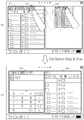
도 2a 내지 도 2e는 본 발명의 일 실시예에 따른 디바이스가 탭 윈도우를 생성하여 단말기 화면에 표시하는 일 예를 도시한 도면이다. 2A to 2E are diagrams illustrating an example in which a device creates a tab window and displays it on a terminal screen according to an embodiment of the present invention.
도 2a를 참조하면, 디바이스(2200)는 애플리케이션의 실행을 위한 적어도 하나 이상의 객체들을 포함하는 디스플레이 윈도우(210)를 단말기 화면에 출력한다. 도 2a에서는 디스플레이 윈도우(210)를 애플리케이션 트레이로 도시하였다. 디스플레이 윈도우(210)에는 단말기에 설치된 애플리케이션들 각각에 대응하는 객체(예를 들어, 아이콘)들이 나열되어 있다.Referring to FIG. 2A , the
사용자는 디스플레이 윈도우(210)에 포함된 객체들 중에서 어느 하나를 선택한다. 예를 들어, 사용자는 디스플레이 윈도우(210)에 포함된 객체들 중에서 어느 하나를 터치할 수도 있고, 드래그 앤드 드랍하여 선택된 객체를 단말기 화면의 전체 영역에서 디스플레이 윈도우(210)를 제외한 영역으로 이동시킬 수도 있다.The user selects any one of the objects included in the
도 2b를 참조하면, 사용자가 디스플레이 윈도우(210)에 포함된 객체들 중에서 어느 하나(220)를 터치함으로써 객체(220)를 선택한 경우를 도시하고 있다. 디바이스(2200)는 객체(220)를 선택하는 사용자 입력을 수신한다. 그리고 디바이스(2200)는 수신된 사용자 입력에 따라 선택된 객체(220)에 대응되는 애플리케이션을 포함하는 애플리케이션 그룹을 생성한다. 그리고, 디바이스(2200)는 생성된 애플리케이션 그룹을 나타내는 탭 윈도우(230)를 단말기 화면에 출력한다.Referring to FIG. 2B , a case in which the user selects the
도 2c를 참조하면, 사용자가 디스플레이 윈도우(210)에 포함된 객체들 중에서 어느 하나(220)를 드래그 앤드 드랍하고, 선택된 객체(220)를 디스플레이 윈도우(210)를 제외한 영역으로 이동시키는 경우를 도시하고 있다.Referring to FIG. 2C , the user drags and drops any one 220 among objects included in the
디바이스(2200)가 사용자 입력을 수신하여 애플리케이션 그룹을 생성하고, 탭 윈도우를 단말기 화면에 출력하는 과정은 도 2b를 참조하여 상술한 바와 같다. 이때, 탭 윈도우는 미리 정해진 영역(240)에 대응된 크기로 표시된다.A process in which the
도 2c를 참조하면, 선택된 객체(220)와 탭 윈도우(240)가 한 화면에 동시에 표시되어 있으나, 이는 설명을 위한 일 예에 불과하다. 다시 말해, 선택된 객체(220)의 이미지는 이동된 위치에서 사라지고, 선택된 객체를 포함하는 탭 윈도우(240)만이 단말기 화면에 출력된다.Referring to FIG. 2C , the selected
도 2d를 참조하면, 단말기 화면에 기 생성된 애플리케이션 그룹을 나타내는 탭 윈도우(250)가 표시되어 있다. 이때에도, 도 2c를 참조하여 상술한 동작이 적용될 수 있다.Referring to FIG. 2D , a
구체적으로, 사용자가 디스플레이 윈도우(210)에 포함된 객체들 중에서 어느 하나(220)를 디스플레이 윈도우(210)를 제외한 영역으로 드래그 앤드 드랍한다. 그 후에, 디바이스(2200)는 선택된 객체(220)에 대응되는 애플리케이션을 포함하는 애플리케이션 그룹을 생성하고, 생성된 애플리케이션 그룹을 나타내는 탭 윈도우(260)를 단말기 화면에 출력한다.Specifically, the user drags and drops any one 220 among the objects included in the
도 2e를 참조하면, 단말기 화면에 기 생성된 애플리케이션 그룹을 나타내는 탭 윈도우(250)가 표시되어 있다. 이때, 사용자는 디스플레이 윈도우(210)에 포함된 객체들 중에서 어느 하나(220)를 터치할 수 있다.Referring to FIG. 2E , a
디바이스(2200)는 선택된 객체(220)에 대응되는 애플리케이션을 탭 윈도우(250)가 나타내는 애플리케이션 그룹에 포함한다. 그리고, 디바이스(2200)는 사용자의 터치에 의하여 선택된 객체(220)를 탭 윈도우(250)의 타이틀 바에 추가하여 표시(270)할 수 있다.The
한편, 디바이스(2200)는 탭 윈도우(230, 250, 260)에 관한 정보를 저장한다. 여기에서, 탭 윈도우(230, 250, 260)에 관한 정보는 애플리케이션 그룹에 포함된 애플리케이션들의 목록 또는 탭 윈도우의 영역을 포함한다. 구체적으로, 디바이스(2200)는 생성된 애플리케이션 그룹에 어떤 애플리케이션들이 포함되어 있는지 또는 단말기 화면에 표시된 탭 윈도우가 어느 위치에 어떤 크기로 표시되어 있는지와 같은 정보를 저장한다. Meanwhile, the
이후에, 사용자로부터 탭 윈도우(230, 250, 260)를 표시하는 입력이 수신된 경우, 디바이스(2200)는 저장된 탭 윈도우(230, 250, 260)에 관한 정보를 이용하여 탭 윈도우(230, 250, 260)를 단말기 화면에 표시한다.Thereafter, when an input for displaying the
도 3은 본 발명의 일 실시예에 따른 디바이스가 탭 윈도우를 생성하여 단말기 화면에 표시하는 다른 예를 도시한 도면이다.3 is a diagram illustrating another example in which a device creates a tab window and displays it on a terminal screen according to an embodiment of the present invention.
도 3의 (a) 및 (b)를 참조하면, 디바이스(2200)는 애플리케이션의 실행을 위한 적어도 하나 이상의 객체들을 포함하는 디스플레이 윈도우(310)를 단말기 화면에 출력한다. 도 3의 (a) 및 (b)에서는 디스플레이 윈도우(310)를 탭 윈도우로 도시하였다. 디스플레이 윈도우(310)에는 단말기에 설치된 애플리케이션들 각각에 대응하는 객체(예를 들어, 애플리케이션의 명칭)들이 나열되어 있다.Referring to FIGS. 3A and 3B , the
다시 말해, 디스플레이 윈도우(310)는 기 생성된 애플리케이션 그룹을 나타내는 다른 탭 윈도우를 의미할 수 있다. 여기에서, 디바이스(2200)는 기 저장된 탭 윈도우에 관한 정보를 이용하여 탭 윈도우를 단말기 화면에 표시할 수 있음은 전술한 바와 같다.In other words, the
도 3의 (a)를 참조하면, 사용자는 디스플레이 윈도우(310)에 표시된 객체들 중에서 어느 하나(320)를 선택한다. 그리고 사용자는 선택된 객체(320)를 디스플레이 윈도우(310)를 제외한 영역으로 이동시킨다. 예를 들어, 사용자는 객체(320)를 드래그 앤드 드랍함으로써 디스플레이 윈도우(310)를 제외한 영역으로 이동시킬 수 있다. 여기에서, 객체(320)는 도 3의 (a)에 도시된 바와 같이 애플리케이션의 명칭이 표시된 소정의 영역이 될 수 있다.Referring to FIG. 3A , the user selects any one 320 from among the objects displayed on the
디바이스(2200)는 수신된 사용자 입력에 따라 선택된 객체(320)에 대응되는 애플리케이션을 포함하는 애플리케이션 그룹을 생성한다. 다시 말해, 디바이스(2200)는, 선택된 객체(320)에 대응되는 애플리케이션을 이용하여, 기 생성된 애플리케이션 그룹 이외에 다른 애플리케이션 그룹을 생성할 수 있다.The
그리고 디바이스(2200)는 생성된 애플리케이션 그룹을 나타내는 탭 윈도우를 단말기 화면에 출력한다. 이때, 탭 윈도우는 미리 정해진 영역(330)에 대응된 크기로 표시된다. 여기에서, 미리 정해진 영역(330)에 대응된 크기는 단말기 화면에 기 표시된 탭 윈도우(310)와 동일한 크기가 될 수 있으나, 이에 한정되지 않는다.In addition, the
도 3의 (b)에는 단말기 화면에 서로 다른 두 개의 탭 윈도우들(310, 340)이 표시된 예가 도시되어 있다. 다시 말해, 디바이스(2200)는 기 생성된 애플리케이션 그룹을 나타내는 탭 윈도우(310)와 사용자 입력에 따라 생성한 애플리케이션 그룹을 나타내는 탭 윈도우(340)를 동시에 단말기 화면에 표시할 수 있다.3B shows an example in which two
한편, 도 3의 (a)를 참조하여 전술한 선택된 객체(320)는 복수 개일 수도 있다. 다시 말해, 사용자는 디스플레이 윈도우(310)에 표시된 객체들 중에서 2개 이상을 멀티 터치 함으로써 선택할 수 있다. 이 경우, 도 3의 (b)를 참조하여 전술한 탭 윈도우(340)는 상기 선택된 2개 이상의 객체들에 대응하는 애플리케이션들을 포함한다.Meanwhile, the number of the selected
상술한 바에 따르면, 디바이스(2200)는 서로 다른 두 개 이상의 탭 윈도우들을 단말기 화면에 동시에 표시할 수 있으므로, 사용자는 보다 효율적으로 멀티 태스킹을 수행할 수 있다.As described above, since the
도 4는 본 발명의 일 실시예에 따른 디바이스가 탭 윈도우를 나타내는 객체를 단말기 화면에 표시하는 일 예를 도시한 도면이다.4 is a diagram illustrating an example in which a device displays an object representing a tab window on a terminal screen according to an embodiment of the present invention.
도 4를 참조하면, 디바이스(2200)는 단말기 화면의 일정 영역에 탭 윈도우를 나타내는 객체(420, 430, 440)를 표시할 수 있다. 예를 들어, 디바이스(2200)는 애플리케이션 트레이(410)에 탭 윈도우를 나타내는 객체(420, 430, 440)를 애플리케이션을 나타내는 객체들(450)과 함께 표시할 수 있다. 디바이스(2200)가 생성한 탭 윈도우가 복수 개 존재한다면, 디바이스(2200)는 그에 대응하는 각각의 객체들(420, 430, 440)을 단말기 화면에 표시할 수 있다.Referring to FIG. 4 , the
도 5는 본 발명의 일 실시예에 따른 디바이스가 탭 윈도우를 단말기 화면에 표시하는 일 예를 도시한 도면이다.5 is a diagram illustrating an example in which a device displays a tab window on a terminal screen according to an embodiment of the present invention.
도 5를 참조하면, 디바이스(2200)는 복수의 탭 윈도우들(510, 520, 530, 540)을 단말기 화면에 표시할 수 있다. 예를 들어, 디바이스(2200)는 사용자가 기 생성된 탭 윈도우를 나타내는 객체들을 순차적으로 터치하는 입력을 수신하고, 터치된 객체들에 대응하는 탭 윈도우를 순차적으로 단말기 화면에 표시할 수 있다. Referring to FIG. 5 , the
여기에서, 디바이스(2200)는 기 저장된 각각의 탭 윈도우에 관한 정보를 이용하여 단말기 화면에 탭 윈도우들(510, 520, 530, 540)을 표시할 수 있다. 다시 말해, 디바이스(2200)는 저장된 탭 윈도우의 위치와 영역, 저장된 애플리케이션의 실행 화면을 이용하여 탭 윈도우를 단말기 화면에 표시한다. 여기에서, 저장된 탭 윈도우의 위치와 영역은 이전에 그 탭 윈도우가 종료된 시점에서의 탭 윈도우의 위치와 영역을 의미하고, 저장된 애플리케이션의 실행 화면은 이전에 그 탭 윈도우가 종료된 시점에서 표시되어 있던 실행 화면을 의미할 수 있다.Here, the
도 6은 본 발명의 일 실시예에 따른 탭 윈도우를 관리하는 방법의 다른 예를 도시한 흐름도이다.6 is a flowchart illustrating another example of a method for managing a tab window according to an embodiment of the present invention.
도 6을 참조하면, 탭 윈도우를 관리하는 방법은 도 22 또는 도 23에 도시된 디바이스(2200)에서 시계열적으로 처리되는 단계들로 구성된다. 따라서, 이하에서 생략된 내용이라 하더라도 도 22 또는 도 23에 도시된 장치에 관하여 후술할 내용은 도 6의 탭 윈도우를 관리하는 방법에도 적용됨을 알 수 있다.Referring to FIG. 6 , the method of managing a tab window includes steps that are time-series processed by the
또한, 도 6에 도시된 흐름도는 도 1에 도시된 단계들에 연속하여 처리되는 단계들로 구성된다.In addition, the flowchart shown in FIG. 6 consists of steps processed successively to the steps shown in FIG. 1 .
1510 단계에서, 디바이스(2200)는 탭 윈도우에 포함된 애플리케이션의 실행을 위한 객체를 선택하는 사용자 입력을 수신한다. 여기에서, 객체는 도 3(a)를 참조하여 전술한 바와 같다. 또한, 사용자 입력은 단말기 화면을 통한 사용자의 터치 입력일 수 있으나, 이에 제한되지 않음은 전술한 바와 같다.In
1610 단계에서, 디바이스(2200)는 수신된 사용자 입력에 따라 애플리케이션을 실행한다.In
1620 단계에서, 디바이스(2200)는 실행된 애플리케이션의 실행 화면을 단말기 화면에 출력한다. 여기에서, 실행 화면은 탭 윈도우의 적어도 일부 영역에 출력된다.In
이하에서, 도 7을 참조하여, 도 6을 참조하여 전술한 탭 윈도우를 관리하는 방법(구체적으로, 탭 윈도우에 포함된 애플리케이션의 실행 화면을 단말기 화면에 표시하는 방법)을 구체적으로 설명한다.Hereinafter, a method of managing the above-described tab window with reference to FIG. 6 (specifically, a method of displaying an execution screen of an application included in the tab window on a terminal screen) will be described in detail with reference to FIG. 7 .
도 7은 본 발명의 일 실시예에 따른 디바이스가 탭 윈도우에 포함된 애플리케이션의 실행 화면을 단말기 화면에 표시하는 일 예를 도시한 도면이다.7 is a diagram illustrating an example in which a device displays an execution screen of an application included in a tab window on a terminal screen according to an embodiment of the present invention.
도 7의 (a)를 참조하면, 단말기 화면의 일부 영역에 탭 윈도우(710)가 표시되어 있다. 그리고, 탭 윈도우(710)의 일부 영역(720)에는 탭 윈도우(710)에 포함된 애플리케이션들의 실행을 위한 객체들(730)이 표시되어 있다. 그리고, 탭 윈도우(710)의 다른 일부 영역(740)에는 탭 윈도우(710)에 포함된 애플리케이션들 중 어느 하나의 실행 화면에 표시되어 있다.Referring to FIG. 7A , a
사용자는 탭 윈도우(710)에 포함된 애플리케이션들의 실행을 위한 객체들(730) 중 어느 하나(731)를 선택한다. 예를 들어, 사용자는 객체(731)를 터치함으로써 선택할 수 있다.The user selects any one 731 of the
디바이스(2200)는 사용자가 선택한 객체(731)에 대응하는 애플리케이션을 실행한다. 그리고, 디바이스(2200)는 애플리케이션의 실행 화면을 단말기 화면에 출력한다.The
도 7의 (b)를 참조하면, 디바이스(2200)가 실행한 애플리케이션의 실행 화면이 탭 윈도우(710)의 일부 영역(750)에 표시되어 있다. 다시 말해, 사용자가 객체(731)를 선택함으로써 새로운 애플리케이션이 실행되면, 디바이스(2200)는 종전에 표시되어 있던 다른 애플리케이션의 실행 화면을 사용자 입력에 따라 실행된 새로운 애플리케이션의 실행 화면으로 전환한다.Referring to FIG. 7B , an execution screen of an application executed by the
도 7의 (a) 및 (b)를 참조하여 전술한 바와 같이, 탭 윈도우(710)에 포함된 애플리케이션들 중 어느 하나가 실행된 경우, 애플리케이션의 실행 화면은 탭 윈도우(710)가 나타내는 영역을 벗어나지 않고 표시된다. 따라서, 복수의 탭 윈도우들이 단말기 화면에 표시되어 있고, 표시된 탭 윈도우들이 나타내는 영역이 서로 겹치지 않는다면, 사용자는 각각의 탭 윈도우들에서 실행된 애플리케이션들의 실행 화면을 서로 겹치지 않고 볼 수 있다. 따라서, 사용자는 보다 효율적으로 멀티 태스킹을 수행할 수 있다.As described above with reference to FIGS. 7A and 7B , when any one of the applications included in the
도 8은 본 발명의 일 실시예에 따른 탭 윈도우를 관리하는 방법의 또 다른 예를 도시한 흐름도이다.8 is a flowchart illustrating another example of a method for managing a tab window according to an embodiment of the present invention.
도 8을 참조하면, 탭 윈도우를 관리하는 방법은 도 22 또는 도 23에 도시된 디바이스(2200)에서 시계열적으로 처리되는 단계들로 구성된다. 따라서, 이하에서 생략된 내용이라 하더라도 도 22 또는 도 23에 도시된 장치에 관하여 후술할 내용은 도 8의 탭 윈도우를 관리하는 방법에도 적용됨을 알 수 있다.Referring to FIG. 8 , the method of managing a tab window includes steps that are time-series processed by the
또한, 도 8에 도시된 흐름도는 도 1에 도시된 단계들에 연속하여 처리되는 단계들로 구성된다.In addition, the flowchart shown in FIG. 8 consists of steps processed successively to the steps shown in FIG. 1 .
1520 단계에서, 디바이스(2200)는 단말기 화면에서 탭 윈도우가 차지하는 영역을 변경시키는 사용자 입력을 수신한다.In
1620 단계에서, 디바이스(2200)는 수신된 사용자 입력ㄷ에 따라 탭 윈도우의 위치를 변경하거나 탭 윈도우의 영역을 축소 또는 확장한다.In
1720 단계에서, 디바이스(2200)는 탭 윈도우를 단말기 화면에 출력한다. 여기에서, 출력되는 탭 윈도우는 1620 단계에서 수행된 탭 윈도우의 위치 변경 또는 탭 윈도우의 영역 변경을 반영한 결과를 의미한다.In
이하에서, 도 9를 참조하여, 도 8을 참조하여 전술한 탭 윈도우를 관리하는 방법(구체적으로, 변경된 탭 윈도우를 단말기 화면에 표시하는 방법)을 구체적으로 설명한다.Hereinafter, with reference to FIG. 9 , a method for managing the aforementioned tab window (specifically, a method for displaying a changed tab window on a terminal screen) will be described in detail with reference to FIG. 8 .
도 9a 내지 도 9c는 본 발명의 일 실시예에 따른 디바이스가 변경된 탭 윈도우를 단말기 화면에 표시하는 일 예를 도시한 도면이다.9A to 9C are diagrams illustrating an example in which a device displays a changed tab window on a terminal screen according to an embodiment of the present invention.
도 9a 내지 도 9c를 참조하면, 디바이스(2200)가 탭 윈도우의 위치를 변경하거나 탭 윈도우의 영역을 변경하는 일 예가 도시되어 있다. 구체적으로, 도 9a는 디바이스(2200)가 탭 윈도우의 위치를 변경하는 일 예를 나타내고, 도 9b 및 9c는 디바이스(2200)가 탭 윈도우의 영역을 변경하는 일 예를 나타낸다.9A to 9C , an example in which the
도 9a의 위쪽 도면을 참조하면, 사용자는 단말기 화면에 표시된 탭 윈도우(910)의 일정 영역(920)를 터치한 상태에서 이동하고자 하는 방향으로 드래그할 수 있다. 여기에서, 일정 영역(920)은 탭 윈도우에 포함된 애플리케이션들의 명칭이 표시된 영역이 될 수 있으나, 이에 한정되지 않는다.Referring to the upper drawing of FIG. 9A , the user may drag the
도 9a의 아래쪽 도면을 참조하면, 디바이스(2200)는 드래그 방향에 대응하여 탭 윈도우(930)의 위치를 변경하고, 변경된 탭 윈도우(930)의 위치를 단말기 화면에 표시한다.Referring to the lower drawing of FIG. 9A , the
도 9b의 위쪽 도면을 참조하면, 사용자는 단말기 화면에 표시된 탭 윈도우(910)의 일부에 표시된 객체(940)를 터치할 수 있다. 여기에서, 객체(940)는 탭 윈도우(910)의 영역을 축소 또는 확장시킬 수 있는 그래픽 이미지를 의미한다.Referring to the upper drawing of FIG. 9B , the user may touch the
도 9b의 아래쪽 도면을 참조하면, 디바이스(2200)는 사용자의 터치에 따라 탭 윈도우(950)가 나타내는 영역을 확장 또는 축소할 수 있다. 구체적으로, 탭 윈도우(950)가 단말기 화면의 일부에만 표시되어 있는 경우에는 디바이스(2200)는 탭 윈도우(950)를 단말기 화면의 전체로 확장하여 표시한다. 또한, 탭 윈도우(950)가 단말기 화면의 전체에 표시되어 있는 경우에는 디바이스(2200)는 탭 윈도우(950)를 단말기 화면의 일부로 축소하여 표시한다.Referring to the lower drawing of FIG. 9B , the
도 9c의 위쪽 도면을 참조하면, 사용자는 단말기 화면에 표시된 탭 윈도우(910)의 일정 위치(960)를 터치한 상태에서 탭 윈도우의 영역을 변경하고자 하는 방향으로 드래그할 수 있다. 여기에서, 일정 위치(960)는 탭 윈도우(910)의 가장자리를 의미할 수 있으나, 이에 한정되지 않는다.Referring to the upper drawing of FIG. 9C , the user may drag the area of the tab window in a desired direction while touching a
도 9c의 아래쪽 도면을 참조하면, 디바이스(2200)는 드래그 방향에 대응하여 탭 윈도우(970)의 영역을 변경하고, 변경된 탭 윈도우(970)의 영역을 단말기 화면에 표시한다. 구체적으로, 사용자가 현재 탭 윈도우(910)가 차지하는 영역의 안쪽으로 드래그하는 경우에는, 디바이스(2200)는 탭 윈도우(970)의 영역을 축소하여 표시한다. 또한, 사용자가 현재 탭 윈도우(910)가 차지하는 영역의 바깥쪽으로 드래그하는 경우에는, 디바이스(2200)는 탭 윈도우(970)의 영역을 확장하여 표시한다.Referring to the lower drawing of FIG. 9C , the
한편, 디바이스(2200)는 변경된 탭 윈도우의 위치 또는 영역에 관한 정보를 저장한다. 구체적으로, 디바이스(2200)는 이전에 저장되어 있던 탭 윈도우의 위치 또는 영역에 관한 정보를 변경된 위치 또는 영역으로 갱신하여 저장한다. 따라서, 탭 윈도우의 위치 또는 영역이 변경된 후에 탭 윈도우가 종료되고 이후에 탭 윈도우가 다시 실행되면, 디바이스(2200)는 갱신된 정보를 이용하여 탭 윈도우를 단말기 화면에 표시한다.Meanwhile, the
도 10은 본 발명의 일 실시예에 따른 탭 윈도우를 관리하는 방법의 또 다른 예를 도시한 흐름도이다.10 is a flowchart illustrating another example of a method for managing a tab window according to an embodiment of the present invention.
도 10을 참조하면, 탭 윈도우를 관리하는 방법은 도 22 또는 도 23에 도시된 디바이스(2200)에서 시계열적으로 처리되는 단계들로 구성된다. 따라서, 이하에서 생략된 내용이라 하더라도 도 22 또는 도 23에 도시된 장치에 관하여 후술할 내용은 도 10의 탭 윈도우를 관리하는 방법에도 적용됨을 알 수 있다.Referring to FIG. 10 , the method for managing a tab window includes steps processed in time series by the
또한, 도 10에 도시된 흐름도는 도 1에 도시된 단계들에 연속하여 처리되는 단계들로 구성된다.In addition, the flowchart shown in FIG. 10 consists of steps processed successively to the steps shown in FIG. 1 .
180 단계에서, 디바이스(2200)는 단말기 화면에 탭 윈도우가 표시된 제 1 영역과 구분된 제 2 영역에 다른 탭 윈도우를 출력한다. 여기에서, 다른 탭 윈도우는 이미 단말기 화면에 출력된 탭 윈도우가 아닌, 기 생성된 애플리케이션 그룹을 나타내는 다른 탭 윈도우를 의미한다.In
이하에서, 도 11을 참조하여, 도 10을 참조하여 전술한 탭 윈도우를 관리하는 방법(구체적으로, 복수의 탭 윈도우를 단말기 화면에 표시하는 방법)을 구체적으로 설명한다.Hereinafter, with reference to FIG. 11 , a method of managing the above-described tab windows with reference to FIG. 10 (specifically, a method of displaying a plurality of tab windows on a terminal screen) will be described in detail.
도 11a 내지 도11d는 본 발명의 일 실시예에 따른 디바이스가 복수의 애플리케이션들 각각에 대한 실행 화면들을 탭 윈도우 모드로 전환하여 표시하는 일 예를 도시한 도면이다.11A to 11D are diagrams illustrating an example in which a device converts execution screens for each of a plurality of applications to a tap window mode and displays them according to an embodiment of the present invention.
도 11a를 참조하면, 단말기 화면에 복수의 애플리케이션들 각각의 실행 화면들(1110, 1120, 1130, 1150)이 도시되어 있다. 이하, 도 11b 내지 도 11d를 참조하여, 단말기 화면에 표시된 실행 화면들(1110, 1120, 1130, 1150)을 탭 윈도우 모드로 전환하는 일 예를 설명한다. 여기에서, 탭 윈도우 모드에는 캐스캐이드(cascade) 모드, 듀얼 모드 등이 해당될 수 있으나 있으나, 이에 한정되지 않는다. 다시 말해, 복수 개의 실행 화면들(1110, 1120, 1130, 1150)을 일정한 규칙을 갖고 표시할 수 있는 유형이라면 제한 없이 해당될 수 있다.Referring to FIG. 11A ,
도 11a 및 도 11b를 참조하면, 사용자가 단말기 화면의 일정 영역(1140)에 표시된 객체들 중에서 '탭 보기'(1160)를 터치한 경우, 디바이스(2200)는 복수 개의 실행 화면들(1110, 1120, 1130, 1150)을 하나의 탭 윈도우(1165)에 모아서 표시한다. 이 때, 사용자가 '탭 보기'(1160)를 다시 터치한 경우, 디바이스(2200)는 탭 윈도우(1165)를 복수 개의 실행 화면들(1110, 1120, 1130, 1150)로 분리하여 표시한다. 다시 말해, 사용자가 '탭 보기'(1160)를 터치함에 따라, 디바이스(2200)는 탭 모드를 턴 온(on)-오프(off)한다.11A and 11B , when the user touches 'Tab View' 1160 among objects displayed on a
도 11b 및 도 11c를 참조하면, 사용자가 단말기 화면의 일정 영역(1140)에 표시된 객체들 중에서 '듀얼 보기'(1170)를 터치한 경우, 디바이스(2200)는 탭 윈도우(1165)를 듀얼 모드로 전환하여 표시한다. 디바이스(2200)가 탭 윈도우(1165)를 듀얼 모드로 표시하는 예는 아래와 같다.11B and 11C , when the user touches the 'dual view' 1170 among the objects displayed on the
일 예로, 디바이스(2200)는 단말기 화면을 2개의 영역들(1171, 1173)로 분할하고, 탭 윈도우(1165)에 포함된 복수 개의 애플리케이션들 각각의 실행 화면을 2개의 영역들(1171, 1173) 중 어느 한 쪽에 각각 표시할 수 있다. 다시 말해, 탭 윈도우(1165)에 포함된 애플리케이션들이 총 4개라고 가정하면, 디바이스(2200)는 좌측 영역(1171)에 2개, 우측 영역(1173)에 2개의 실행 화면을 표시할 수 있다.As an example, the
다른 예로, 디바이스(2200)는 단말기 화면을 2개의 영역들(1171, 1173)로 분할하고, 탭 윈도우(1165)를 어느 한 쪽의 영역에 표시할 수 있다. 그 후에, 사용자가 새로운 애플리케이션을 실행시킬 경우, 디바이스(2200)는 탭 윈도우(1165)가 표시되지 않은 다른 한 쪽의 영역에 실행된 애플리케이션의 실행화면을 표시할 수 있다.As another example, the
도 11c 및 도 11d를 참조하면, 사용자가 단말기 화면의 일정 영역(1140)에 표시된 객체들 중에서 '계단식 보기'(1180)를 터치한 경우, 디바이스(2200)는 탭 윈도우(1165)를 캐스캐이드 모드로 전환하여 표시한다.11C and 11D , when a user touches a 'cascade view' 1180 among objects displayed in a
예를 들어, 탭 윈도우(1165)에 포함된 애플리케이션들이 총 4개라고 가정하면, 디바이스(2200)는 각각의 애플리케이션을 포함하는 4개의 탭 윈도우들(1191, 1192, 1193, 1194)을 생성하고, 생성된 탭 윈도우들(1191, 1192, 1193, 1194)을 단말기 화면에 계단식으로 표시한다.For example, assuming that there are a total of four applications included in the
이 때, 사용자가 '탭 보기'(1160)를 다시 터치한 경우, 디바이스(2200)가 탭 윈도우(1165)를 복수 개의 실행 화면들(1110, 1120, 1130, 1150)로 다시 분리하여 표시할 수 있다.At this time, when the user touches the 'tab view' 1160 again, the
전술한 바에 따르면, 사용자는 복수의 애플리케이션들 각각의 실행 화면들(1110, 1120, 1130, 1150)을 자유롭게 탭 윈도우로 전환할 수 있다. 따라서, 사용자는 보다 효과적으로 멀티 태스킹을 수행할 수 있다.As described above, the user may freely convert the
도 12는 본 발명의 일 실시예에 따른 탭 윈도우를 관리하는 방법의 또 다른 예를 도시한 흐름도이다.12 is a flowchart illustrating another example of a method for managing a tab window according to an embodiment of the present invention.
도 12를 참조하면, 탭 윈도우를 관리하는 방법은 도 22 또는 도 23에 도시된 디바이스(2200)에서 시계열적으로 처리되는 단계들로 구성된다. 따라서, 이하에서 생략된 내용이라 하더라도 도 22 또는 도 23에 도시된 장치에 관하여 후술할 내용은 도 12의 탭 윈도우를 관리하는 방법에도 적용됨을 알 수 있다.Referring to FIG. 12 , the method for managing a tab window includes steps that are time-series processed by the
또한, 도 12에 도시된 흐름도는 도 10에 도시된 단계들에 연속하여 처리되는 단계들로 구성된다. 다시 말해, 도 12에 도시된 탭 윈도우를 관리하는 방법은 복수 개의 탭 윈도우들이 단말기 화면에 표시된 상태에서 처리되는 단계들로 구성된다.In addition, the flowchart shown in FIG. 12 consists of steps processed successively to the steps shown in FIG. 10 . In other words, the method for managing the tab window shown in FIG. 12 includes steps in which a plurality of tab windows are processed while being displayed on the terminal screen.
1810 단계에서, 디바이스(2200)는 탭 윈도우들 중 일방에 포함된 애플리케이션에 대응되는 객체를 타방으로 이동시키는 사용자 입력을 수신한다. 여기에서, 사용자 입력은 탭 윈도우들 중 일방에 포함된 애플리케이션에 대응되는 객체를 드래그 앤드 드랍하여 탭 윈도우들 중 타방으로 이동시키는 것이 해당될 수 있다. 사용자 입력에 대한 자세한 설명은 도 14를 참조하여 후술한다.In
1820 단계에서, 디바이스(2200)는 수신된 사용자 입력에 따라 탭 윈도우들 각각이 나타내는 애플리케이션 그룹을 갱신한다. 구체적으로, 디바이스(2200)는 이동된 객체에 대응하는 애플리케이션을 탭 윈도우들 중 일방에 포함된 애플리케이션 그룹에서 제외하고, 탭 윈도우들 중 타방에 포함된 애플리케이션 그룹에 추가하는 방식으로 애플리케이션 그룹을 갱신할 수 있다.In
1830 단계에서, 디바이스(2200)는 갱신된 애플리케이션 그룹에 기초하여 탭 윈도우들을 갱신하여 단말기 화면에 출력한다. 구체적으로, 디바이스(2200)는 1820 단계에서 갱신된 애플리케이션 그룹에 대한 정보를 이용하여 탭 윈도우들 각각에 표시된 애플리케이션 목록을 수정하여 단말기 화면에 출력할 수 있다.In
그리고, 디바이스(2200)는 갱신된 탭 윈도우들에 관한 정보를 저장한다. 여기에서, 탭 윈도우들에 관한 정보는 갱신된 애플리케이션 그룹에 포함된 애플리케이션들의 목록 또는 탭 윈도우의 영역을 의미할 수 있다. 구체적으로, 디바이스(2200)는 생성된 애플리케이션 그룹에 어떤 애플리케이션들이 포함되어 있는지 또는 단말기 화면에 표시된 탭 윈도우가 어느 위치에 어떤 크기로 표시되어 있는지와 같은 정보를 저장한다. In addition, the
도 12를 참조하여 전술한 방법은 복수의 탭 윈도우들 간에 애플리케이션을 교환하는 방법에 해당된다. 다시 말해, 디바이스(2200)는 사용자의 제스쳐에 기초하여 복수의 탭 윈도우들 중에서 일방에 포함된 애플리케이션을 타방으로 이동시킬 수 있다. The method described above with reference to FIG. 12 corresponds to a method of exchanging applications between a plurality of tab windows. In other words, the
또한, 디바이스(2200)는 일방의 탭 윈도우에 포함된 애플리케이션을 이용하여 독립적으로 새로운 탭 윈도우를 생성할 수도 있다. 구체적으로, 일방의 탭 윈도우에 포함된 애플리케이션에 대응되는 객체가 이동되는 정보를 이용하여, 디바이스(2200)가 새로운 탭 윈도우를 생성하는 방법은 도 3을 참조하여 전술한 바와 같다.Also, the
또한, 본 발명의 일 실시예에 따르면 복수의 탭 윈도우들 간에 애플리케이션을 교환하는 것 뿐만 아니라 애플리케이션에 포함된 데이터를 교환할 수도 있다. 복수의 탭 윈도우들 간에 애플리케이션에 포함된 데이터를 교환하는 구체적인 방법은 도 13을 참조하여 후술한다.In addition, according to an embodiment of the present invention, data included in the application may be exchanged as well as the application exchange among the plurality of tab windows. A specific method of exchanging data included in an application between a plurality of tab windows will be described later with reference to FIG. 13 .
도 13은 본 발명의 일 실시예에 따른 탭 윈도우를 관리하는 방법의 또 다른 예를 도시한 흐름도이다.13 is a flowchart illustrating another example of a method for managing a tab window according to an embodiment of the present invention.
도 13을 참조하면, 탭 윈도우를 관리하는 방법은 도 22 또는 도 23에 도시된 디바이스(2200)에서 시계열적으로 처리되는 단계들로 구성된다. 따라서, 이하에서 생략된 내용이라 하더라도 도 22 또는 도 23에 도시된 장치에 관하여 후술할 내용은 도 13의 탭 윈도우를 관리하는 방법에도 적용됨을 알 수 있다.Referring to FIG. 13 , the method for managing a tab window includes steps that are time-series processed by the
또한, 도 13에 도시된 흐름도는 도 10에 도시된 단계들에 연속하여 처리되는 단계들로 구성된다. 다시 말해, 도 13에 도시된 탭 윈도우를 관리하는 방법은 복수 개의 탭 윈도우들이 단말기 화면에 표시된 상태에서 처리되는 단계들로 구성된다.In addition, the flowchart shown in FIG. 13 consists of steps processed successively to the steps shown in FIG. 10 . In other words, the method for managing the tab window shown in FIG. 13 includes steps in which a plurality of tab windows are processed while being displayed on the terminal screen.
1840 단계에서, 디바이스(2200)는 사용자의 입력 정보에 기초하여 탭 윈도우들 중 일방에 포함된 애플리케이션을 실행한다. 예를 들어, 사용자가 애플리케이션의 실행을 위한 객체를 선택한 정보에 기초하여 디바이스(2200)는 애플리케이션을 실행할 수 있다. In
1850 단계에서, 디바이스(2200)는 실행된 애플리케이션에 포함된 데이터를 나타내는 객체를 탭 윈도우들 중 타방에 포함된 애플리케이션으로 이동시키는 사용자 입력을 수신한다. 여기에서, 사용자 입력은 도 12의 1810 단계를 참조하여 전술한 바와 같다. 다시 말해, 사용자 입력은 탭 윈도우들 중 일방에 포함된 데이터를 나타내는 객체를 드래그 앤드 드랍하여 탭 윈도우들 중 타방에 포함된 애플리케이션의 객체가 위치하는 지점으로 이동시키는 것이 해당될 수 있다. 또는, 사용자 입력은 탭 윈도우들 중 일방에 포함된 데이터를 나타내는 객체를 드래그 앤드 드랍하여 탭 윈도우들 중 타방에 표시된 애플리케이션의 실행 화면으로 이동시키는 것이 해당될 수도 있다.In
1860 단계에서, 디바이스(2200)는 수신된 사용자 입력에 따라 데이터를 타방에 포함된 애플리케이션에서 실행시킨다. 예를 들어, 사용자 입력에 따라 이동된 데이터가 음악 재생 파일이고, 타방에 포함된 애플리케이션이 음악을 재생할 수 있는 애플리케이션이라면, 디바이스(2200)는 이동된 음악 재생 파일을 재생한다. In
1870 단계에서, 디바이스(2200)는 실행된 애플리케이션의 실행 화면을 단말기 화면에 출력한다. 구체적으로, 전술한 예에서 음악의 재생에 따른 실행 화면은 타방(즉, 음악을 재생할 수 있는 애플리케이션이 포함된 탭 윈도우)에 출력된다.In operation 1870, the
이하에서, 도 14를 참조하여, 도 12 및 도 13을 참조하여 전술한 탭 윈도우를 관리하는 방법(구체적으로, 애플리케이션 또는 데이터를 일방의 탭 윈도우에서 타방의 탭 윈도우로 이동하는 방법)을 구체적으로 설명한다.Hereinafter, with reference to FIG. 14, a method of managing the above-described tab window with reference to FIGS. 12 and 13 (specifically, a method of moving an application or data from one tab window to the other tab window) will be described in detail. Explain.
도 14는 본 발명의 일 실시예에 따른 디바이스가 일방의 탭 윈도우에 포함된 데이터를 타방의 탭 윈도우로 이동하는 일 예를 도시한 도면이다.14 is a diagram illustrating an example in which the device moves data included in one tab window to the other tab window according to an embodiment of the present invention.
도 14(a) 및 (b)를 참조하면, 탭 윈도우들(1410, 1420) 중 일방(1410)에 포함된 애플리케이션의 데이터를 타방(1420)으로 이동하는 일 예가 도시되어 있다. 또한, 도 14(c)를 참조하면, 탭 윈도우(1410)에 포함된 복수의 애플리케이션들 간에 데이터를 이동하는 일 예가 도시되어 있다.Referring to FIGS. 14A and 14B , an example of moving data of an application included in one 1410 of the
도 14(a) 내지 (c)에는, 도 13을 참조하여 전술한 데이터의 이동 방법을 나타내는 일 예가 도시되어 있으나, 도 12를 참조하여 전술한 애플리케이션의 이동 방법에도 동일하게 적용될 수 있다. 다시 말해, 도 14(a) 내지 (c)를 참조하여 후술하는 데이터의 이동 매커니즘은 도 12를 참조하여 전술한 애플리케이션의 이동 매커니즘과 동일하다. 따라서, 이하에서는 애플리케이션의 이동 방법에 대한 구체적인 설명은 생략한다.14(a) to (c), an example of the data moving method described above with reference to FIG. 13 is illustrated, but the same may be applied to the application moving method described above with reference to FIG. 12 . In other words, the data movement mechanism described later with reference to FIGS. 14A to 14C is the same as the movement mechanism of the application described above with reference to FIG. 12 . Therefore, a detailed description of a method of moving an application will be omitted below.
도 14(a)를 참조하면, 사용자는 복수의 탭 윈도우들(1410, 1420) 중 일방(1410)에 포함된 애플리케이션을 실행시키는 입력을 수행한다. 여기에서, 사용자가 애플리케이션을 실행시키는 방법은 전술한 바와 같다.Referring to FIG. 14A , the user performs an input for executing an application included in one 1410 of the plurality of
그 후에, 사용자는 실행된 애플리케이션에 포함된 데이터를 나타내는 객체(1430)를 탭 윈도우들(1410, 1420) 중 타방(1420)에 포함된 애플리케이션으로 이동시키는 입력을 수행한다. 예를 들어, 사용자는 타방(1420)에 표시된 애플리케이션의 명칭을 나타내는 위치(1440)로 객체(1430)를 드래그 앤드 드랍하거나, 타방(1420)에 표시된 애플리케이션의 실행 화면(1450) 상에 객체(1430)를 드래그 앤드 드랍할 수 있다. Thereafter, the user performs an input of moving the
여기에서, 드래그 앤드 드랍은, 사용자가 객체(1430)를 롱 프레스(long press)하면 객체(1430)가 플로팅(floating) 객체(1460)로 변환되고, 플로팅 객체(1460)를 애플리케이션의 명칭을 나타내는 위치(1440) 또는 실행 화면(1450)으로 드래그 앤드 드랍하는 것이 해당될 수 있다.Here, in drag and drop, when the user long presses the
디바이스(2200)는 수신된 사용자 입력(예를 들어, 드래그 앤드 드랍)에 따라 이동된 객체(1460)에 대응하는 데이터를 타방(1420)에 포함된 애플리케이션에서 실행시킨다. 그리고, 디바이스(2200)는 실행된 애플리케이션의 실행 화면을 단말기 화면에 출력한다. 예를 들어, 이동된 데이터가 사진 파일이고, 타방(1420)에 포함된 애플리케이션이 이미지 뷰어라고 가정하면, 디바이스(2200)는 이미지 뷰어의 실행 화면에 사진을 출력한다.The
도 14(b)를 참조하면, 사용자가 탭 윈도우들(1410, 1420) 중 일방(1410) 실행된 애플리케이션에 포함된 데이터를 나타내는 객체(1460)를 타방(1420)에 포함된 애플리케이션으로 이동시키는 입력과 타방(1420)에 포함된 애플리케이션들 중에서 실행될 애플리케이션을 변경하는 입력을 동시에 수행하는 일 예가 도시되어 있다.Referring to FIG. 14B , an input for a user to move an
구체적으로, 사용자는 한 손으로는 일방(1410) 실행된 애플리케이션에 포함된 데이터를 나타내는 객체를 롱 프레스 하여 플로팅 객체(1460)로 변환시킨 상태에서, 다른 손으로는 타방(1420)에 포함된 애플리케이션들을 나타내는 객체들(1440) 중 어느 하나를 터치할 수 있다. 이에 따라, 사용자는 타방(1420)에 포함된 애플리케이션들 중에서 데이터를 이동할 대상이 되는 애플리케이션을 자유롭게 선택할 수 있다.Specifically, the user long presses an object representing data included in the application executed by one
도 14(c)를 참조하면, 디바이스(2200)가 동일한 탭 윈도우(1410) 내에서 데이터를 이동시키는 일 예가 도시되어 있다. 사용자는 데이터를 나타내는 객체(1430)를 탭 윈도우(1410)에 포함된 애플리케이션들을 나타내는 객체들(1470) 중 어느 하나의 위치로 드래그 앤드 드랍할 수 있다. Referring to FIG. 14C , an example in which the
예를 들어, 탭 윈도우(1410)에서 현재 실행 중인 애플리케이션이 앨범 애플리케이션이라고 가정하면, 사용자는 탭 윈도우(1410)에 표시된 실행 화면에서 특정 사진을 나타내는 객체를 롱 프레스하여 플로팅 객체(1460)로 변환시킨다. 그 후, 사용자가 플로팅 객체(1460)를 애플리케이션들을 나타내는 객체들(1470) 중 어느 하나의 위치로 드래그 앤드 드랍한다. 그 후, 디바이스(2200)는 사용자의 드래그 앤드 드랍에 기초하여 선택된 사진을 앨범 애플리케이션에서 다른 애플리케이션으로 이동시킨다. For example, assuming that the application currently running in the
전술한 바에 따르면, 사용자는 복수의 탭 윈도우들 중에서 일방에 속한 애플리케이션 또는 데이터를 타방으로 이동시킬 수 있다. 또한, 하나의 탭 윈도우 내에서의 애플리케이션 또는 데이터의 이동도 가능하다. 본 발명의 일 실시예에 따르면, 탭 윈도우에는 이종 애플리케이션들로 구성된 애플리케이션 그룹이 포함될 수 있다. 따라서, 사용자는 이종 애플리케이션들 간에 자유롭게 데이터를 이동할 수 있다. 또한 사용자는 이종 애플리케이션들을 포함하는 탭 윈도우들 간에 자유롭게 애플리케이션 또는 데이터를 이동할 수 있다.As described above, the user may move an application or data belonging to one of the plurality of tab windows to the other. Also, it is possible to move an application or data within a single tab window. According to an embodiment of the present invention, an application group composed of heterogeneous applications may be included in the tab window. Accordingly, the user can freely move data between heterogeneous applications. In addition, a user can freely move an application or data between tab windows including heterogeneous applications.
도 15는 본 발명의 일 실시예에 따른 디바이스가 탭 윈도우의 환경을 설정 또는 변경하는 일 예를 도시한 도면이다.15 is a diagram illustrating an example in which a device sets or changes an environment of a tab window according to an embodiment of the present invention.
도 15(a)에는 탭 윈도우의 환경을 설정할 수 있는 화면이 도시되어 있다. 상기 화면의 일 영역에는 현재 생성되어 있는 탭 윈도우들의 명칭(1510), 각각의 탭 윈도우들에 포함된 애플리케이션들을 나타내는 객체들(1520)가 표시될 수 있다. 또한, 상기 화면의 다른 영역에는 생성된 탭 윈도우에 포함된 애플리케이션들을 편집(즉, 삽입 또는 삭제)할 수 있는 객체(1530) 및 탭 윈도우의 레이아웃을 변경할 수 있는 객체(1540)가 표시될 수 있다. 15 (a) shows a screen for setting the environment of the tab window.
따라서, 사용자는 애플리케이션들을 편집할 수 있는 객체(1530)를 선택함으로써, 탭 윈도우에 포함된 애플리케이션들을 자유롭게 편집할 수 있다. 또한, 사용자는 탭 윈도우의 레이아웃을 변경할 수 있는 객체(1540)를 선택함으로써, 복수의 탭 윈도우들이 정렬되는 형태를 자유롭게 변경할 수 있다.Accordingly, the user can freely edit the applications included in the tab window by selecting the
도 15(b)에는 탭 윈도우에 포함된 애플리케이션들을 편집할 수 있는 화면이 도시되어 있다. 상기 화면의 일 영역에는 현재 단말기에 설치된 애플리케이션들을 나타내는 객체들(1550)이 표시될 수 있다. 또한, 상기 화면의 다른 영역에는 탭 윈도우에 포함된 애플리케이션들을 나타내는 객체들(1560)이 표시될 수 있다.15( b ) shows a screen for editing applications included in the tab window.
사용자는 현재 단말기에 설치된 애플리케이션들을 나타내는 객체들(1550) 중 어느 하나를 드래그 앤드 드랍하여 탭 윈도우에 포함된 애플리케이션들을 나타내는 객체들(1560)이 표시된 영역으로 이동시킴으로써, 선택한 객체에 대응하는 애플리케이션을 삽입할 수 있다. 또한, 사용자는 탭 윈도우에 포함된 애플리케이션들을 나타내는 객체들(1560) 중 어느 하나를 드래그 앤드 드랍하여 현재 단말기에 설치된 애플리케이션들을 나타내는 객체들(1550)이 표시된 영역으로 이동시킴으로써, 선택한 객체에 대응하는 애플리케이션을 삭제할 수도 있다. The user inserts an application corresponding to the selected object by dragging and dropping any one of the
도 15(c)에는 탭 윈도우들의 레이아웃을 설정할 수 있는 화면이 도시되어 있다. 상기 화면의 일 영역에는 복수의 탭 윈도우들이 선택되었을 때, 단말기 화면상에서 탭 윈도우들이 정렬될 수 있는 형태들(1570)이 표시될 수 있다. 사용자는 화면에 표시된 형태들(1570)들 중 어느 하나를 선택함으로써, 복수의 탭 윈도우들이 단말기 화면상에서 정렬되는 형태를 결정할 수 있다.15( c ) shows a screen for setting the layout of tab windows. When a plurality of tab windows are selected in one area of the screen, shapes 1570 in which tab windows can be arranged on the terminal screen may be displayed. The user may determine a form in which the plurality of tab windows are arranged on the terminal screen by selecting any one of the
도 1 내지 도 15를 참조하여 전술한 바에 따르면, 본 발명의 일 실시예에 따른 탭 윈도우는 탭 뷰(view)인 것으로 기술하였다. 그러나, 이에 한정되지 않고, 복수의 이종 애플리케이션들을 포함하는 애플리케이션 그룹을 나타낼 수 있는 형상이라면 제한 없이 가능하다. 일 예로서, 이하에서는 도 16 내지 도 21을 참조하여, 본 발명의 일 실시예에 따른 탭 윈도우가 탭 뷰(view)인 것으로 설명하겠다.As described above with reference to FIGS. 1 to 15 , a tab window according to an embodiment of the present invention has been described as a tab view. However, the present invention is not limited thereto, and any shape capable of representing an application group including a plurality of heterogeneous applications is possible without limitation. As an example, it will be hereinafter described that the tab window according to an embodiment of the present invention is a tab view with reference to FIGS. 16 to 21 .
도 16 내지 도 21을 참조하여 후술할 일 실시예에는 도 1 내지 도 15를 참조하여 전술한 탭 윈도우를 관리하는 방법들이 동일하게 적용될 수 있다. 다시 말하면, 탭 윈도우의 형상 또는 구성이 다를 뿐, 도 1 내지 도 15를 참조하여 전술한 방법들이 도 16 내지 도 21을 참조하여 후술할 일 실시예에 동일하게 적용될 수 있다.The methods for managing the tab window described above with reference to FIGS. 1 to 15 may be equally applied to an embodiment that will be described later with reference to FIGS. 16 to 21 . In other words, the methods described above with reference to FIGS. 1 to 15 may be equally applied to an embodiment to be described later with reference to FIGS. 16 to 21 , except that the shape or configuration of the tab window is different.
도 16은 본 발명의 일 실시예에 따른 디바이스가 탭 윈도우를 카드 뷰 형태로 단말기 화면에 출력하는 일 예를 도시한 도면이다.16 is a diagram illustrating an example in which a device outputs a tab window in the form of a card view on a terminal screen according to an embodiment of the present invention.
도 16(a)를 참조하면, 단말기 화면상에 카드 뷰 형태의 탭 윈도우(1610)가 표시된 경우가 도시되어 있다. 탭 윈도우(1610)의 일정 영역에는 탭 윈도우(1610)에 포함된 애플리케이션들의 명칭들이 표시(1620)될 수 있다. 또한, 탭 윈도우(1610)에 포함된 애플리케이션들 중에서 어느 하나가 실행되는 경우에는, 디바이스(2200)는 실행되는 애플리케이션의 실행 화면(1630)을 가장 앞에 표시할 수 있다.Referring to FIG. 16A , a case in which a
도 16(b)를 참조하면, 탭 윈도우(1610)에 포함된 애플리케이션들 중에서 복수의 애플리케이션들이 실행되는 경우가 도시되어 있다. 탭 윈도우(1610)에 포함된 애플리케이션들 중에서 복수의 애플리케이션들이 실행되는 경우에는, 디바이스(2200)는 탭 윈도우(1610)를 분할하여 실행되는 애플리케이션들의 실행 화면들(1641, 1642, 1643, 1644)을 표시할 수 있다.Referring to FIG. 16B , a case in which a plurality of applications are executed among applications included in the
도 17a 내지 도 17b은 본 발명의 일 실시예에 따른 디바이스가 애플리케이션이 실행된 상태에서 카드 뷰 형태의 탭 윈도우를 실행하는 일 예를 도시한 도면이다.17A to 17B are diagrams illustrating an example in which a device executes a card view-type tab window in a state in which an application is executed, according to an embodiment of the present invention.
도 17a의 좌측 도면을 참조하면, 단말기 화면에 애플리케이션의 실행 화면(1710)이 표시된 일 예가 도시되어 있다. 이 상태에서, 사용자는 단말기 화면의 일정 영역에 표시된 애플리케이션 트레이(1720)에 포함된 객체(1721)를 선택할 수 있다. 여기에서, 객체(1721)는 단말기에 설치된 애플리케이션들 중 어느 하나를 나타내는 객체를 의미한다. 예를 들어, 사용자는 애플리케이션 트레이(1720)에 포함된 객체(1721)를 터치함으로써, 객체(1721)를 선택할 수 있다.Referring to the left drawing of FIG. 17A , an example in which an
도 17a의 우측 도면을 참조하면, 디바이스(2200)는 사용자의 선택 정보를 수신하여 선택된 객체(1721)가 나타내는 애플리케이션을 실행한다. 그리고, 디바이스(2200)는 사용자 선택에 의하여 실행된 애플리케이션을 기 실행된 애플리케이션이 포함된 애플리케이션 그룹에 추가한다. 즉, 디바이스(2200)는 실행된 두 개의 애플리케이션들을 포함하는 탭 윈도우를 생성한다.Referring to the right drawing of FIG. 17A , the
그리고, 디바이스(2200)는 생성된 탭 윈도우를 카드 뷰 형태로 단말기 화면에 출력한다. 다시 말해, 디바이스(2200)는 기 실행된 애플리케이션의 실행 화면(1710)과 사용자 선택에 의하여 실행된 애플리케이션의 실행 화면(1730)을 카드 뷰 형태의 탭 윈도우로 출력할 수 있다.Then, the
도 17b의 좌측 도면을 참조하면, 단말기 화면에 애플리케이션의 실행 화면(1710)이 표시된 일 예가 도시되어 있다. 여기에서, 실행 화면(1710)이 표시된 애플리케이션은 소정의 애플리케이션 그룹에 포함되어 있다고 가정한다. 이 상태에서, 사용자는 단말기 화면의 일정 영역에 표시된 트레이 핸들(1740)을 선택할 수 있다. 예를 들어, 사용자는 트레이 핸들(1740)을 터치함으로써, 트레이 핸들(1740)을 선택할 수 있다.Referring to the left drawing of FIG. 17B , an example in which an
도 17b의 우측 도면을 참조하면, 디바이스(2200)는 사용자의 선택 정보를 수신하여, 실행 화면(1710)이 표시된 애플리케이션을 포함하는 애플리케이션 그룹을 나타내는 탭 윈도우를 단말기 화면에 표시한다. 여기에서, 탭 윈도우는 카드 뷰 형태로 단말기 화면에 표시될 수 있고, 디바이스(2200)는 가장 최근에 실행된 애플리케이션의 실행 화면(즉, 도 17(b)의 좌측 도면에 도시된 실행 화면)(1750)을 단말기 화면의 가장 앞에 표시할 수 있다.Referring to the right drawing of FIG. 17B , the
도 18은 본 발명의 일 실시예에 따른 디바이스가 사용자의 상하 스크롤 입력에 기초하여 카드 뷰 형태의 탭 윈도우를 관리하는 일 예를 도시한 도면이다.18 is a diagram illustrating an example in which a device manages a card view type tab window based on a user's vertical scroll input according to an embodiment of the present invention.
도 18(a) 내지 도 18(c)를 참조하면, 사용자의 상하 스크롤 입력에 기초하여 디바이스(2200)가 탭 윈도우의 표시 형태를 변경하는 일련의 과정이 도시되어 있다.18A to 18C , a series of processes in which the
도 18(a)를 참조하면, 단말기 화면에 카드 뷰 형태의 탭 윈도우가 출력되어 있다. 이 상태에서, 사용자는 가장 앞에 표시된 실행 화면(1810)을 아래 방향으로 스크롤 할 수 있다. 여기에서, 스크롤은 사용자가 실행 화면(1810)을 터치한 상태에서 특정 방향으로 단말기 화면을 연속적으로 터치하는 제스쳐를 의미한다. Referring to FIG. 18A , a tab window in the form of a card view is output on the terminal screen. In this state, the user may scroll the
디바이스(2200)는 사용자의 스크롤 입력에 기초하여 실행 화면(1810)을 스크롤 방향(즉, 아래 방향)으로 이동시켜 표시한다. 여기에서, 스크롤 입력의 강도, 시간 또는 거리에 따라 디바이스(2200)는 실행 화면(1810)의 영역을 다르게 표시할 수 있다.The
도 18(b)를 참조하면, 사용자는 탭 윈도우에 표시된 다른 실행 화면(1820)을 아래 방향으로 스크롤 할 수 있다. 디바이스(2200)는 사용자의 스크롤 입력에 기초하여 다른 실행 화면(1820)을 스크롤 방향으로 이동시켜 표시한다.Referring to FIG. 18B , the user may scroll down another
도 18(c)를 참조하면, 탭 윈도우에서 가장 뒤에 위치된 애플리케이션의 실행 화면(1830)이 단말기 화면의 중앙에 표시된 일 예가 도시되어 있다. 즉, 탭 윈도우에 포함된 애플리케이션들이 복수 개 존재하는 경우에, 사용자는 도 18(a) 및 도 18(b)를 참조하여 전술한 동작을 반복적으로 수행함으로써, 원하는 애플리케이션의 실행 화면을 단말기 화면의 중앙에 표시할 수 있다. 또한, 사용자는 스크롤의 강도, 시간 또는 스크롤 거리를 조절함으로써, 애플리케이션의 실행 화면의 크기를 자유롭게 조절할 수 있다.Referring to FIG. 18( c ), an example in which an
도 19는 본 발명의 일 실시예에 따른 디바이스가 사용자의 상하좌우 스크롤 입력에 기초하여 카드 뷰 형태의 탭 윈도우를 관리하는 일 예를 도시한 도면이다.19 is a diagram illustrating an example in which a device manages a tab window in the form of a card view based on a user's up, down, left, and right scroll input according to an embodiment of the present invention.
도 19(a) 내지 도 19(d)를 참조하면, 사용자의 상하좌우 스크롤 입력에 기초하여 디바이스(2200)가 탭 윈도우의 표시 형태를 변경하는 일련의 과정이 도시되어 있다. 여기에서, 사용자의 스크롤은 도 18(a)를 참조하여 전술한 바와 같다.19A to 19D , a series of processes in which the
도 19(a)를 참조하면, 단말기 화면에 카드 뷰 형태의 탭 윈도우가 출력되어 있다. 이 상태에서, 사용자는 특정 애플리케이션의 실행 화면(1910)을 왼쪽 또는 오른쪽 방향으로 스크롤 할 수 있다. Referring to FIG. 19( a ), a tab window in the form of a card view is output on the terminal screen. In this state, the user may scroll the
도 19(b)를 참조하면, 디바이스(2200)는 사용자의 스크롤 입력에 기초하여 스크롤된 실행 화면의 일부(1920)만을 단말기 화면에 표시한다. 이 상태에서, 사용자는 다른 애플리케이션의 실행 화면(1930)을 왼쪽 또는 오른쪽 방향으로 스크롤 할 수 있다. Referring to FIG. 19B , the
도 19(c)를 참조하면, 디바이스(2200)는 사용자의 스크롤 입력에 기초하여 스크롤된 실행 화면의 일부(1940)만을 단말기 화면에 표시한다. 이 상태에서, 사용자는 다른 애플리케이션의 실행 화면(1950)을 위쪽 또는 아래쪽 방향으로 스크롤 할 수 있다.Referring to FIG. 19(c) , the
도 19(d)를 참조하면, 디바이스(2200)는 사용자의 스크롤 입력에 기초하여, 실행 화면의 일부(1920, 1930)만이 표시되었던 실행 화면들을 원래 위치로 복귀시켜 표시(1960, 1970)한다.Referring to FIG. 19( d ), the
도 20은 본 발명의 일 실시예에 따른 디바이스가 카드뷰 형태의 탭 윈도우에 포함된 애플리케이션들의 실행 화면들을 전환하는 일 예를 도시한 도면이다.20 is a diagram illustrating an example in which a device switches execution screens of applications included in a tab window of a card view type according to an embodiment of the present invention.
도 18 내지 도 19를 참조하여 전술한 바에 따르면, 탭 윈도우에 포함된 애플리케이션들의 실행 화면들은 단말기 화면에 일정 영역 표시되어 있다. 다시 말해, 디바이스(2200)는 사용자의 스크롤 입력에 의하여 실행 화면들의 위치 및 영역을 변화시켜 단말기 화면에 표시할 수 있으나, 어느 한 애플리케이션의 실행 화면을 단말기 화면 전체에 표시하지는 못한다. 그러나, 도 20을 참조하여 후술하는 바에 따르면, 디바이스(2200)는 특정 애플리케이션의 실행 화면을 단말기 화면 전체에 표시할 수 있다.As described above with reference to FIGS. 18 to 19 , execution screens of applications included in the tab window are displayed in a predetermined area on the terminal screen. In other words, the
도 20(a) 및 도 20(b)를 참조하면, 사용자의 제스쳐 입력에 기초하여 디바이스(2200)가 탭 윈도우의 실행 화면들을 전환하는 일련의 과정이 도시되어 있다.Referring to FIGS. 20A and 20B , a series of processes in which the
도 20(a)를 참조하면, 단말기 화면에 카드 뷰 형태의 탭 윈도우가 출력되어 있다. 이 상태에서, 사용자는 특정 애플리케이션의 실행 화면(2010)을 터치할 수 있다. Referring to FIG. 20A , a tab window in the form of a card view is output on the terminal screen. In this state, the user may touch the
도 20(b)를 참조하면, 디바이스(2200)는 사용자의 터치 입력에 기초하여 터치된 애플리케이션의 실행 화면을 단말기 화면의 전체에 걸쳐서 표시(2020)한다. 따라서, 탭 윈도우에 포함된 복수 개의 애플리케이션들이 실행되고 있다고 하더라도, 디바이스(2200)는 사용자가 원하는 애플리케이션의 실행 화면을 단말기 화면 전체에 걸쳐서 표시할 수 있다.Referring to FIG. 20( b ), the
도 21은 본 발명의 일 실시예에 따른 디바이스가 사용자의 롱 터치 제스쳐 입력에 기초하여 카드 뷰 형태의 탭 윈도우를 관리하는 일 예를 도시한 도면이다.21 is a diagram illustrating an example in which a device manages a card view type tap window based on a user's long touch gesture input according to an embodiment of the present invention.
도 21(a) 및 도 21(b)를 참조하면, 사용자의 제스쳐 입력에 기초하여 디바이스(2200)가 탭 윈도우의 실행 화면들을 전환하는 일련의 과정이 도시되어 있다.Referring to FIGS. 21A and 21B , a series of processes in which the
도 21(a)를 참조하면, 단말기 화면에 카드 뷰 형태의 탭 윈도우가 출력되어 있다. 이 상태에서, 사용자는 특정 애플리케이션의 실행 화면(2010)을 롱 터치할 수 있다. 여기에서, 롱 터치는 사용자가 소정의 시간 동안 동일한 지점을 연속적으로 터치하는 제스쳐를 의미한다.Referring to FIG. 21A , a tab window in the form of a card view is output on the terminal screen. In this state, the user may long touch the
도 21(b)를 참조하면, 디바이스(2200)는 사용자의 롱 터치 입력에 기초하여 터치된 애플리케이션의 실행 화면을 단말기 화면의 일부 영역에 표시(2120)한다. 또한, 디바이스(2200)는 탭 윈도우에 포함된 나머지 애플리케이션들의 목록을 나타내는 객체를 단말기 화면의 다른 일부 영역에 표시(2130)한다. Referring to FIG. 21B , the
따라서, 탭 윈도우에 포함된 복수 개의 애플리케이션들이 실행되고 있다고 하더라도, 디바이스(2200)는 사용자가 원하는 애플리케이션의 실행 화면을 단말기 화면의 넓은 영역에 표시할 수 있다. 또한, 디바이스(2200)는 탭 윈도우에 포함된 다른 애플리케이션들의 목록도 단말기 화면에 표시함으로써, 사용자에게 탭 윈도우에 포함된 애플리케이션들의 종류를 알려줄 수 있다.Accordingly, even if a plurality of applications included in the tab window are being executed, the
도 16 내지 도 21을 참조하여 전술한 바에 따르면, 카드 뷰 형태의 탭 윈도우는 도 1 내지 도 15를 참조하여 전술한 탭 뷰 형태의 탭 윈도우의 다른 형태에 해당된다. 따라서, 도면을 참조하여 설명하지는 않았으나, 디바이스(2200)는 카드 뷰 형태의 탭 윈도우에서도 도 12 내지 도 14를 참조하여 전술한 애플리케이션들 또는 데이터들을 이동하는 방법을 동일하게 수행할 수 있다. 또한, 디바이스(2200)는 카드 뷰 형태의 탭 윈도우에서도 전술한 탭 윈도우에 관한 정보를 저장하는 방법도 동일하게 수행할 수 있다.As described above with reference to FIGS. 16 to 21 , the tab window of the card view type corresponds to another type of the tab window of the tab view type described above with reference to FIGS. 1 to 15 . Accordingly, although not described with reference to the drawings, the
도 22는 본 발명의 일 실시예에 따른 디바이스의 구성들을 도시한 블록도이다.22 is a block diagram illustrating configurations of a device according to an embodiment of the present invention.
도 22를 참조하면, 본 발명의 일 실시예에 따른 디바이스(2200)는 입력부(2210), 그룹 생성부(2220), 실행부(2230), 프레임 변경부(2240), 출력부(2250), 제어부(2260) 및 저장부(2270)를 포함한다.Referring to FIG. 22 , a
도 22에 도시된 디바이스(2200)는 도 1 내지 도 21을 참조하여 전술한 탭 윈도우를 관리하는 방법들을 수행하는 구성들을 포함한다. 따라서, 이하에서 생략된 내용이더라도 도 1 내지 도 21을 참조하여 전술한 내용은 도 22에 도시된 구성들에도 적용될 수 있다.The
입력부(2210)는 디바이스(2200)로의 사용자 입력을 수신한다. 사용자는 단말기 화면에서 소정의 위치를 터치하는 등의 제스쳐를 수행할 수 있으며, 입력부(2210)는 사용자의 제스쳐에 의한 사용자 입력을 수신할 수 있다. 입력부(2210)는 단말기의 키패드, 단말기와 연결된 키보드 및 마우스, 및 스타일러스(stylus) 등과 같은 입력 도구를 통한 사용자 입력을 수신할 수도 있다. 입력부(2210)는 단말기 화면에서 사용자에 의해 터치된 위치에 기초하여, 사용자가 어느 탭 윈도우의 어느 부분을 터치하였는지를 판단할 수 있다. 예를 들어, 입력부(2210)는 탭 윈도우에서 애플리케이션 목록을 표시하기 위한 객체(예를 들어, 아이콘)가 터치되었는지를 확인할 수 있다.The
그룹 생성부(2220)는 수신된 사용자 입력에 따라 선택된 객체에 대응되는 애플리케이션을 포함하는 애플리케이션 그룹을 생성한다. 여기에서, 애플리케이션 그룹은 하나의 탭 윈도우에 포함된 애플리케이션들의 집합을 의미한다.The
애플리케이션 그룹은 복수의 이종(heterogeneous) 애플리케이션들을 포함할 수 있다. 예를 들어, 이종 애플리케이션들에는 서로 다른 실행 목적을 갖는 애플리케이션들 또는 애플리케이션의 실행을 위한 프로세스가 서로 다른 애플리케이션들이 포함된다.An application group may include a plurality of heterogeneous applications. For example, heterogeneous applications include applications having different execution purposes or applications having different processes for executing applications.
실행부(2230)는 사용자 입력에 따라 탭 윈도우에 포함된 애플리케이션을 실행한다. 단말기 화면에 복수의 탭 윈도우들이 출력되어 있고, 입력부(2210)가 각각의 탭 윈도우들에 포함된 애플리케이션들을 실행시키는 사용자 입력이 수신한 경우, 실행부(2230)는 사용자 입력에 따라 애플리케이션들을 동시에 또는 순차적으로 실행할 수 있다.The
또한, 실행부(2230)는 복수의 탭 윈도우들 중에서 일방에 포함된 애플리케이션을 실행하고, 상기 실행된 애플리케이션에 포함된 데이터를 탭 윈도우들 중 타방에 포함된 애플리케이션에서 실행할 수 있다. 실행부(2230)의 구체적인 동작 내용은 도 12 내지 도 14를 참조하여 전술한 바와 같으므로, 자세한 내용의 설명은 생략한다.Also, the
프레임 변경부(2240)는 사용자 입력에 따라 탭 윈도우의 위치를 변경하거나 탭 윈도우의 영역을 축소 또는 확장한다. 프레임 변경부(2240)의 구체적인 동작 내용은 도 8 및 도 9를 참조하여 전술한 바와 같으므로, 자세한 내용의 설명은 생략한다.The frame changer 2240 changes the position of the tab window or reduces or expands the area of the tab window according to a user input. Since the detailed operation of the frame changer 2240 is the same as described above with reference to FIGS. 8 and 9 , a detailed description thereof will be omitted.
출력부(2250)는 적어도 하나 이상의 객체들을 포함하는 디스플레이 윈도우를 단말기 화면에 출력한다. 또한, 출력부(2250)는 애플리케이션 그룹을 나타내는 탭 윈도우를 단말기 화면에 출력할 수 있다. 또한, 출력부(2250)는 복수의 탭 윈도우들을 단말기 화면에 출력할 수 있다. 구체적으로, 출력부는 단말기 화면상에 하나의 탭 윈도우가 표시된 제 1 영역과 구분된 제 2 영역에 다른 탭 윈도우를 출력할 수 있다.The
또한, 출력부(2250)는 실행부(2230)가 실행한 애플리케이션의 실행 화면을 단말기 화면에 출력할 수 있다. 구체적으로, 출력부(2250)는 탭 윈도우에 포함된 애플리케이션의 실행 화면을 단말기 화면에 출력할 수 있다. 여기에서, 실행 화면은 단말기 화면상에서 탭 윈도우가 표시된 영역의 적어도 일부 영역에 표시될 수 있다.Also, the
또한, 출력부(2250)는 프레임 변경부(2240)가 변경한 탭 윈도우의 위치 또는 영역을 반영하여, 변경된 탭 윈도우를 단말기 화면에 출력할 수 있다.Also, the
저장부(2270)는 탭 윈도우에 관한 정보를 저장한다. 여기에서, 탭 윈도우에 관한 정보는 애플리케이션 그룹에 포함된 애플리케이션들의 목록 또는 탭 윈도우의 영역을 포함한다. 구체적으로, 저장부(2270)는 애플리케이션 그룹에 어떤 애플리케이션들이 포함되어 있는지 또는 단말기 화면에 표시된 탭 윈도우가 어느 위치에 어떤 크기로 표시되어 있는지와 같은 정보를 저장한다. The
또한, 저장부(2270)는 복수의 탭 윈도우들 중에서 일방에 포함된 애플리케이션 또는 데이터가 타방으로 이동되는 경우, 이동된 정보에 기초하여 탭 윈도우에 관한 정보를 갱신하여 저장할 수 있다.Also, when an application or data included in one of the plurality of tab windows is moved to the other, the
또한, 저장부(2270)는 탭 윈도우의 실행이 종료되는 경우, 탭 윈도우가 종료된 시점에서의 탭 윈도우의 위치와 영역을 저장할 수 있다. 또한, 저장부(2270)는 탭 윈도우가 종료된 시점에서 탭 윈도우에 표시되어 있던 애플리케이션들의 종류(예를 들어, 명칭)와 그 애플리케이션의 실행 화면을 저장할 수 있다.Also, when the execution of the tab window is terminated, the
제어부(2260)는 디바이스(2200)가 탭 윈도우를 관리하는 다양한 동작을 수행할 수 있도록, 입력부(2210), 그룹 생성부(2220), 실행부(2230), 프레임 변경부(2240), 출력부(2250) 및 저장부(2270)를 제어한다.The
또한, 입력부(2210), 그룹 생성부(2220), 실행부(2230), 프레임 변경부(2240) 및 출력부(2250) 중 일부 또는 전부는 소프트웨어 모듈에 의해 동작할 수 있으나 이에 제한되지 않는다. 입력부(1100)의 일부가 하드웨어에 의해 동작할 수도 있다.Also, some or all of the
또한, 입력부(2210), 그룹 생성부(2220), 실행부(2230), 프레임 변경부(2240) 및 출력부(2250) 중 적어도 일부는 제어부(2260)에 포함될 수 있으며, 입력부(2210), 그룹 생성부(2220), 실행부(2230), 프레임 변경부(2240), 출력부(2250) 및 제어부(2260)는 하나의 프로세서의 의해 동작될 수도 있다. 그러나, 이에 제한되지 않는다.In addition, at least some of the
도 23은 본 발명의 일 실시예에 따른 디바이스가 탭 윈도우를 관리하기 위하여 이용하는 윈도우 그룹핑 관리 아키텍쳐(Window Grouping Management Architecture)의 일례를 도시한 도면이다.23 is a diagram illustrating an example of a window grouping management architecture used by a device to manage a tab window according to an embodiment of the present invention.
도 23에 도시된 바와 같이, 아키텍쳐는 애플리케이션 프레임 워크(Application Framework) 및 매니저 서비스(Magager Service)를 포함할 수 있다. 또한, 애플리케이션 프레임 워크는 매니저 서비스와 별개로 존재할 수 있다.As shown in FIG. 23 , the architecture may include an application framework and a manager service. Also, the application framework may exist separately from the manager service.
도 23에 도시된 아키텍쳐는 도 1 내지 도 21을 참조하여 전술한 탭 윈도우를 관리하는 방법들을 수행하는 구성들을 포함한다. 따라서, 이하에서 생략된 내용이더라도 도 1 내지 도 21을 참조하여 전술한 내용은 도 23에 도시된 아키텍쳐에도 적용될 수 있다.The architecture shown in FIG. 23 includes configurations for performing the methods for managing the tab window described above with reference to FIGS. 1 to 21 . Therefore, even if omitted below, the contents described above with reference to FIGS. 1 to 21 may also be applied to the architecture shown in FIG. 23 .
애플리케이션 프레임 워크는 사용자의 입력에 따라 요청을 수행하고, 사용자 인터페이스(User Interface)의 역할을 수행한다. 구체적으로, 애플리케이션 프레임 워크는 앱 리스트 매니저(App List Manager), 앱 윈도우 매니저(App Window Manager) 및 탭 윈도우 매니저(Tap Window Manager)를 포함할 수 있다.The application framework performs a request according to a user's input and performs the role of a user interface. Specifically, the application framework may include an App List Manager, an App Window Manager, and a Tap Window Manager.
앱 리스트 매니저는 도 15를 참조하여 전술한 탭 설정 애플리케이션에서 설정된 값들을 이용하여 단말기 화면에 그래픽 이미지들을 표시한다. 구체적으로, 탭 설정 애플리케이션에서 설정된 애플리케이션 그룹의 아이콘, 레이아웃, 탭 윈도우의 크기 등을 리스트로 설정하여 관리한다. The app list manager displays graphic images on the terminal screen using values set in the tab setting application described above with reference to FIG. 15 . Specifically, the icon of the application group set in the tab setting application, the layout, and the size of the tab window are set and managed as a list.
또한, 앱 리스트 매니저는 사용자로부터 애플리케이션을 실행하는 입력을 수신한 경우, 특정 탭 윈도우에 애플리케이션을 실행시키도록 요청한다. 구체적으로, 사용자로부터 애플리케이션을 실행하는 입력이 수신된 경우, 설정된 리스트에 기초하여 애플리케이션을 실행시키도록 탭 윈도우에 요청한다.In addition, when receiving an input for executing an application from the user, the app list manager requests to execute the application in a specific tab window. Specifically, when an input for executing an application is received from the user, the tab window is requested to execute the application based on the set list.
앱 윈도우 매니저는 탭 내 또는 탭 간의 인터렉션(interaction)이 발생된 경우, 발생된 정보에 대응하는 액션을 수행하도록 매니저 서비스에 요청한다. 구체적으로, 앱 윈도우 매니저는 탭 윈도우의 위치 변경, 탭 윈도우의 리사이즈(예를 들어, 축소 또는 확대), 탭 윈도우에 포함된 애플리케이션을 나타내는 객체에 대한 드래그 앤드 드롭, 애플리케이션 또는 데이터의 이동 등의 이벤트가 발생된 경우, 발생된 이벤트에 대한 정보를 기초로 탭 히스토리 매니저(Tap History Manager)가 저장된 정보를 갱신하도록 요청한다.When an interaction within or between tabs occurs, the app window manager requests the manager service to perform an action corresponding to the generated information. Specifically, the app window manager performs events such as changing the position of the tab window, resizing (eg, reducing or enlarging) the tab window, dragging and dropping an object representing the application included in the tab window, and moving the application or data. occurs, the tap history manager requests to update the stored information based on the information on the generated event.
탭 윈도우 매니저는 사용자 입력에 의하여 발생되는 탭 윈도우에 관련된 모든 요청(예를 들어, UI, 이벤트)을 앱 리스트 매니저 또는 앱 윈도우 매니저로부터 매니저 서비스로 전달하는 인터페이스의 역할을 수행한다.The tab window manager serves as an interface that transmits all requests (eg, UI, events) related to the tab window generated by a user input from the app list manager or the app window manager to the manager service.
매니저 서비스는 사용자의 요청에 따라 탭 윈도우의 정보를 갱신하고, 탭 윈도우들 간의 애플리케이션 또는 데이터의 이동을 수행한다. 구체적으로, 매니저 서비스는 탭 스테이터스 업데이트 매니저(Tap Status Update Manager), 데이터 인터랙션 매니저(Data Interaction Manager) 및 탭 히스토리 매니저(Tap History Manager)를 포함할 수 있다.The manager service updates information of a tab window according to a user's request, and moves an application or data between tab windows. Specifically, the manager service may include a tap status update manager, a data interaction manager, and a tap history manager.
탭 스테이터스 업데이트 매니저는 탭 윈도우 매니저를 통하여 전송된 탭 윈도우에 관한 정보를 탭 히스토리 메니저에 전달한다. 구체적으로, 탭 스테이터스 업데이트 매니저는 탭 윈도우에 관한 정보를 탭 히스토리 매니저를 통하여 획득한다. 그리고, 탭 스테이터스 업데이트 매니저는 해당 탭 윈도우의 상태의 변동이 발생한 경우, 탭 히스토리 매니저에게 저장된 정보를 갱신하도록 요청한다. 여기에서, 탭 윈도우의 상태의 변동은 탭 윈도우의 위치 변경, 탭 윈도우의 리사이즈, 탭 윈도우에 포함된 애플리케이션을 나타내는 객체에 대한 드래그 앤드 드롭, 애플리케이션 또는 데이터의 이동 등을 의미한다.The tab status update manager transmits information about the tab window transmitted through the tab window manager to the tab history manager. Specifically, the tap status update manager acquires information about the tap window through the tap history manager. Then, when a change in the state of the corresponding tab window occurs, the tap status update manager requests the tap history manager to update the stored information. Here, the change in the state of the tab window means a change in the position of the tab window, resizing of the tab window, drag and drop of an object representing an application included in the tab window, movement of an application or data, and the like.
데이터 인터랙션 매니저는, 탭 윈도우들 간에 또는 탭 윈도우 내에서, 애플리케이션 또는 데이터의 이동 요청이 발생된 경우, 해당되는 애플리케이션 또는 데이터를 플로팅(floating)하고, 사용자 입력에 따라 애플리케이션 또는 데이터를 이동시킨다. 애플리케이션 또는 데이터의 이동이 완료되면, 데이터 인터랙션 매니저는 탭 히스토리 매니저에게 탭 윈도우에 관한 정보가 변경되었음을 알린다.When a request to move an application or data is generated between or within the tab windows, the data interaction manager floats the corresponding application or data, and moves the application or data according to a user input. When the movement of the application or data is completed, the data interaction manager notifies the tab history manager that information on the tab window has been changed.
탭 히스토리 매니저는 탭 윈도우에 관한 모든 정보들이 저장되고 갱신되는 저장소이다. 여기에서, 탭 윈도우에 관한 정보는 탭 윈도우의 순서, 탭 윈도우에 포함된 애플리케이션들의 목록, 실행 화면의 사이즈, 애플리케이션을 나타내는 객체의 위치 등이 포함된다. 사용자 입력에 의하여 탭 윈도우에 관한 정보들이 갱신되도록 요청받게 되면, 탭 히스토리 매니저는 해당되는 탭 윈도우에 관한 정보를 갱신하고, 갱신된 정보를 어플리케이션 프레임 워크로 전송한다. The tab history manager is a storage in which all information about the tab window is stored and updated. Here, the information on the tab window includes an order of the tab window, a list of applications included in the tab window, a size of an execution screen, a position of an object representing an application, and the like. When the information on the tab window is requested to be updated by a user input, the tab history manager updates the information on the corresponding tab window and transmits the updated information to the application framework.
어플리케이션 프레임 워크는 전송된 정보를 이용하여 단말기 화면에 해당되는 변경 사항을 출력한다.The application framework outputs changes corresponding to the terminal screen using the transmitted information.
본 발명의 일 실시예는 컴퓨터에 의해 실행되는 프로그램 모듈과 같은 컴퓨터에 의해 실행가능한 명령어를 포함하는 기록 매체의 형태로도 구현될 수 있다. 컴퓨터 판독 가능 매체는 컴퓨터에 의해 액세스될 수 있는 임의의 가용 매체일 수 있고, 휘발성 및 비휘발성 매체, 분리형 및 비분리형 매체를 모두 포함한다. 또한, 컴퓨터 판독가능 매체는 컴퓨터 저장 매체 및 통신 매체를 모두 포함할 수 있다. 컴퓨터 저장 매체는 컴퓨터 판독가능 명령어, 데이터 구조, 프로그램 모듈 또는 기타 데이터와 같은 정보의 저장을 위한 임의의 방법 또는 기술로 구현된 휘발성 및 비휘발성, 분리형 및 비분리형 매체를 모두 포함한다. 통신 매체는 전형적으로 컴퓨터 판독가능 명령어, 데이터 구조, 프로그램 모듈, 또는 반송파와 같은 변조된 데이터 신호의 기타 데이터, 또는 기타 전송 메커니즘을 포함하며, 임의의 정보 전달 매체를 포함한다. An embodiment of the present invention may be implemented in the form of a recording medium including instructions executable by a computer, such as a program module executed by a computer. Computer-readable media can be any available media that can be accessed by a computer and includes both volatile and nonvolatile media, removable and non-removable media. Also, computer-readable media may include both computer storage media and communication media. Computer storage media includes both volatile and nonvolatile, removable and non-removable media implemented in any method or technology for storage of information such as computer readable instructions, data structures, program modules or other data. Communication media typically includes computer readable instructions, data structures, program modules, or other data in a modulated data signal such as a carrier wave, or other transport mechanism, and includes any information delivery media.
전술한 본 발명의 설명은 예시를 위한 것이며, 본 발명이 속하는 기술분야의 통상의 지식을 가진 자는 본 발명의 기술적 사상이나 필수적인 특징을 변경하지 않고서 다른 구체적인 형태로 쉽게 변형이 가능하다는 것을 이해할 수 있을 것이다. 그러므로 이상에서 기술한 실시예들은 모든 면에서 예시적인 것이며 한정적이 아닌 것으로 이해해야만 한다. The above description of the present invention is for illustration, and those of ordinary skill in the art to which the present invention pertains can understand that it can be easily modified into other specific forms without changing the technical spirit or essential features of the present invention. will be. Therefore, it should be understood that the embodiments described above are illustrative in all respects and not restrictive.
본 발명의 범위는 상기 상세한 설명보다는 후술하는 특허청구범위에 의하여 나타내어지며, 특허청구범위의 의미 및 범위 그리고 그 균등 개념으로부터 도출되는 모든 변경 또는 변형된 형태가 본 발명의 범위에 포함되는 것으로 해석되어야 한다.The scope of the present invention is indicated by the following claims rather than the above detailed description, and all changes or modifications derived from the meaning and scope of the claims and their equivalent concepts should be interpreted as being included in the scope of the present invention. do.
2200: 디바이스
2210: 입력부
2220: 그룹 생성부
2230: 실행부
2240: 프레임 변경부
2250: 출력부
2260: 제어부
2270: 저장부2200: device
2210: input unit
2220: group creation unit
2230: Execution unit
2240: frame change unit
2250: output unit
2260: control unit
2270: storage
Claims (30)
상기 제 1 객체를 선택하고, 상기 선택된 제 1 객체를 상기 디스플레이 윈도우를 제외한 영역으로 이동시키는 사용자 입력을 수신하는 단계;
상기 수신된 사용자 입력에 따라 상기 선택된 제 1 객체에 대응되는 애플리케이션을 포함하는 애플리케이션 그룹을 생성하는 단계;
상기 생성된 애플리케이션 그룹을 나타내는 탭 윈도우를 기 저장된 탭 윈도우의 위치와 영역 및 기 저장된 애플리케이션의 실행 화면을 이용하여 상기 단말기 화면에 출력하는 단계;
상기 탭 윈도우를 나타내는 제 2 객체를 상기 단말기 화면에 출력하는 단계; 및
상기 탭 윈도우에 포함된 애플리케이션에 대응되는 제 1 객체가 이동되는 정보를 이용하여 새로운 탭 윈도우를 생성하는 단계를 포함하고,
상기 기 저장된 탭 윈도우의 위치와 영역은 상기 탭 윈도우가 종료된 시점에서의 탭 윈도우의 위치와 영역을 의미하고, 상기 기 저장된 애플리케이션의 실행 화면은 상기 탭 윈도우가 종료된 시점에서 출력되어 있던 실행 화면을 의미하는 탭 윈도우를 관리하는 방법.outputting a display window including at least one first object for execution of an application to a terminal screen;
receiving a user input for selecting the first object and moving the selected first object to an area excluding the display window;
generating an application group including an application corresponding to the selected first object according to the received user input;
outputting a tab window representing the created application group on the terminal screen using a location and area of a previously stored tab window and an execution screen of a previously stored application;
outputting a second object representing the tab window on the terminal screen; and
creating a new tab window by using information on which a first object corresponding to an application included in the tab window is moved;
The location and area of the pre-stored tab window means the location and area of the tab window at the time the tab window is terminated, and the execution screen of the pre-stored application is the execution screen output at the time the tab window is terminated. How to manage a tabbed window that means.
상기 애플리케이션 그룹은 복수의 이종(heterogeneous) 애플리케이션들을 포함하는 그룹인 방법.The method of claim 1,
wherein the application group is a group comprising a plurality of heterogeneous applications.
상기 디스플레이 윈도우는 상기 단말기에 설치된 애플리케이션들을 포함하는 애플리케이션 트레이(tray) 또는 기 생성된 애플리케이션 그룹을 나타내는 다른 탭 윈도우 중 어느 하나인 방법.The method of claim 1,
The display window is any one of an application tray containing applications installed in the terminal or another tab window indicating a pre-created application group.
상기 탭 윈도우에 포함된 상기 애플리케이션의 실행을 위한 상기 제 1 객체를 선택하는 사용자 입력을 수신하는 단계;
상기 수신된 사용자 입력에 따라 상기 애플리케이션을 실행시키는 단계; 및
상기 실행된 애플리케이션의 실행 화면을 상기 단말기 화면에 출력하는 단계;를 더 포함하고,
상기 실행 화면은 상기 탭 윈도우의 적어도 일부 영역에 출력되는 방법.The method of claim 1,
receiving a user input for selecting the first object for executing the application included in the tab window;
executing the application according to the received user input; and
outputting the execution screen of the executed application to the terminal screen; further comprising,
The execution screen is output to at least a partial area of the tab window.
상기 단말기 화면에서 상기 탭 윈도우가 차지하는 영역을 변경시키는 사용자 입력을 수신하는 단계;
상기 수신된 사용자 입력에 따라 상기 탭 윈도우의 위치를 변경하거나 상기 탭 윈도우의 영역을 축소 또는 확장하는 단계; 및
상기 변경된 상기 탭 윈도우를 상기 단말기 화면에 출력하는 단계;를 더 포함하는 방법.The method of claim 1,
receiving a user input for changing an area occupied by the tab window on the terminal screen;
changing a position of the tab window or reducing or expanding an area of the tab window according to the received user input; and
and outputting the changed tab window to the terminal screen.
상기 탭 윈도우에 관한 정보를 저장하는 단계;를 더 포함하고,
상기 정보는 상기 애플리케이션 그룹에 포함된 애플리케이션들의 목록 또는 상기 탭 윈도우의 영역을 포함하는 방법.The method of claim 1,
Storing information about the tab window; further comprising,
The information includes a list of applications included in the application group or an area of the tab window.
상기 단말기 화면에 상기 탭 윈도우가 표시된 제 1 영역과 구분된 제 2 영역에 다른 탭 윈도우를 출력하는 단계;를 더 포함하고,
상기 다른 탭 윈도우는 기 생성된 애플리케이션 그룹을 나타내는 다른 탭 윈도우인 방법.The method of claim 1,
The method further comprising: outputting another tab window in a second area separated from the first area in which the tab window is displayed on the terminal screen;
The other tab window is another tab window representing a previously created application group.
상기 탭 윈도우들 각각에 포함된 애플리케이션들을 실행시키는 사용자 입력을 수신하는 단계;
상기 수신된 사용자 입력에 따라 상기 애플리케이션들을 실행시키는 단계; 및
상기 실행된 애플리케이션들의 실행 화면들을 상기 단말기 화면에 출력하는 단계;를 더 포함하고,
상기 실행 화면들은 상기 탭 윈도우들의 적어도 일부 영역에 출력되는 방법.8. The method of claim 7,
receiving a user input for executing applications included in each of the tab windows;
executing the applications according to the received user input; and
Outputting the execution screens of the executed applications to the terminal screen; further comprising,
The execution screens are output to at least some areas of the tab windows.
상기 탭 윈도우들 중 일방에 포함된 애플리케이션에 대응되는 제 1 객체를 타방으로 이동시키는 사용자 입력을 수신하는 단계; 및
상기 수신된 사용자 입력에 따라 상기 탭 윈도우들 각각이 나타내는 애플리케이션 그룹을 갱신하는 단계; 및
상기 갱신된 애플리케이션 그룹에 기초하여 상기 탭 윈도우들을 갱신하여 상기 단말기 화면에 출력하는 단계;를 더 포함하는 방법.8. The method of claim 7,
receiving a user input for moving a first object corresponding to an application included in one of the tab windows to the other; and
updating an application group indicated by each of the tab windows according to the received user input; and
and updating the tab windows based on the updated application group and outputting the updated tab windows to the terminal screen.
상기 갱신된 탭 윈도우들에 관한 정보를 저장하는 단계;를 더 포함하고,
상기 정보는 상기 갱신된 애플리케이션 그룹에 포함된 애플리케이션들의 목록 또는 상기 탭 윈도우의 영역을 포함하는 방법.10. The method of claim 9,
Storing information about the updated tab windows; further comprising,
The information includes a list of applications included in the updated application group or an area of the tab window.
사용자의 입력 정보에 기초하여 상기 탭 윈도우들 중 일방에 포함된 애플리케이션을 실행시키는 단계;
상기 실행된 애플리케이션에 포함된 데이터를 나타내는 제 3 객체를 탭 윈도우들 중 타방에 포함된 애플리케이션으로 이동시키는 사용자 입력을 수신하는 단계;
상기 수신된 사용자 입력에 따라 상기 데이터를 상기 타방에 포함된 애플리케이션에서 실행시키는 단계; 및
상기 실행된 애플리케이션의 실행 화면을 상기 단말기 화면에 출력하는 단계;를 더 포함하는 방법.8. The method of claim 7,
executing an application included in one of the tab windows based on user input information;
receiving a user input for moving a third object representing data included in the executed application to an application included in the other of the tab windows;
executing the data in an application included in the other party according to the received user input; and
The method further comprising; outputting an execution screen of the executed application to the terminal screen.
상기 수신된 사용자 입력에 따라 상기 선택된 제 1 객체에 대응되는 애플리케이션을 포함하는 애플리케이션 그룹을 생성하는 그룹 생성부;
적어도 하나의 상기 제 1 객체를 포함하는 디스플레이 윈도우를 출력하고, 상기 생성된 애플리케이션 그룹을 나타내는 탭 윈도우를 기 저장된 탭 윈도우의 위치와 영역 및 기 저장된 애플리케이션의 실행 화면을 이용하여 출력하고, 상기 탭 윈도우를 나타내는 제 2 객체를 출력하고, 상기 탭 윈도우에 포함된 애플리케이션에 대응되는 제 1 객체가 이동되는 정보를 이용하여 새로운 탭 윈도우를 생성하는 출력부;를 포함하고,
상기 기 저장된 탭 윈도우의 위치와 영역은 상기 탭 윈도우가 종료된 시점에서의 탭 윈도우의 위치와 영역을 의미하고, 상기 기 저장된 애플리케이션의 실행 화면은 상기 탭 윈도우가 종료된 시점에서 출력되어 있던 실행 화면을 의미하는 탭 윈도우를 관리하는 장치.an input unit for selecting a first object for executing an application and receiving a user input for moving the selected first object to an area except for a display window;
a group generator for generating an application group including an application corresponding to the selected first object according to the received user input;
outputting a display window including at least one of the first objects, and outputting a tab window indicating the created application group using a location and area of a pre-stored tab window and an execution screen of a pre-stored application, and outputting the tab window an output unit for outputting a second object representing , and generating a new tab window by using information on which a first object corresponding to an application included in the tab window is moved; and
The location and area of the pre-stored tab window means the location and area of the tab window at the time the tab window is terminated, and the execution screen of the pre-stored application is the execution screen output at the time the tab window is terminated. A device that manages a tabbed window, which means .
사용자 입력에 따라 상기 애플리케이션을 실행하는 실행부를 더 포함하고,
상기 입력부는 상기 탭 윈도우에 포함된 상기 애플리케이션의 실행을 위한 상기 제 1 객체를 선택하는 상기 사용자 입력을 수신하고,
상기 출력부는 상기 애플리케이션의 실행 화면을 출력하고,
상기 실행 화면은 상기 탭 윈도우의 적어도 일부 영역에 출력되는 장치.13. The method of claim 12,
Further comprising an execution unit for executing the application according to the user input,
The input unit receives the user input for selecting the first object for executing the application included in the tab window,
The output unit outputs an execution screen of the application,
The execution screen is output to at least a partial area of the tab window.
사용자 입력에 따라 상기 탭 윈도우의 위치를 변경하거나 상기 탭 윈도우의 영역을 축소 또는 확장하는 프레임 변경부;를 더 포함하고,
상기 입력부는 상기 탭 윈도우가 차지하는 영역을 변경시키는 사용자 입력을 수신하고,
상기 출력부는 상기 변경된 상기 탭 윈도우를 출력하는 장치.13. The method of claim 12,
Further comprising; a frame change unit for changing the position of the tab window or reducing or expanding the area of the tab window according to a user input;
The input unit receives a user input for changing the area occupied by the tab window,
The output unit outputs the changed tab window.
상기 탭 윈도우에 관한 정보를 저장하는 저장부;를 더 포함하고,
상기 정보는 상기 애플리케이션 그룹에 포함된 애플리케이션들의 목록 또는 상기 탭 윈도우의 영역을 포함하는 장치.13. The method of claim 12,
Further comprising; a storage unit for storing information about the tab window;
The information includes a list of applications included in the application group or an area of the tab window.
상기 출력부는 상기 탭 윈도우가 표시된 제 1 영역과 구분된 제 2 영역에 다른 탭 윈도우를 출력하고,
상기 다른 탭 윈도우는 기 생성된 애플리케이션 그룹을 나타내는 다른 탭 윈도우인 장치.13. The method of claim 12,
The output unit outputs another tab window in a second area separated from the first area where the tab window is displayed,
The other tab window is another tab window representing a previously created application group.
사용자 입력에 따라 상기 탭 윈도우들 각각에 포함된 애플리케이션들을 실행하는 실행부;를 더 포함하고,
상기 입력부는 상기 애플리케이션들의 실행을 위한 상기 제 1 객체를 실행시키는 상기 사용자 입력을 수신하고,
상기 출력부는 상기 애플리케이션들의 실행 화면을 출력하고,
상기 실행 화면은 상기 탭 윈도우의 적어도 일부 영역에 출력되는 장치.17. The method of claim 16,
Further comprising; an execution unit that executes applications included in each of the tab windows according to a user input;
The input unit receives the user input for executing the first object for execution of the applications,
The output unit outputs the execution screen of the applications,
The execution screen is output to at least a partial area of the tab window.
수신된 사용자 입력에 따라 상기 탭 윈도우들 각각이 나타내는 애플리케이션 그룹을 갱신하는 저장부;를 더 포함하고,
상기 입력부는 상기 탭 윈도우들 중 일방에 포함된 애플리케이션에 대응되는 제 1 객체를 타방으로 이동시키는 상기 사용자 입력을 수신하고,
상기 출력부는 상기 갱신된 애플리케이션 그룹에 기초하여 상기 탭 윈도우들을 갱신하여 표시하는 장치.17. The method of claim 16,
The storage unit for updating the application group indicated by each of the tab windows according to the received user input; further comprising,
The input unit receives the user input for moving a first object corresponding to an application included in one of the tab windows to the other,
The output unit updates and displays the tab windows based on the updated application group.
사용자의 입력 정보에 기초하여 상기 탭 윈도우들 중 일방에 포함된 애플리케이션을 실행하고, 상기 실행된 애플리케이션에 포함된 데이터를 상기 탭 윈도우들 중 타방에 포함된 애플리케이션에서 실행하는 실행부;를 더 포함하고,
상기 입력부는 상기 데이터를 나타내는 제 3 객체를 상기 타방에 포함된 애플리케이션으로 이동시키는 사용자 입력을 수신하고,
상기 출력부는 상기 실행된 애플리케이션의 실행 화면을 출력하는 장치.17. The method of claim 16,
and an execution unit executing an application included in one of the tab windows based on user input information, and executing data included in the executed application in an application included in the other of the tab windows; and ,
The input unit receives a user input for moving a third object representing the data to an application included in the other side,
The output unit outputs an execution screen of the executed application.
상기 선택된 애플리케이션들을 포함하는 그룹을 생성하는 단계;
상기 생성된 그룹을 나타내는 탭 윈도우의 레이아웃을 결정하는 단계;
상기 선택된 애플리케이션들 및 상기 결정된 레이아웃에 기초하여 상기 생성된 그룹에 관한 정보를 저장하는 단계;
기 저장된 탭 윈도우의 위치와 영역 및 기 저장된 애플리케이션의 실행 화면을 이용하여 상기 탭 윈도우를 출력하고, 상기 탭 윈도우를 나타내는 제 2 객체를 출력하는 단계; 및
상기 탭 윈도우에 포함된 애플리케이션에 대응되는 제 1 객체가 이동되는 정보를 이용하여 새로운 탭 윈도우를 생성하는 단계;를 포함하고,
상기 기 저장된 탭 윈도우의 위치와 영역은 상기 탭 윈도우가 종료된 시점에서의 탭 윈도우의 위치와 영역을 의미하고, 상기 기 저장된 애플리케이션의 실행 화면은 상기 탭 윈도우가 종료된 시점에서 출력되어 있던 실행 화면을 의미하는 탭 윈도우를 관리하는 방법.selecting at least one or more applications from among the applications installed in the terminal;
creating a group including the selected applications;
determining a layout of a tab window representing the created group;
storing information about the created group based on the selected applications and the determined layout;
outputting the tab window using a previously stored location and area of the tab window and an execution screen of a previously stored application, and outputting a second object representing the tab window; and
creating a new tab window using information on which a first object corresponding to an application included in the tab window is moved;
The location and area of the pre-stored tab window means the location and area of the tab window at the time the tab window is terminated, and the execution screen of the pre-stored application is the execution screen output at the time the tab window is terminated. How to manage a tabbed window that means.
기 생성된 그룹에 포함된 애플리케이션들 중 적어도 어느 하나를 선택하는 단계;를 더 포함하고,
상기 그룹을 생성하는 단계는 상기 그룹에 포함된 애플리케이션들 중 상기 선택된 애플리케이션을 이용하여 생성하는 방법.21. The method of claim 20,
Selecting at least one of the applications included in the pre-generated group; further comprising,
The generating of the group may include generating by using the selected application from among applications included in the group.
기 생성된 그룹들 중 제 1 그룹에 포함된 애플리케이션들 중 적어도 어느 하나를 선택하는 단계; 및
상기 기 생성된 그룹들 중 상기 선택된 애플리케이션이 이동할 제 2 그룹을 결정하는 단계;를 더 포함하고,
상기 저장하는 단계는 상기 선택된 애플리케이션에 기초하여 상기 제 1 그룹 및 상기 제 2 그룹에 관한 정보를 갱신하여 저장하는 방법.21. The method of claim 20,
selecting at least one of the applications included in the first group from among the previously created groups; and
Determining a second group to which the selected application will move from among the previously created groups; further comprising,
The storing may include updating and storing information about the first group and the second group based on the selected application.
상기 그룹은 상기 애플리케이션에 의하여 실행되는 적어도 하나 이상의 데이터를 더 포함하고,
상기 선택하는 단계는 상기 제 1 그룹에 포함된 상기 데이터들 중 적어도 어느 하나를 선택하는 단계인 방법.23. The method of claim 22,
The group further includes at least one or more data executed by the application,
The selecting is a step of selecting at least one of the data included in the first group.
상기 탭 윈도우의 레이아웃을 변경하는 단계;를 더 포함하고,
상기 저장하는 단계는 상기 변경된 레이아웃에 기초하여 상기 생성된 그룹에 관한 정보를 갱신하여 저장하는 방법.21. The method of claim 20,
Changing the layout of the tab window; further comprising,
The storing may include updating and storing information about the created group based on the changed layout.
상기 생성된 그룹을 나타내는 탭 윈도우의 레이아웃을 결정하고, 상기 탭 윈도우에 포함된 애플리케이션에 대응되는 제 1 객체가 이동되는 정보를 이용하여 새로운 탭 윈도우를 생성하는 프레임 변경부;
상기 선택된 애플리케이션들 및 상기 결정된 레이아웃에 기초하여 상기 생성된 그룹에 관한 정보를 저장하는 저장부; 및
기 저장된 탭 윈도우의 위치와 영역 및 기 저장된 애플리케이션의 실행 화면을 이용하여 상기 탭 윈도우를 출력하고, 상기 탭 윈도우를 나타내는 제 2 객체를 출력하는 출력부를 포함하고,
상기 기 저장된 탭 윈도우의 위치와 영역은 상기 탭 윈도우가 종료된 시점에서의 탭 윈도우의 위치와 영역을 의미하고, 상기 기 저장된 애플리케이션의 실행 화면은 상기 탭 윈도우가 종료된 시점에서 출력되어 있던 실행 화면을 의미하는 탭 윈도우를 관리하는 장치.a group generating unit that selects at least one or more applications from among the applications installed in the terminal and creates a group including the selected applications;
a frame changer configured to determine a layout of a tab window representing the created group, and to generate a new tab window using information on which a first object corresponding to an application included in the tab window is moved;
a storage unit configured to store information about the group created based on the selected applications and the determined layout; and
An output unit for outputting the tab window using the location and area of the previously stored tab window and the execution screen of the stored application, and outputting a second object representing the tab window,
The location and area of the pre-stored tab window means the location and area of the tab window at the time the tab window is terminated, and the execution screen of the pre-stored application is the execution screen output at the time the tab window is terminated. A device that manages a tabbed window, which means .
상기 그룹 생성부는
기 생성된 그룹에 포함된 애플리케이션들 중 적어도 어느 하나를 선택하고,
상기 그룹에 포함된 애플리케이션들 중 상기 선택된 애플리케이션을 이용하여 생성하는 장치.26. The method of claim 25,
The group creation unit
Select at least one of the applications included in the pre-created group,
An apparatus for generating using the selected application from among the applications included in the group.
상기 그룹 생성부는
기 생성된 그룹들 중 제 1 그룹에 포함된 애플리케이션들 중 적어도 어느 하나를 선택하고, 상기 기 생성된 그룹들 중 상기 선택된 애플리케이션이 이동할 제 2 그룹을 결정하고,
상기 저장부는 상기 선택된 애플리케이션에 기초하여 상기 제 1 그룹 및 상기 제 2 그룹에 관한 정보를 갱신하여 저장하는 장치.26. The method of claim 25,
The group creation unit
selecting at least any one of applications included in the first group from among the pre-generated groups, and determining a second group to which the selected application is moved from among the pre-generated groups,
The storage unit updates and stores information about the first group and the second group based on the selected application.
상기 그룹은 상기 애플리케이션에 의하여 실행되는 적어도 하나 이상의 데이터를 더 포함하고,
상기 그룹 생성부는 상기 제 1 그룹에 포함된 상기 데이터들 중 적어도 어느 하나를 선택하는 장치.28. The method of claim 27,
The group further includes at least one or more data executed by the application,
The group generator selects at least one of the data included in the first group.
상기 프레임 변경부는 상기 탭 윈도우의 레이아웃을 변경하고,
상기 저장부는 상기 변경된 레이아웃에 기초하여 상기 생성된 그룹에 관한 정보를 갱신하여 저장하는 장치.26. The method of claim 25,
The frame change unit changes the layout of the tab window,
The storage unit updates and stores information on the created group based on the changed layout.
Priority Applications (8)
| Application Number | Priority Date | Filing Date | Title |
|---|---|---|---|
| KR1020130092240A KR102266198B1 (en) | 2013-08-02 | 2013-08-02 | Method and device for managing tap window indicating application group included heterogeneous applications |
| PCT/KR2014/006538 WO2015016516A1 (en) | 2013-08-02 | 2014-07-18 | Method and device for managing tab window indicating application group including heterogeneous applications |
| CN201480043824.5A CN105493034A (en) | 2013-08-02 | 2014-07-18 | Method and device for managing tab window indicating application group including heterogeneous applications |
| EP14832178.9A EP3028128B1 (en) | 2013-08-02 | 2014-07-18 | Method and device for managing tab window indicating application group including heterogeneous applications |
| US14/994,883 US10705689B2 (en) | 2013-08-02 | 2016-01-13 | Method and device for managing tab window indicating application group including heterogeneous applications |
| US16/905,265 US11422678B2 (en) | 2013-08-02 | 2020-06-18 | Method and device for managing tab window indicating application group including heterogeneous applications |
| US17/892,187 US12189925B2 (en) | 2013-08-02 | 2022-08-22 | Method and device for managing tab window indicating application group including heterogeneous applications |
| US18/968,506 US20250094024A1 (en) | 2013-08-02 | 2024-12-04 | Method and device for managing tab window indicating application group including heterogeneous applications |
Applications Claiming Priority (1)
| Application Number | Priority Date | Filing Date | Title |
|---|---|---|---|
| KR1020130092240A KR102266198B1 (en) | 2013-08-02 | 2013-08-02 | Method and device for managing tap window indicating application group included heterogeneous applications |
Publications (2)
| Publication Number | Publication Date |
|---|---|
| KR20150016464A KR20150016464A (en) | 2015-02-12 |
| KR102266198B1 true KR102266198B1 (en) | 2021-06-18 |
Family
ID=52431998
Family Applications (1)
| Application Number | Title | Priority Date | Filing Date |
|---|---|---|---|
| KR1020130092240A Active KR102266198B1 (en) | 2013-08-02 | 2013-08-02 | Method and device for managing tap window indicating application group included heterogeneous applications |
Country Status (5)
| Country | Link |
|---|---|
| US (4) | US10705689B2 (en) |
| EP (1) | EP3028128B1 (en) |
| KR (1) | KR102266198B1 (en) |
| CN (1) | CN105493034A (en) |
| WO (1) | WO2015016516A1 (en) |
Cited By (2)
| Publication number | Priority date | Publication date | Assignee | Title |
|---|---|---|---|---|
| WO2023132744A1 (en) * | 2022-01-10 | 2023-07-13 | 삼성전자 주식회사 | Wearable device that groups and provides plurality of application execution screens and method for controlling same |
| US12271570B2 (en) | 2022-01-10 | 2025-04-08 | Samsung Electronics Co., Ltd. | Wearable device grouping and providing a plurality of application execution screens and method for controlling the same |
Families Citing this family (24)
| Publication number | Priority date | Publication date | Assignee | Title |
|---|---|---|---|---|
| US9826008B1 (en) | 2014-05-30 | 2017-11-21 | Google Inc. | Embedding a user interface of a guest module within a user interface of an embedder module |
| US9940312B1 (en) | 2014-11-18 | 2018-04-10 | Google Llc | Transferring a web content display from one container to another container while maintaining state |
| CN106775184B (en) * | 2015-11-25 | 2021-06-01 | 五八同城信息技术有限公司 | APP tab display method and electronic equipment |
| KR102607560B1 (en) * | 2016-05-16 | 2023-11-30 | 삼성전자주식회사 | Method for displaying application and electronic device for the same |
| US10289292B2 (en) * | 2016-06-12 | 2019-05-14 | Apple Inc. | Device, method, and graphical user interface for window manipulation and management |
| CN106201523A (en) * | 2016-07-15 | 2016-12-07 | 宇龙计算机通信科技(深圳)有限公司 | The control method of application program, actuation means and terminal |
| KR20180019392A (en) | 2016-08-16 | 2018-02-26 | 엘지전자 주식회사 | Mobile terminal and method for controlling the same |
| KR102760797B1 (en) * | 2017-01-04 | 2025-02-03 | 삼성전자주식회사 | Electronic device and method for displaying history of executed application thereof |
| US10564814B2 (en) * | 2017-04-19 | 2020-02-18 | Microsoft Technology Licensing, Llc | Contextual new tab experience in a heterogeneous tab environment |
| US10409634B2 (en) * | 2017-04-19 | 2019-09-10 | Microsoft Technology Licensing, Llc | Surfacing task-related applications in a heterogeneous tab environment |
| EP3680762A4 (en) * | 2017-10-31 | 2020-10-07 | Huawei Technologies Co., Ltd. | MANAGEMENT OF A VARIETY OF FREE WINDOWS IN A PULL-DOWN MENU OF A NOTIFICATION BAR |
| CN108089786B (en) | 2017-12-14 | 2019-12-31 | Oppo广东移动通信有限公司 | User interface display method, device, device and storage medium |
| DK180318B1 (en) * | 2019-04-15 | 2020-11-09 | Apple Inc | Systems, methods, and user interfaces for interacting with multiple application windows |
| CN110830645B (en) * | 2019-09-24 | 2021-05-18 | 华为技术有限公司 | Operation method, electronic equipment and computer storage medium |
| CN112748969B (en) * | 2019-10-31 | 2024-12-13 | 阿里巴巴集团控股有限公司 | Information processing method, information display method and device |
| CN110764671B (en) * | 2019-11-06 | 2022-07-12 | 北京字节跳动网络技术有限公司 | Information display method and device, electronic equipment and computer readable medium |
| US11360645B2 (en) * | 2019-11-29 | 2022-06-14 | Rohde & Schwarz Gmbh & Co. Kg | Method and device for displaying measurement results in tab windows |
| US12008216B1 (en) * | 2020-06-29 | 2024-06-11 | Apple Inc. | Displaying a volumetric representation within a tab |
| US20240045579A1 (en) * | 2020-12-22 | 2024-02-08 | Apple Inc. | Systems and methods for launching and replacing applications |
| CN113901313B (en) * | 2021-09-30 | 2025-01-14 | 北京有竹居网络技术有限公司 | Game recommendation method, device, readable medium, and electronic device |
| US11620292B1 (en) * | 2021-10-12 | 2023-04-04 | Johnson Controls Tyco IP Holdings LLP | Systems and methods for preserving selections from multiple search queries |
| CN114461113B (en) * | 2022-02-11 | 2024-07-09 | 统信软件技术有限公司 | Interaction method, processing device and computing equipment based on task bar |
| US12147650B2 (en) * | 2022-06-30 | 2024-11-19 | Microsoft Technology Licensing, Llc | Window arrangements using tabbed user interface elements |
| CN115373556A (en) * | 2022-08-31 | 2022-11-22 | 联想(北京)有限公司 | Processing method and electronic equipment |
Citations (2)
| Publication number | Priority date | Publication date | Assignee | Title |
|---|---|---|---|---|
| JP2003526820A (en) * | 1997-08-22 | 2003-09-09 | ナトリフィシャル エルエルシー | Method and apparatus for simultaneously resizing and rearranging windows in a graphic display |
| US20060161859A1 (en) * | 2005-01-18 | 2006-07-20 | Microsoft Corporation | Multi-application tabbing system |
Family Cites Families (52)
| Publication number | Priority date | Publication date | Assignee | Title |
|---|---|---|---|---|
| US5917483A (en) * | 1995-09-18 | 1999-06-29 | Oracle Corporation | Advanced windows management for a computer system |
| US6037939A (en) * | 1995-09-27 | 2000-03-14 | Sharp Kabushiki Kaisha | Method for enabling interactive manipulation of data retained in computer system, and a computer system for implementing the method |
| WO1999010799A1 (en) * | 1997-08-22 | 1999-03-04 | Natrificial Llc | Method and apparatus for simultaneously resizing and relocating windows within a graphical display |
| US7240093B1 (en) * | 2000-02-29 | 2007-07-03 | Microsoft Corporation | Use of online messaging to facilitate selection of participants in game play |
| US6756999B2 (en) | 2000-04-06 | 2004-06-29 | Microsoft Corporation | Method and system for clustering and grouping taskbar buttons |
| CA2403300A1 (en) * | 2002-09-12 | 2004-03-12 | Pranil Ram | A method of buying or selling items and a user interface to facilitate the same |
| US20060020538A1 (en) * | 2001-06-28 | 2006-01-26 | Pranil Ram | Tabs based drag and drop graphical trading interface |
| JP2003108283A (en) * | 2001-09-18 | 2003-04-11 | Internatl Business Mach Corp <Ibm> | Computer apparatus, display device, display control apparatus, processing method for image, processing method for changing display resolution and computer program |
| US7124373B1 (en) * | 2002-01-09 | 2006-10-17 | International Business Machines Corporation | System and method for rearranging run-time ordering of open tasks |
| US7913183B2 (en) * | 2002-10-08 | 2011-03-22 | Microsoft Corporation | System and method for managing software applications in a graphical user interface |
| US7703036B2 (en) | 2004-08-16 | 2010-04-20 | Microsoft Corporation | User interface for displaying selectable software functionality controls that are relevant to a selected object |
| US20060107303A1 (en) * | 2004-11-15 | 2006-05-18 | Avaya Technology Corp. | Content specification for media streams |
| US7921365B2 (en) * | 2005-02-15 | 2011-04-05 | Microsoft Corporation | System and method for browsing tabbed-heterogeneous windows |
| US7774366B2 (en) * | 2005-03-08 | 2010-08-10 | Salesforce.Com, Inc. | Systems and methods for implementing multi-application tabs and tab sets |
| US20060248471A1 (en) * | 2005-04-29 | 2006-11-02 | Microsoft Corporation | System and method for providing a window management mode |
| US7523409B2 (en) | 2005-05-24 | 2009-04-21 | Microsoft Corporation | Methods and systems for operating multiple web pages in a single window |
| WO2007074697A1 (en) * | 2005-12-26 | 2007-07-05 | Ibm Japan, Ltd. | Method, program, and data processing system for operating display of display objects |
| US7882448B2 (en) * | 2005-12-29 | 2011-02-01 | Sap Ag | Taskbar configuration tool for computer systems |
| US20080115064A1 (en) * | 2006-11-15 | 2008-05-15 | Roach William V | Systems, methods, and computer-readable media related to presentation software |
| US20090144648A1 (en) * | 2007-12-04 | 2009-06-04 | Google Inc. | Tabbed windows for viewing multimedia programs |
| US8543933B2 (en) * | 2008-02-21 | 2013-09-24 | Emtrace Technologies Usa, Inc. | Slideshow display of images for user-defined groups of applications |
| US20150205775A1 (en) * | 2008-05-01 | 2015-07-23 | Eric Berdahl | Managing Documents and Document Workspaces |
| US8819585B2 (en) * | 2008-10-27 | 2014-08-26 | Microsoft Corporation | Child window surfacing and management |
| KR101640460B1 (en) | 2009-03-25 | 2016-07-18 | 삼성전자 주식회사 | Operation Method of Split Window And Portable Device supporting the same |
| US8312383B2 (en) * | 2009-07-24 | 2012-11-13 | International Business Machines Corporation | Mashup application processing system |
| CA2765614A1 (en) * | 2009-09-09 | 2011-03-17 | Mattel, Inc. | An system and method for displaying, navigating and selecting electronically stored content on a multifunction handheld device |
| US8538741B2 (en) * | 2009-12-15 | 2013-09-17 | Ati Technologies Ulc | Apparatus and method for partitioning a display surface into a plurality of virtual display areas |
| US20110179375A1 (en) * | 2010-01-20 | 2011-07-21 | International Business Machines Corporation | Popping and Ghosting Tabs from Tabbed Groups in Graphical User Interfaces |
| KR101601049B1 (en) | 2010-02-10 | 2016-03-08 | 삼성전자주식회사 | Portable terminal having dual display unit and method for providing clipboard function therefor |
| JP5460390B2 (en) * | 2010-03-12 | 2014-04-02 | インターナショナル・ビジネス・マシーンズ・コーポレーション | Layout conversion apparatus, layout conversion program, and layout conversion method |
| US20120066628A1 (en) * | 2010-09-09 | 2012-03-15 | Microsoft Corporation | Drag-able tabs |
| KR20120033789A (en) * | 2010-09-30 | 2012-04-09 | 엘지전자 주식회사 | Method for application execution and mobile terminal using this method |
| US8719727B2 (en) * | 2010-12-15 | 2014-05-06 | Microsoft Corporation | Managing an immersive environment |
| US20120159395A1 (en) * | 2010-12-20 | 2012-06-21 | Microsoft Corporation | Application-launching interface for multiple modes |
| EP2528339B1 (en) * | 2011-05-26 | 2019-12-04 | Lg Electronics Inc. | Display apparatus for processing multiple applications and method for controlling the same |
| KR101709510B1 (en) * | 2011-06-03 | 2017-02-24 | 엘지전자 주식회사 | Mobile terminal and method for controlling the same |
| KR101813034B1 (en) * | 2011-06-20 | 2017-12-28 | 엘지전자 주식회사 | Mobile terminal and Method for controlling display thereof |
| US20130067412A1 (en) * | 2011-09-09 | 2013-03-14 | Microsoft Corporation | Grouping selectable tiles |
| KR20130054071A (en) * | 2011-11-16 | 2013-05-24 | 삼성전자주식회사 | Mobile apparatus for processing multiple applications and method thereof |
| KR20130057588A (en) | 2011-11-24 | 2013-06-03 | 삼성전자주식회사 | Control appratus and method for window making another process in a portable terminal |
| US9696880B2 (en) * | 2011-12-26 | 2017-07-04 | Inadev Corporation | Screen management system |
| US20130268837A1 (en) * | 2012-04-10 | 2013-10-10 | Google Inc. | Method and system to manage interactive content display panels |
| US10114349B2 (en) * | 2012-04-16 | 2018-10-30 | Rockwell Automation Technologies, Inc. | Multiple applications utilized in an industrial automation system displayed as a single application |
| AU2013202944B2 (en) * | 2012-04-26 | 2015-11-12 | Samsung Electronics Co., Ltd. | Method and terminal for displaying a plurality of pages, method and terminal for displaying a plurality of applications being executed on terminal, and method of executing a plurality of applications |
| KR101417318B1 (en) * | 2012-08-17 | 2014-07-09 | 주식회사 팬택 | Method for providing User Interface having multi-tasking function, Mobile Communication Device and Computer Readable Recording Medium for providing the same |
| US9696879B2 (en) * | 2012-09-07 | 2017-07-04 | Google Inc. | Tab scrubbing using navigation gestures |
| US10180727B2 (en) * | 2012-09-28 | 2019-01-15 | Tesla, Inc. | Method of launching an application and selecting the application target window |
| JP2014106882A (en) * | 2012-11-29 | 2014-06-09 | Toshiba Corp | Information processing device and display control method |
| US20140157183A1 (en) * | 2012-11-30 | 2014-06-05 | John Gordon Dorsay | System and method for the selection, layout, and control of one or more hosted interactive computer application programs using a lightweight supervisor computer application program |
| US20140195926A1 (en) * | 2013-01-08 | 2014-07-10 | Emo2 Inc. | Systems and methods for enabling access to one or more applications on a device |
| US9535565B2 (en) * | 2013-05-13 | 2017-01-03 | Microsoft Technology Licensing, Llc | Smart insertion of applications into layouts |
| KR102148725B1 (en) * | 2013-07-31 | 2020-08-28 | 삼성전자주식회사 | Method and Apparatus for displaying application |
-
2013
- 2013-08-02 KR KR1020130092240A patent/KR102266198B1/en active Active
-
2014
- 2014-07-18 EP EP14832178.9A patent/EP3028128B1/en active Active
- 2014-07-18 CN CN201480043824.5A patent/CN105493034A/en active Pending
- 2014-07-18 WO PCT/KR2014/006538 patent/WO2015016516A1/en not_active Ceased
-
2016
- 2016-01-13 US US14/994,883 patent/US10705689B2/en active Active
-
2020
- 2020-06-18 US US16/905,265 patent/US11422678B2/en active Active
-
2022
- 2022-08-22 US US17/892,187 patent/US12189925B2/en active Active
-
2024
- 2024-12-04 US US18/968,506 patent/US20250094024A1/en active Pending
Patent Citations (2)
| Publication number | Priority date | Publication date | Assignee | Title |
|---|---|---|---|---|
| JP2003526820A (en) * | 1997-08-22 | 2003-09-09 | ナトリフィシャル エルエルシー | Method and apparatus for simultaneously resizing and rearranging windows in a graphic display |
| US20060161859A1 (en) * | 2005-01-18 | 2006-07-20 | Microsoft Corporation | Multi-application tabbing system |
Cited By (2)
| Publication number | Priority date | Publication date | Assignee | Title |
|---|---|---|---|---|
| WO2023132744A1 (en) * | 2022-01-10 | 2023-07-13 | 삼성전자 주식회사 | Wearable device that groups and provides plurality of application execution screens and method for controlling same |
| US12271570B2 (en) | 2022-01-10 | 2025-04-08 | Samsung Electronics Co., Ltd. | Wearable device grouping and providing a plurality of application execution screens and method for controlling the same |
Also Published As
| Publication number | Publication date |
|---|---|
| EP3028128B1 (en) | 2021-12-01 |
| US10705689B2 (en) | 2020-07-07 |
| CN105493034A (en) | 2016-04-13 |
| US11422678B2 (en) | 2022-08-23 |
| US20200319763A1 (en) | 2020-10-08 |
| US20160124595A1 (en) | 2016-05-05 |
| US20250094024A1 (en) | 2025-03-20 |
| EP3028128A4 (en) | 2017-03-29 |
| KR20150016464A (en) | 2015-02-12 |
| EP3028128A1 (en) | 2016-06-08 |
| US20230049473A1 (en) | 2023-02-16 |
| US12189925B2 (en) | 2025-01-07 |
| WO2015016516A1 (en) | 2015-02-05 |
Similar Documents
| Publication | Publication Date | Title |
|---|---|---|
| KR102266198B1 (en) | Method and device for managing tap window indicating application group included heterogeneous applications | |
| JP5704825B2 (en) | Information processing apparatus, control method thereof, and program | |
| CN104040475B (en) | Search method for multiple items and terminals that support the search method | |
| US12333137B2 (en) | Configuration of application execution spaces and sub-spaces for sharing data on a mobile touch screen device | |
| TWI522889B (en) | Managing workspaces in a user interface | |
| US9710149B2 (en) | Method and apparatus for displaying user interface capable of intuitively editing and browsing folder | |
| US9323451B2 (en) | Method and apparatus for controlling display of item | |
| KR101934998B1 (en) | Method and system for providing user interface to a plurality of applications | |
| US20120278745A1 (en) | Method and apparatus for arranging icon in touch screen terminal | |
| JP2014149833A (en) | Image display method for multitasking operation, and terminal supporting the same | |
| KR102094498B1 (en) | Method and apparatus for providing multi windows | |
| JP2008276776A (en) | Touch-type tag navigation method and related apparatus | |
| CN103246433A (en) | Screen user-defined window-dividing display control method | |
| JP6026363B2 (en) | Information processing apparatus and control program | |
| TW201324312A (en) | Electronic device with touch screen and page processing method thereof | |
| US9940014B2 (en) | Context visual organizer for multi-screen display | |
| JP6041742B2 (en) | Touch panel display controller | |
| KR20160031397A (en) | Method and device of executing applications through application selection screen | |
| JP5875262B2 (en) | Display control device | |
| KR20150019064A (en) | Method of displaying classfied information and device of displaying classfied information using the same | |
| US9552132B2 (en) | Application program preview interface and operation method thereof | |
| JP6270109B2 (en) | Object operation system, object operation control program, and object operation control method | |
| JP2015011681A (en) | Portable information terminal | |
| CN103176732B (en) | Portable device and method of operation thereof | |
| KR101332644B1 (en) | Method for providing user interface in mobile device and recording medium for storing the same |
Legal Events
| Date | Code | Title | Description |
|---|---|---|---|
| PA0109 | Patent application |
Patent event code: PA01091R01D Comment text: Patent Application Patent event date: 20130802 |
|
| PG1501 | Laying open of application | ||
| A201 | Request for examination | ||
| PA0201 | Request for examination |
Patent event code: PA02012R01D Patent event date: 20180725 Comment text: Request for Examination of Application Patent event code: PA02011R01I Patent event date: 20130802 Comment text: Patent Application |
|
| E902 | Notification of reason for refusal | ||
| PE0902 | Notice of grounds for rejection |
Comment text: Notification of reason for refusal Patent event date: 20200316 Patent event code: PE09021S01D |
|
| E90F | Notification of reason for final refusal | ||
| PE0902 | Notice of grounds for rejection |
Comment text: Final Notice of Reason for Refusal Patent event date: 20200903 Patent event code: PE09021S02D |
|
| E701 | Decision to grant or registration of patent right | ||
| PE0701 | Decision of registration |
Patent event code: PE07011S01D Comment text: Decision to Grant Registration Patent event date: 20210312 |
|
| PR0701 | Registration of establishment |
Comment text: Registration of Establishment Patent event date: 20210611 Patent event code: PR07011E01D |
|
| PR1002 | Payment of registration fee |
Payment date: 20210614 End annual number: 3 Start annual number: 1 |
|
| PG1601 | Publication of registration |