KR102265823B1 - Multi-activity platform and interface - Google Patents
Multi-activity platform and interface Download PDFInfo
- Publication number
- KR102265823B1 KR102265823B1 KR1020197035357A KR20197035357A KR102265823B1 KR 102265823 B1 KR102265823 B1 KR 102265823B1 KR 1020197035357 A KR1020197035357 A KR 1020197035357A KR 20197035357 A KR20197035357 A KR 20197035357A KR 102265823 B1 KR102265823 B1 KR 102265823B1
- Authority
- KR
- South Korea
- Prior art keywords
- activity
- user
- users
- interface
- data
- Prior art date
- Legal status (The legal status is an assumption and is not a legal conclusion. Google has not performed a legal analysis and makes no representation as to the accuracy of the status listed.)
- Active
Links
Images






Classifications
-
- G—PHYSICS
- G01—MEASURING; TESTING
- G01C—MEASURING DISTANCES, LEVELS OR BEARINGS; SURVEYING; NAVIGATION; GYROSCOPIC INSTRUMENTS; PHOTOGRAMMETRY OR VIDEOGRAMMETRY
- G01C21/00—Navigation; Navigational instruments not provided for in groups G01C1/00 - G01C19/00
-
- G—PHYSICS
- G01—MEASURING; TESTING
- G01C—MEASURING DISTANCES, LEVELS OR BEARINGS; SURVEYING; NAVIGATION; GYROSCOPIC INSTRUMENTS; PHOTOGRAMMETRY OR VIDEOGRAMMETRY
- G01C21/00—Navigation; Navigational instruments not provided for in groups G01C1/00 - G01C19/00
- G01C21/26—Navigation; Navigational instruments not provided for in groups G01C1/00 - G01C19/00 specially adapted for navigation in a road network
- G01C21/34—Route searching; Route guidance
- G01C21/3453—Special cost functions, i.e. other than distance or default speed limit of road segments
- G01C21/3461—Preferred or disfavoured areas, e.g. dangerous zones, toll or emission zones, intersections, manoeuvre types or segments such as motorways, toll roads or ferries
-
- A—HUMAN NECESSITIES
- A63—SPORTS; GAMES; AMUSEMENTS
- A63B—APPARATUS FOR PHYSICAL TRAINING, GYMNASTICS, SWIMMING, CLIMBING, OR FENCING; BALL GAMES; TRAINING EQUIPMENT
- A63B24/00—Electric or electronic controls for exercising apparatus of preceding groups; Controlling or monitoring of exercises, sportive games, training or athletic performances
- A63B24/0062—Monitoring athletic performances, e.g. for determining the work of a user on an exercise apparatus, the completed jogging or cycling distance
-
- G—PHYSICS
- G01—MEASURING; TESTING
- G01C—MEASURING DISTANCES, LEVELS OR BEARINGS; SURVEYING; NAVIGATION; GYROSCOPIC INSTRUMENTS; PHOTOGRAMMETRY OR VIDEOGRAMMETRY
- G01C21/00—Navigation; Navigational instruments not provided for in groups G01C1/00 - G01C19/00
- G01C21/26—Navigation; Navigational instruments not provided for in groups G01C1/00 - G01C19/00 specially adapted for navigation in a road network
- G01C21/34—Route searching; Route guidance
- G01C21/3453—Special cost functions, i.e. other than distance or default speed limit of road segments
- G01C21/3484—Personalized, e.g. from learned user behaviour or user-defined profiles
-
- G—PHYSICS
- G01—MEASURING; TESTING
- G01C—MEASURING DISTANCES, LEVELS OR BEARINGS; SURVEYING; NAVIGATION; GYROSCOPIC INSTRUMENTS; PHOTOGRAMMETRY OR VIDEOGRAMMETRY
- G01C21/00—Navigation; Navigational instruments not provided for in groups G01C1/00 - G01C19/00
- G01C21/26—Navigation; Navigational instruments not provided for in groups G01C1/00 - G01C19/00 specially adapted for navigation in a road network
- G01C21/34—Route searching; Route guidance
- G01C21/36—Input/output arrangements for on-board computers
- G01C21/3697—Output of additional, non-guidance related information, e.g. low fuel level
-
- G—PHYSICS
- G06—COMPUTING OR CALCULATING; COUNTING
- G06F—ELECTRIC DIGITAL DATA PROCESSING
- G06F3/00—Input arrangements for transferring data to be processed into a form capable of being handled by the computer; Output arrangements for transferring data from processing unit to output unit, e.g. interface arrangements
- G06F3/01—Input arrangements or combined input and output arrangements for interaction between user and computer
- G06F3/048—Interaction techniques based on graphical user interfaces [GUI]
- G06F3/0484—Interaction techniques based on graphical user interfaces [GUI] for the control of specific functions or operations, e.g. selecting or manipulating an object, an image or a displayed text element, setting a parameter value or selecting a range
Landscapes
- Engineering & Computer Science (AREA)
- Radar, Positioning & Navigation (AREA)
- Remote Sensing (AREA)
- Physics & Mathematics (AREA)
- General Physics & Mathematics (AREA)
- Automation & Control Theory (AREA)
- Health & Medical Sciences (AREA)
- General Health & Medical Sciences (AREA)
- General Engineering & Computer Science (AREA)
- Theoretical Computer Science (AREA)
- Social Psychology (AREA)
- Physical Education & Sports Medicine (AREA)
- Human Computer Interaction (AREA)
- User Interface Of Digital Computer (AREA)
- Measuring And Recording Apparatus For Diagnosis (AREA)
- Information Transfer Between Computers (AREA)
- Management, Administration, Business Operations System, And Electronic Commerce (AREA)
- Instructional Devices (AREA)
- Navigation (AREA)
- Medical Treatment And Welfare Office Work (AREA)
Abstract
활동 모니터링은 활동이 수행되는 경로 또는 위치의 추적을 포함할 수 있다. 어떤 예들에서, 경로는 높은 활동 레벨 또는 인기도를 갖는 지역들을 식별하는 열 맵(heat map)에 대해 표시될 수 있다. 대안적으로 또는 부가적으로, 경로들은 시간량, 선호하는 위치(시작 및 종료), 인기도 또는 활동 레벨 등 및/또는 이들의 조합 등 다양한 사양에 기초하여 시스템에 의해 자동 생성될 수 있다. 사용자의 운동 정보는 또한 특정 위치 또는 경로와 연관하여 저장될 수 있다.Activity monitoring may include tracking the path or location where the activity is performed. In some examples, a route may be displayed against a heat map that identifies areas with high activity levels or popularity. Alternatively or additionally, routes may be automatically generated by the system based on various specifications, such as amount of time, preferred location (start and end), popularity or activity level, etc. and/or combinations thereof. The user's workout information may also be stored in association with a specific location or route.
Description
<관련 출원과의 교차 참조><Cross reference to related applications>
본 출원은 그 전체가 본원 명세서에 통합되는, 2012년 6월 5일 출원된 발명의 명칭이 "Multi-Activity Platform and Interface"인 미국출원번호 61/655,578의 우선권을 주장한다.This application claims priority to US Application Serial No. 61/655,578 entitled "Multi-Activity Platform and Interface," filed on June 5, 2012, which is incorporated herein in its entirety.
<배경><background>
운동과 피트니스(fitness)는 점점 더 인기를 끌고 있고 이러한 활동들로부터의 장점은 잘 알려져 있다. 다양한 타입의 기술이 피트니스 및 기타 체육 활동에 통합되어 있다. 예를 들어, 다양한 휴대용 전자 기기들, 예컨대 MP3 또는 기타 오디오 플레이어, 라디오, 휴대용 텔레비전, DVD 플레이어, 또는 기타 비디오 재생 디바이스, 시계, GPS 시스템, 만보계(pedometers), 휴대 전화기, 호출기(pagers), 삐삐(beepers) 등이 피트니스 활동에 이용가능하다. 많은 피트니스 매니아 또는 운동 선수들이 운동이나 훈련을 즐겁게 유지하고, 성과 데이터를 기록하고 제공하거나 다른 사람들과의 연락을 유지하기 위해 이러한 디바이스들 중 하나 이상을 사용한다.Exercise and fitness are becoming more and more popular and the benefits from these activities are well known. Various types of technology are integrated into fitness and other athletic activities. For example, various portable electronic devices such as MP3 or other audio players, radios, portable televisions, DVD players, or other video playback devices, watches, GPS systems, pedometers, cell phones, pagers, beeps (beepers) and the like are available for fitness activities. Many fitness enthusiasts or athletes use one or more of these devices to keep exercising or training enjoyable, to record and provide performance data, or to stay in touch with others.
이하, 그 양태의 적어도 일부를 기본적으로 이해하기 위해 본 개시의 양태의 일반적인 요약을 제공한다. 이 요약은 광범위한 개요가 아니다. 또한 핵심(key) 또는 중요한 요소들을 식별하거나 범위(scope)를 서술하도록 의도되는 것도 아니다. 아래의 개요는 단지 이하에서 제공되는 보다 상세한 설명에 대한 서두로서 본 발명의 일부 개념을 일반적인 형태로 제시한다. DETAILED DESCRIPTION OF EMBODIMENTS The following provides a general summary of aspects of the present disclosure in order to provide a basic understanding of at least some of the aspects. This summary is not an extensive overview. Nor is it intended to identify key or critical elements or delineate the scope. The following summary merely presents some concepts of the invention in a general form as a prelude to the more detailed description that is presented later.
본 명세서에 설명된 양태들은 활동 데이터 기록(activity data recording), 온라인 커뮤니티 및 활동 모니터링 및 여러 다른 타입의 활동들을 지원하는 추적 디바이스들과 시스템들 사이에 인터페이스를 제공한다. 추가적으로 또는 대안적으로, 본 명세서에 설명된 다양한 양태들은 활동 데이터가 기록되는 디바이스 타입에 기초하여 활동 데이터 및 정보를 구별하기 위해 제공한다. 또한, 복수 종류의 활동 타입, 디바이스 및 디바이스 타입 및 활동 세션들로부터의 활동 데이터를 하나의 목표를 향해 취합(aggregate)할 수 있다. 이러한 방법으로, (피트니스 프로그램, 스포츠, 다른 타입들의 신체 활동 및 운동 활동을 포함하는)활동들을 수행하기 위해 동기부여하는 목표들이 더 이상 사용자들을 특정한 목표를 위한 단일 활동 또는 디바이스에 제한할 수는 없다.Aspects described herein provide an interface between tracking devices and systems that support activity data recording, online community and activity monitoring, and several other types of activities. Additionally or alternatively, various aspects described herein provide for distinguishing between activity data and information based on the type of device on which the activity data is recorded. In addition, activity data from multiple kinds of activity types, devices and device types and activity sessions may be aggregated toward one goal. In this way, the goals that motivate users to perform activities (including fitness programs, sports, and other types of physical and athletic activities) can no longer limit users to a single activity or device for a particular goal. .
본 발명은 첨부된 도면들을 참조하면서 후속하는 상세한 설명과 예시들을 판독함으로써 보다 완전하게 이해될 수 있다.BRIEF DESCRIPTION OF THE DRAWINGS The present invention may be more fully understood by reading the following detailed description and examples with reference to the accompanying drawings.
다른 양태들 및 기능들을 본 개시를 통해 설명한다. Other aspects and functions are described throughout this disclosure.
여러가지 예시적인 실시예들에 대한 다음의 설명은 첨부된 도면들을 참조하여 이루어지고, 도면은 실시예의 일부를 형성하고, 양태들이 실행될 수 있는 다양한 예시적인 디바이스, 시스템 및 환경을 설명하는 방식으로 도시된다. 구성요소들의 다른 특정한 구성, 예시적인 디바이스들, 시스템 및 환경을 이용할 수 있고, 구조적 및 기능적 변형들이 본 개시의 범위를 벗어나지 않고 이루어질 수 있음을 알 것이다.The following description of various exemplary embodiments is made with reference to the accompanying drawings, which form a part of the embodiments and are shown in a manner of describing various exemplary devices, systems and environments in which aspects may be practiced . It will be appreciated that other specific configurations of components, example devices, systems, and environments may be utilized, and structural and functional modifications may be made without departing from the scope of the present disclosure.
<개관><Overview>
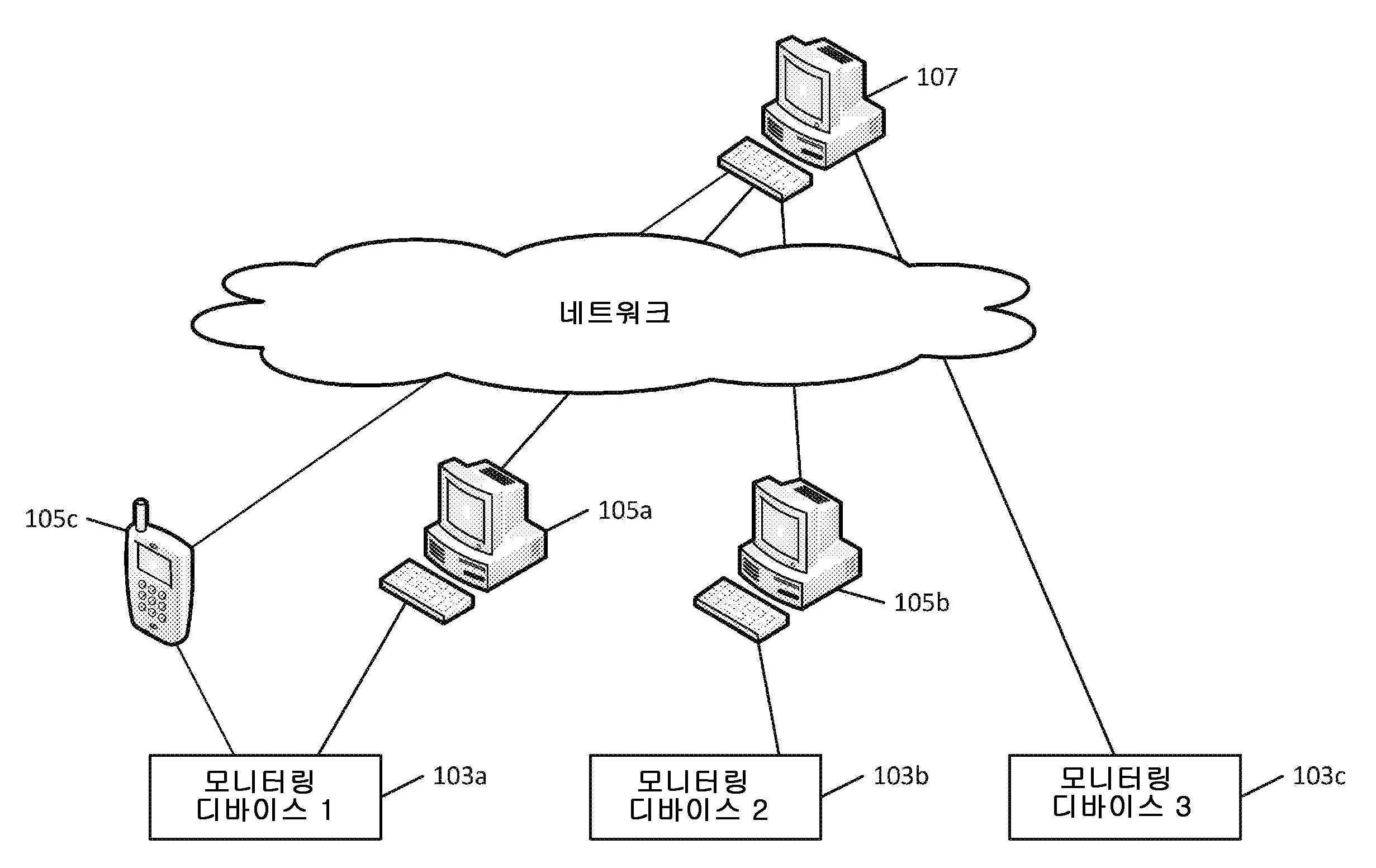
도 1은 본 명세서에 기재된 하나 이상의 양태들을 이용하고 운영할 수 있는 일반적인 네트워크 및 시스템 환경을 도시한다. 예를 들어, 환경(100)은 인터넷, 단거리 및 장거리 무선 통신, 유선 통신, 셀룰러 통신, BLUETOOTH(예를 들어, 저 에너지), ZIGBEE, RFID, Wi-Fi 접속, WLAN, USB, 파이어 와이어(FireWire) 등 및/또는 이들의 조합들을 포함하는 다양한 타입의 네트워크, 접속, 및 프로토콜을 통해 연결된 다수의 디바이스들을 포함할 수 있다. 예를 들어, 활동 모니터링 디바이스(103a 및 103b)는 유선 및 무선 접속을 포함하는 근거리 연결을 통해 각각 컴퓨팅 디바이스(105a 및 105b)에 접속될 수 있다. 한편, 활동 모니터링 디바이스(103c)는 Wi-Fi, 셀룰러 통신, TCP/IP, 이더넷 등 및/또는 이들의 조합을 포함하는 장거리 무선 또는 유선 통신을 통해 원격 활동 모니터링 및 추적 시스템(107)에 접속될 수 있다. 활동 모니터링 디바이스(103a, 103b 및 103c)는 스마트 폰, 전용 활동 모니터링 디바이스, 센서 및/또는 이들의 조합을 포함하는 활동 모니터링 시스템의 임의의 타입을 포함할 수 있다. 1 illustrates a general network and system environment in which one or more aspects described herein may be used and operated. For example,
활동 모니터링 디바이스들의 예들은: 2011년 11월 1일 출원된 발명의 명칭이 “Wearable Device Having Athletic Functionality"인 미국 출원 번호 13/287,047; 2010년 4월 26일 출원된 발명의 명칭이 "Athletic Watch"인 미국출원번호 12/767,288; 2010년 4월 26일 출원된 발명의 명칭이 "GPS Features And Functionality In An Athletic Watch System"인 미국출원번호 12/767,447; 2010년 4월 26일 출원된 발명의 명칭이 "Athletic Watch"인 미국출원번호 12/767,425; 2010년 4월 26일 출원된 발명의 명칭이 "Athletic Watch"인 미국출원번호 12/767,308; 및 2012년 1월 4일 출원된 발명의 명칭이 "Athletic Watch"인 미국출원 번호 13/343,587에 개시되어 있고 그 내용들 전체가 본 명세서에 전체가 참조로 통합된다. Examples of activity monitoring devices include: U.S. Application No. 13/287,047, filed November 1, 2011, entitled “Wearable Device Having Athletic Functionality;” April 26, 2010, entitled “Athletic Watch” U.S. Application No. 12/767,288; U.S. Application No. 12/767,447, entitled "GPS Features And Functionality In An Athletic Watch System," filed on April 26, 2010; Title of Invention Filed on April 26, 2010 U.S. Application No. 12/767,425 entitled "Athletic Watch"; U.S. Application No. 12/767,308 entitled "Athletic Watch" filed on April 26, 2010; No. 13/343,587, "Athletic Watch," the contents of which are incorporated herein by reference in their entirety.
활동 모니터링 디바이스(103a, 103b, 103c)는 다른 센서들(예를 들어, 심박수 모니터, 가속도계, 위성 위치 확인 시스템, 셀룰러 삼각 측량 시스템(cellular triangulation system), 충격 센서, 온도 게이지, 자이로스코프, 광 센서 등)을 포함할 수 있고, 다른 통신 또는 데이터 기록 프토토콜들을 사용할 수 있고, 다른 캘리브레이션을 갖고 및/또는 다른 타입의 활동 및 움직임을 검출하도록 구성될 수 있다. 예를 들어, 디바이스(103a)는 다수의 스텝들 및 그에 기초하는 해당 속도를 검출하도록 구성될 수 있는 한편, 디바이스(103b)는 (예를 들어, 농구나 다른 타입의 스포츠를 위한) 심박수와 엉덩이 움직임을 검출하도록 구성될 수 있다. 따라서, 디바이스(103a, 103b)에 의해 기록된 데이터는 즉시 호환가능하지 않을 수도 있거나 또는 비교불가할 수 있을 수도 있다. 사용자는, 예를 들면, 정보가 적절히 처리되고 가시화되거나 전달될 수 있도록 서로 다른 애플리케이션, 서비스 또는 시스템을 사용하여 메트릭(metric) 및 기록된 데이터를 볼 수 있다. 비록 유사한 구성 요소(예를 들어, 디바이스(103a 및 103c))를 갖는 디바이스들 사이에서, 디바이스는 상이한 민감도 또는 캘리브레이션을 가질 수 있고, 따라서, 결과적인 데이터는 여전히 부정확한 성능 비교를 제공할 수 있다.
전반적인 신체 활동의 비교를 용이하게 하고 신체 활동 추적을 간소화시키기 위해 활동 데이터는 시스템(107)과 같은 다중 활동 시스템 및 플랫폼을 이용하여 처리될 수 있다. 시스템(107)은 활동 모니터링 및 추적 사이트 및 커뮤니티를 호스트(host)할 수 있고 이를 통해 사용자들이 자신의 활동 진행을 추적할 수 있을 뿐만 아니라 다른 사용자들과 접속하여 활동 레벨을 공유 및/또는 비교하고, 경쟁하고, 공동 활동, 통신 등에 참여할 수 있다. 본 명세서에서 설명되는 바와 같이, 모니터링 디바이스(103a 및 103b) 간의 활동 데이터의 통신은 각각 컴퓨팅 디바이스(105a 및 105b)를 통해 용이하게 될 수 있다. 또한 활동 모니터링 디바이스(103a)는 디바이스(105c)와 데이터 통신할 수 있다. 그러나, 예를 들어, 디바이스(103a 및 103b)가 시스템(107)과 인터페이스하기 위한 통신 수단(예를 들어, 인터넷 액세스 또는 광역 네트워크 액세스)를 포함할 경우, 컴퓨팅 디바이스(105a, 105b 및 105c)의 사용이 필요치 않을 수 있다. 어떤 실시예들에서, 디바이스(105a, 105b 및 105c)는 또한 활동 데이터의 중간 처리를 제공하고, 하나 이상의 다중 활동 시스템 및 플랫폼의 기능 및/또는 능력을 포함할 수도 있다.Activity data may be processed using multiple activity systems and platforms, such as
시스템(107)은 사용자가 다양한 활동에 대한 활동 데이터 및 수행된 활동 타입들을 볼 수 있는 단일 소스를 제공하도록 구성될 수 있다. 예를 들어, 제1 사이트 또는 시스템을 통해, 농구 활동 데이터를 보고 다른 사이트 또는 시스템을 통해 데이터를 실행하는 것보다, 사용자가 단일 플랫폼 또는 시스템을 통하여 취합된 정보를 볼 수 있다. 또한, 다른 모니터링 디바이스 또는 디바이스(103a, 103b 및 103c) 등의 활동 모니터링 디바이스의 타입을 사용하여 기록된 데이터가 취합되어 함께 볼 수 있다. 시스템(107)은 또한 시각화 및 기록된 데이터 및 활동을 좀 더 세밀하게 제어할 수 있는 데이터 처리를 제공할 수 있다. 예를 들어, 시스템(107)은 사용된 모니터링 디바이스에 기반한 활동 데이터 세트, 활동 모니터링 디바이스의 타입, 수행된 활동의 타입, 시간 및/또는 활성 세션을 표시할 수 있는 능력을 사용자에게 제공할 수 있다. 또한, 시스템(107)에 의한 신체 활동 데이터의 취합은 사용자가 그의 또는 그녀의 전반적인 신체 활동 레벨을 측정, 보기 및 평가할 수 있게 한다. 예를 들어, 다양한 신체 활동 데이터(예를 들면, 메트릭(metrics))은 활동 포인트들과 같은 가상 활동 메트릭(virtual activity metric)으로 변환되어 다른 활동들 및 활동 세션들 간의 비교 기준을 제공할 수 있게 된다. 또한, 사용자가 서로 다른 메트릭을 사용하여 복수 종류의 활동을 측정하거나 또는 다른 종류의 센서 데이터를 제공하거나 및/또는 사용자가 다른 모니터링 디바이스 또는 디바이스(103a, 103b 및 103c) 등의 타입을 사용하는 경우라 하더라도, 사용자는 복수 타입의 활동을 수행함으로써 달성될 수 있는 목표를 한정할 수 있다.
컴퓨팅 디바이스(105a, 105b 및 105c)는 시스템(107)으로 송신될 데이터를 요구하지 않고 시스템(107)과 유사한 데이터 처리를 제공하도록 구성될 수 있다. 예를 들어, 컴퓨팅 디바이스(105a)는 복수의 모니터링 디바이스(103a, 103b 및/또는 103c)로부터 데이터를 수신할 수 있고, 시스템(107)과 유사한 데이터 추적 및 비교를 제공할 수 있다. 대안적으로 또는 부가적으로, 컴퓨팅 디바이스(105a, 105b 및 105c)는 또한 어떠한 구성으로 사용되어 데이터의 중간 저장 및 시스템(107)과의 데이터 통신을 원활하게 할 수 있다. 예를 들어, 디바이스(103a 및 103b)가 비교적 작은 메모리 용량을 포함할 경우, 컴퓨팅 디바이스(105a, 105b 및 105c)는 디바이스(103a 및 103b)가 추가의 새로운 데이터를 저장하기 위해 공간 확보를 위해 이전에 기록된 활동 데이터를 삭제할 수 있도록 디바이스(103a 및 103b)로부터 기록된 데이터를 각각 저장하도록 사용될 수 있다. 컴퓨팅 디바이스(105a, 105b, 105c)는 다른 활동 모니터링 디바이스, 휴대 전화, 위성 전화, 인터넷 전화 디바이스, 스마트 폰 등과 같은 전기통신 디바이스, 뮤직 플레이어, 비디오 플레이어, 노트북 컴퓨터 등을 포함한 휴대용 컴퓨팅 디바이스, 개인용 컴퓨터(PC) 등의 데스크 톱 컴퓨팅 시스템에 대응할 수 있다.
하나 이상의 구성에서, 하나 이상의 디바이스들(105a, 105b 및 105c)이 다른 디바이스들과는 다르게 구성될 수 있다. 일 예에서, 디바이스(105c)는 로컬 동기화 및 활동 데이터의 저장을 위해 구성될 수 있는 한편 하나 이상의 디바이스(105a 및 105b)는 패쓰스루 동기화(pass-through synchronization)를 위해 구성될 수 있다. 이에 따라, 활동 데이터가 디바이스(105c)에 저장되도록 활동 데이터는 활동 모니터링 디바이스(103a) 및 디바이스(105c) 사이에서 동기화될 수 있다. 다음, 활동 데이터는 미래의 어떤 시점에서 다중 활동 시스템(107)으로 동기화될 수 있다. 패쓰스루 동기화 모드에서의 경우, 디바이스(105a)는 중간 스토리지 없이 디바이스(103a)와 다중 활동 시스템(107) 사이의 동기화를 용이하게 할 수 있다. 즉, 디바이스(105a)는 디바이스(105a) 및 활동 모니터링 디바이스(103a) 사이의 동기화를 지원하지 않을 수도 있다. 디바이스(105a, 105b, 105c)의 다양한 동기화 구성은 설치된 동기화 애플리케이션의 타입 및/또는 그 실행의 타입에 의존할 수 있다.In one or more configurations, one or
도 2는 도 1에 설명된 하나 이상의 디바이스들에 포함될 수 있는 예시적인 컴퓨팅 시스템을 도시한다. 예를 들어, 컴퓨팅 시스템(201)은 디바이스들(103a, 103b, 103c, 105a, 105b 및 107) 중 어느 하나로서 동작하도록 적응될 수 있다. 도면에서 알 수 있는 바와 같이, 컴퓨터(201)는 연산부(203)를 갖는다. 연산부(203)는 처리부(205) 및 시스템 메모리(207)를 포함할 수 있다. 처리부(205)는 소프트웨어 명령어를 실행하기 위한 임의의 타입의 처리 디바이스일 수 있으나, 종래의 마이크로 프로세서 디바이스일 수 있다. 시스템 메모리(207)는 판독 전용 메모리(ROM)(209) 및 랜덤 액세스 메모리(RAM)(211) 둘 다를 포함할 수 있다. 당업계에서 통상의 지식을 가진 자라면 아는 바와 같이, 판독 전용 메모리(ROM)(209) 및 랜덤 액세스 메모리(RAM)(211) 양자 모두 처리부(205)에 의한 실행을 위한 소프트웨어 명령어를 저장할 수 있다. FIG. 2 illustrates an example computing system that may be included in one or more devices described in FIG. 1 . For example,
처리부(205) 및 시스템 메모리(207)가 버스(213) 또는 다른 통신 구조를 통해 하나 이상의 주변기기들에 직접 또는 간접적으로 연결된다. 예를 들어, 처리부(205) 또는 시스템 메모리(207)가 하드 디스크 드라이브(217) 및 분리형 광 디스크 드라이브(removable optical disk drive)(219) 등의 부가적 메모리 스토리지에 직접 또는 간접적으로 연결될 수 있다. 컴퓨터(201)는 또한 고체 상태 드라이브, 분리형 자기 디스크 드라이브 및 플래시 메모리 카드 등의 다른 메모리 저장 매체들을 사용하거나 인터페이스될 수 있다. 처리부(205) 및 시스템 메모리(207)는 또한 직접적으로 또는 간접적으로 하나 이상의 입력 디바이스(221) 및 하나 이상의 출력 디바이스(223)에 연결될 수 있다. 입력 디바이스(221)는 예를 들어, 키보드, 터치 스크린, 리모트 컨트롤 패드, 포인팅 디바이스(마우스, 터치 패드, 스타일러스, 트랙볼, 조이스틱 등), 스캐너, 카메라 또는 마이크를 포함할 수 있다. 출력 디바이스(223)는 예를 들어, 모니터 디스플레이, 텔레비전, 프린터, 스테레오, 또는 스피커를 포함할 수 있다.The
또한, 연산부(203)는 네트워크와 통신하기 위해 직접 또는 간접적으로 하나 이상의 네트워크 인터페이스(215)에 연결될 수 있다. 이러한 네트워크 인터페이스(215)의 타입은 또한 때때로 네트워크 어댑터 또는 네트워크 인터페이스 카드(NIC)로 지칭하며, 연산부(203)로부터의 데이터 및 제어 신호들을 예컨대 전송 제어 프로토콜(TCP), 인터넷 프로토콜(IP) 및 사용자 데이터그램 프로토콜(UDP)과 같은 하나 이상의 통신 프로토콜에 따른 네트워크 메시지로 변환한다. 네트워크 어댑터는 무선 또는 유선 또는 이들의 조합일 수 있다. 이러한 프로토콜은 당업계에 잘 알려져 있고, 따라서 여기에서 더 상세히 설명하지 않는다. 인터페이스(215)는, 예를 들어, 무선 송수신기, 전원 라인 어댑터, 모뎀 또는 이더넷 연결을 포함하는, 네트워크에 접속하기 위한 임의의 적절한 접속 에이전트(connection agent)를 이용할 수 있다. 접속 에이전트는 유선 또는 무선과 유사할 수 있고 또는 이들의 조합일 수 있다. 따라서, 인터페이스(215)를 사용하여, 컴퓨터(201)는 예컨대 로컬 영역 네트워크뿐 아니라 인터넷과 같은 광역 네트워크에 액세스 할 수 있다. 하나 이상의 구성에서, 인터페이스(215)를 사용하여 로컬 또는 광대역 네트워크를 통해 웹 사이트 또는 다른 네트워크 디바이스를 검색할 수 있다. 신체 활동(physical activity) 등의 데이터는 로컬 또는 원격 네트워크 소스들(예를 들어, 도 1의 디바이스들(103a, 103b, 103c, 105a 및 105b)로/로부터 송신 또는 수신될 수 있다. In addition, the
다른 주변 디바이스들은 당업계에 알려져 있는 바와 같이, 도 1에 도시된 타입의 컴퓨터(201)에 포함되거나 그렇지 않으면 연결된다. 어떤 경우, 주변 디바이스는 연산부(203)에 영구적 또는 반영구적으로 연결될 수 있다. 예를 들어, 많은 컴퓨터와 함께, 연산부(203), 하드 디스크 드라이브(217), 분리형 광 디스크 드라이브(219) 및 디스플레이가 하나의 하우징에 반영구적으로 케이싱된다(encased). 그러나, 다른 주변 디바이스들은 컴퓨터(201)에 착탈가능하게 연결될 수 있다. 컴퓨터(201)는 예를 들어, 하나 이상의 통신 포트를 통해 주변 디바이스가 연산부(203)에 (버스(213)를 통해 직접 또는 간접적으로) 접속될 수 있다. 이러한 통신 포트들은 병렬 버스 포트 또는 직렬 버스 포트, 범용 직렬 버스(USB) 표준 또는 IEEE 1394 고속 직렬 버스 표준(예를 들어, 파이어 와이어 포트)을 사용하는 직렬 버스 포트를 포함할 수 있다. 대안적으로 또는 부가적으로, 컴퓨터(201)는 블루투스 인터페이스, Wi-Fi 인터페이스, 적외선 포트 등과 같은 무선 데이터 "port"를 포함할 수 있다.Other peripheral devices are included in or otherwise coupled to a
본 발명의 다양한 실시예에 따라 채용된 컴퓨팅 디바이스는 도 2에 도시된 컴퓨터(201)보다 더 많은 수의 구성 요소들, 컴퓨터(201)보다 더 작은 수의 구성 요소들, 또는 컴퓨터(201)와는 다른 조합의 구성 요소들을 포함할 수 있다는 것을 알 것이다. 예를 들면, 일부 구현에 따라서는 디지털 음악 플레이어, 활동 모니터링 디바이스 또는 서버 컴퓨터와 같은 매우 특정 기능을 갖도록 의도되는 하나 이상의 컴퓨팅 디바이스를 채용할 수 있다. 이러한 컴퓨팅 디바이스는 네트워크 인터페이스(215), 분리형 광 디스크 드라이브(219), 프린터, 스캐너, 외장형 하드 드라이브 등의 불필요한 주변 디바이스를 생략할 수 있다. 일부 구현예에 따르면, 데스크 탑 또는 노트북 개인용 컴퓨터와 같은 다양한 기능을 수행할 수 있도록 의도되는 컴퓨팅 디바이스들을 대안적으로 또는 선택적으로 채용할 수 있다. 이러한 컴퓨팅 디바이스들은 주변 디바이스들 또는 부가적인 구성 요소들의 임의의 조합을 원하는 대로 가질 수 있다. A computing device employed in accordance with various embodiments of the present invention may include a larger number of components than the
도 3은 도 1의 디바이스(103a, 103b 및 103c) 등의 활동 모니터링 디바이스에 적용될 수 있는 다른 컴퓨팅 디바이스 예를 도시한다. 예를 들면, 활동 검출 및 추적 디바이스(300)는 명령어를 실행하고 그 명령어에 따라 디바이스(300)의 다른 구성 요소들을 제어하도록 구성된 메인 컨트롤러 또는 호스트 프로세서(301)를 포함하여 다양한 구성 요소들을 포함할 수 있다. 디바이스(300)는 또한 랜덤 액세스 메모리(RAM)(303), 판독 전용 메모리(ROM)(305) 및 스토리지(307)와 같은 휘발성 및 비휘발성 메모리를 포함하여 데이터 및 명령어를 저장하기 위한 메모리를 더 포함할 수 있다. 또한, 디바이스(300)는 디바이스(300)에 전력을 공급하는 하나 이상의 배터리(도시 안됨)를 충전하기 위한 충전 컴포넌트(309)를 포함할 수 있다. 디바이스(300)는 다양한 입력 및 출력 어댑터 및 주변 광 센서(311), 디스플레이 어댑터(313), 가속도계(315) 및 입력 어댑터(317)를 포함하는 다른 구성 요소들을 포함할 수 있다. 주변 광 센서(311)는 시인성을 위해 하나 이상의 디스플레이의 밝기 레벨을 판정할 수 있다. 광 센서(311)는 또한 하루의 전체 시간을 결정하는 데 사용될 수 있다. 입력 어댑터(317)는 디바이스(300)에 포함되는 입력 디바이스들의 타입에 따라 버튼 누름, 터치 입력, 스크롤 휠 입력 등 다양한 타입의 입력을 수신하고 처리하도록 구성될 수 있다. 가속도계(315)는 착용가능 디바이스의 움직임과 그 디바이스를 착용하고 있는 사용자의 움직임을 검출하도록 구성될 수 있다. 어떤 예들에서, 가속도계(315)는 1-축, 3-축 또는 6-축 가속도계일 수 있다. 심박 센서, 온도 센서, 습도 센서, 나침반, 자이로 센서(gyroscopic sensor) 등을 포함하는 다른 센서들은 또한 디바이스(300)에 포함될 수 있다.FIG. 3 shows another example computing device that may be applied to an activity monitoring device, such as
디바이스(300)에 의한 통신은 유선 및 무선 접속 수단을 통하여 수행될 수 있다. 일 예에서, 디바이스(300)는 무선 주파수 전송을 통해 다른 디바이스와 무선 통신하도록 구성된 무선 컴포넌트(RADIO)(319)를 포함할 수 있다. 무선 컴포넌트(319)는 블루투스 송수신기, RFID 디바이스, 무선 LAN 송수신기, 셀룰러 트랜시버 등 및/또는 이들의 조합에 대응할 수 있고 및/또는 전용 프로세서를 포함할 수 있다. 디스플레이 어댑터(313)는 다양한 활동 정보, 상호 정보, 경고, 알림 등을 반송함에 있어서 디바이스의 하나 이상의 디스플레이를 제어하도록 구성될 수 있다. 일 예에서, 디스플레이 어댑터(313)는 디바이스(300)의 제2 디스플레이를 제어하는 것과는 독립적으로 제1 디스플레이를 제어하도록 구성될 수 있다. 착용형 디바이스는 또한 위성 위치 확인 시스템(GPS) 컴포넌트(321) 등의 위치 결정 컴포넌트를 더 포함할 수 있다. 위치 결정은 또한 셀룰러 트랜시버(예를 들어, 셀룰러 삼각 측량에 기반하는)를 포함하는 다른 디바이스를 사용하여 수행될 수 있다. 본 명세서에 기술된 구성 요소들은 단일 디바이스로 조합될 수 있거나 또는 다중 구성 요소들에 걸쳐 분포될 수 있다. 또한, 추가 또는 대체 구성 요소들은 추가의 또는 대안적인 기능을 제공하기 위해 사용될 수 있다.Communication by the
시스템(107)과 같은 다중 활동 플랫폼 및 시스템은 다양한 다른 모니터링/검출 디바이스 및 다양한 타입의 모니터링/검출 디바이스들로부터 복수의 활동 세션 및 복수의 서로 다른 타입의 활동을 위한 신체 활동 데이터를 수신하도록 구성될 수 있다. 시스템에 의해 제공되는 다양한 기능들은: 활동 데이터 추적 및 처리, 활동 과제를 용이하게 하거나, 레거시 활동 추적 시스템과의 인터페이스, 전체 커뮤니티에 대한 활동 통계, 디바이스 구성, 셋업 및 동기화, 목표 추적 및 처리, 사용자 등록, 다른 커뮤니티 또는 소셜 네트워크와의 인터페이스를 포함하는 커뮤니티 정보를 생성하여 관련 정보를 획득하거나, 사용자 프로필 및 사이트 관리 등의 제공을 포함할 수 있다. Multiple activity platforms and systems, such as
다중 활동 플랫폼 및 시스템(107)은 디바이스(103a, 103b, 103c, 105a, 105b 및 105c)로부터 분리된 것으로 설명되지만, 다중 활동 플랫폼의 일부 또는 전부가 디바이스(103a, 103b, 103c, 105a, 105b 및 105c)에 구현될 수도 있다. 예를 들어, 다중 활동 플랫폼은 다른 활동 모니터링 디바이스, 추적 서비스 혹은 시스템, 활동 모니터링 애플리케이션 등의 사이에서 데이터 통신 및 상호작용을 용이하게 하도록 구성된 응용 프로토콜 인터페이스를 포함할 수 있다. 이와 같이, 활동 모니터링 디바이스의 구성이나 종류(예를 들면, 포함된 센서의 종류 또는 추적할 활동의 종류), 추적 서비스 또는 시스템이나 거기에 실행된 애플리케이션에 상관없이, 데이터가 통신될 수 있고 공유 프레임워크를 사용하여 기능들이 적용될 수 있다. While the multi-activity platform and
도 4는 다중 활동 플랫폼 및 시스템이 여러 디바이스들로부터 활동 데이터를 처리할 수 있고 다중 활동들을 위한 예시적인 프로세스를 도시한다. 단계 400에서, 시스템은 시스템으로 데이터를 게시하기 위한 요청을 수신할 수 있다. 요청은 도 1의 디바이스(103a, 103b 및 103c) 등의 활동 검출 및 모니터링 디바이스 또는 도 1의 컴퓨팅 디바이스(105a, 105b) 등의 중간 디바이스로부터 수신될 수 있다. 단계 405에서, 시스템은 상기 요청 디바이스로부터 신체 활동 데이터를 수신할 수 있다. 신체 활동 데이터는 다양한 프로토콜에 따라 전송될 수 있으며 여기에서 더 상세히 논의되는 바와 같이, 적어도 하나의 실시예에서, 시스템에 의해 제공된 API를 사용하여 전송될 수 있다. 단계 410에서, 시스템은 신체 활동 데이터를 기록하기 위한 활동 검출 및 모니터링 디바이스의 디바이스 타입을 결정할 수 있다. 디바이스 타입은 디바이스 기능, 디바이스 타입을 사용하도록 구성되는 활동의 타입, 디바이스 컴포넌트, 데이터 정확성, 데이터 기록 파라미터(예를 들어, 데이터가 수집되는 빈도) 등 및/또는 이들의 조합일 수 있다. 디바이스 타입은 요청에 지정된 다양한 파라미터(예를 들어, API의 데이터 게시 기능에서 디바이스 타입 파라미터)에 기초하여 또는 수신된 신체 활동 데이터의 분석에 기초하여 결정될 수 있다. 예를 들어, 시스템은 수신된 물리적 활동 데이터가 가속도계 데이터, 심박수 데이터, GPS 데이터 등을 포함하는지 결정할 수 있다. 미리 정의된 규칙에 따라, 시스템은 신체 활동 데이터의 데이터 타입이 제1 디바이스 타입 또는 제2 디바이스 타입에 대응하는지 여부를 판정할 수 있다. 또 다른 예에서, 시스템은 예컨대 사용자가 지정한 이름, 브랜드, 제품명, 일련 번호 등의 디바이스 식별자를 수신하고, 그에 기초한 디바이스 타입을 정할 수 있다. 특정 예에서, 디바이스 식별자는 디바이스 등록시에 사전에 연관되거나 또는 등록된 디바이스 타입일 수 있다. 필요에 따라 또는 원하는 디바이스 타입을 결정하는 다양한 다른 방식들도 사용될 수 있다.4 illustrates an example process for multiple activities in which the multiple activity platform and system may process activity data from multiple devices. At
단계 415에서, 시스템은 또한 수신된 신체 활동과 관련된 활동의 타입을 결정할 수 있다. 일 예에서, 이러한 결정은 데이터가 수신되는 디바이스 타입에 기초하여 이루어질 수 있다. 예를 들어, 디바이스의 제1 타입은 예를 들어, 농구 등 제1 활동 타입에 대해 구성될 수 있는 한편 디바이스의 다른 타입은 주행 또는 보행 등의 제2 활동 타입에 대해 구성될 수 있다. 다른 예에서, 활동 타입 결정은 시스템에 의해 수신된 데이터 파라미터에 기초하여 결정될 수 있다. 파라미터는 사용자가 활동 데이터를 수행된 활동 타입에 태깅(tagging)함에 의한 사용자 지정(user-specified)일 수 있고 또는 활동 타입 인식 알고리즘과 방법론에 기초하여 하나 이상의 디바이스들에 의해 태깅된 것일 수 있다. 일 예에서, 활동 검출 및 모니터링 디바이스와 같은 디바이스는 신체 활동 데이터의 패턴을 신체 활동 데이터의 이전 세트에 비교하여 유사성을 판단할 수 있다. 신체 활동 패턴이 이전 세트의 신체 활동 데이터(공지된 할동 타입)와 미리 정의된 임계치가 일치하는 것으로 판단되면, 디바이스는 최근 기록된 신체 활동이 동일한 활동 타입에 해당하는지 판단할 수 있다. 다양한 다른 기능, 알고리즘 및 방법들이 활동 타입을 결정하는 데 이용될 수 있다. At
단계 420에서, 시스템은 수신된 신체 활동 데이터에 대한 활동 메트릭(activity metrics)을 생성하도록 선택적으로 구성될 수 있다. 메트릭은 시간, 속도, 거리, 심박수, 체온, 촬영 단계, 소비 한 칼로리 등을 포함할 수 있다. 일부 구성에서, 물리적 활동 데이터는 활동 검출 및 모니터링 디바이스 또는 중간 컴퓨팅 디바이스에 의해 생성된 메트릭을 이미 포함할 수 있다. 따라서, 시스템은 메트릭이 이미 생성되었는지 또는 수신 활동 데이터에 포함되는지 결정하도록 구성될 수 있고 그렇지 않다면, 메트릭을 생성한다. 그러나, 메트릭이 이미 생성/포함되어 있다면, 시스템은 메트릭을 생성할 수 없다. 다른 구성에서, 신체 활동 데이터는 메트릭으로 가공되지 않는 가공전 센서 데이터일 수 있다. 따라서, 후자의 경우, 시스템은 원시 센서 데이터를 하나 이상의 메트릭으로 처리할 수 있다. 예를 들어, 가속도계 데이터 및 달리기 활동에 대해, 발 접촉 시간은 다양한 공지 방법에 따른 센서 데이터로부터 식별될 수 있고, 움직임의 속도(pace), 거리, 속도(speed)를 계산할 수 있다. 메트릭은 디바이스 타입 및/또는 수행된 운동 활동의 형태에 기초하여 선택된 알고리즘과 방법을 사용하여 생성될 수 있다. 예를 들어, 다른 디바이스 타입들은 서로 다른 종류의 교정 값을 가질 수 있는 한편 다른 타입의 운동 활동들이 다른 타입의 메트릭들에 대응할 수 있다. 다른 디바이스 타입들은 또한 서로 다른 센서들을 가질 수 있고 따라서, 센서 데이터를 처리하기 위한 다양한 타입의 알고리즘을 필요로 할 수 있다.At 420 , the system may optionally be configured to generate activity metrics for the received physical activity data. Metrics may include time, speed, distance, heart rate, body temperature, steps taken, calories burned, etc. In some configurations, the physical activity data may already include metrics generated by an activity detection and monitoring device or intermediate computing device. Accordingly, the system may be configured to determine whether a metric has already been generated or is included in the received activity data and otherwise generates the metric. However, if the metric has already been created/contained, the system cannot generate the metric. In another configuration, the physical activity data may be raw sensor data that is not processed into metrics. Thus, in the latter case, the system may process raw sensor data into one or more metrics. For example, for accelerometer data and running activity, foot contact time may be identified from sensor data according to various known methods, and a pace, distance, and speed of movement may be calculated. Metrics may be generated using selected algorithms and methods based on device type and/or type of athletic activity performed. For example, different device types may have different kinds of calibration values while different types of athletic activities may correspond to different types of metrics. Different device types may also have different sensors and thus may require different types of algorithms to process sensor data.
단계 425에서, 시스템은 또한 활동 데이터로부터 결정된 활동 메트릭을 정상화(normalize)할 수 있다. 정상화는 다른 디바이스, 서로 다른 디바이스 타입, 상이한 활동 세션, 다른 활동 타입 등의 사이에서 데이터 정확성에서의 불일치를 보상하기 위해 수행될 수 있다. 정상화는 특정 타입의 활동 또는 디바이스 타입에 대해 결정된 메트릭을 조정하기 위해 미리 정의된 테이블 또는 정상화(예를 들면, 캘리브레이션) 값들을 사용하여 수행될 수 있다. 그리하여, 제2 활동 모니터링 디바이스를 사용하여 결정된 바와 같 달린 거리가 0.998의 계수(factor)로 곱해질 수 있는 한편 제1 활동 모니터링 디바이스를 사용하여 결정된 바와 같이 달린 거리는 1.05의 계수로 곱해질 수 있다. 이러한 정상화 또는 교정 값들은 하나 이상의 구성에서 경험적 분석에 기초하여 결정될 수 있다. 다른 예들에서, 정상화 및 교정값들은 특정한 활동(예를 들어, 200 피트 달리기)을 수행하도록 사용자에게 요구하고, 결과의 데이터를 기록하고 분석함에 따른 통계 분석에 기초하여 결정될 수 있다. At
단계 430에서, 상기 시스템은 활동 세션, 수행된 활동 타입, 사용된 디바이스 또는 디바이스 타입이 활동 포인트 등의 가상 또는 보편적인 활동 메트릭에 적합한지 여부를 결정할 수 있다. 시스템은 예를 들어, 특정 활동, 활동 타입, 디바이스 또는 디바이스 타입 및/또는 이들의 조합에 활동 포인트가 누적되는 것을 제한할 수 있다. 활동 포인트들은 전반적인 활동 레벨의 측정치를 전달하기 위해, 목표를 향한 진행을 정의하고 측정하기 위해, 가상 화폐로서 마일스톤(milestones) 및 다른 타입의 성과 등을 달성하기 위해 사용될 수 있다. 가상/범용 메트릭을 사용함으로써, 다수의 활동들로부터의 활동, 활동 타입, 디바이스 및 디바이스 타입이 전반적인 활동 레벨이나 양으로 통합될 수 있다. 활동 데이터가 활동 포인트를 받을 수 없는 경우, 예컨대 원시 데이터 및/또는 메트릭과 같은 활동 데이터가 이러한 메트릭 및 데이터를 활동 포인트의 양으로 변환하지 않고 또한 사용자에 활동 포인트를 보상하지 않고 단계 435에서 저장될 수 있다. 프로세스는 계속하여 단계 450으로 진행되거나, 종료된다. At step 430, the system may determine whether an activity session, activity type performed, device or device type used fits a virtual or universal activity metric, such as activity points. The system may limit accrual of activity points to, for example, certain activities, activity types, devices or device types, and/or combinations thereof. Activity points can be used to convey a measure of overall activity level, to define and measure progress toward a goal, to achieve milestones and other types of achievements as virtual currency, and the like. By using a virtual/universal metric, activity, activity type, device and device type from multiple activities can be aggregated into an overall activity level or quantity. If activity data is not eligible for activity points, for example activity data such as raw data and/or metrics may be stored in
다른 한편으로, 활동 데이터가 활동 포인트를 받을 자격이 있는 경우, 시스템은 단계 440에서 디바이스 타입 및/또는 활동 타입에 따라 다양한 알고리즘을 사용하여 수신된 신체 활동 데이터에 대응하는 활동 포인트의 수를 결정할 수 있다. 예를 들어, 다른 알고리즘들은 상이한 디바이스 타입, 다른 활동 타입 또는 디바이스 타입 및 활동 타입의 다른 조합들에 대해 정의될 수 있다. 또한 메트릭 및/또는 원시 활동 데이터는 저장될 수 있다. 일부 활동들은 (예를 들어, 하나 이상의 특정 메트릭에 의해 정의된 바와 같이), 다른 것들에 비해 동일한 양의 신체 활동에 대해 낮은 레벨의 물리적 노력을 요구할 수 있기 때문에, 다른 알고리즘들이 사용될 수 있다. 일 예에서, 달리기로 3 마일을 횡단하는 것이 걷기로 3 마일을 횡단하는 보다 좀 더 신체적으로 부담이 클 수 있다. 이에 따라, 주행 활동(활동 포인트들)을 위한 알고리즘은 걷기 활동을 위한 활동 포인트를 생성하는 데 사용되는 알고리즘보다 더 많은 수의 활동 포인트를 생성할 수 있다. 즉, 3 마일 산책보다 3 마일 달리기에 대해 더 많은 활동 포인트가 부여될 수 있다. 알고리즘은 또한 심박수, 거리, 속도, 체온 등의 활동 메트릭들의 다수의 계정 타입들을 취할 수 있다. 몇몇 구성에서, 이러한 고도, 지형, 온도, 날씨 등의 활동 특성(예를 들면, 비, 눈, 태양)도 활동 포인트 판정 처리에서 사용될 수 있다.On the other hand, if the activity data is eligible to receive activity points, the system may use various algorithms according to the device type and/or activity type in
일단 활동 포인트의 수가 결정되면, 활동 포인트는 단계 445에서 특정 시간 기간 동안 활동 포인트의 총 수에 추가될 수 있다. 예를 들어, 활동 포인트들이 목표 시간 기간(예를 들어, 1 시간, 12 시간, 하루, 이틀, 1 주 등) 동안 목표를 달성하기 위해 누적될 수 있다. 이와 같이, 단계 450에서, 시스템은 누적된 활동 포인트 양에 기초하여 사용자가 목표를 달성했는지 여부, 마일스톤에 도달했는지 여부를 결정할 수 있다. 예를 들어, 사용자는 하루에 3,000점의 활동 포인트 목표를 가질 수 있다. 따라서, 시스템은 사용자가 하루 3,000점의 활동 포인트를 달성되었는지 여부를 판단할 수 있다. 또 다른 예에서, 마일스톤은 일생 동안 25,000 활동 포인트를 달성한 것으로 정의될 수 있다. 따라서, 시스템은 총 일생 누적 활동 포인트가 25,000을 달성했는지 여부를 결정할 수 있다. 이와 같이, 상이한 활동 포인트 카운트는 다른 기간 동안 유지될 수 있다. Once the number of activity points is determined, the activity points may be added to the total number of activity points for the specified time period at
사용자가 목표에 도달하거나 마일스톤을 달성한다면, 단계 455에서 보상 또는 경고가 사용자에 제공될 수 있다. 보상은 가상 상품, 서비스, 쿠폰, 티켓, 통화, 가상 화폐, 아바타 등 항목을 포함할 수 있다. 목표가 달성되지 않았거나 중요 시점에 도달하지 않으면, 시스템은 단계 460에서 마일스톤 또는 목표에 도달하기 위해 여전히 요구되는 진행량(예를 들어, 필요한 활동 포인트의 수)을 나타낼 수 있다. If the user reaches a goal or achieves a milestone, a reward or warning may be provided to the user at
디바이스로부터 데이터 수신에 부가하여, 시스템은 또한 디바이스로 데이터를 송신하도록 구성될 수 있다. 예를 들어, 시스템 및 하나 이상의 모니터링 디바이스 간에 데이터 동기화는 제1 모니터링 디바이스에 의해 기록된 신체 활동 데이터를 제2 모니터링 디바이스로 전송하고 및/또는 제1 모니터링 디바이스에 의해 기록된 히스토리(historical) 활동 데이터를 다시 제1 모니터링 디바이스로 다운로딩하는 단계를 포함할 수 있다. 어떤 경우에는, 모든 데이터가 하나의 모니터링 디바이스로부터 다른 디바이스로 송신될 수 있는 것은 아니고 대신, 데이터는 데이터 호환성, 활동 타입, 사용자가 수행하는 활동 등에 기초하여 필터링될 수 있다. 예를 들어, 수신측 디바이스는 전송 디바이스로부터 동기화될 데이터와 동일한 타입의 데이터(예를 들어, 동일한 타입의 센서)를 기록하는 능력을 가질 것이 요구될 수 있다. 다른 예에서, 수신측 디바이스가 데이터에 대응하는 활동 타입을 추적 및/또는 모니터하도록 구성된 경우에만 데이터가 동기화될 수도 있다. 다양한 다른 규칙들이 동기화 요청을 처리하는 데 사용될 수 있다. 활동 포인트는 수신측 디바이스가 활동 포인트를 추적할 수 있는 능력을 갖는 한 항상 동기화될 수 있다.In addition to receiving data from the device, the system may also be configured to transmit data to the device. For example, data synchronization between the system and one or more monitoring devices transmits physical activity data recorded by the first monitoring device to a second monitoring device and/or historical activity data recorded by the first monitoring device may include downloading back to the first monitoring device. In some cases, not all data may be transmitted from one monitoring device to another, and instead, data may be filtered based on data compatibility, activity type, activity performed by the user, and the like. For example, the receiving device may be required to have the ability to record the same type of data (eg, the same type of sensor) as the data to be synchronized from the transmitting device. In another example, data may be synchronized only if the receiving device is configured to track and/or monitor an activity type corresponding to the data. Various other rules may be used to process the synchronization request. Activity points can always be synchronized as long as the receiving device has the ability to track the activity points.
어떤 예들에서, 두 개의 모니터링 디바이스 사이의 데이터의 전송 및 동기화는 다중 활동 플랫폼 및 시스템에 의해 촉진될 수 있다. 예를 들어, 시스템은 수신측 디바이스가 호환되는 제2 통신 프로토콜과 호환되지 않는 제1 통신 프로토콜을 사용하여 데이터를 변환하도록 구성될 수 있다. 추가적으로 또는 대안적으로, 데이터의 컨텐츠는 수신측 디바이스의 형식 요구 사항(예를 들어, 문자 제한, 이미지 크기, 숫자 포맷, 날짜 포맷 등) 및 수신측 디바이스의 데이터 저장 구조 또는 파라미터들에 따라 시스템에 의해 변형될 수 있다. 일 예에서, 사용자 프로필 정보가 자동으로 한 디바이스에서 다른 디바이스로 반입될 수 있다. 제1 디바이스에서 사용 가능한 다양한 데이터 필드가 제2 디바이스에 존재하지 않을 수도 있고 따라서, 시스템은 그 정보를 제2 디바이스에 동기화시키기 전에 해당 필드에 대한 데이터를 필터링할 수 있다. 시스템은 두개의 디바이스 사이의 호환성을 제공하기 위해 다양한 다른 데이터 및 프로토콜 조작을 수행하도록 구성될 수도 있다.In some examples, the transfer and synchronization of data between two monitoring devices may be facilitated by a multi-activity platform and system. For example, the system may be configured such that the receiving device converts the data using a second communication protocol that is compatible and a first communication protocol that is not compatible. Additionally or alternatively, the content of the data is stored in the system according to the format requirements of the receiving device (eg, character restrictions, image size, number format, date format, etc.) and the data storage structure or parameters of the receiving device. can be transformed by In one example, user profile information may be automatically imported from one device to another. The various data fields available in the first device may not exist in the second device, and thus the system may filter the data for those fields before synchronizing the information to the second device. The system may be configured to perform various other data and protocol manipulations to provide compatibility between the two devices.
논의된 바와 같이, 디바이스(103a, 103b 또는 103c) 등의 활동 모니터링 디바이스는 활동 데이터를 초기 검출하고 저장한 다음 이어서 데이터를 하나 이상의 로컬 디바이스/애플리케이션(예를 들어, 디바이스(105c)) 및/또는 원격 다중 활동 시스템/서버(예를 들어, 시스템(107))와 함께 동기화시킬 수 있다. 일 구성에서, 다중 활동 시스템/서버는 큰 저장 용량 때문에 목적지(destination) 또는 선호하는 저장 위치(preferred storage site)를 나타낼 수 있다. 따라서, 활동 모니터링 디바이스에 의해 기록되거나 및/또는 디바이스(105c) 등의 로컬 디바이스/애플리케이션에 동기화된 데이터는 모니터링 디바이스 및/또는 로컬 디바이스에서 대용량의 데이터 저장 용량을 필요로 하지 않거나 및/또는 차지하지 않도록 장기간 저장을 위해 다중 활동 시스템/서버에 전송될 수 있다. 로컬 디바이스는 스마트 폰, 휴대형 미디어 디바이스, 태블릿 컴퓨터, 넷북 컴퓨터, 노트북 컴퓨터 등의 이동 통신 디바이스 및/또는 데스크 톱 컴퓨터와 같은 고정 디바이스일 수 있다. As discussed, an activity monitoring device, such as
일부 구성에서, 디바이스(105a)와 같은 중간 디바이스는 활동 모니터링 디바이스 및 다중 활동 시스템/서버 간의 데이터를 동기화하도록 구성되는 동기화 애플리케이션을 실행할 수 있다. 이러한 중간 컴퓨팅 디바이스와 동기화 애플리케이션은 중간 디바이스 및 활동 모니터링 디바이스 사이에 데이터를 동기화하도록 구성되지 않을 수도 있다. 대신에, 동기화 애플리케이션은 활동 모니터링 디바이스 및 다중 활동 시스템/서버 간의 데이터를 동기화할 수 있으며 다중 활동 시스템/서버에 접속이 가능할 때만 이러한 동기화 기능을 제공한다. 대조적으로, 로컬 애플리케이션/디바이스는 다중 활동 시스템/서버에 의해 데이터를 동기화하는 것과는 독립적으로 활동 모니터링 디바이스로부터 활동 데이터를 동기화할 수 있다. 네트워크 연결이 다중 활동 시스템/서버에 의해 이용가능하거나 또는 사용자가 다중 활동 시스템/서버를 이용하여 동기화시킬 것을 선택하면, 데이터는 로컬 디바이스/애플리케이션으로부터 다중 활동 시스템/서버로 나중에 동기화될 수 있다. In some configurations, an intermediate device such as
다른 동기화 프로세스가 또한 사용될 수 있다. 예를 들어, 로컬 디바이스/애플리케이션은 중간 애플리케이션/디바이스를 통해 데이터를 동기화할 수 있다. 또 다른 예에서, 활동 모니터링 디바이스는 다중 활동 시스템/서버와 직접 통신하도록(예를 들어, 로컬 디바이스/애플리케이션 또는 중간 애플리케이션/디바이스와 통신하지 않고) 또는 이와 함께 데이터를 동기화하도록 구성될 수 있다. 또한, 로컬 디바이스(들)가 있거나 없는 하나 이상의 중간 디바이스들은, 예를 들어, 연결성, 디바이스를 조합하여 동시성을 유지하거나 그렇지 않음에 따라, 임의의 조합 사이에서 동기화할 수 있다. 활동 모니터링 디바이스는 중간 및/또는 로컬 디바이스(들)의 이러한 조합과 함께 동기화될 수도 있고 동기화되지 않을 수도 있다. 다중 활동 시스템/서버는 중간 및/또는 로컬 디바이스(들) 및/또는 활동 모니터링 디바이스의 이러한 조합과 함께 동기화될 수도 있고 동기화되지 않을 수 있다.Other synchronization processes may also be used. For example, a local device/application may synchronize data via an intermediate application/device. In another example, an activity monitoring device may be configured to communicate directly (eg, without communicating with a local device/application or intermediate application/device) or synchronize data with a multi-activity system/server. Also, one or more intermediate devices with or without local device(s) may synchronize between any combination, eg, connectivity, depending on the combination of devices to maintain concurrency or not. The activity monitoring device may or may not be synchronized with this combination of intermediate and/or local device(s). Multiple activity systems/servers may or may not be synchronized with such combinations of intermediate and/or local device(s) and/or activity monitoring devices.
송신 및 동기화된 데이터의 중복된 양을 감소시키기 위해서, 다양한 파라미터들/설정들이 다중 활동 시스템/서버와 로컬 디바이스/애플리케이션에 동기화된 데이터를 추적하도록 정의될 수 있다. 일 예에서, 활동 모니터링 디바이스는 두 개의 파라미터: 로컬 판독 오프셋(LRO) 및 로컬 판독 타임 스탬프(LRTS)를 저장할 수 있다. 로컬 판독 오프셋(예를 들어, 메모리 위치 식별자)는 동기화할 때 로컬 애플리케이션/디바이스가 모니터링 디바이스로부터 활동 데이터 판독을 시작해야 하는 시점에서 활동 모니터링 디바이스 스토리지(예를 들면, 플래시 메모리)에 오프셋을 표시할 수 있다. 예를 들어, 메모리 위치 또는 오프셋은 제1 미판독 데이터 기록이 저장되는 위치를 지정할 수 있다. 로컬 판독 타임 스탬프는 활동 모니터링 디바이스 스토리지로부터 로컬 애플리케이션에 의해 판독된 마지막 샘플의 타임 스탬프를 나타낸다. 타임 스탬프는 샘플(예를 들면, 활동 데이터)이 모니터링 디바이스에 의해 기록되었을 때의 시간에 대응할 수 있다. 이러한 파라미터는 로컬 디바이스/애플리케이션이 활동 모니터링 디바이스와 동기화하는 때(예를 들면, 도중 또는 후)에 설정된다. 예를 들면, 활동 모니터링 디바이스는 로컬 디바이스에 의해 마지막 판독된 활동 모니터링 디바이스의 메모리 위치에 기초하여 로컬 판독 오프셋을 설정 및/또는 저장할 수 있다. 특히, 로컬 판독 오프셋은 한 지점 또는 메모리 위치(예를 들어, 제1 새로운 활동 데이터 메모리 위치)만큼 증가하는 로컬 디바이스에 의해 판독된 최종 메모리 위치의 오프셋에 대응할 수 있다. 이와 같이, LRO 및 LRTS는 활동 모니터링 디바이스를 도울 수 있고, 로컬 애플리케이션/디바이스 및/또는 MSP는 판독된 데이터/또는 판독되지 않은 데이터를 추적함으로써 판독 데이터가 동기화 동안 로컬 애플리케이션/디바이스로 불필요하게 재전송되지 않도록 한다. In order to reduce the redundant amount of transmitted and synchronized data, various parameters/settings can be defined to track synchronized data to multiple active systems/servers and local devices/applications. In one example, the activity monitoring device may store two parameters: a local read offset (LRO) and a local read timestamp (LRTS). A local read offset (e.g., memory location identifier) may indicate an offset in activity monitoring device storage (e.g., flash memory) at the point in time when the local application/device should start reading activity data from the monitoring device when synchronizing. can For example, the memory location or offset may specify where the first unread data record is stored. The local read timestamp indicates the timestamp of the last sample read by the local application from the activity monitoring device storage. The timestamp may correspond to a time when the sample (eg, activity data) was recorded by the monitoring device. These parameters are set when the local device/application synchronizes with the activity monitoring device (eg, during or after). For example, the activity monitoring device may set and/or store a local read offset based on a memory location of the activity monitoring device that was last read by the local device. In particular, the local read offset may correspond to an offset of the last memory location read by the local device incremented by a point or memory location (eg, a first new active data memory location). As such, the LRO and LRTS can help the activity monitoring device, and the local application/device and/or MSP can keep track of read data/or unread data so that read data is not unnecessarily retransmitted to the local application/device during synchronization. make sure not to
또한, 다중 활동 서비스/시스템은 마지막 동기화 오프셋(LSO) 및 마지막 동기화 시간 스탬프(LSTS)를 정의할 수 있다. LSO는 판독시 및 다중 활동 서비스/시스템으로의 데이터 동기화를 시작하는 시점에서 활동 모니터링 디바이스의 저장 메모리 내로의 오프셋(예를 들어, 메모리 위치 식별자)을 참조할 수 있다. LSO는 로컬 동기화 디바이스가 다중 활동 서비스/시스템에 동기화된 데이터의 양보다 많거나 적은 데이터를 판독한 경우 LRO와는 달라질 수 있다. 반면, 다중 활동 서비스/시스템에 동기화된 동일한 데이터가 또한 로컬 디바이스/애플리케이션에 의해 판독된 경우라면, LSO와 LRO는 동일할 수 있다.In addition, a multi-activity service/system may define a Last Sync Offset (LSO) and a Last Sync Time Stamp (LSTS). The LSO may refer to an offset (eg, a memory location identifier) into the storage memory of the activity monitoring device upon read and at the time of initiating data synchronization to the multi-activity service/system. The LSO may differ from the LRO if the local synchronization device reads more or less data than the amount of data synchronized to the multi-activity service/system. On the other hand, if the same data synchronized to the multi-activity service/system is also read by the local device/application, then LSO and LRO may be the same.
로컬 디바이스는 모니터링 디바이스와 데이터 동기화시 LRO 및 LRTS를 업데이트할 수 있다(또는 활동 모니터링 디바이스의 업데이트를 야기한다). 또한, 로컬 디바이스는 LSO 및 LSTS을 업데이트하거나 또는 LSO 및 LSTS가 데이터를 다중 활동 서비스/시스템에 동기화시킬 때 업데이트되도록 한다. 중간 디바이스/애플리케이션은 LSO 및 LSTS가 업데이트될 수 있는 경우에만 모니터링 디바이스/애플리케이션 및 다중 활동 시스템/서비스 간의 동기화를 수행한다. 이러한 경우, LRO/LRTS가 또한 업데이트될 수 있다. 일 예에서, 상기 중간 디바이스/애플리케이션은 다중 활동 서비스/시스템으로부터 LSO 및 LSTS를 초기 요청하고 LSO 및 LSTS를 사용하여 데이터 판독하고 다중 활동 서비스/시스템과 데이터를 동기화하는 활동 모니터링 디바이스의 메모리의 시작 시점을 결정한다. 전술한 프로세스를 이용하여, 다중 활동 서비스/시스템은 이미 과거에 다중 활동 서비스/시스템에 동기화된 데이터 수신을 피할 수 있다.The local device may update the LRO and LRTS upon data synchronization with the monitoring device (or cause an update of the activity monitoring device). Also, the local device updates the LSO and LSTS or causes the LSO and LSTS to be updated when synchronizing data to a multi-activity service/system. The intermediate device/application performs synchronization between the monitoring device/application and the multi-activity system/service only when the LSO and LSTS can be updated. In this case, the LRO/LRTS may also be updated. In one example, the intermediate device/application initially requests LSOs and LSTSs from multi-activity services/systems, reads data using LSOs and LSTSs, and synchronizes data with multi-activity services/systems. to decide Using the process described above, a multi-activity service/system can avoid receiving data already synchronized to the multi-activity service/system in the past.
추가적으로 또는 대안적으로, 다중 활동 시스템/서비스에 이미 동기화된 모니터링 디바이스의 데이터는 모니터링 디바이스로부터 삭제될 수 있다. 다른 예에서, 다중 활동 시스템/서비스가 그 데이터와 동기화되지 않은 경우 데이터가 삭제될 수 있고, 삭제된 데이터의 이러한 경우에서, 통지 또는 표시자(indicator)는 활동 모니터링 디바이스, 로컬 디바이스, 중간 디바이스 및/또는, 다중 활동 시스템/서비스와 아직 동기화되지 않은 데이터를 저장하는 로컬 디바이스에 의해 동기화가 수행됨을 나타내는 다중 활동 시스템/서버에 제공될 수 있다.Additionally or alternatively, data of the monitoring device already synchronized to the multi-activity system/service may be deleted from the monitoring device. In another example, data may be deleted if multiple activity systems/services are not synchronized with the data, and in this case of deleted data, a notification or indicator may include an activity monitoring device, a local device, an intermediate device and /or it may be provided to a multi-activity system/server indicating that synchronization is performed by a local device that stores data not yet synchronized with the multi-activity system/service.
그러나, 로컬 디바이스에만 동기화되고 다중 활동 시스템/서비스에는 동기화되지 않는 데이터는 삭제되지 않을 수 있다. 데이터가 삭제되지 않을 수 있는 상황의 예는 예를 들어, 동기화된 데이터에 대해 중복성(redundancy)을 유지하기 위해(선택된 시간이 경과하거나 또는 소정의 디바이스 또는 다수의 디바이스 또는 다중 활동 시스템/서비스에 동기화 등의 선택된 이벤트가 발생한 경우), 또는 사용자가 로컬 디바이스를 사용하지 않고 중간 디바이스/애플리케이션을 통해 데이터를 추후 동기화하고자 하는 경우 및/또는 사용자가 모니터링 디바이스로부터 추가적인 로컬 디바이스 동기화하고자 하는 경우를 포함한다. 다른 예들에서, 데이터는 다중 활동 시스템/서버가 그 데이터와 동기화되지 않는다면 삭제될 수 있다. 대신, 통지 또는 표시자는 활동 모니터링 디바이스, 로컬 디바이스, 중간 디바이스 및/또는 다중 활동 시스템/서비스와 아직 동기화하지 않은 데이터를 저장하는 로컬 디바이스에 의해 수행될 동기화를 나타내는 다중 활동 시스템/서버에 제공될 수 있다. 예를 들면, 데이터가 아직 현재 근접한 로컬 디바이스/애플리케이션에 동기화되지 않은 경우 멀티 활동 시스템/서비스는 어떤 경우에 활동 모니터링 디바이스로부터 삭제되지 않을 수 있다. 활동 모니터링 디바이스로부터의 데이터의 삭제는 사용자에 의해 구성 가능할 수 있다. 대안적으로 또는 부가적으로, 일단 다중 활동 시스템/서비스에 동기화되거나 및/또는 활동 모니터링 디바이스에 남아있는 공간의 크기가 지정된 임계 값 이하로 감소하는 경우에 임의의 다른 디바이스에 동기화되면 데이터가 삭제될 수 있다. However, data that is only synchronized to the local device and not to the multi-activity system/service may not be deleted. Examples of situations where data may not be deleted are, for example, to maintain redundancy for synchronized data (either a selected time has elapsed or synchronized to a given device or multiple devices or multiple activity systems/services etc.), or when the user wants to synchronize data later through an intermediate device/application without using a local device, and/or when the user wants to synchronize additional local devices from the monitoring device. In other examples, data may be deleted if the multi-activity system/server is not synchronized with the data. Instead, a notification or indicator may be provided to an activity monitoring device, a local device, an intermediate device, and/or a multi-activity system/server indicating synchronization to be performed by a local device storing data that has not yet been synchronized with the multi-activity system/service. have. For example, a multi-activity system/service may not be deleted from an activity monitoring device in some cases if data has not yet been synchronized to the current nearby local device/application. The deletion of data from the activity monitoring device may be configurable by the user. Alternatively or additionally, data may be deleted once synchronized to a multi-activity system/service and/or to any other device if the amount of space remaining on the activity monitoring device decreases below a specified threshold. can
다른 양태들에 따르면, 활동 모니터링 디바이스로부터의 데이터는 다수의 로컬 디바이스에 동기화될 수 있다. 이러한 구성에서, 각 로컬 디바이스는 LRO 및 그 로컬 디바이스에 고유한 LRTS 마커(markers)의 다른 세트를 설정할 수 있다.According to other aspects, data from an activity monitoring device may be synchronized to multiple local devices. In such a configuration, each local device may set the LRO and a different set of LRTS markers unique to that local device.
또 다른 구성에서, 로컬 디바이스는 사용자가 모니터링 디바이스로부터 데이터의 임계량을 동기화하기 위해 시도하고 있다고 결정하면, 중간 디바이스/애플리케이션을 사용하는 대신 사용자에게 메시지/추천 정보를 제공할 수 있다. 이 권장 사항은 중간 디바이스/애플리케이션이 로컬 디바이스(예를 들어, USB 대 BLUETOOTH)보다 빠른 속도로 모니터링 디바이스에서 데이터를 판독하도록 구성되는 경우에 제공될 수 있다.In another configuration, if the local device determines that the user is attempting to synchronize a threshold amount of data from the monitoring device, it may provide a message/recommendation information to the user instead of using an intermediate device/application. This recommendation may be provided if the intermediate device/application is configured to read data from the monitoring device at a faster rate than the local device (eg USB vs. BLUETOOTH).
전술한 오프셋 및 타임 스탬프를 사용하여, 동기화될 수 있는 데이터의 양은 새로운 또는 비동기화 데이터가 수신측 디바이스에 대해 동기화되도록 최적화된다.Using the offsets and timestamps described above, the amount of data that can be synchronized is optimized so that new or unsynchronized data is synchronized to the receiving device.
모니터링 디바이스의 셋업/구성 Setup/configuration of monitoring devices
다중 활동 플랫폼 및 시스템은 또한 디바이스, 시스템 및 애플리케이션이 다양한 타입의 모니터링 디바이스를 셋업하고 구성할 수 있도록 한다. 이러한 구성에서, 디바이스(105a 또는 105b) 등의 중간 컴퓨팅 디바이스는 다양한 타입의 활동을 검출하고 모니터링하도록 구성될 수 있는 다양한 모니터링 디바이스 및 디바이스 타입과 통신하고 상호작용하도록 구성되는 다중 활동 시스템으로서 기능할 수 있다. 예를 들어, 중간 애플리케이션 또는 컴퓨팅 디바이스는 다중 활동 서비스 또는 온라인 커뮤니티 또는 서비스 등의 시스템을 사용자들 또는 디바이스에 등록하기 위해 사용될 수 있다. 특정 예에서, 중간 애플리케이션 또는 컴퓨팅 디바이스는 다수의 다른 디바이스 및 디바이스 타입을 등록하도록 구성될 수 있다.The multi-activity platform and system also enables devices, systems and applications to set up and configure various types of monitoring devices. In this configuration, an intermediate computing device, such as
도 5a 내지 도 5e는 활동 모니터링 디바이스가 접속될 수 있는 사용자의 로컬 컴퓨팅 디바이스 상에서 실행할 수 있는 디바이스 셋업 및 구성 애플리케이션을 위한 예시적인 인터페이스를 도시한다. 일 예에서, 애플리케이션은 활동 모니터링 디바이스에 저장될 수 있으며, 접속시 사용자의 디바이스로 다운로드되고 설치될 수 있다. 대안적으로 또는 부가적으로, 활동 모니터링 디바이스는 URI와 같은 위치 식별자를 컴퓨팅 디바이스가 URI에 위치한 데이터를 검색하여 설치하도록 하는 명령어와 함께 저장할 수 있다. 또 다른 예에서, 도 5a에 도시된 바와 같이, 활동 모니터링 디바이스는 디바이스가 도입될 수 있고 디바이스를 구성하기 위한 해당 애플리케이션을 다운로드하기 위해 옵션이 제공될 수 있는 URI를 지정할 수 있다. 로컬 컴퓨팅 디바이스는 활동 모니터링 디바이스의 연결시 URI를 자동 탐색할 수 있다.5A-5E illustrate an example interface for a device setup and configuration application executable on a user's local computing device to which an activity monitoring device may be connected. In one example, the application may be stored on an activity monitoring device and may be downloaded and installed to the user's device upon connection. Alternatively or additionally, the activity monitoring device may store a location identifier, such as a URI, along with instructions that cause the computing device to retrieve and install data located at the URI. In another example, as shown in FIG. 5A , the activity monitoring device may specify a URI where the device may be introduced and an option may be provided to download the corresponding application to configure the device. The local computing device may automatically discover the URI upon connection of the activity monitoring device.
도 5b 내지 도 5d는 디바이스 구성 애플리케이션 다운로드시 제공될 수 있는 예시적인 디바이스 구성 인터페이스를 도시한다. 도 5c는, 예를 들어, 디바이스가 착용될 손목을 식별할 뿐 아니라 신장 및 체중 등의 특성을 사용자 지정하여 디바이스를 보정하도록 도울 수 있다. 다른 타입이 사용자 특성들을 정의하고 원하거나 필요한 구성 옵션으로서 제공할 수 있다. 예를 들어, 디바이스는 사용자의 신체의 다른 부분에 착용될 수 있다. 나이(age) 또한 캘리브레이션을 위해 사용자 특성으로서 부가될 수 있다. 도 5d에서, 사용자는 활동 목표를 설정하기 위한 인터페이스가 제공될 수 있다. 사용자는 복수의 미리 정의된 레벨 중 하나를 선택하거나 수동으로 자신의 목표를 정의할 수 있다(도시 안됨). 이어서 목표는 목표 추적 및 진행 모니터링을 위한 진행 모니터링 디바이스에 저장될 수 있다.5B-5D illustrate example device configuration interfaces that may be provided upon downloading a device configuration application. 5C can help calibrate the device, for example, by identifying the wrist on which the device will be worn, as well as customizing characteristics such as height and weight. Other types may define user properties and provide as desired or required configuration options. For example, the device may be worn on another part of the user's body. Age may also be added as a user characteristic for calibration. 5D , the user may be presented with an interface for setting an activity goal. The user can select one of a plurality of predefined levels or manually define his or her goals (not shown). The goal may then be stored in a progress monitoring device for goal tracking and progress monitoring.
도 5e는 사용자가 생성하거나 온라인 활동 추적 및 모니터링 서비스에 로그인 할 수 있는 예시적인 인터페이스를 도시한다. 사용자는 서비스에 특정한 유저 네임를 등록하거나 또는 활동 추적 및 모니터링 서비스를 위한 로그인으로서 외부 사이트(예를 들어, 외부 소셜 커뮤니티 네트워크)에 대한 로그인 정보를 사용하는 옵션을 제공할 수 있다. 본 명세서에서 논의된 바와 같이 다양한 구성 및 로그인 정보는 공유 API를 통해 상기 모니터링 디바이스로 전달될 수 있다. 부가적으로, 디바이스의 상태 또한 공유 API를 사용하여 검색될 수 있다. 다른 모니터링 디바이스 및 디바이스 타입이 공유 API를 사용하여 유사하게 구성될 수 있다. 예를 들어, 구성 및 셋업 애플리케이션은 다수 타입의 모니터링 디바이스와 상호작용하도록 구성될 수 있다. 5E depicts an example interface that a user may create or log into an online activity tracking and monitoring service. The user may provide the option to register a specific username with the service or to use login information for an external site (eg, an external social community network) as a login for an activity tracking and monitoring service. As discussed herein, various configuration and login information may be communicated to the monitoring device via a shared API. Additionally, the state of the device may also be retrieved using the shared API. Other monitoring devices and device types can be similarly configured using the shared API. For example, a configuration and setup application may be configured to interact with multiple types of monitoring devices.
도 5f 내지 도 5i는 사용자가 활동 모니터링 디바이스를 구성할 수 있는 예시적인 애플리케이션 인터페이스를 도시한다. 도 5f에서, 예를 들어, 사용자가 자신의 생년월일, 성별, 신장 및 체중을 지정할 수 있다. 도 5g에서, 사용자는 상기 디바이스가 하루의 시간을 구하는 방법을 나타낼 수 있다. 사용자가 수동으로 하루의 시간을 입력 할 수도 있고, 이러한 디바이스가 구성되는 컴퓨팅 디바이스, 셀룰러 시스템, 위성 등과 같은 하나 이상의 다른 시스템으로부터 시간 및 날짜 정보를 획득할 수 있다. 사용자는 또한 24 시간 또는 12 시간을 사용할지 여부를 표시할 수 있다. 도 5h는 사용자가 디바이스에 표시될 메트릭을 선택할 수 있는 인터페이스를 도시한다. 예를 들어, 사용자는 스텝이 아닌 칼로리를 표시하도록 선택할 수 있다. 다른 설정도 유사하게 정의 될 수 있다. 도 5i는 사용자가 목표 표시등(goal indicator light)을 사용하거나 및/또는 목표 축하를 포함하거나 하는 여부 등의 표시 옵션을 구성할 수 있는 인터페이스를 도시한다. 다양한 다른 구성 옵션들이 원하거나 필요에 따라 추가되거나 제거될 수 있다. 5F-5I illustrate example application interfaces through which a user may configure an activity monitoring device. In FIG. 5F , for example, the user may specify his or her date of birth, gender, height, and weight. In FIG. 5G , the user may indicate how the device obtains the time of day. A user may manually enter the time of day, and may obtain time and date information from one or more other systems, such as computing devices, cellular systems, satellites, etc. on which these devices are configured. The user can also indicate whether to use 24 hours or 12 hours. 5H shows an interface through which a user can select a metric to be displayed on the device. For example, a user may choose to display calories rather than steps. Other settings can be defined similarly. 5I depicts an interface through which a user may configure display options, such as whether to use a goal indicator light and/or include goal celebration. Various other configuration options may be added or removed as desired or required.
구성 애플리케이션은 다수의 상이한 타입의 디바이스와 상호작용하고 구성하도록 구성될 수 있다. 따라서, 구성 인터페이스는 연결된 디바이스의 타입에 따라 컨텐츠 및/또는 모양이 다를 수 있다. 일례에서, 애플리케이션은 접속된 디바이스의 타입을 식별하고 적절한 API를 자동으로 실행하고 디바이스의 식별된 타입에 대해 해당 인터페이스를 디스플레이할 수 있다. 상이한 인터페이스들은 다른 디스플레이가능한 메트릭, 컬러 구성(예를 들어, 디바이스가 컬러 표시를 지원하는 경우), 디스플레이 구성(예를 들어, 디바이스에 포함된 다수의 디스플레이에 따라 다른 옵션) 등 및/또는 이들의 조합들을 포함하는 다른 구성 옵션들을 제공할 수 있다.The configuration application may be configured to interact with and configure a number of different types of devices. Accordingly, the configuration interface may have different content and/or shape depending on the type of connected device. In one example, the application may identify the type of device connected and automatically execute the appropriate API and display a corresponding interface for the identified type of device. The different interfaces may include different displayable metrics, color schemes (eg, if the device supports color display), display configurations (eg, different options depending on the number of displays included in the device), etc. and/or their Other configuration options, including combinations, may be provided.
도 6a는 디바이스의 배터리 충전 상태를 전달하는 예시적인 인터페이스를 도시한다. 어떤 실시예들에서, 디바이스는 디바이스가 특정한 충전 레벨(예를 들어, 50%, 65%, 70%, 80%, 90%, 95%, 100%)에 도달할 때까지 처음에는 이용 불가능할 수도 있다.6A illustrates an example interface for communicating the battery charge status of a device. In some embodiments, the device may initially be unavailable until the device reaches a certain charge level (eg, 50%, 65%, 70%, 80%, 90%, 95%, 100%). .
디바이스가 요구된 충전 레벨에 도달하면, 도 6b의 인터페이스와 같은 디스플레이가 제공될 수 있다.When the device has reached the required charge level, a display such as the interface of FIG. 6B may be presented.
도 7은 사용자가 정의하거나 자신의 목표를 재정의할 수 있는 다른 예의 구성 인터페이스를 도시한다. 사용자는 현재의 시간 기간 동안 또는 원하는 임의의 다른 시간 기간 동안 목표를 변경할 수 있다. 일단 사용자가 목표를 확인하면, 목표 정보는 본 명세서에 설명된 다양한 공유 API를 사용하여 사용자의 단말기에 동기화될 수 있다.7 depicts another example configuration interface that a user may define or redefine their own goals. The user can change the goal for the current time period or for any other time period desired. Once the user has identified the goal, the goal information can be synchronized to the user's terminal using the various sharing APIs described herein.
다중 활동 커뮤니티 Multi-Activity Community
다중 활동 시스템 또는 서비스는 사용자가 단지 자신의 활동뿐 아니라 다른 활동을 위해 활동 정보를 검토할 수 있는 온라인 커뮤니티 또는 사이트를 포함할 수 있다. 평가는 오디오, 비디오, 텍스트 등을 포함하는 다양한 정보를 포함할 수 있다. 예를 들어, (예를 들어, 사용자가 생성하거나 시스템이 생성한)동기부여 메시지(motivational messages)가 오디오 메시지를 통해 사용자에게 제공될 수 있다. 또한 사용자는 하나 이상의 활동 세션, 목표 시간 기간 등에 연관되어 저장될 음성 메모를 기록할 수 있다.A multi-activity system or service may include an online community or site where users may review activity information not only for their own activities, but also for other activities. Assessments may include a variety of information including audio, video, text, and the like. For example, motivational messages (eg, user-generated or system-generated) may be provided to the user via audio messages. The user may also record voice memos to be stored in association with one or more activity sessions, target time periods, and the like.
온라인 커뮤니티 또는 사이트는 사용자의 상태에 따라 상이한 초기 인터페이스를 사용자에게 제공할 수 있다. 예를 들어, 사용자가 커뮤니티에 새로이 접하는 경우, 제1 인터페이스가 표시될 수 있다. 한편, 사용자가 복귀 사용자인 경우, 제2 인터페이스는 사용자 로그인시에 존재할 수 있다. An online community or site may provide a user with a different initial interface depending on the user's status. For example, when the user is new to the community, the first interface may be displayed. On the other hand, when the user is a returning user, the second interface may exist at the time of user login.
도 8a는 사용자 로그인시 온라인 커뮤니티 또는 사이트에 새 사용자가 표시될 수 있는 예시적인 환영 인터페이스를 도시한다. 인터페이스는 활동 모니터링 디바이스를 구입하거나 사용자가 이미 구입했거나 및/또는 공지된 경우에 사용하게 될 모니터링 디바이스 또는 다른 기기의 타입을 지정하는 옵션을 사용자에게 제공할 수 있다. 일부 구성에서, 등록/구성 애플리케이션은 등록된 디바이스들의 온라인 커뮤니티에 자동 통지할 수 있고 따라서, 사용자들(신규 또는 복귀에 상관없이)을 위한 환영 인터페이스가 로그인시 등록된 디바이스의 존재를 인식할 수 있다. 예를 들어, 제품 권장 사항의 목록은 이미 구입 및/또는 등록된 것을 포함하지 않을 수 있다. 도 8a의 인터페이스는 또한 등록/구성 애플리케이션을 다운로드하는 링크를 제공할 수 있다. 이 경우에도, 사용자가 애플리케이션을 이미 다운로드하였다면, 인터페이스는 링크를 제공하지 못할 수도 있다. 8A illustrates an exemplary welcome interface in which a new user may be displayed in an online community or site upon user login. The interface may provide the user with an option to purchase an activity monitoring device or to specify the type of monitoring device or other appliance the user will use if already purchased and/or known. In some configurations, the enrollment/configuration application can automatically notify the online community of enrolled devices so that a welcome interface for users (whether new or returning) can be aware of the presence of the enrolled device upon login. . For example, a list of product recommendations may not include those already purchased and/or registered. The interface of FIG. 8A may also provide a link to download the registration/configuration application. Even in this case, if the user has already downloaded the application, the interface may not be able to provide a link.
도 8b는 온라인 커뮤니티/사이트의 기존의 사용자에게 디스플레이될 수 있는 예시적인 환영 인터페이스를 도시한다. 상품 추천이나 디바이스 애플리케이션을 다운로드하기 위한 옵션을 제공하는 대신, 상기 인터페이스는 활동 데이터를 보기 위한 옵션을 포함할 수 있다. 활동 데이터는 활동 및/또는 활동 데이터를 기록하는 데 사용되는 디바이스 타입의 타입에 따라 분류될 수 있다. 따라서, 상기 인터페이스는 사용자가 참여하고 있는 활동의 타입 및/또는 사용자가 자신의 활동을 기록하는 데 사용되는 디바이스 타입에 따라 활동 데이터의 검토를 위해 다양한 옵션을 제공할 수 있다. 본 명세서에서 논의된 바와 같이, 다중 활동 플랫폼 및 시스템은 다른 활동 타입 및 디바이스 타입의 데이터를 수신하고 구별하기 위해 사용될 수 있다. 따라서, 다른 활동 타입 및 디바이스 타입이 활동 데이터로 표현될 때를 온라인 사이트/커뮤니티가 자동적으로 인식할 수 있다.8B illustrates an example welcome interface that may be displayed to an existing user of an online community/site. Instead of providing product recommendations or an option to download a device application, the interface may include an option to view activity data. Activity data may be classified according to the type of activity and/or the type of device used to record the activity data. Accordingly, the interface may provide various options for review of activity data depending on the type of activity the user is participating in and/or the type of device the user is using to record his/her activity. As discussed herein, multiple activity platforms and systems may be used to receive and differentiate data of different activity types and device types. Accordingly, the online site/community may automatically recognize when other activity types and device types are expressed as activity data.
추가적으로 또는 대안적으로, 다른 활동 타입 또는 상이한 디바이스 타입을 사용하여 기록된 활동은 다른 방식(예를 들어, 색, 테마, 인터페이스 타입, 통계의 종류 등)으로 가시화될 수 있다. 도 9a 및 도 9b는 보여질 활동 데이터 타입에 따라 생성되고 표시될 수 있는 다른 인터페이스를 도시한다. 도 9a는, 예를 들어, 제1 타입의 시각화 인터페이스에서 제1 타입의 모니터링 디바이스를 사용하여 기록된 활동 데이터를 표시한다. 인터페이스의 세부 사항은 본 명세서에서 더 상세히 설명된다. 도 9b는 제2 타입의 모니터링 디바이스를 사용하여 기록된 활동 데이터를 시각화하는 제2 타입의 시각화 인터페이스를 도시한다. 디바이스들의 타입은 기능, 캘리브레이션, 사용된 센서의 타입, 디바이스가 착용되도록 구성되는 분야에 따라 달라질 수 있다. 따라서, 다른 시각화 및/또는 인터페이스는 수행된 활동 타입(예를 들어, 다른 타입들의 디바이스들을 사용하여 기록된 활동의 타입이 동일하거나 상이할 수 있음)에 상관없이 다른 타입들의 디바이스들에 제공될 수 있다. Additionally or alternatively, activities recorded using different activity types or different device types may be visualized in different ways (eg, color, theme, interface type, type of statistic, etc.). 9A and 9B illustrate another interface that may be created and displayed according to the type of activity data to be viewed. 9A displays activity data recorded using, for example, a monitoring device of a first type in a visualization interface of a first type. The details of the interface are described in more detail herein. 9B illustrates a second type of visualization interface for visualizing recorded activity data using a second type of monitoring device. The types of devices may vary depending on the function, calibration, type of sensor used, and the field in which the device is configured to be worn. Accordingly, different visualizations and/or interfaces may be provided for different types of devices regardless of the type of activity performed (eg, the type of activity recorded using different types of devices may be the same or different). have.
다른 예에서, 다양한 활동 메트릭이 디바이스 타입 또는 활동 타입에 상관없이 동일한 인터페이스 또는 디스플레이에서 보여질 수 있다. 예를 들어, 사용자가 그 활동을 기록하는 데 사용되는 여러 타입의 디바이스에 상관없이 그리고 다양한 타입의 할동의 성과를 통해 달성될 수 있는 목표를 향한 진행을 추적할 수 있다.In another example, various activity metrics may be shown in the same interface or display regardless of device type or activity type. For example, a user may track progress toward a goal that may be achieved through the performance of various types of actions and regardless of the different types of devices used to record their activities.
도 10a 내지 도 10g는 여러 타입의 디바이스를 사용하여 기록된 복수 종류의 활동을 추적하기 위해 사용될 수 있는 예시적인 활동 추적 및 모니터링 인터페이스를 도시한다. 인터페이스는 또한 수행된 다양한 활동들과 활동 세션들에 대한 추가 정보를 태깅하고 활동 목표를 향하여 가는 과정을 추적하는 데 사용될 수 있다. 도 10a는, 예를 들어, 사용자가 활동이 없음을 기록하고 활동 목표를 향하는 과정이 진행됨이 없음을 나타내는 인터페이스를 도시한다. 도 10a의 인터페이스는 예를 들어, 사용자가 처음으로 서비스를 등록할 때, 온라인 커뮤니티와의 어떠한 활동 데이터 수행이 없고 또는 동기화하지 않았음을 표시할 수 있다. 인터페이스는 또한 이러한 마일스톤(milestone)를 향해 진행의 양 등의 정보를 표시할 수 있다. 마일스톤은 지정된 목표 시간 기간에 대해 정의된 목표와 다를 수 있다. 예를 들어, 목표 시간 기간은 일정한 시간량이 될 수 있고, 목표 진행은 그 시간량 동안 수행된 활동에 기초하여 결정될 수 있다. 목표 시간 기간은 정기적으로 반복할 수 있다. 반면, 마일스톤(milestones)은 수행된 활동의 사용자의 일생에 걸쳐 도달되는(예를 들어, 사용자의 일생 동안 50,000 활동 포인트에 도달하는) 성과(achievements)를 나타낼 수 있다. 마일스톤은 고유한 것일 수 있다. 예를 들어, 각 마일스톤이 한번만 달성될 수도 있다. 대안적으로, 마일스톤은 목표 시간 기간을 포함한 한정된 시간 프레임들에 대해 정의될 수 있다. 어떤 실시예들에서, 마일스톤은 지정된 목표 시간 기간과는 다른 임의의 시간 기간에 대해 정의될 수 있다. 또 다른 예들에서, 마일스톤 및 성과는 목표 메트릭 이외의 다른 메트릭과 관련될 수 있다. 마일스톤 및 목표의 다양한 구성을 사용할 수 있다.10A-10G illustrate example activity tracking and monitoring interfaces that may be used to track multiple types of activity recorded using different types of devices. The interface can also be used to tag additional information about the various activities and activity sessions performed and track progress toward an activity goal. 10A illustrates an interface, for example, in which a user logs no activity and no progress toward an activity goal is being made. The interface of FIG. 10A may indicate that, for example, when a user first registers for a service, there has been no activity data performance or synchronization with the online community. The interface may also display information such as the amount of progress towards this milestone. A milestone may differ from a defined goal for a specified target time period. For example, the target time period may be an amount of time, and the target progress may be determined based on activities performed during that amount of time. The target time period may be repeated regularly. On the other hand, milestones may represent achievements of an activity performed that are reached over the user's lifetime (eg, reaching 50,000 activity points during the user's lifetime). Milestones may be unique. For example, each milestone may be achieved only once. Alternatively, a milestone may be defined for limited time frames including a target time period. In some embodiments, a milestone may be defined for any time period other than a designated target time period. In still other examples, milestones and performance may be associated with metrics other than the goal metric. Various configurations of milestones and goals are available.
활동 추적 인터페이스는 또한 커뮤니티의 사용자들 및/또는 커뮤니티에서 사용자들의 그룹에 대한 사용자의 성과를 비교하는 부분을 포함할 수 있다. 예를 들어, 도 10a에서, 사용자의 주간 활동 포인트가 사용자들의 커뮤니티 전체뿐만 아니라, 사용자와 동일한 나이의 남성 커뮤니티 서브 그룹에 대해 비교된다. 사용자는 자신의 성과가 비교되는 서브 그룹 및 서브 그룹들의 수를 구성(예를 들면, 선택 및/또는 정의)할 수 있다. 사용자는 또한 비교될 활동 시간 기간(예를 들어, 일일, 매주, 매월 등)를 설정할 수 있다.The activity tracking interface may also include a portion that compares the user's performance to users of the community and/or groups of users in the community. For example, in FIG. 10A , a user's weekly activity points are compared against the entire community of users as well as a subgroup of male community members of the same age as the user. The user may configure (eg, select and/or define) the subgroup and the number of subgroups to which their performance is compared. The user may also set a period of activity time to be compared (eg, daily, weekly, monthly, etc.).
도 10b는 사용자가 기록하고 동기화한 활동 데이터를 표시할 수 있는 인터페이스를 도시한다. 도시된 바와 같이, 인터페이스는 사용자의 일생 동안 10,000 활동 포인트를 누적하는 마일스톤을 향해 진행하고 있음을 나타낸다. 인터페이스는 또한 후속 마일스톤을 보기 위한 옵션을 포함할 수 있다. 마일스톤은 사용자가 두 번째 마일스톤에 도달하기 전에 첫 번째 마일스톤을 완료하도록 연속적인 또는 자연적으로 진행하는 것일 수 있다.10B illustrates an interface that may display activity data recorded and synchronized by a user. As shown, the interface indicates that the user is progressing towards a milestone that accumulates 10,000 activity points over the lifetime of the user. The interface may also include an option to view subsequent milestones. A milestone may be a continuous or natural progression for the user to complete the first milestone before reaching the second.
도 10c는 목표뿐만 아니라 마일스톤을 향해 만든 사용자의 진행 상태를 표시하는 다른 인터페이스를 도시한다. 다른 활동 요약 정보는 또한 선택된 목표 시간 기간 동안 연속적으로(streak)이 달성되었는지 여부 그 연속 길이(length), 달성한 목표의 수 및 다양한 메트릭을 포함하여 제공될 수 있다. 일 예에서, 인터페이스부는 선택된 목표 시간 기간에 대한 상세한 메트릭 및 활동 정보를 표시할 수 있다. 다른 목표 시간 기간은 표시부의 측면을 따라 선택가능한 구역 라벨(labels)로 표시될 수 있다. 목표 시간 기간(예를 들어, 일, 시, 주, 등)을 식별하는 것 외에도, 섹션 라벨은 이러한 시간 기간에 대한 목표를 향해 이루어가는 진행을 표시할 수 있다. 예를 들어, 섹션 라벨은 사용자가 해당 날까지 목표를 완료했는지 여부, 목표를 향해 적당한 양(완료되지는 않았지만)이 진행되고 있는지 여부, 또는 목표를 향해 낮은 수준으로 진행되고 있는지를 나타낼 수 있다. 다른 표시자들이 또한 목표 시간 기간 라벨의 일부로서 포함될 수 있다. 예를 들어, 사용자가 해당 목표 시간 기간 동안의 마일스톤에 도달했다면, 다른 심볼 또는 표시자가 표시될 수 있다. 다른 예에서, 만약 사용자가 특정량만큼 자신의 목표를 초과한다면, 또 다른 심볼 또는 표시자가 표시로서 사용될 수 있다. 다른 색상, 표시기, 패턴, 심볼, 캐릭터, 슬라이드(transparencies) 등이 목표 진행, 다른 업적, 이벤트 등을 구별하는 데 사용될 수 있다. 10C shows another interface displaying the user's progress toward a goal as well as a milestone. Other activity summary information may also be provided, including the length of the streak whether a streak was achieved during the selected goal time period, the number of goals achieved, and various metrics. In one example, the interface unit may display detailed metrics and activity information for the selected target time period. Other target time periods may be indicated by selectable zone labels along the sides of the indicator. In addition to identifying a target time period (eg, day, hour, week, etc.), the section label may indicate progress toward a goal for this time period. For example, a section label may indicate whether the user has completed a goal by that day, whether a reasonable amount (though not completed) is being made toward the goal, or is progressing toward the goal at a low level. Other indicators may also be included as part of the target time period label. For example, if the user has reached a milestone during that target time period, another symbol or indicator may be displayed. In another example, another symbol or indicator may be used as an indication if the user exceeds his or her goal by a certain amount. Different colors, indicators, patterns, symbols, characters, transparencies, etc. may be used to differentiate goal progress, different achievements, events, and the like.
사용자가 자신의 목표를 충족하고 있는지 아닌지 여부, 목표를 향해 가는 진행량을 나타내는 목표 미터(a goal meter)를 포함할 수 있다. 또한, 목표 시간 기간 동안 활동 레벨의 브레이크다운(breakdown)을 도시하도록 표시될 수 있다. 활동에서 다양한 피크들이 그래프에서 "SPARK"와 같은 표시로 식별될 수 있다. 활동 레벨에 의해 정의된 피크들은 활동량의 임계치를 초과하는 활동 레벨, 목표 시간 기간에서의 활동 레벨의 최상위 번호 등으로 정의될 수 있다. 예를 들어, 상위 1, 2, 3, 4, 5, 10 피크가 그래프로 표시될 수 있다. 다양한 메트릭은 또한, 소비된 칼로리, 횡단 거리, 취해진 스텝 및/또는 능동 시간 등의 세부 디스플레이의 일부에 표시될 수 있다. 디스플레이의 다른 부분은 현재 연속적인 것(예를 들어, 목표에 도달한 현재의 연속된 목표 시간 기간의 수) 및 사용자의 생애(또는 특정된 시간 기간)에 도달한 목표의 수를 표시할 수 있다. 디스플레이의 이 부분은 현재의 목표 시간 기간과 그 시간 기간들 각각에 대한 목표의 진행 상태를 포함한 연속 목표 시간 기간의 수의 표시를 제공하는 연속 추적기(streaker tracker)를 표시할 수 있다. 인터페이스는 또한, 사용자가 달성한 최장 연속적인 것(the longest streak)을 식별할 수 있다. 인터페이스의 또 다른 부분에서, 디스플레이는 목표를 상승 또는 하강하기 위한 추천 정보를 제공할 수 있다. 예를 들어, 사용자가 특정한 양(예를 들어, 사용자가 하나 이상의 이전의 목표를 초과하는 평균량, 사용자가 하나 이상의 이전 목표를 초과하는 누적량, 사용자가 하나 이상의 이전의 목표를 초과하는 큰, 중간, 또는 최저량 등)만큼 이전 목표들을 초과한다면, 시스템은 사용자가 다음 목표(예를 들어, 특정한 양 또는 심지어 더 많은 양)를 늘릴 것을 권장할 수 있다.It may include a goal meter indicating whether or not the user is meeting his or her goal, progress toward the goal. It may also be displayed to show the breakdown of the activity level during the target time period. Various peaks in activity can be identified in the graph by markings such as “SPARK”. Peaks defined by an activity level may be defined as an activity level exceeding a threshold of an activity amount, the highest number of activity levels in a target time period, and the like. For example, the top 1, 2, 3, 4, 5, 10 peaks can be displayed as a graph. Various metrics may also be displayed in part of the detailed display, such as calories burned, distance traversed, steps taken and/or active time. Another portion of the display may indicate the number of goals that are currently continuous (eg, the number of current consecutive goal time periods that have reached the goal) and the number of goals that have been reached in the user's lifetime (or specified time period). . This portion of the display may display a streaker tracker providing an indication of the number of consecutive target time periods including the current target time period and the progress of the goal for each of those time periods. The interface may also identify the longest streak achieved by the user. In another portion of the interface, the display may provide recommendations for ascending or descending a goal. For example, the user exceeds a certain amount (e.g., the average amount by which the user exceeds one or more previous goals, the cumulative amount by which the user exceeds one or more previous goals, large, medium by which the user exceeds one or more previous goals) , or a minimum amount, etc.), the system may recommend the user to increase the next target (eg, a certain amount or even a higher amount).
도 10d는 임의의 특정 목표 시간 기간을 특정하지 않는 예시적인 일반 요약 인터페이스를 도시한다. 일반적인 요약 인터페이스는 가장 최근의 주, 월, 년, 모니터링 디바이스 또는 특정한 모니터링 디바이스 등과의 최종 동기화 이후의 기간 등의 최근 소정 기간에 관한 정보를 제공할 수 있다. 일반적인 요약 인터페이스는 달성한 성과의 수, 마지막 동기화 이후에 얻은 활동 포인트의 양 및/또는 활동일 수(예를 들면, 활동의 임계 레벨에 도달시킨 일 수)를 나타낼 수 있다. 10D illustrates an exemplary generic summary interface that does not specify any particular target time period. The general summary interface may provide information regarding a recent predetermined period of time, such as the most recent week, month, year, period since the last synchronization with a monitoring device or a particular monitoring device, or the like. The generic summary interface may indicate the number of achievements achieved, the amount of activity points earned since the last synchronization, and/or the number of activity days (eg, the number of days reaching a threshold level of activity).
도 10e는 목표를 40% 초과하는 것에 해당하는 성과 축하를 도시한다. 10E shows the achievement celebration corresponding to exceeding the goal by 40%.
도 10f는 사용자들이 활동 기간 또는 활동 세션 동안 주관적 감각(subject feeling)을 특정할 수 있는 인터페이스를 도시한다. 사용자는 이모티콘(emoticon)을 선택/지정 및/또는 해당 기간에 대한 사용자 지정 코멘트 또는 노트를 제공할 수 있다. 그리고 나서 이러한 정보가 목표 시간 기간, 활동 세션, 및/또는 사용자의 계정과 연관하여 저장될 수 있다. 다른 예에서, 활동 세션들과 활동 포인트들이 태깅될 수 있거나 또는 그렇지 않으면 위치 정보 및/또는 시간 정보로 표지(labeled)될 수 있다. 지정학적인 것은 GPS, 셀룰러 삼각 측량, ISP 등에 기초한 Wi-Fi 위치 결정 등과 같은 하나 이상의 위치 결정 시스템을 사용하여 태깅될 수 있다. 위치 결정 시스템은 디바이스 내부에 있거나 또는 디바이스와 통합될 수 있거나 또는 디바이스(예컨대 GPS 기능을 갖는 스마트 폰 등의 예를 들면, 이동 통신 디바이스)로부터 분리될 수 있다. 시간은 디바이스의 시간 또는 다른 디바이스들, 서버 및 시스템의 시간에 기초하여 결정될 수 있다. 따라서, 일반적인 활동 포인트와 활동 데이터는 필터링되어 지정학적 위치 및/또는 시간에 기초하여 세밀한 형태로 보여진다. 특정 활동 포인트 또는 활동 세션과 연관하여 태깅되거나 추가된 정보는 하나 이상의 예들에서 메타 데이터(metadata)로 저장될 수 있다.10F illustrates an interface through which users can specify a subjective feeling during an activity period or activity session. The user may select/specify an emoticon and/or provide a custom comment or note for that time period. Such information may then be stored in association with the target time period, the active session, and/or the user's account. In another example, activity sessions and activity points may be tagged or otherwise labeled with location information and/or time information. Geopolitics may be tagged using one or more positioning systems, such as Wi-Fi positioning based on GPS, cellular triangulation, ISP, and the like. The positioning system may be internal to or integrated with the device or may be separate from the device (eg, a mobile communication device such as a smart phone with GPS functionality). The time may be determined based on the time of the device or the time of other devices, servers and systems. Thus, general activity points and activity data are filtered and presented in a granular form based on geopolitical location and/or time. Information tagged or added in association with a particular activity point or activity session may be stored as metadata in one or more examples.
도 10g는 사용자가 사용자의 주관적 감각을 입력하고 활동 시간 기간에 대한 노트를 입력한 후 표시될 수 있는 인터페이스를 도시한다. 10G illustrates an interface that may be displayed after the user has entered the user's subjective sense and entered a note for an active time period.
도 11a 및 도 11b는 목표 시간 기간과 같이 일정 기간 동안 수행되는 활동의 상세한 그래프를 제공하는 예시적인 인터페이스를 도시한다. 사용자는 그래프의 부분들(예를 들어, 일부 또는 특정 부분) 위로 호버링하거나 상호작용하여 시간 내 또는 그래프의 특정 시점에 특정한 활동 메트릭 및 정보를 얻을 수 있다. 이러한 표시는 사용자가 목표 및 피크 활동 레벨에 도달하는 포인트 등 다양한 이벤트를 나타내기 위해 그래프 상에 제공될 수 있다. 예를 들어, 도 11d는 사용자가 가장 활발한 시간 등의 시간 기간을 식별하는 표시를 나타낸다. 목표 시간 기간이 최고의 날(best day)에 대응하여 표시되는 경우, 배너 또는 다른 표시가 상세한 인터페이스에 표시될 수 있다. 최고의 날 또는 최상의 활동 시간 기간은 가장 높은 활동 포인트 량이 얻어지는 메트릭이 사상 최고치(예를 들면, 속도, 거리, 등)에 도달하고, 사용자가 가장 큰 시간량(예를 들어, 가장 활동적인 시간) 동안 활동적이었던 일(day) 또는 다른 시간 기간으로 정의될 수 있다. 인터페이스의 부분은 다른 시간 기간들에 대해 현재의 시간 기간의 비교를 표시할 수 있다.11A and 11B illustrate example interfaces that provide detailed graphs of activities performed over a period of time, such as a target time period. A user may hover or interact over portions of a graph (eg, portions or specific portions) to obtain specific activity metrics and information within time or at a specific point in time in the graph. Such indications may be provided on the graph to represent various events, such as the point at which the user reaches a goal and peak activity level. For example, FIG. 11D shows an indication identifying a period of time, such as a time when a user is most active. If a target time period is displayed corresponding to a best day, a banner or other indication may be displayed in the detailed interface. A peak day or period of peak activity time is when a metric for which the highest amount of activity points is obtained reaches an all-time high (eg, speed, distance, etc.), and during which time the user has the greatest amount of time (eg, most active time) It can be defined as a day or other period of time that has been active. The portion of the interface may display a comparison of the current time period to other time periods.
도 11c는 최고의 날 표시 인터페이스를 도시한다. 11C shows the best day display interface.
도 12는 시간 기간 동안 사용자의 활동이 재생될 수 있는 인터페이스를 도시한다. 예를 들어, 그래프는 사용자의 활동이 목표 시간에 걸쳐서 애니메이션 방식 그래프되도록 애니메이트(animated)될 수 있다.12 illustrates an interface in which a user's activity can be played over a period of time. For example, the graph may be animated such that the user's activity is graphed in an animated manner over a target time period.
어떤 예들에서, 인터페이스들은 누적된 활동에 기여한 모니터링 디바이스들의 타입 및 활동 타입의 브레이크다운과 함께 활동 레벨을 표시할 수 있다. 예를 들어, 활동 포인트에 호버링하거나 활동 포인트와 상호작용하면 누적된 활동 포인트와 연관된 활동 타입, 활동 세션, 디바이스 타입 등의 목록을 표시할 수 있다. 활동 타입, 활동 세션 및/또는 디바이스 타입의 리스트는 또한 이들의 다양한 파라미터들 각각에 대해 누적된 활동 포인트의 양의 표시를 포함할 수 있다. 또한, 사용자는 전술한 파라미터에 의해 활동 포인트 그래프에 표시된 데이터를 필터링할 수 있다. 예를 들어, 그래프는 특정 타입의 활동으로부터 누적된 활동 포인트들만 표시되도록 필터링될 수 있다. 또 다른 예에서, 그래프는 단지 활동 포인트가 그래프에 표시되는 모니터링 디바이스의 특정 타입을 사용하여 누적되도록 필터링될 수 있다. 또 다른 예에서, 그래프는 특정 활동 세션 동안 누적된 활동 포인트들만 도시되도록 필터링될 수 있다. 또 다른 예에서, 활동 데이터 및 활동 포인트는 특정 모니터링 디바이스와 연관될 수 있다. 따라서, 사용자는 특별히 사용된 디바이스에 기초하여 수행된 활동과 누적된 활동 포인트를 구별할 수 있다. 추가적으로 또는 대안적으로, 다른 타입의 활동, 다른 타입의 모니터링 디바이스 및/또는 다른 활동 세션에 대응하는 활동 포인트들이 그래프에서 서로 다른 모양으로 디스플레이될 수 있다. 예를 들어, 제1 타입의 활동에 대한 누적 활동 포인트가 적색으로 표시될 수 있는 한편 제2 활동 타입에 대한 누적된 활동 포인트가 노란색 등으로 표시될 수 있다. 다양한 다른 시각적 구성을 채용할 수 있고, 사용자가 지정할 수도 있다.In some examples, the interfaces may indicate an activity level along with a breakdown of the activity type and the type of monitoring devices that contributed to the accumulated activity. For example, when hovering over or interacting with an activity point, a list of activity types, activity sessions, device types, etc. associated with the accumulated activity points may be displayed. The list of activity types, activity sessions and/or device types may also include an indication of the amount of activity points accumulated for each of their various parameters. In addition, the user may filter the data displayed in the activity point graph by the above-mentioned parameter. For example, the graph may be filtered to display only activity points accumulated from a particular type of activity. In another example, the graph may be filtered so that only activity points are accumulated using a particular type of monitoring device displayed in the graph. In another example, the graph may be filtered to show only activity points accumulated during a particular activity session. In another example, activity data and activity points may be associated with a particular monitoring device. Thus, the user can distinguish between activities performed and accumulated activity points based on the device specifically used. Additionally or alternatively, activity points corresponding to different types of activities, different types of monitoring devices and/or different activity sessions may be displayed in different shapes in the graph. For example, the accumulated activity points for the first type of activity may be displayed in red, while the accumulated activity points for the second type of activity may be displayed in yellow or the like. A variety of other visual configurations may be employed and may be user-specified.
도 13a 내지 도 13f는 각각 주간, 월간, 년간 사용자의 활동 레벨을 표시하는 예시적 요약 인터페이스를 도시한다. 도 13a 내지 도 13f에서 인터페이스 각각은 작은 시간 프레임에 기초하여 브레이크다운 시간 기간의 사용자의 활동 레벨을 표시할 수 있다. 예를 들어, 주간 요약은 일일 막대 그래프를 포함할 수 있는 한편 월간 요약은 주간 막대 그래프를 포함할 수 있다. 하나 이상의 항목과 상호작용하면(예를 들어, 호버링 오버), 좀더 구체적인 활동 정보 및 메트릭, 사용된 디바이스 타입, 활동 세션, 수행된 활동 타입 및/또는 이들의 조합을 포함한 세부 사항을 표시할 수 있다. 인터페이스는 또한, 해당 요약 시간 기간 동안 목표 달성율을 표시할 수 있다. 예를 들어, 도 13a의 주간 요약에서, 인터페이스는 일일 목표 달성 수 및/또는 도달한 목표의 비율을 표시할 수 있다. 13A-13F illustrate example summary interfaces displaying a user's activity level during the week, month, and year, respectively. Each of the interfaces in FIGS. 13A-13F may indicate a user's activity level in a breakdown time period based on a small time frame. For example, a weekly summary may include a daily bar graph while a monthly summary may include a weekly bar graph. Interacting with one or more items (eg, hovering over) may display details including more specific activity information and metrics, device types used, activity sessions, activity types performed, and/or combinations thereof. . The interface may also indicate the rate of achievement of the goal during the corresponding summary time period. For example, in the weekly summary of FIG. 13A , the interface may display a number of daily goal achievements and/or a percentage of goals reached.
도 13e에서, 요약 인터페이스는 사용자에게 (예를 들어, 지난 해, 지난 6 개월, 지난 달, 지난 주, 최근 이틀, 지정된 기간 등)주어진 시간 프레임에 대한 스냅샷(snapshot) 정보와 함께 사용자의 성과의 일간 그래프를 제공할 수 있다. 스냅 샷은 지형의 다양한 타입에 대해 수행된 활동의 양 등 추가적인 정보를 제공할 수 있다. 지형 스냅샷(terrain snapshot)의 제목(예를 들어, "TRAILBLAZER")은 사용자가 최선의 활동을 수행하는 지형에 따라 변경될 수 있다. 예를 들어, 사용자가 도로 표면에서 최선으로 달린 경우, 지형 스냅샷의 제목은 "ROAD WARRIOR"일 수 있다. 표면 또는 환경의 타입 각각에 대해 수행된 활동의 양(예를 들어, 달린 거리)은 거리 또는 시간 등의 활동 메트릭 또는 스냅샷 기간에 대한 퍼센티지로 정의될 수 있다. 사용자의 활동도 하루 스냅샷 시간을 통해 전달될 수 있다. 따라서, 사용자는 오전, 오후 및 밤 등 하루의 다른 기간 동안 수행된 활동의 양을 평가할 수 있다. 지형 스냅샷과 같이, 하루의 시간 스냅샷의 제목도 (예를 들어, 스냅샷 시간 프레임에 대해) 최상의 활동을 수행하는 하루 동안의 시간에 따라 다를 수 있다. 다른 타입의 스냅샷도 제공될 수 있다. 예를 들어, 스냅샷은 활동, 위치, 고도, 온도, 또는 공동의 또는 단독 성과 등을 측정하기 위해 사용되는 다른 활동 메트릭들의 타입, 활동 타입, 디바이스 타입에 대해 생성될 수 있다.In FIG. 13E , the summary interface displays the user's performance along with snapshot information for a given time frame (eg, last year, last 6 months, last month, last week, last two days, specified time period, etc.) can provide a daily graph of Snapshots can provide additional information, such as the amount of activity performed for various types of terrain. The title of the terrain snapshot (eg "TRAILBLAZER") may change depending on the terrain where the user performs the best activity. For example, if the user ran best on the road surface, the title of the terrain snapshot could be "ROAD WARRIOR." For each type of surface or environment, the amount of activity performed (eg, distance run) may be defined as an activity metric such as distance or time or as a percentage of the duration of the snapshot. The user's activity can also be communicated through the daily snapshot time. Thus, users can rate the amount of activity performed during different periods of the day, such as morning, afternoon, and night. As with terrain snapshots, the title of the time of day snapshot may also vary depending on the time of day during the day to perform the best activity (eg, for the snapshot time frame). Other types of snapshots may also be provided. For example, a snapshot may be created for a type, activity type, device type, activity, location, altitude, temperature, or other activity metrics used to measure joint or solo performance, and the like.
도 13f는 활동 스냅샷이 활동 타입 및 심박수나 강도에 대해 제공되는 예시적 심박수 요약 인터페이스를 도시한다. 심장 박동 또는 강도 스냅샷이 소정의 임계 값을 기준으로 자동 정렬하거나 운동 또는 활동의 강도에 대해 그들이 어떻게 느끼는지(예를 들어, 주관적인 느낌)의 사용자 지정을 기준으로 분류할 수 있다. 어떤 예들에서, 심박수 또는 강도 스냅샷은 측정한 심박수 뿐만 아니라 사용자가 지정한 강도 레벨 둘다의 조합에 기초하여 생성될 수 있다. 일 예에서, 두 카테고리의 심박수들이 각각의 활동 또는 운동에 대해 사용자가 지정한 상이한 세 가지 강도 레벨들과 함께 정의될 수 있다. 따라서, 심장 박동/강도 스냅샷은 여섯 가지 다른 영역(두 개의 심장 박동 카테고리 각각에 대한 세 가지 다른 강도 레벨)으로 활동을 분류할 수 있다. 심박수 카테고리/레벨 및 강도 레벨의 수는 필요에 따라 또는 바람직하게 정의될 수 있다.13F illustrates an example heart rate summary interface in which activity snapshots are provided for activity type and heart rate or intensity. Heart rate or intensity snapshots can be automatically sorted based on predefined thresholds, or sorted based on user specifications of how they feel about the intensity of an exercise or activity (eg, subjective feeling). In some examples, a heart rate or intensity snapshot may be generated based on a combination of both the measured heart rate as well as a user-specified intensity level. In one example, two categories of heart rates may be defined along with three different user-specified intensity levels for each activity or exercise. Thus, the heart rate/intensity snapshot can categorize activity into six different areas (three different intensity levels for each of the two heart rate categories). The number of heart rate categories/levels and intensity levels can be defined as needed or desired.
도 14a 내지 도 14d는 사용자에 대한 예시적 프로필 페이지(profile page)를 도시한다. 사용자의 프로필 페이지는 기록, 최근 활동, 성과, 마일스톤, 수상 등의 목록을 포함할 수 있다. 또한, 사용자의 프로필은 사용자에게 가장 많이 사용한 디바이스 또는 가장 많이 사용한 디바이스 타입, 가장 자주 수행한 활동 타입, 활동 포인트 평균, 다른 평균 메트릭, 개인 정보(예를 들어, 이름, 나이, 위치, 생년월일 등) 등을 포함한 요약 정보를 제공할 수 있다. 도 14a는 사용자가 임의의 데이터 활동을 등록하지 않거나 동기화하지 않은 경우에 표시될 수 있는 프로필 인터페이스를 도시한다. 일부 구성에서, 사용자의 프로필 페이지는 디바이스 및/또는 사용자가 활동 기록을 위해 사용하는 디바이스 타입을 표시할 수 있다.14A-14D illustrate exemplary profile pages for a user. A user's profile page may include a list of records, recent activity, achievements, milestones, awards, and the like. In addition, the user's profile may include the most used device or the most used device type for the user, the type of activity performed most frequently, the activity point average, other average metrics, personal information (e.g. name, age, location, date of birth, etc.) Summary information, including etc., may be provided. 14A illustrates a profile interface that may be displayed if the user does not register or synchronize any data activity. In some configurations, the user's profile page may indicate a device and/or the type of device the user uses to record activity.
도 15는 예시적인 디바이스 설정 인터페이스를 도시한다. 등록된 사용자에 대해 각 디바이스는 온라인 사이트에서 다른 디바이스 설정 인터페이스를 가질 수 있다. 디바이스 설정 인터페이스는 디바이스에 의해 인식된 현재 시간과 날짜, 디바이스에 표시될 데이터 타입(예를 들면, 메트릭), 디바이스의 배향(예를 들어, 디바이스가 장착된 손목 또는 다른 위치) 등 등록된 설정에 대한 정보를 디바이스에 표시할 수 있다. 어떤 예들에서, 인터페이스는 사용자가 단말기에서 설정들을 수정 또는 업데이트하도록 허용할 수 있다. 다른 디바이스들을 위한 인터페이스는 다양한 설정 파라미터 및 정보를 포함할 수 있다. 예를 들어, 제2 디바이스가 GPS 센서를 포함하지 않는 경우, 제2 디바이스에 대한 인터페이스는 GPS 설정을 포함하지 않을 수 있는 한편 제1 디바이스에 대한 인터페이스는 GPS 설정을 포함할 수 있다. 디바이스 특정 인터페이스는 해당 디바이스를 사용하여 검출된 (본원에 기술된 바와 같은)활동 데이터 및 요약을 포함할 수 있다. 따라서, 이러한 서브 인터페이스들은 사용자가 보다 세분화된 레벨에서 사용자의 활동을 표시할 수 있게 한다. 일부 구성에서, 온라인 사이트 또는 커뮤니티는 또한 디바이스 타입 또는 가장 자주 활동 데이터를 기록하기 위해 사용자에 의해 사용되는 특정 디바이스 또는 가장 많은 양의 사용자 활동을 기록하고 있는 디바이스 또는 디바이스 타입을 식별할 수 있다.15 illustrates an exemplary device setup interface. For registered users, each device may have a different device setting interface on the online site. The device settings interface provides access to registered settings such as the current time and date recognized by the device, the type of data to be displayed on the device (e.g. metrics), and the orientation of the device (e.g., the wrist or other location where the device is mounted). information can be displayed on the device. In some examples, the interface may allow the user to modify or update settings on the terminal. Interfaces for other devices may include various configuration parameters and information. For example, if the second device does not include a GPS sensor, the interface to the second device may not include GPS settings while the interface to the first device may include GPS settings. The device specific interface may include summary and activity data (as described herein) detected using that device. Thus, these sub-interfaces allow the user to display the user's activity at a more granular level. In some configurations, the online site or community may also identify a device type or a particular device most frequently used by a user to record activity data or the device or device type that is recording the largest amount of user activity.
도 16a 및 도 16b는 온라인 활동 추적 사이트를 통해 사용자에게 디스플레이될 수 있는 예시적인 알림을 도시한다.16A and 16B illustrate example notifications that may be displayed to a user via an online activity tracking site.
도 17a 내지 도 17d는 활동 데이터를 공유하기 위한 예시적인 인터페이스를 도시한다. 도 17a에서, 예를 들어, 사용자의 프로필은 다른 사용자에 대한 다른 정보로 채워질 수 있다. 예를 들어, 통지 또는 뉴스 이벤트는 다른 사용자의 최근 활동 또는 활동 이벤트를 사용자에게 경고하기 위해 사용자의 프로필에 배치될 수 있다. 예를 들어, 다른 사용자가 최근에 목표를 완료하거나 마일스톤에 도달할 수 있다. 이러한 이벤트는 동기부여(motivation) 역할을 하도록, 다른 사용자를 축하하도록 사용자를 유도하기 위해 사용자에게 표시될 수 있다. 활동 공유는 온 또는 오프하도록 구성될 수 있다. 다른 공유 파라미터도 정의될 수 있다. 예를 들어, 사용자는 어떤 활동이 공유될지 사용자 및/또는 그룹을 식별할 수 있다. 다른 예에서, 사용자는 공유를 허용하는 시간을 정의할 수 있고 및/또는 공유할 수 있는 이벤트 또는 활동 타입을 정의할 수 있다. 특정 예에서, 사용자는 제1 타입의 디바이스로부터 결과인 이벤트 또는 활동 데이터를 특정할 수 있고, 제1 타입 활동 또는 특정 활동 세션은 이벤트들 및/또는 활동 데이터가 제2 타입의 디바이스에 기인하는 동안 공유되고 제2 타입의 활동 또는 다른 특정 활동 세션은 공유되지 않는다. 따라서, 다중 활동 플랫폼의 사용은 시스템으로 하여금 공유 활동 정보를 좀 더 세부적으로 제어할 수 있게 한다. 활동은 사용자의 프로필(예를 들어, 다른 사용자가 사용자 프로필을 보는 관점)을 통해 또는 다른 사용자들의 프로필의 일부로서, 활동 피드 등을 공유할 수 있다. 예를 들어, 활동 이벤트 및 제1 사용자의 정보를 다른 사용자의 프로필이나 페이지로 밀어 넣을 수 있다.17A-17D illustrate example interfaces for sharing activity data. In FIG. 17A , for example, a user's profile may be populated with other information about another user. For example, a notification or news event may be placed in a user's profile to alert the user to another user's recent activity or activity event. For example, another user may have recently completed a goal or reached a milestone. Such an event may be displayed to a user to act as a motivation, to entice a user to congratulate another user. Activity sharing can be configured to turn on or off. Other shared parameters may also be defined. For example, the user may identify the user and/or group for which activity will be shared. In another example, a user may define times to allow sharing and/or may define types of events or activities that may be shared. In a particular example, a user may specify an event or activity data resulting from a device of a first type, wherein the first type of activity or activity session is attributable to the second type of device while the events and/or activity data are attributable to the second type of device. shared and not the second type of activity or any other specific activity session. Thus, the use of a multi-activity platform allows the system to have more fine-grained control over shared activity information. Activities may share activity feeds or the like through the user's profile (eg, the view other users view the user's profile from) or as part of other users' profiles. For example, you can push activity events and the first user's information to another user's profile or page.
도 17b 내지 도 17d는 외부 소셜 커뮤니티 및 네트워크 사이트를 통해 활동 정보 및 이벤트를 공유하기 위한 예시적인 인터페이스를 도시한다. 도 17b는 FACEBOOK 또는 TWITTER에서 공유하기 위한 옵션들을 포함하는 인터페이스를 도시한다. 도 17c 및 도 17d는 사용자가 메모를 제출하고, 공유될 활동 정보를 특정하고, 정보를 공유할 수 있는 사용자를 식별할 수 있는 팝업 인터페이스를 도시한다. 공유되거나 공유되지 않을 구성 정보와 같이, 사용자는 디바이스 타입, 활동 타입, 활동 세션 등을 기반으로 외부 사이트 및 시스템을 통한 정보의 공유를 구성할 수 있다. 일 예에서, 사용자는 내부 시스템 또는 커뮤니티를 통해 별도로 공유하는 외부 사이트 및 시스템을 통한 정보의 공유를 구성할 수 있다.17B-17D illustrate example interfaces for sharing activity information and events via external social communities and network sites. 17B shows an interface including options for sharing on FACEBOOK or TWITTER. 17C and 17D illustrate a pop-up interface through which a user may submit a note, specify activity information to be shared, and identify a user with whom the information may be shared. As with shared or non-shared configuration information, users can configure sharing of information through external sites and systems based on device type, activity type, activity session, and the like. In one example, a user may configure sharing of information via internal systems or external sites and systems that are shared separately via communities.
사용자가 계속하여 운동 활동을 하게 하는 동기부여는 수많은 방식으로 수행될 수 있다. 일 예에서, 사용자는 활동 레벨 진행을 통해 동기부여될 수 있다. 도 18은 색상에 따라 활동의 다양한 수준을 정의하는 예시적인 활동 레벨 진행 스케일을 도시한다. 따라서, 사용자가 계속하여 운동 활동을 수행함에 따라서, 사용자는 스케일을 통해 하나의 색상에서 다음 색상으로 진행할 수 있다. 스케일은 다른 방식으로 정의될 수 있고, 컬러 스케일에 한정되는 것은 아니다. 예를 들어, 진행 스케일에 대한 다른 레벨은 다른 이름, 아이콘, 이미지 등으로 표현될 수 있다. 진행 스케일의 발전은 새로운 프로필 아이콘, 이미지, 가상 객체(예를 들어, 신발 또는 의류), 할인, 새로운 아바타, 금전적 보상 등을 포함하는 다양한 방식으로 보상 받을 수 있다. 진행 또는 발전은 다양한 방식으로 평가되고 다양한 메트릭들에 기초할 수 있다. 예를 들어, 도 18의 예시적인 스케일에서, 사용자는 일생 동안 다른 레벨의 거리(miles)(또는 다른 거리 메트릭)를 달려 진행할 수 있다. 다른 예에서, 상기 스케일은 시간 기간 당(예를 들어, 일당, 주당, 2주당, 월당, 년당) 수행된 활동의 평균량으로 정의될 수 있다. 따라서, 사용자는 예를 들어, 시간 기간 당 사용자의 평균 활동량이 감소하는 경우, 하나 이상의 예들에서 스케일에서 퇴보할 수 있다. 다른 예들에서, 수행된 활동의 총 기록된 수에 의해 정의되는 스케일에서 상기 예에서 나타낸 바와 같이, 사용자는 (퇴행의 가능성이 없는)스케일을 따라서만 진행할 수도 있다. 진행 스케일은 소비된 칼로리, 취해진 스텝, 속도 등 및/또는 이들의 조합을 포함하는 메트릭의 다양한 종류에 기초하여 정의될 수 있다.Motivating a user to continue to engage in athletic activity can be accomplished in a number of ways. In one example, a user may be motivated through activity level progression. 18 illustrates an example activity level progress scale that defines various levels of activity according to color. Thus, as the user continues to perform the athletic activity, the user may progress from one color to the next through the scale. The scale may be defined in other ways and is not limited to a color scale. For example, different levels for a progression scale may be represented by different names, icons, images, and the like. Progression scale advancement can be rewarded in a variety of ways, including new profile icons, images, virtual objects (eg, shoes or clothing), discounts, new avatars, monetary rewards, and the like. Progress or progress may be assessed in various ways and based on various metrics. For example, in the exemplary scale of FIG. 18 , a user may progress through different levels of miles (or other distance metrics) over a lifetime. In another example, the scale may be defined as an average amount of activity performed per period of time (eg, per day, per week, per two weeks, per month, per year). Thus, a user may regress in scale in one or more examples, for example, if the user's average amount of activity per period of time decreases. In other examples, as shown in the example above on a scale defined by the total recorded number of activities performed, the user may only progress along the scale (without the possibility of regression). The progress scale may be defined based on various kinds of metrics including calories burned, steps taken, speed, etc. and/or combinations thereof.
도 19a 및 도 19b는 사용자가 자신의 현재의 활동 레벨을 보고, 진행 스케일에서 다음 레벨에 도달하는 데 필요한 활동의 양을 볼 수 있는 예시적인 인터페이스를 도시한다. 도 19a는, 예를 들어, 두 개의 서로 다른 활동 추적 디바이스 각각에 대한 사용자의 누적된 활동을 도시한다. 디바이스들의 다른 타입에 대해 기록된 활동은 다른 타입의 활동 메트릭으로 등록될 수 있다. 활동 추적기 하나 또는 둘 다 사용자가 현재 진행 및/또는 활동 스케일을 따라 진행하는 데 필요한 양의 진행 상황을 볼 수 있게 하는 사용자 인터페이스 요소를 포함할 수 있다. 예를 들어, 사용자가 활동 스케일 정보를 표시하게 하도록 리본 엘리멘트(ribbon element)가 디스플레이될 수 있다. 19A and 19B illustrate an example interface through which a user can view their current activity level and see the amount of activity needed to reach the next level on a progress scale. 19A illustrates, for example, a user's accumulated activity for each of two different activity tracking devices. Activity recorded for different types of devices may be registered with other types of activity metrics. One or both activity trackers may include user interface elements that allow the user to view current progress and/or an amount of progress needed to progress along an activity scale. For example, a ribbon element may be displayed to allow the user to display activity scale information.
도 19b는 리본 엘리먼트가 활성화되어 있는 인터페이스를 도시한다. 활동 스케일 정보 표시 엘리먼트는 컬러 코딩되거나 그렇지 않으면 스케일의 다양한 레벨을 나타내기 위해 코딩된다. 또한 각 레벨 내에 다양한 하위 레벨들이 또한 상기 표시 엘리먼트에 표시될 수 있다. 따라서, 사용자는 전반적인 진행 레벨뿐 아니라 각 전반적인 레벨에서 작은 경계(smaller demarcation) 또한 볼 수 있다. 표시 엘리먼트는 또한 텍스트 및/또는 시각적 정보를 갖고 다음 서브 레벨 또는 전체 진행 레벨에 도달하기 위해 필요한 활동의 양을 특정할 수 있다. 활성화 가능 및/또는 숨길 수 있는(hideable) 표시 엘리먼트를 사용하여 인터페이스가 표시 공간을 최대한 활용하는 것이 가능하도록 하는 한편 사용자가 보기를 원하는 정보를 제공하는 것이 가능해질 수 있다. 사용자는 또한 다른 인터페이스(예를 들어, 다른 웹 페이지 또는 동일한 페이지 내 하위 인터페이스)가 표시될 수 있도록 하는 표시 엘리먼트를 선택하거나 아니면 상호작용할 수 있게 된다. 다른 인터페이스는 그 수준에 도달하기 위해 필요한 활동량 및 다양한 수준에 대한 자세한 내용을 제공할 수 있다. 다양한 타입의 표시 엘리먼트들이 사용될 수도 있고, 서로 다른 상호작용들이 필요에 따라 또는 바람직하게 표시 엘리먼트에 포함될 수 있다.19B shows the interface with the ribbon element activated. The activity scale information indication element is color coded or otherwise coded to indicate various levels of scale. In addition, various sub-levels within each level may also be displayed in the display element. Thus, the user can see not only the overall progression level, but also a smaller demarcation at each overall level. The presentation element may also specify an amount of activity required to reach the next sub-level or full progress level with textual and/or visual information. Activatable and/or hideable display elements may be used to enable the interface to make the most of the display space while providing information that the user wants to see. The user will also be able to select or otherwise interact with a display element that allows other interfaces (eg, other web pages or sub-interfaces within the same page) to be displayed. Other interfaces may provide details about the various levels and the amount of activity required to reach that level. Various types of display elements may be used, and different interactions may be included in the display element as needed or desired.
활동 추적 시스템은 또한 사용자에 다른 경로 또는 활동 위치를 추적하기 위한 능력을 제공할 수 있다. 도 20은 활동 노선 또는 다른 요법이 정의된 다양한 위치를 나타내는 지도를 포함하는 예시적인 인터페이스를 도시한다. 활동 경로 또는 요법은 사용자가 그 전에 활동 경로 또는 요법을 사용했는지 여부를 나타내는 시각적 특징을 포함할 수 있는 시각적 요소에 의해 지도 상에 표현될 수 있다. 또한, 정보 바(information bar)는 사용자가 이전에 그 길이나 요법을 사용하는 경우, 다양한 경로 또는 요법의 각각에 대한 자세한 정보를 표시하고 사용자 통계(예를 들어, 최고 빨리 달리기 또는 가장 최근 달리기)를 제공할 수 있다. 최고 빨리 달리기는 최저 또는 최고 메트릭(예를 들어, 가장 많이 소비된 칼로리, 최저 속도, 최장 거리 등)으로 정의될 수 있다. 사용자 통계는 해당 경로 또는 요법에 대한 사용자의 모든 성과에 대한 누적 통계에 해당할 수 있다. 사용자가 이전에 사용한 경로 또는 요법이 아닌(또는 미리 정의된 시간 양에 대한 경로 또는 요법을 사용하지 않은) 경우, 정보 바는 경로 또는 요법을 수행한 하나 이상의 다른 개인들을 위한 통계를 대신 표시할 수 있다. 일례로, 정보 바는 그 경로 또는 요법을 특정 커뮤니티(예를 들어, 경로 또는 요법을 사용한 모든 사용자들, 경로 또는 요법을 사용한 사용자의 친구, 경로 또는 요법을 사용한 5마일 반경 내에 거주하는 사용자들, 경로 또는 요법을 적어도 X 횟수 사용한 사용자들)에서 수행한 총 수를 표시할 수 있다. The activity tracking system may also provide the user with the ability to track different routes or activity locations. 20 depicts an example interface that includes maps representing various locations where activity routes or other therapies are defined. An activity path or regimen may be represented on the map by a visual element that may include a visual feature indicating whether the user has used the activity path or regimen before. In addition, an information bar displays detailed information about each of the various routes or regimens, if the user has previously used that length or regimen, and displays user statistics (eg fastest run or most recent run). can provide The fastest run may be defined as the lowest or highest metric (eg, most calories burned, lowest speed, longest distance, etc.). The user statistics may correspond to cumulative statistics of all performance of the user on that route or regimen. If the user has not previously used a route or therapy (or has not used a route or therapy for a predefined amount of time), the information bar may instead display statistics for one or more other individuals who have taken the route or therapy. have. In one example, the information bar may display the route or regimen to a particular community (eg, all users who used the route or regimen, friends of the user who used the route or regimen, users residing within a 5 mile radius of the route or regimen; users who have used the route or regimen at least X times) may be displayed.
도 20의 인터페이스가 세계의 한 지역만을 도시하는 동안, 사용자는 또한 검색 필드를 이용하여 세계의 다른 지역을 검색할 수 있다. 하나 이상의 예들에서, 인터페이스는 경로 또는 운동요법이 정의되어 있는 지역들만 도시할 수도 있다. 추가적으로 또는 대안적으로, 사용자는 다양한 파라미터를 이용하여 지도에 도시된 경로나 운동요법을 필터링할 수 있다. 예를 들어, 사용자가 특정 활동 또는 활동 타입에 대한 경로 또는 운동요법만이 도시되도록 지정할 수 있다. 다른 예에서, 사용자는 인기도 및/또는 활동 레벨로 나타낸 경로 또는 운동요법을 필터링할 수 있다. 인기는 경로 또는 운동요법이 사용된 횟수에 기초하고, 수신된 긍정적 코멘트 또는 투표의 수, 경로 또는 운동요법이 공유된 횟수 등을 포함하여 다양한 방식으로 정의될 수 있다. 또 다른 예에서, 사용자는 난이도 레벨에 기초하여 경로 또는 운동요법을 필터링할 수 있다. 난이도는 경로 또는 운동요법의 제작자에 의해 정의될 수도 있고, 또는 이전에 경로 또는 운동요법을 사용한 사용자들에 의해 제출된 투표/태그에 의해 정의될 수 있다. 난이도는 경로 또는 운동요법으로부터 측정된 메트릭들에 기초하여 정의될 수 있다. 예를 들어, 경로 또는 운동요법을 사용한 다수의 사용자에 대한 평균 심장 박동수가 지정된 임계값 이상인 경우, 경로 또는 운동요법이 고난이도의 점수를 얻을 수 있다. 따라서, 다른 레벨의 난이도가 다른 심박수 범위에 대응할 수 있다. 다른 필터링 파라미터들이 거리, 소요 시간의 추정된 또는 평균 실제 양, 경로 또는 운동요법 등을 수행한 친구들 또는 다른 사용자의 수를 포함할 수 있다.While the interface of FIG. 20 only shows one region of the world, the user may also use the search field to search for other regions of the world. In one or more examples, the interface may show only regions for which a route or kinesiology is defined. Additionally or alternatively, the user may use various parameters to filter the routes or exercise regimens shown on the map. For example, a user may specify that only routes or kinesiology for a particular activity or activity type be shown. In another example, a user may filter a route or exercise regimen indicated by popularity and/or activity level. Popularity can be defined in a variety of ways, including based on the number of times a pathway or kinesiology has been used, the number of positive comments or votes received, the number of times a pathway or kinesiology has been shared, and the like. In another example, a user may filter a route or exercise regimen based on difficulty level. Difficulty may be defined by the creator of the route or kinesiology, or may be defined by votes/tags submitted by users who have previously used the route or kinesiology. Difficulty may be defined based on metrics measured from a route or kinesiology. For example, if the average heart rate for multiple users using the route or exercise regimen is above a specified threshold, the route or exercise regimen may score a high difficulty. Thus, different levels of difficulty may correspond to different heart rate ranges. Other filtering parameters may include distance, estimated or average actual amount of time taken, number of friends or other users who performed a route or kinesiology, etc.
어떤 예들에서, 인터페이스는 사용자의 운동 기록 및/또는 다른 특성들에 기초하여 경로나 운동요법을 자동 필터링할 수 있다. 예를 들어, 사용자의 최장 달리기 기록이 10마일이었다면 인터페이스는 소정의 양만큼(예를 들면, 30%, 50%, 75%, 100% 등) 사용자의 최장 달리기보다 크거나 작게 경로 또는 운동요법을 필터링할 수 있다. 다른 예들에서, 사용자가 산을 달리거나 또는 트레일 러닝(trail running)에 혐오를 표시한 경우, 시스템은 자동적으로 이러한 경로 또는 운동요법을 필터링할 수 있다. 다양한 다른 규칙들 및 자동 필터들이 사용자가 원하는 대로 지정되고 적용될 수 있다.In some examples, the interface may automatically filter the route or exercise regimen based on the user's exercise history and/or other characteristics. For example, if the user's longest running record was 10 miles, the interface may change the route or exercise regimen by a predetermined amount (eg 30%, 50%, 75%, 100%, etc.) greater or less than the user's longest run can be filtered. In other examples, if the user has indicated aversion to mountain running or trail running, the system may automatically filter this route or exercise regimen. Various other rules and automatic filters can be specified and applied as desired by the user.
도 21, 도 22a 및 도 22b는 경로가 상세하게 표시되는 인터페이스를 도시한다. 예를 들어, 사용자가 도 20의 지도나 정보 바에 표시된 경로 또는 운동요법 중 하나를 선택하는 경우, 사용자는 도 21, 도 22a 및 도 22b에 도시된 것들 같은 사용자 인터페이스로 향할 수 있다. 21, 22A and 22B show an interface in which a route is displayed in detail. For example, if the user selects one of the routes or kinesiology displayed on the map or information bar of FIG. 20 , the user may be directed to a user interface such as those shown in FIGS. 21 , 22A and 22B .
도 21에서, 예를 들어, 지도에서 달리기의 경로와 정보 바에서의 경로의 세부 사항을 표시한다. 특히, 정보 바는 달리기의 길이, 달리기에 필요한 추정된 시간량, 달리기한 사용자들의 수, 달린 횟수 등의 세부 사항을 제공할 수 있다. 달리기 하는 동안 포함된 높이의 변화를 나타내도록 고도 그래프(elevation graph)가 제공될 수 있다. 경로의 설명(예를 들면, 제작자 정의)도 표시될 수 있다. 하나 이상의 예들에서, 경로는 또한 사용자가 제출한 각종 주요 단어들로 태깅될 수 있다. 이 키워드 또는 태그는 사용자의 관심, 운동 수준 및/또는 요구에 맞게 경로를 검색하는 데 도움이 된다. 정보 바는 경로를 달리는 하나 이상의 주자(runner)를 표시할 수 있다. 예를 들어, 정보 바는 경로에 대한 가장 빠른 주자뿐만 아니라 관련 메트릭과 함께 가장 많은 횟수 경로를 달린 주자를 표시할 수 있다. 이 정보는 사용자에게 달린 시간 또는 가장 빠른 속도에 대해 최상위 위치에 도달하고자 애쓰기 위해 부가된 동기를 제공할 수 있다. 다른 예들에서, 시스템은 임의로 경로 상세에 표시할 사용자를 선택할 수 있다.21 , for example, the route of the run on the map and the details of the route in the information bar are displayed. In particular, the information bar may provide details such as the length of the run, the estimated amount of time required for the run, the number of users run, the number of runs, and the like. An elevation graph may be provided to indicate changes in included height during the run. A description of the path (eg, manufacturer definition) may also be displayed. In one or more examples, the route may also be tagged with various key words submitted by the user. These keywords or tags will help you search for a route tailored to your interests, exercise level and/or needs. The information bar may display one or more runners running the route. For example, the information bar may display the fastest runners for the route, as well as the runners running the most reps route along with relevant metrics. This information can provide the user with added motivation to strive to reach the top position for the fastest speed or time run. In other examples, the system may optionally select a user to display in the route details.
일부 양태들에 따르면, 정보 바 및/또는 지도에 표시되는 정보는 쌍방향일 수 있다. 예를 들어, 사용자가 고도 지도의 특정 세그먼트와 상호작용하거나 호버링 오버한다면, 지도에 표시된 경로의 대응하는 부분이 강조될 수 있거나, 다른 방식(예를 들어, 라벨, 포인터, 아이콘 등)으로 표시된다. 또 다른 예에서, 사용자는 지도에서 표시된 경로의 일부와 상호작용하여 경로에서 그 지점에 최선 또는 평균 속도를 도시하기 위해 팝-업 디스플레이(pop-up display)한다. 추가적으로 또는 대안적으로, 사용자에 의해 제공된 이미지, 사진, 메모가 경로의 일부와 상호작용시에 표시될 수 있다. According to some aspects, the information displayed in the information bar and/or map may be interactive. For example, if a user interacts with or hovers over a particular segment of an elevation map, a corresponding portion of the route marked on the map may be highlighted, or otherwise indicated (e.g., a label, pointer, icon, etc.) . In another example, a user interacts with a portion of a route displayed on a map to pop-up display to show the best or average speed at that point on the route. Additionally or alternatively, images, photos, and notes provided by the user may be displayed upon interaction with a portion of the route.
도 22a는 사용자가 경로를 한번 이상 이전에 달렸을 때 표시될 수 있는 예시적인 인터페이스를 도시한다. 인터페이스는 하나 이상의 이전 달리기에 대한 메트릭를 표시할 수 있다. 이전 달리기 정보는 속도 등 하나 이상의 메트릭에 따른 최상의 이전의 달리기에 기초하여 정렬되거나 선택될 수 있다. 추가적으로 또는 대안적으로, 이전 달리기 정보는 달리기의 날짜순으로 제공될 수 있다. 정보 바는, 경로에 대한 다양한 카테고리들에서 리더(leader)를 식별하는 것 이외에 추가로 현재 사용자와 리더 사이의 비교를 표시할 수 있다. 따라서, 사용자는 현재 달리기 리더의 수 또는 사용자 및 경로에 대한 속도 리더 간의 속도 간격을 초과하는 데 필요한 달리기의 수와 같은 정보가 제공될 수 있다. 이 정보는 사용자를 도전하게 만들 추가적인 동기부여를 제공할 수 있다. 22A illustrates an example interface that may be displayed when a user has previously run the route one or more times. The interface may display metrics for one or more previous runs. Previous run information may be sorted or selected based on a best previous run according to one or more metrics, such as speed. Additionally or alternatively, previous run information may be provided in chronological order of the run. The information bar may display a comparison between the current user and the leader in addition to identifying the leader in various categories for the route. Accordingly, the user may be provided with information such as the number of current run leaders or the number of runs needed to exceed the speed interval between the user and the speed leader for the route. This information can provide additional motivation to challenge the user.
도 22b는 사용자가 이전에 한 달리기 중 하나를 선택하거나 또는 다른 상호작용시 서브 인터페이스가 표시되는 인터페이스를 도시한다. 서브 인터페이스는 이전에 한 달리기를 측정한 디바이스, 달리기의 메트릭 및 달리기와 연관된 태그들(예를 들어, 날씨, 기분, 지형 및 사용한 장비)을 포함하여 이전에 한 달리기에 관한 추가 상세 정보를 제공할 수 있다. 또한, 서브 인터페이스는 달리기 하고 있는 사용자의 특정 메트릭을 표시하고 이와 함께 경로 이미지를 제공할 수 있다. 예를 들어, 경로의 모양은 달리기 대응점에서의 사용자의 심장 박동수 또는 속도에 기초하여 정의될 수 있다. 또 다른 예에 따르면, 특정 달리기를 선택하면 메인 인터페이스 맵에 표시된 경로가 메트릭 표시 경로선으로 변경될 수 있다.22B illustrates an interface in which a sub-interface is displayed upon selection or other interaction with one of the runs previously performed by the user. The sub-interface may provide additional detailed information about a previous run, including the device from which the previous run was measured, the metrics of the run, and tags associated with the run (eg weather, mood, terrain and equipment used). can In addition, the sub-interface may display specific metrics of the running user and provide a route image along with it. For example, the shape of the path may be defined based on the user's heart rate or speed at the running corresponding point. According to another example, when a specific run is selected, a route displayed on the main interface map may be changed to a metric display route line.
도 23은 경로 맵과 정보 바를 도시하는 다른 예시적 인터페이스를 도시한다. 정보 바는 각 달리는 시간과 속도/페이스(speed/pace) 각각에 대한 개인들의 리더보드(leaderboard)를 표시한다. 현재 사용자는 자신의 위치에 관계없이 리더보드에 항상 표시될 수 있다. 또한, 사용자는 리더보드로부터 자신을 제거하는 옵션을 가질 수 있다. 리더보드에서 제거는 경로와 관련된 달리기의 기록을 제거하는 것을 포함할 수 있다. 또한, 리더보드에서 제거는 특정 경로에서 달리기 기록을 해제(disassociation) 시키는 것만을 포함할 수도 있다. 예를 들어, 달리기 메트릭(예를 들면, 거리, 속도 등)은 여전히 사용자의 전반적인 달리기 히스토리에 기록되고 합계 및 평균에 누적될 수 있다. 다른 예들에서, 제거(removal)는 기록을 대중들에 숨기는 것을 포함할 수 있다. 따라서, 기록은 사용자가 기록된 달리기를 볼 때 여전히 경로에 링크될 수 있는 반면, 그 연계 사항(association)은 다른 사람이 볼 수 없을 수도 있다. 23 shows another example interface showing a route map and an information bar. The information bar displays the individual's leaderboard for each run time and speed/pace. The current user can always appear on the leaderboard regardless of where they are. Also, the user may have the option to remove himself from the leaderboard. Removal from the leaderboard may include removing records of runs associated with the route. Also, removal from the leaderboard may only include disassociation of running records on a specific route. For example, running metrics (eg, distance, speed, etc.) may still be recorded in the user's overall running history and accumulated in a sum and average. In other examples, removing may include hiding the record from the public. Thus, the record may still be linked to the route when the user views the recorded run, while the association may not be visible to others.
도 24a는 경로가 생성될 수 있는 인터페이스를 도시한다. 경로 생성 인터페이스는 사용자가 수동으로 맵에서 경로를 수동으로 그려 달리기 할 경로를 표시할 수 있게 한다. 다른 예들에서, 사용자는 이전에 달렸던 경로(예를 들면, GPS를 사용하여 기록된)를 업로드하고 원하는 대로 경로를 수정할 수 있다. 경로를 정의하는 데 있어, 사용자는 이름을 입력하고 경로 설명을 제공하고 하나 이상의 키워드 또는 문구와 경로를 태깅할 수 있다. 24A shows an interface through which a route may be created. The route creation interface allows the user to mark the route to run by manually drawing the route on the map. In other examples, the user may upload a previously run route (eg, recorded using GPS) and modify the route as desired. In defining a route, the user can enter a name, provide a description of the route, and tag the route with one or more keywords or phrases.
또한, 맵은 열 맵(heat map)을 포함할 수 있다. 열 맵의 사용은 경로 생성에 한정되지 않고, 가능한 루트를 검토하고 사용자의 성과를 검토하는 것을 포함하여 다른 환경들에 표시될 수 있다. 열 맵은 맵의 해당 지역들에 대한 인기도 또는 활동 레벨을 나타낼 수 있다. 열 맵은 운동 활동에 특정될 수 있고 따라서 그 지역들에서 수행되는 다른 활동에 관한 정보를 포함하지 않을 수도 있다. 어떤 예들에서, 열 맵은 하나 이상의 특정 타입의 운동 활동, 하나 이상의 특정 타입의 디바이스들을 사용하여 기록된 활동, 하나 이상의 인구 통계 그룹 등 및/또는 이들의 조합에 대해 특정하게(예를 들어, 데이터를 반영해서만) 구성될 수 있다. 열 맵은 다양한 색상 또는 색조, 패턴, 슬라이드 또는 다른 변화하는 시각적인 모양을 사용하여 활동 레벨이나 인기도를 지정할 수 있다. 예를 들어, 밝은 빨강 색(예를 들면, 핑크)이 대응하는 지역에서 낮은 활동 레벨 또는 인기도를 나타낼 수 있는 한편, 어두운 붉은 색은 높은 레벨의 활동도 또는 인기도를 나타낼 수 있다. 지도의 지역 위로 호버링하면 일 단위로 또는 다른 시간 기간별로 수행된 달리기의 수, 그 지역에서 일 단위 또는 다른 시간 기간 동안 달린 눈에 띄는 주자들의 수, 가장 최근의 달리기 등의 추가 정보를 제공할 수 있다. 열 맵은 원하는 대로 활성화되거나 비활성화될 수 있다. 예를 들어, 사용자는 법선 맵(normal line-map)으로 되돌아오거나 또는 위성 맵을 활성화시킬 수 있다. Also, the map may include a heat map. Use of the heat map is not limited to route creation, but may be displayed in other environments, including reviewing possible routes and reviewing user performance. The heat map may indicate the popularity or activity level for corresponding regions of the map. A heat map may be specific to athletic activity and thus may not contain information about other activities performed in those areas. In some examples, the heat map is specific (e.g., data on one or more particular types of athletic activity, activity recorded using one or more particular types of devices, one or more demographic groups, etc., and/or combinations thereof). can be configured only by reflecting Heat maps can use different colors or shades, patterns, slides, or other changing visual shapes to specify activity levels or popularity. For example, a bright red color (eg, pink) may indicate a low activity level or popularity in the corresponding region, while a dark red color may indicate a high level of activity or popularity. Hovering over an area on the map can provide additional information such as the number of runs performed per day or over a different time period, the number of prominent runners run in that area per day or over a different time period, the most recent run, etc. have. The heat map can be activated or deactivated as desired. For example, the user may return to a normal line-map or activate a satellite map.
하나 이상의 예들에서, 시스템은 사용자가 특정한 거리, 사용자 특정 시간량, 일반적인 위치(예를 들어, 도시, 우편 번호, 지역, 주소, 등) 및/또는 열 맵으로부터의 정보에 기초하여 경로를 생성할 수 있다. 시스템은 경로를 통해 연장되는 지역의 인기도 또는 활동 레벨을 극대화하여 경로를 생성할 수 있다. 일 예에서, 사용자는 시작 위치와 종료 위치를 지정할 수 있고, 시스템은 자동으로 미리 저장된 활동 정보에 기초하여 인기도 또는 활동 레벨을 최대화하는 경로를 결정할 수 있다. 대안적으로, 시스템은 경로가 연장하는 지역의 인기도 또는 활동 레벨을 최소화하는 경로를 생성할 수 있다. 활동 레벨/인기도가 최대화되거나 최소화되는지 여부는 사용자가 선택할 수 있다. 하나 이상의 구성에서, 사용자 지정한 운동 시간량에 기초하여 경로를 생성하는 것은 잠재적 경로의 인기도 또는 활동 레벨 분석을 포함할 수 있다. 예를 들어, 높은 인기도 또는 활동 레벨이 높은 경로들은 통과하는 데 더 많은 시간이 필요할 수 있다. 따라서, 경로는 지정된 운동 시간량을 충족시키기 위해(인기가 낮은 지역 또는 낮은 활동 레벨의 지역을 통과하는 경로에 비해) 단축될 수 있다. In one or more examples, the system allows a user to generate a route based on information from a specific distance, a user specific amount of time, a general location (eg, city, zip code, region, address, etc.) and/or a heat map. can The system may generate a route by maximizing the popularity or activity level of an area extending through the route. In one example, the user may specify a starting location and an ending location, and the system may automatically determine a route that maximizes popularity or activity level based on pre-stored activity information. Alternatively, the system may create a route that minimizes the popularity or activity level of the area over which the route extends. Whether the activity level/popularity is maximized or minimized is user selectable. In one or more configurations, generating a route based on a user-specified amount of exercise time may include analyzing the popularity or activity level of the potential route. For example, routes with a high popularity or activity level may require more time to pass. Thus, a route may be shortened (compared to a route through a less popular area or an area of low activity level) to meet a specified amount of exercise time.
도 24b는 완료 예정 시간이 표시되는 다른 예시적인 경로 생성 인터페이스를 도시한다. 완료에 추정되는 시간은 사용자의 평균 속도(전체 또는 유사한 지형, 길이 및/또는 고도)를 기준으로 계산할 수 있다.24B illustrates another exemplary route creation interface in which an estimated completion time is indicated. Estimated time to complete may be calculated based on the user's average speed (overall or similar terrain, length and/or altitude).
도 25는 최근에 만들어진/저장된 경로와 최근 달리기 경로를 표시하는 예시적인 정보 바를 도시한다. 정보 바는 사용자에 의해 생성되거나 저장된 경로들의 수 및 사용자가 달리기한 경로들의 수를 나타내는 카운터를 포함할 수 있다. 25 illustrates an example information bar displaying recently created/saved routes and recent run routes. The information bar may include a counter indicating the number of routes created or stored by the user and the number of routes the user has run.
다중 활동 애플리케이션/디바이스 인터페이스Multi-Activity Application/Device Interface
활동 모니터링 디바이스, 활동 추적 서비스 및 시스템, 중개 디바이스 및 다른 컴퓨팅 디바이스 또는 시스템 및/또는 실행되는 애플리케이션 간의 상호작용은 공유 애플리케이션 프로토콜 인터페이스(API)를 사용하여 수행될 수 있다. 예를 들어, 스마트 폰에서 실행되는 애플리케이션은 API를 이용하여, API를 채용하는 활동 모니터링 디바이스로/로부터 데이터를 전송/수신할 수 있다. 마찬가지로, 활동 모니터링 디바이스 및 활동 추적 서비스 혹은 시스템 간의 통신은 API를 이용하여 수행될 수 있다. 전용 활동 모니터링 디바이스 간의 통신은 공유된 API를 사용하여 수행될 수 있다. 프로토콜의 예는 이하에서 더 상세히 설명된다.Interactions between activity monitoring devices, activity tracking services and systems, intermediary devices and other computing devices or systems and/or running applications may be performed using shared application protocol interfaces (APIs). For example, an application running on a smart phone may use the API to send/receive data to/from an activity monitoring device that employs the API. Likewise, communication between the activity monitoring device and the activity tracking service or system may be performed using an API. Communication between dedicated activity monitoring devices may be performed using a shared API. An example protocol is described in more detail below.
활동 데이터 추적 및 처리(Activity Data Tracking and Processing)Activity Data Tracking and Processing
활동 데이터 추적 및 처리를 위한 API는, 활동 삭제, 하나 이상의 활동들에 대한 활동 세부 요청, 활동 목록 요청, 활동 요약 검색, 태그 게시 및 삭제, 활동 타입 특정 정보 요청, 날짜 범위 등에 기초한 활동 데이터 요청 등 다양한 기능을 포함할 수 있다. API는 다중 활동 시스템과 상호작용하기 위한 모니터링 디바이스 및 다른 디바이스들에 대해 사용될 수 있을 뿐 아니라 모니터링 디바이스로부터 정보를 검색하고 모니터링 디바이스로 정보를 전송하기 위한 다중 활동 시스템 또는 다른 컴퓨팅 디바이스에 대해서도 사용될 수 있다. APIs for tracking and processing activity data include deleting an activity, requesting activity details for one or more activities, requesting an activity list, retrieving an activity summary, posting and deleting tags, requesting activity type specific information, requesting activity data based on a date range, etc. It can include various functions. The API may be used for the monitoring device and other devices to interact with the multi-activity system, as well as for the multi-activity system or other computing device to retrieve information from and send information to the monitoring device. .
활동 삭제: 이 서비스는 활동(예를 들어, 특정 활동 세션 식별자를 갖는 활동 세션)을 삭제하는 데 사용될 수 있다. 일단 삭제되면, 사용자는 더 이상 이 활동을 볼 수 없게 되고, 더 이상 어떠한 계산, 집계 또는 도전과제에 사용되지 않을 것이다. 예를 들어, 활동에 수여되는 활동 포인트들의 수가 삭제시 총 활동 포인트에서 차감될 수 있다.Delete Activity: This service can be used to delete an activity (eg, an activity session with a specific activity session identifier). Once deleted, users will no longer be able to see this activity and will no longer be used for any calculations, counting or achievements. For example, the number of activity points awarded for an activity may be deducted from the total activity points upon deletion.
활동 세부 사항: 디바이스는 하나의 활동 또는 활동 세션에 대한 세부 사항을 검색할 수 있다. 이 서비스는 파라미터로서 활동 ID를 이용하여 특정 활동과 관련된 모든 정보를 반환한다. 상세는 가공전 센서 데이터, 메트릭, 위치 정보, 개별 참여자 등을 포함할 수 있다.Activity Details: A device can retrieve details about one activity or activity session. This service returns all information related to a specific activity using the activity ID as a parameter. Details may include raw sensor data, metrics, location information, individual participants, and the like.
마지막 활동에 대한 활동 세부 사항: 이 서비스는 마지막 활동 세션에 관한 정보를 반환한다. 이에 따라, 마지막 활동 세션의 ID를 인식하는 대신, 시스템은 가장 최근의 활동에 특정한 기능 호출(function call)을 제공할 수 있다. 또한, 사용자는 활동 타입을 지정할 수 있고, 따라서 디바이스가 특정 활동 타입에 대한 마지막 활동 세션을 선택할 수 있게 한다. 유사하게, 다른 타입의 파라미터들이 마지막 활동 세션을 구별하기 위해 또 사용되거나 또는 다르게 사용될 수 있다.Activity Details for Last Activity: This service returns information about the last activity session. Accordingly, instead of recognizing the ID of the last activity session, the system may provide a function call specific to the most recent activity. In addition, the user can specify the activity type, thus allowing the device to select the last activity session for a particular activity type. Similarly, other types of parameters may also be used or otherwise used to distinguish the last active session.
활동 리스트: 사용자의 활동 리스트를 반환한다. 이 서비스는 날짜, 시간 또는 인덱스에 의한 활동의 리스트를 받고자 하는 애플리케이션에 유용하다. 예를 들어, 디바이스는 두 개의 특정 날짜 또는 시간 사이에 수행된 모든 활동들을 요청할 수 있다. 리스트는 또한 활동 타입, 디바이스 타입, 디바이스 ID, 활동 특성(예를 들면, 임계 속도 위 또는 아래, 특정 기상 조건, 특정 지형이나 위치, 사용된 활동 장비 등)을 포함하는 다른 파라미터들에 기초하여 필터링될 수 있다. 인덱스를 사용하는 검색은 활동 ID 범위를 지정하고 해당 ID 범위 내에서 모든 활동은 검색을 참조할 수 있다. Activity List: Returns the user's activity list. This service is useful for applications that want to get a list of activities by date, time, or index. For example, a device may request all activities performed between two specific dates or times. The list may also be filtered based on other parameters including activity type, device type, device ID, activity characteristics (eg, above or below threshold speed, specific weather conditions, specific terrain or location, activity equipment used, etc.) can be Searches using an index specify a range of activity IDs, and any activity within that ID range can reference the search.
지정된 월에 대한 활동 요약: 이 기능은 디바이스가 특정 달 동안 사용자의 활동 요약을 검색할 수 있게 한다. 활동 요약은 이하에서 더 상세히 설명되는 바와 같이, 달성한 목표들의 수, 얻은 평균 활동 포인트(또는 다른 활동 메트릭), 연속한 목표 완료 식별 등에 대한 통계 정보를 포함할 수 있다. Activity summary for a specified month: This feature allows the device to retrieve a summary of the user's activity during a specific month. The activity summary may include statistical information about the number of goals achieved, average activity points earned (or other activity metric), successive goal completion identification, and the like, as described in more detail below.
지정된 주에 대한 활동 요약: 일주일 동안 사용자의 활동 요약을 가져온다. Activity summary for the specified week: Get a summary of the user's activity for the week.
지정된 연도에 대한 활동 요약: 지정된 연도에 대한 사용자의 활동 요약을 가져온다. Activity summary for the specified year: Get a summary of the user's activity for the specified year.
활동 업데이트: 이 서비스는 활동 ID를 파라미터로서 사용하여 특정 활동에 관련된 모든 정보를 반환한다. 어떤 예들에서, 이 기능은 특정 활동에 관한 정보가 검색된 마지막 시간을 특정하는 날짜 또는 시간 파라미터를 포함할 수 있다. 이 정보가 요청된 디바이스 또는 시스템은 새로이 지정된 날짜 또는 시간의 모든 정보를 전송할 수 있게 된다. Activity Update: This service takes an activity ID as a parameter and returns all information related to a specific activity. In some examples, this function may include a date or time parameter that specifies the last time information regarding a particular activity was retrieved. The device or system for which this information is requested can transmit all information of the newly designated date or time.
농구 활동 세부 사항: 설명한 바와 같이, 활동 데이터 요청이 특정 활동 타입일 수 있다. 따라서, 하나의 농구 활동 세션에 대한 세부 정보를 검색하기 위한 기능이 제공될 수 있다. 이 서비스는 활동 ID를 파라미터로 사용하여 특정 활동에 관련된 모든 정보를 반환한다.Basketball Activity Details: As described, the activity data request may be of a specific activity type. Accordingly, a function for retrieving detailed information for one basketball activity session may be provided. This service takes an activity ID as a parameter and returns all information related to a specific activity.
농구 활동 리스트: 사용자의 농구 활동의 리스트를 반환한다. Basketball Activity List: Returns a list of the user's basketball activities.
사용자 정의(customized) 태그: 지정된 사용자에 대한 사용자 정의 태그를 추가한다. 예를 들어, 사용자가 활동 세션들에 대해 사용자 정의된 특성 태그를 정의하도록 허용될 수 있다. 태그는 활동 세션, 사용자 지정 메모 등에 앞서 날씨, 장비, 지형, 먹은 음식을 포함할 수 있다.Customized tags: Add custom tags for specified users. For example, a user may be allowed to define a customized property tag for activity sessions. Tags may include weather, equipment, terrain, food eaten, etc. prior to activity sessions, custom notes, and the like.
일상 활동 포인트 요약 서비스: 일정 기간 동안 사용자의 일상 활동 포인트 내역을 가져온다. 대안적으로 또는 부가적으로, 다른 활동 포인트 기간은 주간 활동 포인트 내역 또는 시간당 활동 포인트 내역 등의 검색을 위해 정의될 수 있다.Daily activity point summary service: Get the user's daily activity point history for a certain period of time. Alternatively or additionally, another activity point period may be defined for retrieval, such as a weekly activity point breakdown or an hourly activity point breakdown.
태그 삭제: 특정한 활동에 대한 사용자 태그를 삭제한다. Delete tag: Delete user tags for a specific activity.
확장 메트릭: 특정한 활동에 대해 사용자 확장 메트릭을 추가하거나 활동 ID와 연관된 확장 메트릭의 리스트를 가져오거나 또는 확장 메트릭의 리스트를 삭제한다. 확장된 메트릭은 자동으로 동기화되지 않은 메트릭을 참조할 수 있다. 다른 예에서, 확장된 메트릭은 사용자가 입력/지정한(예를 들어, 활동 추적 디바이스 또는 모니터링 시스템에 의해 자동 검출되거나 생성되지 않는) 어떤 메트릭을 참조할 수 있다. Extended Metrics: Add user extended metrics for a specific activity, get a list of extended metrics associated with an activity ID, or delete a list of extended metrics. Extended metrics may refer to metrics that are not automatically synchronized. In another example, the extended metric may refer to some metric entered/specified by the user (eg, not automatically detected or generated by an activity tracking device or monitoring system).
시작 및 종료 시간에 대한 데이터 스트림 가져오기: 시작 시간과 종료 시간에 대한 데이터 스트림을 가져온다. 이 서비스는 지정된 시작 및 종료 시간 파라미터들 사이에 사용자에 연관된 모든 데이터 스트림의 정보를 반환한다. 예를 들어, 데이터 스트림은 활동 데이터 및 정보뿐만 아니라, 프로필의 갱신, 친구 추가, 골 등을 설정하는 것과 같이 사용자에 의해 취해진 다른 행동을 포함할 수 있다.Get data streams for start and end times: Get data streams for start and end times. This service returns information of all data streams associated with the user between the specified start and end time parameters. For example, the data stream may include activity data and information, as well as other actions taken by the user, such as updating a profile, adding friends, setting goals, and the like.
태그 가져오기: 특정한 활동 세션에 대한 사용자 태그를 가져온다. Get Tags: Get user tags for a specific activity session.
사용자 이벤트 가져오기: 표시될 사용자 이벤트의 리스트를 반환한다. 사용자 이벤트는 사용자 또는 달성한 성과/목표에 의해 취해진 활동들을 참조한다.Get user events: Returns a list of user events to be displayed. User events refer to actions taken by the user or achieved achievements/goals.
태그 게시: 특정한 활동에 대한 사용자 태그를 추가한다. Post tags: Add user tags for specific activities.
날짜 범위로 태그 게시: 지정된 데이터 범위에서 모든 활동 세션을 태깅한다.Post tags by date range: tags all activity sessions in the specified data range.
달리기 활동 세부 사항: 이 서비스는 파라미터로 활동 ID를 이용하여 달리기 활동에 관련된 모든 정보를 반환한다. Running activity details: This service returns all information related to running activities using the activity ID as a parameter.
달리기: 나의 활동: 달리기 및 그 집계를 위한 스포츠 활동의 리스트를 반환한다. Running: My Activity: Returns a list of sports activities for running and their counting.
달리기: 나의 활동 v 1.0: 활동 보고서, 활동 기록 상세 정보 및 달리기 활동을 하는 사용자의 생애 정보를 반환한다. Running: My Activity v 1.0: Returns an activity report, detailed activity history information, and life information of a user who engages in running activities.
달리기: 나의 활동: 사용자에 대한 활동 ID에 의해 스포츠 활동을 반환한다.Running: My Activity: Returns a sports activity by activity ID for the user.
훈련 활동 세부 사항: 하나의 활동에 대한 세부사항을 가져온다. 이 서비스는 파라미터로서 활동 ID를 사용하여 특정한 활동에 관련된 모든 정보를 반환한다.Training Activity Details: Get details about one activity. This service returns all information related to a specific activity using the activity ID as a parameter.
훈련 활동 리스트: 훈련 타입 활동에 대한 사용자의 활동 요약 리스트를 반환한다. Training activity list: Returns the user's activity summary list for training type activities.
도전과제(Challenges) Challenges
도전과제를 발행하고 두 개의 서로 다른 디바이스 및 디바이스 타입을 사용하는 두 사용자 사이에서 수행될 수 있다. 다음은, 도전과제를 생성, 추적 및 완료하기 위해 사용될 수 있는 API들의 리스트를 제공한다.A challenge can be issued and performed between two users using two different devices and device types. The following provides a list of APIs that can be used to create, track, and complete challenges.
도전과제 수락: 도전과제를 수락한다. Accept the challenge: Accept the challenge.
도전과제 수락 또는 거부: 도전과제 수락 또는 거부는 도전과제에 초대된 이후 사용자의 응답일 것이다. Accept or decline a challenge: Accepting or rejecting a challenge will be the user's response after being invited to the challenge.
도전과제 추가: 목적, 기간, 참가자, 도전과제가 공공 또는 민간인지 여부, 위치, 도전과제의 이름, 시간 등의 제공된 정보를 도전과제에 추가한다. 어떤 경우에서, 본 명세서에서 좀 더 상세히 설명되는 바와 같이, 추가 도전과제 서비스는 사용자가 일일 목표 만들기(Create Daily Goal), 주간 도전과제(Challenge of the Week), 헤드 투 헤드(Head to Head), 그룹 퓨얼 목표(Group Fuel Goal), 그룹 운동(Group Workout), 훈련 기반 도전과제(Drill Based Challenge) 및 팀 업(Team Up) 등을 특정할 수 있게 한다. 개인 정보 보호 수준도 설정할 수 있다. 예를 들어, 다음 표는 개인 정보 보호 수준에 대해 설명한다.Add Challenge: Add the provided information to the challenge, such as purpose, duration, participants, whether the challenge is public or private, location, name and time of the challenge. In some cases, as described in more detail herein, the additional challenges service allows users to create Daily Goal, Challenge of the Week, Head to Head, Allows you to specify Group Fuel Goal, Group Workout, Drill Based Challenge and Team Up. You can also set the level of privacy protection. For example, the following table describes the privacy levels.
도전과제 생성 또는 업데이트: 이 서비스를 사용하여, 다른 타입의 도전과제과제들이 생성/업데이트될 수 있다. 비즈니스 규칙들 및 필요한 파라미터들은 생성된 도전과제의 타입에 따라 달라진다. 도전과제 타입은 다음과 같다: 일일 도전과제 생성, 금주의 도전과제, 헤드 투 헤드, 그룹 퓨얼 목표, 그룹 운동, 훈련 기반 도전과제 및 팀 업.Create or update achievements: Using this service, different types of achievements can be created/updated. The business rules and required parameters depend on the type of challenge created. The challenge types are: Daily Challenge Creation, Challenge of the Week, Head to Head, Group Fuel Goal, Group Workout, Training-Based Challenge and Team Up.
주간 도전과제: 일주일에 한 번 만들 수 있는 타입의 도전과제를 작성한다. 주간 도전과제는 이러한 타입의 도전과제에 특정한 다양한 보상을 포함할 수 있다.Weekly achievements: Write a type of achievement that you can create once a week. Weekly challenges can include various rewards specific to this type of challenge.
일일 목표 생성 또는 업데이트: 이 서비스는 지정된 날짜의 일일 목표를 생성/업데이트하는 데 사용된다. 공급 날짜가 금일인 경우, 금일의 일일 목표는 업데이트/변경될 것이다. 제공된 날짜가 미래의 특정 날짜일 경우, 미래의 일일 목표 값이 변경될 것이다. 공급 날짜가 금일 이전인 경우 오류가 반환될 것이다.Create or update daily goals: This service is used to create/update daily goals for a specified date. If the supply date is today, today's daily goal will be updated/changed. If the provided date is a specific date in the future, the future daily target value will change. If the supply date is before today, an error will be returned.
훈련 기반 도전과제: 도전과제는 훈련을 기반으로 생성할 수 있다. 서비스의 형태는 기존의 훈련의 세부 사항을 보고 훈련의 파라미터와 일치하는 도전과제를 만들 것이다. 훈련은 지정된 시간에 물리적 운동의 미리 정의된 순서를 참조할 수 있다. 그룹은 지원될 수도 있고 안될 수도 있다. 헤드 투 헤드 도전과제의 개요는 비경쟁적 다양성(non-competitive variety)에 있다. 이러한 타입의 도전과제는 과제의 작성자가 자신의 과제를 이길 그녀/그의 친구들을 초대함을 나타낸다. 참가자들이 도전과제를 이길지 여부, 그 결과는 원래의 도전과제 포스터로 다시 전송된다. 즉, 참가자 성과가 서로 비교되는 것이 아니라 대신 목적에 비교된다. 따라서, 여러 참가자는 도전과제를 이겨낼 수 있다.Training-based achievements: Achievements can be created based on training. The type of service will look at the details of existing training and create challenges that match the parameters of the training. Training may refer to a predefined sequence of physical exercises at specified times. Groups may or may not be supported. The outline of the head-to-head challenge lies in the non-competitive variety. This type of challenge indicates that the creator of the challenge invites her/his friends to beat his/her own challenge. Whether the contestants win the challenge or not, the result is sent back to the original challenge poster. That is, participant performance is not compared to each other, but rather to purpose. Thus, multiple participants can overcome the challenge.
도전과제의 세부사항 가져오기: 도전과제의 모든 세부 사항 및 관련 리더보드를 가져온다(예를 들어, 참가자 리스트 및 성과/진행의 현재 수준). 일부 구성에서, 이 기능은 로그인 한 사용자가 요청된 도전과제 세부 정보를 볼 수 있는 권한이 있는지 여부를 체크할 수 있다.Get Challenge Details: Fetches all the details of the Challenge and associated leaderboards (eg list of participants and current level of performance/progress). In some configurations, this feature may check whether the logged in user has permission to view the requested achievement details.
도전과제 리스트 1.0 가져오기: 특정 사용자가 작성자 또는 회원으로 참여하고 있는 과거와 현재의 도전과제의 리스트를 가져온다. 리스트는 가장 최근의 도전과제를 맨 먼저 리스트에 넣고 도전과제의 종료 날짜 순으로 리스트할 수 있다. 이 서비스는 또한 (작성자/사용자가 아닌 다른) 도전과제 멤버가 없거나 리더보드가 없는 경우 도전과제의 타입(나 vs 나)으로 목표를 리스트한다.Get Challenge List 1.0: Retrieves a list of past and current achievements for which a specific user is participating as an author or member. The list can be listed in order of the end date of the achievement, with the most recent achievements placed first. The service also lists goals by type of achievement (me vs me) if there is no challenge member (other than author/user) or leaderboard.
일일 목표 리스트를 가져오기: 지정된 사용자에 대한 여러 날짜에 걸쳐 일일 목표의 리스트를 가져온다. Get Daily Goal List: Get a list of daily goals across multiple days for a given user.
그룹 활동 포인트 목표: 그룹 활동 포인트 목표는 개인 기반(그러나 팀 내에서)의 도전과제 타입이고 비경쟁적이다. 이 타입의 도전과제는 도전과제의 작성자가 그녀/그의 친구들이 도전과제에 참가하도록 초대하는 것을 포함하고 회원들/참가자들 모두의 활동 포인트의 합계가 도전과제 종료시 소정의 양보다 더 커야 한다. 이러한 도전과제 타입에 대한 여러 가지 비즈니스 규칙이 있을 수 있다. 예를 들어:Group Activity Point Objectives: Group Activity Point Objectives are an individual-based (but within a team) challenge type and are non-competitive. This type of challenge involves the creator of the challenge inviting her/his friends to join the challenge and the sum of the activity points of both members/participants must be greater than a predetermined amount at the end of the challenge. There can be multiple business rules for this challenge type. For example:
1) 사용자는 생성된 도전과제 및 수락한 도전과제를 포함하여 최대 5개의 도전과제를 가질 수 있다. 예를 들어, 사용자가 이미 생성된 5가지 도전과제를 가지고 있다면 다른 도전과제를 받아들일 수 없다. 1) A user can have up to 5 achievements, including created and accepted achievements. For example, if a user has 5 achievements that have already been created, they cannot accept any other achievements.
2) 이러한 타입의 각 도전과제는 (작성자를 제외한) 5명의 사용자까지 보유할 수 있다. 즉, 도전과제의 작성자는 최대 5명의 친구들을 지정하여 초대장을 전송할 수 있다. 2) Each challenge of this type can have up to 5 users (excluding the author). That is, the creator of the challenge can designate up to 5 friends and send invitations.
3) 이러한 타입의 도전과제는 항상 7 일 간 계속될 수 있다. 3) This type of challenge can always go on for 7 days.
4) 과제 종료 후, 속도는 동일한 파라미터들과의 새로운 도전과제를 만들기 위해 요청할 수 있다. 4) After completing the task, speed can be requested to create a new challenge with the same parameters.
5) 초대장은 7 일 이내 언제든지 수락될 수 있고, 시작 시간 이후 획득된 퓨얼의 양이 도전과제로 인정될 것이다. 5) Invitations can be accepted at any time within 7 days, and the amount of fuel obtained after the start time will be recognized as a challenge.
6) 도전과제는 생성된 후 변경되지 않을 것으로 예상된다. 6) Challenges are not expected to change after they are created.
다른 규칙, 제한 등이 정의될 수 있으며, 상기 예에 한정되지 않는다. Other rules, restrictions, etc. may be defined and are not limited to the above examples.
그룹 운동: 그룹 운동은 개인 기반(그러나 팀 내)의 도전과제 타입이며, 비경쟁적이다. 이러한 타입의 도전과제는 도전과제의 작성자가 그녀/그의 친구들 또는 다른 참가자들이 도전과제에 참여하도록 초대하고 도전과제의 각 구성원이 적어도 소정량의 운동을 해야 한다. 이러한 도전과제 타입에 대한 다양한 비즈니스 규칙이 있을 수 있다. 예를 들어:Group Workouts: Group Workouts are an individual (but within a team) challenge type and are non-competitive. This type of challenge requires that the challenge's creator invites her/his friends or other participants to join the challenge and each member of the challenge does at least a certain amount of exercise. There may be various business rules for these challenge types. For example:
1) 사용자는 생성된 도전과제와 수락 도전과제를 포함한 최대 5가지 도전과제를 가질 수 있다. 예를 들어, 사용자가 이미 5가지 도전과제들을 생성한 경우, 사용자는 다른 과제들을 수락할 수 없을 수도 있다. 1) Users can have up to 5 challenges, including created and accepted challenges. For example, if the user has already created 5 challenges, the user may not be able to accept other challenges.
2) 이러한 타입의 각 도전과제는 (작성자를 제외한) 5명의 사용자들까지 보유할 수 있으며, 즉, 도전과제의 작성자는 최대 5명의 친구들을 지정하여 초대장을 전송할 수 있다.2) Each challenge of this type can have up to 5 users (excluding the creator), that is, the creator of the challenge can designate up to 5 friends to send invitations to.
3) 이러한 타입의 도전과제들은 항상 7 일간 지속될 수 있다. 3) These types of challenges can always last 7 days.
4) 과제 종료 후, 속도는 동일한 파라미터들과의 새로운 도전과제를 만들기 위해 요청할 수 있다. 4) After completing the task, speed can be requested to create a new challenge with the same parameters.
5) 초대장은 7 일 이내 언제든지 수락될 수 있고, 시작 시간 이후에 수행된 운동의 수는 도전과제로 인정될 것이다. 5) Invitations can be accepted at any time within 7 days, and the number of workouts performed after the start time will be counted as a challenge.
6) 도전과제는 만든 후 변경되지 않을 것으로 예상된다. 6) Challenges are not expected to change after creation.
다른 규칙, 제한 등이 정의될 수 있으며, 상기 예에 한정되지 않는다. Other rules, restrictions, etc. may be defined and are not limited to the above examples.
헤드 투 헤드: 헤드 투 헤드 도전과제는 참가자들의 성과가 그룹화되지 않고 개별적으로 취급된다. Head to Head: Head to Head Challenges are treated individually, rather than grouping the participant's achievements.
도전과제 검색: 도전과제 검색은 제공하는 키워드를 기반으로 도전과제 객체의 리스트를 반환할 것이다. 리스트의 도전과제 객체는 전체 도전과제 객체의 손실된(trimmed down) 버전일 수 있다.Search for achievements: Search for achievements will return a list of achievement objects based on the keywords you provide. The achievement object in the list may be a trimmed down version of the entire achievement object.
팀 업: 팀 업은 다음과 같은 규칙들을 가질 수 있는 도전과제 타입이다 Team Up: Team Up is a challenge type that can have the following rules:
1) 최대 2 명의 회원들. 1) Up to 2 members.
2) 임의의 두 회원들이 하나의 활동 팀만을 가질 수 있다. 2) Any two members can have only one active team.
3) 두 번째 사람이 수락하면 도전과제가 시작된다. 3) When the second person accepts, the challenge begins.
4) 도전과제는 시작 시간 이후 72 시간 후 종료된다. 4) The challenge ends 72 hours after the start time.
5) 도전과제가 생성된 후 24 시간 내 시작되지 않은 경우 만료된다. 5) If the achievement is not started within 24 hours after creation, it will expire.
6) 퓨얼 양(fuel amount)은 정수이다. 6) The fuel amount is an integer.
7) 도전과제는 업데이트할 수 없다. 7) Challenges cannot be updated.
8) 한 사람이 최대 50개 활동 팀만을 가질 수 있다.8) A person may only have a maximum of 50 active teams.
도전과제 타입: Challenge types:
TEAMUP BAND TOGETHER FRIEND TEAMUP BAND TOGETHER FRIEND
1) 사용자는 친구 리스트에서 친구를 선택하고 도전과제를 만든다.1) The user selects a friend from the friend list and creates a challenge.
2) 초대장이 친구에게 전송된다. 2) The invitation is sent to the friend.
3) 친구가 도전과제를 받아들이는 경우 도전과제가 활성화된다. 3) If a friend accepts a challenge, the challenge is activated.
4) 각 멤버가 퓨얼 타겟(fuel target)을 달성하여 도전과제가 완료된 것으로 간주될 수 있음. 4) A challenge can be considered complete as each member achieves a fuel target.
TEAMUP BAND TOGETHER BLIND MATCHTEAMUP BAND TOGETHER BLIND MATCH
1) 블라인드 매치에서 사전 활동 포인트 대상들 중 하나를 선택하고 도전과제를 만들기 위해 진행한다. 1) In the blind match, select one of the pre-activity point targets and proceed to create a challenge.
2) 시스템은 동일한 퓨얼 레벨을 갖는 동일한 타입의 도전과제를 갖는 임의의 사용자와 당신이 시합하게 할 것이다. 2) The system will let you compete against any user with the same type of challenge with the same fuel level.
3) 시합 상대가 발견되면, 사용자가 수락하거나 거부할 권리가 있다.3) If a match opponent is found, the user has the right to accept or reject it.
4) 사용자가 수락하면, 시작 시간 및 종료 시간이 업데이트될 것이다. 4) If the user accepts, the start time and end time will be updated.
5) 사용자가 거부하는 경우, 사용자와 도전과제의 작성자 모두 블라인드 매치를 이용가능하다. 기본적으로, 별도의 도전과제가 사용자를 위해 생성된다.5) If the user declines, the blind match is available to both the user and the creator of the challenge. By default, a separate achievement is created for the user.
레거시 API Legacy API
일부 서비스 또는 기능들은 레거시 활동 추적 및 모니터링 사이트 또는 시스템 등의 레거시 시스템과 인터페이스하기 위해 정의될 수 있다. Some services or functions may be defined to interface with a legacy system, such as a legacy activity tracking and monitoring site or system.
PIN 서비스 생성: 빈(empty) 사용자 컨테이너에 대해 고유 PIN을 검색한다. Create PIN service: Retrieve a unique PIN for an empty user container.
토큰 서비스 생성: 로컬 소프트웨어가 특정 웹 사이트 또는 페이지에 브라우저를 실행하고, 자동으로 사용자를 로그인할 수 있는 1회 사용 토큰을 생성한다. 토큰은 HTTP에 걸쳐 클리어하게 전달되기 때문에 1회용만으로 사용되고 따라서 사용자의 계정을 강탈하기 위해 사용될 수 없다.Generate Token Service: Local software launches a browser to a specific website or page, and automatically generates a one-time token that allows users to log in. Because tokens are passed clear over HTTP, they are used for one-time use only and therefore cannot be used to hijack a user's account.
토큰에서 PIN 가져오기: 1회용 액세스 토큰으로부터 PIN을 가져온다. Get PIN from token: Get PIN from one-time access token.
PIN 상태 서비스 가져오기: 이러한 PIN과 연관된 사용자 컨테이너에 대한 정보를 제공한다. Get PIN Status Service: Provides information about the user container associated with this PIN.
동기화 완료 서비스: 동기화 세션이 완료되었음을 활동 추적 애플리케이션에 알리길 요청한다. 이 요청이 활동 그룹의 마지막이 되도록 10초에 동안 내부 지연이 있을 수 있다.Sync Complete Service: Requests that the activity tracking application be notified that the sync session is complete. There may be an internal delay of 10 seconds for this request to be the last of the activity group.
커뮤니티 community
다중 활동 플랫폼 및 시스템은 또한 이들의 활동 레벨을 추적하고 모니터링하려 하는 사용자들의 커뮤니티를 호스트할 수 있다. 커뮤니티는 시스템에 등록한 모든 사용자들 또는 사용자들 내의 서브 그룹을 지칭할 수 있다(예를 들어, 친구들의 그룹, 위치 기반 그룹, 조직 기반 그룹, 연령 그룹, 디바이스 타입 그룹 등). 따라서, 다양한 서비스 및 기능들이 커뮤니티 기능과 상호작용하도록 제공될 수 있다.Multi-activity platforms and systems may also host communities of users who wish to track and monitor their activity levels. A community may refer to all users registered with the system or a subgroup within users (eg, a group of friends, a location-based group, an organization-based group, an age group, a device type group, etc.). Accordingly, various services and functions may be provided to interact with the community function.
커뮤니티 도전과제 통계 합계를 얻기: 이 서비스는 임의의 커뮤니티/도전과제 타입 쌍에 대한 일생 동안의 집계(lifetime aggregations)를 제공할 것이다. 예를 들어, 사용자는 25에서 49세 남성 커뮤니티 내에서 주간 도전과제에 대한 집계 정보를 요구할 수 있다.Get Community Achievement Statistics Aggregations: This service will provide lifetime aggregations for any community/challenge type pair. For example, a user may request aggregate information for weekly achievements within a community of men aged 25 to 49.
커뮤니티 리더보드 가져오기: 이 서비스는 요청된 커뮤니티 리더보드를 반환할 것이다. 이 서비스는 시스템이 리더보드를 계산할 수 있게 하거나 또는 이미 생성/존재한 경우에만 리더보드를 반환할 수 있다. 일 예에서, 리더보드가 아직 계산되지 않은 경우, 에러 메시지가 표시될 것이다. 7 일간 및 항상(Seven Day Rolling and an All Time)을 포함하여 복수 타입의 커뮤니티 리더보드가 있을 수 있다. 이러한 두 가지 타입의 리더보드들이 기존의 각 훈련 타입에 대해 요청될 수 있다.Get community leaderboard: This service will return the requested community leaderboard. This service can either allow the system to compute a leaderboard or return a leaderboard only if it has already been created/existed. In one example, if the leaderboard has not yet been calculated, an error message will be displayed. There can be multiple types of community leaderboards, including Seven Day Rolling and an All Time. These two types of leaderboards can be requested for each existing training type.
커뮤니티 통계 가져오기: 이 서비스는 아래에 설명된 바와 같이 3개의 새로운 커뮤니티 집계 뿐만 아니라 기존 집계를 제공할 것이다. 이것은 예시적인 집계이고 완전한 리스트를 나타내지는 않는다.Get Community Statistics: The service will offer three new community aggregates as well as existing aggregates as described below. This is an exemplary aggregation and does not represent an exhaustive list.
기존(Existing) Existing
커뮤니티 - 금일, 주, 월, 년, 항상 총/평균 퓨얼.Community - Today, Week, Month, Year, Always Total/Average Fuel.
커뮤니티 - 디바이스 X 사용자들에 대한 평균 활동 포인트 일일 목표 - 금일, 주, 월, 년, 항상. Community - Average activity points for device X users Daily Goal - Today, Week, Month, Year, Anytime.
커뮤니티 - 총 디바이스 X 일일 목표 달성 금일, 주, 월, 년, 항상. Community - Total Devices X Daily Goal Achieved Today, Week, Month, Year, Anytime.
커뮤니티 - 총/평균 스텝: 금일, 금주, 금월, 금년, 항상. Community - Total/Average Steps: Today, This Week, This Month, This Year, Always.
커뮤니티 - 총/평균 칼로리: 금일, 금주, 금월, 금년, 항상. Community - Total/Average Calories: Today, This Week, This Month, This Year, Always.
커뮤니티 - 평균 커뮤니티 일일 목표. Community - Average community daily goal.
신규(New) New
커뮤니티 - 총/평균 거리 금일, 금주, 금월, 금년, 항상. Community - Total/Average Distance Today, This Week, This Month, This Year, Always.
커뮤니티 - 총/평균 칼로리: 금일, 금주, 금월, 금년, 항상.Community - Total/Average Calories: Today, This Week, This Month, This Year, Always.
커뮤니티 - 각각의 수직적 및 전체 커뮤니티에 대한 총 사용자들의 수. Community - The total number of users for each vertical and overall community.
커뮤니티 통계 주파수 가져오기: 이 서비스는 어떤 주파수(예를 들어, 주간, 월간, 연간 등)에 대한 커뮤니티/활동 쌍에 대한 히스토리 집계를 제공할 것이다. Get Community Statistics Frequency: This service will provide historical aggregation for community/activity pairs for any frequency (eg weekly, monthly, yearly, etc.).
커뮤니티 통계 총 사용자 가져오기: 이 서비스는 커뮤니티 사용자들의 실시간 수(예를 들어, 사이트 또는 보다 구체적인 커뮤니티 내의 모든 사용자들)를 제공할 것이다. Get Community Statistics Total Users: This service will provide a real-time number of community users (eg, all users within a site or a more specific community).
커뮤니티 통계 합계를 가져오기: 이 서비스는 임의의 커뮤니티/활동 쌍에 대한 생애 집계를 제공할 것이다. Get Community Statistics Sum: This service will provide lifetime aggregation for any community/activity pair.
XYZ 커뮤니티 리더보드 가져오기: 이 서비스는 요청된 활동 XYZ 커뮤니티 리더보드보들 반환할 것이다. 활동 XYZ는 특정 타입의 추적 디바이스 또는 디바이스들을 사용하여 수행된 특정 타입의 활동 또는 활동들에 대응할 수 있다. 이 서비스는 리더보드를 계산하거나 또는 이미 존재하는 경우 리더보드를 반환할 수도 있다. 리더보드가 아직 계산되지 않은 경우, 에러 메시지가 어떤 예들에서 표시될 수 있다. 금주 및 항상을 포함하여 복수 타입의 커뮤니티 리더보드가 있다. 이러한 두 가지 타입의 리더보드들이 기존 타입의 훈련 각각에 대해 요청될 수 있다.Get XYZ Community Leaderboard: This service will return the requested activity XYZ Community Leaderboard. Activity XYZ may correspond to a particular type of activity or activities performed using a particular type of tracking device or devices. This service may compute a leaderboard or return a leaderboard if it already exists. If the leaderboard has not yet been calculated, an error message may be displayed in some examples. There are multiple types of community leaderboards, including This Week and Always. These two types of leaderboards may be requested for each of the existing types of training.
친구 리더보드 가져오기: 이 서비스는 요청된 친구 리더보드를 계산하고 반환할 것이다. 두 가지 타입의 친구 리더보드, 금주 및 항상이 있다. 이 두 가지 타입의 리더보드는 기존 각 타입의 집계에 대해 요청될 수 있다.Get friend leaderboard: This service will calculate and return the requested friend leaderboard. There are two types of friend leaderboards, this week and always. These two types of leaderboards can be requested for each existing type of aggregation.
친구 리더보드 가져오기: 이 서비스는 사용자 및 그/그녀의 친구들만 랭크(rank)한 지정된 훈련에 대한 리더보드를 반환할 것이다. 사용자가 친구들이 없다면 리더보드에 도시되지 않는다.Get Friend Leaderboard: This service will return a leaderboard for the specified training, ranked only by the user and his/her friends. If the user has no friends, it is not shown on the leaderboard.
모든 친구 리스트 가져오기: 이 서비스는 사용자가 모든 친구들의 리스트를 볼 수 있게 한다. Get all friends list: This service allows the user to see the list of all friends.
공통 친구 리스트 가져오기: 이 서비스는 사용자가 다른 친구와 공통점이 있는 친구들의 리스트를 볼 수 있게 한다. Get Common Friends List: This service allows users to see a list of friends they have in common with other friends.
가장 활동적 친구 리스트 가져오기: 이 서비스는 사용자가 모든 친구들의 최근 활동 리스트를 볼 수 있게 한다. Get Most Active Friends List: This service allows users to see a list of all their friends' recent activities.
친구 리스트 최근 활동 가져오기: 이 서비스는 사용자가 가장 최근에 활동한 친구들의 리스트와 그들이 한 활동을 볼 수 있게 한다. Friend List Get Recent Activity: This service allows users to view a list of their most recently active friends and their activities.
팀 업한 친구 리스트 가져오기: 이 서비스는 사용자가 가장 최근에 팀 업 했던 친구들의 리스트를 사용자가 볼 수 있게 한다. Get a list of team-up friends: This service allows the user to view the list of friends that the user has recently teamed up with.
활동 포인트 친구 리스트 서비스 가져오기: 자신의 활동 포인트(누적 레벨, 일일 레벨, 일일 목표)에 대한 해당하는 정보를 갖는 사용자 친구들의 리스트를 반환한다. 요청은 활동, 누적 활동 포인트 레벨, 일상 활동 포인트 레벨, 또는 닉네임에 의해 정렬을 지정한다. 이 서비스는 사용자에 대한 해당 활동 포인트 레벨을 갖는 친구들의 리스트를 가져오기 위한 애플리케이션들에서 사용된다.Get activity point friend list service: Returns a list of user friends who have corresponding information on their activity points (cumulative level, daily level, daily goal). The request specifies sorting by activity, cumulative activity point level, daily activity point level, or nickname. This service is used by applications to get a list of friends with a corresponding activity point level for a user.
홈페이지 커뮤니티 통계 가져오기: 주어진 활동 타입 및 커뮤니티 타입에 대해 30일간 동안의 누적 통계를 나타내는 객체를 반환한다. Get Homepage Community Statistics: Returns an object representing accumulated statistics for 30 days for a given activity type and community type.
사회적 공유: FACEBOOK: 친구들이 볼 수 있는 FACEBOOK에 컨텐츠 올리기/공유. Social Sharing: FACEBOOK: Post/share content on FACEBOOK for your friends to see.
사회적 공유: TWITTER: 친구들이 볼 수 있는 TWITTER에 컨텐츠 올리기/공유. Social Sharing: TWITTER: Post/share content on TWITTER for your friends to see.
테스트 종료점 - 커뮤니티 리더보드 계산 시작: 이 종료점은 커뮤니티 리더보드의 계산을 시작하기 위해 테스트 목적으로 사용된다. 이것은 성공 메시지를 항상 반환하게 될 비동기화 요청(asynchronous call)이다. 이 종료점은 APOGEE으로 매핑되지는 않지만 준비 환경에서 사용할 수 있을 것이다. 두 가지 타입 커뮤니티 리더보드는 7 일간 및 항상(all time)이다. 이러한 두 가지 타입의 리더보드는 기존의 각 훈련 타입에 대해 계산된다.Test Endpoint - Start Calculation of Community Leaderboards: This endpoint is used for testing purposes to initiate calculations of Community Leaderboards. This is an asynchronous call that will always return a success message. This endpoint will not be mapped to APOGEE, but will be usable in the staging environment. The two types of community leaderboards are 7 days and all time. These two types of leaderboards are calculated for each existing training type.
디바이스(Device) Device
다른 디바이스들은 데이터가 통신 및/또는 저장될 다른 설정 또는 셋업 파라미터 및 절차와 방법을 가질 수 있다. 따라서, API는 필요한 데이터를 검색 및/또는 다양한 형태의 정보를 제출하기 위해 디바이스에 대해 제공될 수 있다. Other devices may have other settings or setup parameters and procedures and methods with which data will be communicated and/or stored. Accordingly, APIs may be provided for devices to retrieve necessary data and/or submit various types of information.
디바이스 설정: 특정 디바이스에 대한 사용자의 선호도를 검색한다(또는 GET). 지정된 사용자 디바이스에 대한 선호도를 업데이트한다(또는 POST). UUID는 사용자 디바이스 ID를 나타낸다.Device Settings: Retrieves (or GETs) a user's preference for a specific device. Updates (or POSTs) the affinity for the specified user device. UUID represents a user device ID.
디바이스 설정(프로토콜 X): 디바이스 설정을 프로토콜 X 등의 특정 프로토콜로 설정한다.Device Setting (Protocol X): Set the device setting to a specific protocol such as Protocol X.
디바이스 설정: 디바이스가 구현되는 방법에 대해 설명한다. Device Settings: Describes how the device is implemented.
디바이스를 동기화할 때, 디바이스는 일련 번호와 타입을 가질 수 있다. 이러한 항목들 중 어느 하나가 없거나 부정확하다면, 애플리케이션 에러가 발생한다. 만일 당신이 함께 동기화된 사용자에게 한 그룹의 디바이스들을 연관시킬 경우에, 당신은 디바이스가 처음으로 동기화될 때 제시된 DeviceConfigGroupId를 통과해야 한다. 또한 개별 디바이스가 사용자와 연관된 경우에, 당신은 또한 Deviceld를 통과해야한다. 디바이스들이 이미 하나의 그룹 사용자와 연관된 경우 DeviceConfigGroupId가 전송되지 않는다면, 그 디바이스들을 새 그룹의 디바이스들로 간주하고 새로운 DeviceConfigGroupId를 할당한다.When synchronizing a device, the device may have a serial number and type. If any of these items are missing or incorrect, an application error occurs. If you associate a group of devices to a user synchronized together, you must pass the DeviceConfigGroupId presented when the device is first synchronized. Also, if an individual device is associated with a user, you should also pass Deviceld. If a DeviceConfigGroupId is not sent when devices are already associated with one group user, the devices are considered as devices of a new group and a new DeviceConfigGroupId is assigned.
일련 번호들은 고유한 식별자들이다. 이미 사용자에게 연관된 일련 번호를 갖는 디바이스가 (DeviceConfigGroupId 또는 Deviceld에서 내보내지지 않고) 송신된다면, 시스템은 에러를 반환할 수 있다. 이 에러는 이 디바이스의 일련 번호가 이미 해당 사용자인 경우에도 다른 사용자에게 연관되어 있음을 말하는 것이다.Serial numbers are unique identifiers. If a device with a serial number already associated with the user is sent (not exported in DeviceConfigGroupId or Deviceld), the system may return an error. This error is saying that the serial number of this device is associated with another user, even if it is already that user.
변수 타입(a type variable)은 사용자와 연관되는 디바이스의 타입으로 정의될 수 있다. 이 변수 또는 파라미터는 어떤 종류의 디바이스가 관련되어 있는지 시스템이 알고자 할 때 요구될 수 있다. 통과된 디바이스가 무효한 타입(invalid)을 갖거나 또는 비어 있는 것이면 에러가 발생한다.A type variable may be defined as a type of a device associated with a user. This variable or parameter may be required when the system wants to know what kind of device is involved. An error occurs if the passed device has an invalid type or is empty.
앞서 함께 그룹화되지 않은 디바이스들은 새로운 그룹의 디바이스들로 고려된다. 새로운 브랜드의 디바이스를 갖는 사용자와 이미 연관된 두 개의 디바이스들이 그룹화되어 있는 경우, 이러한 연관성은 새로운 디바이스 그룹을 구성할 수 있다. 이것이 새로운 그룹의 디바이스를 나타내기 때문에, DeviceConfigGroupId가 통신에 필요한 것은 아니다. 이미 사용자와 연관된 구 디바이스들(old devices)에 대한 Devicelds가 시스템으로 전달될 수 있다. 디바이스가 동기화될 때, 새로운 DeviceConfigGroupId 및 새로운 디바이스 ID가 반환될 수 있다.Devices not previously grouped together are considered devices of a new group. If two devices already associated with a user with a new brand of device are grouped, this association may constitute a new device group. Since this represents a new group of devices, DeviceConfigGroupId is not required for communication. Devicelds for old devices already associated with the user may be delivered to the system. When a device is synchronized, a new DeviceConfigGroupId and a new device ID may be returned.
새로운 디바이스들을 위한 제1 동기의 경우: 미사용 일련 번호를 갖는 디바이스들이 Deviceld 또는 DeviceConfigGroupId없이 시스템으로 전송될 수 있다. DeviceConfigConfigld는 디바이스들이 통과/통신된 순서대로 각 디바이스에 대해 각 Deviceld 함께 반환될 것이다.For the first synchronization for new devices: Devices with unused serial numbers can be sent to the system without Deviceld or DeviceConfigGroupId. DeviceConfigConfigld will be returned with each Deviceld for each device in the order in which the devices were passed/communicated.
동일한 디바이스들과의 제1 동기화 이후 임의의 동기화의 경우: 디바이스의 Devicelds 및 DeviceConfigGroupId는 전송/통신된다. Devicelds가 아니라 동일한 DeviceConfigGroupId가 다시 반환될 것이다.For any synchronization after the first synchronization with the same devices: Devicelds and DeviceConfigGroupId of the device are transmitted/communicated. The same DeviceConfigGroupId will be returned again, not Devicelds.
구 디바이스들과 함께 새로운 디바이스와의 제1 동기화 이후의 임의의 동기의 경우: 구 디바이스들에 대한 Devicelds는 새 디바이스들에 대한 Devicelds 없이 통신된다. 이것이 새로운 그룹의 디바이스들일 것이기 때문에 DeviceConfigGroupId에서 송신되지 않는다. 새로운 DeviceConfigGroupId는 이러한 디바이스들의 향후 동기화에 사용되기 위해 반환될 것이다. 새로운 디바이스들의 Deviceld도 또한 반환될 것이다.For any synchronization after the first synchronization with the new device with the old devices: Devicelds for old devices are communicated without Devicelds for new devices. Not sent in DeviceConfigGroupId because this will be the new group of devices. A new DeviceConfigGroupId will be returned to be used for future synchronization of these devices. Deviceld of new devices will also be returned.
전화기 설정(프로토콜 X): 전화기 설정을 프로토콜 X 등 특정 프로토콜로 설정한다. 이로써 디바이스는 어떤 프로토콜이 다중 활동 플랫폼과의 통신을 위해 사용되는지 알 수 있게 된다.Phone Settings (Protocol X): Set the phone settings to a specific protocol, such as Protocol X. This allows the device to know which protocol is being used for communication with the multi-activity platform.
디바이스 재설정: 사용자 디바이스 "delete_ind" 플래그를 true로 설정한다. UUID는 디바이스 ID를 나타낸다.Device Reset: Set the user device "delete_ind" flag to true. UUID represents a device ID.
LastSyncOffset 및 LastSyncTimestamp 재설정: 디바이스의 LastSyncOffset과 LastSyncTimestamp을 지정된 값들로 설정한다. Reset LastSyncOffset and LastSyncTimestamp: Sets the device's LastSyncOffset and LastSyncTimestamp to the specified values.
디바이스 검색, 추가 또는 업데이트: 사용자 디바이스 기록 또는 기록들을 검색한다(가져온다). 사용자 디바이스 기록을 추가 또는 업데이트(게시/입력)한다. UUID는 게시 및 입력 응답 본문(body) 양자 둘다에서 반환된 사용자 디바이스 ID를 나타낸다.Device Search, Add, or Update: Retrieves (fetches) a user device record or records. Add or update (publish/enter) user device records. The UUID represents the user device ID returned in both the post and the input response body.
피트니스/운동 프로그램 fitness/exercise program
피트니스 또는 운동 프로그램의 사용자의 성과 동안 기록된 활동 데이터는 미리 정의된 다양한 기능들 및 서비스들에 따라 통신될 수 있다. Activity data recorded during a user's performance of a fitness or exercise program may be communicated according to various predefined functions and services.
피트니스: 보류 프로그램 데이터 가져오기: 운동 프로그램에 대기중인 모든 날들(days)을 검색한다. 요청된 프로그램 ID에 의해 기존의 운동 프로그램을 검색한다. 프로그램에서 대기중인 모든 날들의 리스트 또는 운동 세션의 리스트를 반환한다.Fitness: Get pending program data: Retrieves all pending days in an exercise program. Search for an existing exercise program by the requested program ID. Returns a list of all days or workout sessions waiting in the program.
피트니스: 캡쳐한 프로그램 데이터 게시: 콘솔 포스트에 대하여(against a console post) 시스템 내에 프로그램 데이터를 추가한다. 프로그램 데이터가 공급 프로그램 ID를 위해 이미 존재하는 경우, 변경 사항을 업데이트한다.Fitness: Post captured program data: Against a console post Add program data into the system. If the program data already exists for the supply program ID, update the changes.
퓨얼 밸런스 서비스(Fuel Balance Service): 사용자에 대한 활동 포인트 밸런스를 검색한다. 이 서비스는 사용자의 활동 포인트 밸런스를 보여주기 위해 필요한 경험을 위해 설계된다.Fuel Balance Service: Retrieves the activity point balance for a user. This service is designed for the experience needed to show the user's activity point balance.
활동 포인트 레벨 서비스 가져오기: 특정 기간 동안 누적 활동 포인트 레벨을 가져온다. 시작 시간과 종료 시간을 지정하지 않으면 당일 적립 활동 포인트들로 응답할 것이다.Get activity point level service: Get the accumulated activity point level for a specific period. If you do not specify a start time and end time, you will respond with activity points earned that day.
목표 - 성과 Goal - Performance
본 명세서에 언급된 바와 같이, 사용자들은 자신의 신체 활동을 기반으로 성과를 달성할 수 있다. 성과는 누적 활동 포인트, 미리 정의된 시간 기간(예를 들면, 생애 미만) 동안 활동 포인트, 시간 기간 당 평균 활동 포인트, 다른 메트릭 등에 기반하여 달성될 수 있다.As mentioned herein, users may achieve achievements based on their physical activity. Performance may be achieved based on cumulative activity points, activity points over a predefined time period (eg, less than a lifetime), average activity points per time period, other metrics, and the like.
성과 ID로 성과를 확인: 사용자가 달성한 것을 인정한다. 이 서비스는 사용자들이 성과를 인정했음을 의미하는 사용자가 성과에 대한 'OK/CONFIRM'을 발생시켰는지 여부를 나타내는 하나의 방법으로서 기능할 것이다. 예를 들어, 사용자가 성과를 인정하면, 성과는 자동으로 표시되지 않을 수도 있고 또는 다시 사용자에게 제공되지 않을 수도 있다. 사용자는 성과를 수동으로 검색함으로써 여전히 성과를 보거나 액세스할 수 있다.Acknowledge achievements with achievement IDs: Recognize what users have achieved. This service will serve as a way to indicate whether the user has generated an 'OK/CONFIRM' for the performance, which means that the user has acknowledged the performance. For example, if the user acknowledges the achievement, the achievement may not be automatically displayed or may not be presented to the user again. Users can still view or access achievements by manually searching for them.
활동 ID로 성과를 인정: 사용자가 활동과 관련된 모든 성과를 인지했음을 인정한다. 이 서비스는 사용자들이 성과를 인정했음을 의미하는 성과에 대한 'OK/CONFIRM'을 발생 여부를 나타내는 하나의 방법이 될 것이다.Acknowledge achievements by activity ID: Acknowledge that the user has recognized all achievements related to the activity This service will be a way to indicate whether or not the user has generated 'OK/CONFIRM' for the performance, which means that the user has acknowledged the achievement.
목표 결의(goal resolution)를 추가: 공급된 목표 ID에 대하여 목표 결의를 추가한다. 제공된 목표 ID를 위해 목표 결의가 존재할 경우, 그 결의를 추가하지 않을 것이다.Add goal resolution: Add goal resolution for the supplied goal ID. If a target resolution exists for a given target ID, it will not be added.
목표 복제: 이 서비스는 goalId와 관련된 목표에 기초하여 사용자에 대한 목표를 복제하는 데 사용된다. Goal Replication: This service is used to replicate a goal for a user based on the goal associated with goalId.
목표 만들기: 이 서비스는 사용자의 목표를 작성하는 데 사용된다. Create goals: This service is used to create goals for users.
성과 리스트 가져오기: 사용자의 성과 리스트를 반환한다. Get a list of achievements: Returns a list of user achievements.
목표 업데이트 및 삭제: 목표 업데이트: 이 서비스는 사용자를 위한 목표를 업데이트하는 데 사용된다. 목표 삭제: 이 서비스는 사용자를 위한 목표를 삭제하는 데 사용된다.Goal Updates and Deletions: Goal Updates: This service is used to update goals for users. Delete Objectives: This service is used to delete objectives for users.
사용자 등록/개시(User Registration/Initiation) User Registration/Initiation
아래의 서비스 또는 기능들은 활동 모니터링 시스템에 사용자를 등록하기 위해 사용될 수 있다. The services or functions below may be used to register users in the activity monitoring system.
링크: FACEOOK 또는 TWITTER 등 외부 네트워크와 사용자 Id(nuid)를 기반으로 기존 사용자를 링크한다. Link: Link existing users based on user ID (nuid) to external networks such as FACEOOK or TWITTER.
로그인: 이 서비스는 활동 모니터링 서비스 또는 시스템에 사용자가 로그인하기 위한 애플리케이션들에 의해 사용된다. 로그인 시, oauth(예를 들어, 인증) 액세스 토큰이 로그인 활성화를 필요로 하는 추가 요청을 위해 사용될 수 있는 요청 애플리케이션에 다시 제공된다. 외부 네트워크 이름은 제3자 인증을 사용하여 로그인을 위해 제공될 수 있다. 시스템은 적절한 외부 네트워크들에 이 로그인 요청을 대리(proxy)할 수 있다.Login: This service is used by activity monitoring services or applications to log users into the system. Upon login, an oauth (eg, authentication) access token is provided back to the requesting application, which can be used for further requests requiring login activation. An external network name may be provided for login using third-party authentication. The system may proxy this login request to the appropriate external networks.
액세스 토큰에 대한 핀 요청: 전달되는 DIN(Device Identification Number: 디바이스 식별 번호)을 기반으로 토큰에 액세스하고 토큰을 리프레시하는 API를 가져온다. Pin Request for Access Token: Gets an API to access and refresh the token based on the passed Device Identification Number (DIN).
임프린트(imprints)를 위한 핀 요청: 디바이스 추가: 디바이스에 대한 DIN(디바이스 식별 번호)를 생성하고 반환할 것이다.Pin requests for imprints: Add Device: will create and return a Device Identification Number (DIN) for the device.
로그인에 대한 핀 요청: 사용자가 이미 로그인되어 있는지 여부를 확인한다. Pin request for login: Checks whether the user is already logged in.
사전 등록 확인: 제공된 이메일 주소와 시스템 닉네임이 신규 등록에 사용할 수 있는지 확인한다. 이 서비스는 시스템에 사용자를 등록하는 데 대한 어떤 애플리케이션에 대해서도 이용가능하다. 이 서비스는 이메일 주소, 닉네임/태그 이름, dobType 및 dob, 애플리케이션과 이미 이용가능한 로케일(locale)이 시스템에 사용자를 등록하기 위해 이용될 수 있는지를 확인하기 위해 등록 전에 적용된다.Pre-registration confirmation: Confirm that the provided email address and system nickname can be used for new registration. This service is available for any application for registering users in the system. This service is applied prior to registration to ensure that email address, nickname/tag name, dobType and dob, application and already available locale can be used to register a user in the system.
등록: 제공된 정보를 사용자에 등록한다. 이 서비스는 사용자에 활동 시스템을 등록하기 위해 애플리케이션에 의해 사용된다.Registration: Registers the provided information to the user. This service is used by the application to register the user with the activity system.
토큰 요청 서비스: 이 서비스는 DIN(디바이스 식별 번호)를 갖는 개시/임프린트(initiation/imprint) 흐름 중에 1회용 토큰을 얻기 위해 소프트웨어 애플리케이션에 의해 요청될 수도 있다. Token Request Service: This service may be requested by a software application to obtain a one-time token during an initiation/imprint flow with a DIN (Device Identification Number).
사용자 초기화 통계 처리(User Initiation Statistics): 초기화 기간이 종료되지 않은 경우 초기화 통계를 반환; 초기화 기간이 종료된 경우 초기화 결과를 반환한다. 초기화 기간은, 예를 들면, 사용자가 평균 하루치 활동량을 수행하게 되는 처음 24 시간일 수 있다. 이 초기화 기간 동안, 이 서비스는 사용자 활동의 현재 메트릭 또는 통계에 응답할 것이다. 초기화 기간 후, 이 서비스는 초기화 기간 동안 축적된 최종 메트릭 또는 통계로 응답할 것이다. 특정 예에서, 서비스가 요청될 때, 시작 시간 로컬 파라미터가 로드되고, 시작 기간의 종료 시각을 산출한다. 종료 시간은 우리가 아직 초기화 기간 내에 있는지 확인하기 위해 현재 시간에 대해 체크된다. 만일 그렇다면, 관련된 컬럼(예를 들어, 요청된 활동 메트릭)의 값들이 상태 코드 1와 함께 반환된다. 만일 초기화 기간이 종료되면, 종료 시간과 SYNC_DATE(예를 들어, 데이터가 마지막 동기화이었던 날짜)를 확인한다. SYNC DATE가 종료 시각을 지나 있으면, 초기화 기간에 대한 데이터 표시는 날짜 및 준비에 달려 있으며 상태 코드는 0으로 설정된다. 그렇지 않으면 상태 코드는 2로 설정된다. 또한, 관련된 컬럼의 값들이 반환된다. 아래는 상태 코드의 예시적인 표이다.User Initiation Statistics: Returns initiation statistics if the initiation period has not expired; If the initialization period is over, the initialization result is returned. The initialization period may be, for example, the first 24 hours during which the user will perform an average daily amount of activity. During this initialization period, this service will respond to current metrics or statistics of user activity. After the initialization period, the service will respond with the last metric or statistics accumulated during the initialization period. In a specific example, when a service is requested, the start time local parameter is loaded and computes the end time of the start period. The end time is checked against the current time to make sure we are still within the initialization period. If so, the values of the relevant column (eg, the requested activity metric) are returned with a status code of 1. If the initialization period is over, check the end time and SYNC_DATE (eg the date the data was last synced). If the SYNC DATE is past the end time, the data display for the initialization period is dated and ready, and the status code is set to zero. Otherwise, the status code is set to 2. Also, the values of related columns are returned. Below is an example table of status codes.
활동 서비스 계층 Activity service layer
활동 서비스 계층을 위한 인터페이스는 모든 로그인, 등록 및 소셜 네트워크/커뮤니티 통합을 처리하는 데에 사용될 수 있다. An interface for the activity service layer can be used to handle all logins, registrations and social network/community integration.
활동 리스트 서비스: 전달된 타입에 따라 다시 활동 리스트를 가져온다. Activity list service: Get the activity list again according to the passed type.
사용자 서비스 생성: 활동 모니터링 시스템 또는 제3자 공급자를 통해 새로운 사용자를 생성한다. 사용자는 자동으로 사용자를 성공적으로 등록한 후 로그인된다. 제3자 로그인 중에, 새롭게 생성 UPM ID는 제3자 공급자에 공급한다. 또한 "Partner" 파라미터는 사용자에게 부착될 파트너 네트워크 설정을 위해 전달될 수 있다. 이것은 서비스 콜, 해당 사용자의 고유 ID와 닉네임에 지정된 네트워크 이름 "Partner"에 대한 다른 네트워크 엔트리를 생성한다.Create User Services: Create new users through activity monitoring systems or third-party providers. The user is automatically logged in after successfully registering the user. During third-party login, the newly generated UPM ID is supplied to the third-party provider. In addition, the "Partner" parameter may be transmitted for setting up a partner network to be attached to the user. This creates another network entry for the service call, the network name "Partner" specified in the user's unique ID and nickname.
사용자가 "Partner" 파라미터를 사용자를 위해 저장하기 위해 전달하는 경우, 파트너 정보가 저장되도록 하기 위해 다음의 필드들이 필요하다. 저장되지 않은 파트너 데이터는 서비스가 정상적으로 계속되는 것을 막을 수 없을 것이다.When the user passes the "Partner" parameter to store for the user, the following fields are required for the partner information to be stored. Unsaved partner data will not prevent service from continuing normally.
ㆍpartnerGuid ㆍpartnerGuid
ㆍpartnerNetworkㆍpartnerNetwork
ㆍpartnerScreenNameㆍpartnerScreenName
사용자의 프로필 이미지 수확: 사용자의 프로필 이미지 수확(crop) 및 업로드 Harvesting user's profile image: Crop and upload user's profile image
사용자의 프로필 이미지 삭제: 사용자의 프로필 이미지 삭제(soft delete) Delete user's profile image: Delete user's profile image (soft delete)
이메일 컨텐츠 서비스: 이 서비스는 애플리케이션, 로케일, 타입에 따라 전자 메일의 내용을 가져온다. 사용자는 생성될 초대 링크 수를 보낸다. 이 서비스를 구현하면 특정 사용자로부터의 친구 초대를 위한 컨텐츠 및 링크 리스트(즉, 카운트에 의해 지정된)를 얻을 것이다.Email content service: This service retrieves the content of an email according to the application, locale, and type. The user sends the number of invitation links to be created. Implementing this service will get a list of content and links (ie, specified by count) for friend invitations from specific users.
외부 네트워크 친구 리스트 서비스: 외부 네트워크에서 사용자의 친구 리스트를 가져온다. 추가 파라미터가 요청으로 전달되는 경우는 공통 친구 리스트에서 제외될 수 있다.External network friend list service: Get the user's friend list from the external network. If the additional parameter is transmitted as a request, it may be excluded from the common friend list.
외부 네트워크 리스트 서비스: 활동 모니터링 서비스에 의해 지원되는 외부 네트워크의 리스트를 반환한다. External network list service: Returns a list of external networks supported by the activity monitoring service.
외부 네트워크 사용자 확인 서비스: 이 서비스는 외부 네트워크 사용자가 시스템에 이미 존재하는지 여부를 확인한다. 이 서비스는 동작의 값에 기초하여 다음을 수행할 것이다:External Network User Verification Service: This service verifies whether an external network user already exists in the system. This service will do the following based on the value of the action:
1. 소정의 외부 네트워크 사용자 고유 ID 즉, FACEBOOK 사용자 ID 서비스는 사용자가 시스템에 존재하고 외부 네트워크 사용자에 링크되는 경우 UPM ID를 반환한다.1. A given external network user unique ID, that is, the FACEBOOK user ID service returns the UPM ID if the user exists in the system and is linked to an external network user.
2. 발견된 기록이 없는 경우 서비스는 발신자에 의해 제공된 이메일에 기초하여 일치시키려 할 것이고, 일치하는 이메일이 있다면 서비스는 외부 네트워크 사용자 기록을 새로운 링크 타입을 갖는 기존 UPM 기록과 링크할 것이고 UPM ID를 반환할 것이다. 또한, 이 서비스는 사용자가 FACEBOOK의 OAuth 토큰 또는 FACEBOOK 자격 증명(페이스북에 등록된 이메일/패스워드)를 사용하여 로그인하도록 설정할 것이다.2. If no record is found, the service will try to match based on the email provided by the sender, and if there is a match, the service will link the external network user record with the existing UPM record with the new link type and provide the UPM ID. will return Additionally, the service will set up users to log in using FACEBOOK's OAuth token or FACEBOOK credentials (email/password registered with Facebook).
3. 위의 두 가지 검사가 일치하는 않는다면, 마지막으로, 발신자에 의해 제공된 정보에 사용자 새 이메일만을 생성하고 외부 네트워크에 연결한다.3. If the above two checks do not match, finally, create a user new email only with the information provided by the sender and connect to the external network.
ㆍ행동(action) = 체크(check) -> 상기 1 ㆍaction = check -> 1 above
ㆍ행동 = 링크(link) -> 상기 1 및 2 ㆍAction = link -> 1 and 2 above
ㆍ행동 = createAndLink-> 위의 모든 것ㆍaction = createAndLink-> all of the above
친구 만들기 서비스: 다른 사용자에게 친구 요청 초대장을 보내거나 보류중인 초대장을 받아들인다. Friend making service: Send friend request invitations to other users or accept pending invitations.
외부 친구 만들기 서비스: 이메일을 통해 외부 사용자(활동 모니터링 서비스의 사용자가 아닌)에게 친구 요청 초대장을 보낸다. External friend making service: Send friend request invitations to external users (not users of activity monitoring services) via email.
사용자 보안 현황 서비스를 받기: 보낸 쿠키를 기반으로 사용자의 보안 상태를 검색하여 사용자의 보안 레벨을 반환한다. 보안 레벨은 사용자가 로그인되어 있는지 여부에 따라, slCheck 쿠키 및 AnalysisUserld 쿠키로부터 검색된다.Receive user security status service: Retrieves the user's security status based on the sent cookie and returns the user's security level. The security level is retrieved from the slCheck cookie and the AnalysisUserld cookie, depending on whether the user is logged in or not.
사용자 서비스 받기: 핵심 사용자 프로필 데이터를 반환한다. 사용자 데이터는 UPM 서비스에 홀딩되고 이 서비스는 사용자 프로필에 단일 뷰를 제공한다. 또한 소셜 사이트에서 확장 사용자 프로필 정보를 반환할 것이다. 익명으로 호출된 경우, 데이터의 제한된 항목은 요청된 사용자의 개인 정보 보호 상태에 따라 반환될 것이다.Get user service: Returns core user profile data. User data is held in the UPM service, which provides a single view to the user profile. The social site will also return extended user profile information. If called anonymously, limited items of data will be returned depending on the requested user's privacy status.
서비스에 로그인: 현재 사용자가 로그인하였는지 체크하여 사용자가 로그인되어 있다면 사용자의 보안 수준을 반환한다. 사용자가 NSL 서비스를 사용하기 위해 로그인해야 할 필요가 있다. Login to service: Checks whether the current user is logged in and returns the security level of the user if the user is logged in. Users need to log in to use the NSL service.
로그인 서비스: 사용자 자격 증명은 사용자가 로그인할 수 있도록 인증한다. 사용자가 자신의 시스템 자격 증명 또는 페이스북, 트위터와 같은 다른 외부 네트워크에 등록된 자격 증명을 사용하여 로그인할 수 있다. 활동 모니터링 서비스는 사용자 프로필을 동록하고 유지하기 위해 사용자 프로필 관리(UPM) 서비스를 사용한다. 또한 페이스북, 트위터와 같은 임의의 인증 공급자(이하 3PP 또는 제3자 제공 업체 또는 외부 네트워크로 지칭)를 사용할 수 있다. 로그인에 성공하면, NSL에 대한 후속 호출을 만들기 위해 필요한 권한 쿠키를 제공한다.Login service: User credentials authenticate users to log in. Users can log in using their system credentials or those registered on other external networks such as Facebook or Twitter. The Activity Monitoring service uses the User Profile Management (UPM) service to register and maintain user profiles. You can also use any authentication provider such as Facebook or Twitter (hereinafter referred to as 3PP or a third party provider or external network). Upon successful login, it provides the necessary authorization cookie to make subsequent calls to the NSL.
이용가능한 추가 기능은 "remember me"이다. 이것은 로그인 요청에 선택적 파라미터로 전송된다. 이것은 그/그녀가 애플리케이션에서 확실하게 서명될 때까지 사용자가 로그인되어 있을 수 있도록 한다. 현재, "remember me"에 대한 유효 기간은 30 일로 설정된다.An additional feature available is "remember me". This is sent as an optional parameter to the login request. This allows the user to remain logged in until he/she is explicitly signed in the application. Currently, the validity period for "remember me" is set to 30 days.
사용자는 또한 사용자가 이미 일부 외부 네트워크에 링크될 때의 OAuth 액세스 토큰을 사용하여 로그인할 수 있다. 자격 증명과 함께, 사용자는 파트너의 네트워크 정보를 전송할 수 있으며, 이를 데이터베이스에 저장한다. 이 정보는 NSL에 의해 검증되지 않는다. 사용자가 "Partner" 파라미터를 전달하는 경우, 파트너의 네트워크 설정이 사용자에 부여될 것이다. 이는 다시 서비스 요청에 지정된 바와 같이 네트워크 이름 "Partner"에 대한 새로운 네트워크 항목을 만든다.Users can also log in using an OAuth access token when the user is already linked to some external network. Along with the credentials, the user can send the partner's network information, which is stored in the database. This information is not verified by the NSL. If the user passes the "Partner" parameter, the partner's network settings will be given to the user. This again creates a new network entry for the network name "Partner" as specified in the service request.
로그 아웃 서비스: 사용자를 NSL에서 로그 아웃한다. Logout service: Logs the user out of the NSL.
읽기 알림 서비스로서 표시: 지정된 통지의 상태를 'read'로 설정한다. Mark as read notification service: Set the status of the specified notification to 'read'.
팀 활동 리스트 서비스: 다시 팀 활동 리스트를 가져온다. 팀 활동은 titleID 또는 애플리케이션 또는 둘 모두를 기반으로 필터링될 수 있다.Team activity list service: Bring back the team activity list. Team activity can be filtered based on titleID or application or both.
사용자의 프로필 이미지 업로드: 사용자의 프로필 이미지를 임시 위치에 업로드 Upload user's profile image: Upload the user's profile image to a temporary location
사용자 활동 리스트 서비스: 다시 사용자 활동 리스트를 가져온다. 팀 활동은 titleID 또는 애플리케이션 또는 둘 모두를 기반으로 필터링할 수 있다. 이 서비스는 또한 전달된 userID에 따라 임의의 사용자의 활동을 반환한다.User activity list service: Bring back the user activity list. Team activity can be filtered based on titleID or application or both. The service also returns the activity of any user based on the passed userID.
사용자 이메일 확인: 이 서비스는 이메일이 이미 계정을 만드는 데 사용된 것인 것 확인한다. 이메일은 고유한 식별자이기 때문에, 여러 사용자들이 동일한 이메일로 등록될 수 없다.User Email Verification: This service verifies that the email has already been used to create an account. Because email is a unique identifier, multiple users cannot be registered with the same email.
사용자 외부 네트워크 링크: 이 서비스는 FB/Twitter/다른 외부 네트워크 로그인을 기존 계정에 연결할 것이다. 이 서비스는 또한 다른 소셜 네트워크를 통해 연결할 수 있을 것이다.User External Network Link: This service will link your FB/Twitter/other external network login to your existing account. The service will also be able to connect through other social networks.
사용자가 비밀번호 잊어버림: 이 서비스는 사용자가 비밀번호를 재설정하는 데 도움이 된다. 이 서비스는 이메일을 받아 해당 이메일 주소를 갖는 사용자가 존재하고 해당 주소로 임시 비밀번호 재설정 URL 이메일을 보내는 것을 확인한다. 이메일은 고유한 1회용 리셋 키를 포함한다. 사용자가 실제로 비밀번호를 재설정하기 위해 리셋 키를 사용할 때까지 사용자의 비밀번호가 재설정되지 않는다는 것은 비밀번호 재설정 이메일을 단독으로 보내는 행위가 사용자의 비밀번호를 재설정하지는 않을 것이라는 의미이다.User forgot password: This service helps users to reset their password. The service receives the email and confirms that a user with that email address exists and sends a temporary password reset URL email to that address. The email includes a unique one-time reset key. A user's password is not reset until the user actually uses the reset key to reset their password, meaning that sending a password reset email alone will not reset the user's password.
사용자 친구 활동 리스트 서비스: 통과 필터 기준에 따라 다시 사용자의 친구 활동 리스트를 가져온다. 사용자의 친구 활동은 titleID 또는 애플리케이션 또는 양자 모두를 기반으로 필터링할 수 있다. 이 서비스는 전달된 userID를 기반으로 사용자의 친구의 활동을 반환한다.User friend activity list service: Bring back the user's friend activity list according to the pass filter criteria. A user's friend activity can be filtered based on titleID or application or both. This service returns the activity of the user's friend based on the passed userID.
사용자 친구 리스트 서비스: 친구들의 기본 세부사항들과 함께 사용자 친구 리스트를 가져온다. User friend list service: fetch user friend list with basic details of friends.
사용자 친구 매치 서비스: 해당 이메일이 시스템에 매치하거나 존재하는 경우(서비스의 호출에 의해 전달) 사용자 이메일 상세정보를 가져온다. 추가 파라미터가 요청에 따라 전달되는 경우 상호 친구들이 리스트에서 제외될 수 있다.User friend match service: Get user email details if the corresponding email matches or exists in the system (delivered by invocation of service). Mutual friends may be excluded from the list if additional parameters are passed on request.
사용자 닉네임(screen name) 체크: 이 서비스는 사용자가 갖고자 하는 닉네임이 이미 존재하는지 여부를 체크한다. 닉네임이 고유 식별자이기 때문에 동일한 닉네임을 가진 다수의 사용자가 있을 수 없다.User's screen name check: This service checks whether the user's desired nickname already exists. Because nicknames are unique identifiers, there cannot be multiple users with the same nickname.
사용자 검색: 전달된 검색 문장을 기반으로 사용자를 검색한다. User Search: Searches for a user based on the transmitted search sentence.
사용자 운동 응원 리스트 서비스: 이 서비스는 외부 소셜 네트워크(페이스북)에서 사용자의 운동에 대해 게시된 모든 응원(호감 및 코멘트)을 반환한다. User workout cheer list service: This service returns all cheers (likes and comments) posted for a user's workout on an external social network (Facebook).
사용자 운동 생성 서비스: 사용자의 운동을 생성한다. 여러 운동은 (최대 10)까지 만들 수 있다.User workout creation service: Create a user workout. Multiple exercises (up to 10) can be made.
사용자 운동 마침 서비스: 이 서비스는 사용자가 외부 소셜 네트워크(예: 페이스북)에 자신이 운동 완료 및 자신들을 응원하는 친구들을 갖고자 하는 열망을 나타내는 메시지를 게시할 수 있다. User Workout Finish Service: This service allows users to post messages on external social networks (eg Facebook) indicating that they have completed their workout and desire to have friends cheering for them.
사용자 운동 리스트 서비스: 사용자 운동의 리스트를 가져온다. User workout list service: Get a list of user workouts.
사용자의 운동 시작 서비스: 이 서비스는 사용자가 외부 소셜 네트워크(페이스북)에 자신의 운동의 시작과 자신들을 응원하는 친구들을 갖고자 하는 열망을 나타내는 메시지를 게시할 수 있다.User's Workout Start Service: This service allows the user to post a message on an external social network (Facebook) indicating the start of their workout and their desire to have friends cheering for them.
동기화synchronization
활동 모니터링 디바이스, 다중 활동 플랫폼 시스템 및/또는 애플리케이션 사이에서 동기화는 다음의 API를 통해 용이해질 수 있다. Synchronization between activity monitoring devices, multi-activity platform systems and/or applications may be facilitated through the following APIs.
서버 시간 가져오기: 다중 활동 플랫폼 서버의 현재 GMT 시간을 가져온다. Get Server Time: Get the current GMT time of a multi-activity platform server.
최종 일자 및 시간 동기화 서비스: Appld(예를 들어, 애플리케이션 식별자)를 기반으로 지난 동기화(sync)의 날짜와 시간을 반환한다. 이 서비스는 디바이스 동기화가 발생한 최종 시간을 알고 동기화하는 새로운 항목이 있는지 알 필요가 있는 애플리케인션/디바이스에 대해 유용하다. Last date and time synchronization service: Returns the date and time of the last synchronization (sync) based on Appld (eg, application identifier). This service is useful for applications/devices that need to know the last time a device sync occurred and need to know if there is anything new to sync.
최종 동기화 LSO(Last Sync Offsets) 및 LSTS(Last Sync Timestamp)Last Sync Offsets (LSO) and Last Sync Timestamp (LSTS)
이 서비스는 사용자가 디바이스에 동기화를 수행할 때 최종 LSO(Last Sync Offsets) 및 LSTS(Last Sync Timestamp)를 가져오는 데 사용된다.This service is used to get the final Last Sync Offsets (LSO) and Last Sync Timestamp (LSTS) when the user performs synchronization to the device.
최종 동기화 서비스: 이 서비스는 치종 동기화 상세정보를 얻을 수 있다. 사용자 로그인하고 종료시 최종 동기화 세부 사항을 가져온다. 이 서비스는 사용자가 디바이스에 동기화를 행할 때 다시 최종 동기화 델타(delta)를 가져오는 데 사용된다.Final Synchronization Service: This service can obtain periodontal synchronization details. User login and fetch final sync details upon exit. This service is used to bring back the last sync delta when the user syncs to the device.
동기화 서비스(농구): 활동 모니터링 서비스 백엔드(back end)에 농구 사용자 활동을 동기화시킨다. Synchronization Service (Basketball): Synchronize basketball user activity to an activity monitoring service back end.
동기화 서비스(디바이스 X): 이 서비스는 디바이스 X 등의 특정 디바이스와 활동 모니터링 서비스 백엔드 사이에 사용자의 활동을 동기화하고자 하는 모든 애플리케이션에 유용하다. 동기화된 실제 메트릭은 최적의 사용자 경험을 위한 활동 모니터링 서비스와 협상되어야 할 것이다.Synchronization Service (Device X): This service is useful for any application that wants to synchronize user activity between a specific device, such as Device X, and the activity monitoring service backend. Synchronized actual metrics will have to be negotiated with an activity monitoring service for an optimal user experience.
동기화 서비스(달리기): 활동 모니터링 서비스 백엔드에 대한 달리기 사용자 활동을 동기화한다. 이 서비스는 사용자 활동을 모니터링 서비스 백엔드에 대해 동기화하고자하는 모든 애플리케이션에 유용하다. 동기화되는 실제 메트릭은 최적의 사용자 경험을 위한 활동 모니터링 서비스와 협상되어야 할 것이다.Synchronization Service (Run): Synchronize running user activity to the activity monitoring service backend. This service is useful for any application that wants to synchronize user activity against a monitoring service backend. The actual metrics that are synchronized will have to be negotiated with the activity monitoring service for an optimal user experience.
동기화 서비스(디바이스 Y): 디바이스 Y와 같은 다른 특정 디바이스와 활동 모니터링 서비스 백엔드 사이에 사용자 활동을 동기화한다. Synchronization Service (Device Y): Synchronizes user activity between another specific device, such as device Y, and the activity monitoring service backend.
동기화 서비스(훈련): 훈련 사용자 활동을 활동 모니터링 서비스 백엔드에 동기화한다. Synchronization service (training): Synchronizes training user activities to the activity monitoring service backend.
동기화 서비스(피트니스/운동): 피트니스/운동 프로그램 사용자 활동을 활동 모니터링 서비스 백엔드에 동기화한다.Synchronization Service (Fitness/Workout): Synchronizes fitness/workout program user activity to the activity monitoring service backend.
동기화 서비스 v2.0: 사용자 활동을 활동 모니터링 서비스 백엔드에 동기화한다. Synchronization Service v2.0: Synchronize user activity to Activity Monitoring Service backend.
동기화 상태: 백엔드 처리가 완료되었는지를 나타내는, 최근 동기화 활동의 상태를 가져온다.Sync Status: Gets the status of recent sync activity, indicating whether backend processing is complete.
사용자 중심의 정보, 이벤트 및 설정(User-Oriented Information, Events and Settings) User-Oriented Information, Events and Settings
사용자 프로필 정보를 정의, 구성 공유 및 검색하기 위해 다양한 서비스들 및 기능들이 정의될 수 있다. 또한, 사용자 이벤트는 다양한 API 서비스를 사용하여 전달될 수 있다. 사용자 이벤트는 활동 목표 달성, 다양한 활동 성과, 경고 메시지, 운동 미리 알림, 기타 알림 등을 포함할 수 있다. Various services and functions may be defined to define, configure, share, and retrieve user profile information. In addition, user events can be delivered using various API services. User events may include activity goal achievements, various activity achievements, alert messages, workout reminders, other notifications, and the like.
이벤트 서비스를 만들기: 사용자 이벤트를 이벤트 서비스에 보낸다. 이 서비스는 사용자 이벤트를 송신하여 사용자의 홈페이지 또는 그 또는 그녀의 계정의 랜딩 페이지(landing page)에 표시하기를 원하는 임의의 애플리케이션에 유용하다.Create an event service: Send user events to the event service. This service is useful for any application that wants to send user events and display them on the user's home page or on the landing page of his or her account.
이벤트 서비스 삭제: 사용자 이벤트를 이벤트 서비스에 보낸다. 이 서비스는 사용자 이벤트를 송신하여 사용자의 홈페이지 또는 그 또는 그녀의 계정의 랜딩 페이지에 표시하기를 원하는 임의의 애플리케이션에 유용하다.Delete event service: Send a user event to the event service. This service is useful for any application that wants to send user events and display them on the user's home page or the landing page of his or her account.
사용자 데이터 삭제: 이 서비스는 사용자 데이터의 하드 삭제(hard-delete)를 수행한다. 캐시 데이터는 삭제될 것이다. 응답은 성공 또는 실패이다. 예를 들어, 다중 활동 시스템, 활동 모니터링 디바이스, 중간 디바이스 등을 포함하는 임의의 수의 프로토콜 준수(protocol-compliant) 디바이스에 사용자 데이터가 이러한 방식으로 삭제될 수 있다. User data deletion: This service performs hard-delete of user data. Cache data will be deleted. The response is success or failure. User data may be deleted in this manner to any number of protocol-compliant devices, including, for example, multiple activity systems, activity monitoring devices, intermediate devices, and the like.
프라이버시(privacy) 가져오기 및 업데이트: 인증된 사용자의 프라이버시 설정에 대한 정보를 가져온다. 인증된 사용자의 프라이버시 설정을 업데이트한다. 다중 활동 플랫폼을 사용하는 임의의 사용자는 다중 활동 시스템의 프로필을 갖고 있다. 이 서비스의 GET 버전은 인증된 사용자와 연결된 프로필 프라이버시를 반환한다.Get and update privacy: Get information about an authenticated user's privacy settings. Update the authenticated user's privacy settings. Any user using a multi-activity platform has a profile of a multi-activity system. The GET version of this service returns the profile privacy associated with the authenticated user.
선수 정보 가져오기: 운동 선수에 대한 정보를 반환한다. Get player information: Returns information about an athlete.
훈련을 가져오기: 훈련 정보를 반환한다. Get training: Returns training information.
훈련 메타 데이터 가져오기: 이 서비스는 다중 활동 시스템에서 훈련 메타 데이터를 얻기 위해 주기적으로 사용될 것이다. 훈련 메타 데이터는 준비된 훈련및 관련 속성의 리스트이다.Get training metadata: This service will be used periodically to get training metadata from multi-activity system. Training metadata is a list of prepared trainings and related attributes.
Friends Me 프로필 가져오기: 인증된 사용자의 친구의 ME 프로필에 대한 정보를 가져온다. 다중 활동 플랫폼을 사용하는 임의의 사용자는 다중 활동 시스템의 프로필을 갖는다. 이 서비스의 GET 버전은 인증된 사용자와 관련이 있는 모든 프로필 정보를 반환한다. "Friend's" upmID는 URL을 통해 전달되어야 한다.Get Friends Me Profile: Get information about the friend's ME profile of an authenticated user. Any user using a multi-activity platform has a profile of a multi-activity system. The GET version of this service returns all profile information pertaining to the authenticated user. The "Friend's" upmID must be passed through the URL.
인사이트(insight) 가져오기: 사용자에 대한 인사이트의 리스트를 규칙 기반 시스템에 기초하여 가져온다. 어떤 인사이트도 반환되지 않을 가능성이 있다. 인사이트는 사용자에 대한 권장 사항, 개선을 위한 지역의 식별, 격려 등의 단어를 포함할 수 있다.Get insights: Get a list of insights about a user based on a rule-based system. Chances are that no insights will be returned. Insights may include words such as recommendations for users, identification of areas for improvement, encouragement, and the like.
ME 프로필 가져오기: 인증된 사용자의 ME 프로필에 대한 정보를 가져온다. 다중 활동 플랫폼을 사용하는 임의의 사용자는 다중 활동 시스템의 프로필을 갖는다. 이 서비스의 GET 버전은 인증된 사용자와 관련이 있는 모든 프로필 정보를 반환한다.Get ME Profile: Get information about the authenticated user's ME profile. Any user using a multi-activity platform has a profile of a multi-activity system. The GET version of this service returns all profile information pertaining to the authenticated user.
ME 프로필 농구 가져오기: 인증된 사용자의 ME 프로필에 대한 농구 정보를 가져온다. 다중 활동 플랫폼을 사용하는 임의의 사용자는 다중 활동 시스템의 프로필을 갖는다. 이 서비스의 GET 버전은 인증된 사용자와 관련이있는 모든 프로필 정보를 반환한다.Get ME Profile Basketball: Get basketball information about the ME profile of an authenticated user. Any user using a multi-activity platform has a profile of a multi-activity system. The GET version of this service returns all profile information related to the authenticated user.
ME 프로필 훈련 가져오기: 인증된 사용자의 ME 프로필에 대한 훈련 정보를 가져온다. 다중 활동 플랫폼을 사용하는 임의의 사용자는 다중 활동 시스템의 프로필을 갖는다. 이 서비스의 GET 버전은 인증된 사용자와 관련이있는 모든 프로필 정보를 반환한다.Get ME Profile Training: Get training information about the ME profile of an authenticated user. Any user using a multi-activity platform has a profile of a multi-activity system. The GET version of this service returns all profile information related to the authenticated user.
ME 프로필 사용자 헤더 가져오기: 인증된 사용자의 헤더 정보에 대한 정보를 가져온다. 이 서비스의 GET 버전은 인증된 사용자와 관련이 있는 모든 프로필 정보를 반환한다.Get ME Profile User Header: Gets the header information of the authenticated user. The GET version of this service returns all profile information pertaining to the authenticated user.
모바일 앱 개요를 가져오기: 요청 헤더에 주어진 appID에 대한 사용자의 프로필 데이터, 평생 집계, 성과, 그리고 지난 30 활동을 반환한다. 예를 들어, 다른 애플리케이션은 상이한 활동들을 소비하거나 검출하도록 구성될 수 있다. 따라서, appID에 의해 식별되는 애플리케이션으로 소비가능한 활동들이 반환될 수 있다.Get mobile app overview: Returns the user's profile data, lifetime aggregation, performance, and last 30 activities for the appID given in the request header. For example, another application may be configured to consume or detect different activities. Thus, consumable activities may be returned to the application identified by the appID.
다중 활동 프로필 가져오기: 인증된 사용자의 다중 활동 프로필에 대한 정보를 가져온다. 다중 활동 플랫폼을 사용하는 임의의 사용자는 다중 활동 시스템의 프로필을 갖는다. 이 서비스의 GET 버전은 모든 수직적으로 인증된 사용자와 관련된 모든 프로필 정보를 반환한다. 특정한 모바일 애플리케이션(예를 들어, 농구)이 다중 활동 프로필을 호출하는 경우, 호출 애플리케이션의 특정 기록이 응답하여 반환된다. 일부 구성에서 반환된 기록의 정렬이 호출 애플리케이션에 의해 수행되어야 한다.Get Multi-Activity Profile: Get information about the multi-activity profile of an authenticated user. Any user using a multi-activity platform has a profile of a multi-activity system. The GET version of this service returns all profile information associated with all vertically authenticated users. When a particular mobile application (eg, basketball) invokes multiple activity profiles, a particular record of the calling application is returned in response. In some configurations, sorting of returned records must be done by the calling application.
프로필 가져오기 및 업데이트: 인증된 사용자의 프로필에 대한 정보를 가져온다. 인증된 사용자의 프로필을 업데이트한다. 이 서비스의 PUT 버전은 제공된 정보로 프로필을 업데이트할 것이다. 아이템에 요청 본문(request body)에 포함된 경우, 아이템의 값을 갱신할 것이다; 값이 null인 경우, 아이템이 제거될 것이다. 아이템이 요청 본문에 포함되어 있지 않은 경우는 무시한다. 항목이 필요한 경우, 오류가 발생한다. 이 서비스는 UPM 데이터베이스를 업데이트하지 않을 수 있다. 이 서비스의 GET 버전은 인증된 사용자와 관련이 있는 모든 프로필 정보를 반환한다.Profile Get and Update: Get information about an authenticated user's profile. Update the authenticated user's profile. The PUT version of this service will update the profile with the information provided. If the item is included in the request body, it will update the item's value; If the value is null, the item will be removed. If the item is not included in the request body, it is ignored. If an item is required, an error is raised. This service may not update the UPM database. The GET version of this service returns all profile information pertaining to the authenticated user.
트레이너와 선수 메타 데이터 정보 가져오기: 자신의 세부 사항과 함께 모든 운동 선수/트레이너/명사의 리스트를 반환한다. Get Trainer and Athlete Metadata Information: Returns a list of all athletes/trainers/celebs with their details.
초기 평가: 사용자가 다중 활동 시스템에 로그인한다. Initial evaluation: A user logs into the multi-activity system.
선수 리스트: 선수의 리스트를 반환한다. Player List: Returns a list of players.
훈련 리스트: 훈련 리스트를 반환한다. Training list: Returns a training list.
선수 정보 게시: 선수 정보를 다중 활동 시스템 백엔드에 게시한다. Post player info: Post player info to the multi-activity system backend.
훈련 정보 게시: 다중 활동 시스템의 백엔드에 훈련에 대한 정보를 게시한다. Post training information: Publish information about training to the backend of a multi-activity system.
이벤트 서비스 업데이트: 사용자 이벤트를 이벤트 서비스에 보낸다. 이 서비스는사용자 이벤트를 전송 및 업데이트를 원하는 어떤 애플리케이션을 홈 페이지에 표시하는 데 유용하다.Event service update: Send user events to the event service. This service is useful for displaying on the home page any application that wants to send and update user events.
유틸리티(Utility) Utility
캐시 지우기 서비스: 지정된 캐시를 지운다. Cache Clear Service: Clears the specified cache.
캐시 새로 고침(cache refresh) 서비스: 캐시를 특정 엔티티를 이용하여 새로 고침하기 위한 요청을 게시. Cache refresh service: Posting a request to refresh the cache with a specific entity.
이벤트 서비스: 통합 이벤트 스트림(UES)에 이벤트를 생성/업데이트/삭제한다. Event service: Create/update/delete events in the Unified Event Stream (UES).
활동 승수 서비스(Activity Multiplier Service): 주어진 퓨얼 소스에 대한 퓨얼 승수(fuel multiplier)를 검색한다. Activity Multiplier Service: Retrieves the fuel multiplier for a given fuel source.
달력 가져오기: 사용자 이벤트 및 사용자 목표의 리스트를 달력에 표시할 수 있도록 반환한다. Get Calendar: Returns a list of user events and user goals for display on the calendar.
알림 받기: 이 서비스는 알림을 가져오는 데 사용된다. GET은 요청 타입에 따라 통지의 리스트를 반환한다.Get Notifications: This service is used to get notifications. GET returns a list of notifications according to the request type.
리스트 지원되는 외부 네트워크: 활동 모니터링 서비스/커뮤니티에 로그인을 위한 지원 네트워크의 리스트를 반환한다. 활동 모니터링 서비스/커뮤니티 자체는 로그인을 위해 사용될 수 있는 가능한 네트워크로서 반환될 수 있다. 이미지 포맷은 JPG 또는 PNG 포맷으로 반환될 수 있다.List Supported External Networks: Returns a list of supported networks for logging into the activity monitoring service/community. The activity monitoring service/community itself can be returned as a possible network that can be used for login. The image format may be returned in JPG or PNG format.
리스트 지원되는 로케일: 지원되는 로케일 및 활동 모니터링 시스템/서비스에 로그인하기 위한 해당 연령 제한 리스트를 반환한다. 이 서비스는 등록시 로케일 정보를 전달하고자 하고, 시스템/서비스 및 해당 연령 제한에 의해 지원되는 로케일의 리스트를 조회하고 획득하고자 하는 임의의 애플리케이션에 유용하다.List Supported Locales: Returns a list of supported locales and their age restrictions for logging into the activity monitoring system/service. This service is useful for any application that wishes to pass locale information upon registration, and query and obtain a list of locales supported by the system/service and its age restrictions.
매뉴얼 공유: 사용자의 매뉴얼 공유 기록을 검색한다. Manual Sharing: Search the user's manual sharing record.
알림 환경 설정 1.0: 이 서비스는 활동 모니터링 시스템/서비스에 사용자의 알림 설정을 추가하는 데 사용된다(POST). 이 서비스는 사용자의 알림 설정을 가져오는 데 사용된다(GET).Notification Preferences 1.0: This service is used to add the user's notification settings to the activity monitoring system/service (POST). This service is used to get the user's notification settings (GET).
통지 환경 설정 2.0: 이 서비스는 활동 모니터링 시스템/서비스에 사용자의 알림 설정을 추가하는 데 사용된다(POST). 이 서비스는 사용자의 알림 설정을 가져오는 데 사용된다(GET).Notification Preferences 2.0: This service is used to add the user's notification settings to the activity monitoring system/service (POST). This service is used to get the user's notification settings (GET).
새로 고침 디바이스 토큰 1.0: 아이폰 애플리케이션은 푸시 알림을 사용하고자 할 때, (시간이 경과함에 따라 변경될 수 있는) 애플에서 할당된 디바이스 토큰을 백엔드에서 최신 상태로 유지하기 위해 열 때마다 이 서비스를 호출해야 한다. Refresh Device Token 1.0: An iPhone application calls this service whenever it wants to use push notifications, and opens it to keep an up-to-date Apple-assigned device token (which may change over time) in the backend. Should be.
새로 고침 디바이스 토큰 2.0: 아이폰 애플리케이션이 푸시 알림을 사용하고자 할 때, (시간이 경과함에 따라 변경될 수 있는) 애플에서 할당된 디바이스 토큰을 백엔드에서 최신 상태로 유지하기 위해 열 때마다 이 서비스를 호출해야 한다. Refresh Device Token 2.0: When an iPhone application wants to use push notifications, this service is called every time it opens an Apple-assigned device token (which may change over time) to keep it up to date on the backend. Should be.
제거 디바이스 토큰 1.0: 스마트 폰(예: 아이폰) 애플리케이션은 푸시 알림을 해제 또는 디바이스에 사용자 계정 연결을 해제할 때, 백엔드에서 해당 디바이스 토큰의 기록을 제거하기 위해 서비스를 호출해야 한다. Remove Device Token 1.0: When a smartphone (eg iPhone) application releases push notifications or disconnects a user account from a device, it must call a service to remove the record of that device token from the backend.
제거 디바이스 토큰 2.0: 스마트 폰(예: 아이폰) 애플리케이션은 푸시 알림을 해제 또는 디바이스에 사용자 계정 연결을 해제할 때, 백엔드에서 해당 디바이스 토큰의 기록을 제거하기 위해 서비스를 호출해야 한다. Remove Device Token 2.0: When a smartphone (i.e. iPhone) application releases push notifications or disconnects a user account from a device, it must call a service to remove the record of that device token from the backend.
서버 시간 요청: 다중 활동 서버의 현재 GMT 시간을 가져온다. Server Time Request: Get the current GMT time of a multi-activity server.
타임 존 ID: 유효한 타임 존 ID의 리스트를 가져온다.Time Zone ID: Get a list of valid time zone IDs.
결론 conclusion
본 명세서에 기재된 많은 양태들 및 특성들이 활동과 관련한 것이지만, 유사한 프로세스들, 기능들, 시스템들 등이 비활동 상태에 적용될 수 있다. 예를 들어, 모니터링 디바이스는 비활동 상태를 검출하도록 구성될 수 있고, 이러한 정보는 또한 동기화하거나 그렇지 않으면 사용자의 활동 레벨 및 프로필에 영향을 미치도록 다중 활동 플랫폼 및 시스템으로 전송된다. 어떤 예들에서, 비활동이 비활동의 결과로 차감되어야 하는 활동 포인트의 양을 결정하기 위해 다중 활동 플랫폼 및 시스템에 의해 결정될 수 있다.Although many aspects and features described herein relate to activity, similar processes, functions, systems, and the like may be applied to an inactive state. For example, the monitoring device may be configured to detect inactivity conditions, which information may also be transmitted to multiple activity platforms and systems to synchronize or otherwise affect the user's activity level and profile. In some examples, inactivity may be determined by multiple activity platforms and systems to determine an amount of activity points that should be deducted as a result of inactivity.
다중 활동 시스템, 플랫폼, 방법, API 등의 다른 특징들이 첨부된 부록에 좀 더 상세히 기재되어 있다. Other features such as multi-activity systems, platforms, methods, APIs, etc. are described in more detail in the attached appendix.
또한, 본 발명은 발명을 수행하기 위한 현재의 바람직한 모드를 포함하는 특정 실시예에 대하여 설명하였지만, 당업자는 다수의 변형 및 위에서 설명된 시스템들 및 방법들의 다양한 변형 및 치환이 가능함을 알 것이다. 예를 들어, 본 발명의 다양한 양태는 발명의 상이한 조합들로 사용될 수 있고 발명의 양태들의 다양한 다른 하부조합들은 발명을 벗어나지 않는 단일 시스템 또는 방법에 병용하여 사용될 수 있다. 일 예에서, 본 명세서에 기재된 소프트웨어 애플리케이션은 컴퓨터 판독가능 매체에 저장된 컴퓨터 판독가능 명령어로 구현될 수 있다. 또한, 설명한 다양한 소자, 구성 요소 및/또는 스텝들이 변경, 순서대로 변경, 생략될 수 있고 및/또는 추가 요소, 구성 요소 및/또는 스텝들이 본 발명에서 벗어나지 않고 부가될 수 있다.Further, while the present invention has been described with respect to specific embodiments, including presently preferred modes for carrying out the invention, those skilled in the art will recognize that numerous modifications and variations of the systems and methods described above are possible. For example, various aspects of the invention may be used in different combinations of the invention and various other subcombinations of aspects of the invention may be used in combination in a single system or method without departing from the invention. In one example, the software application described herein may be implemented as computer readable instructions stored on a computer readable medium. In addition, various elements, components, and/or steps described may be changed, sequenced, omitted, and/or additional elements, components, and/or steps may be added without departing from the present invention.
Claims (17)
컴퓨팅 디바이스에 의해, 운동 활동 경로를 완수한 사용자들의 리스트를 포함하는 인터페이스를 생성하는 단계로서, 상기 사용자들의 리스트는 현재 사용자를 포함하는 것인, 인터페이스를 생성하는 단계와,
상기 인터페이스에서, 상기 현재 사용자가 상기 사용자들의 리스트로부터 상기 현재 사용자를 삭제하는 옵션을 제공하는 단계와,
상기 사용자들의 리스트로부터 상기 현재 사용자를 삭제하게 하는 요청을 수신하면, 상기 운동 활동 경로로부터 상기 현재 사용자의 하나 이상의 성과들을 분리(disassociating)시키는 단계와,
하기의 단계들:
i)상기 사용자에 의해 수행된 운동 활동이 상기 사용자의 이력에 저장되고 취합되지만 상기 사용자의 리더보드 결정에는 식별되거나 추가되지 않음을 표시하는 단계;
ii)사용자 입력에 기초하여 운동 경로를 동적으로 생성하는 단계; 및
iii)태그 정보를 포함하는 이전에 한 달리기와 연관된 추가 정보를 상기 인터페이스에 디스플레이하는 단계
중 적어도 하나를 수행하는 단계를 포함하는 운동 활동 인터페이스 관리 방법.In the exercise activity interface management method,
generating, by the computing device, an interface comprising a list of users who have completed an athletic activity path, wherein the list of users includes a current user;
providing, in the interface, an option for the current user to delete the current user from the list of users;
disassociating one or more achievements of the current user from the athletic activity path upon receiving a request to delete the current user from the list of users;
The following steps:
i) indicating that athletic activities performed by the user are stored and aggregated in the user's history but are not identified or added to the user's leaderboard decisions;
ii) dynamically generating an exercise path based on user input; and
iii) displaying on said interface additional information associated with a previous run, including tag information;
Exercise activity interface management method comprising the step of performing at least one of.
상기 사용자와 연관된 데이터 기록을, 상기 운동 활동 경로와 분리하는 단계를 더 포함하는 것인 운동 활동 인터페이스 관리 방법.The method of claim 1 , wherein separating one or more achievements of the current user from the athletic activity path comprises:
and isolating the data record associated with the user from the athletic activity path.
상기 사용자와 연관된 데이터 기록을, 상기 운동 활동 경로로부터 제거하는 단계를 더 포함하는 것인 운동 활동 인터페이스 관리 방법.The method of claim 1 , wherein separating one or more achievements of the current user from the athletic activity path comprises:
and removing data records associated with the user from the athletic activity path.
복수의 사용자에 대한 활동 데이터를 나타내는 리더보드를, 상기 인터페이스를 통해 디스플레이하는 단계를 더 포함하는 것인 운동 활동 인터페이스 관리 방법.The method of claim 1 , wherein generating the interface comprising a list of users completing an athletic activity path comprises:
The exercise activity interface management method further comprising the step of displaying a leader board indicating activity data for a plurality of users through the interface.
운동 활동 경로를 완수한 사용자들의 리스트를 포함하는 인터페이스를 생성하고 - 상기 사용자들의 리스트는 현재 사용자를 포함함 -;
상기 인터페이스에서, 상기 현재 사용자가 상기 사용자들의 리스트로부터 상기 현재 사용자를 삭제하는 옵션을 제공하고;
상기 사용자들의 리스트로부터 상기 현재 사용자를 삭제하게 하는 요청을 수신하면, 상기 운동 활동 경로로부터 상기 현재 사용자의 하나 이상의 성과들을 분리시키고;
하기의 동작들:
i)상기 사용자에 의해 수행된 운동 활동이 상기 사용자의 이력에 저장되고 취합되지만 상기 사용자의 리더보드 결정에는 식별되거나 추가되지 않음을 표시하는 동작;
ii)사용자 입력에 기초하여 운동 경로를 동적으로 생성하는 동작; 및
iii)태그 정보를 포함하는 이전에 한 달리기와 연관된 추가 정보를 상기 인터페이스에 디스플레이하는 동작
중 적어도 하나를 수행하도록 하는 것인 비일시적 컴퓨터 판독가능 매체.A non-transitory computer readable medium having stored thereon computer readable instructions, which, when executed, cause an apparatus to:
create an interface comprising a list of users who have completed an athletic activity path, wherein the list of users includes a current user;
in the interface, the current user provides an option to delete the current user from the list of users;
upon receiving a request to delete the current user from the list of users, separate one or more achievements of the current user from the athletic activity path;
The following actions:
i) indicating that athletic activity performed by the user is stored and aggregated in the user's history but is not identified or added to the user's leaderboard decisions;
ii) dynamically generating an exercise path based on a user input; and
iii) displaying additional information related to a previous run, including tag information, on the interface
A non-transitory computer-readable medium for performing at least one of:
상기 운동 활동 경로로부터 상기 현재 사용자의 하나 이상의 성과들을 분리시키는 것이, 공개 뷰로부터 상기 하나 이상의 성과들을 숨기는 것을 더 포함하도록 하는 것인 비일시적 컴퓨터 판독가능 매체.9. The method of claim 8, wherein the computer readable instructions, when executed, cause the apparatus to:
and isolating the one or more achievements of the current user from the athletic activity path further comprises hiding the one or more achievements from public view.
하나 이상의 프로세서; 및
실행가능한 명령어들을 포함하는 메모리를 포함하고,
상기 실행가능한 명령어들은 상기 하나 이상의 프로세서에 의해 실행될 때, 상기 장치가 적어도:
운동 활동 경로를 완수한 사용자들의 리스트를 포함하는 인터페이스를 생성하고 - 상기 사용자들의 리스트는 현재 사용자를 포함함 -;
상기 인터페이스에서, 상기 현재 사용자가 상기 사용자들의 리스트로부터 상기 현재 사용자를 삭제하는 옵션을 제공하고;
상기 사용자들의 리스트로부터 상기 현재 사용자를 삭제하게 하는 요청을 수신하면, 상기 운동 활동 경로로부터 상기 현재 사용자의 하나 이상의 성과들을 분리시키고,
하기의 동작들:
i)상기 사용자에 의해 수행된 운동 활동이 상기 사용자의 이력에 저장되고 취합되지만 상기 사용자의 리더보드 결정에는 식별되거나 추가되지 않음을 표시하는 동작;
ii)사용자 입력에 기초하여 운동 경로를 동적으로 생성하는 동작; 및
iii)태그 정보를 포함하는 이전에 한 달리기와 연관된 추가 정보를 상기 인터페이스에 디스플레이하는 동작
중 적어도 하나를 수행하도록 하는 것인 장치.In the device,
one or more processors; and
a memory comprising executable instructions;
The executable instructions, when executed by the one or more processors, cause the apparatus to at least:
create an interface comprising a list of users who have completed an athletic activity path, wherein the list of users includes a current user;
in the interface, the current user provides an option to delete the current user from the list of users;
upon receiving a request to delete the current user from the list of users, separating one or more achievements of the current user from the athletic activity path;
The following actions:
i) indicating that athletic activity performed by the user is stored and aggregated in the user's history but is not identified or added to the user's leaderboard decisions;
ii) dynamically generating an exercise path based on a user input; and
iii) displaying additional information related to a previous run, including tag information, on the interface
A device to perform at least one of.
상기 운동 활동 경로로부터 상기 현재 사용자의 하나 이상의 성과들을 분리시키는 것이, 공개 뷰로부터 상기 하나 이상의 성과들을 숨기는 것을 더 포함하도록 하는 것인 장치.14. The apparatus of claim 13, wherein the executable instructions, when executed by the one or more processors, cause the apparatus to:
and isolating the one or more achievements of the current user from the athletic activity path further comprises hiding the one or more achievements from a public view.
Applications Claiming Priority (4)
| Application Number | Priority Date | Filing Date | Title |
|---|---|---|---|
| US201261655578P | 2012-06-05 | 2012-06-05 | |
| US61/655,578 | 2012-06-05 | ||
| KR1020177022819A KR20170097238A (en) | 2012-06-05 | 2013-06-05 | Multi-activity platform and interface |
| PCT/US2013/044214 WO2013184744A2 (en) | 2012-06-05 | 2013-06-05 | Multi-activity platform and interface |
Related Parent Applications (1)
| Application Number | Title | Priority Date | Filing Date |
|---|---|---|---|
| KR1020177022819A Division KR20170097238A (en) | 2012-06-05 | 2013-06-05 | Multi-activity platform and interface |
Publications (2)
| Publication Number | Publication Date |
|---|---|
| KR20190135571A KR20190135571A (en) | 2019-12-06 |
| KR102265823B1 true KR102265823B1 (en) | 2021-06-16 |
Family
ID=48747713
Family Applications (3)
| Application Number | Title | Priority Date | Filing Date |
|---|---|---|---|
| KR1020197035357A Active KR102265823B1 (en) | 2012-06-05 | 2013-06-05 | Multi-activity platform and interface |
| KR1020177022819A Ceased KR20170097238A (en) | 2012-06-05 | 2013-06-05 | Multi-activity platform and interface |
| KR1020157000114A Active KR101774120B1 (en) | 2012-06-05 | 2013-06-05 | Multi-activity platform and interface |
Family Applications After (2)
| Application Number | Title | Priority Date | Filing Date |
|---|---|---|---|
| KR1020177022819A Ceased KR20170097238A (en) | 2012-06-05 | 2013-06-05 | Multi-activity platform and interface |
| KR1020157000114A Active KR101774120B1 (en) | 2012-06-05 | 2013-06-05 | Multi-activity platform and interface |
Country Status (6)
| Country | Link |
|---|---|
| US (3) | US10234290B2 (en) |
| EP (1) | EP2856081B1 (en) |
| JP (7) | JP6017685B2 (en) |
| KR (3) | KR102265823B1 (en) |
| CN (3) | CN117606502A (en) |
| WO (1) | WO2013184744A2 (en) |
Families Citing this family (169)
| Publication number | Priority date | Publication date | Assignee | Title |
|---|---|---|---|---|
| US11126321B2 (en) | 2007-09-04 | 2021-09-21 | Apple Inc. | Application menu user interface |
| US8738321B2 (en) | 2010-09-30 | 2014-05-27 | Fitbit, Inc. | Methods and systems for classification of geographic locations for tracked activity |
| US8954290B2 (en) | 2010-09-30 | 2015-02-10 | Fitbit, Inc. | Motion-activated display of messages on an activity monitoring device |
| US8712724B2 (en) | 2010-09-30 | 2014-04-29 | Fitbit, Inc. | Calendar integration methods and systems for presentation of events having combined activity and location information |
| US8694282B2 (en) | 2010-09-30 | 2014-04-08 | Fitbit, Inc. | Methods and systems for geo-location optimized tracking and updating for events having combined activity and location information |
| US9241635B2 (en) | 2010-09-30 | 2016-01-26 | Fitbit, Inc. | Portable monitoring devices for processing applications and processing analysis of physiological conditions of a user associated with the portable monitoring device |
| US8738323B2 (en) | 2010-09-30 | 2014-05-27 | Fitbit, Inc. | Methods and systems for metrics analysis and interactive rendering, including events having combined activity and location information |
| US11243093B2 (en) | 2010-09-30 | 2022-02-08 | Fitbit, Inc. | Methods, systems and devices for generating real-time activity data updates to display devices |
| US8762101B2 (en) | 2010-09-30 | 2014-06-24 | Fitbit, Inc. | Methods and systems for identification of event data having combined activity and location information of portable monitoring devices |
| US8620617B2 (en) | 2010-09-30 | 2013-12-31 | Fitbit, Inc. | Methods and systems for interactive goal setting and recommender using events having combined activity and location information |
| US8615377B1 (en) | 2010-09-30 | 2013-12-24 | Fitbit, Inc. | Methods and systems for processing social interactive data and sharing of tracked activity associated with locations |
| US9148483B1 (en) | 2010-09-30 | 2015-09-29 | Fitbit, Inc. | Tracking user physical activity with multiple devices |
| US8954291B2 (en) | 2010-09-30 | 2015-02-10 | Fitbit, Inc. | Alarm setting and interfacing with gesture contact interfacing controls |
| US10004406B2 (en) | 2010-09-30 | 2018-06-26 | Fitbit, Inc. | Portable monitoring devices for processing applications and processing analysis of physiological conditions of a user associated with the portable monitoring device |
| US9390427B2 (en) | 2010-09-30 | 2016-07-12 | Fitbit, Inc. | Methods, systems and devices for automatic linking of activity tracking devices to user devices |
| US8744803B2 (en) | 2010-09-30 | 2014-06-03 | Fitbit, Inc. | Methods, systems and devices for activity tracking device data synchronization with computing devices |
| US10983945B2 (en) | 2010-09-30 | 2021-04-20 | Fitbit, Inc. | Method of data synthesis |
| US8805646B2 (en) | 2010-09-30 | 2014-08-12 | Fitbit, Inc. | Methods, systems and devices for linking user devices to activity tracking devices |
| US8762102B2 (en) | 2010-09-30 | 2014-06-24 | Fitbit, Inc. | Methods and systems for generation and rendering interactive events having combined activity and location information |
| US8738925B1 (en) | 2013-01-07 | 2014-05-27 | Fitbit, Inc. | Wireless portable biometric device syncing |
| US9339691B2 (en) | 2012-01-05 | 2016-05-17 | Icon Health & Fitness, Inc. | System and method for controlling an exercise device |
| KR102265823B1 (en) * | 2012-06-05 | 2021-06-16 | 나이키 이노베이트 씨.브이. | Multi-activity platform and interface |
| US9641239B2 (en) | 2012-06-22 | 2017-05-02 | Fitbit, Inc. | Adaptive data transfer using bluetooth |
| US9311382B2 (en) | 2012-12-14 | 2016-04-12 | Apple Inc. | Method and apparatus for personal characterization data collection using sensors |
| US9728059B2 (en) | 2013-01-15 | 2017-08-08 | Fitbit, Inc. | Sedentary period detection utilizing a wearable electronic device |
| US9254409B2 (en) | 2013-03-14 | 2016-02-09 | Icon Health & Fitness, Inc. | Strength training apparatus with flywheel and related methods |
| WO2014143776A2 (en) | 2013-03-15 | 2014-09-18 | Bodhi Technology Ventures Llc | Providing remote interactions with host device using a wireless device |
| IES86514B2 (en) * | 2013-11-07 | 2015-03-25 | Kevin O'sullivan | A method and system for remotely monitoring an individual's adherence to a personalised schedule |
| US10270898B2 (en) | 2014-05-30 | 2019-04-23 | Apple Inc. | Wellness aggregator |
| US12080421B2 (en) | 2013-12-04 | 2024-09-03 | Apple Inc. | Wellness aggregator |
| US20160019360A1 (en) | 2013-12-04 | 2016-01-21 | Apple Inc. | Wellness aggregator |
| US20150205799A1 (en) * | 2013-12-05 | 2015-07-23 | Lenovo (Singapore) Pte. Ltd. | Determining trends for a user using contextual data |
| KR20150067897A (en) * | 2013-12-10 | 2015-06-19 | 한국전자통신연구원 | Apparutus and method for predicting popularity of social data |
| CN104699716B (en) * | 2013-12-10 | 2018-01-09 | 腾讯科技(深圳)有限公司 | A kind of method and device for searching for information record |
| US9267798B2 (en) | 2013-12-11 | 2016-02-23 | Strava, Inc. | Generating elevation data for maps |
| EP3623020B1 (en) | 2013-12-26 | 2024-05-01 | iFIT Inc. | Magnetic resistance mechanism in a cable machine |
| WO2015138339A1 (en) | 2014-03-10 | 2015-09-17 | Icon Health & Fitness, Inc. | Pressure sensor to quantify work |
| KR102223376B1 (en) * | 2014-03-14 | 2021-03-05 | 삼성전자주식회사 | Method for Determining Data Source |
| EP2930469A1 (en) * | 2014-04-09 | 2015-10-14 | Volkswagen Aktiengesellschaft | Method for providing predictive destinations and/or predictive routing for reaching a destination and navigation system |
| CN106470739B (en) | 2014-06-09 | 2019-06-21 | 爱康保健健身有限公司 | Cable system incorporated into the treadmill |
| JP2016006611A (en) * | 2014-06-20 | 2016-01-14 | ソニー株式会社 | Information processing apparatus, information processing method, and program |
| WO2015195965A1 (en) | 2014-06-20 | 2015-12-23 | Icon Health & Fitness, Inc. | Post workout massage device |
| CN110825299B (en) | 2014-06-27 | 2024-03-29 | 苹果公司 | Reduced size user interface |
| CN105243070B (en) * | 2014-07-11 | 2020-02-14 | 华为技术有限公司 | Data visualization method and device |
| EP4439231A3 (en) | 2014-07-21 | 2024-12-11 | Apple Inc. | Remote user interface |
| JP6545255B2 (en) | 2014-08-02 | 2019-07-17 | アップル インコーポレイテッドApple Inc. | Context-specific user interface |
| US10452253B2 (en) | 2014-08-15 | 2019-10-22 | Apple Inc. | Weather user interface |
| KR102226820B1 (en) * | 2014-08-20 | 2021-03-11 | 삼성전자주식회사 | Method for sharing data and electronic device thereof |
| WO2016036552A1 (en) | 2014-09-02 | 2016-03-10 | Apple Inc. | User interactions for a mapping application |
| CN111035394B (en) | 2014-09-02 | 2023-06-30 | 苹果公司 | Physical activity and fitness monitor |
| EP4668726A2 (en) | 2014-09-02 | 2025-12-24 | Apple Inc. | Phone user interface |
| US20160089572A1 (en) * | 2014-09-25 | 2016-03-31 | Microsoft Technology Licensing, Llc | Dynamic progress-towards-goal tracker |
| EP3484134B1 (en) | 2015-02-02 | 2022-03-23 | Apple Inc. | Device, method, and graphical user interface for establishing a relationship and connection between two devices |
| US10391361B2 (en) | 2015-02-27 | 2019-08-27 | Icon Health & Fitness, Inc. | Simulating real-world terrain on an exercise device |
| RU2611959C2 (en) * | 2015-02-27 | 2017-03-01 | Общество С Ограниченной Ответственностью "Яндекс" | Method (versions) and system (versions) for creating a heatmap |
| WO2016144385A1 (en) | 2015-03-08 | 2016-09-15 | Apple Inc. | Sharing user-configurable graphical constructs |
| JP6722424B2 (en) * | 2015-04-01 | 2020-07-15 | 株式会社Nttドコモ | Point giving device, point giving system, point giving method and program |
| CN104931062A (en) * | 2015-04-23 | 2015-09-23 | 骑记(厦门)科技有限公司 | Display method and device of track route map |
| USD771103S1 (en) | 2015-04-28 | 2016-11-08 | IncludeFitness, Inc. | Display screen with a graphical user interface |
| USD761297S1 (en) * | 2015-04-28 | 2016-07-12 | Include Fitness, Inc. | Display screen with an animated graphical user interface |
| WO2016196123A1 (en) * | 2015-05-29 | 2016-12-08 | Nike, Inc. | Smart top routes |
| US10275116B2 (en) | 2015-06-07 | 2019-04-30 | Apple Inc. | Browser with docked tabs |
| US10475098B2 (en) | 2015-08-17 | 2019-11-12 | Adobe Inc. | Content creation suggestions using keywords, similarity, and social networks |
| US10878021B2 (en) * | 2015-08-17 | 2020-12-29 | Adobe Inc. | Content search and geographical considerations |
| US11048779B2 (en) | 2015-08-17 | 2021-06-29 | Adobe Inc. | Content creation, fingerprints, and watermarks |
| CN113521710A (en) | 2015-08-20 | 2021-10-22 | 苹果公司 | Motion-based dial and complex function block |
| US10429192B2 (en) | 2015-09-16 | 2019-10-01 | Strava, Inc. | Generating trail network maps |
| KR102384756B1 (en) | 2015-10-29 | 2022-04-11 | 삼성전자주식회사 | Activity Guide Information Providing Method and electronic device supporting the same |
| US11215457B2 (en) | 2015-12-01 | 2022-01-04 | Amer Sports Digital Services Oy | Thematic map based route optimization |
| US11210299B2 (en) | 2015-12-01 | 2021-12-28 | Amer Sports Digital Services Oy | Apparatus and method for presenting thematic maps |
| US11144107B2 (en) | 2015-12-01 | 2021-10-12 | Amer Sports Digital Services Oy | Apparatus and method for presenting thematic maps |
| US11137820B2 (en) | 2015-12-01 | 2021-10-05 | Amer Sports Digital Services Oy | Apparatus and method for presenting thematic maps |
| DE102016012597A1 (en) | 2015-12-01 | 2017-06-01 | Suunto Oy | Predetermination of an activity based on a thematic map |
| USD781881S1 (en) * | 2015-12-09 | 2017-03-21 | Facebook, Inc. | Display screen with animated graphical user interface |
| US11284807B2 (en) | 2015-12-21 | 2022-03-29 | Amer Sports Digital Services Oy | Engaging exercising devices with a mobile device |
| GB2545668B (en) | 2015-12-21 | 2020-05-20 | Suunto Oy | Sensor based context management |
| DE102016015065A1 (en) | 2015-12-21 | 2017-06-22 | Suunto Oy | Activity intensity level determination field |
| US10433768B2 (en) * | 2015-12-21 | 2019-10-08 | Amer Sports Digital Services Oy | Activity intensity level determination |
| US11587484B2 (en) | 2015-12-21 | 2023-02-21 | Suunto Oy | Method for controlling a display |
| US11541280B2 (en) | 2015-12-21 | 2023-01-03 | Suunto Oy | Apparatus and exercising device |
| US11838990B2 (en) | 2015-12-21 | 2023-12-05 | Suunto Oy | Communicating sensor data in wireless communication systems |
| USD803260S1 (en) * | 2016-02-05 | 2017-11-21 | Hotel Revup, Llc | Portion of a display panel with a computer generated icon |
| US10080530B2 (en) | 2016-02-19 | 2018-09-25 | Fitbit, Inc. | Periodic inactivity alerts and achievement messages |
| CN107102833B (en) * | 2016-02-22 | 2020-01-10 | 腾讯科技(深圳)有限公司 | Line information interaction method and electronic equipment |
| US10493349B2 (en) | 2016-03-18 | 2019-12-03 | Icon Health & Fitness, Inc. | Display on exercise device |
| US10625137B2 (en) | 2016-03-18 | 2020-04-21 | Icon Health & Fitness, Inc. | Coordinated displays in an exercise device |
| US10272317B2 (en) | 2016-03-18 | 2019-04-30 | Icon Health & Fitness, Inc. | Lighted pace feature in a treadmill |
| USD930034S1 (en) * | 2016-04-08 | 2021-09-07 | Schlumberger Technology Corporation | Display screen or portion thereof with graphical user interface |
| WO2017181196A1 (en) | 2016-04-15 | 2017-10-19 | U.S. Government As Represented By The Secretary Of The Army | Pacing templates for performance optimization |
| USD795906S1 (en) * | 2016-04-25 | 2017-08-29 | Advanced Energy Technologies Llc | Portable electronic device display screen or portion thereof with graphical user interface |
| US12175065B2 (en) | 2016-06-10 | 2024-12-24 | Apple Inc. | Context-specific user interfaces for relocating one or more complications in a watch or clock interface |
| AU2017100667A4 (en) * | 2016-06-11 | 2017-07-06 | Apple Inc. | Activity and workout updates |
| US11216119B2 (en) | 2016-06-12 | 2022-01-04 | Apple Inc. | Displaying a predetermined view of an application |
| US10873786B2 (en) | 2016-06-12 | 2020-12-22 | Apple Inc. | Recording and broadcasting application visual output |
| JP7114215B2 (en) * | 2016-06-30 | 2022-08-08 | 株式会社東芝 | Life data integrated analysis system, life data integrated analysis method, and life data integrated analysis program |
| US11517203B2 (en) | 2016-08-25 | 2022-12-06 | The Government Of The United States, As Represented By The Secretary Of The Army | Real-time estimation of human core body temperature based on non-invasive physiological measurements |
| US11138566B2 (en) * | 2016-08-31 | 2021-10-05 | Fulcrum Global Technologies Inc. | Method and apparatus for tracking, capturing, and synchronizing activity data across multiple devices |
| KR101752604B1 (en) * | 2016-09-09 | 2017-07-11 | 송현섭 | Method and System for shared memo used position information |
| US10736543B2 (en) | 2016-09-22 | 2020-08-11 | Apple Inc. | Workout monitor interface |
| US10671705B2 (en) | 2016-09-28 | 2020-06-02 | Icon Health & Fitness, Inc. | Customizing recipe recommendations |
| DE102017009171B4 (en) | 2016-10-17 | 2025-05-22 | Suunto Oy | Embedded computing device |
| US11703938B2 (en) | 2016-10-17 | 2023-07-18 | Suunto Oy | Embedded computing device |
| US10432559B2 (en) | 2016-10-24 | 2019-10-01 | Snap Inc. | Generating and displaying customized avatars in electronic messages |
| US10609116B2 (en) * | 2016-10-25 | 2020-03-31 | Leapfrog Enterprises, Inc. | Local synchronization of web-based interaction |
| US11893647B2 (en) | 2017-04-27 | 2024-02-06 | Snap Inc. | Location-based virtual avatars |
| CN111010882B (en) * | 2017-04-27 | 2023-11-03 | 斯纳普公司 | Location privacy relevance on map-based social media platforms |
| US10212541B1 (en) | 2017-04-27 | 2019-02-19 | Snap Inc. | Selective location-based identity communication |
| DK179412B1 (en) | 2017-05-12 | 2018-06-06 | Apple Inc | Context-Specific User Interfaces |
| US10845955B2 (en) | 2017-05-15 | 2020-11-24 | Apple Inc. | Displaying a scrollable list of affordances associated with physical activities |
| CN109213541B (en) | 2017-06-29 | 2024-09-06 | 阿里巴巴集团控股有限公司 | APP application display interface method and device and electronic equipment |
| USD869477S1 (en) * | 2017-08-25 | 2019-12-10 | Samsung Electronics Co., Ltd. | Display screen or portion thereof with graphical user interface |
| USD872121S1 (en) * | 2017-11-14 | 2020-01-07 | Palantir Technologies, Inc. | Display screen or portion thereof with transitional graphical user interface |
| USD902249S1 (en) | 2018-01-05 | 2020-11-17 | Peloton Interactive, Inc. | Display screen or portion thereof having a graphical user interface |
| US10909147B2 (en) | 2018-04-17 | 2021-02-02 | Intuit, Inc. | User interfaces based on pre-classified data sets |
| US11317833B2 (en) | 2018-05-07 | 2022-05-03 | Apple Inc. | Displaying user interfaces associated with physical activities |
| US11327650B2 (en) | 2018-05-07 | 2022-05-10 | Apple Inc. | User interfaces having a collection of complications |
| DK180171B1 (en) | 2018-05-07 | 2020-07-14 | Apple Inc | USER INTERFACES FOR SHARING CONTEXTUALLY RELEVANT MEDIA CONTENT |
| DK179992B1 (en) | 2018-05-07 | 2020-01-14 | Apple Inc. | DISPLAY OF USER INTERFACES ASSOCIATED WITH PHYSICAL ACTIVITIES |
| USD877189S1 (en) | 2018-06-04 | 2020-03-03 | Apple Inc. | Electronic device with graphical user interface |
| US10953307B2 (en) | 2018-09-28 | 2021-03-23 | Apple Inc. | Swim tracking and notifications for wearable devices |
| USD910654S1 (en) * | 2019-03-05 | 2021-02-16 | Includehealth, Inc. | Display screen with an animated graphical user interface |
| US10853983B2 (en) | 2019-04-22 | 2020-12-01 | Adobe Inc. | Suggestions to enrich digital artwork |
| WO2020227330A1 (en) | 2019-05-06 | 2020-11-12 | Apple Inc. | Restricted operation of an electronic device |
| DK201970532A1 (en) | 2019-05-06 | 2021-05-03 | Apple Inc | Activity trends and workouts |
| US11863700B2 (en) | 2019-05-06 | 2024-01-02 | Apple Inc. | Providing user interfaces based on use contexts and managing playback of media |
| KR20220016503A (en) | 2019-06-01 | 2022-02-09 | 애플 인크. | Multi-mode activity tracking user interface |
| TWD210298S (en) * | 2019-07-24 | 2021-03-11 | 宏達國際電子股份有限公司 | Graphical user interface for a display screen |
| USD949160S1 (en) * | 2019-07-25 | 2022-04-19 | Under Armour, Inc. | Display screen with an animated graphical user interface |
| JP2022544916A (en) * | 2019-08-08 | 2022-10-24 | ダカドー・アーゲー | Automated health data acquisition, processing, and communication systems, and methods |
| US10852905B1 (en) | 2019-09-09 | 2020-12-01 | Apple Inc. | Techniques for managing display usage |
| US20210095974A1 (en) * | 2019-09-30 | 2021-04-01 | Asics Digital, Inc. | Route creator |
| US11032244B2 (en) | 2019-09-30 | 2021-06-08 | BitSight Technologies, Inc. | Systems and methods for determining asset importance in security risk management |
| CN111078808B (en) * | 2019-11-19 | 2024-08-13 | 博泰车联网科技(上海)股份有限公司 | Vehicle, user terminal and method for personalized map adjustment based on environmental factors |
| TW202143063A (en) * | 2019-12-31 | 2021-11-16 | 芬蘭商亞瑪芬體育數字服務公司 | Apparatus and method for presenting thematic maps |
| US10893067B1 (en) | 2020-01-31 | 2021-01-12 | BitSight Technologies, Inc. | Systems and methods for rapidly generating security ratings |
| DK202070616A1 (en) | 2020-02-14 | 2022-01-14 | Apple Inc | User interfaces for workout content |
| DK202070624A1 (en) | 2020-05-11 | 2022-01-04 | Apple Inc | User interfaces related to time |
| EP4439263A3 (en) | 2020-05-11 | 2024-10-16 | Apple Inc. | User interfaces for managing user interface sharing |
| US20210370133A1 (en) * | 2020-05-29 | 2021-12-02 | Jennifer Lapoint | System and method for providing augmented reality information and sports performance data over a wireless network |
| USD957412S1 (en) * | 2020-06-21 | 2022-07-12 | Apple Inc. | Display screen or portion thereof with graphical user interface |
| USD937306S1 (en) * | 2020-09-08 | 2021-11-30 | Apple Inc. | Display screen or portion thereof with graphical user interface |
| USD1012959S1 (en) * | 2020-10-30 | 2024-01-30 | Stryker Corporation | Display screen or portion thereof having a graphical user interface |
| USD1008300S1 (en) | 2020-10-30 | 2023-12-19 | Stryker Corporation | Display screen or portion thereof having a graphical user interface |
| USD990508S1 (en) | 2020-10-30 | 2023-06-27 | Stryker Corporation | Display screen or portion thereof having a graphical user interface |
| USD1008301S1 (en) | 2020-10-30 | 2023-12-19 | Stryker Corporation | Display screen or portion thereof having a graphical user interface |
| US11481101B2 (en) | 2020-11-13 | 2022-10-25 | Capital One Services, Llc | Presentation and control of user interaction with an arc-shaped user interface element |
| USD1099108S1 (en) * | 2020-11-13 | 2025-10-21 | Capital One Services, Llc | Mobile electronic device having a display screen with a graphical user interface |
| USD1082798S1 (en) * | 2020-11-17 | 2025-07-08 | Oto Nexus Medical Technologies, Inc. | Display screen portion having a graphical user interface with an animated icon of a tympanic membrane mobility scale |
| US11122073B1 (en) | 2020-12-11 | 2021-09-14 | BitSight Technologies, Inc. | Systems and methods for cybersecurity risk mitigation and management |
| US11694590B2 (en) | 2020-12-21 | 2023-07-04 | Apple Inc. | Dynamic user interface with time indicator |
| US11720239B2 (en) | 2021-01-07 | 2023-08-08 | Apple Inc. | Techniques for user interfaces related to an event |
| US12105936B2 (en) * | 2021-04-14 | 2024-10-01 | Microsoft Technology Licensing, Llc | Virtual commute |
| US12182373B2 (en) | 2021-04-27 | 2024-12-31 | Apple Inc. | Techniques for managing display usage |
| USD1008283S1 (en) | 2021-05-11 | 2023-12-19 | Lifeomic Holdings Llc | Display screen with transitional graphical user interface |
| US11921992B2 (en) | 2021-05-14 | 2024-03-05 | Apple Inc. | User interfaces related to time |
| CN120066649A (en) | 2021-05-15 | 2025-05-30 | 苹果公司 | User interface for community training |
| US12353563B2 (en) | 2021-07-01 | 2025-07-08 | BitSight Technologies, Inc. | Systems and methods for accelerating cybersecurity assessments |
| US12425437B2 (en) | 2021-09-17 | 2025-09-23 | BitSight Technologies, Inc. | Systems and methods for precomputation of digital asset inventories |
| US20230183942A1 (en) * | 2021-11-17 | 2023-06-15 | Yanmar Holdings Co., Ltd. | Work Machine Control Method, Work Machine Control Program, Work Machine Control System, And Work Machine |
| US12493267B2 (en) | 2022-01-24 | 2025-12-09 | Apple Inc. | User interfaces for indicating time |
| US12282564B2 (en) | 2022-01-31 | 2025-04-22 | BitSight Technologies, Inc. | Systems and methods for assessment of cyber resilience |
| WO2023177924A1 (en) * | 2022-03-18 | 2023-09-21 | Bhoopsingh Joshua | Systems and methods of providing rewards to users based on activities performed by the users using applications |
| USD1068831S1 (en) * | 2022-03-22 | 2025-04-01 | Realsee (Beijing) Technology Co., Ltd. | Electronic device with graphical user interface |
| USD1066362S1 (en) * | 2022-04-20 | 2025-03-11 | Tabula Rasa Healthcare, Inc. | Display screen with graphical user interface |
| USD1026019S1 (en) * | 2022-05-26 | 2024-05-07 | Expel, Inc. | Display screen with a graphical user interface |
| US11977729B2 (en) | 2022-06-05 | 2024-05-07 | Apple Inc. | Physical activity information user interfaces |
| US12023567B2 (en) | 2022-06-05 | 2024-07-02 | Apple Inc. | User interfaces for physical activity information |
| US12002564B2 (en) | 2022-06-24 | 2024-06-04 | Rijjin, Inc. | System and method for predicting individual performance in a sporting activity |
| USD1094440S1 (en) * | 2023-11-28 | 2025-09-23 | Abbott Diabetes Care Inc. | Display screen or portion thereof with graphical user interface |
Family Cites Families (61)
| Publication number | Priority date | Publication date | Assignee | Title |
|---|---|---|---|---|
| CA2099414A1 (en) * | 1992-10-23 | 1994-04-24 | James N. Chen | System and method for displaying system performance data |
| US6360167B1 (en) * | 1999-01-29 | 2002-03-19 | Magellan Dis, Inc. | Vehicle navigation system with location-based multi-media annotation |
| KR100398825B1 (en) * | 2001-04-14 | 2003-09-19 | 주식회사 스피드칩 | Service method and system for transferring game record data to portable terminal |
| KR100377519B1 (en) * | 2000-08-01 | 2003-03-29 | 곽재명 | Method for event advertising of realtime on the internet |
| US7072303B2 (en) * | 2000-12-11 | 2006-07-04 | Acme Packet, Inc. | System and method for assisting in controlling real-time transport protocol flow through multiple networks |
| CN1236586C (en) * | 2001-06-22 | 2006-01-11 | Ipex株式会社 | Information providing system using communication line |
| CN100414932C (en) * | 2001-06-22 | 2008-08-27 | Ipex株式会社 | Information providing system using communication line |
| US7292867B2 (en) | 2003-01-16 | 2007-11-06 | Bones In Motion, Inc. | Location-aware fitness training device, methods, and program products that support real-time interactive communication and automated route generation |
| US7480512B2 (en) * | 2004-01-16 | 2009-01-20 | Bones In Motion, Inc. | Wireless device, program products and methods of using a wireless device to deliver services |
| US7805149B2 (en) | 2004-01-16 | 2010-09-28 | Adidas Ag | Location-aware fitness training device, methods, and program products that support real-time interactive communication and automated route generation |
| US6837827B1 (en) * | 2003-06-17 | 2005-01-04 | Garmin Ltd. | Personal training device using GPS data |
| GB2403008A (en) * | 2003-06-18 | 2004-12-22 | Infomatiq Ltd | A method of locating and aiding a pedestrian |
| KR100786703B1 (en) | 2004-07-24 | 2007-12-21 | 삼성전자주식회사 | Device and method for measuring physical exercise using acceleration sensor |
| US7805146B1 (en) * | 2004-09-21 | 2010-09-28 | Beyer Jr Malcolm K | Cell phone PDA/GPS communication network with AIS |
| US7254516B2 (en) * | 2004-12-17 | 2007-08-07 | Nike, Inc. | Multi-sensor monitoring of athletic performance |
| US20070131097A1 (en) | 2005-12-06 | 2007-06-14 | Wei Lu | Method and system for regulating music based on the location of a device |
| US7706973B2 (en) * | 2006-01-03 | 2010-04-27 | Navitrail Llc | Computer-aided route selection |
| US7827000B2 (en) | 2006-03-03 | 2010-11-02 | Garmin Switzerland Gmbh | Method and apparatus for estimating a motion parameter |
| US7813870B2 (en) * | 2006-03-03 | 2010-10-12 | Inrix, Inc. | Dynamic time series prediction of future traffic conditions |
| US20080082254A1 (en) * | 2006-10-02 | 2008-04-03 | Yka Huhtala | Route-assisted GPS location sensing via mobile device |
| US7840346B2 (en) * | 2006-11-02 | 2010-11-23 | Nokia Corporation | Real time performance comparison |
| CN101162152B (en) * | 2006-12-06 | 2012-01-11 | 厦门雅迅网络股份有限公司 | Processing method for realizing map displaying in networking vehicle mounted guidance terminal |
| JP5270580B2 (en) * | 2007-02-14 | 2013-08-21 | ナイキ インターナショナル リミテッド | How to collect and display exercise information |
| GB2447647A (en) | 2007-03-16 | 2008-09-24 | Cambridge Neurotechnology Ltd | Activity monitor |
| US20080250337A1 (en) * | 2007-04-05 | 2008-10-09 | Nokia Corporation | Identifying interesting locations based on commonalities in location based postings |
| WO2008143738A1 (en) | 2007-05-18 | 2008-11-27 | Ultimate Balance, Inc. | Newtonian physical activity monitor |
| WO2009065638A1 (en) * | 2007-11-24 | 2009-05-28 | Routerank Ltd | Personalized real-time location-based travel management |
| US9782660B2 (en) | 2007-11-30 | 2017-10-10 | Nike, Inc. | Athletic training system and method |
| CN101990661B (en) * | 2007-12-28 | 2013-11-06 | 松下电器产业株式会社 | Communication device, communication system, image presentation method, and program |
| US20110022308A1 (en) | 2008-03-31 | 2011-01-27 | Britton Jason A | Calculating route and distance on computerized map using touchscreen user interface |
| US20090258710A1 (en) * | 2008-04-09 | 2009-10-15 | Nike, Inc. | System and method for athletic performance race |
| JP5643746B2 (en) * | 2008-04-16 | 2014-12-17 | ナイキ イノベイト セー. フェー. | User interface for athletic performance for mobile devices |
| US8135404B2 (en) | 2008-09-29 | 2012-03-13 | Via Telecom, Inc. | Apparatus, system, and methods for handling attach procedure in mobile communication system |
| JP2010088886A (en) * | 2008-10-03 | 2010-04-22 | Adidas Ag | Program products, methods, and systems for providing location-aware fitness monitoring services |
| US9409052B2 (en) * | 2008-10-03 | 2016-08-09 | Adidas Ag | Program products, methods, and systems for providing location-aware fitness monitoring services |
| WO2010040406A1 (en) * | 2008-10-08 | 2010-04-15 | Tomtom International B.V. | Navigation apparatus, server apparatus and method of providing point of interest data |
| US8219316B2 (en) | 2008-11-14 | 2012-07-10 | Google Inc. | System and method for storing and providing routes |
| JP5499342B2 (en) * | 2008-11-28 | 2014-05-21 | 株式会社日立製作所 | Sensor node, sensor network system, and data collection method |
| US8231506B2 (en) | 2008-12-05 | 2012-07-31 | Nike, Inc. | Athletic performance monitoring systems and methods in a team sports environment |
| US8364389B2 (en) | 2009-02-02 | 2013-01-29 | Apple Inc. | Systems and methods for integrating a portable electronic device with a bicycle |
| US20100198626A1 (en) | 2009-02-04 | 2010-08-05 | Apple Inc. | Systems and methods for accessing shopping center services using a portable electronic device |
| CN102449561B (en) | 2009-04-26 | 2014-06-18 | 耐克国际有限公司 | GPS Features and Functions in Sports Watch Systems |
| CN102449675B (en) * | 2009-04-27 | 2016-01-20 | 耐克创新有限合伙公司 | Training plan and music playlist generation for sports training |
| US20100287178A1 (en) | 2009-05-08 | 2010-11-11 | Google Inc. | Refining location estimates and reverse geocoding based on a user profile |
| KR101638135B1 (en) * | 2009-05-12 | 2016-07-20 | 팅크웨어(주) | Navigation device, navigation system, and operating method thereof |
| US20100305480A1 (en) | 2009-06-01 | 2010-12-02 | Guoyi Fu | Human Motion Classification At Cycle Basis Of Repetitive Joint Movement |
| JP4990943B2 (en) * | 2009-07-31 | 2012-08-01 | 中国電力株式会社 | Exercise management support system |
| BR112012004986A2 (en) * | 2009-09-04 | 2019-09-24 | Nike International Ltd. | monitoring and tracking athletic activity |
| WO2011028386A1 (en) * | 2009-09-04 | 2011-03-10 | Nike International Ltd. | Monitoring and tracking athletic activity |
| JP5035370B2 (en) * | 2010-03-12 | 2012-09-26 | 沖電気工業株式会社 | Motion detection device, motion detection method, and program |
| US10039970B2 (en) * | 2010-07-14 | 2018-08-07 | Adidas Ag | Location-aware fitness monitoring methods, systems, and program products, and applications thereof |
| US9392941B2 (en) * | 2010-07-14 | 2016-07-19 | Adidas Ag | Fitness monitoring methods, systems, and program products, and applications thereof |
| KR101560954B1 (en) * | 2010-08-09 | 2015-10-15 | 나이키 이노베이트 씨.브이. | Monitoring fitness using a mobile device |
| US8814754B2 (en) | 2010-11-01 | 2014-08-26 | Nike, Inc. | Wearable device having athletic functionality |
| BR112013010761A2 (en) * | 2010-11-01 | 2016-08-09 | Nike International Ltd | wearable device mount having athletic functionality |
| JP5648447B2 (en) | 2010-11-29 | 2015-01-07 | ソニー株式会社 | Tour route generating device, tour route generating method, and program |
| US9767257B2 (en) * | 2011-03-31 | 2017-09-19 | Adidas Ag | Group performance monitoring system and method |
| US8688374B1 (en) * | 2011-10-26 | 2014-04-01 | Google Inc. | Hiking suggestions and planner |
| CA2861333C (en) * | 2012-01-19 | 2017-12-05 | Nike Innovate C.V. | Multi-activity platform and interface |
| KR102265823B1 (en) * | 2012-06-05 | 2021-06-16 | 나이키 이노베이트 씨.브이. | Multi-activity platform and interface |
| US11036677B1 (en) * | 2017-12-14 | 2021-06-15 | Pure Storage, Inc. | Replicated data integrity |
-
2013
- 2013-06-05 KR KR1020197035357A patent/KR102265823B1/en active Active
- 2013-06-05 CN CN202311418926.8A patent/CN117606502A/en active Pending
- 2013-06-05 KR KR1020177022819A patent/KR20170097238A/en not_active Ceased
- 2013-06-05 EP EP13734538.5A patent/EP2856081B1/en active Active
- 2013-06-05 US US13/910,210 patent/US10234290B2/en active Active
- 2013-06-05 CN CN201380040168.9A patent/CN104508426B/en active Active
- 2013-06-05 JP JP2015516155A patent/JP6017685B2/en active Active
- 2013-06-05 WO PCT/US2013/044214 patent/WO2013184744A2/en not_active Ceased
- 2013-06-05 CN CN201910129087.5A patent/CN110057375B/en active Active
- 2013-06-05 KR KR1020157000114A patent/KR101774120B1/en active Active
-
2016
- 2016-09-28 JP JP2016189883A patent/JP6293228B2/en active Active
-
2018
- 2018-02-13 JP JP2018023191A patent/JP6999441B2/en active Active
-
2019
- 2019-02-07 US US16/269,750 patent/US20190186919A1/en not_active Abandoned
- 2019-12-04 JP JP2019219601A patent/JP6905572B2/en active Active
-
2021
- 2021-06-25 JP JP2021105791A patent/JP7178617B2/en active Active
-
2022
- 2022-11-02 JP JP2022176621A patent/JP7551717B2/en active Active
-
2023
- 2023-05-08 US US18/144,428 patent/US20230271060A1/en active Pending
-
2024
- 2024-06-19 JP JP2024098711A patent/JP2024120025A/en active Pending
Also Published As
| Publication number | Publication date |
|---|---|
| EP2856081B1 (en) | 2021-02-24 |
| US20230271060A1 (en) | 2023-08-31 |
| JP6293228B2 (en) | 2018-03-14 |
| JP2020058821A (en) | 2020-04-16 |
| CN117606502A (en) | 2024-02-27 |
| JP6017685B2 (en) | 2016-11-02 |
| US20130345978A1 (en) | 2013-12-26 |
| JP2023011843A (en) | 2023-01-24 |
| CN110057375A (en) | 2019-07-26 |
| WO2013184744A2 (en) | 2013-12-12 |
| JP2015526120A (en) | 2015-09-10 |
| JP2017045468A (en) | 2017-03-02 |
| KR101774120B1 (en) | 2017-09-01 |
| JP7551717B2 (en) | 2024-09-17 |
| EP2856081A2 (en) | 2015-04-08 |
| US20190186919A1 (en) | 2019-06-20 |
| US10234290B2 (en) | 2019-03-19 |
| CN110057375B (en) | 2023-11-14 |
| KR20190135571A (en) | 2019-12-06 |
| KR20170097238A (en) | 2017-08-25 |
| KR20150018620A (en) | 2015-02-23 |
| JP6905572B2 (en) | 2021-07-21 |
| JP7178617B2 (en) | 2022-11-28 |
| JP6999441B2 (en) | 2022-01-18 |
| CN104508426B (en) | 2019-03-19 |
| WO2013184744A3 (en) | 2014-05-22 |
| JP2024120025A (en) | 2024-09-03 |
| EP2856081A4 (en) | 2016-07-06 |
| CN104508426A (en) | 2015-04-08 |
| JP2021176539A (en) | 2021-11-11 |
| JP2018099531A (en) | 2018-06-28 |
Similar Documents
| Publication | Publication Date | Title |
|---|---|---|
| JP7551717B2 (en) | Multi-activity platform and interface | |
| JP6254199B2 (en) | Method performed by a motion tracking system | |
| TW201212978A (en) | Monitoring fitness using a mobile device |
Legal Events
| Date | Code | Title | Description |
|---|---|---|---|
| A107 | Divisional application of patent | ||
| PA0104 | Divisional application for international application |
Comment text: Divisional Application for International Patent Patent event code: PA01041R01D Patent event date: 20191128 Application number text: 1020177022819 Filing date: 20170816 |
|
| PG1501 | Laying open of application | ||
| A201 | Request for examination | ||
| PA0201 | Request for examination |
Patent event code: PA02012R01D Patent event date: 20191230 Comment text: Request for Examination of Application |
|
| E902 | Notification of reason for refusal | ||
| PE0902 | Notice of grounds for rejection |
Comment text: Notification of reason for refusal Patent event date: 20200324 Patent event code: PE09021S01D |
|
| AMND | Amendment | ||
| E601 | Decision to refuse application | ||
| PE0601 | Decision on rejection of patent |
Patent event date: 20201117 Comment text: Decision to Refuse Application Patent event code: PE06012S01D Patent event date: 20200324 Comment text: Notification of reason for refusal Patent event code: PE06011S01I |
|
| AMND | Amendment | ||
| PX0901 | Re-examination |
Patent event code: PX09011S01I Patent event date: 20201117 Comment text: Decision to Refuse Application Patent event code: PX09012R01I Patent event date: 20200630 Comment text: Amendment to Specification, etc. |
|
| PX0701 | Decision of registration after re-examination |
Patent event date: 20210310 Comment text: Decision to Grant Registration Patent event code: PX07013S01D Patent event date: 20210216 Comment text: Amendment to Specification, etc. Patent event code: PX07012R01I Patent event date: 20201117 Comment text: Decision to Refuse Application Patent event code: PX07011S01I Patent event date: 20200630 Comment text: Amendment to Specification, etc. Patent event code: PX07012R01I |
|
| X701 | Decision to grant (after re-examination) | ||
| GRNT | Written decision to grant | ||
| PR0701 | Registration of establishment |
Comment text: Registration of Establishment Patent event date: 20210610 Patent event code: PR07011E01D |
|
| PR1002 | Payment of registration fee |
Payment date: 20210611 End annual number: 3 Start annual number: 1 |
|
| PG1601 | Publication of registration | ||
| PR1001 | Payment of annual fee |
Payment date: 20240430 Start annual number: 4 End annual number: 4 |