KR102184288B1 - Mobile terminal for providing haptic effect with an input unit and method therefor - Google Patents
Mobile terminal for providing haptic effect with an input unit and method therefor Download PDFInfo
- Publication number
- KR102184288B1 KR102184288B1 KR1020130005429A KR20130005429A KR102184288B1 KR 102184288 B1 KR102184288 B1 KR 102184288B1 KR 1020130005429 A KR1020130005429 A KR 1020130005429A KR 20130005429 A KR20130005429 A KR 20130005429A KR 102184288 B1 KR102184288 B1 KR 102184288B1
- Authority
- KR
- South Korea
- Prior art keywords
- input unit
- mode
- haptic
- touch screen
- vibration
- Prior art date
- Legal status (The legal status is an assumption and is not a legal conclusion. Google has not performed a legal analysis and makes no representation as to the accuracy of the status listed.)
- Expired - Fee Related
Links
Images




Classifications
-
- G—PHYSICS
- G06—COMPUTING OR CALCULATING; COUNTING
- G06F—ELECTRIC DIGITAL DATA PROCESSING
- G06F3/00—Input arrangements for transferring data to be processed into a form capable of being handled by the computer; Output arrangements for transferring data from processing unit to output unit, e.g. interface arrangements
- G06F3/01—Input arrangements or combined input and output arrangements for interaction between user and computer
- G06F3/03—Arrangements for converting the position or the displacement of a member into a coded form
- G06F3/033—Pointing devices displaced or positioned by the user, e.g. mice, trackballs, pens or joysticks; Accessories therefor
- G06F3/0354—Pointing devices displaced or positioned by the user, e.g. mice, trackballs, pens or joysticks; Accessories therefor with detection of 2D relative movements between the device, or an operating part thereof, and a plane or surface, e.g. 2D mice, trackballs, pens or pucks
- G06F3/03545—Pens or stylus
-
- G—PHYSICS
- G06—COMPUTING OR CALCULATING; COUNTING
- G06F—ELECTRIC DIGITAL DATA PROCESSING
- G06F3/00—Input arrangements for transferring data to be processed into a form capable of being handled by the computer; Output arrangements for transferring data from processing unit to output unit, e.g. interface arrangements
- G06F3/01—Input arrangements or combined input and output arrangements for interaction between user and computer
- G06F3/016—Input arrangements with force or tactile feedback as computer generated output to the user
-
- G—PHYSICS
- G06—COMPUTING OR CALCULATING; COUNTING
- G06F—ELECTRIC DIGITAL DATA PROCESSING
- G06F3/00—Input arrangements for transferring data to be processed into a form capable of being handled by the computer; Output arrangements for transferring data from processing unit to output unit, e.g. interface arrangements
- G06F3/01—Input arrangements or combined input and output arrangements for interaction between user and computer
- G06F3/03—Arrangements for converting the position or the displacement of a member into a coded form
- G06F3/041—Digitisers, e.g. for touch screens or touch pads, characterised by the transducing means
- G06F3/0416—Control or interface arrangements specially adapted for digitisers
-
- G—PHYSICS
- G06—COMPUTING OR CALCULATING; COUNTING
- G06F—ELECTRIC DIGITAL DATA PROCESSING
- G06F3/00—Input arrangements for transferring data to be processed into a form capable of being handled by the computer; Output arrangements for transferring data from processing unit to output unit, e.g. interface arrangements
- G06F3/01—Input arrangements or combined input and output arrangements for interaction between user and computer
- G06F3/048—Interaction techniques based on graphical user interfaces [GUI]
- G06F3/0481—Interaction techniques based on graphical user interfaces [GUI] based on specific properties of the displayed interaction object or a metaphor-based environment, e.g. interaction with desktop elements like windows or icons, or assisted by a cursor's changing behaviour or appearance
- G06F3/0482—Interaction with lists of selectable items, e.g. menus
-
- G—PHYSICS
- G06—COMPUTING OR CALCULATING; COUNTING
- G06F—ELECTRIC DIGITAL DATA PROCESSING
- G06F3/00—Input arrangements for transferring data to be processed into a form capable of being handled by the computer; Output arrangements for transferring data from processing unit to output unit, e.g. interface arrangements
- G06F3/01—Input arrangements or combined input and output arrangements for interaction between user and computer
- G06F3/048—Interaction techniques based on graphical user interfaces [GUI]
- G06F3/0487—Interaction techniques based on graphical user interfaces [GUI] using specific features provided by the input device, e.g. functions controlled by the rotation of a mouse with dual sensing arrangements, or of the nature of the input device, e.g. tap gestures based on pressure sensed by a digitiser
- G06F3/0488—Interaction techniques based on graphical user interfaces [GUI] using specific features provided by the input device, e.g. functions controlled by the rotation of a mouse with dual sensing arrangements, or of the nature of the input device, e.g. tap gestures based on pressure sensed by a digitiser using a touch-screen or digitiser, e.g. input of commands through traced gestures
- G06F3/04883—Interaction techniques based on graphical user interfaces [GUI] using specific features provided by the input device, e.g. functions controlled by the rotation of a mouse with dual sensing arrangements, or of the nature of the input device, e.g. tap gestures based on pressure sensed by a digitiser using a touch-screen or digitiser, e.g. input of commands through traced gestures for inputting data by handwriting, e.g. gesture or text
Landscapes
- Engineering & Computer Science (AREA)
- General Engineering & Computer Science (AREA)
- Theoretical Computer Science (AREA)
- Human Computer Interaction (AREA)
- Physics & Mathematics (AREA)
- General Physics & Mathematics (AREA)
- User Interface Of Digital Computer (AREA)
- Telephone Function (AREA)
- Position Input By Displaying (AREA)
Abstract
본 발명은 휴대 단말에 관한 것으로서, 입력 유닛에 햅틱 효과를 제공하는 휴대 단말 및 방법에 관한 것이다.
이를 위한 본 발명은 휴대 단말이 입력 유닛의 햅틱을 제어하는 방법에 있어서, 터치 스크린에 적어도 하나의 객체를 디스플레이하는 과정과, 상기 터치 스크린 상에 디스플레이된 객체에 상기 입력 유닛의 터치를 입력 받는 과정과, 상기 입력 유닛의 터치에 기초하여 기 설정된 모드를 결정하는 과정과, 상기 기 설정된 모드에 기초하여 미리 결정된 햅틱 패턴에 대응되는 제어 신호를 상기 입력 유닛으로 전송하는 과정을 포함한다.The present invention relates to a portable terminal, and to a portable terminal and a method for providing a haptic effect to an input unit.
The present invention for this purpose is a method of controlling a haptic of an input unit by a mobile terminal, comprising: displaying at least one object on a touch screen; and receiving a touch of the input unit to an object displayed on the touch screen. And, determining a preset mode based on the touch of the input unit, and transmitting a control signal corresponding to a haptic pattern predetermined based on the preset mode to the input unit.
Description
본 발명은 휴대 단말에 관한 것으로서, 입력 유닛에 햅틱 효과를 제공하는 휴대 단말 및 방법에 관한 것이다.The present invention relates to a portable terminal, and to a portable terminal and a method for providing a haptic effect to an input unit.
최근 휴대 단말에서 제공하는 다양한 서비스 및 부가 기능들은 점차 확대되고 있다. 이러한 휴대 단말의 효용 가치를 높이고 사용자들의 다양한 욕구를 만족시키기 위해서 휴대 단말에서 실행 가능한 다양한 어플리케이션들이 개발되고 있다. Recently, various services and additional functions provided by portable terminals are gradually expanding. In order to increase the utility value of such a portable terminal and to satisfy various needs of users, various applications that can be executed in a portable terminal have been developed.
이에 따라 최근 스마트 폰, 휴대폰, 노트 PC 및 태블릿 PC와 같은 이동이 가능하고, 터치 스크린을 가지는 휴대 단말 내에는 적어도 수 개에서 수백 개의 어플리케이션들이 저장될 수 있다. 그리고, 상기 어플리케이션들 각각을 실행시키기 위한 객체들(또는 단축 아이콘)이 휴대 단말의 터치 스크린 상에 표시된다. 이에 따라 사용자는 터치 스크린 상에 표시된 단축 아이콘들 중 어느 하나를 터치함으로써 원하는 어플리케이션을 휴대 단말에서 실행시킬 수 있다. 또한, 휴대 단말의 터치 스크린 상에는 상기 단축 아이콘들 이외에도 위젯, 사진 및 문서 등과 같은 다양한 형태의 비쥬얼 객체들이 표시되고 있다.Accordingly, mobile devices such as recent smart phones, mobile phones, note PCs, and tablet PCs are possible, and at least several to hundreds of applications can be stored in a portable terminal having a touch screen. In addition, objects (or shortcut icons) for executing each of the applications are displayed on the touch screen of the portable terminal. Accordingly, the user can execute a desired application on the portable terminal by touching any one of the shortcut icons displayed on the touch screen. In addition, various types of visual objects such as widgets, photos, and documents are displayed on the touch screen of the portable terminal in addition to the shortcut icons.
이와 같이, 휴대 단말은 표시된 객체들에 사용자의 손가락, 전자펜, 스타일러스 펜 등의 입력 유닛을 이용한 터치 입력 방식을 제공하고 있다. 이때의 터치 입력 방식에는 사용자의 신체 또는 터치 가능한 입력 유닛과의 접촉에 의한 터치 입력 방식과, 호버링(Hovering)과 같은 비접촉 상태로의 입력 방식이 가능하며, 이와 같은 터치 입력 방식은 편리한 사용자 인터페이스를 제공한다.As described above, the portable terminal provides a touch input method using input units such as a user's finger, an electronic pen, and a stylus pen to displayed objects. The touch input method at this time includes a touch input method by contacting a user's body or a touchable input unit, and an input method in a non-contact state such as hovering, and such a touch input method provides a convenient user interface. to provide.
최근에는 터치 스크린을 통한 입력 방식에서 터치 입력이 있을 경우 진동 소자 등을 통해 사용자가 마치 버튼을 누르는 조작감을 느낄 수 있도록 진동을 발생시키는 방식이 사용되고 있다. 이와 같이 다양한 터치 입력 기술의 연구가 꾸준히 이루어지고 있으며, 사용자들이 원하는 즐겁고 새로운 다중 감각 인터페이스에 대한 수요를 충족시키기 위한 연구가 활발하게 진행되고 있다. Recently, in an input method through a touch screen, when there is a touch input, a method of generating vibration through a vibration element or the like has been used so that the user can feel the operation feeling of pressing a button. As described above, researches on various touch input technologies are being conducted steadily, and studies are being actively conducted to satisfy the demands for a new multi-sensory interface that users desire.
상기한 바와 같이 종래에는 사용자가 휴대 단말을 조작함에 따라 그 조작감을 느낄 수 있도록 터치 스크린 통해 입력 유닛으로 진동을 제공하는 방식이 적용되고 있다. 이러한 방식은 사용자로 하여금 터치 스크린에 입력 유닛이 접촉됨을 인지시킬 뿐, 실제 어플리케이션 등을 사용하는 것과 같은 느낌을 사용자에게 전달하는 데 한계가 있는 실정이다. 따라서 터치 스크린의 사용에 있어서, 그 터치 스크린 상에 표시되는 객체를 선택하기 위한 단순한 입력 유닛으로서의 역할에서 벗어나 터치 입력에 대한 사용자들의 기대치가 증가함에 따라 향상된 사용자 인터페이스 입력 유닛을 제공할 필요성이 있다. As described above, conventionally, a method of providing vibration to an input unit through a touch screen so that a user can feel the operation feeling as a user manipulates a portable terminal is applied. This method only allows the user to recognize that the input unit is in contact with the touch screen, and there is a limit in delivering the feeling of using an actual application to the user. Accordingly, in the use of a touch screen, there is a need to provide an improved user interface input unit as users' expectations for a touch input increase, away from the role of a simple input unit for selecting an object displayed on the touch screen.
따라서 본 발명은 적어도 하나의 터치 스크린을 구비한 휴대 단말에서 사용자 인터페이스를 조작할 시 입력 유닛에 햅틱 효과를 제공하는 휴대 단말 및 방법을 제공한다. Accordingly, the present invention provides a portable terminal and a method for providing a haptic effect to an input unit when a user interface is operated in a portable terminal having at least one touch screen.
상술한 바를 달성하기 위해 본 발명은 휴대 단말이 입력 유닛의 햅틱을 제어하는 방법에 있어서, 터치 스크린에 적어도 하나의 객체를 디스플레이하는 과정과, 상기 터치 스크린 상에 디스플레이된 객체에 상기 입력 유닛의 터치를 입력 받는 과정과, 상기 입력 유닛의 터치에 기초하여 기 설정된 모드를 결정하는 과정과, 상기 기 설정된 모드에 기초하여 미리 결정된 햅틱 패턴에 대응되는 제어 신호를 상기 입력 유닛으로 전송하는 과정을 포함한다.In order to achieve the above, the present invention provides a method for controlling a haptic of an input unit by a mobile terminal, the process of displaying at least one object on a touch screen, and a touch of the input unit on an object displayed on the touch screen. Receiving an input, determining a preset mode based on the touch of the input unit, and transmitting a control signal corresponding to a haptic pattern predetermined based on the preset mode to the input unit. .
또한, 상술한 바를 달성하기 위해 본 발명은 입력 유닛의 햅틱을 제어하는 휴대 단말에 있어서, 적어도 하나의 객체를 디스플레이하는 터치 스크린과, 상기 터치 스크린 상에 디스플레이된 객체에 입력되는 상기 입력 유닛의 터치에 기초하여 기 설정된 모드를 결정하고, 상기 결정된 모드에 대응되는 제어 신호를 생성하는 제어부와, 상기 생성된 제어 신호를 상기 입력 유닛으로 전송하는 송수신부를 포함한다.In addition, in order to achieve the above, the present invention provides a portable terminal for controlling haptics of an input unit, comprising: a touch screen displaying at least one object, and a touch of the input unit input to an object displayed on the touch screen. And a control unit configured to determine a preset mode based on and generate a control signal corresponding to the determined mode, and a transmission/reception unit configured to transmit the generated control signal to the input unit.
또한, 상술한 바를 달성하기 위해 본 발명은 햅틱 제공 방법에 있어서, 입력 유닛의 움직임에 따라 휴대 단말 및 상기 입력 유닛 중 어느 하나에 햅틱 효과를 제공하기 위한 서로 다른 햅틱 패턴을 저장하는 과정과, 상기 터치 스크린 상에 디스플레이된 객체에 입력되는 상기 입력 유닛의 터치에 기초하여 기 설정된 모드를 결정하는 과정과, 상기 기 설정된 모드에 기초하여 미리 결정된 햅틱 패턴의 진동으로 진동하는 과정을 더 포함한다.In addition, in order to achieve the above, the present invention provides a method for providing a haptic, the process of storing different haptic patterns for providing a haptic effect to one of a mobile terminal and the input unit according to the movement of the input unit, and A process of determining a preset mode based on a touch of the input unit input to an object displayed on the touch screen, and a process of vibrating with vibration of a predetermined haptic pattern based on the preset mode.
또한, 상술한 바를 달성하기 위해 본 발명은 햅틱 효과를 제공하는 입력 유닛에 있어서, 진동 소자와, 휴대 단말의 터치 스크린 상에 디스플레이된 객체에 상기 입력 유닛의 움직임에 따라 미리 결정된 햅틱 패턴에 대응되는 제어 신호를 상기 휴대 단말로부터 수신하는 근거리 통신부와, 상기 제어 신호를 분석하여 상기 미리 결정된 햅틱 패턴에 대응하는 진동으로 상기 진동 소자를 제어하는 햅틱 제어부를 포함하되, 상기 제어 신호는 상기 진동 소자의 활성, 비활성, 진동 주기 및 진동 세기 중 적어도 하나를 제어하기 위한 신호임을 특징으로 한다.In addition, in order to achieve the above, the present invention provides an input unit that provides a haptic effect, in which a vibration element and an object displayed on a touch screen of a portable terminal correspond to a predetermined haptic pattern according to the movement of the input unit. A short-range communication unit receiving a control signal from the mobile terminal, and a haptic control unit configured to analyze the control signal to control the vibration element with vibration corresponding to the predetermined haptic pattern, wherein the control signal is activated by the vibration element. It is a signal for controlling at least one of inactivity, vibration period and vibration intensity.
또한, 상술한 바를 달성하기 위해 본 발명은 입력 유닛의 햅틱 효과를 제공하는 방법에 있어서, 휴대 단말의 터치 스크린 상에 디스플레이된 객체에 상기 입력 유닛의 움직임에 따라 미리 결정된 햅틱 패턴에 대응되는 제어 신호를 상기 휴대 단말로부터 수신하는 과정과, 상기 수신된 제어 신호를 분석하여 상기 미리 결정된 햅틱 패턴에 대응하는 진동으로 진동 소자를 제어하는 과정을 포함하되, 상기 제어 신호는 상기 진동 소자의 활성, 비활성, 진동 주기 및 진동 세기 중 적어도 하나를 제어하기 위한 신호임을 특징으로 한다.In addition, in order to achieve the above, the present invention provides a method of providing a haptic effect of an input unit, in an object displayed on a touch screen of a portable terminal, a control signal corresponding to a predetermined haptic pattern according to the movement of the input unit. Receiving from the mobile terminal, and analyzing the received control signal to control a vibration element with vibration corresponding to the predetermined haptic pattern, wherein the control signal is active or inactive of the vibration element, It is characterized in that it is a signal for controlling at least one of a vibration period and a vibration intensity.
본 발명에 따르면, 입력 유닛을 휴대 단말의 터치 스크린에 터치하거나 인접한 위치에 놓음으로써, 휴대 단말은 입력 유닛으로 햅틱 효과를 제공하기 위한 제어 신호를 전송하고, 사용자는 현실에서 느끼는 다양한 사용자 경험을 대응하는 햅틱 패턴을 휴대 단말을 통해서도 느낄 수 있다. 또한, 본 발명은 터치 스크린 상에 입력 유닛을 이용한 연속적인 움직임을 제공함으로써 사용자에게 터치 스크린에 대한 조작 여부를 나타내는 정확한 조작감을 제공할 수 있는 이점이 있다. 또한 본 발명은 입력 유닛을 통해 햅틱 효과를 출력함으로써 현실감 있고 자연스러운 사용자 인터랙션 환경을 지원할 수 있다. According to the present invention, by touching the input unit on the touch screen of the portable terminal or placing it in an adjacent position, the portable terminal transmits a control signal to provide a haptic effect to the input unit, and the user responds to various user experiences felt in reality. You can feel the haptic pattern through the mobile terminal. In addition, the present invention has an advantage of providing a user with an accurate feeling of operation indicating whether or not to operate the touch screen by providing continuous movement using an input unit on the touch screen. In addition, the present invention can support a realistic and natural user interaction environment by outputting a haptic effect through an input unit.
도 1은 본 발명의 일 실시 예에 따른 햅틱 효과를 제공하는 휴대 단말을 나타내는 개략적인 블록도.
도 2는 본 발명의 일 실시 예에 따른 휴대 단말의 전면 사시도를 나타낸 도면.
도 3은 본 발명의 일 실시 예에 따른 휴대 단말의 후면 사시도를 나타낸 도면.
도 4는 본 발명의 실시 예에 따른 입력 유닛과 터치 스크린의 내부 단면도를 나타낸 도면.
도 5는 본 발명의 실시 에에 따른 햅틱 효과를 제공하는 입력 유닛을 나타낸 블럭도.
도 6a는 본 발명의 실시 예에 따른 입력 유닛에 햅틱 효과를 제공하기 위해 휴대 단말의 모드별 설정(610)을 나타낸 도면.
도 6b는 본 발명의 실시 예에 따른 선택된 모드에 따라 진동 세기 및 햅틱 패턴을 설정(620)하는 예를 나타낸 예시도.
도 6c는 본 발명의 실시 예에 따른 각각의 모드에 적용할 수 있는 진동 파형을 나타낸 예시도.
도 7은 본 발명의 실시 예에 따른 터치 스크린에 디스플레이된 이미지의 일부 영역을 자르는 경우 햅틱 패턴에 대응하는 제어 신호를 전송하는 과정을 나타낸 순서도.
도 8a는 본 발명의 실시 예에 따른 터치 스크린에 이미지를 디스플레이한 예시도.
도 8b는 본 발명의 실시 예에 따른 터치 스크린에 디스플레이된 이미지에서 일부 영역을 자르는 예시도.
도 8c는 본 발명의 실시 예에 따른 터치 스크린에 디스플레이된 이미지에서 자르고자 하는 일부 영역이 선택된 것을 나타낸 예시도.
도 8d는 본 발명의 실시 예에 따른 터치 스크린에 디스플레이된 이미지에서 선택된 일부 영역을 확대하여 디스플레이한 예시도.
도 9는 본 발명의 실시 예에 따른 터치 스크린에 디스플레이된 이미지에 윤곽선을 그리는 경우 햅틱 패턴에 대응하는 제어 신호를 전송하는 과정을 나타낸 순서도.
도 10a는 본 발명의 실시 예에 따른 터치 스크린에 윤곽선을 그리기 위한 이미지를 디스플레이한 예시도.
도 10b 및 도 10c는 본 발명의 실시 예에 따른 터치 스크린에 디스플레이된 이미지에 윤곽선을 그리는 과정을 나타낸 예시도.
도 10d는 본 발명의 실시 예에 따른 터치 스크린에 디스플레이된 이미지에 윤곽선 그리기가 완료된 것을 나타낸 예시도.
도 11은 본 발명의 실시 예에 따른 펜 기능의 입력 유닛에 펜 종류를 변경하는 과정을 나타낸 순서도.
도 12a는 본 발명의 실시 예에 따른 입력 유닛에 펜 종류를 변경하기 위한 초기 화면을 나타낸 예시도.
도 12b는 본 발명의 실시 예에 따른 입력 유닛에 적용하고자 하는 펜의 종류가 디스플레이된 예시도.
도 12c는 본 발명의 실시 예에 따른 입력 유닛에 적용된 펜의 굵기를 조절하기 위한 예시도.
도 13은 본 발명의 실시 예에 따른 입력 유닛의 입력 패턴에 대응하여 휴대 단말을 제어하는 과정을 나타낸 순서도.
도 14a는 본 발명의 실시 예에 따른 터치 스크린에 이미지를 디스플레이한 예시도.
도 14b는 본 발명의 실시 예에 따른 터치 스크린에 입력 유닛을 이용하여 입력 패턴을 입력하는 과정을 나타낸 예시도.
도 14c는 본 발명의 실시 예에 따른 터치 스크린에 입력 패턴이 입력되면 해당 메뉴를 디스플레이하는 예시도.
도 14d는 본 발명의 실시 예에 따른 터치 스크린에 입력 유닛을 이용한 입력 패턴에 의해 디스플레이된 메뉴에서 입력 유닛을 붓 기능으로 선택하는 예시도.
도 15a 내지 도 15h는 본 발명의 실시 예에 따른 다양한 햅틱 패턴의 파형을 나타낸 예시도.1 is a schematic block diagram showing a mobile terminal providing a haptic effect according to an embodiment of the present invention.
2 is a front perspective view of a mobile terminal according to an embodiment of the present invention.
3 is a view showing a rear perspective view of a mobile terminal according to an embodiment of the present invention.
4 is a cross-sectional view illustrating an input unit and a touch screen according to an embodiment of the present invention.
5 is a block diagram showing an input unit providing a haptic effect according to an embodiment of the present invention.
6A is a view showing a
6B is an exemplary view showing an example of setting 620 a vibration intensity and a haptic pattern according to a selected mode according to an embodiment of the present invention.
6C is an exemplary view showing vibration waveforms applicable to each mode according to an embodiment of the present invention.
7 is a flowchart illustrating a process of transmitting a control signal corresponding to a haptic pattern when a partial area of an image displayed on a touch screen is cut according to an embodiment of the present invention.
8A is an exemplary view of displaying an image on a touch screen according to an embodiment of the present invention.
8B is an exemplary view of cutting a partial area from an image displayed on a touch screen according to an embodiment of the present invention.
8C is an exemplary view showing that a partial area to be cut is selected from an image displayed on a touch screen according to an exemplary embodiment of the present invention.
8D is an exemplary view showing enlarged and displayed a partial area selected from an image displayed on a touch screen according to an embodiment of the present invention.
9 is a flowchart illustrating a process of transmitting a control signal corresponding to a haptic pattern when drawing an outline on an image displayed on a touch screen according to an embodiment of the present invention.
10A is an exemplary view showing an image for drawing an outline on a touch screen according to an embodiment of the present invention.
10B and 10C are exemplary views showing a process of drawing an outline on an image displayed on a touch screen according to an embodiment of the present invention.
10D is an exemplary view showing that outline drawing is completed on an image displayed on a touch screen according to an embodiment of the present invention.
11 is a flowchart illustrating a process of changing a pen type in an input unit of a pen function according to an embodiment of the present invention.
12A is an exemplary view showing an initial screen for changing a pen type in an input unit according to an embodiment of the present invention.
12B is an exemplary view in which types of pens to be applied to an input unit according to an embodiment of the present invention are displayed.
12C is an exemplary view for adjusting the thickness of a pen applied to an input unit according to an embodiment of the present invention.
13 is a flowchart illustrating a process of controlling a mobile terminal in response to an input pattern of an input unit according to an embodiment of the present invention.
14A is an exemplary view of displaying an image on a touch screen according to an embodiment of the present invention.
14B is an exemplary view showing a process of inputting an input pattern using an input unit on a touch screen according to an embodiment of the present invention.
14C is an exemplary view of displaying a corresponding menu when an input pattern is input to a touch screen according to an embodiment of the present invention.
14D is an exemplary view of selecting an input unit as a brush function from a menu displayed by an input pattern using an input unit on a touch screen according to an embodiment of the present invention.
15A to 15H are exemplary views showing waveforms of various haptic patterns according to an embodiment of the present invention.
본 발명은 다양한 변경을 가할 수 있고 여러 가지 실시 예를 가질 수 있는 바, 특정 실시 예들을 도면에 예시하여 상세하게 설명한다. 그러나, 이는 본 발명을 특정한 실시 형태에 대해 한정하려는 것이 아니며, 본 발명의 사상 및 기술 범위에 포함되는 모든 변경, 균등물 내지 대체물을 포함하는 것으로 이해되어야 한다.In the present invention, various modifications may be made and various embodiments may be provided, and specific embodiments will be described in detail by exemplifying them in the drawings. However, this is not intended to limit the present invention to a specific embodiment, it is to be understood to include all changes, equivalents, and substitutes included in the spirit and scope of the present invention.
제1, 제2 등과 같이 서수를 포함하는 용어는 다양한 구성요소들을 설명하는데 사용될 수 있지만, 상기 구성요소들은 상기 용어들에 의해 한정되지는 않는다. 상기 용어들은 하나의 구성요소를 다른 구성요소로부터 구별하는 목적으로만 사용된다. 예를 들어, 본 발명의 권리 범위를 벗어나지 않으면서 제1 구성요소는 제2 구성요소로 명명될 수 있고, 유사하게 제2 구성요소도 제1 구성요소로 명명될 수 있다. 및/또는 이라는 용어는 복수의 관련된 기재된 항목들의 조합 또는 복수의 관련된 기재된 항목들 중의 어느 항목을 포함한다.Terms including ordinal numbers, such as first and second, may be used to describe various elements, but the elements are not limited by the terms. These terms are used only for the purpose of distinguishing one component from another component. For example, without departing from the scope of the present invention, a first element may be referred to as a second element, and similarly, a second element may be referred to as a first element. The term and/or includes a combination of a plurality of related listed items or any of a plurality of related listed items.
본 출원에서 사용한 용어는 단지 특정한 실시 예를 설명하기 위해 사용된 것으로, 본 발명을 한정하려는 의도가 아니다. 단수의 표현은 문맥상 명백하게 다르게 뜻하지 않는 한, 복수의 표현을 포함한다. 본 출원에서, "포함하다" 또는 "가지다" 등의 용어는 명세서상에 기재된 특징, 숫자, 단계, 동작, 구성요소, 부품 또는 이들을 조합한 것이 존재함을 지정하려는 것이지, 하나 또는 그 이상의 다른 특징들이나 숫자, 단계, 동작, 구성요소, 부품 또는 이들을 조합한 것들의 존재 또는 부가 가능성을 미리 배제하지 않는 것으로 이해되어야 한다.The terms used in the present application are used only to describe specific embodiments, and are not intended to limit the present invention. Singular expressions include plural expressions unless the context clearly indicates otherwise. In the present application, terms such as "comprise" or "have" are intended to designate the presence of features, numbers, steps, actions, components, parts, or combinations thereof described in the specification, but one or more other features. It is to be understood that the presence or addition of elements or numbers, steps, actions, components, parts, or combinations thereof, does not preclude in advance.
다르게 정의되지 않는 한, 기술적이거나 과학적인 용어를 포함해서 여기서 사용되는 모든 용어들은 본 발명이 속하는 기술 분야에서 통상의 지식을 가진 자에 의해 일반적으로 이해되는 것과 동일한 의미를 가지고 있다. 일반적으로 사용되는 사전에 정의되어 있는 것과 같은 용어들은 관련 기술의 문맥상 가지는 의미와 일치하는 의미를 가지는 것으로 해석되어야 하며, 본 출원에서 명백하게 정의하지 않는 한, 이상적이거나 과도하게 형식적인 의미로 해석되지 않는다.Unless otherwise defined, all terms used herein, including technical or scientific terms, have the same meaning as commonly understood by one of ordinary skill in the art to which the present invention belongs. Terms such as those defined in commonly used dictionaries should be interpreted as having a meaning consistent with the meaning in the context of the related technology, and should not be interpreted as an ideal or excessively formal meaning unless explicitly defined in this application. Does not.
이하, 첨부된 도면을 참조하여 본 발명의 바람직한 실시 예에 대한 동작 원리를 상세히 설명한다. 하기에서 본 발명을 설명함에 있어 관련된 공지 기능 또는 구성에 대한 구체적인 설명이 본 발명의 요지를 불필요하게 흐릴 수 있다고 판단되는 경우에는 그 상세한 설명을 생략할 것이다. 그리고 후술되는 용어들은 본 발명에서의 기능을 고려하여 정의된 용어들로서 이는 사용자, 사용자의 의도 또는 관례 등에 따라 달라질 수 있다. 그러므로 그 정의는 본 명세서 전반에 걸친 내용을 토대로 내려져야 할 것이다.
Hereinafter, an operation principle of a preferred embodiment of the present invention will be described in detail with reference to the accompanying drawings. In the following description of the present invention, if it is determined that a detailed description of a related known function or configuration may unnecessarily obscure the subject matter of the present invention, a detailed description thereof will be omitted. In addition, terms to be described later are terms defined in consideration of functions in the present invention and may vary according to the user, the intention or custom of the user. Therefore, the definition should be made based on the contents throughout this specification.
먼저, 본 발명에서 사용되는 용어의 정의는 다음과 같다.First, definitions of terms used in the present invention are as follows.
휴대 단말: 휴대 가능하고 데이터 송수신과 음성 및 영상 통화가 가능한 이동 단말로서 하나 또는 둘 이상의 터치 스크린이 구비될 수 있다. 이러한, 휴대 단말은 스마트 폰, 태블릿 PC, 3D-TV, 스마트 TV, LED TV, LCD TV등을 포함하며 이외도 주변 기기 또는 원거리에 위치한 다른 단말과 통신할 수 있는 단말을 포함한다.Portable terminal: As a mobile terminal that is portable and capable of transmitting and receiving data and making voice and video calls, one or more touch screens may be provided. Such a portable terminal includes a smart phone, a tablet PC, a 3D-TV, a smart TV, an LED TV, an LCD TV, and the like, and also includes a terminal capable of communicating with peripheral devices or other terminals located at a distance.
입력 유닛: 터치 스크린상의 접촉 또는 호버링과 같은 비접속 상태에서도 휴대 단말에 명령 또는 입력을 제공할 수 있는 핑거, 전자펜, 및 스타일러스 펜 중 적어도 하나를 포함한다.Input unit: Includes at least one of a finger, an electronic pen, and a stylus pen capable of providing a command or input to the portable terminal even in a non-connected state such as contact or hovering on a touch screen.
객체: 휴대 단말의 터치 스크린 상에 디스플레이되거나, 디스플레이될 수 있는 것으로서, 문서, 위젯, 사진, 동영상, 이메일, SMS 메시지 및 MMS 메시지 중 적어도 하나를 포함하며 입력 유닛에 의해 실행, 삭제, 취소, 저장 및 변경될 수 있다. 이러한, 객체는 단축 아이콘, 썸네일 이미지 및 휴대 단말에서 적어도 하나의 객체를 저장하고 있는 폴더를 포괄하는 의미로도 사용될 수 있다.Object: Displayed on or displayed on the touch screen of the mobile terminal, including at least one of documents, widgets, photos, videos, emails, SMS messages, and MMS messages, and executed, deleted, canceled, and saved by an input unit And can be changed. Such an object may also be used in the sense of including a shortcut icon, a thumbnail image, and a folder storing at least one object in the portable terminal.
단축 아이콘: 각각의 애플리케이션 또는 휴대 단말에서 기본적으로 제공되는 통화, 연락처, 메뉴 등의 빠른 실행을 위해 휴대 단말의 터치 스크린 상에 디스플레이되는 것으로서, 이를 실행하기 위한 명령 또는 입력이 입력되면 해당 애플리케이션을 실행한다.
Shortcut icon: Displayed on the touch screen of the mobile terminal for quick execution of calls, contacts, menus, etc. that are basically provided in each application or mobile terminal, and executes the application when a command or input to execute it is input. do.
도 1은 본 발명의 일 실시 예에 따른 햅틱 효과를 제공하는 휴대 단말을 나타내는 개략적인 블록도이다.1 is a schematic block diagram of a mobile terminal providing a haptic effect according to an embodiment of the present invention.
도 1을 참조하면, 휴대 단말(100)은 이동 통신 모듈(120), 서브통신 모듈(130), 커넥터(165), 및 이어폰 연결잭(167) 중 적어도 하나를 이용하여 외부 장치(도시되지 아니함)와 연결될 수 있다. 이러한, 외부 장치는 상기 휴대 단말(100)에 탈착되어 유선으로 연결 가능한 이어폰(Earphone), 외부 스피커(External speaker), USB(Universal Serial Bus) 메모리, 충전기, 크래들/도크(Cradle/Dock), DMB 안테나, 모바일 결제 관련 장치, 건강 관리 장치(혈당계 등), 게임기, 자동차 네비게이션 장치 등 다양한 장치들을 포함할 수 있다. 또한 상기 외부 장치는 무선으로 연결 가능한 블루투스 통신 장치, NFC(Near Field Communication) 장치 및 WiFi Direct 통신 장치, 무선 액세스 포인트(AP, Access Point)를 포함할 수 있다. 그리고, 휴대 단말은 유선 또는 무선을 이용하여 다른 장치, 즉 휴대폰, 스마트폰, 태블릿 PC, 데스크탑 PC, 및 서버와 연결될 수 있다. Referring to FIG. 1, the
도 1을 참조하면, 휴대 단말(100)은 적어도 하나의 터치 스크린(190) 및 적어도 하나의 터치 스크린 컨트롤러(195)를 포함한다. 또한, 휴대 단말(100)은 제어부(110), 이동통신 모듈(120), 서브통신 모듈(130), 멀티미디어 모듈(140), 카메라 모듈(150), GPS모듈(157), 입/출력 모듈(160), 센서 모듈(170), 저장부(175) 및 전원 공급부(180)를 포함한다. Referring to FIG. 1, the
서브통신 모듈(130)은 무선랜 모듈(131) 및 근거리통신 모듈(132) 중 적어도 하나를 포함하고, 멀티미디어 모듈(140)은 방송통신 모듈(141), 오디오 재생 모듈(142) 및 동영상재생 모듈(143) 중 적어도 하나를 포함한다. 카메라 모듈(150)은 제1 카메라(151) 및 제2 카메라(152) 중 적어도 하나를 포함한다. 또한, 본 발명의 휴대 단말(100)의 카메라 모듈(150)은 휴대 단말(100)의 주 용도에 따라 제1 및/또는 제2 카메라(151, 152)의 줌 인/줌 아웃을 위한 경통부(155), 상기 경통부(155)의 줌 인/줌 아웃을 위해 경통부(155)의 움직임을 제어하는 모터부(154), 촬영을 위해 광원을 제공하는 플래시(153) 중 적어도 하나를 포함할 수 있다. 그리고, 입/출력 모듈(160)은 버튼(161), 마이크(162), 스피커(163), 진동모터(164), 커넥터(165), 및 키패드(166) 중 적어도 하나를 포함한다. The
제어부(110)는 CPU(111), 휴대 단말(100)의 제어를 위한 제어프로그램이 저장된 롬(ROM, 112) 및 휴대 단말(100)의 외부로부터 입력되는 신호 또는 데이터를 기억하거나, 휴대 단말(100)에서 수행되는 작업을 위한 기억영역으로 사용되는 램(RAM, 113)을 포함할 수 있다. CPU(111)는 싱글 코어, 듀얼 코어, 트리플 코어, 또는 쿼드 코어를 포함할 수 있다. CPU(111), 롬(112) 및 램(113)은 내부버스(bus)를 통해 상호 연결될 수 있다. The
또한, 제어부(110)는 이동통신 모듈(120), 서브통신 모듈(130), 멀티미디어 모듈(140), 카메라 모듈(150), GPS 모듈(157), 입/출력 모듈(160), 센서 모듈(170), 저장부(175), 전원 공급부(180), 터치 스크린(190), 및 터치 스크린 컨트롤러(195)를 제어할 수 있다. In addition, the
또한, 제어부(110)는 터치 스크린(190) 상에 복수의 객체들이 디스플레이된 상태에서 전자펜 등의 터치 가능한 입력 유닛(168)에 의해 어느 하나의 객체에 근접함에 따른 호버링이 인식되는지를 판단하거나 또는 터치 스크린(190)에 입력 유닛(168)의 터치가 존재하는지 판단한다. 또한, 제어부(110)는 휴대 단말(100)로부터 입력 유닛(168)까지의 높이와, 높이에 따른 호버링 입력을 감지할 수 있다. 즉, 제어부(110)는 터치 스크린(190) 상에 입력 유닛(168)에 의한 호버링 입력 또는 터치 스크린(190) 상에 입력 유닛(168)을 터치하여 발생되는 터치 입력을 감지한다. 본 발명에서는 이러한, 입력 유닛(168)에 의한 호버링 입력 및 입력 유닛(168)을 터치 스크린(190)에 터치하여 발생되는 터치 입력을 입력 이벤트라 통칭한다.In addition, the
즉, 제어부(110)는 입력 유닛(168)에 의한 입력 이벤트가 발생되면, 이를 감지하고, 입력 이벤트를 분석한다. That is, when an input event by the
제어부(110)는 적어도 하나의 객체를 디스플레이하는 터치 스크린상에 입력 유닛(168)의 이벤트 또는 움직임을 파악하고, 미리 결정된 햅틱 패턴에 대응되는 제어 신호를 생성한다. 상기 제어 신호는 햅틱 패턴에 따라서 입력 유닛(168)의 진동을 제어하는 신호를 포함한다. 이와 같이, 햅틱 패턴에 따라 입력 유닛(168)의 진동을 제어하기 위해 휴대 단말(100)은 입력 유닛의 일시적 움직임 또는 연속적인 움직임에 대응하는 햅틱 패턴을 미리 저장하고 있으며, 이러한 햅틱 패턴은 터치 스크린에 디스플레이되는 객체에 적용하고자 하는 모드들에 따라 서로 다르다. 상기 모드는 기 설정될 수 있으며 터치 스크린(190)에 현재 디스플레이되고 있는 객체의 일부 영역을 자르는 제1 모드, 디스플레이된 객체의 윤곽선에 따라 선을 그리는 제2 모드, 입력 유닛(168)이 터치 스크린 상에서 입력하는 패턴에 대응하여 휴대 단말을 제어하는 제3 모드 및 입력 유닛(168)에 펜 기능을 적용하는 제4 모드 중 적어도 하나를 포함한다. 본 발명은 상술한 모드들뿐만 아니라 터치 스크린에 디스플레이되는 객체 또는 애플리케이션을 제어하는 모드와, 휴대 단말의 기능을 실행하고 취소하는 등의 전반적인 휴대 단말을 제어하는 모드에 적용될 수 있음은 자명하다.The
그리고, 제어부(110)는 입력 유닛(168)이 터치 스크린(190) 상에서 연속적인 움직임이 종료되는 시점까지 입력 유닛(168)의 움직임을 파악하고, 입력 유닛(168)이 움직이는 동안에 햅틱 패턴에 대응하는 제어 신호를 생성하여 입력 유닛(168)으로 전송한다. 이러한 제어 신호를 수신한 입력 유닛(168)은 제어 신호에 포함된 햅틱 패턴에 따른 진동 주기 및 진동 시간을 분석하여 진동된다.And, the
그리고, 이동통신 모듈(120)은 제어부(110)의 제어에 따라 적어도 하나-하나 또는 복수-의 안테나(도시되지 아니함)를 이용하여 이동 통신을 통해 휴대 단말(100)이 외부 장치와 연결되도록 할 수 있다. 이동통신 모듈(120)은 휴대 단말(100)에 입력되는 전화번호를 가지는 휴대폰(도시되지 아니함), 스마트폰(도시되지 아니함), 태블릿 PC 또는 다른 장치(도시되지 아니함)와 음성 통화, 화상 통화, 문자메시지(SMS) 또는 멀티미디어 메시지(MMS)를 위한 무선 신호를 송/수신한다. In addition, the
서브통신 모듈(130)은 무선랜 모듈(131)과 근거리통신 모듈(132) 중 적어도 하나를 포함할 수 있다. 예를 들어, 무선랜 모듈(131)만 포함하거나, 근거리통신 모듈(132)만 포함하거나 또는 무선랜 모듈(131)과 근거리통신 모듈(132)을 모두 포함할 수 있다. The
무선랜 모듈(131)은 제어부(110)의 제어에 따라 무선 액세스 포인트(AP, access point)(도시되지 아니함)가 설치된 장소에서 인터넷에 연결될 수 있다. 무선랜 모듈(131)은 미국전기전자학회(IEEE)의 무선랜 규격(IEEE802.11x)을 지원한다. 근거리통신 모듈(132)은 제어부(110)의 제어에 따라 휴대 단말(100)과 화상형성장치(도시되지 아니함)사이에 무선으로 근거리 통신을 할 수 있다. 근거리 통신방식은 블루투스(bluetooth), 적외선 통신(IrDA, infrared data association), 와이파이 다이렉트(WiFi-Direct) 통신, NFC(Near Field Communication) 등이 포함될 수 있다. The
이러한, 서브통신 모듈(130) 무선랜 모듈(131) 중 적어도 하나를 통해서 제어부(110)는 햅틱 패턴에 따른 제어 신호를 입력 유닛으로 전송한다.The
그리고, 휴대 단말(100)은 성능에 따라 이동통신 모듈(120), 무선랜 모듈(131), 및 근거리통신 모듈(132) 중 적어도 하나를 포함할 수 있다. 또한, 휴대 단말(100)은 성능에 따라 이동통신 모듈(120), 무선랜 모듈(131), 및 근거리통신 모듈(132)들의 조합을 포함할 수 있다. 본 발명에서는 이러한, 이동통신 모듈(120), 무선랜 모듈(131) 및 근거리통신 모듈(132) 중 적어도 하나 또는 이들의 조합을 송수신부라 칭하며, 이는 본 발명의 범위를 축소하지 않는다.In addition, the
멀티미디어 모듈(140)은 방송통신 모듈(141), 오디오 재생 모듈(142) 또는 동영상재생 모듈(143)을 포함할 수 있다. 방송통신 모듈(141)은 제어부(110)의 제어에 따라 방송통신 안테나(도시되지 아니함)를 통해 방송국에서부터 송출되는 방송 신호(예, TV방송 신호, 라디오방송 신호 또는 데이터방송 신호) 및 방송부가 정보(예, EPS(Electric Program Guide) 또는 ESG(Electric Service Guide))를 수신할 수 있다. 오디오재생 모듈(142)은 제어부(110)의 제어에 따라 저장되거나 또는 수신되는 디지털 오디오 파일(예, 파일 확장자가 mp3, wma, ogg 또는 wav인 파일)을 재생할 수 있다. 동영상재생 모듈(143)은 제어부(110)의 제어에 따라 저장되거나 또는 수신되는 디지털 동영상 파일(예, 파일 확장자가 mpeg, mpg, mp4, avi, mov, 또는 mkv인 파일)을 재생할 수 있다. 동영상재생 모듈(143)은 디지털 오디오 파일을 재생할 수 있다. The
멀티미디어 모듈(140)은 방송통신 모듈(141)을 제외하고 오디오재생 모듈(142)과 동영상재생 모듈(143)을 포함할 수 있다. 또한, 멀티미디어 모듈(140)의 오디오재생 모듈(142) 또는 동영상재생 모듈(143)은 제어부(110)에 포함될 수 있다. The
카메라 모듈(150)은 제어부(110)의 제어에 따라 정지이미지 또는 동영상을 촬영하는 제1 카메라(151) 및 제2 카메라(152) 중 적어도 하나를 포함할 수 있다. 또한, 카메라 모듈(150)은 피사체를 촬영하기 위해 줌 인/줌 아웃을 수행하는 경통부(155), 상기 경통부(155)의 움직임을 제어하는 모터부(154), 피사체를 촬영하기 위해 필요한 보조 광원을 제공하는 플래시(153) 중 적어도 하나를 포함할 수 있다. 제1 카메라(151)는 상기 휴대 단말(100) 전면에 배치되고, 제2 카메라(152)는 상기 휴대 단말(100)의 후면에 배치될 수 있다. 달리 취한 방식으로, 제1 카메라(151)와 제2 카메라(152)는 인접(예, 제1 카메라(151)와 제2 카메라(152)의 간격이 1 cm 보다 크고, 8 cm 보다는 작은)하게 배치되어 3차원 정지이미지 또는 3차원 동영상을 촬영할 수 있다. The
또한, 제1 및 제2 카메라(151, 152)는 각각 렌즈계, 이미지 센서 등을 포함할 수 있다. 제1 및 제2 카메라(151, 152)는 각각 렌즈계를 통해 입력되는(또는 촬영되는) 광신호를 전기적인 이미지 신호로 변환하여 제어부(110)로 출력하고, 사용자는 이러한 제1 및 제2 카메라(151, 152)를 통해 동영상 또는 정지 이미지를 촬영할 수 있다.In addition, the first and
GPS 모듈(157)은 지구 궤도상에 있는 복수의 GPS위성(도시되지 아니함)에서부터 전파를 수신하고, GPS위성(도시되지 아니함)에서부터 휴대 단말(100)까지 전파도달시간(Time of Arrival)을 이용하여 휴대 단말(100)의 위치를 산출할 수 있다. The
입/출력 모듈(160)은 복수의 버튼(161), 마이크(162), 스피커(163), 진동모터(164), 커넥터(165), 키패드(166), 이어폰 연결잭(167) 및 입력 유닛(168) 중 적어도 하나를 포함할 수 있다. 그리고, 이러한 입/출력 모듈은 이에 국한되지 않으며, 마우스, 트랙볼, 조이스틱 또는 커서 방향 키들과 같은 커서 컨트롤(cursor control)이 제어부(110)와의 통신 상기 터치 스크린(190) 상의 커서 움직임 제어를 위해 제공될 수 있다.The input/
버튼(161)은 상기 휴대 단말(100)의 하우징의 전면, 측면 또는 후면에 형성될 수 있으며, 전원/잠금 버튼(도시되지 아니함), 볼륨버튼(도시되지 아니함), 메뉴 버튼, 홈 버튼, 돌아가기 버튼(back button) 및 검색 버튼(161) 중 적어도 하나를 포함할 수 있다.The
마이크(162)는 제어부(110)의 제어에 따라 음성(voice) 또는 사운드(sound)를 입력 받아 전기적인 신호를 생성한다. The
스피커(163)는 제어부(110)의 제어에 따라 이동통신 모듈(120), 서브통신 모듈(130), 멀티미디어 모듈(140) 또는 카메라 모듈(150)의 다양한 신호(예, 무선신호, 방송신호, 디지털 오디오 파일, 디지털 동영상 파일 또는 사진 촬영 등)에 대응되는 소리를 휴대 단말(100) 외부로 출력할 수 있다. 또한, 스피커(163)는 근거리 통신 모듈(132)를 통해 입력 유닛(168)으로 전송되는 제어 신호에 대응되는 소리를 출력할 수 있다. 상기 제어 신호에 대응되는 소리는 입력 유닛(168)의 진동 소자(520)의 활성화에 따른 소리, 진동 세기에 대응하여 크기가 달라지는 소리, 및 진동 소자(520)의 비활성화에 따른 소리를 포함한다. 이러한 소리는 입력 유닛(168)의 진동 소자(520)의 진동 세기에 따라 볼륨이 제어되거나 또는 진동 소자(520)의 활성과 동시 또는 미리 정해진 시간(예: 10ms) 이전/이후의 간격으로 휴대 단말(100)의 스피커(163) 및/또는 입력 유닛(168)에 구비될 수 있는 스피커(560)를 통해 출력될 수 있다. 또한, 상기 소리는 진동 소자(520)의 비활성과 동시 또는 미리 정해진 시간(예: 10ms) 이전/이후의 간격으로 종료될 수 있다. 그리고, 스피커(163)는 휴대 단말(100)이 수행하는 기능에 대응되는 사운드(예, 전화 통화에 대응되는 버튼 조작음, 또는 통화 연결음)를 출력할 수 있다. 스피커(163)는 상기 휴대 단말(100)의 하우징의 적절한 위치 또는 위치들에 하나 또는 복수로 형성될 수 있다.The
진동 모터(164)는 제어부(110)의 제어에 따라 전기적 신호를 기계적 진동으로 변환할 수 있다. 예를 들어, 진동 모드에 있는 휴대 단말(100)은 다른 장치(도시되지 아니함)로부터 음성통화가 수신되는 경우, 진동모터(164)가 동작한다. 상기 휴대 단말(100)의 하우징 내에 하나 또는 복수로 형성될 수 있다. 진동모터(164)는 터치 스크린(190) 상을 터치하는 사용자의 터치 동작 및 터치 스크린(190) 상에서의 터치의 연속적인 움직임에 응답하여 동작할 수 있다. The
커넥터(165)는 상기 휴대 단말(100)과 외부 장치(도시되지 아니함)또는 전원소스(도시되지 아니함)를 연결하기 위한 인터페이스로 이용될 수 있다. 상기 휴대 단말(100)은 제어부(110)의 제어에 따라 커넥터(165)에 연결된 유선 케이블을 통해 휴대 단말(100)의 저장부(175)에 저장된 데이터를 외부 장치(도시되지 아니함)로 전송하거나 또는 외부 장치(도시되지 아니함)로부터 데이터를 수신할 수 있다. 또한 상기 휴대 단말(100)은 커넥터(165)에 연결된 유선 케이블을 통해 전원소스(도시되지 아니함)로부터 전원을 입력받거나, 상기 전원소스를 이용하여 배터리(도시되지 아니함)를 충전할 수 있다.The
키패드(166)는 휴대 단말(100)의 제어를 위해 사용자로부터 키 입력을 수신할 수 있다. 키패드(166)는 휴대 단말(100)에 형성되는 물리적인 키패드(도시되지 아니함) 또는 터치 스크린(190)에 표시되는 가상의 키패드(도시되지 아니함)를 포함한다. 휴대 단말(100)에 형성되는 물리적인 키패드(도시되지 아니함)는 휴대 단말(100)의 성능 또는 구조에 따라 제외될 수 있다. The
이어폰 연결잭(Earphone Connecting Jack, 167)에는 이어폰(도시되지 아니함)이 삽입되어 상기 휴대 단말(100)에 연결될 수 있고, 입력 유닛(168)은 휴대 단말(100) 내부에 삽입되어 보관될 수 있으며, 사용시에는 상기 휴대 단말(100)로부터 인출 또는 탈착될 수 있다. 이러한, 입력 유닛(168)이 삽입되는 휴대 단말(100) 내부의 일 영역에는 상기 입력 유닛(168)의 장착 및 탈착에 대응하여 동작하는 탈부착 인식 스위치(169)가 구비되어, 제어부(110)로 상기 입력 유닛(168)의 장착 및 탈착에 대응하는 신호를 제공할 수 있다. 탈부착 인식 스위치(169)는 입력 유닛(168)이 삽입되는 일 영역에 마련되어, 상기 입력 유닛(168)의 장착시 직·간접적으로 접촉되도록 구비된다. 이에 따라, 탈부착 인식 스위치(169)는 상기 입력 유닛(168)과의 직·간접적으로 접촉에 기초하여, 상기 입력 유닛(168)의 장착이나 탈착에 대응하는 신호를 생성하고, 제어부(110)에 제공한다. An earphone (not shown) may be inserted into the
센서 모듈(170)은 휴대 단말(100)의 상태를 검출하는 적어도 하나의 센서를 포함한다. 예를 들어, 센서모듈(170)은 사용자의 휴대 단말(100)에 대한 접근 여부를 검출하는 근접센서, 휴대 단말(100) 주변의 빛의 양을 검출하는 조도센서(도시되지 아니함), 또는 휴대 단말(100)의 동작(예, 휴대 단말(100)의 회전, 휴대 단말(100)에 가해지는 가속도 또는 진동)을 검출하는 모션 센서(도시되지 아니함), 지구 자기장을 이용해 방위(point of the compass)를 검출하는 지자기 센서(Geo-magnetic Sensor, 도시되지 아니함), 중력의 작용 방향을 검출하는 중력 센서(Gravity Sensor), 대기의 압력을 측정하여 고도를 검출하는 고도계(Altimeter)를 포함할 수 있다. 적어도 하나의 센서는 상태를 검출하고, 검출에 대응되는 신호를 생성하여 제어부(110)로 전송할 수 있다. 센서모듈(170)의 센서는 휴대 단말(100)의 성능에 따라 추가되거나 삭제될 수 있다.The
저장부(175)는 제어부(110)의 제어에 따라 이동통신 모듈(120), 서브통신 모듈(130), 멀티미디어 모듈(140), 카메라 모듈(150), GPS모듈(157), 입/출력 모듈(160), 센서 모듈(170), 터치 스크린(190)의 동작에 대응되게 입/출력되는 신호 또는 데이터를 저장할 수 있다. 저장부(175)는 휴대 단말(100) 또는 제어부(110)의 제어를 위한 제어 프로그램 및 어플리케이션들을 저장할 수 있다.The
또한, 상기 저장부(175)는 입력 유닛(168)을 이용하여 터치 스크린(190) 상에 일시적인 터치 또는 연속적인 터치를 수행할 때, 입력 유닛(168) 또는 휴대 단말(100)에 다양한 햅틱 효과를 제공하기 위한 햅틱 패턴에 따른 진동 세기 및 진동 주기에 관한 정보를 저장한다. 이러한, 햅틱 패턴은 종이를 자를 때 느껴지는 햅틱 패턴, 펜 종류를 바꿀 때 적용하는 햅틱 패턴, 및 각각의 펜을 이용하여 필기를 할 때 느껴지는 햅틱 패턴을 포함할 뿐만 아니라, 상술한 햅틱 패턴 이외에도 사용자가 경험했거나, 경험할 수 있는 실생활의 촉감에 대응하는 햅틱 패턴을 저장한다. 본 발명은 이러한 햅틱 패턴뿐만 아니라 입력 유닛(168)을 통해서 햅틱 효과를 느낄 수 있는 다양한 종류에 따른 햅틱 패턴에서도 적용된다. 뿐만 아니라, 상기 저장부(175)는 복수의 애플리케이션의 메뉴들 또는 기능들의 문자열과, 각각의 메뉴를 초성, 중성 및 조합에 따라 실행할 수 있는 햅틱 패턴을 저장한다. In addition, when performing a temporary or continuous touch on the
이러한, “저장부”라는 용어는 저장부(175), 제어부(110)내 롬(112), 램(113) 또는 휴대 단말(100)에 장착되는 메모리 카드(도시되지 아니함)(예, SD 카드, 메모리 스틱)를 포함한다. 저장부는 비휘발성 메모리, 휘발성 메모리, 하드 디스크 드라이브(HDD)또는 솔리드 스테이트 드라이브(SSD)를 포함할 수 있다. The term “storage unit” refers to a memory card (not shown) mounted in the
또한, 상기 저장부(175)는 네비게이션, 화상 통화, 게임, 사용자에게 시간을 기반으로 하는 알람 애플리케이션 등과 같은 다양한 기능들의 애플리케이션들과 이와 관련된 그래픽 사용자 인터페이스(graphical user interface: GUI)를 제공하기 위한 이미지들, 사용자 정보, 문서, 터치 입력을 처리하는 방법과 관련된 데이터베이스들 또는 데이터, 상기 휴대 단말(100)을 구동하는데 필요한 배경 이미지들(메뉴 화면, 대기 화면 등) 또는 운영 프로그램들, 카메라 모듈(150)에 의해 촬영된 이미지들 등을 저장할 수 있다. 상기 저장부(175)는 기계(예를 들어, 컴퓨터)로 읽을 수 있는 매체이며, 기계로 읽을 수 있는 매체라는 용어는 기계가 특정 기능을 수행할 수 있도록 상기 기계로 데이터를 제공하는 매체로 정의될 수 있다. 기계로 읽을 수 있는 매체는 저장 매체일 수 있다. 상기 저장부(175)는 비휘발성 매체(non-volatile media) 및 휘발성 매체를 포함할 수 있다. 이러한 모든 매체는 상기 매체에 의해 전달되는 명령들이 상기 명령들을 상기 기계로 읽어 들이는 물리적 기구에 의해 검출될 수 있도록 유형의 것이어야 한다. In addition, the
상기 기계로 읽을 수 있는 매체는, 이에 한정되지 않지만, 플로피 디스크(floppy disk), 플렉서블 디스크(flexible disk), 하드 디스크, 자기 테이프, 시디롬(compact disc read-only memory: CD-ROM), 광학 디스크, 펀치 카드(punch card), 페이퍼 테이프(paper tape), 램, 피롬(Programmable Read-Only Memory: PROM), 이피롬(Erasable PROM: EPROM) 및 플래시-이피롬(FLASH-EPROM) 중의 적어도 하나를 포함한다.The machine-readable medium includes, but is not limited to, a floppy disk, a flexible disk, a hard disk, a magnetic tape, a compact disc read-only memory (CD-ROM), and an optical disk. , Punch card, paper tape, RAM, Programmable Read-Only Memory (PROM), Erasable PROM (EPROM) and Flash-EPROM (FLASH-EPROM) Include.
전원 공급부(180)는 제어부(110)의 제어에 따라 휴대 단말(100)의 하우징에 배치되는 하나 또는 복수의 배터리(도시되지 아니함)에 전원을 공급할 수 있다. 하나 또는 복수의 배터리(도시되지 아니함)는 휴대 단말(100)에 전원을 공급한다. 또한, 전원공급부(180)는 커넥터(165)와 연결된 유선 케이블을 통해 외부의 전원소스(도시되지 아니함)에서부터 입력되는 전원을 휴대 단말(100)로 공급할 수 있다. 또한, 전원 공급부(180)는 무선 충전 기술을 통해 외부의 전원소스로부터 무선으로 입력되는 전원을 휴대 단말(100)로 공급할 수도 있다. The
그리고, 휴대 단말(100)은 사용자에게 다양한 서비스(예, 통화, 데이터 전송, 방송, 사진촬영)에 대응되는 유저 인터페이스를 제공하는 적어도 하나의 터치 스크린을 포함할 수 있다. 이러한, 각각의 터치 스크린은 유저 인터페이스에 입력되는 적어도 하나의 터치에 대응되는 아날로그 신호를 해당 터치 스크린 컨트롤러로 전송할 수 있다. 이와 같이, 휴대 단말(100)은 복수의 터치 스크린을 구비할 수 있는데, 각각의 터치 스크린 별로 터치에 대응되는 아날로그 신호를 수신하는 터치 스크린 컨트롤러가 구비될 수 있다. 이러한, 각각의 터치 스크린은 힌지의 연결을 통한 복수의 하우징에 각각 연결되거나 또는 복수의 터치 스크린들이 힌지 연결 없이 하나의 하우징에 위치할 수 있다. 본 발명에 따른 휴대 단말(100)은 상술한 바와 같이, 적어도 하나의 터치 스크린을 구비할 수 있으며, 이하에서는 설명 편의상 하나의 터치 스크린의 경우에 대해서 설명한다.In addition, the
이러한, 터치 스크린(190)은 사용자의 신체(예, 엄지를 포함하는 손가락) 또는 터치 가능한 입력 유닛(예, 스타일러스 펜, 전자펜)을 통해 적어도 하나의 터치를 입력받을 수 있다. 또한, 터치 스크린(190)은 스타일러스 펜 또는 전자펜과 같은 펜을 통해서 입력되면, 이를 인식하는 펜 인식 패널(191)을 포함하며, 이러한 펜 인식 패널(191)은 펜과 터치 스크린(190)간의 거리를 자기장을 통해 파악할 수 있다. 또한, 터치 스크린(190)은 적어도 하나의 터치 중에서, 하나의 터치의 연속적인 움직임을 입력받을 수 있다. 터치 스크린(190)은 입력되는 터치의 연속적인 움직임에 대응되는 아날로그 신호를 터치 스크린 컨트롤러(195)로 전송할 수 있다. The
나아가, 본 발명에서 터치는 터치 스크린(190)과 사용자의 신체 또는 터치 가능한 입력 유닛과의 접촉에 한정되지 않고, 비접촉(예: 터치 스크린(190)과 사용자의 신체 또는 터치 가능한 입력 유닛 접촉하지 않고 검출가능한 간격(예: 5mm 내외))을 포함할 수 있다. 터치 스크린(190)에서 검출가능한 간격은 휴대 단말(100)의 성능 또는 구조에 따라 변경될 수 있으며, 특히 터치 스크린(190)은 사용자의 신체 또는 터치 가능한 입력 유닛과의 접촉에 의한 터치 이벤트와, 비접촉 상태로의 입력(예컨대, 호버링(Hovering)) 이벤트를 구분하여 검출 가능하도록, 상기 터치 이벤트와 호버링 이벤트에 의해 검출되는 값(예컨대, 아날로그 값으로 전압 값 또는 전류 값을 포함)이 다르게 출력될 수 있도록 구성된다. 더 나아가, 터치 스크린(190)은 호버링 이벤트가 발생되는 공간과 터치 스크린(190) 사이의 거리에 따라, 검출되는 값(예컨대, 전류값 등)을 다르게 출력하는 것이 바람직하다.Further, in the present invention, the touch is not limited to the contact between the
이러한, 터치 스크린(190)은 예를 들어, 저항막(resistive) 방식, 정전용량(capacitive) 방식, 적외선(infrared) 방식 또는 초음파(acoustic wave) 방식으로 구현될 수 있다. The
또한, 터치 스크린(190)은 사용자의 신체 및 터치 가능한 입력 유닛에 의한 입력을 순차적 또는 동시에 입력 받을 수 있도록, 사용자의 신체 및 터치 가능한 입력 유닛의 터치나 근접을 각각 감지할 수 있는 적어도 두 개의 터치스크린 패널을 포함할 수 있다. 상기 적어도 두 개의 터치스크린 패널은 서로 다른 출력 값을 터치 스크린 컨트롤러에 제공하고, 터치 스크린 컨트롤러는 상기 적어도 두 개의 터치스크린 패널에서 입력되는 값을 서로 다르게 인식하여, 터치 스크린(190)으로부터의 입력이 사용자의 신체에 의한 입력인지, 터치 가능한 입력 유닛에 의한 입력인지를 구분할 수 있다.In addition, the
보다 상세하게, 터치 스크린(190)은 핑거 또는 입력 유닛(168)을 통한 입력을 유도 기전력의 변화를 통해 감지하는 패널과, 터치 스크린(190)에 핑거 또는 입력 유닛(168)을 통한 접촉을 감지하는 패널이 서로 밀착되거나 또는 일부 이격되어 차례로 적층된 구조로 형성될 수 있다. 이러한, 터치 스크린(190)은 다수의 픽셀들을 구비하고, 상기 픽셀들을 통해 영상을 표시한다. 이러한 터치 스크린(190)은 액정 표시 장치(Liquid Crystal Display: LCD), 유기 발광 다이오드(Organic Light Emitting Diodes: OLED 및 LED등을 사용할 수 있다.In more detail, the
또한, 터치 스크린(190)은 표면에 핑거 또는 입력 유닛(168)이 닿거나, 터치 스크린(190)의 일정 거리에 놓이게 되면, 놓인 위치를 파악하는 복수의 센서를 구성하고 있다. 복수의 센서들 각각은 코일 구조로 형성될 수 있으며, 복수의 센서들로 형성되는 센서층은 각각의 센서들이 기 설정된 패턴들을 가지며, 복수의 전극 라인을 형성한다. 이러한, 구조로 인해 터치 스크린(190)은 핑거 또는 입력 유닛(168)을 통해 터치 스크린(190)에 접촉이 발생되면, 센서층과 입력 수단 사이의 정전용량에 기인하여 파형이 변경된 감지 신호가 발생되는데, 터치 스크린(190)은 발생된 감지 신호를 제어부(110)로 전송한다. 그리고, 입력 유닛(168)과 터치 스크린(190)간의 일정 거리는 코일(430)에 의해 형성된 자기장의 세기를 통해 파악될 수 있다. 이하에서는 이러한, 진동 세기를 설정하는 과정에 대해서 설명한다.In addition, when the finger or the
한편, 터치 스크린 컨트롤러(195)는 터치 스크린(190)에서부터 수신된 아날로그 신호를 디지털 신호(예, X와 Y좌표)로 변환하여 제어부(110)로 전송한다. 제어부(110)는 터치 스크린 컨트롤러(195)로부터 수신된 디지털 신호를 이용하여 터치 스크린(190)을 제어할 수 있다. 예를 들어, 제어부(110)는 터치 이벤트 또는 호버링 이벤트에 응답하여 터치 스크린(190)에 표시된 단축 아이콘(도시되지 아니함) 또는 객체가 선택되게 하거나 또는 실행할 수 있다. 또한, 터치 스크린 컨트롤러(195)는 제어부(110)에 포함될 수도 있다. Meanwhile, the
더 나아가, 터치 스크린 컨트롤러(195)는 터치 스크린(190)을 통해 출력되는 값(예컨대, 전류값 등)을 검출하여 호버링 이벤트가 발생되는 공간과 터치 스크린(190) 사이의 거리를 확인할 수 있고, 확인된 거리 값을 디지털 신호(예컨대, Z좌표)로 변환하여 제어부(110)로 제공할 수 있다.
Furthermore, the
도 2는 본 발명의 일 실시 예에 따른 휴대 단말의 전면 사시도를 나타낸 도면이고, 도 3은 본 발명의 일 실시 예에 따른 휴대 단말의 후면 사시도를 나타낸 도면이다. 2 is a view showing a front perspective view of a mobile terminal according to an embodiment of the present invention, and FIG. 3 is a view showing a rear perspective view of a mobile terminal according to an embodiment of the present invention.
도 2 및 도 3을 참조하면, 휴대 단말(100)의 전면(100a) 중앙에는 터치 스크린(190)이 배치된다. 터치 스크린(190)은 휴대 단말(100)의 전면(100a)의 대부분을 차지하도록 크게 형성될 수 있다. 도 2에서는, 상기 터치 스크린(190)에 메인 홈 화면이 표시된 예를 나타낸다. 메인 홈 화면은 휴대 단말(100)의 전원을 켰을 때 터치 스크린(190) 상에 표시되는 첫 화면이다. 또한, 휴대 단말(100)이 여러 페이지의 서로 다른 홈 화면들을 갖고 있을 경우, 메인 홈 화면은 상기 여러 페이지의 홈 화면들 중 첫 번째 홈 화면일 수 있다. 홈 화면에는 자주 사용되는 어플리케이션들을 실행하기 위한 단축 아이콘들(191-1, 191-2, 191-3), 메인 메뉴 전환키(191-4), 시간, 날씨 등이 표시될 수 있다. 상기 메인 메뉴 전환키(191-4)는 상기 터치 스크린(190) 상에 메뉴 화면을 표시한다. 또한, 상기 터치 스크린(190)의 상단에는 배터리 충전상태, 수신신호의 세기, 현재 시각과 같은 장치(100)의 상태를 표시하는 상태바(Status Bar, 192)가 형성될 수도 있다. 2 and 3, a
상기 터치 스크린(190)의 하부에는 홈 버튼(161a), 메뉴 버튼(161b), 및 뒤로 가기 버튼(161c)이 형성될 수 있다. A
홈 버튼(161a)은 터치 스크린(190)에 메인 홈 화면(main Home screen)을 표시한다. 예를 들어, 터치 스크린(190)에 상기 메인 홈 화면과 다른 홈 화면(any Home screen) 또는 메뉴화면이 표시된 상태에서, 상기 홈 키(161a)가 터치되면, 터치 스크린(190)에 메인 홈 화면이 디스플레이될 수 있다. 또한, 터치 스크린(190) 상에서 어플리케이션들이 실행되는 도중 홈 버튼(191a)이 터치되면, 상기 터치 스크린(190)상에는 도 2에 도시된 메인 홈 화면이 디스플레이될 수 있다. 또한 홈 버튼(161a)은 상기 터치 스크린(190) 상에 최근에(recently) 사용된 어플리케이션들을 디스플레이하도록 하거나, 태스크 매니저(Task Manager)를 디스플레이하기 위하여 사용될 수도 있다.The
메뉴 버튼(161b)은 터치 스크린(190) 상에서 사용될 수 있는 연결 메뉴를 제공한다. 상기 연결 메뉴에는 위젯 추가 메뉴, 배경화면 변경 메뉴, 검색 메뉴, 편집 메뉴, 환경 설정 메뉴 등이 포함될 수 있다. The
뒤로 가기 버튼(161c)은 현재 실행되고 있는 화면의 바로 이전에 실행되었던 화면을 디스플레이하거나, 가장 최근에 사용된 어플리케이션을 종료시킬 수 있다.The
휴대 단말(100)의 전면(100a) 가장자리에는 제1 카메라(151)와 조도 센서(170a) 및 근접 센서(170b)가 배치될 수 있다. 휴대 단말(100)의 후면(100c)에는 제2 카메라(152), 플래시(flash, 153), 스피커(163)가 배치될 수 있다. A
휴대 단말(100)의 측면(100b)에는 예를 들어 전원/리셋 버튼(160a), 음량 버튼(161b), 방송 수신을 위한 지상파 DMB 안테나(141a), 하나 또는 복수의 마이크들(162) 등이 배치될 수 있다. 상기 DMB 안테나(141a)는 휴대 단말(100)에 고정되거나, 착탈 가능하게 형성될 수도 있다. On the
또한, 휴대 단말(100)의 하단 측면에는 커넥터(165)가 형성된다. 커넥터(165)에는 다수의 전극들이 형성되어 있으며 외부 장치와 유선으로 연결될 수 있다. 휴대 단말(100)의 상단 측면에는 이어폰 연결잭(167)이 형성될 수 있다. 이어폰 연결잭(167)에는 이어폰이 삽입될 수 있다.In addition, a
또한, 휴대 단말(100)의 하단 측면에는 입력 유닛(168)이 형성될 수 있다. 입력 유닛(168)은 휴대 단말(100) 내부에 삽입되어 보관될 수 있으며, 사용시에는 상기 휴대 단말(100)로부터 인출 및 탈착될 수 있다.
In addition, an
도 4는 본 발명의 실시 예에 따른 입력 유닛과 터치 스크린의 내부 단면도를 나타낸 도면이다.4 is a diagram illustrating an internal cross-sectional view of an input unit and a touch screen according to an embodiment of the present invention.
도 4에 도시된 바와 같이, 터치 스크린(190)은 제1 터치 패널(440), 표시 패널(450), 제2 터치 패널(460)을 포함한다. 표시 패널(450)은 LCD, AMOLED 등과 같은 패널이 될 수 있으며, 휴대 단말(100)의 각종 동작 상태, 애플리케이션 실행 및 서비스 등에 따른 다양한 영상과, 복수의 객체들을 표시한다.As shown in FIG. 4, the
제1 터치 패널(440)은 정전용량 방식 터치 패널로서, 유리의 양면에 얇은 금속 전도성 물질(예를 들면, ITO(Indium Tin Oxide:산화 인듐주석) 막 등)을 코팅하여 유리표면에 전류가 흐르도록 하고 전하를 저장할 수 있는 유전체로 코팅된 패널이다. 이러한 제1 터치 패널(440)의 표면에 입력 유닛(예를 들면, 사용자의 손가락 또는 펜)이 터치되면 정전기에 의해 일정량의 전하가 터치된 위치로 이동하고, 제1 터치 패널(440)은 전하의 이동에 따른 전류의 변화량을 인식해서 터치된 위치를 감지하게 된다. 제1 터치 패널(440)을 통해서는 정전기를 발생시킬 수 있는 모든 터치의 감지가 가능하며, 입력 유닛인 손가락이나 펜에 의한 터치의 감지가 모두 가능하다.The
제2 터치 패널(460)은 EMR(Electronic Magnetic Resonance) 방식 터치 패널로서, 복수의 루프 코일이 미리 정해진 제1 방향 및 제1 방향과 교차하는 제2 방향에 각각 배치되어 그리드 구조를 가지는 전자 유도 코일 센서(미도시)와, 전자 유도 코일 센서의 각 루프 코일에 순차적으로 소정의 주파수를 가지는 교류 신호를 제공하는 전자 신호 처리부(미도시)를 포함한다. 이러한 제2 터치 패널(460)의 루프 코일 근방에 공진회로를 내장하는 입력 유닛(168)이 존재하면, 해당 루프 코일로부터 송신되는 자계가 입력 유닛(168) 내의 공진회로에 상호 전자 유도에 기초한 전류를 발생시킨다. 그리고 전류를 기초로 하여, 입력 유닛(168) 내의 공진 회로를 구성하는 코일(미도시)로부터 유도 자계가 발생하게 되고, 제2 터치 패널(460)은 유도 자계를 신호 수신 상태에 있는 루프 코일에서 검출하게 되어 입력 유닛(168)의 호버링(Hovering) 위치, 터치 위치, 그리고 휴대 단말(100)은 제1 터치 패널(440)로부터 입력 유닛(168)의 펜촉(430)까지의 높이(h)를 감지한다. 이러한, 터치 스크린(190)의 제1 터치 패널(440)에서 펜촉(430)까지의 높이(h)는 휴대 단말(100)의 성능 또는 구조에 대응하여 변경될 수 있음은 당해 기술 분야에서 통상의 지식을 가진 자에게 용이하게 이해될 수 있다. 제2 터치 패널(460)을 통해서는 전자기 유도에 기초한 전류를 발생시킬 수 있는 입력 유닛이라면 호버링 및 터치의 감지가 가능하며, 상기 제2 터치 패널(460)은 입력 유닛(168)에 의한 호버링 또는 터치 감지 전용으로 이용되는 것으로 설명한다. 그리고, 입력 유닛(168)은 전자기 펜 또는 EMR 펜으로도 지칭될 수 있다. 또한, 입력 유닛(168)은 상기 제1 터치 패널(440)을 통해 감지되는 공진회로가 포함되지 아니한 일반적인 펜과는 상이할 수 있다. 이러한, 입력 유닛(168)은 펜촉(430)에 인접된 영역의 펜대 내부에 배치되는 코일에 의해 발생하는 전자기 유도 값을 변경할 수 있는 버튼(420)을 포함하여 구성될 수 있다. 이러한, 입력 유닛(168)에 대한 보다 상세한 설명은 도 5에서 후술한다.The
그리고, 터치 스크린 컨트롤러(195)는 제1 터치 패널 컨트롤러와 제2 터치 패널 컨트롤러를 포함할 수 있다. 상기 제1 터치 패널 컨트롤러는 상기 제1 터치 패널(440)로부터 손 또는 펜 터치 감지에 의해 수신된 아날로그 신호를 디지털 신호(예컨대 X, Y, Z 좌표)로 변환하여 제어부(110)로 전송한다. 그리고 상기 제2 터치 패널 컨트롤러는 제2 터치 패널(460)로부터 입력 유닛(168)의 호버링 또는 터치 감지에 의해 수신된 아날로그 신호를 디지털 신호로 변환하여 제어부(110)로 전송한다. 그리고, 제어부(110)는 상기 제1 및 제2 터치 패널 컨트롤러로부터 각각 수신된 디지털 신호를 이용하여 표시 패널(450), 제1 터치 패널(440), 제2 터치 패널(460)을 제어할 수 있다. 예를 들어, 제어부(110)는 손가락이나 펜, 또는 입력 유닛(168) 등의 호버링 또는 터치에 응답하여 표시 패널(450)에 미리 정해진 형태의 화면을 표시할 수 있다.In addition, the
따라서 본 발명의 일 실시 예에 따른 휴대 단말(100)에 의하면 상기 제1 터치 패널은 사용자의 손가락이나 펜에 의한 터치를 감지하고, 상기 제2 터치 패널은 상기 입력 유닛(168)에 의한 호버링 또는 터치를 감지할 수 있다. 따라서 상기 휴대 단말(100)의 제어부(110)는 상기 사용자의 손가락이나 펜에 의한 터치와 입력 유닛(168)에 의한 호버링 또는 터치를 구별하여 감지할 수 있다. 그리고, 도 4에서는 단지 하나의 터치 스크린에 대해서만 도시하였으나, 본 발명은 단지 하나의 터치 스크린에 제한되지 않으며, 복수의 터치 스크린을 구비할 수 있다. 그리고, 각각의 터치 스크린은 각각 하우징에 구비되어 힌지에 의해 연결되거나 또는 하나의 하우징이 복수의 터치 스크린이 구비될 수 있다. 그리고, 복수의 터치 스크린 각각은 도 4에 도시된 바와 같이, 표시 패널과 적어도 하나의 터치 패널을 포함하여 구성된다.
Therefore, according to the
도 5는 본 발명의 실시 에에 따른 햅틱 효과를 제공하는 입력 유닛을 나타낸 블럭도이다.5 is a block diagram showing an input unit providing a haptic effect according to an embodiment of the present invention.
도 5를 참조하면, 본 발명의 실시 예에 따른 입력 유닛(예: 터치용 펜)은 펜대와, 펜대 끝에 배치된 펜촉(430), 펜촉(430)에 인접된 영역의 펜대 내부에 배치되는 코일 (510)에 의해 발생하는 전자기 유도 값을 변경할 수 있는 버튼(420), 호버링 입력 효과 발생시 진동하는 진동 소자(520), 휴대 단말(100)과의 호버링으로 인해 휴대 단말(100)로부터 수신되는 제어 신호를 분석하고, 이에 따른 입력 유닛(168)에 햅틱 효과를 제공하기 위해 진동 소자(520)의 진동 세기, 진동 주기를 제어하는 햅틱 제어부(530), 휴대 단말(100)과 근거리 통신을 수행하는 근거리 통신부(540) 및 입력 유닛(168)의 진동을 위한 전원을 공급하는 배터리(550)를 포함하여 구성될 수 있다. 또한, 상기 입력 유닛(168)은 입력 유닛(168)의 진동 주기 및/또는 진동 세기에 대응하는 소리를 출력하는 스피커(560)를 포함할 수 있다. 상기 스피커(560)는 입력 유닛(168)에 제공되는 햅틱 효과에 대응하는 소리를 휴대 단말(100)에 구비된 스피커(163)에 동시 또는 미리 정해진 시간(예: 10ms) 이전/이후에 출력할 수 있다.Referring to FIG. 5, an input unit (for example, a touch pen) according to an embodiment of the present invention includes a pen holder, a
보다 상세하게, 상기 스피커(560)는 햅틱 제어부(530)의 제어에 따라 휴대 단말(100)에 구비된 이동통신 모듈(120), 서브통신 모듈(130) 또는 멀티미디어 모듈(140)로부터 다양한 신호(예: 무선신호, 방송신호, 디지털 오디오 파일, 또는 디지털 동영상 파일 등)에 대응되는 사운드를 출력할 수 있다. 또한, 스피커(560)는 휴대 단말(100)이 수행하는 기능에 대응되는 사운드(예, 전화 통화에 대응되는 버튼 조작음, 또는 통화 연결음)를 출력할 수 있으며, 상기 입력 유닛(168)의 하우징의 적절한 위치에 하나 또는 복수로 형성될 수 있다.In more detail, the speaker 560 receives various signals from the
햅틱 제어부(530)는 펜 촉(430)이 터치 스크린(190) 상에 접촉하거나 호버링이 감지될 수 있는 위치(예: 5mm)에 놓이게 되면, 근거리 통신부(540)를 통해 휴대 단말(100)로부터 수신된 적어도 하나의 제어 신호를 분석하고, 분석된 제어 신호에 따라 입력 유닛(168)에 구비된 진동 소자(520)의 진동 주기, 진동 세기 등을 제어한다. 상기 근거리 통신부(540) 및 진동 소자(520)는 제어 신호를 수신하기 전에 활성화되어 있다. 그리고, 제어 신호는 휴대 단말(100)이 송신한 신호이며, 미리 정해진 시간 동안 또는 터치가 종료되는 시점까지 주기적으로 입력 유닛(168)으로 전송될 수 있다. 즉, 휴대 단말(100)은 펜 촉(430)이 터치 스크린(190)에 접촉하면, 펜 촉(430)이 가리키는 터치 스크린(190)상의 객체(또는 아이콘)를 파악하고, 상기 객체에 기 설정된 햅틱 패턴에 따라 생성된 제어 신호를 입력 유닛(168)에 구성된 근거리 통신부(540)로 전송한다. 이러한, 제어 신호는 터치 스크린에 디스플레이되는 객체에 적용하고자 하는 모드들에 따라 각각 다른 진동을 갖는 신호일 수 있다. 상기 모드는 디스플레이된 객체의 일부 영역을 자르는 모드, 디스플레이된 객체의 윤곽선에 따라 선을 그리는 모드, 입력 유닛(168)이 터치 스크린상(190)에서 입력하는 패턴에 대응하여 휴대 단말(100)을 제어하는 모드, 상기 입력 유닛(168)에 펜 기능을 적용하는 모드 중 적어도 하나를 포함한다. 또한, 본 발명에 따른 모드는 상술한 모드들을 포함할 뿐만 아니라, 휴대 단말(100)에 저장된 애플리케이션 및 터치 스크린(190)에 디스플레이되는 애플리케이션을 제어하는 모드를 포함한다.When the
또한, 제어 신호는 휴대 단말(100)의 이동 통신 모듈(120) 및 서브 통신 모듈(130) 중 적어도 하나에 의해 입력 유닛(168)으로 전송된다. 그리고 제어 신호는 입력 유닛(168)의 진동 소자를 활성화하기 위한 정보, 입력 유닛(168)의 진동 세기를 나타내는 정보, 입력 유닛(168)의 진동 소자를 비활성화하기 위한 정보, 햅틱 효과를 제공하는 총 시간을 나타내는 정보 중 적어도 하나를 포함한다. 또한, 제어 신호는 대략 8bit의 크기를 가지며 미리 정해진 주기(예: 5ms) 마다 반복적으로 전송되어 입력 유닛(168)의 진동을 제어 할 수 있기 때문에, 사용자는 햅틱 효과에 따른 진동이 일정한 주기로 반복적으로 수행됨을 인지할 수 있다. 예를 들어, 제어 신호는 아래 [표 1]과 같은 정보를 포함할 수 있다.In addition, the control signal is transmitted to the
[표 1]과 같이, 제어 신호는 입력 유닛의 진동 소자(520)를 활성화하기 위한 정보, 진동 소자(520)의 진동 세기를 나타내는 정보 및 진동 소자(520)를 비활성화하기 위한 정보를 포함한다. 그리고, 이러한 제어 신호는 5ms 단위로 입력 유닛(168)로 전송될 수 있으나, 이는 단지 실시 예일 뿐 햅틱 패턴의 주기에 따라 제어 신호의 전송은 가변적일 수 있다. 그리고, 제어 신호의 전송 주기와 전송 기간 역시 가변적이다. 이러한, 전송 기간은 입력 유닛(168)이 터치 스크린(190)에 일시적인 터치 또는 연속적인 터치가 종료되는 시점까지의 기간일 수 있다.As shown in Table 1, the control signal includes information for activating the vibration element 520 of the input unit, information indicating the vibration intensity of the vibration element 520, and information for deactivating the vibration element 520. In addition, such a control signal may be transmitted to the
그리고, 이와 같은 구성을 가지는 입력 유닛(168)은 정전유도 방식을 지원하는 구성이다. 그리고, 코일(510)에 의하여 터치 스크린(190)의 일정 지점에 자기장이 형성되면, 터치 스크린(190)은 해당 자기장 위치를 검출하여 터치 지점을 인식할 수 있도록 구성된다.
And, the
도 6은 본 발명의 실시 예에 따른 햅틱 패턴을 설정하는 예를 나타낸 예시도이다.6 is an exemplary view showing an example of setting a haptic pattern according to an embodiment of the present invention.
도 6a는 본 발명의 실시 예에 따른 입력 유닛에 햅틱 효과를 제공하기 위해 휴대 단말의 모드별 설정(610)을 나타낸 도면이고, 도 6b는 선택된 모드에 따라 진동 세기 및 햅틱 패턴을 설정(620)하는 예를 나타낸 예시도이고, 도 6c는 각각의 모드에 적용할 수 있는 진동 파형을 나타낸 예시도이다. FIG. 6A is a view showing a setting 610 for each mode of a portable terminal to provide a haptic effect to an input unit according to an embodiment of the present invention, and FIG. 6B is a setting 620 of a vibration intensity and a haptic pattern according to a selected mode. It is an exemplary diagram showing an example, and FIG. 6C is an exemplary diagram showing vibration waveforms applicable to each mode.
도 6a를 참조하면, 본 발명의 실시 예에 따른 입력 유닛(168)에 햅틱 효과를 제공하는 복수의 모드 중에서 영역 자르기 모드(611)는 터치 스크린(190) 상에 디스플레이된 이미지(예: 사진, 이메일, 문서, 동영상 등등)와 같은 객체에서 일부 영역을 자르는 경우, 마치 가위로 종이와 같은 재질을 자를 때 사용자가 느끼는 촉감을 제공하는 기능을 설정하는 것으로서, 이러한 촉감을 제공하기 위한 햅틱 효과는 on 또는 off로 설정될 수 있다. 상기 영역 자르기 모드(611) 모드를 on으로 설정하면, 터치 스크린(190)은 제어부(110)의 제어하에 입력 유닛(168)을 이용하여 터치 스크린(190) 상에 디스플레이된 이미지에서 일부 영역을 자르기 위해 그려진 폐곡선을 디스플레이하며, 제어부(110)는 입력 유닛(168)의 진행 방향에 따라 절취선을 터치 스크린(190)에 표시한다. 그리고, 폐곡선을 그리는 동안에 가위로 자르는 느낌에 대응하는 햅틱 패턴을 포함하는 적어도 하나의 제어 신호는 상기 입력 유닛(168)으로 전송된다. 이러한 제어 신호는 자르고자 하는 일부 영역을 선택하기 위해 절취선을 그리는 동안에 미리 정해진 주기마다 반복적으로 입력 유닛(168)으로 전송된다. 또한, 시작점과 끝나는 점의 위치가 동일하여 폐곡선이 완성되면, 사용자가 종이와 같은 재질을 자르는 과정이 완료되는 시점, 즉 자르는 동작이 완료되는 시점에 느껴지는 햅틱 패턴에 대응하는 제어 신호는 입력 유닛(168)으로 전송된다. 이러한, 제어 신호는 입력 유닛(168)에 의한 이벤트가 시작되는 지점과 끝나는 지점이 같아지는 시점에 사용자로 하여금 폐곡선이 완성됨을 느끼게 해주는 촉감을 제공하기 위한 신호이다. 이러한, 제어 신호는 입력 유닛의 진동 세기 및 진동 주기를 제어하기 위한 정보를 포함하며, 이벤트 발생되는 중에 주기적으로 입력 유닛(168)으로 전송된다. 그리고, 제어부(110)는 폐곡선에 의해 선택된 영역을 확대하여 터치 스크린(190) 상에 디스플레이 한다.Referring to FIG. 6A, among a plurality of modes that provide a haptic effect to the
그리고, 햅틱 효과를 제공하는 복수의 모드 중에서 윤곽선 그리기 모드(612)는 터치 스크린(190) 상에 디스플레이된 이미지에 입력 유닛(168)을 이용하여 윤곽선을 그리는 경우, 사용자가 필기 도구를 이용하여 그림 그리기 또는 필기할 때 느끼는 촉감을 제공하는 기능을 설정하는 것으로서, 이러한 촉감을 제공하기 위한 햅틱 효과를 on 또는 off로 설정할 수 있다. 상기 윤곽선 그리기 모드(612)를 on으로 설정하면, 입력 유닛(168)을 이용하여 터치 스크린(190) 상에 디스플레이된 이미지에 윤곽선을 그릴 수 있다. 그리고, 윤곽선을 그리는 동안에 필기 도구를 이용하여 그림 그리기 또는 필기할 때 느껴지는 느낌에 대응하는 햅틱 패턴을 포함하는 적어도 하나의 제어 신호는 상기 입력 유닛(168)으로 전송된다. 이러한, 제어 신호는 그리고자 하는 윤곽선이 완성되는 동안에 미리 정해진 주기마다 반복적으로 입력 유닛(168)으로 전송된다. 상기 윤곽선 그리기 모드(612)가 선택되면, 제어부(110)는 터치 스크린(190) 상에 디스플레이되는 이미지의 명암을 분석하여 가상의 윤곽선을 생성하게 되고, 사용자는 입력 유닛(168)을 이용하여 상기 가상의 윤곽선에 따라 윤곽선을 그릴 수 있다. 이러한, 가상의 윤곽선은 입력 유닛(168)에 의해 그려지는 선이 픽셀들간의 명암 차이로 구분되는 선을 따라 제대로 그려지는지를 판별하기 위한 선이다. 이러한, 가상의 윤곽선은 객체를 디스플레이하고 있는 터치 스크린의 각 픽셀의 명암과 인접한 픽셀과의 명암 차이가 클수록 보다 명확해진다. 즉, 제어부(110)는 터치 스크린을 형성하고 있는 픽셀들간의 명암 차이를 분석하여 가상의 윤곽선(또는 외각선)을 형성하고, 저장부(175)에 저장한다. 이러한 가상의 윤곽선은 제2 모드가 선택되면, 터치 스크린(190)상에 디스플레이될 수 있고, 사용자는 입력 유닛(168)을 이용하여 디스플레이된 가상의 윤곽선을 따라 선을 그릴 수 있다. 이러한, 가상의 윤곽선은 사용 편의상 터치 스크린(190) 상에 디스플레이되거나, 디스플레이되지 않을 수 있다. 사용자가 가상의 윤곽선을 따라 윤곽선을 그리는 도중에 상기 입력 유닛(168)에 의해 그려지는 윤곽선 즉, 입력 유닛(168)의 진행 방향에 따라 형성되는 윤곽선이 상기 가상의 윤곽선을 벗어나는 경우가 발생될 수 있다. 이 경우, 제어부(110)는 입력 유닛에 의해 그려지는 윤곽선과 가상의 윤곽선과의 간격을 체크한다. 그리고, 상기 간격이 미리 정해진 범위를 벗어나는 경우 미리 결정된 햅틱 패턴에 대응하는 제어 신호를 전송한다. 상기 간격은 벗어나는 정도에 따라 다를 수 있다. 예를 들어, 입력 유닛(168)을 이용해 윤곽선을 그리는 경우, 제어부(110)는 가상의 윤곽선 좌표와 입력 유닛에 의해 이벤트가 발생된 좌표의 간격을 비교하여 두 좌표의 차이가 1mm 이내이면 약한 진동 세기를 갖는 햅틱 패턴에 대응하는 제어 신호를 생성하고, 두 좌표의 차이가 3mm 이상이면 강한 진동 세기를 갖는 햅틱 패턴에 대응하는 제어 신호를 생성하고, 두 좌표의 차이가 1mm 내지 3mm 이내이면 두 좌표의 차이가 1mm 이내의 진동 세기보다는 크고 3mm 이상의 진동 세기보다 약한 진동 세기를 갖는 햅틱 패턴에 대응하는 제어 신호를 생성한다. 상기 생성된 제어 신호는 각각의 진동 세기 및 진동 주기에 대한 정보를 포함하고 있으며, 입력 유닛(168)으로 전송된다.In addition, among a plurality of modes providing a haptic effect, the outline drawing mode 612 draws an outline on an image displayed on the
그리고, 햅틱 효과를 제공하는 복수의 모드 중에서 펜 종류 선택 모드(613)는 터치 스크린(190) 상에 그림을 그리거나 글씨를 쓰는 경우에 사용하는 펜 기능을 하는 입력 유닛(168)에 복수의 펜들 중에서 임의 하나 또는 하나 이상의 펜을 적용하고, 상기 적용된 펜으로 그림을 그리거나 글씨를 쓰는 경우, 사용자가 펜을 이용하여 그림 그리기 또는 필기할 때 느끼는 촉감을 동일하게 제공하는 기능을 설정하는 모드로서, 이러한 촉감을 제공하기 위한 햅틱 효과를 on 또는 off로 설정할 수 있다. 예를 들어, 사용자가 실제로 볼펜을 이용하여 그림을 그리거나 글씨는 경우는 붓을 이용하여 그림을 그리거나 글씨는 경우와 촉감이 서로 다르다. 본 발명은 이와 같이, 사용자가 입력 유닛(168)을 이용하여 터치 스크린(190) 상에 글씨를 쓰거나 그림을 그리는 경우에 실제로 글씨를 쓰거나 그림을 그리는 경우와 동일한 촉감을 제공한다. 본 발명에서는 이러한 펜의 종류로서 볼펜, 연필, 붓, 마카펜 뿐만 아니라, 촉감을 느낄 수 있으며 임의 문자열 또는 그림을 그리는 모든 필기도구에 적용됨은 자명하다.In addition, the pen type selection mode 613 among a plurality of modes providing a haptic effect includes a plurality of pens in the
그리고, 햅틱 효과를 제공하는 복수의 모드 중에서 펜 제스처 모드(614)는 터치 스크린(190) 상에 입력하는 입력 유닛(168)의 제스처 또는 입력 패턴에 대응하여 휴대 단말(100)을 제어하거나 실행되고 있는 애플리케이션을 제어하기 위한 모드로서, 입력 유닛(168)의 제스처로 마치 직접 터치 스크린 상에 터치하여 명령을 입력하는 효과를 제공한다. 예를 들어, 입력 유닛(168)을 이용하여 터치 스크린(190) 상에서 '<'을 입력하면, 터치 스크린(190)은 제어부(110)의 제어하에 현재 디스플레이하고 있는 화면의 좌측 화면, 이전 화면 또는 이전 객체를 디스플레이한다. 그리고, 입력 유닛(168)을 이용하여 터치 스크린(190) 상에서 '>'을 입력하면, 터치 스크린(190)은 현재 디스플레이하고 있는 화면의 우측 화면, 다음 화면 또는 다음 객체를 디스플레이한다. 마찬가지로, 입력 유닛(168)을 이용하여 터치 스크린(190) 상에서 '↑'을 입력하면, 터치 스크린(190)은 제어부(110)의 제어하에 현재 디스플레이하고 있는 화면의 상위 화면을 디스플레이하고, '↓'을 입력하면, 터치 스크린(190)은 현재 디스플레이하고 있는 화면의 하위 화면을 디스플레이한다. 뿐만 아니라, 제어부(110)는 입력 유닛(168)에 의해 제스처가 발생되면, 발생된 제스처에 해당된 패턴과 기 저장된 패턴을 비교하여 기 저장된 패턴에 대한 명령을 실행하고, 기 저장된 햅틱 패턴에 대응하는 제어 신호를 입력 유닛으로 저장한다. 그리고, 이러한 예는 단지 실시 예일 뿐이며, 본 발명은 이러한 단순한 입력뿐만 아니라 애플리케이션의 메뉴에 구성되는 각각의 기능들에 지정된 문자열 또는 초성을 입력하는 경우에도 적용될 수 있다.
In addition, among a plurality of modes providing a haptic effect, the
도 6b를 참조하면, 도 6a에서 상술한 모드 중 적어도 하나의 모드에 대하여 햅틱 패턴을 설정하는 경우, 모드의 햅틱 패턴에 대응하는 진동 세기의 강약을 조절하기 위한 진동 세기 메뉴(640)와 각 모드에 적용하고자 하는 햅틱 종류를 선택할 수 있는 햅틱 종류 메뉴(650)와 설정된 진동 패턴을 저장하는 저장 메뉴(660)와, 진동 패턴을 취소하는 취소 메뉴(670)를 포함한다. 각각의 모드들(651 내지 654)은 해당 파형 선택 메뉴(651a 내지 654a)를 선택하여 도 6c에 나타난 햅틱 파형들 중에서 임의의 하나를 선택할 수 있다. 도 6c는 이러한 각각의 햅틱 파형에 따른 진동 패턴을 나타낸다. 이하에서는 다양한 햅틱 파형을 설명한다.Referring to FIG. 6B, when setting a haptic pattern for at least one of the modes described above in FIG. 6A, a
도 6c를 참조하면, 각각의 햅틱 패턴의 파형은 주기를 갖는 파형일 수 있고 비주기의 특성을 갖는 파형일 수 있다. 이러한 각 햅틱 패턴(681 내지 684)의 파형 세기는 사용자에 의해 지정될 수 있으며, 각 햅틱 패턴에 따라 진동 세기가 서로 다를 수 있다. 도 6c에서 가로축(즉, x축)은 시간에 따른 주기를 나타내고, 세로축(즉, y축)은 햅틱 패턴의 진동 세기를 나타낸다. 그리고, 도 6c에서는 단지 4개의 햅틱 패턴을 도시하고 있으나 이는 단지 실시 예일 뿐, 본 발명은 4개의 햅틱 파형에 국한되지 않고 4개 보다 많은 햅틱 파형을 적용할 수 있으며, 각각의 햅틱 파형은 도시된 바와 같이 서로 다를 수 있거나 또는 같을 수도 있다. 보다 상세하게, 본 발명은 상술한 햅틱 파형 이외에 실제생활에서 느낄 수 있는 다양한 햅틱 파형을 포함한다.Referring to FIG. 6C, the waveform of each haptic pattern may be a waveform having periodicity and a waveform having aperiodic characteristics. Waveform intensity of each of the
예를 들어, 사용자가 인지하는 측면에서의 햅틱 패턴들 중에는 입력 유닛을 이용하여 이미지의 일부 영역을 가위로 자르는 경우의 햅틱 패턴(도 15a 참조), 입력 유닛의 펜 기능을 연필로 했을 경우의 햅틱 패턴(도 15b 참조), 입력 유닛의 펜 기능을 붓으로 했을 경우의 햅틱 패턴(도 15c 참조), 입력 유닛의 펜 기능을 만년필로 했을 경우의 햅틱 패턴(도 15d 참조), 입력 유닛의 펜 기능을 마카펜으로 했을 경우의 햅틱 패턴(도 15e 참조), 입력 유닛의 펜 기능을 볼펜으로 했을 경우의 햅틱 패턴(도 15f 참조), 입력 유닛에 의해 입력된 패턴에 대응하여 휴대 단말을 제어하는 경우의 햅틱 패턴(도 15g 참조), 입력 유닛의 기능을 지우개로 선택했을 경우의 햅틱 패턴(도 15h 참조)등이 있다.For example, among the haptic patterns on the side perceived by the user, a haptic pattern when a partial area of an image is cut with scissors using an input unit (see Fig. 15A), and a haptic pattern when a pen function of the input unit is used with a pencil. Pattern (see Fig. 15B), a haptic pattern when the pen function of the input unit is used as a brush (see Fig. 15C), a haptic pattern when the pen function of the input unit is a fountain pen (see Fig. 15D), and the pen function of the input unit A haptic pattern (refer to FIG. 15E) when the marker pen is used, a haptic pattern when the pen function of the input unit is a ballpoint pen (refer to FIG. 15F), and when controlling the mobile terminal in response to the pattern input by the input unit. There are a haptic pattern (see Fig. 15G), a haptic pattern when the function of the input unit is selected as an eraser (see Fig. 15H).
도 7은 본 발명의 실시 예에 따른 터치 스크린에 디스플레이된 이미지의 일부 영역을 자르는 경우 햅틱 패턴에 대응하는 제어 신호를 전송하는 과정을 나타낸 순서도이고, 도 8은 본 발명의 실시 예에 따른 터치 스크린에 디스플레이된 이미지의 일부 영역을 자르는 과정을 나타낸 예시도이고, 도 15a는 본 발명의 실시 예에 따른 입력 유닛을 이용하여 이미지의 일부 영역을 가위로 자르는 경우의 햅틱 패턴의 파형 결과를 나타낸 도면이다.7 is a flowchart illustrating a process of transmitting a control signal corresponding to a haptic pattern when a partial area of an image displayed on a touch screen is cut according to an embodiment of the present invention, and FIG. 8 is a touch screen according to an embodiment of the present invention. Is an exemplary view showing a process of cutting a partial area of an image displayed on, and FIG. 15A is a view showing a waveform result of a haptic pattern when a partial area of an image is cut with scissors using an input unit according to an embodiment of the present invention. .
도 8a는 본 발명의 실시 예에 따른 터치 스크린에 이미지를 디스플레이한 예시도이고, 도 8b는 본 발명의 실시 예에 따른 터치 스크린에 디스플레이된 이미지에서 일부 영역을 자르는 예시도이고, 도 8c는 본 발명의 실시 예에 따른 터치 스크린에 디스플레이된 이미지에서 자르고자 하는 일부 영역이 선택된 것을 나타낸 예시도이고, 도 8d는 본 발명의 실시 예에 따른 터치 스크린에 디스플레이된 이미지에서 선택된 일부 영역을 확대하여 디스플레이한 예시도이다.8A is an exemplary diagram showing an image displayed on a touch screen according to an exemplary embodiment of the present invention, FIG. 8B is an exemplary diagram showing a partial area of an image displayed on the touch screen according to an exemplary embodiment of the present invention, and FIG. 8C An exemplary view showing that a partial region to be cut is selected from an image displayed on a touch screen according to an embodiment of the present invention, and FIG. 8D is an enlarged display of a partial region selected from an image displayed on the touch screen according to an embodiment of the present invention. This is an example diagram.
이하, 도 7 및 도 8을 참조하여 본 발명의 실시 예에 따른 터치 스크린에 디스플레이된 이미지에서 일부 영역을 자를 경우 햅틱 패턴에 대응하는 제어 신호를 전송하는 과정을 상세히 설명하면 다음과 같다.Hereinafter, a process of transmitting a control signal corresponding to a haptic pattern when a partial region is cut from an image displayed on a touch screen according to an embodiment of the present invention will be described in detail with reference to FIGS. 7 and 8.
일부 영역을 자르고 싶은 객체를 디스플레이한다(S710). 상기 객체는 이미지, 문서, 사진, 동영상을 포함하며, 본 발명은 상술한 객체의 종류 이외에 일부 영역을 자를 수 있는 모든 객체를 포함한다. 이러한, 객체는 터치 스크린의 화면에 디스플레이되며, 객체를 디스플레이하는 경우 터치 스크린의 일측에는 디스플레이된 객체의 속성을 변경하기 위한 메뉴바(810)가 구비되어 있고, 다른 일측에는 실제로 객체를 디스플레이하는 화면(820)이 구비되어 있다. 상기 메뉴바(810)는 도 8a 내지 도 8d에 도시된 바와 같이, 홈, 모드, 이미지, 도구, 색, 펜, 크기 등 다양한 기능을 포함한다.An object for which a partial area is to be cut is displayed (S710). The object includes an image, a document, a photo, and a video, and the present invention includes all objects capable of cropping a partial area other than the types of objects described above. Such an object is displayed on the screen of the touch screen. When displaying the object, a
그리고, 터치 스크린에 객체가 디스플레이된 상태에서 일부 영역을 자르는 모드가 선택되면, 입력 유닛(830)의 진행 방향에 따라 절취선(도 8b의 831)을 표시하고 미리 설정된 햅틱 패턴에 따른 신호를 입력 유닛(830)으로 전송한다(S712, S714). 상기 일부 영역을 자르는 모드의 선택은 객체를 디스플레이하기 전에 선택되거나, 객체를 디스플레이한 후 선택될 수 있다. 도 8b에 도시된 바와 같이, 터치 스크린 상에 디스플레이된 객체에서 일부 영역을 자르고자 하는 경우, 입력 유닛(830)을 이용하여 자르고자 하는 일부 영역을 선택하면, 입력 유닛(830)의 진행 방향에 따라 일부 영역이 선택됨을 표시하는 절취선(831)을 디스플레이한다. 그리고, 휴대 단말(100)은 일부 영역이 선택되는 동안 미리 결정된 햅틱 패턴에 대응하는 제어 신호를 입력 유닛(830)으로 전송한다. In addition, when a mode for cutting a partial area is selected while an object is displayed on the touch screen, a perforation line (831 in FIG. 8B) is displayed according to the traveling direction of the
터치 스크린에 객체가 디스플레이된 상태에서 또는 일부 영역을 자르고 싶은 객체를 디스플레이하기 전에 영역을 자르는 동안 미리 결정된 햅틱 패턴에 대응되는 제어 신호를 입력 유닛(830)으로 전송한다. 입력 유닛(830)은 일부 영역을 자르는 도중에 휴대 단말(100)로부터 수신되는 적어도 하나의 제어 신호를 분석하여 햅틱 효과에 대응하는 진동을 수행한다. 즉, 휴대 단말(100)은 일부 영역을 자르는 동안 미리 정해진 햅틱 패턴 즉, 종이와 같은 잘려질 수 있는 물질을 가위 등으로 잘랐을 때 사용자가 느끼는 촉감(예: 도 15b)에 대응되는 햅틱 패턴을 포함하는 제어 신호를 입력 유닛(830)으로 전송한다. A control signal corresponding to a predetermined haptic pattern is transmitted to the
상기 과정(S714)에서 절취선(도 8b의 831)을 표시하고, 제어 신호를 전송하고 있는 상태에서 일부 영역을 자르는 과정이 완료되면(도 8c의 840), 완료에 따른 미리 설정된 햅틱 신호를 입력 유닛(830)으로 전송하고, 잘려진 영역(도 8d의 840)을 확대하여 디스플레이한다(S716, S718). 또한, 본 발명은 상술한 바와 같이, 자르고자 하는 영역을 곡선으로 선택하여 자를 수 있거나 또는 실제 가위로 자르는 경우와 같이 일 직선으로 일부 영역을 자를 수 있다. 상기 과정(S716)에서 일부 영역을 자르는 과정이 완료되었음은 절취선이 폐곡선을 형성했음을 의미하며, 휴대 단말은 절취선의 첫 시작점과 끝나는 점이 동일한지 체크하여 동일하면 폐곡선이 형성되었음을 알 수 있다. 그리고, 폐곡선이 형성되면(도 8c의 840), 자르기 위한 일부 영역이 선택되었음을 알리는 햅틱 패턴에 대응하는 제어 신호를 입력 유닛(830)으로 전송한다. 이와 같이, 객체를 자르는 도중의 햅틱 패턴은 사용자가 종이와 같은 물질을 가위로 자르는 도중에 느끼는 촉감에 대응하고, 객체를 자르는 과정이 완료되었을 때, 즉, 완전히 잘랐을 때 느끼는 햅틱 패턴은 사용자가 종이를 완전히 자르는 순간에 느끼는 촉감에 대응한다. 이러한, 객체를 자르는 도중의 햅틱 패턴은 객체를 자르는 과정이 완료되었을 때의 햅틱 패턴과 다르거나 같을 수 있다. 그리고, 일부 영역이 선택되거나 완전히 잘려지면, 도 8d와 같이 상기 잘려진 일부 영역(도 8c의 840)은 터치 스크린 상의 화면(850)에 디스플레이되고, 사용자가 종이를 완전히 잘랐을 때 느끼는 햅틱 패턴에 대응되는 제어 신호는 입력 유닛(830)으로 전송된다.In the process (S714), a perforation line (831 in FIG. 8B) is displayed, and when the process of cutting a part of the region while transmitting a control signal is completed (840 in FIG. 8C), a preset haptic signal according to the completion is input to the input unit. It transmits to 830 and enlarges and displays the cut-out area (840 in FIG. 8D) (S716 and S718). In addition, as described above, in the present invention, the area to be cut can be selected and cut with a curve, or a partial area can be cut in a straight line, such as when cutting with actual scissors. The completion of the process of cutting a partial region in the process (S716) means that the perforation line has formed a closed curve, and the mobile terminal checks whether the first starting point and the ending point of the perforation line are the same. Then, when the closed curve is formed (840 in FIG. 8C), a control signal corresponding to the haptic pattern indicating that a partial region for cutting has been selected is transmitted to the
도 15a를 참조하면, 도 15a는 입력 유닛을 이용하여 이미지의 일부 영역을 가위로 자르는 경우의 햅틱 패턴의 파형 결과를 나타낸 것이다. 입력 유닛(168)의 진동 소자(520)의 활성/비활성의 주기는 비교적 주기적인 특성을 보이는 것은 사용자가 종이와 같은 물질을 자를 때 손가락이 벌려지는 각도와 종이를 자르는 시간이 비교적 규칙적이기 때문에 이에 대한 햅틱 패턴 역시 실제와 유사함을 알 수 있다. 이러한, 햅틱 패턴은 1V 전압에 대응하는 진동 세기의 진동으로 시작하여 70ms 동안 50mV 전압에 대응하는 진동 세기로 진동하고, 다시 1V 전압에 대응하는 진동 세기의 진동을 갖는 파형을 주기적으로 반복할 수 있다. 그리고, 햅틱 제어부(530)는 진동 소자(520)를 활성 모드로 전환하고(1510), 약 50ms 동안 입력 유닛(168)을 진동시킨 후, 약 50ms가 지나는 시점(1520)에 다시 진동 소자(520)를 비활성 모드로 전환한다. 상기 50ms 동안 입력 유닛은 입력 유닛의 움직임에 따라 미리 정해진 햅틱 패턴에 대응하는 진동 세기 및 진동 주기로 진동된다. 이러한, 진동 세기 및 진동 주기는 가변적으로 설정될 수 있다. 또한, 가위로 자를 때 사용자는 절삭되는 도중에 손으로 촉감을 느끼는데 이는 펜으로 글씨를 쓸 때의 진동보다 더 큰 진동을 느낀다. 따라서, 도 15a에 도시된 바와 같이, 하나의 주기 동안 진동 세기는 펜의 경우보다 크다는 것을 알 수 있다.
Referring to FIG. 15A, FIG. 15A shows a waveform result of a haptic pattern when a partial area of an image is cut with scissors using an input unit. The period of activation/deactivation of the vibration element 520 of the
도 9는 본 발명의 실시 예에 따른 터치 스크린에 디스플레이된 이미지에 윤곽선을 그리는 경우 햅틱 패턴에 대응하는 제어 신호를 전송하는 과정을 나타낸 순서도이고, 도 10은 본 발명의 실시 예에 따른 터치 스크린에 디스플레이된 이미지에 윤곽선을 그리는 과정을 나타낸 예시도이다.9 is a flowchart illustrating a process of transmitting a control signal corresponding to a haptic pattern when drawing an outline on an image displayed on a touch screen according to an embodiment of the present invention, and FIG. 10 is a flowchart illustrating a process of transmitting a control signal corresponding to a haptic pattern on a touch screen according to an embodiment of the present invention. It is an exemplary diagram showing a process of drawing an outline on a displayed image.
도 10a는 본 발명의 실시 예에 따른 터치 스크린에 윤곽선을 그리기 위한 이미지를 디스플레이한 예시도이고, 도 10b 및 도 10c는 본 발명의 실시 예에 따른 터치 스크린에 디스플레이된 이미지에 윤곽선을 그리는 과정을 나타낸 예시도이고, 도 10d는 본 발명의 실시 예에 따른 터치 스크린에 디스플레이된 이미지에 윤곽선 그리기가 완료된 것을 나타낸 예시도이다.10A is an exemplary view showing an image for drawing an outline on a touch screen according to an embodiment of the present invention, and FIGS. 10B and 10C illustrate a process of drawing an outline on an image displayed on the touch screen according to an embodiment of the present invention. FIG. 10D is an exemplary diagram showing that outline drawing is completed on an image displayed on a touch screen according to an exemplary embodiment of the present invention.
이하, 도 9 및 도 10을 참조하여 본 발명의 실시 예에 따른 터치 스크린에 디스플레이된 이미지에 윤곽선을 그리는 경우 햅틱 패턴에 대응하는 제어 신호를 전송하는 과정을 상세히 설명하면 다음과 같다.Hereinafter, a process of transmitting a control signal corresponding to a haptic pattern when an outline is drawn on an image displayed on a touch screen according to an embodiment of the present invention will be described in detail with reference to FIGS. 9 and 10.
윤곽선을 그리고자 하는 객체를 화면(1020)에 디스플레이한다(S910). 상기 객체를 디스플레이 할 경우, 객체의 속성에 따라 메뉴바(1010)는 도 10a 내지 도 10d에 도시된 바와 같이, 홈, 모드, 이미지, 도구, 색, 펜, 크기 등 다양한 기능을 포함한다.The object to be outlined is displayed on the screen 1020 (S910). When displaying the object, the
그리고, 윤곽선 그리는 모드가 선택되면, 인접 셀과의 명암 차이를 이용하여 가상의 윤곽선을 설정한다(S912, S914). 제어부(110)는 디스플레이된 객체의 모든 픽셀에 대해서 명암을 분석한다. 터치 스크린(190)에 구성되는 각각의 픽셀은 제어부(110)의 제어하에 할당된 밝기를 가진다. 제어부(110)는 이러한 각각의 픽셀의 밝기를 이용하여 인접 픽셀간의 밝기 차이를 분석하고, 분석된 결과를 통해서 객체의 가상의 윤곽선을 형성한다. 이러한, 가상의 윤곽선은 사용자로 하여금 볼 수 있게 디스플레이되거나 또는 디스플레이되지 않을 수 있다.Then, when the outline drawing mode is selected, a virtual outline is set using the difference in contrast with the adjacent cells (S912 and S914). The
그리고, 입력 유닛(1022)의 진행 방향에 따라 윤곽선(도 10b 및 도 10c의 1031)을 표시하고 미리 설정된 햅틱 패턴에 대응하는 제어 신호를 입력 유닛(1022)으로 전송한다(S916). 제어부(110)는 디스플레이된 객체의 명암에 의해 형성된 가상의 윤곽선을 따라 진행되는 입력 유닛(1022)의 진행 방향으로 그려지는 윤곽선(도 10b 및 도 10c의 1031)을 화면(1030)에 디스플레이한다. 제어부(110)는 가상의 윤곽선을 따라 입력 유닛(1022)에 의해 윤곽선(도 10b 및 도 10c의 1031)이 그려지는 동안 미리 결정된 햅틱 패턴에 대응하는 제어 신호를 입력 유닛(1022)으로 전송한다. Then, a contour line (1031 in FIGS. 10B and 10C) is displayed according to the moving direction of the
그리고, 표시된 윤곽선과 가상의 윤곽선의 간격을 계산하고, 계산된 간격이 임계 범위 이상이 아니면, 임계 범위에 따라 설정된 햅틱 패턴에 따른 신호를 입력 유닛(1022)으로 전송하고 임계범위를 벗어난 부분을 삭제한다(S918, S920). 제어부(110)는 입력 유닛의 진행 방향에 따라 형성되는 윤곽선과 상기 가상의 윤곽선과의 간격이 미리 정해진 임계 범위를 벗어나는지 체크한다. 제어부(110)는 입력 유닛의 진행 방향에 따라 형성되는 윤곽선과 상기 가상의 윤곽선과의 간격이 미리 정해진 임계 범위를 벗어날 때마다 미리 결정된 햅틱 패턴에 대응하는 제어 신호를 입력 유닛(1022)으로 전송한다. 그리고, 임계 범위를 벗어나는 경우, 제어 신호를 입력 유닛(1022)으로 전송하고, 임계 범위를 벗어나 그려진 윤곽선은 삭제한다. 그리고, 윤곽선이 삭제되는 경우 이에 대응하는 미리 정해진 햅틱 패턴에 따른 제어 신호를 입력 유닛(1022)으로 전송한다. 또한, 상기 간격은 입력 유닛(1022)을 이용하는 사용자의 숙련도에 따라 서로 다를 수 있으며, 간격의 정도에 따른 미리 결정된 햅틱 패턴은 서로 다를 수 있다. 예를 들어, 가상의 윤곽선과 입력 유닛(1022)에 의해 그려지는 윤곽선의 차이가 1mm 이내이면 제어부(110)는 약한 진동 세기를 갖는 햅틱 패턴에 대응하는 제어 신호를 생성하여 입력 유닛(1022)으로 전송하고, 두 선의 차이가 3mm 이상이면 강한 진동 세기를 갖는 햅틱 패턴에 대응하는 제어 신호를 생성하여 입력 유닛(1022)으로 전송하고, 두 선의 차이가 1mm 내지 3mm 이내이면 두 선의 차이가 1mm 이내의 진동 세기보다는 크고 3mm 이상의 진동 세기보다 약한 진동 세기를 갖는 햅틱 패턴에 대응하는 제어 신호를 생성하여 입력 유닛(1022)으로 전송한다. 이와 같이, 두 선의 차이에 따라 햅틱 패턴은 다를 수 있고, 제어부(110)는 두 좌표의 차이의 크기에 따라 진동 세기를 크게 하는 제어 신호를 생성할 수 있다.Then, the interval between the displayed contour and the virtual contour is calculated, and if the calculated interval is not more than the threshold range, a signal according to the haptic pattern set according to the threshold range is transmitted to the
상기 과정(S918)에서 표시된 윤곽선과 가상의 윤곽선의 간격이 임계 범위 이상이면, 윤곽선 그리기가 완료되었는지 체크한다(S922). 상기 윤곽선 그리기가 완료되었는지를 판단하는 것은 두 픽셀의 차이로 인해 형성되는 가상의 윤곽선에 입력 유닛(1022)에 의한 윤곽선이 모두 그려졌음을 의미한다. 윤곽선이 완료된 객체(1041)은 도 10d와 같이, 화면(1040)에 디스플레이된다.If the interval between the outline displayed in the process (S918) and the virtual outline is greater than or equal to the threshold range, it is checked whether the outline drawing is completed (S922). Determining whether the outline drawing has been completed means that all outlines by the
그리고, 상기 과정(S922)에서 윤곽선 그리기가 완료되지 않으면, 상기 과정(S916)으로 궤환하고, 완료되면, 완료된 윤곽선을 디스플레이한다(S924). 상기 과정(S922)에서 윤곽선 그리기가 완료되면, 미리 결정된 햅틱 패턴에 대응하는 제어 신호를 입력 유닛(1022)으로 전송한다.
And, if the outline drawing is not completed in the process (S922), the process returns to the process (S916), and when completed, the completed outline is displayed (S924). When the outline drawing is completed in the process (S922), a control signal corresponding to a predetermined haptic pattern is transmitted to the
도 11은 본 발명의 실시 예에 따른 펜 기능의 입력 유닛에 펜 종류를 변경하는 과정을 나타낸 순서도이고, 도 12는 본 발명의 실시 예에 따른 펜 기능의 입력 유닛에 펜 종류를 변경하는 예시도이고, 도 15b 내지 도 15f는 본 발명의 실시 예에 따른 입력 유닛에 적용되는 펜 종류에 따른 햅틱 패턴의 파형 결과를 나타낸 도면이다.11 is a flow chart showing a process of changing a pen type to an input unit of a pen function according to an embodiment of the present invention, and FIG. 12 is an exemplary view of changing a pen type to an input unit of a pen function according to an embodiment of the present invention 15B to 15F are views showing waveform results of haptic patterns according to types of pens applied to the input unit according to an embodiment of the present invention.
도 12a는 본 발명의 실시 예에 따른 입력 유닛에 펜 종류를 변경하기 위한 초기 화면이고, 도 12b는 본 발명의 실시 예에 따른 입력 유닛에 적용하고자 하는 펜의 종류가 디스플레이된 예시도이고, 도 12c는 본 발명의 실시 예에 따른 입력 유닛에 적용된 펜의 굵기를 조절하기 위한 예시도이다.12A is an initial screen for changing a pen type in an input unit according to an embodiment of the present invention, and FIG. 12B is an exemplary view in which types of pens to be applied to an input unit according to an embodiment of the present invention are displayed. 12c is an exemplary diagram for adjusting the thickness of a pen applied to the input unit according to an embodiment of the present invention.
이하, 도 11 및 도 12를 참조하여, 본 발명의 실시 예에 따른 펜 기능의 입력 유닛에 펜 종류를 변경하고, 입력 유닛에 적용된 펜의 굵기를 조절하는 과정을 상세히 설명하면 다음과 같다.Hereinafter, a process of changing the type of a pen in the input unit of the pen function and adjusting the thickness of the pen applied to the input unit according to an embodiment of the present invention will be described in detail with reference to FIGS. 11 and 12.
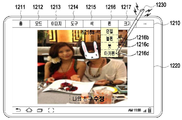
도 12a를 참조하면, 터치 스크린은 객체의 특성을 변경하는 메뉴바(1210)와 객체를 디스플레이하는 화면(1220)으로 구성될 수 있다. 객체는 터치 스크린의 화면에 디스플레이되며, 객체를 디스플레이하는 경우 터치 스크린의 일측에는 디스플레이된 객체의 속성을 변경하기 위한 메뉴바(1210)가 구비되어 있고, 다른 일측에는 실제로 객체를 디스플레이하는 화면(1220)이 구비되어 있다. 상기 메뉴바(1210)는 도 12a 내지 도 12c에 도시된 바와 같이, 홈 메뉴(1211), 모드 메뉴(1212), 이미지 메뉴(1213), 도구 메뉴(1214), 색 메뉴(1215), 펜 메뉴(1216), 크기 메뉴(1217) 등 다양한 메뉴를 포함한다. 보다 상세하게, 메뉴바(1210)는 파일 저장, 파일 열기 등등 기본적인 기능들을 갖춘 홈 메뉴(1211), 객체의 상하좌우 이동 및 크기를 조절하거나 입력 유닛의 호버링, 터치, 또는 제스처에 의한 입력을 제공하는 모드 메뉴(1212), 객체의 색상을 제어하는 이미지 모드(1214), 색칠하기, 글자 입력, 글자 지우기 등 다양한 기능들을 갖춘 도구 메뉴(1214), 바탕색 변경 등 색을 변경하기 위한 색 메뉴(1215), 글자를 입력하는 경우, 입력되는 필기도구(예: 볼펜, 연필, 붓, 마카펜 등)를 선택하는 펜 메뉴(1216) 및 필기도구에 의한 선 또는 글자의 크기를 조절하기 위한 크기 메뉴(1217)를 포함한다. 이러한 각각의 메뉴들은 입력 유닛(1230)에 의해 선택될 수 있다.Referring to FIG. 12A, the touch screen may include a
상기 과정(S1110)에서 펜 기능을 적용하기 위해 펜 메뉴(1216)을 선택하면, 펜 종류를 나타낸 리스트가 디스플레이된다(S1110, S1112). 또는, 객체를 디스플레이하는 화면(1220)의 임의 영역에 연필기능의 입력 모드로 문자열을 입력하는 도중에 입력 유닛(1230)의 펜 기능을 연필에서 마카펜으로 변경하고자 하는 경우, 펜 메뉴(1216)을 선택하면, 복수의 펜 종류가 디스플레이된다. 이와 같이, 터치 스크린(190)에 이미지와 같은 객체를 디스플레이하는 경우, 제어부(110)는 이미지를 디스플레이하기 위한 애플리케이션을 실행한다. 이와 같이, 객체를 디스플레이하는 애플리케이션은 객체의 속성에 따라 다양하게 존재할 수 있으며, 각각의 애플리케이션은 디스플레이된 객체의 속성을 변경하기 위한 복수의 메뉴들이 있다. 상기 펜 메뉴(1216)를 선택하면, 복수의 펜들이 디스플레이된다. 상기 펜 메뉴(1216)에서 제공되는 펜 종류는 연필(1216a), 볼펜(1216b), 붓(1216c), 마카펜(1216d) 등이 있다. 상술한 펜 종류는 단지 실시 예이며, 본 발명은 상술한 펜 종류뿐만 아니라 필기할 수 있는 모든 펜을 포함한다.When the
펜 종류를 초기 선택하거나, 문자열을 입력하는 도중에 다른 펜 종류로 변경하고자 하여 펜 종류를 선택하면, 선택된 펜으로 모드가 변경되고, 미리 결정된 햅틱 패턴에 대응하는 제어 신호를 입력 유닛(1230)으로 전송한다(S1116). 입력 유닛(1230)에 의한 펜 종류가 선택되면, 제어부(110)는 입력 유닛(1230)의 펜 기능을 선택된 펜 종류로 변경하고, 변경된 펜에 해당되는 미리 결정된 햅틱 패턴에 대응하는 제어 신호를 입력 유닛(1230)으로 전송한다. 예를 들어, 도 12a에 도시된 바와 같이, 디스플레이된 객체의 일부 영역(1231)에 연필 모드의 입력 유닛(1230)으로 '나의 친구'라는 문자열을 입력하는 도중에 입력 유닛(1230)을 연필 모드에서 마케펜 모드로 변경하여 문자열을 계속해서 입력하고자 하는 경우, 펜 메뉴(1216)의 마카펜(1216d)를 선택하고, '나의 친구 수정'과 같이 '수정'을 '나의 친구'에 연속하여 입력할 수 있다. 그리고, 본 발명은 펜 종류 별로 서로 다른 햅틱 패턴에 대응하는 진동에 관한 정보를 저장부(175)에 저장하고 있다. 예를 들어, 펜 메뉴(1216)에서 입력 유닛(1230)을 볼펜 모드(1216b)로 변경하는 경우, 저장부(175)는 사용자로 하여금 실제로 볼펜으로 선을 긋거나 글자를 쓸 때 느낄 수 있는 진동 패턴을 느끼도록 하는 햅틱 패턴의 진동 정보를 저장하고 있다. 저장부(175)는 마찬가지로 연필, 붓, 마카펜 등 다양한 햅틱 패턴의 진동 정보를 저장하고 있다.If a pen type is initially selected or a pen type is selected to change to another pen type while inputting a character string, the mode is changed to the selected pen, and a control signal corresponding to a predetermined haptic pattern is transmitted to the
선택된 펜의 선 굵기를 변경하고자 하는 경우, 선 굵기를 변경하는 입력창(1240)을 디스플레이한다(S1118, S1120). 이러한, 입력창은 크기 메뉴(1217)을 선택함으로써 제공되거나, 별도로 제공될 수 있다. 선 굵기를 굵게 변경하고자 하는 경우, 입력창(1240)의 굵기 선택 옵션(1241)을 우측으로 이동시켜 변경할 수 있다. 반대로, 굵기를 얇게 하고자 하는 경우 좌측으로 이동시켜 변경할 수 있다.When it is desired to change the line thickness of the selected pen, an
선택된 굵기에 따라 햅틱 패턴에 대응하는 제어 신호를 전송하고, 선택된 굵기를 선택된 펜에 적용한다(S1122). 상술한 바와 같이, 펜 종류를 선택하고, 선택된 펜의 선 굵기가 선택되면, 제어부(110)는 펜 종류가 선택될 때와 펜의 굵기가 선택될 때 이에 해당되는 미리 결정된 햅틱 패턴에 대응되는 제어 신호를 입력 유닛(1230)으로 전송한다. 그리고, 입력 유닛(1230)은 수신된 제어 신호를 분석하여 해당 햅틱 패턴에 대응하여 자신을 진동함으로써, 사용자는 연필 모드에 해당되는 도 15b의 햅틱 파형의 진동에서 마카펜 모드에 해당되는 도 15e의 햅틱 파형의 진동을 느낄 수 있다.A control signal corresponding to the haptic pattern is transmitted according to the selected thickness, and the selected thickness is applied to the selected pen (S1122). As described above, when the pen type is selected and the line thickness of the selected pen is selected, the
도 15b 내지 도 15f를 참조하면, 도 15b는 본 발명의 실시 예에 따른 입력 유닛의 펜 기능을 연필로 선택했을 경우의 햅틱 패턴의 파형 결과를 나타낸 도면이고, 도 15c는 본 발명의 실시 예에 따른 입력 유닛의 펜 기능을 붓으로 선택했을 경우의 햅틱 패턴의 파형 결과를 나타낸 도면이고, 도 15d는 본 발명의 실시 예에 따른 입력 유닛의 펜 기능을 만년필(fountain pen)로 선택했을 경우의 햅틱 패턴의 파형 결과를 나타낸 도면이고, 도 15e는 본 발명의 실시 예에 따른 입력 유닛의 펜 기능을 마카펜으로 선택했을 경우의 햅틱 패턴의 파형 결과 결과를 나타낸 도면이고, 도 15f는 본 발명의 실시 예에 따른 입력 유닛의 펜 기능을 볼펜으로 선택했을 경우의 햅틱 패턴의 파형 결과를 나타낸 도면이다.15B to 15F, FIG. 15B is a diagram showing a waveform result of a haptic pattern when a pen function of an input unit according to an embodiment of the present invention is selected with a pencil, and FIG. 15C is a diagram showing a waveform result of a haptic pattern according to an embodiment of the present invention. A diagram showing the waveform result of a haptic pattern when the pen function of the input unit according to the brush is selected, and FIG. 15D is a haptic when the pen function of the input unit according to an embodiment of the present invention is selected with a fountain pen. Figure 15e is a diagram showing the waveform result of the haptic pattern when the pen function of the input unit according to an embodiment of the present invention is selected as a marker pen, and Figure 15f is a diagram showing the waveform result of the haptic pattern. It is a view showing the waveform result of the haptic pattern when the pen function of the input unit according to the ballpoint pen is selected.
도 15b를 참조하면, 도 15b는 입력 유닛의 펜 기능을 연필로 설정했을 경우의 햅틱 패턴에 대한 파형을 나타낸 것으로서, 입력 유닛의 펜 기능을 연필로 했을 경우의 햅틱 패턴은 연필로 필기했을 경우 사용자가 실제로 느끼는 진동에 대응하는 햅틱 패턴에 대응된다. 입력 유닛의 펜 기능을 연필로 했을 경우, 입력 유닛의 진동 소자(520)의 진동 주기는 대략 50ms 정도이고, 문자열을 쓸 경우 하나의 획의 길이 및 하나의 획을 쓰는 시간은 대체로 유사하기 때문에 도 15b와 같은 짧은 주기의 파형을 가진다. 즉, 이러한 햅틱 패턴의 파형은 1V 전압에 대응하는 진동 세기의 진동으로 시작하여 100ms 동안 50mV 전압에 대응하는 진동 세기로 진동하고, 다시 1V 전압에 대응하는 진동 세기의 진동을 갖는 파형을 비주기적으로 반복할 수 있다. 그리고, 도 15c를 참조하면, 도 15c는 입력 유닛의 펜 기능을 붓으로 선택했을 경우의 햅틱 패턴의 파형 결과를 나타낸 것으로서, 입력 유닛의 펜 기능을 연필로 선택한 도 15b의 경우보다 한 주기가 비교적 길다는 것을 알 수 있다. 이러한 이유는 통상적으로 연필의 경우 글씨를 쓰는데 사용되기 때문에 하나의 획이 짧은 반면에, 붓은 그림을 그리거나 색을 칠하는데 사용되기 때문에 비교적 하나의 획이 길다. 따라서, 입력 유닛의 펜 기능을 붓으로 설정했을 경우는 연필로 설정했을 경우보다 비교적 하나의 제어 신호로 인한 진동 주기가 길다는 것을 알 수 있다. 그리고, 도 15d를 참조하면, 도 15d는 입력 유닛의 펜 기능을 만년필로 했을 경우의 햅틱 패턴의 파형 결과를 나타낸 것으로서, 주기의 비규칙성을 가짐을 알 수 있고, 도 15e를 참조하면, 입력 유닛의 펜 기능을 마커 펜으로 설정했을 경우의 햅틱 패턴의 파형을 나타낸 것으로서, 다른 펜의 종류에 비해 비교적 주기가 길다는 것을 알 수 있다. 이는 마카펜은 주로 문장을 덧칠할 때 사용되기 때문에 수 개 내지 수십 개의 문자열을 한번의 움직임으로 덧칠하는 경우가 대부분이다. 따라서, 이에 따른 햅틱 패턴 역시 다른 펜의 종류보다도 더 길다. 그리고, 도 15f를 참조하면, 입력 유닛의 펜 기능을 볼펜으로 설정했을 경우의 햅틱 패턴의 파형을 나타낸 것으로서, 볼펜을 이용해 글씨를 입력할 때의 사용자 촉감과 동일한 햅틱 패턴에 대응하는 진동임을 알 수 있다. 즉, 도 15b 내지 도 15f에 도시된 바와 같이, 입력 유닛에 적용되는 펜의 특성에 따른 햅틱 패턴의 파형은 서로 다를 수 있음을 알 수 있다.
Referring to FIG. 15B, FIG. 15B shows a waveform for a haptic pattern when the pen function of the input unit is set to a pencil, and the haptic pattern when the pen function of the input unit is set to a pencil is a user Corresponds to the haptic pattern corresponding to the vibration actually felt. When the pen function of the input unit is a pencil, the vibration period of the vibration element 520 of the input unit is approximately 50 ms, and when writing a character string, the length of one stroke and the time to write one stroke are substantially similar. It has a short periodic waveform such as 15b. That is, the waveform of this haptic pattern starts with a vibration of a vibration intensity corresponding to a voltage of 1V, vibrates with a vibration intensity corresponding to a voltage of 50mV for 100ms, and a waveform having a vibration of a vibration intensity corresponding to the voltage of 1V is aperiodic. Can repeat. And, referring to FIG. 15C, FIG. 15C shows the waveform result of the haptic pattern when the pen function of the input unit is selected with a brush, and one cycle is relatively longer than the case of FIG. 15B in which the pen function of the input unit is selected with a pencil. It can be seen that it is long. The reason for this is that one stroke is relatively short because a pencil is used to write text, whereas a brush is used to draw or paint a picture, so one stroke is relatively long. Accordingly, it can be seen that when the pen function of the input unit is set to a brush, the vibration period due to one control signal is relatively longer than when the pen function is set to a pencil. And, referring to FIG. 15D, FIG. 15D shows the waveform result of the haptic pattern when the pen function of the input unit is used as a fountain pen, and it can be seen that it has irregularity of period. Referring to FIG. 15E, the input It shows the waveform of the haptic pattern when the pen function of the unit is set to a marker pen, and it can be seen that the period is relatively long compared to other types of pens. This is because the marker pen is mainly used to overcoat sentences, so in most cases, several or dozens of character strings are overlaid with one movement. Therefore, the haptic pattern accordingly is also longer than other types of pens. And, referring to FIG. 15F, it shows the waveform of the haptic pattern when the pen function of the input unit is set to a ballpoint pen, and it can be seen that it is a vibration corresponding to the same haptic pattern as the user's touch when inputting letters using a ballpoint pen. have. That is, as shown in FIGS. 15B to 15F, it can be seen that waveforms of haptic patterns according to characteristics of a pen applied to the input unit may be different from each other.
도 13은 본 발명의 실시 예에 따른 입력 유닛의 입력 패턴에 대응하여 휴대 단말을 제어하는 과정을 나타낸 순서도이고, 도 14는 본 발명의 실시 예에 따른 입력 유닛의 입력 패턴에 대응하여 메뉴를 실행하는 예시도이고, 도 15g는 본 발명의 실시 예에 따른 입력 유닛에 의해 입력된 패턴에 대응하여 휴대 단말을 제어하는 경우의 햅틱 패턴에 따른 파형을 나타낸 도면이다.13 is a flowchart showing a process of controlling a mobile terminal in response to an input pattern of an input unit according to an embodiment of the present invention, and FIG. 14 is a menu execution in response to an input pattern of an input unit according to an embodiment of the present invention. 15G is a diagram illustrating a waveform according to a haptic pattern when a mobile terminal is controlled in response to a pattern input by an input unit according to an embodiment of the present invention.
도 14a는 본 발명의 실시 예에 따른 터치 스크린에 이미지를 디스플레이한 예시도이고, 도 14b는 본 발명의 실시 예에 따른 터치 스크린에 입력 유닛을 이용하여 입력 패턴을 입력하는 과정을 나타낸 예시도이고, 도 14c는 본 발명의 실시 예에 따른 터치 스크린에 입력 유닛을 이용하여 입력 패턴을 입력한 결과를 나타낸 예시도이고, 도 14d는 본 발명의 실시 예에 따른 터치 스크린에 입력 유닛에 의해 입력된 입력 패턴에 대응한 결과를 나타낸 예시도이다.14A is an exemplary diagram showing an image display on a touch screen according to an exemplary embodiment of the present invention, and FIG. 14B is an exemplary diagram illustrating a process of inputting an input pattern using an input unit on a touch screen according to an exemplary embodiment of the present invention. , FIG. 14C is an exemplary view showing a result of inputting an input pattern using an input unit on a touch screen according to an embodiment of the present invention, and FIG. 14D is an exemplary view showing a result of inputting an input pattern to a touch screen according to an embodiment of the present invention. It is an exemplary diagram showing the result corresponding to the input pattern.
이하, 도 13 및 도 14를 참조하여 본 발명의 실시 예에 따른 입력 유닛의 입력 패턴을 이용하여 휴대 단말을 제어하는 과정을 상세히 설명하면 다음과 같다.Hereinafter, a process of controlling a portable terminal using an input pattern of an input unit according to an embodiment of the present invention will be described in detail with reference to FIGS. 13 and 14.
화면(1420)에 객체가 디스플레이되면, 객체의 속성에 따라 메뉴바(1410)가 존재한다. 상기 메뉴바(1410)는 도 14a 내지 도 14d에 도시된 바와 같이, 홈, 모드, 이미지, 도구, 색, 펜, 크기 등 다양한 기능을 포함한다. 객체가 화면(1420)에 디스플레이된 상태에서 입력 유닛의 제스처 모드가 선택되면, 제스처 인식 모듈을 활성화한다(S1310, S1312). 이러한 입력 유닛 제스처 모드는 메뉴바의 모드 메뉴를 통해 제공되거나 별도로 제공될 수 있다. 제어부(110)는 입력 유닛(1430)의 제스처 모드가 선택되면, 휴대 단말(100)의 터치 스크린(190)의 입력 모드를 입력 유닛(1430)의 제스처에 의해 입력되는 입력 패턴을 인식할 수 있는 모듈을 활성화한다.When an object is displayed on the
상기 과정(S1312)에서 입력 유닛(1430)을 이용한 제스처가 발생되면, 제스처에 해당된 입력 패턴과 기 저장된 패턴을 비교한다(S1314, S1316). 도 14b에 도시된 바와 같이, 입력 유닛(1430)을 이용하여 터치 스크린 상에 제스처에 의한 패턴(1431)을 입력하면, 입력되는 패턴은 터치 스크린에 디스플레이된다. 그리고, 도 14c에 도시된 바와 같이, 입력하고자 하는 패턴(1432)이 완료되면, 해당 패턴에 설정된 기능을 실행한다. 예를 들어, 도 14c의 1432와 같은 제스처가 입력되면, 이전 화면(1440)을 디스플레이한다. 상기 제스처에 해당되는 패턴은 입력 유닛(1430)의 입력 패턴에 의해 정해진다. 그리고 기 저장된 패턴은 휴대 단말(100)의 저장부(175)에 기 저장되어 있으며, 상기 저장부(175)는 입력 유닛(1430)의 제스처에 의한 다양한 입력 패턴들을 저장하고 있다. 예를 들어, 저장부(175)는 터치 스크린이 현재 디스플레이하고 있는 화면을 우측으로 이동하고자 하거나 우측의 화면을 디스플레이하기 위한 '>', 좌측으로 이동하고자 하거나 좌측의 화면을 디스플레이하기 위한 '<', 터치 스크린이 현재 디스플레이하고 있는 화면을 위로 이동하고자 하거나 위의 화면을 디스플레이하기 위한 '↑', 화면을 아래로 이동하고자 하거나 아래의 화면을 디스플레이하기 위한 '↓'을 포함한다. 이러한 예는 단지 실시 예일 뿐이며, 본 발명은 이러한 단순한 입력뿐만 아니라 애플리케이션의 메뉴에 구성되는 각각의 기능들에 지정된 문자열 또는 초성을 입력하여 제어하고자 하는 경우 또는 휴대 단말의 다양한 기능을 제어하고자 하는 경우의 입력 패턴에도 적용될 수 있다.When a gesture using the
제스처에 해당된 입력 패턴과 기 저장된 패턴이 동일하지 않으면, 입력한 제스처에 대한 명령을 실행할 수 없음을 알리고, 햅틱 패턴에 대응하는 제어 신호를 입력 유닛(1430)으로 전송한다(S1318, S1320). 제어부(110)는 입력한 제스처에 대한 명령을 실행할 수 없음을 터치 스크린(190)상의 팝업을 통해 알리거나, 입력 유닛(1430)에 미리 결정된 햅틱 패턴에 대응하는 제어신호를 전송함으로써 사용자로 하여금 제스처에 의한 명령을 실행할 수 없음을 알 수 있게 한다. If the input pattern corresponding to the gesture and the previously stored pattern are not the same, it notifies that the command for the input gesture cannot be executed, and transmits a control signal corresponding to the haptic pattern to the input unit 1430 (S1318 and S1320). The
그리고, 상기 과정(S1318)에서 제스처에 해당된 입력 패턴과 기 저장된 패턴이 동일하면, 기 저장된 패턴에 대한 명령을 실행하고, 기 저장된 햅틱 패턴에 대응하는 신호를 입력 유닛(1430)으로 전송한다(S1322). 도 14d는 도 14c에서 입력된 패턴(1432)에 의해 이전 화면 또는 이전 그림을 보여주는 것이다. 이러한 패턴이 입력되면, 제어부(110)는 입력된 패턴에 대응되는 명령을 실행하고, 미리 결정된 햅틱 패턴에 대응하는 제어 신호를 입력 유닛(1430)으로 전송한다. 그리고, 입력 유닛(1430)은 수신된 제어 신호를 분석하여 햅틱 패턴에 따라 진동한다.And, if the input pattern corresponding to the gesture is the same as the previously stored pattern in the process (S1318), a command for the previously stored pattern is executed, and a signal corresponding to the previously stored haptic pattern is transmitted to the input unit 1430 ( S1322). 14D shows the previous screen or previous picture by the
도 15h를 참조하면, 도 15h는 입력 유닛에 의해 입력된 패턴에 대응하여 휴대 단말을 제어하는 경우의 파형을 나타낸 것으로서, 이러한, 파형은 입력 유닛에 의해 입력되는 패턴의 종류별로 서로 다를 수 있거나 또는 같을 수 있다.
Referring to FIG. 15H, FIG. 15H shows a waveform when a mobile terminal is controlled in response to a pattern input by an input unit. Such a waveform may be different for each type of pattern input by the input unit, or Can be the same
본 발명의 실시 예들은 하드웨어, 소프트웨어 또는 하드웨어 및 소프트웨어의 조합의 형태로 실현 가능하다는 것을 알 수 있을 것이다. 이러한 임의의 소프트웨어는 예를 들어, 삭제 가능 또는 재기록 가능 여부와 상관없이, ROM 등의 저장 장치와 같은 휘발성 또는 비휘발성 저장 장치, 또는 예를 들어, RAM, 메모리 칩, 장치 또는 집적 회로와 같은 메모리, 또는 예를 들어 CD, DVD, 자기 디스크 또는 자기 테이프 등과 같은 광학 또는 자기적으로 기록 가능함과 동시에 기계(예를 들어, 컴퓨터)로 읽을 수 있는 저장 매체에 저장될 수 있다. 이동 단말 내에 포함될 수 있는 메모리는 본 발명의 실시 예들을 구현하는 지시들을 포함하는 프로그램 또는 프로그램들을 저장하기에 적합한 기계로 읽을 수 있는 저장 매체의 한 예임을 알 수 있을 것이다. 따라서, 본 발명은 본 명세서의 임의의 청구항에 기재된 장치 또는 방법을 구현하기 위한 코드를 포함하는 프로그램 및 이러한 프로그램을 저장하는 기계로 읽을 수 있는 저장 매체를 포함한다. 또한, 이러한 프로그램은 유선 또는 무선 연결을 통해 전달되는 통신 신호와 같은 임의의 매체를 통해 전자적으로 이송될 수 있고, 본 발명은 이와 균등한 것을 적절하게 포함한다.It will be appreciated that the embodiments of the present invention can be realized in the form of hardware, software, or a combination of hardware and software. Any such software, for example, whether erasable or rewritable, may be a volatile or nonvolatile storage device such as a storage device such as a ROM, or a memory device such as a RAM, memory chip, device or integrated circuit Or, for example, it may be optically or magnetically recordable, such as a CD, DVD, magnetic disk or magnetic tape, and stored in a storage medium readable by a machine (eg, a computer). It will be appreciated that the memory that may be included in the mobile terminal is an example of a program including instructions for implementing embodiments of the present invention or a machine-readable storage medium suitable for storing programs. Accordingly, the present invention includes a program including code for implementing the apparatus or method described in any claim of the present specification, and a machine-readable storage medium storing such a program. Further, such a program may be transferred electronically through any medium, such as a communication signal transmitted over a wired or wireless connection, and the present invention suitably includes equivalents thereto.
또한, 상기 이동 단말은 유선 또는 무선으로 연결되는 프로그램 제공 장치로부터 상기 프로그램을 수신하여 저장할 수 있다. 상기 프로그램 제공 장치는 상기 이동 단말이 기설정된 컨텐츠 보호 방법을 수행하도록 하는 지시들을 포함하는 프로그램, 컨텐츠 보호 방법에 필요한 정보 등을 저장하기 위한 메모리와, 상기 이동 단말과의 유선 또는 무선 통신을 수행하기 위한 통신부와, 상기 이동 단말의 요청 또는 자동으로 해당 프로그램을 상기 호스트 장치로 전송하는 제어부를 포함할 수 있다.In addition, the mobile terminal may receive and store the program from a program providing device connected by wire or wirelessly. The program providing device performs wired or wireless communication with the mobile terminal and a program including instructions for the mobile terminal to perform a preset content protection method, a memory for storing information necessary for the content protection method, etc. It may include a communication unit for, and a control unit for automatically transmitting a request from the mobile terminal or a corresponding program to the host device.
한편, 본 발명의 상세한 설명에서는 구체적인 실시 예에 관해 설명하였으나, 본 발명의 범위에서 벗어나지 않는 한도 내에서 여러 가지 변형이 가능함은 물론이다. 그러므로 본 발명의 범위는 설명된 실시 예에 국한되어 정해져서는 안되며 후술하는 특허청구의 범위뿐만 아니라 이 특허청구의 범위와 균등한 것들에 의해 정해져야 한다.Meanwhile, although specific embodiments have been described in the detailed description of the present invention, various modifications may be made without departing from the scope of the present invention. Therefore, the scope of the present invention is limited to the described embodiments and should not be defined, and should be defined by the scope of the claims and equivalents as well as the scope of the claims to be described later.
110: 제어부 120: 이동통신 모듈
130: 서브 통신 모듈 140: 멀티미디어 모듈
150: 카메라 모듈 160: 입/출력 모듈
168: 입력 수단 170: 센서 모듈
180: 전원 공급부 190: 터치 스크린110: control unit 120: mobile communication module
130: sub communication module 140: multimedia module
150: camera module 160: input/output module
168: input means 170: sensor module
180: power supply unit 190: touch screen
Claims (26)
상기 휴대 단말의 터치 스크린에 객체를 디스플레이하는 과정과,
상기 객체에 대한 상기 입력 유닛의 터치를 검출하는 과정과,
상기 터치에 기초하여, 상기 입력 유닛에 의해 제공될 햅틱(haptic) 효과를 위한 모드를 결정하는 과정과,
상기 모드에 기초하여 미리 결정된 햅틱 패턴에 대응되는 제어 신호를 상기 입력 유닛으로 전송하는 과정을 포함하고,
상기 미리 결정된 햅틱 패턴은 상기 객체에 적용될 상기 모드에 따라 다르고,
상기 모드가 상기 객체의 윤곽선을 그리는 모드인 경우, 상기 객체의 명암에 기초하여 형성되는 가상 윤곽선과, 상기 가상 윤곽선을 따라 진행되는 상기 입력 유닛의 터치 입력에 대응하는 윤곽선 간의 간격이 미리 결정된 범위를 벗어난 경우 상기 제어 신호를 생성하는 과정을 더 포함하는 것을 특징으로 하는 햅틱 제어 방법.
In a method for a portable terminal to control a haptic of an input unit,
Displaying an object on the touch screen of the mobile terminal;
A process of detecting a touch of the input unit with respect to the object,
A process of determining a mode for a haptic effect to be provided by the input unit based on the touch, and
And transmitting a control signal corresponding to a haptic pattern determined in advance based on the mode to the input unit,
The predetermined haptic pattern is different according to the mode to be applied to the object,
When the mode is a mode for drawing an outline of the object, a distance between a virtual outline formed based on the contrast of the object and an outline corresponding to a touch input of the input unit proceeding along the virtual outline is a predetermined range. The haptic control method, further comprising the step of generating the control signal in case of deviation.
상기 모드에 대한 상기 햅틱 효과를 설정하기 위한 입력을 수신하는 과정과,
상기 수신된 입력에 기초하여 설정된 상기 햅틱 효과에 대한 정보를 저장하는 과정을 더 포함하는 것을 특징으로 하는 햅틱 제어 방법.
The method of claim 1,
Receiving an input for setting the haptic effect for the mode; and
And storing information on the haptic effect set based on the received input.
상기 제어 신호는 상기 입력 유닛에 의한 상기 터치의 움직임이 종료되는 시점까지 상기 입력 유닛으로 주기적으로 전송되는 것을 특징으로 하는 햅틱 제어 방법.
The method of claim 1,
The control signal is a haptic control method, characterized in that periodically transmitted to the input unit until the movement of the touch by the input unit ends.
상기 모드는,
상기 입력 유닛을 이용하여 상기 디스플레이된 객체의 일부 영역을 자르는 제1 모드, 상기 입력 유닛을 이용하여 상기 디스플레이된 객체의 윤곽선을 따라 선을 그리는 제2 모드, 상기 입력 유닛을 이용하여 상기 터치 스크린을 제어하는 제3 모드 및 상기 입력 유닛에 적용되는 펜의 종류를 변경하는 제4 모드 중 적어도 하나를 포함하는 것을 특징으로 하는 햅틱 제어 방법.
The method of claim 1,
The above mode is:
A first mode in which a partial area of the displayed object is cut using the input unit, a second mode in which a line is drawn along an outline of the displayed object using the input unit, and the touch screen are operated using the input unit. A haptic control method comprising at least one of a third mode to control and a fourth mode to change a type of pen applied to the input unit.
상기 제1 모드는 가위로 물질을 자르는 경우에 대응하는 햅틱 패턴을 가지며, 상기 햅틱 패턴은 1V 전압에 대응하는 진동 세기의 진동으로 시작하여 70ms 동안 50mV 전압에 대응하는 진동 세기로 진동하고, 다시 1V 전압에 대응하는 진동 세기의 진동을 갖는 파형을 주기적으로 반복하는 것을 특징으로 하는 햅틱 제어 방법.
The method of claim 5,
The first mode has a haptic pattern corresponding to a case of cutting a material with scissors, and the haptic pattern starts with a vibration of a vibration intensity corresponding to a voltage of 1V, and vibrates with a vibration intensity corresponding to a voltage of 50mV for 70ms, and then again 1V. A haptic control method, characterized in that it periodically repeats a waveform having a vibration of a vibration intensity corresponding to a voltage.
상기 제4 모드는 1V 전압에 대응하는 진동 세기의 진동으로 시작하여 100ms 동안 50mV 전압에 대응하는 진동 세기로 진동하고, 다시 1V 전압에 대응하는 진동 세기의 진동을 갖는 파형을 비주기적으로 반복하는 햅틱 패턴을 갖는 것을 특징으로 하는 햅틱 제어 방법.
The method of claim 5,
The fourth mode is a haptic that starts with vibration of a vibration intensity corresponding to a voltage of 1V, vibrates with a vibration intensity corresponding to a voltage of 50mV for 100ms, and repeats a waveform having a vibration of a vibration intensity corresponding to the voltage of 1V again aperiodically. Haptic control method, characterized in that it has a pattern.
터치 스크린과,
송수신부와,
제어부를 포함하고,
상기 제어부는,
상기 터치 스크린에 객체를 디스플레이하고,
상기 객체에 대한 상기 입력 유닛의 터치를 검출하고,
상기 터치에 기초하여, 상기 입력 유닛에 의해 제공될 햅틱 효과를 위한 모드를 결정하고,
상기 모드에 기초하여 미리 결정된 햅틱 패턴에 대응되는 제어 신호를 상기 송수신부를 통하여 상기 입력 유닛으로 전송하고,
상기 미리 결정된 햅틱 패턴은 상기 객체에 적용될 상기 모드에 따라 다르고,
상기 제어부는, 상기 모드가 상기 객체의 윤곽선을 그리는 모드인 경우, 상기 객체의 명암에 기초하여 형성되는 가상 윤곽선과, 상기 가상 윤곽선을 따라 진행되는 상기 입력 유닛의 터치 입력에 대응하는 윤곽선 간의 간격이 미리 결정된 범위를 벗어난 경우 상기 제어 신호를 생성하는 것을 특징으로 하는 휴대 단말.
In a portable terminal for controlling haptics of an input unit,
With a touch screen,
A transmitting and receiving unit,
Including a control unit,
The control unit,
Display an object on the touch screen,
Detecting a touch of the input unit on the object,
Based on the touch, determine a mode for a haptic effect to be provided by the input unit,
Transmitting a control signal corresponding to a haptic pattern predetermined based on the mode to the input unit through the transceiver,
The predetermined haptic pattern is different according to the mode to be applied to the object,
When the mode is a mode for drawing an outline of the object, the control unit includes a distance between a virtual outline formed based on the contrast of the object and an outline corresponding to a touch input of the input unit proceeding along the virtual outline. A portable terminal, characterized in that generating the control signal when out of a predetermined range.
상기 제어 신호를 생성하기 위해 햅틱 패턴에 따른 복수의 진동 정보와 상기 입력 유닛의 진행 방향에 의해 형성되는 패턴에 따라 미리 지정된 명령을 실행하기 위한 패턴에 대한 정보를 저장하는 저장부를 더 포함하는 것을 특징으로 하는 휴대 단말.
The method of claim 10,
And a storage unit for storing information on a pattern for executing a predetermined command according to a plurality of vibration information according to a haptic pattern and a pattern formed by a traveling direction of the input unit to generate the control signal. Mobile terminal.
상기 제어부는 상기 입력 유닛에 의한 상기 터치의 움직임이 종료되는 시점까지 상기 입력 유닛으로 주기적으로 전송되는 상기 제어 신호를 생성하는 것을 특징으로 하는 휴대 단말.
The method of claim 10,
And the control unit generates the control signal periodically transmitted to the input unit until the movement of the touch by the input unit ends.
상기 제어부는 상기 모드가 상기 디스플레이된 객체의 일부 영역을 자르는 모드인 경우, 상기 입력 유닛의 진행 방향에 따라 절취선을 표시하고, 상기 절취선이 폐곡선을 형성하는 경우 미리 결정된 햅틱 패턴에 대응되는 제어 신호를 생성하고, 상기 폐곡선에 의해 형성되는 영역을 확대하여 디스플레이하는 것을 특징으로 하는 휴대 단말.
The method of claim 10,
When the mode is a mode in which a partial area of the displayed object is cut, the control unit displays a perforation line according to the traveling direction of the input unit, and when the perforation line forms a closed curve, the control unit generates a control signal corresponding to a predetermined haptic pattern. And to enlarge and display an area formed by the closed curve.
상기 제어부는 상기 폐곡선이 형성되면, 미리 결정된 햅틱 패턴에 대응되는 제어 신호를 생성하는 것을 특징으로 하는 휴대 단말.
The method of claim 13,
When the closed curve is formed, the control unit generates a control signal corresponding to a predetermined haptic pattern.
상기 제어부는 상기 모드가 상기 입력 유닛이 상기 터치 스크린을 제어하는 모드인 경우, 상기 입력 유닛의 진행 방향에 의해 형성되는 패턴과 상기 저장부에 기 저장된 패턴을 비교하여 동일한 경우, 상기 형성된 패턴에 따라 미리 지정된 명령을 실행하고 상기 형성된 패턴에 대응되는 제어 신호를 생성하는 것을 특징으로 하는 휴대 단말.
The method of claim 11,
When the mode is a mode in which the input unit controls the touch screen, the control unit compares a pattern formed by a moving direction of the input unit with a pattern previously stored in the storage unit, and when the mode is the same, according to the formed pattern. A portable terminal, characterized in that for executing a predetermined command and generating a control signal corresponding to the formed pattern.
상기 제어부는 상기 모드가 상기 입력 유닛에 적용되는 펜의 종류를 변경하는 모드인 경우, 상기 펜의 선 굵기 및 선의 색 중 적어도 하나에 대응하는 상기 제어 신호를 생성하는 것을 특징으로 하는 휴대 단말.
The method of claim 10,
And when the mode is a mode for changing a type of a pen applied to the input unit, the control unit generates the control signal corresponding to at least one of a line thickness and a line color of the pen.
진동 소자와,
근거리 통신부와,
제어 신호를 분석하여 미리 결정된 햅틱 패턴에 대응하는 진동으로 상기 진동 소자를 제어하는 햅틱 제어부를 포함하되,
상기 햅틱 제어부는,
근거리 통신부를 통하여, 휴대 단말의 터치 스크린 상에 디스플레이된 객체에 대한 상기 입력 유닛에 의한 터치에 따라 미리 결정된 햅틱 패턴에 대응되는 제어 신호를 상기 휴대 단말로부터 수신하고,
상기 제어 신호를 분석하여 상기 미리 결정된 햅틱 패턴에 대응하는 진동으로 상기 진동 소자를 제어하고,
상기 제어 신호는 상기 진동 소자의 활성, 비활성, 진동 주기 및 진동 세기 중 적어도 하나를 제어하기 위한 신호이고,
상기 미리 결정된 햅틱 패턴은 상기 객체에 적용될 모드에 따라 다르고,
상기 모드가 상기 객체의 윤곽선을 그리는 모드인 경우, 상기 객체의 명암에 기초하여 형성되는 가상 윤곽선과, 상기 가상 윤곽선을 따라 진행되는 상기 입력 유닛의 터치 입력에 대응하는 윤곽선 간의 간격이 미리 결정된 범위를 벗어난 경우, 상기 제어 신호가 생성되는 것을 특징으로 하는 입력 유닛.
In the input unit providing a haptic effect,
A vibration element,
With the short-range communication department,
Analyzing a control signal and comprising a haptic controller for controlling the vibration element with vibration corresponding to a predetermined haptic pattern,
The haptic control unit,
Through a short-range communication unit, a control signal corresponding to a predetermined haptic pattern according to a touch by the input unit for an object displayed on the touch screen of the portable terminal is received from the portable terminal,
Analyzing the control signal to control the vibration element with vibration corresponding to the predetermined haptic pattern,
The control signal is a signal for controlling at least one of activation, deactivation, vibration period, and vibration intensity of the vibration element,
The predetermined haptic pattern varies according to a mode to be applied to the object,
When the mode is a mode for drawing an outline of the object, a distance between a virtual outline formed based on the contrast of the object and an outline corresponding to a touch input of the input unit proceeding along the virtual outline is a predetermined range. In case of deviation, the control signal is generated.
상기 진동 소자의 진동 주기 및 진동 세기 중 적어도 하나에 대응되는 소리를 출력하는 스피커를 더 포함하는 것을 특징으로 하는 입력 유닛.
The method of claim 22,
The input unit, further comprising a speaker for outputting a sound corresponding to at least one of a vibration period and a vibration intensity of the vibration element.
상기 햅틱 제어부는 상기 진동 소자의 활성에 따른 소리, 상기 진동 소자의 비활성에 따른 소리 및 상기 진동 세기에 따라 볼륨이 제어된 소리 중 적어도 하나를 미리 정해진 시간 또는 상기 입력 유닛이 움직이는 동안에 상기 스피커를 통해 출력 제어하는 것을 특징으로 하는 입력 유닛.
The method of claim 23,
The haptic control unit transmits at least one of a sound according to activation of the vibration element, a sound due to inactivity of the vibration element, and a sound whose volume is controlled according to the vibration intensity through the speaker at a predetermined time or while the input unit is moving. An input unit, characterized in that output control.
휴대 단말의 터치 스크린 상에 디스플레이된 객체에 대한 상기 입력 유닛에 의한 터치에 따라 미리 결정된 햅틱 패턴에 대응되는 제어 신호를 상기 휴대 단말로부터 수신하는 과정과,
상기 수신된 제어 신호를 분석하여 상기 미리 결정된 햅틱 패턴에 대응하는 진동으로 진동 소자를 제어하는 과정을 포함하되,
상기 제어 신호는 상기 진동 소자의 활성, 비활성, 진동 주기 및 진동 세기 중 적어도 하나를 제어하기 위한 신호이고,
상기 미리 결정된 햅틱 패턴은 상기 객체에 적용될 모드에 따라 다르고,
상기 모드가 상기 객체의 윤곽선을 그리는 모드인 경우, 상기 객체의 명암에 기초하여 형성되는 가상 윤곽선과, 상기 가상 윤곽선을 따라 진행되는 상기 입력 유닛의 터치 입력에 대응하는 윤곽선 간의 간격이 미리 결정된 범위를 벗어난 경우, 상기 제어 신호가 생성되는 것을 특징으로 하는 햅틱 효과 제공 방법.
In the method of providing a haptic effect of an input unit,
A process of receiving a control signal corresponding to a predetermined haptic pattern according to a touch by the input unit for an object displayed on the touch screen of the portable terminal from the portable terminal,
Analyzing the received control signal and controlling the vibration element with vibration corresponding to the predetermined haptic pattern,
The control signal is a signal for controlling at least one of activation, deactivation, vibration period, and vibration intensity of the vibration element,
The predetermined haptic pattern varies according to a mode to be applied to the object,
When the mode is a mode for drawing an outline of the object, a distance between a virtual outline formed based on the contrast of the object and an outline corresponding to a touch input of the input unit proceeding along the virtual outline is a predetermined range. In case of deviation, the control signal is generated.
상기 제어 신호는 상기 입력 유닛을 이용하여 상기 터치 스크린에 디스플레이되는 객체의 일부 영역을 자르는 모드, 상기 입력 유닛을 이용하여 상기 디스플레이된 객체의 윤곽선을 따라 선을 그리는 모드, 상기 입력 유닛을 이용하여 상기 터치 스크린을 제어하는 모드 및 상기 입력 유닛에 적용되는 펜의 종류를 변경하는 모드 중 적어도 하나의 모드에 기초하여 미리 결정된 햅틱 패턴을 포함하는 것을 특징으로 하는 햅틱 효과 제공 방법.
The method of claim 25,
The control signal is a mode for cutting a partial area of an object displayed on the touch screen using the input unit, a mode for drawing a line along an outline of the displayed object using the input unit, and a mode for drawing a line along the outline of the displayed object using the input unit. A method of providing a haptic effect, comprising a haptic pattern predetermined based on at least one of a mode for controlling a touch screen and a mode for changing a type of a pen applied to the input unit.
Priority Applications (7)
| Application Number | Priority Date | Filing Date | Title |
|---|---|---|---|
| KR1020130005429A KR102184288B1 (en) | 2013-01-17 | 2013-01-17 | Mobile terminal for providing haptic effect with an input unit and method therefor |
| EP14740416.4A EP2946265B1 (en) | 2013-01-17 | 2014-01-15 | Portable terminal and method for providing haptic effect to input unit |
| AU2014208041A AU2014208041B2 (en) | 2013-01-17 | 2014-01-15 | Portable terminal and method for providing haptic effect to input unit |
| PCT/KR2014/000433 WO2014112787A1 (en) | 2013-01-17 | 2014-01-15 | Portable terminal and method for providing haptic effect to input unit |
| US14/156,082 US9946345B2 (en) | 2013-01-17 | 2014-01-15 | Portable terminal and method for providing haptic effect to input unit |
| CN201480005236.2A CN104937521B (en) | 2013-01-17 | 2014-01-15 | Haptic effect is supplied to the portable terminal and method of input block |
| RU2015134189A RU2672134C2 (en) | 2013-01-17 | 2014-01-15 | Portable terminal and method for providing haptic effect for input unit |
Applications Claiming Priority (1)
| Application Number | Priority Date | Filing Date | Title |
|---|---|---|---|
| KR1020130005429A KR102184288B1 (en) | 2013-01-17 | 2013-01-17 | Mobile terminal for providing haptic effect with an input unit and method therefor |
Publications (2)
| Publication Number | Publication Date |
|---|---|
| KR20140093080A KR20140093080A (en) | 2014-07-25 |
| KR102184288B1 true KR102184288B1 (en) | 2020-11-30 |
Family
ID=51164777
Family Applications (1)
| Application Number | Title | Priority Date | Filing Date |
|---|---|---|---|
| KR1020130005429A Expired - Fee Related KR102184288B1 (en) | 2013-01-17 | 2013-01-17 | Mobile terminal for providing haptic effect with an input unit and method therefor |
Country Status (7)
| Country | Link |
|---|---|
| US (1) | US9946345B2 (en) |
| EP (1) | EP2946265B1 (en) |
| KR (1) | KR102184288B1 (en) |
| CN (1) | CN104937521B (en) |
| AU (1) | AU2014208041B2 (en) |
| RU (1) | RU2672134C2 (en) |
| WO (1) | WO2014112787A1 (en) |
Families Citing this family (29)
| Publication number | Priority date | Publication date | Assignee | Title |
|---|---|---|---|---|
| EP2856289A4 (en) * | 2012-05-25 | 2016-01-06 | Immerz Inc | Haptic interface for portable electronic device |
| JP6231774B2 (en) * | 2013-05-23 | 2017-11-15 | キヤノン株式会社 | Electronic device and control method thereof |
| CN109144248A (en) * | 2013-06-07 | 2019-01-04 | 意美森公司 | Haptic effect signal exchange unlock |
| JP2015114836A (en) * | 2013-12-11 | 2015-06-22 | キヤノン株式会社 | Image processing apparatus, tactile sensation control method, and program |
| US9635440B2 (en) * | 2014-07-07 | 2017-04-25 | Immersion Corporation | Second screen haptics |
| US9804707B2 (en) * | 2014-09-12 | 2017-10-31 | Microsoft Technology Licensing, Llc | Inactive region for touch surface based on contextual information |
| KR102380228B1 (en) * | 2014-11-14 | 2022-03-30 | 삼성전자주식회사 | Method for controlling device and the device |
| KR20160063812A (en) * | 2014-11-27 | 2016-06-07 | 삼성전자주식회사 | Method for configuring screen, electronic apparatus and storage medium |
| US10664052B2 (en) | 2015-07-01 | 2020-05-26 | Samsung Electronics Co., Ltd. | Method for providing feedback and an electronic device thereof |
| US10210724B2 (en) | 2016-06-29 | 2019-02-19 | Immersion Corporation | Real-time patterned haptic effect generation using vibrations |
| JP6992045B2 (en) * | 2016-07-22 | 2022-01-13 | ハーマン インターナショナル インダストリーズ インコーポレイテッド | Tactile guidance system |
| DK201670728A1 (en) | 2016-09-06 | 2018-03-19 | Apple Inc | Devices, Methods, and Graphical User Interfaces for Providing Feedback During Interaction with an Intensity-Sensitive Button |
| US10725544B1 (en) | 2016-09-09 | 2020-07-28 | Apple Inc. | Pencil haptics |
| US10268273B1 (en) | 2016-09-09 | 2019-04-23 | Apple Inc. | Stylus with multiple inputs |
| US10268288B1 (en) | 2016-09-20 | 2019-04-23 | Apple Inc. | Stiffness rendering for a pencil |
| KR102026703B1 (en) * | 2017-12-22 | 2019-09-30 | 한국기술교육대학교 산학협력단 | A haptic tool system |
| US10872199B2 (en) | 2018-05-26 | 2020-12-22 | Microsoft Technology Licensing, Llc | Mapping a gesture and/or electronic pen attribute(s) to an advanced productivity action |
| KR102535015B1 (en) * | 2019-01-22 | 2023-05-22 | 삼성디스플레이 주식회사 | Display device and method for driving the same |
| US10817063B2 (en) | 2019-02-11 | 2020-10-27 | Volvo Car Corporation | Facilitating interaction with a vehicle touchscreen using haptic feedback |
| CN111596754B (en) * | 2019-02-20 | 2024-06-21 | 天马日本株式会社 | Tactile presentation device |
| CN109992192B (en) * | 2019-02-28 | 2021-08-24 | 维沃移动通信有限公司 | Interface display method and terminal device |
| CN113495665A (en) * | 2020-03-19 | 2021-10-12 | 斑马智行网络(香港)有限公司 | Image display method, image display device, electronic equipment and computer readable storage medium |
| TWI731650B (en) * | 2020-04-15 | 2021-06-21 | 宏碁股份有限公司 | Stylus, touch electronic device and touch system |
| US11949790B2 (en) * | 2020-10-01 | 2024-04-02 | Bank Of America Corporation | Intelligent tactile resource instrument activation using electroencephalogram signals |
| US11954256B2 (en) * | 2021-12-17 | 2024-04-09 | Google Llc | Haptic interface for computing devices |
| US11507189B1 (en) * | 2022-01-21 | 2022-11-22 | Dell Products, Lp | System and method for a haptic thin-film actuator on active pen to provide variable writing pressure feedback |
| WO2024241652A1 (en) * | 2023-05-22 | 2024-11-28 | アルプスアルパイン株式会社 | Pen-type input device and input system |
| US12487695B1 (en) * | 2024-10-15 | 2025-12-02 | Novatek Microelectronics Corp. | Touch control device, touch system and vibration control method thereof |
| CN119376572B (en) * | 2024-10-31 | 2025-11-07 | 广州市富可士电子实业有限公司 | Multi-mode operating infrared multi-touch screen system |
Citations (2)
| Publication number | Priority date | Publication date | Assignee | Title |
|---|---|---|---|---|
| US20110267182A1 (en) * | 2010-04-29 | 2011-11-03 | Microsoft Corporation | Active vibrations |
| US20120293464A1 (en) * | 2011-05-20 | 2012-11-22 | Sony Corporation | Haptic device for position detection |
Family Cites Families (14)
| Publication number | Priority date | Publication date | Assignee | Title |
|---|---|---|---|---|
| US6618040B1 (en) * | 2000-09-15 | 2003-09-09 | Targus Communications Corp. | Apparatus and method for indexing into an electronic document to locate a page or a graphical image |
| US7508382B2 (en) * | 2004-04-28 | 2009-03-24 | Fuji Xerox Co., Ltd. | Force-feedback stylus and applications to freeform ink |
| US20070008294A1 (en) * | 2005-07-06 | 2007-01-11 | Chia-Te Huang | Cordless electromagnetic induction system and method for reminding battery capacity |
| DE102006047893A1 (en) * | 2005-12-01 | 2007-06-06 | Volkswagen Ag | Input device for e.g. land vehicle, has controller provided for optical representation of operating information and operating units on display, and for detection of contact position of operating surface of touch-screen |
| KR100769980B1 (en) | 2006-09-01 | 2007-10-25 | 한국전자통신연구원 | Olfactory information output method using sensory information input / output electronic pen and electronic pen |
| US8098234B2 (en) | 2007-02-20 | 2012-01-17 | Immersion Corporation | Haptic feedback system with stored effects |
| KR100938260B1 (en) * | 2007-09-20 | 2010-01-22 | 한국전자통신연구원 | A device and system for providing sensation effect on touch screen |
| KR101527014B1 (en) | 2008-12-02 | 2015-06-09 | 엘지전자 주식회사 | Mobile terminal and its display control method |
| KR20100065640A (en) | 2008-12-08 | 2010-06-17 | 삼성전자주식회사 | Method for providing haptic feedback in a touchscreen |
| US8279184B2 (en) * | 2009-01-27 | 2012-10-02 | Research In Motion Limited | Electronic device including a touchscreen and method |
| US8378979B2 (en) * | 2009-01-27 | 2013-02-19 | Amazon Technologies, Inc. | Electronic device with haptic feedback |
| KR101859099B1 (en) | 2011-05-31 | 2018-06-28 | 엘지전자 주식회사 | Mobile device and control method for the same |
| US9116571B2 (en) * | 2012-03-27 | 2015-08-25 | Adonit Co., Ltd. | Method and system of data input for an electronic device equipped with a touch screen |
| KR101919052B1 (en) | 2012-06-04 | 2018-11-16 | 삼성전자주식회사 | Coordinate indicating device and coordinate sensing apparatus for sensing input coordinate of coordinate indicating device |
-
2013
- 2013-01-17 KR KR1020130005429A patent/KR102184288B1/en not_active Expired - Fee Related
-
2014
- 2014-01-15 AU AU2014208041A patent/AU2014208041B2/en not_active Ceased
- 2014-01-15 EP EP14740416.4A patent/EP2946265B1/en active Active
- 2014-01-15 US US14/156,082 patent/US9946345B2/en active Active
- 2014-01-15 WO PCT/KR2014/000433 patent/WO2014112787A1/en not_active Ceased
- 2014-01-15 RU RU2015134189A patent/RU2672134C2/en not_active IP Right Cessation
- 2014-01-15 CN CN201480005236.2A patent/CN104937521B/en not_active Expired - Fee Related
Patent Citations (2)
| Publication number | Priority date | Publication date | Assignee | Title |
|---|---|---|---|---|
| US20110267182A1 (en) * | 2010-04-29 | 2011-11-03 | Microsoft Corporation | Active vibrations |
| US20120293464A1 (en) * | 2011-05-20 | 2012-11-22 | Sony Corporation | Haptic device for position detection |
Also Published As
| Publication number | Publication date |
|---|---|
| US9946345B2 (en) | 2018-04-17 |
| EP2946265B1 (en) | 2020-04-15 |
| EP2946265A1 (en) | 2015-11-25 |
| US20140198069A1 (en) | 2014-07-17 |
| RU2672134C2 (en) | 2018-11-12 |
| CN104937521B (en) | 2018-04-10 |
| KR20140093080A (en) | 2014-07-25 |
| RU2015134189A (en) | 2017-02-20 |
| EP2946265A4 (en) | 2016-10-05 |
| AU2014208041A2 (en) | 2015-09-03 |
| CN104937521A (en) | 2015-09-23 |
| AU2014208041A1 (en) | 2015-09-03 |
| WO2014112787A1 (en) | 2014-07-24 |
| AU2014208041B2 (en) | 2019-01-03 |
Similar Documents
| Publication | Publication Date | Title |
|---|---|---|
| KR102184288B1 (en) | Mobile terminal for providing haptic effect with an input unit and method therefor | |
| KR102091077B1 (en) | Mobile terminal and method for controlling feedback of an input unit, and the input unit and method therefor | |
| KR102081817B1 (en) | Method for controlling digitizer mode | |
| KR102178845B1 (en) | Mobile terminal and method for controlling haptic | |
| KR102090964B1 (en) | Mobile terminal for controlling icon displayed on touch screen and method therefor | |
| CN105074624B (en) | Portable terminal for providing haptic effect and method | |
| KR102035305B1 (en) | Method for providing haptic effect in portable terminal, machine-readable storage medium and portable terminal | |
| KR102155836B1 (en) | Mobile terminal for controlling objects display on touch screen and method therefor | |
| KR102264444B1 (en) | Method and apparatus for executing function in electronic device | |
| CN103870028B (en) | The user terminal and method of interaction are provided using pen | |
| KR102007651B1 (en) | Touchscreen keyboard configuration method, apparatus, and computer-readable medium storing program | |
| KR101815720B1 (en) | Method and apparatus for controlling for vibration | |
| KR20140108010A (en) | Portable apparatus for providing haptic feedback with an input unit and method therefor | |
| KR20140111497A (en) | Method for deleting item on touch screen, machine-readable storage medium and portable terminal | |
| US20150241970A1 (en) | Method and apparatus for providing haptic effect | |
| KR20140134940A (en) | Mobile terminal and method for controlling touch screen and system threefor | |
| KR20140106996A (en) | Method and apparatus for providing haptic | |
| KR20150007577A (en) | Mobile terminal and method for controlling data combination | |
| KR20150008963A (en) | Mobile terminal and method for controlling screen | |
| US10101830B2 (en) | Electronic device and method for controlling operation according to floating input | |
| KR102266191B1 (en) | Mobile terminal and method for controlling screen | |
| KR20140092106A (en) | Apparatus and method for processing user input on touch screen and machine-readable storage medium | |
| KR102186819B1 (en) | A mobile terminal supportting a note function and a method controlling the same |
Legal Events
| Date | Code | Title | Description |
|---|---|---|---|
| PA0109 | Patent application |
St.27 status event code: A-0-1-A10-A12-nap-PA0109 |
|
| P11-X000 | Amendment of application requested |
St.27 status event code: A-2-2-P10-P11-nap-X000 |
|
| P13-X000 | Application amended |
St.27 status event code: A-2-2-P10-P13-nap-X000 |
|
| PG1501 | Laying open of application |
St.27 status event code: A-1-1-Q10-Q12-nap-PG1501 |
|
| A201 | Request for examination | ||
| PA0201 | Request for examination |
St.27 status event code: A-1-2-D10-D11-exm-PA0201 |
|
| E902 | Notification of reason for refusal | ||
| PE0902 | Notice of grounds for rejection |
St.27 status event code: A-1-2-D10-D21-exm-PE0902 |
|
| E13-X000 | Pre-grant limitation requested |
St.27 status event code: A-2-3-E10-E13-lim-X000 |
|
| P11-X000 | Amendment of application requested |
St.27 status event code: A-2-2-P10-P11-nap-X000 |
|
| P13-X000 | Application amended |
St.27 status event code: A-2-2-P10-P13-nap-X000 |
|
| E902 | Notification of reason for refusal | ||
| PE0902 | Notice of grounds for rejection |
St.27 status event code: A-1-2-D10-D21-exm-PE0902 |
|
| E13-X000 | Pre-grant limitation requested |
St.27 status event code: A-2-3-E10-E13-lim-X000 |
|
| P11-X000 | Amendment of application requested |
St.27 status event code: A-2-2-P10-P11-nap-X000 |
|
| P13-X000 | Application amended |
St.27 status event code: A-2-2-P10-P13-nap-X000 |
|
| E701 | Decision to grant or registration of patent right | ||
| PE0701 | Decision of registration |
St.27 status event code: A-1-2-D10-D22-exm-PE0701 |
|
| GRNT | Written decision to grant | ||
| PR0701 | Registration of establishment |
St.27 status event code: A-2-4-F10-F11-exm-PR0701 |
|
| PR1002 | Payment of registration fee |
St.27 status event code: A-2-2-U10-U11-oth-PR1002 Fee payment year number: 1 |
|
| PG1601 | Publication of registration |
St.27 status event code: A-4-4-Q10-Q13-nap-PG1601 |
|
| P22-X000 | Classification modified |
St.27 status event code: A-4-4-P10-P22-nap-X000 |
|
| PC1903 | Unpaid annual fee |
St.27 status event code: A-4-4-U10-U13-oth-PC1903 Not in force date: 20231125 Payment event data comment text: Termination Category : DEFAULT_OF_REGISTRATION_FEE |
|
| PC1903 | Unpaid annual fee |
St.27 status event code: N-4-6-H10-H13-oth-PC1903 Ip right cessation event data comment text: Termination Category : DEFAULT_OF_REGISTRATION_FEE Not in force date: 20231125 |