KR102135965B1 - Method And Mobile Terminal For Controlling Screen Lock - Google Patents
Method And Mobile Terminal For Controlling Screen Lock Download PDFInfo
- Publication number
- KR102135965B1 KR102135965B1 KR1020190119720A KR20190119720A KR102135965B1 KR 102135965 B1 KR102135965 B1 KR 102135965B1 KR 1020190119720 A KR1020190119720 A KR 1020190119720A KR 20190119720 A KR20190119720 A KR 20190119720A KR 102135965 B1 KR102135965 B1 KR 102135965B1
- Authority
- KR
- South Korea
- Prior art keywords
- wireless device
- screen
- identification information
- portable terminal
- mobile terminal
- Prior art date
- Legal status (The legal status is an assumption and is not a legal conclusion. Google has not performed a legal analysis and makes no representation as to the accuracy of the status listed.)
- Active
Links
Images


Classifications
-
- H—ELECTRICITY
- H04—ELECTRIC COMMUNICATION TECHNIQUE
- H04W—WIRELESS COMMUNICATION NETWORKS
- H04W12/00—Security arrangements; Authentication; Protecting privacy or anonymity
- H04W12/30—Security of mobile devices; Security of mobile applications
-
- G—PHYSICS
- G06—COMPUTING OR CALCULATING; COUNTING
- G06F—ELECTRIC DIGITAL DATA PROCESSING
- G06F21/00—Security arrangements for protecting computers, components thereof, programs or data against unauthorised activity
- G06F21/30—Authentication, i.e. establishing the identity or authorisation of security principals
- G06F21/31—User authentication
- G06F21/32—User authentication using biometric data, e.g. fingerprints, iris scans or voiceprints
-
- G—PHYSICS
- G06—COMPUTING OR CALCULATING; COUNTING
- G06V—IMAGE OR VIDEO RECOGNITION OR UNDERSTANDING
- G06V40/00—Recognition of biometric, human-related or animal-related patterns in image or video data
- G06V40/10—Human or animal bodies, e.g. vehicle occupants or pedestrians; Body parts, e.g. hands
- G06V40/16—Human faces, e.g. facial parts, sketches or expressions
-
- H—ELECTRICITY
- H04—ELECTRIC COMMUNICATION TECHNIQUE
- H04B—TRANSMISSION
- H04B17/00—Monitoring; Testing
- H04B17/30—Monitoring; Testing of propagation channels
- H04B17/309—Measuring or estimating channel quality parameters
- H04B17/318—Received signal strength
-
- H—ELECTRICITY
- H04—ELECTRIC COMMUNICATION TECHNIQUE
- H04W—WIRELESS COMMUNICATION NETWORKS
- H04W12/00—Security arrangements; Authentication; Protecting privacy or anonymity
- H04W12/02—Protecting privacy or anonymity, e.g. protecting personally identifiable information [PII]
-
- H—ELECTRICITY
- H04—ELECTRIC COMMUNICATION TECHNIQUE
- H04W—WIRELESS COMMUNICATION NETWORKS
- H04W12/00—Security arrangements; Authentication; Protecting privacy or anonymity
- H04W12/08—Access security
-
- H—ELECTRICITY
- H04—ELECTRIC COMMUNICATION TECHNIQUE
- H04W—WIRELESS COMMUNICATION NETWORKS
- H04W12/00—Security arrangements; Authentication; Protecting privacy or anonymity
- H04W12/60—Context-dependent security
- H04W12/63—Location-dependent; Proximity-dependent
-
- H—ELECTRICITY
- H04—ELECTRIC COMMUNICATION TECHNIQUE
- H04W—WIRELESS COMMUNICATION NETWORKS
- H04W12/00—Security arrangements; Authentication; Protecting privacy or anonymity
- H04W12/60—Context-dependent security
- H04W12/68—Gesture-dependent or behaviour-dependent
-
- H—ELECTRICITY
- H04—ELECTRIC COMMUNICATION TECHNIQUE
- H04W—WIRELESS COMMUNICATION NETWORKS
- H04W12/00—Security arrangements; Authentication; Protecting privacy or anonymity
- H04W12/60—Context-dependent security
- H04W12/69—Identity-dependent
- H04W12/71—Hardware identity
-
- H—ELECTRICITY
- H04—ELECTRIC COMMUNICATION TECHNIQUE
- H04W—WIRELESS COMMUNICATION NETWORKS
- H04W4/00—Services specially adapted for wireless communication networks; Facilities therefor
- H04W4/80—Services using short range communication, e.g. near-field communication [NFC], radio-frequency identification [RFID] or low energy communication
-
- H—ELECTRICITY
- H04—ELECTRIC COMMUNICATION TECHNIQUE
- H04W—WIRELESS COMMUNICATION NETWORKS
- H04W8/00—Network data management
- H04W8/005—Discovery of network devices, e.g. terminals
-
- H—ELECTRICITY
- H04—ELECTRIC COMMUNICATION TECHNIQUE
- H04W—WIRELESS COMMUNICATION NETWORKS
- H04W8/00—Network data management
- H04W8/22—Processing or transfer of terminal data, e.g. status or physical capabilities
- H04W8/24—Transfer of terminal data
-
- H—ELECTRICITY
- H04—ELECTRIC COMMUNICATION TECHNIQUE
- H04W—WIRELESS COMMUNICATION NETWORKS
- H04W8/00—Network data management
- H04W8/22—Processing or transfer of terminal data, e.g. status or physical capabilities
- H04W8/24—Transfer of terminal data
- H04W8/245—Transfer of terminal data from a network towards a terminal
-
- H—ELECTRICITY
- H04—ELECTRIC COMMUNICATION TECHNIQUE
- H04W—WIRELESS COMMUNICATION NETWORKS
- H04W88/00—Devices specially adapted for wireless communication networks, e.g. terminals, base stations or access point devices
- H04W88/02—Terminal devices
-
- H—ELECTRICITY
- H04—ELECTRIC COMMUNICATION TECHNIQUE
- H04W—WIRELESS COMMUNICATION NETWORKS
- H04W92/00—Interfaces specially adapted for wireless communication networks
- H04W92/16—Interfaces between hierarchically similar devices
- H04W92/18—Interfaces between hierarchically similar devices between terminal devices
Landscapes
- Engineering & Computer Science (AREA)
- Computer Networks & Wireless Communication (AREA)
- Signal Processing (AREA)
- Computer Security & Cryptography (AREA)
- Physics & Mathematics (AREA)
- Theoretical Computer Science (AREA)
- Databases & Information Systems (AREA)
- Human Computer Interaction (AREA)
- General Health & Medical Sciences (AREA)
- General Physics & Mathematics (AREA)
- Health & Medical Sciences (AREA)
- Software Systems (AREA)
- Life Sciences & Earth Sciences (AREA)
- Animal Behavior & Ethology (AREA)
- General Engineering & Computer Science (AREA)
- Computer Hardware Design (AREA)
- Social Psychology (AREA)
- Quality & Reliability (AREA)
- Electromagnetism (AREA)
- Oral & Maxillofacial Surgery (AREA)
- Multimedia (AREA)
- Telephone Function (AREA)
Abstract
화면잠금을 제어하는 방법 및 휴대 단말이 제공된다. 휴대 단말은 무선 디바이스를 이용하는 화면잠금해제모드를 설정하는 사용자 인터페이스를 제공하고, 사용자 인터페이스를 통해 지정된 화면잠금해제모드에 대응하는 무선 디바이스의 식별 정보를 저장할 수 있다. 휴대 단말은 무선 디바이스를 탐색할 수 있다. 휴대 단말은 무선 디바이스의 식별 정보를 저장한 이후에, 휴대 단말의 주변에서 무선 디바이스가 탐색되고, 탐색된 무선 디바이스의 식별 정보가 저장된 식별 정보와 일치하면, 휴대 단말의 화면이 꺼진 상태에서 켜진 상태로 전환시 잠금해제요구화면의 표시 여부를 제어할 수 있다.A method and a mobile terminal for controlling screen lock are provided. The mobile terminal provides a user interface for setting a screen unlock mode using a wireless device, and may store identification information of the wireless device corresponding to the screen unlock mode specified through the user interface. The portable terminal can discover the wireless device. After the mobile terminal stores the identification information of the wireless device, when the wireless device is searched around the portable terminal and the identification information of the searched wireless device matches the stored identification information, the mobile terminal screen is turned on with the screen turned off. When switching to, you can control whether the unlock request screen is displayed.
Description
본 발명은 화면잠금을 제어하는 방법 및 휴대 단말에 관한 것으로, 더욱 상세하게는 휴대 단말과 다른 무선 디바이스를 이용하여 휴대 단말의 화면잠금을 제어하는 방법 및 휴대 단말에 관한 것이다.The present invention relates to a method for controlling a screen lock and a portable terminal, and more particularly, to a method and a portable terminal for controlling the screen lock of the portable terminal using a portable terminal and another wireless device.
사용자 인터페이스(user interface)는 사용자와 사물, 시스템, 장치, 또는 프로그램 등 사이의 의사소통이 가능하도록 일시적 또는 지속적인 접근을 제공하는 기술이다. A user interface is a technology that provides temporary or continuous access to enable communication between a user and objects, systems, devices, or programs.
의도하지 않은 단말의 활성화 문제, 사용자 인증 또는 보안 등을 고려하여, 미리 설정된 화면잠금 조건이 충족될 경우, 단말은 화면잠금을 제공한다. 화면잠금이 제공될 때, 사용자 인터페이스의 일부 동작이 제한될 수 있다. 화면잠금이 제공되면, 호출(call) 또는 알람 등이 발생되거나, 일부 허용된 사용자 인터페이스를 통해 버튼의 입력 또는 터치 스크린상에서의 터치가 수신되는 경우, 단말은 잠금해제요구화면을 표시한다. 단말에 잠금해제요구화면이 표시된 이 후, 화면잠금을 해제하여 홈화면이나 애플리케이션의 수행 표시를 위해, 일부 허용된 인터페이스를 이용하여 미리 설정된 터치 제스처, 미리 약속된 키 또는 암호 등을 사용자로부터 입력받는다. In consideration of an unintended activation problem of the terminal, user authentication, or security, when the preset screen lock condition is satisfied, the terminal provides the screen lock. When the screen lock is provided, some operations of the user interface may be restricted. When a screen lock is provided, when a call or an alarm is generated, or when an input of a button or a touch on a touch screen is received through some allowable user interface, the terminal displays a screen to request unlocking. After the unlock request screen is displayed on the terminal, the screen lock is released to receive a preset touch gesture, a preset key or password, etc. from the user using some allowed interface for displaying the performance of the home screen or application. .
예를 들어, 터치 스크린을 갖는 단말에서, 의도하지 않은 터치에 의해 화면이 활성화되는 것을 막기 위해, 잠금해제요구화면으로 슬라이드-잠금해제(Slide to unlock) 화면이 표시될 수 있다. 슬라이드-잠금해제 화면상에서 슬라이드바 이미지상에서 미리 설정된 방향으로 한정된 경로를 따라 이미지를 이동시키는 터치 제스처의 움직임이 입력되는 경우, 잠금 화면이 사라진다.For example, in a terminal having a touch screen, in order to prevent the screen from being activated by an unintentional touch, a slide to unlock screen may be displayed as a screen to unlock. On the slide-unlock screen, when a motion of a touch gesture that moves an image along a limited path in a preset direction on a slide bar image is input, the lock screen disappears.
하지만, 단말에 화면잠금이 제공될 때마다 화면잠금을 해제하기 위해서는 매번 동일한 잠금해제요구화면이 표시되고, 이에 따른 사용자의 입력이 요구되므로, 사용자가 보다 편리하게 단말의 화면잠금을 제어하기 위한 방안에 대한 연구가 필요하다.However, to unlock the screen whenever the screen lock is provided to the terminal, the same unlock request screen is displayed each time, and a user input is required accordingly, so that the user can more conveniently control the screen lock of the terminal Research on is needed.
따라서, 본 발명의 일 면에 따른 목적은 보다 편리하게 화면잠금을 제어하도록 하는 방법 및 휴대 단말을 제공하는 데 있다.Accordingly, an object according to an aspect of the present invention is to provide a method and a portable terminal for controlling screen lock more conveniently.
또한, 본 발명의 타의 면에 따른 목적은 화면잠금을 제어함에 있어서, 휴대 단말의 사용 의도를 파악하여 보다 효과적으로 화면잠금을 제어하도록 하는 방법 및 장치를 제공하는 데 있다.In addition, an object according to another aspect of the present invention is to provide a method and apparatus for controlling a screen lock more effectively by grasping the intention of use of the mobile terminal in controlling the screen lock.
또한, 본 발명의 또 다른 타의 면에 따른 목적은 화면잠금을 제어함에 있어서, 휴대 단말의 사용 환경에 따라 잠금해제요구화면을 구분하여 표시하여 더욱 정교하게 화면잠금을 제어하도록 하는 방법 및 장치를 제공하는 데 있다.In addition, another object of another aspect of the present invention is to provide a method and apparatus for controlling screen lock by controlling the screen lock and displaying a screen for unlocking according to the use environment of the mobile terminal. To have.
본 발명의 일 면에 따르면, 휴대 단말의 화면잠금을 제어하는 방법은, 상기 휴대 단말과 다른 무선 디바이스를 이용하는 화면잠금해제모드를 설정하는 사용자 인터페이스를 제공하는 단계; 상기 사용자 인터페이스를 통해 상기 화면잠금해제모드에 대응하는 상기 무선 디바이스의 식별 정보를 저장하는 단계; 및 상기 무선 디바이스의 식별 정보를 저장한 이후에, 상기 휴대 단말의 주변에서 상기 무선 디바이스가 탐색되고, 상기 탐색된 무선 디바이스의 식별 정보가 상기 저장된 식별 정보와 일치하면, 상기 휴대 단말의 화면이 꺼진 상태에서 켜진 상태로 전환시 잠금해제요구화면이 표시되지 않도록 제어하는 단계를 포함한다.According to an aspect of the present invention, a method for controlling screen lock of a portable terminal includes providing a user interface for setting a screen unlock mode using the portable terminal and another wireless device; Storing identification information of the wireless device corresponding to the screen unlock mode through the user interface; And after storing the identification information of the wireless device, if the wireless device is searched around the portable terminal and the identification information of the searched wireless device matches the stored identification information, the screen of the portable terminal is turned off. And controlling so that the unlock request screen is not displayed when switching from the state to the on state.
일 면에 따르면, 상기 화면이 켜진 상태로 전환된 이후에 상기 저장된 식별 정보와 일치하는 식별정보를 가진 상기 무선 디바이스가 탐색됨이 지속되는 경우, 상기 휴대 단말의 사용자로부터 화면끄기 입력을 수신하기 전까지 상기 잠금해제요구화면 없이 상기 화면이 켜진 상태를 유지하도록 제어하는 단계를 더 포함할 수 있다.According to one aspect, when the wireless device having the identification information matching the stored identification information continues to be searched after the screen is switched to the turned on state, until the screen off input is received from the user of the portable terminal. The method may further include controlling the screen to remain turned on without the unlock request screen.
일 면에 따르면, 상기 화면이 켜진 상태에서 상기 무선 디바이스로부터 상기 식별 정보가 미리 설정된 시간동안 수신되지 않는 경우, 상기 화면이 켜진 상태에서 꺼진 상태로 전환되도록 제어할 수 있다.According to one aspect, when the identification information is not received from the wireless device for a preset time while the screen is on, the screen may be controlled to be switched from the on state to the off state.
일 면에 따르면, 상기 무선 디바이스는 BLE(Bluetooth Low Energy) 디바이스일 수 있다.According to one aspect, the wireless device may be a Bluetooth Low Energy (BLE) device.
일 면에 따르면, 상기 사용자 인터페이스를 통해 상기 무선 디바이스와 상기 휴대 단말간 거리를 저장하는 단계를 더 포함하고, 상기 휴대 단말의 주변에서 상기 무선 디바이스가 탐색되는 것은 상기 저장된 거리에 대응하는 수신신호 세기와 같거나 큰 수신신호 세기로 수신되는 신호를 전송하는 상기 무선 디바이스가 탐색되는 것일 수 있다.According to one aspect, further comprising the step of storing the distance between the wireless device and the portable terminal through the user interface, the wireless device is detected in the vicinity of the portable terminal received signal strength corresponding to the stored distance The wireless device that transmits a signal received with a signal strength equal to or greater than may be searched.
일 면에 따르면, 상기 사용자 인터페이스를 통해 상기 휴대 단말의 센싱 조건을 저장하는 단계; 및 상기 휴대 단말에서 센싱 정보를 획득하는 단계를 더 포함하고, 상기 잠금해제요구화면이 표시되지 않도록 제어하는 단계는 상기 무선 디바이스의 식별 정보를 저장한 이후에, 상기 휴대 단말의 주변에서 상기 무선 디바이스가 탐색되고, 상기 탐색된 무선 디바이스의 식별 정보가 상기 저장된 식별 정보와 일치하고, 상기 획득된 센싱 정보가 상기 센싱 조건을 만족하면, 상기 휴대 단말의 화면이 꺼진 상태에서 켜진 상태로 전환시 상기 잠금해제요구화면이 표시되지 않도록 제어하는 단계일 수 있다.According to one aspect, storing the sensing conditions of the mobile terminal through the user interface; And acquiring sensing information from the portable terminal, and controlling the display so that the unlock request screen is not displayed after storing the identification information of the wireless device, in the vicinity of the portable terminal. Is searched, if the identification information of the searched wireless device matches the stored identification information, and the acquired sensing information satisfies the sensing condition, the screen is locked when the screen of the portable terminal is turned off to on. It may be a step of controlling so that the release request screen is not displayed.
일 면에 따르면, 상기 센싱 정보를 획득하는 단계는 상기 휴대 단말의 주변에서 상기 무선 디바이스가 탐색되는 경우 수행되는 것일 수 있다.According to one aspect, the step of obtaining the sensing information may be performed when the wireless device is searched around the portable terminal.
일 면에 따르면, 상기 센싱 조건은 상기 휴대 단말의 파지(grab) 형태가 미리 설정된 파지 형태를 나타냄을 포함할 수 있다.According to one aspect, the sensing condition may include that the grip type of the portable terminal indicates a preset grip type.
일 면에 따르면, 상기 센싱 조건은 상기 휴대 단말의 움직임이 미리 설정된 움직임 형태를 나타냄을 포함할 수 있다.According to one aspect, the sensing condition may include that the movement of the portable terminal indicates a preset movement type.
일 면에 따르면, 상기 센싱 조건은 상기 휴대 단말에서 인식된 사용자의 얼굴이 미리 설정된 사용자의 얼굴에 대응됨을 포함할 수 있다.According to one aspect, the sensing condition may include that the user's face recognized by the portable terminal corresponds to a preset user's face.
일 면에 따르면, 상기 화면이 켜진 상태로 전환된 이후에 상기 무선 디바이스로부터 상기 식별 정보의 수신이 지속되는 경우, 상기 휴대 단말에서 새로운 센싱 정보를 획득하는 단계; 및 상기 새로운 센싱 정보가 상기 센싱 조건을 만족하면, 상기 휴대 단말의 사용자로부터 화면끄기 입력을 수신하기전까지 상기 화면이 켜진 상태를 유지하도록 제어하는 단계를 더 포함할 수 있다.According to one aspect, if the reception of the identification information from the wireless device continues after the screen is switched to the on state, obtaining new sensing information in the portable terminal; And if the new sensing information satisfies the sensing condition, controlling the screen to remain on until the screen off input is received from the user of the portable terminal.
일 면에 따르면, 상기 사용자 인터페이스를 통해 상기 무선 디바이스의 센싱 조건을 저장하는 단계; 및 상기 무선 디바이스로부터 센싱 정보를 수신하는 단계를 더 포함하고, 상기 잠금해제요구화면이 표시되지 않도록 제어하는 단계는 상기 무선 디바이스의 식별 정보를 저장한 이후에, 상기 휴대 단말의 주변에서 상기 무선 디바이스가 탐색되고, 상기 탐색된 무선 디바이스의 식별 정보가 상기 저장된 식별 정보와 일치하고, 상기 수신된 센싱 정보가 상기 센싱 조건을 만족하면, 상기 휴대 단말의 화면이 꺼진 상태에서 켜진 상태로 전환시 상기 잠금해제요구화면이 표시되지 않도록 제어하는 단계일 수 있다.According to one aspect, storing the sensing conditions of the wireless device through the user interface; And receiving sensing information from the wireless device, and controlling the display so that the unlock request screen is not displayed after storing the identification information of the wireless device, in the vicinity of the portable terminal. Is searched, if the identification information of the discovered wireless device matches the stored identification information, and the received sensing information satisfies the sensing condition, the lock of the mobile terminal when the screen is switched from the off state to the on state It may be a step of controlling so that the release request screen is not displayed.
본 발명의 일 면에 따르면, 화면잠금을 제어하는 휴대 단말은, 상기 휴대 단말과 다른 무선 디바이스를 이용하는 화면잠금해제모드를 설정하는 사용자 인터페이스를 제공하는 사용자 인터페이스부; 상기 사용자 인터페이스를 통해 지정된 상기 화면잠금해제모드에 대응하는 상기 무선 디바이스의 식별 정보를 저장하는 메모리; 상기 무선 디바이스를 탐색하는 통신부; 및 상기 무선 디바이스의 식별 정보를 저장한 이후에, 상기 휴대 단말의 주변에서 상기 무선 디바이스가 탐색되고, 상기 탐색된 무선 디바이스의 식별 정보가 상기 저장된 식별 정보와 일치하면, 상기 휴대 단말의 화면이 꺼진 상태에서 켜진 상태로 전환시 잠금해제요구화면이 표시되지 않도록 제어하는 제어부를 포함한다.According to an aspect of the present invention, a portable terminal for controlling screen lock includes: a user interface unit that provides a user interface for setting a screen unlock mode using the portable terminal and another wireless device; A memory for storing identification information of the wireless device corresponding to the screen unlock mode specified through the user interface; A communication unit searching for the wireless device; And after storing the identification information of the wireless device, if the wireless device is searched around the portable terminal and the identification information of the searched wireless device matches the stored identification information, the screen of the portable terminal is turned off. It includes a control unit to control so that the unlock request screen is not displayed when switching from the state to the on state.
일 면에 따르면, 상기 제어부는 상기 화면이 켜진 상태로 전환된 이후에 상기 저장된 식별 정보와 일치하는 식별정보를 가진 상기 무선 디바이스가 탐색됨이 지속되는 경우, 상기 휴대 단말의 사용자로부터 화면끄기 입력을 수신하기전까지 상기 잠금해제요구화면 없이 상기 화면이 켜진 상태를 유지하도록 제어할 수 있다.According to one aspect, if the controller continues to search for the wireless device having identification information matching the stored identification information after the screen is switched to the turned on state, the control unit receives a screen off input from the user of the portable terminal. It can be controlled to keep the screen turned on without the unlock request screen until reception.
일 면에 따르면, 상기 제어부는 상기 화면이 켜진 상태에서 상기 무선 디바이스로부터 상기 식별 정보가 미리 설정된 시간동안 수신되지 않는 경우, 상기 화면이 켜진 상태에서 꺼진 상태로 전환되도록 제어할 수 있다.According to one aspect, if the identification information is not received from the wireless device for a preset time while the screen is on, the controller may control the screen to be switched from the on to the off.
일 면에 따르면, 상기 무선 디바이스는 BLE(Bluetooth Low Energy) 디바이스일 수 있다.According to one aspect, the wireless device may be a Bluetooth Low Energy (BLE) device.
일 면에 따르면, 상기 메모리는 상기 사용자 인터페이스를 통해 상기 무선 디바이스와 상기 휴대 단말간 거리를 저장하고, 상기 통신부는 상기 저장된 거리에 대응하는 수신신호 세기와 같거나 큰 수신신호 세기로 수신되는 신호를 전송하는 상기 무선 디바이스를 탐색할 수 있다.According to one aspect, the memory stores a distance between the wireless device and the portable terminal through the user interface, and the communication unit receives a signal received at a received signal strength equal to or greater than a received signal strength corresponding to the stored distance. The wireless device to be transmitted can be searched.
일 면에 따르면, 센싱 정보를 획득하는 센싱부를 더 포함하고, 상기 메모리는 상기 사용자 인터페이스를 통해 상기 휴대 단말의 센싱 조건을 저장하고, 상기 제어부는 상기 무선 디바이스의 식별 정보를 저장한 이후에, 상기 휴대 단말의 주변에서 상기 무선 디바이스가 탐색되고, 상기 탐색된 무선 디바이스의 식별 정보가 상기 저장된 식별 정보와 일치하고, 상기 획득된 센싱 정보가 상기 센싱 조건을 만족하면, 상기 휴대 단말의 화면이 꺼진 상태에서 켜진 상태로 전환시 상기 잠금해제요구화면이 표시되지 않도록 제어할 수 있다.According to one aspect, further comprising a sensing unit for obtaining the sensing information, the memory stores the sensing conditions of the portable terminal through the user interface, the control unit after storing the identification information of the wireless device, the When the wireless device is searched around the portable terminal, the identification information of the searched wireless device matches the stored identification information, and the obtained sensing information satisfies the sensing condition, the screen of the portable terminal is turned off It can be controlled so that the unlock request screen is not displayed when switching to the ON state.
일 면에 따르면, 상기 센싱부는 상기 휴대 단말의 주변에서 상기 무선 디바이스가 탐색되는 경우 상기 센싱 정보를 획득할 수 있다.According to one aspect, the sensing unit may acquire the sensing information when the wireless device is searched around the portable terminal.
일 면에 따르면, 상기 센싱 조건은 상기 휴대 단말의 파지(grab) 형태가 미리 설정된 파지 형태를 나타냄을 포함할 수 있다.According to one aspect, the sensing condition may include that the grip type of the portable terminal indicates a preset grip type.
일 면에 따르면, 상기 센싱 조건은 상기 휴대 단말의 움직임이 미리 설정된 움직임 형태를 나타냄을 포함할 수 있다.According to one aspect, the sensing condition may include that the movement of the portable terminal indicates a preset movement type.
일 면에 따르면, 상기 센싱 조건은 상기 휴대 단말에서 인식된 사용자의 얼굴이 미리 설정된 사용자의 얼굴에 대응됨을 포함할 수 있다.According to one aspect, the sensing condition may include that the user's face recognized by the portable terminal corresponds to a preset user's face.
일 면에 따르면, 상기 센싱부는 상기 화면이 켜진 상태로 전환된 이후에 상기 무선 디바이스로부터 상기 식별 정보의 수신이 지속되는 경우, 새로운 센싱 정보를 획득하고, 상기 제어부는 상기 새로운 센싱 정보가 상기 센싱 조건을 만족하면, 상기 휴대 단말의 사용자로부터 화면끄기 입력을 수신하기전까지 상기 화면이 켜진 상태를 유지하도록 제어할 수 있다.According to one aspect, if the reception of the identification information from the wireless device continues after the screen is switched to the turned-on state, the sensing unit acquires new sensing information, and the controller acquires the new sensing information as the sensing condition. If it satisfies, it may be controlled to keep the screen on until the screen off input is received from the user of the portable terminal.
일 면에 따르면, 상기 메모리는 상기 사용자 인터페이스를 통해 상기 무선 디바이스의 센싱 조건을 저장하고, 상기 통신부는 상기 무선 디바이스로부터 센싱 정보를 수신하고, 상기 제어부는 상기 무선 디바이스의 식별 정보를 저장한 이후에, 상기 휴대 단말의 주변에서 상기 무선 디바이스가 탐색되고, 상기 탐색된 무선 디바이스의 식별 정보가 상기 저장된 식별 정보와 일치하고, 상기 수신된 센싱 정보가 상기 센싱 조건을 만족하면, 상기 휴대 단말의 화면이 꺼진 상태에서 켜진 상태로 전환시 상기 잠금해제요구화면이 표시되지 않도록 제어할 수 있다.According to one aspect, the memory stores the sensing conditions of the wireless device through the user interface, the communication unit receives the sensing information from the wireless device, and the control unit stores the identification information of the wireless device after When the wireless device is searched in the vicinity of the portable terminal, the identification information of the searched wireless device matches the stored identification information, and the received sensing information satisfies the sensing condition, the screen of the portable terminal is displayed. When switching from the off state to the on state, the unlocking request screen may be controlled so as not to be displayed.
본 발명의 타의 면에 따르면, 휴대 단말의 화면잠금을 제어하는 방법은, 미리 설정된 센싱 조건 및 상기 휴대 단말과 다른 무선 디바이스의 식별 정보를 저장하는 단계; 상기 휴대 단말 주변에 위치한 상기 무선 디바이스로부터 식별 정보를 수신하는 단계; 상기 휴대 단말에서 센싱 정보를 획득하는 단계; 및 상기 수신된 식별 정보가 상기 저장된 식별 정보와 일치하고, 상기 획득된 센싱 정보가 상기 미리 설정된 센싱 조건을 만족하면, 상기 화면이 꺼진 상태에서 켜진 상태로 전환시 잠금해제요구화면이 표시되지 않도록 제어하는 단계를 포함한다.According to another aspect of the present invention, a method of controlling screen lock of a mobile terminal includes: storing preset sensing conditions and identification information of the wireless terminal and other wireless devices; Receiving identification information from the wireless device located around the portable terminal; Obtaining sensing information at the mobile terminal; And if the received identification information matches the stored identification information and the acquired sensing information satisfies the preset sensing condition, control is performed so that the unlock request screen is not displayed when the screen is switched from the off state to the on state. It includes the steps.
본 발명의 또 다른 타의 면에 따르면, 휴대 단말의 화면잠금을 제어하는 방법은, 상기 휴대 단말과 다른 무선 디바이스의 식별 정보 및 미리 설정된 센싱 조건을 저장하는 단계; 상기 휴대 단말 주변에 위치한 상기 무선 디바이스로부터 식별 정보 및 센싱 정보를 수신하는 단계; 및 상기 수신된 식별 정보가 상기 저장된 식별 정보와 일치하고, 상기 센싱 정보가 상기 미리 설정된 센싱 조건을 만족하면, 상기 화면이 꺼진 상태에서 켜진 상태로 전환시 잠금해제요구화면이 표시되지 않도록 제어하는 단계를 포함한다.According to another aspect of the present invention, a method of controlling screen lock of a portable terminal includes: storing identification information and preset sensing conditions of the wireless terminal and another wireless device; Receiving identification information and sensing information from the wireless device located around the portable terminal; And if the received identification information matches the stored identification information, and the sensing information satisfies the preset sensing condition, controlling to prevent the unlock request screen from being displayed when the screen is switched from the off state to the on state. It includes.
휴대 단말과 다른 무선 디바이스를 이용하는 화면잠금해제모드를 설정할 수 있도록 사용자 인터페이스를 제공함으로써, 무선 디바이스의 활용에 있어서 편리를 제공하는 효과를 갖는다.By providing a user interface to set a screen unlock mode using a portable terminal and another wireless device, it has an effect of providing convenience in the use of the wireless device.
또한, 휴대 단말과 다른 무선 디바이스를 이용하여, 휴대 단말의 화면이 꺼진 상태에서 켜진 상태로 전환시 잠금해제요구화면이 표시되지 않도록 함으로써, 휴대 단말 사용상의 편리함을 제공하는 효과를 갖는다.In addition, by using a portable terminal and a different wireless device, the screen of the unlocking request is not displayed when the screen of the portable terminal is switched from the turned-off state to the turned-on state, thereby providing convenience in using the portable terminal.
또한, 휴대 단말 또는 무선 디바이스의 센싱 정보를 기반으로 휴대 단말의 사용 의도를 파악함으로써, 효율적인 화면잠금 기능을 제공하는 효과를 갖는다.In addition, by grasping the intention of using the portable terminal based on the sensing information of the portable terminal or the wireless device, it has an effect of providing an efficient screen lock function.
또한, 화면잠금을 제어함에 있어서 휴대 단말의 사용 환경에 따라 잠금해제요구화면을 구분하여 설정할 수 있는 사용자 인터페이스를 제공함으로써, 보다 정교한 화면잠금 기능을 제공하는 효과를 갖는다.In addition, in controlling the screen lock, a user interface capable of classifying and setting the unlocking request screen according to the use environment of the portable terminal is provided, thereby providing a more sophisticated screen lock function.
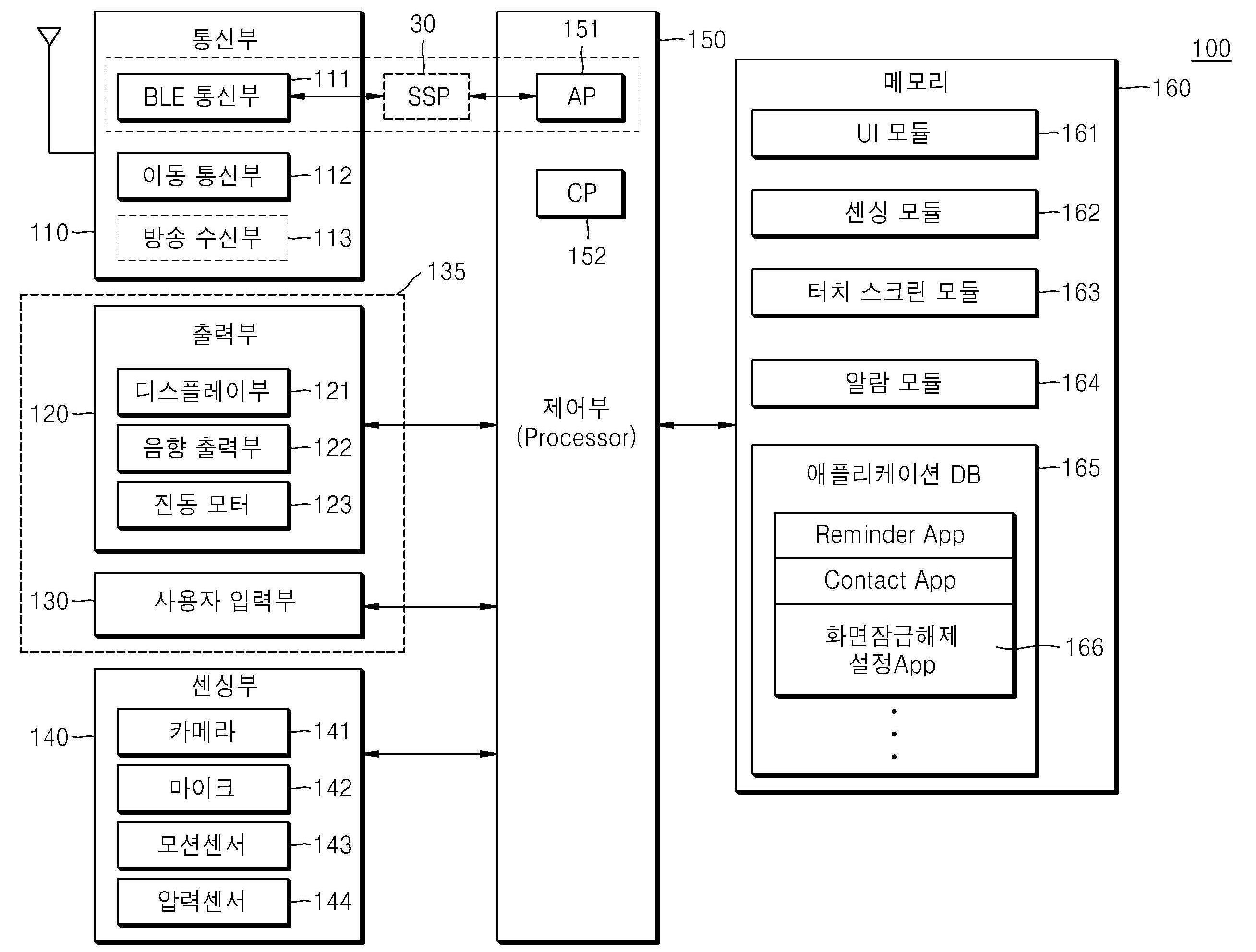
도 1은 본 발명의 일 면에 따른 통신 시스템을 나타내는 예시도이고;
도 2는 본 발명의 일 면에 따른 휴대 단말을 나타내는 예시도이고;
도 3은 본 발명의 일 면에 따른 SSP(Seamless Sensing Platform)의 데이터 통신 프로토콜을 나타내는 예시도이고;
도 4는 본 발명의 일 면에 따른 무선 디바이스를 나타내는 예시도이고;
도 5는 본 발명의 일 면에 따른 휴대 단말에 표시되는 잠금해제요구화면을 나타내는 예시도이고;
도 6은 본 발명에서 일 면에 따른 휴대 단말에 표시되는 홈화면을 나타내는 예시도이고;
도 7은 본 발명에서 일 면에 따른 무선 디바이스를 이용한 화면잠금을 제어하는 개념을 나타내는 예시도이고;
도 8은 본 발명에서 일 면에 따른 휴대 단말과 무선 디바이스간 거리를 나타내는 예시도이고;
도 9는 본 발명의 일 면에 따른 화면잠금을 제어하는 방법을 나타내는 순서도이고;
도 10은 본 발명의 일 면에 따른 화면잠금을 제어하는 방법을 나타내는 또 다른 순서도이고;
도 11은 본 발명의 타의 면에 따른 무선 디바이스를 이용한 화면잠금을 제어하는 개념을 나타내는 예시도이고;
도 12는 본 발명의 타의 면에 따른 화면잠금을 제어하는 방법을 나타내는 순서도이고;
도 13은 본 발명의 또 다른 타의 면에 따른 무선 디바이스를 이용한 화면잠금을 제어하는 개념을 나타내는 예시도이고;
도 14는 본 발명의 또 다른 타의 면에 따른 화면잠금을 제어하는 방법을 나타내는 순서도이고;
도 15는 본 발명의 일 면에 따른 화면잠금해제모드를 설정하는 사용자 인터페이스를 나타내는 예시도이고;
도 16은 본 발명의 일 면에 따른 화면잠금해제모드를 설정하는 사용자 인터페이스를 나타내는 다른 예시도이고;
도 17은 본 발명의 일 면에 따른 화면잠금해제모드를 설정하는 사용자 인터페이스를 나타내는 또 다른 예시도이다.
도 18은 본 발명의 일 실시예와 관련된 BLE 디바이스에서 브로드캐스트하는 Advertising 패킷의 데이터 포맷을 나타내는 도면이다.
도 19는 본 발명의 일 실시예와 관련된 AD 타입(Advertising data type)을 설명하기 위한 도면이다.
도 20은 본 발명의 일 실시예에 따른 BLE 디바이스에서 브로드캐스트하는 데이터를 설명하기 위한 도면이다.
도 21은 Advertising 데이터 패킷의 일례를 나타내는 도면이다.1 is an exemplary view showing a communication system according to an aspect of the present invention;
2 is an exemplary view showing a portable terminal according to an aspect of the present invention;
3 is an exemplary view showing a data communication protocol of a seamless sensing platform (SSP) according to an aspect of the present invention;
4 is an exemplary view showing a wireless device according to an aspect of the present invention;
5 is an exemplary view showing an unlock request screen displayed on a portable terminal according to an aspect of the present invention;
6 is an exemplary view showing a home screen displayed on a portable terminal according to an aspect of the present invention;
7 is an exemplary view showing a concept of controlling screen lock using a wireless device according to an aspect of the present invention;
8 is an exemplary view showing a distance between a portable terminal and a wireless device according to an aspect of the present invention;
9 is a flowchart illustrating a method of controlling screen lock according to an aspect of the present invention;
10 is another flowchart showing a method of controlling screen lock according to an aspect of the present invention;
11 is an exemplary view showing a concept of controlling screen lock using a wireless device according to another aspect of the present invention;
12 is a flow chart showing a method of controlling screen lock according to another aspect of the present invention;
13 is an exemplary view showing a concept of controlling screen lock using a wireless device according to another aspect of the present invention;
14 is a flowchart illustrating a method of controlling screen lock according to another aspect of the present invention;
15 is an exemplary view showing a user interface for setting a screen unlock mode according to an aspect of the present invention;
16 is another exemplary view showing a user interface for setting a screen unlock mode according to an aspect of the present invention;
17 is another exemplary view showing a user interface for setting a screen unlocking mode according to an aspect of the present invention.
18 is a diagram illustrating a data format of an advertising packet broadcast by a BLE device according to an embodiment of the present invention.
19 is a view for explaining an AD type (Advertising data type) related to an embodiment of the present invention.
20 is a diagram for describing data broadcast by a BLE device according to an embodiment of the present invention.
21 is a diagram showing an example of an advertising data packet.
이하, 본 발명을 제조하고 사용하는 방법이 상세하게 설명된다. 본 명세서에 기재된 "...부", "모듈" 등의 용어는 적어도 하나의 기능이나 동작을 처리하는 단위를 의미하며, 이는 하드웨어 또는 소프트웨어로 구현되거나 하드웨어와 소프트웨어의 결합으로 구현될 수 있다.Hereinafter, a method of manufacturing and using the present invention will be described in detail. The terms "... unit", "module", and the like described herein mean a unit that processes at least one function or operation, which may be implemented in hardware or software, or a combination of hardware and software.
본 발명의 일 실시예에 따른 휴대 단말은 다양한 형태로 구현될 수 있다. 예를 들어, 본 명세서에서 기술되는 휴대 단말에는 휴대폰, 스마트 폰(smart phone), 노트북 컴퓨터(laptop computer), 태블릿 PC, 전자북 단말기, 디지털방송용 단말기, PDA(Personal Digital Assistants), PMP(Portable Multimedia Player), 네비게이션 등이 있을 수 있으나, 이에 한정되는 것은 아니다. The mobile terminal according to an embodiment of the present invention may be implemented in various forms. For example, the mobile terminal described herein includes a mobile phone, a smart phone, a laptop computer, a tablet PC, an electronic book terminal, a digital broadcasting terminal, PDA (Personal Digital Assistants), and PMP (Portable Multimedia). Player), navigation, and the like, but are not limited thereto.
본 발명의 일 실시예에 따른 무선 디바이스는 휴대 단말의 외부 또는 별도 존재하는 무선통신 디바이스를 의미한다. 설명의 편의에 따라, 무선 디바이스의 일례로써, 블루투스 저 에너지(Bluetooth Low Energy, 이하 ‘BLE’라 함) 통신 기반의 디바이스인 BLE 디바이스가 주로 설명되나 이에 한정되는 것은 아니다. 즉, 무선 디바이스는 BLE 디바이스뿐만 아니라, Wi-Fi 디바이스, 지그비(Zigbee) 디바이스, RF-ID 디바이스, 또는 NFC 디바이스 등의 근거리 통신기반 디바이스를 포함할 수 있다. 또한, 무선 디바이스는 그 식별 정보를 전송하는 기능적 특징으로 인하여 식별자 태그(이하 ‘ID tag’라 함)로 불릴 수도 있다. 또한, 무선 디바이스는 식별 정보 또는 센싱 정보를 전송하는 기능 외에도 다양한 기능을 수행할 수 있는 휴대 단말일 수도 있다. 또한, 무선 디바이스는 일방향으로 식별 정보만을 주기적으로 전송하는 심플한 기기일 수도 있다.The wireless device according to an embodiment of the present invention refers to a wireless communication device that is external to the portable terminal or separately. For convenience of description, as an example of a wireless device, a Bluetooth low energy (hereinafter referred to as “BLE”) communication-based device, a BLE device is mainly described, but is not limited thereto. That is, the wireless device may include a short-range communication-based device such as a Wi-Fi device, a Zigbee device, an RF-ID device, or an NFC device, as well as a BLE device. In addition, the wireless device may be referred to as an identifier tag (hereinafter referred to as an “ID tag”) due to a functional characteristic of transmitting the identification information. Further, the wireless device may be a portable terminal capable of performing various functions in addition to the function of transmitting identification information or sensing information. Further, the wireless device may be a simple device that periodically transmits only identification information in one direction.
BLE는 근거리 통신 기술 중 하나로, 블루투스 V 4.0의 핵심 기능을 포함한다. BLE는 클래식 블루투스 규격과 비교하여 상대적으로 작은 duty cycle을 가지며, 저가격 생산이 가능하고, 평균 전력과 대기 전력을 줄여 동전 크기의 배터리로 수년간 작동할 수 있다.BLE is one of the short-range communication technologies, and includes the core functions of Bluetooth V 4.0. BLE has a relatively small duty cycle compared to the classic Bluetooth standard, it can produce at a low price, and it can operate for years with a coin-sized battery by reducing average power and standby power.
휴대 단말이 BLE 디바이스의 신호를 수신할 수 있는 BLE 디바이스의 통신 반경은 BLE 디바이스로부터 브로드캐스팅되는 데이터(일례로, Advertising packet)를 휴대 단말이 수신할 수 있는 거리(예컨대, 10m ~ 50m)를 나타낸다. 본 발명의 일 실시예에 따라 화면이 꺼진 상태에서 켜진 상태로 전환시 잠금해제요구화면이 표시되지 않도록 하는 조건으로서의 휴대 단말과 BLE 디바이스간 미리 설정된 거리는 실제 통신 상황에 따라 가변적일 수 있다. 미리 설정된 거리는 사용자에 의해 임의로 설정될 수도 있다. 예를 들어, 사용자에 의해, 거실, 주방, 집안 전체 등 일정 영역이 미리 설정된 거리로 설정될 수도 있고, 일정 거리 값(예컨대, 1~2m)이 미리 설정된 거리로 설정될 수도 있다. 또한, 미리 설정된 거리는 휴대 단말에서 수신되는 BLE 디바이스의 일정 신호 세기를 나타내는 것일 수도 있다.The communication radius of a BLE device capable of receiving a signal from a BLE device by a mobile terminal indicates a distance (eg, 10 m to 50 m) that the mobile terminal can receive data (eg, an advertising packet) broadcast from the BLE device. . According to an embodiment of the present invention, a preset distance between a portable terminal and a BLE device as a condition to prevent the unlock request screen from being displayed when the screen is switched from the turned-off state to the turned-on state may vary depending on the actual communication situation. The preset distance may be arbitrarily set by the user. For example, a predetermined area, such as a living room, a kitchen, or an entire house, may be set to a preset distance by a user, or a predetermined distance value (eg, 1 to 2 m) may be set to a preset distance. Also, the preset distance may indicate a certain signal strength of the BLE device received from the portable terminal.
아래에서는 첨부한 도면을 참고하여 본 발명이 속하는 기술 분야에서 통상의 지식을 가진 자가 용이하게 실시할 수 있도록 본 발명의 일 실시예에 대하여 상세히 설명된다. 그러나 본 발명은 여러 가지 상이한 형태로 구현될 수 있으며 여기에서 설명하는 실시예에 한정되지 않는다. 그리고 도면에서 본 발명을 명확하게 설명하기 위해서 설명과 관계없는 부분은 생략되었으며, 명세서 전체를 통하여 유사하거나 동일한 부분에 대해서는 동일한 도면 부호가 붙여졌다.Hereinafter, with reference to the accompanying drawings will be described in detail with respect to an embodiment of the present invention to be easily carried out by those of ordinary skill in the art. However, the present invention can be implemented in many different forms and is not limited to the embodiments described herein. In addition, in order to clearly describe the present invention in the drawings, parts irrelevant to the description are omitted, and like reference numerals are attached to similar or identical parts throughout the specification.
도 1은 본 발명의 일 면에 따른 통신 시스템을 나타내는 예시도이다. 1 is an exemplary view showing a communication system according to an aspect of the present invention.
본 발명의 일 면에 따른 통신 시스템은 휴대 단말(100) 및 무선 디바이스를 포함한다. 무선 디바이스는, 일례로 BLE 디바이스(200)를 포함할 수 있다. The communication system according to an aspect of the present invention includes a
휴대 단말(100)은 외부의 BLE 디바이스(200)와의 BLE 통신을 통해 사용자에게 소정 서비스를 제공하는 단말일 수 있다. 예를 들어, 휴대 단말(100)은 외부의 BLE 디바이스(200)의 정보(예컨대, 식별 정보)를 메모리에 저장 또는 등록하고, 관리할 수 있다. 또한, 휴대 단말(100)과 BLE 디바이스(200)간의 BLE 통신은 양방향 통신이거나, BLE 디바이스(200)가 일방적으로 신호를 전송하고 휴대 단말(100)이 BLE 디바이스(200)로부터 신호를 수신하는 단방향 통신일 수도 있다.The
또한, 휴대 단말(100)에서는 애플리케이션 프로세서(이하 ‘AP’라 함)와 별도로 SSP(Seamless Sensing Platform)가 동작될 수 있다. 휴대 단말(100)은 SSP의 센서 허브(sensor hub)에 BLE 통신부를 연결해 슬립 모드의 AP(Application Processor)를 깨우지 않고, BLE 디바이스(200)의 정보를 수집하고, 상황을 인지할 수 있다. SSP는 소정 상황이 발생된 경우에 슬립 모드의 AP를 깨우게 된다. SSP, AP, BLE 통신부는 하드웨어(H/W), 소프트웨어(S/W) 또는 이들이 결합된 형태(H/W + S/W)로 구현될 수 있다. 이에 관하여는 도 2 내지 도 3을 참조하여 후에 자세히 살펴보기로 한다. 또한, 휴대 단말(100)은 SSP를 포함하지 않고 BLE 통신부와 AP가 바로 연결되어 동작될 수도 있음에 유의해야 한다.In addition, the
BLE 디바이스(200)는 BLE 통신을 통해서 식별 정보를 외부로 브로드캐스팅할 수 있다. 이때, BLE 디바이스(200)는 식별 정보를 광고 패킷(이하 ‘Advertising packet’라 함) 형태로 브로드캐스팅할 수 있다. 본 발명의 일 면에 따른 BLE 디바이스(200)는 센서를 통해 센싱된 정보를 외부로 브로드캐스팅할 수도 있다. 예를 들어, BLE 디바이스(200)는 식별 정보(예컨대, ‘SAMSUNG_Temp_TAG001_blue’)를 Advertising packet의 UUID(universally unique identifier) 필드 또는 MSD(Manufacturer Specific Data) 필드에 포함하여 외부로 브로드캐스팅할 수 있다. BLE 디바이스(200)가 Advertising packet 형태로 데이터를 브로드캐스팅하는 것에 관한 자세한 설명은, 도 18내지 도 21을 참조하여 후술하기로 한다. 설명의 편의상, 이하에서는 센서를 포함하는 BLE 디바이스(200)를 센서 기반 BLE 디바이스라 부르기로 한다. The
또한, BLE 디바이스(200)는 BLE 디바이스(200)의 식별 정보 또는 센싱 정보를 일정 주기에 따라 브로드캐스팅하거나, 센싱 정보가 갱신되거나 특정 이벤트가 발생된 경우 이벤트 트리거 방식으로 브로드캐스팅할 수 있다.In addition, the
또한, BLE 디바이스(200)는 식별 정보를 Advertising packet 형태로 브로드캐스팅하고, BLE 디바이스(200)의 센싱 정보는 휴대 단말(100)과 페어링한 이후 통신 채널을 이용하여 휴대 단말(100)에게 전송할 수도 있다. 이때, BLE 디바이스(200)는, 센싱 정보의 보안을 위해, 휴대 단말(100)과 페어링할 때 협상된 암호화 코드 또는 미리 설정된 암호화 코드로 센싱 정보를 암호화하고, 암호화된 센싱 정보를 휴대 단말(100)로 전송할 수도 있다.In addition, the
본 발명의 일 면에 따른 BLE 디바이스(200)는 다양한 형태로 구현될 수 있다. 예를 들어, 본 명세서에서 기술되는 BLE 디바이스(200)는, BLE 태그(200-1) 형태로 간단하게 구현될 수도 있고, BLE 폰, BLE 태블릿 PC 등의 휴대 기기(200-2) 형태로 구현될 수도 있고, BLE 손목 시계, BLE 이어폰 등의 액세서리(200-3) 형태로 구현될 수도 있다. BLE 디바이스(200)의 구성에 대해서는 도 4를 참조하여 후에 자세히 설명된다. The
이하에서는 도 5 내지 도 8, 도 15 내지 도 17을 참조하여, 본 발명의 일 면에 따른, 무선 디바이스(일례로, BLE 디바이스(200))를 이용한 휴대 단말(100)의 화면잠금 제어에 대해 개략적으로 설명된다. Hereinafter, with reference to FIGS. 5 to 8 and 15 to 17, according to an aspect of the present invention, for controlling the screen lock of the
휴대 단말(100)은 사용자에게 화면잠금해제모드(또는 화면잠금모드)를 설정하는 사용자 인터페이스(일례로, 도 15의 1510, 도 16의 1610, 1650, 도 17의 1710)를 제공한다. 본 발명의 일 면에 따른 휴대 단말(100)은 무선 디바이스를 이용한 휴대 단말(100)의 화면잠금해제모드(도 15의 1540)를 설정하는 사용자 인터페이스를 제공한다. 사용자는 휴대 단말(100)의 사용자 인터페이스를 통해 활성화할 화면잠금해제모드를 선택하거나 설정할 수 있다. 예를 들어, 화면잠금해제모드는 무선 디바이스를 이용한 화면잠금해제모드(1540)뿐만 아니라, 드래그-잠금해제(Drag to unlock)(1515), 모션-잠금해제(Motion to unlock)(1520), 얼굴-잠금해제(Face to unlock)(1525), 패턴-잠금해제(Pattern to unlock)(1530), 패스워드-잠금해제(Password to unlock)(1535), PIN(Personal Identification Number)-잠금해제(PIN to unlock)(미도시), 슬라이드-잠금해제(Slide to unlock)(미도시) 등을 포함할 수 있다. The
또한, 휴대 단말(100)은 사용자 인터페이스(일례로, 도 16의 1610, 1650)를 통한 사용자 입력(1620, 1660)에 따라 무선 디바이스를 이용한 화면잠금해제모드(1540)에 대응하는 무선 디바이스의 식별 정보를 지정하고, 지정된 무선 디바이스의 식별 정보를 메모리에 저장할 수 있다. 예를 들어, 도 15의 사용자 인터페이스(1510)를 통해 사용자 입력(1545)이 수신되면, 무선 디바이스를 이용한 화면잠금해제모드의 세부 설정을 위한 사용자 인터페이스(도 16의 1610 또는 도 17의 1710)가 표시될 수 있다. 휴대 단말(100)에 미리 지정된 무선 디바이스가 있으면, 휴대 단말(100)은 지정된 무선 디바이스(1715)를 사용자 인터페이스(1710)에 포함하여 표시할 수 있다. 여기서 무선 디바이스(1715)의 표시는 식별 정보, 임의의 명칭 또는 용도(1715) 등이 될 수 있다. 지정된 무선 디바이스가 없으면, 사용자 인터페이스(1650)를 통해 무선 디바이스를 이용한 화면잠금해제모드(1540)에 대응하는 무선 디바이스(또는 무선 디바이스의 식별 정보)를 지정할 수 있다. 일례로, 도 16의 사용자 인터페이스(1650)는 휴대 단말(100)에서 탐색된 적어도 하나의 무선 디바이스의 식별 정보 각각에 대응하는 임의의 명칭 또는 용도(1655)의 리스트를 표시할 수 있다. 무선 디바이스에는 사용자 입력(1660)을 통해, 임의의 명칭이 지정되거나, 또는 무선 디바이스(또는 무선 디바이스의 식별 정보)에 대응하는 용도(일례로, ID TAG)가 지정될 수 있다. 여기서, 식별 정보는 무선 디바이스를 다른 디바이스와 구별하기 위한 고유 정보로서, 예컨대, 태그 ID, 디바이스 명, 시리얼 넘버, MAC 주소 등을 포함할 수 있다. 임의의 명칭 또는 용도(1715)는 휴대 단말(100)에서 검출된 무선 디바이스들을 구분하기 위해 사용자 또는 해당 무선 디바이스를 이용하는 애플리케이션에 의해 임의로 지정되거나 명명된 것일 수 있다. 일례로, ‘ID TAG’는, 화면잠금을 제어하는 개인 정보 또는 보안과 관련하여 사용되는 용도를 고려하여, 사용자 인터페이스에서 제공된 용도들 중 사용자의 선택에 의해 지정된 것일 수 있다. 또한, 사용 편의를 위해, 각각의 무선 디바이스들은 서로 다른 색상, 무늬, 아이콘, 텍스트 등으로 구분되어 표시될 수도 있다. 일례로, 휴대 단말(100)에서 탐색된 서로 다른 무선 디바이스들이 동일한 용도로 분류되어도, 휴대 단말(100)은 각각의 서로 다른 식별 정보를 갖는 무선 디바이스들을 서로 다른 시각적 효과 또는 텍스트로 표시할 수 있다. 또한, 무선 디바이스를 추가할 수 있는 기능과 관련한 오브젝트(1665)가 사용자 입력에 따라 지정되는 경우, 휴대 단말(100)은 주변에 위치한 새로운 무선 디바이스를 탐색하고, 탐색된 무선 디바이스를 리스트(1655)에 추가하여 표시할 수 있다.In addition, the
휴대 단말(100)에 무선 디바이스를 이용한 화면잠금해제모드가 설정되거나, 화면잠금해제모드가 활성화되는 경우, 일정 조건이 만족되면, 휴대 단말(100)은 화면(일례로, 도 7 또는 도 8의 710)이 꺼진 상태에서 켜진 상태로 전환시 잠금해제요구화면(일례로, 도 5의 510)이 표시되지 않도록 제어할 수 있다. 이때, 휴대 단말(100)은 화면잠금 상태에서 휴대 단말(100)에 제한되었던 적어도 일부의 사용자 인터페이스가 활성화되도록 제어할 수 있다. When a screen unlocking mode using a wireless device is set in the
여기서, 일정 조건이 만족되는 경우는, 도 7에 도시된 바와 같이 휴대 단말(100)의 주변의 일정 거리 이내에서 무선 디바이스가 탐색되고, 탐색된 무선 디바이스의 식별 정보가 메모리에 저장된 식별 정보와 일치하는 것일 수 있다. 또한, 일정 조건이 만족되지 않는 경우, 예를 들어, 무선 디바이스가 휴대 단말(100)의 주변의 일정 거리 밖에 존재하거나, 또는 탐색된 무선 디바이스의 식별 정보가 메모리에 저장된 식별 정보와 다른 경우, 휴대 단말(100)은 화면이 꺼진 상태에서 켜진 상태로 전환시 잠금해제요구화면(510)이 표시되도록 제어할 수 있다. Here, when a certain condition is satisfied, the wireless device is searched within a certain distance around the
이때, 화면에 표시되는 잠금해제요구화면(510)은 무선 디바이스를 이용한 화면잠금해제모드(이하, ‘제1 화면잠금해제모드’라 함)에 대응하는 제1 잠금해제요구화면일 수 있다. 예를 들어, 제1 잠금해제요구화면은 ‘무선 디바이스가 탐색되지 않음’ 또는 ‘무선 디바이스가 근처에 없으면 화면잠금을 해제할 수 없음’과 같은 잠금상태 표시, ‘무선 디바이스를 휴대 단말의 일정 거리내에 위치시키세요’와 같은 가이드를 포함할 수 있다. 또한, 제1 잠금해제요구화면은 제1 화면잠금해제모드와 다른 화면잠금해제모드(이하, ‘제2 화면잠금해제모드’라 함)로 전환할 수 있는 아이콘 등의 오브젝트 또는 제2 화면잠금해제모드로 전환하기 위한 가이드를 포함할 수 있다. 또한, 사용자 입력에 따라 제2 화면잠금해제모드로 전환되면, 제2 화면잠금해제모드에 대응하는 잠금해제 요구를 위한 인터랙션이 가능한 상태로 변경될 수 있다. 여기서, 제2 화면잠금해제모드로 전환되는 것은 상기 일정 조건이 만족되지 않는 경우에 제2 화면잠금해제모드에 대응하는 잠금해제 요구를 위한 인터랙션이 일시적으로 동작되는 것일 수 있다. 즉, 제1 화면잠금해제모드가 활성화 설정된 후 일정 조건이 만족되지 않아서 제2 화면잠금해제모드에 대응하는 잠금해제 요구를 위한 인터랙션이 동작된 이후에도, 제1 화면잠금해제모드의 해제 설정에 대한 사용자 입력이 수신되기까지는, 상기 일정 조건이 만족되는지 여부에 따라 잠금해제요구화면의 표시여부가 결정되는 제1 화면잠금해제모드로 동작될 수 있다. At this time, the
또한, 잠금해제요구화면(510)은 제2 화면잠금해제모드 (예를 들어, 드래그-잠금해제(1515), 모션-잠금해제(1520), 얼굴-잠금해제(1525), 패턴-잠금해제(1530), 패스워드-잠금해제(1535), PIN-잠금해제(미도시) 또는 슬라이드-잠금해제(미도시) 등)에 대응하는 것일 수 있다. 또한, 잠금해제요구화면(510)은 복수의 제2 화면잠금해제모드들에 대응하는 잠금해제요구화면일 수도 있다. 예를 들어, 패턴-잠금해제(1530) 및 PIN-잠금해제(미도시)에 대응하는 잠금해제요구화면이 적어도 하나의 화면에 구성될 수도 있다. Also, the
또한, 잠금해제요구화면(510)은 휴대 단말(200)에 지정된 제2 화면잠금해제모드에 따라 결정될 수 있다. 제2 화면잠금해제모드는 사용자 인터페이스를 통해 사용자 입력에 따라 지정되거나, 또는 제1 화면잠금해제모드가 활성화 되는 경우 자동으로 미리 설정된 화면잠금해제모드가 제2 화면잠금해제모드로 지정될 수도 있다. 예를 들어, 휴대 단말(100)의 사용자인터페이스(1510)를 통해 사용자의 터치 입력(1545)이 수신되면, 제1 화면잠금해제모드(1540)가 지정되고, 제1 화면잠금해제모드(1540)의 세부 설정을 위한 사용자 인터페이스(일례로, 도 16의 1610 또는 도 17의 1710)가 표시될 수 있다. 제1 화면잠금해제모드(1540)의 세부 설정을 위한 사용자 인터페이스는 체크박스(1645)와 같은 인터랙션 오브젝트, 체크박스(1645)의 사용자 인터랙션을 위한 가이드(1640) 등을 포함할 수 있다. 여기서, 체크박스(1645)는, 제1 화면잠금해제모드(1540)가 활성화된 후, BLE 디바이스(200)가 탐색되지 않는 경우 또는 상기 일정 조건이 만족되지 않는 경우에, 휴대 단말(100)에 표시될 대상으로서 제1 잠금해제요구화면 및 제2 화면잠금해제모드에 대응하는 잠금해제요구화면(이하 ‘제2 잠금해제요구화면’이라 함) 중 어느 하나를 선택받을 수 있는 인터랙션 오브젝트일 수 있다. 또한, 체크박스(1645)는, 제1 화면잠금해제모드(1540)가 활성화된 후, BLE 디바이스(200)가 탐색되지 않는 경우 또는 상기 일정 조건이 만족되지 않는 경우에, 제1 화면잠금해제모드(1540)를 제2 화면잠금해제모드로 변경할 것인지 여부를 입력받을 수 있는 인터랙션 오브젝트일 수 있다. 또한, 도 17에서 사용자 인터페이스(1710)의 체크박스(1645)가 사용자 입력에 따라 체크되는 경우, 휴대 단말(100)은 지정된 제2 화면잠금해제모드(1720)를 사용자 인터페이스(1710)에 표시할 수 있다. 여기서, 표시된 제2 화면잠금해제모드(1720)는 제1 화면잠금해제모드(1540)가 활성화된 후 BLE 디바이스(200)가 탐색되지 않는 경우 또는 상기 일정 조건이 만족되지 않는 경우에 동작되는 모드일 수 있다. 또한, 체크박스(1645), 가이드(1640), 제2 화면잠금해제모드(1720) 등의 사용자 인터페이스는 라디오 버튼, 리스트 등 다양한 인터랙션 오브젝트로 표현되거나 변형될 수 있음에 유의해야한다.Also, the unlocking
또한, 상기 일정 조건이 만족되는 경우에도 휴대 단말(200)은 화면에 제3 화면잠금해제모드에 대응하는 제3 잠금해제요구화면을 표시할 수 있다. 제3 화면잠금해제모드는 제1 화면잠금해제모드 또는 제2 화면잠금해제모드와 다른 것일 수 있다. 또한, 일정 조건이 만족되지 않는 경우에는 휴대 단말(200)은 제2 화면잠금해제모드에 대응하는 제2 잠금해제요구화면을 표시할 수 있다. 예를 들어, 제1 화면잠금해제모드가 활성된 후 화면이 꺼진 상태에서 켜진 상태로 변경될 때, 상기 일정 조건이 만족되면 휴대 단말(200)의 화면에 드래그-잠금해제(1515)에 대응하는 제3 잠금해제요구화면이 표시되고, 일정 조건이 만족되지 않으면 드래그-잠금해제(1515)보다 높은 수준의 보안을 제공하는 패턴-잠금해제(1530)에 대응하는 제2 잠금해제요구화면이 표시될 수 있다. 또한, 휴대 단말(100)은 제1 화면잠금해제모드를 설정시 제2 화면잠금해제모드 또는 제3 화면잠금해제모드를 함께 지정할 수 있도록 하는 사용자 인터페이스를 제공할 수 있다. 이처럼, 휴대 단말(100)의 사용 환경에 따라 잠금해제요구화면을 구분하여 설정할 수 있는 사용자 인터페이스를 제공함으로써, 보다 정교한 화면잠금 기능 수행이 가능하다.In addition, even when the predetermined condition is satisfied, the
또한, 상기 일정 조건이 만족되면, 휴대 단말(100)은 화면이 꺼진 상태에서 켜진 상태로 자동 전환되도록 제어할 수도 있다. 휴대 단말(100)은 화면을 꺼진 상태에서 켜진 상태로 자동 전환한 후 잠금해제요구화면을 표시하거나 표시하지 않도록 제어할 수 있다. In addition, when the predetermined condition is satisfied, the
또한, 휴대 단말(100)에 호 수신, 알람 등의 시스템 이벤트가 발생되는 것을 제외하고, 화면이 꺼진 상태에서 켜진 상태로 전환되는 것은 사용자 인터페이스를 통한 입력 수신에 의해서만 수행되는 것일 수도 있다. 예를 들어, 도 5, 도 6에서, 휴대 단말(100)은 전원 버튼(560), 홈 키(570) 등의 물리적 버튼을 통해 입력을 수신하면, 화면이 꺼진 상태에서 켜진 상태로 전환할 수 있다.In addition, except that a system event such as a call reception or an alarm is generated in the
잠금해제요구화면(510)은 일례로, 잠금 이미지(550), 단말의 상태 표시 레이어(540), 투명도 조절 레이어(530), 잠금해제 요구를 위한 인터랙션 레이어(520) 순으로 구성될 수 있다. 잠금해제요구화면(510)이 표시되면, 사용자 입력이 제2 화면잠금해제모드(또는 제3 화면잠금해제모드)에 따른 화면잠금해제 조건이 만족되기 전까지 잠금해제요구화면(510)이 화면에 계속하여 표시될 수 있다. 예를 들어, 제2 화면잠금해제모드가 드래그-잠금해제(1515)인 경우, 터치-드래그 제스처의 시작점부터 끝점까지의 거리가 미리 설정된 길이보다 긴 드래그 제스처가 입력되기 전까지 잠금해제요구화면(510)이 표시될 수 있다. 잠금해제요구화면(510)이 표시된 후, 사용자 입력이 제2 화면잠금해제모드에 따른 화면잠금해제 조건을 만족하는 경우, 화면잠금 상태에서 휴대 단말(100)에 제한되었던 적어도 일부의 사용자 인터페이스가 활성화되고, 휴대 단말(100)의 화면에 홈화면(일례로, 도 6의 610), 미리 설정된 애플리케이션의 실행화면 또는 미리 설정된 이미지 등이 표시될 수 있다. The
또한, 화면이 꺼진 상태에서 켜진 상태로 전환시 잠금해제요구화면(510)이 표시되지 않는다는 것은 잠금해제 요구를 위한 인터랙션 레이어(520)가 표시되지 않음을 나타내는 것일 수 있다. 즉, 별도의 사용자 인터랙션에 대한 요구없이 화면잠금 상태에서 제한되었던 사용자 인터페이스의 적어도 일부가 해제된다면, 화면이 꺼진 상태에서 켜진 상태로 전환시 인터랙션 레이어(520)를 제외하고, 잠금 이미지(550), 단말의 상태 표시 레이어(540) 및 투명도 조절 레이어(530) 중 적어도 하나로 구성된 화면이 표시되는 것도, 화면이 꺼진 상태에서 켜진 상태로 전환시 잠금해제요구화면(510)이 표시되지 않는 것일 수 있다.In addition, when the screen is switched from the turned off state to the turned on state, the fact that the
또한, 상기 일정 조건에서, 휴대 단말(100)의 주변의 일정 거리 이내에서 무선 디바이스가 탐색되는 것은, 미리 설정된 거리에 대응하는 수신신호 세기와 같거나 큰 수신신호 세기로 수신되는 신호를 전송하는 무선 디바이스가 탐색되는 것일 수 있다. 예를 들어, 도 8에서 휴대 단말(100)과 BLE 디바이스(200) 간의 거리(810)는 휴대 단말(100)에서 수신되는 BLE 디바이스(200)의 신호 세기를 기반으로 추정될 수 있다. 미리 설정된 거리는 휴대 단말(100)의 사용자 인터페이스(일례로, 도 16의 1625)를 통해 수신된 사용자 입력에 따라 지정된 것일 수 있다. 일례로, 미리 설정된 거리는, 슬라이드바 형태의 사용자 인터페이스(1625), 거리 값을 버튼 또는 키입력 조작 따라 입력받는 형태의 사용자 인터페이스 등을 통해 지정될 수 있다. 휴대 단말(100)은 사용자 인터페이스를 통해 지정된 무선 디바이스와 휴대 단말(100)간 거리를 저장하고, 저정된 거리에 대응하는 수신신호 세기와 같거나 큰 수신신호 세기의 신호를 전송하는 무선 디바이스를 탐색할 수 있다. 또한, 미리 설정된 거리는 휴대 단말(100)이 제조될 때, 또는 제1 화면잠금해제모드의 제어 명령어 또는 화면잠금해제설정 애플리케이션이 메모리에 저장시 함께 휴대 단말(100)에 미리 저장된 디폴트 값(일례로, 2m)일 수도 있다. 또한, 무선 디바이스의 통신 반경이 충분히 작은 경우(일례로, 2~5m), 미리 설정된 거리는 별도 설정 없이 해당 무선 디바이스가 탐색되는 통신 반경을 나타내는 것일 수도 있다.In addition, in the predetermined condition, when the wireless device is searched within a predetermined distance around the
또한, 미리 설정된 거리는 휴대 단말(100)에서 측정되는 BLE 디바이스(200)가 전송하는 신호의 특정 세기로 표현될 수도 있다. 이때, 신호 세기는 수신 전계 강도(electric field strength)(일례로, v/m 또는 dB 단위), RSSI(Received Signal Strength Indicator), SNR(Signal to Noise Ratio) 등으로 나타낼 수 있다. 또한, 휴대 단말(100)은, 미리 설정된 거리로서 신호 세기가 지정될 수 있도록하는 사용자 인터페이스를 제공할 수도 있다. Also, the preset distance may be expressed as a specific strength of a signal transmitted by the
또한, 상기 일정 조건은, 휴대 단말(100)의 주변의 일정 거리 이내에서 무선 디바이스가 탐색되고, 탐색된 무선 디바이스의 식별 정보가 메모리에 저장된 식별 정보와 일치하는 것뿐만 아니라, 사용자의 휴대 단말(100) 사용 의도를 파악하기 위한 센싱 조건이 부가될 수 있다. 휴대 단말(100)은 센싱 조건과 관련된 센싱부(일례로, 도 2의 140)의 센서를 통해 휴대 단말(100)의 센싱 정보를 획득할 수 있다. 또한, 휴대 단말(100)은 무선 디바이스로부터 센싱 조건과 관련된 센싱 정보를 수신할 수 있다. 이때, 센싱 정보는, 무선 디바이스로부터 브로드캐스팅되는 advertising packet의 MSD(Manufacturer Specific Data) 필드에 포함되어 있을 수 있다. 휴대 단말(100)은 획득된 센싱 정보 또는 수신된 센싱 정보가 센싱 조건을 만족하는지 판단할 수 있다.In addition, the predetermined condition is that the wireless device is searched within a certain distance around the
또한, 휴대 단말(100)은 센싱 조건이 사용자의 선택에 의해 지정될 수 있도록 사용자 인터페이스(일례로, 도 16의 1630, 1635)를 제공할 수 있다. 예를 들어, 사용자 인터페이스(1630)에 지정된 센싱 조건은 휴대 단말(100)의 움직임이 미리 설정된 움직임 형태(일례로, 픽업 모션(Pick-up motion))를 나타내는 것일 수 있다. 사용자 인터페이스(1635)에 지정된 센싱 조건은 BLE 디바이스(200)의 움직임이 미리 설정된 움직임 형태(일례로, 2회 흔들기(Shake 2 times))일 수 있다. 또한, 센싱 조건은 제1 화면잠금해제모드에 대응하여 휴대 단말(100)의 제조시 저장되거나 또는 제1 화면잠금해제모드의 제어 명령어를 포함하는 애플리케이션에 미리 설정된 것일 수도 있다. 이에 대해서는 도 2 내지 도 4, 도 11 내지 도 14를 참조하여 상세히 설명된다. In addition, the
또한, 휴대 단말(100)의 화면이 켜진 상태에서 상술한 일정 조건이 만족됨이 지속되는 경우, 휴대 단말(100)의 사용자로부터 화면끄기 입력을 수신하기전까지 잠금해제요구화면 없이 화면이 켜진 상태를 유지하도록 제어할 수 있다.In addition, when the above-described predetermined condition is satisfied while the screen of the
도 2는 본 발명의 일 면에 따른 휴대 단말을 나타내는 예시도이다. 2 is an exemplary view showing a portable terminal according to an aspect of the present invention.
휴대 단말(100)은, 통신부(110), 사용자 인터페이스부(135), 제어부(150), 메모리(160)를 포함한다. 사용자 인터페이스부(135)는 출력부(120) 및 사용자 입력부(130)를 포함할 수 있다. The
통신부(110)는 무선 디바이스(일례로, BLE 디바이스(200))를 탐색한다. 통신부(110)는 무선 디바이스로부터 수신되는 신호의 세기를 측정하여, 측정된 신호의 세기를 제어부(150)로 전송할 수 있다. 또한, 통신부(110)는 휴대 단말(100) 주변의 일정 거리 이내에 위치한 무선 디바이스로부터 식별 정보를 수신한다. 또한, 통신부(110)는 무선 디바이스(200)로부터 식별 정보와 함께 무선 디바이스(20))의 센싱 정보를 더 수신할 수도 있다. 이때, 본 발명의 일 실시예에 따른 통신부(110)는, 센싱 정보 및 식별 정보를 Advertising 데이터 패킷으로 수신할 수 있다. 예를 들어, 센싱 정보는 Advertising 데이터 패킷의 MSD(Manufacturer Specific Data) 필드에 삽입되어 있고, 식별 정보는 Advertising 데이터 패킷의 UUID(universally unique identifier) 필드 또는 MSD(Manufacturer Specific Data) 필드에 삽입될 수 있을 수 있다. The
통신부(110)는, 휴대 단말(100)과 BLE 디바이스(200) 또는 휴대 단말(100)과 서버 간의 통신을 위한 하나 이상의 구성요소를 포함할 수 있다. 예를 들어, 통신부(110)는, BLE 통신부(111), 이동 통신부(112), 방송 수신부(113) 등을 포함할 수 있다.The
BLE 통신부(111)는 BLE 통신 기능을 지원한다. 예를 들어, BLE 통신부(111)는, 외부의 BLE 디바이스(200)로부터 브로드캐스팅되는 신호(Advertising packet)을 수신할 수 있다. BLE 통신부(111)는, 소정 주기로 BLE 디바이스(200)를 스캔(또는 탐색)할 수도 있고, 사용자의 요청 시에 BLE 디바이스(200)를 스캔(또는 탐색)할 수도 있다. The
BLE 통신부(111)는 제어부(150) 또는 SSP(30)에 연결될 수 있다. SSP(30)는 센서 허브 및 SSP 매니저를 포함할 수 있다. 센서 허브는 MCU(Micro Controller Unit)의 일종으로 다양한 종류의 센서를 연결할 수 있다. 센서 허브는 BLE 통신부(111)와 연결될 수 있으며, BLE 통신부(111)를 통해 외부의 BLE 디바이스(200)의 정보를 수집할 수 있다. SSP 매니저는 센서 허브로부터 데이터를 수신할 수 있으며, 센서 허브로부터 수신된 데이터에 기초하여 슬립 모드의 AP(151)를 깨울 수 있다. SSP(30)에 관하여는 도 3을 참조하여 후에 상술된다. The
BLE 통신부(111)는 휴대 단말(100)이 휴대 단말(100)에 기 등록된 BLE 디바이스의 통신 반경 내에 위치하게 되는 경우, BLE 디바이스(200)로부터 식별 정보 또는 센싱 정보를 수신할 수 있다.The
한편, 통신부(110)는 BLE 통신 이외에 다른 근거리 통신 기능을 지원할 수도 있다. 근거리 통신 기술에는 무선 랜(Wi-Fi), 블루투스, 지그비, WFD(Wi-Fi Direct), UWB(ultra wideband), 적외선 통신(IrDA, infrared Data Association) 등이 있을 수 있으나, 이에 한정되는 것은 아니다. Meanwhile, the
이동 통신부(112)는 이동 통신망 상에서 기지국, 외부의 단말, 서버 중 적어도 하나와 무선 신호를 송수신한다. 여기에서, 무선 신호는, 음성 호 신호, 화상 통화 호 신호 또는 문자/멀티미디어 메시지 송수신에 따른 다양한 형태의 데이터를 포함할 수 있다.The mobile communication unit 112 transmits and receives wireless signals to and from at least one of a base station, an external terminal, and a server on a mobile communication network. Here, the wireless signal may include various types of data according to transmission and reception of a voice call signal, a video call signal, or a text/multimedia message.
방송 수신부(113)는 방송 채널을 통하여 외부로부터 방송 신호 및/또는 방송 관련된 정보를 수신한다. 방송 채널은 위성 채널, 지상파 채널을 포함할 수 있다. 구현 예에 따라서 방송 수신부(113)가 생략될 수도 있다. The broadcast receiving unit 113 receives broadcast signals and/or broadcast related information from the outside through a broadcast channel. The broadcast channel may include a satellite channel and a terrestrial channel. Depending on the implementation example, the broadcast receiving unit 113 may be omitted.
사용자 인터페이스부(135)는 BLE 무선 디바이스(200)를 이용하는 제1 화면잠금해제모드를 설정하는 사용자 인터페이스를 제공한다. 또한, 상기 사용자 인터페이스를 통해 제1 화면잠금해제모드에 대응하는 BLE 디바이스(200)의 식별 정보가 지정될 수 있다. 또한, 사용자 인터페이스부(135)는 앞서 설명된 제2 화면잠금해제모드, 제3 화면잠금해제모드를 설정하는 사용자 인터페이스를 제공할 수 있다. 또한, 사용자 인터페이스부(135)는 휴대 단말(100)과 BLE 디바이스(200)간 미리 설정된 거리를 사용자로부터 입력 받거나, 센싱 조건을 입력 받을 수 있다.The
사용자 인터페이스부(135)는 출력부(120) 및 사용자 입력부(130)를 포함할 수 있다. 출력부(120)는, 오디오 신호 또는 비디오 신호 또는 진동 신호의 출력을 위한 것으로, 이에는 디스플레이부(121)와 음향 출력부(122), 진동 모터(123) 등이 포함될 수 있다. 디스플레이부(121)는 휴대 단말(100)에서 처리되는 정보를 표시 출력한다. 예를 들어, 디스플레이부(121)는, 통화 모드인 경우 통화와 관련된 UI(User Interface) 또는 GUI(Graphic User Interface)를 표시할 수 있고, BLE 디바이스(200) 검색 모드인 경우, 검색된 BLE 디바이스의 목록을 표시할 수 있다. 이때, 디스플레이부(121)는 휴대 단말(100)에 기 등록되지 않은 BLE 디바이스와 기 등록된 BLE 디바이스를 구별하여 표시할 수도 있다. The
또한, BLE 디바이스(200) 설정 모드인 경우, 디스플레이부(121)는 BLE 디바이스(200)의 설정과 관련된 UI(User Interface) 또는 GUI(Graphic User Interface)를 표시할 수 있다.Also, in the
한편, 디스플레이부(121)와 터치패드가 레이어 구조를 이루어 터치 스크린으로 구성되는 경우, 디스플레이부(121)는 출력 장치 이외에 입력 장치로도 사용될 수 있다. 디스플레이부(121)는 액정 디스플레이(liquid crystal display), 박막 트랜지스터 액정 디스플레이(thin film transistor-liquid crystal display), 유기 발광 다이오드(organic light-emitting diode), 플렉시블 디스플레이(flexible display), 3차원 디스플레이(3D display), 전기영동 디스플레이(electrophoretic display) 중에서 적어도 하나를 포함할 수 있다. 그리고 휴대 단말(100)의 구현 형태에 따라 휴대 단말(100)은 디스플레이부(121)를 2개 이상 포함할 수도 있다. 이때, 2개 이상의 디스플레이부(121)는 힌지(hinge)를 이용하여 마주보게 배치될 수 있다. On the other hand, when the display unit 121 and the touch pad are configured as a touch screen in a layer structure, the display unit 121 may be used as an input device in addition to an output device. The display unit 121 includes a liquid crystal display, a thin film transistor-liquid crystal display, an organic light-emitting diode, a flexible display, and a three-dimensional display ( 3D display), and an electrophoretic display (electrophoretic display). Also, depending on the implementation form of the
음향 출력부(122)는 통신부(110)로부터 수신되거나 메모리(160)에 저장된 오디오 데이터를 출력한다. 또한, 음향 출력부(122)는 휴대 단말(100)에서 수행되는 기능(예를 들어, 호신호 수신음, 메시지 수신음 등)과 관련된 음향 신호를 출력한다. 이러한 음향 출력부(122)에는 스피커(speaker), 버저(Buzzer) 등이 포함될 수 있다.The sound output unit 122 outputs audio data received from the
진동 모터(123)는 진동 신호를 출력할 수 있다. 예를 들어, 진동 모터(123)는 오디오 데이터 또는 비디오 데이터(예컨대, 호신호 수신음, 메시지 수신음 등)의 출력에 대응하는 진동 신호를 출력할 수 있다. 또한, 진동 모터(123)는 터치스크린에 터치가 입력되는 경우 진동 신호를 출력할 수도 있다. The vibration motor 123 may output a vibration signal. For example, the vibration motor 123 may output a vibration signal corresponding to the output of audio data or video data (eg, call signal reception sound, message reception sound, etc.). Also, the vibration motor 123 may output a vibration signal when a touch is input to the touch screen.
출력부(120)는, 사용자에 의해 기 설정된 알림 메시지를 출력할 수 있다. 출력부(120)는, 휴대 단말(100)이 BLE 디바이스(200)의 통신 반경 또는 미리 설정된 거리 내에 위치하게 되는 경우 알림 메시지를 출력할 수도 있고, 휴대 단말(100)이 BLE 디바이스(200)의 통신 반경 또는 미리 설정된 거리를 벗어나는 경우 알림 메시지를 출력할 수도 있다. 또한, 출력부(120)는, BLE 디바이스(200)와 휴대 단말(100) 간의 거리 정보에 따라 알림 메시지를 출력할 수도 있다.The
또한, 출력부(120)는, 센서 기반 BLE 디바이스로부터 수신된 센싱 정보 또는 휴대 단말에서 획득된 센싱 정보와 미리 설정된 센싱 조건간의 차이가 기 설정된 범위 이내인 경우, 알림 메시지를 출력할 수 있다.Further, the
출력부(120)는, BLE 디바이스(200)를 소지한 타 사용자가 이용 중인 SNS(Social Networking Service)에 관한 정보, 및 BLE 디바이스(200)와 휴대 단말(100) 간의 통신 이력 정보 중 적어도 하나를 출력할 수도 있다.The
사용자 입력부(130)는, 사용자가 휴대 단말(100)을 제어하기 위한 데이터를 입력하는 수단을 의미한다. 예를 들어, 사용자 입력부(130)에는 소프트웨어 모듈 또는 물리적 기구 및 회로로 구현되는 버튼, 키 패드(key pad), 돔 스위치(dome switch), 터치 패드(접촉식 정전 용량 방식, 압력식 저항막 방식, 적외선 감지 방식, 표면 초음파 전도 방식, 적분식 장력 측정 방식, 피에조 효과 방식 등), 조그 휠, 조그 스위치 등이 있을 수 있으나 이에 한정되는 것은 아니다.The
사용자 입력부(130)는, 화면잠금해제모드를 설정하는 사용자 인터페이스를 통해 사용자 입력에 따라 제1 화면잠금해제모드에 대응하는 무선 디바이스의 식별 정보를 지정할 수 있다. 또한, 사용자 입력부(130)는, 휴대 단말(100)에서의 센싱 조건 또는 센서 기반 BLE 디바이스의 센싱 조건 중 적어도 하나를 입력 받을 수 있다. The
메모리(160)는 사용자 인터페이스를 통해 지정된 제1 화면잠금해제모드에 대응하는 무선 디바이스(일례로, BLE 디바이스(200))의 식별 정보를 저장한다.The
메모리(160)는 제어부(150)의 처리 및 제어를 위한 프로그램을 저장할 수도 있고, 입/출력되는 데이터들(예를 들어, BLE 디바이스의 식별 정보, BLE 디바이스의 속성 정보, 사용자 추가 정보, BLE 디바이스에 포함된 센서에 의해 센싱된 정보 등)을 저장할 수도 있다. The
메모리(160)는 플래시 메모리 타입(flash memory type), 하드디스크 타입(hard disk type), 멀티미디어 카드 마이크로 타입(multimedia card micro type), 카드 타입의 메모리(예를 들어 SD 또는 XD 메모리 등), 램(RAM, Random Access Memory) SRAM(Static Random Access Memory), 롬(ROM, Read-Only Memory), EEPROM(Electrically Erasable Programmable Read-Only Memory), PROM(Programmable Read-Only Memory) 자기 메모리, 자기 디스크, 광디스크 중 적어도 하나의 타입의 저장매체를 포함할 수 있다. 또한, 휴대 단말(100)은 인터넷(internet)상에서 메모리(160)의 저장 기능을 수행하는 웹 스토리지(web storage)를 운영할 수도 있다.The
메모리(160)에 저장된 프로그램들은 그 기능에 따라 복수 개의 모듈들을 포함할 수 있는데, 예를 들어, UI 모듈(161), 터치 스크린 모듈(163), 알람 모듈(164) 등을 포함할 수 있다. Programs stored in the
UI 모듈(161)은, 애플리케이션별로 BLE 디바이스(200)와 연동되는 UI, GUI 등을 제공할 수 있다. UI 모듈(161)의 기능은 그 명칭으로부터 당업자가 알 수 있으므로, 구체적인 설명은 생략하기로 한다. The
터치 스크린 모듈(163)은 사용자의 터치 스크린상의 터치 제스처를 감지하고, 터치 제스처에 관한 정보를 제어부(150)로 전달할 수 있다. 터치 스크린 모듈(163)은 별도의 컨트롤러(H/W)로 구성될 수도 있다. The
터치스크린의 터치 또는 근접 터치를 감지하기 위해 터치스크린의 내부 또는 근처에 다양한 센서가 구비될 수 있다. 터치스크린의 터치를 감지하기 위한 센서의 일례로 촉각 센서가 있다. 촉각 센서는 사람이 느끼는 정도로 또는 그 이상으로 특정 물체의 접촉을 감지하는 센서를 말한다. 상기 촉각 센서는 접촉면의 거칠기, 접촉 물체의 단단함, 접촉 지점의 온도 등의 다양한 정보를 감지할 수 있다.Various sensors may be provided inside or near the touch screen to sense a touch or proximity touch of the touch screen. A tactile sensor is an example of a sensor for sensing a touch of a touch screen. A tactile sensor is a sensor that senses the contact of a specific object with or above a human level. The tactile sensor can detect various information such as the roughness of the contact surface, the hardness of the contact object, and the temperature of the contact point.
또한, 터치스크린의 터치를 감지하기 위한 센서의 일례로 근접 센서가 있다.In addition, a proximity sensor is an example of a sensor for sensing a touch of the touch screen.
근접 센서는 소정의 검출면에 접근하는 물체, 혹은 근방에 존재하는 물체의 유무를 전자계의 힘 또는 적외선을 이용하여 기계적 접촉이 없이 검출하는 센서를 말한다. 근접 센서의 예로는 투과형 광전 센서, 직접 반사형 광전 센서, 미러 반사형 광전 센서, 고주파 발진형 근접 센서, 정전용량형 근접 센서, 자기형 근접 센서, 적외선 근접 센서 등이 있다. 사용자의 터치 제스처에는 탭, 터치&홀드, 더블 탭, 드래그, 패닝, 플릭, 드래그 앤드 드롭, 스와이프 등이 있을 수 있다.The proximity sensor refers to a sensor that detects the presence or absence of an object approaching a predetermined detection surface or an object in the vicinity using mechanical force or infrared light without mechanical contact. Examples of the proximity sensor include a transmission type photoelectric sensor, a direct reflection type photoelectric sensor, a mirror reflection type photoelectric sensor, a high frequency oscillation type proximity sensor, a capacitive type proximity sensor, a magnetic type proximity sensor, and an infrared proximity sensor. The user's touch gesture may include tap, touch & hold, double tap, drag, panning, flick, drag and drop, swipe, and the like.
메모리(160)는 무선 디바이스를 이용하는 화면잠금해제모드를 설정하는 사용자 인터페이스의 관리 및 제어를 위한 화면잠금해제설정 애플리케이션(166)을 저장하여 유지할 수 있다. 제어부(150)는 메모리(160)로부터 화면잠금해제설정 애플리케이션(166)을 액세스하여 사용자 인터페이스부(135)를 제어하기 위한 명령어를 로딩할 수 있다. 또한, 메모리(160)는 다양한 애플리케이션을 저장할 수 있다. 예를 들어, 애플리케이션 DB(165)에는 리마인더 애플리케이션, 컨택 애플리케이션, 지도 애플리케이션, 음악 애플리케이션, 전자 책 애플리케이션, 건강 관리 애플리케이션, 운동 관리 애플리케이션, 육아 애플리케이션 등이 있을 수 있으나, 이에 한정되는 것은 아니다.The
메모리(160)는, 사용자 인테페이스를 통해 화면잠금해제모드에 대응하는 무선 디바이스(일례로, BLE 디바이스(200))의 식별 정보를 저장할 수 있다. 또한, 사용자 인터페이스를 통해 지정된 미리 설정된 거리를 저장할 수 있다. 또한, BLE 디바이스(200)의 식별 정보와 알림 정보를 맵핑하여 저장할 수 있다. 이때, 메모리(160)는, BLE 디바이스(200)의 식별 정보와 복수의 알림 정보를 맵핑하여 저장할 수도 있다.The
또한, 메모리(160)는, 음성 인식 엔진을 이용하여 사용자의 음성을 인식하고, 인식된 음성을 제어부(150)로 전달하기 위한 음성 인식 모듈(미도시)을 포함할 수도 있다.Also, the
알람 모듈(164)은 휴대 단말(100)의 이벤트 발생을 알리기 위한 신호를 발생할 수 있다. 휴대 단말(100)에서 발생되는 이벤트의 예로는 호 신호 수신, 메시지 수신, 키 신호 입력, 일정 알림 등이 있다. 알람 모듈(164)은 디스플레이부(121)를 통해 비디오 신호 형태로 알람 신호를 출력할 수도 있고, 음향 출력부(122)를 통해 오디오 신호 형태로 알람 신호를 출력할 수도 있고, 진동 모터(123)를 통해 진동 신호 형태로 알람 신호를 출력할 수도 있다.The
한편, 알람 모듈(164)은 스누즈(snooze) 기능을 제공할 수도 있다. 예를 들어, 사용자가 알람 반복 횟수(예컨대, 5회) 또는 알람 반복 간격(예컨대, 3분) 등을 설정한 경우, 알람 모듈(164)은 알람 신호를 소정 횟수(예컨대, 5회) 또는 소정 간격(예컨대, 3분)으로 출력할 수 있다.Meanwhile, the
제어부(150)는 휴대 단말(100)의 주변의 일정 거리 이내에서 무선 디바이스(일례로, BLE 디바이스(200))가 탐색되고, 무선 디바이스의 식별 정보가 메모리(160)에 저장된 식별 정보와 일치하면, 휴대 단말(100)의 화면이 꺼진 상태에서 켜진 상태로 전환시 잠금해제요구화면이 표시되지 않도록 제어한다.When the wireless device (eg, the BLE device 200) is searched within a predetermined distance around the
또한, 제어부(150)는 통상적으로 휴대 단말(100)의 전반적인 동작을 제어한다. 제어부(150)는, 메모리(160)에 저장된 프로그램들을 실행함으로써, 통신부(110), 출력부(120), 사용자 인터페이스부(135), 메모리(160) 등을 전반적으로 제어할 수 있다. In addition, the
제어부(150)는 애플리케이션 프로세서(151) 및 커뮤니케이션 프로세서(152)를 포함할 수 있다. 애플리케이션 프로세서(151)는 메모리(160)에 저장된 각종 애플리케이션의 실행을 제어할 수 있다. 예를 들어, BLE 디바이스(200)의 식별 정보가 수신된 경우, 애플리케이션 프로세서(151)는 수신된 식별 정보에 대응하는 제어 명령을 실행하기 위한 애플리케이션을 추출하여 실행할 수 있다. 예를 들어, 메모리(160)에 저장된 식별 정보와 일치하는 BLE 디바이스(200)의 식별 정보가 수신된 경우, 애플리케이션 프로세서(151)는 무선 디바이스를 이용하는 화면잠금해제모드에 대응하는 제어 명령을 실행하기 위해 화면잠금해제 설정 애플리케이션(166)을 로딩하여 실행할 수 있다. 커뮤니케이션 프로세서(152)는 다양한 통신 기능을 제어할 수 있다. The
또한, 제어부(150)는, BLE 디바이스(200)의 속성 정보를 사용자로부터 입력된 사용자 추가 정보와 맵핑하여 등록하고, 등록된 정보를 관리할 수 있다. 또한, 제어부(150)는, 검색된 BLE 디바이스의 식별 정보와 메모리(160)에 저장된 등록 BLE 디바이스 목록을 비교하여, 검색된 BLE 디바이스 중에서 휴대 단말(100)에 등록되지 않은 BLE 디바이스를 추출할 수 있다. 제어부(150)는 기 등록되지 않은 BLE 디바이스의 목록을 생성할 수 있다. 제어부(150)는, 사용자 입력에 기초하여, 객체의 이미지(예컨대, BLE 디바이스(200)의 자체 이미지 또는 BLE 디바이스(200)가 부착되는 사물/장소 이미지)를 카메라(141)를 이용하여 촬영할 수도 있다. In addition, the
또한, 제어부(150)는 BLE 디바이스(200)로부터 수신되는 신호의 세기를 이용하여, BLE 디바이스(200)와 휴대 단말(100) 간의 거리 정보를 획득할 수도 있다. 예를 들어, 제어부(150) 수신되는 신호의 세기와 이격 거리의 상관 관계 정보를 이용하여, BLE 디바이스(200)와 휴대 단말(100) 간의 거리를 계산할 수 있다.In addition, the
또한, 제어부(150)는, BLE 디바이스(200)의 식별 정보에 대응하는 기 설정된 알림 정보를 추출할 수 있다. 제어부(150)는, BLE 디바이스(200)의 식별 정보 및 BLE 디바이스(200)의 식별 정보가 수신된 시간 정보에 기초하여, BLE 디바이스(200)의 식별 정보에 대응하는 알림 정보를 추출할 수도 있다. 여기서, 알림 정보는, 휴대 단말(100)의 사용자로부터 입력된 알림 메시지 및 알림 메시지의 출력에 관한 알림 조건 정보 중 적어도 하나를 포함할 수 있다. 제어부(150)는, 알림 정보를 메모리(160)에서 추출할 수도 있고, 외부 서버로부터 알림 정보를 수신할 수도 있다. In addition, the
제어부(150)는, BLE 디바이스(200)의 식별 정보와 메모리(160)에 기 저장된 등록 BLE 디바이스에 관한 정보를 비교하여, 식별 정보를 전송한 BLE 디바이스(200)가 등록 BLE 디바이스인지 여부를 판단할 수도 있다.The
본 발명의 타의 면에 따라, 메모리(160)는 사용자 인터페이스(일례로, 도 16 또는 도 17의 1630)를 통해 지정된 적어도 하나의 센싱 조건, 또는 휴대 단말(100)의 미리 설정된 센싱 조건을 저장할 수 있다. 또한, 휴대 단말(100)은 센싱 정보를 획득하는 센싱부(140)를 더 포함할 수 있다. 제어부(150)는 휴대 단말(100)의 주변의 일정 거리 이내에서 BLE 디바이스(200)가 탐색되고, 탐색된 BLE 디바이스(200)의 식별 정보가 메모리(160)에 저장된 식별 정보와 일치하고, 획득된 센싱 정보가 센싱 조건을 만족하면, 휴대 단말(100)의 화면이 꺼진 상태에서 켜진 상태로 전환시 잠금해제요구화면이 표시되지 않도록 제어할 수 있다. 여기서, 센싱부(140)는 휴대 단말(100)의 주변의 일정 거리 이내에서 BLE 디바이스(200)가 탐색되는 경우 센싱 정보를 획득할 수 있다. 또한, 메모리(160)는 제어부(150)가 센싱부(140)를 제어하기 위한 명령어 집합인 센싱 모듈(162)를 저장 또는 유지할 수 있다.According to another aspect of the present invention, the
센싱부(140)는 카메라(141), 모션센서(143), 압력센서(144) 등을 포함할 수 있다. 센싱 조건은 휴대 단말(100)의 파지 형태가 미리 설정된 파지 형태를 나타내는 것일 수 있다. 압력센서(133)는 사용자가 휴대 단말(100)을 쥐고 있는 파지 형태에 대한 센싱 정보를 획득할 수 있다. 파지 형태는 휴대 단말(100)에 닿는 손 또는 손가락의 위치, 손 또는 손가락에 의해 휴대 단말(100)에 가해지는 압력에 대한 정보일 수 있다. 제어부(150)는 검출된 파지 형태에 대한 센싱 정보가 미리 설정된 파지 형태를 만족하는지, 또는 미리 설정된 파지 형태에 상응하는 파지 범위내에 속하는지 판단함으로써, 사용자가 휴대 단말(100)을 사용하고자 하는 의도를 가진 것인지를 추정할 수 있다.The
또한, 센싱 조건은 휴대 단말(100)의 움직임이 미리 설정된 움직임 형태를 나타내는 것일 수 있다. 모션센서(143)는 휴대 단말(100)의 움직임을 검출하여 움직임 형태에 대한 센싱 정보를 획득할 수 있다. 모션센서(143)는 가속도 센서, 지자기 센서, 자이로 센서 등을 포함할 수 있다. 모션센서(143)는 일정 시간동안 휴대 단말(100)이 움직이는 방향과 크기 등을 검출하여 움직임의 궤적 또는 움직임 벡터들의 누적 데이터 등의 움직임 형태를 획득할 수 있다. 제어부(150)는 획득된 센싱 정보를 통해 휴대 단말(100)의 움직임 형태가 미리 설정된 움직임 형태를 만족하는지, 또는 미리 설정된 움직임 형태에 상응하는 움직임 범위 내에 속하는지 판단함으로써, 사용자가 휴대 단말(100)을 사용하고자 하는 의도를 가진 것인지를 추정할 수 있다. 예를 들어, 미리 설정한 움직임 형태는 휴대 단말(100)을 사용자가 들어 올리거나, 일정 시간 동안 휴대 단말(100)의 기울기가 일정 각도 내에 위치하도록 유지하는 동작일 수 있다.Further, the sensing condition may indicate that the movement of the
또한, 센싱 조건은 휴대 단말(100)에서 인식된 사용자의 얼굴이 미리 설정된 사용자의 얼굴에 대응됨을 나타내는 것일 수 있다. 카메라(141)는 휴대 단말(100)의 사용자의 얼굴을 촬상하여 얼굴 이미지에 대한 센싱 정보를 획득할 수 있다. 카메라(141)는 2D 또는 3D 광학센서, 3차원 깊이센서 등을 포함할 수 있다. 카메라(141)는 디스플레이부(121)가 포함된 휴대 단말(100)의 일면에 포함된 것일 수 있다. 또한, 센싱 조건은 사용자 얼굴의 방향 또는 눈동자의 방향이 사용자가 휴대 단말(100)을 응시하는 것을 나타내는 것일 수 있다. 이에 따라, 사용자의 휴대 단말(100) 사용 의도를 판단하는 조건으로 사용될 수 있다. 또한, 카메라(141)는 화상 통화모드 또는 촬영 모드에서 이미지 센서를 통해 정지영상 또는 동영상 등의 화상 프레임을 얻을 수 있다. 이미지 센서를 통해 캡쳐된 이미지는 제어부(150) 또는 별도의 이미지 처리부(미도시)를 통해 처리될 수 있다. 처리된 화상 프레임은 디스플레이부(121)에 표시될 수도 있고, 메모리(160)에 저장되거나 통신부(110)를 통하여 외부로 전송될 수도 있다. 카메라(141)는 휴대 단말(100)의 구성 태양에 따라 2개 이상이 구비될 수도 있다.In addition, the sensing condition may indicate that the face of the user recognized by the
또한, 휴대 단말(100)의 화면이 꺼진 상태에서 켜진 상태로 전환시 잠금해제요구화면이 표시되지 않도록 함에 있어서, 상술한 센싱 조건들은 선택적으로 지정될 수 있다. 즉, 센싱 조건들 중 하나가 지정되어 사용되거나, 적어도 둘의 센싱 조건들이 결합하여 사용될 수도 있음에 유의해야한다. 이에 따라, 센싱 조건들과 비교할 센싱 정보를 획득하는 센싱부(140)의 센서가 다양하게 구성될 수 있음은 통상적으로 이해될 수 있다.In addition, when the screen of the
또한, 센싱부(140)는 오디오 신호를 입력할 수 있는 마이크(142) 등을 더 포함할 수 있다. 마이크(142)는 통화모드 또는 녹음모드, 음성인식 모드 등에서 외부의 음향 신호를 입력 받아 전기적인 음성 데이터로 처리한다. 그리고, 처리된 음성 데이터는 통화 모드인 경우 이동통신부(112)를 통하여 이동통신 기지국으로 송신 가능한 형태로 변환되어 출력될 수 있다. In addition, the
본 발명의 또 다른 타의 면에 따라, 메모리(160)는 사용자 인터페이스(일례로, 도 16 또는 도 17의 1635)를 통해 지정된 BLE 디바이스(200)의 센싱 조건, 또는 미리 설정된 센싱 조건을 저장할 수 있다. 또한, 통신부(110)는 BLE 디바이스(200)로부터 센싱 정보를 수신할 수 있다. 또한, 제어부(150)는 휴대 단말(100)의 주변의 일정 거리 이내에서 BLE 디바이스(200)가 탐색되고, 탐색된 BLE 디바이스(200)의 식별 정보가 메모리(160)에 저장된 식별 정보와 일치하고, 수신된 센싱 정보가 센싱 조건을 만족하면, 휴대 단말(100)의 화면이 꺼진 상태에서 켜진 상태로 전환시 잠금해제요구화면이 표시되지 않도록 제어할 수 있다. 여기서, BLE 디바이스(200)는 식별 정보뿐만 아니라, 센싱 정보를 휴대 단말(100)로 전송할 수 있다. 또한, 휴대 단말(100)은 BLE 디바이스(200)로부터 수신된 센싱 정보를 수집하여 관리하기 위해 SSP를 더 포함할 수 있다. 센싱 조건에 대한 설명은 앞서 상술되었으나, 도 13 및 도 14를 참조하여 후에 다시 설명된다. According to another aspect of the present invention, the
도 3은 본 발명의 일 면에 따른 SSP(Seamless Sensing Platform)의 데이터 통신 프로토콜을 나타내는 예시도이다. 3 is an exemplary diagram illustrating a data communication protocol of a seamless sensing platform (SSP) according to an aspect of the present invention.
도 3에 도시된 바와 같이, SSP(30)는 센서 허브(31)와 SSP 매니저(32)를 포함할 수 있다. 이때, BLE 통신부(111)는 센서 허브(31)에 부착될 수 있고, SSP 매니저(32)는 애플리케이션 프로세서(151)의 프레임워크에 포함될 수 있다. As illustrated in FIG. 3, the
따라서, 센서 허브(31)는 BLE 통신부(111)를 통해 외부의 BLE 디바이스(200)에서 브로드캐스팅되는 BLE 디바이스(200)의 식별 정보(예컨대, 태그 ID, 기기 명 등), BLE 디바이스(200)에서 센싱된 측정 값 등을 수신할 수 있다. 이때, 슬립 모드의 AP(151)를 깨워야 하는 상황이 발생되는 경우(예를 들어, 수신된 BLE 디바이스(200)의 식별 정보와 관련하여 소정 애플리케이션을 실행시켜야 하는 경우), 센서 허브(31)는 SSP 매니저(32)로 전송할 데이터가 있다는 것을 알리는 의미에서 Interrupt 신호를 전송할 수 있다[S10].Accordingly, the
SSP 매니저(32)에서는 센서 허브(31)가 전송하려고 하는 데이터 형식(Data type)과 길이(length) 등을 요청하는 내용의 신호를 센서 허브(31)로 전송할 수 있다[S20]. 이 경우, 센서 허브(31)는 전송할 데이터의 형식과 길이에 대한 내용을 SSP 매니저(32)로 전송할 수 있다[S30]. SSP 매니저(32)는 수신 준비 완료 메시지(Start to read MSG)를 센서 허브(31)로 전송하고[S40], 센서 허브(31)는 Start to read MSG가 수신되면, BLE 신호 세기 데이터 등을 사전에 약속된 packet으로 가공하여 SSP 매니저(32)로 전송할 수 있다[S50]. The
도 4는 본 발명의 일 면에 따른 무선 디바이스를 나타내는 예시도이다. 4 is an exemplary view showing a wireless device according to an aspect of the present invention.
도 4(a)에 도시된 바와 같이, BLE 디바이스(200)는, 전원 공급부(210), BLE 통신부(220), 제어부(230)를 포함할 수 있다. As illustrated in FIG. 4A, the
전원 공급부(210)는, BLE 디바이스(200)에 전원을 공급하기 위한 것으로, 예를 들어, 배터리가 있을 수 있다. 전원 공급부(210)는 재충전되거나 교체될 수 있다. The
제어부(220)는 소정 주기(예컨대, 1초)로 BLE 디바이스(200)의 식별 정보가 외부로 브로드 캐스팅되도록 제어할 수 있다. 이때, 제어부(220)는 BLE 통신부(230)를 통해서, 메모리에 저장된 BLE 디바이스(200)의 식별 정보가 휴대 단말(100)로 전송되도록 할 수 있다. BLE 디바이스(200)의 식별 정보는 BLE 디바이스(200)를 다른 디바이스와 구별하기 위한 고유 정보로서, 예컨대, 태그 ID, 디바이스 명, 시리얼 넘버, MAC 주소 등이 있을 수 있다.The
또한, 도 4(b)에 도시된 바와 같이, BLE 디바이스(200)는 센싱부(240)를 더 포함할 수도 있다. In addition, as illustrated in FIG. 4B, the
센싱부(240)는, BLE 디바이스(200)의 상태 또는 BLE 디바이스(200)가 부착된 객체의 상태를 감지하고, 감지된 정보를 제어부(220)로 전달할 수 있다. The
센싱부(240)는, 온도 센서, 습도 센서, 무게 센서, 가속도 센서(Acceleration sensor), 기울기 센서(tilt sensor), 자이로 센서(Gyro sensor), 자기장 센서(3-axis Magnetic sensor), 압력 센서, 조도 센서(illuminance sensor), 터치 센서 및 근접 센서 중 적어도 하나를 포함할 수 있다. 또한, 센싱부(240)가 상기 센서들 외에 더 다양한 센서를 포함할 수 있음도 당업자에게 자명하다. The
한편, BLE 디바이스(200)가 센싱부(240)를 더 포함하는 경우, 제어부(220)는 BLE 통신부(230)를 통해 센싱된 정보를 기 결정된 주기(예컨대, 1초)로 브로드캐스팅할 수 있다. 기 결정된 주기는 변경될 수도 있다. Meanwhile, when the
도 9 및 도 10은 본 발명의 일 면에 따른 휴대 단말(100)에서 화면잠금을 제어하는 방법을 나타내는 순서도이다.9 and 10 are flowcharts illustrating a method of controlling screen lock in the
단계(905)에서, 휴대 단말(100)은 휴대 단말(100)과 다른 무선 디바이스(일례로, BLE 디바이스(200))를 이용하는 화면잠금해제모드를 설정하는 사용자 인터페이스(User Interface)를 제공할 수 있다.In
단계(910)에서, 휴대 단말(100)은 사용자 인터페이스를 통해 지정된 화면잠금해제모드에 대응하는 무선 디바이스의 식별 정보를 저장할 수 있다. 또한, 휴대 단말(100)은 사용자 인터페이스를 통해 지정된 무선 디바이스와 휴대 단말(100)간 거리를 저장할 수 있다.In
단계(920)에서, 휴대 단말(100)은 휴대 단말(100)의 주변의 일정 거리 이내에서 무선 디바이스가 탐색되는지 확인할 수 있다. 여기서, 휴대 단말(100)의 일정 거리이내에서 무선 디바이스가 탐색되는 것은, 미리 설정된 거리 또는 저장된 거리에 대응하는 수신신호 세기와 같거나 큰 수신신호 세기로 수신되는 신호를 전송하는 무선 디바이스가 탐색되는 것을 의미하는 것일 수 있다. 또한, 무선 디바이스의 신호 세기가 충분히 작은 경우 무선 디바이스와 휴대 단말(100)간 미리 설정된 거리에 대한 별도의 설정이 생략될 수도 있다. 이 경우, 단계(920)는 무선 디바이스가 탐색되는지 여부를 확인하는 것일 수 있으며, 더욱 상세하게는, 휴대 단말(100)이 무선 디바이스로부터 신호를 수신하여, 식별 정보를 획득가능한 상태인지 여부를 판단하는 것일 수 있다. 즉, 일정 거리는 무선 디바이스와 휴대 단말(100)간 거리 또는 신호세기의 제한에 관한 별도 지정된 값이 아니라, 무선 디바이스가 탐색되는 통신 반경을 나타내는 것일 수도 있다. 단계(910)에서 일정 거리 이내에서 무선 디바이스가 탐색되지 않는 경우, 단계(915)에서 휴대 단말(100)은 화면이 꺼진 상태에서 켜진 상태로 전환시 잠금해제요구화면을 표시할 수 있다.In
휴대 단말(100)의 주변의 일정 거리 이내에서 무선 디바이스가 탐색되는 경우, 단계(925)에서 휴대 단말(100)은 탐색된 무선 디바이스의 식별 정보가 저장된 식별 정보와 일치하는지 확인할 수 있다. 탐색된 무선 디바이스의 식별 정보가 저장된 식별 정보와 일치하지 않으면, 휴대 단말(100)은 단계(915)로 진입하여 동작할 수 있다.When the wireless device is searched within a predetermined distance around the
탐색된 무선 디바이스의 식별 정보가 저장된 식별 정보와 일치하고, 단계(930)에서 휴대 단말(100)의 화면이 꺼진 상태인 경우, 단계(935)에서 휴대 단말(100)은 화면이 꺼진 상태에서 켜진 상태로 전환시 잠금해제요구화면이 표시되지 않도록 제어할 수 있다.If the identification information of the discovered wireless device matches the stored identification information, and the screen of the
탐색된 무선 디바이스의 식별 정보가 저장된 식별 정보와 일치하고, 단계(930)에서 휴대 단말(100)의 화면이 켜진 상태인 경우, 휴대 단말(100)은 도 10의 단계(1005)로 진입하여 동작할 수 있다. If the identification information of the searched wireless device matches the stored identification information, and the screen of the
도 10을 참조하여, 화면잠금을 제어하는 방법과 연계하여, 휴대 단말(100)의 화면이 켜진 상태에서 무선 디바이스를 이용하여 화면 상태을 제어하는 방법이 설명된다. 휴대 단말(100)의 제어부(150)는 화면이 켜진 상태에서, 저장된 식별 정보와 일치하는 식별 정보를 가진 무선 디바이스가 일정 거리 이내에서 탐색됨이 지속되는 경우, 휴대 단말(100)의 사용자로부터 화면끄기 입력을 수신하기전까지 잠금해제요구화면 없이 화면이 켜진 상태를 유지하도록 제어할 수 있다. 또한, 제어부(150)는 화면이 켜진 상태에서 무선 디바이스로부터 식별 정보가 미리 설정된 시간동안 수신되지 않는 경우, 화면이 켜진 상태에서 꺼진 상태로 전환되도록 제어할 수 있다.Referring to FIG. 10, a method of controlling a screen state using a wireless device in a state in which the screen of the
단계(1005)에서, 휴대 단말(100)은 미리 설정된 시간동안 휴대 단말(100)의 주변의 일정 거리 이내에 위치한 무선 디바이스로부터 저장된 식별 정보와 일치하는 식별 정보가 수신되는지 여부를 판단할 수 있다. 여기서, 단계(1005)는 상술된 단계(920) 및 단계(925)를 나타내는 것일 수 있다. In
단계(1005)에서 휴대 단말(100)의 주변의 일정 거리 이내에서 무선 디바이스가 탐색되지 않거나, 또는 탐색된 무선 디바이스의 식별정보가 저장된 식별 정보와 일치하지 않는 경우, 단계(1010)에서 휴대 단말(100)은 화면을 켜진 상태에서 꺼진 상태로 전환시킬 수 있다. 단계(1010)이후 휴대 단말(100)은 도 9의 단계(915)로 진입하여 동작할 수 있다.If the wireless device is not searched within a predetermined distance around the
단계(1005)에서 휴대 단말(100)의 주변의 일정 거리 이내에서 무선 디바이스가 탐색되고, 탐색된 무선 디바이스의 식별정보가 저장된 식별 정보와 일치하면, 단계(1015)에서 휴대 단말(100)은 화면이 켜진 상태를 유지하도록 제어할 수 있다.If the wireless device is searched within a predetermined distance around the
단계(1020)에서, 휴대 단말(100)은 사용자 인터페이스부(135)를 통해 화면끄기 입력이 수신되는지 여부를 확인할 수 있다. 화면끄기 입력은, 일례로, 도 6에서 전원 버튼(560)을 통해 수신된 사용자 입력일 수 있다. 화면끄기 입력이 수신되는 경우, 휴대 단말(100)은 단계(1010)로 진입하여 화면을 켜진 상태에서 꺼진 상태로 전환시킬 수 있다.In
화면끄기 입력이 수신되지 않으면, 단계(1025)에서 휴대 단말(100)은 미리 설정된 시간이 경과 되었는지 확인할 수 있다. 미리 설정된 시간이 경과되지 않은 경우, 단계(1015)에서 휴대 단말(100)은 화면이 켜진 상태를 유지하도록 제어할 수 있다. 미리 설정된 시간이 경과된 경우, 휴대 단말(100)은 다시 단계(1005)로 진입하여 동작할 수 있다.If the screen off input is not received, in
도 11 및 도 12를 참조하여, 본 발명의 타의 면에 따른 무선 디바이스를 이용한 화면잠금을 제어하는 방법이 설명된다. 11 and 12, a method of controlling screen lock using a wireless device according to another aspect of the present invention will be described.
휴대 단말(100)은 무선 디바이스(일례로, BLE 디바이스(200))를 이용하는 화면잠금해제모드를 설정하는 사용자 인터페이스를 제공할 수 있다. 휴대 단말(100)은 사용자 인터페이스(일례로, 도 16 또는 도 17의 1630)를 통해 지정된 적어도 하나의 센싱 조건, 또는 휴대 단말(100)의 미리 설정된 센싱 조건을 저장할 수 있다. 휴대 단말(100)의 센싱부(140)는 저장된 센싱 조건과 관련된 센싱 정보를 획득할 수 있다. 예를 들어, 센싱 조건은 휴대 단말(100)의 움직임이 미리 설정된 움직임 형태를 나타내는 것일 수 있다. 일례로, 미리 설정된 움직임 형태는 사용자 인터페이스(도 16 또는 도 17의 1630)를 통해 지정된 ‘픽업 모션’(pick-up motion)일 수 있다. 도 11을 참조하면, 휴대 단말(100)은 휴대 단말(100)의 움직임(1110)을 검출하여 움직임 형태에 대한 센싱 정보를 획득할 수 있다. 이에 따라, 휴대 단말(100)은 휴대 단말(100)의 움직임(1110)이 픽업 모션을 나타내는지 판단함으로써, 획득된 센싱 정보가 센싱 조건을 만족하는지 여부를 확인할 수 있다.The
도 12의 단계(1205)에서, 휴대 단말(100)은 무선 디바이스(일례로, BLE 디바이스(200))를 이용하는 화면잠금해제모드를 설정하는 사용자 인터페이스를 제공할 수 있다. In
단계(1210)에서, 휴대 단말(100)은 사용자 인터페이스를 통해 지정된 센싱 조건 및 무선 디바이스의 식별 정보를 저장할 수 있다.In
단계(1220)에서, 휴대 단말(100)은 일정 거리 이내에서 무선 디바이스가 탐색되는지 여부를 판단할 수 있다. 여기서, 상기 일정 거리는 무선 디바이스와 휴대 단말(100)간 거리 또는 신호세기의 제한에 관한 별도 지정된 값이 아니라, 무선 디바이스가 탐색되는 통신 반경을 나타내는 것일 수도 있다. 일정 거리 이내에서 무선 디바이스가 탐색되지 않는 경우, 단계(1215)에서 휴대 단말(100)은 화면이 꺼진 상태에서 켜진 상태로 전환시 잠금해제요구화면이 표시되도록 제어할 수 있다.In
일정 거리 이내에서 무선 디바이스가 탐색되는 경우, 단계(1225)에서 휴대 단말(100)은 탐색된 무선 디바이스의 식별 정보가 저장된 식별 정보와 일치하는지 여부를 확인할 수 있다. 탐색된 무선 디바이스의 식별 정보와 저장된 식별 정보가 일치하지 않는 경우, 휴대 단말(100)은 단계(1215)로 진입하여 동작할 수 있다.If the wireless device is searched within a certain distance, in
탐색된 무선 디바이스의 식별 정보와 저장된 식별 정보가 일치하는 경우, 단계(1230)에서 휴대 단말(100)은 휴대 단말(100)의 센싱 정보를 획득할 수 있다. 또한, 단계(1230)는 단계(1220) 및 단계(1225)의 조건 만족여부 또는 순서와 무관하게 수행되는 것일 수도 있다. 예를 들어, 단계(1230)는 거리와 무관하게 저장된 식별 정보와 일치하는 식별 정보를 가진 무선 디바이스가 탐색되는 경우 수행되는 것일 수도 있으며, 휴대 단말(100)의 화면이 꺼지는 경우 일정 주기에 따라 수행되는 것일 수도 있다.If the identification information of the discovered wireless device and the stored identification information match, the
단계(1235)에서, 휴대 단말(100)은 획득된 센싱 정보가 센싱 조건을 만족하는지 여부를 판단할 수 있다. 획득된 센싱 정보가 센싱 조건을 만족하지 않으면, 휴대 단말(100)은 단계(1215)로 진입하여 동작할 수 있다.In
획득된 센싱 정보가 센싱 조건을 만족하는 경우, 단계(1240)에서 휴대 단말(100)은 화면이 꺼진 상태에서 켜진 상태로 전환시 잠금해제요구화면이 표시되지 않도록 제어할 수 있다.If the obtained sensing information satisfies the sensing condition, in
또한, 휴대 단말(100)은 화면이 켜진 상태에서 무선 디바이스 및 휴대 단말(100)의 센싱 정보를 이용하여 화면 상태을 제어할 수도 있다. 예를 들어, 휴대 단말(100)의 제어부(150)는 화면이 켜진 상태에서, 저장된 식별 정보와 일치하는 식별 정보를 가진 무선 디바이스가 일정 거리 이내에서 탐색됨이 지속되고, 획득된 센싱 정보가 센싱 조건을 만족하는 경우, 휴대 단말(100)의 사용자로부터 화면끄기 입력을 수신하기전까지 잠금해제요구화면 없이 화면이 켜진 상태를 유지하도록 제어할 수 있다. 또한, 제어부(150)는 화면이 켜진 상태에서 미리 설정된 시간동안, 무선 디바이스로부터 식별 정보가 수신되지 않거나, 획득된 센싱 정보가 센싱 조건을 만족하지 않는 경우, 화면이 켜진 상태에서 꺼진 상태로 전환되도록 제어할 수 있다.Also, the
도 13 및 도 14를 참조하여, 본 발명의 또 다른 타의 면에 따른 무선 디바이스를 이용한 화면잠금을 제어하는 방법에 대해 설명된다. 13 and 14, a method of controlling screen lock using a wireless device according to another aspect of the present invention will be described.
휴대 단말(100)은 무선 디바이스(일례로, BLE 디바이스(200))를 이용하는 화면잠금해제모드를 설정하는 사용자 인터페이스를 제공할 수 있다. 휴대 단말(100)은 사용자 인터페이스(일례로, 도 16 또는 도 17의 1635)를 통해 지정된 무선 디바이스(일례로, BLE 디바이스(200))에서의 적어도 하나의 센싱 조건, 또는 미리 설정된 센싱 조건을 저장할 수 있다. 휴대 단말(100)은 저장된 센싱 조건과 관련된 센싱 정보를 무선 디바이스로부터 수신할 수 있다. 이때, 본 발명의 일 실시예에 따른 휴대 단말(100)은 advertising packet의 MSD(Manufacturer Specific Data) 필드에 삽입된 센싱 정보를 무선 디바이스로부터 수신할 수 있다. 예를 들어, 센싱 조건은 무선 디바이스의 움직임이 미리 설정된 움직임 형태를 나타내는 것일 수 있다. 일례로, 미리 설정된 움직임 형태는 사용자 인터페이스(도 16 또는 도 17의 1635)를 통해 지정된 ‘2회 흔들기’(shake 2 times)일 수 있다. 또한, 센싱 조건은 무선 디바이스를 터치하는 터치 제스처를 나타내는 것일 수 있다. 일례로, 터치 제스처는 사용자 입력에 따라 무선 디바이스가 ‘톡톡’ 연속 2회 터치됨을 나타내는, 특정 시간동안의 ‘2회 터치’일 수 있다. 도 13에서, BLE 디바이스(200)의 센싱부(240)는 BLE 디바이스(200)에 대한 사용자 입력(1310)을 검출하여 센싱 정보를 획득할 수 있다. 이때, 센싱부(240)는 터치 센서, 압력 센서 또는 모션 센서 등을 이용하여 구성될 수 있다. BLE 디바이스(200)는 획득된 센싱 정보를 브로드캐스팅하거나, 휴대 단말(100)로 전송할 수 있다. 예를 들어, BLE 디바이스(200)는, 센싱 정보를 Advertising 데이터 패킷의 MSD(Manufacturer Specific Data) 필드에 삽입하여 브로드캐스팅할 수 있다. 휴대 단말(100)은 수신된 센싱 정보가 센싱 조건을 만족하는지 여부를 판단할 수 있다. The
도 14의 단계(1405)에서, 휴대 단말(100)은 무선 디바이스(일례로, BLE 디바이스(200))를 이용하는 화면잠금해제모드를 설정하는 사용자 인터페이스를 제공할 수 있다. In
단계(1410)에서, 휴대 단말(100)은 사용자 인터페이스를 통해 지정된 무선 디바이스의 식별 정보 및 센싱 조건을 저장할 수 있다.In
단계(1420)에서, 휴대 단말(100)은 일정 거리 이내에서 무선 디바이스가 탐색되는지 여부를 판단할 수 있다. 여기서, 상기 일정 거리는 무선 디바이스와 휴대 단말(100)간 거리 또는 신호세기의 제한에 관한 별도 지정된 값이 아니라, 무선 디바이스가 탐색되는 통신 반경을 나타내는 것일 수도 있다. 일정 거리 이내에서 무선 디바이스가 탐색되지 않는 경우, 단계(1415)에서 휴대 단말(100)은 화면이 꺼진 상태에서 켜진 상태로 전환시 잠금해제요구화면이 표시되도록 제어할 수 있다.In
일정 거리 이내에서 무선 디바이스가 탐색되는 경우, 단계(1425)에서 휴대 단말(100)은 탐색된 무선 디바이스의 식별 정보가 저장된 식별 정보와 일치하는지 여부를 확인할 수 있다. 탐색된 무선 디바이스의 식별 정보와 저장된 식별 정보가 일치하지 않는 경우, 휴대 단말(100)은 단계(1415)로 진입하여 동작할 수 있다.When the wireless device is searched within a certain distance, in
탐색된 무선 디바이스의 식별 정보와 저장된 식별 정보가 일치하는 경우, 단계(1430)에서 휴대 단말(100)은 무선 디바이스의 센싱 정보를 무선 디바이스로부터 수신할 수 있다. 여기서, 무선 디바이스의 센싱 정보는 무선 디바이스로부터 무선 디바이스의 식별 정보와 함께 전송되거나, 식별 정보와 별도로 전송된 것일 수 있다. 또한, 무선 디바이스의 센싱 정보는 advertising packet의 MSD(Manufacturer Specific Data) 필드에 삽입되어 브로드캐스팅될 수 있다. When the identification information of the discovered wireless device and the stored identification information match, the
단계(1435)에서, 휴대 단말(100)은 수신된 센싱 정보가 센싱 조건을 만족하는지 여부를 판단할 수 있다. 수신된 센싱 정보가 센싱 조건을 만족하지 않으면, 휴대 단말(100)은 단계(1415)로 진입하여 동작할 수 있다.In
수신된 센싱 정보가 센싱 조건을 만족하는 경우, 단계(1440)에서 휴대 단말(100)은 화면이 꺼진 상태에서 켜진 상태로 전환시 잠금해제요구화면이 표시되지 않도록 제어할 수 있다.If the received sensing information satisfies the sensing condition, in
또한, 휴대 단말(100)은 화면이 켜진 상태에서 무선 디바이스의 식별 정보 및 센싱 정보를 이용하여 화면 상태을 제어할 수도 있다. 예를 들어, 휴대 단말(100)의 제어부(150)는 화면이 켜진 상태에서, 저장된 식별 정보와 일치하는 식별 정보를 가진 무선 디바이스가 일정 거리 이내에서 탐색됨이 지속되고, 무선 디바이스로부터 수신된 센싱 정보가 센싱 조건을 만족하는 경우, 휴대 단말(100)의 사용자로부터 화면끄기 입력을 수신하기전까지 잠금해제요구화면 없이 화면이 켜진 상태를 유지하도록 제어할 수 있다. 또한, 제어부(150)는 화면이 켜진 상태에서 미리 설정된 시간동안, 무선 디바이스로부터 식별 정보가 수신되지 않거나, 수신된 센싱 정보가 센싱 조건을 만족하지 않는 경우, 화면이 켜진 상태에서 꺼진 상태로 전환되도록 제어할 수 있다.Also, the
또한, 휴대 단말(100)은 무선 디바이스의 식별 정보, 휴대 단말(100)의 센싱 정보 및 무선 디바이스의 센싱 정보를 함께 이용하여, 화면잠금을 제어할 수도 있다. 예를 들어, 휴대 단말(100)은 사용자 인터페이스(도 16 또는 도 17의 1630, 1635)를 통해 휴대 단말(100)의 센싱 조건 및 무선 디바이스의 센싱 조건을 설정하여 저장할 수 있다. 저장된 식별 정보와 일치하는 식별 정보를 가진 무선 디바이스가 일정 거리 이내에서 탐색되고, 휴대 단말(100)의 센싱 조건 및 무선 디바이스의 센싱 조건을 만족하는 경우, 휴대 단말(100)은 꺼진 상태에서 켜진 상태로 전환시 잠금해제요구화면이 표시되지 않도록 제어할 수 있다. 이처럼, 상술된 일 실시예들은 서로 결합되거나 그 일부가 변형 되어 실시될 수도 있음에 유의해야 한다.Also, the
또한, 도 9, 도 10, 도 12 및 도 14에서 설명된 일 실시예에 대한 프로그램은 소프트웨어, 하드웨어 또는 소프트웨어와 하드웨어의 조합으로 구성될 수 있다는 것은 통상의 지식인에 의해 이해될 수 있다. 도 9, 도 10, 도 12 및 도 14에서 설명된 일 실시예에 대한 프로그램은 기록 매체에 기록될 수 있으며, 통신망을 통해 서버 또는 컴퓨터로부터 휴대 단말로 다운로드될 수도 있다.In addition, it can be understood by those skilled in the art that the program for one embodiment described in FIGS. 9, 10, 12, and 14 may be configured with software, hardware, or a combination of software and hardware. The programs for one embodiment described in FIGS. 9, 10, 12 and 14 may be recorded on a recording medium, or may be downloaded from a server or computer to a mobile terminal through a communication network.
이하에서는 BLE 디바이스(200)가 브로드캐스트하는 데이터 포맷에 대해서 좀 더 살펴 보기로 한다. Hereinafter, the data format broadcast by the
도 18은 본 발명의 일 실시예와 관련된 BLE 디바이스에서 브로드캐스트하는 Advertising 데이터 패킷의 데이터 포맷을 나타내는 도면이다. 18 is a diagram illustrating a data format of an advertising data packet broadcast from a BLE device according to an embodiment of the present invention.
도 18에 도시된 데이터 포맷(1800)은, BLE 디바이스(200)에서 브로드캐스트하는 Advertising 데이터 패킷 중 헤더 부분을 제외한 페이로드(payload) 부분을 나타내는 것이다. 본 발명의 일 실시예에 따른 Advertising 데이터 패킷의 페이로드에 포함되는 Advertising data(이하에서는, AD로 표현하기로 함)는 31 Octets(Bytes)로 구성될 수 있다. The
한편, 본 발명의 일 실시예에 따른 Advertising 데이터 패킷의 페이로드에는 복수 개의 AD structure가 포함될 수 있으며, 각각의 AD structure는 Length(1810) 부분과 Data(1820) 부분을 포함할 수 있다. Length(1810) 부분에는 Data(1820)의 길이에 관한 정보가 포함될 수 있으며, Data(1820)부분에는 BLE 디바이스(200)가 브로드캐스트 하고자 하는 실질적인 데이터가 포함될 수 있다. Meanwhile, a plurality of AD structures may be included in the payload of the advertising data packet according to an embodiment of the present invention, and each AD structure may include a Length (1810) portion and a Data (1820) portion. The
이때, 본 발명의 일 실시예에 의하면, Data(1820) 부분은, AD type(1821)과 AD data(1822)를 포함할 수도 있다. AD type(1821)에는 AD data(1822)의 종류를 식별하기 위한 값이 삽입될 수 있다. 도 19를 참조하여, AD type(1821)에 대해서 좀 더 살펴보기로 한다. In this case, according to an embodiment of the present invention, the
도 19는 본 발명의 일 실시예와 관련된 AD 타입(Advertising data type)을 설명하기 위한 도면이다. 19 is a view for explaining an AD type (Advertising data type) related to an embodiment of the present invention.
도 19에 도시된 바와 같이, Advertising 데이터 패킷에 포함될 수 있는 AD type(1920)은 다양할 수 있다. 예를 들어, AD 타입(1920)에는 <<Flags>>, ≪Incomplete List of 16-bit Service Class UUIDs≫, ≪Complete List of 16-bit Service Class UUIDs≫, ≪Incomplete List of 32-bit Service Class UUIDs≫, ≪Complete List of 32-bit Service Class UUIDs≫, ≪Incomplete List of 128-bit Service Class UUIDs≫, ≪Complete List of 128-bit Service Class UUIDs≫, ≪Shortened Local Name≫, ≪Complete Local Name≫, ≪TX Power Level≫, ≪Class of Device≫, ≪Simple Pairing Hash C≫, ≪Simple Pairing Randomizer R≫, ≪Device ID≫, ≪Security Manager TK Value≫, ≪Security Manager Out of Band Flags≫, ≪Slave Connection Interval Range≫, ≪List of 16-bit Service Solicitation UUIDs≫, ≪List of 128-bit Service Solicitation UUIDs≫, ≪Service Data≫, ≪Public Target Address≫, ≪Random Target Address≫, ≪Appearance≫, ≪Manufacturer Specific Data≫ 등이 있을 수 있을 수 있다. As illustrated in FIG. 19,
한편, 각각의 AD 타입(1920)은 기 설정된 value(1910)로 표현될 수 있으며, value(1910)는 Advertising 데이터 패킷에 삽입되어 스캐너(예컨대, 휴대 단말(100))가 AD 타입(1920)을 식별할 수 있도록 한다. 한편, 통상의 기술자는 도 19에 도시된 표로부터 AD 타입의 정의(1930)를 명확히 알 수 있으므로, AD 타입의 정의(1930)에 관한 구체적인 설명은 생략하기로 한다. Meanwhile, each
도 20은 본 발명의 일 실시예에 따른 BLE 디바이스에서 브로드캐스트하는 데이터를 설명하기 위한 도면이다. 20 is a diagram for explaining data broadcast by a BLE device according to an embodiment of the present invention.
도 20에 도시된 바와 같이, BLE 디바이스(200)는 특정 AD 타입을 이용하여, 필요한 데이터를 브로드캐스트할 수 있다. 예를 들어, BLE 디바이스(200)가 ㈜ 삼성 전자에서 제작한 스마트 폰인 경우, BLE 디바이스(200)는, TX Power Level(예컨대, +4 dBm), Shortened Local Name(예컨대, GT-N8000, Samsung Mobile), Class of Device(예컨대, Major: Phone, Minor: Smart phone, Service: Object Transfer), Random Target Address(예컨대, Samsung Mobile), List of Service Solicitation(예컨대, 0X1105), Manufacturer Specific Data<<Protocol>>(예컨대, 0X0075: 삼성 전자를 나타내는 기 정의된 코드), Manufacturer Specific Data<<Capability>>(예컨대, OX00ff: Bluetooth BR/EDR, Bluetooth AMP, Bluetooth LE, WiFi, WiFi Direct, WiFi Display, DLSN(All-share), NFC, RFID 지원), Manufacturer Specific Data<<Sensor>>(예컨대, 0X06000024: Temperature 36℃), Manufacturer Specific Data<<Others>>(예컨대, BLE 디바이스(200)의 현재 상태를 나타내는 Silent mode, Screen Rotation, Power Saving, Notification, Mobile Data, Driving mode, Sync mode, Privacy/Flight mode 등) 등을 Advertising 데이터 패킷에 포함하여, 브로드캐스트할 수 있다. As shown in FIG. 20, the
이때, AD의 길이의 한계가 31 Bytes이기 때문에, BLE 디바이스(200)는 필수 Data만을 Advertising 데이터 패킷을 이용하여 브로드캐스트하고, Local Name과 같이 부차적인 데이터(Optional data)는 SCAN_RSP를 통해 추가 답변할 수도 있다. 또한, 본 발명의 일 실시예에 따른 Advertising 데이터 패킷은 암호화 필드를 더 포함할 수도 있다. At this time, since the limit of AD length is 31 bytes, the
한편, 본 발명의 일 실시예에 따른 BLE 디바이스(200)는, 속성 정보(예컨대, BLE 디바이스(200)가 포함하는 센서 정보 또는 BLE 디바이스(200)의 외관 색상 정보)를 Advertising 데이터 패킷을 통해 브로드캐스팅할 수 있다. Meanwhile, the
예를 들어, BLE 디바이스(200)가 온도 센서를 포함하는 파랑색의 태그인 경우, BLE 디바이스(200)는 속성 정보를 나타내는 식별 정보(예컨대, ‘SAMSUNG_Temp_TAG001_blue’)를 UUID(universally unique identifier) 필드 또는 MSD(Manufacturer Specific Data) 필드에 포함하여 외부로 브로드캐스트할 수 있다. For example, when the
본 발명의 또 다른 실시 예에 의하면, BLE 디바이스(200)는 센서를 통해 측정된 센싱 정보를 MSD(Manufacturer Specific Data) 필드에 포함하여 브로드캐스팅할 수도 있다. 예를 들어, BLE 디바이스(200)가 온도 센서를 포함하고 있고, 온도 센서에 의해 측정된 현재 온도가 36℃인 경우, BLE 디바이스(200)는 Manufacturer Specific Data<<Sensor>> 필드에 온도가 36℃ 임을 나타내는 코드 (‘0X06000024’)를 삽입하여 브로드캐스트할 수 있다. According to another embodiment of the present invention, the
한편, 본 발명의 일 실시예에 따른 BLE 디바이스(200)는, 프라이버시를 위해 블루투스 디바이스 어드레스(BD_ADDR), 맥 어드레스(MAC Address) 대신에 랜덤 디바이스 주소(Random Device Address)를 이용할 수도 있다. 또한, 본 발명의 일 실시예에 따른 BLE 디바이스(200)는 Advertising 패킷을 브로드캐스트 하기 전에 White/Black 리스트를 미리 구성하여, 허용되지 않은 주소의 장치가 보내는 연결 요청(Connect Request)을 무시할 수도 있다. 또한, BLE 디바이스(200)는, 내외부 서버를 통해 스캐너(예컨대, 휴대 단말(100))에 대한 인증 절차를 추가로 진행하여, 보안을 강화할 수도 있다. 반대로 휴대 단말(100)도 내외부 서버를 통해 BLE 디바이스(200)에 대한 인증 절차를 진행할 수도 있다. Meanwhile, the
한편, 본 발명의 일 실시예에 따른 BLE 디바이스(200)는, 멈춤, 이동(도보 또는 차량) 등 BLE 디바이스(200)의 상태에 따라 Advertising 주기(Advertising Interval)를 조절하여 휴대 단말(100)과의 연결성을 높일 수 있다. 예를 들어, BLE 디바이스(200)는, 수면 모드(Sleep mode)에서는 Advertising 주기(Advertising Interval)를 길게 하고, 이동 중에는 Advertising 주기(Advertising Interval)를 짧게 변경할 수 있다. Meanwhile, the
또한, 본 발명의 일 실시예에 따른 BLE 디바이스(200)는 상황 별로 전송 파워 레벨(TX Power Level)을 조절할 수도 있다. 예를 들어, BLE 디바이스(200)는 보안이 필요한 데이터를 브로드캐스트 하는 경우 전송 파워 레벨(TX Power Level)을 낮출 수 있다. In addition, the
도 21은 Advertising 데이터 패킷의 일례를 나타내는 도면이다. 21 is a diagram showing an example of an advertising data packet.
도 21에 도시된 AD(Advertising Data)의 길이는 총 29 bytes이다. AD (0X0000FFFF040201FF030075FF03840A02303030384E5F54710809040102) 를 뒤에서부터 해석해 보면, 29 bytes의 AD(Advertising Data)는 총 6개의 AD Structure로 구분될 수 있다. The length of AD (Advertising Data) shown in FIG. 21 is 29 bytes in total. If AD (0X0000FFFF040201FF030075FF03840A02303030384E5F54710809040102) is interpreted from the back, AD bytes of 29 bytes (Advertising Data) can be divided into a total of 6 AD structures.
첫 번째 AD Structure(①)에서, ‘02’는 AD type과 AD data의 length(2 bytes)를 나타내며, ‘01’은 AD type(Flags)을 나타내고, ‘04’는 실질적인 데이터(LE와 BR/EDR 동시 가능(Host))를 나타낸다. In the first AD Structure (①), '02' represents AD type and length (2 bytes) of AD data, '01' represents AD type (Flags), and '04' represents actual data (LE and BR/ EDR is simultaneous (Host).
두 번째 AD Structure(②)에서, ‘09’는 AD type과 AD data의 length(9 bytes)를 나타내며, ‘08’은 AD type(Shortened Local Name)을 나타내고, ‘71 54 5F 4E 38 30 30 30’은 실질적인 데이터(G T ? N 8 0 0 0)를 나타낸다.In the second AD Structure (②), '09' represents the AD type and the length (9 bytes) of AD data, '08' represents the AD type (Shortened Local Name), and '71 54 5F
세 번째 AD Structure(③)에서, ‘02’는 AD type과 AD data의 length(2 bytes)를 나타내며, ‘0A’은 AD type(Tx Power Level)을 나타내고, ‘84’는 실질적인 데이터(132(+4dBm))를 나타낸다.In the third AD Structure (③), '02' represents AD type and length (2 bytes) of AD data, '0A' represents AD type (Tx Power Level), and '84' represents actual data (132( +4dBm)).
네 번째 AD Structure(④)에서, ‘03’은 AD type과 AD data의 length(3 bytes)를 나타내며, ‘FF’는 AD type(Manufacturer Specific Data)을 나타내고, ‘75 00’은 실질적인 데이터(Company ID: 0X0075 = Samsung Electronics)를 나타낸다.In the fourth AD Structure (④), '03' represents the AD type and the length (3 bytes) of AD data,'FF' represents the AD type (Manufacturer Specific Data), and '75 00' represents the actual data (Company ID: 0X0075 = Samsung Electronics).
다섯 번째 AD Structure(⑤)에서, ‘03’은 AD type과 AD data의 length(3 bytes)를 나타내며, ‘FF’는 AD type(Manufacturer Specific Data)을 나타내고, ‘01 02’는 실질적인 데이터(Protocol ID: 0X0201)를 나타낸다.In the fifth AD Structure (⑤), '03' represents AD type and length (3 bytes) of AD data,'FF' represents AD type (Manufacturer Specific Data), and '01 02' represents practical data (Protocol) ID: 0X0201).
여섯 번째 AD Structure(⑥)에서, ‘04’는 AD type과 AD data의 length(4 bytes)를 나타내며, ‘FF’는 AD type(Manufacturer Specific Data)을 나타내고, ‘FF 00 00’은 실질적인 데이터(Capability state: 0X0000FF = Bluetooth BR/EDR, Bluetooth AMP, Bluetooth LE, WiFi, WiFi Direct, WiFi Display, DLSN(All-share), NFC, RFID 지원)를 나타낸다.In the sixth AD Structure (⑥), '04' represents the AD type and the length (4 bytes) of AD data,'FF' represents the AD type (Manufacturer Specific Data),
100: 휴대 단말
110: 통신부
135: 사용자 인터페이스부
140: 센싱부
150: 제어부
160: 메모리100: mobile terminal
110: communication department
135: user interface
140: sensing unit
150: control unit
160: memory
Claims (9)
무선 디바이스의 식별 정보를 저장하는 동작;
상기 휴대 단말의 화면 잠금 기능에 대한 거리 정보를 획득하며, 상기 획득된 거리 정보는 상기 무선 디바이스의 저장된 식별 정보에 대응하는 동작;
상기 휴대 단말의 디스플레이가 잠금 해제된 화면을 표시하지 않는 동안, 상기 획득된 거리 정보에 기초하여 상기 휴대 단말로부터 거리 내에 위치한 무선 디바이스를 검출하며, 상기 무선 디바이스의 검출은 상기 무선 디바이스로부터 식별 정보를 수신하고, 상기 수신된 식별 정보가 상기 저장된 식별 정보와 대응되는지 여부를 판단하여 이루어지는 동작; 및
상기 수신된 식별 정보가 상기 저장된 식별 정보와 대응되는 것으로 결정함에 기초하여, 추가 사용자 입력 없이, 상기 휴대 단말의 디스플레이 상에 잠금 해제된 화면을 자동으로 표시하는 동작;을 포함하는, 화면 잠금 제어 방법.In the method of controlling the screen lock of the mobile terminal,
Storing identification information of the wireless device;
Obtaining distance information on a screen lock function of the mobile terminal, the obtained distance information corresponding to stored identification information of the wireless device;
While the display of the portable terminal does not display the unlocked screen, the wireless device located within a distance from the portable terminal is detected based on the obtained distance information, and the detection of the wireless device retrieves identification information from the wireless device. Receiving and determining whether the received identification information corresponds to the stored identification information; And
And automatically displaying an unlocked screen on the display of the portable terminal without additional user input, based on determining that the received identification information corresponds to the stored identification information. .
상기 휴대 단말의 디스플레이가 켜진 상태에서 상기 무선 디바이스로부터 상기 식별 정보가 미리 설정된 시간 이상의 시간 동안 수신되지 않는 경우, 상기 디스플레이가 켜진 상태에서 꺼진 상태로 전환되도록 제어하는 동작을 더 포함하는, 화면 잠금 제어 방법.According to claim 1,
When the display of the portable terminal is turned on, when the identification information is not received from the wireless device for a time period longer than a preset time, controlling the display to be switched from the turned on state to the turned off state, the screen lock control Way.
상기 무선 디바이스는
BLE(Bluetooth Low Energy) 디바이스인, 화면 잠금 제어 방법.According to claim 1,
The wireless device
A method of controlling the screen lock, which is a Bluetooth Low Energy (BLE) device.
상기 무선 디바이스를 검출하는 동작은
상기 거리 정보에 대응하는 수신신호 세기와 같거나 큰 수신신호 세기로 수신되는 신호를 전송하는 무선 디바이스가 검출되는 것인, 화면 잠금 제어 방법.According to claim 1,
The operation of detecting the wireless device is
A method of controlling a screen lock, wherein a wireless device that transmits a signal received at a received signal strength equal to or greater than the received signal strength corresponding to the distance information is detected.
무선 디바이스의 식별 정보를 저장하는 메모리;
상기 휴대 단말의 화면 잠금 기능에 대한 거리 정보를 획득하며, 상기 획득된 거리 정보는 상기 무선 디바이스의 저장된 식별 정보에 대응하는 통신부; 및
상기 휴대 단말의 디스플레이가 잠금 해제된 화면을 표시하지 않는 동안, 상기 획득된 거리 정보에 기초하여 상기 휴대 단말로부터 거리 내에 위치한 무선 디바이스를 검출하며, 상기 무선 디바이스의 검출은 상기 무선 디바이스로부터 식별 정보를 수신하고, 상기 수신된 식별 정보가 상기 저장된 식별 정보와 대응되는지 여부를 판단하여 이루어지고, 상기 수신된 식별 정보가 상기 저장된 식별 정보와 대응되는 것으로 결정함에 기초하여, 추가 사용자 입력 없이, 상기 휴대 단말의 디스플레이 상에 잠금 해제된 화면을 자동으로 표시하는 제어부를 포함하는, 휴대 단말.In the mobile terminal for controlling the screen lock,
A memory for storing identification information of the wireless device;
A communication unit acquiring distance information on a screen lock function of the portable terminal, the obtained distance information corresponding to stored identification information of the wireless device; And
While the display of the portable terminal does not display the unlocked screen, the wireless device located within a distance from the portable terminal is detected based on the obtained distance information, and the detection of the wireless device retrieves identification information from the wireless device. Received, and is determined by determining whether the received identification information corresponds to the stored identification information, and based on determining that the received identification information corresponds to the stored identification information, without additional user input, the mobile terminal And a control unit for automatically displaying the unlocked screen on the display of the mobile terminal.
상기 제어부는
상기 휴대 단말의 디스플레이가 켜진 상태에서 상기 무선 디바이스로부터 상기 식별 정보가 미리 설정된 시간 이상의 시간 동안 수신되지 않는 경우, 상기 디스플레이가 켜진 상태에서 꺼진 상태로 전환되도록 제어하는, 휴대 단말.The method of claim 5,
The control unit
When the display of the portable terminal is turned on and the identification information is not received from the wireless device for a time longer than a preset time, the portable terminal is controlled to switch from the on state to the off state.
상기 무선 디바이스는
BLE(Bluetooth Low Energy) 디바이스인, 휴대 단말.The method of claim 5,
The wireless device
A portable terminal that is a Bluetooth Low Energy (BLE) device.
상기 통신부는
상기 거리 정보에 대응하는 수신신호 세기와 같거나 큰 수신신호 세기로 수신되는 신호를 전송하는 무선 디바이스를 검출하는, 휴대 단말.The method of claim 5,
The communication unit
A portable terminal for detecting a wireless device that transmits a received signal with a received signal strength equal to or greater than the received signal strength corresponding to the distance information.
휴대 단말의 화면 잠금 기능에 대한 거리 정보를 획득하며, 상기 획득된 거리 정보는 상기 무선 디바이스의 저장된 식별 정보에 대응하는 동작;
상기 휴대 단말의 디스플레이가 잠금 해제된 화면을 표시하지 않는 동안, 상기 획득된 거리 정보에 기초하여 상기 휴대 단말로부터 거리 내에 위치한 무선 디바이스를 검출하며, 상기 무선 디바이스의 검출은 상기 무선 디바이스로부터 식별 정보를 수신하고, 상기 수신된 식별 정보가 상기 저장된 식별 정보와 대응되는지 여부를 판단하여 이루어지는 동작; 및
상기 수신된 식별 정보가 상기 저장된 식별 정보와 대응되는 것으로 결정함에 기초하여, 추가 사용자 입력 없이, 상기 휴대 단말의 디스플레이 상에 잠금 해제된 화면을 자동으로 표시하는 동작;을 포함하는 화면 잠금 제어 방법을 컴퓨터에서 실행시키기 위한 프로그램을 기록한 컴퓨터로 읽을 수 있는 기록 매체.
Storing identification information of the wireless device;
Obtaining distance information on a screen lock function of the mobile terminal, the obtained distance information corresponding to stored identification information of the wireless device;
While the display of the portable terminal does not display the unlocked screen, the wireless device located within a distance from the portable terminal is detected based on the obtained distance information, and the detection of the wireless device retrieves identification information from the wireless device. Receiving and determining whether the received identification information corresponds to the stored identification information; And
Based on determining that the received identification information corresponds to the stored identification information, automatically displaying an unlocked screen on the display of the portable terminal without additional user input; A computer-readable recording medium that records a program for execution on a computer.
Priority Applications (1)
| Application Number | Priority Date | Filing Date | Title |
|---|---|---|---|
| KR1020200086979A KR102260948B1 (en) | 2012-12-03 | 2020-07-14 | Method And Mobile Terminal For Controlling Screen Lock |
Applications Claiming Priority (2)
| Application Number | Priority Date | Filing Date | Title |
|---|---|---|---|
| KR1020120139249 | 2012-12-03 | ||
| KR20120139249 | 2012-12-03 |
Related Parent Applications (1)
| Application Number | Title | Priority Date | Filing Date |
|---|---|---|---|
| KR1020130026826A Division KR102028567B1 (en) | 2012-12-03 | 2013-03-13 | Method And Mobile Terminal For Controlling Screen Lock |
Related Child Applications (1)
| Application Number | Title | Priority Date | Filing Date |
|---|---|---|---|
| KR1020200086979A Division KR102260948B1 (en) | 2012-12-03 | 2020-07-14 | Method And Mobile Terminal For Controlling Screen Lock |
Publications (2)
| Publication Number | Publication Date |
|---|---|
| KR20190116203A KR20190116203A (en) | 2019-10-14 |
| KR102135965B1 true KR102135965B1 (en) | 2020-07-21 |
Family
ID=51127449
Family Applications (3)
| Application Number | Title | Priority Date | Filing Date |
|---|---|---|---|
| KR1020130026826A Active KR102028567B1 (en) | 2012-12-03 | 2013-03-13 | Method And Mobile Terminal For Controlling Screen Lock |
| KR1020190119720A Active KR102135965B1 (en) | 2012-12-03 | 2019-09-27 | Method And Mobile Terminal For Controlling Screen Lock |
| KR1020200086979A Active KR102260948B1 (en) | 2012-12-03 | 2020-07-14 | Method And Mobile Terminal For Controlling Screen Lock |
Family Applications Before (1)
| Application Number | Title | Priority Date | Filing Date |
|---|---|---|---|
| KR1020130026826A Active KR102028567B1 (en) | 2012-12-03 | 2013-03-13 | Method And Mobile Terminal For Controlling Screen Lock |
Family Applications After (1)
| Application Number | Title | Priority Date | Filing Date |
|---|---|---|---|
| KR1020200086979A Active KR102260948B1 (en) | 2012-12-03 | 2020-07-14 | Method And Mobile Terminal For Controlling Screen Lock |
Country Status (1)
| Country | Link |
|---|---|
| KR (3) | KR102028567B1 (en) |
Families Citing this family (8)
| Publication number | Priority date | Publication date | Assignee | Title |
|---|---|---|---|---|
| US9986086B2 (en) | 2014-07-31 | 2018-05-29 | Samsung Electronics Co., Ltd. | Mobile terminal and method of operating the same |
| KR102206533B1 (en) * | 2014-08-05 | 2021-01-22 | 삼성전자주식회사 | Mobile Device and Method for Displaying Screen Thereof, Wearable Device and Driving Method Thereof, Computer-readable Recording Medium |
| KR101711307B1 (en) * | 2015-12-31 | 2017-03-13 | 동의대학교 산학협력단 | Portable and Computer Equipment Unlock System using Depth Face Recognition |
| WO2019172671A1 (en) | 2018-03-09 | 2019-09-12 | Samsung Electronics Co., Ltd. | Display device and control method thereof |
| KR102644127B1 (en) | 2018-09-27 | 2024-03-07 | 삼성전자주식회사 | Method for controlling of a display apparatus and display apparatus thereof |
| JP6933228B2 (en) * | 2019-03-25 | 2021-09-08 | カシオ計算機株式会社 | Mobile communication terminal control system, mobile communication terminal and program |
| CN112135284B (en) * | 2020-09-29 | 2024-05-03 | 北京百瑞互联技术股份有限公司 | BLE-based non-inductive unlocking method and BLE equipment |
| EP4601269A4 (en) * | 2022-11-10 | 2025-08-13 | Samsung Electronics Co Ltd | METHOD FOR CONFIGURING A DEVICE AND ELECTRONIC DEVICE SUPPORTING SAME |
Citations (1)
| Publication number | Priority date | Publication date | Assignee | Title |
|---|---|---|---|---|
| KR101121441B1 (en) * | 2011-06-16 | 2012-03-16 | 에이큐 주식회사 | Mobile phone using nfc and control method thereof |
Family Cites Families (1)
| Publication number | Priority date | Publication date | Assignee | Title |
|---|---|---|---|---|
| KR20110017699A (en) * | 2009-08-14 | 2011-02-22 | 엘지전자 주식회사 | Mobile terminal and its control method |
-
2013
- 2013-03-13 KR KR1020130026826A patent/KR102028567B1/en active Active
-
2019
- 2019-09-27 KR KR1020190119720A patent/KR102135965B1/en active Active
-
2020
- 2020-07-14 KR KR1020200086979A patent/KR102260948B1/en active Active
Patent Citations (1)
| Publication number | Priority date | Publication date | Assignee | Title |
|---|---|---|---|---|
| KR101121441B1 (en) * | 2011-06-16 | 2012-03-16 | 에이큐 주식회사 | Mobile phone using nfc and control method thereof |
Also Published As
| Publication number | Publication date |
|---|---|
| KR20190116203A (en) | 2019-10-14 |
| KR102260948B1 (en) | 2021-06-04 |
| KR102028567B1 (en) | 2019-10-04 |
| KR20140074155A (en) | 2014-06-17 |
| KR20200090662A (en) | 2020-07-29 |
Similar Documents
| Publication | Publication Date | Title |
|---|---|---|
| US12302101B2 (en) | Method and mobile terminal for controlling screen lock | |
| KR102135965B1 (en) | Method And Mobile Terminal For Controlling Screen Lock | |
| EP4138419B1 (en) | Information providing method and mobile terminal therefor | |
| AU2013263757B2 (en) | Method and mobile terminal for controlling bluetooth low energy device | |
| KR102047496B1 (en) | Method and mobile terminal for controlling ble device | |
| KR102251244B1 (en) | Method and mobile terminal for providing information | |
| KR20210050230A (en) | Method For Controlling Screen Lock of Mobile Device |
Legal Events
| Date | Code | Title | Description |
|---|---|---|---|
| A107 | Divisional application of patent | ||
| PA0107 | Divisional application |
Comment text: Divisional Application of Patent Patent event date: 20190927 Patent event code: PA01071R01D Filing date: 20130313 Application number text: 1020130026826 |
|
| PG1501 | Laying open of application | ||
| A201 | Request for examination | ||
| PA0201 | Request for examination |
Patent event code: PA02012R01D Patent event date: 20191015 Comment text: Request for Examination of Application Patent event code: PA02011R04I Patent event date: 20190927 Comment text: Divisional Application of Patent |
|
| E902 | Notification of reason for refusal | ||
| PE0902 | Notice of grounds for rejection |
Comment text: Notification of reason for refusal Patent event date: 20191114 Patent event code: PE09021S01D |
|
| E701 | Decision to grant or registration of patent right | ||
| PE0701 | Decision of registration |
Patent event code: PE07011S01D Comment text: Decision to Grant Registration Patent event date: 20200414 |
|
| GRNT | Written decision to grant | ||
| PR0701 | Registration of establishment |
Comment text: Registration of Establishment Patent event date: 20200714 Patent event code: PR07011E01D |
|
| PR1002 | Payment of registration fee |
Payment date: 20200715 End annual number: 3 Start annual number: 1 |
|
| PG1601 | Publication of registration |