KR101496451B1 - Terminal and display method of scroll bar using the same - Google Patents
Terminal and display method of scroll bar using the same Download PDFInfo
- Publication number
- KR101496451B1 KR101496451B1 KR1020070006332A KR20070006332A KR101496451B1 KR 101496451 B1 KR101496451 B1 KR 101496451B1 KR 1020070006332 A KR1020070006332 A KR 1020070006332A KR 20070006332 A KR20070006332 A KR 20070006332A KR 101496451 B1 KR101496451 B1 KR 101496451B1
- Authority
- KR
- South Korea
- Prior art keywords
- scroll bar
- displayed
- data
- displaying
- specific
- Prior art date
- Legal status (The legal status is an assumption and is not a legal conclusion. Google has not performed a legal analysis and makes no representation as to the accuracy of the status listed.)
- Expired - Fee Related
Links
Images




Classifications
-
- G—PHYSICS
- G06—COMPUTING OR CALCULATING; COUNTING
- G06F—ELECTRIC DIGITAL DATA PROCESSING
- G06F3/00—Input arrangements for transferring data to be processed into a form capable of being handled by the computer; Output arrangements for transferring data from processing unit to output unit, e.g. interface arrangements
- G06F3/01—Input arrangements or combined input and output arrangements for interaction between user and computer
- G06F3/048—Interaction techniques based on graphical user interfaces [GUI]
- G06F3/0484—Interaction techniques based on graphical user interfaces [GUI] for the control of specific functions or operations, e.g. selecting or manipulating an object, an image or a displayed text element, setting a parameter value or selecting a range
- G06F3/04847—Interaction techniques to control parameter settings, e.g. interaction with sliders or dials
-
- G—PHYSICS
- G06—COMPUTING OR CALCULATING; COUNTING
- G06F—ELECTRIC DIGITAL DATA PROCESSING
- G06F3/00—Input arrangements for transferring data to be processed into a form capable of being handled by the computer; Output arrangements for transferring data from processing unit to output unit, e.g. interface arrangements
- G06F3/01—Input arrangements or combined input and output arrangements for interaction between user and computer
- G06F3/048—Interaction techniques based on graphical user interfaces [GUI]
- G06F3/0484—Interaction techniques based on graphical user interfaces [GUI] for the control of specific functions or operations, e.g. selecting or manipulating an object, an image or a displayed text element, setting a parameter value or selecting a range
- G06F3/0485—Scrolling or panning
- G06F3/04855—Interaction with scrollbars
Landscapes
- Engineering & Computer Science (AREA)
- Theoretical Computer Science (AREA)
- General Engineering & Computer Science (AREA)
- Human Computer Interaction (AREA)
- Physics & Mathematics (AREA)
- General Physics & Mathematics (AREA)
- User Interface Of Digital Computer (AREA)
- Health & Medical Sciences (AREA)
- Audiology, Speech & Language Pathology (AREA)
- General Health & Medical Sciences (AREA)
- Digital Computer Display Output (AREA)
Abstract
본 발명은 단말기 및 이를 이용한 스크롤 바 표시방법에 관한 것이다. 본 발명의 단말기는, 화면을 스크롤시키기 위한 스크롤 바(scroll bar)를 표시하는 표시부와, 스크롤 바가 표시되는 일정한 크기와, 표시부에 표시 가능한 데이터를 저장하는 메모리부 및 표시부에 표시되는 데이터의 양에 관계없이 스크롤 바가 일정한 크기로 표시되도록 제어하는 제어부를 포함하되, 스크롤 바의 크기는 설정 및 변경가능할 수 있다.첫째, 스크롤 바가 표시되는 표시정보가 설정 및 변경가능하여 사용자의 개성있는 욕구를 충족시키는 효과가 있다. 이에 따라, 데이터의 양에 관계없이 스크롤 바를 일정한 크기로 표시하여 데이터의 양이 많아도 스크롤 바에 대한 터치입력이 용이하여 편리한 효과가 있다. The present invention relates to a terminal and a scroll bar displaying method using the terminal. A terminal of the present invention includes: a display unit for displaying a scroll bar for scrolling a screen; a memory unit for storing data that can be displayed on the display unit; The size of the scroll bar can be set and changed. [0030] First, the display information on which the scroll bar is displayed can be set and changed to meet the user's unique needs It is effective. Accordingly, regardless of the amount of data, the scroll bar is displayed at a constant size, so that even if the amount of data is large, touch input to the scroll bar is facilitated.
이동 단말기, 터치 스크린, 스크롤 바, 크기, 모양, 위치 Mobile terminal, touch screen, scroll bar, size, shape, location
Description
도 1은 본 발명의 실시예에 따른 단말기를 나타낸 정면도.1 is a front view of a terminal according to an embodiment of the present invention;
도 2는 본 발명의 실시예에 따른 단말기의 구성을 나타낸 구성도.BACKGROUND OF THE
도 3은 본 발명의 실시예에 따른 단말기를 이용한 스크롤 바의 표시방법을 순차적으로 나타낸 순서도.3 is a flowchart sequentially showing a method of displaying a scroll bar using a terminal according to an embodiment of the present invention;
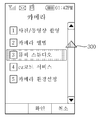
도 4는 본 발명의 제1 실시예에 따른 스크롤 바가 표시된 화면을 나타낸 예시도.4 is an exemplary view showing a screen in which a scroll bar is displayed according to the first embodiment of the present invention;
도 5는 본 발명의 제1 실시예에 따른 스크롤 바의 길이를 설정하는 화면을 나타낸 예시도.FIG. 5 is an exemplary view showing a screen for setting the length of a scroll bar according to the first embodiment of the present invention; FIG.
도 6은 본 발명의 제1 실시예에 따른 스크롤 바의 폭을 설정하는 화면을 나타낸 예시도.6 is an exemplary view showing a screen for setting the width of a scroll bar according to the first embodiment of the present invention;
도 7은 본 발명의 제1 실시예에 따른 스크롤 바의 길이와 폭을 설정하는 화면을 나타낸 예시도.FIG. 7 is an exemplary view showing a screen for setting the length and width of the scroll bar according to the first embodiment of the present invention; FIG.
도 8은 본 발명의 제1 실시예에 따른 스크롤 바의 크기를 터치 스크린에서 직접 설정하는 화면을 나타낸 예시도.8 is a view illustrating a screen for directly setting the size of a scroll bar according to the first embodiment of the present invention on a touch screen;
도 9a 및 도 9d는 본 발명의 제2 실시예에 따라 스크롤 바에 현재 화면의 위 치가 표시되는 화면을 나타낸 예시도.FIGs. 9A and 9D are views illustrating a screen in which a position of a current screen is displayed on a scroll bar according to a second embodiment of the present invention; FIG.
도 10a 및 도 10b는 본 발명의 제2 실시예에 따라 스크롤 바에 현재 화면의 위치를 표시하기 위한 영역이 설정되는 화면을 나타낸 예시도.FIG. 10A and FIG. 10B are views illustrating a screen in which an area for displaying the position of the current screen is set on the scroll bar according to the second embodiment of the present invention; FIG.
도 11은 본 발명의 제3 실시예에 따라 스크롤 바가 특정 색상을 갖는 화면을 나타낸 예시도.FIG. 11 is an exemplary view showing a scroll bar having a specific color according to a third embodiment of the present invention; FIG.
도 12a 및 도 12b는 본 발명의 제3 실시예에 따라 화면에 표시되는 데이터의 종류에 따라 스크롤 바의 색상이 변경되는 화면을 나타낸 예시도.FIGS. 12A and 12B are views illustrating a screen in which a color of a scroll bar is changed according to a type of data displayed on a screen according to a third embodiment of the present invention; FIG.
도 13a 및 도 13e는 본 발명의 제4 실시예에 따라 스크롤 바의 모양이 변경되는 화면을 나타낸 예시도.FIGS. 13A and 13E are views showing screens in which the shape of the scroll bar is changed according to the fourth embodiment of the present invention; FIG.
도 14는 본 발명의 제4 실시예에 따라 스크롤 바의 모양정보의 목록이 표시된 화면을 나타낸 예시도.FIG. 14 is an exemplary view showing a screen in which a list of shape information of a scroll bar is displayed according to a fourth embodiment of the present invention; FIG.
도 15는 본 발명의 제4 실시예에 따라 사용자가 터치입력한 모양이 스크롤 바의 모양으로 설정되는 화면을 나타낸 예시도.FIG. 15 is an exemplary view illustrating a screen in which the shape of a touch input by the user is set to the shape of a scroll bar according to the fourth embodiment of the present invention; FIG.
<도면의 주요부분에 대한 부호의 설명>Description of the Related Art
10 : 이동 단말기 100 : 송수신부10: Mobile terminal 100: Transmitting /
110 : 메모리부 120 : 표시부110: memory unit 120: display unit
130 : 키입력부 140 : 출력부130: key input unit 140: output unit
150 : 제어부 300 : 스크롤 바150: control unit 300: scroll bar
320 : 지시자 330 : 위치정보 알림자320: Indicator 330: Location information announcer
본 발명은 단말기 및 이를 이용한 스크롤 바 표시방법에 관한 것이다.The present invention relates to a terminal and a scroll bar displaying method using the terminal.
이동 단말기의 수요가 급속도로 증가하면서, 여러 가지 편리한 서비스와 기능이 포함된 이동 단말기가 제공되고 있었다.As the demand for mobile terminals rapidly increases, mobile terminals including various convenient services and functions have been provided.
이와 같이 제공되는 메뉴와 기능을 선택하기 위해 일반적으로 키 버튼 등의 입력장치가 구비되고, 사용자는 입력장치를 조작하여 원하는 데이터를 선택할 수 있었다.In order to select a menu and a function provided in this way, an input device such as a key button is generally provided, and the user can select desired data by operating the input device.
이와 같이 선택된 데이터의 양이 화면에 표시될 수 있는 양보다 많은 경우에 표시부에 스크롤 바(Scroll Bar)가 표시되었다. 따라서, 사용자는 스크롤 바를 스크롤하여 한 화면 내에 표시되지 않은 데이터를 확인할 수 있었다.When the amount of selected data is larger than the amount of data that can be displayed on the screen, a scroll bar is displayed on the display unit. Therefore, the user can scroll through the scroll bar and check data that is not displayed in one screen.
이때, 스크롤 바가 표시되는 크기는 화면에 표시되는 데이터의 양에 따라 달라진다. 예를 들면, 화면에 표시되는 데이터의 양이 적은 경우에는 스크롤 바의 길이가 커지고, 화면에 표시되는 데이터의 양이 많은 경우에는 데이터의 양이 적은 경우에 비해 스크롤 바의 길이가 짧아진다.At this time, the size at which the scroll bar is displayed depends on the amount of data displayed on the screen. For example, when the amount of data displayed on the screen is small, the length of the scroll bar is large, and when the amount of data displayed on the screen is large, the length of the scroll bar is shorter than when the amount of data is small.
이때, 스크롤 바의 길이는 데이터의 양이 많을수록 일정 크기까지 짧아지기 때문에 사용자가 터치 스크린을 이용하여 스크롤 바를 터치하여 이동시키려고 할 때 매우 불편했었다.At this time, since the length of the scroll bar becomes shorter as the amount of data increases, it is very inconvenient when the user tries to move the scroll bar by touching using the touch screen.
또한, 이동 단말기에서 제공되는 스크롤 바는 대부분이 회색색상의 사각 형상을 갖고 그 형상을 변경할 수 없었기 때문에 사용자의 개성에 맞는 욕구를 충족 하지 못하는 문제점이 있었다.In addition, most of the scroll bars provided in the mobile terminal have a rectangular shape of gray color and the shape thereof can not be changed.
이러한 종래기술의 문제점을 해결하기 위한 본 발명의 단말기 및 이를 이용한 스크롤 바의 표시방법의 목적은 다음과 같다.In order to solve the problems of the related art, the terminal of the present invention and the method of displaying the scroll bar using the terminal are as follows.
첫째, 스크롤 바가 표시되는 표시정보를 설정 및 변경가능하도록 하는 데 있다.First, the display information on which the scroll bar is displayed can be set and changed.
둘째, 데이터의 양에 관계없이 스크롤 바가 일정한 크기로 표시되도록 하는 데 있다.Second, the scroll bar is displayed at a constant size regardless of the amount of data.
셋째, 스크롤 바를 특정 색상으로 표시하고 이를 설정 및 변경가능하도록 하는 데 있다.Third, the scroll bar is displayed in a specific color and can be set and changed.
넷째, 스크롤 바의 모양이 설정 및 변경되도록 하는 데 있다.Fourth, the shape of the scroll bar is set and changed.
이와 같은 목적을 달성하기 위한 본 발명의 단말기는, 화면을 스크롤시키기 위한 스크롤 바(scroll bar)를 표시하는 표시부와, 스크롤 바가 표시되는 일정한 크기와, 표시부에 표시 가능한 데이터를 저장하는 메모리부 및 표시부에 표시되는 데이터의 양에 관계없이 스크롤 바가 일정한 크기로 표시되도록 제어하는 제어부를 포함하되, 스크롤 바의 크기는 설정 및 변경가능할 수 있다.According to an aspect of the present invention, there is provided a terminal including a display unit for displaying a scroll bar for scrolling a screen, a memory unit for storing data that can be displayed on the display unit, The size of the scroll bar can be set and changed according to the size of the scroll bar regardless of the amount of data displayed on the scroll bar.
이때, 표시부는 스크롤 바가 표시되는 터치 스크린을 포함할 수 있다.At this time, the display unit may include a touch screen on which a scroll bar is displayed.
또한, 제어부는 스크롤 바를 터치하면 스크롤 바의 크기를 설정 및 변경하기 위한 화면을 표시할 수 있다.In addition, when the scroll bar is touched, the controller may display a screen for setting and changing the size of the scroll bar.
또한, 제어부는 스크롤 바의 특정영역이 터치되어 드래그되면 이에 대응하여 스크롤 바의 크기가 변경되도록 제어할 수 있다.In addition, the controller can control the size of the scroll bar to be changed in response to a specific area of the scroll bar being touched and dragged.
또 다른 측면에서의 단말기는, 하나 이상의 데이터가 저장되는 메모리부와, 하나 이상의 데이터 중 특정 데이터가 표시되는 화면을 스크롤시키기 위한 스크롤 바(scroll bar)를 표시하는 표시부 및 특정 데이터의 전체 내용 중 표시된 데이터의 내용이 갖는 위치를 나타내는 위치정보를, 스크롤 바가 표시된 영역과 소정 거리로 인접하거나 중첩되는 특정 영역에 표시하도록 제어할 수 있다.A terminal according to another aspect of the present invention includes a memory unit for storing one or more data, a display unit for displaying a scroll bar for scrolling a screen on which specific data is displayed, It is possible to control the position information indicating the position of the content of the data to be displayed in a specific area adjacent to or overlapped with the area where the scroll bar is displayed.
이때, 제어부는 스크롤 바의 내부영역을 표시되는 데이터의 전체 양에 대응하는 개수의 특정 영역으로 분할하고, 위치정보를 특정 영역 중 어느 영역에 특정의 모양, 기호 및 문자 중 어느 하나 이상으로 표시되도록 제어할 수 있다.At this time, the control unit divides the internal area of the scroll bar into a specific area corresponding to the total amount of data to be displayed, and displays the position information in any area of the specific area in a specific shape, Can be controlled.
또한, 제어부는 위치정보를 표시하는 영역의 색상은 다른 영역의 색상과 상이하게 표시되도록 제어할 수 있다.In addition, the control unit can control so that the hue of the area displaying the position information is displayed differently from the hue of the other area.
또한, 제어부는 위치정보를 기호, 숫자 및 문자 중 어느 하나 이상으로 표시하도록 제어할 수 있다.Further, the control unit can control the position information to be displayed in any one or more of a symbol, a number, and a character.
또 다른 측면에서의 단말기는, 데이터를 저장하는 메모리부와, 데이터가 표시되는 화면을 스크롤시키기 위한 스크롤 바(scroll bar)를 표시하는 표시부 및 스크롤 바가 특정 색상으로 표시되도록 제어하는 제어부를 포함하되, 특정 색상은 설정 및 변경가능할 수 있다.In another aspect, a terminal includes a memory unit for storing data, a display unit for displaying a scroll bar for scrolling the screen on which data is displayed, and a control unit for controlling the scroll bar to be displayed in a specific color, Certain colors can be set and changed.
또한, 효과음을 발생하기 위한 오디오 처리부와, 진동을 발생하기 위한 진동부 및 발광하기 위한 발광부를 추가로 포함하고, 제어부는 스크롤 바의 이동시 오 디오 처리부, 진동부, 발광부 중 어느 하나 이상이 동작하도록 제어할 수 있다.The control unit may further include an audio processing unit for generating an effect sound, a vibration unit for generating vibration, and a light emitting unit for emitting light, wherein the control unit controls the operation of the audio processing unit, the vibration unit, .
또한, 제어부는 표시되는 데이터의 종류에 따라 스크롤 바를 상이한 색으로 표시하도록 제어할 수 있다.In addition, the control unit can control to display the scroll bars in different colors according to the type of displayed data.
또 다른 측면에서의 단말기는, 화면을 이동시키기 위한 스크롤 바(scroll bar)를 표시하는 표시부와, 하나 이상의 상기 스크롤 바의 모양정보와, 데이터를 저장하는 메모리부 및 하나 이상의 모양정보 중 특정 모양정보에 따라 스크롤 바를 표시하도록 제어하는 제어부를 포함하되, 특정 모양정보는 설정 및 변경가능할 수 있다.According to another aspect of the present invention, a terminal includes a display unit for displaying a scroll bar for moving a screen, a memory unit for storing data of one or more of the scroll bars, And the control unit controls the display unit to display a scroll bar according to the shape information, and the specific shape information can be set and changed.
또한, 입력부를 추가로 포함하고, 제어부는 입력부에 의해 선택된 특정 모양정보에 따라 스크롤 바가 표시되도록 제어할 수 있다.Further, the control unit may further include an input unit, and the control unit may control the scroll bar to be displayed according to the specific shape information selected by the input unit.
또한, 제어부는 데이터의 종류에 따라 스크롤 바의 모양을 상이하게 표시하도록 제어할 수 있다.Further, the control unit can control to display the shape of the scroll bar differently according to the type of data.
이러한 모양정보는 아이콘(Icon)을 포함할 수 있다.Such shape information may include an icon (Icon).
또 다른 측면에서의 단말기를 이용한 스크롤 바의 표시방법은, 스크롤 바가 표시되는 일정한 크기와, 표시 가능한 데이터를 저장하는 저장단계와, 데이터와, 데이터의 양에 관계없이 데이터가 표시되는 화면을 스크롤시키기 위한 스크롤 바(scroll bar)를 일정한 크기로 표시하는 표시단계 및 스크롤 바의 크기를 설정 및 변경하는 변경단계를 포함한다.In another aspect of the present invention, there is provided a method of displaying a scroll bar using a terminal, the method comprising: storing a predetermined size of a scroll bar; storing a displayable data; and scrolling a screen on which data is displayed, A display step of displaying a scroll bar for a predetermined size and a changing step of setting and changing a size of the scroll bar.
이때, 표시단계에서는 스크롤 바가 터치 스크린에 표시될 수 있다.At this time, the scroll bar can be displayed on the touch screen in the display step.
또한, 변경단계에서는 스크롤 바를 터치하면 스크롤 바의 크기를 설정 및 변경하기 위한 화면을 표시할 수 있다.Also, in the changing step, a screen for setting and changing the size of the scroll bar can be displayed by touching the scroll bar.
또한,변경단계에서는 스크롤 바의 특정영역이 터치되어 드래그되면 이에 대응하여 크기정보가 변경되도록 표시할 수 있다.Also, in the changing step, when the specific area of the scroll bar is touched and dragged, the size information may be displayed so as to change accordingly.
또 다른 측면에서의 단말기를 이용한 스크롤 바의 표시방법은, 하나 이상의 데이터를 저장하는 저장단계와, 하나 이상의 데이터 중 특정 데이터가 표시되는 화면을 스크롤시키기 위한 스크롤 바(scroll bar)를 표시하는 표시단계 및 특정 데이터의 전체 내용 중 상기 표시된 데이터의 내용이 갖는 위치를 나타내는 위치정보를, 스크롤 바가 표시된 영역과 소정 거리로 인접하거나 중첩되는 특정 영역에 표시하는 위치정보 표시단계를 포함한다.In another aspect of the present invention, there is provided a method of displaying a scroll bar using a terminal, comprising the steps of: storing one or more data; displaying a scroll bar for scrolling a screen on which specific data is displayed, And a position information display step of displaying position information indicating a position of the content of the displayed data among the entire contents of the specific data, in a specific area adjacent to or superimposed on the scroll bar at a predetermined distance.
이때, 위치정보 표시단계에서는 스크롤 바의 내부영역을 표시되는 데이터의 전체 양에 대응하는 개수의 특정 영역으로 분할하고, 위치정보를 특정 영역 중 어느 영역에 특정의 모양, 기호 및 문자 중 어느 하나 이상으로 표시할 수 있다.At this time, in the position information display step, the inner area of the scroll bar is divided into specific areas corresponding to the total amount of data to be displayed, and the position information is divided into any one of the specific areas, As shown in FIG.
또한, 위치정보 표시단계에서는 위치정보를 표시하는 영역의 색상은 다른 영역의 색상과 상이하게 표시할 수 있다.Further, in the position information display step, the color of the area displaying the position information can be displayed differently from the color of the other area.
또한, 위치정보 표시단계에서는 위치정보를 기호, 숫자 및 문자 중 어느 하나 이상으로 표시할 수 있다.In the position information display step, the position information can be displayed by any one or more of symbols, numbers and characters.
또 다른 측면에서의 단말기를 이용한 스크롤 바의 표시방법은, 데이터를 저장하는 저장단계와, 데이터가 표시되는 화면을 스크롤시키기 위한 스크롤 바(scroll bar)를 특정 색상으로 표시하는 표시단계 및 특정 색상을 설정 및 변경하는 변경단계를 포함할 수 있다.According to another aspect of the present invention, there is provided a method of displaying a scroll bar using a terminal, including a storing step of storing data, a displaying step of displaying a scroll bar for scrolling a screen on which data is displayed in a specific color, And may include changing and setting and changing.
이러한 표시단계에서 스크롤 바가 이동하면 효과음, 진동 및 발광 중 어느 하나 이상이 동작하는 단계를 추가로 포함할 수 있다.In this display step, when the scroll bar is moved, at least one of an effect sound, vibration, and light emission may be operated.
또한, 표시단계에서는 표시되는 데이터의 종류에 따라 스크롤 바를 상이한 색으로 표시할 수 있다.In the display step, the scroll bar can be displayed in a different color according to the type of data to be displayed.
또 다른 측면에서의 단말기를 이용한 스크롤 바의 표시방법은, 하나 이상의 스크롤 바의 모양정보와, 데이터를 저장하는 저장단계와, 하나 이상의 모양정보 중 특정 모양정보에 따라 화면을 이동시키기 위한 스크롤 바(scroll bar)를 표시하는 표시단계 및 특정 모양정보를 설정 및 변경하는 변경단계를 포함한다.According to another aspect of the present invention, there is provided a method of displaying a scroll bar using a terminal, the method comprising: storing shape information of at least one scroll bar; storing a data; storing a scroll bar for moving the screen according to specific shape information a display step of displaying a scroll bar, and a changing step of setting and changing specific shape information.
또한, 변경단계에서는 저장단계에서 저장된 특정 모양정보를 선택하여 변경할 수 있다.Also, in the changing step, the specific shape information stored in the storing step can be selected and changed.
또한, 표시단계에서는 데이터의 종류에 따라 스크롤 바의 모양을 상이하게 표시할 수 있다.Further, in the display step, the shape of the scroll bar can be displayed differently according to the type of data.
이러한 모양정보는 아이콘(Icon)을 포함할 수 있다.Such shape information may include an icon (Icon).
이하, 본 발명의 일 실시예에 따른 단말기 및 이를 이용한 스크롤 바의 표시방법을 도면을 참조하여 상세하게 설명한다.Hereinafter, a terminal and a method of displaying a scroll bar using the terminal according to an embodiment of the present invention will be described in detail with reference to the drawings.
도 1은 본 발명의 일 실시예에 따른 단말기를 나타낸 정면도이다.1 is a front view illustrating a terminal according to an embodiment of the present invention.
도 1에 도시된 바와 같이, 본 발명의 일 실시예에 따른 단말기는 이동 단말기(10)일 수 있다.As shown in FIG. 1, a terminal according to an embodiment of the present invention may be a
이러한 이동 단말기(10)는 표시부(120)를 포함하며, 이러한 표시부(120)에 데이터가 표시된 화면을 상하좌우로 이동시키기 위한 스크롤 바(scroll bar)가 표 시될 수 있다.The
본 발명의 실시예들에 따르면 스크롤 바의 표시방법은 설정 및 변경이 가능하다. 여기서 이러한 본 발명의 일 실시예에 따른 이동 단말기(10)에 대한 구성을 살펴보면 도 2와 같다.According to the embodiments of the present invention, the display method of the scroll bar can be set and changed. Hereinafter, a configuration of the
도 2는 본 발명의 일 실시예에 따른 이동 단말기의 구성을 나타낸 블럭도이다.2 is a block diagram illustrating a configuration of a mobile terminal according to an embodiment of the present invention.
도 2에 도시된 바와 같이, 본 발명의 일 실시예에 따른 이동 단말기(10)는, 송수신부(100), 메모리부(110), 표시부(120), 키입력부(130), 출력부(140) 및 제어부(150)를 포함한다.2, the
송수신부(100)는 안테나(ANT)를 통해 기지국과 통신을 수행하여 기지국으로부터 데이터를 수신하고, 이동 단말기(10)에서 생성된 데이터를 안테나(ANT)를 통해 기지국으로 송신한다.The
메모리부(110)는 플래쉬 메모리, 램(RAM), EEPROM(electrically erasable programmable read only memory) 등으로 구성될 수 있으며 이동 단말기(10)의 전반적인 동작을 제어하는 소정의 프로그램과 메뉴 또는 파일(file) 등의 데이터를 저장한다.The
또한, 메모리부(110)는 표시부(120)에 표시되는 스크롤 바의 표시방법에 대한 정보를 저장한다. 여기서, 스크롤 바의 표시방법이란 스크롤 바의 표시 크기, 화면에 표시된 데이터의 위치를 알려주는 위치정보, 스크롤 바의 표시 색상, 모양 등과 같이 스크롤 바가 표시부(120)에 표시될 때 어떤 모양과 형태로 표시되는지에 대한 방법이라고 볼 수 있다.The
표시부(120)는 송수신부(100)로부터 수신한 컨텐츠, 각종 정보신호 및 메모리부(110)에 저장된 데이터와 스크롤 바를 표시한다. 이때, 표시부(120)는 터치 스크린(122)을 포함하는데, 이러한 터치 스크린(122)은 터치입력이 발생하면 해당 터치입력을 확인하여 이에 대한 결과를 표시한다.The
키입력부(130)는 숫자키 및 각종 기능키를 구비하여 사용자가 선택하는 키에 해당하는 신호를 제어부(150)로 출력한다.The
출력부(140)는 오디오 처리부(141), 진동부(142) 및 발광부(143)를 포함한다. 또한, 출력부(140)는 터치 스크린(122)에 표시된 스크롤 바가 이동될 때 그에 따른 출력을 발생한다.The
오디오 처리부(141)는 스크롤 바가 스크롤될 때 효과음이나 음성을 출력한다. 진동부(142)는 스크롤 바가 스크롤될 때 진동한다. 발광부(143)는 스크롤 바가 스크롤에 따라 다양한 색으로 발광될 수 있다.The
제어부(150)는 MSM(Mobile Station Modem)을 구비하여 이동 단말기(10)의 일반적인 입출력을 제어한다. 이때, 제어부(150)는 표시부(120)에 표시되는 스크롤 바를 메모리부(110)에 저장된 정보에 따라 표시되도록 제어한다.The
이와 같이 구성되는 본 발명의 작용을 살펴 보면 다음과 같다.Hereinafter, the operation of the present invention will be described.
도 3은 본 발명의 실시예에 따른 단말기를 이용한 스크롤 바의 표시방법을 순차적으로 나타낸 순서도이다.3 is a flowchart sequentially illustrating a method of displaying a scroll bar using a terminal according to an embodiment of the present invention.
도 3에 도시된 바와 같이, 메모리부(110)에는 스크롤 바의 표시정보와 복수 의 데이터들이 저장되어 있다(S200).As shown in FIG. 3, display information of the scroll bar and a plurality of data are stored in the memory unit 110 (S200).
이러한 상태에서 제어부(150)는 메모리부(110)에 저장된 복수의 데이터 중에서 특정 데이터가 선택되는지 확인한다(S210). 여기서, 제어부(150)는 모리부(110)에 저장된 특정 데이터가 선택되면 이를 표시부(120)에 표시한다(S220).In this state, the
이때, 제어부(150)는 표시부(120)에 표시되는 특정 데이터가 한 화면상에 표시되는지 확인하여(S230), 표시되지 않는 경우에 표시부(120)의 일 측에 스크롤 바를 표시한다(S240). 이때, 제어부(150)는 메모리부(110)를 확인하여 스크롤 바에 대해 설정된 표시정보에 따라 스크롤 바를 표시하게 된다.At this time, the
이 후, 제어부(150)는 스크롤 바의 표시정보에 대한 변경 요청이 입력되면(S250), 스크롤 바를 변경하기 위한 상태로 제어한다(S260).Thereafter, when a request for changing the display information of the scroll bar is input (S250), the
이때, 제어부(150)는 스크롤 바를 변경하기 위한 특정 메뉴를 표시부(120)에 표시하거나, 표시부(120)가 터치 스크린(122)을 포함하는 경우에 터치 스크린(122)을 이용하여 스크롤 바의 표시정보를 변경할 수 있는 상태로 제어한다.At this time, the
이 후, 제어부(150)는 변경된 스크롤 바의 표시정보를 메모리부(110)에 저장한다(S270).Thereafter, the
<제1 <First 실시예Example - - 스크롤scroll 바의 크기를 설정 및 변경함> Set and change the size of the bar>
도 4 본 발명의 제1 실시예에 따른 스크롤 바가 표시된 화면을 나타낸 예시도이다.FIG. 4 is a view illustrating a screen in which a scroll bar according to the first embodiment of the present invention is displayed. FIG.
도 4에 도시된 바와 같이, 본 발명의 제1 실시예에 따라 제어부(150)는 터치 스크린(122)의 일 측에 스크롤 바(300)를 표시한다.4, the
이러한 스크롤 바(300)는 일반적으로 상하로 스크롤 할 때 이동통로를 가이드 해주는 가이드부(301) 상에서 상방향 이동키(302a)와 하방향 이동키(302b)의 사이에 위치한다. 이때, 스크롤 바(300)는 좌우로 스크롤 될 수도 있으며 이를 위해서는 상방향 이동키(302a)와 하방향 이동키(302b)가 지시하는 방향이 좌우가 된다.The
이러한 스크롤 바(300)는 소정의 길이(h)와 폭(w)으로 이루어지는 일정한 크기를 갖는데 이러한 스크롤 바(300)의 크기는 설정 및 변경이 가능하며 그 일례는 다음과 같다.The
도 5는 본 발명의 제1 실시예에 따른 스크롤 바의 길이를 설정하는 화면을 나타낸 예시도이다.FIG. 5 is a diagram illustrating a screen for setting the length of a scroll bar according to the first embodiment of the present invention.
도 5의 (a)에 도시된 바와 같이, 제어부(150)는 터치 스크린(122)의 일 측에 스크롤 바(300)를 표시한다. 이러한 상태에서 제어부(150)는 스크롤 바(300)에 터치입력이 발생하면 도 5의 (b)에 도시된 바와 같이, 스크롤 바(300)의 크기를 설정할 수 있는 '스크롤 바 설정메뉴'를 터치 스크린(122)에 표시한다.As shown in FIG. 5A, the
기존의 스크롤 바(300)가 길이(h1)와 폭(w1)의 크기를 갖는 경우에, 사용자가 스크롤 바(300)의 아래 영역을 터치하여 하방향으로 드래그한 후 터치를 종료한다. 이때, 제어부(150)는 가이드부(301)는 고정되고 스크롤 바(300)가 드래그되는 방향으로 확장되도록 한다.When the
이에 따라, 제어부(150)는 종료된 시점의 길이(h2)로 스크롤 바(300)의 크기 를 변경한다. 이때, 스크롤 바(300)는 기존의 길이(h1)와 폭(w1)에서 변경된 후에 길이(h2)가 변경되지만 폭(w1)은 변경되지 않을 수 있다.Accordingly, the
그러나, 본 발명의 실시예에서는 스크롤 바(300)의 폭(w1)도 변경할 수 있는데 이에 대한 일례는 다음과 같다.However, in the embodiment of the present invention, the width w 1 of the
도 6은 본 발명의 제1 실시예에 따른 스크롤 바의 폭을 설정하는 화면을 나타낸 예시도이다.6 is an exemplary view showing a screen for setting the width of a scroll bar according to the first embodiment of the present invention.
도 6의 (a)에 도시된 바와 같이, 기존의 스크롤 바(300)가 길이(h1)와 폭(w1)의 크기를 갖는 경우에, 사용자가 스크롤 바(300)를 특정영역을 터치하여 변경을 원하는 방향으로 드래그한 후 터치를 종료한다. 이때에도 제어부(150)는 전술한 바와 동일하게 가이드부(301)는 고정되고 스크롤 바(300)가 드래그되는 방향으로 확장되도록 한다.6 (a), when the
이에 따라, 제어부(150)는 도 6의 (b)에 도시된 바와 같이, 종료된 시점의 폭(w2)으로 스크롤 바(300)의 크기를 변경한다. 이때, 스크롤 바(300)는 기존의 길이(h1)와 폭(w1)에서 변경된 후에 폭(w2)은 변경되지만 길이(h1)는 변경되지 않을 수 있다.Accordingly, the
또한, 스크롤 바(300)는 기존의 길이(h1)와 폭(w1)을 모두 변경하는 것이 가능한데 이에 대한 일례는 다음과 같다.In addition, the
도 7은 본 발명의 제1 실시예에 따른 스크롤 바의 길이와 폭을 설정하는 화 면을 나타낸 예시도이다.7 is an exemplary view showing a screen for setting the length and width of the scroll bar according to the first embodiment of the present invention.
도 7의 (a)에 도시된 바와 같이, 기존의 스크롤 바(300)가 길이(h1)와 폭(w1)의 크기를 갖는 경우에, 사용자가 스크롤 바(300)를 특정영역을 터치하여 변경을 원하는 방향으로 드래그한 후 터치를 종료한다.As shown in FIG. 7A, when the
이에 따라, 제어부(150)는 도 7의 (b)에 도시된 바와 같이, 종료된 시점의 길이(h2)와 폭(w2)으로 스크롤 바(300)의 크기를 변경한다. 이때, 제어부(150)는 가이드부(301)은 움직이지 않도록 고정시키고, 스크롤 바(300)만이 기존의 길이(h1)와 폭(w1)에서 변경된 길이(h2)와 폭(w2)을 갖도록 한다.Accordingly, the
또한, 제어부(150)는 스크롤 바(300)의 크기를 조절하기 위해서 스크롤 바(300)에 지시자를 설정할 수 있는데 이에 대한 일례는 다음과 같다.In addition, the
도 8은 본 발명의 제1 실시예에 따른 스크롤 바의 크기를 터치 스크린에서 직접 설정하는 화면을 나타낸 예시도이다.8 is a diagram illustrating a screen for directly setting the size of a scroll bar according to the first embodiment of the present invention on a touch screen.
도 8의 (a)에 도시된 바와 같이, 제어부(150)는 스크롤 바(300)의 일 측에 지시자(320)를 표시한다. 도 8의 (b)에 도시된 바와 같이, 사용자가 지시자(320)를 터치하여 변경을 원하는 방향으로 드래그한 후 터치를 종료하면 제어부(150)는 이를 스크롤 바(300)의 크기로 설정되도록 한다.As shown in FIG. 8A, the
<제2 <2nd 실시예Example - 화면에 표시된 데이터의 위치를 - The position of the data displayed on the screen 스크롤scroll 바를 통해 알려줌> Through the bar>
도 9a 및 도 9d는 본 발명의 제2 실시예에 따라 스크롤 바에 위치정보가 표시되는 화면을 나타낸 예시도이다.FIGS. 9A and 9D are views illustrating a screen in which position information is displayed on a scroll bar according to a second embodiment of the present invention.
도 9a에 도시된 바와 같이, 제어부(150)는 현재 표시부(120)에 표시된 데이터를 스크롤하기 위한 스크롤 바(300)를 표시한다.As shown in FIG. 9A, the
이때, 제어부(150)는 스크롤 바(300)의 일 측에는 표시된 데이터의 내용이 갖는 위치를 나타내는 위치정보를 기호, 숫자 및 문자 중 어느 하나 이상으로 표시하는 위치정보 알림자(330)를 표시한다.At this time, the
예를 들면, 위치정보 알림자(330)는 표시부(120)에 표시된 데이터의 모든 페이지(page)의 수가 10 페이지인 경우에 현재 표시부(120)에 표시된 데이터는 그 중 몇 페이지인 가를 나타낼 수 있다.For example, when the number of pages of data displayed on the
따라서, 제어부(150)는 표시부(120)에 표시된 데이터의 모든 페이지(page)의 수가 10 페이지이고, 현재 표시부(120)에 표시된 데이터는 그 중 3 페이지인 경우에 위치정보 알림자(330)를 '3/10'으로 표시한다. 이때, 현재 표시부(120)에 표시된 데이터의 위치는 페이지 단위가 아닌 라인 단위일 수도 있으며 동일하게 적용된다.Accordingly, when the number of all pages of the data displayed on the
제어부(150)는 위치정보 알림자(330)를 스크롤 바(300)가 표시된 영역의 상측에 스크롤바(300)와 일체로 표시되도록 할 수 있다. 여기서, 제어부(150)는 위치정보 알림자(330)를 스크롤 바(300)가 표시된 영역의 상측뿐 아니라 하,좌,우측등에 표시되도록 할 수 있다.The
또는, 도 9b에 도시된 바와 같이, 제어부(150)는 위치정보 알림자(330)를 스 크롤 바(300)가 표시된 영역과 소정 거리(d)의 간격을 두고 표시되도록 할 수 있다.Alternatively, as shown in FIG. 9B, the
또는, 도 9c에 도시된 바와 같이, 제어부(150)는 위치정보 알림자(330)를 스크롤 바(300)가 표시된 영역과 중첩되어 표시되도록 할 수 있다. 또는, 도 9d에 도시된 바와 같이, 제어부(150)는 위치정보 알림자(330)를 스크롤 바(300)가 표시된 영역의 내측에 중첩되어 표시되도록 할 수 있다.Alternatively, as shown in FIG. 9C, the
이러한, 위치정보 알림자(330)는 다른 형태로도 표시되는 것이 가능한데 이에 대한 일례는 다음과 같다.The
도 10a 및 도 10b는 본 발명의 제2 실시예에 따라 스크롤 바에 현재 화면의 위치를 표시하기 위한 영역이 설정되는 화면을 나타낸 예시도이다.FIGS. 10A and 10B are views illustrating screens in which an area for displaying a current screen position is set on a scroll bar according to a second embodiment of the present invention.
도 10a에 도시된 바와 같이, 제어부(150)는 스크롤 바(300)의 내부영역을 표시되는 데이터의 전체 양에 대응하는 개수의 특정 영역으로 분할하고, 위치정보(330)를 특정 영역 중 어느 영역에 특정의 모양, 기호 및 문자 중 어느 하나 이상으로 표시되도록 제어한다.10A, the
예를 들면, 제어부(150)는 현재 표시부(120)에 표시된 데이터의 모든 페이지(page)의 수가 10 페이지인 경우에 스크롤 바(300)의 내부영역을 10개로 분할한다. 이 후, 제어부(150)는 현재 표시부(120)에 표시된 데이터는 그 중 몇 페이지인 지를 나타낸다. 즉, 제어부(150)는 현재 표시부(120)에 표시된 데이터가 전체 10 페이지 중에서 3 페이지라면 10개로 분할된 스크롤 바(300)의 내부영역 중 세 번째 영역에 위치정보 알림자(330)를 표시한다.For example, when the number of pages of data currently displayed on the
이때, 제어부(150)는 위치정보 알림자(330)를 스크롤 바(300)의 다른 내부영역과 상이한 색으로 표시한다. 또한, 제어부(150)는 스크롤 바(300)의 일 측에 스크롤 바(300) 각 영역에 대응하는 데이터의 페이지 번호(335)를 표시할 수 있다. 이때, 제어부(150)는 스크롤 바(300) 각 영역에 대응하는 데이터의 페이지 번호(335)을 모두 표시하거나 선택적으로 표시할 수 있다.At this time, the
또한, 도 10b에 도시된 바와 같이, 제어부(150)는 위치정보(330)를 '◀'와 같이 기호를 사용하여 표시할 수도 있으며 문자와 그림 등과 같이 다양한 형태로 표시하는 것이 가능하다.As shown in FIG. 10B, the
<제3 <Third 실시예Example - - 스크롤scroll 바의 색상을 설정 및 변경함> Set and change the color of the bar>
도 11은 본 발명의 제3 실시예에 따라 스크롤 바가 특정 색상을 갖는 화면을 나타낸 예시도이다.11 is an exemplary view showing a scroll bar having a specific color according to the third embodiment of the present invention.
도 11에 도시된 바와 같이, 제어부(150)는 스크롤 바(300)의 색상을 가이드부(301), 상방향 이동키(302a) 및 하방향 이동키(302b)와 상이하게 표시한다.11, the
예를 들면, 제어부(150)는 가이드부(301), 상방향 이동키(302a) 및 하방향 이동키(302b)의 색상이 회색이면, 스크롤 바(300)의 색상을 파란색 등과 같은 색으로 표시하는 것이다. 이러한, 색상은 설정 및 변경이 가능하다.For example, when the colors of the
즉, 여러 종류의 색에 대한 정보가 메모리부(110)에 저장된 상태에서 사용자가 특정 색상을 선택하여 이를 스크롤 바(300)의 색상으로 설정할 수 있다.That is, the user can select a specific color and set the color of the
이때, 제어부(150)는 스크롤 바(300)의 색상을 표시부(120)에 표시되는 데이 터의 종류에 따라 상이하게 표시할 수 있는데 이에 대한 일례는 다음과 같다.At this time, the
도 12a 및 도 12b는 본 발명의 제3 실시예에 따라 화면에 표시되는 데이터의 종류에 따라 스크롤 바의 색상이 변경되는 화면을 나타낸 예시도이다.FIGS. 12A and 12B are diagrams illustrating screens in which the color of the scroll bar is changed according to the type of data displayed on the screen according to the third embodiment of the present invention.
도 12a에 도시된 바와 같이, 제어부(150)는 표시부(120)에 '최근 발신번호' 데이터를 표시한다. 이때, 메모리부(110)에는 '최근 발신번호' 데이터에 대응하도록 색상 정보가 설정되어 저장되어 있다. 이에 따라서, 제어부(150)는 최근 발신번호' 데이터가 표시부(120)에 표시되면 이에 대응하는 색상으로 스크롤 바(300)를 표시한다.As shown in FIG. 12A, the
예를 들어, 제어부(150)는 표시부(120)에 다른 데이터가 표시되면 스크롤 바(300)를 검정색으로 표시한 후, 최근 발신번호' 데이터가 표시부(120)에 표시되면 스크롤 바(300)를 분홍색으로 변경하여 표시하는 것이다.For example, when the
또한, 도 12b에 도시된 바와 같이, 제어부(150)는 표시부(120)에 '최근 수신 번호' 데이터를 표시한다. 이때, 메모리부(110)에는 전술한 바와 동일하게 '수신 발신번호' 데이터에 대응하도록 색상 정보가 설정되어 저장되어 있다.Also, as shown in FIG. 12B, the
이에 따라서, 제어부(150)는 '최근 수신번호' 데이터가 표시부(120)에 표시되면 이에 대응하는 색상으로 스크롤 바(300)를 표시한다.Accordingly, when the 'latest received number' data is displayed on the
예를 들어, 제어부(150)는 표시부(120)에 '최근 발신번호' 데이터가 표시되어 분홍색의 스크롤 바(300)를 표시한 후, '최근 발신번호' 데이터가 표시부(120)에 표시되면 스크롤 바(300)를 보라색으로 변경하여 표시하는 것이다.For example, when the 'recent calling number' data is displayed on the
<제4 <Fourth 실시예Example - - 스크롤scroll 바의 모양이 설정 및 변경됨> The shape of the bar has been set and changed>
도 13a 및 도 13e는 본 발명의 제4 실시예에 따라 스크롤 바의 모양이 변경되는 화면을 나타낸 예시도이다.FIGS. 13A and 13E are views showing screens in which the shape of the scroll bar is changed according to the fourth embodiment of the present invention. FIG.
도 13a에 도시된 바와 같이, 제어부(150)는 스크롤 바(300)의 모양을 다양하게 설정할 수 있다. 즉, 제어부(150)는 스크롤 바(300)를 '♥' 모양으로 표시하거나, 도 13b와 같이 '▲' 또는 도 13c와 같이 '★' 모양으로 표시할 수 있다. 또는, 도 13d와 같이 딸기 모양의 아이콘으로 표시하거나, 도 13e와 같이 '㉮'와 같이 텍스트를 포함하는 모양으로 표시할 수도 있다.As shown in FIG. 13A, the
이러한, 스크롤 바(300)의 모양들은 메모리부(110)에 저장되고, 이 중 특정 모양을 선택하여 스크롤 바(300)의 모양으로 사용하는 것이 가능한데 그에 대한 일례는 다음과 같다.The shapes of the
도 14는 본 발명의 제4 실시예에 따라 스크롤 바의 모양정보의 목록이 표시된 화면을 나타낸 예시도이다.FIG. 14 is an exemplary view showing a screen in which a list of shape information of a scroll bar is displayed according to a fourth embodiment of the present invention.
도 14에 도시된 바와 같이, 제어부(150)는 스크롤 바 모양정보 메뉴를 표시하고, 메모리부(110)에 저장된 하나 이상의 스크롤 바(300)의 모양정보를 표시부(120)에 표시한다.14, the
이에 따라, 사용자는 원하는 모양정보를 선택하여 스크롤 바(300)의 모양을 설정할 수 있다.Accordingly, the user can set the shape of the
이러한 모양정보는 송수신부(100)를 통해 수신하거나 사용자가 직접 만드는 것도 가능한데 이에 대한 일례는 다음과 같다.The shape information may be received through the transmission /
도 15는 본 발명의 제4 실시예에 따라 사용자가 터치입력한 모양이 스크롤 바의 모양으로 설정되는 화면을 나타낸 예시도이다.FIG. 15 is an exemplary view illustrating a screen in which a shape input by a user is set as a scroll bar according to a fourth embodiment of the present invention.
도 15의 (a)에 도시된 바와 같이, 제어부(150)는 스크롤 바(300)의 모양을 설정하기 위한 입력화면(340)을 터치 스크린(122)에 표시한다. 여기서, 사용자가 입력화면(340)에 터치입력을 통해 'D'라는 모양을 설정하면 제어부(150)는 이를 메모리부(110)에 저장한다.The
이 후, 도 15의 (b)에 도시된 바와 같이, 제어부(150)는 스크롤 바(300)의 모양을 'D'로 표시한다.Thereafter, as shown in FIG. 15 (b), the
여기서, 제어부(150)는 지금까지 설명한 제1 내지 제4 실시예들에서 설정된 스크롤 바(300)가 스크롤될 때에는 출력부(140)가 함께 동작하도록 할 수 있다.Here, when the
즉, 제어부(150)는 스크롤 바(300)의 스크롤 동작시 오디오 처리부(141), 진동부(142) 및 발광부(143) 중 어느 하나 이상을 동작시켜 그에 해당하는 효과음, 진동 또는 발광이 함께 동작되도록 하며 이는 설정 및 변경이 가능하다.That is, the
또한, 지금까지 설명한 실시예들에서는 터치 스크린(122)을 이용하여 스크롤 바(300)의 표시정보를 설정하였지만 본 발명은 이에 한정되지는 않는다.Although the display information of the
즉, 키입력부(130)를 이용하여 스크롤 바(300)의 표시정보를 설정하는 것이 가능하다. 이때, 메모리부(110)에 저장된 복수의 스크롤 바(300)의 표시정보 중 특정 표시정보를 선택함으로써 설정이 가능하고 또 다른 표시정보를 선택함으로써 변경이 가능하다.That is, it is possible to set the display information of the
본 발명의 단말기 및 이를 이용한 스크롤 바(300)의 표시방법은 위의 실시예 들에서 설명한 이동 단말기뿐 아니라 터치 스크린(122)을 구비한 가전제품과 같은 모든 장치에 적용되는 것이 가능하다. 또한, 터치 스크린(122)을 구비하지 않는 단말기에도 스크롤 바(300)가 표시되는 모든 단말기들에 적용되는 것이 가능하다.The terminal of the present invention and the method of displaying the
이상에서 설명한 본 발명은, 본 발명이 속하는 기술분야에서 통상의 지식을 가진 자에 있어 본 발명의 기술적 사상을 벗어나지 않는 범위 내에서 여러 가지 치환, 변형 및 변경이 가능하다.While the present invention has been particularly shown and described with reference to exemplary embodiments thereof, it is to be understood that the invention may be embodied otherwise without departing from the spirit and scope of the invention.
따라서, 전술한 실시예 및 첨부된 도면에 의해 한정되는 것이 아니고 청구범위를 뒷받침하여 해석해야 한다.Accordingly, the invention should not be construed as limited to the embodiments and the accompanying drawings, but should be construed in light of the claims.
이상에서 설명한 바와 같이 본 발명에 따르면 다음과 같은 효과가 있다.As described above, the present invention has the following effects.
첫째, 스크롤 바가 표시되는 표시정보가 설정 및 변경가능하여 사용자의 개성에 맞는 욕구를 충족시키는 효과가 있다.First, the display information in which the scroll bar is displayed can be set and changed, thereby satisfying the desire according to the user's individuality.
둘째, 데이터의 양에 관계없이 스크롤 바를 일정한 크기로 표시하여 데이터의 양이 많아도 스크롤 바에 대한 터치입력이 용이하여 편리한 효과가 있다.Secondly, regardless of the amount of data, the scroll bar is displayed at a constant size, so that even if the amount of data is large, the touch input to the scroll bar is easy and convenient.
셋째, 스크롤 바를 특정 색상으로 표시하고 이를 설정 및 변경이 가능하도록 하여 사용자의 시각적 욕구를 충족시키는 효과가 있다.Third, the scroll bar can be displayed in a specific color and can be set and changed, thereby satisfying the user's visual needs.
넷째, 스크롤 바의 모양이 설정 및 변경이 가능하여 사용자가 원하는 모양으의 스크롤 바를 사용할 수 있도록 하여 사용자의 개성있는 욕구를 더욱 충족시키는 효과가 있다.Fourth, since the shape of the scroll bar can be set and changed, the user can use the scroll bar of the desired shape, thereby satisfying the user's individual needs.
Claims (30)
Priority Applications (5)
| Application Number | Priority Date | Filing Date | Title |
|---|---|---|---|
| KR1020070006332A KR101496451B1 (en) | 2007-01-19 | 2007-01-19 | Terminal and display method of scroll bar using the same |
| TW097101360A TWI399689B (en) | 2007-01-19 | 2008-01-14 | Displaying scroll bar on terminal |
| EP08000577A EP1947560A3 (en) | 2007-01-19 | 2008-01-14 | Displaying scroll bar on terminal |
| CN2008100039345A CN101261563B (en) | 2007-01-19 | 2008-01-18 | Mobile terminal and method for scroll bar using the same |
| US12/016,964 US9170721B2 (en) | 2007-01-19 | 2008-01-18 | Displaying scroll bar on terminal |
Applications Claiming Priority (1)
| Application Number | Priority Date | Filing Date | Title |
|---|---|---|---|
| KR1020070006332A KR101496451B1 (en) | 2007-01-19 | 2007-01-19 | Terminal and display method of scroll bar using the same |
Publications (2)
| Publication Number | Publication Date |
|---|---|
| KR20080068490A KR20080068490A (en) | 2008-07-23 |
| KR101496451B1 true KR101496451B1 (en) | 2015-03-05 |
Family
ID=39156698
Family Applications (1)
| Application Number | Title | Priority Date | Filing Date |
|---|---|---|---|
| KR1020070006332A Expired - Fee Related KR101496451B1 (en) | 2007-01-19 | 2007-01-19 | Terminal and display method of scroll bar using the same |
Country Status (5)
| Country | Link |
|---|---|
| US (1) | US9170721B2 (en) |
| EP (1) | EP1947560A3 (en) |
| KR (1) | KR101496451B1 (en) |
| CN (1) | CN101261563B (en) |
| TW (1) | TWI399689B (en) |
Cited By (1)
| Publication number | Priority date | Publication date | Assignee | Title |
|---|---|---|---|---|
| WO2018212386A1 (en) * | 2017-05-19 | 2018-11-22 | (주)씨앤피에스 | Method and apparatus for providing scrolling utilizing animated object |
Families Citing this family (97)
| Publication number | Priority date | Publication date | Assignee | Title |
|---|---|---|---|---|
| US8204684B2 (en) | 2007-06-28 | 2012-06-19 | Apple Inc. | Adaptive mobile device navigation |
| US8108144B2 (en) | 2007-06-28 | 2012-01-31 | Apple Inc. | Location based tracking |
| US8175802B2 (en) | 2007-06-28 | 2012-05-08 | Apple Inc. | Adaptive route guidance based on preferences |
| US8762056B2 (en) | 2007-06-28 | 2014-06-24 | Apple Inc. | Route reference |
| US8290513B2 (en) | 2007-06-28 | 2012-10-16 | Apple Inc. | Location-based services |
| US8275352B2 (en) | 2007-06-28 | 2012-09-25 | Apple Inc. | Location-based emergency information |
| US8774825B2 (en) | 2007-06-28 | 2014-07-08 | Apple Inc. | Integration of map services with user applications in a mobile device |
| US9109904B2 (en) | 2007-06-28 | 2015-08-18 | Apple Inc. | Integration of map services and user applications in a mobile device |
| US8332402B2 (en) | 2007-06-28 | 2012-12-11 | Apple Inc. | Location based media items |
| US8385946B2 (en) | 2007-06-28 | 2013-02-26 | Apple Inc. | Disfavored route progressions or locations |
| US9066199B2 (en) | 2007-06-28 | 2015-06-23 | Apple Inc. | Location-aware mobile device |
| US8311526B2 (en) | 2007-06-28 | 2012-11-13 | Apple Inc. | Location-based categorical information services |
| US8127246B2 (en) * | 2007-10-01 | 2012-02-28 | Apple Inc. | Varying user interface element based on movement |
| US8977294B2 (en) | 2007-10-10 | 2015-03-10 | Apple Inc. | Securely locating a device |
| US8355862B2 (en) | 2008-01-06 | 2013-01-15 | Apple Inc. | Graphical user interface for presenting location information |
| US9250092B2 (en) | 2008-05-12 | 2016-02-02 | Apple Inc. | Map service with network-based query for search |
| US8644843B2 (en) | 2008-05-16 | 2014-02-04 | Apple Inc. | Location determination |
| US8369867B2 (en) | 2008-06-30 | 2013-02-05 | Apple Inc. | Location sharing |
| KR101446521B1 (en) * | 2008-08-12 | 2014-11-03 | 삼성전자주식회사 | Method and apparatus for controlling information scroll of a touch screen |
| US8359643B2 (en) | 2008-09-18 | 2013-01-22 | Apple Inc. | Group formation using anonymous broadcast information |
| JP5140538B2 (en) | 2008-09-30 | 2013-02-06 | 任天堂株式会社 | Start control program, start control device, start control system, and start control method |
| US20100107067A1 (en) * | 2008-10-27 | 2010-04-29 | Nokia Corporation | Input on touch based user interfaces |
| US20100107116A1 (en) * | 2008-10-27 | 2010-04-29 | Nokia Corporation | Input on touch user interfaces |
| US8260320B2 (en) | 2008-11-13 | 2012-09-04 | Apple Inc. | Location specific content |
| WO2010071187A1 (en) | 2008-12-18 | 2010-06-24 | 日本電気株式会社 | Slide bar display control apparatus and slide bar display control method |
| GB2468884A (en) * | 2009-03-25 | 2010-09-29 | Nec Corp | User defined paths for control on a touch screen |
| US20100269038A1 (en) * | 2009-04-17 | 2010-10-21 | Sony Ericsson Mobile Communications Ab | Variable Rate Scrolling |
| US8666367B2 (en) | 2009-05-01 | 2014-03-04 | Apple Inc. | Remotely locating and commanding a mobile device |
| US8660530B2 (en) | 2009-05-01 | 2014-02-25 | Apple Inc. | Remotely receiving and communicating commands to a mobile device for execution by the mobile device |
| US8670748B2 (en) | 2009-05-01 | 2014-03-11 | Apple Inc. | Remotely locating and commanding a mobile device |
| US9658760B2 (en) * | 2009-05-07 | 2017-05-23 | Creative Technology Ltd. | Methods for searching digital files on a user interface |
| KR101588242B1 (en) | 2009-07-13 | 2016-01-25 | 삼성전자주식회사 | Apparatus and method for scroll of a portable terminal |
| US9230292B2 (en) * | 2012-11-08 | 2016-01-05 | Uber Technologies, Inc. | Providing on-demand services through use of portable computing devices |
| EP3522081A1 (en) | 2009-12-04 | 2019-08-07 | Uber Technologies, Inc. | System and method for arranging transport amongst parties through use of mobile devices |
| KR101626621B1 (en) | 2009-12-30 | 2016-06-01 | 엘지전자 주식회사 | Method for controlling data in mobile termina having circle type display unit and mobile terminal thereof |
| CA2792987C (en) * | 2010-04-21 | 2014-09-09 | Research In Motion Limited | Method of interacting with a scrollable area on a portable electronic device |
| US8977982B1 (en) | 2010-05-28 | 2015-03-10 | A9.Com, Inc. | Techniques for navigating information |
| US9864501B2 (en) * | 2010-07-30 | 2018-01-09 | Apaar Tuli | Displaying information |
| WO2012022999A1 (en) * | 2010-08-20 | 2012-02-23 | Sony Ericsson Mobile Communications Ab | Method for an integrated scrollbar options menu and related device and computer program product |
| KR101698091B1 (en) * | 2010-08-27 | 2017-01-19 | 엘지전자 주식회사 | Mobile twrminal and screen display controlling method thereof |
| JP5285040B2 (en) * | 2010-09-22 | 2013-09-11 | シャープ株式会社 | Image editing device |
| JP5832077B2 (en) * | 2010-09-24 | 2015-12-16 | 任天堂株式会社 | Information processing program, information processing apparatus, information processing system, and information processing method |
| CN102436369B (en) | 2010-09-29 | 2014-07-23 | 腾讯科技(深圳)有限公司 | Method and device for displaying data |
| US9389774B2 (en) * | 2010-12-01 | 2016-07-12 | Sony Corporation | Display processing apparatus for performing image magnification based on face detection |
| US20120162091A1 (en) * | 2010-12-23 | 2012-06-28 | Lyons Kenton M | System, method, and computer program product for multidisplay dragging |
| CN102169410A (en) * | 2011-03-15 | 2011-08-31 | 宇龙计算机通信科技(深圳)有限公司 | Method and device for displaying terminal information |
| KR101780491B1 (en) | 2011-05-02 | 2017-09-21 | 삼성전자 주식회사 | Detecting method for item and Portable Device supporting the same |
| KR101408532B1 (en) * | 2011-09-19 | 2014-06-27 | (주)카카오 | Method of updating a scroll bar in a screen of a user terminal and user terminal updating a scroll bar in a screen |
| KR102067991B1 (en) | 2012-10-10 | 2020-01-20 | 에스케이플래닛 주식회사 | System and method for display scrollbar of web page |
| USD734348S1 (en) * | 2012-11-07 | 2015-07-14 | Bionime Corporation | Display screen for blood glucose meter with graphical user interface |
| AU2013341532B2 (en) * | 2012-11-08 | 2016-05-05 | Uber Technologies, Inc. | Providing on-demand services through use of portable computing devices |
| US9671233B2 (en) | 2012-11-08 | 2017-06-06 | Uber Technologies, Inc. | Dynamically providing position information of a transit object to a computing device |
| CN103885686B (en) * | 2012-12-24 | 2018-05-18 | 北大方正集团有限公司 | Slide control and its display methods |
| KR20140091302A (en) * | 2013-01-11 | 2014-07-21 | 삼성전자주식회사 | Method and apparatus for displaying scrolling information in electronic device |
| KR102087005B1 (en) * | 2013-01-31 | 2020-03-11 | 삼성전자 주식회사 | Page Searching Method and Electronic Device supporting the same |
| KR102097495B1 (en) | 2013-02-06 | 2020-04-06 | 엘지전자 주식회사 | Digital device and method for controlling the same |
| JP5805685B2 (en) * | 2013-02-27 | 2015-11-04 | 京セラ株式会社 | Electronic device, control method, and control program |
| KR20140110556A (en) * | 2013-03-08 | 2014-09-17 | 삼성전자주식회사 | Method for displaying object and an electronic device thereof |
| CN104111956B (en) * | 2013-04-22 | 2018-10-26 | 腾讯科技(深圳)有限公司 | A kind of method and terminal for adding segmentation markers in web browser |
| CN104123069B (en) * | 2013-04-28 | 2019-02-05 | 腾讯科技(深圳)有限公司 | A kind of page control method by sliding, device and terminal device |
| CN105393204B (en) * | 2013-05-29 | 2019-03-19 | 索尼公司 | Information processing apparatus, update information notification method and program |
| KR20140144414A (en) * | 2013-06-11 | 2014-12-19 | 삼성전자주식회사 | The method and apparatus for controlling a call in portable terminal |
| US20140372336A1 (en) * | 2013-06-14 | 2014-12-18 | Microsoft Corporation | User experience for approving documents |
| KR102234400B1 (en) * | 2013-07-08 | 2021-03-31 | 삼성전자주식회사 | Apparatas and method for changing the order or the position of list in an electronic device |
| KR101505832B1 (en) * | 2013-08-19 | 2015-03-25 | 삼성전자주식회사 | Method and apparatus for displaying medical image |
| JP5737350B2 (en) * | 2013-08-26 | 2015-06-17 | ブラザー工業株式会社 | Display program and display device |
| JP5744989B2 (en) * | 2013-09-09 | 2015-07-08 | 任天堂株式会社 | Execution control program, execution control device, execution control system, and execution control method |
| US9377345B2 (en) | 2013-09-11 | 2016-06-28 | Illinois Tool Works Inc. | Food product scale |
| JP5924554B2 (en) * | 2014-01-06 | 2016-05-25 | コニカミノルタ株式会社 | Object stop position control method, operation display device, and program |
| KR20150090740A (en) * | 2014-01-29 | 2015-08-06 | 엘지전자 주식회사 | Mobile terminal and control method thereof |
| US9786016B2 (en) | 2014-02-28 | 2017-10-10 | Microsoft Technology Licensing, Llc | Image tagging for capturing information in a transaction |
| US9612735B2 (en) * | 2014-08-05 | 2017-04-04 | Snowflake Computing, Inc. | Progress scrollbar |
| KR102252506B1 (en) | 2014-09-26 | 2021-05-14 | 엘지전자 주식회사 | Mobile terminal and method for controlling the same |
| KR20160038413A (en) * | 2014-09-30 | 2016-04-07 | 삼성전자주식회사 | Contents searching apparatus and method for searching contents |
| CN105700800B (en) * | 2014-11-27 | 2019-01-25 | 阿里巴巴集团控股有限公司 | A kind of operating method of page info, device and electronic equipment |
| US9582574B2 (en) | 2015-01-06 | 2017-02-28 | International Business Machines Corporation | Generating navigable content overviews |
| US10026506B1 (en) | 2015-02-06 | 2018-07-17 | Brain Trust Innovations I, Llc | System, RFID chip, server and method for capturing vehicle data |
| KR102359544B1 (en) * | 2015-06-22 | 2022-02-08 | 엘지전자 주식회사 | Deformable display device and operating method thereof |
| KR102347392B1 (en) * | 2015-08-10 | 2022-01-06 | 삼성전자주식회사 | Method for providing user interface and electronic device the same |
| KR102512755B1 (en) * | 2015-12-11 | 2023-03-23 | 삼성전자주식회사 | Electronic device and display method thereof |
| US10489043B2 (en) | 2015-12-15 | 2019-11-26 | International Business Machines Corporation | Cognitive graphical control element |
| JP6710539B2 (en) * | 2016-02-24 | 2020-06-17 | パイオニア株式会社 | Display device, display method, and program |
| CN105955625B (en) * | 2016-04-14 | 2019-06-14 | Oppo广东移动通信有限公司 | A scroll bar display method, device and intelligent terminal |
| DK201670574A1 (en) * | 2016-06-12 | 2018-01-02 | Apple Inc | Accelerated scrolling |
| US10303352B2 (en) * | 2016-06-30 | 2019-05-28 | Microsoft Technology Licensing, Llc | Navigating long distances on navigable surfaces |
| KR20180020734A (en) | 2016-08-19 | 2018-02-28 | 엘지전자 주식회사 | Mobile terminal and method for controlling the same |
| CN106354394A (en) * | 2016-08-26 | 2017-01-25 | 乐视控股(北京)有限公司 | Browser subject switching handling method and device |
| US10739973B2 (en) * | 2016-09-27 | 2020-08-11 | Autodesk, Inc. | Banded sliders for obtaining values from users |
| US10283082B1 (en) | 2016-10-29 | 2019-05-07 | Dvir Gassner | Differential opacity position indicator |
| WO2019087942A1 (en) * | 2017-10-31 | 2019-05-09 | 富士フイルム株式会社 | Operation device, and operation method and operation program therefor |
| JP7205339B2 (en) * | 2019-03-26 | 2023-01-17 | 京セラドキュメントソリューションズ株式会社 | Display device |
| DK180359B1 (en) * | 2019-04-15 | 2021-02-03 | Apple Inc | Accelerated scrolling and selection |
| CN111208928B (en) * | 2019-12-27 | 2021-05-18 | 广东金赋科技股份有限公司 | Control method for page scrolling |
| CN113608816B (en) | 2021-08-18 | 2023-05-23 | 北京字跳网络技术有限公司 | Progress adjustment method and device, electronic equipment and storage medium |
| CN115576473B (en) * | 2022-08-05 | 2023-08-04 | 芯华章科技(北京)有限公司 | Waveform display method, computer device, and storage medium |
| US20240160345A1 (en) * | 2022-11-11 | 2024-05-16 | Rockwell Collins, Inc. | Magnified up/down scroll aid |
| WO2025075398A1 (en) * | 2023-10-05 | 2025-04-10 | 삼성전자 주식회사 | Electronic device for displaying object, and control method therefor |
Citations (4)
| Publication number | Priority date | Publication date | Assignee | Title |
|---|---|---|---|---|
| JPH06203136A (en) * | 1992-10-29 | 1994-07-22 | Internatl Business Mach Corp <Ibm> | Selective operation method of data collection display and data processing system |
| KR20040076649A (en) * | 2003-02-26 | 2004-09-03 | 삼성전자주식회사 | Apparatus and method for displaying browser graphic by aspect ratio |
| KR100463901B1 (en) * | 1999-02-16 | 2004-12-30 | 인터내셔널 비지네스 머신즈 코포레이션 | Data set interface control for use in accessing information in a computer |
| US20060197753A1 (en) * | 2005-03-04 | 2006-09-07 | Hotelling Steven P | Multi-functional hand-held device |
Family Cites Families (36)
| Publication number | Priority date | Publication date | Assignee | Title |
|---|---|---|---|---|
| US5339391A (en) * | 1990-05-14 | 1994-08-16 | Microelectronics And Computer Technology Corporation | Computer display unit with attribute enhanced scroll bar |
| JP2516287B2 (en) * | 1990-05-31 | 1996-07-24 | インターナショナル・ビジネス・マシーンズ・コーポレイション | Data display method and device |
| US5532715A (en) * | 1991-10-16 | 1996-07-02 | International Business Machines Corporation | Visually aging scroll bar |
| CA2082848C (en) * | 1991-12-06 | 2000-12-19 | Stephen G. Eick | Apparatus for selective simultaneous display of information about a plurality of events |
| US5623588A (en) * | 1992-12-14 | 1997-04-22 | New York University | Computer user interface with non-salience deemphasis |
| US5402152A (en) * | 1993-12-30 | 1995-03-28 | Intel Corporation | Method and apparatus for tailoring scroll bar and cursor appearance to pen user hand orientation |
| US5655094A (en) * | 1995-09-29 | 1997-08-05 | International Business Machines Corporation | Pop up scroll bar |
| US6014140A (en) * | 1997-01-10 | 2000-01-11 | International Business Machines Corporation | Method and system for locating and displaying the position of a cursor contained within a page of a compound document |
| US8479122B2 (en) * | 2004-07-30 | 2013-07-02 | Apple Inc. | Gestures for touch sensitive input devices |
| US6348936B1 (en) * | 1998-05-28 | 2002-02-19 | Sun Microsystems, Inc. | Method and apparatus for graphical selection of data |
| US6570594B1 (en) * | 1998-06-30 | 2003-05-27 | Sun Microsystems, Inc. | User interface with non-intrusive display element |
| TW440783B (en) * | 1998-11-27 | 2001-06-16 | Inventec Corp | Control method and device for scrolling the data window |
| US6252594B1 (en) * | 1998-12-11 | 2001-06-26 | International Business Machines Corporation | Method and system for aiding a user in scrolling through a document using animation, voice cues and a dockable scroll bar |
| US6339438B1 (en) * | 1999-07-27 | 2002-01-15 | International Business Machines Corporation | Scroll bar with integrated advertisement |
| JP2001245351A (en) * | 2000-02-29 | 2001-09-07 | Matsushita Electric Ind Co Ltd | Scroll mode change method in mobile phone and mobile phone using the scroll change method |
| US7190976B2 (en) * | 2000-10-02 | 2007-03-13 | Microsoft Corporation | Customizing the display of a mobile computing device |
| US7073130B2 (en) * | 2001-01-31 | 2006-07-04 | Microsoft Corporation | Methods and systems for creating skins |
| US20020186252A1 (en) * | 2001-06-07 | 2002-12-12 | International Business Machines Corporation | Method, apparatus and computer program product for providing context to a computer display window |
| US8514182B2 (en) * | 2001-12-27 | 2013-08-20 | Lg Display Co., Ltd. | Touch panel display device and method of fabricating the same |
| TW564365B (en) * | 2002-01-08 | 2003-12-01 | Inventec Appliances Corp | Method for changing position of scrollbar on a display |
| US7822687B2 (en) * | 2002-09-16 | 2010-10-26 | Francois Brillon | Jukebox with customizable avatar |
| US20050091604A1 (en) * | 2003-10-22 | 2005-04-28 | Scott Davis | Systems and methods that track a user-identified point of focus |
| US20050091584A1 (en) * | 2003-10-23 | 2005-04-28 | Microsoft Corporation | Methods for applying styles to visual aspects of user interface elements |
| US7401300B2 (en) * | 2004-01-09 | 2008-07-15 | Nokia Corporation | Adaptive user interface input device |
| US8068103B2 (en) * | 2004-06-24 | 2011-11-29 | Apple Inc. | User-interface design |
| US7619616B2 (en) * | 2004-12-21 | 2009-11-17 | Microsoft Corporation | Pressure sensitive controls |
| US7802202B2 (en) * | 2005-03-17 | 2010-09-21 | Microsoft Corporation | Computer interaction based upon a currently active input device |
| US7765491B1 (en) * | 2005-11-16 | 2010-07-27 | Apple Inc. | User interface widget for selecting a point or range |
| US7958456B2 (en) * | 2005-12-23 | 2011-06-07 | Apple Inc. | Scrolling list with floating adjacent index symbols |
| US7934169B2 (en) * | 2006-01-25 | 2011-04-26 | Nokia Corporation | Graphical user interface, electronic device, method and computer program that uses sliders for user input |
| US20070208518A1 (en) * | 2006-03-01 | 2007-09-06 | Gordon David B | User interface for presentation of genomic data |
| US20080034316A1 (en) * | 2006-08-01 | 2008-02-07 | Johan Thoresson | Scalable scrollbar markers |
| US8564544B2 (en) * | 2006-09-06 | 2013-10-22 | Apple Inc. | Touch screen device, method, and graphical user interface for customizing display of content category icons |
| US7689928B1 (en) * | 2006-09-29 | 2010-03-30 | Adobe Systems Inc. | Methods and apparatus for placing and interpreting reference marks on scrollbars |
| US7739622B2 (en) * | 2006-10-27 | 2010-06-15 | Microsoft Corporation | Dynamic thumbnails for document navigation |
| US7793230B2 (en) * | 2006-11-30 | 2010-09-07 | Microsoft Corporation | Search term location graph |
-
2007
- 2007-01-19 KR KR1020070006332A patent/KR101496451B1/en not_active Expired - Fee Related
-
2008
- 2008-01-14 TW TW097101360A patent/TWI399689B/en not_active IP Right Cessation
- 2008-01-14 EP EP08000577A patent/EP1947560A3/en not_active Ceased
- 2008-01-18 CN CN2008100039345A patent/CN101261563B/en not_active Expired - Fee Related
- 2008-01-18 US US12/016,964 patent/US9170721B2/en not_active Expired - Fee Related
Patent Citations (4)
| Publication number | Priority date | Publication date | Assignee | Title |
|---|---|---|---|---|
| JPH06203136A (en) * | 1992-10-29 | 1994-07-22 | Internatl Business Mach Corp <Ibm> | Selective operation method of data collection display and data processing system |
| KR100463901B1 (en) * | 1999-02-16 | 2004-12-30 | 인터내셔널 비지네스 머신즈 코포레이션 | Data set interface control for use in accessing information in a computer |
| KR20040076649A (en) * | 2003-02-26 | 2004-09-03 | 삼성전자주식회사 | Apparatus and method for displaying browser graphic by aspect ratio |
| US20060197753A1 (en) * | 2005-03-04 | 2006-09-07 | Hotelling Steven P | Multi-functional hand-held device |
Cited By (1)
| Publication number | Priority date | Publication date | Assignee | Title |
|---|---|---|---|---|
| WO2018212386A1 (en) * | 2017-05-19 | 2018-11-22 | (주)씨앤피에스 | Method and apparatus for providing scrolling utilizing animated object |
Also Published As
| Publication number | Publication date |
|---|---|
| CN101261563B (en) | 2010-04-21 |
| EP1947560A2 (en) | 2008-07-23 |
| KR20080068490A (en) | 2008-07-23 |
| TWI399689B (en) | 2013-06-21 |
| CN101261563A (en) | 2008-09-10 |
| US20080178116A1 (en) | 2008-07-24 |
| US9170721B2 (en) | 2015-10-27 |
| TW200842688A (en) | 2008-11-01 |
| EP1947560A3 (en) | 2013-01-30 |
Similar Documents
| Publication | Publication Date | Title |
|---|---|---|
| KR101496451B1 (en) | Terminal and display method of scroll bar using the same | |
| TWI529599B (en) | Mobile communication terminal and method of selecting menu and item | |
| JP4691489B2 (en) | Electronic terminal with split screen display function and screen display method thereof | |
| KR100832260B1 (en) | Mobile communication terminal and its control method | |
| KR100744400B1 (en) | Method and device for providing quick menu on menu screen of mobile communication terminal | |
| JP5406176B2 (en) | User interface generation device | |
| EP1855185A2 (en) | Method of displaying text using mobile terminal | |
| KR20020027892A (en) | Menu embodiment method for mobile phone | |
| KR20070093585A (en) | Quick access method and device from mobile terminal to application | |
| KR20080077474A (en) | Screen setting method of terminal and terminal using same | |
| KR100909556B1 (en) | Method of providing a hierarchical structure for configuring a screen, a method of providing the screen, and a mobile communication terminal therefor | |
| KR101392321B1 (en) | Moving Cursor in a Mobile Communication Terminal with a Navigation Function Key | |
| KR100705017B1 (en) | Mobile communication terminal and task manager display method using same | |
| KR100492497B1 (en) | Menu forming method of WAP service display device | |
| KR20080111724A (en) | Mobile terminal and its keypad display method | |
| JP2002229705A (en) | Mobile communication equipment | |
| KR101292049B1 (en) | Mobile Communication Terminal and Method for Soft Key Using the Same | |
| KR100662425B1 (en) | Mobile communication terminal having event occurrence display function and event setting, display and processing method using the same | |
| KR100726654B1 (en) | Mobile terminal and information display method | |
| KR101179947B1 (en) | Cellular phone and menu displaying method the same | |
| KR101346889B1 (en) | Mobile communication terminal having a input device and input processing method | |
| KR20030042876A (en) | Method for selecting menu according to the keypad location information in a mobile phone | |
| KR20080090155A (en) | Menu display method of mobile communication terminal and its mobile communication terminal | |
| KR20070075171A (en) | Menu display method using the hidden function of the portable terminal | |
| JP2001285446A (en) | Item control method and device for portable terminal |
Legal Events
| Date | Code | Title | Description |
|---|---|---|---|
| PA0109 | Patent application |
St.27 status event code: A-0-1-A10-A12-nap-PA0109 |
|
| R17-X000 | Change to representative recorded |
St.27 status event code: A-3-3-R10-R17-oth-X000 |
|
| PG1501 | Laying open of application |
St.27 status event code: A-1-1-Q10-Q12-nap-PG1501 |
|
| PN2301 | Change of applicant |
St.27 status event code: A-3-3-R10-R13-asn-PN2301 St.27 status event code: A-3-3-R10-R11-asn-PN2301 |
|
| R18-X000 | Changes to party contact information recorded |
St.27 status event code: A-3-3-R10-R18-oth-X000 |
|
| R18-X000 | Changes to party contact information recorded |
St.27 status event code: A-3-3-R10-R18-oth-X000 |
|
| A201 | Request for examination | ||
| PA0201 | Request for examination |
St.27 status event code: A-1-2-D10-D11-exm-PA0201 |
|
| D13-X000 | Search requested |
St.27 status event code: A-1-2-D10-D13-srh-X000 |
|
| D14-X000 | Search report completed |
St.27 status event code: A-1-2-D10-D14-srh-X000 |
|
| E902 | Notification of reason for refusal | ||
| PE0902 | Notice of grounds for rejection |
St.27 status event code: A-1-2-D10-D21-exm-PE0902 |
|
| AMND | Amendment | ||
| E13-X000 | Pre-grant limitation requested |
St.27 status event code: A-2-3-E10-E13-lim-X000 |
|
| P11-X000 | Amendment of application requested |
St.27 status event code: A-2-2-P10-P11-nap-X000 |
|
| P13-X000 | Application amended |
St.27 status event code: A-2-2-P10-P13-nap-X000 |
|
| E601 | Decision to refuse application | ||
| PE0601 | Decision on rejection of patent |
St.27 status event code: N-2-6-B10-B15-exm-PE0601 |
|
| J201 | Request for trial against refusal decision | ||
| PJ0201 | Trial against decision of rejection |
St.27 status event code: A-3-3-V10-V11-apl-PJ0201 |
|
| AMND | Amendment | ||
| P11-X000 | Amendment of application requested |
St.27 status event code: A-2-2-P10-P11-nap-X000 |
|
| P13-X000 | Application amended |
St.27 status event code: A-2-2-P10-P13-nap-X000 |
|
| PB0901 | Examination by re-examination before a trial |
St.27 status event code: A-6-3-E10-E12-rex-PB0901 |
|
| E90F | Notification of reason for final refusal | ||
| PE0902 | Notice of grounds for rejection |
St.27 status event code: A-1-2-D10-D21-exm-PE0902 |
|
| P11-X000 | Amendment of application requested |
St.27 status event code: A-2-2-P10-P11-nap-X000 |
|
| P13-X000 | Application amended |
St.27 status event code: A-2-2-P10-P13-nap-X000 |
|
| B701 | Decision to grant | ||
| PB0701 | Decision of registration after re-examination before a trial |
St.27 status event code: A-3-4-F10-F13-rex-PB0701 |
|
| GRNT | Written decision to grant | ||
| PR0701 | Registration of establishment |
St.27 status event code: A-2-4-F10-F11-exm-PR0701 |
|
| PR1002 | Payment of registration fee |
St.27 status event code: A-2-2-U10-U11-oth-PR1002 Fee payment year number: 1 |
|
| PG1601 | Publication of registration |
St.27 status event code: A-4-4-Q10-Q13-nap-PG1601 |
|
| PN2301 | Change of applicant |
St.27 status event code: A-5-5-R10-R13-asn-PN2301 St.27 status event code: A-5-5-R10-R11-asn-PN2301 |
|
| FPAY | Annual fee payment |
Payment date: 20180124 Year of fee payment: 4 |
|
| PR1001 | Payment of annual fee |
St.27 status event code: A-4-4-U10-U11-oth-PR1001 Fee payment year number: 4 |
|
| FPAY | Annual fee payment |
Payment date: 20190123 Year of fee payment: 5 |
|
| PR1001 | Payment of annual fee |
St.27 status event code: A-4-4-U10-U11-oth-PR1001 Fee payment year number: 5 |
|
| PC1903 | Unpaid annual fee |
St.27 status event code: A-4-4-U10-U13-oth-PC1903 Not in force date: 20200218 Payment event data comment text: Termination Category : DEFAULT_OF_REGISTRATION_FEE |
|
| PN2301 | Change of applicant |
St.27 status event code: A-5-5-R10-R13-asn-PN2301 St.27 status event code: A-5-5-R10-R11-asn-PN2301 |
|
| PC1903 | Unpaid annual fee |
St.27 status event code: N-4-6-H10-H13-oth-PC1903 Ip right cessation event data comment text: Termination Category : DEFAULT_OF_REGISTRATION_FEE Not in force date: 20200218 |