KR100889890B1 - Korean input device using keypad and its method - Google Patents
Korean input device using keypad and its method Download PDFInfo
- Publication number
- KR100889890B1 KR100889890B1 KR1020010058097A KR20010058097A KR100889890B1 KR 100889890 B1 KR100889890 B1 KR 100889890B1 KR 1020010058097 A KR1020010058097 A KR 1020010058097A KR 20010058097 A KR20010058097 A KR 20010058097A KR 100889890 B1 KR100889890 B1 KR 100889890B1
- Authority
- KR
- South Korea
- Prior art keywords
- vowel
- button
- consonants
- korean
- keypad
- Prior art date
- Legal status (The legal status is an assumption and is not a legal conclusion. Google has not performed a legal analysis and makes no representation as to the accuracy of the status listed.)
- Expired - Fee Related
Links
Images


Classifications
-
- H—ELECTRICITY
- H04—ELECTRIC COMMUNICATION TECHNIQUE
- H04M—TELEPHONIC COMMUNICATION
- H04M1/00—Substation equipment, e.g. for use by subscribers
- H04M1/02—Constructional features of telephone sets
- H04M1/23—Construction or mounting of dials or of equivalent devices; Means for facilitating the use thereof
-
- G—PHYSICS
- G06—COMPUTING OR CALCULATING; COUNTING
- G06F—ELECTRIC DIGITAL DATA PROCESSING
- G06F3/00—Input arrangements for transferring data to be processed into a form capable of being handled by the computer; Output arrangements for transferring data from processing unit to output unit, e.g. interface arrangements
- G06F3/01—Input arrangements or combined input and output arrangements for interaction between user and computer
- G06F3/018—Input/output arrangements for oriental characters
Landscapes
- Engineering & Computer Science (AREA)
- General Engineering & Computer Science (AREA)
- Theoretical Computer Science (AREA)
- Signal Processing (AREA)
- Human Computer Interaction (AREA)
- Physics & Mathematics (AREA)
- General Physics & Mathematics (AREA)
- Input From Keyboards Or The Like (AREA)
Abstract
본 발명은 키패드에서의 알파벳 입력장치 및 그 방법에 관한 것으로서, 특히 전화기 자판과 같은 적은 수의 키를 지닌 키패드에서의 알파벳 입력장치 및 그 방법에 관한 것이다.
TECHNICAL FIELD The present invention relates to an alphabet input device and method thereof in a keypad, and more particularly, to an alphabet input device and a method thereof in a keypad having a small number of keys such as a telephone keypad.
키패드; 알파벳입력; Keypad; Alphabet input;
Description
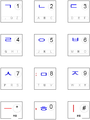
도1. 3개 모음요소를 적용한 사례 Figure 1. Example of applying 3 collection elements
도2. 도1을 4개 모음요소를 이용한 반복선택방법 적용 관점에서 풀어 표현한 사례 Figure 2. Example of solving Figure 1 from the perspective of applying the repeated selection method using four vowel elements
도3. 4개 모음요소를 4개의 버튼에 배정한 사례 Figure 3. Example of assigning four collection elements to four buttons
도4. 도3을 반복선택방법 적용 관점에서 풀어 표현한 사례
Figure 4. Example of solving the expression of Figure 3 from the perspective of applying the iterative selection method
본 발명은 키패드에서의 알파벳 입력장치 및 그 방법에 관한 것으로서, 특히 전화기 자판과 같은 적은 수의 키를 지닌 키패드에서의 알파벳 입력장치 및 그 방법에 관한 것이다.TECHNICAL FIELD The present invention relates to an alphabet input device and method thereof in a keypad, and more particularly, to an alphabet input device and a method thereof in a keypad having a small number of keys such as a telephone keypad.
이동 통신의 발전에 따라, 음성 통화 위주의 휴대용 단말기에 문자 등의 디지털 정보를 송수신하는 기능이 추가되었다. 따라서, 초기에는 전화번호 입력을 목적으로 휴대용 단말기에 구비된 키패드는 문자를 입력하는 수단도 포함하게 되었다. 그런데, 휴대용 단말기의 입력 수단으로 사용되는 키패드의 크기가 점점 작아 지므로 키패드에 포함된 버튼의 수는 그 한계를 지니게 된다. 한편, 각 언어의 알파벳은 키패드에 포함된 12개의 키의 수를 크게 상회하고 있다. 따라서, 전화기 키패드를 이용하여 하나의 알파벳을 입력하기 위해서는 키패드 상의 버튼들을 하나 또는 2 이상 조합하여 그 알파벳을 표현하여야 한다.
With the development of mobile communication, a function of transmitting and receiving digital information such as text has been added to a voice call-oriented portable terminal. Therefore, initially, a keypad provided in a portable terminal for the purpose of inputting a telephone number also includes a means for inputting a character. However, since the size of the keypad used as an input means of the portable terminal becomes smaller, the number of buttons included in the keypad has its limit. On the other hand, the alphabet of each language greatly exceeds the number of twelve keys included in the keypad. Therefore, in order to input one alphabet by using the telephone keypad, one or two or more buttons on the keypad must be combined to represent the alphabet.
키패드를 통한 한국어입력 분야에서 해결하지 못했던 기술적 난제(모호성의 제거, 암기용으로의 활용, 입력의 편리성/간편성, 적은 입력타수로의 입력 등등)를 해결할 수 있는 한국어 입력방법을 제시한다.
This paper presents Korean input method that can solve technical difficulties that cannot be solved in Korean input field through keypad (removal of ambiguity, use for memorization, convenience / convenience of input, input with few input strokes, etc.).
본 발명은 출원인의 선출원의 내용 중 한국어에서 모음요소를 활용한 방법을 위주로 묶어, 그리고 이외의 몇가지 내용을 묶어 우선권주장 출원하고자 한다. The present invention intends to apply for priority claims by tying the method utilizing the vowel element in Korean among the contents of the applicant's prior application, and tying some other contents.
이하에서 타 언어에 적용할 수 있는 내용은 타 언어에서 특별히 언급하지 않아도 이를 타 언어에 적용할 수 있음은 자명하다.
It is apparent that the following information applicable to other languages can be applied to other languages without special mention in other languages.
1. 한국어에서 모음요소를 활용한 방법
1. How to use vowel elements in Korean
과거 알파벳을 구성하는 획소를 각 버튼에 배정하고, 각 획소(예. →, ↓, ↙, ↘, ⊃, O 등등)의 조합으로 알파벳을 입력하는 방법이 있었다. 또한 현재 한국에서 한국어의 모음만을 3개의 모음요소(ㅡ, ., ㅣ=> 즉, 획소)로 분리하여 각 모음요소의 조합으로 키패드에서 알파벳을 입력하는 사례가 있었다. In the past, there were methods of assigning alphabets to each button and inputting alphabets by a combination of each stroke (eg, →, ↓, ↙, ↘, ⊃, O, etc.). Also, in Korea, there are cases where Korean vowels are separated into three vowel elements (ㅡ,., ㅣ =>, ie, Korean), and the alphabet is input from the keypad as a combination of vowel elements.
한국어에 있어서 모음은 몇개의 모음요소(획소)로 나누어질 수 있다. 예를 들어 ㅡ, ., ㅣ 3개의 모음요소(편의상 간단히 “3모음”으로도 부름)로 나누어 생각할 수 있고, ㅡ, ., :, ㅣ 의 4개 모음요소(편의상 간단히 “4모음”으로도 부름)로 나누어 생각할 수 있으며, 그 중에서 ㅡ, ㅣ는 모음 자체로 존재하므로, 키패드에서의 한국어 입력방법에서 모음요소를 활용하는 것을 생각할 수 있다. 한국어의 모음을 3개의 모음요소를 조합하여 혹은 4개 모음요소를 조합하여 한국어의 모든 다양한 모음을 입력할 수 있는 것은 한국어를 아는 사람이면 누구나 알 수 있다. In Korean, vowels can be divided into several vowel elements. For example, you can think of it as three vowels (sometimes referred to simply as “three vowels”) for ㅡ,., ㅣ and four vowels of ㅡ,.,:, ㅣ as simply “four vowels” for convenience. Call), and since ㅡ, ㅣ exist as the vowel itself, it can be considered to use the vowel element in the Korean input method on the keypad. Anyone who knows Korean knows that Korean vowels can input all the various vowels in Korean by combining three vowel elements or four vowel elements.
이하에서 실시예를 통하여 상세히 설명한다.
It will be described in detail through the following examples.
1.1. 10자음 3모음법
1.1. 10 consonants and 3 vowels
먼저 한국어를 입력하기 위한 기본 알파벳으로 10개의 자음평음(기본자음)과 3개의 모음요소와 경음과 격음을 컨트롤처리방법(기본자음과 컨트롤의 조합으로 입력)에 의하여 입력하기 위한 경음컨트롤, 격음컨트롤 등의 15가지 요소를 생각할 수 있다. 이를 12개의 버튼을 구비한 3*4키패드에 배정하고 입력하여야 하므로, 9개의 버튼에 10개의 기본자음 중 경음과 격음이 존재하지 않는 기본자음(편의상 “9버튼 탈락자음” 혹은 “10-9자음” 혹은 더 간단히 “-9자음” 이라 부름)을 제외하고 나머지 9개의 기본자음을 9개의 버튼에 배정하고, 3개의 모음요소 하나하나와 격음컨트롤, 경음컨트롤, 9버튼탈락자음 3가지를 임의로 2개씩 그룹핑하여 나 머지 3개의 버튼에 배정할 수 있다. 9개의 버튼에 배정된 기본자음은 배정된 버튼 1타로 입력하고, 모음요소를 배정된 버튼 1타로 입력하고, 모음요소 “.”과 함께 그룹핑된 컨트롤 혹은 9버튼 탈락자음은 배정된 버튼 3타로 입력할 수 있다. 이를 편의상 “격음/경음 컨트롤처리 10자음 3모음법” 혹은 “경음/격음 컨트롤처리 3모음법”이라 부르기로 한다. 여기서 모음요소 “.”과 함께 그룹핑된 컨트롤 혹은 9버튼 탈락자음을 배정된 버튼 3타로 선택하는 것은 후술하는 바, 반복선택방법을 적용하는 것으로 볼 수 있다.
First, the basic alphabet for Korean input is 10 consonant pneumatic sounds (basic consonants), three vowel elements, and the horn and vowel sound control inputs (by combining basic consonants and controls). 15 factors can be considered. Since this is assigned to a 3 * 4 keypad with 12 buttons and inputted, the basic consonants in which the nine and ten basic consonants do not exist in the middle and consonants of the nine buttons (for convenience, “9-button dropping consonants” or “10-9 consonants” ”Or, more simply,“ -9 consonants ”), assign the remaining nine basic consonants to nine buttons, and randomly select three vowel elements, three vowel controls, three horn controls, and three nine-button consonants. You can group them individually and assign them to the remaining three buttons. The basic consonants assigned to the nine buttons are entered as the assigned
여기서 한국어 키패드를 암기용으로 활용하기 위하여 10개의 각 숫자버튼에 10개의 기본자음이 각각 배정되는 것이 바람직함은 물론이다. 도1은 이러한 일 실시예를 보여주고 있다. 도1에서 “ㅎ”이 9버튼 탈락자음으로 모음요소 “.”과 함께 그룹핑되어 숫자버튼인 [0] 버튼에 배정되었는데, 이는 “ㅎ”이 격음 및 경음이 존재하지 않고, 가장 사용빈도가 낮아 배정된 버튼 1타로 입력하지 못하더라도 불편을 덜 주면서, 순서로도 가장 마지막에 있어 한국인에게 자연스러움을 줄 수 있기 때문이다. 도1에서 나머지 기본자음 역시 사전순서대로 각 숫자버튼에 배정되었으므로, 사용자에게 좋은 위치식별성(가독성)을 제공하는 장점이 있다. Here, it is a matter of course that 10 basic consonants are assigned to each of the 10 number buttons in order to utilize the Korean keypad for memorization. Figure 1 shows one such embodiment. In FIG. 1, “ㅎ” is grouped together with the vowel element “.” As a 9-button drop-out consonant and assigned to the [0] button, which is a numeric button. This is because it can give a natural feeling to Koreans at the end of the order even if they do not enter the assigned button one. In FIG. 1, the remaining basic consonants are also assigned to the respective numeric buttons in alphabetical order, thereby providing a user with good location identification (readability).
컨트롤 후입력 적용시 ㅋ = ㄱ + {격음(컨트롤)} = [1]+[*]+[*] 으로, ㄲ = ㄱ + {경음(컨트롤)} = [1]+[#]+[#] 으로 입력할 수 있다. 이는 출원인의 선출원에서 일본어의 사례에서와 처럼 한국어에서 모음 “ㅡ”와 “ㅣ”가 연속하여 나오지 않는 성질을 이용하여 반복선택방법으로 격음컨트롤과 격음컨트롤을 선택할 수 있도록 한 것이다. “ㅔ” 혹은 “ㅖ”의 경우에는 모음 “ㅣ”가 연속하여 나오 기도 하나, 앞에 모음요소 “.” 이 선행하므로 “##”을 누른 것이 컨트롤을 선택한 것이 아니고 모음을 입력한 것임을 시스템이 알 수 있다. 선출원에서 컨트롤을 굳이 버튼에 표시하지 않더라도 사용자가 단지 해당버튼을 눌러 컨트롤을 선택할 수 있음을 인지하고 있으면 된다고 하였는데, 격음컨트롤을 모음 “ㅡ”와 함께 그룹핑하여 배정함으로써, 사용자는 직관적으로 모음 “ㅡ”가 배정된 버튼을 2번 눌러 격음컨트롤을 선택하는 것을 기억할 수 있고, 마찬가지로 경음컨트롤을 모음 “ㅣ”와 함께 배정함으로써, 사용자는 직관적으로 모음 “ㅣ”가 배정된 버튼을 2번 눌러 경음컨트롤을 선택함을 알 수 있는 장점이 있는데, 이러한 성질 역시 출원인 발명에서 권리로써 보호받고자 하는 요소 중의 하나이며, 후술하는 4모음법에서도 동일하게 적용된다. 이는 출원인이 제시한 실시예에서만 국한되지 않고, 다른 응용에서도 동일하게 사용될 수 있으며, 이 역시 출원인의 발명의 권리 범주에 포함됨은 자명하다. 이를 편의상 “선모양 모음요소(“ㅡ”, “ㅣ”) 버튼 이용 격음/경음 컨트롤처리방법”이라 부르기로 한다. When inputting after control ㅋ = + {beep (control)} = [1] + [*] + [*], ㄲ = + + {beep (control)} = [1] + [#] + [# ]. In the applicant's application, as in the case of Japanese, the vowels “-” and “ㅣ” do not appear in succession in Korean so that it is possible to select the rhythm control and the rhythm control by the repetitive selection method. In the case of “ㅔ” or “ㅖ”, the vowel “ㅣ” may appear in succession, but the vowel element “.” Precedes it, so the system knows that pressing “##” is not a control but a vowel. Can be. Even though the control does not display the control on the button, the user has to know that the user can select the control by simply pressing the button. By assigning the sound control by grouping it together with the vowel “ㅡ”, the user can intuitively select the vowel “ㅡ. You can remember to select the sound control by pressing the button assigned twice, and similarly by assigning the sound control with the vowel “ㅣ”, the user can intuitively press the button assigned the vowel “ㅣ” twice to control the sound control. There is an advantage that can be selected, this property is also one of the elements to be protected by rights in the applicant's invention, the same applies to the four-vowel method described below. This is not limited to the embodiments presented by the Applicant, and may be equally used in other applications, which are also included in the rights category of the Applicant's invention. For convenience, this will be referred to as “a method of controlling the sound volume / beep control using a line-shaped vowel element (“ ㅡ ”,“ ㅣ ”) button”.
도1의 사례에서 모음요소 “.”을 [0] 버튼에 배정하고, 숫자 “0”안에 암시적으로 배치(숫자 “0” 안의 빨간점)함으로써, 모음요소 “.”을 암시적을 배치할 수 있다. 결국 외형적으로 키패드상 단 하나의 알파벳만을 간결하게 배치하여 한국어 입력시스템을 구성할 수 있는 것이다.
In the example of FIG. 1, the vowel element "." Can be placed implicitly by assigning the vowel element "." To the [0] button and implicitly placing it within the number "0" (red dot in the number "0"). have. As a result, the Korean input system can be configured by concisely placing only one alphabet on the keypad.
격음/경음컨트롤처리 10자음 3모음법에서 격음만을 컨트롤처리방법에 의하여 입력하지 않고, 격음의 기본자음이 배정된 버튼을 2번 누름으로써(즉, 은닉형 반복선택방법에 의하여) 입력할 수 있다. 이를 편의상 “격음반복선택 경음컨트롤처리 3모음법”이라 부르기로 한다. 혹은 경음만을 컨트롤처리방법에 의하지 않고, 경음의 기본자음이 배정된 버튼을 2번 누름으로써(즉, 은닉형 반복선택방법에 의하여) 입력할 수 있다(이는 경음, 즉 쌍자음을 기본자음의 조합으로 입력하는 것으로 볼 수도 있다). 이를 편의상 “경음반복선택 경음컨트롤처리 반복선택방법”이라 부르기로 한다. 또는 격음과 경음 모두를 컨트롤처리방법에 의하여 입력하지 않고, 반복선택방법에 의하여 입력할 수 있다. 격음과 경음 모두를 반복선택방법에 의하여 입력할 경우, 반복선택순서는 기본자음(1타) ? 경음(2타) ? 격음(3타)로 되도록 할 수도 있고(이는 경음, 즉 쌍자음을 기본자음의 조합으로 입력하고, 격음을 기본자음이 속한 버튼 3타로 입력하는 것으로 볼 수도 있다), 기본자음(1타) ? 격음(2타) ? 경음(3타) 로 되도록 할 수도 있다. 편의상 전자의 경우를 “先경음 반복선택 3모음법” 이라 부르기로 하고, 후자의 경우를 “先격음 반복선택 3모음법”이라 부르기로 한다. 본 단락에서 설명한 몇가지를 통칭하여 편의상 “격음/경음 반복선택 3모음법” 이라 부르기로 한다. Control of Sound / Hounds In the 10 consonant 3-vowel method, the sound can be input by pressing the button to which the basic sound of the sound is assigned twice (that is, by the concealed repetition selection method) instead of only the sound of the sound. . For convenience, this will be referred to as the "vowel repetition selection
또한 격음/경음 컨트롤처리 3모음법을 유지하면서, “격음/경음 반복선택 3모음법”을 적용할 수도 있으며, 반대로 격음/경음 반복선택 3모음법을 유지하면서, 격음/경음 컨트롤처리 3모음법을 적용할 수도 있다. 격음/경음 컨트롤처리 3모음법을 유지하면서, 격음만의 반복선택방법을 적용할 수도 있고, 혹은 경음만의 반복선택방법을 적용할 수도 있고, 선경음 반복선택방법을 적용할 수도 있고, 선격음 반복선택방법을 적용하는 등 다양한 조합이 가능하다. 반대로 격음/경음 반복선택 3모음법을 유지하면서, 격음만의 컨트롤처리방법을 적용할 수도 있고, 경음만의 컨트롤처리방법을 적용할 수도 있고, 경음, 격음 모두의 컨트롤처리 방법을 적용할 수도 있다. 혹은 경음은 컨트롤처리방법으로만 입력하고, 격음은 반복선택방법으로만 입력할 수도 있으며, 반대로 격음은 컨트롤처리방법으로만 입력하고, 경음은 반복선택방법(즉, 기본자음의 조합)으로만 입력할 수도 있다. 예시한 바와 유사한 조합이 더 존재할 수도 있으며, 이를 편의상 “격음/경음 컨트롤처리 반복선택 혼용 3모음법”이라 부르기로 한다. 격음과 경음의 입력방식을 특별히 지정하지 않은 경우를 일반적으로 지칭하여, 편의상 “10자음 3모음법”이라 하기로 한다. 경음과 격음의 입력에 있어서 사용자로 하여금 편리한 입력방법을 설정할 수 있도록 할 수도 있다. It is also possible to apply the “Beep /
격음과 경음의 입력에 모두 반복선택방법을 적용하는 “격음/경음 반복선택 3모음법” 적용시에 발생하는 모호성의 빈도는 약 140 글자에 한 글자꼴로 삼성전자社의 입력시스템에서 약 15글자에 한글자 꼴로 발생하는 것보다 훨씬 더 적게 발생한다. 격음 혹은 경음을 반복선택방법에 의하여 입력하던, 컨트롤처리방법에 의하여 입력하던, 각 숫자버튼에 격음 혹은 경음을 추가로 배정하고 배치할 수도 있으며, 이 역시 본 발명의 범주에 포함됨은 물론이다.
참고로, 예시한 도1의 한국어 키패드에서 모음요소가 "ㅡ", ".", "ㅣ"의 순서로 좌측에서 우측으로 배치되어 있는데, 이는 입력의 자연스러움을 증가시키는 역할을 한다. "ㅡ", ".", "ㅣ" 를 자세히 보면, 복모음 "ㅢ", "ㅟ", "ㅝ", "ㅞ", . . .등의 복모음의 모양을 관찰할 수 있다. 그러나 반대로 "ㅣ", ".", "ㅡ"의 순서로 배치되어 있다면, 복모음이 잘 관찰되지 않는다. 또한 복모음의 입력에 있어서도 좌측에서 우측으로 흐르듯이 자연스럽게 입력하지 못하는 단점이 있다.
출원인이 선출원 및 본출원에서 제시한 모든 한국어 키패드는 호환성을 가질 수 있음을 설명하였다. 한글의 구성체계는 왼쪽에 자음 오른쪽에 모음 (즉, 좌자우모형), 그리고 윗쪽에 자음 아랫쪽에 모음 (즉, 상자하모형) 으로 구성되어 있다. 그리고 한국 사람들의 관념 속에는 "ㄱ"은 숫자 "1"에, "ㄴ"은 숫자 "2"에, 그리고 "ㄷ"은 숫자 "3"에 대응되는 생각을 가지고 있다. 이는 항목 분류를 위한 연번 구성시 (1), (2), (3), (4), … 와 같이 숫자를 쓰기도 하고, "가", "나", "다", "라", … 또는 ㉠, ㉡, ㉢, ㉣, … 을 쓰기도 하는 데서도 쉽게 알 수 있다. "ㄱ", "ㄴ", "ㄷ", … 을 연번에 이용하기 위한 원문자 ㉠, ㉡, ㉢, … 이 KSC5601 문자세트에 존재하는 것 역시 이를 증명한다고 할 수 있다. 즉 숫자 1, 2, 3, 4 … 버튼에 순서대로 "ㄱ", "ㄴ", "ㄷ", "ㄹ" … 을 배정하는 것이 우리의 문자와 수적 관념에 부합하는 최적형태임은 자명하다.The frequency of ambiguity that occurs when the “Beep /
For reference, in the illustrated Korean keypad of FIG. 1, vowel elements are arranged from left to right in the order of "-", ".", "|", Which increases the naturalness of the input. Looking closely at "ㅡ", ".", "ㅣ", the vowel vowel "ㅢ", "ㅟ", "ㅝ", "ㅞ",. . We can observe pattern of double vowels. On the contrary, if they are arranged in the order of "|", ".", And "-", double vowels are not observed well. In addition, even in the input of the double vowels, there is a disadvantage that can not be entered naturally as flowing from left to right.
Applicant has explained that all Korean keypads presented in the earlier application and this application may be compatible. The structure of Hangul is composed of vowels on the left side of the consonants (ie, left-handed vowels) and vowels on the lower side (ie, box-bottomed). And the idea of "a" corresponds to the number "1", "b" to the number "2", and "c" to the number "3" in the Korean people. This means that (1), (2), (3), (4),... I also write numbers, like "a", "me", "da", "la",… Or ㉠, ㉡, ㉢, ㉣,... It is easy to see even in writing. "A", "b", "c",... Original characters ㉠, ㉡, ㉢,.. The existence of this KSC5601 character set also proves this. That is, the
1.2. 10자음 4모음법
1.2. 10 consonants and 4 vowels
도1의 사례를 풀어 도2에서와 같이 표현할 수 있다. 도2에서도 도1에서와 동일한 입력방법을 적용할 수 있는데, 도2에서 보듯이 이는 한국어의 모음 “ㅕ” 혹은 “ㅛ” 등을 입력시 필요한 모음요소 “:(경우에 따라 수평방향 혹은 수직방향의 획으로 작용하나 여기서는 편의상 수평방향의 획 ‘:’ 으로 표시)” 를 모음 요소 “.”과 함께 그룹핑하여 같은 버튼에 배정하고, 모음요소 “.”, “:” 을 각각 반복선택방법에 의하여 배정된 버튼 1타, 2타로 각각 선택하되, 모음요소 “:”을 명시적으로 버튼상에 배치하지 않는 것으로 볼 수 있다. 물론 도2에서와 같이 명시적으로 배정하고 반복선택방법에 의하여 키패드에 표시된 알파벳을 선택하도록 하더라도 결과는 같다. 그러나 모음요소 “:”을 굳이 버튼상에 표시하지 않더라도, 사용자는 직관적으로 모음요소 “.”의 조합(즉 “:” = “.” + “.” = [0]+[0])으로 입력하는 것으로 생각할 수 있다. 결국 도1 역시 4개의 모음요소(“ㅡ”, “.”, “:”, “ㅣ”)를 이용하되, 격음컨트롤, 경음컨트롤, 9버튼탈락자음 3가지 중의 하나를 모음요소 “.”과 모음요소 “:” 와 함께 그룹핑하여 임의의 버튼에 배정하고, “.”, “:” 그리고 함께 배정된 9버튼 탈락자음(도1의 사례에서)을 각각 반복선택방법에 의하여 선택하되, 모음요소 “:”을 버튼상에 표시하지 않은 것으로 볼 수 있다. 이는 전술한 “10자음 3모음법”과 같은 결과이나, 편의상 “10자음 점(點)모음요소 반복선택 3모음법” 혹은 “10자음 점(點)모음요소 반복선택 4모음법” 혹은 “10자음 점(點)모음요소 반복선택 모음요소법”이라 부른다. 경음과 격음은 전술한 여러가지 방법에 의하여 입력될 수 있다. 사실상 같은 결과이나 특별히 별도의 명칭을 붙여 설명하는 것은 도1역시 4개의 모음요소를 활용하고, 반복선택방법을 적용하되, 모음요소 “:”를 단지 버튼상 표시하지 않은 것으로 볼 수 있다는 것을 말하려 함이고(도1과 같이 표시하지 않더라도 입력방법과 입력시스템을 구성하는 알고리즘은 도2에서와 동일), 이는 기존의 삼성전자社의 한글입력시스템이 단지 3개의 모음요소만을 활용하는 접근방법 이었음에 반하여, 출원인이 제시한 입력시스템은 다른 관점(4개의 모음요소 활용)에서 볼 수 있는 것 을 강조하고자 함이다.
The case of Figure 1 can be solved and expressed as shown in Figure 2. In FIG. 2, the same input method as in FIG. 1 may be applied. As shown in FIG. 2, this means that a vowel element “:( It acts as a stroke of, but here, for convenience, the horizontal stroke ':' is grouped together with the vowel element “.” And assigned to the same button, and the vowel elements “.” And “:” are selected by repeat selection method. You can choose to assign the assigned
도3은 모음요소 “:”을 모음요소 “.”과 함께 그룹핑하지 않고, 각기 다른 그룹으로 그룹핑한 경우를 보여준다. 즉 4개의 모음요소(“ㅡ”, “.”, “:”, “ㅣ”)가 각각 다른 버튼에 배정되며, 이를 편의상 “10자음 4모음법” 혹은 “4모음법”이라 부르기로 한다. 4모음법은 3모음법과 통하는 점이 많으므로 비교적 간단히 설명하며, 3모음법에서 설명한 내용중 4모음법에 적용할 수 있는 내용은 4모음법에서 그대로 적용될 수 있는 것은 자명하다. 용어 역시 3모음법에서 사용한 용어를 유사하게 사용할 수 있다. 3 shows a case in which vowel elements “:” are not grouped together with vowel elements “.”, But grouped into different groups. That is, four vowel elements (“ㅡ”, “.”, “:”, “ㅣ”) are assigned to different buttons, which are called “10 consonant four vowels” or “four vowels” for convenience. Since the four vowel method has many points in connection with the three vowel method, it will be explained in a relatively simple manner. Of the contents described in the three vowel method, the contents applicable to the four vowel method are obviously applicable to the four vowel method. The term can also be used similarly to the term used in the three vowel method.
4모음법에서 마찬가지로 10개의 기본자음 중 격음과 경음이 존재하지 않는 2개의 기본자음을 제외한 나머지 자음을 8개의 버튼에 각각 배정하고, 4개의 모음요소 하나하나와 격음컨트롤, 경음컨트롤, 8개의 버튼에 배정되지 않은 2개의 자음(편의상 “8버튼 탈락자음” 혹은 “10-8자음” 혹은 더 간단히 “-8자음” 이라 부름)을 각각 2개씩 그룹핑하여 모음요소는 배정된 버튼 1타로 입력하고, 함께 배정된 컨트롤 혹은 탈락자음들은 배정된 버튼 2타로 입력(즉, 반복선택방법에 의하여 입력)할 수 있다. Similarly in the four vowel method, each of the ten basic consonants except the two basic consonants with no consonants are assigned to eight buttons, and each of the four vowel elements, the consonant control, the horn control, and the eight buttons. The vowel elements are grouped into one assigned button by grouping two consonants that are not assigned to the consonant (conventionally called "8-button dropped consonants" or "10-8 consonants" or, more simply, "-8 consonants"). The assigned control or missing consonants can be entered using the assigned button 2 (ie, by the repeat selection method).
여기서도 10개의 기본자음이 각 숫자버튼에 배정되도록 함으로써 암기용으로의 활용을 가능하게 할 수 있다. 또한 모음요소 “.”을 모양이 유사한 [0] 버튼에 배정하고, 숫자 “0” 안에 표시함으로써 버튼상 간결한 배치를 가능하게 할 수 있으며(혹은 숫자안의 표시를 생략해도 모양이 유사하므로 사용자는 이를 쉽게 인지할 수 있음), 모음요소 “:”을 모양이 유사한 [8] 버튼에 배정하고, 숫자 “8” 내부에 표시함으로써(혹은 숫자안의 표시를 생략해도 모양이 유사하므로 사용자는 이를 쉽게 인지할 수 있음) 버튼당 외형적으로 단 하나의 알파벳만을 배치할 수 있는 장점이 있다. 도3에서와 같이 모음 “ㅡ”, “ㅣ”가 배정되는 버튼이 [*] 버튼 및 [#] 버튼인 경우 한국어의 다양한 모음을 입력시 인접한 버튼을 누르게 되어 운지거리를 적게하는 효과가 있다.
Here too, ten basic consonants may be assigned to each number button, thereby making it possible to utilize them for memorization. You can also assign the vowel element “.” To a similarly shaped [0] button and display it within the number “0” to enable simple placement on the button (or omit the markings within the number so that the user has the same appearance). You can easily recognize this by assigning the vowel element “:” to a similarly shaped [8] button and displaying it inside the number “8” (or by omitting the notation within the number). Only one alphabet can be arranged externally per button. When the buttons assigned to the vowels “-” and “ㅣ” are the [*] button and the [#] button as shown in FIG. 3, when the various vowels of Korean are input, adjacent buttons are pressed to reduce the fingering distance.
4모음법의 경우도 격음과 경음의 입력에 있어서, 3모음법의 경우와 마찬가지로 반복선택방법을 적용할 수 있으며, 이를 통칭하여 편의상 “격음/경음 반복선택 4모음법”이라 부른다. 또한 3모음법에서의 사례와 같이 반복선택방법을 혼용하여 적용할 수 있으며, 이를 통칭하여 편의상 “격음/경음 컨트롤처리 반복선택 혼용 4모음법”이라 한다. In the case of the four vowel method, the repetitive selection method can be applied to the input of the vowel and the horn as in the case of the three vowel method. In addition, as in the case of the three vowel method, it is possible to use a combination of the repeated selection method, which is collectively referred to as "multiple combination method of repeated selection with repeated sound control / sound control".
도3의 키패드 역시 반복선택방법 관점에서 도4와 같이 풀어 표현할 수 있다. 도2와 도4를 비교해 보면, 도1과 도3의 차이를 명확히 알 수 있게된다. 도4는 도2에서 [0]버튼 2타로 선택하던 모음요소 “:”을 [8]버튼으로 옮겨 1타로 입력하도록 한 것과 같은 결과이다(물론 기본자음의 배치는 도2와 도4가 약간 다르지만 이는 통일하면 되므로). 또한 점2개로 이루어진 모음요소 “:”을 수평방향의 모음요소 “:”와 수직방향의 모음요소 “..”로 나누어 적용할 수도 있으며, 굳이 이름을 붙인다면 5개 모음요소(“ㅡ”, “.”, “:”, “..”, “ㅣ”)를 이용한 “5모음법”이라 할 수 있을 것이다. 그러나 도3의 4모음법에 비하여, 입력타수, 인식능력 향상 등의 면에서 우수한 점이 별로 없으므로 본 발명에서 더 이상 언급하지 않는다.
The keypad of FIG. 3 may also be solved and expressed as shown in FIG. 4 in view of the repeated selection method. Comparing FIG. 2 with FIG. 4, the difference between FIG. 1 and FIG. 3 can be clearly seen. FIG. 4 is the same result that the vowel element “:” selected by the [0]
모음요소 “.” 과 “:”을 [*] 버튼 및 [#] 버튼에 배정할 수도 있으나, 이 경우는 도3에서와 같이 모음요소를 숫자 안에 표시함으로써, 표면적으로 단 하나의 알파벳만 배치할 수 없게 된다.
The vowel elements “.” And “:” can be assigned to the [*] and [#] buttons, but in this case, as shown in Fig. 3, the vowel elements are displayed in numbers, so that only one alphabet is placed on the surface. It becomes impossible.
도3을 기준으로 입력예를 들면 ㅕ = : + ㅣ = [8]+[#], ㅑ = ㅣ + : = [#]+[8], ㅠ = ㅡ + : = [*]+[8] 이 되며, 8버튼 탈락자음을 반복선택방법에 의하여 입력시, ㅁ = [8]+[8], ㅎ = [8]+[8] 이 된다. 만약 모음요소 “:”을 모음요소 “.” 이 배치된 버튼 2타로 입력하는 것을 허용하면, “ㅎ”은 선출원에서와 마찬가지로 “.”이 배정된 버튼 3타로 입력하도록 하면 된다. For example, based on Fig. 3, for example, ㅕ =: + ㅣ = [8] + [#], ㅑ = ㅣ +: = [#] + [8], = = ㅡ +: = [*] + [8] When inputted by the 8-button drop-out consonant repeatedly, ㅁ = [8] + [8], ㅎ = [8] + [8]. If you allow the vowel element “:” to be entered as a
입력예로, "워" 혹은 “웨”의 경우 모음 "ㅡ"와 "ㅣ" 사이의 점모양의 모음요소 ".."은 모음요소 ":"으로 입력하면 된다. 시스템에서 일시적으로 "유 + ..." 를 입력한 것으로 인식될 수 있으나 "유" 다음에 모음 "ㅣ"가 나올 수 없으므로 시스템은 "워"를 입력한 것으로 인식할 수 있다. “10자음 점(點)모음요소 반복선택 3모음법”에서도 “워”의 경우 “ㅡ”와 “ㅣ” 사이의 점모양의 모음요소를 입력시 모음요소 “.”을 두번 입력하는 것으로 혹은 모음요소 “:”을 한번 입력하는 것으로 이해할 수 있다.
For example, in the case of "Wo" or "Wee", the dot-shaped vowel element ".." between the vowels "ㅡ" and "ㅣ" is entered as the vowel element ":". The system may recognize that you have entered "U + ..." temporarily, but the vowel "|" cannot appear after "U", so the system may recognize you as "W". In “10 consonant vowel element repeated
위에서 설명한 내용중의 일부를 다시 설명하면 다음과 같다. 먼저 반복선택방법을 적용하여 키패드에서 한국어를 입력함에 있어서, 3개의 모음요소(ㅡ, ., ㅣ)를 이용한 방법은 10개의 자음평음과 3개의 모음요소, 그리고 2개의 컨트롤(경음, 격음) 도합 15개의 요소를 4*3 키패드 내에 그룹핑하고 배정하여 반복선택방법 을 적용하되, “3개의 모음요소”와 “2개의 컨트롤 및 1개의 자음평음(9버튼 탈락자음)”을 각기 그룹핑하여 배정한 것이다. Some of the contents described above are described as follows. First of all, when inputting Korean on the keypad by applying the repeated selection method, the method using three vowel elements (ㅡ,., ㅣ) combines ten consonants, three vowel elements, and two controls (horn, vowel). 15 elements are grouped and assigned within the 4 * 3 keypad to apply the repeat selection method, but are assigned by grouping “3 vowel elements” and “2 controls and 1 consonant sound (9-button dropout consonants)”.
4개의 모음요소(ㅡ, ., :, ㅣ)를 이용한 방법은, 10개의 자음평음과 4개의 모음요소, 그리고 2개의 컨트롤 도합 16개 요소를 4*3 키패드 내에 그룹핑하고 배정하여 반복선택방법을 적용하되, “4개의 모음요소”와 “2개의 컨트롤 및 2개의 자음평음(8버튼 탈락자음)”을 각기 그룹핑하여 배정한 것이다.The method using four vowel elements (ㅡ,.,:, ㅣ) is used to group and assign ten consonants, four vowel elements, and two control elements together in a 4 * 3 keypad. Applied but assigned by grouping "four vowel elements" and "two controls and two consonants (8-button dropout consonants)".
두가지 방법 모두에서 심플코드(특히 음절기준 이니셜코드)의 자연스러운 활용을 위하여 10개의 자음평음이 10개의 숫자버튼에 배정되도록 배려한 사례를 보였다.
In both methods, 10 consonants were assigned to 10 number buttons for the natural use of simple chords (especially syllable-based initial chords).
출원인이 제시한 3모음법(앞에서 제목을 붙인 여러가지 3모음법을 통칭)과 4모음법은 특정언어(여기서는 한국어)의 여러가지 특성을 이용하여 반복선택방법을 적용하여도 거의 모호성 없이 혹은 전혀 모호성없이 입력할 수 있는 방법을 제시한 것이다. 이는 키패드에 표시된 알파벳을 반복선택방법을 이용하여 입력함에 있어서, 특히 한국어를 입력함에 있어서, 출원인이 선출원에서 제시한 “언어제한 입력방법” 중에서도 “언어제한 반복선택방법” 중에서도 “한국어제한 반복선택방법”에 최적화된 한국어 입력방법을 제시한 것으로 볼 수 있다. Applicants' 3 vowel method (collectively referred to as various 3 vowel methods) and 4 vowel method use various characteristics of a specific language (here, Korean) to apply the repeated selection method with little or no ambiguity. Here's how to enter it. This means that when the alphabet displayed on the keypad is input by using a repetition selection method, in particular, when inputting Korean, the applicant can select a language restriction repetition selection method among the "language restriction input method" among the "language restriction input method" proposed by the applicant. It can be seen that the suggested Korean input method is optimized for ”.
이는 사실상 선출원에서 출원인이 제시한 바, 한국어등에 있어서, 기본자음과 기본모음의 쌍을 각 버튼에 배정하고 반복선택방법을 적용시, 한국어의 자음과 모음의 출현규칙(즉, 단어생성규칙, 알파벳 결합규칙)을 이용하여 반복선택방법에서의 모호성을 대폭 줄일 수 있음을 보인 것과 같은 맥락인 것이다. 한국어의 3개 모음요소 혹은 4개 모음요소를 이용한 도1 ~ 도4에서 한국어의 모음(요소) "ㅡ", "ㅣ" 가 연속하여 나오지 않으며, 연속하여 나오는 경우(선출원의 예시에서 "ㅖ")에도 모음을 입력한 것인지 컨트롤을 입력한 것인지를 알 수 있는 성질을 이용하여 모음요소와 함께 배정된 경음컨트롤, 격음컨트롤을 반복선택방법에 의하여 선택할 수 있도록 한 것도 유사한 관점에서 이해할 수 있다.
In fact, in the Korean Patent Application, the applicant applied a pair of basic consonants and basic vowels to each button and applied the repeated selection method, and the rules of appearance of Korean consonants and vowels (ie, word generation rule, alphabet) It is the same context that showed that the ambiguity in the iterative selection method can be greatly reduced by using a combination rule. When the vowels (elements) "-" and "ㅣ" of Korean do not appear in succession, in the case of using the three vowel elements or four vowel elements in Korean, they do not appear consecutively ("ㅖ" in the example of the previous application). In the same way, it is possible to select the rhythm control and the rhythm control assigned with the vowel element by the repetitive selection method by using the property of knowing whether the vowel or the control is entered.
1.3. 완전컨트롤처리 3모음법/4모음법 및 탈락자음배정버튼이용 완전컨트롤처리 3모음법/4모음법
1.3.
도1에서 격음과 경음을 컨트롤처리방법에 의하여 입력하더라도, "이허 <=> 아히", "이혀 <=> 아허 <=> 야히" 와 같은 경우에 모호성이 발생할 수 있다(양자의 풀코드 값은 모두 같으므로). 예시에서 모음 "ㅣ" 대신 "ㅡ"가 사용된 경우도 같으며, 이와 유사한 다른 경우도 한국어를 아는 사람이면 알 수 있을 것이다. 그러나, 실제 단어에서 이러한 경우가 다수 발생하는 것은 아니며, 선출원에서 언급한 "연타지연시간"과 "이타지연시간"의 설정을 통하여 효과적으로 극복할 수 있다. 도3의 4모음법에서도 이와 유사한 경우가 있을 수 있다. 도3에서는 "아허 <=> 야히"와 같은 경우는 없으나, "이며 <=> 야미" 와 같은 경우가 있을 수 있다. 그러나 이 역시 많은 경우는 아니며 시간지연을 통하여 극복할 수 있다. 발생횟수는 실제 한국어 자음과 모음의 사용빈도에 기초하여 조사해 볼 수 있으나, 수백 글자에 한글자 꼴로 발생할 것으로 예상되므로, 사실상 이로 인하여 모호성이 발생하는 경우는 거의 없는 것으로 볼 수 있다. In FIG. 1, even when the sound and sound are input by the control processing method, ambiguity may occur in the case of "Lee <=> Ahi" and "Lee <=> Ahe <=> Yahi". Are all the same). In the example, "ㅡ" is used instead of the vowel "ㅣ", and other similar cases may be known to a person who knows Korean. However, a large number of such cases do not occur in actual words, and can be effectively overcome by setting the "battery delay time" and "other delay time" mentioned in the earlier application. There may be a similar case in the four vowel method of FIG. In FIG. 3, there is no case of "Ahe <=> Yahi", but there may be a case of "and <=> Yami". However, this too is not the case and can be overcome by time delay. The number of occurrences can be examined based on the actual frequency of Korean consonants and vowels, but it is expected to occur in hundreds of characters in Korean, so virtually no ambiguity occurs.
물론 선출원에서 언급한 바와 같이 도1와 같은 3모음법에서 9버튼 탈락자음(예시 도면에서 "ㅎ")을 "ㅇ"의 변형알파벳(경음 혹은 격음)으로 간주하여 입력하면 모호성없이 입력이 가능하다. 예를 들어 ㅎ = ㅇ + {격음} = [8]+[*]+[*] 으로 입력하는 것이었다. 이를 편의상 "완전컨트롤처리 3모음법"이라 부르기로 한다. 마찬가지로 5와 유사한 형태의 4모음법에서도 8버튼 탈락자음(예시 도면에서 "ㅎ"과 "ㅁ")을 컨트롤 처리방법에 의하여(설명한 바와 같이 예를 들어 "ㅁ"을 "ㄴ"의 변형알파벳으로, "ㅎ"을 "ㅇ"의 변형알파벳으로 간주) 모호성 없이 입력할 수 있다. 편의상 "완전컨트롤처리 4모음법"이라 부를 수 있을 것이다. Of course, as mentioned in the earlier application, in the three vowel method as shown in FIG. . For example, ㅎ = ㅇ + {beep} = [8] + [*] + [*]. This is referred to as a "
그러나 완전컨트롤처리 3모음법 / 4모음법에 의하여 9버튼/8버튼 탈락자음을 입력하는 것은 심플코드의 활용과 관련하여 자연스러움을 저해하게 된다. 따라서 본 발명에서는 3모음법에서 9버튼 탈락자음(예에서 "ㅎ")을 해당 알파벳이 배정된 버튼과 컨트롤의 조합으로 입력하는 것을 제시한다(컨트롤 후입력의 경우만 적용되며 예시 설명). 예를 들어 도1의 3모음법에서 ㅎ = . + {격음} = [0]+[*]+[*] 으로 입력하는 것이다. 이는 마치 9버튼 탈락자음을 해당 알파벳이 배정된 버튼 1타로 입력되는 모음요소 "." 의 변형알파벳 처럼 입력하는 것이다. 이 방법 역시 모호성을 완전히 제거할 수 있으면서, "ㅎ"의 입력에 [0] 버튼을 사용함으로써, 심플코드의 활용에 자연스러움을 유지할 수 있다. 이를 편의상 "탈락자음배정버튼이용 완전컨트롤처리 3모음법"이라 부르기로 한다. 이는 4모음법에서도 동일하게 적용할 수 있다. 이 방법을 적용하면, "ㅎ"을 앞 글자가 종자음(받침)이 있는 글자로 끝나고(예. "각") 그 다음에 "ㅎ" 입력시, 일시적으로 "가고+ㅡ"로 인식될 수 있으나, 역시 모음 "ㅡ"+"ㅡ"에 대하여 연속하여 나올 수 없으므로, 시스템은 사용자가 컨트롤을 선택한 것으로 인식할 수 있으며, "고"의 모음요소 "."이 격음컨트롤과 결합할 수 없으므로 ".+ㅡ+ㅡ"가 "ㅎ"을 입력한 것으로 시스템이 인식할 수 있다. 만약 앞글자가 종자음 없이 모음요소 "."과 결합할 수 있는 모음(예. "ㅣ", "ㅡ", "ㅏ", "ㅜ" 등)으로 끝난 경우는 "ㅎ"을 입력하기 위하여 입력된 값 "0**" 에서 "0"는 일시적으로 앞 모음과 결합되고, 모음 "ㅡ"+"ㅡ"가 입력된 것으로 시스템이 일시적으로 인식할 수 있으나, 마찬가지로 시스템이 "**" 입력값이 컨트롤을 선택한 것을 알 수 있고, 선행하는 모음요소 "."과 결합할 수 없으므로, 시스템은 "ㅎ"을 입력한 것을 알 수 있게된다. 조금 더 나아가 앞 글자가 모음요소 "."과 결합할 수 없는 모음(예. "ㅣ", "ㅏ", "ㅜ" 를 제외한 나머지 모음)으로 글자가 끝난 경우는 [0] 버튼 입력시 "ㅎ"을 입력한 것으로 시스템이 간주하고 사용자에게 표시하여 줄 수도 있다. 또한 [0] 다음 "**" 이 입력되더라도 결국 "ㅎ"을 입력한 것으로 간주할 수 있다. However, inputting 9-buttons / 8-button dropout consonants by full-control 3-vowel / 4-vowel method hinders the naturalness of simple code. Therefore, the present invention proposes to input a 9-button drop-out consonant (“” in the example) as a combination of a button and a control to which a corresponding alphabet is assigned in the three-vowel method (applicable only in the case of post-control input and explanation). For example, in the three vowel method of FIG. + {Beep} = [0] + [*] + [*] It is as if the vowel element "." Is inputted as one button with the alphabet assigned to the 9-button drop-out consonant. Is to type like the alphabet. This method also eliminates ambiguity completely, and by using the [0] button for the input of "ㅎ", it is possible to maintain the naturalness of the simple code. This will be referred to as "a complete control processing three-bar method using the drop consonant assignment button" for convenience. The same applies to the four vowel method. With this method, "ㅎ" ends with a letter with a seed (e.g. ")" (eg "angle"), and when you type "ㅎ" afterwards, it is temporarily recognized as "go + ㅡ". Since the vowel "-" + "-" cannot come out in succession, the system recognizes that the user has selected a control, and the "high" vowel element "." Cannot be combined with a sonic control. The system recognizes that + ㅡ + ㅡ "is the type of" ㅎ ". If the initial letter ends with a vowel (eg "ㅣ", "ㅡ", "ㅏ", "TT", etc.) that can be combined with the vowel element "." Without a seed, the input is entered to enter "ㅎ". The values "0 **" to "0" are temporarily combined with the preceding vowel, and the vowel "ㅡ" + "ㅡ" is entered and the system can recognize it temporarily. You know that the control is selected and you cannot combine it with the preceding vowel element ".", So the system knows that you typed "ㅎ". Further, if the preceding character ends with a vowel that cannot be combined with the vowel element "." (Ex. "ㅣ", "ㅏ", "TT"), the "0" "Can be considered by the system and displayed to the user. Also, even if "0" is entered after [0], it can be regarded as "H".
여기서 탈락자음배정버튼이용 완전컨트롤처리 3모음법(4모음법도 포함)에서 탈락자음을 입력하기 위한 컨트롤버튼으로는 모음 "ㅡ"가 배정된 버튼이 이용되어야만 하는 것을 알 수 있다. 선출원에서 언급한 바와 같이 "ㅔ", "ㅖ"의 경우가 한국어에 존재하기 때문이다. 탈락자음배정버튼이용 완전컨트롤처리 4모음법 역시 동일하다. 마찬가지로 도3에서 [8] 버튼에 배정된 "ㅁ"을 입력시, ㅁ = [8]+[*]+[*] 로 입력할 수 있다. 탈락자음배정버튼이용 완전컨트롤처리 4모음법에서의 입력 사례는 동일하므로 생략한다.
Here, it can be seen that a button assigned with a vowel “-” should be used as a control button for inputting the dropped consonant in the three-vowel method (including the four-vowel method) in the full control process using the dropout consonant assignment button. As mentioned in the earlier application, "ㅔ" and "ㅖ" exist in Korean. The same is true for the four-combined full-control process using the dropout consonant button. Similarly, when inputting "ㅁ" assigned to the [8] button in FIG. 3, it can be input as ㅁ = [8] + [*] + [*]. The input example in the 4 vowel control method using the dropped consonant assignment button is the same and is omitted.
2. 일시적 언어제한해제 지연시간
2. Temporary language restriction delay
선출원에서 "연타지연시간"과 "이타지연시간" 을 하나의 버튼에 3개 이상의 알파벳이 배정된 경우에도 적용할 수 있다고 하였다. 예를 들어 표준 영어키패드에서 연타지연시간을 0.1초로 설정하여 [2] 버튼이 0.1초 이내에 2번 눌러지면, B 를 입력한 것으로 시스템이 간주할 수 있도록 할 수 있다.
The previous application stated that "delay time of delay" and "delay time of delay" can be applied even if more than three alphabets are assigned to one button. For example, you can set the batter delay time to 0.1 seconds on a standard English keypad so that if the [2] button is pressed twice within 0.1 seconds, the system will assume that you have typed B.
마찬가지로 [2] 버튼이 연속 3번 눌러졌을 때(즉, [2]+[2]+[2]), 첫번째 입력값과 두번째 입력값(즉, 첫번째 [2] 버튼과 두번째 [2] 버튼) 사이의 지연시간 간격이 연타지연시간으로 설정된 시간(예. 0.1 초) 이내이고, 두번째 입력값과 세번째 입력값 사이의 지연시간 간격이 연타지연시간으로 설정된 시간(예. 0.1초) 이내이면(즉 [2] + 0.1초 이내 + [2] + 0.1초 이내 + [2]), C 를 입력한 것으로 시스템이 인식하도록 할 수 있다. 혹은 [2] 버튼이 연속 3번 눌러졌을 때(즉, [2]+[2]+[2]) 전체 입력시간이 연타지연시간의 2배(예. 0.2초) 이내이면, C 를 입력한 것으로 시스템이 인식하도록 할 수도 있다. Similarly, when the [2] button is pressed three times in succession (ie, [2] + [2] + [2]), the first and second input values (ie, the first [2] and second [2] buttons) If the delay time interval between them is within the time set as battering delay time (eg 0.1 seconds) and the delay time interval between the second input value and the third input value is within time set as the batting delay time (eg 0.1 seconds) (i.e. [2] + less than 0.1 second + [2] + less than 0.1 second + [2]), C can be recognized by the system. Or when the [2] button is pressed three times in succession (ie, [2] + [2] + [2]) and the total input time is within two times the batting delay time (eg 0.2 seconds), enter C You can also let the system know.
선출원 및 본출원에서 언급한 각종의 지연시간을 정리하면 다음과 같다.
The various delay times mentioned in the earlier and main applications are summarized as follows.
연타지연시간 ≤ 이타지연시간 ≤ 일시적 언어제한해제 지연시간
Battering delay time ≤ time delay ≤ temporary language restriction delay time
3가지 지연시간은 모두 같게 설정될 수도 있으나, 연타지연시간보다는 이타지연시간을 길게, 그리고 이타지연시간보다는 일시적 언어제한해제 지연시간을 길게 설정하는 것이 바람직할 것이다.
All three delays may be set to be the same, but it may be desirable to set a longer delay time than the batter delay time and a longer time limit for the temporary language release.
3. 클라이언트 시스템과 서버 시스템간의 호응
3. Response between client system and server system
선출원(우선권 주장을 통한 2000년 출원)에서 키패드에서의 알파벳 입력 프로그램은 단말기(클라이언트)측에 탑재될 수도 있고, 서버측에 탑재될 수도 있다고 하였다. 서버측에 탑재되는 경우는 클라이언트측에서 숫자로된 입력값을 서버측에 전송하고 서버측에서 입력값을 해석하는 것이다. 클라이언트(단말기)와 서버로 이루어진 전체 시스템에서 클라이언트측에서 입력값을 해석하여 문자열을 서버측으로 전송하는 형태도 가능하다고 하였다. 이 역시 출원인의 모든 문자입력방법에 대하여 마찬가지로 적용할 수 있음은 자명하다.
In an earlier filing (2000 applications with priority claims), the alphanumeric program on the keypad could be mounted on the terminal (client) side or on the server side. When mounted on the server side, the numeric input value is transmitted from the client side to the server side and the server side interprets the input value. In the whole system consisting of a client (terminal) and a server, the client side interprets the input value and transmits the character string to the server side. Apparently, this also applies to all the character input method of the applicant.
4. 4*3 키패드 외의 별도의 버튼의 사용
4. Use of a separate button other than the 4 * 3 keypad
앞에서 4*3키패드내에서 한국어의 입력을 완벽하게 처리할 수 있는 방법을 제시하였다. 그런데, 4*3 키패드 이외의 별도의 버튼을 이용하여 모음요소 혹은 모음요소의 일부를 배정할 수 있다. 예를 들어 도1에서 모음요소 "."을 별도의 버튼에 배정하게되면 함께 배정된 탈락자음 "ㅎ"은 배정된 버튼 1타로 선택하게 된다. 마찬가지로 도3에서 모음요소 "."과 ":"을 별도의 버튼(하나의 버튼에 2개를 둘 수도 있고, 각각을 2개의 버튼에 둘 수도 있음)에 배정하면, 8버튼 탈락자음 "ㅁ"은 배정된 버튼 1타로 선택할 수 있다. In the previous section, we presented a method to fully process Korean input in a 4 * 3 keypad. However, a vowel element or a part of the vowel element may be assigned by using a separate button other than the 4 * 3 keypad. For example, in FIG. 1, when the vowel element "." Is assigned to a separate button, the dropped consonants "ㅎ" assigned together are selected as the assigned
또한 별도의 버튼을 이용하되, 문자입력모드에서 자주사용되지 않는 상이동 버튼, 하이동버튼, 혹은 좌이동버튼을 사용할 수도 있다.
In addition, a separate button may be used, but a vertical movement button, a high movement button, or a left movement button may be used which is not frequently used in the text input mode.
5. 한국어 고어 알파벳의 입력
5. Input of Korean Gore Alphabet
본 발명에서는 여기에서 더 나아가 한국어의 고어를 키패드를 통하여 입력할 수 있도록 하는 방법을 제시한다. The present invention further proposes a method for allowing Korean Gore to be input through a keypad.
한국어에 있어서 현대에 거의 사용되지 않는 고어(소실 알파벳)로는 모음은 아래아(“ㆍ”으로 표시), 자음은 반치음(삼각형 “ㅿ”으로 표시), 여린 히읗(“ㅎ”에서 점이 없는 상태로 “ㆆ”로 표시), 옛이응(“ㅇ”에 위에 점이 붙은 모양으로 “ㆁ”로 표시), 순경음("ㅂ"아래에 원이 붙은 모양으로 "ㅸ"으로 표시") 등이 있다. In Korean, the vowels that are rarely used in modern times (lost alphabets) are the lower vowels (indicated by “·”), the consonants in half-tone (indicated by the triangle “ㅿ”), and the soft hyssop (“ㅎ” without dots) 옛 ”), old euneun (“ ㅇ ”with a dot on top), and jinpyeong (“ ㅂ ”with a circle under“ ㅸ ”).
고어중에서 모음 아래아의 경우는 비교적 현대어에 있어서도 자주 사용되고 있다. 예를 들어 “ㄱ.ㅁ.고을”이라는 상호에서, 또 한글과 컴퓨터사에서 만든 유명한 워드프로세서 “ㅎ.ㄴ글” 등에서 사용되는 모습을 볼 수 있다(“ㄱ.ㅁ.고을”에서 “ㄱ+.”이 한 글자이고 “ㅁ+.”이 한 글자이며, “ㅎ.ㄴ글”에서 “ㅎ+.+ㄴ”이 한 글자이나 특허청 편집기에서 아래아를 지원하지 않아 이와 같이 표기함). 예에서와 같이 모음 아래아는 각종 상호에서 많이 사용되므로 전화번호부 등의 입력에 있어서 유용하게 사용될 수 있다. Vowels in Gore are frequently used in relatively modern languages. For example, you can see the image used in the trade name “ㄱ. ㅁ. 고을” and in the famous word processor “ㅎ. ㄴ글” made by Hangul and computer companies. “” Is one letter, “ㅁ +.” Is one letter, and “ㅎ +. + ㄴ” in “ㅎ. ㄴ글” does not support a single letter or “Dahah” in the JPO editor. As in the example, the lower vowels are used in various names, and thus can be usefully used for inputting a phone book.
출원인의 선출원에서 모음 아래아는 모음요소 “.”과 동일한 모양이므로 모음요소 “.”이 배정된 버튼 1타로 아래아를 입력할 수 있도록 하면 자연스럽게 모음 아래아를 입력할 수 있다. 모음 아래아 다음에 연속하여 다른 모음이 나오는 경우는 없으므로 입력규칙은 변화가 없다(만약 그러한 경우가 있다고 하더라도 고어의 모음 아래아가 자주 사용되지 않으므로 아래아 다음에 연속하여 다른 모음이 나오지 않는 것으로 하면 된다). 물론 모음요소 “.”이 배정된 버튼이 두번 눌려지면, 이는 모음 아래아가 두번 연속하여 입력되는 것이 아니라 “ㅕ” 혹은 “ㅖ”를 입력하기 위한 것으로 시스템이 인식할 수 있다. 마찬가지로 모음 “ㅣ” 다음에 모음요소 “.”이 두번 연속하여 눌러지면, 모음 “ㅑ” 혹은 모음 “ㅒ”를 입력하기 위한 것으로 시스템이 인식할 수 있다. In the applicant's application, the lower vowel is the same shape as the vowel element “.”, So the lower vowel can be entered naturally by allowing the input of the lower vowel with the
고어의 자음 역시 기본자음(자음 평음)의 변형알파벳으로 간주하여 입력할 수 있다. 예를 들어 반치음 “ㅿ” 는 “ㅅ”의 변형알파벳(예. 격음)으로 간주하고, 여린 히읗 “ㆆ”은 “ㅇ”의 변형알파벳(예. 격음 혹은 경음)으로 간주하고, 옛이응 “ㆁ”는 “ㅇ”의 변형알파벳(격음 혹은 경음)으로 간주하여 입력하도록 할 수 있다. 순경음 "ㅸ"의 경우도 입력방법을 정의할 수 있으나(예. “ㅂ”과 “ㅇ”의 조합을 가능하게 하는 오토마타 처리), 현대 한국어에서 사실상 사용되지 않는 알파벳이고 또 "ㅂ"의 변형알파벳으로 경음 "ㅃ"과 격음 "ㅍ"이 모두 존재하므로 본 발명에서는 더 이상 자세히 언급하지 않는다. Gore's consonants can also be typed as a variation of the basic consonant (consonant flat). For example, the half-tone “ㅿ” is regarded as a variant alphabet of “s” (eg, a sonic sound), and the tender hyssop “ㆆ” is considered to be a variant alphabet of a “o” (eg, a sonic or audible sound). May be regarded as a modified alphabet of “ㅇ” (beep or beep). In the case of pure sound "ㅸ", the input method can also be defined (e.g., automata processing that allows a combination of "ㅂ" and "ㅇ"), but it is an alphabet that is not actually used in modern Korean and is a variant of "ㅂ". As there are both audible sound "격" and a voic sound "하지" in the present invention will not be described in detail anymore.
고어의 자음을 입력하는 것은 출원인의 다른 선출원에서도 동일하게 적용할 수 있다. 단 출원인의 선출원 중 모음요소(ㅡ, ., ㅣ)를 이용하는 방법에서는 모음 아래아를 자연스럽게 그리고 용이하게 입력할 수 있는 장점이 있는 것이다. The input of Gore's consonants is equally applicable to other applicants' filings. However, the method of using the vowel elements (-,., ㅣ) among the applicants of the applicant has the advantage that the lower vowels can be naturally and easily input.
본 발명을 통하여 키패드를 통하여 현대 한국어에서 간헐적으로 사용되는 고어 알파벳까지 입력하도록 할 수 있다. 현재 모음요소를 활용한 국내 삼성전자社의 입력방법에서도 모음 아래아를 입력할 수 있도록 지원되지 않고 있다. 따라서 본 발명에서 비교적 현대어에서도 특별한 경우에 사용되고 있는 모음 아래아를 입력할 수 있도록 한 것이 가장 큰 차이라고 할 수 있다.
Through the present invention, it is possible to input the Gore alphabet used intermittently in modern Korean through the keypad. Currently, Korean Samsung Electronics' input method using vowel elements is not supported for inputting vowels below. Therefore, in the present invention, the biggest difference is that it is possible to input a lower vowel that is used in a special case even in a relatively modern language.
6. 병행입력방법 적용시의 특성
6. Characteristics when applying parallel input method
선출원에서 "단축/풀 병행입력방법" 혹은 간단히 "병행입력방법"에 대하여 설명하였다. 이는 예를 들어, 풀입력방법을 기본입력모드로 하는 병행입력방법 적용시, 매 입력값이 입력될 때마다 시스템이 입력값을 조사하여, 입력값이 특정 풀입력방법의 풀코드를 이루지 못하는 것을 시스템이 인식하는 순간, 시스템이 입력값을 심플코드로 간주하여 처리하는 것이다(이를 편의상 "풀우선 병행입력방법" 이라함). 혹은 반대로 단축입력방법을 기본입력모드로하는 병행입력방법 적용시, 매 입력값이 입력될 때마다 시스템이 입력값을 조사하여, 입력값이 검색대상이 되는 심플코드의 색인에 더 이상 존재하지 않는 것을 시스템이 확인하는 순간, 시스템이 입력값을 풀코드로 간주하여 처리하는 것 이었다(이를 편의상 "단축우선 병행입력방법"이라 함). In the earlier application, "short / full parallel input method" or simply "parallel input method" has been described. For example, when the parallel input method using the full input method as the default input mode is applied, the system checks the input value every time an input value is input, and the input value does not form the full code of the specific full input method. As soon as the system recognizes it, the system treats the input value as a simple code (this is called "full-priority parallel input method" for convenience). On the contrary, when the parallel input method using the shortcut input method as the default input mode is applied, the system examines the input value every time an input value is input and the input value no longer exists in the index of the simple code to be searched. As soon as the system confirmed that it was, the system regarded the input value as a full code and processed it (this is called "short-priority parallel input method" for convenience).
풀입력방법으로 "부분전체선택방법"을 사용시, 풀우선 병행입력방법에서 입력값이 풀코드생성규칙을 위배하는 순간 입력값을 단축코드로 간주하여 처리하는 것이 쉽게 가능함을 설명하였다. In the case of using the "partial full selection method" as the pool input method, it has been explained that it is possible to treat the input value as a short code at the instant when the input value violates the full code generation rule in the pool-first parallel input method.
풀입력방법으로 반복선택방법을 적용시, 풀우선 병행입력방법에서 입력값이 풀코드를 위반하는지 명시적으로 알 수 없다. 그러나 풀입력방법으로 언어제한 반복선택방법 적용시 입력값이 특정언어의 단어생성규칙을 위배하는 순간 시스템이 입력값을 단축코드로 간주하여 처리하도록 할 수 있다. When the iterative selection method is applied as the pool input method, it is not explicitly known whether the input value violates the full code in the pool priority parallel input method. However, when the language limited iterative selection method is applied as the full input method, the system may treat the input value as a short code at the moment when the input value violates the word generation rule of a specific language.
한국어의 3개 모음요소(ㅡ, ., ㅣ)를 활용한 방법(도1의 사례)에서, 음절기준 이니셜코드를 단축코드로 하는(즉, 검색대상이 되는 심플코드의 색인에 사용된 심플코드가 음절기준 이니셜코드라는 의미) 풀우선 병행입력방법 적용시, 입력값으로 "12~"가 입력되면, 두번째 입력값 "2"가 입력되는 순간, 입력값이 한국어 음절(글자)를 형성하는 풀코드를 이루지 못하는 것을 시스템이 인지할 수 없으므로, 시스템이 입력값을 심플코드로 간주하여 처리할 수 있다고 하였다. 한국어를 아는 사람은 모두 쉽게 인지할 수 있는 것이지만, 도1과 유사한 형태에서 풀우선 병행입력방법 적용시 사용자가 심플코드(음절기준 이니셜코드)를 입력하면, 대부분의 경우 2번째 입력값이 입력되는 순간 입력값이 심플코드인 것을 알 수 있는 좋은 특성이 있는 것이다. In the method using three Korean vowel elements (ㅡ,., ㅣ) (example of Fig. 1), the simple code used for indexing syllable-based initial codes as short codes (i.e., the simple codes to be searched) Is a syllable-based initial code.) In the case of applying the parallel priority input method, if "12 ~" is input as the input value, the second input value "2" is input, and the input value forms Korean syllables (letters). The system could not recognize that the code could not be achieved, so the system could treat the input as a simple code. Anyone who knows Korean is easily recognizable, but when the user enters a simple code (syllable-based initial code) when applying the full-priority parallel input method in a form similar to that of FIG. 1, the second input value is input in most cases. There is a good characteristic that you can see that the instant input value is a simple code.
이 역시 한국어의 3개 모음요소를 활용한 한국어제한 입력방법에서 입력값이 한국어의 단어생성규칙을 위배하는 순간 시스템이 입력값을 심플코드(단축코드)로 간주하여 처리하는 것과 같은 맥락이다. 한국어의 3개 모음요소를 이용한 도1에서 입력값으로 "100~"이 입력되면(풀우선 병행입력방법), 시스템은 사용자가 "겨" 혹은 "교" 등을 입력하기 위하여 "ㄱ+.."을 입력한 것으로 인식하고 이를 출력할 수도 있으나, 4번째 입력값이 모음요소 "ㅡ" 혹은 "ㅣ"가 입력되지 않고 숫자버튼이 입력되면, 입력값이 풀코드를 이룰 수 없으므로 그 순간 입력값을 심플코드(단축코드)로 인식하고 심플코드 색인을 참조하여 입력값에 대응되는 어구를 출력(시각적 수단 혹은 청각적 수단)할 수 있다. 결국 도1과 유사한 형태에서 풀우선 병행입력방법 적용시 최대 4번째 입력값이 입력되면 시스템은 입력값이 풀코드인지 심플코 드인지를 알 수 있게된다(경음/격음 컨트롤처리 3모음법 적용시). This is also the same context that the system treats the input value as a simple code (short code) when the input value violates the Korean word generation rule in Korean limited input method using three vowel elements of Korean language. When "100 ~" is input as the input value in FIG. 1 using three vowel elements of Korean (full-priority parallel input method), the system inputs "a + .." If you input the number button without inputting the vowel element "ㅡ" or "ㅣ", the input value can not be full code. May be recognized as a simple code (short code) and a phrase corresponding to an input value may be output (visual means or audio means) with reference to the simple code index. As a result, in the form similar to that of FIG. 1, when the maximum first parallel input method is applied, the system can determine whether the input value is a full code or a simple code (when the three-vowel method of the horn / beep control processing is applied). ).
마찬가지로 4개의 모음요소(ㅡ, ., :, ㅣ)를 이용한 도3에서, 풀우선 병행입력방법 적용시, 사용자가 "18~" 을 입력하면, 시스템은 "거" 혹은 "고" 를 입력하기 위하여 "ㄱ+."을 입력한 것으로 인식하고 출력할 수 있으나, 3번째 입력값으로 숫자버튼(자음에 대응되는)이 입력되면, 입력값이 풀코드를 이룰 수 없으므로, 시스템은 입력값을 심플코드로 간주하여 처리할 수 있는 것이다. 최대 3개의 버튼이 입력되면, 시스템은 입력값이 풀코드인지 심플코드인지를 알 수 있게 되는 좋은 특성이 있다(경음/격음 컨트롤처리 4모음법 적용시). Likewise, in FIG. 3 using four vowel elements (ㅡ,.,:, ㅣ), when the user applies "18 ~" when the full-priority parallel input method is applied, the system inputs "almost" or "high". In order to recognize it as "A +." And output it, but when the number button (corresponding to the consonant) is input as the third input value, the input value cannot form a full code, so the system makes the input value simple. You can treat it as code. When up to three buttons are entered, the system has a good feature of knowing whether the input value is full or simple chord (when the four vowel method of the horn / beep control process is applied).
도1과 도3에서 기본자음(자음평음)의 각 숫자버튼 배정이 다르게 되어 있으나, 도1과 도3은 단지 예시일 뿐이므로 자음평음의 배치를 동일하게 유지할 수 있다. 도1에서는 [0] 버튼에 "ㅎ"을 암시적으로 배정하였고, 도3에서는 모음요소 "."을 숫자 "0" 안에 암시적으로 배정하였으나, 이 역시 동일한 것임을 지적하였다. 편의상 도1과 유사하게 3개의 모음요소를 활용한 입력방법을 "3모음 한국어 입력방법(더 간단히는 3모음방법 혹은 3모음법)"이라 부르고, 도3과 유사하게 "4개의 모음요소를 활용한 입력방법을 "4모음 한국어 입력방법(더 간단히는 4모음방법 혹은 4모음법)"이라 부르기로 한다.
In FIG. 1 and FIG. 3, the number button assignments of the basic consonants (consonant flat sound) are different. However, FIGS. 1 and 3 are just examples, and thus the arrangement of the consonant flat sound can be kept the same. 1 implicitly assigns "ㅎ" to the [0] button, and implicitly assigns the vowel element "." To the number "0" in FIG. 3, but also points to the same. For convenience, the input method using three vowel elements similar to FIG. 1 is called "three vowel Korean input method (or more simply three vowel method or three vowel method)", and similar to FIG. One input method is called "four vowel Korean input method (or more simply four vowel method or four vowel method)".
7. 3모음법 키패드와 4모음법 키패드간의 호환성 및 암기용키패드와 숫자만 표시된 일반키패드에서의 적용
7. Compatibility between 3-vowel keypad and 4-vowel keypad and application on memorized keypad and numeric keypad only
도1의 키패드와 도3의 키패드에서 기본자음이 배정된 버튼이 조금 다르게 되 어 있으나, 양자의 기본자음배치를 동일하게 할 수 있으며, 따라서 이 경우 동일한 키패드에서 10자음 3모음법(예. 도1에서 설명한 방법) 혹은 10자음 4모음법(예. 도3에서 설명한 방법) 중에서 사용자로 하여금 자신에 편리한 방법을 선택하여 사용하도록 할 수 있는 좋은 특성(양자간의 호환성)이 있다. 더 나아가 각 숫자버튼에 한국어 자음평음을 배정한 "암기용" 키패드에서도 사용자는 10자음 3모음법, 혹은 10자음 4모음법을 사용할 수 있다. 여기서 한 걸음 더 나아가 3모음방법 혹은 4모음방법에 익숙한 사용자는 키패드에 자음평음이 표시되어 있지 않는 키패드에서도 심플코드의 활용 및 3모음법 또는 4모음법에 의한 한국어 입력이 가능할 것이다. 숫자만 표시된 키패드혹은 암기용으로 10개의 숫자버튼에 자음평음만이 표시된 키패드에서 심플코드를 활용하는 것, 그리고 3모음방법 4모음방법에 의한 한국어 입력을 이용하는 것 등이 출원인의 발명의 보호범위에 포함됨은 자명한 것이다.
In the keypad of FIG. 1 and the button of FIG. 3, the basic consonants are assigned a little differently, but the basic consonants of the two may be arranged identically. The method described in 1) or the 10 consonant 4-vowel method (e.g., the method described in Fig. 3) has a good characteristic (compatibility between both) that allows the user to select and use a method that is convenient for them. Furthermore, in the "memorization" keypad which assigns Korean consonants to each number button, the user can use the 10
키패드에서 알파벳을 효율적으로 입력하도록 한다. Use the keypad to enter letters efficiently.
본 출원은 한국어의 모음요소를 이용한 방법을 중심으로 선출원의 내용을 묶은 국내우선권주장 출원이다. 청구범위는 편의상 발명의 상세한 설명에서 정의한 용어를 옮겨 놓으나, 추후 전문변리사와의 상담을 통하여 체계적으로 정리할 예정이다(변리사와의 상담에서 추후 보정이 가능하다고 함).
This application is a domestic priority claim application that combines the contents of the earlier application centered on the method using the Korean vowel elements. Claims are replaced by the terms defined in the detailed description of the invention for convenience, but will be organized systematically in consultation with a patent attorney in the future (referred to be possible later in consultation with a patent attorney).
Claims (26)
Applications Claiming Priority (14)
| Application Number | Priority Date | Filing Date | Title |
|---|---|---|---|
| KR1020000055036 | 2000-09-19 | ||
| KR20000055036 | 2000-09-19 | ||
| KR1020000081475 | 2000-12-26 | ||
| KR20000081475 | 2000-12-26 | ||
| KR1020010000878 | 2001-01-06 | ||
| KR20010000878 | 2001-01-06 | ||
| KR20010017231 | 2001-03-31 | ||
| KR1020010017231 | 2001-03-31 | ||
| KR1020010043248 | 2001-07-18 | ||
| KR20010043248 | 2001-07-18 | ||
| KR1020010046078 | 2001-07-24 | ||
| KR20010046078 | 2001-07-24 | ||
| KR20010049832 | 2001-08-18 | ||
| KR1020010049832 | 2001-08-18 |
Related Child Applications (1)
| Application Number | Title | Priority Date | Filing Date |
|---|---|---|---|
| KR1020080109597A Division KR20080100328A (en) | 2000-09-19 | 2008-11-05 | Alphabet input device on keypad and its method |
Publications (2)
| Publication Number | Publication Date |
|---|---|
| KR20020022623A KR20020022623A (en) | 2002-03-27 |
| KR100889890B1 true KR100889890B1 (en) | 2009-03-20 |
Family
ID=27567153
Family Applications (2)
| Application Number | Title | Priority Date | Filing Date |
|---|---|---|---|
| KR1020010058097A Expired - Fee Related KR100889890B1 (en) | 2000-09-19 | 2001-09-19 | Korean input device using keypad and its method |
| KR1020080109597A Abandoned KR20080100328A (en) | 2000-09-19 | 2008-11-05 | Alphabet input device on keypad and its method |
Family Applications After (1)
| Application Number | Title | Priority Date | Filing Date |
|---|---|---|---|
| KR1020080109597A Abandoned KR20080100328A (en) | 2000-09-19 | 2008-11-05 | Alphabet input device on keypad and its method |
Country Status (1)
| Country | Link |
|---|---|
| KR (2) | KR100889890B1 (en) |
Families Citing this family (3)
| Publication number | Priority date | Publication date | Assignee | Title |
|---|---|---|---|---|
| KR100811358B1 (en) * | 2001-10-27 | 2008-03-07 | 엘지전자 주식회사 | English Character Input Method in Mobile Communication Terminal |
| KR100741639B1 (en) * | 2005-12-23 | 2007-07-20 | 윤필규 | Character display method using basic characters |
| KR200491971Y1 (en) * | 2018-08-16 | 2020-07-09 | 도종명 | The keyboard Using first hit the Araea“· ” key and then type the normal sound to spell out strong Korean |
Citations (4)
| Publication number | Priority date | Publication date | Assignee | Title |
|---|---|---|---|---|
| KR19990039862A (en) * | 1997-11-14 | 1999-06-05 | 김용선 | How to use phone number plate and input keyboard |
| KR20000054571A (en) * | 2000-06-12 | 2000-09-05 | 이규갑 | Hangul input method on the number plate of mobile phone |
| KR20010036028A (en) * | 1999-10-05 | 2001-05-07 | 윤종용 | The hangul mixing method |
| KR100351644B1 (en) | 1999-10-05 | 2002-09-10 | 엘지정보통신주식회사 | method for inputting character in mobile communication terminal |
-
2001
- 2001-09-19 KR KR1020010058097A patent/KR100889890B1/en not_active Expired - Fee Related
-
2008
- 2008-11-05 KR KR1020080109597A patent/KR20080100328A/en not_active Abandoned
Patent Citations (4)
| Publication number | Priority date | Publication date | Assignee | Title |
|---|---|---|---|---|
| KR19990039862A (en) * | 1997-11-14 | 1999-06-05 | 김용선 | How to use phone number plate and input keyboard |
| KR20010036028A (en) * | 1999-10-05 | 2001-05-07 | 윤종용 | The hangul mixing method |
| KR100351644B1 (en) | 1999-10-05 | 2002-09-10 | 엘지정보통신주식회사 | method for inputting character in mobile communication terminal |
| KR20000054571A (en) * | 2000-06-12 | 2000-09-05 | 이규갑 | Hangul input method on the number plate of mobile phone |
Also Published As
| Publication number | Publication date |
|---|---|
| KR20080100328A (en) | 2008-11-17 |
| KR20020022623A (en) | 2002-03-27 |
Similar Documents
| Publication | Publication Date | Title |
|---|---|---|
| JP2006127510A (en) | Multilingual input method editor for numeric keypad keyboard | |
| KR20080100328A (en) | Alphabet input device on keypad and its method | |
| KR101046826B1 (en) | Alphabet input device on keypad and its method | |
| KR100322914B1 (en) | Method for Hangul input in a mobile station | |
| JP2004523030A (en) | Keypad input device and method using keypad | |
| KR100787610B1 (en) | Appratus and Method for inputting Alphabet Character from keypad | |
| KR20010039239A (en) | Expanded telephone keypad system accepting Korean characters | |
| KR100861731B1 (en) | Alphabet input device on keypad and its method | |
| KR20040010105A (en) | Alphabet input device and method in keypad | |
| KR100804316B1 (en) | Alphabet input device and method in keypad | |
| KR100388301B1 (en) | Ortho phonic hangul/alphabet inputting apparatus | |
| KR100858176B1 (en) | Alphabet input device and method in keypad | |
| KR100995732B1 (en) | Roman alphabet input method including Chinese Pinyin on keypad and its device | |
| KR100981866B1 (en) | Korean input method by pressing the consonant button and pressing the [ㅡ] button or [ㅣ] button twice consecutively | |
| KR100680579B1 (en) | An alphabetic input device and method thereof on a keypad | |
| KR20030057000A (en) | Alphabet input device and method in keypad | |
| KR101058638B1 (en) | Alphabet input method and device by pressing button 3 times consecutively | |
| KR20020012823A (en) | Character input method using a character conversion button | |
| KR100855410B1 (en) | How to enter characters on the keypad, including Korean | |
| EP1400889A2 (en) | Improved keyboard for the configuration of texts | |
| KR101637128B1 (en) | Method and apparatus for inputting Korean characters on the keypad by inputting consonants and pressing one of the buttons [ㅡ] or [ㅣ] twice | |
| KR20100074095A (en) | Chinese Pinyin input method including tonal sign using three vowel buttons | |
| KR20190051903A (en) | Method and apparatus for inputting mathematical operators on a keypad | |
| KR20180011305A (en) | Method and apparatus for inputting mathematical operators on a keypad | |
| KR20030060718A (en) | Alphabet input device and method in keypad |
Legal Events
| Date | Code | Title | Description |
|---|---|---|---|
| PA0109 | Patent application |
St.27 status event code: A-0-1-A10-A12-nap-PA0109 |
|
| PG1501 | Laying open of application |
St.27 status event code: A-1-1-Q10-Q12-nap-PG1501 |
|
| P11-X000 | Amendment of application requested |
St.27 status event code: A-2-2-P10-P11-nap-X000 |
|
| P13-X000 | Application amended |
St.27 status event code: A-2-2-P10-P13-nap-X000 |
|
| R18-X000 | Changes to party contact information recorded |
St.27 status event code: A-3-3-R10-R18-oth-X000 |
|
| A201 | Request for examination | ||
| P11-X000 | Amendment of application requested |
St.27 status event code: A-2-2-P10-P11-nap-X000 |
|
| P13-X000 | Application amended |
St.27 status event code: A-2-2-P10-P13-nap-X000 |
|
| PA0201 | Request for examination |
St.27 status event code: A-1-2-D10-D11-exm-PA0201 |
|
| D13-X000 | Search requested |
St.27 status event code: A-1-2-D10-D13-srh-X000 |
|
| D14-X000 | Search report completed |
St.27 status event code: A-1-2-D10-D14-srh-X000 |
|
| E902 | Notification of reason for refusal | ||
| PE0902 | Notice of grounds for rejection |
St.27 status event code: A-1-2-D10-D21-exm-PE0902 |
|
| T11-X000 | Administrative time limit extension requested |
St.27 status event code: U-3-3-T10-T11-oth-X000 |
|
| T11-X000 | Administrative time limit extension requested |
St.27 status event code: U-3-3-T10-T11-oth-X000 |
|
| T11-X000 | Administrative time limit extension requested |
St.27 status event code: U-3-3-T10-T11-oth-X000 |
|
| T11-X000 | Administrative time limit extension requested |
St.27 status event code: U-3-3-T10-T11-oth-X000 |
|
| P11-X000 | Amendment of application requested |
St.27 status event code: A-2-2-P10-P11-nap-X000 |
|
| P13-X000 | Application amended |
St.27 status event code: A-2-2-P10-P13-nap-X000 |
|
| E13-X000 | Pre-grant limitation requested |
St.27 status event code: A-2-3-E10-E13-lim-X000 |
|
| P11-X000 | Amendment of application requested |
St.27 status event code: A-2-2-P10-P11-nap-X000 |
|
| P13-X000 | Application amended |
St.27 status event code: A-2-2-P10-P13-nap-X000 |
|
| E90F | Notification of reason for final refusal | ||
| PE0902 | Notice of grounds for rejection |
St.27 status event code: A-1-2-D10-D21-exm-PE0902 |
|
| T11-X000 | Administrative time limit extension requested |
St.27 status event code: U-3-3-T10-T11-oth-X000 |
|
| T11-X000 | Administrative time limit extension requested |
St.27 status event code: U-3-3-T10-T11-oth-X000 |
|
| T11-X000 | Administrative time limit extension requested |
St.27 status event code: U-3-3-T10-T11-oth-X000 |
|
| A107 | Divisional application of patent | ||
| P11-X000 | Amendment of application requested |
St.27 status event code: A-2-2-P10-P11-nap-X000 |
|
| P13-X000 | Application amended |
St.27 status event code: A-2-2-P10-P13-nap-X000 |
|
| PA0107 | Divisional application |
St.27 status event code: A-0-1-A10-A18-div-PA0107 St.27 status event code: A-0-1-A10-A17-div-PA0107 St.27 status event code: A-0-1-A10-A16-div-PA0107 |
|
| E701 | Decision to grant or registration of patent right | ||
| PE0701 | Decision of registration |
St.27 status event code: A-1-2-D10-D22-exm-PE0701 |
|
| GRNT | Written decision to grant | ||
| PR0701 | Registration of establishment |
St.27 status event code: A-2-4-F10-F11-exm-PR0701 |
|
| PR1002 | Payment of registration fee |
St.27 status event code: A-2-2-U10-U11-oth-PR1002 Fee payment year number: 1 |
|
| PG1601 | Publication of registration |
St.27 status event code: A-4-4-Q10-Q13-nap-PG1601 |
|
| PR1001 | Payment of annual fee |
St.27 status event code: A-4-4-U10-U11-oth-PR1001 Fee payment year number: 4 |
|
| FPAY | Annual fee payment |
Payment date: 20130312 Year of fee payment: 5 |
|
| PR1001 | Payment of annual fee |
St.27 status event code: A-4-4-U10-U11-oth-PR1001 Fee payment year number: 5 |
|
| FPAY | Annual fee payment |
Payment date: 20140311 Year of fee payment: 6 |
|
| PR1001 | Payment of annual fee |
St.27 status event code: A-4-4-U10-U11-oth-PR1001 Fee payment year number: 6 |
|
| R18-X000 | Changes to party contact information recorded |
St.27 status event code: A-5-5-R10-R18-oth-X000 |
|
| FPAY | Annual fee payment |
Payment date: 20150408 Year of fee payment: 7 |
|
| PR1001 | Payment of annual fee |
St.27 status event code: A-4-4-U10-U11-oth-PR1001 Fee payment year number: 7 |
|
| L13-X000 | Limitation or reissue of ip right requested |
St.27 status event code: A-2-3-L10-L13-lim-X000 |
|
| PR1001 | Payment of annual fee |
St.27 status event code: A-4-4-U10-U11-oth-PR1001 Fee payment year number: 8 |
|
| U15-X000 | Partial renewal or maintenance fee paid modifying the ip right scope |
St.27 status event code: A-4-4-U10-U15-oth-X000 |
|
| P22-X000 | Classification modified |
St.27 status event code: A-4-4-P10-P22-nap-X000 |
|
| FPAY | Annual fee payment |
Payment date: 20170313 Year of fee payment: 9 |
|
| PR1001 | Payment of annual fee |
St.27 status event code: A-4-4-U10-U11-oth-PR1001 Fee payment year number: 9 |
|
| LAPS | Lapse due to unpaid annual fee | ||
| PC1903 | Unpaid annual fee |
St.27 status event code: A-4-4-U10-U13-oth-PC1903 Not in force date: 20180314 Payment event data comment text: Termination Category : DEFAULT_OF_REGISTRATION_FEE |
|
| PC1903 | Unpaid annual fee |
St.27 status event code: N-4-6-H10-H13-oth-PC1903 Ip right cessation event data comment text: Termination Category : DEFAULT_OF_REGISTRATION_FEE Not in force date: 20180314 |