JP7168104B1 - VEHICLE DISPLAY DEVICE AND VEHICLE DISPLAY METHOD - Google Patents
VEHICLE DISPLAY DEVICE AND VEHICLE DISPLAY METHOD Download PDFInfo
- Publication number
- JP7168104B1 JP7168104B1 JP2021569133A JP2021569133A JP7168104B1 JP 7168104 B1 JP7168104 B1 JP 7168104B1 JP 2021569133 A JP2021569133 A JP 2021569133A JP 2021569133 A JP2021569133 A JP 2021569133A JP 7168104 B1 JP7168104 B1 JP 7168104B1
- Authority
- JP
- Japan
- Prior art keywords
- layer
- information
- state
- display
- displayed
- Prior art date
- Legal status (The legal status is an assumption and is not a legal conclusion. Google has not performed a legal analysis and makes no representation as to the accuracy of the status listed.)
- Active
Links
Images




Classifications
-
- G—PHYSICS
- G09—EDUCATION; CRYPTOGRAPHY; DISPLAY; ADVERTISING; SEALS
- G09G—ARRANGEMENTS OR CIRCUITS FOR CONTROL OF INDICATING DEVICES USING STATIC MEANS TO PRESENT VARIABLE INFORMATION
- G09G5/00—Control arrangements or circuits for visual indicators common to cathode-ray tube indicators and other visual indicators
- G09G5/36—Control arrangements or circuits for visual indicators common to cathode-ray tube indicators and other visual indicators characterised by the display of a graphic pattern, e.g. using an all-points-addressable [APA] memory
- G09G5/37—Details of the operation on graphic patterns
- G09G5/377—Details of the operation on graphic patterns for mixing or overlaying two or more graphic patterns
-
- B—PERFORMING OPERATIONS; TRANSPORTING
- B60—VEHICLES IN GENERAL
- B60K—ARRANGEMENT OR MOUNTING OF PROPULSION UNITS OR OF TRANSMISSIONS IN VEHICLES; ARRANGEMENT OR MOUNTING OF PLURAL DIVERSE PRIME-MOVERS IN VEHICLES; AUXILIARY DRIVES FOR VEHICLES; INSTRUMENTATION OR DASHBOARDS FOR VEHICLES; ARRANGEMENTS IN CONNECTION WITH COOLING, AIR INTAKE, GAS EXHAUST OR FUEL SUPPLY OF PROPULSION UNITS IN VEHICLES
- B60K35/00—Instruments specially adapted for vehicles; Arrangement of instruments in or on vehicles
- B60K35/80—Arrangements for controlling instruments
- B60K35/81—Arrangements for controlling instruments for controlling displays
-
- B—PERFORMING OPERATIONS; TRANSPORTING
- B60—VEHICLES IN GENERAL
- B60K—ARRANGEMENT OR MOUNTING OF PROPULSION UNITS OR OF TRANSMISSIONS IN VEHICLES; ARRANGEMENT OR MOUNTING OF PLURAL DIVERSE PRIME-MOVERS IN VEHICLES; AUXILIARY DRIVES FOR VEHICLES; INSTRUMENTATION OR DASHBOARDS FOR VEHICLES; ARRANGEMENTS IN CONNECTION WITH COOLING, AIR INTAKE, GAS EXHAUST OR FUEL SUPPLY OF PROPULSION UNITS IN VEHICLES
- B60K35/00—Instruments specially adapted for vehicles; Arrangement of instruments in or on vehicles
- B60K35/10—Input arrangements, i.e. from user to vehicle, associated with vehicle functions or specially adapted therefor
-
- B—PERFORMING OPERATIONS; TRANSPORTING
- B60—VEHICLES IN GENERAL
- B60K—ARRANGEMENT OR MOUNTING OF PROPULSION UNITS OR OF TRANSMISSIONS IN VEHICLES; ARRANGEMENT OR MOUNTING OF PLURAL DIVERSE PRIME-MOVERS IN VEHICLES; AUXILIARY DRIVES FOR VEHICLES; INSTRUMENTATION OR DASHBOARDS FOR VEHICLES; ARRANGEMENTS IN CONNECTION WITH COOLING, AIR INTAKE, GAS EXHAUST OR FUEL SUPPLY OF PROPULSION UNITS IN VEHICLES
- B60K35/00—Instruments specially adapted for vehicles; Arrangement of instruments in or on vehicles
- B60K35/20—Output arrangements, i.e. from vehicle to user, associated with vehicle functions or specially adapted therefor
- B60K35/21—Output arrangements, i.e. from vehicle to user, associated with vehicle functions or specially adapted therefor using visual output, e.g. blinking lights or matrix displays
- B60K35/22—Display screens
-
- B—PERFORMING OPERATIONS; TRANSPORTING
- B60—VEHICLES IN GENERAL
- B60K—ARRANGEMENT OR MOUNTING OF PROPULSION UNITS OR OF TRANSMISSIONS IN VEHICLES; ARRANGEMENT OR MOUNTING OF PLURAL DIVERSE PRIME-MOVERS IN VEHICLES; AUXILIARY DRIVES FOR VEHICLES; INSTRUMENTATION OR DASHBOARDS FOR VEHICLES; ARRANGEMENTS IN CONNECTION WITH COOLING, AIR INTAKE, GAS EXHAUST OR FUEL SUPPLY OF PROPULSION UNITS IN VEHICLES
- B60K37/00—Dashboards
-
- B—PERFORMING OPERATIONS; TRANSPORTING
- B60—VEHICLES IN GENERAL
- B60R—VEHICLES, VEHICLE FITTINGS, OR VEHICLE PARTS, NOT OTHERWISE PROVIDED FOR
- B60R16/00—Electric or fluid circuits specially adapted for vehicles and not otherwise provided for; Arrangement of elements of electric or fluid circuits specially adapted for vehicles and not otherwise provided for
- B60R16/02—Electric or fluid circuits specially adapted for vehicles and not otherwise provided for; Arrangement of elements of electric or fluid circuits specially adapted for vehicles and not otherwise provided for electric constitutive elements
-
- G—PHYSICS
- G06—COMPUTING OR CALCULATING; COUNTING
- G06F—ELECTRIC DIGITAL DATA PROCESSING
- G06F3/00—Input arrangements for transferring data to be processed into a form capable of being handled by the computer; Output arrangements for transferring data from processing unit to output unit, e.g. interface arrangements
- G06F3/01—Input arrangements or combined input and output arrangements for interaction between user and computer
- G06F3/048—Interaction techniques based on graphical user interfaces [GUI]
- G06F3/0481—Interaction techniques based on graphical user interfaces [GUI] based on specific properties of the displayed interaction object or a metaphor-based environment, e.g. interaction with desktop elements like windows or icons, or assisted by a cursor's changing behaviour or appearance
-
- G—PHYSICS
- G06—COMPUTING OR CALCULATING; COUNTING
- G06F—ELECTRIC DIGITAL DATA PROCESSING
- G06F3/00—Input arrangements for transferring data to be processed into a form capable of being handled by the computer; Output arrangements for transferring data from processing unit to output unit, e.g. interface arrangements
- G06F3/14—Digital output to display device ; Cooperation and interconnection of the display device with other functional units
-
- G—PHYSICS
- G09—EDUCATION; CRYPTOGRAPHY; DISPLAY; ADVERTISING; SEALS
- G09G—ARRANGEMENTS OR CIRCUITS FOR CONTROL OF INDICATING DEVICES USING STATIC MEANS TO PRESENT VARIABLE INFORMATION
- G09G5/00—Control arrangements or circuits for visual indicators common to cathode-ray tube indicators and other visual indicators
-
- G—PHYSICS
- G09—EDUCATION; CRYPTOGRAPHY; DISPLAY; ADVERTISING; SEALS
- G09G—ARRANGEMENTS OR CIRCUITS FOR CONTROL OF INDICATING DEVICES USING STATIC MEANS TO PRESENT VARIABLE INFORMATION
- G09G5/00—Control arrangements or circuits for visual indicators common to cathode-ray tube indicators and other visual indicators
- G09G5/02—Control arrangements or circuits for visual indicators common to cathode-ray tube indicators and other visual indicators characterised by the way in which colour is displayed
- G09G5/026—Control of mixing and/or overlay of colours in general
-
- G—PHYSICS
- G09—EDUCATION; CRYPTOGRAPHY; DISPLAY; ADVERTISING; SEALS
- G09G—ARRANGEMENTS OR CIRCUITS FOR CONTROL OF INDICATING DEVICES USING STATIC MEANS TO PRESENT VARIABLE INFORMATION
- G09G5/00—Control arrangements or circuits for visual indicators common to cathode-ray tube indicators and other visual indicators
- G09G5/14—Display of multiple viewports
-
- G—PHYSICS
- G09—EDUCATION; CRYPTOGRAPHY; DISPLAY; ADVERTISING; SEALS
- G09G—ARRANGEMENTS OR CIRCUITS FOR CONTROL OF INDICATING DEVICES USING STATIC MEANS TO PRESENT VARIABLE INFORMATION
- G09G5/00—Control arrangements or circuits for visual indicators common to cathode-ray tube indicators and other visual indicators
- G09G5/36—Control arrangements or circuits for visual indicators common to cathode-ray tube indicators and other visual indicators characterised by the display of a graphic pattern, e.g. using an all-points-addressable [APA] memory
-
- G—PHYSICS
- G09—EDUCATION; CRYPTOGRAPHY; DISPLAY; ADVERTISING; SEALS
- G09G—ARRANGEMENTS OR CIRCUITS FOR CONTROL OF INDICATING DEVICES USING STATIC MEANS TO PRESENT VARIABLE INFORMATION
- G09G5/00—Control arrangements or circuits for visual indicators common to cathode-ray tube indicators and other visual indicators
- G09G5/36—Control arrangements or circuits for visual indicators common to cathode-ray tube indicators and other visual indicators characterised by the display of a graphic pattern, e.g. using an all-points-addressable [APA] memory
- G09G5/38—Control arrangements or circuits for visual indicators common to cathode-ray tube indicators and other visual indicators characterised by the display of a graphic pattern, e.g. using an all-points-addressable [APA] memory with means for controlling the display position
-
- B—PERFORMING OPERATIONS; TRANSPORTING
- B60—VEHICLES IN GENERAL
- B60K—ARRANGEMENT OR MOUNTING OF PROPULSION UNITS OR OF TRANSMISSIONS IN VEHICLES; ARRANGEMENT OR MOUNTING OF PLURAL DIVERSE PRIME-MOVERS IN VEHICLES; AUXILIARY DRIVES FOR VEHICLES; INSTRUMENTATION OR DASHBOARDS FOR VEHICLES; ARRANGEMENTS IN CONNECTION WITH COOLING, AIR INTAKE, GAS EXHAUST OR FUEL SUPPLY OF PROPULSION UNITS IN VEHICLES
- B60K2360/00—Indexing scheme associated with groups B60K35/00 or B60K37/00 relating to details of instruments or dashboards
- B60K2360/11—Instrument graphical user interfaces or menu aspects
-
- B—PERFORMING OPERATIONS; TRANSPORTING
- B60—VEHICLES IN GENERAL
- B60K—ARRANGEMENT OR MOUNTING OF PROPULSION UNITS OR OF TRANSMISSIONS IN VEHICLES; ARRANGEMENT OR MOUNTING OF PLURAL DIVERSE PRIME-MOVERS IN VEHICLES; AUXILIARY DRIVES FOR VEHICLES; INSTRUMENTATION OR DASHBOARDS FOR VEHICLES; ARRANGEMENTS IN CONNECTION WITH COOLING, AIR INTAKE, GAS EXHAUST OR FUEL SUPPLY OF PROPULSION UNITS IN VEHICLES
- B60K2360/00—Indexing scheme associated with groups B60K35/00 or B60K37/00 relating to details of instruments or dashboards
- B60K2360/143—Touch sensitive instrument input devices
- B60K2360/1438—Touch screens
-
- B—PERFORMING OPERATIONS; TRANSPORTING
- B60—VEHICLES IN GENERAL
- B60K—ARRANGEMENT OR MOUNTING OF PROPULSION UNITS OR OF TRANSMISSIONS IN VEHICLES; ARRANGEMENT OR MOUNTING OF PLURAL DIVERSE PRIME-MOVERS IN VEHICLES; AUXILIARY DRIVES FOR VEHICLES; INSTRUMENTATION OR DASHBOARDS FOR VEHICLES; ARRANGEMENTS IN CONNECTION WITH COOLING, AIR INTAKE, GAS EXHAUST OR FUEL SUPPLY OF PROPULSION UNITS IN VEHICLES
- B60K2360/00—Indexing scheme associated with groups B60K35/00 or B60K37/00 relating to details of instruments or dashboards
- B60K2360/16—Type of output information
- B60K2360/166—Navigation
-
- B—PERFORMING OPERATIONS; TRANSPORTING
- B60—VEHICLES IN GENERAL
- B60K—ARRANGEMENT OR MOUNTING OF PROPULSION UNITS OR OF TRANSMISSIONS IN VEHICLES; ARRANGEMENT OR MOUNTING OF PLURAL DIVERSE PRIME-MOVERS IN VEHICLES; AUXILIARY DRIVES FOR VEHICLES; INSTRUMENTATION OR DASHBOARDS FOR VEHICLES; ARRANGEMENTS IN CONNECTION WITH COOLING, AIR INTAKE, GAS EXHAUST OR FUEL SUPPLY OF PROPULSION UNITS IN VEHICLES
- B60K2360/00—Indexing scheme associated with groups B60K35/00 or B60K37/00 relating to details of instruments or dashboards
- B60K2360/16—Type of output information
- B60K2360/171—Vehicle or relevant part thereof displayed
-
- B—PERFORMING OPERATIONS; TRANSPORTING
- B60—VEHICLES IN GENERAL
- B60K—ARRANGEMENT OR MOUNTING OF PROPULSION UNITS OR OF TRANSMISSIONS IN VEHICLES; ARRANGEMENT OR MOUNTING OF PLURAL DIVERSE PRIME-MOVERS IN VEHICLES; AUXILIARY DRIVES FOR VEHICLES; INSTRUMENTATION OR DASHBOARDS FOR VEHICLES; ARRANGEMENTS IN CONNECTION WITH COOLING, AIR INTAKE, GAS EXHAUST OR FUEL SUPPLY OF PROPULSION UNITS IN VEHICLES
- B60K2360/00—Indexing scheme associated with groups B60K35/00 or B60K37/00 relating to details of instruments or dashboards
- B60K2360/18—Information management
-
- B—PERFORMING OPERATIONS; TRANSPORTING
- B60—VEHICLES IN GENERAL
- B60K—ARRANGEMENT OR MOUNTING OF PROPULSION UNITS OR OF TRANSMISSIONS IN VEHICLES; ARRANGEMENT OR MOUNTING OF PLURAL DIVERSE PRIME-MOVERS IN VEHICLES; AUXILIARY DRIVES FOR VEHICLES; INSTRUMENTATION OR DASHBOARDS FOR VEHICLES; ARRANGEMENTS IN CONNECTION WITH COOLING, AIR INTAKE, GAS EXHAUST OR FUEL SUPPLY OF PROPULSION UNITS IN VEHICLES
- B60K2360/00—Indexing scheme associated with groups B60K35/00 or B60K37/00 relating to details of instruments or dashboards
- B60K2360/18—Information management
- B60K2360/182—Distributing information between displays
-
- B—PERFORMING OPERATIONS; TRANSPORTING
- B60—VEHICLES IN GENERAL
- B60K—ARRANGEMENT OR MOUNTING OF PROPULSION UNITS OR OF TRANSMISSIONS IN VEHICLES; ARRANGEMENT OR MOUNTING OF PLURAL DIVERSE PRIME-MOVERS IN VEHICLES; AUXILIARY DRIVES FOR VEHICLES; INSTRUMENTATION OR DASHBOARDS FOR VEHICLES; ARRANGEMENTS IN CONNECTION WITH COOLING, AIR INTAKE, GAS EXHAUST OR FUEL SUPPLY OF PROPULSION UNITS IN VEHICLES
- B60K2360/00—Indexing scheme associated with groups B60K35/00 or B60K37/00 relating to details of instruments or dashboards
- B60K2360/18—Information management
- B60K2360/184—Displaying the same information on different displays
-
- B—PERFORMING OPERATIONS; TRANSPORTING
- B60—VEHICLES IN GENERAL
- B60K—ARRANGEMENT OR MOUNTING OF PROPULSION UNITS OR OF TRANSMISSIONS IN VEHICLES; ARRANGEMENT OR MOUNTING OF PLURAL DIVERSE PRIME-MOVERS IN VEHICLES; AUXILIARY DRIVES FOR VEHICLES; INSTRUMENTATION OR DASHBOARDS FOR VEHICLES; ARRANGEMENTS IN CONNECTION WITH COOLING, AIR INTAKE, GAS EXHAUST OR FUEL SUPPLY OF PROPULSION UNITS IN VEHICLES
- B60K2360/00—Indexing scheme associated with groups B60K35/00 or B60K37/00 relating to details of instruments or dashboards
- B60K2360/18—Information management
- B60K2360/186—Displaying information according to relevancy
-
- B—PERFORMING OPERATIONS; TRANSPORTING
- B60—VEHICLES IN GENERAL
- B60K—ARRANGEMENT OR MOUNTING OF PROPULSION UNITS OR OF TRANSMISSIONS IN VEHICLES; ARRANGEMENT OR MOUNTING OF PLURAL DIVERSE PRIME-MOVERS IN VEHICLES; AUXILIARY DRIVES FOR VEHICLES; INSTRUMENTATION OR DASHBOARDS FOR VEHICLES; ARRANGEMENTS IN CONNECTION WITH COOLING, AIR INTAKE, GAS EXHAUST OR FUEL SUPPLY OF PROPULSION UNITS IN VEHICLES
- B60K2360/00—Indexing scheme associated with groups B60K35/00 or B60K37/00 relating to details of instruments or dashboards
- B60K2360/18—Information management
- B60K2360/186—Displaying information according to relevancy
- B60K2360/1868—Displaying information according to relevancy according to driving situations
-
- B—PERFORMING OPERATIONS; TRANSPORTING
- B60—VEHICLES IN GENERAL
- B60K—ARRANGEMENT OR MOUNTING OF PROPULSION UNITS OR OF TRANSMISSIONS IN VEHICLES; ARRANGEMENT OR MOUNTING OF PLURAL DIVERSE PRIME-MOVERS IN VEHICLES; AUXILIARY DRIVES FOR VEHICLES; INSTRUMENTATION OR DASHBOARDS FOR VEHICLES; ARRANGEMENTS IN CONNECTION WITH COOLING, AIR INTAKE, GAS EXHAUST OR FUEL SUPPLY OF PROPULSION UNITS IN VEHICLES
- B60K2360/00—Indexing scheme associated with groups B60K35/00 or B60K37/00 relating to details of instruments or dashboards
- B60K2360/18—Information management
- B60K2360/186—Displaying information according to relevancy
- B60K2360/1876—Displaying information according to relevancy according to vehicle situations
-
- B—PERFORMING OPERATIONS; TRANSPORTING
- B60—VEHICLES IN GENERAL
- B60K—ARRANGEMENT OR MOUNTING OF PROPULSION UNITS OR OF TRANSMISSIONS IN VEHICLES; ARRANGEMENT OR MOUNTING OF PLURAL DIVERSE PRIME-MOVERS IN VEHICLES; AUXILIARY DRIVES FOR VEHICLES; INSTRUMENTATION OR DASHBOARDS FOR VEHICLES; ARRANGEMENTS IN CONNECTION WITH COOLING, AIR INTAKE, GAS EXHAUST OR FUEL SUPPLY OF PROPULSION UNITS IN VEHICLES
- B60K2360/00—Indexing scheme associated with groups B60K35/00 or B60K37/00 relating to details of instruments or dashboards
- B60K2360/18—Information management
- B60K2360/191—Highlight information
-
- B—PERFORMING OPERATIONS; TRANSPORTING
- B60—VEHICLES IN GENERAL
- B60K—ARRANGEMENT OR MOUNTING OF PROPULSION UNITS OR OF TRANSMISSIONS IN VEHICLES; ARRANGEMENT OR MOUNTING OF PLURAL DIVERSE PRIME-MOVERS IN VEHICLES; AUXILIARY DRIVES FOR VEHICLES; INSTRUMENTATION OR DASHBOARDS FOR VEHICLES; ARRANGEMENTS IN CONNECTION WITH COOLING, AIR INTAKE, GAS EXHAUST OR FUEL SUPPLY OF PROPULSION UNITS IN VEHICLES
- B60K35/00—Instruments specially adapted for vehicles; Arrangement of instruments in or on vehicles
- B60K35/20—Output arrangements, i.e. from vehicle to user, associated with vehicle functions or specially adapted therefor
- B60K35/28—Output arrangements, i.e. from vehicle to user, associated with vehicle functions or specially adapted therefor characterised by the type of the output information, e.g. video entertainment or vehicle dynamics information; characterised by the purpose of the output information, e.g. for attracting the attention of the driver
-
- B—PERFORMING OPERATIONS; TRANSPORTING
- B60—VEHICLES IN GENERAL
- B60K—ARRANGEMENT OR MOUNTING OF PROPULSION UNITS OR OF TRANSMISSIONS IN VEHICLES; ARRANGEMENT OR MOUNTING OF PLURAL DIVERSE PRIME-MOVERS IN VEHICLES; AUXILIARY DRIVES FOR VEHICLES; INSTRUMENTATION OR DASHBOARDS FOR VEHICLES; ARRANGEMENTS IN CONNECTION WITH COOLING, AIR INTAKE, GAS EXHAUST OR FUEL SUPPLY OF PROPULSION UNITS IN VEHICLES
- B60K35/00—Instruments specially adapted for vehicles; Arrangement of instruments in or on vehicles
- B60K35/20—Output arrangements, i.e. from vehicle to user, associated with vehicle functions or specially adapted therefor
- B60K35/29—Instruments characterised by the way in which information is handled, e.g. showing information on plural displays or prioritising information according to driving conditions
-
- G—PHYSICS
- G09—EDUCATION; CRYPTOGRAPHY; DISPLAY; ADVERTISING; SEALS
- G09G—ARRANGEMENTS OR CIRCUITS FOR CONTROL OF INDICATING DEVICES USING STATIC MEANS TO PRESENT VARIABLE INFORMATION
- G09G2340/00—Aspects of display data processing
- G09G2340/10—Mixing of images, i.e. displayed pixel being the result of an operation, e.g. adding, on the corresponding input pixels
-
- G—PHYSICS
- G09—EDUCATION; CRYPTOGRAPHY; DISPLAY; ADVERTISING; SEALS
- G09G—ARRANGEMENTS OR CIRCUITS FOR CONTROL OF INDICATING DEVICES USING STATIC MEANS TO PRESENT VARIABLE INFORMATION
- G09G2340/00—Aspects of display data processing
- G09G2340/12—Overlay of images, i.e. displayed pixel being the result of switching between the corresponding input pixels
-
- G—PHYSICS
- G09—EDUCATION; CRYPTOGRAPHY; DISPLAY; ADVERTISING; SEALS
- G09G—ARRANGEMENTS OR CIRCUITS FOR CONTROL OF INDICATING DEVICES USING STATIC MEANS TO PRESENT VARIABLE INFORMATION
- G09G2380/00—Specific applications
- G09G2380/10—Automotive applications
Landscapes
- Engineering & Computer Science (AREA)
- Theoretical Computer Science (AREA)
- Mechanical Engineering (AREA)
- Chemical & Material Sciences (AREA)
- Combustion & Propulsion (AREA)
- Transportation (AREA)
- Physics & Mathematics (AREA)
- General Physics & Mathematics (AREA)
- Computer Hardware Design (AREA)
- General Engineering & Computer Science (AREA)
- Human Computer Interaction (AREA)
- Navigation (AREA)
- Controls And Circuits For Display Device (AREA)
- User Interface Of Digital Computer (AREA)
- Digital Computer Display Output (AREA)
- Instrument Panels (AREA)
Abstract
地図情報、又は車両周辺の画像情報のうち少なくとも一方を表示する第1レイヤー(L1)の上に、ダミー背景を表示する第2レイヤー(L2)を重ね合わせ、前記第2レイヤー(L2)の上に、前記地図情報及び前記画像情報以外の情報を表示する第3レイヤー(L3)を重ね合わせて表示させる場合に、ユーザーの操作に応じて、前記第2レイヤー(L2)の前記ダミー背景が透明で、前記第1レイヤー(L1)に表示された情報を前記ユーザーが見ることができる第1状態と、前記第2レイヤー(L2)の前記ダミー背景が不透明で、前記第1レイヤー(L1)に表示された情報を前記ユーザーが見ることができない第2状態と、を切り替えるときは、前記第1状態と前記第2状態とが切り替わる間、前記第1レイヤー(L1)に表示された情報の表示部分に対して、前記第1状態と前記第2状態との切り替え、切り替え前の状態の終了、及び切り替え後の状態の開始のうち少なくとも一つを演出する演出処理を実行せず、前記第1状態と前記第2状態とが切り替わる間に、前記ダミー背景の透過率を切り替え後の状態のものに変化させ、且つ、前記第1状態において前記第3レイヤー(L3)に表示される情報の表示部分、及び前記第2状態において前記第3レイヤー(L3)に表示される情報の表示部分のうち少なくとも一方に対して、前記第1状態と前記第2状態との切り替え、切り替え前の状態の終了、及び切り替え後の状態の開始のうち少なくとも一つを演出する演出処理を実行する。A second layer (L2) displaying a dummy background is superimposed on the first layer (L1) displaying at least one of map information and image information of the vehicle surroundings, and and a third layer (L3) for displaying information other than the map information and the image information is superimposed on the dummy background of the second layer (L2) according to a user's operation. , a first state in which the user can see the information displayed on the first layer (L1), and a state in which the dummy background of the second layer (L2) is opaque and the first layer (L1) display of information displayed on the first layer (L1) during switching between the first state and the second state when switching between the second state in which the displayed information cannot be seen by the user; Effect processing for producing at least one of switching between the first state and the second state, the end of the state before switching, and the start of the state after switching is not executed for the portion, and the first state is not executed. During the switching between the state and the second state, the transmittance of the dummy background is changed to that of the state after switching, and the information displayed on the third layer (L3) in the first state is displayed. switching between the first state and the second state, and termination of the state before switching, for at least one of the portion and the display portion of the information displayed on the third layer (L3) in the second state. , and the start of the state after switching is performed.
Description
本発明は、表示する情報を切り替えることができる車両用表示装置及び車両用表示方法に関するものである。 TECHNICAL FIELD The present invention relates to a vehicle display device and a vehicle display method capable of switching information to be displayed.
スタッキング軸に沿ってスタックされた複数のワークスペース(アプリケーションを開くためのウィンドウ)に対して、ワークスペースをスクロールさせるコマンドが検出された場合に、スタックされた複数のワークスペースをスタッキング軸に沿ってトラバースする(移動させる)システムが知られている(特許文献1)。当該システムでは、ワークスペースをトラバースさせるときに、ワークスペースのサイズを縮小したり、ワークスペースを縮小している間に別のワークスペースをフェードインさせたりすることができる。 For multiple workspaces stacked along the stacking axis (windows for opening applications), stack multiple workspaces along the stacking axis when a command to scroll the workspace is detected. A traversing (moving) system is known (Patent Document 1). As the system traverses the workspace, it is possible to reduce the size of the workspace or fade in another workspace while the workspace is contracted.
しかしながら、上記従来技術では、地図情報のような車両の走行位置によって表示する内容が変化する情報を表示する場合に、情報の表示部分に対してフェードインなどの演出を加えると、表示に必要な処理の負荷が大きくなるという問題がある。 However, in the above-described prior art, when displaying information such as map information whose displayed contents change depending on the vehicle's running position, if effects such as fade-in are added to the display portion of the information, the necessary display may be lost. There is a problem that the processing load increases.
本発明が解決しようとする課題は、表示に必要な処理の負荷が増加することを抑制できる車両用表示装置及び車両用表示方法を提供することである。 The problem to be solved by the present invention is to provide a vehicle display device and a vehicle display method that can suppress an increase in the load of processing required for display.
本発明は、地図情報、又は車両周辺の画像情報のうち少なくとも一方を表示する第1レイヤーの上に、ダミー背景を表示する第2レイヤーを重ね合わせ、前記第2レイヤーの上に、前記地図情報及び前記画像情報以外の情報を表示する第3レイヤーを重ね合わせて表示させる場合に、ユーザーの操作に応じて、前記第2レイヤーの前記ダミー背景が透明で、前記第1レイヤーに表示された情報を前記ユーザーが見ることができる第1状態と、前記第2レイヤーの前記ダミー背景が不透明で、前記第1レイヤーに表示された情報を前記ユーザーが見ることができない第2状態と、を切り替えるときは、前記第1状態と前記第2状態とが切り替わる間、前記第1レイヤーに表示される情報の表示部分に対して、前記第1状態と前記第2状態との切り替え、切り替え前の状態の終了、及び切り替え後の状態の開始のうち少なくとも一つを演出する演出処理を実行しない。そして、前記第1状態と前記第2状態とが切り替わる間に、前記ダミー背景の透過率を切り替え後の状態のものに変化させ、且つ、前記第1状態において前記第3レイヤーに表示される情報の表示部分、及び前記第2状態において前記第3レイヤーに表示される情報の表示部分のうち少なくとも一方に対して、前記第1状態と前記第2状態との切り替え、切り替え前の状態の終了、及び切り替え後の状態の開始のうち少なくとも一つを演出する演出処理を実行することによって上記課題を解決する。 The present invention superimposes a second layer displaying a dummy background on a first layer displaying at least one of map information and image information around a vehicle, and overlays the map information on the second layer. and the information displayed on the first layer with the dummy background of the second layer being transparent in accordance with a user's operation when a third layer displaying information other than the image information is superimposed and displayed. and a second state in which the dummy background of the second layer is opaque and the information displayed in the first layer cannot be seen by the user. is switching between the first state and the second state with respect to the display portion of the information displayed on the first layer while the state is switched between the first state and the second state; Rendering processing for rendering at least one of the end and the start of the state after switching is not executed. Then, while the first state and the second state are switched, the transmittance of the dummy background is changed to that of the state after the switching, and information displayed on the third layer in the first state. and at least one of the display portion of the information displayed on the third layer in the second state, switching between the first state and the second state, termination of the state before switching, and the start of the state after switching is performed, thereby solving the above-described problem by executing a rendering process for rendering at least one of them.
本発明によれば、表示に必要な処理の負荷が増加することを抑制することができる。 ADVANTAGE OF THE INVENTION According to this invention, it can suppress that the load of the process required for a display increases.
以下、本発明に係る車両用表示装置及び車両用表示方法の実施形態を図面に基づいて説明する。なお、以下に説明する車両は、車両の左側に運転席が設置されているものとし、車両の右側に運転席が設置されている車両については、以下の説明の右と左を対称にして読み替えるものとする。 BEST MODE FOR CARRYING OUT THE INVENTION Hereinafter, embodiments of a vehicle display device and a vehicle display method according to the present invention will be described with reference to the drawings. It should be noted that the vehicles described below are assumed to have a driver's seat on the left side of the vehicle, and for vehicles with a driver's seat on the right side of the vehicle, the right and left sides of the following description should be read symmetrically. shall be
[車両用表示装置の構成]
図1は、本発明に係る車両用表示装置1を示すブロック図である。従来の車両用表示装置では、ナビゲーション装置の地図情報のような、車両の走行位置に応じて表示する内容が時々刻々変化する情報の表示を変更するために、当該情報の表示部分に、フェードインやフェードアウトなどの演出を加えることがある。この場合に、表示する情報が時々刻々変化するため、地図情報のような情報の表示に必要な演算処理の負荷が増加し、演出の途中で情報の表示部分が固まるなど、円滑に情報が表示されないおそれがある。また、複数のプログラムを並列に動作させて表示を制御している場合には、一部のプログラムの処理が遅れることで、本来であれば非表示とされるべき情報が意図しないタイミングで表示されてしまうことがあり、車両用表示装置の画面がちらつくおそれがある。本発明に係る車両用表示装置1は、画面におけるちらつきの発生を抑制しつつ、ユーザーの満足度を高める演出を実行して情報の表示を変更するものである。[Configuration of display device for vehicle]
FIG. 1 is a block diagram showing a
図1に示すように、車両用表示装置1は、表示部11、タッチ操作部12、入力部13、及び制御装置14を備える。車両用表示装置1を構成する機器は、たとえばCAN(Controller Area Network)に代表される、有線又は無線LANなどの公知の手段により、互いにデータの授受が可能な状態で接続されている。なお、制御装置14は、表示部11、タッチ操作部12、及び入力部13と共に設けられている必要はなく、車両から離れた遠隔地のサーバーに設けられていてもよい。
As shown in FIG. 1 , the
表示部11は、ユーザーに情報を提供するための表示装置であり、たとえば液晶ディスプレイ、ヘッドアップディスプレイ(HUD)などのプロジェクターなどである。ユーザーには、運転者のほかに、助手席及び後部座席の乗員、並びに、車両から離れた位置に存在し、アバター(分身)を用いて仮想的に乗車している乗員が含まれる。本実施形態では、表示部11は、車両の運転席の前方に設置され、その車幅方向の長さは、たとえば、一般的な車両の全幅に対して30~50%である。一般的な車両の全幅が1.5m程度であれば、表示部11の長さは45~75cmであり、これは、ディスプレイのサイズに換算すると、20~35型(インチ)程度になる。これにより、ユーザーの操作性と、表示部11の大きさとをバランスさせることができる。また、表示部11は、ハードウェアデバイスとして単一の表示部であってもよいが、たとえば図1に示すように、ハードウェアデバイスとして、第1表示部11aと、第1表示部11aとは異なり、車幅方向において第1表示部11aより助手席側に設置された第2表示部11bとの二つの表示部を備えていてもよい。また、表示部11は、ハードウェアデバイスとして3つ以上の表示部から構成されていてもよいし、情報を表示する画面に加えて、スピーカーを備えていてもよい。
The
図2Aは、表示部11の一例を示す平面図である。図2Aにおいて、表示部11は、車両のインストルメントパネルIP内に設置されており、車両の走行制御に用いられる情報を表示する第1領域A1と、車両の走行制御に用いられない情報を表示する第2領域A2とを有する。第1領域A1と第2領域A2とは、表示部11の中央付近に破線にて示してた境界Bにより区切られており、第1領域A1と第2領域A2の大きさは、ユーザーの操作、及び制御装置14からの指示により変更することができる。車両の走行制御に用いられる情報は、主に運転者が利用する情報であるため、第1領域A1は、表示部11において運転席側に設けられる。つまり、第1領域A1は、第2領域A2よりも運転席に近い位置に設けられる。
FIG. 2A is a plan view showing an example of the
図2Aの第1領域A1では、車両の走行制御に用いられる情報が、ハッチングが付されたD1aで示す部分に表示されている。車両の走行制御に用いられる情報とは、たとえば、車両の速度制御、操舵制御、及び安定性制御などの制御に用いられる情報であり、車両の走行状態を示す情報として、車両の各種センサーから取得された情報が含まれる。車両の安定性制御とは、たとえば、車両のロール角度及びヨー角度を制御して車両の横滑りを抑制するような制御のことである。第1領域A1に表示される情報としては、車両の走行速度と加速度、エンジンの回転数、冷却水及びエンジンオイルの温度、パーキングブレーキの作動状態、変速ギアの位置、方向指示器の作動状態、前照灯の灯火状態、ワイパーの作動状態、車両の角速度などが挙げられる。また、車両の走行状態を示す情報として、センサーから取得された情報以外に、車両の自律走行支援の状態を示す情報が含まれる。たとえば、自律速度制御又は自律操舵制御のいずれか一方の支援のみを行っていることを示す情報、速度制御と操舵制御とを自律制御していることを示す情報、車線変更支援を実行していることを示す情報、自律走行支援で先行車両に追従していることを示す情報などが挙げられる。 In the first area A1 in FIG. 2A, information used for vehicle travel control is displayed in a hatched portion indicated by D1a. The information used for vehicle travel control is, for example, information used for vehicle speed control, steering control, and stability control, etc., and is obtained from various sensors of the vehicle as information indicating the travel state of the vehicle. contains information that has been The vehicle stability control is, for example, control of the roll angle and yaw angle of the vehicle to suppress side slip of the vehicle. The information displayed in the first area A1 includes the running speed and acceleration of the vehicle, the number of revolutions of the engine, the temperature of the cooling water and the engine oil, the operating state of the parking brake, the position of the transmission gear, the operating state of the direction indicator, The lighting status of the headlights, the operating status of the wipers, the angular velocity of the vehicle, and the like are included. In addition to the information acquired from the sensor, the information indicating the running state of the vehicle includes information indicating the state of autonomous driving support of the vehicle. For example, information indicating that only one of autonomous speed control or autonomous steering control is being assisted, information indicating that both speed control and steering control are being autonomously controlled, and lane change assistance being performed. and information indicating that the vehicle is following the preceding vehicle with autonomous driving support.
一方、図2Aの第2領域A2では、車両の走行制御に用いられない情報が、ハッチングが付されたD2a、D2b、及びD2cで示す部分に表示されている。車両の走行制御に用いられない情報とは、たとえば、車両の速度制御、操舵制御、及び安定性制御などの制御に用いられない情報であり、車両の走行状態を示さない情報である。たとえば、ナビゲーション装置の地図情報、ラジオ、音楽プレーヤー、DVDプレーヤーなどの車内のAV機器の操作情報、ゲームなどのアプリケーションの情報、表示部11の背景となる画像情報などが挙げられる。図2Aの第2領域A2では、D2a、D2b、及びD2cの3つの部分に分けて情報が表示されているが、第2領域A2における情報表示の形態は特に限定されず、情報ごとに複数の部分に分けて表示してもよいし、一つの部分としてまとめて表示してもよい。また、第2領域A2に何も情報が表示されていない部分が存在してもよい。
On the other hand, in the second area A2 of FIG. 2A, information that is not used for vehicle travel control is displayed in hatched portions D2a, D2b, and D2c. The information that is not used for vehicle travel control is, for example, information that is not used for control such as vehicle speed control, steering control, and stability control, and is information that does not indicate the vehicle travel state. For example, map information of a navigation device, operation information of in-vehicle AV equipment such as a radio, a music player, and a DVD player, information of applications such as games, image information serving as the background of the
図2Aに示す領域Xは、運転者から見てステアリングホイールが存在する領域と、運転者から見てステアリングホイールを操作する運転者の手が通過する領域とを合わせた領域である。以下、領域Xをステアリングホイール操作領域ともいう。本実施形態の表示部11は、第1領域A1のうちステアリング操作領域Xに含まれる部分、つまり、運転者から見てステアリングホイール又は運転者の手と重なる部分には、情報を表示しない。これは、ステアリングホイールや手の陰に表示された情報は運転者から視認できないため、車両の走行制御に用いられる情報がステアリングホイール操作領域Xと重なる部分に表示されると、運転者が車両の走行状態を把握できず、運転に集中できなくなるからである。図2Aの場合では、第1領域A1にて車両の走行制御に用いられる情報がD1aの部分に表示されているが、D1aの外縁は、運転者から見て領域Xに含まれないようになっている。これに対して、第2領域A2に表示される情報は、図2Aの表示部分D2aのように、運転者から見てステアリングホイール操作領域Xに含まれていてもよい。これは、車両の走行制御に用いられない情報を運転者が視認できないとしても、運転操作に支障がないからである。
An area X shown in FIG. 2A is an area obtained by combining an area where the steering wheel exists from the driver's point of view and an area through which the hand of the driver operating the steering wheel passes from the driver's point of view. Hereinafter, the area X will also be referred to as a steering wheel operation area. The
本発明に係る車両用表示装置1は、画面におけるちらつきの発生を抑制しつつ、ナビゲーション装置の地図情報など、時々刻々変化する情報の表示を変更するものであるが、車両用表示装置1により表示される情報のうち、時々刻々と変化する情報は、ナビゲーション装置の地図情報に限られない。たとえば、車両の走行速度、加速度、及びエンジンの回転数などの情報も、車両の走行状態に応じて時々刻々と変化する情報である。そのため、車両用表示装置1に係る表示の変更は、第1領域A1に表示された情報の表示部分と、第2領域A2に表示された情報の表示部分とのどちらに対しても適用され得る。
The
次に、図2Bは、表示部11の別の例を示す平面図である。図2Bの表示部は、第1表示部11a及び第2表示部11bからなり、どちらも車両のインストルメントパネルIP内に設置されている。第1表示部11aと第2表示部11bは異なる表示部であり、第2表示部11bは、車幅方向において第1表示部11aより助手席側に設置されている。図2Bでは、第1表示部11aが第1領域A1に、第2表示部11bが第2領域A2に、それぞれ設定されている。そのため、第1表示部11aには車両の走行制御に用いられる情報が表示され、第2表示部11bには車両の走行制御に用いられない情報が表示されることになる。また、第1表示部11aと第2表示部11bとを一つの表示領域として、表示される情報を制御することができ、第1表示部11aと第2表示部11bとをまたいで、第1領域A1又は第2領域A2を設定してもよい。
Next, FIG. 2B is a plan view showing another example of the
図2Bの第1領域A1では、図2Aの第1領域A1と異なり、車両の走行制御に用いられる情報が、ハッチングが付されたD1b、D1c、及びD1dの3つの部分に分けて表示されている。表示部分D1bには、たとえば車速が表示され、図2Bでは車両が40km/hで走行しているので、「40」と表示される。表示部分D1cには、たとえばエンジンの回転数がrpmの単位で表示される。表示部分D1dには、たとえば、パーキングブレーキの作動状態、ギアの位置、方向指示器の作動状態、前照灯の灯火状態、ワイパーの作動状態、自律走行支援の状態などを示すアイコンが表示される。 In the first area A1 of FIG. 2B, unlike the first area A1 of FIG. 2A, the information used for vehicle travel control is displayed in three hatched portions D1b, D1c, and D1d. there is The display portion D1b displays, for example, the vehicle speed. In FIG. 2B, the vehicle is traveling at 40 km/h, so "40" is displayed. The display portion D1c displays, for example, the number of revolutions of the engine in units of rpm. The display portion D1d displays icons indicating, for example, the operating state of the parking brake, the gear position, the operating state of the direction indicators, the lighting state of the headlights, the operating state of the wipers, the state of autonomous driving support, and the like. .
図2Bの第1領域A1にてステアリングホイール操作領域Xに含まれている部分には、図2Aの場合と同様に、表示部分D1b、D1c、及びD1dの外縁が含まれていない。また、図2Bの第1領域A1では、D1b、D1c、及びD1dの3つの部分に分けて情報が表示されているが、第1領域A1における情報の表示の形態は特に限定されず、情報ごとに複数の部分に分けて表示してもよいし、図2Aの第1領域A1のように、一つの部分としてまとめて表示してもよい。また、第2領域A2に何も情報が表示されていない部分が存在してもよい。 The portion included in the steering wheel operation region X in the first region A1 of FIG. 2B does not include the outer edges of the display portions D1b, D1c, and D1d, as in the case of FIG. 2A. In addition, in the first area A1 of FIG. 2B, the information is displayed in three parts D1b, D1c, and D1d, but the form of display of the information in the first area A1 is not particularly limited. may be divided into a plurality of parts and displayed, or may be collectively displayed as one part like the first area A1 in FIG. 2A. Also, there may be a portion where no information is displayed in the second area A2.
一方、図2Bの第2領域A2では、図2Aの第2領域A2と異なり、車両の走行制御に用いられない情報が、ハッチングが付されたD2d、D2e、D2f、及びD2gの4つの部分に分けて表示されている。また、運転者が視認できなくとも運転操作に支障がないため、図2Aの表示部分D2aと同様に、図2Bの表示部分D2dは、その外縁が運転者から見てステアリングホイール操作領域Xに含まれる位置に表示される。なお、第1領域A1が第1表示部11aに対応し、第2領域A2が第2表示部11bに対応している必要はなく、第1表示部11aの一部が第1領域A1設定され、第1表示部11aのうち第1領域A1に含まれない部分と第2表示部11bが第2領域A2に設定されてもよい。
On the other hand, in the second area A2 of FIG. 2B, unlike the second area A2 of FIG. 2A, information that is not used for vehicle travel control is divided into four hatched portions D2d, D2e, D2f, and D2g. displayed separately. Further, even if the driver cannot visually recognize it, the driving operation is not hindered. Therefore, the outer edge of the display portion D2d in FIG. displayed in a position where It should be noted that it is not necessary for the first area A1 to correspond to the
図1に戻り、タッチ操作部12は、ユーザーの指触又はスタイラスペンによって入力された指示を受け付けて、受け付けた指示に従って車両用表示装置1を操作するための装置であり、タッチパネルとして表示部11と共に設けられていてもよい。タッチ操作部12に対する入力は、たとえば、タッチ操作部12に接触したユーザーの指やスタイラスペンの動きから検出する。たとえば、ユーザーが、情報の表示部分の外縁に一本の指でタッチし、指をタッチ操作部12に接触させたまま、タッチしている外縁を移動させた場合には、外縁が移動された方向に表示部分を拡大する入力を検出する。また、ユーザーが、表示部分に2本の指でタッチし、2本の指をそのまま平行移動させた場合は、指の移動方向に沿って表示部分を平行移動する入力を検出する。さらに、ユーザーが、表示部分に3本の指でタッチし、3本の指をそのまま平行移動させた場合は、指の移動方向に向かって表示部分を平行移動させ、表示部分を画面外に移動する入力を検出する。なお、ユーザーの指やスタイラスペンの動きはこれらに限定されず、他のあらゆる動きに対応した入力が予め設定されている。
Returning to FIG. 1, the
タッチ操作部12は、第2領域A2の表示を変更する入力は受け付けるが、第1領域A1の表示を変更する入力は受け付けない。これは、運転者が、ステアリングホイール操作領域Xと重なる部分に指触して表示部11を操作できると、ステアリングホイールの操作に集中できなくなるおそれがあるからある。また、運転者以外のユーザーが第1領域A1の表示の変更を指示できると、走行制御に用いられる情報の表示が運転者の意図に反して変更される恐れがあり、運転者が運転に集中できなくなるからである。
The
入力部13は、表示部11への操作を入力するための装置で、たとえば、ステアリングホイールにおいて、運転者がステアリングホイールを握ったまま指で操作できるような位置に設けられ、その数も特に限定されない。図3は、ステアリングホイールに備えられた入力部の一例を示す正面図であり、ステアリングホイールを回転していない状態(つまり舵角が0°の状態)で、図3左側に示す第1入力部13aがステアリングホイールの左側に備えられ、図3右側に示す第2入力部13bがステアリングホイールの右側に備えられる。第1入力部13a及び第2入力部13bは、運転者のステアリングホイールの操作に支障をきたさない範囲内で適宜の位置に備えられる。第1入力部13a及び第2入力部13bには、表示部11の表示を変更する指示を入力するスイッチSW1~SW15が設けられている。運転者は、第2入力部13bのスイッチSW1を押すことで、表示部11にメニュー画面を表示されることができる。メニュー画面における操作(上下左右の入力)及び決定の入力は、スイッチSW2で行い、前の画面に戻る場合は、スイッチSW3を押す。また、スイッチSW4は音声認識を用いた音声による入力機能を起動するスイッチである。このように、第1入力部13a及び第2入力部13bからの入力は、音声でも行うことができる。
The input unit 13 is a device for inputting an operation to the
車両の速度制御、操舵制御、及び安定性制御などの走行制御に用いられる情報の表示は、第1入力部13aのスイッチSW5を押すことで切替えることができる。また、自律走行支援の機能は、第1入力部13aのスイッチSW6を押すことで起動され、スイッチSW7により設定された車速や車間距離の調整などを行う。具体的には、スイッチSW8を押すことでで、定速走行制御時の設定車速を変更することができ、スイッチSW9を押すことで、追従走行時の車間距離を変更することができる。また、スイッチSW10を押すことで、車線変更支援の機能を起動することができる。さらに、第1入力部13aのスイッチSW11及びSW12は、音楽プレーヤーを起動している場合に、再生している曲を変更するためのスイッチであり、第2入力部13bのスイッチスイッチSW13及びSW14は、再生している音楽の音量を変更するためのスイッチである。なお、第2入力部13bのスイッチSW15は、電話機能を起動するためのスイッチであり、各国の法規に基づく所定条件が満たされた場合にのみ入力を受け付ける。
The display of information used for running control such as vehicle speed control, steering control, and stability control can be switched by pressing the switch SW5 of the
本実施形態では、入力部13に操作を入力できるのは運転者のみであるため、入力部13から入力された操作は、運転者による承諾が得られているものと判断する。たとえば、図示しない撮像装置にて取得された車両の周囲の画像を、表示部11の全体に表示する操作は、車両の走行制御に用いられる情報の表示が限定的になるため、入力部13から入力された場合以外は受け付けないとすることもできる。
In this embodiment, since only the driver can input operations to the input unit 13, it is determined that the operation input from the input unit 13 has been approved by the driver. For example, an operation to display an image of the surroundings of the vehicle acquired by an imaging device (not shown) on the
図1に戻り、制御装置14は、車両において、ユーザーに必要な情報を提供し、また、ユーザーの操作に応じて、ユーザーに提供する情報を切り替えるための装置である。ユーザーの操作は、タッチ操作部12及び入力部13から入力される。制御装置14は、プロセッサ15を用いて、ユーザーに必要な情報を提供する機能と、ユーザーにより入力された操作に従って表示する情報を切り替える機能とを実現する。プロセッサ15は、プログラムが格納されたROM(Read Only Memory)152と、ROM152に格納されたプログラムを実行することで、制御装置14として機能するための動作回路であるCPU(Central Processing Unit)151と、アクセス可能な記憶装置として機能するRAM(Random Access Memory)153とを備える。
Returning to FIG. 1, the
本実施形態の制御装置14で用いるプログラムは、制御装置14にて、ユーザーに情報を提供する機能と、ユーザーに提供する情報を切り替える機能とを実現するための機能ブロックである制御部2を含む。制御部2は、表示部11に表示される情報の表示を制御する機能と、タッチ操作部12及び入力部13の少なくとも一方から入力された操作に応じて、表示部11に表示される情報を切り替える機能とを有する。制御部2は、表示部11に表示される全ての種類の情報について、直接的に表示を制御することができる。ただし、車両用表示装置1にて表示が制御される情報の種類は多岐に渡り、その全てを制御部2のみで制御すると、制御部2の演算処理が過大になるおそれがある。そのため、制御部2は、通常、スレーブとして複数の表示部を備え、当該複数の表示部を介して、間接的に表示部11の情報の表示を制御する。
The program used in the
本実施形態の制御部2は、第1制御部21、第2制御部22、第3制御部23、第4制御部24、及び第5制御部25を備え、マスター装置として、第1制御部21~第5制御部25の各制御部を統括する機能を有する。第1制御部21は、第1レイヤーL1における情報の表示を制御し、第2制御部22は、第2レイヤーL2における情報の表示を制御し、第3制御部23は、第3レイヤーL3における情報の表示を制御し、第4制御部24は、第4レイヤーL4における情報の表示を制御し、そして第5制御部25は、第5レイヤーL5における情報の表示を制御する。レイヤーとは、画像のような情報を表示するための仮想的な面のことをいい、各レイヤーに表示される情報の種類は、車両の走行制御における重要度などに応じて予め設定されている。また、本実施形態の制御部2は、第1レイヤーL1~第5レイヤーL5に表示された各種情報を重ね合わせて、表示部11に表示する情報である表示用情報を生成する重ね合わせ部3と、ユーザーにより入力された操作に応じて表示部11に表示される情報の切り替えを実行する切り替え部4とを備える。図1には、各部を便宜的に抽出して示す。
The
[制御部の機能]
次に、図4を用いて、図1に示す各機能ブロックが果たす機能について説明する。図4は、車両用表示装置1における表示部11、タッチ操作部12、第1入力部13aと第2入力部13bとを備える入力部13、及び制御装置14、並びに制御部2、重ね合わせ部3、切り替え部4、第1制御部21~第5制御部25、及び第1レイヤーL1~第5レイヤーL5の関係を示すブロック図である。図4にて、表示部11は、制御装置14に接続され、制御装置14に含まれる制御部2により制御されている。制御部2は、重ね合わせ部3にて生成された表示用情報を取得し、表示部11に出力する。これにより、表示部11に表示用情報が表示され、当該表示を介して、必要な情報がユーザーに提供される。なお、図4では、制御部2が制御装置14に含まれている機能ブロックであることを示すため、制御部2と制御装置14とは破線にて接続されている。[Function of control part]
Next, functions performed by each functional block shown in FIG. 1 will be described with reference to FIG. FIG. 4 shows the
タッチ操作部12、第1入力部13a及び第2入力部13bは、制御装置14に接続されており、これらのうち少なくとも一つから、表示部11の表示を変更する操作が制御装置14に入力される。たとえば、表示部11とタッチ操作部12とがタッチパネルとして共に設けられている場合に、ユーザーが、表示部11の表示されているアプリケーションのウィンドウを閉じるボタンにスタイラスペンでタッチしたときには、表示部11に表示されているアプリケーションのウィンドウを閉じる操作が制御装置14に入力される。また、ユーザーが、表示部11にメニュー画面を表示させるために、ステアリングホイールに設けられた第2入力部13bのスイッチSW1を押したときには、表示部11にメニュー画面を表示させる操作が制御装置14に入力される。制御装置14に入力されたユーザーの操作は、制御部2により取得され、操作を取得した制御部2は、取得した操作に対応する表示の切り替えを切り替え部4に実行させる。
The
制御部2は、少なくとも、第1レイヤーL1の情報の表示と、第2レイヤーL2のダミー背景の表示と、第3レイヤーL3の情報の表示とを制御する機能を有し、あわせて、重ね合わせ部3にて生成され、表示部11に表示される表示用情報の表示を制御する機能も有する。また、制御部2は、第1レイヤーL1の情報の表示と、第2レイヤーL2のダミー背景の表示と、第3レイヤーL3の情報の表示に加えて、第4レイヤーL2の情報の表示と、第5レイヤーL5の背景の表示とを制御する機能を有していてもよい。図4では、制御部2には重ね合わせ部3が接続しており、重ね合わせ部3には第1制御部21~第5制御部25が接続しており、第1制御部21~第5制御部25には、それぞれ、第1レイヤーL1~第5レイヤーL5が接続している。この場合、制御部2は、重ね合わせ部3を介して第1制御部21~第5制御部25を制御し、各レイヤーの情報の表示を制御する。なお、制御部2が第1制御部21~第5制御部25を制御する形態は図4に示すものに限られず、制御部2が、重ね合わせ部3を介せずに、第1制御部21~第5制御部25と直接接続していてもよい。
The
上述した第1レイヤーL1~第5レイヤーL5は、それぞれ、画像などの情報を表示する仮想的な面であるが、各レイヤーに表示された情報は、セル画のように重ね合わせることができる。この重ね合わせは、重ね合わせ部3の機能を用いて実行され、重ね合わされた情報は、制御部2を介して、表示用情報として表示部11に出力される。
The above-described first layer L1 to fifth layer L5 are virtual surfaces for displaying information such as images, and the information displayed on each layer can be superimposed like a cell picture. This superimposition is performed using the function of the superimposing
重ね合わせ部3は、第1レイヤーL1~第5レイヤーL5の各レイヤーに表示された情報を重ね合わせる機能を有し、少なくとも、第1レイヤーL1の上に第2レイヤーL2を重ね合わせ、第2レイヤーL2の上に第3レイヤーL3を重ね合わせて表示用情報を生成することができる。また、重ね合わせ部3は、表示用情報を生成するときに、第3レイヤーL3の上に第4レイヤーL4を重ね合わせることもでき、第2レイヤーL2と第3レイヤーL3との間に第5レイヤーL5を挿入し、第2レイヤーL2の上に第5レイヤーL5を重ね合わせ、第5レイヤーL5の上に第3レイヤーL3を重ね合わせることもできる。
The superimposing
本実施形態の第1レイヤーL1~第5レイヤーL5は、図4に示すように第1レイヤーL1を最下レイヤーとして、第2レイヤーL2、第5レイヤーL5、第3レイヤーL3の順に並んでおり、第4レイヤーL4が最上レイヤーである。重ね合わせ部3の機能により各レイヤーの情報を重ね合わせた場合、第4レイヤーL4に表示される情報は、その全体が表示部11に表示される。一方、第3レイヤーL3に表示される情報は、第4レイヤーL4において情報が表示されている部分には表示されず、第4レイヤーL4において情報が表示されていない部分にだけ表示される。つまり、第3レイヤーL3に表示される情報のうち、第4レイヤーL4において情報が表示されている部分に表示される情報は、第4レイヤーL4に表示された情報に隠れて、表示部11には表示されないことになる。同様に、第5レイヤーL5、第3レイヤーL3、及び第1レイヤーL1についても、上位のレイヤーにおいて情報が表示されている部分については、上位のレイヤーに表示された情報が優先して表示され、下位のレイヤーに表示された情報のうち、上位のレイヤーに表示された情報に隠れた部分は、表示部11には表示されない。
As shown in FIG. 4, the first layer L1 to the fifth layer L5 of the present embodiment are arranged in order of the first layer L1 as the bottom layer, the second layer L2, the fifth layer L5, and the third layer L3. , the fourth layer L4 is the top layer. When the information of each layer is superimposed by the function of the superimposing
一例として、図5A及び5Bを用いて、重ね合わせ部3によるレイヤーの重ね合わせを説明する。この例では、図5Aに示すように、第4レイヤーL4の左側には、タッチ操作部12に操作を入力するときにタッチするボタンの画像が表示され、右上には時計が表示されており、第3レイヤーL3には、表示部11の表示を変更するときにタッチ操作部12に操作を入力するためのアイコンとなる画像と、方位磁針の形をした、地図情報の方位を示す画像とが表示されているものとする。また、第5レイヤーL5及び第2レイヤーL2には何も表示されておらず、第1レイヤーL1には、地図情報が表示されているものとする。この場合、重ね合わせ部3の機能によって第1レイヤーL1~第5レイヤーL5を重ね合わせると、図5Bに示す表示用情報が生成され、表示部11に表示される。図5Bに示す表示用情報では、第1レイヤーL1に表示された地図情報の上に、上位のレイヤーである第3レイヤーL3に表示された画像と、第4レイヤーL4に表示された画像及び時計が表示されている。すなわち、第3レイヤーL3のアイコンの画像と、第4レイヤーL4の画像及び時計とが表示された部分では、地図情報が隠れてしまい、表示部11には表示されていない。なお、図4に示すレイヤーは、第1レイヤーL1~第5レイヤーL5の5レイヤーであるが、図1に図示しない外部の機器から入力された情報を表示するためのレイヤーがさらに設けられていてもよい。
As an example, overlapping of layers by the overlapping
<レイヤーの表示内容>
次に、図4に示す、第1制御部21~第5制御部25と第1レイヤーL1~第5レイヤーL5とについて説明する。第1制御部21は、第1レイヤーL1に表示される情報の表示を制御する機能を有する。第1レイヤーL1に表示される情報は、たとえば、車両の走行位置に応じて表示する内容が変化する情報である。このような情報として、ナビゲーション装置の地図情報が挙げられる。地図情報には、道路情報、施設情報、それらの属性情報が含まれ、道路情報及び道路の属性情報には、道路の幅、道路の曲率半径、路肩の構造物、道路交通法規(制限速度、車線変更の可否)、道路の合流地点と分岐地点、車線数の増加・減少位置などの情報が含まれている。また、地図情報は、各地図座標における二次元位置情報及び/又は三次元位置情報、各地図座標における道路・レーンの境界情報、道路属性情報、レーンの上り・下り情報、レーン識別情報、接続先レーン情報などが含まれる高精細地図情報であってもよい。<Layer display content>
Next, the
高精細地図情報の道路・レーンの境界情報は、自車両が走行する走路とそれ以外との境界を示す情報である。自車両が走行する走路とは、自車両が走行するための道であり、走路の形態は特に限定されない。境界は、自車両の進行方向に対して左右それぞれに存在し、形態は特に限定されない。境界には路面標示、道路構造物などが含まれ、路面標示には車線境界線、センターラインなどが、道路構造物には中央分離帯、ガードレール、縁石、トンネル、高速道路の側壁などがそれぞれ含まれる。 The road/lane boundary information in the high-definition map information is information that indicates the boundary between the road on which the vehicle is traveling and other roads. The road on which the vehicle travels is a road on which the vehicle travels, and the shape of the road is not particularly limited. The boundaries exist on the left and right with respect to the traveling direction of the host vehicle, and the form is not particularly limited. Boundaries include road markings, road structures, etc. Road markings include lane boundaries, center lines, etc. Road structures include medians, guardrails, curbs, tunnels, highway sidewalls, etc. be
ナビゲーション装置は、GPS(Global Positioning System)用の衛星から受信した電波、道路に設置されたビーコンから受信した信号などから、自車両の現在位置を算出する機能を有する。第1制御部21は、ナビゲーション装置の当該機能により算出された自車両の現在位置情報を取得し、取得した現在位置情報に基づいて、自車両の現在位置周辺の地図情報を表示する。つまり、第1制御部21は、変化する車両の走行位置に応じて、表示する地図情報の内容を変化させ続けることになる。一般的に、車両のナビゲーション装置で用いる地図情報の情報量は大きく、このような情報量の大きい情報の表示を、車両の走行位置にあわせて変化させ続けるために、第1制御部21には演算処理の大きな負荷がかかる。
A navigation device has a function of calculating the current position of its own vehicle from radio waves received from GPS (Global Positioning System) satellites, signals received from beacons installed on roads, and the like. The
また、車両の走行位置に応じて表示する内容が変化する情報には、車両周辺の画像情報が含まれる。車両周辺の画像情報とは、車両に搭載された撮像装置によって取得された、自車両の周辺の画像データであり、たとえば、車両のフロントガラスの上部、リアガラスの上部などに取付けられたカメラにて取得された、自車両の周囲の対象物を含む画像データである。画像データは、静止画であっても動画であってもよい。また、対象物には、自車両以外の自動車(他車両)、オートバイ、自転車、歩行者など、自車両の走行に影響を与える可能性がある障害物のほかに、道路の車線境界線、センターライン、路面標識、中央分離帯、ガードレール、縁石、高速道路の側壁、道路標識、信号機、横断歩道、工事現場、事故現場などが含まれる。 Image information of the surroundings of the vehicle is included in the information whose content changes according to the traveling position of the vehicle. Image information of the surroundings of the vehicle is image data of the surroundings of the vehicle acquired by an imaging device mounted on the vehicle. It is the acquired image data including the objects around the own vehicle. The image data may be still images or moving images. Objects include automobiles other than the own vehicle (other vehicles), motorcycles, bicycles, pedestrians, and other obstacles that may affect the running of the own vehicle. Lines, road signs, medians, guardrails, curbs, highway side walls, road signs, traffic lights, crosswalks, construction sites, accident sites, etc.
さらに、自車両周辺の画像データには、赤外線カメラなどの暗視装置を用いて取得された画像データが含まれる。第1制御部21は、暗視装置から取得された画像データを基に、夜間の走行時に、肉眼では視認しにくい障害物を強調して表示した画像情報を生成し、いわゆるナイトビジョンとして第1レイヤーL1に表示することができる。さらに、自車両周辺の画像データには、拡張現実(AR)の技術を用いて、様々な情報を付加することができる。たとえば、画像データから検出された障害物に対して、その障害物の種別及び接近度を付すことができる。具体的には、検出された障害物ごとに、自車両との接近度を算出し、自車両との接近度が高い障害物、つまり自車両に接近しつつある障害物だけを赤く囲んで表示する。
Further, the image data around the own vehicle includes image data acquired using a night vision device such as an infrared camera. Based on the image data acquired from the night vision device, the
このような自車両の周辺の画像データは、自車両が駐車スペースに駐車する場合、見通しの悪い交差点を右左折する場合、車庫から道路に出庫する場合などに、表示部11に表示される。この場合、運転者の運転を支援するためには、自車両が障害物を回避できるように、表示部11に表示される画像情報をリアルタイムで更新する必要があり、リアルタイムの画像処理によって、第1制御部21には大きな演算量が要求される。
Such image data around the own vehicle is displayed on the
第1レイヤーL1に表示される情報は、車両の走行状態に応じて変化する情報であってもよい。車両の走行状態に応じて変化する情報として、車両の走行速度と加速度、エンジンの回転数、及び車両の角速度などが挙げられる。特に、車両の走行速度には、自車両が走行する道路ごとに制限速度が設定されており、自車両の走行速度が制限速度を超えないように走行するため、第1制御部21は、車速センサーのような検出装置から高い頻度で検出結果を取得し、リアルタイムで走行速度を表示する必要がある。また、エンジンの効率が最も良くなる範囲内にエンジンの回転数を保つため、第1制御部21は、エンジンの回転数についても、検出装置から高い頻度で検出結果を取得し、リアルタイムで表示することが好ましい。
The information displayed on the first layer L1 may be information that changes according to the running state of the vehicle. The information that changes according to the running state of the vehicle includes the running speed and acceleration of the vehicle, the number of revolutions of the engine, the angular velocity of the vehicle, and the like. In particular, for the traveling speed of the vehicle, a speed limit is set for each road on which the vehicle travels. It is necessary to obtain the detection result from a detection device such as a sensor at high frequency and display the running speed in real time. In addition, in order to keep the engine speed within the range where the efficiency of the engine is the best, the
第1レイヤーL1に表示される情報の表示を制御する際に、第1制御部21は、第1レイヤーL1に表示される情報の表示部分を変更することができる。たとえば、第1レイヤーL1に表示された情報の表示部分を拡大したり、縮小したりすることができ、また表示部分の透過率を変更することができる。また、第1制御部21は、第1レイヤーL1に表示される情報の表示部分の色相、明度、及び彩度のうち少なくとも一つを、自車両の周囲の環境に応じて変更することができる。たとえば、自車両が暗い場所を走行している場合、及び自車両が夜間に走行している場合などには、表示する地図情報の明度を下げることができる。また、第1制御部21は、地図情報の背景の色を黒、濃紺などの明度の低い色に変更することができ、逆に、地図情報の背景の色を白などの明度の高い色に変更することもできる。
When controlling the display of information displayed on the first layer L1, the
たとえば、第1制御部21は、図6A~6Cに示すように、第1レイヤーL1に表示する情報の内容、及び情報の表示部分の大きさを変更することができる。図6Aでは、第1レイヤーL1には地図情報のみが表示されており、図6Bでは、左側には地図情報が表示され、右側には自車両の前方の画像が表示されている。また、図6Cでは、左側に、自車両を平面視したときの周囲の画像が表示され、右側には、自車両の前方の画像が表示されている。第1制御部21は、タッチ操作部12及び入力部13のうち少なくとも一方から入力された操作にしたがい、第1レイヤーL1の表示を、図6A、図6B、及び図6Cに示した表示形態のうちいずれか一つの形態に切り替えることができる。
For example, the
図4に戻り、第2制御部22は、第2レイヤーL2に表示される情報の表示を制御する機能を有する。第2レイヤーL2には、ダミー背景が表示される。ダミー背景とは、重ね合わせ部3にて生成された表示用情報において、ユーザーの操作に応じて、第1レイヤーL1に表示された情報をユーザーが見ることができる状態(以下、「第1状態」ともいう。)と、第1レイヤーL1に表示された情報をユーザーが見ることができない状態(以下、「第2状態」ともいう。)とを切り替えるために用いる背景である。第1状態と第2状態とを切り替えるときは、ダミー背景の透過率を変化させる。ダミー背景の透過率と、第1状態と第2状態とを切り替えの関係を図7A及び7Bを用いて説明する。
Returning to FIG. 4, the
図7Aは、図5Aにおいて、第2レイヤーL2に、不透明なダミー背景を表示した場合を示している。不透明とは、たとえば透過率が0~5%の範囲内であることをいう。この場合、重ね合わせ部3の機能によって第1レイヤーL1~第5レイヤーL5を重ね合わせると、図7Bに示す表示用情報が生成され、表示部11に表示される。図7Bに示す表示用情報では、第1レイヤーL1に表示された地図情報は、第2レイヤーL2に表示されたダミー背景に隠れて、表示部11には表示されない。つまり、図7Bに示した状態が、第2状態である。そして、第2レイヤーL2に透明なダミー背景を表示した場合、つまり図5Aに示す場合には、地図情報が表示部11に表示される。この状態が第1状態である。ここで、透明とは、たとえば透過率が95~100%の範囲内であることをいう。このように、第2レイヤーL2に表示されるダミー背景の透過率を変化させることで、第1レイヤーL1に表示された情報の表示部分に対して演出処理を実行することなく、第1レイヤーL1に表示された情報が、表示部11に表示されるか否かを制御することができる。つまり、第1レイヤーL1の表示を、演算処理の負荷が大きい第1制御部21を用いずに、第2制御部22を用いて部分的に制御することができる。
FIG. 7A shows a case where an opaque dummy background is displayed on the second layer L2 in FIG. 5A. Opaque means that the transmittance is in the range of 0 to 5%, for example. In this case, by superimposing the first layer L1 to the fifth layer L5 by the function of the superimposing
ダミー背景の色は、画面のちらつきの発生を抑制するために、明度の低い色、たとえば黒、濃紺などが好ましい。また、第2制御部22がダミー背景の透過率を変化させる割合は、画面のちらつきの発生を抑制することができる範囲内で所定の値を設定することができ、たとえば、第3レイヤーL3及び第5レイヤーL5のうち少なくとも一方において行われる演出処理の時間に合わせて、当該演出処理が完了するまでに、切り替えの後の状態の透過率に変化させるような値に設定する。
The color of the dummy background is preferably a color with low brightness, such as black or dark blue, in order to suppress the occurrence of flickering on the screen. In addition, the rate at which the
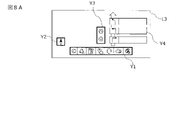
図4に戻り、第3制御部23は、第3レイヤーL3に表示される情報の表示を制御する機能を有する。第3レイヤーには、第1レイヤーL1に表示される情報以外の情報が表示される。第3レイヤーに表示される情報は特に限定されないが、たとえば図8A及び8Bに示すような情報が表示される。図8Aは、主に第1状態において第3レイヤーL3に表示される情報を示す図である。第1状態では、地図情報又は車両の周囲の画像情報が表示部11に表示されているので、第3レイヤーL3に表示される情報は、車両の走行制御に用いられる情報となる。図8Aの第3レイヤーL3下部に表示されている情報Y1は、タッチ操作部12に操作を入力するためのアイコンとなる画像である。アイコンは、左から順に、画面を戻すアイコン、地図情報の表示を自車両の現在位置の周辺に設定するアイコン、電気自動車の充電設備を検索するアイコン、予め設定しておいた目的地を表示するアイコン、ハンズフリーによる電話機能を起動するアイコン、音楽再生機能を起動するアイコン、そして、表示部11の表示の設定を変更するメニュー画面を開くアイコンである。第3レイヤーL3の左側に表示されている情報Y2は、方位磁針を表す画像であり、表示される地図情報における方位を示す。第3レイヤーL3の中心部分に表示されている情報Y3は、表示される地図情報の縮尺を変更するための画像であり、上のアイコンをタッチすると、表示される地図の縮尺が大きくなり、広域地図が表示される。これに対して、下のアイコンをタッチすると、表示される地図の縮尺が小さくなり、詳細な地図が表示される。第3レイヤーL3の右側に表示されている情報Y4は、ナビゲーション装置によって設定された経路に沿って走行するための情報である。たとえば、次の交差点までの距離や、次の交差点における右左折の情報などが、文字、記号、アイコンなどを用いてユーザーに通知される。
Returning to FIG. 4, the
一方、図8Bは、主に第2状態において第3レイヤーL3に表示される情報を示す図である。第2状態では、地図情報又は車両の周囲の画像情報が表示部11に表示されていないので、第3レイヤーL3に表示される情報は、車両の走行制御に用いられない情報となる。たとえば、第3レイヤーL3の左側に表示されている情報Y5は、音楽を再生するアプリケーションを示しており、情報Y5の右側に表示されている情報Y6は、車両の電力消費量を表示するアプリケーションを示している。また、第3レイヤーL3の右側に表示されている情報Y7及びY8は、ドライブレコーダーを制御するアプリケーションを起動するボタン、ユーザーサポートに接続するためのボタン、音声入力によりユーザーを支援する人工知能(AI)を起動するためのボタンなどである。さらに、図8A及び8Bに示す情報以外にも、第3レイヤーL3には、動画再生を制御する情報、ウェブブラウザーの情報、自車両の現在位置及び目的地周辺の天気を示す情報などが表示される。
On the other hand, FIG. 8B is a diagram showing information displayed on the third layer L3 mainly in the second state. In the second state, neither the map information nor the image information around the vehicle is displayed on the
第3レイヤーL3に表示される情報の表示を制御する際に、第3制御部23は、第3レイヤーL3に表示される情報の表示部分を変更することができる。たとえば、第3レイヤーL3に表示された情報の表示部分に対して、表示部分を拡大したり、縮小したりすることができ、また、表示部分の透過率を変更することができる。この際、第3レイヤーL3に表示される情報の表示部分の大きさ及び透過率は、情報の表示部分の視認性が確保される範囲内で適宜に設定することができる。さらに、第3制御部23は、第3レイヤーL3に表示される情報の表示部分の色相、明度、及び彩度のうち少なくとも一つを、自車両の周囲の環境に応じて変更することができる。たとえば、自車両が暗い場所を走行している場合、及び自車両が夜間に走行している場合などには、表示する情報の表示部分の明度を下げることができる。ほかの例として、第3制御部23は、第3レイヤーL3に表示される情報の背景の色を黒、濃紺などの明度の低い色に変更することができ、逆に、地図情報の背景の色を白などの明度の高い色に変更することもできる。
When controlling the display of information displayed on the third layer L3, the
図4に戻り、第4制御部24は、第4レイヤーL4に表示される情報の表示を制御する機能を有する。第4レイヤーL4には、第3レイヤーL3と同様に、第1レイヤーL1に表示される情報以外の情報が表示される。ここで、第4レイヤーL4に表示される情報は、第3レイヤーL3に表示される情報と同じであってもよく、異なっていてもよい。ただし、第3レイヤーL3と異なり、切り替え部4が第1状態と第2状態とを切り替えるときに、第4レイヤーL4に表示された情報の表示部分に対しては演出処理が実行されない。そのため、第1状態と第2状態のどちらの状態でも表される情報は、第4レイヤーL4に表示されることになる。また、第4制御部24による第4レイヤーL4に表示される情報の表示を制御は、第3制御部23による第3レイヤーL3に表示される情報の表示を制御と同様に行うことができる。なお、第4制御部24及び第4レイヤーL4は必須の構成ではなく、必要に応じて設けることができる。
Returning to FIG. 4, the
第5制御部25は、第5レイヤーL5に表示される情報の表示を制御する機能を有する。第5レイヤーL5には、一部が他の部分に比べて明度が高い背景が表示される。一つの背景画像の中で明度に差をつけることで、表示部11に表示される表示用情報において、一部にスポットライトが当てられたような演出を実現できる。第5制御部25は、スポットライトが当てられたような演出を、表示用情報のどの部分にて実現するかに応じて、背景の明度を適宜に設定することができる。たとえば、図9Aに示す画像のように、下部の中心部分において最も明度が高く、そこから放射状に明度が下がるように設定すると、表示用情報において、下部の中心部分にスポットライトが当てられたような演出効果が得られる。また、表示用情報において、右上にスポットライトが当てられたような演出効果を得たい場合には、図9Bに示す画像のように、右上において明度が最も高くなり、そこから放射状に明度が下がるグラデーションを付すことになる。
The
第5レイヤーL5に表示される背景の色は、スポットライトが当てられたような演出を実現するために、明度の低い色が好ましく、たとえば、黒、濃紺などである。また、第5レイヤーL5に表示される情報の表示を制御する場合に、第5制御部25は、第5レイヤーL5に表示される背景の透過率を変更することができる。具体的には、第1状態では、第1レイヤーL1に表示された情報を表示部11に表示させるために、第5レイヤーL5に表示される背景の透過率は、たとえば100%に設定する。これに対して、第2状態では、第1レイヤーL1に表示された情報を表示部11に表示させないため、第5レイヤーL5に表示される背景の透過率は、たとえば0%に設定する。なお、第5制御部25及び第5レイヤーL5は必須の構成ではなく、必要に応じて設けることができる。
The color of the background displayed on the fifth layer L5 is preferably a color with low lightness, such as black or dark blue, in order to achieve a spotlight effect. Also, when controlling the display of information displayed on the fifth layer L5, the
ここまで、第1制御部21~第5制御部25と第1レイヤーL1~第5レイヤーL5とについて説明したが、図4に示すように第1レイヤーL1~第5レイヤーL5のそれぞれに対して制御部が設けられている必要はなく、一つの制御部が複数のレイヤーの表示を制御してもよい。たとえば、第4制御部24と第5制御部25とを設けずに、第1制御部21が第1レイヤーL1の情報の表示を制御し、第2制御部22が第2レイヤーL2と第5レイヤーL5との情報の表示を制御し、第3制御部23が第3レイヤーL3と第4レイヤーL4との情報の表示を制御してもよい。また、第3制御部23と、第4制御部24と、第5制御部25とを設けずに、第1制御部21が第1レイヤーL1の情報の表示を制御し、第2制御部22が第2レイヤーL2~第5レイヤーL5の情報の表示を制御してもよいし、第1制御部21が第1レイヤーL1と第2レイヤーL2との情報の表示を制御し、第2制御部22が第3レイヤーL3~第5レイヤーL5の情報の表示を制御してもよい。このように、一つの制御部が複数のレイヤーの表示を制御することで、各制御部の演算負荷を最適化し、制御部の数が増加することを抑制できる。
So far, the
<状態の切り替え>
次に、切り替え部4による、第1状態と第2状態との切り替えについて説明する。切り替え部4は、ユーザーの操作に応じて、第1状態(ダミー背景が透明で、表示用情報において第1レイヤーL1に表示された情報をユーザーが見ることができる状態のことをいう。)と、第2状態(ダミー背景が不透明で、表示用情報において第1レイヤーL1に表示された情報をユーザーが見ることができない状態のことをいう。)とを切り替える機能を有する。図4に示すように、切り替え部4には、第1制御部21~第3制御部23及び第5制御部25が接続されている。切り替え部4は、第1制御部21~第3制御部23及び第5制御部25を介して、表示の切り替え処理を実行する間、第1レイヤーL1~第3レイヤーL3及び第5レイヤーL5の情報の表示を制御し、表示の切り替え処理を実行する。<Switch status>
Next, switching between the first state and the second state by the
なお、第4制御部24は、切り替え部4に接続していない。これは、上述のとおり、第4制御部24により制御される第4レイヤーに表示される情報は、切り替え部4により実行される表示の切り替え処理において表示が変更されないためである。
Note that the
切り替え部4は、タッチ操作部12、第1入力部13a及び第2入力部13bのうち少なくとも一つから入力された操作を制御部2から取得すると、表示の切り替え処理を実行する。表示の切り替え処理において、切り替え部4は、まず、第1状態と第2状態とが切り替わる間、第1レイヤーL1に表示された情報の表示部分に対して演出処理を実行せず、表示の切り替え処理が実行される間、表示部分が変化しないように第1レイヤーL1の情報の表示を制御する。第1レイヤーL1に表示された情報の表示部分に対する演出処理とは、第1状態と第2状態との切り替え、切り替え前の状態の終了、及び切り替え後の状態の開始のうち少なくとも一つを演出する演出処理のことを言う。すなわち、第1状態から第2状態へ切り替える場合は、第1状態が終了する演出、第2状態が開始する演出、及び第1状態から第2状態に切り替わる演出のうち少なくとも一つの演出処理を実行する。また、第2状態から第1状態へ切り替える場合は、第2状態が終了する演出、第1状態が開始する演出、及び第2状態から第1状態に切り替わる演出のうち少なくとも一つの演出処理を実行する。
When the
切り替え前の状態の終了を演出する演出処理とは、たとえば、切り替え前の状態で表示された情報の表示部分を消失させることである。切り替え後の状態の開始を演出する演出処理とは、たとえば、切り替え後の状態で表示される情報の表示部分を出現させることである。そして、第1状態と第2状態との切り替えを演出する演出処理とは、たとえば、切り替え前の状態で表示された情報の表示部分が消失した後、切り替え後の状態で表示される情報の表示部分が出現する前に、異なる状態に遷移することをユーザーに示す情報を表示することである。演出処理は、たとえば、第1レイヤーL1に表示された情報の表示部分を変更することを言い、特に、表示部分の拡大及び縮小、表示部分の透過率の変更、表示される情報の表示部分の色相、明度、及び彩度の変更などを含む。具体的には、図6A~6Cに示す表示形態を変更することである。これにより、表示の切り替え処理を実行している間、第1制御部21の演算負荷が増加することを抑制できる。
The rendering process for rendering the end of the pre-switching state is, for example, disappearing the display portion of the information displayed in the pre-switching state. The rendering process for rendering the start of the post-switching state is, for example, making the display portion of the information displayed in the post-switching state appear. The effect processing for effecting switching between the first state and the second state is, for example, the display of information displayed in the state after switching after the display portion of the information displayed in the state before switching disappears. It is to display information that indicates to the user to transition to different states before the part appears. The effect processing refers to, for example, changing the display portion of the information displayed on the first layer L1. Including hue, lightness, and saturation changes. Specifically, the display form shown in FIGS. 6A to 6C is changed. As a result, it is possible to suppress an increase in the calculation load of the
切り替え部4は、表示の切り替え処理を実行するときに、制御部2において、少なくとも、第1レイヤーL1に表示された情報の表示部分の制御が可能であることと、第2レイヤーL2のダミー背景の透過率を変化させることが可能であることと、第3レイヤーL3に表示された情報の表示部分に対する演出処理の実行が可能であることとが確認する。そして、第1レイヤーL1、第2レイヤーL2、及び第3レイヤーL3の情報の表示が適切に制御できることを確認した後に、第1状態と第2状態とを切り替える。また、切り替え部4は、制御部2において、第1レイヤーL1に表示された情報の表示部分の制御が可能であることと、第2レイヤーL2のダミー背景の透過率を変化させることが可能であることと、第3レイヤーL3に表示された情報の表示部分に対する演出処理の実行が可能であることとに加えて、第5レイヤーL5の背景を変化させることが可能であることを確認してもよい。これにより、一部のレイヤーの表示が適切に制御されないことで、画面にちらつきが生じる事態の発生を抑制することができる。
When the
第1状態と第2状態とが切り替わる間、第1レイヤーL1の情報の表示部分は維持されるが、表示される情報の内容は変化してもよい。たとえば、図6Aに示すように、第1レイヤーL1に地図情報が表示されている場合に、表示の切り替え処理が実行するときは、切り替え部4は、第1レイヤーL1の表示形態を、図6Bに示すものにも図6Cに示すものにも変化させないが、第1レイヤーL1に表示される地図情報の内容は、車両の走行位置に応じて変化させる。ほかの例として、図6Bに示すように、第1レイヤーL1に地図情報と車両の周囲の画像情報とが表示されている場合に、表示の切り替え処理が実行するときは、切り替え部4は、第1レイヤーL1の表示形態に維持し、第1レイヤーL1に表示される地図情報の内容と、車両の周囲の画像情報とを、車両の走行位置に応じて変化させる。
While the first state and the second state are switched, the displayed portion of the information on the first layer L1 is maintained, but the content of the displayed information may change. For example, as shown in FIG. 6A, when the map information is displayed on the first layer L1 and the display switching process is executed, the
又はこれに代えて、切り替え部4は、第1状態と第2状態とが切り替わる間、第1レイヤーL1の情報の表示部分と、表示される情報の内容とが変化しないように制御する。たとえば、図6Aに示すように、第1レイヤーL1に地図情報が表示されている場合に、表示の切り替え処理が実行するときは、切り替え部4は、第1レイヤーL1の表示形態と、第1レイヤーL1に表示される地図情報の内容とが変化しないように制御する。ほかの例として、図6Bに示すように、第1レイヤーL1に地図情報と車両の周囲の画像情報とが表示されている場合に、表示の切り替え処理が実行するときは、切り替え部4は、第1レイヤーL1の表示形態を維持し、さらに、車両の走行位置が変化しても、第1レイヤーL1に表示される地図情報の内容と、車両の周囲の画像情報とが変化しないように制御する。
Alternatively, the
また、切り替え部4は、第1状態と第2状態とが切り替わる間において、第2レイヤーL2に表示されたダミー背景の透過率を、切り替え後の状態のものに変化させる。つまり、第1状態から第2状態に切り替える場合は、ダミー背景の透過率を、たとえば100%から0%に変化させ、第2状態から第1状態に切り替える場合は、ダミー背景の透過率を、たとえば0%から100%に変化させる。これにより、第2レイヤーL2のダミー背景の透過率を変化させることで、第1レイヤーL1の情報の表示を部分的に制御することができる。透過率を変更させる割合は、画面のちらつきの発生が抑制できる範囲内で適宜の値を設定することができる。また、以下に述べる、切り替え部4による、第3レイヤーL3に表示される情報の表示部分に対する演出処理の実行と同期するように、透過率を変更させてもよい。
Further, the
これに加えて、切り替え部4は、第1状態と第2状態とが切り替わる間において、第1状態において第3レイヤーL3に表示される情報の表示部分と、第2状態において第3レイヤーL3に表示される情報の表示部分との少なくとも一方に対して、前記第1状態と前記第2状態との切り替え、切り替え前の状態の終了、及び切り替え後の状態の開始のうち少なくとも一つを演出する演出処理を実行する。たとえば、第1状態から第2状態へ切り替える場合は、第1状態において第3レイヤーL3に表示される情報の表示部分に対して、第1状態が終了する演出処理を実行し、第2状態において第3レイヤーL3に表示される情報の表示部分に対して、第2状態が開始する演出処理を実行する。また、第1状態が終了する演出処理を実行した後、第2状態が開始する演出処理を実行する前に、第1状態から第2状態に切り替わる演出処理を実行する。これに対して、第2状態から第1状態へ切り替える場合は、たとえば、第2状態において第3レイヤーL3に表示される情報の表示部分に対して、第2状態が終了する演出処理を実行し、第1状態において第3レイヤーL3に表示される情報の表示部分に対して、第1状態が開始する演出処理を実行する。また、第2状態が終了する演出処理を実行した後、第1状態が開始する演出処理を実行する前に、第2状態から第1状態に切り替わる演出処理を実行する。
In addition, while the first state and the second state are switched, the
演出処理は、たとえば、第3レイヤーL3に表示される情報の表示部分を変更することをいい、具体的には、第3レイヤーL3に表示される情報の表示部分に対する、移動、縮小、拡大、透過率の変化のうち少なくとも1つを含む演出処理である。このように、第3レイヤーL3に表示された情報の表示部分に演出処理を実行することで、第1レイヤーL1に表示された情報の表示部分に演出処理を実行しなくとも、画面におけるちらつきの発生を抑制しつつ、ユーザーの満足度を高める演出を実行し、情報の表示を変更することができる。また、第1制御部21の演算負荷の増加を抑制することができる。
The effect processing refers to, for example, changing the display portion of the information displayed on the third layer L3. Specifically, the display portion of the information displayed on the third layer L3 is moved, reduced, enlarged, This is a rendering process including at least one of changes in transmittance. In this way, by executing the effect processing on the display portion of the information displayed on the third layer L3, flickering on the screen can be prevented without executing the effect processing on the display portion of the information displayed on the first layer L1. While suppressing the occurrence, it is possible to execute an effect that enhances the user's satisfaction and change the display of information. Also, an increase in the calculation load of the
また、切り替え部4は、第1状態と第2状態とを切り替えるときに、切り替え前の状態で表示された情報の表示部分を、時間の経過と共に消失させ、切り替え後の状態で表示される情報の表示部分を、時間の経過と共に出現させる。すなわち、切り替え部4は、第1状態から第2状態へ切り替える場合は、第1状態にて表示された情報の表示部分を、時間の経過と共に消失させ、第2状態で表示される情報の表示部分を、時間の経過と共に出現させる。また、切り替え部4は、第2状態から第1状態へ切り替える場合は、第2状態にて表示された情報の表示部分を、時間の経過と共に消失させ、第1状態で表示される情報の表示部分を、時間の経過と共に出現させる。情報の表示部分が消失又は出現する際に要する時間は、ユーザーが演出を認識できる範囲内で適宜に設定することができ、たとえば0.5~10秒である。
Further, when switching between the first state and the second state, the
切り替え部4の機能により実行される演出処理の例を図10A~10Cに示す。図10A~10Cは、第3レイヤーL3に表示された情報Y1の表示部分に対して、表示部分を第3レイヤーL3の右下に移動しつつ、表示部分の透過率を増加させる演出処理を実行した場合に、情報Y1の表示部分がどのように変化するのかを示す。図10Aでは、第1状態において、第3レイヤーL3の下部に情報Y1が表示されているものとする。切り替え部4により、この例の演出処理が実行されると、情報Y1の表示部分の透過率が増加する。そして、透過率の増加と共に、情報Y1が右下に向けて平行移動する。図10Bには、演出処理が実行されている間の情報Y1aが表示されている。図10Bに示す情報Y1aは、図10Aに示す情報Y1の表示部分と比較して、透過率が増加している。情報Y1の表示部分の透過率が、たとえば0~5%であるのに対し、情報Y1aの表示部分の透過率は、たとえば30~60%である。そして、図10Bに示す情報Y1aの表示部分は、図10Aの情報Y1が表示されていた位置から、矢印Zの方向に平行移動している。そして、切り替え部4による演出処理が完了すると、図10Cに示すように、情報Y1は第3レイヤーL3に表示されなくなる。この例の演出処理では、情報Y1が第3レイヤーL3の右下の方向に消えるような演出効果が得られる。
10A to 10C show examples of effect processing executed by the function of the
一方、情報Y1が第3レイヤーL3の右下の位置から出現するような演出効果を得るためには、上述した演出処理を逆の順序で実行すればよい。つまり、図10Cのように、第3レイヤーL3に何も情報が表示されていない状態で、第3レイヤーL3の右下の位置から、図10Bに示す矢印Zの反対の方向に情報Y1の表示部分を平行移動させる。当該平行移動の間、情報Y1の透過率を低下させる。そして、情報Y1の表示部分を図10Aの位置で停止させ、その透過率をたとえば0%とする。 On the other hand, in order to obtain the effect that the information Y1 appears from the lower right position of the third layer L3, the above-described effect processing should be executed in the reverse order. That is, as shown in FIG. 10C, while no information is displayed on the third layer L3, the information Y1 is displayed in the direction opposite to the arrow Z shown in FIG. 10B from the lower right position of the third layer L3. Translate parts. During the translation, the transmittance of information Y1 is reduced. Then, the display portion of the information Y1 is stopped at the position shown in FIG. 10A, and its transmittance is set to 0%, for example.
図10A~10Cに示す演出処理では、情報Y1の表示部分を平行移動させたが、移動は平行移動に限られず、回転移動であっても、回転移動と平行移動との組み合わせであってもよい。また、情報Y1の表示部分を移動している間に、情報Y1の表示部分を拡大、又は縮小してもよい。図10A~10Cに示す演出処理で、情報Y1が第3レイヤーL3の右下の方向に消えるような演出効果を得る場合には、図10Bに示す平行移動をしている間に、情報Y1の表示部分を縮小すると演出効果がより強調される。これに対して、情報Y1が第3レイヤーL3の右下の位置から出現するような演出効果を得る場合には、最初は縮小した情報Y1を表示し、図10Aに示す位置まで移動する途中で、情報Y1の表示部分の大きさを徐々に拡大していくと、演出効果がより強調される。 In the effect processing shown in FIGS. 10A to 10C, the display portion of the information Y1 is moved in parallel, but the movement is not limited to parallel movement, and may be rotational movement or a combination of rotational movement and parallel movement. . Also, while the display portion of the information Y1 is being moved, the display portion of the information Y1 may be enlarged or reduced. In the rendering process shown in FIGS. 10A to 10C, in order to obtain a rendering effect in which the information Y1 disappears in the lower right direction of the third layer L3, while the parallel movement shown in FIG. 10B is performed, the information Y1 If the display portion is reduced, the production effect is emphasized more. On the other hand, in order to obtain a presentation effect in which the information Y1 appears from the lower right position of the third layer L3, the reduced information Y1 is displayed at first, and in the middle of moving to the position shown in FIG. , the presentation effect is emphasized by gradually enlarging the size of the display portion of the information Y1.
図11A~11Cは、切り替え部4の機能により実行される演出処理の別の例を示す図である。図11A~11Cは、第3レイヤーL3に表示された情報Y5の表示部分に対して、表示部分の透過率を変化させる演出処理を実行した場合に、情報Y5の表示部分がどのように変化するのかを示す。図11Aでは、第1状態から第2状態に切り替わる途中で、第3レイヤーL3に情報が表示されてないこととする。図11Aの状態で、切り替え部4による演出処理が実行されると、情報Y5が表示される位置に、高い透過率を有する情報Y5が表示される。たとえば、図11Bに示すような情報Y5aが表示され、その透過率は30~60%程度である。そして、透過率がさらに低下し、切り替え部4による演出処理が完了すると、図11Cに示すように、情報Y5は第3レイヤーL3に表示される。この例の演出処理では、情報Y5の表示部分が第3レイヤーL3にフェードインする演出効果が得られる。逆に、情報Y5の表示部分を第3レイヤーL3からフェードアウトさせる場合には、情報Y5の表示部分の透過率を、透過率が0~5%である状態(図11C)から透過率を徐々に増加させ、透過率が30~60%である状態(図11B)を経て、最終的に、図11Aに示すような透過率が100%の状態にする。表示部分の透過率を変化させる割合は、ユーザーが、情報の表示部分に対するフェードイン及びフェードアウトの演出効果を認識できる範囲内で適宜の割合を設定することができる。
11A to 11C are diagrams showing another example of effect processing executed by the function of the
また、切り替え部4は、切り替え前の状態で第3レイヤーL3に表示された情報の表示部分に対して演出処理を実行し、表示用情報において、切り替え前の状態で第3レイヤーL3に表示された情報の表示部分をユーザーが見ることができない状態になった後に、切り替え後の状態で第3レイヤーに表示される情報の表示部分に対して演出処理を実行する。たとえば、第1状態から第2状態に切り替える場合は、図10A~10Cに示す演出処理を実行し、情報Y1が表示部11に表示されない状態となった後に、図11A~11Cに示す演出処理を実行して、情報Y5を第3レイヤーL3に表示する。逆に、第2状態から第1状態に切り替える場合は、図11A~11Cに示す演出処理を実行して、情報Y5の表示部分を第3レイヤーL3からフェードアウトさせた後に、図10A~10Cに示す演出処理を実行し、情報Y1の表示部分を第3レイヤーL3の右下の位置から出現させる。
In addition, the
さらに、切り替え部4は、第3レイヤーL3に表示された情報の表示部分を、第1レイヤーL1に表示された地図情報及び画像情報に重ならないように移動させる。たとえば、図12に示すように、第1レイヤーL1の左側に、自車両の周辺の画像情報が表示され、第3レイヤーL3の右側に、音楽を再生するアプリケーションを示す情報Y5が表示されている場合に、情報Y5が第3レイヤーL3から消える演出処理を実行するときは、情報Y5の表示部分を図12に示す矢印Zaの方向に移動させる。これにより、表示部11に表示されたときに、情報Y5の表示部分が自車両の周辺の画像情報の上を横切り、ユーザーが自車両周辺の画像情報を視認できなくなる事態の発生を抑制できる。
Further, the
ここまで、制御装置14に含まれる各機能ブロックについて説明したが、単一の制御装置14が全ての機能ブロックを備える必要はなく、上記の機能ブロックのうち一部のものを、車両用表示装置1に含まれる他の機器、又は図示しない別の情報処理装置に設けてもよい。また、各機能ブロックの処理の全てを単一の装置で実行する必要はなく、データが授受できる状態で接続された複数の装置をまたいで、各機能ブロックの機能を実現してもよい。たとえば、図1の車両用表示装置1において、重ね合わせ部3にて実行される処理のうち、一部の処理を表示部11にて実行し、残りの処理を重ね合わせ部3にて実行するようにしてもよい。この場合には、表示部11のCPU、ROM、及びRAMを用いて、重ね合わせ部3の機能を実現するための処理の一部が行われることになる。
So far, each functional block included in the
[車両用表示装置における処理]
図13A~13Eを参照して、制御装置14が情報を処理する際の手順を説明する。図13A~13Eは、本実施形態の車両用表示装置1における情報の処理を示すフローチャートの一例である。以下に説明する処理は、制御装置14のプロセッサ15において、第1状態から第2状態へ表示を切り替えるときに実行される。[Processing in vehicle display device]
With reference to Figures 13A-13E, the procedure by which the
また、以下の説明において、図13A~13Eに示すルーチンが実行される前の第1状態では、各レイヤーに、図14Aに示す情報が表示されているものとする。すなわち、第4レイヤーL4には、左側にタッチ操作用のボタンの画像が表示され、右上には時計が表示されているものとする。第3レイヤーL3には、表示部11の表示を変更するためのアイコンとなる画像が表示されているものとする。また、第5レイヤーL5及び第2レイヤーL2には何も表示されておらず、第1レイヤーL1には、地図情報が表示されているものとする。この場合、重ね合わせ部3により生成される表示用情報は、図14Bに示す情報となる。つまり、表示部11にて、ユーザーが地図情報を見ることができる状態であり、第3レイヤーL3及び第4レイヤーL4に表示された情報は、地図情報の上に表示されている。
Also, in the following description, it is assumed that the information shown in FIG. 14A is displayed in each layer in the first state before the routines shown in FIGS. 13A to 13E are executed. That is, it is assumed that the image of the button for touch operation is displayed on the left side of the fourth layer L4, and the clock is displayed on the upper right side. It is assumed that an image serving as an icon for changing the display of the
まず、図13AのステップS1にて、制御部2の機能により、タッチ操作部12及び入力部13のうち少なくとも一方から入力されたユーザーの操作を取得し、続くステップS2にて、取得した操作が、第1状態を第2状態に切り替える操作であるか否かを判定する。取得した操作が、第1状態を第2状態に切り替える操作ではない場合は、ルーチンの実行を中止し、制御装置14による処理が終了する。これに対して、取得した操作が、第1状態を第2状態に切り替える操作である場合は、ステップS3に進み、制御部2のマスター装置としての機能により、切り替え部4に、第1状態から第2状態への切り替え開始を指示する。
First, in step S1 of FIG. 13A, the user's operation input from at least one of the
ステップS4にて、切り替え部4は、第1状態から第2状態への切り替え開始の指示を取得する。続くステップS5にて、切り替え部4は、第1状態と第2状態とを切り替える機能により、第2制御部22に、第2レイヤーL2のダミー背景を不透明にする指示を出す。ステップS6にて、第2制御部22は、第2レイヤーL2の情報の表示を制御する機能により、第2レイヤーL2のダミー背景の透過率を、たとえば100%(透明な状態)から0%(不透明な状態)に変化させる。
In step S4, the
ステップS6では、各レイヤーに、たとえば図15Aに示す情報が表示されている。すなわち、第4レイヤーL4には、左側にタッチ操作用のボタンの画像が表示され、右上には時計が表示されている。第3レイヤーL3には、表示部11の表示を変更するためのアイコンとなる画像が表示されている。第5レイヤーL5には何も表示されておらず、第2レイヤーL2には、不透明なダミー背景が表示されている。また、第1レイヤーL1には、地図情報が表示されている。この場合、重ね合わせ部3により生成される表示用情報は、図15Bに示す情報となる。つまり、表示部11にて、ダミー背景に隠れることで、ユーザーは地図情報を見ることはできない状態である。なお、第3レイヤーL3及び第4レイヤーL4に表示された情報は、ダミー背景の上に表示されている。
In step S6, information shown in FIG. 15A, for example, is displayed on each layer. That is, on the fourth layer L4, an image of a touch operation button is displayed on the left side, and a clock is displayed on the upper right side. An image serving as an icon for changing the display of the
図13Aに戻り、ステップS7にて、第2制御部22は、第2レイヤーL2の情報の表示を制御する機能により、切り替え部4に、ダミー背景の不透明化が完了したことを出力する。ステップS8にて、切り替え部4は、第2制御部22の出力を取得し、ダミー背景が不透明になったことを確認する。続くステップS9にて、切り替え部4は、第1状態と第2状態とを切り替える機能により、表示の切り替え処理を継続する指示を制御部2に要求する。なお、ステップS8は必須のステップではなく、必要に応じて設けることができる。
Returning to FIG. 13A, in step S7, the
図13Bに進み、切り替え部4から、表示の切り替え処理を継続する指示を要求された制御部2は、制御部2のマスター装置としての機能により、各制御部がレイヤーにおける情報の表示を制御できる状態か否かを確認する。具体的には、ステップS10aにて、制御部2は、第1制御部21が、第1レイヤーL1の情報の表示を制御できる状態か否かを確認する。続くステップS10bにて、制御部2は、第2制御部22が、第2レイヤーL2の情報の表示を制御できる状態か否かを確認する。続くステップS10cにて、制御部2は、第3制御部23が、第3レイヤーL3の情報の表示を制御できる状態か否かを確認する。続くステップS10dにて、制御部2は、第5制御部25が、第5レイヤーL5の情報の表示を制御できる状態か否かを確認する。ステップS10a~ステップS10dは、図13Bに示すように順次実行されてもよいし、同じタイミングで(たとえば同時に)実行されてもよい。
Proceeding to FIG. 13B, the
情報の表示の制御状態を確認された各制御部は、レイヤーの情報の表示の制御を制御する機能により、制御部2に、レイヤーの情報の表示の制御状態を出力する。具体的には、ステップS11aにて、第1制御部21は、第1レイヤーL1の情報の表示の制御状態を出力する。続くステップS11bにて、第2制御部22は、第2レイヤーL2の情報の表示の制御状態を出力する。続くステップS11cにて、第3制御部23は、第3レイヤーL3の情報の表示の制御状態を出力する。続くステップS11dにて、第5制御部25は、第5レイヤーL5の情報の表示の制御状態を出力する。なお、ステップS11a~ステップS11dが実行される順序は、図13Bに示すものに限定されず、各ステップが処理される順番が入れ替わっていてもよいし、複数のステップが同じタイミングで(たとえば同時に)実行されてもよい。続くステップS12にて、制御部2は、マスター装置としての機能により、第1制御部21~第3制御部23及び第5制御部25の出力を取得する。
Each control unit that has confirmed the information display control state outputs the layer information display control state to the
図13Cに進み、ステップS13にて、制御部2は、マスター装置としての機能により、取得した出力に基づいて、第1制御部21~第3制御部23及び第5制御部25の全てが、レイヤーの情報の表示を適切に制御できる状態であるか否かを確認する。第1制御部21~第3制御部23及び第5制御部25に、レイヤーの情報の表示を適切に制御できない状態であるものが含まれている場合は、ステップS10a~ステップS10dに戻り、再度、制御状態を確認する。又はこれに代えて、ルーチンの実行を中止し、制御装置14による処理を終了させてもよい。これに対して、第1制御部21~第3制御部23及び第5制御部25の全てが、レイヤーの情報の表示を適切に制御できる状態である場合は、ステップS14に進み、制御部2は、切り替え部4に、表示の切り替え処理の継続を指示する。
Proceeding to FIG. 13C, in step S13, the
ステップS15にて、切り替え部4は、制御部2から、第1状態から第2状態への切り替えを継続する指示を取得する。続くステップS16にて、切り替え部4は、第1状態と第2状態とを切り替える機能により、第1制御部21に、第1レイヤーL1に表示された情報の表示部分に対して、演出処理を実行しないことを指示する。ステップS17にて、第1制御部21は、第1レイヤーL1の情報の表示を制御する機能により、第1レイヤーL1において、情報の表示部分に対して演出処理を実行しない制御を開始する。当該制御が開始された後、ステップS21に進む。
In step S<b>15 , the
ステップS21にて、切り替え部4は、第1状態と第2状態とを切り替える機能により、第3制御部23に、第1状態において表示される情報の表示部分に対して演出処理の実行を指示する。演出処理の実行の指示を取得した第3制御部23は、ステップS22にて、第3レイヤーL3の情報の表示を制御する機能により、第1状態において表示される情報の表示部分に対して演出処理を実行する。
In step S21, the
ステップS22では、各レイヤーに、たとえば図16Aに示す情報が表示されている。すなわち、第4レイヤーL4には、左側にタッチ操作用のボタンの画像が表示され、右上には時計が表示されている。第3レイヤーL3には、表示部11の表示を変更するためのアイコンとなる画像に対して、第3レイヤーL3の右下に画像が消える演出処理が実行されている。第5レイヤーL5には何も表示されておらず、第2レイヤーL2には、不透明なダミー背景が表示されている。また、第1レイヤーL1には、地図情報が表示されている。この場合、重ね合わせ部3により生成される表示用情報は、図16Bに示す情報となる。つまり、表示部11にて、ダミー背景上に、演出処理が実行されている第3レイヤーL3の情報と、第4レイヤーL4に表示された情報とが表示されている。
In step S22, information shown in FIG. 16A, for example, is displayed on each layer. That is, on the fourth layer L4, an image of a touch operation button is displayed on the left side, and a clock is displayed on the upper right side. On the third layer L3, an effect process is executed in which the image disappears in the lower right of the third layer L3 with respect to the image serving as an icon for changing the display of the
図13Cに戻り、ステップS23にて、第3制御部23は、第3レイヤーL3の情報の表示を制御する機能により、切り替え部4に、演出処理の実行が完了したことを出力する。ステップS24にて、切り替え部4は、第3制御部23の出力を取得し、演出処理の実行が完了したことを確認する。なお、ステップS24は必須のステップではなく、必要に応じて設けることができる。
Returning to FIG. 13C, in step S23, the
図13Dに進み、ステップS25にて、切り替え部4は、第1状態と第2状態とを切り替える機能により、第5制御部25に背景の表示を指示する。背景の表示の指示を取得した第5制御部25は、ステップS26にて、第5レイヤーL5の情報の表示を制御する機能により、背景の表示を開始する。また、ステップS27にて、切り替え部4は、第1状態と第2状態とを切り替える機能により、第3制御部23に、第2状態において表示される情報の表示部分に対して演出処理の実行を指示する。演出処理の実行の指示を取得した第3制御部23は、ステップS28にて、第3レイヤーL3の情報の表示を制御する機能により、第2状態において表示される情報の表示部分に対して演出処理を実行する。
Proceeding to FIG. 13D, in step S25, the
ステップS28では、各レイヤーに、たとえば図17Aに示す情報が表示されている。すなわち、第4レイヤーL4には、左側にタッチ操作用のボタンの画像が表示され、右上には時計が表示されている。第3レイヤーL3には、第2状態で表示される情報の表示部分に対して、第3レイヤーL3の右上から画像がフェードインする演出処理が実行されている。第5レイヤーL5には、透過率が徐々に減少する演出処理が実行された背景が表示されている。第2レイヤーL2には、不透明なダミー背景が表示されている。また、第1レイヤーL1には、地図情報が表示されている。この場合、重ね合わせ部3により生成される表示用情報は、図17Bに示す情報となる。つまり、表示部11にて、透過率が変化させられている、第5レイヤーL5に表示された背景の上に、演出処理が実行されている、第3レイヤーL3の情報と、第4レイヤーL4に表示された情報とが表示されている。
In step S28, information shown in FIG. 17A, for example, is displayed on each layer. That is, on the fourth layer L4, an image of a touch operation button is displayed on the left side, and a clock is displayed on the upper right side. On the third layer L3, an effect process is performed in which an image fades in from the upper right of the third layer L3 with respect to the display portion of the information displayed in the second state. The fifth layer L5 displays a background that has undergone an effect process in which the transmittance gradually decreases. An opaque dummy background is displayed on the second layer L2. Further, map information is displayed on the first layer L1. In this case, the display information generated by the
図13Dに戻り、ステップS29にて、第5制御部25は、第5レイヤーL5の情報の表示を制御する機能により、切り替え部4に、背景に対する演出処理の実行が完了し、背景が表示されたことを出力する。ステップS30にて、切り替え部4は、第5制御部25の出力を取得し、背景に対する演出処理の実行が完了したことを確認する。また、ステップS31にて、第3制御部23は、第3レイヤーL3の情報の表示を制御する機能により、切り替え部4に、第2状態において表示される情報の表示部分に対する演出処理の実行が完了したことを出力する。ステップS32にて、切り替え部4は、第3制御部23の出力を取得し、第3レイヤーL3の情報の表示部分に対する演出処理の実行が完了したことを確認する。
Returning to FIG. 13D, in step S29, the
ステップS32では、各レイヤーに、たとえば図18Aに示す情報が表示されている。すなわち、第4レイヤーL4には、左側にタッチ操作用のボタンの画像が表示され、右上には時計が表示されている。第3レイヤーL3には、第2状態で表示される情報が表示されている。第5レイヤーL5には、一部の明度が、他の部分の明度よりも高く設定されている背景が表示されている。第2レイヤーL2には、不透明なダミー背景が表示されている。また、第1レイヤーL1には、地図情報が表示されている。この場合、重ね合わせ部3により生成される表示用情報は、図18Bに示す情報となる。つまり、表示部11にて、第5レイヤーL5に表示された背景の上に、第3レイヤーL3に表示された情報と、第4レイヤーL4に表示された情報とが表示されている。第2レイヤーL2に表示されたダミー背景と、第1レイヤーL1に表示された地図情報とは、ユーザーから見ることができない状態になっている。
In step S32, information shown in FIG. 18A, for example, is displayed on each layer. That is, on the fourth layer L4, an image of a touch operation button is displayed on the left side, and a clock is displayed on the upper right side. Information displayed in the second state is displayed on the third layer L3. A fifth layer L5 displays a background in which the brightness of a part is set higher than the brightness of the other part. An opaque dummy background is displayed on the second layer L2. Further, map information is displayed on the first layer L1. In this case, the display information generated by the
図13Dに戻る。ステップS30及びステップS32は必須のステップではなく、必要に応じて設けることができる。また、ステップS25及びステップS27は、同じタイミングで(たとえば同時に)実行することができる。 Return to Figure 13D. Steps S30 and S32 are not essential steps and can be provided as required. Moreover, step S25 and step S27 can be executed at the same timing (for example, at the same time).
図13Eに進み、ステップS33にて、切り替え部4は、第1状態と第2状態とを切り替える機能により、第1制御部21に、第1レイヤーL1に表示された情報の表示部分に対して、演出処理の実行を許可する。ステップS34にて、第1制御部21は、第1レイヤーL1の情報の表示を制御する機能により、第1レイヤーL1において、情報の表示部分に対して演出処理を実行しない制御を完了する。以後、第1レイヤーL1に表示された情報に対して、表示態様を変更するなどの演出処理を実行することができる。その後、ステップS35に進む。図13A~13Eに示す場合では、ステップS32の段階で、地図情報がユーザーから見えない状態、つまり第2状態になっているため、表示の切り替え処理が完了していない段階であっても、第1制御部21による演出処理の実行を許可することができる。
Proceeding to FIG. 13E , in step S33, the
ステップS35にて、切り替え部4は、第1状態と第2状態とを切り替える機能により、第2制御部22に、第2レイヤーL2のダミー背景を透明にする指示を出す。ステップS36にて、第2制御部22は、第2レイヤーL2の情報の表示を制御する機能により、第2レイヤーL2のダミー背景の透過率を、たとえば0%(不透明な状態)から100%(透明な状態)に変化させる。
In step S35, the
ステップS36では、各レイヤーに、たとえば図19Aに示す情報が表示されている。すなわち、第4レイヤーL4には、左側にタッチ操作用のボタンの画像が表示され、右上には時計が表示されている。第3レイヤーL3には、第2状態で表示される情報が表示され、第5レイヤーL5には、一部の明度が、他の部分の明度よりも高く設定されている背景が表示されている。第2レイヤーL2には、透明なダミー背景が表示され(つまり、何も表示されていない状態と同じである。)、第1レイヤーL1には、地図情報が表示されている。この場合、重ね合わせ部3により生成される表示用情報は、図19Bに示す情報となる。つまり、図18Bと同じ表示用画像が表示部11に表示されることになる。
In step S36, information shown in FIG. 19A, for example, is displayed on each layer. That is, on the fourth layer L4, an image of a touch operation button is displayed on the left side, and a clock is displayed on the upper right side. The third layer L3 displays the information displayed in the second state, and the fifth layer L5 displays a background in which part of the brightness is set higher than the brightness of the other part. . A transparent dummy background is displayed on the second layer L2 (that is, it is the same as when nothing is displayed), and map information is displayed on the first layer L1. In this case, the display information generated by the
図13Eに戻り、ステップS37にて、第2制御部22は、第2レイヤーL2の情報の表示を制御する機能により、切り替え部4に、ダミー背景の透明化が完了したことを出力する。ステップS38にて、切り替え部4は、第2制御部22の出力を取得し、ダミー背景が透明になったことを確認する。続くステップS61にて、切り替え部4は、第1状態と第2状態とを切り替える機能により、表示の切り替え処理が完了したことを制御部2に出力する。そして、ステップS62にて、制御部2は、切り替え部4の出力を取得し、表示の切り替え処理が完了したことを確認する。その後、制御装置14による処理を終了する。なお、ステップS38は必須のステップではなく、必要に応じて設けることができる。
Returning to FIG. 13E, in step S37, the
次に、図20A~20Eを参照して、制御装置14が情報を処理する際の手順を説明する。図20A~20Eは、本実施形態の車両用表示装置1における情報の処理を示すフローチャートの別の例である。以下に説明する処理は、制御装置14のプロセッサ15において、第2状態から第1状態へ表示を切り替えるときに実行される。なお、図20A~20Eに示すフローチャートにおいて、図13A~13Eに示すフローチャートと同じ処理を行うステップには、図13A~13Eに示すフローチャートと同じ番号を付している。
Next, with reference to FIGS. 20A to 20E, the procedure by which the
また、以下の説明において、図20A~20Eに示すルーチンが実行される前の第2状態では、各レイヤーに、図21Aに示す情報が表示されているものとする。すなわち、第4レイヤーL4には、左側にタッチ操作用のボタンの画像が表示され、右上には時計が表示されているものとする。第3レイヤーL3には、第2状態で表示される情報が表示され、第5レイヤーL5には、一部の明度が、他の部分の明度よりも高く設定されている背景が表示されているものとする。第2レイヤーL2には、透明なダミー背景が表示され(つまり何も表示されていない)、第1レイヤーL1には、地図情報が表示されているものとする。この場合、重ね合わせ部3により生成される表示用情報は、図21Bに示す情報となる。つまり、表示部11にて、第5レイヤーL5に表示された背景の上に、第3レイヤーL3に表示された情報と、第4レイヤーL4に表示された情報とが表示されている。第1レイヤーL1に表示された地図情報は、第5レイヤーL5に表示された背景の影となり、ユーザーから見ることができない状態である。
Also, in the following description, it is assumed that the information shown in FIG. 21A is displayed in each layer in the second state before the routines shown in FIGS. 20A to 20E are executed. That is, it is assumed that the image of the button for touch operation is displayed on the left side of the fourth layer L4, and the clock is displayed on the upper right side. The third layer L3 displays the information displayed in the second state, and the fifth layer L5 displays a background in which part of the brightness is set higher than the brightness of the other part. shall be It is assumed that a transparent dummy background is displayed on the second layer L2 (that is, nothing is displayed), and map information is displayed on the first layer L1. In this case, the display information generated by the
まず、図20AのステップS1にて、制御部2の機能により、タッチ操作部12及び入力部13のうち少なくとも一方から入力されたユーザーの操作を取得し、続くステップS2aにて、取得した操作が、第2状態を第1状態に切り替える操作であるか否かを判定する。取得した操作が、第2状態を第1状態に切り替える操作ではない場合は、ルーチンの実行を中止し、制御装置14による処理が終了する。これに対して、取得した操作が、第2状態を第1状態に切り替える操作である場合は、ステップS3aに進み、制御部2のマスター装置としての機能により、切り替え部4に、第1状態から第2状態への切り替え開始を指示する。
First, in step S1 of FIG. 20A, the function of the
ステップS4aにて、切り替え部4は、第2状態から第1状態への切り替え開始の指示を取得する。続くステップS5にて、切り替え部4は、第1状態と第2状態とを切り替える機能により、第2制御部22に、第2レイヤーL2のダミー背景を不透明にする指示を出す。ステップS6にて、第2制御部22は、第2レイヤーL2の情報の表示を制御する機能により、第2レイヤーL2のダミー背景の透過率を、たとえば100%(透明な状態)から0%(不透明な状態)に変化させる。
In step S4a, the
ステップS6では、各レイヤーに、たとえば図22Aに示す情報が表示されている。すなわち、第4レイヤーL4には、左側にタッチ操作用のボタンの画像が表示され、右上には時計が表示されている。第3レイヤーL3には、第2状態で表示される情報が表示され、第5レイヤーL5には、一部の明度が、他の部分の明度よりも高く設定されている背景が表示されている。第2レイヤーL2には、不透明なダミー背景が表示されている。また、第1レイヤーL1には、地図情報が表示されている。この場合、重ね合わせ部3により生成される表示用情報は、図22Bに示す情報となる。つまり、表示部11に表示される表示用情報は、図21Bに示すものと同じである。
In step S6, information shown in FIG. 22A, for example, is displayed on each layer. That is, on the fourth layer L4, an image of a touch operation button is displayed on the left side, and a clock is displayed on the upper right side. The third layer L3 displays the information displayed in the second state, and the fifth layer L5 displays a background in which part of the brightness is set higher than the brightness of the other part. . An opaque dummy background is displayed on the second layer L2. Further, map information is displayed on the first layer L1. In this case, the display information generated by the superimposing
図20Aに戻り、続くステップS7~ステップS9の処理を実行する。これらのステップは、上述した図13AのステップS7~ステップS9と同じステップであるため、ここでの説明は省略する。 Returning to FIG. 20A, the subsequent steps S7 to S9 are executed. Since these steps are the same steps as steps S7 to S9 in FIG. 13A described above, description thereof will be omitted here.
図20Bに進み、ステップS10a~ステップS10d、ステップS11a~ステップS11d、及びステップS12を実行する。これらのステップは、上述した図13Bに示すステップと同じであるため、ここでの説明は省略する。 Proceeding to FIG. 20B, steps S10a to S10d, steps S11a to S11d, and step S12 are executed. These steps are the same as the steps shown in FIG. 13B described above, so descriptions thereof are omitted here.
図20Cに進み、制御部2は、マスター装置としての機能により、取得した出力に基づいて、第1制御部21~第3制御部23及び第5制御部25の全てが、レイヤーの情報の表示を適切に制御できる状態であるか否かを確認する。第1制御部21~第3制御部23及び第5制御部25に、レイヤーの情報の表示を適切に制御できない状態であるものが含まれている場合は、ステップS10a~ステップS10dに戻り、再度、制御状態を確認する。又はこれに代えて、ルーチンの実行を中止し、制御装置14による処理を終了させてもよい。これに対して、第1制御部21~第3制御部23及び第5制御部25の全てが、レイヤーの情報の表示を適切に制御できる状態である場合は、ステップS14aに進み、制御部2は、切り替え部4に、表示の切り替え処理の継続を指示する。
Proceeding to FIG. 20C, the
ステップS15aにて、切り替え部4は、制御部2から、第2状態から第1状態への切り替えを継続する指示を取得する。続くステップS16及びステップS17は、図13CのステップS16及びステップS17と同じであるため、ここでの説明は省略する。そして、第1レイヤーL1において、情報の表示部分に対して演出処理を実行しない制御を開始した後、図20Cに示すフローチャートでは、ステップS41に進む。
In step S<b>15 a , the
ステップS41にて、切り替え部4は、第1状態と第2状態とを切り替える機能により、第5制御部25に、背景を透明にすることを指示する。背景の透明化の指示を取得した第5制御部25は、ステップS42にて、第5レイヤーL5の情報の表示を制御する機能により、背景の透過率を増加させる。
In step S41, the
ステップS42では、各レイヤーに、たとえば図23Aに示す情報が表示されている。すなわち、第4レイヤーL4には、左側にタッチ操作用のボタンの画像が表示され、右上には時計が表示されている。第3レイヤーL3には、第2状態で表示される情報が表示されている。第5レイヤーL5には、透明な(透過率がたとえば100%である)背景が表示されており、何の情報も表示されていない状態と同じである。第2レイヤーL2には、不透明なダミー背景が表示されている。また、第1レイヤーL1には、地図情報が表示されている。この場合、重ね合わせ部3により生成される表示用情報は、図23Bに示す情報となる。つまり、表示部11にて、第2レイヤーL2に表示されたダミー背景の上に、第3レイヤーL3に表示された情報と、第4レイヤーL4に表示された情報とが表示されている。
In step S42, information shown in FIG. 23A, for example, is displayed on each layer. That is, on the fourth layer L4, an image of a touch operation button is displayed on the left side, and a clock is displayed on the upper right side. Information displayed in the second state is displayed on the third layer L3. The fifth layer L5 displays a transparent background (having a transmittance of, for example, 100%), which is the same as when no information is displayed. An opaque dummy background is displayed on the second layer L2. Further, map information is displayed on the first layer L1. In this case, the display information generated by the superimposing
図20Cに戻り、ステップS43にて、第5制御部25は、第5レイヤーL5の情報の表示を制御する機能により、切り替え部4に、背景の透明化が完了したことを出力する。ステップS44にて、切り替え部4は、第5制御部25の出力を取得し、背景が透明化されたことを確認する。なお、ステップS44は必須のステップではなく、必要に応じて設けることができる。
Returning to FIG. 20C, in step S43, the
図20Dに進み、ステップS45にて、切り替え部4は、第1状態と第2状態とを切り替える機能により、第3制御部23に、第2状態において表示されている情報の表示部分に対して演出処理の実行を指示する。演出処理の実行の指示を取得した第3制御部23は、ステップS46にて、第3レイヤーL3の情報の表示を制御する機能により、第2状態において表示される情報の表示部分に対して演出処理を実行する。
Proceeding to FIG. 20D , in step S45, the
ステップS46では、各レイヤーに、たとえば図24Aに示す情報が表示されている。すなわち、第4レイヤーL4には、左側にタッチ操作用のボタンの画像が表示され、右上には時計が表示されている。第3レイヤーL3には、第2状態で表示される情報の表示部分に対して、第3レイヤーL3の右上に画像がフェードアウトする演出処理が実行されている。第5レイヤーL5には、何も表示されていないか、透過率が100%の背景が表示されている。第2レイヤーL2には、不透明なダミー背景が表示されている。また、第1レイヤーL1には、地図情報が表示されている。この場合、重ね合わせ部3により生成される表示用情報は、図24Bに示す情報となる。つまり、表示部11にて、第5レイヤーL2に表示されたダミー背景の上に、演出処理が実行されている、第3レイヤーL3の情報と、第4レイヤーL4に表示された情報とが表示されている。
In step S46, information shown in FIG. 24A, for example, is displayed on each layer. That is, on the fourth layer L4, an image of a touch operation button is displayed on the left side, and a clock is displayed on the upper right side. On the third layer L3, an effect process is executed to fade out the image to the upper right of the third layer L3 for the display portion of the information displayed in the second state. Nothing is displayed on the fifth layer L5, or a background with a transmittance of 100% is displayed. An opaque dummy background is displayed on the second layer L2. Further, map information is displayed on the first layer L1. In this case, the display information generated by the superimposing
図20Dに戻り、ステップS47にて、第3制御部23は、第3レイヤーL3の情報の表示を制御する機能により、切り替え部4に、第2状態において表示される情報の表示部分に対する演出処理の実行が完了したこと、つまり第2状態において表示される情報の表示部分が、表示部11に表示されなくなったことを出力する。ステップS48にて、切り替え部4は、第3制御部23の出力を取得し、背景に対する演出処理の実行が完了したことを確認する。なお、ステップS47は必須のステップではなく、必要に応じて設けることができる。
Returning to FIG. 20D, in step S47, the
続くステップS49にて、切り替え部4は、第1状態と第2状態とを切り替える機能により、第3制御部23に、第1状態において表示される情報の表示部分に対して演出処理の実行を指示する。演出処理の実行の指示を取得した第3制御部23は、ステップS50にて、第3レイヤーL3の情報の表示を制御する機能により、第1状態において表示される情報の表示部分に対して演出処理を実行する。
In the subsequent step S49, the
ステップS50では、各レイヤーに、たとえば図25Aに示す情報が表示されている。すなわち、第4レイヤーL4には、左側にタッチ操作用のボタンの画像が表示され、右上には時計が表示されている。第3レイヤーL3には、表示部11の表示を変更するためのアイコンとなる画像に対して、第3レイヤーL3の右下から画像が出現する演出処理が実行されている。第5レイヤーL5には何も表示されておらず、第2レイヤーL2には、不透明なダミー背景が表示されている。また、第1レイヤーL1には、地図情報が表示されている。この場合、重ね合わせ部3により生成される表示用情報は、図25Bに示す情報となる。つまり、表示部11にて、ダミー背景上に、演出処理が実行されている、第3レイヤーL3の情報と、第4レイヤーL4に表示された情報とが表示されている。
In step S50, information shown in FIG. 25A, for example, is displayed on each layer. That is, on the fourth layer L4, an image of a touch operation button is displayed on the left side, and a clock is displayed on the upper right side. On the third layer L3, an effect process is executed in which an image appears from the lower right of the third layer L3 with respect to the image serving as an icon for changing the display of the
図20Dに戻り、ステップS51にて、第3制御部23は、第3レイヤーL3の情報の表示を制御する機能により、切り替え部4に、演出処理の実行が完了したことを出力する。ステップS52にて、切り替え部4は、第3制御部23の出力を取得し、演出処理の実行が完了したことを確認する。なお、ステップS51は必須のステップではなく、必要に応じて設けることができる。
Returning to FIG. 20D, in step S51, the
ステップS52では、各レイヤーに、たとえば図26Aに示す情報が表示されている。すなわち、第4レイヤーL4には、左側にタッチ操作用のボタンの画像が表示され、右上には時計が表示されている。第3レイヤーL3には、表示部11の表示を変更するためのアイコンとなる画像が表示されている。第5レイヤーL5には何も表示されておらず、第2レイヤーL2には、不透明なダミー背景が表示されている。また、第1レイヤーL1には、地図情報が表示されている。この場合、重ね合わせ部3により生成される表示用情報は、図26Bに示す情報となる。つまり、表示部11にて、ダミー背景の上に、第3レイヤーL3及び第4レイヤーL4に表示された情報が表示されている。
In step S52, information shown in FIG. 26A, for example, is displayed on each layer. That is, on the fourth layer L4, an image of a touch operation button is displayed on the left side, and a clock is displayed on the upper right side. An image serving as an icon for changing the display of the
図20Eに戻る。ステップS53にて、切り替え部4は、第1状態と第2状態とを切り替える機能により、第2制御部22に、第2レイヤーL2のダミー背景を透明にする指示を出す。ステップS54にて、第2制御部22は、第2レイヤーL2の情報の表示を制御する機能により、第2レイヤーL2のダミー背景の透過率を、たとえば0%(不透明な状態)から100%(透明な状態)に変化させる。
Return to FIG. 20E. In step S53, the
ステップS54では、各レイヤーに、たとえば図27Aに示す情報が表示されている。すなわち、第4レイヤーL4には、左側にタッチ操作用のボタンの画像が表示され、右上には時計が表示されている。第3レイヤーL3には、表示部11の表示を変更するためのアイコンとなる画像が表示されている。また、第5レイヤーL5及び第2レイヤーL2には何も表示されておらず、第1レイヤーL1には、地図情報が表示されている。この場合、重ね合わせ部3により生成される表示用情報は、図27Bに示す情報となる。つまり、表示部11にて、ユーザーが地図情報を見ることができる状態であり、第3レイヤーL3及び第4レイヤーL4に表示された情報は、地図情報の上に表示されている。この段階で、第2状態から第1状態に状態が切り替わっている。
In step S54, information shown in FIG. 27A, for example, is displayed on each layer. That is, on the fourth layer L4, an image of a touch operation button is displayed on the left side, and a clock is displayed on the upper right side. An image serving as an icon for changing the display of the
図20Eに戻り、ステップS55にて、第2制御部22は、第2レイヤーL2の情報の表示を制御する機能により、切り替え部4に、ダミー背景の透明化が完了したことを出力する。ステップS56にて、切り替え部4は、第2制御部22の出力を取得し、ダミー背景が透明になったことを確認する。続くステップS57にて、切り替え部4は、第1状態と第2状態とを切り替える機能により、第1制御部21に、第1レイヤーL1に表示された情報の表示部分に対して、演出処理の実行を許可する。ステップS58にて、第1制御部21は、第1レイヤーL1の情報の表示を制御する機能により、第1レイヤーL1において、情報の表示部分に対して演出処理を実行しない制御を完了する。以後、第1レイヤーL1に表示された情報に対して、表示態様を変更するなどの演出処理を実行することができる。その後のステップS61とステップS62にては、上述した図13Eのステップと同じ内容の処理を行うため、説明は省略する。
Returning to FIG. 20E, in step S55, the
[本発明の実施態様]
以上のとおり、本実施形態の車両用表示装置によれば、地図情報、又は車両周辺の画像情報のうち少なくとも一方を表示する第1レイヤーL1と、ダミー背景を表示する第2レイヤーL2と、前記地図情報及び前記画像情報以外の情報を表示する第3レイヤーL3と、前記第1レイヤーL1の上に前記第2レイヤーL2を重ね合わせ、前記第2レイヤーL2の上に前記第3レイヤーL3を重ね合わせて表示用情報を生成する重ね合わせ部3と、ユーザーの操作に応じて、前記ダミー背景が透明で、前記表示用情報において前記第1レイヤーL1に表示された情報を前記ユーザーが見ることができる第1状態と、前記ダミー背景が不透明で、前記表示用情報において前記第1レイヤーL1に表示された情報を前記ユーザーが見ることができない第2状態とを切り替える切り替え部4と、を備え、前記切り替え部4は、前記第1状態と前記第2状態とを切り替えるときに、前記第1状態と前記第2状態とが切り替わる間、前記第1レイヤーL1に表示された情報の表示部分に対して、前記第1状態と前記第2状態との切り替え、切り替え前の状態の終了、及び切り替え後の状態の開始のうち少なくとも一つを演出する演出処理を実行せず、前記第1状態と前記第2状態とが切り替わる間に、前記ダミー背景の透過率を切り替え後の状態のものに変化させ、且つ、前記第1状態において前記第3レイヤーL3に表示される情報の表示部分、及び前記第2状態において前記第3レイヤーL3に表示される情報の表示部分のうち少なくとも一方に対して、前記第1状態と前記第2状態との切り替え、切り替え前の状態の終了、及び切り替え後の状態の開始のうち少なくとも一つを演出する演出処理を実行する、車両用表示装置1が提供される。これにより、表示に必要な処理の負荷が増加することを抑制することができる。また、地図情報と車両周辺の画像情報とを表示するための演算負荷の増加が抑制されることで、画面のちらつきの発生を抑制しつつ、ユーザーの満足度を高める演出を実行することができる。[Embodiment of the present invention]
As described above, according to the vehicle display device of the present embodiment, the first layer L1 that displays at least one of the map information and the image information around the vehicle, the second layer L2 that displays the dummy background, and the A third layer L3 displaying information other than the map information and the image information, the second layer L2 superimposed on the first layer L1, and the third layer L3 superimposed on the second layer L2. A
また、前記切り替え部4は、前記第1状態と前記第2状態とを切り替えるときに、切り替え前の状態で表示された情報の表示部分を、時間の経過と共に消失させ、切り替え後の状態で表示される情報の表示部分を、時間の経過と共に出現させる。これにより、ユーザーの満足度をより高める演出を実行することができる。
Further, when switching between the first state and the second state, the
また、本実施形態の車両用表示装置によれば、前記切り替え部4は、前記第3レイヤーL3に表示される情報の表示部分に対して、移動、縮小、拡大、透過率の変化のうち少なくとも1つを含む演出処理を実行する。これにより、ユーザーの満足度をより高める演出を実行することができる。
Further, according to the vehicle display device of the present embodiment, the
また、本実施形態の車両用表示装置によれば、前記切り替え部4は、前記第3レイヤーL3に表示された情報の表示部分を移動しつつ、前記表示部分の透過率を増加させる。これにより、演出処理による演出効果を強調することができる。
Further, according to the vehicle display device of the present embodiment, the
また、本実施形態の車両用表示装置によれば、前記切り替え部4は、切り替え前の状態で前記第3レイヤーL3に表示された情報の表示部分に対して前記演出処理を実行し、前記表示用情報において、切り替え前の状態で前記第3レイヤーL3に表示された情報の表示部分を前記ユーザーが見ることができない状態になった後に、切り替え後の状態で前記第3レイヤーL3に表示される情報の表示部分に対して前記演出処理を実行する。これにより、画面のちらつきの発生を抑制しつつ、演出処理による演出効果を強調することができる。
Further, according to the vehicular display device of the present embodiment, the
また、本実施形態の車両用表示装置によれば、前記切り替え部4は、前記第3レイヤーL3に表示された情報の表示部分を、前記第1レイヤーL1に表示された前記地図情報及び前記画像情報に重ならないように移動させる。これにより、地図情報と車両周辺の画像情報とが、第3レイヤーL3に表示された情報の表示部分により見えなくなる事態の発生を抑制することができる。
Further, according to the vehicle display device of the present embodiment, the
また、本実施形態の車両用表示装置によれば、第1レイヤーL1の情報の表示と、前記第2レイヤーL2の前記ダミー背景の表示と、前記第3レイヤーL3の情報の表示と、前記重ね合わせ部3にて生成された前記表示用情報の表示と、を制御する制御部2を備え、前記制御部2は、前記重ね合わせ部3にて生成された前記表示用情報を表示部11に出力する。これにより、第1レイヤーL1~第3レイヤーL3を重ね合わせた情報を表示部11に表示することができる。
Further, according to the vehicular display device of the present embodiment, the display of information on the first layer L1, the display of the dummy background on the second layer L2, the display of the information on the third layer L3, and the overlapping A
また、本実施形態の車両用表示装置によれば、前記切り替え部4は、前記制御部2において、前記第1レイヤーL1に表示された情報の表示部分の制御が可能であることと、前記第2レイヤーL2の前記ダミー背景の透過率を変化させることが可能であることと、前記第3レイヤーL3に表示された情報の表示部分に対する前記演出処理の実行が可能であることとが確認された後に、前記第1状態と前記第2状態とを切り替える。これにより、一部のレイヤーの表示が適切に制御されないことで、画面にちらつきが生じる事態の発生を抑制することができる。
Further, according to the vehicle display device of the present embodiment, the
また、本実施形態の車両用表示装置によれば、前記地図情報及び前記画像情報以外の情報を表示する第4レイヤーL4を備え、前記重ね合わせ部3は、前記表示用情報を生成するときに、前記第3レイヤーL3の上に前記第4レイヤーL4を重ね合わせ、前記切り替え部4は、前記第1状態と前記第2状態とを切り替えるときに、前記第4レイヤーL4に表示された情報の表示部分に対して前記演出処理を実行しない。これにより、切り替え部4による演出処理が実行されない情報を、別のレイヤーに分けて表示することができ、その結果、演出処理の実行に伴う演算処理の負荷を減らすことができる。
Further, according to the vehicle display device of the present embodiment, the fourth layer L4 for displaying information other than the map information and the image information is provided. , the fourth layer L4 is superimposed on the third layer L3, and the
また、本実施形態の車両用表示装置によれば、一部が他の部分に比べて明度が高い背景を表示する第5レイヤーL5を備え、前記重ね合わせ部3は、前記表示用情報を生成するときに、前記第2レイヤーL2の上に前記第5レイヤーL5を重ね合わせ、前記第5レイヤーL5の上に前記第3レイヤーL3を重ね合わせる。これにより、第1レイヤーL1~第5レイヤーL5を重ね合わせた情報を表示部11に表示することができる。
Further, according to the vehicle display device of the present embodiment, the fifth layer L5 is provided for displaying a background whose brightness is higher than that of the other portions, and the overlapping
また、本実施形態の車両用表示装置によれば、第1レイヤーL1の情報の表示と、前記第2レイヤーL2の前記ダミー背景の表示と、前記第3レイヤーL3の情報の表示と、前記第4レイヤーL4の情報の表示と、前記第5レイヤーL5の前記背景の表示と、前記重ね合わせ部3にて生成された前記表示用情報の表示と、を制御する制御部2を備え、前記切り替え部4は、前記制御部2において、前記第1レイヤーL1に表示された情報の表示部分の制御が可能であることと、前記第2レイヤーL2の前記ダミー背景の透過率を変化させることが可能であることと、前記第3レイヤーL3に表示された情報の表示部分に対する前記演出処理の実行が可能であることと、前記第5レイヤーL5の前記背景を変化させることが可能であることとが確認された後に、前記第1状態と前記第2状態とを切り替える。これにより、一部のレイヤーの表示が適切に制御されないことで、画面にちらつきが生じる事態の発生を抑制することができる。
Further, according to the vehicle display device of the present embodiment, display of information on the first layer L1, display of the dummy background on the second layer L2, display of information on the third layer L3, and display of the information on the third layer L3. a
また、本実施形態の車両用表示方法によれば、地図情報、又は車両周辺の画像情報のうち少なくとも一方を表示する第1レイヤーL1と、ダミー背景を表示する第2レイヤーL2と、前記地図情報及び前記画像情報以外の情報を表示する第3レイヤーL3と、を備える表示装置を用いて表示を行う車両用表示方法において、前記表示装置のプロセッサ15は、前記第1レイヤーL1の上に前記第2レイヤーL2を重ね合わせ、前記第2レイヤーL2の上に前記第3レイヤーL3を重ね合わせて表示させ、ユーザーの操作に応じて、前記第2レイヤーL2の前記ダミー背景が透明で、前記第1レイヤーL1に表示された情報を前記ユーザーが見ることができる第1状態と、前記第2レイヤーL2の前記ダミー背景が不透明で、前記第1レイヤーL1に表示された情報を前記ユーザーが見ることができない第2状態とを切り替え、前記第1状態と前記第2状態とを切り替えるときに、前記第1状態と前記第2状態とが切り替わる間、前記第1レイヤーL1に表示される情報の表示部分に対して、前記第1状態と前記第2状態との切り替え、切り替え前の状態の終了、及び切り替え後の状態の開始のうち少なくとも一つを演出する演出処理を実行せず、前記第1状態と前記第2状態とが切り替わる間に、前記ダミー背景の透過率を切り替え後の状態のものに変化させ、且つ、前記第1状態において前記第3レイヤーL3に表示される情報の表示部分、及び前記第2状態において前記第3レイヤーL3に表示される情報の表示部分のうち少なくとも一方に対して、前記第1状態と前記第2状態との切り替え、切り替え前の状態の終了、及び切り替え後の状態の開始のうち少なくとも一つを演出する演出処理を実行する、車両用表示方法を提供する。これにより、表示に必要な処理の負荷が増加することを抑制することができる。また、地図情報と車両周辺の画像情報とを表示するための演算負荷の増加が抑制されることで、画面のちらつきの発生を抑制しつつ、ユーザーの満足度を高める演出を実行することができる。 Further, according to the vehicle display method of the present embodiment, the first layer L1 that displays at least one of the map information and the image information around the vehicle, the second layer L2 that displays the dummy background, and the map information. and a third layer L3 for displaying information other than the image information. 2 layers L2 are superimposed, the third layer L3 is displayed superimposed on the second layer L2, and the dummy background of the second layer L2 is made transparent and the first layer L3 is made transparent according to a user's operation. A first state in which the user can see the information displayed on the layer L1, and the dummy background of the second layer L2 is opaque and the user cannot see the information displayed on the first layer L1. When switching between the first state and the second state, the display portion of the information displayed on the first layer L1 during the switching between the first state and the second state. , without executing a rendering process for rendering at least one of the switching between the first state and the second state, the end of the state before switching, and the start of the state after switching, and the first state changing the transmittance of the dummy background to that of the state after switching, and displaying information displayed on the third layer L3 in the first state while switching between and the second state; and Switching between the first state and the second state, ending the state before switching, and after switching, for at least one of the display portions of information displayed on the third layer L3 in the second state To provide a display method for a vehicle, which executes performance processing for rendering at least one of the start of states. As a result, it is possible to suppress an increase in the processing load required for display. In addition, by suppressing an increase in the computational load for displaying map information and image information around the vehicle, it is possible to suppress the occurrence of flickering on the screen and execute an effect that enhances user satisfaction. .
1…車両用表示装置
11…表示部
11a…第1表示部
11b…第2表示部
12…タッチ操作部
13…入力部
13a…第1入力部
13b…第2入力部
14…制御装置
15…プロセッサ
151…CPU
152…ROM
153…RAM
2…制御部
21…第1制御部
22…第2制御部
23…第3制御部
24…第4制御部
25…第5制御部
3…重ね合わせ部
4…切り替え部
A1…第1領域
A2…第2領域
B…境界
D1a、D1b、D1c、D1d…表示部分(第1領域)
D2a、D2b、D2c、D2d、D2e、D2f、D2g…表示部分(第2領域)
IP…インストルメントパネル
L1…第1レイヤー
L2…第2レイヤー
L3…第3レイヤー
L4…第4レイヤー
L5…第5レイヤー
SW1~SW15…スイッチ
X…ステアリングホイール操作領域
Y1、Y1a、Y2、Y3、Y4、Y5、Y5a、Y6、Y7、Y8…情報
Z、Za…移動方向REFERENCE SIGNS
152 ROM
153 RAM
2...
D2a, D2b, D2c, D2d, D2e, D2f, D2g... display portion (second area)
IP... Instrument panel L1... First layer L2... Second layer L3... Third layer L4... Fourth layer L5... Fifth layer SW1 to SW15... Switch X... Steering wheel operation area Y1, Y1a, Y2, Y3, Y4 , Y5, Y5a, Y6, Y7, Y8... Information Z, Za... Movement direction
Claims (12)
ダミー背景を表示する第2レイヤーと、
前記地図情報及び前記画像情報以外の情報を表示する第3レイヤーと、
前記第1レイヤーの上に前記第2レイヤーを重ね合わせ、前記第2レイヤーの上に前記第3レイヤーを重ね合わせて表示用情報を生成する重ね合わせ部と、
ユーザーの操作に応じて、前記ダミー背景が透明で、前記表示用情報において前記第1レイヤーに表示された情報を前記ユーザーが見ることができる第1状態と、前記ダミー背景が不透明で、前記表示用情報において前記第1レイヤーに表示された情報を前記ユーザーが見ることができない第2状態とを切り替える切り替え部と、を備え、
前記切り替え部は、前記第1状態と前記第2状態とを切り替えるときに、
前記第1状態と前記第2状態とが切り替わる間、前記第1レイヤーに表示された情報の表示部分に対して、前記第1状態と前記第2状態との切り替え、切り替え前の状態の終了、及び切り替え後の状態の開始のうち少なくとも一つを演出する演出処理を実行せず、
前記第1状態と前記第2状態とが切り替わる間に、前記ダミー背景の透過率を切り替え後の状態のものに変化させ、且つ、前記第1状態において前記第3レイヤーに表示される情報の表示部分、及び前記第2状態において前記第3レイヤーに表示される情報の表示部分のうち少なくとも一方に対して、前記第1状態と前記第2状態との切り替え、切り替え前の状態の終了、及び切り替え後の状態の開始のうち少なくとも一つを演出する演出処理を実行する、車両用表示装置。a first layer that displays at least one of map information and image information around the vehicle;
a second layer displaying a dummy background;
a third layer displaying information other than the map information and the image information;
a superimposing unit that superimposes the second layer on the first layer and superimposes the third layer on the second layer to generate display information;
A first state in which the dummy background is transparent and the user can see the information displayed on the first layer in the display information, and a state in which the dummy background is opaque and the display is performed according to a user's operation. a switching unit that switches between a second state in which the user cannot see the information displayed on the first layer in the information for use,
When the switching unit switches between the first state and the second state,
While switching between the first state and the second state, switching between the first state and the second state, termination of the state before switching, with respect to the display portion of the information displayed on the first layer, And without executing the production process that produces at least one of the start of the state after switching,
During switching between the first state and the second state, the transmittance of the dummy background is changed to that of the state after switching, and information displayed on the third layer in the first state is displayed. switching between the first state and the second state, termination of the state before switching, and switching for at least one of the portion and the display portion of the information displayed on the third layer in the second state. A vehicular display device that executes a rendering process for rendering at least one of the start of a subsequent state.
前記制御部は、前記重ね合わせ部にて生成された前記表示用情報を表示部に出力する、請求項1~6のいずれか一項に記載の車両用表示装置。Controlling the display of the first layer information, the display of the dummy background of the second layer, the display of the third layer information, and the display of the display information generated by the superimposing unit. with a control unit that
7. The vehicular display device according to claim 1, wherein said control section outputs said display information generated by said overlapping section to a display section.
前記重ね合わせ部は、前記表示用情報を生成するときに、前記第3レイヤーの上に前記第4レイヤーを重ね合わせ、
前記切り替え部は、前記第1状態と前記第2状態とを切り替えるときに、前記第4レイヤーに表示された情報の表示部分に対して前記演出処理を実行しない、請求項1~6のいずれか一項に記載の車両用表示装置。A fourth layer that displays information other than the map information and the image information,
The superimposition unit superimposes the fourth layer on the third layer when generating the display information,
7. The switching unit according to claim 1, wherein when switching between the first state and the second state, the switching unit does not perform the effect processing on the display portion of the information displayed on the fourth layer. 1. The vehicle display device according to item 1.
前記重ね合わせ部は、前記表示用情報を生成するときに、前記第2レイヤーの上に前記第5レイヤーを重ね合わせ、前記第5レイヤーの上に前記第3レイヤーを重ね合わせる、請求項9に記載の車両用表示装置。Equipped with a fifth layer that displays a background with a higher brightness than other parts,
10. The superimposing unit according to claim 9, wherein when generating the display information, the superimposing unit superimposes the fifth layer on the second layer, and superimposes the third layer on the fifth layer. A vehicle display device as described.
前記切り替え部は、前記制御部において、前記第1レイヤーに表示された情報の表示部分の制御が可能であることと、前記第2レイヤーの前記ダミー背景の透過率を変化させることが可能であることと、前記第3レイヤーに表示された情報の表示部分に対する前記演出処理の実行が可能であることと、前記第5レイヤーの前記背景を変化させることが可能であることとが確認された後に、前記第1状態と前記第2状態とを切り替える、請求項10に記載の車両用表示装置。Display of information on the first layer, display of the dummy background on the second layer, display of information on the third layer, display of information on the fourth layer, display of the background on the fifth layer. and display of the display information generated by the superimposing unit,
The switching unit is capable of controlling a display portion of information displayed on the first layer and changing the transmittance of the dummy background of the second layer in the control unit. After confirming that it is possible to execute the effect processing for the display portion of the information displayed on the third layer, and that the background of the fifth layer can be changed 11. The vehicular display device according to claim 10, wherein said first state and said second state are switched.
前記表示装置のプロセッサは、
前記第1レイヤーの上に前記第2レイヤーを重ね合わせ、前記第2レイヤーの上に前記第3レイヤーを重ね合わせて表示させ、
ユーザーの操作に応じて、前記第2レイヤーの前記ダミー背景が透明で、前記第1レイヤーに表示された情報を前記ユーザーが見ることができる第1状態と、前記第2レイヤーの前記ダミー背景が不透明で、前記第1レイヤーに表示された情報を前記ユーザーが見ることができない第2状態とを切り替え、
前記第1状態と前記第2状態とを切り替えるときに、
前記第1状態と前記第2状態とが切り替わる間、前記第1レイヤーに表示された情報の表示部分に対して、前記第1状態と前記第2状態との切り替え、切り替え前の状態の終了、及び切り替え後の状態の開始のうち少なくとも一つを演出する演出処理を実行せず、
前記第1状態と前記第2状態とが切り替わる間に、前記ダミー背景の透過率を切り替え後の状態のものに変化させ、且つ、前記第1状態において前記第3レイヤーに表示される情報の表示部分、及び前記第2状態において前記第3レイヤーに表示される情報の表示部分のうち少なくとも一方に対して、前記第1状態と前記第2状態との切り替え、切り替え前の状態の終了、及び切り替え後の状態の開始のうち少なくとも一つを演出する演出処理を実行する、車両用表示方法。A first layer displaying at least one of map information and image information around the vehicle, a second layer displaying a dummy background, and a third layer displaying information other than the map information and the image information. In a vehicle display method for displaying using a display device provided,
The processor of the display device comprises:
superimposing the second layer on the first layer and superimposing the third layer on the second layer for display;
A first state in which the dummy background of the second layer is transparent so that the user can see information displayed on the first layer and the dummy background of the second layer is changed according to a user's operation. Toggling between a second state that is opaque and prevents the user from seeing information displayed on the first layer;
When switching between the first state and the second state,
While switching between the first state and the second state, switching between the first state and the second state, termination of the state before switching, with respect to the display portion of the information displayed on the first layer, And without executing the production process that produces at least one of the start of the state after switching,
During switching between the first state and the second state, the transmittance of the dummy background is changed to that of the state after switching, and information displayed on the third layer in the first state is displayed. switching between the first state and the second state, termination of the state before switching, and switching for at least one of the portion and the display portion of the information displayed on the third layer in the second state. A display method for a vehicle, which executes a production process for producing at least one of the start of the subsequent state.
Applications Claiming Priority (1)
| Application Number | Priority Date | Filing Date | Title |
|---|---|---|---|
| PCT/JP2021/021082 WO2022254634A1 (en) | 2021-06-02 | 2021-06-02 | Vehicle display appratus and vehicle display method |
Publications (2)
| Publication Number | Publication Date |
|---|---|
| JP7168104B1 true JP7168104B1 (en) | 2022-11-09 |
| JPWO2022254634A1 JPWO2022254634A1 (en) | 2022-12-08 |
Family
ID=83977448
Family Applications (1)
| Application Number | Title | Priority Date | Filing Date |
|---|---|---|---|
| JP2021569133A Active JP7168104B1 (en) | 2021-06-02 | 2021-06-02 | VEHICLE DISPLAY DEVICE AND VEHICLE DISPLAY METHOD |
Country Status (5)
| Country | Link |
|---|---|
| US (1) | US12296674B2 (en) |
| EP (1) | EP4350492A4 (en) |
| JP (1) | JP7168104B1 (en) |
| CN (1) | CN115917496A (en) |
| WO (1) | WO2022254634A1 (en) |
Cited By (2)
| Publication number | Priority date | Publication date | Assignee | Title |
|---|---|---|---|---|
| US20250269722A1 (en) * | 2024-02-22 | 2025-08-28 | Doroni Aerospace Inc. | Modular vehicle dashboard |
| US12545106B2 (en) * | 2024-02-22 | 2026-02-10 | Doroni Aerospace Inc. | Modular vehicle dashboard |
Families Citing this family (4)
| Publication number | Priority date | Publication date | Assignee | Title |
|---|---|---|---|---|
| JP7767738B2 (en) * | 2021-06-01 | 2025-11-12 | マツダ株式会社 | Head-up display device |
| JP7707819B2 (en) * | 2021-10-04 | 2025-07-15 | トヨタ自動車株式会社 | Vehicle display device, vehicle, display processing method, and program |
| JP7622703B2 (en) * | 2022-06-29 | 2025-01-28 | トヨタ自動車株式会社 | Vehicle display control device, vehicle display device, vehicle, vehicle display control method, and vehicle display control program |
| US12122416B2 (en) * | 2022-07-07 | 2024-10-22 | Gm Cruise Holdings Llc | System and method for using virtual figures to support users of autonomous vehicles |
Citations (4)
| Publication number | Priority date | Publication date | Assignee | Title |
|---|---|---|---|---|
| JP2002311825A (en) * | 2001-04-18 | 2002-10-25 | Alpine Electronics Inc | Navigation device |
| JP2010002317A (en) * | 2008-06-20 | 2010-01-07 | Yupiteru Corp | Target object notification device |
| WO2011055459A1 (en) * | 2009-11-09 | 2011-05-12 | パイオニア株式会社 | Information processing device, method thereof, and display device |
| CN107491289A (en) * | 2016-06-12 | 2017-12-19 | 高德信息技术有限公司 | A kind of window rendering intent and device |
Family Cites Families (9)
| Publication number | Priority date | Publication date | Assignee | Title |
|---|---|---|---|---|
| JP5699771B2 (en) * | 2011-04-14 | 2015-04-15 | アイシン・エィ・ダブリュ株式会社 | MAP IMAGE DISPLAY SYSTEM, MAP IMAGE DISPLAY DEVICE, MAP IMAGE DISPLAY METHOD, AND COMPUTER PROGRAM |
| US9696879B2 (en) | 2012-09-07 | 2017-07-04 | Google Inc. | Tab scrubbing using navigation gestures |
| JP2014145999A (en) * | 2013-01-30 | 2014-08-14 | Denso Corp | Control system |
| JP6733182B2 (en) * | 2015-05-11 | 2020-07-29 | 株式会社Jvcケンウッド | Vehicle display device and display panel control method |
| JP2018063294A (en) * | 2016-10-11 | 2018-04-19 | アイシン精機株式会社 | Display control device |
| DE102017212912B4 (en) * | 2017-07-27 | 2022-08-18 | Audi Ag | Display device for a motor vehicle, method for operating a display device, control device, and motor vehicle |
| US11194214B2 (en) * | 2019-03-15 | 2021-12-07 | Ford Global Technologies, Llc | Reversible configuration of content presentation direction in transparent displays |
| JP6978469B2 (en) * | 2019-05-21 | 2021-12-08 | 矢崎総業株式会社 | Display unit |
| US11364804B2 (en) * | 2019-12-13 | 2022-06-21 | Honda Motor Co., Ltd. | Display system for mode information display |
-
2021
- 2021-06-02 JP JP2021569133A patent/JP7168104B1/en active Active
- 2021-06-02 EP EP21848124.0A patent/EP4350492A4/en active Pending
- 2021-06-02 CN CN202180004836.7A patent/CN115917496A/en active Pending
- 2021-06-02 US US17/628,267 patent/US12296674B2/en active Active
- 2021-06-02 WO PCT/JP2021/021082 patent/WO2022254634A1/en not_active Ceased
Patent Citations (4)
| Publication number | Priority date | Publication date | Assignee | Title |
|---|---|---|---|---|
| JP2002311825A (en) * | 2001-04-18 | 2002-10-25 | Alpine Electronics Inc | Navigation device |
| JP2010002317A (en) * | 2008-06-20 | 2010-01-07 | Yupiteru Corp | Target object notification device |
| WO2011055459A1 (en) * | 2009-11-09 | 2011-05-12 | パイオニア株式会社 | Information processing device, method thereof, and display device |
| CN107491289A (en) * | 2016-06-12 | 2017-12-19 | 高德信息技术有限公司 | A kind of window rendering intent and device |
Cited By (2)
| Publication number | Priority date | Publication date | Assignee | Title |
|---|---|---|---|---|
| US20250269722A1 (en) * | 2024-02-22 | 2025-08-28 | Doroni Aerospace Inc. | Modular vehicle dashboard |
| US12545106B2 (en) * | 2024-02-22 | 2026-02-10 | Doroni Aerospace Inc. | Modular vehicle dashboard |
Also Published As
| Publication number | Publication date |
|---|---|
| US20230356588A1 (en) | 2023-11-09 |
| WO2022254634A1 (en) | 2022-12-08 |
| EP4350492A1 (en) | 2024-04-10 |
| CN115917496A (en) | 2023-04-04 |
| EP4350492A4 (en) | 2024-08-14 |
| US12296674B2 (en) | 2025-05-13 |
| JPWO2022254634A1 (en) | 2022-12-08 |
Similar Documents
| Publication | Publication Date | Title |
|---|---|---|
| JP7168104B1 (en) | VEHICLE DISPLAY DEVICE AND VEHICLE DISPLAY METHOD | |
| JP6381826B2 (en) | Vehicle information display control device | |
| CN112166301B (en) | Method for calculating an augmented reality fade-in for presenting a navigation route on an AR display unit, device for carrying out the method, and motor vehicle and computer program | |
| JP7310560B2 (en) | Display control device and display control program | |
| CN106080389A (en) | Display device and control method thereof | |
| KR20120118074A (en) | Vehicle periphery monitoring device | |
| US10559284B2 (en) | Vehicle information display control device, and method for displaying automatic driving information | |
| CN109484328B (en) | User interface device for vehicle | |
| JP5825323B2 (en) | Vehicle periphery monitoring device | |
| CN113924225B (en) | Method for carrying out a correction of the driving direction by means of a driver assistance system in a motor vehicle and control device therefor | |
| JP7655095B2 (en) | Vehicle display device and vehicle display method | |
| JP6872441B2 (en) | Head-up display device | |
| JP7509077B2 (en) | Vehicle display system, vehicle display method, and vehicle display program | |
| JP7571866B2 (en) | Vehicle display system, vehicle display method, and vehicle display program | |
| CN114867992A (en) | Method and apparatus for presenting virtual navigation elements | |
| WO2023210684A1 (en) | Display control device, display system, and display control method | |
| JP7559951B2 (en) | Vehicle display device and vehicle display method | |
| WO2023275932A1 (en) | Vehicle display device and vehicle display method | |
| JP6996213B2 (en) | Map display system and map display program | |
| JP7608407B2 (en) | Control device and mobile unit | |
| WO2025088992A1 (en) | Virtual image display device and virtual image display method | |
| WO2024127923A1 (en) | Virtual image display device | |
| WO2023145857A1 (en) | Display system | |
| JP2008281951A (en) | Driving simulator | |
| CN116946170A (en) | Driving display method, device, electronic equipment and medium |
Legal Events
| Date | Code | Title | Description |
|---|---|---|---|
| A621 | Written request for application examination |
Free format text: JAPANESE INTERMEDIATE CODE: A621 Effective date: 20211119 |
|
| TRDD | Decision of grant or rejection written | ||
| A01 | Written decision to grant a patent or to grant a registration (utility model) |
Free format text: JAPANESE INTERMEDIATE CODE: A01 Effective date: 20220927 |
|
| A61 | First payment of annual fees (during grant procedure) |
Free format text: JAPANESE INTERMEDIATE CODE: A61 Effective date: 20221010 |
|
| R151 | Written notification of patent or utility model registration |
Ref document number: 7168104 Country of ref document: JP Free format text: JAPANESE INTERMEDIATE CODE: R151 |