JP7076974B2 - Image processing equipment, control methods and programs - Google Patents
Image processing equipment, control methods and programs Download PDFInfo
- Publication number
- JP7076974B2 JP7076974B2 JP2017193784A JP2017193784A JP7076974B2 JP 7076974 B2 JP7076974 B2 JP 7076974B2 JP 2017193784 A JP2017193784 A JP 2017193784A JP 2017193784 A JP2017193784 A JP 2017193784A JP 7076974 B2 JP7076974 B2 JP 7076974B2
- Authority
- JP
- Japan
- Prior art keywords
- template
- image
- layout image
- layout
- unchanged
- Prior art date
- Legal status (The legal status is an assumption and is not a legal conclusion. Google has not performed a legal analysis and makes no representation as to the accuracy of the status listed.)
- Active
Links
Images


Classifications
-
- G—PHYSICS
- G06—COMPUTING OR CALCULATING; COUNTING
- G06T—IMAGE DATA PROCESSING OR GENERATION, IN GENERAL
- G06T11/00—2D [Two Dimensional] image generation
- G06T11/60—Editing figures and text; Combining figures or text
-
- G—PHYSICS
- G06—COMPUTING OR CALCULATING; COUNTING
- G06F—ELECTRIC DIGITAL DATA PROCESSING
- G06F3/00—Input arrangements for transferring data to be processed into a form capable of being handled by the computer; Output arrangements for transferring data from processing unit to output unit, e.g. interface arrangements
- G06F3/01—Input arrangements or combined input and output arrangements for interaction between user and computer
- G06F3/048—Interaction techniques based on graphical user interfaces [GUI]
- G06F3/0481—Interaction techniques based on graphical user interfaces [GUI] based on specific properties of the displayed interaction object or a metaphor-based environment, e.g. interaction with desktop elements like windows or icons, or assisted by a cursor's changing behaviour or appearance
-
- G—PHYSICS
- G06—COMPUTING OR CALCULATING; COUNTING
- G06F—ELECTRIC DIGITAL DATA PROCESSING
- G06F3/00—Input arrangements for transferring data to be processed into a form capable of being handled by the computer; Output arrangements for transferring data from processing unit to output unit, e.g. interface arrangements
- G06F3/01—Input arrangements or combined input and output arrangements for interaction between user and computer
- G06F3/048—Interaction techniques based on graphical user interfaces [GUI]
- G06F3/0484—Interaction techniques based on graphical user interfaces [GUI] for the control of specific functions or operations, e.g. selecting or manipulating an object, an image or a displayed text element, setting a parameter value or selecting a range
-
- G—PHYSICS
- G06—COMPUTING OR CALCULATING; COUNTING
- G06T—IMAGE DATA PROCESSING OR GENERATION, IN GENERAL
- G06T2200/00—Indexing scheme for image data processing or generation, in general
- G06T2200/24—Indexing scheme for image data processing or generation, in general involving graphical user interfaces [GUIs]
-
- H—ELECTRICITY
- H04—ELECTRIC COMMUNICATION TECHNIQUE
- H04N—PICTORIAL COMMUNICATION, e.g. TELEVISION
- H04N1/00—Scanning, transmission or reproduction of documents or the like, e.g. facsimile transmission; Details thereof
- H04N1/00127—Connection or combination of a still picture apparatus with another apparatus, e.g. for storage, processing or transmission of still picture signals or of information associated with a still picture
- H04N1/00132—Connection or combination of a still picture apparatus with another apparatus, e.g. for storage, processing or transmission of still picture signals or of information associated with a still picture in a digital photofinishing system, i.e. a system where digital photographic images undergo typical photofinishing processing, e.g. printing ordering
- H04N1/00137—Transmission
-
- H—ELECTRICITY
- H04—ELECTRIC COMMUNICATION TECHNIQUE
- H04N—PICTORIAL COMMUNICATION, e.g. TELEVISION
- H04N1/00—Scanning, transmission or reproduction of documents or the like, e.g. facsimile transmission; Details thereof
- H04N1/00127—Connection or combination of a still picture apparatus with another apparatus, e.g. for storage, processing or transmission of still picture signals or of information associated with a still picture
- H04N1/00132—Connection or combination of a still picture apparatus with another apparatus, e.g. for storage, processing or transmission of still picture signals or of information associated with a still picture in a digital photofinishing system, i.e. a system where digital photographic images undergo typical photofinishing processing, e.g. printing ordering
- H04N1/00167—Processing or editing
-
- H—ELECTRICITY
- H04—ELECTRIC COMMUNICATION TECHNIQUE
- H04N—PICTORIAL COMMUNICATION, e.g. TELEVISION
- H04N1/00—Scanning, transmission or reproduction of documents or the like, e.g. facsimile transmission; Details thereof
- H04N1/00127—Connection or combination of a still picture apparatus with another apparatus, e.g. for storage, processing or transmission of still picture signals or of information associated with a still picture
- H04N1/00132—Connection or combination of a still picture apparatus with another apparatus, e.g. for storage, processing or transmission of still picture signals or of information associated with a still picture in a digital photofinishing system, i.e. a system where digital photographic images undergo typical photofinishing processing, e.g. printing ordering
- H04N1/00185—Image output
- H04N1/00188—Printing, e.g. prints or reprints
-
- H—ELECTRICITY
- H04—ELECTRIC COMMUNICATION TECHNIQUE
- H04N—PICTORIAL COMMUNICATION, e.g. TELEVISION
- H04N1/00—Scanning, transmission or reproduction of documents or the like, e.g. facsimile transmission; Details thereof
- H04N1/00127—Connection or combination of a still picture apparatus with another apparatus, e.g. for storage, processing or transmission of still picture signals or of information associated with a still picture
- H04N1/00132—Connection or combination of a still picture apparatus with another apparatus, e.g. for storage, processing or transmission of still picture signals or of information associated with a still picture in a digital photofinishing system, i.e. a system where digital photographic images undergo typical photofinishing processing, e.g. printing ordering
- H04N1/00185—Image output
- H04N1/00196—Creation of a photo-montage, e.g. photoalbum
Landscapes
- Engineering & Computer Science (AREA)
- Theoretical Computer Science (AREA)
- General Engineering & Computer Science (AREA)
- Physics & Mathematics (AREA)
- General Physics & Mathematics (AREA)
- Human Computer Interaction (AREA)
- Processing Or Creating Images (AREA)
- Editing Of Facsimile Originals (AREA)
Description
本発明は、画像処理装置、制御方法およびプログラムに関する。 The present invention relates to image processing devices, control methods and programs.
デジタルカメラ等で写真を撮影することで取得される画像データが表わす画像をテンプレートに配置することで、レイアウト画像を作成する処理が知られている。そして、作成されたレイアウト画像をユーザ指示に応じて変更して、新たなレイアウト画像を表示するレイアウト画像変更処理が知られている。特許文献1には、画面に表示された複数のテンプレートからいずれかのテンプレートをユーザに選択させることが記載されている。そして、自動レイアウトによって生成されたレイアウト画像に用いられたテンプレートを、ユーザによって選択されたテンプレートに変更して、新たなレイアウト画像を表示することが記載されている。
A process of creating a layout image by arranging an image represented by image data acquired by taking a picture with a digital camera or the like in a template is known. Then, there is known a layout image change process in which a created layout image is changed according to a user instruction and a new layout image is displayed.
しかしながら、特許文献1に記載の技術は、複数のテンプレートからいずれかをユーザに選択させて、変更後のレイアウト画像を表示する。そのため、ユーザは、変更後のレイアウト画像や変更後のレイアウト画像に用いられ、且つユーザが所望する(ユーザ満足度の高い)テンプレートを手動で特定しなければならない。すなわち、特許文献1に記載の技術は、変更後のレイアウト画像としてユーザ満足度の高いレイアウト画像や変更後のレイアウト画像に用いられるテンプレートとしてユーザ満足度の高いテンプレートを、ユーザが特定しにくいという課題がある。
However, the technique described in
上述の課題を鑑み、本発明は、変更後のレイアウト画像としてユーザ満足度の高いレイアウト画像や変更後のレイアウト画像に用いられるテンプレートとしてユーザ満足度の高いテンプレートを、ユーザが特定しやすくすることを目的とする。 In view of the above problems, the present invention makes it easy for the user to identify a layout image with high user satisfaction as a layout image after change and a template with high user satisfaction as a template used for the layout image after change. The purpose.
上記課題を解決するため、本発明に係るプログラムは、
プログラムであって、
前記プログラムが有するテンプレート群のうちいずれかのテンプレートに配置画像が配置された変更前レイアウト画像を所定の領域に表示する表示ステップと、
前記所定の領域に表示されているレイアウト画像を変更するための変更指示を受け付ける受け付けステップと、
前記変更指示が受け付けられた場合に前記所定の領域に表示されるレイアウト画像に用いられるテンプレートを、前記変更前レイアウト画像に用いられたテンプレートとの類似度に基づいて特定する特定ステップと、
前記変更指示が受け付けられた場合、前記所定の領域に表示されている画像を、前記変更前レイアウト画像から、前記類似度に基づいて特定されたテンプレートが用いられたレイアウト画像に変更する変更ステップと、
を画像処理装置のコンピュータに実行させ、
前記特定ステップにおいて、前記テンプレート群のうち前記変更前レイアウト画像に用いられたテンプレートと異なる第1のテンプレートが、前記テンプレート群のうち前記第1のテンプレートよりも前記変更前レイアウト画像に用いられたテンプレートとの類似度が高く、且つ前記変更前レイアウト画像に用いられたテンプレートと異なる第2のテンプレートより優先して特定されることを特徴とする。
In order to solve the above problems, the program according to the present invention
It ’s a program,
A display step of displaying an unchanged layout image in which an arrangement image is arranged in one of the templates of the template group of the program in a predetermined area , and a display step.
A reception step for accepting a change instruction for changing the layout image displayed in the predetermined area, and
A specific step for specifying a template used for a layout image displayed in the predetermined area when the change instruction is received, based on the degree of similarity with the template used for the unchanged layout image, and a specific step.
When the change instruction is accepted , the change step of changing the image displayed in the predetermined area from the unchanged layout image to a layout image using the template specified based on the similarity. ,
To the computer of the image processing device
In the specific step, the first template of the template group different from the template used for the unchanged layout image is the template used for the unchanged layout image rather than the first template of the template group. It is characterized in that it has a high degree of similarity to and is specified with priority over a second template different from the template used for the layout image before change .
また、本発明に係るプログラムは、
テンプレートに配置画像が配置された変更前レイアウト画像を表示部に表示する表示ステップと、
前記変更前レイアウト画像と少なくとも一部が異なる変更後レイアウト画像を前記表示部に表示するための変更指示を受け付ける受け付けステップと、
前記変更指示が受け付けられた場合、第1の変更後テンプレートを、前記第1の変更後テンプレートよりも前記変更前レイアウト画像に用いられたテンプレートとの類似度が高い第2の変更後テンプレートより優先して前記表示部に表示する処理、及び前記第1の変更後テンプレートを、前記第2の変更後テンプレートより強調して前記表示部に表示する処理のうち少なくとも一方の処理を実行する実行ステップと、
を画像処理装置のコンピュータに実行させることを特徴とする。
Further, the program according to the present invention is
A display step that displays the unchanged layout image in which the placed image is placed in the template on the display unit,
A reception step for receiving a change instruction for displaying a changed layout image that is at least partially different from the pre-change layout image on the display unit.
When the change instruction is accepted, the first modified template is prioritized over the second modified template, which has a higher degree of similarity to the template used for the unmodified layout image than the first modified template. Then, the process of displaying on the display unit and the execution step of executing at least one of the processes of emphasizing the first modified template from the second modified template and displaying the display on the display unit. ,
Is characterized by having the computer of the image processing apparatus execute the above.
本発明によれば、変更後のレイアウト画像としてユーザ満足度の高いレイアウト画像や変更後のレイアウト画像に用いられるテンプレートとしてユーザ満足度の高いテンプレートを、ユーザが特定しやすくなる。 According to the present invention, it becomes easy for the user to identify a layout image having a high user satisfaction as a layout image after the change and a template having a high user satisfaction as a template used for the layout image after the change.
以下、添付図面を参照して本発明の実施形態を詳しく説明する。尚、以下の実施形態は特許請求の範囲に係る本発明を限定するものでなく、また本実施形態で説明されている特徴の組み合わせの全てが本発明の解決手段に必須のものとは限らない。なお、同一の構成要素には同一の参照番号を付して、説明を省略する。 Hereinafter, embodiments of the present invention will be described in detail with reference to the accompanying drawings. It should be noted that the following embodiments do not limit the present invention according to the scope of claims, and not all combinations of features described in the present embodiment are essential for the means for solving the present invention. .. The same reference number is assigned to the same component, and the description thereof will be omitted.
以下の実施形態では、画像処理装置上で、アルバム(フォトブック)作成のためのアプリケーションプログラム(以下、「アルバム作成アプリ」という)を動作させ、自動レイアウトを生成するまでの手順について説明する。以下に説明する画像とは、特に断りが無い限り、静止画、動画、動画中のフレーム画像、また、SNS(ソーシャル・ネットワーキング・サービス)サーバ上の静止画と動画と動画中のフレーム画像を含む。 In the following embodiment, a procedure for operating an application program for creating an album (photobook) (hereinafter referred to as an “album creation application”) on an image processing device and generating an automatic layout will be described. Unless otherwise specified, the images described below include still images, videos, frame images in videos, and still images, videos, and frame images in videos on SNS (Social Networking Service) servers. ..
[第1の実施形態]
本実施形態では、画像処理装置上で、アルバム作成アプリを動作させ、自動レイアウト機能によりレイアウトを生成するまでの処理について説明する。
[First Embodiment]
In this embodiment, the process of operating the album creation application on the image processing device and generating the layout by the automatic layout function will be described.
本実施形態の印刷システムの一例を図14によって説明する。この印刷システムには、画像処理装置100のほかに、画像形成装置200、ネットワーク300、外部サーバ400及び画像形成装置500が含まれるものとする。
An example of the printing system of this embodiment will be described with reference to FIG. It is assumed that this printing system includes an
画像形成装置200は、画像処理装置100等から受け付ける印刷ジョブに基づいて、記録剤によって記録媒体上に画像を形成する画像形成処理(印刷処理)を実行する。なお、本実施形態では、画像処理装置100が、生成したレイアウト情報を外部サーバに送信(出力)する形態を説明するが、例えば、画像処理装置100が、生成したレイアウト情報を印刷ジョブとして画像形成装置200に送信する形態であっても良い。この場合、レイアウト情報に基づくアルバムは、画像形成装置200によって作成される。
The
ネットワーク300は、画像処理装置100及び外部サーバ400と接続しており、両者の間における情報の伝達を行うための通信網である。なお、ネットワーク300は、有線ネットワークであっても良いし、無線ネットワークであっても良い。
The
外部サーバ400は、ネットワーク300を介して画像処理装置100から後述のレイアウト情報を受け付ける。すなわち、外部サーバ400は、アルバムの受注・管理を司るサーバである。外部サーバ400は、画像処理装置100を操作するユーザによってアルバム購入手続きが行われたら、受け付けたレイアウト情報に基づくアルバムを、画像形成装置500に画像形成処理によって作成させる。その後、画像形成装置500によって作成されたアルバムは、アルバム購入手続きを行ったユーザに届けられる。
The
図1は、画像処理装置のハードウェアの構成を示すブロック図である。なお、画像処理装置としては、例えば、PC(パーソナルコンピュータ)、スマートフォン、タブレット端末、カメラ、プリンタ等が挙げられ、本実施形態ではPCとする。CPU(中央演算装置/プロセッサ)101は、画像処理装置100を統括的に制御し、例えば、ROM102に記憶されたプログラムをRAM103に読み出して実行することにより、本実施形態の動作を実現する。図1では、CPUは1つであるが、複数のCPUで構成されても良い。ROM102は、汎用的なROMであり、例えば、CPU101により実行されるプログラムが記憶されている。RAM103は、汎用的なRAMであり、例えば、CPU101によるプログラムの実行時に、各種情報を一時的に記憶するためのワーキングメモリとして用いられる。HDD(ハードディスクドライブ)104は、画像ファイルや画像解析などの処理結果を保持するデータベースや、アルバム作成アプリにより用いられるテンプレートなどを記憶するための記憶媒体(記憶部)である。
FIG. 1 is a block diagram showing a hardware configuration of an image processing device. Examples of the image processing device include a PC (personal computer), a smartphone, a tablet terminal, a camera, a printer, and the like, and in the present embodiment, the image processing device is a PC. The CPU (Central Processing Unit / Processor) 101 comprehensively controls the
ディスプレイ105は、本実施形態のユーザインタフェース(UI)や画像のレイアウト結果をユーザに表示する。キーボード106及びポインティングデバイス107は、ユーザからの指示操作を受け付ける。ディスプレイ105は、タッチセンサ機能を備えても良い。キーボード106は、例えば、ユーザが、ディスプレイ105に表示されたUI上に作成したいアルバムの見開き数を入力する際に用いられる。ポインティングデバイス107は、例えば、ユーザが、ディスプレイ105に表示されたUI上のボタンをクリックする際に用いられる。
The
データ通信部108は、有線や無線等のネットワークを介した外部の装置との通信を行う。データ通信部108は、例えば、自動レイアウト機能によりレイアウトされたデータを画像処理装置100と通信可能なプリンタやサーバに送信する。データバス109は、図1の各ブロック間を相互に通信可能に接続する。
The
本実施形態におけるアルバム作成アプリは、HDD104に保存され、後述するようにユーザがディスプレイ105に表示されているアプリケーションのアイコンをポインティングデバイス107によりダブルクリックして起動する。また、アルバム作成アプリは、例えば、データ通信部108を介して外部のサーバからインストールされることで、HDD104に保存される。
The album creation application in the present embodiment is saved in the
<アルバムの自動レイアウト>
図2は、アルバム作成アプリのソフトウェアブロック図である。図2は、特に、自動レイアウト機能を実行する自動レイアウト処理部に関するソフトウェアブロック図を示している。なお、自動レイアウト機能は、撮影された静止画や動画をその内容や属性に基づいて分類及び選択した画像データを予め用意されたテンプレートにレイアウトし、ディスプレイ105に表示するための機能である。
<Automatic album layout>
FIG. 2 is a software block diagram of the album creation application. FIG. 2 shows, in particular, a software block diagram relating to an automated layout processing unit that executes the automated layout function. The automatic layout function is a function for classifying captured still images and moving images based on their contents and attributes, laying out selected image data in a template prepared in advance, and displaying the images on the
アルバム作成条件指定部201は、例えばポインティングデバイス107による後述のUI操作に応じたアルバム作成条件の指定を受付け、自動レイアウト処理部に出力する。指定される条件には、例えば処理の対象となる画像データや主人公のID、アルバムの見開き数、テンプレート情報、画像補正のON/OFF条件、動画使用のON/OFF条件、アルバムのモード等の指定が含まれる。なお、見開きとは、異なるシート(又はページ)に印刷された、互いに隣接する1対のページに相当する。また、本実施形態のアルバム作成アプリでは、一つの表示用ウィンドウで1つの見開きのレイアウトを作成するものとする。なお、アルバム作成条件指定部201は、例えば図3に示すような設定画面を表示し、当該画面に対する入力を受け付けることで、アルバム作成条件の指定を受付ける。
The album creation
画像取得部202は、アルバム作成条件指定部201により指定された画像群(画像データ群)をHDD104等の記憶領域から取得する。なお、画像取得部202は、データ通信部108を介してネットワーク上のサーバやSNSサーバ等の記憶領域から画像群を取得しても良い。ここでいう画像群とは、アルバム作成に利用される画像データの候補を指す。例えば、アルバム作成条件指定部201において、レイアウト対象となる画像データが生成された(当該画像データに対応する写真が撮影された)日時(以後、撮影日時という。)に関する条件としてXX年1月1日~XX年12月31日が指定される場合がある。この場合、画像取得部202は、XX年1月1日~XX年12月31日に生成された全ての画像データを画像群として取得する。
The
記憶領域に保存されている画像データは、例えば、静止画像データや、動画データからフレームが切り出されることで取得される切り出し画像データである。静止画像データや切り出し画像データは、撮像デバイスから取得されたものである。撮像デバイスは、画像処理装置100が備えていてもよいし、画像処理装置100の外部の装置である外部装置(PCやスマートフォン、デジタルカメラ、タブレット端末等)が備えるものであってもよい。なお、画像処理装置100は、外部装置から画像データを取得する場合は、データ通信部108を介して画像データを取得する。また、画像処理装置100は、静止画像データや切り出し画像データを、データ通信部108を介してネットワークやサーバから取得してもよい。CPU101は、画像データに付随したデータを解析して、各画像データがどこから取得されたのかを判定する。
The image data stored in the storage area is, for example, still image data or cut-out image data obtained by cutting out a frame from moving image data. The still image data and the cut-out image data are acquired from the imaging device. The image pickup device may be included in the
画像変換部203は、画像取得部202によって取得された画像データの画素数情報や色情報を変換する。なお、画像変換部203によって、どのような画素数情報や色情報の画像データへの変換が行われるかは予め決められており、その情報は、アルバム作成アプリ又はアルバム作成アプリが用いるパラメータファイルに保存されている。本実施形態では、画像取得部202によって取得された画像データを、画素数が短辺420画素、色情報がsRGBである画像データに変換する。
The
画像解析部204は、画像データの解析処理をする。本実施形態では、画像解析部204は、画像変換部203で変換済みの画像データの解析処理をする。具体的には、変換済みの画像データから特徴量を取得し、変換済みの画像データにおけるオブジェクト検出、顔検出、検出した顔の表情認識、検出した顔の個人認識を実行する。さらに、画像取得部202によって取得された変換前の画像データに付随したデータ(例えば、Exif情報)から、撮影日時情報の取得を行う。撮影日時情報として、Exif情報からの取得に限らず、画像データを作成または更新した日時の情報が用いられてもよい。また、ローカルサーバやSNSサーバに画像データをアップロードまたはローカルサーバやSNSサーバから画像データをダウンロードした日時の情報が用いられてもよい。これらの日時の情報も、以下では撮影日時情報として取り扱う。なお、ローカルサーバとは、HDD104等の、画像処理装置100が備える記憶領域であるものとする。
The
画像分類部205は、画像データ群に対して、撮影日時情報や枚数、検出した顔情報などのオブジェクト検出結果情報を使って後述のシーン分割、シーン分類を実行する。シーンとは、「旅行」や「日常」、「結婚式」等の撮影シーンのことである。シーンとは、例えば、一時期の撮影機会に生成された画像データの集まりであるともいえる。
The
画像得点部207は、各画像データに対して、レイアウトに適した画像データが高得点になるように得点付けをする。得点付けは、画像解析部204で得られた情報と、画像分類部205で得られた情報に応じて実行される。また、他の情報が付加的に或いは代替的に用いられてもよい。本実施形態では、画像得点部207は、主人公情報入力部から入力された主人公IDが含まれる画像データの得点が高得点になるように、各画像データに対して得点付けをする。
The
ユーザ情報入力部206は、アルバム作成条件指定部201から指示された主人公のID(識別情報)を画像得点部207に入力する。画像得点部207は、ユーザ情報入力部206から入力された主人公IDが含まれる画像データについてより高い得点を付加するように構成されている。また、ユーザ情報入力部206は、アルバム作成条件指定部201から指示された優先モードを画像得点部207に入力する。画像得点部207は、ユーザ情報入力部206から入力された少なくとも1つ以上のオブジェクトが含まれる画像データについてより高い得点を付加するように構成されている。
The user
見開き入力部208は、アルバム作成条件指定部201から指定されたアルバムの見開き数を見開き割当部209に入力する。
The
見開き割当部209は、画像群を分割(グルーピング)して各見開きに割り当てる。見開き割当部209は、入力された見開き数に応じて画像群を分割して、各見開きに画像群の一部を割り当てる。
The
画像選択部210は、見開き割当部209で各見開きに割り当てられた画像群から、画像得点部207で付けた得点に基づいて、テンプレートに配置される配置画像を表す画像データを選択する。
The
テンプレート入力部211は、アルバム作成条件指定部201から指定されたテンプレート情報に応じた複数のテンプレートをHDD104から読み込み、画像レイアウト部212に入力する。なお、本実施形態では、複数のテンプレートは、HDD104に保存されているアルバム作成アプリに保持されているものとする。また、複数のテンプレートには、例えば、テンプレート全体のサイズに関する情報や、テンプレートが備えるスロットの個数、サイズ、位置に関する情報等が含まれる。
The
画像レイアウト部212は、見開きのレイアウトを決定する。具体的には、テンプレート入力部211により入力された複数のテンプレートから画像選択部210で選択した画像データに適したテンプレートを選択し、各画像の配置位置を決定する。これにより、見開きのレイアウトが決定される。
The
レイアウト情報出力部215は、画像レイアウト部212が決定したレイアウトに従って、ディスプレイ105にレイアウト画像を表示するためのレイアウト情報を出力する。レイアウト画像は、例えば、選択されたテンプレートに画像選択部210により選択された画像データが表わす配置画像が配置された画像であり、レイアウト情報は、当該画像を表わすビットマップデータである。
The layout
画像補正部214は、覆い焼き補正(輝度補正)、赤目補正、コントラスト補正等の各補正処理を実行する。補正条件入力部213は、アルバム作成条件指定部201から指定された画像補正のON/OFF条件を画像補正部214に入力する。
The
レイアウト情報出力部215から出力される画像データは、例えば図3に示すような形式でディスプレイ105に表示される。
The image data output from the layout
本実施形態に係るアルバム作成アプリが、画像処理装置100にインストールされると画像処理装置100上で動作するOSによりディスプレイ105に表示されるトップ画面(デスクトップ)上に起動アイコンが生成される。そして、ユーザが起動アイコンをポインティングデバイス107の操作によりダブルクリックすると、HDD104に保存されているアルバム作成アプリのプログラムがRAM103にロードされる。そして、RAM103にロードされたプログラムがCPU101によって実行されて、アルバム作成アプリが起動する。なお、プログラムは、ROM102に記憶されていてもよい。
When the album creation application according to the present embodiment is installed in the
図3は、起動したアルバム作成アプリが提供するUI構成画面301の一例を示す図である。UI構成画面301は、ディスプレイ105に表示される。ユーザがUI構成画面301を介して、後述するアルバムの作成条件を設定することで、アルバム作成条件指定部201は、ユーザから指定される設定内容を取得する。UI構成画面301上のパスボックス302は、アルバム作成の対象となる画像・動画群のHDD104中の保存場所(パス)を示す。フォルダ選択ボタン303は、ユーザによるポインティングデバイス107の操作によりクリックされることより、アルバム作成の対象とする画像・動画群を含むフォルダをツリー構成でユーザが選択可能に表示する。そして、ユーザにより選択された画像・動画群を含むフォルダパスがパスボックス302に表示される。
FIG. 3 is a diagram showing an example of the
主人公指定アイコン304は、ユーザが主人公を指定するためのアイコンであり、人物の顔画像がアイコンとして表示される。そして、ユーザ操作によって選択されたアイコンに対応する人物が、作成対象のアルバムの主人公として設定される。また、主人公指定アイコン304は、解析対象の画像データが表わす画像に写った人物から中心人物である主人公を特定するために用いられる。主人公指定アイコン304は、例えば顔データベースに登録された人物の顔画像のうち、ユーザによって選択された人物の顔画像や後述の方法で決定された人物の顔画像である。なお、主人公は図4に示す手順で自動設定されることもできる。
The
見開き数ボックス305は、ユーザからのアルバムの見開き数の設定を受け付ける。ユーザは、キーボード106を介して見開き数ボックス305に直接数字を入力するか、ポインティングデバイス107を用いてリストから見開き数ボックスに数字を入力する。
The
テンプレート指定アイコン306は、テンプレートのテイスト(ポップ調やシック調等)別にイラスト画像を表示する。そして、ユーザ操作によって選択されたアイコンに対応するテンプレートが、作成対象のアルバムに用いられるテンプレートとして設定される。本実施形態では、テンプレートは、画像データを配置するための画像配置枠(スロット)を有する。そして、テンプレートが有するスロットに、画像データが埋め込まれることで、1つのレイアウト画像が完成する。
The
モード指定部307は、作成対象のアルバムのモードに対応するアイコンである。なお、アルバムのモードとは、所定のオブジェクトを含む画像を優先してテンプレートにレイアウトするためのモードであり、各モードのアルバムには、各モードに応じたオブジェクトがより多く配置されることになる。本実施形態では、「人物」、「動物」、「料理」の3つのモードがある。なお、アルバムのモードは、例えば、アルバムのテーマと言い換えることができる。例えば、アルバムのモードとして「動物」が選択された場合は、動物を含む画像が優先されてテンプレートにレイアウトされる。なお、上述の3つ以外のオブジェクトが写りこんでいる画像を表わす画像データを優先してテンプレートにレイアウトするためのモードがあっても良い。また、同時に複数のモードが選択されても良い。その場合、選択された複数のモードに対応する複数のオブジェクトの少なくとも1つを含む画像を優先してテンプレートにレイアウトする。そして、選択されたアイコンに対応するモードが、作成対象のアルバムのモードとして設定される。
The
なお、アルバムのモードは上述の3つに限定されず、例えば、「建物」、「乗り物」、「花」等、他のモードがあっても良い。 The mode of the album is not limited to the above three modes, and other modes such as "building", "vehicle", and "flower" may be used.
チェックボックス308は、ユーザからの画像補正のON/OFFの設定を受け付ける。OKボタン309は、設定が完了したことをユーザから受け付けるためのボタンである。OKボタン309がユーザによって押下されると、アルバム作成条件指定部201は、自動レイアウト処理部に、画面301上で設定されている各設定情報を、各設定情報に対応する各モジュールに出力する。
The
リセットボタン310は、UI構成画面301上の各設定情報をリセットするためのボタンである。
The
なお、UI構成画面301上では、上述した設定以外の設定を実行可能であっても良い。例えば、動画に関する設定や、画像・動画データの取得先の設定等を実行可能であっても良い。
On the
サーバ名ボックスは、アルバム作成に利用される画像群を含むサーバ名やSNS名を示す。ログイン画面を介したユーザの操作により、指定されたサーバやSNSへのログインが完了すると、CPU101は、指定されたサーバやSNSからの画像データの取得が可能となる。
The server name box indicates a server name or SNS name including an image group used for creating an album. When the login to the designated server or SNS is completed by the user's operation via the login screen, the
動画使用チェックボックスは、パスボックス302に指定のフォルダや、サーバ名ボックスに指定のサーバやSNS上にある動画をアルバム作成に利用するか否かの設定をユーザから受け付ける。
The video use check box accepts from the user a setting of whether or not to use the video specified in the folder specified in the
対象期間ボックスは、アルバム作成の対象となる画像群や動画群の撮影日時期間の条件の設定をユーザから受け付ける。 The target period box accepts from the user the setting of the conditions for the shooting date / time period of the image group or the moving image group to be created for the album.
図4は、アルバム作成アプリの自動レイアウト処理部の処理を示すフローチャートである。図4に示すフローチャートは、例えば、CPU101がHDD104に記憶されたプログラムをROM102やRAM103に読み出して実行することにより実現される。図4を参照しながら、自動レイアウト処理を説明する。
FIG. 4 is a flowchart showing the processing of the automatic layout processing unit of the album creation application. The flowchart shown in FIG. 4 is realized, for example, by the
S401では、CPU101は、画像取得部202によって取得される画像データを画像変換部203により解析することで、解析画像データを生成する。具体的には、CPU101は、画像変換部203により、アルバム作成条件指定部201で指定されたHDD104の画像データ群の各画像データを所望の画素数と色情報の解析画像データに変換する。なお、画像取得部202によって取得される画像データとは、CPU101が、画像取得部202によってパスボックス302に指定されたフォルダやサーバやSNSから取得した静止画と動画に対応するデータである。
In S401, the
S402では、CPU101は、画像解析部204により、解析画像データ(S401で取得・解析した画像データ)から特徴量を取得する。例えば、CPU101は、HDD104から取得した各画像データに付随する、Exif情報から撮影日時を取得する。特徴量は、例えば、ピントである。
In S402, the
S403では、CPU101は、画像解析部204により、S401で生成された解析画像データに対して、顔検出を実行する。CPU101は、顔画像を抽出するとともに、検出した顔画像の位置の左上座標値と右下座標値を取得する。この2種の座標を持つことにより、CPU101は、顔画像の位置と顔画像のサイズを取得可能である。ここで、顔に限らず、犬や猫等の動物、花、食べ物、建物、置物等のオブジェクトを顔の代わりの検出対象としてAdaboostにより強識別器を作成しても良い。これにより、CPU101は、顔画像以外のオブジェクトを検出することができる。
In S403, the
S404では、CPU101は、画像解析部204により、個人認識を行う。CPU101は、各代表顔画像と抽出した顔画像との類似度を判定し、類似度が閾値以上で類似度が最も高い代表顔画像のIDを、検出した顔画像のIDとする。尚、顔辞書データベースに頬損されている全ての代表顔画像との類似度が閾値未満の場合、CPU101は、抽出した顔画像を新規の個人IDとして顔辞書データベースに登録する。
In S404, the
S405では、CPU101は、画像解析部204により、S401で生成された解析画像データに対して、当該画像データによって表される画像に含まれるオブジェクトを認識するための処理であるオブジェクト認識処理を実行する。ここで、オブジェクト認識の処理には、公知の方法を用いることができる。本実施形態では、DeepLearningにより作成した判別器によりオブジェクトが認識される。画像解析部204は、オブジェクト画像を認識することで、犬や猫などのペット、花、食べ物、建物、置物などのオブジェクトの種類を取得可能となる。
In S405, the
CPU101は、S402~S405で取得した画像解析情報を、図5に示すように、各画像を識別するID毎に区別して、ROM102等の記憶領域に記憶する。例えば、図5に示すように、S402で取得された撮影日時情報とピント判別結果、S403で検出された顔画像の数と位置情報と、S405で検出されたオブジェクトがテーブル形式で記憶される。尚、顔画像の位置情報は、S404で取得された個人ID毎に区別して記憶される。
As shown in FIG. 5, the
S406では、CPU101は、アルバム作成条件指定部201で指定されたHDD104の画像データ群の全画像データに対してS401~S405の処理が終了したか否かを判定する。ここで、CPU101は、終了していないと判定された場合、S401からの処理を繰り返し、終了していると判定された場合、処理はS407に進む。
In S406, the
S407では、CPU101は、画像分類部205により、シーン分割を実行する。シーン分割とは、条件指定部201で指定された画像群の全画像を、シーン毎に分割して、複数の画像群として管理することを指す。なお、以下の説明において、全画像データ(メイン画像群)が分割されて得られる各画像群を、サブ画像群と言う。
In S407, the
撮像画像データのグループ分けの一例を図6(A)に示す。図6(A)~(C)において横軸は撮像日時(左側に向かうほど古く、右側に向かうほど新しい)、縦軸は撮像画像データの数を示す。図6(A)では、撮像画像データ群をグループ601~608の8個のサブ画像群(グループ)に分割している。図6(A)において矢印はグループの境界を示している。 FIG. 6A shows an example of grouping of captured image data. In FIGS. 6A to 6C, the horizontal axis indicates the imaging date and time (older toward the left side and newer toward the right side), and the vertical axis indicates the number of captured image data. In FIG. 6A, the captured image data group is divided into eight sub-image groups (groups) of groups 601 to 608. In FIG. 6A, the arrows indicate the boundaries of the groups.
S408では、CPU101は、画像分類部205により、シーン分類を実行する。具体的には、CPU101は、S407でシーン分割された分割画像群をシーンの種類毎に得点化して、一番得点が高いシーンに、当該分割画像群を分類する。なお、以下の説明において、S408における得点化をシーン分類得点化という。本実施形態では、画像分類部205は、例えば、シーン分割された分割分の画像データを、「旅行」、「日常」、「セレモニー」のうちのいずれかのシーンに分類する。なお、図4の自動レイアウト処理部が開始される前に、予め、ユーザは、「旅行」、「日常」、「セレモニー」のシーンであると判断した複数の画像データをそれぞれ集めて指定してシーン分類テーブルを作成している。シーン分類テーブルとは、シーンの各種類に対応する特徴量の情報が格納されたテーブルであり、シーン分類得点化に利用される。
In S408, the
本実施形態では、シーン分類テーブルとして、図7に示すテーブル700が利用されるものとする。テーブル700では、シーンID701に対応付けて、撮影期間702、撮影枚数703、撮影人数704それぞれの平均値と標準偏差とが登録されている。 In the present embodiment, the table 700 shown in FIG. 7 is used as the scene classification table. In the table 700, the average value and standard deviation of the shooting period 702, the number of shots 703, and the number of shots 704 are registered in association with the scene ID 701.
S409では、S407で分割された全分割画像データ群(本説明においては、図6(A)の分割されたそれぞれのシーンに対応した分割画像データ群)に対してS408のシーン分類が終了したか否かが判定される。CPU101は、終了していないと判定された場合、処理が済んでいない新たな分割画像データ群に着目してS408からの処理を繰り返す。また、CPU101は、終了していると判定された場合、処理はS410に進む。
In S409, has the scene classification of S408 completed for the fully divided image data group divided in S407 (in this description, the divided image data group corresponding to each divided scene in FIG. 6A)? Whether or not it is determined. When it is determined that the
S410では、CPU101は、画像得点部207により、主人公設定を実行する。主人公設定は、ユーザが指定した画像データ群に対して実行され、自動と手動の2種類の設定方法のいずれかにより行われる。
In S410, the
S411では、CPU101は、画像得点部207により、優先モード設定を実行する。本実施形態において、アルバムはいずれかのモードに基づいて作成される。そして、アルバム作成に用いられるモードとして、それぞれのオブジェクト種類に対応する複数のモード(例えば、「人物」モード、「動物」モード等)がある。優先モード設定とは、いずれのモードを用いるかを設定する処理である。アルバムのモードは、ユーザが手動で設定しても良いし、画像取得部202によって取得される画像データの特徴に基づいて自動で設定されても良い。
In S411, the
S412では、CPU101は、画像得点部207により、画像得点化を実行する。画像得点化とは、画像データ毎に後述の観点で評価した得点を付与する(スコアリング)ことであり、後述の、レイアウトに用いられる画像データの選択時に参照される。
In S412, the
図10は、画像データのレイアウトに使うテンプレート群を示す図である。テンプレート群に含まれている複数のテンプレートのそれぞれが、各見開きに対応している。テンプレート1001は1枚のテンプレートであり、メインスロット1002はメインスロットを示し、サブスロット1003と1004はサブスロットを示す。メインスロット1002は、テンプレート1001内でメインとなるスロット(画像をレイアウト(配置)する枠)であり、サブスロット1003と1004よりもサイズが大きい。なお、1枚のテンプレートには、それぞれ同一の種類のシーンに分類された画像データがレイアウトされる。S410では、CPU101は、画像得点化処理として、画像データが属する種類のシーンに対応するメインスロット用の得点とサブスロット用の得点の両方を画像データに付与する処理を行う。
FIG. 10 is a diagram showing a group of templates used for layout of image data. Each of the multiple templates included in the template group corresponds to each spread.
画像得点化においては、メインスロットとサブスロットとに採用されるべき画像の特徴量の情報がシーンの種類毎に格納されたスロット特徴テーブルが利用される。図8(A)は、「旅行」、「日常」、「セレモニー」の各種類のシーンに対応したテンプレートのメインスロットとサブスロットに採用される画像データの特徴について示した図である。これにより、メインスロット用とサブスロット用の両方に関する得点化が画像データについて実行される。 In image scoring, a slot feature table is used in which information on image features to be adopted in the main slot and subslots is stored for each type of scene. FIG. 8A is a diagram showing the features of the image data adopted in the main slot and the sub slot of the template corresponding to each type of scene of “travel”, “daily life”, and “ceremony”. As a result, scoring for both the main slot and the sub slot is executed for the image data.
本実施形態では、更に、CPU101は、上述のようにして算出された得点に対して、アルバム作成条件指定部201で指定されたモードに基づいて、点数を加算する。
In the present embodiment, the
なお、CPU101は、画像得点化を、ユーザが指定した画像データ群における各画像データについて行う。画像得点化によって付加された得点が後段のS423での画像選択処理における選択基準となる。これによりCPU101は後述の画像選択処理において、S411で設定されたアルバムのモードに対応するカテゴリのオブジェクトが含まれる画像を表わす画像データを、当該オブジェクトが含まれない画像を表わす画像データより優先して選択する。
The
図8(B)は、レイアウト得点化による得点結果の一例を示している。例えば、画像ID1は、メインスロット用として20点が付与され、画像ID2は、メインスロット用として45点が付与されている。これは、つまり、メインスロット用としては、画像ID2の方がユーザの判断基準により近いということを表している。
FIG. 8B shows an example of the scoring result by scoring the layout. For example, the
S413では、CPU101は、画像得点部207により、ユーザ指定の画像データ群の全ての画像データに対してレイアウト得点化が終了したか否かを判定する。CPU101は、終了していないと判定された場合、未処理の次の画像について着目し、S413からの処理を繰り返す。CPU101は、終了していると判定された場合、S414に進む。
In S413, the
本実施形態では、CPU101は、画像レイアウト部212により、複数のシーンのそれぞれに含まれる画像データを、当該複数のシーンのそれぞれに対応する複数のテンプレート(複数の見開き)のそれぞれにレイアウトする。そのため、複数のシーンの数と、複数のテンプレートの数(所定数の見開き数)が一致する必要がある。
In the present embodiment, the
そこでS414では、CPU101は、見開き割当部209により、S407でのシーン分割の分割数が見開き数入力部208から入力されるアルバムの見開き数と同じであるか否かを判定する。CPU101は、同じでないと判定された場合、S415に進み、同じであると判定された場合、S418に進む。
Therefore, in S414, the
S415では、CPU101は、見開き割当部209により、S406でのシーン分割の分割数が見開き数入力部208から入力される見開き数(アルバムに使用されるテンプレート数)より少ないか否かを判定する。CPU101は、少なくない(多い)と判定された場合、S417に進み、少ないと判定された場合、S416に進む。例えば、CPU101は、図6(A)に示すようにシーン分割数が8であり、見開き数入力部208の入力数が10である場合、S416に進む。
In S415, the
S416では、CPU101は、見開き割当部209により、サブシーン分割を実行する。サブシーン分割とは、シーン分割数<アルバムの見開き数の場合に、分割されたシーンを更に細分割することを表す。図6(A)のようにシーン分割数8であり、それに対して指定されたアルバムの見開き数が10である場合について説明する。図6(B)は、図6(A)をサブシーン分割した結果を示す。ここでは、分割の間隔をより細かく設定し、破線矢印の箇所で分割したことで、分割数を10にしている。
In S416, the
分割の基準について説明する。図6(A)の分割の中で、画像データ数が多い分割箇所が検索される。ここでは、分割数を8から10に2箇所増やすために、画像データ数が多い2箇所を決定する。即ち、再分割すべきシーンを、最も多くの画像データを含む分割画像データ群に対応するシーンから順に指定する。画像データ数が同数の分割画像データ群に対応するシーンについては、対応する分割画像データ群に含まれる画像データ間の撮影日時の差の最大値が大きい方のシーンを選択する。それでも選択できない場合には、例えばより早い時間に生成された画像データを含む分割画像データ群に対応するシーンを優先的に再分割してもよい。 The criteria for division will be described. In the division of FIG. 6A, the division portion having a large number of image data is searched. Here, in order to increase the number of divisions from 8 to 10 at two locations, two locations with a large number of image data are determined. That is, the scenes to be subdivided are designated in order from the scene corresponding to the divided image data group including the largest number of image data. For the scene corresponding to the divided image data group having the same number of image data, the scene having the larger maximum difference in shooting date and time between the image data included in the corresponding divided image data group is selected. If it still cannot be selected, for example, the scene corresponding to the divided image data group including the image data generated earlier may be preferentially subdivided.
図6(A)では、対応する分割画像データ群に含まれる画像データの数が多いシーンは、多い方から順にシーン5、シーン1、シーン2である。シーン1と2は同じデータ数だが、シーン2の方が、対応する分割画像データ群において最初に生成された画像データから最後に生成された画像データの時間差が大きい為、シーン2を分割対象とする。即ち、図6(A)では、シーン5とシーン2をそれぞれ分割する。
In FIG. 6A, the scenes having a large number of image data included in the corresponding divided image data group are
まず、シーン2の分割を説明する。シーン2には画像データの山が2つあり、この2つの山に含まれる画像データは、山ごとに撮影日が違う。そこで、撮影日が切り替わる部分に対応する図6(B)の破線矢印の箇所で分割する。次に、シーン5の分割を説明する。シーン5には画像データの山が3つあり、シーン2と同様に、この3つの山に含まれる画像データは、山ごとに撮影日が違う。シーン5では、撮影日が変わる箇所が2箇所あるが、この場合、分割後のデータ数差が小さくなるように、撮影日単位で分割する。即ち、ここでは図6(B)の破線矢印の箇所で分割する。以上のように、分割数すなわちシーン数を8から10にする。具体的にいえば、シーンの再分割では、選択したシーンに撮影日の異なる画像データが含まれていれば、撮影日の相違するそれぞれの画像データ群を新たなシーンとするよう分割される。そして、撮影日が3日以上にわたるならば、分割された各シーンに含まれる画像データの数の差が最小になり、且つ同一撮影日の画像が同一シーンに含まれるよう分割される。なお、ここでは撮影日の違う箇所で分割する例を説明したが、分割対象のシーンにおける画像データの撮影日が単一日であった場合は、単一日の中で撮影時刻の時間差が最大となる箇所で分割する。また、ここでは、撮影日が切り替わる箇所で分割したが、画像データ枚数が多い箇所が単一日である場合、単一日の中で時間差が最大の箇所で分割するようにしても良い。以上の手順によって見開き数にシーン数を一致させる。なお、分割により生成されたシーンについては、改めて分類してもよいし、分割前のシーンの分類を引き継いでもよい。
First, the division of the
S417では、CPU101は、見開き割当部209により、シーン統合を実行する。シーン統合とは、シーン分割数>アルバムの見開き数の場合、分割されたシーンを統合することを表す。ここでは、図6(A)のようにシーン分割数が8であり、それに対して指定見開き数が6の場合を例として説明する。図6(C)は、図6(A)をシーン統合した結果を示す。破線の箇所の前後のシーンを統合したことで、分割数を6にしている。
In S417, the
統合の基準について説明する。まず、CPU101は、分割された各シーンの中で、画像データ数が少ないシーンを検出する。ここでは、シーン数を8から6に減らすために、画像データ数が少ない2つのシーンを検出する。図6(A)では、対応する分割画像データ群に含まれる画像データの数が多いシーンは、少ない方からシーン8、シーン3、シーン7である。シーン3とシーン7は同じ枚数である。
Describe the criteria for integration. First, the
次に、CPU101は、対応する分割画像データ群に含まれる画像データ数が最も少ないシーン8を統合対象とする。次に、シーン3とシーン7は、対応する分割画像データ群に含まれる画像データ数は同じであるので、いずれを統合対象とするか選択する。ここでは、シーン7に隣接するシーン8が統合対象であるので(シーン7とシーン8は統合されるため)、シーン3を統合対象とする。
Next, the
次に、CPU101は、統合対象のサブ画像データ群を、対応する分割画像データ群に含まれる画像データの撮影日時が前のシーンに統合するか、撮影日時が後のシーンに統合するかを決定する。このとき、CPU101は、統合対象のシーンと隣接する2つのシーンのうち、対応する分割画像データ群に含まれる画像データの撮影日時の時間差が小さい方のシーンを統合の相手とする。そのため、図6(A)では、シーン3について、それに隣接するシーン2、4のいずれかを統合の相手とする。ここで、シーン3とその前後のシーン2と4それぞれとの、対応する分割画像データ群に含まれる画像の撮影日時の時間差を比較すると、シーン3とシーン4との時間差の方が小さい。そのため、CPU101は、シーン3をシーン4に統合すると決定する。即ち、ここでは図6(C)の破線の箇所で統合する。
Next, the
CPU101は、シーン8のように隣接するシーンが1つしかない場合には、唯一の隣接シーンを統合の相手とする。
When there is only one adjacent scene as in the
こうして図6(C)の破線箇所の前後のシーンでシーン統合する。なお、シーン統合は、例えばシーンに含まれる画像ファイルを示す情報を、統合後のシーンに応じて更新することを含む。具体的には、CPU101は、シーン数と見開き数が一致するように、シーン統合をする。ここでは、図6(A)のようにシーン分割数が8であり、それに対して指定見開き数が6の場合を例として説明する。図6(C)は図6(A)をシーン統合した結果である。破線の箇所の前後のシーンを統合したことで、分割数を6にしている。
In this way, the scenes are integrated in the scenes before and after the broken line in FIG. 6 (C). Note that the scene integration includes, for example, updating information indicating an image file included in the scene according to the scene after integration. Specifically, the
S418では、CPU101は、見開き割当部209により、見開き割当を実行する。S414~S417によって、シーン分割数と指定見開き数は同じとなっている。CPU101は、撮影日時順に先頭の分割データ群から見開きの先頭に順に割り当てる。すなわち、撮影日時順にサブ画像群をアルバムの各見開きのページに割当てる。これにより、撮影日時順にサブ画像群が並んだアルバムを作成することができる。
In S418, the
S419では、CPU101は、画像選択部210により、画像選択を実行する。以下、ある見開きに割り当てられた画像データ群の分割分から画像データを4枚選択する例を、図9を参照しながら説明する。なお、見開きとは、2ページ分の領域であるが、最初の見開き及び最後の見開きは、1ページ分の領域となる。
In S419, the
図9(A)は見開きに割り当てられた分割画像データ群のうち、撮影日時が一番早い画像データと一番遅い画像データとの撮影日時の時間差(分割撮影期間)、言い換えれば、分割画像データ群の撮影期間を示している。なお、ここでは、画像データの選択を、メインスロット、サブスロットの順で行う。ここでは、見開きに対応するテンプレートには1枚のメインスロット1002が含まれるものとする。そのため、1枚目に選択される画像データは、メインスロット用の画像データである。CPU101は、メインスロット用の画像データとして、図9(B)に示す分割撮影期間に対応する画像データのうち、S416で付加したメインスロット用の得点が最高点の画像データ(1)を選択する。
FIG. 9A shows the time difference between the shooting date and time (divided shooting period) between the image data with the earliest shooting date and time and the image data with the latest shooting date and time among the divided image data groups assigned to the spread, in other words, the divided image data. It shows the shooting period of the group. Here, the image data is selected in the order of the main slot and the sub slot. Here, it is assumed that the template corresponding to the spread includes one
2枚目以降に選択される画像データは、サブスロット用の画像データである。2枚目以降の画像データの選択は分割撮影期間の一部に集中しないように、以下説明するような方法により行われる。まず、CPU101は、図9(C)に示すように、分割撮影期間を2分割する。次にCPU101は、図9(D)に示すように、1枚目の画像データが選ばれていない分割撮影期間(図中、実線で示している期間)に生成された画像データから2枚目の画像データを選択する。なお、2枚目の画像データとしては、1枚目の画像データが選ばれていない分割撮影期間に生成された画像データのうちサブスロット用の得点が最高点の画像データ(2)を選択する。次にCPU101は、図9(E)に示すように図9(D)に示す各分割撮影期間を2分割する。そして、CPU101は、図9(F)に示すように1枚目の画像データと2枚目の画像データがいずれも選ばれていない分割撮影期間(図中、実線で示している期間)に生成された画像データから3枚目の画像データを選択する。なお、3枚目の画像データとしては、1枚目の画像データと2枚目の画像データがいずれも選ばれていない分割撮影期間に生成された画像データのうちサブスロット用の得点が最高点の画像データ(3)を選択する。そして、4枚目の画像データとしては、1枚目、2枚目及び3枚目の画像データがいずれも選ばれていない分割撮影期間に生成された画像データのうちサブスロット用の得点が最高点の画像データを選択する。
The image data selected for the second and subsequent images is the image data for the subslot. The selection of the second and subsequent image data is performed by the method described below so as not to concentrate on a part of the divided shooting period. First, as shown in FIG. 9C, the
次に、1枚目、2枚目及び3枚目の画像データがいずれも選ばれていない分割撮影期間に生成された画像が存在せず、当該分割撮影期間に生成された画像データから4枚目の画像データを選択できない例を説明する。ここで、図9(G)に示すように、まだ画像データが選ばれていない分割撮影期間(図中、斜線で示している期間)に生成された画像データは存在しないものとする。その場合、CPU101は、図9(H)に示すように各分割撮影期間をさらに2分割する。次にCPU101は、図9(I)に示すように、期間内に生成された画像データがないと認識された分割撮影期間以外で、且つ未だ画像データが選ばれていない分割撮影期間(図中、実線で示している期間)に生成された画像から4枚目の画像データを選択する。なお、CPU101は、4枚目の画像データとしては、当該分割撮影期間に生成された画像データのうちサブスロット用の最高点の画像データ(4)を選択する。
Next, there is no image generated in the divided shooting period in which none of the first, second, and third image data is selected, and four images are generated from the image data generated in the divided shooting period. An example in which the image data of the eyes cannot be selected will be described. Here, as shown in FIG. 9 (G), it is assumed that there is no image data generated during the divided shooting period (the period shown by the diagonal line in the figure) in which the image data has not been selected yet. In that case, the
再び、図4を参照する。S420では、CPU101は、画像レイアウト部212により、画像レイアウトの決定を行う。以下、指定されたテンプレート情報の内容が、スロット数が3であることを示すことから、当該テンプレート情報に対応する図10の(a)~(p)のテンプレートが用いられる例を説明する。
Refer to FIG. 4 again. In S420, the
まず、CPU101は、アルバム作成条件指定部201から指定されたテンプレート情報に応じた複数のテンプレート(図10の(a)~(p))を取得する。次に、CPU101は、画像レイアウト部212により、処理対象の見開きの画像レイアウトを決定する。このときまずCPU101は、取得された複数のテンプレートの中から、S419で選択された画像データに適したテンプレートを決定する。
First, the
本実施形態では、テンプレートのより左上のスロットに撮影日時がより古い画像データ、より右下のスロットに撮影日時がより新しい画像データをレイアウトするものとする。そのため、まずCPU101は、図10の(a)~(p)のテンプレートのうち、メインスロットの位置が、メイン画像を表わす画像データの撮影日時の順番に対応するテンプレートを選択する。すなわち、例えば、メイン画像を表わす画像データの撮影日時順が3番目であった場合には、メインスロットが、全スロットのうち左から3番目のスロットであるテンプレートが選択される。なお、予め画像データが撮影日時順にソートされているため、CPU101は、メイン画像を表わす画像データの撮影日時の順番を把握することができる。また、CPU101は、このようにして選択したテンプレートのうち、メイン画像が配置されるスロットのアスペクト比が、メイン画像のアスペクト比と一致する(又は近い)テンプレートを最終的に選択する。
In the present embodiment, the image data with the older shooting date and time is laid out in the upper left slot of the template, and the image data with the newer shooting date and time is laid out in the lower right slot. Therefore, first, the
CPU101は、図10の(a)~(p)のテンプレートのうち、サブ画像に適したテンプレートを選択する。CPU101は、具体的にはまず、サブスロットの位置が、サブ画像を表わす画像データの撮影日時の順番に対応するテンプレートを選択する。また、CPU101は、このようにして選択したテンプレートのうち、サブスロットのアスペクト比が、サブ画像のアスペクト比と一致する(又は近い)テンプレートを最終的に選択する。
The
なお、ここでは、3枚の各画像データが表わす各画像の撮影日時は図10(A)に示すような順番であったとする。また、ここでは、画像1005がメインスロット用の画像(メイン画像)であり、画像1006と画像1007がサブスロット用の画像(サブ画像)とする。
Here, it is assumed that the shooting dates and times of the images represented by the three image data are in the order shown in FIG. 10 (A). Further, here, the
上述したように、本実施形態では、テンプレートのより左上のスロットに撮影日時がより古い画像データ、より右下のスロットに撮影日時がより新しい画像データをレイアウトするものとする。そして、メイン画像である画像1005は、撮影日時が一番新しく、且つ縦長の画像であるため、ここでは図10(3-1)~(3-4)のテンプレートが選択される。
As described above, in the present embodiment, the image data with the older shooting date and time is laid out in the upper left slot of the template, and the image data with the newer shooting date and time is laid out in the lower right slot. Since the
そして、サブ画像である画像1006は、撮影日時が一番古く、且つ縦長の画像である。また、サブ画像である画像1007は、撮影日時が2番目に新しく、且つ横長の画像である。そのため、図10(3-2)のテンプレートが選択される。なお、このとき、どのサブスロットにどのサブ画像が配置されるかも特定される。
The sub-image,
このようにして、S425では、CPU101は、レイアウト画像の作成に用いるテンプレートと、テンプレートのいずれのスロットにいずれの画像をレイアウトするかを決定する。具体的には、CPU101は、選択したテンプレートに含まれる各スロットの情報と、各スロットにレイアウトされる画像に対応する画像データと、を紐づけて管理する。
In this way, in S425, the
S421では、CPU101は、画像補正部214により、画像補正を実行する。画像補正として、例えば、覆い焼き補正(輝度補正)、赤目補正、コントラスト補正が実行される。
In S421, the
S422では、CPU101は、レイアウト情報出力部215により、レイアウト情報を作成する。具体的には、CPU101は、S420で選択されたテンプレートの各スロットに、S421の画像補正が実行された、各スロットに対応する画像データを紐づけて管理する。そして、CPU101は、テンプレートに画像をレイアウトしたビットマップデータを生成する。このとき、CPU101は、スロットのサイズ情報に合わせてレイアウトする画像を変倍又は等倍してレイアウトする。
In S422, the
S423では、S419~S422の処理が全ての見開きに対して終了したか否かが判定される。終了していないと判定された場合、S419からの処理を繰り返す。終了していると判定された場合、図4の自動レイアウト処理は終了する。 In S423, it is determined whether or not the processing of S419 to S422 is completed for all the spreads. If it is determined that the process has not been completed, the process from S419 is repeated. If it is determined that the process has been completed, the automatic layout process of FIG. 4 ends.
自動レイアウト処理が終了されると、CPU101は、作成したレイアウト情報に基づき、テンプレートに画像が配置されたレイアウト画像をディスプレイ105に表示する。なお、このとき、CPU101は、1つのアルバムを作成するための複数のレイアウト画像を表示しても良い。また、CPU101は、作成したレイアウト情報を画像形成装置200等のプリンタに送信し、レイアウト画像を印刷しても良い。レイアウト画像が印刷されることにより、アルバムが作成される。
When the automatic layout process is completed, the
なお、上述の自動レイアウト処理では、アルバム作成アプリによって自動で(ユーザから選択指示を受け付けることなく)テンプレートや画像データが選択されて、レイアウト画像が生成されていた。しかし、レイアウト情報によって表わされる画像は、テンプレート及び画像データによって表わされる画像が含まれるものに限られない。これは、本実施形態ではレイアウト情報は、アルバムを作成するために用いられるものだが、アルバムには例えば、見返しや遊び紙、扉、奥付と呼ばれる、画像データによって表わされる画像が一般に印刷されない領域も含まれるためである。本実施形態ではレイアウト情報は、見返しや遊び紙、扉、奥付に対応する画像をも表わす。これらの画像を表わすためのデータは、上述のような自動レイアウト処理によっては生成されないため、予め見返しや遊び紙、扉、奥付に対応する画像用として作成されたデータが、レイアウト情報にいずれかのタイミングで含まれるものとする。 In the above-mentioned automatic layout process, the template and the image data are automatically selected by the album creation application (without accepting the selection instruction from the user), and the layout image is generated. However, the image represented by the layout information is not limited to the one including the image represented by the template and the image data. This is because the layout information is used to create an album in the present embodiment, but the album also includes areas such as a back cover, play paper, a door, and a colophon, in which an image represented by image data is not generally printed. This is because it is included. In the present embodiment, the layout information also represents an image corresponding to an endpaper, play paper, a door, and a colophon. Since the data for representing these images is not generated by the automatic layout processing as described above, the data created in advance for the images corresponding to the back cover, play paper, door, and colophon is one of the layout information. It shall be included at the timing.
なお、本実施形態において、自動レイアウト処理の詳細は上述の形態に限定されない。例えば、アルバムに使用されるテンプレートの選択や、テンプレートに配置される画像を表わす画像データの選択の方法は、上述の形態に限定されない。少なくとも、アルバムに使用されるテンプレートの選択や、テンプレートに配置される画像を表わす画像データの選択等をユーザが実行せずに、レイアウト情報が作成される形態であれば良い。 In this embodiment, the details of the automatic layout process are not limited to the above-described embodiment. For example, the method of selecting the template used for the album and the method of selecting the image data representing the image arranged in the template is not limited to the above-mentioned form. At least, the layout information may be created without the user executing the selection of the template used for the album, the selection of the image data representing the image arranged in the template, and the like.
<アルバムの編集>
CPU101は、上述のようにしてレイアウト情報を作成した後、作成したレイアウト情報によって表わされるアルバムの編集を受け付けるための画面を表示する。なお、この画面においては、ユーザは、自動レイアウト処理によって作成されたレイアウト情報によって表わされるアルバムの内容を確認することができる。以後このような画面を編集画面という。本実施形態では、編集画面には、作成したレイアウト情報によって表わされるアルバムが有する複数の見開きのうち1つが拡大表示され、ユーザ操作に応じて、表示される見開きが切り替えられる。
<Editing the album>
After creating the layout information as described above, the
そして、ユーザは、編集画面において、自動レイアウト処理によって作成されたレイアウト情報によって表わされるアルバムのテンプレートを変更することが可能である。テンプレートを変更して、再度自動レイアウト処理を実行する処理を、テンプレート変更処理という。 Then, the user can change the template of the album represented by the layout information created by the automatic layout process on the edit screen. The process of changing the template and executing the automatic layout process again is called the template change process.
図12は、アルバム作成アプリが提供する編集画面1201の一例を示す図である。編集画面1201は、ディスプレイ105に表示される。
FIG. 12 is a diagram showing an example of the
見開き指定エリア1202は、ユーザによって行われるポインティングデバイス107でのクリック操作により、レイアウト結果表示エリア1203に表示する見開きの指定を受け付けるための領域である。ここでは、自動レイアウトによって作成されるアルバムには8つの見開きが含まれるものとし、それぞれの見開きに対応した見開き画像が見開き指定エリア1202に表示されている。
The
レイアウト結果表示エリア1203は、見開き指定エリア1202を介してユーザから指定された見開き(編集対象見開き)に対応するレイアウト結果を拡大表示する。なおレイアウト結果表示エリア1203には、見開き単位でなく、ページ単位でアルバムが表示されても良い。また、自動レイアウト処理が終了した直後に表示されるレイアウト結果表示エリア1203において表示される見開きは特に限定されず、例えば、複数の見開きのうち一番初めの(見開き番号が一番若い)見開きであっても良いし、重要度が一番高い見開きであっても良い。本実施形態では、自動レイアウト処理が終了した直後に表示されるレイアウト結果表示エリア1203において表示される見開きは、複数の見開きのうち一番初めの見開き(見開き名が「表紙」である見開き)であるものとする。
The layout
テンプレート変更ボタン1204は、編集対象見開きに対応するレイアウト画像に用いられているテンプレートを変更して、新たにレイアウト画像をユーザに提示するためのボタンである。CPU101は、ユーザによって行われるポインティングデバイス107でのクリック操作により、テンプレート変更ボタン1204の押下を受け付けることで、テンプレートの変更の指示を受け付ける。テンプレート変更ボタン1204が押下されると、テンプレート変更処理が実行され、レイアウト結果表示エリア1203に表示されている見開きのレイアウト画像が変更される。具体的には、テンプレート変更ボタン1204が押下された特に表示されているレイアウト画像に用いられたテンプレートとは異なるテンプレートが用いられて、新たに作成されたレイアウト画像が表示される。なお、本実施形態では、スロットに配置される画像は、変更前のレイアウト画像と変更後のレイアウト画像とで同一のものが用いられるものとする。テンプレートが変更される手順の詳細については後述する。また、本実施形態では、テンプレート変更ボタン1204の押下により、レイアウト結果表示エリア1203に表示されている見開きのレイアウト画像のみが変更される形態としたが、この形態に限定されない。例えば、複数のレイアウト画像が一括で変更される形態としても良い。
The
OKボタン1205は、テンプレート変更処理が行われたことによりレイアウト結果表示エリア1203に表示されたレイアウト画像を、編集対象見開きとして特定されている見開きに対応する印刷対象のレイアウト画像として特定するためのボタンである。ユーザは、テンプレート変更処理によって新たに表示されたレイアウト画像が気に入った場合は、OKボタン1205を押下する。
The
リセットボタン1206は、レイアウト結果表示エリア1203に表示されている画像を、テンプレート変更処理が行われて表示された新しいレイアウト画像から、当該レイアウト画像が表示される前に表示されていたレイアウト画像に戻すためのボタンである。なお、本実施形態では、リセットボタン1206が押下されたら、レイアウト結果表示エリア1203に表示されている画像は、編集対象見開きとして特定されている見開きに対応する印刷対象のレイアウト画像に戻るものとする。
The
カートに入れるボタン1207は、自動レイアウトによって作成されたアルバムを注文するためのボタンである。カートに入れるボタン1207が押下された後に所定の注文操作がユーザによって実行されることで、このときの設定のレイアウト情報が外部サーバ400に送信され(アップロード)、当該レイアウト情報に基づいてアルバムが作成されることになる。そのため、ユーザは、テンプレート変更処理等の操作によって任意にアルバムのレイアウト情報を編集した後、カートに入れるボタン1207を押下する。
The add to
ここで、本発明の課題について説明する。ユーザは、図4に示すフローチャートの自動レイアウト処理によって生成されたレイアウト画像に用いられたテンプレートが気に入らない場合や、他のテンプレートによるレイアウト画像を見たい場合、テンプレート変更処理を行う。このとき、例えば、複数の他のテンプレートをそれぞれ用いた複数のレイアウト画像を提示して、変更後のレイアウト画像をユーザに選択させる形態では、適切な(満足度の高い)レイアウト画像を探す手間をユーザが要するという課題が生じる。また、テンプレート変更処理の指示がユーザから受け付けられる毎に、変更後のレイアウト画像を1枚ずつ提示するとする。この形態において、優先的に提示されるレイアウト画像がユーザ満足度の低い可能性が高いレイアウト画像であれば、やはり、満足度の高いレイアウト画像を探す手間をユーザが要するという課題が生じる。 Here, the subject of this invention will be described. When the user does not like the template used for the layout image generated by the automatic layout process of the flowchart shown in FIG. 4 or wants to see the layout image by another template, the user performs the template change process. At this time, for example, in the form of presenting a plurality of layout images using each of a plurality of other templates and allowing the user to select the changed layout image, it takes time and effort to search for an appropriate (highly satisfying) layout image. The problem arises that the user needs it. Further, it is assumed that each time the instruction of the template change process is received from the user, the changed layout image is presented one by one. In this form, if the layout image presented preferentially is a layout image with a high possibility of low user satisfaction, there still arises a problem that the user needs to take the trouble of searching for a layout image with high satisfaction.
そこで、本実施形態では、テンプレート変更処理の指示がユーザから受け付けられた場合、ユーザ満足度の高い可能性が高いレイアウト画像を優先的にユーザに提示する。具体的には、本実施形態では、テンプレート変更処理の対象となるレイアウト画像に用いられているテンプレートとの類似度が低いテンプレートが用いられたレイアウト画像を優先的にユーザに提示する。 Therefore, in the present embodiment, when the instruction of the template change process is received from the user, the layout image having a high possibility of high user satisfaction is preferentially presented to the user. Specifically, in the present embodiment, a layout image using a template having a low degree of similarity to the template used for the layout image to be the target of the template change process is preferentially presented to the user.
以下、テンプレート変更処理の詳細について説明する。図11は、本実施形態における、編集画面1201が表示されている状態で実行される処理を示すフローチャートである。図4に示すフローチャートは、例えば、CPU101がHDD104に格納されたアルバム作成アプリに対応するプログラムをROM102やRAM103に読み出して実行することにより実現される。
The details of the template change process will be described below. FIG. 11 is a flowchart showing a process executed while the
S1101では、CPU101は、見開き指定エリア1202に表示された見開きから編集対象となる見開きを指定するための操作をユーザから受け付ける。
In S1101, the
S1102では、CPU101は、受け付けられた操作によって選択された見開きを、編集対象見開きとして特定し、編集対象見開きに対応するレイアウト画像(変更前レイアウト画像)に用いられているテンプレートを特定する。
In S1102, the
S1103では、CPU101は、編集対象見開きに対応するレイアウト画像に対してテンプレート変更処理が行われる場合に用いられるテンプレート(変更候補テンプレート)を特定する。本実施形態では具体的には、CPU101は、編集対象見開きに対応するレイアウト画像に用いられたテンプレートと、スロットのアスペクト比という要素において類似度の低いテンプレートを、変更候補テンプレートとして特定する。
In S1103, the
本実施形態では、スロット数の要素において類似度の高いテンプレート群である、図10(a)~(p)に示したテンプレート群から、スロットのアスペクト比という要素において類似度の低いテンプレートが特定される。図10(a)~(p)に示した各テンプレートのスロットには、左から順に番号が割り振られており、本実施形態においてスロットのアスペクト比の要素における類似度は、同一の番号のスロット同士が比較されて算出される。 In the present embodiment, from the template group shown in FIGS. 10A to 10P, which is a template group having a high degree of similarity in the element of the number of slots, a template having a low degree of similarity in the element of the aspect ratio of the slot is specified. The template. The slots of each template shown in FIGS. 10A to 10P are numbered in order from the left, and in the present embodiment, the similarities in the aspect ratio elements of the slots are the same numbered slots. Is compared and calculated.
図13(A)は、図10(a)~(p)に示したテンプレートに関するテンプレート間の類似度に関する値を示すテーブルである。本テーブルは、縦列に示すテンプレートに対する横列に示すテンプレートの類似度に関する値を示している。なお、類似度に関する値が小さいほど両テンプレートの類似度が高い(より類似している)ことが示される。 FIG. 13 (A) is a table showing values regarding the degree of similarity between templates related to the templates shown in FIGS. 10 (a) to 10 (p). This table shows the values related to the similarity of the templates shown in the rows to the templates shown in the columns. It should be noted that the smaller the value regarding the similarity, the higher (more similar) the similarity between the two templates is shown.
編集対象見開きに対応するレイアウト画像に用いられたテンプレートに対する他のテンプレートの類似度に関する値の計算方法について述べる。まず、各テンプレートの、類似度の比較対象となる要素(ここでは、スロットのアスペクト比)をベクトルとして示す。こうして示された各ベクトル間の距離が、各テンプレートの類似度に関する値となる。 A method of calculating a value related to the similarity of other templates to the template used for the layout image corresponding to the spread to be edited will be described. First, the elements (here, the aspect ratio of the slots) to be compared with each other in the similarity of each template are shown as vectors. The distance between the vectors thus shown is the value for the similarity of each template.
ここでは、テンプレート(x)の、番号nのスロットのアスペクト比をARx (n)として示すものとする。その場合、スロット数がmのテンプレートの、スロットのアスペクト比を要素としたベクトルは、以下のように示される。 Here, it is assumed that the aspect ratio of the slot of the number n in the template (x) is shown as ARx (n). In that case, the vector of the template having the number of slots m with the aspect ratio of the slots as an element is shown as follows.

また、テンプレート(x)が表すベクトルとテンプレート(y)が表すベクトルとの間の距離dは、以下のように示される。 Further, the distance d between the vector represented by the template (x) and the vector represented by the template (y) is shown as follows.

なお例えば、あるスロットの高さが4、幅が3である場合、当該スロットのアスペクト比は、4/3となる。そこで、図10に示すテンプレート(a)が表すベクトルは、以下のように示される。 For example, when the height of a certain slot is 4 and the width is 3, the aspect ratio of the slot is 4/3. Therefore, the vector represented by the template (a) shown in FIG. 10 is shown as follows.

また、テンプレート(b)が表すベクトルは、以下のように示される。 The vector represented by the template (b) is shown as follows.
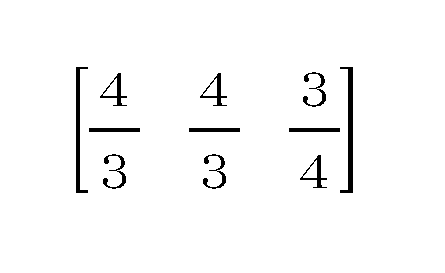
さらに、テンプレート(a)が表すベクトルと、テンプレート(b)が表すベクトル間の距離dは、以下の式によって算出される。 Further, the distance d between the vector represented by the template (a) and the vector represented by the template (b) is calculated by the following formula.

このようにして、各テンプレート間の類似度に関する値が算出された結果が、図13(A)に示すテーブルである。このテーブルを参照して、CPU101は、編集対象見開きに対応するレイアウト画像に用いられたテンプレートとの類似度が低い(類似度に関する値が大きい)テンプレートを、変更候補テンプレートとして特定する。変更候補テンプレートの数は、特に限定されないが、本実施形態では4つであるものとする。
The table shown in FIG. 13A shows the results of calculating the values related to the similarity between the templates in this way. With reference to this table, the
具体的には例えば、変更前のレイアウト画像に用いられたテンプレートがテンプレート(a)である場合は、上記テーブルにおけるテンプレート(a)に対応する行が参照される。そして、図13(b)に示すように、類似度に関する値が低い順で列が並び替えられる。このようにして並び替えられたあと、類似度に関する値が低い4つのテンプレートが、変更候補テンプレートとして特定される。 Specifically, for example, when the template used for the layout image before the change is the template (a), the row corresponding to the template (a) in the above table is referred to. Then, as shown in FIG. 13B, the columns are rearranged in ascending order of the values related to the similarity. After being sorted in this way, the four templates with the lowest similarity values are identified as change candidate templates.
なお、上述では、各テンプレートの全ての組み合わせにおける類似度に関する値が求められる形態としたが、この形態に限定されない。例えば、編集対象見開きに対応するレイアウト画像に用いられたテンプレートに対する、他のテンプレートの類似度に関する値が求められる形態であっても良い。また、アルバム作成アプリが計算によって図13(A)に示すテーブルを作成するのではなく、アルバム作成アプリが図13(A)に示すテーブルを予め保持しておく形態であっても良い。この場合は、CPU101は、予め保持しているテーブルから、編集対象見開きに対応するレイアウト画像に用いられたテンプレートに対応する値を抽出して、変更候補テンプレートを特定する。
In addition, in the above, the form in which the value regarding the similarity in all combinations of each template is obtained is obtained, but the present invention is not limited to this form. For example, it may be in a form in which a value regarding the similarity of other templates with respect to the template used for the layout image corresponding to the spread to be edited is required. Further, instead of the album creation application creating the table shown in FIG. 13 (A) by calculation, the album creation application may hold the table shown in FIG. 13 (A) in advance. In this case, the
上述のように、本実施形態では、編集対象見開きに対応するレイアウト画像に用いられたテンプレートに対して、スロットのアスペクト比以外の要素は同一だが、スロットのアスペクト比の要素において類似度の低いテンプレートが特定される。すなわち、スロットのアスペクト比以外の要素において類似度の高いテンプレート群のなかから、スロットのアスペクト比の要素において類似度の低いテンプレートが特定される。 As described above, in the present embodiment, the template used for the layout image corresponding to the spread to be edited has the same elements other than the aspect ratio of the slot, but the template has a low degree of similarity in the aspect ratio element of the slot. Is identified. That is, a template having a low degree of similarity in the element of the aspect ratio of the slot is specified from the template group having a high degree of similarity in the elements other than the aspect ratio of the slot.
しかしこの形態に限定されない。例えば、スロットのアスペクト比以外の要素(スロットの数、スロットの面積、スロットの形状、スロットの並び順、テンプレートにおけるスロットの座標位置、スロットの重なり数、スロットの連結数)において類似度の低いテンプレートが特定されても良い。なお、スロットの重なり数とは、テンプレートにおいてスロット同士が重なっている部分の数であり、スロットの連結数とは、テンプレートにおいてスロット同士が重ならずに連結している(接している)部分の数である。また、1つの要素だけでなく、2つの要素において類似度の低いテンプレートが特定されても良い。 However, it is not limited to this form. For example, templates with low similarity in elements other than the aspect ratio of slots (number of slots, area of slots, shape of slots, order of arrangement of slots, coordinate positions of slots in templates, number of overlapping slots, number of connected slots). May be specified. The number of overlapping slots is the number of parts where the slots overlap each other in the template, and the number of connected slots is the number of parts where the slots are connected (contacted) without overlapping in the template. It is a number. Further, not only one element but also a template having a low degree of similarity may be specified in two elements.
また、いずれの要素において類似度の低いテンプレートを特定するかを、ユーザが指定可能な形態としても良い。さらに、複数の要素を指定可能な形態である場合、各要素に対して類似度の低さの重要度に関する重みづけを実行可能であって良い。その場合、低い重みがつけられている要素において類似度の低いテンプレートより、大きい重みがつけられている要素において類似度の低いテンプレートが優先して特定される。 Further, the user can specify which element the template having a low degree of similarity is specified. Further, when a plurality of elements can be specified, weighting regarding the importance of low similarity may be executed for each element. In that case, the template with low similarity in the element with high weight is preferentially specified over the template with low similarity in the element with low weight.
また、いずれのテンプレート群の中から、類似度の低いテンプレートを選択するかについても限定されない。本実施形態では、表示対象見開きに対応するレイアウト画像に用いられたテンプレートが有するスロットの数と同一の数のスロットを有するテンプレート群の中から選択されたが、それと異なるテンプレート群の中から選択されても良い。 Further, there is no limitation as to which template group the template having a low degree of similarity is selected. In the present embodiment, the template group having the same number of slots as the template used for the layout image corresponding to the display target spread is selected, but the template group is selected from a different template group. May be.
S1104では、CPU101は、編集対象見開きに対応するレイアウト画像を、レイアウト結果表示エリア1203に表示する。
In S1104, the
S1105では、CPU101は、テンプレート変更ボタン1204の押下をユーザから受け付けたか否かを判定する。CPU101は、YES判定の場合は、S1106に進み、NO判定の場合は、本フローチャートの処理を終了する。
In S1105, the
S1106では、CPU101は、テンプレート変更処理を実行する。具体的には、CPU101は、まず、未だテンプレート変更処理において用いていない変更候補テンプレートのうち、類似度が一番低い(類似度に関する値が大きい)テンプレートを特定する。そして、CPU101は、特定したテンプレート(変更後テンプレート)を用いて、S420~S422の処理を再度行い、新たなレイアウト情報を作成する。なお、CPU101は、処理の繰り返しにより変更候補テンプレートを全て表示した場合は、全ての変更候補テンプレートを未だ用いていないものと設定し直して、本処理を実行する。
In S1106, the
S1107では、CPU101は、作成したレイアウト情報によって表されるレイアウト画像(変更後レイアウト画像)を、レイアウト結果表示エリア1203に表示する。なお、本実施形態では、テンプレート変更処理後に表示されるレイアウト画像のスロットに配置される画像は、テンプレート変更処理前に表示されていたレイアウト画像のスロットに配置されていた画像と同一であるものとする。
In S1107, the
S1108では、CPU101は、CPU101は、テンプレート変更ボタン1204の押下をユーザから受け付けたか否かを判定する。CPU101は、YES判定の場合は、再度S1106に進み、NO判定の場合は、S1109に進む。
In S1108, the
S1109では、CPU101は、リセットボタン1206の押下(リセット操作)をユーザから受け付けたか否かを判定する。CPU101は、YES判定の場合は、再度S1110に進み、NO判定の場合は、S1111に進む。
In S1109, the
S1110では、CPU101は、レイアウト結果表示エリア1203に表示されている画像を、テンプレート変更処理が行われて表示された新しいレイアウト画像から当該レイアウト画像が表示される前に表示されていたレイアウト画像に戻す(リセットする)。なお、リセットにより表示されるレイアウト画像は、リセットボタン1206が押下された時に表示されていたレイアウト画像の直前に表示されていたレイアウト画像であっても良い。また、見開き指定エリア1202から見開きが指定されることで表示されたレイアウト画像(テンプレート変更処理が行われる前に表示されたレイアウト画像)や、OKボタン1205が押下された時に表示されていたレイアウト画像であっても良い。その後、CPU101は、再びS1105に進む。
In S1110, the
S1111では、CPU101は、OKボタン1205の押下をユーザから受け付けたか否かを判定する。CPU101は、YES判定の場合は、S1112に進み、NO判定の場合は、再びS1105に進む。
In S1111, the
S1112では、CPU101は、OKボタン1205が押下された時に表示されていたレイアウト画像を、編集対象見開きとして特定されている見開きに対応する印刷対象のレイアウト画像として特定する。なおCPU101は、OKボタン1205が押下される前は、自動レイアウトで作成されたテンプレート変更処理前のレイアウト画像や、前回OKボタン1205が押下された時に表示されていたレイアウト画像を、印刷対象のレイアウト画像として特定している。
In S1112, the
その後、CPU101は、処理を終了する。なお、OKボタン1205が押下された後にも、テンプレート変更処理が実行されても良い。
After that, the
ユーザは、このようなテンプレート変更処理によって、印刷対象のレイアウト画像を、テンプレートのみ変更して切り替えることができる。そして、ユーザは、テンプレート変更処理後に、カートに入れるボタン1207を押して、アルバム注文処理を実行する(出力操作)ことで、切り替え後の印刷対象のレイアウト画像を、アルバムとして出力することができる。また例えば、切り替え後の印刷対象のレイアウト画像を表す画像データを、画像処理装置200の外部の装置に送信することができる。
By such a template change process, the user can switch the layout image to be printed by changing only the template. Then, after the template change process, the user presses the
上述のように、本実施形態では、あるレイアウト画像のテンプレート変更するための操作が受け付けられた場合、変更前のレイアウト画像に用いられたテンプレートとの類似度が低いテンプレートを用いたレイアウト画像をユーザに提示する。 As described above, in the present embodiment, when an operation for changing the template of a certain layout image is accepted, the user uses a layout image using a template having a low degree of similarity to the template used for the layout image before the change. Present to.
これにより、ユーザの満足度が高くなる可能性が高いテンプレートを用いたレイアウト画像をユーザに提示できる。ひいてはユーザは、変更後のレイアウト画像として適切な(満足度の高い)レイアウト画像を容易に選択することができる。 As a result, it is possible to present to the user a layout image using a template that is likely to increase the user's satisfaction. As a result, the user can easily select an appropriate (highly satisfying) layout image as the changed layout image.
[その他の実施形態]
上述の実施形態では、変更前のレイアウト画像に用いられたテンプレートとの類似度が低いテンプレートを用いたレイアウト画像を、変更後のレイアウト画像として表示する形態を説明した。変更後のレイアウト画像の表示方法は上述の形態に限定されない。例えば、変更前のレイアウト画像に用いられたテンプレートとの類似度が低いテンプレートを用いたレイアウト画像とそれ以外のレイアウト画像とを、同時にユーザに表示しても良い。そしてその際、変更前のレイアウト画像に用いられたテンプレートとの類似度が低いテンプレートを用いたレイアウト画像が、他のレイアウト画像よりも強調・優先して表示されても良い。また、変更前のレイアウト画像に用いられたテンプレートとの類似度が低いそれぞれ異なるテンプレートを用いた複数のレイアウト画像を表示しても良い。その際、変更前のレイアウト画像に用いられたテンプレートとの類似度がより低いテンプレートを用いたレイアウト画像が、他のレイアウト画像よりも強調・優先して表示されても良い。
[Other embodiments]
In the above-described embodiment, a mode is described in which a layout image using a template having a low degree of similarity to the template used for the layout image before the change is displayed as the layout image after the change. The display method of the layout image after the change is not limited to the above-mentioned form. For example, a layout image using a template having a low degree of similarity to the template used for the layout image before the change and a layout image other than the template may be displayed to the user at the same time. At that time, the layout image using the template having a low degree of similarity to the template used for the layout image before the change may be displayed with emphasis / priority over the other layout images. Further, a plurality of layout images using different templates having a low degree of similarity to the template used for the layout image before the change may be displayed. At that time, the layout image using the template having a lower degree of similarity to the template used for the layout image before the change may be displayed with emphasis / priority over the other layout images.
また、例えば、変更前のレイアウト画像に用いられたテンプレートとの類似度が高いテンプレートを用いたレイアウト画像を、変更後のレイアウト画像として表示する形態であっても良い。また、変更前のレイアウト画像に用いられたテンプレートとの類似度が高いテンプレートを用いたレイアウト画像を優先的に表示するか、類似度が高いテンプレートを用いたレイアウト画像を優先的に表示するかをユーザ操作等により切り替え可能であっても良い。 Further, for example, a layout image using a template having a high degree of similarity to the template used for the layout image before the change may be displayed as the layout image after the change. Also, whether to preferentially display the layout image using the template with high similarity to the template used for the layout image before the change, or to preferentially display the layout image using the template with high similarity. It may be possible to switch by user operation or the like.
上述した実施形態では、自動レイアウトによって作成されたレイアウト画像に対してテンプレート変更処理が実行されるものとしたが、この形態に限定されない。例えば、ユーザが手動でテンプレートやスロットに配置される画像を選択することで作成されたレイアウト画像に対して、本実施形態のテンプレート変更処理が実行されても良い。すなわち、ユーザが選択したテンプレートとの類似度が低いテンプレート及びユーザが選択した画像が用いられたレイアウト画像を優先的にユーザに提示する形態であっても良い。 In the above-described embodiment, the template change process is executed for the layout image created by the automatic layout, but the present invention is not limited to this embodiment. For example, the template change process of the present embodiment may be executed for the layout image created by the user manually selecting the image to be arranged in the template or the slot. That is, a template having a low degree of similarity to the template selected by the user and a layout image using the image selected by the user may be preferentially presented to the user.
上述した実施形態では、編集対象見開きに対応するレイアウト画像に用いられているテンプレートとの類似度によって、変更後のレイアウト画像に用いられるテンプレートを特定する形態について説明した。しかしながらこの形態に限定されず、編集対象見開き以外の見開きに対応するレイアウト画像に用いられているテンプレートとの類似度によって、変更後のレイアウト画像に用いられるテンプレートが特定されても良い。例えば、編集対象見開きの前後の見開き(又はそのいずれかの見開き)に対応するレイアウト画像に用いられているテンプレートとの類似度によって、変更後のレイアウト画像に用いられるテンプレートを特定する形態であっても良い。また、編集対象見開きに対応するレイアウト画像に用いられているテンプレートとの類似度と、編集対象見開きの前後の見開き(又はそのいずれかの見開き)に対応するレイアウト画像に用いられているテンプレートとの類似度の両方が加味されても良い。 In the above-described embodiment, a mode is described in which the template used for the changed layout image is specified by the similarity with the template used for the layout image corresponding to the spread to be edited. However, the present invention is not limited to this form, and the template used for the changed layout image may be specified by the similarity with the template used for the layout image corresponding to the spread other than the edit target spread. For example, it is a form in which the template used for the changed layout image is specified by the similarity with the template used for the layout image corresponding to the spread before and after the spread to be edited (or one of the spreads). Is also good. Further, the similarity with the template used for the layout image corresponding to the edit target spread and the template used for the layout image corresponding to the spread before and after the edit target spread (or any of the spreads). Both of the similarities may be added.
また例えば、編集対象見開き以外の見開きに対応するレイアウト画像に対してテンプレート変更処理が行われていた場合は、当該テンプレート変更処理の結果が編集対象見開きに対応するレイアウト画像に対するテンプレート変更処理において参照されても良い。例えば、編集対象見開き以外の見開きに対応するレイアウト画像に対してテンプレート変更処理において、正方形のスロットを有するテンプレートが、変更後のレイアウト画像において用いられるテンプレートとして選択される傾向があることがある。その場合は、当該傾向を参照して、当該傾向に対応したテンプレートが、編集対象見開きに対応するレイアウト画像に対するテンプレート変更処理において用いられる形態としても良い。 Further, for example, when the template change process is performed on the layout image corresponding to the spread other than the edit target spread, the result of the template change process is referred to in the template change process for the layout image corresponding to the edit target spread. May be. For example, in the template change process for a layout image corresponding to a spread other than the spread to be edited, a template having square slots may tend to be selected as a template to be used in the changed layout image. In that case, with reference to the tendency, the template corresponding to the tendency may be used in the template change processing for the layout image corresponding to the spread to be edited.
上述した実施形態では、ユーザからの指示が受け付けられた場合に、編集対象見開きに対応するレイアウト画像に用いられているテンプレートと異なるテンプレートが用いられたレイアウト画像が表示される形態について説明した。しかしながらこの形態に限定されず、例えば、編集対象見開きに対応するレイアウト画像に用いられている画像と異なる(類似度が低い)画像が用いられたレイアウト画像が表示される形態であっても良い。この場合、変更前後で用いられるテンプレートは同一であって良い。すなわち、ユーザ指示に応じて、編集対象見開きに対応するレイアウト画像と少なくとも一部が異なり、且つ当該レイアウト画像との類似度が低いレイアウト画像が表示される形態であれば良い。一方で例えば、ユーザからの指示が受け付けられた場合に、画像が配置されていない状態の、編集対象見開きに対応するレイアウト画像に用いられているテンプレートと異なるテンプレートが表示される形態であっても良い。 In the above-described embodiment, when an instruction from the user is received, a layout image using a template different from the template used for the layout image corresponding to the edit target spread is displayed. However, the present invention is not limited to this form, and for example, a layout image in which an image different from the image used in the layout image corresponding to the spread to be edited (having a low degree of similarity) is used may be displayed. In this case, the templates used before and after the change may be the same. That is, a layout image that is at least partially different from the layout image corresponding to the spread to be edited and has a low degree of similarity to the layout image may be displayed according to the user's instruction. On the other hand, for example, when an instruction from the user is received, a template different from the template used for the layout image corresponding to the edit target spread in the state where the image is not arranged is displayed. good.
上述した実施形態は、以下の処理を実行することによっても実現される。すなわち、上述した実施形態の機能を実現するソフトウェア(プログラム)を、ネットワーク又は各種記憶媒体を介してシステム或いは装置に供給し、そのシステム或いは装置のコンピュータ(CPUやMPU等)がプログラムを読み出して実行する処理である。また、プログラムは、1つのコンピュータで実行させても、複数のコンピュータで連動させて実行させるようにしてもよい。また、上記した処理の全てをソフトウェアで実現する必要はなく、処理の一部または全部をASIC等のハードウェアで実現するようにしてもよい。また、CPUも1つのCPUで全ての処理を行うものに限らず、複数のCPUが適宜連携をしながら処理を行うものとしてもよい。 The above-described embodiment is also realized by executing the following processing. That is, software (program) that realizes the functions of the above-described embodiment is supplied to the system or device via a network or various storage media, and the computer (CPU, MPU, etc.) of the system or device reads and executes the program. It is a process to do. Further, the program may be executed on one computer or may be executed in conjunction with a plurality of computers. Further, it is not necessary to realize all of the above-mentioned processing by software, and a part or all of the processing may be realized by hardware such as ASIC. Further, the CPU is not limited to one that performs all processing by one CPU, and a plurality of CPUs may perform processing while appropriately coordinating with each other.
101 CPU
105 ディスプレイ
101 CPU
105 display
Claims (19)
前記プログラムが有するテンプレート群のうちいずれかのテンプレートに配置画像が配置された変更前レイアウト画像を所定の領域に表示する表示ステップと、
前記所定の領域に表示されているレイアウト画像を変更するための変更指示を受け付ける受け付けステップと、
前記変更指示が受け付けられた場合に前記所定の領域に表示されるレイアウト画像に用いられるテンプレートを、前記変更前レイアウト画像に用いられたテンプレートとの類似度に基づいて特定する特定ステップと、
前記変更指示が受け付けられた場合、前記所定の領域に表示されている画像を、前記変更前レイアウト画像から、前記類似度に基づいて特定されたテンプレートが用いられたレイアウト画像に変更する変更ステップと、
を画像処理装置のコンピュータに実行させ、
前記特定ステップにおいて、前記テンプレート群のうち前記変更前レイアウト画像に用いられたテンプレートと異なる第1のテンプレートが、前記テンプレート群のうち前記第1のテンプレートよりも前記変更前レイアウト画像に用いられたテンプレートとの類似度が高く、且つ前記変更前レイアウト画像に用いられたテンプレートと異なる第2のテンプレートより優先して特定されることを特徴とするプログラム。 It ’s a program,
A display step of displaying an unchanged layout image in which an arrangement image is arranged in one of the templates of the template group of the program in a predetermined area, and a display step.
A reception step for accepting a change instruction for changing the layout image displayed in the predetermined area, and
A specific step for specifying a template used for a layout image displayed in the predetermined area when the change instruction is received, based on the degree of similarity with the template used for the unchanged layout image, and a specific step.
When the change instruction is accepted, the change step of changing the image displayed in the predetermined area from the unchanged layout image to a layout image using the template specified based on the similarity. ,
To the computer of the image processing device
In the specific step, the first template of the template group different from the template used for the unchanged layout image is the template used for the unchanged layout image rather than the first template of the template group. A program characterized in that it has a high degree of similarity to and is specified with priority over a second template different from the template used for the layout image before change.
前記取得された値に基づいて、前記変更指示が受け付けられた場合に前記所定の領域に表示されるレイアウト画像に用いられるテンプレートが特定されることを特徴とする請求項1乃至4のいずれか1項に記載のプログラム。 Further specifying to the computer a acquisition step for acquiring a value regarding the similarity in the predetermined element between the template used in the unchanged layout image and the template in which at least one element other than the predetermined element is the same. Let me
One of claims 1 to 4, wherein a template used for the layout image displayed in the predetermined area is specified based on the acquired value when the change instruction is received. The program described in the section.
前記リセット操作が受け付けられた場合、前記変更前レイアウト画像を前記表示部に表示することを特徴とする請求項1乃至9のいずれか1項に記載のプログラム。 Due to the acceptance of the change instruction, the image displayed in the predetermined area is changed from the unchanged layout image to the layout image using the first template , and then the reset operation is accepted. Acceptance step and
The program according to any one of claims 1 to 9, wherein when the reset operation is accepted, the layout image before change is displayed on the display unit.
前記出力操作が受け付けられた場合、前記第1のテンプレートが用いられたレイアウト画像に関する出力が行われることを特徴とする請求項1乃至10のいずれか1項に記載のプログラム。 An output that accepts an output operation after the image displayed in the predetermined area is changed from the unchanged layout image to the layout image using the first template due to the acceptance of the change instruction. Acceptance step and
The program according to any one of claims 1 to 10, wherein when the output operation is accepted, output is performed with respect to the layout image using the first template .
ユーザからの選択指示を受け付けることなく、複数の画像データから少なくとも1つの画像データを自動で選択する第2選択ステップと、を更に有し、
前記変更前レイアウト画像は、選択された画像データによって表わされる画像が、選択されたテンプレートに配置された画像であることを特徴とする請求項1乃至13のいずれか1項に記載のプログラム。 A first selection step that automatically selects at least one template from multiple templates without accepting selection instructions from the user.
Further, it has a second selection step of automatically selecting at least one image data from a plurality of image data without receiving a selection instruction from the user.
The program according to any one of claims 1 to 13, wherein the layout image before change is an image represented by the selected image data as an image arranged in the selected template.
前記複数の候補の表示において、前記類似度に基づいて特定された前記第1のテンプレートが用いられたレイアウト画像が、前記第2のテンプレートが用いられたレイアウト画像より優先又は/及び強調して表示され、
前記所定の領域に表示されている画像が、前記変更前レイアウト画像から、前記複数の候補から選択されたレイアウト画像に変更されることを特徴とする請求項1乃至14のいずれか1項に記載のプログラム。 After the change instruction is received, the user selects from a plurality of candidates including the layout image using the first template and the layout image using the second template .
In the display of the plurality of candidates, the layout image using the first template specified based on the similarity is displayed with priority and / or emphasis over the layout image using the second template. Be done,
The invention according to any one of claims 1 to 14, wherein the image displayed in the predetermined area is changed from the unchanged layout image to a layout image selected from the plurality of candidates. Program.
前記所定のプログラムが有するテンプレート群のうちいずれかのテンプレートに配置画像が配置された変更前レイアウト画像を所定の領域に表示する表示ステップと、
前記所定の領域に表示されているレイアウト画像を変更するための変更指示を受け付ける受け付けステップと、
前記変更指示が受け付けられた場合に前記所定の領域に表示されるレイアウト画像に用いられるテンプレートを、前記変更前レイアウト画像に用いられたテンプレートとの類似度に基づいて特定する特定ステップと、
前記変更指示が受け付けられた場合、前記所定の領域に表示されている画像を、前記変更前レイアウト画像から、前記類似度に基づいて特定されたテンプレートが用いられたレイアウト画像に変更する変更ステップと、
を有し、
前記特定ステップにおいて、前記テンプレート群のうち前記変更前レイアウト画像に用いられたテンプレートと異なる第1のテンプレートが、前記テンプレート群のうち前記第1のテンプレートよりも前記変更前レイアウト画像に用いられたテンプレートとの類似度が高く、且つ前記変更前レイアウト画像に用いられたテンプレートと異なる第2のテンプレートより優先して特定されることを特徴とする制御方法。 A control method for an image processing device having a predetermined program.
A display step of displaying an unchanged layout image in which an arrangement image is arranged in any of the templates of the template group of the predetermined program in a predetermined area, and a display step.
A reception step for accepting a change instruction for changing the layout image displayed in the predetermined area, and
A specific step for specifying a template used for a layout image displayed in the predetermined area when the change instruction is received, based on the degree of similarity with the template used for the unchanged layout image, and a specific step.
When the change instruction is accepted, the change step of changing the image displayed in the predetermined area from the unchanged layout image to a layout image using the template specified based on the similarity. ,
Have,
In the specific step, the first template of the template group different from the template used for the unchanged layout image is the template used for the unchanged layout image rather than the first template of the template group. A control method characterized in that it has a high degree of similarity to and is specified with priority over a second template different from the template used for the layout image before change.
前記所定のプログラムが有するテンプレート群のうちいずれかのテンプレートに配置画像が配置された変更前レイアウト画像を所定の領域に表示する表示手段と、
前記所定の領域に表示されているレイアウト画像を変更するための変更指示を受け付ける受け付け手段と、
前記変更指示が受け付けられた場合に前記所定の領域に表示されるレイアウト画像に用いられるテンプレートを、前記変更前レイアウト画像に用いられたテンプレートとの類似度に基づいて特定する特定手段と、
前記変更指示が受け付けられた場合、前記所定の領域に表示されている画像を、前記変更前レイアウト画像から、前記類似度に基づいて特定されたテンプレートが用いられたレイアウト画像に変更する変更手段と、
を有し、
前記特定手段は、前記テンプレート群のうち前記変更前レイアウト画像に用いられたテンプレートと異なる第1のテンプレートを、前記テンプレート群のうち前記第1のテンプレートよりも前記変更前レイアウト画像に用いられたテンプレートとの類似度が高く、且つ前記変更前レイアウト画像に用いられたテンプレートと異なる第2のテンプレートより優先して特定することを特徴とする画像処理装置。
An image processing device having a predetermined program.
A display means for displaying an unchanged layout image in which an arrangement image is arranged in any of the templates of the template group of the predetermined program in a predetermined area.
A receiving means for receiving a change instruction for changing the layout image displayed in the predetermined area, and
A specific means for specifying a template used for a layout image displayed in the predetermined area when the change instruction is received, based on the degree of similarity with the template used for the unchanged layout image.
When the change instruction is received, the changing means for changing the image displayed in the predetermined area from the unchanged layout image to a layout image using the template specified based on the similarity. ,
Have,
The specific means uses a first template of the template group different from the template used for the unchanged layout image, and a template used for the unchanged layout image rather than the first template of the template group. An image processing apparatus having a high degree of similarity to and specifying a second template that is different from the template used for the unchanged layout image.
Priority Applications (2)
| Application Number | Priority Date | Filing Date | Title |
|---|---|---|---|
| JP2017193784A JP7076974B2 (en) | 2017-10-03 | 2017-10-03 | Image processing equipment, control methods and programs |
| US16/147,046 US10977845B2 (en) | 2017-10-03 | 2018-09-28 | Image processing apparatus and control method |
Applications Claiming Priority (1)
| Application Number | Priority Date | Filing Date | Title |
|---|---|---|---|
| JP2017193784A JP7076974B2 (en) | 2017-10-03 | 2017-10-03 | Image processing equipment, control methods and programs |
Publications (2)
| Publication Number | Publication Date |
|---|---|
| JP2019067261A JP2019067261A (en) | 2019-04-25 |
| JP7076974B2 true JP7076974B2 (en) | 2022-05-30 |
Family
ID=65896769
Family Applications (1)
| Application Number | Title | Priority Date | Filing Date |
|---|---|---|---|
| JP2017193784A Active JP7076974B2 (en) | 2017-10-03 | 2017-10-03 | Image processing equipment, control methods and programs |
Country Status (2)
| Country | Link |
|---|---|
| US (1) | US10977845B2 (en) |
| JP (1) | JP7076974B2 (en) |
Families Citing this family (8)
| Publication number | Priority date | Publication date | Assignee | Title |
|---|---|---|---|---|
| JP6885896B2 (en) * | 2017-04-10 | 2021-06-16 | 富士フイルム株式会社 | Automatic layout device and automatic layout method and automatic layout program |
| JP7341677B2 (en) * | 2019-02-28 | 2023-09-11 | キヤノン株式会社 | Apparatus, method, and program |
| JP7234024B2 (en) * | 2019-04-23 | 2023-03-07 | キヤノン株式会社 | Information processing device, information processing method and program |
| US11450047B2 (en) * | 2019-07-26 | 2022-09-20 | PicsArt, Inc. | Systems and methods for sharing image data edits |
| JP7541816B2 (en) * | 2019-08-08 | 2024-08-29 | キヤノン株式会社 | Image processing device, control method and program |
| JP7493919B2 (en) * | 2019-08-08 | 2024-06-03 | キヤノン株式会社 | Image processing device, control method and program |
| JP7336400B2 (en) * | 2020-02-12 | 2023-08-31 | 富士フイルム株式会社 | Image processing device, image processing method, program and image processing system |
| JP6976531B2 (en) * | 2020-02-18 | 2021-12-08 | バックス情報システム株式会社 | Album creation support device and album creation support system |
Citations (3)
| Publication number | Priority date | Publication date | Assignee | Title |
|---|---|---|---|---|
| JP2012110059A (en) | 2012-03-07 | 2012-06-07 | Canon Inc | Image processing device and control method thereof, and program |
| JP2013182524A (en) | 2012-03-02 | 2013-09-12 | Canon Inc | Image processing apparatus and image processing method |
| JP2014016816A (en) | 2012-07-09 | 2014-01-30 | Canon Inc | Information processing apparatus, and information processing method and program |
Family Cites Families (18)
| Publication number | Priority date | Publication date | Assignee | Title |
|---|---|---|---|---|
| US6542638B2 (en) * | 2001-02-21 | 2003-04-01 | Shannon Roy Campbell | Method for matching spatial patterns |
| US8073256B2 (en) * | 2007-11-15 | 2011-12-06 | Canon Kabushiki Kaisha | Image processing apparatus and method therefor |
| US8910038B2 (en) * | 2008-04-04 | 2014-12-09 | Canon Kabushiki Kaisha | Apparatus and method for image separation, layout, and templating |
| JP5349879B2 (en) * | 2008-09-18 | 2013-11-20 | キヤノン株式会社 | Information processing apparatus, information processing method, program, and storage medium |
| US8406573B2 (en) * | 2008-12-22 | 2013-03-26 | Microsoft Corporation | Interactively ranking image search results using color layout relevance |
| JP5686673B2 (en) * | 2010-07-22 | 2015-03-18 | 富士フイルム株式会社 | Image processing apparatus, image processing method, and program |
| US8327253B2 (en) * | 2010-11-09 | 2012-12-04 | Shutterfly, Inc. | System and method for creating photo books using video |
| US9058611B2 (en) * | 2011-03-17 | 2015-06-16 | Xerox Corporation | System and method for advertising using image search and classification |
| US20120294514A1 (en) * | 2011-05-19 | 2012-11-22 | Xerox Corporation | Techniques to enable automated workflows for the creation of user-customized photobooks |
| JP5449460B2 (en) | 2011-06-28 | 2014-03-19 | 富士フイルム株式会社 | Image processing apparatus, image processing method, and image processing program |
| JP5981789B2 (en) * | 2012-07-09 | 2016-08-31 | キヤノン株式会社 | Image processing apparatus, image processing method, and program |
| US8799829B2 (en) * | 2012-09-28 | 2014-08-05 | Interactive Memories, Inc. | Methods and systems for background uploading of media files for improved user experience in production of media-based products |
| US8799756B2 (en) * | 2012-09-28 | 2014-08-05 | Interactive Memories, Inc. | Systems and methods for generating autoflow of content based on image and user analysis as well as use case data for a media-based printable product |
| JP2015053541A (en) * | 2013-09-05 | 2015-03-19 | キヤノン株式会社 | Image processing apparatus, image processing method, and program |
| JP5936658B2 (en) * | 2013-09-24 | 2016-06-22 | 富士フイルム株式会社 | Image processing apparatus, image processing method, program, and recording medium |
| US20150242374A1 (en) * | 2014-02-27 | 2015-08-27 | Styla GmbH | Automatic layout technology |
| US10713430B2 (en) * | 2016-11-30 | 2020-07-14 | Google Llc | Systems and methods for applying layout to documents |
| JP6723965B2 (en) * | 2017-10-03 | 2020-07-15 | キヤノン株式会社 | Information processing method, information processing apparatus, and program |
-
2017
- 2017-10-03 JP JP2017193784A patent/JP7076974B2/en active Active
-
2018
- 2018-09-28 US US16/147,046 patent/US10977845B2/en active Active
Patent Citations (3)
| Publication number | Priority date | Publication date | Assignee | Title |
|---|---|---|---|---|
| JP2013182524A (en) | 2012-03-02 | 2013-09-12 | Canon Inc | Image processing apparatus and image processing method |
| JP2012110059A (en) | 2012-03-07 | 2012-06-07 | Canon Inc | Image processing device and control method thereof, and program |
| JP2014016816A (en) | 2012-07-09 | 2014-01-30 | Canon Inc | Information processing apparatus, and information processing method and program |
Also Published As
| Publication number | Publication date |
|---|---|
| US10977845B2 (en) | 2021-04-13 |
| US20190102926A1 (en) | 2019-04-04 |
| JP2019067261A (en) | 2019-04-25 |
Similar Documents
| Publication | Publication Date | Title |
|---|---|---|
| JP7076974B2 (en) | Image processing equipment, control methods and programs | |
| JP6902860B2 (en) | Image processing equipment, image processing methods, and programs | |
| US10649633B2 (en) | Image processing method, image processing apparatus, and non-transitory computer-readable storage medium | |
| JP6938422B2 (en) | Image processing equipment, image processing methods, and programs | |
| JP6711937B2 (en) | Image processing device, image processing method, and program | |
| JP6494504B2 (en) | Information processing apparatus, control method, and program | |
| JP6719206B2 (en) | Image processing apparatus, image processing method, and program | |
| JP6862164B2 (en) | Programs, image processing equipment, and image processing methods | |
| KR102269889B1 (en) | Image processing apparatus for laying out image on template and image processing method | |
| JP6532398B2 (en) | Image processing apparatus, image processing method and program | |
| JP6702900B2 (en) | Information processing apparatus, display control method, and program | |
| US10904473B2 (en) | Control method | |
| US20180217743A1 (en) | Image processing apparatus, control method, and computer readable medium | |
| JP7336211B2 (en) | Image processing device, control method, and program | |
| JP2017037435A (en) | Display control device, display control method and program | |
| JP7027101B2 (en) | Information processing equipment, control methods, and programs | |
| JP2022086521A (en) | Image processing equipment, image processing methods, and programs | |
| JP7336209B2 (en) | Image processing device, control method, and program | |
| JP2017117407A (en) | Image processing apparatus, image processing method, and program | |
| JP7336212B2 (en) | Image processing device, control method, and program | |
| JP7336210B2 (en) | Image processing device, control method, and program |
Legal Events
| Date | Code | Title | Description |
|---|---|---|---|
| A621 | Written request for application examination |
Free format text: JAPANESE INTERMEDIATE CODE: A621 Effective date: 20201002 |
|
| A977 | Report on retrieval |
Free format text: JAPANESE INTERMEDIATE CODE: A971007 Effective date: 20210531 |
|
| A131 | Notification of reasons for refusal |
Free format text: JAPANESE INTERMEDIATE CODE: A131 Effective date: 20210615 |
|
| A521 | Request for written amendment filed |
Free format text: JAPANESE INTERMEDIATE CODE: A523 Effective date: 20210813 |
|
| A131 | Notification of reasons for refusal |
Free format text: JAPANESE INTERMEDIATE CODE: A131 Effective date: 20220111 |
|
| A521 | Request for written amendment filed |
Free format text: JAPANESE INTERMEDIATE CODE: A523 Effective date: 20220304 |
|
| TRDD | Decision of grant or rejection written | ||
| A01 | Written decision to grant a patent or to grant a registration (utility model) |
Free format text: JAPANESE INTERMEDIATE CODE: A01 Effective date: 20220419 |
|
| A61 | First payment of annual fees (during grant procedure) |
Free format text: JAPANESE INTERMEDIATE CODE: A61 Effective date: 20220518 |
|
| R151 | Written notification of patent or utility model registration |
Ref document number: 7076974 Country of ref document: JP Free format text: JAPANESE INTERMEDIATE CODE: R151 |