JP6540470B2 - Browsing control method, browsing control program and browsing control device - Google Patents
Browsing control method, browsing control program and browsing control device Download PDFInfo
- Publication number
- JP6540470B2 JP6540470B2 JP2015225200A JP2015225200A JP6540470B2 JP 6540470 B2 JP6540470 B2 JP 6540470B2 JP 2015225200 A JP2015225200 A JP 2015225200A JP 2015225200 A JP2015225200 A JP 2015225200A JP 6540470 B2 JP6540470 B2 JP 6540470B2
- Authority
- JP
- Japan
- Prior art keywords
- emergency
- information
- patient
- destination
- terminal
- Prior art date
- Legal status (The legal status is an assumption and is not a legal conclusion. Google has not performed a legal analysis and makes no representation as to the accuracy of the status listed.)
- Expired - Fee Related
Links
Images






Landscapes
- Information Transfer Between Computers (AREA)
- Telephone Function (AREA)
- Telephonic Communication Services (AREA)
Description
本発明は、閲覧制御方法、閲覧制御プログラムおよび閲覧制御装置に関する。 The present invention relates to a browsing control method, a browsing control program, and a browsing control apparatus.
従来、例えば、救急隊員が患者の識別情報を入力すると、氏名、生年月日や複数の病院で入力された病歴等の過去の診断情報を含む個人情報を閲覧することが可能となるシステムがある。 Conventionally, for example, there is a system that allows personal information including past diagnostic information such as name, date of birth and medical history input in multiple hospitals to be browsed when emergency personnel enter patient identification information. .
ところで、緊急搬送時に、個人情報を搬送先候補の病院に通知することは、病院側の受け入れ判断の際に有用である。しかし、個人情報であるため、不特定多数の病院に通知することは望ましくない。そこで、過去の診断情報を含む個人情報が閲覧可能なシステムを用いて、救急隊員が選択した病院にのみ患者の個人情報を通知することが考えられる。 By the way, notifying the hospital of the transfer destination candidate of personal information at the time of emergency conveyance is useful at the time of acceptance judgment on the hospital side. However, as it is personal information, it is not desirable to notify an unspecified number of hospitals. Therefore, it is conceivable to notify the patient's personal information only to the hospital selected by the paramedics using a system capable of browsing personal information including past diagnostic information.
個人情報を通知したが、通知先の病院が患者の受け入れを拒否した場合、救急隊員は、別の病院に個人情報を通知し受け入れ可否の判断を仰ぐこととなる。このような場合、最初に通知した病院において、患者の受け入れをしないにもかかわらず、依然として患者の個人情報が閲覧可能であることは個人情報の保護の点から望ましくない。 If personal information has been notified but the notification destination hospital refuses to accept the patient, the paramedics will notify the other hospital of the personal information and ask for a decision on acceptance. In such a case, it is not desirable from the viewpoint of protection of personal information that the patient's personal information can still be browsed in the hospital notified first despite the fact that the patient is not accepted.
一つの側面では、個人情報を保護できる閲覧制御方法、閲覧制御プログラムおよび閲覧制御装置を提供することを目的とする。 In one aspect, it is an object of the present invention to provide a view control method, a view control program and a view control device capable of protecting personal information.
第1の案では、閲覧制御方法は、コンピュータが、第1の識別情報に基づく個人情報の取得要求に応じて、識別情報に対応づけて緊急搬送先候補を含む個人情報を記憶する記憶部を参照し、第1の識別情報に対応する緊急搬送先候補を含む個人情報を取得要求の要求元の端末に送信する処理を実行する。閲覧制御方法は、コンピュータが、緊急搬送先候補のうち第1の緊急搬送先が端末において選択されると、該第1の緊急搬送先の端末による第1の識別情報に対応する個人情報の閲覧の可否設定を可とする設定を行う処理を実行する。閲覧制御方法は、コンピュータが、設定後に、緊急搬送先候補のうち第2の緊急搬送先が端末において選択されると、第1の緊急搬送先の端末による第1の識別情報に対応する個人情報の閲覧の可否設定を不可とする設定を行う処理を実行する。 In the first scheme, the browsing control method includes a storage unit in which a computer stores personal information including emergency delivery destination candidates in association with identification information in response to a request for acquisition of personal information based on first identification information. A process of referring to and transmitting personal information including an emergency delivery destination candidate corresponding to the first identification information to the terminal of the request source of the acquisition request is executed. According to the browsing control method, when the computer selects a first emergency destination among the emergency destination candidates at the terminal, the first emergency destination terminal browses personal information corresponding to the first identification information. Execute processing to set whether to allow or not. The browsing control method is the personal information corresponding to the first identification information by the terminal of the first emergency destination, when the second emergency destination among the emergency destination candidates is selected at the terminal after setting by the computer. Execute the process to set to disable the setting of the permission of viewing.
本発明の一の実施態様によれば、個人情報を保護できるという効果を奏する。 According to one embodiment of the present invention, there is an effect that personal information can be protected.
以下に、本発明にかかる閲覧制御方法、閲覧制御プログラムおよび閲覧制御装置の実施例を図面に基づいて詳細に説明する。なお、この実施例によりこの発明が限定されるものではない。そして、各実施例は、処理内容を矛盾させない範囲で適宜組み合わせることが可能である。 Hereinafter, embodiments of a browsing control method, a browsing control program, and a browsing control apparatus according to the present invention will be described in detail based on the drawings. The present invention is not limited by this embodiment. And each Example can be suitably combined in the range which does not make processing contents contradictory.
[システム構成]
最初に、システムの一例を説明する。図1は、システム構成の一例を説明する図である。システム10は、救急隊が患者の搬送先の決定に用いるシステムである。システム10は、閲覧制御装置11と、端末装置12と、端末装置13と、端末装置14とを有する。閲覧制御装置11、端末装置12、端末装置13および端末装置14は、ネットワークNに通信可能に接続されている。かかるネットワークNの一態様としては、有線又は無線を問わず、携帯電話などの移動体通信網、インターネット(Internet)、LAN(Local Area Network)やVPN(Virtual Private Network)などの任意の種類の通信網を採用できる。図1の例では、ネットワークNには、移動体通信網の基地局N1が設けられている。端末装置12は、基地局N1を介して無線通信によりネットワークNに通信可能に接続されている。本実施例では、伝送される情報を保護するため、IPsec(Security Architecture for Internet Protocol)などの暗号通信技術を用いてVPNにより通信を行っている。なお、図1の例では、端末装置12及び端末装置13を1台ずつ設けた場合を例示したが、これに限定されず、端末装置12、端末装置13および端末装置14を任意の数とすることができる。
[System configuration]
First, an example of the system will be described. FIG. 1 is a diagram for explaining an example of a system configuration. The
端末装置12は、救急隊が使用する装置である。例えば、端末装置12は、スマートフォンや移動体通信網と通信可能なタブレット端末などの携帯型の情報処理装置などである。端末装置12は、カメラが設けられており、画像や動画の撮影が可能とされている。また、端末装置12は、救急隊を支援する救急支援ソフトウェアがインストールされている。救急支援ソフトウェアは、Web(World Wide Web)アプリケーションとされており、起動されると閲覧制御装置11にアクセスする。端末装置12は、救急支援ソフトウェアが起動されると、閲覧制御装置11と各種の情報を送受信して各種の操作画面が表示され、操作画面からカメラにより画像や動画の撮影も可能とされている。救急隊は、救急が要請された場合、救急車などにより救急が要請された現場に急行し、傷病者など救急を要する患者を病院などの医療機関に搬送する。この際、救急隊は、端末装置12を用いて、患者の受け入れが可能な医療機関を検索し、医療機関に対して患者に関する各種の情報を送って患者の受け入れを要請する。そして、救急隊は、受け入れ可能と回答が得られた医療機関に患者を搬送する。なお、救急支援ソフトウェアは、Webアプリケーションに限られず、ネイティブアプリケーションであっても良い。
The
端末装置13は、救急に対応が可能な医療機関が使用する装置である。例えば、端末装置13は、パーソナルコンピュータ、スマートフォンやタブレット端末などの情報処理装置などである。端末装置13は、Webブラウザがインストールされている。端末装置13は、Webブラウザにより閲覧制御装置11にアクセスし、閲覧制御装置11と各種の情報を送受信する。端末装置13のWebブラウザには、各種の操作画面が表示される。例えば、端末装置13のWebブラウザには、救急隊から受け入れを要請された患者に関する各種の情報が表示される。医療機関では、表示された患者に関する各種の情報を基に、該患者を受け入れるかを回答する。
The terminal device 13 is a device used by a medical institution capable of responding to an emergency. For example, the terminal device 13 is an information processing device such as a personal computer or a smartphone or a tablet terminal. The terminal device 13 has a web browser installed. The terminal device 13 accesses the
端末装置14は、患者が日常的に通院する医療機関が使用する装置である。例えば、端末装置14は、パーソナルコンピュータ、スマートフォンやタブレット端末などの情報処理装置などである。端末装置14は、Webブラウザがインストールされている。端末装置14は、Webブラウザにより閲覧制御装置11にアクセスし、閲覧制御装置11と各種の情報を送受信する。端末装置13のWebブラウザには、各種の操作画面が表示される。例えば、端末装置14のWebブラウザには、患者に関する各種の情報を登録する画面が表示される。患者のかかりつけの医師や薬剤師等は、担当する患者に関する各種の情報を登録する。
The terminal device 14 is a device used by a medical institution that a patient visits on a daily basis. For example, the terminal device 14 is an information processing device such as a personal computer or a smartphone or a tablet terminal. The terminal device 14 has a web browser installed. The terminal device 14 accesses the
閲覧制御装置11は、救急隊が医療機関に患者の受け入れを要請する際に、患者の個人情報の閲覧を制御する装置である。閲覧制御装置11は、例えば、パーソナルコンピュータやサーバコンピュータなどのコンピュータである。閲覧制御装置11は、1台のコンピュータとして実装してもよく、また、複数台のコンピュータにより実装してもよい。なお、本実施例では、閲覧制御装置11を1台のコンピュータとした場合を例として説明する。閲覧制御装置11は、端末装置12、端末装置13および端末装置14からアクセスされると、端末装置12、端末装置13および端末装置14と各種の情報を送受信して各種の操作画面を表示させる。
The
[閲覧制御装置の構成]
次に、閲覧制御装置11の構成について説明する。図2は、閲覧制御装置の機能的な構成を概略的に示した図である。閲覧制御装置11は、通信I/F(インタフェース)部20と、記憶部21と、制御部22とを有する。なお、閲覧制御装置11は、上記の機器以外の他の機器を有してもよい。
[Configuration of browsing control device]
Next, the configuration of the
通信I/F部20は、他の装置との間で通信制御を行うインタフェースである。通信I/F部20は、ネットワークNを介して他の装置と各種情報を送受信する。通信I/F部20としては、LANカードなどのネットワークインタフェースカードを採用できる。
The communication I /
記憶部21は、各種の情報を記憶する記憶デバイスである。例えば、記憶部21は、ハードディスク、SSD(Solid State Drive)、光ディスクなどの記憶装置である。なお、記憶部21は、RAM(Random Access Memory)、フラッシュメモリ、NVSRAM(Non Volatile Static Random Access Memory)などのデータを書き換え可能な半導体メモリであってもよい。 The storage unit 21 is a storage device that stores various types of information. For example, the storage unit 21 is a storage device such as a hard disk, a solid state drive (SSD), or an optical disk. The storage unit 21 may be a semiconductor memory capable of rewriting data such as a random access memory (RAM), a flash memory, and a non volatile static random access memory (NV SRAM).
記憶部21は、制御部22で実行される制御プログラムや各種プログラムを記憶する。さらに、記憶部21は、制御部22で実行されるプログラムで用いられる各種データを記憶する。例えば、記憶部21は、医療機関情報30と、登録患者情報31と、診療情報32と、緊急時紹介先情報33と、受入登録情報34と、発生災害情報35と、搬送患者情報36と、生理学評価情報37と、病状情報38と、利用医療機関情報39と、搬送依頼状況情報40とを記憶する。
The storage unit 21 stores control programs to be executed by the control unit 22 and various programs. Furthermore, the storage unit 21 stores various data used in a program executed by the control unit 22. For example, the storage unit 21 includes
医療機関情報30は、医療機関に関する情報を記憶したデータである。図3は、医療機関情報のデータ構成の一例を示す図である。図3に示すように、医療機関情報30は、「医療機関コード」、「医療機関名」、「救急対応」、「所在地区」などの項目を有する。なお、図3に示した医療機関情報30の各項目は、一例であり、その他の項目を有してもよい。また、医療機関情報30のデータ構成も一例であり、これに限定されるものではない。
The
医療機関コードの項目は、それぞれの医療機関を識別する識別情報を記憶する領域である。病院などの医療機関には、識別情報として、ユニークな医療機関コードが付与される。医療機関コードの項目には、医療機関に対して付与された医療機関コードが格納される。医療機関名の項目は、医療機関の名称を記憶する領域である。救急対応の項目は、救急の患者に対応可能であるか否かを記憶する領域である。救急対応の項目には、救急病院などの救急の患者に対応している医療機関の場合、「Y」が格納され、クリニック、診療所などの救急の患者に対応していない医療機関の場合、「N」が格納されている。所在地区の項目は、医療機関が所在する地区に関する情報を記憶する領域である。例えば、所在地区の項目には、医療機関が所在する市町村名を記憶させる。 The item of medical institution code is an area for storing identification information for identifying each medical institution. A unique medical institution code is assigned to medical institutions such as hospitals as identification information. The medical institution code field stores the medical institution code assigned to the medical institution. The item of medical institution name is an area for storing the name of the medical institution. The item for emergency response is an area for storing whether or not the patient for emergency can be handled. The item for emergency response stores “Y” in the case of a medical institution corresponding to an emergency patient such as an emergency hospital, and in the case of a medical institution not corresponding to an emergency patient such as a clinic or clinic, "N" is stored. The item of the location area is an area for storing information on the area where the medical institution is located. For example, in the item of location area, the name of the municipality where the medical institution is located is stored.
図3の例では、医療機関コード「M01」の医療機関は、名称が「AA病院」であり、救急に対応しておらず、所在地区が「XX市」であることを示す。また、医療機関コード「M10」の医療機関は、名称が「HH病院」であり、救急に対応しており、所在地区が「XX市」であることを示す。 In the example of FIG. 3, the medical institution with the medical institution code "M01" has the name "AA hospital", does not respond to the emergency, and indicates that the district is "XX city". The medical institution with the medical institution code "M10" has the name "HH hospital", supports emergency, and indicates that the district is "XX city".
図2に戻り、登録患者情報31は、患者に関する情報を記憶したデータである。図4は、登録患者情報のデータ構成の一例を示す図である。図4に示すように、登録患者情報31は、「患者NO」、「氏名」、「フリガナ」、「住所」、「性別」、「電話番号」、「生年月日」などの項目を有する。なお、図4に示した登録患者情報31の各項目は、一例であり、その他の項目を有してもよい。また、登録患者情報31のデータ構成も一例であり、これに限定されるものではない。 Returning to FIG. 2, registered patient information 31 is data in which information on a patient is stored. FIG. 4 is a view showing an example of the data configuration of registered patient information. As shown in FIG. 4, the registered patient information 31 has items such as “patient NO”, “name”, “phonetic”, “address”, “sex”, “telephone number”, “birth date” and the like. Each item of the registered patient information 31 shown in FIG. 4 is an example, and may have other items. The data configuration of the registered patient information 31 is also an example, and the present invention is not limited to this.
ここで、患者は、持病などにより病院に通院し、持病に応じた薬を服用している場合がある。この患者の持病や服用中の薬などの医療に関する情報は、緊急時に医療機関に提供することで、適正な医療を支援できる。この医療に関する情報は、かかりつけの医師が把握しやすい。そこで、この医療に関する情報を共有するシステムを構築されている。医療に関する情報を共有する患者には、ユニークな患者NOが定められ、患者NOをコード化したQR(Quick Response)コードなどのコード画像が記載されたカードが渡される。また、患者の氏名、住所、性別、電話番号、生年月日など医療に関して共有する情報が登録患者情報31に登録される。なお、カードは、コード画像が記載されたカードに限られず、IC(Integrated circuit)カードでも良い。 Here, a patient may go to a hospital for chronic illness etc., and may be taking medicine according to the chronic illness. Information on medical care such as the patient's chronic illness and medicine being taken can be provided to medical institutions in an emergency to support appropriate medical care. Information about this medical care is easy to understand for your doctor. Therefore, a system has been constructed to share information on this medical treatment. A unique patient NO is determined for a patient who shares information on medical care, and a card is provided with a code image such as a QR (Quick Response) code that encodes the patient NO. Further, information to be shared regarding medical care, such as the patient's name, address, sex, telephone number, date of birth, etc., is registered in the registered patient information 31. The card is not limited to the card in which the code image is described, and may be an IC (Integrated Circuit) card.
患者NOの項目は、それぞれの患者を識別する識別情報として患者NOを記憶する領域である。氏名の項目は、患者の氏名を記憶する領域である。フリガナの項目は、患者の氏名の読み方を示したフリガナを記憶する領域である。住所の項目は、患者が主に生活の拠点にしている場所の住所を記憶する領域である。性別の項目は、患者の性別を記憶する領域である。電話番号の項目は、患者の連絡先とされた電話番号を記憶する領域である。生年月日の項目は、患者が生まれた年と月と日を記憶する領域である。 The item of patient NO is an area for storing patient NO as identification information for identifying each patient. The item of the name is an area for storing the patient's name. The item of the reading is an area for storing readings indicating how to read the patient's name. The address item is an area for storing the address of the place where the patient is mainly based on life. The gender item is an area for storing the gender of the patient. The item of the telephone number is an area for storing the telephone number designated as the contact information of the patient. The item of date of birth is an area for storing the year, month, and day when the patient was born.
図4の例では、患者NO「0001」の患者は、氏名が「富士通 太郎」であり、フリガナが「フジツウ タロウ」であり、住所が「XXXX」であり、性別が「男」であり、電話番号が「1111111111」であり、生年月日が「昭和58年4月1日」であることを示す。また、患者NO「9999」の患者は、氏名が「富士通 一郎」であり、フリガナが「フジツウ イチロウ」であり、住所が「XXXX」であり、性別が「男」であり、電話番号が「1234567890」であり、生年月日が「昭和60年2月12日」であることを示す。 In the example of FIG. 4, the patient of patient NO "0001" has a name "Fujitsu Taro", a phonetic address "Fujitsu Utaro", an address "XXXX", a gender "male", and a telephone call. It shows that the number is "1111111111" and the date of birth is "April 1, 582." In addition, the patient of patient NO “9999” has the name “Fujitsu Ichiro”, the phonetic person “Fujitsu Ichiro”, the address “XXXX”, the gender “male” and the telephone number “1234567890” It indicates that the date of birth is "February 12, 1985".
図2に戻り、診療情報32は、患者を医療機関で受診したことにより得られた医療に関する情報を記憶したデータである。図5は、診療情報のデータ構成の一例を示す図である。図5に示すように、診療情報32は、「医療機関コード」、「患者NO」、「日常生活状態」、「行動特徴」などの項目を有する。なお、図5に示した診療情報32の各項目は、一例であり、その他の項目を有してもよい。また、診療情報32のデータ構成も一例であり、これに限定されるものではない。
Returning to FIG. 2, the
医療機関コードの項目は、医療に関する情報を登録した医療機関の医療機関コードを記憶する領域である。患者NOの項目は、医療に関する情報が登録された患者の患者NOを記憶する領域である。日常生活状態の項目は、患者の日常生活に関する情報を登録する領域である。本実施例では、日常生活状態の項目は、「食事」、「栄養経路」、「排泄」、「移動」の各項目に分かれている。食事の項目は、患者が食事を取る際に要する介助の状態を記憶する領域である。栄養経路の項目は、患者が栄養を取得する経路を記憶する領域である。排泄の項目は、患者が排泄を行う際に要する介助の状態を記憶する領域である。移動の項目は、患者が移動する際に要する介助の状態を記憶する領域である。行動特徴の項目は、患者の行動の特徴を記憶する領域である。ここで、医療機関コードおよび患者NO以外の項目は、任意の登録項目とされ、項目の情報がある場合、情報がない場合、「‐」が格納される。 The item of medical institution code is an area for storing the medical institution code of the medical institution that has registered information on medical care. The item of patient NO is an area for storing patient NO of a patient for whom information on medical care is registered. The item of the daily living condition is an area for registering information on the daily life of the patient. In the present embodiment, the items of the daily living condition are divided into items of "meal", "nutritional route", "excretion", and "migration". The item of meal is an area for storing the state of assistance required for the patient to take a meal. The item of the nutrition route is an area in which the patient memorizes the route of getting nutrition. The item of excretion is an area for storing the state of assistance required for the patient to excrete. The item of movement is an area for storing the state of assistance required when the patient moves. The item of the behavior feature is an area for storing the feature of the behavior of the patient. Here, items other than the medical institution code and the patient NO are taken as optional registration items, and if there is information on the item, "-" is stored if there is no information.
患者が日常的に通院する医療機関のかかりつけの医師や薬剤師等は、端末装置14を用いて、患者の日常生活状態、行動特徴など、患者の医療に関する情報を登録する。登録された情報は、診療情報32に記憶される。
An ordinary doctor or a pharmacist or the like of a medical institution to which the patient visits daily uses the terminal device 14 to register information on the patient's medical care such as the patient's daily living condition, behavior characteristics, and the like. The registered information is stored in the
図5の例では、医療機関コード「M01」の医療機関は、患者NO「9999」の患者の医療に関する情報として、食事に一部介助を要し、栄養経路が経口であり、排泄に一部介助を要し、移動に一部介助を要し、行動特徴として被害的と登録されていることを示す。 In the example of FIG. 5, the medical institution of medical institution code "M01" needs some assistance for eating as information on the medical treatment of the patient of patient NO "9999", the nutrition route is oral, and the excretion is partly It indicates that assistance is required, movement is partially assisted, and it is registered as a devastating behavior feature.
図2に戻り、緊急時紹介先情報33は、患者について登録された緊急時の紹介先に関する情報を記憶したデータである。図6は、緊急時紹介先情報のデータ構成の一例を示す図である。図6に示すように、緊急時紹介先情報33は、「患者NO」、「登録番号」、「医療機関コード」などの項目を有する。なお、図6に示した緊急時紹介先情報33の各項目は、一例であり、その他の項目を有してもよい。また、緊急時紹介先情報33のデータ構成も一例であり、これに限定されるものではない。
Returning to FIG. 2, the emergency
患者NOの項目は、緊急時の紹介先が登録された患者の患者NOを記憶する領域である。登録番号の項目は、紹介先の順番を示す番号を記憶する領域である。医療機関コードの項目は、緊急時の紹介先とされた医療機関の医療機関コードを記憶する領域である。 The item of the patient NO is an area for storing the patient NO of the patient for whom the referral destination in the emergency is registered. The item of registration number is an area for storing a number indicating the order of introduction destinations. The item of medical institution code is an area for storing the medical institution code of the medical institution to which the emergency is referred.
患者のかかりつけの医師や薬剤師等は、端末装置14を用いて、患者が希望する緊急時の紹介先の医療機関に関する情報を登録する。登録された情報は、緊急時紹介先情報33に記憶される。
The doctor, pharmacist, etc. of the patient's family register the information on the medical institution of the referral destination at the time of emergency desired by the patient using the terminal device 14. The registered information is stored in the emergency
図6の例では、患者NO「9999」の患者は、登録番号「1」として、医療機関コード「M10」の医療機関が緊急時の紹介先として登録されていることを示す。また、患者NO「9999」の患者は、登録番号「2」として、医療機関コード「M11」の医療機関が緊急時の紹介先として登録されていることを示す。 In the example of FIG. 6, the patient with the patient NO “9999” indicates that the medical institution with the medical institution code “M10” is registered as the referral destination in the emergency as the registration number “1”. In addition, the patient with the patient NO “9999” indicates that the medical institution with the medical institution code “M11” is registered as the referral destination at the time of emergency as the registration number “2”.
図2に戻り、受入登録情報34は、救急の患者に対応可能な医療機関が救急を受け入れ可能か否かに関する情報を記憶したデータである。図7は、受入登録情報のデータ構成の一例を示す図である。図7に示すように、受入登録情報34は、「医療機関コード」、「登録情報」などの項目を有する。なお、図7に示した受入登録情報34の各項目は、一例であり、その他の項目を有してもよい。また、受入登録情報34のデータ構成も一例であり、これに限定されるものではない。 Returning to FIG. 2, the acceptance registration information 34 is data storing information on whether or not a medical institution capable of responding to a patient of first aid can accept the first aid. FIG. 7 is a view showing an example of the data configuration of the acceptance registration information. As shown in FIG. 7, the acceptance registration information 34 has items such as “medical institution code” and “registration information”. Each item of the acceptance registration information 34 shown in FIG. 7 is an example, and may have other items. The data configuration of the acceptance registration information 34 is also an example, and the present invention is not limited to this.
救急の患者に対応可能な医療機関では、救急を受け入れ可能か否かを、端末装置13を用いて登録する。登録された情報は、受入登録情報34に記憶される。 At a medical institution capable of handling an emergency patient, the terminal device 13 registers whether the emergency can be accepted or not. The registered information is stored in the acceptance registration information 34.
図7の例では、医療機関コード「M10」の医療機関は、救急の受け入れを不可と表明していることを示す。また、医療機関コード「M11」の医療機関は、救急の受け入れを可能と表明していることを示す。 The example in FIG. 7 indicates that the medical institution with medical institution code “M10” has indicated that the acceptance of the emergency is not possible. Also, it indicates that the medical institution with medical institution code "M11" has stated that it is possible to receive an emergency.
図2に戻り、発生災害情報35は、発生した災害に関する情報を記憶したデータである。図8は、発生災害情報のデータ構成の一例を示す図である。図8に示すように、発生災害情報35は、「災害番号」、「救急隊コード」、「現地到着日時」、「発生場所」などの項目を有する。なお、図8に示した発生災害情報35の各項目は、一例であり、その他の項目を有してもよい。また、発生災害情報35のデータ構成も一例であり、これに限定されるものではない。 Returning to FIG. 2, the generated disaster information 35 is data in which information on the generated disaster is stored. FIG. 8 is a view showing an example of the data configuration of the generated disaster information. As shown in FIG. 8, the occurrence disaster information 35 has items such as “disaster number”, “emergency unit code”, “local arrival date and time”, and “occurrence place”. Each item of the occurrence disaster information 35 shown in FIG. 8 is an example, and may have other items. Further, the data configuration of the generated disaster information 35 is also an example, and the present invention is not limited to this.
災害番号の項目は、救急隊が出動した各災害を識別する識別情報を記憶する領域である。救急隊の出動した災害には、災害毎に、識別情報として、順にユニークな災害番号が自動的に採番される。災害番号の項目には、採番された災害番号が記憶される。救急隊コードは、出動した救急隊を識別する識別情報を記憶する領域である。救急隊には、識別情報として、ユニークな救急隊コードが付与される。なお、救急隊コードは、救急隊が所属する消防署や管轄のエリアごとにユニークであってもよい。現地到着日時の項目は、救急が要請された現地に救急隊が到着した現地到着日時を記憶する領域である。発生場所は、救急隊が到着した場所を記憶する領域である。 The item of the disaster number is an area for storing identification information for identifying each disaster for which the rescue team has been dispatched. For disasters dispatched by the rescue team, unique disaster numbers are automatically and sequentially assigned as identification information for each disaster. The number of disaster numbers is stored in the disaster number item. The rescue team code is an area for storing identification information for identifying the dispatched rescue team. The rescue team is given a unique rescue team code as identification information. The rescue team code may be unique for each fire department or jurisdiction area to which the rescue team belongs. The item of the local arrival date and time is an area for storing the local arrival date and time when the rescue team arrived at the spot where the emergency was requested. The occurrence place is an area for storing the place where the rescue team arrived.
図8の例では、災害番号「0001」の災害は、救急隊コードが「T001」の救急隊が出動しており、現地到着日時が「2015/8/31 20:26」であり、発生場所が「XXXXX」であることを示す。また、災害番号「0002」の災害は、救急隊コードが「T002」の救急隊が出動しており、現地到着日時が「2015/8/31 22:30」であり、発生場所が「XXXXX」であることを示す。 In the example of FIG. 8, the emergency unit “T001” is dispatched by the emergency unit code with the emergency number “0001”, the local arrival date is “2015/8/31 20:26”, and the disaster place is Indicates that "XXXXX". In addition, as for the disaster of the disaster number "0002", the emergency team of the emergency team code "T002" is dispatched, the local arrival date is "2015/8/31 22:30", and the occurrence place is "XXXXX" To indicate that
図2に戻り、搬送患者情報36は、発生した災害で搬送する患者に関する情報を記憶したデータである。図9は、搬送患者情報のデータ構成の一例を示す図である。図9に示すように、搬送患者情報36は、「災害番号」、「登録番号」、「患者NO」、「氏名」、「フリガナ」、「住所」、「性別」、「電話番号」、「生年月日」などの項目を有する。なお、図9に示した搬送患者情報36の各項目は、一例であり、その他の項目を有してもよい。また、搬送患者情報36のデータ構成も一例であり、これに限定されるものではない。 Returning to FIG. 2, the transfer patient information 36 is data in which information on a patient to be transferred due to a disaster that has occurred is stored. FIG. 9 is a view showing an example of the data configuration of transfer patient information. As shown in FIG. 9, the transfer patient information 36 includes “disaster number”, “registration number”, “patient NO”, “name”, “furigana”, “address”, “sex”, “phone number”, “ It has items such as "birth date". Each item of the transfer patient information 36 shown in FIG. 9 is an example, and may have other items. Further, the data configuration of the transfer patient information 36 is also an example, and the present invention is not limited to this.
災害番号の項目は、災害の災害番号を記憶する領域である。登録番号の項目は、患者の登録された順番を示す番号を記憶する領域である。患者NOの項目は、患者の患者NOを記憶する領域である。氏名の項目は、患者の氏名を記憶する領域である。フリガナの項目は、患者の氏名の読み方を示したフリガナを記憶する領域である。住所の項目は、患者の住所を記憶する領域である。性別の項目は、患者の性別を記憶する領域である。電話番号の項目は、患者の連絡先とされた電話番号を記憶する領域である。生年月日の項目は、患者が生まれた年と月と日を記憶する領域である。ここで、患者NO、氏名、フリガナ、住所、性別、電話番号、生年月日の項目は、任意の登録項目とされ、項目の情報がある場合、情報がない場合、「‐」が格納される。 The item of disaster number is an area for storing disaster numbers of disasters. The item of registration number is an area for storing a number indicating the registered order of patients. The item of patient NO is an area for storing patient NO of a patient. The item of the name is an area for storing the patient's name. The item of the reading is an area for storing readings indicating how to read the patient's name. The address item is an area for storing the patient's address. The gender item is an area for storing the gender of the patient. The item of the telephone number is an area for storing the telephone number as the contact information of the patient. The item of date of birth is an area for storing the year, month, and day when the patient was born. Here, the items of patient No., name, kana, address, gender, telephone number, date of birth are arbitrary registration items, and when there is information on the item, "-" is stored if there is no information. .
図9の例では、災害番号「0001」の災害は、登録番号が「1」のみであることから患者が1人であり、患者の患者NOが「9999」であることを示す。また、災害番号「0001」の災害は、患者の氏名が「富士通 一郎」であり、フリガナが「フジツウ イチロウ」であり、住所が「XXXX」であり、性別が「男」であり、電話番号が「1234567890」であり、生年月日が「昭和60年2月12日」であることを示す。また、災害番号「0002」の災害は、登録番号が「1」、「2」があることから患者が2人であり、1人目の患者の患者NOが「0001」であり、2人目の患者の患者NOが未登録であることを示す。また、災害番号「0002」の災害は、1人目の患者の氏名が「富士通 太郎」であり、フリガナが「フジツウ タロウ」であり、住所が「XXXX」であり、性別が「男」であり、電話番号が「1111111111」であり、生年月日が「昭和58年4月1日」であることを示す。また、災害番号「0002」の災害は、2人目の患者の氏名が「富士通 花子」であり、フリガナが「フジツウ ハナコ」であり、住所が「XXXX」であり、性別が「女」であり、電話番号が「1111111111」であり、生年月日が未登録であることを示す。 In the example of FIG. 9, the disaster number "0001" indicates that there is only one patient because the registration number is only "1", and the patient NO of the patient is "9999". In the disaster with the disaster number "0001", the patient's name is "Fujitsu Ichiro", the phonetic address is "Fujitsuichi Ichiro", the address is "XXXX", the gender is "male", and the telephone number is It is "1234567890" and indicates that the date of birth is "February 12, 1985". Moreover, the disaster number "0002" has two patients because the registration number is "1" and "2", the patient NO of the first patient is "0001", and the second patient is Indicates that the patient's NO is unregistered. In the disaster with the disaster number “0002”, the first patient's name is “Fujitsu Taro”, “Kuri” is “Fujitsu Utaro”, the address is “XXXX”, and the gender is “male”, Indicates that the telephone number is "1111111111" and the date of birth is "April 1, 582." In the disaster with the disaster number “0002”, the name of the second patient is “Fujitsu Hanako”, the kurihana is “Fujitsu Hanako”, the address is “XXXX”, and the gender is “Female”, It indicates that the telephone number is “1111111111” and the date of birth is unregistered.
図2に戻り、生理学評価情報37は、救急隊が測定した患者の生理学評価に関する情報を記憶したデータである。図10は、生理学評価情報のデータ構成の一例を示す図である。図10に示すように、生理学評価情報37は、「災害番号」、「救急隊コード」、「登録番号」、「測定番号」、「経過時間」、「JCS」、「GCS」、「呼吸」、「血圧」、「脈拍」、「SPO2」などの項目を有する。なお、図10に示した生理学評価情報37の各項目は、一例であり、その他の項目を有してもよい。また、生理学評価情報37のデータ構成も一例であり、これに限定されるものではない。 Returning to FIG. 2, the physiological evaluation information 37 is data in which information on the physiological evaluation of the patient measured by the rescue team is stored. FIG. 10 is a view showing an example of the data configuration of the physiological evaluation information. As shown in FIG. 10, the physiological evaluation information 37 includes "disaster number", "emergency unit code", "registration number", "measurement number", "elapsed time", "JCS", "GCS", "respiration" , “Blood pressure”, “pulse”, “SPO2” and the like. Each item of the physiological evaluation information 37 illustrated in FIG. 10 is an example, and may have other items. The data configuration of the physiological evaluation information 37 is also an example, and the present invention is not limited to this.
災害番号の項目は、災害の災害番号を記憶する領域である。救急隊コードの項目は、出動した救急隊の救急隊コードを記憶する領域である。登録番号の項目は、生理学評価が行われた患者に対応する登録番号を記憶する領域である。測定番号の項目は、患者に対して行われた生理学評価の登録された順番を示す番号を記憶する領域である。患者ごとに、生理学評価が登録されると、1から順にユニークな測定番号が自動的に採番される。測定番号の項目には、採番された測定番号が格納される。経過時間の項目は、救急隊が到着した時刻から生理学評価が行われた時刻までの経過時間を記憶する領域である。JCSの項目は、測定された意識レベルを表すJCS(Japan Coma Scale)の評価値を記憶する領域である。GCSの項目は、測定された意識レベルを表すGCS(Glasgow Come Scale)の評価値を記憶する領域である。呼吸の項目は、測定された呼吸数を記憶する領域である。血圧の項目は、測定された血圧値を記憶する領域である。脈拍の項目は、測定された脈拍数を記憶する領域である。SPO2の項目は、測定された経皮的動脈血酸素飽和濃度(Spo2)を記憶する領域である。ここで、JCS、GCS、呼吸、血圧、脈拍、SPO2の項目は、任意の登録項目とされ、項目の情報がある場合、情報がない場合、「‐」が格納される。 The item of disaster number is an area for storing disaster numbers of disasters. The item of the rescue team code is an area for storing the rescue team code of the dispatched rescue team. The item of the registration number is an area for storing the registration number corresponding to the patient whose physiological evaluation has been performed. The item of the measurement number is an area for storing a number indicating the registered order of the physiological evaluation performed on the patient. For each patient, when a physiological evaluation is registered, a unique measurement number is automatically numbered sequentially from one. The numbered measurement number is stored in the item of measurement number. The item of elapsed time is an area for storing the elapsed time from the time when the rescue team arrived to the time when the physiological evaluation was performed. The item of JCS is an area for storing an evaluation value of JCS (Japan Coma Scale) representing the measured level of consciousness. The item of GCS is an area for storing an evaluation value of GCS (Glasgow Come Scale) representing the measured level of consciousness. The item of respiration is an area in which the measured respiration rate is stored. The item of blood pressure is an area for storing the measured blood pressure value. The item of pulse is an area for storing the measured pulse rate. Item SPO2 is an area for storing the measured transcutaneous arterial oxygen saturation (Spo 2). Here, the items of JCS, GCS, respiration, blood pressure, pulse, and SPO2 are set as arbitrary registration items, and if there is information on the item, “-” is stored if there is no information.
図10の例では、災害番号「0001」の災害は、救急隊コードが「T001」の救急隊が出動しており、登録番号「1」の患者に対して測定番号が「1」、「2」があることから生理学評価が2回行われたことを示す。災害番号「0001」の災害は、1回目の生理学評価が救急隊の到着から36分後に行われ、JCSが「2」であり、GCSが「E:3,V:4,M:6」であり、呼吸が12回、血圧が130/80であり、脈拍が70であり、SPO2が98%であることを示す。また、災害番号「0001」の災害は、2回目の生理学評価が救急隊の到着から1時間後に行われ、JCSが「2」であり、GCSが「E:3,V:4,M:6」であり、呼吸が11回、血圧が125/78であり、脈拍が68であり、SPO2が97%であることを示す。 In the example of FIG. 10, for the disaster with the disaster number "0001", an emergency unit with an emergency unit code "T001" is dispatched, and the measurement number is "1", "2" for the patient with the registration number "1". Indicates that the physiological evaluation was performed twice. For disaster number "0001", the first physiology evaluation is performed 36 minutes after the arrival of the rescue team, JCS is "2", GCS is "E: 3, V: 4, M: 6" There are 12 breaths, a blood pressure of 130/80, a pulse of 70 and an SPO2 of 98%. In addition, for the disaster with disaster number "0001", the second physiological evaluation is performed one hour after the arrival of the rescue team, the JCS is "2", and the GCS is "E: 3, V: 4, M: 6 Indicates that the respiration is 11 times, the blood pressure is 125/78, the pulse is 68, and the SPO2 is 97%.
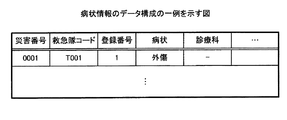
図2に戻り、病状情報38は、救急隊が評価した患者の病状に関する情報を記憶したデータである。図11は、病状情報のデータ構成の一例を示す図である。図11に示すように、病状情報38は、「災害番号」、「救急隊コード」、「登録番号」、「病状」、「診療科」などの項目を有する。なお、図11に示した病状情報38の各項目は、一例であり、その他の項目を有してもよい。また、病状情報38のデータ構成も一例であり、これに限定されるものではない。
Returning to FIG. 2, the
災害番号の項目は、災害の災害番号を記憶する領域である。救急隊コードの項目は、出動した救急隊の救急隊コードを記憶する領域である。登録番号の項目は、生理学評価が行われた患者に対応する登録番号を記憶する領域である。病状の項目は、患者の病状を記憶する領域である。診療科の項目は、患者が受診している診療科に関する情報を記憶する領域である。ここで、病状、診療科の項目は、任意の登録項目とされ、項目の情報がある場合、情報がない場合、「‐」が格納される。 The item of disaster number is an area for storing disaster numbers of disasters. The item of the rescue team code is an area for storing the rescue team code of the dispatched rescue team. The item of the registration number is an area for storing the registration number corresponding to the patient whose physiological evaluation has been performed. The item of the medical condition is an area for storing the medical condition of the patient. The item of the medical department is an area for storing information on the medical department which the patient has consulted. Here, the items of the medical condition and the medical department are regarded as optional registration items, and when there is information on the items, "-" is stored if there is no information.
図11の例では、災害番号「0001」の災害は、救急隊コードが「T001」の救急隊が出動しており、登録番号「1」の患者の病状として外傷があり、診療科が不明であることを示す。 In the example of FIG. 11, the emergency unit “T001” is dispatched by the emergency unit code “disruption unit with emergency number“ 0001 ”, there is trauma as the medical condition of the patient with the registration number“ 1 ”, and the medical department is unknown. Indicates that there is.
図2に戻り、利用医療機関情報39は、救急隊が救急で利用頻度の高い医療機関に関する情報を記憶したデータである。図12は、利用医療機関情報のデータ構成の一例を示す図である。図12に示すように、利用医療機関情報39は、「救急隊コード」、「順位」、「医療機関コード」などの項目を有する。なお、図12に示した利用医療機関情報39の各項目は、一例であり、その他の項目を有してもよい。また、利用医療機関情報39のデータ構成も一例であり、これに限定されるものではない。
Returning to FIG. 2, the used
救急隊コードの項目は、救急隊の救急隊コードを記憶する領域である。順位の項目は、利用頻度の高い順に順位を示す数値を記憶する領域である。医療機関コードの項目は、順位とされた医療機関の医療機関コードを記憶する領域である。 The item of the rescue team code is an area for storing the rescue team code of the rescue team. The item of rank is an area for storing numerical values indicating the rank in descending order of usage frequency. The item of medical institution code is an area for storing medical institution codes of ranked medical institutions.
システムの管理者は、救急隊ごとに、救急隊が救急で利用頻度の高い医療機関を登録する。登録された情報は、利用医療機関情報39に記憶される。なお、例えば、半年など一定期間ごとのタイミングや、4月1日など所定の日時のタイミングで、システムが、閲覧制御装置11のシステムが、医療機関別に患者を搬送した回数を集計して、救急隊ごとに、利用頻度の高い医療機関を利用医療機関情報39に自動的に登録してもよい。
The system administrator registers the frequently used medical institution by the rescue team for the rescue team for each rescue team. The registered information is stored in the used
図12の例では、救急隊コードが「T001」の救急隊は、医療機関コード「M14」の医療機関が利用頻度1位であり、医療機関コード「M15」の医療機関が利用頻度2位であり、医療機関コード「M16」の医療機関が利用頻度3位であることを示す。 In the example of FIG. 12, the medical service of the medical institution code "M14" is first in the frequency of use of the emergency services of the emergency team code "T001", and the medical institution of the medical institution code "M15" is the second in use frequency. Indicates that the medical institution with the medical institution code “M16” is the third most frequently used.
図2に戻り、搬送依頼状況情報40は、救急の患者に対応可能な医療機関に救急の受け入れを要請した状況に関する情報を記憶したデータである。図13は、搬送依頼状況情報のデータ構成の一例を示す図である。図13に示すように、搬送依頼状況情報40は、「災害番号」、「依頼番号」、「通知先」、「通知日時」、「状況」、「理由」、「患者情報閲覧」などの項目を有する。なお、図13に示した搬送依頼状況情報40の各項目は、一例であり、その他の項目を有してもよい。また、搬送依頼状況情報40のデータ構成も一例であり、これに限定されるものではない。
Returning to FIG. 2, the transfer
災害番号の項目は、災害の災害番号を記憶する領域である。依頼番号の項目は、災害番号の災害で医療機関に対して救急の受け入れを要請した順番を示す番号を記憶する領域である。通知先の項目は、救急の受け入れを要請した医療機関の医療機関コードを記憶する領域である。通知日時は、救急の受け入れを要請した日時を記憶する領域である。状況の項目は、要請について状況を示す情報を記憶する領域である。状況の項目には、救急の受け入れを要請すると「通知中」が格納され、受け入れができない回答がされると「受入不可」が格納される。理由の項目は、受け入れができない回答がされた場合に、受け入れができない理由を示す情報を記憶する領域である。患者情報閲覧の項目は、救急の受け入れの要請先で患者の個人情報を閲覧可能とするかの設定を記憶する領域である。患者情報閲覧の項目には、患者の個人情報を閲覧可能とする場合、「可」が格納され、患者の個人情報を閲覧不能とする場合、「不可」が格納される。 The item of disaster number is an area for storing disaster numbers of disasters. The item of the request number is an area for storing a number indicating the order in which the medical institution is requested to receive an emergency for the disaster of the disaster number. The item of notification destination is an area for storing the medical institution code of the medical institution that has requested the acceptance of the emergency. The notification date and time is an area for storing the date and time when the acceptance of the emergency request is requested. The item of status is an area for storing information indicating the status of the request. In the item of the status, "notifying" is stored when requesting acceptance of a first aid, and "not accepted" is stored when an unacceptable response is received. The item of reason is an area for storing information indicating an unacceptable reason when an unacceptable answer is received. The item of patient information browsing is an area for storing the setting as to whether the personal information of the patient can be browsed at the request destination for acceptance of the first aid. In the item of patient information browsing, “OK” is stored when browsing personal information of a patient is enabled, and “Impossible” is stored when browsing personal information of a patient is disabled.
図13の例では、災害番号「0001」の災害は、依頼番号「1」として、医療機関コード「M14」の医療機関に救急の受け入れを要請しており、状況が救急の受け入れの通知中であることを示す。 In the example of FIG. 13, the disaster number “0001” is requesting the medical institution of the medical institution code “M14” to accept the emergency as the request number “1”, and the situation is in the notification of acceptance of the emergency. Indicates that there is.
図2に戻り、制御部22は、閲覧制御装置11を制御するデバイスである。制御部22としては、CPU(Central Processing Unit)、MPU(Micro Processing Unit)等の電子回路や、ASIC(Application Specific Integrated Circuit)、FPGA(Field Programmable Gate Array)等の集積回路を採用できる。制御部22は、各種の処理手順を規定したプログラムや制御データを格納するための内部メモリを有し、これらによって種々の処理を実行する。
Returning to FIG. 2, the control unit 22 is a device that controls the
制御部22は、各種のプログラムが動作することにより各種の処理部として機能する。例えば、制御部22は、受付部50と、設定部51とを有する。本実施例では、受付部50が送信部に対応する。 The control unit 22 functions as various processing units when various programs operate. For example, the control unit 22 includes a receiving unit 50 and a setting unit 51. In the present embodiment, the reception unit 50 corresponds to the transmission unit.
受付部50は、各種の操作を受け付ける。例えば、受付部50は、アクセスを受け付けると、アクセス元に各種の操作画面の情報を送信してアクセス元に操作画面を表示させ、操作画面から各種の操作を受け付ける。例えば、受付部50は、患者の医療に関する情報を共有するシステムのWebサイトを提供する。受付部50は、端末装置14から、患者の医療に関する情報を共有するシステムのWebサイトへのアクセスを受け付けると、ログイン画面の情報をアクセス元の端末装置14へ送信してログイン画面を表示させ、ログインID及びパスワードを入力してログイン操作を受け付ける。受付部50は、ログイン操作を受け付けると、入力されたログインID及びパスワードを事前に登録されたログインID及びパスワードと比較して認証を行う。受付部50は、正当との認証が得られた場合、患者の医療に関する情報を登録する操作画面の情報をアクセス元の端末装置14へ送信して操作画面を表示させ、医療に関する各種の情報の登録を受け付ける。患者のかかりつけの医師や薬剤師等は、端末装置14を用いて、操作画面から、患者の日常生活状態、行動特徴など、患者の医療に関する情報を登録する。受付部50は、登録された情報を診療情報32に格納する。
The receiving unit 50 receives various operations. For example, when receiving the access, the receiving unit 50 transmits information on various operation screens to the access source, displays the operation screen on the access source, and receives various operations from the operation screen. For example, the reception unit 50 provides a web site of a system that shares information on medical care of a patient. When receiving an access from the terminal device 14 to a website of a system sharing information on medical care of a patient from the terminal device 14, the reception unit 50 transmits information on the login screen to the terminal device 14 of the access source to display the login screen. Enter login ID and password and accept login operation. When accepting the login operation, the accepting unit 50 performs authentication by comparing the entered login ID and password with the login ID and password registered in advance. When the authentication with the legitimacy is obtained, the reception unit 50 transmits the information of the operation screen for registering the information on the medical care of the patient to the terminal device 14 of the access source to display the operation screen, and Accept registration. The doctor and pharmacist of the patient's family register information on the patient's medical care, such as the patient's daily living condition and behavior characteristics, from the operation screen using the terminal device 14. The reception unit 50 stores the registered information in the
また、受付部50は、端末装置12の救急支援ソフトウェアからのアクセスを受け付けると、アクセス元に各種の操作画面の情報を送信して、救急支援ソフトウェアを介して各種の操作画面を表示させ、操作画面から各種の操作を受け付ける。例えば、受付部50は、救急隊用のログイン画面の情報をアクセス元の端末装置12へ送信してログイン画面を端末装置12に表示させ、救急隊コードを入力してログイン操作を受け付ける。なお、受付部50は、ログインID及びパスワードを入力してログイン操作を受け付け、事前に登録されたログインID及びパスワードと比較して認証を行ってもよい。受付部50は、ログインがなされると、救急隊用の各種の操作画面の情報をアクセス元の端末装置12へ送信して各種の操作画面を表示させ、各種の情報の登録を受け付ける。
In addition, when receiving the access from the emergency support software of the
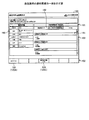
図14Aは、救急隊用の操作画面の一例を示す図である。図14Aの例は、ログインがなされて端末装置12に表示される救急隊用の操作画面の一例を示している。操作画面100は、上部のヘッダ部分101と、下部のフッタ部分102と、中央のコンテンツエリア部分103とを有する。
FIG. 14A is a diagram illustrating an example of an operation screen for a rescue team. The example of FIG. 14A shows an example of the operation screen for the rescue team displayed on the
ヘッダ部分101は、患者の追加を指示する追加ボタン110と、患者を削除する削除ボタン111と、患者の登録番号を表示する表示領域112と、消防隊が所属する消防本部を表示する表示領域113を有する。
The
フッタ部分102は、複数のボタン120が並んでおり、ログアウトボタン120Aと、搬送先選定ボタン120Bが設けられている。
In the
コンテンツエリア部分103は、タブ130により表示領域が切り替え可能とされている。図14Aの例は、「出場情報」のタブ130が選択された状態の操作画面100を示している。図14Aに示すように、操作画面100のコンテンツエリア部分103は、災害番号を表示する災害番号領域140と、発生場所を入力する発生場所領域141と、日時を入力する日時領域142とを有する。
The display area of the
災害番号領域140は、災害番号が表示される。災害番号は、救急隊ごとや消防本部ごとなど所定管理単位ごとに、順に自動で採番される。なお、災害番号は、消防隊の採番操作により自動で採番されてもよい。また、災害番号領域140を入力可能として救急隊により災害番号を入力可能としてもよい。発生場所領域141には、災害の発生場所が入力される。例えば、操作画面100では、入力可能な領域を選択すると、例えば、フリック入力など文字や数字が入力可能なソフトウェアキーボードが表示され、文字や数字が入力可能とされる。日時領域142には、現地到着日時が入力される。なお、入力可能な領域は、リストボックスなどにより候補を提示し、選択により入力可能としてもよい。例えば、発生場所領域141は、リストボックスなどによる選択により発生場所を入力可能としてもよい。例えば、市町村、町など住所のエリアごとにリストボックスを設ける。そして、上位エリアのリストボックスが選択されると、選択された上位エリアに対応した候補を下位エリアのリストボックスに提示して選択可能としてもよい。また、発生場所領域141は、現在位置を入力する現在位置ボタンを設け、現在位置ボタンが押された際の現在位置をGPSなどにより特定し、特定した現在位置から自動で入力してもよい。日時領域142も、リストボックスなどによる選択により日付、時刻を入力可能としてもよい。また、日時領域142も、現在日時を入力する現在日時ボタンを設け、現在日時ボタンが押された際のシステム日付、時刻を自動で入力してもよい。
The disaster number area 140 displays a disaster number. The disaster number is automatically numbered sequentially in each predetermined management unit, such as every emergency team or every fire department. In addition, the disaster number may be automatically numbered by the numbering operation of the fire brigade. In addition, the disaster number area 140 may be input, and the emergency number may be input by the rescue team. In the
救急隊は、救急が要請された現場に到着すると、端末装置12を用いて、操作画面100の「出場情報」のタブ130を選択し、日時領域142に現地到着日時を入力し、発生場所領域141に災害の発生場所を入力する。
When the ambulance arrives at the site where the emergency is requested, it selects the
受付部50は、災害番号領域140に表示された災害番号と、消防隊の消防隊コードと、日時領域142に入力された現地到着日時と、発生場所領域141に入力された発生場所を発生災害情報35に格納する。
The reception unit 50 generates a disaster from the disaster number displayed in the disaster number area 140, the fire brigade code of the fire brigade, the local arrival date and time inputted in the date and
図14Bは、救急隊用の操作画面の一例を示す図である。図14Bの例は、「患者基本情報」のタブ130が選択された状態のコンテンツエリア部分103を示している。図14Bに示すように、操作画面100のコンテンツエリア部分103は、カード読取ボタン150と、患者NOを入力するカード番号入力領域151と、送信ボタン152とを有する。また、操作画面100のコンテンツエリア部分103は、患者の氏名を入力する氏名領域153と、患者のフリガナを入力するフリガナ領域154と、患者の住所を入力する住所領域155と、患者の電話番号を入力する電話番号領域156とを有する。また、操作画面100のコンテンツエリア部分103は、患者の性別を選択する性別領域157と、患者の生年月日の年号、年、月、日をそれぞれ入力する生年月日領域158とを有する。
FIG. 14B is a diagram illustrating an example of an operation screen for a rescue team. The example of FIG. 14B shows the
カード読取ボタン150は、選択されるとカメラによる画像の撮影が開始され、撮影された画像にコード画像が認識された場合、コード画像をデコードして患者NOを読み出す。読み出された患者NOは、カード番号入力領域151に表示される。なお、患者NOは、手入力によりカード番号入力領域151に入力してもよい。送信ボタン152は、選択されると、カード番号入力領域151に表示された患者NOにより登録患者情報31の検索が行われ、同一の患者NOが登録患者情報31に登録されている場合、同一の患者NOの患者に関する情報が操作画面100のコンテンツエリア部分103に表示される。
When the
患者が患者NOのコード画像が記載されたカードを持っている場合、救急隊は、カードのコード画像を読み取って患者に関する情報を入力する。図14Cは、患者に関する情報を入力した救急隊用の操作画面の一例を示す図である。図14Cの例は、患者NO「9999」の患者の患者に関する情報を表示した一例を示している。氏名領域153、フリガナ領域154、住所領域155、電話番号領域156、性別領域157、生年月日領域158には、図4に示した登録患者情報31の患者NO「9999」の患者の氏名、フリガナ、住所、電話番号、性別、生年月日が表示されている。
When the patient has a card on which the code image of the patient NO is described, the rescue team reads the code image of the card and inputs information on the patient. FIG. 14C is a diagram showing an example of the operation screen for the rescue team in which the information on the patient is input. The example of FIG. 14C shows an example of displaying information on the patient of patient NO “9999”. The
一方、患者が患者NOのコード画像が記載されたカードを持っていない場合、救急隊は、操作画面100に患者の氏名、フリガナ、住所、電話番号、性別、生年月日をわかる範囲で入力する。
On the other hand, when the patient does not have a card in which the code image of the patient NO is described, the rescue team inputs in the
また、救急隊は、複数の患者を登録する場合、操作画面100の追加ボタン110を選択する。操作画面100は、追加ボタン110が選択されると、表示領域112に患者の登録番号が追加され、登録番号の患者の情報の登録が可能となる。図14Dは、複数の患者を登録する場合の救急隊用の操作画面の一例を示す図である。図14Dの例では、表示領域112に患者の登録番号「2」が追加され、登録番号「2」の患者に関する情報の入力が可能となる。操作画面100は、表示領域112に表示された登録番号を選択することにより、情報を登録する対象の患者を切り替えることができる。
In addition, when registering a plurality of patients, the rescue team selects the
受付部50は、操作画面100に入力された患者NO、患者者の氏名、フリガナ、住所、電話番号、性別、生年月日を、災害番号および患者の登録番号と共に搬送患者情報36に格納する。
The reception unit 50 stores the patient NO, patient's name, address, phone number, gender, date of birth, and the patient's name input on the
操作画面100は、患者NOを入力して患者が登録されると、「患者診療情報」のタブ130が追加表示される。図14Eは、患者診療情報のタブが表示された救急隊用の操作画面の一例を示す図である。図14Eの例は、「患者診療情報」のタブ130を選択が選択された状態の操作画面100を示している。図14Eに示すように、操作画面100のコンテンツエリア部分103は、緊急時紹介先を表示する緊急時紹介先領域160と、過去の診療情報を表示する過去の診療情報領域161とを有する。
In the
緊急時紹介先領域160は、患者NOの患者に対応して緊急時の紹介先が登録された医療機関の名称が表示される。診療情報領域161は、患者NOの患者を診療した各医療機関名がタブ162に表示され、各医療機関で受診したことにより得られた医療に関する情報がタブ162により切り替えて表示可能とされている。受付部50は、緊急時紹介先情報33から患者の患者NOに対応して記憶された医療機関コードを読み出す。受付部50は、医療機関コードに対応する医療機関名を医療機関情報30から読み出して緊急時紹介先領域160に表示させる。また、受付部50は、診療情報32から患者の患者NOに対応して記憶された各医療機関コードと医療に関する情報を読み出す。そして、受付部50は、医療機関コードに対応する医療機関名を医療機関情報30から読み出して診療情報領域161のタブ162に表示し、タブ162によりそれぞれの医療機関で登録された医療に関する情報を切り替え可能に表示する。図14Eの例では、診療情報領域161にAA病院により登録された患者NO「9999」の患者の食事、栄養経路、排泄の状態が表示されている。
The emergency
救急隊は、操作画面100の「患者診療情報」のタブ130を選択することにより、患者が希望する緊急時紹介先の医療機関と、過去の診療情報を把握できる。
By selecting the
図14Fは、救急隊用の操作画面の一例を示す図である。図14Fの例は、「生理学的評価」のタブ130が選択された状態のコンテンツエリア部分103を示している。図14Fに示すように、操作画面100のコンテンツエリア部分103は、タブ170により複数回の生理学評価の測定結果の入力が可能とされており、測定結果を入力する測定結果領域171を有する。タブ170は、測定結果の入力が完了すると次回の測定結果の入力用が表示される。例えば、タブ170は、初期状態で1回目が表示され、1回目の入力が完了すると2回目が表示される。
FIG. 14F is a diagram illustrating an example of an operation screen for a rescue team. The example of FIG. 14F shows the
測定結果領域171は、経過時間を入力する経過時間領域172と、JCSを入力するJCS領域173と、GCSを入力するGCS領域174と、呼吸数を入力する呼吸数領域175とを有する。また、測定結果領域171は、脈拍数を入力する脈拍数領域176と、血圧を入力する血圧領域177と、経皮的動脈血酸素飽和濃度を入力するSPO2領域178とを有する。
The
救急隊は、患者のJCS、GCS、呼吸数、脈拍数、血圧数、経皮的動脈血酸素飽和濃度を測定すると、端末装置12を用いて、操作画面100の「生理学的評価」のタブ130を選択し、測定結果を入力する。
The rescue team measures the patient's JCS, GCS, respiration rate, pulse rate, blood pressure rate, and percutaneous arterial blood oxygen saturation concentration, and uses the
受付部50は、操作画面100に入力された患者のJCS、GCS、呼吸数、脈拍数、血圧数、経皮的動脈血酸素飽和濃度を、災害番号、救急隊の救急隊コード、患者の登録番号、測定番号と共に生理学評価情報37に格納する。
The reception unit 50 receives the patient's JCS, GCS, respiration rate, pulse rate, blood pressure number, percutaneous arterial blood oxygen saturation concentration, disaster number, emergency team code of the emergency team, patient registration number, which is input on the
また、操作画面100は、「状況・病状」のタブ130を選択することにより、患者の状況、病状を入力でき、「診療科」のタブ130を選択することにより、患者が受診している診療科を入力できる。
In addition, the
救急隊は、端末装置12を用いて、操作画面100の「状況・病状」のタブ130を選択して、患者の状況、病状を入力し、操作画面100の「診療科」のタブ130を選択して、患者の診療科を入力する。
The paramedics use the terminal 12 to select the
受付部50は、操作画面100に入力された患者の状況、病状や、診療科を、災害番号、救急隊の救急隊コード、患者の登録番号と共に病状情報38に格納する。
The reception unit 50 stores the condition, medical condition, and medical department of the patient input on the
図15Aは、救急隊用の操作画面の一例を示す図である。図15Aの例は、搬送先選定ボタン120Bが選択された状態の操作画面を示している。図15Aに示すように、操作画面100のフッタ部分102は、ログアウトボタン120Aと、傷病者情報入力ボタン120Cが設けられている。傷病者情報入力ボタン120Cが選択されると、図14Bに示した操作画面100が表示される。
FIG. 15A is a diagram illustrating an example of an operation screen for a rescue team. The example of FIG. 15A shows an operation screen in a state where the transport
図15Aに示すように、操作画面100のコンテンツエリア部分103は、患者に関して操作画面100から登録された情報が表示される傷病者情報領域180と、搬送先の医療機関の候補を表示する医療機関搬送・対応情報領域181とを有する。
As shown in FIG. 15A, the
傷病者情報領域180は、患者に関して操作画面100から登録された各種の情報が表示される。図15Aの例では、患者NO「9999」の患者の氏名、フリガナ、性別、生年月日、年齢、住所、電話番号が表示されている。
The
医療機関搬送・対応情報領域181は、「緊急時紹介先」、「よく利用する医療機関」、「その他」のタブ182が表示され、タブ182により搬送先の候補となる医療機関が切り替えて表示可能とされている。図15Aの例は、「緊急時紹介先」のタブ182が選択された状態の医療機関搬送・対応情報領域181を示している。
In the medical institution conveyance /
医療機関搬送・対応情報領域181には、登録された患者の緊急時紹介先として登録された医療機関の名称および所在地区と、医療機関が救急を受け入れ可能か否かに関する情報が表示される。受付部50は、緊急時紹介先情報33から患者の患者NOに対応して記憶された医療機関コードを登録番号の順に読み出す。そして、受付部50は、医療機関コードに対応する医療機関名および所在地区を医療機関情報30から読み出して医療機関搬送・対応情報領域181に表示させる。また、受付部50は、受入登録情報34から医療機関コードに対応して記憶された登録情報を読み出す。そして、受付部50は、登録情報に応じて、救急の受け入れ可能か否かを表示する。図15Aの例では、傷病者1として、登録番号「1」の患者NO「9999」の患者の緊急時搬送先の各医療機関が表示されている。また、図15Aの例では、救急の受け入れを可能と表明している医療機関については「事前受入可能表明中」が表示され、救急の受け入れを不可と表明している医療機関については「事前受入不可表明中」が表示されている。
The medical institution conveyance /
図15Bは、救急隊用の操作画面の一例を示す図である。図15Bの例は、「よく利用する医療機関」のタブ182が選択された状態の医療機関搬送・対応情報領域181を示している。
FIG. 15B is a diagram illustrating an example of an operation screen for a rescue team. The example of FIG. 15B shows the medical institution conveyance /
医療機関搬送・対応情報領域181には、救急隊が救急で利用頻度の高い医療機関の名称および所在地区と、医療機関が救急を受け入れ可能か否かに関する情報が表示される。受付部50は、利用医療機関情報39から救急隊の救急隊コードに対応して記憶された医療機関コードを順位の順に読み出す。そして、受付部50は、医療機関コードに対応する医療機関名および所在地区を医療機関情報30から読み出して医療機関搬送・対応情報領域181に表示させる。また、受付部50は、受入登録情報34から医療機関コードに対応して記憶された登録情報を読み出す。そして、受付部50は、登録情報に応じて、救急の受け入れ可能か否かを表示する。図15Bの例では、救急隊コードが「T001」の救急隊の利用頻度の高い医療機関が表示されている。また、図15Bの例では、救急の受け入れを可能と表明している医療機関については「事前受入可能表明中」が表示されている。
The medical institution conveyance /
図15Cは、救急隊用の操作画面の一例を示す図である。図15Cの例は、「その他」のタブ182が選択された状態の医療機関搬送・対応情報領域181を示している。
FIG. 15C is a diagram showing an example of an operation screen for a rescue team. The example of FIG. 15C shows the medical institution transport /
医療機関搬送・対応情報領域181には、救急に対応可能な医療機関の名称および所在地区と、医療機関が救急を受け入れ可能か否かに関する情報が表示される。受付部50は、医療機関情報30から救急対応の項目が「Y」とされた医療機関の医療機関コード、医療機関名および所在地区を読み出して医療機関搬送・対応情報領域181に表示させる。医療機関搬送・対応情報領域181には、所在地区の選択や、医療機関名の指定、「あ」〜「わ」による50音での医療機関の絞り込みが可能とされている。
The medical institution conveyance /
救急隊は、端末装置12を用いて、操作画面100の医療機関搬送・対応情報領域181のタブ182を操作し、表示された医療機関のなかから患者の緊急搬送先の候補の医療機関を選ぶ。救急隊は、選んだ搬送先の候補の医療機関に携帯電話などの通信手段を用いて連絡し、患者の受け入れを要請する。また、救急隊は、医療機関搬送・対応情報領域181から、選んだ搬送先の候補の医療機関を選択する。
The rescue team operates the
受付部50は、操作画面100の医療機関搬送・対応情報領域181で医療機関が選択されると、患者情報の送信画面を表示する。
When a medical institution is selected in the medical institution conveyance /
図16Aは、送信画面の一例を示す図である。送信画面200は、送信の対象とする患者に関する情報が表示される対象患者領域201を有する。図16Aの例では、患者NO「9999」の患者の氏名、フリガナ、性別、生年月日、年齢、住所、電話番号が表示されている。また、送信画面200は、医療機関通知ボタン202と、搬送先確定ボタン203と、受入不能ボタン204と、閉じるボタン205とを有する。
FIG. 16A is a diagram illustrating an example of the transmission screen. The
医療機関通知ボタン202は、搬送先の候補の医療機関への患者情報の送信を指示するボタンである。搬送先確定ボタン203は、搬送先の候補の医療機関を患者の搬送先として決定を指示するボタンである。受入不能ボタン204は、搬送先の候補の医療機関に受け入れができない回答がされたことを記録するためのボタンである。閉じるボタン205は、送信画面200を閉じて操作画面100に戻るためのボタンである。
The medical
救急隊は、搬送先の候補の医療機関に患者情報を送信する場合、医療機関通知ボタン202を選択する。これにより、搬送先の候補の医療機関では、患者情報が閲覧可能となる。搬送先の候補の医療機関は、患者情報を参照して、患者を受け入れるかを決定し、救急隊に回答する。例えば、搬送先の候補の医療機関は、携帯電話などの通信手段を用いて救急隊に回答する。救急隊は、受け入れ可能との回答が得られた場合、搬送先確定ボタン203を選択する。一方、救急隊は、受け入れ不能との回答が得られた場合、受入不能ボタン204を選択する。なお、救急隊は、患者情報を送信せずに搬送先の候補の医療機関を変更する場合、閉じるボタン205を選択する。
The emergency team selects the medical
受付部50は、送信画面200の受入不能ボタン204が選択されると、理由入力画面を表示する。
When the
図16Bは、理由入力画面の一例を示す図である。理由入力画面210は、任意に設定できる受け入れの拒否理由の候補が複数表示され、選択により受け入れ拒否の理由を入力する画面である。理由入力画面210は、手術中・患者対応中ボタン211と、ベッド満床ボタン212と、医師不在ボタン213と、理由不明214とを有する。
FIG. 16B is a diagram showing an example of the reason input screen. The
救急隊は、搬送先の候補の医療機関で受け入れが不能とされた理由に対応して、理由入力画面210から手術中・患者対応中ボタン211、ベッド満床ボタン212、医師不在ボタン213、理由不明214のいずれかを選択する。
In response to the reason that the emergency services were not accepted at the medical institution of the transfer destination, from the
受付部50は、理由入力画面210から理由が選択されると、図15Aに示した操作画面100を表示する。救急隊は、患者の緊急搬送先の候補の医療機関を再度選択する。
When the reason is selected from the
設定部51は、各種の設定を行う。設定部51は、第1設定部51Aと、第2設定部51Bを有する。
The setting unit 51 performs various settings. The setting unit 51 includes a first setting unit 51A and a
第1設定部51Aは、患者の緊急搬送先の候補の医療機関が選択されると、該患者の緊急搬送先の候補の医療機関で患者の個人情報の閲覧の可否設定を可とする設定を行う。例えば、第1設定部51Aは、送信画面200において医療機関通知ボタン202が選択されると、操作画面100の医療機関搬送・対応情報領域181で現在選択された患者の緊急搬送先の候補の医療機関で、患者の個人情報の閲覧の可否設定を可とする設定を行う。例えば、第1設定部51Aは、患者の緊急搬送先の候補の医療機関の医療機関コードを通知先とし、状況の項目を「通知中」として、患者情報閲覧の項目を「可」として、理由の項目を「−」とし、現在の日時を通知日時として、災害の災害番号、依頼番号と共に搬送依頼状況情報40に格納する。図13の例は、医療機関コード「M14」に災害番号「0001」の患者の受け入れを要請し、患者の個人情報の閲覧を可に設定した状態を示している。
When the first setting unit 51A selects a candidate medical institution for an emergency delivery destination of a patient, the first setting unit 51A allows the medical institution for a candidate for an emergency delivery destination of the patient to set permission for viewing of personal information of the patient. Do. For example, when the medical
第2設定部51Bは、患者の緊急搬送先の候補の医療機関で受け入れが不能とされると、受け入れが不能とされた理由を設定する。例えば、第2設定部51Bは、理由入力画面210から理由が選択されると、災害の災害番号および現在選択された患者の緊急搬送先の候補の医療機関の医療機関コードに対応する搬送依頼状況情報40のレコードの状況の項目を「受入不可」に更新し、理由の項目に選択された理由を格納する。
The
また、第2設定部51Bは、第1設定部51Aによる設定後に、送信画面200において医療機関通知ボタン202が選択されると、第1設定部51Aにおいて閲覧が可とされた個人情報の閲覧の可否設定を不可とする設定を行う。例えば、第2設定部51Bは、送信画面200において医療機関通知ボタン202が選択されると、現在選択された患者の緊急搬送先の候補の医療機関以外の医療機関で、患者の個人情報の閲覧の可否設定を不可とする設定を行う。例えば、第2設定部51Bは、災害の災害番号かつ現在選択された患者の緊急搬送先の候補の医療機関以外の医療機関の医療機関コードに対応する搬送依頼状況情報40のレコードの患者情報閲覧の項目を「不可」に更新する。
In addition, when the medical
図17は、搬送依頼状況情報の変化の一例を示す図である。図17の(A)は、搬送依頼状況情報40の変化前を示し、(B)は、搬送依頼状況情報40の変化後を示している。医療機関コード「M14」に災害番号「0001」の患者の受け入れを要請して受け入れが拒否され、医療機関コード「M15」に災害番号「0001」の患者の受け入れを要請した場合、搬送依頼状況情報40は、図17に示すように変化する。図17の例では、医療機関コード「M14」は、受け入れができないため、状況の項目が「通知中」から「受入不可」に更新され、理由の項目に理由が格納されている。また、医療機関コード「M14」の患者情報閲覧の項目は、「可」から「不可」に更新されている。
FIG. 17 is a diagram showing an example of a change in conveyance request status information. (A) of FIG. 17 shows before change of the transfer
受付部50は、救急に対応が可能な医療機関に対して救急患者の情報を提供するシステムのWebサイトを提供する。受付部50は、端末装置13から、救急患者の情報を提供するシステムのWebサイトへのアクセスを受け付けると、ログイン画面の情報を送信してログイン画面を表示させ、ログインID及びパスワードを入力してログイン操作を受け付ける。受付部50は、ログイン操作を受け付けると、入力されたログインID及びパスワードを事前に登録されたログインID及びパスワードと比較して認証を行う。受付部50は、正当との認証が得られた場合、ログインした医療機関に対して受け入れを要請し、救急の受け入れ要請先に対して閲覧可能とされた患者の情報を送信して、要請した患者の情報を閲覧する閲覧画面を表示させる。 The reception unit 50 provides a Web site of a system that provides information on an emergency patient to a medical institution capable of responding to an emergency. When receiving the access to the website of the system providing the information of the emergency patient from the terminal device 13, the receiving unit 50 transmits the information of the login screen to display the login screen, and inputs the login ID and the password. Accept login operation. When accepting the login operation, the accepting unit 50 performs authentication by comparing the entered login ID and password with the login ID and password registered in advance. The reception unit 50 requests the medical institution that has logged in to accept the request when the authentication with the legitimacy is obtained, and transmits the information of the patient who can be browsed to the request for acceptance of the emergency and requested the request. Display a browsing screen for browsing patient information.
図18Aは、閲覧画面の一例を示す図である。閲覧画面250は、要請元の表示する要請元領域251と、患者の情報を表示する患者領域252と、患者の病状を表示する病状領域253と、患者の生理学評価を表示する生理学評価領域254とを有する。
FIG. 18A is a diagram illustrating an example of a browsing screen. The
要請元領域251には、受入れを要請した救急隊の情報と要請した患者人数が表示される。患者領域252には、患者の氏名、フリガナ、性別、生年月日、年齢、住所、電話番号が表示される。また、患者領域252には、患者NOが登録されている場合、患者NOとリンクボタン255が表示される。図18Aの例では、患者NOが登録されているため、リンクボタン255が表示されている。病状領域253には、要請した患者の病状が表示される。生理学評価領域254には、測定された回数ごとにタブで分けて生理学評価の測定結果が表示される。リンクボタン255は、選択されると、患者NOの患者に関する情報が表示される。例えば、受付部50は、リンクボタン255が選択されると、診療情報32に記憶された、患者が日常的に通院する各医療機関から登録された患者の医療に関する情報を別画面で表示する。
In the
救急に対応が可能な医療機関では、端末装置13により一定期間ごとなど、所定のタイミングで、救急患者の情報を提供するシステムのWebサイトにアクセスして、閲覧画面250を確認する。救急隊から患者の受け入れを要請された医療機関の端末装置13の閲覧画面250には、要請された患者の情報が表示される。例えば、救急隊から医療機関コード「M14」のLL病院に患者の受け入れが要請され、搬送依頼状況情報40が図13に示す状態である場合、MM病院では、図18Aに示す閲覧画面250が表示される。患者の受け入れを要請された医療機関では、要請された患者を受け入れるか否かを判断する。この際、閲覧画面250には、要請された患者の情報が表示される。また、リンクボタン255が選択されると、患者が日常的に通院する各医療機関から登録された患者の医療に関する情報が別画面で表示される。これにより、患者の受け入れを要請された医療機関は、救急隊により登録された患者の状態や、かかりつけの医師、薬剤師等による患者の日常的な状態を把握して、患者を受け入れるか否かを判断できる。MM病院が受け入れを断り、救急隊が医療機関コード「M15」のNN病院に患者の受け入れを要請した場合、搬送依頼状況情報40は、図17に示すように変化し、医療機関コード「M14」の患者情報閲覧の項目が「可」から「不可」に更新されている。これにより、LL病院では、受け入れを要請した患者情報が端末装置13に表示されなくなる。図18Bは、閲覧画面の一例を示す図である。搬送依頼状況情報40が図17の(B)に示す状態である場合、閲覧画面250には、図18Bに示すように、患者の情報が表示されなくなる。このように、患者の受け入れを要請された医療機関の端末装置13では、要請された患者の受け入れを断った場合、要請された患者の個人情報が閲覧不可能となるため、患者の個人情報を保護できる。
In a medical institution capable of responding to an emergency, the terminal device 13 accesses the website of a system providing information on an emergency patient at a predetermined timing such as every fixed period, and confirms the
次に、本実施例に係るシステム10による閲覧制御の流れを説明する。図19は、閲覧制御の流れの一例を示すフローチャートである。
Next, the flow of browsing control by the
図19に示すように、端末装置12は、救急支援ソフトウェアが閲覧制御装置11にアクセスし、操作画面を要求する(S10)。閲覧制御装置11は、端末装置12の救急支援ソフトウェアからのアクセスを受け付けると、アクセス元に各種の操作画面の情報を送信する(S11)。端末装置12は、操作画面の情報を表示する(S13)。端末装置12は、操作画面での情報の入力を受け付ける。例えば、端末装置12は、操作画面100での患者に関する情報の入力を受け付ける(S14)。端末装置12は、操作画面100の送信ボタン152が選択されると、カード番号入力領域151に入力された患者NOを送信する。閲覧制御装置11は、送信された患者NOにより登録患者情報31の検索を行い、同一の患者NOが登録患者情報31に登録されている場合、同一の患者NOの患者に関する情報を端末装置12に送信して、操作画面100のコンテンツエリア部分103に表示する(S15)。
As shown in FIG. 19, in the
端末装置12は、操作画面100の医療機関搬送・対応情報領域181で医療機関が選択され、送信画面200で医療機関通知ボタン202が選択されることにより、選択された医療機関の受け入れが要請される(S16)。端末装置12は、患者の緊急搬送先の候補の医療機関が選択されると、該患者の緊急搬送先の候補の医療機関で患者の個人情報の閲覧の可否設定を可とする設定を行う(S17)。第2設定部51Bは、第1設定部51Aによる設定後に、送信画面200において医療機関通知ボタン202が選択されると、現在処理中の救急に対応する災害番号で搬送依頼状況情報40を検索し、現在選択された患者の緊急搬送先の候補の医療機関以外の医療機関に患者の受け入れを要請しているか判定する(S18)。患者の受け入れを要請している場合(S18肯定)、閲覧制御装置11は、災害の災害番号かつ現在選択された患者の緊急搬送先の候補の医療機関以外の医療機関の医療機関コードに対応する搬送依頼状況情報40のレコードの患者情報閲覧の項目を「不可」に更新する(S19)。
In the
救急に対応が可能な医療機関では、端末装置13により一定期間ごとなど、所定のタイミングで、救急患者の情報を提供するシステムのWebサイトにアクセスする(S20)。閲覧制御装置11は、アクセス元の医療機関に対して受け入れを要請し、救急の受け入れを要請先に対して閲覧可能とされた患者の情報を表示した閲覧画面250の情報を送信する(S21)。端末装置13では、閲覧画面250を表示する(S22)。閲覧画面250には、閲覧可能とされた患者の情報が表示され、閲覧不可とされた患者の情報は表示されない。これにより、本実施例では、患者の受け入れを要請した病院において、患者の受け入れができない場合、他の病院に搬送の要請がされると、患者の個人情報が閲覧不可能となるため、患者の個人情報を保護できる。
In a medical institution capable of responding to an emergency, the terminal device 13 accesses a website of a system providing information on an emergency patient at a predetermined timing such as every fixed period (S20). The
このように、本実施例に係る閲覧制御装置11は、患者NOに基づく個人情報の取得要求に応じて、患者NOに対応づけて緊急搬送先候補を含む個人情報を記憶する記憶部21を参照し、患者NOに対応する緊急搬送先候補を含む個人情報を取得要求の要求元の端末装置12に送信する。閲覧制御装置11は、緊急搬送先候補のうち第1の緊急搬送先が端末装置12において選択されると、該第1の緊急搬送先の端末装置13による患者NOに対応する個人情報の閲覧の可否設定を可とする設定を行う。閲覧制御装置11は、設定後に、緊急搬送先候補のうち第2の緊急搬送先が端末装置12において選択されると、第1の緊急搬送先の端末装置13による患者NOに対応する個人情報の閲覧の可否設定を不可とする設定を行う。これにより、閲覧制御装置11は、個人情報を保護できる。
As described above, the
また、本実施例に係る閲覧制御装置11は、緊急搬送先候補を病院とする。これにより、閲覧制御装置11は、一旦、緊急搬送先候補となり、患者を受け入れなかった病院に対して患者の個人情報を保護できる。
Moreover, the
また、本実施例に係る閲覧制御装置11は、第1の緊急搬送先が選択された際、要求元の端末装置12から該第1の緊急搬送先の端末装置13に患者NOと患者NOに対応する個人情報の一部とが閲覧制御装置11を介して送信される。これにより、第1の緊急搬送先では、搬送される個人情報を把握できるため、患者の受け入れをできるかを適切に判である。
Further, when the first emergency destination is selected, the
また、本実施例に係る閲覧制御装置11は、第1の緊急搬送先の端末装置13において受け入れ不可の情報が入力されている場合、第1の緊急搬送先について受け入れ不可の情報を取得要求の要求元の端末装置12に送信する。これにより、閲覧制御装置11は、救急の受け入れを不可と表明している医療機関については、患者を受け入れることができないことを事前に提示できる。
In addition, the
さて、これまで開示の装置に関する実施例について説明したが、開示の技術は上述した実施例以外にも、種々の異なる形態にて実施されてよい。そこで、以下では、本発明に含まれる他の実施例を説明する。 Although the embodiments of the disclosed apparatus have been described above, the disclosed technology may be implemented in various different forms other than the above-described embodiments. Therefore, another embodiment included in the present invention will be described below.
例えば、上記の実施例では、次の緊急搬送先が選択されると、以前の緊急搬送先での対象の患者の情報を閲覧不可とする場合を例に説明したが、開示の装置はこれに限定されない。例えば、緊急搬送先の選択の解除又は緊急搬送先への搬送不可の入力がなされると、該緊急搬送先での対象の患者の情報を閲覧不可とする設定を行ってもよい。例えば、第2設定部51Bは、送信画面200の受入不能ボタン204が選択されると、搬送先の候補の医療機関で、患者の個人情報の閲覧の可否設定を不可とする設定を行ってもよい。これにより、患者の受け入れを要請した病院において、患者の受け入れができない場合、患者の個人情報が閲覧不可能となるため、患者の個人情報を保護できる。
For example, in the above embodiment, when the next emergency destination is selected, the case where the information on the target patient in the previous emergency destination is not browsed is described as an example. It is not limited. For example, when the selection of the emergency transfer destination is canceled or the non-transferable input to the emergency transfer destination is made, the information of the target patient at the emergency transfer destination may be set to be unviewable. For example, when the
また、上記の実施例では、操作画面100の医療機関搬送・対応情報領域181に、医療機関が事前に表明した受入れ可否の情報を表示する場合を例に説明したが、開示の装置はこれに限定されない。例えば、各医療機関の救急の受け付け情報を操作画面100の医療機関搬送・対応情報領域181に表示してもよい。例えば、受付部50は、医療機関コードで搬送依頼状況情報40から、医療機関の状況を読み出す。そして、受付部50は、通知日時が現在から所定期間以内の期間に登録された要請について状況のうち、最も新しい要請について状況に関する情報を表示する。例えば、受付部50は、受け入れ不可の情報が入力されると、所定期間の間、受け入れ不可の緊急搬送先について受け入れ不可の情報を、他の救急隊の端末装置12に送信して受け入れができない表明があった旨を表示する。所定期間は、例えば、4時間とする。この所定期間は、変更可能としてもよい。これにより、閲覧制御装置11は、受け入れ不可の緊急搬送先の情報を他の救急隊と共有させることができる。図20は、救急隊用の操作画面の一例を示す図である。図20の例は、搬送依頼状況情報40が図17の(B)に示す状態である場合、「よく利用する医療機関」のタブ182が選択された状態の医療機関搬送・対応情報領域181を示している。図20の例では、医療機関コード「M14」のLL病院は、患者の受け入れ不可が発生したことを示す。また、医療機関コード「M15」のMM病院は、患者の受け入れが要請されていることを示す。なお、受付部50は、通知日時や、患者の受け入れ不可の場合に理由を医療機関搬送・対応情報領域181に表示させてもよい。
In the above embodiment, the medical institution transport /
また、上記の実施例では、患者の受け入れを要請された医療機関に、患者の医療に関する情報を閲覧可能とする場合を例に説明したが、開示の装置はこれに限定されない。患者の医療に関する情報には、患者が開示したくない情報が含まれる場合がある。そこで、開示する範囲を制限できるようにしてもよい。例えば、患者の医療に関する情報を登録した医療機関でしか、該患者の医療に関する情報を閲覧できないようにしてもよい。例えば、受付部50は、リンクボタン255が選択されると、アクセス元の医療機関から登録された患者の医療に関する情報のみを診療情報32から読み出して表示してもよい。患者の医療に関する各情報に対して、閲覧可否や、閲覧可能な医療機関を指定可能として、閲覧可能な医療機関に対して閲覧可能な医療に関する情報のみを表示するようにしてもよい。
Further, although the above embodiment has been described by way of an example in which information regarding the patient's medical care can be browsed to the medical institution requested to receive the patient, the disclosed apparatus is not limited to this. Information on patient care may include information that the patient does not want to disclose. Therefore, the scope of disclosure may be limited. For example, only the medical institution that has registered information on the medical care of the patient may be able to view the information on the medical care of the patient. For example, when the
また、図示した各装置の各構成要素は機能概念的なものであり、必ずしも物理的に図示の如く構成されていることを要しない。すなわち、各装置の分散・統合の具体的状態は図示のものに限られず、その全部又は一部を、各種の負荷や使用状況などに応じて、任意の単位で機能的又は物理的に分散・統合して構成することができる。例えば、閲覧制御装置11の受付部50および設定部51(第1設定部51A、第2設定部51B)の各処理部が適宜統合されてもよい。また、例えば、受付部50は、画面のデータなど各種のデータを送信する送信部、データを記憶部21に格納する格納部など、機能によって複数の処理部に分けてもよい。さらに、各処理部にて行なわれる各処理機能は、その全部又は任意の一部が、CPU及び該CPUにて解析実行されるプログラムにて実現され、あるいは、ワイヤードロジックによるハードウェアとして実現され得る。
Further, each component of each device illustrated is functionally conceptual, and does not necessarily have to be physically configured as illustrated. That is, the specific state of dispersion and integration of each device is not limited to that shown in the drawings, and all or part thereof is functionally or physically dispersed in any unit depending on various loads, usage conditions, etc. It can be integrated and configured. For example, the processing units of the reception unit 50 and the setting unit 51 (the first setting unit 51A and the
[閲覧制御プログラム]
また、上記の実施例で説明した各種の処理は、あらかじめ用意されたプログラムをパーソナルコンピュータやワークステーションなどのコンピュータシステムで実行することによって実現することもできる。そこで、以下では、上記の実施例と同様の機能を有するプログラムを実行するコンピュータシステムの一例を説明する。図21は、閲覧制御プログラムを実行するコンピュータの一例を示す図である。
[Reading control program]
The various processes described in the above embodiments can also be realized by executing a prepared program on a computer system such as a personal computer or a workstation. So, below, an example of a computer system which runs a program which has the same function as the above-mentioned example is explained. FIG. 21 is a diagram illustrating an example of a computer that executes a browsing control program.
図21に示すように、コンピュータ300は、CPU(Central Processing Unit)310、HDD(Hard Disk Drive)320、RAM(Random Access Memory)340を有する。これら300〜340の各部は、バス400を介して接続される。
As shown in FIG. 21, the
HDD320には上記の受付部50および設定部51(第1設定部51A、第2設定部51B)と同様の機能を発揮する閲覧制御プログラム320Aが予め記憶される。なお、閲覧制御プログラム320Aについては、適宜分離してもよい。
In the
また、HDD320は、各種情報を記憶する。例えば、HDD320は、OSや各種の処理に用いる各種データを記憶する。
The
そして、CPU310が、閲覧制御プログラム320AをHDD320から読み出して実行することで、実施例の各処理部と同様の動作を実行する。すなわち、閲覧制御プログラム320Aは、受付部50および設定部51(第1設定部51A、第2設定部51B)と同様の動作を実行する。
Then, the CPU 310 reads the
なお、上記した閲覧制御プログラム320Aは、必ずしも最初からHDD320に記憶させることを要しない。
The above-described
また、例えば、閲覧制御プログラム320Aは、コンピュータ300に挿入されるCD−ROM、DVDディスク、光磁気ディスク、ICカードなどの「可搬用の物理媒体」にプログラムを記憶させてもよい。そして、コンピュータ300がこれらからプログラムを読み出して実行するようにしてもよい。
Also, for example, the
さらには、公衆回線、インターネット、LAN、WANなどを介してコンピュータ300に接続される「他のコンピュータ(又はサーバ)」などにプログラムを記憶させておく。そして、コンピュータ300がこれらからプログラムを読み出して実行するようにしてもよい。
Furthermore, the program is stored in “another computer (or server)” connected to the
10 システム
11 閲覧制御装置
12 端末装置
13 端末装置
14 端末装置
21 記憶部
22 制御部
30 医療機関情報
31 登録患者情報
32 診療情報
33 緊急時紹介先情報
34 受入登録情報
35 発生災害情報
36 搬送患者情報
37 生理学評価情報
38 病状情報
39 利用医療機関情報
40 搬送依頼状況情報
50 受付部
51 設定部
51A 第1設定部
52A 第2設定部
DESCRIPTION OF
Claims (10)
前記緊急搬送先候補のうち第1の緊急搬送先が前記端末において選択されると、該第1の緊急搬送先の端末による前記第1の識別情報に対応する個人情報の閲覧の可否設定を可とする設定を行い、
前記設定後に、前記緊急搬送先候補のうち第2の緊急搬送先が前記端末において選択されると、前記第1の緊急搬送先の端末による前記第1の識別情報に対応する個人情報の閲覧の可否設定を不可とする設定を行う、
処理をコンピュータが実行することを特徴とする閲覧制御方法。 In response to an acquisition request for personal information based on the first identification information, the emergency conveyance corresponding to the first identification information is referenced with reference to a storage unit that stores personal information including emergency transport destination candidates in association with the identification information. Sending personal information including the candidate to the terminal of the request source of the acquisition request,
When the first emergency destination is selected in the terminal among the emergency destination candidates, the terminal of the first emergency destination can set permission to view personal information corresponding to the first identification information. Make settings to
After the setting, when a second emergency destination among the emergency destination candidates is selected in the terminal, browsing of personal information corresponding to the first identification information by the first emergency destination terminal is performed. Make settings to disable the permission setting,
And a computer-implemented browsing control method.
前記緊急搬送先候補のうち第1の緊急搬送先が前記端末において選択されると、該第1の緊急搬送先の端末による前記第1の識別情報に対応する個人情報の閲覧の可否設定を可とする設定を行い、
前記設定後に、前記緊急搬送先候補のうち第2の緊急搬送先が前記端末において選択されると、前記第1の緊急搬送先の端末による前記第1の識別情報に対応する個人情報の閲覧の可否設定を不可とする設定を行う、
処理をコンピュータに実行させることを特徴とする閲覧制御プログラム。 In response to an acquisition request for personal information based on the first identification information, the emergency conveyance corresponding to the first identification information is referenced with reference to a storage unit that stores personal information including emergency transport destination candidates in association with the identification information. Sending personal information including the candidate to the terminal of the request source of the acquisition request,
When the first emergency destination is selected in the terminal among the emergency destination candidates, the terminal of the first emergency destination can set permission to view personal information corresponding to the first identification information. Make settings to
After the setting, when a second emergency destination among the emergency destination candidates is selected in the terminal, browsing of personal information corresponding to the first identification information by the first emergency destination terminal is performed. Make settings to disable the permission setting,
A browsing control program that causes a computer to execute a process.
前記緊急搬送先候補のうち第1の緊急搬送先が前記端末において選択されると、該第1の緊急搬送先の端末による前記第1の識別情報に対応する個人情報の閲覧の可否設定を可とする設定を行う第1設定部と、
前記第1設定部による前記設定後に、前記緊急搬送先候補のうち第2の緊急搬送先が前記端末において選択されると、前記第1の緊急搬送先の端末による前記第1の識別情報に対応する個人情報の閲覧の可否設定を不可とする設定を行う第2設定部と、
を有することを特徴とする閲覧制御装置。 In response to an acquisition request for personal information based on the first identification information, the emergency conveyance corresponding to the first identification information is referenced with reference to a storage unit that stores personal information including emergency transport destination candidates in association with the identification information. A transmitting unit for transmitting personal information including a destination candidate to a terminal as a request source of the acquisition request;
When the first emergency destination is selected in the terminal among the emergency destination candidates, the terminal of the first emergency destination can set permission to view personal information corresponding to the first identification information. A first setting unit for setting to
After the setting by the first setting unit, when the second emergency destination among the emergency destination candidates is selected in the terminal, the first identification information by the first emergency destination terminal is handled. A second setting unit configured to disable setting of permission to view personal information to be
A browsing control device characterized by having.
前記緊急搬送先候補のうち第1の緊急搬送先が前記端末において選択されると、該第1の緊急搬送先の端末による前記第1の識別情報に対応する個人情報の閲覧の可否設定を可とする設定を行い、
前記設定後に、前記第1の緊急搬送先の選択の解除又は前記第1の緊急搬送先への搬送不可の入力がなされると、前記第1の緊急搬送先の端末による前記第1の識別情報に対応する個人情報の閲覧の可否設定を不可とする設定を行う、
処理をコンピュータが実行することを特徴とする閲覧制御方法。 In response to an acquisition request for personal information based on the first identification information, the emergency conveyance corresponding to the first identification information is referenced with reference to a storage unit that stores personal information including emergency transport destination candidates in association with the identification information. Sending personal information including the candidate to the terminal of the request source of the acquisition request,
When the first emergency destination is selected in the terminal among the emergency destination candidates, the terminal of the first emergency destination can set permission to view personal information corresponding to the first identification information. Make settings to
After the setting, when the selection of the first emergency destination is canceled or the input of non-conveyance to the first emergency destination is made, the first identification information by the terminal of the first emergency destination. Make settings to disable browsing of personal information corresponding to
And a computer-implemented browsing control method.
前記緊急搬送先候補のうち第1の緊急搬送先が前記端末において選択されると、該第1の緊急搬送先の端末による前記第1の識別情報に対応する個人情報の閲覧の可否設定を可とする設定を行い、
前記設定後に、前記第1の緊急搬送先の選択の解除又は前記第1の緊急搬送先への搬送不可の入力がなされると、前記第1の緊急搬送先の端末による前記第1の識別情報に対応する個人情報の閲覧の可否設定を不可とする設定を行う、
処理をコンピュータに実行させることを特徴とする閲覧制御プログラム。 In response to an acquisition request for personal information based on the first identification information, the emergency conveyance corresponding to the first identification information is referenced with reference to a storage unit that stores personal information including emergency transport destination candidates in association with the identification information. Sending personal information including the candidate to the terminal of the request source of the acquisition request,
When the first emergency destination is selected in the terminal among the emergency destination candidates, the terminal of the first emergency destination can set permission to view personal information corresponding to the first identification information. Make settings to
After the setting, when the selection of the first emergency destination is canceled or the input of non-conveyance to the first emergency destination is made, the first identification information by the terminal of the first emergency destination. Make settings to disable browsing of personal information corresponding to
A browsing control program that causes a computer to execute a process.
前記緊急搬送先候補のうち第1の緊急搬送先が前記端末において選択されると、該第1の緊急搬送先の端末による前記第1の識別情報に対応する個人情報の閲覧の可否設定を可とする設定を行う第1設定部と、
前記第1設定部による前記設定後に、前記第1の緊急搬送先の選択の解除又は前記第1の緊急搬送先への搬送不可の入力がなされると、前記第1の緊急搬送先の端末(13)による前記第1の識別情報に対応する個人情報の閲覧の可否設定を不可とする設定を行う第2設定部と、
を有することを特徴とする閲覧制御装置。 In response to an acquisition request for personal information based on the first identification information, the emergency conveyance corresponding to the first identification information is referenced with reference to a storage unit that stores personal information including emergency transport destination candidates in association with the identification information. A transmitting unit for transmitting personal information including a destination candidate to a terminal as a request source of the acquisition request;
When the first emergency destination is selected in the terminal among the emergency destination candidates, the terminal of the first emergency destination can set permission to view personal information corresponding to the first identification information. A first setting unit for setting to
After the setting by the first setting unit, when the cancellation of the selection of the first emergency transfer destination or the input of non-conveyance to the first emergency transfer destination is performed, the first emergency transfer destination terminal ( 13) a second setting unit configured to disable setting of permission / prohibition of browsing of personal information corresponding to the first identification information according to 13);
A browsing control device characterized by having.
Priority Applications (1)
| Application Number | Priority Date | Filing Date | Title |
|---|---|---|---|
| JP2015225200A JP6540470B2 (en) | 2015-11-17 | 2015-11-17 | Browsing control method, browsing control program and browsing control device |
Applications Claiming Priority (1)
| Application Number | Priority Date | Filing Date | Title |
|---|---|---|---|
| JP2015225200A JP6540470B2 (en) | 2015-11-17 | 2015-11-17 | Browsing control method, browsing control program and browsing control device |
Publications (2)
| Publication Number | Publication Date |
|---|---|
| JP2017091487A JP2017091487A (en) | 2017-05-25 |
| JP6540470B2 true JP6540470B2 (en) | 2019-07-10 |
Family
ID=58767970
Family Applications (1)
| Application Number | Title | Priority Date | Filing Date |
|---|---|---|---|
| JP2015225200A Expired - Fee Related JP6540470B2 (en) | 2015-11-17 | 2015-11-17 | Browsing control method, browsing control program and browsing control device |
Country Status (1)
| Country | Link |
|---|---|
| JP (1) | JP6540470B2 (en) |
Family Cites Families (7)
| Publication number | Priority date | Publication date | Assignee | Title |
|---|---|---|---|---|
| JP5669250B2 (en) * | 2009-11-06 | 2015-02-12 | 日本電信電話株式会社 | Information access control system, server device and information access control method |
| JP5843305B2 (en) * | 2010-06-24 | 2016-01-13 | 日本電気株式会社 | Emergency transport support system and terminal |
| JP5488350B2 (en) * | 2010-08-31 | 2014-05-14 | 日本電気株式会社 | Emergency information management system, emergency information management method, and program |
| JP5928011B2 (en) * | 2012-03-08 | 2016-06-01 | 大日本印刷株式会社 | Emergency medical support system |
| JP5684761B2 (en) * | 2012-08-31 | 2015-03-18 | 富士フイルム株式会社 | Medical support device and medical support method |
| JP2014081751A (en) * | 2012-10-16 | 2014-05-08 | Noriaki Aoki | Emergency medical service control support system, server, and portable terminal |
| JP6585911B2 (en) * | 2014-03-31 | 2019-10-02 | Mrt株式会社 | Information processing apparatus and method, and program |
-
2015
- 2015-11-17 JP JP2015225200A patent/JP6540470B2/en not_active Expired - Fee Related
Also Published As
| Publication number | Publication date |
|---|---|
| JP2017091487A (en) | 2017-05-25 |
Similar Documents
| Publication | Publication Date | Title |
|---|---|---|
| US20230402140A1 (en) | Patient-centric health record system and related methods | |
| JP6052875B2 (en) | Emergency medical control support system, server, and portable terminal | |
| Bains et al. | Utilizing telemedicine in a novel approach to COVID-19 management and patient experience in the emergency department | |
| Farzandipour et al. | The effectiveness of tele-triage during the COVID-19 pandemic: A systematic review and narrative synthesis | |
| Chen et al. | Efficacy of mobile health in patients with low back pain: systematic review and meta-analysis of randomized controlled trials | |
| Scott et al. | A review and comparative analysis of security risks and safety measures of mobile health apps | |
| US20160078578A1 (en) | System and method for health care management | |
| Kannry et al. | Personal health records: meaningful use, but for whom? | |
| Greven et al. | Neurosurgical management of spinal pathology via telemedicine during the COVID-19 pandemic: early experience and unique challenges | |
| Margolius et al. | On the front (phone) lines: results of a COVID-19 hotline | |
| Madani | Case definition and management of patients with MERS coronavirus in Saudi Arabia | |
| Rangaraj et al. | Advanced HIV disease and health-related suffering—exploring the unmet need of palliative care | |
| Resnick et al. | Impact of function focused care and physical activity on falls in assisted living residents | |
| JP2019091219A (en) | Inquiry information input support program, inquiry information input control program, inquiry information input support method, inquiry information input control method and information processing terminal | |
| Gasper et al. | Development of a home health-based palliative care program for patients with heart failure | |
| CN113396436A (en) | Matching support device, matching support method, and matching support program | |
| Creswell | ER costs for mentally ill soar, and hospitals seek better way | |
| US20140222445A1 (en) | Health related social networking | |
| JP6540470B2 (en) | Browsing control method, browsing control program and browsing control device | |
| Sivashanker et al. | Communication with patients and families regarding health care–associated exposure to coronavirus 2019: a checklist to facilitate disclosure | |
| Chakravarthy et al. | Psychiatric patient disposition agreement between the emergency physician and the psychiatry consultant | |
| Lin et al. | The Hospice Information System and its association with the congruence between the preferred and actual place of death | |
| Margolius et al. | On the front (phone) lines: results of a COVID-19 hotline in Northeast Ohio | |
| JP7442371B2 (en) | Patient information management device, patient information management method, and patient information management program | |
| JP7484732B2 (en) | Medical interview information acquisition system, medical interview information acquisition method, and computer program |
Legal Events
| Date | Code | Title | Description |
|---|---|---|---|
| A621 | Written request for application examination |
Free format text: JAPANESE INTERMEDIATE CODE: A621 Effective date: 20180706 |
|
| A977 | Report on retrieval |
Free format text: JAPANESE INTERMEDIATE CODE: A971007 Effective date: 20190426 |
|
| TRDD | Decision of grant or rejection written | ||
| A01 | Written decision to grant a patent or to grant a registration (utility model) |
Free format text: JAPANESE INTERMEDIATE CODE: A01 Effective date: 20190514 |
|
| A61 | First payment of annual fees (during grant procedure) |
Free format text: JAPANESE INTERMEDIATE CODE: A61 Effective date: 20190527 |
|
| R150 | Certificate of patent or registration of utility model |
Ref document number: 6540470 Country of ref document: JP Free format text: JAPANESE INTERMEDIATE CODE: R150 |
|
| LAPS | Cancellation because of no payment of annual fees |