JP5025457B2 - Image processing apparatus and method - Google Patents
Image processing apparatus and method Download PDFInfo
- Publication number
- JP5025457B2 JP5025457B2 JP2007341118A JP2007341118A JP5025457B2 JP 5025457 B2 JP5025457 B2 JP 5025457B2 JP 2007341118 A JP2007341118 A JP 2007341118A JP 2007341118 A JP2007341118 A JP 2007341118A JP 5025457 B2 JP5025457 B2 JP 5025457B2
- Authority
- JP
- Japan
- Prior art keywords
- image
- images
- information
- processing apparatus
- image processing
- Prior art date
- Legal status (The legal status is an assumption and is not a legal conclusion. Google has not performed a legal analysis and makes no representation as to the accuracy of the status listed.)
- Expired - Fee Related
Links
Images




Classifications
-
- G—PHYSICS
- G06—COMPUTING OR CALCULATING; COUNTING
- G06T—IMAGE DATA PROCESSING OR GENERATION, IN GENERAL
- G06T11/00—2D [Two Dimensional] image generation
- G06T11/60—Editing figures and text; Combining figures or text
Landscapes
- Physics & Mathematics (AREA)
- General Physics & Mathematics (AREA)
- Engineering & Computer Science (AREA)
- Theoretical Computer Science (AREA)
- Editing Of Facsimile Originals (AREA)
- Processing Or Creating Images (AREA)
- Studio Devices (AREA)
- Image Processing (AREA)
Description
本発明は、複数の画像をレイアウトした出力画像を生成する画像処理に関する。 The present invention relates to image processing for generating an output image in which a plurality of images are laid out.
アルバムを作成する場合、複数のフレームをもつテンプレートに画像を入力して、サイズが異なる写真をレイアウトすれば、すべての写真を同じサイズでレイアウトする場合に比べて、減り張りがある見栄えのよいアルバムを作成することができる。しかし、一般に、画像は、そのファイル名や撮影日時に基づき、テンプレートのフレームに自動的に割り当てられる。そのため、アルバムの作成者が大きなサイズでレイアウトしたいと思った写真が、小さなサイズでレイアウトされてしまい、減り張りのないアルバムになる場合がある。 When creating an album, if you enter an image in a template with multiple frames and lay out photos of different sizes, the album will look better than if you laid out all the photos at the same size. Can be created. However, in general, an image is automatically assigned to a frame of a template based on the file name and shooting date / time. For this reason, a photo that the album creator wants to lay out in a large size may be laid out in a small size, resulting in an album without reduction.
写真をレイアウトする際の画像サイズ(以下、レイアウトサイズ)に関する問題を解決する技術として、アルバムの作成者がレイアウトサイズをマニュアル調整する発明(特許文献1、2)がある。また、作成者がマニュアル設定した優先度に基づきレイアウトサイズを自動決定する発明(特許文献2)がある。しかし、これらの技術は何れも、アルバムの作成者に煩雑な作業を要求する。
As a technique for solving the problem relating to the image size (hereinafter referred to as layout size) when laying out a photo, there is an invention (
本発明は、作成者の煩雑な作業を必要とせずに、複数の画像をそれぞれ好ましい画像サイズでレイアウトした出力画像を生成することを目的とする。 SUMMARY OF THE INVENTION An object of the present invention is to generate an output image in which a plurality of images are laid out with a preferable image size without requiring a complicated work of the creator.
本発明は、前記の目的を達成する一手段として、以下の構成を備える。 The present invention has the following configuration as one means for achieving the above object.
本発明にかかる画像処理は、複数の画像を入力し、前記画像それぞれに付加された撮影情報を取得し、前記撮影情報が被写体を強調して撮影された画像を示すか否かに応じて、その撮影情報が付加された画像のレイアウトを制御する制御情報を設定し、前記複数の画像それぞれを、その画像の前記制御情報に応じた画像サイズで配置した出力画像を生成することを特徴とする。 The image processing according to the present invention inputs a plurality of images, acquires shooting information added to each of the images, and depending on whether or not the shooting information indicates an image shot with the subject emphasized , Control information for controlling the layout of the image to which the shooting information is added is set, and an output image in which each of the plurality of images is arranged with an image size corresponding to the control information of the image is generated. .
本発明によれば、アルバム作成者の煩雑な作業を必要とせずに、被写体を強調して撮影された画像か否かに応じて、複数の画像それぞれを好ましい画像サイズでレイアウトしたアルバム画像を生成することができる。 According to the present invention, it is possible to generate an album image in which each of a plurality of images is laid out with a preferred image size according to whether or not the image is photographed with emphasis on a subject without requiring the complicated work of the album creator. can do.
以下、本発明にかかる実施例の画像処理を図面を参照して詳細に説明する。なお、本実施例では出力画像としてアルバム画像を生成する場合を説明する。 Hereinafter, image processing according to an embodiment of the present invention will be described in detail with reference to the drawings. In this embodiment, a case where an album image is generated as an output image will be described.
実施例1では、すべてのフレームが基準サイズで配置されたテンプレートに画像をレイアウトする際、レイアウトする画像に付加された情報に応じて、その画像の割り当て先のフレームのサイズの拡大率を決定する方法を説明する。 In the first embodiment, when an image is laid out on a template in which all frames are arranged at a reference size, an enlargement ratio of the size of the frame to which the image is assigned is determined according to information added to the image to be laid out. The method will be described.
[装置の構成]
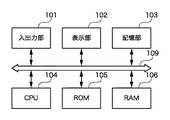
図1は実施例の画像処理装置の構成例を示すブロック図である。
[Device configuration]
FIG. 1 is a block diagram illustrating a configuration example of an image processing apparatus according to an embodiment.
マイクロプロセッサ(CPU)104は、ランダムアクセスメモリ(RAM)106をワークメモリとして、リードオンリメモリ(ROM)105や記憶部103に格納された各種プログラムを実行して、システムバス109を介して後述する構成を制御する。そして、後述する処理を含む様々な処理を実行する。
The microprocessor (CPU) 104 executes various programs stored in the read only memory (ROM) 105 and the
入出力部101は、キーボード、マウスなどの入力デバイス、メモリカードリーダライタ、ディジタルカメラやプリンタなどの画像入出力デバイスを接続するためのUSBやIEEE1394などのシリアルバスインタフェイスを備える。また、ネットワークに接続するためのネットワークインタフェイスカード(NIC)を備える。
The input /
CPU104は、入出力部101を介して、入力デバイスからユーザ指示を入力し、メモリカード、画像入力デバイス、ネットワーク上のサーバから画像データなどの各種データを入力する。また、入出力部101を介して、レイアウト結果の画像データ(出力画像のデータ)を画像出力デバイスに出力したり、メモリカードやサーバに出力する。
The
表示部102は、例えば液晶パネルである。CPU104は、表示部102にグラフィックユーザインタフェイス(GUI)などを表示する。記憶部103は、例えばハードディスクドライブ(HDD)で、オペレーティングシステム(OS)や後述する処理用のプログラムなどの各種プログラム、および、テンプレートや画像など様々なデータを格納する。
The
[レイアウト処理]
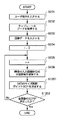
図2はレイアウト処理の一例を示すフローチャートで、CPU104が実行する処理である。
[Layout processing]
FIG. 2 is a flowchart showing an example of layout processing, which is executed by the
CPU104は、入出力部101からテンプレートおよび当該テンプレートを使用してレイアウトする複数の画像(N枚とする)に関するユーザ指示を入力する(S201)。そして、ユーザが指示するテンプレートのデータを記憶部103から取得し(S202)、ユーザが指示する複数の画像のデータを入力する(S203)。なお、画像数Mがテンプレートのフレーム数Nを超える場合は、N枚分の画像データを入力する。
The
図3はテンプレートと画像の関係を説明する図である。テンプレート200が同じサイズ(基準サイズ)の三つのフレーム201、202、203をもち、三枚の同じサイズの入力画像301、302、303をレイアウトする場合を想定する。なお、フレームは、画像レイアウト位置と画像レイアウトサイズを示す枠である。また、画像301はマクロ撮影画像、画像202は標準レンズで撮影した画像、303は望遠レンズを使用し、絞りを開放状態で撮影した画像である。また、各画像を割り当てるフレームは予め決まっていて、画像301をフレーム201に、画像302をフレーム202に、画像303をフレーム203に割り当てるとする。
FIG. 3 is a diagram illustrating the relationship between the template and the image. Assume that the
次に、CPU104は、カウンタiを零に初期化し(S204)、カウンタiをインクリメントし(S205)、i番目の入力画像に付加された情報(付加情報)を取得する(S206)。詳細は後述するが、以下では、付加情報として、画像の撮影情報を取得する例を説明する。
Next, the
次に、CPU104は、取得した付加情報に基づき、i番目の入力画像(以下、IMGi)のサイズ制御情報SCIiを決定する(S207)。以下では、入力画像を割り当てるフレームを拡大する率(基準サイズに対する変倍率)をサイズ制御情報SCIとする例を説明する。
Next, the
アルバムの作成者が大きくレイアウトしたい画像の一つに、撮影者が意図的に被写体を強調して撮影した画像が挙げられる。被写体を強調して撮影した画像としては、例えば、以下の三種類が考えられる。
・被写体を接写した画像(以下、マクロ撮影画像)
・広角レンズを用いて被写体全体に焦点を合わせた画像(以下、風景画像)
・望遠レンズを用いて絞り開放状態で被写体を撮影した画像(被写体に焦点が合い、背景がぼけた画像、以下、被写界深度が浅い画像)
One of the images that the creator of the album wants to lay out is an image that the photographer intentionally emphasized and photographed the subject. For example, the following three types of images taken with the subject emphasized can be considered.
・ Images of close-up subjects (hereinafter referred to as macro images)
・ Image focused on the entire subject using a wide-angle lens (hereinafter landscape image)
An image of the subject taken with the telephoto lens at full aperture (an image with the subject in focus and a blurred background, hereinafter an image with a shallow depth of field)
そこで、撮影者が意図的に被写体を強調して撮影した画像と予測される場合は、基準サイズより大きいレイアウトサイズ(例えばSCI=1.5)にし、そうではない画像の場合は基準サイズと同じレイアウトサイズ(SCI=1.0)にする。 Therefore, if it is predicted that the photographer has intentionally emphasized the subject, the layout size is larger than the reference size (for example, SCI = 1.5). Otherwise, the layout size is the same as the reference size. (SCI = 1.0).
次に、CPU104は、決定したIMGiのサイズ制御情報SCIiに基づき、IMGiを割り当てるフレーム(以下、FRAMEi)のサイズを決定する(S208)。FRAMEiのサイズは、基準サイズの縦横サイズをSCIiで変倍したサイズにする。
Next, based on the determined IMGi size control information SCIi, the
単純に、すべてのフレームに対して変倍すると、画像同士が重畳したり、画像がテンプレートからはみ出す場合がある。そこで、画像同士が重畳しない程度(若干の重畳を許す)、かつ、画像がテンプレートからはみ出さない最大拡大率thExmaxを各フレームに設定する。そして、SCIが最大拡大率thExmaxを超える(SCI>thExmax)場合は、SCIを制限する(例えばSCI=thExmax)。 If scaling is simply performed for all frames, the images may overlap each other or the image may protrude from the template. Therefore, the maximum enlargement ratio thExmax is set for each frame so that the images do not overlap each other (a slight overlap is allowed) and the image does not protrude from the template. When the SCI exceeds the maximum enlargement ratio thExmax (SCI> thExmax), the SCI is limited (for example, SCI = thExmax).
次に、CPU104は、決定したFRAMEiのサイズに合わせてIMGiを変倍し(S209)、変倍したIMGiをFRAMEiに配置する(S210)。なお、入力画像の縦横比を維持して当該画像を変倍する。従って、FRAMEiのサイズから画像がはみ出すことはない。
Next, the
次に、CPU104は、カウンタiとフレーム数Nを比較して(S211)、i<Nであれば次の入力画像を処理するために処理をステップS205に戻す。また、i=Nであれば一つのアルバム画像分の処理が終了したことになる。そこで、画像数Mの入力画像を処理したか否かを判定し(S212)、未処理の画像があれば処理をステップS204に戻し、画像数Mの入力画像の処理が終わるまでステップS204からS210を繰り返す。
Next, the
図4はレイアウト結果の一例を示す図である。マクロ撮影画像301と、望遠レンズを使用し、絞りを開放状態で撮影した画像303は、基準サイズに比べて大きなレイアウトサイズで配置され、標準レンズで撮影した画像302は基準サイズで配置される。
FIG. 4 is a diagram showing an example of the layout result. A macro photographed
●付加情報の取得
以下では、付加情報として、レンズの焦点距離とF値、絞り値、被写体距離、撮影モードを取得する方法を説明する。
Acquisition of Additional Information A method for acquiring the focal length and F value of the lens, the aperture value, the subject distance, and the shooting mode as additional information will be described below.
図5は付加情報の取得(S206)を説明するフローチャートである。 FIG. 5 is a flowchart for explaining acquisition of additional information (S206).
CPU104は、IMGiから撮影時のレンズの焦点距離Lfliを取得する(S301)。
The
市販のディジタルカメラは、一般に、画像ファイル規格であるExif形式によって撮影画像のデータファイルを記憶メディアに記録する。Exif形式によれば、撮影画像に関連する様々なメタデータをタグ形式で画像データファイルに記録することができる。 A commercially available digital camera generally records a captured image data file on a storage medium in an Exif format that is an image file standard. According to the Exif format, various metadata related to a captured image can be recorded in an image data file in a tag format.
メタデータには、画像の幅、高さなどといった基本的な画像情報、カメラの機種名、GPS情報のほか、露出時間やシャッタスピードなどの撮影情報も含めることができる。撮影情報にはレンズの焦点距離も含まれる。そこで、画像データファイルに記録されたタグ構造を解析し、レンズの焦点距離を記録するタグ(タグID=37386)のメタデータを取得する。35mmフィルム換算の焦点距離を用いる場合は次の値も取得する。焦点面の幅の解像度(例えばCCDの横の有効画素数、タグID=41486)。焦点面の高さの解像度(例えばCCDの縦の有効画素数、タグID=41487)。焦点解像度の単位(例えば画素、タグID=41488)。あるいは、35mm換算レンズ焦点距離(タグID=41989)の値を利用してもよい。 The metadata can include basic image information such as image width and height, camera model name, GPS information, and shooting information such as exposure time and shutter speed. The shooting information includes the focal length of the lens. Therefore, the tag structure recorded in the image data file is analyzed, and the metadata of the tag (tag ID = 37386) that records the focal length of the lens is acquired. When using a 35mm film equivalent focal length, also obtain the following values: Resolution of the focal plane width (for example, the number of effective pixels next to the CCD, tag ID = 41486). The resolution of the focal plane height (for example, the effective number of CCD vertical pixels, tag ID = 41487). Unit of focus resolution (for example, pixel, tag ID = 41488). Alternatively, the value of 35 mm equivalent lens focal length (tag ID = 41989) may be used.
次に、CPU104は、IMGiから撮影時のレンズのF値Fiと絞り値Apiを取得する(S302)。これらの値も、前述したように、Exifのメタデータ(F値はタグID=33437、絞り値はタグID=37378)から取得する。
Next, the
次に、CPU104は、IMGiから撮影時の被写体距離SDiを取得する(S303)。この値も、前述したように、Exifのメタデータ(被写体距離はタグID=37382)から取得する。あるいは、被写体距離レンジ(タグID=41996)の値を利用してもよい。なお、被写体距離レンジの値「1」はマクロ、「2」は近景、「3」は遠景を示す。
Next, the
次に、CPU104は、IMGiから撮影時の撮影モードSMiを取得する(S304)。この値も、前述したように、Exifのメタデータ(撮影シーンタイプ、タグID=41990)から取得する。なお、撮影シーンタイプの値「0」は標準モード、「1」は風景モード、「2」は人物モード、「3」は夜景モードを示す。
Next, the
なお、上記の被写体距離、被写体距離レンジ、F値、絞り値、レンズ焦点距離、35mm換算レンズ焦点距離、撮影シーンタイプ、焦点面の幅と高さの解像度、焦点面解像度の単位を示すタグは、何れも必須タグではない。従って、これらの何れかが、または、全部が記録されていないこともある。また、35mm換算レンズ焦点距離、撮影シーンタイプ、被写体距離レンジはExif2.2で追加されたタグのため、以前バージョンのExif画像には記録されていない。勿論、Exif規格にはメーカノートタグとして各社独自の情報を記録することができる。上述したタグが見付からない場合、または、見付かった場合でもメーカノートタグに記録された情報を利用してもよい。 In addition, the tag indicating the subject distance, subject distance range, F value, aperture value, lens focal length, 35mm equivalent lens focal length, shooting scene type, focal plane width and height resolution, focal plane resolution unit is None of these are mandatory tags. Therefore, any of these or all of them may not be recorded. The 35mm equivalent lens focal length, shooting scene type, and subject distance range are tags that were added in Exif 2.2, so they were not recorded in previous versions of Exif images. Of course, in the Exif standard, information unique to each company can be recorded as a manufacturer note tag. The information recorded in the maker note tag may be used even when the above-mentioned tag is not found or when it is found.
●サイズ制御情報SCIの決定
図6はサイズ制御情報SCIの決定(S207)を説明するフローチャートである。
Determination of Size Control Information SCI FIG. 6 is a flowchart for explaining the determination of size control information SCI (S207).
CPU104は、下式を判定し(S401)、下式を満足する場合は上記の「マクロ撮影画像」と判定する。
SDi ≦ thSD …(1)
ここで、SDiはIMGiの被写体距離、
thSDは閾値。
The
SDi ≦ thSD… (1)
Where SDi is the subject distance of IMGi,
thSD is a threshold value.
なお、一般に、被写体距離SDが50cm以下の場合にマクロ撮影と呼ぶ。そこで、例えばthSD=0.5[m]として判定を行う。また、被写体距離SDではなく被写体距離レンジを取得した場合は、被写体距離レンジの値が「1」の場合に上記の「マクロ撮影画像」と判定する。 In general, when the subject distance SD is 50 cm or less, it is called macro photography. Therefore, for example, the determination is made with thSD = 0.5 [m]. Further, when the subject distance range is acquired instead of the subject distance SD, it is determined as the “macro image” when the subject distance range value is “1”.
式(1)を満さない場合、CPU104は、下式を判定し(S402)、下の二式を満足する場合は上記の「風景画像」と判定する。
Lfli ≦ thLflw …(2)
Api ≧ thApw …(3)
ここで、LfliはIMGiのレンズ焦点距離、
ApiはIMGiの絞り値、
thLflw、thApwは閾値。
When the expression (1) is not satisfied, the
Lfli ≤ thLflw… (2)
Api ≧ thApw… (3)
Where Lfli is the lens focal length of IMGi,
Api is the aperture value of IMGi,
thLflw and thApw are threshold values.
また、被写体距離レンジと撮影シーンタイプを取得した場合は、被写体距離レンジの値が「3」(遠景)、かつ、撮影シーンタイプの値が「1」(風景モード)の場合に上記の「風景画像」と判定すればよい。なお、レンズ焦点距離の代わりに35mmフィルム換算のレンズ焦点距離を用いてもよい。 In addition, when the subject distance range and shooting scene type are acquired, if the subject distance range value is “3” (distant view) and the shooting scene type value is “1” (landscape mode), It may be determined as “image”. A lens focal length converted to 35 mm film may be used instead of the lens focal length.
式(2)(3)を満さない場合、CPU104は、下式を判定し(S403)、下の二式を満足する場合は上記の「被写界深度が浅い画像」と判定する。
Lfli > thLflt …(4)
Api < thApt …(5)
ここで、thLflt、thAptは閾値。
If the equations (2) and (3) are not satisfied, the
Lfli> thLflt (4)
Api <thApt… (5)
Here, thLflt and thApt are threshold values.
また、被写体距離レンジと撮影シーンタイプを取得した場合は、被写体距離レンジの値が「2」(近景)、かつ、撮影シーンタイプの値が「3」(人物モード)の場合に上記の「被写界深度が浅い画像」と判定する。なお、レンズ焦点距離の代わりに35mmフィルム換算のレンズ焦点距離を用いてもよい。 In addition, when the subject distance range and shooting scene type are acquired, the above-mentioned “cover” is set when the subject distance range value is “2” (near view) and the shooting scene type value is “3” (person mode). It is determined that the image has a shallow depth of field. A lens focal length converted to 35 mm film may be used instead of the lens focal length.
上記の三つの判定式の何れかを満足した場合、CPU104は、サイズ制御情報SCIiを例えば1.5に設定する(S405)。また、三つの判定式の何れも満足しなかった場合、CPU104は、サイズ制御情報SCIiをデフォルト値1に設定する(S404)。なお、三つの条件式のどれを満たすかによって、サイズ制御情報SCIの値を変えてもよい。例えば、式(1)を満たす場合はSCI=1.3、式(2)(3)を満たす場合はSCI=1.4、式(4)(5)を満たす場合はSCI=1.2のようにする。
If any of the above three determination formulas is satisfied, the
図4に示すマクロ撮影画像301は式(1)を満たし、望遠レンズを使用し、絞りを開放状態で撮影した画像303は式(4)(5)を満たし、基準サイズに比べて大きなレイアウトサイズで配置されている。一方、標準レンズで撮影した画像302は何れの判定式も満たさないため基準サイズで配置されている。
The
このように、レイアウトする画像の付加情報からレイアウトする際の画像サイズを決定して当該画像をフレームに合わせてレイアウトする。従って、撮影者が意図的に被写体を強調撮影した画像を大きくレイアウトすることができ、アルバムの閲覧者にとって見栄えの良好な、減り張りのあるレイアウトを実現することができる。 In this way, the image size at the time of layout is determined from the additional information of the image to be laid out, and the image is laid out according to the frame. Therefore, an image in which the photographer intentionally highlights the subject can be laid out in a large layout, and a reduced layout that looks good for the viewer of the album can be realized.
以下、本発明にかかる実施例2の画像処理を説明する。なお、実施例2において、実施例1と略同様の構成については、同一符号を付して、その詳細説明を省略する。 The image processing according to the second embodiment of the present invention will be described below. Note that the same reference numerals in the second embodiment denote the same parts as in the first embodiment, and a detailed description thereof will be omitted.
実施例1では、画像の付加情報(撮影情報)を利用して、撮影者が意図的に被写体を強調して撮影した画像を抽出し、当該画像をレイアウトする際の画像サイズを大きくする例を説明した。また、見栄えのよいアルバムを作成するには、画像補正やRAW画像調整により画質が向上された画像をレイアウトする際の画像サイズを大きくすることも考えられる。 In the first embodiment, an example in which a photographer intentionally emphasizes a subject and extracts a photograph by using additional information (photographing information) of the image, and increases the image size when the image is laid out. explained. In order to create a good-looking album, it may be possible to increase the image size when laying out an image whose image quality has been improved by image correction or RAW image adjustment.
そこで、実施例2においては、図2に示すステップS206で画質が向上するか否かを予測する情報(後述するフラグElに対応するExifメタデータ)を取得する。そして、画質が向上すると予測される入力画像のレイアウトサイズを大きく(例えばSCI=1.5に)する。 Therefore, in the second embodiment, information (Exif metadata corresponding to a flag El described later) that predicts whether or not the image quality is improved is acquired in step S206 shown in FIG. Then, the layout size of the input image that is predicted to improve the image quality is increased (for example, SCI = 1.5).
図7はIMGiの画質を向上する処理(画像補正処理)の一例を示すフローチャートである。 FIG. 7 is a flowchart illustrating an example of processing (image correction processing) for improving the image quality of IMGi.
CPU104は、ユーザが画像補正処理を指示する場合、IMGiに自動補正処理を施す。なお、ここでは、自動補正処理の一例として露出補正を説明する。露出補正は、特開平9-068764号公報や特開平11-317873号公報の発明など、多くの方法が提案されている。従って、露出補正自体は、それら技術を利用するとして、詳細な説明を省略する。また、露出補正に限らず、彩度、色相または鮮鋭度などの補正でもよい。
When the user instructs image correction processing, the
CPU104は、IMGiを解析して、IMGiの明るさに関する情報を取得し(S501)、取得した明るさに関する情報に基づき補正量CPiを算出する(S502)。そして、補正量CPiに基づきIMGiを露出補正する(S503)。
The
次に、CPU104は、下式を判定し(S504)、下式を満たす場合は補正量CPiに基づく露出補正により画質の向上が得られると判定(予測)する。
thCPmin ≦ CPi ≦ thCPmax …(6)
ここで、thCPmin、thCPmaxは閾値。
Next, the
thCPmin ≤ CPi ≤ thCPmax (6)
Here, thCPmin and thCPmax are threshold values.
なお、補正量CPiに対して下限の閾値thCPminを設定するのは、画像補正の効果が認識される画質向上を判定するためである。また、上限の閾値thCPmaxを設定するのは、補正量CPiが大き過ぎると、逆に、画質が劣化する場合があり、そのような画像のレイアウトサイズを大きくすることを避けるためである。 The reason why the lower limit threshold thCPmin is set for the correction amount CPi is to determine the improvement in image quality at which the effect of image correction is recognized. The upper limit threshold thCPmax is set in order to avoid an increase in the layout size of such an image because the image quality may deteriorate when the correction amount CPi is too large.
CPU104は、画質が向上すると判定した場合は画質が向上したことを示すフラグEliを‘0’に設定し(S505)、画質が向上しないと判定した場合はフラグEliを‘1’に設定する(S506)。そして、フラグEliに対応するExifのメタデータをIMGiの画像データファイルのメーカノートタグなどに記録する(S507)。
If the
上記の処理は、ユーザ指示に応じてCPU104が行う。あるいは、他の画像処理装置が、実施例の画像処理装置に入力される前の画像に上記処理を行い、フラグEliをメーカノートタグに記録してもよい。
The above processing is performed by the
上記では、画質が向上するか否かの判断に、補正量を利用する例を説明したが、RAW画像データを現像するパラメータが調整(生成)されたか否かを利用してもよい。なお、RAW画像データは、CMOSセンサやCCDなどの撮像デバイスによって、被写体光学像を光電変換して得られる撮影画像の電気信号をディジタル化した状態の画像データ(撮影データ)である。RAW画像データに、色(画素)補間、ホワイトバランス調整、色補正、ガンマ補正などの画像処理を行い、モニタやプリンタで再現可能な画像を得る処理をRAW現像処理と呼ぶ。一般に、RAW画像データが撮影可能なディジタルカメラは、RAW現像処理の各パラメータ(以下、現像パラメータ)をカメラ内で決定し、画像データとともに記録する。RAW画像データが再生可能な装置は、この現像パラメータによってRAW画像データをRAW現像処理して、再現可能な画像データを生成する。 In the above description, the correction amount is used to determine whether or not the image quality is improved. However, whether or not the parameter for developing the RAW image data is adjusted (generated) may be used. Note that the RAW image data is image data (shooting data) in a state in which an electrical signal of a captured image obtained by photoelectrically converting a subject optical image by an imaging device such as a CMOS sensor or a CCD is digitized. Processing that performs image processing such as color (pixel) interpolation, white balance adjustment, color correction, and gamma correction on RAW image data to obtain an image that can be reproduced by a monitor or printer is called RAW development processing. In general, a digital camera capable of shooting RAW image data determines each parameter of RAW development processing (hereinafter, development parameter) in the camera and records it together with the image data. An apparatus capable of reproducing RAW image data performs RAW development processing of the RAW image data using this development parameter, and generates reproducible image data.
カメラが決定する現像パラメータに撮影者などが満足しない場合、撮影者などが現像パラメータを調整(または生成)することができる画像処理装置がある。この場合、調整(生成)された現像パラメータ(以下、カスタム現像パラメータ)は、RAW画像データと対応付けて保存する必要がある。特開2001-043118公報の発明は、画像データの後にカスタム現像パラメータをメタデータとして追加する方法を開示する。 There are image processing apparatuses that allow a photographer or the like to adjust (or generate) development parameters when the photographer or the like is not satisfied with the development parameters determined by the camera. In this case, the adjusted (generated) development parameters (hereinafter referred to as custom development parameters) need to be stored in association with the RAW image data. Japanese Patent Laid-Open No. 2001-043118 discloses a method of adding custom development parameters as metadata after image data.
図8はRAW画像データファイルの構成例を示す図である。ヘッダ401、機種情報402、撮影時の付加情報403、現像パラメータ(カメラが決定したもの)404、サムネイルデータ405、RAWデータ406が元々の画像データである。カスタム現像パラメータ407は、元々の画像データの後に追加される。
FIG. 8 is a diagram illustrating a configuration example of a RAW image data file. The
CPU104は、図2に示すステップS206において、IMGi(この場合、RAW画像データ)が、撮影者などが意図的に調整(生成)したカスタム現像パラメータを使用してRAW現像される画像か否かを判定する。つまり、CPU104は、RAW画像データファイルにカスタム現像パラメータが追加されているか否かを調べる。そして、カスタム現像パラメータが追加されていれば画質が向上された画像と判断し、IMGiのレイアウトサイズを大きく(例えばSCIi=1.5に)する。なお、CPU104は、ステップS209の前にRAW画像データであるIMGiをRAW現像処理する必要があるが、その詳細説明は省略する。
In step S206 shown in FIG. 2, the
このように、撮影後の画像補正により画質の向上が予測される画像か、撮影者などによって現像パラメータが調整(生成)された画像かに応じてレイアウトサイズを決定して、当該画像をフレームに合わせてレイアウトする。従って、画質が向上された画像を大きくレイアウトすることができ、アルバムの閲覧者にとって見栄えの良好な、減り張りのあるレイアウトを実現することができる。 In this way, the layout size is determined according to whether the image is predicted to improve image quality by image correction after shooting, or the development parameter is adjusted (generated) by a photographer, and the image is used as a frame. Lay out together. Accordingly, an image with improved image quality can be laid out in a large layout, and a reduced layout that looks good for an album viewer can be realized.
なお、実施例1、2では説明を簡単にするために、付加情報(撮影情報)、画像補正の有無、カスタム現像パラメータの有無をそれぞれ独立に利用する方法を説明したが、これら三つの情報を組み合わせてレイアウトサイズを決定してもよい。 In the first and second embodiments, for simplicity of explanation, the method of using the additional information (shooting information), the presence / absence of image correction, and the presence / absence of custom development parameters independently has been described. The layout size may be determined in combination.
以下、本発明にかかる実施例3の画像処理を説明する。なお、実施例3において、実施例1、2と略同様の構成については、同一符号を付して、その詳細説明を省略する。 Hereinafter, image processing according to the third embodiment of the present invention will be described. Note that the same reference numerals in the third embodiment denote the same parts as in the first and second embodiments, and a detailed description thereof will be omitted.
実施例3では、サイズが異なるフレームから構成されるテンプレートに画像をレイアウトする際に、画像の付加情報に応じて、複数の画像のレイアウトの優先順位を決定する方法を説明する。つまり、優先順位が高い画像ほど大きなサイズのフレームに割り当てられることになる。 In the third embodiment, a method for determining the priority order of the layout of a plurality of images according to the additional information of the images when laying out the images on the templates composed of frames having different sizes will be described. That is, an image with a higher priority is assigned to a larger frame.
図9はテンプレートと画像の関係を説明する図である。テンプレート500が異なるサイズの五つのフレーム501〜505をもち、五枚の同じサイズの入力画像601〜605をレイアウトする場合を想定する。なお、画像601はマクロ撮影画像、画像602、604は標準レンズで撮影した画像である。画像603は広角レンズで撮影され、露出補正された画像である。また、画像604は望遠レンズを使用し、絞りを開放状態で撮影され、カスタム現像パラメータによりRAW現像処理され、露出補正された画像である。
FIG. 9 is a diagram for explaining the relationship between the template and the image. Assume that the
●レイアウト処理の前段
図10は実施例3のレイアウト処理の一部(前段)を示すフローチャートで、CPU104が実行する処理である。ステップS201からS206までの処理は実施例1(図2)と同様であるから詳細説明を省略する。
FIG. 10 is a flowchart showing a part (previous stage) of the layout process according to the third embodiment, which is a process executed by the
CPU104は、IMGiのサイズ制御ポイントSCPiを設定する(S1201)。サイズ制御ポイントSCPは、入力画像を大きなサイズのフレームに配置すべき度合いを示すポイントであり、レイアウトサイズを大きくすべき画像ほどサイズ制御ポイントSCPの値が大きい。そして、すべての入力画像(または、テンプレート500のフレーム数分の画像)にサイズ制御ポイントSCPを設定したか否かを判定し(S1202)、未了であれば処理をステップS205に戻し、終了であれば後述する後段の処理に移行する。
The
●サイズ制御ポイントの設定
図11はサイズ制御ポイントSCPを設定する処理を説明するフローチャートである。
Setting Size Control Point FIG. 11 is a flowchart for explaining processing for setting the size control point SCP.
CPU104は、IMGiのサイズ制御ポイントSCPiを零に初期化し(S2501)、IMGiが、撮影者が意図的に被写体を強調して撮影した画像か否かを判定する(S2502)。この判定には、実施例1(図6)で説明した方法を利用すればよい。そして、撮影者が意図的に被写体を強調して撮影した画像の場合はサイズ制御ポイントSCPiをインクリメントする(S2503)。
The
次に、CPU104は、撮影後の画像補正により画質が向上したと予測される画像か否かを判定する(S2504)。この判定には、実施例2(図7)で説明した方法を利用すればよい。そして、撮影後の画像補正により画質が向上したと予測される画像の場合はサイズ制御ポイントSCPiをインクリメントする(S2505)。
Next, the
次に、CPU104は、撮影者などによって現像パラメータが調整(生成)された画像か否かを判定する(S2506)。この判定には、実施例2で説明した方法を利用すればよい。そして、撮影者などによって現像パラメータが調整(生成)された画像の場合はサイズ制御ポイントSCPiをインクリメントする(S2507)。
Next, the
図12は図9に示す入力画像601〜605に対するサイズ制御ポイントSCPの設定結果を示す図である。各入力画像にはそれぞれ次のサイズ制御ポイントSCPが設定される。
入力画像601(IMG1):SCP1 = 1(∵マクロ撮影画像)
入力画像602(IMG2):SCP2 = 0
入力画像603(IMG3):SCP3 = 2(∵風景画像+画質向上)
入力画像604(IMG4):SCP4 = 0
入力画像605(IMG5):SCP5 = 3(∵被写界深度が浅い画像+画質向上+カスタム現像パラメータによるRAW現像処理)
FIG. 12 is a diagram showing the setting result of the size control point SCP for the
Input image 601 (IMG1): SCP1 = 1 (∵ macro shot image)
Input image 602 (IMG2): SCP2 = 0
Input image 603 (IMG3): SCP3 = 2 (∵ landscape image + image quality improvement)
Input image 604 (IMG4): SCP4 = 0
Input image 605 (IMG5): SCP5 = 3 (∵ shallow depth of field image + image quality improvement + RAW development processing with custom development parameters)
●レイアウト処理の後段
図13は実施例3のレイアウト処理の一部(後段)を示すフローチャートである。
[Lambda] of Layout Process FIG. 13 is a flowchart showing a part (the latter stage) of the layout process of the third embodiment.
CPU104は、サイズ制御ポイントSCPの大きい順に入力画像をソートするレイアウト順情報SCOを設定する(S1211)。なお、サイズ制御ポイントSCPが同値の場合は、画像の入力順(または、ファイル名の昇順、撮影日時の昇順など)にソートする。つまり、入力画像601から605のレイアウト順情報SCOは次のようになる。
入力画像601(IMG1):SCO1 = 3 (SCP1 = 1)
入力画像602(IMG2):SCO2 = 4 (SCP2 = 0)
入力画像603(IMG3):SCO3 = 2 (SCP3 = 2)
入力画像604(IMG4):SCO4 = 5 (SCP4 = 0)
入力画像605(IMG5):SCO5 = 1 (SCP5 = 3)
The
Input image 601 (IMG1): SCO1 = 3 (SCP1 = 1)
Input image 602 (IMG2): SCO2 = 4 (SCP2 = 0)
Input image 603 (IMG3): SCO3 = 2 (SCP3 = 2)
Input image 604 (IMG4): SCO4 = 5 (SCP4 = 0)
Input image 605 (IMG5): SCO5 = 1 (SCP5 = 3)
次に、CPU104は、テンプレートに含まれるフレームのサイズ情報を取得する(S1212)。テンプレートデータには、フレームと、そのサイズ順を示すフレームサイズ番号FSNとの関係を示すデータが記録されている。CPU104は、テンプレートデータからこの関係を示すデータを取得する。図9に示すテンプレート500の各フレーム501〜505とFSNの関係が例えば下に示すようであるとする。
フレーム501:FSN1 = 1
フレーム502:FSN2 = 4
フレーム503:FSN3 = 5
フレーム504:FSN4 = 3
フレーム505:FSN5 = 2
Next, the
Frame 501: FSN1 = 1
Frame 502: FSN2 = 4
Frame 503: FSN3 = 5
Frame 504: FSN4 = 3
Frame 505: FSN5 = 2
なお、サイズが同じフレームのFSNは、アルバムの閲覧者が注目し易い位置のフレームほど小さい番号にすることが望ましい。例えば、製本されたアルバムが左綴の場合には、アルバムの頁をめくる際、閲覧者はまず左寄りの画像に注目する。従って、この場合は、左側に位置するフレームに小さい番号を割り当てる。図9の例では、フレーム502と503が同じサイズであり、左側に位置するフレーム502に小さい番号を割り当てている。
Note that it is desirable that the FSNs of frames having the same size have a smaller number for a frame at a position that is easy for the viewer of the album to focus on. For example, when the bound book is a left binding, the viewer first pays attention to the image on the left side when turning the pages of the album. Therefore, in this case, a small number is assigned to the frame located on the left side. In the example of FIG. 9, the
次に、CPU104は、レイアウト順情報SCOと各フレームのFSNに基づき、各入力画像をレイアウトするフレームを決定する(S1213)。つまり、レイアウトサイズを大きくする入力画像をサイズが大きいフレームに割り当てるため、入力画像を、SCOの降順かつFSNの降順に、フレームに割り当てる。つまり、SCO=1の入力画像をFSN=1のフレームに、SCO=2の入力画像をFSN=2のフレームに、…、のように割り当てる。その結果、入力画像とフレームの割当関係は次のようになる。
入力画像601 (SCO1 = 3) → フレーム504 (FSN4 = 3)
入力画像602 (SCO2 = 4) → フレーム502 (FSN2 = 4)
入力画像603 (SCO3 = 2) → フレーム505 (FSN5 = 2)
入力画像604 (SCO4 = 5) → フレーム503 (FSN3 = 5)
入力画像605 (SCO5 = 1) → フレーム501 (FSN1 = 1)
Next, the
Input image 601 (SCO1 = 3) → Frame 504 (FSN4 = 3)
Input image 602 (SCO2 = 4) → Frame 502 (FSN2 = 4)
Input image 603 (SCO3 = 2) → Frame 505 (FSN5 = 2)
Input image 604 (SCO4 = 5) → Frame 503 (FSN3 = 5)
Input image 605 (SCO5 = 1) → Frame 501 (FSN1 = 1)
次に、CPU104は、決定した入力画像とフレームの関係に合わせて入力画像を変倍し(S1214)、変倍した入力画像を各フレームにレイアウトする(S1215)。なお、入力画像の縦横比を維持して当該画像を変倍する。従って、フレームサイズから画像がはみ出すことはない。
Next, the
図14は上記の処理によりレイアウトされた入力画像601から605を示す図である。
FIG. 14 is a diagram showing
以上はアルバム一頁または見開き二頁分の処理である。上記の処理が終わっても入力画像が残っている場合、CPU104は、図10の処理に戻り、残りの入力画像を同様に処理する。
The above is the processing for one page of the album or two pages of spreads. If the input image remains even after the above processing is completed, the
上記では、撮影情報、画像補正、および、カスタム現像パラメータによるRAW現像処理に関する重みをサイズ制御ポイントSCPに加えなかった。しかし、これらに対して重み付けを行ってもよい。図15は撮影情報に対する重み付けの一例を示す図である。 In the above, weights relating to photographic processing, image correction, and RAW development processing using custom development parameters are not added to the size control point SCP. However, these may be weighted. FIG. 15 is a diagram showing an example of weighting for the photographing information.
また、サイズ制御ポイントSCPの設定は、上記のように撮影情報、画像補正、カスタム現像パラメータによるRAW現像処理の三つの情報を参照するのではなく、何れか一つまたは二つの情報を利用してもよい。 In addition, the size control point SCP is set by using either one or two pieces of information instead of referring to the three pieces of information of shooting information, image correction, and RAW development processing by custom development parameters as described above. Also good.
このように、入力画像の撮影情報、画像補正、および、カスタム現像パラメータによるRAW現像処理に基づき入力画像のレイアウト順を設定する。そして、テンプレートのフレームのサイズ順を示す情報を参照して、各入力画像のレイアウトを決定する。従って、大小様々なフレームが配置されたテンプレートを用いる場合、意図的に被写体が強調撮影された画像、撮影後の画像補正により画質の向上が予測される画像、現像パラメータが調整(生成)された画像を優先的に大きくレイアウトすることができる。 In this manner, the layout order of the input image is set based on the shooting information of the input image, the image correction, and the RAW development processing based on the custom development parameters. Then, the layout of each input image is determined with reference to the information indicating the frame size order of the template. Therefore, when a template in which frames of various sizes are arranged is used, an image in which a subject is intentionally emphasized, an image in which improvement in image quality is predicted by image correction after shooting, and development parameters are adjusted (generated) An image can be preferentially laid out large.
[他の実施例]
なお、本発明は、複数の機器(例えばコンピュータ、インタフェイス機器、リーダ、プリンタなど)から構成されるシステムに適用しても、一つの機器からなる装置(例えば、複写機、ファクシミリ装置、制御装置など)に適用してもよい。
[Other embodiments]
Note that the present invention can be applied to a system composed of a plurality of devices (for example, a computer, an interface device, a reader, a printer, etc.), or a device (for example, a copier, a facsimile machine, a control device) composed of a single device. Etc.).
また、本発明の目的は、上記実施例の機能を実現するコンピュータプログラムを記録した記憶媒体をシステムまたは装置に供給し、そのシステムまたは装置のコンピュータ(CPUやMPU)が前記コンピュータプログラムを実行することでも達成される。この場合、記憶媒体から読み出されたソフトウェア自体が上記実施例の機能を実現することになり、そのコンピュータプログラムと、そのコンピュータプログラムを記憶する、コンピュータが読み取り可能な記憶媒体は本発明を構成する。 Another object of the present invention is to supply a storage medium storing a computer program for realizing the functions of the above-described embodiments to a system or apparatus, and the computer (CPU or MPU) of the system or apparatus executes the computer program. But it is achieved. In this case, the software read from the storage medium itself realizes the functions of the above embodiments, and the computer program and the computer-readable storage medium storing the computer program constitute the present invention. .
また、前記コンピュータプログラムの実行により上記機能が実現されるだけではない。つまり、そのコンピュータプログラムの指示により、コンピュータ上で稼働するオペレーティングシステム(OS)および/または第一の、第二の、第三の、…プログラムなどが実際の処理の一部または全部を行い、それによって上記機能が実現される場合も含む。 Further, the above functions are not only realized by the execution of the computer program. That is, according to the instruction of the computer program, the operating system (OS) and / or the first, second, third,... This includes the case where the above function is realized.
また、前記コンピュータプログラムがコンピュータに接続された機能拡張カードやユニットなどのデバイスのメモリに書き込まれていてもよい。つまり、そのコンピュータプログラムの指示により、第一の、第二の、第三の、…デバイスのCPUなどが実際の処理の一部または全部を行い、それによって上記機能が実現される場合も含む。 The computer program may be written in a memory of a device such as a function expansion card or unit connected to the computer. That is, it includes the case where the CPU of the first, second, third,... Device performs part or all of the actual processing according to the instructions of the computer program, thereby realizing the above functions.
本発明を前記記憶媒体に適用する場合、その記憶媒体には、先に説明したフローチャートに対応または関連するコンピュータプログラムが格納される。 When the present invention is applied to the storage medium, the storage medium stores a computer program corresponding to or related to the flowchart described above.
Claims (8)
前記画像それぞれに付加された撮影情報を取得する取得手段と、
前記撮影情報が被写体を強調して撮影された画像を示すか否かに応じて、その撮影情報が付加された画像のレイアウトを制御する制御情報を設定する設定手段と、
前記複数の画像それぞれを、その画像の前記制御情報に応じた画像サイズで配置した出力画像を生成する生成手段とを有することを特徴とする画像処理装置。 An input means for inputting a plurality of images;
Acquisition means for acquiring shooting information added to each of the images;
Setting means for the photographic information according to whether shows an image taken by highlighting the object, sets the control information for controlling the layout of the photographic information is added to image,
An image processing apparatus comprising: a generation unit configured to generate an output image in which each of the plurality of images is arranged with an image size corresponding to the control information of the image.
前記入力手段が、複数の画像を入力し、
前記取得手段が、前記画像それぞれに付加された撮影情報を取得し、
前記設定手段が、前記撮影情報が被写体を強調して撮影された画像を示すか否かに応じて、その撮影情報が付加された画像のレイアウトを制御する制御情報を設定し、
前記生成手段が、前記複数の画像それぞれを、その画像の前記制御情報に応じた画像サイズで配置した出力画像を生成することを特徴とする画像処理方法。 An image processing method of an image processing apparatus having an input unit, an acquisition unit, a setting unit, and a generation unit,
The input means inputs a plurality of images,
The acquisition means acquires shooting information added to each of the images,
It said setting means, the imaging information according to whether shows an image taken by highlighting the object, sets the control information for controlling the layout of the photographic information is added to image,
The image processing method, wherein the generation unit generates an output image in which each of the plurality of images is arranged with an image size corresponding to the control information of the image.
Priority Applications (2)
| Application Number | Priority Date | Filing Date | Title |
|---|---|---|---|
| JP2007341118A JP5025457B2 (en) | 2007-12-28 | 2007-12-28 | Image processing apparatus and method |
| US12/277,462 US8265429B2 (en) | 2007-12-28 | 2008-11-25 | Image processing apparatus and methods for laying out images |
Applications Claiming Priority (1)
| Application Number | Priority Date | Filing Date | Title |
|---|---|---|---|
| JP2007341118A JP5025457B2 (en) | 2007-12-28 | 2007-12-28 | Image processing apparatus and method |
Publications (3)
| Publication Number | Publication Date |
|---|---|
| JP2009164834A JP2009164834A (en) | 2009-07-23 |
| JP2009164834A5 JP2009164834A5 (en) | 2011-02-03 |
| JP5025457B2 true JP5025457B2 (en) | 2012-09-12 |
Family
ID=40798551
Family Applications (1)
| Application Number | Title | Priority Date | Filing Date |
|---|---|---|---|
| JP2007341118A Expired - Fee Related JP5025457B2 (en) | 2007-12-28 | 2007-12-28 | Image processing apparatus and method |
Country Status (2)
| Country | Link |
|---|---|
| US (1) | US8265429B2 (en) |
| JP (1) | JP5025457B2 (en) |
Families Citing this family (18)
| Publication number | Priority date | Publication date | Assignee | Title |
|---|---|---|---|---|
| TW201004591A (en) * | 2008-07-24 | 2010-02-01 | Flexmedia Electronics Corp | Digital photo album and display method thereof and controller using the same |
| US8724007B2 (en) | 2008-08-29 | 2014-05-13 | Adobe Systems Incorporated | Metadata-driven method and apparatus for multi-image processing |
| US8340453B1 (en) | 2008-08-29 | 2012-12-25 | Adobe Systems Incorporated | Metadata-driven method and apparatus for constraining solution space in image processing techniques |
| US8368773B1 (en) | 2008-08-29 | 2013-02-05 | Adobe Systems Incorporated | Metadata-driven method and apparatus for automatically aligning distorted images |
| US8842190B2 (en) | 2008-08-29 | 2014-09-23 | Adobe Systems Incorporated | Method and apparatus for determining sensor format factors from image metadata |
| US8549425B2 (en) * | 2010-12-02 | 2013-10-01 | Sony Corporation | Visual treatment for a user interface in a content integration framework |
| US9153056B2 (en) * | 2013-03-07 | 2015-10-06 | Shutterfly, Inc. | Adaptive and fast image collage creation |
| US9131192B2 (en) | 2012-03-06 | 2015-09-08 | Apple Inc. | Unified slider control for modifying multiple image properties |
| US8971623B2 (en) | 2012-03-06 | 2015-03-03 | Apple Inc. | Overlaid user interface tools for applying effects to image |
| US20130239049A1 (en) * | 2012-03-06 | 2013-09-12 | Apple Inc. | Application for creating journals |
| US9189876B2 (en) | 2012-03-06 | 2015-11-17 | Apple Inc. | Fanning user interface controls for a media editing application |
| US20130239063A1 (en) | 2012-03-06 | 2013-09-12 | Apple Inc. | Selection of multiple images |
| JP6025427B2 (en) * | 2012-07-09 | 2016-11-16 | キヤノン株式会社 | Image processing apparatus, image processing method, and program |
| JP5684205B2 (en) * | 2012-08-29 | 2015-03-11 | 株式会社東芝 | Image processing apparatus, image processing method, and program |
| US9275301B2 (en) * | 2012-10-04 | 2016-03-01 | Xerox Corporation | Method and system for creating digital image album |
| US9351594B2 (en) * | 2013-03-15 | 2016-05-31 | Art.Com, Inc. | Method and system for wiring a picture frame and generating templates to hang picture frames in various layouts |
| US10902656B2 (en) | 2016-02-29 | 2021-01-26 | Fujifilm North America Corporation | System and method for generating a digital image collage |
| JP6885896B2 (en) * | 2017-04-10 | 2021-06-16 | 富士フイルム株式会社 | Automatic layout device and automatic layout method and automatic layout program |
Family Cites Families (19)
| Publication number | Priority date | Publication date | Assignee | Title |
|---|---|---|---|---|
| US5926562A (en) | 1995-06-23 | 1999-07-20 | Fuji Photo Film Co., Ltd. | Image processing method using reference values to determine exposure state |
| JP3876932B2 (en) | 1995-06-23 | 2007-02-07 | 富士フイルムホールディングス株式会社 | Image processing method |
| US7124359B2 (en) * | 1996-01-11 | 2006-10-17 | Canon Kabushiki Kaisha | Image edit device adapted to rapidly lay-out photographs into templates with means for preview and correction by user |
| US6396941B1 (en) * | 1996-08-23 | 2002-05-28 | Bacus Research Laboratories, Inc. | Method and apparatus for internet, intranet, and local viewing of virtual microscope slides |
| US6324545B1 (en) * | 1997-10-15 | 2001-11-27 | Colordesk Ltd. | Personalized photo album |
| JPH11317873A (en) | 1998-05-06 | 1999-11-16 | Canon Inc | Image correction device and recording medium |
| US6493468B1 (en) | 1998-05-06 | 2002-12-10 | Canon Kabushiki Kaisha | Image processing apparatus and method |
| JP4072302B2 (en) | 1999-04-13 | 2008-04-09 | キヤノン株式会社 | Data processing method and apparatus, and storage medium |
| US20020040375A1 (en) * | 2000-04-27 | 2002-04-04 | Simon Richard A. | Method of organizing digital images on a page |
| US20030128389A1 (en) * | 2001-12-26 | 2003-07-10 | Eastman Kodak Company | Method for creating and using affective information in a digital imaging system cross reference to related applications |
| US20040183915A1 (en) * | 2002-08-28 | 2004-09-23 | Yukita Gotohda | Method, device, and program for controlling imaging device |
| US7275210B2 (en) * | 2003-03-21 | 2007-09-25 | Fuji Xerox Co., Ltd. | Systems and methods for generating video summary image layouts |
| US7743322B2 (en) * | 2003-09-30 | 2010-06-22 | Hewlett-Packard Development Company, L.P. | Automatic photo album page layout |
| US7656543B2 (en) * | 2004-11-12 | 2010-02-02 | Hewlett-Packard Development Company, L.P. | Albuming images |
| US7773832B2 (en) * | 2005-02-28 | 2010-08-10 | Fujifilm Corporation | Image outputting apparatus, image outputting method and program |
| US8161377B2 (en) * | 2005-03-01 | 2012-04-17 | Hewlett-Packard Development Company, L.P. | Arranging images on pages of an album |
| US7644356B2 (en) * | 2005-06-10 | 2010-01-05 | Hewlett-Packard Development Company, L.P. | Constraint-based albuming of graphic elements |
| JP4437996B2 (en) * | 2006-05-11 | 2010-03-24 | 富士フイルム株式会社 | Index print creation method, apparatus, and program |
| US7835948B2 (en) * | 2006-09-07 | 2010-11-16 | The Golub Corporation | Floral network methods and systems for processing floral arrangements |
-
2007
- 2007-12-28 JP JP2007341118A patent/JP5025457B2/en not_active Expired - Fee Related
-
2008
- 2008-11-25 US US12/277,462 patent/US8265429B2/en not_active Expired - Fee Related
Also Published As
| Publication number | Publication date |
|---|---|
| US8265429B2 (en) | 2012-09-11 |
| JP2009164834A (en) | 2009-07-23 |
| US20090169132A1 (en) | 2009-07-02 |
Similar Documents
| Publication | Publication Date | Title |
|---|---|---|
| JP5025457B2 (en) | Image processing apparatus and method | |
| WO2021073331A1 (en) | Zoom blurred image acquiring method and device based on terminal device | |
| BRPI0900750A2 (en) | composition determination device, composition determination method, and, program that causes a composition determination device to perform | |
| JP2005128156A (en) | Focus adjustment device and focus adjustment method | |
| US9332195B2 (en) | Image processing apparatus, imaging apparatus, and image processing method | |
| JP5279636B2 (en) | Imaging device | |
| CN101996389A (en) | Image processing device, imaging device, and image processing program | |
| JPH11261797A (en) | Image processing method | |
| US20090290041A1 (en) | Image processing device and method, and computer readable recording medium containing program | |
| JP6786273B2 (en) | Image processing equipment, image processing methods, and programs | |
| JP2004289383A (en) | Imaging device, image data generation method, image data processing device, and image data processing program | |
| CN102780888A (en) | Image processing device, image processing method, and electronic camera | |
| JP2003348339A (en) | Image processing method, apparatus and program | |
| JP6765978B2 (en) | Information processing equipment and programs | |
| US7724287B2 (en) | Sketch effect for digital photographs | |
| JP2019047365A (en) | Image processing apparatus, image processing apparatus control method, imaging apparatus, and program | |
| JP4525841B2 (en) | Image composition apparatus, computer program, and recording medium | |
| JP4611413B2 (en) | Image output apparatus and image output method | |
| JP4611412B2 (en) | Camera and image input method | |
| JP5282533B2 (en) | Image processing apparatus, imaging apparatus, and program | |
| JP5543636B2 (en) | Imaging device | |
| JPH10136298A (en) | Camera and printer | |
| JP2011024052A (en) | Image processing apparatus, image processing control method, and image processing system | |
| JP4403957B2 (en) | Image composition apparatus, image composition method, and computer program | |
| JP2005129994A (en) | Digital camera |
Legal Events
| Date | Code | Title | Description |
|---|---|---|---|
| A521 | Request for written amendment filed |
Free format text: JAPANESE INTERMEDIATE CODE: A523 Effective date: 20101210 |
|
| A621 | Written request for application examination |
Free format text: JAPANESE INTERMEDIATE CODE: A621 Effective date: 20101210 |
|
| A977 | Report on retrieval |
Free format text: JAPANESE INTERMEDIATE CODE: A971007 Effective date: 20111110 |
|
| A131 | Notification of reasons for refusal |
Free format text: JAPANESE INTERMEDIATE CODE: A131 Effective date: 20111118 |
|
| A521 | Request for written amendment filed |
Free format text: JAPANESE INTERMEDIATE CODE: A523 Effective date: 20111214 |
|
| TRDD | Decision of grant or rejection written | ||
| A01 | Written decision to grant a patent or to grant a registration (utility model) |
Free format text: JAPANESE INTERMEDIATE CODE: A01 Effective date: 20120521 |
|
| A01 | Written decision to grant a patent or to grant a registration (utility model) |
Free format text: JAPANESE INTERMEDIATE CODE: A01 |
|
| A61 | First payment of annual fees (during grant procedure) |
Free format text: JAPANESE INTERMEDIATE CODE: A61 Effective date: 20120619 |
|
| FPAY | Renewal fee payment (event date is renewal date of database) |
Free format text: PAYMENT UNTIL: 20150629 Year of fee payment: 3 |
|
| R151 | Written notification of patent or utility model registration |
Ref document number: 5025457 Country of ref document: JP Free format text: JAPANESE INTERMEDIATE CODE: R151 |
|
| LAPS | Cancellation because of no payment of annual fees |