JP3842577B2 - Structured document search method, structured document search apparatus and program - Google Patents
Structured document search method, structured document search apparatus and program Download PDFInfo
- Publication number
- JP3842577B2 JP3842577B2 JP2001099973A JP2001099973A JP3842577B2 JP 3842577 B2 JP3842577 B2 JP 3842577B2 JP 2001099973 A JP2001099973 A JP 2001099973A JP 2001099973 A JP2001099973 A JP 2001099973A JP 3842577 B2 JP3842577 B2 JP 3842577B2
- Authority
- JP
- Japan
- Prior art keywords
- document
- vocabulary
- structured document
- search
- group
- Prior art date
- Legal status (The legal status is an assumption and is not a legal conclusion. Google has not performed a legal analysis and makes no representation as to the accuracy of the status listed.)
- Expired - Fee Related
Links
Images




Classifications
-
- G—PHYSICS
- G06—COMPUTING OR CALCULATING; COUNTING
- G06F—ELECTRIC DIGITAL DATA PROCESSING
- G06F16/00—Information retrieval; Database structures therefor; File system structures therefor
- G06F16/80—Information retrieval; Database structures therefor; File system structures therefor of semi-structured data, e.g. markup language structured data such as SGML, XML or HTML
- G06F16/83—Querying
- G06F16/835—Query processing
- G06F16/8373—Query execution
-
- Y—GENERAL TAGGING OF NEW TECHNOLOGICAL DEVELOPMENTS; GENERAL TAGGING OF CROSS-SECTIONAL TECHNOLOGIES SPANNING OVER SEVERAL SECTIONS OF THE IPC; TECHNICAL SUBJECTS COVERED BY FORMER USPC CROSS-REFERENCE ART COLLECTIONS [XRACs] AND DIGESTS
- Y10—TECHNICAL SUBJECTS COVERED BY FORMER USPC
- Y10S—TECHNICAL SUBJECTS COVERED BY FORMER USPC CROSS-REFERENCE ART COLLECTIONS [XRACs] AND DIGESTS
- Y10S707/00—Data processing: database and file management or data structures
- Y10S707/99931—Database or file accessing
- Y10S707/99933—Query processing, i.e. searching
-
- Y—GENERAL TAGGING OF NEW TECHNOLOGICAL DEVELOPMENTS; GENERAL TAGGING OF CROSS-SECTIONAL TECHNOLOGIES SPANNING OVER SEVERAL SECTIONS OF THE IPC; TECHNICAL SUBJECTS COVERED BY FORMER USPC CROSS-REFERENCE ART COLLECTIONS [XRACs] AND DIGESTS
- Y10—TECHNICAL SUBJECTS COVERED BY FORMER USPC
- Y10S—TECHNICAL SUBJECTS COVERED BY FORMER USPC CROSS-REFERENCE ART COLLECTIONS [XRACs] AND DIGESTS
- Y10S707/00—Data processing: database and file management or data structures
- Y10S707/99931—Database or file accessing
- Y10S707/99933—Query processing, i.e. searching
- Y10S707/99934—Query formulation, input preparation, or translation
Landscapes
- Engineering & Computer Science (AREA)
- Theoretical Computer Science (AREA)
- Data Mining & Analysis (AREA)
- Databases & Information Systems (AREA)
- Physics & Mathematics (AREA)
- General Engineering & Computer Science (AREA)
- General Physics & Mathematics (AREA)
- Information Retrieval, Db Structures And Fs Structures Therefor (AREA)
- Document Processing Apparatus (AREA)
Description
【0001】
【発明の属する技術分野】
本発明は、異なる文書構造の複数の構造化文書を、階層化された論理構造を持つ構造化文書データベースで管理する構造化文書管理システムに関する。
【0002】
【従来の技術】
XML(Extesible Markup Language)データベースなど構造化文書データベースでは、検索言語によって記述されたユーザ検索要求により所望の構造化文書を検索する手段が提供されてる。検索言語には、SQL(Structured Query Language)に似た構文を持ち、検索位置、検索条件、情報抽出部分などを記述したものもある。この手段により多種多様な構造化文書を検索することができる。しかし、このような検索言語をベースとしたクエリデータを作成するには、ユーザ側にあらかじめ構造化文書データベース中に存在する構造化文書の文書構造(DTD)や語彙発生状況などに関する情報が必要であった。
【0003】
また、文書であるから語彙的な揺らぎや曖昧性が発生する。例えば、「タイトル」を同じ意味合いで、「表題」「件名」と表現したり、「要旨」を同じ意味合いで「まとめ」や英語で「ABSTRACT」と表現したりするなど、同義語、類字語が数多く存在する場合が挙げられる。
【0004】
これを従来の検索言語では厳密すぎて、これらの揺らぎや曖昧性を吸収した検索が行えないという問題点があった。
【0005】
一方、サーチエンジンなどの文書検索エンジンの分野では、一般にキーワード列を使ってユーザ検索要求を表現する。キーワード列を文書検索エンジンに投入すると、そのキーワードを含む文書集合を検索して、その一覧を表示する。高度な文書検索エンジンでは、同義語辞書、類似語辞書などを用いて関連するキーワード列を追加抽出して、それらのキーワード列も含めてOR展開し、ユーザ検索要求を拡大解釈して検索する機能を持っているものもある。これを使うと、文書の語彙的な揺らぎや曖昧性に対処することも可能である。
【0006】
だが、同じ文書であっても文書構造を持った構造化文書に対して同様の手段では問題がある。つまり、キーワード列を使って検索する文書検索エンジンでは、構造化文書の中に発生する重要な情報である文書構造を完全に無視して、単なる文書として検索してしまうからである。
【0007】
そのため、文書の語彙的な揺らぎや曖昧性を考慮した構造化文書の検索手法が数多く提案されている。
【0008】
以下に挙げる手法は、類似文書同士の類似性比較であり、実現方法は対応タグ内の語彙比較(語彙曖昧性)で実現されていた。
【0009】
特開2001−14326号公報の「構造指定による類似文書の検索装置及び検索方法」(日立)には、検索条件として指定された文書(種文書)に類似する文書を検索する装置について開示されている。この装置は、計算機を利用して検索条件として指定された文書あるいは文章(種文書)に類似する構造化文書を検索するものであって、類似度計算の検索条件として種文書と構造化文書に属する1つの構造の指定を受けて、類似度計算の後、類似度のより高い対象文書を優先して表示するようになっている。
【0010】
また、特開平7−44567号公報の「文書検索装置」(富士通)には、文書を蓄積した文書データベースから、利用者により入力された文書と類似の内容を持つ文書を検索するための文書検索装置であって、特に、定型的な構造を持つ入力文書と類似の内容を持つ文書を検索するための文書検索装置について開示されている。入力文書を解析し、文書構成要素に従った重み付けをした検索キーワード集合を生成する検索キーワード集合生成手段と、検索キーワード集合に基づき文書データベースを検索して、その結果得られた文書ごとに、マッチした各キーワードの重みを計算し、検索結果文書に対する累計重みを得る文書検索手段とを有し、検索結果には、入力文書との類似度を表す累計重みが付加されているので、利用者は、これを参考とすることにより、検索結果の取捨選択を効率的に行うことができる。
【0011】
文書構造を持った構造化文書に対して、文書の語彙的な揺らぎや曖昧性に対処するアイデアが提案されているが、これらはあくまでもユーザ検索要求として「種文書」を入力として与えなければならない。出力として得られるのは、類似した構造化文書の集合である。このような入出力の形態は、サーチエンジンなどの文書検索エンジンに近い形態である。
【0012】
しかし、このような手法を構造化文書データベースに適用するのは困難である。つまり、類似した構造化文書中の一部の要素だけを情報抽出したり加工するといった要求を記述する検索言語とのミスマッチが大きいからである。
【0013】
種文書をベースとした類似比較では、「「XML」や「SGML」を含む」といった語彙に関する論理条件を指定することはできない。あくまでも「XML」とか「SGML」といった具体的なデータでの類似比較しか行えない。
【0014】
上記特開2001−14326号公報記載の発明は、あらかじめ特徴文字列抽出プログラムにより特徴文字列を抽出している。しかし、語彙と語彙との類似性、語彙の曖昧性には強弱があるのが一般である。たとえば、「XML」と「SGML」は近く、「XML」と「テキスト」は相対的に遠い。上記特開2001−14326号公報記載の発明は、このような語彙と語彙との類似性、語彙の曖昧性には強弱を数値的に表した類似度で特徴文字列の類似度を算出するのではなく、同一構造内での抽出された特徴文字列の発生頻度の総和で算出されている。また、同一構造内での抽出された特徴文字列の発生頻度の総和で類似度を算出しているため、構造同士の類似性は考慮されていない。
【0015】
また、上記特開平7−44567号公報記載の発明では、語彙と語彙との類似性、語彙の曖昧性は、「展開キーワードの重み」という付加データにより考慮されている。しかし、構造同士の類似性として、検索属性定義情報データにて、例えば、「質問文」であれば、「「質問文」に「2.0」の類似度、「回答文」に「1.0」の類似度」といった情報にて、多少の構造同士の類似性も考慮されている。
【0016】
しかし、同義語辞書や類似語辞書などの辞書データ以外に、検索属性定義情報データを作り込むコストは膨大である。これでは汎用的な類似検索機能は実現できない。
【0017】
【発明が解決しようとする課題】
以上説明したように、従来からある、文書の語彙的な揺らぎや曖昧性を考慮した構造化文書の検索手法には、以下のような問題点があった。
【0018】
(1)語彙類似性だけでなく構造類似性も加味した類似検索ができない。
【0019】
(2)データベースのSQLのように類似した構造化文書中の一部の要素だけを抽出するといった検索要求を記述することができない。
【0020】
(3)データベースや同義語辞書や類似語辞書以外に、類似計算のためにデータの作り込みが必要となる。
【0021】
そこで、本発明は上記問題点に鑑み、(構成要素、語彙、文書構造(論理構造)の類似計算のために必要な構成要素名や語彙の類似関係を表したデータベースを追加するだけで)構造化文書データベースに格納されている構造化文書の構成要素と語彙とを指定した検索条件に基づき、この指定した構成要素と語彙とそれらの論理構造上の発生位置とに類似する構造化文書の検索が容易に行える構造化文書検索方法および、それを用いた構造化文書検索装置を提供することを目的とする。
【0022】
【課題を解決するための手段】
本発明は、異なる文書構造の複数の構造化文書を格納した階層化された論理構造を持つ構造化文書データベースに対して、前記論理構造を構成する前記構造化文書の構成要素と語彙を検索条件に含む検索要求に基づき類似検索を行うものであって、前記検索条件を該検索条件で指定された構成要素と語彙とそれらの文書構造上の位置関係の類似範囲まで緩和して、前記構造化文書を検索し、この検索された構造化文書を、該構造化文書に含まれる構成要素と語彙とこれらの文書構造上の位置関係と、前記検索条件で指定された構成要素と語彙とこれらの文書構造上の位置関係との類似度に基づき並び替えて出力することにより、構造化文書データベースに格納されている構造化文書の構成要素と語彙を指定した検索条件に基づき、この指定した構成要素と語彙とそれらの論理構造上の発生位置とに類似する構造化文書の検索が容易に行える。
【0023】
例えば、前記検索条件で指定された語彙あるいは該語彙に類似する語彙を包含する構成要素が、前記検索条件で指定された構成要素あるいは該構成要素に類似する構成要素と一致する構造化文書を検索する。
【0024】
本発明は、異なる文書構造の複数の構造化文書を格納した階層化された論理構造を持つ構造化文書データベースに対して、前記論理構造を構成する前記構造化文書の構成要素と語彙を検索条件に含む検索要求に基づき検索を行うものであって、前記構造化文書データベースに格納されている構造化文書のうち、その構成要素に、前記検索条件で指定された構成要素あるいはそれに類似する構成要素と、前記検索条件で指定された語彙あるいはそれに類似する語彙を包含し、かつ、前記語彙あるいはそれに類似する語彙と、前記構成要素あるいはそれに類似する構成要素との前記論理構造上の発生位置が、前記検索条件で指定された発生位置あるいはそれに類似する発生位置である構造化文書を検索する。
【0025】
本発明によれば、構造化文書データベースに格納されている構造化文書の構成要素と語彙を指定した検索条件に基づき、この指定した構成要素と語彙とそれらの論理構造上の発生位置とに類似する構造化文書の検索が容易に行える。
【0026】
好ましくは、前記検索された構造化文書を表示するために、該構造化文書に包含される語彙と構成要素とそれらの前記論理構造上の発生位置との、前記検索条件で指定された語彙と構成要素とそれらの前記論理構造上の発生位置とに対する類似度に基づき並び替える。
【0027】
好ましくは、前記検索要求に含まれる前記構造化文書から検索結果として抽出すべき構成要素の出力形式に基づき、前記検索された構造化文書を出力する。
【0028】
好ましくは、前記類似度は、前記検索された構造化文書に包含される語彙と構成要素の前記検索条件で指定された語彙と構成要素に対する第1の類似度と、前記検索された構造化文書に包含される語彙と構成要素の前記論理構造上の発生位置と、前記検索条件で指定された語彙と構成要素の前記論理構造上の発生位置に対する第2の類似度との積である。
【0029】
【発明の実施の形態】
まず、本発明の実施形態について説明する前に、構造化文書管理システムについて説明する。
【0030】
(構造化文書管理システムの説明)
構造化文書として、XMLやSGMLなどで記述した文書が挙げられる。SGML(Standard Generalized Markup Language)とは、ISO(国際標準化機構)で定められた規格である。XML(eXtensible Markup Language)とは、W3C(World Wide Web Consortium)にて定められた規格である。それぞれ文書を構造化することを可能とする構造化文書規約である。
【0031】
以下、構造化文書として、XMLにて記述された文書を例に説明を進める。構造化文書の文書構造を定義したデータ(文書構造定義データ)をスキーマと呼ぶ。XMLではそのスキーマを定義するためにXML−SchemaやXDR(XML Data Reduced)などのスキーマ言語が提案されている。ここでは、例えば、XDRでのスキーマを記述する場合を例にとり説明する。
【0032】
スキーマも、構造化文書管理システムの管理対象の構造化文書であり、従って、スキーマ文書と呼ぶことがある。スキーマ文書と区別するために、特許明細書やメール、週報、広告などの種々雑多な内容を有す文書をコンテンツ文書と呼ぶこともある。
【0033】
構造化文書管理システムでは、上記スキーマ文書、上記コンテンツ文書、さらに、後述するようなユーザからの検索要求内容を記述したクエリ、すなわち、クエリ文書も管理対象とし、これらを総称して「文書」と呼ぶ。
【0034】
以下、特にことわりがない場合、「文書」と呼ぶときは、コンテンツ文書、スキーマ文書、クエリ文書を全て指すものとする。
【0035】
まず、実施形態の説明を前に、XMLについて簡単に説明する。
【0036】
図3は、XMLで記述された構造化文書の一例として、「特許」情報の例を示したものである。XMLやSGMLは、文書の構造の表現にタグが用いられる。タグには、開始タグと終了タグがあり、文書構造情報の構成要素を開始タグと終了タグで囲むことにより、文書中の文字列(テキスト)区切りと、そのテキストが構造上どの構成要素に属するのかを明確に記述することができる。
【0037】
ここで開始タグとは要素名称を記号「<」、「>」で閉じたものであり、終了タグとは要素名称を記号「</」と「>」で閉じたものである。タグに続く構成要素の内容が、テキスト(文字列)または子供の構成要素の繰り返しである。また開始タグには「<要素名称 属性=“属性値”>」などのように属性情報を設定することができる。「<特許DB></特許DB>」のようにテキストを含まない構成要素は、簡易記法として「<特許DB/>」のように表わすこともできる。
【0038】
図3に示した文書は、「特許」タグから始まる要素をルート(根)とし、その子要素として「タイトル」、「出願日」、「出願者」、「要約」タグから始まる要素集合が存在する。また、例えば、「タイトル」タグから始まる要素には「XMLデータベース」といった、1つのテキスト(文字列)が存在する。
【0039】
XMLなどの構造化文書は、任意の構成要素を繰り返し含んでいたり、さらには文書構造があらかじめ決まっていない(RDB(リレーショナルデータベース)やOODB(オブジェクト指向データベース)のスキーマでは定義できない)のが普通である。
【0040】
図3に示したような構造化文書を論理的に表現するために、図4に示すようなツリー表現が用いられる。ツリーは、ノード(番号が付され、円形で示されたもの)とアーク(ノードを表す円形間をつなぐデータ付き線)と四角形で囲まれたテキストから構成されている。
【0041】
ノードは文書オブジェクトに対応し、ノードからタグ名や属性名に相当するラベルが付与された複数のアークが出てきている。そのアークの先は、ノードまたは要素値としての文字列(テキスト)である。ノードの中に記載されている英数字(#0、#49)などはオブジェクトIDである。
【0042】
図4に示したツリー構造を図3に示した構造化文書の文書オブジェクトツリーと呼ぶ。
【0043】
図1は、本実施形態に係る構造化文書管理システムの構成例を示したものである。図1において、構造化文書管理システムは、大きく分けて、要求制御部1、アクセス要求処理部2、検索要求処理部3、データアクセス部4、文書記憶部5、インデックス記憶部6から構成されている。文書記憶部5、インデックス記憶部6は例えば、外部記憶装置を用いて構成される。
【0044】
図1のシステム構成は、ソフトウエアを用いて実現可能である。
【0045】
要求制御部1は、要求受付部11と結果処理部12から構成されている。要求受付部11は、ユーザからの文書格納や文書取得、文書検索などの要求を受け付けて、アクセス要求処理部2を呼び出す。結果処理部12は、アクセス要求処理部2が処理した結果を要求元のユーザに返す処理を行う。
【0046】
アクセス要求処理部2は、ユーザからの文書格納や文書取得などの要求に対応した複数の処理部から構成されている。つまり、文書格納部21、文書取得部22、文書削除部23から構成されている。
【0047】
文書格納部21は、文書記憶部5中の論理的な指定エリアに文書を格納する処理を行う。
【0048】
文書取得部22は、文書記憶部5中の論理的なエリアが指定されたときに、その指定エリアに存在する文書を取得する処理を行う。
【0049】
文書削除部23は、文書記憶部5中の論理的な指定エリアに存在する文書を削除する処理を行う。
【0050】
文書記憶部5は、構造化文書データベースであり、例えば、図8に示すように、文書をUNIXのディレクトリ構造のように階層的にツリー構造状に格納している。
【0051】
図8に示すように、構造化文書データベースは、図4に示したような1つの構造化文書のツリー構造と同様に表現できる。すなわち、任意のノード以下の部分階層木(部分ツリー)は、構造化文書データベースから切り出された構造化文書であり、ここでは、これを文書オブジェクトツリーと呼ぶ。各ノードにはオブジェクトIDが割り当てられている。オブジェクトIDは、構造化文書データベース内ではユニークな数値を持つものとする。
【0052】
階層木のルートとなるノードには、それがルートノードであることを特定するためのオブジェクトID「#0」が割り当てられるものとする。
【0053】
ルートノード、すなわち、「#0」のノードからは「root」タグを先頭に持つ「#1」のノードへリンクが張られている。「#1」のノードからは、「特許DB」タグを先頭にもつ「#2」ノードへのリンクが張られている。「#2」ノードからは、「特許」タグを先頭に持つ「#42」ノード、「#52」ノード、「#62」ノードへのリンクがそれぞれ張られている。
【0054】
図3に示した「特許」情報は、「#42」ノード以下の部分ツリーに対応している。このノードからは「タイトル」タグ、「出願者」タグ、「要約」タグなどを先頭にもつノードへリンクが張られ、末端のノードからは、「XMLデータベース」、「T社」。「XMLを統一的に管理するデータベースを提供する…」などの文字列(要素値)へのリンクが張られている。
【0055】
「#52」ノード以下の部分ツリー、「#62」ノード以下の部分ノードも1つの「特許」情報に対応する部分である。
【0056】
ところで、例えば、「#43」ノードにリンクされた「XMLデータベース」という要素値は、「#43」ノードと「#value」という特殊なタグ名で接続されている。このタグ名は、「#」で始まるためXML規格においては標準的なタグ名として利用することはできない。
【0057】
このような構造化文書データベースの特定ノードを指定するために構造化文書パスを用いる。構造化文書パスは「uix://root」から始まる文字列である。uix(Universal Identifier for XML)は構造化文書パスであることを示す前置文字列である。
【0058】
例えば、「uix://root/特許DB」は、「#1」ノードから「特許DB」が付与されたアークが指し示すノード、つまり「#2」ノードに対応する。このように「root」から「/」で区切られた部分文字列をタグ名とみなすことで「#0」ノードからタグ名の並びに沿って対応するアークを下っていき、その最後のアークが指すノードが、パスの場所を指し示す。
【0059】
例えば、「uix://root/特許DB/特許」は、「#42」ノード、「uix://root/特許DB/出願日/年」は、「#45」ノードを指し示す。
【0060】
「#2」ノード以下に、すなわち、「特許DB」に、複数の「特許」情報を格納する場合には、個々の「特許」情報を識別するために、構造化文書パスにインデックス表現が可能である。
【0061】
「特許DB」の最初の「特許」情報であれば、「uix://root/特許DB/特許[0]」となるが、これは「uix://root/特許DB/特許」と同じとみなす。
【0062】
「特許DB」の2番目の「特許」情報であれば、「uix://root/特許DB/特許[1]DB」の5番目の「特許」情報であれば、「uix://root/特許DB/特許[4]」となる。
【0063】
インデックス記憶部6には検索時に用いる、要素名称生起インデックスとデータ生起インデックスが記憶されている。
【0064】
要素名生起インデックスとは構造化文書データベースに格納されている要素名称のリストと、各要素名称が先頭にある構造化文書(文書オブジェクトツリー)の位置とを関連付けてインデックスファイル化したものである。例えば、図8の構造化文書データベースのように、(「特許」情報に対応する)「特許」という要素名称が「#42」ノード以下の構造化文書、「#52」ノード以下の構造化文書、「#62」ノード以下の構造化文書に存在する場合、これらをインデックス化すると、図9に示すように、それらの親ノード、「#2」ノードが、要素名称生起インデックスファイルに「特許」キーからのチェーンで格納される。
【0065】
このように、親ノードでインデックス化すると、インデックスファイルを圧縮することができる。すなわち、親ノードでインデックス化すれば、子ノードが増大しようとも、親ノードで代用しているので、チェーンサイズは増大しない。これに対し、実ノードをインデックス化すれば「特許」情報の格納数の増大とともにチェーンサイズはそれに比例して増加してしまう。
【0066】
データ生起インデックスとは、構造化文書データベースに格納されている文字列データのリストと各文字列データがある構造化文書(文書オブジェクトツリー)の位置とを関連付けてインデックスファイル化したものである。例えば、図8の構造化文書データベースのように、「XML」という文字列データ(および、「XML」という文字列を含む文字列)が「#43」ノード以下の構造化文書、「#49」ノード以下の構造化文書に存在する場合、これらをインデックス化すると、図10に示すように、「#43」ノード、「#49」ノードが、データ生起インデックスファイルに「XML」キーからのチェーンで格納される。
【0067】
なお、逆階層インデックスなど、その他のインデックスファイルを用いてもよい。逆階層インデックスとは、あるノードとその親ノードとの対応を格納したものである(あるノードからその親ノードを求めることができる)。
【0068】
文書記憶部5中の論理的な指定エリアとは、ユーザにより構造化文書パスを用いて指定された文書の格納場所を指す。構造化文書パスは、ユーザにとって認識可能な表現である。
【0069】
図1の説明に戻る。
【0070】
データアクセス部4は、文書記憶部5をアクセスする基本インターフェイスの集合である。データアクセス部4は、文書オブジェクトツリー格納部47、文書オブジェクトツリー削除部48、文書オブジェクトツリー取得部49、文書文字列取得部44、パスから文書オブジェクトツリー取得部45、文書パーサ部46、合成文書作成部47、インデックス更新部48から構成される。
【0071】
文書オブジェクトツリー格納部41は、文書記憶部5中の物理的な指定エリアに文書オブジェクトツリーを格納する処理を行う。
【0072】
文書オブジェクトツリー削除部42は、文書記憶部5中の物理的な指定エリアに存在する文書オブジェクトツリーを削除する処理を行う。
【0073】
文書オブジェクトツリー取得部43は、文書記憶部5中の物理的な指定エリアに存在する文書オブジェクトツリーを取得する処理を行う。
【0074】
文書文字列取得部44は、文書オブジェクトツリーを構造化文書(XML文書)に変換する処理を行う。
【0075】
パスから文書オブジェクトツリー取得部45は、構造化文書パスを解析して文書記憶部5中の物理的なエリアを特定して、そのエリアに存在する文書オブジェクトツリーを取り出す処理を行う。
【0076】
文書パーサ部46は、ユーザにより入力された構造化文書を読み込んで構文解析して整合性の検査を行い、さらに文書構造定義データであるスキーマが存在すれば構造的に妥当かどうかの検証を行う。出力結果は文書オブジェクトツリーとなる。文書パーサは、通常、lex(lexical analyzer generator)といったレキシカルアナライザ(字句解析を行い,トークンに分解する)とyacc(yet another compiler compiler)といったパーサジェネレータを組み合わせて構築することができる。
【0077】
合成文書作成部47は、文書格納や文書削除などをする際に、スキーマに合致しているかどうか検査しなければならないが、この検査時に必要となるデータを作成して出力する。
【0078】
インデックス更新部48は、文書格納や文書削除などにより、構造化文書データベースの格納内容が更新されるたびに、図9、図10に示した要素名称生起インデックスとデータ生起インデックスを更新する。
【0079】
文書記憶部5中の物理的な指定エリアとは、ファイルオフセットやオブジェクトIDなどの構造化文書データベース内ではユニークな文書データの存在場所を指し示す内部データである。ユーザにとっては認識不能なデータである。
【0080】
文書記憶部5中に格納された文書を検索する処理を行う。要求制御部1の要求受付部11でユーザからの文書検索の要求が受け付けられると、検索要求処理部3には、要求受付部11からクエリ言語で記述されたクエリ文書が入力する。そしてデータアクセス部4を通してインデックス記憶部6,文書記憶部5にアクセスし、検索要求に合致する文書集合を取得して、その結果を結果処理部12を介して出力する。
【0081】
図2は、図1に示した構造化文書管理システムの一利用形態を示したもので、図2では、WWW(World Wide Web)のバックエンドで、図1に示した構成の構造化文書管理システム100が動作している場合を示している。
【0082】
複数(ここでは、例えば3つ)のクライアント端末(例えばパーソナルコンピュータ、携帯通信端末など)102のそれぞれでWWWブラウザ103が動作している。ユーザは、各クライアント端末からWWWサーバ101にアクセスすることにより、構造化文書管理システム100にアクセスすることができる。WWWブラウザ103とWWWサーバ101とは、HTTP(Hyper TextTransfer Protocol)で通信している。また、WWWサーバ101と構造化文書管理システム100とは、CGI(Common Gateway Interface)またはCOM(Component Object Model)などで通信している。
【0083】
ユーザからの文書格納、文書取得、文書検索などの要求は、WWWブラウザ103から送信されて、WWWサーバ101を通して構造化文書管理システム100にて受け付けられ、処理された結果は、WWWサーバ101を通して要求元のWWWブラウザ103へ返信される。
【0084】
以下、図1の構造化文書管理システムの(1)格納機能、(2)検索機能について詳細に説明する。そして、(3)適用例では、概念検索を用いた特許調査の場合を例にとり説明する。
【0085】
(1) 格納機能
図1の構造化文書管理システムにおける格納系のコマンドには以下のものがある。
【0086】
insertXML(パス、N番目、XML):文書格納
appendXML(パス、XML) :文書格納
getXML(パス) :文書取得
removeXML(パス) :文書削除
setSchema(パス、スキーマ) :スキーマ格納
getSchema(パス) :スキーマ取得
「insertXML」は、( )内に指定した構造化文書パス以下のN番目に文書を挿入するコマンド(以下、簡単に挿入コマンドと呼ぶ)である。
【0087】
「appendXML」は、( )内に指定した構造化文書パス以下の最後に文書を挿入するコマンド(以下、簡単に追加コマンドと呼ぶ)である。
【0088】
「getXML」は、( )内に指定した構造化文書パス以下の文書を取り出すコマンド(以下、簡単に取得コマンドと呼ぶ)である。
【0089】
「removeXML」は、( )内に指定した構造化文書パス以下の文書(スキーマ文書以外の文書で、主に、コンテンツ文書)を削除するコマンド(以下、簡単に削除コマンドと呼ぶ)である。
【0090】
「setSchema」は、( )内に指定した構造化文書パスにスキーマを設定するコマンド(以下、簡単にスキーマ格納コマンドと呼ぶ)である。
【0091】
「getSchema」は、( )内に指定した構造化文書パスに設定されているスキーマを取り出すコマンド(以下、簡単にスキーマ取得コマンドと呼ぶ)である。
【0092】
上記コマンドのうち、挿入コマンド、追加コマンド、スキーマ格納コマンドについての処理はアクセス要求処理部2の文書格納部21で実行され、取得コマンド、スキーマ取得コマンドについての処理は文書取得部22で実行され、削除コマンドについての処理は文書削除部23で実行される。
【0093】
図5を参照して、構造化文書データベースの初期状態(図5(a)参照)において、追加コマンドを実行する場合について説明する。
【0094】
図5(a)に示すように、「#0」ノードと「#1」ノードが「root」アークで接続されている初期状態に対して、
「appendXML(“uix://root”,“<特許DB/>”)」
を実行した結果、図5(b)に示すように、「#2」ノードと「特許DB」アークが作成される。
【0095】
図5(b)に示した状態の構造化文書データベースに対して、取得コマンドを実行する場合について説明する。
【0096】
例えば、「getXML(“uix://root”)」を実行すると、図5(b)の「root」アークが示す「#0」ノード以下の文書オブジェクトツリーが取り出され、それをXMLの文字列表現に変換する。その結果、図6に示すように、「<root><特許DB/></root>」なる文字列が取り出される。取得コマンドの処理は、アクセス要求処理部2の文書取得部22にて実行される。
【0097】
次に、図5(b)に示した状態の構造化文書データベースに対して、図3に示すようなコンテンツ文書(XML文書)としての「特許」情報を格納するための追加コマンドを実行する場合について説明する。すなわち、この場合、「appendXML(“uix://root/特許DB”,“<特許>…</特許>”)」を実行する。このコマンド中「“<特許>…</特許>”」が、図3に示した「特許」情報に対応する。
【0098】
上記追加コマンドの処理が実行されると、図7に示すように、「#2」ノード以下に「#42」ノードをトップとする文書オブジェクトツリー(図4に対応)が追加される。
【0099】
図5(b)に示した状態の構造化文書データベースに対して、次に示すような追加コマンドを3回繰り返して実行したとする。
【0100】
「appendXML(“uix://root/特許DB”,“<特許>…</特許>”)」
上記コマンド中、「<特許>…</特許>」は、図3に示した文書構造のコンテンツ文書に対応する。
【0101】
すると、図8に示すように、「#2」ノード以下に「#42」ノード、「#52」ノード、「#62」ノードをトップとする文書オブジェクトツリーが追加される。
【0102】
次に、図8に示した状態の構造化文書データベースに対して、3つの「特許」情報を取り出すための取得コマンドを実行した場合について説明する。この場合、「getXML(“uix://root/特許DB”)」を実行する。すると、「特許DB」アークが示す「#2」ノード以下の文書オブジェクトツリーが取り出され、それをXMLの文字列表現(XML文書)に変換する。その結果、図11に示すように、「<特許DB><特許>…</特許><特許>…</特許><特許>…</特許></特許DB>」なる文字列が取り出される。
【0103】
構造化文書データベースでは、上記の「特許」情報などのコンテンツ文書(XML文書)の文書構造を定義したデータ、すなわち、スキーマも管理対象とする。
【0104】
図12は、XML文書の文書構造を定義するスキーマの一例を示したものである。ここでは、XMLの文書構造定義言語の一つであるXDR(XML−Data Reduced)を取り上げる。もちろん、XML−Schemaなど他の文書構造定義言語を用いてもかまわない。
【0105】
図12に示したスキーマは、図3に示した「特許」情報の文書構造をXDRで定義したものである。図12からも容易に分かるとおり、スキーマもXML形式の構造化文書である。「Schema」タグから始まる構成要素から始まり、その子要素として、「ElementType」タグから始まる要素集合が存在する。
【0106】
図12に示したスキーマにおいて、例えば、最初の「ElementType」タグから始まる子要素は以下の情報を意味している。
【0107】
・「特許」タグを持つ要素の文書構造定義(「ElementType name=”特許”」)である。
【0108】
・子要素は要素だけ(「content=”eltOnly”」)である。
【0109】
・「タイトル」、「出願日」、「要約」タグから始まる子要素から構成される(「element type=”タイトル”、…」)。さらに、その順番は一意に決まっている(「order=”seq”」)。
【0110】
・上記「特許」タグから始まる要素の文書構造定義の他に、「タイトル」「出願者」「要約」「年」「月」「日」「出願日」の文書構造定義を記述している。すなわち、「出願日」を除く、「タイトル」「出願者」「要約」「年」「月」「日」タグから始まる構成要素の子要素はテキストだけと定義されている(「content=”textOnly”」)。
【0111】
・「出願日」タグから始まる構成要素の子要素は、「年」、「月」、「日」の並びである。
【0112】
図8に示した状態の構造化文書データベースに対して、図12に示したスキーマ文書を格納するためのスキーマ格納コマンドを実行する場合について説明する。この場合、「setSchema(“uix://root/特許DB”,“<Schema>…</Schema>”)」を実行する。このコマンド中、「“<Schema>…</Schema>”」」が図12に示したスキーマ文書に対応する。
【0113】
上記コマンドの実行により、図13に示すように、「#2」ノード以下に「#schema」アークが追加され、その先には、「#3」ノードをトップノードとする文書オブジェクトツリーが追加される。スキーマ自身がXML文書表現になっているため、前述した「特許」情報のようなコンテンツ文書格納のケースと同様にツリー展開可能である。
【0114】
図13において、「@name」など「@」で始まるアークは属性に対応する。タグ名「#schema」も「#」、「@」で始まるためXML規格においては標準的なタグ名として利用することはできない。
【0115】
「#2」ノード下に図12に示したスキーマ文書が格納されたことにより、以後、「#2」ノード以下にこれから格納される文書の文書構造は、図12に示したスキーマ文書により定義された文書構造に適合することが要求される。すなわち、「#2」ノード以下に図12に示したスキーマが設定されることになる。
【0116】
「#2」ノード以下に図12に示したスキーマが設定されると、図14に示すように、「#2」ノードの文書オブジェクトのファイルには、「#2」ノード以下の文書オブジェクトツリーには、当該スキーマが存在する旨の属性値がセットされる。
【0117】
「#2」ノード以下に図12に示したスキーマが設定された後に、このスキーマで定義された文書構造に一致する図3に示したような「特許」情報を、図14に示したように、文書オブジェクトツリーとして構造化文書データベースに格納したとき、この文書の文書構造には図12に示したスキーマが存在する旨の属性値が、当該文書オブジェクトツリーを構成する各文書オブジェクトにセットされる。例えば、当該文書オブジェクトツリーを構成する各文書オブジェクトのファイルに対して、スキーマが存在している旨の属性値(例えば、「スキーマ適合有無」)に「1」がセットされる。図14では、スキーマに適合している各文書オブジェクト(ノード)は2重丸で示している。2重丸で示した各文書オブジェクトには、その文書オブジェクトに対応した文書構造定義が存在することになる。
【0118】
図15は、各文書オブジェクトのファイルの内容を概念的に示したもので、例えば、オブジェクトIDが「#42」の文書オブジェクトのファイルには、その文書オブジェクトにリンクされている他の文書オブジェクトに関する情報(例えば、アークや、リンク先の文書オブジェクトへのポインタ値など)とともに、上記属性値が記述されている。なお、当該文書オブジェクトに適用するスキーマが存在しないときは、「スキーマ適合有無」の値は「0」となる。
【0119】
図16、図17は、図1の構造化文書管理システムで、必要に応じて検索で使用される概念階層を構造化文書で表現した例を示す。図16、図17に示す「概念」情報はXMLで記述したコンテンツ文書である。
【0120】
図16に示した「概念」情報の例は、いわゆる特許調査における特許文書の内容を分類するための1つの分類軸として用いる「情報モデル」を概念階層で表現している。「概念」タグで囲まれた「概念」情報は、入れ子構造を持った文書構造をもっている。つまり、図16の例では、概念「情報モデル」の子供概念として、概念「ドキュメント」、概念「リレーション」、概念「オブジェクト」が存在している。また、概念「ドキュメント」の子供概念として、概念「構造化訴求メント」、概念「非構造化ドキュメント」が存在し、さらに、概念「構造化ドキュメント」の子供概念として、概念「XML」、概念「SGML」が存在している。
【0121】
図17に示す「概念」情報の記述例は、図16とは異なる分類軸「情報操作」を概念階層で表現している。図17の例では、概念「情報操作」の子供概念として、概念「検索」、概念「格納」、概念「加工」、概念「流通」が存在している。
【0122】
図16,図17に示したような「概念」情報も、前述の「特許」情報と同様にして、構造化文書データベース内に格納することができる。すなわち、例えば、まず、図8に示した状態の構造化文書データベースに対して、「appendXML(“uix://root”,“<概念DB/>”)」を実行して、図18に示すように、「#201」ノードと「概念DB」アークが作成される。この状態において、図16に示した「概念」情報を格納する場合には、「appendXML(“uix://root/概念DB”,“<概念名前>…</概念>”)」を実行する。このコマンド中「“<概念名前>…</概念>”」が、図16に示した「概念」情報に対応する。
【0123】
上記追加コマンドの処理が実行されると、図19に示すように、「#201」ノード以下に「#202」ノードをトップとする文書オブジェクトツリーが追加される。
【0124】
以上説明したように、図1の構造化文書管理システムでは、構造化文書データベース上に登録される文書構造が異なる膨大な数のXML文書群(コンテンツ文書、スキーマ文書、クエリ文書など)を、図18,図19に示すように、「root」タグを先頭に持つツリー状の1つの巨大なXML文書として取り扱う。そのため、部分的なXML文書をアクセスするには巨大なXML文書に対するパスという文書構造に依存しない統一的なアクセス手段を用いることにより、幅広くXML文書を検索したり加工したりすることが可能になる。
【0125】
また、構造化文書データベース上の一部にスキーマを設定することで、格納しようとする文書の文書構造がそのスキーマにより定義されている文書構造に一致するか否かの妥当性のチェックが自動的に行なえる(後述)。
【0126】
(1−1)文書格納処理
次に、図1の構造化文書管理システムの文書格納処理動作について、図20に示すフローチャートを参照して説明する。
【0127】
クライアント端末から構造化文書管理システムに対し、文書格納要求として、挿入コマンド、追加コマンド、スキーマ格納コマンドのうちのいずれかが送信されて、要求受付部11にて受け付けられたとき、図20に示した処理動作を行う。
【0128】
クライアント端末の所定の表示装置には、構造化文書管理システム100(の例えば、要求制御部1)から提供された、例えば、図31に示すようなユーザインターフェイスとしての画面が表示されている。
【0129】
図31に示す画面には、構造化文書管理システム100への操作項目の一覧(メニュー)が表示されている。操作項目として、「XML登録/削除」、「スキーマ設定」、「XML検索」とがある。
【0130】
ユーザが例えば、この画面上で「XML登録/削除」をマウス等のポインティングデバイスなどを用いて選択すると、図32に示したような文書の格納/削除を行うためのユーザインタフェースとしての画面が表示される。
【0131】
図32において、領域W1には、文書構造化文書データベースの現在のツリー構造の要素名(タグ名)がユーザが理解可能なように簡略的に表示されている。なお、図32では、上位階層の要素名のみを表示しているが、末端の要素名まで表示可能である。また、領域W2は、構造化文書パスの入力領域であり、領域W1の表示内容に従って、構造化文書パスを入力するようになっている。また、領域W3は、格納する文書を入力したり、取得した文書を表示するようになっている。
【0132】
例えば、構造化文書パスとして「root」を入力する場合には、領域W1の「root」をマウス等で選択すればよい。すると、図32に示すように、領域W2の構造化文書パスの入力領域に「uix://root」と表示される。また、新たに、「特許DB」という要素を追加する場合は、図32に示すように、領域W3に、「特許DB」を入力する。そして、「登録」ボタンB1を選択すると、クライアント端末からappendXML(“uix://root”,“<特許DB/>”)」なる追加コマンドが構造化文書管理システムへ送信される。構造化文書管理システムでは、上記追加コマンドを受け、後述するような処理を実行した結果、例えば、図5(b)に示すように、「#2」ノードと「特許DB」アークが作成される。また、領域W1には、図33に示すように、「root」の下に「特許DB」が追加表示される。
【0133】
さて、ユーザが図34に示したような文書の格納/削除画面上の領域W3に、例えば、文書「<A>データ</A>」を入力し(あるいはCD−ROM等の所定の記録媒体等から読み込むことにより入力し)、領域W1の「特許[0]」をマウス等で選択すると、構造化文書パスの入力領域W2に、「uix://root/特許DB/特許[0]」と表示される。そして、「登録」ボタンB1を選択すると、クライアント端末からappendXML(“uix://root”,“<特許DB/>”)」なる追加コマンドが構造化文書管理システムへ送信される。
【0134】
ここでは、例えば、構造化文書データベースが、図14に示した状態のときに、「appendXML(“uix://root/特許DB/特許[0]”,“<A>データ</A>”)」なる追加コマンドを受け付けた場合を例にとり説明する。
【0135】
要求受付部11は、上記追加コマンドを受け付けると、上記追加コマンド中の2つのパラメータである構造化文書パス「uix://root/特許DB/特許[0]」と文書「<A>データ</A>」(以下、格納文書と呼ぶ)とを文書格納部21へ渡す(ステップS1)。
【0136】
まず、文書格納部21は、文書パーサ部46に格納文書を渡す。文書パーサ部46は、格納文書を読み込んで、構文解析を行い、当該格納文書の文書構造がXMLにて規定された正しい形式であるか否かの整合性の検査を行う(ステップS2)。
【0137】
この整合性の検査でエラーが見つかれば(ステップS3)、文書格納部21,結果処理部12を介して、クライアント端末に「文書格納失敗」の旨のメッセージを返す(ステップS4)。
【0138】
整合性の検査でエラーが見つからなければ、次に、文書格納部21は、パスから文書オブジェクトツリー取得部45へ構造化文書パスを渡す。パスから文書オブジェクトツリー取得部45は、構造化文書パスから文書記憶部5中の物理的なエリアを特定することにより、そのエリアに存在する構造化文書パスにて表されたノード(文書オブジェクトOx0)を含む文書オブジェクトツリーを取り出す(ステップS5)。構造化文書パスの指定が正しければ、文書オブジェクトOx0のオブジェクトIDを取得することができるので(ステップS6)、その場合は、ステップS8へ進む。
【0139】
例えば、上記追加コマンドの場合、「#42」ノードが文書オブジェクトOx0となるので、そのオブジェクトIDとして、「#42」を取得するとともに、この「#42」ノードを含む文書オブジェクトツリー(例えば、「#42」ノードの全ての子孫ノードと「#42」ノードと同じ階層にある全ての(兄弟)ノードと、「#42」ノードの親ノードである「#2」ノードとからなる文書オブジェクトツリー)を取得する。
【0140】
指定された構造化文書パスからそれに対応する文書オブジェクトOx0が見つからなければ、エラーとなり(ステップS6)、文書格納部21,結果処理部12を介して、クライアント端末に「文書格納失敗」の旨のメッセージを返す(ステップS7)。
【0141】
例えば、構造化文書データベースが、図18に示した状態のときに、追加コマンドのパラメータとして、構造化文書パスが「uix://root/その他」と表されていたとき、これに対応する文書オブジェクトは存在しないので、ステップS6でエラーとなり、ステップS7へ進む。
【0142】
次に、ステップS8では、文書オブジェクトOx0にスキーマが存在するか否かを検査する。この検査は、前述したように、各文書オブジェクトのファイルに属性値が記述されているので、この値をチェックすればよい。文書オブジェクトOx0のもつ「スキーマ属性有無」の値が「1」のときは、ステップS9へ進む。
【0143】
以下、図20のステップS9の処理(合成文書作成部47の処理)について、図21に示すフローチャートを参照して詳細に説明する。
【0144】
文書格納部21は、ステップS5で取得した文書オブジェクトツリーを合成文書作成部47へ渡す。
【0145】
合成文書作成部47は、この文書オブジェクトツリーを文書オブジェクトOx0から遡り、「Schema」タグを子要素として持つ文書オブジェクトOx1を検索する(ステップS21)。
【0146】
例えば、図14に示した構造化文書データベースでは、文書オブジェクトOx0としての「#42」ノードの親ノードである「#2」ノードから「Schema」タグをトップ(先頭)にもつノード(「#3」ノード)へのリンクが張られているので(「Schema」タグを子要素として持つので)、この「#2」ノードが文書オブジェクトOx1となる。よって、ステップS22をスキップして、ステップS23へ進む。
【0147】
この文書オブジェクトOx1から文書オブジェクトOx0、さらに文書オブジェクトOx0からアークを辿って、その下流にある、文書オブジェクトの属性値の値が「1」である全ての子ノードからなる文書オブジェクトツリーOt1を取り出す(ステップS23)。
【0148】
例えば、上記追加コマンド中のパラメータの構造化文書パスが「uix://root/特許DB/特許[0]」と指定されているとき、文書オブジェクトツリーOt1は、「#42」ノード〜「#49」ノードから構成されたものとなる(図14参照)。
【0149】
次に、ステップS25へ進む。
【0150】
ステップS25では、文書オブジェクトツリーOt1に格納文書の文書オブジェクトツリーを文書オブジェクトOx0の子ノードとして挿入する。その結果得られた新たな文書オブジェクトツリーを文書オブジェクトツリーOt2とする。
【0151】
この文書オブジェクトツリーOt2をXML文書に変換し、それをテンポラリファイルAに出力する(ステップS27)。
【0152】
例えば、上記追加コマンド中のパラメータの格納文書「<A>データ</A>」の文書オブジェクトツリー(この場合は、1つの文書オブジェクト)を「#42」ノード〜「#49」ノードで構成された文書オブジェクトツリーOt1に「#42」ノードの子ノードとして挿入して得られた合成文書の文書オブジェクトツリーOt2をXML文書に変換した結果を図22に示す。この合成文書は、もともとある「特許」情報に「<A>データ</A>」というデータを追加したものとなっている。
【0153】
図22に示したXML文書、すなわち、合成文書がテンポラリファイルAに出力され、テンポラリファイルAに一時格納される。
【0154】
一方、スキーマタグ以下の文書オブジェクトツリーOt3をXML文書に変換して、それをテンポラリファイルBに出力する(ステップS28)。すなわち、テンポラリファイルBには、スキーマ文書が一時格納されることになる。
【0155】
例えば、文書オブジェクトツリーOt3である「#3」ノードをトップノードとする文書オブジェクトツリーをXML文書に変換した結果を図23に示す。図23に示したXML文書がテンポラリファイルBに出力され、テンポラリファイルBに一時格納される。
【0156】
図22に示すように、テンポラリファイルA(「tmp000.xml」)には、もともとある「特許」情報の要素の他に、格納文書、すなわち、ここでは、例えば、「<A>データ</A>」が挿入されている。また、「xmlns=”x−schema:tmp001.xml”」という、テンポラリファイルB(「tmp001.xml」)へのリンク情報の記述がある。この記述は、「特許」情報に適用されるスキーマが出力されているテンポラリファイルBを指定している。
【0157】
次に、図20の説明に戻る。
【0158】
ステップS10では、文書格納部21は文書パーサ部46に、合成文書のテンポラリファイルAとスキーマのテンポラリファイルBとを与えて、合成文書の文書構造の妥当性をチェックする。すなわち、文書パーサ部46は、合成文書のテンポラリファイルAとスキーマのテンポラリファイルBとを読み込み、合成文書の文書構造が、スキーマにより定義されている文書構造に一致するか否かをチェックする。
【0159】
例えば、図22に示した合成文書と、図23に示したスキーマとで妥当性のチェックを行った場合、合成文書には、スキーマにより定義されていない「A」という要素が存在するため、図23の合成文書は、妥当性のチェックでエラーとなる(ステップS11)。この場合、文書格納部21,結果処理部12を介して、クライアント端末に「文書格納失敗」の旨のメッセージを返す(ステップS12)。
【0160】
例えば、クライアント端末の所定の表示装置には、図35に示すようなメッセージが表示される。
【0161】
次に、構造化文書データベースが、図14に示した状態のときに、「appendXML(“uix://root/特許DB”,“<特許>…</特許>”)」なる追加コマンドを受け付けた場合について、図20を参照して説明する。前述同様にして、文書オブジェクトOx0のオブジェクトID「#2」を取得する(ステップS5)、この文書オブジェクトには、スキーマが存在するので(ステップS8)、ステップS9において合成文書を作成する。
【0162】
この場合、文書オブジェクトOx0である「#2」ノード自体から「Schema」タグをトップ(先頭)にもつノード(「#3」ノード)へのリンクが張られているので、この「#2」ノードが文書オブジェクトOx1となる(図21のステップS21)。すなわち、文書オブジェクトOx0と文書オブジェクトOx1が同じなので(ステップS22)、ステップS29へ進み、格納文書「<特許>…</特許>」の文書オブジェクトツリーをXML文書に変換し、テンポラリファイルAに出力する(ステップS29)。
【0163】
例えば、図24に示すように、テンポラリファイルA(「tmp000.xml」)には、格納文書である「特許」情報、すなわち、ここでは、「<特許>…</特許>」が出力されている。また、「xmlns=”x−schema:tmp001.xml”」という、テンポラリファイルB(「tmp001.xml」)へのリンク情報の記述がある。
【0164】
次に、ステップS28へ進む。図25に示すように、テンポラリファイルBには、「#3」ノードをトップノードとするスキーマの文書オブジェクトツリーをXML文書に変換した結果が出力されている。
【0165】
図20のステップS10で、図24に示した合成文書と、図25に示したスキーマとで妥当性のチェックを行ったとき、合成文書の文書構造と、スキーマにより定義されている文書構造とは一致する、この場合、ステップS11からステップS13へ進む。
【0166】
ステップS13では、格納文書の文書オブジェクトツリーが、文書オブジェクトOx0下に追加される。すなわち、文書格納部21により、格納文書の文書オブジェクトツリーを構成する各文書オブジェクト(のファイル)にオブジェクトIDが与えられ、文書オブジェクトOx0から格納文書の文書オブジェクトツリーの先頭の文書オブジェクトへリンクが張られる。そして、文書オブジェクトツリー格納部41により、格納文書の文書オブジェクトツリーを構成する各文書オブジェクト(のファイル)が文書記憶部5に格納される。
【0167】
次に、ステップS14へ進み、インデックス記憶部6のインデックスを更新する。
【0168】
なお、ステップS8で、文書オブジェクトOx0のもつ属性値の値が「0」のときは、上述したスキーマを用いた合成文書の文書構造の妥当性のチェックを行わずに、そのままマステップS13へ進み、格納文書の文書オブジェクトツリーを、文書オブジェクトOx0下に追加し(ステップS13)、それに伴い、インデックス記憶部6のインデックスを更新する(ステップS14)。
【0169】
(1−2)文書取得処理
次に、図1の構造化文書管理システムの文書取得処理動作について、図26に示すフローチャートを参照して説明する。
【0170】
クライアント端末から構造化文書管理システムに対し、文書取得要求として、取得コマンド、スキーマ取得コマンドのうちのいずれかが送信されて、要求受付部11にて受け付けられたとき、図26に示した処理動作を行う。
【0171】
例えば、ユーザが図36に示したような文書の格納/削除画面上の領域W1の「特許DB」をマウス等で選択すると(クリックすると)、構造化文書パスの入力領域W2に、「uix://root/特許DB」と表示されとともに、「getXML(“uix://root/特許DB”)」なる取得コマンドが構造化文書管理システムへ送信される。
【0172】
ここでは、例えば、構造化文書データベースが、図8に示した状態のときに、「getXML(“uix://root/特許DB”)」なる取得コマンドを受け付けた場合を例にとり説明する。
【0173】
要求受付部11は、上記取得コマンドを受け付けると、上記取得コマンド中のパラメータである構造化文書パス「uix://root/特許DB」を文書取得部22へ渡す(ステップS31)。
【0174】
文書取得部22は、パスから文書オブジェクトツリー取得部45へ構造化文書パスを渡す。パスから文書オブジェクトツリー取得部45は、構造化文書パスから文書記憶部5中の物理的なエリアを特定することにより、そのエリアに存在する構造化文書パスにて表されたノード(文書オブジェクトOx5)を取り出す(ステップS32)。構造化文書パスの指定が正しければ、文書オブジェクトOx5のオブジェクトIDを取得することができるので(ステップS33)、その場合は、ステップS35へ進む。
【0175】
例えば、上記取得コマンドの場合、「#2」ノードが文書オブジェクトOx5となるので、そのオブジェクトIDとして、「#2」を取得するとともに、この「#2」ノード以下の文書オブジェクトツリーOt5(「#2」ノード、「#42」ノード〜「#49」ノード、「#52」ノード以下、「#62」ノード以下)を取得する(ステップS35)。
【0176】
ステップS32において、指定された構造化文書パスからそれに対応する文書オブジェクトOx5が見つからなければ、エラーとなり(ステップS33)、文書取得部22,結果処理部12を介して、クライアント端末に「文書取得失敗」の旨のメッセージを返す(ステップS34)。
【0177】
ステップS35で取得した文書オブジェクトツリーOt5は、文書文字列取得部44でXML文書に変換される。例えば、上記取得コマンドの場合、取得したXML文書は、図11に示すような3つの「特許」情報のXML文書となる。
【0178】
文書取得部22は、結果処理部12を介して、図11に示したようなXML文書を(例えば、XSL(eXtensible Style Language)といった所定のスタイルシートとともに)、クライアント端末へ返す(ステップS37)。
【0179】
クライアント端末では、図11に示したXML文書を、スタイルシートを用いてHTMLデータに変換して、例えば、図36に示すように、領域W2に表示する。
【0180】
XSLを利用すると、XML文書を様々な形に変換することが出来る。違う構文書造のXML文書に変換することも出来るし、XML文書からHTMLページを生成することも出来る。
【0181】
(1−3)文書削除処理
次に、図1の構造化文書管理システムの文書削除処理動作について、図27に示すフローチャートを参照して説明する。
【0182】
クライアント端末から構造化文書管理システムに対し、文書削除要求として、削除コマンドが送信されて、要求受付部11にて受け付けられたとき、図27に示した処理動作を行う。
【0183】
例えば、ユーザが図36に示したような文書の格納/削除画面上の領域W1の「特許DB」をマウス等で選択すると(クリックすると)、構造化文書パスの入力領域W2に、「uix://root/特許DB」と表示され、さらに、「削除」ボタンB2を選択すると「removeXML(“uix://root/特許DB”)」なる削除コマンドが構造化文書管理システムへ送信される。
【0184】
ここでは、例えば、構造化文書データベースが、図14に示した状態のときに、「removeXML(“uix://root/特許DB/特許[0]/出願日”)」なる削除コマンドを受け付けた場合を例にとり説明する。
【0185】
要求受付部11は、上記削除コマンドを受け付けると、上記削除コマンド中のパラメータである構造化文書パス「uix://root/特許DB/特許[0]/出願日」を文書削除部23へ渡す(ステップS41)。
【0186】
次に、文書削除部23は、パスから文書オブジェクトツリー取得部45へ構造化文書パスを渡す。パスから文書オブジェクトツリー取得部45は、構造化文書パスから文書記憶部5中の物理的なエリアを特定することにより、そのエリアに存在する構造化文書パスにて表されたノード(文書オブジェクトOx0)を含む文書オブジェクトツリーを取り出す(ステップS42)。構造化文書パスの指定が正しければ、文書オブジェクトOx0のオブジェクトIDを取得することができるので(ステップS43)、その場合は、ステップS45へ進む。
【0187】
例えば、上記削除コマンドの場合、「#44」ノードが文書オブジェクトOx0となるので、そのオブジェクトIDとして、「#44」を取得するとともに、この「#44」ノードを含む文書オブジェクトツリー(例えば、「#44」ノードの全ての子孫ノードと「#44」ノードと同じ階層にある全ての(兄弟)ノードと、「#44」ノードの親ノードである「#42」ノード、その親ノードである「#2」ノードとからなる文書オブジェクトツリー)を取得する。
【0188】
指定された構造化文書パスからそれに対応する文書オブジェクトOx0が見つからなければ、エラーとなり(ステップS43)、文書格納部21,結果処理部12を介して、クライアント端末に「文書削除失敗」の旨のメッセージを返す(ステップS44)。
【0189】
次に、ステップS45では、文書オブジェクトOx0にスキーマが存在するか否かを検査する。この検査は、前述したように、各文書オブジェクトのファイルに属性値が記述されているので、この値をチェックすればよい。文書オブジェクトOx0のもつ属性値の値が「1」のときは、ステップS46へ進む。
【0190】
以下、図27のステップS46の処理(合成文書作成部47の処理(削除コマンド用))について、図28に示すフローチャートを参照して詳細に説明する。
【0191】
なお、図28において、図21と同一部分は同一符号を付している。
【0192】
文書格納部21は、ステップS42で取得した文書オブジェクトツリーを合成文書作成部47へ渡す。
【0193】
合成文書作成部47は、この文書オブジェクトツリーを文書オブジェクトOx0から遡り、「Schema」タグを子要素として持つ文書オブジェクトOx1を検索する(ステップS21)。
【0194】
例えば、図14に示した構造化文書データベースでは、文書オブジェクトOx0としての「#44」ノードの上流にある「#2」ノードから「Schema」タグをトップ(先頭)にもつノード(「#3」ノード)へのリンクが張られているので(「Schema」タグを子要素として持つので)、この「#2」ノードが文書オブジェクトOx1となる。
【0195】
この文書オブジェクトOx1から文書オブジェクトOx0、さらに文書オブジェクトOx0からアークを辿って、その下流にある、文書オブジェクトの属性値の値が「1」である全ての子ノードからなる文書オブジェクトツリーOt1を取り出す(ステップS23)。
【0196】
例えば、上記追加コマンド中のパラメータの構造化文書パスが「uix://root/特許DB/特許[0]/出願日」と指定されているとき、文書オブジェクトツリーOt1は、「#42」ノード〜「#49」ノードから構成されたものとなる(図14参照)。
【0197】
次に、ステップS26ヘ進み、文書オブジェクトツリーOt1から文書オブジェクトOx0以下の文書オブジェクトツリーを削除する。その結果得られた新たな文書オブジェクトツリーを文書オブジェクトツリーOt2とする。
【0198】
この文書オブジェクトツリーOt2をXML文書に変換し、それをテンポラリファイルAに出力する(ステップS27)。
【0199】
例えば、上記削除コマンド中のパラメータの構造化文書パス「uix://root/特許DB/特許[0]/出願日」が指し示す「#44」ノード以下の文書オブジェクトツリーを「#42」ノード〜「#49」ノードで構成された文書オブジェクトツリーOt1から削除することにより得られた合成文書の文書オブジェクトツリーOt2をXML文書に変換した結果を図29に示す。この合成文書は、もともとある「特許」情報から「<出願日>…</出願日>」というデータを削除したものとなっている。
【0200】
図29に示したXML文書、すなわち、合成文書がテンポラリファイルAに出力され、テンポラリファイルAに一時格納される。
【0201】
一方、スキーマタグ以下の文書オブジェクトツリーOt3をXML文書に変換して、それをテンポラリファイルBに出力する(ステップS28)。すなわち、テンポラリファイルBには、スキーマ文書が一時格納されることになる。
【0202】
例えば、文書オブジェクトツリーOt3である「#3」ノードをトップノードとする文書オブジェクトツリーをXML文書に変換した結果を図30に示す。図30に示したXML文書がテンポラリファイルBに出力され、テンポラリファイルBに一時格納される。
【0203】
次に、図27の説明に戻る。
【0204】
ステップS47では、文書削除部21は文書パーサ部46に、合成文書のテンポラリファイルAとスキーマのテンポラリファイルBとを与えて、文書格納処理の場合と同様にして、合成文書の文書構造の妥当性をチェックする。
【0205】
例えば、図29に示した合成文書と、図30に示したスキーマとで妥当性のチェックを行った場合、合成文書には、スキーマにより定義されている「出願日」という要素が存在しないため、図29の合成文書は、妥当性のチェックでエラーとなる(ステップS48)。この場合、文書削除部21,結果処理部12を介して、クライアント端末に「文書削除失敗」の旨のメッセージを返す(ステップS49)。
【0206】
なお、構造化文書データベースが、図14に示した状態のときに、「removeXML(“uix://root/特許DB/特許[0]”)」なる削除コマンドを、図27に従って処理を行うと、図28のステップS27において、図24に示したような合成文書がテンポラリファイルAに出力される。テンポラリファイルBは、図30と同様である。
【0207】
このとき、図24に示した合成文書と、図30に示したスキーマとで妥当性のチェックを行った場合、合成文書の文書構造と、スキーマにより定義されている文書構造とは一致するので、ステップS48からステップS50へ進む。
【0208】
ステップS50では、文書オブジェクトOx0以下の文書オブジェクトツリーを削除する。すなわち、文書オブジェクトツリー削除部42により、文書オブジェクトOx0以下の文書オブジェクトツリーを構成する各文書オブジェクト(のファイル)が文書記憶部5から削除される。例えば、「#2」ノードから「#42」ノード以下の文書オブジェクトのファイルが削除される。
【0209】
次に、ステップS51へ進み、インデックス記憶部6のインデックスを更新する。また、クライアント端末の図36に示したような表示画面の領域W1には、「特許[0]」が表示さなくなる。
【0210】
なお、ステップS45で、文書オブジェクトOx0のもつ属性値の値が「0」のときは、上述したスキーマを用いた合成文書の文書構造の妥当性のチェックを行わずに、そのままマステップS50へ進み、文書オブジェクトOx0以下の文書オブジェクトツリーを削除し(ステップS50)、それに伴う、インデックス記憶部6のインデックスを更新する(ステップS51)。
【0211】
(1−4)スキーマの設定、スキーマを用いた文書格納
図31に示した画面上で、ユーザが「Schema設定Win」をマウス等のポインティングデバイスなどを用いて選択すると、図37に示したようなスキーマの設定を行うためのユーザインタフェースとしての画面が表示される。
【0212】
ユーザが、領域W3に、例えば、図12に示したような「特許」情報のスキーマを入力し、この入力したスキーマを「特許DB」以下のノードに設定する場合には、領域W1から「特許DB」をマウス等でクリックして選択した後(領域W2には、「uix://root/特許DB」が表示される)、「スキーマ設定」ボタンB3を選択する。すると、「setSchema(“uix://root/特許DB”,“<Schema>…</Schema>”)」なるスキーマ格納コマンドが構造化文書管理システムへ送信される。このコマンドの処理は前述した文書格納処理動作と同様である。
【0213】
次に、「uix://root/特許DB」の下に「特許」情報を格納しようとするとき、「特許DB」以下のノードに既に設定されているスキーマを用いて「特許」情報を入力する場合について説明する。
【0214】
まず、スキーマを取得する。例えば、図38に示すような文書の格納/削除を行うための画面の領域W1から「スキーマ」をマウス等を用いて選択すると、文書パスの入力領域W2に、「uix://root/特許DB/#Schema」と表示されとともに、「getXML(“uix://root/特許DB/Schema”)」なるスキーマ取得コマンドが構造化文書管理システムへ送信される。
【0215】
このコマンドの処理は、前述した文書取得処理と同様である。構造化文書管理システムから返されるXML文書は、図38の画面の領域W3に表示される。
【0216】
図38に示すように、領域R3には、「特許」情報のデータ入力領域が各要素毎に設定されて表示されている。この表示に従って、ユーザは、データを入力すればよい。例えば、「タイトル」、「年」などのデータ入力領域が階層的に配置され、表示されている。ユーザは、このデータ入力領域にデータを入力することで、スキーマにより定義された文書構造の格納文書が容易に作成することができる。
【0217】
また、領域W3に入力した「特許」情報の格納先として、領域W1で「特許DB」をマウス等を用いて選択すると、領域W2に構造化文書パスとして、「uix://root/特許DB」が表示される。その後、「登録」ボタンB1を選択すると、「appendXML(“uix://root/特許DB”,“<特許>…</特許>”)」なる追加コマンドが構造化文書管理システムへ送信される。
【0218】
この場合、格納文書は、予めスキーマに従って入力されたものなので、図20のステップS10の妥当性チェックでエラーとなることはない。
【0219】
(2)検索機能
図1の構造化文書管理システムにおける検索系のコマンドには以下のものがある。
【0220】
query(ql)
「query」は、パラメータとして( )内のクエリqlを実行し、その結果のXML文書を取得するコマンド(以下、検索コマンドと呼ぶ)である。
【0221】
クエリは、図39に示すように、SQL(Structured QueryLanguage)に似た形式の言語により、検索位置、検索条件、情報抽出部分などを記述した、構造化されたXML文書である。クエリ文書も構造化文書管理システムの管理対象である。
【0222】
「kf:from」タグから始まる要素には、検索位置の指定と文書要素の値に変数を対応付ける記述があり、「kf:where」タグのから始める要素には、変数に関する条件づけの記述があり、「kf:select」タグから始まる要素には、検索結果の出力形式が記述される。
【0223】
検索には、単純検索と概念検索とがある。単純検索とは、クエリ中に指定された検索条件を満たす情報を検索・抽出するものであり、概念検索とは、クエリ中に指定された概念情報を利用して、クエリ中に指定された検索条件を満たす情報を検索・抽出するものである。
【0224】
図40は、単純検索のクエリの例を示したものである。図40のクエリは、例えば、図14に示したような状態の構造化文書データベースに対し、「特許DB」アークが示すノード以下に格納されている「特許」情報の文書群において、「1999年でかつ、「PC」のような内容の「要約」という要素をもつ文書(「特許」情報)の「タイトル」を列挙せよ」という検索要求を意味している。
【0225】
「kf:from」タグから始まる要素の記述により、変数「$t」、「$y」、「$s」に、それぞれ「特許」情報の「タイトル」、「年」、「要約」という文書要素の値が代入される。
【0226】
「kf:where」タグから始める要素の記述により、変数「$y」=「1999」という比較がなされる。また、コンポーネント「MyLike」は変数「$s」と「PC」を引数として、「PC」と類似する値の変数「$s」を検知するための関数である。
【0227】
「kf:from」タグから始まる要素の記述により、変数「$t」が出力値として利用される。
【0228】
なお、「kf:star」タグは構造の曖昧表現であり、例えば「<特許><kf:star><年>」は「タグ名が「特許」である要素の子孫の要素としていずれかに存在し、タグ名が「年」である要素」を意味する。
【0229】
図41に図40の単純検索のクエリを用いた検索結果を示す。この検索結果もXML文書である。
【0230】
図42は、概念検索のクエリの例を示したものである。図42のクエリは、例えば図18,図19に示すような状態の構造化文書データベースに対し、「特許DB」アークが示すノード以下に格納されている「特許」情報の文書群に対し、「概念DB」アークが示すノード以下に格納されている「概念」情報を利用して検索するための検索要求である。ここで、概念「周辺装置」の値をもつタグの子要素の値には、概念「SCSI」、「メモリ」、「HDD」などがあるものとする。また、図18には示していないが、各「特許」情報の構成要素には、「キーワード」タグから始める要素も存在するものとする。
【0231】
すなわち、図42のクエリは、「概念「周辺装置」以下の概念のいずれかを「キーワード」という要素の値にもつ文書(「特許」情報)の「タイトル」を列挙せよ」という検索要求を意味している。
【0232】
「kf:from」タグから始まる要素の記述により、変数「$t」、変数「$k」に、それぞれ、「特許」情報の「タイトル」、「キーワード」という要素の値が代入される。また、変数「$x」は「概念」情報として「周辺装置」の値をもつタグの子要素の値(「SCSI」、「メモリ」、「HDD」など)が代入される。
【0233】
「kf:where」タグから始める要素の記述により、「$k」=「周辺装置」もしくは「$k」=「$x」という比較がなされる。
【0234】
次に、図1の構造化文書管理システムの文書検索処理動作について、図43に示すフローチャートを参照して説明する。
【0235】
図31に示した画面上で、ユーザが「XML検索Win」をマウス等のポインティングデバイスなどを用いて選択すると、図44に示すような文書検索を行うためのユーザインタフェースとしての画面が表示される。
【0236】
図44の検索画面において、領域W1には、前述同様、構造化文書データベースの現在のツリー構造の要素名(タグ名)がユーザが理解可能なように簡略的に表示されてている。
【0237】
領域W2は、検索対象の範囲(ツリー構造上の検索範囲)や、検索条件などを入力するための領域である。領域W3には、検索結果が表示される。
【0238】
例えば、「「uix://root」以下の「特許」を先頭タグに持つ文書の中から、「タイトル」タグに「文書」という文字列を含み、「1998」年以降に作成された文書を検索せよ」という検索要求の場合には、領域W1から「root」をマウス等で選択して検索対象の範囲として、構造化文書パスを入力する。そして、トップノードとして、「特許」を入力する(この場合、領域W1から「特許」をマウス等で選択することにより入力してもよい)。また、検索条件として、「「タイトル」という要素の値に「文書」という文字列を含む」「「年」という要素の値が「1998」以上である」という内容を予め設定されたデータ入力領域に入力すればよい。
【0239】
その後、「検索」ボタンB21を選択することにより、例えば、図45に示すようなクエリが、当該クエリを構造化文書データベース上に格納するための追加コマンドとともに構造化文書管理システムへ送信される。クエリの格納場所は、予め定められており、システム側が自動的に、この追加コマンドのパラメータを設定することとなる。例えば、構造化文書データベースが図18に示した状態のとき、当該クエリの格納場所を表すパラメータとしての構造化文書パスは、「uix://root/クエリDB」となる。また、追加コマンドのもう一方のパラメータは、当該クエリ文書である。
【0240】
要求受付部11は、上記クエリを受け付けると(ステップS101)、当該クエリを検索要求処理部3へ渡す。そして、当該クエリ文書を格納するための追加コマンドのパラメータを文書格納部21へ渡す。この追加コマンドの処理を、前述同様に行って、当該クエリは、文書記憶部5に格納される。
【0241】
例えば、図42に示すようなクエリの場合、構造化文書データベースには、図46に示すように展開されて、構造化文書パス「uix://root/クエリDB」の示す「#301」ノード以下にリンクされる。
【0242】
一方、検索要求処理部3では、受け取ったクエリを基に、データアクセス部4を通してインデックス記憶部6,文書記憶部5にアクセスし、検索要求に合致する文書集合などを取得して、クエリの中で要求された情報を抽出して結果処理部12を介して出力する。
【0243】
例えば、上記クエリの場合、まず、「「タイトル」タグに「文書」という文字列を含む」という条件に合致するものを検索することが検索対象を絞り込む上で効率がよい。そこで、図10に示したようなデータ生起インデックスを用いて、「文書」という文字列にリンクされているノード(文書オブジェクト)のオブジェクトIDを得る。そして、そのそれぞれについて、文書オブジェクトツリーを上流側に1つ遡り、「タイトル」というタグ名にたどり着いたときは、更に上流に辿っていき、「特許」というタグ名にたどり着いたときは、そのノード以下の文書オブジェクトツリーOt11を抽出する。
【0244】
次に、この抽出された複数の文書オブジェクトツリーOt11の中から、さらに、「年」という要素の値が「1998」年以上の文書オブジェクトツリーOt12を抽出する。
【0245】
この文書オブジェクトツリーOt12が上記クエリの内容に適合する文書となる。さらに上記クエリの要求内容に従えば、各文書オブジェクトツリーOt12のトップノードへの構造化文書パスを求める(ステップS102)。
【0246】
なお、上記検索処理は、上記した方法に限るものではなく、インデックス情報を用いた様々な効率のよい検索方法が可能である。
【0247】
検索要求処理部3は、ステップS102で得られた結果を統合して、検索結果としてのXML文書を作成する(ステップS103)。
【0248】
例えば、検索結果のXML文書は、
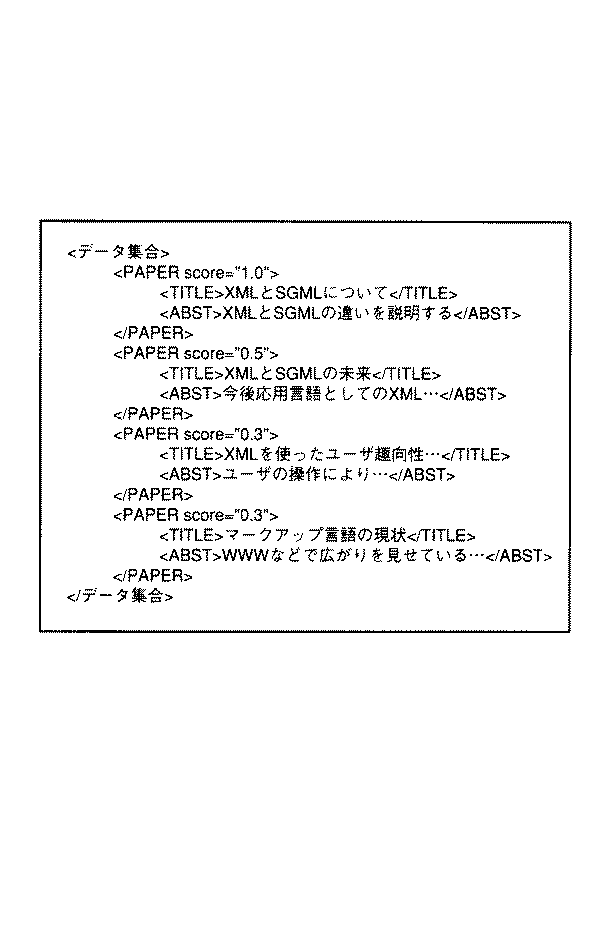
【0249】
検索要求処理部3は、検索結果処理部12を介して、上記XML文書をスタイルシートとともに、要求元のクライアント端末に返す(ステップS104)。
【0250】
クライアント端末では、図11に示したXML文書を、スタイルシートを用いてHTMLデータに変換して、例えば、図44に示すように、領域W12に表示する。
【0251】
同様にして、スキーマの検索も行える。
【0252】
例えば、「「uix://root」以下の「schema」を先頭タグに持つ文書の中から、「特許」と「要約」というタグ名を持つスキーマを検索せよ」という検索要求の場合には、図47に示すように、領域W1から「root」をマウス等で選択して検索対象の範囲として、構造化文書パスを入力する。そして、トップノードとして、「#schema」を入力する。また、検索条件として、「要素の属性名に「特許」という文字列を含む」「要素の属性名に「要約」という文字列を含む」という内容を予め設定されたデータ入力領域に入力すればよい。
【0253】
その後、「検索」ボタンB21を選択することにより、上記検索要求を記述したクエリ(図48参照)が、当該クエリを構造化文書データベース上に格納するための追加コマンドとともに構造化文書管理システムへ送信される。
【0254】
さて、上記クエリの場合、例えば、「「#schema」を先頭タグに持つ」という条件に合致するものを検索する。そこで、図9に示したような要素名称生起インデックスを用いて、「#schema」という要素にリンクされているノードの(文書オブジェクト)のオブジェクトIDを得る。そして、そのそれぞれについて、文書オブジェクトツリーを下流側にアークを辿っていき、属性名が「特許」と「要約」という要素にたどり着いたときは、当該「#schema」を先頭タグにもつ文書オブジェクトツリーOt21を抽出する。この文書オブジェクトツリーOt21が上記クエリの内容に適合する文書となる。さらに、図48に示したクエリの要求内容に従えば、各文書オブジェクトツリーOt21のトップノードへの構造化文書パスを求める。
【0255】
検索要求処理部3は、文書オブジェクトツリーOt21が複数あれば、それぞれのトップノードへの構造化文書パスをまとめて、検索結果としてのXML文書を作成し、検索結果処理部12を介して、上記XML文書をスタイルシートとともに、要求元のクライアント端末に返す。
【0256】
クライアント端末では、検索結果として受け取ったXML文書を、スタイルシートを用いてHTMLデータに変換して、例えば、図44に示すように、領域W12に表示する。
【0257】
クライアント端末では、検索結果の中の1つのスキーマを選択して、表示させると、例えば、図38に示すような文書の格納/削除を行うための画面とともに、その領域W3に、「特許」情報のデータ入力領域が各要素毎に設定されて表示される。
【0258】
ユーザは、このデータ入力領域にデータを入力することで、スキーマにより定義された文書構造の格納文書が容易に作成することができる。
【0259】
例えば、図38の領域W3に入力した「特許」情報の格納先として、領域W1で「特許DB」をマウス等を用いて選択すると、領域W2に構造化文書パスとして、「uix://root/特許DB」が表示される。その後、「登録」ボタンB1を選択すると、「appendXML(“uix://root/特許DB”,“<特許>…</特許>”)」なる追加コマンドが構造化文書管理システムへ送信される。
【0260】
この場合、格納文書は、予めスキーマに従って入力されたものなので、図20のステップS10の妥当性チェックでエラーとなることはない。
【0261】
同様にして、クエリの検索も行える。クエリを検索して、検索結果として得られた既存のクエリを加工して、再利用することもできる(クエリの再利用)。
【0262】
クエリの検索は、前述したような構造化文書の検索と同様にして行われ、その検索範囲は、クエリ群の格納されている構造化データベース上の一部の文書オブジェクトツリーとなる。
【0263】
例えば、図18に示したような状態の構造化文書データベースから、「kf:from」タグに「特許DB」を含むクエリを検索する場合について説明する。そのような検索要求を記述したクエリを図49に示す。
【0264】
図49に示すクエリは、「「uix://root/クエリDB」の示す「#301」ノード以下に存在するクエリの中から「kf:from」タグに「特許DB」を含むクエリを検索し、その内容(タグ名が「query」である要素以下の文書オブジェクトツリーの文書)を列挙せよ」を意味するものである。
【0265】
なお、「kf:as」タグの内容で変数「$elt」に、「kf:from」タグに「特許DB」を含むクエリのタグ名が「query」である要素以下の文書オブジェクトツリーが代入される。
【0266】
このクエリを検索要求処理部3が処理する際には、前述同様にして、例えば、図9に示したような要素名称生起インデックスを用いて、「kf:from」という要素にリンクされているノードの(文書オブジェクト)のオブジェクトIDを得る。そして、そのそれぞれについて、文書オブジェクトツリーを下流側にアークを辿っていき、「特許」というタグ名にたどり着いたときは、さらに、上流側にアークを辿って「query」というタグ名に辿りついたとき、当該「query」を先頭タグにもつ文書オブジェクトツリーOt31を抽出する。この文書オブジェクトツリーOt31が上記クエリの内容に適合する文書となる。
【0267】
複数の文書オブジェクトツリーOt31が検索されたら、それらを統合して、XML文書を作成して、それをスタイルシートとともにクライアント端末へ返す。
【0268】
クライアント端末では、検索結果の中の1つのクエリを選択して、表示させると、例えば、図44に示した検索画面の領域W11に、各データ入力領域にデータの入力された状態で、当該クエリに記述された検索要求の内容が表示される。
【0269】
ユーザは、この状態から、「「uix://root」以下の「特許」を先頭タグに持つ文書の中から、「タイトル」タグに「文書」という文字列を含み、「1998」年以降に作成された文書を検索せよ」という当該クエリに記述された検索要求中の「文書」を「XML」に変更して、「検索」ボタンB21を選択すれば、「「uix://root」以下の「特許」を先頭タグに持つ文書の中から、「タイトル」タグに「XML」という文字列を含み、「1998」年以降に作成された文書を検索せよ」という意味のクエリが構造化文書管理システムへ送信される。
【0270】
以上説明したように、図1の構造化文書管理システムでは、構造化文書データベース上に登録される文書構造が異なる膨大な数のXML文書群(コンテンツ文書、スキーマ文書、クエリ文書など)を、図18,図19に示すように、「root」タグを先頭に持つツリー状の1つの巨大なXML文書として取り扱う。従って、文書構造が異なる、様々なスキーマを持つ膨大な数の文書の中から検索条件に合致する文書を容易に検索できる。
【0271】
また、検索に用いるクエリも構造化文書であるので、構造化文書データベースにログとして格納することにより、過去のクエリを再利用するようなアプリケーションも容易に構築することができる。
【0272】
(3)適用例
次に、上記概念検索の特許調査への適用例について説明する。
【0273】
図50は、特許調査における構造化文書データベースの一例であり、「特許」情報の他に、「概念」情報も格納している。
【0274】
特許調査において、最も重要となってくる作業は、関連する「特許」情報を収集し、「特許」情報を様々な観点から分析し、特許マップ(図54参照)を作成することである。特許マップを作成するために、従来、特許マップにおける縦軸、横軸を予め決定し、それに従い、縦軸に並ぶ任意の項目と横軸に並ぶ任意の項目とを検索条件とした検索を逐次行うという方法がとられ、この部分に非常に莫大なコストがかかっていた。しかし、構造化文書管理システムを用いることで、この部分のコストを大幅に減少させることが可能となる。
【0275】
なお、ここで、マップとは、縦軸(y軸)に並ぶ任意の項目と横軸(x軸)に並ぶ任意の項目とを検索条件とした検索結果をx軸とy軸とを分類軸として分類整理するものである。
【0276】
構造化文書管理システムで、クライアント端末のユーザが図54に示すような特許マップを作成しようとする場合、ユーザは、クライアント端末上の表示装置に表示される図50に示すような構造化文書データベースの現在のツリー構造を参照して、図51に示すような検索画面上に、分析対象の範囲とする「特許」情報のパスと、分析の軸(例えば、x軸、y軸)となる要素を、それぞれ領域W21、W22に入力する。分析の軸となる要素は、構造化文書データベース内の「特許」情報の要素、「概念」情報の要素のいずれであってもよい。
【0277】
例えば、図51では、x軸に「機能」、y軸に「技術」という「概念」情報の要素を入力している。
【0278】
その後、ユーザは、「実行」ボタンB31を選択すると、クライアント端末から図1の構造化文書管理システムへ、図52に示したようなクエリが送出される。
【0279】
この場合のクエリには、「「特許DB」アークが示すノード以下に格納されている「特許」情報の文書群の中から、「概念DB」アークが示すノード以下に格納されている、概念「機能」の子要素のいずれかと概念「技術」の子要素のいずれかとを、「キーワード」や「要約」などの要素の値に含む「特許」情報を検索せよ。検索結果として、「機能」の子要素と「技術」の子要素と、それらに対応する「特許」情報の「公開番号」との組を列挙せよ。」という意味の検索要求である。
【0280】
概念「機能」には、「検索」「格納」…「分析支援」という子要素があり、概念「技術」には、「実装データベース」「反構造データベース」「自然言語処理」…という子要素があるものとする。
【0281】
上記クエリを受けた構造化文書検索システムの検索要求処理部3では、例えば、図10に示したようなデータ生起インデックスを用いて、概念「機能」の各子要素(文字列)にリンクされているノード(文書オブジェクト)のオブジェクトIDを得る。そして、そのそれぞれについて、文書オブジェクトツリーを上流側に遡り、「特許」というタグにたどり着いたときは、さらに、そのノード以下の文書オブジェクトツリーを下流側に辿って概念「技術」の子要素(文字列)のいずれかにリンクされているタグ名にたどり着いたときは、当該文書オブジェクトツリーと、その「公開番号」タグにリンクされている文字列(要素値)を抽出する。このようにして、抽出された「特許」情報のそれぞれについて、対応の「機能」の子要素と「技術」の子要素と「公開番号」との組を統合して、図53に示すような検索結果としてのXML文書を作成、要求元のクライアント端末へ、所定のスタイルシートとともに返す。
【0282】
これらを受け取ったクライアント端末の表示装置には、図54に示したような表形式の特許マップが表示されることになる。
【0283】
このように、所望の概念を「軸」として指定するだけで、構造化文書データベースに蓄積された情報を「軸」として指定された概念に基づき集計・分類して、マップ表示するこたが容易に行える。すなわち、構造化文書データベースに蓄積された情報を、「概念」情報を用いて様々な観点で集計・分類することが容易に行える。
【0284】
(本発明の実施形態の説明−類似検索)
以下、本発明の実施形態について、図面を参照して説明する。
【0285】
図55は、本実施形態に係る構造化文書管理システムの構成例を示したものである。なお、図1と同一部分には同一符号を付し、異なる部分についてのみ説明する。すなわち、図55では、検索要求処理部3は類似検索処理部201を有し、さらに、この類似検索処理部201には、意味ネットワーク記憶部200に記憶されている意味ネットワーク、インデックス記憶部6に記憶されているデータ生起インデックスや要素名生起インデックス、文書記憶部5を参照しながら、処理を実行するような構成になっている。
【0286】
図56は、類似検索処理部201の構成例を示したもので、クエリ解析部203と、クエリ条件処理部204と、クエリ出力処理部205とから構成されている。
【0287】
クエリ解析部203は、要求受付部11で受け付けられたユーザからの検索要求であるクエリを入力とし、入力したクエリを解析して、クエリ条件グラフとクエリ出力テンプレートを生成する。
【0288】
クエリ条件グラフとは、入力クエリに記述されている検索対象(所望する構造化文書)の検索条件、すなわち、
・構成要素の名称(要素名)に関する条件
・構成要素間の条件
・構成要素の値に関する条件
などをグラフ形式で展開したものである。
【0289】
クエリ出力テンプレートとは、入力クエリに記述されている検索結果の出力形式、すなわち、
・抽出・出力する構成要素
・出力する構成要素の構造パターン
などをグラフ形式で展開したものである。
【0290】
クエリ解析部203からはクエリ条件グラフとクエリ出力テンプレートが出力される。
【0291】
クエリ条件処理部204は、クエリ条件グラフを入力として、クエリ中に発生する検索条件を考慮して、構造化文書データベース中に格納されている各種データの組み合わせを作成する。この組み合わせを記述したものをバインドテーブルと呼ぶ。
【0292】
クエリ出力処理部205は、クエリ条件処理部204にて最終的に作成された最終バインドテーブルとクエリ出力テンプレートを入力とする。
【0293】
クエリ出力処理部205は、最終バインドテーブルに基づき、検索結果として構造化文書ののXMLデータを作成する。その際、検索された構造化文書の集合は類似度の高い順からソートされてXML形式で出力される。
【0294】
単純検索の場合は、検索結果は上記のように構造化文書の集合となるが、複合検索や概念検索の場合には検索された構造化文書の一部の構成要素だけが抽出される。この場合も、上記同様、構成要素の集合は類似度の高い順からソートされてXML形式で出力される。
【0295】
図57は、クエリ条件処理部204の構成例を示したものである。クエリ条件グラフを入力としてオペレータ適用部211にて基本オペレータを適用可能な限り繰り返し適用し、中間バインドテーブルを順次作成していく。
【0296】
基本オペレータとは、バインドテーブルを入出力とする関数であるが、図57の基本オペレータ部212の各構成部213〜219では、上記関数に対応する各処理を行うものである。
【0297】
類似語展開部213は、与えられた語彙に関連する語彙を語彙間の類似度とともにバインドテーブルとして出力する。
【0298】
語彙発生展開部214は、インデックス記憶部6に記憶されているデータ生起インデックス(以下、簡単に語彙インデックスと呼ぶ)を用いて、構造化文書データベース中に語彙の発生位置(格納位置(ロケーション)であって、具体的には、例えば、構造化文書データベースの階層木の各ノードに与えられたオブジェクトID)の集合を生成して、入力バインドテーブルを展開して新たなバインドテーブルを作り出す。
【0299】
構造発生展開部215は、インデックス記憶部6に記憶されている要素名生起インデックス(以下、簡単に構造インデックスと呼ぶ)を用いて、構造化文書データベース中の要素の発生位置(格納位置(ロケーション)であって、具体的には、例えば、構造化文書データベースの階層木の各ノードに与えられたオブジェクトID)の集合を生成して、入力バインドテーブルを展開して新たなバインドテーブルを作り出す。
【0300】
バインドテーブル値集約部216とは、1つの入力バインドテーブル中に複数の同じレコード(各カラムに同じ値)があるときは、それらを1つに集約して新たなバインドテーブルとして作り出す。
【0301】
バインドテーブル結合部217は、2つの入力バインドテーブル中のあるカラムに関して結合(JOIN)して新たな1つのバインドテーブルを作り出す。
【0302】
上位発生展開部218は、あるロケーション(具体的には、例えば、ノード)に存在する要素からルート(「root」)のある上流方向に遡り、その要素の親を含めた先祖要素まで組み合わせを生成して新たなバインドテーブルを作り出す。
【0303】
下位発生展開部219は、あるロケーション(具体的には、例えば、ノード)に存在する要素から下流方向に下って、その要素の子を含めた子孫要素まで組み合わせを生成して新たなバインドテーブルを作り出す。
【0304】
図58は、クエリ出力処理部205の構成例を示したものである。クエリ出力テンプレートと最終バインドテーブルを入力として、ソート部222で類似計算を行ってソートし、XML出力処理部221にてそのソート順でXML形式のデータである検索結果を作り出す。
【0305】
図59は、意味ネットワーク記憶部200に記憶されている意味ネットワークを模式的に示したものである。意味ネットワークとは、語彙の間の類似関係をグラフで表現したものであり、類似関係のある語彙と語彙をアークで結び、その語彙間の類似度の値をアークに与えて、語彙間のネットワークを構成しているものである。例えば、「構造化文書」や「XML」などの語彙があったとする。図59に示した意味ネットワークから、「構造化文書」と「XML」の類似度は「0.8」となっている。なお、ここでは、類似度の値は「0」から「1」までの値を取るものとする。また、アークに与えた2つの語彙間の類似度をアークウェイトと呼ぶ。
【0306】
図60は、図55の文書記憶部5の構造化文書データベースの構造化文書の格納状態を模式的に示したものである。
【0307】
図60において、「#0」ノード以下には、「論文」情報と「特許」情報と「文献」情報が、それぞれ「#1」ノードを先頭とする文書オブジェクトツリーとして格納されている。また、同様にして、「#1」ノード以下には「#40」ノードを先頭とする文書オブジェクトツリーとして「PAPER」情報が格納され、「#50」ノードを先頭とする文書オブジェクトツリーとして「論文」情報が格納されている。
【0308】
「#1」以下に格納されている「論文」情報、「特許」情報、「文献」情報を、XML形式で表したものを、それぞれ図61〜図63に示す。また、「#40」ノード以下に格納されている「PAPER」情報、「#50」ノード以下に格納されている「論文」情報を、XML形式で表したものを、それぞれ、図64〜図65に示す。
【0309】
構造化文書データベースは、断片的なXML文書を登録して行くと大きなXML文書として参照できるようになっている。その大きなXML文書のルートタグが<root/>というものである。
【0310】
以下、図60に示した構造化文書データベースを対象として説明を行う。
【0311】
図66は、本発明の類似検索のクエリの一例を示したものである。図66に示したクエリは「XMLやSGMLをタイトルに含む論文のタイトルと要旨を検索し一覧にせよ」という内容のものであるが、第1の実施形態で説明した(通常の)クエリと異なるのは、図66に示したクエリ中の検索条件を該検索条件で指定された構成要素や、その値の類似範囲まで拡大解釈(緩和)する点である。そのために(類似検索であることをシステム側に知らせるために)、図66に示したクエリでは、検索条件を類似範囲にまで広げるための類似検索特有の記述がなされている。
【0312】
例えば、当該類似検索のクエリの構成要素の<kfsim:select>には、検索結果を類似度でソートして出力するための記述である。
【0313】
<kfsim:from>タグは、構成要素および構造の類似する範囲まで検索条件を広げるためのもので、例えば、図66のクエリの場合、当該クエリにて指定した<論文>以下の構造(すなわち、「論文」要素の子要素として「タイトル」と「要素」が存在するという構造)に類似するものを、指定された構造化文書パス(図66のクエリの場合「uix://root」)以下の範囲から検索するための記述がなされている。
【0314】
<kfsim:cmp>タグは、語彙の類似範囲まで検索条件を広げるためのもので、例えば、構造化文書の構成要素の値が代入される変数「$t」が「param2」で指定された語彙(群)(例えば、図66のクエリの場合「XML」「SGML」)、あるいはこれらに類似する語彙群を含む旨の記述がなされている。
【0315】
このような類似検索特有の記述がなされているために、上記クエリは、クエリ解析部203において、「「XML」や「SGML」、あるいは、「XML」や「SGML」に類似する語彙を「タイトル」あるいは「タイトル」に類似する構成要素、あるいは、「タイトル」、「タイトル」に類似する構成要素に包含される構成要素の値に含み、この「タイトル」あるいは「タイトル」に類似する構成要素を包含する「論文」あるいは「論文」に類似する構成要素(構造化文書)検索し、その結果得られた構造化文書中の「タイトル」あるいは「タイトル」に類似する構成要素と、「要旨」あるいは「要旨」に類似する構成要素の値を一覧にせよ」という内容に解釈される。
【0316】
例えば、クライアント端末から送られてきた図66に示した類似検索のクエリが図55の構造化文書管理システムの要求受付部11にて受け付けられると、当該類似検索のクエリは、検索要求処理部3の類似検索処理部201に送られる。
【0317】
類似検索処理部201のクエリ解析部203は、図66に示した類似検索のクエリから図67に示したようなクエリ条件グラフと、図68に示したようなクエリ出力テンプレート(クエリ出力グラフとも呼ぶ)を生成する。
【0318】
図67に示したクエリ条件グラフの各部A1〜A6について説明する。
【0319】
A1:「root」の下にある(包含する)「論文」およびこのタグ名に類似するタグ名の構成要素(群)を変数「$1」に対応させる。「SIMTAG」にてタグ名「論文」の類似範囲まで検索条件を広げている。
【0320】
A2:「論文」およびこのタグ名に類似するタグ名の構成要素の下にある(包含する)、「タイトル」およびこのタグ名に類似するタグ名の構成要素(群)を変数「$2」に対応させる。「SIMTAG」にてタグ名「タイトル」の類似範囲まで検索条件を広げている。
【0321】
A3:「論文」およびこのタグ名に類似するタグ名の構成要素の下にある(包含する)、「要旨」およびこのタグ名に類似するタグ名の構成要素を変数「$3」に対応させる。「SIMTAG」にてタグ名「要旨」の類似範囲まで検索条件を広げている。
【0322】
A4:「タイトル」およびこのタグ名に類似するタグ名の構成要素、あるいはその構成要素に包含される構成要素の値には変数「$t」に対応する値を含む。
【0323】
A5:「要旨」およびこのタグ名に類似するタグ名の構成要素、あるいはその構成要素に包含される構成要素の値を変数「$a」に対応させる。
【0324】
A6:変数「$t」には、「XML」「SGML」、およびこれらの語彙に類似する語彙を含む、構成要素の値を対応させる。「SIMCMP」にて語彙「XML」「SGML」の類似範囲まで検索条件を広げている。
【0325】
クエリ条件グラフは、クエリにある検索条件で指定された構成要素と語彙と文書構造(構成要素や語彙発生位置の文書構造上の位置関係)をもつ構造化文書および、該検索条件で指定された構成要素と語彙と文書構造に類似する構成要素と語彙と文書構造をもつ構造化文書の文書構造を表したものである。
【0326】
図67では、構成要素と、その構成要素の値に対応する上記各変数は丸で囲まれている。文書構造上の包含関係にある構成要素と構成要素、および、構成要素と値とにそれぞれ対応する変数間は、6角形の接続記号で接続する。変数と変数とを接続記号で接続することにより、「この接続記号の前段にある構成要素に包含される構成要素のいずれかに後段にある構成要素があればよい」というように、クエリにある検索条件で指定された文書構造上の条件を緩和している。
【0327】
例えば、図66の類似検索のクエリでは、<kfsim:from>タグ以で、「論文」要素の子要素として「タイトル」と「要旨」が存在するという構造が指定されているが、この指定された文書構造の条件を緩和すると、「「論文」要素のいずれかに「タイトル」という要素と「要旨」という要素が存在する」という条件となる。この緩和された文書構造をクエリ条件グラフで表すと、図67に示したように、「論文」タグおよびそれに類似するタグに対応する変数「$1」と、「タイトル」タグおよびそれに類似するタグに対応する変数「$2」とが上記接続記号で接続され、同様に、変数「$1」と、「要旨」タグおよびそれに類似するタグに対応する変数「$3」とが上記接続記号で接続されている。
【0328】
クエリ出力グラフは、検索結果として出力するXML文書の構造(パターン)を表したものである。すなわち、図68において、変数「$t」の値を「TITLE」というタグ名の構成要素の値とし、また、変数「$a」の値を「ABST」というタグ名の構成要素の値とし、「PAPER」というタグ名の構成要素は、これら2つの構成要素から構成する旨を表している。さらに、「Repeat」ノード以下の上記文書構造を(検索した構造化文書の数だけ)繰り返すことも表している。
【0329】
まず、類似語展開部213の処理動作について、図69に示すフローチャートを参照して説明する。なお、ここでキーワードとは、類似検索のクエリに検索条件として指定された構成要素名(タグ名)とその値である。たとえば、「論文」「タイトル」「要旨」「XML、SGML」である。
【0330】
(ステップS201)キーワード群を入力とし、種キーワード集合とする。例えば、「XML、SGML」が入力されたとする。
【0331】
(ステップS202)種キーワード集合の各キーワードの語彙ウェイトを「1.0」にセットする。例えば、「XML」と「SGML」の語彙ウェイトをそれぞれ「1.0」にする(図70参照)。
【0332】
(ステップS203)種キーワード群より意味ネットワークを一段展開する。種キーワード群から展開元のキーワードを削除する。例えば、図71に示したように、「構造化文書」、「マークアップ言語」などが得られる。
【0333】
(ステップS204)展開されたキーワード群の各キーワードに対して語彙ウェイトをセットする。展開されたキーワードの語彙ウェイトが未設定であれば、そのキーワードの語彙ウェイトを(種キーワードの語彙ウェイト)×(アークウェイト)とし、そうでなく設定済であれば、(種キーワードの語彙ウェイト)×(アークウェイト)と、当該設定されている語彙ウェイトの大きい方を当該キーワードの語彙ウェイトとして更新する。例えば、「構造化文書」と「マークアップ言語」は、前者の場合で、「0.8」となる(図71参照)。
【0334】
(ステップS205)語彙ウェイトの設定、更新があれば、そのキーワードを種キーワード集合に追加する。例えば、ここでは、「構造化文書」、「マークアップ言語」を新たな種キーワード集合とする。
【0335】
(ステップS206)種キーワード集合が空にでないなるまで、ステップS203〜ステップS205の処理を繰り返す。例えば、ここでは、新たな種キーワード集合は「構造化文書、マークアップ言語」であるので、ステップS203へ戻る。
【0336】
新たな種キーワード集合「構造化文書、マークアップ言語」に対し、ステップS203〜ステップS205を繰り返すことにより、図72に示すように、新たな類似語として、「HTML」(語彙ウェイト=0.8×0.8=0.64)、「構造文書」(語彙ウェイト=0.8×0.5=0.4)、「半構造化文書」(語彙ウェイト=0.8×0.8=0.64)が得られ、さらに、図73に示すように、これらを種キーワード群として、ステップS203〜ステップS205を繰り返すことにより、図73に示すように、新たな類似語として、「セミストラクチャードドキュメント」(語彙ウェイト=0.64×1.0=0.64)が得られる。
【0337】
このようにして、数回ステップS203〜ステップS206を繰り返すことで、図74(a)に示すように、「XML、SGML」に類似する語彙を語彙ウェイトとともに得られることになる。
【0338】
同様にして、「タイトル」「論文」「要旨」についても、これらに類似する語彙を語彙ウェイトとともに求めた結果を、図74(b)〜図74(d)にそれぞれ示す。
【0339】
次に、構造に関する類似度について、図75を参照して説明する。
【0340】
ある構成要素「#x」に対して、親要素「#y」、そのさらに親要素「#z」、そのさらに親要素「#w」があるとする。仮に要素「#x」から1段上の要素が検索条件にて指定されていたとき、各要素{#y,#z,#w}に対する構造に関する類似度を考える。この場合、検索条件にマッチする要素「#x」の1段上の要素「#y」には、最も高い類似度を与えることとなる。そこで、構造に関する類似度を
構造に関する類似度=1.0/段数(上記指定した段数と各要素の存在する所の段数との差)として定義する。つまり、
要素「#y」の構造に関する類似度は、1.0/1
要素「#z」の構造に関する類似度は、1.0/2=0.5
要素「#w」の構造に関する類似度は、1.0/3=0.3
である。「1.0」が最も類似度が高い。
【0341】
オペレータ適用部211は、クエリ条件グラフから以下示すような処理を行う。すなわち、入力したクエリ条件グラフに対して、適用可能な基本オペレータを繰り返し実行する。
【0342】
(1)語彙について、その類似範囲まで検索条件を広げることが可能なときは、類似語展開部213で類似語展開を行う。
【0343】
(2)タグ名について、その類似範囲まで検索条件を広げることが可能なときは、類似語展開部213で類似語展開を行う。
【0344】
(3)語彙の発生展開可能なときは、語彙発生展開部214で語彙発生展開を行う。
【0345】
(4)構造について、その類似範囲まで検索条件を広げることが可能なときは、構造発生展開部215で構造発生展開を行う。
【0346】
(5)タグの上位関係があるときは、上位発生展開部218で上位発生展開を行う。
【0347】
(6)タグの下位関係があるときは、下位発生展開部219で下位発生展開を行う。
【0348】
(7)複数の(例えば2つの)中間バインドテーブルが同じ変数のカラム持つとき、バインドテーブル結合部217で複数の(例えば2つの)中間バインドテーブルを結合する。
【0349】
(8)1つのバインドテーブル中の1つの変数のカラムに同じ値(例えばノード)が存在するときは、バインドテーブル値集約部216でバインドテーブル値を集約する。
【0350】
以上(1)〜(8)のいずれかを繰り返し実行することで、最終的に1つのバインドテーブル、すなわち、最終バインドテーブルが作成される。この最終バインドテーブルについて、最終的な類似度計算を行う。
【0351】
次に、上記オペレータ適用部211の処理動作について、図66に示した類似検索のクエリの場合を例にとり、図76に示すフローチャートを参照して、より具体的に説明する。
【0352】
また、図77には、クエリ条件グラフに対する処理手順(ステップQ1〜Q12)を示している。図77も適宜参照して説明を行う。
【0353】
オペレータ適用部211に図67に示すようなクエリ条件グラフが入力すると(ステップS211)、意味ネットワークを用いて、語彙の類似語展開、タグ名についての類似語展開を行う(ステップS212,ステップS213、図77のステップQ1)。その結果が図78である。
【0354】
図78に示すように、「XML、SGML」に類似する語彙とその語彙ウェイト、タグ名「タイトル」「論文」「要旨」のそれぞれについても、これらに類似する語彙(タグ名)とその語彙ウェイトとが得られている。なお、図78に示した各テーブルを中間バインドテーブルとしてもよい。この場合、これはカラムが1個の中間バインドテーブルである。バインドテーブルのカラムデータは、語彙あるいはロケーション(ノード)と類似度のペアである。図78の場合、語彙と類似度のペアとなっている。「XML」と「SGML」に類似する語彙を語彙ウェイトとともにレコード化している。
【0355】
次に、データ生起インデックスを用いて、「XML、SGML」に類似する語彙とその語彙ウェイトについて、語彙発生展開を行う(ステップS214)。
【0356】
ここで一例として示した構造化文書データベースは、図60に示すように単純な構造であるので、データ生起インデックスを見るまでもなく、図60に示すデータベースの構造のみからでも容易に語彙や、タグ名の存在するノードがわかるので、図60を参照して説明する。
【0357】
まず、データ生起インデックスを検索すると、例えば、語彙「XML」が発生している要素は、オブジェクトID「#13」、「#14」…「#55」のノードである。従って、これらノード群と類似度とを対にして、列挙する。その他の語彙についても同様に、当該語彙が発生しているノードと、その語彙の類似度とを対にして列挙し、図79に示したような中間バインドテーブルB1を作成する。これがクエリ条件グラフ中の変数「$t」の候補となる(図77のステップQ2)。
【0358】
図66に示した類似検索のクエリ中には「タイトル」や「要旨」や「論文」などの構成要素が指定されている。
【0359】
次に、これら構成要素について、要素生起インデックスを用いて構造発生展開を行う(ステップS215)。
【0360】
「タイトル」に対し類似語展開を行った結果(図78参照)から、「タイトル」およびそれに類似するタグ名をもつ構成要素のノードは、「#13」、「#22」、「#31」…「#45」である。従って、これらノード群と類似度とを対にして、列挙し、図80に示したような中間バインドテーブルB2を作成する。これがクエリ条件グラフ中の変数「$2」の候補となる(図77のステップQ3)。
【0361】
「要旨」に対し類似語展開を行った結果(図78参照)から、「要旨」およびそれに類似するタグ名をもつ構成要素のノードは、「#14」、「#46」、「#58」、「#32」である。従って、これらノード群と類似度とを対にして、列挙し、図81に示したような中間バインドテーブルB3を作成する。これがクエリ条件グラフ中の変数「$3」の候補となる(図77のステップQ4)。
【0362】
「論文」に対し類似語展開を行った結果(図78参照)から、「論文」およびそれに類似するタグ名をもつ構成要素のノードは、「#10」、「#51」、「#41」、「#30」である。従って、これらノード群と類似度とを対にして、列挙し、図82に示したような中間バインドテーブルB4を作成する。これがクエリ条件グラフ中の変数「$1」の候補となる(図77のステップQ5)。
【0363】
さて、この段階まできたところで、図9に示した中間バインドテーブルB1をスキャンしてみると、変数「$t」のカラムに同じノードのレコードが複数存在している。例えば、「#13」「#45」である。そこで、図83に示したように、バインドテーブル値集約部216にて、当該中間バインドテーブルB1の値を集約して、新たな中間バインドテーブルB5を作成する(ステップS216、図77のステップQ6)。
【0364】
すなわち、複数の同じノードのレコードがあれば、類似度を計算し直して、1レコードに集約する。ここでの類似度の計算は、例えば、各レコードの類似度の最大値をとることとする。
【0365】
次に、図77のクエリ条件グラフからも明らかなように、下流にある変数「$t」のカラムを持つ中間バインドテーブルB5に対し、上位発生展開を行う(ステップS217)。
【0366】
上位発生展開部218は、中間バインドテーブルB5中の各レコードを参照して、構造化文書データベースの各レコードのノード位置からその親ノード、さらにその親ノードへと上流へと遡り、該当のノードを収集する。この収集したノード群をクエリ条件グラフ中の変数「$2」の候補とし、図84に示すように、新たな中間バインドテーブルB6を作成する(図77のステップQ7)。
【0367】
例えば、バインドテーブルB5のノード「#13´」のレコードについては、構造化文書データベース中の当該ノード位置「#13」からその親ノード(ノード「#13」から見て1段上の親ノード)である「#10」が得られる。さらに、その親ノード(ノード「#13」から見て2段上の親ノード)が存在するときは、その親ノードのオブジェクトIDも取得する。ただし、ルート「root」ノード「#1」は除く。
【0368】
例えば、バインドテーブルB5のノード「#45´」のレコードの場合は、構造化文書データベース中の当該ノード位置「#45」からその親ノード(ノード「#45」から見て1段上の親ノード)である「#42」、さらに、その親ノード(ノード「#45」から見て2段上の親ノード)である「#41」、さらにその親ノード(ノード「#45」から見て3段上の親ノード)である「#40」が得られる。ノード「#40」の親ノードは「#1」であるので、ここでストップする。
【0369】
上位発生展開、下位発生展開を行う場合、得られたノードの類似度は、前述した構造に関する類似度を用いる。
【0370】
図66のクエリからも明らかなように、検索条件としては、変数「$t」は「タイトル」タグを持つ構成要素の値として定義されているから(図67のA4に相当)、前述した構造に関する類似度を適用して、変数「$2」に対応するノードと変数「$t」に対応するノードが等しいとき、当該変数「$t」に対応するノードの構造に関する類似度として「1.0/1=1.0」、変数「$2」に対応するノードが変数「$t」に対応するノードより1段上の親ノードであるときは当該変数「$t」に対応するノードに「1.0/2=0.5」、2段上の親ノードであるときは「1.0/3=0.3」…と与える。
【0371】
このようにして、バインドテーブルB5の各レコードについて、その1段上の親ノード、2段上の親ノード、3段上の親ノード、…と求めていき、そのそれぞれについて、上記構造に関する類似度を対にしてレコード化する。これがクエリ条件グラフ中の変数「$2」の候補となる(図77のステップQ7)。
【0372】
中間バインドテーブルB6を作成した時点で、この中間バインドテーブルB6と、中間バインドテーブルB2には、同じ変数「$2」のカラムを持つこととなるので、次に、バインドテーブル結合部217で、この2つの中間バインドテーブルを1つに結合する(ステップS218)。
【0373】
図85に示すように、ここでは変数「$2」という共有するカラムについて結合演算を行っている。これは通常のデータベースの結合(JOIN)演算とほぼ同じであるが、類似度についても考慮し、類似度同士を掛け合わせを行っている点で異なる。
【0374】
例えば、中間バインドテーブルB6のレコードのうち、変数「$2」のカラムにある値が中間バインドテーブルB2のレコードに存在するもののみを残して、上記のように類似度を計算し直して(双方の中間バインドテーブル中の変数「$2」のカラムにある同じノード対応の類似度同士を掛け合わせる)、新たな中間バインドテーブルB7を作成する(図77のステップQ8)。
【0375】
次に、中間バインドテーブルB7に対し上位発生展開を行い、図86に示すような、クエリ条件グラフの変数「$1」の候補となるノードを列挙したカラムを追加した新たな中間バインドテーブルB8を作成する(ステップS217、図77のステップQ9)。
【0376】
なお、この場合の、変数「$1」の候補として挙げれた各ノードの構造に関する類似度について簡単に説明する。
【0377】
図66のクエリからも明らかなように、検索条件としては、「タイトル」タグを持つ構成要素は、「論文」タグを持つ構成要素の1段下の子要素として指定されているから(図67のA2に相当)、前述した構造に関する類似度を適用して、変数「$1」に対応するノードが変数「$1」に対応するノードより1段上の親ノードであるときは変数「$1」に対応するノードに「1.0/1=1.0」、2段上の親ノードであるときは「1.0/2=0.5」…と与える。
【0378】
中間バインドテーブルB8を作成した時点で、この中間バインドテーブルB8と、中間バインドテーブルB4は、同じ変数「$1」のカラムを持つこととなるので、次に、バインドテーブル結合部217で、この2つの中間バインドテーブルを1つに結合して、図86に示すように、新たな中間バインドテーブルB9を作成する(ステップS218、図77のステップQ10)。
【0379】
次に、図77のクエリ条件グラフからも明らかなように、下流にある変数「$3」のカラムを持つ中間バインドテーブルB3に対し、上位発生展開を行う(ステップS217)。その結果、図87に示すように、変数「$1」のカラムを持つ新たな中間バインドテーブルB10が作成される(図77のステップQ11)。
【0380】
中間バインドテーブルB10を作成した時点で、この中間バインドテーブルB10と、中間バインドテーブルB9は、同じ変数「$1」のカラムを持つこととなるので、次に、バインドテーブル結合部217で、この2つの中間バインドテーブルを1つに結合して、図87に示すように、新たな中間バインドテーブルB11を作成する(ステップS218、図77のステップQ12)。
【0381】
これで、全ての中間バインドテーブルが1つに結合された(ステップS219)。そこで、次に、図77のクエリ条件グラフにある変数「$a」のカラムを中間バインドテーブルB11に追加するために、中間バインドテーブルB11に対し、下位発生展開部219で下位発生展開を行う(ステップS220)。
【0382】
下位発生展開部219は、中間バインドテーブルB11中の各レコードの変数「$3」のカラムの値(ノードのオブジェクトID)を参照して、構造化文書データベースの各レコードのノード位置からその子ノード、さらにその子ノードへと下流へと下り、該当のノードを収集する。この収集したノード群をクエリ条件グラフ中の変数「$a」の候補とし、図88に示すように、新たな中間バインドテーブルB12を作成する(図77のステップQ13)。
【0383】
例えば、バインドテーブルB11のノード「#14´」のレコードについては、構造化文書データベース中の当該ノード位置「#14」のみが得られる(ノード「#14」から見て1段下の子ノードは存在しない)。
【0384】
図66のクエリからも明らかなように、検索条件としては、変数「$a」は、変数「要旨」タグを持つ構成要素の値として定義されているから(図67のA5に相当)、前述した構造に関する類似度を適用して、変数「$a」に対応するノードと変数「$3」に対応するノードが等しいとき、変数「$a」に対応するノードの構造に関する類似度として「1.0/1=1.0」、変数「$a」に対応するノードが変数「$3」に対応するノードより1段下の子ノードであるときは変数「$a」に対応するノードに「1.0/2=0.5」…と与える。
【0385】
従って、変数「$a」の候補として挙げられたノード「#14」には、構造に関する類似度として「1.0/1」を設定する。
【0386】
新たな中間バインドテーブルB12には、全ての変数のカラムが結合されているので、これ以上の基本オペレータは適用できない。従って、中間バインドテーブルB12が最終バインドテーブルとなる。
【0387】
最終バインドテーブルは、すべての変数のロケーションおよび類似度のペアの組み合わせを記録したもので、最終バインドテーブルの横一列は1つの構造化文書に対応する。構造化文書の文書オブジェクトツリーを構成するノードのうち、各変数に対応するノードのみが最終バンドテーブルの横一列に並べられている。
【0388】
最後に、最終バインドテーブルに対して、最終的な類似度計算を行う(ステップS221)。図89に示すように、ここでの類似度「$sim」の計算は、最終バインドテーブル中の各変数対応の全てのカラムの類似度を、各構造化文書毎に掛け合わせて計算している。簡単のため下2桁で四捨五入している。
【0389】
例えば、図89に示したような最終的な類似度を含めた最終バインドテーブルは、オペレータ適用部211からクエリ出力処理部205へ渡される。
【0390】
クエリ出力処理部205のXML出力処理部221では、図68に示したようなクエリ出力グラフを用いて、最終バインドテーブルから図90に示すような検索結果のXML文書を作成する。
【0391】
すなわち、最終バインドテーブルの4つのレコードについて、クエリ出力グラフの「Repeat」ノード以下のテンプレートを繰り返し適用する。この場合はレコード数は4つなので、4回繰り返される。
【0392】
図90に示した検索結果のXML文書において、「score」属性で、最終バインドテーブル中の類似度「$sim」の値を表示している。
【0393】
例えば、図89の1列目にあるレコードは、図61に示した「論文」情報のXML文書に対応するが、クエリ出力グラフに従えば、この「論文」情報の文書オブジェクトツリーを構成するノードのうち、変数「$t」に対応するノード「#13」と、変数「$a」に対応するノード「#14」のみが抽出される。この各ノードに対応する「タイトル」というタグ名を持つ構成要素と「要旨」というタグ名を持つ構成要素の値を、それぞれ、「TITLE」、「ABST」というタグ名を持つ構成要素の値とし、さらに、これら構成要素を「PAPER」というタグ名を持つ構成要素の子要素とする。
【0394】
ソート部222は、最終バインドテーブル中の類似度「$sim」の値で上記4つのレコードをソートする。この場合、先頭の<PAPER score=”1.0”>がもっとも語彙的にも構造的にも類似性が高い構造化文書として検索されている。それ以外は、ほとんど変わりが無い。
【0395】
ここで、最終バインドテーブルに対する類似度「$sim」の他の計算方法について説明する。すなわち、上記説明では、1レコード中の全カラムの類似度を単純に掛け合わせて、(1つの構造化文書に対応する)レコード毎の類似度を計算したが、1レコード中の全カラムの類似度のうち、最小値を当該レコードの類似度としてもよい。
【0396】
また、構造に関する類似度も、図75を参照して説明した、「1/段数」ではなく、「1/(段数+1)」としてもよい。こうすると、語彙に関する類似度の方が構造に関する類似度より強くなり、その結果、図91に示すように、検索結果も変化する。
【0397】
図91に示した検索結果では、図90に示した検索結果の2番目と4番目のXMLデータ(構造化文書)の位置が入れ替わっている。
【0398】
以上説明したように、上記実施形態によれば、類似検索のクエリからクエリ条件グラフとクエリ出力グラフ(クエリ出力テンプレート)とを生成し、クエリ条件グラフに従って、このクエリに含まれる検索条件を該検索条件で指定された構成要素と語彙とそれらの文書構造(論理構造)上の発生位置の類似範囲まで緩和した構造化文書の検索を行う。すなわち、構造化文書データベースに格納されている構造化文書のうち、その構成要素に、検索条件で指定された構成要素あるいはそれに類似する構成要素と、検索条件で指定された語彙あるいはそれに類似する語彙を包含する構造化文書を検索し(類似語展開、語彙発生展開、構造発生展開)、この検索された構造化文書のうち、さらに、該構造化文書に包含される語彙と構成要素の論理構造上の発生位置が、検索条件で指定された発生位置あるいはそれに類似する発生位置である構造化文書を検索する(上位発生展開、下位発生展開、バインドテーブル結合)ことにより、構成要素名(タグ名)や語彙の類似語を探すための意味ネットワークを追加するだけで、検索条件で指定された構成要素や語彙の類似範囲はもとより、構成要素や語彙の文書構造上の発生位置が類似する構造化文書の検索が容易に行える。
【0399】
また、クエリ出力グラフに基づき、検索された構造化文書の一部の構成要素のみを抽出して、検索結果として出力することができる。
【0400】
なお、本発明の実施の形態に記載した本発明の手法は、コンピュータに実行させることのできるプログラムとして、磁気ディスク(フロッピーディスク、ハードディスクなど)、光ディスク(CD−ROM、DVDなど)、半導体メモリなどの記録媒体に格納して頒布することもできる。
【0401】
また、本発明は、上記実施形態に限定されるものではなく、実施段階ではその要旨を逸脱しない範囲で種々に変形することが可能である。さらに、上記実施形態には種々の段階の発明は含まれており、開示される複数の構成用件における適宜な組み合わせにより、種々の発明が抽出され得る。例えば、実施形態に示される全構成要件から幾つかの構成要件が削除されても、発明が解決しようとする課題の欄で述べた課題(の少なくとも1つ)が解決でき、発明の効果の欄で述べられている効果(のなくとも1つ)が得られる場合には、この構成要件が削除された構成が発明として抽出され得る。
【0402】
【発明の効果】
以上説明したように、本発明によれば、構造化文書データベースに格納されている構造化文書の構成要素と語彙とを指定した検索条件に基づき、この指定した構成要素と語彙とそれらの文書構造(論理構造)上の発生位置とに類似する構造化文書の検索が容易に行える。
【図面の簡単な説明】
【図1】本発明の実施形態に係る構造化文書管理システムの構成例を示した図。
【図2】図1に示した構造化文書管理システムの一利用形態を示したもので、WWWのバックエンドで、構造化文書管理システムが動作している場合を示した図。
【図3】XMLで記述された構造化文書の一例を示した図。
【図4】図3の構造化文書の文書構造を模式的に示した図。
【図5】追加コマンドの機能を説明するための図で、構造化文書データベースの初期状態に追加コマンドを実行した場合について示している。
【図6】図5(b)に示した状態の構造化文書データベースに対し、取得コマンドを実行した場合の処理結果を示した図。
【図7】図5(b)に示した状態の構造化文書データベースに対し、追加コマンドを実行して1つの「特許」情報の文書オブジェクトツリーを追加した場合を示している。
【図8】図5(b)に示した状態の構造化文書データベースに対し、追加コマンドを実行して3つの「特許」情報の文書オブジェクトツリーを追加した場合を示している。
【図9】要素名生起インデックスの格納例を示した図。
【図10】データ生起インデックスの格納例を示した図。
【図11】図8に示した状態の構造化文書データベースに対して、3つの「特許」情報を取り出すための取得コマンドを実行した場合の実行結果を示した図。
【図12】XML文書の文書構造を定義するスキーマの一例を示した図。
【図13】図8に示した状態の構造化文書データベースに、スキーマ格納コマンドを実行して、図12に示したスキーマを追加格納(設定)した場合を示した図。
【図14】スキーマが設定されて、スキーマが存在している旨の属性値のセットされた文書オブジェクトツリーを示した図。
【図15】各オブジェクトファイルに、スキーマが存在している旨の属性値が格納されている様子を概念的に示した図。
【図16】必要に応じて検索で使用される概念階層を構造化文書で表現した例を示した図。
【図17】必要に応じて検索で使用される概念階層を構造化文書で表現した例を示した図。
【図18】図8に示した状態の構造化文書データベースに対し、追加コマンドを実行して、図16,図17に示した「概念」情報の文書オブジェクトツリーを追加した場合を示した図。
【図19】図8に示した状態の構造化文書データベースに対し、追加コマンドを実行して、図16,図17に示した「概念」情報の文書オブジェクトツリーを追加した場合を示した図。
【図20】図1の構造化文書管理システムの文書格納処理動作について説明するためのフローチャート。
【図21】図20のステップS9の処理(合成文書作成部の処理)について説明するためのフローチャート
【図22】追加コマンド中のパラメータの格納文書の文書オブジェクトツリーを構造化文書データベースから取得した文書オブジェクトツリーに挿入して得られた合成文書の文書オブジェクトツリーをXML文書に変換した結果であって、テンポラリファイルAに格納される合成文書の一例を示した図。
【図23】テンポラリファイルBに格納される、構造化文書データベースから取得されたスキーマ文書の一例を示した図。
【図24】テンポラリファイルAに格納される合成文書の他の例を示した図。
【図25】テンポラリファイルBに格納される、構造化文書データベースから取得されたスキーマ文書の一例を示した図。
【図26】図1の構造化文書管理システムの文書取得処理動作について説明するためのフローチャート。
【図27】図1の構造化文書管理システムの文書削除処理動作について説明するためのフローチャート。
【図28】図27のステップS46の処理(合成文書作成部の処理(削除コマンド用))について説明するためのフローチャート。
【図29】テンポラリファイルAに格納される合成文書のさらに他の例であって、削除コマンドの実行時に作成される合成文書の一例を示した図。
【図30】テンポラリファイルBに格納される、構造化文書データベースから取得されたスキーマ文書の一例を示した図。
【図31】ユーザインタフェースとしての画面の表示例を示した図。
【図32】文書の格納/削除を行うためのユーザインタフェースとしての画面の表示例を示した図。
【図33】文書の格納/削除を行うためのユーザインタフェースとしての画面の表示例を示した図。
【図34】文書の格納/削除を行うためのユーザインタフェースとしての画面の表示例を示した図。
【図35】妥当性のチェックでエラーとなっときにクライアント端末へ返すメッセージの表示例を表示例を示した図。
【図36】文書の格納/削除を行うためのユーザインタフェースとしての画面の表示例を示したもので、文書取得動作を説明するための図。
【図37】スキーマの設定を行うためのユーザインタフェースとしての画面の表示例を示したもので、スキーマの設定動作を説明するための図。
【図38】スキーマの取得するためのユーザインタフェースとしての画面の表示例を示したもので、取得されたスキーマの表示例を示している。
【図39】クエリ(XML文書)の一例を示した図。
【図40】単純検索のクエリ(XML文書)の一例を示した図。
【図41】図40の単純検索のクエリを用いた検索結果(XML文書)を示した図。
【図42】概念検索のクエリ(XML文書)の一例を示した図。
【図43】図1の構造化文書管理システムの文書検索処理動作について説明するためのフローチャート。
【図44】文書検索を行うためのユーザインタフェースとしての画面の表示例を示した図。
【図45】図44に示した画面上から入力された情報に基づき作成されるクエリを示した図。
【図46】図42に示したクエリの構造化文書データベース内における格納例を示した図。
【図47】文書検索を行うためのユーザインタフェースとしての画面の表示例であって、スキーマの検索処理動作を説明するための図。
【図48】スキーマ検索のクエリの一例を示した図。
【図49】クエリを検索するためのクエリの一例を示した図。
【図50】特許調査における構造化文書データベースの一例を示した図。
【図51】概念検索のための入力画面の表示例を示した図。
【図52】図51に示した入力画面上の入力情報に対応するクエリを示した図。
【図53】図52に示したクエリに対応する検索結果としてのXML文書を示した図。
【図54】特許マップの一例を示した図。
【図55】本発明の実施形態に係る構造化文書管理システムの構成例を示した図。
【図56】類似検索処理部の構成例を示した図。
【図57】クエリ条件処理部の構成例を示した図。
【図58】クエリ出力処理部の構成例を示した図。
【図59】意味ネットワーク記憶部に記憶されている意味ネットワークを模式的に示した図。
【図60】図55の文書記憶部の構造化文書データベースの構造化文書の格納状態を模式的に示した図。
【図61】図60に示した構造化文書データベースに格納されている構造化文書の具体例を示した図。
【図62】図60に示した構造化文書データベースに格納されている構造化文書の具体例を示した図。
【図63】図60に示した構造化文書データベースに格納されている構造化文書の具体例を示した図。
【図64】図60に示した構造化文書データベースに格納されている構造化文書の具体例を示した図。
【図65】図60に示した構造化文書データベースに格納されている構造化文書の具体例を示した図。
【図66】類似検索のクエリの具体例を示した図。
【図67】クエリ条件グラフの具体例を示した図。
【図68】クエリ出力グラフ(クエリ出力テンプレート)の具体例を示した図。
【図69】類似語展開処理について説明するためのフローチャート。
【図70】類似展開処理を具体的に説明するための図で、意味ネットワークを探索しながら、検索条件にて指定された語彙に類似する語彙とその類似度(語彙ウェイト)を求める方法を説明するための図。
【図71】類似展開処理を具体的に説明するための図で、意味ネットワークを探索しながら、検索条件にて指定された語彙に類似する語彙とその類似度(語彙ウェイト)を求める方法を説明するための図。
【図72】類似展開処理を具体的に説明するための図で、意味ネットワークを探索しながら、検索条件にて指定された語彙に類似する語彙とその類似度(語彙ウェイト)を求める方法を説明するための図。
【図73】類似展開処理を具体的に説明するための図で、意味ネットワークを探索しながら、検索条件にて指定された語彙に類似する語彙とその類似度(語彙ウェイト)を求める方法を説明するための図。
【図74】検索条件にて指定された語彙(構成要素名を含む)に対し類似語展開を行って、その語彙に類似する語彙と語彙ウェイトとを求めた結果を示した図。
【図75】構造に関する類似度について説明するための図。
【図76】オペレータ適用部の処理動作を説明するためのフローチャート。
【図77】クエリ条件グラフに対する処理手順を説明するための図。
【図78】検索条件にて指定された語彙(構成要素名を含む)に対し類似語展開を行った結果を示した図。
【図79】語彙発生展開を行って得られた中間バインドテーブルB1を示した図。
【図80】構造発生展開を行って得られた中間バインドテーブルB2を示した図。
【図81】構造発生展開を行って得られた中間バインドテーブルB3を示した図。
【図82】構造発生展開を行って得られた中間バインドテーブルB4を示した図。
【図83】中間バインドテーブルB1に対しバインドテーブル値の集約を行う場合を説明するための図。
【図84】中間バインドテーブルB5に対し上位発生展開を行う場合を説明するための図。
【図85】中間バインドテーブルB6、B2を結合して中間バインドテーブルB7を作成する場合を説明するための図。
【図86】中間バインドテーブルB7に対し上位発生展開を行た後、中間バインドテーブルB4と結合して、中間バインドテーブルB9を作成する場合を説明するための図。
【図87】中間バインドテーブルB3に対し上位発生展開を行た後、中間バインドテーブルB9と結合して、中間バインドテーブルB11を作成する場合を説明するための図。
【図88】中間バインドテーブルB11に対し、下位発生展開を行う場合を示した図。
【図89】最終バインドテーブルを示した図。
【図90】類似検索結果の一例を示した図。
【図91】類似検索結果の他の例を示した図。
【符号の説明】
1…要求制御部
2…アクセス要求処理部
3…検索要求処理部
4…データアクセス部
5…文書記憶部
6…インデックス記憶部
11…受付要求部
12…結果処理部
21…文書格納部
22…文書取得部
23…文書削除部
41…文書オブジェクトツリー格納部
42…文書オブジェクトツリー削除部
43…文書オブジェクトツリー取得部
44…文書文字列取得部
45…パスから文書オブジェクトツリー取得部
46…文書パーサ
47…合成文書作成部
48…インデックス更新部
100…構造化文書管理システム
101…WWWサーバ
102…クライアント端末
103…WWWブラウザ
200…意味ネットワーク記憶部
201…類似検索処理部
203…クエリ解析部
204…クエリ条件処理部
205…クエリ出力処理部
211…オペレータ適用部
212…基本オペレータ部
213…類似語展開部
214…語彙発生展開部
215…構造発生展開部
216…バインドテーブル値集約部
217…バインドテーブル結合部
218…上位発生展開部
219…下位発生展開部
221…XML出力処理部
222…ソート部[0001]
BACKGROUND OF THE INVENTION
The present invention relates to a structured document management system that manages a plurality of structured documents having different document structures in a structured document database having a hierarchical logical structure.
[0002]
[Prior art]
In a structured document database such as an XML (Extensible Markup Language) database, a means for retrieving a desired structured document by a user search request described in a search language is provided. Some search languages have a syntax similar to SQL (Structured Query Language) and describe a search position, a search condition, an information extraction part, and the like. By this means, a wide variety of structured documents can be searched. However, in order to create query data based on such a search language, the user needs in advance information on the document structure (DTD) of the structured document existing in the structured document database and the vocabulary generation status. there were.
[0003]
Moreover, since it is a document, lexical fluctuations and ambiguity occur. For example, “title” is expressed as “title” and “subject” in the same meaning, “summary” is expressed as “summary” in the same meaning, and “ABSTRACT” in English. There are cases where there are many.
[0004]
This is too strict in the conventional search language, and there is a problem that a search that absorbs these fluctuations and ambiguities cannot be performed.
[0005]
On the other hand, in the field of a document search engine such as a search engine, a user search request is generally expressed using a keyword string. When a keyword string is input to the document search engine, a document set including the keyword is searched and a list thereof is displayed. The advanced document search engine uses a synonym dictionary, a similar word dictionary, etc. to additionally extract related keyword strings, expands them including those keyword strings, and expands and interprets user search requests. Some have. It can also be used to deal with lexical fluctuations and ambiguities in documents.
[0006]
However, there is a problem with the same means for structured documents having the document structure even if they are the same document. That is, a document search engine that uses a keyword string to search for a document simply ignores the document structure, which is important information generated in the structured document, and searches as a simple document.
[0007]
For this reason, many structured document search methods that take into account lexical fluctuations and ambiguity of documents have been proposed.
[0008]
The following method is a similarity comparison between similar documents, and the realization method is realized by vocabulary comparison (vocabulary ambiguity) in the corresponding tag.
[0009]
Japanese Patent Laid-Open No. 2001-14326 “Search apparatus and search method for similar documents by structure designation” (Hitachi) discloses an apparatus for searching for a document similar to a document (seed document) specified as a search condition. Yes. This apparatus searches a structured document similar to a document or sentence (seed document) specified as a search condition by using a computer, and uses a seed document and a structured document as a search condition for similarity calculation. In response to the designation of one structure to which it belongs, after similarity calculation, a target document with a higher similarity is displayed with priority.
[0010]
Japanese Patent Laid-Open No. 7-44567 discloses a document search device (Fujitsu) for searching for a document having a similar content to a document input by a user from a document database storing documents. In particular, a document search apparatus for searching for a document having contents similar to an input document having a typical structure is disclosed. Search keyword set generation means that analyzes the input document and generates a search keyword set weighted according to the document components, and searches the document database based on the search keyword set, and matches each resulting document And a document search means for calculating a weight of each keyword and obtaining a cumulative weight for the search result document. Since the cumulative weight indicating the similarity to the input document is added to the search result, the user can By referring to this, it is possible to efficiently select search results.
[0011]
Ideas for dealing with vocabulary fluctuations and ambiguity of documents have been proposed for structured documents with a document structure, but these must be given as a "seed document" as a user search request. . The output is a set of similar structured documents. Such an input / output form is close to a document search engine such as a search engine.
[0012]
However, it is difficult to apply such a method to a structured document database. That is, there is a large mismatch with a search language that describes a request to extract or process only some elements in a similar structured document.
[0013]
In the similarity comparison based on the seed document, it is not possible to specify a logical condition related to a vocabulary such as “including“ XML ”and“ SGML ”. It is only possible to compare similarities with specific data such as “XML” or “SGML”.
[0014]
In the invention described in Japanese Patent Laid-Open No. 2001-14326, a feature character string is extracted in advance by a feature character string extraction program. However, the similarity between vocabulary and vocabulary and the ambiguity of vocabulary are generally strong and weak. For example, “XML” and “SGML” are close, and “XML” and “text” are relatively distant. In the invention described in Japanese Patent Laid-Open No. 2001-14326, the similarity between feature words is calculated based on the similarity between the vocabulary and the vocabulary, and the similarity representing the strength in terms of vocabulary ambiguity. Instead, it is calculated by the sum of the frequency of occurrence of the extracted characteristic character strings within the same structure. Further, since the similarity is calculated by the sum of the occurrence frequencies of the extracted characteristic character strings within the same structure, the similarity between the structures is not taken into consideration.
[0015]
Further, in the invention described in Japanese Patent Laid-Open No. 7-44567, the similarity between vocabulary and vocabulary and ambiguity of the vocabulary are taken into account by additional data called “weight of expansion keyword”. However, as the similarity between structures, for example, in the case of “question text” in the search attribute definition information data, the similarity of “2.0” to “question text” and “1. Some similarities between structures are also taken into account in information such as “similarity of 0”.
[0016]
However, the cost of creating search attribute definition information data in addition to dictionary data such as synonym dictionaries and similar word dictionaries is enormous. With this, a general-purpose similarity search function cannot be realized.
[0017]
[Problems to be solved by the invention]
As described above, there are the following problems in the conventional method for searching a structured document in consideration of lexical fluctuation and ambiguity of a document.
[0018]
(1) A similarity search that includes not only lexical similarity but also structural similarity cannot be performed.
[0019]
(2) It is impossible to describe a search request for extracting only some elements in a similar structured document as in the SQL of the database.
[0020]
(3) In addition to databases, synonym dictionaries, and similar word dictionaries, it is necessary to create data for similarity calculation.
[0021]
In view of the above problems, the present invention has a structure (just by adding a database that represents the relationship between component names and vocabulary similarity necessary for similarity calculation of component elements, vocabulary, and document structure (logical structure)). Search for structured documents similar to the specified component and vocabulary and their occurrence positions on the logical structure based on the search conditions specifying the component and vocabulary of the structured document stored in the structured document database It is an object of the present invention to provide a structured document search method and a structured document search apparatus using the same.
[0022]
[Means for Solving the Problems]
The present invention relates to a structured document database having a hierarchical logical structure in which a plurality of structured documents having different document structures are stored, and a search condition for a component and a vocabulary of the structured document constituting the logical structure. A similar search is performed based on the search request included in the search condition, and the search condition is relaxed to a similar range of the positional relationship between the constituent elements and vocabulary specified in the search condition and their document structure, and the structured The document is searched, and the searched structured document is divided into the component and vocabulary included in the structured document, the positional relationship on the document structure, the component and vocabulary specified by the search condition, This is specified based on the search conditions that specify the components and vocabulary of the structured document stored in the structured document database by sorting and outputting based on the similarity with the positional relationship in the document structure. Search elements and vocabulary and structured document similar to the generation position on these logical structure easily.
[0023]
For example, a structured document in which a component including a vocabulary specified by the search condition or a vocabulary similar to the vocabulary matches a component specified by the search condition or a component similar to the component is searched. To do.
[0024]
The present invention relates to a structured document database having a hierarchical logical structure in which a plurality of structured documents having different document structures are stored, and a search condition for a component and a vocabulary of the structured document constituting the logical structure. Of the structured document stored in the structured document database, the constituent element specified by the search condition or a similar constituent element among the structured documents stored in the structured document database Including the vocabulary specified in the search condition or a vocabulary similar thereto, and the occurrence position on the logical structure of the vocabulary or a vocabulary similar to the vocabulary and the component or a component similar thereto. A structured document having a generation position specified by the search condition or a generation position similar to the generation position is searched.
[0025]
According to the present invention, based on a search condition specifying a component and a vocabulary of a structured document stored in the structured document database, similar to the specified component and the vocabulary and their occurrence positions on the logical structure. The structured document to be searched can be easily searched.
[0026]
Preferably, in order to display the searched structured document, the vocabulary specified in the search condition of the vocabulary and components included in the structured document and their occurrence positions on the logical structure; The components are rearranged on the basis of the similarity to the occurrence position on the logical structure.
[0027]
Preferably, the searched structured document is output based on an output format of a component to be extracted as a search result from the structured document included in the search request.
[0028]
Preferably, the similarity includes the first similarity to the vocabulary and the component specified by the search condition of the vocabulary and the component included in the searched structured document, and the searched structured document. Is a product of the occurrence position of the component in the logical structure and the second similarity to the occurrence position of the vocabulary specified in the search condition and the component in the logical structure.
[0029]
DETAILED DESCRIPTION OF THE INVENTION
First, a structured document management system will be described before describing an embodiment of the present invention.
[0030]
(Description of structured document management system)
Examples of structured documents include documents described in XML, SGML, and the like. SGML (Standard Generalized Markup Language) is a standard defined by ISO (International Organization for Standardization). XML (extensible Markup Language) is a standard defined by W3C (World Wide Web Consortium). Each is a structured document convention that allows documents to be structured.
[0031]
Hereinafter, description will be given by taking a document described in XML as a structured document. Data defining the document structure of a structured document (document structure definition data) is called a schema. In XML, schema languages such as XML-Schema and XDR (XML Data Reduced) have been proposed to define the schema. Here, for example, a description will be given of a case where a schema in XDR is described.
[0032]
The schema is also a structured document to be managed by the structured document management system, and is therefore sometimes called a schema document. In order to distinguish from a schema document, a document having various contents such as a patent specification, an email, a weekly report, and an advertisement may be referred to as a content document.
[0033]
In the structured document management system, the schema document, the content document, and a query describing a search request content from a user as described later, that is, a query document is also managed, and these are collectively referred to as “document”. Call.
[0034]
Hereinafter, when there is no special notice, when referring to “document”, it means all content documents, schema documents, and query documents.
[0035]
First, XML will be briefly described before describing the embodiment.
[0036]
FIG. 3 shows an example of “patent” information as an example of a structured document described in XML. In XML and SGML, tags are used to express the structure of a document. A tag has a start tag and an end tag. By enclosing a component of document structure information with a start tag and an end tag, a character string (text) delimiter in the document and which component the text belongs to in the structure Can be clearly described.
[0037]
Here, the start tag is an element name closed with symbols “<” and “>”, and the end tag is an element name closed with symbols “</” and “>”. The content of the component following the tag is a text (character string) or a repetition of a child component. Further, attribute information such as “<element name attribute =“ attribute value ”>” can be set in the start tag. A component that does not include text, such as “<patent DB></ patent DB>”, can also be expressed as “<patent DB />” as a simple notation.
[0038]
The document shown in FIG. 3 has an element set starting from a “title”, “application date”, “applicant”, and “summary” tag as an element starting from the “patent” tag. . Further, for example, one element (character string) such as “XML database” exists in the element starting from the “title” tag.
[0039]
Structured documents such as XML usually contain arbitrary components, and the document structure is not determined in advance (cannot be defined by RDB (relational database) or OODB (object-oriented database) schema). is there.
[0040]
In order to logically express the structured document as shown in FIG. 3, a tree expression as shown in FIG. 4 is used. The tree is composed of nodes (numbered and indicated by circles), arcs (line with data connecting the circles representing the nodes), and text surrounded by a rectangle.
[0041]
A node corresponds to a document object, and a plurality of arcs with labels corresponding to tag names and attribute names appear from the node. The destination of the arc is a character string (text) as a node or element value. Alphanumeric characters (# 0, # 49) described in the node are object IDs.
[0042]
The tree structure shown in FIG. 4 is called the document object tree of the structured document shown in FIG.
[0043]
FIG. 1 shows an example of the structure of a structured document management system according to this embodiment. In FIG. 1, the structured document management system is roughly composed of a
[0044]
The system configuration of FIG. 1 can be realized using software.
[0045]
The
[0046]
The access
[0047]
The
[0048]
When a logical area in the
[0049]
The
[0050]
The
[0051]
As shown in FIG. 8, the structured document database can be expressed in the same manner as the tree structure of one structured document as shown in FIG. That is, a partial hierarchical tree (partial tree) below an arbitrary node is a structured document cut out from the structured document database, and here, this is called a document object tree. Each node is assigned an object ID. The object ID has a unique numerical value in the structured document database.
[0052]
It is assumed that an object ID “# 0” for specifying that the node is the root node is assigned to the node serving as the root of the hierarchical tree.
[0053]
A link is extended from the root node, that is, the node “# 0” to the node “# 1” having the “root” tag at the head. The “# 1” node has a link to the “# 2” node having the “patent DB” tag at the head. From the “# 2” node, links to a “# 42” node, a “# 52” node, and a “# 62” node having a “patent” tag at the head are provided.
[0054]
The “patent” information shown in FIG. 3 corresponds to a partial tree below the “# 42” node. From this node, a link is made to a node having “title” tag, “applicant” tag, “summary” tag, etc. at the head, and from the end node are “XML database”, “T company”. A link to a character string (element value) such as “Provide a database for uniformly managing XML” is provided.
[0055]
The partial tree below the “# 52” node and the partial node below the “# 62” node are also portions corresponding to one “patent” information.
[0056]
By the way, for example, the element value “XML database” linked to the “# 43” node is connected to the “# 43” node by a special tag name “#value”. Since the tag name starts with “#”, it cannot be used as a standard tag name in the XML standard.
[0057]
A structured document path is used to designate a specific node of such a structured document database. The structured document path is a character string that starts with “ux: /// root”. uix (Universal Identifier for XML) is a prefix character string indicating a structured document path.
[0058]
For example, “uix: // root / patent DB” corresponds to the node indicated by the arc to which “patent DB” is assigned from the “# 1” node, that is, the “# 2” node. In this way, the partial character string delimited by “/” from “root” is regarded as the tag name, and the corresponding arc is descended from the “# 0” node along the sequence of the tag name, and the last arc points to it. The node points to the path location.
[0059]
For example, “uix: // root / patent DB / patent” indicates a “# 42” node, and “uix: // root / patent DB / application date / year” indicates a “# 45” node.
[0060]
If multiple "patent" information is stored below the "# 2" node, that is, in the "patent DB", an index can be expressed in the structured document path to identify each "patent" information. It is.
[0061]
If it is the first “patent” information of “patent DB”, it will be “uix: // root / patent DB / patent [0]”, which is the same as “uix: // root / patent DB / patent” It is considered.
[0062]
If it is the second “patent” information of the “patent DB”, if it is the fifth “patent” information of the “uix: // root / patent DB / patent [1] DB”, the “uix: /// root” / Patent DB / Patent [4] ".
[0063]
The
[0064]
The element name occurrence index is an index file created by associating a list of element names stored in the structured document database with the position of the structured document (document object tree) having each element name at the head. For example, as in the structured document database of FIG. 8, a structured document whose element name “patent” (corresponding to “patent” information) is “# 42” node or less, and a structured document “# 52” node or less. , If they are indexed in the structured document below the “# 62” node, as shown in FIG. 9, their parent node, “# 2” node, is “patent” in the element name occurrence index file. Stored in a chain from the key.
[0065]
Thus, when indexing is performed at the parent node, the index file can be compressed. In other words, if indexing is performed at the parent node, the chain size does not increase because the parent node substitutes even if the child node increases. On the other hand, if a real node is indexed, the chain size increases in proportion to the increase in the number of stored “patent” information.
[0066]
The data occurrence index is an index file formed by associating a list of character string data stored in the structured document database with the position of the structured document (document object tree) where each character string data is stored. For example, as in the structured document database of FIG. 8, a structured document whose character string data “XML” (and a character string including a character string “XML”) is “# 43” or lower node, “# 49”. If they are present in the structured document below the node, as shown in FIG. 10, the “# 43” node and the “# 49” node are chained from the “XML” key to the data occurrence index file as shown in FIG. Stored.
[0067]
Note that other index files such as a reverse hierarchy index may be used. The reverse hierarchy index stores the correspondence between a certain node and its parent node (the parent node can be obtained from a certain node).
[0068]
The logical designation area in the
[0069]
Returning to the description of FIG.
[0070]
The
[0071]
The document object
[0072]
The document object
[0073]
The document object
[0074]
The document character
[0075]
From the path, the document object
[0076]
The
[0077]
The composite
[0078]
The
[0079]
The physical designation area in the
[0080]
A process of searching for a document stored in the
[0081]
FIG. 2 shows one use form of the structured document management system shown in FIG. 1. In FIG. 2, the structured document management of the configuration shown in FIG. 1 is performed on the back end of the WWW (World Wide Web). The case where the system 100 is operating is shown.
[0082]
The
[0083]
Requests such as document storage, document acquisition, and document search from the user are transmitted from the
[0084]
The (1) storage function and (2) search function of the structured document management system in FIG. 1 will be described in detail below. In (3) Application Example, a case of patent search using concept search will be described as an example.
[0085]
(1) Storage function
The storage system commands in the structured document management system of FIG.
[0086]
insertXML (path, Nth, XML): document storage
appendXML (path, XML): document storage
getXML (path): Document acquisition
removeXML (path): Delete document
setSchema (path, schema): Schema storage
getSchema (path): Schema acquisition
“InsertXML” is a command (hereinafter simply referred to as an insert command) that inserts a document at the Nth position below the structured document path specified in ().
[0087]
“AppendXML” is a command for inserting a document at the end of the structured document path specified in () (hereinafter simply referred to as an add command).
[0088]
“GetXML” is a command for retrieving a document below the structured document path specified in () (hereinafter simply referred to as an acquisition command).
[0089]
“RemoveXML” is a command (hereinafter simply referred to as a delete command) for deleting a document below the structured document path specified in () (a document other than a schema document, mainly a content document).
[0090]
“SetSchema” is a command (hereinafter simply referred to as a schema storage command) for setting a schema in the structured document path specified in ().
[0091]
“GetSchema” is a command for retrieving the schema set in the structured document path specified in () (hereinafter simply referred to as a schema acquisition command).
[0092]
Among the above commands, processing for the insert command, addition command, and schema storage command is executed by the
[0093]
With reference to FIG. 5, the case where an additional command is executed in the initial state of the structured document database (see FIG. 5A) will be described.
[0094]
As shown in FIG. 5A, with respect to the initial state in which the “# 0” node and the “# 1” node are connected by the “root” arc,
“AppendXML (“ uix: // root ”,“ <patent DB /> ”)”
As a result of the above, as shown in FIG. 5B, a “# 2” node and a “patent DB” arc are created.
[0095]
A case where an acquisition command is executed on the structured document database in the state shown in FIG.
[0096]
For example, when “getXML (“ uix: /// root ”)” is executed, the document object tree below the “# 0” node indicated by the “root” arc in FIG. 5B is taken out, and is stored in the XML character string table. Convert to actual. As a result, as shown in FIG. 6, a character string “<root><patent DB /></root>” is extracted. The processing of the acquisition command is executed by the
[0097]
Next, when an additional command for storing “patent” information as a content document (XML document) as shown in FIG. 3 is executed for the structured document database in the state shown in FIG. Will be described. That is, in this case, “appendXML (“ uix: // root / patent DB ”,“ <patent>... </ Patent> ”)” is executed. In this command, ““ <patent>... </ Patent> ”” corresponds to the “patent” information shown in FIG.
[0098]
When the processing of the additional command is executed, as shown in FIG. 7, a document object tree (corresponding to FIG. 4) with the “# 42” node at the top is added below the “# 2” node.
[0099]
Assume that the following additional command is repeatedly executed three times for the structured document database in the state shown in FIG.
[0100]
"AppendXML (" uix: // root / patent DB ","<patent> ... </ patent>")"
In the above command, “<patent>... </ Patent>” corresponds to the content document having the document structure shown in FIG.
[0101]
Then, as shown in FIG. 8, a document object tree with “# 42” node, “# 52” node, and “# 62” node at the top is added below the “# 2” node.
[0102]
Next, a case where an acquisition command for extracting three pieces of “patent” information is executed on the structured document database in the state shown in FIG. 8 will be described. In this case, “getXML (“ uix: // root / patent DB ”)” is executed. Then, the document object tree below the “# 2” node indicated by the “patent DB” arc is extracted, and is converted into an XML character string representation (XML document). As a result, as shown in FIG. 11, a character string “<patent DB><patent> ... </ patent><patent> ... </ patent><patent> ... </ patent></ patent DB>” is extracted. It is.
[0103]
In the structured document database, data defining the document structure of the content document (XML document) such as the “patent” information, that is, the schema, is also managed.
[0104]
FIG. 12 shows an example of a schema that defines the document structure of an XML document. Here, XDR (XML-Data Reduced), which is one of XML document structure definition languages, will be taken up. Of course, other document structure definition languages such as XML-Schema may be used.
[0105]
The schema shown in FIG. 12 defines the document structure of the “patent” information shown in FIG. 3 in XDR. As can be easily seen from FIG. 12, the schema is also a structured document in the XML format. There is an element set that starts with a component starting with a “Schema” tag and starts with an “ElementType” tag as its child elements.
[0106]
In the schema shown in FIG. 12, for example, a child element starting from the first “ElementType” tag means the following information.
[0107]
A document structure definition of an element having a “patent” tag (“ElementType name =“ patent ””).
[0108]
A child element is an element only (“content =“ eltOnly ””).
[0109]
-It is composed of child elements starting with "title", "application date", and "summary" tags ("element type =" title ", ..."). Further, the order is uniquely determined (“order =“ seq ””).
[0110]
In addition to the document structure definition of the element starting from the “patent” tag, the document structure definition of “title”, “applicant”, “summary”, “year”, “month”, “day”, and “application date” is described. That is, the child element of the component starting from the “title”, “applicant”, “summary”, “year”, “month”, and “day” tags, excluding “application date”, is defined as text only (“content =“ textOnly ”). "").
[0111]
The child elements of the constituent elements starting from the “application date” tag are a sequence of “year”, “month”, and “day”.
[0112]
A case where a schema storage command for storing the schema document shown in FIG. 12 is executed on the structured document database in the state shown in FIG. 8 will be described. In this case, “set Schema (“ uix: // root / patent DB ”,“ <Schema>... </ Schema> ”)” is executed. In this command, ““ <Schema>... </ Schema> ”” corresponds to the schema document shown in FIG.
[0113]
By executing the above command, as shown in FIG. 13, a “#schema” arc is added below the “# 2” node, and a document object tree with the “# 3” node as a top node is added after that. The Since the schema itself is expressed as an XML document, the tree can be expanded as in the case of storing content documents such as the “patent” information described above.
[0114]
In FIG. 13, arcs beginning with “@” such as “@name” correspond to attributes. Since the tag name “#schema” also begins with “#” and “@”, it cannot be used as a standard tag name in the XML standard.
[0115]
Since the schema document shown in FIG. 12 is stored under the “# 2” node, the document structure of the documents to be stored below the “# 2” node is defined by the schema document shown in FIG. Conform to the document structure. That is, the schema shown in FIG. 12 is set below the “# 2” node.
[0116]
When the schema shown in FIG. 12 is set below the “# 2” node, as shown in FIG. 14, the document object file of the “# 2” node has a document object tree below the “# 2” node. Is set to an attribute value indicating that the schema exists.
[0117]
After the schema shown in FIG. 12 is set below the “# 2” node, the “patent” information shown in FIG. 3 that matches the document structure defined in this schema is shown in FIG. When the document object tree is stored in the structured document database, an attribute value indicating that the schema shown in FIG. 12 exists in the document structure of this document is set in each document object constituting the document object tree. . For example, “1” is set in an attribute value (for example, “schema conformity presence / absence”) indicating that a schema exists for each document object file constituting the document object tree. In FIG. 14, each document object (node) conforming to the schema is indicated by a double circle. Each document object indicated by a double circle has a document structure definition corresponding to the document object.
[0118]
FIG. 15 conceptually shows the contents of a file of each document object. For example, a file of a document object whose object ID is “# 42” relates to another document object linked to the document object. The attribute value is described together with information (for example, an arc or a pointer value to a linked document object). Note that when there is no schema to be applied to the document object, the value of “existence of schema conformance” is “0”.
[0119]
FIGS. 16 and 17 show examples in which the conceptual hierarchy used in the search is expressed as a structured document as needed in the structured document management system of FIG. The “concept” information shown in FIGS. 16 and 17 is a content document described in XML.
[0120]
The example of “concept” information shown in FIG. 16 represents an “information model” used as one classification axis for classifying the contents of a patent document in a so-called patent search in a concept hierarchy. “Concept” information surrounded by “concept” tags has a document structure with a nested structure. That is, in the example of FIG. 16, there are a concept “document”, a concept “relation”, and a concept “object” as child concepts of the concept “information model”. Further, there are a concept “structured appeal” and a concept “unstructured document” as child concepts of the concept “document”, and a concept “XML” and a concept “ SGML "exists.
[0121]
The description example of the “concept” information illustrated in FIG. 17 represents a classification axis “information operation” different from that in FIG. In the example of FIG. 17, there are a concept “search”, a concept “store”, a concept “processing”, and a concept “distribution” as child concepts of the concept “information operation”.
[0122]
The “concept” information as shown in FIGS. 16 and 17 can also be stored in the structured document database in the same manner as the “patent” information described above. That is, for example, first, “appendXML (“ uix: // root ”,“ <concept DB /> ”)” is executed on the structured document database in the state shown in FIG. Thus, a “# 201” node and a “concept DB” arc are created. In this state, when “concept” information shown in FIG. 16 is stored, “appendXML (“ uix: // root / concept DB ”,“ <concept name>... </ Concept> ”)” is executed. . In this command, ““ <concept name>... </ Concept> ”” corresponds to the “concept” information shown in FIG.
[0123]
When the processing of the addition command is executed, as shown in FIG. 19, a document object tree with the “# 202” node at the top is added below the “# 201” node.
[0124]
As described above, in the structured document management system in FIG. 1, a large number of XML document groups (content documents, schema documents, query documents, etc.) having different document structures registered in the structured document database are displayed. 18. As shown in FIG. 19, it is handled as one large XML document in the form of a tree having a “root” tag at the head. Therefore, in order to access a partial XML document, it is possible to search and process a wide range of XML documents by using a unified access means that does not depend on the document structure, which is a path for a large XML document. .
[0125]
In addition, by setting a schema in a part of the structured document database, the validity of whether or not the document structure of the document to be stored matches the document structure defined by the schema is automatically checked. (See below).
[0126]
(1-1) Document storage processing
Next, the document storage processing operation of the structured document management system of FIG. 1 will be described with reference to the flowchart shown in FIG.
[0127]
When one of an insert command, an add command, and a schema storage command is transmitted as a document storage request from the client terminal to the structured document management system and received by the
[0128]
On a predetermined display device of the client terminal, for example, a screen as a user interface as shown in FIG. 31 provided from the structured document management system 100 (for example, the request control unit 1) is displayed.
[0129]
On the screen shown in FIG. 31, a list (menu) of operation items for the structured document management system 100 is displayed. The operation items include “XML registration / deletion”, “schema setting”, and “XML search”.
[0130]
For example, when the user selects “XML registration / deletion” on this screen using a pointing device such as a mouse, a screen as a user interface for storing / deleting a document as shown in FIG. 32 is displayed. Is done.
[0131]
In FIG. 32, in the area W1, element names (tag names) of the current tree structure of the document structured document database are simply displayed so that the user can understand them. In FIG. 32, only the element name of the upper layer is displayed, but it is possible to display the element name at the end. The area W2 is an input area for the structured document path, and the structured document path is input according to the display contents of the area W1. In the area W3, a document to be stored is input and the acquired document is displayed.
[0132]
For example, when “root” is input as the structured document path, “root” in the area W1 may be selected with a mouse or the like. Then, as shown in FIG. 32, “ux: // root” is displayed in the input area of the structured document path in the area W2. When a new element “patent DB” is added, “patent DB” is input in the area W3 as shown in FIG. When the “Register” button B1 is selected, an additional command “appendXML (“ uix: // root ”,“ <patent DB /> ”)” is transmitted from the client terminal to the structured document management system. In the structured document management system, as a result of executing the processing as described later upon receiving the additional command, for example, as shown in FIG. 5B, a “# 2” node and a “patent DB” arc are created. . In the area W1, “patent DB” is additionally displayed under “root” as shown in FIG.
[0133]
Now, the user inputs, for example, a document “<A> data </A>” into an area W3 on the document storage / deletion screen as shown in FIG. 34 (or a predetermined recording medium such as a CD-ROM). When “patent [0]” in the area W1 is selected with a mouse or the like, “uix: // root / patent DB / patent [0]” is entered in the structured document path input area W2. Is displayed. When the “Register” button B1 is selected, an additional command “appendXML (“ uix: // root ”,“ <patent DB /> ”)” is transmitted from the client terminal to the structured document management system.
[0134]
Here, for example, when the structured document database is in the state shown in FIG. 14, “appendXML (“ uix: // root / patent DB / patent [0] ”,“ <A> data </A> ”). ) ”Will be described as an example.
[0135]
Upon receipt of the additional command, the
[0136]
First, the
[0137]
If an error is found in the consistency check (step S3), a message “document storage failure” is returned to the client terminal via the
[0138]
If no error is found in the consistency check, the
[0139]
For example, in the case of the above addition command, since the “# 42” node becomes the document object Ox0, “# 42” is acquired as the object ID, and the document object tree including this “# 42” node (for example, “ A document object tree comprising all descendant nodes of the “# 42” node, all (sibling) nodes in the same hierarchy as the “# 42” node, and a “# 2” node that is a parent node of the “# 42” node) To get.
[0140]
If the corresponding document object Ox0 is not found from the specified structured document path, an error occurs (step S6), and a message “document storage failure” is sent to the client terminal via the
[0141]
For example, when the structured document database is in the state shown in FIG. 18 and the structured document path is represented as “ux: /// root / other” as a parameter of the additional command, the corresponding document is displayed. Since the object does not exist, an error occurs in step S6, and the process proceeds to step S7.
[0142]
Next, in step S8, it is checked whether or not a schema exists in the document object Ox0. As described above, since this attribute value is described in the file of each document object, this value may be checked. If the value of “schema attribute presence / absence” of the document object Ox0 is “1”, the process proceeds to step S9.
[0143]
Hereinafter, the process of step S9 of FIG. 20 (process of the composite document creation unit 47) will be described in detail with reference to the flowchart shown in FIG.
[0144]
The
[0145]
The composite
[0146]
For example, in the structured document database shown in FIG. 14, a node (“# 3”) having a “Schema” tag at the top from the “# 2” node that is the parent node of the “# 42” node as the document object Ox0. The “# 2” node becomes the document object Ox1 because the link to the “node” is established (because it has the “Schema” tag as a child element). Therefore, step S22 is skipped and it progresses to step S23.
[0147]
The document object Ox0 is traced from this document object Ox1, and the arc is further traced from the document object Ox0, and a document object tree Ot1 composed of all the child nodes whose attribute value is “1” downstream from the document object Ox0 is extracted ( Step S23).
[0148]
For example, when the structured document path of the parameter in the additional command is designated as “uix: // root / patent DB / patent [0]”, the document object tree Ot1 includes “# 42” node to “#” 49 ”nodes (see FIG. 14).
[0149]
Next, the process proceeds to step S25.
[0150]
In step S25, the document object tree of the stored document is inserted into the document object tree Ot1 as a child node of the document object Ox0. The new document object tree obtained as a result is set as a document object tree Ot2.
[0151]
This document object tree Ot2 is converted into an XML document, which is output to a temporary file A (step S27).
[0152]
For example, the document object tree (in this case, one document object) of the parameter storage document “<A> data </A>” in the additional command is composed of “# 42” node to “# 49” nodes. FIG. 22 shows the result of converting the document object tree Ot2 of the synthesized document obtained by inserting the document object tree Ot1 as a child node of the “# 42” node into an XML document. This composite document is obtained by adding data “<A> data </A>” to the original “patent” information.
[0153]
The XML document shown in FIG. 22, that is, the synthesized document, is output to the temporary file A and temporarily stored in the temporary file A.
[0154]
On the other hand, the document object tree Ot3 below the schema tag is converted into an XML document, which is output to the temporary file B (step S28). In other words, the schema document is temporarily stored in the temporary file B.
[0155]
For example, FIG. 23 shows a result of converting a document object tree having the “# 3” node as the top node in the document object tree Ot3 into an XML document. The XML document shown in FIG. 23 is output to the temporary file B and temporarily stored in the temporary file B.
[0156]
As shown in FIG. 22, in the temporary file A (“tmp000.xml”), in addition to the original “patent” information element, a stored document, that is, “<A> data </ A > ”Is inserted. In addition, “xmlns =” x-schema: tmp001. There is a description of link information to the temporary file B (“tmp001.xml”), “xml” ”. This description specifies the temporary file B in which the schema applied to the “patent” information is output.
[0157]
Next, the description returns to FIG.
[0158]
In step S10, the
[0159]
For example, when the validity check is performed on the composite document shown in FIG. 22 and the schema shown in FIG. 23, the composite document includes an element “A” that is not defined by the schema. In the case of 23 composite documents, an error occurs in the validity check (step S11). In this case, a message “document storage failure” is returned to the client terminal via the
[0160]
For example, a message as shown in FIG. 35 is displayed on a predetermined display device of the client terminal.
[0161]
Next, when the structured document database is in the state shown in FIG. 14, an additional command “appendXML (“ uix: // root / patent DB ”,“ <patent>... / Patent> ”)” is accepted. The case will be described with reference to FIG. In the same manner as described above, the object ID “# 2” of the document object Ox0 is acquired (step S5). Since this document object has a schema (step S8), a composite document is created in step S9.
[0162]
In this case, since the link from the “# 2” node itself, which is the document object Ox0, to the node (“# 3” node) having the “Schema” tag at the top (the top) is established, the “# 2” node Becomes the document object Ox1 (step S21 in FIG. 21). That is, since the document object Ox0 and the document object Ox1 are the same (step S22), the process proceeds to step S29, and the document object tree of the stored document “<patent>... </ Patent>” is converted into an XML document and output to the temporary file A. (Step S29).
[0163]
For example, as shown in FIG. 24, “patent” information that is a stored document, that is, “<patent>... </ Patent>” is output to the temporary file A (“tmp000.xml”). Yes. In addition, “xmlns =” x-schema: tmp001. There is a description of link information to the temporary file B (“tmp001.xml”), “xml” ”.
[0164]
Next, the process proceeds to step S28. As shown in FIG. 25, the temporary file B is output as a result of converting a document object tree having a schema whose top node is the “# 3” node into an XML document.
[0165]
When the validity check is performed on the composite document shown in FIG. 24 and the schema shown in FIG. 25 in step S10 in FIG. 20, the document structure of the composite document and the document structure defined by the schema are: In this case, the process proceeds from step S11 to step S13.
[0166]
In step S13, the document object tree of the stored document is added under the document object Ox0. That is, the
[0167]
Next, it progresses to step S14 and the index of the index memory |
[0168]
If the attribute value of the document object Ox0 is “0” in step S8, the process proceeds directly to step S13 without checking the validity of the document structure of the composite document using the above-described schema. Then, the document object tree of the stored document is added under the document object Ox0 (step S13), and accordingly, the index of the
[0169]
(1-2) Document acquisition processing
Next, the document acquisition processing operation of the structured document management system of FIG. 1 will be described with reference to the flowchart shown in FIG.
[0170]
When one of an acquisition command and a schema acquisition command is transmitted as a document acquisition request from the client terminal to the structured document management system and received by the
[0171]
For example, when the user selects (clicks) “patent DB” in the area W1 on the document storage / deletion screen as shown in FIG. 36 with a mouse or the like (“click”), the structured document path input area W2 displays “uix: // root / patent DB ”is displayed, and an acquisition command“ getXML (“uix: // root / patent DB”) ”is transmitted to the structured document management system.
[0172]
Here, for example, a case where the acquisition command “getXML (“ uix: // root / patent DB ”)” is received when the structured document database is in the state shown in FIG. 8 will be described as an example.
[0173]
When receiving the acquisition command, the
[0174]
The
[0175]
For example, in the case of the above acquisition command, the “# 2” node becomes the document object Ox5. Therefore, “# 2” is acquired as the object ID, and the document object tree Ot5 (“#” below this “# 2” node is acquired. 2 ”node,“ # 42 ”node to“ # 49 ”node,“ # 52 ”node and below,“ # 62 ”node and below) are acquired (step S35).
[0176]
In step S32, if the corresponding document object Ox5 is not found from the designated structured document path, an error occurs (step S33), and the
[0177]
The document object tree Ot5 acquired in step S35 is converted into an XML document by the document character
[0178]
The
[0179]
In the client terminal, the XML document shown in FIG. 11 is converted into HTML data using a style sheet, and displayed in the area W2, for example, as shown in FIG.
[0180]
Using XSL, XML documents can be converted into various forms. It can be converted into an XML document with a different syntax, and an HTML page can be generated from the XML document.
[0181]
(1-3) Document deletion processing
Next, the document deletion processing operation of the structured document management system of FIG. 1 will be described with reference to the flowchart shown in FIG.
[0182]
When a deletion command is transmitted as a document deletion request from the client terminal to the structured document management system and received by the
[0183]
For example, when the user selects (clicks) “patent DB” in the area W1 on the document storage / deletion screen as shown in FIG. 36 with a mouse or the like (“click”), the structured document path input area W2 displays “uix: // root / patent DB ”is displayed. When the“ delete ”button B2 is selected, a delete command“ removeXML (“uix: // root / patent DB”) ”is transmitted to the structured document management system.
[0184]
Here, for example, when the structured document database is in the state shown in FIG. 14, a delete command “removeXML (“ uix: // root / patent DB / patent [0] / application date ”)” is accepted. A case will be described as an example.
[0185]
Upon receiving the delete command, the
[0186]
Next, the
[0187]
For example, in the case of the delete command, since the “# 44” node becomes the document object Ox0, “# 44” is acquired as the object ID, and the document object tree including the “# 44” node (for example, “ All descendant nodes of the “# 44” node, all (sibling) nodes in the same hierarchy as the “# 44” node, the “# 42” node that is the parent node of the “# 44” node, and the parent node “ Document object tree (# 2) node is acquired.
[0188]
If the corresponding document object Ox0 is not found from the designated structured document path, an error occurs (step S43), and a message “document deletion failure” is sent to the client terminal via the
[0189]
Next, in step S45, it is checked whether or not a schema exists in the document object Ox0. As described above, since this attribute value is described in the file of each document object, this value may be checked. When the attribute value of the document object Ox0 is “1”, the process proceeds to step S46.
[0190]
In the following, the processing in step S46 in FIG. 27 (processing by the composite document creation unit 47 (for deletion command)) will be described in detail with reference to the flowchart shown in FIG.
[0191]
In FIG. 28, the same parts as those in FIG. 21 are denoted by the same reference numerals.
[0192]
The
[0193]
The composite
[0194]
For example, in the structured document database shown in FIG. 14, a node (“# 3”) having a “Schema” tag at the top from the “# 2” node upstream of the “# 44” node as the document object Ox0. Since a link to (node) is established (because it has a “Schema” tag as a child element), this “# 2” node becomes the document object Ox1.
[0195]
The document object Ox0 is traced from this document object Ox1, and the arc is further traced from the document object Ox0, and a document object tree Ot1 composed of all the child nodes whose attribute value is “1” downstream from the document object Ox0 is extracted ( Step S23).
[0196]
For example, when the structured document path of the parameter in the additional command is specified as “uix: // root / patent DB / patent [0] / application date”, the document object tree Ot1 includes a “# 42” node. To "# 49" nodes (see FIG. 14).
[0197]
In step S26, the document object tree below the document object Ox0 is deleted from the document object tree Ot1. The new document object tree obtained as a result is set as a document object tree Ot2.
[0198]
This document object tree Ot2 is converted into an XML document, which is output to a temporary file A (step S27).
[0199]
For example, the document object tree below the “# 44” node indicated by the structured document path “uix: // root / patent DB / patent [0] / application date” of the parameter in the delete command is set to the “# 42” node˜ FIG. 29 shows a result of converting the document object tree Ot2 of the composite document obtained by deleting from the document object tree Ot1 configured with the “# 49” node into an XML document. This composite document is obtained by deleting data “<application date>... </ Application date>” from the original “patent” information.
[0200]
The XML document shown in FIG. 29, that is, the composite document, is output to the temporary file A and temporarily stored in the temporary file A.
[0201]
On the other hand, the document object tree Ot3 below the schema tag is converted into an XML document, which is output to the temporary file B (step S28). In other words, the schema document is temporarily stored in the temporary file B.
[0202]
For example, FIG. 30 shows a result of converting a document object tree having the “# 3” node as the top node in the document object tree Ot3 into an XML document. The XML document shown in FIG. 30 is output to the temporary file B and temporarily stored in the temporary file B.
[0203]
Next, the description returns to FIG.
[0204]
In step S47, the
[0205]
For example, when the validity check is performed with the composite document shown in FIG. 29 and the schema shown in FIG. 30, the composite document does not have an element “application date” defined by the schema. The composite document in FIG. 29 results in an error in the validity check (step S48). In this case, a message “document deletion failure” is returned to the client terminal via the
[0206]
When the structured document database is in the state shown in FIG. 14, if a delete command “removeXML (“ uix: // root / patent DB / patent [0] ”)” is processed according to FIG. 28, the composite document as shown in FIG. 24 is output to the temporary file A in step S27. The temporary file B is the same as that shown in FIG.
[0207]
At this time, when the validity check is performed on the composite document shown in FIG. 24 and the schema shown in FIG. 30, the document structure of the composite document matches the document structure defined by the schema. The process proceeds from step S48 to step S50.
[0208]
In step S50, the document object tree below the document object Ox0 is deleted. That is, the document object
[0209]
Next, it progresses to step S51 and the index of the index memory |
[0210]
If the attribute value of the document object Ox0 is “0” in step S45, the process proceeds to step S50 without checking the validity of the document structure of the composite document using the schema described above. The document object tree below the document object Ox0 is deleted (step S50), and the index in the
[0211]
(1-4) Schema setting and document storage using schema
When the user selects “Schema setting Win” on the screen shown in FIG. 31 using a pointing device such as a mouse, a screen as a user interface for setting the schema shown in FIG. 37 is displayed. Is done.
[0212]
For example, when the user inputs a schema of “patent” information as shown in FIG. 12 in the area W3 and sets the input schema to a node below the “patent DB”, the “patent” After selecting “DB” by clicking with the mouse or the like (“ux: // root / patent DB” is displayed in the area W2), the “Schema setting” button B3 is selected. Then, a schema storage command “setSchema (“ uix: // root / patent DB ”,“ <Schema>... </ Schema> ”)” is transmitted to the structured document management system. Processing of this command is the same as the document storage processing operation described above.
[0213]
Next, when storing "patent" information under "uix: // root / patent DB", enter "patent" information using the schema already set in the nodes below "patent DB" The case where it does is demonstrated.
[0214]
First, get the schema. For example, if “schema” is selected from the area W1 of the screen for storing / deleting a document as shown in FIG. 38 by using a mouse or the like, “ux: // root / patent” is entered in the input area W2 of the document path. “DB / # Schema” is displayed, and a schema acquisition command “getXML (“ uix: // root / patent DB / Schema ”)” is transmitted to the structured document management system.
[0215]
Processing of this command is the same as the document acquisition processing described above. The XML document returned from the structured document management system is displayed in the area W3 of the screen in FIG.
[0216]
As shown in FIG. 38, a data input area for “patent” information is set and displayed for each element in the area R3. According to this display, the user may input data. For example, data input areas such as “title” and “year” are arranged hierarchically and displayed. The user can easily create a stored document having a document structure defined by the schema by inputting data in the data input area.
[0217]
Further, when “patent DB” is selected in the area W1 using a mouse or the like as the storage destination of the “patent” information input in the area W3, “uix: // root / patent DB” is used as a structured document path in the area W2. Is displayed. Thereafter, when the “Register” button B1 is selected, an additional command “appendXML (“ uix: // root / patent DB ”,“ <patent>... </ Patent> ”)” is transmitted to the structured document management system. .
[0218]
In this case, since the stored document is input in accordance with the schema in advance, an error does not occur in the validity check in step S10 in FIG.
[0219]
(2) Search function
The search commands in the structured document management system of FIG.
[0220]
query (ql)
“Query” is a command (hereinafter referred to as a search command) that executes the query ql in () as a parameter and acquires the resulting XML document.
[0221]
As shown in FIG. 39, the query is a structured XML document in which a search position, a search condition, an information extraction portion, and the like are described in a language similar to SQL (Structured Query Language). The query document is also a management target of the structured document management system.
[0222]
The element starting from the “kf: from” tag has a description for associating a variable with the specification of the search position and the value of the document element, and the element starting from the “kf: where” tag has a description of conditioning regarding the variable , The output format of the search result is described in the element starting from the “kf: select” tag.
[0223]
Search includes simple search and concept search. Simple search searches and extracts information that satisfies the search conditions specified in the query, and conceptual search uses the concept information specified in the query to search specified in the query. It searches and extracts information that satisfies the conditions.
[0224]
FIG. 40 shows an example of a simple search query. The query shown in FIG. 40, for example, in the “patent” information document group stored below the node indicated by the “patent DB” arc in the structured document database in the state shown in FIG. In addition, this means a search request “list enumeration of“ titles ”of documents (“ patent ”information) having an element of“ summary ”such as“ PC ”.
[0225]
Document elements of “Title”, “Year”, and “Summary” of “Patent” information are respectively added to the variables “$ t”, “$ y”, and “$ s” by the description of the element that starts with the “kf: from” tag. The value of is assigned.
[0226]
The variable “$ y” = “1999” is compared based on the description of the element starting from the “kf: where” tag. The component “MyLike” is a function for detecting the variable “$ s” having a value similar to “PC” with the variables “$ s” and “PC” as arguments.
[0227]
The variable “$ t” is used as the output value by the description of the element starting from the “kf: from” tag.
[0228]
The “kf: star” tag is an ambiguous expression of the structure. For example, “<patent><kf:star><year>” exists as a descendant element of an element whose tag name is “patent”. And an element whose tag name is “year”.
[0229]
FIG. 41 shows a search result using the simple search query of FIG. This search result is also an XML document.
[0230]
FIG. 42 shows an example of a query for concept search. The query shown in FIG. 42, for example, with respect to a document group of “patent” information stored under the node indicated by the “patent DB” arc in the structured document database in the state shown in FIGS. This is a search request for searching using “concept” information stored under the node indicated by the “concept DB” arc. Here, the values of the child elements of the tag having the value of the concept “peripheral device” include the concepts “SCSI”, “memory”, “HDD”, and the like. Further, although not shown in FIG. 18, it is assumed that elements of each “patent” information include elements starting from “keyword” tags.
[0231]
That is, the query of FIG. 42 means a search request “list enumeration of“ titles ”of documents (“ patent ”information) having any of the concepts below“ peripheral devices ”as the value of the element“ keyword ”. is doing.
[0232]
By the description of the element starting from the “kf: from” tag, the values of the elements “title” and “keyword” of the “patent” information are substituted into the variable “$ t” and the variable “$ k”, respectively. The variable “$ x” is substituted with the values of tag child elements (“SCSI”, “memory”, “HDD”, etc.) having the value of “peripheral device” as “concept” information.
[0233]
A comparison of “$ k” = “peripheral device” or “$ k” = “$ x” is made based on the description of the element starting from the “kf: where” tag.
[0234]
Next, the document search processing operation of the structured document management system of FIG. 1 will be described with reference to the flowchart shown in FIG.
[0235]
When the user selects “XML search Win” using a pointing device such as a mouse on the screen shown in FIG. 31, a screen as a user interface for performing a document search as shown in FIG. 44 is displayed. .
[0236]
In the search screen of FIG. 44, the element name (tag name) of the current tree structure of the structured document database is simply displayed in the area W1 so that the user can understand, as described above.
[0237]
The area W2 is an area for inputting a search target range (search range on the tree structure), search conditions, and the like. A search result is displayed in the area W3.
[0238]
For example, among documents having “patent” under “uix: // root” as the first tag, a document created after “1998” including the character string “document” in the “title” tag is created. In the case of a search request “search,” “root” is selected from the area W1 with a mouse or the like, and a structured document path is input as a search target range. Then, “patent” is input as the top node (in this case, “patent” may be input from the area W1 by selecting with a mouse or the like). Further, as a search condition, a data input area in which contents of “the element value“ title ”includes the character string“ document ”” and “the value of the element“ year ”is“ 1998 ”or more” are set in advance. You can enter in
[0239]
Thereafter, by selecting the “search” button B21, for example, a query as shown in FIG. 45 is transmitted to the structured document management system together with an additional command for storing the query on the structured document database. The storage location of the query is determined in advance, and the system side automatically sets the parameter of this additional command. For example, when the structured document database is in the state shown in FIG. 18, the structured document path as a parameter indicating the storage location of the query is “uix: // root / query DB”. The other parameter of the additional command is the query document.
[0240]
When receiving the query (step S101), the
[0241]
For example, in the case of the query as shown in FIG. 42, the “# 301” node indicated by the structured document path “uix: // root / query DB” is expanded in the structured document database as shown in FIG. Linked to:
[0242]
On the other hand, the search
[0243]
For example, in the case of the above query, it is efficient to narrow down the search target by first searching for a query that satisfies the condition “character string“ document ”is included in the“ title ”tag” ”. Therefore, the object ID of the node (document object) linked to the character string “document” is obtained using the data occurrence index as shown in FIG. Then, for each of them, the document object tree is moved up one upstream, and when the tag name “Title” is reached, further upstream is reached. When the tag name “Patent” is reached, the node The following document object tree Ot11 is extracted.
[0244]
Next, a document object tree Ot12 whose element value “year” is “1998” or more is extracted from the extracted document object trees Ot11.
[0245]
This document object tree Ot12 is a document that matches the contents of the query. Further, according to the request contents of the query, a structured document path to the top node of each document object tree Ot12 is obtained (step S102).
[0246]
The search process is not limited to the above-described method, and various efficient search methods using index information are possible.
[0247]
The search
[0248]
For example, the XML document of the search result is
[0249]
The search
[0250]
In the client terminal, the XML document shown in FIG. 11 is converted into HTML data using a style sheet, and displayed in the area W12, for example, as shown in FIG.
[0251]
Similarly, a schema can be searched.
[0252]
For example, in the case of a search request “search for a schema having tag names“ patent ”and“ summary ”from documents having“ schema ”below“ uix: /// root ”as the first tag, As shown in FIG. 47, “root” is selected from the area W1 with a mouse or the like, and a structured document path is input as a search target range. Then, “#schema” is input as the top node. In addition, if a search condition is entered in the data input area set in advance, the contents of “element attribute name includes character string“ patent ”” “element attribute name includes character string“ summary ”” Good.
[0253]
Thereafter, by selecting a “search” button B21, the query describing the search request (see FIG. 48) is transmitted to the structured document management system together with an additional command for storing the query on the structured document database. Is done.
[0254]
In the case of the above query, for example, a search is made that matches the condition of “having“ #schema ”as the first tag”. Therefore, using the element name occurrence index as shown in FIG. 9, the object ID of the (document object) of the node linked to the element “#schema” is obtained. Then, for each of them, the arc is traced downstream in the document object tree, and when the attribute name reaches the elements “patent” and “summary”, the document object tree having “#schema” as the top tag Extract Ot21. This document object tree Ot21 is a document that matches the contents of the query. Further, according to the request contents of the query shown in FIG. 48, a structured document path to the top node of each document object tree Ot21 is obtained.
[0255]
If there are a plurality of document object trees Ot21, the search
[0256]
In the client terminal, the XML document received as the search result is converted into HTML data using a style sheet, and displayed in the area W12 as shown in FIG. 44, for example.
[0257]
In the client terminal, when one schema in the search result is selected and displayed, for example, the “patent” information is displayed in the area W3 together with a screen for storing / deleting a document as shown in FIG. The data input area is set and displayed for each element.
[0258]
The user can easily create a stored document having a document structure defined by the schema by inputting data in the data input area.
[0259]
For example, when “patent DB” is selected in the area W1 using a mouse or the like as the storage destination of the “patent” information input in the area W3 in FIG. 38, “uix: /// root” is used as a structured document path in the area W2. / Patent DB ”is displayed. Thereafter, when the “Register” button B1 is selected, an additional command “appendXML (“ uix: // root / patent DB ”,“ <patent>... </ Patent> ”)” is transmitted to the structured document management system. .
[0260]
In this case, since the stored document is input in accordance with the schema in advance, an error does not occur in the validity check in step S10 in FIG.
[0261]
Similarly, queries can be searched. It is also possible to search for a query, process an existing query obtained as a search result, and reuse the query (reuse of query).
[0262]
The query search is performed in the same manner as the structured document search described above, and the search range is a partial document object tree on the structured database in which the query group is stored.
[0263]
For example, a case will be described in which a query including “patent DB” in the “kf: from” tag is searched from the structured document database in the state shown in FIG. A query describing such a search request is shown in FIG.
[0264]
The query shown in FIG. 49 searches for a query including “patent DB” in the “kf: from” tag from queries existing under the “# 301” node indicated by “uix: // root / query DB”. , Enumerate its contents (document object tree documents below the element whose tag name is “query”) ”.
[0265]
The document object tree below the element whose query tag name is “query” including “patent DB” in the “kf: from” tag is substituted into the variable “$ elt” in the contents of the “kf: as” tag. The
[0266]
When the search
[0267]
When a plurality of document object trees Ot31 are retrieved, they are integrated to create an XML document, which is returned to the client terminal together with the style sheet.
[0268]
In the client terminal, when one query in the search result is selected and displayed, for example, the query is displayed in the data input area in the area W11 of the search screen shown in FIG. The contents of the search request described in is displayed.
[0269]
From this state, the user includes the character string “document” in the “title” tag from among documents having “patent” below “uix: // root” as the top tag, and after “1998”. If “document” in the search request described in the query “search the created document” is changed to “XML”, and the “search” button B21 is selected, “uix: // root” or less A query that means “search for documents created after“ 1998 ”containing the character string“ XML ”in the“ title ”tag from among documents having“ patent ”in the top tag” is a structured document. Sent to the management system.
[0270]
As described above, in the structured document management system in FIG. 1, a large number of XML document groups (content documents, schema documents, query documents, etc.) having different document structures registered in the structured document database are displayed. 18. As shown in FIG. 19, it is handled as one large XML document in the form of a tree having a “root” tag at the head. Accordingly, it is possible to easily search for a document that matches the search condition from among a large number of documents having different schemas and different schemas.
[0271]
Further, since the query used for the search is also a structured document, an application that reuses a past query can be easily constructed by storing the query in the structured document database as a log.
[0272]
(3) Application examples
Next, an application example of the concept search to patent search will be described.
[0273]
FIG. 50 shows an example of a structured document database in patent research, in which “concept” information is stored in addition to “patent” information.
[0274]
In patent research, the most important task is to collect related “patent” information, analyze the “patent” information from various viewpoints, and create a patent map (see FIG. 54). Conventionally, in order to create a patent map, the vertical axis and the horizontal axis in the patent map are determined in advance, and in accordance therewith, a search is sequentially performed using an arbitrary item aligned on the vertical axis and an arbitrary item aligned on the horizontal axis. The method of doing was taken and this part was very expensive. However, the use of the structured document management system can greatly reduce the cost of this portion.
[0275]
Here, the map refers to a search result using an arbitrary item arranged on the vertical axis (y axis) and an arbitrary item arranged on the horizontal axis (x axis) as a search condition, and the x axis and the y axis are classified axes. It is classified and arranged as.
[0276]
In the structured document management system, when the user of the client terminal intends to create a patent map as shown in FIG. 54, the user must display the structured document database as shown in FIG. 50 displayed on the display device on the client terminal. Referring to the current tree structure of FIG. 51, on the search screen as shown in FIG. 51, the “patent” information path to be analyzed and elements that become the analysis axes (for example, the x-axis and the y-axis) Are input to the areas W21 and W22, respectively. The element serving as the axis of analysis may be either “patent” information element or “concept” information element in the structured document database.
[0277]
For example, in FIG. 51, elements of “concept” information, “function” on the x-axis and “technology” on the y-axis, are input.
[0278]
Thereafter, when the user selects the “execute” button B31, a query as shown in FIG. 52 is sent from the client terminal to the structured document management system of FIG.
[0279]
In the query in this case, the concept “stored in the node indicated by the“ concept DB ”arc from the document group of the“ patent ”information stored in the node indicated by the“ patent DB ”arc is stored. Search for “patent” information that includes one of the child elements of “function” and one of the child elements of the concept “technology” in the values of elements such as “keyword” and “summary”. As a search result, list a set of “function” child elements, “technology” child elements, and “patent” information “publication numbers” corresponding to them. Is a search request meaning "."
[0280]
The concept “function” has child elements “search”, “storage”… “analysis support”, and the concept “technology” has child elements “implementation database”, “anti-structure database”, “natural language processing”, etc. It shall be.
[0281]
The search
[0282]
Upon receipt of these, a tabular patent map as shown in FIG. 54 is displayed on the display device of the client terminal.
[0283]
In this way, simply by designating the desired concept as an “axis”, the information stored in the structured document database can be aggregated and classified based on the concept designated as the “axis” and displayed on a map. Can be done. That is, the information stored in the structured document database can be easily aggregated and classified from various viewpoints using “concept” information.
[0284]
(Description of Embodiment of the Invention-Similarity Search)
Hereinafter, embodiments of the present invention will be described with reference to the drawings.
[0285]
FIG. 55 shows an example of the structure of a structured document management system according to this embodiment. In addition, the same code | symbol is attached | subjected to FIG. 1 and an identical part, and only a different part is demonstrated. That is, in FIG. 55, the search
[0286]
FIG. 56 shows a configuration example of the similarity
[0287]
The
[0288]
The query condition graph is a search condition of the search target (desired structured document) described in the input query, that is,
-Conditions related to component names (element names)
・ Conditions between components
・ Conditions related to component values
Are expanded in a graph format.
[0289]
The query output template is the output format of the search results described in the input query,
・ Components to be extracted / output
・ Structure pattern of components to be output
Are expanded in a graph format.
[0290]
A query condition graph and a query output template are output from the
[0291]
The query
[0292]
The query
[0293]
The query
[0294]
In the case of simple search, the search result is a set of structured documents as described above. However, in the case of complex search and concept search, only some constituent elements of the searched structured document are extracted. Also in this case, as described above, the set of components is sorted in descending order of similarity and output in the XML format.
[0295]
FIG. 57 shows a configuration example of the query
[0296]
The basic operator is a function that uses the bind table as input / output. However, each of the
[0297]
The similar
[0298]
The vocabulary generation and
[0299]
The structure generation and
[0300]
When there are a plurality of the same records (the same value in each column) in one input bind table, the bind table
[0301]
The bind table join
[0302]
The higher-order
[0303]
The lower
[0304]
FIG. 58 shows a configuration example of the query
[0305]
FIG. 59 schematically shows a semantic network stored in the semantic
[0306]
FIG. 60 schematically shows the storage state of the structured document in the structured document database in the
[0307]
In FIG. 60, under the “# 0” node, “paper” information, “patent” information, and “document” information are stored as a document object tree with the “# 1” node as the head. Similarly, the “PAPER” information is stored as a document object tree starting with the “# 40” node below the “# 1” node, and the “paper” as the document object tree starting with the “# 50” node. Information is stored.
[0308]
FIGS. 61 to 63 show “paper” information, “patent” information, and “document” information stored in “# 1” and below in XML format, respectively. Also, the “PAPER” information stored under the “# 40” node and the “paper” information stored under the “# 50” node in XML format are shown in FIGS. Shown in
[0309]
The structured document database can be referred to as a large XML document when fragmented XML documents are registered. The root tag of the large XML document is <root />.
[0310]
Hereinafter, the structured document database shown in FIG. 60 will be described as an object.
[0311]
FIG. 66 shows an example of a similar search query according to the present invention. The query shown in FIG. 66 has the content of “search and list the titles and abstracts of papers that contain XML or SGML in the title”, but is different from the (normal) query described in the first embodiment. The point is that the search condition in the query shown in FIG. 66 is expanded (relaxed) to the component specified by the search condition and the similar range of the value. For this reason (in order to inform the system that the search is similar), the query shown in FIG. 66 includes a description unique to the similar search for extending the search condition to the similar range.
[0312]
For example, <kfsim: select> of the constituent elements of the similar search query is a description for sorting and outputting the search results according to the similarity.
[0313]
The <kfsim: from> tag is used to expand the search condition to a similar range of components and structures. For example, in the case of the query of FIG. 66, the structure below the <paper> specified in the query (ie, What is similar to the structure in which “title” and “element” exist as child elements of the “article” element, or less than the specified structured document path (“ux: // root” in the case of the query in FIG. 66) There is a description to search from the range.
[0314]
The <kfsim: cmp> tag is used to expand the search condition to the lexical similarity range. For example, the vocabulary in which the variable “$ t” to which the value of the component of the structured document is assigned is designated by “param2”. (Group) (for example, “XML” and “SGML” in the case of the query in FIG. 66), or a description indicating that a vocabulary group similar to these is included.
[0315]
Since such a description unique to the similar search is made, the query is analyzed by the
[0316]
For example, when the similar search query shown in FIG. 66 sent from the client terminal is received by the
[0317]
The
[0318]
Each part A1-A6 of the query condition graph shown in FIG. 67 will be described.
[0319]
A1: A “paper” (included) under “root” and a component (group) of tag names similar to this tag name are associated with the variable “$ 1”. The search condition is expanded to the similar range of the tag name “paper” in “SIMTAG”.
[0320]
A2: The “title” and the component (group) of the tag name similar to this tag name under (include) the component of the tag name similar to “paper” and this tag name are set to the variable “$ 2”. To correspond to. The search condition is expanded to the similar range of the tag name “title” with “SIMTAG”.
[0321]
A3: Corresponding to the variable “$ 3”, the “summary” and the component of the tag name similar to this tag name that are under (included) the component of the tag name similar to “thesis” and this tag name . The search condition is expanded to the similar range of the tag name “Summary” with “SIMTAG”.
[0322]
A4: “Title” and a component of a tag name similar to this tag name, or a value of a component included in the component includes a value corresponding to the variable “$ t”.
[0323]
A5: The “summary” and the component of the tag name similar to the tag name, or the value of the component included in the component are associated with the variable “$ a”.
[0324]
A6: The variable “$ t” is associated with the value of a component including “XML”, “SGML”, and vocabularies similar to these vocabularies. The search condition is expanded to a similar range of the words “XML” and “SGML” with “SIMCMP”.
[0325]
The query condition graph includes a structured document having a component, a vocabulary, and a document structure (positional relationship of components and vocabulary occurrence positions on the document structure) specified by the search condition in the query, and the search condition. It represents the document structure of a structured document having a component, vocabulary, and document structure similar to the component, vocabulary and document structure.
[0326]
In FIG. 67, the constituent elements and the variables corresponding to the constituent element values are circled. The variables corresponding to the constituent elements and the constituent elements and the constituent elements and the values that are in an inclusive relationship in the document structure are connected by hexagonal connection symbols. By connecting variables to each other with a connection symbol, the query can be written as follows: "Any component included in the component preceding the connection symbol only needs to have a component in the subsequent stage." The document structure conditions specified in the search conditions are relaxed.
[0327]
For example, in the similar search query of FIG. 66, a structure in which “title” and “summary” exist as child elements of the “paper” element is specified below the <kfsim: from> tag. If the condition of the document structure is relaxed, the condition is that “there is an element“ title ”and an element“ summary ”in any of the“ paper ”elements”. When this relaxed document structure is represented by a query condition graph, as shown in FIG. 67, a variable “$ 1” corresponding to a “paper” tag and a tag similar thereto, a “title” tag and a tag similar thereto Is connected with the above connection symbol, and similarly, the variable “$ 1” and the variable “$ 3” corresponding to the “summary” tag and similar tags are connected with the above connection symbol. It is connected.
[0328]
The query output graph represents the structure (pattern) of an XML document output as a search result. That is, in FIG. 68, the value of the variable “$ t” is the value of the component with the tag name “TITLE”, and the value of the variable “$ a” is the value of the component with the tag name “ABST”. The component with the tag name “PAPER” represents that the component is composed of these two components. Further, it also indicates that the document structure below the “Repeat” node is repeated (by the number of searched structured documents).
[0329]
First, the processing operation of the similar
[0330]
(Step S201) A keyword group is set as an input, and a seed keyword set is set. For example, it is assumed that “XML, SGML” is input.
[0331]
(Step S202) The vocabulary weight of each keyword in the seed keyword set is set to “1.0”. For example, the vocabulary weights of “XML” and “SGML” are set to “1.0” (see FIG. 70).
[0332]
(Step S203) A semantic network is developed one stage from the seed keyword group. The original keyword is deleted from the seed keyword group. For example, as shown in FIG. 71, “structured document”, “markup language”, and the like are obtained.
[0333]
(Step S204) Vocabulary weights are set for each keyword in the expanded keyword group. If the vocabulary weight of the expanded keyword is not set, the vocabulary weight of the keyword is set to (Vocabulary weight of seed keyword) x (Arc weight), and if not set, (Vocabulary weight of seed keyword) X (arc weight) and the larger set vocabulary weight are updated as the vocabulary weight of the keyword. For example, “structured document” and “markup language” are “0.8” in the former case (see FIG. 71).
[0334]
(Step S205) If the vocabulary weight is set or updated, the keyword is added to the seed keyword set. For example, here, “structured document” and “markup language” are set as new seed keyword sets.
[0335]
(Step S206) Steps S203 to S205 are repeated until the seed keyword set is not empty. For example, here, since the new seed keyword set is “structured document, markup language”, the process returns to step S203.
[0336]
By repeating steps S203 to S205 for the new seed keyword set “structured document, markup language”, as shown in FIG. 72, “HTML” (vocabulary weight = 0.8) is created as a new similar word. × 0.8 = 0.64), “structured document” (vocabulary weight = 0.8 × 0.5 = 0.4), “semi-structured document” (vocabulary weight = 0.8 × 0.8 = 0) 64) is obtained, and as shown in FIG. 73, these are used as seed keyword groups, and step S203 to step S205 are repeated to obtain a new similar word “semi-structured document” as shown in FIG. (Vocabulary weight = 0.64 × 1.0 = 0.64).
[0337]
Thus, by repeating step S203 to step S206 several times, a vocabulary similar to “XML, SGML” can be obtained together with the vocabulary weight, as shown in FIG.
[0338]
Similarly, with respect to “title”, “article”, and “summary”, the results of obtaining similar vocabulary together with vocabulary weights are shown in FIGS. 74 (b) to 74 (d), respectively.
[0339]
Next, the similarity regarding a structure is demonstrated with reference to FIG.
[0340]
It is assumed that there is a parent element “#y”, a parent element “#z”, and a parent element “#w” for a certain component “#x”. If an element one level higher than the element “#x” is specified in the search condition, consider the degree of similarity regarding the structure for each element {#y, #z, #w}. In this case, the highest similarity is given to the element “#y” that is one level above the element “#x” that matches the search condition. Therefore, the similarity of the structure
Similarity with respect to structure = 1.0 / number of stages (difference between the designated number of stages and the number of stages where each element exists). In other words,
The similarity regarding the structure of the element “#y” is 1.0 / 1.
The similarity regarding the structure of the element “#z” is 1.0 / 2 = 0.5
The similarity regarding the structure of the element “#w” is 1.0 / 3 = 0.3.
It is. “1.0” has the highest similarity.
[0341]
The
[0342]
(1) For a vocabulary, when the search condition can be expanded to the similar range, the similar
[0343]
(2) For the tag name, when the search condition can be expanded to the similar range, the similar
[0344]
(3) When vocabulary generation and development is possible, the vocabulary generation and
[0345]
(4) When the search condition can be expanded to the similar range of the structure, the structure
[0346]
(5) When there is a higher-level relationship of tags, the higher-level
[0347]
(6) When there is a tag subordinate relationship, the subordinate generation and
[0348]
(7) When a plurality of (for example, two) intermediate bind tables have columns of the same variable, the bind
[0349]
(8) When the same value (for example, a node) exists in one variable column in one bind table, the bind table
[0350]
By repeatedly executing any of the above (1) to (8), one bind table, that is, the final bind table is finally created. A final similarity calculation is performed for this final bind table.
[0351]
Next, the processing operation of the
[0352]
FIG. 77 shows a processing procedure (steps Q1 to Q12) for the query condition graph. The description will be made with reference to FIG. 77 as appropriate.
[0353]
When a query condition graph as shown in FIG. 67 is input to the operator application unit 211 (step S211), similar word expansion of a vocabulary and similar word expansion of a tag name are performed using a semantic network (step S212, step S213, Step Q1 in FIG. 77). The result is FIG.
[0354]
As shown in FIG. 78, the vocabulary similar to “XML, SGML” and its vocabulary weight, and the tag names “title”, “paper”, and “summary” are also similar to these vocabularies (tag names) and their vocabulary weights. And have been obtained. Note that each table shown in FIG. 78 may be an intermediate bind table. In this case, this is an intermediate bind table with one column. The column data of the bind table is a pair of vocabulary or location (node) and similarity. In the case of FIG. 78, it is a pair of vocabulary and similarity. Vocabulary similar to “XML” and “SGML” is recorded together with vocabulary weights.
[0355]
Next, using the data occurrence index, vocabulary generation expansion is performed for a vocabulary similar to “XML, SGML” and its vocabulary weight (step S214).
[0356]
The structured document database shown here as an example has a simple structure as shown in FIG. 60, so it is not necessary to look at the data occurrence index, and the vocabulary and tags can be easily determined from the database structure shown in FIG. Since the node where the name exists is known, a description will be given with reference to FIG.
[0357]
First, when a data occurrence index is searched, for example, elements in which the vocabulary “XML” is generated are nodes with object IDs “# 13”, “# 14”... “# 55”. Therefore, these node groups and similarities are listed as a pair. Similarly, for other vocabularies, the node where the vocabulary is generated and the similarity of the vocabulary are listed as a pair, and an intermediate bind table B1 as shown in FIG. 79 is created. This is a candidate for the variable “$ t” in the query condition graph (step Q2 in FIG. 77).
[0358]
In the similar search query shown in FIG. 66, components such as “title”, “summary”, and “article” are designated.
[0359]
Next, structure generation expansion is performed for these components using the element occurrence index (step S215).
[0360]
From the result of the similar word expansion for “title” (see FIG. 78), the nodes of the constituent elements having “title” and tag names similar to them are “# 13”, “# 22”, “# 31”. ... "# 45". Therefore, these node groups and similarities are listed and listed, and an intermediate bind table B2 as shown in FIG. 80 is created. This is a candidate for the variable “$ 2” in the query condition graph (step Q3 in FIG. 77).
[0361]
From the result of similar word expansion for “summary” (see FIG. 78), the nodes of the constituent elements having the “summary” and similar tag names are “# 14”, “# 46”, “# 58”. , “# 32”. Accordingly, these node groups and similarities are listed and paired, and an intermediate bind table B3 as shown in FIG. 81 is created. This is a candidate for the variable “$ 3” in the query condition graph (step Q4 in FIG. 77).
[0362]
From the result of similar word expansion for “paper” (see FIG. 78), the nodes of the constituent elements having “paper” and similar tag names are “# 10”, “# 51”, and “# 41”. , “# 30”. Therefore, these node groups and similarities are listed and paired to create an intermediate bind table B4 as shown in FIG. This is a candidate for the variable “$ 1” in the query condition graph (step Q5 in FIG. 77).
[0363]
Now, when this stage has been reached, scanning the intermediate bind table B1 shown in FIG. 9 shows that there are a plurality of records of the same node in the column of the variable “$ t”. For example, “# 13” and “# 45”. Therefore, as shown in FIG. 83, the bind table
[0364]
That is, if there are a plurality of records of the same node, the similarity is recalculated and aggregated into one record. Here, for example, the similarity is calculated by taking the maximum value of the similarity of each record.
[0365]
Next, as is clear from the query condition graph of FIG. 77, the upper generation expansion is performed on the intermediate bind table B5 having the column of the variable “$ t” located downstream (step S217).
[0366]
The upper
[0367]
For example, for the record of the node “# 13 ′” in the bind table B5, the parent node from the node position “# 13” in the structured document database (the parent node one level higher when viewed from the node “# 13”) “# 10” is obtained. Furthermore, when the parent node (a parent node two levels higher than the node “# 13”) exists, the object ID of the parent node is also acquired. However, the root “root” node “# 1” is excluded.
[0368]
For example, in the case of the record of the node “# 45 ′” in the bind table B5, the parent node (the parent node one level higher when viewed from the node “# 45”) from the node position “# 45” in the structured document database. ) “# 42”, and its parent node (parent node that is two steps higher than the node “# 45”), and “# 41” that is the parent node (3 nodes as viewed from the node “# 45”). “# 40” which is the parent node on the stage) is obtained. Since the parent node of the node “# 40” is “# 1”, the process stops here.
[0369]
When performing upper generation expansion and lower generation expansion, the similarity of the obtained structure is used as the similarity of the obtained nodes.
[0370]
As is clear from the query in FIG. 66, as the search condition, the variable “$ t” is defined as the value of the component having the “title” tag (corresponding to A4 in FIG. 67). When the node corresponding to the variable “$ t” is equal to the node corresponding to the variable “$ t”, the similarity related to the structure of the node corresponding to the variable “$ t” is “1. 0/1 = 1.0 ”, and when the node corresponding to the variable“ $ 2 ”is a parent node one level higher than the node corresponding to the variable“ $ t ”, the node corresponding to the variable“ $ t ” “1.0 / 2 = 0.5”, “1.0 / 3 = 0.3” is given when the parent node is two steps higher.
[0371]
In this way, for each record in the bind table B5, the parent node on the first level, the parent node on the second level, the parent node on the third level,... Record as a pair. This is a candidate for the variable “$ 2” in the query condition graph (step Q7 in FIG. 77).
[0372]
When the intermediate bind table B6 is created, the intermediate bind table B6 and the intermediate bind table B2 have the same variable “$ 2” column. Two intermediate bind tables are combined into one (step S218).
[0373]
As shown in FIG. 85, here, a join operation is performed on a shared column of variable “$ 2”. This is almost the same as a normal database join (JOIN) operation, but is different in that the similarity is multiplied in consideration of the similarity.
[0374]
For example, among the records of the intermediate bind table B6, only the value in the column of the variable “$ 2” exists in the record of the intermediate bind table B2, and the similarity is recalculated as described above (both Are multiplied by similarities corresponding to the same node in the column of the variable “$ 2” in the intermediate bind table), and a new intermediate bind table B7 is created (step Q8 in FIG. 77).
[0375]
Next, the upper bound generation expansion is performed on the intermediate bind table B7, and a new intermediate bind table B8 to which a column listing nodes as candidates of the variable “$ 1” of the query condition graph is added as shown in FIG. It is created (step S217, step Q9 in FIG. 77).
[0376]
In this case, the similarity regarding the structure of each node listed as a candidate for the variable “$ 1” will be briefly described.
[0377]
As is clear from the query of FIG. 66, as the search condition, the component having the “title” tag is designated as a child element one level below the component having the “paper” tag (FIG. 67). If the node corresponding to the variable “$ 1” is a parent node one level higher than the node corresponding to the variable “$ 1” by applying the similarity related to the structure described above, the variable “$ 1” “1.0 / 1 = 1.0” is given to the node corresponding to “1”, and “1.0 / 2 = 0.5”.
[0378]
When the intermediate bind table B8 is created, the intermediate bind table B8 and the intermediate bind table B4 have the column of the same variable “$ 1”. The two intermediate bind tables are combined into one to create a new intermediate bind table B9 as shown in FIG. 86 (step S218, step Q10 in FIG. 77).
[0379]
Next, as is clear from the query condition graph of FIG. 77, the upper generation expansion is performed on the intermediate bind table B3 having the column of the variable “$ 3” on the downstream side (step S217). As a result, as shown in FIG. 87, a new intermediate bind table B10 having a column of variable “$ 1” is created (step Q11 in FIG. 77).
[0380]
When the intermediate bind table B10 is created, the intermediate bind table B10 and the intermediate bind table B9 have the column of the same variable “$ 1”. Two intermediate bind tables are combined into one to create a new intermediate bind table B11 as shown in FIG. 87 (step S218, step Q12 in FIG. 77).
[0381]
Thus, all the intermediate bind tables are combined into one (step S219). Therefore, in order to add the column of the variable “$ a” in the query condition graph of FIG. 77 to the intermediate binding table B11, the lower
[0382]
The lower
[0383]
For example, for the record of the node “# 14 ′” in the bind table B11, only the node position “# 14” in the structured document database is obtained (the child node one level lower than the node “# 14” is not exist).
[0384]
As is clear from the query in FIG. 66, as the search condition, the variable “$ a” is defined as the value of the component having the variable “summary” tag (corresponding to A5 in FIG. 67). When the degree of similarity related to the structure is applied and the node corresponding to the variable “$ a” is equal to the node corresponding to the variable “$ 3”, the degree of similarity related to the structure of the node corresponding to the variable “$ a” is “1”. .0 / 1 = 1.0 ”and when the node corresponding to the variable“ $ a ”is a child node one level lower than the node corresponding to the variable“ $ 3 ”, the node corresponding to the variable“ $ a ”is set. “1.0 / 2 = 0.5” is given.
[0385]
Accordingly, “1.0 / 1” is set as the similarity regarding the structure to the node “# 14” listed as the candidate for the variable “$ a”.
[0386]
Since all variable columns are bound to the new intermediate bind table B12, no more basic operators can be applied. Therefore, the intermediate bind table B12 becomes the final bind table.
[0387]
The final bind table records all combinations of location and similarity pairs of variables, and one horizontal row of the final bind table corresponds to one structured document. Of the nodes constituting the document object tree of the structured document, only the nodes corresponding to the variables are arranged in a horizontal row in the final band table.
[0388]
Finally, final similarity calculation is performed on the final bind table (step S221). As shown in FIG. 89, the similarity “$ sim” here is calculated by multiplying the similarity of all columns corresponding to each variable in the final bind table for each structured document. . Rounded off to the last 2 digits for simplicity.
[0389]
For example, the final bind table including the final similarity as shown in FIG. 89 is passed from the
[0390]
The XML
[0390]
That is, the template below the “Repeat” node of the query output graph is repeatedly applied to the four records of the final bind table. In this case, since the number of records is four, it is repeated four times.
[0392]
In the XML document of the search result shown in FIG. 90, the value of the similarity “$ sim” in the final bind table is displayed with the “score” attribute.
[0393]
For example, the record in the first column of FIG. 89 corresponds to the XML document of “paper” information shown in FIG. 61, but according to the query output graph, the nodes constituting the document object tree of this “paper” information Of these, only the node “# 13” corresponding to the variable “$ t” and the node “# 14” corresponding to the variable “$ a” are extracted. The values of the component having the tag name “title” and the component having the tag name “summary” corresponding to each node are set as the values of the components having the tag names “TITLE” and “ABST”, respectively. Further, these constituent elements are set as child elements of the constituent element having the tag name “PAPER”.
[0394]
The
[0395]
Here, another calculation method of the similarity “$ sim” with respect to the final bind table will be described. That is, in the above description, the similarity of all columns in one record is simply multiplied to calculate the similarity for each record (corresponding to one structured document). Of the degrees, the minimum value may be the similarity of the record.
[0396]
Also, the similarity regarding the structure may be “1 / (number of stages + 1)” instead of “1 / number of stages” described with reference to FIG. In this way, the similarity related to the vocabulary becomes stronger than the similarity related to the structure, and as a result, the search result also changes as shown in FIG.
[0397]
In the search result shown in FIG. 91, the positions of the second and fourth XML data (structured document) in the search result shown in FIG. 90 are interchanged.
[0398]
As described above, according to the above embodiment, a query condition graph and a query output graph (query output template) are generated from a similar search query, and the search condition included in the query is searched according to the query condition graph. A search is made for a structured document that has been relaxed to a similar range of occurrence positions on the component and vocabulary specified in the conditions and their document structure (logical structure). That is, among the structured documents stored in the structured document database, the constituent elements are the constituent elements specified by the search condition or similar constituent elements, the vocabulary specified by the search conditions or the similar vocabulary. A structured document that includes a word is searched (similar word expansion, vocabulary generation expansion, structure generation expansion), and the logical structure of the vocabulary and components included in the structured document among the searched structured documents By searching for structured documents whose occurrence position is the occurrence position specified in the search condition or similar occurrence position (upper generation expansion, lower generation expansion, binding table join), component name (tag name) ) And vocabulary similar words, just add the semantic network to search for similar words in the vocabulary. Search structured document generation position on the document structure of similarity to easily.
[0399]
Further, based on the query output graph, only some constituent elements of the searched structured document can be extracted and output as a search result.
[0400]
Note that the method of the present invention described in the embodiment of the present invention includes a magnetic disk (floppy disk, hard disk, etc.), optical disk (CD-ROM, DVD, etc.), semiconductor memory, etc. as programs that can be executed by a computer. It can also be stored and distributed on a recording medium.
[0401]
Further, the present invention is not limited to the above-described embodiment, and various modifications can be made without departing from the scope of the invention in the implementation stage. Further, the above embodiments include inventions at various stages, and various inventions can be extracted by appropriate combinations of a plurality of disclosed constituent requirements. For example, even if some constituent elements are deleted from all the constituent elements shown in the embodiment, the problem (at least one of them) described in the column of the problem to be solved by the invention can be solved, and the column of the effect of the invention If at least one of the effects described in (1) is obtained, a configuration from which this configuration requirement is deleted can be extracted as an invention.
[0402]
【The invention's effect】
As described above, according to the present invention, based on a search condition designating a component and a vocabulary of a structured document stored in a structured document database, the designated component and vocabulary and their document structure are specified. It is possible to easily search for a structured document similar to the occurrence position on the (logical structure).
[Brief description of the drawings]
FIG. 1 is a diagram showing a configuration example of a structured document management system according to an embodiment of the present invention.
FIG. 2 is a diagram showing a usage form of the structured document management system shown in FIG. 1, and shows a case where the structured document management system is operating on the back end of the WWW.
FIG. 3 is a diagram showing an example of a structured document described in XML.
4 is a diagram schematically showing the document structure of the structured document in FIG. 3;
FIG. 5 is a diagram for explaining the function of an additional command, and shows a case where the additional command is executed in the initial state of the structured document database.
6 is a view showing a processing result when an acquisition command is executed on the structured document database in the state shown in FIG.
FIG. 7 shows a case where a document object tree of one “patent” information is added to the structured document database in the state shown in FIG. 5B by executing an add command.
FIG. 8 shows a case where a document object tree of three “patent” information is added to the structured document database in the state shown in FIG. 5B by executing an add command.
FIG. 9 is a diagram showing a storage example of an element name occurrence index.
FIG. 10 is a diagram showing a storage example of a data occurrence index.
11 is a diagram showing an execution result when an acquisition command for extracting three pieces of “patent” information is executed on the structured document database in the state shown in FIG. 8. FIG.
FIG. 12 is a diagram showing an example of a schema that defines the document structure of an XML document.
13 is a diagram showing a case where a schema storage command is executed in the structured document database in the state shown in FIG. 8 and the schema shown in FIG. 12 is additionally stored (set).
FIG. 14 is a diagram showing a document object tree in which a schema is set and an attribute value indicating that the schema exists is set.
FIG. 15 is a diagram conceptually illustrating a state in which attribute values indicating that a schema exists are stored in each object file.
FIG. 16 is a diagram showing an example in which a conceptual hierarchy used in a search is expressed as a structured document as necessary.
FIG. 17 is a diagram showing an example in which a conceptual hierarchy used in a search is expressed as a structured document as necessary.
18 is a diagram showing a case where a document object tree of “concept” information shown in FIGS. 16 and 17 is added to the structured document database in the state shown in FIG. 8 by executing an add command.
19 is a diagram showing a case where a document object tree of “concept” information shown in FIGS. 16 and 17 is added to the structured document database in the state shown in FIG. 8 by executing an add command.
20 is a flowchart for explaining a document storage processing operation of the structured document management system of FIG. 1;
FIG. 21 is a flowchart for explaining the process of step S9 of FIG. 20 (process of the composite document creation unit).
FIG. 22 is a result of converting a document object tree of a composite document obtained by inserting a document object tree of a document storing a parameter in an add command into a document object tree acquired from a structured document database into an XML document; FIG. 5 is a diagram showing an example of a composite document stored in a temporary file A.
FIG. 23 is a diagram showing an example of a schema document acquired from a structured document database stored in a temporary file B.
FIG. 24 is a view showing another example of a composite document stored in a temporary file A.
FIG. 25 is a diagram showing an example of a schema document acquired from a structured document database stored in a temporary file B.
FIG. 26 is a flowchart for explaining the document acquisition processing operation of the structured document management system of FIG. 1;
FIG. 27 is a flowchart for explaining the document deletion processing operation of the structured document management system of FIG. 1;
FIG. 28 is a flowchart for explaining the processing in step S46 of FIG. 27 (processing of the composite document creation unit (for deletion command)).
FIG. 29 is a diagram showing still another example of the composite document stored in the temporary file A, and showing an example of the composite document created when the delete command is executed.
30 is a diagram showing an example of a schema document acquired from a structured document database stored in a temporary file B. FIG.
FIG. 31 is a diagram showing a display example of a screen as a user interface.
FIG. 32 is a diagram showing a display example of a screen as a user interface for storing / deleting a document.
FIG. 33 is a diagram showing a display example of a screen as a user interface for storing / deleting a document.
FIG. 34 is a diagram showing a display example of a screen as a user interface for storing / deleting a document.
FIG. 35 is a diagram showing a display example of a message returned to the client terminal when an error occurs in the validity check.
FIG. 36 shows a display example of a screen as a user interface for storing / deleting a document, and is a diagram for explaining a document acquisition operation.
FIG. 37 shows a display example of a screen as a user interface for setting a schema, and is a diagram for explaining a schema setting operation.
FIG. 38 shows a display example of a screen as a user interface for acquiring a schema, and shows a display example of the acquired schema.
FIG. 39 is a diagram showing an example of a query (XML document).
FIG. 40 is a diagram showing an example of a simple search query (XML document).
41 is a diagram showing a search result (XML document) using the simple search query of FIG. 40. FIG.
FIG. 42 is a diagram showing an example of a concept search query (XML document).
FIG. 43 is a flowchart for explaining the document search processing operation of the structured document management system of FIG. 1;
FIG. 44 is a diagram showing a display example of a screen as a user interface for performing a document search.
45 is a diagram showing a query created based on information input from the screen shown in FIG. 44. FIG.
46 is a diagram showing a storage example of the query shown in FIG. 42 in the structured document database.
FIG. 47 is a display example of a screen as a user interface for performing a document search, for explaining a schema search processing operation;
FIG. 48 is a diagram showing an example of a schema search query.
FIG. 49 is a diagram showing an example of a query for searching for a query.
FIG. 50 is a diagram showing an example of a structured document database in a patent search.
FIG. 51 is a diagram showing a display example of an input screen for concept search.
52 is a diagram showing a query corresponding to input information on the input screen shown in FIG. 51. FIG.
53 is a diagram showing an XML document as a search result corresponding to the query shown in FIG. 52;
FIG. 54 is a diagram showing an example of a patent map.
FIG. 55 is a diagram showing a configuration example of a structured document management system according to an embodiment of the present invention.
FIG. 56 is a diagram illustrating a configuration example of a similarity search processing unit.
FIG. 57 is a diagram showing a configuration example of a query condition processing unit.
FIG. 58 is a diagram showing a configuration example of a query output processing unit.
FIG. 59 is a diagram schematically showing a semantic network stored in a semantic network storage unit.
60 is a diagram schematically showing the storage state of the structured document in the structured document database in the document storage unit of FIG. 55. FIG.
61 is a diagram showing a specific example of a structured document stored in the structured document database shown in FIG. 60. FIG.
62 is a diagram showing a specific example of a structured document stored in the structured document database shown in FIG.
FIG. 63 is a diagram showing a specific example of the structured document stored in the structured document database shown in FIG. 60;
FIG. 64 is a diagram showing a specific example of a structured document stored in the structured document database shown in FIG. 60;
65 is a diagram showing a specific example of a structured document stored in the structured document database shown in FIG. 60. FIG.
FIG. 66 is a diagram showing a specific example of a query for similarity search.
FIG. 67 is a diagram showing a specific example of a query condition graph.
FIG. 68 is a diagram showing a specific example of a query output graph (query output template).
FIG. 69 is a flowchart for explaining similar word expansion processing;
FIG. 70 is a diagram for specifically explaining similar expansion processing, and explains a method for obtaining a vocabulary similar to a vocabulary specified by a search condition and its similarity (vocabulary weight) while searching for a semantic network; Figure to do.
FIG. 71 is a diagram for specifically explaining similar expansion processing, and explains a method for obtaining a vocabulary similar to a vocabulary specified by a search condition and its similarity (vocabulary weight) while searching for a semantic network; Figure to do.
FIG. 72 is a diagram for specifically explaining similar expansion processing, and explains a method for obtaining a vocabulary similar to a vocabulary specified by a search condition and its similarity (vocabulary weight) while searching for a semantic network; Figure to do.
FIG. 73 is a diagram for specifically explaining similar expansion processing, and explains a method for obtaining a vocabulary similar to a vocabulary specified by a search condition and its similarity (vocabulary weight) while searching for a semantic network; Figure to do.
FIG. 74 is a diagram showing a result of performing similar word expansion on a vocabulary (including component name) designated by a search condition and obtaining a vocabulary similar to the vocabulary and a vocabulary weight.
FIG. 75 is a diagram for explaining the similarity related to the structure;
FIG. 76 is a flowchart for explaining the processing operation of the operator application unit.
FIG. 77 is a diagram for explaining a processing procedure for a query condition graph;
FIG. 78 is a diagram showing the result of similar word expansion performed on a vocabulary (including component names) designated by a search condition.
FIG. 79 is a diagram showing an intermediate bind table B1 obtained by performing vocabulary generation and expansion.
FIG. 80 is a diagram showing an intermediate bind table B2 obtained by performing structure generation development.
FIG. 81 is a diagram showing an intermediate bind table B3 obtained by performing structure generation development.
FIG. 82 is a diagram showing an intermediate bind table B4 obtained by performing structure generation development.
FIG. 83 is a diagram for explaining a case where bind table values are aggregated with respect to the intermediate bind table B1.
FIG. 84 is a diagram for explaining a case where upper generation expansion is performed on the intermediate bind table B5.
FIG. 85 is a view for explaining a case where the intermediate bind table B7 is created by combining the intermediate bind tables B6 and B2.
FIG. 86 is a diagram for explaining a case where an intermediate binding table B9 is created by performing upper generation development on the intermediate binding table B7 and then combining with the intermediate binding table B4.
FIG. 87 is a diagram for explaining a case where an intermediate binding table B11 is created by performing upper generation development on the intermediate binding table B3 and then combining with the intermediate binding table B9;
FIG. 88 is a diagram showing a case where lower generation development is performed on the intermediate bind table B11.
FIG. 89 shows a final bind table.
FIG. 90 is a diagram showing an example of a similar search result.
FIG. 91 is a diagram showing another example of similar search results.
[Explanation of symbols]
1 ... Request control unit
2 ... Access request processing section
3 ... Search request processing part
4. Data access part
5 ... Document storage
6. Index storage unit
11 ... Reception request part
12 ... Result processing section
21 ... Document storage unit
22 ... Document acquisition unit
23. Document deletion section
41 ... Document object tree storage
42 ... Document object tree deletion section
43 ... Document object tree acquisition unit
44 ... Document character string acquisition unit
45 ... Document object tree acquisition section from path
46. Document parser
47. Composite document creation section
48 ... Index update section
100 ... structured document management system
101 ... WWW server
102: Client terminal
103 ... WWW browser
200 ... semantic network storage unit
201 ... Similarity search processing unit
203 ... Query analysis unit
204 ... Query condition processing unit
205: Query output processing unit
211 ... Operator application unit
212 ... Basic operator section
213 ... Similar word expansion part
214 ... Vocabulary generation expansion part
215 ... Structure generation and expansion unit
216: Binding table value aggregation unit
217 ... Bind table join part
218 ... Upper generation development section
219: Lower generation expansion part
221 ... XML output processing unit
222 ... Sorting section
Claims (21)
語彙と、要素名と、当該要素名の要素が当該語彙を含む構造とが指定された検索条件を含み、当該語彙、当該要素名及び当該構造の類似範囲への検索を指示する検索要求を入力する入力ステップと、 Enter a search request that includes a search condition that specifies the vocabulary, the element name, and the structure in which the element of the element name includes the vocabulary, and instruct the search to a similar range of the vocabulary, the element name, and the structure An input step to
前記論理構造から、前記検索条件で指定された要素名をもつ要素及び前記検索条件で指定された要素名に類似する要素名をもつ要素を、第1の要素群として求めるステップと、 Obtaining, from the logical structure, an element having an element name specified by the search condition and an element having an element name similar to the element name specified by the search condition as a first element group;
前記検索条件で指定された語彙に類似する語彙群を求めるステップと、 Obtaining a vocabulary group similar to the vocabulary specified in the search condition;
前記論理構造から、前記指定された語彙及び前記語彙群のうちの少なくとも1つの語彙を含む第2の要素群を求めるステップと、 Obtaining a second element group including at least one vocabulary of the designated vocabulary and the vocabulary group from the logical structure;
前記第1の要素群のなかから、前記第2の要素群のうちのいずれかの要素を含む要素、及び前記第2の要素群のうちのいずれかの要素に一致する要素を、第3の要素群として求めるステップと、 From among the first element group, an element including any element of the second element group, and an element matching any element of the second element group, a third element A step to obtain as an element group,
前記第3の要素群のうちのいずれか1つの要素を含む検索結果の構造化文書を出力する出力ステップと、 An output step of outputting a structured document of a search result including any one element of the third element group;
を有する構造化文書検索方法。 A structured document search method comprising:
語彙と、要素名と、当該要素名の要素が当該語彙を含む構造とが指定された検索条件を含み、当該語彙及び当該要素名の類似範囲への検索を指示する検索要求を入力する入力ステップと、 An input step for inputting a search request that includes a search condition in which a vocabulary, an element name, and a structure in which an element of the element name includes the vocabulary is specified, and instructing a search to a similar range of the vocabulary and the element name When,
前記論理構造から、前記検索条件で指定された要素名をもつ要素及び前記検索条件で指定された要素名に類似する要素名をもつ要素を、第1の要素群として求めるステップと、 Obtaining, from the logical structure, an element having an element name specified by the search condition and an element having an element name similar to the element name specified by the search condition as a first element group;
前記検索条件で指定された語彙に類似する語彙群を求めるステップと、 Obtaining a vocabulary group similar to the vocabulary specified in the search condition;
前記論理構造から、前記指定された語彙及び前記語彙群のうちの少なくとも1つの語彙を含む第2の要素群を求めるステップと、 Obtaining a second element group including at least one vocabulary of the designated vocabulary and the vocabulary group from the logical structure;
前記第1の要素群のなかから前記第2の要素群のうちのいずれかの要素に一致する第3の要素群を求めるステップと、 Obtaining a third element group that matches any element of the second element group from the first element group;
前記第3の要素群のうちのいずれか1つの要素を含む検索結果の構造化文書を出力する出力ステップと、 An output step of outputting a structured document of a search result including any one element of the third element group;
を有する構造化文書検索方法。 A structured document search method comprising:
語彙と、要素名と、当該要素名の要素が当該語彙を含む構造とが指定された検索条件を含み、当該構造の類似範囲への検索を指示する検索要求を入力する入力ステップと、 An input step for inputting a search request that includes a search condition in which a vocabulary, an element name, and a structure in which the element of the element name includes the vocabulary is specified and instructing a search to a similar range of the structure;
前記論理構造から、前記検索条件で指定された要素名をもつ第1の要素群を求めるステップと、 Obtaining a first element group having an element name specified by the search condition from the logical structure;
前記論理構造から、前記指定された語彙を含む第2の要素群を求めるステップと、 Obtaining a second group of elements including the specified vocabulary from the logical structure;
前記第1の要素群のなかから、前記第2の要素群のうちのいずれかの要素を含む要素、及び前記第2の要素群のうちのいずれかの要素に一致する要素を、第3の要素群として求めるステップと、 From among the first element group, an element including any element of the second element group, and an element matching any element of the second element group, a third element A step to obtain as an element group,
前記第3の要素群のうちのいずれか1つの要素を含む検索結果の構造化文書を出力する出力ステップと、 An output step of outputting a structured document of a search result including any one element of the third element group;
を有する構造化文書検索方法。 A structured document search method comprising:
語彙と、第1の要素名と、第2の要素名と、当該第2の要素名の要素が当該第1の要素名の要素を含み、当該第1の要素名の要素が当該語彙を含む構造とが指定された検索条件を含み、当該語彙、当該第1及び第2の要素名及び当該構造の類似範囲への検索を指示する検索要求を入力する入力ステップと、 The vocabulary, the first element name, the second element name, and the element of the second element name include the element of the first element name, and the element of the first element name includes the vocabulary An input step for inputting a search request instructing a search to a similar range of the vocabulary, the first and second element names, and the structure, including a search condition in which the structure is specified;
前記論理構造から、前記第1の要素名をもつ要素及び当該第1の要素名に類似する要素名をもつ要素を、第1の要素群として求めるステップと、 Obtaining an element having the first element name and an element having an element name similar to the first element name from the logical structure as a first element group;
前記論理構造から、前記第2の要素名をもつ要素及び当該第2の要素名に類似する要素名をもつ要素を、第2の要素群として求めるステップと、 Obtaining, from the logical structure, an element having the second element name and an element having an element name similar to the second element name as a second element group;
前記検索条件で指定された語彙に類似する語彙群を求めるステップと、 Obtaining a vocabulary group similar to the vocabulary specified in the search condition;
前記論理構造から、前記指定された語彙及び前記語彙群のうちの少なくとも1つの語彙を含む第3の要素群を求めるステップと、 Obtaining a third element group including at least one vocabulary of the designated vocabulary and the vocabulary group from the logical structure;
前記第1の要素群のなかから、前記第3の要素群のうちのいずれかの要素を含む要素、及び前記第3の要素群のうちのいずれかの要素に一致する要素を、第4の要素群として求めるステップと、 From among the first element group, an element including any element of the third element group, and an element matching any element of the third element group, A step to obtain as an element group,
前記第2の要素群のなかから、前記第4の要素群のうちのいずれかの要素を含む要素、及び前記第4の要素群のうちのいずれかの要素に一致する要素を、第5の要素群として求めるステップと、 Among the second element group, an element including any element of the fourth element group, and an element matching any element of the fourth element group, A step to obtain as an element group,
前記第5の要素群のうちのいずれか1つの要素を含む検索結果の構造化文書を出力する出力ステップと、 An output step of outputting a structured document of a search result including any one element of the fifth element group;
を有する構造化文書検索方法。 A structured document search method comprising:
語彙と、第1の要素名と、第2の要素名と、当該第2の要素名の要素が当該第1の要素名の要素を含み、当該第1の要素名の要素が当該語彙を含む構造とが指定された検索条件を含み、当該語彙、当該第1及び第2の要素名の類似範囲への検索を指示する検索要求を入力する入力ステップと、 The vocabulary, the first element name, the second element name, and the element of the second element name include the element of the first element name, and the element of the first element name includes the vocabulary An input step for inputting a search request for instructing a search to a similar range of the vocabulary and the first and second element names, including a search condition in which the structure is specified
前記論理構造から、前記第1の要素名をもつ要素及び当該第1の要素名に類似する要素名をもつ要素を、第1の要素群として求めるステップと、 Obtaining an element having the first element name and an element having an element name similar to the first element name from the logical structure as a first element group;
前記論理構造から、前記第2の要素名をもつ要素及び当該第2の要素名に類似する要素名をもつ要素を、第2の要素群として求めるステップと、 Obtaining, from the logical structure, an element having the second element name and an element having an element name similar to the second element name as a second element group;
前記検索条件で指定された語彙に類似する語彙群を求めるステップと、 Obtaining a vocabulary group similar to the vocabulary specified in the search condition;
前記論理構造から、前記指定された語彙及び前記語彙群のうちの少なくとも1つの語彙を含む第3の要素群を求めるステップと、 Obtaining a third element group including at least one vocabulary of the designated vocabulary and the vocabulary group from the logical structure;
前記第1の要素群のなかから、前記第3の要素群のうちのいずれかの要素に一致する第4の要素群を求めるステップと、 Obtaining a fourth element group that matches any element of the third element group from the first element group;
前記第2の要素群のなかから、前記第4の要素群のうちのいずれかの要素に一致する第5の要素群を求めるステップと、 Obtaining a fifth element group that matches any element of the fourth element group from the second element group;
前記第5の要素群のうちのいずれか1つの要素を含む検索結果の構造化文書を出力する出力ステップと、 An output step of outputting a structured document of a search result including any one element of the fifth element group;
を有する構造化文書検索方法。 A structured document search method comprising:
語彙と、第1の要素名と、第2の要素名と、当該第2の要素名の要素が当該第1の要素名の要素を含み、当該第1の要素名の要素が当該語彙を含む構造とが指定された検索条件を含み、当該構造の類似範囲への検索を指示する検索要求を入力する入力ステップと、 The vocabulary, the first element name, the second element name, and the element of the second element name include the element of the first element name, and the element of the first element name includes the vocabulary An input step for inputting a search request including a search condition for which a structure is specified and instructing a search to a similar range of the structure;
前記論理構造から、前記第1の要素名をもつ第1の要素群を求めるステップと、 Obtaining a first element group having the first element name from the logical structure;
前記論理構造から、前記第2の要素名をもつ第2の要素群を求めるステップと、 Obtaining a second element group having the second element name from the logical structure;
前記論理構造から、前記指定された語彙を含む第3の要素群を求めるステップと、 Obtaining a third element group including the specified vocabulary from the logical structure;
前記第1の要素群のなかから、前記第3の要素群のうちのいずれかの要素を含む要素、及び前記第3の要素群のうちのいずれかの要素に一致する要素を、第4の要素群として求めるステップと、 From among the first element group, an element including any element of the third element group, and an element matching any element of the third element group, A step to obtain as an element group,
前記第2の要素群のなかから、前記第4の要素群のうちのいずれかの要素を含む要素、及び前記第4の要素群のうちのいずれかの要素に一致する要素を、第5の要素群として求めるステップと、 Among the second element group, an element including any element of the fourth element group, and an element matching any element of the fourth element group, A step to obtain as an element group,
前記第5の要素群のうちのいずれか1つの要素を含む検索結果の構造化文書を出力する出力ステップと、 An output step of outputting a structured document of a search result including any one element of the fifth element group;
を有する構造化文書検索方法。 A structured document search method comprising:
前記出力ステップは、前記検索結果の構造化文書を前記出力形式で出力することを特徴とする請求項1乃至6のうちのいずれか1つに記載の構造化文書検索方法。 7. The structured document search method according to claim 1, wherein the output step outputs the structured document as the search result in the output format.
語彙と、要素名と、当該要素名の要素が当該語彙を含む構造とが指定された検索条件を含み、当該語彙、当該要素名及び当該構造の類似範囲への検索を指示する検索要求を入力する入力手段と、 Enter a search request that includes a search condition that specifies the vocabulary, the element name, and the structure in which the element of the element name includes the vocabulary, and instruct the search to a similar range of the vocabulary, the element name, and the structure Input means to
前記論理構造から、前記検索条件で指定された要素名をもつ要素及び前記検索条件で指定された要素名に類似する要素名をもつ要素を、第1の要素群として求める手段と、 Means for obtaining, from the logical structure, an element having an element name specified by the search condition and an element having an element name similar to the element name specified by the search condition as a first element group;
前記検索条件で指定された語彙に類似する語彙群を求める手段と、 Means for obtaining a vocabulary group similar to the vocabulary specified in the search condition;
前記論理構造から、前記指定された語彙及び前記語彙群のうちの少なくとも1つの語彙を含む第2の要素群を求める手段と、 Means for obtaining a second element group including at least one vocabulary of the designated vocabulary and the vocabulary group from the logical structure;
前記第1の要素群のなかから、前記第2の要素群のうちのいずれかの要素を含む要素、及び前記第2の要素群のうちのいずれかの要素に一致する要素を、第3の要素群として求める手段と、 From among the first element group, an element including any element of the second element group, and an element matching any element of the second element group, a third element Means to obtain as element group,
前記第3の要素群のうちのいずれか1つの要素を含む検索結果の構造化文書を出力する出力手段と、 An output means for outputting a structured document as a search result including any one element of the third element group;
を具備したことを特徴とする構造化文書検索装置。 A structured document search apparatus characterized by comprising:
語彙と、要素名と、当該要素名の要素が当該語彙を含む構造とが指定された検索条件を含み、当該語彙及び当該要素名の類似範囲への検索を指示する検索要求を入力する入力手段と、 Input means for inputting a search request that includes a search condition in which a vocabulary, an element name, and a structure in which an element of the element name includes the vocabulary is specified and instructing a search to a similar range of the vocabulary and the element name When,
前記論理構造から、前記検索条件で指定された要素名をもつ要素及び前記検索条件で指定された要素名に類似する要素名をもつ要素を、第1の要素群として求める手段と、 Means for obtaining, from the logical structure, an element having an element name specified by the search condition and an element having an element name similar to the element name specified by the search condition as a first element group;
前記検索条件で指定された語彙に類似する語彙群を求める手段と、 Means for obtaining a vocabulary group similar to the vocabulary specified in the search condition;
前記論理構造から、前記指定された語彙及び前記語彙群のうちの少なくとも1つの語彙を含む第2の要素群を求める手段と、 Means for obtaining a second element group including at least one vocabulary of the designated vocabulary and the vocabulary group from the logical structure;
前記第1の要素群のなかから前記第2の要素群のうちのいずれかの要素に一致する第3の要素群を求める手段と、 Means for obtaining a third element group that matches any element of the second element group from the first element group;
前記第3の要素群のうちのいずれか1つの要素を含む検索結果の構造化文書を出力する出力手段と、 An output means for outputting a structured document as a search result including any one element of the third element group;
を具備したことを特徴とする構造化文書検索装置。 A structured document search apparatus characterized by comprising:
語彙と、要素名と、当該要素名の要素が当該語彙を含む構造とが指定された検索条件を含み、当該構造の類似範囲への検索を指示する検索要求を入力する入力手段と、 An input means for inputting a search request including a search condition in which a vocabulary, an element name, and a structure in which the element of the element name includes the vocabulary is specified, and instructing a search to a similar range of the structure;
前記論理構造から、前記検索条件で指定された要素名をもつ第1の要素群を求める手段と、 Means for obtaining a first element group having an element name specified by the search condition from the logical structure;
前記論理構造から、前記指定された語彙を含む第2の要素群を求める手段と、 Means for obtaining a second element group including the designated vocabulary from the logical structure;
前記第1の要素群のなかから、前記第2の要素群のうちのいずれかの要素を含む要素、及び前記第2の要素群のうちのいずれかの要素に一致する要素を、第3の要素群として求 From among the first element group, an element including any element of the second element group, and an element matching any element of the second element group, a third element As element group める手段と、Means to
前記第3の要素群のうちのいずれか1つの要素を含む検索結果の構造化文書を出力する出力手段と、 An output means for outputting a structured document as a search result including any one element of the third element group;
を具備したことを特徴とする構造化文書検索装置。 A structured document search apparatus characterized by comprising:
語彙と、第1の要素名と、第2の要素名と、当該第2の要素名の要素が当該第1の要素名の要素を含み、当該第1の要素名の要素が当該語彙を含む構造とが指定された検索条件を含み、当該語彙、当該第1及び第2の要素名及び当該構造の類似範囲への検索を指示する検索要求を入力する入力手段と、 The vocabulary, the first element name, the second element name, and the element of the second element name include the element of the first element name, and the element of the first element name includes the vocabulary An input means for inputting a search request instructing a search to a similar range of the vocabulary, the first and second element names, and the structure, including a search condition in which the structure is designated;
前記論理構造から、前記第1の要素名をもつ要素及び当該第1の要素名に類似する要素名をもつ要素を、第1の要素群として求める手段と、 Means for obtaining, from the logical structure, an element having the first element name and an element having an element name similar to the first element name as a first element group;
前記論理構造から、前記第2の要素名をもつ要素及び当該第2の要素名に類似する要素名をもつ要素を、第2の要素群として求める手段と、 Means for obtaining, from the logical structure, an element having the second element name and an element having an element name similar to the second element name as a second element group;
前記検索条件で指定された語彙に類似する語彙群を求める手段と、 Means for obtaining a vocabulary group similar to the vocabulary specified in the search condition;
前記論理構造から、前記指定された語彙及び前記語彙群のうちの少なくとも1つの語彙を含む第3の要素群を求める手段と、 Means for obtaining a third element group including at least one vocabulary of the designated vocabulary and the vocabulary group from the logical structure;
前記第1の要素群のなかから、前記第3の要素群のうちのいずれかの要素を含む要素、及び前記第3の要素群のうちのいずれかの要素に一致する要素を、第4の要素群として求める手段と、 From among the first element group, an element including any element of the third element group, and an element matching any element of the third element group, Means to obtain as element group,
前記第2の要素群のなかから、前記第4の要素群のうちのいずれかの要素を含む要素、及び前記第4の要素群のうちのいずれかの要素に一致する要素を、第5の要素群として求める手段と、 Among the second element group, an element including any element of the fourth element group, and an element matching any element of the fourth element group, Means to obtain as element group,
前記第5の要素群のうちのいずれか1つの要素を含む検索結果の構造化文書を出力する出力手段と、 An output means for outputting a structured document as a search result including any one element of the fifth element group;
を具備したことを特徴とする構造化文書検索装置。 A structured document search apparatus characterized by comprising:
語彙と、第1の要素名と、第2の要素名と、当該第2の要素名の要素が当該第1の要素名の要素を含み、当該第1の要素名の要素が当該語彙を含む構造とが指定された検索条件を含み、当該語彙と、当該第1及び第2の要素名との類似範囲への検索を指示する検索要求を入力する入力手段と、 The vocabulary, the first element name, the second element name, and the element of the second element name include the element of the first element name, and the element of the first element name includes the vocabulary An input means for inputting a search request for instructing a search into a similar range between the vocabulary and the first and second element names, including a search condition in which the structure is specified;
前記論理構造から、前記第1の要素名をもつ要素及び当該第1の要素名に類似する要素名をもつ要素を、第1の要素群として求める手段と、 Means for obtaining, from the logical structure, an element having the first element name and an element having an element name similar to the first element name as a first element group;
前記論理構造から、前記第2の要素名をもつ要素及び当該第2の要素名に類似する要素名をもつ要素を、第2の要素群として求める手段と、 Means for obtaining, from the logical structure, an element having the second element name and an element having an element name similar to the second element name as a second element group;
前記検索条件で指定された語彙に類似する語彙群を求める手段と、 Means for obtaining a vocabulary group similar to the vocabulary specified in the search condition;
前記論理構造から、前記指定された語彙及び前記語彙群のうちの少なくとも1つの語彙を含む第3の要素群を求める手段と、 Means for obtaining a third element group including at least one vocabulary of the designated vocabulary and the vocabulary group from the logical structure;
前記第1の要素群のなかから、前記第3の要素群のうちのいずれかの要素に一致する第4の要素群を求める手段と、 Means for obtaining a fourth element group that matches any element of the third element group from the first element group;
前記第2の要素群のなかから、前記第4の要素群のうちのいずれかの要素に一致する第 A second element group that matches any element of the fourth element group from the second element group. 5の要素群を求める手段と、Means for obtaining a group of five elements,
前記第5の要素群のうちのいずれか1つの要素を含む検索結果の構造化文書を出力する出力手段と、 An output means for outputting a structured document as a search result including any one element of the fifth element group;
を具備したことを特徴とする構造化文書検索装置。 A structured document search apparatus characterized by comprising:
語彙と、第1の要素名と、第2の要素名と、当該第2の要素名の要素が当該第1の要素名の要素を含み、当該第1の要素名の要素が当該語彙を含む構造とが指定された検索条件を含み、当該構造の類似範囲への検索を指示する検索要求を入力する入力手段と、 The vocabulary, the first element name, the second element name, and the element of the second element name include the element of the first element name, and the element of the first element name includes the vocabulary An input means for inputting a search request for instructing a search to a similar range of the structure, including a search condition in which the structure is specified;
前記論理構造から、前記第1の要素名をもつ第1の要素群を求める手段と、 Means for obtaining a first element group having the first element name from the logical structure;
前記論理構造から、前記第2の要素名をもつ第2の要素群を求める手段と、 Means for obtaining a second element group having the second element name from the logical structure;
前記論理構造から、前記指定された語彙を含む第3の要素群を求める手段と、 Means for obtaining a third group of elements including the specified vocabulary from the logical structure;
前記第1の要素群のなかから、前記第3の要素群のうちのいずれかの要素を含む要素、及び前記第3の要素群のうちのいずれかの要素に一致する要素を、第4の要素群として求める手段と、 From among the first element group, an element including any element of the third element group, and an element matching any element of the third element group, Means to obtain as element group,
前記第2の要素群のなかから、前記第4の要素群のうちのいずれかの要素を含む要素、及び前記第4の要素群のうちのいずれかの要素に一致する要素を、第5の要素群として求める手段と、 Among the second element group, an element including any element of the fourth element group, and an element matching any element of the fourth element group, Means to obtain as element group,
前記第5の要素群のうちのいずれか1つの要素を含む検索結果の構造化文書を出力する出力手段と、 An output means for outputting a structured document as a search result including any one element of the fifth element group;
を具備したことを特徴とする構造化文書検索装置。 A structured document search apparatus characterized by comprising:
前記出力手段は、前記検索結果の構造化文書を前記出力形式で出力することを特徴とする請求項11乃至16のうちのいずれか1つに記載の構造化文書検索装置。 The structured document search apparatus according to claim 11, wherein the output unit outputs the structured document as the search result in the output format.
語彙と、要素名と、当該要素名の要素が当該語彙を含む構造とが指定された検索条件を含み、当該語彙、当該要素名及び当該構造の類似範囲への検索を指示する検索要求を入力する入力ステップと、 Enter a search request that includes a search condition that specifies the vocabulary, the element name, and the structure in which the element of the element name includes the vocabulary, and instruct the search to a similar range of the vocabulary, the element name, and the structure An input step to
前記論理構造から、前記検索条件で指定された要素名をもつ要素及び前記検索条件で指定された要素名に類似する要素名をもつ要素を、第1の要素群として求めるステップと、 Obtaining, from the logical structure, an element having an element name specified by the search condition and an element having an element name similar to the element name specified by the search condition as a first element group;
前記検索条件で指定された語彙に類似する語彙群を求めるステップと、 Obtaining a vocabulary group similar to the vocabulary specified in the search condition;
前記論理構造から、前記指定された語彙及び前記語彙群のうちの少なくとも1つの語彙を含む第2の要素群を求めるステップと、 Obtaining a second element group including at least one vocabulary of the designated vocabulary and the vocabulary group from the logical structure;
前記第1の要素群のなかから、前記第2の要素群のうちのいずれかの要素を含む要素、及び前記第2の要素群のうちのいずれかの要素に一致する要素を、第3の要素群として求めるステップと、 From among the first element group, an element including any element of the second element group, and an element matching any element of the second element group, a third element A step to obtain as an element group,
前記第3の要素群のうちのいずれか1つの要素を含む検索結果の構造化文書を出力する出力ステップと、 An output step of outputting a structured document of a search result including any one element of the third element group;
を実行させるためのプログラム。 A program for running
Priority Applications (3)
| Application Number | Priority Date | Filing Date | Title |
|---|---|---|---|
| JP2001099973A JP3842577B2 (en) | 2001-03-30 | 2001-03-30 | Structured document search method, structured document search apparatus and program |
| US10/107,066 US6889223B2 (en) | 2001-03-30 | 2002-03-28 | Apparatus, method, and program for retrieving structured documents |
| US10/973,869 US7293018B2 (en) | 2001-03-30 | 2004-10-27 | Apparatus, method, and program for retrieving structured documents |
Applications Claiming Priority (1)
| Application Number | Priority Date | Filing Date | Title |
|---|---|---|---|
| JP2001099973A JP3842577B2 (en) | 2001-03-30 | 2001-03-30 | Structured document search method, structured document search apparatus and program |
Publications (2)
| Publication Number | Publication Date |
|---|---|
| JP2002297605A JP2002297605A (en) | 2002-10-11 |
| JP3842577B2 true JP3842577B2 (en) | 2006-11-08 |
Family
ID=18953459
Family Applications (1)
| Application Number | Title | Priority Date | Filing Date |
|---|---|---|---|
| JP2001099973A Expired - Fee Related JP3842577B2 (en) | 2001-03-30 | 2001-03-30 | Structured document search method, structured document search apparatus and program |
Country Status (2)
| Country | Link |
|---|---|
| US (2) | US6889223B2 (en) |
| JP (1) | JP3842577B2 (en) |
Families Citing this family (91)
| Publication number | Priority date | Publication date | Assignee | Title |
|---|---|---|---|---|
| US7137065B1 (en) * | 2000-02-24 | 2006-11-14 | International Business Machines Corporation | System and method for classifying electronically posted documents |
| US7058648B1 (en) * | 2000-12-01 | 2006-06-06 | Oracle International Corporation | Hierarchy-based secured document repository |
| US6889226B2 (en) * | 2001-11-30 | 2005-05-03 | Microsoft Corporation | System and method for relational representation of hierarchical data |
| JP4459504B2 (en) * | 2002-03-11 | 2010-04-28 | 三菱電機株式会社 | Data server |
| US7210136B2 (en) * | 2002-05-24 | 2007-04-24 | Avaya Inc. | Parser generation based on example document |
| CA2400590A1 (en) * | 2002-08-29 | 2004-02-29 | Ibm Canada Limited-Ibm Canada Limitee | Method and apparatus for converting legacy programming language data structures to schema definitions |
| TWI289261B (en) * | 2002-09-11 | 2007-11-01 | Hon Hai Prec Ind Co Ltd | System and method for dynamically generating a HTTP query |
| TWI290697B (en) * | 2002-10-25 | 2007-12-01 | Hon Hai Prec Ind Co Ltd | System and method for analyzing and mapping patent information |
| AU2003290756A1 (en) * | 2002-11-11 | 2004-06-03 | Transparensee Systems, Inc. | Method and system of searching by correlating the query structure and the data structure |
| US7111000B2 (en) | 2003-01-06 | 2006-09-19 | Microsoft Corporation | Retrieval of structured documents |
| US7730087B2 (en) * | 2003-02-28 | 2010-06-01 | Raining Data Corporation | Apparatus and method for matching a query to partitioned document path segments |
| US7213014B2 (en) * | 2003-03-27 | 2007-05-01 | International Business Machines Corporation | Apparatus and method for using a predefined database operation as a data source for a different database operation |
| JP2004326141A (en) * | 2003-04-21 | 2004-11-18 | Minolta Co Ltd | Image processor and program |
| WO2005008375A2 (en) * | 2003-07-03 | 2005-01-27 | General Motors Corporation | System and method for electronically managing remote review of documents |
| JPWO2005006192A1 (en) * | 2003-07-10 | 2006-08-24 | 富士通株式会社 | Structured document processing method and apparatus, and storage medium |
| US7203679B2 (en) * | 2003-07-29 | 2007-04-10 | International Business Machines Corporation | Determining structural similarity in semi-structured documents |
| JP2005092331A (en) * | 2003-09-12 | 2005-04-07 | Hewlett-Packard Development Co Lp | Information retrieval device and method |
| EP1544749B1 (en) | 2003-12-16 | 2018-11-14 | Software AG | Method for searching a database and database |
| JP4247108B2 (en) * | 2003-12-25 | 2009-04-02 | 株式会社東芝 | Structured document search method, structured document search device, and program |
| US8171426B2 (en) | 2003-12-29 | 2012-05-01 | International Business Machines Corporation | Method for secondary selection highlighting |
| CN1658234B (en) * | 2004-02-18 | 2010-05-26 | 国际商业机器公司 | Method and device for generating hierarchy visual structure of semantic network |
| CA2561734C (en) * | 2004-04-09 | 2013-08-13 | Oracle International Corporation | Index for accessing xml data |
| US7398274B2 (en) * | 2004-04-27 | 2008-07-08 | International Business Machines Corporation | Mention-synchronous entity tracking system and method for chaining mentions |
| KR101126028B1 (en) | 2004-05-04 | 2012-07-12 | 더 보스턴 컨설팅 그룹, 인코포레이티드 | Method and apparatus for selecting, analyzing and visualizing related database records as a network |
| AU2005243114B2 (en) * | 2004-05-13 | 2011-02-24 | Robert John Rogers | A system and method for retrieving information and a system and method for storing information |
| US8762381B2 (en) * | 2004-05-21 | 2014-06-24 | Ca, Inc. | Storing multipart XML documents |
| US9098476B2 (en) * | 2004-06-29 | 2015-08-04 | Microsoft Technology Licensing, Llc | Method and system for mapping between structured subjects and observers |
| US20060020886A1 (en) * | 2004-07-15 | 2006-01-26 | Agrawal Subodh K | System and method for the structured capture of information and the generation of semantically rich reports |
| JP2006031577A (en) * | 2004-07-21 | 2006-02-02 | Hideki Mima | Information retrieval overlooking method and device |
| US20060036451A1 (en) | 2004-08-10 | 2006-02-16 | Lundberg Steven W | Patent mapping |
| US20060047691A1 (en) * | 2004-08-31 | 2006-03-02 | Microsoft Corporation | Creating a document index from a flex- and Yacc-generated named entity recognizer |
| US20060047690A1 (en) * | 2004-08-31 | 2006-03-02 | Microsoft Corporation | Integration of Flex and Yacc into a linguistic services platform for named entity recognition |
| US20060047500A1 (en) * | 2004-08-31 | 2006-03-02 | Microsoft Corporation | Named entity recognition using compiler methods |
| JP4189369B2 (en) * | 2004-09-24 | 2008-12-03 | 株式会社東芝 | Structured document search apparatus and structured document search method |
| JP2006127229A (en) * | 2004-10-29 | 2006-05-18 | Toshiba Corp | Structured document search system, structured document search method and program |
| US7627547B2 (en) * | 2004-11-29 | 2009-12-01 | Oracle International Corporation | Processing path-based database operations |
| US7921076B2 (en) | 2004-12-15 | 2011-04-05 | Oracle International Corporation | Performing an action in response to a file system event |
| US9275159B1 (en) * | 2005-04-11 | 2016-03-01 | Novell, Inc. | Content marking |
| US20060271634A1 (en) * | 2005-05-25 | 2006-11-30 | England Laurence E | Method, system, and program for processing a message with dispatchers |
| WO2006128183A2 (en) | 2005-05-27 | 2006-11-30 | Schwegman, Lundberg, Woessner & Kluth, P.A. | Method and apparatus for cross-referencing important ip relationships |
| US8161025B2 (en) | 2005-07-27 | 2012-04-17 | Schwegman, Lundberg & Woessner, P.A. | Patent mapping |
| JP4314221B2 (en) | 2005-07-28 | 2009-08-12 | 株式会社東芝 | Structured document storage device, structured document search device, structured document system, method and program |
| US7555472B2 (en) * | 2005-09-02 | 2009-06-30 | The Board Of Trustees Of The University Of Illinois | Identifying conceptual gaps in a knowledge base |
| EP1764761A1 (en) * | 2005-09-16 | 2007-03-21 | Sap Ag | A system for handling data for describing one or more resources and a method of handling meta data for describing one or more resources |
| US20070073651A1 (en) * | 2005-09-23 | 2007-03-29 | Tomasz Imielinski | System and method for responding to a user query |
| US20070078842A1 (en) * | 2005-09-30 | 2007-04-05 | Zola Scot G | System and method for responding to a user reference query |
| US8838668B2 (en) * | 2005-12-01 | 2014-09-16 | Firestar Software, Inc. | System and method for exchanging information among exchange applications |
| US7627559B2 (en) * | 2005-12-15 | 2009-12-01 | Microsoft Corporation | Context-based key phrase discovery and similarity measurement utilizing search engine query logs |
| US7716229B1 (en) * | 2006-03-31 | 2010-05-11 | Microsoft Corporation | Generating misspells from query log context usage |
| US7555495B2 (en) * | 2006-04-12 | 2009-06-30 | Business Objects Software Ltd. | Apparatus and method for routing composite objects to a report server |
| EP1860578A1 (en) * | 2006-05-22 | 2007-11-28 | Caterpillar Inc. | System for analyzing patents |
| CN100504868C (en) * | 2006-06-30 | 2009-06-24 | 西门子(中国)有限公司 | A method and device for displaying a tree structure list with multiple rows of content nodes |
| US8255383B2 (en) * | 2006-07-14 | 2012-08-28 | Chacha Search, Inc | Method and system for qualifying keywords in query strings |
| JP4189416B2 (en) * | 2006-08-28 | 2008-12-03 | 株式会社東芝 | Structured document management system and program |
| US7865820B2 (en) * | 2006-08-29 | 2011-01-04 | Sap Ag | Generating a business document model |
| JP2008084070A (en) * | 2006-09-28 | 2008-04-10 | Toshiba Corp | Structured document retrieval apparatus and program |
| US20080114740A1 (en) * | 2006-11-14 | 2008-05-15 | Xcential Group Llc | System and method for maintaining conformance of electronic document structure with multiple, variant document structure models |
| JP5003131B2 (en) * | 2006-12-04 | 2012-08-15 | 富士ゼロックス株式会社 | Document providing system and information providing program |
| WO2008117454A1 (en) * | 2007-03-27 | 2008-10-02 | Fujitsu Limited | Information search program, recording medium on which its program is recorded, information search device, and information search method |
| US20080294701A1 (en) * | 2007-05-21 | 2008-11-27 | Microsoft Corporation | Item-set knowledge for partial replica synchronization |
| US8505065B2 (en) * | 2007-06-20 | 2013-08-06 | Microsoft Corporation | Access control policy in a weakly-coherent distributed collection |
| US7685185B2 (en) * | 2007-06-29 | 2010-03-23 | Microsoft Corporation | Move-in/move-out notification for partial replica synchronization |
| US20090006489A1 (en) * | 2007-06-29 | 2009-01-01 | Microsoft Corporation | Hierarchical synchronization of replicas |
| CN101393551B (en) * | 2007-09-17 | 2011-03-23 | 鸿富锦精密工业(深圳)有限公司 | Index establishing system and method for patent full text search |
| US20090138491A1 (en) * | 2007-11-28 | 2009-05-28 | Sandeep Chowdhury | Composite Tree Data Type |
| US8224845B2 (en) * | 2008-01-21 | 2012-07-17 | International Business Machines Corporation | Transaction prediction modeling method |
| US20090248716A1 (en) * | 2008-03-31 | 2009-10-01 | Caterpillar Inc. | Hierarchy creation and management tool |
| US9128945B1 (en) | 2008-05-16 | 2015-09-08 | Google Inc. | Query augmentation |
| US20100131513A1 (en) * | 2008-10-23 | 2010-05-27 | Lundberg Steven W | Patent mapping |
| US20120036155A1 (en) * | 2009-04-03 | 2012-02-09 | Netcycler Oy | On-line searching systems |
| US9594759B2 (en) * | 2009-06-16 | 2017-03-14 | Microsoft Technology Licensing, Llc | Backup and archival of selected items as a composite object |
| WO2011025400A1 (en) * | 2009-08-30 | 2011-03-03 | Cezary Dubnicki | Structured analysis and organization of documents online and related methods |
| US20110072023A1 (en) * | 2009-09-21 | 2011-03-24 | Yahoo! Inc. | Detect, Index, and Retrieve Term-Group Attributes for Network Search |
| US9158816B2 (en) * | 2009-10-21 | 2015-10-13 | Microsoft Technology Licensing, Llc | Event processing with XML query based on reusable XML query template |
| US8346792B1 (en) * | 2010-11-09 | 2013-01-01 | Google Inc. | Query generation using structural similarity between documents |
| US8566273B2 (en) * | 2010-12-15 | 2013-10-22 | Siemens Aktiengesellschaft | Method, system, and computer program for information retrieval in semantic networks |
| US9904726B2 (en) | 2011-05-04 | 2018-02-27 | Black Hills IP Holdings, LLC. | Apparatus and method for automated and assisted patent claim mapping and expense planning |
| US20130086093A1 (en) | 2011-10-03 | 2013-04-04 | Steven W. Lundberg | System and method for competitive prior art analytics and mapping |
| US20130086080A1 (en) | 2011-10-03 | 2013-04-04 | Steven W. Lundberg | System and method for information disclosure statement management and prior art cross-citation control |
| US11461862B2 (en) | 2012-08-20 | 2022-10-04 | Black Hills Ip Holdings, Llc | Analytics generation for patent portfolio management |
| JP5701830B2 (en) * | 2012-09-04 | 2015-04-15 | 日本電信電話株式会社 | Document structure analysis apparatus and program |
| US10140198B1 (en) | 2012-10-30 | 2018-11-27 | Google Llc | Networked desktop environment |
| US20150286679A1 (en) * | 2012-10-31 | 2015-10-08 | Hewlett-Packard Development Company, L.P. | Executing a query having multiple set operators |
| US10372808B1 (en) | 2012-12-12 | 2019-08-06 | Google Llc | Passing functional spreadsheet data by reference |
| WO2014111753A1 (en) * | 2013-01-15 | 2014-07-24 | Arria Data2Text Limited | Method and apparatus for document planning |
| US20140324729A1 (en) * | 2013-03-14 | 2014-10-30 | Adaequare Inc. | Computerized System and Method for Determining an Action Person's Influence on a Transaction |
| US9767190B2 (en) | 2013-04-23 | 2017-09-19 | Black Hills Ip Holdings, Llc | Patent claim scope evaluator |
| CA2815156C (en) * | 2013-05-06 | 2020-05-05 | Ibm Canada Limited - Ibm Canada Limitee | Document order management via relaxed node indexing |
| CN106326314B (en) * | 2015-07-07 | 2020-09-29 | 腾讯科技(深圳)有限公司 | Webpage information extraction method and device |
| US10467347B1 (en) | 2016-10-31 | 2019-11-05 | Arria Data2Text Limited | Method and apparatus for natural language document orchestrator |
| CN112001188B (en) * | 2020-10-30 | 2021-03-16 | 北京智源人工智能研究院 | Method and device for quickly implementing NL2SQL based on vectorized semantic rules |
Family Cites Families (10)
| Publication number | Priority date | Publication date | Assignee | Title |
|---|---|---|---|---|
| JP3023943B2 (en) | 1993-07-29 | 2000-03-21 | 富士通株式会社 | Document search device |
| US5682539A (en) * | 1994-09-29 | 1997-10-28 | Conrad; Donovan | Anticipated meaning natural language interface |
| US6094649A (en) * | 1997-12-22 | 2000-07-25 | Partnet, Inc. | Keyword searches of structured databases |
| JP3965798B2 (en) | 1998-09-08 | 2007-08-29 | 富士ゼロックス株式会社 | Data processing device, document processing device, computer-readable recording medium recording data processing program, computer-readable recording medium recording document processing program, data processing method, and document processing method |
| JP2001014326A (en) | 1999-06-29 | 2001-01-19 | Hitachi Ltd | Device and method for retrieving similar document by structure specification |
| US6721727B2 (en) * | 1999-12-02 | 2004-04-13 | International Business Machines Corporation | XML documents stored as column data |
| US6510434B1 (en) * | 1999-12-29 | 2003-01-21 | Bellsouth Intellectual Property Corporation | System and method for retrieving information from a database using an index of XML tags and metafiles |
| US7028250B2 (en) * | 2000-05-25 | 2006-04-11 | Kanisa, Inc. | System and method for automatically classifying text |
| US6684204B1 (en) * | 2000-06-19 | 2004-01-27 | International Business Machines Corporation | Method for conducting a search on a network which includes documents having a plurality of tags |
| US6959416B2 (en) * | 2001-01-30 | 2005-10-25 | International Business Machines Corporation | Method, system, program, and data structures for managing structured documents in a database |
-
2001
- 2001-03-30 JP JP2001099973A patent/JP3842577B2/en not_active Expired - Fee Related
-
2002
- 2002-03-28 US US10/107,066 patent/US6889223B2/en not_active Expired - Lifetime
-
2004
- 2004-10-27 US US10/973,869 patent/US7293018B2/en not_active Expired - Fee Related
Also Published As
| Publication number | Publication date |
|---|---|
| US7293018B2 (en) | 2007-11-06 |
| US20020147711A1 (en) | 2002-10-10 |
| US20050060306A1 (en) | 2005-03-17 |
| JP2002297605A (en) | 2002-10-11 |
| US6889223B2 (en) | 2005-05-03 |
Similar Documents
| Publication | Publication Date | Title |
|---|---|---|
| JP3842577B2 (en) | Structured document search method, structured document search apparatus and program | |
| JP3842573B2 (en) | Structured document search method, structured document management apparatus and program | |
| JP3754253B2 (en) | Structured document search method, structured document search apparatus, and structured document search system | |
| US6618727B1 (en) | System and method for performing similarity searching | |
| Boukottaya et al. | Schema matching for transforming structured documents | |
| US20100169311A1 (en) | Approaches for the unsupervised creation of structural templates for electronic documents | |
| US20090125529A1 (en) | Extracting information based on document structure and characteristics of attributes | |
| US20070078889A1 (en) | Method and system for automated knowledge extraction and organization | |
| US7844633B2 (en) | System and method for storage, management and automatic indexing of structured documents | |
| JP2001167087A (en) | Structured document search device, structured document search method, program recording medium for structured document search, and index creation method for structured document search | |
| JPH11242676A (en) | Structured document registration method, search method, and portable medium used for it | |
| JP3914081B2 (en) | Access authority setting method and structured document management system | |
| CN100498771C (en) | System and method for managing structured document | |
| US20090307187A1 (en) | Tree automata based methods for obtaining answers to queries of semi-structured data stored in a database environment | |
| JP3842572B2 (en) | Structured document management method, structured document management apparatus and program | |
| JP3842576B2 (en) | Structured document editing method and structured document editing system | |
| JP3842574B2 (en) | Information extraction method, structured document management apparatus and program | |
| JP3910901B2 (en) | Document structure search method, document structure search apparatus, and document structure search program | |
| JP2003316783A (en) | Heterogeneous semi-structured information source integrated search apparatus, method, program, and recording medium storing the program | |
| JP2004118543A (en) | Structured document search method, search support method, search support device, and search support program | |
| JP3842575B2 (en) | Structured document search method, structured document management apparatus and program | |
| KR20050114947A (en) | Apparatus and methd for constructing ontology of product data using resource description framework | |
| JP2006018584A (en) | Structured document management system, value index generation method and program | |
| Marin-Castro et al. | VR-Tree: A novel tree-based approach for modeling Web Query Interfaces | |
| Liu | Semi-automatic wrapper generation for web information extraction |
Legal Events
| Date | Code | Title | Description |
|---|---|---|---|
| A977 | Report on retrieval |
Free format text: JAPANESE INTERMEDIATE CODE: A971007 Effective date: 20051025 |
|
| A131 | Notification of reasons for refusal |
Free format text: JAPANESE INTERMEDIATE CODE: A131 Effective date: 20051108 |
|
| A521 | Request for written amendment filed |
Free format text: JAPANESE INTERMEDIATE CODE: A523 Effective date: 20060110 |
|
| TRDD | Decision of grant or rejection written | ||
| A01 | Written decision to grant a patent or to grant a registration (utility model) |
Free format text: JAPANESE INTERMEDIATE CODE: A01 Effective date: 20060808 |
|
| A61 | First payment of annual fees (during grant procedure) |
Free format text: JAPANESE INTERMEDIATE CODE: A61 Effective date: 20060810 |
|
| FPAY | Renewal fee payment (event date is renewal date of database) |
Free format text: PAYMENT UNTIL: 20100818 Year of fee payment: 4 |
|
| FPAY | Renewal fee payment (event date is renewal date of database) |
Free format text: PAYMENT UNTIL: 20100818 Year of fee payment: 4 |
|
| FPAY | Renewal fee payment (event date is renewal date of database) |
Free format text: PAYMENT UNTIL: 20110818 Year of fee payment: 5 |
|
| FPAY | Renewal fee payment (event date is renewal date of database) |
Free format text: PAYMENT UNTIL: 20120818 Year of fee payment: 6 |
|
| FPAY | Renewal fee payment (event date is renewal date of database) |
Free format text: PAYMENT UNTIL: 20120818 Year of fee payment: 6 |
|
| FPAY | Renewal fee payment (event date is renewal date of database) |
Free format text: PAYMENT UNTIL: 20130818 Year of fee payment: 7 |
|
| LAPS | Cancellation because of no payment of annual fees |