JP2022153514A - A browser for mixed reality systems - Google Patents
A browser for mixed reality systems Download PDFInfo
- Publication number
- JP2022153514A JP2022153514A JP2022117087A JP2022117087A JP2022153514A JP 2022153514 A JP2022153514 A JP 2022153514A JP 2022117087 A JP2022117087 A JP 2022117087A JP 2022117087 A JP2022117087 A JP 2022117087A JP 2022153514 A JP2022153514 A JP 2022153514A
- Authority
- JP
- Japan
- Prior art keywords
- content
- user
- virtual
- elements
- displayed
- Prior art date
- Legal status (The legal status is an assumption and is not a legal conclusion. Google has not performed a legal analysis and makes no representation as to the accuracy of the status listed.)
- Granted
Links
Images


Classifications
-
- G—PHYSICS
- G06—COMPUTING OR CALCULATING; COUNTING
- G06F—ELECTRIC DIGITAL DATA PROCESSING
- G06F3/00—Input arrangements for transferring data to be processed into a form capable of being handled by the computer; Output arrangements for transferring data from processing unit to output unit, e.g. interface arrangements
- G06F3/01—Input arrangements or combined input and output arrangements for interaction between user and computer
- G06F3/048—Interaction techniques based on graphical user interfaces [GUI]
- G06F3/0481—Interaction techniques based on graphical user interfaces [GUI] based on specific properties of the displayed interaction object or a metaphor-based environment, e.g. interaction with desktop elements like windows or icons, or assisted by a cursor's changing behaviour or appearance
- G06F3/04815—Interaction with a metaphor-based environment or interaction object displayed as three-dimensional, e.g. changing the user viewpoint with respect to the environment or object
-
- G—PHYSICS
- G06—COMPUTING OR CALCULATING; COUNTING
- G06F—ELECTRIC DIGITAL DATA PROCESSING
- G06F3/00—Input arrangements for transferring data to be processed into a form capable of being handled by the computer; Output arrangements for transferring data from processing unit to output unit, e.g. interface arrangements
- G06F3/01—Input arrangements or combined input and output arrangements for interaction between user and computer
- G06F3/048—Interaction techniques based on graphical user interfaces [GUI]
- G06F3/0481—Interaction techniques based on graphical user interfaces [GUI] based on specific properties of the displayed interaction object or a metaphor-based environment, e.g. interaction with desktop elements like windows or icons, or assisted by a cursor's changing behaviour or appearance
- G06F3/0483—Interaction with page-structured environments, e.g. book metaphor
-
- G—PHYSICS
- G02—OPTICS
- G02B—OPTICAL ELEMENTS, SYSTEMS OR APPARATUS
- G02B27/00—Optical systems or apparatus not provided for by any of the groups G02B1/00 - G02B26/00, G02B30/00
- G02B27/01—Head-up displays
- G02B27/017—Head mounted
-
- G—PHYSICS
- G06—COMPUTING OR CALCULATING; COUNTING
- G06F—ELECTRIC DIGITAL DATA PROCESSING
- G06F16/00—Information retrieval; Database structures therefor; File system structures therefor
- G06F16/90—Details of database functions independent of the retrieved data types
- G06F16/95—Retrieval from the web
- G06F16/954—Navigation, e.g. using categorised browsing
-
- G—PHYSICS
- G06—COMPUTING OR CALCULATING; COUNTING
- G06F—ELECTRIC DIGITAL DATA PROCESSING
- G06F16/00—Information retrieval; Database structures therefor; File system structures therefor
- G06F16/90—Details of database functions independent of the retrieved data types
- G06F16/95—Retrieval from the web
- G06F16/957—Browsing optimisation, e.g. caching or content distillation
-
- G—PHYSICS
- G06—COMPUTING OR CALCULATING; COUNTING
- G06F—ELECTRIC DIGITAL DATA PROCESSING
- G06F3/00—Input arrangements for transferring data to be processed into a form capable of being handled by the computer; Output arrangements for transferring data from processing unit to output unit, e.g. interface arrangements
- G06F3/01—Input arrangements or combined input and output arrangements for interaction between user and computer
- G06F3/011—Arrangements for interaction with the human body, e.g. for user immersion in virtual reality
-
- G—PHYSICS
- G06—COMPUTING OR CALCULATING; COUNTING
- G06F—ELECTRIC DIGITAL DATA PROCESSING
- G06F3/00—Input arrangements for transferring data to be processed into a form capable of being handled by the computer; Output arrangements for transferring data from processing unit to output unit, e.g. interface arrangements
- G06F3/01—Input arrangements or combined input and output arrangements for interaction between user and computer
- G06F3/011—Arrangements for interaction with the human body, e.g. for user immersion in virtual reality
- G06F3/013—Eye tracking input arrangements
-
- G—PHYSICS
- G06—COMPUTING OR CALCULATING; COUNTING
- G06F—ELECTRIC DIGITAL DATA PROCESSING
- G06F3/00—Input arrangements for transferring data to be processed into a form capable of being handled by the computer; Output arrangements for transferring data from processing unit to output unit, e.g. interface arrangements
- G06F3/01—Input arrangements or combined input and output arrangements for interaction between user and computer
- G06F3/048—Interaction techniques based on graphical user interfaces [GUI]
- G06F3/0481—Interaction techniques based on graphical user interfaces [GUI] based on specific properties of the displayed interaction object or a metaphor-based environment, e.g. interaction with desktop elements like windows or icons, or assisted by a cursor's changing behaviour or appearance
- G06F3/0482—Interaction with lists of selectable items, e.g. menus
-
- G—PHYSICS
- G06—COMPUTING OR CALCULATING; COUNTING
- G06F—ELECTRIC DIGITAL DATA PROCESSING
- G06F3/00—Input arrangements for transferring data to be processed into a form capable of being handled by the computer; Output arrangements for transferring data from processing unit to output unit, e.g. interface arrangements
- G06F3/01—Input arrangements or combined input and output arrangements for interaction between user and computer
- G06F3/048—Interaction techniques based on graphical user interfaces [GUI]
- G06F3/0484—Interaction techniques based on graphical user interfaces [GUI] for the control of specific functions or operations, e.g. selecting or manipulating an object, an image or a displayed text element, setting a parameter value or selecting a range
- G06F3/04845—Interaction techniques based on graphical user interfaces [GUI] for the control of specific functions or operations, e.g. selecting or manipulating an object, an image or a displayed text element, setting a parameter value or selecting a range for image manipulation, e.g. dragging, rotation, expansion or change of colour
-
- G—PHYSICS
- G06—COMPUTING OR CALCULATING; COUNTING
- G06F—ELECTRIC DIGITAL DATA PROCESSING
- G06F9/00—Arrangements for program control, e.g. control units
- G06F9/06—Arrangements for program control, e.g. control units using stored programs, i.e. using an internal store of processing equipment to receive or retain programs
- G06F9/44—Arrangements for executing specific programs
- G06F9/451—Execution arrangements for user interfaces
-
- G—PHYSICS
- G06—COMPUTING OR CALCULATING; COUNTING
- G06T—IMAGE DATA PROCESSING OR GENERATION, IN GENERAL
- G06T19/00—Manipulating 3D models or images for computer graphics
- G06T19/006—Mixed reality
Landscapes
- Engineering & Computer Science (AREA)
- Theoretical Computer Science (AREA)
- General Engineering & Computer Science (AREA)
- Physics & Mathematics (AREA)
- General Physics & Mathematics (AREA)
- Human Computer Interaction (AREA)
- Software Systems (AREA)
- Databases & Information Systems (AREA)
- Optics & Photonics (AREA)
- Computer Hardware Design (AREA)
- Computer Graphics (AREA)
- Data Mining & Analysis (AREA)
- Remote Sensing (AREA)
- Radar, Positioning & Navigation (AREA)
- User Interface Of Digital Computer (AREA)
- Processing Or Creating Images (AREA)
- Digital Computer Display Output (AREA)
Abstract
【課題】空間3D環境内にブラウジング技術を実装するためのシステムおよび方法を提供すること
【解決手段】開示されるのは、3D複合現実環境内のブラウザウィンドウのナビゲーションおよび操作のための改良されたシステムおよび方法である。改良されたアプローチが、1つ以上の以前に開いていたウィンドウに対するユーザに関する現在の場所にかかわらず、ユーザのウィンドウを閲覧するために提供される。ウィンドウをコンピューティング環境内に表示するための方法は、複数の開いているウィンドウを選択するための命令を受信するステップを含む。本方法はまた、複数の開いているウィンドウに関する情報を読み出すステップを含み、複数の開いているウィンドウは、異なる物理的場所と関連付けられる。本方法はさらに、複数の開いているウィンドウの表現を単一ユーザインターフェース内に表示するステップを含む。
【選択図】なし
Kind Code: A1 A system and method for implementing browsing techniques within a spatial 3D environment. Disclosed is an improved browser window navigation and manipulation within a 3D mixed reality environment. A system and method. An improved approach is provided for viewing a user's windows regardless of the user's current location relative to one or more previously opened windows. A method for displaying windows in a computing environment includes receiving instructions for selecting a plurality of open windows. The method also includes retrieving information about multiple open windows, wherein the multiple open windows are associated with different physical locations. The method further includes displaying representations of multiple open windows within a single user interface.
[Selection figure] None
Description
本開示は、空間3D環境内にブラウジング技術を実装するためのシステムおよび方法に関する。 The present disclosure relates to systems and methods for implementing browsing techniques within a spatial 3D environment.
ウェブページを閲覧する典型的方法は、コンピュータ、スマートフォン、タブレット等のモニタ上でウェブページを開くことである。ユーザは、ウェブページを通してスクロールし、ウェブページ上に表示される異なるコンテンツを閲覧するであろう。通常、ユーザが、コンピュータモニタ、スマートフォン、またはタブレットを見ているかどうかにかかわらず、コンテンツがモニタ上で表示される方法に関して、固定フォーマットが存在する。 A typical way to browse a web page is to open it on a monitor such as a computer, smart phone, tablet, or the like. A user will scroll through the web page and view different content displayed on the web page. There is usually a fixed format for how content is displayed on the monitor, whether the user is looking at a computer monitor, smart phone, or tablet.
仮想現実、拡張現実、および/または複合現実システム(以降、集合的に、「複合現実」システムと称される)を用いることで、3次元環境が、ユーザへのコンテンツの表示のために提供される。問題は、2Dコンテンツをブラウザ内に表示するための従来のアプローチが、3D環境内で使用されるとき、あまり良好に機能しないことである。この理由の1つは、従来の2Dウェブブラウザを用いると、ディスプレイデバイスの表示エリアが、コンテンツを表示しているモニタの画面エリアに限定されるためである。その結果、従来のブラウザは、コンテンツをそのモニタ表示エリア内に編成および表示する方法のみを把握するように構成される。対照的に、3D環境は、モニタ表示エリアの厳密な範囲内に限定されない。したがって、従来の2Dブラウザは、従来のブラウジング技術が、コンテンツを表示するために3D環境を利用するための機能性または能力を有していないだけのために、3D環境内で使用されるとき、準最適に性能を発揮する。 Using virtual reality, augmented reality, and/or mixed reality systems (hereinafter collectively referred to as "mixed reality" systems), three-dimensional environments are provided for the display of content to users. be. The problem is that traditional approaches for displaying 2D content within a browser do not work very well when used within a 3D environment. One reason for this is that with conventional 2D web browsers, the viewing area of the display device is limited to the screen area of the monitor displaying the content. As a result, conventional browsers are configured to only know how to organize and display content within their monitor display area. In contrast, the 3D environment is not confined within the exact limits of the monitor display area. Thus, conventional 2D browsers, when used within a 3D environment, simply because conventional browsing techniques do not have the functionality or ability to utilize the 3D environment to display content. Sub-optimal performance.
例えば、ユーザが、複合現実機器を使用しており、異なる物理的場所と関連付けられた複数のブラウザウィンドウを設置しているときの状況を検討する。例えば、ユーザは、第1のブラウザウィンドウを第1の部屋内で開いており、第2のブラウザウィンドウを第2の部屋に居る間に開いている場合がある。従来の2Dベースのブラウザは、所与のモニタエリアの表示に限定されるため、これは、従来のブラウザが、物理的に遠隔のウィンドウの見当を付けるための技術さえ有しておらず、まして、複数の物理的場所内で開かれている複数のウィンドウを伴う本状況に対処する能力など有しておらず、ユーザが、これらの複数のウィンドウを効果的に閲覧し、そこにナビゲートし、使用することを不可能にすることを意味する。 For example, consider the situation when a user is using a mixed reality device and has multiple browser windows associated with different physical locations. For example, a user may have a first browser window open in a first room and a second browser window open while in a second room. Since traditional 2D-based browsers are limited to displaying a given monitor area, this is because traditional browsers don't even have the technology to orient physically remote windows, much less , does not have the ability to handle this situation with multiple windows open within multiple physical locations, and the ability for a user to effectively view and navigate to these multiple windows. , means to make it impossible to use.
したがって、3D環境内でブラウジング技術を実装するための改良されたアプローチの必要性が存在する。 Therefore, there is a need for improved approaches for implementing browsing techniques within a 3D environment.
改良されたシステムおよび方法が、3D複合現実環境内でのブラウザウィンドウのナビゲーションおよび操作のために提供される。いくつかの実施形態は、1つ以上の以前に開かれたウィンドウに対するユーザの現在の場所にかかわらず、ユーザのウィンドウを閲覧するための改良されたアプローチを対象とする。 Improved systems and methods are provided for browser window navigation and manipulation within a 3D mixed reality environment. Some embodiments are directed to improved approaches for viewing a user's windows regardless of the user's current location relative to one or more previously opened windows.
ブラウザウィンドウのナビゲーションおよび操作のための改良されたシステムおよび方法は、分解され、空間的に編成された3D環境内に表示される、2Dコンテンツのコンテキストにおいて適用されてもよい。これは、2Dコンテンツを識別するステップと、2Dコンテンツ内の要素を識別するステップと、周囲表面を識別するステップと、識別された要素を識別された周囲表面にマッピングするステップと、要素を仮想コンテンツとして周囲表面上に表示するステップとを含んでもよい。 The improved systems and methods for browser window navigation and manipulation may be applied in the context of 2D content displayed within a decomposed and spatially organized 3D environment. This includes identifying 2D content, identifying an element within the 2D content, identifying a surrounding surface, mapping the identified element to the identified surrounding surface, and mapping the element to the virtual content. and displaying on the surrounding surface as .
一実施形態では、ウィンドウをコンピューティング環境内に表示するための方法は、複数の開いているウィンドウを選択するための命令を受信するステップを含む。本方法はまた、複数の開いているウィンドウに関する情報を読み出すステップであって、複数の開いているウィンドウは、異なる物理的場所と関連付けられる、ステップを含む。本方法はさらに、複数の開いているウィンドウの表現を単一ユーザインターフェース内に表示するステップを含む。さらに、本方法は、複数の開いているウィンドウの選択されたウィンドウの選択の受信に応じて、選択されたウィンドウをユーザのための視野の前景の中にロードするステップを含む。 In one embodiment, a method for displaying windows within a computing environment includes receiving instructions for selecting a plurality of open windows. The method also includes retrieving information about multiple open windows, wherein the multiple open windows are associated with different physical locations. The method further includes displaying representations of multiple open windows within a single user interface. The method further includes loading the selected window into the foreground of the field of view for the user in response to receiving the selection of the selected window of the plurality of open windows.
1つ以上の実施形態では、複数の開いているウィンドウの表現は、ユーザのための現在の物理的環境内の場所に対して複数の開いているウィンドウに関する場所パラメータを変化させることによって、単一ユーザインターフェース内に表示される。複数の開いているウィンドウは、単一ユーザインターフェース内の複数の開いているウィンドウに割り当てられる座標において、ユーザにレンダリングおよび表示されてもよい。複数の開いているウィンドウは、プレビュー形態、サムネイル形態、またはフル形態のうちの少なくとも1つにおいてレンダリングされてもよい。全ての開いているウィンドウは、単一ユーザインターフェース内での表示のために選択されてもよい。複数の開いているウィンドウはそれぞれ、仮想コンテンツの設置のために、別個のプリズムの中にレンダリングされてもよい。ホバリングされているウィンドウは、前景の中に移動し得る一方、他のウィンドウは、視覚的に後退し得る。選択されたウィンドウの選択の受信に応じて、非選択ウィンドウは、閉じられてもよい。 In one or more embodiments, the representation of multiple open windows is expressed in a single window by varying the location parameters for the multiple open windows relative to their location in the current physical environment for the user. Displayed in the user interface. Multiple open windows may be rendered and displayed to the user at coordinates assigned to the multiple open windows within a single user interface. Multiple open windows may be rendered in at least one of a preview form, a thumbnail form, or a full form. All open windows may be selected for display within a single user interface. Each of the multiple open windows may be rendered in a separate prism for placement of virtual content. A hovered window may move into the foreground while other windows may recede visually. In response to receiving the selection of the selected window, the non-selected windows may be closed.
別の実施形態では、コンピューティング環境内でウィンドウを操作するためのシステムは、3次元コンテンツを表示する、複合現実ディスプレイデバイスを含む。本システムはまた、プロセッサを含む。本システムはさらに、プロセッサによって実行可能なプログラマブルコードを保持するためのメモリを含む。プログラマブルコードは、複数の開いているウィンドウを選択するための命令を受信することと、複数の開いているウィンドウに関する情報を読み出すことであって、複数の開いているウィンドウは、異なる物理的場所と関連付けられる、ことと、複数の開いているウィンドウの表現を複合現実ディスプレイデバイス内の単一ユーザインターフェース内に表示することと、複数の開いているウィンドウの選択されたウィンドウの選択の受信に応じて、選択されたウィンドウをユーザのための視野の前景の中にロードすることとを行うための命令を含む。 In another embodiment, a system for manipulating windows within a computing environment includes a mixed reality display device that displays three-dimensional content. The system also includes a processor. The system further includes memory for holding programmable code executable by the processor. The programmable code receives instructions to select multiple open windows and reads information about the multiple open windows, wherein the multiple open windows are located at different physical locations. displaying representations of the multiple open windows within a single user interface within the mixed reality display device; and in response to receiving a selection of a selected one of the multiple open windows. , and loading the selected window into the foreground of the field of view for the user.
1つ以上の実施形態では、複数の開いているウィンドウの表現は、ユーザのための現在の物理的環境内の場所に対して複数の開いているウィンドウに関する場所パラメータを変化させることによって、単一ユーザインターフェース内に表示される。複数の開いているウィンドウは、単一ユーザインターフェース内の複数の開いているウィンドウに割り当てられる座標において、ユーザにレンダリングおよび表示されてもよい。複数の開いているウィンドウは、プレビュー形態、サムネイル形態、またはフル形態のうちの少なくとも1つにおいてレンダリングされてもよい。全ての開いているウィンドウは、単一ユーザインターフェース内での表示のために選択されてもよい。複数の開いているウィンドウはそれぞれ、仮想コンテンツの設置のために境界された体積の中にレンダリングされてもよい。ホバリング状態が、実装されてもよく、ホバリングされているウィンドウは、前景の中に移動する一方、他のウィンドウは、視覚的に後退する。選択されたウィンドウの選択の受信に応じて、非選択ウィンドウは、閉じられてもよい。 In one or more embodiments, the representation of multiple open windows is expressed in a single window by varying location parameters for multiple open windows relative to locations in the current physical environment for the user. Displayed in the user interface. Multiple open windows may be rendered and displayed to the user at coordinates assigned to the multiple open windows within a single user interface. Multiple open windows may be rendered in at least one of a preview form, a thumbnail form, or a full form. All open windows may be selected for display within a single user interface. Each of the multiple open windows may be rendered within a bounded volume for placement of virtual content. A hovering state may be implemented, where the window being hovered moves into the foreground while other windows recede visually. In response to receiving the selection of the selected window, the non-selected windows may be closed.
さらに別の実施形態では、コンピュータ可読媒体上に具現化されるコンピュータプログラム製品であって、コンピュータ可読媒体は、その上に記憶される命令のシーケンスを有し、命令のシーケンスは、プロセッサによって実行されると、プロセッサに、複数の開いているウィンドウを選択するための命令を受信するステップと、複数の開いているウィンドウに関する情報を読み出すステップであって、複数の開いているウィンドウは、異なる物理的場所と関連付けられる、ステップと、複数の開いているウィンドウの表現を単一ユーザインターフェース内に表示するステップと、複数の開いているウィンドウの選択されたウィンドウの選択の受信に応じて、選択されたウィンドウをユーザのための視野の前景の中にロードするステップとを含む、方法を実行させる。 In yet another embodiment, a computer program product embodied on a computer-readable medium having sequences of instructions stored thereon, the sequences of instructions being executed by a processor. and instructing a processor to select a plurality of open windows; and reading information about the plurality of open windows, the plurality of open windows being different physical windows. displaying a representation of the multiple open windows in a single user interface; and displaying a representation of the multiple open windows in a single user interface; loading the window into the foreground of the field of view for the user.
1つ以上の実施形態では、複数の開いているウィンドウの表現は、ユーザのための現在の物理的環境内の場所に対して複数の開いているウィンドウに関する場所パラメータを変化させることによって、単一ユーザインターフェース内に表示される。複数の開いているウィンドウは、単一ユーザインターフェース内の複数の開いているウィンドウに割り当てられる座標において、ユーザにレンダリングおよび表示されてもよい。複数の開いているウィンドウは、プレビュー形態、サムネイル形態、またはフル形態のうちの少なくとも1つにおいてレンダリングされてもよい。全ての開いているウィンドウは、単一ユーザインターフェース内での表示のために選択されてもよい。複数の開いているウィンドウはそれぞれ、仮想コンテンツの設置のために境界された体積の中にレンダリングされてもよい。ホバリング状態が、実装されてもよく、ホバリングされているウィンドウは、前景の中に移動する一方、他のウィンドウは、視覚的に後退する。選択されたウィンドウの選択の受信に応じて、非選択ウィンドウは、閉じられてもよい。 In one or more embodiments, the representation of multiple open windows is expressed in a single window by varying location parameters for multiple open windows relative to locations in the current physical environment for the user. Displayed in the user interface. Multiple open windows may be rendered and displayed to the user at coordinates assigned to the multiple open windows within a single user interface. Multiple open windows may be rendered in at least one of a preview form, a thumbnail form, or a full form. All open windows may be selected for display within a single user interface. Each of the multiple open windows may be rendered within a bounded volume for placement of virtual content. A hovering state may be implemented, where the window being hovered moves into the foreground while other windows recede visually. In response to receiving the selection of the selected window, the non-selected windows may be closed.
さらに別の実施形態では、仮想コンテンツをコンピューティング環境内に表示するための方法は、複数の開かれたアプリケーションを選択するための命令を受信するステップを含む。本方法はまた、複数の開かれたアプリケーションに関する情報を読み出すステップであって、複数の開かれたアプリケーションは、異なる物理的場所と関連付けられる、ステップを含む。本方法はさらに、複数の開かれたアプリケーションの表現を単一ユーザインターフェース内に表示するステップを含む。さらに、本方法は、複数の開かれたアプリケーションの選択されたアプリケーションの選択の受信に応じて、選択されたアプリケーションをユーザのための視野の前景の中にロードするステップを含む。 In yet another embodiment, a method for displaying virtual content within a computing environment includes receiving instructions for selecting a plurality of open applications. The method also includes retrieving information about multiple open applications, wherein the multiple open applications are associated with different physical locations. The method further includes displaying representations of multiple open applications within a single user interface. Further, the method includes loading the selected application into the foreground of a field of view for the user in response to receiving a selection of the selected application of the plurality of open applications.
1つ以上の実施形態では、複数の開かれたアプリケーションの表現は、ユーザための現在の物理的環境内の場所に対する複数の開かれたアプリケーションのための場所パラメータを変化させることによって、単一ユーザインターフェース内に表示される。複数の開かれたアプリケーションは、単一ユーザインターフェース内の複数の開かれたアプリケーションに割り当てられる座標において、ユーザにレンダリングおよび表示されてもよい。複数の開かれたアプリケーションは、プレビュー形態、サムネイル形態、またはフル形態のうちの少なくとも1つにおいてレンダリングされてもよい。全ての開かれたアプリケーションは、単一ユーザインターフェース内での表示のために選択されてもよい。複数の開かれたアプリケーションはそれぞれ、仮想コンテンツの設置のために、別個のプリズムの中にレンダリングされてもよい。ホバリング状態が、実装されてもよく、ホバリングされているアプリケーションは、前景の中に移動する一方、他のアプリケーションは、視覚的に後退する。選択されたアプリケーションの選択の受信に応じて、非選択アプリケーションは、閉じられてもよい。 In one or more embodiments, the representation of multiple open applications is controlled by a single user by varying location parameters for multiple open applications relative to location within the current physical environment for the user. displayed in the interface. Multiple open applications may be rendered and displayed to the user at coordinates assigned to the multiple open applications within a single user interface. Multiple opened applications may be rendered in at least one of preview form, thumbnail form, or full form. All open applications may be selected for display within a single user interface. Each of the multiple open applications may be rendered in a separate prism for placement of virtual content. A hovering state may be implemented, where the application being hovered moves into the foreground while other applications visually recede. Upon receiving the selection of the selected application, the non-selected applications may be closed.
実施形態の側面、目的、および利点のさらなる詳細は、下記の詳細な説明、図面、および請求項に説明される。前述の一般的説明および以下の詳細な説明は両方とも、例示的および説明的であって、請求項の範囲に関して限定することを意図するものではない。
本願明細書は、例えば、以下の項目も提供する。
(項目1)
ウィンドウをコンピューティング環境内に表示するための方法であって、
複数の開いているウィンドウを選択するための命令を受信することと、
前記複数の開いているウィンドウに関する情報を読み出すことであって、前記複数の開いているウィンドウは、異なる物理的場所と関連付けられる、ことと、
前記複数の開いているウィンドウの表現を単一ユーザインターフェース内に表示することと、
前記複数の開いているウィンドウの選択されたウィンドウの選択の受信に応じて、前記選択されたウィンドウをユーザのための視野の前景の中にロードすることと
を含む、方法。
(項目2)
前記複数の開いているウィンドウの表現は、前記ユーザのための現在の物理的環境内の場所に対して複数の開いているウィンドウに関する場所パラメータを変化させることによって、前記単一ユーザインターフェース内に表示される、項目1に記載の方法。
(項目3)
前記複数の開いているウィンドウは、前記単一ユーザインターフェース内の前記複数の開いているウィンドウに割り当てられる座標において、前記ユーザにレンダリングおよび表示される、項目2に記載の方法。
(項目4)
前記複数の開いているウィンドウは、プレビュー形態、サムネイル形態、またはフル形態のうちの少なくとも1つにおいてレンダリングされる、項目3に記載の方法。
(項目5)
全ての開いているウィンドウは、前記単一ユーザインターフェース内での表示のために選択される、項目1に記載の方法。
(項目6)
前記複数の開いているウィンドウはそれぞれ、仮想コンテンツの設置のために、別個のプリズムの中にレンダリングされる、項目1に記載の方法。
(項目7)
ホバリング状態が、実装され、ホバリングされているウィンドウは、前景の中に移動する一方、他のウィンドウは、視覚的に後退する、項目1に記載の方法。
(項目8)
前記選択されたウィンドウの選択の受信に応じて、非選択ウィンドウは、閉じられる、項目1に記載の方法。
(項目9)
コンピューティング環境内でウィンドウを操作するためのシステムであって、
3次元コンテンツを表示する複合現実ディスプレイデバイスと、
プロセッサと、
前記プロセッサによって実行可能なプログラマブルコードを保持するためのメモリであって、前記プログラマブルコードは、複数の開いているウィンドウを選択するための命令を受信することと、前記複数の開いているウィンドウに関する情報を読み出すことであって、前記複数の開いているウィンドウは、異なる物理的場所と関連付けられる、ことと、前記複数の開いているウィンドウの表現を前記複合現実ディスプレイデバイス内の単一ユーザインターフェース内に表示することと、前記複数の開いているウィンドウの選択されたウィンドウの選択の受信に応じて、前記選択されたウィンドウをユーザのための視野の前景の中にロードすることとを行うための命令を含む、メモリと
を備える、システム。
(項目10)
前記複数の開いているウィンドウの表現は、前記ユーザのための現在の物理的環境内の場所に対して複数の開いているウィンドウに関する場所パラメータを変化させることによって、前記単一ユーザインターフェース内に表示される、項目9に記載のシステム。
(項目11)
前記複数の開いているウィンドウは、前記単一ユーザインターフェース内の前記複数の開いているウィンドウに割り当てられる座標において、前記ユーザにレンダリングおよび表示される、項目10に記載のシステム。
(項目12)
前記複数の開いているウィンドウは、プレビュー形態、サムネイル形態、またはフル形態のうちの少なくとも1つにおいてレンダリングされる、項目11に記載のシステム。
(項目13)
全ての開いているウィンドウは、前記単一ユーザインターフェース内での表示のために選択される、項目9に記載のシステム。
(項目14)
前記複数の開いているウィンドウはそれぞれ、仮想コンテンツの設置のために境界された体積の中にレンダリングされる、項目9に記載のシステム。
(項目15)
ホバリング状態が、実装され、ホバリングされているウィンドウは、前景の中に移動する一方、他のウィンドウは、視覚的に後退する、項目9に記載のシステム。
(項目16)
前記選択されたウィンドウの選択の受信に応じて、非選択ウィンドウは、閉じられる、項目9に記載のシステム。
(項目17)
コンピュータ可読媒体上に具現化されるコンピュータプログラム製品であって、前記コンピュータ可読媒体は、その上に記憶される命令のシーケンスを有し、前記命令のシーケンスは、プロセッサによって実行されると、前記プロセッサに、
複数の開いているウィンドウを選択するための命令を受信することと、
前記複数の開いているウィンドウに関する情報を読み出すことであって、前記複数の開いているウィンドウは、異なる物理的場所と関連付けられる、ことと、
前記複数の開いているウィンドウの表現を単一ユーザインターフェース内に表示することと、
前記複数の開いているウィンドウの選択されたウィンドウの選択の受信に応じて、前記選択されたウィンドウをユーザのための視野の前景の中にロードすることと
を含む方法を実行させる、コンピュータプログラム製品。
(項目18)
仮想コンテンツをコンピューティング環境内に表示するための方法であって、
複数の開かれたアプリケーションを選択するための命令を受信することと、
前記複数の開かれたアプリケーションに関する情報を読み出すことであって、前記複数の開かれたアプリケーションは、異なる物理的場所と関連付けられる、ことと、
前記複数の開かれたアプリケーションの表現を単一ユーザインターフェース内に表示することと、
前記複数の開かれたアプリケーションの選択されたアプリケーションの選択の受信に応じて、前記選択されたアプリケーションをユーザのための視野の前景の中にロードすることと
を含む、方法。
Further details of aspects, objects, and advantages of embodiments are set forth in the detailed description, drawings, and claims below. Both the foregoing general description and the following detailed description are exemplary and explanatory and are not intended to be limiting on the scope of the claims.
This specification also provides the following items, for example.
(Item 1)
A method for displaying a window within a computing environment, comprising:
receiving instructions to select a plurality of open windows;
retrieving information about the plurality of open windows, wherein the plurality of open windows are associated with different physical locations;
displaying representations of the multiple open windows within a single user interface;
loading the selected window into the foreground of a field of view for a user in response to receiving a selection of the selected window of the plurality of open windows.
(Item 2)
Representations of the plurality of open windows are displayed within the single user interface by varying location parameters for the plurality of open windows relative to location within a current physical environment for the user. The method of item 1, wherein
(Item 3)
3. The method of item 2, wherein the multiple open windows are rendered and displayed to the user at coordinates assigned to the multiple open windows within the single user interface.
(Item 4)
4. The method of item 3, wherein the plurality of open windows are rendered in at least one of preview form, thumbnail form, or full form.
(Item 5)
The method of item 1, wherein all open windows are selected for display within the single user interface.
(Item 6)
2. The method of item 1, wherein each of the plurality of open windows is rendered in a separate prism for placement of virtual content.
(Item 7)
2. The method of item 1, wherein a hovering state is implemented such that the hovered window moves into the foreground while other windows recede visually.
(Item 8)
Method according to item 1, wherein in response to receiving the selection of the selected window, non-selected windows are closed.
(Item 9)
A system for manipulating windows within a computing environment comprising:
a mixed reality display device that displays three-dimensional content;
a processor;
A memory for holding programmable code executable by the processor, the programmable code receiving instructions for selecting a plurality of open windows and information about the plurality of open windows. wherein the plurality of open windows are associated with different physical locations; and a representation of the plurality of open windows within a single user interface within the mixed reality display device. Instructions for displaying and, in response to receiving a selection of a selected window of the plurality of open windows, loading the selected window into the foreground of a field of view for a user. A system comprising a memory and
(Item 10)
Representations of the plurality of open windows are displayed within the single user interface by varying location parameters for the plurality of open windows relative to location within a current physical environment for the user. 10. The system of item 9, wherein
(Item 11)
11. The system of item 10, wherein the multiple open windows are rendered and displayed to the user at coordinates assigned to the multiple open windows within the single user interface.
(Item 12)
12. The system of item 11, wherein the plurality of open windows are rendered in at least one of preview form, thumbnail form, or full form.
(Item 13)
10. The system of item 9, wherein all open windows are selected for display within the single user interface.
(Item 14)
10. The system of item 9, wherein each of the plurality of open windows is rendered within a bounded volume for placement of virtual content.
(Item 15)
10. The system of item 9, wherein a hovering state is implemented such that the hovered window moves into the foreground while other windows recede visually.
(Item 16)
10. The system of item 9, wherein in response to receiving the selection of the selected window, non-selected windows are closed.
(Item 17)
A computer program product embodied on a computer-readable medium having a sequence of instructions stored thereon, the sequence of instructions being executed by a processor to cause the processor to: to the
receiving instructions to select a plurality of open windows;
retrieving information about the plurality of open windows, wherein the plurality of open windows are associated with different physical locations;
displaying representations of the multiple open windows within a single user interface;
loading the selected window into the foreground of a field of view for a user in response to receiving a selection of the selected one of the plurality of open windows. .
(Item 18)
A method for displaying virtual content within a computing environment, comprising:
receiving instructions to select a plurality of open applications;
retrieving information about the plurality of opened applications, wherein the plurality of opened applications are associated with different physical locations;
displaying representations of the multiple open applications within a single user interface;
loading the selected application into the foreground of a field of view for a user in response to receiving a selection of a selected application of the plurality of open applications.
図面は、本開示の種々の実施形態の設計および有用性を図示する。図は、縮尺通りに描かれておらず、類似構造または機能の要素は、図全体を通して同様の参照番号によって表されることに留意されたい。本開示の種々の実施形態の上記に列挙されたものおよび他の利点および目的を得る方法をより深く理解するために、上記で簡単に説明された本開示のより詳細な説明が、添付の図面に図示される、その具体的実施形態を参照して与えられるであろう。これらの図面は、本開示の典型的実施形態のみを描写し、したがって、その範囲の限定と見なされないという理解の上、本開示は、添付の図面の使用を通して、付加的具体性および詳細とともに説明および解説されるであろう。 The drawings illustrate the design and utility of various embodiments of the present disclosure. Note that the figures are not drawn to scale and elements of similar structure or function are represented by like reference numerals throughout the figures. To better understand how to obtain the above-listed and other advantages and objectives of various embodiments of the present disclosure, a more detailed description of the present disclosure, briefly described above, is provided in the accompanying drawings. will be given with reference to the specific embodiment thereof illustrated in FIG. With the understanding that these drawings depict only typical embodiments of the disclosure and are therefore not to be considered limiting of its scope, the present disclosure will be illustrated with additional specificity and detail through the use of the accompanying drawings. will be explained and explained.
種々の実施形態が、ここで、当業者が本開示を実践することを可能にするように本開示の例証的実施例として提供される、図面を参照して詳細に説明されるであろう。着目すべきこととして、下記の図および実施例は、本開示の範囲を限定することを意味するものではない。本開示のある要素が、公知のコンポーネント(または方法またはプロセス)を使用して、部分的または完全に実装される場合、本開示の理解のために必要なそのような公知のコンポーネント(または方法またはプロセス)のその部分のみが、説明され、そのような公知のコンポーネント(または方法またはプロセス)の他の部分の詳細な説明は、本開示を曖昧にしないように省略されるであろう。さらに、種々の実施形態は、例証として本明細書に参照されるコンポーネントの現在および将来的公知の均等物を包含する。 Various embodiments will now be described in detail with reference to the drawings, which are provided as illustrative examples of the disclosure to enable those skilled in the art to practice the disclosure. It should be noted that the following figures and examples are not meant to limit the scope of the present disclosure. If certain elements of this disclosure are partially or fully implemented using known components (or methods or processes), then such well-known components (or methods or processes) are necessary for an understanding of this disclosure. only that portion of the process) will be described, and detailed descriptions of other portions of such well-known components (or methods or processes) will be omitted so as not to obscure the present disclosure. Moreover, the various embodiments encompass present and future known equivalents to the components referenced herein by way of illustration.
下記に説明されるようなシステムおよび方法は、主に、ブラウザアプリケーションのコンテキスト内で説明されるが、当業者は、本明細書に説明されるシステムおよび方法はまた、1つ以上の他のアプリケーションのコンテキスト内にも同様に適用されてもよいことを理解するであろう。いくつかの実施形態では、ユーザの写真および/またはビデオを管理するためのアプリケーションが、下記に説明されるシステムおよび方法を利用してもよい。いくつかの実施形態では、カードゲームをプレーするためのアプリケーションが、下記に説明されるシステムおよび方法を利用してもよい。いくつかの実施形態では、天候アプリケーションが、下記に説明されるシステムおよび方法を利用してもよい。いくつかの実施形態では、3D仮想コンテンツをユーザに表示することが可能なデバイスおよび/またはシステム上でインストールおよび/または起動され得る、任意の他のアプリケーションが、下記に説明されるシステムおよび方法を利用してもよい。いくつかの実施形態では、単一アプリケーションが、下記に説明されるシステムおよび方法を利用してもよい。いくつかの実施形態では、1つを上回るアプリケーションが、下記に説明されるシステムおよび方法を利用してもよい。いくつかの実施形態では、3D仮想コンテンツをユーザに表示することが可能なデバイスおよび/またはシステム上でインストールおよび/または起動される、全てのアプリケーションが、下記に説明されるシステムおよび方法を利用してもよい。 Although the systems and methods as described below are primarily described within the context of a browser application, those skilled in the art will appreciate that the systems and methods described herein may also be used in one or more other applications. It will be appreciated that it may equally apply within the context of In some embodiments, an application for managing a user's photos and/or videos may utilize the systems and methods described below. In some embodiments, applications for playing card games may utilize the systems and methods described below. In some embodiments, weather applications may utilize the systems and methods described below. In some embodiments, any other application that can be installed and/or launched on a device and/or system capable of displaying 3D virtual content to a user implements the systems and methods described below. may be used. In some embodiments, a single application may utilize the systems and methods described below. In some embodiments, more than one application may utilize the systems and methods described below. In some embodiments, all applications installed and/or launched on a device and/or system capable of displaying 3D virtual content to a user utilize the systems and methods described below. may
下記に説明されるようなシステムおよび方法は、主に、ブラウザアプリケーションのコンテキスト内で説明されるが、当業者は、本明細書に説明されるシステムおよび方法がまた、1つ以上の他のアプリケーションのコンテキスト内にも同様に適用されてもよいことを理解するであろう。いくつかの実施形態では、ユーザの写真および/またはビデオを管理するためのアプリケーションが、下記に説明されるシステムおよび方法を利用してもよい。いくつかの実施形態では、カードゲームをプレーするためのアプリケーションが、下記に説明されるシステムおよび方法を利用してもよい。いくつかの実施形態では、天候アプリケーションが、下記に説明されるシステムおよび方法を利用してもよい。いくつかの実施形態では、3D仮想コンテンツをユーザに表示することが可能なデバイスおよび/またはシステム上でインストールおよび/または起動され得る、任意の他のアプリケーションが、下記に説明されるシステムおよび方法を利用してもよい。いくつかの実施形態では、単一アプリケーションが、下記に説明されるシステムおよび方法を利用してもよい。いくつかの実施形態では、1つを上回るアプリケーションが、下記に説明されるシステムおよび方法を利用してもよい。いくつかの実施形態では、3D仮想コンテンツをユーザに表示することが可能なデバイスおよび/またはシステム上でインストールおよび/または起動される、全てのアプリケーションが、下記に説明されるシステムおよび方法を利用してもよい。いくつかの実施形態では、アプリケーションの複数のインスタンスが、下記に説明されるシステムおよび方法を利用してもよい。 Although the systems and methods as described below are primarily described within the context of a browser application, those skilled in the art will appreciate that the systems and methods described herein may also be used in one or more other applications. It will be appreciated that it may equally apply within the context of In some embodiments, an application for managing a user's photos and/or videos may utilize the systems and methods described below. In some embodiments, applications for playing card games may utilize the systems and methods described below. In some embodiments, weather applications may utilize the systems and methods described below. In some embodiments, any other application that can be installed and/or launched on a device and/or system capable of displaying 3D virtual content to a user implements the systems and methods described below. may be used. In some embodiments, a single application may utilize the systems and methods described below. In some embodiments, more than one application may utilize the systems and methods described below. In some embodiments, all applications installed and/or launched on a device and/or system capable of displaying 3D virtual content to a user utilize the systems and methods described below. may In some embodiments, multiple instances of an application may utilize the systems and methods described below.
本開示の実施形態は、空間的に編成された3D環境内に表示されるべき2Dウェブページを分解するであろう。2Dウェブページは、頭部搭載型システム、モバイルデバイス(例えば、携帯電話)、タブレット、テレビ、アプリケーション、および同等物のウェブブラウザ上で生じ得る。いくつかの実施形態では、2Dウェブページは、ラップトップコンピュータ、デスクトップコンピュータ、2Dウェブページへのリンクを伴う電子メールアプリケーション、2Dウェブページへのリンクを参照する、または含む、電子メッセージ、および同等物等の別のアプリケーションまたはデバイスから受信されてもよい。 Embodiments of the present disclosure will decompose a 2D web page to be displayed within a spatially organized 3D environment. 2D web pages can occur on head-mounted systems, mobile devices (eg, cell phones), tablets, televisions, applications, and the like web browsers. In some embodiments, the 2D webpage is a laptop computer, a desktop computer, an email application with a link to the 2D webpage, an electronic message that references or contains a link to the 2D webpage, and the like. may be received from another application or device such as the
図1を参照すると、環境100は、物理的環境と、下記に説明されるプロセス(例えば、ユーザの物理的環境105内の3D表面上に表示されるべきウェブページから2Dコンテンツを分解する)を実装するためのシステムとを表す。環境100の代表的物理的環境およびシステムは、頭部搭載型システム160を通してユーザ108によって視認されるようなユーザの物理的環境105を含む。環境100の代表的システムはさらに、ネットワーク120に動作可能に結合されるウェブブラウザ110を介して、2Dコンテンツ(例えば、ウェブページ)にアクセスするステップを含む。ネットワーク120は、インターネット、内部ネットワーク、プライベートクラウドネットワーク、パブリッククラウドネットワーク等であってもよい。ウェブブラウザ110はまた、ネットワーク120を介して、プロセッサ170に動作可能に結合される。プロセッサ170は、頭部搭載型システム160から別個の隔離されたコンポーネントとして示されるが、代替実施形態では、プロセッサ170は、頭部搭載型システム160の1つ以上のコンポーネントと統合されてもよく、および/または、例えば、ネットワーク120等の環境100内の他のシステムコンポーネントの中に統合され、コンピューティングネットワーク125および記憶デバイス130にアクセスしてもよい。プロセッサ170は、頭部搭載型システム160、ローカル記憶デバイス140、ウェブブラウザ110、コンピューティングネットワーク125、および記憶デバイス130から受信されるビデオ、オーディオ、コンテンツ等の情報を受信および処理するためのソフトウェア150とともに構成されてもよい。ソフトウェア150は、ネットワーク120を介して、コンピューティングネットワーク125および記憶デバイス130と通信してもよい。ソフトウェア150は、プロセッサ170上にインストールされてもよい、または別の実施形態では、ソフトウェアの特徴および機能性は、プロセッサ170の中に統合されてもよい。プロセッサ170はまた、ユーザ108の近傍からの外部記憶デバイス上に遠隔で記憶された情報に依拠せずに、迅速なアクセスのために、プロセッサ170によって使用される情報を記憶するためのローカル記憶デバイス140とともに構成されてもよい。他の実施形態では、プロセッサ170は、頭部搭載型システム160内に統合されてもよい。
Referring to FIG. 1, the
ユーザの物理的環境105は、ユーザが、動き回り、頭部搭載型システム160を通してユーザの物理的環境105を視認するにつれた、ユーザ108の物理的周囲である。例えば、図1を参照すると、ユーザの物理的環境105は、2つの壁(例えば、主壁180および側壁184であって、主壁および側壁は、ユーザのビューに相対的である)と、テーブル188とを伴う、部屋を示す。主壁180上には、2Dコンテンツをその上に投影するための候補表面であり得る、物理的境界を伴う物理的表面(例えば、壁に掛けられた、またはそれに取り付けられた絵画、または窓等)を示すように黒色実線によって描写される、長方形表面182が、存在する。側壁184上には、物理的境界を伴う物理的表面(例えば、壁に掛けられた、またはそれに取り付けられた絵画、または窓等)を示すように黒色実線によって描写される、第2の長方形表面186が、存在する。テーブル188上には、異なるオブジェクト、すなわち、1)ある2Dコンテンツが記憶および表示され得る、仮想Rolodex190、2)ある2Dコンテンツをその上に投影するための物理的境界を伴う物理的表面を表すように黒色実線によって描写される、水平表面192、および3)例えば、ある2Dコンテンツが記憶および表示され得る、スタックされた仮想新聞を表すように黒色点線によって描写される、仮想四角形表面194の複数のスタックが存在してもよい。
The user's
ウェブブラウザ110はまた、インターネットから、またはイントラネット/プライベートネットワーク内のブログページを表示してもよい。加えて、ウェブブラウザ110はまた、デジタル2Dコンテンツを表示する、任意の技術であってもよい。2Dコンテンツは、例えば、ウェブページ、ブログ、デジタル写真、ビデオ、ニュース記事、ニュースレター、または音楽を含んでもよい。2Dコンテンツは、ネットワーク120を介してユーザ108によってアクセス可能な記憶デバイス130内に記憶されてもよい。いくつかの実施形態では、2Dコンテンツはまた、ストリーミングコンテンツ、例えば、ライブビデオフィードまたはライブオーディオフィードであってもよい。記憶デバイス130は、例えば、データベース、ファイルシステム、持続的メモリデバイス、フラッシュドライブ、キャッシュ等を含んでもよい。いくつかの実施形態では、2Dコンテンツ(例えば、ウェブページ)を含有する、ウェブブラウザ110は、コンピューティングネットワーク125を介して表示される。
コンピューティングネットワーク125は、記憶デバイス130にアクセスし、ウェブブラウザ110上のウェブページ内に表示するための2Dコンテンツを読み出し、記憶する。いくつかの実施形態では、ローカル記憶デバイス140は、着目2Dコンテンツをユーザ108に提供してもよい。ローカル記憶デバイス140は、例えば、フラッシュドライブ、キャッシュ、ハードドライブ、データベース、ファイルシステム等を含んでもよい。ローカル記憶デバイス140内に記憶される情報は、最近アクセスされた2Dコンテンツまたは3D空間内に最近表示されたコンテンツを含んでもよい。ローカル記憶デバイス140は、2Dコンテンツを分解し、2Dコンテンツを3D空間環境(例えば、ユーザの物理的環境105内の3D表面)上に表示することに役立てるためのソフトウェア150に、あるコンテンツをローカルで提供することによって、環境100のシステムに対して性能において改良を可能にする。
ソフトウェア150は、非一過性コンピュータ可読媒体内に記憶され、ユーザの物理的環境105内に表示されるべき2Dコンテンツを分解する機能を果たす、ソフトウェアプログラムを含む。ソフトウェア150は、プロセッサ170上で起動されてもよく、プロセッサ170は、ユーザ108にローカルで取り付けられる、またはいくつかの実施形態では、ソフトウェア150およびプロセッサ170は、頭部搭載型システム160内に含まれてもよい。いくつかの実施形態では、ソフトウェア150の特徴および機能の一部は、ユーザ108から遠隔のコンピューティングネットワーク125上で記憶および実行されてもよい。例えば、いくつかの実施形態では、2Dコンテンツを分解するステップは、コンピューティングネットワーク125上で生じてもよく、分解の結果は、記憶デバイス130内に記憶されてもよく、分解された2Dコンテンツをその上に提示するためのユーザのローカル環境の表面のインベントリ化は、プロセッサ170内で生じてもよく、表面およびマッピングのインベントリは、ローカル記憶デバイス140内に記憶される。一実施形態では、2Dコンテンツを分解し、ローカル表面をインベントリ化し、2Dコンテンツの要素をローカル表面にマッピングし、2Dコンテンツの要素を表示するプロセスは全て、プロセッサ170およびソフトウェア150内でローカルで生じてもよい。
頭部搭載型システム160は、ユーザインターフェースと、ユーザ感知システムと、環境感知システムと、プロセッサと(全て図示せず)を含む、仮想現実(VR)または拡張現実(AR)頭部搭載型システムであってもよい。頭部搭載型システム160は、ユーザ108に、デジタル世界と相互作用し、それを体験するためのインターフェースを提示する。そのような相互作用は、ユーザおよびデジタル世界、環境100とインターフェースをとる1人以上の他のユーザ、およびデジタルおよび物理的世界内のオブジェクトを伴い得る。
ウェブページ分解
Head-mounted
web page decomposition
ユーザインターフェースは、2Dコンテンツを受信するステップと、ユーザインターフェースを通したユーザ入力によって、2Dコンテンツ内の要素を選択するステップとを含んでもよい。ユーザインターフェースは、触覚的インターフェースデバイス、キーボード、マウス、ジョイスティック、運動捕捉コントローラ、光学追跡デバイス、およびオーディオ入力デバイスのうちの少なくとも1つまたはそれらの組み合わせであってもよい。触覚的インターフェースデバイスは、人間が、身体感覚および移動を通してコンピュータと相互作用することを可能にする、デバイスである。触覚的とは、アクションまたはコンピューティングデバイス上でプロセスを実施するための触知的フィードバックまたは他の身体感覚を包含する、人間とコンピュータの相互作用技術のタイプを指す。いくつかの実施形態では、制御インターフェースは、例えば、ユーザ入力をシステムに提供し、システムが対応するコマンドを実行することにより応答することによって、ユーザが、MRディスプレイシステムと相互作用し得るような、ユーザインターフェースであってもよい。 The user interface may include receiving 2D content and selecting elements within the 2D content by user input through the user interface. The user interface may be at least one or a combination of a tactile interface device, keyboard, mouse, joystick, motion capture controller, optical tracking device, and audio input device. Haptic interface devices are devices that allow humans to interact with computers through physical sensations and movement. Haptic refers to a type of human-computer interaction technology that involves tactile feedback or other bodily sensations to perform actions or processes on a computing device. In some embodiments, the control interface is such that the user can interact with the MR display system, for example, by providing user input to the system and the system responding by executing corresponding commands. It may be a user interface.
ユーザ感知システムは、頭部搭載型システム160を装着しているユーザ108に関連する、ある特徴、特性、または情報を検出するように動作可能な1つ以上のセンサ162を含んでもよい。例えば、いくつかの実施形態では、センサ162は、例えば、以下、すなわち、縮瞳/散瞳、各瞳孔の角度測定値/位置付け、球形度、眼形状(眼形状は、経時的に変化するため)、および他の解剖学的データのうちの1つ以上のもの等、ユーザ108のリアルタイム光学特性/測定値を検出することが可能なカメラまたは光学検出/走査回路を含んでもよい。本データは、頭部搭載型システム160によって使用され、ユーザの視認体験を向上させ得る、情報(例えば、ユーザの視覚的視点)を提供する、または計算するために使用されてもよい。
The user sensing system may include one or
環境感知システムは、データをユーザの物理的環境105から取得するために、1つ以上のセンサ164を含んでもよい。センサ164によって検出されるオブジェクトまたは情報は、頭部搭載型システム160への入力として提供されてもよい。いくつかの実施形態では、本入力は、仮想世界とのユーザ相互作用を表してもよい。例えば、デスク(例えば、テーブル188)上の仮想キーボードを視認しているユーザ(例えば、ユーザ108)は、ユーザが仮想キーボード上でタイプしているかのように、その指を用いてジェスチャしてもよい。移動している指の運動が、センサ164によって捕捉され、頭部搭載型システム160に入力として提供されてもよく、入力は、仮想世界を変化させるために使用されてもよい、または、新しい仮想オブジェクトを作成するために使用されてもよい。
The environment sensing system may include one or
センサ164は、例えば、持続的および/または断続的に投影される赤外線構造化光を通して、例えば、場面情報を解釈するための概して外向きに面したカメラまたはスキャナを含んでもよい。環境感知システムは、静的オブジェクト、動的オブジェクト、人々、ジェスチャおよび種々の照明、周囲および音響条件を含む、ローカル環境を検出し、位置合わせすることによって、ユーザ108の周囲のユーザの物理的環境105の1つ以上の要素をマッピングするために使用されてもよい。したがって、いくつかの実施形態では、環境感知システムは、ローカルコンピューティングシステム(例えば、プロセッサ170)内に埋め込まれ、センサ164によって検出された1つ以上のオブジェクトまたは情報をデジタル的に再構築するように動作可能である、画像ベースの3D再構築ソフトウェアを含んでもよい。
一例示的実施形態では、環境感知システムは、以下、すなわち、モーションキャプチャデータ(ジェスチャ認識を含む)、深度感知、顔認識、オブジェクト認識、一意のオブジェクト特徴認識、音声/オーディオ認識および処理、音響源位置特定、雑音低減、赤外線または類似レーザ投影、およびモノクロおよび/またはカラーCMOSセンサ(または他の類似センサ)、視野センサ、および種々の他の光学増強センサのうちの1つ以上のものを提供する。環境感知システムは、上記に議論されるもの以外の他のコンポーネントを含んでもよいことを理解されたい。 In one exemplary embodiment, the environment sensing system includes motion capture data (including gesture recognition), depth sensing, face recognition, object recognition, unique object feature recognition, speech/audio recognition and processing, sound source provide localization, noise reduction, infrared or similar laser projection, and one or more of monochrome and/or color CMOS sensors (or other similar sensors), field-of-view sensors, and various other optical enhancement sensors; . It should be appreciated that the environmental sensing system may include other components than those discussed above.
上記に述べられたように、プロセッサ170は、いくつかの実施形態では、頭部搭載型システム160の他のコンポーネントと統合されてもよい、環境100のシステムの他のコンポーネントと統合されてもよい、または図1に示されるように、隔離されたデバイス(ウェアラブルまたはユーザ108と別個)であってもよい。プロセッサ170は、物理的有線接続を通して、または、例えば、モバイルネットワーク接続(携帯電話およびデータネットワークを含む)、Wi-Fi、Bluetooth(登録商標)、または任意の他の無線接続プロトコル等の無線接続を通して、頭部搭載型システム160の種々のコンポーネントに接続されてもよい。プロセッサ170は、メモリモジュール、統合されたおよび/または付加的グラフィック処理ユニット、無線および/または有線インターネットコネクティビティ、およびソース(例えば、コンピューティングネットワーク125、および頭部搭載型システム160からのユーザ感知システムおよび環境感知システム)からのデータを画像およびオーディオデータに変換することが可能なコーデックおよび/またはファームウェアを含んでもよく、画像/ビデオおよびオーディオは、ユーザインターフェース(図示せず)を介して、ユーザ108に提示されてもよい。
As noted above,
プロセッサ170は、頭部搭載型システム160の種々のコンポーネントのためのデータ処理と、頭部搭載型システム160とウェブブラウザ110およびコンピューティングネットワーク125によって表示またはアクセスされ得るウェブページからの2Dコンテンツとの間のデータ交換とをハンドリングする。例えば、プロセッサ170は、ユーザ108とコンピューティングネットワーク125との間のデータストリーミングをバッファおよび処理するために使用され、それによって、スムーズで、持続的で、かつ高忠実性のユーザ体験を可能にすることができる。
ウェブページからの2Dコンテンツを要素に分解し、要素を3D環境内の表面に表示されるようにマッピングするステップは、知的かつ論理的様式において遂行されてもよい。所定のルールのセットが、2Dコンテンツ/ウェブページ内で識別されたあるタイプの要素/コンテンツを設置すべき場所を推奨、提案、または決定付けるために利用可能であり得る。例えば、あるタイプの2Dコンテンツ要素は、1つ以上の要素を記憶および表示するために適している物理的または仮想オブジェクト表面にマッピングされる必要があり得る、1つ以上の要素を有し得る一方、他のタイプの2Dコンテンツ要素は、ウェブページ内のメインビデオまたはメイン記事等の単一オブジェクトであり得、その場合、単一オブジェクトは、単一オブジェクトをユーザに表示するために最も道理にかなう表面にマッピングされ得る。 Decomposing 2D content from a web page into elements and mapping the elements to be displayed on a surface within a 3D environment may be performed in an intelligent and logical manner. A set of predefined rules may be available to recommend, suggest, or dictate where certain types of elements/content identified within the 2D content/web page should be placed. For example, certain types of 2D content elements may have one or more elements, which may need to be mapped onto a physical or virtual object surface suitable for storing and displaying one or more elements. , other types of 2D content elements can be single objects such as the main video or main article within a web page, in which case the single object makes the most sense to present the single object to the user. It can be mapped onto a surface.
図2は、いくつかの実施形態による、2Dコンテンツの要素のユーザの3D環境への例示的マッピングを図示する。環境200は、ウェブブラウザ110によって表示またはアクセスされる、2Dコンテンツ(例えば、ウェブページ)と、ユーザの物理的環境105とを描写する。矢印を伴う点線は、ユーザの物理的環境105上にマッピングおよび表示される、2Dコンテンツ(例えば、ウェブページ)からの要素(例えば、特定のタイプのコンテンツ)を描写する。2Dコンテンツからのある要素は、ウェブ設計者ヒントまたは事前に定義されたブラウザルールのいずれかに基づいて、ユーザの物理的環境105内のある物理的または仮想オブジェクトにマッピングされる。
FIG. 2 illustrates an exemplary mapping of elements of 2D content to a user's 3D environment, according to some embodiments.
実施例として、ウェブブラウザ110によってアクセスまたは表示される、2Dコンテンツは、複数のタブを有する、ウェブページであってもよく、現在のアクティブなタブ260は、表示され、二次タブ250は、現在、隠蔽されており、ウェブブラウザ110上に表示するために選択されるまで隠蔽される。アクティブタブ260内に表示されるのは、典型的には、ウェブページである。本特定の実施例では、アクティブタブ260は、メインビデオ220と、ユーザコメント230と、提案されるビデオ240とを含む、YOUTUBE(登録商標)ページを表示する。本例示的実施例である図2に描写されるように、メインビデオ220は、垂直表面182上に表示されるようにマッピングされてもよく、ユーザコメント230は、水平表面192上に表示されるようにマッピングされてもよく、提案されるビデオ240は、垂直表面182と異なる垂直表面186上に表示されるようにマッピングされてもよい。加えて、二次タブ250は、仮想Rolodex190および/またはマルチスタック仮想オブジェクト194上に表示されるようにマッピングされてもよい。いくつかの実施形態では、二次タブ250内の具体的コンテンツは、マルチスタック仮想オブジェクト194内に記憶されてもよい。他の実施形態では、二次タブ250内に常駐するコンテンツ全体が、マルチスタック仮想オブジェクト194上に記憶および/または表示されてもよい。同様に、仮想Rolodex190は、二次タブ250からの具体的コンテンツを含有してもよい、または仮想Rolodex190は、二次タブ250内に常駐するコンテンツ全体を含有してもよい。
As an example, the 2D content accessed or displayed by the
垂直表面182は、窓ガラスまたは写真フレーム等の部屋(ユーザの物理的環境105として描写される)の主壁180上にすでにあり得る、任意のタイプの構造であってもよい。いくつかの実施形態では、垂直表面182は、空壁であってもよく、頭部搭載型システム160は、ユーザ108がメインビデオ220を閲覧するために適切な垂直表面182のフレームの最適サイズを決定する。垂直表面182のサイズの本決定は、少なくとも部分的に、主壁180からのユーザ108の距離、メインビデオ220のサイズおよび寸法、メインビデオ220の品質、非被覆壁空間の量、および/または主壁180を見ているときのユーザの姿勢に基づいてもよい。例えば、メインビデオ220の品質が、高精細である場合、垂直表面182のサイズは、メインビデオ220の品質が垂直表面182によって悪影響を受けないであろうため、より大きくてもよい。しかしながら、メインビデオ220のビデオ品質が、不良品質である場合、大垂直表面182を有することは、ビデオ品質を著しく下げ得、その場合、本開示の方法およびシステムは、垂直表面182をより小さくサイズ変更/再定義し、ピクシレーションからの不良ビデオ品質を最小限にしてもよい。
The
垂直表面186は、垂直表面182のように、ユーザの物理的環境105内の隣接する壁(例えば、側壁184)上の垂直表面である。いくつかの実施形態では、ユーザ108の配向に基づいて、側壁184および垂直表面186は、勾配が付けられた傾斜表面であるように現れてもよい。勾配が付けられた傾斜表面は、垂直および水平表面に加えた、表面の配向のタイプであってもよい。YOUTUBE(登録商標)ウェブページから提案されるビデオ240は、側壁184上の垂直表面186上に設置され、ユーザ108が、本実施例では、単に、その頭部を若干右に移動させることによって、提案されるビデオを閲覧することが可能となることを可能にしてもよい。
仮想Rolodex190は、頭部搭載型システム160によって作成され、ユーザ108に表示される、仮想オブジェクトである。仮想Rolodex190は、ユーザ108が、仮想ページのセットを通して双方向にサイクルさせる能力を有してもよい。仮想Rolodex190は、ウェブページ全体を含有してもよい、または個々の記事またはビデオまたはオーディオを含有してもよい。本実施例に示されるように、仮想Rolodex190は、二次タブ250からのコンテンツの一部を含有してもよい、またはいくつかの実施形態では、仮想Rolodex190は、二次タブ250のページ全体を含有してもよい。ユーザ108は、単に、仮想Rolodex190内の特定のタブに合焦することによって、仮想Rolodex190内のコンテンツを通して双方向にサイクルさせてもよく、頭部搭載型システム160内の1つ以上のセンサ(例えば、センサ162)は、ユーザ108の眼焦点を検出し、仮想Rolodex190内のタブを通してサイクルさせ、故に、ユーザ108のために、関連情報を取得するであろう。いくつかの実施形態では、ユーザ108は、仮想Rolodex190からの関連情報を選定し、頭部搭載型システム160に、関連情報を利用可能な周囲表面またはユーザ108に近接近する仮想ディスプレイ等のさらに別の仮想オブジェクト(図示せず)のいずれか上に表示するように命令してもよい。
仮想Rolodex190に類似する、マルチスタック仮想オブジェクト194は、1つ以上のタブからのフルコンテンツ、またはユーザ108が、ブックマークした、将来的閲覧のために保存した、または開いている(すなわち、非アクティブタブ)、種々のウェブページまたはタブからの特定のコンテンツに及ぶ、コンテンツを含有してもよい。マルチスタック仮想オブジェクト194はまた、新聞の実世界スタックに類似する。マルチスタック仮想オブジェクト194内の各スタックは、特定の新聞記事、ページ、雑誌発行物、レシピ等に関連してもよい。当業者は、2Dコンテンツ要素または2Dコンテンツソースからのコンテンツを設置するための表面を提供する本同一目的を遂行するために、複数のタイプの仮想オブジェクトが存在し得ることを理解し得る。
Similar to the
当業者は、ウェブブラウザ110によってアクセスまたは表示される2Dコンテンツが、単に、ウェブページ以上のものであってもよいことを理解し得る。いくつかの実施形態では、2Dコンテンツは、写真アルバムからの写真、映画からのビデオ、TV番組、YOUTUBE(登録商標)ビデオ、双方向フォーム等であってもよい。さらに他の実施形態では、2Dコンテンツは、電子書籍または書籍を表示する任意の電子手段であってもよい。最後に、他の実施形態では、2Dコンテンツは、2Dコンテンツが、概して、情報が現在提示される方法であるため、これまで説明されていない他のタイプのコンテンツであってもよい。電子デバイスが、2Dコンテンツを消費することができる場合、2Dコンテンツは、頭部搭載型システム160によって、2Dコンテンツを分解し、3D設定(例えば、AR)内に表示するために使用されることができる。
Those skilled in the art will appreciate that the 2D content accessed or displayed by
いくつかの実施形態では、アクセスされた2Dコンテンツをマッピングするステップは、2Dコンテンツを抽出するステップ(例えば、ブラウザから)と、それを表面上に載上するステップ(コンテンツが、もはやブラウザ内になく、表面上にのみあるように)とを含んでもよく、いくつかの実施形態では、マッピングは、コンテンツを複製するステップ(例えば、ブラウザから)と、それを表面上に載上するステップ(コンテンツが、ブラウザ内および表面上の両方にあるように)とを含むことができる。 In some embodiments, mapping the accessed 2D content includes extracting the 2D content (e.g., from a browser) and putting it on a surface (when the content is no longer in the browser). , so that it is only on the surface), and in some embodiments, the mapping includes replicating the content (e.g., from a browser) and putting it on the surface (when the content is , both in the browser and on the surface).
2Dコンテンツを分解するステップは、インターネットおよびコンピュータ関連技術の領域に存在する、技術的問題である。ウェブページ等の2Dコンテンツは、HTML等のあるタイプのプログラミング言語を使用して構築され、コンピュータプロセッサおよび技術的コンポーネントに、ウェブページ内の要素をユーザのための画面上に表示する場所および方法を命令する。上記に議論されるように、ウェブ設計者は、典型的には、2Dキャンバス(例えば、画面)の限界内で作業し、要素(例えば、コンテンツ)を2Dキャンバス内で設置および表示する。HTMLタグは、HTMLドキュメントまたはHTMLドキュメント内の一部がフォーマットされる方法を決定するために使用される。いくつかの実施形態では、(抽出または複製された)2Dコンテンツは、HTMLタグ参照を維持することができ、いくつかの実施形態では、HTMLタグ参照は、再定義されてもよい。 Decomposing 2D content is a technical problem that exists in the realm of Internet and computer-related technology. 2D content, such as web pages, are constructed using some type of programming language, such as HTML, that tells computer processors and technical components where and how to display the elements in the web page on the screen for the user. Command. As discussed above, web designers typically work within the confines of a 2D canvas (eg, screen) and place and display elements (eg, content) within the 2D canvas. HTML tags are used to determine how an HTML document, or a portion within an HTML document, is formatted. In some embodiments, 2D content (extracted or replicated) may maintain HTML tag references, and in some embodiments HTML tag references may be redefined.
図3は、いくつかの実施形態による、3D環境内に表示されるべき2Dコンテンツを分解するための方法を図示する、フロー図である。本方法は、310において、2Dコンテンツを識別するステップと、320において、2Dコンテンツ内の要素を識別するステップと、330において、周囲表面を識別するステップと、340において、識別された2Dコンテンツ内の識別された要素を周囲表面を識別するステップから識別された表面にマッピングするステップと、350において、要素を仮想コンテンツとして選択された表面上に表示するステップとを含み、選択された表面は、要素の識別された表面へのマッピングから選択される。 FIG. 3 is a flow diagram illustrating a method for decomposing 2D content to be displayed within a 3D environment, according to some embodiments. The method includes, at 310, identifying 2D content; at 320, identifying elements within the 2D content; at 330, identifying surrounding surfaces; mapping the identified element to the identified surface from identifying the surrounding surface; and displaying the element as virtual content on the selected surface at 350, wherein the selected surface is the element to the identified surface.
310において、2Dコンテンツを識別するステップは、デジタルコンテンツを検索するために、頭部搭載型システム160の使用を伴ってもよい。310において、2Dコンテンツを識別するステップはまた、ネットワーク120に接続されるサーバ(例えば、記憶デバイス130)上のデジタルコンテンツにアクセスするステップを含んでもよい。310において、2Dコンテンツを識別するステップは、ユーザ108に関心があるウェブページに関して、インターネットをブラウジングするステップを含んでもよい。いくつかの実施形態では、310において、2Dコンテンツを識別するステップは、インターネット上でコンテンツを検索するためにユーザ108によって与えられる、音声アクティブ化コマンドを含んでもよい。例えば、ユーザ108は、デバイス(例えば、頭部搭載型システム160)と相互作用してもよく、ユーザ108は、ビデオを検索するためのコマンドを発し、次いで、ビデオの名称およびビデオの簡単な説明を伝えることにより、デバイスに特定のビデオを検索するように求めることによって、インターネット上の特定のビデオを検索する。デバイスは、次いで、インターネットを検索し、ビデオを2Dブラウザ上に取り込み、ユーザ108が、デバイスの2Dブラウザ上に表示されるにつれて、ビデオを見ることを可能にしてもよい。ユーザ108は、次いで、ビデオがユーザ108が空間3D環境内で閲覧することを所望するであろうビデオであることを確認してもよい。
At 310, identifying 2D content may involve using head-mounted
いったん2Dコンテンツが、識別されると、本方法は、320において、2Dコンテンツ内の要素を識別し、ユーザ108に表示するために、2Dコンテンツ内の利用可能な要素をインベントリ化する。2Dコンテンツ内の要素は、例えば、ウェブページ上に掲載されたビデオ、記事、およびニュースレター、ソーシャルメディアウェブサイト上のコメントおよびポスティング、ブログポスト、種々のウェブサイト上に掲載された写真、オーディオ書籍等を含んでもよい。2Dコンテンツ(例えば、ウェブページ)内のこれらの要素は、特定の要素が設置されるウェブページ上の場所、およびある場合には、要素がウェブページ上に表示されるべき時間および方法を定義するために、コンテンツ設計者によって提供されるHTMLタグと関連付けられた属性を有する、HTMLタグを含有してもよい。いくつかの実施形態では、本開示の方法およびシステムは、340におけるマッピングプロセスを補助し、要素を3D設定内に表示するための場所および方法を決定するために、これらのHTMLタグおよび属性をコンテンツ設計者によって提供されるヒントおよび提案として利用するであろう。例えば、下記は、ウェブページ開発者によって提供される、例示的HTMLウェブページコードである。

ウェブページ開発者によって提供される、例示的HTMLウェブページコードは、メインビデオをウェブページ上に表示する方法に関する選好と、推奨される(または提案される)ビデオを表示する方法に関する選好とを含む。特に、本HTMLウェブページコードは、「virtical」のタイプ値を使用して、ビデオを表示するための垂直表面を指定する、「style」のタグを使用して、メインビデオを表示するための方法を規定する。加えて、「style」タグ内に、ウェブページ開発者によって提供される付加的ヒントが、どのウェブページ(例えば、メインビデオ)内のHTML要素/コンテンツがどの潜在的表面積にマッピングされるべきかを優先順位化するために使用するためのマッチングアルゴリズムに関する「priority」選好を含んでもよい。例示的HTMLウェブページコードでは、優先順位は、垂直平面レイアウトを有するビデオに関して、100の値に設定され、本実施例では、より高い優先順位値は、より高い優先順位を示す。加えて、本実施例では、選好は、提案されるビデオを「horizontal」のタイプ値を有するスタック内にスタックレイアウトで設置するように、ウェブページ開発者によって示され、スタックされたオブジェクト(例えば、この場合、別の提案されるビデオに関連して提案されるビデオ)間の距離は、20cmとなるべきである。 Example HTML web page code provided by the web page developer includes preferences for how to display the main video on the web page and preferences for how to display recommended (or suggested) videos. . In particular, the HTML web page code uses a type value of "vertical" to specify the vertical surface for displaying the video, and a tag of "style" to specify the method for displaying the main video. stipulate. Additionally, within the "style" tag, additional hints provided by the web page developer indicate to which potential surface area HTML elements/content within which web page (e.g. main video) should be mapped. It may also include a "priority" preference for the matching algorithm to use for prioritization. In the exemplary HTML web page code, priority is set to a value of 100 for video with vertical planar layout, with higher priority values indicating higher priority in this example. Additionally, in this example, the preference is indicated by the web page developer to place the proposed video in a stack layout within a stack with a type value of "horizontal" and a stacked object (e.g., In this case the distance between a proposed video in relation to another proposed video) should be 20 cm.
図4は、いくつかの実施形態による、2Dコンテンツ内の要素を識別するための方法を図示する、フロー図である。図4は、いくつかの実施形態による、図3の320における2Dコンテンツ内の要素を識別するステップを開示する、詳細なフローである。図4は、410において、図3の320において2Dコンテンツ内の要素を識別するステップに類似する、2Dコンテンツ内の要素を識別するステップから開始する。本方法は、420において、タグからコンテンツの設置に関する属性を識別する次のステップに進む。上記に議論されるように、ウェブページ設計者は、ウェブページを設計および構成する際、ウェブページ内の要素とHTMLタグを関連付け、各要素を表示するための場所および方法を定義し得る。これらのHTMLタグはまた、ウェブページの特定の部分上への要素の設置に関する属性を含んでもよい。頭部搭載型システム160が、検出し、システムの他のコンポーネントと協調し、特定の要素が表示され得る場所に関する入力として使用するであろうものは、これらのHTMLタグおよびその属性である。
FIG. 4 is a flow diagram illustrating a method for identifying elements within 2D content, according to some embodiments. FIG. 4 is a detailed flow disclosing identifying elements within 2D content at 320 of FIG. 3, according to some embodiments. FIG. 4 begins at 410 with identifying elements within the 2D content, similar to identifying elements within the 2D content at 320 of FIG. At 420, the method proceeds to the next step of identifying attributes related to placement of the content from the tags. As discussed above, a web page designer, when designing and constructing a web page, may associate elements within the web page with HTML tags to define where and how to display each element. These HTML tags may also contain attributes relating to the placement of the element on specific parts of the web page. It is these HTML tags and their attributes that the head-mounted
ヒントまたはタグを各要素から抽出するステップが、430において実施される。ヒントまたはタグは、典型的には、2Dコンテンツ/ウェブページのコンテンツ設計者および/またはウェブページ開発者によって提供される、フォーマット化ヒントまたはフォーマット化タグである。上記に議論されるように、コンテンツ設計者は、例えば、「ウェブページ開発者によって提供される例示的HTMLウェブページコード」に示されるように、HTMLタグの形態において、命令またはヒントを提供し、ウェブブラウザ110に、2Dコンテンツの要素をページまたは画面の特定の部分内に表示するように命令してもよい。いくつかの実施形態では、ウェブページ設計者は、付加的HTMLタグ属性を使用して、付加的フォーマット化ルールを定義してもよい。例えば、ユーザが、具体的色(例えば、赤色)に対して低減された感度を有する場合、赤色を表示せず、代わりに、別の色を使用する、または上記に議論されるように、垂直表面上に表示されるべき選好を有するビデオが、垂直表面上に表示されることができない場合、代替として、ビデオを別の(物理的)表面上に表示する、または仮想表面を作成し、ビデオを仮想表面上に表示する。下記は、HTMLページを通して解析し、ヒント/タグをHTMLページ内の各要素から抽出するためにブラウザ内に実装される、例示的HTMLページパーサである。
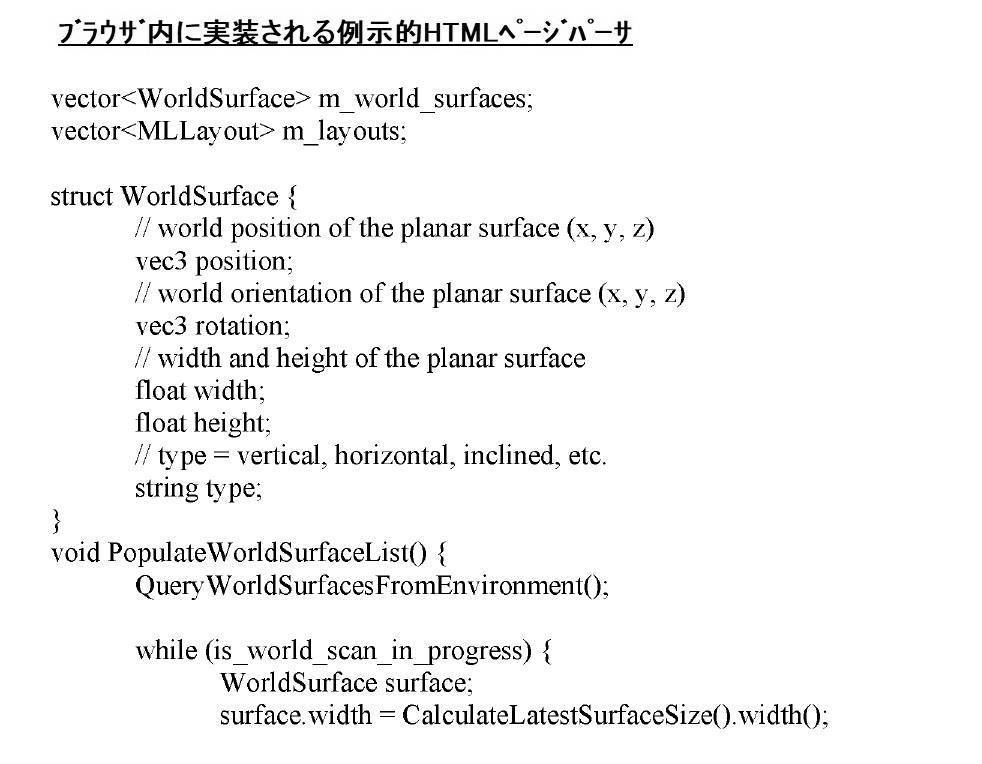

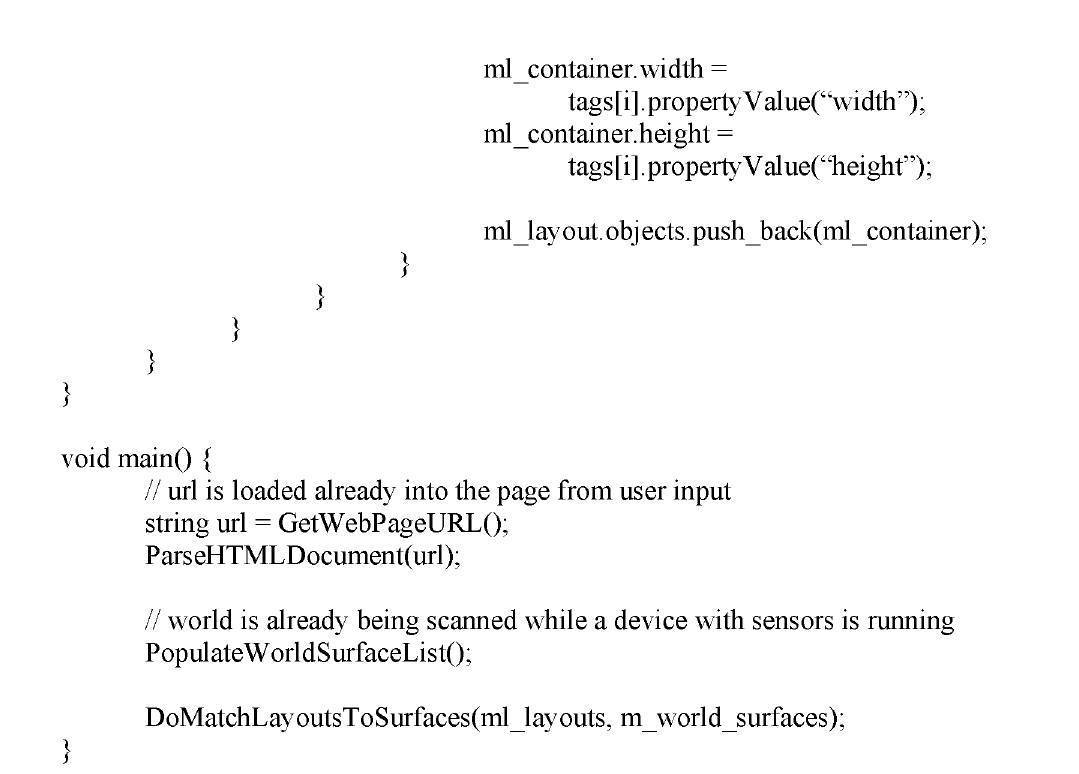
例示的HTMLページパーサは、2Dコンテンツ(例えば、ウェブページ)内の特定の要素/オブジェクトに関する表示選好を提供するために使用される、HTMLタグを含有するHTMLページが、解析および識別および/または抽出/複製され得る方法を示す。例示的HTMLページパーサに開示されるように、2Dコンテンツ(例えば、ウェブページ)内の要素は、開示されるサンプルコードを使用して解析されることができる。種々の要素名および値を使用する、あるHTMLタグが、HTMLページパーサ(例えば、ML.layout、ML.container等)によって識別/抽出され、特定の要素が3D環境内でユーザに表示されるための方法(例えば、要素を特定の表面にマッピングすることによって)を決定してもよい。 An exemplary HTML page parser parses and identifies and/or extracts HTML pages containing HTML tags used to provide display preferences for particular elements/objects within 2D content (e.g., web pages). / indicates how it can be replicated. As disclosed in the exemplary HTML page parser, elements within 2D content (eg, web pages) can be parsed using the disclosed sample code. Because certain HTML tags using various element names and values are identified/extracted by HTML page parsers (e.g., ML.layout, ML.container, etc.) to display specific elements to the user within the 3D environment (eg, by mapping the elements to a particular surface).
1つ以上の要素のための代替表示形態をルックアップ/検索するステップが、440において実施される。あるフォーマット化ルールが、ウェブページ上の画像のために規定されてもよい。例えば、ウェブブラウザ110が、画像の3Dバージョンを表示することが可能である場合、ウェブページ設計者は、付加的タグを設置し、または特定のタグのある属性を定義し、ウェブブラウザ110が、画像が画像の代替バージョン(例えば、画像の3Dバージョン)を有し得ることを認識することを可能にしてもよい。ウェブブラウザ110は、次いで、3D対応ブラウザ内に表示されるべき画像の代替バージョン(例えば、画像の3Dバージョン)にアクセスしてもよい。
A step of looking up/retrieving alternative presentations for one or more elements is performed at 440 . Certain formatting rules may be defined for images on web pages. For example, if the
2Dコンテンツ内の識別された要素を記憶するステップが、450において実施される。本方法は、マッピングルーチン(例えば、図3の340における要素を識別された表面にマッピングするステップ)によって使用され、要素を特定の表面にマッピングするために、識別された要素を非一過性記憶媒体の中に記憶してもよい。非一過性記憶媒体は、記憶デバイス130またはローカル記憶デバイス140等のデータ記憶デバイスを含んでもよい。要素は、下記に説明される図5に開示されるテーブル等の特定のテーブル内に記憶されてもよい。いくつかの実施形態では、2Dコンテンツ内の識別された要素は、一過性記憶媒体内に記憶されてもよい。
A step of storing the identified elements within the 2D content is performed at 450 . The method is used by a mapping routine (eg, the step of mapping elements to identified surfaces at 340 in FIG. 3) to map identified elements to non-transient storage in order to map the elements to a particular surface. It may be stored in a medium. Non-transitory storage media may include data storage devices such as
図5は、いくつかの実施形態による、2Dコンテンツから分解された要素を記憶するためのテーブルの実施例を示す。要素テーブル500は、図4の410において2Dコンテンツ内の要素を識別するステップの結果をデータベース内に記憶し得る、例示的テーブルである。要素テーブル500は、例えば、要素識別(ID)510、要素が3D表面上に設置され得る場所に関する選好インジケータ520、特定の要素が親要素内に含まれる場合の親要素ID530、要素が子要素を含有し得る場合の子要素ID540、および要素を表示するために使用される表面または仮想オブジェクトに要素の複数のバージョンを表示することと互換性を持たせる必要性を正当化し得る、要素が複数の実施形態を含有するかどうかを示すための多重エンティティインジケータ550を含む、2Dコンテンツ内の1つ以上の要素についての情報を含む。親要素は、サブ要素(例えば、子要素)を含有し得る、2Dコンテンツ内の要素/オブジェクトである。例えば、220の値を有する、要素ID(例えば、メインビデオ220)は、260の親要素ID値(例えば、アクティブタブ260)を有し、これは、メインビデオ220が、アクティブタブ260の子要素であることを示す。または換言すると、メインビデオ220は、アクティブタブ260内に含まれる。同一実施例を継続すると、メインビデオ220は、子要素ID230(例えば、ユーザコメント230)を有し、これは、ユーザコメント230がメインビデオ220と関連付けられることを示す。当業者は、要素テーブル500が、関係データベースまたは任意のタイプのデータベース内のテーブルであってもよいことを理解し得る。加えて、要素テーブル500は、図4の410において2Dコンテンツ内の要素を識別するステップの結果を含有する、コンピュータメモリ(例えば、キャッシュ)内のアレイであってもよい。
FIG. 5 shows an example of a table for storing decomposed elements from 2D content, according to some embodiments. Element table 500 is an exemplary table in which the results of identifying elements in 2D content at 410 in FIG. 4 may be stored in a database. The element table 500 includes, for example, an element identification (ID) 510, a
要素テーブル500内の行560の各行は、ウェブページ内からの要素に対応する。要素ID510は、要素毎の一意の識別子(例えば、要素ID)を含有する、列である。いくつかの実施形態では、要素の一意性は、テーブル内の要素ID510列と別の列(例えば、コンテンツ設計者によって識別される1つを上回る選好が存在する場合の選好520列)の組み合わせとして定義されてもよい。選好520は、その値が、少なくとも部分的に、コンテンツ設計者/開発者(例えば、ウェブページ設計者)によって定義され、図4の430においてヒントまたはタグを各要素から抽出するステップに開示されるように、本システムおよび方法によって識別される、HTMLタグおよび属性に基づいて決定され得る、列である。他の実施形態では、選好520列は、少なくとも部分的に、所定のブラウザルールに基づいて決定され、ウェブページ内のあるタイプの要素が3D環境内に表示されるべき場所を規定してもよい。これらの所定のルールは、本システムおよび方法に、要素を3D環境内に最良に設置するための場所を決定するための提案を提供し得る。
Each row of
親要素ID530は、本行内の本特定の要素が、その中に表示される、またはそれに関連する、親要素の要素IDを含有する、列である。ウェブページ内の特定の要素は、埋め込まれ得る、ページの別の要素内に設置され得る、またはページ上の別の要素に関連し得る。例えば、本実施形態では、要素ID510列の第1のエントリは、図2のメインビデオ220に対応する要素ID220の値を記憶する。メインビデオ220に対応する選好520列内の選好値は、HTMLタグおよび/または属性に基づいて決定され、本実施形態では、本要素が、ユーザの物理的環境105の「主要」な場所内に設置されるべきであるとされる。ユーザ108の現在の場所に応じて、その主要な場所は、居間内の壁、またはユーザ108が現在見ている台所のコンロの上のフードであってもよい、または広開放空間内に居る場合、メインビデオ220がその上に投影され得る、ユーザ108の視線の表面に投影される仮想オブジェクトであってもよい。2Dコンテンツの要素がユーザ108に表示される方法に関するさらなる情報は、後の節に開示されるであろう。本実施例を継続すると、親要素ID530列は、図2のアクティブタブ260に対応する、要素ID260の値を記憶する。したがって、メインビデオ220は、アクティブタブ260の子である。
子要素ID540は、本行内の本特定の要素が、その中に表示されている、またはそれに関連する、子要素の要素IDを含有する、列である。ウェブページ内の特定の要素は、内蔵される、ページの別の要素内に設置される、またはページ上の別の要素に関連してもよい。本実施例を継続すると、子要素ID540列は、図2のユーザコメント230に対応する、要素ID230の値を記憶する。
多重エンティティインジケータ550は、要素を表示するために使用される表面または仮想オブジェクトに要素の複数のバージョンを表示することと互換性を持たせる必要性を正当化し得る、要素が多重エンティティを含有するかどうかを示す、列である(例えば、要素は、ユーザコメント230であってもよく、メインビデオ220に関して、利用可能な1つを上回るコメントが存在してもよい)。本実施例を継続すると、多重エンティティインジケータ550列は、「N」の値を記憶し、メインビデオ220が、複数のメインビデオをアクティブタブ260内に有していない、またはそれに対応しない(例えば、メインビデオ220の複数のバージョンが「ない」)ことを示す。
本実施例を継続すると、要素ID510列の第2のエントリは、図2のユーザコメント230に対応する、要素ID230の値を記憶する。ユーザコメント230に対応する、選好520列内の選好値は、「水平」の選好を示し、ユーザコメント230が、ユーザの物理的環境105内のいずれかの場所の「水平」表面上に設置されるべきであることを示す。上記に議論されるように、水平表面は、ユーザの物理的環境105内の利用可能な水平表面に基づいて決定されるであろう。いくつかの実施形態では、ユーザの物理的環境105は、水平表面を有していない場合があり、その場合、本開示のシステムおよび方法は、水平表面を伴う仮想オブジェクトを識別/作成し、ユーザコメント230を表示してもよい。本実施例を継続すると、親要素ID530列は、図2のメインビデオ220に対応する、値要素ID220を記憶し、多重エンティティインジケータ550列は、「Y」の値を記憶し、ユーザコメント230が1つを上回る値(例えば、1つを上回るユーザコメント)を含有し得ることを示す。
Continuing with the example, the second entry in the
要素テーブル500内の残りの行は、ユーザ108に関心がある残りの要素に関する情報を含有する。当業者は、410において2Dコンテンツ内の要素を識別するステップの結果を記憶することが、いったん本分析が2Dコンテンツ上で実施されると、別のユーザが同一2Dコンテンツに関心がある場合に、2Dコンテンツの将来的分析のために本システムおよび方法によって留保され得るため、コンピュータ自体の機能を改良することを理解し得る。本特定の2Dコンテンツを分解するためのシステムおよび方法は、以前にすでに完了されているため、回避されてもよい。
The remaining rows in factor table 500 contain information about the remaining factors of interest to
いくつかの実施形態では、要素テーブル500は、記憶デバイス130内に記憶されてもよい。他の実施形態では、要素テーブル500は、最近閲覧した2Dコンテンツへの迅速なアクセスのために、または最近閲覧された2Dコンテンツへの可能性として考えられる再訪問のために、ローカル記憶デバイス140内に記憶されてもよい。さらに他の実施形態では、要素テーブル500は、ユーザ108から遠隔に位置する記憶デバイス130と、ユーザ108のローカルに位置するローカル記憶デバイス140との両方に記憶されてもよい。
In some embodiments, element table 500 may be stored within
図3に戻ると、本方法は、330において、周囲表面を識別するステップを継続する。ユーザ108は、頭部搭載型システム160を通して、ユーザの物理的環境105を視認し、頭部搭載型システム160が、壁、テーブル、絵画、窓枠、コンロ、冷蔵庫、TV等の周囲表面を捕捉および識別することを可能にしてもよい。頭部搭載型システム160は、頭部搭載型システム160上のセンサおよびカメラのため、または任意の他のタイプの類似デバイスを用いて、ユーザの物理的環境105内の実オブジェクトを認知する。いくつかの実施形態では、頭部搭載型システム160は、ユーザの物理的環境105内で観察される実オブジェクトと記憶デバイス130またはローカル記憶デバイス140内に記憶される仮想オブジェクトをマッチングさせ、そのような仮想オブジェクトとともに利用可能な表面を識別してもよい。実オブジェクトは、ユーザの物理的環境105内で識別されたオブジェクトである。仮想オブジェクトは、ユーザの物理的環境内に物理的に存在しないが、仮想オブジェクトがユーザの物理的環境内に存在するかのように現れるようにユーザに表示され得る、オブジェクトである。例えば、頭部搭載型システム160は、ユーザの物理的環境105内のテーブルの画像を検出してもよい。テーブル画像は、記憶デバイス130またはローカル記憶デバイス140における迅速かつ効率的比較およびマッチングのために、3D点群オブジェクトに縮小されてもよい。実オブジェクトと(例えば、テーブルの)3D点群オブジェクトのマッチングが、検出される場合、本システムおよび方法は、テーブルを表す3D点群オブジェクトが水平表面を有するように定義されるため、水平表面を有するとテーブルを識別するであろう。周囲表面を識別するステップのより詳細な説明は、下記の図6に開示される。
Returning to FIG. 3, the method continues at 330 with identifying surrounding surfaces.
いくつかの実施形態では、仮想オブジェクトは、抽出されたオブジェクトであってもよく、抽出されたオブジェクトは、ユーザの物理的環境105内で識別された物理的オブジェクトであってもよいが、付加的処理および関連付けが、物理的オブジェクト自体上で行われることが不可能であろう、抽出されたオブジェクトに行われ得るように(例えば、物理的オブジェクトの色を変化させ、物理的オブジェクトの特定の特徴をハイライトする等のために)、物理的オブジェクトの場所内の仮想オブジェクトとしてユーザに表示される。加えて、抽出されたオブジェクトは、2Dコンテンツ(例えば、ブラウザからのウェブページ)から抽出され、ユーザ108に表示される、仮想オブジェクトであってもよい。例えば、ユーザ108は、ユーザの物理的環境105内に表示されるように、2Dコンテンツ/ウェブページ上に表示されるウェブページからの長椅子等のオブジェクトを選定してもよい。システムは、選定されたオブジェクト(例えば、長椅子)を認識し、抽出されたオブジェクト(例えば、長椅子)がユーザの物理的環境105内に物理的に存在するかのように、抽出されたオブジェクト(例えば、長椅子)をユーザ108に表示してもよい。加えて、仮想オブジェクトはまた、ユーザの物理的環境105に物理的に存在さえしないが、2Dコンテンツからのコンテンツを表示する観点から、あるコンテンツをユーザに提示するために理想的ディスプレイ表面であり得る、コンテンツを表示するための表面(例えば、あるコンテンツを閲覧するためにユーザに近接近する透明ディスプレイ画面)を有する、オブジェクトを含んでもよい。
In some embodiments, a virtual object may be an abstracted object, which may be a physical object identified within the user's
図6は、いくつかの実施形態による、ユーザのローカル環境からの表面を識別するための方法を図示する、フロー図である。図6は、図3の330において周囲表面を識別するステップを開示する、詳細なフローである。図6は、610において、図3の330における周囲表面を識別するステップに類似する、ユーザの現在の周囲を識別するステップから開始する。本方法は、620において、ユーザの姿勢を決定する次のステップに進む。 FIG. 6 is a flow diagram illustrating a method for identifying surfaces from a user's local environment, according to some embodiments. FIG. 6 is a detailed flow disclosing the step of identifying surrounding surfaces at 330 of FIG. FIG. 6 begins at 610 with identifying the user's current surroundings, similar to identifying the surrounding surfaces at 330 of FIG. At 620, the method proceeds to the next step of determining the pose of the user.
620において、ユーザの姿勢を決定するステップは、ユーザの姿勢が、ユーザの物理的環境105内のオブジェクトに関連してユーザ108に関する目線を提供するであろうため、ユーザの現在の周囲を識別するための重要なステップである。例えば、図1に戻って参照すると、ユーザ108は、頭部搭載型システム160を使用して、ユーザの物理的環境105を観察する。620において、ユーザの姿勢(すなわち、世界に対するベクトルおよび/または原位置情報)を決定するステップは、頭部搭載型システム160が、例えば、(1)接地面に関連したユーザ108の身長、(2)ユーザ108が、部屋を動き回り、その画像を捕捉するために、その頭部を回転させる必要がある角度、および(3)ユーザ108と、テーブル188、主壁180、および側壁184との間の距離を理解することに役立つであろう。加えて、ユーザ108の姿勢はまた、垂直表面182および186を、ユーザの物理的環境105内の他の表面とともに観察するとき、頭部搭載型システム160の角度を決定するために有用である。
At 620 , determining the user's pose identifies the user's current surroundings, as the user's pose will provide a line of sight for the
630では、本方法は、周囲表面の寸法を識別する。ユーザの物理的環境105内の各候補表面は、タグ付けされ、対応する寸法とともにカテゴリ化される。いくつかの実施形態では、ユーザの物理的環境105内の各候補表面はまた、タグ付けされ、対応する配向とともにカテゴリ化される。本情報は、少なくとも部分的に、表面の寸法、表面の配向、特定の表面から離れたユーザ108の距離、および要素のために表示される必要がある情報のタイプに基づいて、どの要素がどの表面にマッピングされるべきであるかを識別するために有用であろう。例えば、ビデオは、記事のテキストサイズが、小寸法を伴う離れた壁上に表示される場合、小さすぎてユーザが見ることができない場合がある、豊富な情報を含有し得る、ブログまたは記事より離れて示され得る。
At 630, the method identifies the dimensions of the surrounding surface. Each candidate surface in the user's
640では、本方法は、要素を特定の表面にマッピングするために、マッピングルーチン(例えば、要素を図3の識別された表面340にマッピングするステップ)によって使用されるために、周囲表面のインベントリを非一過性記憶媒体の中に記憶する。非一過性記憶媒体は、記憶デバイス130またはローカル記憶デバイス140等のデータ記憶デバイスを含んでもよい。識別された表面は、下記に説明される図7に開示されるテーブル等の特定のテーブル内に記憶されてもよい。いくつかの実施形態では、識別された表面は、一過性記憶媒体内に記憶されてもよい。
At 640, the method takes an inventory of surrounding surfaces to be used by a mapping routine (e.g., the step of mapping elements to identified surfaces 340 of FIG. 3) to map elements to particular surfaces. Store in a non-transitory storage medium. Non-transitory storage media may include data storage devices such as
図7は、いくつかの実施形態による、ユーザのローカル環境から識別された表面のインベントリを記憶するためのテーブルの実施例を示す。表面テーブル700は、周囲表面を識別するプロセスの結果をデータベース内に記憶し得る、例示的テーブルである。表面テーブル700は、例えば、表面ID710、幅720、高さ730、配向740、実または仮想インジケータ750、多重性760、および位置770を含む、データ列を有する、ユーザの物理的環境105内の表面についての情報を含む。当業者は、表面テーブル700が、関係データベースまたは任意のタイプのデータベース内のテーブルであってもよいことを理解し得る。加えて、表面テーブル700は、図3の330において周囲表面を識別するステップの結果を記憶する、コンピュータメモリ(例えば、キャッシュ)内のアレイであってもよい。
FIG. 7 shows an example of a table for storing an inventory of surfaces identified from a user's local environment, according to some embodiments. Surface table 700 is an exemplary table in which the results of the process of identifying surrounding surfaces may be stored in a database. Surface table 700 has data columns including, for example,
表面テーブル700内の行780の各行は、ユーザの物理的環境105からの表面、またはユーザの物理的環境105内でユーザ108に表示され得る、仮想表面に対応してもよい。表面ID710は、特定の表面を一意に識別するための一意の識別子(例えば、表面ID)を含有する、列である。特定の表面の寸法は、幅720および高さ730列内に記憶される。
Each row of
配向740は、ユーザ108に対する表面の配向(例えば、垂直、水平等)を示す、列である。実/仮想インジケータ750は、特定の表面が、ユーザ108によって頭部搭載型システム160を使用して知覚されるようなユーザの物理的環境105内の実オブジェクト上に位置するかどうか、または特定の表面が、頭部搭載型システム160によって生成され、ユーザの物理的環境105内に表示されるであろう、仮想オブジェクト上に位置するかどうかを示す、列である。頭部搭載型システム160は、ユーザの物理的環境105が、ユーザ108が表示することを所望するコンテンツの量を表示するための十分な表面を含有し得ない状況のために、仮想オブジェクトを生成する必要があり得る。これらの実施形態では、頭部搭載型システム160は、表示のために識別されたあるタイプの要素を表示するための適切な表面寸法を有し得る、既存の仮想オブジェクトのデータベースから検索してもよい。データベースは、記憶デバイス130またはローカル記憶デバイス140からのものであってもよい。
多重性760は、表面/オブジェクトが要素の複数のバージョンを表示することと互換性があるかどうかを示す、列である(例えば、要素は、図2の二次タブ250であってもよく、特定のウェブブラウザ110に関して、1つを上回る二次(すなわち、非アクティブ)タブ(例えば、タブあたり1つのウェブページ)が存在してもよい)。図2の仮想Rolodex190に対応する190の値を記憶する、表面ID列の第4のエントリ、および図2のマルチスタック仮想オブジェクト194に対応する194の値を記憶する、表面ID列の第5のエントリの場合等、複数の760列が、「多重」の値を有する場合、本システムおよび方法は、非アクティブタブに関する場合のように、要素の複数のバージョンを有し得る要素が存在する場合、これらが、複数のバージョンに適応し得る表面のタイプであることを把握するであろう。
位置770は、基準フレームまたは基準点に対する物理的表面の位置を示す、列である。物理的表面の位置は、図7における位置770の列ヘッダに示されるように、表面の中心であると事前決定されてもよい。他の実施形態では、位置は、表面の別の基準点(例えば、表面の正面、背面、上面、または底面)であると事前決定されてもよい。位置情報は、ある基準フレームまたは基準点に対する物理的表面の中心からのベクトルおよび/または位置情報として表され得る。表面テーブル700内の位置を表すためのいくつかの方法が、存在し得る。例えば、表面テーブル700内の表面ID194に関する位置の値は、ベクトル情報および基準フレーム情報(例えば、「フレーム」添字)を例証するように理論上表される。x,y,zは、各空間寸法内の3D座標であって、フレームは、3D座標が対する基準フレームを示す。
例えば、表面ID186は、実世界原点に対して(1.3、2.3、1.3)であるように、表面186の中心の位置を示す。別の実施例として、表面ID192は、ユーザ基準フレームに対して(x,y,z)であるように、表面192の中心の位置を示し、表面ID190は、別の表面182に対して(x,y,z)であるように、表面190の中心の位置を示す。基準フレームは、現在使用されている基準フレームを明確にするために重要である。基準フレームとしての実世界原点の場合、これは、概して、静的基準フレームである。しかしながら、基準フレームがユーザ基準フレームである、他の実施形態では、ユーザは、基準フレームを移動させ得、その場合、平面(またはベクトル情報)は、ユーザが、移動しており、ユーザ基準フレームが基準フレームとして使用される場合、ユーザに伴って移動および変化し得る。いくつかの実施形態では、表面毎の基準フレームは、同一(例えば、ユーザ基準フレーム)であってもよい。他の実施形態では、表面テーブル700内に記憶される表面のための基準フレームは、表面に応じて、異なり得る(例えば、ユーザ基準フレーム、世界基準フレーム、部屋内の別の表面またはオブジェクト等)
For example,
本実施例では、表面テーブル700内に記憶される値は、図2のユーザの物理的環境105内で識別された物理的表面(例えば、垂直表面182および186および水平表面192)と、仮想表面(例えば、仮想Rolodex190およびマルチスタック仮想オブジェクト194)とを含有する。例えば、本実施形態では、表面ID710列の第1のエントリは、図2の垂直表面182に対応する、表面ID182の値を記憶する。垂直表面182の幅および高さに対応する、幅720列内の幅値および高さ730列内の高さ値は、それぞれ、垂直表面182は、48インチ(W)×36インチ(H)の寸法を有することを示す。同様に、垂直表面182を示す、配向740列内の配向値は、「垂直」の配向を有する。加えて、垂直表面182を示す、実/仮想インジケータ750列内の実/仮想値は、「R」(例えば、実)表面である。複数の760列内の多重性値は、垂直表面182が「単一」(例えば、単一コンテンツのみを保持することができる)であることを示す。最後に、位置770列は、(2.5、2.3、1.2)userのベクトル情報を用いて、ユーザ108に対する垂直表面182の位置を示す。
In this example, the values stored in surface table 700 are the physical surfaces (eg,
表面テーブル700内の残りの行は、ユーザの物理的環境105内の残りの表面に関する情報を含有する。当業者は、いったん本分析が周囲表面上で実施されると、別のユーザまたは同一ユーザ108が同一物理的環境105内に居るが、異なる2Dコンテンツに関心がある場合に、ユーザの周囲表面の将来的分析のために、頭部搭載型システム160によって留保され得るため、図3の330において周囲表面を識別するステップの結果を記憶することが、コンピュータ自体の機能を改良することを理解し得る。330において周囲表面を識別するための処理ステップは、これらの処理ステップが以前にすでに完了されているため、回避されてもよい。唯一の差異は、少なくとも部分的に、異なる2Dコンテンツを伴う要素を識別する要素テーブル500に基づいて、利用可能である付加的または異なる仮想オブジェクトを識別するステップを含み得る。
The remaining rows in surface table 700 contain information about the remaining surfaces in the user's
いくつかの実施形態では、表面テーブル700は、記憶デバイス130内に記憶される。他の実施形態では、表面テーブル700は、最近閲覧した2Dコンテンツへの迅速アクセスのために、または最近閲覧した2Dコンテンツへの可能性として考えられる再訪問のために、ユーザ108のローカル記憶デバイス140内に記憶される。さらに他の実施形態では、表面テーブル700は、ユーザ108から遠隔に位置する記憶デバイス130と、ユーザ108のローカルに位置するローカル記憶デバイス140との両方に記憶されてもよい。
In some embodiments, surface table 700 is stored within
図3に戻ると、本方法は、340において、320において2Dコンテンツ内の要素を識別するステップから識別された要素と、330において周囲表面を識別するステップから識別された周囲表面との組み合わせを使用して、いくつかの実施形態では、仮想オブジェクトを付加的表面として使用して、要素を識別された表面にマッピングするステップを継続する。識別された要素を識別された表面にマッピングするステップは、複数の要因を伴ってもよく、そのうちのいくつかは、上記に議論される例示的HTMLページパーサ等のHTMLページパーサを使用することによって、2Dコンテンツ設計者/制作者によって定義されたHTMLタグ要素を介して2Dコンテンツ設計者/制作者によって提供されるヒントを分析するステップを含んでもよい。他の要因は、ARブラウザ、ARインターフェース、および/またはクラウド記憶装置によって提供されるようなある2Dコンテンツをマッピングするための方法および場所の事前に定義されたルールのセットから選択するステップを含んでもよい。図8は、2Dコンテンツからの1つ以上の要素を識別された表面にマッピングするマッピングプロセスの詳細なフローを提供する。 Returning to FIG. 3, at 340 the method uses a combination of elements identified from identifying elements within the 2D content at 320 and surrounding surfaces identified from identifying surrounding surfaces at 330. Then, in some embodiments, the virtual object is used as an additional surface to continue mapping the elements onto the identified surface. Mapping the identified elements to the identified surface may involve multiple factors, some of which are by using an HTML page parser, such as the exemplary HTML page parser discussed above. , analyzing hints provided by the 2D content designer/author via HTML tag elements defined by the 2D content designer/author. Other factors may include selecting from a set of pre-defined rules of how and where to map certain 2D content such as provided by AR browsers, AR interfaces, and/or cloud storage. good. FIG. 8 provides a detailed flow of a mapping process for mapping one or more elements from 2D content onto an identified surface.
図8は、いくつかの実施形態による、2Dコンテンツからの要素を表面にマッピングするための方法を図示する、フロー図を描写する。図8は、要素を図3の340において識別された表面にマッピングするステップを開示する、詳細なフローである。 FIG. 8 depicts a flow diagram illustrating a method for mapping elements from 2D content onto a surface, according to some embodiments. FIG. 8 is a detailed flow disclosing the steps of mapping an element to the surface identified at 340 in FIG.
810では、本方法は、識別された要素が2Dコンテンツ設計者によって提供されるヒントを含有するかどうかを決定する。2Dコンテンツ設計者は、2Dコンテンツ設計者が2Dコンテンツを最初に設計したとき、特定の要素を最良に表示するための場所に関するヒントを提供してもよい。例えば、図2のメインビデオ220は、アクティブタブ260内のウェブページ上に表示される、YOUTUBE(登録商標)ビデオであってもよい。2Dコンテンツ設計者(例えば、ウェブページ設計者)は、メインビデオ220が、ユーザ108の直視状態において、平坦垂直表面上に最良に表示されることを示すためのヒントを提供してもよい。いくつかの実施形態では、これは、2Dウェブページコンテンツのために最初に設計された既存のHTMLタグ要素を使用して、3Dディスプレイ環境が利用可能である場合、2Dコンテンツ内の特定のコンテンツ要素が表示され得る方法をさらに定義することによって、遂行されてもよい。別の実施例として、2Dコンテンツ設計者は、特定のウェブページに関する2D画像の代わりに、3D画像が利用可能であることを記述する、ヒントを提供してもよい。例えば、2D画像の場合、2Dコンテンツ設計者は、基本HTMLタグを提供し、2Dコンテンツのソースを識別することに加え、他の殆ど使用されないHTMLタグを提供して、2D画像の3Dバージョンのソースを識別し、加えて、画像の3Dバージョンが使用される場合、ユーザのビューの正面(例えば、3Dレイアウトのメインフレーム内)においてそれを顕著に表示させるためのヒントを提供してもよい。いくつかの実施形態では、2Dコンテンツ設計者は、2Dコンテンツをレンダリングするウェブブラウザ110が向上された3D画像を活用するための3D表示機能性を有し得る場合に備えて、本付加的「ヒント」を2D画像の3D画像場所に提供してもよい。当業者は、特定のコンテンツ要素が本明細書に開示されたもの以外の2Dレイアウトで設置されるべき場所に関して、2Dコンテンツ設計者がヒントを提供し得る、多くの他の方法が存在し、これらが、2Dコンテンツ設計者が2Dコンテンツ内のあるまたは全ての要素を最良に表示するためのヒントを提供し得る、異なる方法のいくつかの実施例であることを理解し得る。
At 810, the method determines whether the identified element contains hints provided by the 2D content designer. The 2D content designer may provide hints on where to best display certain elements when the 2D content designer originally designed the 2D content. For example,
別の実施形態では、HTMLタグ規格は、上記に議論されるウェブページ開発者によって提供される例示的HTMLウェブページ等のAR/VR特有のタイプのブラウザのためのユーザの周囲内への3Dオブジェクト設置のヒントを提供するために、新しいHTMLタグまたは類似マークアップ言語の作成を含んでもよい。本書の時点で、これらの新しいHTMLタグは、HTML言語内の標準タグとしてまだ作成および/または採用されていない。しかしながら、いったんHTML規格が、これらのタイプの付加的タグを含むと、本方法およびシステムのある実施形態は、これらの新しいタグを活用し、さらに、識別された要素の識別された表面へのマッピングを提供するであろう。当業者は、コンテンツ要素が3D環境内に最良に表示されるべき方法に関するヒントをさらに提供するように修正または採用され得る、HTMLタグ以外の多くの他の言語が存在し、新しいHTMLタグ付け規格が、単に、そのような目標を達成するための1つの方法であることを理解し得る。 In another embodiment, the HTML tag standard allows 3D objects into the user's surroundings for AR/VR specific types of browsers, such as the exemplary HTML web pages provided by the web page developers discussed above. It may involve creating new HTML tags or similar markup language to provide installation hints. As of this writing, these new HTML tags have not yet been created and/or adopted as standard tags within the HTML language. However, once the HTML standard includes these types of additional tags, certain embodiments of the present methods and systems take advantage of these new tags and further map identified elements to identified surfaces. would provide Those skilled in the art will recognize that there are many other languages besides HTML tags that can be modified or adopted to further provide hints as to how content elements should be best displayed within a 3D environment, and the emerging HTML tagging standard is simply one way to achieve such goals.
820では、本方法は、2Dコンテンツ設計者によって提供されるヒントを使用するか、または2Dコンテンツからの1つ以上のコンテンツ要素をあるタイプの3D表面にマッピングするための事前に定義されたルールのセットを使用するかどうかを決定する。いくつかの実施形態では、特定のコンテンツ要素のための2Dコンテンツ設計者によって提供されるヒントが存在しない場合、本システムおよび方法は、事前に定義されたルールのセットを使用して、コンテンツ要素を表面にマッピングするための最良方法を決定してもよい。他の実施形態では、2Dコンテンツ設計者によって提供されるコンテンツ要素の設置のためのヒントが存在し得るときでも、本システムおよび方法はまた、事前に定義されたルールのセットを使用して、コンテンツ要素を表面にマッピングすることが最良であり得ることを決定してもよい。しかしながら、他の実施形態では、本システムおよび方法は、2Dコンテンツ設計者によって提供されるヒントが、十分であって、したがって、ヒントを使用して、コンテンツ要素を表面にマッピングすることを決定してもよい。最終的に、2Dコンテンツ設計者によって提供されるヒントを使用するか、または事前に定義されたルールを使用して、コンテンツ要素を表面にマッピングするかどうかを決定することは、ARブラウザの最終決定となる。 At 820, the method uses hints provided by the 2D content designer or pre-defined rules for mapping one or more content elements from the 2D content onto some type of 3D surface. Decide whether to use sets. In some embodiments, if there are no hints provided by the 2D content designer for a particular content element, the system and method use a predefined set of rules to identify the content element. A best method for mapping to the surface may be determined. In other embodiments, the system and method also use a predefined set of rules to determine the content, even when there may be hints for the placement of content elements provided by the 2D content designer. It may be determined that it may be best to map the elements to the surface. However, in other embodiments, the system and method determines that the hints provided by the 2D content designer are sufficient and therefore use the hints to map the content elements to the surface. good too. Ultimately, using hints provided by the 2D content designer or using pre-defined rules to decide whether to map content elements to the surface is the final decision of the AR browser. becomes.
830では、2Dコンテンツ設計者によって提供されるヒントを使用することが、進めるべき方法であると決定されたと仮定して、本方法は、ヒントを分析し、少なくとも部分的に、ヒントに基づいて(例えば、表面テーブル700にクエリする)、特定のコンテンツ要素を表示するために使用され得る、識別された周囲表面のインベントリを検索する。840では、本方法は、最良適合アルゴリズムを起動させ、提供されるヒントに基づいて、特定のコンテンツ要素のための最良適合表面を選定する。最良適合アルゴリズムは、例えば、特定のウェブページ内の特定のコンテンツ要素のための「メインコンテンツ」のヒントを得て、3D環境内のユーザ108に対して正面および中心にある利用可能な識別された周囲表面の中から3D表面を識別することを試み得る。例えば、図2のメインビデオ220は、メインビデオ220が、「メイン」の選好値をアクティブタブ260内の図5の要素テーブル500の選好520列内に有し、垂直表面182が、ユーザ108の直視状態にあって、メインビデオ220を表示するための最適定寸寸法を有する、表面であるため、垂直表面182にマッピングされる。
At 830, assuming it is determined that using hints provided by the 2D content designer is the method to proceed, the method analyzes the hints and, at least in part, based on the hints ( For example, query the surface table 700) to retrieve an inventory of identified surrounding surfaces that can be used to display a particular content element. At 840, the method launches a best-fit algorithm to select the best-fit surface for the particular content element based on the hints provided. A best-fit algorithm may, for example, take hints of the "main content" for a particular content element within a particular web page and identify the available identified surroundings that are front and center to the
850では、本方法は、表面が識別された周囲表面またはユーザの周囲環境内に表示される仮想オブジェクトかどうかにかかわらず、コンテンツ要素をそのそれぞれマッピングされた表面上に表示するために表示アルゴリズムによって使用されるように、要素の表面テーブルへのマッピングにおけるコンテンツ要素のためのマッピング結果を非一過性記憶媒体内に記憶する。非一過性記憶媒体は、記憶デバイス130またはローカル記憶デバイス140等のデータ記憶デバイスを含んでもよい。マッピング結果は、下記に説明される図9に開示されるテーブル等の特定のテーブル内に記憶されてもよい。
At 850, the method uses a display algorithm to display the content element on its respective mapped surface, whether the surface is the identified surrounding surface or a virtual object displayed in the user's surroundings. As used, the mapping result for the content element in mapping the element to the surface table is stored in a non-transitory storage medium. Non-transitory storage media may include data storage devices such as
図9は、いくつかの実施形態による、2Dコンテンツからのコンテンツ要素の表面へのマッピングを記憶するためのテーブルの実施例を示す。マッピングテーブル900は、表面にマッピングされたコンテンツ要素の結果をデータベースの中に記憶する、例示的テーブルである。マッピングテーブル900は、例えば、コンテンツ要素(例えば、要素ID)およびコンテンツ要素がマッピングされた表面(例えば、表面ID)についての情報を含む。当業者は、マッピングテーブル900が、関係データベースまたは任意のタイプのデータベースまたは記憶媒体内に記憶されるテーブルであってもよいことを理解し得る。加えて、マッピングテーブル900は、図3の340において要素の識別された周囲表面へのマッピングの結果を含有する、コンピュータメモリ(例えば、キャッシュ)内のアレイであってもよい。 FIG. 9 shows an example of a table for storing mappings of content elements from 2D content to surfaces, according to some embodiments. Mapping table 900 is an exemplary table that stores in a database the results of surface-mapped content elements. Mapping table 900 includes, for example, information about content elements (eg, element IDs) and surfaces to which the content elements are mapped (eg, surface IDs). Those skilled in the art will appreciate that mapping table 900 may be a relational database or a table stored in any type of database or storage medium. Additionally, the mapping table 900 may be an array in computer memory (eg, cache) containing the results of mapping the elements to the surrounding surfaces identified at 340 in FIG.
マッピングテーブル900の各行は、ユーザの物理的環境105内の表面、または仮想オブジェクトがユーザの物理的環境105内のオブジェクトであるように現れる、ユーザ108に表示される仮想オブジェクトのいずれかにマッピングされる、2Dコンテンツからのコンテンツ要素に対応する。例えば、本実施形態では、要素ID列の第1のエントリは、メインビデオ220に対応する、要素ID220の値を記憶する。メインビデオ220に対応する、表面ID列内の表面ID値は、垂直表面182に対応する、182である。このように、メインビデオ220は、垂直表面182にマッピングされる。同様に、ユーザコメント230は、水平表面192にマッピングされ、提案されるビデオ240は、垂直表面186にマッピングされ、二次タブ250は、仮想Rolodex190にマッピングされる。マッピングテーブル900内の要素IDは、図5の要素テーブル500内に記憶される要素IDと関連付けられてもよい。マッピングテーブル900内の表面IDは、図7の表面テーブル700内に記憶される表面IDと関連付けられてもよい。
Each row of the mapping table 900 maps to either a surface within the user's
図8に戻ると、860では、所定のルールを使用することが、進めるべき方法であると決定されたと仮定して、本方法は、コンテンツ要素の表面へのマッピングルールを含有するデータベースにクエリし、ウェブページ内の特定のコンテンツ要素のために、コンテンツ要素をマッピングするために検討されるべき表面のタイプを決定する。例えば、図2からのメインビデオ220のために返されるルールは、メインビデオ220が垂直表面にマッピングされるべきであることを示し得、したがって、表面テーブル700を検索後、複数の候補表面が、明らかにされる(例えば、垂直表面182および186および仮想Rolodex190)。870では、事前に定義されたルールのセットは、最良適合アルゴリズムを起動し、利用可能な候補表面から、本メインビデオ220のための最良適合である表面を選定してもよい。少なくとも部分的に、最良適合アルゴリズムに基づいて、候補表面の全てのうち、垂直表面182が、ユーザ108の直接通視線内にある表面であって、垂直表面182が、ビデオを表示するために最良寸法を有するため、メインビデオ220が垂直表面182にマッピングされるべきであることが決定される。いったん1つ以上の要素のマッピングが、850において決定されると、本方法は、上記に説明されるように、要素の表面テーブルへのマッピングにおけるコンテンツ要素のためのマッピング結果を非一過性記憶媒体内に記憶する。
Returning to FIG. 8, at 860, assuming that using a given rule is determined to be the method to proceed, the method queries a database containing rules for mapping content elements to surfaces. , for a particular content element within a web page, determines the type of surface to be considered for mapping the content element. For example, the rule returned for
図3に戻ると、本方法は、350において、1つ以上の要素を仮想コンテンツとしてマッピングされた表面上に表示するステップを継続する。頭部搭載型システム160は、情報を表示するためのミニプロジェクタ(図示せず)等の1つ以上のディスプレイデバイスを頭部搭載型システム160内に含んでもよい。1つ以上の要素が、340においてマッピングされたように、個別のマッピングされた表面上に表示される。頭部搭載型システム160を使用して、ユーザ108は、コンテンツが個別のマッピングされた表面上に見えるであろう。当業者は、コンテンツ要素が、種々の表面(物理的または仮想)上に物理的に取り付けられるように現れるように表示されるが、コンテンツ要素は、実際には、ユーザ108によって知覚されるように物理的表面上に投影され、仮想オブジェクトの場合、仮想オブジェクトが、仮想オブジェクトの個別の表面上に取り付けられるように現れるように表示されることを理解し得る。当業者は、ユーザ108が、その頭部を方向転換させる、または上または下を見るとき、頭部搭載型システム160内のディスプレイデバイスが、コンテンツ要素がその個別の表面に継続して添着されたままし、ユーザ108に、コンテンツがマッピングされた表面に添着されているという知覚をさらに提供し得ることを理解し得る。他の実施形態では、ユーザ108は、ユーザ108の頭部、手、眼によって行われる運動、または音声によって、ユーザの物理的環境105のコンテンツを変化させてもよい。
Returning to FIG. 3, the method continues at 350 with displaying one or more elements as virtual content on the mapped surface. Head-mounted
(改良されたブラウザ/アプリケーション実装)
複合現実システムでは、ユーザの作業空間は、ディスプレイ画面のサイズによって限定されない。したがって、従来のブラウザと異なり、複合現実システム内のブラウザウィンドウは、ユーザの環境内の任意の場所に設置および保定されることができる。問題は、従来のブラウザ技術が、表示可能ブラウザ場所がディスプレイ画面の範囲に限定されなければならないという仮定とともに構成されることである。
(improved browser/application implementation)
In mixed reality systems, the user's workspace is not limited by the size of the display screen. Thus, unlike conventional browsers, browser windows in mixed reality systems can be placed and held anywhere within the user's environment. The problem is that conventional browser technology is constructed with the assumption that viewable browser locations must be limited to the extent of the display screen.
本開示の以下の部分は、複合現実環境内でウィンドウを閲覧するための改良されたアプローチを対象とする。複合現実機器を使用すると、ユーザが、ユーザの物理的空間と関連付けられ、その中に設置される、複数のブラウザウィンドウを有し得ることが可能性として考えられる。例えば、ユーザは、第1のブラウザウィンドウを第1の部屋内で開き、第2のブラウザウィンドウを第2の部屋内に居る間に開く場合がある。本開示の本部分によって対処される問題点は、ユーザが第2の場所に行くと、ブラウザウィンドウがもはや可視ではなくなるように、ブラウザウィンドウが第1の場所内の位置にアンカされるような様式で開かれる、状況に関する。問題は、ユーザが環境を変化させる(部屋間で移動する、または異なる地理的場所に行く等)につれて、ユーザが、なおも依然として、以前の地理的場所におけるその前のセッションにアクセスする必要があり得ることである。 The following portions of this disclosure are directed to improved approaches for viewing windows within a mixed reality environment. With mixed reality equipment, it is conceivable that a user may have multiple browser windows associated with and placed within the user's physical space. For example, a user may open a first browser window in a first room and open a second browser window while in a second room. The problem addressed by this portion of the disclosure is the manner in which the browser window is anchored to a position within the first location such that when the user goes to the second location, the browser window is no longer visible. relating to the situation, held in The problem is that as the user changes environments (such as moving between rooms or going to different geographic locations), they still need to access their previous sessions in previous geographic locations. It is to get.
図10は、1つ以上の以前に開かれたウィンドウの場所に対するユーザに関する現在の場所にかかわらず、ユーザのウィンドウの閲覧を実装するためのアプローチのフローチャートを図示する。いくつかの実施形態では、制御インターフェースが、ユーザと関連付けられた全ておよび/または複数のウィンドウの表示のために、選択するために提供される。いくつかの実施形態では、制御インターフェースは、例えば、ユーザ入力をシステムに提供し、システムが対応するコマンドを実行することにより応答することによって、ユーザがMRディスプレイシステムと相互作用し得るような、ユーザインターフェースであってもよい。いくつかの実施形態では、ユーザは、MRシステムの視覚的、聴覚的、触知的、または他の側面と相互作用してもよい。いくつかの実施形態では、ユーザインターフェースは、ブラウザハブを備えてもよく、これは、いくつかの実施形態では、1つ以上のブラウザアプリケーションの1つ以上の側面の視覚的表現であってもよい。例えば、「全てのウィンドウ」アイコンが、ブラウザハブ内に提示されることができ、「全てのウィンドウ」アイコンの選択は、現在のウィンドウ場所(例えば、ウィンドウが開かれた場所)に対するユーザの場所にかかわらず、ユーザと関連付けられた複数のウィンドウの表示を開始する。図10は、ステップ1702から開始し、システムが、全てまたは複数のウィンドウを表示するためのコマンドを受信する(1702)。いくつかの実施形態では、ステップ1702は、ユーザがブラウザハブユーザインターフェース内にあり得る「全てのウィンドウ」アイコンを選択すると生じてもよい。いくつかの実施形態では、システムは、1つを上回るウィンドウのための選択を受信する。いくつかの実施形態では、システムは、ユーザがユーザのシステムと関連付けられた1つを上回るウィンドウを閲覧することを所望することを示す、ユーザ入力を受信してもよい。 FIG. 10 illustrates a flow chart of an approach for implementing viewing of a user's windows regardless of the user's current location relative to the location of one or more previously opened windows. In some embodiments, a control interface is provided for selection for display of all and/or multiple windows associated with the user. In some embodiments, the control interface provides a user interface such that the user can interact with the MR display system, for example, by providing user input to the system and the system responding by executing corresponding commands. It can be an interface. In some embodiments, the user may interact with visual, auditory, tactile, or other aspects of the MR system. In some embodiments, the user interface may comprise a browser hub, which in some embodiments may be a visual representation of one or more aspects of one or more browser applications . For example, an "all windows" icon can be presented in the browser hub, and selection of the "all windows" icon changes the user's location relative to the current window location (e.g., the location from which the window was opened). Regardless, start displaying multiple windows associated with the user. Figure 10 begins at step 1702, where the system receives a command to display all or more windows (1702). In some embodiments, step 1702 may occur when the user selects an "all windows" icon, which may be within the browser hub user interface. In some embodiments, the system receives selections for more than one window. In some embodiments, the system may receive user input indicating that the user wishes to view more than one window associated with the user's system.
1704では、ユーザと関連付けられた複数のウィンドウに関する情報が、読み出される。いくつかの実施形態では、ユーザは、ユーザと関連付けられた1つ以上のウィンドウを有してもよい。情報が集められるウィンドウは、別々の物理的場所に位置してもよい。いくつかの実施形態によると、VR/AR環境内のブラウザウィンドウを1対1ベースで各アプリケーションによって独立して管理する代わりに、ウィンドウは、代わりに、以降、「プリズム」と称され得る、境界された体積の中にレンダリングされてもよい。各プリズムは、ユニバースアプリケーションが、プリズム自体を管理することによって、VR/AR環境内の仮想コンテンツの設置および表示を管理し得るように、ユニバースアプリケーションがVR/AR環境内でプリズムを管理および表示することを可能にする、特性およびプロパティを有してもよい。ウィンドウについての情報は、ユーザと関連付けられたプリズムのデータベースにアクセスすることによって、集められてもよく、プリズムは、1つ以上のウィンドウを規定された場所に表示し得る。 At 1704, information regarding multiple windows associated with the user is retrieved. In some embodiments, a user may have one or more windows associated with the user. The windows from which information is collected may be located at separate physical locations. According to some embodiments, instead of independently managing browser windows in a VR/AR environment by each application on a one-to-one basis, the windows are instead defined as borders, which may hereinafter be referred to as "prisms." may be rendered in a drawn volume. Each prism manages and displays the prism within the VR/AR environment such that the universe application can manage placement and display of virtual content within the VR/AR environment by managing the prism itself. It may have properties and properties that allow Information about the windows may be gathered by accessing a Prism database associated with the user, and the Prism may display one or more windows at defined locations.
いくつかの実施形態では、「全てのウィンドウ」ビューが、ロードされ、全ての開いているウィンドウおよびタブウィンドウを示し、それぞれ、プレビュー、ファビコン、ドメイン名および/またはページタイトル、またはウィンドウの任意の他の好適な視覚的表現によって表される(1706)。いくつかの実施形態では、開いているウィンドウの実施例は、1人以上のユーザによってアクティブに相互作用されているウィンドウを含む。他の実施例は、開かれ/アクティブなステータス、一時停止ステータス、停止ステータス、閉じられたステータス等を有するかどうかにかかわらず、設置されたアプリケーション/ウィンドウ/ブラウザを含む。加えて、アプリケーションのインスタンスが、存在し/設置され、コンテンツを伴う1つ以上のタブを有する限り、いくつかの実施形態では、本発明のアプローチを使用して、遠隔でアクセスされることができる。付加的実施例として、開いているウィンドウは、そのステータス(アクティブ、一時停止、閉じられた等)にかかわらず、所与のアプリケーション(例えば、ブラウザ)と関連付けられた一部または全部のプリズムに対応してもよく、これは、本実施形態における「全てのウィンドウ」ビューを通して遠隔でアクセスされることができる。いくつかの実施形態では、「全てのウィンドウ」ビューは、実世界内の1つ以上の物理的場所における1つ以上のプリズム内に含有される、全てのブラウザウィンドウを備えてもよい。「全てのウィンドウ」および類似する「全てのアプリケーション」ビューの実施例は、図12-14に示され、下記に説明される。「全てのウィンドウ」が、実施例として使用されるが、任意の他の単一アプリケーションも、代わりに使用され得る。「全てのアプリケーション」が、実施例として使用されるが、全てのアプリケーションの任意のサブセットが、代わりに使用されてもよい。ステップ1704において識別された種々のウィンドウは、このように、ユーザの現在の場所において表示されることができる。これは、ユーザの現在の物理的環境内の場所に対して識別されたウィンドウに関する場所パラメータを変化させ、事実上、ウィンドウをユーザに召集することによって遂行されてもよい。いくつかの実施形態では、これは、ウィンドウ情報のコピーを作成し、代わりに、新しい場所、例えば、ユーザの現在の場所またはその近傍における場所と情報を関連付けることによって遂行されてもよい。ウィンドウは、次いで、個別のウィンドウおよび/またはウィンドウのプリズムに割り当てられる座標において、レンダリングされ(プレビュー形態、サムネイル形態、および/またはフル形態において)、ユーザに表示される。
In some embodiments, the "All Windows" view is loaded and shows all open windows and tab windows, each with a preview, favicon, domain name and/or page title, or any other of the windows. is represented 1706 by a suitable visual representation of . In some embodiments, examples of open windows include windows that are being actively interacted with by one or more users. Other examples include installed applications/windows/browsers, whether they have open/active status, suspended status, stopped status, closed status, and the like. Additionally, as long as an instance of the application exists/installs and has one or more tabs with content, in some embodiments it can be accessed remotely using the approach of the present invention. . As an additional example, open windows correspond to some or all prisms associated with a given application (e.g., browser), regardless of their status (active, suspended, closed, etc.). , which can be accessed remotely through the "All Windows" view in this embodiment. In some embodiments, an "all windows" view may comprise all browser windows contained within one or more prisms at one or more physical locations in the real world. Examples of "All Windows" and similar "All Applications" views are shown in FIGS. 12-14 and described below. "All Windows" is used as an example, but any other single application could be used instead. "All applications" is used as an example, but any subset of all applications may be used instead. The various windows identified in
本方法では随意である、1708では、ホバリング状態が、識別され、1つ以上のウィンドウに対して作用されてもよい。例えば、ホバリング状態では、ホバリングされているウィンドウは、前景の中に移動し得、他のウィンドウは、随意に、若干、後退し得る。複数のタブを伴うウィンドウは、背景タブを示すように、若干拡張してもよい。いくつかの実施形態では、ウィンドウの代わりに、ホバリングされたオブジェクトは、プレビュー、フル画面、または縮小画面等のブラウザウィンドウの任意の視覚的表現であってもよい。1710では、ユーザが、ウィンドウのうちの1つ以上のものを選択する。いくつかの実施形態では、ユーザは、コントローラ(例えば、トーテム)上のボタンをクリックすることによって、または具体的ジェスチャを実施することによって、または所定の時間周期にわたってウィンドウを見ることによって、ウィンドウを選択してもよい。ユーザが、ウィンドウを選択する場合、オリジナルウィンドウの複製が、ユーザのFOVの前景内にロードされ、全てのウィンドウビューは、閉じる。いくつかの実施形態では、複製は、ユーザ選択選好に応じて、オリジナルを更新するか、複製は、全てまたはいくつかの付加的コピーを更新するか、および/または複製は、オリジナルから独立するかのいずれかである。いくつかの実施形態では、前景内にロードされたコンテンツは、移動される(例えば、ピン固定が解除され、全体として移動される)、既存のプリズムに対応する。いくつかの実施形態では、前景内にロードされたコンテンツは、新しい関連付けられた場所情報とともに複製される、既存のプリズムに対応する。ユーザが、コンテキストメニューをアクティブ化する場合、ユーザは、ウィンドウを閉じる、それをコレクションに追加する、および/またはウィンドウを最小化するためのオプションを備える、ユーザメニューを提示されてもよい。コンテキストメニューは、選択されると、システムに具体的機能を実行するように伝える、所定のユーザインターフェースオプションを伴う、ユーザインターフェースであってもよい。いくつかの実施形態では、コンテキストメニューは、ウィンドウ等の選択可能オブジェクト上にホバリングしている間、トーテム上のタッチパッドの中心に対する押圧によってアクティブ化されてもよい。いくつかの実施形態では、コンテキストウィンドウは、アクションが、ユーザが、移動させる、閉じる等、選択されたオブジェクト上でアクションを実施することを可能にするという点で、デスクトップコンピュータ上の右クリックに類似し得る。 At 1708, which is optional in the method, hover conditions may be identified and acted upon for one or more windows. For example, in a hovering state, the window being hovered may move into the foreground and the other windows may optionally recede slightly. Windows with multiple tabs may expand slightly to show background tabs. In some embodiments, instead of a window, the hovered object may be any visual representation of a browser window, such as preview, full screen, or reduced screen. At 1710, the user selects one or more of the windows. In some embodiments, the user selects the window by clicking a button on a controller (e.g., a totem), by performing a specific gesture, or by looking at the window for a predetermined period of time. You may When the user selects a window, a duplicate of the original window is loaded into the foreground of the user's FOV and all window views are closed. In some embodiments, the replication updates the original, the replication updates all or some additional copies, and/or the replication is independent of the original, depending on user-selected preferences. is either In some embodiments, content loaded in the foreground corresponds to existing prisms that are moved (eg, unpinned and moved as a whole). In some embodiments, the content loaded in the foreground corresponds to existing prisms that are duplicated with new associated location information. If the user activates the context menu, the user may be presented with a user menu with options to close the window, add it to a collection, and/or minimize the window. A context menu may be a user interface with predefined user interface options that, when selected, tell the system to perform a specific function. In some embodiments, the context menu may be activated by pressing the center of the touchpad on the totem while hovering over a selectable object such as a window. In some embodiments, the context window is similar to a right click on a desktop computer in that the action allows the user to perform an action on the selected object such as move, close, etc. can.
図11A-Bは、ウィンドウの前の物理的場所にかかわらず、ユーザのためにウィンドウを表示するための本プロセスを図示する。複合現実実施形態では、ウィンドウは、デバイスおよび/または物理的空間と関連付けられてもよい。ユーザは、その自宅全体を通して、または1日を通して異なる地理的場所に、コンテンツを設置することができる。図11Aでは、第1のブラウザウィンドウ1は、第1の物理的場所の中に設置されている一方、第2のブラウザウィンドウ2は、第2の物理的場所の中に設置されていることが分かる。ウィンドウは、複合現実実施形態では、具体的物理的場所/座標空間と関連付けられるため、これは、ウィンドウ1が、通常、ユーザ108が、物理的場所1内に位置するときのみ可視であって、ユーザ108が物理的場所2内に位置するときは、不可視であろうことを意味する。同様に、ウィンドウ2は、通常、ユーザ108が物理的場所2内に位置するときのみ可視であって、ユーザ108が物理的場所1内に位置するとき、不可視であろう。
Figures 11A-B are Regardless of physical location in front of the window, 4 illustrates the present process for displaying windows for a user. In mixed reality embodiments, The window is It may be associated with a device and/or physical space. The user throughout the house, or at different geographical locations throughout the day, Content can be placed. In FIG. 11A, The first browser window 1 is while located in the first physical location; The second browser window 2 is It can be seen that it is located in a second physical location. The window is In mixed reality embodiments, associated with a concrete physical location/coordinate space, this is, window 1 is generally,
図11Bに示されるように、「全てのウィンドウ」ビュー1804は、ユーザ108が、物理的場所にかかわらず、開いているウィンドウを閲覧し、再び開き、閉じることを可能にする(「開いている」ウィンドウの実施例に関しては、前の段落参照)。したがって、ビュー1804は、これらのウィンドウが異なる物理的場所と関連付けられたという事実にもかかわらず、ウィンドウ1およびウィンドウ2の両方の操作可能なバージョン(例えば、視覚的表現)を表示することができる。ブラウザの制御ハブからアクセスされると、全てのウィンドウを閲覧する(または代替として、「全てのウィンドウ」)は、ユーザが、その物理的または地理的位置にかかわらず、全ての開いているウィンドウを見ることを可能にする。ウィンドウは、同一部屋、異なる部屋、または完全に別の空間内にあってもよい。スクリーンショット、ファビコン、ドメイン、および/またはページタイトルが、各ウィンドウを識別する(例えば、視覚的に表す)ために使用される。いくつかの実施形態では、複数のタブを伴うウィンドウは、ホバリング状態では、下層タブのスタックされたプレビューを示す。コンテキストメニューを用いることで、ユーザは、場所にかかわらず、ウィンドウの新しいインスタンスを開き、ウィンドウを閉じ、ウィンドウを最小化し、ウィンドウをブックマークし、ウィンドウをコレクションに追加することができる。全ての開いているウィンドウを閉じる、または最小化するために使用され得る、グローバルボタンもまた、提供されてもよい。
As shown in FIG. 11B, "All Windows"
図12-13は、複数のウィンドウを複合現実インターフェース内に表示するための可能性として考えられるアプローチの例証を提供する。これらの図は、複数のウィンドウがユーザに表示および提示される、インターフェースを実装するための例示的アプローチを図示する。ブラウザウィンドウのいずれかが、ユーザによってさらに閲覧するために、ポインティングデバイス等の好適なユーザ入力デバイスによって選択されることができる。インターフェース上に適合し得るウィンドウが多すぎる限りにおいて、いくつかの実施形態では、付加的ウィンドウが、視覚的に「残影化」されることができ(図12および図13の右側に示されるように)、スクロール制御が、付加的ウィンドウにスクロールするために提供される。 Figures 12-13 provide illustrations of possible approaches for displaying multiple windows within a mixed reality interface. These figures illustrate exemplary approaches for implementing an interface in which multiple windows are displayed and presented to the user. Any of the browser windows can be selected by a suitable user input device, such as a pointing device, for further viewing by the user. To the extent that there are too many windows that can fit on the interface, in some embodiments, additional windows can be visually "aftershadowed" (as shown on the right side of FIGS. 12 and 13). ), a scroll control is provided to scroll to additional windows.
したがって、説明されている内容は、複合現実環境内でウィンドウを閲覧するための改良されたアプローチであって、1つ以上の以前に開かれたウィンドウに対するユーザに関する現在の場所にかかわらず、ユーザのウィンドウのビューが提供される。これは、複合現実機器を使用するとき、ユーザが、1つ以上の異なる物理的場所と関連付けられた1つ以上のブラウザウィンドウにアクセスすることを所望し得る状況に対処し、それを解決する。 Accordingly, what has been described is an improved approach to viewing windows within a mixed reality environment that allows the user to view windows regardless of their current location relative to one or more previously opened windows. A window view is provided. This addresses and resolves situations where a user may desire to access one or more browser windows associated with one or more different physical locations when using mixed reality equipment.
上記の実施形態は、ブラウザアプリケーションの観点から説明されているが、請求項の範囲はまた、任意の他のアプリケーションまたはアプリケーションのセットを網羅する。いくつかの実施形態では、オペレーティングシステム内の全てのアプリケーションが、請求項に従って、選択および表示されることができる。そのような実施形態は、ウィンドウ内で解析されるブラウザコンテンツの代わりに、アプリケーションをプリズム内に有するであろう。 Although the above embodiments are described in terms of a browser application, the scope of the claims also covers any other application or set of applications. In some embodiments, all applications within the operating system can be selected and displayed according to the claims. Such an embodiment would have the application in Prism instead of browser content parsed in a window.
そのような実施形態は、図14に描写され、これは、複数のアプリケーションを複数のプリズム内に表示する。「全て」ボタンは、例示的ドロップダウンフィルタであって、表示および選択のために(例えば、カテゴリ別に)、アプリケーションオプションを通してソートすることに役立つ。9m~30mに及ぶ例示的スライダバーは、ユーザからの距離に基づいて、全てのアプリケーション/ランドスケープマネージャディスプレイ内に含まれるアプリケーションを選択するが、他の好適な選択またはフィルタリング方法および/またはインターフェースが、使用されてもよい。いくつかの実施形態では、ユーザは、スライダバーを部屋に対応するより小さい距離に設定し、その部屋内で利用可能な全てのアプリケーションを表示することができる。いくつかの実施形態では、ユーザは、スライダバーを家に対応するより大きい距離に設定し、家全体内で利用可能な全てのアプリケーションを表示することができる。いくつかの実施形態では、スライダバーは、場所にかかわらず、全てのアプリに対応する右端とともに設定されることができる。「全て閉じる」ボタンは、アプリケーションを制御および/または操作するための例示的ユーザインターフェース要素である。他のユーザインターフェース要素は、上記に説明されるように、「全て開く」、「移動」等であってもよい。図14は、開かれたアプリケーション間の「HELIO」アプリケーションおよび「COLLECTION」アプリケーションの2つの異なるインスタンスを描写する。故に、「全て」ボタンは、アプリケーションおよび異なるアプリケーションの複数のインスタンスを表示することができる。 Such an embodiment is depicted in FIG. 14, which displays multiple applications within multiple prisms. The "All" button is an exemplary drop-down filter, useful for sorting through application options (eg, by category) for display and selection. An exemplary slider bar ranging from 9m to 30m selects applications to be included within the All Applications/Landscape Manager display based on distance from the user, although other suitable selection or filtering methods and/or interfaces may include: may be used. In some embodiments, the user can set the slider bar to a smaller distance corresponding to the room to display all applications available within that room. In some embodiments, the user can set the slider bar to a larger distance corresponding to the house to display all available applications within the entire house. In some embodiments, the slider bar can be set with a right edge corresponding to all apps, regardless of location. A "close all" button is an exemplary user interface element for controlling and/or manipulating an application. Other user interface elements may be "open all," "move," etc., as described above. FIG. 14 depicts two different instances of the "HELIO" application and the "COLLECTION" application among the open applications. Thus, the "All" button can display multiple instances of an application and different applications.
(付加的実施形態)
本開示の付加的実施形態が、下記に説明される。これらの付加的実施形態は、上記に開示される実施形態からの要素を組み込んでもよく、これらの付加的実施形態の要素は、上記に開示される実施形態の中に組み込まれてもよい。
1.
コンピュータ可読媒体上に具現化されるコンピュータプログラム製品であって、コンピュータ可読媒体は、その上に記憶される命令のシーケンスを有し、命令のシーケンスは、プロセッサによって実行されると、プロセッサに、
複数の開いているウィンドウを選択するための命令を受信するステップと、
複数の開いているウィンドウに関する情報を読み出すステップであって、複数の開いているウィンドウは、異なる物理的場所と関連付けられる、ステップと、
複数の開いているウィンドウの表現を単一ユーザインターフェース内に表示するステップと、
複数の開いているウィンドウの選択されたウィンドウの選択の受信に応じて、選択されたウィンドウをユーザのための視野の前景の中にロードするステップと、
を含む方法を実行させる、コンピュータプログラム製品。
2.
複数の開いているウィンドウの表現は、ユーザのための現在の物理的環境内の場所に対して複数の開いているウィンドウに関する場所パラメータを変化させることによって、単一ユーザインターフェース内に表示される、実施形態1に記載のコンピュータプログラム製品。
3.
複数の開いているウィンドウは、単一ユーザインターフェース内の複数の開いているウィンドウに割り当てられる座標において、ユーザにレンダリングおよび表示される、実施形態2に記載のコンピュータプログラム製品。
4.
複数の開いているウィンドウは、プレビュー形態、サムネイル形態、またはフル形態のうちの少なくとも1つにおいてレンダリングされる、実施形態3に記載のコンピュータプログラム製品。
5.
全ての開いているウィンドウは、単一ユーザインターフェース内での表示のために選択される、実施形態1に記載のコンピュータプログラム製品。
6.
複数の開いているウィンドウはそれぞれ、仮想コンテンツの設置のために境界された体積の中にレンダリングされる、実施形態1に記載のコンピュータプログラム製品。
7.
ホバリング状態が、実装され、ホバリングされているウィンドウは、前景の中に移動する一方、他のウィンドウは、視覚的に後退する、実施形態1に記載のコンピュータプログラム製品。
8.
選択されたウィンドウの選択の受信に応じて、非選択ウィンドウは、閉じられる、実施形態1に記載のコンピュータプログラム製品。
9.
仮想コンテンツをコンピューティング環境内に表示するための方法であって、
複数の開かれたアプリケーションを選択するための命令を受信するステップと、
複数の開かれたアプリケーションに関する情報を読み出すステップであって、複数の開かれたアプリケーションは、異なる物理的場所と関連付けられる、ステップと、
複数の開かれたアプリケーションの表現を単一ユーザインターフェース内に表示するステップと、
複数の開かれたアプリケーションの選択されたアプリケーションの選択の受信に応じて、選択されたアプリケーションをユーザのための視野の前景の中にロードするステップと、
を含む、方法。
10.
複数の開かれたアプリケーションの表現は、ユーザための現在の物理的環境内の場所に対する複数の開かれたアプリケーションのための場所パラメータを変化させることによって、単一ユーザインターフェース内に表示される、実施形態9に記載の方法。
11.
複数の開かれたアプリケーションは、単一ユーザインターフェース内の複数の開かれたアプリケーションに割り当てられる座標において、ユーザにレンダリングおよび表示される、実施形態10に記載の方法。
12.
複数の開かれたアプリケーションは、プレビュー形態、サムネイル形態、またはフル形態のうちの少なくとも1つにおいてレンダリングされる、実施形態11に記載の方法。
13.
全ての開かれたアプリケーションは、単一ユーザインターフェース内での表示のために選択される、実施形態9に記載の方法。
14.
複数の開かれたアプリケーションはそれぞれ、仮想コンテンツの設置のために、別個のプリズムの中にレンダリングされる、実施形態9に記載の方法。
15.
ホバリング状態が、実装され、ホバリングされているアプリケーションは、前景の中に移動する一方、他のアプリケーションは、視覚的に後退する、実施形態9に記載の方法。
16.
選択されたアプリケーションの選択の受信に応じて、非選択アプリケーションは、閉じられる、実施形態9に記載の方法。
(additional embodiment)
Additional embodiments of the disclosure are described below. These additional embodiments may incorporate elements from the embodiments disclosed above, and elements of these additional embodiments may be incorporated into the embodiments disclosed above.
1.
A computer program product embodied on a computer readable medium having a sequence of instructions stored thereon which, when executed by a processor, causes the processor to:
receiving instructions to select a plurality of open windows;
reading information about multiple open windows, wherein the multiple open windows are associated with different physical locations;
displaying representations of multiple open windows within a single user interface;
responsive to receiving a selection of the selected window of the plurality of open windows, loading the selected window into the foreground of the field of view for the user;
A computer program product for executing a method comprising:
2.
Representations of multiple open windows are displayed within a single user interface by varying location parameters for the multiple open windows relative to locations in the current physical environment for the user. A computer program product as recited in embodiment 1.
3.
3. The computer program product of embodiment 2, wherein the multiple open windows are rendered and displayed to the user at coordinates assigned to the multiple open windows within a single user interface.
4.
4. The computer program product of embodiment 3, wherein the plurality of open windows are rendered in at least one of preview form, thumbnail form, or full form.
5.
2. The computer program product of embodiment 1, wherein all open windows are selected for display within a single user interface.
6.
2. The computer program product of embodiment 1, wherein each of the plurality of open windows is rendered within a bounded volume for placement of virtual content.
7.
2. The computer program product of embodiment 1, wherein a hovering state is implemented such that the hovered window moves into the foreground while other windows are visually receded.
8.
2. The computer program product as recited in embodiment 1, wherein in response to receiving the selection of the selected window, the non-selected windows are closed.
9.
A method for displaying virtual content within a computing environment, comprising:
receiving instructions to select a plurality of open applications;
retrieving information about multiple open applications, wherein the multiple open applications are associated with different physical locations;
displaying representations of multiple open applications within a single user interface;
responsive to receiving a selection of the selected application of the plurality of open applications, loading the selected application into the foreground of the field of view for the user;
A method, including
10.
Representations of multiple open applications are displayed within a single user interface by varying location parameters for multiple open applications relative to location within the current physical environment for the user. A method according to aspect 9.
11.
11. The method of embodiment 10, wherein the multiple open applications are rendered and displayed to the user at coordinates assigned to the multiple open applications within a single user interface.
12.
12. The method of embodiment 11, wherein multiple opened applications are rendered in at least one of preview form, thumbnail form, or full form.
13.
10. The method of embodiment 9, wherein all opened applications are selected for display within a single user interface.
14.
10. The method of embodiment 9, wherein each of the multiple open applications is rendered in a separate prism for placement of virtual content.
15.
10. The method of embodiment 9, wherein a hovering state is implemented such that the application being hovered moves into the foreground while other applications are visually receded.
16.
10. The method of embodiment 9, wherein in response to receiving the selection of the selected application, non-selected applications are closed.
(システムアーキテクチャ概要)
図15は、本開示の実施形態を実装するために好適な例証的コンピューティングシステム1400のブロック図である。コンピューティングシステム1400は、情報を通信するためのバス1406または他の通信機構を含み、これは、プロセッサ1407、システムメモリ1408(例えば、RAM)、静的記憶デバイス1409(例えば、ROM)、ディスクドライブ1410(例えば、磁気または光学)、通信インターフェース1414(例えば、モデムまたはEthernet(登録商標)カード)、ディスプレイ1411(例えば、CRTまたはLCD)、入力デバイス1412(例えば、キーボードおよびマウス)等のサブシステムおよびデバイスを相互接続する。
(Overview of system architecture)
FIG. 15 is a block diagram of an
いくつかの実施形態によると、コンピューティングシステム1400は、システムメモリ1408内に含有される1つ以上の命令の1つ以上のシーケンスを実行する、プロセッサ1407によって、具体的動作を実施する。そのような命令は、静的記憶デバイス1409またはディスクドライブ1410等の別のコンピュータ可読/使用可能媒体から、システムメモリ1408の中に読み取られてもよい。代替実施形態では、有線回路が、本開示を実装するために、ソフトウェア命令の代わりに、またはそれと組み合わせて、使用されてもよい。したがって、本開示の実施形態は、ハードウェア回路および/またはソフトウェアの任意の具体的組み合わせに限定されない。一実施形態では、用語「論理」は、本開示の全部または一部を実装するために使用される、ソフトウェアまたはハードウェアの任意の組み合わせを意味するものとする。
In some embodiments,
用語「コンピュータ可読媒体」または「コンピュータ使用可能媒体」は、本明細書で使用されるように、実行のために、命令をプロセッサ1407に提供する際に関与する、任意の媒体を指す。そのような媒体は、限定ではないが、不揮発性媒体および揮発性媒体を含む、多くの形態をとってもよい。不揮発性媒体は、例えば、ディスクドライブ1410等の光学または磁気ディスクを含む。揮発性媒体は、システムメモリ1408等の動的メモリを含む。
The terms "computer-readable medium" or "computer-usable medium" as used herein refer to any medium that participates in providing instructions to
一般的形態のコンピュータ可読媒体は、例えば、フロッピーディスク、フレキシブルディスク、ハードディスク、磁気テープ、任意の他の磁気媒体、CD-ROM、任意の他の光学媒体、パンチカード、紙テープ、孔のパターンを伴う任意の他の物理的媒体、RAM、PROM、EPROM、FLASH-EPROM、任意の他のメモリチップまたはカートリッジ、またはそこからコンピュータが読み取り得る、任意の他の媒体を含む。 Common forms of computer readable media include, for example, floppy disks, floppy disks, hard disks, magnetic tapes, any other magnetic media, CD-ROMs, any other optical media, punch cards, paper tape, patterns of holes. Including any other physical medium, RAM, PROM, EPROM, FLASH-EPROM, any other memory chip or cartridge, or any other medium from which a computer can read.
本開示のある実施形態では、本開示を実践するための命令のシーケンスの実行は、単一コンピューティングシステム1400によって実施される。本開示の他の実施形態によると、通信リンク1415(例えば、LAN、PTSN、または無線ネットワーク)によって結合される、2つ以上のコンピューティングシステム1400が、相互に協調して、本開示を実践するために要求される命令のシーケンスを実施してもよい。
In one embodiment of the disclosure, execution of sequences of instructions for practicing the disclosure is performed by a
コンピューティングシステム1400は、通信リンク1415および通信インターフェース1414を通して、プログラム(すなわち、アプリケーションコード)を含む、メッセージ、データ、および命令を伝送および受信してもよい。受信されたプログラムコードは、受信されるにつれて、プロセッサ1407によって実行され、および/または後の実行のためにディスクドライブ1410または他の不揮発性記憶装置内に記憶されてもよい。コンピューティングシステム1400は、データインターフェース1433を通して、外部記憶デバイス1431上のデータベース1432に通信してもよい。
前述の明細書では、本開示は、その具体的実施形態を参照して説明されている。しかしながら、種々の修正および変更が、本開示のより広い精神および範囲から逸脱することなく、そこに行われてもよいことが明白となるであろう。例えば、上記に説明されるプロセスフローは、プロセスアクションの特定の順序を参照して説明される。しかしながら、説明されるプロセスアクションの多くの順序は、本開示の範囲または動作に影響を及ぼすことなく、変更されてもよい。明細書および図面は、故に、限定的意味ではなく、例証的であると見なされるべきである。 In the foregoing specification, the disclosure has been described with reference to specific embodiments thereof. It will, however, be evident that various modifications and changes may be made therein without departing from the broader spirit and scope of the disclosure. For example, the process flows described above are described with reference to a specific order of process actions. However, the order of many of the process actions described may be changed without affecting the scope or operation of the present disclosure. The specification and drawings are, accordingly, to be regarded in an illustrative rather than a restrictive sense.
Claims (20)
複合現実デバイスにおいて、ユーザインターフェースから、第1の開いているウィンドウと、第2の開いているウィンドウとを備える複数の開いているウィンドウを選択するための第1の命令を受信することであって、Receiving, from a user interface, first instructions for selecting a plurality of open windows comprising a first open window and a second open window in a mixed reality device. ,
前記第1の開いているウィンドウは、物理的環境の第1の物理的場所において表示されている第1のコンテンツを備え、wherein the first open window comprises first content being displayed at a first physical location of a physical environment;
前記第2の開いているウィンドウは、前記物理的環境の第2の物理的場所において表示されている第2のコンテンツを備え、前記第2のコンテンツは、前記第1の物理的場所における前記ユーザの視野内に不可視であり、前記第1のコンテンツは、前記第2の物理的場所における前記ユーザの前記視野内に不可視である、ことと、The second open window comprises second content being displayed at a second physical location of the physical environment, the second content being displayed to the user at the first physical location. and the first content is invisible within the field of view of the user at the second physical location;
前記ユーザインターフェースから、前記第2の開いているウィンドウ内に設置された前記第2のコンテンツを前記ユーザに表示するための第2の命令を受信することに応じて、少なくとも、前記第2のコンテンツを前記第2の物理的場所における前記ユーザのための前記視野中に設置することによって、前記第2のコンテンツを仮想コンテンツとして前記ユーザの前記視野内の表面上に表示することとat least the second content in response to receiving from the user interface a second instruction to display to the user the second content located in the second open window; in the field of view for the user at the second physical location, thereby displaying the second content as virtual content on a surface within the field of view of the user;
を含む方法。method including.
前記ユーザに可視である1つ以上の表面の表面インベントリリストにアクセスすることと、accessing a surface inventory list of one or more surfaces visible to the user;
前記第2の開いているウィンドウに前記第2のコンテンツとして表示されている1つ以上の要素を識別するために、要素の要素インベントリリストにアクセスすることとaccessing an element inventory list of elements to identify one or more elements displayed as the second content in the second open window;
を含む、請求項1に記載の方法。2. The method of claim 1, comprising:
前記1つ以上の要素の第1の特性および少なくとも1つの表面の第2の特性に少なくとも部分的に基づいて、前記1つ以上の要素のために、前記表面インベントリリストから前記少なくとも1つの表面を決定することと、selecting said at least one surface from said surface inventory list for said one or more elements based at least in part on a first characteristic of said one or more elements and a second characteristic of at least one surface; to decide;
前記1つ以上の要素を前記少なくとも1つの表面にマッピングすることと、mapping the one or more elements to the at least one surface;
前記1つ以上の要素を前記少なくとも1つの表面上にレンダリングすることとrendering the one or more elements on the at least one surface;
を含む、請求項1に記載の方法。2. The method of claim 1, comprising:
前記第2のコンテンツを複製して、複製されたコンテンツにすることと、replicating the second content into replicated content;
前記ユーザの前記視野内の3次元環境において、かつ、2次元表示で、前記複製されたコンテンツを表面上に表示することとdisplaying the replicated content on a surface in a three-dimensional environment within the field of view of the user and in a two-dimensional representation;
を含む、請求項1に記載の方法。2. The method of claim 1, comprising:
前記表面の寸法もしくは配向、前記表面と前記ユーザとの間の距離、または、表示されるべき前記複製されたコンテンツもしくは前記2次元コンテンツのタイプのうちの少なくとも1つで前記表面をタグ付けし、または、カテゴリ化することと、tagging the surface with at least one of the dimensions or orientation of the surface, the distance between the surface and the user, or the type of the replicated or two-dimensional content to be displayed; Or categorizing and
前記表面に関する情報をデータ構造内に記憶することであって、前記データ構造は、複数の列を備え、前記複数の列は、1つ以上の表面の1つ以上の表面識別子、前記表面についての現実または仮想タイプのインジケータ、多重エンティティインジケータ、前記1つ以上の表面の1つ以上の位置、高さ、寸法、もしくは配向にそれぞれ割り当てられている、こととstoring information about the surface in a data structure, the data structure comprising a plurality of columns, the plurality of columns comprising one or more surface identifiers for one or more surfaces; a real or virtual type indicator, a multi-entity indicator, each assigned to one or more positions, heights, dimensions or orientations of said one or more surfaces;
を含む、請求項4に記載の方法。5. The method of claim 4, comprising:
前記ユーザに表示されている前記仮想コンテンツ、および、前記ユーザに不可視の前記第2の物理的場所における前記第2の開いているウィンドウに表示されている前記第2のコンテンツを更新することにより、前記第2のコンテンツの変化を反映させることby updating the virtual content displayed to the user and the second content displayed in the second open window at the second physical location invisible to the user; Reflecting changes in the second content
を含む、請求項5に記載の方法。6. The method of claim 5, comprising:
前記第2の開いているウィンドウに表示されている前記第2のコンテンツが変化によって変化させられないままである間に、前記ユーザに表示されている前記仮想コンテンツを更新することにより、前記第2のコンテンツに前記変化を反映させることby updating the virtual content being displayed to the user while the second content being displayed in the second open window remains unchanged by changes. to reflect the change in the content of
を含み、前記第2の開いているウィンドウに表示されている前記第2のコンテンツは、前記第2のコンテンツの2次元表示を含み、前記ユーザに表示されている前記仮想コンテンツは、前記第2のコンテンツの3次元表示を含む、請求項5に記載の方法。wherein the second content displayed in the second open window comprises a two-dimensional representation of the second content, and the virtual content displayed to the user comprises the second 6. The method of claim 5, comprising a three-dimensional display of the content of the.
少なくとも、前記物理的オブジェクトの一部の特性を修正された特性に変更することによって、前記抽出されたコンテンツに表されている前記物理的オブジェクトを前記修正された特性を有する仮想オブジェクトとして前記ユーザの前記視野内の3次元環境の前記表面上に表示することとmodifying at least a portion of the physical object's properties to the modified properties to render the physical object represented in the extracted content as a virtual object having the modified properties for the user. displaying on the surface of a three-dimensional environment within the field of view;
をさらに含む、請求項1に記載の方法。2. The method of claim 1, further comprising:
前記2次元コンテンツから1つ以上の要素を識別することと、identifying one or more elements from the two-dimensional content;
前記1つ以上の要素または前記2次元コンテンツの設置に関する1つ以上の属性を識別することと、identifying one or more attributes related to placement of the one or more elements or the two-dimensional content;
前記3次元環境の1つ以上の表面を識別することとidentifying one or more surfaces of the three-dimensional environment;
を含む、請求項1に記載の方法。2. The method of claim 1, comprising:
前記1つ以上の属性に少なくとも部分的に基づいて、前記1つ以上の要素を前記3次元環境の前記1つ以上の表面のうちの少なくとも1つにマッピングすることと、mapping the one or more elements to at least one of the one or more surfaces of the three-dimensional environment based at least in part on the one or more attributes;
前記1つ以上の要素を仮想コンテンツとして前記1つ以上の表面のうちの前記少なくとも1つ上に表示することとdisplaying the one or more elements as virtual content on the at least one of the one or more surfaces;
をさらに含む、請求項10に記載の方法。11. The method of claim 10, further comprising:
前記1つ以上の要素のうちの要素のための代替形態を決定すること、および、前記要素の前記代替形態を前記仮想コンテンツの少なくとも一部として前記1つ以上の表面のうちの前記少なくとも1つ上に表示すること、determining an alternative form for an element of the one or more elements; and using the alternative form of the element as at least part of the virtual content in the at least one of the one or more surfaces. be displayed on
前記1つ以上の要素のうちの少なくとも1つの要素に関する追加の情報を識別することであって、前記追加の情報は、要素識別子、前記少なくとも1つの要素の設置に関する選好インジケータ、前記少なくとも1つの要素に関する親要素、前記少なくとも1つの要素の子要素、または、前記少なくとも1つの要素に関する多重エンティティインジケータのうちの少なくとも1つを含む、こと、identifying additional information about at least one element of said one or more elements, said additional information comprising an element identifier, a preference indicator for placement of said at least one element, said at least one element; a parent element for, a child element of said at least one element, or a multiple entity indicator for said at least one element;
前記追加の情報を要素テーブル内の1つ以上の構造内に記憶すること、またはstoring said additional information in one or more structures within a factor table; or
前記少なくとも1つの要素の設置に関する1つ以上のルールまたは前記追加の情報のうちの少なくともいくつかに少なくとも部分的に基づいて、前記少なくとも1つの要素の一意性を決定すること、および、前記少なくとも1つの要素の前記一意性を前記要素テーブル内の別の構造内に記憶することdetermining the uniqueness of the at least one element based at least in part on at least some of the one or more rules or the additional information regarding placement of the at least one element; storing said uniqueness of one element in another structure within said element table;
のうちの少なくとも1つをさらに含む、請求項10に記載の方法。11. The method of claim 10, further comprising at least one of:
前記眼焦点に少なくとも部分的に基づいて、特定のスタックを前記仮想コンテンツとして決定するように、前記第2のコンテンツ内の仮想オブジェクトの複数のスタックを通してサイクルさせることと、cycling through multiple stacks of virtual objects in the second content to determine a particular stack as the virtual content based at least in part on the eye focus;
前記特定のスタックに関する特定のコンテンツを前記ユーザに提示することであって、前記複数のスタックは、相互の上に配列され、前記複数のスタックのうちの少なくともいくつかのそれぞれのコンテンツは、前記ユーザに不可視である、こととpresenting specific content on the specific stack to the user, wherein the plurality of stacks are arranged on top of each other and content of each of at least some of the plurality of stacks is provided to the user; that it is invisible to
をさらに含む、請求項1に記載の方法。2. The method of claim 1, further comprising:
3次元コンテンツを表示する複合現実ディスプレイデバイスと、a mixed reality display device that displays three-dimensional content;
プロセッサと、a processor;
前記プロセッサによって実行可能なプログラマブルコードを保持するためのメモリとa memory for holding programmable code executable by the processor;
を備え、with
前記プログラマブルコードは、命令を含み、前記命令は、前記プロセッサによって実行されると、前記プロセッサに一組の行為を行わせ、前記一組の行為は、The programmable code includes instructions that, when executed by the processor, cause the processor to perform a set of actions, the set of actions comprising:
前記複合現実ディスプレイデバイスにおいて、ユーザインターフェースから、第1の開いているウィンドウと、第2の開いているウィンドウとを備える複数の開いているウィンドウを選択するための第1の命令を受信することであって、receiving, from a user interface, a first instruction for selecting a plurality of open windows comprising a first open window and a second open window in the mixed reality display device; There is
前記第1の開いているウィンドウは、物理的環境の第1の物理的場所において表示されている第1のコンテンツを備え、wherein the first open window comprises first content being displayed at a first physical location of a physical environment;
前記第2の開いているウィンドウは、前記物理的環境の第2の物理的場所において表示されている第2のコンテンツを備え、前記第2のコンテンツは、前記第1の物理的場所における前記ユーザの視野内に不可視であり、前記第1のコンテンツは、前記第2の物理的場所における前記ユーザの前記視野内に不可視である、ことと、The second open window comprises second content being displayed at a second physical location of the physical environment, the second content being displayed to the user at the first physical location. and the first content is invisible within the field of view of the user at the second physical location;
前記ユーザインターフェースから、前記第2の開いているウィンドウ内に設置された前記第2のコンテンツを前記ユーザに表示するための第2の命令を受信することに応じて、少なくとも、前記第2のコンテンツを前記第2の物理的場所における前記ユーザのための前記視野中に設置することによって、前記第2のコンテンツを仮想コンテンツとして前記ユーザの前記視野内の表面上に表示することとat least the second content in response to receiving from the user interface a second instruction to display to the user the second content located in the second open window; in the field of view for the user at the second physical location, thereby displaying the second content as virtual content on a surface within the field of view of the user;
を含む、システム。system, including
前記ユーザに可視である1つ以上の表面の表面インベントリリストにアクセスすることと、accessing a surface inventory list of one or more surfaces visible to the user;
前記第2の開いているウィンドウに前記第2のコンテンツとして表示されている1つ以上の要素を識別するために、要素の要素インベントリリストにアクセスすることと、accessing an element inventory list of elements to identify one or more elements displayed as the second content in the second open window;
前記1つ以上の要素の第1の特性および少なくとも1つの表面の第2の特性に少なくとも部分的に基づいて、前記1つ以上の要素のために、前記表面インベントリリストから前記少なくとも1つの表面を決定することと、selecting said at least one surface from said surface inventory list for said one or more elements based at least in part on a first characteristic of said one or more elements and a second characteristic of at least one surface; to decide;
前記1つ以上の要素を前記少なくとも1つの表面にマッピングすることと、mapping the one or more elements to the at least one surface;
前記1つ以上の要素を前記少なくとも1つの表面上にレンダリングすることとrendering the one or more elements on the at least one surface;
をさらに含む、請求項15に記載のシステム。16. The system of claim 15, further comprising:
前記第2のコンテンツを複製して、複製されたコンテンツにすることと、replicating the second content into replicated content;
前記ユーザの前記視野内の3次元環境において、かつ、2次元表示で、前記複製されたコンテンツを表面上に表示することと、displaying the replicated content on a surface in a three-dimensional environment within the field of view of the user and in a two-dimensional representation;
前記表面の寸法もしくは配向、前記表面と前記ユーザとの間の距離、または、表示されるべき前記複製されたコンテンツもしくは前記2次元コンテンツのタイプのうちの少なくとも1つで前記表面をタグ付けし、または、カテゴリ化することと、tagging the surface with at least one of the dimensions or orientation of the surface, the distance between the surface and the user, or the type of the replicated or two-dimensional content to be displayed; Or categorizing and
前記表面に関する情報をデータ構造内に記憶することであって、前記データ構造は、複数の列を備え、前記複数の列は、1つ以上の表面の1つ以上の表面識別子、前記表面についての現実または仮想タイプのインジケータ、多重エンティティインジケータ、前記1つ以上の表面の1つ以上の位置、高さ、寸法、もしくは配向にそれぞれ割り当てられている、こととstoring information about the surface in a data structure, the data structure comprising a plurality of columns, the plurality of columns comprising one or more surface identifiers for one or more surfaces; a real or virtual type indicator, a multi-entity indicator, each assigned to one or more positions, heights, dimensions or orientations of said one or more surfaces;
を含む、請求項15に記載のシステム。16. The system of claim 15, comprising:
前記ユーザに表示されている前記仮想コンテンツ、および、前記ユーザに不可視の前記第2の物理的場所における前記第2の開いているウィンドウに表示されている前記第2のコンテンツを更新することにより、前記第2のコンテンツの変化を反映させることby updating the virtual content displayed to the user and the second content displayed in the second open window at the second physical location invisible to the user; Reflecting changes in the second content
を含む、請求項17に記載のシステム。18. The system of claim 17, comprising:
前記第2の開いているウィンドウに表示されている前記第2のコンテンツが変化によって変化させられないままである間に、前記ユーザに表示されている前記仮想コンテンツを更新することにより、前記第2のコンテンツに前記変化を反映させることby updating the virtual content being displayed to the user while the second content being displayed in the second open window remains unchanged by changes. to reflect the change in the content of
を含み、前記第2の開いているウィンドウに表示されている前記第2のコンテンツは、前記第2のコンテンツの2次元表示を含み、前記ユーザに表示されている前記仮想コンテンツは、前記第2のコンテンツの3次元表示を含む、請求項17に記載のシステム。wherein the second content displayed in the second open window comprises a two-dimensional representation of the second content, and the virtual content displayed to the user comprises the second 18. The system of claim 17, comprising a three-dimensional display of the content of .
前記2次元コンテンツから1つ以上の要素を識別することと、identifying one or more elements from the two-dimensional content;
前記1つ以上の要素または前記2次元コンテンツの設置に関する1つ以上の属性を識別することと、identifying one or more attributes related to placement of the one or more elements or the two-dimensional content;
前記3次元環境の1つ以上の表面を識別することと、identifying one or more surfaces of the three-dimensional environment;
前記1つ以上の属性に少なくとも部分的に基づいて、前記1つ以上の要素を前記3次元環境の前記1つ以上の表面のうちの少なくとも1つにマッピングすることと、mapping the one or more elements to at least one of the one or more surfaces of the three-dimensional environment based at least in part on the one or more attributes;
前記1つ以上の要素を仮想コンテンツとして前記1つ以上の表面のうちの前記少なくとも1つ上に表示することとdisplaying the one or more elements as virtual content on the at least one of the one or more surfaces;
を含む、請求項16に記載のシステム。17. The system of claim 16, comprising:
Priority Applications (1)
| Application Number | Priority Date | Filing Date | Title |
|---|---|---|---|
| JP2024086164A JP2024116186A (en) | 2018-02-22 | 2024-05-28 | Browser for mixed reality systems |
Applications Claiming Priority (4)
| Application Number | Priority Date | Filing Date | Title |
|---|---|---|---|
| US201862634016P | 2018-02-22 | 2018-02-22 | |
| US62/634,016 | 2018-02-22 | ||
| PCT/US2019/018932 WO2019165055A1 (en) | 2018-02-22 | 2019-02-21 | Browser for mixed reality systems |
| JP2020544190A JP7112502B2 (en) | 2018-02-22 | 2019-02-21 | A browser for mixed reality systems |
Related Parent Applications (1)
| Application Number | Title | Priority Date | Filing Date |
|---|---|---|---|
| JP2020544190A Division JP7112502B2 (en) | 2018-02-22 | 2019-02-21 | A browser for mixed reality systems |
Related Child Applications (1)
| Application Number | Title | Priority Date | Filing Date |
|---|---|---|---|
| JP2024086164A Division JP2024116186A (en) | 2018-02-22 | 2024-05-28 | Browser for mixed reality systems |
Publications (2)
| Publication Number | Publication Date |
|---|---|
| JP2022153514A true JP2022153514A (en) | 2022-10-12 |
| JP7528156B2 JP7528156B2 (en) | 2024-08-05 |
Family
ID=67617801
Family Applications (3)
| Application Number | Title | Priority Date | Filing Date |
|---|---|---|---|
| JP2020544190A Active JP7112502B2 (en) | 2018-02-22 | 2019-02-21 | A browser for mixed reality systems |
| JP2022117087A Active JP7528156B2 (en) | 2018-02-22 | 2022-07-22 | Browser for mixed reality systems |
| JP2024086164A Pending JP2024116186A (en) | 2018-02-22 | 2024-05-28 | Browser for mixed reality systems |
Family Applications Before (1)
| Application Number | Title | Priority Date | Filing Date |
|---|---|---|---|
| JP2020544190A Active JP7112502B2 (en) | 2018-02-22 | 2019-02-21 | A browser for mixed reality systems |
Family Applications After (1)
| Application Number | Title | Priority Date | Filing Date |
|---|---|---|---|
| JP2024086164A Pending JP2024116186A (en) | 2018-02-22 | 2024-05-28 | Browser for mixed reality systems |
Country Status (9)
| Country | Link |
|---|---|
| US (3) | US11036364B2 (en) |
| EP (2) | EP3756169B1 (en) |
| JP (3) | JP7112502B2 (en) |
| KR (1) | KR102785881B1 (en) |
| CN (2) | CN111758122B (en) |
| AU (1) | AU2019225989A1 (en) |
| CA (1) | CA3089646A1 (en) |
| IL (2) | IL276621B2 (en) |
| WO (1) | WO2019165055A1 (en) |
Families Citing this family (46)
| Publication number | Priority date | Publication date | Assignee | Title |
|---|---|---|---|---|
| US11269492B2 (en) | 2019-03-29 | 2022-03-08 | Sony Interactive Entertainment Inc. | Context-based user interface menu with selectable actions |
| WO2020205291A1 (en) | 2019-03-29 | 2020-10-08 | Sony Interactive Entertainment Inc. | Context-based user interface menu with selectable actions |
| US11093114B2 (en) * | 2019-03-29 | 2021-08-17 | Sony Interactive Entertainment Inc. | Context-based user interface menu with selectable actions |
| US11315326B2 (en) * | 2019-10-15 | 2022-04-26 | At&T Intellectual Property I, L.P. | Extended reality anchor caching based on viewport prediction |
| US11354012B1 (en) * | 2019-10-18 | 2022-06-07 | Splunk Inc. | Automated placement and time selection for dashboard panels in an extended reality environment |
| WO2021113322A1 (en) * | 2019-12-06 | 2021-06-10 | Magic Leap, Inc. | Dynamic browser stage |
| CN114762008A (en) * | 2019-12-09 | 2022-07-15 | 奇跃公司 | Simplified virtual content programmed cross reality system |
| US11538199B2 (en) * | 2020-02-07 | 2022-12-27 | Lenovo (Singapore) Pte. Ltd. | Displaying a window in an augmented reality view |
| KR102734523B1 (en) * | 2020-07-01 | 2024-11-27 | 삼성전자주식회사 | Electronic device for providing augmented reality and method thereof |
| CN112035046B (en) * | 2020-09-10 | 2024-03-08 | 脸萌有限公司 | List information display method, device, electronic equipment and storage medium |
| WO2022066361A1 (en) * | 2020-09-23 | 2022-03-31 | Sterling Labs Llc | Transposing virtual objects between viewing arrangements |
| JP7624510B2 (en) | 2020-09-25 | 2025-01-30 | アップル インコーポレイテッド | Method for manipulating objects in an environment - Patents.com |
| AU2021349382B2 (en) | 2020-09-25 | 2023-06-29 | Apple Inc. | Methods for adjusting and/or controlling immersion associated with user interfaces |
| CN116719452A (en) | 2020-09-25 | 2023-09-08 | 苹果公司 | Method for interacting with virtual controls and/or affordances for moving virtual objects in a virtual environment |
| CN116670627A (en) | 2020-12-31 | 2023-08-29 | 苹果公司 | Methods for Grouping User Interfaces in Environments |
| US11995230B2 (en) | 2021-02-11 | 2024-05-28 | Apple Inc. | Methods for presenting and sharing content in an environment |
| JP7713533B2 (en) | 2021-04-13 | 2025-07-25 | アップル インコーポレイテッド | Methods for providing an immersive experience within an environment |
| EP4392853A1 (en) * | 2021-08-27 | 2024-07-03 | Apple Inc. | System and method of augmented representation of an electronic device |
| WO2023049670A1 (en) * | 2021-09-25 | 2023-03-30 | Apple Inc. | Devices, methods, and graphical user interfaces for presenting virtual objects in virtual environments |
| US12456271B1 (en) | 2021-11-19 | 2025-10-28 | Apple Inc. | System and method of three-dimensional object cleanup and text annotation |
| US12271570B2 (en) | 2022-01-10 | 2025-04-08 | Samsung Electronics Co., Ltd. | Wearable device grouping and providing a plurality of application execution screens and method for controlling the same |
| WO2023137402A1 (en) | 2022-01-12 | 2023-07-20 | Apple Inc. | Methods for displaying, selecting and moving objects and containers in an environment |
| WO2023141535A1 (en) | 2022-01-19 | 2023-07-27 | Apple Inc. | Methods for displaying and repositioning objects in an environment |
| JP2023111647A (en) * | 2022-01-31 | 2023-08-10 | 富士フイルムビジネスイノベーション株式会社 | Information processing device and information processing program |
| US12541280B2 (en) | 2022-02-28 | 2026-02-03 | Apple Inc. | System and method of three-dimensional placement and refinement in multi-user communication sessions |
| US12272005B2 (en) | 2022-02-28 | 2025-04-08 | Apple Inc. | System and method of three-dimensional immersive applications in multi-user communication sessions |
| WO2023196258A1 (en) | 2022-04-04 | 2023-10-12 | Apple Inc. | Methods for quick message response and dictation in a three-dimensional environment |
| CN114971764A (en) * | 2022-04-08 | 2022-08-30 | 浙江赟燊商业信息系统科技有限公司 | HoloLens-based storage and matching system and method |
| CN119404169A (en) | 2022-04-21 | 2025-02-07 | 苹果公司 | Representation of messages in a three-dimensional environment |
| CN114913306A (en) * | 2022-04-29 | 2022-08-16 | 南京新研协同定位导航研究院有限公司 | Multi-person collaborative editing system and method for MR mixed reality 3D content |
| US12394167B1 (en) | 2022-06-30 | 2025-08-19 | Apple Inc. | Window resizing and virtual object rearrangement in 3D environments |
| US12277654B2 (en) | 2022-08-30 | 2025-04-15 | Adeia Guides Inc. | Systems and methods for pinning content items to locations in an augmented reality display based on user preferences |
| US12249034B2 (en) * | 2022-08-30 | 2025-03-11 | Adeia Guides Inc. | Systems and methods for pinning content items to locations in an augmented reality display based on user preferences |
| US12148078B2 (en) | 2022-09-16 | 2024-11-19 | Apple Inc. | System and method of spatial groups in multi-user communication sessions |
| US12112011B2 (en) | 2022-09-16 | 2024-10-08 | Apple Inc. | System and method of application-based three-dimensional refinement in multi-user communication sessions |
| US12099653B2 (en) | 2022-09-22 | 2024-09-24 | Apple Inc. | User interface response based on gaze-holding event assessment |
| US12405704B1 (en) | 2022-09-23 | 2025-09-02 | Apple Inc. | Interpreting user movement as direct touch user interface interactions |
| CN120266077A (en) | 2022-09-24 | 2025-07-04 | 苹果公司 | Methods for controlling and interacting with a three-dimensional environment |
| US12524956B2 (en) | 2022-09-24 | 2026-01-13 | Apple Inc. | Methods for time of day adjustments for environments and environment presentation during communication sessions |
| CN118069262A (en) * | 2022-11-23 | 2024-05-24 | Oppo广东移动通信有限公司 | Window adjustment method and related device |
| CN120813918A (en) | 2023-01-30 | 2025-10-17 | 苹果公司 | Devices, methods, and graphical user interfaces for displaying multiple sets of controls in response to gaze and/or gesture input |
| US12108012B2 (en) | 2023-02-27 | 2024-10-01 | Apple Inc. | System and method of managing spatial states and display modes in multi-user communication sessions |
| US12118200B1 (en) | 2023-06-02 | 2024-10-15 | Apple Inc. | Fuzzy hit testing |
| US12443286B2 (en) | 2023-06-02 | 2025-10-14 | Apple Inc. | Input recognition based on distinguishing direct and indirect user interactions |
| US12099695B1 (en) | 2023-06-04 | 2024-09-24 | Apple Inc. | Systems and methods of managing spatial groups in multi-user communication sessions |
| CN121187445A (en) | 2023-06-04 | 2025-12-23 | 苹果公司 | Method for managing overlapping windows and applying visual effects |
Citations (4)
| Publication number | Priority date | Publication date | Assignee | Title |
|---|---|---|---|---|
| JP2007058332A (en) * | 2005-08-22 | 2007-03-08 | Canon Inc | Object operating device and object operating method |
| JP2016508257A (en) * | 2012-12-18 | 2016-03-17 | クアルコム,インコーポレイテッド | User interface for augmented reality devices |
| US20170256096A1 (en) * | 2016-03-07 | 2017-09-07 | Google Inc. | Intelligent object sizing and placement in a augmented / virtual reality environment |
| JP2017529635A (en) * | 2014-06-14 | 2017-10-05 | マジック リープ, インコーポレイテッドMagic Leap,Inc. | Methods and systems for creating virtual and augmented reality |
Family Cites Families (110)
| Publication number | Priority date | Publication date | Assignee | Title |
|---|---|---|---|---|
| US6720949B1 (en) | 1997-08-22 | 2004-04-13 | Timothy R. Pryor | Man machine interfaces and applications |
| US6629065B1 (en) | 1998-09-30 | 2003-09-30 | Wisconsin Alumni Research Foundation | Methods and apparata for rapid computer-aided design of objects in virtual reality and other environments |
| US9208270B2 (en) | 2000-08-02 | 2015-12-08 | Comsol Ab | System and method for establishing bidirectional links between multiphysics modeling and design systems |
| US7043695B2 (en) | 2000-09-19 | 2006-05-09 | Technion Research & Development Foundation Ltd. | Object positioning and display in virtual environments |
| US20130024778A1 (en) * | 2011-07-13 | 2013-01-24 | Z124 | Dynamic cross-environment application configuration/orientation |
| WO2004038657A2 (en) | 2002-10-22 | 2004-05-06 | Artoolworks | Tracking a surface in a 3-dimensional scene using natural visual features of the surface |
| JP4212564B2 (en) | 2005-02-28 | 2009-01-21 | ザイオソフト株式会社 | Image processing method and image processing program |
| US20070074125A1 (en) | 2005-09-26 | 2007-03-29 | Microsoft Corporation | Preview information for web-browsing |
| US7595810B2 (en) * | 2006-03-22 | 2009-09-29 | Apple Inc. | Methods of manipulating a screen space of a display device |
| US20080115081A1 (en) * | 2006-11-09 | 2008-05-15 | Microsoft Corporation | Enhanced windows management feature |
| US20090028142A1 (en) | 2007-07-25 | 2009-01-29 | Schmidt Brian K | Streaming data content in a network |
| US8245241B2 (en) | 2007-10-02 | 2012-08-14 | International Business Machines Corporation | Arrangements for interactivity between a virtual universe and the world wide web |
| US10872322B2 (en) | 2008-03-21 | 2020-12-22 | Dressbot, Inc. | System and method for collaborative shopping, business and entertainment |
| KR101527993B1 (en) | 2008-04-05 | 2015-06-10 | 소우셜 커뮤니케이션즈 컴퍼니 | Shared virtual area communication environment based apparatus and methods |
| US9952673B2 (en) | 2009-04-02 | 2018-04-24 | Oblong Industries, Inc. | Operating environment comprising multiple client devices, multiple displays, multiple users, and gestural control |
| US20160077677A1 (en) | 2008-05-20 | 2016-03-17 | Israel Valdes | Apparatus and method for user configurable content |
| US8924862B1 (en) * | 2008-09-05 | 2014-12-30 | Cisco Technology, Inc. | Optimizing desktop sharing for wireless clients during networked collaboration |
| KR101082487B1 (en) | 2010-01-29 | 2011-11-11 | 키위플 주식회사 | Object identification system and method of identifying an object using the same |
| US20120212484A1 (en) | 2010-02-28 | 2012-08-23 | Osterhout Group, Inc. | System and method for display content placement using distance and location information |
| US20130278631A1 (en) | 2010-02-28 | 2013-10-24 | Osterhout Group, Inc. | 3d positioning of augmented reality information |
| WO2012044546A2 (en) * | 2010-10-01 | 2012-04-05 | Imerj, Llc | Auto-waking of a suspended os in a dockable system |
| US9069577B2 (en) * | 2010-11-23 | 2015-06-30 | Apple Inc. | Grouping and browsing open windows |
| WO2012135546A1 (en) | 2011-03-29 | 2012-10-04 | Qualcomm Incorporated | Anchoring virtual images to real world surfaces in augmented reality systems |
| US9354899B2 (en) | 2011-04-18 | 2016-05-31 | Google Inc. | Simultaneous display of multiple applications using panels |
| JP6113718B2 (en) | 2011-05-23 | 2017-04-12 | レゴ エー/エス | Generating assembly instructions for structural element models |
| US8912979B1 (en) | 2011-07-14 | 2014-12-16 | Google Inc. | Virtual window in head-mounted display |
| CN103946732B (en) | 2011-09-26 | 2019-06-14 | 微软技术许可有限责任公司 | Video display modification based on sensor input to see-through, near-eye displays |
| US9734633B2 (en) | 2012-01-27 | 2017-08-15 | Microsoft Technology Licensing, Llc | Virtual environment generating system |
| US9671566B2 (en) | 2012-06-11 | 2017-06-06 | Magic Leap, Inc. | Planar waveguide apparatus with diffraction element(s) and system employing same |
| US9069455B2 (en) | 2012-06-22 | 2015-06-30 | Microsoft Technology Licensing, Llc | 3D user interface for application entities |
| US10139985B2 (en) * | 2012-06-22 | 2018-11-27 | Matterport, Inc. | Defining, displaying and interacting with tags in a three-dimensional model |
| US20130342572A1 (en) | 2012-06-26 | 2013-12-26 | Adam G. Poulos | Control of displayed content in virtual environments |
| US9292085B2 (en) | 2012-06-29 | 2016-03-22 | Microsoft Technology Licensing, Llc | Configuring an interaction zone within an augmented reality environment |
| US20150206349A1 (en) | 2012-08-22 | 2015-07-23 | Goldrun Corporation | Augmented reality virtual content platform apparatuses, methods and systems |
| US9461876B2 (en) | 2012-08-29 | 2016-10-04 | Loci | System and method for fuzzy concept mapping, voting ontology crowd sourcing, and technology prediction |
| US9070194B2 (en) | 2012-10-25 | 2015-06-30 | Microsoft Technology Licensing, Llc | Planar surface detection |
| US9407824B2 (en) | 2012-11-01 | 2016-08-02 | Google Inc. | Multi-directional content capture on mobile devices |
| KR101984915B1 (en) | 2012-12-03 | 2019-09-03 | 삼성전자주식회사 | Supporting Portable Device for operating an Augmented reality contents and system, and Operating Method thereof |
| KR20150103723A (en) | 2013-01-03 | 2015-09-11 | 메타 컴퍼니 | Extramissive spatial imaging digital eye glass for virtual or augmediated vision |
| US20140200863A1 (en) | 2013-01-11 | 2014-07-17 | The Regents Of The University Of Michigan | Monitoring proximity of objects at construction jobsites via three-dimensional virtuality in real-time |
| US20140225922A1 (en) | 2013-02-11 | 2014-08-14 | Rocco A. Sbardella | System and method for an augmented reality software application |
| JP2014157466A (en) | 2013-02-15 | 2014-08-28 | Sony Corp | Information processing device and storage medium |
| GB201303707D0 (en) | 2013-03-01 | 2013-04-17 | Tosas Bautista Martin | System and method of interaction for mobile devices |
| IL313175A (en) | 2013-03-11 | 2024-07-01 | Magic Leap Inc | System and method for augmentation and virtual reality |
| US20140267228A1 (en) | 2013-03-14 | 2014-09-18 | Microsoft Corporation | Mapping augmented reality experience to various environments |
| US20140282274A1 (en) | 2013-03-15 | 2014-09-18 | Qualcomm Incorporated | Detection of a gesture performed with at least two control objects |
| NZ751593A (en) | 2013-03-15 | 2020-01-31 | Magic Leap Inc | Display system and method |
| US20150277699A1 (en) * | 2013-04-02 | 2015-10-01 | Cherif Atia Algreatly | Interaction method for optical head-mounted display |
| KR20140133361A (en) | 2013-05-10 | 2014-11-19 | 삼성전자주식회사 | display apparatus and user interface screen providing method thereof |
| US10262462B2 (en) | 2014-04-18 | 2019-04-16 | Magic Leap, Inc. | Systems and methods for augmented and virtual reality |
| US9129430B2 (en) | 2013-06-25 | 2015-09-08 | Microsoft Technology Licensing, Llc | Indicating out-of-view augmented reality images |
| US10861224B2 (en) * | 2013-07-23 | 2020-12-08 | Hover Inc. | 3D building analyzer |
| SG11201601713WA (en) | 2013-09-06 | 2016-04-28 | Mars Flag Corp | Information processing apparatus, search server, web server, and computer program |
| US20180225885A1 (en) | 2013-10-01 | 2018-08-09 | Aaron Scott Dishno | Zone-based three-dimensional (3d) browsing |
| KR101512084B1 (en) | 2013-11-15 | 2015-04-17 | 한국과학기술원 | Web search system for providing 3 dimensional web search interface based virtual reality and method thereof |
| US9354778B2 (en) | 2013-12-06 | 2016-05-31 | Digimarc Corporation | Smartphone-based methods and systems |
| US9411422B1 (en) | 2013-12-13 | 2016-08-09 | Audible, Inc. | User interaction with content markers |
| US20150185825A1 (en) | 2013-12-30 | 2015-07-02 | Daqri, Llc | Assigning a virtual user interface to a physical object |
| US20150206343A1 (en) * | 2014-01-17 | 2015-07-23 | Nokia Corporation | Method and apparatus for evaluating environmental structures for in-situ content augmentation |
| US9201578B2 (en) | 2014-01-23 | 2015-12-01 | Microsoft Technology Licensing, Llc | Gaze swipe selection |
| KR102184402B1 (en) | 2014-03-06 | 2020-11-30 | 엘지전자 주식회사 | glass-type mobile terminal |
| US10203762B2 (en) * | 2014-03-11 | 2019-02-12 | Magic Leap, Inc. | Methods and systems for creating virtual and augmented reality |
| US20150302651A1 (en) | 2014-04-18 | 2015-10-22 | Sam Shpigelman | System and method for augmented or virtual reality entertainment experience |
| US9361732B2 (en) | 2014-05-01 | 2016-06-07 | Microsoft Technology Licensing, Llc | Transitions between body-locked and world-locked augmented reality |
| US9977844B2 (en) | 2014-05-13 | 2018-05-22 | Atheer, Inc. | Method for providing a projection to align 3D objects in 2D environment |
| US20150331240A1 (en) * | 2014-05-15 | 2015-11-19 | Adam G. Poulos | Assisted Viewing Of Web-Based Resources |
| US10156967B2 (en) | 2014-05-31 | 2018-12-18 | Apple Inc. | Device, method, and graphical user interface for tabbed and private browsing |
| US20160027214A1 (en) | 2014-07-25 | 2016-01-28 | Robert Memmott | Mouse sharing between a desktop and a virtual world |
| US9858720B2 (en) | 2014-07-25 | 2018-01-02 | Microsoft Technology Licensing, Llc | Three-dimensional mixed-reality viewport |
| JP6705124B2 (en) | 2015-04-23 | 2020-06-03 | セイコーエプソン株式会社 | Head-mounted display device, information system, head-mounted display device control method, and computer program |
| US9734634B1 (en) | 2014-09-26 | 2017-08-15 | A9.Com, Inc. | Augmented reality product preview |
| US10726593B2 (en) | 2015-09-22 | 2020-07-28 | Fyusion, Inc. | Artificially rendering images using viewpoint interpolation and extrapolation |
| JP5767386B1 (en) | 2014-12-15 | 2015-08-19 | 株式会社コロプラ | Head mounted display system, method for displaying on head mounted display, and program |
| US10335677B2 (en) | 2014-12-23 | 2019-07-02 | Matthew Daniel Fuchs | Augmented reality system with agent device for viewing persistent content and method of operation thereof |
| US20160300392A1 (en) | 2015-04-10 | 2016-10-13 | VR Global, Inc. | Systems, media, and methods for providing improved virtual reality tours and associated analytics |
| WO2016176511A1 (en) | 2015-04-29 | 2016-11-03 | Data Cocoon LLC | Tessellated data visualization system |
| ES2778935T3 (en) * | 2015-05-28 | 2020-08-12 | Nokia Technologies Oy | Rendering a notification on a head-mounted display |
| CN107683497B (en) | 2015-06-15 | 2022-04-08 | 索尼公司 | Information processing apparatus, information processing method, and program |
| EP3113106A1 (en) | 2015-07-02 | 2017-01-04 | Nokia Technologies Oy | Determination of environmental augmentation allocation data |
| KR20170005602A (en) * | 2015-07-06 | 2017-01-16 | 삼성전자주식회사 | Method for providing an integrated Augmented Reality and Virtual Reality and Electronic device using the same |
| WO2017030306A1 (en) | 2015-08-18 | 2017-02-23 | Samsung Electronics Co., Ltd. | Method and system for bookmarking a webpage |
| US10057078B2 (en) | 2015-08-21 | 2018-08-21 | Samsung Electronics Company, Ltd. | User-configurable interactive region monitoring |
| US10318225B2 (en) * | 2015-09-01 | 2019-06-11 | Microsoft Technology Licensing, Llc | Holographic augmented authoring |
| EP4380150A3 (en) | 2015-10-08 | 2024-07-24 | InterDigital VC Holdings, Inc. | Methods and systems of automatic calibration for dynamic display configurations |
| AU2016341196B2 (en) | 2015-10-20 | 2021-09-16 | Magic Leap, Inc. | Selecting virtual objects in a three-dimensional space |
| TWI567691B (en) | 2016-03-07 | 2017-01-21 | 粉迷科技股份有限公司 | Method and system for editing scene in three-dimensional space |
| CN109310476B (en) | 2016-03-12 | 2020-04-03 | P·K·朗 | Devices and methods for surgery |
| US10373381B2 (en) | 2016-03-30 | 2019-08-06 | Microsoft Technology Licensing, Llc | Virtual object manipulation within physical environment |
| KR20170126295A (en) * | 2016-05-09 | 2017-11-17 | 엘지전자 주식회사 | Head mounted display device and method for controlling the same |
| CN115185366A (en) * | 2016-05-20 | 2022-10-14 | 奇跃公司 | Context awareness for user interface menus |
| US10268266B2 (en) | 2016-06-29 | 2019-04-23 | Microsoft Technology Licensing, Llc | Selection of objects in three-dimensional space |
| CN116777994A (en) | 2016-06-30 | 2023-09-19 | 奇跃公司 | Estimating pose in 3D space |
| US10976828B2 (en) * | 2016-07-05 | 2021-04-13 | Sony Corporation | Information processing apparatus and information processing method to reduce user burden |
| US10489978B2 (en) | 2016-07-26 | 2019-11-26 | Rouslan Lyubomirov DIMITROV | System and method for displaying computer-based content in a virtual or augmented environment |
| US10627625B2 (en) | 2016-08-11 | 2020-04-21 | Magic Leap, Inc. | Automatic placement of a virtual object in a three-dimensional space |
| US12444141B2 (en) | 2016-09-16 | 2025-10-14 | Zimmer, Inc. | Augmented reality surgical technique guidance |
| US10585278B2 (en) | 2016-10-05 | 2020-03-10 | Magic Leap, Inc. | Surface modeling systems and methods |
| US11290572B2 (en) | 2016-11-07 | 2022-03-29 | Constructive Labs | System and method for facilitating sharing of virtual three-dimensional space |
| US10599823B2 (en) | 2016-11-18 | 2020-03-24 | Invensense, Inc. | Systems and methods for coordinating applications with a user interface |
| US10271043B2 (en) | 2016-11-18 | 2019-04-23 | Zspace, Inc. | 3D user interface—360-degree visualization of 2D webpage content |
| US20180150204A1 (en) * | 2016-11-30 | 2018-05-31 | Google Inc. | Switching of active objects in an augmented and/or virtual reality environment |
| WO2018176010A2 (en) | 2017-03-24 | 2018-09-27 | Inmentis, Llc | Social media system with navigable, artificial-intelligence-based graphical user interface with broadcasting |
| JP7141410B2 (en) | 2017-05-01 | 2022-09-22 | マジック リープ, インコーポレイテッド | Matching Content to Spatial 3D Environments |
| US10304251B2 (en) | 2017-06-15 | 2019-05-28 | Microsoft Technology Licensing, Llc | Virtually representing spaces and objects while maintaining physical properties |
| US10719870B2 (en) | 2017-06-27 | 2020-07-21 | Microsoft Technology Licensing, Llc | Mixed reality world integration of holographic buttons in a mixed reality device |
| US12141927B2 (en) | 2017-06-30 | 2024-11-12 | Microsoft Technology Licensing, Llc | Presenting augmented reality display data in physical presentation environments |
| US10444975B2 (en) | 2017-07-18 | 2019-10-15 | Google Llc | Graphical icon manipulation |
| US10803663B2 (en) | 2017-08-02 | 2020-10-13 | Google Llc | Depth sensor aided estimation of virtual reality environment boundaries |
| US11024086B2 (en) | 2017-12-22 | 2021-06-01 | Magic Leap, Inc. | Methods and system for managing and displaying virtual content in a mixed reality system |
| CN111801641B (en) | 2018-02-22 | 2025-04-04 | 奇跃公司 | Object creation system and method using physical manipulation |
-
2019
- 2019-02-21 WO PCT/US2019/018932 patent/WO2019165055A1/en not_active Ceased
- 2019-02-21 AU AU2019225989A patent/AU2019225989A1/en not_active Abandoned
- 2019-02-21 CN CN201980014719.1A patent/CN111758122B/en active Active
- 2019-02-21 KR KR1020207026917A patent/KR102785881B1/en active Active
- 2019-02-21 CA CA3089646A patent/CA3089646A1/en active Pending
- 2019-02-21 CN CN202510290440.3A patent/CN120219675A/en active Pending
- 2019-02-21 IL IL276621A patent/IL276621B2/en unknown
- 2019-02-21 US US16/281,540 patent/US11036364B2/en active Active
- 2019-02-21 JP JP2020544190A patent/JP7112502B2/en active Active
- 2019-02-21 IL IL301443A patent/IL301443A/en unknown
- 2019-02-21 EP EP19757809.9A patent/EP3756169B1/en active Active
- 2019-02-21 EP EP23159324.5A patent/EP4213104A1/en active Pending
-
2021
- 2021-05-11 US US17/316,925 patent/US11972092B2/en active Active
-
2022
- 2022-07-22 JP JP2022117087A patent/JP7528156B2/en active Active
-
2024
- 2024-03-08 US US18/600,439 patent/US20240211113A1/en active Pending
- 2024-05-28 JP JP2024086164A patent/JP2024116186A/en active Pending
Patent Citations (4)
| Publication number | Priority date | Publication date | Assignee | Title |
|---|---|---|---|---|
| JP2007058332A (en) * | 2005-08-22 | 2007-03-08 | Canon Inc | Object operating device and object operating method |
| JP2016508257A (en) * | 2012-12-18 | 2016-03-17 | クアルコム,インコーポレイテッド | User interface for augmented reality devices |
| JP2017529635A (en) * | 2014-06-14 | 2017-10-05 | マジック リープ, インコーポレイテッドMagic Leap,Inc. | Methods and systems for creating virtual and augmented reality |
| US20170256096A1 (en) * | 2016-03-07 | 2017-09-07 | Google Inc. | Intelligent object sizing and placement in a augmented / virtual reality environment |
Also Published As
| Publication number | Publication date |
|---|---|
| JP7112502B2 (en) | 2022-08-03 |
| US11036364B2 (en) | 2021-06-15 |
| US20190258365A1 (en) | 2019-08-22 |
| CN120219675A (en) | 2025-06-27 |
| IL276621B2 (en) | 2024-05-01 |
| US20240211113A1 (en) | 2024-06-27 |
| CN111758122A (en) | 2020-10-09 |
| JP7528156B2 (en) | 2024-08-05 |
| IL276621B1 (en) | 2024-01-01 |
| EP4213104A1 (en) | 2023-07-19 |
| CN111758122B (en) | 2025-04-01 |
| US11972092B2 (en) | 2024-04-30 |
| KR102785881B1 (en) | 2025-03-21 |
| EP3756169B1 (en) | 2023-04-19 |
| EP3756169A1 (en) | 2020-12-30 |
| US20210263624A1 (en) | 2021-08-26 |
| KR20200122362A (en) | 2020-10-27 |
| CA3089646A1 (en) | 2019-08-20 |
| JP2021514088A (en) | 2021-06-03 |
| IL276621A (en) | 2020-09-30 |
| JP2024116186A (en) | 2024-08-27 |
| AU2019225989A1 (en) | 2020-08-13 |
| WO2019165055A1 (en) | 2019-08-29 |
| IL301443A (en) | 2023-05-01 |
| EP3756169A4 (en) | 2021-04-21 |
Similar Documents
| Publication | Publication Date | Title |
|---|---|---|
| JP7528156B2 (en) | Browser for mixed reality systems | |
| US12236550B2 (en) | Object creation with physical manipulation | |
| JP7311643B2 (en) | Secure authorization through modal windows | |
| KR102555443B1 (en) | Matching content to a spatial 3d environment |
Legal Events
| Date | Code | Title | Description |
|---|---|---|---|
| A621 | Written request for application examination |
Free format text: JAPANESE INTERMEDIATE CODE: A621 Effective date: 20220722 |
|
| A131 | Notification of reasons for refusal |
Free format text: JAPANESE INTERMEDIATE CODE: A131 Effective date: 20230818 |
|
| A521 | Request for written amendment filed |
Free format text: JAPANESE INTERMEDIATE CODE: A523 Effective date: 20231117 |
|
| A02 | Decision of refusal |
Free format text: JAPANESE INTERMEDIATE CODE: A02 Effective date: 20240130 |
|
| A521 | Request for written amendment filed |
Free format text: JAPANESE INTERMEDIATE CODE: A523 Effective date: 20240528 |
|
| A911 | Transfer to examiner for re-examination before appeal (zenchi) |
Free format text: JAPANESE INTERMEDIATE CODE: A911 Effective date: 20240605 |
|
| TRDD | Decision of grant or rejection written | ||
| A01 | Written decision to grant a patent or to grant a registration (utility model) |
Free format text: JAPANESE INTERMEDIATE CODE: A01 Effective date: 20240625 |
|
| A61 | First payment of annual fees (during grant procedure) |
Free format text: JAPANESE INTERMEDIATE CODE: A61 Effective date: 20240724 |
|
| R150 | Certificate of patent or registration of utility model |
Ref document number: 7528156 Country of ref document: JP Free format text: JAPANESE INTERMEDIATE CODE: R150 |