JP2019215595A - Input software - Google Patents
Input software Download PDFInfo
- Publication number
- JP2019215595A JP2019215595A JP2018110826A JP2018110826A JP2019215595A JP 2019215595 A JP2019215595 A JP 2019215595A JP 2018110826 A JP2018110826 A JP 2018110826A JP 2018110826 A JP2018110826 A JP 2018110826A JP 2019215595 A JP2019215595 A JP 2019215595A
- Authority
- JP
- Japan
- Prior art keywords
- input
- touch panel
- panel display
- software
- screen
- Prior art date
- Legal status (The legal status is an assumption and is not a legal conclusion. Google has not performed a legal analysis and makes no representation as to the accuracy of the status listed.)
- Pending
Links
Images



Landscapes
- Cash Registers Or Receiving Machines (AREA)
- User Interface Of Digital Computer (AREA)
Abstract
【課題】接客サービス重視の飲食店に適し、ほかにも議事録などのメモや病院のカルテなどにも利用できる、入力ソフトウェアを提供する。【解決手段】タッチパネルディスプレイ2を有する入力端末1を利用した入力ソフトウェアであって、タッチパネルディスプレイ2への手書きによる入力を受け付け、タッチパネルディスプレイ2への上方向へのフリック動作4によって入力を確定とし、タッチパネルディスプレイへ2のタップ動作の回数によって入力に関する個数の入力を受け付ける入力ソフトウェアを構築する。【選択図】図1PROBLEM TO BE SOLVED: To provide an input software suitable for a restaurant with an emphasis on customer service, which can also be used for memos such as minutes and medical records of hospitals. SOLUTION: This is input software using an input terminal 1 having a touch panel display 2, which accepts input by handwriting on the touch panel display 2, and finalizes the input by flicking upward 4 on the touch panel display 2. The input software that receives the number of inputs related to the number of tap operations on the touch panel display is constructed. [Selection diagram] Figure 1
Description
本発明は、飲食店等で使用される入力ソフトウェアに関する。 The present invention relates to input software used in restaurants and the like.
従来、飲食店では、複写用紙を用いた伝票によりオーダーを管理することが行われていた。このような複写伝票は通常、テーブルに対し一つの複写伝票がバインダーに挟まれて置かれ、店員が注文を伝票に書いた後、注文が記載された正副の用紙のうち、正の用紙の注文が記載された部分がキッチンなどのいわゆるバックヤードへ届けられ、副の用紙がオーダーがなされたテーブルに置かれることにより、顧客が注文内容を確認することができるものである。この伝票には会計時まで合計金額が書かれることはない。また、複写伝票の下の方から注文が書かれ、正の用紙は注文が書かれた部分のみ破線で切り取られるから、複写伝票に書ききれない注文が入るまでは、1枚の伝票で事足りる。 2. Description of the Related Art Conventionally, restaurants have managed orders using slips using copy sheets. Such a copy slip is usually placed on a table with one copy slip sandwiched between binders, and after the clerk writes the order on the slip, the order for the positive sheet out of the primary and secondary sheets on which the order is described is placed. Is delivered to a so-called backyard, such as a kitchen, and a sub-sheet is placed on the ordered table, so that the customer can confirm the details of the order. The total amount is not written on this voucher until accounting. Also, since the order is written from the bottom of the copy slip, and only the portion of the positive sheet where the order is written is cut off with a broken line, one slip is sufficient until an order that cannot be written on the copy slip is entered.
しかし、このような複写伝票では人為的なミスや不正が起こりやすく、これをチェックするための作業も膨大となる。このことから、ファミリー飲食店などでは、ハンディ端末を利用したPOSシステムが導入されている。 However, in such a copy slip, human error or fraud tends to occur, and the work for checking this is enormous. For this reason, POS systems using handy terminals have been introduced in family restaurants and the like.
例えば、特許文献1には、飲食店等の店員により携帯使用され、お客の注文等を入力するハンディターミナルを有するPOSシステムにおいて、前記ハンディターミナルには、セット入力キーが設けられ、該セット入力キーを押下すると、現在表示中のメニュー(商品)をセットメニュー(セット商品)扱いすることを特徴とするPOSシステムが記載されている。
For example, in
また、特許文献2には、表示部に表示されたメニューを顧客が入力部において選択して注文を行うものであって、各テーブルに配置される複数のテーブル端末と、複数のテーブル端末を制御するオーダエントリコントローラ装置と、メニュー、価格その他の必要な情報を格納したサーバとを少なくとも具備した飲食店用POSシステムにおいて、既に調理を開始してしまったオーダ品がキャンセルされた場合に、前記オーダエントリコントローラ装置において、前記サーバに格納されたキャンセル品の販売に関する情報を参照して、当該キャンセル品の販売金額を決定する第1のステップと、各テーブル端末にキャンセル品とともに決定した販売金額を表示させる第2のステップと、前記サーバに格納されたキャンセル品の販売に関する情報によって指定されたインターバル時間が経過するまで、テーブル端末からの当該キャンセル品の購入希望信号を待ち受ける第3のステップと、購入希望信号を受信した場合に当該テーブル端末に対して購入決定通知信号を送信する第4のステップとを実行することによってキャンセル品の販売を行うことを特徴とするPOSシステムの処理方法が記載されている。
しかしながら、特許文献1及び2のPOSではいずれも、従業員への負担が大きかったり、接客サービス重視の飲食店には馴染まないという問題があった。
However, in the POSs of
特許文献1のPOSでは、店員はメニューの各商品に対応するボタンの位置を覚えなければならないため、従業員への負担が大きく、非効率である。また、ボタンを目視で探して押すまでの時間ハンディ端末を見ていることになるので、客とのアイコンタクトが減り、客への印象が悪くなることがある。また、メニューが日々新しくなったり増減するような店では、ボタンの割当作業が煩雑になる。
In the POS of
特許文献2のPOSでは顧客が端末を操作するものであるから、店員のサービスができず、接客サービス重視の店に馴染まない。また、特許文献1の発明同様、メニューが日々新しくなったり増減するような店では、ボタンの割当作業が煩雑になる。
In the POS of
また、従来の複写伝票を用いた方法の場合、顧客に対するサービスの質を確保でき、接客サービス重視の店に馴染むものの、書くべき商品の略称を間違えるなどの人為的ミスや伝票の破棄などの不正が増えやすいことに加え、オーダーや会計をまとめ、検証するのに手間がかかる。 In addition, in the case of the conventional method using a copy slip, the quality of service to the customer can be ensured. And it takes time to collect and verify orders and accounts.
本発明は、上記課題を解決するものであり、接客サービス重視の飲食店に適し、ほかにも議事録などのメモや病院のカルテなどにも利用できる、入力ソフトウェアを実現することを目的とする。 The present invention has been made to solve the above-described problems, and has an object to realize input software that is suitable for a restaurant with an emphasis on customer service, and can be used for notes such as minutes and charts of hospitals. .
上記課題を解決するため、本発明の入力ソフトウェアは、タッチパネルディスプレイを有する入力端末を利用した入力ソフトウェアであって、前記タッチパネルディスプレイへの手書きによる入力を受け付け、前記タッチパネルディスプレイへの上方向へのフリック動作によって上記入力を確定とする。 In order to solve the above problems, the input software of the present invention is input software using an input terminal having a touch panel display, receives input by handwriting on the touch panel display, and flicks upward on the touch panel display. The above input is determined by the operation.
前記上方向へのフリック動作は前記タッチパネルディスプレイの上縁まで達することを条件とするものであってもよい。 The upward flick operation may be conditioned on reaching the upper edge of the touch panel display.
また、タッチパネルディスプレイを有する入力端末を利用した入力ソフトウェアであって、前記タッチパネルディスプレイへの手書きによる入力を受け付け、前記タッチパネルディスプレイへのタップ動作の回数によって上記入力に関する個数の入力を受け付ける、入力ソフトウェアであってもよい。 Further, input software using an input terminal having a touch panel display, wherein the input software accepts handwritten input to the touch panel display, and receives the number of inputs related to the input by the number of tap operations on the touch panel display. There may be.
前記タップ動作は前記タッチパネルディスプレイの左側領域におけるものであることを条件とするものであってもよい。 The tap operation may be performed on a condition that the tap operation is in a left area of the touch panel display.
タッチパネルディスプレイを有する入力端末を利用した入力ソフトウェアであって、前記タッチパネルディスプレイへの手書きによる入力を受け付け、
前記タッチパネルディスプレイへの左方向へのフリック動作によって備考欄を表示する、入力ソフトウェアであってもよい。
Input software using an input terminal having a touch panel display, accepting handwritten input to the touch panel display,
The input software may display a remarks column by a leftward flick operation on the touch panel display.
左方向へのフリック動作は前記タッチパネルディスプレイの左縁まで達することを条件としてもよい。 The leftward flick operation may be conditioned on reaching the left edge of the touch panel display.
前記手書き入力された文字を文字認識でテキスト情報に変換し、このテキスト情報をデータベースに照らし合わせた上で、前記データベース内の要素に該当しない、または複数の要素に該当し得る場合にはアラートを発するようにしても良い。 The handwritten input character is converted into text information by character recognition, and after comparing this text information with a database, an alert is issued if the element does not correspond to an element in the database or may correspond to a plurality of elements. You may make it emit.
タッチパネルディスプレイと傾きセンサとを有する入力端末を利用した入力ソフトウェアであって、前記タッチパネルディスプレイへの手書きによる入力を受け付け、前記入力端末の傾け動作を前記傾きセンサが検知することで上記入力を確定とする、入力ソフトウェアであってもよい。 An input software using an input terminal having a touch panel display and a tilt sensor, wherein input by handwriting on the touch panel display is received, and the tilt sensor detects a tilt operation of the input terminal, and the input is confirmed. Input software.
タッチパネルディスプレイを有する入力端末を利用した入力ソフトウェアであって、前記タッチパネルディスプレイへの手書きによる入力を受け付け、前記タッチパネルディスプレイへの二点同時タップ動作によって備考欄を表示する、入力ソフトウェアであってもよい。 Input software using an input terminal having a touch panel display, the input software may receive handwritten input to the touch panel display, and display a remarks column by a two-point simultaneous tapping operation on the touch panel display. .
タッチパネルディスプレイを有する入力端末を利用した入力ソフトウェアであって、前記タッチパネルディスプレイへの手書きによる入力を受け付け、前記タッチパネルディスプレイへの強い押し込み動作によって備考欄を表示する、入力ソフトウェアであってもよい。 It may be input software using an input terminal having a touch panel display, the input software receiving an input by handwriting on the touch panel display and displaying a remarks column by a strong pressing operation on the touch panel display.
タッチパネルディスプレイを有する入力端末を利用した入力ソフトウェアであって、前記タッチパネルディスプレイへの手書きによる入力を受け付け、前記タッチパネルディスプレイへのチェック動作によって会計画面を表示する、入力ソフトウェアであってもよい。 Input software using an input terminal having a touch panel display may be input software that accepts handwritten input to the touch panel display and displays a checkout screen by a check operation on the touch panel display.
タッチパネルディスプレイを有する入力端末を利用した入力ソフトウェアであって、前記タッチパネルディスプレイへの手書きによる入力を受け付け、前記タッチパネルディスプレイへの長押し動作によって第二画面を表示する、入力ソフトウェアであってもよい。 Input software using an input terminal having a touch panel display may be input software that accepts an input by handwriting on the touch panel display and displays a second screen by a long press operation on the touch panel display.
前記手書き入力は縦書き文字入力であってもよい。 The handwriting input may be a vertically written character input.
本発明の入力ソフトウェアの実施形態について、飲食店における使用例によって説明する。図1は、実施形態の入力ソフトウェアがインストールされた入力端末を示す概略図である。また、図2は、実施形態の入力ソフトウェアを使用して注文を入力する際の処理フローを表すフローチャートである。 An embodiment of the input software of the present invention will be described with an example of use in a restaurant. FIG. 1 is a schematic diagram illustrating an input terminal on which input software of the embodiment is installed. FIG. 2 is a flowchart illustrating a processing flow when an order is input using the input software of the embodiment.
入力端末1は、いわゆるPDAであり、図示しないCPU及び通信部と、タッチパネルディスプレイ2を有し、このタッチパネルディスプレイ2の全面に入力ソフトウェアのインターフェイス画面3が表示されている。この入力端末1は、飲食店内の各テーブルに置かれる。
The
インターフェイス画面3において、待受状態の画面はシンプルに何も表示されていない白紙状態である。インターフェイス画面3はタッチパネルディスプレイ2への手書きによる入力を受け付け、例えば図1に示されているように「生ビール」を意味する略語である「生」が記入される。この時、手書き入力はタッチパネルディスプレイ2への指の接触が検知されて行われてもよいし、タッチペンやスタイラスペンといわれる導電性のペンを利用するものであっても良い。この際、図2に示すステップst1の、入力の有無の判断が行われている。
On the
飲食店での注文を受ける状況を想定すると、手書き入力時、入力している店員はなるべく入力端末1を見るよりも顧客の方を見ている割合が多いことが、接客の上でも望ましく、操作性の上でも、なるべく画面を見ずに操作できることが望ましい。また、入力する文字数は少ない方が望ましい。そのため、なるべくインターフェイス画面3は入力可能な範囲が広く、また、入力が必要な文字数が少なくなるように略語での入力を可能とすることが望ましい。
Assuming a situation where an order is received at a restaurant, at the time of handwriting input, it is desirable that a clerk who is input is looking at the customer more than looking at the
ひとつの注文商品を示す「生」の文字を入力したら、店員は、インターフェイス画面3上をタップする。タップとは、画面上に接触し、一定以内の短い時間で、ほぼ移動することなく接触を解除することであり、ポンとインターフェイス画面3の一点を軽く叩く動作である。このタップ動作がなされたら、今回の文字入力が終了したと判断され(図2、ステップst2)、タップの回数が計数される(図2、ステップst3)。タップの回数はその商品、今回であれば「生ビール」の個数を意味する。なお、個数が1である場合にはこのタップ動作を省略することができる。
After inputting the characters “raw” indicating one ordered product, the clerk taps on the
このようなタップの動作は日本語やアルファベットを書く際の動作の中に存在しない。そのため、このタップ動作がなされた場合には、入力ソフトウェアは、文字入力が終了し、個数入力が行われていると判断することができる。 Such a tap operation does not exist in the operation when writing Japanese or the alphabet. Therefore, when the tap operation is performed, the input software can determine that the character input has been completed and the number input has been performed.
また、このタップ動作を図1に二点鎖線でエリア5として示すような、インターフェイス画面3の左側の領域に限定して検出するよう設定することもできる。これは、濁点など、タップ動作と誤認されがちな文字入力が主に画面の右側において発生するという日本語の文字の特性に着目し、このような文字入力をタップとして検出してしまうことを回避できるものであり、かつ、文字の入力を右手、タップ動作を左手親指で行うよう運用することで、この左側エリアで行われるタップ動作のみを個数として限定することが可能となるものであり、誤認識を防ぎつつ、より簡便にオーダーの入力が可能になるという顕著な効果を奏する。
In addition, it is also possible to set such that the tap operation is detected only in the left area of the
また、タップ動作が行われた際に、個数を計数するのみならず、詳細入力のためのアイコンが表示されても良い。例えば、インターフェイス画面3上に、個数を直接入力するための枠や、入力をキャンセルするためのアイコン、テンキー入力、日付の入力画面などが表示されても良い。このように、タップ動作が、手書き以外の入力機能の呼び出しキーとしての役割を兼ねても良い。この段階においては文字入力が終わっているので、画面上に細かい指示を受け付けるための表示が表れても誤入力を招いてしまうことがない。
When the tap operation is performed, not only the number is counted but also an icon for inputting details may be displayed. For example, a frame for directly inputting the number, an icon for canceling the input, a ten-key input, a date input screen, or the like may be displayed on the
続いて、店員は、インターフェイス画面3上を上方向にフリックする。この動作は、図中に矢印4で示すように、画面の任意の位置に接触し、そのまま画面上方向へ素早く接触位置を移動することであり、上に払うような動作である。この上方向へのフリック動作がなされたら、今回の商品についての文字入力が終了し、注文が確定したと判断される(図2、ステップst4)。
Subsequently, the clerk flicks the
この動作がなされた場合には、入力ソフトウェアは、個数入力が終了したと判断することができる。なお、個数入力のタップ動作が行われなかった場合には、個数が1であると判断することができる。 When this operation is performed, the input software can determine that the number input has been completed. If the tap operation for inputting the number is not performed, it can be determined that the number is 1.
この場合は手書き入力が終わった直後に、手書き入力と同じエリアを含む任意のエリアで上フリックが行われることになるが、このような下から上への線を描く動作、すなわち上方向へのフリック動作は日本語やアルファベットを書く際の動作の中に存在しないため、この動作を文字入力の一部であると誤認識してしまうことがない。また、この動作は伝票を切り取る動作に近いため、直感的にも、注文の確定を意味する動作として適している。なお、インターフェイス画面の上縁まで達する上フリックのみを注文の確定動作と限定する場合には、より一層誤認識を避けやすくなる。 In this case, immediately after the handwriting input is completed, an upward flick is performed in an arbitrary area including the same area as the handwriting input, but such an operation of drawing a line from bottom to top, that is, an upward direction, Since the flick operation does not exist in the operation when writing Japanese or the alphabet, the operation is not erroneously recognized as a part of character input. Further, since this operation is close to an operation of cutting out a slip, the operation is intuitively suitable as an operation that means confirmation of an order. If only the upper flick reaching the upper edge of the interface screen is limited to the order confirmation operation, it is easier to avoid erroneous recognition.
ここで、入力された文字について、文字認識ソフトウェアにより文字解析がなされる(図2、ステップst5)。この時、店員は上述のようにあまり画面を見ないで文字を書いていると考えられるから、図1に示すように本来でない線が出てしまうということも考えられる。このことから、許容範囲が広く、柔軟性をもった文字認識ソフトウェア、その他の文字認識が使用されることが望ましい。特に飲食店での注文などは使われる文字が限られ、例えばカタカナと幾つかの漢字及びアルファベットに限定することができるから、文字認識ソフトウェアに柔軟性をもたせた場合にも誤認識を減らすことができる。なお、タップや上フリックの動作が行われる前であっても、文字認識ソフトウェアが認識できる状態であれば、逐次文字認識が行われることが望ましい。 Here, the input character is subjected to character analysis by character recognition software (FIG. 2, step st5). At this time, it is considered that the clerk writes characters without looking at the screen as much as described above. Therefore, it is conceivable that an unusual line appears as shown in FIG. For this reason, it is desirable to use character recognition software with a wide tolerance and flexibility, and other character recognition. Especially when ordering at restaurants, etc., the characters used are limited, for example, katakana and some kanji and alphabets can be limited, so even if the character recognition software is made flexible, erroneous recognition can be reduced. it can. Note that it is preferable that the character recognition be performed sequentially even before the tap or the upward flick operation is performed as long as the character recognition software can recognize the character.
文字解析がされたら、その文字情報はデータベースに照らし合わされる。データベースの中の略語と一致するかの判断がなされ(図2、ステップst6)一致すれば、その略語に対応する要素、すなわち商品が引き当てられ、注文が確定する(図2、ステップst7)。 After character analysis, the character information is checked against a database. It is determined whether the abbreviation matches the abbreviation in the database (FIG. 2, step st6). If the abbreviation matches, an element corresponding to the abbreviation, that is, a product is allocated, and the order is determined (FIG. 2, step st7).
データベース中、複数の商品にヒットした場合(図2、ステップst8)、たとえば「生」の文字が「生ビール」と「生レモンジュース」どちらの商品の略語にも一部一致するという場合、いずれの商品かを選択させるためのアラート画面が表示され、エラー表示がなされるとともに、バイブレーションにより注意喚起がされる。ここで、店員の選択により(図2、ステップst9)、注文が確定となる。このようにすることで、ミスを防ぐことができる。データベース中、いずれの商品にもヒットしない場合は、エラー表示を行う(図2、ステップst10)。 When a plurality of products are hit in the database (FIG. 2, step st8), for example, when the character of “raw” partially matches the abbreviation of both “draft beer” and “raw lemon juice”, An alert screen for selecting a product is displayed, an error is displayed, and a warning is given by vibration. Here, the order is confirmed by the clerk's selection (FIG. 2, step st9). By doing so, mistakes can be prevented. If no product is hit in the database, an error is displayed (FIG. 2, step st10).
なお、データベースとの照らし合わせは、注文確定を意味する上フリックの動作が行われる前、文字が入力されている際に、逐次行われてもよい。例えば、「生」の文字が入力された時点では「生ビール」と「生レモンジュース」に一部一致するために画面が黄色になっていて、次に「ビ」の字を入れた時点で「生ビール」であることが確定するから画面が青になる、といった運用をすれば、画面が青くなった時点で上記のタップまたは上フリックの動作に移ることができる。また、アラートをバイブレーションや音によって表現する場合は、画面を見ることなく操作を行っている場合にもユーザーに注意喚起できるという利点がある。 The comparison with the database may be performed sequentially when characters are being input before an up-flick operation, which means order confirmation, is performed. For example, when the word "raw" is entered, the screen is yellow because it partially matches "draft beer" and "draft lemon juice", and the next time you enter the word "bi" If the screen turns blue because it is determined to be "draft beer," the tap or upward flick operation can be performed when the screen turns blue. Also, when expressing an alert by vibration or sound, there is an advantage that the user can be alerted even when performing an operation without looking at the screen.
以上のように注文が確定すると、キッチンに注文内容、すなわち、テーブル番号、商品、個数のデータが送られる。なお、文字認識をせずに、入力された文字をそのまま画像としてキッチンに送ることもできる。この場合、ステップst5,st6,st8,st9,st10は省略される。もちろん、キッチン以外にサーバー、キャッシャー等にも注文内容の情報が送られるよう設計することができる。 When the order is confirmed as described above, the contents of the order, that is, data of the table number, the product, and the quantity are sent to the kitchen. Note that, without performing character recognition, the input characters can be directly sent to the kitchen as an image. In this case, steps st5, st6, st8, st9, and st10 are omitted. Of course, it is possible to design so that information on the contents of the order is sent to servers, cashiers, etc. in addition to the kitchen.
バリエーションとしては、店員が上フリックで注文を確定する前の段階で2本指でタップした場合には備考の画面に行き、自由に記入でき、ここで記入したものは画像としてキッチンに送られるという拡張も可能である。備考画面には商品に関する詳細、例えば、薄め、濃いめ、氷なしなどが記入される。ペンの色を変える設定があってもよい。 As a variation, if the clerk taps with two fingers before confirming the order with an upper flick, he can go to the remarks screen and fill it in freely, and what he fills in here will be sent to the kitchen as an image Extension is also possible. On the remarks screen, details about the product, for example, light, dark, no ice, etc. are entered. There may be a setting to change the color of the pen.
2本指タップの代わりに左フリックを備考の画面へ切り替わるためのキーとすることもできる。この際、オーダー入力画面の左端まで左フリックした場合に備考の画面へ切り替わるという限定を設けることで、さらに誤認識を減らすことができる。左フリックも、画面の左端までの左フリックも、日本語やアルファベットを書く際の動作の中に存在しないから、誤認識を防ぐ上で効果的である。 Instead of a two-finger tap, a left flick can be used as a key for switching to the remarks screen. At this time, by providing a limitation that the screen is switched to the remarks screen when the left flick is performed to the left end of the order input screen, erroneous recognition can be further reduced. Neither the left flick nor the left flick to the left edge of the screen is effective in preventing erroneous recognition because it does not exist in the operation when writing Japanese or alphabet.
ほかに、左方向のフリックを個数の入力動作と認識するよう設定することもできるし、この際に画面の左端まで左フリックした場合に個数の入力動作と認識するという限定を設けることもできる。左端から右端へ至るフリックを取り消し(Undo)動作などに設定してもよい。また、チェック、すなわち小さく右下へ向かった後に大きく右上へ向かう線を描くフリックを会計画面に移動するキーとしても良く、このような動作について、通常の文字と同様、文字認識ソフトウェアの辞書に登録しておくこともできる。すなわち、上方向へのフリック、タップ、チェック、左端から右端へ至るフリックなどは、通常の文字入力の動作としては起こり得ないから、これらの動きを、画面遷移や処理の開始のためのキーとすることで、従来のように「確定」ボタンや「取り消し」ボタンなどを用意することなく、文字入力の行われるエリア内を含む任意の場所でのジェスチャーで処理を開始できるから、画面を見ることなく、かつ自然な動作で、スムーズに注文を取ることができる。
言い換えると、従来は画面遷移や処理の開始のために「確定」ボタンや「取り消し」ボタンなどを用意することで、手書き入力の際にはこれらのエリアに触れないように、限定された手書き入力エリアの中で入力するために画面を見る必要があったし、入力後にも「確定」ボタンや「取り消し」ボタンなどを視認してタップする必要があったところ、本発明においては、文字入力では起こりえない動作を画面遷移や処理の開始のためのキーとすることで、手書き入力エリアを画面全体にすることができるし、画面遷移や処理の開始のためのキーとなる動作の判定エリアも画面全体とすることができ、また文字入力と画面遷移や処理の開始のためのキーとなる動作との間に何らの操作を挟む必要もないから、文字入力をし、それを確定し、また文字入力をするという動作の間で画面を見る必要がなく、入力をスムーズに、かつ接客を妨げることなく行うことができる。
In addition, a setting can be made so that a leftward flick is recognized as a number input operation. At this time, a limitation can be provided such that a leftward flick to the left end of the screen is recognized as a number input operation. A flick from the left end to the right end may be set to an undo operation. In addition, a check, that is, a flick that draws a line that goes to the upper right after going to the lower right slightly, may be used as a key to move to the accounting screen, and such an operation is registered in the dictionary of character recognition software like ordinary characters You can also keep. In other words, upward flicks, taps, checks, and flicks from the left end to the right end cannot occur as normal character input operations, so these movements are used as keys for screen transition and processing start. By doing so, you can start processing with a gesture at any place including the area where character input is performed, without preparing a "confirm" button or a "cancel" button as in the past, so look at the screen Orders can be placed smoothly without any natural action.
In other words, in the past, by providing "Confirm" button and "Cancel" button for screen transition and start of processing, limited handwriting input so that these areas are not touched during handwriting input In the present invention, it was necessary to look at the screen to input in the area, and after inputting, it was necessary to visually confirm and tap the "OK" button or the "Cancel" button. By using an unusable operation as a key for screen transition or processing start, the handwriting input area can be the entire screen, and an operation determination area that is a key for screen transition or processing start is also provided. The entire screen can be used, and there is no need to insert any operation between the character input and the key operation for starting the screen transition or processing. It is not necessary to see the screen between the operation of the character input, smooth input and can be done without disturbing the customer.
図3は本発明の変形例を示す。タッチパネルディスプレイ2上に、第一レイヤー11と第二レイヤー11の表示が重複してなされている。
FIG. 3 shows a modification of the present invention. The display of the first layer 11 and the second layer 11 is overlapped on the
第一レイヤー11は上述したように、手書き文字入力を受け入れるエリアであり、画面全域を占める。図においては「生」の文字が手書きされている。
第二レイヤー12は従来の伝票に相当するエリアであり、現状では第一レイヤー11がアクティブになっているため黒や濃い色で、第二レイヤー12は非アクティブになっているので文字はグレーや薄い色で表現されている。第二レイヤー12には、今までに注文された商品と個数が列挙されている。
As described above, the first layer 11 is an area for accepting handwritten character input, and occupies the entire screen. In the figure, "raw" characters are handwritten.
The
店員は、既に説明したように、商品略称を手書き入力し(図においては「生」)、複数個の場合はタップ動作で個数を入力し、画面上の任意の地点から上方向へフリックすることにより、オーダーが登録され、第二レイヤー12に、この場合でいえば「生ビール 3」のように追記される。なお、上方向へフリックする前にこのオーダーが顧客により取り消されたり誤記であったりした場合は、店員は、タッチパネルディスプレイ2左端から右端へ至るフリックをすることでこの注文をキャンセルし、文字を消去することができる。この動作は従来の取り消し線を描く動作に近く、直感的であるとともに、文字を書く動作の中で起こりえないので、誤認識を防ぐことができる。
As described above, the clerk inputs the product abbreviation by hand ("raw" in the figure), taps a plurality of items, and flicks upward from any point on the screen. As a result, the order is registered and added to the
注文が多く、第二レイヤー12の商品列が画面に入り切らない場合は、商品列が上にスクロールしていく。上記のように注文が確定し、上フリックがなされた後は第二レイヤー12のみが表示されているから、店員は、そのまま次の商品を手書き入力することで、第一レイヤー11にまた商品を入力できる。
When there are many orders and the product row of the
店員は、第二レイヤー12にアクセスしたい場合、具体的には個別商品の注文をキャンセルしたい場合、個数の変更をしたい場合、備考の修正をしたい場合は、タッチパネルディスプレイ2上の該当する文字の領域を長押しする。
If the clerk wants to access the
例えば、図において「大盛りサラダ」の個数「1」を「2」にしたい場合、この「1」の字を長押しする。すると第二レイヤー12が黒になってアクティブ化し、第一レイヤー11の表示はグレーになり、非アクティブとなる。先程長押しした「1」の文字の上下には上下向きの三角が表示され、これをタップすることで個数を変更することができる。また、先程の長押し動作から離すことなく上または下へドラッグすることでも個数が変更され、離すことで確定する。また、画面上の任意の位置を長押しすることで第二レイヤー12をアクティブ化する運用としてもよい。
For example, when it is desired to change the number “1” of “large serving salad” to “2” in the figure, the character “1” is long-pressed. Then, the
また、注文を取り消したい場合、例えば図において「大盛りサラダ」の文字領域を長押しすることで、上述のように第二レイヤー12が黒になってアクティブ化し、この状態で「大盛りサラダ」の文字領域を左から右へフリックすることで、「大盛りサラダ」の文字が消え、当該商品がキャンセルされる。また、先程の長押し動作から離すことなく右へフリックすることでも「大盛りサラダ」の文字が消え、当該商品がキャンセルされる。また、第一レイヤー11がアクティブな状態で第二レイヤー12における「大盛りサラダ」の文字領域を左端から右端までフリックすることで当該商品がキャンセルされる運用とすることもできる。この場合はレイヤーの切り替え動作を挟む必要がなく、かつ文字入力で起こりえない動きであるので誤認識を防ぐことができ、有利である。
Also, when the user wants to cancel the order, for example, by long-pressing the character area of "large salad" in the figure, the
備考があるものについては、図において星マークで表現されている。この☆マークを長押しすることで、備考欄を参照し、変更することができる。
第二レイヤー12の商品列の最下行は空欄になっている。この空欄をタップすることで、次の商品を入力するというジェスチャーとなるから、第二レイヤー12がグレーになって非アクティブ化し、第一レイヤー11の表示は黒になり、アクティブとなる。
Those with remarks are indicated by a star mark in the figure. By long-pressing this ☆ mark, you can refer to the remarks column and change it.
The bottom row of the product column on the
第一レイヤー11がアクティブな状態から第二レイヤー12をスクロールしたい場合は、タッチパネルディスプレイ2上における商品の個数以外の部分で長押しし、第二レイヤー12がアクティブになった状態で、そのまま、または一度離してから、上下にフリックまたはドラッグする。なお、今回の注文(追加注文)と、前回の注文(最初の注文)は、該当する部分の背景色を変えるなどで分ける。
When the user wants to scroll the
第二レイヤー12がアクティブな状態でタッチパネルディスプレイ2の下端から上端までフリックすると、今回の注文が確定する。また、第二レイヤー12がアクティブな状態でタッチパネルディスプレイ2上でチェックの動作、すなわち大きく「レ」の字を書く動作を行うと、会計画面へ移行する。なお、第一レイヤーから直接第二レイヤーにアクセスする運用も可能である。例えば、第一レイヤーがアクティブな状態でチェック動作を行うことで会計画面へ移行したり、第一レイヤーがアクティブな状態で画面右縁に沿ってフリックすることで第二レイヤーのスクロールを可能にしたり、画面左端から右端へ至るフリックで、非アクティブな第二レイヤーにおけるフリックした位置の注文をキャンセルしたり、右から左へのフリックで、非アクティブな第二レイヤーにおけるフリックした位置の注文の備考画面に入る、などである。
When the user flicks from the lower end to the upper end of the
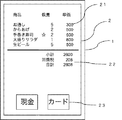
図4は会計画面を示す。会計画面では、注文した商品の一覧21と、金額欄22と、現金カード選択ボタン23が表示されている。注文した商品の一覧21は、注文した商品とその個数、単価が列挙され、上下にスクロールすることで全てを見ることができる。金額欄22には、小計、消費税、合計の金額が表示される。
FIG. 4 shows an accounting screen. On the checkout screen, a
ホール店員は、会計時、顧客にこの会計画面を示す。会計画面が表示された時点から、入力端末1において録音が開始される。顧客が会計画面を見て、金額を承認し、支払い方法を告げた場合、ホール店員は、支払い方法に対応する現金カード選択ボタン23を押す。この時点で、この店舗のオーナー(その代理人であるホール店員)と顧客との間で、合計金額についての合意がなされたとみなすことができる。
The hall clerk shows the customer this accounting screen at the time of accounting. Recording is started in the
ここで、支払い方法がカードであれば、ホール店員は顧客からカードを預かり、入力端末1に接続されたカードリーダーで決済を行うか、レジスターに接続されたカードリーダーで決済を行う。
Here, if the payment method is a card, the hall clerk keeps the card from the customer and performs payment using a card reader connected to the
決済方法が現金であれば、現金ボタンを選択することで、図5に示す現金決済画面に移行する。ホール店員は、顧客から預かった金額を、計算機部24を使用して入力することで、金額欄22のお預かり欄に当該金額が表示される。そして、お釣りが算出され、お釣り欄にお釣りの金額が表示される。ホール店員はこれを顧客に示し、承認を得た後に、OKボタン25をタップする。上述の録音はこの時点まで行われる。
If the payment method is cash, selecting the cash button causes the screen to move to the cash payment screen shown in FIG. The hall clerk inputs the amount deposited from the customer using the
本発明の技術的範囲は以上の実施形態に限られず、例えば、モーションセンサーを用いて、入力端末を振ったり傾けたりした場合に、その方向に応じて、注文の確定または備考の画面への切り替えが行われたり、3Dタッチと言われる、圧の強いタッチをキーとして備考の画面への切り替えがなされるなど、用意できる機器の状況に応じてキーとなる動作を変更してもよい。ディスプレイの縁に沿って物理的な額縁状の枠を有する入力端末においては、使用者がディスプレイの縁を触覚により認識できるから、例えばディスプレイの右上隅まで至るフリックを確定の操作と認識するとか、ディスプレイの左縁に至り、そのまま左縁に沿って上に移動するフリックを備考の画面への以降操作と認識するといった設定が可能である。また、RFタグを内蔵したスタイラスペンを用いることで、入力端末がこのRFタグを認識するようにすれば、操作を行っている人間が誰であるかを入力端末が見分けることができることになる。そのため、特定のIDを有するユーザーのみに特定の操作を許可し、すなわち人によって行うことのできる操作の範囲を限定することもできる。例えば、顧客が操作した場合は注文履歴を見ることのみができ、店員が操作した場合は追加注文を入れることができる、などである。 The technical scope of the present invention is not limited to the above embodiments.For example, when the input terminal is shaken or tilted using a motion sensor, the order is confirmed or switched to a remarks screen according to the direction. The key operation may be changed in accordance with the condition of the device that can be prepared, for example, a switch to the remarks screen is performed using a strong touch called a 3D touch as a key. In an input terminal having a physical frame-shaped frame along the edge of the display, since the user can recognize the edge of the display by tactile sense, for example, it recognizes a flick reaching the upper right corner of the display as a fixed operation, A setting is possible in which a flick that reaches the left edge of the display and moves upward along the left edge as it is is recognized as a subsequent operation on the remarks screen. Also, if the input terminal recognizes the RF tag by using a stylus pen with a built-in RF tag, the input terminal can identify who is performing the operation. Therefore, only a user having a specific ID can be permitted to perform a specific operation, that is, the range of operations that can be performed by a person can be limited. For example, when the customer operates, only the order history can be viewed, and when the clerk operates, an additional order can be placed.
また、本発明は、飲食店におけるオーダーの入力に限らず、議事録メモ、病院のカルテ等にも利用できるものである。特に、なるべく画面を見ずに文字入力をしたい場面における短い文章の箇条書きメモが中心であり、一つ一つの条項の確定作業が頻繁に行われるような現場において有用である。いずれにせよ、文字入力で起こりえない動作を、文字の確定や画面遷移のためのキーとすることで画面を見ることなく操作できるようにすることが本発明の要旨であり、その範囲内においてジェスチャーを変更し、また組み合わせることが可能である。 Further, the present invention can be used not only for inputting an order at a restaurant, but also for a memo of minutes, a medical chart of a hospital, and the like. In particular, it is mainly used for a bulleted note of a short sentence in a case where the user wants to input characters without looking at the screen as much as possible, and is useful in a place where the work of fixing each clause is frequently performed. In any case, it is the gist of the present invention to enable operations that cannot occur in character input to be operated without looking at the screen by using keys for character confirmation and screen transition, and within the scope thereof. Gestures can be changed and combined.
1 入力端末
2 タッチパネルディスプレイ
3 インターフェイス画面
4 フリック動作を示す矢印
5 領域を表す二点鎖線
DESCRIPTION OF
Claims (9)
前記タッチパネルディスプレイへの手書きによる入力を受け付け、
前記タッチパネルディスプレイへの上方向へのフリック動作を検知した場合には、その時点までの入力を確定とする、入力ソフトウェア。 Input software using an input terminal having a touch panel display,
Accepting handwritten input on the touch panel display,
Input software that determines an input up to that point when an upward flick operation on the touch panel display is detected.
前記タッチパネルディスプレイへの手書きによる入力を受け付け、
前記タッチパネルディスプレイへのタップ動作の回数によって上記入力に関する個数の入力を受け付ける、入力ソフトウェア。 Input software using an input terminal having a touch panel display,
Accepting handwritten input on the touch panel display,
Input software for receiving the number of inputs related to the input according to the number of tap operations on the touch panel display.
前記タッチパネルディスプレイへの手書きによる入力を受け付け、
前記タッチパネルディスプレイへの左方向へのフリック動作によって備考欄を表示する、入力ソフトウェア。 Input software using an input terminal having a touch panel display,
Accepting handwritten input on the touch panel display,
Input software for displaying a remarks column by a leftward flick operation on the touch panel display.
Priority Applications (1)
| Application Number | Priority Date | Filing Date | Title |
|---|---|---|---|
| JP2018110826A JP2019215595A (en) | 2018-06-11 | 2018-06-11 | Input software |
Applications Claiming Priority (1)
| Application Number | Priority Date | Filing Date | Title |
|---|---|---|---|
| JP2018110826A JP2019215595A (en) | 2018-06-11 | 2018-06-11 | Input software |
Publications (2)
| Publication Number | Publication Date |
|---|---|
| JP2019215595A true JP2019215595A (en) | 2019-12-19 |
| JP2019215595A5 JP2019215595A5 (en) | 2021-07-29 |
Family
ID=68918992
Family Applications (1)
| Application Number | Title | Priority Date | Filing Date |
|---|---|---|---|
| JP2018110826A Pending JP2019215595A (en) | 2018-06-11 | 2018-06-11 | Input software |
Country Status (1)
| Country | Link |
|---|---|
| JP (1) | JP2019215595A (en) |
Cited By (2)
| Publication number | Priority date | Publication date | Assignee | Title |
|---|---|---|---|---|
| JP2024088066A (en) * | 2022-12-20 | 2024-07-02 | 東芝テック株式会社 | Registration device and program |
| JP7809630B2 (en) | 2022-12-20 | 2026-02-02 | 東芝テック株式会社 | Registration device and program |
Citations (9)
| Publication number | Priority date | Publication date | Assignee | Title |
|---|---|---|---|---|
| JP2002007962A (en) * | 2000-06-27 | 2002-01-11 | Sharp Corp | Handwritten character input device |
| JP2003099184A (en) * | 2001-09-25 | 2003-04-04 | Sharp Corp | Information processing system, information processing device and input pen used therein |
| JP2007200186A (en) * | 2006-01-30 | 2007-08-09 | Advanced Telecommunication Research Institute International | Character recognition device and character recognition program |
| JP2010067120A (en) * | 2008-09-12 | 2010-03-25 | Seiko Epson Corp | Menu terminal, ordering system, and display control method for menu terminal |
| JP2013003918A (en) * | 2011-06-17 | 2013-01-07 | Konica Minolta Business Technologies Inc | Information browsing device, control program and control method |
| JP2014052873A (en) * | 2012-09-07 | 2014-03-20 | Toshiba Corp | Electronic apparatus and handwritten document processing method |
| JP2014142843A (en) * | 2013-01-24 | 2014-08-07 | Ntt Communications Corp | Terminal device, input control method, registration processing method, and program |
| JP2014149833A (en) * | 2013-01-31 | 2014-08-21 | Samsung Electronics Co Ltd | Image display method for multitasking operation, and terminal supporting the same |
| JP2016134066A (en) * | 2015-01-21 | 2016-07-25 | 大日本印刷株式会社 | Approval system, approval program |
-
2018
- 2018-06-11 JP JP2018110826A patent/JP2019215595A/en active Pending
Patent Citations (9)
| Publication number | Priority date | Publication date | Assignee | Title |
|---|---|---|---|---|
| JP2002007962A (en) * | 2000-06-27 | 2002-01-11 | Sharp Corp | Handwritten character input device |
| JP2003099184A (en) * | 2001-09-25 | 2003-04-04 | Sharp Corp | Information processing system, information processing device and input pen used therein |
| JP2007200186A (en) * | 2006-01-30 | 2007-08-09 | Advanced Telecommunication Research Institute International | Character recognition device and character recognition program |
| JP2010067120A (en) * | 2008-09-12 | 2010-03-25 | Seiko Epson Corp | Menu terminal, ordering system, and display control method for menu terminal |
| JP2013003918A (en) * | 2011-06-17 | 2013-01-07 | Konica Minolta Business Technologies Inc | Information browsing device, control program and control method |
| JP2014052873A (en) * | 2012-09-07 | 2014-03-20 | Toshiba Corp | Electronic apparatus and handwritten document processing method |
| JP2014142843A (en) * | 2013-01-24 | 2014-08-07 | Ntt Communications Corp | Terminal device, input control method, registration processing method, and program |
| JP2014149833A (en) * | 2013-01-31 | 2014-08-21 | Samsung Electronics Co Ltd | Image display method for multitasking operation, and terminal supporting the same |
| JP2016134066A (en) * | 2015-01-21 | 2016-07-25 | 大日本印刷株式会社 | Approval system, approval program |
Cited By (2)
| Publication number | Priority date | Publication date | Assignee | Title |
|---|---|---|---|---|
| JP2024088066A (en) * | 2022-12-20 | 2024-07-02 | 東芝テック株式会社 | Registration device and program |
| JP7809630B2 (en) | 2022-12-20 | 2026-02-02 | 東芝テック株式会社 | Registration device and program |
Similar Documents
| Publication | Publication Date | Title |
|---|---|---|
| US8296681B2 (en) | Searching a list based upon user input | |
| US20220027176A1 (en) | Account management user interfaces | |
| US20210096886A1 (en) | Account management user interfaces | |
| TWI506522B (en) | Electronic device and user interface display method thereof | |
| US8106890B2 (en) | Slide based technique for inputting a sequence of numbers for a computing device | |
| JPH1125320A (en) | Automatic transaction equipment | |
| WO2013073600A1 (en) | Ordering system | |
| JP5866500B1 (en) | Transaction terminal device | |
| JP2015524583A (en) | User interaction system for displaying digital objects | |
| JP5476808B2 (en) | POS register | |
| US20130262300A1 (en) | Point of sale system with transaction hold function, and related programs and methods | |
| JP2019215595A (en) | Input software | |
| JP2018124847A (en) | Image processing apparatus, condition display method, and computer program | |
| JP5729501B2 (en) | POS register | |
| JP5286242B2 (en) | Payment terminal and its control program | |
| JP5915872B2 (en) | Transaction terminal device | |
| US20240203216A1 (en) | Registration device and registration method | |
| JP7809630B2 (en) | Registration device and program | |
| JP2021117913A (en) | Vending machine and selling system | |
| JP2013214317A (en) | Settlement terminal and control program thereof | |
| JP6279987B2 (en) | Window reception system | |
| US20110209059A1 (en) | Processing apparatus and method of controlling operation of the processing apparatus | |
| JP2022167363A (en) | Ordering system | |
| JP5183581B2 (en) | Accounting support system | |
| JP7242026B2 (en) | Sales data processor and program |
Legal Events
| Date | Code | Title | Description |
|---|---|---|---|
| A521 | Request for written amendment filed |
Free format text: JAPANESE INTERMEDIATE CODE: A523 Effective date: 20210601 |
|
| A621 | Written request for application examination |
Free format text: JAPANESE INTERMEDIATE CODE: A621 Effective date: 20210601 |
|
| A521 | Request for written amendment filed |
Free format text: JAPANESE INTERMEDIATE CODE: A523 Effective date: 20210910 |
|
| A977 | Report on retrieval |
Free format text: JAPANESE INTERMEDIATE CODE: A971007 Effective date: 20220301 |
|
| A131 | Notification of reasons for refusal |
Free format text: JAPANESE INTERMEDIATE CODE: A131 Effective date: 20220405 |
|
| A02 | Decision of refusal |
Free format text: JAPANESE INTERMEDIATE CODE: A02 Effective date: 20221018 |