JP2014106625A - Portable terminal, control method of portable terminal, program and recording medium - Google Patents
Portable terminal, control method of portable terminal, program and recording medium Download PDFInfo
- Publication number
- JP2014106625A JP2014106625A JP2012257674A JP2012257674A JP2014106625A JP 2014106625 A JP2014106625 A JP 2014106625A JP 2012257674 A JP2012257674 A JP 2012257674A JP 2012257674 A JP2012257674 A JP 2012257674A JP 2014106625 A JP2014106625 A JP 2014106625A
- Authority
- JP
- Japan
- Prior art keywords
- input
- field
- text
- focus
- visible range
- Prior art date
- Legal status (The legal status is an assumption and is not a legal conclusion. Google has not performed a legal analysis and makes no representation as to the accuracy of the status listed.)
- Pending
Links
- 238000000034 method Methods 0.000 title claims description 29
- 238000001514 detection method Methods 0.000 claims description 9
- 230000006870 function Effects 0.000 description 12
- 238000004891 communication Methods 0.000 description 9
- 230000010365 information processing Effects 0.000 description 6
- 238000010586 diagram Methods 0.000 description 3
- 230000000694 effects Effects 0.000 description 3
- 238000003672 processing method Methods 0.000 description 3
- 238000010079 rubber tapping Methods 0.000 description 2
- KNMAVSAGTYIFJF-UHFFFAOYSA-N 1-[2-[(2-hydroxy-3-phenoxypropyl)amino]ethylamino]-3-phenoxypropan-2-ol;dihydrochloride Chemical compound Cl.Cl.C=1C=CC=CC=1OCC(O)CNCCNCC(O)COC1=CC=CC=C1 KNMAVSAGTYIFJF-UHFFFAOYSA-N 0.000 description 1
- XUIMIQQOPSSXEZ-UHFFFAOYSA-N Silicon Chemical compound [Si] XUIMIQQOPSSXEZ-UHFFFAOYSA-N 0.000 description 1
- 239000004973 liquid crystal related substance Substances 0.000 description 1
- 238000012986 modification Methods 0.000 description 1
- 230000004048 modification Effects 0.000 description 1
- 230000003287 optical effect Effects 0.000 description 1
- 229910052710 silicon Inorganic materials 0.000 description 1
- 239000010703 silicon Substances 0.000 description 1
- 239000007787 solid Substances 0.000 description 1
Images



Landscapes
- Telephone Function (AREA)
- User Interface Of Digital Computer (AREA)
Abstract
Description
本発明は、携帯端末におけるテキスト入力のためのソフトウェアキーボードの表示方法に関する。 The present invention relates to a software keyboard display method for text input in a portable terminal.
狭い表示領域のディスプレイしか持つことの出来ない携帯端末や、タッチパネル形式の入力方法を採用している携帯端末における、「入力フィールドへの値の入力動作」と、該フィールドへ値を入力するために、該携帯端末や該携帯端末の入力画面上に入力フィールドと同時に表示がされる「汎用ソフトウェアキーボード」との関係については、現在のところ以下の仕様のものが多い。 In order to input a value to the field and "input operation of the value to the input field" in a mobile terminal that can only have a display with a narrow display area or a mobile terminal that employs a touch panel type input method As for the relationship with the “general-purpose software keyboard” that is displayed at the same time as the input field on the input screen of the mobile terminal or the mobile terminal, there are currently many specifications with the following specifications.
例えば、携帯端末では、画面に表示がされている入力フィールドを選択(タップ)すると、汎用ソフトウェアキーボードが表示される。ユーザは、このまま汎用ソフトウェアキーボードを閉じることなく、入力フィールドを選択しながら、入力フィールドへ値を入力することが出来る。ページサイズが大きくディスプレイの領域外にある入力フィールドに対しては、画面をスクロールすることによって項目を選択することにより、同様に汎用ソフトウェアキーボードから値を入力することが出来る。 For example, in a portable terminal, when an input field displayed on the screen is selected (tapped), a general-purpose software keyboard is displayed. The user can input a value into the input field while selecting the input field without closing the general-purpose software keyboard. For input fields that have a large page size and are outside the display area, values can be similarly input from the general-purpose software keyboard by scrolling the screen and selecting items.
また、スクロール以外の方法でも、汎用ソフトウェアキーボード上の「前へ」や「次へ」のボタンを押下することによってフィールドへのフォーカスを遷移させることにより、各フィールドに対して値の入力を行っていくことが出来る。 In addition to scrolling, you can enter values for each field by changing the focus to the field by pressing the "Previous" or "Next" button on the general-purpose software keyboard. I can go.
このような狭い表示領域のディスプレイしか持つことの出来ない携帯端末や、タッチパネル形式の入力方法を採用している情報処理端末における、「入力フィールドへの値の入力動作」と、該フィールドへ値を入力するために、該情報処理端末の入力画面上に入力フィールドと同時に表示がされる「汎用ソフトウェアキーボード」との関係において工夫がなされた発明については以下のものがある。 In a portable terminal that can only have a display with such a narrow display area or an information processing terminal that uses a touch panel type input method, a value input operation to the field The following inventions have been devised in relation to the “general-purpose software keyboard” that is displayed simultaneously with the input field on the input screen of the information processing terminal for input.
例えば特許文献1においては、タッチパネルを備える表示装置上の画面の入力フィールドに値を入力するために、画面上に同時に表示されているソフトキーボードにつき、一定の時間未使用状態が経過すると、ソフトウェアキーボードを消去して画面における入力フィールドが存在する方の領域を拡張し、ユーザにとってより見やすい画面表示行っている。また、入力フィールドが再度、ユーザによりタッチされると、ソフトウェアキーボードが再表示されるようにしている。 For example, in Patent Document 1, in order to input a value into an input field of a screen on a display device having a touch panel, when the software keyboard displayed simultaneously on the screen has not been used for a certain period of time, the software keyboard The area where the input field exists on the screen is expanded and the screen is displayed more easily for the user. Further, when the input field is touched again by the user, the software keyboard is displayed again.
特許文献2においては、情報処理装置上の入力フィールドにフォーカスが到達し、その入力フィールドの近傍にソフトウェアキーボードを表示する領域がない場合に、表示画面をスクロールさせて、ソフトウェアキーボードを表示する領域を確保してから、該ソフトウェアキーボードを表示している。 In Patent Document 2, when the focus reaches the input field on the information processing apparatus and there is no area for displaying the software keyboard in the vicinity of the input field, the display screen is scrolled to display the area for displaying the software keyboard. After securing, the software keyboard is displayed.
また、文字を入力するための入力項目フィールドにフォーカスが到達した場合にソフトキーボードを表示するが、フォーカスが入力項目以外のフィールドにある場合には、ソフトキーボードを非表示にし、画面上の情報の表示領域が狭くなることがないようにしている。 When the focus reaches the input item field for entering characters, the soft keyboard is displayed. If the focus is in a field other than the input item, the soft keyboard is hidden and information on the screen is displayed. The display area is not narrowed.
特許文献3においては、情報処理装置上の入力フィールドを表示している画面とソフトキーボードを、2分の1ずつ画面を折半する形式で双方を表示している。また、入力フィールドが画面の中心に存在する場合は、入力フィールドの位置がそのままだと入力された値が良よく見えなくなるため、入力フィールド側の画面が全て表示されるよう画面を移動し、もう片方の領域へキーボードを表示するようにしている。 In Patent Document 3, a screen displaying an input field on the information processing apparatus and a soft keyboard are both displayed in a form in which the screen is divided by half. Also, if the input field exists in the center of the screen, the input value will not be visible if the position of the input field remains as it is, so move the screen so that all the screens on the input field side are displayed. The keyboard is displayed in one area.
このように、画面上で表示している入力フィールドの表示と、ソフトキーボードの表示を共存させるための様々な工夫がなされている技術が公開されている。 As described above, a technique in which various ideas for coexisting the display of the input field displayed on the screen and the display of the soft keyboard are disclosed.
しかし、特許文献1においてはソフトウェアキーボードが非使用状態であることが一定時間経過すると、表示されていたソフトウェアキーボードが使用されていないと認識され非表示になるが、ある入力フィールドへの入力が完了した後の次の入力フィールドへフォーカスが移動した後の入力フィールドとソフトキーボードの関係については、述べられていない。 However, in Patent Document 1, if a software keyboard is in a non-use state for a certain period of time, it is recognized that the displayed software keyboard is not being used and is not displayed, but input to a certain input field is completed. The relationship between the input field after the focus moves to the next input field and the soft keyboard is not described.
特許文献2においては、入力フィールドへフォーカス移動した場合に、ソフトウェアキーボードを表示できるエリアを確保するために、入力される入力フィールドを適切な位置に移動させることを行い、ソフトウェアキーボードを表示させていて、さらに、入力フィールドへの入力が終了しその入力フィールドからフォーカスが離れた場合にソフトキーボードを非表示にしているが、次の入力フィールドへフォーカスを移した場合のソフトキーボードの表示方法については、述べられていない。 In Patent Document 2, when the focus is moved to the input field, in order to secure an area where the software keyboard can be displayed, the input input field is moved to an appropriate position and the software keyboard is displayed. In addition, when the input to the input field ends and the focus leaves the input field, the soft keyboard is hidden. For how to display the soft keyboard when the focus is moved to the next input field, Not mentioned.
特許文献3においては、入力フィールド側とソフトウェアキーボード側を、画面を折半するような形式で表示しているため、入力フィールドと表示状態であるソフトキーボードの表示の関係については、述べられているものの、現在の入力フィールドへの入力が終わった後、次の入力フィールドへフォーカスを移した場合の、入力フィールドの画面上での表示方法と、それにともなうソフトウェアキーボードの表示方法については、述べられていない。 In Patent Literature 3, since the input field side and the software keyboard side are displayed in a format that halves the screen, the relationship between the input field and the display of the soft keyboard that is in the display state is described. There is no description on how to display the input field on the screen and the corresponding software keyboard when the focus is moved to the next input field after the input to the current input field is completed. .
また、現在の携帯端末において現在の入力フィールドへ入力が終了し次の入力フィールドへフォーカスを移動させるために、WEBページに記載されたスクリプト(例えばJava Script(登録商標))で、いずれかの入力フィールドへ、強制的にフォーカス移動させるイベントを発行した場合、ボタン押下のロジックから発行した場合は、携帯端末のOSが、フォーカスの移動を行い、これまで可視範囲になかった項目であっても、移動先の項目を可視範囲に表示しつつ、ソフトウェアキーボードも自動的に表示することが可能である場合がある。
しかし、このフォーカス移動の処理を、ボタン押下以外のイベント、例えば、入力項目に対して、予め決められた桁数の文字数入力がなされた場合に、その項目からフォーカスが離れるというイベントから呼んだ場合には、フォーカスは移動するものの、表示されていたソフトウェアキーボードが非表示になってしまうという現象が発生することがある。
このため、このケースの場合は、再度そのフォーカスの移動先の入力フィールドへソフトウェアキーボードを利用し値を入力することは、当該入力フィールドを再度選択(タップ)し、ソフトウェアキーボードを再表示してからでないと行えない。
In addition, in order to move the focus to the next input field after the input to the current input field is completed on the current portable terminal, any input can be performed with a script (for example, JavaScript (registered trademark)) described on the WEB page When issuing an event for forcibly moving the focus to the field, when issuing from the button press logic, even if the OS of the mobile terminal has moved the focus and was not in the visible range until now, In some cases, it is possible to automatically display the software keyboard while displaying the item to be moved in the visible range.
However, when this focus movement process is called from an event other than pressing the button, for example, when an input item is input with a predetermined number of characters, the focus is removed from that item. In some cases, although the focus moves, the displayed software keyboard disappears.
For this reason, in this case, inputting a value again using the software keyboard to the input field to which the focus is moved is to select (tap) the input field again and display the software keyboard again. It is not possible to do it.
そこで、本発明ではこれらの点を鑑み、ユーザがソフトウェアキーボードを使用する携帯端末において、任意のテキスト入力フィールドに強制的にフォーカスを移動してから値を入力する場合に、ソフトウェアキーボードが非表示になりフォーカス先が可視範囲に表示がされなくなる場合にも、ユーザにスムーズな入力環境を提供することを目的とする。 Therefore, in the present invention, in view of these points, when a user inputs a value after forcibly moving the focus to an arbitrary text input field in a mobile terminal using the software keyboard, the software keyboard is hidden. Therefore, it is an object to provide a user with a smooth input environment even when the focus destination is not displayed in the visible range.
本発明は、携帯端末上の表示領域に表示がされている複数の入力フィールドにわたり、ユーザによるテキストの入力を可能とするテキスト入力手段を有する携帯端末であって、現在のフィールドへのユーザの操作終了後、次の入力フィールド候補となる次のフィールドへフォーカスが移動したことを検知するフォーカス移動検知手段と、前記次のフィールドが前記テキストの入力が可能な入力フィールドであるか否かを判定する移動先フィールド属性判定手段と、前記移動先フィールド属性判定手段により、前記次のフィールドが前記テキストの入力が可能な入力フィールドであると判定され、かつ、該入力フィールドに対し前記フォーカスが移動した際に前記テキスト入力手段が前記携帯端末の表示領域に表示されているか否かを判定するテキスト入力手段表示判定手段と、前記テキスト入力手段表示判定手段により、前記テキスト入力手段が表示されていないと判定した場合に、前記テキスト入力手段を表示するテキスト入力手段再表示手段と、前記次のフィールドが前記携帯端末の表示領域の可視範囲内に移動したか否かを判定する可視範囲内移動判定手段と、
前記可視範囲内移動判定手段にて前記可視範囲内に前記次のフィールドが移動しなかったと判定した場合は、前記次のフィールドを前記携帯端末の表示領域の可視範囲内に表示を行うべく、該次のフィールドをスクロール移動させる入力フィールド可視範囲内移動手段とを備ることを特徴とする。
The present invention is a mobile terminal having a text input means that allows a user to input text over a plurality of input fields displayed in a display area on the mobile terminal, and the user's operation on the current field After the completion, focus movement detecting means for detecting that the focus has moved to the next field as the next input field candidate, and determining whether the next field is an input field into which the text can be input. When the destination field attribute determining unit and the destination field attribute determining unit determine that the next field is an input field into which the text can be input and the focus moves with respect to the input field Whether the text input means is displayed in the display area of the portable terminal When the text input means display determination means and the text input means display determination means determine that the text input means is not displayed, the text input means redisplay means for displaying the text input means, the next Visible range movement determination means for determining whether or not the field has moved within the visible range of the display area of the mobile terminal;
If it is determined by the visible range movement determination means that the next field has not moved within the visible range, the next field is displayed within the visible range of the display area of the mobile terminal. An input field visible range moving means for scrolling the next field is provided.
本発明によれば、ユーザがソフトウェアキーボードを使用する携帯端末において、任意のテキスト入力フィールドに強制的にフォーカスを移動してから値を入力する場合に、ソフトウェアキーボードが非表示になりフォーカス先が可視範囲に表示がされなくなる場合にも、ユーザにスムーズな入力環境を提供することが可能になる。 According to the present invention, when a user inputs a value after forcibly moving focus to an arbitrary text input field on a mobile terminal using a software keyboard, the software keyboard is hidden and the focus destination is visible. Even when the display is not displayed in the range, it is possible to provide the user with a smooth input environment.
以下、図面を参照して、本発明の実施形態を、携帯端末を例に挙げ説明する。 Hereinafter, with reference to the drawings, an embodiment of the present invention will be described by taking a mobile terminal as an example.
図1は、本発明実施形態の携帯端末のデータ表示システムにおけるWEBサーバ200と携帯端末100の構成の一例を示したシステム構成図である。 FIG. 1 is a system configuration diagram showing an example of the configuration of a WEB server 200 and a mobile terminal 100 in a data display system for a mobile terminal according to an embodiment of the present invention.
図1に示すように、本実施形態のシステムでは、携帯端末100はWEBサーバ上のデータを表示閲覧するための装置である。携帯端末100は、持ち運び可能な情報処理端末を想定していて、公衆回線300、またはインターネット回線400を介してWEBサーバ200にアクセス可能とする。 As shown in FIG. 1, in the system of this embodiment, the mobile terminal 100 is a device for displaying and browsing data on a WEB server. The portable terminal 100 is assumed to be a portable information processing terminal, and can access the WEB server 200 via the public line 300 or the Internet line 400.
携帯端末100へ、WEBサーバ200に対して情報の閲覧要求が行われると、WEBサーバ200に記憶されているデータから、要求されたデータを携帯端末100へ返す。 When a request for browsing the information to the WEB server 200 is made to the mobile terminal 100, the requested data is returned to the mobile terminal 100 from the data stored in the WEB server 200.
なお、今回の発明は、携帯端末100上の入力フィールドにおいて、文字列や数字等のテキストデータが、携帯端末100に元々存在しているソフトウェアキーボードにより入力された場合の、入力フィールドと、ソフトウェアキーボードの表示に関し、これらの表示処理は携帯端末100側で行われることとするため、前記WEBサーバからデータを表示閲覧する構成は、あくまで1例として紹介する。 The present invention includes an input field and a software keyboard when text data such as a character string or a number is input by a software keyboard that originally exists in the mobile terminal 100 in the input field on the mobile terminal 100. Since these display processes are performed on the mobile terminal 100 side, the configuration for displaying and browsing data from the WEB server is only introduced as an example.
図2は、本発明の実施形態における携帯端末100とWEBサーバ200のハードウェア構成を示す図である。 FIG. 2 is a diagram illustrating a hardware configuration of the mobile terminal 100 and the WEB server 200 according to the embodiment of the present invention.
CPU201は、システムバス204に接続される各デバイスやコントローラを統括的に制御する。
The
また、ROM202あるいは外部メモリ211には、CPU201の制御プログラムであるBIOS(Basic Input / Output System)やオペレーティングシステムプログラム(以下、OS)や、各サーバ或いは各PCの実行する機能を実現するために必要な後述する各種プログラム等が記憶されている。RAM203は、CPU201の主メモリ、ワークエリア等として機能する。
Further, the
CPU201は、処理の実行に際して必要なプログラム等をRAM203にロードして、プログラムを実行することで各種動作を実現するものである。
The
また、入力コントローラ(入力C)205は、キーボード209や不図示のマウス等のポインティングデバイスからの入力を制御する。ただし、携帯端末への入力の制御は、ソフトウェアキーボードや、画面に直に接触することによって入力を制御する。
An input controller (input C) 205 controls input from a pointing device such as a
ビデオコントローラ(VC)206は、CRTディスプレイ(CRT)210等の表示器への表示を制御する。表示器はCRTだけでなく、液晶ディスプレイでも構わない。これらは必要に応じて管理者が使用するものである。本発明には直接関係があるものではない。 A video controller (VC) 206 controls display on a display device such as a CRT display (CRT) 210. The display device may be a liquid crystal display as well as a CRT. These are used by the administrator as needed. The present invention is not directly related.
メモリコントローラ(MC)207は、ブートプログラム、ブラウザソフトウエア、各種のアプリケーション、フォントデータ、ユーザファイル、編集ファイル、各種データ等を記憶するハードディスク(HD)やフロッピー(登録商標)ディスク(FD)或いはPCMCIAカードスロットにアダプタを介して接続されるコンパクトフラッシュ(登録商標)メモリ等の外部メモリ211へのアクセスを制御する。
The memory controller (MC) 207 is a hard disk (HD), floppy (registered trademark) disk (FD), or PCMCIA that stores a boot program, browser software, various applications, font data, user files, editing files, various data, and the like. Controls access to an
通信I/Fコントローラ(通信I/FC)208は、ネットワークを介して、外部機器と接続・通信するものであり、ネットワークでの通信制御処理を実行する。例えば、TCP/IPを用いたインターネット通信等が可能である。また、携帯端末の場合、インターネット通信以外にも、公衆回線を用いて電話としての通信が可能であっても良い。 A communication I / F controller (communication I / FC) 208 is connected to and communicates with an external device via a network, and executes communication control processing in the network. For example, Internet communication using TCP / IP is possible. In the case of a portable terminal, in addition to Internet communication, communication as a telephone may be possible using a public line.
なお、CPU201は、例えばRAM203内の表示情報用領域へアウトラインフォントの展開(ラスタライズ)処理を実行することにより、CRT210上での表示を可能としている。また、CPU201は、CRT210上の不図示のマウスカーソル、または、ソフトウェアキーボードや、画面への接触等、によりユーザ指示を可能とする。
Note that the
本発明を実現するためのプログラムは外部メモリ211に記録されており、必要に応じてRAM203にロードされることによりCPU201によって実行されるものである。
A program for realizing the present invention is recorded in the
次に、図3を用いて、本発明にける携帯端末の機能構成図の一例について説明する。 Next, an example of a functional configuration diagram of the mobile terminal according to the present invention will be described with reference to FIG.
携帯端末100は、テキスト入力部301、テキスト表示部302、フォーカス移動部303、フォーカス移動検知部304、移動先フィールド属性判定部305、テキスト入力部表示判定部306、テキスト入力部再表示部307、可視範囲内移動判定部308、入力フィールド可視範囲内移動部309からなる。
The mobile terminal 100 includes a
テキスト入力部301は、携帯端末100のユーザが入力フィールドに対して、文字列や、数字等のテキストデータの入力を行うためのソフトウェアキーボード等の入力手段のことである。
The
テキスト表示部302は、携帯端末100のテキスト入力部301によって入力された文字列や数字等のテキストデータを入力フィールドで表示を行う。
The
フォーカス移動部303は、携帯端末100の画面上の次に入力が必要となる入力フィールドに対して、フォーカスの移動を行う。
The
フォーカス移動検知部304は、携帯端末100の画面上の現在入力中のフィールドから、次に入力するフィールドへの、フォーカスの移動の処理が呼ばれたことを検知する。
The focus
移動先フィールド属性判定部305は、フォーカス移動部303によってフォーカスが移動した先が、入力フィールドであるか、否かを判定する
The destination field
テキスト入力部表示判定部306は、フォーカスの移動先であるフィールドが入力可能なフィールドである場合に、該入力フィールドに対し前記フォーカスが移動した時に、テキスト入力部301が携帯端末100の表示領域に表示されているか否かを判定する。
When the focus destination field is an inputable field, the text input unit
テキスト入力部再表示部307は、テキスト入力部表示判定部306により、テキスト入力部301が表示されていないと判定した場合に、テキスト入力部301を再表示する。
The text input
可視範囲内移動判定部308は、フォーカスの移動先であるフィールドが携帯端末100の表示領域の可視範囲内に移動したか否かを判定する。
The visible range
入力フィールド可視範囲内移動部309は、可視範囲内移動判定部308にて携帯端末100の表示領域の可視範囲内に、フォーカスの移動先であるフィールドが移動しなかったと判定した場合に、該フィールドを前記携帯端末の表示領域の可視範囲内に表示を行うべく、該次のフィールドをスクロール移動させる。
When the input field visible
次に、本発明の実施形態について、図4から図9を用いて説明をする。 Next, an embodiment of the present invention will be described with reference to FIGS.
まず、処理フローについて図4と図5を用いて説明をする。 First, the processing flow will be described with reference to FIGS.
図4は、本発明における、携帯端末100の入力フィールドへのテキストがユーザにより入力された場合における、入力フィールドとソフトウェアキーボードの表示方法の処理を示すメインフローである。 FIG. 4 is a main flow showing the processing of the input field and software keyboard display method when the user inputs text to the input field of the portable terminal 100 in the present invention.
まず、ステップS401において、携帯端末100のCPU201は、携帯端末100のユーザによって、携帯端末100のディスプレイ上の入力フィールドに対して値が入力されたことを検知する。
First, in step S <b> 401, the
次に、ステップS402において、携帯端末100のフォーカス移動検知部304は、ある入力フィールドから別の入力フィールドに対し、フォーカスの移動の指示が行われたことを検知する。
Next, in step S <b> 402, the focus
このフォーカスの移動は、ユーザにとって、次に入力すべき入力フィールドがある場合、に、入力をし易くするために行う。 This movement of the focus is performed so that the user can easily input when there is an input field to be input next.
ここでいう入力フィールドとは、入力可能なテキストフィールドのことを指す。 The input field here refers to a text field that can be input.
なお、この入力フィールド間のフォーカスの移動は、例えば、携帯端末100側のCPU201で起動する、スクリプトのイベントを発生させることによって、行うことが出来る。
Note that the movement of the focus between the input fields can be performed, for example, by generating a script event that is activated by the
最後のステップS403は、図5の表示制御処理を呼ぶ。 The last step S403 calls the display control process of FIG.
次に、図5を用いて、本発明における表示制御処理について説明をする。 Next, the display control processing in the present invention will be described with reference to FIG.
図5は、フィールド間で、フォーカスが移動することによって、値を入力するフィールドと、値を入力させるためのソフトウェアキーボードの表示制御についての処理を示すフローである。 FIG. 5 is a flowchart showing a process for display control of a field for inputting a value and a software keyboard for inputting the value when the focus moves between the fields.
まず、ステップS501において、フォーカス移動部303は、ステップS402のフォーカスの移動指示の検知に従がって、フォーカスの移動を行う。
First, in step S501, the
次に、ステップS502においては、携帯端末100の移動先フィールド属性判定部305は、フォーカス移動部303によってフォーカスが移動した先が、入力フィールドであるか、否かを判定する。
Next, in step S502, the destination field
ステップS502におき、フォーカス移動先のフィールドが入力フィールドである場合(ステップS502でYESの場合)は、ソフトウェアキーボードが表示中であるかの判定処理である、ステップS503へ処理を進め、ステップS502におき、フォーカスの移動先のフィールドが入力フィールドで無い場合(ステップS502でNO場合)は、ソフトウェアキーボードの表示処理を行うことなく、ステップS505へ処理を進める。 In step S502, if the focus destination field is an input field (YES in step S502), the process proceeds to step S503, which is a process for determining whether the software keyboard is being displayed. If the focus destination field is not an input field (NO in step S502), the process proceeds to step S505 without performing the software keyboard display process.
ステップS503においては、ステップS501における、入力フィールドに対するフォーカス移動後の結果、ソフトウェアキーボードが表示中であるかの判定処理を行う。ソフトウェアキーボードが表示状態である場合(ステップS503でYESの場合)は、ソフトウェアキーボードがそのままであるため、表示に関しては何も処理を行わず、ステップS505の、フォーカスの移動先の入力フィールドが、携帯端末100のディスプレイの上部の可視範囲内に存在するか否かを判定する処理へ移る。ソフトウェアキーボードが表示状態でない場合(ステップS503でNOの場合)は、ステップS503のソフトウェアキーボードを表示する処理を行う。 In step S503, it is determined whether or not the software keyboard is being displayed as a result of the focus movement with respect to the input field in step S501. If the software keyboard is in the display state (YES in step S503), the software keyboard remains as it is, so no processing is performed on the display, and the input field of the focus destination in step S505 is the mobile phone. The process proceeds to a process of determining whether or not the terminal 100 is within the visible range of the upper part of the display. If the software keyboard is not in the display state (NO in step S503), processing for displaying the software keyboard in step S503 is performed.
ステップS504において、携帯端末100のCPU201は、携帯端末100のディスプレイの下部領域へソフトウェアキーボード(テキスト入力部301)を表示する。これにより、ソフトウェアキーボードの表示が行われなかった場合のケースにおいても、ソフトウェアキーボードの表示状態を維持することが出来、入力項目を選択(タップ)する作業を再度行いソフトウェアキーボードを再表示する必要がないため、入力がスムーズに出来るようになる。
In step S <b> 504, the
次に、ステップS505において、携帯端末100のCPU201は、フォーカスの移動先のフィールドが、現時点におき、携帯端末100のディスプレイの上部の可視範囲内に存在しているか否かを判定する。
Next, in step S <b> 505, the
ステップS505において、フォーカスの移動先の入力フィールドが、携帯端末100のディスプレイの上部の可視範囲内に存在する場合(ステップS505でYESの場合)は本処理を終了する。 In step S505, if the input field to which the focus is moved is within the visible range at the top of the display of the portable terminal 100 (YES in step S505), this process ends.
ステップS505において、フォーカスの移動先の入力フィールドが、携帯端末100のディスプレイの上部の可視範囲内に存在しない場合(ステップS505でNOの場合)は、ステップS506において、携帯端末100の入力フィールド可視範囲内移動部309は、携帯端末100のディスプレイをスクロールさせることにより、フォーカスの移動先の入力フィールドが、携帯端末100のディスプレイの上部の可視範囲内に表示されるようにする。
In step S505, if the input field to which the focus is moved does not exist within the visible range at the top of the display of the mobile terminal 100 (NO in step S505), the input field visible range of the mobile terminal 100 is determined in step S506. The inner moving
フォーカスの移動先の入力フィールドが、携帯端末100のディスプレイの上部の可視範囲内に存在しない場合とは、フォーカスの移動先となる入力フィールドが、フォーカスが移動する前の時点におき、ソフトウェアキーボード(テキスト入力部301)の表示により隠れてしまい、携帯端末上の可視範囲エリアに表示がされていない場合、という意味である。 When the input field to which the focus is moved does not exist within the visible range at the top of the display of the mobile terminal 100, the input field to which the focus is moved is placed at a time before the focus is moved, and the software keyboard ( This means that it is hidden by the display of the text input unit 301) and is not displayed in the visible range area on the portable terminal.
したがって、フォーカスの移動先の入力フィールドが可視範囲に表示されるようになることは、入力すべきフィールドを、画面をスクロールさせながら探す必要がなくなるため、入力フィールドへの値の入力がし易くなる。 Therefore, since the input field to which the focus is moved is displayed in the visible range, there is no need to search the field to be input while scrolling the screen, and it becomes easy to input a value to the input field. .
次に、携帯端末上の入力フィールドとソフトウェアキーボードの関係について、図6から図9を用いて説明する。 Next, the relationship between the input field on the portable terminal and the software keyboard will be described with reference to FIGS.
まず、図6を用いて、現在存在する携帯端末における、入力フィールドとソフトウェアキーボードの表示の関係について説明をする。 First, the relationship between the input field and the display of the software keyboard in the currently existing mobile terminal will be described with reference to FIG.
携帯端末100は、図6の601に図示する入力フィールドの項目1が選択(タップ)されると、図6の602に図示するように、現在のフォーカが項目1存在するようになり、続いて図6の603に図示するように、携帯端末100のディスプレイの下部領域にソフトウェアキーボードを表示する。 When the item 1 of the input field illustrated in 601 in FIG. 6 is selected (tapped), the mobile terminal 100 has the current focus as the item 1 as illustrated in 602 in FIG. As illustrated at 603 in FIG. 6, a software keyboard is displayed in a lower area of the display of the mobile terminal 100.
ユーザが、項目をそれぞれ選択(タップ)しながら、項目に対し値を入力していく場合は、このように表示されたソフトウェアキーボードを利用することにより可能となり、例えば、図6の602の項目1に対し、図6の603で表示したソフトウェアキーボードにより文字列や数字等のテキストデータの値が入力することが可能となる。 When the user inputs a value to an item while selecting (tapping) each item, it is possible to use the software keyboard displayed in this way, for example, item 1 in 602 in FIG. On the other hand, text data values such as character strings and numbers can be input using the software keyboard displayed at 603 in FIG.
次に、図7と図8を用いて、入力フィールドへ文字列が入力された後、次に入力すべき項目へのフォーカス移動の処理を発生させた場合の、従来の項目とソフトウェアキーボードの関係について説明をする。 Next, with reference to FIG. 7 and FIG. 8, the relationship between the conventional item and the software keyboard when the process of moving the focus to the item to be input next is generated after the character string is input to the input field. Will be explained.
図7の701に図示するように、項目1へ文字列が入力された後、次に入力すべき、図7、703の項目4へフォーカスを、図7、702のボタン1を押下することによりスクリプトで強制的に移動させると、図7の705で図示する画面のように、ソフトウェアキーボードは表示されたままであり、また、フォーカスの移動先である図7、704の項目4の位置が、携帯端末100上の可視範囲内に再表示される。
As shown in 701 of FIG. 7, after a character string is input to the item 1, the focus is on the item 4 of FIG. 7 or 703 to be input next, and the button 1 of FIG. 7 or 702 is pressed. When the script is forcibly moved, the software keyboard remains displayed as in the screen illustrated by
逆に、図8の例のように、項目に対して、例えば、図8の801の入力項目に対して、例えば、5桁以上の文字列が入力された場合に、その項目からフォーカスが離れるという設定を予め行っておき、フォーカスが離れた時のイベントから強制的に別の項目にフォーカスを移動させると(図8、802の項目1で5桁入力された後、図8、803の項目4へスクリプトでフォーカスを強制的に移動させると)、図8、804に示すように、フォーカスが項目4へ移動するものの、これまで表示されていたソフトウェアキーボードは非表示となる。
Conversely, as in the example of FIG. 8, when a character string of 5 digits or more is input to an item, for example, an
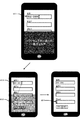
次に、図8のように、ボタン以外のイベントによって、別の項目へスクリプトで強制的にフォーカス移動を行った場合であっても、ソフトウェアキーボードを表示したままにし、入力フィールドも携帯端末100上の可視範囲内に表示する、本発明の実施形態について図9を用いて説明をする。 Next, as shown in FIG. 8, even when the focus is forcibly moved to another item by an event other than a button, the software keyboard remains displayed, and the input field is also displayed on the mobile terminal 100. An embodiment of the present invention that displays within the visible range will be described with reference to FIG.
この実施形態は、携帯端末上の画面上の入力フィールドに、必須入力フィールドをユーザが意識することなく、値を入力していくことが出来るように、ある一つの入力フィールドへの入力が必要桁数を満たした直後に、次の入力必須フィールドへフォーカスを移動させ、かつソフトウェアキーボードの表示を維持した状態にする例である。 In this embodiment, it is necessary to input a certain input field to the input field on the screen of the mobile terminal so that the user can input a value without being aware of the required input field. Immediately after the number is satisfied, the focus is moved to the next required input field, and the display of the software keyboard is maintained.
まず、携帯端末100は、画面上に表示されている図6の601に図示する入力フィールドの項目1が選択(タップ)されると、図6の602に図示するように、現在のフォーカスが項目1に存在するようになり、続いて図6の603に図示するように、携帯端末100のディスプレイの下部領域にソフトウェアキーボードを表示する。この状態において図9の901のように、項目1に対して文字列を入力する(図4、のステップS401に該当)。 First, when the item 1 of the input field illustrated in 601 of FIG. 6 displayed on the screen is selected (tapped), the mobile terminal 100 selects the current focus as illustrated in 602 of FIG. Then, as shown in 603 of FIG. 6, a software keyboard is displayed in the lower area of the display of the portable terminal 100. In this state, as in 901 in FIG. 9, a character string is input for item 1 (corresponding to step S401 in FIG. 4).
次に、図9、901の項目1において、5桁入力がされた後フォーカスが離れようとした時点で、スクリプトによるフォーカス移動イベントを起動すると(図4のステップS402に該当)、次の入力フィールドである項目4へフォーカスの移動の処理が行われる(図9の902から903、図5のステップS501に該当)。フォーカスの移動先の項目4は、入力フィールドであるため(図5のステップS502でYESに該当)、また、次の、ステップS503でキーボードが表示されているか否かの判定においては、このケースのフォーカス移動の場合表示がされない(ステップS503においてNO)ため、図9の904で図示するように、ソフトウェアキーボードを表示を強制的に行う(図5のステップS504に該当)。また、図9の903で図示するように、ソフトウェアキーボードの表示によって隠れていた項目4を、図9の905で図示すように、携帯端末100のディスプレイ上の上部に表示する(図5のステップS506)。 Next, in the item 1 in FIGS. 9 and 901, when the focus movement event by the script is activated at the time when the focus is about to be removed after the 5-digit input is performed (corresponding to step S402 in FIG. 4), the next input field The process of moving the focus to item 4 is performed (corresponding to step S501 in FIG. 5 from 902 to 903 in FIG. 9). Since the focus move destination item 4 is an input field (corresponding to YES in step S502 in FIG. 5), in the next determination of whether or not the keyboard is displayed in step S503, this case Since the display is not performed in the case of the focus movement (NO in step S503), the software keyboard is forcibly displayed (corresponding to step S504 in FIG. 5), as illustrated at 904 in FIG. Further, as shown by 903 in FIG. 9, the item 4 hidden by the display of the software keyboard is displayed on the upper part of the display of the portable terminal 100 as shown by 905 in FIG. 9 (step of FIG. 5). S506).
このように、本来であれば、フォーカス移動の処理を、項目のフォーカスを離れた時のイベントから呼んだ時は、フォーカスをスクリプトのイベントにより強制的に、入力フィールドである図9の項目4へフォーカスを移動させたままであると、ソフトウェアキーボードが非表示状態になるが、フォーカスが移動した後にも、ソフトウェアキーボードの表示を維持する処理を行うことにより、入力フィールドを選択(タップ)してソフトウェアキーボードを再表示しなくても、、可視範囲に表示されたフォーカスの移動先の入力フィールドに対し、値を入力することが出来るようになる。 In this way, when the focus movement process is called from the event when the focus of the item is removed, the focus is forcibly set by the script event to the item 4 in FIG. 9 as the input field. If the focus remains unchanged, the software keyboard is hidden. However, after the focus moves, the software keyboard is selected (tapped) by performing a process to maintain the software keyboard display, and the software keyboard is displayed. Even without re-displaying, a value can be input to the input field of the focus movement destination displayed in the visible range.
以上のことから本発明における効果は以下のことであることが説明できる。本発明におけるステップS502以降の処理は、フォーカスの移動先が入力フィールドであり、かつ、フォーカスの移動処理によってキーボードが表示されていない場合に、必ず、ソフトウェアキーボードを表示し、フォーカスの移動先の入力フィールドを携帯端末100上の可視範囲エリアに表示されるようにしている。このため、ユーザが、例えば、郵便番号などの決まった桁数を入力値として入力した後、次に入力が必要となる入力フィールドに対しては、他に何もすることなく移動することが出来、更に、入力手段となるソフトウェアキーボードを表示した状態にし、かつ入力先の入力フィールドを携帯端末の可視範囲領域に表示することが出来る。このため、ユーザは、フォーカスが移動した後の項目を再度画面上で選択(タップ)してソフトウェアキーボードを再表示する必要がなく、フォーカスの移動先の入力フィールドへ値をスムーズに入力することが出来るようになる。 From the above, it can be explained that the effects of the present invention are as follows. In the processing after step S502 in the present invention, when the focus destination is the input field and the keyboard is not displayed by the focus movement processing, the software keyboard is always displayed and the focus destination is input. The field is displayed in the visible range area on the portable terminal 100. For this reason, for example, after the user inputs a predetermined number of digits such as a zip code as an input value, the user can move to an input field that needs to be input next without doing anything else. Furthermore, it is possible to display a software keyboard as an input means and to display an input destination input field in the visible range of the portable terminal. For this reason, the user does not need to select (tap) the item after the focus is moved again on the screen and display the software keyboard again, and the value can be smoothly input to the input field to which the focus is moved. become able to do.
以上、本発明の実施形態について説明を行ったが、本発明は、例えば、システム、装置、方法、プログラムもしくは記録媒体等としての実施態様をとることが可能である。具体的には、複数の機器から構成されるシステムに適用しても良いし、また、一つの機器からなる装置に適用しても良い。 Although the embodiment of the present invention has been described above, the present invention can take an embodiment as, for example, a system, apparatus, method, program, or recording medium. Specifically, the present invention may be applied to a system composed of a plurality of devices, or may be applied to an apparatus composed of a single device.
なお、上述した各種データの構成及びその内容はこれに限定されるものではなく、用途や目的に応じて、様々な構成や内容で構成されることは言うまでもない。 It should be noted that the configuration and contents of the various data described above are not limited to this, and it goes without saying that the various data and configurations are configured according to the application and purpose.
例えば、実施例においては、携帯端末上のディスプレイに表示がされるソフトウェアキーボードと入力フィールドの表示方法について例を挙げて説明をしたが、例えば、タッチパネル形式の画面を持つ、タブレット端末、パーソナルコンピュータ、ATM等の情報処理装置における、入力フィールドとソフトウェアキーボードの表示位置の関係に適応しても良い。 For example, in the embodiment, the method for displaying the software keyboard and the input field displayed on the display on the mobile terminal has been described as an example. For example, a tablet terminal having a touch panel screen, a personal computer, You may adapt to the relationship between the input field and the display position of a software keyboard in information processing apparatuses, such as ATM.
また、本発明におけるプログラムは、図4と図5に示すフローチャートの処理方法をコンピュータが実行可能なプログラムであり、本発明の記憶媒体は図4と図5の処理方法をコンピュータが実行可能なプログラムが記憶されている。なお、本発明におけるプログラムは図4と図5の各装置の処理方法ごとのプログラムであってもよい。 The program according to the present invention is a program that allows a computer to execute the processing method of the flowcharts shown in FIGS. 4 and 5. The storage medium according to the present invention is a program that allows the computer to execute the processing method of FIGS. Is remembered. The program according to the present invention may be a program for each processing method of each apparatus shown in FIGS.
以上のように、前述した実施形態の機能を実現するプログラムを記録した記録媒体を、システムあるいは装置に供給し、そのシステムあるいは装置のコンピュータ(またはCPUやMPU)が記録媒体に格納されたプログラムを読み出し実行することによっても、本発明の目的が達成されることは言うまでもない。 As described above, a recording medium that records a program that implements the functions of the above-described embodiments is supplied to a system or apparatus, and a computer (or CPU or MPU) of the system or apparatus stores the program stored in the recording medium. It goes without saying that the object of the present invention can also be achieved by executing reading.
この場合、記録媒体から読み出されたプログラム自体が本発明の新規な機能を実現することになり、そのプログラムを記憶した記録媒体は本発明を構成することになる。 In this case, the program itself read from the recording medium realizes the novel function of the present invention, and the recording medium storing the program constitutes the present invention.
プログラムを供給するための記録媒体としては、例えば、フレキシブルディスク、ハードディスク、光ディスク、光磁気ディスク、CD−ROM、CD−R、DVD−ROM、磁気テープ、不揮発性のメモリカード、ROM、EEPROM、シリコンディスク、ソリッドステートドライブ等を用いることができる。 As a recording medium for supplying the program, for example, a flexible disk, hard disk, optical disk, magneto-optical disk, CD-ROM, CD-R, DVD-ROM, magnetic tape, nonvolatile memory card, ROM, EEPROM, silicon A disk, solid state drive, or the like can be used.
また、コンピュータが読み出したプログラムを実行することにより、前述した実施形態の機能が実現されるだけでなく、そのプログラムの指示に基づき、コンピュータ上で稼働しているOS(オペレーティングシステム)等が実際の処理の一部または全部を行い、その処理によって前述した実施形態の機能が実現される場合も含まれることは言うまでもない。 Further, by executing the program read by the computer, not only the functions of the above-described embodiments are realized, but also an OS (operating system) operating on the computer based on an instruction of the program is actually It goes without saying that a case where the function of the above-described embodiment is realized by performing part or all of the processing and the processing is included.
さらに、記録媒体から読み出されたプログラムが、コンピュータに挿入された機能拡張ボードやコンピュータに接続された機能拡張ユニットに備わるメモリに書き込まれた後、そのプログラムコードの指示に基づき、その機能拡張ボードや機能拡張ユニットに備わるCPU等が実際の処理の一部または全部を行い、その処理によって前述した実施形態の機能が実現される場合も含まれることは言うまでもない。 Furthermore, after the program read from the recording medium is written to the memory provided in the function expansion board inserted into the computer or the function expansion unit connected to the computer, the function expansion board is based on the instructions of the program code. It goes without saying that the case where the CPU or the like provided in the function expansion unit performs part or all of the actual processing and the functions of the above-described embodiments are realized by the processing.
また、本発明は、複数の機器から構成されるシステムに適用しても、1つの機器からなる装置に適用してもよい。また、本発明は、システムあるいは装置にプログラムを供給することによって達成される場合にも適応できることは言うまでもない。この場合、本発明を達成するためのプログラムを格納した記録媒体を該システムあるいは装置に読み出すことによって、そのシステムあるいは装置が、本発明の効果を享受することが可能となる。 Further, the present invention may be applied to a system composed of a plurality of devices or an apparatus composed of a single device. Needless to say, the present invention can be applied to a case where the present invention is achieved by supplying a program to a system or apparatus. In this case, by reading a recording medium storing a program for achieving the present invention into the system or apparatus, the system or apparatus can enjoy the effects of the present invention.
さらに、本発明を達成するためのプログラムをネットワーク上のサーバ、データベース等から通信プログラムによりダウンロードして読み出すことによって、そのシステムあるいは装置が、本発明の効果を享受することが可能となる。 Furthermore, by downloading and reading a program for achieving the present invention from a server, database, etc. on a network using a communication program, the system or apparatus can enjoy the effects of the present invention.
なお、上述した各実施形態およびその変形例を組み合わせた構成も全て本発明に含まれるものである。 In addition, all the structures which combined each embodiment mentioned above and its modification are also included in this invention.
100 携帯端末
102 クライアント端末
103 ファクシミリサーバ
104 ファクシミリ通信カード
105 LAN
106 公衆回線
200 WEBサーバ
201 CPU
202 ROM
203 RAM
204 システムバス
205 入力コントローラ(入力C)
206 ビデオコントローラ(VC)
207 メモリコントローラ(MC)
208 通信I/Fコントローラ(通信I/FC)
209 キーボード
210 CRT
211 外部メモリ
300 公衆回線
301 テキスト入力部
302 テキスト表示部
303 フォーカス移動部
304 フォーカス移動検知部
305 移動先フィールド属性判定部
306 テキスト入力部表示判定部
307 テキスト入力部再表示部
308 可視範囲内移動判定部
309 入力フィールド可視範囲内移動部
400 インターネット回線
100 portable terminal 102 client terminal 103 facsimile server 104 facsimile communication card 105 LAN
106 Public line 200
202 ROM
203 RAM
204
206 Video controller (VC)
207 Memory controller (MC)
208 Communication I / F controller (Communication I / FC)
209
211 External memory 300
Claims (5)
現在のフィールドへのユーザの操作終了後、次の入力フィールド候補となる次のフィールドへフォーカスが移動したことを検知するフォーカス移動検知手段と、
前記次のフィールドが前記テキストの入力が可能な入力フィールドであるか否かを判定する移動先フィールド属性判定手段と、
前記移動先フィールド属性判定手段により、前記次のフィールドが前記テキストの入力が可能な入力フィールドであると判定され、かつ、該入力フィールドに対し前記フォーカスが移動した際に前記テキスト入力手段が前記携帯端末の表示領域に表示されているか否かを判定するテキスト入力手段表示判定手段と、
前記テキスト入力手段表示判定手段により、前記テキスト入力手段が表示されていないと判定した場合に、前記テキスト入力手段を表示するテキスト入力手段再表示手段と、
前記次のフィールドが前記携帯端末の表示領域の可視範囲内に移動したか否かを判定する可視範囲内移動判定手段と、
前記可視範囲内移動判定手段にて前記可視範囲内に前記次のフィールドが移動しなかったと判定した場合は、前記次のフィールドを前記携帯端末の表示領域の可視範囲内に表示を行うべく、該次のフィールドをスクロール移動させる入力フィールド可視範囲内移動手段とを備ることを特徴とする携帯端末。 A mobile terminal having a text input means that allows a user to input text over a plurality of input fields displayed in a display area on the mobile terminal,
Focus movement detection means for detecting that the focus has moved to the next field as the next input field candidate after the user's operation on the current field is completed;
Destination field attribute determination means for determining whether or not the next field is an input field capable of inputting the text;
When the destination field attribute determining means determines that the next field is an input field into which the text can be input, and the focus input moves to the input field, the text input means Text input means display determination means for determining whether or not the display area of the terminal is displayed,
When the text input means display determination means determines that the text input means is not displayed, the text input means redisplay means for displaying the text input means;
A visible range movement determination means for determining whether or not the next field has moved within the visible range of the display area of the mobile terminal;
If it is determined by the visible range movement determination means that the next field has not moved within the visible range, the next field is displayed within the visible range of the display area of the mobile terminal. A portable terminal comprising an input field visible range moving means for scrolling the next field.
ことを特徴とする請求項1に記載の携帯端末。 2. The input field for displaying the text input by the text input means and the text input means are simultaneously displayed when the focus is moved to the next input field. Mobile devices.
フォーカス移動検知手段が、現在のフィールドへのユーザの操作終了後、次の入力フィールド候補となる次のフィールドへフォーカスが移動したことを検知するフォーカス移動検知ステップと、
移動先フィールド属性判定手段が、前記次のフィールドが前記テキストの入力が可能な入力フィールドであるか否かを判定する移動先フィールド属性判定ステップと、
テキスト入力手段表示判定手段が、前記移動先フィールド属性判定手段により、前記次のフィールドが前記テキストの入力が可能な入力フィールドであると判定され、かつ、該入力フィールドに対し前記フォーカスが移動した際に前記テキスト入力手段が前記携帯端末の表示領域に表示されているか否かを判定するテキスト入力手段表示判定ステップと、
テキスト入力手段再表示手段が、前記テキスト入力手段表示判定手段により、前記テキスト入力手段が表示されていないと判定した場合に、前記テキスト入力手段を表示するテキスト入力手段再表示ステップと、
可視範囲内移動判定手段が、前記次のフィールドが前記携帯端末の表示領域の可視範囲内に移動したか否かを判定する可視範囲内移動判定ステップと、
入力フィールド可視範囲内移動手段が、前記可視範囲内移動判定手段にて前記可視範囲内に前記次のフィールドが移動しなかったと判定した場合は、前記次のフィールドを前記携帯端末の表示領域の可視範囲内に表示を行うべく、該次のフィールドをスクロール移動させる入力フィールド可視範囲内移動ステップと
を備ることを特徴とする携帯端末の制御方法。 A control method of a mobile terminal having a text input means that allows a user to input text over a plurality of input fields displayed in a display area on the mobile terminal,
A focus movement detection step in which the focus movement detection means detects that the focus has moved to the next field as the next input field candidate after the user's operation on the current field is completed;
A destination field attribute determining unit for determining whether the next field is an input field into which the text can be input;
When the text input means display determination means determines that the next field is an input field into which the text can be input by the destination field attribute determination means, and the focus moves with respect to the input field Text input means display determination step for determining whether or not the text input means is displayed in the display area of the mobile terminal;
A text input means redisplaying step for displaying the text input means when the text input means redisplay means determines that the text input means is not displayed by the text input means display determination means;
Visible range movement determination means determines whether or not the next field has moved into the visible range of the display area of the mobile terminal;
When the input field visible range moving means determines that the next field has not moved within the visible range by the visible range movement determining means, the next field is moved to the visible area of the display area of the portable terminal. A control method for a portable terminal, comprising: an input field visible range moving step for scrolling the next field to perform display within the range.
前記コンピュータを、
現在のフィールドへのユーザの操作終了後、次の入力フィールド候補となる次のフィールドへフォーカスが移動したことを検知するフォーカス移動検知手段、
前記次のフィールドが前記テキストの入力が可能な入力フィールドであるか否かを判定する移動先フィールド属性判定手段、
前記移動先フィールド属性判定手段により、前記次のフィールドが前記テキストの入力が可能な入力フィールドであると判定され、かつ、該入力フィールドに対し前記フォーカスが移動した際に前記テキスト入力手段が前記携帯端末の表示領域に表示されているか否かを判定するテキスト入力手段表示判定手段、
前記テキスト入力手段表示判定手段により、前記テキスト入力手段が表示されていないと判定した場合に、前記テキスト入力手段を表示するテキスト入力手段再表示手段、
前記次のフィールドが前記携帯端末の表示領域の可視範囲内に移動したか否かを判定する可視範囲内移動判定手段、
前記可視範囲内移動判定手段にて前記可視範囲内に前記次のフィールドが移動しなかったと判定した場合は、前記次のフィールドを前記携帯端末の表示領域の可視範囲内に表示を行うべく、該次のフィールドをスクロール移動させる入力フィールド可視範囲内移動手段
を備ることを特徴とする携帯端末として機能させることを特徴とするプログラム。 A program for causing a computer to function as a mobile terminal having a text input means that allows a user to input text over a plurality of input fields displayed in a display area on the mobile terminal,
The computer,
Focus movement detection means for detecting that the focus has moved to the next field as the next input field candidate after the user's operation to the current field is completed;
Destination field attribute determination means for determining whether or not the next field is an input field into which the text can be input;
When the destination field attribute determining means determines that the next field is an input field into which the text can be input, and the focus input moves to the input field, the text input means Text input means display determination means for determining whether or not the display area of the terminal is displayed,
A text input means redisplay means for displaying the text input means when the text input means display determination means determines that the text input means is not displayed;
Visible range movement determination means for determining whether or not the next field has moved within the visible range of the display area of the mobile terminal;
If it is determined by the visible range movement determination means that the next field has not moved within the visible range, the next field is displayed within the visible range of the display area of the mobile terminal. A program for causing a mobile terminal to function as a portable terminal, characterized by comprising means for moving within the visible range of an input field for scrolling the next field.
Priority Applications (1)
| Application Number | Priority Date | Filing Date | Title |
|---|---|---|---|
| JP2012257674A JP2014106625A (en) | 2012-11-26 | 2012-11-26 | Portable terminal, control method of portable terminal, program and recording medium |
Applications Claiming Priority (1)
| Application Number | Priority Date | Filing Date | Title |
|---|---|---|---|
| JP2012257674A JP2014106625A (en) | 2012-11-26 | 2012-11-26 | Portable terminal, control method of portable terminal, program and recording medium |
Publications (1)
| Publication Number | Publication Date |
|---|---|
| JP2014106625A true JP2014106625A (en) | 2014-06-09 |
Family
ID=51028078
Family Applications (1)
| Application Number | Title | Priority Date | Filing Date |
|---|---|---|---|
| JP2012257674A Pending JP2014106625A (en) | 2012-11-26 | 2012-11-26 | Portable terminal, control method of portable terminal, program and recording medium |
Country Status (1)
| Country | Link |
|---|---|
| JP (1) | JP2014106625A (en) |
Cited By (7)
| Publication number | Priority date | Publication date | Assignee | Title |
|---|---|---|---|---|
| JP2018036716A (en) * | 2016-08-29 | 2018-03-08 | キヤノン株式会社 | Information processing apparatus, control method thereof, and program |
| JP2019024958A (en) * | 2017-07-29 | 2019-02-21 | 株式会社ユニバーサルエンターテインメント | Game machine |
| JP2019024968A (en) * | 2017-07-29 | 2019-02-21 | 株式会社ユニバーサルエンターテインメント | Game machine |
| JP2019024957A (en) * | 2017-07-29 | 2019-02-21 | 株式会社ユニバーサルエンターテインメント | Game machine |
| JP2019144903A (en) * | 2018-02-21 | 2019-08-29 | ヤフー株式会社 | Input program, input method, and terminal device |
| JP2019164573A (en) * | 2018-03-19 | 2019-09-26 | 株式会社リコー | Display input device, image forming device, screen display method, and program |
| JP2023060075A (en) * | 2017-07-12 | 2023-04-27 | キヤノン株式会社 | Information processor, control method of information processor, and program |
-
2012
- 2012-11-26 JP JP2012257674A patent/JP2014106625A/en active Pending
Cited By (10)
| Publication number | Priority date | Publication date | Assignee | Title |
|---|---|---|---|---|
| JP2018036716A (en) * | 2016-08-29 | 2018-03-08 | キヤノン株式会社 | Information processing apparatus, control method thereof, and program |
| US10592085B2 (en) | 2016-08-29 | 2020-03-17 | Canon Kabushiki Kaisha | Information processing apparatus, control method thereof and recording medium |
| JP2023060075A (en) * | 2017-07-12 | 2023-04-27 | キヤノン株式会社 | Information processor, control method of information processor, and program |
| JP7483968B2 (en) | 2017-07-12 | 2024-05-15 | キヤノン株式会社 | Information processing device and printing device |
| JP2019024958A (en) * | 2017-07-29 | 2019-02-21 | 株式会社ユニバーサルエンターテインメント | Game machine |
| JP2019024968A (en) * | 2017-07-29 | 2019-02-21 | 株式会社ユニバーサルエンターテインメント | Game machine |
| JP2019024957A (en) * | 2017-07-29 | 2019-02-21 | 株式会社ユニバーサルエンターテインメント | Game machine |
| JP2019144903A (en) * | 2018-02-21 | 2019-08-29 | ヤフー株式会社 | Input program, input method, and terminal device |
| JP2019164573A (en) * | 2018-03-19 | 2019-09-26 | 株式会社リコー | Display input device, image forming device, screen display method, and program |
| JP7110637B2 (en) | 2018-03-19 | 2022-08-02 | 株式会社リコー | Display input device, image forming device, screen display method and program |
Similar Documents
| Publication | Publication Date | Title |
|---|---|---|
| EP2715499B1 (en) | Invisible control | |
| US10474352B1 (en) | Dynamic expansion of data visualizations | |
| JP2022172079A (en) | Systems, devices, and methods for dynamically providing user interface controls on touch-sensitive secondary displays | |
| JP6153868B2 (en) | Method and apparatus for displaying items | |
| JP4599898B2 (en) | Program, method and portable information device for screen display control | |
| CN104137048B (en) | Provides an open instance of the app | |
| AU2014287956B2 (en) | Method for displaying and electronic device thereof | |
| US20120174020A1 (en) | Indication of active window when switching tasks in a multi-monitor environment | |
| US20150033188A1 (en) | Scrollable smart menu | |
| CN105103111A (en) | User interface for computing device | |
| JP2011150413A (en) | Information processing apparatus, method and program for inputting operation | |
| JP2014106625A (en) | Portable terminal, control method of portable terminal, program and recording medium | |
| KR20150095540A (en) | User terminal device and method for displaying thereof | |
| US9367223B2 (en) | Using a scroll bar in a multiple panel user interface | |
| EP3278203B1 (en) | Enhancement to text selection controls | |
| JPWO2014141548A1 (en) | Display control | |
| US20140351745A1 (en) | Content navigation having a selection function and visual indicator thereof | |
| JP6528400B2 (en) | INFORMATION PROCESSING APPARATUS, INFORMATION PROCESSING SYSTEM, CONTROL METHOD OF INFORMATION PROCESSING APPARATUS, AND PROGRAM | |
| JP5906344B1 (en) | Information processing apparatus, information display program, and information display method | |
| KR101381878B1 (en) | Method, device, and computer-readable recording medium for realizing touch input using mouse | |
| US10795537B2 (en) | Display device and method therefor | |
| JP6360390B2 (en) | Information processing program, information processing apparatus, information processing system, and information processing method | |
| JP6004746B2 (en) | Information display device, information display method, information display program, and program recording medium | |
| JP2018088054A (en) | Electronic device and display control method | |
| JP6194383B2 (en) | Information processing apparatus, information display program, and information display method |
Legal Events
| Date | Code | Title | Description |
|---|---|---|---|
| A711 | Notification of change in applicant |
Free format text: JAPANESE INTERMEDIATE CODE: A711 Effective date: 20150410 |