JP2010205050A - User interface device with touch panel, method, and program for controlling user interface - Google Patents
User interface device with touch panel, method, and program for controlling user interface Download PDFInfo
- Publication number
- JP2010205050A JP2010205050A JP2009050839A JP2009050839A JP2010205050A JP 2010205050 A JP2010205050 A JP 2010205050A JP 2009050839 A JP2009050839 A JP 2009050839A JP 2009050839 A JP2009050839 A JP 2009050839A JP 2010205050 A JP2010205050 A JP 2010205050A
- Authority
- JP
- Japan
- Prior art keywords
- proximity
- touch panel
- user interface
- detected
- contact
- Prior art date
- Legal status (The legal status is an assumption and is not a legal conclusion. Google has not performed a legal analysis and makes no representation as to the accuracy of the status listed.)
- Pending
Links
Images




Landscapes
- Position Input By Displaying (AREA)
- User Interface Of Digital Computer (AREA)
Abstract
【課題】タッチパネルを有するインタフェース装置において、タッチ操作に対応した機能の操作性を向上させる。
【解決手段】タッチパネル付きユーザインタフェース装置は、タッチパネル1への物体の近接および接触状態を検知する近接/接触判定部2と、近接および接触状態を検知した場合にタッチパネル1に対する物体の相対的な近接および接触位置座標を検出する座標検出部3と、座標検出部3で検出した近接位置座標の時間変化に基づいて物体のタッチパネル1への近接速度を算出する近接速度算出部4と、座標検出部3で検出した接触位置座標および近接速度算出部4が算出した近接速度に応じて、表示部6の画面表示を制御するコンテンツ制御部5とを備える。コンテンツ制御部5は、物体が接触した際の近接速度に応じて、例えばコンテンツのモードを切り替えたり、接触したアイコンの拡大率を変更したりする。
【選択図】図1In an interface device having a touch panel, the operability of a function corresponding to a touch operation is improved.
A user interface device with a touch panel includes a proximity / contact determination unit 2 that detects proximity and a contact state of an object to the touch panel 1, and a relative proximity of the object to the touch panel 1 when the proximity and the contact state are detected. A coordinate detection unit 3 that detects the contact position coordinates, a proximity speed calculation unit 4 that calculates a proximity speed of the object to the touch panel 1 based on a temporal change in the proximity position coordinates detected by the coordinate detection unit 3, and a coordinate detection unit The content control unit 5 controls the screen display of the display unit 6 according to the contact position coordinates detected in 3 and the proximity speed calculated by the proximity speed calculation unit 4. The content control unit 5 switches the mode of the content, for example, or changes the enlargement ratio of the touched icon according to the proximity speed when the object comes into contact.
[Selection] Figure 1
Description
本発明は、タッチパネルへの物体の近接速度または加速度を利用して画面表示処理を行うユーザインタフェース装置、その制御方法およびその制御プログラムに関するものである。 The present invention relates to a user interface device that performs screen display processing using the proximity speed or acceleration of an object to a touch panel, a control method thereof, and a control program thereof.
近年、携帯電話やデジタルカメラをはじめとする情報処理端末に搭載されるコンテンツや機能は増加の一途をたどり、コンテンツを閲覧する場合または機能を操作する場合に、ユーザの操作が複雑化してきている。そこで、複雑なコンテンツや機能を簡単に、また直感的に操作可能なユーザインタフェースを実現することが課題となっている。
特許文献1の携帯端末装置は、表示部とタッチパネルとが一体に配置され、この表示部周辺を撮像するカメラを有する。この携帯端末装置は、撮像画像に基づいてユーザの指と表示部との相対的な位置関係を検出し、指が表示部に所定の距離以上近接するとその指が近接しているアイコンを拡大表示して、アイコン選択を容易にしていた。
In recent years, content and functions installed in information processing terminals such as mobile phones and digital cameras have been increasing, and user operations have become complicated when browsing content or operating functions. . Therefore, it is an issue to realize a user interface that can easily and intuitively operate complicated contents and functions.
The portable terminal device of
従来のユーザインタフェース装置は以上のように構成されているので、ユーザの指が表示部に所定距離以上近接したか否かに基づいてユーザの操作を補助することは開示されているが、指と表示部との位置関係の時間変化に基づいて、指の近接速度または近接加速度を利用する技術については何ら開示も示唆もされていない。そのため、複雑なコンテンツや機能を簡単に、直感的に操作させるユーザインタフェースが十分に実現されていないという課題があった。 Since the conventional user interface device is configured as described above, it is disclosed that the user's operation is assisted based on whether or not the user's finger is close to the display unit by a predetermined distance or more. There is no disclosure or suggestion of a technique that utilizes the proximity speed or proximity acceleration of a finger based on a temporal change in the positional relationship with the display unit. For this reason, there has been a problem that a user interface for easily and intuitively operating complicated contents and functions has not been realized.
この発明は、上記のような課題を解決するためになされたもので、タッチパネルを有するインタフェース装置において、タッチ操作に対応した機能の操作性を向上させることを目的とする。 The present invention has been made to solve the above-described problems, and an object thereof is to improve the operability of a function corresponding to a touch operation in an interface device having a touch panel.
この発明に係るタッチパネル付きユーザインタフェース装置は、タッチパネルへの物体の近接および接触状態を検知する近接/接触判定部と、近接/接触判定部が近接および接触状態を検知した場合に、タッチパネルに対する物体の相対的な近接および接触位置座標を検出する座標検出部と、近接/接触判定部が接触状態を検知した場合に、座標検出部で検出した近接位置座標の時間変化に基づいて、物体のタッチパネルへの近接速度または近接加速度を算出する近接速度算出部と、近接/接触判定部が接触状態を検知した場合に、座標検出部で検出した接触位置座標および近接速度算出部が算出した近接速度または近接加速度に応じて、画面表示を制御するコンテンツ制御部とを備えるようにしたものである。 The user interface device with a touch panel according to the present invention includes a proximity / contact determination unit that detects the proximity and contact state of an object to the touch panel, and the proximity / contact determination unit that detects the proximity and contact state of the object with respect to the touch panel. When the coordinate detection unit that detects relative proximity and contact position coordinates and the proximity / contact determination unit detect a contact state, the touch panel of the object is touched based on the temporal change of the proximity position coordinates detected by the coordinate detection unit. When the proximity speed calculation unit that calculates the proximity speed or acceleration of the sensor and the proximity / contact determination unit detects a contact state, the contact position coordinates detected by the coordinate detection unit and the proximity speed or proximity calculated by the proximity speed calculation unit A content control unit that controls screen display according to acceleration is provided.
この発明に係るタッチパネル付きユーザインタフェース装置のユーザインタフェース制御方法は、タッチパネルへの物体の近接および接触状態を検知する近接/接触判定ステップと、近接/接触判定ステップで近接および接触状態を検知した場合に、タッチパネルに対する物体の相対的な近接および接触位置座標を検出する座標検出ステップと、近接/接触判定ステップで接触状態を検知した場合に、座標検出ステップで検出した近接位置座標の時間変化に基づいて、物体の前記タッチパネルへの近接速度または近接加速度を算出する近接速度算出ステップと、近接/接触判定ステップで接触状態を検知した場合に、座標検出ステップで検出した接触位置座標および近接速度算出ステップで算出した近接速度または近接加速度に応じて、画面表示を制御するコンテンツ制御ステップとを備えるようにしたものである。 The user interface control method of the user interface device with a touch panel according to the present invention includes a proximity / contact determination step for detecting the proximity and contact state of an object to the touch panel, and a case where the proximity and contact state are detected in the proximity / contact determination step. Based on the time change of the proximity position coordinates detected in the coordinate detection step when the contact state is detected in the coordinate detection step for detecting the relative proximity and contact position coordinates of the object with respect to the touch panel and the proximity / contact determination step A proximity speed calculation step for calculating the proximity speed or proximity acceleration of the object to the touch panel, and a contact position coordinate and proximity speed calculation step detected in the coordinate detection step when a contact state is detected in the proximity / contact determination step. Depending on the calculated proximity speed or proximity acceleration, the screen It is obtained by so and a content control step of controlling shown.
この発明に係るタッチパネル付きユーザインタフェース装置のユーザインタフェース制御プログラムは、コンピュータを、タッチパネルへの物体の近接および接触状態を検知する近接/接触判定手段と、近接/接触判定手段が近接および接触状態を検知した場合に、タッチパネルに対する物体の相対的な近接および接触位置座標を検出する座標検出手段と、近接/接触判定手段が接触状態を検知した場合に、座標検出手段で検出した近接位置座標の時間変化に基づいて、物体のタッチパネルへの近接速度または近接加速度を算出する近接速度算出手段と、近接/接触判定手段が触状態を検知した場合に、座標検出手段で検出した接触位置座標および近接速度算出手段が算出した近接速度または近接加速度に応じて、画面表示を制御するコンテンツ制御手段として機能させるようにしたものである。 A user interface control program for a user interface device with a touch panel according to the present invention provides a computer, a proximity / contact determination unit that detects the proximity and contact state of an object to the touch panel, and the proximity / contact determination unit detects the proximity and contact state. In this case, when the contact detection is detected by the coordinate detection means for detecting the relative proximity and contact position coordinates of the object with respect to the touch panel, and the proximity / contact determination means, the time change of the proximity position coordinates detected by the coordinate detection means The proximity speed calculation means for calculating the proximity speed or proximity acceleration of the object to the touch panel based on the touch position coordinates and proximity speed calculation detected by the coordinate detection means when the proximity / contact determination means detects the touch state A container that controls the screen display according to the proximity speed or acceleration calculated by the means. It is obtained so as to function as a tool control means.
この発明によれば、タッチパネルと物体の位置関係の時間変化に基づいて算出した近接速度または近接加速度に応じて画面表示を制御するようにしたので、物体のタッチパネルへの近接速度または近接加速度を利用してユーザインタフェースを制御できるタッチパネル付きユーザインタフェース装置、ならびにそのユーザインタフェース制御方法およびユーザインタフェース制御プログラムを実現できる。そのため、従来のようなタッチパネルへの接触の情報のみを利用するユーザインタフェースだけでなく、ユーザのタッチパネルの押し方、即ち急にタッチ入力が行われたのか、ゆっくりとタッチ入力が行われたのかに応じて、多彩なユーザインタフェースを提供することができる。よって、タッチ操作に対応した機能の操作性を向上させることが可能となる。 According to the present invention, since the screen display is controlled according to the proximity speed or proximity acceleration calculated based on the temporal change in the positional relationship between the touch panel and the object, the proximity speed or proximity acceleration of the object to the touch panel is used. Thus, a user interface device with a touch panel that can control the user interface, a user interface control method thereof, and a user interface control program can be realized. Therefore, not only a conventional user interface that uses only touch panel information, but also how the user touches the touch panel, that is, whether touch input is performed suddenly or whether touch input is performed slowly. In response, a variety of user interfaces can be provided. Therefore, the operability of the function corresponding to the touch operation can be improved.
実施の形態1.
図1は、この発明の実施の形態1に係るユーザインタフェース装置の構成を示すブロック図である。図1に示すように、実施の形態1によるユーザインタフェース装置は、タッチパネル1、近接/接触判定部2、座標検出部3、近接速度算出部4、コンテンツ制御部5、表示部6、メモリ7および制御部8から構成される。
FIG. 1 is a block diagram showing a configuration of a user interface apparatus according to
タッチパネル1は、ユーザの指またはペン等、物体による入力を検知し、検知信号を近接/接触判定部2へ出力する。近接/接触判定部2は、タッチパネル1から出力される検知信号を用いて、物体のタッチパネル1への近接状態および接触状態を判定する。座標検出部3は、近接/接触判定部2において物体が近接または接触したと判定された場合に、タッチパネル1と物体との相対的な位置関係を示す近接位置座標または接触位置座標を検出する。近接速度算出部4は、物体の近接位置座標の時間変化に基づいて、近接状態の場合に物体がタッチパネル1に近づく速度を算出する。コンテンツ制御部5は、物体がタッチパネル1に接触した接触位置座標と近接速度算出部4で算出した近接速度とに応じて、適切な表示コンテンツを選択する等、表示部6の表示内容を制御する。表示部6は、コンテンツ制御部5によって選択および制御されたコンテンツ画面の表示を行う。メモリ7は、座標検出部3によって検出された近接位置座標および接触位置座標を格納しておく。制御部8は全体の動作を制御する。
The
次に、実施の形態1によるユーザインタフェース装置の動作を説明する。図2は、実施の形態1に係るユーザインタフェース装置の動作を示すフローチャートである。
先ず、近接/接触判定部2において、タッチパネル1への物体の近接または接触があったか否かを判定する(ステップST1)。近接または接触があったと判定された場合には(ステップST1“Yes”)、座標検出部3が物体とタッチパネル1との相対的な位置関係を示す位置座標を検出する(ステップST2)。ステップST1にて物体の近接および接触がないと判定された場合には(ステップST1“No”)、制御部8がメモリ7の内容をクリアして(ステップST5)、次の時刻において近接または接触があったか否かの判定に戻る(ステップST1)。
Next, the operation of the user interface device according to the first embodiment will be described. FIG. 2 is a flowchart showing the operation of the user interface device according to the first embodiment.
First, the proximity /
図3は、タッチパネル1と物体10との相対的な位置関係を示す説明図である。図3に示すように、座標検出部3は、物体10のタッチパネル1上におけるx方向、y方向およびz方向の位置をそれぞれ座標値として検出する。
FIG. 3 is an explanatory diagram showing a relative positional relationship between the
ここで、近接位置座標および接触位置座標の検出動作について説明する。
図4は、タッチパネル1の構成を示す模式図である。図4に示すように、タッチパネル1は、x方向の座標値を検出するためにy方向と平行に配置された複数のx方向センサ電極11と、y方向の座標値を検出するためにx方向と平行に配置された複数のy方向センサ電極12とから構成される。座標検出部3はこれらセンサ電極11,12が出力する検知信号に基づいて、タッチパネル1へ物体10が近接または接触した場合に、x方向センサ電極11およびy方向センサ電極12のうち、x,y方向それぞれどのセンサ電極が反応しているかを検出することで、物体10のタッチパネル1上におけるx,y方向の位置(以下、それぞれx座標、y座標と呼ぶ)を検出することができる。
Here, the detection operation of the proximity position coordinates and the contact position coordinates will be described.
FIG. 4 is a schematic diagram showing the configuration of the
図5は、近接/接触判定部2および座標検出部3がタッチパネル1と物体10の距離を検出する方法を示す説明図であり、タッチパネル1と物体10の間の静電容量の変化量とz方向の距離との関係を示すグラフを示す。グラフに示すように、タッチパネル1と物体10との距離が近くなるにつれて、タッチパネル1と物体10の間の静電容量が大きくなる。
静電容量の変化の度合いはタッチパネル1と物体10との距離によって変化するため、近接/接触判定部2は、タッチパネル1と物体10との間の静電容量の変化度合いから、物体10がタッチパネル1へ近接したか、または接触したかを判定することができる。具体的には、静電容量の変化量が所定の閾値Th1以上の場合(領域A)に物体10がタッチパネル1へ近接したと判定し(図5(A))、閾値Th1未満の場合に近接していないと判定する。さらに、静電容量の変化量が閾値Th2(>Th1)以上の場合(領域B)には、物体10がタッチパネル1に接触したと判定することができる(図5(B))。
座標検出部3は、物体10とタッチパネル1との間の静電容量の変化量から、物体10とタッチパネル1とのz方向の距離(以下、z座標と呼ぶ)を検出する。座標検出部3は、上述のx方向センサ電極11およびy方向センサ電極12の検知結果に基づくx座標およびy座標と、このz座標とを合わせて、位置座標とする。
FIG. 5 is an explanatory diagram illustrating a method in which the proximity /
Since the degree of change in capacitance changes depending on the distance between the
The coordinate
説明を図2に戻す。ステップST3において、近接/接触判定部2は物体がタッチパネル1へ接触したか否かを判定する。タッチパネル1への物体の接触がなかったと判定された場合は(ステップST3“No”)、物体が近接している状態である。この近接状態の場合、ステップST2で座標検出部3が検出した近接位置座標がメモリ7に保存され(ステップST4)、さらに次の時刻において近接または接触があったか否かの判定に戻る(ステップST1)。このように、物体がタッチパネル1に接触するまでの間、位置座標の保存を繰り返すことにより、メモリ7には、物体が初めてタッチパネル1に近接したと判定されてから接触したと判定されるまでに検出された全ての、または一部の位置座標が保存されることになる。
Returning to FIG. In step ST <b> 3, the proximity /
一方、近接/接触判定部2によって、タッチパネル1への物体の接触があったと判定された場合は(ステップST3“Yes”)、座標検出部3が接触位置座標をメモリ7に保存し、制御部8がメモリ7に保存されている位置座標を読み出して近接速度算出部4に通知する。このときメモリ7に保存されている位置座標の情報の構造を、図6に例示する。メモリ7には、図6に示すように、物体がタッチパネル1に接触した時刻の位置座標(x(t),y(t),z(t))から、物体がタッチパネル1に近接していた状態のn時刻前の位置座標(x(t−i),y(t−i),z(t−i))(ただし、i=1,2,・・・,n)までが配列して保存されている。
On the other hand, when the proximity /
近接速度算出部4は、制御部8から位置座標の情報を受け取ると、その位置座標のうち、z座標の時間変化に基づいて物体の近接速度を算出する(ステップST6)。図7は、物体10がタッチパネル1に近接してから接触するまでのz座標(距離)の時間変化を示すグラフである。グラフに示すように、物体10がタッチパネル1に近接してから接触するまでのz座標の時間変化は、図7(A)のように近接速度が速い場合と、図7(B)のように近接速度が遅い場合とで異なる。そのため、近接速度算出部4は、z座標の時間変化に基づいて近接速度を算出することができる。
When the proximity
ステップST7において、コンテンツ制御部5が近接速度算出部4から近接速度の情報を受け取り、後述するように、その近接速度に応じて適切な表示コンテンツを選択したり表示のためのパラメータを変更したりと、表示内容の制御および設定を行う。続くステップST8において、表示部6が、コンテンツ制御部5によって制御された表示コンテンツを表示する。
In step ST7, the
以上のように、実施の形態1のユーザインタフェース装置によれば、物体のタッチパネル1への近接速度、即ち物体がタッチパネル1へ速く近づいたのか、ゆっくりと近づいたのかを判定して、表示コンテンツを切り替えることが可能になるので、多彩なユーザインタフェースを実現することが可能である。
As described above, according to the user interface device of the first embodiment, the proximity speed of the object to the
次に、実施の形態1のユーザインタフェース装置を用いた具体的なユーザインタフェースの例を説明する。以下、タッチパネル1は表示部6の前面に取り付けられて一体となっているものとする。また、物体のタッチパネル1への近接速度とは、上記ステップST6において近接速度算出部4が算出した近接速度である。また、コンテンツ制御部5は、座標検出部3が検出した接触位置座標を、表示部6の表示領域中の位置座標として用いる。
Next, an example of a specific user interface using the user interface device of the first embodiment will be described. Hereinafter, it is assumed that the
先ず、複数のモードを有するコンテンツにおいて、物体のタッチパネル1への近接速度に応じて、モードを切り替えて表示する例を示す。図8は、表示部6が表示する表示画面の一例を示す説明図であり、ドキュメント閲覧画面である。ここで例示するコンテンツは、ドキュメントを表示する閲覧モードと、ドキュメントの表示領域を移動可能なスクロールモードと、ドキュメントの表示領域を拡大/縮小可能な拡大/縮小モードとを有しているものとする。
ユーザがドキュメントを閲覧している画面において、コンテンツ制御部5は、近接速度が所定の閾値以上の場合、即ちユーザが速くタッチ入力した場合に、閲覧モードを図8(A)に示すようなスクロールモードに遷移させる。図8(A)のスクロールモード画面では、ユーザがタッチ入力によりドキュメントのスクロール操作を行うことができる。
一方、近接速度が所定の閾値未満の場合、即ちユーザがゆっくりタッチ入力した場合、コンテンツ制御部5は閲覧モードを図8(B)に示すような拡大/縮小モードに遷移させる。図8(B)の拡大/縮小モード画面では、ユーザがタッチ入力によりドキュメントの拡大および縮小操作を行うことができる。
First, an example in which content having a plurality of modes is displayed by switching modes according to the proximity speed of an object to the
On the screen on which the user is browsing the document, the
On the other hand, when the proximity speed is less than the predetermined threshold, that is, when the user performs a slow touch input, the
この他にも、物体の近接速度を利用した、様々なユーザインタフェースが考えられる。
先ず、物体のタッチパネル1への近接速度に応じて、表示部6の表示画面においてアイコン等、特定の表示領域の範囲を拡大する例を示す。図9は、表示部6が表示する表示画面の一例を示す説明図であり、文字入力画面である。図9(A)に示すように文字キーのアイコンが配置された文字入力画面において、コンテンツ制御部5は、近接速度が所定の閾値以上の場合、接触した位置座標に表示されている文字キーを拡大させることなく、そのままの状態で表示させる。
一方、近接速度が所定の閾値未満の場合、コンテンツ制御部5は、接触した位置座標に表示されている文字キーを図9(B)に示すように拡大して表示させる。
In addition, various user interfaces using the proximity speed of an object can be considered.
First, an example in which the range of a specific display area such as an icon on the display screen of the display unit 6 is expanded according to the proximity speed of the object to the
On the other hand, when the proximity speed is less than the predetermined threshold value, the
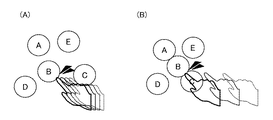
次に、物体のタッチパネル1への近接速度に応じて、表示部6の表示画面においてアイコン等、特定の表示領域の位置を変更する例を示す。図10は、表示部6が表示する表示画面の一例を示す説明図であり、アイコン選択画面である。アイコン群が配置されたアイコン選択画面において、コンテンツ制御部5は、近接速度が所定の閾値以上の場合、接触した位置座標に重なって表示されているアイコン群を図10(A)に示すように大きく分散させて表示させる。
一方、近接速度が所定の閾値未満の場合、コンテンツ制御部5は、接触した位置座標に重なって表示されているアイコン群を図10(B)に示すように小さく分散させて表示させる。
Next, an example in which the position of a specific display area such as an icon on the display screen of the display unit 6 is changed according to the proximity speed of the object to the
On the other hand, when the proximity speed is less than the predetermined threshold value, the
これらの他、物体のタッチパネル1への近接速度に応じて、実行するアプリケーションのパラメータ等を変更することもできる。
先ず、物体のタッチパネル1への近接速度に応じて、ドキュメントのスクロール方法(スクロール量、スクロール速度等)を制御するパラメータを変更する例を示す。図11は、表示部6が表示する表示画面の一例を示す説明図であり、ドキュメント閲覧のためのスクロールモード画面である。スクロールモード画面において、コンテンツ制御部5は、近接速度が所定の閾値以上の場合、図11(A)に示すように現在の画面からドキュメントを大きくスクロールさせる。
一方、近接速度が所定の閾値未満の場合、コンテンツ制御部5は図11(B)に示すように現在の画面からドキュメントを少しだけスクロールさせる。
In addition to these, the parameters of the application to be executed can be changed according to the proximity speed of the object to the
First, an example of changing parameters for controlling a document scrolling method (scroll amount, scrolling speed, etc.) according to the proximity speed of an object to the
On the other hand, when the proximity speed is less than the predetermined threshold, the
次に、物体のタッチパネル1への近接速度に応じて、ドキュメントのページめくり量を制御するパラメータを変更する例を示す。図12は、表示部6が表示する表示画面の一例を示す説明図であり、ドキュメント閲覧のためのページめくりモード画面である。ページめくりモード画面において、コンテンツ制御部5は、近接速度が所定の閾値以上の場合、図12(A)に示すように数ページをまとめてページめくりさせる。
一方、近接速度が所定の閾値未満の場合、コンテンツ制御部5は図12(B)に示すように1ページのみをページめくりする。
Next, an example in which a parameter for controlling the page turning amount of the document is changed according to the proximity speed of the object to the
On the other hand, when the proximity speed is less than the predetermined threshold, the
次に、物体のタッチパネル1への近接速度に応じて、アイコン等、特定の表示領域に関連付けられた情報を表示するか非表示にするか、表示/非表示の切り替えを制御するパラメータを変更する例を示す。図13は、表示部6が表示する表示画面の一例を示す説明図であり、アイコン選択画面である。ここでは、コンテンツ制御部5が、アイコンのような意味のあるボタンの操作ヘルプの表示/非表示を切り替える。図13(A)に示すようにボタンが配置されたアイコン選択画面において、コンテンツ制御部5は、近接速度が所定の閾値以上の場合、接触した位置座標に表示されているボタンに関連付けられた操作ヘルプを表示させない。
一方、近接速度が所定の閾値未満の場合、コンテンツ制御部5は図13(B)に示すように接触した位置座標に表示されているボタンに関連付けられた操作ヘルプを表示させる。
Next, according to the proximity speed of the object to the
On the other hand, when the proximity speed is less than the predetermined threshold, the
上記の他にも、近接速度が所定の閾値以上の場合、タッチ入力後に画像領域が急激に変化するアニメーションを表示させ、近接速度が所定の閾値未満の場合、タッチ入力後に画像領域が緩やかに変化するアニメーションを表示させるといった例も考えられる。
また、ユーザインタフェース装置がスピーカを備える場合には、コンテンツ制御部5がスピーカの出力を制御して、近接速度が所定の閾値以上の場合には周波数の高いフィードバック音を出力させ、近接速度が所定の閾値未満の場合にはタッチ入力後に周波数の低いフィードバック音を出力させるといった例も考えられる。
In addition to the above, if the proximity speed is greater than or equal to a predetermined threshold, an animation in which the image area changes rapidly after touch input is displayed. If the proximity speed is less than the predetermined threshold, the image area gradually changes after touch input. An example of displaying an animation to perform is also conceivable.
When the user interface device includes a speaker, the
なお、ユーザインタフェース装置を、タッチパネル1および表示部6を有するコンピュータで構成する場合、近接/接触判定部2、座標検出部3、近接速度算出部4、コンテンツ制御部5、制御部8の処理内容を記述しているプログラムをコンピュータの内部メモリに格納し、コンピュータのCPUが内部メモリに格納されているプログラムを実行するようにしてもよい。
When the user interface device is configured by a computer having the
以上のように、この実施の形態1によれば、タッチパネル1への物体の近接および接触状態を検知する近接/接触判定部2と、近接/接触判定部2が近接および接触状態を検知した場合に、タッチパネル1に対する物体の相対的な近接および接触位置座標を検出する座標検出部3と、近接/接触判定部2が接触状態を検知した場合に、座標検出部3で検出した近接位置座標の時間変化に基づいて、物体のタッチパネル1への近接速度を算出する近接速度算出部4と、近接/接触判定部2が接触状態を検知した場合に、座標検出部3で検出した接触位置座標および近接速度算出部4が算出した近接速度に応じて、表示部6の画面表示を制御するコンテンツ制御部5とを備えるように構成した。そのため、タッチパネル1に物体が近接したとき、物体とタッチパネル1との相対的な位置関係を検出して、近接状態の位置座標の時間変化に基づいて物体がタッチパネル1へ接触するまでの近接速度を算出することにより、ユーザのタッチパネル1の押し方、即ち急にタッチ入力が行われたのか、ゆっくりとタッチ入力が行われたのかを検出することができる。よって、近接速度を利用することで、従来のようなタッチパネルへの接触のみを利用するユーザインタフェースのみならず、押し方を利用したユーザインタフェースを実現することが可能となる。この結果、タッチ操作に対応した機能の操作性を向上させることができる。
As described above, according to the first embodiment, the proximity /
なお、上記実施の形態1では、物体とタッチパネル1との位置関係を示す位置座標を検出するために、物体とタッチパネル1との間の静電容量を利用した静電タッチパネルを用いて位置座標検出を行ったが、他のデバイス、例えばカメラ等を用いて位置座標を検出するように構成してもよい。この構成の場合、タッチパネル以外に別途デバイスが必要となるが、例えばカメラを用いた場合には、静電タッチパネルで検出できないような、物体がタッチパネルから遠く離れた位置にある場合にも位置座標を検出することが可能となる。
In the first embodiment, position coordinate detection is performed using an electrostatic touch panel that uses the capacitance between the object and the
実施の形態2.
上記実施の形態1では、近接速度算出部4が物体のタッチパネル1への近接速度を検出することにより、ユーザのタッチパネル1の押し方を利用したユーザインタフェースを実現したが、物体のタッチパネル1への近接速度に代えて、物体のタッチパネル1への近接加速度を利用することも可能である。そこで、本実施の形態2では、物体のタッチパネル1への近接加速度を利用したユーザインタフェース装置について述べる。なお、実施の形態2に係るユーザインタフェース装置は、近接速度算出部4に代えて近接加速度算出部を備え、この近接加速度算出部が算出する近接加速度を利用する点のみが、上記実施の形態1と異なる。その他の構成は図1と同様であるため、以下では図1を援用して本実施の形態2を説明する。
In the first embodiment, the proximity
近接加速度算出部は、座標検出部3で検出した近接位置座標に基づいて、物体がタッチパネル1に近接したと判定された時刻から現時刻までの平均近接加速度を算出する。さらに、この近接加速度算出部で算出した近接加速度と、座標検出部3で検出した接触位置座標とに基づいて、コンテンツ制御部5が表示コンテンツを制御し、表示部6がその表示コンテンツを表示する。
The proximity acceleration calculation unit calculates the average proximity acceleration from the time when it is determined that the object has approached the
以上のように、この実施の形態2によれば、タッチパネル1への物体の近接および接触状態を検知する近接/接触判定部2と、近接/接触判定部2が近接および接触状態を検知した場合に、タッチパネル1に対する物体の相対的な近接および接触位置座標を検出する座標検出部3と、近接/接触判定部2が接触状態を検知した場合に、座標検出部3で検出した近接位置座標の時間変化に基づいて、物体のタッチパネル1への近接加速度を算出する近接加速度算出部と、近接/接触判定部2が接触状態を検知した場合に、座標検出部3で検出した接触位置座標および近接加速度算出部が算出した近接加速度に応じて、表示部6の画面表示を制御するコンテンツ制御部5とを備えるように構成した。そのため、タッチパネル1に物体が近接したとき、物体とタッチパネル1との相対的な位置関係を検出して、近接状態の位置座標の時間変化に基づいて物体がタッチパネル1へ接触するまでの近接加速度を算出することにより、上記実施の形態1と同様に、ユーザのタッチパネル1の押し方、即ち急にタッチ入力が行われたのか、ゆっくりとタッチ入力が行われたのかを検出することができる。よって、近接加速度を利用することで、従来のようなタッチパネルへの接触のみを利用するユーザインタフェースのみならず、押し方を利用したユーザインタフェースを実現することが可能となる。この結果、タッチ操作に対応した機能の操作性を向上させることができる。
As described above, according to the second embodiment, the proximity /
1 タッチパネル、2 近接/接触判定部、3 座標検出部、4 近接速度算出部、5 コンテンツ制御部、6 表示部、7 メモリ、8 制御部、10 物体、11 x方向センサ電極、12 y方向センサ電極。
DESCRIPTION OF
Claims (19)
前記近接/接触判定部が近接および接触状態を検知した場合に、前記タッチパネルに対する前記物体の相対的な近接および接触位置座標を検出する座標検出部と、
前記近接/接触判定部が接触状態を検知した場合に、前記座標検出部で検出した近接位置座標の時間変化に基づいて、前記物体の前記タッチパネルへの近接速度または近接加速度を算出する近接速度算出部と、
前記近接/接触判定部が接触状態を検知した場合に、前記座標検出部で検出した接触位置座標および前記近接速度算出部が算出した近接速度または近接加速度に応じて、画面表示を制御するコンテンツ制御部とを備えたタッチパネル付きユーザインタフェース装置。 A proximity / contact determination unit that detects the proximity and contact state of an object to the touch panel;
A coordinate detection unit that detects relative proximity and contact position coordinates of the object with respect to the touch panel when the proximity / contact determination unit detects proximity and a contact state;
Proximity speed calculation for calculating the proximity speed or proximity acceleration of the object to the touch panel based on the time change of the proximity position coordinates detected by the coordinate detection unit when the proximity / contact determination unit detects a contact state And
Content control that controls screen display according to the contact position coordinates detected by the coordinate detection unit and the proximity speed or proximity acceleration calculated by the proximity speed calculation unit when the proximity / contact determination unit detects a contact state A user interface device with a touch panel.
タッチパネルへの物体の近接および接触状態を検知する近接/接触判定ステップと、
前記近接/接触判定ステップで近接および接触状態を検知した場合に、前記タッチパネルに対する前記物体の相対的な近接および接触位置座標を検出する座標検出ステップと、
前記近接/接触判定ステップで接触状態を検知した場合に、前記座標検出ステップで検出した近接位置座標の時間変化に基づいて、前記物体の前記タッチパネルへの近接速度または近接加速度を算出する近接速度算出ステップと、
前記近接/接触判定ステップで接触状態を検知した場合に、前記座標検出ステップで検出した接触位置座標および前記近接速度算出ステップで算出した近接速度または近接加速度に応じて、画面表示を制御するコンテンツ制御ステップとを備えたことを特徴とするユーザインタフェース制御方法。 A user interface control method for a user interface device with a touch panel,
A proximity / contact determination step for detecting the proximity and contact state of an object to the touch panel;
A coordinate detection step of detecting relative proximity and contact position coordinates of the object with respect to the touch panel when proximity and contact states are detected in the proximity / contact determination step;
Proximity speed calculation for calculating the proximity speed or proximity acceleration of the object to the touch panel based on the time change of the proximity position coordinates detected in the coordinate detection step when the contact state is detected in the proximity / contact determination step Steps,
Content control for controlling screen display according to the contact position coordinates detected in the coordinate detection step and the proximity speed or proximity acceleration calculated in the proximity speed calculation step when a contact state is detected in the proximity / contact determination step And a user interface control method.
コンピュータを、タッチパネルへの物体の近接および接触状態を検知する近接/接触判定手段と、
前記近接/接触判定手段が近接および接触状態を検知した場合に、前記タッチパネルに対する前記物体の相対的な近接および接触位置座標を検出する座標検出手段と、
前記近接/接触判定手段が接触状態を検知した場合に、前記座標検出手段で検出した近接位置座標の時間変化に基づいて、前記物体の前記タッチパネルへの近接速度または近接加速度を算出する近接速度算出手段と、
前記近接/接触判定手段が前接触状態を検知した場合に、前記座標検出手段で検出した接触位置座標および前記近接速度算出手段が算出した近接速度または近接加速度に応じて、画面表示を制御するコンテンツ制御手段として機能させるためのユーザインタフェース制御プログラム。 A user interface control program for a user interface device with a touch panel,
Proximity / contact determination means for detecting the proximity and contact state of an object to the touch panel;
Coordinate detection means for detecting relative proximity and contact position coordinates of the object with respect to the touch panel when the proximity / contact determination means detects proximity and a contact state;
Proximity speed calculation for calculating the proximity speed or proximity acceleration of the object to the touch panel based on the time change of the proximity position coordinates detected by the coordinate detection means when the proximity / contact determination means detects a contact state Means,
Content that controls screen display according to the contact position coordinates detected by the coordinate detection means and the proximity speed or proximity acceleration calculated by the proximity speed calculation means when the proximity / contact determination means detects a previous contact state A user interface control program for functioning as a control means.
Priority Applications (1)
| Application Number | Priority Date | Filing Date | Title |
|---|---|---|---|
| JP2009050839A JP2010205050A (en) | 2009-03-04 | 2009-03-04 | User interface device with touch panel, method, and program for controlling user interface |
Applications Claiming Priority (1)
| Application Number | Priority Date | Filing Date | Title |
|---|---|---|---|
| JP2009050839A JP2010205050A (en) | 2009-03-04 | 2009-03-04 | User interface device with touch panel, method, and program for controlling user interface |
Publications (1)
| Publication Number | Publication Date |
|---|---|
| JP2010205050A true JP2010205050A (en) | 2010-09-16 |
Family
ID=42966453
Family Applications (1)
| Application Number | Title | Priority Date | Filing Date |
|---|---|---|---|
| JP2009050839A Pending JP2010205050A (en) | 2009-03-04 | 2009-03-04 | User interface device with touch panel, method, and program for controlling user interface |
Country Status (1)
| Country | Link |
|---|---|
| JP (1) | JP2010205050A (en) |
Cited By (17)
| Publication number | Priority date | Publication date | Assignee | Title |
|---|---|---|---|---|
| JP2011090585A (en) * | 2009-10-23 | 2011-05-06 | Kyocera Mita Corp | Display device, display control program, display control method, electronic device and image forming device |
| JP2011118511A (en) * | 2009-12-01 | 2011-06-16 | Denso Corp | Display device |
| JP2012073042A (en) * | 2010-09-27 | 2012-04-12 | Jvc Kenwood Corp | Operation signal generation device and operation signal generating method |
| WO2012144559A1 (en) * | 2011-04-22 | 2012-10-26 | 株式会社エヌ・ティ・ティ・ドコモ | Display control device and display control method |
| JP2012238177A (en) * | 2011-05-11 | 2012-12-06 | Kyocera Corp | Electronic apparatus |
| JP2013009727A (en) * | 2011-06-28 | 2013-01-17 | Kyocera Corp | Electronic device, control method, and control program |
| WO2014017032A1 (en) * | 2012-07-27 | 2014-01-30 | パナソニック株式会社 | Electronic apparatus |
| WO2014057929A1 (en) * | 2012-10-10 | 2014-04-17 | 株式会社Nttドコモ | User interface device, user interface method and program |
| JP5489379B1 (en) * | 2013-01-18 | 2014-05-14 | パナソニック株式会社 | Scroll device, scroll method and program |
| US8797364B2 (en) | 2009-10-23 | 2014-08-05 | Kyocera Document Solutions Inc. | Display device and display control method |
| WO2014148090A1 (en) | 2013-03-19 | 2014-09-25 | 株式会社Nttドコモ | Information processing device and information processing method |
| WO2015045082A1 (en) * | 2013-09-27 | 2015-04-02 | 日立マクセル株式会社 | Terminal device and input method |
| JP2015222603A (en) * | 2010-10-14 | 2015-12-10 | Nltテクノロジー株式会社 | Touch sensor device and electronic device |
| US9330249B2 (en) | 2013-03-13 | 2016-05-03 | Panasonic Intellectual Property Corporation Of America | Information terminal |
| JP2016206749A (en) * | 2015-04-16 | 2016-12-08 | シャープ株式会社 | Touch input device, image forming apparatus including the touch input device, and touch input method |
| KR101844225B1 (en) * | 2011-10-10 | 2018-04-02 | 엘지전자 주식회사 | Mobile terminal and method for controlling the same |
| CN111813316A (en) * | 2019-04-12 | 2020-10-23 | 歌乐株式会社 | Display control device and display control method |
-
2009
- 2009-03-04 JP JP2009050839A patent/JP2010205050A/en active Pending
Cited By (20)
| Publication number | Priority date | Publication date | Assignee | Title |
|---|---|---|---|---|
| US8797364B2 (en) | 2009-10-23 | 2014-08-05 | Kyocera Document Solutions Inc. | Display device and display control method |
| JP2011090585A (en) * | 2009-10-23 | 2011-05-06 | Kyocera Mita Corp | Display device, display control program, display control method, electronic device and image forming device |
| JP2011118511A (en) * | 2009-12-01 | 2011-06-16 | Denso Corp | Display device |
| JP2012073042A (en) * | 2010-09-27 | 2012-04-12 | Jvc Kenwood Corp | Operation signal generation device and operation signal generating method |
| JP2015222603A (en) * | 2010-10-14 | 2015-12-10 | Nltテクノロジー株式会社 | Touch sensor device and electronic device |
| WO2012144559A1 (en) * | 2011-04-22 | 2012-10-26 | 株式会社エヌ・ティ・ティ・ドコモ | Display control device and display control method |
| JP2012226691A (en) * | 2011-04-22 | 2012-11-15 | Ntt Docomo Inc | Display control device and display control method |
| JP2012238177A (en) * | 2011-05-11 | 2012-12-06 | Kyocera Corp | Electronic apparatus |
| JP2013009727A (en) * | 2011-06-28 | 2013-01-17 | Kyocera Corp | Electronic device, control method, and control program |
| KR101844225B1 (en) * | 2011-10-10 | 2018-04-02 | 엘지전자 주식회사 | Mobile terminal and method for controlling the same |
| WO2014017032A1 (en) * | 2012-07-27 | 2014-01-30 | パナソニック株式会社 | Electronic apparatus |
| US9189104B2 (en) | 2012-07-27 | 2015-11-17 | Panasonic Intellectual Property Corporation Of America | Electronic apparatus |
| WO2014057929A1 (en) * | 2012-10-10 | 2014-04-17 | 株式会社Nttドコモ | User interface device, user interface method and program |
| JP5489379B1 (en) * | 2013-01-18 | 2014-05-14 | パナソニック株式会社 | Scroll device, scroll method and program |
| US9330249B2 (en) | 2013-03-13 | 2016-05-03 | Panasonic Intellectual Property Corporation Of America | Information terminal |
| WO2014148090A1 (en) | 2013-03-19 | 2014-09-25 | 株式会社Nttドコモ | Information processing device and information processing method |
| US9823823B2 (en) | 2013-03-19 | 2017-11-21 | Ntt Docomo, Inc. | Information processing device and information processing method |
| WO2015045082A1 (en) * | 2013-09-27 | 2015-04-02 | 日立マクセル株式会社 | Terminal device and input method |
| JP2016206749A (en) * | 2015-04-16 | 2016-12-08 | シャープ株式会社 | Touch input device, image forming apparatus including the touch input device, and touch input method |
| CN111813316A (en) * | 2019-04-12 | 2020-10-23 | 歌乐株式会社 | Display control device and display control method |
Similar Documents
| Publication | Publication Date | Title |
|---|---|---|
| JP2010205050A (en) | User interface device with touch panel, method, and program for controlling user interface | |
| US8570283B2 (en) | Information processing apparatus, information processing method, and program | |
| US10114494B2 (en) | Information processing apparatus, information processing method, and program | |
| RU2541852C2 (en) | Device and method of controlling user interface based on movements | |
| JP2010244132A (en) | User interface device with touch panel, user interface control method, and user interface control program | |
| CN102224483B (en) | Touch-sensitive display screen with absolute and relative input modes | |
| US20110157078A1 (en) | Information processing apparatus, information processing method, and program | |
| JP2014052852A (en) | Information processor | |
| JP5429627B2 (en) | Mobile terminal, mobile terminal operation method, and mobile terminal operation program | |
| CN105824545A (en) | Display adjusting method for display interface and mobile terminal | |
| JP2009151718A (en) | Information processing apparatus and display control method | |
| WO2012132802A1 (en) | Touch panel device, display method therefor, and display program | |
| CN101493747A (en) | Operation method of software keyboard | |
| JP2013225261A (en) | Display device, display control method, and program | |
| CN102947780A (en) | Information display device and method for moving operation of onscreen button | |
| US8558806B2 (en) | Information processing apparatus, information processing method, and program | |
| JP2011022851A (en) | Display terminal, image processing system, and image processing method | |
| JP2009283013A (en) | Information processing device and display control method | |
| WO2013161170A1 (en) | Input device, input support method, and program | |
| JPWO2012111227A1 (en) | Touch-type input device, electronic apparatus, and input method | |
| JP2009151646A (en) | Character input device | |
| KR101460363B1 (en) | Method and apparatus for zoom in/out using touch-screen | |
| KR101403079B1 (en) | method for zooming in touchscreen and terminal using the same | |
| JP2014182429A (en) | Information processor, information processing method and information processing program | |
| US20130300685A1 (en) | Operation method of touch panel |