JP2009009422A - Information input device and control method thereof - Google Patents
Information input device and control method thereof Download PDFInfo
- Publication number
- JP2009009422A JP2009009422A JP2007171221A JP2007171221A JP2009009422A JP 2009009422 A JP2009009422 A JP 2009009422A JP 2007171221 A JP2007171221 A JP 2007171221A JP 2007171221 A JP2007171221 A JP 2007171221A JP 2009009422 A JP2009009422 A JP 2009009422A
- Authority
- JP
- Japan
- Prior art keywords
- item
- input
- display
- contact point
- identification
- Prior art date
- Legal status (The legal status is an assumption and is not a legal conclusion. Google has not performed a legal analysis and makes no representation as to the accuracy of the status listed.)
- Withdrawn
Links
Images




Landscapes
- Telephone Function (AREA)
- Position Input By Displaying (AREA)
- User Interface Of Digital Computer (AREA)
Abstract
【課題】 情報入力装置における効率的な情報入力を提供する。
【解決手段】 モニタ、モニタに積層されたタッチパネル、および、入力された情報を記憶するメモリを有する情報入力装置において、表示制御部14は、モニタの表示画面を領域分割した表示領域に入力項目一覧、識別項目、確定項目を表示する。タッチイベント処理部15は、タッチパネルへの接触点を検出する。制御部11は、接触点が入力項目一覧の表示領域に位置する場合は、接触点に対応する入力項目を識別項目として表示画面に表示させ、接触点が確定項目の表示領域に位置する場合は、識別項目とした入力項目に応じて表示画面の表示およびメモリの記憶を制御する。
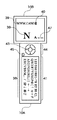
【選択図】 図2PROBLEM TO BE SOLVED: To provide efficient information input in an information input device.
In an information input device having a monitor, a touch panel stacked on the monitor, and a memory for storing input information, a display control unit 14 includes a list of input items in a display area obtained by dividing the display screen of the monitor into areas. , Identification items, and confirmed items are displayed. The touch event processing unit 15 detects a contact point on the touch panel. When the contact point is located in the display area of the input item list, the control unit 11 displays the input item corresponding to the contact point as an identification item on the display screen, and when the contact point is located in the display area of the confirmed item. The display screen display and the memory storage are controlled according to the input item as the identification item.
[Selection] Figure 2
Description
本発明は、情報を入力するための情報処理に関する。 The present invention relates to information processing for inputting information.
特許文献1は、情報処理装置を操作するユーザが入力項目を確定する技術として、次の技術を開示する。まず、操作端末にタッチパネルと確定ボタンを用意する。そして、ユーザの指がタッチパネルに触れている位置にある項目を識別して拡大表示する。ユーザは、拡大表示された項目が所望する項目であることを確認し、確定ボタンを押す。
特許文献1の技術は、タッチパネルを備える入力画面以外に、ハードウェアボタンを必要とする。
The technique of
また、特許文献2は、次の技術を開示する。ユーザにタッチパネルをタップさせて入力候補を選択させ、選択された候補を拡大表示する。ユーザは、拡大表示された候補が所望する候補であればタップを止め(画面から指やスタイラスを離す)て、入力を確定する。
特許文献2の技術は、所望する項目を入力する際に、所望する項目の表示位置から離れた位置を誤ってタップした場合、ユーザは画面に触れた状態で指やスタイラスを移動して、指やスタイラスを離す必要がある。言い換えれば、入力を確定するまで、所望する項目の表示位置付近で指やスタイラスを接触状態に維持する必要がある。勿論、拡大表示された項目が所望する項目ではない時点で、指やスタイラスが画面から離れてしまえば、誤った項目が入力され確定されるので、やり直し操作を必要とする。
In the technique of
パーソナルディジタルアシスタント(PDA)など小画面の端末は、入力画面にソフトウェアキーボード(以下、ソフトキーボード)を表示し、ユーザは所望する項目をスタイラスでタッチ入力する。その際、ユーザは一方の手にPDAを持ち、他方の手でスタイラスを操作する。従って、車内で吊革に捉まっているような状態では、PDAの入力は難しい。 A small-screen terminal such as a personal digital assistant (PDA) displays a software keyboard (hereinafter referred to as a soft keyboard) on an input screen, and a user touches and inputs a desired item with a stylus. At that time, the user holds the PDA in one hand and operates the stylus with the other hand. Therefore, it is difficult to input a PDA when it is trapped in a car.
さらに、ペンタッチと同時に入力が確定する場合、誤った項目を入力して確定されることが多く、やり直しの操作を必要とする機会が増える。例えば、誤って入力した一文字をBS(後退)キーを操作して削除しようとした場合、BSキーの近くのキーをタッチして当該キーに対応する文字を入力してしまう場合がある。つまり、修正操作をしようとして、さらにやり直し操作を増やす羽目になることがある。また、小さなソフトキーボードをスタイラスで操作する際に、指がソフトキーボードのキーに触れて、誤った項目を入力する可能性もある。 Further, when the input is confirmed simultaneously with the pen touch, the wrong item is often entered and confirmed, and the opportunity for a redo operation is increased. For example, when an attempt is made to delete a character that has been input incorrectly by operating the BS (backward) key, a character near the BS key may be touched to input the character corresponding to the key. In other words, there may be a case where an attempt to perform a correction operation further increases the number of redo operations. In addition, when operating a small soft keyboard with a stylus, a finger may touch a key on the soft keyboard to input an incorrect item.
一般に、項目を入力するユーザインタフェイスの入力操作は、項目の選択操作と、選択項目の確定操作に分けられる。選択操作は、一度で所望する項目が選択されないにしても、やり直しが利くので、多数の項目の中から所望する項目が選択できさえすればよい。しかし、確定操作は、正しい確定を行う確率が100%近くないとやり直しが増大し、ユーザの操作負担を増やすことになる。 In general, an input operation of a user interface for inputting an item is divided into an item selection operation and a selection item confirmation operation. Even if the desired item is not selected at a time, the selection operation is easy to redo, so it is only necessary to select the desired item from a large number of items. However, if the confirmation operation has a probability of correct confirmation being close to 100%, the number of redoes increases and the operation burden on the user increases.
ハードウェアのキーボードにおける項目の入力は、選択操作とほぼ同時に選択項目の確定操作を行うようになっている。これは、広いスペースに、指先よりも大きい多数のキーを配置することができるからである。つまり、キーを小さくするに従い、所望する項目が正確に入力される確率は低下し、最終的には項目の入力が不可能になることは明らかである。タッチパネルも同様で、アルファベットのように多数の文字を入力する場合、広いスペースに、指先よりも大きいキーを配置することができれば、極めて正確に文字を選択し確定することができる。しかし、キーを小さくする従い、文字の正確な選択、確定は困難になる。 The input of items on the hardware keyboard is such that the selection item confirmation operation is performed almost simultaneously with the selection operation. This is because a large number of keys larger than the fingertips can be arranged in a wide space. That is, as the key is made smaller, the probability that the desired item is correctly input decreases, and it is apparent that the item cannot be input finally. The same applies to the touch panel. When a large number of characters such as alphabets are input, if a key larger than the fingertip can be arranged in a wide space, the character can be selected and determined very accurately. However, as the keys are made smaller, it becomes difficult to select and confirm characters accurately.
以上、整理すれば、アルファベットのように多数の文字(項目)を入力する場合、小画面のタッチパネルで選択操作と同時に選択項目の確定操作を行えば、誤った項目を入力し確定する確率が高くなり、やり直しによるユーザの操作負担を増大させることになる。 As described above, when inputting a large number of characters (items) such as alphabets, if the selection item is confirmed simultaneously with the selection operation on the small-screen touch panel, the probability of inputting and confirming the wrong item is high. Thus, the user's operation burden due to redoing is increased.
本発明は、情報入力装置における効率的な情報入力を提供することを目的とする。 An object of this invention is to provide the efficient information input in an information input device.
本発明は、前記の目的を達成する一手段として、以下の構成を備える。 The present invention has the following configuration as one means for achieving the above object.
本発明にかかる情報入力装置は、モニタ、前記モニタに積層された位置入力手段、および、入力された情報を記憶するメモリを有する情報入力装置であって、前記モニタの表示画面を領域分割した表示領域に入力項目一覧、識別項目、確定項目を表示する表示手段と、前記位置入力手段への接触点を検出する検出手段と、前記接触点が前記入力項目一覧の表示領域に位置する場合は、前記接触点に対応する入力項目を前記識別項目として前記表示手段に表示させ、前記接触点が前記確定項目の表示領域に位置する場合は、前記識別項目とした入力項目に応じて前記表示手段の表示および前記メモリの記憶を制御する制御手段とを有することを特徴とする。 An information input device according to the present invention is an information input device having a monitor, a position input means stacked on the monitor, and a memory for storing the input information, wherein the display screen of the monitor is divided into regions. Display means for displaying a list of input items, identification items, and confirmation items in the area, detection means for detecting a contact point to the position input means, and when the contact point is located in the display area of the input item list, An input item corresponding to the contact point is displayed on the display unit as the identification item, and when the contact point is located in the display area of the fixed item, the display unit Control means for controlling display and storage of the memory.
また、撮像手段、モニタ、および、前記モニタに積層された位置入力手段を有する情報入力装置であって、前記モニタの表示画面を領域分割した表示領域に操作項目一覧、識別項目、前記撮像手段の撮像画像を表示する表示手段と、前記位置入力手段への接触点を検出する検出手段と、前記接触点が前記入力項目一覧の表示領域に位置する場合は、前記接触点に対応する操作項目を前記識別項目として前記表示手段に表示させ、前記接触点が前記撮像画像の表示領域に位置する場合は、前記識別項目とした操作項目に応じて前記撮像手段の動作を制御する制御手段とを有することを特徴とする。 An information input device having an image pickup means, a monitor, and a position input means stacked on the monitor, wherein an operation item list, an identification item, and an image pickup means are displayed in a display area obtained by dividing the display screen of the monitor. Display means for displaying a captured image, detection means for detecting a contact point to the position input means, and when the contact point is located in a display area of the input item list, an operation item corresponding to the contact point is displayed. Control means for controlling the operation of the imaging means according to the operation item set as the identification item when the identification point is displayed on the display means and the contact point is located in the display area of the captured image. It is characterized by that.
本発明にかかる制御方法は、モニタ、前記モニタに積層された位置入力手段、および、入力された情報を記憶するメモリを有する情報入力装置の制御方法であって、前記モニタの表示画面を領域分割した表示領域に入力項目一覧、識別項目、確定項目を表示し、前記位置入力手段への接触点を検出し、前記接触点が前記入力項目一覧の表示領域に位置する場合は、前記接触点に対応する入力項目を前記識別項目として前記表示画面に表示し、前記接触点が前記確定項目の表示領域に位置する場合は、前記識別項目とした入力項目に応じて前記表示画面の表示および前記メモリの記憶を制御することを特徴とする。 A control method according to the present invention is a control method for an information input device having a monitor, position input means stacked on the monitor, and a memory for storing input information, and the display screen of the monitor is divided into regions. Display a list of input items, identification items, and confirmation items in the displayed area, detect a contact point to the position input means, and if the contact point is located in the display area of the input item list, When the corresponding input item is displayed on the display screen as the identification item, and the contact point is located in the display area of the fixed item, the display screen display and the memory according to the input item as the identification item The memory is controlled.
また、撮像手段、モニタ、および、前記モニタに積層された位置入力手段を有する情報入力装置の制御方法であって、前記モニタの表示画面を領域分割した表示領域に操作項目一覧、識別項目、前記撮像手段の撮像画像を表示し、前記位置入力手段への接触点を検出し、前記接触点が前記入力項目一覧の表示領域に位置する場合は、前記接触点に対応する操作項目を前記識別項目として前記表示画面に表示し、前記接触点が前記撮像画像の表示領域に位置する場合は、前記識別項目とした操作項目に応じて前記撮像手段の動作を制御することを特徴とする。 Also, there is provided an imaging means, a monitor, and a control method for an information input device having a position input means stacked on the monitor, wherein a list of operation items, an identification item, and a display area are obtained by dividing a display screen of the monitor. When the captured image of the imaging unit is displayed, the contact point to the position input unit is detected, and the contact point is located in the display area of the input item list, the operation item corresponding to the contact point is the identification item. When the contact point is located in the display area of the captured image, the operation of the imaging unit is controlled according to the operation item as the identification item.
本発明によれば、情報入力装置における効率的な情報入力を提供することができる。 ADVANTAGE OF THE INVENTION According to this invention, the efficient information input in an information input device can be provided.
以下、本発明にかかる実施例の情報処理を図面を参照して詳細に説明する。 Hereinafter, information processing according to an embodiment of the present invention will be described in detail with reference to the drawings.
[装置の構成]
図1は実施例の携帯型の情報端末10の構成例を示すブロック図である。
[Device configuration]
FIG. 1 is a block diagram illustrating a configuration example of a
CPU 11は、RAM 12をワークメモリとして、ROM 13やフラッシュメモリ16に格納されたオペレーティングシステム(OS)やアプリケーションプログラム(AP)を実行する。そして、システムバス18を介して、後述する構成を制御する。フラッシュメモリ16は、OSやAPのほかに、様々なデータを格納する。
The
モニタ14は、CPU 11の制御により、グラフィカルユーザインタフェイス(GUI)、および、各種処理の状況や結果などを表示するLCDパネルなどである。モニタ14には、透明な位置入力装置(または指の接触領域を検出する透明なタッチセンサ)であるタッチパネル15が積層され、モニタ14に表示された例えばソフトキーボードなどによる項目のタッチ入力が可能である。
The
外部インタフェイス(I/F) 17は、情報端末10と外部機器を接続するインタフェイスで、リモコン操作用の赤外線インタフェイスのような専用インタフェイスや、汎用インタフェイス(例えばUSB)などが利用可能である。
The external interface (I / F) 17 is an interface for connecting the
なお、図1には示さないが、情報端末10には、電源としてのバッテリや、電源のオンオフやバッテリの充放電制御を行う電源制御部が存在する。また、情報端末10が無線端末として動作する場合は、無線通信部やアンテナが存在する。
Although not shown in FIG. 1, the
[機能構成]
図2は情報端末10の機能構成例を示すブロック図である。なお、図2に示す機能構成は、CPU 11が実行するOSやAPによって実現されることは言うまでもない。
[Function configuration]
FIG. 2 is a block diagram illustrating a functional configuration example of the
情報端末10の表面には、モニタ24、および、情報端末10の電源オンオフを行う電源ボタン29が配置されている。情報端末10の機能は、制御部11、記憶部12、表示制御部14、タッチイベント処理部15、入力項目記憶部16、識別表示項目記憶部17、テキスト編集部18などに区分される。なお、図2には示さないが、電子メール、画像・映像、サウンド、地図・位置などのデータを送受信するための通信部が存在する場合がある。
On the surface of the
[入力画面]
情報端末10の正面にはタッチパネル25が積層されたモニタ24が配置されている。ユーザはモニタ24に表示される入力画面を指などで触れることにより、文字や記号の入力、項目の選択、コマンド実行の指示を行うことができる。タッチパネル25は、ユーザがタッチした領域を一度に一つだけ検出する。
[input screen]
A
●大文字アルファベット入力モード
図3は情報端末10の大文字アルファベット入力モードにおける入力画面の一例を示す図である。
Uppercase Alphabet Input Mode FIG. 3 is a diagram showing an example of an input screen in the uppercase alphabet input mode of the
表示制御部14がモニタ24に表示するGUIである入力画面は、ユーザが選択可能な入力項目一覧36を含む選択領域33、ユーザが入力し確定した項目(確定項目)を表示する確定領域34、選択領域33と確定領域34の境界領域35に領域分割されている。各領域は、ユーザがその範囲を識別し易いように、枠で囲った表示を行うなどが望ましい。
An input screen that is a GUI displayed on the
ユーザが選択領域33に指で触れる(選択操作)と、タッチイベント処理部15は、指が触れた接触領域37を検出し、接触領域37の中心(押圧重心、押圧点、接触点)を算出し、制御部11に通知する。制御部11は、中心位置に対応する入力項目を識別する。制御部11が識別した入力項目(識別項目)は、識別表示項目記憶部17に記憶され、表示制御部14によって識別表示項目38として、確定領域34の下部に拡大表示される。なお、接触領域37は、指の腹で触れるような面積をもつ領域でも、爪の先で触れるような狭い面積の領域でもよい。また、識別表示項目38は、拡大表示するだけでなく、表示色やフォントを変えて表示してもよい。要は、識別表示項目38により、接触領域37の中心に位置する入力項目を、ユーザが認識し易いように表示すればよい。
When the user touches the
ユーザは、選択領域33に指で触れたり、選択領域33に指で触れながら指を移動したりして選択操作を行い、選択した入力項目を識別表示項目38として拡大表示させる。ユーザが選択領域33から指を離すと、直前に選択された入力項目を識別表示項目38として拡大表示した状態を維持する。なお、入力項目が文字、数字、記号(以下、文字)および制御記号の場合は識別表示項目38を確定領域34に表示し、入力項目がモード切替記号など、コマンドの実行を表す場合は識別表示項目38を境界領域35に表示する。つまり、選択領域33、確定領域34および境界領域35の面積は、ユーザの操作に応じて、フレキシブルに変化する。
The user performs a selection operation by touching the
ユーザは、識別表示項目38が所望する入力項目か否かを確認し、所望する入力項目であれば、指で確定領域34(または境界領域35)に触れることで、拡大表示された入力項目を確定する(確定操作)。タッチイベント処理部15は、ユーザの確定操作を識別すると、その旨を制御部11に通知する。
The user confirms whether or not the
確定操作の通知を受けた制御部11は、識別表示項目記憶部17が記憶する入力項目が文字または制御記号ならば、テキスト編集部18に当該入力項目によって入力項目記憶部16が記憶する入力項目を更新させる。そして、表示制御部14に確定領域34の入力テキスト39および/またはキャレット40の表示を更新させる。また、識別表示項目記憶部17が記憶する入力項目がコマンドの実行が指示する場合は、対応するコマンドを実行する。さらに、制御部11は、表示制御部14に識別表示項目38の表示をクリアさせ、識別表示項目記憶部17が記憶する入力項目をクリアする。
If the input item stored in the identification display
図3に示す大文字アルファベット入力モードにおける入力画面は、選択領域33と確定領域34を分離し、この場合は指など触れてもタッチイベント処理部15が反応しない境界領域35を設けている。従って、指の接触による選択操作と確定操作を明瞭に分離することができる。
The input screen in the uppercase alphabet input mode shown in FIG. 3 separates the
以下では、タッチイベント処理部15による接触領域37の検出、接触領域37の中心位置および確定操作の通知などの処理の説明を省略し、これらを制御部11が直接検出するように記載する。同様に、表示制御部14の制御の説明を省略して、制御部11がモニタ24に入力画面などを直接表示するように記載する。
In the following, description of processing such as detection of the
●ひらがな入力モード
図4は情報端末10のひらがな入力モードへの移行画面の一例を示す図である。
Hiragana Input Mode FIG. 4 is a diagram showing an example of a transition screen for the
制御部11は、接触領域37の中心位置が入力項目一覧36の入力モード切替記号「あ」に相当する場合、境界領域35にひらがな入力モードへの移行を示す識別表示項目38「あ(モード)」を表示する。この状態で、ユーザが境界領域35に指で触れる確定操作を行うと、制御部11は、ひらがな入力モードへの切替が指示されたとして、入力画面をひらがな入力モードに切り替える。
When the center position of the
図5は情報端末10のひらがな入力モードにおける入力画面の一例を示す図である。図3に示す入力画面は入力項目一覧36はアルファベットを中心に入力項目が配置されているが、図5に示す入力画面はの入力項目一覧36はひらがなを中心に入力項目が配置される点で異なる。ユーザの入力操作については、大文字アルファベット入力モードと大きな差はない。
FIG. 5 is a diagram illustrating an example of an input screen in the hiragana input mode of the
入力項目一覧36の入力モード切替記号「記」「a」「A」および「ア」は、それぞれ記号、小文字アルファベット、大文字アルファベットまたはカタカナの入力モードへの移行を示すモード切替記号である。制御部11は、これら入力モード切替記号が選択された場合、境界領域35に記号、小文字アルファベット、大文字アルファベットまたはカタカナの入力モードへの移行を示す「記号」「a」「A」または「ア」を表示する。この状態で、ユーザが境界領域35に指で触れる確定操作を行うと、当該入力モードへの切替が指示されたとして、入力画面を当該入力モードに切り替える。
The input mode switching symbols “notation”, “a”, “A”, and “a” in the
●入力項目一覧
図6Aは大文字アルファベット入力モードにおける入力項目一覧36の一例を示す図である。
Input Item List FIG. 6A is a diagram showing an example of the
選択領域36には、アルファベットのQ、W、R、T、Y、…、数字の1、2、…、0、記号の@、/、…、制御記号のSP、RT、BS、CL、↑、↓、…、モード切替記号の記、あ、a、…が表示される。なお、SPはスペースキー、RTはリターンキー、BSはバックスペースキー、CLはクリアキー、矢印はカーソルキーに相当する。図6Aに示すように、これら文字、数字、記号はそれぞれ長方形の表示領域が割り当てられている。タッチイベント処理部15は、接触領域37の中心がどの長方形領域に対応するかを算出する。
In the
図6Bは小文字アルファベット入力モードにおける入力項目一覧36の一例を示す図である。図6Cはひらがな入力モードにおける入力項目一覧36の一例を示す図である。図6Dはカタカナ入力モードにおける入力項目一覧36の一例を示す図である。
FIG. 6B is a diagram showing an example of the
これらの入力項目一覧36に対応するデータ(表示データと位置データ)は、記憶部12に格納されている。制御部11は、必要に応じて、記憶部12から入力項目一覧36に対応するデータを読み出し、選択領域33に表示する。
Data (display data and position data) corresponding to the
また、制御記号の「終了」は、ユーザが入力の終了を指示するための制御記号である。ユーザは、例えば、入力し確定したテキストをOSまたはAPに渡す際に制御記号「終了」を選択し、確定する。この操作により、制御部11は、入力項目記憶部16に格納したテキストをOSまたはAPに入力として与える。
The “end” of the control symbol is a control symbol for the user to instruct the end of input. For example, the user selects and confirms the control symbol “end” when passing the input and confirmed text to the OS or AP. By this operation, the
●テキストの編集処理
図7は情報端末10におけるテキスト編集処理の一例を示すフローチャートである。なお、テキスト編集処理は、APやOSのGUIによってユーザがテキスト入力を指示した場合に、制御部11が記憶部12に格納されたプログラムを実行することで実現される。
Text Editing Processing FIG. 7 is a flowchart showing an example of text editing processing in the
制御部11は、入力画面に選択領域33、確定領域34、境界領域35を割り当てる(S101)。そして、記憶部12から例えば大文字アルファベット入力モードに対応する入力項目一覧36のデータを読み出して、入力項目一覧36を選択領域33に表示する(S102)。
The
次に、制御部11は、識別表示項目記憶部17が記憶する入力項目をクリアし、識別表示項目38をクリアする(S103)。そして、入力画面と指の接触を検出するのを待ち(S104)、接触を検出すると、当該接触が選択操作か確定操作かを判定する(S105)。
Next, the
選択操作の場合、制御部11は、選択された入力項目の種類を判定する(S106)。入力項目の種類が文字および制御記号の場合は、入力項目を識別表示項目記憶部17に格納し、例えば図2に示すように、識別表示項目38として確定領域34の下部に拡大表示する(S107)。また、入力項目の種類がモード切替記号または「終了」の場合は、入力項目を識別表示項目記憶部17に格納し、例えば図4に示すように、識別表示項目38として境界領域35に拡大表示する(S108)。そして、処理をステップS104に戻す。なお、上述したように、制御部11は、選択領域33、確定領域34および境界領域35の面積を、識別表示項目38の表示に応じてフレキシブルに変化させる。
In the case of the selection operation, the
また、確定操作の場合、制御部11は、識別表示項目38の種類を判定する(S109)。識別表示項目38の種類が文字および制御記号の場合は、テキスト編集部18に、識別表示項目記憶部17が記憶する入力項目によって入力項目記憶部16が記憶するデータを更新させる(S110)。そして、確定領域34の表示を更新する(S111)。そして、処理をステップS103に戻す。また、識別表示項目38の種類がモード切替記号の場合は、入力モードの切替を実行する(S112)。そして、処理をステップS102に戻して、切替後の入力モードに対応する入力項目一覧36を選択領域33に表示する(S102)。
In the case of a confirming operation, the
また、識別表示項目38が「終了」の場合、制御部11は、入力項目記憶部16が記憶するデータをAPに渡し(S113)、当該APのGUIを表示し(S114)、テキスト編集処理を終了する。
If the
●入力操作
図8はユーザによる情報端末10の、推奨される入力操作を示す図である。ユーザは、情報端末10を片手で持ち、親指で選択領域33に触れて入力項目を選択し、親指で確定領域34に触れて選択項目を確定することができる。つまり、ユーザは、片手だけで入力操作を行うことができる。
Input Operation FIG. 8 is a diagram showing a recommended input operation of the
図9から図18は情報端末10の入力操作を説明する図である。以下では、入力画面と例えば指の接触、移動、分離という操作の組み合わせで、文字列「K@文字」を入力する例を説明する。なお、接触は入力画面に指で触れる操作、移動は入力画面に触れたまま指を移動させる操作、分離は入力画面から指を離す操作である。
9 to 18 are diagrams for explaining the input operation of the
ユーザの指が入力画面の選択領域33に接触すると、接触領域37の中心に対応する入力項目(選択項目)が識別表示項目38として拡大表示される(図9(b))。ユーザが所望する文字「K」に向けて指を移動すると、選択項目も順次移動し、順次、識別表示項目38として拡大表示される(図9(c))。ユーザが指を入力画面から分離すると、直前の選択項目に対応する識別表示項目38の拡大表示が維持される(図9(d))。この状態では、入力は確定せず、識別表示項目38が所望する項目ではない場合、ユーザは、再び入力画面に接触することで、項目を再び選択可能である。
When the user's finger touches the
識別表示項目38が所望する項目の場合、ユーザが指を確定領域34に接触させる(図9(e))と、識別表示項目38が入力項目として確定する(図9(f))。次に、ユーザの指が入力画面から分離するとイベント待ち状態になる(図10(a))。
When the
次に、例えば、ユーザが指を入力画面に接触し(図10(b))、移動し(図10(c))、分離し(図10(d))、接触すると(図10(e))文字「J」の入力が確定する(図10(f)、図11(a))。 Next, for example, when the user touches the input screen (FIG. 10 (b)), moves (FIG. 10 (c)), separates (FIG. 10 (d)), and touches (FIG. 10 (e) ) The input of the letter “J” is confirmed (FIG. 10 (f), FIG. 11 (a)).
文字「J」の入力が誤りの場合、ユーザは指を入力画面に接触し(図11(b))、移動し(図11(c))、分離し(図11(d))、接触すると(図11(e))BS(バックスペース)入力が確定する。素の結果、文字「J」が削除される(図11(f)、図12(a))。 If the input of the letter “J” is incorrect, the user touches the input screen (Fig. 11 (b)), moves (Fig. 11 (c)), separates (Fig. 11 (d)), and touches (Fig. 11 (e)) BS (backspace) input is confirmed. As a result, the letter “J” is deleted (FIG. 11 (f), FIG. 12 (a)).
次に、ユーザは文字「@」を入力するために指を入力画面に接触し(図12(b))、移動し(図12(c))、分離し(図12(d))、接触すると(図12(e))文字「@」に入力が確定する(図12(f)、図13(a))。 Next, the user touches the input screen to input the character “@” (FIG. 12 (b)), moves (FIG. 12 (c)), separates (FIG. 12 (d)), and touches. Then (FIG. 12 (e)), the input is confirmed for the character “@” (FIG. 12 (f), FIG. 13 (a)).
次に、ユーザは「文字」を入力するために次の操作を行う。 Next, the user performs the following operation to input “character”.
ユーザは指を入力画面に接触し(図13(b))、移動し(図13(c))、分離し(図13(d))、接触すると(図13(e))ひらがな入力モードに切り替わる(図13(f)、図14(a))。続いて、ユーザは指を入力画面に接触し(図14(b))、分離し(図13(c))、接触すると(図13(d))文字「も」が入力される(図13(e)、図13(f))。続いて、ユーザは指を入力画面に接触し(図15(a))、移動し(図15(b))、分離し(図15(c))、接触すると(図15(d))文字「し」が入力される(図15(e)、図15(f))。続いて、ユーザは指を入力画面に接触し(図16(a))、移動し(図16(b))、分離し(図16(c))、接触すると(図16(d))文字「゛」(濁点)が入力される(図16(e)、図16(f))。 The user touches the input screen (Fig. 13 (b)), moves (Fig. 13 (c)), separates (Fig. 13 (d)), and touches (Fig. 13 (e)) to hiragana input mode. It is switched (FIG. 13 (f), FIG. 14 (a)). Subsequently, the user touches the input screen with the finger (FIG. 14 (b)), separates (FIG. 13 (c)), and touches (FIG. 13 (d)), the character “MO” is input (FIG. 13). (e), FIG. 13 (f)). Next, the user touches the input screen (Fig. 15 (a)), moves (Fig. 15 (b)), separates (Fig. 15 (c)), and touches (Fig. 15 (d)). “Shi” is input (FIGS. 15E and 15F). Next, the user touches the input screen (Fig. 16 (a)), moves (Fig. 16 (b)), separates (Fig. 16 (c)), and touches (Fig. 16 (d)). “” (Turbidity point) is input (FIG. 16 (e), FIG. 16 (f)).
次に、ユーザは指を入力画面に接触し(図17(a))、移動し(図17(b))、分離し(図17(c))、接触すると(図17(d))SP(スペース)入力が確定する。ひらがな入力モードにおいてSP入力はかな漢字変換キーに相当するので、確定領域34の「もし゛」は「文字」に変換される(図17(e)、図17(f))。ただし、この時点では「文字」の入力は確定していない。また、望む変換結果が得られなかった場合、ユーザは、望む変換結果が得られるまでカーソルキーを操作する。
Next, the user touches the input screen (Fig. 17 (a)), moves (Fig. 17 (b)), separates (Fig. 17 (c)), and touches (Fig. 17 (d)) SP. (Space) Input is confirmed. Since the SP input corresponds to the Kana-Kanji conversion key in the hiragana input mode, the “if” in the fixed
そこで、ユーザは指を入力画面に接触し(図18(a))、分離し(図18(b))、接触すると(図18(c))RT(リターン)入力が確定する。ひらがな入力モードにおいてRT入力はかな漢字変換の確定キーに相当するので、確定領域34の「文字」の入力が確定される(図17(d)、図17(e))。
Therefore, the user touches the input screen with the finger (FIG. 18 (a)), separates it (FIG. 18 (b)), and touches (FIG. 18 (c)), the RT (return) input is confirmed. In the hiragana input mode, the RT input corresponds to a confirmation key for kana-kanji conversion, so the input of “character” in the
このように、入力画面を選択領域33と確定領域34に区分して、選択領域33に入力項目一覧36を表示する。そして、ユーザの指が選択領域33に触れると、接触領域37の中心に対応する選択項目を確定領域34または境界領域35に拡大表示する。従って、ユーザは、拡大表示された選択項目が所望する入力項目か否かを判断する。そして、所望する入力項目であれば確定領域34または境界領域35に指を触れることで入力項目を確定する。ユーザは、拡大表示によって、選択項目が所望する入力項目か否かを容易に判断することができる。さらに、指先の面積に比べて充分広い確定領域34(および識別表示項目38を表示した際の境界領域35)に指で触れることで、容易に入力を確定することができ、選択領域33に触れて確定を誤る可能性を低減することができる。
In this way, the input screen is divided into the
つまり、本実施例の入力操作は、項目の選択操作と選択項目の確定操作とを明確に分離することで、拡大表示を用いて選択操作を容易にするとともに、確定操作により正しい確定が行われる確率をほぼ100%にする。従って、確定操作のやり直しによるユーザの操作負担の増大を防ぐことができる。 In other words, the input operation of this embodiment clearly separates the item selection operation and the selection item confirmation operation, thereby facilitating the selection operation using the enlarged display, and correct confirmation is performed by the confirmation operation. Probability is almost 100%. Therefore, it is possible to prevent an increase in the operation burden on the user due to the re-execution of the confirmation operation.
なお、本実施例によれば、縦100×横35mm程度の情報端末10の小さなモニタ24でも、文字、制御記号、モード切替記号の入力操作が可能である。
Note that according to the present embodiment, it is possible to input characters, control symbols, and mode switching symbols even on a
以下、本発明にかかる実施例2の情報処理を説明する。なお、実施例2において、実施例1と略同様の構成については、同一符号を付して、その詳細説明を省略する。 The information processing according to the second embodiment of the present invention will be described below. Note that the same reference numerals in the second embodiment denote the same parts as in the first embodiment, and a detailed description thereof will be omitted.
図19は実施例2の情報端末10の概観例を示す正面図である。実施例1の情報端末10と異なるのは、画面が選択画面41と確定画面42に分割されていることである。なお、選択画面41と確定画面42は一つのモニタに表示してもよいし、別々のモニタに表示してもよい。
FIG. 19 is a front view illustrating an example of an overview of the
さらに、選択画面41のモニタまたはモニタの一部表面には、実施例1と同様に、透明なタッチパネル25が積層されているが、確定画面42には、接触の有無のみを検出可能な透明なタッチセンサが積層されている。
Further, the
図20は情報端末10におけるテキスト編集処理の一例を示すフローチャートである。なお、テキスト編集処理は、APやOSのGUIによってユーザがテキスト入力を指示した場合に、制御部11が記憶部12に格納されたプログラムを実行することで実現される。
FIG. 20 is a flowchart showing an example of text editing processing in the
制御部11は、記憶部12から例えば大文字アルファベット入力モードに対応する入力項目一覧36のデータを読み出して、入力項目一覧36を選択画面41に表示する(S201)。
The
次に、制御部11は、識別表示項目記憶部17が記憶する入力項目をクリアし、識別表示項目38をクリアする(S202)。そして、確定画面42への接触を検出したか否かを判定し(S203)、選択画面41への接触を検出したか否かを判定する(S204)。
Next, the
選択画面41への接触(選択操作)を検出した場合、制御部11は、入力項目を識別表示項目記憶部17に格納し、識別表示項目38として確定画面42の下部に拡大表示する(S205)。そして、処理をステップS203に戻す。
When the contact (selection operation) to the
また、確定画面への接触(確定操作)を検出した場合、制御部11は、識別表示項目38の種類を判定する(S206)。識別表示項目38の種類が文字および制御記号の場合は、テキスト編集部18に、識別表示項目記憶部17が記憶する入力項目によって入力項目記憶部16が記憶するデータを更新させる(S207)。そして、確定画面42の表示を更新する(S208)。そして、処理をステップS202に戻す。また、識別表示項目38の種類がモード切替記号の場合は、入力モードの切替を実行し、選択画面41の表示を更新する(S209)。そして、処理をステップS201に戻して、切替後の入力モードに対応する入力項目一覧36を選択画面41に表示する(S201)。
When contact with the confirmation screen (confirmation operation) is detected, the
また、識別表示項目38が「終了」の場合、制御部11は、入力項目記憶部16が記憶するデータをAPに渡し(S210)、当該APのGUIを表示し(S211)、テキスト編集処理を終了する。
If the
このように、選択画面42と確定画面42を分離して二画面構成すれば、選択画面42については各時刻に一つの接触イベントの種類と位置の検出をすればよい。また、確定画面42については各時刻の接触の有無のみを検出すればよい。従って、選択画面41と確定画面42への接触を検出するための構成を簡単にすることができる。
In this way, if the
[変形例1]
図21は実施例2の情報端末10の変形例1を示す正面図である。
[Modification 1]
FIG. 21 is a front view illustrating a first modification of the
図21に示す情報端末10は、その本体部10Aに選択画面41を、その表示部10Bに確定画面42を備える。また、確定画面42の右隅に入力モードを示す入力モード表示47を備える。
The
情報端末10を、図22に示すような形状と画面配置にすれば、たとえ本体部10Aは細くしても、表示部10Bの面積は実施例1、2と同じ、または、実施例1、2よりも広くすることができる。表示部10Bの面積を広くした場合、より大きな画面でコンテンツを閲覧することができる。
If the
[変形例2]
図22は実施例2の情報端末10の変形例2を示す正面図である。
[Modification 2]
FIG. 22 is a front view showing a second modification of the
図22に示す情報端末10は、本体10Aに確定ボタン43、十字キー44、クリアキー45を備える。
The
ユーザは指を選択画面41に接触して入力項目を選択し、所望する入力項目が識別表示項目38に表示されると確定ボタン43を押して入力項目を確定する。続けて数文字の入力を確定すると、予測入力方法などによって、確定画面42に続く文字候補がリスト表示される。ユーザは十字キー44を操作して、文字候補から所望する文字(または文字列)を選択し、確定ボタン43を押して確定する。また、クリアキーは確定した文字を削除する、候補のリスト表示を消す場合などに利用する。
The user touches the
このように、タッチ入力を行う選択画面41と、確定操作を行う確定ボタン43を設け、候補を選択する十字キー44を設け、予測入力方法と組み合わせることで、高速の文字入力が可能になる。
Thus, by providing the
[変形例3]
図23は実施例2の情報端末10の変形例3を示す正面図である。選択画面41、確定画面42は、ユーザが、リモコン機能を提供するAPの起動を指示した場合の表示形態になっている。ユーザは、選択画面41に表示された入力項目一覧36から、マルチメディア再生の指示を行うことができる。さらに、ユーザは、入力項目一覧36の「Menu」項目によって、選択画面41にメニュー画面を表示させ、メニュー画面から辿って、選択画面41に文字入力用の入力項目一覧36を表示させて、番組検索や楽曲検索のためのキーワード入力も可能である。
[Modification 3]
FIG. 23 is a front view showing a third modification of the
以下、本発明にかかる実施例3の情報処理を説明する。なお、実施例3において、実施例1、2と略同様の構成については、同一符号を付して、その詳細説明を省略する。 Hereinafter, information processing according to the third embodiment of the present invention will be described. Note that the same reference numerals in the third embodiment denote the same parts as in the first and second embodiments, and a detailed description thereof will be omitted.
図24から図26は実施例3の情報端末10の概観例を示す正面図である。実施例1の情報端末10と異なるのは、入力画面に第一の選択領域33Aと第二の選択領域33Bが存在することである。さらに、入力が確定した入力テキスト39およびキャレット40を表示する表示領域46が存在する。
24 to 26 are front views showing an example of an overview of the
例えば、第一の選択領域33Aには小文字アルファベット入力用の入力項目一覧36Aが、第二の選択領域33Bにはひらがな入力用の入力項目一覧が表示されている。そして、第一の選択領域33Aへの接触が検出されると、図25に示すように、第二の選択領域33Bが縮小(または移動)して、空いたスペースに確定領域34が表示される。逆に、第二の選択領域33Bへの接触が検出されると、図26に示すように、第一の選択領域33Aが縮小(または移動)して、空いたスペースに確定領域34が表示される。
For example, an
図27は情報端末10におけるテキスト編集処理の一例を示すフローチャートである。なお、テキスト編集処理は、APやOSのGUIによってユーザがテキスト入力を指示した場合に、制御部11が記憶部12に格納されたプログラムを実行することで実現される。
FIG. 27 is a flowchart showing an example of text editing processing in the
制御部11は、入力画面に第一と第二の選択領域33A、33B、表示領域46を割り当てる(S301)。そして、記憶部12から、例えば小文字アルファベット入力モードおよびひらがな入力モードに対応する入力項目一覧のデータを読み出して、第一の選択領域33Aに入力項目一覧36Aを、第二の選択領域33Bに入力項目一覧36Bを表示する(S302)。
The
次に、制御部11は、識別表示項目記憶部17が記憶する入力項目をクリアし、確定領域34の表示を終了する(以下、閉じる)(S303)。そして、確定領域34への接触を検出したか否か(S304)、第一の選択領域33Aへの接触を検出したか否か(S305)、第二の選択領域33Bへの接触を検出したか否か(S306)をそれぞれ判定する。なお、テキスト編集処理の開始時は、ステップS303の確定領域34を閉じる処理は不要である。同様に、確定領域34が閉じられている状態では、ステップS304の処理は不要である。
Next, the
第一の選択領域33Aへの接触を検出した場合、制御部11は、図25に示すように、第二の選択領域33Bを縮小して確定領域34を表示する(以下、開く)(S307)。また、第二の選択領域33Bへの接触を検出した場合、制御部11は、図26に示すように、第一の選択領域33Aを縮小して確定領域34を開く(S308)。そして、入力項目を識別表示項目記憶部17に格納し、識別表示項目38として確定領域34に拡大表示する(S309)。
When contact with the
また、確定領域34への接触を検出した場合、制御部11は、識別表示項目38の種類を判定する(S310)。識別表示項目38の種類が文字および制御記号の場合は、テキスト編集部18に、識別表示項目記憶部17が記憶する入力項目によって入力項目記憶部16が記憶するデータを更新させる(S311)。そして、表示領域46の表示を更新する(S312)。また、識別表示項目38の種類がモード切替記号の場合は、入力モードの切替を実行し(S313)、該当する選択領域33の入力項目一覧を切り替える(S314)。そして、処理をステップS303に戻す。
Further, when detecting contact with the fixed
また、識別表示項目38が「終了」の場合、制御部11は、入力項目記憶部16が記憶するデータをAPに渡し(S315)、当該APのGUIを表示し(S316)、テキスト編集処理を終了する。
If the
また、縮小(または移動)した選択領域にユーザの指が触れても接触したとみなさないようにすることもできる(ロック操作)。こうすれば、確定領域34に指で触れようとして縮小された選択領域に触れて、誤って選択項目を変更してしまうミスを防ぐことができる。ただし、ロック操作を行うと、例えば、アルファベットを選択した後、選択項目をひらがなに変更する操作はできない。その場合、一旦、選択したアルファベットを確定し、必要ならば確定したアルファベットを削除した後、ひらがなを選択することになる。あるいは、ロック操作した選択領域に所定時間に指で触れていると、ロックを解除して選択操作を受け付ける機能を設けてもよい。
Further, even if the user's finger touches the reduced (or moved) selection area, it can be regarded as not touching (lock operation). In this way, it is possible to prevent a mistake in which the selection item is accidentally changed by touching the reduced selection area in an attempt to touch the
このように、多数の入力項目が存在する場合、当面の入力には必要がない入力項目を縮小表示したり、移動して表示したりすることで、異なる入力モードの入力画面を同時に表示して、異なる入力モードをほぼ同時に使用することができる。 In this way, when there are a large number of input items, it is possible to display input screens of different input modes at the same time by reducing or moving to display the input items that are not necessary for the immediate input. Different input modes can be used almost simultaneously.
以下、本発明にかかる実施例4の情報処理を説明する。なお、実施例4において、実施例1〜3と略同様の構成については、同一符号を付して、その詳細説明を省略する。とくに、発明に関わる機能構成は、図2に示した実施例1の情報端末10と同じである。
The information processing according to the fourth embodiment of the present invention will be described below. Note that the same reference numerals in the fourth embodiment denote the same parts as in the first to third embodiments, and a detailed description thereof will be omitted. In particular, the functional configuration related to the invention is the same as that of the
[操作面]
図28は実施例4の情報端末であるディジタルカメラ50の操作面の概観図である。
[Operation side]
FIG. 28 is an overview of the operation surface of the
ディジタルカメラ50の操作面には、モニタ24とファインダ51があり、モニタ24の一部領域には被写体52を含む撮像画像(撮影対象画像)が表示される。
The operation surface of the
また、モニタ24には選択領域33と確定領域34が表示され、選択領域33と確定領域34の間には境界領域35がある。選択領域33に表示された入力項目一覧(操作項目一覧)36にユーザが指で触れると、指が触れた接触領域37Aの中心位置に対応する操作項目が識別され、識別表示項目38としてユーザが見易い位置(例えば境界領域35)に拡大表示される。ユーザは、識別表示項目38が所望する項目であることを確認した後、確定領域34に指で触れると識別表示項目38が示す内容が実行される。なお、ここでは、確定領域34の指が触れた領域を接触領域37Bとする。
In addition, a
図29はユーザが両手の親指によってディジタルカメラ50を操作している様子を示す図である。
FIG. 29 is a diagram illustrating a state in which the user operates the
図30は入力項目一覧36の詳細例を示す図で、選択領域33内の所定領域に、上向き矢印↑(拡大ズーム)、下向き矢印↓(縮小ズーム)、四角形□(シャッタ)、Menu(メニュー)が表示される。制御部11は、上向き矢印↑(拡大ズーム)、下向き矢印↓(縮小ズーム)または四角形□(シャッタ)の操作項目が選択され確定された場合、確定された操作項目に応じて図示しない撮像部の動作を制御する。
FIG. 30 is a diagram showing a detailed example of the
[撮像処理]
図31はディジタルカメラ50の撮像処理の一例を示すフローチャートである。
[Imaging processing]
FIG. 31 is a flowchart showing an example of the imaging process of the
制御部11は、入力画面に選択領域33、確定領域34、境界領域35を割り当てる(S401)。そして、記憶部12から撮影処理用の入力項目一覧36のデータを読み出して、入力項目一覧36を選択領域33に表示する(S402)。
The
次に、制御部11は、識別表示項目記憶部17が記憶する操作項目をクリアし、識別表示項目38をクリアする(S403)。そして、選択領域33への接触を検出したか否かを判定する(S404)。選択領域33への接触を検出すると、操作項目を識別表示項目記憶部17に格納し、識別表示項目38として境界領域35に拡大表示する(S405)。また、選択領域33への接触を検出しなかった場合は、処理をステップS406へ進める。
Next, the
次に、制御部11は、確定領域34への接触を検出したか否かを判定する(S406)。確定領域34への接触を検出しなかった場合は、処理をステップS404に戻す。なお、確定領域34への接触を検出したが、識別表示項目記憶部17が操作項目を記憶しない場合も処理をステップS404に戻す。
Next, the
確定領域34への接触を検出した場合、制御部11は、識別表示項目記憶部17が記憶する操作項目に応じた処理を実行する。まず、識別表示項目記憶部17が記憶する操作項目がMenuか否かを判定し(S407)、Menuの場合はメニューを表示して各種設定を行うメニュー処理を行い(S408)、処理をステップS401に戻す。
When contact with the fixed
識別表示項目記憶部17が記憶する操作項目がMenuではない場合、制御部11は、確定領域34への接触圧力を検出する(S409)。そして、識別表示項目記憶部17が記憶する操作項目が↑の場合は(S410)、拡大ズーム制御を行い(S411)、処理をステップS404に戻す。また、識別表示項目記憶部17が記憶する操作項目が↓の場合は(S412)、縮小ズーム制御を行い(S413)、処理をステップS404に戻す。ここで、接触圧力に比例して、拡大または縮小ズーム速度を速くする制御を行ってもよい。
When the operation item stored in the identification display
また、制御部11は、識別表示項目記憶部17が記憶する操作項目が□の場合は(S414)、接触領域37Bの中心位置の被写体に焦点を合わせる制御を行い、合焦後、シャッタを切る一連の撮影処理を行い(S415)、処理をステップS404に戻す。ここで、接触圧力に比例して、連写間隔を短くする、シャッタ速度を速くするなどの制御を行ってもよい。
In addition, when the operation item stored in the identification display
[撮影操作]
図32、図33はディジタルカメラ50の撮影操作を説明する図である。
[Shooting operation]
32 and 33 are diagrams for explaining the photographing operation of the
図32(a)は初期状態の表示を示す。ユーザが選択領域33に指で触れると、接触領域37Aの中心位置にある操作項目↑が識別表示項目38として拡大表示される(図32(b))。この状態で、ユーザが確定領域34に指で触れると(図32(c))、拡大ズーム制御により被写体52が拡大表示される(図32(d))。
FIG. 32 (a) shows the display in the initial state. When the user touches the
ユーザは、確定領域34から指を離し(図33(e))、操作項目□が拡大表示されるまで接触領域37Aをずらすと(図33(f))、操作項目□が拡大表示される(図33(g))。さらに、ユーザが確定領域34に指で触れると撮影処理が実行される(図33(h))。
When the user lifts his finger from the confirmed area 34 (FIG. 33 (e)) and moves the
このように、ユーザは、ディジタルカメラ50のモニタ42に表示された選択領域33に指で触れて操作項目を選択することができる。そして、所望する操作項目が識別表示項目38として拡大表示された後、ユーザは、確定領域34に指を触れて選択した操作項目の実行を指示することができる。また、このようなディジタルカメラ50の操作によれば、ユーザは画面に軽く指で触れるだけで、ズーム操作やシャッタ操作を行うことができるので、手振れを防ぐことができる。また、モニタ42に表示された被写体に指で触れることで、当該被写体に焦点を合わせ、合焦後、シャッタが切られる。つまり、ユーザは、一つの操作でフォーカス操作とシャッタ操作を行うことができる。
In this way, the user can select an operation item by touching the
また、操作項目↑または↓(拡大または縮小ズーム)を拡大表示後、確定領域34に指が触れている時間(接触時間)が応じてズーム倍率を連続的に変化させる。このような連続的に変化させる対象は、カメラのズームだけではなく、携帯音楽プレーヤの音量、音声合成装置の読上げ速度、動画や音楽の早送り・巻き戻し速度、画面のスクロールなどがある。
In addition, after the operation item ↑ or ↓ (enlarged or reduced zoom) is enlarged and displayed, the zoom magnification is continuously changed according to the time (contact time) in which the finger touches the fixed
連続的に変化させる制御を、例えば、入力画面を備えた携帯音楽プレーヤの音量の制御に適用すると次にようになる。まず、入力画面の選択領域33に音量増と音量減の操作項目UPとDOWNを含む入力項目一覧36を表示する。指が触れた位置が操作項目UPであれば、UPを識別表示項目38として拡大表示する。この状態で、確定領域34に指が触れると、接触時間に応じて音量を増加する。
For example, when continuously changing control is applied to volume control of a portable music player having an input screen, for example. First, an
なお、連続的に変化させる制御は、接触時間だけではなく、接触圧力や接触回数に対応させてもよい。 Note that the continuously changing control may correspond to not only the contact time but also the contact pressure and the number of times of contact.
[メニュー操作]
図34はメニュー処理(S408)において画像送信が指示された場合のディジタルカメラ50の操作面の表示例を示す図である。
[Menu operation]
FIG. 34 is a diagram showing a display example of the operation surface of the
ユーザは、選択領域33に表示された入力項目一覧36に指で触れると、その接触領域37Aの中心位置の入力項目が識別表示項目38と拡大表示される。ユーザは、所望する入力項目が識別表示項目38として表示されたことを確認した後、確定領域34に指で触れると、その接触領域37B近傍の入力欄に識別表示項目38に表示された入力項目が入力される。なお、入力モードの切替項目が選択されていた場合などは、該当する処理が実行される。
When the user touches the
図35はディジタルカメラ50における文字入力処理の一例を示すフローチャートである。
FIG. 35 is a flowchart showing an example of character input processing in the
制御部11は、入力画面に選択領域33、確定領域34、境界領域35を割り当てる(S501)。そして、記憶部12から文字入力処理用の入力項目一覧36のデータを読み出して、入力項目一覧36を選択領域33に表示する(S502)。
The
次に、制御部11は、識別表示項目記憶部17が記憶する操作項目をクリアし、識別表示項目38をクリアする(S503)。そして、選択領域33への接触を検出したか否かを判定する(S504)。選択領域33への接触を検出すると、入力項目を識別表示項目記憶部17に格納し、識別表示項目38として選択領域33に拡大表示する(S505)。また、選択領域33への接触を検出しなかった場合は、処理をステップS506へ進める。
Next, the
次に、制御部11は、確定領域34への接触を検出したか否かを判定する(S506)。確定領域34への接触を検出しなかった場合は、処理をステップS504に戻す。なお、確定領域34への接触を検出したが、識別表示項目記憶部17が入力項目を記憶しない場合も処理をステップS504に戻す。
Next, the
確定領域34への接触を検出した場合、制御部11は、識別表示項目記憶部17が記憶する入力項目に応じた処理を実行する。まず、入力項目がモード切替を示すか否か判定し(S507)、モード切替を示す場合は、入力モードの切替を実行し(S508)、選択領域33の入力項目一覧36を切り替え(S509)、処理をステップS502に戻す。
When contact with the fixed
次に、制御部11は、識別表示項目記憶部17が記憶する入力項目が「終了」か否かを判定し(S510)、終了の場合は文字入力処理を終了し、この場合は図34に示す撮影画像53を送信して(S511)、メニュー処理に戻る。また、終了ではない場合は、接触領域37B近傍の入力欄に識別表示項目38に表示された入力項目を入力し(S512)、処理をステップS503に戻す。
Next, the
このように、図には示さないがディジタルカメラ50は、有線または無線ネットワークインタフェイス、赤外線通信インタフェイス、あるいは、シリアルバスなどの通信部を備える。そして、撮影画像にファイル名や名称、コメントを付加し、撮影画像をユーザが指定するメールアドレス、URL、IPアドレスへ送信することができる。
Thus, although not shown in the drawing, the
また、ディジタルカメラ50がビデオカメラ機能を備える場合は、ユーザが指定する出力先(URL、IPアドレス)に、リアルタイム映像または再生映像を送信することができる。
When the
[変形例]
上記では、ユーザが確定領域34に指で触れることで操作項目や入力項目を確定する例を説明したが、図36、図37に一例を示すように、確定ボタン(またはタッチセンサ)53を設けてもよい。
[Modification]
In the above, the example in which the user confirms the operation item and the input item by touching the
この場合、制御部11は、ユーザが確定領域34に指で触れるか、確定ボタン53を押すことによって確定操作が行われたと判断する。なお、確定ボタン53を押す時間や押す圧力に応じて、前述した連続的に変化させる制御を行う。このようにすれば、制御部11は、仮に入力項目一覧36が含む入力項目が増加して選択領域33が広くなり、確定領域34が狭くなった場合に、確定ボタン53による確定操作を受け付けることができる。
In this case, the
[情報端末の変形例]
図38は情報端末10の変形例4を示す正面図である。
[Modification of information terminal]
FIG. 38 is a front view showing a fourth modification of the
変形例4の情報端末10は、図21に示す情報端末10の選択画面41の代わりに、その表面に透明位置入力シート49が積層された選択領域33と確定領域34を備える。透明位置入力シートには各入力項目および「確定」の文字が印刷されている。また、変形例4の情報端末10は、図21に示す情報端末10の確定画面42の代わりに、表示に特化した表示画面48を備える。
The
図39は情報端末10の変形例5を示す正面図である。変形例5の情報端末10が、変形例4と異なるのは、確定画面42を備え、確定領域34を備えないことである。
FIG. 39 is a front view showing a fifth modification of the
図40は情報端末10の変形例6を示す正面図である。
40 is a front
変形例6の情報端末10は、図22に示す情報端末10の選択画面41の代わりに、その表面に透明位置入力シート49が積層された選択領域33を備える。透明位置入力シートには各入力項目の文字が印刷されている。また、変形例6の情報端末10は、変形例4と同様に、表示に特化した表示画面48を備える。
The
図41は情報端末10の変形例7を示す正面図である。
FIG. 41 is a front
変形例7の情報端末10は、図23に示す情報端末10の選択画面41の代わりに、その表面に透明位置入力シート49が積層された選択領域33を備える。透明位置入力シートには各入力項目の文字が印刷されている。また、変形例6の情報端末10は、変形例4と同様に、表示に特化した表示画面48を備える。
The
図42は情報端末10の変形例8を示す正面図である。
42 is a front
変形例8の情報端末10は、図21に示す変形例1と図38に示す変形例4を組み合わせた構成を備える。そして、図43に示すように、本体部10Aを表示部10Bに収納可能である。本体部10Aを表示部10Bに収納すると、図43(d)に示すように、表示部10Bの選択画面41に入力項目一覧36が表示される。さらに、変形例8の情報端末10は装置内部に重力加速度センサ(Gセンサ)を備え、情報端末10と重力の向きの関係を検出して、図43(c)〜(e)に示すように情報端末10の向きに応じて表示部10Bの表示の向きなどを制御する。
The
また、本体部10Aの収納方法は、表示部10Bに挿入する形態ではなく、図44に一例を示すように、本体部10Aを表示部10Bの背面に折り畳み込む形態でもよい。つまり、本体部10Aと表示部10Bはヒンジ10Cによって回動自在に結合されている。
Further, the storage method of the
変形例8の構成によれば、ユーザは本体部10Aを介して、あるいは、入力画面を介して入力項目を選択し、確定することができる。従って、本体部10Aを片手で操作して、あるいは、本体部10を収納した後、表示部10Bを片手または両手で操作することが可能である。つまり、情報端末10の使用環境に応じて操作方法の切り替えが可能である。例えば、車中などスペースが制約された使用環境では片手操作を、職場や家庭などスペースの制約が少ない使用環境では両手操作を選択することができる。
According to the configuration of the
図45は情報端末10(リモートコントローラ)の変形例9を示す図である。 FIG. 45 is a diagram showing a ninth modification of the information terminal 10 (remote controller).
変形例9の情報端末10は、図21に示す変形例1と図38に示す変形例4を組み合わせた構成を備え、本体部10Aは円筒形の形状を有する。そして、結合部61を備える。なお、図46(a)に示すように選択画面41には英数文字入力項目一覧を表示してもよいし、図46(b)に示すように十字キー44と確定ボタン43を備えてもよい、さらに、図46(c)に示すようにクリアキー45を備えてもよい。
The
図47は変形例9のリモートコントローラ10の結合部61と、例えばビデオカメラ62の結合部を結合する状態を説明する図である。図47(a)(b)に示すように、結合部61と64によってリモートコントローラ10はビデオカメラ62に着脱自在である。また、図47(c)(d)に示すように、ビデオカメラ62の結合部66に結合したリモートコントローラ10はビデオカメラ62のハンドグリップとしても利用可能である。なお、ビデオカメラ62は、折畳み可能な表示部63およびファインダ67を備えている。
FIG. 47 is a diagram illustrating a state in which the
各実施例、変形例のユーザインタフェイスによれば、指の接触によって文字、記号、コマンドなどを正確に入力することができる。従って、リソースや使用環境が限られた情報端末において、ファイル名の設定や接続先の設定を正確に行うことが可能になる。また、非常に小型の機器でも、検索語を入力して所望するコンテンツをダウンロード、接続先の設定、所望する機器への情報出力、所望する相手と情報交換を正確に行うことが可能になる。 According to the user interfaces of the embodiments and the modified examples, characters, symbols, commands, and the like can be accurately input by finger contact. Accordingly, it is possible to accurately set the file name and the connection destination in an information terminal with limited resources and usage environment. Even with a very small device, it is possible to input a search word, download a desired content, set a connection destination, output information to a desired device, and accurately exchange information with a desired partner.
このように、情報端末における効率的な情報入力を提供することができ、使えるリソースが限られた状況において、入力画面のボタンが小さくなったり、入力画面自体が小画面になった場合も文字やコマンドの選択と確定を正確に行うことができる。 In this way, it is possible to provide efficient information input in the information terminal, and even when the available resources are limited, even if the buttons on the input screen become smaller or the input screen itself becomes a small screen, characters and Commands can be selected and confirmed accurately.
[他の実施例]
なお、本発明は、複数の機器(例えばコンピュータ、インタフェイス機器、リーダ、プリンタなど)から構成されるシステムに適用しても、一つの機器からなる装置(例えば、複写機、ファクシミリ装置、制御装置など)に適用してもよい。
[Other embodiments]
Note that the present invention can be applied to a system constituted by a plurality of devices (for example, a computer, an interface device, a reader, a printer, etc.), but an apparatus (for example, a copier, a facsimile machine, a control device) composed of a single device. Etc.).
また、本発明の目的は、上記実施例の機能を実現するコンピュータプログラムを記録した記憶媒体をシステムまたは装置に供給し、そのシステムまたは装置のコンピュータ(CPUやMPU)が前記コンピュータプログラムを実行することでも達成される。この場合、記憶媒体から読み出されたソフトウェア自体が上記実施例の機能を実現することになり、そのコンピュータプログラムと、そのコンピュータプログラムを記憶する、コンピュータが読み取り可能な記憶媒体は本発明を構成する。 Another object of the present invention is to supply a storage medium storing a computer program for realizing the functions of the above-described embodiments to a system or apparatus, and the computer (CPU or MPU) of the system or apparatus executes the computer program. But it is achieved. In this case, the software read from the storage medium itself realizes the functions of the above embodiments, and the computer program and the computer-readable storage medium storing the computer program constitute the present invention. .
また、前記コンピュータプログラムの実行により上記機能が実現されるだけではない。つまり、そのコンピュータプログラムの指示により、コンピュータ上で稼働するオペレーティングシステム(OS)および/または第一、第二、第三、…のプログラムなどが実際の処理の一部または全部を行い、それによって上記機能が実現される場合も含む。 Further, the above functions are not only realized by the execution of the computer program. That is, according to the instruction of the computer program, the operating system (OS) running on the computer and / or the first, second, third,... This includes cases where functions are realized.
また、前記コンピュータプログラムがコンピュータに接続された機能拡張カードやユニットなどのデバイスのメモリに書き込まれていてもよい。つまり、そのコンピュータプログラムの指示により、第一、第二、第三、…のデバイスのCPUなどが実際の処理の一部または全部を行い、それによって上記機能が実現される場合も含む。 The computer program may be written in a memory of a device such as a function expansion card or unit connected to the computer. That is, the case where the CPU or the like of the first, second, third,... Device performs part or all of the actual processing according to the instruction of the computer program, thereby realizing the above functions.
本発明を前記記憶媒体に適用する場合、その記憶媒体には、先に説明したフローチャートに対応または関連するコンピュータプログラムが格納される。 When the present invention is applied to the storage medium, the storage medium stores a computer program corresponding to or related to the flowchart described above.
Claims (13)
前記モニタの表示画面を領域分割した表示領域に入力項目一覧、識別項目、確定項目を表示する表示手段と、
前記位置入力手段への接触点を検出する検出手段と、
前記接触点が前記入力項目一覧の表示領域に位置する場合は、前記接触点に対応する入力項目を前記識別項目として前記表示手段に表示させ、前記接触点が前記確定項目の表示領域に位置する場合は、前記識別項目とした入力項目に応じて前記表示手段の表示および前記メモリの記憶を制御する制御手段とを有することを特徴とする情報入力装置。 An information input device having a monitor, position input means stacked on the monitor, and a memory for storing input information,
Display means for displaying a list of input items, identification items, and confirmation items in a display area obtained by dividing the display screen of the monitor;
Detecting means for detecting a contact point to the position input means;
When the contact point is located in the display area of the input item list, the input item corresponding to the contact point is displayed on the display means as the identification item, and the contact point is located in the display area of the confirmed item. In this case, the information input device includes a control unit that controls display of the display unit and storage of the memory in accordance with the input item as the identification item.
前記モニタの表示画面を領域分割した表示領域に操作項目一覧、識別項目、前記撮像手段の撮像画像を表示する表示手段と、
前記位置入力手段への接触点を検出する検出手段と、
前記接触点が前記入力項目一覧の表示領域に位置する場合は、前記接触点に対応する操作項目を前記識別項目として前記表示手段に表示させ、前記接触点が前記撮像画像の表示領域に位置する場合は、前記識別項目とした操作項目に応じて前記撮像手段の動作を制御する制御手段とを有することを特徴とする情報入力装置。 An information input device having an imaging unit, a monitor, and a position input unit stacked on the monitor,
Display means for displaying a list of operation items, an identification item, and a captured image of the imaging means in a display area obtained by dividing the display screen of the monitor;
Detecting means for detecting a contact point to the position input means;
When the contact point is located in the display area of the input item list, the operation item corresponding to the contact point is displayed on the display means as the identification item, and the contact point is located in the display area of the captured image. In this case, the information input apparatus includes a control unit that controls the operation of the imaging unit according to the operation item that is the identification item.
前記モニタの表示画面を領域分割した表示領域に入力項目一覧、識別項目、確定項目を表示し、
前記位置入力手段への接触点を検出し、
前記接触点が前記入力項目一覧の表示領域に位置する場合は、前記接触点に対応する入力項目を前記識別項目として前記表示画面に表示し、
前記接触点が前記確定項目の表示領域に位置する場合は、前記識別項目とした入力項目に応じて前記表示画面の表示および前記メモリの記憶を制御することを特徴とする制御方法。 A control method for an information input device having a monitor, position input means stacked on the monitor, and a memory for storing input information,
Display a list of input items, identification items, and confirmation items in a display area obtained by dividing the display screen of the monitor,
Detecting a contact point to the position input means;
When the contact point is located in the display area of the input item list, the input item corresponding to the contact point is displayed on the display screen as the identification item,
When the contact point is located in the display area of the fixed item, the display method and the storage of the memory are controlled according to the input item as the identification item.
前記モニタの表示画面を領域分割した表示領域に操作項目一覧、識別項目、前記撮像手段の撮像画像を表示し、
前記位置入力手段への接触点を検出し、
前記接触点が前記入力項目一覧の表示領域に位置する場合は、前記接触点に対応する操作項目を前記識別項目として前記表示画面に表示し、
前記接触点が前記撮像画像の表示領域に位置する場合は、前記識別項目とした操作項目に応じて前記撮像手段の動作を制御することを特徴とする制御方法。 An image input means, a monitor, and a control method of an information input device having a position input means stacked on the monitor,
Display a list of operation items, an identification item, and a captured image of the imaging unit in a display area obtained by dividing the display screen of the monitor;
Detecting a contact point to the position input means;
When the contact point is located in the display area of the input item list, the operation item corresponding to the contact point is displayed on the display screen as the identification item,
When the contact point is positioned in the display area of the captured image, the control method is characterized in that the operation of the imaging unit is controlled according to the operation item as the identification item.
Priority Applications (1)
| Application Number | Priority Date | Filing Date | Title |
|---|---|---|---|
| JP2007171221A JP2009009422A (en) | 2007-06-28 | 2007-06-28 | Information input device and control method thereof |
Applications Claiming Priority (1)
| Application Number | Priority Date | Filing Date | Title |
|---|---|---|---|
| JP2007171221A JP2009009422A (en) | 2007-06-28 | 2007-06-28 | Information input device and control method thereof |
Publications (1)
| Publication Number | Publication Date |
|---|---|
| JP2009009422A true JP2009009422A (en) | 2009-01-15 |
Family
ID=40324424
Family Applications (1)
| Application Number | Title | Priority Date | Filing Date |
|---|---|---|---|
| JP2007171221A Withdrawn JP2009009422A (en) | 2007-06-28 | 2007-06-28 | Information input device and control method thereof |
Country Status (1)
| Country | Link |
|---|---|
| JP (1) | JP2009009422A (en) |
Cited By (12)
| Publication number | Priority date | Publication date | Assignee | Title |
|---|---|---|---|---|
| WO2010085784A3 (en) * | 2009-01-26 | 2010-11-18 | Manufacturing Resources International, Inc. | Method and system for positioning a graphical user interface |
| WO2011027611A1 (en) * | 2009-09-02 | 2011-03-10 | ソニー株式会社 | Operation control device, operation control method and computer program |
| JP2011221969A (en) * | 2010-04-14 | 2011-11-04 | Kyocera Corp | Character input device, character input method and character input program |
| US10269156B2 (en) | 2015-06-05 | 2019-04-23 | Manufacturing Resources International, Inc. | System and method for blending order confirmation over menu board background |
| US10313037B2 (en) | 2016-05-31 | 2019-06-04 | Manufacturing Resources International, Inc. | Electronic display remote image verification system and method |
| US10319408B2 (en) | 2015-03-30 | 2019-06-11 | Manufacturing Resources International, Inc. | Monolithic display with separately controllable sections |
| US10319271B2 (en) | 2016-03-22 | 2019-06-11 | Manufacturing Resources International, Inc. | Cyclic redundancy check for electronic displays |
| US10510304B2 (en) | 2016-08-10 | 2019-12-17 | Manufacturing Resources International, Inc. | Dynamic dimming LED backlight for LCD array |
| JP2020074173A (en) * | 2020-01-21 | 2020-05-14 | 株式会社ユピテル | Electronics |
| JP2020523719A (en) * | 2017-05-31 | 2020-08-06 | ペク・ジョンPAIK John | Multilingual keyboard system |
| US10922736B2 (en) | 2015-05-15 | 2021-02-16 | Manufacturing Resources International, Inc. | Smart electronic display for restaurants |
| US11895362B2 (en) | 2021-10-29 | 2024-02-06 | Manufacturing Resources International, Inc. | Proof of play for images displayed at electronic displays |
-
2007
- 2007-06-28 JP JP2007171221A patent/JP2009009422A/en not_active Withdrawn
Cited By (19)
| Publication number | Priority date | Publication date | Assignee | Title |
|---|---|---|---|---|
| WO2010085784A3 (en) * | 2009-01-26 | 2010-11-18 | Manufacturing Resources International, Inc. | Method and system for positioning a graphical user interface |
| WO2011027611A1 (en) * | 2009-09-02 | 2011-03-10 | ソニー株式会社 | Operation control device, operation control method and computer program |
| JP2011053974A (en) * | 2009-09-02 | 2011-03-17 | Sony Corp | Device and method for controlling operation, and computer program |
| CN102576282A (en) * | 2009-09-02 | 2012-07-11 | 索尼公司 | Operation control device, operation control method and computer program |
| US8970634B2 (en) | 2009-09-02 | 2015-03-03 | Sony Corporation | Operation control device, operation control method and computer program |
| JP2011221969A (en) * | 2010-04-14 | 2011-11-04 | Kyocera Corp | Character input device, character input method and character input program |
| US10319408B2 (en) | 2015-03-30 | 2019-06-11 | Manufacturing Resources International, Inc. | Monolithic display with separately controllable sections |
| US10922736B2 (en) | 2015-05-15 | 2021-02-16 | Manufacturing Resources International, Inc. | Smart electronic display for restaurants |
| US10269156B2 (en) | 2015-06-05 | 2019-04-23 | Manufacturing Resources International, Inc. | System and method for blending order confirmation over menu board background |
| US10467610B2 (en) | 2015-06-05 | 2019-11-05 | Manufacturing Resources International, Inc. | System and method for a redundant multi-panel electronic display |
| US10319271B2 (en) | 2016-03-22 | 2019-06-11 | Manufacturing Resources International, Inc. | Cyclic redundancy check for electronic displays |
| US10313037B2 (en) | 2016-05-31 | 2019-06-04 | Manufacturing Resources International, Inc. | Electronic display remote image verification system and method |
| US10756836B2 (en) | 2016-05-31 | 2020-08-25 | Manufacturing Resources International, Inc. | Electronic display remote image verification system and method |
| US10510304B2 (en) | 2016-08-10 | 2019-12-17 | Manufacturing Resources International, Inc. | Dynamic dimming LED backlight for LCD array |
| JP2020523719A (en) * | 2017-05-31 | 2020-08-06 | ペク・ジョンPAIK John | Multilingual keyboard system |
| JP7142961B2 (en) | 2017-05-31 | 2022-09-28 | ペク・ジョン | multilingual keyboard system |
| JP2020074173A (en) * | 2020-01-21 | 2020-05-14 | 株式会社ユピテル | Electronics |
| US11895362B2 (en) | 2021-10-29 | 2024-02-06 | Manufacturing Resources International, Inc. | Proof of play for images displayed at electronic displays |
| US12363379B2 (en) | 2021-10-29 | 2025-07-15 | Manufacturing Resources International, Inc. | Proof of play for images displayed at electronic displays |
Similar Documents
| Publication | Publication Date | Title |
|---|---|---|
| JP2009009422A (en) | Information input device and control method thereof | |
| US9438789B2 (en) | Display control apparatus and display control method | |
| JP6415344B2 (en) | Electronic device and control method thereof | |
| US9703418B2 (en) | Mobile terminal and display control method | |
| CN105103110B (en) | Information terminal, display control method and program | |
| JP6647103B2 (en) | Display control device and control method thereof | |
| CN103631490B (en) | Carry out data processing equipment and the method processed corresponding to the data of gesture operation | |
| GB2579116A (en) | Electronic apparatus and control method for electronic apparatus | |
| JP2013003803A (en) | Character input device, control method for character input device, control program and recording medium | |
| US20190272092A1 (en) | Display input device and method for controlling display input device | |
| JP5994434B2 (en) | Electronic device and program | |
| JP2013175091A (en) | Image display device, image display method, and image display program | |
| JP2013003801A (en) | Character input device, control method for character input device, control program and recording medium | |
| JP2018018349A (en) | Display device and display control program | |
| JP2013003802A (en) | Character input device, control method for character input device, control program and recording medium | |
| JP2018018349A5 (en) | ||
| JP7366682B2 (en) | Electronic equipment and its control method | |
| JP6500830B2 (en) | Handwritten character input device, image forming device, and handwritten character input method | |
| JP6529300B2 (en) | Display control device and control method thereof | |
| JP6249770B2 (en) | Character input device | |
| JP7613031B2 (en) | Electronic device, input method and program | |
| JP2010267014A (en) | Information processing apparatus and information processing method | |
| JP2017224325A (en) | Electronic device and control method thereof | |
| JP2016194957A (en) | Electronic apparatus and program | |
| JP2018055624A (en) | Display input device and storage medium |
Legal Events
| Date | Code | Title | Description |
|---|---|---|---|
| A300 | Application deemed to be withdrawn because no request for examination was validly filed |
Free format text: JAPANESE INTERMEDIATE CODE: A300 Effective date: 20100907 |