JP2007259307A - Image processing apparatus, control method, and program - Google Patents
Image processing apparatus, control method, and program Download PDFInfo
- Publication number
- JP2007259307A JP2007259307A JP2006083893A JP2006083893A JP2007259307A JP 2007259307 A JP2007259307 A JP 2007259307A JP 2006083893 A JP2006083893 A JP 2006083893A JP 2006083893 A JP2006083893 A JP 2006083893A JP 2007259307 A JP2007259307 A JP 2007259307A
- Authority
- JP
- Japan
- Prior art keywords
- user
- image processing
- processing apparatus
- program
- general
- Prior art date
- Legal status (The legal status is an assumption and is not a legal conclusion. Google has not performed a legal analysis and makes no representation as to the accuracy of the status listed.)
- Pending
Links
Images


Landscapes
- Control Or Security For Electrophotography (AREA)
- Facsimiles In General (AREA)
- Accessory Devices And Overall Control Thereof (AREA)
Abstract
【課題】汎用ユーザとして画像処理装置の利用開始前に利用制限のあるプログラムを認識可能とし、利用したい機能が使用できるかを判断可能とした画像処理装置を提供する。
【解決手段】画像処理装置は、ユーザ別プログラム利用権限記憶部506、汎用ユーザ識別部507、汎用ユーザプログラム利用権限記憶部508、汎用ユーザ利用可能プログラム一覧表示部509を備える。画像処理装置は当該ユーザが利用権限を制限された汎用ユーザであると識別した場合、汎用ユーザが利用可能なプログラムの一覧を表示すると共に利用制限があるプログラムを明示する。また、画像処理装置は全てのモジュールが利用不可であるプログラムは、プログラム一覧から削除する。また、画像処理装置は当該ユーザがユーザ認証に失敗した場合は、汎用ユーザとして限られた機能だけを利用することを選択可能とする表示を行う。
【選択図】図1Provided is an image processing apparatus capable of recognizing a use-restricted program as a general-purpose user before starting the use of the image processing apparatus and determining whether a function desired to be used can be used.
An image processing apparatus includes a user-specific program usage authority storage unit 506, a general-purpose user identification unit 507, a general-purpose user program usage authority storage unit 508, and a general-purpose user available program list display unit 509. When the image processing apparatus identifies that the user is a general-purpose user whose use authority is restricted, the image processing apparatus displays a list of programs that can be used by the general-purpose user and clearly indicates programs that have use restrictions. Further, the image processing apparatus deletes a program in which all modules cannot be used from the program list. In addition, when the user fails in user authentication, the image processing apparatus performs display that enables selection of using only a limited function as a general-purpose user.
[Selection] Figure 1
Description
本発明は、複数のアプリケーションプログラムが利用可能なデジタル複合機に適用される画像処理装置、制御方法、及びプログラムに関する。 The present invention relates to an image processing apparatus, a control method, and a program applied to a digital multi-function peripheral that can use a plurality of application programs.
近年、デジタル複合機に代表される画像処理装置は高機能化が進展している。デジタル複合機は、単に紙原稿の画像を複写する機能だけでなく、例えば、画像データをデータベース内にファイルとして保存する機能、電子メール送信等の様々なネットワークプロトコルで画像を送信する機能を有する。デジタル複合機では、状況に応じて、それぞれの機能を複数のアプリケーションプログラムとして実現し保存すると共に、ユーザが機能を利用するときに該当するアプリケーションプログラムを実行する。 In recent years, image processing apparatuses typified by digital multifunction peripherals have advanced in functionality. The digital multi-functional peripheral has not only a function of copying a paper original image but also a function of saving image data as a file in a database and a function of transmitting an image by various network protocols such as e-mail transmission. In the digital multi-function peripheral, each function is realized and stored as a plurality of application programs according to the situation, and the corresponding application program is executed when the user uses the function.
上記のように高機能なアプリケーションプログラムを搭載するデジタル複合機は、複数のユーザにより共有される場合が一般的である。ある特定の機能だけを利用するユーザや複合機のメンテナンスを行うためにより高度な業務を行うユーザなど様々なユーザが、一台のデジタル複合機を共用する。このため、デジタル複合機において各ユーザが利用できるアプリケーションプログラムを制限することで、利用権限に応じた処理だけを行わせることが必要である。 As described above, a digital multi-function peripheral equipped with a high-function application program is generally shared by a plurality of users. Various users such as a user who uses only a specific function or a user who performs a higher-level job to perform maintenance of the multifunction device share one digital multifunction device. For this reason, it is necessary to limit only application programs that can be used by each user in the digital multi-function peripheral, so that only processing according to the use authority is performed.
このような問題に対して、アプリケーションプログラムと、アプリケーションプログラムを起動できる条件に基づいて、ユーザから入力された認証情報とアプリケーションプログラムとを関連付ける技術が提案されている(例えば、特許文献1参照)。 In order to deal with such a problem, a technique for associating an application program with authentication information input from a user based on conditions under which the application program can be activated has been proposed (for example, see Patent Document 1).
また、上述したアプリケーションプログラムは多くのサブモジュールから構成されている。そのため、プログラム単位での利用権限の制御だけでなく、より小さなモジュール単位での利用権限の制御も必要である。 The application program described above is composed of many submodules. Therefore, it is necessary not only to control usage authority in units of programs but also to control usage authority in units of smaller modules.
一方、登録されていないユーザに一時的にデジタル複合機を利用させることも時には必要である。このような用途のためにゲストユーザという汎用ユーザをデジタル複合機に登録することも行われている。 On the other hand, it is sometimes necessary to allow a non-registered user to temporarily use the digital multifunction peripheral. For this purpose, a general-purpose user called a guest user is registered in the digital multi-function peripheral.
このような問題に対して、固有ユーザと汎用ユーザという二種類のユーザを区別して提供するサービスを切り替える技術が提案されている(例えば、特許文献2参照)。 In order to deal with such a problem, a technique for switching services provided by distinguishing two types of users, i.e., a specific user and a general-purpose user, has been proposed (for example, see Patent Document 2).
一般のユーザと異なり、汎用ユーザは不特定多数のユーザを対象としている。そのため、デジタル複合機の利用開始前にどのような機能が利用可能であるかをユーザに提示することが必要である。
しかしながら、従来技術においては以下に掲げるような様々な課題があった。先ず、汎用ユーザが利用できるアプリケーションプログラムのサブモジュールに利用制限がある場合に、アプリケーションプログラムを実行してみなくてはどのサブモジュールが利用できないのかを知ることができないという第一の課題があった。 However, the conventional techniques have various problems as listed below. First, when there are usage restrictions on submodules of application programs that can be used by general-purpose users, there is a first problem that it is impossible to know which submodules cannot be used without executing the application programs. .
また、汎用ユーザはアプリケーションプログラムを構成するサブモジュールが全て利用できるわけではない。そのため、アプリケーションプログラムを利用しても有効なサービスを受けることができないのに、汎用ユーザとしてアプリケーションプログラムを一旦実行しないとどのサブモジュールが利用できないのかを知ることができないという第二の課題があった。 Moreover, the general-purpose user cannot use all the submodules constituting the application program. For this reason, there is a second problem that even if an application program cannot be used to receive an effective service, it is impossible to know which submodule cannot be used unless the application program is once executed as a general-purpose user. .
更に、デジタル複合機を利用しようとする者が登録ユーザの認証に失敗した後に、汎用ユーザとしてデジタル複合機の利用を限定された状態で利用する場合、次のような煩雑な操作が必要となる。即ち、デジタル複合機の表示画面上で認証メニューへ戻ってから、再度汎用ユーザでのログイン作業を行うという煩雑な手順を踏まなくてはならないという第三の課題があった。 Furthermore, when a person who intends to use a digital multifunction peripheral fails to authenticate a registered user and uses the digital multifunction peripheral as a general-purpose user in a limited state, the following complicated operation is required. . That is, there is a third problem that a complicated procedure of returning to the authentication menu on the display screen of the digital multi-function peripheral and performing a login operation as a general-purpose user again has to be performed.
本発明の目的は、汎用ユーザとして画像処理装置の利用開始前に利用制限のあるプログラムを認識可能とし、利用したい機能が使用できるかを判断可能とした画像処理装置、制御方法、及びプログラムを提供することにある。 An object of the present invention is to provide an image processing apparatus, a control method, and a program that enable a general-purpose user to recognize a program that is restricted in use before the start of use of the image processing apparatus and determine whether a function that the user wants to use can be used There is to do.
上述の目的を達成するために、本発明の画像処理装置は、複数の機能を実現する複数のプログラムを利用可能な画像処理装置であって、前記画像処理装置を利用するユーザと利用可能なプログラム及び該プログラムを構成するモジュールとの対応関係を記憶する利用権限記憶手段と、前記画像処理装置を利用するユーザを識別する識別手段と、前記識別手段により当該ユーザが利用権限を制限された汎用ユーザであると識別された場合、前記利用権限記憶手段に基づき、前記汎用ユーザが利用可能なプログラムの一覧を表示手段に表示すると共に、利用制限があるプログラムを明示する制御手段と、を備えることを特徴とする。 In order to achieve the above object, an image processing apparatus of the present invention is an image processing apparatus that can use a plurality of programs that realize a plurality of functions, and a program that can be used by a user who uses the image processing apparatus. And a use authority storage means for storing a correspondence relationship with the modules constituting the program, an identification means for identifying a user who uses the image processing apparatus, and a general-purpose user whose use authority is restricted by the identification means Control means for displaying on the display means a list of programs that can be used by the general-purpose user based on the use authority storage means, and for clearly indicating the programs with use restrictions. Features.
上述の目的を達成するために、本発明の画像処理装置は、複数の機能を実現する複数のプログラムを利用可能な画像処理装置であって、前記画像処理装置を利用するユーザを識別する識別手段と、前記識別手段により当該ユーザが利用権限を制限された汎用ユーザであると識別された場合、前記画像処理装置を利用するユーザと利用可能なプログラム及び該プログラムを構成するモジュールとの対応関係を記憶した外部装置への問い合わせに基づき、前記汎用ユーザが利用可能なプログラムの一覧を表示手段に表示すると共に、利用制限があるプログラムを明示する制御手段と、を備えることを特徴とする。 In order to achieve the above object, an image processing apparatus according to the present invention is an image processing apparatus that can use a plurality of programs that realize a plurality of functions, and an identification unit that identifies a user who uses the image processing apparatus When the identification means identifies the user as a general-purpose user whose usage authority is limited, the correspondence relationship between the user who uses the image processing apparatus, the available program, and the modules constituting the program And a control means for displaying a list of programs that can be used by the general-purpose user on the display means based on the stored inquiry to the external device, and for clearly indicating the programs that are restricted in use.
本発明によれば、ユーザが利用権限を制限された汎用ユーザである場合、汎用ユーザが利用可能なプログラムの一覧を表示すると共に利用制限があるプログラムを明示する。これにより、汎用ユーザとして画像処理装置の利用を開始する前に利用制限のあるプログラムを認識することが可能となる。また、汎用ユーザとして利用したい機能が使用できるのかどうかを判断することが可能となる。 According to the present invention, when the user is a general-purpose user whose use authority is restricted, a list of programs that can be used by the general-purpose user is displayed and a program with use restriction is specified. As a result, it is possible to recognize programs with usage restrictions before starting to use the image processing apparatus as a general-purpose user. In addition, it is possible to determine whether or not a function desired to be used as a general-purpose user can be used.
以下、本発明の実施の形態を図面を参照して説明する。 Hereinafter, embodiments of the present invention will be described with reference to the drawings.
図5は、本発明の実施の形態に係る画像処理装置の外観を示す図であり、(a)は、右斜め前方側から見た図、(b)は、左斜め後方側から見た図である。 5A and 5B are views showing the appearance of the image processing apparatus according to the embodiment of the present invention, where FIG. 5A is a diagram viewed from the right diagonal front side, and FIG. 5B is a diagram viewed from the diagonal left rear side. It is.
図5において、画像処理装置は、原稿の画像を読み取りデジタル画像データに変換するスキャナ部と、画像データを用紙に印刷し印刷物として出力するプリンタ部と、制御装置部を備えたデジタル複合機として構成されている。制御装置部は、ネットワークと通信可能であり、各種デジタルデータ処理やネットワーク通信を行うソフトウエア、ハードウエアが組み込まれている。 In FIG. 5, the image processing apparatus is configured as a digital multi-function peripheral including a scanner unit that reads an image of a document and converts it into digital image data, a printer unit that prints image data on paper and outputs it as a printed matter, and a control unit. Has been. The control unit can communicate with the network, and incorporates software and hardware for performing various digital data processing and network communication.
図2は、画像処理装置が提供するサービスの機能を示すブロック図である。 FIG. 2 is a block diagram illustrating functions of services provided by the image processing apparatus.
図2において、画像処理装置は、プリント機能2001、コピー機能2002、ファクス機能2003、管理機能2004、スキャン・画像送信機能2005を有する。更に、画像処理装置は、ボックス機能2006、Web機能2007、MEAP(R)(ソフトウエア拡張)機能2008、工場組み立て作業機能2009、調査用ログ機能2010を有する。
In FIG. 2, the image processing apparatus includes a
プリント機能2001では、PostScriptやLIPS(LBP Image Processing)といったPDL(Page Description Language)言語によりホストコンピュータから送信されるプリントデータを受信し、用紙に高速印刷することが可能である。また、プリント機能2001では、様々なプリンタに共通なフォーマットであるBMLinksを外部から受信し、用紙に印刷することが可能である。更に、プリント機能2001では、プリンタドライバを介さずにPDF(Portable Document Format)等のアプリケーションデータを外部から直接受信し、用紙に印刷することも可能である。
A
コピー機能2002では、高解像度のスキャナと高速印刷が可能なプリンタを使用することで、高速、高画質のコピーが可能である。また、コピー機能2002では、制御装置部に装着されているハードディスクを使用することで、連続読み取りによる大量原稿コピーも可能である。更に、コピー機能2002では、スキャンした画像データをネットワークを介して複数台の画像処理装置に送信することで、重連コピーも可能である。
The
ファクス機能2003では、G3ファクスやG4ファクスの送受信が可能なだけでなく、転送機能を利用することでファクス受信したデータを電子メール等のプロトコルに変換して転送することが可能である。また、ファクス機能2003では、従来の電話回線ではなく、インターネットを利用してファクスの送受信を行うインターネットファクスも可能である。
The
管理機能2004は、画像処理装置のユーザを複数件(例えば3000件)登録できる部門管理機能、個人認証機能、様々な設定を複数の画像処理装置で同期させるための管理データ自動配信機能を有する。また、管理機能2004は、管理者がパーソナルコンピュータから画像処理装置の操作を可能としたリモートUI(User Interface)機能、悪意のあるユーザからのネットワークアクセスを防ぐための不正アクセスのブロック機能を有する。また、管理機能2004は、画像処理装置内の画像データを暗号化するデータ暗号化機能を有する。更に、管理機能2004は、電子メール送信のための送信アドレス長管理機能も有する。
The
スキャン・画像送信機能2005は、複数のネットワークプロトコルを使用して複数のあて先に画像を同時配信できるユニバーサルセンド機能を有する。また、スキャン・画像送信機能2005では、暗号化画像データの生成及び送信、悪用から保護されたサーバへの認証付データの送信も可能である。
The scan /
ボックス機能2006は、スキャンした画像データやネットワーク受信した画像データを制御装置部内のハードディスクに保管する機能、保管した画像データを操作部で確認可能とするプレビュー確認機能を有する。また、ボックス機能2006では、保管した画像データの結合や編集といった加工が可能である。
A
Web機能部2007では、Webブラウザによるインターネットサイトの閲覧や、ネットワーク上の画像ファイルを指定して画像処理装置で印刷を行うダイレクトプリントが可能である。
The
MEAP(R)(ソフトウエア拡張)機能2008では、Java(登録商標)言語を用いて画像処理装置の機能を利用したアプリケーションを開発することが可能なオープンプラットフォームによるカスタマイズアプリケーション開発環境を提供している。
The MEAP® (software extension)
工場組み立て作業機能2009は、工場での画像処理装置の組み立て作業で用いる機能であり、該組み立て作業を効率的に実施できるように構成されている。具体的には、工場組み立て作業機能2009により、画像処理装置に搭載するセンサの状態表示、画像濃度などの調整値の変更、モータなど稼動部品の動作確認を行うことができる。画像処理装置の操作部には、工場組み立て作業機能の操作画面(不図示)を表示することが可能であり、例えば画像形成用のレーザ調整に関わる調整値などを入力することが可能となっている。
The factory
調査用ログ機能2010は、製品開発時や耐久テスト時に画像処理装置の調査を行うための調査用履歴データ(以下「ログ」と表記)を扱う機能である。画像処理装置の操作部には、画像処理装置で発生した事象や発生したタイミングなどが時系列に列挙された画面(不図示)を表示することが可能である。具体的には、調査用ログ機能2010により、画像処理装置の操作画面に対するログの表示、不揮発性メモリに対するログの記憶を行うことができる。
The
このように、画像処理装置は複数のサービス機能を備えている。サービス機能は、ソフトウエアプログラムとハードウエアから成り立っている。サービス機能は、一般のユーザが利用するもの、画像処理装置のオプション(別売ソフトウエアなど)を購入した場合のみ利用可能なもの、画像処理装置の製品開発時に利用するもの、画像処理装置の工場組み立て時に利用するものなど、それぞれ用途が異なっている。 As described above, the image processing apparatus has a plurality of service functions. The service function consists of a software program and hardware. Service functions can be used by general users, can be used only when purchasing image processing device options (sold separately, etc.), used when developing image processing devices, and factory assembly of image processing devices Each uses different things, such as what is sometimes used.
図3は、画像処理装置の制御モジュール構造を示すブロック図である。 FIG. 3 is a block diagram illustrating a control module structure of the image processing apparatus.
図3において、画像処理装置100は、制御装置(コントローラ部)110、操作部150、リーダ部(画像入力部)200、プリンタ部(画像出力部)300を備えている。画像処理装置100は、画像入力(スキャン)機能、画像出力(プリント)機能、文書ファイリング機能、文書送受信機能、画像変換機能など、各種の基本的な画像処理機能を提供する。
In FIG. 3, the image processing apparatus 100 includes a control device (controller unit) 110, an
リーダ部200は、原稿の画像を光学的に読み取り、画像データに変換するものであり、スキャナユニット210、原稿給紙ユニット(DF(Document Feeder)ユニット)250を備えている。スキャナユニット210は、読取位置へ搬送された原稿から画像を読み取る機能を有する。原稿給紙ユニット250は、原稿積載部にセットされた原稿を読取位置へ搬送する機能を有する。
The reader unit 200 optically reads an image of a document and converts it into image data, and includes a
プリンタ部300は、用紙を搬送し、用紙上に画像データを可視画像として印刷し、装置外に排出するものであり、給紙ユニット360、マーキングユニット310、排紙ユニット370を備えている。給紙ユニット360は、複数種類の用紙カセットを有する。マーキングユニット310は、画像を用紙に転写し定着させる機能を有する。排紙ユニット370は、画像が印刷された用紙を後処理(ソート/ステイプルなどの処理)して装置外に排出する機能を有する。
The printer unit 300 conveys a sheet, prints image data as a visible image on the sheet, and discharges the sheet outside the apparatus. The printer unit 300 includes a
制御装置110は、リーダ部200及びプリンタ部300と電気的に接続され、更にLAN400に接続されている。制御装置110は、リーダ部200を制御して原稿の画像データを読み取らせ、プリンタ部300を制御して画像データを用紙に印刷させるコピー機能を提供する。また、制御装置110は、ユニバーサルセンド機能、受信プリント機能を提供する。ユニバーサルセンド機能は、リーダ部200により原稿から読み取った画像データをコードデータに変換し、LAN400を介してホストコンピュータ(不図示)へ送信する機能である。受信プリント機能は、ホストコンピュータからLAN400を介して受信したコードデータを画像データに変換し、プリンタ部300により印刷出力する機能である。
The
操作部150は、制御装置110に接続されており、後述するように液晶表示部等を備えている。操作部150は、画像処理装置を操作するためのユーザインタフェースを提供する。
The
図4は、画像処理装置の制御装置110のハードウエア構成を示すブロック図である。
FIG. 4 is a block diagram illustrating a hardware configuration of the
図4において、制御装置110は、メインコントローラ111、外部通信インタフェース(以下I/Fと表記)121、I/O(Input/output)制御部126、スキャナI/F140、プリンタI/F145等を備えている。メインコントローラ111は、主に、CPU112と、バスコントローラ113と、各種I/Fコントローラ回路(不図示)とから構成される。CPU112とバスコントローラ113は、制御装置110全体の動作を制御する。
4, the
CPU112は、ROM114からROM I/F115を経由して読み込んだプログラムに基づいて動作する。また、CPU112は、後述の図11乃至図13のフローチャートに示す処理を実行する。上記プログラムには、ホストコンピュータから受信したPDLコードデータを解釈しラスタイメージデータに展開する動作も記述されており、ソフトウエアにより処理される。バスコントローラ113は、各I/Fから入出力されるデータの転送を制御するものであり、バス競合時の調停やDMA(Direct Memory Access)データ転送制御を行う。
The
DRAM116は、DRAM I/F117によりメインコントローラ111と接続されており、CPU112が動作するためのワークエリアや、画像データを蓄積するためのエリアとして使用される。イーサネット(登録商標)コントローラ(以下コントローラと表記)150は、LANに接続するためのネットワークコントローラであり、メインコントローラのネットワークへのアクセスを可能にしている。
The
コーデック(Codec)118は、DRAM116に蓄積されたラスタイメージデータを下記の圧縮方式で圧縮し、また逆に圧縮され蓄積されたコードデータをラスタイメージデータに伸長する。圧縮方式としては、MH(Modified Huffman)/MR(Modified Read)/MMR(Modified Modified Read)/JBIG(Joint Bi-level Experts Group)/JPEG(Joint Photographic Experts Group)等がある。コーデック118は、I/F120を介してメインコントローラ111と接続され、DRAM116との間のデータ転送は、バスコントローラ113により制御されDMA転送される。
The
SRAM119は、コーデック118の一時的なワーク領域として使用される。グラフィックプロセッサ135は、画像回転、変倍、色空間変換等の処理を行う。外部通信I/F121は、I/F122によりメインコントローラ111と接続され、コネクタ122により外部ネットワーク(LAN400)と接続される。汎用高速バス125には、拡張ボードを接続するための拡張コネクタ124とI/O制御部126とが接続される。汎用高速バスとしては、一般的にPCI(Peripheral Component Interconnect)バスが挙げることができる。
The
I/O制御部126には、リーダ部200、プリンタ部300の各CPUと制御コマンドを送受信するための調歩同期シリアル通信コントローラ127が2チャンネル装備されている。I/O制御部126は、I/Oバス128によりスキャナI/F140及びプリンタI/F145に接続されている。パネルI/F132は、LCDコントローラ131に接続され、操作部150の液晶表示部に表示を行うためのI/Fと、ハードキーやタッチパネルキーの入力を行うためのキー入力I/F130とから構成される。
The I /
操作部150は、液晶表示部と、液晶表示部上に貼り付けられたタッチパネル入力装置と、複数個のハードキーとを備えている。操作部15のタッチパネル入力装置またはハードキーにより入力された信号は、パネルI/F132を介してCPU112に伝えられる。液晶表示部は、パネルI/F132から送られてきた画像データや画像処理装置の操作を行うための機能等を表示する。
The
リアルタイムクロックモジュール133は、画像処理装置内で管理する日付と時刻を更新/保存するためのものであり、バックアップ用電池134によりバックアップされている。E(Enhanced)−IDE I/F161は、外部記憶装置を接続するためのインタフェースである。本実施の形態では、E−IDE I/F161を介してハードディスクドライブ160を接続し、ハードディスク162へ画像データを記憶させたり、ハードディスク162から画像データを読み出したりする動作を行う。
The real-
コネクタ142とコネクタ147は、それぞれリーダ部200とプリンタ部300とに接続される。コネクタ142は、同調歩同期シリアルI/F143とビデオI/F144を有する。コネクタ147は、同調歩同期シリアルI/F148とビデオI/F149を有する。
The
スキャナI/F140は、コネクタ142を介してリーダ部200と接続され、また、スキャナバス141によりメインコントローラ111と接続されている。スキャナI/F140は、リーダ部200から受け取った画像に対して所定の処理を施す機能を有する。更に、スキャナI/F140は、リーダ部200から送られたビデオ制御信号を基に生成した制御信号をスキャナバス141に出力する機能も有する。スキャナバス141からDRAM116へのデータ転送は、バスコントローラ113により制御される。
The scanner I / F 140 is connected to the reader unit 200 via the
プリンタI/F145は、コネクタ147を介してプリンタ部300と接続され、また、プリンタバス146によりメインコントローラ111と接続されている。プリンタI/F145は、メインコントローラ111から出力された画像データに所定の処理を施して、プリンタ部300へ出力する機能を有する。更に、プリンタI/F145は、プリンタ部300から送られたビデオ制御信号を基に生成した制御信号をプリンタバス146に出力する機能も有する。DRAM116上に展開されたラスタイメージデータのプリンタ部300への転送は、バスコントローラ113により制御され、プリンタバス146、ビデオI/F149を経由してプリンタ部300へDMA転送される。
The printer I /
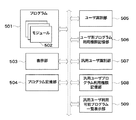
図1は、画像処理装置の機能構成を示すブロック図である。 FIG. 1 is a block diagram illustrating a functional configuration of the image processing apparatus.
図1において、プログラム501は、複数のモジュール502を保持している。プログラム501は、具体的には、画像処理装置のサービスを提供するソフトウエアプログラムであり、コピー機能・画像送信機能・画像を保管するボックス機能といった機能を実現するためのソフトウエアである。モジュール502は、プログラム501を構成するための処理を提供するソフトウエアプログラムである。
In FIG. 1, a
具体的には、モジュール502は、送信機能の中の電子メール送信・FTP(File Transfer Protocol)送信・ファクス送信といった特定の処理に特化したソフトウエアモジュールである。常時接続インターネットを用いた電子メールは許可するが、電話回線料金の発生するファクス送信は使わせないといった細かい利用権限の指定を行うために、プログラム501の単位だけでなく、より細かいモジュール単位での区別を行っている。
Specifically, the
表示部503は、画像処理装置のユーザに対して画像処理装置の内部状態やガイダンスを表示するものである。具体的には、表示部503は、LCDパネルを用いたディスプレイであり、操作部150の液晶表示部に対応する。プログラム記憶部504は、プログラム501を画像処理装置に装備されたハードディスクや不揮発性メモリなどにファイルとして保存するためのものである。
The
ユーザ識別部505は、複数登録されているユーザのうちどのユーザが画像処理装置を利用するかを識別するためのものである。具体的には、ユーザ識別部505は、画像処理装置にログインして問い合わせ・照合を行う機能のことであり、本実施の形態では表示部503上にログイン認証画面を表示させるログイン認証処理のことである。
The
ユーザ別プログラム利用権限記憶部506は、ログイン認証を行う各ユーザと、各ユーザがプログラム501、モジュール502のどれを利用可能であるかとの対応関係を記憶するためのものである。ユーザ別プログラム利用権限記憶部506は、画像処理装置の内部HDDにデータベースとして実現しても良い。または、サーバを設置してネットワーク経由で該サーバに問い合わせを行う方式でも構わない。
The user-specific program use
汎用ユーザ識別部507は、ユーザが汎用ユーザ(ゲストユーザ:個別ユーザ以外のユーザ)として画像処理装置を利用することを認識するためのものである。具体的には、汎用ユーザ識別部507は、ユーザが画像処理装置の図6のログイン認証画面でゲストモードボタン606を押すことで、汎用ユーザとして利用を開始するためのソフトウエア処理のことである。汎用ユーザは、一時的に画像処理装置を利用するユーザのために用意された利用形態である。
The general-purpose
汎用ユーザ識別部507に登録されていないユーザが画像処理装置の機能を利用する場合には、汎用ユーザとして認証を行うことが必要である。即ち、汎用ユーザ識別部507に登録されていないユーザは、図6のログイン認証画面でゲストモードボタン606を押すことで、画像処理装置の機能を利用することが可能となる。一般的に、汎用ユーザは、画像処理装置の機能に対して一般のユーザよりも制限された利用権限しか持たない。
When a user who is not registered in the general-purpose
汎用ユーザプログラム利用権限記憶部508は、汎用ユーザが利用できるプログラム及びモジュールを記憶したものである。汎用ユーザプログラム利用権限記憶部508も、ユーザ別プログラム利用権限記憶部506と同様に、画像処理装置の内部HDDにデータベースとして実現しても良い。または、サーバを設置してネットワーク経由で該サーバに問い合わせを行う方式でも構わない。
The general-purpose user program use
汎用ユーザ利用可能プログラム一覧表示部509は、汎用ユーザが利用できるプログラム及びモジュールを表示するものである。具体的には、汎用ユーザ利用可能プログラム一覧表示部509は、画像処理装置のログイン認証画面にプログラム名と機能を示すアイコンを表示したリストである。画像処理装置を利用するユーザは、所望の機能が汎用ユーザで利用可能かどうかをプログラム利用前に知ることができる。
The general-purpose user available program
図6は、画像処理装置のログイン認証画面の表示例を示す図である。 FIG. 6 is a diagram illustrating a display example of a login authentication screen of the image processing apparatus.
図6において、ユーザ名フィールド601は、画像処理装置を利用するために使うアカウントのユーザ名を入力するものである。パスワードフィールド602は、ユーザ名フィールド601に入力したユーザ名に対応したパスワードを入力するためのものである。ログインボタン605は、ユーザアカウントを照合するためのものである。ユーザがログインボタン605を押したときにユーザ名とパスワードが正しいと画像処理装置で認証された場合は、そのユーザアカウントで画像処理装置を利用することができる。
In FIG. 6, a
ログイン先リスト603は、ユーザアカウントを管理している管理先を選択するものである。図6では「このデバイス」となっているので、画像処理装置内に定義されているログインアカウント情報を利用してログイン認証を行う。複数の画像処理装置をまとめて管理するような環境の場合には、アカウントサーバが設置されていることが多い。この場合には、ログイン先リスト603でアカウントサーバを選択する。
The
汎用ユーザ使用可能プログラムリスト表示部604は、認証を必要としない汎用ユーザが利用可能なプログラムの一覧を表示するものである。図6では、コピー、送信/ファクス、ボックス、リモートスキャナ、プリント、ウエブブラウザ、Meapという7つのプログラムが利用可能なことが示されている。前述のユーザアカウントの管理先によって汎用ユーザが利用可能に指定されていないプログラムは、汎用ユーザ使用可能プログラムリスト表示部604には表示されない。汎用ユーザは利用したいプログラムがあることを確認してゲストモードボタン606を押すことで、画像処理装置を利用することができる。
The general-user-usable program
図7は、画像処理装置のログイン認証画面の表示例を示す図である。 FIG. 7 is a diagram illustrating a display example of a login authentication screen of the image processing apparatus.
図7において、例として、送信プログラムの電子メールモジュールに制限があるときのログイン認証画面を示している。汎用ユーザの利用できるプログラム・モジュールのうち、電子メールでの送信を禁止した場合、汎用ユーザはスキャンした原稿の画像データを電子メールで送信することができない。 In FIG. 7, as an example, a login authentication screen when there is a restriction on the e-mail module of the transmission program is shown. When transmission by e-mail is prohibited among program modules that can be used by a general-purpose user, the general-purpose user cannot transmit image data of a scanned document by e-mail.
このとき、汎用ユーザ使用可能プログラムリスト表示部701の中で、送信/ファクスの部分に電子メールが使用できないことを示すアイコンが表示される。これにより、画像処理装置を利用しようとしている汎用ユーザは、わざわざ利用を開始する前に、該当するプログラム・モジュールに利用権限が無いことを知ることができる。この結果、ユーザは不要な時間を使ってしまうことなく、すぐに管理者に画像処理装置の利用権限を付与してもらうか、利用権限の在る他の画像処理装置を使うことが可能となる。
At this time, an icon indicating that the electronic mail cannot be used is displayed in the transmission / fax portion in the general-purpose user usable program
また、図には示していないが、ファクスモジュールが禁止されるとき、または画像処理装置にファクスのハードウエアが装着されていないときには、プログラムリスト表示部701の中で「送信/ファクス」と表示されていた部分が、「送信」と表示される。この結果、ユーザはファクスが利用できないことをすぐに認識することができる。
Although not shown in the figure, when the fax module is prohibited, or when no fax hardware is installed in the image processing apparatus, “Send / Fax” is displayed in the program
図8は、画像処理装置のMEAPの操作画面を示す図である。 FIG. 8 is a diagram showing a MEAP operation screen of the image processing apparatus.
図8において、MEAPの操作画面は、図1に示したプログラム501の一つである。ログイン認証画面から正しくユーザ認証を行うか、汎用ユーザで利用開始した後にMEAPプログラムを選択すると、MEAP操作画面が表示部503に表示される。MEAPは、Multifunctional Embedded Application Platformの略であり、本出願人製デジタル複合機で動作するアプリケーションプラットフォームである。具体的には、エンドユーザ向けに作成したJava(登録商標)プログラムをデジタル複合機上で動作可能にするソフトウエア環境のことである。
In FIG. 8, the MEAP operation screen is one of the
図8では、MEAPプログラムが何も登録されていない状態を示している。ユーザがMEAPプログラム登録画面(不図示)を操作することで、デジタル複合機内にMEAPプログラムを登録することが可能である。MEAPプログラムが登録されると、画面上部に登録プログラムを示すボタンが列挙表示され、選択することが可能となる。ここで、MEAPプログラムは、図1に示したモジュール501と同じソフトウエアである。
FIG. 8 shows a state in which no MEAP program is registered. A user can register a MEAP program in the digital multi-function peripheral by operating a MEAP program registration screen (not shown). When the MEAP program is registered, a button indicating the registered program is listed on the upper part of the screen and can be selected. Here, the MEAP program is the same software as the
上述したように、MEAPプログラムを利用しようとしても一つもMEAPプログラムが登録されていないときにはMEAPプログラムを利用することができない。この状態では有効なサービスを受けることができないため、汎用ユーザとして利用するユーザにも予めそれを知らせることが使い勝手の上でも便利である。 As described above, when no MEAP program is registered even if an attempt is made to use the MEAP program, the MEAP program cannot be used. Since an effective service cannot be received in this state, it is convenient in terms of usability to notify a user who is used as a general-purpose user in advance.
図9は、画像処理装置のログイン認証画面の表示例を示す図である。 FIG. 9 is a diagram illustrating a display example of a login authentication screen of the image processing apparatus.
図9において、MEAPプログラムが一つも登録されていない場合、ログイン認証画面の汎用ユーザ使用可能プログラムリスト表示部901からMEAPを削除した状態を示している。これにより、予め制限があるためにMEAPプログラムが利用できないことを知ることができる。
In FIG. 9, when no MEAP program is registered, the MEAP is deleted from the general-purpose user usable program
図10は、画像処理装置のログイン認証失敗画面の表示例を示す図である。 FIG. 10 is a diagram illustrating a display example of a login authentication failure screen of the image processing apparatus.
図10において、ログイン認証画面でログインを実行したときに正しいアカウントが指定されないときには、ログイン認証失敗画面が表示部503に表示される。キャンセルボタン1001を押すと、元のログイン認証画面に戻って再度アカウントを入力することができる。
In FIG. 10, when a correct account is not specified when login is executed on the login authentication screen, a login authentication failure screen is displayed on the
ゲストモードボタン1002は、汎用ユーザとして画像処理装置を利用するためのボタンであり、認証が失敗したときに再度ログイン認証画面に戻ることなく画像処理装置の利用を開始することができる。ログイン認証に失敗したときにアカウントが無いことに気づいたユーザなどは、この機能を使うことで少ない手間で利用を開始することができる。
The
次に、画像処理装置における汎用ユーザ利用可能プログラム一覧表示部509の表示処理手順、認証失敗時の汎用ユーザ(ゲストユーザ)ログイン処理手順を図11乃至図13のフローチャートに基づき説明する。
Next, the display processing procedure of the general-purpose user available program
図1の汎用ユーザ利用可能プログラム一覧表示部509は、具体的には、図6の汎用ユーザ使用可能プログラムリスト表示部604と同じものである。
Specifically, the general user usable program
図11及び図12は、汎用ユーザ利用可能プログラム一覧表示部509の表示処理手順を示すフローチャートである。
11 and 12 are flowcharts showing the display processing procedure of the general-purpose user available program
図11及び図12において、まず、画像処理装置のCPU112は、利用可能アプリケーションプログラム(以下プログラム)テーブルに接続する。即ち、利用可能プログラムテーブルを画像処理装置内またはサーバ(不図示)から読み出す(ステップS1101)。利用可能プログラムテーブルは、図1の汎用ユーザプログラム利用権限記憶部508を実現したものであり、汎用ユーザ(ゲストユーザ)が利用可能なプログラムの一覧が記憶されている。
11 and 12, first, the
利用可能プログラムテーブルが画像処理装置内にデータベースやファイルとして実現されている場合には、利用可能プログラムのオープン処理が行われる。また、利用可能プログラムテーブルが上記サーバ上に実現されている場合には、画像処理装置からサーバに対して利用可能プログラムの利用開始の問い合わせが行われる。 When the available program table is realized as a database or a file in the image processing apparatus, the available program is opened. When the available program table is realized on the server, the image processing apparatus makes an inquiry to the server to start using the available program.
次に、CPU112は、ユーザIDを汎用ユーザに指定し(汎用ユーザ用のIDを割り当て)、汎用ユーザが利用可能なプログラムの一覧を画像処理装置内またはサーバから取得する(ステップS1102)。次に、CPU112は、取得した汎用ユーザが利用可能なプログラム一覧を使って、全てのプログラムに関して処理を繰り返す(ステップS1103)。まず、CPU112は、汎用ユーザが利用可能なプログラム一覧からプログラムを一つ取り出し(ステップS1104)、プログラム名とアイコンを表示用リストに追加する(ステップS1105)。
Next, the
上記取り出したプログラムがサブモジュール(内部モジュール)を持っていないときには、CPU112は、次のプログラムの処理を行う(ステップS1106)。次に、CPU112は、プログラムの全モジュールの利用が不可であることを示す全モジュール利用不可フラグをONにしておく(ステップS1107)。そして、CPU112は、各プログラムに対してプログラムを構成するモジュール全部について以下の確認を行う(ステップS1108)。尚、各モジュールには予め固有のIDが付加されている。
When the extracted program does not have a submodule (internal module), the
まず、CPU112は、モジュールを一つ取り出し(ステップS1109)、モジュールが利用可能か(利用制限が無いか)どうかを判断する(ステップS1110)。モジュールに利用する権限がある場合(利用可能:利用制限無し)には、CPU112は、上記ステップS1107でONにした全モジュール利用不可フラグをOFFにする(ステップS1112)。モジュールに利用する権限が無い場合(利用不可:利用制限有り)には、CPU112は、モジュールのIDと対応するアイコンを表示用リストに追加する(ステップS1111)。
First, the
全てのモジュールのチェックを終了すると(ステップS1108の判定がYES)、CPU112は、全てのモジュールが利用不可であったかどうかを判断する(ステップS1113)。全てのモジュールが利用不可であった場合、CPU112は、プログラムを使用できないように先に登録していた表示用リストの中から該当するプログラムを削除する(ステップS1114)。即ち、該当するプログラムを非表示とする。この後、ステップS1103の処理に戻る。全てのモジュールが利用不可でなかった場合、そのままステップS1103の処理に戻る。
When all the modules have been checked (YES in step S1108), the
図13は、認証失敗時の汎用ユーザ(ゲストユーザ)ログイン処理手順を示すフローチャートである。 FIG. 13 is a flowchart showing a general-purpose user (guest user) login processing procedure when authentication fails.
図13において、まず、画像処理装置のCPU112は、図6のログイン認証画面(ユーザ認証画面)を表示部503に表示する。これにより、ユーザ名・パスワード・ログイン先の入力をユーザに促す(ステップS1201)。次に、CPU112は、ユーザがログインボタン605を押したことを検出したらユーザ認証を行い(ステップS1202)、ユーザ識別部505により画像処理装置の利用が許可されたユーザかどうかを判定する(ステップS1203)。
In FIG. 13, first, the
ユーザから入力されたユーザ名・パスワードが登録されているユーザアカウントと一致している場合には、CPU112は、そのユーザアカウント(ID)を利用してログイン処理を続行する。これにより、ユーザは利用可能と指定されたプログラムを利用することが可能である(ステップS1205)。一方、ユーザから入力されたユーザ名・パスワードの認証(照合)が失敗した場合には、CPU112は、まず、ユーザ認証が失敗したことを表示部503に表示する(ステップS1204)。
If the user name / password input by the user matches the registered user account, the
即ち、CPU112は、図10のログイン認証失敗画面を表示部503に表示する。これにより、キャンセルボタン1001を押して再認証を受けるか、汎用ユーザとして限られた機能だけを利用するかの選択をユーザに促す。次に、CPU112は、ログイン認証失敗画面でキー入力があったことを検出すると(ステップS1206)、どちらの処理(再認証/限られた機能だけ利用)をユーザが選択したのかを判断する(ステップS1207)。
That is, the
ログイン認証失敗画面でキャンセルボタン1001が押された場合には、CPU112は、再度ユーザ認証を行うためにステップS1201の処理へ戻る。ログイン認証失敗画面でゲストモードボタン1002が押された場合には、CPU112は、ユーザアカウント(ID)を汎用ユーザ(ゲストユーザ)にしてログイン処理を続行する(ステップS1208)。これにより、汎用ユーザに利用を許可されたプログラム・モジュールを利用することができる。
When the cancel
以上説明したように、本実施の形態によれば、画像処理装置は当該ユーザが利用権限を制限された汎用ユーザであると識別した場合、汎用ユーザが利用可能なプログラムの一覧を表示すると共に利用制限があるプログラムを明示する。これにより、汎用ユーザとして画像処理装置の利用を開始する前に利用制限のあるプログラムを認識することが可能となる。また、汎用ユーザとして利用したい機能が使用できるのかどうかを判断することが可能となる。 As described above, according to the present embodiment, when the image processing apparatus identifies that the user is a general-purpose user whose use authority is limited, the image processing apparatus displays and uses a list of programs that can be used by the general-purpose user. Specify programs with restrictions. As a result, it is possible to recognize programs with usage restrictions before starting to use the image processing apparatus as a general-purpose user. In addition, it is possible to determine whether or not a function desired to be used as a general-purpose user can be used.
また、画像処理装置は全てのモジュールが利用不可であるプログラムは、プログラム一覧から削除する(非表示にする)。これにより、構成するモジュールが全て利用できないにも関わらずプログラムを起動してしまうことを防止することが可能となる。 Further, the image processing apparatus deletes (hides) a program in which all modules cannot be used from the program list. As a result, it is possible to prevent the program from being activated even though all the modules that are configured cannot be used.
また、画像処理装置は当該ユーザがユーザ認証に失敗した場合は、汎用ユーザとして限られた機能だけを利用することを選択可能とする表示を行う。これにより、ユーザは認証失敗の状態から最小の操作で汎用ユーザとして画像処理装置を利用することが可能となる。 In addition, when the user fails in user authentication, the image processing apparatus performs display that enables selection of using only a limited function as a general-purpose user. Thus, the user can use the image processing apparatus as a general-purpose user with a minimum operation from the authentication failure state.
[他の実施の形態]
上記実施の形態では、画像処理装置が図2に示す機能を有する場合を例に挙げたが、本発明は、これに限定されるものではない。画像処理装置が有する機能の種類は、画像処理装置の仕様に応じた種類とすることが可能である。
[Other embodiments]
In the above embodiment, the case where the image processing apparatus has the function shown in FIG. 2 has been described as an example, but the present invention is not limited to this. The types of functions possessed by the image processing apparatus can be made in accordance with the specifications of the image processing apparatus.
また、本発明の目的は、前述した各実施の形態の機能を実現するソフトウエアのプログラムコードを記憶した記憶媒体を、システム或いは装置に供給し、以下の処理を行うことによりも達成される。即ち、そのシステム或いは装置のコンピュータ(またはCPUやMPU等)が記憶媒体に格納されたプログラムコードを読み出し実行することによりも達成される。 The object of the present invention can also be achieved by supplying a storage medium storing software program codes for realizing the functions of the above-described embodiments to a system or apparatus and performing the following processing. That is, it is also achieved by reading and executing the program code stored in the storage medium by the computer (or CPU, MPU, etc.) of the system or apparatus.
この場合、記憶媒体から読み出されたプログラムコード自体が前述した各実施の形態の機能を実現することになり、そのプログラムコード及び該プログラムコードを記憶した記憶媒体は本発明を構成することになる。 In this case, the program code itself read from the storage medium realizes the functions of the above-described embodiments, and the program code and the storage medium storing the program code constitute the present invention. .
また、プログラムコードを供給するための記憶媒体としては、例えば、フロッピー(登録商標)ディスク、ハードディスク、光磁気ディスクを用いることができる。また、CD−ROM、CD−R、CD−RW、DVD−ROM、DVD−RAM、DVD−RW、DVD+RW等の光ディスク、磁気テープ、不揮発性のメモリカード、ROM等を用いることができる。または、プログラムコードをネットワークを介してダウンロードしてもよい。 As a storage medium for supplying the program code, for example, a floppy (registered trademark) disk, a hard disk, or a magneto-optical disk can be used. Further, optical disks such as CD-ROM, CD-R, CD-RW, DVD-ROM, DVD-RAM, DVD-RW, DVD + RW, magnetic tape, nonvolatile memory card, ROM, and the like can be used. Alternatively, the program code may be downloaded via a network.
また、コンピュータが読み出したプログラムコードを実行することにより、前述した各実施の形態の機能が実現されるだけではなく、以下の場合も含まれる。即ち、そのプログラムコードの指示に基づき、コンピュータ上で稼動しているOS(オペレーティングシステム)等が実際の処理の一部または全部を行い、その処理により前述した各実施の形態の機能が実現される場合も含まれる。 Further, by executing the program code read by the computer, not only the functions of the above-described embodiments are realized, but also the following cases are included. That is, based on the instruction of the program code, an OS (operating system) running on the computer performs part or all of the actual processing, and the functions of the above-described embodiments are realized by the processing. Cases are also included.
更に、記憶媒体から読み出されたプログラムコードが、コンピュータに挿入された機能拡張ボードやコンピュータに接続された機能拡張ユニットに備わるメモリに書き込まれた後、次のプログラムコードの指示に基づき、以下の処理を行う場合も含まれる。即ち、その拡張機能を拡張ボードや拡張ユニットに備わるCPU等が実際の処理の一部または全部を行い、その処理により前述した各実施の形態の機能が実現される場合も含まれる。 Furthermore, after the program code read from the storage medium is written in the memory provided in the function expansion board inserted into the computer or the function expansion unit connected to the computer, the following program code is specified based on the instruction of the next program code. This includes cases where processing is performed. That is, the case where the CPU or the like provided in the extension board or the extension unit performs the part or all of the actual processing and the functions of the above-described embodiments are realized by the processing is included.
100 画像処理装置
112 CPU(制御手段)
501 プログラム
502 モジュール
503 表示部(表示手段)
504 プログラム記憶部
505 ユーザ識別部(識別手段)
506 ユーザ別プログラム利用権限記憶部(利用権限記憶手段)
507 汎用ユーザ識別部(識別手段)
508 汎用ユーザプログラム利用権限記憶部(利用権限記憶手段)
509 汎用ユーザ利用可能プログラム一覧表示部(表示手段)
100
501
504
506 User-specific program usage authority storage unit (usage authority storage means)
507 General-purpose user identification unit (identification means)
508 General-purpose user program use authority storage unit (use authority storage means)
509 General-purpose user available program list display section (display means)
Claims (8)
前記画像処理装置を利用するユーザと利用可能なプログラム及び該プログラムを構成するモジュールとの対応関係を記憶する利用権限記憶手段と、
前記画像処理装置を利用するユーザを識別する識別手段と、
前記識別手段により当該ユーザが利用権限を制限された汎用ユーザであると識別された場合、前記利用権限記憶手段に基づき、前記汎用ユーザが利用可能なプログラムの一覧を表示手段に表示すると共に、利用制限があるプログラムを明示する制御手段と、
を備えることを特徴とする画像処理装置。 An image processing apparatus capable of using a plurality of programs for realizing a plurality of functions,
Usage authority storage means for storing a correspondence relationship between a user who uses the image processing apparatus, an available program, and a module constituting the program;
Identification means for identifying a user who uses the image processing apparatus;
When the identification means identifies that the user is a general-purpose user whose use authority is restricted, a list of programs that can be used by the general-purpose user is displayed on the display means based on the use authority storage means, A control means to specify the program with restrictions;
An image processing apparatus comprising:
前記画像処理装置を利用するユーザを識別する識別手段と、
前記識別手段により当該ユーザが利用権限を制限された汎用ユーザであると識別された場合、前記画像処理装置を利用するユーザと利用可能なプログラム及び該プログラムを構成するモジュールとの対応関係を記憶した外部装置への問い合わせに基づき、前記汎用ユーザが利用可能なプログラムの一覧を表示手段に表示すると共に、利用制限があるプログラムを明示する制御手段と、
を備えることを特徴とする画像処理装置。 An image processing apparatus capable of using a plurality of programs for realizing a plurality of functions,
Identification means for identifying a user who uses the image processing apparatus;
When the identification unit identifies the user as a general-purpose user whose usage authority is limited, the correspondence relationship between the user who uses the image processing apparatus, the available program, and the modules constituting the program is stored. Based on an inquiry to an external device, a list of programs that can be used by the general-purpose user is displayed on a display unit, and a control unit that clearly indicates a program with usage restrictions;
An image processing apparatus comprising:
前記画像処理装置を利用するユーザを識別する識別ステップと、
前記識別ステップにより当該ユーザが利用権限を制限された汎用ユーザであると識別された場合、前記画像処理装置を利用するユーザと利用可能なプログラム及び該プログラムを構成するモジュールとの対応関係を記憶した利用権限記憶手段に基づき、前記汎用ユーザが利用可能なプログラムの一覧を表示手段に表示すると共に、利用制限があるプログラムを明示する制御ステップと、
を備えることを特徴とする制御方法。 A method for controlling an image processing apparatus capable of using a plurality of programs for realizing a plurality of functions,
An identification step for identifying a user who uses the image processing apparatus;
When the identification step identifies that the user is a general-purpose user whose use authority is limited, the correspondence relationship between the user who uses the image processing apparatus, the available program, and the modules constituting the program is stored. A control step for displaying a list of programs that can be used by the general-purpose user on the display means based on the usage authority storage means, and for clearly indicating the programs with usage restrictions;
A control method comprising:
前記画像処理装置を利用するユーザを識別する識別ステップと、
前記識別ステップにより当該ユーザが利用権限を制限された汎用ユーザであると識別された場合、前記画像処理装置を利用するユーザと利用可能なプログラム及び該プログラムを構成するモジュールとの対応関係を記憶した外部装置への問い合わせに基づき、前記汎用ユーザが利用可能なプログラムの一覧を表示手段に表示すると共に、利用制限があるプログラムを明示する制御ステップと、
を備えることを特徴とする制御方法。 A method for controlling an image processing apparatus capable of using a plurality of programs for realizing a plurality of functions,
An identification step for identifying a user who uses the image processing apparatus;
When the identification step identifies that the user is a general-purpose user whose use authority is limited, the correspondence relationship between the user who uses the image processing apparatus, the available program, and the modules constituting the program is stored. Based on the inquiry to the external device, a list of programs that can be used by the general-purpose user is displayed on the display means, and a control step that clearly indicates the programs that have usage restrictions;
A control method comprising:
Priority Applications (1)
| Application Number | Priority Date | Filing Date | Title |
|---|---|---|---|
| JP2006083893A JP2007259307A (en) | 2006-03-24 | 2006-03-24 | Image processing apparatus, control method, and program |
Applications Claiming Priority (1)
| Application Number | Priority Date | Filing Date | Title |
|---|---|---|---|
| JP2006083893A JP2007259307A (en) | 2006-03-24 | 2006-03-24 | Image processing apparatus, control method, and program |
Publications (1)
| Publication Number | Publication Date |
|---|---|
| JP2007259307A true JP2007259307A (en) | 2007-10-04 |
Family
ID=38633047
Family Applications (1)
| Application Number | Title | Priority Date | Filing Date |
|---|---|---|---|
| JP2006083893A Pending JP2007259307A (en) | 2006-03-24 | 2006-03-24 | Image processing apparatus, control method, and program |
Country Status (1)
| Country | Link |
|---|---|
| JP (1) | JP2007259307A (en) |
Cited By (7)
| Publication number | Priority date | Publication date | Assignee | Title |
|---|---|---|---|---|
| JP2011037161A (en) * | 2009-08-12 | 2011-02-24 | Canon Marketing Japan Inc | Image forming apparatus, processing method, and program |
| JP2011234232A (en) * | 2010-04-28 | 2011-11-17 | Canon Inc | Communication apparatus, control method and program for the same |
| JP2012155512A (en) * | 2011-01-26 | 2012-08-16 | Ricoh Co Ltd | Image processor, function use control method, function use control program and recording medium with the same program recorded |
| JP2012203660A (en) * | 2011-03-25 | 2012-10-22 | Brother Ind Ltd | Information provision server |
| JP2012221069A (en) * | 2011-04-05 | 2012-11-12 | Canon Inc | Information processor and method for controlling the same |
| JP2014532224A (en) * | 2011-09-30 | 2014-12-04 | インテル・コーポレーション | Application authentication policy for multiple computing devices |
| JP2016129066A (en) * | 2016-03-08 | 2016-07-14 | インテル・コーポレーション | Application authentication policy for multiple computing devices |
-
2006
- 2006-03-24 JP JP2006083893A patent/JP2007259307A/en active Pending
Cited By (9)
| Publication number | Priority date | Publication date | Assignee | Title |
|---|---|---|---|---|
| JP2011037161A (en) * | 2009-08-12 | 2011-02-24 | Canon Marketing Japan Inc | Image forming apparatus, processing method, and program |
| JP2011234232A (en) * | 2010-04-28 | 2011-11-17 | Canon Inc | Communication apparatus, control method and program for the same |
| JP2012155512A (en) * | 2011-01-26 | 2012-08-16 | Ricoh Co Ltd | Image processor, function use control method, function use control program and recording medium with the same program recorded |
| US9798868B2 (en) | 2011-01-26 | 2017-10-24 | Ricoh Company, Ltd. | Image processing apparatus, access control method, and storage medium |
| JP2012203660A (en) * | 2011-03-25 | 2012-10-22 | Brother Ind Ltd | Information provision server |
| JP2012221069A (en) * | 2011-04-05 | 2012-11-12 | Canon Inc | Information processor and method for controlling the same |
| JP2014532224A (en) * | 2011-09-30 | 2014-12-04 | インテル・コーポレーション | Application authentication policy for multiple computing devices |
| US9590967B2 (en) | 2011-09-30 | 2017-03-07 | Intel Corporation | Application authentication policy for a plurality of computing devices |
| JP2016129066A (en) * | 2016-03-08 | 2016-07-14 | インテル・コーポレーション | Application authentication policy for multiple computing devices |
Similar Documents
| Publication | Publication Date | Title |
|---|---|---|
| CN101573685B (en) | Printing management server, printing management method and program, and recording medium | |
| EP1892948B1 (en) | Access control in an image-forming apparatus, control server, and image-forming system | |
| JP4095639B2 (en) | Image processing apparatus and image processing apparatus control method | |
| US20020122203A1 (en) | Image processing device, information processing method, and control program | |
| US20070089173A1 (en) | Data transmission apparatus, control method therefor, and image input/output apparatus | |
| JP5004860B2 (en) | Image processing apparatus, image processing method, and computer program | |
| WO2008156179A1 (en) | Image processing apparatus, method of controlling image processing apparatus, and program | |
| US8730495B2 (en) | Image processing system | |
| US7640294B2 (en) | Image processor and image processing method | |
| JP4018707B2 (en) | Image processing system, image processing apparatus, control method thereof, and control program | |
| JP2006157156A (en) | Print control apparatus and print control method | |
| US8531694B2 (en) | Appending restriction information to a job before transmission | |
| CN100587661C (en) | Image and sound output device and method | |
| JP4078284B2 (en) | Image processing apparatus and image processing method | |
| EP1942439A2 (en) | Document management system, method, and program, and image forming apparatus | |
| JP2007259307A (en) | Image processing apparatus, control method, and program | |
| JP4639122B2 (en) | Information processing apparatus, information processing method, and program | |
| JP3859651B2 (en) | Compound machine | |
| JP2006323456A (en) | Image processing apparatus, image processing system, data processing method, computer-readable storage medium storing program, and program | |
| US20060064738A1 (en) | Device usage information writing apparatus and method thereof, image forming apparatus and device system having the apparatus | |
| JP2012131085A (en) | Image forming apparatus, control method, and program | |
| JP2010170235A (en) | Image forming system and server device | |
| JP5097749B2 (en) | Image forming system and server device | |
| JP2007088795A (en) | Document management apparatus and program | |
| JP2013119164A (en) | Printing controller, printing control system, printing control method, program, and storage medium |
Legal Events
| Date | Code | Title | Description |
|---|---|---|---|
| RD05 | Notification of revocation of power of attorney |
Free format text: JAPANESE INTERMEDIATE CODE: A7425 Effective date: 20070626 |