JP2006209261A - Reception form job display method and apparatus, and program - Google Patents
Reception form job display method and apparatus, and program Download PDFInfo
- Publication number
- JP2006209261A JP2006209261A JP2005017411A JP2005017411A JP2006209261A JP 2006209261 A JP2006209261 A JP 2006209261A JP 2005017411 A JP2005017411 A JP 2005017411A JP 2005017411 A JP2005017411 A JP 2005017411A JP 2006209261 A JP2006209261 A JP 2006209261A
- Authority
- JP
- Japan
- Prior art keywords
- job
- received
- display method
- unknown
- forms
- Prior art date
- Legal status (The legal status is an assumption and is not a legal conclusion. Google has not performed a legal analysis and makes no representation as to the accuracy of the status listed.)
- Pending
Links
Images



Classifications
-
- G—PHYSICS
- G06—COMPUTING OR CALCULATING; COUNTING
- G06V—IMAGE OR VIDEO RECOGNITION OR UNDERSTANDING
- G06V10/00—Arrangements for image or video recognition or understanding
- G06V10/98—Detection or correction of errors, e.g. by rescanning the pattern or by human intervention; Evaluation of the quality of the acquired patterns
- G06V10/987—Detection or correction of errors, e.g. by rescanning the pattern or by human intervention; Evaluation of the quality of the acquired patterns with the intervention of an operator
Landscapes
- Engineering & Computer Science (AREA)
- Quality & Reliability (AREA)
- Physics & Mathematics (AREA)
- General Physics & Mathematics (AREA)
- Multimedia (AREA)
- Theoretical Computer Science (AREA)
- Character Discrimination (AREA)
- Character Input (AREA)
- Digital Computer Display Output (AREA)
Abstract
Description
本発明は、受信帳票ジョブ表示方法及び装置、並びにプログラムに関し、特に、帳票や申請書等の各種書類を読み取って得られた電子画像に対して帳票認識や文字認識を実行し、所定の表示方法で表示する受信帳票ジョブ表示方法及び装置、並びにプログラムに関するものである。 The present invention relates to a received form job display method, apparatus, and program, and in particular, forms recognition and character recognition are performed on electronic images obtained by reading various documents such as forms and application forms, and a predetermined display method. The present invention relates to a received form job display method and apparatus, and a program to be displayed.
従来、帳票や申請書、申込書等の各種書類は、紙媒体として企業の事務管理センターなどへ送られ、人手を介して電子画像化されて企業内のサーバのデータベースに格納されている。 2. Description of the Related Art Conventionally, various documents such as forms, application forms, and application forms are sent as paper media to a company office management center or the like, electronically imaged by hand, and stored in a database of a server in the company.
近年、紙媒体に代えてFAX画像やスキャナにより読み込まれた電子画像を受信して帳票認識や文字認識などを行い、自動的に業務を遂行させるものに移行しつつある。例えば、金融機関の為替業務に用いられる振込伝票の如き帳票上に印刷またはは手書きされた文字を認識する帳票読取方法において、画像として取り込まれた帳票の文字を読み取って該帳票の帳票種別を判定し、該帳票種別の判定に失敗したときに、手動入力される帳票種別により当該帳票の帳票種別と判定し、判定された帳票種別に基づいて該文字の読み取りを実行する技術が提案されている(例えば、特許文献1参照)。これにより、スキャニング処理される帳票の不具合にもかかわらず、その紙面上の文字認識を正しく実行することができるというものである。
しかしながら、上記従来の技術では、受信した電子画像に対する帳票認識や文字認識を業務用ソフトウェアを導入して自動的に処理できるようになってきたが、それらの認識精度が完璧なものとは云えず、人手を介して修正する作業が発生している。ここで帳票として認識不能な電子画像が存在した場合、以下の問題が発生するおそれがある。 However, in the above-described conventional technology, it has become possible to automatically process form recognition and character recognition for received electronic images by introducing business software, but the recognition accuracy is not perfect. , Work to correct through manual labor is occurring. If there is an electronic image that cannot be recognized as a form, the following problem may occur.
1.連続した複数の認識不明帳票を1つのジョブとして一覧表示させた場合、当該ジョブを確認した作業者が実は複数種類の帳票で構成されたジョブであると判明したときに、複雑な操作を行って帳票毎に区切る分割作業が発生する。 1. When a list of multiple consecutive unknown recognition forms is displayed as one job, a complex operation is performed when the worker who confirmed the job is actually found to be a job composed of multiple types of forms. The division work which divides every form occurs.
2.その逆に、連続した認識不明帳票をページ(書類)毎の複数のジョブとして一覧表示させた場合、当該ジョブを確認した作業者が実は複数枚に跨る1つの帳票であると判明したときに、複雑な操作を行って一括りの帳票にまとめる結合作業が発生する。 2. Conversely, when a list of consecutive unrecognized forms is displayed as a plurality of jobs for each page (document), when the worker who confirmed the job is actually found to be one form across multiple sheets, Combined operations that perform complicated operations and combine them into a batch form occur.
3.帳票に手書きの紹介文などが付属のデータとして付加されている場合、その付属データが各種多様なフォーマットで構成されていることから予め帳票の一部として登録することができず、帳票認識を行うと認識不明帳票として扱われてしまう。その結果、複雑な操作を行って前ジョブと付属データとを一括りの帳票にまとめる結合作業が発生する。 3. When handwritten introductory text is added to the form as attached data, it cannot be registered in advance as part of the form because the attached data is configured in various formats, and form recognition is performed. It will be treated as a form of unknown recognition. As a result, a complicated operation is performed to combine the previous job and the attached data into a batch form.
4.上記1.〜3.において、電子画像を複数のクライアントコンピュータからサーバに受信する場合、受信単位で前ジョブへのまとめる作業を行わないと、別のクライアントコンピュータからのジョブとの無意味な結合などが発生する。 4). Above 1. ~ 3. In this case, when an electronic image is received from a plurality of client computers to a server, if the operation of combining the previous jobs in the reception unit is not performed, meaningless connection with a job from another client computer occurs.
本発明は、上記問題に鑑みて成されたものであり、種別不明の書類から得られた電子画像に帳票認識を行う際に、その帳票認識結果に対して修正を行う作業者の利便性を向上し、作業を的確に行わせることができる受信帳票ジョブ表示方法及び装置、並びにプログラムを提供することを目的とする。 The present invention has been made in view of the above problems, and when performing form recognition on an electronic image obtained from an unknown document, the convenience of an operator who corrects the form recognition result is improved. It is an object of the present invention to provide a received form job display method and apparatus, and a program, which can be improved and work can be performed accurately.
上記目的を達成するために、請求項1記載の受信帳票ジョブ表示方法は、電子画像を受信する受信工程と、前記受信した電子画像から帳票の種類を認識する認識工程と、前記認識された電子画像が予め登録済みの帳票かまたは認識不明帳票かを判定する判定工程と、前記認識不明帳票の表示方法を予め設定させる設定工程と、前記判定された帳票を、前記設定された表示方法に応じて一覧表示する表示工程とを備えることを特徴とする。
In order to achieve the above object, a received form job display method according to
上記目的を達成するために、請求項9記載の受信帳票ジョブ表示装置は、各種書類の画像を読み取って得られた電子画像に対して帳票認識を実行する受信帳票ジョブ表示装置において、前記電子画像を受信する受信手段と、前記受信した電子画像から帳票の種類を認識する認識手段と、前記認識された電子画像が予め登録済みの帳票かまたは認識不明帳票かを判定する判定手段と、前記認識不明帳票の表示方法を予め設定させる設定手段と、前記判定された帳票を、前記設定された表示方法に応じて一覧表示する表示手段とを備えることを特徴とする。 To achieve the above object, the received form job display device according to claim 9 is a received form job display device that performs form recognition on an electronic image obtained by reading images of various documents. Receiving means for receiving, recognizing means for recognizing the type of form from the received electronic image, determining means for determining whether the recognized electronic image is a pre-registered form or a form of unknown recognition, and the recognition It is characterized by comprising setting means for presetting an unknown form display method and display means for displaying the determined form as a list in accordance with the set display method.
本発明によれば、受信した電子画像から帳票の種類を認識し、認識された電子画像が予め登録済みの帳票かまたは認識不明帳票かを判定し、認識不明帳票の表示方法を予め設定させ、判定された帳票を予め設定された表示方法に応じて一覧表示するので、種別不明の書類から得られた電子画像に帳票認識を行う際に、その帳票認識結果に対して修正を行う作業者の利便性を向上し、作業を的確に行わせることができる。 According to the present invention, the type of the form is recognized from the received electronic image, it is determined whether the recognized electronic image is a pre-registered form or an unrecognized form, and a display method for the unrecognized form is set in advance. Since the determined forms are displayed in a list according to a preset display method, when performing form recognition on an electronic image obtained from an unknown document, the operator who corrects the form recognition result Convenience can be improved and work can be performed accurately.
以下、本発明の実施の形態を図面を参照して詳細に説明する。 Hereinafter, embodiments of the present invention will be described in detail with reference to the drawings.
図1は、本発明の実施の形態に係る受信帳票ジョブ表示方法が適用されたシステムの全体構成を示す図である。 FIG. 1 is a diagram showing an overall configuration of a system to which a received form job display method according to an embodiment of the present invention is applied.
図1において、本システムは、企業等に設置され、ユーザから郵便で送付された申請書や企業の支店から持ち込まれた帳票等の各種書類をスキャナ等により読み取らせて電子画像化し、当該電子画像に対して帳票認識または文字認識を実行して、必要に応じて申請承認を行って電子文書としてサーバ等に登録する事務処理システムである。 In FIG. 1, this system is installed in a company or the like, and various documents such as an application form sent by mail from a user or a form brought in from a branch office of a company are read by a scanner or the like to form an electronic image. This is a business processing system that performs form recognition or character recognition on an application, approves an application as necessary, and registers it as an electronic document in a server or the like.
本事務処理システムは、クライアントコンピュータ(以下、「クライアントPC」という。)101,102と、ネットワーク上で共有されているスキャナ103及びマルチファンクションデバイス(MFP)104と、これらを互いに接続するLAN(Local Area Network)105と、LAN105に接続するインターネット107と、インターネット107に直接接続するクライアントPC106と、HTTPサーバ108と、Webアプリケーションサーバ109と、Webアプリケーションサーバ109に接続するデータベース110と、HTTPサーバ108等を互いに接続すると共にインターネット107に接続するLAN111とで構成される。
The business processing system includes client computers (hereinafter referred to as “client PCs”) 101 and 102, a
クライアントPC101,102,及び106は、LAN105やLAN111を介してWebアプリケーションサーバ109等の他の装置との間でデータのやり取りを行う。本実施の形態では、クライアントPC101,102,及び106は、本事務処理システムの管理者が新規データファイルの登録やユーザ管理情報の修正などのメンテナンス処理を行う際に使用され、或いは登録を行う作業者がWebアプリケーションサーバ109にて受信した電子文書の仕分け確認する際に使用される。また、クライアントPC101,102,及び106は、承認者が承認作業を行う際にも使用される。
The client PCs 101, 102, and 106 exchange data with other devices such as the
スキャナ103は、申請書や帳票など各種書類に対して画像の読み取りを行う画像読取装置である。MFP104は、スキャナ103と同様の画像読取機能を備え、さらに複写機能やFAX機能等の複数の機能を備える複合機である。また、MFP104は、外部から受信したFAX画像をLAN105及びインターネット107を介してWebアプリケーションサーバ109に登録することができる。
The
HTTPサーバ108は、クライアントPC101等からLAN105やインターネット107等のネットワークを介してHTTPプロトコルにより送信されたリクエストを受け取るサーバコンピュータである。HTTPサーバ108は、いくつかのWebアプリケーションサーバ109が登録され、クライアントPC101等から受信したリクエストの内容に従って当該リクエストを適切なWebアプリケーションサーバ109に転送する。
The HTTP
Webアプリケーションサーバ109は、HTTPサーバ108からリクエストを受け取ると、当該リクエストに対応する処理を実行してその処理結果をクライアントPC101等へ返送する。なお、Webアプリケーションサーバ109は、図示では1台のみであるが、LAN111に複数台接続されていてもよい。
When the
データベース110には、Webアプリケーションサーバ109が受信したデータや文字認識結果、申請処理ステータスなどの情報、ユーザ/グループ情報、登録データファイルの処理情報などのシステム情報が格納されている。
The
本事務処理システムは、これらHTTPサーバ108、Webアプリケーションサーバ109、及びデータベース110が有機的に組み合わさってWebデータベースシステムとして機能する。
This business processing system functions as a Web database system by organically combining these
図2は、図1のクライアントPC及びサーバの基本的なハードウェア構成を示すブロック図である。 FIG. 2 is a block diagram showing the basic hardware configuration of the client PC and server of FIG.
図2において、図1のクライアントPC101,101,106、HTTPサーバ108、及びWebアプリケーションサーバ109は、基本的な構成として、CPU(Central Processing Unit)1と、PMEM2と、通信ポート4を介して通信回線5に接続する通信制御部3と、フロッピー(登録商標)ディスク(FD)等から成るデータファイル用ディスク9及びハードディスク(HD)10に接続する外部記憶制御部8と、キーボード12やマウス13に接続する入力制御部11と、VRAM14と、VRAM14やCRT16に接続する表示出力制御部15と、プリンタ18に接続するプリンタ制御部17と、スキャナ21に接続するスキャナ制御部20と、プリンタ制御部17及びスキャナ制御部20に接続する外部機器制御部19と、これら各部を互いに接続するシステムバス22とを備える。
2, the client PCs 101, 101, 106, the
CPU1は、後述する処理を実行するために、PMEM2から制御プログラムを適宜選択及び読み出して実行する。PMEM2は不揮発性メモリ等で構成され、制御プログラムを記憶するプログラム・メモリである。また、PMEM2は、テキスト・メモリでもあり、キーボード12から入力されたデータをコード情報として格納する。
The
通信制御部3は、通信ポート4における入出力データの制御を行う。通信ポート4から出力された信号は、通信回線5を経由して、ネットワーク上の他の装置の通信ポートに送信される。なお、通信ポート4及び通信回線5は、LAN等のネットワークに対応するのものであるが、一般の公衆回線に対応するものであってもよいことは云うまでもない。
The
入力制御部11は、作業者によるキーボード12やマウス13等の操作に応じてシステムの動作指令等を行う。マウス13は、CRT16に表示される画像に対して加工または指示するためのポインティング・デバイス(PD)である。作業者は、マウス13を使用してCRT16上に表示されているカーソル(不図示)を任意の方向に移動することができる。例えば、CRT16に表示されているコマンドメニュー上のコマンド・アイコンを選択して処理の指示を行うほか編集対象の指示、描画位置の指示等を行うことができる。
The input control unit 11 issues a system operation command or the like according to the operation of the keyboard 12 or the
VRAM14は、CRT16に表示する画像をビットマップデータとして展開するためのビデオ・イメージ・メモリである。プリンタ制御部17は、プリンタ18に対するデータの出力制御を行う。スキャナ制御部20は、スキャナ21の画像読み取り制御を行う。
The
なお、図1では、クライアントPC及びサーバの基本的なハードウェア構成要素にキーボード12、マウス13、CRT16、プリンタ18、及びスキャナ21が含まれているが、これらが別体に構成されていてもよいことは云うまでもない。
In FIG. 1, the basic hardware components of the client PC and the server include the keyboard 12, the
また、上記制御プログラムは、装置に直接接続されているHD10やFD9などの記憶媒体に記憶されていてもよく、またネットワーク上の他の装置に記憶されていてもよい。この場合、当該制御プログラムは、HD10やFD9などの記憶媒体やネットワーク上の他の装置から当該クライアントPCまたは当該サーバに供給される。
The control program may be stored in a storage medium such as the
図3は、図1のクライアントPC及びサーバの基本的なソフトウェア構成を示すブロック図である。 FIG. 3 is a block diagram showing a basic software configuration of the client PC and server of FIG.
図3において、クライアントPC301は、クライアントPC101,102,及び106に相当し、サーバに登録する帳票データを編集するための編集モジュール302と、サーバへの登録を承認するための登録承認モジュール303とを備える。
In FIG. 3, a
ネットワーク304は、LAN105,111及びインターネット107に相当する。HTTPサーバ305は、HTTPサーバ108に相当する。
A
Webアプリケーションサーバ306は、Webアプリケーションサーバ109に相当し、HTTPサーバ305から受け取ったクライアントPC301からのリクエストを処理するためのモジュール307を備える。モジュール307は、ユーザ認証、検索処理、ワークフロー制御、受信データ登録、ワークフロー登録、送付状登録、ユーザ管理、グループ管理、データメンテナンス、認識結果登録、認識帳票登録、及びデバイス設定登録の各種モジュールを有する。これらのモジュールは、クライアントPC301からのリクエストに応じてメモリ上にロードされ、処理として実行される。
The
Webアプリケーションサーバ306は、モジュール307のほかに、ワークフローエディタモジュールや送付状エディタモジュールを有するエディタモジュール308と、データベース110に相当するデータベース311とのデータのやり取りを行うためのデータベース共通ライブラリ(Lib)モジュール309と、ユーティリティライブラリ(Lib)モジュール310とを備える。
In addition to the
図4は、図1の事務処理システム上で実行される制御フローの全体を示す概略図である。 FIG. 4 is a schematic diagram showing an overall control flow executed on the business processing system of FIG.
図4において、S1は、ファクシミリやスキャナ、MFP等からネットワーク経由で受信してデータをサーバに取り込むステップを示している。 In FIG. 4, S1 indicates a step of receiving data from a facsimile, scanner, MFP or the like via a network and taking in the data to the server.
S2は、受信したデータに対して帳票認識(FR)を行って帳票種別を決定するステップを示している。S3は、受信したデータに対して文字認識(CR)やバーコード認識(BR)を行い、S2で判明した帳票や申請書に記載されている文字を抽出するステップを示している。S4は、ポストエディタ(PE)と呼ばれる作業者がS3で認識された文字をコンピュータ(PC)上の画面を見ながら修正するステップを示している。 S2 indicates a step of performing form recognition (FR) on the received data to determine the form type. S3 indicates a step of performing character recognition (CR) or bar code recognition (BR) on the received data and extracting characters described in the form or application found in S2. S4 indicates a step in which an operator called a post editor (PE) corrects the characters recognized in S3 while viewing the screen on the computer (PC).
S5は、申請書等に対して申請承認のワークフロー(PAフロー)を実行するステップを示し、S6はサーバにデータを登録するステップを示し、S7はバックエンドサーバ(不図示)にデータを登録するステップを示し、S8は後処理を実行するステップを示している。後処理には、例えば、企業に申請書などを送付したユーザに対して登録確認通知をFAX、e-mail、郵送などにより行うことが含まれる。 S5 indicates a step of executing an application approval workflow (PA flow) for an application form, S6 indicates a step of registering data in the server, and S7 registers data in a back-end server (not shown). Steps S8 and S8 indicate steps for executing post-processing. Post-processing includes, for example, performing registration confirmation notification by FAX, e-mail, mail, etc. to a user who has sent an application form to a company.
図4の制御フローは、ワークフローまたはビジネスプロセスと呼ばれており、当該ワークフローではS2からS8までの各ステップをONまたはOFFに切り替えることが可能となっている。そのため、S2からS8までの各ステップのON/OFFを、受信したデータ(帳票)の種類に応じてアプリケーションソフトウェアにより設定することができる。例えば、「ローン申込書」に対してFR後にOCRを実施することなく申請承認を行う場合、ワークフロー上のS3とS4をOFFにしてS1,S2,S5,S6,S7,S8の順に設定する。同様に、「カーローン申込書」に対してPE後に基幹のサーバに登録する場合、ワークフロー上のS5,S6をOFFにしてS1,S2,S3,S4,S7の順に設定する。 The control flow in FIG. 4 is called a workflow or a business process, and in the workflow, each step from S2 to S8 can be switched ON or OFF. Therefore, ON / OFF of each step from S2 to S8 can be set by application software according to the type of received data (form). For example, when approving an application without performing OCR after FR for a “loan application form”, S3 and S4 on the workflow are turned OFF and set in the order of S1, S2, S5, S6, S7, and S8. Similarly, when registering in the backbone server after PE for “car loan application form”, S5 and S6 on the workflow are turned OFF and set in the order of S1, S2, S3, S4 and S7.
S2におけるFRのON/OFF切り替えは、後述する図8に示すシステム設定画面から行われる。また、ワークフローの設定は、図3のモジュール307におけるワークフロー登録モジュールにより設定することが可能である。
The FR ON / OFF switching in S2 is performed from a system setting screen shown in FIG. The workflow can be set by the workflow registration module in the
次に、Webアプリケーションサーバ109が、スキャナ103により読み取られた8枚の帳票を受信してFRを実施し、認識した結果を表示するフローについて図5及び図6を参照して説明する。このフローは、図4のS1〜S4に相当するものである。
Next, a flow in which the
図5は、図4におけるS1〜S2のフローの概略を示す図である。 FIG. 5 is a diagram showing an outline of the flow of S1 to S2 in FIG.
図5において、スキャナ103により読み取られた8枚の帳票を受信したWebアプリケーションサーバ109では、当該帳票に対してFRした後にCRなどを経て、PEによる編集作業が行われる。この編集作業では、作業効率を上げるために状況によって複数人のPEが編集を行う場合がある。その際に、FRにより帳票が全て認識できれば問題ないが、認識できない認識不明帳票(以下、単に「不明帳票」という)が存在する場合は、PE間で不明帳票の奪いあい等が発生し、作業効率を悪化させてしまうおそれがある。そこで、本実施の形態では、4つのタイプの結果をCRT16に表示できるようにしている。CRT16に表示される結果表示の一例を図6(a)〜図6(d)に示す。
In FIG. 5, the
図6(a)に示す結果1は、連続した2枚の不明帳票を1つ(一括り)のジョブとして表示する例であり、ローン帳票、住所変更帳票、ローン帳票、不明帳票が各2枚ずつ表示されている。この結果1では、不明帳票が実は2枚組みであった場合に、不明帳票の全てに対して1人のPEが編集作業を行うことができるという利点がある。
The
図6(b)に示す結果2は、不明帳票の一部を前ジョブ(ここでは、「ローン帳票」)の付属データとして表示する例であり、ローン帳票2枚、住所変更帳票2枚、不明帳票1枚を含むローン帳票3枚、不明帳票1枚が表示されている。本実施の形態では、前ジョブの付属データとして扱う場合、後述する図7に示す画面上で不明帳票の制限枚数を設定することができ、設定された枚数分の不明帳票を前ジョブの付属データとして表示することができる。
The
図6(c)に示す結果3は、不明帳票を前ジョブの付属データとせず、1枚毎のジョブとして表示する例であり、ローン帳票2枚、住所変更帳票2枚、ローン帳票2枚、不明帳票1枚、不明帳票1枚が表示されている。これは、不明帳票に対して1枚ずつ編集作業を行う場合に有効な表示方法であり、図7に示す画面上で設定することが可能である。
The
図6(d)に示す結果4は、不明帳票を全て前ジョブの付属データとして表示する例であり、ローン帳票2枚、住所変更帳票2枚、不明帳票2枚を含むローン帳票4枚が表示されている。この結果4では、PEにより帳票の奪い合いが発生しない代わりに、後にローン帳票と不明帳票とを分割する分割処理が必要になる可能性がある。
The
このように、使用される状況に応じて表示を切り替えることで業務の効率を上げることが可能となる。なお、上記実施の形態では、1回の通信で8枚の帳票データを受信した際のフローについて説明したが、2回の通信に分けて受信した場合であっても、同様に表示することが可能である。その際には、不明帳票の結合処理や不明帳票の前ジョブへの付属データ付加処理が必要になる場合がある。不明帳票の分割処理、結合処理については後述の図15及び図16に示す。 In this way, it is possible to increase the efficiency of work by switching the display according to the situation in which it is used. In the above embodiment, the flow when eight forms data are received in one communication has been described. However, even if the report data is received in two communications, it can be displayed in the same manner. Is possible. In that case, there is a case where an unaffiliated form combining process or an attached data adding process to the previous job of the unknown form is necessary. The unknown form dividing process and the combining process are shown in FIGS. 15 and 16 to be described later.
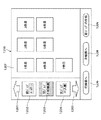
図7は、不明帳票の扱いを設定するための表示画面の一例を示す図である。 FIG. 7 is a diagram illustrating an example of a display screen for setting the handling of an unknown form.
図7において、不明帳票設定画面60は、システム管理者が上記システム起動後にいつでもアクセスが可能なメンテナンス画面であり、クライアントPC100等のCRT16に表示される。
In FIG. 7, an unknown
不明帳票設定画面60には、不明帳票が出現した際に前ジョブの付属データとして扱うか否かを設定するためのチェックボックス61と、チェックボックス61がチェックされた場合に、前ジョブの付属データとして設定する不明帳票の制限枚数を入力する領域62と、受信単位で不明帳票を扱うか否かを設定するためのチェックボックス63と、不明帳票を1つのジョブとして扱うか否かを設定するためのチェックボックス64とが配されている。
On the unknown
チェックボックス61,63,64は、上述したように、図4のワークフロー上のステップをON/OFFするソフトウェアスイッチである。領域62には、通常、制限枚数が入力されるが、図示のように「無制限」が入力されていた場合、不明帳票が出現する限り何枚でも前ジョブの付属データとして扱うことができる。
As described above, the
チェックボックス63がチェックされた場合、不明帳票を受信単位で1ジョブとして扱う。これは、帳票データにおける最終の画像が不明帳票と判断した際にも、次に受信した帳票データにおける先頭の画像が不明帳票であるときにはジョブを結合させない。
When the
チェックボックス64がチェックされた場合、複数枚の連続した不明帳票を1ジョブとして表示せず、必ず1枚毎に分割してジョブ表示を行う。
When the
確定ボタン65は、上記設定を確定するためのボタンである。キャンセルボタン66は、上記設定をキャンセルして表示前の状態に戻すためのボタンである。
The confirmation button 65 is a button for confirming the above settings. The cancel
図8は、システム設定を行うための表示画面の一例を示す図である。 FIG. 8 is a diagram illustrating an example of a display screen for performing system settings.
図8において、システム設定画面70は、上記不明帳票設定画面60と同様に、システム管理者が上記システム起動後にいつでもアクセスが可能なメンテナンス画面であり、クライアントPC100等のCRT16に表示される。
In FIG. 8, a
システム設定画面70には、帳票認識(FR)を行うか否かを設定するためのチェックホール71が配されている。チェックホール71がチェックされていない場合は帳票認識を行わないので、予めどのような帳票が送られてくるかがわかっているときに使用される。この場合、帳票認識を行わないので不明帳票は現れない。確定ボタン72は、上記設定を確定するためのボタンである。キャンセルボタン73は、上記設定をキャンセルして表示前の状態に戻すためのボタンである。
The
図9は、システムへのログイン画面の一例を示す図である。 FIG. 9 is a diagram illustrating an example of a login screen to the system.
図9において、ログイン画面80は、OS(Operation System)やブラウザなどにより表示されるものであるが、クライアントPCなどに予めインストールされたアプリケーションソフトにより表示されるものであっても構わない。ログイン画面80には、キーボード12によりログインIDを入力する領域81と、パスワードを入力する領域82と、領域81,82に所定のデータを入力した後に押下されるログインボタン83と、ログインを行わずに画面を閉じるためのキャンセルボタン84とが配されている。
In FIG. 9, the
ログイン画面80からシステムにログインすることにより、予めユーザ(作業者)が依頼していたジョブを後述する図10に示す表示画面で表示させることができる。
By logging in to the system from the
図10は、ログイン後にクライアントPCに表示されるワークアイテム一覧画面の一例を示す図である。 FIG. 10 is a diagram illustrating an example of a work item list screen displayed on the client PC after login.
図10では、ワークアイテム一覧画面90には、FR後のジョブ91〜93が表示されている。ジョブ91は、FRの結果として「ローン申込書」と認識された帳票である。ジョブ91には、ジョブ名「ローン申込書」と共に、枚数「2枚」と、受信日時「2004年11月1日12時12分」とが表示されている。
In FIG. 10,
ジョブ92,93は、FRの結果として不明帳票と判断されたものである。ジョブ92には、枚数「1枚」と、受信日時「2004年11月3日10時00分」とが表示され、ジョブ93には、枚数「1枚」と、受信日時「2004年11月3日10時00分」とが表示されている。ジョブ92及びジョブ93は、受信日時が同一であることから1通信により受信した2枚分の帳票データであると判断することができる。これは、チェックボックス64がチェックされて、不明帳票が1つのジョブとして扱われた場合に表示される。
選択ボタン94は、画面に表示されているジョブ91〜93のうちチェックボックスにチェックされたジョブを選択するためのボタンである。戻るボタン95は、本表示がなされる前の状態に戻るためのボタンである。
The
PEがワークアイテム一覧画面90上から所望のジョブを選択して選択ボタン94を押下すると、ワークアイテム一覧画面90からPE用の文字認識結果の編集・修正画面(不図示)に移行する。PEが複数人存在する場合は、各人が自分のクライアントPC上のログイン画面80からログインを行い、ワークアイテム一覧画面90の表示を行うことができる。なお、全PEがログインを同時に実行すると、現在、処理が可能なジョブを閲覧することができる。
When the PE selects a desired job from the work
例えば、PEであるAさんがジョブ92を選択し、他のPEであるBさんがジョブ93を選択した場合、ジョブ92,93は不明帳票であるが、2枚で一組のローン申込書である可能性がある。そのような場合、ジョブ92とジョブ93が別々なPEに処理されると復帰処理が厄介で面倒になる。このような事態が多々発生するような状況では、チェックボックス64のチェックを外してOFFにすればよい。
For example, when Mr. A who is PE selects
次に、本実施の形態における受信帳票ジョブ表示方法について図11〜図13を参照して説明する。 Next, a received form job display method according to the present embodiment will be described with reference to FIGS.
図11及び図12は、受信帳票ジョブ表示方法を実行するデータ受信処理を示すフローチャートである。本処理は、モジュール307内のワークフロー制御モジュールにより実行されるものであり、ワークフローのS2〜S4のステップに該当する。
11 and 12 are flowcharts showing data reception processing for executing the received form job display method. This process is executed by the workflow control module in the
図11において、ステップS100では、Webアプリケーションサーバ109が、クライアントPC100からのリクエストとして帳票データを受信して帳票認識処理を行う。具体的には、帳票データを構成する書類がどのような種類の帳票なのかを認識する。
In FIG. 11, in step S100, the
次に、ステップS101では、1枚分の画像の認識が成功したか否かを判別する。具体的には、予め登録されている帳票情報と一致するものがあるか否かをチェックし、帳票情報と画像とが一致しないときは、当該画像を不明帳票として扱う一方、一致するときはどのような帳票と一致したのかを認識する。ステップS101の判別の結果、認識が成功したときはステップS113へ進む一方、認識不能であるときはステップS102へ進む。 In step S101, it is determined whether or not the image for one sheet has been successfully recognized. Specifically, it is checked whether there is a match with the pre-registered form information. If the form information and the image do not match, the image is treated as an unknown form. Recognize whether the form matches. If the recognition is successful as a result of the determination in step S101, the process proceeds to step S113, whereas if the recognition is impossible, the process proceeds to step S102.
ステップS102では、不明帳票とされた画像を1つのジョブとして扱うか否かを判別する。具体的には、不明帳票設定画面60におけるチェックボックス64のチェックの有無を判定する。チェックボックス64にチェックが入っているときは、不明帳票とされた画像を1つのジョブとして扱うものとしてステップS103へ進み、当該画像のデータを認識不能ジョブとしてハードディスク10(以下、「表示メモリ」という。)へ格納してステップS108へ進む。
In step S102, it is determined whether or not an image that has been determined to be an unknown form is handled as one job. Specifically, it is determined whether or not the
一方、ステップS102の判別の結果、チェックボックス64にチェックが入っていないときは、不明帳票とされた画像を1つのジョブとして扱わないものとしてステップS104へ進み、当該画像のデータを認識不能キューへ格納する。認識不能キューは、帳票認識した結果、帳票の種類が判別できなかった書類が一時的に格納される待ち行列である。
On the other hand, as a result of the determination in step S102, if the
次に、ステップS105では、認識不能キューに格納された画像データの数、すなわち不明帳票の枚数が領域62に入力された制限枚数Nに達したか否かを判別する。この判別の結果、制限枚数Nに達していないときは、ステップS108へ進む一方、制限枚数Nに達したときは、不明帳票の画像データの表示メモリへの格納処理を行った後(ステップS106)、認識不能キューをクリアし(ステップS107)、ステップS108へ進む。
Next, in step S <b> 105, it is determined whether or not the number of image data stored in the unrecognizable queue, that is, the number of unknown forms has reached the limit number N input in the
ステップS108では、帳票データにおいて帳票認識処理を行っていない画像のデータがあるか否かを判別し、次の画像のデータがあるときは、ステップS100へ戻る一方、ないときは、図12のステップS109へ進む。 In step S108, it is determined whether or not there is image data that has not undergone form recognition processing in the form data. If there is next image data, the process returns to step S100. Proceed to S109.
ステップS113では、認識不能キューにジョブが格納されているか否かを判別する。この結果、格納されていないときはステップS116へ進む一方、認識不能キューにジョブが格納されているときは、キュー内の不明帳票の画像データを表示メモリへ格納し(ステップS114)、認識不能キューをクリアして(ステップS115)、ステップS116へ進む。 In step S113, it is determined whether or not a job is stored in the unrecognizable queue. As a result, when the job is not stored, the process proceeds to step S116. On the other hand, when the job is stored in the unrecognizable queue, the image data of the unknown form in the queue is stored in the display memory (step S114). Is cleared (step S115), and the process proceeds to step S116.
ステップS116では、帳票の種類が判別された画像に対して文字認識処理を行う。なお、本実施の形態では文字認識処理を行うが、状況に応じて別の処理を実行するようにしてもよく、また本ステップを省略してもよい。 In step S116, character recognition processing is performed on the image for which the form type has been determined. In this embodiment, the character recognition process is performed, but another process may be executed depending on the situation, and this step may be omitted.
つづいて、ステップS117では、文字認識処理が行われた画像のデータを認識済みジョブとして表示メモリへ格納してステップS108へ進む。 In step S117, the image data subjected to the character recognition process is stored in the display memory as a recognized job, and the process proceeds to step S108.
図12において、ステップS109では、受信単位で処理を行うか否かを判別する。具体的には、不明帳票設定画面60におけるチェックボックス63のチェックの有無を判定する。この結果、チェックボックス63にチェックが入っていないときは、本処理を終了する一方、チェックボックス63にチェックが入っているときは、認識不能キューにジョブが格納されているか否かを判別する(ステップS110)。この結果、認識不能キューにジョブが格納されていないときは本処理を終了する一方、認識不能キューにジョブが格納されているときは、キュー内の画像データを表示メモリへ格納し(ステップS111)、認識不能キューをクリアして(ステップS112)、本処理を終了する。
In FIG. 12, in step S109, it is determined whether or not processing is performed in units of reception. Specifically, it is determined whether or not the
図13は、図11のステップS106における表示メモリへの格納処理の詳細を示すフローチャートである。 FIG. 13 is a flowchart showing details of the storage process in the display memory in step S106 of FIG.
図13において、ステップS1401では、前ジョブの付属データとするか否かを判別する。具体的には、不明帳票設定画面60におけるチェックボックス61のチェックの有無を判定する。この結果、チェックボックス61にチェックが入っているときは、ステップS1402へ進む一方、チェックが入っていないときは、ステップS1404へ進み、認識不能キューに格納された画像データをN枚の認識不能ジョブとして表示メモリへ格納しリターンする。
In FIG. 13, in step S1401, it is determined whether or not the data is attached to the previous job. Specifically, it is determined whether or not the
ステップS1402では、前ジョブがあるか否かを判別する。ここでは、表示メモリに格納された前ジョブの有無を判定する。この結果、前ジョブがないときは、ステップS1404へ進む一方、前ジョブがあるときは、ステップS1403へ進み、認識不能キューに格納されたN枚の画像データを前ジョブへ認識不能ジョブとして付加し、表示メモリへ格納する。 In step S1402, it is determined whether there is a previous job. Here, it is determined whether or not there is a previous job stored in the display memory. As a result, if there is no previous job, the process proceeds to step S1404. If there is a previous job, the process proceeds to step S1403, and the N pieces of image data stored in the unrecognizable queue are added to the previous job as unrecognized jobs. Store in display memory.
上記処理では、チェックボックス61へのチェックの有無及び表示メモリに格納された前ジョブの有無に基づいて、不明帳票を前ジョブに付属データとして付加するか認識不能ジョブとするかを決定する。
In the above process, whether to add the unknown form as attached data to the previous job or to make it an unrecognizable job is determined based on whether or not the
図11〜図13の処理により表示メモリに格納された画像に基づいて、上述した図6(a)〜図6(b)の結果1〜結果4を表示することができる。例えば、結果1は、受信した帳票データをローン帳票、住所変更帳票、ローン帳票、不明帳票と認識していることから、上記ステップS113〜ステップS117を3回通過した後、ステップS103を2回通過し、ステップS111を1回通過することで得られる。結果2は、領域62に設定された制限枚数Nが1枚のときに、ステップS113〜ステップS117を3回通過した後、ステップS1403を1回、ステップS1404を1回通過することで得られる。
Based on the images stored in the display memory by the processes of FIGS. 11 to 13, the above-described
結果3は、領域62に設定された制限枚数Nが1枚のときに、ステップS113〜ステップS117を3回通過した後、ステップS1403を2回通過することで得られ、結果4は、領域62に設定された制限枚数Nが2枚のときに、ステップS113〜ステップS117を3回通過した後、ステップS1403を1回通過することで得られる。
The
上記図11〜図13の処理を実行するためのプログラムは、システム起動と同時に起動し、帳票データ受信と同時に処理が開始されるものである。 The program for executing the processes shown in FIGS. 11 to 13 starts when the system is started, and starts when the form data is received.
図14は、図11〜図13の処理を実行するモジュールの全体構成を示すブロック図である。 FIG. 14 is a block diagram illustrating an overall configuration of a module that executes the processes of FIGS. 11 to 13.
図14において、1101はFRを行う帳票認識ブロック、1102はCRを行う文字認識ブロック、1103はクライアントPC内のVRAM14に相当する表示メモリ、1104は上述した認識不能キュー、1105は作業者である。
In FIG. 14, 1101 is a form recognition block for performing FR, 1102 is a character recognition block for performing CR, 1103 is a display memory corresponding to the
帳票認識ブロックにて帳票データに対する帳票認識が終了すると、認識成功したものが文字認識ブロック1102へ移行し、文字認識が終了すると、文字認識結果が表示メモリ1103へ格納される。一方、帳票認識ブロックにて帳票データの帳票認識が失敗すると、不明帳票設定画面60における設定に応じて認識不能キュー1104を経て表示メモリ1103へ認識不能ジョブとして格納される。作業者1105がクライアントPCからログインすると、表示メモリ(VRAM14)に格納された内容がワークアイテム一覧画面90として表示される。
When the form recognition for the form data is completed in the form recognition block, the successful recognition shifts to the
次に、1つのジョブから不明帳票を分割するまたは1つのジョブに不明帳票を結合するための表示画面について図15及び図16を参照して説明する。 Next, a display screen for dividing an unknown form from one job or combining an unknown form into one job will be described with reference to FIGS. 15 and 16.
図15及び図16は、1つのジョブから不明帳票を分割し、または結合するための表示画面の一例を示す図である。本表示画面は、モジュール307内の認識結果登録モジュールにより実行され、ワークアイテム一覧画面90上で複数のジョブが選択された後に選択ボタン94が押下されると表示される。
15 and 16 are diagrams showing examples of display screens for dividing or combining unknown forms from one job. This display screen is executed by the recognition result registration module in the
図15において、表示画面1200には、前ジョブ表示ボタン1202と、現ジョブ表示ボタン1203と、次ジョブ表示ボタン1203が配され、3つの帳票ジョブを表示することが可能になっている。また、前ジョブの前の帳票ジョブに表示を移動させるための前ジョブ移動ボタン1201と、次ジョブの次の帳票ジョブに表示を移動させるための次ジョブ移動ボタン1205とが配されている。
In FIG. 15, the
現ジョブ表示ボタン1203は、選択された現在の帳票ジョブを表示するためのものであり、図示では、認識不能とされた不明帳票の帳票ジョブが表示されている。現ジョブボタン1203が押下されると、領域1207に現在の帳票ジョブに含まれる不明帳票が7枚分表示される。
The current
前ジョブボタン1202は、選択された現在の帳票ジョブの前の帳票ジョブを表示するためのものである。図示では、前の帳票ジョブとして「ホームローン」と認識されている。次ジョブボタン1204は、選択された現在の帳票ジョブの次の帳票ジョブを表示するためのものである。図示では、次の帳票ジョブとして「申込書」と認識されている。
The
前帳票ボタン1206は、領域1207に表示されている帳票ジョブのなかから選択されたページ(書類)を前帳票へ移動(分割・結合)するためのボタンである。前帳票ボタン1206が押下されることにより、選択されたページが現ジョブから前ジョブへ移動する。例えば、図16に示すように、表示画面1500において領域1207に表示されている帳票ジョブのなかから1枚目と2枚目が選択されると、当該ページが強調表示される。さらに、前帳票ボタン1206が押下されると、当該1枚目と2枚目が前ジョブへ移動する。
A
次帳票ボタン1208は、領域1207に表示されている帳票ジョブのなかから選択されたページを次帳票へ移動(分割・結合)するためのボタンである。次帳票ボタン1208が押下されることにより、選択されたページが現ジョブから次ジョブへ移動する。
The
新ジョブ生成ボタン1209は、領域1207に表示されている帳票ジョブのなかから選択されたページを新規のジョブに登録するボタンである。本ボタンが押下して帳票名を入力すると、登録された帳票ジョブが前ジョブ1202と同様の形式で表示されるようになる。
A new
上記実施の形態によれば、受信する帳票データにおける認識不明帳票の扱いを不明帳票設定画面60上で予めユーザに設定させ、帳票データをクライアントPCから受信すると帳票の種類を認識し、認識した画像のうち予め登録されている帳票と一致しないものを認識不明帳票とし、認識不明帳票を含む認識した帳票を不明帳票設定画面60上で設定された内容に応じて一覧表示するので、種別不明の書類を読み取って得られた電子画像に帳票認識を行う場合において、図6(a)〜図6(d)の結果1〜結果4が得られ、その帳票認識結果に対して修正を行う作業者の利便性を向上することができ、作業を的確に行わせることができる。
According to the above-described embodiment, the user can set the handling of the unknown recognition form in the received form data on the unknown
本発明の目的は、上記実施の形態の機能を実現するソフトウェアのプログラムコードを記録した記憶媒体を、システム或いは装置に供給し、そのシステム或いは装置のコンピュータ(またはCPUやMPU等)が記憶媒体に格納されたプログラムコードを読み出して実行することによっても達成される。 An object of the present invention is to supply a storage medium storing software program codes for realizing the functions of the above-described embodiments to a system or apparatus, and a computer (or CPU, MPU, or the like) of the system or apparatus as a storage medium. This can also be achieved by reading and executing the stored program code.
この場合、記憶媒体から読み出されたプログラムコード自体が上述した実施の形態の機能を実現することになり、そのプログラムコードを記憶した記憶媒体は本発明を構成することになる。 In this case, the program code itself read from the storage medium realizes the functions of the above-described embodiment, and the storage medium storing the program code constitutes the present invention.
また、プログラムコードを供給するための記憶媒体としては、例えば、フロッピー(登録商標)ディスク、ハードディスク、光磁気ディスク、CD−ROM、CD−R、CD−RW、DVD−ROM、DVD−RAM、DVD−RW、DVD+RW、磁気テープ、不揮発性のメモリカード、ROM等を用いることができる。または、プログラムコードをネットワークを介してダウンロードしてもよい。 Examples of the storage medium for supplying the program code include a floppy (registered trademark) disk, a hard disk, a magneto-optical disk, a CD-ROM, a CD-R, a CD-RW, a DVD-ROM, a DVD-RAM, and a DVD. -RW, DVD + RW, magnetic tape, nonvolatile memory card, ROM, etc. can be used. Alternatively, the program code may be downloaded via a network.
また、コンピュータが読み出したプログラムコードを実行することにより、上記実施の形態の機能が実現されるだけでなく、そのプログラムコードの指示に基づき、コンピュータ上で稼動しているOS(オペレーティングシステム)等が実際の処理の一部または全部を行い、その処理によって上述した実施の形態の機能が実現される場合も含まれる。 Further, by executing the program code read by the computer, not only the functions of the above-described embodiments are realized, but also an OS (operating system) running on the computer based on the instruction of the program code. A case where part or all of the actual processing is performed and the functions of the above-described embodiments are realized by the processing is also included.
さらに、記憶媒体から読み出されたプログラムコードが、コンピュータに挿入された機能拡張ボードやコンピュータに接続された機能拡張ユニットに備わるメモリに書き込まれた後、そのプログラムコードの指示に基づき、その機能拡張ボードや機能拡張ユニットに備わるCPU等が実際の処理の一部または全部を行い、その処理によって上述した実施の形態の機能が実現される場合も含まれる。 Further, after the program code read from the storage medium is written to a memory provided in a function expansion board inserted into the computer or a function expansion unit connected to the computer, the function expansion is performed based on the instruction of the program code. This includes the case where the CPU or the like provided in the board or the function expansion unit performs part or all of the actual processing, and the functions of the above-described embodiments are realized by the processing.
また、コンピュータが読み出したプログラムコードを実行することにより、前述した各実施の形態の機能が実現されるだけでなく、そのプログラムコードの指示に基づき、コンピュータ上で稼働しているOSなどが実際の処理の一部または全部を行い、その処理によって前述した各実施の形態の機能が実現される場合も、本発明に含まれることは云うまでもない。 Further, by executing the program code read out by the computer, not only the functions of the above-described embodiments are realized, but also the OS running on the computer based on the instruction of the program code is actually Needless to say, the present invention also includes a case where the functions of the above-described embodiments are realized by performing part or all of the processing, and the processing.
この場合、上記プログラムは、該プログラムを記憶した記憶媒体から直接、またはインターネット、商用ネットワーク、若しくはローカルエリアネットワーク等に接続された不図示の他のコンピュータやデータベース等からダウンロードすることにより供給される。 In this case, the program is supplied by downloading directly from a storage medium storing the program or from another computer or database (not shown) connected to the Internet, a commercial network, a local area network, or the like.
101,102,106 クライアントPC
103 スキャナ
104 マルチファンクションデバイス(MFP)
105,111 LAN
107 インターネット
108 HTTPサーバ
109 Webアプリケーションサーバ
110 データベース
101, 102, 106 Client PC
105,111 LAN
107
Claims (10)
前記受信した電子画像から帳票の種類を認識する認識工程と、
前記認識された電子画像が予め登録済みの帳票かまたは認識不明帳票かを判定する判定工程と、
前記認識不明帳票の表示方法を予め設定させる設定工程と、
前記判定された帳票を、前記設定された表示方法に応じて一覧表示する表示工程とを備えることを特徴とする受信帳票ジョブ表示方法。 A receiving process for receiving an electronic image;
A recognition step for recognizing the type of form from the received electronic image;
A determination step of determining whether the recognized electronic image is a pre-registered form or a recognition-unknown form;
A setting step for setting a display method of the unrecognized form in advance;
A received form job display method comprising: a display step of displaying a list of the determined forms in accordance with the set display method.
前記電子画像を受信する受信手段と、
前記受信した電子画像から帳票の種類を認識する認識手段と、
前記認識された電子画像が予め登録済みの帳票かまたは認識不明帳票かを判定する判定手段と、
前記認識不明帳票の表示方法を予め設定させる設定手段と、
前記判定された帳票を、前記設定された表示方法に応じて一覧表示する表示手段とを備えることを特徴とする受信帳票ジョブ表示装置。 In a received form job display device that performs form recognition on electronic images obtained by reading images of various documents,
Receiving means for receiving the electronic image;
Recognition means for recognizing the type of form from the received electronic image;
Determining means for determining whether the recognized electronic image is a pre-registered form or an unrecognized form;
Setting means for setting a display method of the unrecognized form in advance;
A received form job display device comprising: display means for displaying the determined form in a list according to the set display method.
Priority Applications (2)
| Application Number | Priority Date | Filing Date | Title |
|---|---|---|---|
| JP2005017411A JP2006209261A (en) | 2005-01-25 | 2005-01-25 | Reception form job display method and apparatus, and program |
| US11/338,126 US7995846B2 (en) | 2005-01-25 | 2006-01-24 | Form display method, apparatus, and storage medium storing a program for an information processing apparatus, that determine form types corresponding to obtained electric image data |
Applications Claiming Priority (1)
| Application Number | Priority Date | Filing Date | Title |
|---|---|---|---|
| JP2005017411A JP2006209261A (en) | 2005-01-25 | 2005-01-25 | Reception form job display method and apparatus, and program |
Publications (1)
| Publication Number | Publication Date |
|---|---|
| JP2006209261A true JP2006209261A (en) | 2006-08-10 |
Family
ID=36696807
Family Applications (1)
| Application Number | Title | Priority Date | Filing Date |
|---|---|---|---|
| JP2005017411A Pending JP2006209261A (en) | 2005-01-25 | 2005-01-25 | Reception form job display method and apparatus, and program |
Country Status (2)
| Country | Link |
|---|---|
| US (1) | US7995846B2 (en) |
| JP (1) | JP2006209261A (en) |
Cited By (3)
| Publication number | Priority date | Publication date | Assignee | Title |
|---|---|---|---|---|
| JP2014175978A (en) * | 2013-03-12 | 2014-09-22 | Ricoh Co Ltd | Information processing apparatus, control method of the same, and program |
| JP2021005226A (en) * | 2019-06-26 | 2021-01-14 | 京セラドキュメントソリューションズ株式会社 | Document classification system and document classification program |
| JP2022100065A (en) * | 2020-12-23 | 2022-07-05 | 富士フイルムビジネスイノベーション株式会社 | Information processing device and information processing program |
Families Citing this family (6)
| Publication number | Priority date | Publication date | Assignee | Title |
|---|---|---|---|---|
| JP5303865B2 (en) * | 2007-05-23 | 2013-10-02 | 株式会社リコー | Information processing apparatus and information processing method |
| US8707158B2 (en) * | 2009-08-05 | 2014-04-22 | Microsoft Corporation | Customizing a form in a model-based system |
| JP7259468B2 (en) * | 2019-03-25 | 2023-04-18 | 富士フイルムビジネスイノベーション株式会社 | Information processing device and program |
| JP7331551B2 (en) * | 2019-08-19 | 2023-08-23 | 富士フイルムビジネスイノベーション株式会社 | Information processing device and information processing program |
| JP7643018B2 (en) * | 2020-12-03 | 2025-03-11 | 富士フイルムビジネスイノベーション株式会社 | Information processing device and information processing program |
| JP7690732B2 (en) * | 2020-12-23 | 2025-06-11 | 富士フイルムビジネスイノベーション株式会社 | Information processing system and program |
Family Cites Families (2)
| Publication number | Priority date | Publication date | Assignee | Title |
|---|---|---|---|---|
| US6363164B1 (en) * | 1996-05-13 | 2002-03-26 | Cummins-Allison Corp. | Automated document processing system using full image scanning |
| US6741743B2 (en) * | 1998-07-31 | 2004-05-25 | Prc. Inc. | Imaged document optical correlation and conversion system |
-
2005
- 2005-01-25 JP JP2005017411A patent/JP2006209261A/en active Pending
-
2006
- 2006-01-24 US US11/338,126 patent/US7995846B2/en not_active Expired - Fee Related
Cited By (4)
| Publication number | Priority date | Publication date | Assignee | Title |
|---|---|---|---|---|
| JP2014175978A (en) * | 2013-03-12 | 2014-09-22 | Ricoh Co Ltd | Information processing apparatus, control method of the same, and program |
| JP2021005226A (en) * | 2019-06-26 | 2021-01-14 | 京セラドキュメントソリューションズ株式会社 | Document classification system and document classification program |
| JP7364998B2 (en) | 2019-06-26 | 2023-10-19 | 京セラドキュメントソリューションズ株式会社 | Document classification system and document classification program |
| JP2022100065A (en) * | 2020-12-23 | 2022-07-05 | 富士フイルムビジネスイノベーション株式会社 | Information processing device and information processing program |
Also Published As
| Publication number | Publication date |
|---|---|
| US7995846B2 (en) | 2011-08-09 |
| US20060165295A1 (en) | 2006-07-27 |
Similar Documents
| Publication | Publication Date | Title |
|---|---|---|
| JP5309774B2 (en) | Network apparatus and processing method | |
| US8477352B2 (en) | Image forming apparatus, control method thereof, image forming system, and program | |
| US20140129607A1 (en) | Information processing apparatus, information processing system, and information processing method | |
| JP7234024B2 (en) | Information processing device, information processing method and program | |
| US8045228B2 (en) | Image processing apparatus | |
| US20180205851A1 (en) | Information analysis system and information analysis method | |
| US8259326B2 (en) | Image readout system, server apparatus, image readout apparatus, and terminal apparatus | |
| US8493586B2 (en) | Work flow system for deciding whether to execute the work flow based on function restriction information | |
| US8896864B2 (en) | Image processing system, image processing method, image processing server, and recording medium | |
| JP2022167157A (en) | Image processing device, image processing method, and program | |
| US20090313683A1 (en) | Image processing apparatus, data processing apparatus, authentication method, definition data updating method, and authentication program and definition data updating program each embodied on computer readable medium | |
| JP2006126941A (en) | Image processing apparatus, image processing method, image processing control program, and storage medium | |
| JP2006209261A (en) | Reception form job display method and apparatus, and program | |
| US9413841B2 (en) | Image processing system, image processing method, and medium | |
| US20210203805A1 (en) | Information processing apparatus, information processing system, information processing method, and storage medium | |
| JP6127597B2 (en) | Information processing apparatus, control method thereof, and program | |
| US20090083440A1 (en) | Document management server and control method of document management server | |
| US9613057B2 (en) | Document management apparatus, method for controlling the same, and storage medium | |
| US8095868B2 (en) | Document management device and document management method | |
| US8074164B2 (en) | Document management device and document management method | |
| JP2003223307A (en) | Access restriction device, access restriction method, program and storage medium | |
| JP2023053602A (en) | Apparatus, information processing method, and program | |
| JP2006018492A (en) | System, method, and program for processing document | |
| JP7625471B2 (en) | Image processing device, control method thereof, and program | |
| US9019539B2 (en) | Image data transmission apparatus, image data transmission method, and computer-readable storage medium for computer program configured to send image data to a plurality of destinations using separate methods |
Legal Events
| Date | Code | Title | Description |
|---|---|---|---|
| RD05 | Notification of revocation of power of attorney |
Free format text: JAPANESE INTERMEDIATE CODE: A7425 Effective date: 20070626 |