JP2006072526A - Information processing apparatus and setup program - Google Patents
Information processing apparatus and setup program Download PDFInfo
- Publication number
- JP2006072526A JP2006072526A JP2004252911A JP2004252911A JP2006072526A JP 2006072526 A JP2006072526 A JP 2006072526A JP 2004252911 A JP2004252911 A JP 2004252911A JP 2004252911 A JP2004252911 A JP 2004252911A JP 2006072526 A JP2006072526 A JP 2006072526A
- Authority
- JP
- Japan
- Prior art keywords
- printer
- print job
- function
- job control
- Prior art date
- Legal status (The legal status is an assumption and is not a legal conclusion. Google has not performed a legal analysis and makes no representation as to the accuracy of the status listed.)
- Withdrawn
Links
Images


Landscapes
- Stored Programmes (AREA)
Abstract
【課題】 ソフトウェアのバージョンアップに伴って生じる利用者の設定作業を容易にし、インストール作業の利便性を向上させる。
【解決手段】 ネットワークに接続可能な情報処理装置において、ソフトウェアをインストールするセットアッププログラムであって、前記セットアッププログラムは、前記情報処理装置が備えるコンピュータに、前記情報処理装置において前記ソフトウェアが備える機能が実行可能であるか否かを判別する判別工程(環境モジュール(1)806が実行)と、前記ソフトウェアが備える機能のうち、前記判別工程により、実行可能であると判別された機能について、インストール後の設定処理を行う設定工程(設定実行モジュール(1)807が実行)とを実行させることを特徴とする。
【選択図】 図8PROBLEM TO BE SOLVED: To facilitate a user's setting work caused by software version upgrade and improve the convenience of installation work.
A setup program for installing software in an information processing apparatus connectable to a network, wherein the setup program is executed by a computer provided in the information processing apparatus and a function provided by the software in the information processing apparatus. Among the functions included in the software, a function determined to be executable by the determination process among the functions included in the software is determined after installation. A setting step (executed by the setting execution module (1) 807) for performing the setting process is executed.
[Selection] Figure 8
Description
本発明は、ソフトウェアをインストールする際の処理技術に関するものである。 The present invention relates to a processing technique for installing software.
印刷デバイスとPC等の情報処理装置とがネットワークを介して通信可能に接続された印刷処理システムにおいて、印刷デバイスの構成を検出したり、印刷デバイスに備えられたリソースの更新を検出したりすることにより、情報処理装置側の設定を適宜更新するといった発明が開示されている(例えば、特許文献1、2参照)。かかる発明によれば、印刷デバイスにおいて環境の変化が生じた場合であっても、情報処理装置側の設定変更を容易に行うことができる。
一方、印刷処理システムにおいて、例えば、印刷デバイス側の環境は維持しつつ、情報処理装置側にインストールされたソフトウェア(例えば、プリンタドライバ)だけをバージョンアップするといった場合がある(なお、ここでいうバージョンアップとは、すでに情報処理装置にソフトウェアがインストールされている状態において、新たな機能を追加したり、従来の機能を拡張したりすべく、同種のソフトウェアをさらにインストールすることを指す)。 On the other hand, in a print processing system, for example, there is a case where only software (for example, a printer driver) installed on the information processing apparatus side is upgraded while maintaining the environment on the printing device side (here, version "Up" refers to installing the same kind of software in order to add a new function or expand a conventional function when the software is already installed in the information processing apparatus).
このような場合、これまでは、バージョンアップに伴って追加・拡張されたソフトウェアの機能が印刷デバイスで利用できるか否かを、利用者が判断していた。しかし、バージョンアップに不案内な利用者にとって、かかる判断は容易ではなく、また、必要だと判断できた場合であっても当該機能を使用するために具体的にどのような設定をすればよいかがわからず、利用者にとっては利便性が悪いという問題があった。 In such a case, until now, the user has determined whether or not the software function added / extended along with the version upgrade can be used in the printing device. However, for users who are unfamiliar with version upgrades, such a determination is not easy, and even if it can be determined that it is necessary, what kind of settings should be specifically set to use the function? There was a problem that the convenience was not good for the user.
本発明は、上記課題に鑑みてなされたものであり、ソフトウェアのバージョンアップに伴って生じる利用者の設定作業を容易にし、インストール作業の利便性を向上させることを目的とする。 The present invention has been made in view of the above problems, and it is an object of the present invention to facilitate a user's setting work caused by software upgrade and to improve the convenience of installation work.
上記の目的を達成するために本発明に係る情報処理装置は以下のような構成を備える。即ち、
ソフトウェアをインストールするためのセットアッププログラムが実行される情報処理装置であって、
前記セットアッププログラムは、前記情報処理装置が備えるコンピュータを、
前記情報処理装置において前記ソフトウェアが備える機能が実行可能であるか否かを判別する判別手段と、
前記ソフトウェアが備える機能のうち、前記判別手段により、実行可能であると判別された機能について、インストール後の設定処理を行う設定手段
として動作させるためのプログラムであることを特徴とする。
In order to achieve the above object, an information processing apparatus according to the present invention comprises the following arrangement. That is,
An information processing apparatus for executing a setup program for installing software,
The setup program includes a computer included in the information processing apparatus.
Determining means for determining whether or not the function of the software is executable in the information processing apparatus;
Of the functions provided in the software, the function is determined to be executable by the determination unit, and is a program for operating as a setting unit for performing setting processing after installation.
ソフトウェアのバージョンアップに伴って生じる利用者の設定作業が容易になり、インストール作業の利便性が向上する。 The user's setting work caused by the software version upgrade is facilitated, and the convenience of the installation work is improved.
以下に、図面を参照して、本発明の好適な実施の形態を例示的に詳しく説明する。ただし、以下の実施の形態に記載されている構成要素はあくまで例示であり、本発明をそれらの範囲のみに限定する趣旨のものではない。 Hereinafter, exemplary embodiments of the present invention will be described in detail with reference to the drawings. However, the components described in the following embodiments are merely examples, and are not intended to limit the present invention only to those ranges.
例えば、本発明のセットアッププログラムは、様々なハードウェア構成を備えるシステムにおいて実行可能であるが、以下の各実施形態では、情報処理装置とネットワークプリンタとがネットワークを介して接続された印刷処理システムを対象について適用する場合を説明する。 For example, the setup program of the present invention can be executed in a system having various hardware configurations. However, in each of the following embodiments, a print processing system in which an information processing apparatus and a network printer are connected via a network is used. The case of applying to the target will be described.
また、本発明が適用される印刷処理システムには様々なソフトウェアがインストールされており、種々の機能をユーザに提供することが可能であるものとする。ただし、以下の各実施形態で説明する印刷処理システムは、いずれも印刷ジョブ制御機能を備えており、ここでは当該印刷ジョブ制御機能を実現するための印刷ジョブ制御プログラムをバージョンアップする場合について特に説明することとする。ただし、本発明のセットアッププログラムが適用対象とするソフトウェアは印刷ジョブ制御プログラムに限られるものではなく、例えば、プリンタドライバ等、他のソフトウェアであってもよいことはいうまでもない。 Also, various software is installed in the print processing system to which the present invention is applied, and various functions can be provided to the user. However, each of the print processing systems described in the following embodiments has a print job control function, and here, a case where a print job control program for realizing the print job control function is upgraded is particularly described. I decided to. However, it is needless to say that the software to which the setup program of the present invention is applied is not limited to the print job control program, and may be other software such as a printer driver.
さらに、本発明の適用にあたり、印刷ジョブ制御プログラムのバージョンアップに伴って追加される機能は特に限定されるものではないが、以下の各実施形態では、1)サポート機種の追加(第1、第2の実施形態)、2)PDL負荷分散機能の追加(第3の実施形態)、3)デバイス組込サーバ機能の追加(第4の実施形態)について説明することとする。 Furthermore, in the application of the present invention, the functions added with the version upgrade of the print job control program are not particularly limited, but in the following embodiments, 1) Addition of supported models (first and second) Embodiment 2), 2) Addition of PDL load distribution function (third embodiment), and 3) Addition of device embedded server function (fourth embodiment) will be described.
[第1の実施形態]
<印刷処理システムの構成例>
図1は、本発明の第1の実施形態に係る情報処理装置を備える印刷処理システムの構成を示す図である。同図において、101、102、103、104は、ネットワーク106に接続され、相互に通信可能な情報処理装置(ネットワークコンピュータ)であり、典型的にはパーソナルコンピュータ(PC)である。また、105は、印刷デバイスとしてのネットワークプリンタである。
[First Embodiment]
<Configuration example of print processing system>
FIG. 1 is a diagram illustrating a configuration of a print processing system including an information processing apparatus according to the first embodiment of the present invention. In FIG. 1,
これらのうち、102、103、104はクライアントコンピュータ(以下、クライアント)であり、それぞれイーサネット(登録商標)などのネットワークケーブルによってネットワーク106に接続され、アプリケーションプログラム等の各種のプログラムを実行可能であり、印刷データをプリンタ言語に変換する機能を有するプリンタドライバを搭載している。ここで、各クライアントは複数のプリンタドライバをサポートするものとする。
Among these,
これに対し101はサーバコンピュータ(以下、サーバ)であり、ネットワークケーブルによってネットワーク106に接続され、ネットワークで使用されるファイルを蓄積したり、ネットワーク106の使用状態を監視したりする。なお、本実施形態において、このサーバは、ネットワーク106に接続されているネットワークプリンタ105を管理するプリントサーバとして機能する。具体的には、プリントサーバ101は、クライアント102〜104から印刷データを含まない印刷ジョブ情報を受け取って印刷順序を管理し、印刷順序になったクライアント102〜104に対して印刷データを含む印刷ジョブの送信許可を通知する機能や、ネットワークプリンタ105のステータスや印刷ジョブの各種情報を取得してクライアント102〜104に通知する機能などを有している。
On the other hand,
ネットワークプリンタ105は、ネットワークインタフェースを介してネットワーク106と接続されており、クライアント102〜104から送信されてくる印刷ジョブを解析し、1ページずつドットイメージに変換して印刷する。なお、同図にネットワークプリンタ105は1台しか示されていないが、他にも複数のネットワークプリンタが接続されているものとする。各ネットワークプリンタの機能は相違するものであってもよい。
The
また、106はネットワークであり、クライント102〜104、プリントサーバ101、ネットワークプリンタ105等と接続している。
<ネットワークコンピュータのハードウエア構成例>
図2は、クライアント102〜104やプリントサーバ101として使用されるネットワークコンピュータの構成を説明するブロック図である。なお、本実施形態においては、クライント102〜104もプリントサーバ101も同様あるいは同等のハードウエア構成とするが、それぞれ専用のハードウエア構成であっても構わない。
<Example of hardware configuration of network computer>
FIG. 2 is a block diagram illustrating the configuration of a network computer used as the
図2において、200は装置全体の制御を行うCPUであり、ハードディスク(HD)205に格納されているアプリケーションプログラム、プリンタドライバ、OS(オペレーティングシステム)や印刷ジョブ制御プログラム等を実行し、RAM202にプログラムの実行に必要な情報、ファイル等を一時的に格納する制御を行う。なお、OSとしてはWindows(登録商標)に限定されるものではなく、描画命令を備えていれば他のOSも適用可能である。また、プリンタドライバは印刷ジョブ制御プログラムがOSを介して各種情報を取得する際に利用されるものであり、この点で、印刷ジョブ制御プログラムに含めるように考えても良い。
In FIG. 2, a
201は記憶手段としてのROMであり、内部には、基本I/Oプログラム等のプログラム、文書処理の際に使用するフォントデータ、テンプレート用データ等の各種データを記憶する。202は一時記憶手段としてのRAMであり、CPU200の主メモリ、ワークエリア等として機能する。
203は記憶媒体読み込み手段としてのフロッピ(登録商標)ディスクドライブ(FDドライブ)であり、FDドライブ203を通じて、記憶媒体としてのFD204に記憶されたプログラム等を本ネットワークコンピュータにロードすることができる。
205は外部記憶手段の一つであり、大容量メモリとして機能するハードディスク(HD)であり、アプリケーションプログラム、プリンタドライバ、OS、印刷ジョブ制御プログラム、その他の関連プログラム等を格納している。更に、スプール手段であるスプーラはここに確保される。スプール手段は、クライアント(102、103、104)ではクライアントスプーラのことであり、プリントサーバ101ではサーバスプーラのことである。また、プリントサーバ101では、クライアント(102、103、104)から受けた印刷ジョブを格納し、順序制御を行うためのテーブルもHD205に生成されて格納される。
206は入力装置としてのキーボードであり、ユーザがクライアント(102、103、104)に対して、また、オペレータや管理者がプリントサーバ101に対して、デバイスの制御コマンドの命令等を入力指示するものである。207は表示装置としてのディスプレイであり、キーボード206から入力した制御コマンドの命令や、ネットワークプリンタの能力等を表示したりするものである。
208はシステムバスであり、クライアント(102、103、104)やプリントサーバ101であるネットワークコンピュータ内のデータの流れを司るものである。209は入出力手段であるインタフェースであり、クライアント(102、103、104)やプリントサーバ101はインタフェース209を介して外部装置とのデータのやり取りを行う。
なお、上記ネットワークコンピュータの構成はその一例であり、図2の構成例に限定されるものではない。例えば、データやプログラムの格納先は、その特徴に応じてROM、RAM、HDなどに変更することも可能である。 The configuration of the network computer is one example, and is not limited to the configuration example of FIG. For example, the storage destination of data and programs can be changed to ROM, RAM, HD, etc. according to the characteristics.
<RAM内及びFD内のメモリマップの構成>
図3は、図2に示したRAM202のメモリマップの一例を示す図であり、FD204からロードされる印刷ジョブ制御プログラムが、RAM202にロードされ実行可能となった状態のメモリマップである。
<Configuration of memory map in RAM and FD>
FIG. 3 is a diagram illustrating an example of a memory map of the
なお、本実施形態では、印刷ジョブ制御プログラムおよび関連データをFD204から直接RAM202にロードして実行させる例を示すが、これ以外にも、印刷ジョブ制御プログラムを動作させる度に、既に印刷ジョブ制御プログラムがFD204からインストールされているHD205から、RAM202にロードするようにしてもよい。また、以上の各装置と同等の機能を実現するソフトウェアをもって、ハードウェア装置の代替として構成することもできる。
In this embodiment, the print job control program and related data are directly loaded from the
301は基本I/Oプログラムであり、コンピュータの電源がONされたときに、HD205からOSがRAM202に読み込まれ、OSの動作を開始させるIPL(イニシャルプログラムローデイング)機能などを有しているプログラムである。302はOSであり、303は印刷ジョブ制御プログラムであり、304は関連データである。印刷ジョブ制御プログラム303及び関連データ304は、RAM202上に確保される領域に記憶される。305はワークエリアで、CPU200が他のプログラムを実行するための領域である。
A basic I /
図4は、図2に示したFD204のメモリマップの一例を示す図である。図4において、401はデータの情報を示すボリューム情報であり、402はディレクトリ情報、403は印刷ジョブ制御プログラム、404はその関連データである。印刷ジョブ制御プログラム403は、本実施形態で説明するフローチャートに基づいてプログラム化したものであり、本実施形態では、クライアント(102〜104)及びサーバ(101)共に、同様の構成をとっている。
FIG. 4 is a diagram illustrating an example of a memory map of the
<印刷ジョブ制御プログラムについて>
上述したように印刷処理システムを構成する各クライアント102〜104及びサーバ101には、印刷ジョブ制御機能を実現するための印刷ジョブ制御プログラムがインストールされており、各クライアント102〜104及びサーバ101にインストールされた当該印刷ジョブ制御プログラムが連動して動作することにより、上記印刷処理システムは、「印刷ジョブ制御システム」を形成する(なお、以下、本明細書において、「印刷処理システム」は、ハードウェアの構成の面からとらえた表現であり、「印刷ジョブ制御システム」は、当該ハードウェア上で各種プログラムが実行されることにより実現される機能の面からとらえた表現であるものとする)。
<About the print job control program>
As described above, the print job control program for realizing the print job control function is installed in each of the
印刷ジョブ制御プログラムは、クライアント(102〜104)においては、印刷ジョブの印刷先の変更を指示したり、印刷順序の変更を指示したりするために機能する。一方、プリントサーバ(101)においては、印刷ジョブの順序制御を行ったり、印刷ジョブの印刷終了や印刷先変更要求などを通知したりするために機能する。なお、当該印刷ジョブ制御プログラムは、クライアント(102〜104)にインストールされるモジュール(「ジョブ制御プリントサービス」)と、プリントサーバ(101)にインストールされるモジュール(「ジョブ制御サーバ」)を別々に分けてもよいし、ひとつの印刷ジョブ制御プログラムが、実行される環境によりクライアント用として機能したり、プリントサーバ用として機能したりするようにしてもよい。あるいは、一台のコンピュータに、クライアント用の機能を持つモジュール(ジョブ制御プリントサービス)とプリントサーバ用として機能するモジュール(ジョブ制御サーバ)とを共にインストールし、同時にあるいは時分割で、擬似的に平行動作させるように構成してもよい。 The print job control program functions in the clients (102 to 104) to instruct change of the print destination of the print job or instruct change of the print order. On the other hand, the print server (101) functions to control the order of print jobs and to notify the end of printing of a print job, a print destination change request, and the like. The print job control program has a module (“job control print service”) installed on the client (102 to 104) and a module installed on the print server (101) (“job control server”) separately. Alternatively, a single print job control program may function as a client or as a print server depending on the environment in which it is executed. Alternatively, a module having a client function (job control print service) and a module functioning as a print server (job control server) are installed together on a single computer, and at the same time or in a time-division manner, pseudo parallel It may be configured to operate.
<印刷処理システムにおけるソフトウェア構成例>
はじめに、上記印刷ジョブ制御機能を備える印刷処理システムにおけるプリンタの概念について説明する。デバイスであるネットワークプリンタ(物理プリンタ)と区別して、プリンタドライバとプリンタ出力ポートとの組み合わせを、以下、「プリンタ」と称して説明する。
<Example of software configuration in print processing system>
First, the concept of a printer in a print processing system having the print job control function will be described. A combination of a printer driver and a printer output port will be described below as a “printer” in distinction from a network printer (physical printer) which is a device.
また、上記印刷処理システムでは、当該複数のプリンタを仮想的に束ねて1つにした、単独では為しえない機能を備えた仮想的なプリンタを「グループプリンタ」として設定することができる。即ち、アプリケーションプログラムから、グループプリンタに対して印刷指示を発行することにより、グループプリンタに属する複数のネットワークプリンタの何れかに印刷を行なわせることができる。ここで、束ねられる複数のネットワークプリンタの各々を「メンバプリンタ」と称する。なお、グループプリンタおよびメンバプリンタには、グループプリンタドライバおよびPDLドライバが対応している。 Further, in the print processing system, a virtual printer having a function that cannot be achieved independently, in which the plurality of printers are virtually bundled into one, can be set as a “group printer”. That is, by issuing a print instruction to the group printer from the application program, it is possible to cause one of a plurality of network printers belonging to the group printer to perform printing. Here, each of the bundled network printers is referred to as a “member printer”. A group printer driver and a PDL driver correspond to the group printer and member printer.
次に図5を用いて、印刷処理システムにおけるソフトウェア構成について説明する。図5は、印刷処理システムにおけるソフトウェア構成を示す図であり、特に、Microsoft Word(登録商標)などの一般的なアプリケーションプログラム501から発行された描画コマンドを含む印刷ジョブが、印刷処理システムにおいてどのように処理されるかを示した図である。
Next, a software configuration in the print processing system will be described with reference to FIG. FIG. 5 is a diagram illustrating a software configuration in the print processing system. In particular, how a print job including a drawing command issued from a
通常、印刷の指示がされると、アプリケーションプログラム501は一連の描画命令をOSを介して生成する。
Normally, when a printing instruction is given, the
生成された描画命令は、グループプリンタドライバ503或はPDLドライバ502の何れか指定されたプログラムに引き渡される。
The generated drawing command is delivered to a program designated by either the
OSを介して生成された描画命令がグループプリンタドライバ503に渡された場合には、グループプリンタドライバ503は、中間形式ファイル(詳細は後述)を生成し、当該中間形式ファイルをスプーラ(Windows(登録商標)Spooler)504に渡す。スプーラ504は、ユーザがユーザインタフェースを介して選択し指示したポートモニタに印刷ジョブを渡して、ネットワークプリンタ105に送信させる手順をとる。本実施形態では、ネットワークプリンタ105へ印刷ジョブを送信する従来のポートモニタではなく、印刷ジョブ制御システム用のポートモニタ521(以降、ジョブ制御ポートモニタと略記)をユーザがあらかじめ指定しているものとする。
When a drawing command generated via the OS is passed to the
グループプリンタドライバ503のユーザインタフェース(UI)を介して設定された用紙サイズ、ステープル指示等の印刷設定情報も、ジョブ制御ポートモニタ521に送信される。
Print setting information such as paper size and stapling instructions set via the user interface (UI) of the
ジョブ制御ポートモニタ521は、中間形式ファイルのデータをネットワークプリンタ105に送信するのではなく、印刷ジョブ制御システム用プリントサービスであるジョブ制御プリントサービス522に転送する。
The job control port monitor 521 does not transmit the data of the intermediate format file to the
一方、OSを介して生成された描画命令がPDLドライバ502に投入された場合には(かかる場合を「直接印刷」とも呼ぶ)、PDLドライバ502よって頁記述言語が生成され、生成された頁記述言語は、印刷処理を行うよう設定されたPDLドライバ502に対応するジョブ制御ポートモニタ521、ジョブ制御プリントサービス522を介して対応するネットワークプリンタ105に送信される。
On the other hand, when a drawing command generated via the OS is input to the PDL driver 502 (this case is also referred to as “direct printing”), a page description language is generated by the
印刷ジョブ制御システム用のプリントマネージャであるプリントマネージャ523は、ユーザがジョブ制御プリントサービス522内部で印刷ジョブがどのような状態にあるかを調べたり、印刷ジョブを操作したりするためのユーザインタフェースを提供するプログラムである。プリントマネージャ523は、ジョブ制御プリントサービス522のソフトウェアのインタフェース(API:Application Program Interface)を介して、ジョブ制御プリントサービス522と情報・指示をやり取りしている。例えば、プリントマネージャ523がジョブ制御プリントサービス522に対してネットワークプリンタを指定したイベントを発行し、ジョブ制御プリントサービス622は発行されたイベントに基づくネットワークプリンタ105のステータスを監視して、監視に基づく結果をプリントマネージャ523に通知する。
A
印刷ジョブ制御システム用のサーバであるジョブ制御サーバ530は、個々のクライアント102〜104上のジョブ制御プリントサービス522がネットワークプリンタ105に印刷ジョブを送信するタイミングを集中制御(スケジューリング)している。印刷ジョブ制御システム用のマネージメントコンソール533(以降、マネージメントコンソールと略記)は、APIを介して、ジョブ制御サーバ530と情報・指示をやり取りすることで、印刷ジョブ制御システム全体を監視することができる。
A
また、ジョブ制御サーバ530は、デバイス情報コントロールモジュール531を用いて各ネットワークプリンタ105と通信を行い、各ネットワークプリンタに対して発行された印刷ジョブやネットワークプリンタ105の動作状態に関する情報を入手したり、操作を行ったりする。入手した情報は、クライアント102〜104側のジョブ制御プリントサービス522に渡すことができる。
In addition, the
<印刷処理システムの動作例>
次に、印刷処理システムにおけるグループプリンタドライバ503からの印刷について説明する。
<Operation example of print processing system>
Next, printing from the
グループプリンタドライバ503は、アプリケーションプログラム501が生成した一連の描画コマンドをネットワークプリンタやOSの種類に依存しない中間形式データに変換する。この中間形式データは、スプーラ504からジョブ制御ポートモニタ521を経て(図5の矢印a)、中間形式ファイルとしてジョブ制御プリントサービス522に導かれる(図5の矢印b)。
The
ジョブ制御プリントサービス522は、この印刷ジョブに対して行うジョブ制御の種類に応じて、中間形式ファイルをもとに描画コマンドを生成してPDLドライバに渡す(図5の矢印c)。そして、続けてPDLドライバ502がその描画コマンドをネットワークプリンタ105が解釈可能なPDL形式のファイルにする。
The job
図5では、ジョブ制御プリントサービス522で、この印刷ジョブに対してネットワークプリンタ105側のエラー等を検知して「代行印刷」を行う例を示しており、実線で示されるのは当初印刷を予定していた印刷ジョブであり、破線については代行印刷のために生成された印刷ジョブを示している(図5の矢印c)。
FIG. 5 shows an example in which the job
PDLドライバ502で生成されたPDLファイルはスプーラ504、ジョブ制御ポートモニタ521を経て(図5の矢印d)、再びジョブ制御プリントサービス522に渡される(図5の矢印e)。ジョブ制御プリントサービス522は、ジョブ制御サーバ530の指示に従ってPDLファイルの印刷ジョブをネットワークプリンタ105に送信する(図5の矢印f)。
The PDL file generated by the
ジョブ制御プリントサービス522は、中間形式ファイル中の印刷指示書の指示にしたがって、1つの中間形式ファイルを複数の印刷ジョブに論理的に分割してそれぞれ別のネットワークプリンタに送信したり、一度送信した印刷ジョブを別のネットワークプリンタに送信し直したりする。図5中に示す矢印c、d、e、fはそのような場合の印刷ジョブの経路を示している。
The job
<中間形式ファイルの構成例>
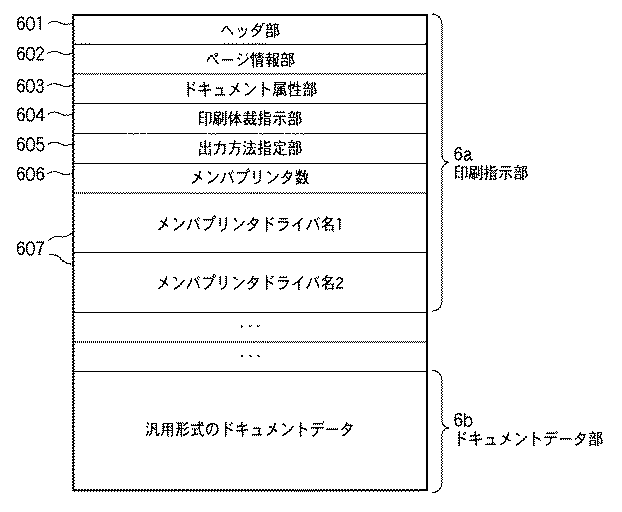
図6は、構築された中間形式ファイルの構成の一例を示した図である。本実施形態で使用される中間形式ファイルは、印刷指示部6a(前述の印刷指示書に相当)とドキュメントデータ部6bとからなる。印刷指示部6aは、ドキュメントの情報と印刷指示とを記述した部分である。また、ドキュメントデータ部6bは、アプリケーションのドキュメントのデータを汎用的な形式のデータに変換したものであり、プリンタ言語やOSの種類に依存しない或は依存しにくい中間形式データとなっている。
<Configuration example of intermediate format file>
FIG. 6 is a diagram showing an example of the configuration of the constructed intermediate format file. The intermediate format file used in this embodiment includes a
中間形式データとしては、印刷リソースデータとして利用可能でかつワードプロセッサアプリケーション等により再度編集可能な形式のデータであることが必要とされ、実質的な標準形式のうち、例えば、XML形式や、WINDOWS(登録商標)システムにより提供されるEMF形式、Adobe Systems IncorporatedによるPDF(Portable Document Format)形式、SVG形式などがあげられる。 The intermediate format data is required to be data in a format that can be used as print resource data and can be edited again by a word processor application or the like. Among substantial standard formats, for example, XML format, WINDOWS (registration) (Trademark) system, EMF format provided by Adobe Systems Incorporated, PDF (Portable Document Format) format, SVG format, and the like.
また、図示はされてはいないが、中間形式ファイルには、各メンバプリンタに対応したDEVMODEの設定も含まれているものとする。DEVMODEの設定には共通及び拡張設定項目の双方が含まれる。 Although not shown, it is assumed that the intermediate format file includes DEVMODE settings corresponding to each member printer. The DEVMODE setting includes both common and extended setting items.
更に詳細に説明すると、印刷指示部6aは、ヘッダ部601、ページ情報部602、ドキュメント属性部603、印刷体裁指示部604、出力方法指定部605、メンバプリンタ数606、メンバプリンタドライバ名607などから構成されている。
More specifically, the
ヘッダ部601は、本ファイルのバージョン識別やファイル情報などの情報を格納する部分である。ページ情報部602は、ドキュメントデータ部6bのドキュメントデータのページ数、各ページのサイズなどの情報を格納する部分である。
The
印刷体裁指示部604は、グループプリンタドライバのUIや、メンバプリンタドライバの個別のUIを介して設定された印刷ページ範囲、印刷部数、ドキュメントデータの面付け情報(N−UPや製本印刷など)、ステイプル指示やパンチ指示など、出力体裁に関する情報を格納する部分である。尚、ステイプル、パンチ指示については、ページ単位で指定(サブセットステイプ等)されることもある。尚、各メンバプリンタドライバの個別のUIを介して設定された内容は印刷指示部604に反映されると共に、各メンバプリンタに対応するDEVMODEにも反映させるために保存される。
The print
出力方法指定部605は、出力方法として、代行印刷、通常印刷(代行しない印刷)などの出力方法に関する情報を格納する部分である。この出力方法指定部605に代行印刷が設定されている場合には、更に優先順位情報(第一候補、第二候補・・・)を付したプリンタ情報が含まれる。
The output
メンバプリンタ数606は、グループプリンタに関連付けているメンバプリンタの数を格納する部分である。メンバプリンタドライバ名607は、メンバプリンタのプリンタドライバ名を格納する部分である。このメンバプリンタドライバ名607は、前述のメンバプリンタ数606の数だけの格納エリアを持っている。
The
前述の図5で説明したジョブ制御プリントサービス522では、中間形式データより中間形式ファイルを生成する際、グループプリンタドライバのユーザインタフェース上での設定を印刷指示部6aへ記憶する。更に、グループプリンタドライバから受け取った中間形式データを、中間形式ファイルのドキュメントデータ部6bに記録する処理も、ジョブ制御プリントサービス522により実行される。
In the job
<印刷ジョブの流れ>
次に、図7を用いて印刷処理システムにおける印刷ジョブの流れをさらに詳しく述べる。ここで、図5と同じ機能は同じ参照番号を付与しており、その機能については詳説しない。
<Print job flow>
Next, the flow of a print job in the print processing system will be described in more detail with reference to FIG. Here, the same functions as those in FIG. 5 are given the same reference numerals, and the functions will not be described in detail.
図7において、印刷ジョブ制御システム700は、制御プログラムが動作するプリントサーバ101とクライアント102〜104の物理的なマシンをまたいだ、印刷ジョブ制御システムの範囲を示している。また、プリントサーバ101が管理しているアウトプットポート(Output Port)711A、711Bは、クライアント102〜104のジョブ制御プリントサービス522のプロキシアウトプットポート(Proxy Output Port)712A、712Bとそれぞれ関連付けられ、ひとつのポートに関連づけられた各クライアント(102〜104)上のプロキシアウトプットポートの全てを統一的に管理している。本実施形態では、実際の印刷ジョブは各々のクライアント(102〜104)のプリントキューを含むプロキシアウトプットポート712A、712Bに保持される。
In FIG. 7, a print
ジョブ制御サーバ530は、印刷データ自体の送信処理は行わず、ジョブ制御プリントサービス522に対して印刷ジョブの送信指示のみを行う。その指示に応じて、クライアント(102〜104)のジョブ制御プリントサービス522は印刷データをネットワークプリンタ105に送信する。
The
次に、印刷ジョブ制御システム700が、代行印刷を行う場合の処理を説明する。
Next, processing when the print
アプリケーション501がグループプリンタドライバ503に対応するグループプリンタに対して印刷指示を発行すると、ジョブ制御プリントサービス522は、グループプリンタドライバ503によって生成された中間形式データをジョブ制御ポートモニタ521を介して受け取る。ジョブ制御プリントサービス522は、この中間形式データより中間形式ファイルを構築し(図7の715)、先に説明した印刷指示部6aの指示内容に従う印刷指示をデスプーラ(Despooler)701に対して行う。そしてデスプーラ701を介してPDLドライバ502が割り当てられた別のプリンタに印刷指示を発行する。これにより、各PDLドライバ502において、PDLファイルを実体とする印刷ジョブが生成される。この印刷ジョブをメンバジョブと称する。つまり、メンバジョブとは、グループプリンタドライバ503を経て中間形式ファイルに基づき生成したジョブを指す。また、複数のメンバジョブを束ねた印刷ジョブをグループジョブと呼ぶこともある。
When the
このとき、デスプーラ701は、ジョブ制御プリントサービス522の印刷指示部6aの解釈に基づく指示に応じて、ドキュメントデータ部6bのドキュメントデータを加工してGDIに変換し、PDLドライバ502に対して印刷指示を行い、印刷ジョブを発行する。例えば、印刷体裁指定部604に2−UPに相当する指示が記録されていた場合、用紙1枚に2ページ分のドキュメントデータを縮小レイアウトするようにDEVMODEを介してメンバプリンタに対して指示する。また、印刷体裁指定部604にステイプル指示がある場合にはDEVMODEを介してステイプルの指示を行う。また、代行印刷時には、印刷指示部6aに記述されている代行先メンバプリンタに印刷ジョブを発行する。尚、2−UP等の縮小レイアウトを処理する場合にデスプーラ自身が印刷体裁指定部604の内容に基づき縮小レイアウトするようにして、メンバプリンタにはDEVMODEを介して1−UPを指示するようにしても良い。
At this time, the
またデスプーラ701はメンバプリンタに印刷ジョブを発行する際、メンバプリンタのPDLドライバに対応する印刷指示として、メンバプリンタのDEVMODEを作成する必要があるが、このDEVMODEは印刷指示部6a或いは各メンバプリンタに対応して保存されたDEVMODEに記載された内容を適宜各メンバプリンタのDEVMODEに反映させて生成する。
Further, when the
クライアント(102〜104)側のジョブ制御プリントサービス522は、PDLドライバ502によってレンダリングされたそれぞれのメンバジョブの印刷データをジョブ制御ポートモニタ521を介して受け取り、受け取った印刷ジョブをジョブ制御サーバ530側に知らせ、印刷ジョブのデータは自身のプロキシアウトプットポート712で一時保持する。その後、ジョブ制御サーバ530からの送信指示を受けた後にネットワークプリンタ105に送信する。
The job
尚、ここでプロキシアウトプットポート712で一時保持される印刷ジョブのデータには、少なくとも印刷データと該印刷データの管理情報とが含まれる。この管理情報には、(A)印刷データの格納場所のポインタ、(B)ジョブID、(C)中間形式ファイルから作成されたメンバジョブか否かを識別するためのメンバジョブフラグ、(D)プリンタ名、(E)どのような種別及びバージョンのプリンタ言語に対応するPDLドライバかを識別するためのPDLドライバ名称、(F)ポート名(プロキシアウトプットポート識別子)、(G)ネットワークプリンタを識別する際にも利用するIPアドレス、(H)ジョブ発行時刻、(I)ユーザ名、(J)PDLデータのファイル名、(K)ホストコンピュータ名、(L)両面やステイプルなどを含む印刷設定が少なくとも含まれる。(A)〜(L)の各項目の情報は(1)管理情報に直接含めるようにしても良いし、(2)例えば、プリンタ名をパラメータに間接的に取得するようにしても良い。以下に説明する各フローチャートの各ステップにおいて、下の情報を取得する場合には、上記(1)、(2)の方法の何れかで行なっているものとする。 Here, the print job data temporarily held at the proxy output port 712 includes at least print data and management information of the print data. This management information includes (A) a print data storage location pointer, (B) a job ID, (C) a member job flag for identifying whether or not the job is a member job created from an intermediate format file, and (D) Printer name, (E) PDL driver name for identifying the type and version of the printer language corresponding to the printer language, (F) Port name (proxy output port identifier), (G) Identifying the network printer Print settings including IP address, (H) job issuance time, (I) user name, (J) PDL data file name, (K) host computer name, (L) duplex and stapling, etc. At least included. Information on each item of (A) to (L) may be included directly in (1) management information, or (2) for example, a printer name may be indirectly acquired as a parameter. In each step of each flowchart described below, when the following information is acquired, it is assumed that it is performed by any of the methods (1) and (2).
<セットアッププログラムの構成>
図8は印刷ジョブ制御プログラムのバージョンアップにあたり、印刷ジョブ制御プログラムをクライアント(102、103、104)またはサーバ101にインストールするためのセットアッププログラムのモジュール構成を示す図である(つまり、セットアッププログラムは情報処理装置(クライアント102〜104またはサーバ101)において実行される)。インストール全体制御モジュール801は印刷ジョブ制御プログラムのインストール処理全体を制御するモジュールであり、配下のインストールエンジン802、機能別設定プラグイン管理モジュール804を後述するように適宜呼び出して処理をさせる。
<Configuration of setup program>
FIG. 8 is a diagram showing a module configuration of a setup program for installing the print job control program in the client (102, 103, 104) or the
インストールエンジンモジュール802はインストールデータ/情報803から読み出したファイル(つまり、インストールされるソフトウェア。本実施形態にあっては印刷ジョブ制御プログラム)をターゲットシステム(印刷処理システム)中の所定の場所にコピーし、レジストリに書き込みを行う等の処理を行う。これらの処理の内容はインストールデータ/情報803が保持するファイル中で指定されている(ただし、インストール処理中にユーザがデフォルト設定をオーバーライドする指示を行うようにしてもよい)。
The
機能別設定プラグイン管理モジュール804は、新機能に関する設定処理全体を統括する。機能別設定制御モジュール(1)805、同(2)808、同(3)811は各新機能それぞれの設定処理を統括する。この機能別設定制御モジュールは、新に追加・拡張される機能について、プログインモジュールとクライアント外部から入力し、追加可能であり、以前には想定されていなかったような新機能に対しても柔軟に追加することができる。環境分析モジュール(1)806、同(2)809、同(3)812はそれぞれの新機能の設定が可能な環境か否かを調べる。設定実行モジュール(1)807、同(2)810、同(3)813は各新機能固有の具体的な設定を行う。ここで、セットアッププログラムのうち新機能に関する設定処理を行う各モジュールを、機能単位にプラグイン構成とすることで、以下のメリットが得られる。
The function-specific setting plug-in
・新機能の設定のユーザインタフェースを機能単位に独自に用意するのではなく、機能別設定プラグイン管理モジュール804に統括させているため、機能別設定プラグイン管理モジュール804が用意する一つのメイン画面から、Wizard型ユーザインタフェース画面を機能ごとに立ち上げるという枠組みを提供することが可能となり、その結果、統一感のあるユーザインタフェースが実現できる。
-Since the user interface for setting new functions is not prepared independently for each function, but is managed by the function-specific setting plug-in
・上記のようなユーザインタフェースの全体の枠組みを機能別設定プラグイン管理モジュール804に用意させることで、各新機能については環境分析と設定実行というロジック部分の処理を主として担当することができ、セットアッププログラムの開発効率も向上する。
-By having the function-specific configuration plug-in
・インストールされるソフトウェアのバージョンアップを重ねていくごとに機能拡張していった場合でも、拡張された機能についてのモジュールを追加するだけで対応できるため、拡張性に優れている。 -Even if the function is expanded as the version of the software to be installed is repeated, it can be handled simply by adding a module for the expanded function.
<印刷ジョブ制御プログラムのインストール処理の流れ>
次に図9のフローチャートを用いて、上記セットアッププログラムを用いて印刷ジョブ制御プログラムを印刷処理システムにインストールする場合の処理の内容をステップごとに説明する。
<Flow of print job control program installation processing>
Next, the contents of the processing when the print job control program is installed in the print processing system using the setup program will be described step by step with reference to the flowchart of FIG.
まずステップS901においてユーザあるいは別プロセスがインストール全体制御モジュール801を起動することにより、インストール処理が始まる。ここで、図8で説明した機能別設定制御モジュールもプラグインとして既にクライアントコンピュータに格納されているものとする。
First, in step S901, when the user or another process activates the overall
ステップS902では、インストール全体制御モジュール801がインストールエンジンモジュール802を起動して、インストールデータ/情報803であるバージョンアップされた印刷ジョブ制御プログラムをインストールする。これにより印刷ジョブ制御プログラムが動作するのに最低限必要な環境は準備される。しかしながら、この時点では印刷ジョブ制御プログラムの設定は旧バージョンのものを引き継いでいるだけであり、新しく追加・拡張された機能に関してはインストール時のデフォルト状態にとどまっている。そのため、印刷ジョブ制御プログラムの新機能を十分に活用することができない。
In step S902, the overall
そこで、続くステップS903以降、まず、ステップS901及び902においてインストールされた印刷ジョブ制御プログラムの追加・拡張された新機能が、インストールが行なわれたクライアントに反映できるか否かの判定を、上に説明したプラグイン管理モジュール804の処理に基づき行なう。また、ステップS901及びS902においてインストールされた印刷ジョブ制御プログラムのバージョンにおいて追加・拡張された機能についての設定を必要に応じて行う。
Therefore, after the following step S903, first, the determination as to whether or not the new function added or expanded in the print job control program installed in steps S901 and S902 can be reflected on the installed client will be described above. This is performed based on the processing of the plug-in
ステップS903では、インストール全体制御モジュール801は、新に印刷ジョブ制御プログラムがインストールされたことに応じて、機能別設定プラグイン管理モジュール804を起動する。また、機能別設定プラグインモジュール804を起動する際には、該起動をユーザに促し、ユーザの操作に応じて許容する旨の入力がユーザインタフェースを介して行なわれた場合にステップS904以降の処理に移行するようにしても良い。
In step S903, the overall
ステップS904では、機能別設定プラグイン管理モジュール804が機能別設定制御モジュールを探す。ここでは、三種類の新機能についての機能別設定制御モジュール805、808、811が見出されることになる。
In step S904, the function-specific setting plug-in
続いてステップS905では、各新機能を使用するために必要な設定処理を行わせるべく、機能別設定制御モジュールを1つずつ起動する。ステップS906では呼び出された機能別設定制御モジュール805(または、808、811)はその配下の環境分析モジュール(1)806(または、同(2)809、同(3)812)を呼び出し、印刷処理システムの環境分析を行わせる。ステップS907では、環境分析の結果に基づいて、当該印刷処理システムの環境において当該新機能を使用することが可能かどうかを判断する。 In step S905, the function-specific setting control modules are activated one by one in order to perform the setting process necessary for using each new function. In step S906, the function-specific setting control module 805 (or 808, 811) calls the environment analysis module (1) 806 (or (2) 809, (3) 812) under its control and print processing. Let the system analyze the environment. In step S907, it is determined whether or not the new function can be used in the environment of the print processing system based on the result of the environment analysis.
ステップS907において適用可能と判断された場合には、ステップS908に進み、機能別設定制御モジュール805(または808、811)は設定実行モジュール(1)807(または、同(2)810、同(3)813)を呼び出して、各機能固有の設定処理を行わせ、ステップS909に進む。一方、適用可能でないと判断された場合には、直接ステップS909に進む。 If it is determined in step S907 that application is possible, the process advances to step S908, and the function-specific setting control module 805 (or 808, 811) sets the setting execution module (1) 807 (or (2) 810, (3 ) 813) to perform setting processing specific to each function, and the process proceeds to step S909. On the other hand, if it is determined that it is not applicable, the process directly proceeds to step S909.
ステップS909では、全ての機能別設定制御モジュールを起動したかどうかを調べ、まだ残りがある場合はステップS905に戻って別の機能別設定制御モジュールを起動させ、当該機能についての設定を行う。残りがない場合は終了する。 In step S909, it is checked whether or not all the function-specific setting control modules have been activated. If there is still a remaining function, the process returns to step S905 to activate another function-specific setting control module and perform settings for the function. If there is no remainder, it ends.
ここで、ステップS1007の判断によりYESと判断された場合に、ユーザに新機能をクライアントのソフトウェア環境に反映するか否かを問い合わせる表示(メッセージ)を行い、ユーザの操作に応じて反映を許容する旨の入力が行なわれた場合にステップS1008以降の処理に以降するようにしても良い。尚、ユーザに許容しない旨の入力が行なわれた場合にはステップS909に処理を直接移せばよい。 If YES is determined in step S1007, a display (message) for inquiring whether the new function is reflected in the client software environment is displayed to the user, and the reflection is allowed according to the user's operation. If an input to that effect is made, the processing after step S1008 may be performed. If an input indicating that the user does not allow is input, the process may be directly transferred to step S909.
また、全ての新機能についてS907の判断処理を行なった後に、ユーザのクライアントのソフトウェア環境に新たな機能の設定を反映さえるか否かを、ユーザの指示に応じて選択的に決定するようにしても良い。つまり、ステップS907でYESと判断された単数或いは複数の機能について、ステップS908において実行される設定を行なうか否かの選択画面を表示部に表示し、ユーザが設定画面を介して設定を指示すれば、設定を行なうようにしても良い。また、ステップS907において、複数の機能についてYESと判断された場合に機能毎にステップS907の設定を実行させるか否かをユーザに選択させるようにしても良い。 In addition, after the determination processing of S907 is performed for all new functions, whether or not the setting of the new function is reflected in the software environment of the user's client is selectively determined according to the user's instruction. Also good. That is, for the function or functions determined to be YES in step S907, a selection screen as to whether or not to perform the setting executed in step S908 is displayed on the display unit, and the user instructs the setting via the setting screen. For example, the setting may be performed. In step S907, if YES is determined for a plurality of functions, the user may be allowed to select whether to execute the setting in step S907 for each function.
<セットアッププログラムによる処理>
以下、図9におけるフローチャートの処理をより具体的した、上述の印刷処理システムにおいて、印刷ジョブ制御プログラムをバージョンアップする場合のセットアッププログラムによる処理の内容を具体例を挙げてさらに詳細に説明する。
<Processing by setup program>
In the following, the contents of the processing by the setup program in the case of upgrading the print job control program in the above-described print processing system in which the processing of the flowchart in FIG. 9 is more specific will be described in more detail.
ここでは、印刷ジョブ制御プログラムのバージョンアップに伴う新機能として、サポート機種が追加された場合について述べる。 Here, a case where a supported model is added as a new function accompanying a version upgrade of the print job control program will be described.
一般に、印刷ジョブ制御プログラムとネットワークプリンタの互いのリリース時期は同期しないか、あるいは同期してリリースされたとしても実際のネットワークプリンタ設置と印刷ジョブ制御プログラムのバージョンアップとの間には多かれ少なかれ時間のギャップが存在する。 In general, the release times of the print job control program and the network printer are not synchronized with each other, or even if they are released synchronously, there is more or less time between the actual network printer installation and the upgrade of the print job control program. There is a gap.
このため、印刷ジョブ制御プログラムのバージョンアップに伴って、後からネットワークプリンタとしての登録が可能となったような場合には、ユーザは再度、設定作業を行わなければならない。 For this reason, if the registration as a network printer becomes possible later with the version upgrade of the print job control program, the user must perform the setting operation again.
例えば、印刷ジョブ制御プログラムをバージョンアップする前にMFPデバイス(多機能プリンタ:複写機としてもネットワークプリンタとしても使用できるデバイス)が設置され、まず複写機としてスタンドアローンの形で使用され、後からMFPデバイスをサポート機種としている印刷ジョブ制御プログラムにバージョンアップされるといったケースは、その典型である。 For example, before upgrading the print job control program, an MFP device (multifunctional printer: a device that can be used as both a copier and a network printer) is installed, and is first used as a copier in a stand-alone form. A typical case is a version upgrade to a print job control program that uses a device as a supported model.
このような場合、当該MFPデバイスがサポート機種として追加された印刷ジョブ制御プログラムをインストールするにあたり、本実施形態にかかるセットアッププログラムを用いることとすれば、当該MFPデバイスがすぐにネットワークプリンタとして使用できるようになり、ユーザの管理作業の手間が省け、利便性が向上する。 In such a case, if the setup program according to the present embodiment is used when installing the print job control program added as a supported model for the MFP device, the MFP device can be immediately used as a network printer. Thus, the user's management work is saved and the convenience is improved.
以下、サポート機種が追加された印刷ジョブ制御プログラムをインストールする場合について図10を用いて説明する。 Hereinafter, the case of installing a print job control program to which a supported model is added will be described with reference to FIG.
機能別設定制御モジュール804が起動されると、環境分析モジュール(1)805はネットワーク上に当該機種のデバイス(ネットワークプリンタ)が存在するかどうかを調べる。そのためにステップS1001でまず新規サポート機種の機種名を取得する。この情報はバージョンアップされる印刷ジョブ制御プログラムが内部的に保持しているものを利用する。
When the function-specific
ステップS1002では印刷処理システムのネットワークにブロードキャストパケットを送信し、そのレスポンスをもとにデバイスの存在の有無を調べるといういわゆる「デバイス探索」を行う。デバイス探索を行うことで、ネットワーク上に存在するデバイスからは機種名、デバイス名、IPアドレス、MACアドレスが返ってくる。 In step S1002, a broadcast packet is transmitted to the network of the print processing system, and so-called “device search” is performed in which the presence / absence of a device is checked based on the response. By performing a device search, a model name, a device name, an IP address, and a MAC address are returned from a device existing on the network.
ステップS1003では、デバイス探索の結果見つかったデバイスの中に新規サポート機種のネットワークプリンタが存在するかどうかを調べる。存在しなければ当該機能別設定制御モジュール805の処理を終了する。
In step S1003, it is checked whether a network printer of a new supported model exists in the devices found as a result of device search. If it does not exist, the processing of the function-specific
一方、新規サポート機種のネットワークプリンタが存在する場合には、ステップS1004に進み、デバイス探索の結果見つかった複数の新規サポート機種のネットワークプリンタのうち、ユーザにより指示された1つのネットワークプリンタを選択する。 On the other hand, if there is a network printer of a new supported model, the process advances to step S1004 to select one network printer instructed by the user from among a plurality of network printers of a new supported model found as a result of device search.
ステップS1005では、当該選択されたネットワークプリンタで直接印刷できるよう、設定実行モジュール(1)807により、このネットワークプリンタのためのポート及びプリンタが作成される。 In step S1005, the setting execution module (1) 807 creates a port and a printer for this network printer so that the selected network printer can directly print.
ステップS1006では、ステップS1003において探索された新規サポート機種のネットワークプリンタのうち、ステップS1004において選択されていないネットワークプリンタがあるか否かを判定し、選択されていないネットワークプリンタがある場合には、ステップS1004に戻る。一方、全ての新規サポート機種のネットワークプリンタについて選択された場合には、処理を終了する。 In step S1006, it is determined whether there is a network printer that has not been selected in step S1004 among the network printers of the newly supported model searched in step S1003. The process returns to S1004. On the other hand, if all the newly supported network printers have been selected, the process ends.
以上の説明から明らかなように、本実施形態によれば、印刷ジョブ制御プログラムのバージョンアップに伴い、新機能(新規サポート機種)の追加があった場合であっても、セットアッププログラムのプラグインが、当該印刷ジョブ制御プログラムがインストールされる印刷処理システムの環境を分析し、当該新機能の適用可否(新規サポート機種に対応するネットワークプリンタの存在有無)を判断したうえで、自動的にポート及びプリンタの設定処理を行うため、印刷ジョブ制御プログラムのバージョンアップ時のユーザの作業負荷を軽減させることが可能となる。 As is clear from the above description, according to the present embodiment, the plug-in of the setup program can be installed even when a new function (new supported model) is added due to the version upgrade of the print job control program. Analyzing the environment of the print processing system where the print job control program is installed and determining whether the new function can be applied (whether there is a network printer corresponding to the new supported model), then automatically port and printer Therefore, it is possible to reduce the user's work load when the print job control program is upgraded.
なお、本実施形態に類似の技術として、デバイスをUSBケーブル等でコンピュータに接続すると、当該デバイスの機種に対応するプリンタドライバが自動的にダウンロードされ、インストールされるという技術がすでに知られているが、本実施形態はプリンタドライバ側の機能追加に伴ってなされる点で、当該既知の技術とは異なる。 As a technique similar to the present embodiment, a technique is already known in which when a device is connected to a computer with a USB cable or the like, a printer driver corresponding to the model of the device is automatically downloaded and installed. The present embodiment is different from the known technique in that it is performed in accordance with the addition of functions on the printer driver side.
また、すでに使用しているデバイスの装備情報が変化したことを検知してプリンタドライバ側の設定を自ら更新する技術がすでに知られている(例えば、デバイスに新たにフィニッシャユニットが取り付けられ、ステープル印刷が可能になったとき、プリンタドライバが持つ「ステープル機能」設定をオフからオンに変更する技術など)。しかし、かかる技術も、すでに内包していた機能の範囲で設定を変更しただけであって、プリンタドライバ自身の機能追加に伴って設定を更新したわけではないので、上述の場合と同様に本実施形態とは異なっていることは明らかである。 In addition, there is already known a technique for detecting that the equipment information of a device already used has changed and updating the settings on the printer driver side itself (for example, a new finisher unit is attached to the device and staple printing is performed). Technology that changes the “staple function” setting of the printer driver from off to on when it becomes possible. However, this technique also changes the setting within the range of functions already included, and does not update the setting with the addition of the function of the printer driver itself. Obviously it is different from the form.
[第2の実施形態]
上記第1の実施形態では、印刷ジョブ制御プログラムのバージョンアップに伴う新機能として、サポート機種が追加された場合の処理について述べた。ここで、上記第1の実施形態では、OSを介して生成された描画命令がPDLドライバに投入される場合に対応すべく(つまり直接印刷に対応すべく)、上記セットアッププログラムが各種設定を行うこととしたが、本発明はこれに限られず、OSを介して生成された描画命令がグループプリンタドライバに投入されることを想定して、セットアッププログラムが各種設定を行う場合について図11を用いて説明する。
[Second Embodiment]
In the first embodiment, the processing when a supported model is added as a new function accompanying the upgrade of the print job control program has been described. Here, in the first embodiment, the setup program performs various settings in order to cope with a case where a drawing command generated via the OS is input to the PDL driver (that is, to cope with direct printing). However, the present invention is not limited to this, and a case where the setup program performs various settings on the assumption that a drawing command generated via the OS is input to the group printer driver will be described with reference to FIG. explain.
機能別設定制御モジュール805が起動されると、ステップS1101では、環境分析モジュール(1)806が新規サポート機種の機種名をバージョンアップされる印刷ジョブ制御プログラムから取得する。続いてステップS1102ではOSに登録済みのネットワークプリンタに関する情報(プリンタ名、機種名等)を取得する。
When the function-specific
さらに、ステップS1103ではOSに登録済みのネットワークプリンタの中に新規サポート機種のネットワークプリンタが存在するかどうかを調べ、存在する場合はステップS1104に進む。 In step S1103, it is checked whether a network printer of a newly supported model exists among the network printers registered in the OS. If there is, the process proceeds to step S1104.
ステップS1104では、OSにグループプリンタが登録されているかどうかを調べる。ステップS1104において、グループプリンタが登録されていると判定された場合には、ステップS1105に進み、設定実行モジュール(1)807は、そのうちの一つのグループプリンタを選択し、ステップS1106で新規サポート機種のネットワークプリンタについてプリンタを作成し、選択されたグループプリンタへ追加する処理を行う(追加すべきかどうかはダイアログを表示してユーザの判断に委ねる)。 In step S1104, it is checked whether a group printer is registered in the OS. If it is determined in step S1104 that a group printer is registered, the process advances to step S1105, and the setting execution module (1) 807 selects one of the group printers. In step S1106, a new supported model is selected. A printer is created for the network printer and added to the selected group printer (a dialog is displayed to determine whether or not to add).
ステップS1107では、新規サポート機種のネットワークプリンタに対応するプリンタが追加されていないグループプリンタが存在するか否かを判定し、存在する場合にはステップS1105に戻る一方、すべてのグループプリンタに対して追加が完了したと判定された場合(あるいは、追加するか否かの指示がユーザからあった場合)には処理を終了する。 In step S1107, it is determined whether there is a group printer to which a printer corresponding to a network printer of a newly supported model has not been added. If there is a group printer, the process returns to step S1105, but is added to all group printers. If it is determined that the process has been completed (or if the user has instructed whether or not to add), the process ends.
このように、インストールされる印刷処理システムにおいて、すでに、グループプリンタが存在していた場合には、新規サポート機種のネットワークプリンタがそのメンバプリンタとしてユーザの指示に基づいて追加されることとなり、印刷ジョブ制御プログラムのバージョンアップ時のユーザの作業負荷を軽減させることが可能となる。 In this way, if a group printer already exists in the print processing system to be installed, a network printer of a new supported model is added as a member printer based on the user's instruction, and the print job It is possible to reduce the user's work load when the control program is upgraded.
[第3の実施形態]
上記第1、2の実施形態では、印刷ジョブ制御プログラムの新機能として新規サポート機種の追加があった場合について述べたが、本発明はこれに限られない。本実施形態では、印刷ジョブ制御プログラムの新機能としてPDL負荷分散機能が追加された場合について説明する。
[Third Embodiment]
In the first and second embodiments, the case where a new support model is added as a new function of the print job control program has been described, but the present invention is not limited to this. In this embodiment, a case where a PDL load distribution function is added as a new function of the print job control program will be described.
<PDL負荷分散機能の説明>
はじめにPDL負荷分散機能について説明する。図7においてアプリケーション501からPDLドライバ502に対して直接印刷ジョブ(直接印刷ジョブ)が投入された場合、当該投入されたPDLドライバと同じ種類のPDLドライバを持ったプリンタに直接印刷ジョブを移動させることが可能である。直接印刷ジョブの移動においては、印刷ジョブ制御システム700は印刷ジョブの実体であるPDLファイルをプロキシアウトプットポート712A、712B間で移すことにより実現する。これは、一つの機種用のPDLドライバによって生成されたPDLファイルはそれとは異なる機種のデバイスで印刷しても結果が保証されないからである。
<Description of PDL load balancing function>
First, the PDL load distribution function will be described. In FIG. 7, when a direct print job (direct print job) is input from the
印刷ジョブがメンバジョブの場合、PDLファイルを実体としていながらも、そのPDLファイルの元になった中間形式ファイル716に基づく印刷データの変換を、移動先ネットワークプリンタに対応するPDLドライバ502Bに行わせ、メンバジョブを再生成することができるため、印刷ジョブの移動先としては、移動先がメンバプリンタのプリントキューであるか否かだけを考えればよく、機種(ドライバの種類)の制約がない。 If the print job is a member job, the PDL driver 502B corresponding to the destination network printer converts the print data based on the intermediate format file 716 that is the source of the PDL file, although the PDL file is an entity. Since the member job can be regenerated, it is only necessary to consider whether or not the destination of the print job is the print queue of the member printer, and there is no restriction on the model (driver type).
更に、メンバジョブの移動方法には2通りの処理方法がある。1つ目は、移動先と移動元とのプリンタが同じ種類のネットワークプリンタに対応している場合であり、2つ目は移動先と移動元とのプリンタが異なる種類のネットワークプリンタに対応している場合である。特に後者のほうは、異なる種類のネットワークプリンタと対応しているアウトプットポート711A、711Bやプロキシアウトプットポート712A、712Bに関連付けられたプリンタ間の移動を可能とする。これは、図5における中間形式ファイル716から移動先のプリンタに割当てられているPDLドライバ502を介して再度PDLデータ及びその管理情報を生成しなおしプリントキューに登録する処理に対応する。以降の説明においては、メンバジョブの移動に関して、同じ種類のプリンタが移動先となる場合には上記の何れの方法でも良いものとする。
Further, there are two methods for moving member jobs. The first is a case where the destination and source printers are compatible with the same type of network printer, and the second is that the destination and source printers are compatible with different types of network printers. This is the case. In particular, the latter enables movement between printers associated with
ただし、これらPDLファイルを実体とした2種類の印刷ジョブのいずれの場合も、グループプリンタドライバ503を持ったグループプリンタのプリントキューへの移動は行えないものとする。また、グループプリンタ用に生成されたグループジョブは他のいかなるプリントキューへも移動できないものとする。
However, it is assumed that the group printer having the
そして、PDLファイルを実体とした直接印刷ジョブのプリンタ間における移動機能を利用した機能が以下に述べる「PDL負荷分散印刷機能」である。 A function using a transfer function between printers of a direct print job having a PDL file as an entity is a “PDL load distribution printing function” described below.
PDL負荷分散機能とは、印刷処理システムにおいて、PDLファイルを実体とした直接印刷ジョブのプリンタ間における移動機能の特徴を利用した機能である。 The PDL load distribution function is a function that uses the feature of a transfer function between printers of a direct print job having a PDL file as an entity in a print processing system.
上述のように直接印刷ジョブの場合、同じ種類のPDLドライバを持ったプリンタにPDLファイルの管理を移管することで移動処理が可能である。そこで、ある印刷ジョブを印刷しようとしているプリンタに関して、当該印刷ジョブより先に印刷すべきジョブがすでに存在するとき、同じ種類のPDLドライバを持ったプリンタであってアイドル状態のものが他に利用可能な状態である場合に、当該印刷ジョブを後者のプリンタに移動して出力させることにより、二つのプリンタの利用効率を高めることができる。ここで注目すべき点は、この処理中、印刷ジョブの移動においては、基本的に移動前のプリンタのために作成されたPDLファイルをそのまま利用でき、したがって処理が高速な点である。 As described above, in the case of a direct print job, transfer processing can be performed by transferring management of the PDL file to a printer having the same type of PDL driver. So, when there is already a job to be printed before the print job for a printer that is about to print a print job, other printers with the same type of PDL driver that are idle can be used. In such a situation, the use efficiency of the two printers can be improved by moving the print job to the latter printer for output. What should be noted here is that, during this process, the PDL file created for the printer before the movement can be used as it is for the movement of the print job, and therefore the processing is fast.
図12を用いて「PDL負荷分散印刷機能」について例示説明する。アプリケーションプログラム1200がプリンタA(1201)に対して発行した印刷ジョブJB(1209)はプリンタA中のプロキシアウトプットポート1204にキューイングされる。このとき、印刷ジョブJB(1209)よりも前に印刷ジョブJA(1207)が存在する。そこで、プリンタA(1201)のバックアッププリンタとして登録されているプリンタB(1202)、プリンタC(1203)のうちアイドル中かつ優先度の高いプリンタB(1202)のプロキシアウトプットポート1205に図中の矢印によって示されるように印刷ジョブJB(1209)が移動される。こうしてできた新たな印刷ジョブJC(1210)はネットワークプリンタB(1212)に転送され、印刷される。
An example of the “PDL load distribution printing function” will be described with reference to FIG. A print job JB (1209) issued by the
このようにPDL負荷分散印刷機能は、同一種類のPDLドライバを持ったプリンタが複数利用可能な場合に適用が限定されるが、そのような印刷環境においては非常に有効な機能である。 Thus, the application of the PDL load distribution printing function is limited when a plurality of printers having the same type of PDL driver can be used. However, this function is very effective in such a printing environment.
<新機能としてPDL負荷分散機能が追加された印刷ジョブ制御プログラムをインストールする場合>
バージョンアップされた印刷ジョブ制御プログラムにおいて新たにPDL負荷分散機能が追加された場合のセットアッププログラムの処理について説明する。図13に、PDL負荷分散機能がサポートされていない旧バージョンの印刷ジョブ制御プログラムとサポートされている新バージョンの印刷ジョブ制御プログラムにおける主な設定項目を示す。図13からわかるように、旧バージョンの印刷ジョブ制御プログラムにおいてすでに直接印刷を行うプリンタが作成されていた場合において、新バージョンの印刷ジョブ制御プログラムをインストール後にPDL負荷分散機能を利用するためには、「出力方法」と「バックアッププリンタ」の設定を新たに行えばよい。図14にその処理を示す。
<When installing a print job control program to which a PDL load balancing function is added as a new function>
Processing of the setup program when a PDL load distribution function is newly added to the upgraded print job control program will be described. FIG. 13 shows main setting items in an old version print job control program that does not support the PDL load distribution function and a new version print job control program that is supported. As can be seen from FIG. 13, when a printer that performs direct printing has already been created in the old version print job control program, in order to use the PDL load distribution function after installing the new version print job control program, It is only necessary to newly set the “output method” and “backup printer”. FIG. 14 shows the processing.
ステップS1401では、環境分析モジュール(2)809が、まずOSに登録されているプリンタの情報(プリンタ名、プリンタドライバ名等)を取得する。次にステップS1402で同一のPDLドライバを用いたプリンタが複数存在するかどうかを調べる。存在しない場合は当該機能別設定処理を終了する。 In step S1401, the environment analysis module (2) 809 first acquires printer information (printer name, printer driver name, etc.) registered in the OS. In step S1402, it is checked whether there are a plurality of printers using the same PDL driver. If it does not exist, the function-specific setting process is terminated.
一方、同一のPDLドライバを用いたプリンタが複数存在する場合は、ステップS1403において、設定実行モジュール(2)810がその中からプリンタ一つを選択し、続いてステップS1404で当該選択したプリンタのバックアッププリンタとして、同一PDLドライバを用いたその他のプリンタを登録する。同時に出力方法を「負荷分散」に設定する。 On the other hand, if there are a plurality of printers using the same PDL driver, in step S1403, the setting execution module (2) 810 selects one of the printers, and then in step S1404, the selected printer is backed up. Other printers using the same PDL driver are registered as printers. At the same time, set the output method to "Load distribution".
なお、ステップS1403からS1404にかけての処理は全て自動的に行ってもよいが、その場合、必ずしもユーザが望むようなバックアッププリンタ構成になるとは限らない。そこでダイアログを表示して、設定実行モジュール(2)810が選択するプリンタおよびバックアッププリンタとして登録するプリンタをユーザが指示できるようにしてもよい。 Note that all the processes from step S1403 to S1404 may be performed automatically, but in this case, the backup printer configuration is not necessarily as desired by the user. Therefore, a dialog may be displayed so that the user can specify the printer selected by the setting execution module (2) 810 and the printer registered as the backup printer.
以上の説明から明らかなように、本実施形態によれば、バージョンアップされる印刷ジョブ制御プログラムにおいて新機能としてPDL負荷分散機能が追加された場合であっても、環境分析モジュールがプリンタの情報を取得、解析し、設定実行モジュールが所定の設定項目を設定するため、当該印刷ジョブ制御プログラムインストール時のユーザの設定作業が軽減される。 As is clear from the above description, according to the present embodiment, even when the PDL load distribution function is added as a new function in the print job control program to be upgraded, the environment analysis module stores the printer information. Acquisition, analysis, and setting execution module sets predetermined setting items, so that the user's setting work when installing the print job control program is reduced.
[第4の実施形態]
本実施形態では、印刷ジョブ制御プログラムの新機能としてデバイス組込みサーバ機能が追加された場合のインストールプログラムの処理について説明する。
[Fourth Embodiment]
In this embodiment, processing of an installation program when a device embedded server function is added as a new function of the print job control program will be described.
<印刷態様についての説明>
一般に、プリンタドライバは、いくつかの印刷態様の異なる構成で運用することが可能である。図15は、印刷態様の異なる3つの構成((A)〜(C)))を模式的に示したものである。
<Description of printing mode>
In general, a printer driver can be operated in different configurations in several printing modes. FIG. 15 schematically shows three configurations ((A) to (C))) having different printing modes.
構成(A)は、各クライアント(1501、1502)で発行された印刷ジョブ(1505乃至1508)が互いに協調することなく無秩序にネットワークプリンタ1509に対して転送され印刷される様子を示したものである。
Configuration (A) shows how print jobs (1505 to 1508) issued by the clients (1501, 1502) are transferred and printed to the
構成(A)によれば、ある印刷ジョブ(例えば、印刷ジョブ1505、1506)を他の印刷ジョブ(例えば、印刷ジョブ1507、1508)の転送中に行おうとするなどの無駄が生じたり、一部のネットワークプリンタに負荷が偏ったりするといった現象が発生し、複数のネットワークプリンタの効率的な利用を図ることが難しい。また、ネットワークプリンタ内の印刷ジョブやネットワークプリンタそのものの状態に関する情報をそれぞれのクライアント1501、1502がネットワークプリンタ1509と通信して取得するため、クライアント数が増大するにつれてネットワークプリンタの負荷が非常に高くなるといった問題がある。
According to the configuration (A), there is a waste of trying to execute a certain print job (for example, the
これに対して構成(B)では、印刷ジョブ制御プログラムのサーバ1519が存在する。各クライアント1510、1511は印刷ジョブが発行されるとそれをサーバ1519に登録する。サーバ1519は内部のテーブル1520に印刷ジョブの情報を保持し、次にネットワークプリンタ1518に転送すべき印刷ジョブをその情報をもとに決定し、当該印刷ジョブの発行元であるクライアント(図15では1510)に対して送信指示を送る。
On the other hand, in the configuration (B), there is a
また、ネットワークプリンタ1518の状態情報を取得して各クライアント1510、1511に通知する役割を担う。この方法によると、構成(A)の欠点であったネットワークプリンタとクライアント間の頻繁な情報伝達が整理され、ネットワークプリンタの負荷が低く抑えられるようになる。また、サーバ1519が各クライアントからネットワークプリンタ1518に出力される印刷ジョブの情報や出力タイミングを一元的に制御・掌握できるため、それを利用した機能を実現することも可能になる。
Also, it plays a role of acquiring status information of the
一方、構成(C)では、構成(B)でサーバ1519が担っていた役割をネットワークプリンタ1529内部で動作するサーバ(ネットワークインタフェースカード(以後、NICと略す)上で動作するアプリケーションとする)が担っており、また、クライアント1521、1522の印刷ジョブ制御プログラムには、かかる構成に対応するための「デバイス組込みサーバ機能」が備えられている。すなわち、ネットワークプリンタ1529で印刷すべき印刷ジョブ(1525乃至1528)がクライアント1521、1522で発行されると、クライアント1521、1522はその印刷ジョブ(1525乃至1528)を当該ネットワークプリンタ1529内部で動作しているNICに登録する。以下は構成(B)と同様である。この方法によると、構成(B)の利点を継承しつつ、サーバ1519を用意する必要がないというメリットがある。
On the other hand, in the configuration (C), the
図16は、各構成における印刷ジョブ制御プログラムの主な設定情報を示す表である。各構成とも、印刷ジョブを送信する先のデバイスアドレスには、NICに割り当てられたIPアドレスを設定する点は共通である。ポート名の形式は構成(A)の場合は文字種、長さ等についての所定の範囲内で任意であるが、構成(B)の場合はポート名@サーバのIPアドレスまたはホスト名の形をとる必要がある。ここで「ポート名」は、@マーク以下によって示されたサーバに登録されているポートの名前に限られる。一方、構成(C)の場合は、図15に示した構成をとる場合は、@マーク以下がサーバではなく、印刷を行うネットワークプリンタのNICのアドレスまたはホスト名を指定する。さらに構成(C)の場合だけサーバモードの設定を行う必要があり、図15に示した構成をとる場合は「ネットワークプリンタ1529」を選択する。もし構成(B)と同様の構成での運用を望むならば、「サーバ1519」を選択すればよい。
FIG. 16 is a table showing main setting information of the print job control program in each configuration. Each configuration is common in that the IP address assigned to the NIC is set as the device address to which the print job is transmitted. In the case of configuration (A), the format of the port name is arbitrary within a predetermined range of character type, length, etc., but in the case of configuration (B), it takes the form of port name @ server IP address or host name. There is a need. Here, the “port name” is limited to the name of the port registered in the server indicated by the @ mark or lower. On the other hand, in the case of the configuration (C), when the configuration shown in FIG. 15 is adopted, the address or host name of the network printer that performs printing is designated below the @ mark, not the server. Furthermore, it is necessary to set the server mode only in the case of the configuration (C). When the configuration shown in FIG. 15 is adopted, “
<新機能としてデバイス組込みサーバ機能が印刷ジョブ制御プログラムに追加された場合>
本実施形態では、旧バージョンの印刷ジョブ制御プログラムが構成(A)で動作していたところに、構成(C)を新たにサポートした印刷ジョブ制御プログラムをインストールする場合について説明する。この場合のインストール時のセットアッププログラムの処理を示したのが図17である。
<When a device embedded server function is added to the print job control program as a new function>
In the present embodiment, a case will be described in which a print job control program that newly supports the configuration (C) is installed where an old version of the print job control program was operating in the configuration (A). FIG. 17 shows the processing of the setup program at the time of installation in this case.
まずステップS1701において、環境分析モジュール(3)812がOSに登録されているポートを列挙し、ステップS1702においてその中にバージョンアップされた印刷ジョブ制御プログラムに固有のポートが存在するかどうかを調べる。存在しない場合は当該機能設定処理を終了する。 First, in step S1701, the environment analysis module (3) 812 lists ports registered in the OS, and in step S1702, it is checked whether a port unique to the upgraded print job control program exists. If it does not exist, the function setting process ends.
一方、インストールされる印刷ジョブ制御プログラムに固有のポートが存在する場合は、ステップS1703においてそれらの各々が対応付けられているネットワークプリンタに関する情報を取得する。次にステップS1704で、それらのネットワークプリンタの中に構成(C)を可能とする新型NICを搭載するネットワークプリンタが存在するかどうかを調べる。存在しない場合は当該機能設定処理を終了する。 On the other hand, if there is a unique port in the installed print job control program, in step S1703, information regarding the network printer with which each of them is associated is acquired. Next, in step S1704, it is checked whether there is a network printer equipped with a new NIC that enables the configuration (C) among these network printers. If it does not exist, the function setting process ends.
一方、存在する場合は、設定実行モジュール(3)813が、ステップS1705において新型NIC搭載のネットワークプリンタを一つ選び、ステップS1706で、そのNIC上で当該印刷ジョブ制御プログラムのサーバモジュールが動作しているかどうかを調べる。ステップS1707においてサーバモジュールが動作していないと判断された場合にはステップS1709に進む。動作していると判断された場合は、当該構成(A)のポートの設定を図16の右端カラムに示したように変更する。これにより、バージョンアップ前には構成(A)で使用していたネットワークプリンタが、バージョンアップ後は自動的に構成(C)で使用できるようになる。 On the other hand, if it exists, the setting execution module (3) 813 selects one network printer equipped with the new NIC in step S1705, and the server module of the print job control program operates on the NIC in step S1706. Find out if it is. If it is determined in step S1707 that the server module is not operating, the process advances to step S1709. If it is determined that the port is operating, the setting of the port of the configuration (A) is changed as shown in the rightmost column of FIG. As a result, the network printer used in the configuration (A) before the upgrade can be automatically used in the configuration (C) after the upgrade.
以上の説明から明らかなように、本実施形態によれば、バージョンアップされる印刷ジョブ制御プログラムにおいて新機能としてデバイス組込みサーバ機能が追加された場合であっても、環境分析モジュールがネットワークプリンタの情報を取得、解析し、設定実行モジュールが所定の設定項目を設定するため、当該印刷ジョブ制御プログラムインストール時のユーザの設定作業が軽減される。 As is apparent from the above description, according to the present embodiment, even when the device embedded server function is added as a new function in the print job control program to be upgraded, the environment analysis module can perform network printer information. Since the setting execution module sets predetermined setting items, the user's setting work when installing the print job control program is reduced.
[第5の実施形態]
上記各実施形態では、新機能としてサポート機種の追加と、PDL負荷分散機能の追加、ならびにデバイス組込みサーバ機能の追加について説明したが、本発明の適用範囲は上記各実施形態において例示した新機能に限定されるわけではなく、また特定の組合せや個数を要求するものでもない。また、上記各実施形態では、インストールされるソフトウェアとしてバージョンアップされた印刷ジョブ制御プログラムについて述べてきたが、本発明の適用範囲はそれらに限定されるわけではなく、設定により新たな機能が使用できるようになるソフトウェアまで含めてより広く解されるべきである。さらに、ソフトウェアがインストールされる対象は、印刷処理システムに限定されないことはいうまでもない。
[Fifth Embodiment]
In each of the above embodiments, the addition of a supported model, the addition of a PDL load distribution function, and the addition of a device embedded server function have been described as new functions. However, the scope of the present invention is the new function illustrated in each of the above embodiments. It is not limited and does not require a specific combination or number. In each of the above embodiments, the print job control program upgraded as installed software has been described. However, the scope of application of the present invention is not limited thereto, and a new function can be used by setting. It should be understood more widely including the software that becomes. Furthermore, it goes without saying that the target on which the software is installed is not limited to the print processing system.
[他の実施形態]
なお、本発明は、複数の機器(例えばホストコンピュータ、インタフェイス機器、リーダ、プリンタなど)から構成されるシステムに適用しても、一つの機器からなる装置(例えば、複写機、ファクシミリ装置など)に適用してもよい。
[Other Embodiments]
Note that the present invention can be applied to a system including a plurality of devices (for example, a host computer, an interface device, a reader, and a printer), and a device (for example, a copying machine and a facsimile device) including a single device. You may apply to.
また、本発明の目的は、前述した実施形態の機能を実現するソフトウェアのプログラムコードを記録した記憶媒体を、システムあるいは装置に供給し、そのシステムあるいは装置のコンピュータ(またはCPUやMPU)が記憶媒体に格納されたプログラムコードを読出し実行することによっても、達成されることは言うまでもない。 Another object of the present invention is to supply a storage medium storing software program codes for implementing the functions of the above-described embodiments to a system or apparatus, and the computer (or CPU or MPU) of the system or apparatus stores the storage medium. Needless to say, this can also be achieved by reading and executing the program code stored in the.
この場合、記憶媒体から読出されたプログラムコード自体が前述した実施形態の機能を実現することになり、そのプログラムコードを記憶した記憶媒体は本発明を構成することになる。 In this case, the program code itself read from the storage medium realizes the functions of the above-described embodiments, and the storage medium storing the program code constitutes the present invention.
プログラムコードを供給するための記憶媒体としては、例えば、フロッピ(登録商標)ディスク、ハードディスク、光ディスク、光磁気ディスク、CD−ROM、CD−R、磁気テープ、不揮発性のメモリカード、ROMなどを用いることができる。 As a storage medium for supplying the program code, for example, a floppy (registered trademark) disk, hard disk, optical disk, magneto-optical disk, CD-ROM, CD-R, magnetic tape, nonvolatile memory card, ROM, or the like is used. be able to.
また、コンピュータが読出したプログラムコードを実行することにより、前述した実施形態の機能が実現されるだけでなく、そのプログラムコードの指示に基づき、コンピュータ上で稼働しているOS(オペレーティングシステム)などが実際の処理の一部または全部を行い、その処理によって前述した実施形態の機能が実現される場合も含まれることは言うまでもない。 Further, by executing the program code read by the computer, not only the functions of the above-described embodiments are realized, but also an OS (operating system) operating on the computer based on the instruction of the program code. It goes without saying that a case where the function of the above-described embodiment is realized by performing part or all of the actual processing and the processing is included.
さらに、記憶媒体から読出されたプログラムコードが、コンピュータに挿入された機能拡張ボードやコンピュータに接続された機能拡張ユニットに備わるメモリに書込まれた後、そのプログラムコードの指示に基づき、その機能拡張ボードや機能拡張ユニットに備わるCPUなどが実際の処理の一部または全部を行い、その処理によって前述した実施形態の機能が実現される場合も含まれることは言うまでもない。 Further, after the program code read from the storage medium is written into a memory provided in a function expansion board inserted into the computer or a function expansion unit connected to the computer, the function expansion is performed based on the instruction of the program code. It goes without saying that the CPU or the like provided in the board or the function expansion unit performs part or all of the actual processing, and the functions of the above-described embodiments are realized by the processing.
Claims (8)
前記セットアッププログラムは、前記情報処理装置が備えるコンピュータを、
前記情報処理装置において前記ソフトウェアが備える機能が実行可能であるか否かを判別する判別手段と、
前記ソフトウェアが備える機能のうち、前記判別手段により、実行可能であると判別された機能について、インストール後の設定処理を行う設定手段
として動作させるためのプログラムであることを特徴とする情報処理装置。 An information processing apparatus for executing a setup program for installing software,
The setup program includes a computer included in the information processing apparatus.
Determining means for determining whether or not the function of the software is executable in the information processing apparatus;
An information processing apparatus that is a program for causing a function determined by the determination unit to be executable among the functions included in the software as a setting unit that performs a setting process after installation.
前記コンピュータを前記判別手段及び前記設定手段として動作させるプラグインを、備えることを特徴とする請求項1乃至3のいずれか1項に記載の情報処理装置。 The setup program is
The information processing apparatus according to claim 1, further comprising a plug-in that causes the computer to operate as the determination unit and the setting unit.
前記情報処理装置において前記ソフトウェアが備える機能が実行可能であるか否かを、判別する判別工程と、
前記ソフトウェアが備える機能のうち、前記判別工程において、実行可能であると判別された機能について、インストール後の設定処理を行う設定工程と
を実行させることを特徴とするセットアッププログラム。 In an information processing apparatus connectable to a network, a setup program executed when installing software, the computer included in the information processing apparatus,
A determination step of determining whether or not the function of the software is executable in the information processing apparatus;
A setup program for executing a setting process after installation for a function that is determined to be executable in the determination process among functions provided in the software.
前記コンピュータに前記判別工程及び前記設定工程を実行させるプラグインであることを特徴とする請求項5乃至7のいずれか1項に記載のセットアッププログラム。 The setup program is
The setup program according to claim 5, wherein the setup program is a plug-in that causes the computer to execute the determination step and the setting step.
Priority Applications (1)
| Application Number | Priority Date | Filing Date | Title |
|---|---|---|---|
| JP2004252911A JP2006072526A (en) | 2004-08-31 | 2004-08-31 | Information processing apparatus and setup program |
Applications Claiming Priority (1)
| Application Number | Priority Date | Filing Date | Title |
|---|---|---|---|
| JP2004252911A JP2006072526A (en) | 2004-08-31 | 2004-08-31 | Information processing apparatus and setup program |
Publications (1)
| Publication Number | Publication Date |
|---|---|
| JP2006072526A true JP2006072526A (en) | 2006-03-16 |
Family
ID=36153118
Family Applications (1)
| Application Number | Title | Priority Date | Filing Date |
|---|---|---|---|
| JP2004252911A Withdrawn JP2006072526A (en) | 2004-08-31 | 2004-08-31 | Information processing apparatus and setup program |
Country Status (1)
| Country | Link |
|---|---|
| JP (1) | JP2006072526A (en) |
Cited By (2)
| Publication number | Priority date | Publication date | Assignee | Title |
|---|---|---|---|---|
| JP2009223878A (en) * | 2008-02-18 | 2009-10-01 | Ricoh Co Ltd | Information processing apparatus, information processing method, and function expansion program |
| US8219597B2 (en) | 2007-12-07 | 2012-07-10 | Canon Kabushiki Kaisha | Information processing apparatus and method |
-
2004
- 2004-08-31 JP JP2004252911A patent/JP2006072526A/en not_active Withdrawn
Cited By (2)
| Publication number | Priority date | Publication date | Assignee | Title |
|---|---|---|---|---|
| US8219597B2 (en) | 2007-12-07 | 2012-07-10 | Canon Kabushiki Kaisha | Information processing apparatus and method |
| JP2009223878A (en) * | 2008-02-18 | 2009-10-01 | Ricoh Co Ltd | Information processing apparatus, information processing method, and function expansion program |
Similar Documents
| Publication | Publication Date | Title |
|---|---|---|
| JP3720740B2 (en) | Distributed printing system, distributed printing control method, storage medium, and program | |
| US7852497B2 (en) | Method of controlling printing control apparatus | |
| US9218150B2 (en) | Image forming apparatus and method thereof | |
| JP3634784B2 (en) | Information processing method and print control apparatus | |
| JP4240690B2 (en) | Information processing apparatus, information processing method, information processing system, and recording medium | |
| US8488174B2 (en) | Print control apparatus, print control method, and storage medium for configuring output device based on acquired information | |
| US8649030B2 (en) | Controlling an information processing apparatus on which a plurality of printer drivers are installed | |
| US8587811B2 (en) | Information processing apparatus and method thereof | |
| US20110075207A1 (en) | Information processing apparatus and method thereof | |
| JPH11327856A (en) | Print control device, data processing method of print control device, and storage medium storing computer readable program | |
| JP2003337679A (en) | Program, storage medium, information processing device, and print data processing method | |
| JP2003271354A (en) | Proxy print processing device, proxy print processing method, program, and storage medium | |
| JP2004005259A (en) | Information notification device, information notification method, computer-readable program, and storage medium | |
| JP7707362B2 (en) | PROGRAM, INFORMATION PROCESSING APPARATUS, AND METHOD FOR CONTROLLING INFORMATION PROCESSING APPARATUS | |
| JP2011164713A (en) | Information processing apparatus, control method, and program | |
| KR20210098343A (en) | Information processing apparatus, control method and program therefor, and server system capable of communicating with the information processing apparatus | |
| JP3880575B2 (en) | Print setting method and computer | |
| JP3706823B2 (en) | Print control method, print control apparatus, print control program for executing print data processing executable by computer, and computer-readable storage medium | |
| JP2006072526A (en) | Information processing apparatus and setup program | |
| JP3740448B2 (en) | Control device, control method, program, and storage medium | |
| JP4110021B2 (en) | Print processing program, information processing apparatus, information processing method, and storage medium for performing print processing with department management | |
| JP3833090B2 (en) | Control method, control device, program, and storage medium | |
| JP4143598B2 (en) | Management method in information processing apparatus, information processing apparatus, program, and storage medium | |
| JP4323982B2 (en) | Information processing method, information processing apparatus, program, and storage medium | |
| JP4411256B2 (en) | PRINT CONTROL METHOD, PRINT CONTROL SYSTEM, PROGRAM, AND STORAGE MEDIUM |
Legal Events
| Date | Code | Title | Description |
|---|---|---|---|
| A300 | Application deemed to be withdrawn because no request for examination was validly filed |
Free format text: JAPANESE INTERMEDIATE CODE: A300 Effective date: 20071106 |