JP2005521166A - Method and system for printing via email - Google Patents
Method and system for printing via email Download PDFInfo
- Publication number
- JP2005521166A JP2005521166A JP2003579168A JP2003579168A JP2005521166A JP 2005521166 A JP2005521166 A JP 2005521166A JP 2003579168 A JP2003579168 A JP 2003579168A JP 2003579168 A JP2003579168 A JP 2003579168A JP 2005521166 A JP2005521166 A JP 2005521166A
- Authority
- JP
- Japan
- Prior art keywords
- printer
- source data
- server
- Prior art date
- Legal status (The legal status is an assumption and is not a legal conclusion. Google has not performed a legal analysis and makes no representation as to the accuracy of the status listed.)
- Granted
Links
Images




Classifications
-
- H—ELECTRICITY
- H04—ELECTRIC COMMUNICATION TECHNIQUE
- H04N—PICTORIAL COMMUNICATION, e.g. TELEVISION
- H04N1/00—Scanning, transmission or reproduction of documents or the like, e.g. facsimile transmission; Details thereof
- H04N1/0035—User-machine interface; Control console
- H04N1/00405—Output means
- H04N1/00408—Display of information to the user, e.g. menus
- H04N1/00413—Display of information to the user, e.g. menus using menus, i.e. presenting the user with a plurality of selectable options
- H04N1/00416—Multi-level menus
-
- G—PHYSICS
- G06—COMPUTING OR CALCULATING; COUNTING
- G06F—ELECTRIC DIGITAL DATA PROCESSING
- G06F3/00—Input arrangements for transferring data to be processed into a form capable of being handled by the computer; Output arrangements for transferring data from processing unit to output unit, e.g. interface arrangements
- G06F3/12—Digital output to print unit, e.g. line printer, chain printer
- G06F3/1201—Dedicated interfaces to print systems
- G06F3/1202—Dedicated interfaces to print systems specifically adapted to achieve a particular effect
- G06F3/1203—Improving or facilitating administration, e.g. print management
- G06F3/1205—Improving or facilitating administration, e.g. print management resulting in increased flexibility in print job configuration, e.g. job settings, print requirements, job tickets
-
- G—PHYSICS
- G06—COMPUTING OR CALCULATING; COUNTING
- G06F—ELECTRIC DIGITAL DATA PROCESSING
- G06F3/00—Input arrangements for transferring data to be processed into a form capable of being handled by the computer; Output arrangements for transferring data from processing unit to output unit, e.g. interface arrangements
- G06F3/12—Digital output to print unit, e.g. line printer, chain printer
- G06F3/1201—Dedicated interfaces to print systems
- G06F3/1223—Dedicated interfaces to print systems specifically adapted to use a particular technique
- G06F3/1224—Client or server resources management
- G06F3/1228—Printing driverless or using generic drivers
-
- G—PHYSICS
- G06—COMPUTING OR CALCULATING; COUNTING
- G06F—ELECTRIC DIGITAL DATA PROCESSING
- G06F3/00—Input arrangements for transferring data to be processed into a form capable of being handled by the computer; Output arrangements for transferring data from processing unit to output unit, e.g. interface arrangements
- G06F3/12—Digital output to print unit, e.g. line printer, chain printer
- G06F3/1201—Dedicated interfaces to print systems
- G06F3/1278—Dedicated interfaces to print systems specifically adapted to adopt a particular infrastructure
- G06F3/1285—Remote printer device, e.g. being remote from client or server
- G06F3/1288—Remote printer device, e.g. being remote from client or server in client-server-printer device configuration
-
- G—PHYSICS
- G06—COMPUTING OR CALCULATING; COUNTING
- G06F—ELECTRIC DIGITAL DATA PROCESSING
- G06F3/00—Input arrangements for transferring data to be processed into a form capable of being handled by the computer; Output arrangements for transferring data from processing unit to output unit, e.g. interface arrangements
- G06F3/12—Digital output to print unit, e.g. line printer, chain printer
- G06F3/1201—Dedicated interfaces to print systems
- G06F3/1278—Dedicated interfaces to print systems specifically adapted to adopt a particular infrastructure
- G06F3/1292—Mobile client, e.g. wireless printing
-
- H—ELECTRICITY
- H04—ELECTRIC COMMUNICATION TECHNIQUE
- H04L—TRANSMISSION OF DIGITAL INFORMATION, e.g. TELEGRAPHIC COMMUNICATION
- H04L51/00—User-to-user messaging in packet-switching networks, transmitted according to store-and-forward or real-time protocols, e.g. e-mail
-
- H—ELECTRICITY
- H04—ELECTRIC COMMUNICATION TECHNIQUE
- H04L—TRANSMISSION OF DIGITAL INFORMATION, e.g. TELEGRAPHIC COMMUNICATION
- H04L51/00—User-to-user messaging in packet-switching networks, transmitted according to store-and-forward or real-time protocols, e.g. e-mail
- H04L51/07—User-to-user messaging in packet-switching networks, transmitted according to store-and-forward or real-time protocols, e.g. e-mail characterised by the inclusion of specific contents
- H04L51/08—Annexed information, e.g. attachments
-
- H—ELECTRICITY
- H04—ELECTRIC COMMUNICATION TECHNIQUE
- H04L—TRANSMISSION OF DIGITAL INFORMATION, e.g. TELEGRAPHIC COMMUNICATION
- H04L51/00—User-to-user messaging in packet-switching networks, transmitted according to store-and-forward or real-time protocols, e.g. e-mail
- H04L51/07—User-to-user messaging in packet-switching networks, transmitted according to store-and-forward or real-time protocols, e.g. e-mail characterised by the inclusion of specific contents
- H04L51/10—Multimedia information
-
- H—ELECTRICITY
- H04—ELECTRIC COMMUNICATION TECHNIQUE
- H04L—TRANSMISSION OF DIGITAL INFORMATION, e.g. TELEGRAPHIC COMMUNICATION
- H04L67/00—Network arrangements or protocols for supporting network services or applications
- H04L67/01—Protocols
- H04L67/02—Protocols based on web technology, e.g. hypertext transfer protocol [HTTP]
-
- H—ELECTRICITY
- H04—ELECTRIC COMMUNICATION TECHNIQUE
- H04L—TRANSMISSION OF DIGITAL INFORMATION, e.g. TELEGRAPHIC COMMUNICATION
- H04L67/00—Network arrangements or protocols for supporting network services or applications
- H04L67/01—Protocols
- H04L67/04—Protocols specially adapted for terminals or networks with limited capabilities; specially adapted for terminal portability
-
- H—ELECTRICITY
- H04—ELECTRIC COMMUNICATION TECHNIQUE
- H04L—TRANSMISSION OF DIGITAL INFORMATION, e.g. TELEGRAPHIC COMMUNICATION
- H04L67/00—Network arrangements or protocols for supporting network services or applications
- H04L67/2866—Architectures; Arrangements
- H04L67/30—Profiles
- H04L67/306—User profiles
-
- H—ELECTRICITY
- H04—ELECTRIC COMMUNICATION TECHNIQUE
- H04L—TRANSMISSION OF DIGITAL INFORMATION, e.g. TELEGRAPHIC COMMUNICATION
- H04L67/00—Network arrangements or protocols for supporting network services or applications
- H04L67/50—Network services
- H04L67/51—Discovery or management thereof, e.g. service location protocol [SLP] or web services
-
- H—ELECTRICITY
- H04—ELECTRIC COMMUNICATION TECHNIQUE
- H04L—TRANSMISSION OF DIGITAL INFORMATION, e.g. TELEGRAPHIC COMMUNICATION
- H04L67/00—Network arrangements or protocols for supporting network services or applications
- H04L67/50—Network services
- H04L67/53—Network services using third party service providers
-
- H—ELECTRICITY
- H04—ELECTRIC COMMUNICATION TECHNIQUE
- H04L—TRANSMISSION OF DIGITAL INFORMATION, e.g. TELEGRAPHIC COMMUNICATION
- H04L67/00—Network arrangements or protocols for supporting network services or applications
- H04L67/50—Network services
- H04L67/55—Push-based network services
-
- H—ELECTRICITY
- H04—ELECTRIC COMMUNICATION TECHNIQUE
- H04L—TRANSMISSION OF DIGITAL INFORMATION, e.g. TELEGRAPHIC COMMUNICATION
- H04L67/00—Network arrangements or protocols for supporting network services or applications
- H04L67/50—Network services
- H04L67/56—Provisioning of proxy services
- H04L67/564—Enhancement of application control based on intercepted application data
-
- H—ELECTRICITY
- H04—ELECTRIC COMMUNICATION TECHNIQUE
- H04L—TRANSMISSION OF DIGITAL INFORMATION, e.g. TELEGRAPHIC COMMUNICATION
- H04L67/00—Network arrangements or protocols for supporting network services or applications
- H04L67/50—Network services
- H04L67/56—Provisioning of proxy services
- H04L67/59—Providing operational support to end devices by off-loading in the network or by emulation, e.g. when they are unavailable
-
- H—ELECTRICITY
- H04—ELECTRIC COMMUNICATION TECHNIQUE
- H04L—TRANSMISSION OF DIGITAL INFORMATION, e.g. TELEGRAPHIC COMMUNICATION
- H04L9/00—Cryptographic mechanisms or cryptographic arrangements for secret or secure communications; Network security protocols
- H04L9/40—Network security protocols
-
- H—ELECTRICITY
- H04—ELECTRIC COMMUNICATION TECHNIQUE
- H04N—PICTORIAL COMMUNICATION, e.g. TELEVISION
- H04N1/00—Scanning, transmission or reproduction of documents or the like, e.g. facsimile transmission; Details thereof
- H04N1/0035—User-machine interface; Control console
- H04N1/00405—Output means
- H04N1/00408—Display of information to the user, e.g. menus
- H04N1/00413—Display of information to the user, e.g. menus using menus, i.e. presenting the user with a plurality of selectable options
- H04N1/00416—Multi-level menus
- H04N1/00419—Arrangements for navigating between pages or parts of the menu
- H04N1/00424—Arrangements for navigating between pages or parts of the menu using a list of graphical elements, e.g. icons or icon bar
-
- H—ELECTRICITY
- H04—ELECTRIC COMMUNICATION TECHNIQUE
- H04N—PICTORIAL COMMUNICATION, e.g. TELEVISION
- H04N1/00—Scanning, transmission or reproduction of documents or the like, e.g. facsimile transmission; Details thereof
- H04N1/0035—User-machine interface; Control console
- H04N1/00405—Output means
- H04N1/00408—Display of information to the user, e.g. menus
- H04N1/00413—Display of information to the user, e.g. menus using menus, i.e. presenting the user with a plurality of selectable options
- H04N1/00416—Multi-level menus
- H04N1/00419—Arrangements for navigating between pages or parts of the menu
- H04N1/00432—Arrangements for navigating between pages or parts of the menu using tabs
-
- H—ELECTRICITY
- H04—ELECTRIC COMMUNICATION TECHNIQUE
- H04N—PICTORIAL COMMUNICATION, e.g. TELEVISION
- H04N1/00—Scanning, transmission or reproduction of documents or the like, e.g. facsimile transmission; Details thereof
- H04N1/0035—User-machine interface; Control console
- H04N1/00405—Output means
- H04N1/00408—Display of information to the user, e.g. menus
- H04N1/00466—Display of information to the user, e.g. menus displaying finishing information, e.g. position of punch holes or staple or orientation references
-
- H—ELECTRICITY
- H04—ELECTRIC COMMUNICATION TECHNIQUE
- H04N—PICTORIAL COMMUNICATION, e.g. TELEVISION
- H04N1/00—Scanning, transmission or reproduction of documents or the like, e.g. facsimile transmission; Details thereof
- H04N1/0035—User-machine interface; Control console
- H04N1/00405—Output means
- H04N1/00474—Output means outputting a plurality of functional options, e.g. scan, copy or print
-
- H—ELECTRICITY
- H04—ELECTRIC COMMUNICATION TECHNIQUE
- H04N—PICTORIAL COMMUNICATION, e.g. TELEVISION
- H04N1/00—Scanning, transmission or reproduction of documents or the like, e.g. facsimile transmission; Details thereof
- H04N1/0035—User-machine interface; Control console
- H04N1/00405—Output means
- H04N1/00482—Output means outputting a plurality of job set-up options, e.g. number of copies, paper size or resolution
-
- H—ELECTRICITY
- H04—ELECTRIC COMMUNICATION TECHNIQUE
- H04N—PICTORIAL COMMUNICATION, e.g. TELEVISION
- H04N1/00—Scanning, transmission or reproduction of documents or the like, e.g. facsimile transmission; Details thereof
- H04N1/32—Circuits or arrangements for control or supervision between transmitter and receiver or between image input and image output device, e.g. between a still-image camera and its memory or between a still-image camera and a printer device
- H04N1/327—Initiating, continuing or ending a single-mode communication; Handshaking therefor
- H04N1/32765—Initiating a communication
- H04N1/32767—Initiating a communication in response to a user operation, e.g. actuating a switch
-
- G—PHYSICS
- G06—COMPUTING OR CALCULATING; COUNTING
- G06F—ELECTRIC DIGITAL DATA PROCESSING
- G06F3/00—Input arrangements for transferring data to be processed into a form capable of being handled by the computer; Output arrangements for transferring data from processing unit to output unit, e.g. interface arrangements
- G06F3/12—Digital output to print unit, e.g. line printer, chain printer
- G06F3/1201—Dedicated interfaces to print systems
- G06F3/1202—Dedicated interfaces to print systems specifically adapted to achieve a particular effect
- G06F3/1203—Improving or facilitating administration, e.g. print management
- G06F3/1204—Improving or facilitating administration, e.g. print management resulting in reduced user or operator actions, e.g. presetting, automatic actions, using hardware token storing data
-
- H—ELECTRICITY
- H04—ELECTRIC COMMUNICATION TECHNIQUE
- H04L—TRANSMISSION OF DIGITAL INFORMATION, e.g. TELEGRAPHIC COMMUNICATION
- H04L67/00—Network arrangements or protocols for supporting network services or applications
- H04L67/01—Protocols
- H04L67/10—Protocols in which an application is distributed across nodes in the network
- H04L67/1001—Protocols in which an application is distributed across nodes in the network for accessing one among a plurality of replicated servers
-
- H—ELECTRICITY
- H04—ELECTRIC COMMUNICATION TECHNIQUE
- H04L—TRANSMISSION OF DIGITAL INFORMATION, e.g. TELEGRAPHIC COMMUNICATION
- H04L67/00—Network arrangements or protocols for supporting network services or applications
- H04L67/01—Protocols
- H04L67/10—Protocols in which an application is distributed across nodes in the network
- H04L67/1001—Protocols in which an application is distributed across nodes in the network for accessing one among a plurality of replicated servers
- H04L67/10015—Access to distributed or replicated servers, e.g. using brokers
-
- H—ELECTRICITY
- H04—ELECTRIC COMMUNICATION TECHNIQUE
- H04L—TRANSMISSION OF DIGITAL INFORMATION, e.g. TELEGRAPHIC COMMUNICATION
- H04L69/00—Network arrangements, protocols or services independent of the application payload and not provided for in the other groups of this subclass
- H04L69/30—Definitions, standards or architectural aspects of layered protocol stacks
- H04L69/32—Architecture of open systems interconnection [OSI] 7-layer type protocol stacks, e.g. the interfaces between the data link level and the physical level
- H04L69/322—Intralayer communication protocols among peer entities or protocol data unit [PDU] definitions
- H04L69/329—Intralayer communication protocols among peer entities or protocol data unit [PDU] definitions in the application layer [OSI layer 7]
-
- H—ELECTRICITY
- H04—ELECTRIC COMMUNICATION TECHNIQUE
- H04W—WIRELESS COMMUNICATION NETWORKS
- H04W4/00—Services specially adapted for wireless communication networks; Facilities therefor
- H04W4/12—Messaging; Mailboxes; Announcements
-
- H—ELECTRICITY
- H04—ELECTRIC COMMUNICATION TECHNIQUE
- H04W—WIRELESS COMMUNICATION NETWORKS
- H04W8/00—Network data management
- H04W8/26—Network addressing or numbering for mobility support
Landscapes
- Engineering & Computer Science (AREA)
- Signal Processing (AREA)
- Human Computer Interaction (AREA)
- Computer Networks & Wireless Communication (AREA)
- Theoretical Computer Science (AREA)
- Multimedia (AREA)
- Physics & Mathematics (AREA)
- General Engineering & Computer Science (AREA)
- General Physics & Mathematics (AREA)
- Computer Security & Cryptography (AREA)
- Information Transfer Between Computers (AREA)
- Accessory Devices And Overall Control Thereof (AREA)
Abstract
コンピュータ(14)、PDA(16)、電話機(18)などの発信デバイスを操作するユーザが電子メール・メッセージ(48)を介して印刷すべきコンテンツを送信して印刷することができるシステム。電子メール・メッセージ(48)は、電子メール・サーバ(50)によりホストされる仮想プリンタ電子メール・アドレス経由で送信される。電子メール・メッセージは、ドライバレス・プリント・サーバ(40)により検索され、メイン・ファイルと添付ファイルとに分けられ、プリンタ(32)で印刷される。このシステムにより、ターゲット・プリンタ(32)に対応するプリンタ・デバイス・ドライバがなくてもドキュメントを印刷することができる。A system that allows a user operating a calling device such as a computer (14), PDA (16), telephone (18) to send and print content to be printed via an email message (48). The email message (48) is sent via a virtual printer email address hosted by the email server (50). The e-mail message is retrieved by the driverless print server (40), divided into a main file and an attached file, and printed by the printer (32). With this system, a document can be printed without a printer device driver corresponding to the target printer (32).
Description
本発明は、全体としてコンピュータの印刷機能に関するものであり、具体的には、電子メール・メッセージを使用してドキュメントなどをプリンタで印刷するために使用するシステムと方法に関する。 The present invention relates generally to printing functions of computers, and more particularly to systems and methods used to print documents and the like using printers using electronic mail messages.
通常、ドキュメントを印刷する場合、印刷前に予め、パーソナル・コンピュータ(PC)、ラップトップ・コンピュータ、携帯情報端末(PDA)、ポケットPCなどの発信デバイスにプリンタ・デバイス・ドライバをロードをしておく必要がある。そのプリンタ・デバイス・ドライバがオペレーティング・システム(OS)と特定のプリンタとの間に抽象インターフェースを提供し、そのオペレーティング・システム(およびこのOS上で実行されるアプリケーション)が、テキスト、グラフィック、レイアウトの共通コマンドのセットを使用するOSによってサポートされているプリンタと通信することができるようにしている。これにより、開発者はそのアプリケーションと共に使用できる様々なプリンタの特定の動作を(一般的に)気にせずにアプリケーションを開発することができる。これらの特定の動作は、OSによるプリンタ・デバイス・ドライバとの連携で処理される。 Normally, when printing a document, a printer device driver is loaded in advance on a transmitting device such as a personal computer (PC), a laptop computer, a personal digital assistant (PDA), or a pocket PC before printing. There is a need. The printer device driver provides an abstract interface between the operating system (OS) and a particular printer, and the operating system (and applications running on the OS) can be used for text, graphics, and layout. It is possible to communicate with a printer supported by the OS using a common command set. This allows developers to develop applications without (typically) minding the specific behavior of the various printers that can be used with the application. These specific operations are processed in cooperation with the printer device driver by the OS.
今日のモバイル・ビジネス環境では、ビジネスマンは本社から離れた状況に置かれることが多く、しかも近くにあるプリンタや、ドキュメントの送り先である取引相手の近くにある選択されたプリンタでドキュメントを印刷できることが必要である。一般に、プリンタで印刷するには、2つのことが必要である。第1に、ドキュメント・ファイルが格納されている(またはドキュメント・ファイルにアクセスするために使用する)モバイル・コンピューティング・デバイスが送信先プリンタと通信するためにリンクされる必要がある。この作業は、通常、プリンタにアクセスするためのネットワークに接続するか、またはプリンタ・ケーブル(例えば、シリアル・ケーブル、パラレル・ケーブル、またはUSBケーブル)でプリンタに直接接続することにより実行することができる。多くの場合、これらの接続解決策はどちらも、実用的でない、あるいは利用できない可能性がある。例えば、多くの事務用プリンタはネットワークに接続するように設計されており、管理者は、プリンタ・ケーブルを介して発信モバイル・コンピューティング・デバイスにプリンタを接続することで自分が使っているネットワーク接続が中断されることを望まない。さらに、プリンタが接続されているネットワークは、管理者が「外部」コンピュータの接続を許可しないプライベート・ネットワークであるかもしれない。 In today's mobile business environment, businessmen are often placed away from the headquarters and can print documents on a nearby printer or a selected printer near the trading partner to which the document is being sent. is required. In general, two things are required to print with a printer. First, the mobile computing device where the document file is stored (or used to access the document file) needs to be linked to communicate with the destination printer. This task can usually be performed by connecting to a network to access the printer or by connecting directly to the printer with a printer cable (eg, serial cable, parallel cable, or USB cable). . In many cases, neither of these connection solutions may be practical or available. For example, many office printers are designed to connect to a network, and administrators can connect to the network connection they use by connecting the printer to the originating mobile computing device via a printer cable. Does not want to be interrupted. Furthermore, the network to which the printer is connected may be a private network where the administrator does not allow the connection of “external” computers.
前記の問題の残り半分は、プリンタ・デバイス・ドライバに関するものである。上述のように、モバイル・コンピューティング・デバイスがプリンタ経由で印刷することが可能であるためには、適切なプリンタ・デバイス・ドライバがモバイル・コンピューティング・デバイスにロードされなければならない。一般に、独自の種類のプリンタ毎に特定のデバイス・ドライバが必要になる(類似のプリンタ製品群内の独自モデルであっても)。これらのドライバは、ロードに時間がかかり、格納領域を占有し、モバイル・コンピューティング・デバイス上で他のアプリケーションとソフトウェア衝突を引き起こすことがある。さらに、ビジネスマンは、必要なドライバにアクセスできない場合もある。場合によっては、OSを最初にインストールした際に使用した媒体に適切なプリンタ・ドライバがインストールされていることがあるが、このような媒体は一般に、オフィスから離れるときに携帯されない。多くの場合、プリンタはOSのリリース後に販売されたモデルを含んでおり、そのため、適切なドライバをロードする方法としては、プリンタに付属している特定のデバイス・ドライバを持つことしかない。インターネットを介して特定のドライバをダウンロードできる場合を除いて、ビジネスマンは出力先プリンタで印刷する手だてがないということになる。 The other half of the problem is related to printer device drivers. As mentioned above, in order for a mobile computing device to be able to print via a printer, an appropriate printer device driver must be loaded into the mobile computing device. In general, a specific device driver is required for each unique type of printer (even a unique model in a similar printer product group). These drivers can take a long time to load, occupy storage space, and cause software conflicts with other applications on the mobile computing device. In addition, the businessman may not have access to the necessary drivers. In some cases, an appropriate printer driver may be installed on the media used when the OS was first installed, but such media is generally not carried when leaving the office. In many cases, printers include models sold after the release of the OS, so the only way to load the appropriate driver is to have a specific device driver attached to the printer. Unless a specific driver can be downloaded via the Internet, the businessman has no way to print on the destination printer.
本発明は、様々なネットワークを介して様々なオペレーティング・システムが稼働する様々な発信デバイス間で交信し、発信デバイスに印刷用デバイス・ドライバをロードすることなく発信デバイスが「ドライバレス」プリント・サーバ・システムを介してドキュメントを印刷することができるシステムと方法を提供する。サーバ・システムは、テーブル駆動型メカニズムを使用して、発信デバイスのオペレータが印刷したいドキュメントに関係する様々なソフトウェア・アプリケーションにより生成される様々なプリンタ・イベントを処理し、取り扱う。出力は、様々なネットワークを介して、選択されたターゲット・プリンタに送られる。サーバ・システムは、サーバと発信デバイスとの間の双方向通信だけでなく、サーバとターゲット・プリンタとの間の双方向通信にも対応する。 The present invention communicates between different calling devices running different operating systems via different networks, and the calling device is a “driverless” print server without loading the printing device driver into the calling device. Provide a system and method that can print a document through the system. The server system uses a table driven mechanism to handle and handle various printer events generated by various software applications related to documents that the originating device operator wishes to print. The output is sent to the selected target printer via various networks. The server system supports not only bidirectional communication between the server and the transmitting device, but also bidirectional communication between the server and the target printer.
通常の実装では、PC、ラップトップ、PDA、ポケットPC、携帯電話などの発信デバイスを操作するユーザは、ユーザが電子メール・メッセージに含まれる、または添付されているソース・データ(例えば、ドキュメント・ファイル)を印刷するのに使用することを望んでいる「ターゲット」プリンタに対応する「仮想」プリンタ電子メール・アドレスに電子メール・メッセージを送信することにより、ドライバレス・プリント・サーバ(DPS)システムにアクセスする。DPSシステムは、システムによってホストされるプリンタに対応する1つまたは複数の仮想プリンタ電子メール・アドレスに送信された電子メールを検索し、それぞれの電子メールを処理して、その中のソース・データをそのメッセージが送信された先の仮想プリンタ電子メール・アドレスに対応するプリンタに印刷する。 In a typical implementation, a user operating a calling device, such as a PC, laptop, PDA, pocket PC, mobile phone, etc., is responsible for the source data (eg, document document) that the user includes or is attached to in an email message. Driverless print server (DPS) system by sending an e-mail message to a "virtual" printer e-mail address corresponding to the "target" printer that is desired to be used to print the file) To access. The DPS system retrieves email sent to one or more virtual printer email addresses corresponding to printers hosted by the system, processes each email, and retrieves the source data therein. Print to the printer corresponding to the virtual printer email address to which the message was sent.
電子メールを処理する作業は、電子メールの本文と添付を別々のファイルに切り分ける作業と各ファイルに対するジョブ要求をサブミットする作業とを含む。ジョブ要求が処理されると、ファイルのファイル・タイプが判定され、ファイルは適切なアプリケーションまたはブラウザにロードされる、または直接、プリンタ・スプーラに送られる。その後、印刷アクションが呼び出され、アプリケーションまたはブラウザが実行されるオペレーティング・システムの印刷サブシステムと連携してアプリケーションまたはブラウザを介してプリンタ・データが生成される。プリンタ・データは、その後、ターゲット・プリンタに送信され、印刷される。 The work of processing the e-mail includes a work of separating the body and attachment of the e-mail into separate files and a work of submitting a job request for each file. When the job request is processed, the file type of the file is determined and the file is loaded into the appropriate application or browser or sent directly to the printer spooler. A print action is then invoked and printer data is generated via the application or browser in conjunction with an operating system print subsystem on which the application or browser is executed. The printer data is then sent to the target printer and printed.
本発明の前述の態様およびそれに伴う利点の多くは、添付の図面と共に、以下の詳細な説明を参照することによってよりよく理解することができるため、より容易に理解できるであろう。 Many of the foregoing aspects of the invention and the attendant advantages will be more readily understood as the same becomes better understood by reference to the following detailed description when taken in conjunction with the accompanying drawings.
本明細書では、発信デバイスを操作するユーザが、印刷対象のオブジェクトに対応するソース・データを電子メール・メッセージで送信することにより、「ドライバレス」プリント・サーバ(DPS)システムを介してドキュメント、画像、Webページを印刷できるシステムと方法について詳述する。以下の説明では、本発明の実施形態を完全に理解できるように、多数の具体的詳細が開示されている。ただし、当業者であれば、1つまたは複数の具体的な詳細がなくても、あるいは他の方法、コンポーネントなどを使用しても、本発明を実施できることを理解するであろう。他の例では、よく知られている構造または動作については、本発明の様々な実施形態の態様をわかりにくくしないために詳しく示していないか、あるいは詳述していない。 As used herein, a user operating a calling device sends a source data corresponding to an object to be printed in an e-mail message, thereby enabling a document, via a “driverless” print server (DPS) system, A system and method capable of printing images and Web pages will be described in detail. In the following description, numerous specific details are disclosed in order to provide a thorough understanding of embodiments of the invention. However, one of ordinary skill in the art appreciates that the invention can be practiced without one or more specific details or using other methods, components, and the like. In other instances, well-known structures or operations have not been shown or described in detail to avoid obscuring aspects of various embodiments of the invention.
本明細書全体を通して「一実施形態」または「実施形態」と記載した場合、その実施形態と関連して説明されている特定の機能、構造、または特性が本発明の少なくとも1つの実施形態に含まれる。したがって、本明細書全体の様々な場所に「一実施形態では」または「実施形態では」という語句が出現しても、必ずしもすべて同じ実施形態を指しているわけではない。さらに、特定の機能、構造、または特性を1つまたは複数の実施形態において適切な方法により組み合わせることができる。 Reference throughout this specification to “one embodiment” or “an embodiment” includes at least one embodiment of the invention that includes a particular function, structure, or characteristic described in connection with that embodiment. It is. Thus, the appearances of the phrases “in one embodiment” or “in an embodiment” in various places throughout this specification are not necessarily all referring to the same embodiment. Furthermore, the particular functions, structures, or characteristics can be combined in any suitable manner in one or more embodiments.
用語
以下の説明では、ドライバレス・プリント・サービスを実装し、それにより発信デバイスがプライベート・ネットワークとパブリック・ネットワークの両方でターゲット・プリンタに出力するドキュメントをサブミットできるようにする本発明による実施形態を開示する。開示されている一実施形態では、以下の用語が使用される。
The terminology below describes an embodiment according to the present invention that implements a driverless print service so that a calling device can submit a document for output to a target printer on both the private and public networks. Disclose. In one disclosed embodiment, the following terms are used.
サーバ:ネットワーク経由でアクセスできるソフトウェアが走っているコンピュータ。 Server : A computer running software that can be accessed over a network.
Webサーバ:ハイパーテキスト伝送プロトコル(HTTP)を使用してクライアント・コンピュータとサーバ・コンピュータとの間でハイパーテキスト・マークアップ言語(HTML)ファイル、共通ゲートウェイ・インターフェース(CGI)データ、データ・ファイルを送信するクライアント・コンピュータと通信するコンピュータまたはサーバ上で走っているソフトウェア・プログラム。 Web server : Send hypertext markup language (HTML) files, common gateway interface (CGI) data, and data files between client and server computers using Hypertext Transmission Protocol (HTTP) A software program running on a computer or server that communicates with a client computer.
Webブラウザ:ネットワーク経由でリソースを取得しかつポストするための、およびコンテンツの描画を行うためのソフトウェア・アプリケーション。 Web browser : A software application for obtaining and posting resources over a network and for rendering content.
URL(Universal Resource Locator):ネットワーク上のリソースのHTTPアドレス文字列。これは、通常、Webページまたはドキュメント・ファイルである。 URL (Universal Resource Locator) : HTTP address character string of a resource on the network. This is usually a web page or a document file.
ソース・データ:本ドキュメント内でのソース・データとは検索されることができ、デバイスに出力することができるあらゆるドキュメントまたは媒体のことである。サポートされている入力データ形式には、ドキュメント・プロセッサでサポートしている種類のすべて(例えば、PDF、PostScript、Microsoft Word)、Web URLリンク、電子メール、または電子メール添付ファイルがあるが、これらに限定はされない。 Source data : Source data within this document refers to any document or medium that can be retrieved and output to a device. Supported input data formats include all types supported by the document processor (eg, PDF, PostScript, Microsoft Word), Web URL links, email, or email attachments. There is no limitation.
ジョブ要求:これは、処理され、出力デバイスに送信される、ユーザがシステムにサブミットする要求のことである。 Job request : This is a request that the user submits to the system that is processed and sent to the output device.
ジョブ・ステータス:これは、処理している要求の現在の進捗状況を示すジョブ要求のステータスのことである。これは、ユーザがジョブ要求のステータスを理解すること、またシステム管理者がそれらを管理することを補助するためのメカニズムである。 Job status : This is the status of a job request that indicates the current progress of the request being processed. This is a mechanism to help the user understand the status of job requests and help the system administrator manage them.
プリンタ:電子データ・ストリームを受け取って、紙などの媒体に画像を出力するハードウェア・デバイス(例えば、ドキュメントのハードコピー出力)。 Printer : A hardware device that receives an electronic data stream and outputs an image to a medium such as paper (eg, hardcopy output of a document).
Windowsプリンタ:Microsoft Windowsオペレーティング・システムでは、「プリンタ」とは、プリンタ・ドライバ、プリント・プロセッサ、言語モニタ、ポート・モニタの組合せに名前をつけたものとして定義される。 Windows Printer : In the Microsoft Windows operating system, a “printer” is defined as a combination of a printer driver, a print processor, a language monitor, and a port monitor.
スプール・ファイル:MS Windowsプリンタ・ドライバによって作成されるプリンタ言語ファイル。このファイルの内容が、直接プリンタに送られて印刷される。 Spool file : A printer language file created by the MS Windows printer driver. The contents of this file are sent directly to the printer for printing.
インターネット印刷プロトコル(IPP):ネットワーク接続プリンタにスプール・ファイルを送信し、ネットワーク接続プリンタから印刷ジョブ・ステータスを取得するためのHTTPに似たプロトコル。 Internet Printing Protocol (IPP) : An HTTP-like protocol for sending spool files to network-connected printers and obtaining print job status from network-connected printers.
ライン・プリンタ・リモート(LPR):スプール・ファイルをネットワーク接続プリンタにサブミットするためのプロトコル。 Line Printer Remote (LPR) : A protocol for submitting spooled files to network attached printers.
インフラストラクチャの概要
本発明の実装例に対応するネットワーク・インフラストラクチャ10の概要が図1に示されている。ネットワーク・インフラストラクチャ10は、ラップトップ・コンピュータ12、14、PDA 16、携帯電話18を含む4つの発信デバイスを示している。発信デバイスは、PC、ワークステーション、ラップトップ・コンピュータ、PDA、ポケットPC、携帯電話、無線双方向ページャ(例えば、Blackberryデバイス)、Web TVアプライアンスなど、電子メール・メッセージを電子メール・アドレスに送信できる任意のデバイスを含むことができることは理解されるであろう。発信デバイスはそれぞれ、ドライバレス・プリント・サーバ・サイトによりサポートされているターゲット・プリンタに、そのプリンタの「仮想」電子メール・アドレスを介してアクセスできる。図1に示されているこのようなターゲット・プリンタには、PostScriptプリンタ20、22、ASCIIライン・プリンタ24、Hewlett−Packard(HP)レーザ・プリンタ26、28、30、IBMレーザ・プリンタ32、34、プロッタ36がある。一般に、どのような種類のプリンタまたはプロッタであってもターゲット・プリンタとして使用することができる。したがって、図1のプリンタやプロッタは、説明のみを目的としており、本発明により実装できるプリンタの種類を制限する意図はない。
Infrastructure Overview An overview of a
それぞれのターゲット・プリンタは、ドライバレス・プリント・サーバ・コンピュータ38、40、42、44により示されているようなドライバレス・プリント・サーバ・コンピュータに接続される。ドライバレス・プリント・サーバ・コンピュータは、PC、ワークステーション、ラップトップ、またはコンピュータ・サーバなどのコンピューティング・デバイス上で動作する一組のDPSソフトウェア・モジュール46(ここでは、ドライバレス・プリント・サーバまたはドライバレス・プリント・サーバ・ソフトウェアとも呼ばれる)を備える。以下で詳しく説明するように、ドライバレス・プリント・サーバ・ソフトウェアは電子メール・モジュール48と連携して動作するため、発信デバイスのユーザは、オプションの添付が含まれる電子メール・メッセージをターゲット・プリンタの仮想アドレスに送信することにより、電子メール・メッセージとそのメッセージと共に送信される添付に関連付けられている1つまたは複数のハードコピー出力ドキュメントをターゲット・プリンタで印刷するよう要求することができる。一般に、電子メール・メッセージは、ドライバレス・プリント・サーバ・コンピュータが電子メール・メッセージをダウンロードすることができる、典型的にはLANまたはワイド・エリア・ネットワーク(WAN)経由でアクセスされるエンタプライズ電子メール・サーバ50などの電子メール・サーバからアクセスでき、または、電子メール・サーバは、ISP電子メール・サーバ51によって示される、インターネットを介してアクセスされるインターネット・サービス・プロバイダ(ISP)によってホストされる。オプションにより、電子メール・サーバ・ソフトウェアは、ドライバレス・プリント・サーバ・コンピュータ上にインストールすることができる。
Each target printer is connected to a driverless print server computer as indicated by a driverless
グループ化の括弧52で示されているように、ラップトップ・コンピュータ12、ドライバレス・プリント・サーバ・コンピュータ38、プリンタ20、24、26は、ホテル54などの通常の物理的な場所に配置されている。通常の「ホスピタリティ」実装では、ホテル、空港、コピーセンターなどの印刷サービス・プロバイダは、発信デバイスがLAN経由で電子メール・メッセージ電子メール・サーバに直接送信できるようにするLAN 56などのローカル・エリア・ネットワーク(LAN)を備え、メッセージはドライバレス・プリント・サーバにより検索され、ホスピタリティ・サイトに備えられている関連するプリンタで印刷される。
As shown by grouping
図1に例示されているように、通常のDPSサイトはさらに、オフィス・サイトと家庭サイトも含んでいる。DSPホスト・コンピュータがモバイル・コンピュータを含む場合、DPSサイトは、適切なネットワーク接続があって、対応する電子メール・サーバへのアクセスが可能であればどのような場所にも配置できる(またはそのような電子メール・サーバ・サービスはモバイル・コンピュータ上で動作しているソフトウェアにより提供される)。 As illustrated in FIG. 1, a typical DPS site further includes an office site and a home site. If the DSP host computer includes a mobile computer, the DPS site can be located anywhere (or as such) with appropriate network connectivity and access to the corresponding email server. E-mail server services are provided by software running on mobile computers).
PDA 16や携帯電話18などの無線デバイスの場合、無線デバイスは、通常、無線サービス加入者(PDA 16や携帯電話18のユーザ)向けに電子メール・サポート・サービスを提供するサービス・プロバイダ・データ・センター62を含む携帯電話網60を経由して電子メール・メッセージの送受信を行うことができる。サービス・プロバイダ・データ・センターは、インターネット58に接続されており、メッセージをサービス・プロバイダ・データ・センターから宛先電子メール・アドレスに配信することができる。
In the case of a wireless device such as a
本発明を実装するソフトウェア・コンポーネントの一実施形態の他の詳細な説明が図2に示されている。ソフトウェア・コンポーネントは、論理的に、セットアップ・コンポーネント100、電子メール・モジュール48、ドキュメント処理コンポーネント101、管理コンポーネント102を含む4つのグループに分けられる。これらのコンポーネントはそれぞれさらに、複数のソフトウェア・アプリケーション、スクリプト、コンポーネント、および/またはモジュールを含む。セットアップ・コンポーネント100は、印刷設定モジュール103とアカウント・ウィザード・モジュール104を備える。電子メール・モジュール48は、電子メール・アカウント及び構成モジュール105、電子メール処理コンポーネント106、電子メール・トリガ共通ゲートウェイ・インターフェース(CGI)スクリプト107を含む。ドキュメント処理コンポーネント100は、DPS CGIスクリプト108、ドライバレス・プリント・サーバ・モジュール46、ポート・モニタ110、ステータス・モニタ112を備える。管理者コンポーネント102は、システム・モニタ114、管理用Webページ116、自動拡張モジュール118、自動更新モジュール119を含む。
Another detailed description of one embodiment of a software component implementing the present invention is shown in FIG. The software components are logically divided into four groups including a
一般に、管理用WebサーバはWebサーバ経由でサービスを受ける。一実施形態では、Webサーバは、Webサーバ・コンポーネント120で示されているように、ドライバレス・プリント・サーバ・コンピュータ上で走るソフトウェアの一部を含む。オプションにより、Webサーバは、当業者であれば理解するように、n層構成でDPSコンピュータにリンクされている別のマシン上で走るようにできる。
Generally, a management Web server receives a service via a Web server. In one embodiment, the web server includes a portion of software running on a driverless print server computer, as shown by
一実施形態では、印刷設定モジュール103は、システムによって使用されるWindowsプリンタの構成を変更するためにシステム管理者により実行されるMicrosoft(MS)Windowsアプリケーションを含む。このアプリケーションは、既存のプリンタの変換、新規プリンタのインストール、またはプリンタの削除を行うのに使用することができる。既存のプリンタの変換は、既存のプリンタのインストールを行い、MS Windowsのポート・モニタによって提供されるオペレーションをポート・モニタ110で置き換えることを含む。ポート・モニタ110を使用すると、DPSシステムはスプール・ファイルを操作することができ、またステータス・モニタ112はスプール・ファイルを選択されたターゲット・プリンタに送信することができる。
In one embodiment, the
印刷設定モジュール103は、新規プリンタを適切なプリンタ・デバイス・ドライバと共にインストールする場合にも使用できる。例えば、管理者はプリンタのPostScriptプリンタ記述(PPD)ファイルを使用し、DPSシステムで使用するAdobe PostScript(商標)ドライバをインストールすることにより、PostScriptプリンタをセットアップすることができる。管理者がPPDを提供すると、プリンタ・セットアップ・モジュールは、PostScriptドライバをインストールし、DPSシステムで使用できるように構成する。他の場合、管理者は新しいプリンタ用の適切なプリンタ・デバイス・ドライバ・ソフトウェアを用意することができる。
The
印刷設定モジュール103はさらに、プリンタの削除にも使用できる。このような場合、Windowsポート・モニタをシステムのポート・モニタとして復元するか、または選択されたプリンタのDPSサーバのサポートを完全に削除することができる。
The
アカウント・ウィザード・モジュール104は、セキュリティを管理コントロール・パネルWebページ・ファイルのセットに適用し、管理者のログインによりどのWebページのセットにアクセスできるかが決定される。一実施形態では、システムは、モニタ・レベル、マネージャ・レベル、管理レベルを含む3つの管理レベルを実装する。一実施形態では、アカウント・ウィザードはこれら3つのグループをMS Windowsユーザ・グループとして作成する。さらに、アカウント・ウィザードは、MS Windowsユーザ・アカウントを作成して、それらを管理ユーザ・グループの1つに置く。一実施形態では、アカウント・ウィザード・モジュール104は、MS Windowsアプリケーションを含む。
The
一実施形態では、電子メール・アカウント及びプリンタ・セットアップ・コンポーネント105と、電子メール処理コンポーネント106とが提供するオペレーションは、ドライバレス・プリント・サーバ・コンピュータ上で走るMPEmail.exeという名前のMS Windowsアプリケーション(MPEmailアプリケーション121)により実装される。MPEmailアプリケーション121は、ダイアログ・ボックス・ユーザ・インターフェース(UL)を備えるWin32アプリケーションを含む。メイン・ウィンドウ上のメニュー項目は、電子メール・アカウントを設定し、電子メール・モジュールを構成するための様々なダイアログ・ボックスへの入口となる。以下で詳しく説明するように、MPEmailアプリケーションは、Post Office Protocolバージョン3(POP3)経由で電子メール・アカウントからメールを検索するという形で動作する。検索されたメールは、印刷のためドライバレス・プリント・サーバ46にサブミットされる。
In one embodiment, the operations provided by the email account and
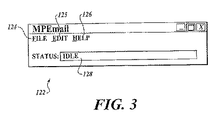
MPEmailアプリケーション121のメインUI 122の表現は図3に示されている。メインUI 122には、「File」プルダウン・メニュー124、「Edit」プルダウン・メニュー125、「Help」プルダウン・メニュー126を含むメニュー・バーが用意されている。このUIは、さらに、アプリケーションのステータスが表示されるステータス・テキスト・ボックス128を含む。このUIがドライバレス・プリント・サーバ・コンピュータ上で走っているため、管理者しかアクセスできず、コンシューマ・ユーザからはアクセスできない。
A representation of the main UI 122 of the
電子メール印刷機能をサポートするために、ターゲット・プリンタ毎に、1)プリンタの仮想電子メール・アドレスとして使用される、POP3アクセスが可能な電子メール・アカウント、2)ドライバレス・プリント・サーバ・システムで印刷できるように構成されているプリンタ、3)電子メール・アドレスをターゲット・プリンタに結び付ける構成済みのMPEmailが構成されなければならない。 To support the e-mail printing function, for each target printer, 1) an e-mail account with POP3 access used as a virtual e-mail address for the printer, 2) a driverless print server system 3) A configured MPEmail that binds an email address to a target printer must be configured.
一般に、電子メール・アカウントは、POP3プロトコル経由で電子メール・アクセスをサポートする電子メール・アカウントであってよい。当業者は、他の電子メール・プロトコルであっても、それらのプロトコルをサポートするように対応する修正が電子メール・モジュール48に加えられていれば使用できることを理解するであろう。特定のアカウントの設定は、本発明の範囲外である。ターゲット・プリンタの設定は、MPEmail UIが備えるダイアログ・ボックスを利用して実行することができる。
In general, the email account may be an email account that supports email access via the POP3 protocol. Those skilled in the art will appreciate that other email protocols can be used if corresponding modifications have been made to the
既存のMPEmailアカウントを表示する、既存のMPEmailアカウントを編集する、または新規MPEmailアカウントを作成するために、管理者は、「Edit」プルダウン・メニュー126をアクティブにし、アカウント・オプション(図示せず)を選択する。これにより、図4に示されているように、電子メール・アカウント・ダイアログ・ボックス130が起動する。既存の電子メール・アカウントは、選択可能なテキスト・ボックス132の中に表示される。「Add」ボタン134をアクティブにすると、新しい電子メール・アカウントが追加される。既存の電子メール・アカウントを編集するには、選択可能なテキスト・ボックス132内の目的のアカウントを選択し(例えば、表示されているアカウントのリスト内のアカウント・エントリをクリックすることにより)、「Edit」ボタン136をアクティブにする。同様に、既存の電子メール・アカウントを削除するには、アカウントを選択し、「Remove」ボタン138をアクティブにする。
To view an existing MPEmail account, edit an existing MPEmail account, or create a new MPEmail account, the administrator activates the “Edit” pull-down menu 126 and sets an account option (not shown). select. This activates an email
「Add」ボタン134または「Edit」ボタン136をアクティブにすると、図5に示されているように、「Add/Edit」ダイアログ・ボックス140が起動する。MPEmailアカウント名を、編集ボックス142に入力する。このアカウント名は、電子メール・アカウント・ダイアログ・ボックス130での表示用に使用され、またデバッギングがアクティブにされているときに参照として使用される。UserIDを編集ボックス144に入力する。UserIDは、MPEmailが電子メール・アカウントからメールを検索するときにPOP3ログイン処理時に使用されるアカウント名である。
When the “Add”
電子メール・アカウントに対するパスワードを編集ボックス146に入力する。通常、所定の電子メール・サーバに格納されている電子メールは適切なログイン資格証明を送ることによりアクセスされる。資格証明には、UserIDや、電子メール・アカウントが最初に設定されたときにユーザ(この場合、MPEmailインスタンス)によって選択された対応するパスワードが含まれる。
Enter the password for the email account in
入力POP3サーバを編集ボックス148の中に指定する。この値は、MPEmailが電子メール・アカウントからメールを検索するときにPOP3ログイン処理時に使用される電子メール・サーバのDNS(ドメイン・ネーム・システム)名を含む。出力SMTP(Simple Mail Transport Protocol)サーバを、編集ボックス150の中に指定する。この値は、MPEmailが、電子メール印刷要求をサブミットしたコンシューマ・ユーザにステータスを送り返すために電子メール返信を送るときに使用される電子メール・サーバのDNS名を含む。
Specify the input POP3 server in the
関連するポート値は、ドロップダウン・コントロール152を介して選択することができる。関連するポートは、ターゲット・プリンタに割り当てられたDNS名またはIPアドレスを含む。ドロップダウン・リストは、所定のインストール済みのドライバレス・プリント・サーバ用のすべての構成されているプリンタのポート名を含む。
The associated port value can be selected via drop-
ポーリング頻度値は、編集ボックス154で入力するか、または編集ボックスの隣にある上矢印および下矢印のコントロールで変更することができる。ポーリング頻度は、POP3プロトコル経由で電子メールを検索しようとする際の秒単位の時間間隔で指定する。一実施形態では、最小許容可能入力は30秒であり、最大許容可能入力は3600秒である。
The polling frequency value can be entered in
トリガ・チェック・ボックス156を選択して、電子メールの検索の開始に使用されるMPEmailアプリケーションが備えている電子メール・トリガ・メソッドをオンにする。電子メール・トリガ・メソッドは、上述のポーリング方法の代替えとなるものであり、適切な動作を行わせるためにさらに設定を必要とする。電子メール・トリガ・メソッドの詳細をさらに、以下で説明する。トリガ・チェック・ボックス156に選択のマークが付けられると、編集ボックス154と対応する上矢印と下矢印のコントロール155は無効にされる。
Select the
「Add/Edit」ダイアログ・ボックス140の目的の値が入力または選択されると、管理者は「OK」ボタン158をアクティブにして値を保存することができる。オプションにより、管理者は「Cancel」ボタン154をアクティブにして、「Add」または「Edit」オペレーションを取り消すことができる。
Once the desired value in the “Add / Edit”
電子メール印刷活動をログに記録するには、MPEmailアプリケーションに用意されているオプションのロギング機能をアクティブにする。アプリケーションは、ロギングが有効になっている場合に、アカウント毎にログ・ファイルを保持する。ロギングを有効にするには、管理者側で、「Edit」プルダウン・メニュー126をアクティブにし、「Options」メニュー・オプションを選択する。これにより、「Enable logging」チェック・ボックスを含む「Options」ダイアログ・ボックス(図示せず)が起動する。ロギングは、「Enable Logging」チェック・ボックスがオンにされるとすべてのアカウントについて有効にされる。 To log email printing activity, activate the optional logging feature provided in the MPEmail application. The application keeps a log file for each account when logging is enabled. To enable logging, the administrator activates the “Edit” pull-down menu 126 and selects the “Options” menu option. This launches an “Options” dialog box (not shown) that includes an “Enable logging” check box. Logging is enabled for all accounts when the “Enable Logging” check box is checked.
ログ・ファイルは、MPEmailアプリケーションがインストールされているのと同じディレクトリ内に作成される。ファイル名は、先頭にMPEmail_が付き、その後にMPEmailアカウント名が続き、そして.logが付加される。例えば、CopyRoom@MyCompany.comというアカウント名の場合、そのアカウントのログ・ファイルはMPEmail_CopyRoom@MyCompany.com.logという名前になる。一実施形態では、ログ・ファイルは、発生したと思われる障害に対するエントリと、電子メールの成功した検索に対するエントリとを作成する。 The log file is created in the same directory where the MPEmail application is installed. The file name is prefixed with MPEmail_, followed by the MPEmail account name, and. log is added. For example, CopyRoom @ MyCompany. com, the log file for that account is MPEmail_CopyRoom @ MyCompany. com. It will be named log. In one embodiment, the log file creates entries for failures that appear to have occurred and entries for successful searches of emails.
「Send reply」機能が有効になっていれば、MPEmailアプリケーションは、電子メール応答を電子メール印刷サービス・ユーザに送り返す。これは、「Options」ダイアログ・ボックス内の「Send reply」チェック・ボックスを選択することにより有効にすることができる。一実施形態では、「Send reply」チェック・ボックスをオンにすると、「Send reply」機能がすべてのアカウントに対して有効になる。 If the “Send reply” function is enabled, the MPEmail application sends an email response back to the email print service user. This can be enabled by selecting the “Send reply” check box in the “Options” dialog box. In one embodiment, selecting the “Send reply” check box enables the “Send reply” feature for all accounts.
電子メール・サーバでは、メールが電子メール・サーバに到着したときそのことを電子メール・モジュール48に通知するイベント・トリガを実装することができる。新規メールが電子メール・サーバに到着すると(例えば、エンタプライズ電子メール・サーバ50またはISP電子メール・サーバ51に)、電子メール・サーバは、ドライバレス・プリント・サーバ・コンピュータに格納されている、電子メール・トリガCGIスクリプト107を呼び出す。CGI呼び出しが成功すると、MPEmailアプリケーションは即座に電子メール・サーバからメールを検索する。
In the email server, an event trigger can be implemented that notifies the
トリガ・スクリプト呼び出しは、電子メール・サーバ上の任意のポートとドライバレス・プリント・サーバ・コンピュータ上のポート80との間のTCP/IP接続である。データは、World Wide Web Consortium(W3C)Request For Comments(RFC)2068規約に定められているとおり、HTTP/1.1プロトコルで、POSTメソッドを使用して送信される。POSTの送信先は、電子メール・トリガ・スクリプトの場所(例えば、cgi−bin/trigger.cgi)であり、データ内容は以下の表1に説明されているように名前付きの値のペアを含む。電子メール・トリガCGIスクリプトは、POSTデータを確認し、テキスト文字列ステータスをデータ・セクション返信で返す。可能な返却文字列は表1に示されている。 The trigger script call is a TCP / IP connection between any port on the email server and port 80 on the driverless print server computer. Data is transmitted using the POST method with the HTTP / 1.1 protocol as defined in the World Wide Web Consortium (W3C) Request For Comments (RFC) 2068 protocol. The POST destination is the location of the email trigger script (eg, cgi-bin / trigger.cgi) and the data content includes named value pairs as described in Table 1 below. . The email trigger CGI script confirms the POST data and returns a text string status with a data section reply. Possible return strings are shown in Table 1.

HTTP POSTで送信されたデータは、AccountName=Sの形の名前値ペア形式である。名前値フィールドは、以下の表2に定義されている。 Data transmitted by HTTP POST is in the form of a name-value pair in the form of AccountName = S. The name value field is defined in Table 2 below.
電子メール・アドレスprinter1@magicprint.netに対するトリガCGI呼び出しの一例は以下のとおりである。
POST /cgi-bin/trigger.cgi HTTP/1.1[CRLF]Content-Type:text/xml[CRLF]Content-Length:35[CRLFCRLF]AccountName=printer1@magicprint.net
E-mail address printer1 @ magicprint. An example of a triggered CGI call to net is as follows:
POST /cgi-bin/trigger.cgi HTTP / 1.1 [CRLF] Content-Type: text / xml [CRLF] Content-Length: 35 [CRLFCRLF] AccountName=printer1@magicprint.net
電子メールを検索した後、MPEmailアプリケーションは、ドライバレス・プリント・サーバにサブミットするため、電子メールを複数のドキュメント・ファイルに分割する。電子メールの主要なコンテンツは、メインの電子メール・コンテンツ・ファイルになり、電子メールのファイル添付は(もしあれば)それぞれ添付ファイルになる。メインの電子メール・コンテンツがテキストとHTMLの両方であれば、HTMLコンテンツが使用される。 After retrieving the email, the MPEmail application splits the email into multiple document files for submission to the driverless print server. The main e-mail content is the main e-mail content file, and each e-mail file attachment (if any) is an attachment. If the main email content is both text and HTML, then the HTML content is used.
ドキュメント・ファイルの作成前に、メインの電子メール・コンテンツの上に、電子メール・ヘッダ情報が追加される。メインの電子メール・コンテンツ・ファイルおよびそれぞれの添付ファイルは、別々の印刷ジョブとして、ドライバレス・プリント・サーバにサブミットされる。例えば、MS Word文書およびAdobe Acrobat文書を含む添付のある電子メールがMPEmailアカウントに電子メールで送信されると、3つの印刷ジョブがドライバレス・プリント・サーバ上のキューに入れられる。これには、メインの電子メール・コンテンツ・ファイル用の印刷ジョブや、MS Word文書とAdobe Acrobat文書のそれぞれ用の印刷ジョブが含まれる。 Email header information is added above the main email content before the document file is created. The main email content file and each attached file are submitted to the driverless print server as a separate print job. For example, when an email with an attachment containing an MS Word document and an Adobe Acrobat document is emailed to an MPEmail account, three print jobs are queued on the driverless print server. This includes a print job for the main email content file and a print job for each of the MS Word document and the Adobe Acrobat document.
ドキュメント処理コンポーネント101に話を進めると、CGIスクリプト108は、詳細機能を含む管理パネルWebページを供給する。CGIスクリプトの詳細な説明が図6に示されている。「印刷ジョブをキャンセル」CGIスクリプト160を使用して、印刷ジョブ要求をシステムから削除する。管理コントロール・パネルWebページからは、システムにサブミットされたが、スプール・ファイルをまだプリンタに送信していない印刷ジョブに対しスクリプトを呼び出すことができる。
Proceeding to the
自動拡張構成CGIスクリプト162は、サーバ・コンピュータ内のインストール済みアプリケーションを探索し、見つかったアプリケーションによってサポートできるドキュメント・タイプを発見し、発見されたファイル・タイプの印刷ジョブ要求を実行するようにシステムを構成する。システム更新CGIスクリプト164を使用して、インストール済みシステム・コンポーネントと最新の利用可能なコンポーネントとを比較し、新しいコンポーネント(該当する場合)をダウンロードし、システムにインストールする。
The auto-extension
印刷要求CGIスクリプト166は、MPEmailアプリケーションによって供給されるファイルを受け取り、システムへの対応する印刷ジョブ要求を作成する。ジョブ・キューCGIスクリプト168は、システムから印刷ジョブ要求のキューを読み取り、そのリストをスクリプトの呼び出し側Webページに返す。
The print
リセットCGIスクリプト170は、システム・アプリケーションを閉じて、再び起動する。このスクリプトは、発生したと思われるプログラム・エラーを解消するために最後の手段としてシステム管理者によって使用される。ステータスCGIスクリプト172は、印刷ジョブ要求の進行状況が示される管理コントロール・パネルWebページを表示する。
The
ドライバレス・プリント・サーバ46によって実装されるコンポーネントが図7に示されている。ドライバレス・プリント・サーバは、システムの主要ソフトウェア・コンポーネントである。これは、ジョブ要求を受け付け、その要求をキューに入れ、要求から最終印刷までのドキュメント、画像、またはURLの印刷プロセスを指令するDPSサーバ・コンピュータ上で走るアプリケーションを備えている。ドライバレス・プリント・サーバには、ファイル・タイプ構成リスト174、ブラウザ印刷コンポーネント176、補助アプリケーション印刷コンポーネント178、シェル拡張印刷コンポーネント180、ジョブ要求サーバ・コンポーネント182、ジョブ処理コンポーネント184、ウィンドウ処理コンポーネント186、ジョブ・ステータス・コンポーネント188がある。
The components implemented by the
ファイル・タイプ構成リスト178は、ドライバレス・プリント・サーバによって保持されている。構成リストには、ファイル・タイプ毎に、拡張子とそのファイル・タイプを印刷するために使用される方法が記述される。補助アプリケーション印刷コンポーネント178によって印刷方法が用意されている場合、リストには、印刷に使用されるアプリケーションへのパス、アプリケーションが印刷に使用するメニュー・コマンド、アプリケーションがアプリケーションを閉じるために使用するメニュー・コマンドが含まれる。
The file
ブラウザ印刷コンポーネント176は、ドライバレス・プリント・サーバが印刷に使用する3つの方法のうち1つを備える。一実施形態では、このコンポーネントは、Microsoft Internet Explorer(IE)Webブラウザによって提供されるアプリケーション・プログラミング・インターフェース(API)を使用する。コンポーネントは、IE APIを使用して、ドライバレス・プリント・サーバ・アプリケーション上のウィンドウ内でブラウザを実行する。通常、ブラウザ印刷コンポーネントは、画像とPDF(Portable Document Format)ドキュメントを印刷する場合に使用される。
The
DPSサーバ・コンピュータ上のIEブラウザ・インスタンスがドキュメントまたは画像ファイルの要求されたタイプ用のブラウザ・プラグインと共に構成されている場合、この方法を使用して、ドキュメントと画像ファイルを印刷することができる。例えば、Adobe Acrobat(商標)用のIEプラグインを考える。Adobe Acrobatドキュメント・ファイルはPDF拡張子を持つ。Acrobatプラグインがサーバにインストールされている場合、IEのナビゲート・プログラミング・インターフェースを使用すると、PDFファイルをIEにロードし、IEの印刷プログラミング・インターフェースによりファイルを印刷することができる。 If an IE browser instance on the DPS server computer is configured with a browser plug-in for the requested type of document or image file, this method can be used to print the document and image file. . For example, consider an IE plug-in for Adobe Acrobat ™. Adobe Acrobat document files have a PDF extension. If the Acrobat plug-in is installed on the server, the IE's navigate programming interface allows you to load a PDF file into the IE and print the file through the IE's print programming interface.
補助アプリケーション印刷コンポーネント178は、ドライバレス・プリント・サーバが印刷に使用する他の方法を備える。このコンポーネントでは、ファイル・タイプ構成リスト174を使用してそのファイル拡張子に関連付けられたアプリケーションを見つけ、ファイルをアプリケーションにロードし、アプリケーションの印刷メニュー・コマンドを実行し、印刷オペレーションの完了後、アプリケーションを閉じる。ファイル・タイプ構成リストと補助アプリケーション印刷メソッドの組合せにより、システム管理者は、サーバ・マシンにアプリケーションをインストールし、ファイル・タイプ構成リストを編集することにより、追加ドキュメントまたは画像の種類のサポートを追加することができる。
The auxiliary
シェル拡張印刷コンポーネント180は、ドライバレス・プリント・サーバが印刷に使用する第3の方法を備える。このコンポーネントは、MS Windows Shell Extensionsプログラミング・インターフェースを使用して印刷する。MS Windows Shell Extensionsインターフェースは、ユーザがそのドキュメント・タイプをサポートするアプリケーションに送られるコマンドを使ってドキュメント・タイプを印刷できるようにするオペレーティング・システム機能である。アプリケーションがShell Extensionインターフェースをサポートしている場合、アプリケーションはドキュメントをロードし、印刷し、そして自動的に閉じる。ファイル・タイプ構成リストとシェル拡張印刷メソッドの組合せにより、システム管理者は、サーバ・マシンにアプリケーションをインストールし、ファイル・タイプ構成リスト174を編集することにより、追加ドキュメントまたは画像の種類のサポートを追加することができる。
The shell extended
ジョブ要求サーバ・コンポーネント182は、印刷要求CGIスクリプト166から印刷ジョブ要求を受け取り、キューに入れて処理を待つ。
The job
ジョブ処理コンポーネント184は、スプール・ファイルがプリンタに送信されるまで、ジョブ・キューへの挿入から印刷ジョブ要求を管理する。このコンポーネントは、キューに入っているジョブ要求を読み取り、印刷に使用する3つの印刷方法のうちの1つを決定し、ドキュメント、画像、またはURLを決定された印刷方法にサブミットし、印刷コマンドの実行を処理し、スプール・ファイルを印刷のためステータス・モニタにサブミットする。印刷処理の各段階で、ステータスを追跡し、実行できるステータスCGIスクリプト172呼び出しを利用できるようにする。
ウィンドウ処理コンポーネント186は、信頼できる印刷を行うために使用される。アプリケーションの多くは、印刷プロセスの実行中にメッセージ・ボックスおよび/またはダイアログを表示し、印刷サービスを要求しているユーザに情報を提供したり、ユーザから情報を収集したりする。印刷要求の自動処理をサポートするには、要求を印刷するのに使用されるアプリケーションにメッセージ・ボックスまたはダイアログが表示された場合にそれらのメッセージ・ボックスまたはダイアログに応答するメカニズムが必要である。このメカニズムは、ウィンドウ処理コンポーネント186によって提供される。ドライバレス・プリント・サーバが、印刷プロセス実行中にメッセージ・ボックスとダイアログが表示されないかサーバを監視している。新しいメッセージ・ボックスまたはダイアログが表示されると、ウィンドウ処理コンポーネントがその情報を読み込み、知られているメッセージまたは知られているステートメントと比較し、そのプログラムされているロジックに従ってメッセージ・ボックスまたはダイアログを閉じる。ウィンドウ処理コンポーネントの詳細について、図18を参照しながら以下で説明する。
ジョブ・ステータス・コンポーネント188が各ドライバレス・プリント・サーバ・キュー内にすべてのジョブのメモリマップト・ファイルを保持するために設けられている。周期的に、ジョブ・ステータス情報をメモリマップト・ファイルに書き込むことで、ステータスCGIスクリプトがジョブ要求のステータスを読み込めるようにしている。
A
ポート・モニタは、MS Windows印刷サブシステム内の標準コンポーネントを含む。ポート・モニタは、印刷サブシステムを介してプリンタ・ドライバからスプールされたデータを受け取る。従来のポート・モニタは、プリンタ・ドライバからスプールされたデータを受け取り、プリンタに引き渡す役割が与えられている。ドライバレス・プリント・サーバ・システムでは、ポート・モニタ・モジュール110(図2)がスプールされているデータをファイルに書き込む。スプール・ファイル全体がファイルに書き込まれると、ポート・モニタ・モジュール110がドライバレス・プリント・サーバに、スプールされたファイルの名前と場所をメッセージとして送る。
The port monitor includes standard components within the MS Windows printing subsystem. The port monitor receives spooled data from the printer driver via the printing subsystem. A conventional port monitor is given a role of receiving spooled data from a printer driver and delivering it to a printer. In the driverless print server system, the port monitor module 110 (FIG. 2) writes the spooled data to a file. When the entire spooled file is written to the file, the
ステータス・モニタ112は、DPSサーバ・コンピュータ上で走るアプリケーションを含む。これは、複数の機能を実行するが、主にスプール・ファイルをプリンタに送信する役割を持つ。ドライバレス・プリント・サーバは、ポート・モニタ110からスプール・ファイルの場所を示すメッセージを受け取った後、スプール・ファイルの場所と、スプール・ファイルの送信先プリンタのURLと、スプール・ファイルをプリンタに送信するためのプロトコル情報とを示すメッセージをステータス・モニタ112に送信する。ステータス・モニタ112は、それぞれの要求されたプリンタURLのキューを作成する。プリンタは、一度に1つのスプール・ファイルしか受け取れないので、スプール・ファイルの送信をシリアライズする。ステータス・モニタ112は、複数のキューを同時に作成し維持することができる。
The status monitor 112 includes an application running on the DPS server computer. It performs multiple functions, but is primarily responsible for sending spooled files to the printer. After receiving the message indicating the location of the spool file from the
スプール・ファイルがプリンタに正常に送信された後、ステータス・モニタ112はドライバレス・プリント・サーバに、ジョブが完了していることをメッセージで知らせる。ジョブ履歴が更新され、ドライバレス・プリント・サーバ・キューからジョブが削除される。ステータス・モニタ112は、スプール・ファイルがプリンタに送信される前後にメッセージを外部システムに送信するように構成されている。外部システムの一例として、この情報を使用して課金を客の請求書に記載することができるホテルの請求システムがある。
After the spool file is successfully sent to the printer, the
管理コンポーネント102に話を進めると、システム・モニタ114は、他のすべてのシステム・コンポーネントを監視し、エラーがないか調べ、特定の要求の着信を待つアプリケーションを備えている。印刷ジョブ要求が印刷要求CGIスクリプト166から届くと、ドライバレス・プリント・サーバ・アプリケーションが動作していない場合、印刷要求CGIスクリプトは、システム・モニタ114がドライバレス・プリント・サーバを起動し、印刷ジョブ要求を実行するよう要求することができる。システム・モニタ114は、定期的に、メッセージをドライバレス・プリント・サーバに送信し、プログラムとキュー内の印刷ジョブのステータスを取得する。システム・モニタは、エラーを検出すると、この問題をクリアする。
Proceeding to
システム・モニタ114はさらに、より新しいシステム・コンポーネントをダウンロードし、インストールする場合に使用できる。システム内のすべてのコンポーネントのバージョン番号を収集し、それらをシステムの更新Webサイトに送信する。更新Webサイトは、新しいコンポーネントが利用できるかどうかについての情報と共に返信する場合、それらのコンポーネントを検索して、システムにインストールする。システム・モニタは、メニューから、または「システムを更新」CGIスクリプト164から更新要求を受け付ける。
The system monitor 114 can also be used to download and install newer system components. Collect the version numbers of all components in the system and send them to the system's update website. When the update Web site returns with information about whether new components are available, it searches for those components and installs them in the system. The system monitor accepts an update request from the menu or from the “update system”
管理用(パネル)Webページ124では、管理ユーザがシステムのリモート構成と監視を実行できる。セキュリティ機能は、コンシューマ・ユーザによるこれらのWebページへのアクセスを禁止する場合に使用される。管理パネルWebページ190の例が図8に示されている。管理パネルWebページ190は、「print job」タブ192、「about」タブ194、「file types」タブ196、「consumer contact」タブ198、「printer management」タブ200、および「configuration」タブ202を含む、複数の最上位レベルのタブを備え、これらのタブに対応する管理Webページにナビゲートする。
The management (panel)
「print jobs」タブ192をアクティブにすると、下位のタブ群が図8に示されているように描画される。これらには、「view print queue」タブ204、「list by date」タブ206、「list by owner」タブ208、「list by printer」タブ210、「all jobs」タブ212、「advanced search」タブ214がある。図8に示されているように、「view print queue」タブ204をアクティブにすると、管理者は、プルダウン・コントロール216で選択したプリンタの保留印刷ジョブを表示することができる。保留印刷ジョブがテキスト・ボックス218内に表示され、キュー内のジョブの個数がテキスト・ボックス220に表示される。「more info」ボタン222をアクティブにすると、管理者は選択した印刷ジョブの詳細を確認することができる。
When the “print jobs”
「list by date」タブ206、「list by owner」タブ208、「list by printer」タブ210、「all jobs」タブ212をアクティブにすると、管理者は、選択された特定のタブに関係する印刷ジョブの履歴を表示することができる。例えば、「list by date」タブ206をアクティブにすると、管理者は図9に示されている管理パネルWebページ224に示されているように、選択された日付範囲に関して指定されたドライバレス・プリント・サーバのすべての印刷ジョブを表示することができる。その後、管理者は、編集ボックス226、228を介して開始日と終了日の値を入力して、「go」ボタン230をアクティブにし、検索される日付範囲内のすべての印刷ジョブのレコードを要求する。1ページ当たりの結果の数は、プルダウン・コントロール232を使用して選択することができ、レコード間のナビゲーションは、一組のナビゲーション・コントロール234により有効にされる。各レコードには、開始時刻、所有者、ドキュメント名、印刷ステータス、終了時刻、印刷ページ数、料金合計、所有者アドレス、プリンタ・アドレスに関する情報が含まれる。
When the “list by date”
「list by owner」タブ208をアクティブにすると、管理者は、図10の管理パネルWebページ236に示されているように、特定の所有者にサブミットされるすべてのジョブに関する情報を表示することができる。通常、所有者は、コンシューマ・ユーザが電子メール印刷要求を送信するのに使用した個人用電子メール・アカウントに対応する返信先電子メール・アドレスでよい。必要ならば、電子メール・アドレスを実際の人々または企業にマッピングするテーブルを実装することで、電子メール・アドレスではなく、人または企業の名前を入力するだけで所有者情報へアクセスできるようにする。所有者情報は、編集ボックス238に入れられる。その後、管理者は、「go」ボタン240をアクティブにして、その所有者に対応するレコードを検索する。上述のように、1ページ当たりの結果の数は、対応するコントロール(図には示されていない)により選択することができ、またレコード間のナビゲーションは、ナビゲーション・コントロール・セット242により有効にされる。
When the “list by owner”
「list by printer」タブ210をアクティブにすると、管理者は、図11の管理パネルWebページ244に示されているように、選択されたプリンタに対し完了したすべてのジョブを表示することができる。印刷ジョブ履歴が必要なプリンタのIDがプルダウン・コントロール246により選択され、その後、「go」ボタン248がアクティブにされた応答として対応するレコードが検索される。1ページ当たりの結果の数は、プルダウン・コントロール250を使って選択することができ、レコード間のナビゲーションは、ナビゲーション・コントロール・セット252により有効にされる。
When the “list by printer”
「all jobs」タブ212をアクティブにすると、管理者は、図12の管理パネルWebページ254に示されているように、特定のドライバレス・プリンタ・サーバを通じて印刷されるすべてのジョブに関係する情報を表示することができる。上述のように、1ページ当たりの結果の数は、対応するコントロール(図には示されていない)により選択することができ、またレコード間のナビゲーションは、一組のナビゲーション・コントロール294により有効にされる。
When the “all jobs”
「advanced search」タブ252をアクティブにすると、管理者は、図13の管理パネルWebページ258に示されているように、様々な入力値に基づいて選択される印刷ジョブに関係する情報を表示することができる。サーチの日付範囲は、開始日編集ボックス260と終了日編集ボックス262を使用して入力する。プルダウン・コントロール264を使って、1つまたは複数のプリンタを選択することができる。プリンタの所有者は、ブロック266の中で指定できる。所有者が指定されていなければ、サーチがすべての所有者について実行される。サイト識別は、プルダウン・コントロール268を使って選択できる。プルダウン・コントロール270を使って、1ページ当たりの結果数を選択することができる。プルダウン・コントロール272は、管理者が並べ替えの対象となる列を定義できるように用意されている。一対のラジオ・ボタン274により、並べ替え順を昇順または降順のいずれかとして定義することができる。目的の値を入力し、選択した後、管理者は「go」ボタン276でサーチを開始することができる。前のサーチ・パラメータ・セットを検索するには「PREVIOUS」ボタン278をアクティブにし、様々なサーチ・パラメータに対する値をデフォルト値にリセットするには、「RESET」ボタン280をアクティブにする。
When the “advanced search”
「file types」タブ234をアクティブにすることにより、管理者は、図14のWebページ282に示されているように、ドライバレス・プリント・サーバによって印刷することができるドキュメントと画像ファイルのファイル・タイプを表示かつ/または編集することができる。各種のファイル・タイプ・レコードのナビゲーションは、編集コントロール・セット284と編集コントロール・セット286により実行される。プルダウン・コントロール288を使って、1ページ当たりのレコード数を選択することができる。特定のファイル・タイプに対する値を編集したい場合、管理者は、該当する行の「edit」ボタン290をアクティブにすることで、値列の値を編集できるようになる。これらの列には、「Extension」列、「Application」列、および「Enabled」列、「Method」列、「ToLaunch」列、「ToPrint」列、「ToClose」列、および「Static」列がある。ファイル・タイプの拡張子は、「Extension」列に入力する。対応するアプリケーションまたはアプリケーションのタイプの名前(例えば、「Imaging」)を「Application」列に入力する。アプリケーションを起動するファイル・パスは、「ToLaunch」列に入力する。アプリケーションから印刷し、アプリケーションを閉じる内部コマンドは、それぞれ「ToPrint」列および「ToClose」列に入力することができる。指定された行に対応するファイル・タイプ・マッピング情報は、削除列内の該当するチェック・ボックスをオンにし、「delete」ボタン292をアクティブにすることにより削除することができる。
By activating the “file types”
「configuration」タブ202をアクティブにすることにより、管理者は、ドライバレス・プリント・サーバのインストレーションを更新しそのオペレーションを構成することができる。図15に示されているように、「configuration」タブをアクティブにすると、「update」タブ296、「extensions」タブ298、「job accounting server」タブ300などの、3つの追加タブを備えるWebページ294がロードされる。「extensions」タブ298をアクティブにすると、Webページ294に対応する「Extensions」Webページが起動する。
By activating the “configuration”
印刷のためファイルをサブミットすると、ドライバレス・プリント・サーバがファイルのファイル・タイプに対応するアプリケーションを開く。例えば、ファイルの拡張子が.docであれば、一般的にMS Wordアプリケーションが開かれる。次に、アプリケーションはファイルを開き、組み込みの印刷コマンドを使用して、サブミットされているファイルを選択されたプリンタに送信する。「extensions」Webページ(つまり、Webページ294)では、(「Extensions」列に)ファイル・タイプ情報の一覧を表示する行(エントリ)と(「Application Name」列に)ファイル・タイプに対応するソフトウェア・アプリケーションが表示される。また、それぞれのエントリには、拡張子の優先度レベル(サブミットされたファイルに対する適切なアプリケーションを決定するため同じ拡張子を持つファイル・タイプを評価する順序を定義する)、アプリケーションに関するOSレジストリ情報の格納先を識別するレジストリ・ロケーション、アプリケーションのデフォルト・パス、アプリケーションの実行可能名、さらにはアプリケーションを印刷しアプリケーションを閉じるための内部コードが表示される。管理者は、「add new entry」ボタン302をアクティブにして新規ファイル・タイプを追加し、Webページ294(図示せず)の各列の対応する編集コントロールでWebページを描画することができる。「update file types」ボタン304をアクティブにすることに対する応答として類似のWebページが描画され、この場合のみ、編集コントロールに、更新対象の選択されたファイル・タイプに関係する値が埋められる。ファイル・タイプの更新は、さらに、「edit」ボタン306をアクティブにしても開始することができる。前述のように、レコード間のナビゲーションは、一組のナビゲーション・コントロール308により有効にされる。
When a file is submitted for printing, the driverless print server opens an application corresponding to the file type of the file. For example, the file extension is. If it is doc, the MS Word application is generally opened. The application then opens the file and sends the submitted file to the selected printer using a built-in print command. In the “extensions” Web page (ie, the Web page 294), a line (entry) displaying a list of file type information (in the “Extensions” column) and software corresponding to the file type (in the “Application Name” column)・ Application is displayed. Each entry also includes the priority level of the extension (defines the order in which file types with the same extension are evaluated to determine the appropriate application for the submitted file), and the OS registry information for the application. The registry location that identifies the storage location, the default path of the application, the executable name of the application, and the internal code for printing and closing the application are displayed. The administrator can activate the “add new entry”
ドライバレス・プリント・サーバでは、ファイル・タイプの値に対応する拡張子テーブルを使用して、拡張子テーブルに列挙されている各ファイル・タイプのファイルの印刷に使用するサーバ・コンピュータ上にインストールされているアプリケーションを判定する。さらに、このテーブルに含まれる情報を使用して、サーバ・コンピュータ上の実行可能ファイルの場所を判定する。一実施形態では、拡張子テーブルや、他の様々な構成と印刷ジョブ・データがデータベース内に保持される。通常、データベースは、DPSソフトウェアのホストとなるマシンと同じマシンをホストとするが、当業者であれば理解できるであろうが、データベースのホストとして別のマシンを使用することもできる。 Driverless print servers are installed on the server computer that is used to print files of each file type listed in the extension table, using an extension table that corresponds to the file type value. Determine which application is running. In addition, the information contained in this table is used to determine the location of the executable file on the server computer. In one embodiment, an extension table and various other configurations and print job data are maintained in the database. Typically, the database is hosted on the same machine that hosts the DPS software, but those skilled in the art will appreciate that a different machine can be used as the database host.
印刷要求の処理
電子メール印刷要求への応答として電子メール・モジュールとDPSシステム・ソフトウェア・コンポーネントにより実行されるデータの流れと動作を説明するデータ流れ図が図16に示されている。最初に、発信デバイス320のユーザは、電子メール・メッセージ322を、電子メール・サーバ324によりホストされる電子メール・アドレス・アカウントに対応する仮想プリンタ電子メール・アドレスに送信する。一般に、電子メール・メッセージは、LAN、WAN、またはインターネットなどのコンピュータ・ネットワーク326を介して発信デバイスから電子メール・サーバに送信される。上述のように、電子メール・サーバは、ISPが提供するか、エンタプライズ電子メール・サーバであるか、またはドライバレス・プリント・サーバ・コンピュータ328上で走っている電子メール・サーバ・ソフトウェアにより実現することができる。ISPとエンタプライズ電子メール・サーバは両方とも、一般的に、電子メール・サーバがアカウント毎に0個またはそれ以上のメッセージを格納するという形で、複数の電子メール・アカウントをサポートする。これらのメッセージは、電子メール・メッセージ330として示されており、電子メール・メッセージ322を含む。
Processing the Print Request A data flow diagram illustrating the data flow and operation performed by the email module and DPS system software component in response to an email print request is shown in FIG. Initially, the user of originating
上述のように、図2に示されているソフトウェア・コンポーネントはすべて、電子メール・モジュール48とドキュメント処理コンポーネント101を含むドライバレス・プリント・サーバ上で走っており、前者はMPEmailアプリケーションを含み、後者はドライバレス・プリント・サーバ・ソフトウェア46を含む。「Add/Edit」ダイアログ・ボックス140で選択された電子メール通知方法に基づき、電子メール・モジュール48は、電子メール・サーバ324をポーリングし、上述の方法でターゲット・プリンタ334の仮想プリンタのアドレスに対応するメッセージが受信されていないかを調べるポーリング方法332を採用する。オプションにより、トリガ・チェック・ボックス156がオンになっている場合、電子メール・サーバ324は、仮想プリンタ電子メール・アドレスを宛先とする電子メールが受信されたときに適切な呼び出しメカニズムによりドライバレス・プリント・サーバ・コンピュータ328に格納されている電子メール・トリガCGIスクリプト106を呼び出す。その後、電子メール・トリガCGIスクリプトは上述の方法で実行される。
As described above, all of the software components shown in FIG. 2 run on a driverless print server that includes an
一般に、ドライバレス・プリント・サーバのインストレーションまたは「サイト」は1つまたは複数のプリンタに対するサポートを行う。図16に示されているように、本発明の実施形態に対応するDPSサイトは、PostScriptプリンタ336、HPレーザ・プリンタ338、プロッタ340、さらにターゲット・プリンタ334を含む。プリンタ毎に別々の構成パラメータ・セットが設定され、DPSデータベース342に格納される。複数のプリンタが利用できるサイトによっては、複数のプリンタをサポートするようにポーリング方法332および/または電子メール・トリガCGIスクリプト呼び出しメカニズムを構成しなければならない場合がある。例えば、一実施形態では、ポーリング方法332は、DPSサイトのプリンタのそれぞれについて仮想プリンタ電子メール・アドレスに対応する電子メールをチェックすることができる。他の実施形態では、ポーリング方法は、プリンタ毎に別々に呼び出すことができる。同様に、電子メール・トリガ呼び出しメカニズムは、DPSサイトのプリンタのどれかに対応する電子メール・アカウントでメールが受信されるといつでも電子メール・トリガCGIスクリプト107が呼び出されるように電子メール・サーバ上で設定できる。
In general, a driverless print server installation or “site” provides support for one or more printers. As shown in FIG. 16, a DPS site corresponding to an embodiment of the present invention includes a
仮想プリンタ電子メール・アドレスの1つに対応する電子メールが受信されたと判断されると、電子メール・サーバから電子メールが検索される。通常、これは、適切なログイン方法を使用した電子メール・サーバへのログインを含む(例えば、POP3ホスト・アドレス、POP3用のUserIDおよびパスワードを用意する)。このロジックの方法は、図16のログイン方法344として示されている。
If it is determined that an email corresponding to one of the virtual printer email addresses has been received, the email is retrieved from the email server. This usually involves logging into the email server using an appropriate login method (eg, providing a POP3 host address, UserID and password for POP3). This logic method is shown as
電子メールを受信すると、それぞれの電子メール・メッセージがMPEmailアプリケーション121により個々に処理される。上述のように、電子メールのコンテンツは、別のメイン電子メールと添付ファイルに分割され、印刷要求CGIスクリプト166が呼び出されて、印刷ジョブ要求346を生成する。一実施形態では、印刷ジョブ要求は、印刷要求CGIスクリプトを介してジョブ・キュー348に送信されるTmpdoc.dpsn(nは番号を表す)という名前のドキュメントを含む。一実施形態では、ジョブ・キューは先入れ先出し(FIFO)型のジョブ・キューを含む。オプションにより、他の種類のジョブ・キューも使用することができるが、このことは、当業者であれば理解するであろう。上述のように、ジョブ・キューの動作はジョブ処理コンポーネント184により実行される。
Upon receipt of the e-mail, each e-mail message is individually processed by the
ジョブ・キューはジョブ要求をサブミットし、ジョブ要求はシステムによって処理される。それぞれの要求は、ブロック350で処理され、そこでは、tmpdoc.dpsnファイルが解析され、ドキュメント・ファイル352に格納されている、印刷要求に対応する印刷ジョブ・パラメータが検索される。例えば、解析された情報には、プリンタの選択、部数、コンシューマ・ユーザのID、ドキュメント名などが含まれる。印刷ジョブ・パラメータの一部は、DPSデータベース342に格納される。
The job queue submits job requests that are processed by the system. Each request is processed at
決定ブロック354で、現在の印刷ジョブに対応しているのがどのような種類のファイルなのか、例えば、テキスト・ファイルなのか、アプリケーション・ファイルなのか、画像ファイルなのか、プリンタ・ファイルなのかが判定される。そのドキュメントが、ブラウズ可能なドキュメント、画像、PDFファイル、またはブラウザ上に描画できる他の種類のオブジェクトに関係している場合、ロジックの流れはブロック356に進み、そこで、ドライバレス・プリント・サーバのブラウザを介して画像またはPDFドキュメントがロードされる。そうでない場合、ロジックの流れはブロック358に入り、そこで、ドキュメントとそのドキュメントの印刷に使用することができる適切な補助アプリケーションがロードされる。例えば、ドキュメントがMS Excelのスプレッドシートを含む場合、MS Excelアプリケーションのインスタンスが、Excelドキュメントと共にロードされる。
At
ブロック360で、ブラウザまたは補助アプリケーションにソース・データの印刷を行わせる印刷オペレーションを呼び出す内部コマンドが生成される。例えば、ほとんどのアプリケーションでは、アプリケーションの印刷プロセスを起動する「File」→「Print」メニュー・オプションを備えている。この場合、DPSソフトウェアは、印刷コマンドに対応するイベントを発生させるが、このイベントは、ユーザが「File」→「Print」メニュー・オプションを選択したかのようにアプリケーションによって処理される。オプションにより、上述のように、DPSソフトウェアは、シェル拡張印刷コンポーネント180を使用し、適切なオペレーティング・システムAPI呼び出しを実行して、ソース・データの印刷を行わせる印刷オペレーションを呼び出すことができる。
At
内部アプリケーションまたはブラウザの印刷要求への応答として、様々な印刷情報とドキュメント情報が内部的に、プリンタ・オペレーションを処理するオペレーティング・システム・コンポーネントに受け渡される。上述のように、一実施形態では、ドライバレス・プリント・サーバは、MS Windows(登録商標) OS環境で動作する。したがって、この環境は、ターゲット・プリンタに送られて出力ドキュメントを生成する適切なプリンタ(つまり、出力デバイス)データを生成するターゲット・プリンタに対応するプリンタ・デバイス・ドライバ364と相互作用するグラフィカル・デバイス・インターフェース(GDI)コンポーネント362を含むOS印刷サブシステム361を備える。プリンタ・データは、ポート・モニタ110によって受信されるプリンタ・データを含む印刷スプール・ファイルを出力するMS Windows印刷スプーラ・コンポーネント366によって内部的に処理される。
In response to an internal application or browser print request, various print and document information is passed internally to an operating system component that handles printer operations. As described above, in one embodiment, the driverless print server operates in an MS Windows OS environment. Thus, this environment is a graphical device that interacts with a
図に示されている例では、ターゲット・プリンタ334はPostScriptプリンタを含むと仮定している。そこで、Windows印刷スプーラは、PostScriptファイル368を含むプリンタ・データをポート・モニタ110に送信し、次に、ステータス・モニタ112を起動し、PostScriptファイルをステータス・モニタにサブミットする。次に、ステータス・モニタ112は、PostScriptファイル368をターゲット・プリンタ334にサブミットする。このイベントと共に、DPSデータベース342内のジョブ履歴情報が更新される。
In the example shown in the figure, it is assumed that the
一実施形態では、ドライバレス・プリント・サーバはプリンタ・ファイルの直接印刷をサポートしている。例えば、印刷ジョブ・ファイルがプリンタ・ファイルを含む場合、ターゲット・プリンタのプリンタ・ファイル・タイプに対応していれば、直接印刷することができる。例えば、PostScriptファイルをPostScriptプリンタに印刷することができる。同様に、他の種類のプリンタのプリンタ・ファイルは、印刷プロセスで「save to file」オプションを選択することによりすでに作成されている場合がある。決定ブロック354でファイルがプリンタ・ファイルであると判定された場合、このロジックはブロック357に進み、そこで、プリンタ・ファイル(プリンタ・ファイル359で示されている)は直接、Windows印刷スプーラ366に送信される。
In one embodiment, the driverless print server supports direct printing of printer files. For example, if the print job file includes a printer file, it can be printed directly if it corresponds to the printer file type of the target printer. For example, a PostScript file can be printed on a PostScript printer. Similarly, printer files for other types of printers may have already been created by selecting the “save to file” option in the printing process. If the
上述のように、システムを、元の電子メール印刷要求の送信元の電子メール・アカウントに返信メッセージを自動的に送り返すように構成することができる。したがって、決定ブロック369で、返信オプションが選択されているかどうかの判定が行われ、もしそうであれば、印刷要求のステータスを含む電子メール返信メッセージ370が生成され、電子メール・メッセージ322をサブミットしたユーザの電子メール・アカウント・アドレスに送信される。一実施形態では、MPEmailアプリケーション121は、ステータスCGIスクリプト172を呼び出して、印刷要求に対応する印刷ジョブのステータスを検索し、そのステータスを電子メール返信メッセージに付加し、元の電子メール印刷要求メッセージ(例えば、電子メール・メッセージ322)のヘッダを解析して、送信者の電子メール・アドレスを抽出し、電子メール返信メッセージをそのアドレス宛に送信する。
As described above, the system can be configured to automatically send a reply message back to the email account from which the original email print request was sent. Accordingly, at
ドライバレス・プリント・サーバ・ソフトウェア46の内部動作の詳細を、図17に示す。前述のように、電子メール322は、メイン電子メールまたは添付ファイル毎に印刷要求CGIスクリプト166を呼び出す電子メール・モジュール48により検索され、処理される。それに対する応答として、印刷要求CGIスクリプト166は、それぞれのファイルについて印刷ジョブ・ドキュメント(つまり、tmpdoc.dpsnドキュメント346)を作成する。印刷要求CGIスクリプトはさらに、パイプで、印刷要求が含まれるメッセージを新規ジョブ・パイプ・サーバ371に送り込み、メッセージをメッセージ・キュー372に格納する。印刷要求メッセージ毎に、メッセージ・キュー・ハンドラ374が、対応する印刷ジョブ・ドキュメントを解析する対応するスレッドを起動し、ドキュメント・ファイル352を生成し、印刷ジョブをジョブ・キュー348にサブミットする。
Details of the internal operation of the driverless
「ジョブ・キュー・ループの起動」ブロック376と「ジョブ・キュー・ループの終了」ブロック377に示されているように、これらのループ端の間に表示される以下の動作とロジックは印刷ジョブ毎に実行される。まず、ブロック378で、ジョブ・キュー348から次のジョブが検索される。決定ブロック380で、どのような種類のファイル・タイプの印刷方法を使用しなければならないかの判定を行う。ファイルが補助アプリケーション(例えば、MS Word、MS Excel、AutoCadなど)を必要とする場合、ロジックはブロック366に進み、そこで、上で説明したように、ドキュメントと適切な補助アプリケーションがロードされる。補助アプリケーションにファイルがロードされると、ファイル印刷コマンドがブロック360内に内部的に生成され、前述のように、ファイルをサブミットしOSによる印刷に任せる。
As shown in the “Start Job Queue Loop”
次に、決定ブロック382で、「Completed」メッセージがポート・モニタ110から届いたかどうか判定される。この判定は、定期的に、またはソフトウェア割り込みメカニズムにより、「Completed」メッセージが受信されるまで実行される。その後、ブロック384でステータス・モニタ112が起動し、印刷ドキュメント368がターゲット・プリンタ334に送信され、DPSデータベース342内のジョブ履歴データが前述のように更新される。
Next, at
決定ブロック380に戻り、ドキュメント・タイプが、補助アプリケーションなしでドライバレス・プリント・サーバ・コンピュータにより直接印刷できるファイル・タイプの場合(例えば、PDFドキュメントまたは様々なタイプの画像ファイル)、ロジックはブロック356に進み、そこで、DPSコンピュータのブラウザが画像またはドキュメントをロードし、対応する画像またはドキュメントを描画する。描画されると、上述の方法で残りの印刷オペレーションが実行されるが、これはブロック360から始まる。上述のように、ドキュメント・タイプがプリンタ・ファイルの場合、ドキュメントは直接、Windows印刷スプーラ366に送られる。
Returning to decision block 380, if the document type is a file type that can be printed directly by the driverless print server computer without an auxiliary application (eg, a PDF document or various types of image files), the logic is
ウィンドウ処理コンポーネント224によって実行されるロジックと動作を説明する流れ図を図18に示す。図16の開始ブロック450に示されているように、ウィンドウ処理スレッドが決定ブロック354の始めと、ブロック360で印刷アクションが呼び出された直後に起動される。上述のように、ウィンドウ処理コンポーネントは、アプリケーションがロードされるとき、ドキュメントがアプリケーションにロードされるとき、印刷アクションを開始するとき、印刷プロセス中などに起動することができる様々なダイアログとメッセージ・ボックスを処理するのに使用される。
A flow diagram illustrating the logic and operations performed by the
図18の流れ図に戻ると、ウィンドウ処理スレッドは、起動後、ブロック452で調べなければならないデスクトップ・ウィンドウがまだあるか判定する。このようなウィンドウは、一般に、ダイアログ・ボックスとメッセージ・ボックスを備える。調べるべきウィンドウがもうなければ、「スレッドの終了」ブロック454に示されているように、スレッドは終了する。調べるべきウィンドウがまだあれば、ロジックはブロック456に進み、ウィンドウのウィンドウ情報を取得する。MS Windowsオペレーティング・システムでは、適切なWindows APIコールを実行することによりウィンドウ情報を取得することができる。
Returning to the flow diagram of FIG. 18, the window processing thread determines whether there are more desktop windows that must be examined in
次に、決定ブロック458で、ウィンドウが描画アプリケーションの子ウィンドウかどうかを判定する(つまり、補助アプリケーションまたはブラウザで生成されたかどうか)。決定が「いいえ」ならば、ウィンドウはその描画アプリケーションに応答せず、ロジックは決定ブロック452に進み、次のウィンドウを評価する。決定ブロック458に対する答えが「はい」(TRUE)ならば、ロジックはブロック460に進み、ウィンドウのテキストとコントロール・ボタンが調べられる。
Next, at
決定ブロック462により判定されるのであるが、テキストが標準メッセージ文字列に一致する場合、ロジックはブロック464に進み、そこで、「ウィンドウを閉じる」コマンドが内部的に与えられ、ユーザがウィンドウ上の「閉じる」ボタンまたはウィンドウのフレーム内の「ウィンドウを閉じる」アイコンをアクティブにする動作をエミュレートする。その後、ロジックは決定ブロック452に戻り、次のウィンドウを処理する。
As determined by
テキストが標準メッセージ文字列に一致しない場合、決定ブロック462に対する答えは「いいえ」(FALSE)であり、ロジックは決定ブロック466に進み、そこで、テキストがDPSデータベース386内のウィンドウ処理テーブル470に格納されている対応するエントリ・リストのMessageText値と一致するかどうかが判定される。一致する値がある場合、ロジックはブロック468に進み、そこで、一致するMessageText値の行内のデータを検索し、データによって与えられるパラメータに基づき対応するメッセージをWindows APIに発行することによりテーブル・コマンドが実行される。例えば、通常のエントリ・リストの行472は、図18の最上段に示されている。この行には、MessagelD、Wparam、Lparam値を含む、Windows APIに関係する情報が格納される。これらのパラメータは、ウィンドウを処理する所望の動作を実行するための対応するAPIを呼び出すのに使用される。テーブル・コマンドが実行されると、または決定ブロック466に対する答えが「いいえ」(FALSE)であれば、ロジックは決定ブロック452に戻り、次のウィンドウの処理を開始する。
If the text does not match the standard message string, the answer to decision block 462 is “No” (FALSE) and the logic proceeds to decision block 466 where the text is stored in the windowing table 470 in the
前記の説明および付属の図面では、MS Windowsオペレーティング・システム・コンポーネントによって提供されるソフトウエア・オペレーションを実装する本発明の実施形態が開示されていた。本発明の原理および教示は、UNIX(登録商標)ベースのオペレーティング・システムやLINUXベースのオペレーティング・システムなどの他のオペレーティング・システムが使用される実装にも適用できるため、これは制限することを意味しない。例えば、様々なUNIX(登録商標)やLINUXオペレーティング・システムは、上で説明したMS Windows印刷サポート・コンポーネントと類似する動作を実現するOSカーネル・コンポーネントによってサポートされているグラフィカル・ユーザ・インターフェース、アプリケーションAPI、印刷機能を備える。 In the foregoing description and accompanying drawings, embodiments of the present invention have been disclosed that implement software operations provided by MS Windows operating system components. This means that the principles and teachings of the present invention can be applied to implementations where other operating systems are used, such as UNIX-based operating systems and LINUX-based operating systems. do not do. For example, various UNIX® and LINUX operating systems have a graphical user interface and application API supported by OS kernel components that provide similar behavior to the MS Windows print support component described above. , With printing function.
ファイル・サーバー・コンピュータ・システムの例
図19を参照すると、一般的に従来型であるコンピュータ・サーバ500が例示されているが、本発明を実践することに関連して使用するのに適しており、独立したコンピュータがWebサーバのオペレーションを実行するのに使用されるDPSサーバ・コンピュータやWebサーバ・コンピュータで使用することができる。これらの目的に適していると考えられるコンピュータ・システムの例として、Microsoft Windows、UNIX(登録商標)ベース、LINUXベースのオペレーティング・システムが稼働するコンピュータ・サーバが挙げられる。
Example File Server Computer System Referring to FIG. 19, a generally
コンピュータ・サーバ500は、一般的に、当業者であればよく知っているように、1つまたは複数のプロセッサ504やメモリ(例えば、DIMMまたはSIMM)506を含む、適切な集積回路が配置されているマザーボード(図示せず)が取り付けられているシャシ502を備える。モニタ508は、コンピュータ・サーバによって実行されるソフトウェア・プログラムとプログラム・モジュールにより生成されたグラフィックスを表示しかつテキストを表示する。マウス510(またはその他のポインティング・デバイス)は、シャシ502の背面のシリアル・ポート(またはバス・ポートまたはUSBポート)に接続されている。マウス510からの信号はマザーボードに伝達され、これにより、コンピュータ上で走るソフトウェア・プログラムやモジュールによりディスプレイ上のカーソルが制御され、モニタ508に表示されるテキスト、メニュー・オプション、グラフィック・コンポーネントが選択される。さらに、キーボード512は、ユーザがコンピュータ上で走るソフトウェア・プログラムの実行に影響を及ぼすテキストとコマンドを入力できるようにマザーボードに結合されている。コンピュータ・サーバ500は、さらに、サーバがネットワーク516を介してデータを送受信できるようにするネットワーク・インターフェース・カード(NIC)514または同等の回路をマザーボード内に組み込んでいる。
本発明に対応するファイル・システムの記憶装置は、シャシ502内部に収納されている複数のハード・ディスク518によって、および/またはマザーボードに組み込まれているSCSIカード522または同等のSCSI回路を介してアクセスできる外部ディスク・アレイ520内に収納されている複数のハード・ディスクによって実装することができる。オプションにより、ディスク・アレイ520は、適切なFibre Channelインターフェース・カード(図示せず)または組み込み回路を使用してFibre Channelリンクを使用してアクセスすることができる。
A file system storage device corresponding to the present invention is accessed by a plurality of
コンピュータ・サーバ500は、一般に、コンパクト・ディスク読み取り専用メモリ(CD−ROM)ドライブ524を備えている。このドライブにCD−ROMを挿入することで、ディスク上の実行可能ファイルとデータを読み込んで、メモリ506および/またはハード・ディスク518上の記憶域に転送できるすることができる。同様に、フロッピー(登録商標)・ドライブ526をそのような目的のために備えることができる。光記録媒体またはDVDドライブなどの他の大容量メモリ記憶装置デバイスも備えることができる。上で説明した本発明の動作をプロセッサ204に実行させるソフトウェア・プログラム、コンポーネント、モジュールを含むマシン語命令は、通常、フロッピー(登録商標)・ディスク528またはCD−ROM 530(またはその他のメモリ媒体)で配布するか、または1つまたは複数のハード・ディスク518上に格納しておき、プロセッサ504によって実行するときにメモリ506にロードする。オプションにより、ネットワーク516を介してマシン語命令を搬送波ファイルとしてロードすることもできる。
The
本発明について、本発明を実践する好ましい形態とその修正例に関連して説明したが、当業者であれば、特許請求の範囲内で本発明に他の多数の修正を加えられることは理解できるであろう。したがって、本発明の範囲は、決して上記の説明により制限されず、特許請求の範囲を参照することにより全体的に決定されるものとする。 Although the present invention has been described with reference to preferred forms of practicing the invention and modifications thereof, those skilled in the art will recognize many other modifications to the invention that are within the scope of the claims. Will. Accordingly, the scope of the invention is in no way limited by the above description, but is to be determined entirely by reference to the claims.
Claims (6)
ターゲット・プリンタの仮想電子メール・アドレスを決めること、
仮想電子メール・アドレスに対応する電子メール・アカウントをホストする電子メール・サーバから、ターゲット・プリンタの仮想電子メール・アドレスにアドレスされたソース・データを含む電子メール・メッセージを検索すること、
電子メール・メッセージからソース・データを抽出すること、
ソース・データの印刷元とすることができるプリント・サーバ上で走っている対応するアプリケーションまたはブラウザにソース・データをロードすること、
プリント・サーバ上で実行されているオペレーティング・システムの対応するアプリケーションまたはブラウザと印刷サブシステムを介してソース・データに対応するプリンタ・データを生成すること、および、
プリント・サーバからプリンタ・データをターゲット・プリンタにサブミットすることを含む方法。 A method of printing source data on a target printer via an email message, comprising:
Determine a virtual email address for the target printer,
Retrieving an email message containing source data addressed to the virtual email address of the target printer from an email server hosting an email account corresponding to the virtual email address;
Extracting source data from email messages;
Loading the source data into a corresponding application or browser running on the print server from which the source data can be printed;
Generating printer data corresponding to the source data via a corresponding application or browser of the operating system running on the print server and the print subsystem; and
Submitting printer data from a print server to a target printer.
仮想電子メール・アドレスに対応する電子メール・アカウントをホストする電子メール・サーバから、ターゲット・プリンタに対し決められている仮想電子メール・アドレスにアドレスされたソース・データを含む電子メール・メッセージを検索することと、
電子メール・メッセージからソース・データを抽出することと、
ソース・データの印刷元とすることができるプリント・サーバ上で走っている対応するアプリケーションまたはブラウザにソース・データをロードすることと、
対応するアプリケーションまたはブラウザおよびプリント・サーバ上で実行されているオペレーティング・システムの印刷サブシステムを介してソース・データに対応するプリンタ・データを生成することと、
プリント・サーバからプリンタ・データをターゲット・プリンタにサブミットすることとを実行するマシン可読媒体。 A machine-readable medium having a plurality of machine language instructions stored thereon, wherein when the machine language instructions are executed by a computing machine, the user may receive source data at a target printer via an email message. To print
Search for email messages containing source data addressed to the virtual email address determined for the target printer from the email server that hosts the email account corresponding to the virtual email address To do
Extracting the source data from the email message;
Loading the source data into a corresponding application or browser running on a print server from which the source data can be printed;
Generating printer data corresponding to the source data through a corresponding application or browser and operating system print subsystem running on the print server;
A machine-readable medium for performing printing data submission from a print server to a target printer.
仮想電子メール・アドレスに対応する電子メール・アカウントをホストする電子メール・サーバから、ターゲット・プリンタに対して決められた仮想電子メール・アドレスにアドレスされたソース・データを含む電子メール・メッセージを検索する手段と、
電子メール・メッセージからソース・データを抽出する手段と、
ソース・データの印刷元とすることができるプリント・サーバ上で走っている対応するアプリケーションまたはブラウザにソース・データをロードする手段と、
対応するアプリケーションまたはブラウザ内で印刷アクションを呼び出し、対応するアプリケーションかブラウザと、プリント・サーバ上で走っているオペレーティング・システムの印刷サブシステムとを介してソース・データに対応するプリンタ・データを生成する手段と、
プリント・サーバからプリンタ・データをターゲット・プリンタにサブミットする手段とを備えるシステム。 A system for printing source data on a target printer via an email message,
Search for email messages containing source data addressed to the virtual email address determined for the target printer from the email server hosting the email account corresponding to the virtual email address Means to
A means of extracting source data from an email message;
Means for loading the source data into a corresponding application or browser running on the print server that can be the source of the source data;
Invokes a print action within the corresponding application or browser and generates printer data corresponding to the source data through the corresponding application or browser and the operating system's print subsystem running on the print server Means,
Means for submitting printer data from a print server to a target printer.
ターゲット・プリンタの仮想電子メール・アドレスを決めること、
仮想電子メール・アドレスに対応する電子メール・アカウントをホストする電子メール・サーバから、ターゲット・プリンタの仮想電子メール・アドレスにアドレスされたソース・データを含む電子メール・メッセージを検索すること、
電子メール・メッセージからソース・データを抽出すること、
ソース・データがプリンタ・ファイルを含むかどうかを判定し、プリンタ・ファイルを含む場合、
ソース・データをプリンタ・スプーラにサブミットすること、
プリント・スプーラの出力をターゲット・プリンタに送ることを含む方法。 A method of printing source data on a target printer via an email message, comprising:
Determine a virtual email address for the target printer,
Retrieving an email message containing source data addressed to the target printer's virtual email address from an email server hosting an email account corresponding to the virtual email address;
Extracting source data from email messages;
Determine if the source data contains a printer file and if it contains a printer file,
Submitting the source data to the printer spooler,
Sending the output of the print spooler to a target printer.
仮想電子メール・アドレスに対応する電子メール・アカウントをホストする電子メール・サーバから、ターゲット・プリンタに対して決められている仮想電子メール・アドレスにアドレスされたソース・データを含む電子メール・メッセージを検索することと、
電子メール・メッセージからソース・データを抽出することと、
ソース・データがプリンタ・ファイルを含むかどうかを判定し、プリンタ・ファイルを含む場合、
ソース・データをプリンタ・スプーラにサブミットすることと、
プリント・スプーラの出力をターゲット・プリンタに送ることを実行するマシン可読媒体。 A machine-readable medium having a plurality of machine language instructions stored thereon, wherein when the machine language instructions are executed by a computing machine, the user may receive source data at a target printer via an email message. To print
An email message containing source data addressed to the virtual email address determined for the target printer from the email server hosting the email account corresponding to the virtual email address Searching,
Extracting the source data from the email message;
Determine if the source data contains a printer file and if it contains a printer file,
Submitting the source data to the printer spooler;
A machine readable medium that performs sending the output of a print spooler to a target printer.
仮想電子メール・アドレスに対応する電子メール・アカウントをホストする電子メール・サーバから、ターゲット・プリンタに対して決められている仮想電子メール・アドレスにアドレスされたソース・データを含む電子メール・メッセージを検索する手段と、
電子メール・メッセージからソース・データを抽出する手段と、
ソース・データがプリンタ・ファイルを含むかどうかを判定する手段と、
ソース・データをプリンタ・スプーラにサブミットする手段と、
プリント・スプーラの出力をターゲット・プリンタに送る手段とを備えるシステム。 A system for printing source data on a target printer via an email message,
An email message containing source data addressed to the virtual email address determined for the target printer from the email server hosting the email account corresponding to the virtual email address Means for searching;
A means of extracting source data from an email message;
Means for determining whether the source data includes a printer file;
Means for submitting source data to a printer spooler;
Means for sending the output of a print spooler to a target printer.
Applications Claiming Priority (2)
| Application Number | Priority Date | Filing Date | Title |
|---|---|---|---|
| US10/104,528 US6993562B2 (en) | 2002-03-21 | 2002-03-21 | Method and system to print via email |
| PCT/US2002/014859 WO2003081524A1 (en) | 2002-03-21 | 2002-05-08 | Method and system to print via e-mail |
Publications (2)
| Publication Number | Publication Date |
|---|---|
| JP2005521166A true JP2005521166A (en) | 2005-07-14 |
| JP4202272B2 JP4202272B2 (en) | 2008-12-24 |
Family
ID=28040621
Family Applications (1)
| Application Number | Title | Priority Date | Filing Date |
|---|---|---|---|
| JP2003579168A Expired - Fee Related JP4202272B2 (en) | 2002-03-21 | 2002-05-08 | Method and system for printing via email |
Country Status (5)
| Country | Link |
|---|---|
| US (1) | US6993562B2 (en) |
| EP (1) | EP1490829A4 (en) |
| JP (1) | JP4202272B2 (en) |
| AU (1) | AU2002308678A1 (en) |
| WO (1) | WO2003081524A1 (en) |
Cited By (2)
| Publication number | Priority date | Publication date | Assignee | Title |
|---|---|---|---|---|
| JP2025138783A (en) * | 2018-06-29 | 2025-09-25 | キヤノン株式会社 | Information processing device, control method, and program |
| JP7809864B2 (en) | 2025-06-26 | 2026-02-02 | キヤノン株式会社 | Information processing device, control method, and program |
Families Citing this family (64)
| Publication number | Priority date | Publication date | Assignee | Title |
|---|---|---|---|---|
| US7035595B1 (en) * | 2002-01-10 | 2006-04-25 | Berkana Wireless, Inc. | Configurable wireless interface |
| US8285794B2 (en) * | 2002-05-14 | 2012-10-09 | Hewlett-Packard Development Company, L.P. | Signature e-mail attachment printing |
| JP2004062243A (en) * | 2002-07-24 | 2004-02-26 | Internatl Business Mach Corp <Ibm> | Client server system, client, server, computer unit, and method and program for preparing print image |
| US7191237B2 (en) * | 2002-10-15 | 2007-03-13 | Hewlett-Packard Development Company, L.P. | Automatic registration of receiving device on a remote printing application |
| US7644353B2 (en) * | 2002-10-16 | 2010-01-05 | Xerox Corporation | Systems and methods for streamlined interactions with document services from mobile computing applications |
| US20040140986A1 (en) * | 2003-01-16 | 2004-07-22 | Boldon John Leland | Systems and methods for facilitating printing through interface exportation |
| KR100540654B1 (en) * | 2003-01-22 | 2006-01-10 | 삼성전자주식회사 | How to manage printing client in wireless network and wireless LAN printer |
| JP3726814B2 (en) * | 2003-01-28 | 2005-12-14 | コニカミノルタビジネステクノロジーズ株式会社 | Network scanner device and image data transmission method thereof |
| US20040184060A1 (en) * | 2003-03-18 | 2004-09-23 | Xerox Corporation | Automated electronic mail document printing |
| KR100432367B1 (en) * | 2003-04-30 | 2004-05-20 | 푸른정보기술(주) | managing and control system for network and local printers |
| US20040230646A1 (en) * | 2003-05-12 | 2004-11-18 | James Clough | Systems and methods for discovering a public printing service |
| US7349951B2 (en) * | 2003-05-12 | 2008-03-25 | Hewlett-Packard Development Company, L.P. | Systems and methods for accessing a printing service |
| US7454483B2 (en) * | 2003-05-14 | 2008-11-18 | Microsoft Corporation | Method and apparatus for configuring servers |
| US20040246516A1 (en) * | 2003-06-03 | 2004-12-09 | Curtis Reese | Hard imaging systems, hard imaging management devices, hard imaging devices, articles of manufacture, hard imaging device operational methods, and hard imaging device configuration methods |
| US20040246514A1 (en) * | 2003-06-05 | 2004-12-09 | James Clough | Systems and methods for printing using a public printing service |
| US20040249934A1 (en) * | 2003-06-06 | 2004-12-09 | Anderson Jeff M. | Updating print server software based on update emails |
| US8639760B2 (en) * | 2003-06-10 | 2014-01-28 | Hewlett-Packard Development Company, L.P. | Hard imaging devices, hard imaging systems, articles of manufacture, hard imaging device electronic mail processing methods |
| US9094805B2 (en) * | 2003-06-25 | 2015-07-28 | Oracle International Corporation | Mobile messaging concierge |
| US7620704B2 (en) * | 2003-06-30 | 2009-11-17 | Microsoft Corporation | Method and apparatus for configuring a server |
| US8682978B2 (en) * | 2003-07-09 | 2014-03-25 | Hewlett-Packard Development Company, L.P. | Methods and systems for providing email messages to a printing device |
| US7330879B2 (en) * | 2003-08-26 | 2008-02-12 | Office24 Co., Ltd. | Printing system and method |
| US20050102362A1 (en) * | 2003-11-07 | 2005-05-12 | International Business Machines Corporation | Instant messaging messages and commands for status and control |
| US20060082807A1 (en) * | 2004-09-17 | 2006-04-20 | Tanaka Yokichi J | Method and system for printing electronic mail |
| US20060155709A1 (en) * | 2004-12-09 | 2006-07-13 | Harlow Albert L | Method and system for operating a web based service |
| US7424479B2 (en) * | 2005-03-04 | 2008-09-09 | Toshiba Corporation | System and method to perform mobile printing from handheld devices |
| TWI269174B (en) * | 2005-07-05 | 2006-12-21 | Istek Co Ltd | Cross-platform driver-free driving method of peripheral device |
| US8707205B2 (en) * | 2005-09-01 | 2014-04-22 | Blackberry Limited | Method and apparatus for controlling a display in an electronic device |
| US8411291B2 (en) * | 2005-10-13 | 2013-04-02 | Brother Kogyo Kabushiki Kaisha | Image processing program product |
| US8156187B2 (en) * | 2006-04-20 | 2012-04-10 | Research In Motion Limited | Searching for electronic mail (email) messages with attachments at a wireless communication device |
| US8095376B2 (en) * | 2006-05-25 | 2012-01-10 | Xerox Corporation | Method and system for ordering print products by electronic mail |
| JP4847212B2 (en) * | 2006-05-29 | 2011-12-28 | キヤノン株式会社 | Information processing apparatus, print control method, program, and computer-readable storage medium |
| JP4944510B2 (en) * | 2006-06-23 | 2012-06-06 | キヤノン株式会社 | Information processing apparatus, control method therefor, and program |
| KR101309801B1 (en) * | 2006-07-25 | 2013-09-23 | 삼성전자주식회사 | Image forming apparatus for providing information of data and method using the same |
| US7870207B2 (en) * | 2006-12-21 | 2011-01-11 | Research In Motion Limited | Method and apparatus for efficient polling |
| US8144349B2 (en) * | 2007-01-11 | 2012-03-27 | Eicoh Company, Ltd. | Distributing printed documents |
| US7889374B2 (en) * | 2007-01-22 | 2011-02-15 | Kabushiki Kaisha Toshiba | System and method for routing electronic documents for processing via transient e-mail addressing |
| US20080174808A1 (en) * | 2007-01-24 | 2008-07-24 | Harpreet Singh | System and method for job submission to an unspecified document processing device |
| US9189192B2 (en) * | 2007-03-20 | 2015-11-17 | Ricoh Company, Ltd. | Driverless printing system, apparatus and method |
| US20090066985A1 (en) * | 2007-09-06 | 2009-03-12 | Andrew Rodney Ferlitsch | Email pay-for-print system |
| US9223530B2 (en) | 2008-02-26 | 2015-12-29 | Konica Minolta Laboratory U.S.A., Inc. | Multi-tiered constraint checking for managing print jobs |
| US8179549B1 (en) * | 2008-08-04 | 2012-05-15 | Intuit Inc. | Method and system for email-based printing |
| US8386571B2 (en) | 2008-12-24 | 2013-02-26 | At&T Intellectual Property I, L.P. | Mail manufacturing virtualization |
| US8316093B2 (en) | 2008-12-24 | 2012-11-20 | At&T Intellectual Property I, L.P. | Rolling view virtualization |
| US20100161740A1 (en) * | 2008-12-24 | 2010-06-24 | At&T Intellectual Property I, L.P. | Batch Size Opitmization |
| CN101782839A (en) * | 2009-01-16 | 2010-07-21 | 鸿富锦精密工业(深圳)有限公司 | Printing system and printing method |
| JP5430181B2 (en) * | 2009-03-10 | 2014-02-26 | キヤノン株式会社 | Image forming apparatus, control method thereof, and program |
| JP5499598B2 (en) * | 2009-09-28 | 2014-05-21 | ブラザー工業株式会社 | Multi-function machine |
| JP5489619B2 (en) * | 2009-09-29 | 2014-05-14 | キヤノン株式会社 | Information processing apparatus and method |
| US9817622B2 (en) | 2010-01-20 | 2017-11-14 | Hewlett-Packard Development Company, L.P. | Cloud printer with a common user print experience |
| EP2593856B1 (en) * | 2010-07-15 | 2019-11-06 | Hewlett-Packard Development Company, L.P. | Processing print request |
| JP5725844B2 (en) * | 2010-12-21 | 2015-05-27 | キヤノン株式会社 | Image reading apparatus, image reading apparatus control method, and program |
| CN104898995B (en) | 2011-02-10 | 2019-04-23 | 精工爱普生株式会社 | Network system, printing control method of network system, and client terminal |
| US9335963B2 (en) * | 2011-04-29 | 2016-05-10 | Hewlett-Packard Development Company, L.P. | Method of managing print jobs using virtual print identity |
| US9524531B2 (en) * | 2011-05-09 | 2016-12-20 | Microsoft Technology Licensing, Llc | Extensibility features for electronic communications |
| US8914741B1 (en) * | 2011-10-13 | 2014-12-16 | Intuit Inc. | Leveraging navigation tab placement for in-product discovery |
| US9069501B2 (en) | 2012-02-28 | 2015-06-30 | Hewlett-Packard Development Company, L.P. | Mechanism that allows initiating print without being aware of the printer email address |
| JP6011043B2 (en) * | 2012-06-11 | 2016-10-19 | セイコーエプソン株式会社 | E-mail processing system and e-mail processing method |
| JP6136343B2 (en) * | 2012-06-12 | 2017-05-31 | 株式会社リコー | Information processing system, information processing method, program, and recording medium |
| WO2014003712A1 (en) | 2012-06-26 | 2014-01-03 | Hewlett-Packard Development Company, L.P. | Exposing network printers to wi-fi clients |
| JP6270455B2 (en) * | 2013-06-26 | 2018-01-31 | キヤノン株式会社 | Image forming apparatus, image forming apparatus control method, and program |
| GB2519162B (en) * | 2013-10-14 | 2015-11-04 | Canon Europa Nv | Printing system, printing apparatus, mobile device and method of printing from a mobile device |
| JP6145116B2 (en) * | 2015-01-14 | 2017-06-07 | キヤノン株式会社 | Information processing apparatus, control method thereof, and program |
| WO2022067277A1 (en) * | 2020-09-25 | 2022-03-31 | Hewlett-Packard Development Company, L.P. | Email-based print job status display |
| CN113792013B (en) * | 2021-11-12 | 2022-03-18 | 统信软件技术有限公司 | Retrieval method, computing device and storage medium based on attachment content in email |
Family Cites Families (17)
| Publication number | Priority date | Publication date | Assignee | Title |
|---|---|---|---|---|
| US5848261A (en) * | 1994-05-02 | 1998-12-08 | Quotron Systems, Inc. | System and method for remote printer emulation in a network |
| US5805810A (en) * | 1995-04-27 | 1998-09-08 | Maxwell; Robert L. | Apparatus and methods for converting an electronic mail to a postal mail at the receiving station |
| US5826269A (en) * | 1995-06-21 | 1998-10-20 | Microsoft Corporation | Electronic mail interface for a network server |
| US5873659A (en) * | 1996-04-24 | 1999-02-23 | Edwards; Steve Michael | Method and apparatus for providing a printer having internal queue job management |
| EP0855821A1 (en) * | 1997-01-16 | 1998-07-29 | AT&T Corp. | Methods and apparatus for providing universal readability of electronic mail attachments |
| US6005928A (en) * | 1997-04-15 | 1999-12-21 | Mci Communication Corporation | Method and system for automatic distribution addressing |
| US5974449A (en) * | 1997-05-09 | 1999-10-26 | Carmel Connection, Inc. | Apparatus and method for providing multimedia messaging between disparate messaging platforms |
| US6092114A (en) * | 1998-04-17 | 2000-07-18 | Siemens Information And Communication Networks, Inc. | Method and system for determining the location for performing file-format conversions of electronics message attachments |
| US6266150B1 (en) * | 1998-08-24 | 2001-07-24 | International Business Machines Corporation | Virtual printer |
| AU3115700A (en) * | 1999-01-08 | 2000-07-24 | David P. Peek | Method and apparatus for correlating a unique identifier, such as a pstn telephone number, to an internet address to enable communications over the internet |
| US6542892B1 (en) * | 1999-04-07 | 2003-04-01 | Hewlett-Packard Development Company, L.P. | Configuring a client for a printer using electronic mail |
| US6449052B1 (en) * | 1999-04-23 | 2002-09-10 | Peerless Systems Corporation | Multi-purpose image generator for driving multiple output devices |
| US7173722B1 (en) * | 1999-05-25 | 2007-02-06 | Silverbrook Research Pty Ltd | Method and system for printing a photograph |
| JP4208344B2 (en) | 1999-05-26 | 2009-01-14 | キヤノン株式会社 | Printing system |
| JP2002108578A (en) * | 2000-10-03 | 2002-04-12 | Toshiba Tec Corp | Print service method for commercial printing system |
| US6975419B2 (en) * | 2001-06-18 | 2005-12-13 | Hewlett-Packard Development Company, L.P. | System and method for mobile printing |
| US20030067624A1 (en) * | 2001-10-10 | 2003-04-10 | Anderson Jeff M. | System and method for mobile printing |
-
2002
- 2002-03-21 US US10/104,528 patent/US6993562B2/en not_active Expired - Fee Related
- 2002-05-08 EP EP02807118A patent/EP1490829A4/en not_active Withdrawn
- 2002-05-08 WO PCT/US2002/014859 patent/WO2003081524A1/en not_active Ceased
- 2002-05-08 JP JP2003579168A patent/JP4202272B2/en not_active Expired - Fee Related
- 2002-05-08 AU AU2002308678A patent/AU2002308678A1/en not_active Abandoned
Cited By (2)
| Publication number | Priority date | Publication date | Assignee | Title |
|---|---|---|---|---|
| JP2025138783A (en) * | 2018-06-29 | 2025-09-25 | キヤノン株式会社 | Information processing device, control method, and program |
| JP7809864B2 (en) | 2025-06-26 | 2026-02-02 | キヤノン株式会社 | Information processing device, control method, and program |
Also Published As
| Publication number | Publication date |
|---|---|
| US20030182378A1 (en) | 2003-09-25 |
| US6993562B2 (en) | 2006-01-31 |
| AU2002308678A1 (en) | 2003-10-08 |
| EP1490829A4 (en) | 2010-07-21 |
| WO2003081524A1 (en) | 2003-10-02 |
| JP4202272B2 (en) | 2008-12-24 |
| EP1490829A1 (en) | 2004-12-29 |
Similar Documents
| Publication | Publication Date | Title |
|---|---|---|
| JP4202272B2 (en) | Method and system for printing via email | |
| US20020138564A1 (en) | Universal printing and document imaging system and method | |
| US8405864B2 (en) | Application service provider server, data server, recording medium, and program | |
| US7639405B2 (en) | Apparatus and method for changing, adding and deleting a job, and a storage medium for such a program | |
| US6240456B1 (en) | System and method for collecting printer administration information | |
| US8405841B2 (en) | Data processing apparatus having a printer driver for changing an output destination | |
| JP2001236196A (en) | Method and system for presenting job to copying center | |
| US20020085224A1 (en) | One click printing in a web browser | |
| KR20090079244A (en) | Method and program for supporting data input for business processing | |
| US20180285467A1 (en) | Web server | |
| JP4467955B2 (en) | Information processing device, peripheral device control system, peripheral device control method applied to information processing device, and program thereof | |
| JP2009116874A (en) | How to manage print errors using a print agent | |
| JP5025116B2 (en) | Information processing apparatus, control method therefor, and program | |
| US7202961B2 (en) | Method for dynamically creating a printer driver | |
| US20060123411A1 (en) | Rendering device installation methods and systems | |
| US10338857B2 (en) | Information processing apparatus, information processing system, and information processing method | |
| US20030046334A1 (en) | Client resident service that launches a browser to provide device status | |
| US20040246518A1 (en) | Systems and methods for spooling a print job | |
| KR100433103B1 (en) | Apparatus and method for providing e-mail platform | |
| JPWO2006006302A1 (en) | Print system, printer server, print execution program, and print document management system | |
| JP2008152579A (en) | Printing system, information processor and control method therefor, computer program |
Legal Events
| Date | Code | Title | Description |
|---|---|---|---|
| A621 | Written request for application examination |
Free format text: JAPANESE INTERMEDIATE CODE: A621 Effective date: 20050509 |
|
| A977 | Report on retrieval |
Free format text: JAPANESE INTERMEDIATE CODE: A971007 Effective date: 20071024 |
|
| A131 | Notification of reasons for refusal |
Free format text: JAPANESE INTERMEDIATE CODE: A131 Effective date: 20071113 |
|
| A02 | Decision of refusal |
Free format text: JAPANESE INTERMEDIATE CODE: A02 Effective date: 20080408 |
|
| A521 | Request for written amendment filed |
Free format text: JAPANESE INTERMEDIATE CODE: A523 Effective date: 20080624 |
|
| A911 | Transfer to examiner for re-examination before appeal (zenchi) |
Free format text: JAPANESE INTERMEDIATE CODE: A911 Effective date: 20080729 |
|
| TRDD | Decision of grant or rejection written | ||
| A01 | Written decision to grant a patent or to grant a registration (utility model) |
Free format text: JAPANESE INTERMEDIATE CODE: A01 Effective date: 20080909 |
|
| A01 | Written decision to grant a patent or to grant a registration (utility model) |
Free format text: JAPANESE INTERMEDIATE CODE: A01 |
|
| A61 | First payment of annual fees (during grant procedure) |
Free format text: JAPANESE INTERMEDIATE CODE: A61 Effective date: 20081008 |
|
| R150 | Certificate of patent or registration of utility model |
Free format text: JAPANESE INTERMEDIATE CODE: R150 |
|
| FPAY | Renewal fee payment (event date is renewal date of database) |
Free format text: PAYMENT UNTIL: 20111017 Year of fee payment: 3 |
|
| S111 | Request for change of ownership or part of ownership |
Free format text: JAPANESE INTERMEDIATE CODE: R313113 |
|
| FPAY | Renewal fee payment (event date is renewal date of database) |
Free format text: PAYMENT UNTIL: 20111017 Year of fee payment: 3 |
|
| R350 | Written notification of registration of transfer |
Free format text: JAPANESE INTERMEDIATE CODE: R350 |
|
| FPAY | Renewal fee payment (event date is renewal date of database) |
Free format text: PAYMENT UNTIL: 20111017 Year of fee payment: 3 |
|
| FPAY | Renewal fee payment (event date is renewal date of database) |
Free format text: PAYMENT UNTIL: 20121017 Year of fee payment: 4 |
|
| FPAY | Renewal fee payment (event date is renewal date of database) |
Free format text: PAYMENT UNTIL: 20121017 Year of fee payment: 4 |
|
| S533 | Written request for registration of change of name |
Free format text: JAPANESE INTERMEDIATE CODE: R313533 |
|
| FPAY | Renewal fee payment (event date is renewal date of database) |
Free format text: PAYMENT UNTIL: 20121017 Year of fee payment: 4 |
|
| R350 | Written notification of registration of transfer |
Free format text: JAPANESE INTERMEDIATE CODE: R350 |
|
| FPAY | Renewal fee payment (event date is renewal date of database) |
Free format text: PAYMENT UNTIL: 20121017 Year of fee payment: 4 |
|
| FPAY | Renewal fee payment (event date is renewal date of database) |
Free format text: PAYMENT UNTIL: 20131017 Year of fee payment: 5 |
|
| R250 | Receipt of annual fees |
Free format text: JAPANESE INTERMEDIATE CODE: R250 |
|
| R250 | Receipt of annual fees |
Free format text: JAPANESE INTERMEDIATE CODE: R250 |
|
| LAPS | Cancellation because of no payment of annual fees |