EP1913459B1 - System and method for dynamic resizing of web-based guis - Google Patents
System and method for dynamic resizing of web-based guis Download PDFInfo
- Publication number
- EP1913459B1 EP1913459B1 EP06773577.9A EP06773577A EP1913459B1 EP 1913459 B1 EP1913459 B1 EP 1913459B1 EP 06773577 A EP06773577 A EP 06773577A EP 1913459 B1 EP1913459 B1 EP 1913459B1
- Authority
- EP
- European Patent Office
- Prior art keywords
- gui
- default
- resolution
- screen
- display
- Prior art date
- Legal status (The legal status is an assumption and is not a legal conclusion. Google has not performed a legal analysis and makes no representation as to the accuracy of the status listed.)
- Ceased
Links
Images


Classifications
-
- G—PHYSICS
- G06—COMPUTING OR CALCULATING; COUNTING
- G06F—ELECTRIC DIGITAL DATA PROCESSING
- G06F9/00—Arrangements for program control, e.g. control units
- G06F9/06—Arrangements for program control, e.g. control units using stored programs, i.e. using an internal store of processing equipment to receive or retain programs
- G06F9/44—Arrangements for executing specific programs
- G06F9/451—Execution arrangements for user interfaces
-
- H—ELECTRICITY
- H04—ELECTRIC COMMUNICATION TECHNIQUE
- H04N—PICTORIAL COMMUNICATION, e.g. TELEVISION
- H04N21/00—Selective content distribution, e.g. interactive television or video on demand [VOD]
- H04N21/40—Client devices specifically adapted for the reception of or interaction with content, e.g. set-top-box [STB]; Operations thereof
- H04N21/45—Management operations performed by the client for facilitating the reception of or the interaction with the content or administrating data related to the end-user or to the client device itself, e.g. learning user preferences for recommending movies, resolving scheduling conflicts
- H04N21/462—Content or additional data management, e.g. creating a master electronic program guide from data received from the Internet and a Head-end, controlling the complexity of a video stream by scaling the resolution or bit-rate based on the client capabilities
- H04N21/4622—Retrieving content or additional data from different sources, e.g. from a broadcast channel and the Internet
Definitions
- the present invention relates generally to dynamically reconfiguring graphical user interfaces (GUIs), and in particular Web-based GUIs, for changing screen resolutions and/or user resizing of the desired GUI window.
- GUIs graphical user interfaces
- Web-based GUIs for changing screen resolutions and/or user resizing of the desired GUI window.
- a system is shown, generally designated 10, that includes an audio-video system 12 having a video screen 14, all or a portion of which may be used to present a graphical user interface (GUI) display in a GUI window 16.
- GUI graphical user interface
- the A/V system 12 may include a TV alone or in combination with an internal or external game console and/or an internal or external disk player, and the A/V system 12 accordingly may include a processor 18 and data storage 20 either within a housing of a TV or within a separate set-top box or other computing device.
- the processor 18 may access data in the data store 20 to execute the logic described herein.
- the system 10 may also include a disc changer 22 that can have one or more drives, e.g., optical drives for reading optical discs and sending the resultant multimedia stream to the A/V system 12 for playing in response to user manipulation of the GUI.
- the system 10 also can include a remote control device 24 or other suitable user-manipulable input device, including voice recognition devices, that can be used to operate the A/V system 12 GUI.
- the resolution of the screen 14 may be standard definition, e.g., 4x3, or it may be high definition, e.g., 16x9 or 16x10, or it maybe other resolutions.
- the GUI is automatically resized and in some instances reconfigured as appropriate for the screen resolution and/or user-defined GUI window 16 size.
- the processor 18 may communicate with the Internet 26 if desired.
- Figures 2-5 show how the present GUI appears on various screens of different resolutions after the logic of Figure 6 and the below pseudo-code has been executed.
- the GUI window is defined in part by orthogonal boundaries such as a top boundary 28 and a left boundary 30.
- the GUI itself may include control buttons 32 and select buttons 34 that are arranged in accordance with selections of the control buttons 32. For instance, the user can click on a control button 32 to cause the select buttons 32 to be sorted by album or by artist as shown. Also, the user can elect to display select buttons as thumbnails (discussed further below in reference to Figures 4 and 5 ) instead of in the list format shown in Figures 2 and 3 by appropriately manipulating a "gallery view" control button. Copy and help control buttons can also be provided to invoke copy and help functions in accordance with principles known in the art.
- a button of the GUI may have a width "W” and a length "L” when displayed on a screen of a first resolution as shown in Figure 2 , and a different width "W” and/or length "L” when displayed on a screen of a second resolution as shown in Figure 3 , it being understood that the overall button size and/or the ratio of length to width may change between resolutions as shown.
- the same principle can be used to change button size and configuration for the same screen resolution but different user-defined GUI window 16 sizes.
- the screen layout of GUI elements can change depending on screen resolution and/or user-established GUI window size.
- the select buttons have been reconfigured from a simple title listing to thumbnails of the underlying object (e.g., a disc-borne movie) being selected.
- two columns of select buttons 34 are established in the GUI window 16
- the select buttons 34 may be rearranged into three columns as shown.
- the control button 32 that had formerly indicated "go to gallery view” may change to indicate "go to list view", so the user can revert to the list-type select buttons 34 shown in Figures 2 and 3 .
- a default layout is established using a Web-based language such as hypertext mark-up language (HTML) or XML, and may define GUI elements using a style sheet.
- HTML hypertext mark-up language
- each GUI button is defined terms of its width "W” and length "L”, as well as in terms of its position from, e.g., the left edge 30 and top edge 28 of the GUI window 16. The size of the font displayed in the button can also be established.
- One and only one template may be established for a default resolution, with resizing and reconfiguring of GUI elements being calculated on the fly, or multiple templates may be established, one for each common resolution (e.g., one for 4x3, one for 16x9, one for 16x10).
- a Web browser can be invoked.
- the logic of Figure 6 may then be invoked.
- the logic moves to block 38 to obtain the resolution of the screen on which the GUI is to be displayed.
- the processor 18 possesses screen resolution information.
- the appropriate GUI template is read from, e.g., the storage 20. When only a single default template is used, it is read at block 40, but when plural templates are used, the one that most closely matches the detected resolution is read.
- the template file is scanned to find any elements that might require re-sizing and/or re-configuring, as might occur when the assumed screen resolution of the default template does not match the actual screen resolution or when a user re-defines the GUI window size.
- Decision diamond 44 merely indicates that when a new element scale is not known, the logic may flow to block 46 to create a new GUI file, ending at state 48.
- the logic flows to block 50 to remove the old value of the affected elements and to replace them at block 52 with new scale values from the new template.
- the new values may be calculated on the fly when no new template exists in accordance with principles above. For instance, one or more of the width "W", length "L”, position from, e.g., the left edge 30 and top edge 28 of the GUI window 16, and font size of the text displayed in the element may be modified as appropriate to fit inside the new GUI window area.
- the GUI elements can be enlarged or shrunk in proportion to the ratio between the current screen resolution and new screen resolution.
- the pseudo code below provides further non-limiting details that may be implemented.
- the timer mentioned in the code below is implemented to avoid excessive reconfiguring when a user might quickly and repeatedly input re-sizing commands.
- the present invention recognizes that when a button or other GUI object is reduced, text within the object may be too long to present in the smaller area.
- the maximum amount of text for a given font size that can fit within the new, smaller GUI object area is calculated, and then the intended text is cropper to this amount.
- One non-limiting way to crop the text includes replacing as many end characters of the text as needed to fit within the new area with a post-fix such as three periods, e.g., "the sky is blue and rainy" becomes “the sky is b."
- alpha-blending can be used to fade out text, e.g., "the sky is blue and rainy" becomes “the sky is blue", and the last few letters of "blue” can fade away to entirely transparent.
Landscapes
- Engineering & Computer Science (AREA)
- Software Systems (AREA)
- Theoretical Computer Science (AREA)
- Human Computer Interaction (AREA)
- Physics & Mathematics (AREA)
- General Engineering & Computer Science (AREA)
- General Physics & Mathematics (AREA)
- User Interface Of Digital Computer (AREA)
Description
- This application claims priority to
U.S. provisional patent application serial no. 60/704,736, filed August 2, 2005 - The present invention relates generally to dynamically reconfiguring graphical user interfaces (GUIs), and in particular Web-based GUIs, for changing screen resolutions and/or user resizing of the desired GUI window.
- In the past few years, there has been a convergence of personal computers and consumer electronics devices. This is because harnessing the power and flexibility of the PC platform provides users with improved entertainment experiences. As understood herein, however, this convergence is not without its challenges, one of which is designing GUIs that can work with plural screen resolutions, e.g., that can be displayed for use with a standard definition (4x3) television screen and that can also be displayed for use with a high definition (16x9 or 16x10) screen. Furthermore, a user sometimes is permitted to establish the size of a GUI window on a screen, further complicating GUI design.
- As further understood herein, solutions that require custom graphics engines or built-in browser zoom functions suffer from being highly complex and/or poor performers, particularly when used in non-native environments (i.e., with screen resolutions that depart from a default resolution). With these critical recognitions in mind, the invention herein is provided.
-
US2004/210824 ,US2004/268299 ,WO 99/35832 US2002/143822 andUS2004/031058 describe various systems in which a graphical user interface can be reconfigured. -
US2004/226051 (Carney John ET AL), 11 November 2004 describes the use of timers in order to regulate the refreshing rates of the GUI. - Aspects of the invention are defined in the appended claims.
- The details of the present invention, both as to its structure and operation, can best be understood in reference to the accompanying drawings, in which like reference numerals refer to like parts.
-
-
Figure 1 is a block diagram of one non-limiting implementation of the present invention; -
Figure 2 is a screen shot of a non-limiting GUI configured for a first screen size or user-defined GUI window size; -
Figure 3 is a screen shot of a non-limiting GUI configured for a second screen size or user-define GUI window size; -
Figure 4 is a screen shot of another non-limiting GUI configured for a first screen size or user-defined GUI window size; -
Figure 5 is a screen shot of the other non-limiting GUI configured for a second screen size or user-defined GUI window size; and -
Figure 6 is a flow chart of a non-limiting implementation of the reconfiguring logic. - Referring initially to
Figure 1 , a system is shown, generally designated 10, that includes an audio-video system 12 having avideo screen 14, all or a portion of which may be used to present a graphical user interface (GUI) display in aGUI window 16. By way of non-limiting example, the A/V system 12 may include a TV alone or in combination with an internal or external game console and/or an internal or external disk player, and the A/V system 12 accordingly may include aprocessor 18 anddata storage 20 either within a housing of a TV or within a separate set-top box or other computing device. Theprocessor 18 may access data in thedata store 20 to execute the logic described herein. - As shown in
Figure 1 , thesystem 10 may also include adisc changer 22 that can have one or more drives, e.g., optical drives for reading optical discs and sending the resultant multimedia stream to the A/V system 12 for playing in response to user manipulation of the GUI. Accordingly, thesystem 10 also can include aremote control device 24 or other suitable user-manipulable input device, including voice recognition devices, that can be used to operate the A/V system 12 GUI. - In some implementations, the resolution of the
screen 14 may be standard definition, e.g., 4x3, or it may be high definition, e.g., 16x9 or 16x10, or it maybe other resolutions. Regardless, as set forth further below the GUI is automatically resized and in some instances reconfigured as appropriate for the screen resolution and/or user-defined GUI window 16 size. In any case, theprocessor 18 may communicate with the Internet 26 if desired. -
Figures 2-5 show how the present GUI appears on various screens of different resolutions after the logic ofFigure 6 and the below pseudo-code has been executed. InFigure 2 , the GUI window is defined in part by orthogonal boundaries such as atop boundary 28 and aleft boundary 30. The GUI itself may includecontrol buttons 32 andselect buttons 34 that are arranged in accordance with selections of thecontrol buttons 32. For instance, the user can click on acontrol button 32 to cause theselect buttons 32 to be sorted by album or by artist as shown. Also, the user can elect to display select buttons as thumbnails (discussed further below in reference toFigures 4 and5 ) instead of in the list format shown inFigures 2 and3 by appropriately manipulating a "gallery view" control button. Copy and help control buttons can also be provided to invoke copy and help functions in accordance with principles known in the art. - In any case, as shown using the
select buttons 34 as non-limiting examples, a button of the GUI may have a width "W" and a length "L" when displayed on a screen of a first resolution as shown inFigure 2 , and a different width "W" and/or length "L" when displayed on a screen of a second resolution as shown inFigure 3 , it being understood that the overall button size and/or the ratio of length to width may change between resolutions as shown. The same principle can be used to change button size and configuration for the same screen resolution but different user-definedGUI window 16 sizes. - Moreover, the screen layout of GUI elements can change depending on screen resolution and/or user-established GUI window size. This can be seen in reference to
Figures 4 and5 , in which the select buttons have been reconfigured from a simple title listing to thumbnails of the underlying object (e.g., a disc-borne movie) being selected. InFigure 4 , two columns ofselect buttons 34 are established in theGUI window 16, whereas inFigure 5 , for a wider screen resolution or for a wider user-defined GUI window, theselect buttons 34 may be rearranged into three columns as shown. When the select buttons are configured as thumbnails, thecontrol button 32 that had formerly indicated "go to gallery view" may change to indicate "go to list view", so the user can revert to the list-typeselect buttons 34 shown inFigures 2 and3 . - In general, the logic to produce functionality discussed above begins with the establishment of a default GUI button size and arrangement for a default resolution or resolutions. In one non-limiting implementation, a default layout is established using a Web-based language such as hypertext mark-up language (HTML) or XML, and may define GUI elements using a style sheet. In one implementation, each GUI button is defined terms of its width "W" and length "L", as well as in terms of its position from, e.g., the
left edge 30 andtop edge 28 of theGUI window 16. The size of the font displayed in the button can also be established. One and only one template may be established for a default resolution, with resizing and reconfiguring of GUI elements being calculated on the fly, or multiple templates may be established, one for each common resolution (e.g., one for 4x3, one for 16x9, one for 16x10). - To display the GUI, a Web browser can be invoked. To re-size and/or to reconfigure the GUI display in accordance with the above disclosure, the logic of
Figure 6 may then be invoked. - Commencing at
start state 36 the logic moves to block 38 to obtain the resolution of the screen on which the GUI is to be displayed. Ordinarily theprocessor 18 possesses screen resolution information. Proceeding to block 40, the appropriate GUI template is read from, e.g., thestorage 20. When only a single default template is used, it is read atblock 40, but when plural templates are used, the one that most closely matches the detected resolution is read. - Proceeding to block 42, the template file is scanned to find any elements that might require re-sizing and/or re-configuring, as might occur when the assumed screen resolution of the default template does not match the actual screen resolution or when a user re-defines the GUI window size.
Decision diamond 44 merely indicates that when a new element scale is not known, the logic may flow to block 46 to create a new GUI file, ending atstate 48. - On the other hand, when the new scale is known and another template fitting the new scale is available, the logic flows to block 50 to remove the old value of the affected elements and to replace them at
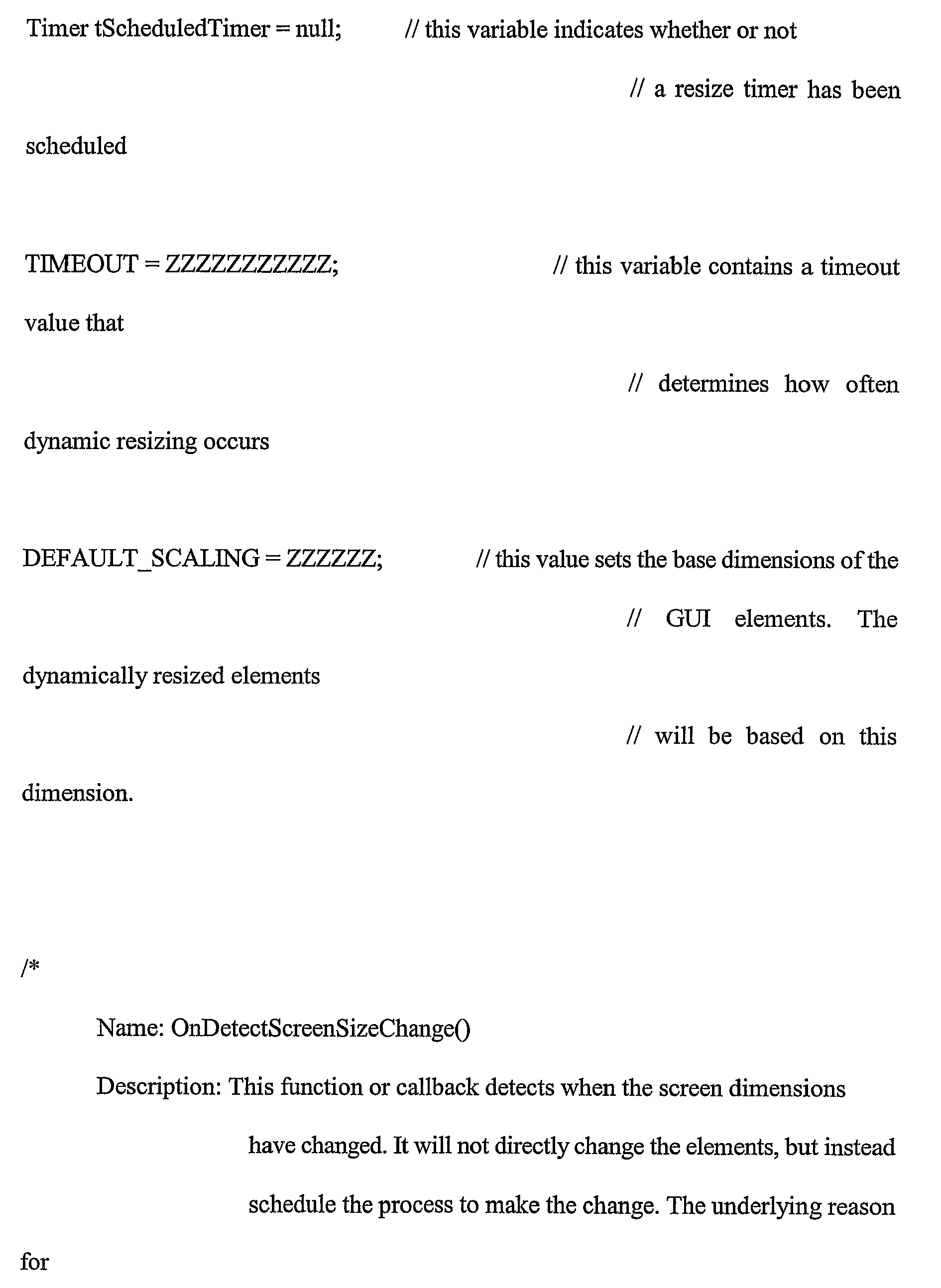
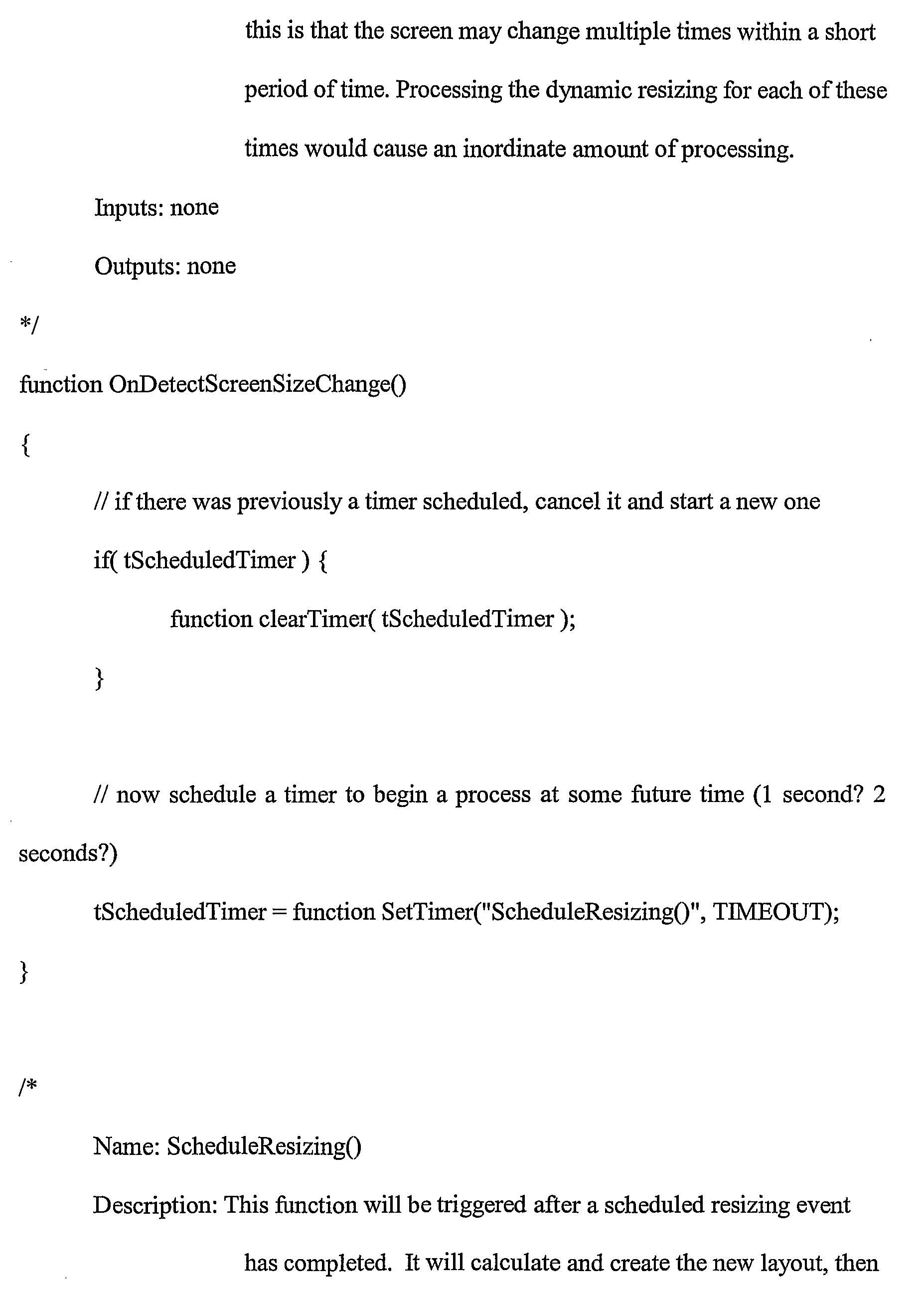
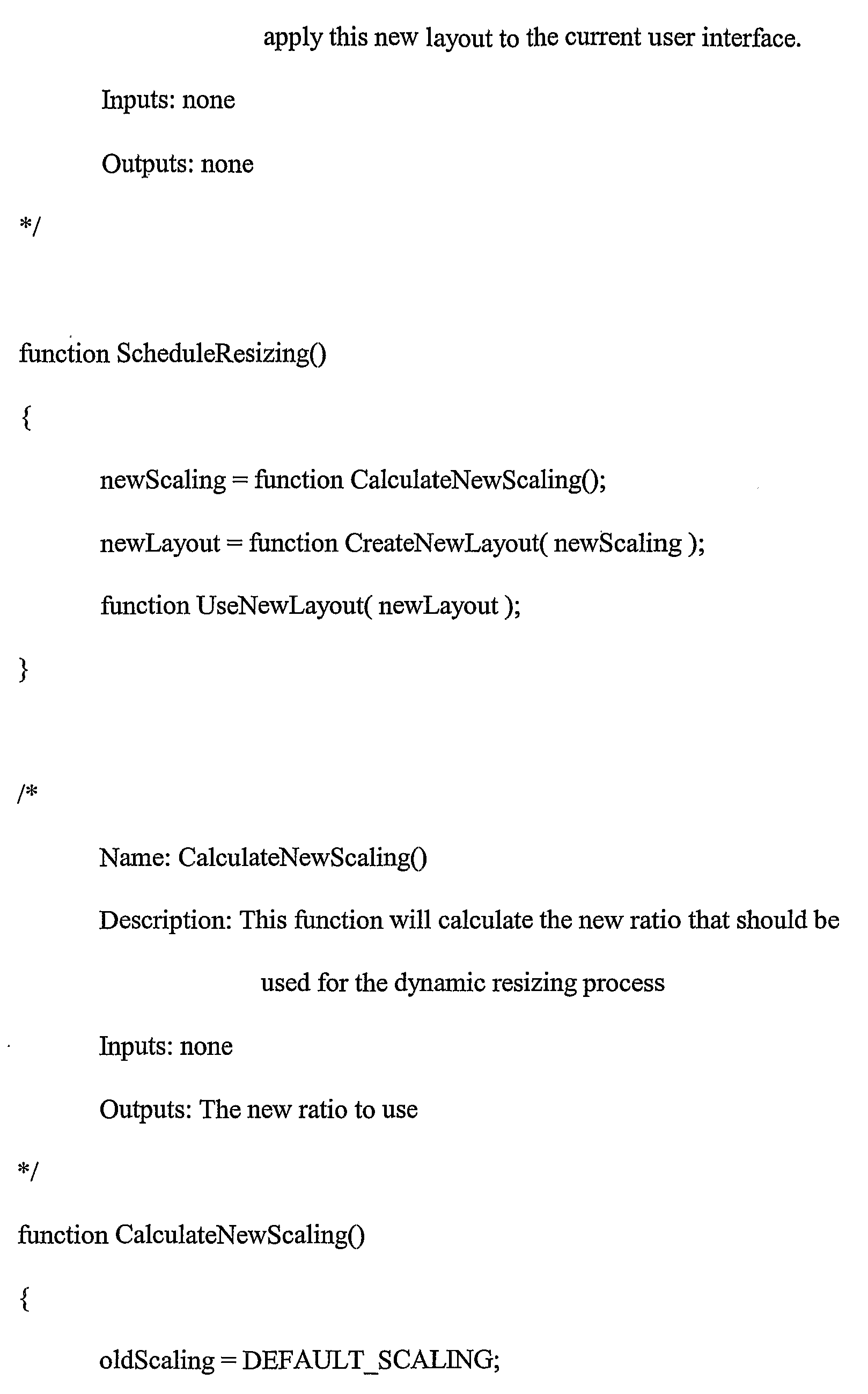
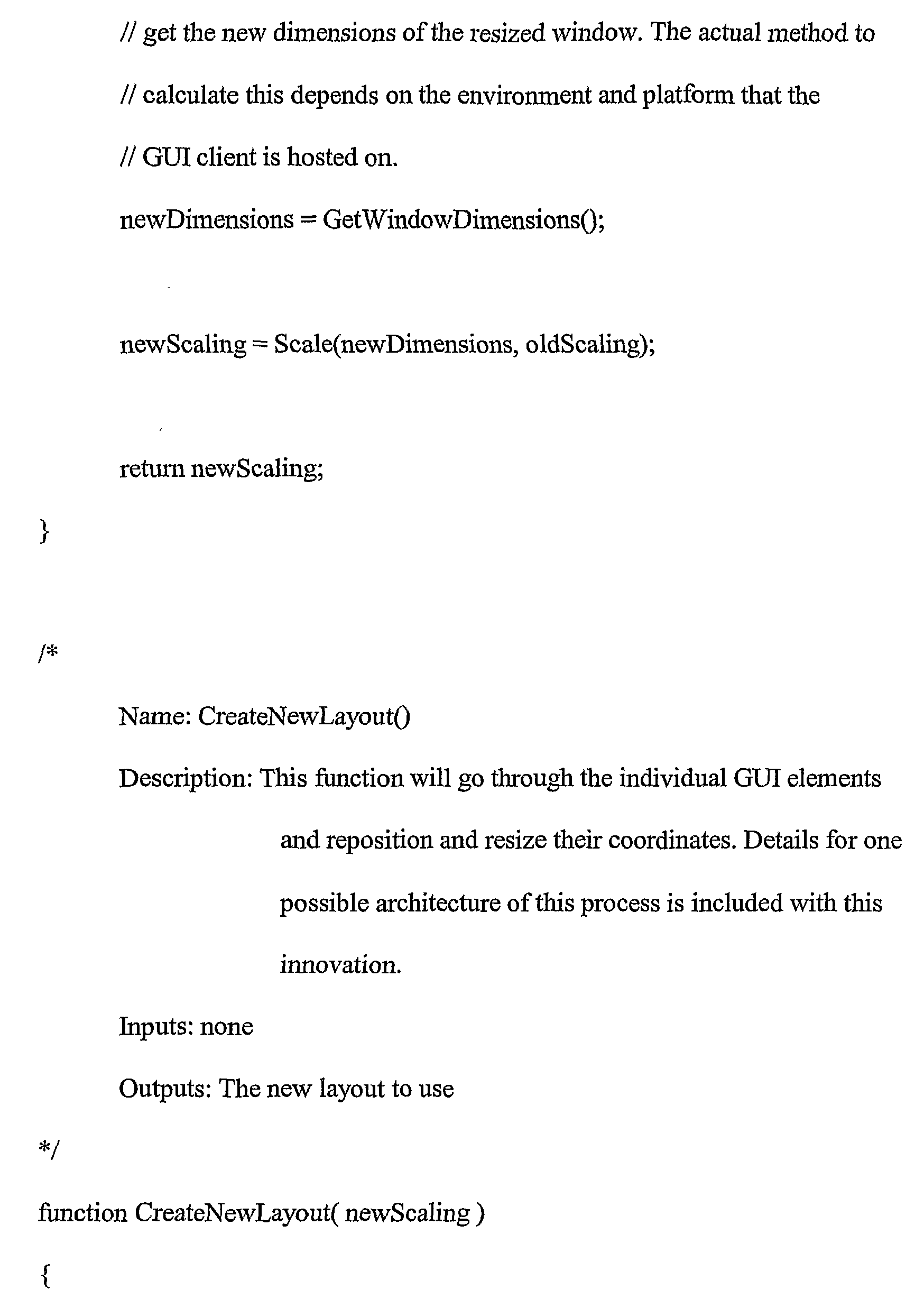
block 52 with new scale values from the new template. Alternatively, the new values may be calculated on the fly when no new template exists in accordance with principles above. For instance, one or more of the width "W", length "L", position from, e.g., theleft edge 30 andtop edge 28 of theGUI window 16, and font size of the text displayed in the element may be modified as appropriate to fit inside the new GUI window area. For example, the GUI elements can be enlarged or shrunk in proportion to the ratio between the current screen resolution and new screen resolution. - The pseudo code below provides further non-limiting details that may be implemented. The timer mentioned in the code below is implemented to avoid excessive reconfiguring when a user might quickly and repeatedly input re-sizing commands.

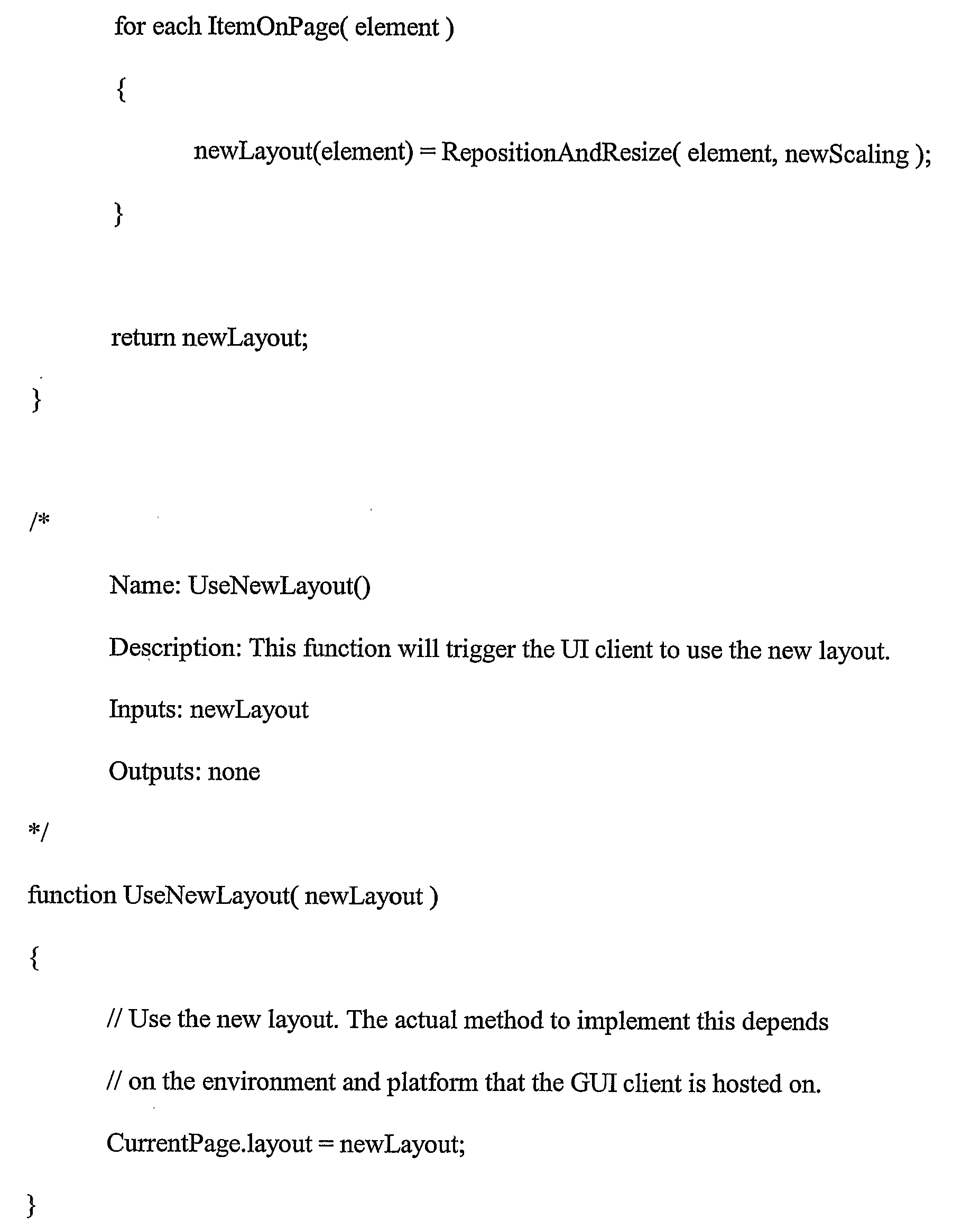
- In addition to the above, the present invention recognizes that when a button or other GUI object is reduced, text within the object may be too long to present in the smaller area. Thus, the maximum amount of text for a given font size that can fit within the new, smaller GUI object area is calculated, and then the intended text is cropper to this amount. One non-limiting way to crop the text includes replacing as many end characters of the text as needed to fit within the new area with a post-fix such as three periods, e.g., "the sky is blue and rainy" becomes "the sky is b..." Or, alpha-blending can be used to fade out text, e.g., "the sky is blue and rainy" becomes "the sky is blue", and the last few letters of "blue" can fade away to entirely transparent.
- While the particular SYSTEM AND METHOD FOR DYNAMIC RESIZING OF WEB-BASED GUIs is herein shown and described in detail and is fully capable of attaining the above-described objects of the invention, it is to be understood that the scope of the present invention is to be limited by nothing other than the appended claims.
Claims (11)
- A method for presenting a GUI (16), comprising:establishing at least one Web-based template defining a default GUI corresponding to a default screen resolution, the default GUI (16) including plural elements (32, 34), each element (32, 34) having corresponding parameters in the template wherein the parameters include element width, element length, element distances from at least two orthogonal GUI window boundaries, and size of font displayed in an element;obtaining a resolution of a screen on which the GUI (16) is to be displayed; scanning the web-based template to find elements of the GUI (16) which require re-sizing and/or re-configuring; presenting the GUI (16) on a display with the parameters altered as appropriate for the obtained resolution different from the default resolution,determining whether a resize timer variable which determines how often a dynamic resizing of the GUI (16) presented on the display occurs has been previously scheduled,cancelling the resize timer variable if it has been previously scheduled, andscheduling a new resize timer variable to begin, at a future time, a dynamic resizing of the GUI (16) presented on the display.
- The method of Claim 1, comprising establishing plural templates corresponding to respective default screen resolutions.
- The method of Claim 1, wherein the parameters include element width.
- The method of Claim 1, wherein the parameters include element length.
- The method of Claim 1, wherein the parameters include element distances from at least two orthogonal GUI window boundaries.
- The method of Claim 1, wherein the parameters include size of font displayed in an element..
- The method of Claim 1, wherein element layout is changed from a default layout when a screen resolution different from the default resolution is detected.
- A processor (18) executing logic to present a GUI on a display based on an at least one Web-based template defining a default GUI corresponding to a default screen resolution, the default GUI (16) including plural elements (32, 34), each element (32, 34) having corresponding parameters in the template, wherein each GUI element (32, 34) includes parameters including element width, element length, element distances from at least two orthogonal GUI window boundaries, and size of font displayed in an element, the processor being operable:to obtain a resolution of a screen on which the GUI (16) is to be displayed;to scan the web-based template to find elements of the GUI (16) which require re-sizing and/or re-configuring;to present the GUI (16) on the display with the parameters altered as appropriate for the obtained resolution different from the default resolution,to determine whether a resize timer variable which determines how often a dynamic resizing of the GUI presented on the display occurs has been previously scheduled,to cancel the resize timer variable if it has been previously scheduled, andto schedule a new resize timer variable to begin, at a future time, a dynamic resizing of the GUI (16) presented on the display.
- The processor of Claim 8, wherein the logic includes establishing plural templates corresponding to respective default screen resolutions.
- The processor of Claim 8, wherein element layout is changed from a default layout when a screen resolution different from the default resolution is detected.
- A system, comprising: an audio- video device (12); and a processor (18) according to claim 8 wherein the GUI (16) is displayed in at least a portion of the display (14) and comprises at least one column of control buttons (32), at least some control buttons (32) being selectable to alter an order of presentation of select buttons (34); and at least two columns of select buttons (34), a select button (34) being selectable to select a respective multimedia stream for playing thereof on the audio-video device (12).
Applications Claiming Priority (3)
| Application Number | Priority Date | Filing Date | Title |
|---|---|---|---|
| US70473605P | 2005-08-02 | 2005-08-02 | |
| US11/398,138 US20070033522A1 (en) | 2005-08-02 | 2006-04-04 | System and method for dynamic resizing of web-based GUIs |
| PCT/US2006/023893 WO2007018753A1 (en) | 2005-08-02 | 2006-06-20 | System and method for dynamic resizing of web-based guis |
Publications (3)
| Publication Number | Publication Date |
|---|---|
| EP1913459A1 EP1913459A1 (en) | 2008-04-23 |
| EP1913459A4 EP1913459A4 (en) | 2010-08-11 |
| EP1913459B1 true EP1913459B1 (en) | 2019-05-08 |
Family
ID=37718960
Family Applications (1)
| Application Number | Title | Priority Date | Filing Date |
|---|---|---|---|
| EP06773577.9A Ceased EP1913459B1 (en) | 2005-08-02 | 2006-06-20 | System and method for dynamic resizing of web-based guis |
Country Status (5)
| Country | Link |
|---|---|
| US (1) | US20070033522A1 (en) |
| EP (1) | EP1913459B1 (en) |
| JP (1) | JP2009503722A (en) |
| CN (1) | CN101238427B (en) |
| WO (1) | WO2007018753A1 (en) |
Families Citing this family (30)
| Publication number | Priority date | Publication date | Assignee | Title |
|---|---|---|---|---|
| KR20070059313A (en) * | 2005-12-06 | 2007-06-12 | 삼성전자주식회사 | Multimedia system having an application scaling function and an application scaling method and a recording medium on which a program for performing the method is recorded |
| KR101445603B1 (en) * | 2007-08-27 | 2014-09-29 | 삼성전자주식회사 | Adaptive video processing apparatus and video scaling method based on screen size of display device |
| KR101545137B1 (en) * | 2008-04-17 | 2015-08-19 | 삼성전자주식회사 | Method and apparatus for generating user interface |
| KR20090110202A (en) | 2008-04-17 | 2009-10-21 | 삼성전자주식회사 | Method and apparatus for displaying personalized user interface |
| KR101560183B1 (en) * | 2008-04-17 | 2015-10-15 | 삼성전자주식회사 | Method and apparatus for providing / receiving a user interface |
| US20090319897A1 (en) * | 2008-06-20 | 2009-12-24 | Microsoft Corporation | Enhanced user interface for editing images |
| CN101996206B (en) * | 2009-08-11 | 2013-07-03 | 阿里巴巴集团控股有限公司 | Method, device and system for displaying web page |
| WO2011033460A1 (en) * | 2009-09-17 | 2011-03-24 | Time To Know Establishment | Device, system, and method of educational content generation |
| FR2958762A1 (en) * | 2010-04-12 | 2011-10-14 | Romain Zylik | DEVICE FOR DISSEMINATION ON THE INTERNET OF SERVICES AND / OR WEBSITES WHICH CAN ADAPT DYNAMICALLY THE SENDING OF THEIR CONTENT BASED ON THE RESOLUTION OF THE SCREEN ON WHICH THEY ARE VIEWED |
| US8910065B2 (en) * | 2010-09-14 | 2014-12-09 | Microsoft Corporation | Secondary output generation from a presentation framework |
| CN102033754A (en) * | 2010-12-29 | 2011-04-27 | 上海网达软件有限公司 | Method for building middleware multi-resolution version codes by configuration files |
| CN102622217B (en) * | 2011-01-30 | 2016-03-30 | 中兴通讯股份有限公司 | A kind of method and system running application across screen |
| CN102298491B (en) * | 2011-06-16 | 2012-11-28 | 珠海全志科技股份有限公司 | Embedded graphical interface system and image generation method thereof |
| CN102298495A (en) * | 2011-06-27 | 2011-12-28 | 上海北大方正科技电脑系统有限公司 | Method for enabling android software to adapt to different screen densities |
| US20130111333A1 (en) * | 2011-10-31 | 2013-05-02 | Microsoft Corporation | Scaling objects while maintaining object structure |
| JP2013114424A (en) * | 2011-11-28 | 2013-06-10 | Sony Computer Entertainment Inc | Screen setting file generator, information processing apparatus, screen setting file generation method, screen displaying method, and screen setting file data structure |
| CN103164197A (en) * | 2011-12-14 | 2013-06-19 | 中兴通讯股份有限公司 | User interface (UI) distribution self-adaption method, mobile device and distribution generating device |
| US9223591B2 (en) * | 2012-08-30 | 2015-12-29 | International Business Machines Corporation | Sizing a pane of a window presented on a display |
| US9904394B2 (en) * | 2013-03-13 | 2018-02-27 | Immerson Corporation | Method and devices for displaying graphical user interfaces based on user contact |
| US20150095849A1 (en) | 2013-09-30 | 2015-04-02 | Microsoft Corporation | Dialogs positioned with action visualization |
| US9875501B2 (en) * | 2014-07-24 | 2018-01-23 | Zynga Inc. | Systems and methods for modifying input detection areas |
| CN105450701A (en) * | 2014-08-28 | 2016-03-30 | 冠捷投资有限公司 | System for remote dynamic management display device |
| JP6377028B2 (en) * | 2015-08-05 | 2018-08-22 | 東芝テック株式会社 | Display control apparatus and program |
| JP6250901B2 (en) | 2015-10-28 | 2017-12-20 | ファナック株式会社 | A robot system in which a CNC and a robot controller are connected via a communication network |
| CN105912350A (en) * | 2015-11-02 | 2016-08-31 | 乐视致新电子科技(天津)有限公司 | Software adaption method and software adaption system compatible to a plurality of screen parameters |
| US10620974B2 (en) | 2017-02-13 | 2020-04-14 | Microsoft Technology Licensing, Llc | Gallery control with dynamically determined control template replica sizes |
| JP7556253B2 (en) | 2020-09-29 | 2024-09-26 | 富士フイルムビジネスイノベーション株式会社 | Information processing device and program |
| US20230007335A1 (en) * | 2021-06-30 | 2023-01-05 | Rovi Guides, Inc. | Systems and methods of presenting video overlays |
| US12489940B2 (en) | 2021-06-30 | 2025-12-02 | Adeia Guides Inc. | Systems and methods of presenting video overlays |
| CN115695947B (en) * | 2021-07-29 | 2025-10-31 | 腾讯科技(深圳)有限公司 | Method, device, equipment and storage medium for searching video |
Citations (1)
| Publication number | Priority date | Publication date | Assignee | Title |
|---|---|---|---|---|
| US20040226051A1 (en) * | 2001-09-19 | 2004-11-11 | John Carney | System and method for construction, delivery and display of iTV content |
Family Cites Families (22)
| Publication number | Priority date | Publication date | Assignee | Title |
|---|---|---|---|---|
| JP2620576B2 (en) * | 1993-04-15 | 1997-06-18 | インターナショナル・ビジネス・マシーンズ・コーポレイション | Method and system for adjusting a graphical user interface according to a font requested by a user |
| JP2947704B2 (en) * | 1994-03-04 | 1999-09-13 | 株式会社ピーエフユー | Display screen creation method and display screen creation device |
| US6240555B1 (en) * | 1996-03-29 | 2001-05-29 | Microsoft Corporation | Interactive entertainment system for presenting supplemental interactive content together with continuous video programs |
| US6057836A (en) * | 1997-04-01 | 2000-05-02 | Microsoft Corporation | System and method for resizing and rearranging a composite toolbar by direct manipulation |
| WO1999010799A1 (en) * | 1997-08-22 | 1999-03-04 | Natrificial Llc | Method and apparatus for simultaneously resizing and relocating windows within a graphical display |
| US6330010B1 (en) * | 1997-11-21 | 2001-12-11 | Xsides Corporation | Secondary user interface |
| US6339434B1 (en) * | 1997-11-24 | 2002-01-15 | Pixelworks | Image scaling circuit for fixed pixed resolution display |
| US6201538B1 (en) * | 1998-01-05 | 2001-03-13 | Amiga Development Llc | Controlling the layout of graphics in a television environment |
| US6670964B1 (en) * | 1998-09-18 | 2003-12-30 | Hewlett-Packard Development Company, L.P. | Automatic scaler mode detection |
| US6970602B1 (en) * | 1998-10-06 | 2005-11-29 | International Business Machines Corporation | Method and apparatus for transcoding multimedia using content analysis |
| JP2000347780A (en) * | 1999-06-08 | 2000-12-15 | Nec Corp | Menu customizing method and recording medium with menu customization program recorded thereon |
| US7000190B2 (en) * | 1999-08-19 | 2006-02-14 | National Instruments Corporation | System and method for programmatically modifying a graphical program in response to program information |
| JP2002014754A (en) * | 2000-06-29 | 2002-01-18 | Minolta Co Ltd | Information display device, display controller, and information display method |
| US6801224B1 (en) * | 2000-09-14 | 2004-10-05 | International Business Machines Corporation | Method, system, and program for generating a graphical user interface window for an application program |
| US6772144B2 (en) * | 2001-01-31 | 2004-08-03 | Microsoft Corporation | Method and apparatus for applying an adaptive layout process to a layout template |
| JP2003015936A (en) * | 2001-06-28 | 2003-01-17 | Sony Corp | Information processing apparatus and information processing method, recording medium, and program |
| US7093001B2 (en) * | 2001-11-26 | 2006-08-15 | Microsoft Corporation | Methods and systems for adaptive delivery of multimedia contents |
| US7899915B2 (en) * | 2002-05-10 | 2011-03-01 | Richard Reisman | Method and apparatus for browsing using multiple coordinated device sets |
| US20040066407A1 (en) * | 2002-10-08 | 2004-04-08 | Microsoft Corporation | Intelligent windows movement and resizing |
| JP2004219791A (en) * | 2003-01-16 | 2004-08-05 | Matsushita Electric Ind Co Ltd | Portable display device |
| US7237227B2 (en) * | 2003-06-30 | 2007-06-26 | Siebel Systems, Inc. | Application user interface template with free-form layout |
| US7180531B2 (en) * | 2004-02-27 | 2007-02-20 | Microsoft Corporation | Method and apparatus for enabling application program compatibility with display devices having improved pixel density |
-
2006
- 2006-04-04 US US11/398,138 patent/US20070033522A1/en not_active Abandoned
- 2006-06-20 EP EP06773577.9A patent/EP1913459B1/en not_active Ceased
- 2006-06-20 JP JP2008524964A patent/JP2009503722A/en active Pending
- 2006-06-20 CN CN200680028490XA patent/CN101238427B/en not_active Expired - Fee Related
- 2006-06-20 WO PCT/US2006/023893 patent/WO2007018753A1/en not_active Ceased
Patent Citations (1)
| Publication number | Priority date | Publication date | Assignee | Title |
|---|---|---|---|---|
| US20040226051A1 (en) * | 2001-09-19 | 2004-11-11 | John Carney | System and method for construction, delivery and display of iTV content |
Also Published As
| Publication number | Publication date |
|---|---|
| EP1913459A1 (en) | 2008-04-23 |
| CN101238427B (en) | 2011-06-01 |
| JP2009503722A (en) | 2009-01-29 |
| EP1913459A4 (en) | 2010-08-11 |
| US20070033522A1 (en) | 2007-02-08 |
| CN101238427A (en) | 2008-08-06 |
| WO2007018753A1 (en) | 2007-02-15 |
Similar Documents
| Publication | Publication Date | Title |
|---|---|---|
| EP1913459B1 (en) | System and method for dynamic resizing of web-based guis | |
| CN100473139C (en) | Multimedia reproduction apparatus and reproduction method | |
| US11445256B2 (en) | Editing timed-text elements | |
| JP4142175B2 (en) | Graphical user interface device | |
| US7274382B2 (en) | Customizable background sizes and controls for changing background size | |
| JP5189978B2 (en) | Media user interface start menu | |
| CN100392653C (en) | Information processing device and control method thereof | |
| US20040100486A1 (en) | Method and system for image editing using a limited input device in a video environment | |
| EP2762997A2 (en) | Eye tracking user interface | |
| US20030218637A1 (en) | Menu for intuitive user navigation | |
| EP1156414B1 (en) | Display language conversion system, storage medium and information selling system | |
| US20070216712A1 (en) | Image transformation based on underlying data | |
| KR20070041522A (en) | How to display the content player and menu screen | |
| KR20070039036A (en) | How to display multimedia player and menu screen | |
| JPH10240746A (en) | Method for generating single-frame multimedia title | |
| US20130093673A1 (en) | Information processing apparatus, information processing method, storage medium, and program | |
| US20120166986A1 (en) | User interface for exploring media content | |
| CN105763920B (en) | Display device and display method | |
| MXPA05007152A (en) | System and method for photo editing. | |
| JP2009237865A (en) | Image display device to be operated with remote control key, method and program | |
| JP2005341182A (en) | Cooking recipe editing and presentating system | |
| JP4381216B2 (en) | Content playback device, mobile phone, content playback method, content playback program, and recording medium for recording content playback program | |
| US20030044171A1 (en) | Method of controlling the operations and display mode of an optical disc player between a video playback mode and a user agent mode | |
| CN105872681B (en) | Display device and display method | |
| US20030021593A1 (en) | Method of controlling the operations mode of an optical disc player between a video playback mode and a user agent mode |
Legal Events
| Date | Code | Title | Description |
|---|---|---|---|
| PUAI | Public reference made under article 153(3) epc to a published international application that has entered the european phase |
Free format text: ORIGINAL CODE: 0009012 |
|
| 17P | Request for examination filed |
Effective date: 20080103 |
|
| AK | Designated contracting states |
Kind code of ref document: A1 Designated state(s): DE FR GB |
|
| DAX | Request for extension of the european patent (deleted) | ||
| RBV | Designated contracting states (corrected) |
Designated state(s): DE FR GB |
|
| A4 | Supplementary search report drawn up and despatched |
Effective date: 20100713 |
|
| RIC1 | Information provided on ipc code assigned before grant |
Ipc: G06F 9/44 20060101AFI20100707BHEP |
|
| 17Q | First examination report despatched |
Effective date: 20160125 |
|
| REG | Reference to a national code |
Ref country code: DE Ref legal event code: R079 Ref document number: 602006057940 Country of ref document: DE Free format text: PREVIOUS MAIN CLASS: G06F0003000000 Ipc: G06F0009451000 |
|
| RIC1 | Information provided on ipc code assigned before grant |
Ipc: G06F 9/451 20080423AFI20181017BHEP Ipc: H04N 21/462 20080423ALI20181017BHEP |
|
| GRAP | Despatch of communication of intention to grant a patent |
Free format text: ORIGINAL CODE: EPIDOSNIGR1 |
|
| STAA | Information on the status of an ep patent application or granted ep patent |
Free format text: STATUS: GRANT OF PATENT IS INTENDED |
|
| INTG | Intention to grant announced |
Effective date: 20181128 |
|
| RIC1 | Information provided on ipc code assigned before grant |
Ipc: G06F 9/451 20180101AFI20181017BHEP Ipc: H04N 21/462 20110101ALI20181017BHEP |
|
| RIC1 | Information provided on ipc code assigned before grant |
Ipc: H04N 21/462 20110101ALI20181017BHEP Ipc: G06F 9/451 20180101AFI20181017BHEP |
|
| GRAS | Grant fee paid |
Free format text: ORIGINAL CODE: EPIDOSNIGR3 |
|
| GRAA | (expected) grant |
Free format text: ORIGINAL CODE: 0009210 |
|
| STAA | Information on the status of an ep patent application or granted ep patent |
Free format text: STATUS: THE PATENT HAS BEEN GRANTED |
|
| AK | Designated contracting states |
Kind code of ref document: B1 Designated state(s): DE FR GB |
|
| REG | Reference to a national code |
Ref country code: GB Ref legal event code: FG4D |
|
| REG | Reference to a national code |
Ref country code: DE Ref legal event code: R096 Ref document number: 602006057940 Country of ref document: DE |
|
| PGFP | Annual fee paid to national office [announced via postgrant information from national office to epo] |
Ref country code: FR Payment date: 20190625 Year of fee payment: 14 |
|
| PGFP | Annual fee paid to national office [announced via postgrant information from national office to epo] |
Ref country code: GB Payment date: 20190627 Year of fee payment: 14 Ref country code: DE Payment date: 20190627 Year of fee payment: 14 |
|
| REG | Reference to a national code |
Ref country code: DE Ref legal event code: R097 Ref document number: 602006057940 Country of ref document: DE |
|
| PLBE | No opposition filed within time limit |
Free format text: ORIGINAL CODE: 0009261 |
|
| STAA | Information on the status of an ep patent application or granted ep patent |
Free format text: STATUS: NO OPPOSITION FILED WITHIN TIME LIMIT |
|
| 26N | No opposition filed |
Effective date: 20200211 |
|
| REG | Reference to a national code |
Ref country code: DE Ref legal event code: R119 Ref document number: 602006057940 Country of ref document: DE |
|
| GBPC | Gb: european patent ceased through non-payment of renewal fee |
Effective date: 20200620 |
|
| PG25 | Lapsed in a contracting state [announced via postgrant information from national office to epo] |
Ref country code: GB Free format text: LAPSE BECAUSE OF NON-PAYMENT OF DUE FEES Effective date: 20200620 Ref country code: FR Free format text: LAPSE BECAUSE OF NON-PAYMENT OF DUE FEES Effective date: 20200630 |
|
| PG25 | Lapsed in a contracting state [announced via postgrant information from national office to epo] |
Ref country code: DE Free format text: LAPSE BECAUSE OF NON-PAYMENT OF DUE FEES Effective date: 20210101 |