CN114741035A - The reading method of the EDID data of the Linux system adapting to the whole Loongson machine - Google Patents
The reading method of the EDID data of the Linux system adapting to the whole Loongson machine Download PDFInfo
- Publication number
- CN114741035A CN114741035A CN202210412766.5A CN202210412766A CN114741035A CN 114741035 A CN114741035 A CN 114741035A CN 202210412766 A CN202210412766 A CN 202210412766A CN 114741035 A CN114741035 A CN 114741035A
- Authority
- CN
- China
- Prior art keywords
- edid
- data
- edid data
- read
- linux system
- Prior art date
- Legal status (The legal status is an assumption and is not a legal conclusion. Google has not performed a legal analysis and makes no representation as to the accuracy of the status listed.)
- Granted
Links
Images

Classifications
-
- G—PHYSICS
- G06—COMPUTING OR CALCULATING; COUNTING
- G06F—ELECTRIC DIGITAL DATA PROCESSING
- G06F3/00—Input arrangements for transferring data to be processed into a form capable of being handled by the computer; Output arrangements for transferring data from processing unit to output unit, e.g. interface arrangements
- G06F3/06—Digital input from, or digital output to, record carriers, e.g. RAID, emulated record carriers or networked record carriers
- G06F3/0601—Interfaces specially adapted for storage systems
- G06F3/0602—Interfaces specially adapted for storage systems specifically adapted to achieve a particular effect
- G06F3/061—Improving I/O performance
-
- G—PHYSICS
- G06—COMPUTING OR CALCULATING; COUNTING
- G06F—ELECTRIC DIGITAL DATA PROCESSING
- G06F3/00—Input arrangements for transferring data to be processed into a form capable of being handled by the computer; Output arrangements for transferring data from processing unit to output unit, e.g. interface arrangements
- G06F3/06—Digital input from, or digital output to, record carriers, e.g. RAID, emulated record carriers or networked record carriers
- G06F3/0601—Interfaces specially adapted for storage systems
- G06F3/0628—Interfaces specially adapted for storage systems making use of a particular technique
- G06F3/0638—Organizing or formatting or addressing of data
- G06F3/0643—Management of files
-
- G—PHYSICS
- G06—COMPUTING OR CALCULATING; COUNTING
- G06F—ELECTRIC DIGITAL DATA PROCESSING
- G06F3/00—Input arrangements for transferring data to be processed into a form capable of being handled by the computer; Output arrangements for transferring data from processing unit to output unit, e.g. interface arrangements
- G06F3/06—Digital input from, or digital output to, record carriers, e.g. RAID, emulated record carriers or networked record carriers
- G06F3/0601—Interfaces specially adapted for storage systems
- G06F3/0628—Interfaces specially adapted for storage systems making use of a particular technique
- G06F3/0638—Organizing or formatting or addressing of data
- G06F3/0644—Management of space entities, e.g. partitions, extents, pools
-
- G—PHYSICS
- G06—COMPUTING OR CALCULATING; COUNTING
- G06F—ELECTRIC DIGITAL DATA PROCESSING
- G06F3/00—Input arrangements for transferring data to be processed into a form capable of being handled by the computer; Output arrangements for transferring data from processing unit to output unit, e.g. interface arrangements
- G06F3/06—Digital input from, or digital output to, record carriers, e.g. RAID, emulated record carriers or networked record carriers
- G06F3/0601—Interfaces specially adapted for storage systems
- G06F3/0628—Interfaces specially adapted for storage systems making use of a particular technique
- G06F3/0655—Vertical data movement, i.e. input-output transfer; data movement between one or more hosts and one or more storage devices
- G06F3/0659—Command handling arrangements, e.g. command buffers, queues, command scheduling
-
- G—PHYSICS
- G06—COMPUTING OR CALCULATING; COUNTING
- G06F—ELECTRIC DIGITAL DATA PROCESSING
- G06F3/00—Input arrangements for transferring data to be processed into a form capable of being handled by the computer; Output arrangements for transferring data from processing unit to output unit, e.g. interface arrangements
- G06F3/14—Digital output to display device ; Cooperation and interconnection of the display device with other functional units
Landscapes
- Engineering & Computer Science (AREA)
- Theoretical Computer Science (AREA)
- Human Computer Interaction (AREA)
- Physics & Mathematics (AREA)
- General Engineering & Computer Science (AREA)
- General Physics & Mathematics (AREA)
- Stored Programmes (AREA)
Abstract
本发明涉及一种Linux系统适配龙芯整机的EDID数据的读取方法,龙芯为龙芯2K1000,该读取方法如下:令显示驱动从eeprom中读取EDID数据;或者,当显示驱动从eeprom中未读取到EDID数据,则从Linux系统中读取EDID数据;或者,当显示驱动从eeprom中和Linux系统中均未读取到EDID数据,则显示驱动从开源固件PMON中读取EDID数据。本发明的主要目的是提供一种Linux系统适配龙芯整机的EDID数据的读取方法,以解决当硬件厂商未考虑eeprom时,使得显示驱动无法读取EDID数据的问题。
The invention relates to a method for reading EDID data of a Linux system adapted to a complete Loongson machine. Loongson is Loongson 2K1000, and the reading method is as follows: the display driver reads the EDID data from the eeprom; or, when the display driver reads the EDID data from the eeprom If the EDID data is not read, the EDID data is read from the Linux system; or, when the display driver does not read the EDID data from the eeprom and the Linux system, the display driver reads the EDID data from the open source firmware PMON. The main purpose of the present invention is to provide a method for reading the EDID data of a Linux system adapted to the whole Loongson machine, so as to solve the problem that the display driver cannot read the EDID data when the hardware manufacturer does not consider eeprom.
Description
技术领域technical field
本发明涉及一种EDID数据的读取方法,具体涉及一种Linux系统适配龙芯整机的EDID数据的读取方法。The invention relates to a method for reading EDID data, in particular to a method for reading EDID data of a Linux system adapting to a complete Loongson machine.
背景技术Background technique
Extended Display Identification Data(EDID),中文是扩展显示标识数据。是VESA在制定DDC显示器数据通道通信协议时,制定的有关显示器识别数据的标准。EDID存储在显示器中的DDC存储器中,当电脑主机与显示器连接后,电脑主机会通道DDC通道读取显示器DDC存储器中的存储的EDID数据。Extended Display Identification Data (EDID), Chinese is extended display identification data. It is a standard for display identification data formulated by VESA when it develops the DDC display data channel communication protocol. The EDID is stored in the DDC memory of the monitor. When the computer host is connected to the monitor, the computer host will read the stored EDID data in the DDC memory of the monitor through the DDC channel.
在龙芯2K1000平台上,i2c总线上挂着eeprom(可擦除电子可编程只读存储器),而在eeprom中存放着EEID数据。On the Loongson 2K1000 platform, eeprom (erasable electronic programmable read-only memory) is hung on the i2c bus, and EEID data is stored in the eeprom.
EDID数据存放在eeprom中,则显示驱动从eeprom所挂载的i2c总线地址上去读取EDID数据。显示驱动通过i2c总线,读取eeprom中存放的edid数据。If the EDID data is stored in the eeprom, the display driver reads the EDID data from the i2c bus address mounted by the eeprom. The display driver reads the edid data stored in the eeprom through the i2c bus.
而如果当硬件厂商在硬件设计时,没有考虑eeprom设备时(此设备用来存放EDID数据),那就存在一个问题,显示驱动无法从eeprom中读取EDID数据。If the hardware manufacturer does not consider the eeprom device (this device is used to store EDID data) when designing the hardware, there is a problem that the display driver cannot read the EDID data from the eeprom.
发明内容SUMMARY OF THE INVENTION
本发明的主要目的是提供一种Linux系统适配龙芯整机的EDID数据的读取方法,以解决当硬件厂商未考虑eeprom时,使得显示驱动依然能够读取EDID数据。The main purpose of the present invention is to provide a method for reading the EDID data of a Linux system adapted to the whole Loongson machine, so as to solve the problem that when the hardware manufacturer does not consider eeprom, the display driver can still read the EDID data.
为了完成上述目的,本发明提供了一种Linux系统适配龙芯整机的EDID数据的读取方法,龙芯整机为龙芯2K1000,该读取方法如下:In order to accomplish the above purpose, the present invention provides a method for reading the EDID data of a Linux system adapting to a complete Loongson machine, and the complete Loongson machine is Loongson 2K1000, and the reading method is as follows:
令显示驱动从eeprom中读取EDID数据;Make the display driver read EDID data from eeprom;
或者,当显示驱动从eeprom中未读取到EDID数据,则从Linux系统中读取预装在Linux系统中的EDID数据;Or, when the display driver does not read the EDID data from the eeprom, read the EDID data pre-installed in the Linux system from the Linux system;
或者,当显示驱动从eeprom中和Linux系统中均未读取到EDID数据,则显示驱动从开源固件PMON中读取预装在开源固件PMON中的EDID数据。Or, when the display driver does not read the EDID data from the eeprom and the Linux system, the display driver reads the EDID data preinstalled in the open source firmware PMON from the open source firmware PMON.
优选的,EDID数据在Linux系统的存储方法为:Preferably, the storage method of EDID data in the Linux system is:
S10:在Linux系统中安装edid工具软件包;S10: Install the edid tool package in the Linux system;
S20:生成指定分辨率的edid.bin文件,其中,该指定分辨率为当前显示的最佳分辨率;S20: Generate an edid.bin file with a specified resolution, where the specified resolution is the best resolution currently displayed;
S30:创建存放EDID数据的edid目录文件夹;S30: Create an edid directory folder for storing EDID data;
S40:利用步骤S20中的edid.bin文件生成新的EDID数据,并将这些EDID数据拷贝至步骤S30中的edid目录文件夹;S40: utilize the edid.bin file in step S20 to generate new EDID data, and copy these EDID data to the edid directory folder in step S30;
S50:修改开机引导参数,在龙芯开源固件PMON平台上,直接修改系统引导文件;S50: Modify the boot boot parameters, and directly modify the system boot file on the Loongson open source firmware PMON platform;
S60:确认内核配置项是否打开,如果打开,则完成EDID数据的存储,如果未打开,则打开内核配置项,更新内核,并替换到目标系统。S60: Confirm whether the kernel configuration item is turned on, if turned on, complete the storage of EDID data, if not turned on, turn on the kernel configuration item, update the kernel, and replace it with the target system.
进一步优选的,在步骤S40中,生成新的EDID数据是通过以下方式获得:Further preferably, in step S40, generating new EDID data is obtained by the following methods:
通过从Linux系统目录中加载伪造的指定分辨率的edid.bin文件,然后通过get-edid工具或monitor-get-edid工具生成新的EDID数据;By loading the fake edid.bin file with the specified resolution from the Linux system directory, and then generating new EDID data through the get-edid tool or the monitor-get-edid tool;
或者,直接从edid-generator软件里面的现有的EDID数据拷贝得到。Or, copy directly from the existing EDID data in the edid-generator software.
进一步优选的,在步骤S50中,修改系统引导文件方式如下:Further preferably, in step S50, the method of modifying the system boot file is as follows:
在系统引导文件中增加如下参数:Add the following parameters to the system boot file:
GRUB_CMDLINE_LINUX_DEFAULT="drm_kms_helper.edid_firmware=edid/显示器分辨率数值.bin quiet",修改完成后,更新gruby引导。GRUB_CMDLINE_LINUX_DEFAULT="drm_kms_helper.edid_firmware=edid/display resolution value.bin quiet", after the modification is completed, update the gruby boot.
优选的,在开源固件PMON中读取EDID数据的方法如下:Preferably, the method for reading EDID data in the open source firmware PMON is as follows:
从开源固件PMON中读取所有的硬件配置数据,确认读取的硬件配置数据中是否存在结点/soc/edid@0,如果存在结点/soc/edid@0则继续确认是否存在用于存放EDID数据的edid-buf子节点,如果存在edid-buf子节点则读取EDID数据,如果不存在edid-buf子节点则读取EDID数据失败返回;Read all hardware configuration data from the open source firmware PMON, and confirm whether there is a node /soc/edid@0 in the read hardware configuration data. If there is a node /soc/edid@0, continue to confirm whether there is a node for storing The edid-buf child node of the EDID data, if there is an edid-buf child node, read the EDID data, if there is no edid-buf child node, read the EDID data and return if it fails;
如果不存在结点/soc/edid@0则读取EDID数据失败返回。If the node /soc/edid@0 does not exist, it will fail to read the EDID data and return.
本发明的有益效果为:The beneficial effects of the present invention are:
本发明提供了另一种显示驱动读取EDID数据的方法,首先将EDID数据预先存储在Linux系统的磁盘分区和/或开源固件PMON中,这样,当显示驱动无法从eeprom中读取EDID数据时,则显示驱动能够从Linux系统分区中读取预先存储的EDID数据,或者,当EDID数据在Linux系统中也无法读取到时,显示驱动也可以从开源固件PMON读取EDID数据。The present invention provides another method for the display driver to read EDID data. First, the EDID data is pre-stored in the disk partition of the Linux system and/or the open source firmware PMON, so that when the display driver cannot read the EDID data from the eeprom , the display driver can read the pre-stored EDID data from the Linux system partition, or, when the EDID data cannot be read in the Linux system, the display driver can also read the EDID data from the open source firmware PMON.
附图说明Description of drawings
下面结合附图和具体实施方式对本发明作进一步详细的说明。The present invention will be described in further detail below with reference to the accompanying drawings and specific embodiments.
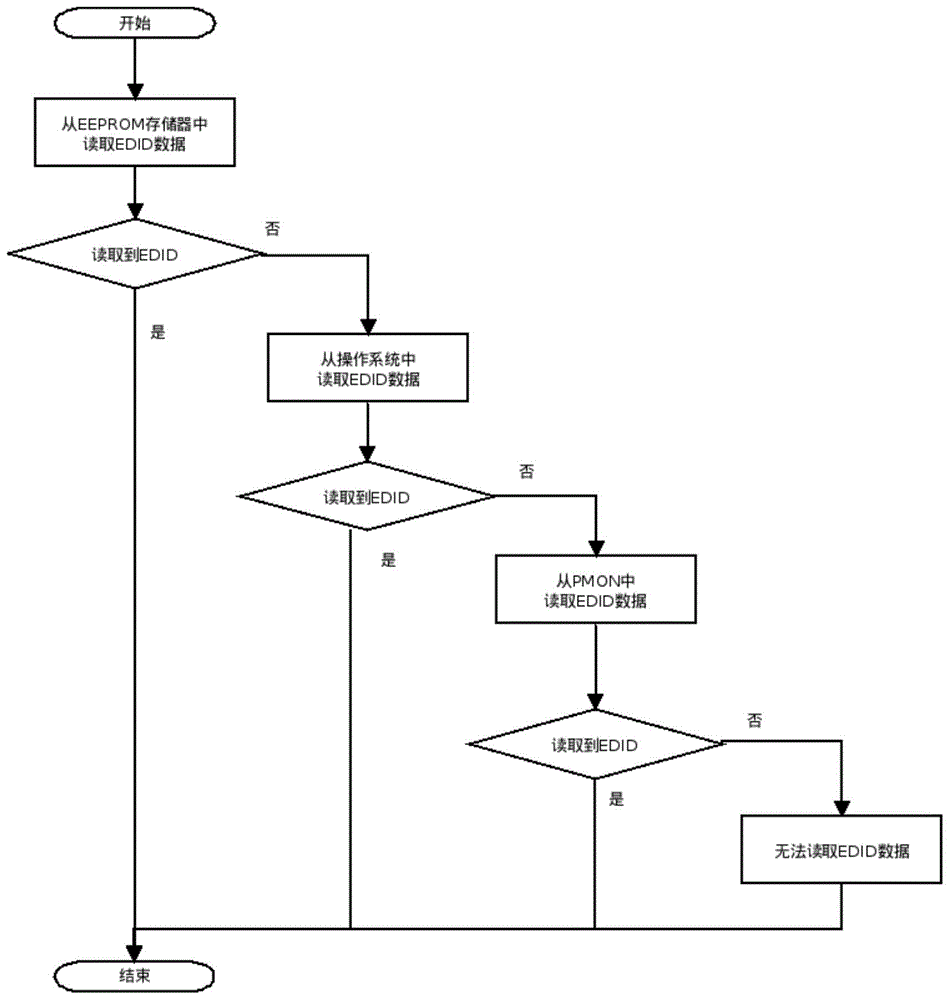
图1是本发明的工作流程示意图。FIG. 1 is a schematic diagram of the work flow of the present invention.
具体实施方式Detailed ways
下面结合本发明实施例中的附图,对本发明实施例中的技术方案进行清楚、完整地描述。在下面的描述中阐述了很多具体细节以便于充分理解本发明,但是本发明还可以采用其他不同于在此描述的其它方式来实施,本领域技术人员可以在不违背本发明内涵的情况下做类似推广,因此本发明不受下面公开的具体实施例的限制。The technical solutions in the embodiments of the present invention will be clearly and completely described below with reference to the accompanying drawings in the embodiments of the present invention. Many specific details are set forth in the following description to facilitate a full understanding of the present invention, but the present invention can also be implemented in other ways different from those described herein, and those skilled in the art can do so without departing from the connotation of the present invention. Similar promotion, therefore, the present invention is not limited by the specific embodiments disclosed below.
如图1所示,本实施例提供了一种Linux系统适配龙芯整机的EDID数据的读取方法,该龙芯整机为龙芯2K1000。该读取方法如下:As shown in FIG. 1 , this embodiment provides a method for reading EDID data of a Linux system adapted to a complete Loongson machine, which is a Loongson 2K1000. The read method is as follows:
首先,令显示驱动从eeprom中读取EDID数据;而如果当显示驱动无法从eeprom中读取到EDID数据时,则显示驱动能够从Linux系统中读取预装在Linux系统中的EDID数据。另外,当显示驱动无法从eeprom中和Linux系统中均未读取到EDID数据,则显示驱动能够从开源固件PMON中读取预装在开源固件PMONEDID数据。First, make the display driver read the EDID data from the eeprom; and if the display driver cannot read the EDID data from the eeprom, the display driver can read the EDID data preinstalled in the Linux system from the Linux system. In addition, when the display driver cannot read the EDID data from neither the eeprom nor the Linux system, the display driver can read the PMONEDID data pre-installed in the open source firmware from the open source firmware PMON.
具体的,在本实施例中,EDID数据在Linux系统的存储和读取方法为:Specifically, in this embodiment, the storage and reading methods of EDID data in the Linux system are:
S10:在Linux系统中edid安装工具软件包,例如read-edid或者monitor-edid工具软件包;本实施例中采用read-edid作为应用实施例:安装工具软件包read-edid的命令如下:S10: edid installation tool software package in the Linux system, such as read-edid or monitor-edid tool software package; in this embodiment, read-edid is used as an application example: the command to install the tool software package read-edid is as follows:
$sudo apt-get install read-edid。$ sudo apt-get install read-edid.
S20:生成指定分辨率的edid.bin文件,其中,该指定分辨率为当前显示的最佳分辨率。在本实施例中用1600x1050最佳分辨率来举例:S20: Generate an edid.bin file with a specified resolution, where the specified resolution is the best resolution currently displayed. In this example, the best resolution of 1600x1050 is used as an example:
$sudo get-edid>1600x1050.bin$sudo get-edid>1600x1050.bin
可以通过edid-decode来确认edid.bin文件的详细内容。The detailed content of the edid.bin file can be confirmed by edid-decode.
S30:创建存放EDID数据的edid目录文件夹;具体操作方式如下:S30: Create an edid directory folder for storing EDID data; the specific operation methods are as follows:
$sudo mkdir/usr/lib/firmware/edid。$ sudo mkdir /usr/lib/firmware/edid.
S40:利用步骤S20中的edid.bin文件生成新的EDID数据,并将这些EDID数据拷贝至步骤S30中的edid目录文件夹;操作方式如下:S40: use the edid.bin file in step S20 to generate new EDID data, and copy these EDID data to the edid directory folder in step S30; the operation mode is as follows:
$sudo cp 1600x1050.bin/usr/lib/firmware/edid。$ sudo cp 1600x1050.bin /usr/lib/firmware/edid.
在本步骤中,新生成的EDID数据通过如下方式获得:In this step, the newly generated EDID data is obtained as follows:
通过从Linux系统目录(/usr/lib/firmware/edid/)中加载伪造的指定分辨率edid.edid文件(edid.bin,后缀是.bin的文件),然后通过get-edid工具或者monitor-get-edid工具生成。另外,新生成的EDID数据也可以将edid-generator软件里面的现成数据,直接拷贝到固件下目标目录(通常是/usr/lib/firmware/edid/)。By loading the fake specified resolution edid.edid file (edid.bin, the suffix is .bin file) from the Linux system directory (/usr/lib/firmware/edid/), and then through the get-edid tool or monitor-get -edid tool generation. In addition, the newly generated EDID data can also directly copy the existing data in the edid-generator software to the target directory under the firmware (usually /usr/lib/firmware/edid/).
另外,如果edid文件内的数据内容有误,可通过编辑软件(Phoenix+EDID+Designer+显示器EDID编辑器)来修改。In addition, if the data content in the edid file is wrong, it can be modified by editing software (Phoenix+EDID+Designer+display EDID editor).
S50:修改开机引导参数,在龙芯开源固件PMON平台上,直接修改系统引导(路径:/boot/boot.cfg)文件;具体操作如下:S50: Modify the boot parameters, and directly modify the system boot (path: /boot/boot.cfg) file on the Loongson open source firmware PMON platform; the specific operations are as follows:
$sudo edit/etc/default/grub。$ sudo edit /etc/default/grub.
在/boot/boot.cfg文件中增加如下参数:Add the following parameters to the /boot/boot.cfg file:
GRUB_CMDLINE_LINUX_DEFAULT="drm_kms_helper.edid_firmware=edid/(显示器分辨率数值).bin quiet",这里采用的分辨率数值为1600x1050,GRUB_CMDLINE_LINUX_DEFAULT="drm_kms_helper.edid_firmware=edid/(display resolution value).bin quiet", the resolution value used here is 1600x1050,
因此,增加的参数为:Therefore, the added parameters are:
GRUB_CMDLINE_LINUX_DEFAULT="drm_kms_helper.edid_firmware=edid/1600x1050.bin quiet";GRUB_CMDLINE_LINUX_DEFAULT="drm_kms_helper.edid_firmware=edid/1600x1050.bin quiet";
另外,如果操作人员不确定上述操作是否准确时,可以通过增加调试参数,如drm.debug=14和video=VGA-1:e---------------------@VGA-1,根据增加drm.debug=14后,看输出的日志来确定,输出结果也有可能是其他名字,根据实际情况确定。另外,也可以通过edid-decode命令来查看/sys/devices目录下的edid二进制文件,确认对应路径下,是否存在edid二进制文件(包含EDID格式数据)。最后,更新grub引导文件($sudo update-grub)。In addition, if the operator is not sure whether the above operation is accurate, you can add debugging parameters, such as drm.debug=14 and video=VGA-1:e----------------- ----@VGA-1, after adding drm.debug=14, look at the output log to determine, the output result may also be other names, which is determined according to the actual situation. In addition, you can also use the edid-decode command to view the edid binary file in the /sys/devices directory to confirm whether there is an edid binary file (including EDID format data) in the corresponding path. Finally, update the grub boot file ($sudo update-grub).
S60:确认内核配置项(CONFIG_DRM_LOAD_EDID_FIRMWARE)是否打开,如果打开,则完成EDID数据的存储,如果未打开,则打开内核配置项,更新内核,并替换到目标系统。S60: Confirm whether the kernel configuration item (CONFIG_DRM_LOAD_EDID_FIRMWARE) is turned on. If it is turned on, the storage of EDID data is completed. If it is not turned on, turn on the kernel configuration item, update the kernel, and replace it with the target system.
查看edid二进制文件,其包含的EDID数据格式的信息是否有效,可通过如下命令,其对应软件包是read-edid(或monitor-edid),这里采用read-edid软件包中的命令parse-edid,来解析分辨率为1600x1050的二进制文件,如下:To check the edid binary file, whether the information contained in the EDID data format is valid, you can use the following command. To parse a binary file with a resolution of 1600x1050, as follows:
$parse-edid<1600x1050.bin:$parse-edid<1600x1050.bin:
parse-edid:parse-edid version 2.0.0parse-edid:parse-edid version 2.0.0
parse-edid:EDID checksum passed.parse-edid: EDID checksum passed.
#EDID version 1revision 3#EDID version 1revision 3
Section"Monitor"Section "Monitor"
#Block type:2:0 3:fc#Block type:2:0 3:fc
Identifier"22T41-H-AN"Identifier "22T41-H-AN"
VendorName"KTC"VendorName"KTC"
ModelName"22T41-H-AN"ModelName"22T41-H-AN"
#Block type:2:0 3:fc#Block type:2:0 3:fc
#Block type:2:0 3:fd#Block type:2:0 3:fd
HorizSync 15-68HorizSync 15-68
VertRefresh 49-61VertRefresh 49-61
#Max dot clock(video bandwidth)150MHz#Max dot clock(video bandwidth)150MHz
#DPMS capabilities:Active off:no Suspend:no Standby:no#DPMS capabilities:Active off:no Suspend:no Standby:no
Mode"1280x720"Mode "1280x720"
#vfreq 60.000Hz,hfreq 45.000kHz#vfreq 60.000Hz, hfreq 45.000kHz
DotClockDotClock
74.25000074.250000
HTimingsHTimings
1280 1390 1430 16501280 1390 1430 1650
VTimingsVTimings
720 725 730 750720 725 730 750
Flags"+HSync""+Vsync"Flags"+HSync""+Vsync"
EndModeEndMode
Mode"1680x1050"#vfreq 59.883Hz,hfreq 64.674kHzMode"1680x1050"#vfreq 59.883Hz,hfreq 64.674kHz
DotClockDotClock
119.000000119.000000
HTimingsHTimings
1680 1728 1760 18401680 1728 1760 1840
VTimingsVTimings
1050 1053 1059 10801050 1053 1059 1080
Flags"-HSync""+Vsync"Flags"-HSync""+Vsync"
EndMode#Block type:2:0 3:fcEndMode#Block type:2:0 3:fc
#Block type:2:0 3:fd#Block type:2:0 3:fd
EndSectionEndSection
查看系统加载的启动项信息命令,类似输出如下:View the startup item information command loaded by the system, and the output is similar to the following:
$cat/proc/cmdline$cat /proc/cmdline
Kernel command line:BOOT_IMAGE=/boot/vmlinuz-3.8.0-30-genericroot=UUID=939b3111-4906-46ae-9ad7-7faa783d490d rodrm_kms_helper.edid_firmware=edid/1600x1050.bin video=VGA-1:e quiet…Kernel command line: BOOT_IMAGE=/boot/vmlinuz-3.8.0-30-genericroot=UUID=939b3111-4906-46ae-9ad7-7faa783d490d rodrm_kms_helper.edid_firmware=edid/1600x1050.bin video=VGA-1:e quiet…
指定从固件firmware加载edid文件,启动参数设置方法如下:Specify to load the edid file from the firmware, and the startup parameter setting method is as follows:
'drm_kms_helper.edid_firmware=edid/1600x1050.bin''drm_kms_helper.edid_firmware=edid/1600x1050.bin'
video相关参数介绍,格式如下:Video related parameters are introduced, the format is as follows:
video=<conn>:<xres>x<yres>[M][R][-<bpp>][@<refresh>][i][m][eDd]video=<conn>:<xres>x<yres>[M][R][-<bpp>][@<refresh>][i][m][eDd]
<conn>:Connector,e.g.DVI-I-1,see/sys/class/drm/foravailableconnectors<conn>:Connector,e.g.DVI-I-1,see/sys/class/drm/foravailableconnectors
<xres>x<yres>:resolution<xres>x<yres>:resolution
M:compute a CVT mode?M:compute a CVT mode?
R:reduced blanking?R: reduced blanking?
-<bpp>:color depth-<bpp>:color depth
@<refresh>:refresh rate@<refresh>:refresh rate
i:interlaced(non-CVT mode)i:interlaced(non-CVT mode)
m:margins?m:margins?
e:output forced to one:output forced to on
d:output forced to offd: output forced to off
D:digital output forced to on(e.g.DVI-I connector)D:digital output forced to on(e.g.DVI-I connector)
如果多路输出,如DVI-1开启,TV-1关闭,则启动参数设置如下:If multiple outputs, such as DVI-1 is turned on and TV-1 is turned off, the startup parameters are set as follows:
'video=DVI-1:1024x768@85video=TV-1:d'。'video=DVI-1:1024x768@85video=TV-1:d'.
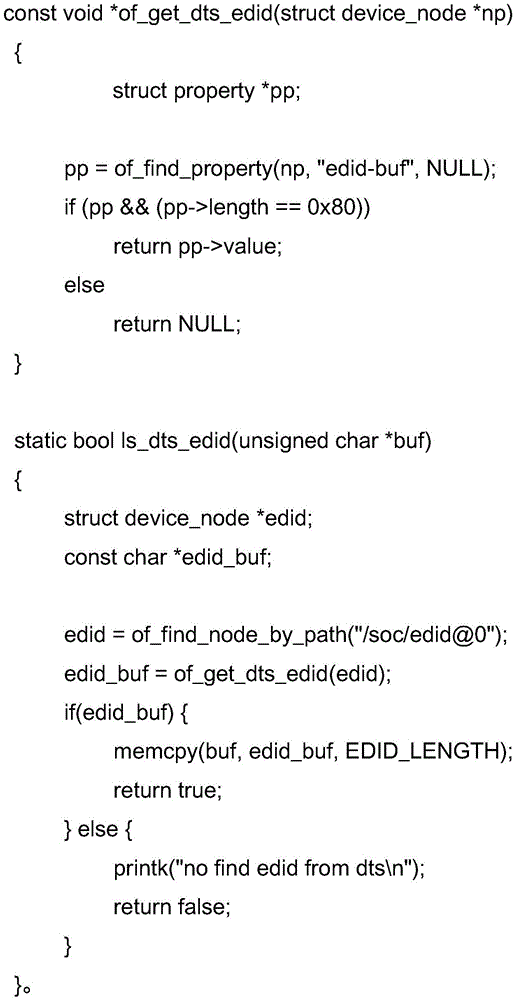
在本实施例中,PMON是龙芯早期的BIOS固件,用于引导和存放硬件信息,其刷写入开机flash存储中。其从开源固件PMON中读取EDID数据的方法为:从开源固件PMON中读取所有的硬件配置数据,确认读取的硬件配置数据中是否存在结点/soc/edid@0,如果存在结点/soc/edid@0则继续确认是否存在用于存放EDID数据的edid-buf子节点,如果存在edid-buf子节点则读取EDID数据,如果不存在edid-buf子节点则读取EDID数据失败返回;如果不存在结点/soc/edid@0则读取EDID数据失败返回。In this embodiment, PMON is an early BIOS firmware of Loongson, used for booting and storing hardware information, and it is written into the boot flash storage. The method of reading EDID data from open source firmware PMON is as follows: read all hardware configuration data from open source firmware PMON, confirm whether there is node /soc/edid@0 in the read hardware configuration data, if there is a node /soc/edid@0 continues to confirm whether there is an edid-buf child node for storing EDID data, if there is an edid-buf child node, read EDID data, if there is no edid-buf child node, read EDID data fails Return; if there is no node /soc/edid@0, it will fail to read EDID data and return.
或者,也可以在内核代码中增加读取以下方式:Alternatively, you can also add the following way to read in the kernel code:
显然,所描述的实施例仅仅是本发明的一部分实施例,而不是全部的实施例。基于本发明中的实施例,本领域普通技术人员在没有做出创造性劳动前提下所获得的所有其他实施例,都属于本发明保护的范围。Obviously, the described embodiments are only some, but not all, embodiments of the present invention. Based on the embodiments of the present invention, all other embodiments obtained by those of ordinary skill in the art without creative efforts shall fall within the protection scope of the present invention.
Claims (5)
Priority Applications (1)
| Application Number | Priority Date | Filing Date | Title |
|---|---|---|---|
| CN202210412766.5A CN114741035B (en) | 2022-04-19 | 2022-04-19 | How to read EDID data of Linux system adapted to Loongson system |
Applications Claiming Priority (1)
| Application Number | Priority Date | Filing Date | Title |
|---|---|---|---|
| CN202210412766.5A CN114741035B (en) | 2022-04-19 | 2022-04-19 | How to read EDID data of Linux system adapted to Loongson system |
Publications (2)
| Publication Number | Publication Date |
|---|---|
| CN114741035A true CN114741035A (en) | 2022-07-12 |
| CN114741035B CN114741035B (en) | 2024-11-22 |
Family
ID=82283054
Family Applications (1)
| Application Number | Title | Priority Date | Filing Date |
|---|---|---|---|
| CN202210412766.5A Active CN114741035B (en) | 2022-04-19 | 2022-04-19 | How to read EDID data of Linux system adapted to Loongson system |
Country Status (1)
| Country | Link |
|---|---|
| CN (1) | CN114741035B (en) |
Cited By (2)
| Publication number | Priority date | Publication date | Assignee | Title |
|---|---|---|---|---|
| CN114995944A (en) * | 2022-08-03 | 2022-09-02 | 武汉凌久微电子有限公司 | Resolution self-adaptive zooming display method and display card driving module |
| CN116257202A (en) * | 2022-11-28 | 2023-06-13 | 天津市英贝特航天科技有限公司 | PMON firmware control system display resolution method and device |
Citations (6)
| Publication number | Priority date | Publication date | Assignee | Title |
|---|---|---|---|---|
| CN102455886A (en) * | 2011-07-05 | 2012-05-16 | 中标软件有限公司 | Method for dynamically identifying and configuring external display |
| CN102567051A (en) * | 2011-12-14 | 2012-07-11 | 中标软件有限公司 | Method and device for preparing graphical installation system of Loongson platform |
| US20160371097A1 (en) * | 2015-06-20 | 2016-12-22 | Joshua Clay Magee | Air Gapping / Offboarding of Software |
| US20170229093A1 (en) * | 2016-02-05 | 2017-08-10 | Advoli Limited | Display system for an array of video displays |
| US20190102130A1 (en) * | 2017-10-02 | 2019-04-04 | Ibase Technology Inc. | Smart simulator for extended display identification data |
| CN113282256A (en) * | 2021-04-30 | 2021-08-20 | 深圳市智微智能科技股份有限公司 | Method, device, equipment and storage medium for managing Android system display |
-
2022
- 2022-04-19 CN CN202210412766.5A patent/CN114741035B/en active Active
Patent Citations (6)
| Publication number | Priority date | Publication date | Assignee | Title |
|---|---|---|---|---|
| CN102455886A (en) * | 2011-07-05 | 2012-05-16 | 中标软件有限公司 | Method for dynamically identifying and configuring external display |
| CN102567051A (en) * | 2011-12-14 | 2012-07-11 | 中标软件有限公司 | Method and device for preparing graphical installation system of Loongson platform |
| US20160371097A1 (en) * | 2015-06-20 | 2016-12-22 | Joshua Clay Magee | Air Gapping / Offboarding of Software |
| US20170229093A1 (en) * | 2016-02-05 | 2017-08-10 | Advoli Limited | Display system for an array of video displays |
| US20190102130A1 (en) * | 2017-10-02 | 2019-04-04 | Ibase Technology Inc. | Smart simulator for extended display identification data |
| CN113282256A (en) * | 2021-04-30 | 2021-08-20 | 深圳市智微智能科技股份有限公司 | Method, device, equipment and storage medium for managing Android system display |
Cited By (3)
| Publication number | Priority date | Publication date | Assignee | Title |
|---|---|---|---|---|
| CN114995944A (en) * | 2022-08-03 | 2022-09-02 | 武汉凌久微电子有限公司 | Resolution self-adaptive zooming display method and display card driving module |
| CN114995944B (en) * | 2022-08-03 | 2022-11-15 | 武汉凌久微电子有限公司 | Resolution self-adaptive zooming display method and display card driving module |
| CN116257202A (en) * | 2022-11-28 | 2023-06-13 | 天津市英贝特航天科技有限公司 | PMON firmware control system display resolution method and device |
Also Published As
| Publication number | Publication date |
|---|---|
| CN114741035B (en) | 2024-11-22 |
Similar Documents
| Publication | Publication Date | Title |
|---|---|---|
| TW561412B (en) | System and method for providing hardware driver installation | |
| CN101091163B (en) | Manageable extension method, device and system for system firmware | |
| US20040230963A1 (en) | Method for updating firmware in an operating system agnostic manner | |
| US20030217255A1 (en) | Arrangements for initialization-time and run-time integration of firmware and software extensions for supporting add-in hardware | |
| KR20030051217A (en) | Universal graphics adapter | |
| CN101751273A (en) | Safety guide device and method for embedded system | |
| US6785807B1 (en) | Method and system for providing bootcode support in a data processing system that uses a communications port that utilizes a first communications protocol, an external device that utilizes a second communications protocol, and a device driver that is loaded in response to booting to communicate with the external device through the communications port | |
| JP2005085278A (en) | System and method for communication between computers through integrated hardware device | |
| CN114741035A (en) | The reading method of the EDID data of the Linux system adapting to the whole Loongson machine | |
| US20040153778A1 (en) | Method, system and software for configuring a graphics processing communication mode | |
| CN106951358A (en) | A kind of quick display status information method and system during computer system power-on self-test based on UEFI standards | |
| JP2004318883A (en) | Computer system, interface card and interface card setting method | |
| CN106155713B (en) | Startup information management method and device | |
| US20100211699A1 (en) | Wireless access apparatus with firmware upgrading function and the method thereof | |
| JP2004070952A (en) | Firmware for multiplatform for retrieving system description auxiliary table | |
| EP2372565A1 (en) | Method for managing USB devices | |
| US20070168905A1 (en) | Networked linux machine and windows software development system | |
| US7987354B2 (en) | Updating a source image file in a BIOS memory | |
| CN100399281C (en) | Hardware Driver and Software Update Method for Reusable Embedded System Based on Extensible Form | |
| CN111752623A (en) | Display configuration method and device, electronic equipment and readable storage medium | |
| CN119621494A (en) | A display method and computing device | |
| CN109117108B (en) | Display configuration method and system | |
| CN116560739A (en) | Boot sign customization method, device, equipment and storage medium | |
| US20050062752A1 (en) | Method for adjusting attribute of video signal | |
| CN107506271A (en) | A kind of method of testing and device |
Legal Events
| Date | Code | Title | Description |
|---|---|---|---|
| PB01 | Publication | ||
| PB01 | Publication | ||
| SE01 | Entry into force of request for substantive examination | ||
| SE01 | Entry into force of request for substantive examination | ||
| GR01 | Patent grant | ||
| GR01 | Patent grant |