CN114637436A - Information sharing method and device, computer readable storage medium and terminal - Google Patents
Information sharing method and device, computer readable storage medium and terminal Download PDFInfo
- Publication number
- CN114637436A CN114637436A CN202210280031.1A CN202210280031A CN114637436A CN 114637436 A CN114637436 A CN 114637436A CN 202210280031 A CN202210280031 A CN 202210280031A CN 114637436 A CN114637436 A CN 114637436A
- Authority
- CN
- China
- Prior art keywords
- target
- view
- file
- target file
- mentioned
- Prior art date
- Legal status (The legal status is an assumption and is not a legal conclusion. Google has not performed a legal analysis and makes no representation as to the accuracy of the status listed.)
- Pending
Links
Images




Classifications
-
- G—PHYSICS
- G06—COMPUTING OR CALCULATING; COUNTING
- G06F—ELECTRIC DIGITAL DATA PROCESSING
- G06F3/00—Input arrangements for transferring data to be processed into a form capable of being handled by the computer; Output arrangements for transferring data from processing unit to output unit, e.g. interface arrangements
- G06F3/01—Input arrangements or combined input and output arrangements for interaction between user and computer
- G06F3/048—Interaction techniques based on graphical user interfaces [GUI]
- G06F3/0481—Interaction techniques based on graphical user interfaces [GUI] based on specific properties of the displayed interaction object or a metaphor-based environment, e.g. interaction with desktop elements like windows or icons, or assisted by a cursor's changing behaviour or appearance
-
- G—PHYSICS
- G06—COMPUTING OR CALCULATING; COUNTING
- G06F—ELECTRIC DIGITAL DATA PROCESSING
- G06F3/00—Input arrangements for transferring data to be processed into a form capable of being handled by the computer; Output arrangements for transferring data from processing unit to output unit, e.g. interface arrangements
- G06F3/01—Input arrangements or combined input and output arrangements for interaction between user and computer
- G06F3/048—Interaction techniques based on graphical user interfaces [GUI]
- G06F3/0484—Interaction techniques based on graphical user interfaces [GUI] for the control of specific functions or operations, e.g. selecting or manipulating an object, an image or a displayed text element, setting a parameter value or selecting a range
- G06F3/0486—Drag-and-drop
-
- G—PHYSICS
- G06—COMPUTING OR CALCULATING; COUNTING
- G06F—ELECTRIC DIGITAL DATA PROCESSING
- G06F3/00—Input arrangements for transferring data to be processed into a form capable of being handled by the computer; Output arrangements for transferring data from processing unit to output unit, e.g. interface arrangements
- G06F3/01—Input arrangements or combined input and output arrangements for interaction between user and computer
- G06F3/048—Interaction techniques based on graphical user interfaces [GUI]
- G06F3/0487—Interaction techniques based on graphical user interfaces [GUI] using specific features provided by the input device, e.g. functions controlled by the rotation of a mouse with dual sensing arrangements, or of the nature of the input device, e.g. tap gestures based on pressure sensed by a digitiser
- G06F3/0488—Interaction techniques based on graphical user interfaces [GUI] using specific features provided by the input device, e.g. functions controlled by the rotation of a mouse with dual sensing arrangements, or of the nature of the input device, e.g. tap gestures based on pressure sensed by a digitiser using a touch-screen or digitiser, e.g. input of commands through traced gestures
Landscapes
- Engineering & Computer Science (AREA)
- General Engineering & Computer Science (AREA)
- Theoretical Computer Science (AREA)
- Human Computer Interaction (AREA)
- Physics & Mathematics (AREA)
- General Physics & Mathematics (AREA)
- User Interface Of Digital Computer (AREA)
Abstract
本申请提供一种信息分享方法、信息分享装置、计算机可读存储介质以及终端,涉及数据处理技术领域。该方法应用于处于投屏状态的源设备和目标显示设备,且目标显示设备无需安装或登录分享对象所在的应用程序。具体地,源设备创建目标视图,在目标显示设备的界面中,该目标视图与所述目标文件对应的图标相对应。由于目标文件与目标视图处于关联状态,从而实现目标文件随目标视图的移动而移动。进一步地,在源设备端,控制该目标视图由创建的初始位置移动至目标位置。在目标显示设备端,显示目标文件对应的图标由初始点至终止点的运动过程。从而通过步骤简洁的操作将目标文件发送至应用程序中的分享对象。
The present application provides an information sharing method, an information sharing device, a computer-readable storage medium and a terminal, and relates to the technical field of data processing. The method is applied to the source device and the target display device in a screen-casting state, and the target display device does not need to install or log in the application where the sharing object is located. Specifically, the source device creates a target view, and in the interface of the target display device, the target view corresponds to the icon corresponding to the target file. Since the target file is in an associated state with the target view, the target file moves with the movement of the target view. Further, on the source device side, the target view is controlled to move from the created initial position to the target position. On the target display device side, the movement process of the icon corresponding to the target file from the initial point to the end point is displayed. Thereby, the target file is sent to the shared object in the application through the simple operation.
Description
技术领域technical field
本说明书涉及数据处理技术领域,尤其涉及一种信息分享方法、信息分享装置、计算机可读存储介质,以及终端。This specification relates to the technical field of data processing, and in particular, to an information sharing method, an information sharing device, a computer-readable storage medium, and a terminal.
背景技术Background technique
信息分享频繁出现在人们工作、学习以及生活中。一种现有技术中,若需要将文件分享至某应用好友,用户至少经历对文件的长按操作、选择“发送”控件以及选择相关应用或者选择当前应用的某一好友等操作。存在操作步骤繁琐的问题。Information sharing frequently occurs in people's work, study and life. In a prior art, if a file needs to be shared with a friend of an application, the user at least experiences operations such as long-pressing the file, selecting a "send" control, selecting a related application or selecting a friend of the current application. There is a problem that the operation steps are complicated.
需要说明的是,在上述背景技术部分公开的信息仅用于加强对本说明书的背景的理解,因此可以包括不构成对本领域普通技术人员已知的现有技术的信息。It should be noted that the information disclosed in the above Background section is only for enhancing understanding of the background of this specification, and therefore may include information that does not form the prior art known to a person of ordinary skill in the art.
发明内容SUMMARY OF THE INVENTION
本说明书的目的在于提供一种信息分享方法、信息分享装置、信息分享方法、计算机可读存储介质,以及终端,至少在一定程度上简化了信息分享所需的操作步骤。The purpose of this specification is to provide an information sharing method, an information sharing device, an information sharing method, a computer-readable storage medium, and a terminal, which simplify the operation steps required for information sharing at least to a certain extent.
本说明书的其他特性和优点将通过下面的详细描述变得显然,或部分地通过本说明书的实践而习得。Other features and advantages of this specification will become apparent from the following detailed description, or may be learned in part by practice of this specification.
根据本说明书的一个方面,提供一种信息分享方法,应用于与目标显示设备处于投屏状态的源设备,该方法包括:确定目标文件,上述目标文件为上述目标显示设备的界面中用户执行移动操作所对应的文件;创建目标视图,其中,上述目标文件与上述目标视图处于关联状态,在目标显示设备的界面中,上述目标视图与上述目标文件对应的图标相对应;以及,控制上述目标视图由初始位置移动至目标位置,以将上述目标文件发送至分享对象,上述目标位置对应于运行在上述源设备的应用程序中的分享对象处。According to an aspect of the present specification, there is provided an information sharing method, which is applied to a source device in a screen-casting state with a target display device, the method comprising: determining a target file, where the target file is a user performing movement in an interface of the target display device operating the corresponding file; creating a target view, wherein the target file is in an associated state with the target view, and in the interface of the target display device, the target view corresponds to the icon corresponding to the target file; and, controlling the target view Move from the initial position to the target position, so as to send the target file to the sharing object, and the target position corresponds to the sharing object running in the application program of the source device.
根据本说明书的另一个方面,提供一种信息分享方法,应用于与源设备处于投屏状态的目标显示设备,上述方法包括:接收用户对目标文件的移动操作,上述移动操作包括:选中操作、拖动操作和释放操作;响应于上述选中操作,显示上述目标文件对应的图标被选中,其中,上述目标文件对应的图标对应于上述源设备创建的目标视图,且上述目标文件与上述目标视图处于关联状态;响应于上述拖动事件,显示上述目标文件对应的图标由初始点至终止点的运动过程,上述终止点为投屏界面处,所述投屏界面为运行在上述源设备的应用程序中的分享对象所对应的界面;以及,响应于释放事件,将上述目标文件发送至上述应用程序中的分享对象。According to another aspect of this specification, an information sharing method is provided, which is applied to a target display device in a screen-casting state with a source device. The method includes: receiving a user's moving operation on the target file, and the moving operation includes: selecting an operation, Drag operation and release operation; in response to the above-mentioned selection operation, display that the icon corresponding to the above-mentioned target file is selected, wherein, the icon corresponding to the above-mentioned target file corresponds to the target view created by the above-mentioned source device, and the above-mentioned target file and the above-mentioned target view are in the same position. Association state; in response to the drag event, display the movement process of the icon corresponding to the target file from the initial point to the termination point, where the termination point is the screen projection interface, and the screen projection interface is an application running on the source device. and, in response to the release event, sending the above target file to the shared object in the above application.
根据本说明书的再一个方面,提供一种信息分享装置,上述装置配置于与目标显示设备处于投屏状态的源设备,上述装置包括:文件确定模块、视图创建模块,以及视图控制模块。According to yet another aspect of the present specification, an information sharing apparatus is provided, the apparatus is configured on a source device in a screen-casting state with a target display device, and the apparatus includes: a file determination module, a view creation module, and a view control module.
其中,上述文件确定模块,用于确定目标文件,上述目标文件为上述目标显示设备的界面中用户执行移动操作所对应的文件;上述视图创建模块,用于创建目标视图,其中,上述目标文件与上述目标视图处于关联状态,在目标显示设备的界面中,上述目标视图与上述目标文件对应的图标相对应;以及,上述视图控制模块,用于控制上述目标视图由初始位置移动至目标位置,以将上述目标文件发送至上述应用程序中的分享对象,上述目标位置对应于运行在上述源设备的应用程序中的分享对象处。Wherein, the above-mentioned file determination module is used to determine a target file, and the above-mentioned target file is a file corresponding to the user performing the moving operation in the interface of the above-mentioned target display device; the above-mentioned view creation module is used to create a target view, wherein the above-mentioned target file and The above-mentioned target view is in an associated state, and in the interface of the target display device, the above-mentioned target view corresponds to the icon corresponding to the above-mentioned target file; and the above-mentioned view control module is used to control the above-mentioned target view to move from the initial position to the target position to The target file is sent to the sharing object in the application program, and the target location corresponds to the sharing object in the application program running on the source device.
根据本说明书的又一个方面,提供一种信息分享装置,上述装置配置于与源设备处于投屏状态的目标显示设备,上述装置包括:操作接收模块以及显示模块。According to yet another aspect of the present specification, an information sharing apparatus is provided, the apparatus is configured on a target display device in a screen-casting state with a source device, and the apparatus includes an operation receiving module and a display module.
其中,上述操作接收模块,用于接收用户对目标文件的移动操作,上述移动操作包括:选中操作、拖动操作和释放操作;以及,上述显示模块,用于响应于上述选中操作,显示上述目标文件对应的图标被选中,其中,上述目标文件对应的图标对应于上述源设备创建的目标视图,且上述目标文件与上述目标视图处于关联状态;响应于上述拖动事件,显示上述目标文件对应的图标由初始点至终止点的运动过程,上述终止点为投屏界面处,所述投屏界面为运行在上述源设备的应用程序中的分享对象所对应的界面;以及,响应于释放事件,将上述目标文件发送至上述应用程序中的分享对象。Wherein, the above-mentioned operation receiving module is used for receiving the user's moving operation on the target file, and the above-mentioned moving operation includes: selecting operation, dragging operation and releasing operation; and the above-mentioned display module is used for displaying the above-mentioned target file in response to the above-mentioned selecting operation The icon corresponding to the file is selected, wherein the icon corresponding to the above-mentioned target file corresponds to the target view created by the above-mentioned source device, and the above-mentioned target file is in an associated state with the above-mentioned target view; in response to the above-mentioned drag event, the above-mentioned target file corresponding to the display is displayed. The movement process of the icon from the initial point to the termination point, and the above-mentioned termination point is the screen projection interface, and the screen projection interface is the interface corresponding to the sharing object running in the application program of the above-mentioned source device; and, in response to the release event, Send the above target file to the people you want to share with in the above application.
根据本说明书的另一个方面,提供一种计算机可读存储介质,其上存储有计算机程序,上述计算机程序被处理器执行时实现如上述第一方面和第二方面所述的信息分享方法。According to another aspect of the present specification, a computer-readable storage medium is provided on which a computer program is stored, and when the computer program is executed by a processor, the information sharing method described in the first and second aspects above is implemented.
根据本说明书的再一个方面,提供一种终端,包括存储器、处理器以及存储在上述存储器中并可在上述处理器上运行的计算机程序,上述处理器执行上述计算机程序时实现如上述和第一方面和第二方面所述的信息分享方法。According to yet another aspect of the present specification, a terminal is provided, comprising a memory, a processor, and a computer program stored in the memory and running on the processor, and the processor implements the above and the first when the processor executes the computer program. Aspects and the information sharing method described in the second aspect.
本说明书的实施例所提供的信息分享方法与装置以及终端,具备以下技术效果:The information sharing method, device, and terminal provided by the embodiments of this specification have the following technical effects:
本说明书实施例提供的方案提供的信息分享方法应用于投屏状态下的源设备和目标显示设备,同时,该目标显示设备无需安装上述应用程序的客户端,上述目标设备也无需登录上述应用程序的客户端或网页版。具体地,源设备确定目标文件,该目标文件为目标显示设备的界面中用户执行移动操作所对应的文件。源设备创建目标视图,在目标显示设备的界面中,该目标视图与目标文件对应的图标相对应。并且上述目标文件与该目标视图处于关联状态,从而实现目标文件随目标视图的移动而移动。进一步地,在源设备端,控制该目标视图由创建的初始位置移动至目标位置,上述目标位置对应于运行在该源设备的应用程序中的分享对象处。对应地,在目标显示设备端,显示该目标文件对应的图标由初始点至终止点的运动过程,该终止点为投屏界面处,所述投屏界面为运行在源设备的应用程序中的分享对象所对应的界面。从而将上述目标文件发送至应用程序中的分享对象。The information sharing method provided by the solution provided by the embodiments of this specification is applied to the source device and the target display device in the screen projection state. At the same time, the target display device does not need to install the client of the application program, and the target device does not need to log in the application program. client or web version. Specifically, the source device determines a target file, where the target file is a file corresponding to the user performing the move operation in the interface of the target display device. The source device creates a target view, and in the interface of the target display device, the target view corresponds to the icon corresponding to the target file. And the above target file is in an associated state with the target view, so that the target file moves with the movement of the target view. Further, on the source device side, the target view is controlled to move from the created initial position to the target position, where the target position corresponds to the shared object running in the application program of the source device. Correspondingly, on the target display device, the movement process of the icon corresponding to the target file from the initial point to the termination point is displayed, and the termination point is the screen-casting interface, and the screen-casting interface is an application program running in the source device. The interface corresponding to the shared object. Thereby, the above target file is sent to the shared object in the application.
可见,本说明书实施例提供的信息分享方案中,在投屏状态下,用户无需在目标显示设备登录应用程序,只需在目标显示设备将目标文件的拖动至投屏界面中应用程序的分享对象处就可以实现信息分享,能够实现跨端操作。从而,本方案提供一种关于信息分享的简洁操作,相较于现有技术能够有效地简化信息分享所需的操作步骤。It can be seen that in the information sharing solution provided by the embodiments of this specification, in the screen-casting state, the user does not need to log in the application on the target display device, but only needs to drag the target file on the target display device to the sharing of the application in the screen-casting interface Information sharing can be achieved at the object, enabling cross-end operations. Therefore, the present solution provides a concise operation on information sharing, which can effectively simplify the operation steps required for information sharing compared with the prior art.
应当理解的是,以上的一般描述和后文的细节描述仅是示例性和解释性的,并不能限制本说明书。It is to be understood that the foregoing general description and the following detailed description are exemplary and explanatory only and are not restrictive of the specification.
附图说明Description of drawings
此处的附图被并入说明书中并构成本说明书的一部分,示出了符合本说明书的实施例,并与说明书一起用于解释本说明书的原理。显而易见地,下面描述中的附图仅仅是本说明书的一些实施例,对于本领域普通技术人员来讲,在不付出创造性劳动的前提下,还可以根据这些附图获得其他的附图。The accompanying drawings, which are incorporated in and constitute a part of this specification, illustrate embodiments consistent with this specification and together with the description serve to explain the principles of this specification. Obviously, the drawings in the following description are only some embodiments of the present specification, and for those of ordinary skill in the art, other drawings can also be obtained from these drawings without creative effort.
图1为本说明书实施例提供的信息分享方案的使用场景示意图。FIG. 1 is a schematic diagram of a usage scenario of an information sharing solution provided by an embodiment of the present specification.
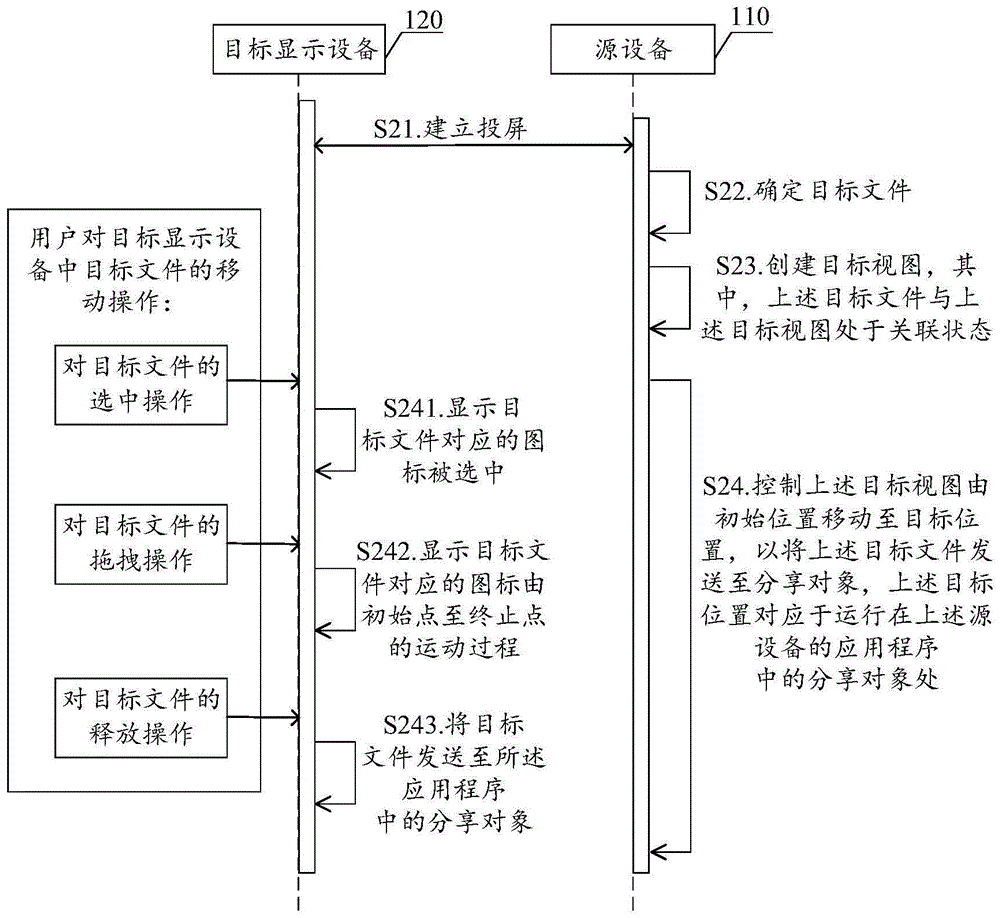
图2为本说明书一实施例提供的信息分享方法的交互示意图。FIG. 2 is an interactive schematic diagram of an information sharing method provided by an embodiment of the present specification.
图3a为本说明书实施例提供的目标显示设备界面中图标被选中的示意图。FIG. 3 a is a schematic diagram of an icon being selected in an interface of a target display device according to an embodiment of the present specification.
图3b为本说明书实施例提供的目标显示设备界面中图标被拖动的示意图。FIG. 3b is a schematic diagram of an icon being dragged in an interface of a target display device according to an embodiment of the present specification.
图3c为本说明书实施例提供的目标显示设备界面中图标被释放的示意图。FIG. 3c is a schematic diagram of icons being released in an interface of a target display device according to an embodiment of the present specification.
图4为本说明书实施例提供的目标视图的创建方法的流程示意图。FIG. 4 is a schematic flowchart of a method for creating a target view according to an embodiment of the present specification.
图5为本说明书实施例提供的目标显示设备界面中初始位置与目标位置的示意图。FIG. 5 is a schematic diagram of an initial position and a target position in an interface of a target display device according to an embodiment of the present specification.
图6为本说明书另一实施例提供的信息分享方法的交互示意图。FIG. 6 is an interactive schematic diagram of an information sharing method provided by another embodiment of the present specification.
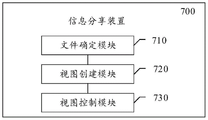
图7为本说明书一实施例提供的信息分享装置的结构示意图。FIG. 7 is a schematic structural diagram of an information sharing apparatus according to an embodiment of the present specification.
图8为本说明书另一实施例提供的信息分享装置的结构示意图。FIG. 8 is a schematic structural diagram of an information sharing apparatus according to another embodiment of the present specification.
图9为本说明书再一实施例提供的信息分享装置的结构示意图。FIG. 9 is a schematic structural diagram of an information sharing apparatus according to still another embodiment of the present specification.
图10为本说明书实施例提供的终端的结构示意图。FIG. 10 is a schematic structural diagram of a terminal according to an embodiment of the present specification.
具体实施方式Detailed ways
为使本说明书的目的、技术方案和优点更加清楚,下面将结合附图对本说明书实施例方式作进一步地详细描述。In order to make the objectives, technical solutions and advantages of this specification clearer, the embodiments of this specification will be described in further detail below with reference to the accompanying drawings.
下面的描述涉及附图时,除非另有表示,不同附图中的相同数字表示相同或相似的要素。以下示例性实施例中所描述的实施方式并不代表与本说明书相一致的所有实施方式。相反,它们仅是如所附权利要求书中所详述的、本说明书的一些方面相一致的装置和方法的例子。Where the following description refers to the drawings, the same numerals in different drawings refer to the same or similar elements unless otherwise indicated. The implementations described in the illustrative examples below are not intended to represent all implementations consistent with this specification. Rather, they are merely examples of apparatus and methods consistent with some aspects of this specification, as recited in the appended claims.
现在将参考附图更全面地描述示例实施方式。然而,示例实施方式能够以多种形式实施,且不应被理解为限于在此阐述的范例;相反,提供这些实施方式使得本说明书将更加全面和完整,并将示例实施方式的构思全面地传达给本领域的技术人员。所描述的特征、结构或特性可以以任何合适的方式结合在一个或更多实施方式中。在下面的描述中,提供许多具体细节从而给出对本说明书的实施方式的充分理解。然而,本领域技术人员将意识到,可以实践本说明书的技术方案而省略所述特定细节中的一个或更多,或者可以采用其它的方法、组元、装置、步骤等。在其它情况下,不详细示出或描述公知技术方案以避免喧宾夺主而使得本说明书的各方面变得模糊。Example embodiments will now be described more fully with reference to the accompanying drawings. Example embodiments, however, can be embodied in various forms and should not be construed as limited to the examples set forth herein; rather, these embodiments are provided so that this description will be thorough and complete, and will fully convey the concept of example embodiments to those skilled in the art. The described features, structures, or characteristics may be combined in any suitable manner in one or more embodiments. In the following description, numerous specific details are provided in order to give a thorough understanding of the embodiments of the present specification. However, those skilled in the art will appreciate that the technical solutions of the present specification may be practiced without one or more of the specific details, or other methods, components, devices, steps, etc. may be employed. In other instances, well-known solutions have not been shown or described in detail to avoid obscuring aspects of this description.
此外,附图仅为本说明书的示意性图解,并非一定是按比例绘制。图中相同的附图标记表示相同或类似的部分,因而将省略对它们的重复描述。附图中所示的一些方框图是功能实体,不一定必须与物理或逻辑上独立的实体相对应。可以采用软件形式来实现这些功能实体,或在一个或多个硬件模块或集成电路中实现这些功能实体,或在不同网络和/或处理器装置和/或微控制器装置中实现这些功能实体。Furthermore, the drawings are merely schematic illustrations of the present specification and are not necessarily drawn to scale. The same reference numerals in the drawings denote the same or similar parts, and thus their repeated descriptions will be omitted. Some of the block diagrams shown in the figures are functional entities that do not necessarily necessarily correspond to physically or logically separate entities. These functional entities may be implemented in software, or in one or more hardware modules or integrated circuits, or in different networks and/or processor devices and/or microcontroller devices.
相关技术提供的一种信息分享方案中,具体为基于终端设备本身进行信息分享。一种情况下,登录应用程序后,将待分享信息(如,文件)分享至同一应用中的好友。则需要经过对待分享信息的长按操作、选择“转发”控件,以及选择好友的操作。另一种情况下,将存储于终端的待分享信息(如,图库图片)分享至应用程序中的好友。则需要经过对待分享信息的选中操作、选择“分享”控件,以及选择相关应用以及好友的操作。该相关技术提供方案存在操作步骤较为繁琐的问题。In an information sharing solution provided by the related art, the information sharing is specifically performed based on the terminal device itself. In one case, after logging in to the application, the information to be shared (eg, files) is shared with friends in the same application. Then you need to go through the long-press operation of the information to be shared, select the "Forward" control, and select a friend. In another case, the to-be-shared information (eg, gallery pictures) stored in the terminal is shared to friends in the application. Then you need to select the information to be shared, select the "Share" control, and select related applications and friends. The solution provided by the related art has the problem that the operation steps are relatively complicated.
相关技术提供的另一种信息分享方案中,具体为在终端设备需登录应用程序的情况下,通过拖拽待分享信息的方式拖拽至应用程序的相关好友界面处,进一步地,用户需点击“发送”控件实现文件发送。然而该相关技术需要在相关终端设备登录应用程序的情况下,才能够实现信息分享。In another information sharing solution provided by the related art, when the terminal device needs to log in to the application, the information to be shared is dragged to the relevant friend interface of the application by dragging and dropping, and further, the user needs to click The "Send" control implements file sending. However, in the related art, information sharing can only be realized when the related terminal device logs into the application program.
相关技术提供的再一种信息分享方案中,具体为在第一终端设备(源设备)与第二终端设备(目标显示设备)建立投屏。在目标显示设备将待分析信息拖拽至源设备对应的投屏界面,则上述待分析信息将存储于源设备中预先设定的文件路径处。无线实现将信息直接分享至应用程序的相关好友。In yet another information sharing solution provided by the related art, a screen projection is established between a first terminal device (source device) and a second terminal device (target display device). Drag and drop the information to be analyzed on the target display device to the screen projection interface corresponding to the source device, and the above-mentioned information to be analyzed will be stored in a preset file path in the source device. Wireless implementation of sharing information directly to relevant friends of the application.
针对相关技术存在的上述问题,本说明书实施例能够提供一种信息分享方法、信息分享装置、计算机可读存储介质以及终端,至少在一定程度上提升了对涉黑通话的准确度。具体的,以下先通过图1至图6对本说明书提供的信息分享方法实施例进行详细阐述:In view of the above problems existing in the related art, the embodiments of this specification can provide an information sharing method, an information sharing device, a computer-readable storage medium, and a terminal, which improve the accuracy of black-related calls at least to a certain extent. Specifically, the following describes in detail the information sharing method embodiments provided in this specification by referring to FIGS. 1 to 6 :
示例性的,图1为本说明书实施例提供的信息分享方案的场景示意图。Exemplarily, FIG. 1 is a schematic diagram of a scenario of an information sharing solution provided by an embodiment of the present specification.
如图1所示,第一设备110与第二设备120之间进行投屏,本实施例中,将第一设备110作为投屏的源设备,第二设备120作为投屏的目标显示设备。当然,在其他实施例中,还可以将第一设备110作为投屏的目标显示设备,以及将第二设备120作为投屏的源设备,本申请实施例对此不作限定。As shown in FIG. 1 , screen projection is performed between the
示例性的,投屏状态下的第一设备110的显示界面为应用程序中分享对象的界面。其中,分享对象可以为在应用程序中指定用于接收目标文件的用户对象。例如,用户通过本申请提供的方案向其xxx(应用程序)中的好友A分享信息,则其处于投屏状态下的界面为关于xxx(应用程序)中的好友A的界面。第二设备120的界面中包含待分享文件12,以及关于第一设备110上述显示界面的投屏界面10。其中,上述投屏界面10中可以包含好友A的头像与昵称,以及输入框11等信息。Exemplarily, the display interface of the
示例性的,上述投屏方式可以是镜像投屏。其中,镜像投屏可以采用Miracast标准(另外,对于iOS系统的设备则是采用AirPlay技术)。目前Android系统的终端以及大部分的智能电视可以支持Miracast,而采用Miracast标准的优点在于,只需要投屏双方同时支持Miracast标准且处于同一局域网内,则无需安装任何软件就能够实现投屏。从而能够进一步地提升本说明书实施例提供的信息分享方案的操作简洁性。Exemplarily, the above screen projection method may be mirror projection. Among them, the mirroring screen can use the Miracast standard (in addition, for the device of the iOS system, the AirPlay technology is used). At present, Android system terminals and most smart TVs can support Miracast. The advantage of using the Miracast standard is that it only needs to support the Miracast standard at the same time and are in the same local area network, without installing any software. Therefore, the operational simplicity of the information sharing solution provided by the embodiments of this specification can be further improved.
其中,图2为本说明书实施例提供的信息分享方法的交互示意图,该图所示实施例体现上述源设备210与上述目标显示设备220之间的信息交互过程。参考图2,该图所示实施例包括:2 is an interactive schematic diagram of an information sharing method provided by an embodiment of the present specification, and the embodiment shown in the figure embodies the information interaction process between the above-mentioned source device 210 and the above-mentioned target display device 220 . Referring to Figure 2, the embodiment shown in the figure includes:
在S21中,目标显示设备220与源设备210建立投屏。In S21, the target display device 220 establishes screen projection with the source device 210.
同前所述,目标显示设备220与源设备210之间的投屏方式可以采用镜像投屏。As described above, the screen projection method between the target display device 220 and the source device 210 may adopt mirror projection.
在S22中,源设备210确定目标文件。In S22, the source device 210 determines the target file.
该目标文件为待分享的文件,例如,可以是存储于一设备中的文档、表格、图片、音频、视频等,还可以是剪切板内容,还可以是另一设备所拍摄的照片、截图等,对此不作限定。本实施例中上述目标文件为目标显示设备的界面中用户执行移动操作所对应的文件。示例性的,上述移动操作可以是用户将目标文件由初始位置拖放至目标位置。上述移动操作还可以是通过在目标文件的初始位置进行复制操作,并在目标位置进行粘贴操作的方式实现目标文件的移动。The target file is the file to be shared, for example, it can be a document, table, picture, audio, video, etc. stored in a device, it can also be the content of the clipboard, and it can also be a photo or screenshot taken by another device. etc., which are not limited. In this embodiment, the above-mentioned target file is a file corresponding to the user performing the moving operation in the interface of the target display device. Exemplarily, the above-mentioned moving operation may be that the user drags and drops the target file from the initial position to the target position. The above-mentioned moving operation may also be performed by performing a copy operation at the initial position of the target file and a paste operation at the target position to realize the movement of the target file.
示例性的,参考图1,第二设备120(作为目标显示设备)的界面中用户执行移动操作所对应的文件为上述待分享文件12。进一步地,该目标文件通过跨进程传输的方式由目标显示设备220发送至源设备210。Exemplarily, referring to FIG. 1 , the file corresponding to the user performing the moving operation in the interface of the second device 120 (as the target display device) is the above-mentioned
在S23中,源设备210创建目标视图,上述目标文件与上述目标视图处于关联状态。In S23, the source device 210 creates a target view, and the above target file is in an associated state with the above target view.
其中,在源设备端创建的上述目标视图与目标显示设备端目标文件的图标相对应。示例性的,上述目标视图可以显示为上述目标文件对应的图标,也就是说目标视图的外观显示与上述目标文件的图标相一致。示例性的,在上述目标文件为图像的情况下,其所对应的图标可以是图像的缩略图,即本实施例中上述目标视图显示为图像的缩略图。通过在源设备端创建上述目标视图的方式,来在目标设备端模拟文件被移动至分享对象的过程,同时也可以在视觉上保持源设备端显示画面与目标显示设备端投屏界面的显示画面相一致,从而为用户提升良好的视觉体验,提升了信息分享的趣味性。The above target view created on the source device side corresponds to the icon of the target file on the target display device side. Exemplarily, the above-mentioned target view may be displayed as an icon corresponding to the above-mentioned target file, that is to say, the appearance display of the target view is consistent with the above-mentioned icon of the target file. Exemplarily, in the case that the above-mentioned target file is an image, the corresponding icon may be a thumbnail of the image, that is, the above-mentioned target view is displayed as a thumbnail of the image in this embodiment. By creating the above-mentioned target view on the source device, the process of moving the file to the shared object can be simulated on the target device, and at the same time, the display screen of the source device and the screen projection interface of the target display device can be visually maintained. Consistent, thereby enhancing a good visual experience for users and enhancing the fun of information sharing.
本实施例可以通过将目标文件与目标视图绑定的方式,来使得目标文件与目标视图处于关联状态,从而实现目标文件随目标视图的移动而移动。示例性的,根据用户对目标视图的移动操作,实现所绑定目标文件被拖放至分享对象。最终达到目标视图移动至分享对象的同时,目标文件也被携带至分享对象。In this embodiment, the target file and the target view can be in an associated state by binding the target file and the target view, thereby realizing that the target file moves with the movement of the target view. Exemplarily, according to the user's moving operation on the target view, the bound target file can be dragged and dropped to the sharing object. Finally, when the target view is moved to the shared object, the target file is also carried to the shared object.
其中,创建上述目标视图的具体实施方式将在图4所示实施例中进行详细介绍。The specific implementation manner of creating the above target view will be described in detail in the embodiment shown in FIG. 4 .
进一步地,基于上述方案,即创建上述目标视图之后,本说明书实施例还提供以下方案:Further, based on the above solution, that is, after the above target view is created, the embodiments of this specification also provide the following solutions:
一方面,源设备端执行S24,对应地,目标显示设备端执行S241-S243。具体的:On the one hand, the source device side executes S24, and correspondingly, the target display device side executes S241-S243. specific:
在S24中,源设备210控制上述目标视图由初始位置移动至目标位置,以将上述目标文件发送至分享对象,上述目标位置对应于运行在上述源设备210的应用程序中的分享对象处。In S24, the source device 210 controls the target view to move from the initial position to the target position, so as to send the target file to the sharing object, and the target position corresponds to the sharing object running in the application of the source device 210.
在目标显示设备端,与上述源设备210执行S24同步地执行S241-S243。具体地,在目标显示设备端,接收用户对目标显示设备中目标文件的移动操作。其中,上述移动操作包括:选中操作、拖动操作和释放操作。On the target display device side, S241-S243 are executed in synchronization with the above-mentioned execution of S24 by the source device 210. Specifically, at the target display device side, a user's moving operation of the target file in the target display device is received. Wherein, the above-mentioned moving operation includes: selecting operation, dragging operation and releasing operation.
响应于用户对目标文件的选中操作,执行S241:显示目标文件对应的图标被选中。In response to the user's selection operation on the target file, perform S241: displaying that the icon corresponding to the target file is selected.
参考图3a,以图1中的第二设备120作为目标显示设备的界面为例。响应于用户对目标文件12的选中操作,本实施例中以阴影的方式显示目标文件对应的图标被选中。其中,上述目标文件对应的图标与上述源设备创建的目标视图相对应,具体的,该目标视图的初始位置也与上述目标文件的图标对应,从而,上述目标视图的初始位置与上述目标文件图标的起始点对应,即上述目标文件的图标的起始点位于上述投屏界面之外的位置。同时,在源设备端上述目标文件与该目标视图处于关联状态,从而实现目标文件在源设备端的移动。Referring to FIG. 3a, take the
继续参考图2,响应于用户对目标文件的拖动操作,执行S242:显示目标文件对应的图标由初始点至终止点的运动过程。Continuing to refer to FIG. 2 , in response to the user's drag operation on the target file, perform S242 : display the movement process of the icon corresponding to the target file from the initial point to the end point.
参考图3b,仍以图1中的第二设备120作为目标显示设备的界面为例。其中,用户拖动目标文件12按照移动轨迹30移动,移动轨迹30的终止点应为投屏界面10中的任一位置,从而在目标显示设备端将目标文件移动至应用程序(运行在所述源设备的)中的分享对象。需要说明的是,在目标显示设备端无需安装上述应用程序的客户端,上述目标设备也无需登录上述应用程序的客户端或网页版,仅通过投屏的方式就能够实现将文件分享至该应用的好友,从而能够在保证文件被便捷地分享至好友的同时,又无需在目标显示设备进行应用程序的登录,进而能够提升源设备对应用户的数据安全也能够提升信息分享便捷度。Referring to FIG. 3b, still take the interface of the
继续参考图2,响应于户对目标文件的释放操作,执行S243:将目标文件发送至所述应用程序中的分享对象。Continuing to refer to FIG. 2 , in response to the user's release operation on the target file, perform S243 : send the target file to the shared object in the application program.
参考图3c,用户拖动上述目标文件至投屏界面中任一位置(上述结束点)之后,用户释放目标文件,则目标文件将自动发送至分享好友。本实施例提供的方案中,在源设备端使用输入管理服务进行事件注入(将在下述图6对应的实施例中详细介绍),将原本的拖放事件分解成两个事件:拖动事件drag和释放事件tap,从而能够实现目标文件的自动发送。相较于相关技术中,在将目标文件拖动结束后,仍需要点击“发送”控件实现文件发送相比,本说明书实施例提供的方案操作更加简洁。Referring to FIG. 3c, after the user drags the target file to any position (the above-mentioned end point) on the screen projection interface, the user releases the target file, and the target file will be automatically sent to the sharing friends. In the solution provided by this embodiment, the input management service is used at the source device to perform event injection (which will be described in detail in the embodiment corresponding to FIG. 6 below), and the original drag and drop event is decomposed into two events: drag event drag And release the event tap, so that the automatic sending of the target file can be realized. Compared with the related art, after dragging the target file, it is still necessary to click the "send" control to realize the file sending, and the operation of the solution provided by the embodiment of this specification is more concise.
在图3所示实施例提供的信息分享方案中,在投屏状态下,用户无需在目标显示设备登录应用程序,只需在目标显示设备将目标文件的拖动至投屏界面中应用程序的分享对象处就可以实现信息分享。从而,本方案提供一种关于信息分享的简洁操作,相较于现有技术能够有效地简化信息分享所需的操作步骤。In the information sharing solution provided by the embodiment shown in FIG. 3 , in the screen-casting state, the user does not need to log in to the application on the target display device, but only needs to drag the target file on the target display device to the position of the application in the screen-casting interface. Information sharing can be achieved at the sharing object. Therefore, the present solution provides a concise operation on information sharing, which can effectively simplify the operation steps required for information sharing compared with the prior art.
在示例性的实施例中,图4为本说明书实施例提供的目标视图的创建方法的流程示意图,该图所示实施例的执行主体为源设备。参考图4,该图所示实施例包括:S410-S440。In an exemplary embodiment, FIG. 4 is a schematic flowchart of a method for creating a target view according to an embodiment of the present specification, and the execution subject of the embodiment shown in this figure is a source device. Referring to FIG. 4, the embodiment shown in the figure includes: S410-S440.
在S410中,获取相对位置信息,上述相对位置信息为上述目标显示设备的界面中上述目标文件相对于投屏界面的位置信息。In S410, relative position information is obtained, where the relative position information is the position information of the target file relative to the screen projection interface in the interface of the target display device.
示例性的,上述目标文件的原位置与投屏界面之间的相对位置信息。参考图5,目标显示设备的界面中,目标文件所对应拖放事件的初始点为s1,该拖放事件的终止点为s2,则上述相对位置信息可以是指终止点s2相对于起始点s1之间的位置信息。示例性的,假如以终止点s2为原点,平行于屏幕边界构建坐标系,上述相对位置信息可以为与x轴负方向之间的夹角为m度、距离为n厘米。Exemplarily, the relative position information between the original position of the target file and the screen projection interface. 5, in the interface of the target display device, the initial point of the drag-and-drop event corresponding to the target file is s1, and the end point of the drag-and-drop event is s2, then the above-mentioned relative position information may refer to the end point s2 relative to the start point s1 position information between. Exemplarily, if the end point s2 is used as the origin and a coordinate system is constructed parallel to the screen boundary, the relative position information may be that the angle between the end point s2 and the negative direction of the x-axis is m degrees and the distance is n centimeters.
在S420中,根据上述相对位置信息确定上述目标视图对应的上述初始位置,上述初始位置对应于所述投屏界面之外的位置。In S420, the initial position corresponding to the target view is determined according to the relative position information, where the initial position corresponds to a position outside the screen projection interface.
示例性的,基于上述相对位置信息,在源设备端确定上述目标视图对应的初始位置。其中,在投屏之前上述目标文件可以不存储与源设备中,从而为了形象展示文件由源设备的外部传输进来,可以将上述初始位置处于上述源设备的屏幕之外,即与目标文件的起始点(目标显示设备中投屏界面之外的位置)相对应,且按照上述相对位置信息来设置。Exemplarily, based on the above-mentioned relative position information, the source device side determines the initial position corresponding to the above-mentioned target view. Wherein, the above-mentioned target file may not be stored in the source device before the screen projection, so that in order to visually display the file from the outside of the source device, the above-mentioned initial position can be located outside the screen of the above-mentioned source device, that is, the start of the target file. The starting point (the position outside the screen projection interface in the target display device) corresponds to, and is set according to the above-mentioned relative position information.
在S430中,以上述初始位置为视图属性,通过窗口管理服务创建一个图像类型的视图。以及,在S440中,将上述图像类型的视图添加至目标窗口,以基于上述初始位置显示上述图像类型的视图,得到对应于上述目标文件对应的上述目标视图。In S430, an image-type view is created through the window management service with the above-mentioned initial position as the view attribute. And, in S440, the view of the image type is added to the target window to display the view of the image type based on the initial position, and the target view corresponding to the target file is obtained.
其中,视图包括图表类型的视图、树类型的视图、网格类型的视图以及图像类型的视图等,为了与上述目标文件的图标相对应,本实施例采用图像类型的视图。The views include chart-type views, tree-type views, grid-type views, and image-type views. In order to correspond to the above-mentioned icons of the target file, the present embodiment adopts image-type views.
示例性的,以上述初始位置为视图属性,通过窗口管理服务创建一个图像类型的视图。本实施例通过在源设备端创建该图像类型的视图,来从视觉上模拟目标文件被移动至目标对象的过程。其中,上述图像类型的视图与目标显示设备中文件图标相对应,具体地,该目标视图的显示图像与上述文件图标可以一致。Exemplarily, using the above initial position as a view property, a view of image type is created through the window management service. This embodiment visually simulates the process of moving the target file to the target object by creating a view of the image type on the source device side. Wherein, the view of the above-mentioned image type corresponds to the file icon in the target display device, and specifically, the display image of the target view may be consistent with the above-mentioned file icon.
其中,确定上述目标窗口的实施方式如下:Wherein, the implementation manner of determining the above target window is as follows:
通过获取源设备中顶部活动组件的方式确定上述应用程序(即投屏界面中所显示界面对应的应用),并将该应用程序对应的窗口确定为上述目标窗口。The above-mentioned application (that is, the application corresponding to the interface displayed in the screen projection interface) is determined by acquiring the top active component in the source device, and the window corresponding to the application is determined as the above-mentioned target window.
则进一步地,通过窗口管理服务将上述图像类型的视图添加至目标窗口,以基于上述初始位置显示上述图像类型的视图,得到对应于上述目标文件对应的上述目标视图。相关技术提供的拖放框架中,能够满足在同一个应用中将文件拖放到另外一个视图的,但是对于不同的应用,则必须要启用多窗口模式实现文件拖动。而本实施例中,使用窗口管理服务添加上述目标视图的方式能够避免采用多窗口模式实现文件拖动的问题。Further, the image type view is added to the target window through the window management service to display the image type view based on the initial position, and the target view corresponding to the target file is obtained. In the drag-and-drop framework provided by the related art, it is possible to drag and drop files to another view in the same application, but for different applications, the multi-window mode must be enabled to realize file dragging. However, in this embodiment, using the window management service to add the above target view can avoid the problem of implementing file dragging in a multi-window mode.
图4所示实施例提供了在源设备端创建目标视图(对应于目标设备的图标)的方案,通过本实施例所创建的目标视图来形象展示目标文件的移动过程,同时在源设备端上述目标视图还用于携带目标文件,以在目标视图/目标文件对应的图像移动至分享对象的同时,源设备端目标视图所携带的目标文件也被分享至应用程序中的好友。The embodiment shown in FIG. 4 provides a solution for creating a target view (corresponding to the icon of the target device) on the source device. The target view created in this embodiment is used to visually display the moving process of the target file. The target view is also used to carry the target file, so that when the target view/image corresponding to the target file is moved to the sharing object, the target file carried by the target view on the source device side is also shared with friends in the application.
在示例性的实施例中,图6为本说明书另一实施例提供的信息分享方法的交互示意图。参考图6,该图所示实施例包括:In an exemplary embodiment, FIG. 6 is an interactive schematic diagram of an information sharing method provided by another embodiment of the present specification. Referring to Figure 6, the embodiment shown in the figure includes:
S61,目标显示设备120与源设备110建立投屏。具体实施方式在此不再赘述。S61, the
S62,目标显示设备向源设备发送目标文件。S62, the target display device sends the target file to the source device.
示例性的,目标显示设备可以先向源设备发出写入文件的请求;在源设备返回对上述请求的同意响应之后,目标显示设备再向源设备发送上述目标文件。从而实现将目标设备由目标显示设备向源设备进跨进程传递,从而源设备在得到上述目标设备之后再执行向应用程序中好友的跨进程传递(将在下述实施例中详细介绍)。Exemplarily, the target display device may first send a file writing request to the source device; after the source device returns an approval response to the above request, the target display device sends the above target file to the source device. Thus, the target device is transferred from the target display device to the source device across processes, so that the source device performs cross-process transfer to friends in the application program after obtaining the target device (will be described in detail in the following embodiments).
S63,在源设备中确定分享对象对应的应用程序,将该应用程序的窗口确定为目标窗口。S63: Determine an application program corresponding to the sharing object in the source device, and determine the window of the application program as the target window.
本实施例中通过获取源设备中顶部活动组件的方式确定上述应用程序(即投屏界面中的应用程序)。In this embodiment, the above-mentioned application program (that is, the application program in the screen-casting interface) is determined by obtaining the top active component in the source device.
进一步地,如S410-S440中提供的目标视图的创建过程,具体地在S440对应的实施例中将上述图像类型的视图添加至该目标窗口,从而基于上述初始位置显示上述图像类型的视图,得到对应于上述目标文件对应的上述目标视图。Further, as the creation process of the target view provided in S410-S440, specifically in the embodiment corresponding to S440, the view of the above-mentioned image type is added to the target window, so as to display the view of the above-mentioned image type based on the above-mentioned initial position, to obtain Corresponding to the above target view corresponding to the above target file.
继续参考图6,在创建目标视图之后,S64,控制目标视图由源设备中的初始位置移动至目标位置,具体地:Continue to refer to FIG. 6, after creating the target view, S64, control the target view to move from the initial position in the source device to the target position, specifically:
本实施例中,在源设备端基于输入管理服务实现对目标视图的拖放事件的注入,具体可以通过不同的运动事件来模拟不同的事件,从而控制该目标视图在源设备中由创建其的初始位置移动至目标位置。In this embodiment, the injection of drag-and-drop events to the target view is implemented on the source device side based on the input management service. Specifically, different motion events can be used to simulate different events, thereby controlling the target view to be created in the source device by the creator. The initial position is moved to the target position.
本实施例中将拖放事件分解成两个事件:拖动事件和释放事件。通过拖动事件在源设备端模拟拖动操作,具体的,在源设备中显示为对上述目标视图的长按以及拖动过程;通过释放事件在源设备端模型释放操作,在源设备中显示为目标视图被释放,具体模拟用户手部在上述目标视图中抬起。本实施例通过将上述拖放事件拆分为拖动事件和释放事件的方式,能够实现目标文件的自动发送,而无需在将目标文件拖放至分享对象处后还需要手动点击“发送”控件才能够实现文件发送,从而简化操作步骤。In this embodiment, the drag and drop event is decomposed into two events: a drag event and a release event. The drag operation is simulated on the source device side through the drag event. Specifically, it is displayed in the source device as a long press on the above target view and the dragging process; through the release event, the model release operation on the source device side is displayed in the source device. For the target view to be released, specifically simulate the user's hand lifting in the above target view. In this embodiment, by splitting the drag and drop event into a drag event and a release event, the target file can be automatically sent without the need to manually click the "Send" control after dragging and dropping the target file to the sharing object. Only to be able to achieve file sending, thus simplifying the operation steps.
S65,在上述拖动事件开始执行后,将目标文件与目标视图绑定,以使目标文件与目标视图处于关联状态。S65, after the drag event starts to be executed, bind the target file to the target view, so that the target file and the target view are in an associated state.
示例性的,当拖动开始后,负责监听器和放置目标的工具类将收到拖动开始事件(该事件在用户开始拖动元素时被触发)的回调,在回调中创建用于目标类(该目标类的作用为携带上述目标文件)。进一步地,调用上述目标视图的目标方法(拖拽功能基础方法:开始拖放方法)将上述目标类绑定至上述目标视图,以将该目标文件进行跨进程传递给所述应用程序。Exemplarily, when the drag starts, the tool class responsible for the listener and drop target will receive a callback for the drag start event (the event is triggered when the user starts to drag the element), and the target class is created in the callback. (The purpose of this target class is to carry the above target file). Further, the target method (basic method of dragging function: start dragging and dropping method) of the above target view is called to bind the above target class to the above target view, so as to transfer the target file to the application program across processes.
本实施例提供的绑定方案,即在源设备端通过目标视图来携带目标文件,以在目标视图/目标文件对应的图像移动至分享对象的同时,源设备端目标视图所携带的目标文件跨进程的分享至应用程序中的好友。In the binding solution provided in this embodiment, the source device carries the target file through the target view, so that when the image corresponding to the target view/target file is moved to the shared object, the target file carried by the target view on the source device crosses the Share the process to friends in the app.
S66,响应于上述释放事件,目标文件被发送至上述应用程序中的分享对象。S66, in response to the above-mentioned release event, the target file is sent to the shared object in the above-mentioned application program.
本实施例中,响应于上述释放事件将文件自动发送至分享好友。相较于相关技术中,在将目标文件拖动结束后,仍需要点击“发送”控件实现文件发送相比,本说明书实施例提供的方案操作更加简洁。In this embodiment, the file is automatically sent to the sharing friend in response to the above-mentioned release event. Compared with the related art, after dragging the target file, it is still necessary to click the "send" control to realize the file sending, and the operation of the solution provided by the embodiment of this specification is more concise.
需要说明的是,由于拖放事件的实现涉及两方面,一方面为源应用(文件的发送方),另一方面是目标应用(文件的接收方,对应于本说明书实施例中的应用程序)。本说明书所提供的实施例实现了上述源应用的逻辑,因此只有应用程序实现了拖放事件中目标应用的处理逻辑,才能够成功接收到被分享的文件,也可以说才可以通过本说明书实施例提供的方案成功发送上述被分享的文件。It should be noted that, since the implementation of the drag-and-drop event involves two aspects, one is the source application (the sender of the file), and the other is the target application (the receiver of the file, corresponding to the application in the embodiments of this specification) . The embodiments provided in this specification implement the logic of the above source application. Therefore, only the application program that implements the processing logic of the target application in the drag and drop event can successfully receive the shared file, and it can be said that it can be implemented through this specification. The solution provided in the example successfully sends the above shared file.
S67.通过窗口管理服务移除上述目标视图。S67. Remove the above target view through the window management service.
示例性的,通过窗口管理服务设置目标视图的拖动事件监听器对象的回调,在拖放结束的回调中移除上述目标视图(view)。从而在成功地将目标文件再源设备分享至好友后,视觉上相关视图也随之消失,避免后续为用户带来观看屏幕的不便。Exemplarily, the callback of the drag event listener object of the target view is set through the window management service, and the above-mentioned target view (view) is removed in the callback of the end of the drag and drop. Therefore, after the target file is successfully shared with friends from the source device, the related view also disappears visually, avoiding the inconvenience of viewing the screen for the user in the future.
本说明书实施例提供了一种快速发送文件至应用程序的信息分享/内容协同方案,该方案可以在PC(Personal Computer,个人计算机,在此指的是上述目标显示设备)投屏的情景下,快速便捷的分享文件给应用程序好友。一方面,本方案能够便捷地分享文件到应用程序,相较于相关技术能够有效减少操作步骤;另一方面,PC端无需安装上述应用程序的客户端,上述目标设备也无需登录上述应用程序的客户端或网页版,从而能够实现跨端操作。再一方面,通过PC端反控能力,仅在PC上即可完成对终端(源设备)的操作。The embodiments of this specification provide an information sharing/content collaboration solution for quickly sending files to an application program. Quickly and easily share files with app friends. On the one hand, the solution can conveniently share files to the application program, which can effectively reduce the operation steps compared with the related art; Client or web version, enabling cross-end operations. On the other hand, through the PC-side anti-control capability, the terminal (source device) operation can be completed only on the PC.
需要注意的是,上述附图仅是根据本说明书示例性实施例的方法所包括的处理的示意性说明,而不是限制目的。易于理解,上述附图所示的处理并不表明或限制这些处理的时间顺序。另外,也易于理解,这些处理可以是例如在多个模块中同步或异步执行的。It should be noted that the above-mentioned drawings are only schematic illustrations of the processes included in the method according to the exemplary embodiment of the present specification, and are not intended to be limiting. It is easy to understand that the processes shown in the above figures do not indicate or limit the chronological order of these processes. In addition, it is also readily understood that these processes may be performed synchronously or asynchronously in multiple modules, for example.
下述为本说明书装置实施例,可以用于执行本说明书方法实施例。对于本说明书装置实施例中未披露的细节,请参照本说明书方法实施例。The following device embodiments of the present specification can be used to execute the method embodiments of the present specification. For details not disclosed in the device embodiments in this specification, please refer to the method embodiments in this specification.
其中,图7示出了可以应用本说明书一实施例的信息分享装置的结构示意图。请参见图7该图所示的信息分享装置可以通过软件、硬件或者两者的结合实现成为源设备的全部或一部分,还可以作为独立的模块集成于源设备上,还可以作为独立的模块集成于源设备中。Among them, FIG. 7 shows a schematic structural diagram of an information sharing apparatus to which an embodiment of the present specification can be applied. Please refer to Fig. 7. The information sharing apparatus shown in this figure can be realized as all or a part of the source device through software, hardware or a combination of the two, and can also be integrated on the source device as an independent module, and can also be integrated as an independent module. in the source device.
本说明书实施例中的上述信息分享装置700包括:文件确定模块710、视图创建模块720,以及视图控制模块730。The above-mentioned
其中,上述文件确定模块710,用于确定目标文件,上述目标文件为上述目标显示设备的界面中用户执行移动操作所对应的文件;上述视图创建模块720,用于创建目标视图,其中,上述目标文件与上述目标视图处于关联状态,在目标显示设备的界面中,上述目标视图与上述目标文件对应的图标相对应;以及,上述视图控制模块730,用于控制上述目标视图由初始位置移动至目标位置,以将上述目标文件发送至上述应用程序中的分享对象,上述目标位置对应于运行在上述源设备的应用程序中的分享对象处;The above-mentioned
其中,上述目标显示设备无需安装上述应用程序的客户端,上述目标设备也无需登录上述应用程序的客户端或网页版。Wherein, the target display device does not need to install the client of the application, and the target device does not need to log in the client or the web version of the application.
在示例性的实施例中,图8示意性示出了根据本说明书另一示例性的实施例中信息分享装置的结构图。请参见图8:In an exemplary embodiment, FIG. 8 schematically shows a structural diagram of an information sharing apparatus according to another exemplary embodiment of the present specification. See Figure 8:
在示例性的实施例中,基于上述方案,上述视图创建模块720,包括:初始位置确定单元7201、创建单元7202,以及添加单元7203。In an exemplary embodiment, based on the above solution, the above
其中,上述初始位置确定单元7201,用于:确定所创建目标视图对应的初始位置,上述初始位置目标显示设备中投屏界面之外的位置;上述创建单元7202,用于:以上述初始位置为视图属性,通过窗口管理服务创建一个图像类型的视图;以及,上述添加单元7203,用于:将上述图像类型的视图添加至目标窗口,以基于上述初始位置显示上述图像类型的视图,得到对应于上述目标文件对应的上述目标视图。Wherein, the above-mentioned initial
在示例性的实施例中,基于上述方案,上述初始位置确定单元7201,具体用于:获取相对位置信息,上述相对位置信息为上述目标显示设备的界面中上述目标文件相对于投屏界面的位置信息;以及,根据上述相对位置信息确定上述目标视图对应的上述初始位置。In an exemplary embodiment, based on the above solution, the initial
在示例性的实施例中,基于上述方案,上述添加单元7203,具体用于:通过获取上述源设备中顶部活动组件的方式确定上述应用程序,并将上述应用程序对应的窗口确定为上述目标窗口;以及,将上述图像类型的视图添加至目标窗口。In an exemplary embodiment, based on the above solution, the above-mentioned adding
在示例性的实施例中,基于上述方案,上述视图创建模块720,还包括:绑定单元7204。In an exemplary embodiment, based on the above solution, the above
其中,上述绑定单元7204,用于:在将上述图像类型的视图添加至上述目标窗口之后,通过窗口管理服务将上述目标文件与上述图像类型的视图进行绑定。The above-mentioned
在示例性的实施例中,基于上述方案,上述视图控制模块730,具体用于:基于输入管理服务实现对上述目标视图的拖放事件的注入,以控制上述目标视图由初始位置移动至目标位置;其中上述拖放事件包括:拖动事件和释放事件。In an exemplary embodiment, based on the above solution, the above-mentioned
在示例性的实施例中,基于上述方案,上述绑定单元7204,具体用于:响应于上述拖动事件开始执行,创建用于携带上述目标文件的目标类;以及,调用上述目标视图的目标方法将上述目标类绑定至上述目标视图,以将上述目标文件进行跨进程传递给上述应用程序。In an exemplary embodiment, based on the above solution, the above-mentioned
在示例性的实施例中,基于上述方案,上述视图控制模块730,还包括:分享单元7301。In an exemplary embodiment, based on the above solution, the above
其中,上述分享单元7301,用于:响应于上述释放事件,上述目标文件被发送至上述应用程序中的分享对象。The above-mentioned
在示例性的实施例中,基于上述方案,上述信息分享装置700,还包括:获取模块740。In an exemplary embodiment, based on the above solution, the above
其中,上述获取模块740,用于:在上述创建目标视图之前,从上述目标显示设备获取上述目标文件。The obtaining
在示例性的实施例中,基于上述方案,上述视图控制模块730,还包括:取消显示单元7302。In an exemplary embodiment, based on the above solution, the above
其中,上述取消显示单元7302,用于:在上述控制上述目标视图由初始位置移动至目标位置之后,通过窗口管理服务移除上述目标视图。The above-mentioned canceling
其中,图9示出了可以应用本说明书再一实施例的信息分享装置的结构示意图。请参见图9该图所示的信息分享装置可以通过软件、硬件或者两者的结合实现成为目标显示设备的全部或一部分,还可以作为独立的模块集成于目标显示设备上,还可以作为独立的模块集成于上述目标显示设备中。9 shows a schematic structural diagram of an information sharing apparatus to which still another embodiment of the present specification can be applied. Please refer to FIG. 9. The information sharing device shown in this figure can be realized as all or a part of the target display device through software, hardware or a combination of the two, and can also be integrated on the target display device as an independent module, and can also be used as an independent module. The module is integrated into the above target display device.
本说明书实施例中的上述信息分享装置900包括:操作接收模块910以及显示模块920。The above-mentioned
其中,上述操作接收模块910,用于接收用户对目标文件的移动操作,上述移动操作包括:选中操作、拖动操作和释放操作;以及,上述显示模块920,用于响应于上述选中操作,显示上述目标文件对应的图标被选中,其中,上述目标文件对应的图标对应于上述源设备创建的目标视图,且上述目标文件与上述目标视图处于关联状态;响应于上述拖动事件,显示上述目标文件对应的图标由初始点至终止点的运动过程,上述终止点为投屏界面处,所述投屏界面为运行在上述源设备的应用程序中的分享对象所对应的界面;以及,响应于释放事件,将上述目标文件发送至上述应用程序中的分享对象;The above-mentioned
其中,上述目标显示设备无需安装上述应用程序的客户端,上述目标设备也无需登录上述应用程序的客户端或网页版。Wherein, the target display device does not need to install the client of the application, and the target device does not need to log in the client or the web version of the application.
需要说明的是,上述实施例提供的信息分享装置在执行信息分享方法时,仅以上述各功能模块的划分进行举例说明,实际应用中,可以根据需要而将上述功能分配由不同的功能模块完成,即将设备的内部结构划分成不同的功能模块,以完成以上描述的全部或者部分功能。It should be noted that, when the information sharing apparatus provided in the above embodiments executes the information sharing method, only the division of the above functional modules is used as an example for illustration. In practical applications, the above functions may be allocated to different functional modules as required , that is, dividing the internal structure of the device into different functional modules to complete all or part of the functions described above.
另外,上述实施例提供的信息分享装置与信息分享方法实施例属于同一构思,因此对于本说明书装置实施例中未披露的细节,请参照本说明书上述的信息分享方法的实施例,这里不再赘述。In addition, the information sharing apparatus and the information sharing method embodiments provided by the above-mentioned embodiments belong to the same concept. Therefore, for details not disclosed in the apparatus embodiments in this specification, please refer to the above-mentioned information sharing method embodiments in this specification, which will not be repeated here. .
上述本说明书实施例序号仅仅为了描述,不代表实施例的优劣。The above-mentioned serial numbers of the embodiments in this specification are only for description, and do not represent the advantages or disadvantages of the embodiments.
本说明书实施例还提供了一种终端,包括存储器、处理器及存储在存储器上并可在处理器上运行的计算机程序,处理器执行程序时实现上述任一实施例方法的步骤。An embodiment of the present specification further provides a terminal, including a memory, a processor, and a computer program stored in the memory and running on the processor, where the processor implements the steps of any of the methods in any of the foregoing embodiments when the processor executes the program.
图10示意性示出了根据本说明书一示例性的实施例中终端的结构图。请参见图10所示,终端1000包括有:处理器1001和存储器1002。FIG. 10 schematically shows a structural diagram of a terminal according to an exemplary embodiment of the present specification. Referring to FIG. 10 , the terminal 1000 includes: a
本说明书实施例中,处理器1001为计算机系统的控制中心,可以是实体机的处理器,也可以是虚拟机的处理器。处理器1001可以包括一个或多个处理核心,比如4核心处理器、8核心处理器等。处理器1001可以采用数字信号处理(Digital Signal Processing,DSP)、现场可编程门阵列(Field-Programmable Gate Array,FPGA)、可编程逻辑阵列(Programmable Logic Array,PLA)中的至少一种硬件形式来实现。处理器1001也可以包括主处理器和协处理器,主处理器是用于对在唤醒状态下的数据进行处理的处理器;协处理器是用于对在待机状态下的数据进行处理的低功耗处理器。In the embodiment of this specification, the
在本说明书实施例中,上述处理器1001配置于与目标显示设备处于投屏状态的源设备中的情况下,具体用于:In the embodiment of this specification, when the above-mentioned
确定目标文件,上述目标文件为上述目标显示设备的界面中用户执行移动操作所对应的文件;创建目标视图,其中,上述目标文件与上述目标视图处于关联状态,在目标显示设备的界面中,上述目标视图与上述目标文件对应的图标相对应;以及,控制上述目标视图由初始位置移动至目标位置,以将上述目标文件发送至分享对象,上述目标位置对应于运行在上述源设备的应用程序中的上述分享对象处;Determine a target file, where the target file is a file corresponding to the user performing the moving operation in the interface of the target display device; create a target view, wherein the target file is in an associated state with the target view, and in the interface of the target display device, the above-mentioned target view is in an associated state. The target view corresponds to the icon corresponding to the above-mentioned target file; and, the above-mentioned target view is controlled to be moved from the initial position to the target position to send the above-mentioned target file to the sharing object, and the above-mentioned target position corresponds to the application program running on the above-mentioned source device. the above-mentioned sharing objects;
其中,上述目标显示设备无需安装上述应用程序的客户端,上述目标设备也无需登录上述应用程序的客户端或网页版。Wherein, the target display device does not need to install the client of the application, and the target device does not need to log in the client or the web version of the application.
进一步地,上述创建目标视图,包括:确定所创建目标视图对应的初始位置,上述初始位置目标显示设备中投屏界面之外的位置;以上述初始位置为视图属性,通过窗口管理服务创建一个图像类型的视图;以及,将上述图像类型的视图添加至目标窗口,以基于上述初始位置显示上述图像类型的视图,得到对应于上述目标文件对应的上述目标视图。Further, the above-mentioned creation of the target view includes: determining an initial position corresponding to the created target view, which is a position outside the screen-casting interface in the target display device; and using the above-mentioned initial position as a view attribute, creating an image through a window management service and adding the view of the image type to the target window to display the view of the image type based on the initial position to obtain the target view corresponding to the target file.
进一步地,上述确定所创建目标视图对应的初始位置,包括:获取相对位置信息,上述相对位置信息为上述目标显示设备的界面中上述目标文件相对于投屏界面的位置信息;以及,根据上述相对位置信息确定上述目标视图对应的上述初始位置。Further, determining the initial position corresponding to the created target view includes: acquiring relative position information, where the relative position information is the position information of the target file in the interface of the target display device relative to the screen projection interface; and, according to the relative position information The position information determines the initial position corresponding to the target view.
进一步地,上述将上述图像类型的视图添加至目标窗口,包括:通过获取上述源设备中顶部活动组件的方式确定上述应用程序,并将上述应用程序对应的窗口确定为上述目标窗口;以及,将上述图像类型的视图添加至目标窗口。Further, the above-mentioned adding the view of the above-mentioned image type to the target window includes: determining the above-mentioned application program by obtaining the top active component in the above-mentioned source device, and determining the window corresponding to the above-mentioned application program as the above-mentioned target window; A view of the above image type is added to the target window.
进一步地,上述处理器1001还具体用于:在上述场景目标视图之后,在将上述图像类型的视图添加至上述目标窗口之后,通过窗口管理服务将上述目标文件与上述图像类型的视图进行绑定,以使上述目标文件与上述目标视图处于关联状态。Further, the above-mentioned
进一步地,上述控制上述目标视图由初始位置移动至目标位置,包括:基于输入管理服务实现对上述目标视图的拖放事件的注入,以控制上述目标视图由上述初始位置移动至目标位置;其中上述拖放事件包括:拖动事件和释放事件。Further, the above-mentioned controlling the moving of the above-mentioned target view from the initial position to the target position includes: implementing the injection of a drag-and-drop event to the above-mentioned target view based on the input management service, so as to control the above-mentioned target view to move from the above-mentioned initial position to the target position; wherein the above-mentioned Drag and drop events include: drag events and release events.
进一步地,上述将上述目标文件与上述目标视图绑定,包括:响应于上述拖动事件开始执行,创建用于携带上述目标文件的目标类;以及,调用上述目标视图的目标方法将上述目标类绑定至上述目标视图,以将上述目标文件进行跨进程传递给上述应用程序。Further, the above-mentioned binding the above-mentioned target file with the above-mentioned target view includes: starting to execute in response to the above-mentioned drag event, creating a target class for carrying the above-mentioned target file; Bind to the above target view to cross-process the above target file to the above application.
进一步地,上述将上述目标文件发送至分享对象,包括:响应于上述释放事件,上述目标文件被发送至上述应用程序中的分享对象。Further, the above-mentioned sending the above-mentioned target file to the shared object includes: in response to the above-mentioned release event, the above-mentioned target file is sent to the above-mentioned shared object in the application program.
进一步地,上述处理器1001还具体用于:在上述创建目标视图之前,从上述目标显示设备获取上述目标文件。Further, the above-mentioned
进一步地,上述处理器1001还具体用于:在上述控制上述目标视图由初始位置移动至目标位置之后,通过窗口管理服务移除上述目标视图。Further, the above-mentioned
在本说明书实施例中,上述处理器1001配置于与源设备处于投屏状态的目标显示设备中的情况下,具体用于:In the embodiment of this specification, when the above-mentioned
接收用户对目标文件的移动操作,上述移动操作包括:拖动操作和释放操作;响应于上述选中操作,显示上述目标文件对应的图标被选中,其中,上述目标文件对应的图标对应于上述源设备创建的目标视图,且上述目标文件与上述目标视图处于关联状态;响应于上述拖动操作,显示上述目标文件对应的图标由初始点至终止点的运动过程,上述终止点为投屏界面处,所述投屏界面为运行在上述源设备的应用程序中的分享对象所对应的界面;以及,响应于释放操作,将上述目标文件发送至上述应用程序中的分享对象;Receive a user's moving operation on the target file, where the moving operation includes: a drag operation and a releasing operation; in response to the above-mentioned selection operation, displaying that the icon corresponding to the above-mentioned target file is selected, wherein the icon corresponding to the above-mentioned target file corresponds to the above-mentioned source device The created target view, and the above target file is in an associated state with the above target view; in response to the above drag operation, the movement process of the icon corresponding to the above target file from the initial point to the end point is displayed, and the above end point is the screen projection interface, The screen projection interface is an interface corresponding to the sharing object running in the application program of the source device; and, in response to the release operation, sending the target file to the sharing object in the application program;
其中,所述目标显示设备无需安装上述应用程序的客户端,上述目标设备也无需登录上述应用程序的客户端或网页版。Wherein, the target display device does not need to install the client of the application program, and the target device does not need to log in the client or web version of the application program.
存储器1002可以包括一个或多个计算机可读存储介质,该计算机可读存储介质可以是非暂态的。存储器1002还可包括高速随机存取存储器,以及非易失性存储器,比如一个或多个磁盘存储设备、闪存存储设备。在本说明书的一些实施例中,存储器1002中的非暂态的计算机可读存储介质用于存储至少一个指令,该至少一个指令用于被处理器1001所执行以实现本说明书实施例中的方法。
一些实施例中,终端1000还包括有:外围设备接口1003和至少一个外围设备。处理器1001、存储器1002和外围设备接口1003之间可以通过总线或信号线相连。各个外围设备可以通过总线、信号线或电路板与外围设备接口1003相连。具体地,外围设备包括:显示屏1004、摄像头1005和音频电路1006中的至少一种。In some embodiments, the terminal 1000 further includes: a
外围设备接口1003可被用于将输入/输出(Input/Output,I/O)相关的至少一个外围设备连接到处理器1001和存储器1002。在本说明书的一些实施例中,处理器1001、存储器1002和外围设备接口1003被集成在同一芯片或电路板上;在本说明书的一些其他实施例中,处理器1001、存储器1002和外围设备接口1003中的任意一个或两个可以在单独的芯片或电路板上实现。本说明书实施例对此不作具体限定。The
显示屏1004用于显示用户界面(User Interface,UI)。该UI可以包括图形、文本、图标、视频及其它们的任意组合。当显示屏1004是触摸显示屏时,显示屏1004还具有采集在显示屏1004的表面或表面上方的触摸信号的能力。该触摸信号可以作为控制信号输入至处理器1001进行处理。此时,显示屏1004还可以用于提供虚拟按钮和/或虚拟键盘,也称软按钮和/或软键盘。在本说明书的一些实施例中,显示屏1004可以为一个,设置终端1000的前面板;在本说明书的另一些实施例中,显示屏1004可以为至少两个,分别设置在终端1000的不同表面或呈折叠设计;在本说明书的再一些实施例中,显示屏1004可以是柔性显示屏,设置在终端1000的弯曲表面上或折叠面上。甚至,显示屏1004还可以设置成非矩形的不规则图形,也即异形屏。显示屏1004可以采用液晶显示屏(Liquid Crystal Display,LCD)、有机发光二极管(Organic Light-Emitting Diode,OLED)等材质制备。The
摄像头1005用于采集图像或视频。可选地,摄像头1005包括前置摄像头和后置摄像头。通常,前置摄像头设置在终端的前面板,后置摄像头设置在终端的背面。在一些实施例中,后置摄像头为至少两个,分别为主摄像头、景深摄像头、广角摄像头、长焦摄像头中的任意一种,以实现主摄像头和景深摄像头融合实现背景虚化功能、主摄像头和广角摄像头融合实现全景拍摄以及虚拟现实(Virtual Reality,VR)拍摄功能或者其它融合拍摄功能。在本说明书的一些实施例中,摄像头1005还可以包括闪光灯。闪光灯可以是单色温闪光灯,也可以是双色温闪光灯。双色温闪光灯是指暖光闪光灯和冷光闪光灯的组合,可以用于不同色温下的光线补偿。The
音频电路1006可以包括麦克风和扬声器。麦克风用于采集用户及环境的声波,并将声波转换为电信号输入至处理器1001进行处理。出于立体声采集或降噪的目的,麦克风可以为多个,分别设置在终端1000的不同部位。麦克风还可以是阵列麦克风或全向采集型麦克风。
电源1007用于为终端1000中的各个组件进行供电。电源1007可以是交流电、直流电、一次性电池或可充电电池。当电源1007包括可充电电池时,该可充电电池可以是有线充电电池或无线充电电池。有线充电电池是通过有线线路充电的电池,无线充电电池是通过无线线圈充电的电池。该可充电电池还可以用于支持快充技术。The
本说明书实施例中示出的终端结构框图并不构成对终端1000的限定,终端1000可以包括比图示更多或更少的组件,或者组合某些组件,或者采用不同的组件布置。The terminal structural block diagram shown in the embodiments of this specification does not constitute a limitation on the terminal 1000, and the terminal 1000 may include more or less components than shown, or combine some components, or adopt different component arrangements.
在本说明书的描述中,需要理解的是,术语“第一”、“第二”等仅用于描述目的,而不能理解为指示或暗示相对重要性。对于本领域的普通技术人员而言,可以具体情况理解上述术语在本说明书中的具体含义。此外,在本说明书的描述中,除非另有说明,“多个”是指两个或两个以上。“和/或”,描述关联对象的关联关系,表示可以存在三种关系,例如,A和/或B,可以表示:单独存在A,同时存在A和B,单独存在B这三种情况。字符“/”一般表示前后关联对象是一种“或”的关系。In the description of this specification, it should be understood that the terms "first", "second" and the like are used for descriptive purposes only, and cannot be construed as indicating or implying relative importance. For those of ordinary skill in the art, the specific meanings of the above terms in this specification can be understood in specific situations. Also, in the description of this specification, unless otherwise specified, "a plurality" means two or more. "And/or", which describes the association relationship of the associated objects, means that there can be three kinds of relationships, for example, A and/or B, which can mean that A exists alone, A and B exist at the same time, and B exists alone. The character "/" generally indicates that the associated objects are an "or" relationship.
需要注意的是,上述对本说明书特定实施例进行了描述。其它实施例在所附权利要求书的范围内。在一些情况下,在权利要求书中记载的动作或步骤可以按照不同于实施例中的顺序来执行并且仍然可以实现期望的结果。另外,在附图中描绘的过程不一定要求示出的特定顺序或者连续顺序才能实现期望的结果。在某些实施方式中,多任务处理和并行处理也是可以的或者可能是有利的。It should be noted that the foregoing describes specific embodiments of the present specification. Other embodiments are within the scope of the appended claims. In some cases, the actions or steps recited in the claims can be performed in an order different from that in the embodiments and still achieve desirable results. Additionally, the processes depicted in the figures do not necessarily require the particular order shown, or sequential order, to achieve desirable results. In some embodiments, multitasking and parallel processing are also possible or may be advantageous.
以上所述,仅为本说明书的具体实施方式,但本说明书的保护范围并不局限于此,任何熟悉本技术领域的技术人员在本说明书揭露的技术范围内,可轻易想到变化或替换,都应涵盖在本说明书的保护范围之内。因此,依本说明书权利要求所作的等同变化,仍属本说明书所涵盖的范围。The above are only specific implementations of this specification, but the protection scope of this specification is not limited to this. Any person skilled in the art who is familiar with the technical scope disclosed in this specification can easily think of changes or substitutions. should be covered within the scope of protection of this specification. Therefore, the equivalent changes made according to the claims of this specification still fall within the scope covered by this specification.
Claims (12)
Priority Applications (1)
| Application Number | Priority Date | Filing Date | Title |
|---|---|---|---|
| CN202210280031.1A CN114637436A (en) | 2022-03-21 | 2022-03-21 | Information sharing method and device, computer readable storage medium and terminal |
Applications Claiming Priority (1)
| Application Number | Priority Date | Filing Date | Title |
|---|---|---|---|
| CN202210280031.1A CN114637436A (en) | 2022-03-21 | 2022-03-21 | Information sharing method and device, computer readable storage medium and terminal |
Publications (1)
| Publication Number | Publication Date |
|---|---|
| CN114637436A true CN114637436A (en) | 2022-06-17 |
Family
ID=81950453
Family Applications (1)
| Application Number | Title | Priority Date | Filing Date |
|---|---|---|---|
| CN202210280031.1A Pending CN114637436A (en) | 2022-03-21 | 2022-03-21 | Information sharing method and device, computer readable storage medium and terminal |
Country Status (1)
| Country | Link |
|---|---|
| CN (1) | CN114637436A (en) |
Cited By (3)
| Publication number | Priority date | Publication date | Assignee | Title |
|---|---|---|---|---|
| CN115309309A (en) * | 2022-08-17 | 2022-11-08 | 维沃移动通信有限公司 | Content sharing method and device, electronic equipment and medium |
| CN115562550A (en) * | 2022-10-18 | 2023-01-03 | 浙江吉利控股集团有限公司 | Multi-screen linkage control method and device for intelligent cabin, intelligent cabin and automobile |
| WO2024164628A1 (en) * | 2023-02-07 | 2024-08-15 | 华为技术有限公司 | Application starting method, apparatus, and first terminal device |
Citations (3)
| Publication number | Priority date | Publication date | Assignee | Title |
|---|---|---|---|---|
| CN111913628A (en) * | 2020-06-22 | 2020-11-10 | 维沃移动通信有限公司 | Sharing method and device and electronic equipment |
| CN112162716A (en) * | 2020-09-28 | 2021-01-01 | 北京小米移动软件有限公司 | A file transmission method, device, terminal and storage medium |
| CN114125546A (en) * | 2020-08-27 | 2022-03-01 | 荣耀终端有限公司 | Information sharing method and device, terminal equipment and storage medium |
-
2022
- 2022-03-21 CN CN202210280031.1A patent/CN114637436A/en active Pending
Patent Citations (3)
| Publication number | Priority date | Publication date | Assignee | Title |
|---|---|---|---|---|
| CN111913628A (en) * | 2020-06-22 | 2020-11-10 | 维沃移动通信有限公司 | Sharing method and device and electronic equipment |
| CN114125546A (en) * | 2020-08-27 | 2022-03-01 | 荣耀终端有限公司 | Information sharing method and device, terminal equipment and storage medium |
| CN112162716A (en) * | 2020-09-28 | 2021-01-01 | 北京小米移动软件有限公司 | A file transmission method, device, terminal and storage medium |
Cited By (3)
| Publication number | Priority date | Publication date | Assignee | Title |
|---|---|---|---|---|
| CN115309309A (en) * | 2022-08-17 | 2022-11-08 | 维沃移动通信有限公司 | Content sharing method and device, electronic equipment and medium |
| CN115562550A (en) * | 2022-10-18 | 2023-01-03 | 浙江吉利控股集团有限公司 | Multi-screen linkage control method and device for intelligent cabin, intelligent cabin and automobile |
| WO2024164628A1 (en) * | 2023-02-07 | 2024-08-15 | 华为技术有限公司 | Application starting method, apparatus, and first terminal device |
Similar Documents
| Publication | Publication Date | Title |
|---|---|---|
| KR102350329B1 (en) | Real-time sharing during a phone call | |
| US20240053879A1 (en) | Object Drag Method and Device | |
| JP5860999B2 (en) | Instant messaging service providing method, recording medium recording program for the same, and terminal | |
| CN111049935B (en) | System for remotely controlling electronic equipment and electronic equipment thereof | |
| US20150067536A1 (en) | Gesture-based Content Sharing Between Devices | |
| JP2019120976A (en) | system | |
| KR102078894B1 (en) | Updating services during real-time communication and sharing-experience sessions | |
| CN114637436A (en) | Information sharing method and device, computer readable storage medium and terminal | |
| CN111597000A (en) | Small window management method and terminal | |
| CN103685389A (en) | System and method for realizing user interface interaction through remotely controlling data terminal | |
| CN114095776B (en) | Screen recording method and electronic equipment | |
| CN110798622A (en) | Shared shooting method and electronic equipment | |
| EP2950503A1 (en) | Communication system, transfer control device, communication method, and computer program product | |
| CN115240821A (en) | Image display method, device, computer equipment and storage medium | |
| CN112242945B (en) | Method, device and equipment for sending electronic interaction information and readable storage medium | |
| JP2014238667A (en) | Information terminal, information processing program, information processing system, and information processing method | |
| JP7625149B2 (en) | Module processing method, device and storage medium for use in foreground/background separation system | |
| KR20150057129A (en) | Mobile terminal and operation method thereof | |
| CN112711636B (en) | Data synchronization method, device, equipment and medium | |
| CN116483618A (en) | Data backup method and system, storage medium and electronic device | |
| JP2020135863A (en) | Information processing equipment, information processing system and information processing method | |
| CN116634090A (en) | Control method and device, medium and equipment for receiving equipment in the screen transfer process | |
| HK40074133A (en) | Image display method and apparatus, computer device, and storage medium | |
| CN116150115A (en) | Information collaboration method and device, storage medium and electronic equipment | |
| HK40089847A (en) | Group notification publishing method, apparatus, device, and medium |
Legal Events
| Date | Code | Title | Description |
|---|---|---|---|
| PB01 | Publication | ||
| PB01 | Publication | ||
| SE01 | Entry into force of request for substantive examination | ||
| SE01 | Entry into force of request for substantive examination | ||
| RJ01 | Rejection of invention patent application after publication | ||
| RJ01 | Rejection of invention patent application after publication |
Application publication date: 20220617 |