CN114327179B - Application starting method, electronic equipment and readable storage medium - Google Patents
Application starting method, electronic equipment and readable storage medium Download PDFInfo
- Publication number
- CN114327179B CN114327179B CN202111449783.8A CN202111449783A CN114327179B CN 114327179 B CN114327179 B CN 114327179B CN 202111449783 A CN202111449783 A CN 202111449783A CN 114327179 B CN114327179 B CN 114327179B
- Authority
- CN
- China
- Prior art keywords
- application
- electronic device
- activity
- interface
- image
- Prior art date
- Legal status (The legal status is an assumption and is not a legal conclusion. Google has not performed a legal analysis and makes no representation as to the accuracy of the status listed.)
- Active
Links
Images


Classifications
-
- G—PHYSICS
- G06—COMPUTING OR CALCULATING; COUNTING
- G06F—ELECTRIC DIGITAL DATA PROCESSING
- G06F3/00—Input arrangements for transferring data to be processed into a form capable of being handled by the computer; Output arrangements for transferring data from processing unit to output unit, e.g. interface arrangements
- G06F3/01—Input arrangements or combined input and output arrangements for interaction between user and computer
- G06F3/048—Interaction techniques based on graphical user interfaces [GUI]
- G06F3/0481—Interaction techniques based on graphical user interfaces [GUI] based on specific properties of the displayed interaction object or a metaphor-based environment, e.g. interaction with desktop elements like windows or icons, or assisted by a cursor's changing behaviour or appearance
-
- G—PHYSICS
- G06—COMPUTING OR CALCULATING; COUNTING
- G06F—ELECTRIC DIGITAL DATA PROCESSING
- G06F3/00—Input arrangements for transferring data to be processed into a form capable of being handled by the computer; Output arrangements for transferring data from processing unit to output unit, e.g. interface arrangements
- G06F3/01—Input arrangements or combined input and output arrangements for interaction between user and computer
- G06F3/048—Interaction techniques based on graphical user interfaces [GUI]
- G06F3/0484—Interaction techniques based on graphical user interfaces [GUI] for the control of specific functions or operations, e.g. selecting or manipulating an object, an image or a displayed text element, setting a parameter value or selecting a range
- G06F3/04847—Interaction techniques to control parameter settings, e.g. interaction with sliders or dials
-
- G—PHYSICS
- G06—COMPUTING OR CALCULATING; COUNTING
- G06F—ELECTRIC DIGITAL DATA PROCESSING
- G06F9/00—Arrangements for program control, e.g. control units
- G06F9/06—Arrangements for program control, e.g. control units using stored programs, i.e. using an internal store of processing equipment to receive or retain programs
- G06F9/44—Arrangements for executing specific programs
- G06F9/445—Program loading or initiating
- G06F9/44505—Configuring for program initiating, e.g. using registry, configuration files
-
- G—PHYSICS
- G06—COMPUTING OR CALCULATING; COUNTING
- G06F—ELECTRIC DIGITAL DATA PROCESSING
- G06F3/00—Input arrangements for transferring data to be processed into a form capable of being handled by the computer; Output arrangements for transferring data from processing unit to output unit, e.g. interface arrangements
- G06F3/01—Input arrangements or combined input and output arrangements for interaction between user and computer
- G06F3/048—Interaction techniques based on graphical user interfaces [GUI]
- G06F3/0481—Interaction techniques based on graphical user interfaces [GUI] based on specific properties of the displayed interaction object or a metaphor-based environment, e.g. interaction with desktop elements like windows or icons, or assisted by a cursor's changing behaviour or appearance
- G06F3/04817—Interaction techniques based on graphical user interfaces [GUI] based on specific properties of the displayed interaction object or a metaphor-based environment, e.g. interaction with desktop elements like windows or icons, or assisted by a cursor's changing behaviour or appearance using icons
-
- G—PHYSICS
- G06—COMPUTING OR CALCULATING; COUNTING
- G06F—ELECTRIC DIGITAL DATA PROCESSING
- G06F3/00—Input arrangements for transferring data to be processed into a form capable of being handled by the computer; Output arrangements for transferring data from processing unit to output unit, e.g. interface arrangements
- G06F3/01—Input arrangements or combined input and output arrangements for interaction between user and computer
- G06F3/048—Interaction techniques based on graphical user interfaces [GUI]
- G06F3/0487—Interaction techniques based on graphical user interfaces [GUI] using specific features provided by the input device, e.g. functions controlled by the rotation of a mouse with dual sensing arrangements, or of the nature of the input device, e.g. tap gestures based on pressure sensed by a digitiser
- G06F3/0488—Interaction techniques based on graphical user interfaces [GUI] using specific features provided by the input device, e.g. functions controlled by the rotation of a mouse with dual sensing arrangements, or of the nature of the input device, e.g. tap gestures based on pressure sensed by a digitiser using a touch-screen or digitiser, e.g. input of commands through traced gestures
- G06F3/04883—Interaction techniques based on graphical user interfaces [GUI] using specific features provided by the input device, e.g. functions controlled by the rotation of a mouse with dual sensing arrangements, or of the nature of the input device, e.g. tap gestures based on pressure sensed by a digitiser using a touch-screen or digitiser, e.g. input of commands through traced gestures for inputting data by handwriting, e.g. gesture or text
-
- G—PHYSICS
- G06—COMPUTING OR CALCULATING; COUNTING
- G06F—ELECTRIC DIGITAL DATA PROCESSING
- G06F9/00—Arrangements for program control, e.g. control units
- G06F9/06—Arrangements for program control, e.g. control units using stored programs, i.e. using an internal store of processing equipment to receive or retain programs
- G06F9/44—Arrangements for executing specific programs
- G06F9/445—Program loading or initiating
-
- G—PHYSICS
- G06—COMPUTING OR CALCULATING; COUNTING
- G06F—ELECTRIC DIGITAL DATA PROCESSING
- G06F9/00—Arrangements for program control, e.g. control units
- G06F9/06—Arrangements for program control, e.g. control units using stored programs, i.e. using an internal store of processing equipment to receive or retain programs
- G06F9/44—Arrangements for executing specific programs
- G06F9/451—Execution arrangements for user interfaces
Landscapes
- Engineering & Computer Science (AREA)
- Theoretical Computer Science (AREA)
- Software Systems (AREA)
- General Engineering & Computer Science (AREA)
- Physics & Mathematics (AREA)
- General Physics & Mathematics (AREA)
- Human Computer Interaction (AREA)
- Stored Programmes (AREA)
- Telephone Function (AREA)
- User Interface Of Digital Computer (AREA)
Abstract
本申请提供一种应用启动方法、电子设备及存储介质,涉及终端应用技术领域。该方法包括:在应用从前台切换到后台运行时,将该应用切换到后台运行前显示的最后界面(即第一界面)保存为快照;在用户点击系统桌面上该应用的图标再次启动该应用时,在该应用的进程未结束、第一界面对应的第一活动未销毁、该应用在启动时需要创建新的活动的情况下,电子设备先显示快照,在电子设备恢复第一活动后,电子设备显示第一活动对应的第一界面。由于应用需要创建新的活动时,先显示该应用的快照,且该应用的快照(即待恢复的活动对应的第一界面的快照)与应用启动后显示的第一界面内容相同,从用户的角度,提高了应用软件的启动响应速度。
The present application provides an application starting method, an electronic device, and a storage medium, and relates to the technical field of terminal applications. The method includes: when the application is switched from the foreground to the background operation, saving the last interface (i.e. the first interface) displayed before the application is switched to the background operation as a snapshot; the user clicks the icon of the application on the system desktop to start the application again When the process of the application has not ended, the first activity corresponding to the first interface has not been destroyed, and the application needs to create a new activity when starting, the electronic device first displays a snapshot, and after the electronic device resumes the first activity, The electronic device displays a first interface corresponding to the first activity. When an application needs to create a new activity, it first displays the snapshot of the application, and the snapshot of the application (that is, the snapshot of the first interface corresponding to the activity to be resumed) is the same as the content of the first interface displayed after the application starts, from the user's Angle, improving the startup response speed of the application software.
Description
技术领域technical field
本申请涉及终端应用领域,尤其涉及应用启动方法、电子设备及可读存储介质。The present application relates to the field of terminal applications, in particular to an application starting method, electronic equipment and a readable storage medium.
背景技术Background technique
随着电子设备的智能化程度越来越高,电子设备中安装运行的应用软件也越来越多。当用户使用应用软件提供的服务时,用户需要执行操作启动应用软件,例如,用户点击电子设备的系统桌面上应用软件的图标,电子设备可以打开应用软件以显示应用软件提供的界面。As electronic devices become more and more intelligent, more and more application software are installed and run in the electronic devices. When the user uses the service provided by the application software, the user needs to perform an operation to start the application software. For example, the user clicks the icon of the application software on the system desktop of the electronic device, and the electronic device can open the application software to display the interface provided by the application software.
电子设备启动应用软件时电子设备系统内部需要进行处理得到应用软件的界面,所以,在用户的操作结束后,电子设备可能会延迟一段时间才能显示应用软件的界面。目前,从用户的操作结束到电子设备显示应用软件的界面的时间较长,从用户的角度,应用的启动响应速度较慢。When the electronic device starts the application software, the electronic device system needs to perform processing to obtain the interface of the application software. Therefore, after the user's operation is completed, the electronic device may display the interface of the application software after a delay for a period of time. At present, it takes a long time from the end of the user's operation to the electronic device displaying the interface of the application software. From the perspective of the user, the startup response speed of the application is relatively slow.
发明内容Contents of the invention
本申请提供一种应用启动方法、电子设备及可读存储介质,可以提高应用软件的启动响应速度。The present application provides an application startup method, an electronic device and a readable storage medium, which can improve the startup response speed of application software.
为达到上述目的,本申请采用如下技术方案:In order to achieve the above object, the application adopts the following technical solutions:
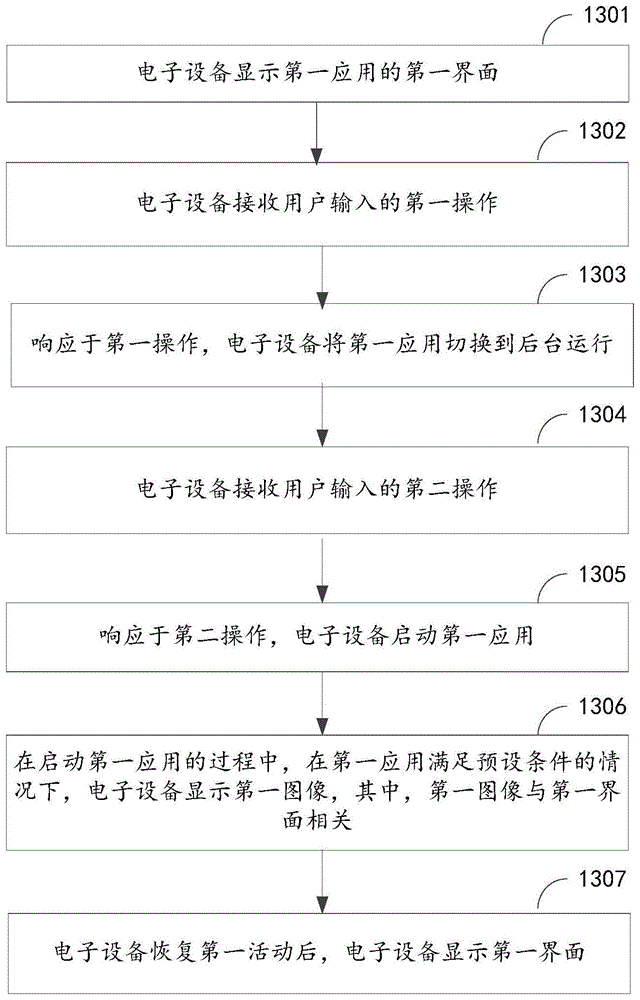
第一方面,本申请提供一种应用启动方法,该方法包括:In a first aspect, the present application provides a method for starting an application, the method including:
电子设备显示第一应用的第一界面;The electronic device displays the first interface of the first application;
电子设备接收用户输入的第一操作;The electronic device receives a first operation input by a user;
响应于第一操作,电子设备将第一应用切换到后台运行;In response to the first operation, the electronic device switches the first application to run in the background;
电子设备接收用户输入的第二操作;The electronic device receives a second operation input by the user;
响应于第二操作,电子设备启动第一应用;In response to the second operation, the electronic device starts the first application;
在启动第一应用的过程中,在第一应用满足预设条件的情况下,电子设备显示第一图像,其中,第一图像与第一界面相关,预设条件包括:第一应用的进程未结束、第一界面对应的第一活动未销毁、第一应用在启动时需要创建第二活动;During the process of starting the first application, if the first application satisfies a preset condition, the electronic device displays the first image, wherein the first image is related to the first interface, and the preset condition includes: the process of the first application is not End, the first activity corresponding to the first interface is not destroyed, and the first application needs to create a second activity when starting;
电子设备恢复第一活动后,电子设备显示第一界面。After the electronic device resumes the first activity, the electronic device displays the first interface.
在应用需要创建新的活动时,先显示该应用的快照,在显示应用的快照期间,系统内部会创建新的活动,恢复目标活动(上一次退回到后台前显示的界面对应的活动,且未被销毁),得到目标活动对应的界面。由于上一次退回到后台前显示的界面对应的活动与应用启动后恢复的活动为同一活动,所以,应用显示的快照和应用启动后显示的第一界面内容相同,从用户的角度,提高了应用软件的启动响应速度。When an application needs to create a new activity, it first displays the snapshot of the application. During the display of the snapshot of the application, the system will create a new activity internally and restore the target activity (the activity corresponding to the interface displayed before returning to the background last time, and not destroyed), and get the interface corresponding to the target activity. Since the activity corresponding to the interface displayed before returning to the background last time is the same as the activity resumed after the application starts, the snapshot displayed by the application is the same as the first interface displayed after the application starts. From the perspective of the user, the application is improved. The startup response speed of the software.
作为本申请第一方面的一种实现方式,电子设备接收用户输入的第一操作后,该方法还包括:As an implementation manner of the first aspect of the present application, after the electronic device receives the first operation input by the user, the method further includes:
电子设备基于第一界面得到第二图像;The electronic device obtains the second image based on the first interface;
电子设备缓存第二图像,第二图像包含第一图像。The electronic device caches the second image, and the second image includes the first image.
本申请中,第一图像为第一应用的第一界面,缓存的第二图像可以为第一应用的第一界面的图像,还可以是第一应用的第一界面的图像和状态栏的图像。In this application, the first image is the first interface of the first application, and the cached second image may be the image of the first interface of the first application, or the image of the first interface of the first application and the image of the status bar .
作为本申请第一方面的一种实现方式,电子设备显示第一图像之前,该方法还包括:As an implementation manner of the first aspect of the present application, before the electronic device displays the first image, the method further includes:
电子设备确定第一应用的进程未结束;The electronic device determines that the process of the first application has not ended;
电子设备确定第一界面对应的第一活动未销毁;The electronic device determines that the first activity corresponding to the first interface is not destroyed;
电子设备确定第一应用在启动时需要创建第二活动。The electronic device determines that the first application needs to create the second activity when started.
作为本申请第一方面的一种实现方式,电子设备包括逻辑判断组件和活动任务管理组件,活动任务管理组件用于记录应用的进程的状态;As an implementation of the first aspect of the present application, the electronic device includes a logic judgment component and an activity task management component, and the activity task management component is used to record the state of the process of the application;
电子设备确定第一应用的进程未结束包括:The determination by the electronic device that the process of the first application has not ended includes:
逻辑判断组件从活动任务管理组件获取第一应用的进程的状态;The logic judgment component obtains the state of the process of the first application from the activity task management component;
逻辑判断组件根据第一应用的进程的状态确定第一应用的进程未结束。The logic judging component determines that the process of the first application has not ended according to the state of the process of the first application.
作为本申请第一方面的一种实现方式,电子设备包括逻辑判断组件和活动记录组件,活动记录组件用于记录活动的状态;As an implementation of the first aspect of the present application, the electronic device includes a logic judgment component and an activity record component, and the activity record component is used to record the state of the activity;
电子设备确定第一界面对应的第一活动未销毁包括:The determination by the electronic device that the first activity corresponding to the first interface is not destroyed includes:
逻辑判断组件从活动记录组件获取第一活动的状态;The logic judgment component acquires the state of the first activity from the activity record component;
逻辑判断组件根据第一活动的状态确定第一活动未销毁。The logic judgment component determines that the first activity is not destroyed according to the state of the first activity.
作为本申请第一方面的一种实现方式,电子设备包括活动任务管理组件,活动任务管理组件用于在第一应用启动时向逻辑判断组件发送第一应用的启动信息,第一应用的启动信息包括第一应用启动时的目标活动;As an implementation of the first aspect of the present application, the electronic device includes an activity task management component, and the activity task management component is used to send the start information of the first application to the logical judgment component when the first application starts, and the start information of the first application Including the target activity when the first application is launched;
逻辑判断组件从活动记录组件获取第一活动的状态之前,该方法还包括:Before the logic judgment component acquires the state of the first activity from the activity record component, the method further includes:
逻辑判断组件接收活动任务管理组件发送的第一应用的启动信息;The logic judgment component receives the start information of the first application sent by the activity task management component;
逻辑判断组件根据第一应用的启动信息确定第一应用启动时的目标活动为第一活动。The logic judging component determines the target activity when the first application is started as the first activity according to the start information of the first application.
作为本申请第一方面的一种实现方式,电子设备包括逻辑判断组件和活动任务管理组件,活动任务管理组件用于在第一应用启动时向逻辑判断组件发送第一应用的启动信息,第一应用的启动信息包括创建第二活动;As an implementation of the first aspect of the present application, the electronic device includes a logic judgment component and an activity task management component, and the activity task management component is configured to send the startup information of the first application to the logic judgment component when the first application is started, and the first The launch information for the application includes creating a second activity;
电子设备确定第一应用在启动时需要创建第二活动之前,该方法还包括:Before the electronic device determines that the first application needs to create the second activity when starting, the method further includes:
逻辑判断组件接收活动任务管理组件发送的第一应用的启动信息;The logic judgment component receives the start information of the first application sent by the activity task management component;
电子设备确定第一应用在启动时需要创建第二活动,包括:The electronic device determines that the first application needs to create a second activity when starting, including:
逻辑判断组件根据第一应用的启动信息确定第一应用在启动时需要创建第二活动。The logic judging component determines according to the startup information of the first application that the first application needs to create the second activity when it is started.
作为本申请第一方面的一种实现方式,电子设备还包括桌面启动器;As an implementation manner of the first aspect of the present application, the electronic device further includes a desktop launcher;
电子设备接收用户输入的第二操作,具体为:The electronic device receives the second operation input by the user, specifically:
桌面启动器接收用户输入的第二操作;The desktop launcher receives a second operation input by the user;
该方法还包括:The method also includes:
响应于第二操作,桌面启动器向活动任务管理组件发送第一应用的启动指令;In response to the second operation, the desktop launcher sends an instruction to start the first application to the active task management component;
响应于接收启动指令,活动任务管理组件获取第一应用的启动信息;In response to receiving the launch instruction, the active task management component acquires launch information of the first application;
活动任务管理组件向逻辑判断组件发送第一应用的启动信息。The activity task management component sends the start information of the first application to the logical judgment component.
作为本申请第一方面的一种实现方式,电子设备包括:活动任务管理组件、逻辑判断组件、快照模块和WMS;As an implementation of the first aspect of the present application, the electronic device includes: an activity task management component, a logic judgment component, a snapshot module, and a WMS;
电子设备缓存第二图像,包括:The electronic device caches the second image, including:
快照模块缓存第二图像;the snapshot module caches the second image;
在第一应用满足预设条件的情况下,电子设备显示第一图像,包括:When the first application satisfies the preset condition, the electronic device displays the first image, including:
逻辑判断组件判断第一应用满足预设条件的情况下,逻辑判断组件向活动任务管理组件发送第一信息,第一信息用于表示第一应用满足预设条件;When the logic judging component judges that the first application satisfies the preset condition, the logic judging component sends first information to the activity task management component, and the first information is used to indicate that the first application satisfies the preset condition;
活动任务管理组件接收到第一信息的情况下,向快照模块发送第二信息,第二信息用于指示快照模块向WMS发送第二图像;When the active task management component receives the first information, it sends the second information to the snapshot module, and the second information is used to instruct the snapshot module to send the second image to the WMS;
快照模块向WMS发送第二图像;The snapshot module sends the second image to the WMS;
WMS基于第二图像,控制电子设备显示第一图像。The WMS controls the electronic device to display the first image based on the second image.
作为本申请第一方面的一种实现方式,电子设备包括:活动记录组件;As an implementation manner of the first aspect of the present application, the electronic device includes: an activity recording component;
活动任务管理组件向快照模块发送第二信息包括:The second information sent by the activity task management component to the snapshot module includes:
活动任务管理组件通过活动记录组件向快照模块发送第二信息。The active task management component sends the second information to the snapshot module through the active record component.
作为本申请第一方面的一种实现方式,第一图像与第二图像相同,第一图像与第一界面的图像相同;As an implementation of the first aspect of the present application, the first image is the same as the second image, and the first image is the same as the image of the first interface;
或者,第一图像与第一界面的图像相同,第二图像包括第一界面的图像和第一状态栏内容,第一状态栏内容为电子设备缓存第二图像时电子设备的状态栏内容。Or, the first image is the same as the image of the first interface, and the second image includes the image of the first interface and the content of the first status bar, and the content of the first status bar is the content of the status bar of the electronic device when the electronic device caches the second image.
在本申请中,将应用退回到后台前保存的应用的快照记为第二图像。本申请实施例将应用再次启动时显示的快照记为第一图像。保存的快照(第二图像)包括第一应用的第一界面,可以包括状态栏(截图时刻的状态栏内容)也可以不包括状态栏。而显示的快照(第一图像)为包含第一应用的第一界面、且不包括状态栏内容的图像。电子设备显示第一图像时,在第二图像不包括状态栏(截图时刻的状态栏内容)时,需要合成保存的第二图像和当前的状态栏内容;在第二图像包括状态栏(截图时刻的状态栏内容)时,将系统当前的状态栏内容覆盖第二图像的状态栏区域;或者对第二图像进行截图处理得到包含第一应用的第一界面、且不包含状态栏内容的第一图像,然后电子设备显示该第一图像时,合成该第一图像和状态栏内容。In this application, the snapshot of the application saved before the application returns to the background is recorded as the second image. In this embodiment of the present application, the snapshot displayed when the application is restarted is recorded as the first image. The saved snapshot (second image) includes the first interface of the first application, and may or may not include a status bar (the content of the status bar at the time of screenshotting). The displayed snapshot (first image) is an image that includes the first interface of the first application and does not include the content of the status bar. When the electronic device displays the first image, when the second image does not include the status bar (the content of the status bar at the moment of the screenshot), it is necessary to synthesize the saved second image and the current status bar content; content of the status bar), cover the current status bar content of the system over the status bar area of the second image; or take a screenshot of the second image to obtain the first interface that contains the first interface of the first application and does not contain the content of the status bar. image, and then when the electronic device displays the first image, synthesize the first image and the contents of the status bar.
作为本申请第一方面的一种实现方式,在快照模块向WMS发送第二图像之后,该方法还包括:As an implementation of the first aspect of the present application, after the snapshot module sends the second image to the WMS, the method further includes:
快照模块向活动任务管理组件发送第二图像添加成功的信息;The snapshot module sends the information that the second image is added successfully to the active task management component;
响应于接收到第二图像添加成功的信息,活动任务管理组件通过快照模块向WMS发送第一指令;第一指令用于指示WMS基于第二图像,控制电子设备显示第一图像。In response to receiving the information that the second image is successfully added, the active task management component sends a first instruction to the WMS through the snapshot module; the first instruction is used to instruct the WMS to control the electronic device to display the first image based on the second image.
作为本申请第一方面的一种实现方式,电子设备包括活动记录组件;As an implementation manner of the first aspect of the present application, the electronic device includes an activity recording component;
快照模块向活动任务管理组件发送第二图像添加成功的信息包括:The snapshot module sends the information that the second image is successfully added to the active task management component including:
快照模块通过活动记录组件向活动任务管理组件发送第二图像添加成功的信息。The snapshot module sends the information that the second image is successfully added to the active task management component through the active recording component.
作为本申请第一方面的一种实现方式,第二操作为作用在电子设备的系统桌面上显示的第一应用的图标的操作,电子设备还包括:桌面启动器;As an implementation of the first aspect of the present application, the second operation is an operation acting on the icon of the first application displayed on the system desktop of the electronic device, and the electronic device further includes: a desktop launcher;
活动任务管理组件通过快照模块向WMS发送第一指令之后,该方法还包括:After the active task management component sends the first instruction to the WMS through the snapshot module, the method also includes:
活动任务管理组件向桌面启动器发送第三信息,第三信息用于指示桌面启动器停止显示系统桌面。The active task management component sends third information to the desktop launcher, where the third information is used to instruct the desktop launcher to stop displaying the system desktop.
作为本申请第一方面的一种实现方式,快照模块缓存第二图像包括:As an implementation of the first aspect of the present application, the snapshot module caching the second image includes:
快照模块将第二图像缓存在快照缓存文件中;the snapshot module caches the second image in a snapshot cache file;
相应的,快照模块向WMS发送第二图像包括:Correspondingly, the snapshot module sending the second image to the WMS includes:
快照模块从快照缓存文件获取第二图像;The snapshot module obtains the second image from the snapshot cache file;
快照模块向WMS发送第二图像。The snapshot module sends the second image to the WMS.
作为本申请第一方面的一种实现方式,电子设备接收用户输入的第二操作之前,该方法还包括:As an implementation manner of the first aspect of the present application, before the electronic device receives the second operation input by the user, the method further includes:
电子设备接收用户输入的第三操作;The electronic device receives a third operation input by the user;
响应于第三操作,电子设备启动第二应用并显示第二应用的第二界面。In response to the third operation, the electronic device starts the second application and displays the second interface of the second application.
在第一应用退回到后台运行后,用户可以在电子设备上进行其他操作,例如,通过第三操作启动第二应用;还可以将第二应用再退回到后台,使得电子设备显示系统桌面。当然,在第一应用退回到后台后,用户可以启动多个应用之后,再回到系统桌面。或者电子设备在未回到系统桌面的情况下,通过其他应用启动第一应用。After the first application returns to the background to run, the user can perform other operations on the electronic device, for example, start the second application through a third operation; the second application can also be returned to the background, so that the electronic device displays the system desktop. Of course, after the first application returns to the background, the user can start multiple applications and then return to the system desktop. Or the electronic device starts the first application through other applications without returning to the system desktop.
作为本申请第一方面的一种实现方式,电子设备恢复第一活动之前,该方法还包括:As an implementation manner of the first aspect of the present application, before the electronic device resumes the first activity, the method further includes:
电子设备创建第二活动。The electronic device creates a second activity.
作为本申请第一方面的一种实现方式,第一操作包括:在电子设备的触控屏上的手势操作;或,在电子设备的摄像头视野内的隔空手势操作。As an implementation manner of the first aspect of the present application, the first operation includes: a gesture operation on a touch screen of the electronic device; or an air gesture operation within a field of view of a camera of the electronic device.
本申请中,第一操作可以是任意在电子设备显示第一应用的第一界面时,将第一应用从前台运行切换到后台运行的操作。In this application, the first operation may be any operation of switching the first application from running in the foreground to running in the background when the electronic device displays the first interface of the first application.
第二方面,提供一种电子设备,包括处理器,处理器用于运行存储器中存储的计算机程序,实现本申请第一方面任一项的方法。In a second aspect, an electronic device is provided, including a processor, and the processor is configured to run a computer program stored in a memory to implement the method of any one of the first aspects of the present application.
第三方面,提供一种芯片系统,包括处理器,处理器与存储器耦合,处理器执行存储器中存储的计算机程序,以实现本申请第一方面任一项的方法。In a third aspect, a chip system is provided, including a processor, the processor is coupled to a memory, and the processor executes a computer program stored in the memory, so as to implement the method in any one of the first aspects of the present application.
第四方面,提供一种计算机可读存储介质,计算机可读存储介质存储有计算机程序,计算机程序被一个或多个处理器执行时实现本申请第一方面任一项的方法。In a fourth aspect, a computer-readable storage medium is provided. The computer-readable storage medium stores a computer program. When the computer program is executed by one or more processors, the method in any one of the first aspects of the present application is implemented.
第五方面,本申请提供了一种计算机程序产品,当计算机程序产品在设备上运行时,使得设备执行本申请第一方面任一项的方法。In a fifth aspect, the present application provides a computer program product, which, when the computer program product is run on a device, causes the device to execute any one of the methods in the first aspect of the present application.
可以理解的是,上述第二方面至第五方面的有益效果可以参见上述第一方面中的相关描述,在此不再赘述。It can be understood that, for the beneficial effects of the above-mentioned second aspect to the fifth aspect, reference can be made to the relevant description in the above-mentioned first aspect, and details will not be repeated here.
附图说明Description of drawings
图1为本申请实施例提供的一种电子设备的硬件结构示意图;FIG. 1 is a schematic diagram of a hardware structure of an electronic device provided in an embodiment of the present application;
图2为本申请实施例提供的一种应用启动时表示应用响应时长的示意图;FIG. 2 is a schematic diagram showing application response time when an application is started according to an embodiment of the present application;
图3为本申请实施例提供的一种应用启动时的界面示意图;FIG. 3 is a schematic diagram of an interface when an application is started according to an embodiment of the present application;
图4为本申请实施例提供的另一应用启动时的界面示意图;FIG. 4 is a schematic diagram of an interface when another application is started according to an embodiment of the present application;
图5为本申请实施例提供的另一应用启动时的界面示意图;FIG. 5 is a schematic diagram of an interface when another application is started according to the embodiment of the present application;
图6为本申请实施例提供的另一应用启动时的界面示意图;FIG. 6 is a schematic diagram of an interface when another application is started according to the embodiment of the present application;
图7为本申请实施例提供的另一应用启动时的界面示意图;FIG. 7 is a schematic diagram of an interface when another application is started according to the embodiment of the present application;
图8为本申请实施例提供的另一应用启动时的界面示意图;FIG. 8 is a schematic diagram of an interface when another application is started according to an embodiment of the present application;
图9为本申请实施例提供的另一应用启动时的界面示意图;FIG. 9 is a schematic diagram of an interface when another application is started according to an embodiment of the present application;
图10为本申请实施例提供的应用启动方法的技术架构图;FIG. 10 is a technical architecture diagram of an application startup method provided by an embodiment of the present application;
图11为本申请实施例提供的应用启动方法的时序图;FIG. 11 is a sequence diagram of an application startup method provided by an embodiment of the present application;
图12为本申请实施例提供的启动应用的方式的示意图;FIG. 12 is a schematic diagram of a method for starting an application provided by an embodiment of the present application;
图13为本申请实施例提供的应用启动时的流程示意图。FIG. 13 is a schematic flowchart of the application startup provided by the embodiment of the present application.
具体实施方式detailed description
以下描述中,为了说明而不是为了限定,提出了诸如特定系统结构、技术之类的具体细节,以便透彻理解本申请实施例。然而,本领域的技术人员应当清楚,在没有这些具体细节的其它实施例中也可以实现本申请。In the following description, specific details such as specific system structures and technologies are presented for the purpose of illustration rather than limitation, so as to thoroughly understand the embodiments of the present application. It will be apparent, however, to one skilled in the art that the present application may be practiced in other embodiments without these specific details.
应当理解,当在本申请说明书和所附权利要求书中使用时,术语“包括”指示所描述特征、整体、步骤、操作、元素和/或组件的存在,但并不排除一个或多个其它特征、整体、步骤、操作、元素、组件和/或其集合的存在或添加。It should be understood that when used in this specification and the appended claims, the term "comprising" indicates the presence of described features, integers, steps, operations, elements and/or components, but does not exclude one or more other Presence or addition of features, wholes, steps, operations, elements, components and/or collections thereof.
还应当理解,在本申请实施例中,“一个或多个”是指一个、两个或两个以上;“和/或”,描述关联对象的关联关系,表示可以存在三种关系;例如,A和/或B,可以表示:单独存在A,同时存在A和B,单独存在B的情况,其中A、B可以是单数或者复数。字符“/”一般表示前后关联对象是一种“或”的关系。It should also be understood that in the embodiments of the present application, "one or more" refers to one, two or more than two; "and/or" describes the association relationship of associated objects, indicating that there may be three types of relationships; for example, A and/or B may mean: A exists alone, A and B exist simultaneously, and B exists alone, wherein A and B may be singular or plural. The character "/" generally indicates that the contextual objects are an "or" relationship.
另外,在本申请说明书和所附权利要求书的描述中,术语“第一”、“第二”、“第三”、“第四”等仅用于区分描述,而不能理解为指示或暗示相对重要性。In addition, in the description of the specification and the appended claims of this application, the terms "first", "second", "third", "fourth" and so on are only used to distinguish descriptions, and should not be interpreted as indicating or implying relative importance.
在本申请说明书中描述的参考“一个实施例”或“一些实施例”等意味着在本申请的一个或多个实施例中包括结合该实施例描述的特定特征、结构或特点。由此,在本说明书中的不同之处出现的语句“在一个实施例中”、“在一些实施例中”、“在其他一些实施例中”、“在另外一些实施例中”等不是必然都参考相同的实施例,而是意味着“一个或多个但不是所有的实施例”,除非是以其他方式另外特别强调。术语“包括”、“包含”、“具有”及它们的变形都意味着“包括但不限于”,除非是以其他方式另外特别强调。Reference to "one embodiment" or "some embodiments" or the like in the specification of the present application means that a particular feature, structure, or characteristic described in connection with the embodiment is included in one or more embodiments of the present application. Thus, appearances of the phrases "in one embodiment," "in some embodiments," "in other embodiments," "in other embodiments," etc. in various places in this specification are not necessarily All refer to the same embodiment, but mean "one or more but not all embodiments" unless specifically stated otherwise. The terms "including", "comprising", "having" and variations thereof mean "including but not limited to", unless specifically stated otherwise.
本申请实施例提供的一种应用启动方法,可以适用于电子设备中。该电子设备可以为平板电脑、手机、可穿戴设备、笔记本电脑、超级移动个人计算机(ultra-mobilepersonal computer,UMPC)、上网本、个人数字助理(personal digital assistant,PDA)等电子设备。本申请实施例对电子设备的具体类型不作限定。The method for starting an application provided in the embodiment of the present application may be applicable to an electronic device. The electronic device may be a tablet computer, a mobile phone, a wearable device, a notebook computer, an ultra-mobile personal computer (ultra-mobile personal computer, UMPC), a netbook, a personal digital assistant (personal digital assistant, PDA) and other electronic devices. The embodiment of the present application does not limit the specific type of the electronic device.
图1示出了一种电子设备的结构示意图。电子设备100可以包括处理器110,外部存储器接口120,内部存储器121,通用串行总线(universal serial bus,USB)接口130,充电管理模块140,电源管理模块141,电池142,天线1,天线2,移动通信模块150,无线通信模块160,音频模块170,扬声器170A,受话器170B,麦克风170C,耳机接口170D,传感器模块180,按键190,马达191,摄像头193,显示屏194,以及用户标识模块(subscriberidentification module,SIM)卡接口195等。其中,传感器模块180可以包括压力传感器180A,触摸传感器180K等。Fig. 1 shows a schematic structural diagram of an electronic device. The electronic device 100 may include a
可以理解的是,本申请实施例示意的结构并不构成对电子设备100的具体限定。在本申请另一些实施例中,电子设备100可以包括比图示更多或更少的部件,或者组合某些部件,或者拆分某些部件,或者不同的部件布置。图示的部件可以以硬件,软件或软件和硬件的组合实现。It can be understood that, the structure illustrated in the embodiment of the present application does not constitute a specific limitation on the electronic device 100 . In other embodiments of the present application, the electronic device 100 may include more or fewer components than shown in the figure, or combine certain components, or separate certain components, or arrange different components. The illustrated components can be realized in hardware, software or a combination of software and hardware.
处理器110可以包括一个或多个处理单元,例如:处理器110可以包括应用处理器(application processor,AP),调制解调处理器,图形处理器(graphics processingunit,GPU),图像信号处理器(image signal processor,ISP),控制器,存储器,视频编解码器,数字信号处理器(digital signal processor,DSP),基带处理器,和/或神经网络处理器(neural-network processing unit,NPU)等。其中,不同的处理单元可以是独立的器件,也可以集成在一个或多个处理器中。例如,处理器110用于执行本申请实施例中的应用启动方法。The
其中,控制器可以是电子设备100的神经中枢和指挥中心。控制器可以根据指令操作码和时序信号,产生操作控制信号,完成取指令和执行指令的控制。Wherein, the controller may be the nerve center and command center of the electronic device 100 . The controller can generate an operation control signal according to the instruction opcode and timing signal, and complete the control of fetching and executing the instruction.
处理器110中还可以设置存储器,用于存储指令和数据。在一些实施例中,处理器110中的存储器为高速缓冲存储器。该存储器可以保存处理器110刚用过或循环使用的指令或数据。如果处理器110需要再次使用该指令或数据,可从存储器中直接调用。避免了重复存取,减少了处理器110的等待时间,因而提高了系统的效率。A memory may also be provided in the
USB接口130是符合USB标准规范的接口,具体可以是Mini USB接口,Micro USB接口,USB Type C接口等。USB接口130可以用于连接充电器为电子设备100充电,也可以用于电子设备100与外围设备之间传输数据。The USB interface 130 is an interface conforming to the USB standard specification, specifically, it may be a Mini USB interface, a Micro USB interface, a USB Type C interface, and the like. The USB interface 130 can be used to connect a charger to charge the electronic device 100 , and can also be used to transmit data between the electronic device 100 and peripheral devices.
外部存储器接口120可以用于连接外部存储卡,例如Micro SD卡,实现扩展电子设备100的存储能力。外部存储卡通过外部存储器接口120与处理器110通信,实现数据存储功能。例如将音乐,视频等文件保存在外部存储卡中。The
内部存储器121可以用于存储计算机可执行程序代码,可执行程序代码包括指令。处理器110通过运行存储在内部存储器121的指令,从而执行电子设备100的各种功能应用以及数据处理。内部存储器121可以包括存储程序区和存储数据区。其中,存储程序区可存储操作系统,至少一个功能所需的应用程序(比如声音播放功能,图像播放功能等)。The internal memory 121 may be used to store computer-executable program codes including instructions. The
此外,内部存储器121可以包括高速随机存取存储器,还可以包括非易失性存储器,例如至少一个磁盘存储器件,闪存器件,通用闪存存储器(universal flash storage,UFS)等。In addition, the internal memory 121 may include a high-speed random access memory, and may also include a non-volatile memory, such as at least one magnetic disk storage device, flash memory device, universal flash storage (universal flash storage, UFS) and the like.
充电管理模块140用于从充电器接收充电输入。其中,充电器可以是无线充电器,也可以是有线充电器。在一些有线充电的实施例中,充电管理模块140可以通过USB接口130接收有线充电器的充电输入。The charging management module 140 is configured to receive a charging input from a charger. Wherein, the charger may be a wireless charger or a wired charger. In some wired charging embodiments, the charging management module 140 can receive charging input from the wired charger through the USB interface 130 .
电源管理模块141用于连接电池142,充电管理模块140与处理器110。电源管理模块141接收电池142和/或充电管理模块140的输入,为处理器110,内部存储器121,外部存储器,显示屏194,摄像头193,和无线通信模块160等供电。The
在其他一些实施例中,电源管理模块141也可以设置于处理器110中。在另一些实施例中,电源管理模块141和充电管理模块140也可以设置于同一个器件中。In some other embodiments, the
电子设备100的无线通信功能可以通过天线1,天线2,移动通信模块150,无线通信模块160,调制解调处理器以及基带处理器等实现。The wireless communication function of the electronic device 100 can be realized by the antenna 1 , the antenna 2 , the
天线1和天线2用于发射和接收电磁波信号。电子设备100中的每个天线可用于覆盖单个或多个通信频带。不同的天线还可以复用,以提高天线的利用率。例如:可以将天线1复用为无线局域网的分集天线。在另外一些实施例中,天线可以和调谐开关结合使用。Antenna 1 and Antenna 2 are used to transmit and receive electromagnetic wave signals. Each antenna in electronic device 100 may be used to cover single or multiple communication frequency bands. Different antennas can also be multiplexed to improve the utilization of the antennas. For example: Antenna 1 can be multiplexed as a diversity antenna of a wireless local area network. In other embodiments, the antenna may be used in conjunction with a tuning switch.
移动通信模块150可以提供应用在电子设备100上的包括2G/3G/4G/5G等无线通信的解决方案。移动通信模块150可以包括至少一个滤波器,开关,功率放大器,低噪声放大器(low noise amplifier,LNA)等。移动通信模块150可以由天线1接收电磁波,并对接收的电磁波进行滤波,放大等处理,传送至调制解调处理器进行解调。移动通信模块150还可以对经调制解调处理器调制后的信号放大,经天线1转为电磁波辐射出去。The
无线通信模块160可以提供应用在电子设备100上的包括无线局域网(wirelesslocal area networks,WLAN)(如无线保真(wireless fidelity,Wi-Fi)网络),蓝牙(bluetooth,BT),全球导航卫星系统(global navigation satellite system,GNSS),调频(frequency modulation,FM),近距离无线通信技术(near field communication,NFC),红外技术(infrared,IR)等无线通信的解决方案。无线通信模块160可以是集成至少一个通信处理模块的一个或多个器件。无线通信模块160经由天线2接收电磁波,将电磁波信号调频以及滤波处理,将处理后的信号发送到处理器110。无线通信模块160还可以从处理器110接收待发送的信号,对其进行调频,放大,经天线2转为电磁波辐射出去。The
在一些实施例中,电子设备100的天线1和移动通信模块150耦合,天线2和无线通信模块160耦合,使得电子设备100可以通过无线通信技术与网络以及其他设备通信。In some embodiments, the antenna 1 of the electronic device 100 is coupled to the
电子设备100可以通过音频模块170,扬声器170A,受话器170B,麦克风170C,耳机接口170D,以及应用处理器等实现音频功能。例如音乐播放,录音等。The electronic device 100 can implement audio functions through the
音频模块170用于将数字音频信号转换成模拟音频信号输出,也用于将模拟音频输入转换为数字音频信号。音频模块170还可以用于对音频信号编码和解码。在一些实施例中,音频模块170可以设置于处理器110中,或将音频模块170的部分功能模块设置于处理器110中。The
扬声器170A,也称“喇叭”,用于将音频电信号转换为声音信号。电子设备100可以通过扬声器170A收听音乐,或收听免提通话。
受话器170B,也称“听筒”,用于将音频电信号转换成声音信号。当电子设备100接听电话或语音信息时,可以通过将受话器170B靠近人耳接听语音。
麦克风170C,也称“话筒”,“传声器”,用于将声音信号转换为电信号。当拨打电话或发送语音信息时,用户可以通过人嘴靠近麦克风170C发声,将声音信号输入到麦克风170C。电子设备100可以设置至少一个麦克风170C。在另一些实施例中,电子设备100可以设置两个麦克风170C,除了监听语音信息,还可以实现降噪功能。在另一些实施例中,电子设备100还可以设置三个,四个或更多麦克风170C,实现采集声音信号,降噪,还可以识别声音来源,实现定向录音功能等。The
耳机接口170D用于连接有线耳机。耳机接口170D可以是USB接口130,也可以是3.5mm的开放移动电子设备平台(open mobile terminal platform,OMTP)标准接口,美国蜂窝电信工业协会(cellular telecommunications industry association of the USA,CTIA)标准接口。The earphone interface 170D is used for connecting wired earphones. The earphone interface 170D may be the USB interface 130, or a 3.5mm open mobile terminal platform (OMTP) standard interface, or a cellular telecommunications industry association of the USA (CTIA) standard interface.
压力传感器180A用于感受压力信号,可以将压力信号转换成电信号。在一些实施例中,压力传感器180A可以设置于显示屏194。压力传感器180A的种类很多,如电阻式压力传感器,电感式压力传感器,电容式压力传感器等。电容式压力传感器可以是包括至少两个具有导电材料的平行板。当有力作用于压力传感器180A,电极之间的电容改变。电子设备100根据电容的变化确定压力的强度。当有触摸操作作用于显示屏194,电子设备100根据压力传感器180A检测触摸操作强度。电子设备100也可以根据压力传感器180A的检测信号计算触摸的位置。The pressure sensor 180A is used to sense the pressure signal and convert the pressure signal into an electrical signal. In some embodiments, pressure sensor 180A may be disposed on display screen 194 . There are many types of pressure sensors 180A, such as resistive pressure sensors, inductive pressure sensors, and capacitive pressure sensors. A capacitive pressure sensor may be comprised of at least two parallel plates with conductive material. When a force is applied to the pressure sensor 180A, the capacitance between the electrodes changes. The electronic device 100 determines the intensity of pressure according to the change in capacitance. When a touch operation acts on the display screen 194, the electronic device 100 detects the intensity of the touch operation according to the pressure sensor 180A. The electronic device 100 may also calculate the touched position according to the detection signal of the pressure sensor 180A.
触摸传感器180K,也称“触控面板”。触摸传感器180K可以设置于显示屏194,由触摸传感器180K与显示屏194组成触摸屏,也称“触控屏”。触摸传感器180K用于检测作用于其上或附近的触摸操作。触摸传感器可以将检测到的触摸操作传递给应用处理器,以确定触摸事件类型。可以通过显示屏194提供与触摸操作相关的视觉输出。在另一些实施例中,触摸传感器180K也可以设置于电子设备100的表面,与显示屏194所处的位置不同。Touch sensor 180K, also known as "touch panel". The touch sensor 180K can be disposed on the display screen 194, and the touch sensor 180K and the display screen 194 form a touch screen, also called a “touch screen”. The touch sensor 180K is used to detect a touch operation on or near it. The touch sensor can pass the detected touch operation to the application processor to determine the type of touch event. Visual output related to the touch operation can be provided through the display screen 194 . In other embodiments, the touch sensor 180K may also be disposed on the surface of the electronic device 100 , which is different from the position of the display screen 194 .
按键190包括开机键,音量键等。按键190可以是机械按键。也可以是触摸式按键。电子设备100可以接收按键输入,产生与电子设备100的用户设置以及功能控制有关的键信号输入。The keys 190 include a power key, a volume key and the like. The key 190 may be a mechanical key. It can also be a touch button. The electronic device 100 can receive key input and generate key signal input related to user settings and function control of the electronic device 100 .
马达191可以产生振动提示。马达191可以用于来电振动提示,也可以用于触摸振动反馈。The motor 191 can generate a vibrating reminder. The motor 191 can be used for incoming call vibration prompts, and can also be used for touch vibration feedback.
电子设备100通过GPU,显示屏194,以及应用处理器等实现显示功能。GPU为图像处理的微处理器,连接显示屏194和应用处理器。GPU用于执行数学和几何计算,用于图形渲染。处理器110可包括一个或多个GPU,其执行程序指令以生成或改变显示信息。The electronic device 100 realizes the display function through the GPU, the display screen 194 , and the application processor. The GPU is a microprocessor for image processing, and is connected to the display screen 194 and the application processor. GPUs are used to perform mathematical and geometric calculations for graphics rendering.
显示屏194用于显示图像,视频等。在一些实施例中,电子设备100可以包括1个或N个显示屏194,N为大于1的正整数。The display screen 194 is used to display images, videos and the like. In some embodiments, the electronic device 100 may include 1 or N display screens 194 , where N is a positive integer greater than 1.
摄像头193用于捕获静态图像或视频。在一些实施例中,电子设备100可以包括1个或N个摄像头193,N为大于1的正整数。Camera 193 is used to capture still images or video. In some embodiments, the electronic device 100 may include 1 or N cameras 193 , where N is a positive integer greater than 1.
SIM卡接口195用于连接SIM卡。SIM卡可以通过插入SIM卡接口195,或从SIM卡接口195拔出,实现和电子设备100的接触和分离。电子设备100可以支持1个或N个SIM卡接口,N为大于1的正整数。The
本申请实施例并未特别限定一种应用启动方法的执行主体的具体结构,只要可以通过运行记录有本申请实施例的一种应用启动方法的代码,以根据本申请实施例提供的一种应用启动方法进行处理即可。例如,本申请实施例提供的一种应用启动方法的执行主体可以是电子设备中能够调用程序并执行程序的功能模块,或者为应用于电子设备中的处理装置,例如,芯片。The embodiment of this application does not specifically limit the specific structure of the execution subject of an application startup method, as long as the code of an application startup method in this application embodiment can be recorded by running, an application provided by this application embodiment Start the method to process it. For example, the execution subject of an application launching method provided in the embodiment of the present application may be a functional module in an electronic device capable of invoking a program and executing the program, or a processing device applied in the electronic device, for example, a chip.
图1所示的电子设备中可以安装并运行应用。电子设备在前台运行应用A(电子设备中安装的任一应用程序)时,电子设备的显示屏显示应用A的界面,电子设备的使用者可以与电子设备的显示屏当前显示的应用A的界面进行交互操作。电子设备在后台运行应用A时,电子设备不再显示应用A的界面,电子设备的使用者不能与应用A的界面进行交互操作;当然,应用A在后台运行过程中可以接收到其他信息(例如,即时通讯应用可以接收其他用户发送的消息)并将该其他信息通知用户。Applications can be installed and run on the electronic device shown in FIG. 1 . When the electronic device runs application A (any application program installed in the electronic device) in the foreground, the display screen of the electronic device displays the interface of application A, and the user of the electronic device can communicate with the interface of application A currently displayed on the display screen of the electronic device for interactive operation. When the electronic device runs application A in the background, the electronic device no longer displays the interface of application A, and the user of the electronic device cannot interact with the interface of application A; of course, application A can receive other information (such as , the instant messaging application can receive messages sent by other users) and notify the user of the other information.
用户在使用电子设备过程中,若应用A未运行(未在后台运行也未在前台运行),用户通过电子设备桌面上的应用A的图标启动应用A,电子设备首先为该应用创建进程。在应用A的进程已经创建成功的情况下,通过该进程运行应用A的Activity(例如Activity1),Activity1进入任务栈,且位于任务栈的顶部,电子设备显示Activity1对应一个界面1。用户可以通过Activity1对应的界面1进行交互操作,若该交互操作将使得电子设备显示另一新的界面,则系统中应用A的进程运行另一新的Activity(例如Activity2),该Activity2将进入任务栈且位于任务栈顶部,旧的Activity1将被推入任务栈的下面。相应的,电子设备的显示屏显示Activity2对应的界面2,旧的Activity1的界面被销毁。当然,用户可以通过在Activity2对应的界面2上进行交互操作(例如,返回操作),使得任务栈中的Acitivity1回到任务栈的顶部,则Activity2被销毁,相应的,电子设备的显示屏显示任务栈顶部Activity1对应的界面1。When the user uses the electronic device, if the application A is not running (not running in the background or running in the foreground), the user starts the application A through the icon of the application A on the desktop of the electronic device, and the electronic device first creates a process for the application. When the process of application A has been created successfully, the activity of application A (for example, Activity1) is run through the process. Activity1 enters the task stack and is located at the top of the task stack. The electronic device displays that Activity1 corresponds to an interface 1 . The user can perform an interactive operation through the interface 1 corresponding to Activity1. If the interactive operation will cause the electronic device to display another new interface, the process of application A in the system will run another new Activity (such as Activity2), and this Activity2 will enter the task stack and is located at the top of the task stack, the old Activity1 will be pushed below the task stack. Correspondingly, the display screen of the electronic device displays interface 2 corresponding to Activity2, and the old interface of Activity1 is destroyed. Of course, the user can perform an interactive operation (for example, return operation) on the interface 2 corresponding to Activity2, so that Acitivity1 in the task stack returns to the top of the task stack, then Activity2 is destroyed, and correspondingly, the display screen of the electronic device displays the task Interface 1 corresponding to Activity1 at the top of the stack.
通过上述描述可以理解,应用显示的各个界面依赖于应用的进程运行各个Activity。另外,在应用从前台进入后台运行后,该应用的进程可以依然存在于系统中(例如,该应用的进程未消亡)。当然,在应用从前台进入后台运行后,该应用的进程也可能被销毁,即系统后台不存在该应用的进程。It can be understood from the above description that each interface displayed by the application depends on the process of the application to run each activity. In addition, after the application enters the background operation from the foreground, the process of the application may still exist in the system (for example, the process of the application has not died). Of course, after the application enters the background operation from the foreground, the process of the application may also be destroyed, that is, the process of the application does not exist in the system background.
应用A启动时,若电子设备系统后台不存在应用A的进程,则系统需要为应用A创建新的进程,将这种启动过程记为冷启动。When application A starts, if there is no process of application A in the background of the electronic device system, the system needs to create a new process for application A, and this startup process is recorded as a cold start.
应用A启动时,若电子设备系统后台存在应用A的进程,则系统不再需要为应用A创建进程,将这种启动过程记为热启动。When application A starts, if there is a process of application A in the background of the electronic device system, the system no longer needs to create a process for application A, and this startup process is recorded as a hot start.
本申请实施例可以应用在应用的热启动场景中,参见图2,为本申请实施例提供的一种应用场景。参见图2中的(a),电子设备显示系统桌面,用户点击电子设备的系统桌面上的应用A的图标(例如,视频图标)。示例性的,在电子设备显示图2中的(a)显示的系统桌面时,系统后台存在应用A的进程。在用户点击应用A的图标后,经过一段时间,电子设备显示应用A的界面,参见图2中的(b)。本申请实施例用于提高电子设备从图2中的(a)所示的点击操作到显示图2中的(b)对应的应用A的界面之间的响应速度。本申请实施例中,图2中的(b)对应的界面为应用A上一次从前台退回到后台运行时显示的最后界面。The embodiment of the present application may be applied in a hot start-up scenario of an application. Referring to FIG. 2 , it is an application scenario provided by the embodiment of the present application. Referring to (a) in FIG. 2 , the electronic device displays a system desktop, and the user clicks an icon of application A (for example, a video icon) on the system desktop of the electronic device. Exemplarily, when the electronic device displays the system desktop shown in (a) in FIG. 2 , there is a process of application A in the background of the system. After the user clicks the icon of application A, after a period of time, the electronic device displays the interface of application A, see (b) in FIG. 2 . The embodiment of the present application is used to improve the response speed of the electronic device from the click operation shown in (a) in FIG. 2 to displaying the interface of application A corresponding to (b) in FIG. 2 . In the embodiment of the present application, the interface corresponding to (b) in FIG. 2 is the last interface displayed when application A returns from the foreground to the background operation last time.
当然,实际应用中,从图2中的(a)对应的界面(系统桌面对应的界面)到图2中的(b)对应的应用A界面中间也可以显示其他界面,例如,应用A启动时的广告界面。中间也可以显示动效,例如,应用A的图标从彩色图标变为灰度图标后再变为彩色图标的过程对应的动画等。Of course, in practical applications, other interfaces can also be displayed between the interface corresponding to (a) in Figure 2 (the interface corresponding to the system desktop) and the interface of application A corresponding to (b) in Figure 2, for example, when application A starts advertising interface. Motion effects can also be displayed in the middle, for example, the animation corresponding to the process in which the icon of application A changes from a color icon to a grayscale icon and then to a color icon.
当然,实际应用中,从图2中的(a)对应的界面到图2中的(b)对应的界面中间也可以不显示其他界面,例如,用户点击应用A的图标后,在图2中的(a)对应的界面停留一段时间,直到显示图2中的(b)对面的界面。Of course, in practical applications, other interfaces may not be displayed between the interface corresponding to (a) in Figure 2 and the interface corresponding to (b) in Figure 2. For example, after the user clicks the icon of application A, the The interface corresponding to (a) stays for a while until the interface opposite to (b) in FIG. 2 is displayed.
本申请实施例中,电子设备从前台到后台运行之前显示的最后界面可以记为界面A。电子设备进入后台运行后,用户可以点击桌面上应用A的图标(参见图2中的(a))将应用A切换到前台运行。在热启动场景中,在应用A从后台到前台运行前,虽然应用A的进程未被销毁,然而界面A已经被销毁。电子设备检测到应用A的图标的点击操作后,需要采用应用A的进程重新绘制界面A。若电子设备的系统负载较重,或者界面A较为复杂,或者电子设备的内存已经被换出(例如,应用A的进程下的一些数据被从内存换到磁盘保存),则电子设备绘制界面A需要的时间较长,导致响应速度较慢,影响用户体验。In the embodiment of the present application, the last interface displayed before the electronic device runs from the foreground to the background may be recorded as interface A. After the electronic device runs in the background, the user can click the icon of application A on the desktop (see (a) in FIG. 2 ) to switch the application A to run in the foreground. In the hot start scenario, before application A runs from the background to the foreground, although the process of application A has not been destroyed, interface A has been destroyed. After the electronic device detects the click operation of the icon of the application A, it needs to use the process of the application A to redraw the interface A. If the system load of the electronic device is heavy, or the interface A is relatively complex, or the memory of the electronic device has been swapped out (for example, some data under the process of application A is swapped from the memory to the disk for storage), the electronic device draws the interface A It takes a long time, resulting in slow response speed and affecting user experience.
本申请实施例可以设置应用在被切换到后台时保存该应用切换到后台前显示的最后界面的快照。本申请实施例中的快照均表示应用上一次切换到后台前显示的最后界面的快照。在应用热启动(该应用从后台进入前台运行时,该应用的进程未被终止)的情况,首先显示该应用切换到后台前显示的最后界面的快照,在该应用被切换到后台时的任务栈顶部的Acitivity被恢复(resume)得到该Activity对应的界面后,再显示得到的界面。通常,应用被切换到后台前任务栈顶部的Acitivity对应的界面为该应用切换到后台前显示的最后界面。In this embodiment of the present application, it may be set that when an application is switched to the background, a snapshot of the last interface displayed before the application is switched to the background is saved. The snapshots in the embodiments of the present application all represent snapshots of the last interface displayed before the application switches to the background last time. In the case of hot start of the application (when the application enters the foreground from the background, the process of the application is not terminated), first display the snapshot of the last interface displayed before the application switches to the background, and the task when the application is switched to the background The Activity at the top of the stack is resumed (resume) to obtain the interface corresponding to the Activity, and then display the obtained interface. Usually, the interface corresponding to the Activity at the top of the task stack before the application is switched to the background is the last interface displayed before the application is switched to the background.
为对上述示例具有更清晰的理解,首先通过图3至图9描述应用启动时快照的显示逻辑图。In order to have a clearer understanding of the above example, firstly describe the display logic diagram of the snapshot when the application is started through FIGS. 3 to 9 .
参见图3至图4,为本申请实施例提供的一种应用场景。图3中的(a),电子设备显示系统桌面,用户点击系统桌面中的应用A(例如,视频应用)的图标。此时,系统后台中不存在应用A的进程,即应用A为冷启动。Referring to FIG. 3 to FIG. 4 , it is an application scenario provided by the embodiment of this application. In (a) of FIG. 3 , the electronic device displays a system desktop, and the user clicks an icon of application A (for example, a video application) on the system desktop. At this time, there is no process of application A in the background of the system, that is, application A is cold started.
在应用A的冷启动过程中,首先系统为应用A创建应用A的进程,在为应用A创建进程后,应用A的进程启动应用A的主Activity并绘制主Activity对应的界面。During the cold start of application A, the system first creates the process of application A for application A. After creating the process for application A, the process of application A starts the main activity of application A and draws the interface corresponding to the main activity.
由于应用A的冷启动过程时间较长,在用户的视角,用户点击应用A的图标后,电子设备的界面可能还是显示原界面(系统桌面),参见图3中的(b)。Since the cold start process of application A takes a long time, from the user's perspective, after the user clicks the icon of application A, the interface of the electronic device may still display the original interface (system desktop), see (b) in FIG. 3 .
图3所示实施例以应用A冷启动时不存在广告界面为例。在电子设备显示原界面(应用A所在的界面,该界面可以为系统桌面)的过程中,也可以增加其他动画效果,例如,将该被点击的应用A的应用图标由彩色图标变为灰度图标后再变为彩色图标;或者将该应用图标放大预设倍数后再变为原大小。当然,上述应用图标的变化依然以该应用图标所在的界面(应用A所在的系统桌面)为背景的动画效果。本申请实施例可以将上述应用图标的变化过程理解为显示原界面(应用A所在的系统桌面)。In the embodiment shown in FIG. 3 , the advertisement interface does not exist when the application A is cold-started as an example. In the process of the electronic device displaying the original interface (the interface where the application A is located, which can be the system desktop), other animation effects can also be added, for example, the application icon of the clicked application A is changed from a colored icon to a gray scale icon and then change to a colored icon; or the application icon is enlarged by a preset multiple and then changed to the original size. Of course, the change of the above-mentioned application icon is still an animation effect with the interface where the application icon is located (the system desktop where the application A is located) as the background. In the embodiment of the present application, the change process of the above application icon can be interpreted as displaying the original interface (the system desktop where the application A is located).
参见图3中的(c),在应用A的进程绘制主Activity对应的界面之后,电子设备显示主Activity对应的界面。Referring to (c) in FIG. 3 , after the process of application A draws the interface corresponding to the main Activity, the electronic device displays the interface corresponding to the main Activity.
从用户的角度,从图3中的(a)对应的点击操作到显示图3中的(c)对应的应用界面经过的时间较长,应用A的启动响应较慢。From the user's point of view, it takes a long time from the click operation corresponding to (a) in FIG. 3 to displaying the application interface corresponding to (c) in FIG. 3 , and the startup response of application A is relatively slow.
在电子设备显示图3中的(c)所示的应用A(例如,视频应用)的界面之后,用户在界面上进行底部上滑操作,以使应用从前台进入后台,并使得电子设备显示图3中的(e)所示的系统桌面。为便于描述,将应用从前台进入后台之前,电子设备显示的界面记为界面1,将界面1对应的Activity记为Activity1。在应用从前台进入后台前,Activity1对应的界面1被作为快照(snapshot1)保存。After the electronic device displays the interface of application A (for example, a video application) shown in (c) in FIG. The system desktop shown in (e) in 3. For ease of description, the interface displayed by the electronic device before the application enters the background from the foreground is recorded as Interface 1, and the Activity corresponding to Interface 1 is recorded as Activity1. Before the application enters the background from the foreground, the interface 1 corresponding to Activity1 is saved as a snapshot (snapshot1).
参见图3中的(d),此时得到的快照为对Activity1对应界面1截图得到的图像。通过图3中的(d)可以理解,虽然电子设备当前显示的界面由应用A的界面和状态栏组成。但是保存的快照为应用A的界面对应的图像,该图像中不包括状态栏部分。Referring to (d) in FIG. 3 , the snapshot obtained at this time is an image obtained by taking a screenshot of the interface 1 corresponding to Activity1. It can be understood from (d) in FIG. 3 that although the interface currently displayed by the electronic device is composed of the interface of application A and the status bar. However, the saved snapshot is an image corresponding to the interface of application A, and the status bar part is not included in the image.
当然,图3中的(d)仅用于示例,实际应用中,得到的快照还可以为对电子设备当前显示的界面进行截图得到的图像。该图像包括应用A的界面和状态栏部分。Of course, (d) in FIG. 3 is only used as an example. In practical applications, the obtained snapshot may also be an image obtained by taking a screenshot of the interface currently displayed on the electronic device. The image includes application A's interface and status bar parts.
用户在图3中的(e)所示的系统桌面上点击应用A的图标,在用户点击应用A的图标之前,应用A的进程未被销毁,即应用A为热启动。当应用A热启动时,若不需要创建Activity1以外的其他Activity。则系统首先显示快照snapshot1,参见图4中的(a)。The user clicks the icon of application A on the system desktop shown in (e) in FIG. 3 . Before the user clicks the icon of application A, the process of application A is not destroyed, that is, application A is a hot start. When application A is warm-started, if there is no need to create other activities other than Activity1. Then the system first displays the snapshot snapshot1, see (a) in FIG. 4 .
需要说明,图4中的(a)所示的snapshot1为系统合成的快照和状态栏。若之前保存的快照为应用A的界面对应的图像(不包括状态栏),则显示的snapshot1为系统合成的快照图层和状态栏图层。若之前保存的快照为电子设备当前显示的界面对应的图像(包括状态栏),则显示的snapshot1为系统通过状态栏图层覆盖快照图层后的界面。It should be noted that the snapshot1 shown in (a) in FIG. 4 is a snapshot and a status bar synthesized by the system. If the previously saved snapshot is the image corresponding to the interface of application A (excluding the status bar), the displayed snapshot1 is the snapshot layer and the status bar layer synthesized by the system. If the previously saved snapshot is the image corresponding to the interface currently displayed by the electronic device (including the status bar), then the displayed snapshot1 is the interface after the system overwrites the snapshot layer with the status bar layer.
本申请实施例将应用退回到后台前保存的应用的快照记为第二图像。本申请实施例将应用再次启动时显示的快照记为第一图像。由于保存的快照(第二图像)可以包括状态栏(截图时刻的状态栏内容)也可以不包括状态栏,而显示的快照(第一图像)为不包括状态栏的图像。电子设备显示第一图像时,需要合成保存的第二图像和当前的状态栏内容,或将当前的状态栏内容覆盖第二图像的状态栏区域。In this embodiment of the present application, the snapshot of the application saved before the application returns to the background is recorded as the second image. In this embodiment of the present application, the snapshot displayed when the application is restarted is recorded as the first image. Since the saved snapshot (second image) may or may not include a status bar (the content of the status bar at the time of screenshotting), the displayed snapshot (first image) is an image that does not include a status bar. When the electronic device displays the first image, it needs to synthesize the saved second image and the current status bar content, or cover the current status bar content over the status bar area of the second image.
作为另一示例,电子设备也可以对第二图像进行截图处理得到包含第一应用的第一界面、且不包含状态栏内容(截图时刻的状态栏内容)的第一图像,然后电子设备显示该第一图像时,合成该第一图像和电子设备当前的状态栏内容。As another example, the electronic device may also perform screenshot processing on the second image to obtain a first image that contains the first interface of the first application and does not contain the content of the status bar (the content of the status bar at the time of screenshot), and then the electronic device displays the first image. For the first image, synthesize the first image and the current status bar content of the electronic device.
在显示snapshot1的过程中,系统resume Activity1,得到该Activity1对应的界面1,在得到该Activity1对应的界面1之后,电子设备由显示snapshot1变为显示界面1,参见图4中的(b)。During the process of displaying snapshot1, the system resumes Activity1 to obtain the interface 1 corresponding to the Activity1. After obtaining the interface 1 corresponding to the Activity1, the electronic device changes from displaying snapshot1 to displaying interface 1, see (b) in FIG. 4 .
如前所述,由于snapshot1为应用A的Activity1对应的界面的快照,界面1为应用A的Activity1对应的界面,所以,图4中的(a)和图4中的(b)中电子设备显示的界面相同。As mentioned above, since snapshot1 is a snapshot of the interface corresponding to Activity1 of application A, and interface 1 is the interface corresponding to Activity1 of application A, the electronic device in (a) in Figure 4 and (b) in Figure 4 displays The interface is the same.
基于图3中的(c)、图3中的(d)、图3中的(e)、图4中的(a)和图4中的(b)所示,在应用A的热启动开始时刻,若应用A的进程只需要resume Activity(例如,Activity1),不需要create其他Activity,则电子设备的Activity变化和窗口变化可以参见图4中的(c)所示的时间进度图。电子设备从热启动开始时刻开始,首先绘制snapshot1,绘制snapshot1期间,电子设备显示应用A的图标所在的原界面(例如,系统桌面)。在绘制得到snapshot1之后,电子设备由显示系统桌面变更为显示snapshot1。电子设备显示snapshot1期间,应用A的进程resume Activity1,在得到Activity1对应的界面1的时刻,电子设备由显示snapshot1变为显示界面1。从用户的角度,用户认为应用A的启动响应时间为用户点击应用A的图标的时刻(可以认为等同于热启动开始时刻)至电子设备显示snapshot1的时刻。由于snapshot1为图片格式,绘制该图片格式的snapshot1通常耗时较短,从用户的角度,应用启动的响应很快,提高用户体验。Based on (c) in Fig. 3, (d) in Fig. 3, (e) in Fig. 3, (a) in Fig. 4 and (b) in Fig. 4, when the hot start of application A begins At any time, if the process of application A only needs to resume Activity (for example, Activity1) and does not need to create other activities, then the activity change and window change of the electronic device can refer to the time progress diagram shown in (c) in FIG. 4 . The electronic device first draws a snapshot1 from the beginning of the hot boot, and during the drawing of the snapshot1, the electronic device displays the original interface (for example, the system desktop) where the icon of the application A is located. After snapshot1 is drawn, the electronic device changes from displaying the system desktop to displaying snapshot1. During the period when the electronic device displays snapshot1, the process of application A resumes Activity1, and when the interface 1 corresponding to Activity1 is obtained, the electronic device changes from displaying snapshot1 to displaying interface 1. From the user's point of view, the user thinks that the startup response time of application A is from the time when the user clicks the icon of application A (which can be considered to be equivalent to the start time of hot start) to the time when the electronic device displays snapshot1. Since the snapshot1 is in an image format, it usually takes less time to draw the snapshot1 in this image format. From the user's point of view, the response of the application startup is very fast, which improves the user experience.
参见图5至图6,为本申请实施例提供的另一应用场景。图5中的(a),电子设备显示系统桌面,用户点击系统桌面中的应用A(例如,视频应用)的图标。此时,系统后台中不存在应用A的进程,即应用A为冷启动。Referring to FIG. 5 to FIG. 6, it is another application scenario provided by the embodiment of the present application. In (a) of FIG. 5 , the electronic device displays the system desktop, and the user clicks the icon of application A (for example, a video application) on the system desktop. At this time, there is no process of application A in the background of the system, that is, application A is cold started.
在应用A的冷启动过程中,首先系统为应用A创建应用A的进程,在为应用A创建进程后,应用A的进程启动应用A的主Activity并绘制主Activity对应的界面。实际应用中,也可以先创建应用A的进程,在应用A的进程启动后,通过应用A的进程创建(create)广告Activity,得到并显示广告Activity对应的界面,参见图5中的(b)所示广告界面,在显示广告Activity对应的广告界面的过程中,通过应用A的进程启动应用A的主Activity并绘制主Activity对应的界面。During the cold start of application A, the system first creates the process of application A for application A. After creating the process for application A, the process of application A starts the main activity of application A and draws the interface corresponding to the main activity. In practical applications, the process of application A can also be created first. After the process of application A is started, the advertising activity can be created (create) through the process of application A, and the interface corresponding to the advertising activity can be obtained and displayed. See (b) in Figure 5 As shown in the advertisement interface, in the process of displaying the advertisement interface corresponding to the advertisement Activity, the main Activity of the application A is started through the process of the application A and the interface corresponding to the main Activity is drawn.
同理,在为应用A创建进程,通过进程创建(create)广告Activity,得到广告Activity对应的界面的过程中,也可以增加图3和图4所示实施例中描述的动画效果,在此不再赘述。Similarly, in the process of creating a process for application A, creating (create) an advertisement Activity through the process, and obtaining the interface corresponding to the advertisement Activity, the animation effect described in the embodiment shown in FIG. 3 and FIG. 4 can also be added. Let me repeat.
参见图5中的(c),在应用A的进程绘制主Activity对应的界面之后,电子设备由显示广告界面变为显示主Activity对应的界面。Referring to (c) in FIG. 5 , after the process of application A draws the interface corresponding to the main Activity, the electronic device changes from displaying the advertisement interface to displaying the interface corresponding to the main Activity.
在电子设备显示图5中的(c)所示的应用A(例如,视频应用)的界面之后,用户在界面上进行底部上滑操作,以使应用从前台进入后台,并使得电子设备显示图5中的(d)所示的系统桌面。为便于描述,将应用从前台进入后台之前,电子设备显示的界面记为界面1,将界面1对应的Activity记为Activity1。在应用从前台进入后台前,Activity1对应的界面1被作为快照(snapshot1)保存。After the electronic device displays the interface of application A (for example, a video application) shown in (c) in FIG. The system desktop shown in (d) in 5. For ease of description, the interface displayed by the electronic device before the application enters the background from the foreground is recorded as Interface 1, and the Activity corresponding to Interface 1 is recorded as Activity1. Before the application enters the background from the foreground, the interface 1 corresponding to Activity1 is saved as a snapshot (snapshot1).
用户在图5中的(d)所示的系统桌面上点击应用A的图标,需要说明,在电子设备显示图5中的(d)所示的界面至用户点击该界面中的应用A的图标中间可以经过一段时间,该段时间,用户还可以通过电子设备进行其他操作,例如,点击应用B(电子设备中应用A以外的其他应用)的图标,使得应用B到前台运行,在应用B退回到后台运行后,电子设备显示系统桌面。The user clicks the icon of application A on the system desktop shown in (d) in FIG. 5. It should be noted that the electronic device displays the interface shown in (d) in FIG. A period of time may pass in the middle. During this period of time, the user can also perform other operations through the electronic device, for example, click the icon of application B (an application other than application A in the electronic device) to make application B run in the foreground, and return to the application B After running in the background, the electronic device displays the system desktop.
在用户点击应用A的图标之前,应用A的进程未被销毁,即应用A为热启动。当应用A热启动时,由于预先为应用A设置了显示广告界面,即需要在reaume Activity1之前,需要预先create Activity0。本申请实施例中,Activity0为预先设置的广告Activity,在实际应用中,应用A的开发者可以设置:应用A每次启动时,均会create Activity0,可以在冷启动时显示Activity0对应的广告界面,在热启动时可以显示也可以不显示Activity0对应的广告界面,具体采用何种设置可以由应用A的开发者确定。Before the user clicks the icon of application A, the process of application A is not destroyed, that is, application A is hot started. When application A is hot-started, since the display advertisement interface is pre-set for application A, that is, Activity0 needs to be created in advance before reaume Activity1. In the embodiment of this application, Activity0 is a pre-set advertising activity. In actual application, the developer of application A can set: every time application A is started, Activity0 will be created, and the advertising interface corresponding to Activity0 can be displayed at cold start , the advertisement interface corresponding to Activity0 may or may not be displayed during hot start, and the specific setting may be determined by the developer of application A.
在应用启动阶段,若存在创建(create)Activity的行为,为避免新建的Activity对应的界面和该应用上一次退回到后台时保存的快照不对应,电子设备的系统通常会设置快照流程不生效。即不再显示上一次退回到后台时保存的该应用的最后界面的快照。During the application startup phase, if there is an activity of creating (create) Activity, in order to avoid that the interface corresponding to the newly created Activity does not correspond to the snapshot saved when the application returned to the background last time, the system of the electronic device usually sets the snapshot process to not take effect. That is, the snapshot of the last interface of the application saved when returning to the background last time is no longer displayed.
为避免频繁显示广告,降低用户的体验度,应用A的开发者可能会设置:在应用的热启动阶段,设置不显示Activity0对应的广告界面,即应用A的进程可以createActivity0,但是不显示Activity0对应的广告界面。那么在用户点击应用A的图标开始热启动后,电子设备会显示用户点击应用A的图标时电子设备显示的应用A的图标所在的原界面(系统桌面),参见图6中的(a)。在显示应用A的图标所在的原界面的过程中,应用A的进程create Activity0,resume Activity1。In order to avoid frequent display of advertisements and reduce user experience, the developer of application A may set: During the hot start phase of the application, the setting does not display the advertisement interface corresponding to Activity0, that is, the process of application A can createActivity0, but does not display the corresponding activity0 advertising interface. Then, after the user clicks the icon of application A to start the hot start, the electronic device will display the original interface (system desktop) where the icon of application A displayed by the electronic device is located when the user clicks the icon of application A, see (a) in FIG. 6 . During the process of displaying the original interface where the icon of application A is located, the process of application A creates Activity0 and resumes Activity1.
参见图6中的(b),为resume Activity1之后得到的Activity1对应的界面1。Referring to (b) in FIG. 6 , it is the interface 1 corresponding to Activity1 obtained after resuming Activity1.
参照图6中的(c),在应用A热启动时存在create Activity的场景的情况下,无论显示广告页面,还是不显示广告界面(图6中的(c)以不显示广告界面为例),从用户点击应用A的图标直到电子设备显示Activity1对应的界面1经历的时间均显示系统桌面,从用户的角度,应用的启动响应速度较慢。Referring to (c) in Figure 6, if there is a create Activity scene when application A is hot-started, no matter whether the advertisement page is displayed or the advertisement interface is not displayed ((c) in Figure 6 takes the example of not displaying the advertisement interface) , the time elapsed from the time the user clicks the icon of application A until the electronic device displays interface 1 corresponding to Activity1 displays the system desktop. From the perspective of the user, the startup response speed of the application is relatively slow.
为解决上述问题,在应用热启动时需要创建其他Activity的情况下,可以按照图7所述的显示逻辑进行热启动时的界面显示过程。In order to solve the above problem, in the case that other activities need to be created during the hot start of the application, the interface display process during the hot start can be performed according to the display logic described in FIG. 7 .
参见图7,电子设备在显示图7中的(a)之前,与图5中的(a)至图5中的(d)所示的场景相同。具体可参照图5中的(a)至图5中的(d)的相关描述,在此不再赘述。Referring to FIG. 7 , before the electronic device displays (a) in FIG. 7 , it is the same as the scenes shown in (a) in FIG. 5 to (d) in FIG. 5 . For details, reference may be made to related descriptions of (a) in FIG. 5 to (d) in FIG. 5 , and details are not repeated here.
图7所示应用场景中,在应用启动时,增加判断逻辑:判断当前切换到前台的应用是否为热启动,该应用被切换到后台时是否保存了快照;该应用的快照对应的界面对应的Activity是否未被销毁(为避免热启动后应用A显示的界面和快照内容不相符);该应用在显示上一次切换到后台时的界面的过程中是否会create其他Activity。若上述判断逻辑均为是,则强制执行以下内容:In the application scenario shown in Figure 7, when the application starts, add judgment logic: judge whether the application that is currently switched to the foreground is a hot start, and whether the snapshot is saved when the application is switched to the background; the interface corresponding to the snapshot of the application corresponds to Whether the Activity has not been destroyed (in order to avoid the inconsistency between the interface displayed by application A and the content of the snapshot after hot start); whether the application will create other activities during the process of displaying the interface when it switched to the background last time. If the above judgment logics are all yes, the following content will be enforced:
在应用启动时,系统首先绘制并显示快照(snapshot1),参见图7中的(a)所示的界面,另外,参见图7中的(c),在绘制快照(snapshot1)的过程中,电子设备显示应用A的图标所在的界面(例如,系统桌面)。在电子设备绘制完成快照(snapshot1)之后,电子设备的窗口由显示系统桌面变为显示snapshot1。电子设备显示snapshot1期间,应用A的进程createActivity0、resume Activity1,在resume Activity1后得到Activity1对应的界面1,在得到界面1之后,系统将由显示快照(snapshot1)变为显示界面1,参见图7中的(b)所示的界面。When the application is started, the system first draws and displays the snapshot (snapshot1), see the interface shown in (a) in Figure 7, in addition, see (c) in Figure 7, in the process of drawing the snapshot (snapshot1), the electronic The device displays an interface (for example, the system desktop) where the icon of application A is located. After the electronic device draws the snapshot (snapshot1), the window of the electronic device changes from displaying the system desktop to displaying snapshot1. During the period when the electronic device displays snapshot1, the process createActivity0 and resume Activity1 of application A will obtain interface 1 corresponding to Activity1 after resume Activity1. After obtaining interface 1, the system will change from displaying snapshot (snapshot1) to displaying interface 1, as shown in Figure 7 (b) The interface shown.
图7中应用热启动的过程也可以理解为,在应用的热启动时,有创建Activity,且快照对应的Activity未被销毁的情况下,强制在创建Activity的阶段显示保存的快照,直到系统得到最终显示的界面(应用上一次切换到后台前的任务栈顶部的Activity对应的界面)。The process of application hot start in Figure 7 can also be understood as, when the application is hot started, an Activity is created and the Activity corresponding to the snapshot is not destroyed, the saved snapshot is forced to be displayed at the stage of creating the Activity until the system obtains The finally displayed interface (the interface corresponding to the Activity at the top of the task stack before the application switched to the background last time).
需要说明,应用A上一次退回到后台前,应用A的Activity1对应的界面生成的快照图像;在应用A启动时,应用A的进程resume Activity1之后,电子设备显示的界面为Activity1对应的界面。理论上,在应用A上一次退回到后台前Activity1对应的界面(或界面生成的快照)和应用A本次启动后显示的Activity1对应的界面的内容是相同的。It should be noted that before application A returns to the background last time, the snapshot image generated by the interface corresponding to Activity1 of application A; when application A is started, after the process of application A resumes Activity1, the interface displayed by the electronic device is the interface corresponding to Activity1. Theoretically, the content of the interface corresponding to Activity1 (or the snapshot generated by the interface) before application A returns to the background last time is the same as that of the interface corresponding to Activity1 displayed after application A starts this time.
然而,在实际应用中,应用A启动后显示的Activity1对应的界面和之前保存的快照的内容可能存在一些差异,例如,在Activity1对应的界面可以动态显示两个(或两个以上)的图像进行滑动切换的场景时,若截图生成快照的时刻刚好处于图像滑动切换的时刻,则截图生成的快照可能显示两个图像中的各半张。在应用再次启动后,电子设备显示的界面可能为Activity1对应的界面中图像滑动切换后的界面。当然,快照对应的界面和电子设备启动后的界面基于同一Activity得到,因此,快照中的内容和电子设备启动后显示的界面的内容的布局基本一致,即使存在部分内容的差异,从用户的角度,也通常会认为是该界面中的动画的正常播放。However, in practical applications, there may be some differences between the interface corresponding to Activity1 displayed after application A starts and the content of the previously saved snapshot. For example, the interface corresponding to Activity1 can dynamically display two (or more than two) images for When sliding to switch between scenes, if the moment when the screenshot is taken to generate a snapshot is just at the moment when the image is slid to switch, the snapshot generated by the screenshot may display half of the two images. After the application is started again, the interface displayed by the electronic device may be an interface after image sliding switching in the interface corresponding to Activity1. Of course, the interface corresponding to the snapshot and the interface after the electronic device is started are obtained based on the same Activity. Therefore, the layout of the content in the snapshot and the content of the interface displayed after the electronic device is started are basically the same. , which is usually considered to be the normal playback of animations in this interface.
上述实施例均以在电子设备显示应用A的主界面的情况下,应用A被退回到后台为例进行说明,本申请实施例通过图8和图9描述电子设备显示应用A的非主界面的情况下,应用A被退回到后台为例进行说明。The above-mentioned embodiments all take the case where the electronic device displays the main interface of the application A, and the application A is returned to the background as an example for illustration. The embodiment of the present application describes the non-main interface of the electronic device displaying the application A through FIG. 8 and FIG. 9 . In this case, application A is returned to the background as an example for illustration.
参见图8,图8中的(a)和(b)参照图5中的(a)和(b)为例进行说明,可以理解,该应用A在启动时存在创建Activity的行为(例如,广告界面对应的Activity)。在电子设备显示广告界面一段时间之后,显示图8中的(c)所示的应用A的主界面(Activity1对应的界面1)。Referring to FIG. 8, (a) and (b) in FIG. 8 are described with reference to (a) and (b) in FIG. Activity corresponding to the interface). After the electronic device displays the advertisement interface for a period of time, the main interface of application A (interface 1 corresponding to Activity1) shown in (c) in FIG. 8 is displayed.
在电子设备显示图8中的(c)所示的界面1的情况下,用户点击界面1中的控件,电子设备显示另一界面,该界面为应用A的Activity2对应的界面2。When the electronic device displays interface 1 shown in (c) in FIG. 8 , the user clicks a control in interface 1, and the electronic device displays another interface, which is interface 2 corresponding to Activity 2 of application A.
参见图8中的(d),为电子设备显示的应用A的Activity2对应的界面2。若用户此时通过图8中的(d)所示的手势回到系统桌面,则电子设备显示图8中的(e)所示的系统桌面。当然,电子设备显示图8中的(e)所示的系统桌面之前,电子设备保存Activity2对应的界面2为应用A的快照(snapshot2)。Referring to (d) in FIG. 8 , it is the interface 2 corresponding to the Activity 2 of the application A displayed by the electronic device. If the user returns to the system desktop through the gesture shown in (d) in FIG. 8 at this time, the electronic device displays the system desktop shown in (e) in FIG. 8 . Of course, before the electronic device displays the system desktop shown in (e) in FIG. 8 , the electronic device saves the interface 2 corresponding to Activity2 as a snapshot of application A (snapshot2).
在图8中的(e)所示的界面中,若用户在系统桌面点击应用A的图标,系统内部增加判断逻辑:判断当前切换到前台的应用是否为热启动,该应用被切换到后台时是否保存了快照;该应用的快照对应的界面对应的Activity是否未被销毁;该应用在显示上一次切换到后台时的界面的过程中是否会create其他Activity。若上述判断逻辑均为是,则强制执行以下内容:In the interface shown in (e) in Figure 8, if the user clicks the icon of application A on the system desktop, a judgment logic is added inside the system: to judge whether the application currently switched to the foreground is a hot start, when the application is switched to the background Whether the snapshot is saved; whether the activity corresponding to the interface corresponding to the snapshot of the application has not been destroyed; whether the application will create other activities in the process of displaying the interface when it switched to the background last time. If the above judgment logics are all yes, the following content will be enforced:
参见图9中的(a)所示的界面,在应用A启动时,系统首先绘制并显示快照(snapshot2),另外,参见图9中的(c),在绘制快照(snapshot2)的过程中,电子设备显示应用A的图标所在的界面(例如,系统桌面)。在电子设备绘制完成快照(snapshot2)之后,电子设备的窗口由显示系统桌面变为显示snapshot2。电子设备显示snapshot2期间,应用A的进程create Activity0、resume Activity2,在resume Activity2后得到Activity2对应的界面2,在得到界面2之后,系统将由显示快照(snapshot2)变为显示界面2,具体可参见图9中的(b)所示的界面。Referring to the interface shown in (a) in Figure 9, when application A starts, the system first draws and displays the snapshot (snapshot2), and in addition, referring to (c) in Figure 9, during the process of drawing the snapshot (snapshot2), The electronic device displays an interface (for example, the system desktop) where the icon of the application A is located. After the electronic device finishes drawing the snapshot (snapshot2), the window of the electronic device changes from displaying the system desktop to displaying snapshot2. While the electronic device is displaying snapshot2, the process of application A creates Activity0 and resume Activity2, and after resuming Activity2, the interface 2 corresponding to Activity2 is obtained. After obtaining interface 2, the system will change from displaying snapshot (snapshot2) to displaying interface 2, as shown in Fig. The interface shown in (b) in 9.
为对上述所示实施例具有更清晰的理解,参照图10所示的技术架构图。本申请实施例提供的技术架构图包括应用层和框架层。图10所示技术架构仅为其中一个示例,在实际应用中,还可以包括比图10所示的层更多的层,每个层还可以包括比图10所示的组件更多的组件。For a clearer understanding of the embodiments shown above, refer to the technical architecture diagram shown in FIG. 10 . The technical architecture diagram provided in the embodiment of the present application includes an application layer and a framework layer. The technical architecture shown in FIG. 10 is only one example. In practical applications, it may include more layers than those shown in FIG. 10 , and each layer may include more components than those shown in FIG. 10 .
应用层存在各种各样的应用。例如,上述应用场景中的应用A,应用层还存在桌面启动器。桌面启动器(Launcher),用于管理系统桌面,例如,启动或停止系统桌面等。Various applications exist in the application layer. For example, for application A in the above application scenario, there is also a desktop launcher in the application layer. The desktop launcher (Launcher) is used to manage the system desktop, for example, start or stop the system desktop and so on.
框架层存在导航组件、活动管理组件(ActivityManagerServer,AMS)和窗口管理组件。There are navigation components, activity management components (ActivityManagerServer, AMS) and window management components in the framework layer.
导航组件可以通过多种方式实现,例如,手势导航、悬浮导航和三键导航等,具体可参照后续实施例的描述。The navigation component can be implemented in various ways, for example, gesture navigation, hover navigation, three-key navigation, etc. For details, refer to the description of the subsequent embodiments.
活动管理组件中包括:活动任务管理组件(ActivityTaskManagerService,ATMS)和Activity record。The activity management component includes: an activity task management component (ActivityTaskManagerService, ATMS) and an Activity record.
ATMS用于负责Activity的启动、切换、调度等工作。ATMS is used to be responsible for the startup, switching, scheduling and other work of the Activity.
Activity record记录了Activity的信息,例如,记录了Activity的状态。Activity record records the information of the Activity, for example, records the state of the Activity.
AMS用于管理应用的Activity的生命周期。以生命周期中的部分状态为例进行说明,当应用冷启动后第一次打开一个Activity时,该Activity首先处于on create状态;当应用从前台切换到后台时,该Activity进入on stop状态,该状态下,Activity对应的界面不可见;在该Activity再次被打开时,该Activity首先进入on resume状态;在该Activity被切换掉时可以进入on destroy状态以完成销毁,在on destroy状态,该Activity不可见;若重新开启该Activity时,重新进入on create状态。AMS is used to manage the life cycle of the application's Activity. Take some states in the life cycle as an example. When an Activity is opened for the first time after the application is cold-started, the Activity is first in the on create state; when the application switches from the foreground to the background, the Activity enters the on stop state. In the state, the interface corresponding to the Activity is not visible; when the Activity is opened again, the Activity first enters the on resume state; when the Activity is switched off, it can enter the on destroy state to complete the destruction. In the on destroy state, the Activity does not Visible; if the Activity is restarted, it will re-enter the on create state.
窗口管理组件中包括:Snapshot、Snapshotcache和WMS。Window management components include: Snapshot, Snapshotcache and WMS.
Snapshot用于显示Activity的界面,还用于执行保存应用切换到后台前显示的最后界面的快照以及显示该快照。The Snapshot is used to display the interface of the Activity, and is also used to save and display the snapshot of the last interface displayed before the application switches to the background.
Snapshotcache用于缓存Snapshot模块得到的应用切换到后台前显示的最后界面的快照。Snapshotcache is used to cache the snapshot of the last interface displayed before the application switches to the background obtained by the Snapshot module.
WMS用于绘制窗口(例如,界面,界面的快照)。WMS is used to draw windows (eg, screens, snapshots of screens).
本申请实施例在窗口管理组件中增加SnapshotConcurrent模块(SC模块)。该SC模块用于在应用启动时判断该应用是否满足以下条件(或者均为是),在满足或均为是的情况下,强制执行该应用的快照显示流程。In the embodiment of the present application, a SnapshotConcurrent module (SC module) is added to the window management component. The SC module is used to judge whether the application satisfies the following conditions (or both are yes) when the application is started, and in the case of satisfying or both are yes, execute the snapshot display process of the application forcibly.
作为SC模块的一种示例,在应用热启动时,判断该应用是否满足以下条件:As an example of the SC module, when the application is hot started, it is judged whether the application meets the following conditions:
(1)判断当前切换到前台的应用是否为热启动。(1) Determine whether the application currently switched to the foreground is a hot start.
(2)该应用被切换到后台前存储的快照对应的Activity在应用当前启动时未被销毁。(2) The activity corresponding to the snapshot stored before the application is switched to the background has not been destroyed when the application is currently started.
(3)该应用在启动过程中是否会create Activity。(3) Whether the application will create Activity during startup.
在满足上述条件的情况下,首先绘制该应用的快照,在该快照绘制完成了,显示该快照。In the case that the above conditions are met, a snapshot of the application is drawn first, and the snapshot is displayed after the drawing of the snapshot is completed.
在显示该应用的快照时,应用的进程create Activity0,resume Activity1。在该Activity1对应的界面绘制完成后,显示该Activity1对应的界面。While showing the app's snapshot, the app's process creates Activity0, resumes Activity1. After the interface corresponding to the Activity1 is drawn, the interface corresponding to the Activity1 is displayed.
本申请实施例中,在绘制该应用的快照时,应用的进程也可以开始createActivity0。In this embodiment of the application, when drawing the snapshot of the application, the process of the application can also start createActivity0.
上述示例中,由于快照为图片格式,相比于Activity1对应的界面,系统不需要复杂的绘制逻辑,电子设备显示快照的响应速度相比于显示界面的响应速度更快。从用户的角度,该应用的启动响应速度较快。当然,该Activity1对应的界面1与快照的内容(界面1生成)一致,所以,在Activity1对应的界面1绘制完成后,电子设备从显示的快照变为显示界面1的过程,用户是感知不到的,提高用户的体验。In the above example, since the snapshot is in image format, the system does not need complex drawing logic compared with the interface corresponding to Activity1, and the response speed of the electronic device to display the snapshot is faster than that of the display interface. From the user's perspective, the app's startup response is fast. Of course, the interface 1 corresponding to Activity1 is consistent with the content of the snapshot (generated by interface 1). Therefore, after the drawing of interface 1 corresponding to Activity1 is completed, the user cannot perceive the process of the electronic device changing from the displayed snapshot to the displayed interface 1. , improve user experience.
需要说明,上述实施例中,电子设备首先显示快照,然而在显示快照之前,也需要对快照进行绘制,所以,在绘制快照的过程中,电子设备会显示一段时间的原界面(例如,应用A的图标所在的系统桌面)。该段时间的长短取决于快照绘制过程的长短。通常快照绘制的过程较短,也可以认为用户点击应用的图标后,电子设备首先显示了快照。It should be noted that in the above embodiment, the electronic device first displays the snapshot, but before displaying the snapshot, it also needs to draw the snapshot. Therefore, in the process of drawing the snapshot, the electronic device will display the original interface for a period of time (for example, the application A The system desktop where the icon is located). The length of this period depends on the length of the snapshot drawing process. Generally, the snapshot drawing process is relatively short, and it can also be considered that after the user clicks the application icon, the electronic device first displays the snapshot.
下面将通过图11所示的时序图描述应用启动方法。该方法包括以下步骤:The application starting method will be described below through the sequence diagram shown in FIG. 11 . The method includes the following steps:
步骤B1,导航组件检测到返回系统桌面的信息。Step B1, the navigation component detects information returning to the system desktop.
电子设备系统中存在导航组件,在用户通过各种手势信息触发电子设备显示系统桌面的情况下,该导航组件可以检测到返回系统桌面的信息。There is a navigation component in the electronic device system. When the user triggers the electronic device to display the system desktop through various gesture information, the navigation component can detect information returning to the system desktop.
作为示例,用户通过手势导航(例如,用户手指从电子设备的显示屏底部向上滑动)触发电子设备显示系统桌面;或者,用户通过悬浮导航(例如,用户手指点击电子设备的显示屏上显示的悬浮球按钮)触发电子设备显示系统桌面;或者,用户通过三键导航(例如,用户手指点击三键导航中的返回主界面按钮)触发电子设备显示系统桌面。As an example, the user triggers the electronic device to display the system desktop through gesture navigation (for example, the user's finger slides upward from the bottom of the display screen of the electronic device); Ball button) triggers the electronic device to display the system desktop; or, the user triggers the electronic device to display the system desktop through three-key navigation (for example, the user's finger clicks the return home interface button in the three-key navigation).
图5中的(c)所示的手势可以触发导航组件检测到返回系统桌面的信息。The gesture shown in (c) in FIG. 5 may trigger the navigation component to detect information returning to the system desktop.
本申请实施例以用户通过手势导航触发应用A从前台退回到后台后,电子设备显示系统桌面为例。实际应用中,应用A从前台退回到后台后,电子设备可以显示系统桌面以外的其他界面,用户在其他界面进行操作后,再回到系统桌面。In the embodiment of the present application, the electronic device displays the system desktop after the user triggers the application A to return from the foreground to the background through gesture navigation as an example. In practical applications, after the application A returns from the foreground to the background, the electronic device can display other interfaces other than the system desktop, and the user returns to the system desktop after performing operations on other interfaces.
作为示例,用户通过手势触发电子设备显示侧边导航栏,该侧边导航栏为电子设备侧面出现的悬浮界面,该悬浮界面中包括多个应用的图标),用户点击侧边导航栏中的应用B的图标,则电子设备控制应用A从前台切换到后台,电子设备显示应用B的界面。在电子设备显示应用B的界面的情况下,用户通过操作触发电子设备回到系统桌面。As an example, the user triggers the electronic device to display a side navigation bar through a gesture, the side navigation bar is a floating interface that appears on the side of the electronic device, and the floating interface includes icons of multiple applications), the user clicks on the application in the side navigation bar icon of B, the electronic device controls application A to switch from the foreground to the background, and the electronic device displays the interface of application B. When the electronic device displays the interface of application B, the user triggers the electronic device to return to the system desktop through an operation.
上述示例均以用户在电子设备的触控屏上的手势作为示例触发电子设备切换应用到后台。实际应用中,还可以通过语音指令或隔空手势的方式进行应用从前台到后台的切换。The above examples all take the user's gesture on the touch screen of the electronic device as an example to trigger the electronic device to switch the application to the background. In practical applications, the application can also be switched from the foreground to the background through voice commands or air gestures.
作为示例,在电子设备显示应用A的界面的情况下,用户发出“回到系统桌面”的语音信息,则电子设备切换应用A到系统后台,电子设备显示系统桌面。As an example, when the electronic device displays the interface of application A, the user sends a voice message of "return to the system desktop", then the electronic device switches application A to the system background, and the electronic device displays the system desktop.
应用继续发出“打开应用B”的语音信息,则电子设备显示应用B的界面;用户再发出“回到系统桌面”的语音信息,则电子设备切换应用A到系统后台,电子设备显示系统桌面。The application continues to send out the voice message of "open application B", and the electronic device displays the interface of application B; the user sends out the voice message of "return to the system desktop", then the electronic device switches application A to the system background, and the electronic device displays the system desktop.
本申请实施例对应用从前台到后台运行的触发方式不做限定。对该应用到后台运行后,电子设备显示的界面也不做限定。对应用A退回到后台运行后到再次启动应用A的中间时段,用户对电子设备的操作也不做限定。The embodiment of the present application does not limit the triggering mode of running the application from the foreground to the background. After the application runs in the background, the interface displayed by the electronic device is not limited. There is no limitation on the operation of the electronic device by the user during the period between the application A returns to the background and the application A is started again.
步骤B2,导航组件检测到返回系统桌面的信息之后,导航组件向ATMS发送信息,该信息用于通知ATMS将返回系统桌面。Step B2, after the navigation component detects the information of returning to the system desktop, the navigation component sends information to the ATMS, and the information is used to notify the ATMS that it will return to the system desktop.
ATMS接收到导航组件发送的用于返回系统桌面的信息之后,一方面需要保存电子设备前台运行的应用显示的最后界面的快照(参见步骤B3至步骤B6),一方面需要停止电子设备当前前台运行的应用(参见步骤B7至步骤B8)。After ATMS receives the information sent by the navigation component for returning to the system desktop, on the one hand, it needs to save the snapshot of the last interface displayed by the application running in the foreground of the electronic device (see step B3 to step B6), and on the other hand, it needs to stop the current foreground operation of the electronic device application (see Step B7 to Step B8).
步骤B3,ATMS接收到导航组件发送的用于返回系统桌面的信息之后,向snapshot发送信息,该信息用于指示snapshot保存电子设备当前前台运行的应用的快照。Step B3, after ATMS receives the information sent by the navigation component for returning to the system desktop, it sends information to the snapshot, and the information is used to instruct the snapshot to save the snapshot of the application currently running in the foreground of the electronic device.
步骤B4,snapshot接收到ATMS发送的用于表示保存电子设备当前前台运行的应用的快照的信息之后,对电子设备当前前台运行的应用进行截屏,得到电子设备前台运行的应用当前显示的界面的快照。Step B4, after the snapshot receives the information sent by the ATMS for saving the snapshot of the application currently running in the foreground of the electronic device, it takes a screenshot of the application currently running in the foreground of the electronic device to obtain a snapshot of the interface currently displayed by the application running in the foreground of the electronic device .
作为示例,在电子设备当前前台运行的应用为应用A的情况下,则snapshot对应用A当前显示的界面进行截屏得到应用A当前显示的界面的快照。As an example, in the case that the application currently running in the foreground of the electronic device is application A, the snapshot takes a screenshot of the interface currently displayed by application A to obtain a snapshot of the interface currently displayed by application A.
需要说明,此时得到的快照并不是对电子设备的显示屏当前显示的内容进行截屏得到的图像快照,而是根据电子设备中的应用A当前显示的界面得到的图像快照。该图像快照中可以包括的内容为应用A的界面内容,可以不包括系统界面的内容(例如,状态栏等)。It should be noted that the snapshot obtained at this time is not an image snapshot obtained by taking a screenshot of the content currently displayed on the display screen of the electronic device, but an image snapshot obtained according to the interface currently displayed by application A in the electronic device. The content that may be included in the image snapshot is the interface content of the application A, and may not include the content of the system interface (for example, the status bar, etc.).
该步骤中得到的快照可以对应于图5中的(c)所示的应用A中的界面1(不包括状态栏对应的内容)。The snapshot obtained in this step may correspond to interface 1 in application A shown in (c) in FIG. 5 (excluding the content corresponding to the status bar).
步骤B5,snapshot得到应用快照之后,将得到的应用快照缓存在snapshotcache中。Step B5, after the snapshot obtains the application snapshot, cache the obtained application snapshot in the snapshotcache.
步骤B6,snapshot将得到的应用快照成功缓存在snapshotcache中之后,向ATMS发送应用快照保存成功的消息。In step B6, after the snapshot successfully caches the obtained application snapshot in the snapshotcache, it sends a message that the application snapshot is saved successfully to ATMS.
步骤B7,ATMS接收到导航组件发送的用于返回系统桌面的信息之后,向电子设备当前前台运行的应用(应用A)发送停止运行的消息。In step B7, after receiving the information sent by the navigation component for returning to the system desktop, the ATMS sends a message of stopping the operation to the application (application A) currently running in the foreground of the electronic device.
步骤B8,电子设备当前前台运行的应用接收到该消息之后停止运行,并在停止运行后,向ATMS发送用于表示该应用当前已经停止运行的消息。In step B8, the application currently running in the foreground of the electronic device stops running after receiving the message, and after stopping running, sends a message to ATMS indicating that the application has stopped running currently.
需要说明,为了保证能够得到电子设备当前前台运行的电子设备的快照,可以在步骤B3之后一段时间再执行步骤B7,或者在步骤B6之后再执行步骤B7。本申请实施例对此不做限制。It should be noted that, in order to ensure that the snapshot of the electronic device currently running in the foreground of the electronic device can be obtained, step B7 may be performed after a period of time after step B3, or step B7 may be performed after step B6. This embodiment of the present application does not limit this.
步骤B9,ATMS在接收到电子设备的前台运行的应用(应用A)发送的已经停止运行的消息和该应用的快照已经保存成功的消息之后,可以存储该应用的进程对象。In step B9, ATMS may store the process object of the application after receiving the message that the application (application A) running in the foreground of the electronic device has stopped running and the snapshot of the application has been saved successfully.
该应用的进程对象用于表示该应用的进程的状态,作为示例,该应用的进程对象对应的标识符为第一标识符(例如,1)时,表示该应用的进程存在,该应用的进程对象对应的标识符为第二标识符(例如,0)时,表示该应用的进程不存在(已经销毁)。ATMS在存储该应用的进程对象时,以第一标识符存储,在该应用的进程对象销毁时或应用被退出杀掉时(应用被退出杀掉,该应用的进程自然被销毁),该第一标识符将更新为第二标识符。The process object of the application is used to represent the state of the process of the application. As an example, when the identifier corresponding to the process object of the application is the first identifier (for example, 1), it means that the process of the application exists, and the process of the application When the identifier corresponding to the object is the second identifier (for example, 0), it means that the application process does not exist (has been destroyed). When ATMS stores the process object of the application, it stores it with the first identifier. One identifier will be updated to a second identifier.
第一标识符和第二标识符仅用于示例,实际应用中,第二标识符也可以为空(null)。The first identifier and the second identifier are only used as examples, and in practical applications, the second identifier may also be empty (null).
步骤B10,ATMS向Activity record发送应用A的Activity1的最新状态,以更新Activity record中存储的应用A的Activity1的状态。Step B10, ATMS sends the latest status of Activity1 of application A to the Activity record, so as to update the status of Activity1 of application A stored in the Activity record.
作为示例,如图5中的(c)所示,此时位于应用A的任务栈顶部的Activity为Activity1。ATMS中包括任务栈,ATMS可以从应用A的任务栈中确定应用A的任务栈顶部的Activity为Activity1,然后向Activity record发送Activity1的状态(on Pause状态或onstop状态)。当然,在应用A的Activity1的状态被销毁(destory)时,Activity record中记录的Activity1的状态将更新为on destory状态。As an example, as shown in (c) in FIG. 5 , the activity at the top of the task stack of application A at this time is Activity1. ATMS includes a task stack. ATMS can determine from the task stack of application A that the activity at the top of the task stack of application A is Activity1, and then send the state of Activity1 (on Pause state or onstop state) to the Activity record. Of course, when the state of Activity1 of application A is destroyed (destory), the state of Activity1 recorded in the Activity record will be updated to the on destroy state.
在步骤B10之后,Activity record将存储Activity1的状态。After step B10, Activity record will store the state of Activity1.
步骤B11,ATMS在向Activity record发送应用A的Activity1的状态之后,向桌面启动器发出用于表示开启系统桌面的消息。该消息可以指示电子设备的显示屏显示系统桌面。Step B11 , after ATMS sends the state of Activity1 of application A to the Activity record, it sends a message to the desktop launcher indicating to start the system desktop. The message may instruct the display screen of the electronic device to display the system desktop.
步骤B12,桌面启动器接收到ATMS发送的用于表示开启系统桌面的消息之后,在电子设备的显示屏显示系统桌面,并向ATMS返回系统桌面完成开启的消息。Step B12, after the desktop launcher receives the message from the ATMS for indicating that the system desktop is opened, it displays the system desktop on the display screen of the electronic device, and returns a message to the ATMS that the system desktop has been opened.
在该步骤之后,电子设备显示图5中的(d)所示的界面,即电子设备的显示屏显示系统桌面。After this step, the electronic device displays the interface shown in (d) in FIG. 5 , that is, the display screen of the electronic device displays the system desktop.
当然,用户还可以在系统桌面上点击应用A的图标,以再次启动应用A。由于应用A从前台退回到后台之后的时间较短,这种情况下,应用A通常为热启动。Of course, the user can also click the icon of the application A on the system desktop to start the application A again. Since the time after application A returns from the foreground to the background is relatively short, in this case, application A is usually warm-started.
当然,本申请实施例以应用A从前台退回到后台之后,电子设备显示系统桌面的情况下,再次启动应用A为例进行说明。实际应用中。用户还可以在应用A从前台退回到后台之后,在电子设备的系统桌面上进行其他操作以进入其他界面之后再回到电子设备的系统桌面,然后在系统桌面上点击应用A的图标以启动应用A。Certainly, the embodiment of the present application is described by taking application A to be started again as an example when the electronic device displays the system desktop after the application A returns from the foreground to the background. Practical applications. The user can also return to the system desktop of the electronic device after performing other operations on the system desktop of the electronic device to enter other interfaces after application A returns from the foreground to the background, and then click the icon of application A on the system desktop to start the application a.
步骤B13,桌面启动器检测到启动应用A的操作。Step B13, the desktop launcher detects the operation of launching application A.
本申请实施例重点描述应用A的热启动场景,可以是用户在系统桌面上点击应用图标以启动该应用的场景,例如,图5中的(d)。在这种场景下,桌面启动器检测到启动应用A的操作。The embodiment of the present application focuses on describing the hot start scenario of application A, which may be a scenario where the user clicks the application icon on the system desktop to start the application, for example, (d) in FIG. 5 . In this scenario, the desktop launcher detects the operation of launching application A.
当然,实际应用中,也可以是通过其他应用跳转到应用A以热启动应用A的场景,在这种场景下,其他应用也可以检测到启动应用A的操作。或者,用户点击系统桌面上的小控件的方式热启动应用A的场景,在这种场景下,小控件可以检测到启动应用A的操作。Of course, in an actual application, there may also be a scenario where the application A is warm-started by jumping to the application A through other applications. In this scenario, other applications may also detect the operation of starting the application A. Alternatively, the user clicks the widget on the system desktop to warm start the application A. In this scenario, the widget can detect the operation of starting the application A.
参见图12中的(a),为从其他应用跳转到应用A以启动应用A的场景。该场景下,电子设备显示其他应用(例如,应用B)的界面,该界面中包括应用A的跳转控件,用户点击应用A的跳转控件,应用B检测到启动应用A的操作,电子设备将启动应用A。Referring to (a) in FIG. 12 , it is a scenario of jumping from other applications to application A to start application A. In this scenario, the electronic device displays the interface of other applications (for example, application B), the interface includes the jump control of application A, the user clicks the jump control of application A, application B detects the operation of starting application A, and the electronic device App A will be launched.
参见图12中的(b),为用户点击系统桌面上的小控件的方式启动应用A的场景。在用户点击系统桌面上的小控件时,该小控件可以检测到启动应用A的操作。Referring to (b) in FIG. 12 , it is a scenario where the user clicks a small control on the system desktop to start application A. When the user clicks the small control on the system desktop, the small control can detect the operation of starting the application A.
步骤B14,桌面启动器检测到启动应用A的操作之后,桌面启动器向ATMS发送用于表示启动应用A的指令,该指令可以携带应用A的唯一标识。该唯一标识可以为应用A的包名。Step B14, after the desktop launcher detects the operation of starting the application A, the desktop launcher sends an instruction for starting the application A to the ATMS, and the instruction may carry the unique identifier of the application A. The unique identifier may be the package name of application A.
步骤B15,ATMS接收到桌面启动器发送的用于表示启动应用A的指令之后,得到应用A的启动参数:create Activity0,目标Activity为Activity1,将应用A的启动参数发送给SC模块。该启动参数也可以记为启动信息。Step B15, after ATMS receives the instruction for starting application A sent by the desktop launcher, it obtains the startup parameters of application A: create Activity0, the target Activity is Activity1, and sends the startup parameters of application A to the SC module. The startup parameters can also be recorded as startup information.
其中,Activity0可以为应用A的开发者为应用A启动时添加的广告Activity,当然,也可能是其他需要在应用A启动时create的Activity。目标Activity为应用A上一次退回到后台前保留在任务栈顶部的Activity。Among them, Activity0 may be an advertising activity added by the developer of application A when application A starts, of course, it may also be other activities that need to be created when application A starts. The target Activity is the Activity that remained at the top of the task stack before application A returned to the background last time.
SC模块在接收到ATMS发送的应用A的启动参数之后,可以判断应用A是否满足上述实施例中的判断逻辑。SC模块在进行判断时,首先根据接收到的应用标识确定当前启动的应用为应用A,然后判断是否满足三个条件(或者是否均为是),三个判断步骤的执行顺序不分先后,本申请并不对三个判断步骤的先后顺序进行限制。当然,若任一判断步骤的执行结果为否,则SC模块可以不再执行后续的判断步骤,而是执行应用A的开发者和系统设置的应用A在启动时的原流程。After the SC module receives the startup parameters of the application A sent by the ATMS, it can judge whether the application A satisfies the judgment logic in the above embodiment. When making judgments, the SC module first determines that the currently started application is application A according to the received application identifier, and then judges whether the three conditions are met (or whether all are yes). The execution order of the three judgment steps is not in particular order. The application does not limit the sequence of the three judgment steps. Of course, if the execution result of any judgment step is negative, the SC module may no longer execute the subsequent judgment steps, but execute the original flow of the application A when the application A is started and the developer of the system.
本申请实施例中,可以先判断应用A是否存在create其他Activity的行为,然后判断该应用当前是否为热启动,最后判断目标Activity是否未被销毁。具体可参照步骤B16至步骤B22的内容。In the embodiment of the present application, it is possible to first determine whether the application A has the behavior of creating other activities, then determine whether the application is currently hot-started, and finally determine whether the target Activity has not been destroyed. For details, please refer to the contents of step B16 to step B22.
步骤B16,SC模块根据接收到的应用A的启动参数确定存在create其他Activity的行为(通过启动参数create Activity0确定)。In step B16, the SC module determines that there is a behavior of creating other Activities according to the received startup parameters of the application A (determined by the startup parameter create Activity0).
步骤B17,SC模块从ATMS获取应用A的进程对象(可以通过应用的唯一标识获取)。In step B17, the SC module obtains the process object of application A from ATMS (it can be obtained through the unique identifier of the application).
步骤B18,SC模块从ATMS得到应用A的进程对象。In step B18, the SC module obtains the process object of application A from ATMS.
如前所述,应用A的进程对象中的标识符可以确定应用A的进程是否还存在于系统中。若进程对象的标识符为第一标识符,则表示应用A的进程还存在于系统中,可以判断应用A当前为热启动。As mentioned above, the identifier in the process object of application A can determine whether the process of application A still exists in the system. If the identifier of the process object is the first identifier, it means that the process of the application A still exists in the system, and it can be determined that the application A is currently hot-started.
步骤B19,SC模块根据得到的应用A的进程对象确定应用A为热启动。In step B19, the SC module determines that application A is hot-started according to the obtained process object of application A.
该步骤中,SC模块获取到应用A的进程对象为“1”,结合步骤B9中关于进程对象的描述,SC模块根据得到的应用A的进程对象的内容(1)确定应用A为热启动。In this step, the SC module obtains that the process object of application A is "1". In combination with the description of the process object in step B9, the SC module determines that application A is a hot start according to the obtained content (1) of the process object of application A.
步骤B20,SC模块从Activity record获取目标Activity(Activity1)的状态。In step B20, the SC module acquires the state of the target Activity (Activity1) from the Activity record.
步骤B21,SC模块从Activity record得到目标Activity(Activity1)的状态。In step B21, the SC module obtains the status of the target Activity (Activity1) from the Activity record.
如前所述,Activity record中存储了Activity的状态,若Activity1的状态不为destroy状态,则确定Activity1未被销毁。As mentioned above, the state of the Activity is stored in the Activity record, and if the state of the Activity1 is not the destroy state, it is determined that the Activity1 is not destroyed.
步骤B22,SC模块根据得到目标Activity(Activity1)的状态确定Activity1未被销毁。In step B22, the SC module determines that Activity1 has not been destroyed according to the obtained state of the target Activity (Activity1).
经过步骤B16至步骤B22可以确定应用A满足上述三个判断步骤对应的条件(或者判断结果均为是)。After steps B16 to B22, it can be determined that application A satisfies the conditions corresponding to the above three determination steps (or the determination results are all yes).
步骤B23,在经过步骤B16至步骤B22确定应用A满足上述三个判断步骤对应的条件之后,向ATMS发送执行显示应用A的快照的信息。Step B23, after determining that application A satisfies the conditions corresponding to the above three determination steps through steps B16 to B22, send information to ATMS to execute and display the snapshot of application A.
当然,在应用A不满足上述三个判断步骤对应的条件的情况下(任一个条件判断为否),应用A的启动过程执行应用A的开发者为应用A设置的原启动逻辑,原启动逻辑可以具体可参照上述实施例中的描述。Of course, if application A does not meet the conditions corresponding to the above three judgment steps (any one of the conditions is judged as No), the startup process of application A executes the original startup logic set by the developer of application A for application A, the original startup logic For details, reference may be made to the descriptions in the foregoing embodiments.
步骤B24,ATMS接收到SC模块发送的用于执行显示应用A的快照的信息之后,向ActivityRecord发送用于添加应用A的快照的信息。Step B24, ATMS sends the information for adding the snapshot of application A to ActivityRecord after receiving the information for executing and displaying the snapshot of application A sent by the SC module.
步骤B25,ActivityRecord接收到ATMS发送的用于添加应用A的快照的信息之后,向snapshot发送用于添加应用A的快照的信息。Step B25: After receiving the information for adding the snapshot of application A sent by ATMS, ActivityRecord sends the information for adding the snapshot of application A to snapshot.
步骤B26,snapshot接收到用于添加应用A的快照的信息之后,从snapshotcache获取应用A的快照。该快照为步骤B5存储的应用A的快照。Step B26, after the snapshot receives the information for adding the snapshot of the application A, it acquires the snapshot of the application A from the snapshotcache. The snapshot is the snapshot of application A stored in step B5.
步骤B27,snapshot从snapshotcache得到应用A的快照。Step B27, the snapshot obtains the snapshot of the application A from the snapshotcache.
本申请实施例中,步骤B24至步骤B26中传递的信息可以携带应用A的标识和Activity1的标识。以通过应用A的标识和Activity1的标识得到应用A的Activity1对应的快照。In the embodiment of the present application, the information transmitted in step B24 to step B26 may carry the identifier of application A and the identifier of Activity1. The snapshot corresponding to Activity1 of application A is obtained by using the identifier of application A and the identifier of Activity1.
步骤B28,snapshot从snapshotcache得到应用A的快照之后,向WMS发送应用A的快照。Step B28, after the snapshot obtains the snapshot of application A from the snapshotcache, it sends the snapshot of application A to the WMS.
步骤B29,snapshot成功向WMS发送快照之后,向ActivityRecord发送用于表示成功添加应用A的快照的消息。Step B29, after the snapshot successfully sends the snapshot to the WMS, send a message to the ActivityRecord indicating that the snapshot of the application A is successfully added.
步骤B30,ActivityRecord接收到snapshot发送的用于表示成功添加应用A的快照的消息之后,向ATMS发送用于表示成功添加应用A的快照的消息。In step B30, after receiving the message sent by the snapshot for indicating that the snapshot of application A is successfully added, ActivityRecord sends a message for indicating that the snapshot of application A is successfully added to ATMS.
步骤B31,ATMS接收到用于表示成功添加应用A的快照的消息之后,首先向snapshot发送指令,该指令用于指示snapshot执行应用启动效果。Step B31, after ATMS receives the message indicating that the snapshot of application A is successfully added, it first sends an instruction to snapshot, and the instruction is used to instruct snapshot to execute the application startup effect.
步骤B32,snapshot接收到ATMS发送的用于指示执行应用启动效果的指令之后,向WMS发送绘制快照的指令。In step B32, the snapshot sends an instruction to draw a snapshot to the WMS after receiving the instruction for instructing to execute the application startup effect sent by the ATMS.
步骤B33,WMS接收到snapshot发送的绘制快照的指令后,根据之前接收到的快照绘制应用A的快照,在绘制成功后显示应用A的快照。Step B33 , after receiving the command to draw the snapshot sent by the snapshot, the WMS draws the snapshot of the application A according to the previously received snapshot, and displays the snapshot of the application A after the drawing is successful.
需要说明,本申请实施例中,电子设备执行的快照的缓存、传输过程均存储的快照的相关信息,例如,bitmap。WMS在绘制应用A的快照时,基于之前接收到的快照的相关信息绘制该快照。It should be noted that, in the embodiment of the present application, the snapshot cache and transmission processes performed by the electronic device both store relevant information of the snapshot, for example, a bitmap. When drawing the snapshot of application A, the WMS draws the snapshot based on the relevant information of the previously received snapshot.
当然,绘制显示的过程并不完全是WMS绘制显示,而是WMS通过调用其它模块实现绘制、渲染、显示等工作。Of course, the process of drawing and displaying is not exactly WMS drawing and displaying, but WMS implements drawing, rendering, displaying and other work by calling other modules.
需要说明,绘制应用A的快照也需要时间,所以图7中的(c)显示的在热启动开始时刻之后,电子设备中的窗口在绘制应用A的快照期间维持显示应用A所在的原界面(系统桌面)。在绘制得到应用A的快照(snapshot1)之后,电子设备的窗口显示应用A的快照(snapshot1)。It should be noted that drawing a snapshot of application A also takes time, so (c) in FIG. system desktop). After the snapshot (snapshot1) of application A is drawn, the window of the electronic device displays the snapshot of application A (snapshot1).
参见图7中的(a),为电子设备显示的应用A的快照。通过图7中的(a)所示的界面中右上角显示的时间(8:01)和图5中的(c)所示的界面中右上角显示的时间(8:00)可以理解,在应用从前台退回到后台时,保存的该应用的快照不包括任务栏(即不是电子设备显示屏的截图),保存的快照为应用A的界面内容对应的快照。Referring to (a) in FIG. 7 , it is a snapshot of application A displayed by the electronic device. It can be understood by the time (8:01) displayed in the upper right corner of the interface shown in (a) in Figure 7 and the time (8:00) displayed in the upper right corner of the interface shown in (c) in Figure 5 , in When the application returns from the foreground to the background, the saved snapshot of the application does not include the taskbar (that is, it is not a screenshot of the display screen of the electronic device), and the saved snapshot is a snapshot corresponding to the interface content of application A.
步骤B34,ATMS执行完步骤B30之后,还需要向桌面启动器发送停止系统桌面的信息,以使得电子设备停止运行系统桌面。Step B34, after the ATMS executes step B30, it needs to send the information of stopping the system desktop to the desktop launcher, so that the electronic device stops running the system desktop.
步骤B35,在桌面启动器停止运行之后,向ATMS发送表示系统桌面已经停止运行的消息。Step B35, after the desktop launcher stops running, send a message to ATMS indicating that the system desktop has stopped running.
在本申请实施例中,在步骤B29之后执行步骤B30,而不是在步骤B33之后执行步骤B30。这是由于,在系统繁忙或负载较大的情况下,步骤B30和步骤B31的执行时间很可能会向后延迟。假如延迟到了步骤B37之后,则系统判定已经得到Activity1,则不再执行绘制快照并显示快照的步骤。所以,本申请实施例中将步骤B30设置在步骤B32之前。In the embodiment of the present application, step B30 is performed after step B29 instead of step B30 after step B33. This is because, when the system is busy or under heavy load, the execution time of step B30 and step B31 may be delayed. If it is delayed until after step B37, the system determines that Activity1 has been obtained, and the steps of drawing and displaying the snapshot will not be executed any more. Therefore, in the embodiment of the present application, step B30 is set before step B32.
步骤B36,ATMS接收到桌面启动器发送的表示系统主界面已经停止的消息之后,向应用A发送启动消息。Step B36, ATMS sends a startup message to application A after receiving the message from the desktop launcher indicating that the system main interface has stopped.
后续步骤的流程将按照应用A设置的和系统规定的启动应用的流程将应用A进行启动。具体可参照步骤B35至步骤B43。需要说明,步骤B35至步骤B43也只是一种示例,在具体实现时,还可以是其他形式的启动应用的流程,本申请实施例在此不再举例。The flow of the subsequent steps will start the application A according to the flow of starting the application set by the application A and stipulated by the system. For details, please refer to step B35 to step B43. It should be noted that steps B35 to B43 are just an example, and other forms of application startup procedures may also be used during specific implementation, which will not be exemplified here in this embodiment of the present application.
步骤B37,应用A接收到启动消息后,通过应用A的进程create Activity0。In step B37, application A creates Activity0 through application A's process after receiving the start message.
步骤B38,在应用A的进程create Activity0之后,通过应用A的进程resumeActivity1。Step B38, after application A's process create Activity0, application A's process resumeActivity1.
步骤B39,在应用A的进程resume Activity1之后,向ATMS发送用于表示添加Activity1的界面的消息,该消息可以携带Activity1对应的界面1的显示参数。Step B39, after the process of application A resumes Activity1, send a message for adding the interface of Activity1 to ATMS, the message may carry the display parameters of the interface 1 corresponding to Activity1.
步骤B40,ATMS接收到应用A发送的用于表示添加Activity1的界面的消息之后,向WMS发送用于表示添加Activity1对应的界面的消息。该消息也可以携带Activity1对应的界面1的显示参数。Step B40, after receiving the message for adding the interface of Activity1 sent by the application A, the ATMS sends a message for adding the interface corresponding to Activity1 to the WMS. The message may also carry display parameters of interface 1 corresponding to Activity1.
步骤B41,WMS接收到Activity1对应的界面的显示参数之后向ATMS返回添加成功的消息。In step B41, after receiving the display parameters of the interface corresponding to Activity1, the WMS returns a message that the addition is successful to the ATMS.
在具体实现时,WMS接收到的Activity1对应的界面1的显示参数后,表示添加Activity1的界面成功,向ATMS返回添加成功的消息。In specific implementation, after the WMS receives the display parameters of the interface 1 corresponding to the Activity1, it indicates that the interface of the Activity1 is added successfully, and returns a message that the addition is successful to the ATMS.
步骤B42,ATMS接收到snapshot发送的Activity1的界面添加成功的消息后,向应用A返回Activity1的界面添加成功的消息。Step B42 , after ATMS receives the message that the interface of Activity1 has been successfully added sent by the snapshot, it returns the message that the interface of Activity1 is successfully added to application A.
步骤B43,应用A接收到Activity1的界面添加成功的消息后,向ATMS发送表示Activity1resume完成的消息。In step B43, application A sends a message indicating that Activity1 resume is completed to ATMS after receiving the message that the interface of Activity1 is successfully added.
步骤B44,ATMS接收到应用A发送的Activity1 resume完成的消息后,向WMS发送指令,该指令用于指示WMS执行启动效果。In step B44, ATMS sends an instruction to WMS after receiving the message that Activity1 resume is completed sent by application A, and the instruction is used to instruct WMS to execute the start effect.
步骤B45,WMS接收到ATMS发送该指令后,基于之前得到的Activity1的界面的显示参数绘制并显示Activity1对应的界面1。Step B45 , after receiving the instruction sent by the ATMS, the WMS draws and displays the interface 1 corresponding to the Activity1 based on the previously obtained display parameters of the interface of the Activity1.
在该步骤之后,电子设备将显示图7中的(b)所示的界面1。由于电子设备可以预先显示snapshot1,在显示snapshot1期间可以create Activity0,resume Activity1,直到得到Activity1对应的界面1。该界面1和snapshot1内容相同,从用户的角度,认为应用A的启动响应速度较快,从而提高了用户体验。After this step, the electronic device will display the interface 1 shown in (b) of FIG. 7 . Since the electronic device can display snapshot1 in advance, Activity0 can be created and Activity1 can be resumed during the display of snapshot1 until the interface 1 corresponding to Activity1 is obtained. The content of the interface 1 is the same as that of the snapshot 1. From the user's point of view, it is considered that the response speed of the application A is faster, thereby improving the user experience.
本申请实施例以Activity0为广告Activity为例进行说明,实际应用中,在判断是否存在create Activity的条件时,存在create任一个或多个Activity的行为均适用于本申请实施例。即create Activity0中的Activity0不一定限定于广告Activity,还可以是其他Activity,例如,空白Activity(不存在界面的Activity),白页Activity(显示白色界面的Activity)等。The embodiment of the present application takes Activity0 as an advertising activity as an example for illustration. In practical applications, when judging whether there is a condition for creating Activity, the behavior of creating any one or more activities is applicable to the embodiment of the present application. That is, the Activity0 in create Activity0 is not necessarily limited to the advertising activity, but can also be other activities, for example, a blank activity (an activity without an interface), a white page activity (an activity that displays a white interface), and the like.
本申请实施例中,虽然应用的开发者设置了应用在热启动时执行快照流程。然而,由于电子设备的系统为避免存在create Activity行为时,快照对应界面内容和应用启动后最终显示的内容不一致导致用户体验较差的问题,设置了在应用的热启动时,若存在create Activity的行为,则快照流程失效的机制,即图5和图6所示实施例。快照流程失效后,用户的角度,应用的响应速度较慢,同样导致用户的体验较差。本申请实施例可以解决应用的设置和系统的设置的冲突导致用户的角度认为应用启动响应速率较慢的问题。在确定应用启动时满足本申请实施例提供的3个逻辑判断条件(或均为是)的情况下,强制执行快照流程,从而从用户的角度,提高了应用的启动响应速度,提高了用户的体验。In the embodiment of the present application, although the developer of the application has set the application to execute the snapshot process when the application is warm started. However, in order to avoid the inconsistency between the content of the interface corresponding to the snapshot and the final displayed content after the application starts when there is a create Activity behavior in the system of the electronic device, which leads to poor user experience, it is set that when the application is hot started, if there is a create Activity Behavior, the mechanism for invalidating the snapshot process is the embodiment shown in FIG. 5 and FIG. 6 . After the snapshot process fails, from the user's point of view, the response speed of the application is slow, which also leads to poor user experience. The embodiment of the present application can solve the problem that the application startup response rate is slow due to the conflict between the application setting and the system setting. When it is determined that the three logical judgment conditions provided by the embodiment of the present application are met (or all are yes), the snapshot process is enforced, thereby improving the startup response speed of the application from the user's point of view and improving the user's convenience. experience.
作为另一实施例,图13为本申请实施例提供的流程示意图。As another embodiment, FIG. 13 is a schematic flowchart provided by the embodiment of the present application.
步骤1301,电子设备显示第一应用的第一界面。
第一应用为电子设备中安装的任意应用软件。第一界面为第一应用在前台运行过程中显示的任一界面。The first application is any application software installed in the electronic device. The first interface is any interface displayed when the first application is running in the foreground.
步骤1302,电子设备接收用户输入的第一操作。
步骤1303,响应于第一操作,电子设备将第一应用切换到后台运行。
第一操作为任意将应用切换到后台的操作,例如,回到系统桌面(系统主界面)的操作;调出多任务卡片并多任务卡片中点击除所述第一应用以外的其他应用的任务卡片的操作,电子设备的侧边导航栏中除所述第一应用以外的其他应用的图标的点击操作,电子设备顶部的第一应用以外的其他应用的通知消息的点击操作,其他操作将不再一一举例。The first operation is any operation of switching the application to the background, for example, the operation of returning to the system desktop (system main interface); call out the multi-task card and click on the task of other applications except the first application in the multi-task card The operation of the card, the click operation of icons of other applications except the first application in the side navigation bar of the electronic device, the click operation of notification messages of other applications other than the first application on the top of the electronic device, other operations will not Give another example.
步骤1304,电子设备接收用户输入的第二操作。
第二操作可以是上述步骤B13中的操作和图12所示的操作中的任意操作。The second operation may be any one of the operation in step B13 described above and the operation shown in FIG. 12 .
步骤1305,响应于第二操作,电子设备启动第一应用。
步骤1306,在启动第一应用的过程中,在第一应用满足预设条件的情况下,电子设备显示第一图像,其中,第一图像与第一界面相关,预设条件包括:第一应用的进程未结束、第一界面对应的第一活动未销毁、第一应用在启动时需要创建第二活动;
进程未结束表示进程还存在于系统中,第一界面对应的第一活动未销毁表示第一活动未处于destroy状态,第二活动可以是第一活动以外的任意活动。例如,如前所述的广告Activity,也可以是空白Activity(显示全白界面的Activity),还可以是应用的logoActivity。If the process has not ended, it means that the process still exists in the system. If the first activity corresponding to the first interface is not destroyed, it means that the first activity is not in the destroy state. The second activity can be any activity other than the first activity. For example, the aforementioned advertising activity may also be a blank activity (an activity displaying a completely white interface), or an application logoactivity.
步骤1307,电子设备恢复第一活动后,电子设备显示第一界面。
第一活动为目标Activity,第一界面为目标Activity对应的界面。第一界面还为电子设备退回到后台前显示的最后界面。The first activity is the target Activity, and the first interface is the interface corresponding to the target Activity. The first interface is also the last interface displayed before the electronic device returns to the background.
另外,在步骤1303之前,用户还可以在电子设备上进行其他操作,以打开其他应用,再回到系统桌面。In addition, before
作为示例,电子设备接收用户输入的第三操作;响应于第三操作,所述电子设备启动第二应用并显示第二应用的第二界面。As an example, the electronic device receives a third operation input by the user; in response to the third operation, the electronic device starts the second application and displays the second interface of the second application.
第三操作为任意启动第二应用的操作,例如,点击系统桌面上第二应用的图标。The third operation is any operation of starting the second application, for example, clicking the icon of the second application on the system desktop.
当然,也可以是调出多任务卡片并从多任务卡片点击第二应用的任务卡片的操作,从侧边导航栏点击第二应用的图标的操作等。第二应用的第二界面可以是第二应用的主界面,也可以是第二应用上次退到后台运行前显示的界面。Of course, it may also be the operation of calling out the multi-task card and clicking the task card of the second application from the multi-task card, or the operation of clicking the icon of the second application from the side navigation bar. The second interface of the second application may be the main interface of the second application, or may be an interface displayed before the second application retreated to the background to run last time.
应理解,上述实施例中各步骤的序号的大小并不意味着执行顺序的先后,各过程的执行顺序应以其功能和内在逻辑确定,而不应对本申请实施例的实施过程构成任何限定。It should be understood that the sequence numbers of the steps in the above embodiments do not mean the order of execution, and the execution order of each process should be determined by its function and internal logic, and should not constitute any limitation to the implementation process of the embodiment of the present application.
本申请实施例还提供了一种计算机可读存储介质,计算机可读存储介质存储有计算机程序,计算机程序被处理器执行时可实现上述各个方法实施例中的步骤。The embodiment of the present application also provides a computer-readable storage medium, where a computer program is stored in the computer-readable storage medium, and when the computer program is executed by a processor, the steps in the foregoing method embodiments can be implemented.
本申请实施例还提供了一种计算机程序产品,当计算机程序产品在第一设备上运行时,使得第一设备可实现上述各个方法实施例中的步骤。The embodiment of the present application also provides a computer program product, which enables the first device to implement the steps in the foregoing method embodiments when the computer program product is run on the first device.
集成的单元如果以软件功能单元的形式实现并作为独立的产品销售或使用时,可以存储在一个计算机可读取存储介质中。基于这样的理解,本申请实现上述实施例方法中的全部或部分流程,可以通过计算机程序来指令相关的硬件来完成,的计算机程序可存储于一计算机可读存储介质中,该计算机程序在被处理器执行时,可实现上述各个方法实施例的步骤。其中,计算机程序包括计算机程序代码,计算机程序代码可以为源代码形式、对象代码形式、可执行文件或某些中间形式等。计算机可读介质至少可以包括:能够将计算机程序代码携带到第一设备的任何实体或装置、记录介质、计算机存储器、只读存储器(ROM,Read-Only Memory)、随机存取存储器(RAM,Random Access Memory)、电载波信号、电信信号以及软件分发介质。例如U盘、移动硬盘、磁碟或者光盘等。在某些司法管辖区,根据立法和专利实践,计算机可读介质不可以是电载波信号和电信信号。If the integrated unit is realized in the form of a software function unit and sold or used as an independent product, it can be stored in a computer-readable storage medium. Based on this understanding, all or part of the processes in the methods of the above embodiments in the present application can be completed by instructing related hardware through computer programs, and the computer programs can be stored in a computer-readable storage medium. When executed by a processor, the steps in the foregoing method embodiments can be realized. Wherein, the computer program includes computer program code, and the computer program code may be in the form of source code, object code, executable file or some intermediate form. The computer-readable medium may at least include: any entity or device capable of carrying the computer program code to the first device, a recording medium, a computer memory, a read-only memory (ROM, Read-Only Memory), a random-access memory (RAM, Random Access Memory), electrical carrier signals, telecommunication signals, and software distribution media. Such as U disk, mobile hard disk, magnetic disk or optical disk, etc. In some jurisdictions, computer readable media may not be electrical carrier signals and telecommunication signals under legislation and patent practice.
本申请实施例还提供了一种芯片系统,芯片系统包括处理器,处理器与存储器耦合,处理器执行存储器中存储的计算机程序,以实现本申请任一方法实施例的步骤。芯片系统可以为单个芯片,或者多个芯片组成的芯片模组。The embodiment of the present application also provides a chip system, the chip system includes a processor, the processor is coupled to the memory, and the processor executes the computer program stored in the memory to implement the steps of any method embodiment of the present application. The chip system can be a single chip, or a chip module composed of multiple chips.
在上述实施例中,对各个实施例的描述都各有侧重,某个实施例中没有详述或记载的部分,可以参见其它实施例的相关描述。In the above-mentioned embodiments, the descriptions of each embodiment have their own emphases, and for parts that are not detailed or recorded in a certain embodiment, refer to the relevant descriptions of other embodiments.
本领域普通技术人员可以意识到,结合本文中所公开的实施例描述的各示例的单元及方法步骤,能够以电子硬件、或者计算机软件和电子硬件的结合来实现。这些功能究竟以硬件还是软件方式来执行,取决于技术方案的特定应用和设计约束条件。专业技术人员可以对每个特定的应用来使用不同方法来实现所描述的功能,但是这种实现不应认为超出本申请的范围。Those skilled in the art can appreciate that the units and method steps of the examples described in conjunction with the embodiments disclosed herein can be implemented by electronic hardware, or a combination of computer software and electronic hardware. Whether these functions are executed by hardware or software depends on the specific application and design constraints of the technical solution. Those skilled in the art may use different methods to implement the described functions for each specific application, but such implementation should not be regarded as exceeding the scope of the present application.
以上实施例仅用以说明本申请的技术方案,而非对其限制;尽管参照前述实施例对本申请进行了详细的说明,本领域的普通技术人员应当理解:其依然可以对前述各实施例所记载的技术方案进行修改,或者对其中部分技术特征进行等同替换;而这些修改或者替换,并不使相应技术方案的本质脱离本申请各实施例技术方案的精神和范围,均应包含在本申请的保护范围之内。The above embodiments are only used to illustrate the technical solutions of the present application, rather than to limit them; although the present application has been described in detail with reference to the foregoing embodiments, those of ordinary skill in the art should understand that: it can still apply to the foregoing embodiments Modifications to the technical solutions recorded, or equivalent replacements for some of the technical features; and these modifications or replacements do not make the essence of the corresponding technical solutions deviate from the spirit and scope of the technical solutions of each embodiment of the application, and should be included in this application. within the scope of protection.
Claims (19)
Priority Applications (6)
| Application Number | Priority Date | Filing Date | Title |
|---|---|---|---|
| CN202111449783.8A CN114327179B (en) | 2021-11-30 | 2021-11-30 | Application starting method, electronic equipment and readable storage medium |
| CN202211554686.XA CN116126201B (en) | 2021-11-30 | 2021-11-30 | Application starting method, electronic device and readable storage medium |
| US18/034,560 US12197924B2 (en) | 2021-11-30 | 2022-09-06 | Application starting method, electronic device, and readable storage medium |
| PCT/CN2022/117370 WO2023098202A1 (en) | 2021-11-30 | 2022-09-06 | Application starting method, electronic device, and readable storage medium |
| CN202280090581.5A CN118661150A (en) | 2021-11-30 | 2022-09-06 | Application startup method, electronic device and readable storage medium |
| EP22879629.8A EP4220366B1 (en) | 2021-11-30 | 2022-09-06 | Application starting method, electronic device, and readable storage medium |
Applications Claiming Priority (1)
| Application Number | Priority Date | Filing Date | Title |
|---|---|---|---|
| CN202111449783.8A CN114327179B (en) | 2021-11-30 | 2021-11-30 | Application starting method, electronic equipment and readable storage medium |
Related Child Applications (1)
| Application Number | Title | Priority Date | Filing Date |
|---|---|---|---|
| CN202211554686.XA Division CN116126201B (en) | 2021-11-30 | 2021-11-30 | Application starting method, electronic device and readable storage medium |
Publications (2)
| Publication Number | Publication Date |
|---|---|
| CN114327179A CN114327179A (en) | 2022-04-12 |
| CN114327179B true CN114327179B (en) | 2022-12-16 |
Family
ID=81049586
Family Applications (3)
| Application Number | Title | Priority Date | Filing Date |
|---|---|---|---|
| CN202111449783.8A Active CN114327179B (en) | 2021-11-30 | 2021-11-30 | Application starting method, electronic equipment and readable storage medium |
| CN202211554686.XA Active CN116126201B (en) | 2021-11-30 | 2021-11-30 | Application starting method, electronic device and readable storage medium |
| CN202280090581.5A Pending CN118661150A (en) | 2021-11-30 | 2022-09-06 | Application startup method, electronic device and readable storage medium |
Family Applications After (2)
| Application Number | Title | Priority Date | Filing Date |
|---|---|---|---|
| CN202211554686.XA Active CN116126201B (en) | 2021-11-30 | 2021-11-30 | Application starting method, electronic device and readable storage medium |
| CN202280090581.5A Pending CN118661150A (en) | 2021-11-30 | 2022-09-06 | Application startup method, electronic device and readable storage medium |
Country Status (4)
| Country | Link |
|---|---|
| US (1) | US12197924B2 (en) |
| EP (1) | EP4220366B1 (en) |
| CN (3) | CN114327179B (en) |
| WO (1) | WO2023098202A1 (en) |
Families Citing this family (12)
| Publication number | Priority date | Publication date | Assignee | Title |
|---|---|---|---|---|
| CN114327179B (en) | 2021-11-30 | 2022-12-16 | 荣耀终端有限公司 | Application starting method, electronic equipment and readable storage medium |
| CN114741136B (en) * | 2022-05-05 | 2025-07-22 | 联想(北京)有限公司 | Processing method and electronic equipment |
| CN116719569B (en) * | 2022-09-02 | 2024-05-24 | 荣耀终端有限公司 | Method and device for starting application |
| CN115659084A (en) * | 2022-11-07 | 2023-01-31 | 南京维沃软件技术有限公司 | Display control method, device and electronic equipment |
| CN118113189A (en) * | 2022-11-30 | 2024-05-31 | 华为技术有限公司 | Display method, display device and wearable device |
| CN117724634B (en) * | 2023-07-31 | 2024-11-29 | 荣耀终端有限公司 | Process management method and device for application program |
| CN117289837B (en) * | 2023-09-15 | 2024-09-03 | 荣耀终端有限公司 | Interface switching method and electronic device |
| CN118444995B (en) * | 2023-12-29 | 2025-04-15 | 荣耀终端股份有限公司 | Application startup method and electronic device |
| CN120276782A (en) * | 2023-12-29 | 2025-07-08 | 荣耀终端股份有限公司 | Application starting method and electronic equipment |
| WO2025217820A1 (en) * | 2024-04-16 | 2025-10-23 | 荣耀终端股份有限公司 | Interface switching method and electronic device |
| CN118245161A (en) * | 2024-05-24 | 2024-06-25 | 荣耀终端有限公司 | Application startup method and related device |
| CN119829185A (en) * | 2024-12-24 | 2025-04-15 | 浙江吉利控股集团有限公司 | Interactive control method, computer readable storage medium and vehicle |
Citations (5)
| Publication number | Priority date | Publication date | Assignee | Title |
|---|---|---|---|---|
| CN103019841A (en) * | 2012-11-23 | 2013-04-03 | 广东欧珀移动通信有限公司 | Method and terminal of quickly switching application programs |
| CN103593254A (en) * | 2012-08-13 | 2014-02-19 | 三亚中兴软件有限责任公司 | Application snapshot service system and application snapshot generating method thereof |
| CN109947317A (en) * | 2019-03-11 | 2019-06-28 | 北京字节跳动网络技术有限公司 | Application program page display method and device |
| CN113268286A (en) * | 2021-06-09 | 2021-08-17 | 深圳市火乐科技发展有限公司 | Application starting method and device, projection equipment and storage medium |
| US11150791B1 (en) * | 2020-01-15 | 2021-10-19 | Navvis & Company, LLC | Unified ecosystem experience for managing multiple healthcare applications from a common interface with trigger-based layout control |
Family Cites Families (20)
| Publication number | Priority date | Publication date | Assignee | Title |
|---|---|---|---|---|
| US7484220B2 (en) | 2004-05-26 | 2009-01-27 | Qualcomm Incorporated | Method, software and apparatus for using application state history information when re-launching applications |
| US20120311490A1 (en) * | 2011-06-03 | 2012-12-06 | Apple Inc. | Methods for launching applications with efficient user impression |
| KR101356368B1 (en) * | 2012-02-24 | 2014-01-29 | 주식회사 팬택 | Application switching apparatus and method |
| US9430333B2 (en) | 2013-03-14 | 2016-08-30 | Microsoft Technology Licensing, Llc | Recovery of application from snapshot |
| TW201520886A (en) * | 2013-11-28 | 2015-06-01 | Acer Inc | Portable electronic apparatus and interface displaying method thereof |
| CN106502527A (en) * | 2016-09-29 | 2017-03-15 | 北京小米移动软件有限公司 | Method, device and terminal that a kind of content is shared |
| US11036387B2 (en) * | 2017-05-16 | 2021-06-15 | Apple Inc. | Devices, methods, and graphical user interfaces for navigating between user interfaces and interacting with control objects |
| CN107832113A (en) * | 2017-10-26 | 2018-03-23 | 青岛海信移动通信技术股份有限公司 | A kind of interface display method and device of android system application program |
| CN107748686B (en) * | 2017-11-30 | 2021-03-12 | Oppo广东移动通信有限公司 | Application program starting optimization method and device, storage medium and intelligent terminal |
| DK180316B1 (en) * | 2018-06-03 | 2020-11-06 | Apple Inc | Devices and methods for interacting with an application switching user interface |
| CN109005462A (en) * | 2018-08-17 | 2018-12-14 | 青岛海信电器股份有限公司 | Control method, device and the terminal played based on the included advertisement of application |
| US10649630B1 (en) * | 2019-01-08 | 2020-05-12 | Servicenow, Inc. | Graphical user interfaces for software asset management |
| CN111435299B (en) * | 2019-01-14 | 2023-06-20 | 阿里巴巴集团控股有限公司 | Application processing method and device |
| CN110007981B (en) * | 2019-02-28 | 2021-12-24 | Oppo广东移动通信有限公司 | Method and device for starting application program, electronic equipment and medium |
| CN110096329B (en) * | 2019-05-09 | 2022-04-01 | Oppo广东移动通信有限公司 | Display content control method, electronic device and computer readable storage medium |
| CN112860145B (en) * | 2019-07-30 | 2022-08-26 | 华为技术有限公司 | Application control method and electronic equipment |
| US10911540B1 (en) * | 2020-03-10 | 2021-02-02 | EMC IP Holding Company LLC | Recovering snapshots from a cloud snapshot lineage on cloud storage to a storage system |
| CN111459381B (en) * | 2020-03-30 | 2021-06-22 | 维沃移动通信有限公司 | Information display method, electronic device and storage medium |
| CN112114808B (en) | 2020-09-29 | 2024-07-05 | 深圳市欢太科技有限公司 | Page rendering method and device and electronic equipment |
| CN114327179B (en) | 2021-11-30 | 2022-12-16 | 荣耀终端有限公司 | Application starting method, electronic equipment and readable storage medium |
-
2021
- 2021-11-30 CN CN202111449783.8A patent/CN114327179B/en active Active
- 2021-11-30 CN CN202211554686.XA patent/CN116126201B/en active Active
-
2022
- 2022-09-06 US US18/034,560 patent/US12197924B2/en active Active
- 2022-09-06 CN CN202280090581.5A patent/CN118661150A/en active Pending
- 2022-09-06 WO PCT/CN2022/117370 patent/WO2023098202A1/en not_active Ceased
- 2022-09-06 EP EP22879629.8A patent/EP4220366B1/en active Active
Patent Citations (5)
| Publication number | Priority date | Publication date | Assignee | Title |
|---|---|---|---|---|
| CN103593254A (en) * | 2012-08-13 | 2014-02-19 | 三亚中兴软件有限责任公司 | Application snapshot service system and application snapshot generating method thereof |
| CN103019841A (en) * | 2012-11-23 | 2013-04-03 | 广东欧珀移动通信有限公司 | Method and terminal of quickly switching application programs |
| CN109947317A (en) * | 2019-03-11 | 2019-06-28 | 北京字节跳动网络技术有限公司 | Application program page display method and device |
| US11150791B1 (en) * | 2020-01-15 | 2021-10-19 | Navvis & Company, LLC | Unified ecosystem experience for managing multiple healthcare applications from a common interface with trigger-based layout control |
| CN113268286A (en) * | 2021-06-09 | 2021-08-17 | 深圳市火乐科技发展有限公司 | Application starting method and device, projection equipment and storage medium |
Non-Patent Citations (1)
| Title |
|---|
| Activity打开后被应用快照遮住的问题;且听真言;《https://blog.csdn.net/zhangying1994/article/details/104030994》;20200118;第1-2页 * |
Also Published As
| Publication number | Publication date |
|---|---|
| CN116126201A (en) | 2023-05-16 |
| WO2023098202A1 (en) | 2023-06-08 |
| US12197924B2 (en) | 2025-01-14 |
| CN116126201B (en) | 2023-11-07 |
| US20240330012A1 (en) | 2024-10-03 |
| CN114327179A (en) | 2022-04-12 |
| CN118661150A (en) | 2024-09-17 |
| EP4220366A4 (en) | 2024-04-24 |
| EP4220366B1 (en) | 2025-10-22 |
| EP4220366A1 (en) | 2023-08-02 |
Similar Documents
| Publication | Publication Date | Title |
|---|---|---|
| CN114327179B (en) | Application starting method, electronic equipment and readable storage medium | |
| EP4060475B1 (en) | Multi-screen cooperation method and system, and electronic device | |
| EP3952263B1 (en) | Notification message preview method and electronic device | |
| JP7480931B2 (en) | Method and electronic device for displaying application icons | |
| WO2023279820A1 (en) | Method for adjusting touch panel sampling rate, and electronic device | |
| CN115729405A (en) | A display method and electronic device of a dock bar in a desktop | |
| CN117827300A (en) | Display method, graphic interface and related device | |
| CN116231815B (en) | Method for controlling charging and electronic equipment | |
| CN115390737A (en) | Electronic equipment control method and electronic equipment | |
| CN113391743A (en) | Display method and electronic equipment | |
| CN116700601B (en) | Memory optimization method, equipment and storage medium | |
| WO2023246604A1 (en) | Handwriting input method and terminal | |
| WO2024037542A1 (en) | Touch input method, system, electronic device, and storage medium | |
| CN116048679A (en) | Layer processing method, electronic device and readable storage medium | |
| HK40070793B (en) | Application starting method, electronic device and readable storage medium | |
| HK40070793A (en) | Application starting method, electronic device and readable storage medium | |
| CN118113190A (en) | Window display method when application starts, electronic device and readable storage medium | |
| CN115543470B (en) | Application starting method, electronic device and readable storage medium | |
| CN115904686A (en) | Memory management method, electronic device, computer storage medium and program product | |
| CN118426888B (en) | Display control method and electronic device | |
| CN118519568B (en) | Display control method, electronic device, computer program product, and storage medium | |
| CN118963880B (en) | Display control method and electronic equipment | |
| CN116700660B (en) | Audio playing method and electronic device | |
| CN117667229B (en) | Display method, electronic device and storage medium | |
| CN114093350B (en) | Voice data acquisition method, voice call method, voice data acquisition device and computer equipment |
Legal Events
| Date | Code | Title | Description |
|---|---|---|---|
| PB01 | Publication | ||
| PB01 | Publication | ||
| SE01 | Entry into force of request for substantive examination | ||
| SE01 | Entry into force of request for substantive examination | ||
| REG | Reference to a national code |
Ref country code: HK Ref legal event code: DE Ref document number: 40070793 Country of ref document: HK |
|
| GR01 | Patent grant | ||
| GR01 | Patent grant | ||
| CP03 | Change of name, title or address | ||
| CP03 | Change of name, title or address |
Address after: Unit 3401, unit a, building 6, Shenye Zhongcheng, No. 8089, Hongli West Road, Donghai community, Xiangmihu street, Futian District, Shenzhen, Guangdong 518040 Patentee after: Honor Terminal Co.,Ltd. Country or region after: China Address before: 3401, unit a, building 6, Shenye Zhongcheng, No. 8089, Hongli West Road, Donghai community, Xiangmihu street, Futian District, Shenzhen, Guangdong Patentee before: Honor Device Co.,Ltd. Country or region before: China |