CN112416239B - Media object interaction method, device and electronic device in media library - Google Patents
Media object interaction method, device and electronic device in media library Download PDFInfo
- Publication number
- CN112416239B CN112416239B CN202011403222.XA CN202011403222A CN112416239B CN 112416239 B CN112416239 B CN 112416239B CN 202011403222 A CN202011403222 A CN 202011403222A CN 112416239 B CN112416239 B CN 112416239B
- Authority
- CN
- China
- Prior art keywords
- overview
- media object
- media
- user interface
- graphical user
- Prior art date
- Legal status (The legal status is an assumption and is not a legal conclusion. Google has not performed a legal analysis and makes no representation as to the accuracy of the status listed.)
- Active
Links
Images


Classifications
-
- G—PHYSICS
- G06—COMPUTING OR CALCULATING; COUNTING
- G06F—ELECTRIC DIGITAL DATA PROCESSING
- G06F3/00—Input arrangements for transferring data to be processed into a form capable of being handled by the computer; Output arrangements for transferring data from processing unit to output unit, e.g. interface arrangements
- G06F3/01—Input arrangements or combined input and output arrangements for interaction between user and computer
- G06F3/048—Interaction techniques based on graphical user interfaces [GUI]
- G06F3/0481—Interaction techniques based on graphical user interfaces [GUI] based on specific properties of the displayed interaction object or a metaphor-based environment, e.g. interaction with desktop elements like windows or icons, or assisted by a cursor's changing behaviour or appearance
- G06F3/0482—Interaction with lists of selectable items, e.g. menus
-
- G—PHYSICS
- G06—COMPUTING OR CALCULATING; COUNTING
- G06F—ELECTRIC DIGITAL DATA PROCESSING
- G06F3/00—Input arrangements for transferring data to be processed into a form capable of being handled by the computer; Output arrangements for transferring data from processing unit to output unit, e.g. interface arrangements
- G06F3/01—Input arrangements or combined input and output arrangements for interaction between user and computer
- G06F3/048—Interaction techniques based on graphical user interfaces [GUI]
- G06F3/0487—Interaction techniques based on graphical user interfaces [GUI] using specific features provided by the input device, e.g. functions controlled by the rotation of a mouse with dual sensing arrangements, or of the nature of the input device, e.g. tap gestures based on pressure sensed by a digitiser
- G06F3/0488—Interaction techniques based on graphical user interfaces [GUI] using specific features provided by the input device, e.g. functions controlled by the rotation of a mouse with dual sensing arrangements, or of the nature of the input device, e.g. tap gestures based on pressure sensed by a digitiser using a touch-screen or digitiser, e.g. input of commands through traced gestures
-
- G—PHYSICS
- G06—COMPUTING OR CALCULATING; COUNTING
- G06F—ELECTRIC DIGITAL DATA PROCESSING
- G06F3/00—Input arrangements for transferring data to be processed into a form capable of being handled by the computer; Output arrangements for transferring data from processing unit to output unit, e.g. interface arrangements
- G06F3/01—Input arrangements or combined input and output arrangements for interaction between user and computer
- G06F3/048—Interaction techniques based on graphical user interfaces [GUI]
- G06F3/0484—Interaction techniques based on graphical user interfaces [GUI] for the control of specific functions or operations, e.g. selecting or manipulating an object, an image or a displayed text element, setting a parameter value or selecting a range
- G06F3/04842—Selection of displayed objects or displayed text elements
-
- G—PHYSICS
- G06—COMPUTING OR CALCULATING; COUNTING
- G06F—ELECTRIC DIGITAL DATA PROCESSING
- G06F3/00—Input arrangements for transferring data to be processed into a form capable of being handled by the computer; Output arrangements for transferring data from processing unit to output unit, e.g. interface arrangements
- G06F3/01—Input arrangements or combined input and output arrangements for interaction between user and computer
- G06F3/048—Interaction techniques based on graphical user interfaces [GUI]
- G06F3/0484—Interaction techniques based on graphical user interfaces [GUI] for the control of specific functions or operations, e.g. selecting or manipulating an object, an image or a displayed text element, setting a parameter value or selecting a range
- G06F3/04845—Interaction techniques based on graphical user interfaces [GUI] for the control of specific functions or operations, e.g. selecting or manipulating an object, an image or a displayed text element, setting a parameter value or selecting a range for image manipulation, e.g. dragging, rotation, expansion or change of colour
-
- G—PHYSICS
- G06—COMPUTING OR CALCULATING; COUNTING
- G06F—ELECTRIC DIGITAL DATA PROCESSING
- G06F3/00—Input arrangements for transferring data to be processed into a form capable of being handled by the computer; Output arrangements for transferring data from processing unit to output unit, e.g. interface arrangements
- G06F3/01—Input arrangements or combined input and output arrangements for interaction between user and computer
- G06F3/048—Interaction techniques based on graphical user interfaces [GUI]
- G06F3/0484—Interaction techniques based on graphical user interfaces [GUI] for the control of specific functions or operations, e.g. selecting or manipulating an object, an image or a displayed text element, setting a parameter value or selecting a range
- G06F3/04847—Interaction techniques to control parameter settings, e.g. interaction with sliders or dials
-
- G—PHYSICS
- G06—COMPUTING OR CALCULATING; COUNTING
- G06F—ELECTRIC DIGITAL DATA PROCESSING
- G06F9/00—Arrangements for program control, e.g. control units
- G06F9/06—Arrangements for program control, e.g. control units using stored programs, i.e. using an internal store of processing equipment to receive or retain programs
- G06F9/44—Arrangements for executing specific programs
- G06F9/451—Execution arrangements for user interfaces
Landscapes
- Engineering & Computer Science (AREA)
- Theoretical Computer Science (AREA)
- General Engineering & Computer Science (AREA)
- Human Computer Interaction (AREA)
- Physics & Mathematics (AREA)
- General Physics & Mathematics (AREA)
- Software Systems (AREA)
- User Interface Of Digital Computer (AREA)
Abstract
本发明实施例提供了一种媒体库中的媒体对象交互方法、装置和电子设备,通过终端提供图形用户界面,所述方法包括:在所述图形用户界面上显示媒体库中的至少部分媒体对象;在所述图形用户界面上显示所述媒体对象的同时显示一概览面板,并在所述概览面板中显示与所述媒体对象对应的概览标识;响应针对所述媒体对象的交互操作,对所述媒体对象执行对应的状态变更,同时,确定对应概览标识的显示参数;根据所述显示参数更新对应概览标识的显示效果,以通过所述概览面板中的具有不同显示参数的所述概览标识表征所述媒体对象的状态。在本发明实施例中的用户在处理媒体库中媒体对象时,无需用户记忆或者检索,降低了用户的负担,提升了用户使用体验。
Embodiments of the present invention provide a media object interaction method, device, and electronic device in a media library. A graphical user interface is provided through a terminal, and the method includes: displaying at least part of the media objects in the media library on the graphical user interface ; displaying an overview panel while displaying the media object on the graphical user interface, and displaying an overview identification corresponding to the media object in the overview panel; responding to the interactive operation on the media object, The media object performs a corresponding state change, and at the same time, determines the display parameters of the corresponding overview logo; updates the display effect of the corresponding overview logo according to the display parameters, so as to be represented by the overview logo with different display parameters in the overview panel The state of the media object. In the embodiment of the present invention, when the user processes the media object in the media library, the user does not need to memorize or retrieve, which reduces the burden on the user and improves the user experience.
Description
技术领域technical field
本发明涉及交互技术领域,特别是涉及一种媒体库中的媒体对象交互方法、一种媒体库中的媒体对象交互装置、电子设备和存储介质。The present invention relates to the field of interaction technology, in particular to a media object interaction method in a media library, a media object interaction device in a media library, electronic equipment and a storage medium.
背景技术Background technique
随着互联网技术的不断发展,手机、平板电脑等终端在日常生活中的使用也越来越多,例如,用户可以通过终端上的社交软件对照片、视频等媒体对象进行管理、上传或者共享等处理。With the continuous development of Internet technology, more and more terminals such as mobile phones and tablets are used in daily life. For example, users can manage, upload or share media objects such as photos and videos through social software on the terminal. deal with.
然而,由于大部分用户对终端的媒体对象的整体情况是模糊的,无法确定哪些媒体对象已经处理或者未处理。以本地相册的上传为例,在上传本地相册中的照片时,通常是用户自行选中需要上传的照片,但是,在用户选择需要上传的照片过程中,用户对于本地相册中照片的整体状况是模糊的,不能确定哪些照片尚未上传,或者在批量上传照片时上传到哪些照片,用户只能凭借记忆或者自己手动检索方式来确定,对于用户而言是一种额外负担,用户使用体验差。However, since most users have a vague overall situation of the media objects of the terminal, it is impossible to determine which media objects have been processed or not. Taking the upload of local photo albums as an example, when uploading photos in the local photo album, the user usually selects the photos to be uploaded by himself. However, during the process of the user selecting the photos to be uploaded, the user is vague about the overall status of the photos in the local photo album. Yes, it is impossible to determine which photos have not been uploaded, or which photos are uploaded when uploading photos in batches. Users can only rely on memory or manual retrieval to determine which is an additional burden for users and the user experience is poor.
发明内容Contents of the invention
鉴于上述问题,提出了本发明实施例以便提供一种克服上述问题或者至少部分地解决上述问题的一种媒体库中的媒体对象交互方法和相应的一种媒体库中的媒体对象交互装置、电子设备、存储介质。In view of the above problems, the embodiments of the present invention are proposed to provide a media object interaction method in a media library and a corresponding media object interaction device in a media library, an electronic equipment, storage media.
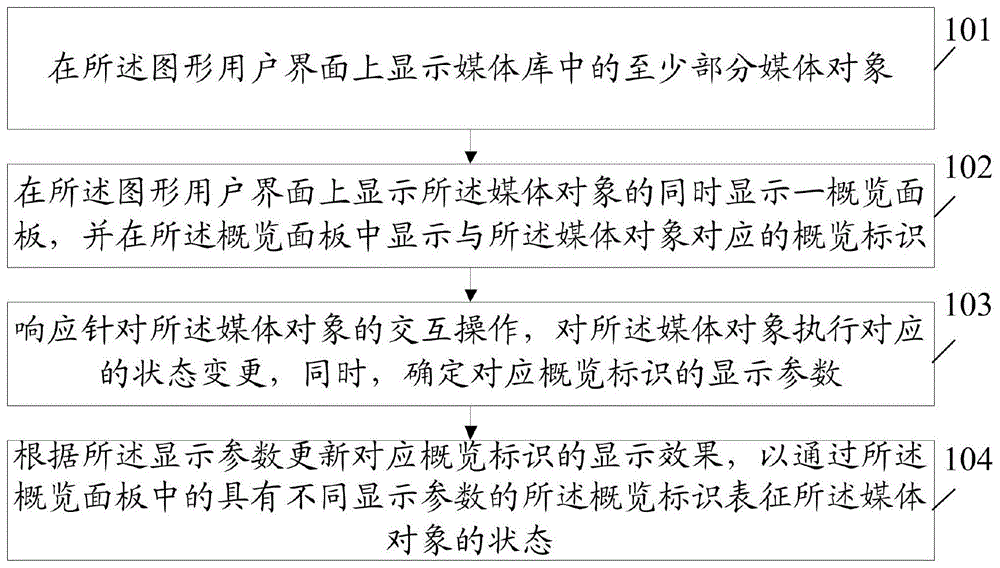
为了解决上述问题,本发明实施例公开了一种媒体库中的媒体对象交互方法,通过终端提供图形用户界面,所述方法包括:In order to solve the above problems, an embodiment of the present invention discloses a method for interacting with media objects in a media library. A graphical user interface is provided through a terminal, and the method includes:
在所述图形用户界面上显示媒体库中的至少部分媒体对象;displaying at least some of the media objects in the media library on the graphical user interface;
在所述图形用户界面上显示所述媒体对象的同时显示一概览面板,并在所述概览面板中显示与所述媒体对象对应的概览标识;displaying an overview panel while displaying the media object on the graphical user interface, and displaying an overview identifier corresponding to the media object in the overview panel;
响应针对所述媒体对象的交互操作,对所述媒体对象执行对应的状态变更,同时,确定对应概览标识的显示参数;In response to the interactive operation on the media object, perform a corresponding state change on the media object, and at the same time, determine the display parameters corresponding to the overview identifier;
根据所述显示参数更新对应概览标识的显示效果,以通过所述概览面板中的具有不同显示参数的所述概览标识表征所述媒体对象的状态。The display effect of the corresponding overview indicator is updated according to the display parameters, so as to represent the state of the media object through the overview indicators with different display parameters in the overview panel.
可选地,所述在所述图形用户界面上显示所述媒体对象的同时显示一概览面板,并在所述概览面板中显示与所述媒体对象对应的概览标识,包括:Optionally, displaying an overview panel while displaying the media object on the graphical user interface, and displaying an overview identifier corresponding to the media object in the overview panel includes:
确定所述图形用户界面上的媒体对象的排列顺序;determining an arrangement order of media objects on the graphical user interface;
在所述图形用户界面上显示所述媒体对象的同时显示一概览面板,并在所述概览面板中显示与所述媒体对象对应的概览标识,所述概览标识的排列顺序与所述图形用户界面上所述媒体对象的排列顺序相同。Displaying an overview panel while displaying the media object on the graphical user interface, and displaying an overview identification corresponding to the media object in the overview panel, the arrangement order of the overview identification is the same as that of the graphical user interface The above mentioned media objects are arranged in the same order.
可选地,在所述概览面板中显示与所述媒体对象对应的概览标识之后,所述方法还包括:Optionally, after displaying the overview identifier corresponding to the media object in the overview panel, the method further includes:
确定在所述图形用户界面上显示的媒体对象;determining media objects displayed on said graphical user interface;
在所述概览面板中,标记出在所述图形用户界面上显示的所述媒体对象对应的概览标识。In the overview panel, mark the overview identifier corresponding to the media object displayed on the graphical user interface.
可选地,所述图形用户界面上显示的媒体对象为按照设定条件的媒体对象作为聚集单位并显示,所述在所述概览面板中显示与所述媒体对象对应的概览标识,包括:Optionally, the media object displayed on the graphical user interface is a media object according to a set condition as an aggregation unit and displayed, and the display of an overview identifier corresponding to the media object in the overview panel includes:
在所述概览面板中,按照所述媒体对象的聚集单位,显示与所述媒体对象对应的概览标识。In the overview panel, an overview identifier corresponding to the media object is displayed according to the aggregation unit of the media object.
可选地,所述媒体对象与所述概览标识为一一映射。Optionally, the media object and the overview identifier are mapped one-to-one.
可选地,所述在所述概览面板中显示与所述媒体对象对应的概览标识,包括:Optionally, the displaying the overview identifier corresponding to the media object in the overview panel includes:
确定所述媒体对象的状态;determining the state of the media object;
当所述媒体对象的状态为已处理状态时,依据所述已处理状态确定所述概览标识的显示参数为的第一显示参数;When the state of the media object is a processed state, determine the display parameter of the overview logo as the first display parameter according to the processed state;
根据所述第一显示参数更新对应概览标识的显示效果。The display effect corresponding to the overview logo is updated according to the first display parameter.
可选地,所述交互操作包括选中操作和取消选中操作,所述响应针对所述媒体对象的交互操作,对所述媒体对象执行对应的状态变更,同时,确定对应概览标识的显示参数,包括:Optionally, the interaction operation includes a selection operation and a deselection operation, and the response to the interaction operation of the media object is to perform a corresponding state change on the media object, and at the same time, determine the display parameters of the corresponding overview identifier, including :
响应针对所述媒体对象的选中操作,将所述媒体对象的状态变更为选中状态,或者,响应针对所述媒体对象的取消选中操作,将所述媒体对象的状态变更为非选中状态;changing the state of the media object to a selected state in response to a selection operation on the media object, or changing the state of the media object to an unselected state in response to a deselection operation on the media object;
同时,依据所述选中状态确定所述概览标识的显示参数为第二显示参数,或者,依据所述非选中状态确定所述概览标识的显示参数为的第三显示参数。At the same time, the display parameter of the overview sign is determined to be the second display parameter according to the selected state, or the display parameter of the view sign is determined to be the third display parameter according to the unselected state.
可选地,所述图形用户界面包括概览模式控件,所述在所述图形用户界面上显示所述媒体对象的同时显示一概览面板,包括:Optionally, the graphical user interface includes an overview mode control, and displaying an overview panel while displaying the media object on the graphical user interface includes:
响应作用于所述概览模式控件的触控操作,在所述图形用户界面上显示所述媒体对象的同时显示一概览面板;或者,displaying an overview panel while displaying the media object on the graphical user interface in response to a touch operation on the overview mode control; or,
响应作用于所述图形用户界面的触发手势,在所述图形用户界面上显示所述媒体对象的同时显示一概览面板。An overview panel is displayed while displaying the media object on the graphical user interface in response to a trigger gesture acting on the graphical user interface.
可选地,在所述概览面板中显示与所述媒体对象对应的概览标识之前,所述方法还包括:Optionally, before displaying the overview identifier corresponding to the media object in the overview panel, the method further includes:
对所述图形用户界面上的所述媒体对象进行缩小处理,得到所述媒体对象的缩略图;shrinking the media object on the graphical user interface to obtain a thumbnail of the media object;
在所述图形用户界面上显示所述媒体对象的缩略图。Thumbnails of the media objects are displayed on the graphical user interface.
可选地,所述方法还包括:Optionally, the method also includes:
响应作用于所述媒体对象的滑动操作,变更在所述图形用户界面上显示的媒体对象;changing a media object displayed on the graphical user interface in response to a swipe operation on the media object;
在所述概览面板中,标记出变更后所述图形用户界面上显示的所述媒体对象对应的概览标识。In the overview panel, mark the overview identifier corresponding to the media object displayed on the graphical user interface after the change.
可选地,所述方法还包括:Optionally, the method also includes:
响应作用于所述概览面板的滑动操作,变更在所述概览面板上标记出的概览标识;changing the overview logo marked on the overview panel in response to a sliding action on the overview panel;
在所述图形用户界面上,定位到变更后所述概览面板上标记出的所述概览标识对应的媒体对象。On the graphical user interface, locate the media object corresponding to the overview identifier marked on the overview panel after the change.
可选地,所述方法还包括:Optionally, the method also includes:
响应作用于所述概览面板一位置处的触控操作,确定所述位置处对应的概览标识;In response to a touch operation acting on a position of the overview panel, determine a corresponding overview sign at the position;
在所述图形用户界面上,定位到所述位置处的概览标识对应的媒体对象。On the graphical user interface, an overview positioned at the location identifies a corresponding media object.
可选地,所述图形用户界面包括概览模式入口控件,所述在所述图形用户界面上显示所述媒体对象的同时显示一概览面板,包括:Optionally, the graphical user interface includes an overview mode entry control, and displaying an overview panel while displaying the media object on the graphical user interface includes:
响应作用于所述概览模式入口控件的触控操作,在所述图形用户界面上显示所述媒体对象的同时显示一概览面板,所述概览面板悬浮于所述媒体对象之上。In response to a touch operation acting on the overview mode entry control, displaying an overview panel while displaying the media object on the graphical user interface, the overview panel hovers over the media object.
可选地,还包括:Optionally, also include:
在所述概览面板上显示不同的状态的媒体对象对应的数量。The numbers corresponding to the media objects in different states are displayed on the overview panel.
可选地,所述方法还包括:Optionally, the method also includes:
在所述图形用户界面上显示具有概览标记的时间轴,并依据所述媒体对象的状态确定所述概览标记的显示参数;displaying a time axis with an overview mark on the graphical user interface, and determining display parameters of the overview mark according to the state of the media object;
按照所述显示参数更新所述概览标记的显示效果,以通过所述时间轴中的具有不同显示参数的所述概览标记表征所述媒体对象的状态。Updating the display effect of the overview marker according to the display parameters, so as to represent the state of the media object through the overview markers with different display parameters in the time axis.
可选地,所述媒体对象至少包括照片、视频、图片、文本以及音频的其中一种。Optionally, the media object includes at least one of photo, video, picture, text and audio.
本发明实施例公开了一种媒体库中的媒体对象交互装置,通过终端提供图形用户界面,所述装置包括:The embodiment of the present invention discloses a media object interaction device in a media library, which provides a graphical user interface through a terminal, and the device includes:
媒体对象显示模块,用于在所述图形用户界面上显示媒体库中的至少部分媒体对象;A media object display module, configured to display at least some of the media objects in the media library on the graphical user interface;
概览面板显示模块,用于在所述图形用户界面上显示所述媒体对象的同时显示一概览面板,并在所述概览面板中显示与所述媒体对象对应的概览标识;An overview panel display module, configured to display an overview panel while displaying the media object on the graphical user interface, and display an overview identifier corresponding to the media object in the overview panel;
交互确定模块,用于响应针对所述媒体对象的交互操作,对所述媒体对象执行对应的状态变更,同时,确定对应概览标识的显示参数;An interaction determination module, configured to perform a corresponding state change on the media object in response to an interactive operation on the media object, and at the same time, determine the display parameters of the corresponding overview identifier;
交互显示模块,用于根据所述显示参数更新对应概览标识的显示效果,以通过所述概览面板中的具有不同显示参数的所述概览标识表征所述媒体对象的状态。An interactive display module, configured to update the display effect of the corresponding overview logo according to the display parameters, so as to represent the state of the media object through the overview logos with different display parameters in the overview panel.
可选地,所述概览面板显示模块,用于确定所述图形用户界面上的媒体对象的排列顺序;在所述图形用户界面上显示所述媒体对象的同时显示一概览面板,并在所述概览面板中显示与所述媒体对象对应的概览标识,所述概览标识的排列顺序与所述图形用户界面上所述媒体对象的排列顺序相同。Optionally, the overview panel display module is configured to determine the arrangement order of the media objects on the graphical user interface; display an overview panel while displaying the media objects on the graphical user interface, and The overview panel displays overview identifiers corresponding to the media objects, and the arrangement order of the overview identifiers is the same as the arrangement order of the media objects on the graphical user interface.
可选地,所述装置还包括:标记模块,用于确定在所述图形用户界面上显示的媒体对象;在所述概览面板中,标记出在所述图形用户界面上显示的所述媒体对象对应的概览标识。Optionally, the device further includes: a marking module, configured to determine a media object displayed on the graphical user interface; in the overview panel, mark the media object displayed on the graphical user interface The corresponding overview ID.
可选地,所述交互显示模块,用于在所述概览面板中,按照所述媒体对象的聚集单位,显示与所述媒体对象对应的概览标识。Optionally, the interactive display module is configured to display, in the overview panel, an overview identifier corresponding to the media object according to the aggregation unit of the media object.
可选地,所述媒体对象与所述概览标识为一一映射。Optionally, the media object and the overview identifier are mapped one-to-one.
可选地,所述交互显示模块,用于确定所述媒体对象的状态;当所述媒体对象的状态为已处理状态时,依据所述已处理状态确定所述概览标识的显示参数为的第一显示参数;根据所述第一显示参数更新对应概览标识的显示效果。Optionally, the interactive display module is configured to determine the state of the media object; when the state of the media object is a processed state, determine the display parameter of the overview identifier according to the processed state to be the first A display parameter; updating the display effect of the corresponding overview logo according to the first display parameter.
可选地,所述交互操作包括选中操作和取消选中操作,所述交互确定模块,用于响应针对所述媒体对象的选中操作,将所述媒体对象的状态变更为选中状态,或者,响应针对所述媒体对象的取消选中操作,将所述媒体对象的状态变更为非选中状态;同时,依据所述选中状态确定所述概览标识的显示参数为第二显示参数,或者,依据所述非选中状态确定所述概览标识的显示参数为的第三显示参数。Optionally, the interaction operation includes a selection operation and a deselection operation, and the interaction determination module is configured to change the state of the media object to a selected state in response to a selection operation for the media object, or respond to the selection operation for the media object The unselection operation of the media object changes the state of the media object to an unselected state; at the same time, according to the selected state, it is determined that the display parameter of the overview logo is the second display parameter, or, according to the unselected The state determines that the display parameter of the overview identification is a third display parameter.
可选地,所述图形用户界面包括概览模式控件,所述概览面板显示模块,用于响应作用于所述概览模式控件的触控操作,在所述图形用户界面上显示所述媒体对象的同时显示一概览面板;或者,响应作用于所述图形用户界面的触发手势,在所述图形用户界面上显示所述媒体对象的同时显示一概览面板。Optionally, the graphical user interface includes an overview mode control, and the overview panel display module is configured to respond to a touch operation acting on the overview mode control, while displaying the media object on the graphical user interface displaying an overview panel; or, in response to a trigger gesture acting on the GUI, displaying an overview panel while displaying the media object on the GUI.
可选地,所述装置还包括:缩小处理模块,用于对所述图形用户界面上的所述媒体对象进行缩小处理,得到所述媒体对象的缩略图;在所述图形用户界面上显示所述媒体对象的缩略图。Optionally, the device further includes: a reduction processing module, configured to perform reduction processing on the media object on the GUI to obtain a thumbnail of the media object; and display the media object on the GUI Thumbnail image of the media object described.
可选地,所述装置还包括:第一联动模块,用于响应作用于所述媒体对象的滑动操作,变更在所述图形用户界面上显示的媒体对象;在所述概览面板中,标记出变更后所述图形用户界面上显示的所述媒体对象对应的概览标识。Optionally, the device further includes: a first linkage module, configured to change the media object displayed on the graphical user interface in response to a sliding operation acting on the media object; in the overview panel, mark the The overview identifier corresponding to the media object displayed on the graphical user interface after the change.
可选地,所述装置还包括:第二联动模块,用于响应作用于所述概览面板的滑动操作,变更在所述概览面板上标记出的概览标识;在所述图形用户界面上,定位到变更后所述概览面板上标记出的所述概览标识对应的媒体对象。Optionally, the device further includes: a second linkage module, configured to change the overview logo marked on the overview panel in response to a sliding operation acting on the overview panel; on the graphical user interface, locate After the change, the overview marked on the overview panel identifies the corresponding media object.
可选地,所述装置还包括:定位模块,用于响应作用于所述概览面板一位置处的触控操作,确定所述位置处对应的概览标识;在所述图形用户界面上,定位到所述位置处的概览标识对应的媒体对象。Optionally, the device further includes: a positioning module, configured to respond to a touch operation acting on a position of the overview panel, and determine a corresponding overview sign at the position; on the graphical user interface, locate to The overview at the location identifies a corresponding media object.
可选地,所述图形用户界面包括概览模式入口控件,所述概览面板显示模块,用于响应作用于所述概览模式入口控件的触控操作,在所述图形用户界面上显示所述媒体对象的同时显示一概览面板,所述概览面板悬浮于所述媒体对象之上。Optionally, the graphical user interface includes an overview mode entry control, and the overview panel display module is configured to display the media object on the graphical user interface in response to a touch operation acting on the overview mode entry control while displaying an overview panel that hovers over the media object.
可选地,所述概览面板显示模块,用于在所述概览面板上显示不同的状态的媒体对象对应的数量。Optionally, the overview panel display module is configured to display the numbers corresponding to media objects in different states on the overview panel.
可选地,所述装置还包括:时间轴显示模块,用于在所述图形用户界面上显示具有概览标记的时间轴,并依据所述媒体对象的状态确定所述概览标记的显示参数;按照所述显示参数更新所述概览标记的显示效果,以通过所述时间轴中的具有不同显示参数的所述概览标记表征所述媒体对象的状态。Optionally, the device further includes: a timeline display module, configured to display a timeline with overview marks on the graphical user interface, and determine display parameters of the overview marks according to the state of the media object; The display parameters update the display effect of the overview mark, so as to represent the state of the media object through the overview mark in the timeline with different display parameters.
本发明实施例公开了一种电子设备,包括处理器、存储器及存储在所述存储器上并能够在所述处理器上运行的计算机程序,所述计算机程序被所述处理器执行时实现如上所述的媒体库中的媒体对象交互方法的步骤。The embodiment of the present invention discloses an electronic device, including a processor, a memory, and a computer program stored on the memory and capable of running on the processor. When the computer program is executed by the processor, the above Steps of the media object interaction method in the media library described above.
本发明实施例公开了一种计算机可读存储介质,所述计算机可读存储介质上存储计算机程序,所述计算机程序被处理器执行时实现如上所述的媒体库中的媒体对象交互方法的步骤。The embodiment of the present invention discloses a computer-readable storage medium, where a computer program is stored on the computer-readable storage medium, and when the computer program is executed by a processor, the steps of the above-mentioned media object interaction method in the media library are realized .
本发明实施例包括以下优点:Embodiments of the present invention include the following advantages:
在本发明实施例中,在图形用户界面上显示媒体库中的至少部分媒体对象,同时显示一概览面板,并在概览面板中显示与媒体对象对应的概览标识,响应针对媒体对象的交互操作,对媒体对象执行对应的状态变更,同时,确定对应概览标识的显示参数,然后,可以根据显示参数更新对应概览标识的显示效果,以通过概览面板中的具有不同显示参数的概览标识表征媒体对象的状态。在本发明实施例中,通过概览面板上不同显示效果显示的概览标识,来全局掌握媒体库中的媒体对象的状态,这样,用户在处理媒体库中媒体对象时,无需用户记忆或者检索,降低了用户的负担,提升了用户使用体验。In the embodiment of the present invention, at least part of the media objects in the media library are displayed on the graphical user interface, and an overview panel is displayed at the same time, and the overview identifier corresponding to the media object is displayed in the overview panel, and in response to the interactive operation on the media object, Perform the corresponding state change on the media object, and at the same time, determine the display parameters of the corresponding overview logo, and then update the display effect of the corresponding overview logo according to the display parameters, so as to represent the media object through the overview logo with different display parameters in the overview panel state. In the embodiment of the present invention, the status of the media objects in the media library is grasped globally through the overview signs displayed by different display effects on the overview panel. In this way, when the user processes the media objects in the media library, the user does not need to memorize or retrieve, reducing the It reduces the burden on users and improves the user experience.
附图说明Description of drawings
图1是本发明的一种媒体库中的媒体对象交互方法实施例的步骤流程图;Fig. 1 is a flow chart of steps of an embodiment of a media object interaction method in a media library of the present invention;
图2是本发明的一种图形用户界面的显示示意图之一;Fig. 2 is one of the display schematic diagrams of a graphical user interface of the present invention;
图3是本发明的一种图形用户界面的显示示意图之二;Fig. 3 is the second display schematic diagram of a graphical user interface of the present invention;
图4是本发明的一种图形用户界面的显示示意图之三;Fig. 4 is the third display schematic diagram of a graphical user interface of the present invention;
图5是本发明的一种图形用户界面的显示示意图之四;Fig. 5 is a fourth schematic display diagram of a graphical user interface of the present invention;
图6是本发明的一种图形用户界面的显示示意图之五;Fig. 6 is the fifth display schematic diagram of a graphical user interface of the present invention;
图7是本发明的一种图形用户界面的显示示意图之六;Fig. 7 is a sixth display schematic diagram of a graphical user interface of the present invention;
图8是本发明的一种图形用户界面的显示示意图之七;Fig. 8 is a seventh schematic diagram of displaying a graphical user interface of the present invention;
图9是本发明的另一种媒体库中的媒体对象交互装置实施例的结构框图。Fig. 9 is a structural block diagram of another embodiment of an apparatus for interacting with media objects in a media library according to the present invention.
具体实施方式Detailed ways
为使本发明的上述目的、特征和优点能够更加明显易懂,下面结合附图和具体实施方式对本发明作进一步详细的说明。In order to make the above objects, features and advantages of the present invention more comprehensible, the present invention will be further described in detail below in conjunction with the accompanying drawings and specific embodiments.
在本公开其中一种实施例中的媒体库中的媒体对象交互方法可以运行于终端设备或者是服务器。其中,终端设备可以为本地终端设备。当媒体库中的媒体对象交互方法运行于服务器时,该媒体库中的媒体对象交互方法则可以基于云交互系统来实现与执行,其中,云交互系统包括服务器和客户端设备。The media object interaction method in the media library in one of the embodiments of the present disclosure can run on a terminal device or a server. Wherein, the terminal device may be a local terminal device. When the media object interaction method in the media library runs on the server, the media object interaction method in the media library can be implemented and executed based on a cloud interaction system, wherein the cloud interaction system includes a server and a client device.
在一可选的实施方式中,云交互系统下可以运行各种云应用,例如:云媒体对象交互。以云媒体对象交互为例,云媒体对象交互是指以云计算为基础的针对媒体库中的媒体对象处理方式。在云媒体对象交互的运行模式下,媒体对象交互的运行主体和显示画面呈现主体是分离的,媒体库中的媒体对象交互方法的储存与运行是在云服务器上完成的,其中媒体库也可以是存储在云服务器中,客户端设备的作用用于数据的接收、发送以及显示画面的呈现,举例而言,客户端设备可以是靠近用户侧的具有数据传输功能的显示设备,如,移动终端、电视机、计算机、掌上电脑等;但是进行媒体库中的媒体对象交互的终端设备为云端的云服务器。在进行媒体对象交互时,用户操作客户端设备向云服务器发送操作指令,云服务器根据操作指令运行游戏,将显示画面等数据进行编码压缩,通过网络返回客户端设备,最后,通过客户端设备进行解码并输出显示画面。In an optional implementation manner, various cloud applications can be run under the cloud interaction system, for example: cloud media object interaction. Taking cloud media object interaction as an example, cloud media object interaction refers to a method of processing media objects in a media library based on cloud computing. In the operation mode of cloud media object interaction, the operation subject of media object interaction and the display subject are separated, and the storage and operation of the media object interaction method in the media library are completed on the cloud server, and the media library can also be It is stored in the cloud server, and the function of the client device is used for data reception, transmission and display screen presentation. For example, the client device can be a display device with data transmission function near the user side, such as a mobile terminal , TV, computer, handheld computer, etc.; however, the terminal device that interacts with the media objects in the media library is a cloud server in the cloud. When interacting with media objects, the user operates the client device to send an operation command to the cloud server, and the cloud server runs the game according to the operation command, encodes and compresses the data such as the display screen, and returns it to the client device through the network. Decode and output display screen.
在一可选的实施方式中,终端设备可以为本地终端设备。本地终端设备存储有社交软件等程序并用于呈现显示画面。本地终端设备用于通过图形用户界面与用户进行交互,即,常规的通过电子设备下载安装程序并运行。该本地终端设备将图形用户界面提供给用户的方式可以包括多种,例如,可以渲染显示在终端的显示屏上,或者,通过全息投影提供给用户。举例而言,本地终端设备可以包括显示屏和处理器,该显示屏用于呈现图形用户界面,该图形用户界面包括显示画面,该处理器用于运行该程序、生成图形用户界面以及控制图形用户界面在显示屏上的显示。In an optional implementation manner, the terminal device may be a local terminal device. The local terminal device stores programs such as social software and is used to present a display screen. The local terminal device is used to interact with the user through a graphical user interface, that is, conventionally download and run an installation program through an electronic device. The local terminal device may provide the GUI to the user in various manners, for example, rendering and displaying it on the display screen of the terminal, or providing it to the user through holographic projection. For example, the local terminal device may include a display screen and a processor, the display screen is used to present a graphical user interface, the graphical user interface includes a display screen, and the processor is used to run the program, generate the graphical user interface, and control the graphical user interface displayed on the display.
第一终端设备可以是前述提到的本地终端设备,也可以是前述提到的云交互系统中的客户端设备。The first terminal device may be the aforementioned local terminal device, or may be the aforementioned client device in the cloud interaction system.
参照图1,示出了本发明的一种媒体库中的媒体对象交互方法实施例的步骤流程图,通过终端提供图形用户界面,本发明实施例具体可以包括如下步骤:Referring to Fig. 1, it shows a flow chart of the steps of an embodiment of a media object interaction method in a media library of the present invention, a graphical user interface is provided by a terminal, and embodiments of the present invention may specifically include the following steps:
步骤101,在所述图形用户界面上显示媒体库中的至少部分媒体对象。
其中,终端可以是手机、电视机、计算机、掌上电脑等。在一可选的实施方式中,终端可以为本地终端设备。本地终端设备存储有图像编辑程序并用于呈现图像处理画面。本地终端设备用于通过图形用户界面与用户进行交互,即,常规的通过电子设备下载安装图像编辑程序并运行。该本地终端设备将图形用户界面提供给用户的方式可以包括多种,例如,可以渲染显示在终端的显示屏上,或者,通过全息投影提供给用户。举例而言,本地终端设备可以包括显示屏和处理器,该显示屏用于呈现图形用户界面,该图形用户界面包括图像处理画面,该处理器用于运行该程序、生成图形用户界面以及控制图形用户界面在显示屏上的显示。Wherein, the terminal may be a mobile phone, a television set, a computer, a palmtop computer, and the like. In an optional implementation manner, the terminal may be a local terminal device. The local terminal device stores an image editing program and is used to present an image processing screen. The local terminal device is used to interact with the user through a graphical user interface, that is, conventionally, an image editing program is downloaded, installed and run through an electronic device. The local terminal device may provide the GUI to the user in various manners, for example, rendering and displaying it on the display screen of the terminal, or providing it to the user through holographic projection. For example, the local terminal device may include a display screen and a processor, the display screen is used to present a graphical user interface, the graphical user interface includes an image processing screen, and the processor is used to run the program, generate the graphical user interface and control the graphical user interface. The display of the interface on the display screen.
其中,媒体库是指终端上用于存储媒体对象的数据库,所述媒体对象至少包括照片、视频、图片、文本以及音频的其中一种。可选地,媒体库中的媒体对象可以按照不同的类型分别在不同的数据库中存储,也可以全部存储在同一个数据库中。例如,照片可以存储在本地相册对应的数据库中。Wherein, the media library refers to a database on the terminal for storing media objects, and the media objects include at least one of photos, videos, pictures, texts, and audios. Optionally, the media objects in the media library can be stored in different databases according to different types, or all can be stored in the same database. For example, photos can be stored in a database corresponding to a local photo album.
在本发明实施例中,用户可以对媒体库中的媒体对象进行管理、上传或者共享等处理,此时,媒体对象可以全部或者部分显示在图形用户界面中。以本地相册上传为例,在图形用户界面上显示本地相册中部分的照片,比如显示本地相册中9月份拍摄的照片,显示本地相册中在广州拍摄的照片,显示本地相册中通过某个社交软件拍摄的照片等等。In the embodiment of the present invention, the user can manage, upload or share the media objects in the media library, and at this time, all or part of the media objects can be displayed in the graphical user interface. Take the local photo album upload as an example, display some photos in the local photo album on the GUI, for example, display the photos taken in September in the local photo album, display the photos taken in Guangzhou in the local photo album, and display the pictures in the local photo album through a social software Photos taken and more.
其中,需要说明的是,大部分的用户在本地存储的照片等媒体对象的数量可能非常多,因此为了让用户能够尽可能看到更多的媒体对象,在图形用户界面上显示媒体对象时可以以缩略图的形式显示。Among them, it should be noted that the number of media objects such as photos stored locally by most users may be very large, so in order to allow users to see as many media objects as possible, when displaying media objects on the GUI, you can Displayed as thumbnails.
步骤102,在所述图形用户界面上显示所述媒体对象的同时显示一概览面板,并在所述概览面板中显示与所述媒体对象对应的概览标识。
其中,概览标识是与媒体对象对应的、用于表征媒体对象的标识,概览面板是在图形用户界面上,通过提供概览标识以供用户整体把握媒体库中媒体对象的区域或者界面。在本发明实施例,在图形用户界面上显示媒体对象时,将同时显示一个包括概览标识的概览面板。作为一种具体示例,在概览面板可以显示在图形用户界面的左侧或者右侧,概览标识则可以抽象成不同形状、不同颜色的小方块。Wherein, the overview identifier is an identifier corresponding to the media object and used to represent the media object, and the overview panel is an area or interface on the graphical user interface that provides the overview identifier for the user to grasp the media objects in the media library as a whole. In the embodiment of the present invention, when the media object is displayed on the graphical user interface, an overview panel including an overview identifier will be displayed at the same time. As a specific example, the overview panel can be displayed on the left or right side of the GUI, and the overview logo can be abstracted into small squares of different shapes and colors.
需要说明的是,概览标识在图形用户界面上所占的空间较小,并且概览标识可以与媒体对象一一映射(例如一个小方块代表一个媒体对象),也可以与媒体对象一对多映射(例如一个小方块代表多个媒体对象),因此通过概览面板可以概览到媒体库中大部分甚至是所有的媒体对象。It should be noted that the overview logo occupies less space on the GUI, and the overview logo can be mapped one-to-one with media objects (for example, a small square represents a media object), or can be mapped one-to-many with media objects ( For example, a small square represents multiple media objects), so most or even all media objects in the media library can be overviewed through the overview panel.
步骤103,响应针对所述媒体对象的交互操作,对所述媒体对象执行对应的状态变更,同时,确定对应概览标识的显示参数。
其中,交互操作可以是用户对媒体对象的点击操作、按压操作、滑动操作等等,媒体对象的状态可以包括选中状态和未选中状态。具体地,假设一媒体对象的状态为未选中状态,在用户针对媒体对象进行点击操作时,响应针对该媒体对象的点击操作,将媒体对象的状态从未选中状态变更为选中状态。可选地,在媒体对象处标记出“√”,来表示该媒体对象为选中状态。Wherein, the interactive operation may be a user's click operation, press operation, slide operation, etc. on the media object, and the state of the media object may include a selected state and an unselected state. Specifically, assuming that the state of a media object is unselected, when the user performs a click operation on the media object, the state of the media object is changed from the unselected state to the selected state in response to the click operation on the media object. Optionally, a "√" is marked at the media object to indicate that the media object is selected.
其中,显示参数用于更新概览标识的显示效果。在本发明实施例中,在媒体对象的状态变更时,同时需要确定媒体对象对应的概览标识的显示参数。例如,假设橘色表示选中状态,如果媒体对象的状态从未选中状态变更为选中状态,则对应的概览标识的显示参数可以确定为橘色的显示参数。Wherein, the display parameter is used to update the display effect of the overview logo. In the embodiment of the present invention, when the state of the media object is changed, it is necessary to determine the display parameters of the overview identifier corresponding to the media object. For example, assuming that orange represents a selected state, if the state of a media object changes from an unselected state to a selected state, then the display parameter of the corresponding overview identifier can be determined as the display parameter of orange.
步骤104,根据所述显示参数更新对应概览标识的显示效果,以通过所述概览面板中的具有不同显示参数的所述概览标识表征所述媒体对象的状态。Step 104: Update the display effect of the corresponding overview indicator according to the display parameters, so as to represent the state of the media object through the overview indicators with different display parameters in the overview panel.
其中,显示效果是指的概览标识的颜色、放大或者框选等等,不同的显示参数对应的显示效果不同,不同显示效果表征的媒体对象的状态不同。The display effect refers to the color of the overview logo, magnification or frame selection, etc. Different display parameters correspond to different display effects, and different display effects represent different states of media objects.
在本发明实施例中,媒体对象的变更状态时,同时确定了对应的概览标识的显示参数,此时在概览面板中将依据显示参数来更新对应的概览标识的显示效果,从而可以通过不同的显示效果来表征媒体对象不同的状态。In the embodiment of the present invention, when the state of the media object is changed, the display parameters of the corresponding overview logo are determined at the same time. At this time, the display effect of the corresponding overview logo will be updated in the overview panel according to the display parameters, so that different Display effects to represent different states of a media object.
举例来说,假设橘色的显示参数表示选中状态,白色表示未选中状态,概览面板中的概览标识为小方块,如果一媒体对象从未选中状态变更为选中状态,则确定对应的小方块的显示参数为橘色的显示参数,将依据橘色的显示参数将小方块变更为橘色,那么用户就可以通过概览面板上的橘色的小方块,确定媒体库中该媒体对象被选中,如果一媒体对象从选中状态变更为未选中状态,则确定对应的小方块的显示参数为白色的显示参数,将依据白色的显示参数将小方块变更为白色,那么用户就可以通过概览面板上的白色的小方块,确定媒体库中该媒体对象被取消选中。For example, assume that the orange display parameter represents the selected state, and the white represents the unselected state. The overview in the overview panel is identified as a small square. If a media object changes from the unselected state to the selected state, determine the corresponding small square If the display parameter is an orange display parameter, the small square will be changed to orange according to the orange display parameter, then the user can confirm that the media object in the media library is selected through the orange small square on the overview panel, if When a media object changes from a selected state to an unselected state, it is determined that the display parameter of the corresponding small square is a white display parameter, and the small square is changed to white according to the white display parameter, then the user can use the white display parameter on the overview panel. , making sure that the media object is deselected in the media library.
在上述媒体库中的媒体对象交互方法中,在图形用户界面上显示媒体库中的至少部分媒体对象,同时显示一概览面板,并在概览面板中显示与媒体对象对应的概览标识,响应针对媒体对象的交互操作,对媒体对象执行对应的状态变更,同时,确定对应概览标识的显示参数,然后,可以根据显示参数更新对应概览标识的显示效果,以通过概览面板中的具有不同显示参数的概览标识表征媒体对象的状态。在本发明实施例中,通过概览面板上不同显示效果显示的概览标识,来全局掌握媒体库中的媒体对象的状态,这样,用户在处理媒体库中媒体对象时,无需用户记忆或者检索,降低了用户的负担,提升了用户使用体验。In the above media object interaction method in the media library, at least part of the media objects in the media library are displayed on the graphical user interface, and an overview panel is displayed at the same time, and an overview identification corresponding to the media object is displayed in the overview panel, and in response to media The interactive operation of the object performs the corresponding state change on the media object, and at the same time, determines the display parameters of the corresponding overview logo. Then, the display effect of the corresponding overview logo can be updated according to the display parameters to pass the overview panel with different display parameters. An identifier characterizes the state of a media object. In the embodiment of the present invention, the status of the media objects in the media library is grasped globally through the overview signs displayed by different display effects on the overview panel. In this way, when the user processes the media objects in the media library, the user does not need to memorize or retrieve, reducing the It reduces the burden on users and improves the user experience.
在本发明的一种可选实施例中,所述步骤102,在所述图形用户界面上显示所述媒体对象的同时显示一概览面板,并在所述概览面板中显示与所述媒体对象对应的概览标识,包括:In an optional embodiment of the present invention, the
确定所述图形用户界面上的媒体对象的排列顺序;determining an arrangement order of media objects on the graphical user interface;
在所述图形用户界面上显示所述媒体对象的同时显示一概览面板,并在所述概览面板中显示与所述媒体对象对应的概览标识,所述概览标识的排列顺序与所述图形用户界面上所述媒体对象的排列顺序相同。Displaying an overview panel while displaying the media object on the graphical user interface, and displaying an overview identification corresponding to the media object in the overview panel, the arrangement order of the overview identification is the same as that of the graphical user interface The above mentioned media objects are arranged in the same order.
在本发明实施例中,媒体对象和概览面板同时展示在图形用户界面上,概览标识在概览面板中的排列顺序与对应媒体对象在图形用户界面中的排列顺序相同。具体地,首先确定在图形用户界面上媒体对象的排列顺序,然后在图形用户界面上显示媒体对象的同时显示概览面板,在概览面板中显示的概览标识的排列顺序与与媒体对象的排列顺序相同。举例来说,假设在图形用户界面上显示的媒体对象的排列顺序为媒体A、媒体B、媒体C,则在概览面板中概览标识的排列顺序为媒体A的概览标识、媒体B的概览标识、媒体C的概览标识。In the embodiment of the present invention, the media objects and the overview panel are simultaneously displayed on the GUI, and the arrangement order of the overview labels in the overview panel is the same as the arrangement order of the corresponding media objects in the GUI. Specifically, first determine the arrangement order of the media objects on the graphical user interface, then display the overview panel while displaying the media objects on the graphical user interface, the arrangement order of the overview signs displayed in the overview panel is the same as the arrangement order of the media objects . For example, assuming that the media objects displayed on the graphical user interface are arranged in the order of media A, media B, and media C, the arrangement order of the overview tags in the overview panel is the overview tag of media A, the overview tag of media B, Overview ID of media C.
在上述可选实施例中,概览标识在概览面板中的排列顺序与对应媒体对象在图形用户界面中的排列顺序相同,因此便于用户操作和理解,从而可以减少用户思考过程,进而提高用户的处理效率。In the above optional embodiment, the arrangement order of the overview logo in the overview panel is the same as the arrangement order of the corresponding media objects in the graphical user interface, so it is convenient for the user to operate and understand, thereby reducing the user's thinking process and improving the user's processing. efficiency.
在本发明的一种可选实施例中,所述方法还包括:In an optional embodiment of the present invention, the method also includes:
确定在所述图形用户界面上显示的媒体对象;determining media objects displayed on said graphical user interface;
在所述概览面板中,标记出在所述图形用户界面上显示的所述媒体对象对应的概览标识。In the overview panel, mark the overview identifier corresponding to the media object displayed on the graphical user interface.
在本发明实施例中,在图形用户界面上显示的媒体对象可以是媒体库中全部或者部分的媒体对象,而在概览面板中的概览标识的体积较小,因此通常可以显示媒体库中的全部媒体对象对应的概览标识。作为一个可选示例,在概览面板中,可以将与图形用户界面上显示的媒体对象对应的概览标识标记出来,其中,标记可以通过是框选或者高亮等方式。In the embodiment of the present invention, the media objects displayed on the graphical user interface may be all or part of the media objects in the media library, and the overview logo in the overview panel has a small volume, so generally all media objects in the media library can be displayed. The overview ID corresponding to the media object. As an optional example, in the overview panel, the overview identifier corresponding to the media object displayed on the graphical user interface may be marked, wherein the marking may be in a frame selection or highlighting manner.
作为一种具体示例,参照图2,为终端的图形用户界面的显示示意图,其中,左侧为媒体库中部分的照片,右侧为概览区域,由于在图形用户界面上显示的是1月份的照片,故而在概览区域中将该1月份的照片对应的小方块采用方框的方式标记出来。需要说明是,在概览面板中框选的概览标识与在图形用户界面上展示的媒体对象是相对应的,在实际中允许存在一些误差。As a specific example, referring to FIG. 2 , it is a schematic display diagram of a graphical user interface of a terminal, wherein the left side is a part of photos in the media library, and the right side is an overview area. Since the graphical user interface displays photos from January Photos, so in the overview area, mark the small squares corresponding to the photos in January in the form of boxes. It should be noted that the overview logo selected in the overview panel corresponds to the media object displayed on the GUI, and some errors are allowed in practice.
在上述可选实施例中,在概览面板中标记出图形用户界面上显示的媒体对象对应的概览标识,从而用户可以通过概览面板中标记的概览标识,确定图形用户界面上显示的媒体对象中大致所在的位置。In the above optional embodiment, the overview identifier corresponding to the media object displayed on the graphical user interface is marked in the overview panel, so that the user can determine the approximate location.
在本发明的一种可选实施例中,所述图形用户界面上显示的媒体对象为按照设定条件的媒体对象作为聚集单位并显示,所述在所述概览面板中显示与所述媒体对象对应的概览标识,包括:In an optional embodiment of the present invention, the media object displayed on the graphical user interface is a media object according to a set condition as an aggregation unit and displayed, and the media object displayed in the overview panel is Corresponding overview identifiers, including:
在所述概览面板中,按照所述媒体对象的聚集单位,显示与所述媒体对象对应的概览标识。In the overview panel, an overview identifier corresponding to the media object is displayed according to the aggregation unit of the media object.
其中,设定条件可以是时间、地点或者生成所述媒体对象的社交软件等等。具体地,以时间作为设定条件,则可以将在相同月份拍摄的照片作为一聚集单位,然后在图形用户界面按照聚集单位显示媒体对象,比如在图形用户界面上的媒体对象可以按聚集单位显示为:1月的媒体对象、2月份的媒体对象。需要注意的是,由于媒体对象的体积较大,因此通常图形用户界面上无法展示一个月内所有媒体对象,则可以进一步按照月份的日期来展示,例如1月23日的媒体对象、1月24日的媒体对象。Wherein, the set condition may be time, place, or social software that generates the media object, and the like. Specifically, with time as the setting condition, photos taken in the same month can be used as an aggregation unit, and then media objects can be displayed on the GUI according to the aggregation unit. For example, the media objects on the GUI can be displayed according to the aggregation unit For: media object in January, media object in February. It should be noted that due to the large size of the media object, it is usually not possible to display all the media objects within a month on the GUI, and it can be further displayed according to the date of the month, for example, the media object on January 23, the media object on January 24 The media object of the day.
在本发明实施例中,概览面板中的概览标识,也可以同样按照媒体对象的聚集单位,来聚集显示对应的概览标识。例如,在概览面板上的概览标识可以按聚集单位显示为:1月份的媒体对象对应的概览标识、2月份的媒体对象对应的概览标识。具体可以参照图2。In the embodiment of the present invention, the overview identifiers in the overview panel may also aggregate and display the corresponding overview identifiers according to the aggregation unit of the media object. For example, the overview identifiers on the overview panel may be displayed in aggregation units: an overview identifier corresponding to media objects in January, and an overview identifier corresponding to media objects in February. Refer to Figure 2 for details.
在上述可选实施例中,对于在图形用户界面上按照聚集单位显示的媒体对象,在概览面板上同样也可以按照聚集单位来对应显示概览标识,通过同步在概览面板上同步在图形用户界面的媒体对象,这样,用户对于媒体库中不同设定条件的媒体对象的整体状态一目了然。In the above optional embodiment, for the media objects displayed on the graphical user interface according to the aggregation unit, the overview panel can also be correspondingly displayed on the overview panel according to the aggregation unit, and by synchronizing on the overview panel Media objects, in this way, the user can see at a glance the overall status of media objects with different setting conditions in the media library.
在本发明的一种可选实施例中,所述在所述概览面板中显示与所述媒体对象对应的概览标识,包括:In an optional embodiment of the present invention, the displaying the overview identifier corresponding to the media object in the overview panel includes:
确定所述媒体对象的状态;determining the state of the media object;
当所述媒体对象的状态为已处理状态时,依据所述已处理状态确定所述概览标识的显示参数为的第一显示参数;When the state of the media object is a processed state, determine the display parameter of the overview logo as the first display parameter according to the processed state;
根据所述第一显示参数更新对应概览标识的显示效果。The display effect corresponding to the overview logo is updated according to the first display parameter.
在本发明实施例中,媒体对象具有对应的用于唯一标识该媒体对象的媒体标识(locallidentifier),终端上存储有状态集合,该状态集合中存储有媒体库中的媒体对象的媒体标识对应的状态。其中,状态可以包括已处理状态和未处理状态,已处理状态表示对应的媒体对象已经处理,例如已经上传,或者已经共享,未处理状态表示对应的媒体对象尚未处理,例如尚未上传,或者尚未共享。In this embodiment of the present invention, a media object has a corresponding media identifier (localldentifier) used to uniquely identify the media object, and a state set is stored on the terminal. state. Wherein, the state may include a processed state and an unprocessed state. The processed state indicates that the corresponding media object has been processed, such as uploaded, or shared. The unprocessed state indicates that the corresponding media object has not been processed, such as not yet uploaded, or not yet shared. .
具体地,在显示概览面板时,依据媒体对象的媒体标识从状态集合查询确定的状态,其中,如果媒体对象的状态为已处理状态,则依据所述已处理状态确定对应的概览标识的显示参数为第一显示参数,并依据第一显示参数更新对应概览标识的显示效果。例如,将已处理的媒体对象对应的概览标识的显示参数确定为黑色的显示参数,则可依据黑色的显示参数将概览标识更新为黑色。具体可以参照图2。Specifically, when the overview panel is displayed, the determined state is queried from the state collection according to the media identifier of the media object, wherein, if the state of the media object is a processed state, then the display parameters of the corresponding overview identifier are determined according to the processed state It is the first display parameter, and the display effect of the corresponding overview logo is updated according to the first display parameter. For example, if the display parameter of the overview identifier corresponding to the processed media object is determined to be a black display parameter, the overview identifier may be updated to black according to the black display parameter. Refer to Figure 2 for details.
在上述可选实施例中,在概览面板中将为已处理状态的媒体对象的概览标识确定为第一显示参数,并按照第一显示参数变更对应概览标识的显示下过,从而用户可以根据概览面板中的概览标识,确定媒体库中的已处理和未处理的媒体对象,进而可以根据自身需求对媒体库中的媒体对象作进一步处理。In the above optional embodiment, in the overview panel, the overview identifier of the media object in the processed state is determined as the first display parameter, and the display process of the corresponding overview identifier is changed according to the first display parameter, so that the user can The overview identification in the panel determines the processed and unprocessed media objects in the media library, and then you can further process the media objects in the media library according to your own needs.
在本发明的一种可选实施例中,所述步骤103,响应针对所述媒体对象的交互操作,对所述媒体对象执行对应的状态变更,同时,确定对应概览标识的显示参数,包括:In an optional embodiment of the present invention, the
响应针对所述媒体对象的选中操作,将所述媒体对象的状态变更为选中状态,或者,响应针对所述媒体对象的取消选中操作,将所述媒体对象的状态变更为非选中状态;changing the state of the media object to a selected state in response to a selection operation on the media object, or changing the state of the media object to an unselected state in response to a deselection operation on the media object;
同时,依据所述选中状态确定所述概览标识的显示参数为第二显示参数,或者,依据所述非选中状态确定所述概览标识的显示参数为的第三显示参数。At the same time, the display parameter of the overview sign is determined to be the second display parameter according to the selected state, or the display parameter of the view sign is determined to be the third display parameter according to the unselected state.
其中,所述交互操作包括选中操作和取消选中操作。Wherein, the interactive operation includes a selection operation and an unselection operation.
在本发明实施例中,用户可以通过点击等方式与媒体对象进行交互操作,进而根据交互操作变更媒体对象的状态。具体地,假设对媒体对象的状态为取消选中状态,则用户进行为选中操作的交互操作后,媒体对象的状态可以变更为选中状态,或者,假设对媒体对象的状态为选中状态,则用户进行为取消选中操作的交互操作后,媒体对象的状态可以变更为取消选中状态。In the embodiment of the present invention, the user can interact with the media object by clicking or other means, and then change the state of the media object according to the interactive operation. Specifically, assuming that the state of the media object is unselected, the state of the media object can be changed to the selected state after the user performs an interactive operation for the selected operation, or, assuming that the state of the media object is selected, the user performs The state of a media object can change to the unchecked state after an interaction that is an unchecked operation.
在本发明实施例中,将进一步根据交互操作后的媒体对象的状态来确定对应的显示参数,具体地,如果媒体对象为取消选中状态,则可以确定对应的概览标识为第二显示参数,例如白色的显示参数,如果媒体对象为选中状态,则可以确定对应的概览标识为第三显示参数,例如橘色的显示参数。In the embodiment of the present invention, the corresponding display parameters will be further determined according to the state of the media object after the interactive operation. Specifically, if the media object is in the unselected state, the corresponding overview identifier can be determined as the second display parameter, for example For the white display parameter, if the media object is in the selected state, the corresponding overview identifier can be determined as the third display parameter, for example, the orange display parameter.
在上述实施例中,在对媒体对象进行交互操作后,变更媒体对象的状态为选中状态或者取消选中状态,并依据所述选中状态和取消选中状态确定对应的第二显示参数和第三显示参数,以变更概览面板中对应的概览标识的显示效果,从而用户可以通过不同显示效果确定媒体库中媒体对象的选中情况。In the above embodiment, after the media object is interactively operated, the state of the media object is changed to the selected state or the unselected state, and the corresponding second display parameter and third display parameter are determined according to the selected state and the unselected state to change the display effect of the corresponding overview mark in the overview panel, so that the user can determine the selection of the media object in the media library through different display effects.
在本发明的一种可选实施例中,所述图形用户界面包括概览模式控件,所述在所述图形用户界面上显示所述媒体对象的同时显示一概览面板,包括:In an optional embodiment of the present invention, the GUI includes an overview mode control, and displaying an overview panel while displaying the media object on the GUI includes:
响应作用于所述概览模式控件的触控操作,在所述图形用户界面上显示所述媒体对象的同时显示一概览面板;或者,displaying an overview panel while displaying the media object on the graphical user interface in response to a touch operation on the overview mode control; or,
响应作用于所述图形用户界面的触发手势,在所述图形用户界面上显示所述媒体对象的同时显示一概览面板。An overview panel is displayed while displaying the media object on the graphical user interface in response to a trigger gesture acting on the graphical user interface.
作为一种示例,在默认状态下在图形用户界面上可以不展示概览面板。在本发明实施例中,在默认状态下,用户可以唤起概览面板,则概览面板将显示在图形用户界面中显示。可选地,概览面板可以通过点击或者手势等方式唤醒。As an example, the overview panel may not be displayed on the graphical user interface by default. In the embodiment of the present invention, in the default state, the user can activate the overview panel, and then the overview panel will be displayed in the graphical user interface. Optionally, the overview panel can be awakened by clicking or gestures.
针对点击方式:参照图3,在默认状态下,在图形用户界面的右上角显示“开启概览”控件(button),如果用户点击“开启概览”控件,则图形用户界面的右侧显示概览面板,此时“开启概览”控件变更为“关闭概览”控件,如果用户点击“关闭概览”控件,则图形用户界面的右侧显示概览面板隐藏。For the click method: refer to Figure 3. In the default state, the "Open Overview" control (button) is displayed in the upper right corner of the GUI. If the user clicks the "Open Overview" control, the overview panel is displayed on the right side of the GUI. At this time, the "Open Overview" control is changed to a "Close Overview" control. If the user clicks the "Close Overview" control, the overview panel displayed on the right side of the GUI is hidden.
针对手势方式:参照图4,在默认状态下,在图形用户界面上不显示概览面板,当用户在图形用户界面执行向左滑动的触发手势时,响应该触发手势,则图形用户界面的右侧显示概览面板,当用户在图形用户界面执行向右滑动的触发手势时,响应该触发手势,则图形用户界面的右侧显示概览面板隐藏。For the gesture mode: refer to Figure 4, in the default state, the overview panel is not displayed on the GUI, when the user performs a trigger gesture of sliding to the left on the GUI, in response to the trigger gesture, the right side of the GUI An overview panel is displayed, and when the user performs a trigger gesture of sliding right on the GUI, in response to the trigger gesture, the overview panel displayed on the right side of the GUI is hidden.
在上述实施例中,在图形用户界面上提供一个明显的入口(概览模式控件),这样,方便用户根据需求确定是否需要显示概览面板,此外,还可以通过手势等其他方式来触发显示概览面板,使得操作更加多元化。In the above embodiment, an obvious entry (overview mode control) is provided on the graphical user interface, so that it is convenient for the user to determine whether to display the overview panel according to the requirement. In addition, the display of the overview panel can also be triggered by gestures or other methods. Make the operation more diversified.
在本发明的一种可选实施例中,在所述概览面板中显示与所述媒体对象对应的概览标识之前,所述方法还包括:In an optional embodiment of the present invention, before displaying the overview identifier corresponding to the media object in the overview panel, the method further includes:
对所述图形用户界面上的所述媒体对象进行缩小处理,得到所述媒体对象的缩略图;shrinking the media object on the graphical user interface to obtain a thumbnail of the media object;
在所述图形用户界面上显示所述媒体对象的缩略图。Thumbnails of the media objects are displayed on the graphical user interface.
在本发明实施例中,在显示概览面板时,可以对图形用户界面上的媒体对象进行缩小处理,则在图形用户界面上将可以多出一些空白的位置来显示概览面板。具体地,参照图3和图4,可以看出,在显示概览面板前后,图形用户界面上的照片的大小存在一定差异。In the embodiment of the present invention, when the overview panel is displayed, the media objects on the GUI can be reduced, and there will be some blank space on the GUI to display the overview panel. Specifically, referring to FIG. 3 and FIG. 4 , it can be seen that there is a certain difference in the size of the photo on the GUI before and after the overview panel is displayed.
在上述实施例中,在显示概览面板时,将图形用户界面上的媒体对象进行缩小处理,从而空出一些位置来显示概览面板,这样,无需变更图形用户界面上原有的其他功能控件,因此不会对原有的功能或者交互造成影响。In the above-mentioned embodiment, when the overview panel is displayed, the media objects on the GUI are reduced, so as to free up some positions to display the overview panel. In this way, there is no need to change other original functional controls on the GUI, so there is no need to It will affect the original function or interaction.
在本发明的一种可选实施例中,图形用户界面的显示的媒体对象和概览面板可以联动。例如,假设图形用户界面的左侧为媒体对象,右侧为概览面板,如果滑动左侧的媒体对象,则右侧的概览面板也同样进行滑动,反之,如果滑动右侧的概览面板,则左侧的媒体对象也同样进行滑动。In an optional embodiment of the present invention, the media objects displayed on the graphical user interface and the overview panel can be linked. For example, assuming that the left side of the GUI is a media object, and the right side is an overview panel, if the media object on the left is slid, the overview panel on the right will also slide; on the contrary, if the overview panel on the right is Media objects on the side also slide.
具体地,针对媒体对象联动概览面板的情形,所述方法还包括:Specifically, for the situation of the media object linkage overview panel, the method further includes:
响应作用于所述媒体对象的滑动操作,变更在所述图形用户界面上显示的媒体对象;changing a media object displayed on the graphical user interface in response to a swipe operation on the media object;
在所述概览面板中,标记出变更后所述图形用户界面上显示的所述媒体对象对应的概览标识。In the overview panel, mark the overview identifier corresponding to the media object displayed on the graphical user interface after the change.
在本发明实施例中,图形用户界面上的显示的媒体对象和概览面板以顶端对齐,媒体对象中的第一个媒体对象对应概览面板中第一行的其中一个概览标识,在滑动图形用户界面上显示的媒体对象时,实时监控左上角的第一个媒体对象,当变更时依据变更后的第一个媒体对象的媒体标识,确定概览面板中对应的概览标识,从而可以在概览面板中定位到对应的概览标识并标记出来。In the embodiment of the present invention, the displayed media objects on the graphical user interface are aligned with the top of the overview panel, and the first media object in the media objects corresponds to one of the overview identifiers in the first row of the overview panel. When the media object displayed on the screen is displayed, the first media object in the upper left corner will be monitored in real time, and when it is changed, the corresponding overview identifier in the overview panel will be determined according to the media identifier of the first media object after the change, so that you can locate it in the overview panel Go to the corresponding overview ID and mark it.
针对概览面板联动媒体对象的情形,所述方法还包括:For the situation where the overview panel is linked to the media object, the method further includes:
响应作用于所述概览面板的滑动操作,变更在所述概览面板上标记出的概览标识;changing the overview logo marked on the overview panel in response to a sliding action on the overview panel;
在所述图形用户界面上,定位到变更后所述概览面板上标记出的所述概览标识对应的媒体对象。On the graphical user interface, locate the media object corresponding to the overview identifier marked on the overview panel after the change.
同样地,在滑动概览面板上的概览标识时,实时监控左上角的第一个概览标识,当变更时依据变更后的第一个概览标识的媒体标识,确定图形用户界面中对应的媒体对象,从而可以在图形用户界面中标记到对应的媒体对象并标记出来,例如可以将该媒体对象定位到图形用户界面的最顶部。Similarly, when sliding the overview logo on the overview panel, monitor the first overview logo in the upper left corner in real time, and determine the corresponding media object in the graphical user interface according to the changed media logo of the first overview logo when changing. Therefore, the corresponding media object can be marked and marked in the graphical user interface, for example, the media object can be positioned at the top of the graphical user interface.
在本发明实施例中,在图形用户界面上通过对媒体对象或者对概览面板进行滑动操作,来变更在图形用户界面上显示的媒体对象,实现联动,参照图5,在滑动操作前,在图形用户界面上显示的媒体对象为“1月23日”和“1月24日”的照片,则概览面板上的框选相对靠前的“1月份”对应小方块,在滑动操作后,图形用户界面上显示的媒体对象变更为“1月24日”和“1月25日”的照片,则概览面板上的框选相对靠后的“1月份”对应小方块。In the embodiment of the present invention, the media object displayed on the graphical user interface is changed by sliding the media object or the overview panel on the graphical user interface to realize linkage. Referring to FIG. 5, before the sliding operation, the The media objects displayed on the user interface are the photos of "January 23" and "January 24". Then, on the overview panel, select the relatively front "January" corresponding to the small box. After the sliding operation, the graphical user If the media objects displayed on the interface are changed to the photos of "January 24" and "January 25", then the box on the overview panel is selected relatively behind the corresponding small box "January".
在上述实施例中,图形用户界面上的媒体对象和概览面板联动,即两者在一方变更时另一方联动变更,另外,概览面板上显示的概览标识相对于图形用户界面上显示的媒体对象体积较小,因此概览标识的展示密度较高,因此通过滑动概览面板,提高了图形用户界面上显示的媒体对象的变更效率,使得用户可以用较短的时间定位到所需要显示的媒体对象。In the above-mentioned embodiment, the media object on the GUI is linked with the overview panel, that is, when one of the two is changed, the other is linked to change. In addition, the overview indicator displayed on the overview panel is relative to the volume of the media object displayed on the GUI. Smaller, so the display density of the overview logo is higher. Therefore, by sliding the overview panel, the efficiency of changing the media objects displayed on the GUI is improved, so that the user can locate the media objects to be displayed in a short time.
在本发明的一种可选实施例中,所述方法还包括:In an optional embodiment of the present invention, the method also includes:
响应作用于所述概览面板一位置处的触控操作,确定所述位置处对应的概览标识;In response to a touch operation acting on a position of the overview panel, determine a corresponding overview sign at the position;
在所述图形用户界面上,定位到所述位置处的概览标识对应的媒体对象。On the graphical user interface, an overview positioned at the location identifies a corresponding media object.
在本发明实施例中,对概览面板中的概览标识进行触控操作,从而快速定位到对应的媒体对象,并在述图形用户界面上显示。具体地,在对概览面板中某一位置处进行点击操作,此时可以获取到该位置处对应概览标识的媒体标识,然后,就可以根据媒体标识定位到媒体库中对应的媒体对象,然后将该媒体对象在图形用户界面上显示,例如在图形用户界面的最顶部的左上角显示。In the embodiment of the present invention, a touch operation is performed on the overview logo in the overview panel, so as to quickly locate the corresponding media object and display it on the graphical user interface. Specifically, when a certain position in the overview panel is clicked, the media identifier corresponding to the overview identifier at the position can be obtained at this time, and then the corresponding media object in the media library can be located according to the media identifier, and then the The media object is displayed on the graphical user interface, for example, displayed in the top left corner of the graphical user interface.
在上述实施例中,通过对概览面板的概览面板显示模块标识,来定位到媒体库中相应的媒体对象,并在图形用户界面上显示,使得用户可以对该媒体对象进行处理,进而提高了用户对媒体库中媒体对象的处理效率。In the above embodiment, by displaying the module identification on the overview panel of the overview panel, the corresponding media object in the media library is located and displayed on the graphical user interface, so that the user can process the media object, thereby improving the user experience. The processing efficiency of media objects in the media library.
在本发明的一种可选实施例中,所述图形用户界面包括概览模式入口控件,所述在所述图形用户界面上显示所述媒体对象的同时显示一概览面板,包括:In an optional embodiment of the present invention, the GUI includes an overview mode entry control, and displaying an overview panel while displaying the media object on the GUI includes:
响应作用于所述概览模式入口控件的触控操作,在所述图形用户界面上显示所述媒体对象的同时显示一概览面板,所述概览面板悬浮于所述媒体对象之上。In response to a touch operation acting on the overview mode entry control, displaying an overview panel while displaying the media object on the graphical user interface, the overview panel hovers over the media object.
在本发明实施例中,概览面板除了可以在图形用户界面的空出的位置上显示之外,还可以以抽屉的形式显示。具体地,参照图6,图形用户界面上显示“概览模式入口”控件,在用户点击该“概览模式入口”控件,弹出概览面板,概览面板悬浮显示于图形用户界面上显示的照片,并且图形用户界面上显示的媒体对象可以维持在显示概览面板前的大小,即无需在显示概览面板时对媒体对象进行缩小处理。In the embodiment of the present invention, the overview panel can be displayed in the form of a drawer in addition to being displayed on the vacant position of the GUI. Specifically, referring to Fig. 6, the "overview mode entry" control is displayed on the graphical user interface, and when the user clicks on the "overview mode entry" control, an overview panel pops up, and the overview panel is suspended and displayed on the photos displayed on the graphical user interface, and the graphical user The media objects displayed on the interface can maintain the size before the overview panel is displayed, that is, there is no need to shrink the media objects when the overview panel is displayed.
在上述实施例中,概览面板悬浮显示于图形用户界面上显示的媒体对象,因此媒体对象无需进行缩小处理,并且,概览面板的体积也更大,有利于用户更好地概览媒体库中媒体对象的整体状况。In the above embodiment, the overview panel is suspended on the media object displayed on the GUI, so the media object does not need to be reduced, and the overview panel is larger in size, which is beneficial for the user to have a better overview of the media objects in the media library overall condition of .
在本发明的一种可选实施例中,所述方法还包括:In an optional embodiment of the present invention, the method also includes:
在所述概览面板上显示不同的状态的媒体对象对应的数量。The numbers corresponding to the media objects in different states are displayed on the overview panel.
在本发明实施例中,在概览面板上可以显示不同状态的媒体对象对应的数量,作为一种具体示例,媒体对象的状态可以包括已处理状态、选中状态和取消选中状态,统计各个状态对应的媒体对象的数量,然后可以在概览面板上显示。可选地,统计对各聚集单位的媒体对象的状态,参照图7,在概览面板上各聚集单位处显示对应的数量,例如1月份已上传状态的照片为200张,则可以在概览面板上1月份概览标识的聚集单位处显示已上传的数量为200张,1月份已上传状态的照片为300张,则可以在概览面板上2月份概览标识的聚集单位处显示已上传的数量为300张。In the embodiment of the present invention, the numbers corresponding to media objects in different states can be displayed on the overview panel. As a specific example, the states of media objects can include processed state, selected state, and unselected state, and the statistics corresponding to each state The number of media objects can then be displayed on the overview panel. Optionally, count the status of the media objects of each aggregation unit. Referring to FIG. 7, the corresponding quantity is displayed at each aggregation unit on the overview panel. The number of photos uploaded is 200 in the aggregation unit of the overview logo in January, and 300 photos have been uploaded in January, then the number of uploaded photos can be displayed as 300 photos in the aggregation unit of the overview logo in February on the overview panel .
在上述实施例中,在概览面板上显示不同状态的媒体对象的数量,以更准确地掌握媒体库中媒体对象的情况。In the above embodiment, the number of media objects in different states is displayed on the overview panel, so as to more accurately grasp the situation of the media objects in the media library.
在本发明的一种可选实施例中,所述方法还包括:In an optional embodiment of the present invention, the method also includes:
在所述图形用户界面上显示具有概览标记的时间轴,并依据所述媒体对象的状态确定所述概览标记的显示参数;displaying a time axis with an overview mark on the graphical user interface, and determining display parameters of the overview mark according to the state of the media object;
按照所述显示参数更新所述概览标记的显示效果,以通过所述时间轴中的具有不同显示参数的所述概览标记表征所述媒体对象的状态。作为一种示例,时间轴上可以2px(像素)对应一天。Updating the display effect of the overview marker according to the display parameters, so as to represent the state of the media object through the overview markers with different display parameters in the time axis. As an example, 2px (pixels) on the time axis may correspond to a day.
在本发明实施例中,在图形用户界面显示的媒体对象同时显示时间轴,其中时间轴上具有概览标记,其中,概览标记可以标记某一时间点(例如一天)的媒体对象,并且,通过不同的显示参数变更概览标记的显示效果,从而可以根据不同的显示效果来表征这该时间点的媒体对象的状态。In the embodiment of the present invention, the media object displayed on the graphical user interface displays a time axis at the same time, wherein there is an overview mark on the time axis, wherein the overview mark can mark a media object at a certain point in time (for example, one day), and, through different The display parameters change the display effect of the overview mark, so that the state of the media object at this point in time can be represented according to different display effects.
参照图9,右侧为时间轴,左侧为图形用户界面上显示的照片,假设在时间轴上的某个月份的一天存在已处理状态的照片,则确定该时间点的概览标记的显示参数为黑色的显示参数,然后按照黑色的显示参数变更对应的概览面板显示模块标记的显示效果为黑色。Referring to Figure 9, the right side is the time axis, and the left side is the photo displayed on the graphical user interface. Assuming that there is a processed photo in a day of a certain month on the time axis, then determine the display parameters of the overview mark at this time point Set the display parameter to black, and then change the display effect of the corresponding overview panel display module mark to black according to the black display parameter.
需要说明的是,本发明实施例的时间轴与图形用户界面上的媒体对象联动,例如,假设图形用户界面的右侧为媒体对象,左侧为时间轴,如果变更右侧的媒体对象,则左侧的时间轴的概览标记也同样进行变更,反之,如果变更右侧的媒体对象,则左侧的时间轴也同样进行变更。It should be noted that the time axis in the embodiment of the present invention is linked with the media object on the GUI. For example, assuming that the right side of the GUI is the media object and the left side is the time axis, if the media object on the right is changed, then The overview mark of the timeline on the left is also changed in the same way, and conversely, when the media object on the right is changed, the timeline on the left is also changed in the same way.
在上述实施例中,图形用户界面上的媒体对象和时间轴联动,即两者在一方变更时另一方联动变更,另外,时间轴上显示的概览标记相对于图形用户界面上显示的媒体对象体积较小,因此概览标记的展示密度较高,因此通过时间轴上的概览面板显示模块标记,使得用户可以用较短的时间掌握媒体库中媒体对象的状态。In the above-mentioned embodiment, the media object on the GUI is linked with the time axis, that is, when one of the two is changed, the other is changed in conjunction. In addition, the overview mark displayed on the time axis is relative to the volume of the media object displayed on the GUI. Smaller, so the display density of the overview mark is higher, so the module mark is displayed through the overview panel on the timeline, so that the user can grasp the state of the media object in the media library in a short time.
综上可知,应用本发明实施例至少具有如下优点:1、在图形用户界面上显示明显的概览入口,从而根据自身需求确定是否需要通过概览入口显示概览面板,并且,概览面板不会影响原有的功能或者交互;2、在概览面板中,显示有抽象为小方块等形式的概览标识,并且可以通过不同的显示效果来表征对应的媒体对象的状态,使得用户对于媒体库中的媒体对象一目了然;3、以指定条件将媒体对象和概览标识聚集为聚集单位并显示,并且在概览面板中同时标记显示图形用户界面显示的媒体对象;4、图形用户界面的媒体对象和概览面板联动,并且,由于概览面板中概览标识的显示密度较高,故而通过概览面板可以通过较短的时间快速定位到媒体库中的媒体对象,并在图形用户界面上显示。In summary, the application of the embodiments of the present invention has at least the following advantages: 1. Display an obvious overview entry on the graphical user interface, so as to determine whether the overview panel needs to be displayed through the overview entry according to one's own needs, and the overview panel will not affect the original functions or interactions; 2. In the overview panel, there are overview signs abstracted into small squares, and different display effects can be used to represent the status of the corresponding media objects, so that users can see the media objects in the media library at a glance ;3. Aggregate and display the media objects and overview identifiers as aggregation units according to the specified conditions, and mark and display the media objects displayed in the GUI in the overview panel at the same time; 4. The media objects of the GUI and the overview panel are linked, and, Since the display density of the overview identifier in the overview panel is high, the media object in the media library can be quickly located and displayed on the graphical user interface through the overview panel in a short time.
需要说明的是,对于方法实施例,为了简单描述,故将其都表述为一系列的动作组合,但是本领域技术人员应该知悉,本发明实施例并不受所描述的动作顺序的限制,因为依据本发明实施例,某些步骤可以采用其他顺序或者同时进行。其次,本领域技术人员也应该知悉,说明书中所描述的实施例均属于优选实施例,所涉及的动作并不一定是本发明实施例所必须的。It should be noted that, for the method embodiment, for the sake of simple description, it is expressed as a series of action combinations, but those skilled in the art should know that the embodiment of the present invention is not limited by the described action sequence, because According to the embodiment of the present invention, certain steps may be performed in other orders or simultaneously. Secondly, those skilled in the art should also know that the embodiments described in the specification belong to preferred embodiments, and the actions involved are not necessarily required by the embodiments of the present invention.
参照图9,示出了本发明的一种媒体库中的媒体对象交互装置实施例的结构框图,通过终端提供图形用户界面,本发明实施例具体可以包括如下模块:Referring to FIG. 9 , it shows a structural block diagram of an embodiment of a media object interaction device in a media library of the present invention. A graphical user interface is provided through a terminal. Embodiments of the present invention may specifically include the following modules:
媒体对象显示模块901,用于在所述图形用户界面上显示媒体库中的至少部分媒体对象;A media object display module 901, configured to display at least part of the media objects in the media library on the graphical user interface;
概览面板显示模块902,用于在所述图形用户界面上显示所述媒体对象的同时显示一概览面板,并在所述概览面板中显示与所述媒体对象对应的概览标识;An overview panel display module 902, configured to display an overview panel while displaying the media object on the graphical user interface, and display an overview identifier corresponding to the media object in the overview panel;
交互确定模块903,用于响应针对所述媒体对象的交互操作,对所述媒体对象执行对应的状态变更,同时,确定对应概览标识的显示参数;The interaction determining module 903 is configured to respond to the interactive operation on the media object, perform a corresponding state change on the media object, and at the same time, determine the display parameters of the corresponding overview identifier;
交互显示模块904,用于根据所述显示参数更新对应概览标识的显示效果,以通过所述概览面板中的具有不同显示参数的所述概览标识表征所述媒体对象的状态。The interactive display module 904 is configured to update the display effect of the corresponding overview logo according to the display parameters, so as to represent the state of the media object through the overview logos with different display parameters in the overview panel.
在本发明的一种可选实施例中,所述概览面板显示模块902,用于确定所述图形用户界面上的媒体对象的排列顺序;在所述图形用户界面上显示所述媒体对象的同时显示一概览面板,并在所述概览面板中显示与所述媒体对象对应的概览标识,所述概览标识的排列顺序与所述图形用户界面上所述媒体对象的排列顺序相同。In an optional embodiment of the present invention, the overview panel display module 902 is configured to determine the arrangement order of the media objects on the graphical user interface; while displaying the media objects on the graphical user interface, Displaying an overview panel, and displaying overview identifiers corresponding to the media objects in the overview panel, where the arrangement order of the overview identifiers is the same as the arrangement order of the media objects on the graphical user interface.
在本发明的一种可选实施例中,所述装置还包括:标记模块,用于确定在所述图形用户界面上显示的媒体对象;在所述概览面板中,标记出在所述图形用户界面上显示的所述媒体对象对应的概览标识。In an optional embodiment of the present invention, the device further includes: a marking module, configured to determine the media objects displayed on the graphical user interface; An overview identifier corresponding to the media object displayed on the interface.
在本发明的一种可选实施例中,所述交互显示模块904,用于在所述概览面板中,按照所述媒体对象的聚集单位,显示与所述媒体对象对应的概览标识。In an optional embodiment of the present invention, the interactive display module 904 is configured to display, in the overview panel, an overview identifier corresponding to the media object according to the aggregation unit of the media object.
在本发明的一种可选实施例中,所述媒体对象与所述概览标识为一一映射。In an optional embodiment of the present invention, the media object and the overview identifier are mapped one-to-one.
在本发明的一种可选实施例中,所述交互显示模块904,用于确定所述媒体对象的状态;当所述媒体对象的状态为已处理状态时,依据所述已处理状态确定所述概览标识的显示参数为的第一显示参数;根据所述第一显示参数更新对应概览标识的显示效果。In an optional embodiment of the present invention, the interactive display module 904 is configured to determine the state of the media object; when the state of the media object is a processed state, determine the processed state according to the processed state The display parameter of the overview logo is the first display parameter; the display effect of the corresponding overview logo is updated according to the first display parameter.
在本发明的一种可选实施例中,所述交互操作包括选中操作和取消选中操作,所述交互确定模块903,用于响应针对所述媒体对象的选中操作,将所述媒体对象的状态变更为选中状态,或者,响应针对所述媒体对象的取消选中操作,将所述媒体对象的状态变更为非选中状态;同时,依据所述选中状态确定所述概览标识的显示参数为第二显示参数,或者,依据所述非选中状态确定所述概览标识的显示参数为的第三显示参数。In an optional embodiment of the present invention, the interaction operation includes a selection operation and a deselection operation, and the interaction determination module 903 is configured to: Change to the selected state, or, in response to the unselected operation of the media object, change the state of the media object to the unselected state; at the same time, determine the display parameter of the overview logo as the second display according to the selected state parameter, or a third display parameter that determines the display parameter of the overview identifier according to the unselected state.
在本发明的一种可选实施例中,所述图形用户界面包括概览模式控件,所述概览面板显示模块902,用于响应作用于所述概览模式控件的触控操作,在所述图形用户界面上显示所述媒体对象的同时显示一概览面板;或者,响应作用于所述图形用户界面的触发手势,在所述图形用户界面上显示所述媒体对象的同时显示一概览面板。In an optional embodiment of the present invention, the graphical user interface includes an overview mode control, and the overview panel display module 902 is configured to, in response to a touch operation acting on the overview mode control, Displaying an overview panel while displaying the media object on the interface; or, in response to a trigger gesture acting on the GUI, displaying an overview panel while displaying the media object on the GUI.
在本发明的一种可选实施例中,所述装置还包括:缩小处理模块,用于对所述图形用户界面上的所述媒体对象进行缩小处理,得到所述媒体对象的缩略图;在所述图形用户界面上显示所述媒体对象的缩略图。In an optional embodiment of the present invention, the device further includes: a reduction processing module configured to perform reduction processing on the media object on the GUI to obtain a thumbnail of the media object; Thumbnails of the media objects are displayed on the GUI.
在本发明的一种可选实施例中,所述装置还包括:第一联动模块,用于响应作用于所述媒体对象的滑动操作,变更在所述图形用户界面上显示的媒体对象;在所述概览面板中,标记出变更后所述图形用户界面上显示的所述媒体对象对应的概览标识。In an optional embodiment of the present invention, the device further includes: a first linkage module, configured to change the media object displayed on the graphical user interface in response to a sliding operation acting on the media object; In the overview panel, an overview identifier corresponding to the media object displayed on the graphical user interface after the change is marked.
在本发明的一种可选实施例中,所述装置还包括:第二联动模块,用于响应作用于所述概览面板的滑动操作,变更在所述概览面板上标记出的概览标识;在所述图形用户界面上,定位到变更后所述概览面板上标记出的所述概览标识对应的媒体对象。In an optional embodiment of the present invention, the device further includes: a second linkage module, configured to change the overview logo marked on the overview panel in response to a sliding operation acting on the overview panel; On the graphical user interface, locate the media object corresponding to the overview identifier marked on the overview panel after the change.
在本发明的一种可选实施例中,所述装置还包括:定位模块,用于响应作用于所述概览面板一位置处的触控操作,确定所述位置处对应的概览标识;在所述图形用户界面上,定位到所述位置处的概览标识对应的媒体对象。In an optional embodiment of the present invention, the device further includes: a positioning module, configured to respond to a touch operation acting on a position of the overview panel, and determine a corresponding overview sign at the position; On the graphical user interface, the overview located at the position identifies the corresponding media object.
在本发明的一种可选实施例中,所述图形用户界面包括概览模式入口控件,所述概览面板显示模块902,用于响应作用于所述概览模式入口控件的触控操作,在所述图形用户界面上显示所述媒体对象的同时显示一概览面板,所述概览面板悬浮于所述媒体对象之上。In an optional embodiment of the present invention, the graphical user interface includes an overview mode entry control, and the overview panel display module 902 is configured to respond to a touch operation acting on the overview mode entry control, in the When the media object is displayed on the graphical user interface, an overview panel is displayed at the same time, and the overview panel is suspended above the media object.
在本发明的一种可选实施例中,所述概览面板显示模块902,用于在所述概览面板上显示不同的状态的媒体对象对应的数量。In an optional embodiment of the present invention, the overview panel display module 902 is configured to display the numbers corresponding to media objects in different states on the overview panel.
在本发明的一种可选实施例中,所述装置还包括:时间轴显示模块,用于在所述图形用户界面上显示具有概览标记的时间轴,并依据所述媒体对象的状态确定所述概览标记的显示参数;按照所述显示参数更新所述概览标记的显示效果,以通过所述时间轴中的具有不同显示参数的所述概览标记表征所述媒体对象的状态。In an optional embodiment of the present invention, the device further includes: a timeline display module, configured to display a timeline with overview marks on the graphical user interface, and determine the The display parameters of the summary mark; update the display effect of the summary mark according to the display parameter, so as to represent the state of the media object through the summary mark with different display parameters in the time axis.
在本发明的一种可选实施例中,所述媒体对象至少包括照片、视频、图片、文本以及音频的其中一种。In an optional embodiment of the present invention, the media object includes at least one of photo, video, picture, text and audio.
在本发明实施例中,在图形用户界面上显示媒体库中的至少部分媒体对象,同时显示一概览面板,并在概览面板中显示与媒体对象对应的概览标识,响应针对媒体对象的交互操作,对媒体对象执行对应的状态变更,同时,确定对应概览标识的显示参数,然后,可以根据显示参数更新对应概览标识的显示效果,以通过概览面板中的具有不同显示参数的概览标识表征媒体对象的状态。在本发明实施例中,通过概览面板上不同显示效果显示的概览标识,来全局掌握媒体库中的媒体对象的状态,这样,用户在处理媒体库中媒体对象时,无需用户记忆或者检索,降低了用户的负担,提升了用户使用体验。In the embodiment of the present invention, at least part of the media objects in the media library are displayed on the graphical user interface, and an overview panel is displayed at the same time, and the overview identifier corresponding to the media object is displayed in the overview panel, and in response to the interactive operation on the media object, Perform the corresponding state change on the media object, and at the same time, determine the display parameters of the corresponding overview logo, and then update the display effect of the corresponding overview logo according to the display parameters, so as to represent the media object through the overview logo with different display parameters in the overview panel state. In the embodiment of the present invention, the status of the media objects in the media library is grasped globally through the overview signs displayed by different display effects on the overview panel. In this way, when the user processes the media objects in the media library, the user does not need to memorize or retrieve, reducing the It reduces the burden on users and improves the user experience.
对于装置实施例而言,由于其与方法实施例基本相似,所以描述的比较简单,相关之处参见方法实施例的部分说明即可。As for the device embodiment, since it is basically similar to the method embodiment, the description is relatively simple, and for related parts, please refer to the part of the description of the method embodiment.
本发明实施例公开了一种电子设备,包括处理器、存储器及存储在所述存储器上并能够在所述处理器上运行的计算机程序,所述计算机程序被所述处理器执行时实现如上媒体库中的媒体对象交互方法实施例所述的步骤。The embodiment of the present invention discloses an electronic device, including a processor, a memory, and a computer program stored on the memory and capable of running on the processor. When the computer program is executed by the processor, the above medium The steps described in the embodiment of the media object interaction method in the library.
本发明实施例公开了一种计算机可读存储介质,所述计算机可读存储介质上存储计算机程序,所述计算机程序被处理器执行时实现如上媒体库中的媒体对象交互方法实施例所述的步骤。The embodiment of the present invention discloses a computer-readable storage medium, where a computer program is stored on the computer-readable storage medium, and when the computer program is executed by a processor, the above-mentioned embodiment of the media object interaction method in the media library is implemented. step.
本说明书中的各个实施例均采用递进的方式描述,每个实施例重点说明的都是与其他实施例的不同之处,各个实施例之间相同相似的部分互相参见即可。Each embodiment in this specification is described in a progressive manner, each embodiment focuses on the difference from other embodiments, and the same and similar parts of each embodiment can be referred to each other.
本领域内的技术人员应明白,本发明实施例的实施例可提供为方法、装置、或计算机程序产品。因此,本发明实施例可采用完全硬件实施例、完全软件实施例、或结合软件和硬件方面的实施例的形式。而且,本发明实施例可采用在一个或多个其中包含有计算机可用程序代码的计算机可用存储介质(包括但不限于磁盘存储器、CD-ROM、光学存储器等)上实施的计算机程序产品的形式。Those skilled in the art should understand that the embodiments of the present invention may be provided as methods, devices, or computer program products. Accordingly, embodiments of the invention may take the form of an entirely hardware embodiment, an entirely software embodiment, or an embodiment combining software and hardware aspects. Furthermore, embodiments of the invention may take the form of a computer program product embodied on one or more computer-usable storage media (including but not limited to disk storage, CD-ROM, optical storage, etc.) having computer-usable program code embodied therein.
本发明实施例是参照根据本发明实施例的方法、终端设备(系统)、和计算机程序产品的流程图和/或方框图来描述的。应理解可由计算机程序指令实现流程图和/或方框图中的每一流程和/或方框、以及流程图和/或方框图中的流程和/或方框的结合。可提供这些计算机程序指令到通用计算机、专用计算机、嵌入式处理机或其他可编程数据处理终端设备的处理器以产生一个机器,使得通过计算机或其他可编程数据处理终端设备的处理器执行的指令产生用于实现在流程图一个流程或多个流程和/或方框图一个方框或多个方框中指定的功能的装置。Embodiments of the present invention are described with reference to flowcharts and/or block diagrams of methods, terminal devices (systems), and computer program products according to embodiments of the present invention. It should be understood that each procedure and/or block in the flowchart and/or block diagram, and a combination of procedures and/or blocks in the flowchart and/or block diagram can be realized by computer program instructions. These computer program instructions may be provided to a general purpose computer, special purpose computer, embedded processor or processor of other programmable data processing terminal equipment to produce a machine such that instructions executed by the computer or processor of other programmable data processing terminal equipment Produce means for realizing the functions specified in one or more procedures of the flowchart and/or one or more blocks of the block diagram.
这些计算机程序指令也可存储在能引导计算机或其他可编程数据处理终端设备以特定方式工作的计算机可读存储器中,使得存储在该计算机可读存储器中的指令产生包括指令装置的制造品,该指令装置实现在流程图一个流程或多个流程和/或方框图一个方框或多个方框中指定的功能。These computer program instructions may also be stored in a computer-readable memory capable of directing a computer or other programmable data processing terminal to operate in a specific manner, such that the instructions stored in the computer-readable memory produce an article of manufacture comprising instruction means, the The instruction means implements the functions specified in one or more procedures of the flowchart and/or one or more blocks of the block diagram.
这些计算机程序指令也可装载到计算机或其他可编程数据处理终端设备上,使得在计算机或其他可编程终端设备上执行一系列操作步骤以产生计算机实现的处理,从而在计算机或其他可编程终端设备上执行的指令提供用于实现在流程图一个流程或多个流程和/或方框图一个方框或多个方框中指定的功能的步骤。These computer program instructions can also be loaded into a computer or other programmable data processing terminal equipment, so that a series of operational steps are performed on the computer or other programmable terminal equipment to produce computer-implemented processing, thereby The instructions executed above provide steps for implementing the functions specified in one or more procedures of the flowchart and/or one or more blocks of the block diagram.
尽管已描述了本发明实施例的优选实施例,但本领域内的技术人员一旦得知了基本创造性概念,则可对这些实施例做出另外的变更和修改。所以,所附权利要求意欲解释为包括优选实施例以及落入本发明实施例范围的所有变更和修改。Having described preferred embodiments of embodiments of the present invention, additional changes and modifications to these embodiments can be made by those skilled in the art once the basic inventive concept is appreciated. Therefore, the appended claims are intended to be interpreted to cover the preferred embodiment and all changes and modifications which fall within the scope of the embodiments of the present invention.
最后,还需要说明的是,在本文中,诸如第一和第二等之类的关系术语仅仅用来将一个实体或者操作与另一个实体或操作区分开来,而不一定要求或者暗示这些实体或操作之间存在任何这种实际的关系或者顺序。而且,术语“包括”、“包含”或者其任何其他变体意在涵盖非排他性的包含,从而使得包括一系列要素的过程、方法、物品或者终端设备不仅包括那些要素,而且还包括没有明确列出的其他要素,或者是还包括为这种过程、方法、物品或者终端设备所固有的要素。在没有更多限制的情况下,由语句“包括一个……”限定的要素,并不排除在包括所述要素的过程、方法、物品或者终端设备中还存在另外的相同要素。Finally, it should also be noted that in this text, relational terms such as first and second etc. are only used to distinguish one entity or operation from another, and do not necessarily require or imply that these entities or operations, any such actual relationship or order exists. Furthermore, the term "comprises", "comprises" or any other variation thereof is intended to cover a non-exclusive inclusion such that a process, method, article, or terminal equipment comprising a set of elements includes not only those elements, but also includes elements not expressly listed. other elements identified, or also include elements inherent in such a process, method, article, or terminal equipment. Without further limitations, an element defined by the phrase "comprising a ..." does not exclude the presence of additional identical elements in the process, method, article or terminal device comprising said element.
以上对本发明所提供的一种媒体库中的媒体对象交互方法、一种媒体库中的媒体对象交互装置、电子设备和存储介质,进行了详细介绍,本文中应用了具体个例对本发明的原理及实施方式进行了阐述,以上实施例的说明只是用于帮助理解本发明的方法及其核心思想;同时,对于本领域的一般技术人员,依据本发明的思想,在具体实施方式及应用范围上均会有改变之处,综上所述,本说明书内容不应理解为对本发明的限制。The above has introduced in detail the media object interaction method in the media library, the media object interaction device in the media library, the electronic equipment and the storage medium provided by the present invention. In this paper, specific examples are used to explain the principles of the present invention. and the embodiment have been described, the description of the above embodiment is only used to help understand the method of the present invention and its core idea; at the same time, for those of ordinary skill in the art, according to the idea of the present invention, in the specific embodiment and application scope There will be changes. In summary, the contents of this specification should not be construed as limiting the present invention.
Claims (17)
Priority Applications (3)
| Application Number | Priority Date | Filing Date | Title |
|---|---|---|---|
| CN202011403222.XA CN112416239B (en) | 2020-12-04 | 2020-12-04 | Media object interaction method, device and electronic device in media library |
| US18/255,604 US12360652B2 (en) | 2020-12-04 | 2021-01-18 | Interaction method and apparatus for media object in media library, and electronic device |
| PCT/CN2021/072504 WO2022116373A1 (en) | 2020-12-04 | 2021-01-18 | Interaction method and apparatus for media objects in media library, and electronic device |
Applications Claiming Priority (1)
| Application Number | Priority Date | Filing Date | Title |
|---|---|---|---|
| CN202011403222.XA CN112416239B (en) | 2020-12-04 | 2020-12-04 | Media object interaction method, device and electronic device in media library |
Publications (2)
| Publication Number | Publication Date |
|---|---|
| CN112416239A CN112416239A (en) | 2021-02-26 |
| CN112416239B true CN112416239B (en) | 2023-06-16 |
Family
ID=74830040
Family Applications (1)
| Application Number | Title | Priority Date | Filing Date |
|---|---|---|---|
| CN202011403222.XA Active CN112416239B (en) | 2020-12-04 | 2020-12-04 | Media object interaction method, device and electronic device in media library |
Country Status (3)
| Country | Link |
|---|---|
| US (1) | US12360652B2 (en) |
| CN (1) | CN112416239B (en) |
| WO (1) | WO2022116373A1 (en) |
Families Citing this family (1)
| Publication number | Priority date | Publication date | Assignee | Title |
|---|---|---|---|---|
| USD1038157S1 (en) * | 2021-09-29 | 2024-08-06 | Sky Cp Limited | Display screen with graphical user interface |
Citations (1)
| Publication number | Priority date | Publication date | Assignee | Title |
|---|---|---|---|---|
| CN106371717A (en) * | 2016-05-03 | 2017-02-01 | 深圳市美贝壳科技有限公司 | Method for switching thumbnail focus along with original pictures |
Family Cites Families (32)
| Publication number | Priority date | Publication date | Assignee | Title |
|---|---|---|---|---|
| US5706097A (en) * | 1995-11-13 | 1998-01-06 | Eastman Kodak Company | Index print with a digital recording medium containing still images, motion sequences, and sound sequences |
| US6097431A (en) * | 1996-09-04 | 2000-08-01 | Flashpoint Technology, Inc. | Method and system for reviewing and navigating among images on an image capture unit |
| US6545687B2 (en) * | 1997-01-09 | 2003-04-08 | Canon Kabushiki Kaisha | Thumbnail manipulation using fast and aspect ratio zooming, compressing and scaling |
| US6522354B1 (en) * | 1997-06-09 | 2003-02-18 | Nikon Corporation | Electronic camera and method of operating an electronic camera |
| US7415662B2 (en) * | 2000-01-31 | 2008-08-19 | Adobe Systems Incorporated | Digital media management apparatus and methods |
| US7593035B2 (en) * | 2000-04-14 | 2009-09-22 | Fujifilm Corporation | Image data transmitting device and method |
| JP2005102126A (en) * | 2003-08-21 | 2005-04-14 | Casio Comput Co Ltd | Imaging device with communication function and display processing method |
| US7334195B2 (en) * | 2003-10-14 | 2008-02-19 | Microsoft Corporation | System and process for presenting search results in a histogram/cluster format |
| US6990637B2 (en) * | 2003-10-23 | 2006-01-24 | Microsoft Corporation | Graphical user interface for 3-dimensional view of a data collection based on an attribute of the data |
| US7328411B2 (en) * | 2004-03-19 | 2008-02-05 | Lexmark International, Inc. | Scrollbar enhancement for browsing data |
| US7689915B2 (en) * | 2004-07-29 | 2010-03-30 | Canon Kabushiki Kaisha | Image processing apparatus and image processing method using image attribute information and thumbnail displays for display control |
| KR101315308B1 (en) * | 2006-08-24 | 2013-10-04 | 삼성전자주식회사 | Method for controlling digital photographing apparatus, and digital photographing apparatus adopting the method |
| US8276098B2 (en) * | 2006-12-22 | 2012-09-25 | Apple Inc. | Interactive image thumbnails |
| JP4893478B2 (en) * | 2007-05-31 | 2012-03-07 | ブラザー工業株式会社 | Image display device |
| US8612888B2 (en) * | 2008-04-01 | 2013-12-17 | Litl, Llc | Method and apparatus for managing digital media content |
| US20090319897A1 (en) * | 2008-06-20 | 2009-12-24 | Microsoft Corporation | Enhanced user interface for editing images |
| US9032327B2 (en) * | 2009-03-26 | 2015-05-12 | Microsoft Technology Licensing, Llc | Information-enhanced user interface presentation |
| US9032299B2 (en) * | 2009-04-30 | 2015-05-12 | Apple Inc. | Tool for grouping media clips for a media editing application |
| KR101585692B1 (en) * | 2009-11-17 | 2016-01-14 | 엘지전자 주식회사 | How to display content information |
| CN102890604B (en) | 2011-07-21 | 2015-12-16 | 腾讯科技(深圳)有限公司 | At the method for machine side mark destination object and device in man-machine interaction |
| US20130239063A1 (en) * | 2012-03-06 | 2013-09-12 | Apple Inc. | Selection of multiple images |
| US20150156247A1 (en) * | 2012-09-13 | 2015-06-04 | Google Inc. | Client-Side Bulk Uploader |
| CN103458016A (en) * | 2013-08-21 | 2013-12-18 | 小米科技有限责任公司 | Method and device for picture management and terminal device |
| CN105989180A (en) * | 2015-04-08 | 2016-10-05 | 乐视移动智能信息技术(北京)有限公司 | Method and device for operating picture |
| CN105204727B (en) | 2015-08-21 | 2019-04-16 | 惠州华阳通用电子有限公司 | A kind of image presentation method and device |
| US20180011580A1 (en) * | 2016-07-06 | 2018-01-11 | Facebook, Inc. | Systems and methods for previewing and scrubbing through media content items |
| JP6456422B2 (en) * | 2017-03-17 | 2019-01-23 | 株式会社Pfu | Thumbnail image display device, thumbnail image display device control method, and computer control program |
| CN107562338B (en) * | 2017-08-25 | 2019-01-22 | 北京三快在线科技有限公司 | Picture inspection method, device, electronic equipment and storage medium |
| CN107797738B (en) * | 2017-09-28 | 2019-10-15 | 维沃移动通信有限公司 | Image preview display method and mobile terminal |
| CN109829070B (en) * | 2019-01-29 | 2021-01-08 | 维沃移动通信有限公司 | Image searching method and terminal equipment |
| CN114258669A (en) * | 2019-08-29 | 2022-03-29 | 索尼集团公司 | Information processing apparatus, information processing method, and program |
| CN111064848B (en) * | 2019-12-27 | 2021-09-17 | 维沃移动通信有限公司 | Picture display method and electronic equipment |
-
2020
- 2020-12-04 CN CN202011403222.XA patent/CN112416239B/en active Active
-
2021
- 2021-01-18 US US18/255,604 patent/US12360652B2/en active Active
- 2021-01-18 WO PCT/CN2021/072504 patent/WO2022116373A1/en not_active Ceased
Patent Citations (1)
| Publication number | Priority date | Publication date | Assignee | Title |
|---|---|---|---|---|
| CN106371717A (en) * | 2016-05-03 | 2017-02-01 | 深圳市美贝壳科技有限公司 | Method for switching thumbnail focus along with original pictures |
Also Published As
| Publication number | Publication date |
|---|---|
| CN112416239A (en) | 2021-02-26 |
| US20230409169A1 (en) | 2023-12-21 |
| WO2022116373A1 (en) | 2022-06-09 |
| US12360652B2 (en) | 2025-07-15 |
Similar Documents
| Publication | Publication Date | Title |
|---|---|---|
| US11966559B2 (en) | Selection ring user interface | |
| US20110173570A1 (en) | Data feeds with peripherally presented interesting content | |
| TW201126358A (en) | System and method for tagging multiple digital images | |
| US9141186B2 (en) | Systems and methods for providing access to media content | |
| US12413846B1 (en) | Mobile interface for marking and organizing images | |
| CN106687902A (en) | Image display, visualization and management based on content analysis | |
| US10609442B2 (en) | Method and apparatus for generating and annotating virtual clips associated with a playable media file | |
| CN103517149A (en) | Homepage design method of smart television based on android platform | |
| KR101747299B1 (en) | Method and apparatus for displaying data object, and computer readable storage medium | |
| CN112416239B (en) | Media object interaction method, device and electronic device in media library | |
| CN110308848B (en) | Label interaction method and device and computer storage medium | |
| US11908493B2 (en) | Single clip segmentation of media | |
| US20130254661A1 (en) | Systems and methods for providing access to media content | |
| CN104951477B (en) | Method and apparatus for crossing filter data | |
| CN120107446A (en) | A visual rendering method and system for environmental art design | |
| WO2022134115A1 (en) | Data processing apparatus, method, and electrode device | |
| CN111061532A (en) | Wallpaper display method and terminal equipment | |
| WO2025000875A1 (en) | Pseudo-color implementation method, infrared thermal imaging device and storage medium | |
| CN111490896B (en) | Visual arrangement method based on Internet of things equipment | |
| US11443652B2 (en) | Terminal and system for learning artist's style | |
| KR20140022217A (en) | Digital photo frame providing calander type interface and operating method | |
| WO2018187534A1 (en) | Method and apparatus for referencing, filtering, and combining content | |
| CN115640793A (en) | Table display method and device, storage medium and electronic equipment | |
| CN107729498A (en) | A kind of virtual reality display, interaction, preservation and management method for landscape design works | |
| CN120297232A (en) | Text marking method, device, computer equipment, storage medium and program product |
Legal Events
| Date | Code | Title | Description |
|---|---|---|---|
| PB01 | Publication | ||
| PB01 | Publication | ||
| SE01 | Entry into force of request for substantive examination | ||
| SE01 | Entry into force of request for substantive examination | ||
| GR01 | Patent grant | ||
| GR01 | Patent grant |