CN112017415A - Recommendation method of virtual remote controller, display device and mobile terminal - Google Patents
Recommendation method of virtual remote controller, display device and mobile terminal Download PDFInfo
- Publication number
- CN112017415A CN112017415A CN202010857262.5A CN202010857262A CN112017415A CN 112017415 A CN112017415 A CN 112017415A CN 202010857262 A CN202010857262 A CN 202010857262A CN 112017415 A CN112017415 A CN 112017415A
- Authority
- CN
- China
- Prior art keywords
- remote controller
- display
- interface
- virtual remote
- user
- Prior art date
- Legal status (The legal status is an assumption and is not a legal conclusion. Google has not performed a legal analysis and makes no representation as to the accuracy of the status listed.)
- Pending
Links
Images




Classifications
-
- G—PHYSICS
- G08—SIGNALLING
- G08C—TRANSMISSION SYSTEMS FOR MEASURED VALUES, CONTROL OR SIMILAR SIGNALS
- G08C17/00—Arrangements for transmitting signals characterised by the use of a wireless electrical link
- G08C17/02—Arrangements for transmitting signals characterised by the use of a wireless electrical link using a radio link
-
- G—PHYSICS
- G06—COMPUTING OR CALCULATING; COUNTING
- G06F—ELECTRIC DIGITAL DATA PROCESSING
- G06F16/00—Information retrieval; Database structures therefor; File system structures therefor
- G06F16/90—Details of database functions independent of the retrieved data types
- G06F16/95—Retrieval from the web
- G06F16/955—Retrieval from the web using information identifiers, e.g. uniform resource locators [URL]
- G06F16/9554—Retrieval from the web using information identifiers, e.g. uniform resource locators [URL] by using bar codes
-
- G—PHYSICS
- G08—SIGNALLING
- G08C—TRANSMISSION SYSTEMS FOR MEASURED VALUES, CONTROL OR SIMILAR SIGNALS
- G08C23/00—Non-electrical signal transmission systems, e.g. optical systems
- G08C23/04—Non-electrical signal transmission systems, e.g. optical systems using light waves, e.g. infrared
-
- G—PHYSICS
- G10—MUSICAL INSTRUMENTS; ACOUSTICS
- G10L—SPEECH ANALYSIS TECHNIQUES OR SPEECH SYNTHESIS; SPEECH RECOGNITION; SPEECH OR VOICE PROCESSING TECHNIQUES; SPEECH OR AUDIO CODING OR DECODING
- G10L15/00—Speech recognition
- G10L15/22—Procedures used during a speech recognition process, e.g. man-machine dialogue
-
- G—PHYSICS
- G10—MUSICAL INSTRUMENTS; ACOUSTICS
- G10L—SPEECH ANALYSIS TECHNIQUES OR SPEECH SYNTHESIS; SPEECH RECOGNITION; SPEECH OR VOICE PROCESSING TECHNIQUES; SPEECH OR AUDIO CODING OR DECODING
- G10L15/00—Speech recognition
- G10L15/22—Procedures used during a speech recognition process, e.g. man-machine dialogue
- G10L2015/223—Execution procedure of a spoken command
Landscapes
- Engineering & Computer Science (AREA)
- Physics & Mathematics (AREA)
- General Physics & Mathematics (AREA)
- Databases & Information Systems (AREA)
- Theoretical Computer Science (AREA)
- Computational Linguistics (AREA)
- General Engineering & Computer Science (AREA)
- Computer Networks & Wireless Communication (AREA)
- Data Mining & Analysis (AREA)
- Health & Medical Sciences (AREA)
- Audiology, Speech & Language Pathology (AREA)
- Human Computer Interaction (AREA)
- Acoustics & Sound (AREA)
- Multimedia (AREA)
- Controls And Circuits For Display Device (AREA)
- User Interface Of Digital Computer (AREA)
Abstract
The application provides a recommendation method of a virtual remote controller, display equipment and a mobile terminal. The display equipment firstly responds to a first control instruction and controls a display to display a setting interface; and then, responding to a second control instruction, controlling the display to jump from the setting interface to the virtual remote controller downloading recommendation interface so as to display the two-dimensional code corresponding to the downloading page of the virtual remote controller on the mobile terminal. The mobile terminal obtains a download page of the virtual remote controller by scanning the two-dimensional code displayed on the display device, and displays the download page on a display of the mobile terminal. According to the technical scheme, the display device provides the download two-dimensional code of the virtual remote controller for the user when the user needs to download the virtual remote controller, the user directly scans the two-dimensional code by using the mobile terminal to download the virtual remote controller, and the situations that the search process is complex and the search efficiency is low due to the fact that the user directly searches the virtual remote controller in an application store are avoided.
Description
Technical Field
The application relates to the technical field of smart home, in particular to a recommendation method of a virtual remote controller, display equipment and a mobile terminal.
Background
The virtual remote controller is a remote control device installed on the mobile terminal and used for controlling the intelligent display equipment. The virtual remote controller may replace a conventional remote controller and use a voice control function on an intelligent display device and a mobile terminal supporting voice control. The current virtual remote controller already supports the functions of channel switching, volume control, application access, screen projection, text input and the like.
When a user needs to operate the intelligent display device by using the virtual remote controller, the user needs to go to an application store to search application software of the virtual remote controller and download the application software to the mobile terminal. However, general intelligent display devices all have corresponding virtual remote controllers, and for some users who are not familiar with the intelligent display devices or the names of the virtual remote controllers, they may not search for the virtual remote controllers corresponding to the intelligent display devices, or the search process may take a long time, and further the search process is complicated and the search efficiency is low, which affects the experience of the users using the virtual remote controllers.
Disclosure of Invention
The application provides a recommendation method of a virtual remote controller, display equipment and a mobile terminal, and aims to solve the problems of complex search process and low search efficiency caused by the fact that a user searches the virtual remote controller by himself at present.
In a first aspect, the present application provides a display device comprising:
a display;
the communicator is used for being in communication connection with the remote controller;
a user interface for receiving user input;
a controller for performing:
responding to a first control instruction, and controlling a display to display a setting interface; the first control instruction is an instruction which is input by a user through a remote controller and is used for selecting a setting interface; the setting interface is used for representing an interface comprising virtual remote controller options;
responding to a second control instruction, and controlling the display to jump from the setting interface to a virtual remote controller downloading recommendation interface; the second control instruction is an instruction which is input by a user through a remote controller after the user watches the setting interface and is used for selecting a virtual remote controller option; the virtual remote controller downloading recommendation interface is used for displaying the two-dimensional code corresponding to the downloading page of the virtual remote controller on the mobile terminal.
In some embodiments, the controller is further configured to perform:
responding to the first control instruction, and controlling the display to display a universal setting interface;
and controlling a display interface of a display to jump from the universal setting interface to the setting interface.
In some embodiments, the two-dimensional code displayed on the download recommendation interface of the virtual remote controller includes an Android version two-dimensional code and an iOS version two-dimensional code.
In some embodiments, the Android version two-dimensional code is used for providing a download interface of an Android version virtual remote controller for a mobile terminal using an Android system.
In some embodiments, the controller, the iOS version two-dimensional code is for providing a download interface of the iOS version virtual remote controller to the mobile terminal using the iOS system.
In a second aspect, the present application further provides a mobile terminal, including:
a display;
a camera;
a controller for performing:
controlling a camera to scan a virtual remote controller on display equipment to download a two-dimensional code of a recommendation interface; the virtual remote controller downloads a recommendation interface which is displayed by the display equipment according to a control instruction input by a user;
controlling a display to display a virtual remote controller downloading interface corresponding to the two-dimensional code; the virtual remote controller downloading interface is used for displaying downloading options of the virtual remote controller and introduction contents of the virtual remote controller.
In some embodiments, the controller is further configured to perform:
and under the condition that the two-dimension code is the Android version two-dimension code, controlling a display to display a downloading interface of the Android version virtual remote controller corresponding to the two-dimension code.
In some embodiments, the controller is further configured to perform:
and under the condition that the two-dimensional code is the iOS version two-dimensional code, controlling a display to display a download interface of the iOS version virtual remote controller corresponding to the two-dimensional code.
In a third aspect, the present application further provides a recommendation method for a virtual remote controller, applied to the display device in the first aspect, including:
responding to a first control instruction, and controlling a display to display a setting interface; the first control instruction is an instruction which is input by a user through a remote controller and is used for selecting a setting interface; the setting interface is used for representing an interface comprising virtual remote controller options;
responding to a second control instruction, and controlling the display to jump from the setting interface to a virtual remote controller downloading recommendation interface; the second control instruction is an instruction which is input by a user through a remote controller after the user watches the setting interface and is used for selecting a virtual remote controller option; the virtual remote controller downloading recommendation interface is used for displaying the two-dimensional code corresponding to the downloading page of the virtual remote controller on the mobile terminal.
In a fourth aspect, the present application further provides another method for recommending a virtual remote controller, which is applied to the mobile terminal in the second aspect, and includes:
controlling a camera to scan a virtual remote controller on display equipment to download a two-dimensional code of a recommendation interface; the virtual remote controller downloads a recommendation interface which is displayed by the display equipment according to a control instruction input by a user;
controlling a display to display a virtual remote controller downloading interface corresponding to the two-dimensional code; the virtual remote controller downloading interface is used for displaying downloading options of the virtual remote controller and introduction contents of the virtual remote controller.
As can be seen from the above, the technical solution of the present application provides a recommendation method for a virtual remote controller, a display device and a mobile terminal. The display equipment firstly responds to a first control instruction and controls a display to display a setting interface; the setting interface is used for representing an interface comprising virtual remote controller options; then, responding to a second control instruction, and controlling the display to jump from the setting interface to the virtual remote controller to download a recommendation interface; the virtual remote controller downloading recommendation interface is used for displaying the two-dimensional code corresponding to the downloading page of the virtual remote controller on the mobile terminal. The mobile terminal obtains a download page of the virtual remote controller by scanning the two-dimensional code displayed on the display device, and displays the download page on a display of the mobile terminal. According to the technical scheme, the display device provides the download two-dimensional code of the virtual remote controller for the user when the user needs to download the virtual remote controller, the user directly scans the two-dimensional code by using the mobile terminal to download the virtual remote controller, and the situations that the search process is complex and the search efficiency is low due to the fact that the user directly searches the virtual remote controller in an application store are avoided.
Drawings
In order to more clearly explain the technical solution of the present application, the drawings needed to be used in the embodiments will be briefly described below, and it is obvious to those skilled in the art that other drawings can be obtained according to the drawings without creative efforts.
Fig. 1 is a schematic diagram illustrating an operational scenario between a display device and a control apparatus according to some embodiments;
a block diagram of a hardware configuration of a display device 200 according to some embodiments is illustrated in fig. 2;
a block diagram of the hardware configuration of the control device 100 according to some embodiments is illustrated in fig. 3;
a schematic diagram of a software configuration in a display device 200 according to some embodiments is illustrated in fig. 4;
FIG. 5 illustrates an icon control interface display diagram of an application in the display device 200, according to some embodiments;
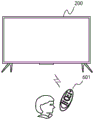
fig. 6 is a schematic diagram illustrating a user controlling the display device 200 through a remote controller 601 according to an embodiment of the present application;
FIG. 7 is a schematic illustration of a display of a setup interface according to an embodiment of the present application;
fig. 8 is a schematic display diagram of a download recommendation interface of a virtual remote controller according to an embodiment of the present application;
fig. 9 is a display schematic diagram of a download interface of an Android version virtual remote controller shown in an embodiment of the application;
fig. 10 is a schematic display diagram of an iOS version virtual remote controller download interface according to an embodiment of the present application;
fig. 11 is a flowchart illustrating a recommendation method for a virtual remote controller according to an embodiment of the present application;
fig. 12 is a flowchart illustrating another method for recommending a virtual remote controller according to an embodiment of the present application.
Detailed Description
To make the objects, embodiments and advantages of the present application clearer, the following description of exemplary embodiments of the present application will clearly and completely describe the exemplary embodiments of the present application with reference to the accompanying drawings in the exemplary embodiments of the present application, and it is to be understood that the described exemplary embodiments are only a part of the embodiments of the present application, and not all of the embodiments.
All other embodiments, which can be derived by a person skilled in the art from the exemplary embodiments described herein without inventive step, are intended to be within the scope of the claims appended hereto. In addition, while the disclosure herein has been presented in terms of one or more exemplary examples, it should be appreciated that aspects of the disclosure may be implemented solely as a complete embodiment.
It should be noted that the brief descriptions of the terms in the present application are only for the convenience of understanding the embodiments described below, and are not intended to limit the embodiments of the present application. These terms should be understood in their ordinary and customary meaning unless otherwise indicated.
The terms "first," "second," "third," and the like in the description and claims of this application and in the above-described drawings are used for distinguishing between similar or analogous objects or entities and are not necessarily intended to limit the order or sequence of any particular one, Unless otherwise indicated. It is to be understood that the terms so used are interchangeable under appropriate circumstances such that the embodiments described herein are, for example, capable of operation in sequences other than those illustrated or otherwise described herein.
Furthermore, the terms "comprises" and "comprising," and any variations thereof, are intended to cover a non-exclusive inclusion, such that a product or device that comprises a list of elements is not necessarily limited to those elements explicitly listed, but may include other elements not expressly listed or inherent to such product or device.
The term "module," as used herein, refers to any known or later developed hardware, software, firmware, artificial intelligence, fuzzy logic, or combination of hardware and/or software code that is capable of performing the functionality associated with that element.
The term "remote control" as used in this application refers to a component of an electronic device (such as the display device disclosed in this application) that is typically wirelessly controllable over a relatively short range of distances. Typically using infrared and/or Radio Frequency (RF) signals and/or bluetooth to connect with the electronic device, and may also include WiFi, wireless USB, bluetooth, motion sensor, etc. For example: the hand-held touch remote controller replaces most of the physical built-in hard keys in the common remote control device with the user interface in the touch screen.
The term "gesture" as used in this application refers to a user's behavior through a change in hand shape or an action such as hand motion to convey a desired idea, action, purpose, or result.
Fig. 1 is a schematic diagram illustrating an operation scenario between a display device and a control apparatus according to an embodiment. As shown in fig. 1, a user may operate the display device 200 through the mobile terminal 300 and the control apparatus 100.
In some embodiments, the control apparatus 100 may be a remote controller, and the communication between the remote controller and the display device includes an infrared protocol communication or a bluetooth protocol communication, and other short-distance communication methods, etc., and the display device 200 is controlled by wireless or other wired methods. The user may input a user command through a key on a remote controller, voice input, control panel input, etc. to control the display apparatus 200. Such as: the user can input a corresponding control command through a volume up/down key, a channel control key, up/down/left/right moving keys, a voice input key, a menu key, a power on/off key, etc. on the remote controller, to implement the function of controlling the display device 200.
In some embodiments, mobile terminals, tablets, computers, laptops, and other smart devices may also be used to control the display device 200. For example, the display device 200 is controlled using an application program running on the smart device. The application, through configuration, may provide the user with various controls in an intuitive User Interface (UI) on a screen associated with the smart device.
In some embodiments, the mobile terminal 300 may install a software application with the display device 200 to implement connection communication through a network communication protocol for the purpose of one-to-one control operation and data communication. Such as: the mobile terminal 300 and the display device 200 can establish a control instruction protocol, synchronize a remote control keyboard to the mobile terminal 300, and control the display device 200 by controlling a user interface on the mobile terminal 300. The audio and video content displayed on the mobile terminal 300 can also be transmitted to the display device 200, so as to realize the synchronous display function.
As also shown in fig. 1, the display apparatus 200 also performs data communication with the server 400 through various communication means. The display device 200 may be allowed to be communicatively connected through a Local Area Network (LAN), a Wireless Local Area Network (WLAN), and other networks. The server 400 may provide various contents and interactions to the display apparatus 200. Illustratively, the display device 200 receives software program updates, or accesses a remotely stored digital media library, by sending and receiving information, as well as Electronic Program Guide (EPG) interactions. The server 400 may be a cluster or a plurality of clusters, and may include one or more types of servers. Other web service contents such as video on demand and advertisement services are provided through the server 400.
The display device 200 may be a liquid crystal display, an OLED display, a projection display device. The particular display device type, size, resolution, etc. are not limiting, and those skilled in the art will appreciate that the display device 200 may be modified in performance and configuration as desired.
The display apparatus 200 may additionally provide an intelligent network tv function of a computer support function including, but not limited to, a network tv, an intelligent tv, an Internet Protocol Tv (IPTV), and the like, in addition to the broadcast receiving tv function.
A hardware configuration block diagram of a display device 200 according to an exemplary embodiment is exemplarily shown in fig. 2.
In some embodiments, at least one of the controller 250, the tuner demodulator 210, the communicator 220, the detector 230, the input/output interface 255, the display 275, the audio output interface 285, the memory 260, the power supply 290, the user interface 265, and the external device interface 240 is included in the display apparatus 200.
In some embodiments, a display 275 receives image signals originating from the first processor output and displays video content and images and components of the menu manipulation interface.
In some embodiments, the display 275, includes a display screen assembly for presenting a picture, and a driving assembly that drives the display of an image.
In some embodiments, the video content is displayed from broadcast television content, or alternatively, from various broadcast signals that may be received via wired or wireless communication protocols. Alternatively, various image contents received from the network communication protocol and sent from the network server side can be displayed.
In some embodiments, the display 275 is used to present a user-manipulated UI interface generated in the display apparatus 200 and used to control the display apparatus 200.
In some embodiments, a driver assembly for driving the display is also included, depending on the type of display 275.
In some embodiments, display 275 is a projection display and may also include a projection device and a projection screen.
In some embodiments, communicator 220 is a component for communicating with external devices or external servers according to various communication protocol types. For example: the communicator 220 may include at least one of a Wifi module 221, a bluetooth module 222, a wired ethernet module 223, and other network communication protocol modules or near field communication protocol modules, and an infrared receiver.
In some embodiments, the display apparatus 200 may establish control signal and data signal transmission and reception with the external control device 100 or the content providing apparatus through the communicator 220.
In some embodiments, the user interface 265 may be configured to receive infrared control signals from a control device 100 (e.g., an infrared remote control, etc.).
In some embodiments, the detector 230 is a signal used by the display device 200 to collect an external environment or interact with the outside.
In some embodiments, the detector 230 includes a light receiver, a sensor for collecting the intensity of ambient light, and parameters changes can be adaptively displayed by collecting the ambient light, and the like.
In some embodiments, the detector 230 may further include an image collector 232, such as a camera, a video camera, etc., which may be configured to collect external environment scenes, collect attributes of the user or gestures interacted with the user, adaptively change display parameters, and recognize user gestures, so as to implement a function of interaction with the user.
In some embodiments, the detector 230 may also include a temperature sensor or the like, such as by sensing ambient temperature.
In some embodiments, the display apparatus 200 may adaptively adjust a display color temperature of an image. For example, the display apparatus 200 may be adjusted to display a cool tone when the temperature is in a high environment, or the display apparatus 200 may be adjusted to display a warm tone when the temperature is in a low environment.
In some embodiments, the detector 230 may further include a sound collector 231 or the like, such as a microphone, which may be used to receive the user's voice. Illustratively, a voice signal including a control instruction of the user to control the display device 200, or to collect an ambient sound for recognizing an ambient scene type, so that the display device 200 can adaptively adapt to an ambient noise.
In some embodiments, as shown in fig. 2, the input/output interface 255 is configured to allow data transfer between the controller 250 and external other devices or other controllers 250. Such as receiving video signal data and audio signal data of an external device, or command instruction data, etc.
In some embodiments, the external device interface 240 may include, but is not limited to, the following: the interface can be any one or more of a high-definition multimedia interface (HDMI), an analog or data high-definition component input interface, a composite video input interface, a USB input interface, an RGB port and the like. The plurality of interfaces may form a composite input/output interface.
In some embodiments, as shown in fig. 2, the tuning demodulator 210 is configured to receive a broadcast television signal through a wired or wireless receiving manner, perform modulation and demodulation processing such as amplification, mixing, resonance, and the like, and demodulate an audio and video signal from a plurality of wireless or wired broadcast television signals, where the audio and video signal may include a television audio and video signal carried in a television channel frequency selected by a user and an EPG data signal.
In some embodiments, the frequency points demodulated by the tuner demodulator 210 are controlled by the controller 250, and the controller 250 can send out control signals according to user selection, so that the modem responds to the television signal frequency selected by the user and modulates and demodulates the television signal carried by the frequency.
In some embodiments, the broadcast television signal may be classified into a terrestrial broadcast signal, a cable broadcast signal, a satellite broadcast signal, an internet broadcast signal, or the like according to the broadcasting system of the television signal. Or may be classified into a digital modulation signal, an analog modulation signal, and the like according to a modulation type. Or the signals are classified into digital signals, analog signals and the like according to the types of the signals.
In some embodiments, the controller 250 and the modem 210 may be located in different separate devices, that is, the modem 210 may also be located in an external device of the main device where the controller 250 is located, such as an external set-top box. Therefore, the set top box outputs the television audio and video signals modulated and demodulated by the received broadcast television signals to the main body equipment, and the main body equipment receives the audio and video signals through the first input/output interface.
In some embodiments, the controller 250 controls the operation of the display device and responds to user operations through various software control programs stored in memory. The controller 250 may control the overall operation of the display apparatus 200. For example: in response to receiving a user command for selecting a UI object to be displayed on the display 275, the controller 250 may perform an operation related to the object selected by the user command.
In some embodiments, the object may be any one of selectable objects, such as a hyperlink or an icon. Operations related to the selected object, such as: displaying an operation connected to a hyperlink page, document, image, or the like, or performing an operation of a program corresponding to the icon. The user command for selecting the UI object may be a command input through various input means (e.g., a mouse, a keyboard, a touch pad, etc.) connected to the display apparatus 200 or a voice command corresponding to a voice spoken by the user.
As shown in fig. 2, the controller 250 includes at least one of a Random Access Memory 251 (RAM), a Read-Only Memory 252 (ROM), a Graphics Processing Unit 253 (GPU), a Central Processing Unit 254 (CPU), an input/output interface 255, and a communication Bus 256 (Bus). Wherein a communication bus connects the various components.
In some embodiments, RAM 251 is used to store temporary data for the operating system or other programs that are running
In some embodiments, ROM 252 is used to store instructions for various system boots.
In some embodiments, the ROM 252 is used to store a Basic Input Output System (BIOS). The system is used for completing power-on self-test of the system, initialization of each functional module in the system, a driver of basic input/output of the system and booting an operating system.
In some embodiments, when the power-on signal is received, the display device 200 starts to power up, the CPU executes the system boot instruction in the ROM 252, and copies the temporary data of the operating system stored in the memory to the RAM 251 so as to start or run the operating system. After the start of the operating system is completed, the CPU copies the temporary data of the various application programs in the memory to the RAM 251, and then, the various application programs are started or run.
In some embodiments, processor 254 is used to execute operating system and application program instructions stored in memory. And executing various application programs, data and contents according to various interactive instructions received from the outside so as to finally display and play various audio and video contents.
In some demonstrative embodiments, processor 254 may include a plurality of processors. The plurality of processors may include a main processor and one or more sub-processors. A main processor for performing some operations of the display apparatus 200 in a pre-power-up mode and/or operations of displaying a screen in a normal mode. One or more sub-processors for one operation in a standby mode or the like.
In some embodiments, the graphics processor 253 is used to generate various graphics objects, such as: icons, operation menus, user input instruction display graphics, and the like. The display device comprises an arithmetic unit which carries out operation by receiving various interactive instructions input by a user and displays various objects according to display attributes. And the system comprises a renderer for rendering various objects obtained based on the arithmetic unit, wherein the rendered objects are used for being displayed on a display.
In some embodiments, the video processor 270 is configured to receive an external video signal, and perform video processing such as decompression, decoding, scaling, noise reduction, frame rate conversion, resolution conversion, image synthesis, and the like according to a standard codec protocol of the input signal, so as to obtain a signal that can be displayed or played on the direct display device 200.
In some embodiments, video processor 270 includes a demultiplexing module, a video decoding module, an image synthesis module, a frame rate conversion module, a display formatting module, and the like.
The demultiplexing module is used for demultiplexing the input audio and video data stream, and if the input MPEG-2 is input, the demultiplexing module demultiplexes the input audio and video data stream into a video signal and an audio signal.
And the video decoding module is used for processing the video signal after demultiplexing, including decoding, scaling and the like.
And the image synthesis module is used for carrying out superposition mixing processing on the GUI signal input by the user or generated by the user and the video image after the zooming processing by the graphic generator so as to generate an image signal for display.
The frame rate conversion module is configured to convert an input video frame rate, such as a 60Hz frame rate into a 120Hz frame rate or a 240Hz frame rate, and the normal format is implemented in, for example, an interpolation frame mode.
The display format module is used for converting the received video output signal after the frame rate conversion, and changing the signal to conform to the signal of the display format, such as outputting an RGB data signal.
In some embodiments, the graphics processor 253 and the video processor may be integrated or separately configured, and when the graphics processor and the video processor are integrated, the graphics processor and the video processor may perform processing of graphics signals output to the display, and when the graphics processor and the video processor are separately configured, the graphics processor and the video processor may perform different functions, respectively, for example, a GPU + frc (frame Rate conversion) architecture.
In some embodiments, the audio processor 280 is configured to receive an external audio signal, decompress and decode the received audio signal according to a standard codec protocol of the input signal, and perform noise reduction, digital-to-analog conversion, and amplification processes to obtain an audio signal that can be played in a speaker.
In some embodiments, video processor 270 may comprise one or more chips. The audio processor may also comprise one or more chips.
In some embodiments, the video processor 270 and the audio processor 280 may be separate chips or may be integrated together with the controller in one or more chips.
In some embodiments, the audio output, under the control of controller 250, receives sound signals output by audio processor 280, such as: the speaker 286, and an external sound output terminal of a generating device that can output to an external device, in addition to the speaker carried by the display device 200 itself, such as: external sound interface or earphone interface, etc., and may also include a near field communication module in the communication interface, for example: and the Bluetooth module is used for outputting sound of the Bluetooth loudspeaker.
The power supply 290 supplies power to the display device 200 from the power input from the external power source under the control of the controller 250. The power supply 290 may include a built-in power supply circuit installed inside the display apparatus 200, or may be a power supply interface installed outside the display apparatus 200 to provide an external power supply in the display apparatus 200.
A user interface 265 for receiving an input signal of a user and then transmitting the received user input signal to the controller 250. The user input signal may be a remote controller signal received through an infrared receiver, and various user control signals may be received through the network communication module.
In some embodiments, the user inputs a user command through the control apparatus 100 or the mobile terminal 300, the user input interface responds to the user input through the controller 250 according to the user input, and the display device 200 responds to the user input through the controller 250.
In some embodiments, a user may enter user commands on a Graphical User Interface (GUI) displayed on the display 275, and the user input interface receives the user input commands through the Graphical User Interface (GUI). Alternatively, the user may input the user command by inputting a specific sound or gesture, and the user input interface receives the user input command by recognizing the sound or gesture through the sensor.
In some embodiments, a "user interface" is a media interface for interaction and information exchange between an application or operating system and a user that enables conversion between an internal form of information and a form that is acceptable to the user. A commonly used presentation form of the User Interface is a Graphical User Interface (GUI), which refers to a User Interface related to computer operations and displayed in a graphical manner. It may be an interface element such as an icon, a window, a control, etc. displayed in the display screen of the electronic device, where the control may include a visual interface element such as an icon, a button, a menu, a tab, a text box, a dialog box, a status bar, a navigation bar, a Widget, etc.
The memory 260 includes a memory storing various software modules for driving the display device 200. Such as: various software modules stored in the first memory, including: at least one of a basic module, a detection module, a communication module, a display control module, a browser module, and various service modules.
The base module is a bottom layer software module for signal communication between various hardware in the display device 200 and for sending processing and control signals to the upper layer module. The detection module is used for collecting various information from various sensors or user input interfaces, and the management module is used for performing digital-to-analog conversion and analysis management.
For example, the voice recognition module comprises a voice analysis module and a voice instruction database module. The display control module is used for controlling the display to display the image content, and can be used for playing the multimedia image content, UI interface and other information. And the communication module is used for carrying out control and data communication with external equipment. And the browser module is used for executing a module for data communication between browsing servers. And the service module is used for providing various services and modules including various application programs. Meanwhile, the memory 260 may store a visual effect map for receiving external data and user data, images of various items in various user interfaces, and a focus object, etc.
Fig. 3 exemplarily shows a block diagram of a configuration of the control apparatus 100 according to an exemplary embodiment. As shown in fig. 3, the control device 100 includes a controller 110, a communication interface 130, a user input/output interface 140, a memory 190, and a power supply 180.
The control apparatus 100 is configured to control the display device 200 and may receive an input operation instruction of a user and convert the operation instruction into an instruction recognizable and responsive by the display device 200, serving as an interaction intermediary between the user and the display device 200. Such as: the user operates the channel up/down key on the control device 100, and the display device 200 responds to the channel up/down operation.
In some embodiments, the control device 100 may be a smart device. Such as: the control apparatus 100 may install various applications that control the display device 200 according to user demands.
In some embodiments, as shown in fig. 1, a mobile terminal 300 or other intelligent electronic device may function similar to the control apparatus 100 after an application for manipulating the display device 200 is installed. Such as: the user may implement the function of controlling the physical keys of the apparatus 100 by installing an application, various function keys or virtual buttons of a graphical user interface available on the mobile terminal 300 or other intelligent electronic device.
The controller 110 includes a processor 112 and RAM 113 and ROM 114. The controller is used for controlling the operation of the control device 100, as well as the communication cooperation among the internal components and the external and internal data processing functions.
The communication interface 130 enables communication of control signals and data signals with the display apparatus 200 under the control of the controller 110. Such as: the received user input signal is transmitted to the display apparatus 200. The communication interface 130 may include at least one of a WiFi chip 131, a bluetooth module 132, an NFC module 133, and other near field communication modules.
A user input/output interface 140, wherein the input interface includes at least one of a microphone 141, a touch pad 142, a sensor 143, keys 144, and other input interfaces. Such as: the user can realize a user instruction input function through actions such as voice, touch, gesture, pressing, and the like, and the input interface converts the received analog signal into a digital signal and converts the digital signal into a corresponding instruction signal, and sends the instruction signal to the display device 200.
The output interface includes an interface that transmits the received user instruction to the display apparatus 200. In some embodiments, the interface may be an infrared interface or a radio frequency interface. Such as: when the infrared signal interface is used, the user input instruction needs to be converted into an infrared control signal according to an infrared control protocol, and the infrared control signal is sent to the display device 200 through the infrared sending module. The following steps are repeated: when the rf signal interface is used, a user input command needs to be converted into a digital signal, and then the digital signal is modulated according to the rf control signal modulation protocol and then transmitted to the display device 200 through the rf transmitting terminal.
In some embodiments, the control device 100 includes at least one of a communication interface 130 and an input-output interface 140. The control device 100 is configured with a communication interface 130, such as: the WiFi, bluetooth, NFC, etc. modules may transmit the user input command to the display device 200 through the WiFi protocol, or the bluetooth protocol, or the NFC protocol code.
A memory 190 for storing various operation programs, data and applications for driving and controlling the control apparatus 200 under the control of the controller. The memory 190 may store various control signal commands input by a user.
And a power supply 180 for providing operation power support for each element of the control device 100 under the control of the controller. A battery and associated control circuitry.
In some embodiments, the system may include a Kernel (Kernel), a command parser (shell), a file system, and an application program. The kernel, shell, and file system together make up the basic operating system structure that allows users to manage files, run programs, and use the system. After power-on, the kernel is started, kernel space is activated, hardware is abstracted, hardware parameters are initialized, and virtual memory, a scheduler, signals and interprocess communication (IPC) are operated and maintained. And after the kernel is started, loading the Shell and the user application program. The application program is compiled into machine code after being started, and a process is formed.
Referring to fig. 4, in some embodiments, the system is divided into four layers, which are an Application (Applications) layer (abbreviated as "Application layer"), an Application Framework (Application Framework) layer (abbreviated as "Framework layer"), an Android runtime (Android runtime) and system library layer (abbreviated as "system runtime library layer"), and a kernel layer from top to bottom.
In some embodiments, at least one application program runs in the application program layer, and the application programs can be Window (Window) programs carried by an operating system, system setting programs, clock programs, camera applications and the like; or may be an application developed by a third party developer such as a hi program, a karaoke program, a magic mirror program, or the like. In specific implementation, the application packages in the application layer are not limited to the above examples, and may actually include other application packages, which is not limited in this embodiment of the present application.
The framework layer provides an Application Programming Interface (API) and a programming framework for the application program of the application layer. The application framework layer includes a number of predefined functions. The application framework layer acts as a processing center that decides to let the applications in the application layer act. The application program can access the resource in the system and obtain the service of the system in execution through the API interface
As shown in fig. 4, in the embodiment of the present application, the application framework layer includes a manager (Managers), a Content Provider (Content Provider), and the like, where the manager includes at least one of the following modules: an Activity Manager (Activity Manager) is used for interacting with all activities running in the system; the Location Manager (Location Manager) is used for providing the system service or application with the access of the system Location service; a Package Manager (Package Manager) for retrieving various information related to an application Package currently installed on the device; a Notification Manager (Notification Manager) for controlling display and clearing of Notification messages; a Window Manager (Window Manager) is used to manage the icons, windows, toolbars, wallpapers, and desktop components on a user interface.
In some embodiments, the activity manager is to: managing the life cycle of each application program and the general navigation backspacing function, such as controlling the exit of the application program (including switching the user interface currently displayed in the display window to the system desktop), opening, backing (including switching the user interface currently displayed in the display window to the previous user interface of the user interface currently displayed), and the like.
In some embodiments, the window manager is configured to manage all window processes, such as obtaining a display size, determining whether a status bar is available, locking a screen, intercepting a screen, controlling a display change (e.g., zooming out, dithering, distorting, etc.) and the like.
In some embodiments, the system runtime layer provides support for the upper layer, i.e., the framework layer, and when the framework layer is used, the android operating system runs the C/C + + library included in the system runtime layer to implement the functions to be implemented by the framework layer.
In some embodiments, the kernel layer is a layer between hardware and software. As shown in fig. 4, the core layer includes at least one of the following drivers: audio drive, display drive, bluetooth drive, camera drive, WIFI drive, USB drive, HDMI drive, sensor drive (such as fingerprint sensor, temperature sensor, touch sensor, pressure sensor, etc.), and so on.
In some embodiments, the kernel layer further comprises a power driver module for power management.
In some embodiments, software programs and/or modules corresponding to the software architecture of fig. 4 are stored in the first memory or the second memory shown in fig. 2 or 3.
In some embodiments, taking the magic mirror application (photographing application) as an example, when the remote control receiving device receives a remote control input operation, a corresponding hardware interrupt is sent to the kernel layer. The kernel layer processes the input operation into an original input event (including information such as a value of the input operation, a timestamp of the input operation, etc.). The raw input events are stored at the kernel layer. The application program framework layer obtains an original input event from the kernel layer, identifies a control corresponding to the input event according to the current position of the focus and uses the input operation as a confirmation operation, the control corresponding to the confirmation operation is a control of a magic mirror application icon, the magic mirror application calls an interface of the application framework layer to start the magic mirror application, and then the kernel layer is called to start a camera driver, so that a static image or a video is captured through the camera.
In some embodiments, for a display device with a touch function, taking a split screen operation as an example, the display device receives an input operation (such as a split screen operation) that a user acts on a display screen, and the kernel layer may generate a corresponding input event according to the input operation and report the event to the application framework layer. The window mode (such as multi-window mode) corresponding to the input operation, the position and size of the window and the like are set by an activity manager of the application framework layer. And the window management of the application program framework layer draws a window according to the setting of the activity manager, then sends the drawn window data to the display driver of the kernel layer, and the display driver displays the corresponding application interface in different display areas of the display screen.
In some embodiments, as shown in fig. 5, the application layer containing at least one application may display a corresponding icon control in the display, such as: the system comprises a live television application icon control, a video on demand application icon control, a media center application icon control, an application center icon control, a game application icon control and the like.
In some embodiments, the live television application may provide live television via different signal sources. For example, a live television application may provide television signals using input from cable television, radio broadcasts, satellite services, or other types of live television services. And, the live television application may display video of the live television signal on the display device 200.
In some embodiments, a video-on-demand application may provide video from different storage sources. Unlike live television applications, video on demand provides a video display from some storage source. For example, the video on demand may come from a server side of the cloud storage, from a local hard disk storage containing stored video programs.
In some embodiments, the media center application may provide various applications for multimedia content playback. For example, a media center, which may be other than live television or video on demand, may provide services that a user may access to various images or audio through a media center application.
In some embodiments, an application center may provide storage for various applications. The application may be a game, an application, or some other application associated with a computer system or other device that may be run on the smart television. The application center may obtain these applications from different sources, store them in local storage, and then be operable on the display device 200.
The virtual remote controller is a remote control device installed on the mobile terminal and used for controlling the intelligent display equipment. The virtual remote controller may replace a conventional remote controller and use a voice control function on an intelligent display device and a mobile terminal supporting voice control. The current virtual remote controller already supports the functions of channel switching, volume control, application access, screen projection, text input and the like.
When a user needs to operate the intelligent display device by using the virtual remote controller, the user needs to go to an application store to search application software of the virtual remote controller and download the application software to the mobile terminal. However, general intelligent display devices all have corresponding virtual remote controllers, and for some users who are not familiar with the intelligent display devices or the names of the virtual remote controllers, they may not search for the virtual remote controllers corresponding to the intelligent display devices, or the search process may take a long time, and further the search process is complicated and the search efficiency is low, which affects the experience of the users using the virtual remote controllers.
Based on the above problems, the embodiment of the application provides a recommendation method for a virtual remote controller, a display device and a mobile terminal, where the display device 200 can receive a control instruction sent by a user through the remote controller 601, control display content of the display 275 according to different control instructions, and finally display a downloaded two-dimensional code of the virtual remote controller recommended to the user. The user can scan the two-dimensional code on the display device 200 using the mobile terminal 300 and then display a download page of the virtual remote controller on the mobile terminal 300. The user does not need to manually search for the related virtual remote controller, so that the situation that the virtual remote controller cannot be searched or the searching process takes a long time is avoided.
The display device 200 provided in the embodiment of the present application is an intelligent display device capable of implementing control by a virtual remote controller. The display 275 in the display device 200 may be used to display function pages or operation interfaces, etc., the communicator 220 may be communicatively connected to the remote control 601, and the user interface 265 may receive user inputs. Fig. 6 is a schematic diagram illustrating a user controlling the display device 200 through a remote controller 601 according to an embodiment of the present application. As shown in fig. 6, the user may select a desired content by pressing a direction key of the remote controller 601 according to a content currently displayed by the display apparatus 200, thereby completing the input of a control command, or the user may input a voice control command to the remote controller 601 by voice, for example, inputting a voice content of "i want to use a setting function" or a voice content of "select a setting interface", etc. The remote controller 601 may transmit a control command input by the user to the display apparatus 200, and the controller 250 on the display apparatus 200 may complete the display of the corresponding content according to the control command. The display apparatus 200 stores information about the two-dimensional code or the like downloaded by the virtual remote controller in the memory 260.
Fig. 7 is a schematic display diagram of a setting interface according to an embodiment of the present application. As shown in fig. 7, the setting interface includes many functions and content options, such as timing function, power function, mall mode, support content, screen-shot introduction, etc., and also includes an option of a virtual remote controller. The user may select an option of turning on the "virtual remote controller" as shown in fig. 7 when the user wants to download the virtual remote controller, and the display apparatus 200 may display the downloaded two-dimensional code of the virtual remote controller.
In this process, the controller 250 first controls the display 275 to display a setting interface in response to a first control instruction issued by the remote controller 601. The first control instruction is an instruction for selecting a setting interface, which is input by a user through operating the remote controller 601. The settings interface is shown in FIG. 7 to represent an interface that includes virtual remote control options.
Generally, a general setting interface, i.e., an interface including all system settable contents, such as network settings, display settings, time settings, and other conventional settings, is provided in the display device 200. Therefore, if the user wants to select the setting interface, the user needs to first control the display 275 to display a general setting interface. Furthermore, in some embodiments, the controller 250 may further control the display 275 to display a general setting interface in response to a first control instruction issued by the remote controller 601; the display interface of the control display 275 jumps from the generic setup interface to the setup interface.
Then, the controller 250 jumps the display screen of the display 275 from the setting interface to the virtual remote controller download recommendation interface in response to a second control instruction issued by the remote controller 601. The second control instruction is an instruction for selecting a virtual remote control option, which is input by the user through the remote control 601 after viewing the setting interface.
Fig. 8 is a display schematic diagram of a download recommendation interface of a virtual remote controller according to an embodiment of the present application, where as shown in fig. 8, the download recommendation interface of the virtual remote controller is used to display a two-dimensional code corresponding to a download page of the virtual remote controller on a mobile terminal.
Generally, the operating systems of the mobile terminal 300 include an Android system and an iOS system, and in order to enable mobile terminals with different operating systems to control the display device 200, there are two types of two-dimensional codes displayed on the virtual remote controller download recommendation interface, which are an Android version two-dimensional code and an iOS version two-dimensional code. When the mobile terminal 300 uses the Android system, the mobile terminal 300 needs to scan the Android version two-dimensional code to obtain a download interface of the Android version virtual remote controller; when the mobile terminal 300 uses the iOS system, the mobile terminal 300 needs to scan the iOS version two-dimensional code to obtain a download interface of the iOS version virtual remote controller.
The embodiment of the present application further provides a mobile terminal 300, where the mobile terminal 300 includes a display, a camera, and a controller. The display of the mobile terminal 300 may display a virtual remote controller download interface that the mobile terminal 300 jumps after scanning the two-dimensional code. The controller of the mobile terminal 300 may first control the camera to scan the two-dimensional code of the virtual remote controller download recommendation interface on the display device 200; and then controls the display of the mobile terminal 300 to display a virtual remote controller download interface corresponding to the two-dimensional code. The virtual remote controller downloading interface is used for displaying downloading options of the virtual remote controller and introduction contents of the virtual remote controller.
In this embodiment of the application, the mobile terminal 300 may be an intelligent device such as a smart phone and a tablet computer, and the display device 200 may be an intelligent device such as a smart television.
Since the operating system of the mobile terminal 300 includes an Android system and an iOS system, a user needs to scan a corresponding two-dimensional code according to the system of the mobile terminal 300 itself. Fig. 9 is a display schematic diagram of a download interface of an Android-version virtual remote controller shown in an embodiment of the present application, and fig. 10 is a display schematic diagram of a download interface of an iOS-version virtual remote controller shown in an embodiment of the present application. As shown in fig. 9 and 10, in some embodiments, the virtual remote controller download interfaces scanned by the mobile terminals 300 with different operating systems have different display forms, but the virtual remote controller download interfaces are all provided with an "install" button. Taking the virtual remote controller downloading interface in fig. 9 as an example, if the user wants to download the virtual remote controller of the Android version on the interface, the user clicks the "install" button; in addition, on the virtual remote controller downloading interface, some introductions about the use range of the Android version virtual remote controller, grading introductions and the like are also provided.
In the embodiment of the present application, the download option of the virtual remote controller is represented in the form of an "install" key, i.e., the mobile terminal 300 will start downloading when the key is clicked.
Generally, a certain brand of intelligent display device needs to be controlled by using a special virtual remote controller thereof. For example, a XX brand smart television, which may correspond to a virtual remote control named RemoteNow. Because a mobile terminal provided with a virtual remote controller may be equipped with different operating systems, the virtual remote controller needs to be online in different application stores, such as Google Play Store and App Store, and the Android version two-dimensional code and the iOS version two-dimensional code correspond to download pages in the two application stores of the virtual remote controller respectively; furthermore, the virtual remote controller download page in the Google Play Store can be displayed by scanning the Android version two-dimensional code through the smartphone of the Android system, and the virtual remote controller download page in the App Store can be displayed by scanning the iOS version two-dimensional code through the smartphone of the iOS system.
As can be seen from the above, in the display device 200 according to the present disclosure, first, in response to a first control instruction, the display 275 is controlled to display a setting interface; the setting interface is used for representing an interface comprising virtual remote controller options; then, in response to the second control instruction, controlling the display 275 to jump from the setting interface to the virtual remote controller download recommendation interface; the virtual remote controller downloading recommendation interface is used for displaying the two-dimensional code corresponding to the downloading page of the virtual remote controller on the mobile terminal. In the mobile terminal 300 according to the technical solution of the present application, the download page of the virtual remote controller is obtained by scanning the two-dimensional code displayed on the display device 200, and the download page is displayed on the display of the mobile terminal. According to the technical scheme, the display device 200 provides the user with the download two-dimensional code of the virtual remote controller when the user needs to download the virtual remote controller, the user directly scans the two-dimensional code by using the mobile terminal 300 to download the virtual remote controller, and the situations that the search process is complex and the search efficiency is low due to the fact that the user directly searches the virtual remote controller in an application store are avoided.
In addition, the content described in the above embodiments is the transmission of the control instruction completed by the remote controller 601, when the display device 200 includes the voice module, the remote controller 601 may be omitted in the above embodiments, and the voice module directly receives the voice control instruction sent by the user, and then transmits the voice control instruction to the controller 250, so that the controller 250 controls the display 275 to complete the operation of displaying the virtual remote controller download recommendation interface. In this way, the purpose of providing the virtual remote controller for the user to download the two-dimensional code can also be achieved, and the rest of the contents are the same as those in the above embodiment except that the remote controller 601 is not used, and are not described herein again.
Fig. 11 is a flowchart illustrating a recommendation method for a virtual remote controller according to an embodiment of the present application. As shown in fig. 11, the method may be implemented by a control component such as the controller 250 of the display device 200, and specifically may include the following steps:
step S101, in response to the first control instruction, controlling the display 275 to display a setting interface; the first control instruction is an instruction which is input by a user through a remote controller 601 and is used for selecting a setting interface; the setup interface is used to represent an interface including virtual remote control options. Wherein the setting interface is shown in fig. 7.
Step S102, responding to a second control instruction, controlling the display 275 to jump from the setting interface to a virtual remote controller downloading recommendation interface; the second control instruction is an instruction for selecting a virtual remote controller option, which is input by a user through the remote controller 601 after the user views the setting interface; the virtual remote controller downloading recommendation interface is used for displaying the two-dimensional code corresponding to the downloading page of the virtual remote controller on the mobile terminal. Wherein, the virtual remote controller download recommendation interface is shown in fig. 8.
In some embodiments, the step of controlling the display 275 to display the setting interface in response to the first control instruction comprises:
in step S201, in response to the first control instruction, the display 275 is controlled to display a general setting interface.
In step S202, the display interface of the display 275 is controlled to jump from the general setting interface to the setting interface.
Fig. 12 is a flowchart illustrating another method for recommending a virtual remote controller according to an embodiment of the present application. As shown in fig. 12, the method may be implemented by a control component such as a controller of the mobile terminal 300, and specifically may include the following steps:
step S301, controlling the camera to scan the two-dimensional code of the virtual remote controller downloading recommendation interface on the display device 200; the virtual remote controller downloads a recommended interface, which is an interface displayed by the display device 200 according to a control instruction input by a user.
Step S302, controlling a display to display a virtual remote controller downloading interface corresponding to the two-dimensional code; the virtual remote controller downloading interface is used for displaying downloading options of the virtual remote controller and introduction contents of the virtual remote controller. Wherein the virtual remote controller download interface is as shown in fig. 9 or fig. 10.
Finally, it should be noted that: the above embodiments are only used for illustrating the technical solutions of the present application, and not for limiting the same; although the present application has been described in detail with reference to the foregoing embodiments, it should be understood by those of ordinary skill in the art that: the technical solutions described in the foregoing embodiments may still be modified, or some or all of the technical features may be equivalently replaced; and the modifications or the substitutions do not make the essence of the corresponding technical solutions depart from the scope of the technical solutions of the embodiments of the present application.
The foregoing description, for purposes of explanation, has been presented in conjunction with specific embodiments. However, the illustrative discussions above are not intended to be exhaustive or to limit the embodiments to the precise forms disclosed above. Many modifications and variations are possible in light of the above teaching. The embodiments were chosen and described in order to best explain the principles and the practical application, to thereby enable others skilled in the art to best utilize the embodiments and various embodiments with various modifications as are suited to the particular use contemplated.
Claims (10)
1. A display device, comprising:
a display;
the communicator is used for being in communication connection with the remote controller;
a user interface for receiving user input;
a controller for performing:
responding to a first control instruction, and controlling a display to display a setting interface; the first control instruction is an instruction which is input by a user through a remote controller and is used for selecting a setting interface; the setting interface is used for representing an interface comprising virtual remote controller options;
responding to a second control instruction, and controlling the display to jump from the setting interface to a virtual remote controller downloading recommendation interface; the second control instruction is an instruction which is input by a user through a remote controller after the user watches the setting interface and is used for selecting a virtual remote controller option; the virtual remote controller downloading recommendation interface is used for displaying the two-dimensional code corresponding to the downloading page of the virtual remote controller on the mobile terminal.
2. The display device according to claim 1, wherein the controller is further configured to perform:
responding to the first control instruction, and controlling the display to display a universal setting interface;
and controlling a display interface of a display to jump from the universal setting interface to the setting interface.
3. The display device according to claim 1, wherein the virtual remote controller downloads the two-dimensional code displayed in the recommendation interface, and the two-dimensional code comprises an Android version two-dimensional code and an iOS version two-dimensional code.
4. The display device according to claim 3, wherein the Android version two-dimensional code is used for providing a download interface of an Android version virtual remote controller for a mobile terminal using an Android system.
5. The display device according to claim 3, wherein the iOS version two-dimensional code is used to provide a download interface of an iOS version virtual remote controller to a mobile terminal using an iOS system.
6. A mobile terminal, comprising:
a display;
a camera;
a controller for performing:
controlling a camera to scan a virtual remote controller on display equipment to download a two-dimensional code of a recommendation interface; the virtual remote controller downloads a recommendation interface which is displayed by the display equipment according to a control instruction input by a user;
controlling a display to display a virtual remote controller downloading interface corresponding to the two-dimensional code; the virtual remote controller downloading interface is used for displaying downloading options of the virtual remote controller and introduction contents of the virtual remote controller.
7. The mobile terminal of claim 6, wherein the controller is further configured to perform:
and under the condition that the two-dimension code is the Android version two-dimension code, controlling a display to display a downloading interface of the Android version virtual remote controller corresponding to the two-dimension code.
8. The mobile terminal of claim 6, wherein the controller is further configured to perform:
and under the condition that the two-dimensional code is the iOS version two-dimensional code, controlling a display to display a download interface of the iOS version virtual remote controller corresponding to the two-dimensional code.
9. A recommendation method for a virtual remote controller, applied to the display device according to claim 1, comprising:
responding to a first control instruction, and controlling a display to display a setting interface; the first control instruction is an instruction which is input by a user through a remote controller and is used for selecting a setting interface; the setting interface is used for representing an interface comprising virtual remote controller options;
responding to a second control instruction, and controlling the display to jump from the setting interface to a virtual remote controller downloading recommendation interface; the second control instruction is an instruction which is input by a user through a remote controller after the user watches the setting interface and is used for selecting a virtual remote controller option; the virtual remote controller downloading recommendation interface is used for displaying the two-dimensional code corresponding to the downloading page of the virtual remote controller on the mobile terminal.
10. A recommendation method for a virtual remote controller, applied to the mobile terminal as claimed in claim 6, comprising:
controlling a camera to scan a virtual remote controller on display equipment to download a two-dimensional code of a recommendation interface; the virtual remote controller downloads a recommendation interface which is displayed by the display equipment according to a control instruction input by a user;
controlling a display to display a virtual remote controller downloading interface corresponding to the two-dimensional code; the virtual remote controller downloading interface is used for displaying downloading options of the virtual remote controller and introduction contents of the virtual remote controller.
Priority Applications (1)
| Application Number | Priority Date | Filing Date | Title |
|---|---|---|---|
| CN202010857262.5A CN112017415A (en) | 2020-08-24 | 2020-08-24 | Recommendation method of virtual remote controller, display device and mobile terminal |
Applications Claiming Priority (1)
| Application Number | Priority Date | Filing Date | Title |
|---|---|---|---|
| CN202010857262.5A CN112017415A (en) | 2020-08-24 | 2020-08-24 | Recommendation method of virtual remote controller, display device and mobile terminal |
Publications (1)
| Publication Number | Publication Date |
|---|---|
| CN112017415A true CN112017415A (en) | 2020-12-01 |
Family
ID=73505689
Family Applications (1)
| Application Number | Title | Priority Date | Filing Date |
|---|---|---|---|
| CN202010857262.5A Pending CN112017415A (en) | 2020-08-24 | 2020-08-24 | Recommendation method of virtual remote controller, display device and mobile terminal |
Country Status (1)
| Country | Link |
|---|---|
| CN (1) | CN112017415A (en) |
Cited By (2)
| Publication number | Priority date | Publication date | Assignee | Title |
|---|---|---|---|---|
| CN113781760A (en) * | 2021-08-17 | 2021-12-10 | 深圳智控佳科技有限公司 | Bluetooth remote control method, device, system and medium based on two-dimension code |
| WO2023024628A1 (en) * | 2021-08-26 | 2023-03-02 | 海信视像科技股份有限公司 | Display device and startup navigation configuration method |
Citations (11)
| Publication number | Priority date | Publication date | Assignee | Title |
|---|---|---|---|---|
| CN101895620A (en) * | 2009-05-19 | 2010-11-24 | 中兴通讯股份有限公司 | Home appliance remote control driver download method and system, and mobile phone integrated with home appliance remote control |
| CN104581332A (en) * | 2015-01-23 | 2015-04-29 | 三星电子(中国)研发中心 | Method and system for arranging universal remote controller |
| CN109190006A (en) * | 2018-07-19 | 2019-01-11 | 聚好看科技股份有限公司 | A kind of exchange method and device based on information search interface |
| CN109218146A (en) * | 2018-10-12 | 2019-01-15 | 浙江工商大学 | Infrared household electrical appliances cloud control method and system based on wechat public platform |
| US20190159628A1 (en) * | 2017-11-24 | 2019-05-30 | Iyuan Chen | Smart temperature-controlled cooking system and cooking method |
| CN110366014A (en) * | 2019-07-16 | 2019-10-22 | 聚好看科技股份有限公司 | Acquisition methods, television set, server and the mobile terminal of searching character |
| CN110503815A (en) * | 2019-09-04 | 2019-11-26 | 寰盈(深圳)科技有限公司 | A kind of control device and control method of AI Universal remote control |
| CN110535644A (en) * | 2019-09-16 | 2019-12-03 | 珠海格力电器股份有限公司 | Intelligent equipment remote control method, system and storage medium |
| CN110719514A (en) * | 2019-11-11 | 2020-01-21 | 聚好看科技股份有限公司 | Equipment control method and system and terminal |
| CN110971965A (en) * | 2019-12-05 | 2020-04-07 | 珠海格力电器股份有限公司 | Intelligent display equipment association method, device and system and computer storage medium |
| CN111246299A (en) * | 2020-01-07 | 2020-06-05 | 聚好看科技股份有限公司 | Communication terminal and application management method |
-
2020
- 2020-08-24 CN CN202010857262.5A patent/CN112017415A/en active Pending
Patent Citations (11)
| Publication number | Priority date | Publication date | Assignee | Title |
|---|---|---|---|---|
| CN101895620A (en) * | 2009-05-19 | 2010-11-24 | 中兴通讯股份有限公司 | Home appliance remote control driver download method and system, and mobile phone integrated with home appliance remote control |
| CN104581332A (en) * | 2015-01-23 | 2015-04-29 | 三星电子(中国)研发中心 | Method and system for arranging universal remote controller |
| US20190159628A1 (en) * | 2017-11-24 | 2019-05-30 | Iyuan Chen | Smart temperature-controlled cooking system and cooking method |
| CN109190006A (en) * | 2018-07-19 | 2019-01-11 | 聚好看科技股份有限公司 | A kind of exchange method and device based on information search interface |
| CN109218146A (en) * | 2018-10-12 | 2019-01-15 | 浙江工商大学 | Infrared household electrical appliances cloud control method and system based on wechat public platform |
| CN110366014A (en) * | 2019-07-16 | 2019-10-22 | 聚好看科技股份有限公司 | Acquisition methods, television set, server and the mobile terminal of searching character |
| CN110503815A (en) * | 2019-09-04 | 2019-11-26 | 寰盈(深圳)科技有限公司 | A kind of control device and control method of AI Universal remote control |
| CN110535644A (en) * | 2019-09-16 | 2019-12-03 | 珠海格力电器股份有限公司 | Intelligent equipment remote control method, system and storage medium |
| CN110719514A (en) * | 2019-11-11 | 2020-01-21 | 聚好看科技股份有限公司 | Equipment control method and system and terminal |
| CN110971965A (en) * | 2019-12-05 | 2020-04-07 | 珠海格力电器股份有限公司 | Intelligent display equipment association method, device and system and computer storage medium |
| CN111246299A (en) * | 2020-01-07 | 2020-06-05 | 聚好看科技股份有限公司 | Communication terminal and application management method |
Non-Patent Citations (1)
| Title |
|---|
| 华天财经: "《玩转二维码营销实战手册》", 30 April 2014 * |
Cited By (2)
| Publication number | Priority date | Publication date | Assignee | Title |
|---|---|---|---|---|
| CN113781760A (en) * | 2021-08-17 | 2021-12-10 | 深圳智控佳科技有限公司 | Bluetooth remote control method, device, system and medium based on two-dimension code |
| WO2023024628A1 (en) * | 2021-08-26 | 2023-03-02 | 海信视像科技股份有限公司 | Display device and startup navigation configuration method |
Similar Documents
| Publication | Publication Date | Title |
|---|---|---|
| CN112019782B (en) | Control method and display device of enhanced audio return channel | |
| CN112055240B (en) | Display device and operation prompt display method for pairing display device with remote controller | |
| CN112135180B (en) | Content display method and display equipment | |
| CN112306604B (en) | Progress display method and display device for file transmission | |
| CN112118400B (en) | Display method of image on display device and display device | |
| CN112243141B (en) | Display method and display equipment for screen projection function | |
| CN112188279A (en) | Channel switching method and display equipment | |
| CN112087671B (en) | Display method and display equipment for control prompt information of input method control | |
| CN112565862A (en) | Display equipment and equipment parameter memorizing method and restoring method thereof | |
| CN112272331A (en) | Method for rapidly displaying program channel list and display equipment | |
| CN112199064A (en) | Interaction method of browser application and system platform and display equipment | |
| CN111954059A (en) | Screen saver display method and display device | |
| CN112363683A (en) | Method for supporting multi-layer display of webpage application and display equipment | |
| CN112040340A (en) | Resource file acquisition method and display device | |
| CN113438553B (en) | Display device awakening method and display device | |
| CN112017415A (en) | Recommendation method of virtual remote controller, display device and mobile terminal | |
| CN112835631A (en) | Method for starting homepage application and display device | |
| CN112214190A (en) | Display equipment resource playing method and display equipment | |
| CN113194355B (en) | Video playing method and display equipment | |
| CN111988646B (en) | User interface display method and display device of application program | |
| CN113438554A (en) | Resource updating method and display device | |
| CN113438528A (en) | Method for realizing combined key and display equipment | |
| CN112261463A (en) | Display device and program recommendation method | |
| CN114390190A (en) | Display equipment and method for monitoring application to start camera | |
| CN111914511A (en) | Remote file browsing method, intelligent terminal and display device |
Legal Events
| Date | Code | Title | Description |
|---|---|---|---|
| PB01 | Publication | ||
| PB01 | Publication | ||
| SE01 | Entry into force of request for substantive examination | ||
| SE01 | Entry into force of request for substantive examination | ||
| RJ01 | Rejection of invention patent application after publication |
Application publication date: 20201201 |
|
| RJ01 | Rejection of invention patent application after publication |