Detailed Description
The techniques and configurations discussed herein relate to an arc layout for a Soft Input Panel (SIP). For example, an electronic device such as a mobile phone may present SIP for providing user interaction. In some examples, SIP is an on-screen graphical representation for providing input to an electronic device that may not have a standard physical keyboard. For example, SIP may include a numeric representation of a QWERTY virtual keyboard that may be used to enter letters and/or other characters when a user uses the electronic device. To use SIP, a user may touch different areas on a touch screen of an electronic device that is rendering SIP, where each area corresponds to a particular letter or other character.
In some examples, the electronic device may provide SIP using a horizontal and/or substantially flat layout. The terms "horizontal" and/or "substantially flat" may refer to the orientation of the keys of a SIP (e.g., keys in one or more straight lines). For example, flat layouts are typically the default layouts for SIP. In a flat layout, the keys may be parallel with respect to each other and/or edges of the touch sensitive display.
In any case, when the SIP is displayed in a flat layout, the electronic device may receive input invoking (e.g., converting the keyboard to) an arc layout. The term "arc" may refer to the orientation of the keys of a SIP (e.g., the keys are positioned along a curved and/or inclined path). The input may include sliding a particular graphical element of the SIP in a curved manner. For example, if the user is holding the mobile device in the right hand (e.g., in a portrait orientation), the user may convert the SIP to an arc layout by sliding the user's thumb from the right side of the mobile device in an arc toward the left side of the mobile device. The user may also return the SIP to a flat layout by using a reverse motion (e.g., sliding in an arc from the left side of the device to the right side of the device along substantially the same path and/or any other arc-shaped path). In many instances, the arc-shaped layout of the SIP may allow a user to more efficiently use the electronic device with a single hand, such as where the user holds the mobile device with either the right or left hand. Further, the arc-like manner of accessing an arc-like SIP may also allow a user to more efficiently transition to and from an arc-like layout of a SIP.
The techniques and constructs discussed herein also relate to the design of custom SIP. In some examples, the electronic device may provide a SIP customization interface to the user to customize various aspects of SIP. As one example, a user may set a background of the SIP, set a color of a border around the background, set a color for characters included in the SIP, set an audio sound output when touching a key, and/or configure various other design functions of the personalized SIP. As another example, the user may select an image to be set as the background of the SIP. The electronic device may analyze the image to identify the color used in the image (e.g., the most prominent color). Based on the analysis, the electronic device may set a color of a portion of the SIP (e.g., lighter and/or darker than a most prominent color of the image). In another example, a user may select a SIP design previously created by another user. The design may define the theme of the SIP, such as color, font type, image, etc.
In many instances, techniques are discussed herein in the context of displaying SIP while an electronic device is positioned in a portrait orientation. However, these techniques may additionally or alternatively be implemented in the context of an electronic device that is located in a landscape orientation. An example Soft Input panel is described in U.S. application No. 13/727,629 entitled "arc or sloped Soft Input Panels" filed on 12/27 2012, the entire contents of which are incorporated herein by reference. However, other types of soft input panels may also be used. The term "technique" may refer to systems, methods, computer-readable instructions, modules, algorithms, hardware logic, and/or operations that are permitted by the context described above and throughout the entire document.
Illustrative Environment
FIG. 1 illustrates an example environment 100 in which the techniques herein may be implemented. In some examples, the various devices and/or components of the environment 100 include one or more distributed computing resources 102 that may communicate with each other and with external devices via one or more networks 104.
The one or more networks 104 may include a public network, such as the internet, a private network, such as an institutional and/or personal intranet, or some combination of a private network and a public network. The one or more networks 104 may also include any type of wired and/or wireless network including, but not limited to, a Local Area Network (LAN), a Wide Area Network (WAN), a satellite network, a wired network, a Wi-Fi network, a WiMax network, a mobile communication network (e.g., 3G, 4G, etc.), or any combination thereof. One or more networks 104 may utilize communication protocols including packet-based protocols and/or datagram-based protocols such as Internet Protocol (IP), Transmission Control Protocol (TCP), User Datagram Protocol (UDP), or other types of protocols. Further, one or more networks 104 may also include a number of devices that facilitate network communications and/or form the hardware basis of the network, such as switches, routers, gateways, access points, firewalls, base stations, repeaters, backbone devices, and the like. In some examples, one or more networks 104 may also include devices that enable connection to a wireless network, such as a Wireless Access Point (WAP). For example, connections are supported through WAP that transmits and receives data on various electromagnetic frequencies (e.g., radio frequencies), including WAP and other standards that support Institute of Electrical and Electronics Engineers (IEEE)802.11 standards (e.g., 802.11g, 802.11n, etc.).
In various examples, the one or more distributed computing resources 102 include devices 106(1) through 106 (N). Examples support scenarios in which one or more devices 106 may include one or more computing devices operating in a cluster or other grouping configuration to share resources, balance load, improve performance, provide failover or redundancy, or for other purposes. One or more devices 106 may belong to a variety of classes or categories of devices, such as traditional server type devices, desktop computer type devices, mobile devices, application specific devices, embedded type devices, and/or wearable type devices. Thus, although illustrated as a server, the one or more devices 106 may comprise a wide variety of device types and are not limited to a particular type of device. One or more devices 106 may represent, but are not limited to, a desktop computer, a server computer, a network server computer, a personal computer, a mobile computer, a laptop computer, a tablet computer, a thin client, a terminal, a workstation, an integrated component for inclusion in a computing device, or any other type of computing device.
The one or more devices 106 may include any type of computing device having one or more processing units 108, the one or more processing units 108 being operatively connected to a computer-readable medium 110, such as via a bus 112, the bus 112 may include, in some instances, one or more of the following: system bus, data bus, address bus, PCI bus, Mini-PCI bus, and any kind of local bus, peripheral bus, and/or independent bus. Executable instructions stored on computer-readable media 110 may include, for example, an operating system 114, SIP tools 116, and other modules, programs, or applications that may be loaded and executed by one or more processing units 108. Alternatively or in addition, the functions described herein may be performed, at least in part, by one or more hardware logic components, such as accelerators. By way of example, and not limitation, illustrative types of hardware logic components that may be used include Field Programmable Gate Arrays (FPGAs), Application Specific Integrated Circuits (ASICs), Application Specific Standard Products (ASSPs), system on a chip (SOCs), Complex Programmable Logic Devices (CPLDs), and the like. For example, the accelerator may represent a hybrid device, such as a hybrid device from XILINX or ALTERA, that includes a CPU core embedded in an FPGA fabric.
One or more devices 106 can also include one or more network interfaces 118 to enable communication between one or more computing devices 106 and other networked devices (such as client computing devices 120 or other devices involved in providing an arc SIP topology for user interaction) over one or more networks 104. One or more such network interfaces 118 may include one or more Network Interface Controllers (NICs) or other types of transceiver devices that send and receive communications over a network. Other components are omitted from one or more of the illustrated devices 106 for simplicity.
Other devices involved in facilitating the arc topology of SIP may include client computing device 120. The devices 120 may belong to various categories or classes of devices, such as legacy client-type devices, desktop computer-type devices, mobile devices, application-specific devices, embedded devices, internet of things (IoT) devices, and/or wearable devices. By way of example and not limitation, computing device 120 may include, but is not limited to, a smart phone, a mobile phone, a hybrid cell-phone-tablet device, or other telecommunications device, a server computer or blade server (such as a Web server, map/reduction server, or other computing engine), or a network attached storage unit, a laptop computer, a thin client, a terminal, or other mobile computer, computer navigation client computing device, satellite-based navigation system device including a Global Positioning System (GPS) device and other satellite-based navigation system devices, a Personal Data Assistant (PDA), and other special-purpose portable electronic device, a tablet computer or hybrid tablet computer, a portable or console-based gaming device graphically represented as a gamepad, or other entertainment device (such as a television with network functionality, a laptop computer, a tablet computer, or other entertainment device, A set-top box, a media player, a camera, or a Personal Video Recorder (PVR)), graphically represented as a game pad, an automotive computer (such as a vehicle control system, a vehicle security system, or an electronic key for a vehicle), a wearable computer such as a smart watch or biometric or medical sensor, an implanted computing device such as a biometric or medical sensor, or a fixed sensor such as an IoT sensor, a time, environmental conditions, vibration, motion, or other attribute configured to monitor the world or a structure or a device therein (e.g., a bridge or dam, graphically represented as a clock), a desktop computer, or an integrated component included in a computing device, facility, or one or more other computing devices. In some instances, device 120 may be a mobile device, while in other instances device 120 may be a stationary device.
Device 120 may represent any type of computing device having one or more processing units 122, the one or more processing units 122 operatively connected to a computer-readable medium 124, such as via a bus 126, which in some instances may include one or more of the following: system bus, data bus, address bus, PCI bus, Mini-PCI bus, and any kind of local bus, peripheral bus, and/or independent bus.
Executable instructions stored on computer-readable media 124 may include, for example, an operating system 128, SIP applications 130, and other modules, programs, or applications that may be loaded and executed by processing unit 122. Alternatively or in addition, the functions described herein may be performed, at least in part, by one or more hardware logic components, such as accelerators. By way of example, and not limitation, illustrative types of hardware logic components that may be used include Field Programmable Gate Arrays (FPGAs), Application Specific Integrated Circuits (ASICs), Application Specific Standard Products (ASSPs), system on a chip (SOCs), Complex Programmable Logic Devices (CPLDs), and the like. For example, the accelerator may represent a hybrid device, such as a hybrid device from XILINX or ALTERA, that includes a CPU core embedded in an FPGA fabric.
Device 120 may also include one or more network interfaces 132 that enable communication between device 120 and other networked devices, such as one or more devices 106, over network 104. One or more such network interfaces 132 may include one or more Network Interface Controllers (NICs) or other types of transceiver devices that send and receive communications over a network.
In the example of fig. 1, the device 120 may communicate with one or more distributed computing resources 102 when utilizing the SIP application 130. For instance, in some examples, the distributed computing resources 102 may use the SIP tool 116 to update the SIP application 130. In some examples, distributed computing resources 102 may provide some and/or all of the functionality of SIP application 130 to device 120 using SIP tool 116. Additionally or alternatively, in some examples, the distributed computing resources 102 may use the SIP tool 116 to receive data (e.g., customer visual designs such as background images, themes, and/or colors) from the SIP application 130. The distributed computing resources 102 may then use the SIP tool 116 to transfer data to other devices and/or make data available (e.g., on a website).
As one example, the device 120 may communicate with one or more distributed computing resources 102 to customize a SIP design. For example, the SIP tool 116 may provide functionality such that a user may view various customized interfaces via the device 120 to configure the look and feel of a user's keyboard. The user may then share the design with others by uploading the design to one or more distributed computing resources 102 and/or another service provider. In some instances, a link to the design may be created and provided to the user so that the user may post the link to a social media website or elsewhere. Others may select links and navigate to pages that show the design, as well as enable other users to download the design to their respective devices for use.
Fig. 2 is a block diagram depicting an example client computing device 200 (such as client device 120 from fig. 1). In one or more devices 200, one or more processing units 202 may include one or more processing units 122 and may represent, for example, a CPU-type processing unit, a GPU-type processing unit, a Field Programmable Gate Array (FPGA), another kind of Digital Signal Processor (DSP), or other hardware logic component that may be driven by a CPU in some instances. By way of example, and not limitation, exemplary types of hardware logic components that may be used include Application Specific Integrated Circuits (ASICs), Application Specific Standard Products (ASSPs), systems on a chip (SOCs), Complex Programmable Logic Devices (CPLDs), and the like.
Computer-readable media 204 may correspond to computer-readable media 124 and may store instructions that are executable by one or more processing units 202. The computer-readable medium 204 may also store instructions that may be executed by an external processing unit, such as an external CPU, an external GPU, and/or may be executed by an external accelerator, such as an FPGA-type accelerator, a DSP-type accelerator, or any other internal or external accelerator. In various examples, at least one CPU, GPU, and/or accelerator is incorporated into computing device 200, while in some examples, one or more of the CPU, GPU, and/or accelerator are external to computing device 200.
Computer-readable media 204 (as well as any other computer-readable media described herein) may include computer storage media and/or communication media. Computer storage media may include volatile memory, non-volatile memory, and/or other persistent and/or secondary computer storage media, removable and non-removable computer storage media implemented in any method or technology for storage of information, such as computer-readable instructions, data structures, program modules, or other data. Thus, computer storage media includes media in tangible and/or physical form that is included as part of or external to an apparatus and/or hardware components, including, but not limited to, Random Access Memory (RAM), Static Random Access Memory (SRAM), Dynamic Random Access Memory (DRAM), phase change memory (PRAM), Read Only Memory (ROM), Erasable Programmable Read Only Memory (EPROM), Electrically Erasable Programmable Read Only Memory (EEPROM), flash memory, compact disc read only memory (CD-ROM), Digital Versatile Discs (DVD), optical cards or other optical storage media, magnetic cassettes, magnetic tape, magnetic disk storage, magnetic cards or other magnetic storage devices or media, solid state memory devices, storage arrays, network attached storage, storage area networks, hosted computer storage, or any other memory that can be used to store and maintain information for access by a computing device, A storage device and/or a storage medium.
In contrast to computer storage media, communication media may embody computer-readable instructions, data structures, program modules, or other data in a modulated data signal, such as a carrier wave or other transport mechanism. As defined herein, computer storage media does not include communication media. That is, the computer storage medium itself does not include a communication medium consisting of a modulated data signal, a carrier wave, or a propagated signal itself.
Input/output (I/O) interface(s) 206 allow computing device 200 to communicate with input/output devices such as user input devices (e.g., keyboard, mouse, pen, game controller, voice input device, touch input device, gesture input device, etc.) including peripheral input devices and/or output devices (e.g., display, touch-sensitive display (e.g., touchscreen/surface), printer, audio speakers, tactile output, etc.) including peripheral output devices.
The one or more network interfaces 208, which may correspond to the one or more network interfaces 132, may represent, for example, a Network Interface Controller (NIC) or other type of transceiver device that sends and receives communications over a network.
Computing device 200 may also include a bus 210, which may correspond to bus 126. The bus 210 may operatively connect the one or more processing units 202, the computer-readable media 204, the one or more I/O interfaces 206, and the one or more network interfaces 208. For example, bus 210 may include one or more of the following: system bus, data bus, address bus, PCI bus, Mini-PCI bus, and any kind of local bus, peripheral bus, and/or independent bus.
In the illustrated example, the computer-readable media 204 includes a data store 212. In some examples, the data store 212 includes data storage, such as a database, data warehouse, or other type of structured or unstructured data storage. In some examples, the data store 212 includes a corpus and/or relational database having one or more tables, indexes, stored procedures, etc., that enable data access, including, for example, hypertext markup language (HTML) tables, Resource Description Framework (RDF) tables, web ontology language (OWL) tables, and/or extensible markup language (XML) tables. The data store 212 may store data for the operations of processes, applications, components, and/or modules stored in the computer-readable medium 204 and/or executed by the processing unit 202 and/or one or more accelerators. In some examples, data store 212 may store one or more of SIP applications 130 or other applications 214. Alternatively, some or all of the data referenced above may be stored on a separate memory 216 on one or more processing units 202, such as memory on a CPU-type processor, GPU-type processor, FPGA-type accelerator, DSP-type accelerator, and/or other accelerators.
In the illustrated example of fig. 2, the computer-readable media 204 also includes an operating system 218, which may represent the operating system 128. Additionally, the computer-readable media 204 includes the SIP application 130 and other applications 214. Although the SIP application 130 is illustrated as being separate from the operating system 218, in some instances the SIP application 130 may be integrated within the operating system 218. The SIP application 130 may include one or more modules and/or APIs illustrated as blocks 220, 222, and 224, although this is merely an example and the numbers may be higher or lower. The functions described in association with blocks 220, 222, and 224 may be combined to be performed by a fewer number of modules and/or APIs, or they may be split and performed by a greater number of modules and/or APIs.
The SIP call module 220 includes logic that programs the one or more processing units 202 of the computing device 200 to facilitate a Soft Input Panel (SIP)226 having a SIP arc topology 230 and/or a SIP flat topology 230. The SIP arc layout 228 may include a natural one-handed SIP226, which the one or more processing units 202 may cause to be displayed on a touch-sensitive display of the computing device 200. In some examples, the touch-sensitive display may display the SIP arc layout 228 using an arc or a tilted keyboard layout so that a user may tap and slide portions of the SIP226 using a single hand. For instance, in some examples, SIP arc topology 228 may include: SIP226 is displayed using a forty-five degree angle with respect to the bottom of the touch sensitive display. In some examples, SIP arc topology 228 may include: SIP226 is displayed using a different angle. For example, the angle may include any angle between zero and ninety degrees relative to a bottom edge or another edge of the touch-sensitive display.
The SIP flat layout 230 may include a two-handed SIP226, which the one or more processing units 202 may cause to be displayed on a touch-sensitive display of the computing device 200. For example, the SIP flat layout 230 may include: the SIP is displayed using a horizontal layout and/or a substantially flat layout, which may refer to the orientation of the keys of the SIP226 (e.g., keys on one or more flats). For example, the SIP flat layout 230 is typically the default layout of the SIP 226. In the SIP flat layout 230, the keys may be parallel with respect to each other and/or the edges of the touch-sensitive display.
In some examples, the SIP226 includes a plurality of discrete portions called keys. Each of the keys of SIP226 may represent a single character (e.g., a letter, number, symbol, or other character) or two or more characters. For example, in some examples, the SIP226 may include keys positioned similar to a conventional QWERTY keyboard. In some examples, the SIP226 may include characters other than letters or numbers. For instance, the SIP226 may include different images (e.g., emoticons) selected by the user.
To invoke (i.e., cause to be displayed) a SIP226 having a SIP arc layout 228, the keyboard invocation module 220 may detect a user input and in response cause to be displayed the SIP arc layout 228. For instance, in some examples, the touch-sensitive display may display the SIP226 using a SIP flat layout 230 (e.g., a normal QWERTY keyboard). The SIP226 may include an icon that the user uses to invoke the SIP arc layout 228. In some examples, invoking the SIP arc layout 228 may include: the user taps and/or presses the touch sensitive display at a location corresponding to the icon. Further, in some examples, invoking the SIP arc layout 228 may include: the user presses the touch-sensitive display using his or her thumb at a location corresponding to the icon, and then drags his or her thumb across the surface of the touch-sensitive display in a defined pattern. For instance, in one example, the defined pattern may include a circular motion that corresponds to a natural rotation of the thumb while the user's hand remains in a stationary position. In another example, the defined pattern may include horizontal and/or vertical motion across the surface of the touch-sensitive display. Additionally or alternatively, the defined pattern may include any other defined motion across the surface of the touch-sensitive display.
To close the SIP arc layout 228 (e.g., return to the SIP flat layout 230) such that the touch-sensitive display no longer displays the SIP arc layout 228, the keyboard invocation module 220 may detect another user input. In some examples, the user input to close the SIP arc layout 228 may include similar inputs to those described above when the SIP arc layout 228 is invoked, except in the opposite direction (or, in some instances, in the same direction). Additionally or alternatively, the user input to close the SIP arc layout 228 may include a differently defined user input specific to closing the SIP arc layout 228. For instance, in some examples, user input to close SIP arc layout 228 may include movement of a different user thumb (or other finger) across the surface of the touch-sensitive display.
The display configuration module 222 includes logic that programs one or more processing units 202 of the computing device 200 to define parameters of keys of a SIP226 having a SIP arc layout 228 and/or a SIP flat layout 230. Parameters of the SIP226 may include the number of keys to be displayed, the number of characters for each displayed key, the size of the displayed keys, the size of the SIP226 (horizontal and/or vertical), the radius associated with the arc of the SIP arc layout 228, the layout associated with the SIP arc layout 228 (e.g., the angle of rotation relative to the bottom of the touch-sensitive display), and so forth.
In some examples, the display configuration module 222 determines the parameters based on user-defined parameters received from a user. In some examples, the display configuration module 222 determines the parameters based on characteristics of the user. The characteristics may include the size of the user's hand and/or thumb (measured based on input received by the touch-sensitive display from the user), how the user holds computing device 200, the location on the touch-sensitive display where the user provided the most input, and so forth. Additionally or alternatively, in some examples, the display configuration module 222 determines the parameters based on characteristics of the computing device 200. The characteristics may include a size of computing device 200 (vertical and horizontal) and/or a size of a touch-sensitive display of computing device 200 (vertical and horizontal).
Keyboard graphics module 224 includes logic for programming one or more processing units 202 of computing device 200 to generate and display customized visual design 232 associated with SIP 226. The visual design 232 may include a background image, font color, font type, boundaries, graphical elements to facilitate the SIP226 with the SIP arc layout 230 and/or the SIP flat layout 230, sliding graphical elements, or any other element of the SIP 226. To generate visual design 232, keyboard graphics module 224 may provide a user interface (e.g., a keyboard customization interface) to a user. The user may use the user interface to select an image from a plurality of images (e.g., predefined images, images from the user's album, etc.) to use as a background. The user may zoom in/out on the image, crop the image, rotate the image, and the like. The keyboard graphics module 224 may also provide a color wheel to the user. The user may then select a color from the color wheel for use with SIP 226. The selected color may be used as a border for the background or for other parts of the SIP 226. Alternatively or additionally, the user may select a color for the SIP by dragging the color selector to a location in the image. The color may be used for fonts, boundaries, etc. of SIP 226.
Further, in some examples, keyboard graphics module 224 may select the color to apply to SIP 226. For example, the keyboard graphics module 224 may automatically determine the most prominent color, the least prominent color, or the shade of the most prominent or least prominent color from the selected image. The keyboard graphics module 224 may then apply the determined color to the SIP 226. In such an example, the color applied to the SIP226 may represent the theme of the selected image.
In addition to generating and displaying the customized visual design 232 associated with the SIP226, the keyboard graphics module 224 may also include logic that programs the one or more processing units 202 of the computing device 200 to upload the visual design 232 to a site via a network, such as the network 104. For example, keyboard graphics module 224 may cause device 200 to upload one of visual designs 232 to a social media site. Other users may then view the customized visual design 232 on the social media site. Additionally, in some examples, other users may download customized visual designs 232 for use with their own SIP.
In the illustrated example of fig. 2, computer-readable media 204 also includes other applications 214. Other applications 214 may include one or more applications that may receive input in the form of input from a keyboard. For instance, other applications 214 may include social media applications, text-based applications, web browsing applications, and the like. In some examples, when application 200 is executing other applications 214, SIP application 130 may interface with other applications 214 to provide SIP 226.
Fig. 3A depicts an example process for invoking an arced keyboard (e.g., invoking SIP arced layout 228) using an input. As illustrated in fig. 3A, device 302, which may represent device 200, may display SIP304 (which may represent SIP 226) on display 306 (which may include a touch-sensitive display). Here, the SIP304 is illustrated in a flat layout, wherein the characters of the SIP304 are arranged in a flat manner relative to the bottom of the display 306. To invoke an arc layout, such as SIP arc layout 228, a user may provide input using display 306. For example, the inputs include: contact is made with the user's thumb (and/or any other finger or device/item) at location 308 on the display 306, and the user's thumb is slid across the display 306 using an arc motion 310 until the thumb reaches location 312 on the display 306. Although the arcuate motion 310 is illustrated as a right-to-left motion, in other examples, the arcuate motion 310 may be implemented in a left-to-right motion. In some instances, the arc motion 310 may be customized according to the screen size of the display 306, the type of device, and the like. The arc motion 310 may be a quarter circle gesture.
In the example of fig. 3A, the input begins at location 308 on display 306, which includes an arc icon 314 (e.g., a graphical element in the shape of an arc). However, in other examples, the input may begin at any other location on the display 306. Additionally, in the example of fig. 3A, the motion includes an arc motion 310. However, in some examples, the motion may include any other type of motion. Additionally or alternatively, in some examples, the input may not include motion across the display 306. In such an example, the input may include only the user touching a particular portion of display 306 (e.g., contacting arc icon 314 without moving, contacting a particular corner of SIP304, etc.).
FIG. 3B depicts an example keyboard in an arc layout. In the example of fig. 3B, the SIP304 from fig. 3A has been configured in an arc topology 316. By invoking the arc layout 316 for the SIP304, the user can select each of the characters of the SIP304, for example, using his or her thumb. In some examples, each character of SIP304 may include separate images that together create an arc layout 316 of SIP 304. As such, the spacing between characters may be varied to generate the arc layout 316.
In some instances, when the SIP304 transitions from a flat layout to an arc layout 316, the keys of the SIP304 may be adjusted over time so that the SIP304 appears animated. For example, each of the individual keys may move a portion of the time to show that the SIP304 is transitioning to the arced layout 316 (e.g., the keys may appear to bend into an arced curve). In some instances, each of the keys may be a separate data structure, graphical element, or the like (rather than a single image for the entire SIP). This may allow the keys to be rendered separately on the display and facilitate animation.
Fig. 3C depicts an example process of reverting back to a horizontal keyboard from the arc layout 316. As illustrated in fig. 3C, to revert to SIP304 with a flat layout (e.g., a horizontal layout), a user may provide input using display 306. For example, the input includes contacting the user's thumb (and/or any other finger or device/item) at location 318 on the display 306 and sliding the user's thumb across the display 306 using the arc motion 320 until the thumb reaches location 322 on the display 306.
In the example of FIG. 3C, the input begins at location 318 on display 306, which includes an arc icon 324. However, in other examples, the input may begin at any other location on the display 306. Additionally, in the example of fig. 3C, the movement includes an arc-shaped movement 320. However, in some examples, the motion may include any other type of motion that a user may make on display 306. For example, a user may slide a finger in a vertical and/or horizontal direction. Additionally or alternatively, in some examples, the input may not include motion across the display 306. In such an example, the input may simply include the user touching the display 306 (e.g., a predefined portion, such as a corner or side of the device).
Fig. 3D depicts the example SIP304 again returning to a flat layout (e.g., horizontal orientation). As illustrated in the example of fig. 3D, the display again displays the SIP304 in a flat layout. As illustrated in fig. 3D, the SIP304 includes an input field 326 showing the character being input.
Although fig. 3A-3D are used in many instances for right-handed users, similar techniques may be implemented for left-handed users accessing arc layouts. For example, when a user (holding a mobile device with the left hand) selects an arc icon on the left side of the device and provides an arc motion toward the right side of the device, the arc layout of the SIP may be accessed.
Further, although in many instances SIP304 (e.g., a keyboard) is illustrated as a single graphical element, in some instances SIP304 may be divided into two or more separate portions (e.g., graphical elements). Each section may include different keys of SIP304 centered on different corners of the display. For example, a QWERTY keyboard may be divided into two portions, one portion having half of the characters of the QWERTY keyboard and the other portion having the other half of the characters of the QWERTY keyboard. In another example, keys in one portion may be of one type (e.g., letters) and keys in another portion may be of another type (e.g., numbers).
FIG. 4 depicts an example of an arc SIP that includes accent characters for user selection. As shown in the figure. Device 402, which may represent computing device 200, displays SIP 404, which may represent SIP304, using an arc layout on display 406. A portion 408 of the arc of the SIP 404 includes accent characters for selection by the user. In some examples, SIP 404 displays accent characters in response to user input. For example, the user may select an icon that is being displayed on SIP 404 (e.g., press an icon representing a character for a period of time).
In the example of fig. 4, the portion 408 of the SIP 404 that includes accent characters corresponds to the top row of characters of the SIP 404. However, in some examples, one or more other rows or columns of SIP 404 may include accent characters. For example, the second and third lines of characters of SIP 404 may include accent characters. In another example, any of the first three columns of SIP 404 may include accent characters.
Fig. 5A-5B depict example techniques for displaying emotions within a SIP in an arc layout. In the example of fig. 5A, device 502, which may represent device 200, displays SIP 504 using display 506. The SIP 504 includes an icon 508 (e.g., a graphical element) that invokes the display of an emoticon candidate.
In fig. 5B, the SIP 504 displays the emotion candidates using an arc layout. For example, device 502 may have received input associated with converting SIP 504 to an arc layout. Further, device 502 may have received a selection of icon 508 from fig. 5A when SIP 504 is in an arc layout. Based on the input, device 502 may replace characters within SIP 504 with case candidates 510(1) through (P). In some examples, the SIP 504 uses three columns or rows to display the emoticons 510(1) through (N). In some examples, the SIP 504 displays expressions 510(1) through (P) using more or fewer columns. In some examples, the user may scroll through candidate symbols 510(1) through (P) using SIP 504. For instance, the user may slide his or her thumb on the display 504 using a predefined pattern (e.g., vertically, horizontally, arcuately, etc.). In response, the SIP 504 may scroll expressions 510(1) through (P), which cause the SIP 504 to include additional expressions that have not been included in the SIP 504.
Fig. 6 depicts an example user interface for selecting a topic for SIP. In the example of fig. 6, a device (e.g., device 200) may display a user interface 602. The user interface 602 includes theme icons representing user-defined themes 604(1) through (M) and predefined themes 606(1) through (Q). Additionally, as depicted in fig. 7-10, the user interface 602 includes an area 608 for creating a user-defined theme. As shown in fig. 6, each of the theme icons may display accent colors of the theme and the background. For example, the theme icon of the predefined theme 606(2) includes a hue color (e.g., color sample) 612 of the theme and the background 614 (e.g., background sample). In some examples, the user selects one of the theme icons to change the theme of the SIP.
FIG. 7 depicts an example user interface 702 for cropping a selected image. For example, the user may have selected area 608 in order to generate a new theme for SIP. In response to making the selection, the user may select image 704 (e.g., an image stored on the device and/or remotely) to use as a background for SIP. As illustrated, the user interface 702 presents a photograph of a boy sitting on a beach. The user may then use the user interface 702 to crop the image 704 based on the user's preferences. For example, the user may use the user interface 702 to zoom in/out on the image 704, reposition the image, adjust the horizontal/vertical boundaries of the image 704, and so forth. The user may then select the apply crop 706 button to set the image 704 as the background for the subject.
FIG. 8 depicts an example user interface 802 for selecting background fill for a selected image. For instance, the user interface 802 includes various fill patterns 804(1) through (R) that the user can select for a selected image (e.g., image 704). In some examples, each of fill patterns 804(1) through (R) may include different gradients, contrasts, patterns, colors, and the like. As such, selecting one of fill patterns 804(1) through (R) will cause a filter to be applied to the image to achieve at least one of: softening an image, sharpening an image, changing an image color, changing an image contrast, changing an image pattern, and the like.
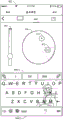
Fig. 9 depicts an example user interface 902 for selecting colors for one or more portions of a SIP. For example, the user interface 902 includes a selection bar 904 for selecting a level of color, contrast, brightness, etc. of the background image. The user interface 902 also includes a color wheel 906 for selecting the color of the text of the SIP and the boundaries 908(1) through (2) of the SIP. For example, the user may select the color of text within the SIP using the first selection icon 910. The user may also select the color of the boundaries 908(1) through (2) of the SIP using the second icon 912. Although the boundaries 908(1) through (2) of the SIP are illustrated on the top and bottom portions of the SIP, in some examples, the boundaries may be located at different portions of the SIP. As one example, the boundary may include an area where candidate text is presented, as illustrated by boundary 908 (1).
Fig. 10 depicts an example user interface 1002 for selecting a color for an accent key and/or a color of a sliding graphical element associated with a sliding input. For example, the user interface 1002 includes a color wheel 1004 for selecting a color. To select a color, the user may move the selection icon 1006 within the color wheel 1004 to position the selection icon 1006 over the desired color. Based on the input, the device updates the color of the accent keys 1008 with the color. The device also updates the color of the sliding graphical element using the color. In some examples, sliding the graphical element includes an animation that follows a path of touch input received when the user uses SIP. For example, when a user enters a word using SIP by moving a thumb (e.g., input) from a first character of the word to a last character of the word in a continuous motion, the animation may follow a touch input path.
Fig. 11 depicts an example of a SIP with an arc topology that includes predefined themes. For example, the user may have selected one of the theme icons representing the predefined themes 606(1) to (Q). Based on the input, device 1102, which may represent device 200, causes SIP 1104 to be displayed using display 1106 to include the selected theme. For instance, in the example of fig. 11, the subject of SIP 1104 includes building blocks.
Fig. 12A-12B and 13-16 illustrate example processes for implementing the techniques discussed herein. The example processes may be performed by any type of device. For example, any of the processes may be performed by one or more distributed computing resources 102, device 120, and/or any other device. An example process is illustrated as a collection of blocks in a logical flow graph, which represent a sequence of operations that can be implemented in hardware, software, or a combination thereof. These blocks are referenced by numbers. In the context of software, the blocks represent computer-executable instructions stored on one or more computer memories, which, when executed by one or more processing units (such as hardware microprocessors), perform the recited operations. Generally, computer-executable instructions include routines, programs, objects, components, data structures, and so forth that perform particular functions or implement particular abstract data types. The order in which the operations are described is not intended to be construed as a limitation, and any number of the described blocks can be combined in any order and/or in parallel to implement the process.
12A-12B illustrate a flowchart 1200 of an example process for invoking an arc layout for a soft input panel. At block 1202, the electronic device can display the soft input panel via the touch surface (via the touch screen) in a substantially flat and/or horizontal layout. For example, the electronic device may display a soft input panel, such as a keyboard, using an orientation in which the keys may be parallel with respect to each other and/or an edge of the touch-sensitive display.
At block 1204, the electronic device may display a first graphical element to enable an arc layout of the soft input panel. For example, the electronic device may display a first graphical element at a given location of the soft input panel. In some examples, the given location may include an upper left corner, an upper right corner, a lower right corner, and/or a lower left corner of the soft input panel.
At block 1206, the electronic device may receive a first input associated with a first graphical element. For instance, the electronic device can receive an input associated with a user touching the touch surface at a location corresponding to the first graphical element. The input may also include the user sliding his or her thumb in a curved manner from a position corresponding to the first graphical element until the user reaches a second position on the touch surface.
At 1208, the electronic device can display the soft input panel using the arc layout. For example, based on the first input, the electronic device can invoke an arc layout of the soft input panel. The keys of the soft input panel may follow an arcuate path. In some examples, the arc layout may include various keys that display the soft input panel using various angles relative to the edges of the touch surface.
At 1210 in fig. 12B, the electronic device can display a second graphical element to achieve a substantially flat and/or horizontal layout. For example, the electronic device may display the second graphical element at a given location of the soft input panel in the arc layout. In some examples, the given location may include an upper left corner, an upper right corner, a lower right corner, and/or a lower left corner of the soft input panel.
At block 1212, the electronic device may receive a second input associated with a second graphical element. For instance, the electronic device can receive an input associated with a user touching the touch surface at a location corresponding to the second graphical element. The input may also include the user sliding his or her thumb in a curved manner from a position corresponding to the second graphical element until the user reaches a second position on the touch surface.
At 1214, the electronic device can display the soft input panel in a substantially flat and/or horizontal layout. For example, based on the second input, the electronic device can invoke a substantially flat and/or horizontal layout for the soft input panel.
FIG. 13 illustrates a flowchart 1300 of an example process for accent keys provided in an arc layout of a soft input panel. At block 1302, the electronic device may display the soft input panels in an arc-shaped layout via the touch surface. At 1304, the electronic device can receive a selection of a key of the soft input panel to invoke an accent character of the key. For example, the soft input panel may include a plurality of keys for receiving user input. The electronic device may receive a selection of a key of a plurality of keys included in the soft input panel. In some examples, the selection corresponds to the user pressing and holding his or her thumb on the touch surface at the location of the key for a period of time (e.g., a predetermined period of time).
At 1306, the electronic device can determine the row of keys located in the soft input panel. For example, the keys of the soft input panel may be located within a row, such as within three rows. The electronic device may determine which rows include the selected keys. For example, the electronic device can determine that the second row includes the selected key.
At 1308, the electronic device can display an accent character for the key at a location based at least in part on the row. For instance, in some examples, the electronic device may display accent characters next to the selected key in the same row as the selected key. In some examples, the electronic device may display accent characters in rows above and/or below the selected key. Additionally or alternatively, in some examples, the electronic device may display more than one accent character for the selected key.
FIG. 14 illustrates a flowchart 1400 of an example process for presenting expressions on a soft input panel having an arc-shaped layout. At block 1402, the electronic device can display a soft input panel via the touch surface. For instance, in some examples, the electronic device may display the soft input panel using a substantially flat and/or horizontal layout. In some examples, the electronic device may display the soft input panel using an arc layout.
At block 1404, the electronic device may display a graphical element that enables display of the expression candidates. For example, the electronic device may display a graphical element at a given location of the soft input panel. In some examples, the given location may include an upper left corner, an upper right corner, a lower right corner, and/or a lower left corner of the soft input panel.
At block 1406, the electronic device can receive a selection of a graphical element. For example, the electronic device can receive an input that corresponds to a user pressing his or her thumb on the touch surface at the location of the graphical element.
At block 1408, the electronic device may replace at least some of the keys of the soft input panel with expression candidates and/or implement scrolling of expression candidates in an arc-like manner. For example, the electronic device can replace one or more keys within the soft input panel with the case candidates when the soft input panel is in the arc layout. In some examples, the electronic device may receive input associated with scrolling through emotions candidates while the soft input panel is displayed in the arc-shaped layout. For example, the electronic device can receive input corresponding to a sliding motion across the touch surface. The electronic device may then cause the soft input panel to scroll through the expression candidates.
At 1410, the electronic device may receive a selection of an expression candidate, and at 1412, the electronic device may display the expression candidate in an input field associated with the soft input panel. For example, the electronic device may receive an input associated with a user selecting an expression candidate. The input may include the user tapping the touch surface at a location of the expression candidate. The electronic device may then display the selected expression candidate in an input field associated with the soft input panel.
FIG. 15 illustrates a flow diagram 1500 of an example process for customizing a soft input panel. At block 1502, the electronic device may cause a keyboard customization interface to be displayed. For example, the electronic device may display a keyboard customization interface that allows a user to create a customized theme for the soft input panel.
At 1504, the electronic device can receive an input. For example, the electronic device may receive a selection of an image from a plurality of images via a keyboard customization interface. In some examples, the plurality of images is stored on the electronic device. In some examples, the plurality of images are stored on separate devices. In such an example, the electronic device may access the plurality of images via a network connection.
At 1506, the electronic device may receive input specifying characteristics for the soft input panel. For example, the electronic device may receive input specifying the color, font, contrast, pattern, etc. of the soft input panel via the keyboard customization interface.
At 1508, the electronic device can create a theme for the soft input panel based at least in part on the image and the characteristics specified in the input. For instance, the electronic device can create themes including images, colors, fonts, contrast, patterns, and the like. In some examples, the electronic device creates the theme by setting the image as a background, setting a border color, changing the contrast of the image using the selected contrast, changing the color of the sliding graphical representation, and so forth.
At 1510, the electronic device can customize the soft input panel using the theme. For example, the electronic device can set the soft input panel to include the theme created at 1508. Alternatively or additionally, in some examples, the user may have selected a predefined topic from a plurality of predefined topics. In such an example, the electronic device may set the theme of the soft input panel to a predefined theme.
At 1512, the electronic device may make the theme available to the device. For instance, the electronic device can publish a link for downloading the theme to a site (e.g., an online marketplace). Other devices may use the link to download the theme. Additionally, in some examples, the electronic device may send the theme to other devices. Further, the theme may be otherwise available to the device.
FIG. 16 illustrates a flow chart 1600 of an example process for analyzing an image and customizing a soft input panel based on the analysis. At 1602, the electronic device can receive an image. For example, the electronic device may receive a selection of an image from a plurality of images via a keyboard customization interface. In some examples, the plurality of images is stored on the electronic device. In some examples, the plurality of images are stored on separate devices. In such an example, the electronic device may access the plurality of images via a network connection.
At 1604, the electronic device can analyze the image to identify a color of the image. For instance, the electronic device can automatically determine the most prominent color (e.g., the color that is used the most within the image, etc.), the least prominent color (e.g., the color that is used the least within the image), and/or the shade from the most prominent or least prominent color of the image.
At 1606, the electronic device can set the image as a background to the soft input panel.
At 1608, the electronic device can set a color of the soft input panel based on the analysis. For example, the electronic device can apply the determined color to a portion of the soft input panel. For example, the electronic device can apply the determined color to a top portion of the soft input panel, a bottom portion of the soft input panel, characters for the soft input panel, a text entry field, and/or the like. In some instances, the applied color may be darker or lighter than the most/least prominent color of the image.
Example clauses
Paragraph a: a method, comprising: displaying a keyboard in a substantially flat layout via a touch surface; displaying a graphical element at a top portion of the keyboard, the graphical element enabling an arc-shaped layout of the keyboard; receiving a slide of the graphical element in a manner that bends toward a bottom portion of the keyboard; and in response to receiving the swipe, displaying the keyboard in the arc-shaped layout.
Paragraph B: the method of paragraph a, wherein displaying the keyboard in the arc layout comprises: the keyboard is divided into a first portion and a second portion, and the first portion in a first corner of the touch surface is displayed in an arc-shaped layout and the second portion in a second corner of the touch surface is displayed in an arc-shaped layout, the first portion extending from a vertical side of the touch surface to a horizontal side of the touch surface, and the second portion extending from another vertical side of the touch surface to a horizontal side of the touch surface.
Paragraph C: a method according to paragraph a or paragraph B, wherein the keyboard comprises a plurality of keys, a top portion of the keyboard being above at least some of the plurality of keys and a bottom portion of the keyboard being below at least some of the plurality of keys.
Paragraph D: the method of any of paragraphs a-C, further comprising: identifying input candidates provided via a keyboard for user input; and displaying the input candidates along a top portion of the keyboard in an arc layout, each of the input candidates being displayed along an arc path.
Paragraph E: the method of any of paragraphs a-D, further comprising: outputting audio indicating that the keyboard has changed to the arced layout.
Paragraph F: the method of any of paragraphs a through E, further comprising: displaying another graphical element at a bottom portion of the keyboard; receiving another slide of the graphical element in a manner to bend toward the top portion of the keyboard; and in response to receiving the other swipe, displaying the keyboard in a flat layout.
Paragraph G: the method of any of paragraphs a through F, further comprising: outputting audio indicating that the keyboard has changed back to a flat layout.
Paragraph H: a computer-readable medium having thereon computer-executable instructions for configuring a computer to perform the method according to any of paragraphs a through G.
Paragraph I: an apparatus comprising a computer-readable medium having thereon computer-executable instructions to configure a computer to perform the method according to any of paragraphs a through G, a processing unit adapted to execute the instructions to perform the method according to paragraphs a through G.
Paragraph J: a system comprising one or more processors; a touch screen communicatively coupled to the one or more processors and configured to display a soft input panel comprising a plurality of keys and graphical elements that enable a layout of the soft input panel to be changed; and a memory communicatively coupled to the one or more processors and storing executable instructions that, when executed by the one or more processors, cause the one or more processors to perform operations comprising: receiving touch input of a graphical element via a touch screen; and in response to receiving touch input of the graphical element, updating the soft input panel to be arranged in an arc-shaped layout.
Paragraph K: the system of paragraph J, wherein updating the soft input panel comprises: an animation is provided that converts the soft input panel from a horizontal layout in which the keys of the soft input panel are substantially aligned flat to an arced layout in which the keys of the input panel are substantially arced.
Paragraph L: the system of paragraph J or paragraph K, wherein displaying the graphical element comprises: displaying a graphical element in a top corner of the soft input panel, and receiving touch input comprises: the sliding of the graphical element is received in a manner curved towards a bottom portion of the soft input panel.
Paragraph M: the system as any one of paragraphs J through L recites, wherein the touch screen is configured to display another graphical element to enable display of expression candidates, and the operations further comprise: receiving a selection of other graphical elements via the touch screen; in response to receiving a selection of other graphical elements and while the soft input panel is displayed in the arc layout, replacing at least some keys of the soft input panel with the expression candidates; receiving a selection of an expression candidate from the expression candidates via the touch screen; and causing the expression candidates to be displayed in an input field associated with the soft input panel.
Paragraph N: the system of paragraph M, wherein the operations further comprise: enables scrolling of expression candidates in an arc-like manner according to the arc-like layout of the soft input panel.
Paragraph O: a system as paragraph M recites, wherein the touch screen is configured to display another graphical element in at least one of: above at least some of the keys of the soft input panel, below at least some of the keys of the soft input keyboard, or adjacent to the space key of the soft input panel.
Paragraph P: the system of any of paragraphs J through O, wherein the operations further comprise: receiving a selection of a key of the soft input panel to invoke an accent character of the key; and determining a row in which the key is located in the soft input panel; and wherein the display is configured to display accent symbols of the keys at positions based at least in part on the row in which the positions of the keys in the soft input panel are located.
Paragraph Q: the system of paragraph P, wherein determining a line comprises: determining that the row is a top row of the soft input panel; and the display is configured to display accent characters to one side of the keys in an arc-shaped manner.
Paragraph R: the system of paragraph P, wherein determining a line comprises: determining that the row is not a top row of the keyboard; and the display is configured to display the accent symbols in an arc-shaped manner over the keys.
Paragraph S: a mobile device comprising one or more processors; a touch surface communicatively coupled to the one or more processors and configured to display the keyboard in a substantially flat layout and graphical elements at a top portion of the keyboard; and a memory communicatively coupled to the one or more processors and storing executable instructions that, when executed by the one or more processors, cause the one or more processors to perform operations comprising: receiving a slide of the graphical element in a manner that bends toward a bottom portion of the keyboard; and in response to receiving the swipe action, instruct the touch surface to display the keyboard in the arc-shaped layout.
Paragraph T: a mobile device as paragraph S recites, wherein the touch surface is configured to transition the keyboard to the arced layout by displaying an animation that transitions the keyboard from a substantially flat layout to the arced layout.
Paragraph U: the mobile device of paragraph S or paragraph T, wherein the touch surface is further configured to display another graphical element at a bottom portion of the keyboard, and in response to receiving another slide of the graphical element in a manner that curves toward a top portion of the keyboard, display the keyboard in a substantially flat layout.
Paragraph V: the mobile device of any of paragraphs S to U, wherein the touch surface is configured to display the keyboard in an arc-shaped layout by displaying a first portion of the keyboard in a first corner of the touch surface that extends from a vertical side of the touch surface to a horizontal side of the touch surface and a second portion of the keyboard in a second corner of the touch surface in the arc-shaped layout, the second portion extending from another vertical side of the touch surface to the horizontal side of the touch surface.
Paragraph W: a method, comprising: providing, by a computing device, a keyboard customization interface to customize a design of a soft input panel of a keyboard configured to be displayed in an arc-shaped layout; receiving an image via a keyboard customization interface; setting the image as a background of the soft input panel; receiving, via a keyboard customization interface, a first user input specifying a color of a boundary of a soft input panel; setting a border of the soft input panel to a color specified in the first user input; receiving a second user input specifying a color of a character of the soft input panel via the keyboard customization interface; setting the characters of the soft input panel to the color specified in the second user input; receiving, via the keyboard customization interface, a third user input specifying a color of a sliding graphical element associated with the sliding input; setting a color of the sliding graphical element to a color specified in the third user input; and causing, by the computing device, a soft input panel of the keyboard to be implemented.
Paragraph X: the method of paragraph W, wherein causing the soft input panel of the keyboard to be implemented comprises: keys of the keyboard are displayed on the image in an overlay manner, and the keys are displayed together with the characters according to colors set for the characters of the soft input panel.
Paragraph Y: the method of paragraph W or paragraph X, further comprising: applying a filter to the image to at least one of: softening an image, sharpening an image, changing the color of an image or changing the contrast of an image.
Paragraph Z: the method of any of paragraphs W to Y, further comprising: analyzing the image; selecting a most prominent color of the image based at least in part on the analysis; and setting a color of a portion of a soft input panel of the keyboard based at least in part on a most prominent color of the image.
Paragraph AA: the method of paragraph Z, wherein setting the color of a portion of the soft input panel of the keyboard comprises: a portion of the soft input panel of the keyboard is set to be darker or lighter by a certain percentage than the most prominent color of the image.
Paragraph AB: the method as any of paragraphs W-AA recites, wherein the boundaries of the soft input panel include at least one of: a bottom row of keys of the keyboard, a top row of keys of the keyboard, or an input field portion of the keyboard.
Paragraph AC: the method of any of paragraphs W through AB, wherein the keyboard customization interface presents a color wheel to enable a user to select at least one of: a color for a boundary of the soft input panel, a color for a font of the soft input panel, or a color for a sliding graphic element.
Paragraph AD: a computer-readable medium having thereon computer-executable instructions for configuring a computer to perform the method of any of paragraphs W to AC.
Paragraph AE: an apparatus comprising a computer-readable medium having thereon computer-executable instructions to configure a computer to perform the method according to any of paragraphs W to AC, a processing unit adapted to execute the instructions to perform the method according to any of paragraphs W to AC.
Paragraph AF: a system comprising one or more processors; and a memory communicatively coupled to the one or more processors and storing executable instructions that, when executed by the one or more processors, cause the one or more processors to perform operations comprising: receiving an image; analyzing the image to identify a color of the image; setting the image as the background of the soft keyboard; and setting a color of a portion of the soft keyboard based at least in part on the color of the image.
Paragraph AG: the system of paragraph AF, wherein setting the image as a background of the soft keyboard comprises: applying filtering to the image to at least one of: softening an image, sharpening an image or changing the color of an image; and setting the filtered image as a background of the soft keyboard.
Paragraph AH: the system of paragraph AF or paragraph AG, wherein analyzing the image comprises: analyzing the image to determine a most prominent color of the image; and setting the color of the portion of the soft keyboard comprises: the color of a portion of the soft keyboard is set to be darker or lighter by a certain percentage than the intensity of the most prominent color of the image.
Paragraph AI: the system as in any of paragraphs AF-AH, wherein the portion of the soft keyboard comprises at least one of: a bottom row of keys of the soft keyboard, a top row of keys of the soft keyboard, an input field portion of the soft keyboard, or characters of the soft keyboard.
Paragraph AJ: the system of any of paragraphs AF through a1, wherein the operations further comprise: creating a theme based at least in part on the image set as a background for the soft keyboard and the color of the portion set for the soft keyboard; and sharing a theme with one or more devices.
Paragraph AK: the system of any of paragraphs AF through AJ, wherein the operations further comprise: displaying a theme icon representing a predetermined theme, the theme icon including a background sample representing a background for the predetermined theme and a color sample representing a color of a portion of the soft keyboard to be used for the predetermined theme; receiving a selection of a subject icon; and sets the theme of the soft keyboard to a predetermined theme.
Paragraph AL: the system of any of paragraphs AF through AK, wherein operations further comprise: receiving a theme from the device, the theme defining at least a background and a color of the portion of the soft keyboard; the theme is made available to other devices.
Paragraph AM: a mobile device comprising one or more processors; a display communicatively coupled to the one or more processors and configured to display a keyboard customization interface to customize a theme of the soft keyboard; and a memory communicatively coupled to the one or more processors and storing executable instructions that, when executed by the one or more processors, cause the one or more processors to perform operations comprising: receiving an image via a keyboard customization interface; receiving, via a keyboard customization interface, a user input specifying a color of a boundary of a soft keyboard and a color of a character of the soft keyboard; and creating a theme for the soft keyboard based at least in part on the image and the user input; wherein the display is configured to implement a soft keyboard according to the theme.
Paragraph AN: the mobile device of paragraph AM, wherein operations further comprise: identifying a most prominent color of the image; and wherein creating the theme comprises: setting a color of a portion of the soft keyboard based at least in part on a most prominent color of the image.
Paragraph AO: the mobile device of paragraph AN, wherein setting the color of the portion of the soft keyboard comprises: the color of the portion of the soft keyboard is set to be darker or lighter by a certain percentage than the most prominent color of the image.
Paragraph AP: a mobile device as in paragraph AN, wherein the portion of the soft keyboard comprises graphical elements for enabling AN arced layout of the soft keyboard.
Paragraph AQ: the mobile device of any of paragraphs AM to AP, wherein the boundaries of the soft keyboard comprise at least one of: a bottom row of keys of the soft keyboard, a top row of keys of the soft keyboard, or an input field of the soft keyboard.
Paragraph AR: the mobile device of any of paragraphs AM to AQ, wherein the keyboard customization interface presents a color wheel to enable a user to select at least one of: a color of a border for the soft keyboard or a color of a character for the soft keyboard.
Conclusion
Although the technology has been described in language specific to structural features and/or methodological acts, it is to be understood that the appended claims are not necessarily limited to the described features or acts. Rather, the features and acts are described as example implementations of such techniques.
The techniques discussed herein may be implemented as a process having a logical flow of blocks, each of which may represent one or more operations that may be implemented in hardware, software, or a combination thereof. In the context of software, the operations represent computer-executable instructions stored on one or more computer-readable media, which when executed by one or more processors, enable the one or more processors to perform the recited operations. Generally, computer-executable instructions include routines, programs, objects, modules, components, data structures, and so forth that perform particular functions or implement particular abstract data types. The order in which the operations may be implemented is not intended to be construed as a limitation, and any number of the operations may be performed in any order, combined in any order, subdivided into multiple sub-operations, and/or performed in parallel to implement the processes. May be executed by resources associated with one or more devices 106, 120, and/or 200, such as one or more internal or external CPUs or GPUs, and/or one or more hardware logic, such as FPGAs, DSPs, or other types of accelerators.
All of the methods and processes described herein may be embodied in, and fully automated via, software code modules executed by one or more general-purpose computers or processors. The code modules may be stored in any type of computer-readable storage medium or other computer storage device. Alternatively, some or all of the methods may be embodied in dedicated computer hardware.
Conditional language such as "can", "may", "migt" or "may" is understood in this context to mean that some examples include, while other examples do not include, certain features, elements and/or steps, unless specifically stated otherwise. Thus, such conditional language is not generally intended to imply that features, elements and/or steps are in any way required for one or more embodiments or that one or more embodiments necessarily include logic for determining whether such features, elements and/or steps are included or are to be performed in any particular embodiment, whether with or without user input or prompting. Unless specifically stated otherwise, conjunctive language such as the phrase "at least one of X, Y or Z" should be understood to mean that the item, term, etc. may be X, Y or Z, or a combination thereof.
Any routine descriptions, elements, or blocks in flow diagrams described herein and/or depicted in the figures should be understood as potentially representing modules, pieces, or portions of code which include one or more executable instructions for implementing the specified logical function or element of the routine. Those skilled in the art will appreciate that alternative implementations are included within the scope of the examples described herein in which elements or functions may be deleted and executed in an order different from that shown or discussed, including substantially synchronously or in reverse order, depending on the functionality involved. It should be emphasized that many variations and modifications may be made to the above-described examples, the elements of which are to be understood as being among other acceptable examples. All such modifications and variations are intended to be included herein within the scope of this disclosure and protected by the following claims.