CN103577071A - Product usage instruction display system and method - Google Patents
Product usage instruction display system and method Download PDFInfo
- Publication number
- CN103577071A CN103577071A CN201210255942.5A CN201210255942A CN103577071A CN 103577071 A CN103577071 A CN 103577071A CN 201210255942 A CN201210255942 A CN 201210255942A CN 103577071 A CN103577071 A CN 103577071A
- Authority
- CN
- China
- Prior art keywords
- image
- accessory
- product
- instruction manual
- detection area
- Prior art date
- Legal status (The legal status is an assumption and is not a legal conclusion. Google has not performed a legal analysis and makes no representation as to the accuracy of the status listed.)
- Pending
Links
Images


Landscapes
- User Interface Of Digital Computer (AREA)
- Processing Or Creating Images (AREA)
Abstract
一种产品使用说明书显示系统及方法,该方法包括:获取用户选择的需要查看的产品型号及配件项目,并获取该配件项目的使用说明书内容;获取手持设备的摄像装置摄取的该配件项目的影像,并使该摄取的影像位于手持设备显示屏幕预设的侦测区域;比对该侦测区域内的影像与产品影像样本资料库中的所有配件影像,确定一个与该摄取的影像匹配的配件影像;当找到匹配的配件影像时,将该配件项目的使用说明书内容,以扩增实境的方式显示在显示屏幕上。利用本发明可以电子化的形式显示用户需要浏览的产品使用说明书。
A product instruction manual display system and method, the method comprising: obtaining the product model and accessory item selected by the user to be viewed, and obtaining the contents of the instruction manual of the accessory item; acquiring the image of the accessory item captured by the camera device of the handheld device , and make the captured image be located in the preset detection area of the display screen of the handheld device; compare the image in the detection area with all accessory images in the product image sample database, and determine an accessory that matches the captured image Image; when a matching accessory image is found, the content of the instruction manual of the accessory item is displayed on the display screen in the form of augmented reality. Utilizing the invention, the product instruction manual that the user needs to browse can be displayed in an electronic form.
Description
技术领域 technical field
本发明涉及一种产品使用说明书显示系统及方法,尤其涉及一种手持设备屏幕上的产品使用说明书显示系统方法。The invention relates to a system and method for displaying product instruction manuals, in particular to a system and method for displaying product instruction manuals on the screen of a handheld device.
背景技术 Background technique
当用户需要了解某一产品的使用功能时,需要翻阅纸本的产品使用说明书,由于产品可能销售至许多不同国家或地区,厂商为增加销售作业的便利,会印制多种语言在产品使用说明书。When users need to understand the functions of a certain product, they need to read the product instruction manual in paper. Since the product may be sold to many different countries or regions, the manufacturer will print multiple languages in the product instruction manual to increase the convenience of sales operations. .
但是,使用者翻阅产品使用说明书时,往往仅阅读个人所熟悉的语言版本,这样不仅造成使用者浏览上的不便,也造成印制成本及资源上的浪费。同时,纸本产品使用说明书亦容易发生因未妥善保存而遗失的状况,使传统的产品使用说明书在使用上,易造成使用者浏览上的困扰与不便。However, when users read product instruction manuals, they often only read the language version that they are familiar with, which not only causes inconvenience for users to browse, but also causes waste of printing costs and resources. At the same time, paper-based product instruction manuals are also prone to loss due to improper preservation, making traditional product instruction manuals easy to cause trouble and inconvenience for users to browse.
发明内容 Contents of the invention
鉴于以上内容,有必要提供一种产品使用说明书显示系统,其可以电子化的形式显示用户需要浏览的产品使用说明书。In view of the above, it is necessary to provide a product instruction manual display system, which can electronically display the product instruction manual that users need to browse.
鉴于以上内容,还有必要提供一种产品使用说明书显示方法,其可以电子化的形式显示用户需要浏览的产品使用说明书。In view of the above, it is also necessary to provide a method for displaying product instruction manuals, which can electronically display the product instruction manuals that users need to browse.
一种产品使用说明书显示系统,应用于手持设备,该系统包括:第一获取模块,用于获取用户选择的需要查看的产品型号及配件项目,并获取该配件项目的使用说明书内容;第二获取模块,用于获取手持设备的摄像装置摄取的该配件项目的影像,并使该摄取的影像位于手持设备显示屏幕预设的侦测区域;影像比对模块,用于比对该侦测区域内的影像与产品影像样本资料库中的所有配件影像,确定一个与该摄取的影像匹配的配件影像;显示模块,用于当找到匹配的配件影像时,将该配件项目的使用说明书内容,以扩增实境的方式显示在显示屏幕上。A product instruction manual display system, applied to handheld devices, the system includes: a first acquisition module, used to acquire the product model and accessory item selected by the user to be viewed, and acquire the content of the instruction manual of the accessory item; the second acquisition module The module is used to obtain the image of the accessory item captured by the camera device of the handheld device, and make the captured image be located in the preset detection area of the display screen of the handheld device; the image comparison module is used to compare the images within the detection area The image and all the accessory images in the product image sample database are used to determine an accessory image that matches the captured image; the display module is used to expand the content of the instruction manual of the accessory item when a matching accessory image is found. The augmented reality mode is displayed on the display screen.
一种产品使用说明书显示方法,应用于手持设备,该方法包括:第一获取步骤,获取用户选择的需要查看的产品型号及配件项目,并获取该配件项目的使用说明书内容;第二获取步骤,获取手持设备的摄像装置摄取的该配件项目的影像,并使该摄取的影像位于手持设备显示屏幕预设的侦测区域;影像比对步骤,比对该侦测区域内的影像与产品影像样本资料库中的所有配件影像,确定一个与该摄取的影像匹配的配件影像;显示步骤,当找到匹配的配件影像时,将该配件项目的使用说明书内容,以扩增实境的方式显示在显示屏幕上。A method for displaying an instruction manual for a product, which is applied to a handheld device. The method includes: a first obtaining step, obtaining a product model and an accessory item selected by a user to be viewed, and obtaining the contents of the instruction manual for the accessory item; a second obtaining step, Obtain the image of the accessory item captured by the camera device of the handheld device, and make the captured image located in the preset detection area of the display screen of the handheld device; the image comparison step is to compare the image in the detection area with the product image sample For all accessory images in the database, determine an accessory image that matches the captured image; display step, when a matching accessory image is found, display the content of the instruction manual of the accessory item on the display in the form of augmented reality on the screen.
相较于现有技术,所述的产品使用说明书显示系统及方法,其可以电子化的形式(如扩增实境形式)显示用户需要浏览的产品使用说明书,有效避免了传统纸本产品使用说明书遗失状况的发生,同时提供用户更直觉的方式浏览、获取相关产品的使用说明资讯。Compared with the prior art, the described product instruction manual display system and method can display the product instruction manual that the user needs to browse in an electronic form (such as the form of augmented reality), effectively avoiding the traditional paper-based product instruction manual. In the event of loss, it also provides users with a more intuitive way to browse and obtain instruction information for related products.
附图说明 Description of drawings
图1是本发明产品使用说明书显示系统的应用环境示意图。Fig. 1 is a schematic diagram of the application environment of the product instruction manual display system of the present invention.
图2是本发明产品使用说明书显示系统的功能模块图。Fig. 2 is a functional block diagram of the product instruction manual display system of the present invention.
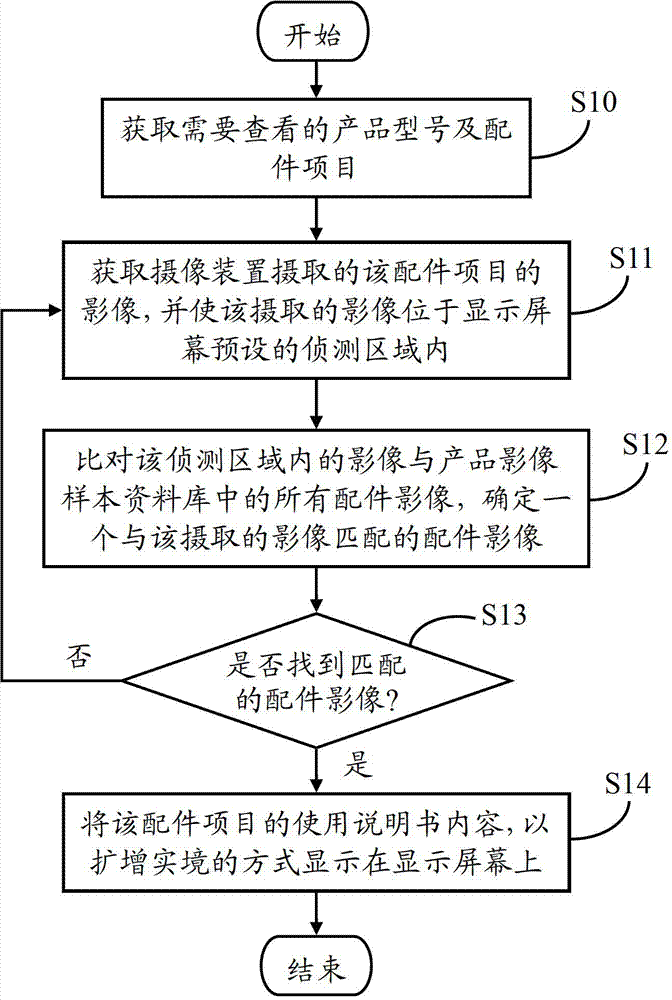
图3是本发明产品使用说明书显示方法的流程图。Fig. 3 is a flow chart of the method for displaying product instruction manuals of the present invention.
图4是本发明中所述产品影像样本资料库的一个示意图。FIG. 4 is a schematic diagram of the product image sample database in the present invention.
图5是扫描产品条形码,自动获取产品项目的示意图。Fig. 5 is a schematic diagram of automatically obtaining product items by scanning a product barcode.
图6A和图6B是预设的侦测区域的示意图。6A and 6B are schematic diagrams of preset detection areas.
图7为计算预设的侦测区域内的影像与产品影像样本资料库中每个配件影像的相似度的示意图。FIG. 7 is a schematic diagram of calculating the similarity between the image in the preset detection area and each accessory image in the product image sample database.
图8A和图8B是扩增实境显示方式的示例图。8A and 8B are diagrams showing examples of augmented reality display.
主要元件符号说明Description of main component symbols
具体实施方式 Detailed ways
如图1所示,是本发明产品使用说明书显示系统的应用环境示意图。在本实施例中,该产品使用说明书显示系统24运行于一个手持设备2中。所述手持设备2还包括通过信号线和数据线相连的显示屏幕20、摄像装置22、存储器23及处理器25。在本实施例中,所述手持设备2为智能手机。所述显示屏幕20可以是电阻式触摸屏或电容式触摸屏。As shown in FIG. 1 , it is a schematic diagram of the application environment of the product instruction manual display system of the present invention. In this embodiment, the product instruction
所述摄像装置22用于摄取用户需要查看的产品配件的影像,并将摄取的影像保存于存储器23中。The
所述存储器23用于存储所述产品使用说明书显示系统24的程序代码及从后端主机下载的产品影像样本资料库30等资料。所述产品影像样本资料库30用于存储不同产品的配件影像及每个配件的使用说明书,参阅图4所示,所述产品影像样本资料库30包括,但不限于,产品型号(如DVDR800)、配件项目(如主机)、配件影像和每个配件的使用说明书(如按键功能、线路安装等说明)。The
在本实施例中,所述产品影像样本资料库30存储于后端主机,手持设备2通过网络可以连接到该后端主机。需要说明的是,所述产品影像样本资料库30并不会记录配件影像本身,记录的是配件影像的存储地址,如E:\Template\DVDR800\Image\HostObverse.jpg。同理,所述产品影像样本资料库30也不会记录各配件使用说明书的具体内容,而是记录每个使用说明书的存储地址,如E:\Template\DVDR800\Manual\HostObverse.txt。In this embodiment, the product
在本实施例中,所述产品使用说明书显示系统24通过手持设备2中内置的网络模组从后端主机下载并安装至手持设备2中。在其他实施例中,所述产品影像样本资料库30也可以不用下载到手持设备2,手持设备2可以通过网络模组访问后端主机中存储的产品影像样本资料库30。所述产品使用说明书显示系统24用于以电子化的形式(如扩增实境形式)显示用户需要浏览的产品配件使用说明书,具体过程以下描述。In this embodiment, the product instruction
在本实施例中,所述产品使用说明书显示系统24可以被分割成一个或多个模块,所述一个或多个模块被存储在所述存储器23中并被配置成由一个或多个处理器(本实施例为一个处理器25)执行,以完成本发明。例如,参阅图2所示,所述产品使用说明书显示系统24被分割成第一获取模块240、第二获取模块241、影像比对模块242及显示模块243。本发明所称的模块是完成一特定功能的程序段,比程序更适合于描述软件在手持设备2中的执行过程,关于各模块的功能将在图3的流程图中具体描述。In this embodiment, the product instruction
如图3所示,是本发明产品使用说明书显示方法的流程图。As shown in FIG. 3 , it is a flow chart of the method for displaying the product instruction manual of the present invention.
步骤S10,第一获取模块240获取需要查看的产品型号及配件项目。在本实施例中,提供两种方法获取需要查看的产品型号。In step S10, the first obtaining
方法一,手动选取,手持设备2在显示屏幕20上显示一个下拉列表,该下拉列表包括多种型号的产品,当用户选择某一型号的产品时,第一获取模块240确定该用户选择的产品型号为需要查看的产品型号。Method 1, manual selection, the handheld device 2 displays a drop-down list on the
方法二,自动选取,参阅图5所示,用户通过拍摄该产品的条形码影像,第一获取模块240从该条形码影像中识别出该产品的型号,并在显示屏幕20上列出该产品型号包括的所有配件项目。例如,用户可以选取列表中的“A”,从而选取主机正面的影像。Method two, automatic selection, as shown in Figure 5, the user takes a barcode image of the product, the
在本实施例中,当用户选取某一配件项目后,第一获取模块240将根据该配件项目对应的使用说明书的存储地址,获取该配件项目使用说明书的内容。在其他实施例中,用户也可以不用手动选取某一配件项目,而是通过后续步骤S12确定的配件影像,获取该配件影像对应配件项目的使用说明书。使用手动选取配件项目的好处在于,能够获取准确的使用说明书内容。In this embodiment, when the user selects an accessory item, the
步骤S11,第二获取模块241获取摄像装置22摄取的该配件项目的影像,并使该摄取的影像位于显示屏幕20预设的侦测区域40内。具体而言,参阅图6所示,配件项目确定后,第二获取模块241将提示用户对需要查看的产品配件进行拍摄,用户可以适当调整摄像装置22的镜头,使摄取的配件影像位于显示屏幕20预设的侦测区域40内。In step S11 , the
在本实施例中,第二获取模块241将根据用户所选择的产品型号和配件项目的外形,调整该侦测区域40在显示屏幕20上的形状和位置(如正方形或长方形区域),或提示用户调整手持设备2的使用方向(如直向或横向),使用户能够以最佳浏览方式作业与显示相关产品配件的使用说明书内容。例如,如果用户在图5中选择配件A(即DVDR800的主机正面影像),则侦测区域40如图6A所示,如果用户在图5中选择配件B(即DVDR800的遥控器影像),则侦测区域40如图6B所示。In this embodiment, the
步骤S12,影像比对模块242比对该侦测区域40内的影像与产品影像样本资料库30中的所有配件影像,确定一个与该摄取的影像匹配的配件影像。In step S12 , the
具体而言,影像比对模块242计算该侦测区域40内的影像与产品影像样本资料库30中的每个配件影像的相似度,确定一个相似度大于预设值的配件影像为匹配的配件影像。在本实施例中,该预设值为95%。例如,假设摄取的影像如图6A所示,则计算得到的相似度值如图7所示。从图7中可以看出,与图6A侦测区域40内的影像最相似的配件为DVDR800的主机正面影像,相似度为98%。其中,计算两个影像之间的相似度可以使用现有技术中的许多方法,如2010年7月15日公开的美国专利申请,公开号为US20100177967A1。Specifically, the
步骤S13,影像比对模块242判断是否找到匹配的配件影像。如果没有找到匹配的配件影像,则流程返回步骤S11,提示用户对需要查看的产品配件重新进行拍摄。如果找到匹配的配件影像,则执行步骤S14。In step S13, the
步骤S14,显示模块243将该配件项目的使用说明书内容,以扩增实境(Augmented Reality,简称AR)的方式显示在显示屏幕20上。In step S14, the
具体而言,如果步骤S10中用户有手动选取配件项目,则显示模块243将该用户手动选取的配件项目的使用说明书内容,以扩增实境的方式显示在显示屏幕20上。如果步骤S10中用户没有手动选取配件项目,则显示模块243将该匹配的配件影像对应的配件项目的使用说明书内容,以扩增实境的方式显示在显示屏幕20上。Specifically, if the user manually selects an accessory item in step S10 , the
其中,扩增实境为一种可计算摄像装置22所摄取的影像的位置或角度,并额外加上相应图像的技术,达到可在显示屏幕20上将虚拟世界套在现实世界进行互动的效果。Among them, augmented reality is a technology that can calculate the position or angle of the image captured by the
例如,参阅图8A所示,显示屏幕20上显示有摄像装置22摄取配件项目的即时影像,同时,配件项目的使用说明书内容通过扩增实境的方式一起显示在显示屏幕20上,参阅注解方块内的内容。当用户选择某个注解方块时,该注解方块对应按键的详细功能将进一步显示在显示屏幕20上。参阅图8B所示,当用户选择“音量调整”按键对应的注解方块时,“音量调整”按键的详细功能将显示出来。For example, as shown in FIG. 8A , the
最后应说明的是,以上实施例仅用以说明本发明的技术方案而非限制,尽管参照较佳实施例对本发明进行了详细说明,本领域的普通技术人员应当理解,可以对本发明的技术方案进行修改或等同替换,而不脱离本发明技术方案的精神和范围。Finally, it should be noted that the above embodiments are only used to illustrate the technical solutions of the present invention without limitation. Although the present invention has been described in detail with reference to the preferred embodiments, those of ordinary skill in the art should understand that the technical solutions of the present invention can be Modifications or equivalent replacements can be made without departing from the spirit and scope of the technical solutions of the present invention.
Claims (10)
Priority Applications (1)
| Application Number | Priority Date | Filing Date | Title |
|---|---|---|---|
| CN201210255942.5A CN103577071A (en) | 2012-07-23 | 2012-07-23 | Product usage instruction display system and method |
Applications Claiming Priority (1)
| Application Number | Priority Date | Filing Date | Title |
|---|---|---|---|
| CN201210255942.5A CN103577071A (en) | 2012-07-23 | 2012-07-23 | Product usage instruction display system and method |
Publications (1)
| Publication Number | Publication Date |
|---|---|
| CN103577071A true CN103577071A (en) | 2014-02-12 |
Family
ID=50048958
Family Applications (1)
| Application Number | Title | Priority Date | Filing Date |
|---|---|---|---|
| CN201210255942.5A Pending CN103577071A (en) | 2012-07-23 | 2012-07-23 | Product usage instruction display system and method |
Country Status (1)
| Country | Link |
|---|---|
| CN (1) | CN103577071A (en) |
Cited By (7)
| Publication number | Priority date | Publication date | Assignee | Title |
|---|---|---|---|---|
| CN105744375A (en) * | 2016-02-23 | 2016-07-06 | 四川长虹电器股份有限公司 | Method of quickly matching illustrated specification with television side |
| CN106447356A (en) * | 2016-09-27 | 2017-02-22 | 美的智慧家居科技有限公司 | Method, server, terminal and system for assisting installation of electric appliances |
| CN106848943A (en) * | 2017-02-22 | 2017-06-13 | 广东电网有限责任公司教育培训评价中心 | The process methods of exhibiting of cable terminal, system and processing method |
| CN107870673A (en) * | 2017-11-28 | 2018-04-03 | 深圳市蓝游网络科技有限公司 | Specification implementation method based on AR technologies |
| CN108009176A (en) * | 2016-10-28 | 2018-05-08 | 百度在线网络技术(北京)有限公司 | Specification methods of exhibiting, device and equipment based on AR technologies |
| CN108596719A (en) * | 2018-04-18 | 2018-09-28 | 北京小米移动软件有限公司 | Image display method and apparatus |
| CN115562086A (en) * | 2022-10-11 | 2023-01-03 | 深圳创维-Rgb电子有限公司 | Equipment control method, device, equipment and storage medium based on electronic specification |
Citations (7)
| Publication number | Priority date | Publication date | Assignee | Title |
|---|---|---|---|---|
| US20020044104A1 (en) * | 1999-03-02 | 2002-04-18 | Wolfgang Friedrich | Augmented-reality system for situation-related support of the interaction between a user and an engineering apparatus |
| US20100304787A1 (en) * | 2009-05-28 | 2010-12-02 | Min Ho Lee | Mobile terminal and method for displaying on a mobile terminal |
| US20100309225A1 (en) * | 2009-06-03 | 2010-12-09 | Gray Douglas R | Image matching for mobile augmented reality |
| WO2011105671A1 (en) * | 2010-02-25 | 2011-09-01 | 연세대학교 산학협력단 | System and method for providing a user manual using augmented reality |
| CN102238466A (en) * | 2010-04-20 | 2011-11-09 | 上海博路信息技术有限公司 | Mobile phone system with mobile augmented reality |
| CN102398600A (en) * | 2010-09-13 | 2012-04-04 | 现代自动车株式会社 | System for controlling in-vehicle device using augmented reality and method thereof |
| US20120105447A1 (en) * | 2010-11-02 | 2012-05-03 | Electronics And Telecommunications Research Institute | Augmented reality-based device control apparatus and method using local wireless communication |
-
2012
- 2012-07-23 CN CN201210255942.5A patent/CN103577071A/en active Pending
Patent Citations (7)
| Publication number | Priority date | Publication date | Assignee | Title |
|---|---|---|---|---|
| US20020044104A1 (en) * | 1999-03-02 | 2002-04-18 | Wolfgang Friedrich | Augmented-reality system for situation-related support of the interaction between a user and an engineering apparatus |
| US20100304787A1 (en) * | 2009-05-28 | 2010-12-02 | Min Ho Lee | Mobile terminal and method for displaying on a mobile terminal |
| US20100309225A1 (en) * | 2009-06-03 | 2010-12-09 | Gray Douglas R | Image matching for mobile augmented reality |
| WO2011105671A1 (en) * | 2010-02-25 | 2011-09-01 | 연세대학교 산학협력단 | System and method for providing a user manual using augmented reality |
| CN102238466A (en) * | 2010-04-20 | 2011-11-09 | 上海博路信息技术有限公司 | Mobile phone system with mobile augmented reality |
| CN102398600A (en) * | 2010-09-13 | 2012-04-04 | 现代自动车株式会社 | System for controlling in-vehicle device using augmented reality and method thereof |
| US20120105447A1 (en) * | 2010-11-02 | 2012-05-03 | Electronics And Telecommunications Research Institute | Augmented reality-based device control apparatus and method using local wireless communication |
Cited By (9)
| Publication number | Priority date | Publication date | Assignee | Title |
|---|---|---|---|---|
| CN105744375A (en) * | 2016-02-23 | 2016-07-06 | 四川长虹电器股份有限公司 | Method of quickly matching illustrated specification with television side |
| CN106447356A (en) * | 2016-09-27 | 2017-02-22 | 美的智慧家居科技有限公司 | Method, server, terminal and system for assisting installation of electric appliances |
| CN108009176A (en) * | 2016-10-28 | 2018-05-08 | 百度在线网络技术(北京)有限公司 | Specification methods of exhibiting, device and equipment based on AR technologies |
| CN108009176B (en) * | 2016-10-28 | 2022-07-19 | 百度在线网络技术(北京)有限公司 | Specification display method, device and equipment based on AR technology |
| CN106848943A (en) * | 2017-02-22 | 2017-06-13 | 广东电网有限责任公司教育培训评价中心 | The process methods of exhibiting of cable terminal, system and processing method |
| CN107870673A (en) * | 2017-11-28 | 2018-04-03 | 深圳市蓝游网络科技有限公司 | Specification implementation method based on AR technologies |
| CN108596719A (en) * | 2018-04-18 | 2018-09-28 | 北京小米移动软件有限公司 | Image display method and apparatus |
| CN108596719B (en) * | 2018-04-18 | 2022-12-06 | 北京小米移动软件有限公司 | Image display method and device |
| CN115562086A (en) * | 2022-10-11 | 2023-01-03 | 深圳创维-Rgb电子有限公司 | Equipment control method, device, equipment and storage medium based on electronic specification |
Similar Documents
| Publication | Publication Date | Title |
|---|---|---|
| US8848088B2 (en) | Product identification using mobile device | |
| CN103577071A (en) | Product usage instruction display system and method | |
| US10210659B2 (en) | Augmented reality system, method, and apparatus for displaying an item image in a contextual environment | |
| US8301996B2 (en) | Annotating images with instructions | |
| WO2017087568A1 (en) | A digital image capturing device system and method | |
| CN106777007A (en) | Photograph album Classified optimization method, device and mobile terminal | |
| JP6439566B2 (en) | Multilingual display device, multilingual display system, multilingual display method, and multilingual display program | |
| KR20190005082A (en) | Method and appratus for providing information on offline merchandise to sales on online through augmented reality | |
| WO2018112930A1 (en) | Method and device for identifying commodities | |
| US10210390B2 (en) | Installation of a physical element | |
| US9049398B1 (en) | Synchronizing physical and electronic copies of media using electronic bookmarks | |
| CN109189879A (en) | E-book display methods and device | |
| CN104902078A (en) | Mobile terminal, control method and system of screen rotation in mobile terminal | |
| US10084936B2 (en) | Display system including an image forming apparatus and a display apparatus | |
| US8941767B2 (en) | Mobile device and method for controlling the same | |
| TW202221614A (en) | Information processing system, information processing method, and information storage medium | |
| CN105302849A (en) | Annotation display assistance device and method of assisting annotation display | |
| CN105975550A (en) | Question searching method and device of intelligent equipment | |
| CN108596095A (en) | A kind of information processing method and mobile terminal | |
| US20160295039A1 (en) | Mobile device and method for controlling the same | |
| CN109359582B (en) | Information searching method, information searching device and mobile terminal | |
| CN107077196B (en) | Identify objects on touch-sensitive surfaces | |
| CN111078982A (en) | An electronic page retrieval method, electronic device and storage medium | |
| US20180063344A1 (en) | Mobile device and method for controlling the same | |
| TW201405336A (en) | System and method for displaying specified contents of operation manual on handheld device |
Legal Events
| Date | Code | Title | Description |
|---|---|---|---|
| C06 | Publication | ||
| PB01 | Publication | ||
| SE01 | Entry into force of request for substantive examination | ||
| SE01 | Entry into force of request for substantive examination | ||
| C02 | Deemed withdrawal of patent application after publication (patent law 2001) | ||
| WD01 | Invention patent application deemed withdrawn after publication |
Application publication date: 20140212 |