CN102722321A - Method and device for switching between double cameras - Google Patents
Method and device for switching between double cameras Download PDFInfo
- Publication number
- CN102722321A CN102722321A CN2012101592638A CN201210159263A CN102722321A CN 102722321 A CN102722321 A CN 102722321A CN 2012101592638 A CN2012101592638 A CN 2012101592638A CN 201210159263 A CN201210159263 A CN 201210159263A CN 102722321 A CN102722321 A CN 102722321A
- Authority
- CN
- China
- Prior art keywords
- mode
- user
- application
- shooting
- camera
- Prior art date
- Legal status (The legal status is an assumption and is not a legal conclusion. Google has not performed a legal analysis and makes no representation as to the accuracy of the status listed.)
- Pending
Links
Images


Classifications
-
- G—PHYSICS
- G06—COMPUTING OR CALCULATING; COUNTING
- G06F—ELECTRIC DIGITAL DATA PROCESSING
- G06F3/00—Input arrangements for transferring data to be processed into a form capable of being handled by the computer; Output arrangements for transferring data from processing unit to output unit, e.g. interface arrangements
- G06F3/01—Input arrangements or combined input and output arrangements for interaction between user and computer
- G06F3/048—Interaction techniques based on graphical user interfaces [GUI]
-
- G—PHYSICS
- G06—COMPUTING OR CALCULATING; COUNTING
- G06F—ELECTRIC DIGITAL DATA PROCESSING
- G06F3/00—Input arrangements for transferring data to be processed into a form capable of being handled by the computer; Output arrangements for transferring data from processing unit to output unit, e.g. interface arrangements
- G06F3/01—Input arrangements or combined input and output arrangements for interaction between user and computer
- G06F3/048—Interaction techniques based on graphical user interfaces [GUI]
- G06F3/0481—Interaction techniques based on graphical user interfaces [GUI] based on specific properties of the displayed interaction object or a metaphor-based environment, e.g. interaction with desktop elements like windows or icons, or assisted by a cursor's changing behaviour or appearance
- G06F3/04817—Interaction techniques based on graphical user interfaces [GUI] based on specific properties of the displayed interaction object or a metaphor-based environment, e.g. interaction with desktop elements like windows or icons, or assisted by a cursor's changing behaviour or appearance using icons
-
- H—ELECTRICITY
- H04—ELECTRIC COMMUNICATION TECHNIQUE
- H04N—PICTORIAL COMMUNICATION, e.g. TELEVISION
- H04N23/00—Cameras or camera modules comprising electronic image sensors; Control thereof
- H04N23/45—Cameras or camera modules comprising electronic image sensors; Control thereof for generating image signals from two or more image sensors being of different type or operating in different modes, e.g. with a CMOS sensor for moving images in combination with a charge-coupled device [CCD] for still images
-
- H—ELECTRICITY
- H04—ELECTRIC COMMUNICATION TECHNIQUE
- H04N—PICTORIAL COMMUNICATION, e.g. TELEVISION
- H04N23/00—Cameras or camera modules comprising electronic image sensors; Control thereof
- H04N23/60—Control of cameras or camera modules
- H04N23/63—Control of cameras or camera modules by using electronic viewfinders
- H04N23/631—Graphical user interfaces [GUI] specially adapted for controlling image capture or setting capture parameters
-
- H—ELECTRICITY
- H04—ELECTRIC COMMUNICATION TECHNIQUE
- H04N—PICTORIAL COMMUNICATION, e.g. TELEVISION
- H04N23/00—Cameras or camera modules comprising electronic image sensors; Control thereof
- H04N23/60—Control of cameras or camera modules
- H04N23/667—Camera operation mode switching, e.g. between still and video, sport and normal or high- and low-resolution modes
-
- G—PHYSICS
- G06—COMPUTING OR CALCULATING; COUNTING
- G06F—ELECTRIC DIGITAL DATA PROCESSING
- G06F2203/00—Indexing scheme relating to G06F3/00 - G06F3/048
- G06F2203/048—Indexing scheme relating to G06F3/048
- G06F2203/04808—Several contacts: gestures triggering a specific function, e.g. scrolling, zooming, right-click, when the user establishes several contacts with the surface simultaneously; e.g. using several fingers or a combination of fingers and pen
-
- H—ELECTRICITY
- H04—ELECTRIC COMMUNICATION TECHNIQUE
- H04N—PICTORIAL COMMUNICATION, e.g. TELEVISION
- H04N2101/00—Still video cameras
Landscapes
- Engineering & Computer Science (AREA)
- Human Computer Interaction (AREA)
- Multimedia (AREA)
- Signal Processing (AREA)
- General Engineering & Computer Science (AREA)
- Theoretical Computer Science (AREA)
- Physics & Mathematics (AREA)
- General Physics & Mathematics (AREA)
- User Interface Of Digital Computer (AREA)
Abstract
本发明涉及一种双摄像头切换的方法及装置,该方法包括步骤:根据预置的操作模式显示对应不同拍摄模式的应用图标;检测用户对应用图标的操作手势,并根据用户的操作启动对应的拍摄模式。本发明提供的双摄像头切换的方法及装置,提供不同的操作模式,以向用户提示区分不同拍摄模式的应用图标,根据应用图标即可直接快速地启动相应的拍摄模式,解决了在设置有双摄像头的终端上摄像头之间的快速切换问题,提高了效率。
The present invention relates to a method and device for switching between dual cameras. The method includes the steps of: displaying application icons corresponding to different shooting modes according to a preset operation mode; detecting a user's operation gesture on the application icon, and starting the corresponding shooting mode. The method and device for switching between dual cameras provided by the present invention provide different operation modes to prompt the user with application icons for distinguishing different shooting modes, and the corresponding shooting modes can be directly and quickly started according to the application icons, which solves the problem of dual-camera switching. The problem of fast switching between cameras on the camera terminal improves efficiency.
Description
技术领域 technical field
本发明涉及电子设备技术领域,具体是双摄像头切换的方法及装置。The invention relates to the technical field of electronic equipment, in particular to a method and device for switching between dual cameras.
背景技术 Background technique
目前,带有双摄像头的终端越来越多,在使用摄像头的过程中,经常涉及到调用摄像头进行拍照或者摄像,双摄像头之间的切换和拍照-摄像之间的切换操作频繁,但是目前摄像头之间的切换操作繁琐,使得用户对摄像头之间的切换十分不方便。因此,如何设计便于用户快速切换,对提高工作效率和用户体验提升非常重要。At present, there are more and more terminals with dual cameras. In the process of using the cameras, it often involves calling the cameras to take pictures or videos. Switching between dual cameras and switching between taking pictures and taking pictures is frequent. The switching operation between cameras is cumbersome, making it very inconvenient for users to switch between cameras. Therefore, how to design to facilitate users to quickly switch is very important to improve work efficiency and user experience.
发明内容 Contents of the invention
本发明的主要目的在于提供一种双摄像头切换的方法及装置,旨在实现设置有双摄像头的终端中拍摄模式快速地切换。The main purpose of the present invention is to provide a method and device for switching between dual cameras, aiming at realizing rapid switching of shooting modes in a terminal equipped with dual cameras.
为了达到上述目的,本发明提出一种双摄像头切换的方法,包括:In order to achieve the above object, the present invention proposes a method for switching between dual cameras, including:
根据预置的操作模式显示对应不同拍摄模式的应用图标;Display application icons corresponding to different shooting modes according to the preset operation mode;
检测用户对所述应用图标的操作手势,并根据用户的操作启动对应的所述拍摄模式。Detecting the user's operation gesture on the application icon, and starting the corresponding shooting mode according to the user's operation.
优选地,所述根据预置的操作模式显示对应不同拍摄模式的应用图标的步骤之前包括:Preferably, the step of displaying the application icons corresponding to different shooting modes according to the preset operation mode includes:
预置对应不同拍摄模式的所述应用图标。The application icons corresponding to different shooting modes are preset.
优选地,所述检测用户对所述应用图标的操作,并根据用户的操作启动所述拍摄模式的步骤之后还包括:Preferably, after the step of detecting the user's operation on the application icon and starting the shooting mode according to the user's operation, the step further includes:
记录应用退出时的拍摄模式并更新对应的所述应用图标,用于下次启动时向用户显示。The shooting mode when the application exits is recorded and the corresponding application icon is updated for displaying to the user when the application is started next time.
优选地,所述操作模式包括两种拍摄模式,所述检测用户对所述应用图标的操作手势,并根据用户的操作启动所述拍摄模式的步骤具体包括:Preferably, the operation mode includes two shooting modes, and the step of detecting the user's operation gesture on the application icon and starting the shooting mode according to the user's operation specifically includes:
检测到用户单击/短按所述应用图标时启动对应的所述拍摄模式,检测到用户双击/长按所述应用图标时启动所述操作模式中另一拍摄模式。The corresponding shooting mode is started when it is detected that the user clicks/short presses the application icon, and another shooting mode in the operation modes is started when it is detected that the user double clicks/long presses the application icon.
优选地,所述操作模式包括前置摄像头模式和后置摄像头模式,或者包括拍照模式和摄像模式。Preferably, the operation modes include a front camera mode and a rear camera mode, or a camera mode and a camera mode.
本发明还提出一种用于双摄像头切换的装置,包括:The present invention also proposes a device for switching between dual cameras, including:
显示模块,用于根据预置的操作模式显示对应不同拍摄模式的应用图标;A display module, configured to display application icons corresponding to different shooting modes according to preset operation modes;
模式启动模块,用于检测用户对所述应用图标的操作手势,并根据用户的操作启动对应的所述拍摄模式。The mode starting module is configured to detect the user's operation gesture on the application icon, and start the corresponding shooting mode according to the user's operation.
优选地,所述装置还包括:Preferably, the device also includes:
预置模块,用于预置对应不同拍摄模式的所述应用图标。The preset module is used to preset the application icons corresponding to different shooting modes.
优选地,所述装置还包括:Preferably, the device also includes:
更新模块,用于记录应用退出时的拍摄模式并更新对应的所述应用图标,用于下次启动时向用户显示。An update module, configured to record the shooting mode when the application exits and update the corresponding application icon for displaying to the user when the application is started next time.
优选地,所述操作模式包括两种拍摄模式,所述模式启动模块具体用于:Preferably, the operation mode includes two shooting modes, and the mode activation module is specifically used for:
检测到用户单击/短按所述应用图标时启动对应的所述拍摄模式,检测到用户双击/长按所述应用图标时启动所述操作模式中另一拍摄模式。The corresponding shooting mode is started when it is detected that the user clicks/short presses the application icon, and another shooting mode in the operation modes is started when it is detected that the user double clicks/long presses the application icon.
优选地,所述操作模式包括前置摄像头模式和后置摄像头模式,或者包括拍照模式和摄像模式。Preferably, the operation modes include a front camera mode and a rear camera mode, or a camera mode and a camera mode.
本发明提供的双摄像头切换的方法及装置,提供不同的操作模式,以向用户提示区分不同拍摄模式的应用图标,根据应用图标即可直接快速地启动相应的拍摄模式,解决了在设置有双摄像头的终端上摄像头之间的快速切换问题,提高了效率。The method and device for switching between dual cameras provided by the present invention provide different operation modes to prompt the user with application icons to distinguish different shooting modes, and the corresponding shooting modes can be directly and quickly started according to the application icons, which solves the problem of dual-camera switching. The problem of fast switching between cameras on the camera terminal improves efficiency.
附图说明 Description of drawings
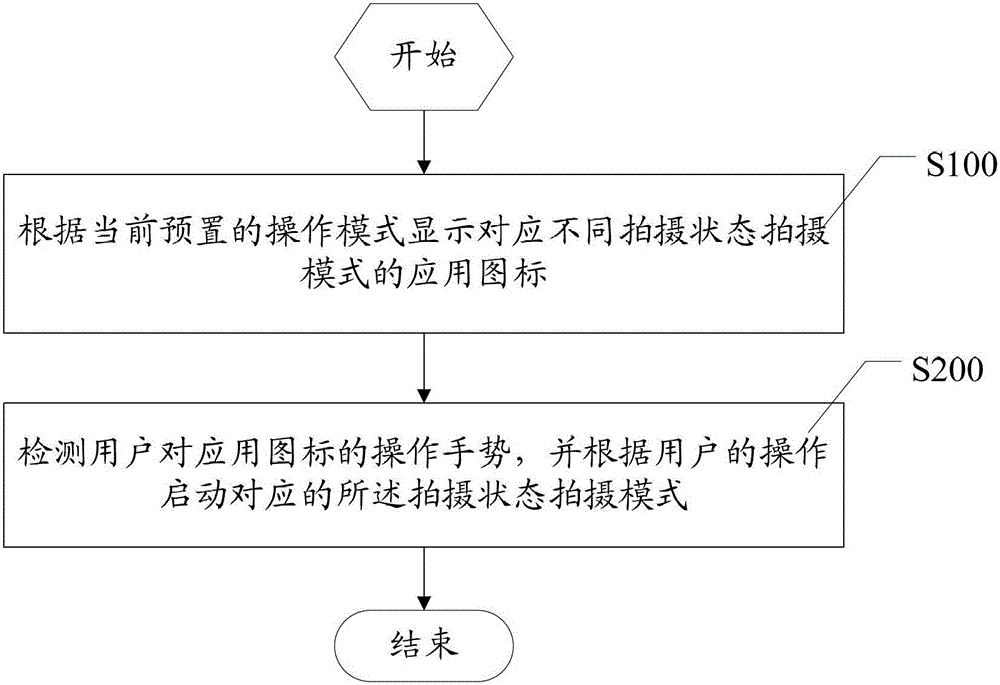
图1为本发明提供的双摄像头切换的方法一实施例中的流程示意图;FIG. 1 is a schematic flow diagram of an embodiment of a method for switching between dual cameras provided by the present invention;
图2为本发明提供的双摄像头切换的方法另一实施例中的流程示意图;FIG. 2 is a schematic flowchart of another embodiment of the method for switching between dual cameras provided by the present invention;
图3为本发明提供的双摄像头切换的方法又一实施例中的流程示意图;FIG. 3 is a schematic flowchart of another embodiment of the method for switching between dual cameras provided by the present invention;
图4为本发明提供的实施例中应用图标对应前置摄像头模式的菜单界面示意图;Fig. 4 is a schematic diagram of the menu interface corresponding to the front camera mode of the application icon in the embodiment provided by the present invention;
图5为本发明提供的实施例中应用图标对应拍照模式的菜单界面示意图;FIG. 5 is a schematic diagram of a menu interface corresponding to a camera mode of an application icon in an embodiment provided by the present invention;
图6为本发明提供的用于双摄像头切换的装置一实施例中的结构示意图;FIG. 6 is a schematic structural diagram of an embodiment of a device for switching between dual cameras provided by the present invention;
图7为本发明提供的用于双摄像头切换的装置另一实施例中的结构示意图;FIG. 7 is a schematic structural diagram of another embodiment of the device for switching between dual cameras provided by the present invention;
图8为本发明提供的用于双摄像头切换的装置又一实施例中的结构示意图。FIG. 8 is a schematic structural diagram of another embodiment of the device for switching between dual cameras provided by the present invention.
本发明目的的实现、功能特点及优点将结合实施例,参照附图做进一步说明。The realization of the purpose of the present invention, functional characteristics and advantages will be further described in conjunction with the embodiments and with reference to the accompanying drawings.
具体实施方式 Detailed ways
为了使本发明的目的、技术方案及优点更加清楚明白,以下结合附图及实施例,对本发明进行进一步详细说明。应当理解,此处所描述的具体实施例仅仅用以解释本发明,并不用于限定本发明。In order to make the object, technical solution and advantages of the present invention clearer, the present invention will be further described in detail below in conjunction with the accompanying drawings and embodiments. It should be understood that the specific embodiments described here are only used to explain the present invention, not to limit the present invention.
本发明实施例涉及带有双摄像头硬件,操作系统以及摄像头驱动都能正常工作的终端,具体可以为智能手机、平板电脑,还可以为其他符合条件的影音设备等。The embodiment of the present invention relates to a terminal with dual camera hardware, an operating system and a camera driver that can work normally, specifically, it can be a smart phone, a tablet computer, or other qualified audio-visual equipment.
请参照图1,为本发明一实施例中双摄像头切换的方法的流程示意图,如图1所示,该方法具体包括步骤:Please refer to FIG. 1, which is a schematic flow diagram of a method for switching between dual cameras in an embodiment of the present invention. As shown in FIG. 1, the method specifically includes steps:
S100:根据预置的操作模式显示对应不同拍摄模式的应用图标;S100: displaying application icons corresponding to different shooting modes according to a preset operation mode;
其中,操作模式下包含若干供切换的拍摄模式,对应不同操作模式的拍摄模式显示不同的应用图标。当用户进入终端菜单界面或者通过第三方软件调用相机功能后,根据预置的操作模式下不同的拍摄模式,终端向用户显示不同的应用图标。操作模式下可以包含若干可供切换的拍摄模式,针对不同的拍摄模式,终端显示有样式不同的应用图标,以便于用户通过显示的应用图标获取到对应的拍摄模式,并根据自身需求进行进一步的操作。其中,拍摄模式具体指终端摄像头的工作状态,例如在本实施例中的操作模式下,可以包括前置摄像头模式和后置摄像头模式,以实现前/后摄像头的切换;在其他实施例中的另一操作模式下,还可以包括拍照模式和摄像模式,以实现拍照/摄像功能的切换。Wherein, the operation mode includes several shooting modes for switching, and different application icons are displayed corresponding to the shooting modes of different operation modes. When the user enters the terminal menu interface or invokes the camera function through third-party software, the terminal displays different application icons to the user according to different shooting modes in the preset operation mode. The operation mode can include several shooting modes that can be switched. For different shooting modes, the terminal displays application icons with different styles, so that users can obtain the corresponding shooting modes through the displayed application icons, and perform further operations according to their own needs. operate. Wherein, the shooting mode specifically refers to the working state of the terminal camera. For example, in the operation mode in this embodiment, it may include the front camera mode and the rear camera mode to realize the switching of the front/rear camera; in other embodiments, In another operation mode, it may also include a camera mode and a camera mode, so as to realize the switching of the camera/video function.
S200:检测用户对应用图标的操作手势,并根据用户的操作启动对应的所述拍摄模式;S200: Detect the user's operation gesture on the application icon, and start the corresponding shooting mode according to the user's operation;
当用户获取到应用图标对应的拍摄模式后,根据需要对应用图标执行相应的操作手势。由于操作模式下包含若干供切换的拍摄模式,终端检测到用户的操作手势后,根据用户的不同操作手势启动应用图标对应的拍摄模式或者操作模式下其他的拍摄模式,使得用户能够对同一应用图标执行的不同操作可以切换不同的拍摄模式。用户可以采用单击应用图标进入应用图标对应的拍摄模式,采用双击应用图标进入操作模式下另一拍摄模式,或者还可以采用不同的组合,例如短击/长按应用图标等操作手势。After the user obtains the shooting mode corresponding to the application icon, the user performs a corresponding operation gesture on the application icon as required. Since the operation mode contains several shooting modes for switching, after the terminal detects the user's operation gesture, it starts the shooting mode corresponding to the application icon or other shooting modes in the operation mode according to the user's different operation gestures, so that the user can use the same application icon Different operations can be performed to switch between different shooting modes. The user can click the application icon to enter the shooting mode corresponding to the application icon, double-click the application icon to enter another shooting mode under the operation mode, or use different combinations, such as short-click/long-press the application icon and other operation gestures.
请参照图2,为本发明另一实施例中双摄像头切换的方法的流程示意图,如图2所示,在步骤S100之前,还包括:Please refer to FIG. 2, which is a schematic flowchart of a method for switching between dual cameras in another embodiment of the present invention. As shown in FIG. 2, before step S100, it also includes:
S300:预置对应不同拍摄模式的应用图标;S300: preset application icons corresponding to different shooting modes;
对应不同拍摄模式,将应用图标预置于终端内存中。该应用图标,可以出现在包含相机应用的任何用户界面,包括待机相机图标、锁频界面相机图标、主程序菜单相机图标、其他调用相机应用接口应用的界面图标。例如,根据不同的拍摄模式,终端可以将包括但不限于下表内不同类型的应用图标,预置于终端内存中:Corresponding to different shooting modes, the application icon is preset in the terminal memory. The application icon can appear on any user interface that contains the camera application, including the standby camera icon, the camera icon on the frequency lock interface, the main program menu camera icon, and other interface icons that call the camera application interface application. For example, according to different shooting modes, the terminal can preset, including but not limited to, different types of application icons in the following table in the terminal memory:

进一步参照图3,为本发明又一实施例中双摄像头切换方法的流程示意图,如图3所示,在步骤S200之后,还包括:Further referring to FIG. 3 , it is a schematic flowchart of a dual camera switching method in another embodiment of the present invention. As shown in FIG. 3 , after step S200, it also includes:
S400:记录应用退出时的拍摄模式并更新对应的应用图标,用于下次启动时向用户显示;S400: Record the shooting mode when the application exits and update the corresponding application icon, which is used for displaying to the user when the application is started next time;
终端可以在退出应用时,记录退出时的拍摄模式,将退出时的拍摄模式保存为相机应用的实际图标,以替换原有的相机应用图标,更新相机的应用包中。在下次启动时,可以显示更新后的应用图标,例如,用户启动的拍摄模式为前置摄像头状态后,记录该状态并将相机应用图标更新为前置摄像头状态对应的应用图标,以记录用户的使用习惯。当下一次用户进入菜单应用界面或者通过第三方软件调用相机应用时,向用户显示对应前置摄像头状态的图标,并根据用户的操作进入对应的拍摄模式。When exiting the application, the terminal can record the shooting mode at the time of exiting, and save the shooting mode at the time of exiting as the actual icon of the camera application, so as to replace the original camera application icon and update the application package of the camera. At the next startup, the updated application icon can be displayed. For example, after the shooting mode started by the user is the front camera state, record this state and update the camera application icon to the application icon corresponding to the front camera state to record the user's usage habit. When the user enters the menu application interface or invokes the camera application through the third-party software next time, the icon corresponding to the state of the front camera is displayed to the user, and the corresponding shooting mode is entered according to the user's operation.
更为具体的,操作模式可以包括两种拍摄模式,设置用户采用一种手势操作操作应用图标时进入对应应用图标的拍摄模式,采用另一种手势操作应用图表中进入操作模式中的另一拍摄模式,其中操作手势包括但不限于单击、双击、短按、长按、滑动应用图标等,步骤S200具体包括:More specifically, the operation mode may include two shooting modes. It is set that the user enters the shooting mode corresponding to the application icon when using one gesture to operate the application icon, and enters another shooting mode in the operation mode when using another gesture to operate the application icon. mode, wherein the operation gestures include but are not limited to single click, double click, short press, long press, sliding application icon, etc. Step S200 specifically includes:
检测到用户单击/短按所述应用图标时启动对应的所述拍摄模式,检测到用户双击/长按所述应用图标时启动所述操作模式中另一拍摄模式。The corresponding shooting mode is started when it is detected that the user clicks/short presses the application icon, and another shooting mode in the operation modes is started when it is detected that the user double clicks/long presses the application icon.
更为具体的,在本实施例中,操作模式可以包括前置摄像头模式和后置摄像头模式,当应用图标对应的拍摄模式是前置摄像头模式时,如图4所示,为本实施例中应用图标对应前置摄像头模式的菜单界面示意图,检测到用户单击应用图标时启动前置摄像头拍照(或者摄像)模式,检测到用户双击应用图标时启动后置摄像头拍照(或者摄像)模式。其中,上述拍照或者摄像模式,可以根据相机应用上次退出时保存的拍摄模式更新相机应用包中的应用图标信息,例如,当上次启动时保存的是前置摄像头拍照模式,则单击应用图标时启动前置摄像头拍照模式,双击应用图标时启动后置摄像头拍照模式,还可以在终端中预置或者接收用户的设置设定默认为拍照或者摄像模式,当设置拍照模式为默认模式时,则不管终端内保存的拍摄模式,在单击应用图标时默认启动拍照模式。More specifically, in this embodiment, the operation mode may include a front camera mode and a rear camera mode. When the shooting mode corresponding to the application icon is the front camera mode, as shown in FIG. The application icon corresponds to the menu interface diagram of the front camera mode. It detects that the user clicks the application icon to start the front camera photo (or video) mode, and detects that the user double-clicks the application icon to start the rear camera photo (or video) mode. Among them, the above-mentioned camera or camera mode can update the application icon information in the camera application package according to the shooting mode saved when the camera application exited last time. icon to start the front camera photo mode, and double-click the application icon to start the rear camera photo mode. It can also be preset in the terminal or receive user settings to set the default photo or video mode. When the photo mode is set as the default mode, Regardless of the shooting mode saved in the terminal, the shooting mode is activated by default when the application icon is clicked.
在其他实施例中,操作模式还可以包括拍照模式和摄像模式,当应用图标对应的拍摄模式是拍照模式时,如图5所示,为本实施例中应用图标对应拍照模式的菜单界面示意图,检测到用户单击应用图标时启动前置摄像头(或者后置摄像头)拍照模式,检测到用户双击应用图标时启动前置摄像头(或者后置摄像头)摄像模式。其中,上述前置摄像头或者后置摄像头模式,可以根据相机应用上次退出时保存的拍摄模式更新相机应用包中的应用图标信息,好可以在终端中预置或者接收用户的设置设定默认为前置摄像头或者后置摄像头模式。In other embodiments, the operation mode may also include a photographing mode and a video recording mode. When the photographing mode corresponding to the application icon is the photographing mode, as shown in FIG. 5 , it is a schematic diagram of the menu interface of the photographing mode corresponding to the application icon in this embodiment. The camera mode of the front camera (or rear camera) is activated when the user clicks the application icon is detected, and the camera mode of the front camera (or rear camera) is activated when the user double-clicks the application icon. Among them, the above-mentioned front camera or rear camera mode can update the application icon information in the camera application package according to the shooting mode saved when the camera application exited last time. It is best to preset in the terminal or receive the user's settings. The default setting is Front camera or rear camera mode.
可以理解,通过不同操作手势和不同拍摄模式的组合,还可以实现其他的切换启动拍摄模式方式,在此不再赘述。It can be understood that, through the combination of different operation gestures and different shooting modes, other ways of switching and starting the shooting mode can also be realized, which will not be repeated here.
本发明提供的双摄像头切换的方法,提供不同的操作模式,以向用户提示区分不同拍摄模式的应用图标,根据应用图标即可直接快速地启动相应的拍摄模式,解决了在设置有双摄像头的终端上摄像头之间的快速切换问题,提高了效率。The method for switching between dual cameras provided by the present invention provides different operation modes to prompt the user with application icons for distinguishing different shooting modes, and the corresponding shooting mode can be directly and quickly started according to the application icons, which solves the problem in the case where dual cameras are set. The problem of fast switching between cameras on the terminal improves efficiency.
请参照图6,为本发明又一实施例提出的用于双摄像头切换的装置的结构示意图,如图6所示,该装置包括:Please refer to FIG. 6, which is a schematic structural diagram of a device for switching between dual cameras proposed in another embodiment of the present invention. As shown in FIG. 6, the device includes:
显示模块10,用于根据预置的操作模式显示对应不同拍摄模式的应用图标;A
模式启动模块20,用于检测用户对应用图标的操作手势,并根据用户的操作启动对应的拍摄模式。The
操作模式下包括若干供切换的拍摄模式,对应不同的拍摄模式显示不同的应用图标。当用户进入终端菜单界面或者通过第三方软件调用相机功能后,根据预置的操作模式下不同的拍摄模式,显示模块10向用户显示不同的应用图标。操作模式下可以包含若干可供切换的拍摄模式,针对不同的拍摄模式,显示模块10显示有样式不同的应用图标,以便于用户通过显示的应用图标获取到对应的拍摄模式,并根据自身需求进行进一步的操作。其中,拍摄模式具体指终端摄像头的工作状态,例如在本实施例中的操作模式下,可以包括前置摄像头模式和后置摄像头模式,以实现前/后摄像头的切换;在其他实施例中的另一操作模式下,还可以包括拍照模式和摄像模式,以实现拍照/摄像功能的切换。The operation mode includes several shooting modes for switching, and different application icons are displayed corresponding to different shooting modes. When the user enters the terminal menu interface or invokes the camera function through third-party software, the
当用户获取到应用图标对应的拍摄模式后,根据需要对应用图标执行相应的操作手势。由于操作模式下包含若干供切换的拍摄模式,模式启动模块20检测到用户的操作手势后,根据用户的不同操作手势启动应用图标对应的拍摄模式或者操作模式下其他的拍摄模式,使得用户能够对同一应用图标执行的不同操作可以切换不同的拍摄模式。用户可以采用单击应用图标进入应用图标对应的拍摄模式,采用双击应用图标进入操作模式下另一拍摄模式,或者还可以采用不同的组合,例如短击/长按应用图标等操作手势。After the user obtains the shooting mode corresponding to the application icon, the user performs a corresponding operation gesture on the application icon as required. Since the operation mode includes several shooting modes for switching, after the
在前述实施例基础上,请参照图7,为本发明另一实施例中用于双摄像头切换的装置的结构示意图,如图7所示,该装置还包括:On the basis of the foregoing embodiments, please refer to FIG. 7, which is a schematic structural diagram of a device for switching between dual cameras in another embodiment of the present invention. As shown in FIG. 7, the device also includes:
预置模块30,用于预置对应不同拍摄模式的应用图标。The preset module 30 is configured to preset application icons corresponding to different shooting modes.
对应不同拍摄模式,预置模块30将应用图标预置于终端内存中。该应用图标,可以出现在包含相机应用的任何用户界面,包括待机相机图标、锁频界面相机图标、主程序菜单相机图标、其他调用相机应用接口应用的界面图标。例如,根据不同的拍摄模式,预置模块30可以将包括但不限于下表内不同类型的应用图标,预置于终端内存中:Corresponding to different shooting modes, the preset module 30 presets the application icons in the terminal memory. The application icon can appear on any user interface that contains the camera application, including the standby camera icon, the camera icon on the frequency lock interface, the main program menu camera icon, and other interface icons that call the camera application interface application. For example, according to different shooting modes, the presetting module 30 can preset, including but not limited to, different types of application icons in the following table into the terminal memory:

进一步参照图8,图8为本发明又一实施例中用于双摄像头切换的装置,如图3所述,该装置还包括:Further referring to FIG. 8, FIG. 8 is a device for switching between dual cameras in another embodiment of the present invention. As shown in FIG. 3, the device also includes:
更新模块40,用于记录应用退出时的拍摄模式并更新对应的应用图标,用于下次启动时向用户显示;An
更新模块40可以在退出应用时,记录退出时的拍摄模式,并可以将退出时的拍摄模式保存为相机应用的实际图标,以替换原有的相机应用图标,更新相机的应用包中。在下次启动时,显示模块10可以显示更新后的应用图标,例如,用户启动的拍摄模式为前置摄像头状态后,更新模块40记录该状态并将相机应用图标更新为前置摄像头状态对应的应用图标,以记录用户的使用习惯。当下一次用户进入菜单应用界面或者通过第三方软件调用相机应用时,显示模块10向用户显示对应前置摄像头状态的图标,模式启动模块20根据用户的操作进入对应的拍摄模式。The
更为具体的,操作模式可以包括两种拍摄模式,设置用户采用一种手势操作操作应用图标时进入对应应用图标的拍摄模式,采用另一种手势操作应用图表中进入操作模式中的另一拍摄模式,其中操作手势包括但不限于单击、双击、短按、长按、滑动应用图标等,模式启动模块20具体用于:More specifically, the operation mode may include two shooting modes. It is set that the user enters the shooting mode corresponding to the application icon when using one gesture to operate the application icon, and enters another shooting mode in the operation mode when using another gesture to operate the application icon. Mode, wherein the operation gestures include but not limited to single click, double click, short press, long press, sliding application icon, etc., the
检测到用户单击/短按所述应用图标时启动对应的所述拍摄模式,检测到用户双击/长按所述应用图标时启动所述操作模式中另一拍摄模式。The corresponding shooting mode is started when it is detected that the user clicks/short presses the application icon, and another shooting mode in the operation modes is started when it is detected that the user double clicks/long presses the application icon.
更为具体的,在本实施例中,操作模式可以包括前置摄像头模式和后置摄像头模式,当应用图标对应的拍摄模式是前置摄像头模式时,如图5所示,为本实施例中应用图标对应前置摄像头模式时的菜单界面示意图,模式启动模块20检测到用户单击应用图标时启动前置摄像头拍照(或者摄像)模式,检测到用户双击应用图标时启动后置摄像头拍照(或者摄像)模式。其中,上述拍照或者摄像模式,可以根据相机应用上次退出时保存的拍摄模式更新相机应用包中的应用图标信息,例如,当上次启动时保存的是前置摄像头拍照模式,则单击应用图标时启动前置摄像头拍照模式,双击应用图标时启动后置摄像头拍照模式,还可以在终端中预置或者接收用户的设置设定默认为拍照或者摄像模式,当设置拍照模式为默认模式时,则不管终端内保存的拍摄模式,在单击应用图标时默认启动拍照模式。More specifically, in this embodiment, the operation mode may include a front camera mode and a rear camera mode. When the shooting mode corresponding to the application icon is the front camera mode, as shown in FIG. The schematic diagram of the menu interface when the application icon corresponds to the front camera mode. The
在其他实施例中,操作模式还可以包括拍照模式和摄像模式,当应用图标对应的拍摄模式是拍照模式时,如图6所示,为本实施例中应用图标对应拍照模式时的菜单界面示意图,检测到用户单击应用图标时启动前置摄像头(或者后置摄像头)拍照模式,检测到用户双击应用图标时启动前置摄像头(或者后置摄像头)摄像模式。其中,上述前置摄像头或者后置摄像头模式,可以根据相机应用上次退出时保存的拍摄模式更新相机应用包中的应用图标信息,好可以在终端中预置或者接收用户的设置设定默认为前置摄像头或者后置摄像头模式。In other embodiments, the operation mode may also include a photographing mode and a camera mode. When the photographing mode corresponding to the application icon is the photographing mode, as shown in FIG. 6 , it is a schematic diagram of the menu interface when the application icon corresponds to the photographing mode in this embodiment. , to start the camera mode of the front camera (or rear camera) when the user clicks the application icon, and start the camera mode of the front camera (or rear camera) when the user double-clicks the application icon. Among them, the above-mentioned front camera or rear camera mode can update the application icon information in the camera application package according to the shooting mode saved when the camera application exited last time. It is best to preset in the terminal or receive the user's settings. The default setting is Front camera or rear camera mode.
可以理解,通过不同操作手势和不同拍摄模式的组合,还可以实现其他的切换启动拍摄模式方式,在此不再赘述。It can be understood that, through the combination of different operation gestures and different shooting modes, other ways of switching and starting the shooting mode can also be realized, which will not be repeated here.
本发明提供的用于双摄像头切换的装置,提供不同的操作模式,以向用户提示区分不同拍摄模式的应用图标,根据应用图标即可直接快速地启动相应的拍摄模式,解决了在设置有双摄像头的终端上摄像头之间的快速切换问题,提高了效率。The device for switching between dual cameras provided by the present invention provides different operation modes to prompt the user with application icons for distinguishing different shooting modes, and the corresponding shooting mode can be directly and quickly started according to the application icon, which solves the problem of dual-camera switching. The problem of fast switching between cameras on the camera terminal improves efficiency.
以上仅为本发明的较佳实施例而已,并不用以限制本发明,凡在本发明的精神和原则之内所作的任何修改、等同替换和改进等,均应包含在本发明的保护范围之内。The above are only preferred embodiments of the present invention, and are not intended to limit the present invention. Any modifications, equivalent replacements and improvements made within the spirit and principles of the present invention should be included in the protection scope of the present invention. Inside.
Claims (10)
Priority Applications (4)
| Application Number | Priority Date | Filing Date | Title |
|---|---|---|---|
| CN2012101592638A CN102722321A (en) | 2012-05-22 | 2012-05-22 | Method and device for switching between double cameras |
| US14/402,148 US9420180B2 (en) | 2012-05-22 | 2012-07-26 | Method and device for switching between double cameras |
| EP12877583.0A EP2854002A4 (en) | 2012-05-22 | 2012-07-26 | Method and device for switching between double cameras |
| PCT/CN2012/079211 WO2013174076A1 (en) | 2012-05-22 | 2012-07-26 | Method and device for switching between double cameras |
Applications Claiming Priority (1)
| Application Number | Priority Date | Filing Date | Title |
|---|---|---|---|
| CN2012101592638A CN102722321A (en) | 2012-05-22 | 2012-05-22 | Method and device for switching between double cameras |
Publications (1)
| Publication Number | Publication Date |
|---|---|
| CN102722321A true CN102722321A (en) | 2012-10-10 |
Family
ID=46948108
Family Applications (1)
| Application Number | Title | Priority Date | Filing Date |
|---|---|---|---|
| CN2012101592638A Pending CN102722321A (en) | 2012-05-22 | 2012-05-22 | Method and device for switching between double cameras |
Country Status (4)
| Country | Link |
|---|---|
| US (1) | US9420180B2 (en) |
| EP (1) | EP2854002A4 (en) |
| CN (1) | CN102722321A (en) |
| WO (1) | WO2013174076A1 (en) |
Cited By (29)
| Publication number | Priority date | Publication date | Assignee | Title |
|---|---|---|---|---|
| CN102929549A (en) * | 2012-10-24 | 2013-02-13 | 广东欧珀移动通信有限公司 | A camera Selfie method and its mobile terminal |
| CN103037083A (en) * | 2012-12-10 | 2013-04-10 | 广东欧珀移动通信有限公司 | Method and device for switching front and rear cameras |
| CN103067574A (en) * | 2012-12-18 | 2013-04-24 | 广东欧珀移动通信有限公司 | A method for starting a mobile terminal camera |
| CN103079035A (en) * | 2013-01-09 | 2013-05-01 | 苏州佳世达电通有限公司 | Digital camera operating method and digital camera operated by using same |
| CN103402004A (en) * | 2013-07-23 | 2013-11-20 | 广东欧珀移动通信有限公司 | Method for pre-starting multiple cameras of mobile terminal |
| CN103744648A (en) * | 2013-11-29 | 2014-04-23 | 乐视致新电子科技(天津)有限公司 | Method and device for starting input devices |
| CN103927079A (en) * | 2014-03-25 | 2014-07-16 | 联想(北京)有限公司 | Information processing method and electronic equipment |
| CN104182173A (en) * | 2014-08-15 | 2014-12-03 | 小米科技有限责任公司 | Camera switching method and device |
| CN104267875A (en) * | 2014-09-29 | 2015-01-07 | 广东欧珀移动通信有限公司 | Photo mode display method and device |
| CN104375755A (en) * | 2013-08-14 | 2015-02-25 | 联想(北京)有限公司 | Information processing method and information processing equipment |
| CN105306802A (en) * | 2014-07-08 | 2016-02-03 | 腾讯科技(深圳)有限公司 | Photographing mode switching method and device |
| CN105516587A (en) * | 2015-12-03 | 2016-04-20 | 小米科技有限责任公司 | Method for switching cameras and mobile terminal |
| CN105635591A (en) * | 2016-03-11 | 2016-06-01 | 深圳还是威健康科技有限公司 | Photographing control method based on wearable equipment and terminal |
| CN105744161A (en) * | 2016-02-18 | 2016-07-06 | 宇龙计算机通信科技(深圳)有限公司 | Camera switching method, camera switching device and terminal |
| CN105824534A (en) * | 2016-03-21 | 2016-08-03 | 联想(北京)有限公司 | Information processing method and electronic equipment |
| CN105847672A (en) * | 2016-03-07 | 2016-08-10 | 乐视致新电子科技(天津)有限公司 | Virtual reality helmet snapshotting method and system |
| CN105979157A (en) * | 2016-06-30 | 2016-09-28 | 维沃移动通信有限公司 | Photographing mode switching method and mobile terminal |
| CN106155286A (en) * | 2014-10-30 | 2016-11-23 | Lg电子株式会社 | Mobile terminal and control method thereof |
| CN106303227A (en) * | 2016-08-01 | 2017-01-04 | 乐视控股(北京)有限公司 | The photographic method of a kind of intelligent terminal and device |
| CN103841326B (en) * | 2014-02-26 | 2017-05-17 | 宇龙计算机通信科技(深圳)有限公司 | Video recording method and device |
| CN107885446A (en) * | 2016-09-29 | 2018-04-06 | 法乐第(北京)网络科技有限公司 | A kind of method and device for switching display image |
| CN107948496A (en) * | 2017-10-09 | 2018-04-20 | 广东小天才科技有限公司 | Photographing method and device of mobile terminal, mobile terminal and storage medium |
| CN108401496A (en) * | 2018-02-26 | 2018-08-14 | 深圳前海达闼云端智能科技有限公司 | An image acquisition method, system, electronic device and computer program product |
| US10198083B2 (en) | 2014-02-25 | 2019-02-05 | Xi'an Zhongxing New Software Co. Ltd. | Hand gesture recognition method, device, system, and computer storage medium |
| US10257473B2 (en) | 2015-01-27 | 2019-04-09 | Sercomm Corporation | Doorbell device and method thereof |
| CN110710191A (en) * | 2017-11-23 | 2020-01-17 | 华为技术有限公司 | A photographing method and terminal |
| US10591999B2 (en) | 2014-02-25 | 2020-03-17 | Zte Corporation | Hand gesture recognition method, device, system, and computer storage medium |
| CN110989913A (en) * | 2019-11-22 | 2020-04-10 | 维沃移动通信有限公司 | A control method and electronic device |
| WO2020259009A1 (en) * | 2019-06-25 | 2020-12-30 | 维沃移动通信有限公司 | Camera control method and terminal device |
Families Citing this family (55)
| Publication number | Priority date | Publication date | Assignee | Title |
|---|---|---|---|---|
| CN112911252B (en) | 2012-11-28 | 2023-07-04 | 核心光电有限公司 | Multi-aperture imaging system |
| CN109040552B (en) | 2013-06-13 | 2021-06-22 | 核心光电有限公司 | Dual Aperture Zoom Digital Camera |
| WO2015001440A1 (en) | 2013-07-04 | 2015-01-08 | Corephotonics Ltd. | Miniature telephoto lens assembly |
| CN108718376B (en) | 2013-08-01 | 2020-08-14 | 核心光电有限公司 | Thin multi-aperture imaging system with auto-focus and method of use thereof |
| US9392188B2 (en) | 2014-08-10 | 2016-07-12 | Corephotonics Ltd. | Zoom dual-aperture camera with folded lens |
| USD786300S1 (en) * | 2014-12-16 | 2017-05-09 | Bioinventors & Entrepeneurs Network Llc | Display screen or portion thereof with a graphical user interface |
| WO2016108093A1 (en) | 2015-01-03 | 2016-07-07 | Corephotonics Ltd. | Miniature telephoto lens module and a camera utilizing such a lens module |
| US10015384B2 (en) | 2015-04-02 | 2018-07-03 | Corephotonics Ltd. | Dual voice coil motor structure in a dual-optical module camera |
| CN112394467B (en) | 2015-04-16 | 2023-06-09 | 核心光电有限公司 | Autofocus and Optical Image Stabilization in a Compact Folding Camera |
| CN110687655B (en) | 2015-05-28 | 2022-10-21 | 核心光电有限公司 | Bi-directional stiffness for optical image stabilization and auto-focus in dual aperture digital cameras |
| CN112672022B (en) | 2015-08-13 | 2022-08-02 | 核心光电有限公司 | Dual aperture zoom camera with video support and switching/non-switching dynamic control |
| KR102143730B1 (en) | 2015-09-06 | 2020-08-12 | 코어포토닉스 리미티드 | Auto focus and optical image stabilization with roll compensation in a compact folded camera |
| WO2017115179A1 (en) | 2015-12-29 | 2017-07-06 | Corephotonics Ltd. | Dual-aperture zoom digital camera with automatic adjustable tele field of view |
| EP3758356B1 (en) | 2016-05-30 | 2021-10-20 | Corephotonics Ltd. | Actuator |
| KR101939958B1 (en) | 2016-06-19 | 2019-01-17 | 코어포토닉스 리미티드 | Frame synchronization in a dual-aperture camera system |
| WO2018007951A1 (en) | 2016-07-07 | 2018-01-11 | Corephotonics Ltd. | Dual-camera system with improved video smooth transition by image blending |
| US10845565B2 (en) | 2016-07-07 | 2020-11-24 | Corephotonics Ltd. | Linear ball guided voice coil motor for folded optic |
| KR102627191B1 (en) | 2016-10-25 | 2024-01-22 | 삼성전자주식회사 | Portable apparatus and method for controlling a screen |
| KR102269547B1 (en) | 2016-12-28 | 2021-06-25 | 코어포토닉스 리미티드 | Folded camera structure with extended light-folding-element scanning range |
| EP4145206A1 (en) | 2017-01-12 | 2023-03-08 | Corephotonics Ltd. | Compact folded camera |
| KR102211704B1 (en) | 2017-02-23 | 2021-02-03 | 코어포토닉스 리미티드 | Folded camera lens designs |
| EP4357832B1 (en) | 2017-03-15 | 2025-12-24 | Corephotonics Ltd. | Camera with panoramic scanning range |
| US10904512B2 (en) | 2017-09-06 | 2021-01-26 | Corephotonics Ltd. | Combined stereoscopic and phase detection depth mapping in a dual aperture camera |
| US10951834B2 (en) | 2017-10-03 | 2021-03-16 | Corephotonics Ltd. | Synthetically enlarged camera aperture |
| KR102104761B1 (en) | 2017-11-23 | 2020-04-27 | 코어포토닉스 리미티드 | Compact folded camera structure |
| CN114609746A (en) | 2018-02-05 | 2022-06-10 | 核心光电有限公司 | Folding camera device |
| CN113467031B (en) | 2018-02-12 | 2023-07-14 | 核心光电有限公司 | Folded camera with optical image stabilization, digital camera and method |
| US10694168B2 (en) | 2018-04-22 | 2020-06-23 | Corephotonics Ltd. | System and method for mitigating or preventing eye damage from structured light IR/NIR projector systems |
| US11268829B2 (en) | 2018-04-23 | 2022-03-08 | Corephotonics Ltd | Optical-path folding-element with an extended two degree of freedom rotation range |
| KR20210003856A (en) | 2018-07-04 | 2021-01-12 | 코어포토닉스 리미티드 | Camera with scanning optical path folding elements for automotive or surveillance applications |
| WO2020031005A1 (en) | 2018-08-04 | 2020-02-13 | Corephotonics Ltd. | Switchable continuous display information system above camera |
| WO2020039302A1 (en) | 2018-08-22 | 2020-02-27 | Corephotonics Ltd. | Two-state zoom folded camera |
| US11287081B2 (en) | 2019-01-07 | 2022-03-29 | Corephotonics Ltd. | Rotation mechanism with sliding joint |
| CN111971956B (en) | 2019-03-09 | 2021-12-03 | 核心光电有限公司 | Method and system for dynamic stereo calibration |
| CN121309748A (en) | 2019-07-31 | 2026-01-09 | 核心光电有限公司 | Method for creating background blur in camera panning or motion |
| US11659135B2 (en) | 2019-10-30 | 2023-05-23 | Corephotonics Ltd. | Slow or fast motion video using depth information |
| CN112752012A (en) * | 2019-10-30 | 2021-05-04 | 珠海市魅族科技有限公司 | Camera starting method and device, electronic equipment and storage medium |
| US11949976B2 (en) | 2019-12-09 | 2024-04-02 | Corephotonics Ltd. | Systems and methods for obtaining a smart panoramic image |
| US11770618B2 (en) | 2019-12-09 | 2023-09-26 | Corephotonics Ltd. | Systems and methods for obtaining a smart panoramic image |
| WO2021165764A1 (en) | 2020-02-22 | 2021-08-26 | Corephotonics Ltd. | Split screen feature for macro photography |
| CN115280282A (en) * | 2020-03-12 | 2022-11-01 | 麦克赛尔株式会社 | Information terminal device and application operation mode control method thereof |
| WO2021220080A1 (en) | 2020-04-26 | 2021-11-04 | Corephotonics Ltd. | Temperature control for hall bar sensor correction |
| KR20240096759A (en) | 2020-05-17 | 2024-06-26 | 코어포토닉스 리미티드 | Image stitching in the presence of a full field of view reference image |
| KR102617779B1 (en) | 2020-05-30 | 2023-12-22 | 코어포토닉스 리미티드 | System and method for obtaining super macro images |
| US11637977B2 (en) | 2020-07-15 | 2023-04-25 | Corephotonics Ltd. | Image sensors and sensing methods to obtain time-of-flight and phase detection information |
| CN119583939A (en) | 2020-07-15 | 2025-03-07 | 核心光电有限公司 | Mobile electronic devices |
| CN111787228A (en) * | 2020-07-23 | 2020-10-16 | 惠州Tcl移动通信有限公司 | Shooting method, shooting device, storage medium and mobile terminal |
| KR102778426B1 (en) | 2020-07-31 | 2025-03-06 | 코어포토닉스 리미티드 | Hall sensor - magnet geometry for large stroke linear position sensing |
| WO2022034402A1 (en) | 2020-08-12 | 2022-02-17 | Corephotonics Ltd. | Optical image stabilization in a scanning folded camera |
| CN120166282A (en) | 2020-12-26 | 2025-06-17 | 核心光电有限公司 | Mobile devices |
| TWI888016B (en) | 2021-03-11 | 2025-06-21 | 以色列商核心光電有限公司 | Systems for pop-out camera |
| KR20240025049A (en) | 2021-06-08 | 2024-02-26 | 코어포토닉스 리미티드 | Systems and cameras for tilting a focal plane of a super-macro image |
| WO2023002371A1 (en) | 2021-07-21 | 2023-01-26 | Corephotonics Ltd. | Pop-out mobile cameras and actuators |
| CN113938587B (en) * | 2021-09-14 | 2024-03-15 | 青岛海信移动通信技术有限公司 | Double-camera-based shooting method and electronic equipment |
| CN121115373A (en) | 2022-03-24 | 2025-12-12 | 核心光电有限公司 | Thin compact lens optical image stabilization |
Citations (3)
| Publication number | Priority date | Publication date | Assignee | Title |
|---|---|---|---|---|
| CN101291379A (en) * | 2008-06-05 | 2008-10-22 | 中兴通讯股份有限公司 | Mobile terminal and method for realizing videophone thereof |
| CN101547333A (en) * | 2009-04-20 | 2009-09-30 | 中兴通讯股份有限公司 | Method and terminal for switching front and back scene during viewable call |
| CN102365613A (en) * | 2009-03-27 | 2012-02-29 | 索尼爱立信移动通讯有限公司 | System and method for changing touch screen functionality |
Family Cites Families (2)
| Publication number | Priority date | Publication date | Assignee | Title |
|---|---|---|---|---|
| JP2004040725A (en) * | 2002-07-08 | 2004-02-05 | Fuji Photo Film Co Ltd | Digital video camera |
| JP5058607B2 (en) * | 2006-02-08 | 2012-10-24 | キヤノン株式会社 | Imaging device, control method thereof, and program |
-
2012
- 2012-05-22 CN CN2012101592638A patent/CN102722321A/en active Pending
- 2012-07-26 WO PCT/CN2012/079211 patent/WO2013174076A1/en not_active Ceased
- 2012-07-26 US US14/402,148 patent/US9420180B2/en active Active
- 2012-07-26 EP EP12877583.0A patent/EP2854002A4/en not_active Ceased
Patent Citations (3)
| Publication number | Priority date | Publication date | Assignee | Title |
|---|---|---|---|---|
| CN101291379A (en) * | 2008-06-05 | 2008-10-22 | 中兴通讯股份有限公司 | Mobile terminal and method for realizing videophone thereof |
| CN102365613A (en) * | 2009-03-27 | 2012-02-29 | 索尼爱立信移动通讯有限公司 | System and method for changing touch screen functionality |
| CN101547333A (en) * | 2009-04-20 | 2009-09-30 | 中兴通讯股份有限公司 | Method and terminal for switching front and back scene during viewable call |
Cited By (37)
| Publication number | Priority date | Publication date | Assignee | Title |
|---|---|---|---|---|
| CN102929549A (en) * | 2012-10-24 | 2013-02-13 | 广东欧珀移动通信有限公司 | A camera Selfie method and its mobile terminal |
| CN103037083A (en) * | 2012-12-10 | 2013-04-10 | 广东欧珀移动通信有限公司 | Method and device for switching front and rear cameras |
| CN103067574A (en) * | 2012-12-18 | 2013-04-24 | 广东欧珀移动通信有限公司 | A method for starting a mobile terminal camera |
| CN103079035A (en) * | 2013-01-09 | 2013-05-01 | 苏州佳世达电通有限公司 | Digital camera operating method and digital camera operated by using same |
| CN103402004A (en) * | 2013-07-23 | 2013-11-20 | 广东欧珀移动通信有限公司 | Method for pre-starting multiple cameras of mobile terminal |
| CN104375755A (en) * | 2013-08-14 | 2015-02-25 | 联想(北京)有限公司 | Information processing method and information processing equipment |
| CN104375755B (en) * | 2013-08-14 | 2018-03-27 | 联想(北京)有限公司 | Information processing method and message processing device |
| CN103744648A (en) * | 2013-11-29 | 2014-04-23 | 乐视致新电子科技(天津)有限公司 | Method and device for starting input devices |
| US10591999B2 (en) | 2014-02-25 | 2020-03-17 | Zte Corporation | Hand gesture recognition method, device, system, and computer storage medium |
| US10198083B2 (en) | 2014-02-25 | 2019-02-05 | Xi'an Zhongxing New Software Co. Ltd. | Hand gesture recognition method, device, system, and computer storage medium |
| CN103841326B (en) * | 2014-02-26 | 2017-05-17 | 宇龙计算机通信科技(深圳)有限公司 | Video recording method and device |
| CN103927079A (en) * | 2014-03-25 | 2014-07-16 | 联想(北京)有限公司 | Information processing method and electronic equipment |
| CN103927079B (en) * | 2014-03-25 | 2017-08-29 | 联想(北京)有限公司 | A kind of information processing method and electronic equipment |
| CN105306802A (en) * | 2014-07-08 | 2016-02-03 | 腾讯科技(深圳)有限公司 | Photographing mode switching method and device |
| CN104182173A (en) * | 2014-08-15 | 2014-12-03 | 小米科技有限责任公司 | Camera switching method and device |
| CN104267875A (en) * | 2014-09-29 | 2015-01-07 | 广东欧珀移动通信有限公司 | Photo mode display method and device |
| CN104267875B (en) * | 2014-09-29 | 2018-01-16 | 广东欧珀移动通信有限公司 | A kind of exposal model display methods and device |
| CN106155286A (en) * | 2014-10-30 | 2016-11-23 | Lg电子株式会社 | Mobile terminal and control method thereof |
| US10257473B2 (en) | 2015-01-27 | 2019-04-09 | Sercomm Corporation | Doorbell device and method thereof |
| CN105516587A (en) * | 2015-12-03 | 2016-04-20 | 小米科技有限责任公司 | Method for switching cameras and mobile terminal |
| CN105744161A (en) * | 2016-02-18 | 2016-07-06 | 宇龙计算机通信科技(深圳)有限公司 | Camera switching method, camera switching device and terminal |
| CN105847672A (en) * | 2016-03-07 | 2016-08-10 | 乐视致新电子科技(天津)有限公司 | Virtual reality helmet snapshotting method and system |
| CN105635591A (en) * | 2016-03-11 | 2016-06-01 | 深圳还是威健康科技有限公司 | Photographing control method based on wearable equipment and terminal |
| CN105824534A (en) * | 2016-03-21 | 2016-08-03 | 联想(北京)有限公司 | Information processing method and electronic equipment |
| US10698566B2 (en) | 2016-03-21 | 2020-06-30 | Lenovo (Beijing) Limited | Touch control based application launch |
| CN105824534B (en) * | 2016-03-21 | 2019-06-25 | 联想(北京)有限公司 | A kind of information processing method and electronic equipment |
| CN105979157B (en) * | 2016-06-30 | 2019-12-03 | 维沃移动通信有限公司 | A shooting mode switching method and mobile terminal |
| CN105979157A (en) * | 2016-06-30 | 2016-09-28 | 维沃移动通信有限公司 | Photographing mode switching method and mobile terminal |
| CN106303227A (en) * | 2016-08-01 | 2017-01-04 | 乐视控股(北京)有限公司 | The photographic method of a kind of intelligent terminal and device |
| CN107885446A (en) * | 2016-09-29 | 2018-04-06 | 法乐第(北京)网络科技有限公司 | A kind of method and device for switching display image |
| CN107948496A (en) * | 2017-10-09 | 2018-04-20 | 广东小天才科技有限公司 | Photographing method and device of mobile terminal, mobile terminal and storage medium |
| CN110710191A (en) * | 2017-11-23 | 2020-01-17 | 华为技术有限公司 | A photographing method and terminal |
| CN110710191B (en) * | 2017-11-23 | 2022-03-11 | 华为技术有限公司 | A kind of photographing method and terminal |
| US11843715B2 (en) | 2017-11-23 | 2023-12-12 | Huawei Technologies Co., Ltd. | Photographing method and terminal |
| CN108401496A (en) * | 2018-02-26 | 2018-08-14 | 深圳前海达闼云端智能科技有限公司 | An image acquisition method, system, electronic device and computer program product |
| WO2020259009A1 (en) * | 2019-06-25 | 2020-12-30 | 维沃移动通信有限公司 | Camera control method and terminal device |
| CN110989913A (en) * | 2019-11-22 | 2020-04-10 | 维沃移动通信有限公司 | A control method and electronic device |
Also Published As
| Publication number | Publication date |
|---|---|
| US9420180B2 (en) | 2016-08-16 |
| WO2013174076A1 (en) | 2013-11-28 |
| EP2854002A1 (en) | 2015-04-01 |
| EP2854002A4 (en) | 2015-04-08 |
| US20150319364A1 (en) | 2015-11-05 |
Similar Documents
| Publication | Publication Date | Title |
|---|---|---|
| CN102722321A (en) | Method and device for switching between double cameras | |
| CN107077239B (en) | Method for adjusting photographing focal length of mobile terminal through touch pad and mobile terminal | |
| US8934949B2 (en) | Mobile terminal | |
| CN103309756B (en) | A kind of prevent application program from surprisingly exiting or to interrupt method and mobile terminal | |
| JP2020514813A (en) | Shooting method and terminal | |
| CN108509232A (en) | Screen recording method, device and computer readable storage medium | |
| CN106970754A (en) | The method and device of screenshotss processing | |
| CN107273448B (en) | Information display method, device and computer readable storage medium | |
| WO2017113928A1 (en) | Touch control device and method for terminal screen, and computer storage medium | |
| CN107885418B (en) | Terminal, split screen display method and device | |
| CN103279277A (en) | Method and system for sending screenshots of mobile terminals | |
| JP6283749B2 (en) | Method and apparatus for prompting device connection | |
| CN111261081A (en) | Screen display method and device | |
| CN105739857A (en) | Mobile terminal control method and apparatus | |
| KR20150122574A (en) | Method and device for executing user instructions | |
| CN106547462B (en) | Photographing control method and device and mobile terminal | |
| CN111381738B (en) | Interface display method, device, electronic device and storage medium | |
| CN106547705A (en) | USB (universal serial bus) operating mode control method and device | |
| CN117331628A (en) | Page display method, device, electronic equipment and storage medium | |
| CN106610777A (en) | Application starting method and device and mobile terminal | |
| JP2017520877A (en) | SEARCH METHOD, SEARCH DEVICE, PROGRAM, AND RECORDING MEDIUM | |
| CN105933596B (en) | It takes pictures processing method, device and equipment | |
| JP6407293B2 (en) | Keyboard style switching method and apparatus | |
| CN107770449A (en) | continuous shooting method, electronic equipment and storage medium | |
| CN110825483A (en) | Method and device for realizing OSD (on Screen display) of screen menu type adjustment mode |
Legal Events
| Date | Code | Title | Description |
|---|---|---|---|
| C06 | Publication | ||
| PB01 | Publication | ||
| C10 | Entry into substantive examination | ||
| SE01 | Entry into force of request for substantive examination | ||
| C12 | Rejection of a patent application after its publication | ||
| RJ01 | Rejection of invention patent application after publication |
Application publication date: 20121010 |