CN102541379A - Information processing device, method of processing information, and computer program storage device - Google Patents
Information processing device, method of processing information, and computer program storage device Download PDFInfo
- Publication number
- CN102541379A CN102541379A CN2011104243738A CN201110424373A CN102541379A CN 102541379 A CN102541379 A CN 102541379A CN 2011104243738 A CN2011104243738 A CN 2011104243738A CN 201110424373 A CN201110424373 A CN 201110424373A CN 102541379 A CN102541379 A CN 102541379A
- Authority
- CN
- China
- Prior art keywords
- mode
- touch
- state
- information processing
- external object
- Prior art date
- Legal status (The legal status is an assumption and is not a legal conclusion. Google has not performed a legal analysis and makes no representation as to the accuracy of the status listed.)
- Pending
Links
Images






Classifications
-
- G—PHYSICS
- G06—COMPUTING OR CALCULATING; COUNTING
- G06F—ELECTRIC DIGITAL DATA PROCESSING
- G06F3/00—Input arrangements for transferring data to be processed into a form capable of being handled by the computer; Output arrangements for transferring data from processing unit to output unit, e.g. interface arrangements
- G06F3/01—Input arrangements or combined input and output arrangements for interaction between user and computer
- G06F3/048—Interaction techniques based on graphical user interfaces [GUI]
- G06F3/0487—Interaction techniques based on graphical user interfaces [GUI] using specific features provided by the input device, e.g. functions controlled by the rotation of a mouse with dual sensing arrangements, or of the nature of the input device, e.g. tap gestures based on pressure sensed by a digitiser
- G06F3/0488—Interaction techniques based on graphical user interfaces [GUI] using specific features provided by the input device, e.g. functions controlled by the rotation of a mouse with dual sensing arrangements, or of the nature of the input device, e.g. tap gestures based on pressure sensed by a digitiser using a touch-screen or digitiser, e.g. input of commands through traced gestures
-
- G—PHYSICS
- G06—COMPUTING OR CALCULATING; COUNTING
- G06F—ELECTRIC DIGITAL DATA PROCESSING
- G06F3/00—Input arrangements for transferring data to be processed into a form capable of being handled by the computer; Output arrangements for transferring data from processing unit to output unit, e.g. interface arrangements
- G06F3/01—Input arrangements or combined input and output arrangements for interaction between user and computer
- G06F3/03—Arrangements for converting the position or the displacement of a member into a coded form
- G06F3/041—Digitisers, e.g. for touch screens or touch pads, characterised by the transducing means
- G06F3/0416—Control or interface arrangements specially adapted for digitisers
-
- G—PHYSICS
- G06—COMPUTING OR CALCULATING; COUNTING
- G06F—ELECTRIC DIGITAL DATA PROCESSING
- G06F3/00—Input arrangements for transferring data to be processed into a form capable of being handled by the computer; Output arrangements for transferring data from processing unit to output unit, e.g. interface arrangements
- G06F3/01—Input arrangements or combined input and output arrangements for interaction between user and computer
- G06F3/03—Arrangements for converting the position or the displacement of a member into a coded form
- G06F3/041—Digitisers, e.g. for touch screens or touch pads, characterised by the transducing means
- G06F3/044—Digitisers, e.g. for touch screens or touch pads, characterised by the transducing means by capacitive means
-
- G—PHYSICS
- G06—COMPUTING OR CALCULATING; COUNTING
- G06F—ELECTRIC DIGITAL DATA PROCESSING
- G06F2203/00—Indexing scheme relating to G06F3/00 - G06F3/048
- G06F2203/041—Indexing scheme relating to G06F3/041 - G06F3/045
- G06F2203/04108—Touchless 2D- digitiser, i.e. digitiser detecting the X/Y position of the input means, finger or stylus, also when it does not touch, but is proximate to the digitiser's interaction surface without distance measurement in the Z direction
Landscapes
- Engineering & Computer Science (AREA)
- General Engineering & Computer Science (AREA)
- Theoretical Computer Science (AREA)
- Human Computer Interaction (AREA)
- Physics & Mathematics (AREA)
- General Physics & Mathematics (AREA)
- User Interface Of Digital Computer (AREA)
- Position Input By Displaying (AREA)
Abstract
本发明涉及信息处理装置、处理信息的方法和计算机程序存储装置。一种进行合作以不同方式处理不同用户接口情形的信息处理装置、方法和计算机程序存储装置。当外部物体与检测表面接触时示例性装置检测外部物体处于触摸状态以及当外部物体位于距离所述检测表面的预定距离内但是不与所述检测表面接触时检测外部物体处于接近状态。当在第一模式下进行操作时处理器以与接近状态不同地处理触摸状态。另外,当在第二模式下进行操作时处理器处理所述接近状态如同它是触摸状态一样。
The present invention relates to an information processing device, a method of processing information and a computer program storage device. An information processing device, method, and computer program storage device that cooperate to handle different user interface situations in different ways. An exemplary apparatus detects that an external object is in a touch state when the external object is in contact with the detection surface and detects that the external object is in an approach state when the external object is within a predetermined distance from the detection surface but not in contact with the detection surface. The processor handles the touch state differently than the proximity state when operating in the first mode. Additionally, the processor treats the proximity state as if it were a touch state when operating in the second mode.
Description
技术领域 technical field
本发明涉及信息处理装置、处理信息的方法和计算机程序存储装置,更具体地讲,本发明涉及信息处理装置、处理信息的方法和具有即使在戴手套的情况下仍能够执行与在赤手的情况下的操作相同的操作的程序的计算机程序存储装置。The present invention relates to an information processing device, a method of processing information, and a computer program storage device, and more particularly, the present invention relates to an information processing device, a method of processing information, and a computer program with the ability to perform the same operation even with gloves on and with bare hands. A computer program storage device for a program that operates under the same operation.
背景技术 Background technique
近来,作为诸如蜂窝电话或数字相机的移动终端的输入接口,频繁使用触摸面板。作为触摸面板的类型,存在电容型、电阻型、红外光遮蔽型、等等。Recently, as an input interface of a mobile terminal such as a cellular phone or a digital camera, a touch panel is frequently used. As the type of touch panel, there are capacitive type, resistive type, infrared light shielding type, and the like.
例如,在电容型触摸面板中,通过使用布置在每个位置处的电极检测静电电容的变化来检测手指的位置。随着导致静电电容发生变化的物体(例如手指)的靠近,电极的静电电容增加。另一方面,随着物体位于远处,电极的静电电容减小。For example, in a capacitive touch panel, the position of a finger is detected by detecting a change in electrostatic capacitance using electrodes arranged at each position. The electrostatic capacitance of the electrode increases as an object (for example, a finger) that causes a change in electrostatic capacitance approaches. On the other hand, as the object is located far away, the electrostatic capacitance of the electrode decreases.
如上所述,在具有电容型触摸面板的终端中,通常,基于静电电容的大小检测触摸面板上的触摸来实现该功能。As described above, in a terminal having a capacitive touch panel, generally, this function is realized by detecting a touch on the touch panel based on the magnitude of electrostatic capacitance.
然而,在用户戴手套并且难于通过赤手触摸触摸面板的情况下,即使当用户触摸触摸面板时静电电容仍不会变化。因此,难于检测用户操作。However, in the case where the user wears gloves and it is difficult to touch the touch panel with bare hands, the electrostatic capacitance does not change even when the user touches the touch panel. Therefore, it is difficult to detect user operations.
为了回应这种情况,存在测量触摸传感器的电阻值的技术,在电阻值大于基准值的情况下,用户被确定戴手套,并且用于确定触摸面板操作的开启/关闭的阈值被设置为低于赤手的情况(JP-A-2008-33701)。根据这种技术,通过在用户戴手套的情况下将阈值设置较低,能够提高触摸面板的灵敏度。In response to this situation, there is a technique of measuring the resistance value of the touch sensor, in the case where the resistance value is greater than a reference value, the user is determined to be wearing gloves, and the threshold for determining the on/off of the touch panel operation is set lower than The case of bare hands (JP-A-2008-33701). According to this technique, the sensitivity of the touch panel can be improved by setting the threshold value low when the user wears gloves.
发明内容 Contents of the invention
在JP-A-2008-33701中公开的技术中,在设置了一次阈值以后,被构造为重复检查是否赤手触摸触摸传感器并且基于关于是否触摸触摸传感器的一个事件实现这个处理过程。此外,用户难于有意地在赤手执行操作的模式与戴手套的手执行操作的模式之间进行切换。In the technique disclosed in JP-A-2008-33701, after the threshold is set once, it is constructed to repeatedly check whether the touch sensor is touched with bare hands and implement this process based on one event as to whether the touch sensor is touched. Furthermore, it is difficult for the user to intentionally switch between the mode in which operations are performed with bare hands and the mode in which operations are performed with gloved hands.
因此,希望即使在用户戴手套的情况下也能执行与赤手的情况的操作相同的操作。Therefore, it is desirable to be able to perform the same operations as those in the case of bare hands even if the user wears gloves.
在一个示例性实施例中,信息处理装置包括:In an exemplary embodiment, the information processing device includes:
传感器,当外部物体与检测表面接触时检测所述外部物体处于触摸状态,以及当所述外部物体位于距离所述检测表面的预定距离内但不与所述检测表面接触时检测所述外部物体处于接近状态;以及A sensor that detects that the external object is in a touch state when the external object is in contact with the detection surface, and detects that the external object is in a touch state when the external object is located within a predetermined distance from the detection surface but is not in contact with the detection surface. proximity; and
处理电路,当在第一模式下进行操作时把所述触摸状态作为与所述接近状态相同的状态进行处理。The processing circuit treats the touch state as the same state as the proximity state when operating in the first mode.
根据实施例的一个方面,According to an aspect of the embodiment,
当在第二模式下进行操作时,所述处理电路按照与所述接近状态不同的方式来处理所述触摸状态。When operating in the second mode, the processing circuitry handles the touch state differently than the proximity state.
根据另一个方面,According to another aspect,
所述第二模式能选择性地被禁用,the second mode can be selectively disabled,
当所述第二模式被禁用时,所述处理电路把所述触摸状态和所述接近状态识别为有效,以及the processing circuit identifies the touch state and the proximity state as valid when the second mode is disabled, and
当所述第二模式没有被禁用时,所述处理电路把所述触摸状态识别为有效,而不把所述接近状态识别为有效。When the second mode is not disabled, the processing circuit identifies the touch state as active and does not identify the proximity state as active.
根据另一个方面,所述接近状态是外部物体移至距离所述检测表面的预定非零距离内的悬浮状态。According to another aspect, the proximity state is a levitation state in which an external object moves within a predetermined non-zero distance from the detection surface.
根据另一个方面,According to another aspect,
所述处理电路根据传感器检测外部物体处于触摸状态还是接近状态来控制显示单元。The processing circuit controls the display unit according to whether the sensor detects that the external object is in a touching state or in an approaching state.
根据另一个方面,According to another aspect,
当所述传感器检测到外部物体距离检测表面大于预定距离但是小于近旁阈值距离时,所述传感器确定所述外部物体处于近旁状态。When the sensor detects that the external object is greater than a predetermined distance but less than a proximity threshold distance from the detection surface, the sensor determines that the external object is in the proximity state.
根据另一个方面,According to another aspect,
当在单点触摸模式或多点触摸模式下进行操作时,所述处理电路被构造为在第一模式与第二模式之间进行切换。The processing circuit is configured to switch between the first mode and the second mode when operating in the single-touch mode or the multi-touch mode.
根据另一个方面,According to another aspect,
所述第二模式能选择性地被禁用,以及the second mode can be selectively disabled, and
当第二模式被禁用并且多接触模式被禁用时,所述处理电路在公共操作模式下操作所述信息处理装置。The processing circuit operates the information processing apparatus in a common operation mode when the second mode is disabled and the multi-touch mode is disabled.
根据另一个方面,According to another aspect,
所述第二模式能选择性地被禁用,以及the second mode can be selectively disabled, and
当第二模式被禁用并且多点触摸模式被启用时,所述处理电路在多点触摸模式下操作所述信息处理装置。The processing circuit operates the information processing apparatus in a multi-touch mode when the second mode is disabled and the multi-touch mode is enabled.
根据另一个方面,According to another aspect,
所述第二模式能选择性地被禁用,以及the second mode can be selectively disabled, and
当第二模式被启用并且多点触摸模式被禁用时,所述处理电路在手套操作模式下操作所述信息处理装置。The processing circuit operates the information processing device in a glove operation mode when the second mode is enabled and the multi-touch mode is disabled.
根据另一个方面,According to another aspect,
所述第二模式能选择性地被禁用,以及the second mode can be selectively disabled, and
当第二模式被启用并且多点触摸模式被启用时,所述处理电路在悬浮模式下操作所述信息处理装置。The processing circuit operates the information processing device in a hover mode when the second mode is enabled and the multi-touch mode is enabled.
根据另一个方面,According to another aspect,
该装置还包括:The unit also includes:
触摸屏,包括所述传感器。A touch screen, including said sensor.
根据另一个方面,According to another aspect,
所述触摸屏被并入到智能电话或平板计算机内。The touch screen is incorporated into a smartphone or tablet computer.
在一个方法实施例中,该方法包括:In one method embodiment, the method includes:
通过传感器,当外部物体与检测表面接触时检测所述外部物体处于触摸状态,以及当所述外部物体位于距离所述检测表面的预定距离内但不与所述检测表面接触时检测所述外部物体处于接近状态;以及By the sensor, detecting that the external object is in a touch state when the external object is in contact with the detection surface, and detecting the external object when the external object is within a predetermined distance from the detection surface but not in contact with the detection surface is in proximity; and
在第一模式下像所述触摸状态那样操作处理电路处理所述接近状态。Operating the processing circuit in a first mode to process the proximity state as the touch state.
根据该方法实施例的一个方面,该方法包括:According to an aspect of the method embodiment, the method includes:
在第二模式下操作所述处理电路,其中,所述处理电路把所述触摸状态作为不同于所述接近状态的单独的状态进行处理。The processing circuit is operated in a second mode, wherein the processing circuit processes the touch state as a separate state from the proximity state.
根据另一个方面,According to another aspect,
所述第二模式能选择性地被禁用,the second mode can be selectively disabled,
当所述第二模式被禁用时,所述处理电路把所述触摸状态和所述接近状态识别为有效,以及the processing circuit identifies the touch state and the proximity state as valid when the second mode is disabled, and
当所述第二模式没有被禁用时,所述处理电路把所述触摸状态识别为有效,而不把所述接近状态识别为有效。When the second mode is not disabled, the processing circuit identifies the touch state as active and does not identify the proximity state as active.
根据另一个方面,According to another aspect,
所述接近状态是外部物体移至距离所述检测表面的预定非零距离内的悬浮状态。The approaching state is a floating state in which an external object moves within a predetermined non-zero distance from the detection surface.
根据另一个方面,According to another aspect,
所述操作包括根据传感器检测外部物体处于触摸状态还是接近状态来控制显示单元。The operation includes controlling the display unit according to whether the sensor detects whether the external object is in a touch state or an approach state.
根据另一个方面,According to another aspect,
所述检测包括:当所述传感器检测到外部物体距离检测表面大于预定距离但是小于近旁阈值距离时,所述传感器确定所述外部物体处于近旁状态。The detecting includes: when the sensor detects that the distance from the external object to the detection surface is greater than a predetermined distance but less than a proximity threshold distance, the sensor determines that the external object is in a proximity state.
根据一种非瞬时计算机程序存储装置实施例,在内部存储有指令,当由处理电路执行所述指令时实施处理过程,该处理过程包括:According to an embodiment of a non-transitory computer program storage device, instructions are stored inside, and when the instructions are executed by the processing circuit, a processing procedure is implemented, and the processing procedure includes:
通过传感器,当外部物体与检测表面接触时检测所述外部物体处于触摸状态,以及当所述外部物体位于距离所述检测表面的预定距离内但不与所述检测表面接触时检测所述外部物体处于接近状态;以及By the sensor, detecting that the external object is in a touch state when the external object is in contact with the detection surface, and detecting the external object when the external object is within a predetermined distance from the detection surface but not in contact with the detection surface is in proximity; and
在第一模式下像所述触摸状态那样操作处理电路处理所述接近状态。Operating the processing circuit in a first mode to process the proximity state as the touch state.
根据本发明的这些实施例,即使在用户戴手套的情况下,用户也能够执行与赤手的情况的操作相同的操作。According to these embodiments of the present invention, even in a case where the user wears gloves, the user can perform the same operations as those in the case of bare hands.
附图说明 Description of drawings
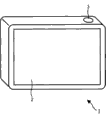
图1是根据本发明的一个实施例的图像处理装置的后侧外部视图。FIG. 1 is a rear external view of an image processing apparatus according to an embodiment of the present invention.
图2是示出显示器的正面附近的截面图。FIG. 2 is a cross-sectional view showing the vicinity of the front of the display.
图3A 到图3C示出了能够在信息处理装置中检测的事件的例子。3A to 3C show examples of events that can be detected in the information processing device.
图4A和图4B示出了悬浮移动事件和触摸移动事件。4A and 4B illustrate a hover move event and a touch move event.
图5示出了每个事件中的用户手指状态。Figure 5 shows the state of the user's finger in each event.
图6示出了设置屏幕的例子。Fig. 6 shows an example of a setting screen.
图7示出了在有效事件之间进行切换的例子。Figure 7 shows an example of switching between valid events.
图8是示出信息处理装置的内部结构的例子的框图。FIG. 8 is a block diagram showing an example of an internal configuration of an information processing device.
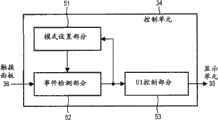
图9是示出控制单元的功能结构的例子的框图。FIG. 9 is a block diagram showing an example of a functional configuration of a control unit.
图10示出了设置普通模式的情况下的事件的转变的例子。FIG. 10 shows an example of transition of events in the case where the normal mode is set.
图11是设置手套操作模式的情况下的事件的转变的例子。FIG. 11 is an example of transition of events in the case where the glove operation mode is set.
图12是示出信息处理装置的操作模式切换处理的流程图。FIG. 12 is a flowchart showing operation mode switching processing of the information processing device.
图13是示出信息处理装置的控制处理的流程图。FIG. 13 is a flowchart showing control processing of the information processing device.
图14是示出显示器的正面附近的另一个截面视图。Fig. 14 is another sectional view showing the vicinity of the front of the display.
图15A到图15D示出了能够在信息处理装置中检测的事件的另一个例子。15A to 15D show another example of events that can be detected in the information processing device.
图16示出了在每个事件中的用户的手指状态的图。FIG. 16 shows a graph of the state of the user's finger in each event.
图17示出了在有效事件之间进行切换的例子。Figure 17 shows an example of switching between valid events.
图18示出了当设置普通模式时的每个事件的可检测范围的图。FIG. 18 is a graph showing the detectable range of each event when the normal mode is set.
图19示出了当设置手套操作模式时的每个事件的可检测范围。FIG. 19 shows the detectable range of each event when the glove operation mode is set.
图20示出了设置普通模式的情况下的事件的转变的例子。FIG. 20 shows an example of transition of events in the case where the normal mode is set.
图21示出了设置手套操作模式的情况下事件的转变的例子。Fig. 21 shows an example of transition of events in the case of setting the glove operation mode.
图22是示出信息处理装置的另一个操作模式切换处理的流程图。Fig. 22 is a flowchart showing another operation mode switching process of the information processing device.
图23是示出信息处理装置的触摸模式切换处理的流程图。FIG. 23 is a flowchart illustrating touch mode switching processing of the information processing device.
图24示出了操作模式的例子的图。Fig. 24 is a diagram showing an example of an operation mode.
图25是示出计算机的硬件结构的例子的框图。FIG. 25 is a block diagram showing an example of a hardware configuration of a computer.
具体实施方式 Detailed ways
<第一实施例><First embodiment>
[信息处理装置的外部结构][External structure of information processing device]
图1是根据本发明的一个实施例的信息处理装置1的后面外部视图。FIG. 1 is a rear external view of an
在图1所示的例子中,信息处理装置1被构造为数字相机,该数字相机包括具有预定厚度的板状外壳。在信息处理装置1的正面(未示出)上,设置有透镜,并且显示器2几乎安置在后面的整个表面上。在信息处理装置1的顶面上的右侧上安置了快门按钮3。In the example shown in FIG. 1 , the
信息处理装置1是触摸面板被布置为用户的输入接口的装置。在显示器2的正面上安置了触摸面板。The
例如,安置在显示器2上的触摸面板是电容型触摸面板。在该触摸面板中,显示器2上的每个位置处的静电电容的值被检测,并且表示检测的静电电容的值的信号被输出。例如,当引起静电电容发生变化的物体(例如,用户的手指)靠近显示器2的正面时,表示较大值的信号被输出。另一方面,当这个物体远离显示器2的正面时,表示较小值的信号被输出。For example, the touch panel mounted on the
图2是示出显示器2的正面附近的截面视图。在图2中,表示显示器2的截面的矩形的上表面2a在显示器2的正面侧上。表示靠近物体(例如,用户的手指)与作为基准的显示器2的正面(上侧2a)的距离的信号从安置在显示器2上的触摸面板输出。FIG. 2 is a cross-sectional view showing the vicinity of the front of the
在下文中将描述与显示器2接近的物体是用户的手指(赤裸手指或者戴手套的手指)的情况。如虚线指示,阈值th1设置在与显示器2的正面的距离是预定距离的位置。Hereinafter, a case where the object approaching the
[可检测事件][detectable event]
图3A到图3C是示出了能够在信息处理装置1内检测的事件的例子的图。3A to 3C are diagrams showing examples of events that can be detected within the
在信息处理装置1的操作模式是普通模式的情况下,能够检测到多种事件(例如,悬浮事件(有时描述为接近状态或事件)和触摸事件)。如以后描述,作为操作模式(即,涉及信息处理装置1的操作方法的模式),提供普通模式和手套操作模式。这里,事件表示输入。In a case where the operation mode of the
在由从触摸面板输出的信号表示的与用户的手指的距离大于阈值th1的情况下,在信息处理装置1中确定事件离开(图3A)。In a case where the distance from the user's finger indicated by the signal output from the touch panel is greater than the threshold th1, event departure is determined in the information processing apparatus 1 ( FIG. 3A ).
另一方面,在由从触摸面板输出的信号表示的与用户的手指的距离小于阈值th1的情况下,尽管用户的手指没有触摸显示器2的正面,仍在信息处理装置1中检测到悬浮事件(图3B)。On the other hand, in the case where the distance from the user's finger indicated by the signal output from the touch panel is smaller than the threshold th1, a hovering event is detected in the
另一方面,在由从触摸面板输出的信号表示用户的手指位于显示器2的正面上的情况下,换言之,在用户的手指触摸显示器2的情况下,在图像处理装置1中检测到触摸事件(图3C)。On the other hand, in the case where the user's finger is positioned on the front of the
如图4A所示,在用户的手指没有触摸显示器2的正面但靠近至小于阈值th1并且用户的手指在该状态下移动的情况下,检测到悬浮移动事件。另一方面,如图4B所示,在用户的手指在触摸显示器2的正面的状态下进行移动的情况下,检测到触摸移动事件。As shown in FIG. 4A , in a case where the user's finger does not touch the front of the
图5是示出了每个事件中的用户手指状态的图。FIG. 5 is a diagram showing the state of the user's finger in each event.
事件为离开的情况表示用户手指远离的状态。在这种情况下,通过信息处理装置1识别没有对触摸面板进行输入。When the event is away, it means that the user's finger is far away. In this case, it is recognized by the
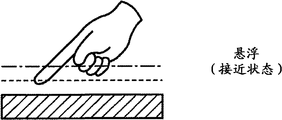
悬浮事件表示用户手指处于接近状态。在这种情况下,置于显示器2之上的用户手指的大体位置由信息处理装置1进行识别。A hover event indicates that the user's finger is in proximity. In this case, the approximate position of the user's finger placed on the
触摸事件表示用户的手指处于触摸状态。在这种情况下,位于显示器2的正面上的用户手指的位置能够由信息处理装置1进行识别。A touch event indicates that the user's finger is in the touch state. In this case, the position of the user's finger positioned on the front face of the
悬浮移动事件表示用户手指在接近状态下进行移动。在这种情况下,在水平方向上移动的用户手指的大体位置能够由信息处理装置1进行识别。The hover movement event indicates that the user's finger moves in the proximity state. In this case, the approximate position of the user's finger moving in the horizontal direction can be recognized by the
触摸移动事件表示用户手指在触摸状态下进行移动。在这种情况下,在水平方向上进行移动的用户手指的位置能够由信息处理装置1进行识别。The touch move event indicates that the user's finger moves under the touch state. In this case, the position of the user's finger moving in the horizontal direction can be recognized by the
当考虑悬浮移动事件包括在悬浮事件中并且触摸移动事件包括在触摸事件中时,通过检测包括悬浮事件和触摸事件的两种类型的事件实现信息处理装置1的功能。在操作模式是普通模式的情况下以及在操作模式是手套操作模式的情况下有效事件进行切换,并且在普通模式下,区别性地检测悬浮事件和触摸事件,并且针对每个事件执行不同处理。用户使用主体的设置屏幕可以有意地执行操作模式的设置。When considering that a hover movement event is included in a hover event and a touch movement event is included in a touch event, the functions of the
图6是示出了设置屏幕的例子的图。FIG. 6 is a diagram showing an example of a setting screen.
例如,当信息处理装置1的电源开启时,图6所示的主体设置屏幕显示在显示器2上,然后,用户命令菜单屏幕的显示并且从显示在菜单屏幕上的各项中选择主体设置的项。For example, when the power of the
在图6所示的主体设置屏幕的左侧上,呈现了在选择显示器的亮度调整项的情况下进行操作的按钮11、在选择切换到手套操作模式项的情况下进行操作的按钮12和在选择音量设置项的情况下进行操作的按钮13。On the left side of the main body setting screen shown in FIG. 6, a
在这种状态下,例如,当用户通过他的/她的手指触摸按钮12时(当检测到触摸事件时),开启按钮21和关闭按钮22显示在按钮12的右侧。开启按钮21将手套操作模式设置成开启并且是用于把手套操作模式设置为操作模式而进行操作的按钮。另一方面,关闭按钮22将手套操作模式设置成关闭并且是在普通模式设置为操作模式的情况下进行操作的按钮。用户能够通过他的或她的手指触摸开启按钮21设置手套操作模式,并且能够通过他的或她的手指触摸关闭按钮22设置普通模式。In this state, for example, when the user touches the
图7是示出了在有效事件之间进行切换的例子的图。FIG. 7 is a diagram showing an example of switching between valid events.
在操作模式是普通模式的情况下(手套操作模式关闭),存在两种有效事件(包括悬浮事件和触摸事件)。用户能够使得信息处理装置1检测悬浮事件和触摸事件。In the case that the operation mode is the normal mode (the glove operation mode is off), there are two valid events (including the hover event and the touch event). The user can cause the
另一方面,在操作模式是手套操作模式的情况下(手套操作模式开启),悬浮事件变得无效,并且仅仅触摸事件有效。由于仅仅触摸事件有效,所以即使在用户手指位于在普通模式下检测到悬浮事件的位置的情况下,也执行与检测到触摸事件的情况相同的处理。On the other hand, in the case where the operation mode is the glove operation mode (the glove operation mode is on), the hover event becomes invalid, and only the touch event is enabled. Since only the touch event is valid, even in the case where the user's finger is located at the position where the hover event is detected in the normal mode, the same processing as the case where the touch event is detected is performed.
换言之,在操作模式是手套操作模式的情况下,信息处理装置1将悬浮事件识别为触摸事件。因此,即使在用户戴手套的状态下,通过使得手指靠近正面而不用手指直接触摸显示器2,用户能够执行与在赤裸手指触摸显示器2的正面的情况下执行的操作相同的操作。In other words, in the case where the operation mode is the glove operation mode,
[信息处理装置的内部结构][Internal structure of information processing device]
图8是示出信息处理装置1的内部结构的例子的框图。FIG. 8 is a block diagram showing an example of the internal configuration of the
通过总线40互连以下部件来构成信息处理装置1:拍摄控制单元31、图像处理单元32、再现控制单元33、控制单元34、显示单元35、触摸面板36、外部AV输出单元37、临时存储单元38和存储介质39。通过显示单元35和触摸面板36构造显示器2。The
拍摄控制单元31由成像器件(例如,CMOS(互补金属氧化物半导体))进行构造并且向图像处理单元32输出通过对通过透镜接收的光执行光电转换、A/D转换等等获取的图像数据。The photographing
图像处理单元32对从拍摄控制单元31提供的图像数据执行各种处理(例如,校正处理、压缩处理等等)并且将通过执行各种处理获取的图像数据存储在存储介质39中。The
在被命令再现已经拍摄的图像的情况下,再现控制单元33从存储介质39读取命令进行再现的图像数据并且对读取的图像数据执行再现处理(例如,解码处理)。再现控制单元33将通过再现处理获取的数据输出到显示单元35,从而显示图像。In the case of being ordered to reproduce an image that has already been captured, the
控制单元34由CPU(中央处理单元)、ROM(只读存储器)、等等进行构造。控制单元34将存储在ROM中的程序扩展到临时存储单元38并且执行该程序,从而控制信息处理装置1的整体操作。例如,控制单元34基于从触摸面板36提供的信号检测事件并且根据检测的事件执行处理。此外,控制单元34设置手套操作模式和普通模式中的任何一种作为信息处理装置1的操作模式并且根据设置的模式改变事件的有效性或无效性。The
显示单元35由LCD(液晶显示器)等等进行构造并且在控制单元34的控制之下显示由再现控制单元33再现的图像、菜单屏幕、等等。The
触摸面板36是电容型触摸面板并且安置为与显示单元35重叠。触摸面板36以预定周期检测显示器2的每个位置处的静电电容的值并且将表示每个位置处的静电电容的值的信号(检测信号)输出到控制单元34。The
在从再现控制单元33提供通过再现处理获取的图像数据的情况下,外部AV输出单元37经由HDMI(高清多媒体接口)线缆向外部装置输出所提供的图像数据。In the case of supplying image data acquired through reproduction processing from the
临时存储单元38由RAM(随机访问存储器)进行构造并且存储内部的每个单元的处理所需的数据。在临时存储单元38中,例如,存储指示操作模式是手套操作模式还是普通模式等等的信息。The
存储介质39由闪存等等进行构造并且存储通过拍摄控制单元31进行拍摄并且由内部的图像处理单元32进行处理的图像数据。The
图9是示出控制单元34的功能结构的例子的框图。图9所示的功能单元中的至少一部分由执行预定程序的控制单元34的CPU实现。FIG. 9 is a block diagram showing an example of the functional configuration of the
在控制单元34中,实现模式设置部分51、事件检测部分52和UI控制部分53。In the
模式设置部分51根据用户的操作设置操作模式并且向事件检测部分52输出表示当前操作模式的信息。例如,模式设置部分51设置普通模式作为缺省操作模式。当检测到基于从事件检测部分52提供的信息从普通模式切换成手套操作模式的命令时,模式设置部分51设置手套操作模式。表示由模式设置部分51设置的操作模式的信息也被提供给临时存储单元38以存储在其中。The
事件检测部分52基于从触摸面板36提供的信号检测事件并且输出表示检测的事件的信息和表示显示器2上的检测到事件的位置的信息。从事件检测部分52输出的信息提供给模式设置部分51和UI控制部分53。The
图10是输出了在设置普通模式的情况下的事件的转变的例子的图。FIG. 10 is a diagram outputting an example of transition of events in a case where the normal mode is set.
例如,在离开状态下,在由从触摸面板36提供的信号表示的与用户手指的距离小于阈值th1的情况下,悬浮开启被确定,并且如箭头#1所示,形成检测到悬浮事件的状态。For example, in the away state, in the case where the distance from the user's finger represented by the signal supplied from the
此外,在悬浮事件状态下,在基于从触摸面板36提供的信号使得用户手指被表示为触摸显示器2的情况下,确定了触摸开启,并且如箭头#2所示,形成检测到触摸事件的状态。Furthermore, in the hover event state, in the case where the user's finger is indicated as touching the
在悬浮事件状态下,在由从触摸面板36提供的信号表示的与用户手指的距离小于阈值th1的情况下,确定了移动,并且如箭头#3所示,形成检测到悬浮事件的状态。In the hover event state, when the distance from the user's finger indicated by the signal supplied from the
另一方面,在离开状态下,在基于从触摸面板36提供的信号使得用户手指被表示为触摸显示器2的情况下,确定了触摸开启,并且如箭头#4所示,形成了检测到触摸事件的状态。在通过触摸面板36在显示器2上的预定位置执行静电电容的采样以后用户突然触摸显示器2的正面直到执行了下一个采样的情况下,直接执行从离开状态到触摸事件状态的转变。On the other hand, in the away state, in the case where the user's finger is indicated as touching the
在触摸事件状态下,在由从触摸面板36提供的信号表示的用户手指与显示器2的正面的距离增加但小于阈值th1情况下,确定了触摸关闭,并且如箭头#5所示,形成检测到悬浮事件的状态。In the touch event state, when the distance between the user's finger and the front of the
在触摸事件状态下,在基于从触摸面板36提供的信号表示用户手指触摸显示器2的情况下,确定进行了移动,并且如箭头#6所示,形成了检测到触摸事件的状态。In the touch event state, in the event that the user's finger touches the
在悬浮事件状态或触摸事件状态下,在由从触摸面板36提供的信号表示的与用户手指的距离大于阈值th1的情况下,确定了悬浮关闭和触摸关闭,并且如箭头#7和#8所示,检测到离开状态。In the hover event state or the touch event state, in the case where the distance from the user's finger represented by the signal supplied from the
在普通模式设置为操作模式的情况下,由事件检测部分52检测通过上述的转变描述的事件。在检测到悬浮事件的情况下,表示事件的信息与位置信息一起进行输出,并且在检测到触摸事件的情况下,表示事件的信息与位置信息一起进行输出。In the case where the normal mode is set as the operation mode, the event described by the transition described above is detected by the
图11是在设置了手套操作模式的情况下的事件的转变的例子。FIG. 11 is an example of transition of events in the case where the glove operation mode is set.
例如,在离开状态下,在由从触摸面板36提供的信号表示的与用户手指的距离小于阈值th1的情况下或者在用户手指触摸显示器2的情况下,确定了触摸开启,并且如箭头#11所示,形成了检测到触摸事件的状态。For example, in the away state, in the case where the distance from the user's finger indicated by the signal supplied from the
在触摸事件状态下,在基于从触摸面板36提供的信号表示用户手指触摸显示器2的情况下,或者在用户的手指与显示器2的正面的距离增加但小于阈值th1的情况下,如箭头#12所示,形成检测到触摸事件的状态。In the touch event state, in the case where the user's finger touches the
在触摸事件状态下,在由从触摸面板36提供的信号表示的与用户手指的距离大于阈值th1的情况下,确定了触摸关闭,并且如箭头#13所示,检测到离开状态。In the touch event state, in a case where the distance from the user's finger indicated by the signal supplied from the
返回参照图9,UI控制部分53根据由从事件检测部分52提供的信息表示的事件状态控制显示单元35的显示。Referring back to FIG. 9 , the
例如,在普通模式下检测到悬浮事件的状态下,UI控制部分53显示预定图像(例如,在用户手指靠近的位置表示用户手指靠近的圆形阴影等等)。表示用户手指靠近的位置的图像的显示位置根据用户手指的移动进行变化。另一方面,在检测到触摸事件的情况下,UI控制部分53确定在用户触摸的位置显示的按钮被按下并且执行改变按钮色彩等预定处理。For example, in a state where a hovering event is detected in the normal mode, the
[信息处理装置的操作][Operation of information processing device]
这里,将描述信息处理装置的操作。首先,将参照图12所示的流程图描述由信息处理装置1执行的操作模式之间切换的处理。当用户打开信息处理装置1的电源并且命令信息处理装置1显示菜单屏幕时,图12所示的处理开始。Here, the operation of the information processing apparatus will be described. First, the process of switching between operation modes performed by the
在步骤S1中,UI控制部分53在显示单元35上显示菜单屏幕。在菜单屏幕上,显示能够通过检测触摸事件进行操作的按钮并且在选择各项的情况下操作按钮。In step S1 , the
当从在菜单屏幕上显示的各项中选择用于主体设置的项时,在步骤S2中,UI控制部分53显示如参照图6描述的主体设置屏幕。When an item for subject setting is selected from items displayed on the menu screen, in step S2, the
当从在主体设置屏幕上显示的各项中选择向手套操作模式进行切换的项时,在步骤S3中,UI控制部分53显示手套操作模式切换屏幕,在该屏幕上显示了在设置手套操作模式的情况下进行操作的开启按钮21和在设置普通模式的情况下进行操作的关闭按钮22。When an item for switching to the glove operation mode is selected from the items displayed on the main body setting screen, in step S3, the
在步骤S4中,模式设置部分51确定手套操作模式是否关闭(换言之,是否设置普通模式)。In step S4, the
例如,在基于关闭按钮22的显示位置的触摸事件的检测确定已经在步骤S4中设置普通模式的情况下,在步骤S5中,事件检测部分52使得触摸事件和悬浮事件有效。For example, in a case where it is determined that the normal mode has been set in step S4 based on the detection of the touch event of the display position of the
在触摸事件和悬浮事件变得有效以后,在步骤S6中在该状态下执行操作。用户能够通过使得触摸事件或悬浮事件被检测到而操作信息处理装置1。在步骤S6中,执行普通模式的处理,并且在命令UI控制部分53再次显示主体设置屏幕以后,处理返回到步骤S2,并且上述处理被重复。After the touch event and the hover event become valid, operations are performed in this state in step S6. The user can operate the
另一方面,如果在步骤S4中确定已经设置了手套操作模式而非普通模式,那么在步骤S7中,事件检测部分52仅仅使得触摸事件有效。On the other hand, if it is determined in step S4 that the glove operation mode has been set instead of the normal mode, then in step S7 the
在触摸事件变得有效以后,在步骤S8中,执行该状态下的操作。即使在用户戴手套的情况下,通过仅仅使用手指靠近显示器2用户仍能够使得触摸事件被检测到,并且由此能够操作信息处理装置1。在步骤S8中,执行手套操作模式下的处理,并且在命令UI控制部分53再次显示主体设置屏幕以后,处理返回步骤S2,并且上述处理被重复。After the touch event becomes valid, in step S8, operations in this state are performed. Even in a case where the user wears gloves, the user can cause a touch event to be detected by merely approaching the
接下来,将参照图13所示的流程图描述根据用户操作执行的信息处理装置1的控制处理。Next, control processing of the
在步骤S11中,触摸面板36以预定周期检测显示器2的每个位置处的静电电容的值并且输出表示每个位置的静电电容的值的信号。In step S11 , the
在步骤S12中,在操作模式是普通模式的情况下,事件检测部分52基于从触摸面板36提供的信号检测如参照图10描述的事件。另一方面,在操作模式是手套操作模式的情况下,事件检测部分52检测参照图11所述的事件。In step S12 , in a case where the operation mode is the normal mode, the
在步骤S13中,UI控制部分53根据由事件检测部分52检测的事件控制显示单元35的显示。然后,处理结束。In step S13 , the
如上所述,通过不同地检测触摸事件和悬浮事件为在普通模式下有效,在用户手指触摸显示器2的情况和用户手指与显示器2接近的情况下信息处理装置1能够执行不同的处理。因此,与具有触摸面板作为输入接口的普通装置不同,通过加入触摸事件和悬浮事件,能够实现广泛的功能。As described above, by differently detecting a touch event and a hover event to be effective in the normal mode, the
此外,给予手套操作模式下的触摸事件较高优先级,并且在普通模式下被检测为悬浮事件的操作被检测为触摸事件。因此,戴手套的用户能够在戴手套的同时执行操作。Furthermore, a higher priority is given to a touch event in the glove operation mode, and an operation detected as a hover event in the normal mode is detected as a touch event. Therefore, a gloved user can perform operations while wearing the glove.
另外,通过在主体设置屏幕上准备向手套操作模式进行切换的项,用户能够有意地向普通模式或手套操作模式进行切换。In addition, by preparing an item for switching to the glove operation mode on the main body setting screen, the user can intentionally switch to the normal mode or the glove operation mode.
<第二实施例><Second Embodiment>
在以上给出的描述中,尽管能够由信息处理装置1检测的事件是触摸事件和悬浮事件,但是还可以构造可进行检测的另一个事件。信息处理装置1的结构与参照图8和图9描述的相同。In the description given above, although the events that can be detected by the
图14是示出显示器2的正面附近的另一个截面视图。在图14所示的例子中,与阈值th1相比较,阈值th2被设置在距离作为基准的显示器2的正面更远的位置。FIG. 14 is another sectional view showing the vicinity of the front of the
图15A到图15D示出了能够在信息处理装置1中检测的事件的另一个例子。15A to 15D show another example of events that can be detected in the
在信息处理装置1中,在操作模式是普通模式的情况下,除了悬浮事件和触摸事件以外,还能够检测近旁事件。除了加入近旁事件以外,图15A到图15D中所示的事件与图3A到图3C中所示的相同。In the
换言之,在由从触摸面板36输出的信号表示的与用户手指的距离大于阈值th2的情况下,在信息处理装置1中确定事件离开(图15A)。In other words, in the case where the distance from the user's finger indicated by the signal output from the
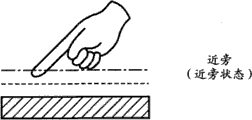
另一方面,在由从触摸面板输出的信号表示的与用户手指的距离大于阈值th1并且小于阈值th2的情况下,在信息处理装置1中检测近旁事件(图15B)。On the other hand, in a case where the distance from the user's finger indicated by the signal output from the touch panel is greater than the threshold th1 and smaller than the threshold th2, a proximity event is detected in the information processing apparatus 1 ( FIG. 15B ).
另一方面,在由从触摸面板输出的信号表示的与用户手指的距离小于阈值th1的情况下,尽管用户手指没有触摸显示器2的正面,但是仍在信息处理装置1中检测到悬浮事件(图15C)。On the other hand, in the case where the distance from the user's finger indicated by the signal output from the touch panel is smaller than the threshold th1, a hovering event is detected in the
另一方面,在由从触摸面板输出的信号表示的用户的手指的位置位于显示器2的正面上的情况下(换言之,在用户的手指触摸显示器2的情况下),在信息处理装置1中检测到触摸事件(图15D)。On the other hand, in the case where the position of the user's finger indicated by the signal output from the touch panel is located on the front of the display 2 (in other words, when the user's finger touches the display 2), it is detected in the
在图16中示出了近旁事件时的用户手指的状态。近旁事件表示用户手指处于近旁状态(与接近状态相比用户手指离得更远但是没有远离)。在这种情况下,信息处理装置1能够识别显示器2之上的带电物体(例如,用户手指)的存在。处于近旁事件之外的图16所示的每个事件的用户手指的状态与参照图5描述的一样。The state of the user's finger at the time of the proximity event is shown in FIG. 16 . A proximity event indicates that the user's finger is in the proximity state (the user's finger is farther away than the proximity state but not farther away). In this case, the
如上所述,在普通模式设置为操作模式的情况与手套操作模式设置为操作模式的情况之间改变有效事件。然而,在任何操作模式下,近旁事件有效。As described above, the valid event is changed between the case where the normal mode is set as the operation mode and the case where the glove operation mode is set as the operation mode. However, in any mode of operation, nearby events are valid.
图17是示出了在有效事件之间切换的例子的图。FIG. 17 is a diagram showing an example of switching between valid events.
在操作模式是普通模式的情况下(在手套操作模式关闭的情况下),三个事件(包括悬浮事件、触摸事件和近旁事件)是有效的。因此,用户能够使得每个事件能够被信息处理装置1检测到。In the case that the operation mode is the normal mode (in the case that the glove operation mode is off), three events (including a hover event, a touch event and a proximity event) are valid. Therefore, the user can enable each event to be detected by the
在操作模式是手套操作模式的情况下(在手套操作模式开启的情况下),悬浮事件无效,并且触摸事件和近旁事件有效。即使在用户手指处于在普通模式下检测到悬浮事件的位置的情况下,执行与检测到触摸事件的情况的处理相同的处理。In the case where the operation mode is the glove operation mode (in the case where the glove operation mode is on), the hover event is invalid, and the touch event and the proximity event are valid. Even in the case where the user's finger is at a position where a hover event is detected in the normal mode, the same processing as that of the case where a touch event is detected is performed.
通过设置手套操作模式,即使在用户戴手套的情况下,通过使得手指靠近显示器2的正面而不直接触摸显示器2,用户能够执行与在赤裸手指触摸显示器2的正面的情况下执行的操作相同的操作。此外,通过使得手指靠近比识别到触摸事件的位置更远的位置,能够识别显示器2之上的手指的存在。By setting the glove operation mode, even when the user wears gloves, the user can perform the same operation as that performed when bare fingers touch the front of the
尽管在近旁事件中很难识别坐标点,但是能够识别带电物体处于近旁状态下。因此,能够在悬浮事件中识别大体坐标点。通过为这两个事件分配并且实现不同功能,用户能够为每个事件执行处理。Although it is difficult to identify a coordinate point in a near event, it is possible to recognize that a charged object is in a near state. Thus, a general coordinate point can be identified in a hover event. By assigning and implementing different functions for these two events, the user can perform processing for each event.
图18示出了当设置普通模式时的每个事件的可检测范围。FIG. 18 shows the detectable range of each event when the normal mode is set.
假设:由原点P0((x,y,z)=(0,0,0))、点P1((x,y,z=(x1,0,0))、点P2((x,y,z)=(0,y1,0))和点P3((x,y,z)=(x1,y1,0))包围的范围是描述的显示器2的正面的范围。Assumption: from the origin P0 ((x, y, z) = (0, 0, 0)), point P1 ((x, y, z = (x1, 0, 0)), point P2 ((x, y, z) = (0, y1, 0)) and the area enclosed by the point P3 ((x, y, z) = (x1, y1, 0)) is the described frontal area of the
在这种情况下,能够检测触摸事件的触摸区域是由虚线表示并且由点P0、P1、P2和P3包围并且与显示器2的正面的区域相同的表面上的范围。In this case, a touch area capable of detecting a touch event is indicated by a dotted line and is surrounded by points P0 , P1 , P2 and P3 and is an area on the same surface as the area of the front face of the
此外,能够检测悬浮事件的悬浮区域位于直角平行六面体的范围内(该直角平行六面体的底面是由点P0、P1、P2和P3包围的表面,顶面是由点P10、P11、P12和P13包围并且由点划线表示的表面,该悬浮区域位于底面上方)。点P10由(x,y,z)=(0,0,th1)进行表示,点P11由(x,y,z)=(x1,0,th1)进行表示。此外,点P12由(x,y,z)=(0,y1,th1)进行表示,点P13由(x,y,z)=(x1,y1,th1)进行表示。In addition, the levitation area capable of detecting levitation events is located within the confines of a rectangular parallelepiped (the bottom face of which is a surface surrounded by points P0, P1, P2 and P3, and the top face is a surface surrounded by points P10, P11, P12 and P13 and the surface indicated by the dot-dash line, the floating area is above the bottom surface). The point P10 is represented by (x, y, z)=(0, 0, th1), and the point P11 is represented by (x, y, z)=(x1, 0, th1). In addition, the point P12 is represented by (x, y, z)=(0, y1, th1), and the point P13 is represented by (x, y, z)=(x1, y1, th1).
此外,能够检测近旁事件的近旁区域在一个直角平行六面体的范围内,该直角平行六面体的底面为由点P10、P11、P12和P13包围的表面并且顶面为由点P20、P21、P22和P23进行包围并且由实现进行表示的表面。点P20由(x,y,z)=(0,0,th2)进行表示,点P21由(x,y,z)=(x1,0,th2)进行表示。此外,点P22由(x,y,z)=(0,y1,th2)进行表示,点P23由(x,y,z)=(x1,y1,th2)进行表示。Furthermore, the near region capable of detecting near events is within the scope of a rectangular parallelepiped whose base is the surface surrounded by points P10, P11, P12 and P13 and whose top surface is the surface surrounded by points P20, P21, P22 and P23. The surface that is enclosed and represented by the implementation. The point P20 is represented by (x, y, z)=(0, 0, th2), and the point P21 is represented by (x, y, z)=(x1, 0, th2). In addition, the point P22 is represented by (x, y, z)=(0, y1, th2), and the point P23 is represented by (x, y, z)=(x1, y1, th2).
图19是示出了当设置手套操作模式时的每个事件的可检测范围的图。FIG. 19 is a graph showing the detectable range of each event when the glove operation mode is set.
由于在普通模式下悬浮事件被识别为触摸事件,所以触摸区域位于底面为由点P0、P1、P2和P3包围的表面并且顶面为由点P10、P11、P12和点P13包围的表面的直角平行六面体的区域内。Since a hover event is recognized as a touch event in normal mode, the touch area is located at right angles to the bottom surface being the surface surrounded by points P0, P1, P2 and P3 and the top surface being the surface surrounded by points P10, P11, P12 and P13 within the region of the parallelepiped.
能够检测近旁事件的范围位于底面为由点P10、P11、P12和P13进行包围的表面并且顶面为由点P20、P21、P22和P23包围的表面的直角平行六面体的区域内。The range capable of detecting nearby events is within the region of a rectangular parallelepiped whose base is a surface surrounded by points P10 , P11 , P12 and P13 and whose top surface is a surface surrounded by points P20 , P21 , P22 and P23 .
图20示出了在设置了普通模式的情况下的事件的转变的例子。将不在这里给出与参照图10所给出的相同的描述。FIG. 20 shows an example of transition of events in the case where the normal mode is set. The same description as that given with reference to FIG. 10 will not be given here.
在离开状态下,在由从触摸面板36提供的信号表示的与用户手指的距离大于阈值th1并且小于阈值th2的情况下,确定了近旁开启,并且如箭头#21所示,形成检测近旁事件的状态。In the away state, in the case where the distance from the user's finger indicated by the signal supplied from the
在近旁事件状态下,在由从触摸面板36提供的信号表示的与用户手指的距离小于阈值th1的情况下,确定了悬浮开启,并且如箭头#22所示,形成检测悬浮事件的状态。In the proximity event state, when the distance from the user's finger indicated by the signal supplied from the
在悬浮事件状态下,在由从触摸面板36提供的信号表示的与用户手指的距离大于阈值th1并且小于阈值th2的情况下,确定了悬浮关闭,并且如箭头#23所示,形成了检测近旁事件的状态。In the hover event state, in the case where the distance from the user's finger indicated by the signal supplied from the
在近旁事件状态下,在基于从触摸面板36提供的信号表示用户手指要触摸显示器2的情况下,确定了触摸开启,并且如箭头#24所示,形成了检测触摸事件的状态。In the near event state, in the event that the user's finger is about to touch the
在触摸事件状态下,在由从触摸面板36提供的信号表示的与用户手指的距离大于阈值th1并且小于阈值th2的情况下,确定了触摸关闭和悬浮关闭,并且如箭头#25所示,形成了检测近旁事件的状态。In the touch event state, in the case where the distance from the user's finger indicated by the signal supplied from the
在近旁事件状态、悬浮事件状态或触摸事件状态下,在由从触摸面板36提供的信号表示的与用户手指的距离大于阈值th2的情况下,确定了近旁关闭、悬浮关闭和触摸关闭,并且如箭头#26所示,检测到离开状态。In the proximity event state, the hover event state, or the touch event state, when the distance from the user's finger indicated by the signal supplied from the
在设置了普通模式的情况下,由事件检测部分52通过上述转变检测这些事件。在检测到近旁事件的情况下,输出表示它的检测的信息,并且在检测到悬浮事件的情况下,输出表示它的检测的信息以及位置信息。此外,在检测到触摸事件的情况下,输出表示它的检测的信息以及位置信息。In the case where the normal mode is set, these events are detected by the
图21示出了在设置手套操作模式的情况下的事件的转变的例子。将不在这里表示与参照图11表示的描述相同的描述。Fig. 21 shows an example of transition of events in the case of setting the glove operation mode. The same description as that expressed with reference to FIG. 11 will not be expressed here.
在远离状态下,在由从触摸面板36提供的信号表示的与用户手指的距离大于阈值th1并且小于阈值th2的情况下,确定了近旁开启并且如箭头#31所示,形成了检测近旁事件的状态。In the away state, in the case where the distance from the user's finger indicated by the signal supplied from the
在近旁事件状态下,在由从触摸面板36提供的信号表示的与用户手指的距离小于阈值th1的情况下或者在用户的手指触摸显示器2的情况下,确定了触摸开启,并且如箭头#32所示,形成检测触摸事件的状态。In the proximity event state, in the case where the distance from the user's finger indicated by the signal supplied from the
在触摸事件状态下,在由从触摸面板36提供的信号表示的与用户手指的距离大于阈值th1并且小于阈值th2的情况下,确定了触摸关闭,并且如箭头#33所示,形成了检测近旁事件的状态。In the touch event state, in the case where the distance from the user's finger represented by the signal supplied from the
在近旁事件状态下,在由从触摸面板36提供的信号表示的与用户手指的距离大于阈值th2的情况下,确定了近旁关闭并且如箭头#34所示,检测到离开状态。In the proximity event state, in the case where the distance from the user's finger indicated by the signal supplied from the
将参照图22所示的流程图描述用于在操作模式之间进行切换的信息处理装置1的另一个处理。Another process of the
除了触摸事件和悬浮事件以及近旁事件均在普通模式下有效以及触摸事件和近旁事件均在手套操作模式下有效以外,图22所示的处理与参照图12描述的相同。将恰当地不在这里给出重复描述。The processing shown in FIG. 22 is the same as that described with reference to FIG. 12 , except that touch events, hover events, and proximity events are both valid in the normal mode, and both touch events and proximity events are valid in the glove operation mode. Duplicate description will not be given here appropriately.
在步骤S21中,UI控制部分53在显示单元35上显示菜单屏幕。当选择了主体设置的项时,在步骤S22中,显示主体设置屏幕。In step S21 , the
当选择向手套操作模式进行切换的项时,在步骤S23中,UI控制部分53显示手套操作模式切换屏幕。When an item for switching to the glove operation mode is selected, in step S23, the
在步骤S24中,模式设置部分51确定手套操作模式是否关闭(换言之,是否设置普通模式)。In step S24, the
在步骤S24中确定已经设置了普通模式的情况下,在步骤S25中,事件检测部分52使得触摸事件、悬浮事件和近旁事件有效。In a case where it is determined in step S24 that the normal mode has been set, in step S25 the
在触摸事件、悬浮事件和近旁事件变得有效以后,在步骤S26中在该状态下执行操作。在步骤S26中,执行普通模式的处理,并且在命令UI控制部分53再次显示主体设置屏幕以后,处理返回到步骤S22,并且上述的处理进行重复。After the touch event, the hover event, and the near event become active, operations are performed in this state in step S26. In step S26, the processing of the normal mode is executed, and after instructing the
另一方面,如果在步骤S24中确定已经设置了手套操作模式而非普通模式,则在步骤S27中,事件检测部分52使得触摸事件和近旁事件有效。On the other hand, if it is determined in step S24 that the glove operation mode has been set instead of the normal mode, then in step S27 the
在触摸事件和近旁事件变得有效以后,在步骤S28中,执行该状态下的操作。在步骤S28中,执行手套操作模式下的处理,并且在命令UI控制部分53再次显示主体设置屏幕以后,处理返回到步骤S22,并且上述处理重复。After the touch event and the proximity event become valid, in step S28, operations in this state are performed. In step S28, processing in the glove operation mode is performed, and after instructing the
<变型例子><Modification example>
在触摸面板36是能够同时执行多个点(即两点或更多点)的触摸操作的触摸面板(即,与所谓的多点触摸对应的触摸面板)的情况下,可以如上同时检测多个事件。此外,可以进行构造以使得用户能够在能够执行多点触摸操作的多点触摸模式与能够执行单点触摸操作的单点触摸模式之间进行切换。In the case where the
将参照图23中所示的流程图描述用于在触摸模式之间进行切换的信息处理装置1的处理。与操作模式之间的切换类似,在主体设置屏幕上执行触摸模式之间的切换。The processing of the
当被命令显示菜单屏幕时,在步骤S31中,UI控制部分53在显示单元35上显示菜单屏幕。When ordered to display the menu screen, the
当从在菜单屏幕上显示的项目之中选择用于主体设置的项时,在步骤S32中,UI控制部分53显示主体设置屏幕。在主体设置屏幕上,显示在选择关于主体设置的各种项的情况下操作的按钮以及包括用于在触摸模式之间进行切换的项的情况下操作的按钮。When an item for subject setting is selected from among the items displayed on the menu screen, in step S32, the
当选择用于在触摸模式之间进行切换的项时,在步骤S33中,UI控制部分53显示多点触摸切换屏幕。在多点触摸切换屏幕上,显示在设置多点触摸模式的情况下操作的按钮和在设置单点触摸模式的情况下操作的按钮。When an item for switching between touch modes is selected, in step S33, the
在步骤S34中,模式设置部分51确定多点触摸是否关闭(换言之,是否设置单点触摸模式)。In step S34, the
在步骤S34中确定已经设置了单点触摸模式的情况下,在步骤S35中,事件检测部分52将多点触摸设置为无效。In a case where it is determined in step S34 that the single-touch mode has been set, in step S35 the
在多点触摸变得无效以后,在步骤S36中,检测根据通过单点触摸执行的用户的操作的事件,并且执行根据检测的事件的操作。在步骤S36中,执行单点触摸模式下的处理,在命令UI控制部分53再次显示主体设置屏幕以后,处理返回到步骤S32,并且上述的处理进行重复。After the multi-touch becomes invalid, in step S36 , an event according to the user's operation performed by the single-touch is detected, and an operation according to the detected event is performed. In step S36, processing in the single-touch mode is performed, and after instructing the
另一方面,在步骤S34中确定已经设置了多点触摸模式而非单点触摸模式时,在步骤S37中,事件检测部分52使得多点触摸有效。On the other hand, when it is determined in step S34 that the multi-touch mode has been set instead of the single-touch mode, in step S37 the
在多点触摸变得有效以后,在步骤S38中,检测根据通过多点触摸执行的用户的操作的事件,并且执行根据检测的事件的操作。在步骤S38中,执行多点触摸模式下的处理,并且在命令UI控制部分53再次显示主体设置屏幕以后,处理返回到步骤S32,并且上述的处理重复。After the multi-touch becomes active, in step S38 , an event according to the user's operation performed through the multi-touch is detected, and an operation according to the detected event is performed. In step S38, processing in the multi-touch mode is performed, and after instructing the
通过设置能够被执行的多点触摸操作,用户能够执行手势操作(例如,通过使用两点触摸方式或者两点移动方式执行操作)。当执行手势操作时,通过多点触摸方式或者多点移动方式执行根据触摸方式或者移动方式的处理。By setting the multi-touch operations that can be performed, the user can perform a gesture operation (for example, by performing an operation using a two-point touch method or a two-point movement method). When a gesture operation is performed, processing according to a touch method or a movement method is performed by a multi-touch method or a multi-point movement method.
图24示出了在组合手套操作模式的开启/关闭与多点触摸模式的开启/关闭的情况下实现的操作模式的例子。FIG. 24 shows an example of operation modes realized in the case of combining ON/OFF of the glove operation mode and ON/OFF of the multi-touch mode.
例如,假设能够由信息处理装置1检测的事件是触摸事件和悬浮事件,在手套操作模式关闭并且多点触摸模式关闭的情况下,操作模式是普通操作模式。通过使得能够通过一个手指检测触摸事件和悬浮事件,用户执行操作。For example, assuming that events that can be detected by the
另一方面,在手套操作模式开启并且多点触摸模式关闭的情况下,操作模式是手套操作模式(在戴手套的状态下用户能够在悬浮区域上执行操作)。通过使得能够通过一个手指检测触摸事件和悬浮事件,用户能够执行操作。此外,在手套操作模式开启并且多点触摸模式开启的情况下,操作模式是能够在悬浮区域上执行多点操作的操作模式。On the other hand, in the case where the glove operation mode is on and the multi-touch mode is off, the operation mode is the glove operation mode (the user can perform operations on the floating area in a gloved state). By enabling detection of touch events and hover events with one finger, the user can perform operations. Furthermore, in the case where the glove operation mode is on and the multi-touch mode is on, the operation mode is an operation mode capable of performing a multi-point operation on the floating area.
如上,通过将信息处理装置1与多点触摸操作进行关联,用户能够执行预定处理或者例如通过使得在悬浮区域中识别多点使得能够识别使用多点的手势操作。此外,能够实现信息处理装置1的功能的扩展。As above, by associating the
如上,已经描述了数字处理装置1是数字相机的情况。然而,上述处理能够应用到具有触摸面板的各种装置(例如,蜂窝电话和个人计算机)。As above, the case where the
[计算机的结构例子][Structure example of computer]
能够通过硬件或软件执行上述一系列处理。在通过软件执行这一系列处理的情况下,构成软件的程序从程序记录介质安装到内置在专用硬件内的计算机、通用计算机等等内。The series of processing described above can be executed by hardware or software. In the case of executing the series of processes by software, a program constituting the software is installed from a program recording medium into a computer built in dedicated hardware, a general-purpose computer, or the like.
图25是示出使用程序执行上述一系列处理的计算机的硬件结构的例子的框图。FIG. 25 is a block diagram showing an example of a hardware configuration of a computer that executes the above-described series of processes using a program.
CPU(中央处理单元)101、ROM(只读存储器)102和RAM(随机访问存储器)103通过总线104进行互连。A CPU (Central Processing Unit) 101 , a ROM (Read Only Memory) 102 , and a RAM (Random Access Memory) 103 are interconnected via a
此外,输入/输出接口105连接到总线104。由鼠标、键盘等构造的输入单元106和由扬声器等构造的输出单元107连接到输入/输出接口105。此外,由硬盘、非易失性存储器等构造的存储单元108、由网络接口等构造的通信单元109和驱动可移动介质111的驱动器110连接到输入/输出接口105。Furthermore, an input/
在如上构造的计算机中,例如,CPU 101通过输入/输出接口105和总线104将存储在存储单元108中的程序装载到RAM 103中并且执行该程序,从而执行上述的一系列处理。In the computer configured as above, for example, the
例如,由CPU 101执行的程序通过记录在可移动介质111上或者通过有线或无线传输介质(例如,局域网、互联网或数字广播)进行提供并且安装到存储单元108内。For example, the program executed by the
此外,由计算机执行的程序可以是根据上述顺序按照时间序列执行处理的程序、以并行方式执行处理的程序或者在所需定时(例如,当调用程序时的定时)执行处理的程序。Furthermore, the program executed by the computer may be a program that executes processing in time series according to the above-mentioned order, a program that executes processing in parallel, or a program that executes processing at desired timing (for example, timing when the program is called).
本发明的实施例不限于上述实施例,并且在不脱离本发明的构思的情况下可以进行各种改变。Embodiments of the present invention are not limited to the above-described embodiments, and various changes may be made without departing from the concept of the present invention.
本申请包含与在于2010年12月24日提交到日本专利局的日本优先权专利申请JP 2010-287451中公开的主题有关的主题,该日本优先权专利申请的全部内容以引用方式并入本文。The present application contains subject matter related to that disclosed in Japanese Priority Patent Application JP 2010-287451 filed in the Japan Patent Office on Dec. 24, 2010, the entire content of which is hereby incorporated by reference.
Claims (20)
Applications Claiming Priority (2)
| Application Number | Priority Date | Filing Date | Title |
|---|---|---|---|
| JP2010287451A JP2012133729A (en) | 2010-12-24 | 2010-12-24 | Information processing device, information processing method and program |
| JP2010-287451 | 2010-12-24 |
Publications (1)
| Publication Number | Publication Date |
|---|---|
| CN102541379A true CN102541379A (en) | 2012-07-04 |
Family
ID=45418383
Family Applications (1)
| Application Number | Title | Priority Date | Filing Date |
|---|---|---|---|
| CN2011104243738A Pending CN102541379A (en) | 2010-12-24 | 2011-12-16 | Information processing device, method of processing information, and computer program storage device |
Country Status (6)
| Country | Link |
|---|---|
| US (1) | US9250790B2 (en) |
| EP (1) | EP2469394A1 (en) |
| JP (1) | JP2012133729A (en) |
| KR (1) | KR20120073104A (en) |
| CN (1) | CN102541379A (en) |
| TW (1) | TW201241690A (en) |
Cited By (11)
| Publication number | Priority date | Publication date | Assignee | Title |
|---|---|---|---|---|
| CN103870195A (en) * | 2014-03-03 | 2014-06-18 | 联想(北京)有限公司 | Information prompt method and electronic equipment |
| CN104007814A (en) * | 2013-02-22 | 2014-08-27 | 三星电子株式会社 | Apparatus and method for recognizing proximity motion using sensors |
| CN104580683A (en) * | 2013-10-22 | 2015-04-29 | 中兴通讯股份有限公司 | Mode switching method and device |
| CN104978063A (en) * | 2014-04-01 | 2015-10-14 | 三星电子株式会社 | Touch data segmentation method of touch controller |
| CN105094419A (en) * | 2014-05-21 | 2015-11-25 | 苹果公司 | Glove touch detection |
| CN106569648A (en) * | 2016-10-31 | 2017-04-19 | 努比亚技术有限公司 | Mobile equipment and mobile equipment control method |
| CN106569647A (en) * | 2016-10-31 | 2017-04-19 | 努比亚技术有限公司 | Mobile terminal and mobile terminal control method |
| CN106569649A (en) * | 2016-10-31 | 2017-04-19 | 努比亚技术有限公司 | Intelligent equipment and intelligent equipment control method |
| CN108132729A (en) * | 2017-12-19 | 2018-06-08 | 广州视源电子科技股份有限公司 | Touch signal processing method and device, electronic equipment and storage medium |
| US10394434B2 (en) | 2013-02-22 | 2019-08-27 | Samsung Electronics Co., Ltd. | Apparatus and method for recognizing proximity motion using sensors |
| US10963095B1 (en) | 2019-09-27 | 2021-03-30 | Apple Inc. | Glove touch detection |
Families Citing this family (24)
| Publication number | Priority date | Publication date | Assignee | Title |
|---|---|---|---|---|
| JP6107663B2 (en) * | 2011-12-19 | 2017-04-05 | 日本電気株式会社 | Information processing device |
| US20130244730A1 (en) * | 2012-03-06 | 2013-09-19 | Industry-University Cooperation Foundation Hanyang University | User terminal capable of sharing image and method for controlling the same |
| JP2013232119A (en) * | 2012-04-27 | 2013-11-14 | Panasonic Corp | Input device, input supporting method, and program |
| JP5812054B2 (en) * | 2012-08-23 | 2015-11-11 | 株式会社デンソー | Operation device |
| KR102051585B1 (en) * | 2012-08-27 | 2019-12-17 | 삼성전자주식회사 | An electronic device and method having a function of hand writing using multi-touch |
| WO2014037981A1 (en) * | 2012-09-07 | 2014-03-13 | Necカシオモバイルコミュニケーションズ株式会社 | Portable terminal device and method for controlling portable terminal device |
| JP5703422B2 (en) * | 2012-09-13 | 2015-04-22 | パナソニック インテレクチュアル プロパティ コーポレーション オブアメリカPanasonic Intellectual Property Corporation of America | Portable electronic devices |
| JP5565598B1 (en) * | 2013-02-01 | 2014-08-06 | パナソニック インテレクチュアル プロパティ コーポレーション オブ アメリカ | Electronic device, input processing method, and program |
| KR20140106097A (en) * | 2013-02-25 | 2014-09-03 | 삼성전자주식회사 | Method and apparatus for determining touch input object in an electronic device |
| KR102091028B1 (en) * | 2013-03-14 | 2020-04-14 | 삼성전자 주식회사 | Method for providing user's interaction using multi hovering gesture |
| JP6126904B2 (en) * | 2013-05-13 | 2017-05-10 | 株式会社Nttドコモ | Electronic device, locus correction method, program |
| US9195332B2 (en) * | 2013-05-23 | 2015-11-24 | Nokia Technologies Oy | Apparatus with deformable flexible user interface area and adjustable hover input region and associated methods |
| CN108052234B (en) * | 2013-07-24 | 2020-10-20 | 上海企天信息技术有限公司 | Touch identification method of touch screen |
| KR102206053B1 (en) * | 2013-11-18 | 2021-01-21 | 삼성전자주식회사 | Apparatas and method for changing a input mode according to input method in an electronic device |
| KR102186393B1 (en) * | 2014-01-02 | 2020-12-03 | 삼성전자주식회사 | Method for processing input and an electronic device thereof |
| JP6360367B2 (en) * | 2014-06-26 | 2018-07-18 | 京セラ株式会社 | Portable electronic device, control method and program for portable electronic device |
| US9983745B2 (en) * | 2014-09-19 | 2018-05-29 | Kabushiki Kaisha Tokai Rika Denki Seisakusho | Touch sensor device and controller |
| JP6452456B2 (en) | 2015-01-09 | 2019-01-16 | キヤノン株式会社 | Information processing apparatus, control method therefor, program, and storage medium |
| JP6433811B2 (en) * | 2015-02-25 | 2018-12-05 | 京セラ株式会社 | Electronics |
| CN106484199B (en) * | 2015-08-31 | 2019-08-06 | 小米科技有限责任公司 | Threshold setting method and device |
| JP6742730B2 (en) * | 2016-01-05 | 2020-08-19 | キヤノン株式会社 | Electronic device and control method thereof |
| US10242710B2 (en) * | 2016-04-07 | 2019-03-26 | Intel Corporation | Automatic cinemagraph |
| TWI718886B (en) * | 2020-03-03 | 2021-02-11 | 紘康科技股份有限公司 | Multi-mode operation method for capacitive touch panel |
| US12111988B1 (en) * | 2023-09-19 | 2024-10-08 | Cirque Corporation | Illumination associated with a touch sensitive area |
Citations (7)
| Publication number | Priority date | Publication date | Assignee | Title |
|---|---|---|---|---|
| US20080122798A1 (en) * | 2006-10-13 | 2008-05-29 | Atsushi Koshiyama | Information display apparatus with proximity detection performance and information display method using the same |
| CN101546245A (en) * | 2008-03-26 | 2009-09-30 | Lg电子株式会社 | Terminal and method of controlling the same |
| US20090251434A1 (en) * | 2008-04-03 | 2009-10-08 | N-Tring Ltd. | Multi-touch and single touch detection |
| US20100026723A1 (en) * | 2008-07-31 | 2010-02-04 | Nishihara H Keith | Image magnification system for computer interface |
| CN201540555U (en) * | 2009-11-19 | 2010-08-04 | 英业达股份有限公司 | Input device for touch panel |
| CN101840284A (en) * | 2009-03-19 | 2010-09-22 | 索尼公司 | Information processing device, information processing method and program |
| CN101907972A (en) * | 2009-06-08 | 2010-12-08 | Lg电子株式会社 | Mobile terminal and method for displaying information in mobile terminal |
Family Cites Families (12)
| Publication number | Priority date | Publication date | Assignee | Title |
|---|---|---|---|---|
| JPH0713676A (en) * | 1993-06-28 | 1995-01-17 | Sony Corp | Handwriting information input device |
| WO2006003586A2 (en) * | 2004-06-29 | 2006-01-12 | Koninklijke Philips Electronics, N.V. | Zooming in 3-d touch interaction |
| JP4478559B2 (en) * | 2004-12-13 | 2010-06-09 | キヤノン株式会社 | Coordinate input device, coordinate input method, program, and storage medium |
| JP4419992B2 (en) | 2006-07-31 | 2010-02-24 | 三菱自動車工業株式会社 | Touch panel device |
| JP4812124B2 (en) * | 2007-06-19 | 2011-11-09 | キヤノン株式会社 | Coordinate input device, coordinate detection method, and computer program |
| US9274681B2 (en) | 2008-03-26 | 2016-03-01 | Lg Electronics Inc. | Terminal and method of controlling the same |
| KR20100010860A (en) * | 2008-07-23 | 2010-02-02 | 엘지전자 주식회사 | Mobile terminal and event control method thereof |
| US8516397B2 (en) | 2008-10-27 | 2013-08-20 | Verizon Patent And Licensing Inc. | Proximity interface apparatuses, systems, and methods |
| JP5487743B2 (en) | 2009-06-12 | 2014-05-07 | 日産自動車株式会社 | Thin battery and manufacturing method thereof |
| US9152317B2 (en) * | 2009-08-14 | 2015-10-06 | Microsoft Technology Licensing, Llc | Manipulation of graphical elements via gestures |
| KR101657215B1 (en) * | 2009-09-08 | 2016-09-19 | 삼성디스플레이 주식회사 | Display device including touch panel device and coupling-noise elliminating method |
| US20110175827A1 (en) * | 2009-12-04 | 2011-07-21 | Adam Bogue | Filtering Input Streams in a Multi-Touch System |
-
2010
- 2010-12-24 JP JP2010287451A patent/JP2012133729A/en active Pending
-
2011
- 2011-10-25 US US13/280,388 patent/US9250790B2/en active Active
- 2011-12-09 EP EP11192870A patent/EP2469394A1/en not_active Withdrawn
- 2011-12-09 TW TW100145544A patent/TW201241690A/en unknown
- 2011-12-16 KR KR1020110136188A patent/KR20120073104A/en not_active Withdrawn
- 2011-12-16 CN CN2011104243738A patent/CN102541379A/en active Pending
Patent Citations (7)
| Publication number | Priority date | Publication date | Assignee | Title |
|---|---|---|---|---|
| US20080122798A1 (en) * | 2006-10-13 | 2008-05-29 | Atsushi Koshiyama | Information display apparatus with proximity detection performance and information display method using the same |
| CN101546245A (en) * | 2008-03-26 | 2009-09-30 | Lg电子株式会社 | Terminal and method of controlling the same |
| US20090251434A1 (en) * | 2008-04-03 | 2009-10-08 | N-Tring Ltd. | Multi-touch and single touch detection |
| US20100026723A1 (en) * | 2008-07-31 | 2010-02-04 | Nishihara H Keith | Image magnification system for computer interface |
| CN101840284A (en) * | 2009-03-19 | 2010-09-22 | 索尼公司 | Information processing device, information processing method and program |
| CN101907972A (en) * | 2009-06-08 | 2010-12-08 | Lg电子株式会社 | Mobile terminal and method for displaying information in mobile terminal |
| CN201540555U (en) * | 2009-11-19 | 2010-08-04 | 英业达股份有限公司 | Input device for touch panel |
Cited By (16)
| Publication number | Priority date | Publication date | Assignee | Title |
|---|---|---|---|---|
| US10261612B2 (en) | 2013-02-22 | 2019-04-16 | Samsung Electronics Co., Ltd. | Apparatus and method for recognizing proximity motion using sensors |
| CN104007814A (en) * | 2013-02-22 | 2014-08-27 | 三星电子株式会社 | Apparatus and method for recognizing proximity motion using sensors |
| US10921926B2 (en) | 2013-02-22 | 2021-02-16 | Samsung Electronics Co., Ltd. | Apparatus and method for recognizing proximity motion using sensors |
| US10394434B2 (en) | 2013-02-22 | 2019-08-27 | Samsung Electronics Co., Ltd. | Apparatus and method for recognizing proximity motion using sensors |
| CN104007814B (en) * | 2013-02-22 | 2019-08-13 | 三星电子株式会社 | Apparatus and method for identifying proximity motion using sensors |
| CN104580683A (en) * | 2013-10-22 | 2015-04-29 | 中兴通讯股份有限公司 | Mode switching method and device |
| CN103870195A (en) * | 2014-03-03 | 2014-06-18 | 联想(北京)有限公司 | Information prompt method and electronic equipment |
| CN104978063A (en) * | 2014-04-01 | 2015-10-14 | 三星电子株式会社 | Touch data segmentation method of touch controller |
| CN105094419A (en) * | 2014-05-21 | 2015-11-25 | 苹果公司 | Glove touch detection |
| CN105094419B (en) * | 2014-05-21 | 2018-09-21 | 苹果公司 | Glove touch detection |
| US10620758B2 (en) | 2014-05-21 | 2020-04-14 | Apple Inc. | Glove touch detection |
| CN106569649A (en) * | 2016-10-31 | 2017-04-19 | 努比亚技术有限公司 | Intelligent equipment and intelligent equipment control method |
| CN106569647A (en) * | 2016-10-31 | 2017-04-19 | 努比亚技术有限公司 | Mobile terminal and mobile terminal control method |
| CN106569648A (en) * | 2016-10-31 | 2017-04-19 | 努比亚技术有限公司 | Mobile equipment and mobile equipment control method |
| CN108132729A (en) * | 2017-12-19 | 2018-06-08 | 广州视源电子科技股份有限公司 | Touch signal processing method and device, electronic equipment and storage medium |
| US10963095B1 (en) | 2019-09-27 | 2021-03-30 | Apple Inc. | Glove touch detection |
Also Published As
| Publication number | Publication date |
|---|---|
| TW201241690A (en) | 2012-10-16 |
| EP2469394A1 (en) | 2012-06-27 |
| KR20120073104A (en) | 2012-07-04 |
| US20120162105A1 (en) | 2012-06-28 |
| US9250790B2 (en) | 2016-02-02 |
| JP2012133729A (en) | 2012-07-12 |
Similar Documents
| Publication | Publication Date | Title |
|---|---|---|
| US9250790B2 (en) | Information processing device, method of processing information, and computer program storage device | |
| US9635267B2 (en) | Method and mobile terminal for implementing preview control | |
| US9519365B2 (en) | Display control apparatus and control method for the same | |
| JP5743847B2 (en) | Mobile terminal and low sensitivity area setting program | |
| EP3136214A1 (en) | Touch operation method and apparatus for terminal | |
| US10073585B2 (en) | Electronic device, storage medium and method for operating electronic device | |
| CN105103110B (en) | Information terminal, display control method and program | |
| CN103176744B (en) | A display device and its information processing method | |
| US9298305B2 (en) | Display control apparatus and method | |
| KR20150081657A (en) | Mobile terminal and method for control thereof | |
| KR20130097331A (en) | Apparatus and method for selecting object in device with touch screen | |
| JP5854928B2 (en) | Electronic device having touch detection function, program, and control method of electronic device having touch detection function | |
| CN107613193A (en) | A kind of camera control method and mobile terminal | |
| JP6128919B2 (en) | Display control apparatus and control method thereof | |
| US11354031B2 (en) | Electronic apparatus, computer-readable non-transitory recording medium, and display control method for controlling a scroll speed of a display screen | |
| JP6100657B2 (en) | Electronics | |
| US9632613B2 (en) | Display control apparatus and control method of display control apparatus for reducing a number of touch times in a case where a guidance is not displayed as compared with a case where the guidance is displayed | |
| CN103294224B (en) | Control method and electronic device | |
| CN107360390A (en) | A kind of video calling control method and mobile terminal | |
| KR101165388B1 (en) | Method for controlling screen using different kind of input devices and terminal unit thereof | |
| JP2020017218A (en) | Electronic device, control program, and display control method | |
| CN109085987B (en) | Device control method, device, storage medium and electronic device | |
| JP2019082823A (en) | Electronic machine | |
| CN106371606B (en) | A terminal operating device and its operating method | |
| CN103946786A (en) | Information processing device, information processing method, and program |
Legal Events
| Date | Code | Title | Description |
|---|---|---|---|
| C06 | Publication | ||
| PB01 | Publication | ||
| C10 | Entry into substantive examination | ||
| SE01 | Entry into force of request for substantive examination | ||
| C02 | Deemed withdrawal of patent application after publication (patent law 2001) | ||
| WD01 | Invention patent application deemed withdrawn after publication |
Application publication date: 20120704 |