CN101512461A - Double-sided track board - Google Patents
Double-sided track board Download PDFInfo
- Publication number
- CN101512461A CN101512461A CNA2007800331905A CN200780033190A CN101512461A CN 101512461 A CN101512461 A CN 101512461A CN A2007800331905 A CNA2007800331905 A CN A2007800331905A CN 200780033190 A CN200780033190 A CN 200780033190A CN 101512461 A CN101512461 A CN 101512461A
- Authority
- CN
- China
- Prior art keywords
- signal
- array element
- trackpad
- translucent
- trackpad device
- Prior art date
- Legal status (The legal status is an assumption and is not a legal conclusion. Google has not performed a legal analysis and makes no representation as to the accuracy of the status listed.)
- Granted
Links
Images




Classifications
-
- G—PHYSICS
- G06—COMPUTING OR CALCULATING; COUNTING
- G06F—ELECTRIC DIGITAL DATA PROCESSING
- G06F1/00—Details not covered by groups G06F3/00 - G06F13/00 and G06F21/00
- G06F1/16—Constructional details or arrangements
- G06F1/1613—Constructional details or arrangements for portable computers
- G06F1/1615—Constructional details or arrangements for portable computers with several enclosures having relative motions, each enclosure supporting at least one I/O or computing function
- G06F1/1616—Constructional details or arrangements for portable computers with several enclosures having relative motions, each enclosure supporting at least one I/O or computing function with folding flat displays, e.g. laptop computers or notebooks having a clamshell configuration, with body parts pivoting to an open position around an axis parallel to the plane they define in closed position
-
- G—PHYSICS
- G06—COMPUTING OR CALCULATING; COUNTING
- G06F—ELECTRIC DIGITAL DATA PROCESSING
- G06F1/00—Details not covered by groups G06F3/00 - G06F13/00 and G06F21/00
- G06F1/16—Constructional details or arrangements
- G06F1/1613—Constructional details or arrangements for portable computers
- G06F1/1633—Constructional details or arrangements of portable computers not specific to the type of enclosures covered by groups G06F1/1615 - G06F1/1626
- G06F1/1656—Details related to functional adaptations of the enclosure, e.g. to provide protection against EMI, shock, water, or to host detachable peripherals like a mouse or removable expansions units like PCMCIA cards, or to provide access to internal components for maintenance or to removable storage supports like CDs or DVDs, or to mechanically mount accessories
-
- G—PHYSICS
- G06—COMPUTING OR CALCULATING; COUNTING
- G06F—ELECTRIC DIGITAL DATA PROCESSING
- G06F1/00—Details not covered by groups G06F3/00 - G06F13/00 and G06F21/00
- G06F1/16—Constructional details or arrangements
- G06F1/1613—Constructional details or arrangements for portable computers
- G06F1/1633—Constructional details or arrangements of portable computers not specific to the type of enclosures covered by groups G06F1/1615 - G06F1/1626
- G06F1/1675—Miscellaneous details related to the relative movement between the different enclosures or enclosure parts
- G06F1/1677—Miscellaneous details related to the relative movement between the different enclosures or enclosure parts for detecting open or closed state or particular intermediate positions assumed by movable parts of the enclosure, e.g. detection of display lid position with respect to main body in a laptop, detection of opening of the cover of battery compartment
-
- G—PHYSICS
- G06—COMPUTING OR CALCULATING; COUNTING
- G06F—ELECTRIC DIGITAL DATA PROCESSING
- G06F1/00—Details not covered by groups G06F3/00 - G06F13/00 and G06F21/00
- G06F1/16—Constructional details or arrangements
- G06F1/1613—Constructional details or arrangements for portable computers
- G06F1/1633—Constructional details or arrangements of portable computers not specific to the type of enclosures covered by groups G06F1/1615 - G06F1/1626
- G06F1/1684—Constructional details or arrangements related to integrated I/O peripherals not covered by groups G06F1/1635 - G06F1/1675
- G06F1/169—Constructional details or arrangements related to integrated I/O peripherals not covered by groups G06F1/1635 - G06F1/1675 the I/O peripheral being an integrated pointing device, e.g. trackball in the palm rest area, mini-joystick integrated between keyboard keys, touch pads or touch stripes
-
- G—PHYSICS
- G06—COMPUTING OR CALCULATING; COUNTING
- G06F—ELECTRIC DIGITAL DATA PROCESSING
- G06F3/00—Input arrangements for transferring data to be processed into a form capable of being handled by the computer; Output arrangements for transferring data from processing unit to output unit, e.g. interface arrangements
- G06F3/01—Input arrangements or combined input and output arrangements for interaction between user and computer
- G06F3/03—Arrangements for converting the position or the displacement of a member into a coded form
- G06F3/041—Digitisers, e.g. for touch screens or touch pads, characterised by the transducing means
- G06F3/044—Digitisers, e.g. for touch screens or touch pads, characterised by the transducing means by capacitive means
- G06F3/0445—Digitisers, e.g. for touch screens or touch pads, characterised by the transducing means by capacitive means using two or more layers of sensing electrodes, e.g. using two layers of electrodes separated by a dielectric layer
-
- G—PHYSICS
- G06—COMPUTING OR CALCULATING; COUNTING
- G06F—ELECTRIC DIGITAL DATA PROCESSING
- G06F3/00—Input arrangements for transferring data to be processed into a form capable of being handled by the computer; Output arrangements for transferring data from processing unit to output unit, e.g. interface arrangements
- G06F3/01—Input arrangements or combined input and output arrangements for interaction between user and computer
- G06F3/03—Arrangements for converting the position or the displacement of a member into a coded form
- G06F3/041—Digitisers, e.g. for touch screens or touch pads, characterised by the transducing means
- G06F3/044—Digitisers, e.g. for touch screens or touch pads, characterised by the transducing means by capacitive means
- G06F3/0446—Digitisers, e.g. for touch screens or touch pads, characterised by the transducing means by capacitive means using a grid-like structure of electrodes in at least two directions, e.g. using row and column electrodes
-
- G—PHYSICS
- G06—COMPUTING OR CALCULATING; COUNTING
- G06F—ELECTRIC DIGITAL DATA PROCESSING
- G06F3/00—Input arrangements for transferring data to be processed into a form capable of being handled by the computer; Output arrangements for transferring data from processing unit to output unit, e.g. interface arrangements
- G06F3/01—Input arrangements or combined input and output arrangements for interaction between user and computer
- G06F3/048—Interaction techniques based on graphical user interfaces [GUI]
- G06F3/0487—Interaction techniques based on graphical user interfaces [GUI] using specific features provided by the input device, e.g. functions controlled by the rotation of a mouse with dual sensing arrangements, or of the nature of the input device, e.g. tap gestures based on pressure sensed by a digitiser
- G06F3/0488—Interaction techniques based on graphical user interfaces [GUI] using specific features provided by the input device, e.g. functions controlled by the rotation of a mouse with dual sensing arrangements, or of the nature of the input device, e.g. tap gestures based on pressure sensed by a digitiser using a touch-screen or digitiser, e.g. input of commands through traced gestures
- G06F3/04883—Interaction techniques based on graphical user interfaces [GUI] using specific features provided by the input device, e.g. functions controlled by the rotation of a mouse with dual sensing arrangements, or of the nature of the input device, e.g. tap gestures based on pressure sensed by a digitiser using a touch-screen or digitiser, e.g. input of commands through traced gestures for inputting data by handwriting, e.g. gesture or text
-
- H—ELECTRICITY
- H04—ELECTRIC COMMUNICATION TECHNIQUE
- H04M—TELEPHONIC COMMUNICATION
- H04M1/00—Substation equipment, e.g. for use by subscribers
- H04M1/72—Mobile telephones; Cordless telephones, i.e. devices for establishing wireless links to base stations without route selection
- H04M1/724—User interfaces specially adapted for cordless or mobile telephones
- H04M1/72469—User interfaces specially adapted for cordless or mobile telephones for operating the device by selecting functions from two or more displayed items, e.g. menus or icons
-
- G—PHYSICS
- G06—COMPUTING OR CALCULATING; COUNTING
- G06F—ELECTRIC DIGITAL DATA PROCESSING
- G06F2200/00—Indexing scheme relating to G06F1/04 - G06F1/32
- G06F2200/16—Indexing scheme relating to G06F1/16 - G06F1/18
- G06F2200/161—Indexing scheme relating to constructional details of the monitor
- G06F2200/1614—Image rotation following screen orientation, e.g. switching from landscape to portrait mode
-
- H—ELECTRICITY
- H04—ELECTRIC COMMUNICATION TECHNIQUE
- H04M—TELEPHONIC COMMUNICATION
- H04M2250/00—Details of telephonic subscriber devices
- H04M2250/12—Details of telephonic subscriber devices including a sensor for measuring a physical value, e.g. temperature or motion
-
- H—ELECTRICITY
- H04—ELECTRIC COMMUNICATION TECHNIQUE
- H04M—TELEPHONIC COMMUNICATION
- H04M2250/00—Details of telephonic subscriber devices
- H04M2250/22—Details of telephonic subscriber devices including a touch pad, a touch sensor or a touch detector
Landscapes
- Engineering & Computer Science (AREA)
- Theoretical Computer Science (AREA)
- General Engineering & Computer Science (AREA)
- Computer Hardware Design (AREA)
- Human Computer Interaction (AREA)
- Physics & Mathematics (AREA)
- General Physics & Mathematics (AREA)
- Computer Networks & Wireless Communication (AREA)
- Signal Processing (AREA)
- Mathematical Physics (AREA)
- Position Input By Displaying (AREA)
Abstract
Description
与相关申请的交叉引用Cross References to Related Applications
本申请与下列申请有关,通过引用将它们全部结合在此:This application is related to the following applications, all of which are hereby incorporated by reference:
提交于2002年7月1日的题目为"TOUCH PAD FORHANDHELD DEVICE"的美国专利申请No.:10/188,182;U.S. Patent Application No. 10/188,182 entitled "TOUCH PAD FOR HANDHELD DEVICE" filed on July 1, 2002;
提交于2003年11月25日的题目为"TOUCH PAD FORHANDHELD DEVICE"的美国专利申请No.:10/722,948;U.S. Patent Application No. 10/722,948 entitled "TOUCH PAD FOR HANDHELD DEVICE" filed on November 25, 2003;
提交于2003年8月18日的题目为"MOVABLE TOUCH PADWITH ADDED FUNCTIONALITY"的美国专利申请No.:10/643,256;U.S. Patent Application No. 10/643,256 entitled "MOVABLE TOUCH PADWITH ADDED FUNCTIONALITY" filed on August 18, 2003;
提交于2003年9月2日的题目为"AMBIDEXTROUSMOUSE"的美国专利申请No.:10/654,108;U.S. Patent Application No. 10/654,108, filed September 2, 2003, entitled "AMBIDEXTROUSMOUSE";
提交于2004年5月6日的题目为"MULTIPOINT TOUCHSCREEN"的美国专利申请No.:10/840,862;U.S. Patent Application No. 10/840,862, entitled "MULTIPOINT TOUCHSCREEN," filed May 6, 2004;
提交于2004年7月30日的题目为"GESTURES FOR TOUCHSENSITIVE INPUT DEVICES"的美国专利申请No.:10/903,964;U.S. Patent Application No.: 10/903,964 entitled "GESTURES FOR TOUCHSENSITIVE INPUT DEVICES" filed on July 30, 2004;
提交于2005年1月18日的题目为"MODE-BASEDGRAPHICAL USER INTERFACES FOR TOUCH SENSITIVEINPUT DEVICES"的美国专利申请No.:11/038,590;U.S. Patent Application No. 11/038,590 entitled "MODE-BASED GRAPHICAL USER INTERFACES FOR TOUCH SENSITIVE INPUT DEVICES" filed on January 18, 2005;
提交于2005年2月11日的题目为"DISPLAY ACTUATOR"的美国专利申请No.:11/057,050;U.S. Patent Application No. 11/057,050, filed February 11, 2005, entitled "DISPLAY ACTUATOR";
提交于2005年4月26日的题目为"HAND-HELDELECTRONIC DEVICE WITH MULTIPLE TOUCH SENSINGDEVICES"的美国专利申请No.:11/115,539;U.S. Patent Application No.: 11/115,539 entitled "HAND-HELDELECTRONIC DEVICE WITH MULTIPLE TOUCH SENSING DEVICES" filed on April 26, 2005;
提交于2006年9月16日的题目为"VIRTUAL INPUT DEVICEPLACEMENT ON A TOUCH SCREEN USER INTERFACE"的美国专利申请No.:11/228,758;U.S. Patent Application No.: 11/228,758 entitled "VIRTUAL INPUT DEVICEPLACEMENT ON A TOUCH SCREEN USER INTERFACE" filed on September 16, 2006;
提交于2006年9月16日的题目为"OPERATION OF ACOMPUTER WITH A TOUCH SCREEN INTERFACE"的美国专利申请No.:11/228,700;U.S. Patent Application No.: 11/228,700 entitled "OPERATION OF ACOMPUTER WITH A TOUCH SCREEN INTERFACE" filed on September 16, 2006;
提交于2006年9月16日的题目为"ACTIVATING VIRTUALKEYS OF A TOUCH-SCREEN VIRTUAL KEYBOARD"的美国专利申请No.:11/228,737;U.S. Patent Application No. 11/228,737 entitled "ACTIVATING VIRTUALKEYS OF A TOUCH-SCREEN VIRTUAL KEYBOARD" filed on September 16, 2006;
提交于2005年1月31日的题目为"GESTURES FOR TOUCHSENSITIVE INPUT DEVICES"的美国专利申请No.:11/048,264;U.S. Patent Application No.: 11/048,264 entitled "GESTURES FOR TOUCHSENSITIVE INPUT DEVICES" filed on January 31, 2005;
提交于2006年3月3日的题目为"MULTI-FUNCTIONALHAND-HELD DEVICE"的美国专利申请No.:11/367,749。US Patent Application No. 11/367,749, filed March 3, 2006, entitled "MULTI-FUNCTIONAL HAND-HELD DEVICE."
技术领域 technical field
本发明涉及轨迹板设备。具体地,本发明涉及半透明双面轨迹板使用系统和方法。The present invention relates to trackpad devices. In particular, the present invention relates to systems and methods for using a translucent double-sided trackpad.
背景技术 Background technique
日常生活中用于各种不同功能的许多设备本质上是计算机或计算设备。这种设备通常包括以总线耦接的计算机处理器和计算机存储器。这样的设备包括但是不限于个人数字助理(“PDA”)、电话、媒体播放器、照相机和全球定位卫星(“GPS”)模块以及膝上型计算机和传统台式计算机。Many devices used in everyday life for a variety of different functions are computers or computing devices in nature. Such devices typically include a computer processor and computer memory coupled by a bus. Such devices include, but are not limited to, personal digital assistants ("PDAs"), telephones, media players, cameras, and global positioning satellite ("GPS") modules, as well as laptops and traditional desktop computers.
许多上述设备是可配置的。例如,膝上型计算机可以具有主体(main body),其中主体具有旋转地附接到主机设备的屏幕单元。因此,用户可以以所期望的视角配置屏幕。用户还可以通过“闭合(closing)”膝上型计算机,即通过相对于主机设备的键盘部分旋转屏幕单元,以保护屏幕,其中屏幕单元在该位置被闭锁(latch)。在另一例子中,蜂窝电话可以具有通过转轴(hinge)旋转连接的上部和下部,如通常的“蛤壳(clam shell)”设计中那样。可以配置这两个部分,使得将这两个部分合起来(“闭合”)或分开(“打开”)。Many of the above devices are configurable. For example, a laptop computer may have a main body with a screen unit that is rotatably attached to a host device. Therefore, the user can configure the screen at a desired viewing angle. The user can also protect the screen by "closing" the laptop, ie by rotating the screen unit relative to the keyboard portion of the host device, wherein the screen unit is latched in this position. In another example, a cellular telephone may have upper and lower parts rotationally connected by a hinge, as in a common "clam shell" design. The two parts can be configured such that they are brought together ("closed") or separated ("open").
在许多上述设备中,使用模式导致某种配置或需要某种配置。例如,通常必须打开膝上型计算机以便观看屏幕和使用键盘。用户通常必须打开蜂窝电话以便对着麦克风讲话并凑近电话听筒。In many of the above-mentioned devices, usage patterns lead to or require certain configurations. For example, a laptop computer often must be turned on in order to view the screen and use the keyboard. The user typically must turn on the cell phone in order to speak into the microphone and approach the handset.
与大多数计算机一样,这些设备需要输入工具和输出工具。存在许多类型的输入工具用于在计算机中执行操作。典型的操作包括在显示屏上移动光标和进行选择。输入工具可以包括键或按钮、鼠标、轨迹球、操纵杆、触摸板和触摸屏的集合。输入工具经常根据计算机的设计功能而改变,即被设计为用作蜂窝电话的计算机可以具有用于该目的的专用电话小键盘(keypad),而被设计为用作膝上型计算机的计算机可以具有带有功能键和屏幕导航键的标准“QWERTY”键盘。Like most computers, these devices require input tools and output tools. There are many types of input tools for performing operations in a computer. Typical operations include moving the cursor and making selections on the display. Input tools may include a collection of keys or buttons, mouse, trackball, joystick, touchpad, and touchscreen. Input tools often vary according to the design capabilities of the computer, i.e. a computer designed to be used as a cell phone may have a dedicated phone keypad for this purpose, while a computer designed to be used as a laptop may have a Standard "QWERTY" keyboard with function keys and on-screen navigation keys.
视觉显示器(visual display)已经成为最流行的输出工具之一。在移动设备中,视觉显示器通常是显示屏,诸如液晶显示器(“LCD”)屏幕,其被置入设备的主壳体内或可移动地(但是永久地)附接到设备的主壳体。如同输入设备一样,可以根据计算机的用途特别配置显示屏。Visual displays have become one of the most popular output tools. In mobile devices, the visual display is typically a display screen, such as a liquid crystal display ("LCD") screen, built into or removably (but permanently) attached to the device's main housing. Like input devices, the display can be specially configured for the purpose of the computer.
触摸屏和触摸板已经成为越来越流行的输入工具。触摸板允许用户通过以手指或指示笔在触摸板上做出手势(making gestures)而在屏幕上进行选择。触摸屏允许用户通过以手指或指示笔触摸显示屏而在屏幕上进行选择。如同触摸板一样,用户还可以通过做出手势而在屏幕上进行选择。因此,由于触摸屏使用简单以及其操作的多样性,触摸屏正变得更加流行。Touchscreens and touchpads have become increasingly popular input tools. A touchpad allows a user to make selections on the screen by making gestures with a finger or a stylus on the touchpad. Touch screens allow a user to make selections on the screen by touching the display with a finger or a stylus. Like a touchpad, users can also make gestures to make selections on the screen. Therefore, the touch screen is becoming more popular due to its ease of use and variety of operations.
然而,其他输入设备有时可能优于触摸屏,诸如在使用输入设备时用户对触摸屏的观看不被手或指示笔阻挡是很重要的情况下。如果显示元素(display element)小,或如果显示元素快速改变,则与触摸屏相比,键盘或触摸板可能更理想。例如,在键入文档的同时,经常希望看到所有被键入的字符,并且看到在键入字符时对字符的改变。However, other input devices may sometimes be preferred over touch screens, such as where it is important that the user's view of the touch screen is not obstructed by a hand or stylus while using the input device. If the display elements are small, or if the display elements change rapidly, a keyboard or touchpad may be more desirable than a touchscreen. For example, while typing a document, it is often desirable to see all the characters being typed, and to see changes to characters as they are being typed.
希望触摸屏作为某些任务的输入工具并且希望另一设备(诸如触摸板)作为其他任务的输入工具已经导致了设备具有冗余的输入工具。例如,某些设备具有触摸屏和键盘二者。其他设备具有触摸屏和触摸板二者。虽然这样的输入设备使得更容易使用计算机,但是就制造而言以及就计算机上用于两个输入设备的空间而言,计算机更为昂贵。Desiring a touch screen as an input tool for some tasks and another device, such as a touchpad, as an input tool for other tasks has resulted in devices having redundant input tools. For example, some devices have both a touch screen and a keyboard. Other devices have both a touchscreen and a touchpad. While such input devices make using the computer easier, the computer is more expensive in terms of manufacture and in terms of space on the computer for two input devices.
在某些情形中,在一个时刻具有不止一个输入设备激活可能导致非预期的行为。例如,在触摸屏位于设备上的触摸板之上的情况下,试图利用手指来使用触摸屏的用户可能会以手臂擦过触摸板,从而造成从触摸板到计算机的非预期的输入信号,并且导致非预期的并且可能是灾难性的后果。因此,有时希望通过根据设备的使用模式自动去激活不期望的输入设备并自动激活期望的输入设备来将一个输入设备用于一个任务而将另一输入设备用于另一任务。In some situations, having more than one input device active at a time may lead to unexpected behavior. For example, where a touchscreen is located over a touchpad on a device, a user attempting to use the touchscreen with their fingers may brush the touchpad with their arm, causing unintended input signals from the touchpad to the computer and causing unexpected Expected and potentially catastrophic consequences. Therefore, it is sometimes desirable to use one input device for one task and another input device for another task by automatically deactivating undesired input devices and automatically activating desired input devices according to the usage pattern of the devices.
虽然在某些情形中在一个时刻仅使一个输入设备激活是有利的,但是在其他情形中,同时激活不止一个输入设备并根据计算机的使用模式解释或接受来自这些设备中任一个的输入是有利的。While in some situations it is advantageous to have only one input device active at a time, in other situations it is advantageous to activate more than one input device at the same time and interpret or accept input from any of these devices according to the computer's usage pattern of.
可以通过来自用户的命令指定计算设备的使用模式。然而,这需要用户采取耗时的提前主动(proactive)步骤。设置用于解释或接受来自输入设备中任一个的输入的配置可能是复杂并难以理解的。另外,用户可能觉得这种时间使用是浪费时间,并且可能决定不指定使用模式或用户还可能忘记指定使用模式。上述任一情况都将用户置于来自不期望的输入设备的非预期输入的危险中。The usage mode of the computing device can be specified by a command from the user. However, this requires the user to take time-consuming proactive steps. Setting up a configuration for interpreting or accepting input from any of the input devices can be complex and difficult to understand. Additionally, the user may feel that such time usage is a waste of time and may decide not to specify a usage pattern or the user may also forget to specify a usage pattern. Either of the above situations puts the user at risk of unintended input from an unintended input device.
因此,不论有用输入工具的可用性如何,使用户可以使用适当的输入工具仍然是个问题。因此,本发明的一个目的是解决或至少减少与计算设备上的输入工具相关联的问题。Therefore, regardless of the availability of useful input tools, making appropriate input tools available to users remains a problem. It is therefore an object of the present invention to solve, or at least reduce, the problems associated with input tools on computing devices.
发明内容 Contents of the invention
此处公开了一种轨迹板设备,包括能够感测来自两个表面的触摸并能够发送表示所述触摸的信号的电容阵列元件(capacitive arrayelement)。电容阵列元件可以是能够感测来自任一侧的触摸、并将表示触摸的信号发送到主机设备(例如,台式计算机,膝上型计算机,数字音乐播放器或移动电话单元)的双面(dual-sided)面板。电容阵列元件可以能够感测多个同时触摸,并区分触摸发生在哪一侧上。设备或主机系统中连接的处理器单元可以适合于将所述信号解释为具有六个自由度的光标或视图运动。A trackpad device is disclosed herein that includes a capacitive array element capable of sensing touch from two surfaces and capable of sending signals indicative of the touch. The capacitive array element may be a dual-sided (dual-sided) device capable of sensing touch from either side and sending a signal indicative of the touch to a host device (e.g., a desktop computer, laptop computer, digital music player, or mobile phone unit). -sided) panel. The capacitive array element may be able to sense multiple simultaneous touches and differentiate on which side the touch occurred. A processor unit connected in the device or host system may be adapted to interpret said signal as cursor or view motion with six degrees of freedom.
在某些实施例中,轨迹板设备包括显示元件,并且电容阵列元件为半透明的。显示元件和阵列元件可相对于彼此地被配置,可能包括以下配置,即其中阵列元件位于显示屏之上,使得可以通过阵列元件观看显示屏,从而实际上形成触摸屏。设备可以具有触摸屏使用模式,其中通过为设备配置以允许阵列元件和显示屏之间一对一对应的显示屏之上的阵列元件来激活触摸屏使用模式。设备可以以可配置的方式解释和响应来自阵列元件的信号。In some embodiments, the trackpad device includes a display element, and the capacitive array element is translucent. The display elements and array elements may be configured relative to each other, possibly including configurations in which the array elements are located above the display screen such that the display screen can be viewed through the array elements, effectively forming a touch screen. The device may have a touch screen usage mode, wherein the touch screen usage mode is activated by configuring the device to allow a one-to-one correspondence between the array elements and the display screen with an array element on the display screen. Devices can interpret and respond to signals from array elements in a configurable manner.
在本发明的一个实施例中,提供了设备的控制装置。控制装置可适合于根据阵列元件和显示元件的配置来确定功能。用户采用的配置可以是使用模式的自然外延,其中功能适合于该使用模式。例如,可以根据配置激活或去激活阵列元件的一个或两个侧。In one embodiment of the invention, a control device for a device is provided. The control means may be adapted to determine the function depending on the configuration of the array elements and display elements. The configuration adopted by the user may be a natural extension of the usage mode for which the functionality is appropriate. For example, one or both sides of an array element can be activated or deactivated depending on the configuration.
在本发明的另一实施例中,提供了一种以可配置方式解释和响应来自阵列元件的信号的轨迹板设备。控制设备功能的一组特定设置可以与一种配置相关联。In another embodiment of the present invention, a trackpad device is provided that interprets and responds to signals from array elements in a configurable manner. A specific set of settings that control device functionality can be associated with a configuration.
附图说明 Description of drawings
图1A以立体图示出了第一配置中的控制装置;Figure 1A shows a perspective view of the control device in a first configuration;
图1B以立体图示出了第二配置中的控制装置;Figure 1B shows the control device in a second configuration in perspective view;
图2A-C以侧视图示出了多种配置中的控制装置;Figures 2A-C show the control device in various configurations in side view;
图3示出了根据本发明某些实施例的示例性电容阵列的顶视图;Figure 3 illustrates a top view of an exemplary capacitor array according to some embodiments of the invention;
图4以在横截面中示出了根据本发明一个实施例的半透明面板;Figure 4 shows a translucent panel according to one embodiment of the invention in cross-section;
图5示出了根据本公开文本某些实施例的轨迹板控制装置;Figure 5 illustrates a trackpad control device according to some embodiments of the present disclosure;
图6示出了根据本公开文本某些实施例的轨迹板设备。Figure 6 illustrates a trackpad device according to some embodiments of the present disclosure.
图7A示出了处于打开位置的蜂窝电话的立体图;Figure 7A shows a perspective view of a cell phone in an open position;
图7B示出了处于打开位置的蜂窝电话的屏幕截图;Figure 7B shows a screenshot of the cell phone in the open position;
图7C示出了处于打开位置的蜂窝电话的屏幕截图;Figure 7C shows a screenshot of the cell phone in the open position;
图7D示出了启动了地址簿图形用户界面的处于关闭位置的蜂窝电话的屏幕截图;Figure 7D shows a screenshot of the cell phone in the closed position with the address book graphical user interface launched;
图8示出了被实现为个人数字助理的轨迹板设备;Figure 8 shows a trackpad device implemented as a personal digital assistant;
图9A-B分别示出了数字媒体播放器(DMP)的立体图和屏幕截图,其中数字媒体播放器被配置为使得元件形成0度角;Figures 9A-B show a perspective view and a screenshot, respectively, of a digital media player (DMP), wherein the digital media player is configured such that elements form an angle of 0 degrees;
图10A-B分别示出了DMP的立体图和屏幕截图,其中DMP被配置为使得元件形成120度角;Figures 10A-B show a perspective view and a screenshot, respectively, of a DMP configured such that elements form a 120 degree angle;
图11A-B分别示出了DMP的立体图和屏幕截图,其中DMP被配置为使得元件形成260度角;11A-B show a perspective view and a screenshot, respectively, of a DMP configured such that elements form a 260-degree angle;
图12A-B分别示出了膝上型计算机的立体图和屏幕截图,其中膝上型计算机被配置为使得元件形成120度角;12A-B show a perspective view and a screenshot, respectively, of a laptop computer configured such that elements form a 120-degree angle;
图13A-B分别示出了处于闭合位置的膝上型计算机的立体图和屏幕截图;13A-B show a perspective view and a screenshot, respectively, of a laptop computer in a closed position;
图14A-C示出了处于“平躺(lain flat)”配置的膝上型计算机;14A-C show a laptop computer in a "lain flat" configuration;
图15A和15B分别示出了处于打开配置的膝上型计算机的立体图和屏幕截图;15A and 15B show a perspective view and a screenshot, respectively, of a laptop computer in an open configuration;
图15C和15D分别示出了处于闭合配置的膝上型计算机的立体图和屏幕截图;和15C and 15D show a perspective view and a screenshot, respectively, of a laptop computer in a closed configuration; and
图16A和16B示出了作为外部独立输入设备的轨迹板设备。16A and 16B illustrate a trackpad device as an external stand-alone input device.
具体实施方式 Detailed ways
从图1A和1B开始,参考附图描述本公开的各个方面。然而,本领域的技术人员应当明了,此处关于这些附图所给出的详细描述是出于说明的目的,因为本发明延及这些有限的实施例之外。本公开的各个方面包括用于电子设备的可配置的轨迹板控制装置,该装置具有可相对于彼此配置的显示元件和半透明电容阵列元件。阵列元件具有能够记录(register)触摸事件的两个表面。例如通过在转轴上使显示元件(诸如显示屏)和阵列元件朝着彼此或背离彼此地旋转(到变化角度)或使它们在公共轨道上滑动,显示元件和阵列元件可相对于彼此地被配置。在一种配置中,阵列元件设置在显示屏之上,使得可通过阵列元件观看显示屏,从而实际上形成触摸屏。此处公开的其他方面包括结合有上述控制装置的轨迹板设备。Various aspects of the disclosure are described with reference to the drawings, beginning with FIGS. 1A and 1B . However, it should be apparent to those skilled in the art that the detailed description given herein with respect to these figures is for explanatory purposes as the invention extends beyond these limited embodiments. Aspects of the present disclosure include a configurable trackpad control device for an electronic device having a display element and a translucent capacitive array element configurable relative to each other. The array elements have two surfaces capable of registering touch events. The display element (such as a display screen) and the array element can be configured relative to each other, for example by rotating the display element (such as a display screen) and the array element on a hinge toward each other or away from each other (to varying angles) or by sliding them on a common track . In one configuration, the array elements are disposed over the display screen such that the display screen can be viewed through the array elements, effectively forming a touch screen. Other aspects disclosed herein include trackpad devices incorporating the controls described above.
阵列元件包含感测电路,其中感测电路将触摸事件转化为表示用户例如以其手指或指示笔正在何处(并且可能还有多重地)触摸阵列元件的电信号。感测电路被连接到轨迹板控制器,轨迹板控制器还被连接到主机设备。在一个实施例中,感测电路向轨迹板控制器发送信号,轨迹板控制器使用该信号来构造传输到主机设备并最终转换为计算机事件的事件信息。在另一实施例中,轨迹板控制器可以在将事件信号传输到主计算机之前构造事件信息本身。在一种可选实施例中,来自感测电路的信号被转换为数字信号,并且被直接发送到主机设备。在任一实施例中,触摸事件被转化为计算机事件。主机设备解释计算机事件,并且然后基于触摸事件执行操作,从而允许用户与图形用户界面(“GUI”)交互以移动指针或光标、选择项目、启动应用等。The array elements contain sensing circuitry that converts touch events into electrical signals indicative of where (and possibly how many times) a user is touching the array elements, for example with their finger or stylus. The sensing circuit is connected to the trackpad controller, which is also connected to the host device. In one embodiment, the sensing circuitry sends signals to the trackpad controller, which uses the signals to construct event information that is transmitted to the host device and ultimately converted to computer events. In another embodiment, the trackpad controller may construct the event information itself before transmitting the event signal to the host computer. In an alternative embodiment, the signal from the sensing circuit is converted to a digital signal and sent directly to the host device. In either embodiment, touch events are converted to computer events. The host device interprets computer events and then performs operations based on touch events, allowing a user to interact with a graphical user interface ("GUI") to move a pointer or cursor, select items, launch applications, and the like.
控制装置或主机设备可适合于部分地根据阵列元件和显示元件相对于彼此的配置来确定功能。可以通过忽略来自阵列元件一个侧或两个侧的输入、通过改变对于来自阵列元件的输入的解释方式、或通过改变与输入相关联的响应来执行对功能的改变。可以在装置中或在主机设备中实现这个配置相关(configuration-dependent)功能。在本公开的多个方面中,配置可以影响控制器对来自感测电路的信号的接受或解释、从控制器到主机设备的信号传输、或主机设备对信号的接受、解释或响应。例如,通过将控制装置配置为用于旅行的紧凑形式,该装置可以使得在旅行过程中用户不可接触的阵列元件的侧被去激活,从而减少来自不可接触的阵列元件的非预期行为。The control device or host device may be adapted to determine the function based in part on the configuration of the array elements and display elements relative to each other. Changes to functionality may be performed by ignoring input from one or both sides of an array element, by changing how input from an array element is interpreted, or by changing the response associated with an input. This configuration-dependent functionality can be implemented in the device or in the host device. In aspects of the present disclosure, the configuration can affect the controller's acceptance or interpretation of signals from the sensing circuitry, the transmission of signals from the controller to the host device, or the host device's acceptance, interpretation or response to signals. For example, by configuring the control device in a compact form for travel, the device may enable sides of the array elements that are not accessible to the user to be deactivated during travel, thereby reducing unintended behavior from the array elements that are not accessible.
可以根据使用模式配置控制装置或设备的功能,这与用户在该使用模式中通常采用的特定配置相关联。可通过用户采用该配置来激活功能,从而自动应用适合于使用模式的功能。例如,一种使用模式可以是触摸屏模式,从而允许阵列元件和显示屏之间的一对一对应。可以通过为设备配置以在显示屏之上的阵列元件来激活这种模式。The functionality of the control device or device may be configured according to a mode of use, which is associated with a particular configuration typically employed by a user in that mode of use. Functions may be activated by the user adopting this configuration, so that the functions appropriate to the usage mode are automatically applied. For example, one mode of use may be a touch screen mode, allowing a one-to-one correspondence between array elements and display screens. This mode can be activated by configuring the device with an array element above the display.
在本公开的某些方面中,特定配置所调用的功能可以是可由用户调整的。例如,用户可以将控制设备功能的一组特定设置与“配置文件”中一个范围的配置相关联。In certain aspects of the present disclosure, the functions invoked by a particular configuration may be adjustable by the user. For example, a user can associate a specific set of settings that control a device's functionality with a range of configurations in a "configuration file."
参考图1A和1B,本公开的一个方面是用于电子设备的示例轨迹板控制装置。图1A示出了第一配置中的控制装置100。控制装置100包括作为双面输入设备的阵列元件106和作为输出设备的显示屏102。阵列元件是半透明面板。显示屏102被结合到主机设备101中,其中主机设备101通过转轴104而被连接到阵列元件106。阵列元件106和主机设备101可以在转轴104上相对于彼此旋转。如图1B所示,通过将阵列元件106和主机设备101向着彼此旋转使得阵列元件106与显示屏102相邻,用户可将控制装置100配置用于通过阵列元件106观看显示屏102。阵列元件106的半透明面板足够透明,使得可以通过阵列元件106观看显示屏102。虽然此处将显示屏102结合到主机设备101中,但是显示屏102有时可以是可独立于主机设备101配置的。Referring to FIGS. 1A and 1B , one aspect of the present disclosure is an example trackpad control for an electronic device. Figure 1A shows the control device 100 in a first configuration. The control device 100 includes an
显示屏102可被实现为M-11全LCD(M-11 full LCD),但是也可以是发光二极管(“LED”)显示器、有机发光二极管(“OLED”)显示器、或聚合物发光二极管(“PLED”)显示器。显示屏102可被配置为向用户显示图形用户界面(“GUI”)-诸如例如指针或光标-以及其他信息。
参考图2A-C,阵列元件106具有第一侧110和相对的第二侧112。阵列元件106的每一侧110、112是触敏表面,使得阵列元件106作为双面阵列元件,即识别来自阵列元件106的第一侧110或第二侧112的触摸事件。在某些实施例中,阵列元件106可以区分来自阵列元件106的第一侧110或第二侧112的触摸事件。Referring to FIGS. 2A-C ,
阵列元件106包括由以诸如氧化铟锡(“ITO”)这样的半透明导电介质形成的多个电容感测节点构成的电容阵列。图3是根据本发明某些实施例的一个示例性电容阵列300的顶视图。透明导电介质被构图为形成在分隔开的层上的一组空间上分隔开的线306、310。透明导电介质可以被构图在同一透光组件304的相对侧上或在不同组件上。节点312可以被布置在笛卡尔坐标系中,其中感测线310和驱动线306彼此垂直。驱动线306被定位在行中,感测线310被定位在与行垂直的列中。行水平延伸到面板的侧边,列垂直延伸到面板的顶部和底部。在一个实施例中,驱动线和感测线306、310的间距(pitch)大约为5mm。驱动线306的线宽可以大约为5mm,感测线310的线宽可以大约为1mm。线数取决于面板的大小。通过柔性电路302连接到电压源的驱动线306被形成在第一层上。通过柔性电路308连接到电容感测电路(诸如传感器电路)的感测线310被形成在第二层上。虽然位于不同的层中并且以电介质层分隔开,但是感测线310横跨(traverse)或贯穿(cut across)驱动线306,从而形成电容耦合节点。本领域技术人员将会认识到,感测线和驱动线也可以被布置在极坐标系中,例如感测线位于同心圆中,驱动线从中心点径向地延伸通过这些同心圆。
在操作中,一次通过一条驱动线306驱动电流。例如,当物体(例如手指或指示笔)接近节点312时,物体从节点引流(drain)电荷,从而影响节点312处的电容。在触摸事件期间在每个节点312处发生的电容改变产生不同的信号,这些信号可被用于产生特定时间点的触摸屏平面的图像。In operation, current is driven through one drive line 306 at a time. For example, when an object (eg, a finger or stylus) approaches node 312 , the object drains charge from the node, thereby affecting the capacitance at node 312 . The change in capacitance that occurs at each node 312 during a touch event generates different signals that can be used to generate an image of the touch screen plane at a particular point in time.
在一个实施例中,在识别出触摸事件之后,感测电路将这些信号发送到轨迹板控制器(图5,506)。轨迹板控制器506将这些模拟信号转换为数字信号,并将该事件发送到I/O控制器(可能通过数字信号处理器(“DSP”)),这将信号转换为计算机事件。主机设备解释计算机事件,然后基于触摸事件执行操作,从而允许用户与GUI交互,如下面更加详细地描述的那样。在可选实施例中,感测电路将这些信号发送到主机设备,其中主机设备的处理器(图6,614)将信号转换为计算机事件,然后如下所述地基于触摸事件执行操作。In one embodiment, after identifying a touch event, the sensing circuitry sends these signals to the trackpad controller (FIG. 5, 506).
在本公开的某些方面中,阵列元件106可以区分来自阵列元件106的第一侧110的触摸事件和来自阵列元件的第二侧112的事件。面板的这两个侧可以具有不同尺寸的电容阵列。这种面板可适应于产生一个指示当物体接近第一表面时的电容改变的信号、以及指示当物体接近第二表面时的电容改变的第二信号。In certain aspects of the present disclosure,
图4是根据这种面板的半透明面板的横截面中的部分正视图。半透明面板400包括在夹在包含感测线404、416的两个层之间的层中的驱动线410。面板400包括定位在两个第一玻璃组件408、412之间的半透明驱动层411。驱动层411包括定位在延伸穿过页面(page)的行中的多个驱动迹线(trace)410。这两个第一玻璃组件408、412是面板400的一部分。驱动层411通常通过使用适当的透明导电材料和构图技术而被布置在第一玻璃组件408、412之一上。驱动层411可以被涂覆以折射率近似的材料,以便使得视觉外观更为统一。Figure 4 is a partial front view in cross-section of a translucent panel according to such a panel. The
面板400还包括定位在驱动层411的相对的两个第一玻璃组件408、412上的两个半透明传感器层406、414。第二玻璃组件402、418被定位在这二个半透明感测层406、414中每一个的另一侧上。因此,每个感测层406、414夹在第一玻璃组件408、412和第二玻璃组件402、418之间。每个第一玻璃组件408、412在驱动层411和感测层406、414之间提供绝缘层。感测层406、414包括定位在与驱动线410交叉的行中的多个驱动线404、416,以形成多个电容耦合节点。与驱动层411类似,感测层406、414通过使用适合的材料和构图技术而被布置在这两个第一玻璃组件408、412上。The
为了在玻璃、薄膜或塑料上形成半透明导体,线可以通过在衬底表面上沉积ITO层并蚀刻掉部分ITO层以形成迹线而被构图。为了防止外观的不一致,不是完全去除迹线之间的区域,而是可将其细分为相互之间蚀刻有小(例如,10微米)间隙的“死区”、或不电连接的浮动ITO极板(floating ITO pad)。To form a semi-transparent conductor on glass, film or plastic, the lines can be patterned by depositing a layer of ITO on the surface of the substrate and etching away part of the ITO layer to form the traces. To prevent inconsistencies in appearance, rather than completely removing the area between traces, it can be subdivided into "dead zones" with small (eg, 10 micron) gaps etched between each other, or floating ITO that is not electrically connected Pole plate (floating ITO pad).
图5示出了根据本发明某些方面的轨迹板控制装置。轨迹板控制装置100包括操作地连接到轨迹板控制器506的阵列元件106。在一个实施例中,阵列元件106与专用集成电路(“ASIC”)508接口连接(interface),其中专用集成电路(“ASIC”)508激励传感器510并读取原始传感器输出,如下面更详细地描述。ASIC 508经由信令与产生电容图像的数字信号处理器(“DSP”)和/或微控制器512接口连接。ASIC 508和DSP/微控制器512一起形成轨迹板控制器506。Figure 5 illustrates a trackpad control device in accordance with certain aspects of the present invention. Trackpad control device 100 includes
DSP/微控制器512包括用于从ASIC 508接受信号、提取特征(即触摸点)以及将作为高级信息的数据传递到主机设备(未示出)的接口。关于DSP/微控制器512的进一步的细节可参见提交于2006年5月2日的题目为“MULTIPOINT TOUCH SURFACECONTROLLER”的未决美国专利申请No.11/381,313。DSP/microcontroller 512 includes an interface for accepting signals from ASIC 508, extracting features (i.e., touch points), and passing the data as high-level information to a host device (not shown). Further details regarding DSP/microcontroller 512 can be found in pending US Patent Application No. 11/381,313, filed May 2, 2006, entitled "MULTIPOINT TOUCH SURFACE CONTROLLER."
在常规操作中,阵列元件106将信号发送到轨迹板控制器506以便传输到主机设备,并且最终转换为计算机事件。然而,在本发明的一个方面,半透明面板相对于显示屏的旋转配置可以确定控制装置功能的激活状态(使能或禁用)。在这个实施例中,传感器可以被连接到轨迹板控制器或主机设备。In normal operation, the
再次参考图5,在一个实施例中,产生承载配置数据的信号的传感器530被连接到轨迹板控制器506,使得轨迹板控制器506产生取决于根据半透明面板相对于显示器的配置的信号。例如,传感器530可以为“开(on)”信号将电压保持为高,为“关(off)”信号将电压保持为低,反之亦然。在图5的轨迹板控制装置100中,传感器530被连接到ASIC 508,其中ASIC 508被配置为通过不发送任何信号到DSP/微控制器512或通过向DSP/微控制器512发送空信号来响应来自传感器530的关信号(例如表示图1中的显示屏102靠近106)。信号的缺失或空信号被传递到主机设备,其中主机设备被配置为将空信号解释为没有输入。Referring again to FIG. 5 , in one embodiment, a sensor 530 that generates a signal carrying configuration data is connected to the
图2A-C示出了几乎无限多的用户可以将轨迹板控制装置100配置为的可能配置中的三种。(例如)根据从连接到转轴104的传感器所接收的信号,轨迹板控制器506激活或去激活触摸屏控制器。返回图2A,轨迹板控制装置处于90度“标准打开”位置,这导致从传感器到触摸屏控制器的“开”信号。因此,触摸屏控制器被激活,并且其可以执行其功能,如上所述。在图2B中,装置处于“闭合”位置,这导致从传感器到触摸屏控制器的“关”信号。因此,触摸屏控制器被去激活,并且它不会向主机设备传输触摸事件。在图2C中,控制器处于180度“平开(flat open)”位置,这导致从传感器到触摸屏控制器的“开”信号,如上所述。2A-C illustrate three of the nearly infinite number of possible configurations into which a user can configure trackpad control device 100 .
上面详细讨论的轨迹板控制装置100仅是本发明的一个实施例。如前所述,轨迹板控制装置100包括经常被结合到主机设备101中的阵列元件106和显示屏102。因此,本公开的另一实施例是一种以上面参考图1A所讨论的控制装置为特征的示例性轨迹板设备。The trackpad control device 100 discussed in detail above is but one embodiment of the present invention. As previously described, trackpad control device 100 includes
图6是一种示例性轨迹板系统600的系统图。轨迹板系统600可以是任何计算设备,诸如台式机、膝上型计算机、输入板(tablet)、手持式计算机、移动电话或数字音频播放器。轨迹板系统600还可以是公共计算机系统,诸如信息亭、自动柜员机(“ATM”)、销售点(“POS”:point of sale)机器、工业机、游戏机、街机(arcade machine)、贩卖机、电子机票终端、饭店预定终端、顾客服务站、图书馆终端、学习设备等。FIG. 6 is a system diagram of an
轨迹板系统600包括处理器614,其被配置为执行指令和执行与阵列元件106相关联的操作。例如,使用从存储设备622所检索的指令,处理器614可以控制计算系统的组件之间的输入和输出数据的接收和操纵。处理器可被实现为一个或多个芯片或者多个电子组件,包括专用或嵌入式处理器、单一用途处理器、控制器或ASIC。处理器可以执行计算机代码,并在操作系统的辅助下执行操作,其中操作系统是公知的现有技术。操作系统可以是用于有限用途的应用型计算设备的专用操作系统或通用操作系统,如

处理器614所需的计算机代码和数据(诸如操作系统)通常被存储在操作地连接到处理器614的存储设备622中。存储设备622可以包括只读存储器(“ROM”)616、随机存取存储器(“RAM”)618、硬盘驱动器620、和/或可移动存储介质,诸如CD-ROM、PC卡,、软盘和磁带(未示出)。还可以通过网络访问这些存储设备中任一种。配置文件650可被存储在RAM 618、ROM 618或磁盘驱动器620中,其中处理器614可以访问这些设备以获得存储在其中的“设置”。轨迹板系统600还包括操作地耦接到处理器614的显示屏102。显示屏102可以是包括上面讨论的LED显示器、液晶显示器(例如有源矩阵,无源矩阵等)、阴极射线管(“CRT”)、等离子体显示器等的多种显示器类型中任一种。Computer code and data required by the
如图6的实施例中所示,轨迹板系统600包括阵列元件106,其中阵列元件106通过I/O控制器604和轨迹板控制器506操作地耦接到处理器614。轨迹板控制器506可与处理器614或I/O控制器506集成,或者它可以是单独的组件。As shown in the embodiment of FIG. 6 ,
在一个实施例中,阵列元件106与激励阵列元件106中的驱动线并读取原始传感器输出(如下面更详细地描述)的ASIC 508接口连接。ASIC 508经由信令与产生电容图像的数字信号处理器(“DSP”)和/或微控制器512接口连接。在所示实施例中,DSP/微控制器512包括用于接受来自ASIC 508的信令、提取特征(即触摸点)和将作为高级(high-level)信息的数据传递到I/O控制器604的接口。In one embodiment, the
显示屏102通常被配置为显示为使用用户和运行在设备上的操作系统或应用之间的接口提供便利的GUI。一般地,GUI表示具有图形图像(诸如窗口、区域、菜单、图标、按钮、滚动条、光标等)的程序、文件和操作选项。可以动态地或根据预定布局布置图形图像。在操作过程中,用户可以选择并激活各图形图像,以便启动与该图像相关联的功能和任务。
在本发明的一个方面中,阵列元件相对于显示屏的旋转配置可以使能或禁用控制装置功能。然而,在其他方面中,传感器640将关于半透明面板元件106和显示元件102的配置的数据、或配置数据提供给处理器,其中处理器可以基于配置数据(例如,文件616)执行操作。该配置数据可作为信号通过I/O控制器604被发送。传感器640也可以传输信号到ASIC 508或DSP/微控制器512,其中该信号又通过I/O控制器604被发送到处理器614。In one aspect of the invention, the rotational configuration of the array elements relative to the display screen can enable or disable control device functions. In other aspects, however,
在多个实施例中,设备相对于元件空间关系的功能可以是可配制的。用户可以调节预定的范围和所得到的功能,这些可作为“设置”被存储在配置文件中。例如,用户可以确定使能或禁用来自半透明面板的输入的范围。可以根据使用模式标识这些设置,诸如“移动”、“触摸屏”、“标准”等。In various embodiments, the function of the device with respect to the spatial relationship of the elements may be configurable. The user can adjust predetermined ranges and resulting functions, which can be stored as "settings" in configuration files. For example, a user may determine the extent to which input from a translucent panel is enabled or disabled. These settings can be identified according to usage mode, such as Mobile, Touch Screen, Standard, and so on.
回到图2A和6,当元件102和106相对于彼此移动到90度“标准打开”位置时,指示该布置的信号被从传感器604传输到I/O控制器604。随后,处理器可以接收指示新配置并承载关于新配置的数据的计算机事件。该事件可以提示处理器将配置数据与预定范围进行比较,并且使用该范围来确定正确的操作,正确的操作是使能来自半透明面板的输入。如果该范围可由用户配置,则处理器可以执行在配置文件中的查找,以识别预定的范围。现在参考图2B和6,例如,当显示屏102和阵列元件106移动到“闭合”位置时,“0度”信号被从传感器640发送到处理器614。处理器可以再次将数据与预定范围进行比较,以确定正确的操作,正确的操作是禁用来自半透明面板106的输入。Returning to FIGS. 2A and 6 , when
在本发明的其他实施例中,将来自半透明面板106的任一侧的输入可以与另一侧无关地被配置为使能或禁用。例如,如果配置数据指出显示屏102和阵列元件106处于如图2A所示的90度“标准打开”位置,在处理器可被配置为接受从半透明面板的第一侧110所产生的输入,并且忽略来自第二侧112的输入。另一方面,如果配置数据指出显示屏102和阵列元件106处于如图2B所示的0度“闭合”位置,则处理器可被配置为接受从半透明面板的第二侧112所产生的输入,并忽略来自第一侧110的输入。In other embodiments of the invention, inputs from either side of the
在某些情形中,以与仅仅激活和去激活输入相比更高的粒度控制触摸板输入是有利的。因此,本发明的某些实施例包括根据配置改变解释触摸板输入的方式。可以通过改变对输入进行解释的环境(context)来执行对输入解释的改变。显示设备通常被配置为显示为使用用户和运行在设备上的操作系统或应用之间的接口提供便利的GUI。在操作过程中,用户可以选择并激活各种图形图像,以便启动与该图像相关联的功能和任务。在大多数配置中,GUI通常包括可通过半透明面板上的手势进行操纵的指针。然而,当触摸板元件被直接定位在显示元件上方时(如图2B中的“闭合”位置),处理器可被配置为进入其中通过GUI而不使用指针解释触摸事件的操作模式。该“触摸屏”操作模式可以使能用于解释输入的GUI环境,其中以与显示器上的图像一一对应的方式解释半透明面板或轨迹板元件上的触摸事件。当在这种模式中使用轨迹板设备时,用户可以通过在图像上触摸轨迹板元件而选择和激活各种图形图像。In some cases, it may be advantageous to control touchpad input at a higher granularity than just activation and deactivation input. Accordingly, some embodiments of the invention include changing the way touchpad input is interpreted depending on the configuration. Changes to input interpretation may be performed by changing the context in which the input is interpreted. Display devices are typically configured to display a GUI that facilitates the interface between a user and an operating system or application running on the device. During operation, a user may select and activate various graphical images to initiate functions and tasks associated with that image. In most configurations, the GUI typically includes a pointer that can be manipulated by gestures on a translucent panel. However, when the touchpad element is positioned directly over the display element (as in the "closed" position in FIG. 2B ), the processor can be configured to enter a mode of operation in which touch events are interpreted through the GUI without using a pointer. This "touch screen" mode of operation may enable a GUI environment for interpreting input, where touch events on the translucent panel or trackpad elements are interpreted in a one-to-one correspondence with images on the display. When using the trackpad device in this mode, the user can select and activate various graphical images by touching the trackpad elements on the image.
配置数据还可被用于确定设备处理触摸事件的方法。再次参考图6,在一个实施例中,例如,轨迹板系统600被配置为识别在阵列元件106任一侧110、112上不同位置处同时发生的多个触摸事件,被称为多点触摸功能。题目为“MULTIPOINT TOUCH SCREEN”的待决美国专利申请No:10/840,862中公开了多点触摸功能的若干例子。然而,有时,禁用该功能是有利的。例如,在带着系统600旅行期间自动禁用多点触摸功能可以显著地减少来自阵列元件106的非预期输入。对于通常带着处于“闭合”位置的设备旅行的用户,在设备闭合时自动禁用该功能可以防止非预期行为。因此,在本发明的某些实施例中,在接收到设备闭合的配置数据之后,轨迹板设备可以自动禁用多点触摸功能。Configuration data can also be used to determine how the device handles touch events. Referring again to FIG. 6, in one embodiment, for example, the
根据本发明的轨迹板设备还可以以甚至更多的粒度根据配置数据控制多点触摸事件功能。即,可由配置数据确定轨迹板设备识别多点触摸事件的方式。例如,在确定轨迹板设备用于识别多点触摸事件的数字信号处理方法时,处理器614可以使用配置数据。这些数字信号处理方法包括用于过滤(filter)原始数据的方法、用于产生梯度数据的方法、用于基于梯度数据计算触摸区域边界的方法、以及用于计算每个触摸区域的坐标的方法。如此处所使用的,原始数据表示通常为数字化形式的未过滤的数据,包括指示电容耦合级别(level)的触摸屏每个节点的值。例如,该值可以从0到256,其中0等于最高电容耦合,256等于最低电容耦合。如此处所使用的,梯度数据指示触摸板设备所产生的触摸板信号的拓扑结构。因此,梯度数据包括轨迹板表面(任一侧或两侧)上每个点的电容值,其中电容值反映在触摸事件过程中发生在每个点处的某物触摸或接近触摸板所导致的电容改变。A trackpad device according to the present invention can also control multi-touch event functionality according to configuration data with even more granularity. That is, the manner in which the trackpad device recognizes multi-touch events may be determined by configuration data. For example,
在某些实施例中,根据本发明的轨迹板设备识别施加于半透明面板的手势,以基于这些手势控制计算机系统的各个方面。在这些实施例中,GUI可以被使能以使用结合触摸板两侧上同时触摸事件的手势、或双面手势。该GUI可适应于解释来自两侧的手势,以通过将手势转换为沿着三个正交轴的组合的平移光标运动和绕三个轴的旋转光标运动(例如俯仰(pitch),偏转(yaw),滚动(roll))而允许六个自由度。例如,一侧上的手势可被用于控制平移运动,而另一侧上的手势可被用于控制旋转运动。用户的手在第一表面上的直线运动可被解释为显示平面中的光标运动,而可由更复杂的手势-诸如提交于2005年1月18日的题目为“MODE-BASED GRAPHICAL USERINTERFACES FOR TOUCH SENSITIVE INPUT DEVICES”的美国专利申请No:11/018,590中所详细解释的“缩小”和“放大”手势-实现垂直于该平面的光标运动。类似地,用户可以用用于绕两个轴的旋转的在第二表面上的直线拖拽运动和用于绕第三轴的旋转的第二表面上的特定手势的组合来实现三种类型的旋转运动。In some embodiments, trackpad devices according to the present invention recognize gestures applied to the translucent panel to control various aspects of the computer system based on these gestures. In these embodiments, the GUI can be enabled to use gestures that incorporate simultaneous touch events on both sides of the touchpad, or double-sided gestures. The GUI can be adapted to interpret gestures from both sides by converting gestures into combined translational cursor motion along three orthogonal axes and rotational cursor motion around three axes (e.g. pitch, yaw ), rolling (roll)) allowing six degrees of freedom. For example, gestures on one side can be used to control translational motion, while gestures on the other side can be used to control rotational motion. Linear motion of the user's hand on the first surface can be interpreted as cursor motion in the display plane, which can be interpreted by more complex gestures—such as the one presented on January 18, 2005 entitled "MODE-BASED GRAPHICAL USER INTERFACES FOR TOUCH SENSITIVE "Zoom out" and "zoom in" gestures explained in detail in US Patent Application No: 11/018,590 for INPUT DEVICES" - effecting cursor movement perpendicular to that plane. Similarly, the user can implement three types of motion with a combination of a linear dragging motion on the second surface for rotation about two axes and a specific gesture on the second surface for rotation about a third axis. Rotational movement.
如关于手势解释所定义的,光标运动包括三维空间中的任何图形交互,诸如移动物体或指针、改变所显示视图的透视、放大或减小图像的大小、调整显示图像的哪个部分等等。应当认识到,轨迹板控制器506区分来自阵列元件106一侧的触摸事件和来自阵列元件106另一侧的触摸事件的能力是本实施例固有的。这个功能使能或增强摇动(panning)、翻滚(scrolling)、缩放(zooming)和选择,并且可以被用于在需要三维操纵的应用-诸如计算机辅助设计(“CAD”)、游戏和多媒体编辑应用-中增加更好的控制和易于使用性。As defined with respect to gesture explanations, cursor motion includes any graphical interaction in three-dimensional space, such as moving an object or pointer, changing the perspective of a displayed view, enlarging or reducing the size of an image, adjusting which part of an image is displayed, etc. It should be appreciated that the ability of the
手势操作程序一般识别手势的发生,并且将手势和响应于该手势采取什么动作通知给一个或多个软件代理(agent)。手势可被识别为用于执行存储在存储器中的应用中的动作、修改显示在显示器上的GUI对象、或修改存储在存储器中的数据的命令。可以根据配置数据执行该手势功能。例如,可以根据配置数据确定轨迹板设备为了识别多点手势所采用的处理。轨迹板设备可以使用配置数据来确定轨迹板设备将多个触摸分离(segregation)为手势输入。还可以根据配置数据确定轨迹板设备所接受的同时多点手势的数目。配置数据还可被用于选择轨迹板设备能够识别的可用的手势组,或确定与轨迹板设备的多点手势相关联的计算机操作,诸如启动应用、打开文件等。A gesture manipulation program generally recognizes the occurrence of a gesture and notifies one or more software agents of the gesture and what action to take in response to the gesture. Gestures may be recognized as commands for performing actions in applications stored in memory, modifying GUI objects displayed on a display, or modifying data stored in memory. The gesture function may be performed according to configuration data. For example, the processing employed by the trackpad device to recognize multi-point gestures may be determined from configuration data. The trackpad device may use configuration data to determine that the trackpad device segregates multiple touches into gesture inputs. The number of simultaneous multi-point gestures accepted by the trackpad device may also be determined from configuration data. Configuration data may also be used to select an available set of gestures that the trackpad device can recognize, or to determine computer operations associated with multi-point gestures of the trackpad device, such as launching applications, opening files, and the like.
在某些实施例中,某些参数中的配置数据可以使能将轨迹板设备的触摸识别限制到用户接口元素。用户接口元素是轨迹板元件的特定子集,其中来自该子集的触摸事件将被接受作为输入,该子集通常以具有相同边界的轨迹板后面的显示器上的图形图像代表。在其他实施例中,轨迹板设备可以适应于响应在另一手势执行过程中所发起的手势。可以根据配置数据使能或禁用该功能。在进一步的实施例中,根据本发明的轨迹板设备根据配置数据控制特定于设备的功能。特定于设备的功能是指与设备本身的功能目的紧密联系的功能。例如,轨迹板设备可被实现为蜂窝电话。与拨打电话和接听电话相关的功能以及关于电话的“电话簿”特征的功能是电话的特定于设备的功能。In some embodiments, configuration data in certain parameters may enable limiting touch recognition of the trackpad device to user interface elements. A user interface element is a particular subset of trackpad elements from which touch events will be accepted as input, typically represented by a graphical image on a display behind the trackpad with the same boundaries. In other embodiments, the trackpad device may be adapted to respond to a gesture initiated during the performance of another gesture. This feature can be enabled or disabled based on configuration data. In a further embodiment, a trackpad device according to the invention controls device-specific functions according to configuration data. Device-specific features are features that are closely tied to the functional purpose of the device itself. For example, a trackpad device may be implemented as a cellular telephone. Functionality related to making and receiving calls, as well as functionality related to the phone's "phonebook" feature, are device-specific features of the phone.
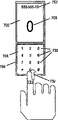
图7A-D示出了根据本发明的被实现为蜂窝电话的轨迹板设备,该蜂窝电话被配置为在电话处于闭合位置时(图7D)搜索地址簿,在打开位置(图7B和7C)拨打电话。因此,配置数据可被用于确定电话是否处于闭合位置,并且如果是,则使得执行地址簿。图7A示出了处于打开位置的根据本发明一个实施例的蜂窝电话700的立体图。图7B和7C示出了处于打开位置的蜂窝电话700的视图。如图7B所示,可以在蜂窝电话700处于打开位置期间通过以手指711或其他工具在阵列元件706的第一侧704上比划(trace)要拨打的电话号码的每个数字来进行电话呼叫。将触摸事件解释为号码或文字可以包括特别适应于识别相对运动(即在触摸屏上拖动工具)以允许做出精细手势的手势软件组件。在比划时在显示屏702上显示所比划的数字的GUI表示708。构成要拨打的电话号码的先前比划的数字的GUI表示707也被显示在显示屏702上。7A-D illustrate a trackpad device according to the present invention implemented as a cellular phone configured to search an address book when the phone is in the closed position (FIG. 7D), and in the open position (FIGS. 7B and 7C). dial number. Thus, the configuration data can be used to determine whether the phone is in the closed position, and if so, cause the address book to be executed. Figure 7A shows a perspective view of a
如图7C所示,电话700上的阵列元件706的第一侧704可以包括被配置为标准电话小键盘的标记(markings)730。这些标记730可相对于LCD显示器或其他偏振光源异相地偏振90度,以便当点亮时略微可见。可替换地,标记可被实现为LED。As shown in FIG. 7C,
可以通过以手指711或其他工具在阵列元件706的第一侧704上的相应标记730上按压732要拨打的电话号码的每个数字来执行电话呼叫。将触摸事件解释为拨打的号码可以包括特别适应于识别大跨距(coarse pitch)、但良好定义的特定输入位置以识别号码选择的手势软件组件。电话700可被配置为在电话处于打开配置时、或在用户激活时等显示标记730和/或使用这些软件组件。当被按压时,所按压的数字的GUI表示708被显示在显示屏702上。构成要拨打的电话号码的先前输入的数字的GUI表示707也被显示在显示屏702上。A telephone call may be performed by pressing 732 with a
图7D示出了处于闭合位置的蜂窝电话700,其中启动了地址簿GUI 712。在闭合位置中,轨迹板元件和显示屏共同作为触摸屏。从地址簿呼叫联系人包括在蜂窝电话700处于闭合位置时选择表示要呼叫的联系人号码的GUI元素,以及在选择之后,启动对所选联系人的电话呼叫。可以通过以手指711或其他工具在联系人718的图形表示的正上方在触摸板716的第二侧上进行按压714,来选择表示要呼叫的联系人的GUI元素。可以通过在滚动按钮图标720之一正上方按压触摸板的第二侧来切换在屏幕上显示地址簿中的哪些联系人。可以通过打开电话以自动发起呼叫、或可替换地通过以手指711或其他工具在“进行呼叫”图标722正上方在触摸板716的第二侧上进行按压724,来发起到所选联系人的电话呼叫。GUI还可适应于使能网络浏览、文档编辑、或触摸屏模式中的其他PDA功能(未示出)。如上所述,电话700可被配置为当电话700处于闭合位置时以特别适应于识别相对运动的手势软件组件解释手势。在可替换方案中,还可以为来自触摸板的第二侧706的任何手势调用这样的软件,或在用户对这样的软件进行选择之后调用这样的软件。Figure 7D shows the
现在参考图8,根据本发明另一实施例的轨迹板设备被结合到个人数字助理(“PDA”)800中,其中该个人数字助理800被配置为需要“打开”配置来访问安全功能或信息。以打开配置示出了PDA800。PDA800被配置为具有如上面参考图7B所示的比划功能,其中轨迹板元件801上的触摸事件被模仿(mimicked)为显示器上的图像。虽然在PDA处于闭合时可以激活比划功能,但是在轨迹板处于打开位置时去激活该比划功能,从而不显示安全(secure)信息。取而代之,代替输入字符而显示非描述性的占位符802。Referring now to FIG. 8, a trackpad device according to another embodiment of the present invention is incorporated into a personal digital assistant ("PDA") 800, wherein the personal
图9A-11B示出了结合在数字媒体播放器(“DMP”)900内的根据本发明的轨迹板设备。DMP900被配置为需要其中元件(例如,处理器元件和半透明面板元件)形成0到15度角的配置来播放媒体文件。图9A-B分别示出了被配置为使得元件形成0度角的DMP 900的立体图和正视图。在元件形成0到15度角之后,DMP 900自动地使能用于播放媒体文件的GUI,包括媒体播放控制902。用户可以通过触摸阵列元件901的第二侧而与触摸屏环境中的GUI交互。9A-11B illustrate a trackpad device in accordance with the present invention incorporated within a digital media player ("DMP") 900 . DMP 900 is configured to require a configuration in which elements (eg, processor element and translucent panel element) form a 0 to 15 degree angle to play media files. 9A-B show a perspective view and a front view, respectively, of a DMP 900 configured such that the elements form an angle of 0 degrees. After the elements form an angle of 0 to 15 degrees, the DMP 900 automatically enables the GUI for playing the media file, including the media playback controls 902. A user can interact with the GUI in a touch screen environment by touching the second side of the array element 901 .
DMP 900还可以被配置为当元件形成15.1到200度角时调整其操作。图10A-B分别示出了被配置为使得元件形成大约120度角的DMP 900的立体图和正视图。在元件形成15.1到200度角之后,DMP900自动使能用于改变设置和配置的GUI,包括设置菜单904。用户可以通过将光标903定位在所希望的菜单选择上,并在阵列元件905的第一侧上执行选择手势而导航GUI。The DMP 900 can also be configured to adjust its operation when elements form an angle of 15.1 to 200 degrees. 10A-B show a perspective view and a front view, respectively, of a DMP 900 configured such that the elements form an angle of approximately 120 degrees. DMP 900 automatically enables the GUI for changing settings and configurations, including settings menu 904, after the elements are angled from 15.1 to 200 degrees. The user can navigate the GUI by positioning the cursor 903 over the desired menu selection, and performing a selection gesture on the first side of the array element 905 .
当DMP 900的元件形成大于大约200度的角度时,可以激活“共享”功能显示,其中在介质-诸如FM无线电、蓝牙(BlueTooth)Wi-Fi或Wi-Max-上广播数字媒体。在这种配置中,通过使用手势,阵列元件901的第二侧可被用于在广播媒体和跳到下一或前一媒体项之间转换。图11A-B分别示出了DMP 900的立体图和屏幕截图,其中元件形成近似260度角。在元件形成大于200的角度之后,DMP900自动使能用于广播数字媒体的共享功能GUI,包括共享菜单906。When the elements of the DMP 900 form an angle greater than about 200 degrees, a "share" function display may be activated where digital media is broadcast on a medium such as FM radio, Bluetooth (BlueTooth) Wi-Fi or Wi-Max. In this configuration, the second side of the array element 901 can be used to toggle between broadcasting media and skipping to the next or previous media item through the use of gestures. 11A-B show a perspective view and a screenshot, respectively, of a DMP 900 with elements forming an angle of approximately 260 degrees. DMP 900 automatically enables the share function GUI for broadcast digital media, including
图12A-13C示出了结合在膝上型计算机1200中的根据本发明的轨迹板设备。膝上型计算机1200被配置为使得当膝上型计算机处于闭合位置时,调用特定功能。由于膝上型计算机具有位于显示屏之上的轨迹板,所以它可被配置为在处于闭合位置期间激活触摸屏模式。该触摸屏模式可以包括更小的显示以节省能量、具有更少和/或更大的图标的显示以有利于在旅行过程中便于闭合的膝上型计算机、或特殊的“移动触摸屏”功能。12A-13C illustrate a trackpad device in accordance with the present invention incorporated into a
图12A-B分别示出了被配置为使得元件形成120度角的膝上型计算机1200的立体图和屏幕截图。膝上型计算机1200可被配置为使得当以160度或更小的角度被打开时,膝上型计算机1200利用显示在显示屏1203上的标准GUI 1202,阵列元件1201的第一侧可被用作键盘或阵列元件,并且膝上型计算机具有通常的膝上型计算机功能。阵列元件的第二侧还可被用于输入,或其可以被去激活。12A-B show a perspective view and a screenshot, respectively, of a
图13A-B分别示出了闭合位置中的膝上型计算机1200的立体图和屏幕截图。在膝上型计算机被闭合之后,膝上型计算机1200自动使能特殊功能,包括具有触摸屏交互的移动GUI 1204。13A-B show a perspective view and a screenshot, respectively, of the
图14A-B分别示出了处于“平躺”配置的膝上型计算机1200的立体图和屏幕截图。膝上型计算机1200被配置为使得当膝上型计算机被打开到大于近似160度的角度时,激活“共享”功能,将显示器180从通常显示平面地旋转180度或“颠倒”(即屏幕1206的“顶部”面对用户和阵列元件,屏幕1208的“底部”面对共享接受者),使得可与桌子对面的人共享信息。阵列元件1201的第一侧可被用作键盘或触摸板。可以实现附加的功能改变,以有利于信息共享,诸如如图14C中所示的分屏中那样,朝向用户取向地呈现某些信息并朝向共享人取向地呈现某些信息。14A-B show a perspective view and a screenshot, respectively, of a
图15A-D示出了根据本发明的具有传统键盘和双面阵列元件的膝上型计算机系统1500。图15A和15B分别示出了处于打开配置的膝上型计算机1500的立体图和屏幕截图。阵列元件1500被定位在键盘1502之下,并且阵列元件的第一侧可被用户用作触摸板。膝上型计算机1500利用显示在显示屏1503上的标准GUI 1504。15A-D illustrate a
图15C和15D分别示出了处于闭合配置的膝上型计算机1500的立体图和屏幕截图。在该配置中,通过在显示在阵列元件1501之下的显示屏部分上的电子邮件图标1508正上方在阵列元件的第二侧上进行按压,膝上型计算机1500自动地使能特殊的受限的“仅电子邮件”功能,包括用户可以在触摸屏模式中与其交互的移动GUI 1506。在某些实现-诸如OLED-中,只有显示屏的在阵列元件1501之下的部分是活动的,从而允许节省能量。虽然此处公开的特殊功能限于检查电子邮件,但是在其他实施例中,如本领域的技术人员会想到的那样,特殊功能可以采用任何形式。15C and 15D show a perspective view and a screenshot, respectively, of
图16A和16B示出了作为外部独立输入设备1600的轨迹板设备。图16A示出了通过连接器缆线1604连接到计算机主机设备1602的输入设备1600。图16B示出了输入设备1600的端视图。所示出的连接器缆线1604是USB缆线,虽然也可以使用其他连接器缆线。主机设备1602可以是传统的桌面计算机、膝上型计算机、工作站、或具有输入输出接口的任何其他计算设备。参考图16B,输入设备1600具有安装在水平基座1608上的电容阵列元件1606,其中电容阵列元件1606具有第一垂直表面1610和相对的第二垂直表面1612。可由阻燃4(“FR-4”)印刷电路板材料或类似的非半透明材料构成这个实现。由输入设备1600将触摸事件转换为计算机事件。主机设备1602解释计算机事件,并且此后基于触摸事件执行操作,从而允许用户与主机设备上的图形用户界面(“GUI”)交互。如上所述,输入设备1600可适应于同时接收来自垂直表面1610和1612二者的输入。如上所述,通过将手势转换为三维中的横向运动以及旋转运动俯仰、偏转、滚动,同时使用(接受并区分)来自输入设备1600两侧的输入就允许六个自由度。该功能使能或增强摇动、翻滚、缩放和选择,并且可以被用于在需要三维操纵的应用-诸如计算机辅助设计(“CAD”)、游戏和多媒体编辑应用-中增加更好的控制和易于使用性。16A and 16B illustrate a trackpad device as an external stand-alone input device 1600 . FIG. 16A shows an input device 1600 connected to a computer host device 1602 via a connector cable 1604 . FIG. 16B shows an end view of input device 1600 . The illustrated connector cable 1604 is a USB cable, although other connector cables could be used. Host device 1602 may be a conventional desktop computer, laptop computer, workstation, or any other computing device with input and output interfaces. Referring to FIG. 16B , an input device 1600 has a capacitive array element 1606 mounted on a
应当理解,可对此处公开的发明概念做出许多修改。这样的修改可以包括电容阵列的实现的修改、处理来自电容阵列的输入的方式的修改、阵列元件相对于显示元件的可配置性的方式和程度的修改、以及响应于可能的配置改变功能的特定方式的修改。就此而言,在这样的修改落如所附权利要求和其等同物的范围内的范围中,它们旨在被本发明覆盖。It should be understood that many modifications may be made to the inventive concepts disclosed herein. Such modifications may include modification of the implementation of the capacitive array, modification of the manner in which input from the capacitive array is processed, modification of the manner and degree of configurability of the array elements relative to the display elements, and specific changes in functionality in response to possible configuration changes. Modification of the method. In this regard, such modifications are intended to be covered by the present invention to the extent they come within the scope of the appended claims and their equivalents.
Claims (36)
Priority Applications (1)
| Application Number | Priority Date | Filing Date | Title |
|---|---|---|---|
| CN201210337058.6A CN102981687B (en) | 2006-09-06 | 2007-09-05 | Dual-sided track pad |
Applications Claiming Priority (3)
| Application Number | Priority Date | Filing Date | Title |
|---|---|---|---|
| US11/470,579 | 2006-09-06 | ||
| US11/470,579 US8471822B2 (en) | 2006-09-06 | 2006-09-06 | Dual-sided track pad |
| PCT/US2007/019551 WO2008030563A2 (en) | 2006-09-06 | 2007-09-05 | Dual-sided track pad |
Related Child Applications (1)
| Application Number | Title | Priority Date | Filing Date |
|---|---|---|---|
| CN201210337058.6A Division CN102981687B (en) | 2006-09-06 | 2007-09-05 | Dual-sided track pad |
Publications (2)
| Publication Number | Publication Date |
|---|---|
| CN101512461A true CN101512461A (en) | 2009-08-19 |
| CN101512461B CN101512461B (en) | 2012-11-07 |
Family
ID=39148271
Family Applications (2)
| Application Number | Title | Priority Date | Filing Date |
|---|---|---|---|
| CN201210337058.6A Expired - Fee Related CN102981687B (en) | 2006-09-06 | 2007-09-05 | Dual-sided track pad |
| CN2007800331905A Expired - Fee Related CN101512461B (en) | 2006-09-06 | 2007-09-05 | double sided trackpad |
Family Applications Before (1)
| Application Number | Title | Priority Date | Filing Date |
|---|---|---|---|
| CN201210337058.6A Expired - Fee Related CN102981687B (en) | 2006-09-06 | 2007-09-05 | Dual-sided track pad |
Country Status (4)
| Country | Link |
|---|---|
| US (1) | US8471822B2 (en) |
| EP (1) | EP2069877B1 (en) |
| CN (2) | CN102981687B (en) |
| WO (1) | WO2008030563A2 (en) |
Cited By (10)
| Publication number | Priority date | Publication date | Assignee | Title |
|---|---|---|---|---|
| CN101996031A (en) * | 2009-08-25 | 2011-03-30 | 鸿富锦精密工业(深圳)有限公司 | Electronic device with touch input function and touch input method thereof |
| CN102402349A (en) * | 2011-10-24 | 2012-04-04 | 友达光电股份有限公司 | Touch control display device |
| CN102668524A (en) * | 2009-11-13 | 2012-09-12 | 诺基亚公司 | Input device for a user interface |
| CN103246320A (en) * | 2012-02-10 | 2013-08-14 | 联想(北京)有限公司 | Terminal device |
| CN103309072A (en) * | 2012-03-14 | 2013-09-18 | 株式会社日本显示器西 | Image display device |
| CN103513709A (en) * | 2012-06-29 | 2014-01-15 | 联想(北京)有限公司 | Electronic device |
| CN103838380A (en) * | 2012-11-20 | 2014-06-04 | 联想(北京)有限公司 | Keyboard and electronic equipment |
| CN103853314A (en) * | 2012-11-28 | 2014-06-11 | 联想(北京)有限公司 | Automatic control method and device |
| WO2014094205A1 (en) * | 2012-12-17 | 2014-06-26 | Intel Corporation | Receiving input from multiple touch sensors |
| CN115113690A (en) * | 2021-03-19 | 2022-09-27 | 翰硕电子股份有限公司 | Dual-mode touch device and dual-mode touch method |
Families Citing this family (88)
| Publication number | Priority date | Publication date | Assignee | Title |
|---|---|---|---|---|
| GB9722766D0 (en) | 1997-10-28 | 1997-12-24 | British Telecomm | Portable computers |
| US7469381B2 (en) | 2007-01-07 | 2008-12-23 | Apple Inc. | List scrolling and document translation, scaling, and rotation on a touch-screen display |
| US7487444B2 (en) | 2002-03-19 | 2009-02-03 | Aol Llc | Reformatting columns of content for display |
| EP2109046A1 (en) | 2008-04-07 | 2009-10-14 | ExB Asset Management GmbH | Predictive text input system and method involving two concurrent ranking means |
| US8374846B2 (en) | 2005-05-18 | 2013-02-12 | Neuer Wall Treuhand Gmbh | Text input device and method |
| US8036878B2 (en) | 2005-05-18 | 2011-10-11 | Never Wall Treuhand GmbH | Device incorporating improved text input mechanism |
| US9606634B2 (en) | 2005-05-18 | 2017-03-28 | Nokia Technologies Oy | Device incorporating improved text input mechanism |
| US8471822B2 (en) | 2006-09-06 | 2013-06-25 | Apple Inc. | Dual-sided track pad |
| US7920129B2 (en) * | 2007-01-03 | 2011-04-05 | Apple Inc. | Double-sided touch-sensitive panel with shield and drive combined layer |
| US7844915B2 (en) | 2007-01-07 | 2010-11-30 | Apple Inc. | Application programming interfaces for scrolling operations |
| US10133317B2 (en) * | 2007-04-27 | 2018-11-20 | Hewlett-Packard Development Company, L.P. | Computing device with multiple displays |
| US8707215B2 (en) | 2007-12-31 | 2014-04-22 | Motorola Mobility Llc | Hand-held device and method for operating a single pointer touch sensitive user interface |
| US8265688B2 (en) | 2007-12-31 | 2012-09-11 | Motorola Mobility Llc | Wireless communication device and split touch sensitive user input surface |
| US8205157B2 (en) | 2008-03-04 | 2012-06-19 | Apple Inc. | Methods and graphical user interfaces for conducting searches on a portable multifunction device |
| JP4816668B2 (en) * | 2008-03-28 | 2011-11-16 | ソニー株式会社 | Display device with touch sensor |
| US8054391B2 (en) | 2008-03-28 | 2011-11-08 | Motorola Mobility, Inc. | Semi-transparent display apparatus |
| KR101485392B1 (en) * | 2008-06-19 | 2015-01-23 | 엘지전자 주식회사 | Mobile terminal |
| US20090322690A1 (en) * | 2008-06-30 | 2009-12-31 | Nokia Corporation | Screen display |
| US9519857B2 (en) * | 2008-06-30 | 2016-12-13 | Nokia Technologies Oy | Apparatus and method for sensing characterizing features of a deformable structure |
| TWI386843B (en) * | 2008-07-03 | 2013-02-21 | Wistron Corp | Method and system for dividing a screen display zone, and a computer program product |
| US8436816B2 (en) | 2008-10-24 | 2013-05-07 | Apple Inc. | Disappearing button or slider |
| KR101521932B1 (en) * | 2009-01-19 | 2015-05-20 | 엘지전자 주식회사 | Terminal and method for controlling the same |
| US8589374B2 (en) | 2009-03-16 | 2013-11-19 | Apple Inc. | Multifunction device with integrated search and application selection |
| CN102356374A (en) * | 2009-03-17 | 2012-02-15 | 日本电气株式会社 | Input device for portable electronic device, control method therfor, and program |
| US8493364B2 (en) | 2009-04-30 | 2013-07-23 | Motorola Mobility Llc | Dual sided transparent display module and portable electronic device incorporating the same |
| KR101587211B1 (en) * | 2009-05-25 | 2016-01-20 | 엘지전자 주식회사 | Mobile Terminal And Method Of Controlling Same |
| US8265717B2 (en) | 2009-06-26 | 2012-09-11 | Motorola Mobility Llc | Implementation of touchpad on rear surface of single-axis hinged device |
| US20100328223A1 (en) * | 2009-06-30 | 2010-12-30 | Nokia Corporation | Apparatus and associated methods |
| US8928551B2 (en) * | 2009-07-07 | 2015-01-06 | Village Green Technologies, LLC | Multiple displays for a portable electronic device and a method of use |
| US8462126B2 (en) | 2009-07-20 | 2013-06-11 | Motorola Mobility Llc | Method for implementing zoom functionality on a portable device with opposing touch sensitive surfaces |
| US8497884B2 (en) | 2009-07-20 | 2013-07-30 | Motorola Mobility Llc | Electronic device and method for manipulating graphic user interface elements |
| DE102010026291B4 (en) * | 2009-08-06 | 2024-08-22 | Volkswagen Ag | Motor vehicle |
| CN102063868B (en) * | 2009-11-12 | 2013-08-07 | 鸿富锦精密工业(深圳)有限公司 | Electronic device with backlight control and control method thereof |
| DE102009056186B4 (en) * | 2009-11-27 | 2012-04-19 | Audi Ag | Operating device in a motor vehicle |
| US20110242750A1 (en) * | 2010-04-01 | 2011-10-06 | Oakley Nicholas W | Accessible display in device with closed lid |
| JP5527811B2 (en) * | 2010-04-20 | 2014-06-25 | Necカシオモバイルコミュニケーションズ株式会社 | Terminal device and program |
| US9891820B2 (en) * | 2010-04-23 | 2018-02-13 | Handscape Inc. | Method for controlling a virtual keyboard from a touchpad of a computerized device |
| US8754854B1 (en) | 2010-09-28 | 2014-06-17 | Google Inc. | Keyboard integrated with trackpad |
| US9430122B2 (en) | 2010-10-01 | 2016-08-30 | Z124 | Secondary single screen mode activation through off-screen gesture area activation |
| US9612743B2 (en) | 2011-01-05 | 2017-04-04 | Autodesk, Inc. | Multi-touch integrated desktop environment |
| US8988366B2 (en) * | 2011-01-05 | 2015-03-24 | Autodesk, Inc | Multi-touch integrated desktop environment |
| US9600090B2 (en) | 2011-01-05 | 2017-03-21 | Autodesk, Inc. | Multi-touch integrated desktop environment |
| US8878746B2 (en) * | 2011-02-23 | 2014-11-04 | Corning Incorporated | Multi-screen electronic device with mechanism for transitioning between compact and expanded forms |
| FR2976688B1 (en) | 2011-06-16 | 2021-04-23 | Nanotec Solution | DEVICE AND METHOD FOR GENERATING AN ELECTRICAL POWER SUPPLY IN AN ELECTRONIC SYSTEM WITH A VARIABLE REFERENCE POTENTIAL. |
| KR101802760B1 (en) | 2011-06-27 | 2017-12-28 | 엘지전자 주식회사 | Mobile terminal and method for controlling thereof |
| US8878794B2 (en) * | 2011-09-27 | 2014-11-04 | Z124 | State of screen info: easel |
| US9292116B2 (en) * | 2011-11-21 | 2016-03-22 | Microsoft Technology Licensing, Llc | Customizing operation of a touch screen |
| FR2985049B1 (en) | 2011-12-22 | 2014-01-31 | Nanotec Solution | CAPACITIVE MEASURING DEVICE WITH SWITCHED ELECTRODES FOR TOUCHLESS CONTACTLESS INTERFACES |
| US9244572B2 (en) * | 2012-05-04 | 2016-01-26 | Blackberry Limited | Electronic device including touch-sensitive display and method of detecting touches |
| TW201346662A (en) * | 2012-05-09 | 2013-11-16 | Wintek Corp | Touch-sensing device and driving method thereof |
| US9292114B2 (en) * | 2012-05-31 | 2016-03-22 | Intel Corporation | Dual touch surface multiple function input device |
| USD701501S1 (en) | 2012-05-31 | 2014-03-25 | Intel Corporation | Electronic computer with an at least partially transparent input device |
| USD694232S1 (en) | 2012-05-31 | 2013-11-26 | Intel Corporation | Electronic computer with partially transparent input device |
| USD698778S1 (en) | 2012-05-31 | 2014-02-04 | Intel Corporation | Electronic computer with an at least partially transparent input device |
| US9423895B2 (en) * | 2012-05-31 | 2016-08-23 | Intel Corporation | Dual touch surface multiple function input device |
| USD691995S1 (en) | 2012-05-31 | 2013-10-22 | Intel Corporation | Electronic computer with partially transparent input device |
| USD698350S1 (en) | 2012-05-31 | 2014-01-28 | Intel Corporation | Electronic computer with an at least partially transparent input device |
| US8994661B2 (en) | 2012-06-29 | 2015-03-31 | Google Technology Holdings LLC | User interface device having capacitive trackball assembly |
| US9081542B2 (en) | 2012-08-28 | 2015-07-14 | Google Technology Holdings LLC | Systems and methods for a wearable touch-sensitive device |
| USD719540S1 (en) * | 2012-11-09 | 2014-12-16 | Samsung Display Co., Ltd. | Mobile phone |
| DE112013000403T5 (en) * | 2012-12-28 | 2014-11-20 | Intel Corporation | Computer with dual configuration |
| CN103235662B (en) * | 2013-04-18 | 2018-09-14 | 广东欧珀移动通信有限公司 | Method and terminal for realizing automatic switching of input modes |
| FR3008809B1 (en) | 2013-07-18 | 2017-07-07 | Fogale Nanotech | CUSTOM ACCESSORY DEVICE FOR AN ELECTRONIC AND / OR COMPUTER APPARATUS, AND APPARATUS EQUIPPED WITH SUCH AN ACCESSORY DEVICE |
| GB2518627A (en) | 2013-09-25 | 2015-04-01 | Nokia Technologies Oy | An apparatus |
| USD741318S1 (en) | 2013-10-25 | 2015-10-20 | Intel Corporation | Electronic device with a window |
| US9292141B2 (en) | 2013-10-30 | 2016-03-22 | Apple Inc. | Double sided touch sensor on transparent substrate |
| US9436304B1 (en) * | 2013-11-01 | 2016-09-06 | Google Inc. | Computer with unified touch surface for input |
| US9436324B2 (en) | 2013-11-04 | 2016-09-06 | Blackberry Limited | Electronic device including touch-sensitive display and method of detecting touches |
| FR3013472B1 (en) | 2013-11-19 | 2016-07-08 | Fogale Nanotech | COVERING ACCESSORY DEVICE FOR AN ELECTRONIC AND / OR COMPUTER PORTABLE APPARATUS, AND APPARATUS EQUIPPED WITH SUCH AN ACCESSORY DEVICE |
| TWI536239B (en) | 2014-10-27 | 2016-06-01 | 緯創資通股份有限公司 | Touch apparatus and touch method |
| CN104407761A (en) * | 2014-12-16 | 2015-03-11 | 京东方科技集团股份有限公司 | Touch display panel, driving method of touch display panel and touch display device |
| KR101776803B1 (en) | 2016-03-15 | 2017-09-19 | 현대자동차주식회사 | Control apparatus using touch and vehicle comprising the same |
| US10564674B2 (en) * | 2016-09-01 | 2020-02-18 | Sharp Kabushiki Kaisha | Information processing device |
| JP1572770S (en) * | 2016-09-30 | 2017-03-27 | ||
| US20200057509A1 (en) * | 2016-10-07 | 2020-02-20 | Hewlett-Packard Development Company, L.P. | User-input devices |
| US10633910B2 (en) | 2018-05-16 | 2020-04-28 | Ford Global Technologies, Llc | Vehicle door having variable speed power assist |
| US10378254B1 (en) | 2018-05-16 | 2019-08-13 | Ford Global Technologies, Llc | Vehicle door handle having proximity sensors for door control and keypad |
| US11078691B2 (en) | 2018-06-26 | 2021-08-03 | Ford Global Technologies, Llc | Deployable vehicle door handle |
| US10435924B1 (en) | 2018-06-26 | 2019-10-08 | Ford Global Technologies, Llc | Vehicle door handle having ice handling |
| TWD198215S (en) * | 2018-08-31 | 2019-06-21 | 宏碁股份有限公司 | Notebook computer |
| US11347367B2 (en) | 2019-01-18 | 2022-05-31 | Dell Products L.P. | Information handling system see do user interface management |
| US11009907B2 (en) | 2019-01-18 | 2021-05-18 | Dell Products L.P. | Portable information handling system user interface selection based on keyboard configuration |
| US10633895B1 (en) | 2019-02-26 | 2020-04-28 | Ford Global Technologies, Llc | Deployable vehicle door handle having lighting |
| USD955381S1 (en) * | 2019-08-08 | 2022-06-21 | Semiconductor Energy Laboratory Co., Ltd. | Portable information terminal |
| USD996423S1 (en) | 2019-02-28 | 2023-08-22 | Semiconductor Energy Laboratory Co., Ltd. | Portable information terminal |
| USD954703S1 (en) * | 2019-03-08 | 2022-06-14 | Semiconductor Energy Laboratory Co., Ltd. | Portable information terminal |
| CN111273808B (en) * | 2020-01-08 | 2021-07-27 | 深圳市鸿合创新信息技术有限责任公司 | Transparent double-sided touch display method and display system |
| US11504610B2 (en) | 2020-02-14 | 2022-11-22 | Valve Corporation | Dynamically enabling or disabling controls of a controller |
Family Cites Families (33)
| Publication number | Priority date | Publication date | Assignee | Title |
|---|---|---|---|---|
| US5483261A (en) | 1992-02-14 | 1996-01-09 | Itu Research, Inc. | Graphical input controller and method with rear screen image detection |
| US5880411A (en) | 1992-06-08 | 1999-03-09 | Synaptics, Incorporated | Object position detector with edge motion feature and gesture recognition |
| US5488204A (en) | 1992-06-08 | 1996-01-30 | Synaptics, Incorporated | Paintbrush stylus for capacitive touch sensor pad |
| GB2299394A (en) | 1995-03-31 | 1996-10-02 | Frazer Concepts Ltd | Computer input devices |
| US5825352A (en) | 1996-01-04 | 1998-10-20 | Logitech, Inc. | Multiple fingers contact sensing method for emulating mouse buttons and mouse operations on a touch sensor pad |
| US5835079A (en) | 1996-06-13 | 1998-11-10 | International Business Machines Corporation | Virtual pointing device for touchscreens |
| US6009153A (en) * | 1997-05-23 | 1999-12-28 | Lucent Technologies Inc. | Electronic devices and programming methods therefor |
| US6310610B1 (en) | 1997-12-04 | 2001-10-30 | Nortel Networks Limited | Intelligent touch display |
| US7800592B2 (en) | 2005-03-04 | 2010-09-21 | Apple Inc. | Hand held electronic device with multiple touch sensing devices |
| US20060033724A1 (en) | 2004-07-30 | 2006-02-16 | Apple Computer, Inc. | Virtual input device placement on a touch screen user interface |
| US7844914B2 (en) | 2004-07-30 | 2010-11-30 | Apple Inc. | Activating virtual keys of a touch-screen virtual keyboard |
| US7614008B2 (en) | 2004-07-30 | 2009-11-03 | Apple Inc. | Operation of a computer with touch screen interface |
| US8479122B2 (en) | 2004-07-30 | 2013-07-02 | Apple Inc. | Gestures for touch sensitive input devices |
| US7663607B2 (en) * | 2004-05-06 | 2010-02-16 | Apple Inc. | Multipoint touchscreen |
| KR100595924B1 (en) | 1998-01-26 | 2006-07-05 | 웨인 웨스터만 | Method and apparatus for integrating manual input |
| US6188391B1 (en) | 1998-07-09 | 2001-02-13 | Synaptics, Inc. | Two-layer capacitive touchpad and method of making same |
| JP4542637B2 (en) | 1998-11-25 | 2010-09-15 | セイコーエプソン株式会社 | Portable information device and information storage medium |
| GB2348075A (en) | 1999-03-17 | 2000-09-20 | Motorola Inc | Mobile telephone incorporating a keyless input device system operable when phone is open or closed |
| EP2270633A1 (en) | 2000-10-24 | 2011-01-05 | Nokia Corp. | Touchpad |
| US6760015B2 (en) * | 2000-10-31 | 2004-07-06 | Nokia Corporation | Double-sided keyboard for use in an electronic device |
| JP3800984B2 (en) | 2001-05-21 | 2006-07-26 | ソニー株式会社 | User input device |
| JP2003067128A (en) | 2001-08-30 | 2003-03-07 | Sharp Corp | Information processing apparatus having pad-type pointing device |
| JP2003173237A (en) | 2001-09-28 | 2003-06-20 | Ricoh Co Ltd | Information input / output system, program and storage medium |
| US7046230B2 (en) | 2001-10-22 | 2006-05-16 | Apple Computer, Inc. | Touch pad handheld device |
| US6690387B2 (en) | 2001-12-28 | 2004-02-10 | Koninklijke Philips Electronics N.V. | Touch-screen image scrolling system and method |
| US11275405B2 (en) | 2005-03-04 | 2022-03-15 | Apple Inc. | Multi-functional hand-held device |
| KR100494474B1 (en) | 2003-01-14 | 2005-06-10 | 삼성전기주식회사 | Camera module and method for making the same |
| US7010333B2 (en) * | 2003-02-19 | 2006-03-07 | Sony Ericsson Mobile Communications Ab | Radiotelephone terminal with dual-sided keypad apparatus |
| GB0313808D0 (en) * | 2003-06-14 | 2003-07-23 | Binstead Ronald P | Improvements in touch technology |
| US20060181517A1 (en) | 2005-02-11 | 2006-08-17 | Apple Computer, Inc. | Display actuator |
| US7280346B2 (en) * | 2003-09-29 | 2007-10-09 | Danger, Inc. | Adjustable display for a data processing apparatus |
| CN100589500C (en) | 2003-11-21 | 2010-02-10 | 诺基亚有限公司 | A communication device and its operating method |
| US8471822B2 (en) | 2006-09-06 | 2013-06-25 | Apple Inc. | Dual-sided track pad |
-
2006
- 2006-09-06 US US11/470,579 patent/US8471822B2/en not_active Expired - Fee Related
-
2007
- 2007-09-05 CN CN201210337058.6A patent/CN102981687B/en not_active Expired - Fee Related
- 2007-09-05 WO PCT/US2007/019551 patent/WO2008030563A2/en not_active Ceased
- 2007-09-05 CN CN2007800331905A patent/CN101512461B/en not_active Expired - Fee Related
- 2007-09-05 EP EP07811703.3A patent/EP2069877B1/en not_active Not-in-force
Cited By (20)
| Publication number | Priority date | Publication date | Assignee | Title |
|---|---|---|---|---|
| CN101996031A (en) * | 2009-08-25 | 2011-03-30 | 鸿富锦精密工业(深圳)有限公司 | Electronic device with touch input function and touch input method thereof |
| CN102668524B (en) * | 2009-11-13 | 2015-09-09 | 诺基亚公司 | For the input equipment of user interface |
| CN102668524A (en) * | 2009-11-13 | 2012-09-12 | 诺基亚公司 | Input device for a user interface |
| CN102402349A (en) * | 2011-10-24 | 2012-04-04 | 友达光电股份有限公司 | Touch control display device |
| CN102402349B (en) * | 2011-10-24 | 2014-05-14 | 友达光电股份有限公司 | Touch control display device |
| CN103246320A (en) * | 2012-02-10 | 2013-08-14 | 联想(北京)有限公司 | Terminal device |
| CN103246320B (en) * | 2012-02-10 | 2016-12-14 | 联想(北京)有限公司 | Terminal unit |
| CN103309072B (en) * | 2012-03-14 | 2017-09-08 | 株式会社日本显示器 | Image display device |
| TWI492113B (en) * | 2012-03-14 | 2015-07-11 | Japan Display Inc | Image display device |
| US9495044B2 (en) | 2012-03-14 | 2016-11-15 | Japan Display Inc. | Image display device |
| CN103309072A (en) * | 2012-03-14 | 2013-09-18 | 株式会社日本显示器西 | Image display device |
| CN103513709A (en) * | 2012-06-29 | 2014-01-15 | 联想(北京)有限公司 | Electronic device |
| CN103838380A (en) * | 2012-11-20 | 2014-06-04 | 联想(北京)有限公司 | Keyboard and electronic equipment |
| CN103838380B (en) * | 2012-11-20 | 2017-12-26 | 联想(北京)有限公司 | A kind of keyboard and a kind of electronic equipment |
| CN103853314A (en) * | 2012-11-28 | 2014-06-11 | 联想(北京)有限公司 | Automatic control method and device |
| CN103853314B (en) * | 2012-11-28 | 2017-09-29 | 联想(北京)有限公司 | A kind of method and device automatically controlled |
| WO2014094205A1 (en) * | 2012-12-17 | 2014-06-26 | Intel Corporation | Receiving input from multiple touch sensors |
| CN104956316A (en) * | 2012-12-17 | 2015-09-30 | 英特尔公司 | Receiving input from multiple touch sensors |
| US10691234B2 (en) | 2012-12-17 | 2020-06-23 | Intel Corporation | Receiving input from multiple touch sensors |
| CN115113690A (en) * | 2021-03-19 | 2022-09-27 | 翰硕电子股份有限公司 | Dual-mode touch device and dual-mode touch method |
Also Published As
| Publication number | Publication date |
|---|---|
| WO2008030563A3 (en) | 2008-06-05 |
| EP2069877A2 (en) | 2009-06-17 |
| CN102981687A (en) | 2013-03-20 |
| US8471822B2 (en) | 2013-06-25 |
| EP2069877B1 (en) | 2018-10-24 |
| CN101512461B (en) | 2012-11-07 |
| WO2008030563A2 (en) | 2008-03-13 |
| CN102981687B (en) | 2015-08-05 |
| US20120235949A1 (en) | 2012-09-20 |
Similar Documents
| Publication | Publication Date | Title |
|---|---|---|
| CN101512461B (en) | double sided trackpad | |
| JP6321113B2 (en) | Handheld electronic device with multi-touch sensing device | |
| US9058099B2 (en) | Touch screen device and operating method thereof | |
| CN101133385B (en) | Handheld electronic device, handheld device and method of operation thereof | |
| US6335725B1 (en) | Method of partitioning a touch screen for data input | |
| CN1198204C (en) | Device with touch screen using connected external apparatus for displaying information, and method thereof | |
| CN101763200B (en) | Large size capacitive touch screen panel | |
| US20050162402A1 (en) | Methods of interacting with a computer using a finger(s) touch sensing input device with visual feedback | |
| KR101149980B1 (en) | Touch sensor for a display screen of an electronic device | |
| EP3557398A1 (en) | Method, apparatus, storage medium, and electronic device of processing split screen display | |
| US20160070351A1 (en) | User interfaces and associated methods | |
| CN102035934A (en) | Dual-screen portable electronic equipment and management method | |
| CN101739124A (en) | Hand-held electronic device capable of switching into multiple peripheral modes | |
| CN102043434A (en) | Electronic product, control device for electronic product and control method thereof | |
| US20090135156A1 (en) | Touch sensor for a display screen of an electronic device | |
| US20140085340A1 (en) | Method and electronic device for manipulating scale or rotation of graphic on display | |
| GB2445198A (en) | Touch control input system | |
| CN107544712A (en) | A kind of cover-plate glass, cover-plate glass preparation method and mobile terminal | |
| CN116560521A (en) | Pressure gestures | |
| CN101246404A (en) | Dual-mode touch input method and device | |
| HK1132343A (en) | Touch sensor for a display screen of an electronic device |
Legal Events
| Date | Code | Title | Description |
|---|---|---|---|
| C06 | Publication | ||
| PB01 | Publication | ||
| C10 | Entry into substantive examination | ||
| SE01 | Entry into force of request for substantive examination | ||
| C14 | Grant of patent or utility model | ||
| GR01 | Patent grant | ||
| CF01 | Termination of patent right due to non-payment of annual fee | ||
| CF01 | Termination of patent right due to non-payment of annual fee |
Granted publication date: 20121107 Termination date: 20160905 |