CN101320303B - Information processing device, information processing method, and computer program - Google Patents
Information processing device, information processing method, and computer program Download PDFInfo
- Publication number
- CN101320303B CN101320303B CN2008101099216A CN200810109921A CN101320303B CN 101320303 B CN101320303 B CN 101320303B CN 2008101099216 A CN2008101099216 A CN 2008101099216A CN 200810109921 A CN200810109921 A CN 200810109921A CN 101320303 B CN101320303 B CN 101320303B
- Authority
- CN
- China
- Prior art keywords
- pressure
- push button
- virtual push
- virtual
- virtual button
- Prior art date
- Legal status (The legal status is an assumption and is not a legal conclusion. Google has not performed a legal analysis and makes no representation as to the accuracy of the status listed.)
- Expired - Fee Related
Links
Images


Classifications
-
- G—PHYSICS
- G06—COMPUTING OR CALCULATING; COUNTING
- G06F—ELECTRIC DIGITAL DATA PROCESSING
- G06F3/00—Input arrangements for transferring data to be processed into a form capable of being handled by the computer; Output arrangements for transferring data from processing unit to output unit, e.g. interface arrangements
- G06F3/01—Input arrangements or combined input and output arrangements for interaction between user and computer
- G06F3/048—Interaction techniques based on graphical user interfaces [GUI]
- G06F3/0487—Interaction techniques based on graphical user interfaces [GUI] using specific features provided by the input device, e.g. functions controlled by the rotation of a mouse with dual sensing arrangements, or of the nature of the input device, e.g. tap gestures based on pressure sensed by a digitiser
- G06F3/0488—Interaction techniques based on graphical user interfaces [GUI] using specific features provided by the input device, e.g. functions controlled by the rotation of a mouse with dual sensing arrangements, or of the nature of the input device, e.g. tap gestures based on pressure sensed by a digitiser using a touch-screen or digitiser, e.g. input of commands through traced gestures
- G06F3/04886—Interaction techniques based on graphical user interfaces [GUI] using specific features provided by the input device, e.g. functions controlled by the rotation of a mouse with dual sensing arrangements, or of the nature of the input device, e.g. tap gestures based on pressure sensed by a digitiser using a touch-screen or digitiser, e.g. input of commands through traced gestures by partitioning the display area of the touch-screen or the surface of the digitising tablet into independently controllable areas, e.g. virtual keyboards or menus
Landscapes
- Engineering & Computer Science (AREA)
- General Engineering & Computer Science (AREA)
- Theoretical Computer Science (AREA)
- Human Computer Interaction (AREA)
- Physics & Mathematics (AREA)
- General Physics & Mathematics (AREA)
- User Interface Of Digital Computer (AREA)
- Position Input By Displaying (AREA)
Abstract
公开了一种信息处理装置、信息处理方法和计算机程序,包括:操作输入单元,其包括具有对其可变设置的虚拟按钮的操作表面;位置检测单元,其检测用户是否触摸或几乎触摸操作输入单元的操作表面和用户触摸或几乎触摸其操作表面的位置;和压力检测单元,其检测通过用户触摸其操作表面施加的压力。处理装置还包括虚拟按钮控制单元,当位置检测单元已经检测用户触摸或几乎触摸其操作表面的位置时,其将对应于检测位置的虚拟按钮解释为选择的虚拟按钮,并且当检测的压力等于或大于第一阈值时,校正虚拟按钮的布局,使得选择的虚拟按钮的尺寸根据检测的压力的强度放大。
Disclosed are an information processing device, an information processing method, and a computer program, including: an operation input unit including an operation surface having virtual buttons variably provided thereto; a position detection unit that detects whether a user touches or almost touches the operation input an operation surface of the unit and a position where the user touches or almost touches the operation surface thereof; and a pressure detection unit which detects pressure applied by the user touching the operation surface thereof. The processing device further includes a virtual button control unit that interprets the virtual button corresponding to the detected position as a selected virtual button when the position detection unit has detected a position where the user touches or nearly touches its operating surface, and when the detected pressure is equal to or When it is greater than the first threshold, the layout of the virtual buttons is corrected so that the size of the selected virtual button is enlarged according to the intensity of the detected pressure.
Description
技术领域technical field
本发明涉及具有输入设备的信息处理装置、其信息处理方法及其计算机程序,用户经由该输入设备,通过手指触摸、几乎触摸和按压其操作表面来输入数据。The present invention relates to an information processing apparatus having an input device via which a user inputs data by touching, almost touching, and pressing an operation surface thereof with a finger, an information processing method thereof, and a computer program thereof.
背景技术Background technique
用于将数据输入到信息处理装置的已知输入设备的实例包括:个人计算机、键盘、鼠标、触摸垫、绘图板、触摸面板、操纵杆和跟踪球。Examples of known input devices for inputting data to an information processing apparatus include personal computers, keyboards, mice, touch pads, drawing tablets, touch panels, joysticks, and trackballs.
这些输入设备已经在尺寸缩减、便利其操作等方面改进。These input devices have been improved in size reduction, ease of operation thereof, and the like.
例如日本未审核专利申请公开号2005-18669公开了一种触摸面板,其利用静电电容触摸,其中根据随触摸区的尺寸的静电电容的变化检测伪按压。For example, Japanese Unexamined Patent Application Publication No. 2005-18669 discloses a touch panel using electrostatic capacitance touch in which a false press is detected from a change in electrostatic capacitance with the size of a touch area.
另外,日本未审专利申请公开号2005-38812公开了例如一种包括按压作用力传感器的输入设备,配置其以基于按压作用力的大小改变具有高精确度的输入得分。In addition, Japanese Unexamined Patent Application Publication No. 2005-38812 discloses, for example, an input device including a pressing force sensor configured to change an input score with high accuracy based on the magnitude of the pressing force.
此外,日本未审专利申请公开号2003-223265公开了一种输入设备,配置其以检测例如按钮是否被触摸、几乎触摸和按压。Furthermore, Japanese Unexamined Patent Application Publication No. 2003-223265 discloses an input device configured to detect, for example, whether a button is touched, almost touched, and pressed.
在该输入设备中,在检测按钮是否被触摸、几乎触摸和按压时选择按钮。然后,例如当选择在与输入设备连接的显示设备的屏幕上显示的一个软按钮时,选择的软按钮突出。In this input device, a button is selected while detecting whether the button is touched, almost touched, and pressed. Then, for example, when one of the soft buttons displayed on the screen of the display device connected to the input device is selected, the selected soft button is highlighted.
此外,用户用手指按压按钮以施加压力,执行分配到屏幕上的软按钮和选择的按钮的功能。In addition, the user presses the button with a finger to apply pressure, performing the function assigned to the soft button and the selected button on the screen.
发明内容Contents of the invention
在上述日本公开号2003-223265中描述的输入设备包括多个物理按钮对齐的结构。The input device described in the aforementioned Japanese Laid-Open Publication No. 2003-223265 includes a structure in which a plurality of physical buttons are aligned.
与具有该结构的输入设备相比,输入设备还可以包括具有触摸面板、触摸垫等而不是物理按钮的结构,其操作表面由用户看不见的边界划分,划分范围用作虚拟按钮,通过其用户能够输入数据。Compared with the input device having this structure, the input device may also include a structure having a touch panel, a touch pad, etc. instead of physical buttons, the operation surface of which is divided by a boundary invisible to the user, and the divided range is used as a virtual button, through which the user able to enter data.
根据该结构,虚拟按钮分别检测按钮是否被触摸、几乎触摸或按压。According to this structure, the virtual buttons respectively detect whether the button is touched, almost touched or pressed.
当在显示屏上观看GUI(图形用户界面)时,用户能够在输入设备的操作表面上用他的/她的手指(触摸或按压)操作GUI。When viewing a GUI (Graphical User Interface) on a display screen, the user can operate the GUI with his/her finger (touch or press) on the operation surface of the input device.
然而,在使用该虚拟按钮的输入设备中,当手指位置靠近当前活动的按钮区的边界时,在施加压力时问题可能产生。However, in an input device using the virtual button, when the finger position is close to the border of the currently active button area, a problem may arise when applying pressure.
也就是说,由于施加压力时在输入设备上的手指的接触表面增加并且移动,因此解释的(interpreted)手指位置能够在用户没有连续运动的情况下移动到邻近的按钮区。That is, as the contact surface of the finger on the input device increases and moves when pressure is applied, the interpreted finger position can move to adjacent button areas without continuous motion by the user.
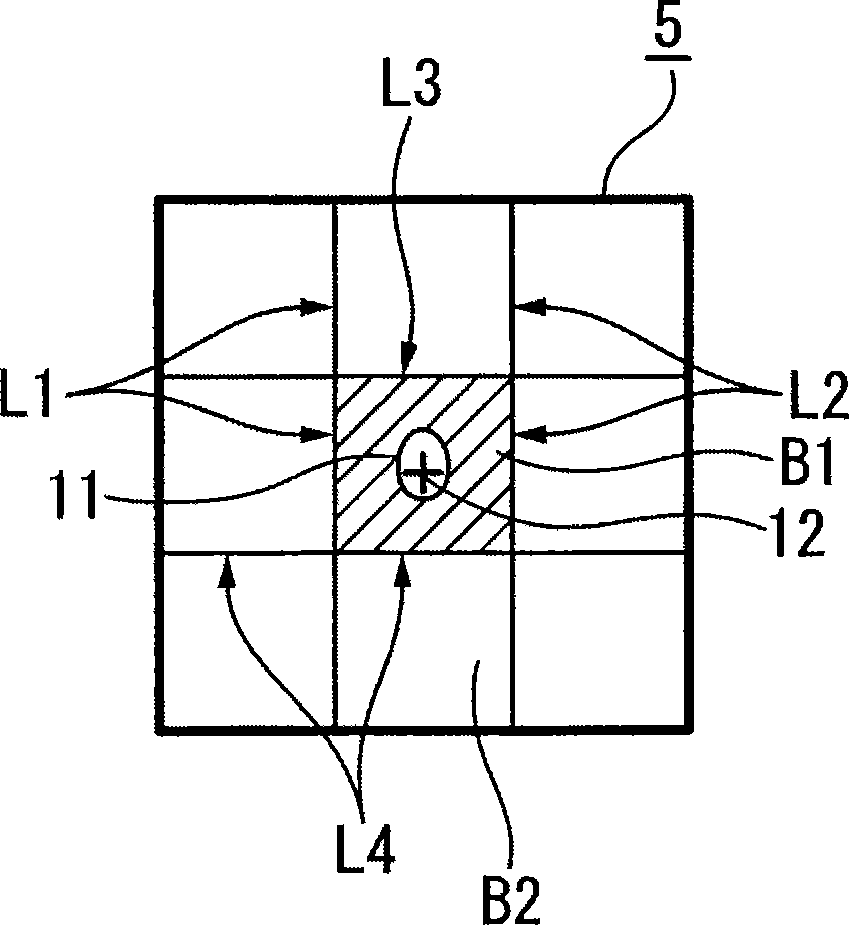
参照图1A和1B,该手指的运动描述如下。Referring to Figures 1A and 1B, the movement of the finger is described as follows.
当用户只用他的/她的手指触摸输入设备的操作表面而不施加压力时,对手指的触摸区S相对小,如图1所示。When the user only touches the operation surface of the input device with his/her finger without applying pressure, the touch area S for the finger is relatively small, as shown in FIG. 1 .
因而,即使手指在靠近期望的虚拟按钮B1的边界触摸,如图1A所示,触摸区S也在期望的虚拟按钮B1的范围内。基于触摸区S的位置的检测解释的手指的位置P(图中标记为“+”)也在选择的希望虚拟按钮B1的范围内,而且如图中阴影区所示,按钮B1被激活,并且执行对应的功能。Thus, even if the finger touches near the border of the desired virtual button B1, as shown in FIG. 1A, the touch area S is within the range of the desired virtual button B1. The position P of the finger based on the detection interpretation of the position of the touch area S (marked as "+" in the figure) is also within the range of the desired virtual button B1 selected, and as shown in the shaded area in the figure, the button B1 is activated, and Execute the corresponding function.
另一方面,随着用手指连续施加压力,手指的触摸区S增加。同时,随着用户弯曲他的/她的指尖,触摸区S的中心位置移动。On the other hand, as pressure is continuously applied with the finger, the touch area S of the finger increases. At the same time, as the user bends his/her fingertip, the center position of the touch area S moves.
因而,如果对手指施加相对强的压力,那么如图1B所示,触摸区S穿过期望的虚拟按钮B1的范围的边界L,延伸到邻近的按钮B2的范围,并且触摸区S的中心位置也移动到邻近的按钮B2的范围。因此,基于触摸区S的位置的检测解释的手指的位置P(图中标记为“+”)也从虚拟按钮B1的范围移动到邻近的按钮B2的范围,并且如图中阴影区所示,邻近的按钮B被激活,并且执行对应的功能。Thus, if a relatively strong pressure is applied to the finger, then as shown in FIG. Also moves to the range of the adjacent button B2. Therefore, the position P of the finger based on the detection interpretation of the position of the touch area S (marked as "+" in the figure) also moves from the range of the virtual button B1 to the range of the adjacent button B2, and as shown in the shaded area in the figure, The adjacent button B is activated and performs the corresponding function.
因此,用户可能激活意外的功能。Therefore, users may activate unintended functions.
已经进行尝试,以提供利用能够阻止用户不意图的功能的激活的输入设备的信息处理装置、其信息处理方法和其计算机程序。Attempts have been made to provide an information processing apparatus utilizing an input device capable of preventing activation of a function not intended by a user, an information processing method thereof, and a computer program thereof.
根据本发明的实施例,一种信息处理装置包括操作输入单元,该操作输入单元包括虚拟按钮在其中可变设置的操作表面。配置位置检测单元以检测用户是否触摸或几乎触摸操作输入单元的操作表面,并且检测在操作输入单元的操作表面中触摸或几乎触摸区的位置。配置压力检测单元以检测通过用户用手指触摸操作输入单元的操作表面施加的压力。配置虚拟按钮控制单元以当位置检测单元已经检测用户用手指触摸或几乎触摸操作输入单元的操作表面的位置时,将对应于检测的位置的虚拟按钮解释为选择的虚拟按钮,并且当由压力检测单元检测的压力等于或大于第一阈值时,校正虚拟按钮的布局,使得选择的虚拟按钮的尺寸根据检测的压力的强度放大。According to an embodiment of the present invention, an information processing apparatus includes an operation input unit including an operation surface in which virtual buttons are variably arranged. The position detection unit is configured to detect whether the user touches or nearly touches the operation surface of the operation input unit, and detects a position of the touched or nearly touched area in the operation surface of the operation input unit. The pressure detection unit is configured to detect pressure applied by the user touching the operation surface of the operation input unit with a finger. The virtual button control unit is configured to interpret the virtual button corresponding to the detected position as a selected virtual button when the position detection unit has detected a position where the user touches or nearly touches the operation surface of the operation input unit with a finger, and when detected by the pressure When the pressure detected by the unit is equal to or greater than the first threshold, the layout of the virtual buttons is corrected so that the size of the selected virtual button is enlarged according to the strength of the detected pressure.
根据本发明的另一实施例,提供了一种将虚拟按钮可变设置到操作表面和操作虚拟按钮的信息处理方法。该方法包括步骤:检测用户是否用手指触摸或几乎触摸操作输入单元的操作表面;检测用户用手指触摸或几乎触摸操作输入单元的操作表面的位置;检测通过用户用手指触摸操作输入单元的操作表面施加的压力;以及当在位置检测步骤中检测用户用手指触摸或几乎触摸操作输入单元的操作表面的位置时,将对应于检测位置的虚拟按钮解释为选择的虚拟按钮,并且当在压力检测步骤中通过用户用手指触摸操作输入单元的操作表面施加的压力等于或大于第一阈值时,校正虚拟按钮的布局,使得选择的虚拟按钮的尺寸根据检测的压力的强度放大。According to another embodiment of the present invention, there is provided an information processing method of variably setting virtual buttons to an operation surface and operating the virtual buttons. The method includes the steps of: detecting whether the user touches or nearly touches the operation surface of the operation input unit with a finger; detecting a position where the user touches or almost touches the operation surface of the operation input unit with a finger; detecting the operation surface of the operation input unit touched by the user with a finger applied pressure; and when detecting a position at which the user touches or almost touches the operation surface of the operation input unit with a finger in the position detection step, interpreting the virtual button corresponding to the detected position as a selected virtual button, and when at the pressure detection step When the pressure applied by the user touching the operation surface of the operation input unit with a finger is equal to or greater than the first threshold, the layout of the virtual buttons is corrected so that the size of the selected virtual button is enlarged according to the intensity of the detected pressure.
根据本发明的另一个实施例,提供了一种用于安装在计算机上以执行处理的输入设备的计算机程序。该输入设备提供有操作表面;位置检测单元,检测用户是否用手指触摸或几乎触摸操作输入单元的操作表面,并且检测用户用手指触摸或几乎触摸操作输入单元的操作表面的位置;以及压力检测单元,检测通过用户用手指触摸操作输入单元的操作表面施加的压力。该处理包括步骤:以预定的布局将虚拟按钮设置到操作表面;当位置检测单元检测用户是否用手指触摸或几乎触摸操作输入单元的操作表面时,将在位置检测单元中对应于用户用手指触摸或几乎触摸操作输入单元的操作表面的位置的虚拟按钮解释为选择的虚拟按钮;当压力在压力检测单元中检测并且检测的压力等于或大于第一阈值时,校正虚拟按钮的布局,使得选择的虚拟按钮的尺寸根据检测的压力的强度放大;以及根据校正的布局将虚拟按钮设置到操作表面中。According to another embodiment of the present invention, there is provided a computer program for an input device installed on a computer to execute processing. The input device is provided with an operation surface; a position detection unit that detects whether or not a user touches or nearly touches the operation surface of the operation input unit with a finger, and detects a position at which the user touches or nearly touches the operation surface of the operation input unit with a finger; and a pressure detection unit , to detect the pressure applied by the user touching the operation surface of the operation input unit with a finger. The processing includes the steps of: setting virtual buttons to the operation surface with a predetermined layout; or a virtual button that almost touches the position of the operation surface of the operation input unit is interpreted as a selected virtual button; when the pressure is detected in the pressure detection unit and the detected pressure is equal to or greater than the first threshold value, the layout of the virtual button is corrected so that the selected The size of the virtual button is enlarged according to the intensity of the detected pressure; and the virtual button is set into the operation surface according to the corrected layout.
在上述信息处理装置的配置中,虚拟按钮控制单元校正虚拟按钮的布局,使得当检测的压力等于或大于第一阈值时,选择的虚拟按钮的尺寸根据检测的压力的强度放大。因而,当检测的压力等于或大于阈值时,虚拟按钮按校正的布局设置到操作表面。In the configuration of the information processing apparatus described above, the virtual button control unit corrects the layout of the virtual buttons so that when the detected pressure is equal to or greater than the first threshold, the size of the selected virtual button is enlarged according to the strength of the detected pressure. Thus, when the detected pressure is equal to or greater than the threshold value, the virtual buttons are arranged to the operation surface in a corrected layout.
如此,即使操作输入单元的操作表面用手指等按压,并且触摸区延伸或触摸区的位置转移,因为设置了具有根据压力放大的选择的虚拟按钮的尺寸的虚拟按钮的布局,所以触摸区也能够容纳在选择的虚拟按钮的范围中。In this way, even if the operation surface of the operation input unit is pressed with a finger or the like, and the touch area is extended or the position of the touch area is shifted, since the layout of the virtual button having the size of the selected virtual button enlarged according to the pressure is set, the touch area can Contains within the bounds of the selected virtual button.
根据上述信息处理方法,当在压力检测步骤中检测的压力等于或大于第一阈值时,虚拟按钮以通过解释/校正步骤校正的布局设置到操作表面,以校正虚拟按钮的布局,使得选择的虚拟按钮的大小根据检测的压力的强度放大。According to the information processing method described above, when the pressure detected in the pressure detection step is equal to or greater than the first threshold value, the virtual button is set to the operation surface in the layout corrected by the interpretation/correction step to correct the layout of the virtual button so that the selected virtual button The size of the button is enlarged according to the strength of the detected pressure.
如此,即使操作输入单元的操作表面用手指等按压,并且触摸区延伸或触摸区的位置转移,因为设置了具有根据压力放大的选择的虚拟按钮的尺寸的虚拟按钮的布局,所以触摸区也能够容纳在选择的虚拟按钮的范围中。In this way, even if the operation surface of the operation input unit is pressed with a finger or the like, and the touch area is extended or the position of the touch area is shifted, since the layout of the virtual button having the size of the selected virtual button enlarged according to the pressure is set, the touch area can Contains within the bounds of the selected virtual button.
根据上述计算机程序,当由计算机执行时,当压力在压力检测单元中检测并且检测的压力等于或大于第一阈值时,执行校正虚拟按钮的布局的步骤,使得选择的虚拟按钮的尺寸根据检测的压力放大,并且执行将虚拟按钮以校正的布局设置到操作表面的步骤。According to the above-mentioned computer program, when executed by a computer, when a pressure is detected in the pressure detection unit and the detected pressure is equal to or greater than the first threshold value, the step of correcting the layout of the virtual button is performed so that the size of the selected virtual button according to the detected The pressure is amplified, and the step of setting the virtual buttons to the operating surface in the corrected layout is performed.
如此,即使操作输入单元的操作表面用手指等按压,因而触摸区延伸或触摸区的位置转移,因为设置了具有根据压力放大的选择的虚拟按钮的尺寸的虚拟按钮的布局,所以触摸区也能够容纳在选择的虚拟按钮的范围中。In this way, even if the operation surface of the operation input unit is pressed with a finger or the like, thereby extending the touch area or shifting the position of the touch area, since the layout of the virtual button having the size of the selected virtual button enlarged according to the pressure is set, the touch area can also be Contains within the bounds of the selected virtual button.
根据本发明的上述实施例,即使操作输入单元的操作表面用手指等按压,因而触摸区延伸或触摸区的位置转移,触摸区也能够容纳在选择的虚拟按钮的范围中,使得其能够阻止邻近的虚拟按钮被选择并因而由用户激活意外的功能。According to the above-described embodiments of the present invention, even if the operation surface of the operation input unit is pressed with a finger or the like, thereby extending the touch area or shifting the position of the touch area, the touch area can be accommodated in the range of the selected virtual button so that it can prevent adjacent A virtual button is selected and thus an unintended function is activated by the user.
附图说明Description of drawings
图1A和图1B是用于解释当用户用手指施加按压作用力时、在具有虚拟按钮的输入设备中产生的问题的图。1A and 1B are diagrams for explaining a problem that occurs in an input device having virtual buttons when a user applies a pressing force with a finger.
图2是根据本发明的实施例用、作信息处理装置的输入设备的示意方块图。FIG. 2 is a schematic block diagram of an input device used as an information processing apparatus according to an embodiment of the present invention.
图3A和图3B是用于解释在输入设备中的输入操作的图。3A and 3B are diagrams for explaining input operations in the input device.
图4是用于解释在输入设备中的输入操作的另一个图。Fig. 4 is another diagram for explaining an input operation in the input device.
图5A、图5B和图5C是用于解释在显示设备的显示屏上的软按钮和输入设备的虚拟按钮之间的关系的图。5A, 5B, and 5C are diagrams for explaining a relationship between soft buttons on a display screen of a display device and virtual buttons of an input device.
图6是用于解释响应施加压力引起的虚拟按钮的尺寸的变化的图。FIG. 6 is a graph for explaining a change in size of a virtual button in response to application of pressure.
图7A、图7B和图7C是用于解释响应施加压力引起的虚拟按钮的尺寸上的变化的另外的图。7A, 7B, and 7C are additional diagrams for explaining changes in size of virtual buttons in response to applying pressure.
图8是说明响应施加压力改变虚拟按钮的尺寸的模式的图。FIG. 8 is a diagram illustrating a mode of changing the size of a virtual button in response to applied pressure.
图9是说明响应施加压力改变虚拟按钮的尺寸的另一个模式的另一个图。9 is another diagram illustrating another mode of changing the size of a virtual button in response to applied pressure.
图10A和图10B是说明响应施加压力改变虚拟按钮的尺寸的另外模式的另外的图。10A and 10B are additional diagrams illustrating additional modes of changing the size of a virtual button in response to applied pressure.
图11是用于解释为响应施加压力改变虚拟按钮的尺寸的处理的流程图。FIG. 11 is a flowchart for explaining a process of changing the size of a virtual button in response to applied pressure.
图12是根据本发明的实施例、使用图2的输入设备的信息处理装置的方块图。FIG. 12 is a block diagram of an information processing apparatus using the input device of FIG. 2 according to an embodiment of the present invention.
图13A和图13B是用于解释检测方向的配置的图,其中手指位置偏离虚拟按钮的中心并且在该方向上延伸虚拟按钮。13A and 13B are diagrams for explaining configurations of detection directions in which a finger position deviates from the center of a virtual button and in which direction the virtual button is extended.
图14A和图14B是用于解释检测方向的另一个配置的另一个图,其中手指位置偏离虚拟按钮的中心并且在该方向上延伸虚拟按钮。14A and 14B are another diagram for explaining another configuration of a detection direction in which a finger position deviates from the center of a virtual button and extends the virtual button in the direction.
图15A和图15B是用于解释切换多个显示屏的配置的图。15A and 15B are diagrams for explaining a configuration of switching a plurality of display screens.
图16A和图16B是用于解释切换多个显示屏的另外配置的另外的图。16A and 16B are additional diagrams for explaining another configuration of switching a plurality of display screens.
具体实施方式Detailed ways
现将参照各图描述本发明的优选实施例的实例。本发明不限定于下述的实例。Examples of preferred embodiments of the present invention will now be described with reference to the drawings. The present invention is not limited to the examples described below.
图2是根据本发明的实施例在信息处理装置中利用的输入设备的示意方块图。FIG. 2 is a schematic block diagram of an input device utilized in an information processing apparatus according to an embodiment of the present invention.
输入设备1包括接触传感器单元2、压力传感器单元3和控制单元4,配置该控制单元以响应于来自接触传感器单元2和压力传感器单元3的检测输出而输出控制信号。The input device 1 includes a
接触传感器单元2是接触检测设备,配置其以通过静电电容触摸系统、电阻触摸系统等,检测用手指在操作输入表面(此后称为操作表面)上的物理接触,其包括那些用作触摸传感器、触摸垫或触摸面板的。The
在本实施例的输入设备1中,接触传感器单元2还具有位置检测功能,以检测手指的接触位置,如下所述。In the input device 1 of the present embodiment, the
配置压力传感器单元3作为检测通过物理接触施加的压力的压力检测设备,以当用手指等按压时检测压力,并且该压力传感器单元还包括压感传感器或压力检测设备。压力传感器单元3可以例如用压电元件、压力-电阻转换元件等组成。The
在输入设备1中,盘状的接触传感器单元2的表面用作组成输入设备1的操作输入单元的操作表面5。压力传感器单元3排列在例如接触传感器单元2的后表面的四个角落的每个,并且盘状的接触传感器单元2由压力传感器单元3支持。In the input device 1 , the surface of the disc-shaped
利用如上所述的配置,如果手指等触摸接触传感器单元2的表面,该表面是输入设备1的操作表面5,并且执行按压操作,那么其压力通过接触传感器单元2施加到压力传感器单元3,并且手指的压力由压力传感器单元3检测。With the configuration as described above, if a finger or the like touches the surface of the
控制单元4包括:与接触传感器单元2连接的接触检测处理电路41,该接触检测处理电路执行手指的接触位置的检测处理,并且输出电接触位置信息信号;和与压力传感器单元3连接的压力检测电路42,该压力检测电路执行施加的压力(通过手指的按压作用力)的检测处理,并且输出电压力检测信号。The control unit 4 includes: a contact
如此,在该实施例中,接触传感器单元2和接触检测处理电路41组成位置检测单元,其检测用户是否触摸或几乎触摸输入设备1的操作输入单元的操作表面,并且检测用户触摸或几乎触摸输入设备1的操作输入单元的操作表面的位置。压力传感器单元3和压力检测电路42组成压力检测单元,其检测与输入设备1的操作表面接触的压力。Thus, in this embodiment, the
来自接触检测处理电路41的接触位置信息信号经控制单元4的输出端44传输到第一处理功能单元51。The contact position information signal from the contact
来自压力检测电路42的压力检测信号传输到有两端子“a”和“b”的切换选择电路43。来自切换选择电路43的端a的第一信号经控制单元4的输出端45传输到第二处理功能单元52,而来自切换选择电路43的端b的第二信号经控制单元4的输出端46传输到第三处理功能单元53。The pressure detection signal from the
第一处理功能单元51执行例如如下所述从多个选择对象(图标、软按钮等)中选择要执行其功能的对象并且突出选择的对象的处理。The first
第二处理功能单元52执行如以后详细描述的响应于由压力检测电路42检测的压力、放大对应于选择的对象的虚拟按钮的处理。The second
第三处理功能单元53例如进行执行选择的对象(图标、软按钮等)的功能的处理。The third
如此在该实施例中,第一处理功能单元51、第二处理功能单元52和第三处理功能单元53组成虚拟按钮控制单元,当位置检测单元已经检测用户触摸或几乎触摸输入设备1的操作表面的位置时,该虚拟按钮控制单元将对应于用户触摸或几乎触摸输入设备1的操作表面的检测位置的虚拟按钮解释为选择的虚拟按钮,并且校正虚拟按钮的布局,使得选择的虚拟按钮的尺寸放大,如下所述。So in this embodiment, the first
在输入设备1中,虚拟按钮以预定的布局设置到操作表面5。In the input device 1, virtual buttons are provided to the
也就是说,操作表面5用用户不可见的边界划分,并且设置虚拟按钮同时将用边界划分的各自范围视为按钮。通过用手指触摸操作表面5,选择对应于接触表面5的手指的接触位置的范围的虚拟按钮,使得输入能够执行。That is, the
以下参照图3A、图3B和图4,描述在输入设备1中用手指的输入操作。An input operation with a finger in the input device 1 will be described below with reference to FIGS. 3A , 3B, and 4 .
图3A是当手指已经举起并且已经引起指尖触摸输入设备1的操作表面5(接触传感器单元2的表面)时的示意截面图,而图3B是其平面图。此时如图3B所说明,对于接触传感器单元2的操作表面5指尖的触摸区相对小,如由区S1所示。3A is a schematic sectional view when a finger has been lifted and the fingertip has been caused to touch the operation surface 5 (the surface of the contact sensor unit 2 ) of the input device 1 , and FIG. 3B is a plan view thereof. At this time, as illustrated in FIG. 3B , the touch area for the fingertip touching the
图4是当压力已经用手指从图3A和图3B说明的状态施加、并且正施加相对强的压力时的平面图。4 is a plan view when pressure has been applied with a finger from the state illustrated in FIGS. 3A and 3B , and a relatively strong pressure is being applied.
如果施加相对强的压力,那么对于接触传感器单元2的操作表面5手指的触摸区变成相对大(宽),如图4中由区S2所示。这是由于其从只有指尖与操作表面5接触的状态变为使得指腹的一部分也与操作表面5接触的状态,并且手指触摸操作表面5的部分沿着手指的腹部略微延伸。因而,操作表面5对手指触摸区的中心位置从区S1的中心位置移动到区S2的中心位置。If a relatively strong pressure is applied, the touch area for a finger touching the
在该实施例中,特别地,使得虚拟按钮设置到输入设备1的操作表面5可变,并且响应于来自手指的对输入设备1的操作表面5的压力,对应的虚拟按钮的尺寸改变。In this embodiment, in particular, the provision of virtual buttons to the
也就是说,执行处理使得随着压力越大,虚拟按钮变得越大和延伸。在图2的方块图中,例如通过第二处理功能部分52,基于由压力检测电路42检测的压力,执行该处理。That is, processing is performed such that the virtual button becomes larger and stretches as the pressure increases. In the block diagram of FIG. 2 , this processing is executed based on the pressure detected by the
此外根据实施例,在与输入设备1连接的显示设备(显示器等)中,选择和显示对应于输入操作的功能,并且基于图2中所说明的对输入设备1的输入操作,执行显示功能。此处,集成信息处理装置被配置为包括输入设备1和显示设备,或系统可以被配置为包括连接的输入设备1和显示设备,使得信号能够经有线或无线连接来传输。Also according to the embodiment, in a display device (display, etc.) connected to the input device 1, a function corresponding to the input operation is selected and displayed, and based on the input operation to the input device 1 explained in FIG. 2, the display function is executed. Here, the integrated information processing apparatus is configured to include the input device 1 and the display device, or the system may be configured to include the input device 1 and the display device connected so that signals can be transmitted via a wired or wireless connection.
以下通过参照图5A、图5B和图5C,将描述在根据本实施例的输入设备1的操作表面5和显示设备的显示屏之间的关系。The relationship between the
图5A是图2中说明的输入设备1的操作表面5的示意平面图。FIG. 5A is a schematic plan view of the
如图5A所说明,在输入设备1的操作表面5(接触传感器单元2的表面)中以与参照图1A和图1B所述相同的方式提供了9个虚拟按钮,其中3个在垂直方向,3个在水平方向。各自的虚拟按钮对应于由边界线L1、L2、L3和L4在垂直和水平方向上划分的输入设备1的操作表面5的范围。注意的是,通常这些边界线L1、L2、L3和L4不显示在实际操作表面5中。As illustrated in FIG. 5A, in the operation surface 5 (the surface of the contact sensor unit 2) of the input device 1, 9 virtual buttons are provided in the same manner as described with reference to FIGS. 1A and 1B, 3 of which are in the vertical direction, 3 in the horizontal direction. The respective virtual buttons correspond to the range of the
图5B说明对应于图5A所说明的虚拟按钮的虚拟按钮排列。提供了虚拟按钮群20,其包括对应于图5A的9个虚拟按钮的9个虚拟按钮21。按钮群20的按钮21的边界线L11、L12、L13和L14各自对应于输入设备1的操作表面5的边界线L1、L2、L3和L4。Figure 5B illustrates an arrangement of virtual buttons corresponding to the virtual buttons illustrated in Figure 5A. A
当图5B的按钮群20的虚拟按钮延伸时,对应于要延伸的虚拟按钮的按钮21的尺寸改变。也就是说,在边界线L11、L12、L13和L14的对应按钮21周围的部分移动。如此,设置按钮群20的按钮21的排列,并且与此相结合,输入设备1的操作表面5的虚拟按钮和边界线L1、L2、L3和L4重置。When the virtual button of the
图5C说明基于输入设备1的输入操作、在显示设备的显示屏中显示的功能信息的图像。图5A的输入设备1的操作表面5的虚拟按钮显示为图5C的显示屏上的软键盘30的软按钮31。FIG. 5C illustrates an image of function information displayed in the display screen of the display device based on the input operation of the input device 1 . The virtual buttons of the
在上述配置的输入设备1中,如果手指触摸在输入设备1的操作表面5的中心的范围,那么选择在中心范围的虚拟按钮B1(参见图5A)。In the input device 1 configured as described above, if the finger touches the range at the center of the
此时,手指对操作表面5的接触位置通过图2中所说明的接触检测处理电路41检测,并且基于检测结果,在图5B中的按钮群20的9个按钮21中,在中心的按钮B11对应于手指的接触位置。要用手指触摸和要被选择的虚拟按钮B1能够确定为所选择的。At this time, the contact position of the finger on the
然后,如图5C所说明的,在显示屏上的软键盘30的软按钮31具有比其它要突出的软按钮31略大的尺寸,该软按钮31对应于选择的虚拟按钮B1,也就是说,在9个软按钮31中的中心的软按钮K1。注意突出显示能够通过显示反过来的软按钮、提高荧光性以更亮地显示软按钮,或当显示屏显示颜色时通过改变软按钮的颜色来实现,而不是改变软按钮的尺寸。Then, as illustrated in FIG. 5C , the
在图5C中,中心的软按钮31(K1)对应于音量控制按钮,并且功能名以如“VOL”的字符显示。除此之外,各种功能能够分配到各种虚拟按钮和软按钮。In FIG. 5C, the central soft button 31 (K1) corresponds to a volume control button, and the function name is displayed in characters such as "VOL". Besides, various functions can be assigned to various virtual buttons and soft buttons.
注意在图5C中,只有对应于与手指接触的按钮的软按钮31(K1)的功能名(VOL)显示,然而,功能名、表示功能的图标等可以显示在不与手指接触的其它软按钮31中。通过在软按钮31中如此显示功能名等,即使不执行各自的功能,用户也能够理解用对应的软按钮执行的功能。Note that in FIG. 5C, only the function name (VOL) of the soft button 31 (K1) corresponding to the button that is in contact with the finger is displayed, however, the function name, the icon representing the function, etc. can be displayed on other soft buttons that are not in contact with the finger. 31 in. By displaying function names and the like on the
此外应该注意,即使图5C中说明的软按钮的边界线不显示,并且只有符号(如图标等)可以显示在显示屏上。Furthermore, it should be noted that even the boundary lines of the soft buttons illustrated in FIG. 5C are not displayed, and only symbols (such as icons, etc.) can be displayed on the display screen.
此外,显示设备的软按钮的尺寸和形状和排列可以不与输入设备1的按钮的那些近似。如果在输入设备1的按钮和显示设备的软按钮之间的对应性能够基于软按钮的排列及其内容而容易理解,那么其将满足需要。Furthermore, the size and shape and arrangement of the soft buttons of the display device may not be similar to those of the buttons of the input device 1 . It would suffice if the correspondence between the buttons of the input device 1 and the soft buttons of the display device could be easily understood based on the arrangement of the soft buttons and their contents.
以下参照图6、图7A、图7B和图7C,描述在图5A中说明的响应压力引起的虚拟按钮的尺寸的变化。The change in size of the virtual button in response to pressure illustrated in FIG. 5A is described below with reference to FIGS. 6 , 7A, 7B, and 7C.
如图6所说明,在输入设备1的操作表面5(接触传感器单元2的表面)上,以与参照图5A所述相同的方式提供了9个按钮,其中3个在垂直方向,3个在水平方向,并且各自的虚拟按钮对应于输入设备1的操作表面5的各范围,该范围由边界线L1、L2、L3和L4在垂直和水平方向上划分。As illustrated in FIG. 6, on the operation surface 5 (the surface that touches the sensor unit 2) of the input device 1, nine buttons are provided in the same manner as described with reference to FIG. horizontal direction, and the respective virtual buttons correspond to respective ranges of the
此外在图6中,当前选择的按钮B1用增加的斜线说明。而且,说明了操作表面5的接触表面11和手指,和基于与接触传感器单元2的接触检测解释的手指位置12(用“+”标记)。基于在图2中说明的控制单元4的接触检测处理电路41中的检测处理,获得解释的手指位置12。Furthermore, in FIG. 6, the currently selected button B1 is illustrated with an increased oblique line. Also, the finger and the
在图6中说明的虚拟按钮的状态可以是各自的虚拟按钮的初始值。The states of the virtual buttons illustrated in FIG. 6 may be initial values of the respective virtual buttons.
此处如图7A中所说明的,在输入设备1的操作表面5用手指触摸而不施加压力的状态中,假设在中心的虚拟按钮B1的右下部分(与图1A中相同的状态)被用手指触摸的情况。Here, as illustrated in FIG. 7A , in a state where the
此时,由于手指的接触位置对应于中心的虚拟按钮B1,所以该虚拟按钮B1被选择。此时,与手指的接触表面11相对小,并且接触表面11和解释的手指位置12都位于初始值的虚拟按钮B1内(参见图6)。At this time, since the contact position of the finger corresponds to the central virtual button B1, the virtual button B1 is selected. At this time, the
注意如图7A所说明的,在手指只触摸操作表面5和施加的压力相对弱的状态中,通过在操作表面5上移动手指,可能改变要选择的虚拟按钮和滚动显示设备的显示屏。Note that as illustrated in FIG. 7A, in a state where the finger only touches the
以下,当用手指轻微施加压力时,选择的虚拟按钮B1根据压力放大。具体地如图7B所说明,通过在垂直和水平方向分别移动虚拟按钮B1的边界线L1、L2、L3和L4,延伸虚拟按钮B1。因此如图7B所说明,即使与手指的接触表面11轻微延伸和解释的手指位置12轻微向下移动,与手指的接触表面11和解释的手指位置12的任一也位于虚拟按钮B1内。当选择的按钮B1延伸时,选择的按钮B1周围的虚拟按钮减小,如虚拟按钮B1以下邻近的虚拟按钮B2等。Hereinafter, when a slight pressure is applied with a finger, the selected virtual button B1 is enlarged according to the pressure. Specifically, as illustrated in FIG. 7B , the virtual button B1 is extended by moving the boundary lines L1 , L2 , L3 and L4 of the virtual button B1 in the vertical and horizontal directions, respectively. Thus, as illustrated in FIG. 7B , even if the
以下,当用手指施加相对强的压力时,如图7C所说明,与手指的接触表面11进一步延伸,并且解释的手指位置12也进一步轻微向下移动,然而,由于选择的虚拟按钮B1响应于压力而延伸很大,所以与手指的接触表面11和解释的手指位置12都位于虚拟按钮B1内。Next, when a relatively strong pressure is applied with a finger, as illustrated in FIG. The pressure is extended so much that both the
当虚拟按钮B1延伸时,如图7B和图7C所说明,执行用于移动图5B中的按钮群20的中心的按钮21的边界线L1、L2、L3和L4的处理,使得按钮21的尺寸延伸。与该处理相结合,输入设备1的操作表面5的中心的虚拟按钮B1也延伸。此时,基于用压力检测电路42检测的压力的强度和提前设置的路径执行处理,其中虚拟按钮的尺寸响应于压力改变。When the virtual button B1 is extended, as illustrated in FIGS. 7B and 7C, the processing for moving the borderlines L1, L2, L3, and L4 of the
能够想象用于改变虚拟按钮的尺寸以响应压力的不同的模式,其中一些描述如下。Different modes for changing the size of the virtual button in response to pressure can be imagined, some of which are described below.
在图8所述的模式中,压力的强度划分为3个范围,并且在各自的范围中,设置了如何改变虚拟按钮的尺寸。In the mode shown in FIG. 8 , the intensity of the pressure is divided into three ranges, and in each range, how to change the size of the virtual button is set.
在压力小于第一阈值Pt1的范围中,虚拟按钮的尺寸与初始值相同。In the range where the pressure is smaller than the first threshold Pt1, the size of the virtual button is the same as the initial value.
在压力处于从第一阈值Pt1到第二阈值Pt2的区域的范围中,虚拟按钮的尺寸响应于压力的变化线性变化。In a range where the pressure is in a region from the first threshold Pt1 to the second threshold Pt2, the size of the virtual button linearly changes in response to a change in pressure.
在压力大于第二阈值Pt2的范围,虚拟按钮的尺寸在最大值(MAX)处恒定。In the range where the pressure is greater than the second threshold Pt2, the size of the virtual button is constant at the maximum value (MAX).
通过如上所述设置虚拟按钮的尺寸变化,虚拟按钮的尺寸在压力相对小时不变化,如果压力变得等于或大于第一阈值Pt1则变化,并且如果压力变成等于或大于第二阈值Pt2则保持恒定。注意使得虚拟按钮的尺寸的最大值(MAX)等于操作表面5的全部表面尺寸或更小。By setting the size change of the virtual button as described above, the size of the virtual button does not change when the pressure is relatively small, changes if the pressure becomes equal to or greater than the first threshold Pt1, and remains if the pressure becomes equal to or greater than the second threshold Pt2 constant. Care is taken to make the maximum value (MAX) of the size of the virtual button equal to the entire surface size of the
在图9说明的模式中,设置其使得虚拟按钮的尺寸与压力成比例变化。In the mode illustrated in Figure 9, it is set so that the size of the virtual button changes proportionally to pressure.
如图9所示,虚拟按钮的尺寸随压力的强度增加而从初始值线性变化。当压力处于最大值(MAX)时,虚拟按钮的尺寸也处于最大值(MAX)。As shown in Figure 9, the size of the virtual button changes linearly from the initial value as the intensity of the pressure increases. When the pressure is at the maximum value (MAX), the size of the virtual button is also at the maximum value (MAX).
注意取代线性变化如图9说明的模式中的虚拟按钮的尺寸,可能逐步改变虚拟按钮的尺寸,以响应压力的变化。Note that instead of linearly varying the size of the virtual button in the pattern illustrated in FIG. 9, it is possible to gradually change the size of the virtual button in response to changes in pressure.
在图10A和图10B说明的各自模式中,虚拟按钮的尺寸以曲线逐渐变化。In the respective modes illustrated in FIGS. 10A and 10B , the size of the virtual button gradually changes in a curved line.
在图10A说明的模式中,虚拟按钮的尺寸以向下凸起的曲线变化。在此情况下,虚拟按钮的尺寸变化相对小同时压力相对小,并且虚拟按钮的尺寸的变化比率逐渐增加。In the mode illustrated in FIG. 1OA, the size of the virtual button changes in a downwardly convex curve. In this case, the size change of the virtual button is relatively small while the pressure is relatively small, and the change ratio of the size of the virtual button gradually increases.
在图10B说明的模式中,虚拟按钮的尺寸以向上凸起的曲线变化。在此情况下,尽管虚拟按钮的尺寸的变化相对大同时压力相对小,但是虚拟按钮的尺寸的变化比率逐渐变小,而且虚拟按钮的尺寸减少并且饱和。In the mode illustrated in FIG. 10B, the size of the virtual button changes in an upwardly convex curve. In this case, although the change in the size of the virtual button is relatively large while the pressure is relatively small, the rate of change in the size of the virtual button gradually becomes smaller, and the size of the virtual button is reduced and saturated.
而且,在图10A和图10B说明的模式中,当压力处于最大值(MAX)时,虚拟按钮的尺寸也处于最大值(MAX)。Also, in the modes illustrated in FIGS. 10A and 10B , when the pressure is at a maximum value (MAX), the size of the virtual button is also at a maximum value (MAX).
除了那些所说明的模式,可以实现改变虚拟按钮的尺寸的各种其它模式。In addition to those illustrated modes, various other modes of changing the size of the virtual buttons may be implemented.
注意何种模式最好取决于输入设备1的配置,如接触传感器和压力传感器的敏感度、操作表面的配置(按压的容易程度、表面条件)等。能够根据输入设备1的配置选择适宜的模式。Note that which mode is best depends on the configuration of the input device 1, such as the sensitivity of the contact sensor and the pressure sensor, the configuration of the operating surface (ease of pressing, surface condition) and the like. An appropriate mode can be selected according to the configuration of the input device 1 .
图11是用于解释响应于压力改变虚拟按钮的尺寸的处理的流程图。图11所说明的处理处理改变图8说明的虚拟按钮的尺寸的模式。FIG. 11 is a flowchart for explaining a process of changing the size of a virtual button in response to pressure. The processing illustrated in FIG. 11 processes the mode in which the size of the virtual button illustrated in FIG. 8 is changed.
首先在步骤S11中,判断操作表面5(接触传感器单元2的表面)是否用手指触摸。First in step S11, it is judged whether or not the operation surface 5 (the surface of the touch sensor unit 2) is touched with a finger.
当操作表面5用手指触摸时,处理进到步骤S12,其中当前选择的虚拟按钮基于手指的位置确定。手指的位置通过在图2中的控制单元4的接触检测处理电路41中的检测处理获得。When the
另一方面,当操作表面5不用手指触摸时,处理返回到步骤S11之前的点。也就是说,处理在检测接触时等待,直到手指与操作表面5触摸。On the other hand, when the
以下,处理从步骤S12进到步骤S13,在此判断在压力传感器单元3中检测的压力是否大于第一阈值Pt1。Thereafter, the process proceeds from step S12 to step S13, where it is judged whether or not the pressure detected in the
当检测的压力大于第一阈值Pt1时,处理进到步骤S14,其中与正施加的压力相关联地校正当前选择的虚拟按钮的尺寸。该校正处理基于图2中的压力检测电路42的检测在第二处理功能单元42中执行。此时,切换选择电路49切换到端a。When the detected pressure is greater than the first threshold Pt1, the process proceeds to step S14, where the size of the currently selected virtual button is corrected in association with the pressure being applied. This correction processing is performed in the second
另一方面,当检测压力小于第一阈值Pt1时,处理返回到步骤S11之前的点。也就是说,虚拟按钮的尺寸保持在初始值,并且处理在执行接触检测时等待。On the other hand, when the detected pressure is smaller than the first threshold Pt1, the process returns to the point before step S11. That is, the size of the virtual button remains at the initial value, and processing waits while performing contact detection.
以下,处理从步骤S14进到步骤S15,在此判断在压力传感器单元3中检测的压力是否大于第二阈值Pt2。Thereafter, the process proceeds from step S14 to step S15, where it is judged whether or not the pressure detected in the
当检测的压力大于第二阈值Pt2时,处理进到步骤S16,其中在图2说明的第三处理功能单元53中执行与当前选择的虚拟按钮相关联的功能。此时,切换选择电路43切换到端b。When the detected pressure is greater than the second threshold Pt2, the process proceeds to step S16, where the function associated with the currently selected virtual button is executed in the third
在步骤S16的处理后,处理结束。After the processing of step S16, the processing ends.
另一方面,当检测压力小于第二阈值Pt2时,处理返回到步骤S13之前的点。也就是说,在当前选择的按钮已经确定的状态下,处理等待同时执行压力检测。On the other hand, when the detected pressure is smaller than the second threshold value Pt2, the process returns to the point before step S13. That is, in a state where the currently selected button has been determined, the process waits while pressure detection is performed.
注意在图11的流程图的步骤S13中,取代判断在压力传感器单元3中检测的压力是否大于第一阈值Pt1,可以判断压力是否正施加到压力传感器单元3。Note that in step S13 of the flowchart of FIG. 11 , instead of judging whether the pressure detected in the
当从初始值延伸虚拟按钮的尺寸时,即使如在图9、图10A和图10B说明的改变虚拟按钮的尺寸的模式施加相对小的按压作用力,也仅需要如上所述判断压力是否正被施加。在此情况下,如果大于作为压力检测电路42的检测边界的压力最小值的压力被施加,那么压力在压力检测电路42中检测。When extending the size of the virtual button from the initial value, even if the mode of changing the size of the virtual button as explained in FIGS. apply. In this case, the pressure is detected in the
此外,在图11的流程图的步骤S15中,可能使用要检测的压力的最大值(MAX),而不是第二阈值Pt2。当如在图9、图10A和图10B说明的改变虚拟按钮的尺寸的模式、将虚拟按钮的尺寸改变到接近要检测的压力的最大值时,在步骤S15中,使用要检测的压力的最大值(MAX),取代第二阈值Pt2。Furthermore, in step S15 of the flowchart of FIG. 11 , it is possible to use the maximum value (MAX) of the pressure to be detected instead of the second threshold value Pt2. When the mode of changing the size of the virtual button as explained in FIG. 9, FIG. 10A and FIG. 10B changes the size of the virtual button to a value close to the maximum value of the pressure to be detected, in step S15, the maximum value of the pressure to be detected is used. value (MAX), replacing the second threshold Pt2.
也就是说,当如要检测的压力的最大值(MAX)和第二阈值Pt2的、等于或大于预定压力的压力已经检测时,对应的虚拟按钮的尺寸延伸以便等于操作表面5的尺寸,然后处理只需要进到执行与当前选择的虚拟按钮相关联的功能的步骤。此处注意取代将虚拟按钮的尺寸延伸以便等于操作表面5的尺寸,延伸虚拟按钮的尺寸可以停止。That is, when a pressure equal to or greater than the predetermined pressure has been detected as the maximum value (MAX) of the pressure to be detected and the second threshold Pt2, the size of the corresponding virtual button is extended so as to be equal to the size of the
图12是根据本发明的实施例、使用上述的输入设备1的信息处理装置100的方块图。FIG. 12 is a block diagram of an
在图12中,存储程序和数据的ROM 102和存储处理中的数据的RAM103等与总线110连接,该总线101与CPU 101连接,而输入设备1与总线110连接。CPU 101根据存储在ROM 102中的程序或加载到RAM 103中的程序执行各种处理。CPU 101执行各种处理必要的数据等在适当情况下也存储在RAM 103中。In FIG. 12, a
输入设备1基于解释在压力传感器单元3中检测的压力值输出信号,如上联系图2所述。此处,图2的控制单元4可以提供在输入设备1中或可以提供为用于总线110的接口电路,然而如必要,控制单元4的部分或全部可以作为要存储在ROM 102或RAM 103中、并且要由CPU 103执行的的软件实现。The input device 1 outputs a signal based on interpreting the pressure value detected in the
此外,图2说明的第一处理功能单元51、第二处理功能单元52和第三处理功能单元53中的每个可以以未示出的配置作为硬件实现,或例如作为要由图12中说明的信息处理装置100的CPU 101执行的软件实现。In addition, each of the first processing
此外,HDD(硬盘设备)104、显示单元105、记录介质操作单元107可以可选地与图12中的总线110连接,该记录介质操作单元107执行对如光盘、存储卡等的记录介质的再现和/或记录。In addition, an HDD (Hard Disk Device) 104, a
除了上述之外,必要时可能增加通信电路、调谐器电路等并且省略不必要的电路。此外,可能将该信息处理装置100配置为个人计算机、硬盘记录仪、电视和其它电子装置。In addition to the above, it is possible to add a communication circuit, a tuner circuit, and the like and omit unnecessary circuits as necessary. Furthermore, it is possible to configure the
根据上述实施例,当由输入设备1的压力检测电路42检测的压力等于或大于第一阈值Pt1时,根据检测的压力的强度执行校正虚拟按钮的布局的处理,使得选择的虚拟按钮B1的尺寸延伸,并且在操作表面5中按校正的布局重置虚拟按钮。According to the above-described embodiment, when the pressure detected by the
因此,即使随着手指的按压作用力增加,与手指的接触表面11延伸,或接触表面11的位置偏离,但是基于压力选择的虚拟按钮的尺寸延伸并且虚拟按钮的布局重置,并且与手指的接触表面11还位于选择的虚拟按钮B1内。因而,阻止了用户选择邻近的虚拟按钮B2和激活意外的功能。Therefore, even if the
注意的是,取代基于如图5B中说明的虚拟按钮群20执行计算,可以执行控制,使得输入设备1的操作表面的虚拟按钮的布局(尺寸和边界线)直接改变。这样,可以配置如输入设备、显示设备等的硬件、控制程序等以便处理计算和控制方法。Note that, instead of performing calculations based on the
在图7A、图7B和图7C中,选择的虚拟按钮B1的所有边界线L1、L2、L3和L4移动,然而可以移动只有一些边界线。In FIGS. 7A , 7B, and 7C, all borderlines L1, L2, L3, and L4 of the selected virtual button B1 move, however only some borderlines may be moved.
此外,例如可能配置使得在手指施加压力到输入设备1的操作表面5之前并在接触的阶段,检测手指的位置偏离虚拟按钮的中心的方向,并且虚拟按钮的尺寸主要在偏离的方向延伸。Also, for example, it is possible to configure such that the direction in which the position of the finger deviates from the center of the virtual button is detected and the size of the virtual button mainly extends in the deviated direction before the finger applies pressure to the
现参照图13A、图13B、图14A和图14B,描述该情况。This case will now be described with reference to FIGS. 13A , 13B, 14A, and 14B.
如图13A所说明,当手指的接触位置位于虚拟按钮B 1的中心以下时,响应于该压力,如图13B所说明,在虚拟按钮B1的下侧的边界线L4向下移动。其它边界线L1、L2和L3保持在相同位置。As illustrated in FIG. 13A , when the contact position of the finger is below the center of the virtual button B1, in response to the pressure, as illustrated in FIG. 13B , the boundary line L4 on the lower side of the virtual button B1 moves downward. The other boundary lines L1, L2 and L3 remain at the same position.
当如图14A所说明手指的接触位置位于虚拟按钮B1的中心的右下时,响应于该压力,如图14B所说明,在选择的虚拟按钮B1的右侧的边界线L2向右移动,并且在虚拟按钮B1的下侧的边界线L4向下移动。其它边界线L1和L3保持在相同位置。When the contact position of the finger is located at the lower right of the center of the virtual button B1 as illustrated in FIG. 14A , in response to the pressure, as illustrated in FIG. 14B , the boundary line L2 on the right side of the selected virtual button B1 moves to the right, and The boundary line L4 on the lower side of the virtual button B1 moves downward. The other boundary lines L1 and L3 remain at the same position.
在图13B和图14B中,由于选择的虚拟按钮B1的延伸,所以接触表面11位于虚拟按钮B1的范围内。In FIGS. 13B and 14B , due to the extension of the selected virtual button B1 , the
利用上述的配置,与图7中所说明的情况相比,处理变得复杂一些,然而,在图2的方块图中说明的配置中,处理能够通过只改变处理的具体计算等来执行。With the configuration described above, the processing becomes somewhat complicated compared with the case illustrated in FIG. 7 , however, in the configuration illustrated in the block diagram of FIG. 2 , the processing can be executed by changing only the specific calculations of the processing and the like.
注意在本发明中使用的输入设备的配置不限于在上述实施例中的配置。例如,输入设备可以被配置使得盘状接触传感器单元在四个角上由垫圈等支撑,并且例如应变仪粘在接触传感器单元的后表面以组成压力传感器单元,并且当接触传感器单元用手指等压下时在盘状的接触传感器单元中的应变力用应变仪等检测,因而检测压力。Note that the configuration of the input device used in the present invention is not limited to the configuration in the above-described embodiments. For example, the input device may be configured such that a disc-shaped touch sensor unit is supported by washers or the like at four corners, and for example, a strain gauge is stuck to the rear surface of the touch sensor unit to constitute a pressure sensor unit, and when the touch sensor unit is pressed with a finger or the like The strain force in the disk-shaped contact sensor unit when down is detected with a strain gauge or the like, thereby detecting the pressure.
此外,输入设备可以如此配置,例如使得压力传感器单元提供到接触传感器单元的后表面,并且对接触传感器单元的压力施加到压力传感器单元。In addition, the input device may be configured such that, for example, a pressure sensor unit is provided to a rear surface of the touch sensor unit, and pressure against the touch sensor unit is applied to the pressure sensor unit.
还应该注意,尽管在根据上述实施例的输入设备1中,配置传感器接触单元2以检测手指与操作表面5的接触,但是根据本发明的实施例的检测单元只需要具有检测手指至少接近(access)或接触到操作表面的功能。对用于检测手指接近的检测单元,可以使用例如用传输电极和接收电极的邻近传感器,如在上述JP号2003-223265所述。It should also be noted that although in the input device 1 according to the above-described embodiments, the
在上述实施例中,已经进行关于输入设备1和显示设备(显示单元105)分离的配置的描述,然而如接触面板一样,可以配置结合输入设备的显示设备,而且本发明还能够适用于该显示设备。In the above-mentioned embodiment, the description has been made about the configuration in which the input device 1 and the display device (display unit 105) are separated, however, like a touch panel, a display device incorporating an input device can be configured, and the present invention can also be applied to the display equipment.
在触摸面板中,例如半透明的盘状体或半透明膜可以排列为在显示屏的表面上的操作表面,以检测与手指等的接触。In the touch panel, for example, a translucent disc or a translucent film may be arranged as an operation surface on the surface of the display screen to detect contact with a finger or the like.
在此情况下,例如可能如此配置使得半透明材料布置在图2所说明的接触传感器单元2的显示界面上,并且到半透明接触传感器单元2的压力用压力传感器单元3检测。In this case, for example, it is possible to configure such that a translucent material is arranged on the display interface of
此外,用作接触传感器单元的触摸面板附于如LCD面板的盘状显示体的表面,压力传感器排列到盘状显示体的后表面,并且从触摸面板通过盘状显示体施加到压力传感器单元的按压作用力通过压力传感器检测。In addition, a touch panel serving as a touch sensor unit is attached to the surface of a disc-shaped display such as an LCD panel, a pressure sensor is arranged to the rear surface of the disc-shaped display, and the force of the pressure sensor unit is applied from the touch panel through the disc-shaped display. The pressing force is detected by a pressure sensor.
注意还可能在显示设备的显示屏上显示软按钮,其尺寸随着虚拟按钮的放大而放大。Note that it is also possible to display soft buttons on the display device's display screen, the size of which is enlarged as the virtual button is enlarged.
近似地,当输入设备和显示设备像触摸面板等一样结合时,还可能显示用户用他的/她的手指在其上触摸的软按钮,其尺寸随着虚拟按钮的放大而放大。Approximately, when an input device and a display device are combined like a touch panel or the like, it is also possible to display a soft button on which the user touches with his/her finger, the size of which is enlarged as the virtual button is enlarged.
在上述的配置中,只必须执行用于在屏幕中显示的信号处理,使得不仅虚拟按钮的尺寸根据手指的压力放大,而且显示单元的按钮的尺寸也放大。In the configuration described above, it is only necessary to perform signal processing for displaying in the screen so that not only the size of the virtual button is enlarged according to the pressure of the finger, but also the size of the button of the display unit is enlarged.
然而在此方面,如果显示单元的软按钮的尺寸也改变,那么可能出现令用户惊讶或被打扰的情况。而且,因为减少或删除周围的软按钮是必要的,所以图像处理要增加,如减少或删除在软按钮上的图标和符号。In this respect, however, if the size of the soft buttons of the display unit is also changed, a situation may arise in which the user is surprised or disturbed. Also, since it is necessary to reduce or remove the surrounding soft buttons, image processing is added, such as reducing or removing icons and symbols on the soft buttons.
在本发明中,虚拟按钮的形状不限于在上述实施例中描述的格状形状(四边形),而且可以是圆形、三角形或其它形状。In the present invention, the shape of the virtual button is not limited to the lattice shape (quadrilateral) described in the above embodiments, but may be circular, triangular, or other shapes.
而且由一个虚拟按钮执行的功能不限于一个功能,并且例如可以切换多个功能。Also the function performed by one virtual button is not limited to one function, and a plurality of functions can be switched, for example.
在显示屏包括软按钮集合、并且由各自的软按钮执行的功能以图标和符号的形式显示的情况,可能如此配置使得多个显示屏切换。此外,软按钮的内容(要执行的功能)和尺寸和形状能够在各自的显示屏中改变。Where a display screen includes a set of soft buttons, and the functions performed by the respective soft buttons are displayed in the form of icons and symbols, it may be so configured that multiple display screens switch. Furthermore, the content (function to be performed) and the size and shape of the soft buttons can be changed within the respective display screen.
以下描述切换多个显示屏的示范配置。An example configuration for switching between multiple displays is described below.
图15A和图15B、以及图16A和图16B分别说明当切换多个显示屏时的显示屏和虚拟按钮。图15A和图16A说明显示屏,以及图15B和图16B说明虚拟按钮。15A and 15B , and FIGS. 16A and 16B respectively illustrate display screens and virtual buttons when switching multiple display screens. Figures 15A and 16A illustrate display screens, and Figures 15B and 16B illustrate virtual buttons.
在显示单元80中,切换在图15A中说明的第一显示屏81和在图16A中说明的第二显示屏82以显示。In the
在图15A中说明的第一显示屏81中,排列15个软按钮91,每个具有大体为正方形形状,其中垂直方向为5和水平方向为5。尽管未示出,但是如字符、图标、符号等的代表功能的显示提供在每个软按钮中。In the
以对应于第一显示屏81的这些软按钮91的方式,如图15B所示,近似于软按钮91的形状(大体为正方形)的形状的虚拟按钮提供在输入设备1的操作表面5中。In a manner corresponding to these
在图16A中说明的第二显示屏82中,排列8个软按钮92,每个具有侧面薄而长的矩形形状,并且在其下面排列2个矩形软按钮93,其侧面略被拉长并且在其中心具有边界线。在薄而长的矩形软按钮92中,尽管未示出,但是表示功能的显示由字符等提供。在侧面略有拉长的矩形软按钮93中,尽管未示出,但提供了表示功能的显示,如字符、图标、符号等。例如,各种功能能够分配给软按钮92,并且显示屏切换功能等分配给软按钮93。In the second display screen 82 illustrated in FIG. 16A, 8 soft buttons 92 are arranged, each having a rectangular shape with thin and long sides, and 2 rectangular soft buttons 93 are arranged below it, whose sides are slightly elongated and Has a borderline at its center. In the thin and long rectangular soft button 92, although not shown, a display indicating a function is provided by characters or the like. In the slightly elongated rectangular soft button 93 on the side, although not shown, displays representing functions, such as characters, icons, symbols, etc., are provided. For example, various functions can be assigned to the soft button 92 , and a display screen switching function and the like can be assigned to the soft button 93 .
以对应于第二显示屏82的软按钮92和93的方式,如图16B所示,近似于软按钮92和93的形状(矩形)的形状的虚拟按钮提供在输入设备1的操作表面5中。In a manner corresponding to the soft buttons 92 and 93 of the second display screen 82, as shown in FIG. .
也就是说,对应于各自显示屏81和82的软按钮91、92和93,虚拟按钮提供在操作表面5中。That is, virtual buttons are provided in the
虚拟按钮形状上的改变能够通过响应于切换显示屏81和82执行图2的控制单元或图12的CPU 101的处理容易进行,因而改变虚拟按钮的边界线的位置。A change in the shape of the virtual button can be easily performed by executing the processing of the control unit of FIG. 2 or the
此时,可以基于图5B中说明的虚拟按钮群20执行计算,或可以执行控制使得虚拟按钮的布局(尺寸和边界线)直接改变。然后,配置硬件和软件以便处理计算和控制方法。At this time, calculation may be performed based on the
然后,在图15B和图16B中说明的各自虚拟按钮中,以与参照图7A、图7B、图7C、图13A、图13B、图14A和图14B所述的相同方式,响应于用手指按压操作表面5的压力,选择的虚拟按钮的尺寸及其边界线的位置改变。Then, in the respective virtual buttons illustrated in Figures 15B and 16B, in the same manner as described with reference to Figures 7A, 7B, 7C, 13A, 13B, 14A and The pressure of the
因此,能够执行功能而不带来在显示屏81和82的任一中的错误。Therefore, functions can be performed without causing errors in either of the display screens 81 and 82 .
注意在该配置中,在手指只接触操作表面5和对其压力相对弱的情况下,通过在操作表面5上移动手指,还可能在显示屏81和82的每个中改变要选择的软按钮和滚动显示屏。Note that in this configuration, it is also possible to change the soft button to be selected in each of the display screens 81 and 82 by moving the finger on the
在上述实施例中,处理主要通过硬件实现,然而本发明不限于此,并且可能通过使得CPU执行计算机程序而实现任意的处理。在此情况下,可能提供记录在记录介质中的计算机程序,并且还可能通过因特网和其他传输介质提供计算机程序。In the above-described embodiments, processing is mainly realized by hardware, however the present invention is not limited thereto, and arbitrary processing may be realized by causing a CPU to execute a computer program. In this case, it is possible to provide the computer program recorded in a recording medium, and it is also possible to provide the computer program through the Internet and other transmission media.
在本发明中,信息处理装置可以用虚拟按钮控制单元提供,该虚拟按钮控制单元被配置为校正虚拟按钮的布局使得虚拟按钮的尺寸放大,或信息处理装置可以被配置使得通过使CPU执行计算机程序,执行校正虚拟按钮使得虚拟按钮的尺寸被放大的过程。In the present invention, the information processing apparatus may be provided with a virtual button control unit configured to correct the layout of the virtual buttons so that the size of the virtual buttons is enlarged, or the information processing apparatus may be configured so that by causing the CPU to execute the computer program , performing a process of correcting the virtual button such that the size of the virtual button is enlarged.
也就是说,本发明使用硬件或软件执行虚拟按钮控制处理,以校正虚拟按钮的布局,使得虚拟按钮的尺寸被放大。That is, the present invention performs virtual button control processing using hardware or software to correct the layout of the virtual buttons so that the size of the virtual buttons is enlarged.
本发明中的虚拟按钮的尺寸的校正可以或不可以反映GUI(图形用户界面)环境。The correction of the size of the virtual buttons in the present invention may or may not reflect the GUI (Graphical User Interface) environment.
在本发明中,因为用虚拟按钮控制单元等执行校正虚拟按钮的尺寸的处理,所以还可能将本发明应用于例如在上述日本号2003-223265中所述的输入设备,其中压力传感器提供给物理按钮,并且按钮在垂直和水平方向上排列。In the present invention, since the process of correcting the size of the virtual button is performed by the virtual button control unit or the like, it is also possible to apply the present invention to an input device such as that described in the above-mentioned Japanese Publication No. 2003-223265 in which a pressure sensor is provided to a physical button, and the buttons are arranged vertically and horizontally.
当本发明应用到该输入设备时,虚拟按钮的尺寸和位置能够独立于物理按钮而改变。When the present invention is applied to the input device, the size and position of the virtual buttons can be changed independently of the physical buttons.
即使在该输入设备中,通过应用本发明,也变得可能控制使得当按压作用力施加到物理按钮时,即使引起手指的接触位置偏离和邻近的物理按钮一起按压,或手指移动到邻近的物理按钮,虚拟按钮的尺寸也被校正,以便大于单独的物理按钮的尺寸,因而执行与手指最初接触的物理按钮相关联的功能。Even in this input device, by applying the present invention, it becomes possible to control such that when a pressing force is applied to a physical button, even if the contact position of the finger is caused to deviate from being pressed together with the adjacent physical button, or the finger moves to the adjacent physical button button, the size of the virtual button is also corrected so as to be larger than the size of the physical button alone, thus performing the function associated with the physical button initially contacted by the finger.
本领域技术人员应该理解,根据设计要求和其它因素,各种修改、组合、子组合和变化可以发生,只要其在权利要求或其等价物的范围内。It should be understood by those skilled in the art that various modifications, combinations, sub-combinations and changes may occur depending on design requirements and other factors insofar as they are within the scope of the claims or the equivalents thereof.
相关申请的交叉引用Cross References to Related Applications
本发明包含涉及于2007年6月7日向日本专利局提交的日本专利申请JP 2007-151840的主题,在此通过引用并入其全部内容。The present invention contains subject matter related to Japanese Patent Application JP 2007-151840 filed in the Japan Patent Office on Jun. 7, 2007, the entire content of which is hereby incorporated by reference.
Claims (9)
Applications Claiming Priority (2)
| Application Number | Priority Date | Filing Date | Title |
|---|---|---|---|
| JP2007151840A JP2008305174A (en) | 2007-06-07 | 2007-06-07 | Information processing apparatus, information processing method, and program |
| JP151840/07 | 2007-06-07 |
Publications (2)
| Publication Number | Publication Date |
|---|---|
| CN101320303A CN101320303A (en) | 2008-12-10 |
| CN101320303B true CN101320303B (en) | 2010-09-29 |
Family
ID=39651038
Family Applications (1)
| Application Number | Title | Priority Date | Filing Date |
|---|---|---|---|
| CN2008101099216A Expired - Fee Related CN101320303B (en) | 2007-06-07 | 2008-06-10 | Information processing device, information processing method, and computer program |
Country Status (4)
| Country | Link |
|---|---|
| US (1) | US8508487B2 (en) |
| EP (1) | EP2000896A2 (en) |
| JP (1) | JP2008305174A (en) |
| CN (1) | CN101320303B (en) |
Cited By (1)
| Publication number | Priority date | Publication date | Assignee | Title |
|---|---|---|---|---|
| CN103415835A (en) * | 2012-10-08 | 2013-11-27 | 华为终端有限公司 | User interface process method of touch screen device and touch screen device thereof |
Families Citing this family (203)
| Publication number | Priority date | Publication date | Assignee | Title |
|---|---|---|---|---|
| JP2006345209A (en) * | 2005-06-08 | 2006-12-21 | Sony Corp | INPUT DEVICE, INFORMATION PROCESSING DEVICE, INFORMATION PROCESSING METHOD, AND PROGRAM |
| US9018030B2 (en) | 2008-03-20 | 2015-04-28 | Symbol Technologies, Inc. | Transparent force sensor and method of fabrication |
| JP4896932B2 (en) * | 2008-06-26 | 2012-03-14 | 京セラ株式会社 | Input device |
| KR101569176B1 (en) * | 2008-10-30 | 2015-11-20 | 삼성전자주식회사 | Method and Apparatus for executing an object |
| KR20100054274A (en) * | 2008-11-14 | 2010-05-25 | 한국표준과학연구원 | Touch-input device for acquiring location and intensity of force and method thereof |
| JP4746086B2 (en) | 2008-12-25 | 2011-08-10 | 京セラ株式会社 | Input device |
| JP4885938B2 (en) * | 2008-12-25 | 2012-02-29 | 京セラ株式会社 | Input device |
| JP4746085B2 (en) | 2008-12-25 | 2011-08-10 | 京セラ株式会社 | Input device |
| JP4683126B2 (en) * | 2008-12-26 | 2011-05-11 | ブラザー工業株式会社 | Input device |
| US8030914B2 (en) | 2008-12-29 | 2011-10-04 | Motorola Mobility, Inc. | Portable electronic device having self-calibrating proximity sensors |
| US8275412B2 (en) | 2008-12-31 | 2012-09-25 | Motorola Mobility Llc | Portable electronic device having directional proximity sensors based on device orientation |
| US10180746B1 (en) | 2009-02-26 | 2019-01-15 | Amazon Technologies, Inc. | Hardware enabled interpolating sensor and display |
| US9740341B1 (en) | 2009-02-26 | 2017-08-22 | Amazon Technologies, Inc. | Capacitive sensing with interpolating force-sensitive resistor array |
| CN101581994B (en) * | 2009-03-24 | 2012-04-18 | 杨彬 | Device and method for inputting characters on a touch screen in a terminal |
| US9317140B2 (en) * | 2009-03-30 | 2016-04-19 | Microsoft Technology Licensing, Llc | Method of making a multi-touch input device for detecting touch on a curved surface |
| US8982051B2 (en) * | 2009-03-30 | 2015-03-17 | Microsoft Technology Licensing, Llc | Detecting touch on a surface |
| US20100271312A1 (en) * | 2009-04-22 | 2010-10-28 | Rachid Alameh | Menu Configuration System and Method for Display on an Electronic Device |
| US8269175B2 (en) | 2009-05-22 | 2012-09-18 | Motorola Mobility Llc | Electronic device with sensing assembly and method for detecting gestures of geometric shapes |
| US8619029B2 (en) | 2009-05-22 | 2013-12-31 | Motorola Mobility Llc | Electronic device with sensing assembly and method for interpreting consecutive gestures |
| US8542186B2 (en) | 2009-05-22 | 2013-09-24 | Motorola Mobility Llc | Mobile device with user interaction capability and method of operating same |
| US8788676B2 (en) | 2009-05-22 | 2014-07-22 | Motorola Mobility Llc | Method and system for controlling data transmission to or from a mobile device |
| US8391719B2 (en) | 2009-05-22 | 2013-03-05 | Motorola Mobility Llc | Method and system for conducting communication between mobile devices |
| US8344325B2 (en) | 2009-05-22 | 2013-01-01 | Motorola Mobility Llc | Electronic device with sensing assembly and method for detecting basic gestures |
| US8304733B2 (en) | 2009-05-22 | 2012-11-06 | Motorola Mobility Llc | Sensing assembly for mobile device |
| US8294105B2 (en) | 2009-05-22 | 2012-10-23 | Motorola Mobility Llc | Electronic device with sensing assembly and method for interpreting offset gestures |
| US20100302212A1 (en) * | 2009-06-02 | 2010-12-02 | Microsoft Corporation | Touch personalization for a display device |
| EP2264582A1 (en) * | 2009-06-17 | 2010-12-22 | Research In Motion Limited | Portable electronic device and method of controlling same |
| US20100321303A1 (en) * | 2009-06-17 | 2010-12-23 | Research In Motion Limited | Portable electronic device and method of controlling same |
| US8319170B2 (en) | 2009-07-10 | 2012-11-27 | Motorola Mobility Llc | Method for adapting a pulse power mode of a proximity sensor |
| US8373669B2 (en) | 2009-07-21 | 2013-02-12 | Cisco Technology, Inc. | Gradual proximity touch screen |
| US9740340B1 (en) | 2009-07-31 | 2017-08-22 | Amazon Technologies, Inc. | Visually consistent arrays including conductive mesh |
| US9785272B1 (en) | 2009-07-31 | 2017-10-10 | Amazon Technologies, Inc. | Touch distinction |
| US8363020B2 (en) * | 2009-08-27 | 2013-01-29 | Symbol Technologies, Inc. | Methods and apparatus for pressure-based manipulation of content on a touch screen |
| WO2011024435A1 (en) * | 2009-08-27 | 2011-03-03 | 京セラ株式会社 | Tactile sensation imparting device and control method of tactile sensation imparting device |
| JP5482023B2 (en) * | 2009-08-27 | 2014-04-23 | ソニー株式会社 | Information processing apparatus, information processing method, and program |
| US8988191B2 (en) | 2009-08-27 | 2015-03-24 | Symbol Technologies, Inc. | Systems and methods for pressure-based authentication of an input on a touch screen |
| WO2011024434A1 (en) * | 2009-08-27 | 2011-03-03 | 京セラ株式会社 | Tactile sensation imparting device and control method of tactile sensation imparting device |
| JP5310403B2 (en) * | 2009-09-02 | 2013-10-09 | ソニー株式会社 | Information processing apparatus, information processing method, and program |
| JP5278259B2 (en) | 2009-09-07 | 2013-09-04 | ソニー株式会社 | Input device, input method, and program |
| EP2302496A1 (en) | 2009-09-10 | 2011-03-30 | Research In Motion Limited | Dynamic sizing of identifier on a touch-sensitive display |
| JP5336328B2 (en) * | 2009-11-12 | 2013-11-06 | 京セラ株式会社 | Portable terminal and input control program |
| JP5325747B2 (en) | 2009-11-12 | 2013-10-23 | 京セラ株式会社 | Portable terminal and input control program |
| JP5340890B2 (en) * | 2009-11-12 | 2013-11-13 | 京セラ株式会社 | Portable terminal and input control program |
| US9081546B2 (en) | 2009-11-12 | 2015-07-14 | KYCOERA Corporation | Portable terminal, input control program and input control method |
| US8665227B2 (en) | 2009-11-19 | 2014-03-04 | Motorola Mobility Llc | Method and apparatus for replicating physical key function with soft keys in an electronic device |
| US8810524B1 (en) | 2009-11-20 | 2014-08-19 | Amazon Technologies, Inc. | Two-sided touch sensor |
| JP5407950B2 (en) * | 2010-03-11 | 2014-02-05 | ソニー株式会社 | Information processing apparatus, information processing method, and program |
| JP5805974B2 (en) | 2010-03-31 | 2015-11-10 | ティーケー ホールディングス,インコーポレーテッド | Steering wheel sensor |
| DE102011006344B4 (en) | 2010-03-31 | 2020-03-12 | Joyson Safety Systems Acquisition Llc | Occupant measurement system |
| US8725230B2 (en) | 2010-04-02 | 2014-05-13 | Tk Holdings Inc. | Steering wheel with hand sensors |
| JP2011221640A (en) * | 2010-04-06 | 2011-11-04 | Sony Corp | Information processor, information processing method and program |
| US8963845B2 (en) | 2010-05-05 | 2015-02-24 | Google Technology Holdings LLC | Mobile device with temperature sensing capability and method of operating same |
| US8938753B2 (en) | 2010-05-12 | 2015-01-20 | Litl Llc | Configurable computer system |
| US9436219B2 (en) | 2010-05-12 | 2016-09-06 | Litl Llc | Remote control to operate computer system |
| BR112012029421A2 (en) * | 2010-05-24 | 2017-02-21 | John Temple Will | multidirectional button, key and keyboard |
| US9103732B2 (en) | 2010-05-25 | 2015-08-11 | Google Technology Holdings LLC | User computer device with temperature sensing capabilities and method of operating same |
| US8751056B2 (en) | 2010-05-25 | 2014-06-10 | Motorola Mobility Llc | User computer device with temperature sensing capabilities and method of operating same |
| JP2013530398A (en) * | 2010-06-15 | 2013-07-25 | アイト ベスローテンヴェンノーツハップ | Detection device for detecting the presence on the surface of at least one human finger and method of using the detection device in a user interface of a machine, device (especially a portable device) or system |
| US20120019448A1 (en) * | 2010-07-22 | 2012-01-26 | Nokia Corporation | User Interface with Touch Pressure Level Sensing |
| US8963874B2 (en) | 2010-07-31 | 2015-02-24 | Symbol Technologies, Inc. | Touch screen rendering system and method of operation thereof |
| JP5732783B2 (en) * | 2010-09-02 | 2015-06-10 | ソニー株式会社 | Information processing apparatus, input control method for information processing apparatus, and program |
| US8451218B2 (en) | 2010-10-13 | 2013-05-28 | Toyota Motor Engineering & Manufacturing North America, Inc. | Electronic control module interface system for a motor vehicle |
| US9785289B2 (en) * | 2010-11-23 | 2017-10-10 | Red Hat, Inc. | GUI control improvement using a capacitive touch screen |
| JP5452738B2 (en) * | 2011-02-10 | 2014-03-26 | 京セラ株式会社 | Input device |
| JP2012221425A (en) * | 2011-04-13 | 2012-11-12 | Fujitsu Ten Ltd | Operation device |
| US8928336B2 (en) | 2011-06-09 | 2015-01-06 | Ford Global Technologies, Llc | Proximity switch having sensitivity control and method therefor |
| US8975903B2 (en) | 2011-06-09 | 2015-03-10 | Ford Global Technologies, Llc | Proximity switch having learned sensitivity and method therefor |
| KR20130007738A (en) * | 2011-07-11 | 2013-01-21 | 삼성전자주식회사 | Key input device |
| US9417754B2 (en) | 2011-08-05 | 2016-08-16 | P4tents1, LLC | User interface system, method, and computer program product |
| US10004286B2 (en) | 2011-08-08 | 2018-06-26 | Ford Global Technologies, Llc | Glove having conductive ink and method of interacting with proximity sensor |
| US9143126B2 (en) | 2011-09-22 | 2015-09-22 | Ford Global Technologies, Llc | Proximity switch having lockout control for controlling movable panel |
| JP2013073366A (en) * | 2011-09-27 | 2013-04-22 | Nec Casio Mobile Communications Ltd | Information processing device |
| CN103019427B (en) | 2011-09-28 | 2017-06-27 | 联想(北京)有限公司 | Control method and electronic equipment |
| KR101160681B1 (en) | 2011-10-19 | 2012-06-28 | 배경덕 | Method, mobile communication terminal and computer-readable recording medium for operating specific function when activaing of mobile communication terminal |
| US8994228B2 (en) | 2011-11-03 | 2015-03-31 | Ford Global Technologies, Llc | Proximity switch having wrong touch feedback |
| US10112556B2 (en) | 2011-11-03 | 2018-10-30 | Ford Global Technologies, Llc | Proximity switch having wrong touch adaptive learning and method |
| US8878438B2 (en) | 2011-11-04 | 2014-11-04 | Ford Global Technologies, Llc | Lamp and proximity switch assembly and method |
| US9582178B2 (en) | 2011-11-07 | 2017-02-28 | Immersion Corporation | Systems and methods for multi-pressure interaction on touch-sensitive surfaces |
| US9063591B2 (en) | 2011-11-30 | 2015-06-23 | Google Technology Holdings LLC | Active styluses for interacting with a mobile device |
| US8963885B2 (en) | 2011-11-30 | 2015-02-24 | Google Technology Holdings LLC | Mobile device for interacting with an active stylus |
| KR20130081593A (en) * | 2012-01-09 | 2013-07-17 | 삼성전자주식회사 | Display apparatus and item selecting method using the same |
| US9559688B2 (en) | 2012-04-11 | 2017-01-31 | Ford Global Technologies, Llc | Proximity switch assembly having pliable surface and depression |
| US9065447B2 (en) | 2012-04-11 | 2015-06-23 | Ford Global Technologies, Llc | Proximity switch assembly and method having adaptive time delay |
| US9660644B2 (en) | 2012-04-11 | 2017-05-23 | Ford Global Technologies, Llc | Proximity switch assembly and activation method |
| US9219472B2 (en) | 2012-04-11 | 2015-12-22 | Ford Global Technologies, Llc | Proximity switch assembly and activation method using rate monitoring |
| US9568527B2 (en) | 2012-04-11 | 2017-02-14 | Ford Global Technologies, Llc | Proximity switch assembly and activation method having virtual button mode |
| US9831870B2 (en) | 2012-04-11 | 2017-11-28 | Ford Global Technologies, Llc | Proximity switch assembly and method of tuning same |
| US9287864B2 (en) | 2012-04-11 | 2016-03-15 | Ford Global Technologies, Llc | Proximity switch assembly and calibration method therefor |
| US9531379B2 (en) | 2012-04-11 | 2016-12-27 | Ford Global Technologies, Llc | Proximity switch assembly having groove between adjacent proximity sensors |
| US9944237B2 (en) | 2012-04-11 | 2018-04-17 | Ford Global Technologies, Llc | Proximity switch assembly with signal drift rejection and method |
| US9184745B2 (en) | 2012-04-11 | 2015-11-10 | Ford Global Technologies, Llc | Proximity switch assembly and method of sensing user input based on signal rate of change |
| US8933708B2 (en) | 2012-04-11 | 2015-01-13 | Ford Global Technologies, Llc | Proximity switch assembly and activation method with exploration mode |
| US9520875B2 (en) | 2012-04-11 | 2016-12-13 | Ford Global Technologies, Llc | Pliable proximity switch assembly and activation method |
| US9197206B2 (en) | 2012-04-11 | 2015-11-24 | Ford Global Technologies, Llc | Proximity switch having differential contact surface |
| WO2013154720A1 (en) | 2012-04-13 | 2013-10-17 | Tk Holdings Inc. | Pressure sensor including a pressure sensitive material for use with control systems and methods of using the same |
| DE112013002381T5 (en) | 2012-05-09 | 2015-02-26 | Apple Inc. | Apparatus, method and graphical user interface for moving and dropping a user interface object |
| WO2013169843A1 (en) | 2012-05-09 | 2013-11-14 | Yknots Industries Llc | Device, method, and graphical user interface for manipulating framed graphical objects |
| WO2013169845A1 (en) | 2012-05-09 | 2013-11-14 | Yknots Industries Llc | Device, method, and graphical user interface for scrolling nested regions |
| EP2847658B1 (en) | 2012-05-09 | 2017-06-21 | Apple Inc. | Device, method, and graphical user interface for providing tactile feedback for operations performed in a user interface |
| WO2013169851A2 (en) | 2012-05-09 | 2013-11-14 | Yknots Industries Llc | Device, method, and graphical user interface for facilitating user interaction with controls in a user interface |
| WO2013169842A2 (en) | 2012-05-09 | 2013-11-14 | Yknots Industries Llc | Device, method, and graphical user interface for selecting object within a group of objects |
| JP6002836B2 (en) | 2012-05-09 | 2016-10-05 | アップル インコーポレイテッド | Device, method, and graphical user interface for transitioning between display states in response to a gesture |
| EP3096218B1 (en) | 2012-05-09 | 2018-12-26 | Apple Inc. | Device, method, and graphical user interface for selecting user interface objects |
| WO2013169849A2 (en) | 2012-05-09 | 2013-11-14 | Industries Llc Yknots | Device, method, and graphical user interface for displaying user interface objects corresponding to an application |
| WO2013169865A2 (en) | 2012-05-09 | 2013-11-14 | Yknots Industries Llc | Device, method, and graphical user interface for moving a user interface object based on an intensity of a press input |
| CN104471521B (en) | 2012-05-09 | 2018-10-23 | 苹果公司 | Apparatus, method and graphical user interface for providing feedback for changing the activation state of a user interface object |
| WO2013169875A2 (en) | 2012-05-09 | 2013-11-14 | Yknots Industries Llc | Device, method, and graphical user interface for displaying content associated with a corresponding affordance |
| DE112013002409T5 (en) | 2012-05-09 | 2015-02-26 | Apple Inc. | Apparatus, method and graphical user interface for displaying additional information in response to a user contact |
| US9136840B2 (en) | 2012-05-17 | 2015-09-15 | Ford Global Technologies, Llc | Proximity switch assembly having dynamic tuned threshold |
| US8981602B2 (en) | 2012-05-29 | 2015-03-17 | Ford Global Technologies, Llc | Proximity switch assembly having non-switch contact and method |
| US9337832B2 (en) | 2012-06-06 | 2016-05-10 | Ford Global Technologies, Llc | Proximity switch and method of adjusting sensitivity therefor |
| US9487388B2 (en) | 2012-06-21 | 2016-11-08 | Nextinput, Inc. | Ruggedized MEMS force die |
| US20130346904A1 (en) * | 2012-06-26 | 2013-12-26 | International Business Machines Corporation | Targeted key press zones on an interactive display |
| US9641172B2 (en) | 2012-06-27 | 2017-05-02 | Ford Global Technologies, Llc | Proximity switch assembly having varying size electrode fingers |
| JP2014010777A (en) * | 2012-07-02 | 2014-01-20 | Fujitsu Ltd | Display program, display method, and information processing device |
| WO2014008377A1 (en) | 2012-07-05 | 2014-01-09 | Ian Campbell | Microelectromechanical load sensor and methods of manufacturing the same |
| EP2690538A1 (en) * | 2012-07-27 | 2014-01-29 | BlackBerry Limited | Electronic device including touch-sensitive display and method of controlling same |
| US8922340B2 (en) | 2012-09-11 | 2014-12-30 | Ford Global Technologies, Llc | Proximity switch based door latch release |
| DE112013004512T5 (en) | 2012-09-17 | 2015-06-03 | Tk Holdings Inc. | Single-layer force sensor |
| JP5793625B2 (en) | 2012-09-29 | 2015-10-14 | ▲華▼▲為▼終端有限公司Huawei Device Co., Ltd. | Method and electronic apparatus for controlling zoom processing |
| US8796575B2 (en) | 2012-10-31 | 2014-08-05 | Ford Global Technologies, Llc | Proximity switch assembly having ground layer |
| BR112015009261B1 (en) * | 2012-10-31 | 2022-03-15 | Inventio Ag | Elevator installation and method for generating a control signal |
| KR20170081744A (en) | 2012-12-29 | 2017-07-12 | 애플 인크. | Device, method, and graphical user interface for forgoing generation of tactile output for a multi-contact gesture |
| JP6097843B2 (en) | 2012-12-29 | 2017-03-15 | アップル インコーポレイテッド | Device, method and graphical user interface for determining whether to scroll or select content |
| EP3435220B1 (en) | 2012-12-29 | 2020-09-16 | Apple Inc. | Device, method and graphical user interface for transitioning between touch input to display output relationships |
| EP2939095B1 (en) | 2012-12-29 | 2018-10-03 | Apple Inc. | Device, method, and graphical user interface for moving a cursor according to a change in an appearance of a control icon with simulated three-dimensional characteristics |
| WO2014105279A1 (en) | 2012-12-29 | 2014-07-03 | Yknots Industries Llc | Device, method, and graphical user interface for switching between user interfaces |
| EP3467634B1 (en) | 2012-12-29 | 2020-09-23 | Apple Inc. | Device, method, and graphical user interface for navigating user interface hierarchies |
| US20140198081A1 (en) * | 2013-01-11 | 2014-07-17 | Research In Motion Limited | Image zoom control using stylus force sensing |
| US9311204B2 (en) | 2013-03-13 | 2016-04-12 | Ford Global Technologies, Llc | Proximity interface development system having replicator and method |
| JP5884948B2 (en) * | 2013-05-28 | 2016-03-15 | 株式会社村田製作所 | Touch-type input device and touch-type input detection method |
| US9639250B2 (en) * | 2013-07-30 | 2017-05-02 | Successfactors, Inc. | Systems and methods for reconfiguring a matrix in a display |
| US9665206B1 (en) | 2013-09-18 | 2017-05-30 | Apple Inc. | Dynamic user interface adaptable to multiple input tools |
| CN104919406B (en) * | 2013-09-27 | 2019-08-06 | 株式会社村田制作所 | Touch input unit |
| CN104570144B (en) * | 2013-10-24 | 2018-01-26 | 展讯通信(上海)有限公司 | A kind of adaptive sensing adjusting thresholds system and method for proximity transducer |
| US9902611B2 (en) | 2014-01-13 | 2018-02-27 | Nextinput, Inc. | Miniaturized and ruggedized wafer level MEMs force sensors |
| CN106133644B (en) * | 2014-04-01 | 2019-03-15 | 索尼公司 | Coordinate the projection UI |
| US10038443B2 (en) | 2014-10-20 | 2018-07-31 | Ford Global Technologies, Llc | Directional proximity switch assembly |
| JP6038202B2 (en) * | 2015-02-06 | 2016-12-07 | 京セラドキュメントソリューションズ株式会社 | Input device and electronic device |
| US9645732B2 (en) | 2015-03-08 | 2017-05-09 | Apple Inc. | Devices, methods, and graphical user interfaces for displaying and using menus |
| US10048757B2 (en) | 2015-03-08 | 2018-08-14 | Apple Inc. | Devices and methods for controlling media presentation |
| US9990107B2 (en) | 2015-03-08 | 2018-06-05 | Apple Inc. | Devices, methods, and graphical user interfaces for displaying and using menus |
| US9632664B2 (en) | 2015-03-08 | 2017-04-25 | Apple Inc. | Devices, methods, and graphical user interfaces for manipulating user interface objects with visual and/or haptic feedback |
| US10095396B2 (en) | 2015-03-08 | 2018-10-09 | Apple Inc. | Devices, methods, and graphical user interfaces for interacting with a control object while dragging another object |
| US9654103B2 (en) | 2015-03-18 | 2017-05-16 | Ford Global Technologies, Llc | Proximity switch assembly having haptic feedback and method |
| US9639184B2 (en) | 2015-03-19 | 2017-05-02 | Apple Inc. | Touch input cursor manipulation |
| US9785305B2 (en) | 2015-03-19 | 2017-10-10 | Apple Inc. | Touch input cursor manipulation |
| US10067653B2 (en) | 2015-04-01 | 2018-09-04 | Apple Inc. | Devices and methods for processing touch inputs based on their intensities |
| US20170045981A1 (en) | 2015-08-10 | 2017-02-16 | Apple Inc. | Devices and Methods for Processing Touch Inputs Based on Their Intensities |
| US9548733B2 (en) | 2015-05-20 | 2017-01-17 | Ford Global Technologies, Llc | Proximity sensor assembly having interleaved electrode configuration |
| US10200598B2 (en) | 2015-06-07 | 2019-02-05 | Apple Inc. | Devices and methods for capturing and interacting with enhanced digital images |
| US9674426B2 (en) | 2015-06-07 | 2017-06-06 | Apple Inc. | Devices and methods for capturing and interacting with enhanced digital images |
| US10346030B2 (en) | 2015-06-07 | 2019-07-09 | Apple Inc. | Devices and methods for navigating between user interfaces |
| US9830048B2 (en) | 2015-06-07 | 2017-11-28 | Apple Inc. | Devices and methods for processing touch inputs with instructions in a web page |
| US9891811B2 (en) | 2015-06-07 | 2018-02-13 | Apple Inc. | Devices and methods for navigating between user interfaces |
| US9860451B2 (en) | 2015-06-07 | 2018-01-02 | Apple Inc. | Devices and methods for capturing and interacting with enhanced digital images |
| US10466119B2 (en) | 2015-06-10 | 2019-11-05 | Nextinput, Inc. | Ruggedized wafer level MEMS force sensor with a tolerance trench |
| US10235035B2 (en) | 2015-08-10 | 2019-03-19 | Apple Inc. | Devices, methods, and graphical user interfaces for content navigation and manipulation |
| US9880735B2 (en) | 2015-08-10 | 2018-01-30 | Apple Inc. | Devices, methods, and graphical user interfaces for manipulating user interface objects with visual and/or haptic feedback |
| US10248308B2 (en) | 2015-08-10 | 2019-04-02 | Apple Inc. | Devices, methods, and graphical user interfaces for manipulating user interfaces with physical gestures |
| US10416800B2 (en) | 2015-08-10 | 2019-09-17 | Apple Inc. | Devices, methods, and graphical user interfaces for adjusting user interface objects |
| CN106610730A (en) * | 2015-10-23 | 2017-05-03 | 深圳富泰宏精密工业有限公司 | Electronic equipment and character correction method |
| CN106648193B (en) * | 2015-11-03 | 2021-01-22 | 中兴通讯股份有限公司 | Method and apparatus for application operation |
| CN105404457A (en) * | 2015-12-22 | 2016-03-16 | 广东欧珀移动通信有限公司 | A method and device for displaying content selection |
| CN106951113A (en) * | 2016-01-06 | 2017-07-14 | 中兴通讯股份有限公司 | A kind of method for preventing misoperation and device |
| CN105739776B (en) * | 2016-01-29 | 2018-05-29 | 广东欧珀移动通信有限公司 | A kind of calibration method of pressure value, device and mobile terminal |
| CN105786379A (en) * | 2016-02-19 | 2016-07-20 | 广东欧珀移动通信有限公司 | Virtual key processing method and device |
| CN105843520A (en) * | 2016-03-25 | 2016-08-10 | 上海逗屋网络科技有限公司 | Method and device for adjusting controlled tool in multi-touch terminal |
| CN105867804A (en) * | 2016-03-26 | 2016-08-17 | 上海斐讯数据通信技术有限公司 | Electronic device and method for adjusting virtual key touch control positions |
| CN105718129B (en) * | 2016-04-20 | 2018-07-17 | 京东方科技集团股份有限公司 | Touch-control display panel and its driving method |
| JP6538966B2 (en) | 2016-05-18 | 2019-09-11 | アップル インコーポレイテッドApple Inc. | Apparatus, method and graphical user interface for messaging |
| US10983689B2 (en) * | 2016-05-18 | 2021-04-20 | Apple Inc. | Devices, methods, and graphical user interfaces for messaging |
| US10368208B2 (en) | 2016-06-12 | 2019-07-30 | Apple Inc. | Layers in messaging applications |
| TWI585652B (en) * | 2016-07-21 | 2017-06-01 | 和碩聯合科技股份有限公司 | Touch input device, electronic device and touch input method |
| KR102628247B1 (en) * | 2016-09-20 | 2024-01-25 | 삼성디스플레이 주식회사 | Touch sensor and display device including the same |
| KR102700431B1 (en) * | 2016-11-02 | 2024-08-30 | 삼성전자주식회사 | Method for display operating and electronic device supporting the same |
| KR102057566B1 (en) * | 2016-11-24 | 2019-12-19 | 주식회사 하이딥 | Touch input method for providing uer interface and apparatus |
| US20180157395A1 (en) * | 2016-12-07 | 2018-06-07 | Lg Electronics Inc. | Mobile terminal and method for controlling the same |
| US11243125B2 (en) | 2017-02-09 | 2022-02-08 | Nextinput, Inc. | Integrated piezoresistive and piezoelectric fusion force sensor |
| CN116907693A (en) | 2017-02-09 | 2023-10-20 | 触控解决方案股份有限公司 | Integrated digital force sensor and related manufacturing method |
| WO2019018641A1 (en) | 2017-07-19 | 2019-01-24 | Nextinput, Inc. | Strain transfer stacking in a mems force sensor |
| WO2019023309A1 (en) | 2017-07-25 | 2019-01-31 | Nextinput, Inc. | Integrated fingerprint and force sensor |
| US11243126B2 (en) | 2017-07-27 | 2022-02-08 | Nextinput, Inc. | Wafer bonded piezoresistive and piezoelectric force sensor and related methods of manufacture |
| WO2019079420A1 (en) | 2017-10-17 | 2019-04-25 | Nextinput, Inc. | Temperature coefficient of offset compensation for force sensor and strain gauge |
| US11385108B2 (en) | 2017-11-02 | 2022-07-12 | Nextinput, Inc. | Sealed force sensor with etch stop layer |
| US11874185B2 (en) | 2017-11-16 | 2024-01-16 | Nextinput, Inc. | Force attenuator for force sensor |
| CN108664166A (en) * | 2018-05-09 | 2018-10-16 | 珠海市魅族科技有限公司 | Image edit method and device, computer installation and computer readable storage medium |
| US10962427B2 (en) | 2019-01-10 | 2021-03-30 | Nextinput, Inc. | Slotted MEMS force sensor |
| WO2020254788A1 (en) * | 2019-06-21 | 2020-12-24 | Cirrus Logic International Semiconductor Limited | A method and apparatus for configuring a plurality of virtual buttons on a device |
| US11662820B2 (en) | 2020-01-08 | 2023-05-30 | Dell Products, Lp | System for a solid-state keyboard and touchpad providing haptic feedback |
| US11175745B2 (en) | 2020-01-31 | 2021-11-16 | Dell Products, Lp | System and method for application of piezo electric haptic keyboard personal typing profile |
| US11067269B1 (en) | 2020-01-31 | 2021-07-20 | Dell Products, Lp | System and method for backlight integration with electrical contact foil in piezoelectric haptic keyboard |
| US11093048B1 (en) | 2020-01-31 | 2021-08-17 | Dell Products, Lp | System for modified key actions and haptic feedback for smart typing assist with a solid-state keyboard and touchpad |
| US10936073B1 (en) | 2020-01-31 | 2021-03-02 | Dell Products, Lp | System and method for generating high-frequency and mid-frequency audible sound via piezoelectric actuators of a haptic keyboard |
| US11079849B1 (en) | 2020-01-31 | 2021-08-03 | Dell Products, Lp | System for extended key actions and haptic feedback and optimized key layout for a solid-state keyboard and touchpad |
| US11301053B2 (en) | 2020-01-31 | 2022-04-12 | Dell Products, Lp | System for providing haptic feedback across full palm rest in fixed position of information handling system |
| US11579695B2 (en) | 2020-01-31 | 2023-02-14 | Dell Products, Lp | System and method for generating sound effects on fingertips with piezoelectric actuators of a haptic keyboard |
| US11079816B1 (en) | 2020-01-31 | 2021-08-03 | Dell Products, Lp | System and method for vapor chamber directional heat dissipation for a piezoelectric keyboard assembly |
| US11106772B2 (en) | 2020-01-31 | 2021-08-31 | Dell Products, Lp | System and method for continuous user identification via piezo haptic keyboard and touchpad dynamics |
| US10860112B1 (en) | 2020-01-31 | 2020-12-08 | Dell Products, Lp | System for a solid-state keyboard and touchpad with a single sheet cover for providing haptic feedback |
| US11106286B2 (en) | 2020-01-31 | 2021-08-31 | Dell Products, Lp | System and method for mood detection via piezo haptic keyboard dynamics |
| US11294469B2 (en) | 2020-01-31 | 2022-04-05 | Dell Products, Lp | System and method for processing user input via a reconfigurable haptic interface assembly for displaying a modified keyboard configuration |
| CN112162652A (en) * | 2020-08-31 | 2021-01-01 | 星络智能科技有限公司 | Method and system for adjusting virtual keys of intelligent panel |
Family Cites Families (13)
| Publication number | Priority date | Publication date | Assignee | Title |
|---|---|---|---|---|
| JPH05346923A (en) * | 1992-06-15 | 1993-12-27 | Nippon Signal Co Ltd:The | Display and input device |
| JPH10154042A (en) * | 1996-11-22 | 1998-06-09 | Nec Corp | Information processor having touch panel |
| US7760187B2 (en) * | 2004-07-30 | 2010-07-20 | Apple Inc. | Visual expander |
| JP3778277B2 (en) | 2002-01-31 | 2006-05-24 | ソニー株式会社 | Information processing apparatus and method |
| JP4500485B2 (en) * | 2002-08-28 | 2010-07-14 | 株式会社日立製作所 | Display device with touch panel |
| JP2004302958A (en) * | 2003-03-31 | 2004-10-28 | Kyocera Mita Corp | Information input device and image forming device |
| JP2005018669A (en) | 2003-06-30 | 2005-01-20 | Pentel Corp | Capacitive digital touch panel |
| JP4028491B2 (en) | 2003-07-03 | 2007-12-26 | アルプス電気株式会社 | Press sensor |
| JP5132028B2 (en) * | 2004-06-11 | 2013-01-30 | 三菱電機株式会社 | User interface device |
| JP2006059238A (en) * | 2004-08-23 | 2006-03-02 | Denso Corp | Information input display device |
| JP2006235426A (en) * | 2005-02-28 | 2006-09-07 | Daiichikosho Co Ltd | Karaoke song selection device |
| US9019209B2 (en) * | 2005-06-08 | 2015-04-28 | 3M Innovative Properties Company | Touch location determination involving multiple touch location processes |
| JP2007151840A (en) | 2005-12-06 | 2007-06-21 | Aruze Corp | Game machine and simulation program |
-
2007
- 2007-06-07 JP JP2007151840A patent/JP2008305174A/en active Pending
-
2008
- 2008-04-18 EP EP08251455A patent/EP2000896A2/en not_active Withdrawn
- 2008-06-06 US US12/135,018 patent/US8508487B2/en not_active Expired - Fee Related
- 2008-06-10 CN CN2008101099216A patent/CN101320303B/en not_active Expired - Fee Related
Cited By (1)
| Publication number | Priority date | Publication date | Assignee | Title |
|---|---|---|---|---|
| CN103415835A (en) * | 2012-10-08 | 2013-11-27 | 华为终端有限公司 | User interface process method of touch screen device and touch screen device thereof |
Also Published As
| Publication number | Publication date |
|---|---|
| JP2008305174A (en) | 2008-12-18 |
| US20080303799A1 (en) | 2008-12-11 |
| US8508487B2 (en) | 2013-08-13 |
| EP2000896A2 (en) | 2008-12-10 |
| CN101320303A (en) | 2008-12-10 |
Similar Documents
| Publication | Publication Date | Title |
|---|---|---|
| CN101320303B (en) | Information processing device, information processing method, and computer program | |
| CN100392572C (en) | Input device, information processing device and information processing method | |
| US10114494B2 (en) | Information processing apparatus, information processing method, and program | |
| US9891732B2 (en) | Selective rejection of touch contacts in an edge region of a touch surface | |
| US9798408B2 (en) | Electronic device | |
| JP5555612B2 (en) | Tactile presentation device | |
| US20130063385A1 (en) | Portable information terminal and method for controlling same | |
| JP2009536385A (en) | Multi-function key with scroll | |
| EP2065794A1 (en) | Touch sensor for a display screen of an electronic device | |
| CN102197356A (en) | Touch panel device operating as if in the equivalent mode even when detected region is smaller than display region of display device | |
| US20100283729A1 (en) | Control method for controlling handheld electronic device | |
| AU2013205165B2 (en) | Interpreting touch contacts on a touch surface | |
| AU2015271962B2 (en) | Interpreting touch contacts on a touch surface | |
| WO2016158125A1 (en) | Electronic device | |
| HK1133709A (en) | Selective rejection of touch contacts in an edge region of a touch surface | |
| HK1169182A (en) | Selective rejection of touch contacts in an edge region of a touch surface |
Legal Events
| Date | Code | Title | Description |
|---|---|---|---|
| C06 | Publication | ||
| PB01 | Publication | ||
| C10 | Entry into substantive examination | ||
| SE01 | Entry into force of request for substantive examination | ||
| C14 | Grant of patent or utility model | ||
| GR01 | Patent grant | ||
| CF01 | Termination of patent right due to non-payment of annual fee |
Granted publication date: 20100929 Termination date: 20150610 |
|
| EXPY | Termination of patent right or utility model |