CN101098491B - Display device and control method thereof - Google Patents
Display device and control method thereof Download PDFInfo
- Publication number
- CN101098491B CN101098491B CN2007101095206A CN200710109520A CN101098491B CN 101098491 B CN101098491 B CN 101098491B CN 2007101095206 A CN2007101095206 A CN 2007101095206A CN 200710109520 A CN200710109520 A CN 200710109520A CN 101098491 B CN101098491 B CN 101098491B
- Authority
- CN
- China
- Prior art keywords
- display
- icon
- user
- unit
- display unit
- Prior art date
- Legal status (The legal status is an assumption and is not a legal conclusion. Google has not performed a legal analysis and makes no representation as to the accuracy of the status listed.)
- Expired - Fee Related
Links
Images






Classifications
-
- G—PHYSICS
- G02—OPTICS
- G02B—OPTICAL ELEMENTS, SYSTEMS OR APPARATUS
- G02B27/00—Optical systems or apparatus not provided for by any of the groups G02B1/00 - G02B26/00, G02B30/00
- G02B27/01—Head-up displays
- G02B27/017—Head mounted
-
- G—PHYSICS
- G02—OPTICS
- G02B—OPTICAL ELEMENTS, SYSTEMS OR APPARATUS
- G02B27/00—Optical systems or apparatus not provided for by any of the groups G02B1/00 - G02B26/00, G02B30/00
- G02B27/01—Head-up displays
- G02B27/0179—Display position adjusting means not related to the information to be displayed
- G02B2027/0187—Display position adjusting means not related to the information to be displayed slaved to motion of at least a part of the body of the user, e.g. head, eye
Landscapes
- Physics & Mathematics (AREA)
- General Physics & Mathematics (AREA)
- Optics & Photonics (AREA)
- Controls And Circuits For Display Device (AREA)
- User Interface Of Digital Computer (AREA)
Abstract
Description
技术领域technical field
本发明涉及一种用于显示信息的显示装置,尤其涉及对HMD(头盔显示器)等头部安装型显示装置的无手操作技术。The present invention relates to a display device for displaying information, and in particular to a hands-free operation technology for a head-mounted display device such as an HMD (Helm Mounted Display).
背景技术Background technique
以往,对HMD等头部安装型显示装置提出了无需用户用手操作的无手操作方式。其中代表性的无手操作方式是用眼球摄像机(eyecamera)的方式。Conventionally, for head-mounted display devices such as HMDs, a hands-free operation method that does not require a user's hands to operate has been proposed. One of the representative hands-free operation methods is the method of using an eye camera.
例如,有这种方式,用眼球摄像机拍摄用户的眼球,分析其动态图像从而估计用户的注视点(例如,参照日本国特开平8-286141号公报)。通过这种方式,能够从显示于HMD等画面的多个显示要素中,估计用户正在看的显示要素。由此,即使用户不进行按键操作等,也可以通过移动视线来操作HMD。For example, there is a method in which a user's eyeball is photographed by an eyeball camera, and the dynamic image thereof is analyzed to estimate the user's gaze point (for example, refer to Japanese Patent Application Laid-Open No. 8-286141). In this manner, it is possible to estimate the display element that the user is viewing from among the plurality of display elements displayed on the screen of the HMD or the like. This allows the user to operate the HMD by moving the line of sight even without performing a key operation or the like.
并且,也有其他方式,用眼球摄像机以外的设备来估计用户正在看的方向。Also, there are other ways to use devices other than eye cameras to estimate the direction the user is looking.
例如,存在这样一种方式,即,在用户的头部安装角速度传感器,然后根据来自该角速度传感器的输出,来估计用户正在看的方向(例如,参照日本国特开平7-24141号公报)。使用此方式,即使不用眼球摄像机,也能在一定程度上估计用户正在看的区域。For example, there is a method in which an angular velocity sensor is attached to the user's head, and the direction in which the user is looking is estimated based on the output from the angular velocity sensor (for example, refer to Japanese Patent Application Laid-Open No. 7-24141). Using this method, even without an eye camera, it is possible to estimate to some extent the area the user is looking at.
如上所述,从显示于HMD的多个显示要素中判断用户正在看的显示要素的方式包括用眼球摄像机的方式和用角速度传感器的方式。比较这两个方式,其中使用眼球摄像机方式的问题是眼球摄像机或光源的硬件成本高,而且用于估计注视点的图像处理的计算成本也较高。另一方面,使用角速度传感器的方式的问题是估计用户正在看的方向的准确度低,虽然有硬件成本和计算成本较低的优点。其准确度低的原因是:在用户不转动头部而只转动了眼球的情况下,不能以角速度传感器检测到其眼球的动作。这样,采用角速度传感器的方式时的问题是它不能准确地从显示于HMD的多个显示要素中判断用户正在看的显示要素。As described above, methods for determining which display element the user is viewing from among a plurality of display elements displayed on the HMD include a method using an eye camera and a method using an angular velocity sensor. Comparing the two methods, the problem of using the eye camera method among them is that the hardware cost of the eye camera or the light source is high, and the calculation cost of image processing for estimating the point of gaze is also high. On the other hand, the method using an angular velocity sensor has a problem of low accuracy in estimating the direction the user is looking at, although there are advantages of low hardware cost and calculation cost. The reason for its low accuracy is that the angular velocity sensor cannot detect the movement of the user's eyeballs when the user does not turn the head but only turns the eyeballs. As described above, a problem with the method of using the angular velocity sensor is that it cannot accurately determine the display element that the user is viewing from among the plurality of display elements displayed on the HMD.
发明内容Contents of the invention
本发明为了解决上述问题,其目的在于提供一种显示装置,其采用低成本的构造却可以实现高精度的无手操作。In order to solve the above-mentioned problems, an object of the present invention is to provide a display device which can realize high-precision hands-free operation with a low-cost structure.
为了解决上述问题,根据本发明的用于向用户显示信息的显示装置包括:取得单元,以取得作为向所述用户显示的信息的显示要素;决定单元,以决定所取得的所述显示要素的显示位置,在该位置所述显示要素有一部分无法被用户看到;显示单元,以在所决定的所述显示位置显示所述显示要素;检测单元,以在用户的头部朝向变化时检测其变化方向;选择单元,以选择将显示在所检测出的所述变化方向上的显示要素;以及执行单元,以执行与所选择的所述显示要素相关的一个预定处理过程。In order to solve the above-mentioned problems, a display device for displaying information to a user according to the present invention includes: an obtaining unit for obtaining a display element as information to be displayed to the user; a determination unit for determining the obtained display element a display position, at which a part of the display element cannot be seen by the user; a display unit, for displaying the display element at the determined display position; a detection unit, for detecting the change of the user's head orientation a change direction; a selection unit to select a display element to be displayed in the detected change direction; and an execution unit to execute a predetermined processing procedure related to the selected display element.
通过采用本结构,由于用户看不到显示要素的一部分,因此用户要看显示要素的话,用户的头部就会自然地转动。其结果为,显示于头部朝向的变化方向的显示要素被选择,并执行与所选择的显示要素相关的预定处理过程。由此,采用只是检测头部朝向的变化方向的低成本结构却可以实现高精度的无手操作。With this configuration, since the user cannot see part of the display elements, the user's head will naturally turn when the user looks at the display elements. As a result, the display element displayed in the direction in which the head orientation changes is selected, and a predetermined process related to the selected display element is executed. Thus, high-precision hands-free operation can be realized by using a low-cost structure that only detects the direction of change in the head orientation.
在此,所述显示装置也可以进一步包括变更单元,以变更所述显示要素的显示位置,以使得所述显示要素移动到与检测出的所述变化方向略相反的方向,其中所述显示单元可在变更后的所述显示位置显示所述显示要素。Here, the display device may further include a changing unit to change the display position of the display element so that the display element moves to a direction slightly opposite to the detected change direction, wherein the display unit The display element may be displayed at the changed display position.
通过采用本结构,由于例如用户要看右侧显示的显示要素而向右转动头部时,该显示要素则会向左移动,而用户头部朝向正面时则可以看到该显示要素的内容,因此可以减少选择错误。With this structure, for example, when the user turns his head to the right to look at a display element displayed on the right, the display element moves to the left, and when the user faces the front, the content of the display element can be viewed. , thus reducing selection errors.
并且,当所有显示要素完全进入用户的视野时,所述选择单元则选择所述显示要素。Moreover, when all display elements are fully within the user's field of vision, the selection unit selects the display elements.
通过采用本结构,由于用户看到全部的显示要素的状态后移动头部时,该显示要素才会被选择,因此可以只选择用户想要看到全部的显示要素。With this configuration, since the display element is selected only when the user moves the head after seeing all the display elements, it is possible to select only the display elements that the user wants to see.
进一步而言,所述选择单元也可以在一定比例或更多的显示要素进入所述用户的视野后,选择所述显示要素。Further, the selection unit may also select the display elements after a certain proportion or more of the display elements enter the field of view of the user.
通过采用本结构,由于直到用户可看到预定比例或更多(例如大部分)的显示要素而移动其头部时,所述显示要素才会被选择,因此可以只选择用户想要看到的大部分的显示要素。By adopting this structure, since the display elements are not selected until the user can see a predetermined proportion or more (for example, most) of the display elements and moves his/her head, only the display elements that the user wants to see can be selected. Most of the display elements.
并且,当所述选择单元也可以在预定的显示状态持续了预定时间以上时,选择所述显示要素。Furthermore, the display element may be selected when the selection means has been in a predetermined display state for a predetermined time or longer.
通过采用本结构,由于只有预定的显示状态持续了预定时间以上时,所述显示要素才被选择,因此用户只是快速看了一眼的显示要素不会被选择,从而能够减少选择错误。With this configuration, since the display elements are selected only when a predetermined display state lasts for a predetermined time or longer, display elements that the user glanced at quickly are not selected, and selection errors can be reduced.
并且,所述决定单元也可决定所述显示要素的显示位置,以使得所述显示要素的一部分超出所述用户的视野的边界线。Furthermore, the determination unit may determine the display position of the display element such that a part of the display element exceeds a boundary line of the user's field of view.
通过采用本结构,由于在显示单元的显示区域比用户的视野宽的情况下,显示要素被显示为其一部分超出了用户的视野的边界线,因此可将一部分显示要素从用户的视野中隐去。By adopting this configuration, when the display area of the display unit is wider than the user's field of vision, some display elements are displayed beyond the boundary line of the user's field of vision, so that part of the display elements can be hidden from the user's field of vision. .
并且,所述决定单元也可以决定所述显示要素的显示位置,以使得所述显示要素的一部分超出所述显示单元的显示区域的边界线。Furthermore, the determining unit may determine the display position of the display element such that a part of the display element exceeds a boundary line of a display area of the display unit.
通过采用本结构,由于在显示单元的显示区域比用户的视野小的情况下,显示要素被显示为其一部分超出显示单元的显示区域的边界线,因此可将一部分显示要素从用户的视野中隐去。By adopting this configuration, when the display area of the display unit is smaller than the user’s field of vision, some display elements are displayed beyond the boundary line of the display area of the display unit, so that a part of the display elements can be hidden from the user’s field of view. go.
并且,所述决定单元也可以决定所述显示要素的显示位置,以使得所述显示要素的右端的一部分显示于所述显示单元的显示区域的左端;所述显示要素的左端的一部分显示于所述显示单元的显示区域的右端;所述显示要素的下端的一部分显示于所述显示单元的显示区域的上端;或所述显示要素的上端的一部分显示于所述显示单元的显示区域的下端。In addition, the determining unit may also determine the display position of the display element so that a part of the right end of the display element is displayed on the left end of the display area of the display unit; a part of the left end of the display element is displayed on the left end of the display element. The right end of the display area of the display unit; a part of the lower end of the display element is displayed at the upper end of the display area of the display unit; or a part of the upper end of the display element is displayed at the lower end of the display area of the display unit.
通过采用本结构,可以很容易地在一般的长方形的显示画面中将显示要素的一部分从用户的视野隐去。By adopting this configuration, it is possible to easily hide some display elements from the user's view on a generally rectangular display screen.
进一步而言,所述显示装置也可以进一步包括变更单元,以变更所述显示要素的显示位置,以使得所述显示要素移动到与所检测出的所述变化方向略相反的方向中所述决定单元可决定多个所述显示要素的显示位置,甚至在多个所述显示要素的显示位置发生变更的情况下,以选择所述显示要素中的一个。Furthermore, the display device may further include a changing unit to change the display position of the display element so that the display element moves to a direction slightly opposite to the detected change direction. The unit may determine display positions of a plurality of the display elements, and select one of the display elements even when the display positions of the plurality of display elements are changed.
通过采用本结构,由于被全部显示的显示要素仅为一个,因此用户可以从多个显示要素中可靠地选择出用户所需的一个显示要素。With this configuration, since only one display element is displayed in its entirety, the user can reliably select one display element desired by the user from among a plurality of display elements.
并且,所述检测单元也可以根据安装于用户头部的角速度传感器的输出来检测方向的变化。In addition, the detection unit may also detect a change in direction based on an output of an angular velocity sensor mounted on the user's head.
通过采用本结构,由于只需根据角速度传感器的输出来检测方向的变化,因此不需要采用高价的眼球摄像机,并且也免除了由眼球摄像机拍摄的动态图像来识别注视点的图像处理成本,从而能够大幅度地降低总成本。By adopting this structure, since only the output of the angular velocity sensor is used to detect the change of the direction, it is not necessary to use an expensive eyeball camera, and the cost of image processing for identifying the point of gaze from the dynamic image captured by the eyeball camera is also eliminated, thereby enabling Significantly reduce the total cost.
并且,在所述显示要素是按键的情况下,所述执行单元可执行分配给该按键的处理过程。Also, in a case where the display element is a key, the executing unit may execute a process assigned to the key.
通过采用本结构,当用户注视按键时,分配给所述按键的处理过程被执行,因此可以不用手来指示按下按键。By adopting this structure, when the user gazes at the key, the process assigned to the key is executed, so that the key can be pressed without hands.
进一步而言,所述执行单元也可以在显示要素是动态图像的情况下,开始所述动态图像的再生处理。Furthermore, the executing unit may start the reproduction process of the moving image when the display element is a moving image.
通过采用本结构,当用户注视动态图像时,就开始该动态图像的再生处理,因此可以不用手来指示开始动态图像的再生。According to this configuration, when the user looks at a moving image, the playback process of the moving image starts, so that the start of playback of the moving image can be instructed without hands.
进一步而言,所述显示单元也可以在预定的显示位置显示选择框,该选择框用于选择所述显示要素,当所述显示要素显示在所述选择框内时,所述选择单元选择显示要素。Further, the display unit may also display a selection box at a predetermined display position, the selection box is used to select the display element, and when the display element is displayed in the selection box, the selection unit selects and displays element.
通过本结构,由于用选择框这种易懂的手法来选择显示要素,因此有使用更方便的效果。According to this configuration, since display elements are selected by an easy-to-understand method such as a selection box, there is an effect of more convenient use.
并且,所述显示单元,也可以安装于用户的头部。In addition, the display unit may also be installed on the user's head.
通过采用本结构,本发明可以适用于HMD。By adopting this structure, the present invention can be applied to HMDs.
再者,本发明不仅能够以所述的显示装置而被实施,而也可作为装备有一该显示装置的特性单元的集成电路而被实施,或作为把这种显示装置具备的特征性单元作为步骤的显示装置的控制方法而实现,或作为使计算机执行这些步骤的程序而被实施。并且显而易见的是,这种程序能够经由CD-ROM等记录媒体或互联网等传送媒体而被配送。Furthermore, the present invention can be implemented not only with the above-mentioned display device, but also as an integrated circuit equipped with a characteristic unit of the display device, or as a step using the characteristic unit of the display device. The control method of the display device is implemented, or it is implemented as a program for causing a computer to execute these steps. And it is obvious that such a program can be distributed via a recording medium such as a CD-ROM or a transmission medium such as the Internet.
如上说明可以明显得知,通过使用本发明的显示装置,由于用户看不到显示要素的一部分,因此当用户观看显示要素时,用户的头部也会自然地转动。其结果为,在头部朝向的变化方向所显示的显示要素被选择,而与所选择的显示要素相关的处理过程被执行。由此,采用以低成本检测头部朝向变化方向的结构却可以实现高精度的无手操作。As is apparent from the above description, by using the display device of the present invention, since the user cannot see part of the display element, the user's head will naturally turn when the user looks at the display element. As a result, the display element displayed in the direction in which the head orientation changes is selected, and the processing related to the selected display element is executed. Therefore, high-precision hands-free operation can be realized by adopting a structure that detects the changing direction of the head orientation at low cost.
附图说明Description of drawings
图1是根据本发明的实施例1的显示装置的外观图。FIG. 1 is an external view of a display device according to
图2是根据本发明的实施例1的显示装置的结构框图。FIG. 2 is a structural block diagram of a display device according to
图3是示出了根据本发明的实施例1的显示装置的工作流程图。FIG. 3 is a flow chart showing the operation of the display device according to
图4A是示出了根据本发明的实施例1的显示例子的框图。FIG. 4A is a block diagram showing a display example according to
图4B是示出了根据本发明的实施例1的显示位置管理表。FIG. 4B is a diagram showing a display position management table according to
图5A是示出了根据本发明的实施例1的显示例子的框图。FIG. 5A is a block diagram showing a display example according to
图5B是示出了根据本发明的实施例1的显示位置管理表。FIG. 5B is a diagram showing a display position management table according to
图6A是示出了根据本发明的实施例1的显示例子的框图。FIG. 6A is a block diagram showing a display example according to
图6B是示出了根据本发明的实施例1的显示位置管理表。FIG. 6B is a diagram showing a display position management table according to
图7A~图7C是示出了根据本发明的实施例1的显示部的状态迁移图。7A to 7C are diagrams showing state transitions of the display section according to
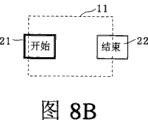
图8A~图8C是示出了根据本发明的实施例1的显示部的另一个状态迁移图。8A to 8C are diagrams showing another state transition of the display section according to
图9A~图9C是示出了根据本发明的实施例1的显示部的另一个状态迁移图。9A to 9C are diagrams showing another state transition of the display section according to
图10A~图10C是示出了根据本发明的实施例1的显示部的另一个状态迁移图。10A to 10C are diagrams showing another state transition of the display section according to
图11A~图11F是示出了根据本发明的实施例1的显示部的另一个状态迁移图。11A to 11F are diagrams showing another state transition of the display section according to
图12A~图12F是示出了根据本发明的实施例1的显示部的另一个状态迁移图。12A to 12F are diagrams showing another state transition of the display section according to
图13A~图13C是示出了在设有选择框的情况下的显示例子的示意图。13A to 13C are schematic diagrams illustrating display examples in a case where a selection frame is provided.
图14A~图14C是示出了在设有选择框的情况下的另一个显示例子的示意图。14A to 14C are diagrams showing another display example in the case where a selection frame is provided.
图15是根据本发明的实施例2的显示装置的使用状态图。Fig. 15 is a diagram showing a state of use of the display device according to Embodiment 2 of the present invention.
图16是根据本发明的实施例2的显示装置的结构框图。Fig. 16 is a block diagram showing the structure of a display device according to Embodiment 2 of the present invention.
图17是示出了根据本发明的实施例2的显示装置的工作流程图。FIG. 17 is a flow chart showing the operation of the display device according to Embodiment 2 of the present invention.
图18A以及图18B是根据本发明的实施例2的显示部的状态迁移图。18A and 18B are state transition diagrams of the display unit according to Embodiment 2 of the present invention.
图19A以及图19B是概念性地示出了戴有HMD的用户所能看到的显示区域的示意图。19A and 19B are schematic diagrams conceptually showing a display area seen by a user wearing the HMD.
具体实施方式Detailed ways
以下对本发明的实施方式,参照附图进行说明。Embodiments of the present invention will be described below with reference to the drawings.
(实施例1)(Example 1)
图1是根据本发明的实施例1的显示装置的外观图。本实施方式1是采用HMD40作为显示装置时的示例。FIG. 1 is an external view of a display device according to
HMD40是安装在用户头部的显示装置。如该图所示它包括普通的眼镜41,在该眼镜41上面装载有小投影装置42。图像数据或电流等通过电缆43从本体44被传送到投影装置42。被传送到投影装置42的图像数据以27度左右的视角被投影在沿着眼镜41的镜片而安装的显示棱镜上。The
在不投影图像数据时,用户可以通过眼镜很正常地观看周围的风景。另一方面,当投影图像数据时,用户则可以看到在风景中所浮现出的正被投影的图像。When the image data is not projected, the user can normally watch the surrounding scenery through the glasses. On the other hand, when the image data is projected, the user can see the projected image floating in the scenery.
图2是根据本发明的实施例1的显示装置的结构框图。该显示装置,是安装在用户头部的显示装置(例如HMD40),其在功能上包括:显示要素决定部101、显示要素取得部102、边界显示决定部103、检测部104、显示位置变更部105、选择部110、执行部108以及显示部109。选择部110包括边界显示判断部106和选择要素判断部107。FIG. 2 is a structural block diagram of a display device according to
以下用图2的结构图说明各构件以及其关系。Each component and its relationship will be described below using the structural diagram of FIG. 2 .
所述显示要素决定部101决定显示要素。而显示要素是构成显示给用户的信息的要素,这些要素包括:图标、按键、窗口等GUI(图形用户界面:Graphical User Interface)部分以及诸如动态图像、静态图像、文字、记号等内容。另外,也可以将不向用户显示的信息、语音信息等与显示要素组合起来。该显示要素可以是电视节目、邮件、网页、时钟、时刻表、股票价格、标识、卡通形象、宣传广告等,而所决定显示的显示要素可以是一个,也可以是多个。The display
所述显示要素取得部102是本发明涉及的取得单元的一个例子,其用于取得由显示要素决定部101所决定的显示要素。而关于取得显示要素的取得方法,其可以是经由有线或无线的通信途径或广播途径来取得的方法,也可以是经由光盘或半导体存储器等媒体来取得的方法。并且,显示要素可以早于显示要素决定部101的决定而被预先取得。当取得多个显示要素时,既可同时取得,也可依次取得。The display
所述边界显示决定部103是本发明涉及的决定单元的一个例子,其用于决定由显示要素取得部102所取得的显示要素的显示位置而其决定显示位置的决定方式为:用户看不到显示要素的一部分的位置。具体来说,由于显示要素决定部101在显示要素取得部102和边界显示决定部103之间,因此边界显示决定部103决定了如下的的显示位置,即,在该位置用户看不到由显示要素决定部101所决定的显示要素的一部分。在此,在用户看不到显示要素的一部分的显示位置显示出显示要素被称为“边界显示”。换而言之,所谓边界显示即以如下方式显示出显示要素,即用户能够看到显示要素的一部分,而看不到其剩余部分。例如,通过在HMD画面右端只显示显示要素的左半部分,或在画面下端只显示显示要素的上部,用户能够看到显示要素的一部分却看不到全部。与此相对,将在用户能够看到显示要素的全部的显示位置上显示显示要素,称为“全部显示”。The boundary
再者,如果两个或更多的显示要素的情况下,边界显示决定部103如下方式决定各显示要素的显示位置,即,至少显示显示要素之一将以“边界显示”模式被显示。也就是说,不是全部的显示要素都以“边界显示”模式被显示。例如,如果有2个显示要素,它们的位置以如下方式被决定,即,它们中有一个以“边界显示”模式被显示。或者,也可以在HMD画面左端对一个进行“边界显示”,而在画面右端附近对另一个进行“全部显示”。并且,在有多个显示要素的情况下,可只对其中一个显示要素进行全部显示,而对其他显示要素进行边界显示。如果这样做,可以在最终想让用户选择一个显示要素的情况下使后述的选择要素判断部107的处理简单化。Furthermore, in the case of two or more display elements, the boundary
再者,HMD的显示范围(显示部109的显示区域)也可以不是长方形。例如,HMD画面的上端也可以不是一条横直线,而是中央部分凹下的曲线或折线。此外,也可以通过在显示要素的前面显示其他显示要素的方式,来遮住显示要素的一部分,以实现边界显示。In addition, the display range of the HMD (the display area of the display unit 109 ) does not have to be a rectangle. For example, the upper end of the HMD screen may not be a horizontal straight line, but a concave curve or broken line in the central part. In addition, by displaying other display elements in front of the display element, a part of the display element may be covered to realize boundary display.
再者,在HMD的显示范围比用户的视野宽广的情况下,可以使显示要素的一部分超出用户的视野边界线。如果这样做,则与显示要素的一部分超出显示部109的显示区域的边界线的情况相同,从而能够实现边界显示。在此所说的视野边界线,可以是两眼视野的边界线,也可以是单眼视野的边界线。例如,两眼视野的边界线可以采用从脸正面向左右60度、上60度、下75度为止的视野范围的边界线。另外,单眼视野的边界线可以采用从脸正面向左右100度、上60度、下75度为止的视野范围的边界线。考虑个人之间视野范围的差异,也可以采用与在此示例的具体角度相差20度以内的不同角度。Furthermore, when the display range of the HMD is wider than the user's field of view, a part of the display elements may exceed the boundary line of the user's field of view. By doing so, boundary display can be realized as in the case where a part of the display element exceeds the boundary line of the display area of the
再者,上述所谓的“视野”主要是以周边视野的意思来使用的,但也可以不对周边视野而对中心视野决定边界线。也就是说,人的视野大致能分为中心视野和周边视野。在中心视野,能对事物的形状在细微部分进行辨别并且能识别颜色等。另一方面,在周边视野,事物的形状模糊,颜色不太鲜明。如果使显示要素的一部分超出用户的中心视野的边界线,用户则只能模糊地看到显示要素的该部分。其结果为,如果用户下意识地要看到全部显示要素的细微部分,则用户的头部就会自然地转动起来。In addition, the above-mentioned "field of view" is mainly used in the meaning of the peripheral field of view, but the boundary line may be determined for the central field of view instead of the peripheral field of view. That is to say, people's vision can be roughly divided into central vision and peripheral vision. In the central field of vision, the shape of objects can be distinguished in small parts and colors can be recognized. In peripheral vision, on the other hand, shapes of things are blurred and colors are less vivid. If a part of the display element is made to exceed the boundary line of the user's central visual field, the user can only vaguely see the part of the display element. As a result, if the user subconsciously wants to see the minute parts of all the displayed elements, the user's head will naturally turn.
所述检测部104是本发明涉及的检测单元的一个例子,其用于检测用户的头部动作量。用户的头部动作量可以根据安装在用户头部的角速度传感器(安装在该显示装置上的角速度传感器)的输出来检测。此外也可以采用加速度传感器、磁气传感器、无线电波传感器或超声波传感器等来代替角速度传感器。另外,即使没有安装在头部,但是只要能够检测头部运动的照相机、传感器或电子标签阅读器等也可以被采用。此外,也可以采用利用半导体元件的半导体传感器。用户的头部动作量可以是角度变化,也可以是移动量或其加速度量。并且也可以把表示用户的头部是否向左或右转动了的标记考虑为头部动作量。即,头部移动量只要是能够检测头部朝向的变化方向的值就可以。The
所谓“头部朝向”即以身体为基准,头部的朝向方向,所谓“头部朝向的变化方向”即头部朝向发生变化的方向。例如,如果把朝正面的头部转向左面,就检测出变化方向为“向左”,进一步,把朝左的头部转回到原来的正面时,就检测出变化方向为“向右”。The so-called "head orientation" refers to the direction of the head orientation based on the body, and the so-called "change direction of the head orientation" refers to the direction in which the head orientation changes. For example, if the head facing the front is turned to the left, the direction of change is detected as "left", and further, when the head facing the left is turned back to the original front, the direction of change is detected as "right".
所述显示位置变更部105是本发明涉及的变更单元的一个例子,根据由检测部104检测出的头部动作量,该显示位置变更部以下列方式变更显示要素的显示位置,即,使得显示要素向与头部朝向的变化方向略相反的方向移动。由此,例如用户的头部向右转动了,则HMD内的显示会向左移动。在此采用“略相反的方向”这一术语是因为也可以不是完全相反的方向(相差180度的方向)。也就是说在显示要素移动了与头部朝向的变化方向相差90度以上270度以下的方向的情况下,就认为显示要素向与头部朝向的变化方向略相反的方向移动。The display
再者,使显示要素向左移动的方法并不限定为不变更显示要素的显示尺寸或形状而使显示位置向左移动的方法。例如,也可以采用通过扩大或缩小显示要素的显示尺寸或将其变形,而使显示要素的左端位置向左变更,或右端位置向右变更等方法。关于向右的移动或向上下的移动也可采用同样的方式。In addition, the method of moving the display element to the left is not limited to the method of moving the display position to the left without changing the display size or shape of the display element. For example, a method such as changing the position of the left end of the display element to the left or the position of the right end to the right by enlarging or reducing the display size of the display element or deforming it may be employed. The same method can be used for the movement to the right or the movement up and down.
所述选择部110是本发明涉及的选择单元的一个例子,其用于选择显示要素,该显示要素被显示在由检测部104检测出的头部朝向的变化方向上。例如,在显示要素的显示位置变更为能使用户看到显示要素的全部的显示位置的情况下,选择该显示要素。为了实现这种选择处理,选择部110进行边界显示判断处理和选择要素判断处理。以下,将称进行边界显示判断处理的选择部110为“边界显示判断部106”,将称进行选择要素判断处理的选择部110为“选择要素判断部107”。The
所述边界显示判断部106判断由显示位置变更部105变更了显示位置的显示要素的边界显示状态。所谓边界显示状态是表示各显示要素是否以边界显示的模式被显示。它可以设为“边界显示”和“全部显示”这两个值,也可以设为表示显示比例的值。并且,对一个显示要素的边界显示状态不限定为一个。例如,也可以把每个显示要素分割为多个区域,并对该各个区域来分别判断边界显示状态。并且,也可以对每个显示要素判断其过去的边界显示状态和将来的边界显示状态(预测值)。The boundary display judging unit 106 judges the boundary display state of the display element whose display position has been changed by the display
所述选择要素判断部107根据边界显示判断部106判断出的边界显示状态来判断显示要素的选择状态。例如,它将被全部显示的显示要素判断为“选择状态”,而将被边界显示的显示要素判断为“非选择状态”。它可以把显示部分多的显示要素判断为“选择状态”作为备选,也可以采用其他判断基准。此外,也可以不选择单个显示要素,而选择多个显示要素。所谓选择状态是表示各显示要素是否被用户选择了的状态。它可以被设为“选择”和“非选择”这两个值,也可以是表示被选择的程度的值,也可以是表示被选择的可能性的值。如此,可以把由选择要素判断部107判断为“选择”的显示要素说成是由选择部110所选择的显示要素。The selected
执行部108是本发明涉及的执行单元的一个例子,该执行部108对由选择部110选择出的显示要素(也就是由选择要素判断部107判断为“选择”的显示要素)执行相关的预定的处理过程。在此所述的预定的处理过程有各种各样并且不受特别限定,但其典型的是指对显示要素的显示动作进行变更的处理。显示动作的变更包括:显示尺寸、形状、位置、颜色、亮度、纵深、内容的变更、再生状态的变更、有无显示的变更。并且,不进行这些变更,也会被认为是变更显示动作的一种形态。并且,除变更显示要素本身的显示动作外,还可变更显示要素以外的信息的显示动作,例如在显示要素周边显示框等。The
所述显示部109是本发明涉及的显示单元的一个例子,其将显示要素显示在由显示要素决定部101决定的显示位置或由显示位置变更部105变更的显示位置上。并且,该显示部109显示了由执行部108执行处理后的结果。具体来说,HMD、FMD(眼罩显示器)、HUD(抬头显示器)或眼镜型显示器等显示部就相当于这里所说的显示部109。所述显示部109可以安装在头部的前部、侧部、后部、鼻子、耳朵、额头、脸、头发或口等处,也可以安装在头、肩膀、胸部或背等上半身处。其显示方式可以是利用透射式液晶、反射型液晶或有机EL(电致发光:electroluminescence)元件等的显示、投影方式,也可以是利用光半导体或激光的显示、投影方式。The
再者,图2中的各部分可以内设于一台HMD中也可以不设于其中。例如,图2中的各部分可以全部内置于一台HMD中,而显示要素取得部102则设在其他装置中。作为备选,也可以把各部分分散设在多个装置上。例如,检测部104和显示部109可安装在其他装置中。此外,每个部分也可为多个。例如,可以有2个显示部109。并且,多个用户可以共有图2所示的各部分。Furthermore, each part in FIG. 2 may or may not be built in an HMD. For example, each part in FIG. 2 may be built in one HMD, and the display
下面,将说明其工作过程。Next, its working process will be explained.
图3是示出本发明的实施例1的显示装置的工作流程图。本说明中,假定四个动态图像(以下分别记为显示要素1、显示要素2、显示要素3、显示要素4)作为四个显示要素在HMD上同时显示。具体来说,在以上的描述中,在正在显示的四个动态图像中,假设用户正在看的其中一个动态图像处于再生状态,而用户没在看的剩余3个动态图像处于暂停状态。FIG. 3 is a flow chart showing the operation of the display device according to
(S100)开始工作,然转移到S101进行工作。(S100) start working, then transfer to S101 to work.
(S101)显示要素决定部101决定显示在显示部109的显示要素,而显示要素取得部102取得由显示要素决定部101所决定的显示要素,然后转移到S102进行工作。本说明书中,是假设了显示要素决定部101决定了对显示要素1、显示要素2、显示要素3、显示要素4这四个显示要素进行显示。再者,作为决定的基准可以包括用户的嗜好、对目的的符合性、还包括用户的外界状况、身体状况、心理状况、社会状况和对人状况等对用户状况的符合性,并进一步包括HMD的显示特性或显示要素取得部102及通信路的通信特性、信息记忆特性等装置特性。(S101) The display
(S102)边界显示决定部103决定各显示要素被边界显示的显示位置,然后转移到S103进行工作。通过对HMD的显示范围和各显示要素的显示尺寸进行比较可决定各显示要素的显示位置。(S102) The boundary
图4A是示出了根据本发明的实施例1的显示例子的图。图4B是示出了根据本发明的实施例1的显示位置管理表10。该显示位置管理表10按照每个显示要素来管理“显示尺寸”、“显示位置”、“边界显示状态”、“选择状态”,其通过边界显示决定部103、显示位置变更部105、边界显示判断部106、选择要素判断部107以及执行部108来进行参照和更新的表。本说明书中,假设HMD的显示范围为长方形,长为100像素,宽为70像素。另一方面,设各显示要素也为长方形,显示尺寸为长四十像素、宽三十像素。边界显示决定部103根据HMD的显示范围和各显示要素的显示尺寸在各显示要素将被边界显示的状态下决定出显示位置。如图4B所示,将决定出的显示位置追加记入显示位置管理表10的“显示位置”栏中。在本说明书中,显示要素1的显示位置被决定为:显示要素1的左上顶点位置被定位从HMD的显示范围的左上顶点起向右-10像素(即向左移10像素)、向下0像素的位置。类似地,显示要素2的显示位置被决定为向右70像素、向下0像素的位置,而显示要素3被决定为向右-10像素、向下50像素的位置,而显示要素4被决定为向右70像素、向下50像素的位置。其结果为,如图4A所示,各显示要素均以边界显示模式被显示。FIG. 4A is a diagram showing a display example according to
如上所述,在HMD的显示范围和显示要素为长方形的情况下,如要决定出显示要素被边界显示的位置,则需要以如下方式来决定显示要素的水平位置,即使显示范围的边界在显示要素的左端和右端之间,或者,使得需要以如下方式来决定显示要素的竖直位置,即,显示边界在显示要素的上端和下端之间。再者,如果边界显示决定部103决定了显示位置,则显示部109可以在转移到S103进行工作之前显示显示要素。As mentioned above, in the case where the display area and display elements of the HMD are rectangular, if you want to determine the position where the display element is displayed by the boundary, you need to determine the horizontal position of the display element in the following way, even if the boundary of the display area is displayed between the left end and the right end of the element, or so that the vertical position of the display element needs to be determined in such a manner that the display boundary is between the upper end and the lower end of the display element. Furthermore, if the boundary
(S103)显示位置变更部105按照由检测部104检测出的头部动作量来变更各显示要素的显示位置,然后转移到S104进行工作。本说明书中,是假设用安装在头部的角速度传感器来检测头部动作量的情况来进行说明的。所述角速度传感器可提供头部的竖直方向和水平方向的角度变化。一经由检测部104取得角度变化量,所述显示位置变更部105就根据显示部109的像素间隔转换该角度变化量。例如,在HMD的显示范围的长为100像素、横方向视野角为50度的情况下,以“显示范围长像素数/水平方向视野角×(-1)”的公式所求得的从角度变化量到像素的转换常数为-2。在公式的最后乘以-1是为了使方向相反。例如,显示位置变更部105取得的头部向右的角度变化量为10度时,则在乘以所述转换常数-2后,使得显示要素向右移动-20像素,即,用户把头向右转动10度的话,显示要素则向左移动20像素。(S103) The display
图5A及图6A是示出了根据本发明的实施例1的显示例子的框图。图5B及图6B是本发明的实施例1的显示位置管理表10。图5和图6除了假设的情况不同之外,与图4相似。5A and 6A are block diagrams showing display examples according to
具体而言,在图4中假设头部角度变化量为0度。而在图5中,假设向右的角度变化量为-5度,而显示要素则向右移动10像素。与图5相比,图6中假设的情况为向右的角度变化量为10度、向下角度变化量为5度,而显示要素向右移动-20像素、向下移动-10像素。这样,显示位置变更部105通过从边界显示决定部103取得显示位置管理表10,并将所决定出的移动量追加记入显示位置管理表10的“显示位置”栏中记载的显示位置中,从而来变更显示位置。Specifically, it is assumed in FIG. 4 that the amount of change in the head angle is 0 degrees. However, in FIG. 5 , it is assumed that the angle change to the right is -5 degrees, and the display elements are moved to the right by 10 pixels. Compared with FIG. 5 , the assumed situation in FIG. 6 is that the rightward angle change is 10 degrees and the downward angle change is 5 degrees, and the display element moves -20 pixels to the right and -10 pixels to the bottom. In this way, the display
再者,在本说明中设转换常数为固定值-2,但是,也可以按照显示部109的形状、像素间隔的不同而不为常数,而是与显示区域相对应来个别求出转换常数。并且,显示要素的移动量也可通过不把角度变化量乘以转换常数而得出的像素数作为移动量的方式,而来决定是采用其他方式。例如,也可采用如果角度变化在一定范围内时则不移动显示要素的方式;或者采用如果角度变化急剧时则增加显示要素的移动量的方式。In this description, the conversion constant is assumed to be a fixed value -2. However, the conversion constant may be obtained individually corresponding to the display area instead of being a constant according to the shape of the
再者,如果按照头部动作量来移动显示要素,则显示要素完全超越出显示范围。为了避免这种用户看不到显示要素的问题,可以使显示要素移动量不超出所规定的数值。Furthermore, if the display element is moved according to the amount of head movement, the display element will completely exceed the display range. In order to avoid such a problem that the user cannot see the display element, the amount of movement of the display element may not exceed a predetermined value.
再者,在本说明中四个显示要素的移动量全部相同,但是,移动量也可以根据每个显示要素而有所不同。In addition, in the present description, the movement amounts of the four display elements are all the same, but the movement amounts may be different for each display element.
再者,如果显示位置变更部105变更了显示位置,则显示部109也可以在转移到S104的动作之前显示所述显示要素。Furthermore, if the display
(S104)边界显示判断部106判断各显示要素是否以边界显示方式被显示,然后转移到S105进行工作。边界显示判断部106从显示位置变更部105取得显示位置管理表10并向显示位置管理表10的“边界显示状态”栏中追加记入是“边界显示”还是“全部显示”的值。在本说明书中,如图4至图6所示,显示要素的全体被显示时设为“全部显示”,被边界显示时则设为“边界显示”。(S104) The border display judging unit 106 judges whether each display element is displayed in a border display mode, and then shifts to S105 for operation. The border display determination unit 106 acquires the display position management table 10 from the display
再者,即使显示要素在画面边缘被部分显示,但是如果随着用户头部朝向边缘移动,使得该画面移到用户的视野中央附近,则可以将其一判断为显示要素未以边界显示方式被显示。Furthermore, even if a display element is partially displayed at the edge of the screen, if the screen moves to near the center of the user's field of view as the user's head moves toward the edge, it can be determined that the display element is not displayed in a boundary manner. show.
(S105)选择要素判断部107判断各显示要素的选择状态,然后转移到S106进行工作。选择要素判断部107从边界显示判断部106取得显示位置管理表10并向显示位置管理表10的“选择状态”栏中追加记入是“选择”还是“非选择”的值。在本说明书中,如图4至图6所示,显示要素的边界显示状态为“边界显示”时设为“非选择”,是“全部显示”时则设为“选择”。(S105) The selected
(S106)执行部108按照各显示要素的选择状态来变更显示部109的显示,然后转移到S107进行工作。在本说明书中,对选择状态为“选择”的显示要素开始再生,对选择状态为“非选择”的显示要素停止再生。由此,可以只再生用户正在看的显示要素(动态图像)。(S106) The
(S107)执行部108用于判断动作是否结束,判断为结束时转移到S108进行工作,而判断为不结束时转移到S101进行工作。(S107) The
(S108)工作结束。(S108) The work ends.
以下,将结合具体例子来说明本发明。Hereinafter, the present invention will be described in conjunction with specific examples.
图7A~图7C是示出本发明的实施例1的显示部109的状态迁移图。开始按键21是显示要素的一个例子,其用于指示各种处理的启动。结束按键22是显示要素的一个例子,其用于指示本装置的使用终止。图中虚线所示的长方形表示显示部109的显示区域11。7A to 7C are diagrams showing state transitions of the
在初始状态,如图7A所示,开始按键21的一部分被显示在显示区域11之外,而结束按键22的一部分也被显示在显示区域11之外。在这种状态下,用户看不到开始按键21的一部分,并且也看不到结束按键22的一部分。在此,如果用户要指示各种处理的启动,则用户的头部就会自然朝左转。由此,开始按键21和结束按键22移动到与头部朝向的变化方向(左方向)略相反的方向(右方向)。其结果为,如图7B所示,如果开始按键21的全部都显示在显示区域11内的话,则开始按键21即被选择。这样如果开始按键21一被选择,则如图7C所示,则电影按键23、音乐按键24、互联网按键25、游戏按键26(以下,有这些按键一并被称为“子菜单按键”的情况)即被显示。在子菜单按键的一部分被显示在显示区域11之外的状态下,用户看不到子菜单按键的一部分。In the initial state, as shown in FIG. 7A , a part of the
图8A~图8C是本发明的实施例1的显示部109的另一个状态迁移图。在图7中,如开始按键21的全部都显示在显示区域11内,则开始按键21处于被选择的形态,在这里,图8例示出如开始按键21部分超出规定的比例(例如九成以上的部分)时,显示在显示区域11内时,则开始按键21处于被选择的形态。8A to 8C are another state transition diagrams of the
在初始状态,如图8A所示,开始按键21的一部分被显示在显示区域11之外,而结束按键22的一部分也被显示在显示区域11之外。这种状态下,用户看不到开始按键21的一部分,也看不到结束按键22的一部分。这样,如果用户要指示各种处理的开始,则用户的头部就会自然朝左。由此,开始按键21和结束按键22移动到与头部朝向的变化方向(左方向)略相反的方向(右方向)。其结果为,如图8B所示,如开始按键21的九成以上的部分显示在显示区域11之内,则开始按键21即被选择。这样,当开始按键21一被选择,如图8C所示,子菜单按键就会被显示。子菜单按键的一部分被显示在显示区域11之外,在这种状态下,用户看不到子菜单按键的一部分。In the initial state, as shown in FIG. 8A , a part of the
图9A~图9C是本发明的实施例1的显示部109的另一个状态迁移图。图中虚线所示的长方形表示显示部109的显示区域11,图中实线所示的椭圆表示用户的视野12。在图7,例示出决定显示要素的显示位置为显示要素的一部分超出显示区域11的边界线的形态,而图8在此例示出决定显示要素的显示位置为显示要素的一部分超出用户的视野12的边界线的形态。显示要素的一部分超出显示区域11的边界线和超出用户的视野12的边界线这两种情况的相同点为:用户都看不到显示要素的一部分。9A to 9C are another state transition diagrams of the
在初始状态,如图9A所示,开始按键21的一部分被显示在用户的视野12之外,而结束按键22的一部分也被显示在用户的视野12之外。这种状态下,用户看不到开始按键21的一部分,也看不到结束按键22的一部分。在此,如果用户要指示各种处理的开始,则用户的头部就会自然朝左。由此,开始按键21和结束按键22,移动到与头部朝向的变化方向(左方向)略相反的方向(右方向)。其结果为,如图9B所示,如果开始按键21的全部都显示在用户的视野12内,则开始按键21即被选择。这样开始按键21一旦被选择,则如图9C所示,子菜单按键就会被显示。子菜单按键的一部分被显示在用户的视野12之外,在这种状态下,用户则看不到子菜单按键的一部分。In the initial state, as shown in FIG. 9A , a part of the
图10A~图10C是本发明的实施例1的显示部109的其他状态迁移图。如图9所示,当开始按键21全部都显示在用户的视野12内时,开始按键21则处于被选择的形态,如图10所示,如果开始按键21的部分超出预定的比例(例如9成以上的部分)时显示在用户的视野12内,则开始按键21处于被选择的形态。10A to 10C are other state transition diagrams of the
在初始状态,如图10A所示,开始按键21的一部分被显示在用户的视野12之外,而结束按键22的一部分也被显示在用户的视野12之外。在这种状态下,用户看不到开始按键21的一部分,也看不到结束按键22的一部分。这样,如果用户要指示各种处理的启动,用户的头部就会自然朝左转。这样,开始按键21和结束按键22移动到与头部朝向的变化方向(左方向)略相反的方向(右方向)。其结果为,如图10B所示,如果开始按键21的九成以上的部分显示在用户的视野12之内,则开始按键21即被选择。这样开始按键21一旦被选择,则如图10C所示,其子菜单按键就会被显示。所述子菜单按键的一部分被显示在用户的视野12之外,在这种状态下,用户看不到子菜单按键的一部分。In the initial state, as shown in FIG. 10A , a part of the
图11A~图11F是本发明的实施例1的显示部109的另一个状态迁移图。在此,将对子菜单按键被显示后的状态迁移进行说明。子菜单按键是本发明涉及的显示要素的一个例子,具体来说,是电影按键23、音乐按键24、互联网按键25、游戏按键26。11A to 11F are another state transition diagrams of the
正如已经说明的,开始按键21一旦被选择后,则如图11A所示,用户就会看不到子菜单按键的一部分。这样,如果用户想看电影,则用户的头部会自然朝左上方转。由此,子菜单按键移动到与头部朝向的变化方向(左上方)略相反的方向(右下方)。其结果为,如图11B所示,当电影按键23全部都显示在显示区域11内时,则电影按键23就会被选择。这样当电影按键23一旦被选择时,则如图11C所示,停止状态的动态图像31~34就会被显示。动态图像31~34的一部分被显示在显示区域11之外,在这种状态下,用户看不到动态图形31~34的一部分。在此,如果用户想看动态图像34,用户的头部就会自然朝右下转。由此,动态图像31~34移动到与头部朝向的变化方向(右下方)略相反的方向(左上方)。其结果为,如图11D所示,当动态图像34全部都显示在显示区域11内时,则动态图像34就会被选择。这样动态图像34一旦以此种方式被选择,则如图11F所示动态图像34就会被显示在如图11E所示的显示区域11内,开始动态图像34的再生处理。As already explained, once the
图12A~图12F是本发明的实施例1的显示部109的另一个状态迁移图。在图7所示的例子中,一旦用户进入子菜单,则不能返回到主菜单。在此所说的子菜单是由子菜单按键所构成的菜单,而且主菜单是由开始按键21及结束按键22所构成的菜单。但是用户也有不留神选择了按键的情况,在这样的情况下,如不能返回到前面的菜单,则非常不便。在此,对即使转移到子菜单按键也可以按需要返回到主菜单的形态进行说明。12A to 12F are another state transition diagrams of the
在初始状态,如图12A所示,开始按键21的一部分被显示在显示区域11之外,而结束按键22的一部分也被显示在显示区域11之外。这种状态下,用户看不到开始按键21的一部分,也看不到结束按键22的一部分。在此,如果用户要指示各种处理的启动,则其头部就会自然朝左转。由此,开始按键21和结束按键22会移动到与头部朝向的变化方向(左方)略相反的方向(右方)。其结果为,当开始按键21全部都显示在如图12B所示的显示区域11内之后,并移动到如图12C所示的显示区域11的近以中央位置时,则开始按键21就会被选择。当开始按键21以这种方式被选择时,则如图12D所示,则子菜单按键就会以开始按键21为中心而呈辐射线状地被显示。所述子菜单按键的一部分被显示在显示区域11之外,在这种状态下,用户则看不到子菜单按键的一部分。In the initial state, as shown in FIG. 12A , a part of the
在此,如果用户想看电影,则其头部就会自然朝左上转。由此,子菜单按键移动到与头部朝向的变化方向(左上方)略相反的方向(右下方)。其结果为,如图12D所示,当电影按键23全部都显示在显示区域11内时,则电影按键23就会被选择。另一方面,在图12D所示的状态下,当用户想指示各种处理的结束时,则其头部就会自然朝右转。由此,子菜单按键、开始按键21和结束按键22移动到与头部朝向的变化方向(右方)略相反的方向(左方)。其结果为,如图12F所示,当结束按键22全部都显示在显示区域11内时,则结束按键22就会被选择。当然,选择结束按键22的定时也可以不是结束按键22全部都显示在显示区域11内的时候。例如,可以是结束按键22的九成以上的部分显示在显示区域11内的时候,或者也可以是结束按键22移动到显示区域11的大致中央的时候。Here, if the user wants to watch a movie, his or her head will naturally turn upwards to the left. As a result, the submenu button moves to a direction (lower right) slightly opposite to the direction in which the head orientation changes (upper left). As a result, as shown in FIG. 12D , when all the
如上所述,利用本发明的实施例1的显示装置,用户看不到显示要素的一部分,所以用户要看显示要素时其头部就会自然地转动。其结果为,显示在与头部朝向变化方向上的显示要素被选择,而与选择出的显示要素相关的预定处理过程被执行。由此,采用只是检测头部朝向的变化方向的低成本结构却可以实现高精度的无手操作。例如,当四个显示要素在HMD上同时被显示为四个动态图像(显示要素1、显示要素2、显示要素3、表示要素4)时,在所显示的四个动态图像中,可以只设用户正在看的一个动态图像处于再生状态,而用户没在看的剩余三个动态图像被设为临时停止状态。As described above, with the display device according to the first embodiment of the present invention, the user cannot see a part of the display elements, so the user naturally turns his/her head when looking at the display elements. As a result, the display element displayed in the direction in which the head orientation changes is selected, and a predetermined process related to the selected display element is executed. Thus, high-precision hands-free operation can be realized by using a low-cost structure that only detects the direction of change in the head orientation. For example, when four display elements are simultaneously displayed as four dynamic images (
再者,对图3所示的S101到S105的工作,先进行哪个都可以。例如,可以在取得显示要素之后实际决定要显示的要素,也可以在决定边界显示位置之后再决定显示要素。并且,在反复执行各步骤的情况下,如果存在采用与上次同样的处理结果的步骤时,可以不必在该步骤做任何处理。例如,当执行S108后再执行S101时,则无需特别变更显示要素。并且,图3所示的各工作,可以被接连不断地进行,也可以相隔一段时间进行,也可以并行动作。It should be noted that any of the operations from S101 to S105 shown in FIG. 3 may be performed first. For example, the elements to be displayed may be actually determined after the display elements are acquired, or the display elements may be determined after the border display positions are determined. In addition, when each step is repeatedly executed, if there is a step with the same processing result as last time, it is not necessary to perform any processing in that step. For example, when S101 is executed after S108 is executed, there is no need to change the display elements in particular. Moreover, each work shown in FIG. 3 may be performed continuously, or may be performed at intervals, or may be performed in parallel.
再者,如图3所示的S101到S108的工作过程,可产生具有一定概率的处理结果。例如,可以判断某显示要素的边界显示状态为“以20%的概率被边界显示”,也可以判断选择状态为“以15%的概率被选择”。Furthermore, the working process from S101 to S108 shown in FIG. 3 can produce processing results with a certain probability. For example, it may be determined that the border display state of a certain display element is "displayed by the border with a probability of 20%", and the selection state may also be judged as "selected with a probability of 15%.
再者,如在以上说明中所述,如果显示要素都显示在显示区域11内,则该显示要素被选择。但是,本发明并不限于此。即如以下所述,如果显示要素都显示在选择框内,则所述显示要素也可被选择。Furthermore, as described above, if all display elements are displayed in the
图13A~图13C是示出了在有选择框F的情况下显示例子的示意图。所述选择框F用于选择显示要素。即,显示部109如图13A所示,在显示区域11的预定位置(例如中央)显示所述选择框F。选择框F的显示位置被预先固定。13A to 13C are diagrams showing display examples in the case where there is a selection frame F. FIG. The selection box F is used to select display elements. That is, the
在此,当用户把头部转向左面时,如图13B所示,开始按键21和结束按键22就移动到与头部朝向的变化方向(左方)略相反的方向(右方)。其结果为,如图13C所示,开始按键21全部都显示在选择框F内时,开始按键21就会被选择。Here, when the user turns the head to the left, as shown in FIG. 13B , the
如上所述,利用选择框F的结构也可以达到上述同样的效果。而且,通过选择框F这样易懂的手法来选择显示要素还可产生使用方便的效果。As mentioned above, the same effect as above can also be achieved by using the structure of the selection frame F. Furthermore, selection of display elements by an easy-to-understand method such as the selection box F also has an effect of ease of use.
再者,当开始按键21全部都显示在选择框F内时,则开始按键21会被选择。但是,选择显示要素的定时不限于此。即,可以设定当开始按键21的显示在选择框F内的部分超过预定比例,则开始按键21被选择。Furthermore, when all the
图14A~图14C是示出在有选择框F的情况下的另一个显示例子的示意图。图13例示出,从两个显示要素中选择一个显示要素的情况;而图14则例示出从多个显示要素中选择一个显示要素的情况。在这种情况下,必须避免两个或更多的显示要素同时全部显示在选择框F内的问题。因此,选择框F的大小可以被设为能够包含一个显示要素但不能包含两个以上的显示要素为佳。采用这样的选择框F,则可实现从多个显示要素中简单地选择一个显示要素。14A to 14C are schematic diagrams showing another display example in the case where there is a selection frame F. FIG. FIG. 13 exemplifies a case where one display element is selected from two display elements; and FIG. 14 exemplifies a case where one display element is selected from a plurality of display elements. In this case, it is necessary to avoid the problem that two or more display elements are all displayed in the selection box F at the same time. Therefore, the size of the selection frame F can preferably be set to include one display element but not more than two display elements. With such a selection frame F, one display element can be easily selected from a plurality of display elements.
再者,在此例示出选择框F为长方形,但是,选择框F的形状不因此受到特别限定,例如可以采用圆形的选择框F。此外选择框F的颜色也没有特别限定,例如也可以采用透明的选择框F。In addition, although the selection frame F is illustrated here as a rectangle, the shape of the selection frame F is not particularly limited thereto. For example, a circular selection frame F may be used. In addition, the color of the selection frame F is not particularly limited, for example, a transparent selection frame F may also be used.
再者,也可以向选择框F的内部区域和外部区域的单方或双方附加颜色和图案。在这种情况下,颜色和图案的边界线被认为是选择框F。通过降低颜色和图案的透明度,可以使用户不能观察内部区域或外部区域。Furthermore, a color or a pattern may be added to one or both of the inner area and the outer area of the selection frame F. In this case, the boundary line of color and pattern is considered as selection box F. By reducing the transparency of colors and patterns, it is possible to prevent the user from viewing the inner or outer areas.
(实施例2)(Example 2)
上述实施例1中,HMD被例示为显示装置,而本实施例2中,大平幕电视机被例示为显示装置。以下,将以本实施例2与实施例1的不同点为重点来说明实施例2。In the first embodiment described above, the HMD is exemplified as a display device, whereas in the second embodiment, a large flat-screen TV is exemplified as a display device. Hereinafter, the second embodiment will be described focusing on the differences between the second embodiment and the first embodiment.
图15是根据本发明的实施例2的显示装置的使用状态的示意图。大屏幕电视机50是本发明涉及的显示装置的一个例子。用户U正在视听显示于电视机50的电影,而对电视机50的操作可以不用手来进行。FIG. 15 is a schematic diagram of a use state of a display device according to Embodiment 2 of the present invention. The large-
图16是根据本发明的实施例2的显示装置的结构框图。所示的这个显示装置是固定型显示装置(例如电视机50),其在功能上包括:显示要素决定部101、显示要素取得部102、边界显示决定部103、检测部104、选择部110、执行部108以及显示部109。Fig. 16 is a block diagram showing the structure of a display device according to Embodiment 2 of the present invention. The display device shown is a fixed display device (such as a TV set 50), which functionally includes: a display
本实施例2的显示部109没有安装在用户U的头部,而是设置于室内的墙壁等类似物上。因此,本实施例2的显示装置不具备实施例1中的显示位置变更部105。关于不需要显示位置变更部105的详细理由将在后面详细描述。至于其他方面,实施例2与实施例1相同。The
再者,显示部109的显示方式可以是液晶型也可以是等离子型,并没有特别受限制。并且,虽然附图中将其省略,但是仍然假设用户U的头部安装有角速度传感器(检测部104)。Furthermore, the display method of the
图17是示出本发明的实施例2的显示装置的工作流程图。如上所述,本实施例2的显示装置不具备实施方式1中的显示位置变更部105。因此,本实施例2不需要实施例1中的显示位置变更部105的工作过程(相当于图3的S103的工作过程)。至于其他方面,实施例2与实施例1相同。Fig. 17 is a flow chart showing the operation of the display device according to the second embodiment of the present invention. As described above, the display device of the second embodiment does not include the display
图18A以及图18B是示出本发明的实施例2的显示部109的状态迁移图。按键51是显示要素的一个例子,其用于降低电视机50的音量。按键52是显示要素的一个例子,其用于提高电视机50的音量。18A and 18B are state transition diagrams showing the
图中,虚线所示范围表示用户U的中心视野。如图18A所示,在用户U朝着正面的状态下,按键51及按键52被显示为其一部分超出了用户U的中心视野的边界线。在这种情况下,电视机50有必要预先掌握用户U的视听位置。但是,该方法并不受到特别的限定。例如,如果能在室内预先设置照相机,则可以通过分析该照相机拍摄的映像得知用户U的视听位置。In the figure, the range indicated by the dotted line represents the user U's central field of view. As shown in FIG. 18A , in the state where the user U is facing the front, the
在图18A所示的状态下,用户U可以模糊看到按键51及按键52的一部分。在此,如果用户U想提高电视机50的音量,则会下意识地要看按键52全部的细微部分,其头部就会自然转向右边。其结果为,如图18B所示,当按键52全部都显示在用户U的视野内时,按键52就会被选择。In the state shown in FIG. 18A , the user U can vaguely see part of the
如上所述,根据本实施例2,用户也因为看不到显示要素的一部分,因此用户要看到显示要素则其头部也会自然地转动。由此,采用只是检测头部朝向的变化方向的低成本结构却可以实现高精度的无手操作。换而言之,本发明可以适用于固定型显示装置。As described above, according to the second embodiment also, since the user cannot see a part of the display element, the user will naturally turn his/her head to see the display element. Thus, high-precision hands-free operation can be realized by using a low-cost structure that only detects the direction of change in the head orientation. In other words, the present invention can be applied to fixed display devices.
再者,本实施例2只例示出关于显示要素的一部分超出用户的视野的边界线的情况,而没有例示出关于超出显示区域的边界线的情况。这是因为如果采用不动型显示装置,即使显示要素的一部分超出了显示区域的边界线,也不能期待用户的头部会自然地转动。以下,详细说明这一点。Furthermore, the second embodiment only exemplifies the case where a part of the display element exceeds the boundary line of the user's field of view, but does not exemplify the case that the display element exceeds the boundary line of the display area. This is because if a stationary display device is used, the user's head cannot be expected to turn naturally even if a part of the display element exceeds the boundary line of the display area. Hereinafter, this point will be described in detail.
图19A以及图19B是概念性地示出戴有HMD的用户所能看到的显示区域11的示意图。在此,如图19A所示,假设用户U正在观察前方稍靠左的显示区域11。19A and 19B are schematic diagrams conceptually showing the
在这种情况下,即使用户U的头部转动,也如图19B所示,显示区域11的相对位置也不会变化。在此,在实施例1中,就如从窗户11能看到的风景在变化一样,显示位置变更部105使显示区域11中的显示要素发生移动。如果这样做,当用户U想选择其一部分超出了显示区域11边界线的显示要素时,其头部就会自然地转向该显示要素。In this case, even if the head of the user U turns, as shown in FIG. 19B , the relative position of the
相对于此,如果采用了固定型显示装置,如图18所示,只要用户U的头部一转动,则电视机50的相对位置就会发生变化。换而言之,这种情况的用户U只是在观察自然图像。因此,显示装置无需变更显示要素的显示位置,即不需要显示位置变更部105。由于该结构不具备显示位置变更部105,所以即使转动头部也不会变更显示要素的显示位置。因而,即使显示要素有其一部分超出了显示区域11的边界线,则也不能期待用户因为要选择该显示要素而将头部自然转动。On the other hand, if a fixed display device is used, as shown in FIG. 18 , as long as the head of the user U turns, the relative position of the
再者,本实施例2中,安装于用户U的头部的角速度传感器被例示为检测部104,但是,检测部104只要是能够检测用户U的头部的动作的设备就可以。例如,如果在室内预先设置照相机,则可以通过分析该照相机拍摄的映像来检测用户U头部的动作。在这种情况下,没有必要在用户U的头部安装任何装置,所以其具有便利性好的优点。Furthermore, in the second embodiment, the angular velocity sensor attached to the head of the user U is exemplified as the
再者,上述各实施方式通过CPU解读并执行预定的程序数据而实现,该规定的程序数据可以存储于存储装置内如(ROM、RAM、硬盘等)。在这种情况下,程序数据可以经由存储介质导入到存储装置内,也可以从存储介质上直接执行。其中,存储介质包括:ROM、RAM、瞬时存储器等半导体存储器;也包括软盘或硬盘等磁盘存储器,还包括CD-ROM、DVD、BD等光盘以及SD卡等存储卡等存储介质。另外,存储介质的概念也包括电话线路和传输途径等通信媒体。Furthermore, the above-mentioned embodiments are realized by the CPU interpreting and executing predetermined program data, and the predetermined program data can be stored in a storage device such as (ROM, RAM, hard disk, etc.). In this case, the program data may be imported into the storage device via the storage medium, or may be directly executed from the storage medium. Wherein, the storage medium includes: semiconductor memory such as ROM, RAM, and transient memory; also includes disk storage such as floppy disk or hard disk, and also includes storage media such as CD-ROM, DVD, BD and other optical disks and memory cards such as SD cards. In addition, the concept of storage media also includes communication media such as telephone lines and transmission channels.
本发明能适用于需要采用低成本结构却可以实现高精度的无手操作的HMD、FMD、HUD、眼镜型显示器或大屏幕电视机等。The present invention can be applied to HMD, FMD, HUD, glasses-type display or large-screen TV, etc., which need low-cost structure but can realize high-precision hands-free operation.
Claims (14)
Applications Claiming Priority (2)
| Application Number | Priority Date | Filing Date | Title |
|---|---|---|---|
| JP2006176943 | 2006-06-27 | ||
| JP176943/2006 | 2006-06-27 |
Publications (2)
| Publication Number | Publication Date |
|---|---|
| CN101098491A CN101098491A (en) | 2008-01-02 |
| CN101098491B true CN101098491B (en) | 2011-10-05 |
Family
ID=38873073
Family Applications (1)
| Application Number | Title | Priority Date | Filing Date |
|---|---|---|---|
| CN2007101095206A Expired - Fee Related CN101098491B (en) | 2006-06-27 | 2007-06-27 | Display device and control method thereof |
Country Status (2)
| Country | Link |
|---|---|
| US (1) | US7928926B2 (en) |
| CN (1) | CN101098491B (en) |
Families Citing this family (153)
| Publication number | Priority date | Publication date | Assignee | Title |
|---|---|---|---|---|
| US9158116B1 (en) | 2014-04-25 | 2015-10-13 | Osterhout Group, Inc. | Temple and ear horn assembly for headworn computer |
| US8907887B2 (en) * | 2008-05-19 | 2014-12-09 | Honeywell International Inc. | Methods and systems for operating avionic systems based on user gestures |
| US8957835B2 (en) | 2008-09-30 | 2015-02-17 | Apple Inc. | Head-mounted display apparatus for retaining a portable electronic device with display |
| US20150277120A1 (en) | 2014-01-21 | 2015-10-01 | Osterhout Group, Inc. | Optical configurations for head worn computing |
| US20150205111A1 (en) | 2014-01-21 | 2015-07-23 | Osterhout Group, Inc. | Optical configurations for head worn computing |
| US9366867B2 (en) | 2014-07-08 | 2016-06-14 | Osterhout Group, Inc. | Optical systems for see-through displays |
| US9952664B2 (en) | 2014-01-21 | 2018-04-24 | Osterhout Group, Inc. | Eye imaging in head worn computing |
| US9229233B2 (en) | 2014-02-11 | 2016-01-05 | Osterhout Group, Inc. | Micro Doppler presentations in head worn computing |
| US9298007B2 (en) | 2014-01-21 | 2016-03-29 | Osterhout Group, Inc. | Eye imaging in head worn computing |
| US9400390B2 (en) | 2014-01-24 | 2016-07-26 | Osterhout Group, Inc. | Peripheral lighting for head worn computing |
| US9715112B2 (en) | 2014-01-21 | 2017-07-25 | Osterhout Group, Inc. | Suppression of stray light in head worn computing |
| US9965681B2 (en) | 2008-12-16 | 2018-05-08 | Osterhout Group, Inc. | Eye imaging in head worn computing |
| US8232625B2 (en) * | 2009-03-26 | 2012-07-31 | International Business Machines Corporation | ESD network circuit with a through wafer via structure and a method of manufacture |
| JP5218354B2 (en) * | 2009-09-16 | 2013-06-26 | ブラザー工業株式会社 | Head mounted display |
| JP5977922B2 (en) | 2011-02-24 | 2016-08-24 | セイコーエプソン株式会社 | Information processing apparatus, information processing apparatus control method, and transmissive head-mounted display apparatus |
| US20120254791A1 (en) * | 2011-03-31 | 2012-10-04 | Apple Inc. | Interactive menu elements in a virtual three-dimensional space |
| US9024843B2 (en) * | 2011-06-30 | 2015-05-05 | Google Inc. | Wearable computer with curved display and navigation tool |
| US9727132B2 (en) * | 2011-07-01 | 2017-08-08 | Microsoft Technology Licensing, Llc | Multi-visor: managing applications in augmented reality environments |
| US8209183B1 (en) | 2011-07-07 | 2012-06-26 | Google Inc. | Systems and methods for correction of text from different input types, sources, and contexts |
| US8558759B1 (en) | 2011-07-08 | 2013-10-15 | Google Inc. | Hand gestures to signify what is important |
| US8990682B1 (en) | 2011-10-05 | 2015-03-24 | Google Inc. | Methods and devices for rendering interactions between virtual and physical objects on a substantially transparent display |
| US9081177B2 (en) | 2011-10-07 | 2015-07-14 | Google Inc. | Wearable computer with nearby object response |
| US9547406B1 (en) | 2011-10-31 | 2017-01-17 | Google Inc. | Velocity-based triggering |
| US20130117707A1 (en) * | 2011-11-08 | 2013-05-09 | Google Inc. | Velocity-Based Triggering |
| US20150199081A1 (en) * | 2011-11-08 | 2015-07-16 | Google Inc. | Re-centering a user interface |
| US20150185971A1 (en) * | 2011-11-09 | 2015-07-02 | Google Inc. | Ring-Based User-Interface |
| CN102761760A (en) * | 2011-12-01 | 2012-10-31 | 联想(北京)有限公司 | Display method, display device and electric terminal |
| US20160011724A1 (en) * | 2012-01-06 | 2016-01-14 | Google Inc. | Hands-Free Selection Using a Ring-Based User-Interface |
| JP5880115B2 (en) * | 2012-02-17 | 2016-03-08 | ソニー株式会社 | Head mounted display, head mounted display control program, and head mounted display control method |
| US8947322B1 (en) | 2012-03-19 | 2015-02-03 | Google Inc. | Context detection and context-based user-interface population |
| KR20150013591A (en) * | 2012-04-26 | 2015-02-05 | 퀄컴 인코포레이티드 | Altering attributes of content that is provided in a portion of a display area based on detected inputs |
| JP6099348B2 (en) * | 2012-10-10 | 2017-03-22 | オリンパス株式会社 | Head-mounted display device, unlock processing system, program, and unlock control method |
| US9933853B2 (en) * | 2013-02-19 | 2018-04-03 | Mirama Service Inc | Display control device, display control program, and display control method |
| CN104335155B (en) * | 2013-02-22 | 2018-11-09 | 索尼公司 | Head-mounted display system, head-mounted display, and control program for head-mounted display |
| US20140280503A1 (en) | 2013-03-15 | 2014-09-18 | John Cronin | System and methods for effective virtual reality visitor interface |
| US20140280502A1 (en) | 2013-03-15 | 2014-09-18 | John Cronin | Crowd and cloud enabled virtual reality distributed location network |
| US20140267581A1 (en) | 2013-03-15 | 2014-09-18 | John Cronin | Real time virtual reality leveraging web cams and ip cams and web cam and ip cam networks |
| US20140280644A1 (en) | 2013-03-15 | 2014-09-18 | John Cronin | Real time unified communications interaction of a predefined location in a virtual reality location |
| US9838506B1 (en) | 2013-03-15 | 2017-12-05 | Sony Interactive Entertainment America Llc | Virtual reality universe representation changes viewing based upon client side parameters |
| US20140280506A1 (en) | 2013-03-15 | 2014-09-18 | John Cronin | Virtual reality enhanced through browser connections |
| US9335547B2 (en) | 2013-03-25 | 2016-05-10 | Seiko Epson Corporation | Head-mounted display device and method of controlling head-mounted display device |
| JP5983499B2 (en) * | 2013-03-29 | 2016-08-31 | ソニー株式会社 | Display control apparatus, display control method, and program |
| US10262462B2 (en) | 2014-04-18 | 2019-04-16 | Magic Leap, Inc. | Systems and methods for augmented and virtual reality |
| US9256987B2 (en) * | 2013-06-24 | 2016-02-09 | Microsoft Technology Licensing, Llc | Tracking head movement when wearing mobile device |
| WO2015081334A1 (en) * | 2013-12-01 | 2015-06-04 | Athey James Leighton | Systems and methods for providing a virtual menu |
| JP2015125502A (en) | 2013-12-25 | 2015-07-06 | ソニー株式会社 | Image processor, image processing method, display unit, display method, computer program and image display system |
| US9575321B2 (en) | 2014-06-09 | 2017-02-21 | Osterhout Group, Inc. | Content presentation in head worn computing |
| US11227294B2 (en) | 2014-04-03 | 2022-01-18 | Mentor Acquisition One, Llc | Sight information collection in head worn computing |
| US9671613B2 (en) | 2014-09-26 | 2017-06-06 | Osterhout Group, Inc. | See-through computer display systems |
| US20150228119A1 (en) | 2014-02-11 | 2015-08-13 | Osterhout Group, Inc. | Spatial location presentation in head worn computing |
| US10684687B2 (en) | 2014-12-03 | 2020-06-16 | Mentor Acquisition One, Llc | See-through computer display systems |
| US9829707B2 (en) | 2014-08-12 | 2017-11-28 | Osterhout Group, Inc. | Measuring content brightness in head worn computing |
| US10254856B2 (en) | 2014-01-17 | 2019-04-09 | Osterhout Group, Inc. | External user interface for head worn computing |
| US11103122B2 (en) | 2014-07-15 | 2021-08-31 | Mentor Acquisition One, Llc | Content presentation in head worn computing |
| US9810906B2 (en) | 2014-06-17 | 2017-11-07 | Osterhout Group, Inc. | External user interface for head worn computing |
| US9939934B2 (en) | 2014-01-17 | 2018-04-10 | Osterhout Group, Inc. | External user interface for head worn computing |
| US10649220B2 (en) | 2014-06-09 | 2020-05-12 | Mentor Acquisition One, Llc | Content presentation in head worn computing |
| US20160019715A1 (en) | 2014-07-15 | 2016-01-21 | Osterhout Group, Inc. | Content presentation in head worn computing |
| US9529195B2 (en) | 2014-01-21 | 2016-12-27 | Osterhout Group, Inc. | See-through computer display systems |
| US9841599B2 (en) | 2014-06-05 | 2017-12-12 | Osterhout Group, Inc. | Optical configurations for head-worn see-through displays |
| US10191279B2 (en) | 2014-03-17 | 2019-01-29 | Osterhout Group, Inc. | Eye imaging in head worn computing |
| US9448409B2 (en) | 2014-11-26 | 2016-09-20 | Osterhout Group, Inc. | See-through computer display systems |
| US9366868B2 (en) | 2014-09-26 | 2016-06-14 | Osterhout Group, Inc. | See-through computer display systems |
| US9746686B2 (en) | 2014-05-19 | 2017-08-29 | Osterhout Group, Inc. | Content position calibration in head worn computing |
| US9299194B2 (en) | 2014-02-14 | 2016-03-29 | Osterhout Group, Inc. | Secure sharing in head worn computing |
| US9594246B2 (en) | 2014-01-21 | 2017-03-14 | Osterhout Group, Inc. | See-through computer display systems |
| US20150277118A1 (en) | 2014-03-28 | 2015-10-01 | Osterhout Group, Inc. | Sensor dependent content position in head worn computing |
| US11487110B2 (en) | 2014-01-21 | 2022-11-01 | Mentor Acquisition One, Llc | Eye imaging in head worn computing |
| US12105281B2 (en) | 2014-01-21 | 2024-10-01 | Mentor Acquisition One, Llc | See-through computer display systems |
| US9836122B2 (en) | 2014-01-21 | 2017-12-05 | Osterhout Group, Inc. | Eye glint imaging in see-through computer display systems |
| US12093453B2 (en) | 2014-01-21 | 2024-09-17 | Mentor Acquisition One, Llc | Eye glint imaging in see-through computer display systems |
| US9651784B2 (en) | 2014-01-21 | 2017-05-16 | Osterhout Group, Inc. | See-through computer display systems |
| US9753288B2 (en) | 2014-01-21 | 2017-09-05 | Osterhout Group, Inc. | See-through computer display systems |
| US9766463B2 (en) | 2014-01-21 | 2017-09-19 | Osterhout Group, Inc. | See-through computer display systems |
| US9310610B2 (en) | 2014-01-21 | 2016-04-12 | Osterhout Group, Inc. | See-through computer display systems |
| US9529199B2 (en) | 2014-01-21 | 2016-12-27 | Osterhout Group, Inc. | See-through computer display systems |
| US11737666B2 (en) | 2014-01-21 | 2023-08-29 | Mentor Acquisition One, Llc | Eye imaging in head worn computing |
| US9494800B2 (en) | 2014-01-21 | 2016-11-15 | Osterhout Group, Inc. | See-through computer display systems |
| US11892644B2 (en) | 2014-01-21 | 2024-02-06 | Mentor Acquisition One, Llc | See-through computer display systems |
| US9532714B2 (en) | 2014-01-21 | 2017-01-03 | Osterhout Group, Inc. | Eye imaging in head worn computing |
| US11669163B2 (en) | 2014-01-21 | 2023-06-06 | Mentor Acquisition One, Llc | Eye glint imaging in see-through computer display systems |
| US9811159B2 (en) | 2014-01-21 | 2017-11-07 | Osterhout Group, Inc. | Eye imaging in head worn computing |
| US20150205135A1 (en) | 2014-01-21 | 2015-07-23 | Osterhout Group, Inc. | See-through computer display systems |
| US9846308B2 (en) | 2014-01-24 | 2017-12-19 | Osterhout Group, Inc. | Haptic systems for head-worn computers |
| US9588343B2 (en) | 2014-01-25 | 2017-03-07 | Sony Interactive Entertainment America Llc | Menu navigation in a head-mounted display |
| US9437159B2 (en) * | 2014-01-25 | 2016-09-06 | Sony Interactive Entertainment America Llc | Environmental interrupt in a head-mounted display and utilization of non field of view real estate |
| US9852545B2 (en) | 2014-02-11 | 2017-12-26 | Osterhout Group, Inc. | Spatial location presentation in head worn computing |
| US20150241964A1 (en) | 2014-02-11 | 2015-08-27 | Osterhout Group, Inc. | Eye imaging in head worn computing |
| US12112089B2 (en) | 2014-02-11 | 2024-10-08 | Mentor Acquisition One, Llc | Spatial location presentation in head worn computing |
| US9401540B2 (en) | 2014-02-11 | 2016-07-26 | Osterhout Group, Inc. | Spatial location presentation in head worn computing |
| US20160187651A1 (en) | 2014-03-28 | 2016-06-30 | Osterhout Group, Inc. | Safety for a vehicle operator with an hmd |
| US9672210B2 (en) | 2014-04-25 | 2017-06-06 | Osterhout Group, Inc. | Language translation with head-worn computing |
| US10853589B2 (en) | 2014-04-25 | 2020-12-01 | Mentor Acquisition One, Llc | Language translation with head-worn computing |
| US9651787B2 (en) | 2014-04-25 | 2017-05-16 | Osterhout Group, Inc. | Speaker assembly for headworn computer |
| US20150309534A1 (en) | 2014-04-25 | 2015-10-29 | Osterhout Group, Inc. | Ear horn assembly for headworn computer |
| US9423842B2 (en) | 2014-09-18 | 2016-08-23 | Osterhout Group, Inc. | Thermal management for head-worn computer |
| US20160137312A1 (en) | 2014-05-06 | 2016-05-19 | Osterhout Group, Inc. | Unmanned aerial vehicle launch system |
| US20170038838A1 (en) * | 2014-05-09 | 2017-02-09 | Sony Corporation | Information processing system and information processing method |
| US10663740B2 (en) | 2014-06-09 | 2020-05-26 | Mentor Acquisition One, Llc | Content presentation in head worn computing |
| US9995933B2 (en) * | 2014-06-24 | 2018-06-12 | Microsoft Technology Licensing, Llc | Display devices with transmittance compensation mask |
| DE102014009301B4 (en) * | 2014-06-26 | 2025-05-22 | Audi Ag | Method for operating virtual reality glasses and system with virtual reality glasses |
| DE102014009304B4 (en) * | 2014-06-26 | 2025-10-16 | Audi Ag | Method for operating virtual reality glasses and system with virtual reality glasses |
| DE102014009299B4 (en) * | 2014-06-26 | 2025-10-16 | Audi Ag | Method for operating virtual reality glasses and system with virtual reality glasses |
| DE102014009302B4 (en) * | 2014-06-26 | 2025-10-16 | Audi Ag | Method for operating virtual reality glasses and system with virtual reality glasses |
| WO2016032052A1 (en) * | 2014-08-26 | 2016-03-03 | Lg Electronics Inc. | Wearable display device and method of controlling therefor |
| KR102232419B1 (en) | 2014-08-26 | 2021-03-26 | 엘지전자 주식회사 | Wearable display device and controlling method thereof |
| KR102309281B1 (en) * | 2014-11-07 | 2021-10-08 | 삼성전자주식회사 | Direction Based Device for Displaying Object and Method Thereof |
| EP3023863A1 (en) * | 2014-11-20 | 2016-05-25 | Thomson Licensing | Device and method for processing visual data, and related computer program product |
| US9684172B2 (en) | 2014-12-03 | 2017-06-20 | Osterhout Group, Inc. | Head worn computer display systems |
| US20160170482A1 (en) * | 2014-12-15 | 2016-06-16 | Seiko Epson Corporation | Display apparatus, and control method for display apparatus |
| USD743963S1 (en) | 2014-12-22 | 2015-11-24 | Osterhout Group, Inc. | Air mouse |
| USD751552S1 (en) | 2014-12-31 | 2016-03-15 | Osterhout Group, Inc. | Computer glasses |
| USD753114S1 (en) | 2015-01-05 | 2016-04-05 | Osterhout Group, Inc. | Air mouse |
| US10878775B2 (en) | 2015-02-17 | 2020-12-29 | Mentor Acquisition One, Llc | See-through computer display systems |
| US20160239985A1 (en) | 2015-02-17 | 2016-08-18 | Osterhout Group, Inc. | See-through computer display systems |
| JP5981591B1 (en) * | 2015-03-17 | 2016-08-31 | 株式会社コロプラ | Computer program and computer system for controlling object operations in an immersive virtual space |
| US9965029B2 (en) * | 2015-03-30 | 2018-05-08 | Sony Corporation | Information processing apparatus, information processing method, and program |
| US10281976B2 (en) | 2015-07-07 | 2019-05-07 | Seiko Epson Corporation | Display device, control method for display device, and computer program |
| US10139966B2 (en) | 2015-07-22 | 2018-11-27 | Osterhout Group, Inc. | External user interface for head worn computing |
| CN107924234B (en) * | 2015-08-28 | 2021-03-19 | 交互数字Ce专利控股公司 | Selection of auxiliary items for fluoroscopy glasses |
| CN106020432B (en) * | 2015-08-28 | 2019-03-15 | 千寻位置网络有限公司 | Content display method and its device |
| JP2017049762A (en) | 2015-09-01 | 2017-03-09 | 株式会社東芝 | System and method |
| JP6560974B2 (en) * | 2015-12-17 | 2019-08-14 | 株式会社ソニー・インタラクティブエンタテインメント | Information processing apparatus and operation reception method |
| JP6518582B2 (en) * | 2015-12-21 | 2019-05-22 | 株式会社ソニー・インタラクティブエンタテインメント | Information processing apparatus and operation reception method |
| JP6590691B2 (en) * | 2015-12-25 | 2019-10-16 | 株式会社小松製作所 | Work vehicle and display control method |
| US10850116B2 (en) | 2016-12-30 | 2020-12-01 | Mentor Acquisition One, Llc | Head-worn therapy device |
| US10591728B2 (en) | 2016-03-02 | 2020-03-17 | Mentor Acquisition One, Llc | Optical systems for head-worn computers |
| US10667981B2 (en) | 2016-02-29 | 2020-06-02 | Mentor Acquisition One, Llc | Reading assistance system for visually impaired |
| US9826299B1 (en) | 2016-08-22 | 2017-11-21 | Osterhout Group, Inc. | Speaker systems for head-worn computer systems |
| US9880441B1 (en) | 2016-09-08 | 2018-01-30 | Osterhout Group, Inc. | Electrochromic systems for head-worn computer systems |
| US10824253B2 (en) | 2016-05-09 | 2020-11-03 | Mentor Acquisition One, Llc | User interface systems for head-worn computers |
| US9910284B1 (en) | 2016-09-08 | 2018-03-06 | Osterhout Group, Inc. | Optical systems for head-worn computers |
| US10684478B2 (en) | 2016-05-09 | 2020-06-16 | Mentor Acquisition One, Llc | User interface systems for head-worn computers |
| US10466491B2 (en) | 2016-06-01 | 2019-11-05 | Mentor Acquisition One, Llc | Modular systems for head-worn computers |
| US10690936B2 (en) | 2016-08-29 | 2020-06-23 | Mentor Acquisition One, Llc | Adjustable nose bridge assembly for headworn computer |
| USD840395S1 (en) | 2016-10-17 | 2019-02-12 | Osterhout Group, Inc. | Head-worn computer |
| US11507216B2 (en) | 2016-12-23 | 2022-11-22 | Realwear, Inc. | Customizing user interfaces of binary applications |
| US10936872B2 (en) | 2016-12-23 | 2021-03-02 | Realwear, Inc. | Hands-free contextually aware object interaction for wearable display |
| US11099716B2 (en) | 2016-12-23 | 2021-08-24 | Realwear, Inc. | Context based content navigation for wearable display |
| US10437070B2 (en) | 2016-12-23 | 2019-10-08 | Realwear, Inc. | Interchangeable optics for a head-mounted display |
| US10393312B2 (en) | 2016-12-23 | 2019-08-27 | Realwear, Inc. | Articulating components for a head-mounted display |
| US10620910B2 (en) * | 2016-12-23 | 2020-04-14 | Realwear, Inc. | Hands-free navigation of touch-based operating systems |
| USD864959S1 (en) | 2017-01-04 | 2019-10-29 | Mentor Acquisition One, Llc | Computer glasses |
| US10353459B2 (en) * | 2017-01-11 | 2019-07-16 | Universal Entertainment Corporation | Controlling graphic field of view by operating head mounted display |
| US10422995B2 (en) | 2017-07-24 | 2019-09-24 | Mentor Acquisition One, Llc | See-through computer display systems with stray light management |
| US10578869B2 (en) | 2017-07-24 | 2020-03-03 | Mentor Acquisition One, Llc | See-through computer display systems with adjustable zoom cameras |
| US11409105B2 (en) | 2017-07-24 | 2022-08-09 | Mentor Acquisition One, Llc | See-through computer display systems |
| US11036351B2 (en) | 2017-08-04 | 2021-06-15 | Sony Corporation | Information processing device and information processing method |
| US10969584B2 (en) | 2017-08-04 | 2021-04-06 | Mentor Acquisition One, Llc | Image expansion optic for head-worn computer |
| JP6845111B2 (en) * | 2017-08-23 | 2021-03-17 | 株式会社ソニー・インタラクティブエンタテインメント | Information processing device and image display method |
| CN111432255A (en) * | 2019-01-10 | 2020-07-17 | 青岛海尔多媒体有限公司 | Method, device and computer storage medium for rotation control of TV terminal |
| TWI745955B (en) * | 2020-05-06 | 2021-11-11 | 宏碁股份有限公司 | Augmented reality system and anchor display method thereof |
| TWI750818B (en) * | 2020-09-24 | 2021-12-21 | 宏達國際電子股份有限公司 | Method for dynamically adjusting user interface, electronic device and computer-readable storage medium |
Citations (1)
| Publication number | Priority date | Publication date | Assignee | Title |
|---|---|---|---|---|
| US6184847B1 (en) * | 1998-09-22 | 2001-02-06 | Vega Vista, Inc. | Intuitive control of portable data displays |
Family Cites Families (8)
| Publication number | Priority date | Publication date | Assignee | Title |
|---|---|---|---|---|
| JPH0724141A (en) | 1993-07-12 | 1995-01-27 | Namco Ltd | Game device using head-mounted body |
| EP0714043B1 (en) * | 1993-08-12 | 2003-04-09 | Seiko Epson Corporation | Head mount type image display device and information processor equipped with the device |
| JPH08286141A (en) | 1995-04-14 | 1996-11-01 | Canon Inc | Gaze point detection system and control system using the same |
| US7453451B1 (en) * | 1999-03-16 | 2008-11-18 | Maguire Francis J Jr | Moveable headrest for viewing images from different directions |
| US5850211A (en) * | 1996-06-26 | 1998-12-15 | Sun Microsystems, Inc. | Eyetrack-driven scrolling |
| US6456262B1 (en) * | 2000-05-09 | 2002-09-24 | Intel Corporation | Microdisplay with eye gaze detection |
| US20030067476A1 (en) * | 2001-10-04 | 2003-04-10 | Eastman Kodak Company | Method and system for displaying an image |
| US7365737B2 (en) * | 2004-03-23 | 2008-04-29 | Fujitsu Limited | Non-uniform gesture precision |
-
2007
- 2007-06-14 US US11/812,012 patent/US7928926B2/en not_active Expired - Fee Related
- 2007-06-27 CN CN2007101095206A patent/CN101098491B/en not_active Expired - Fee Related
Patent Citations (1)
| Publication number | Priority date | Publication date | Assignee | Title |
|---|---|---|---|---|
| US6184847B1 (en) * | 1998-09-22 | 2001-02-06 | Vega Vista, Inc. | Intuitive control of portable data displays |
Also Published As
| Publication number | Publication date |
|---|---|
| US20070296646A1 (en) | 2007-12-27 |
| CN101098491A (en) | 2008-01-02 |
| US7928926B2 (en) | 2011-04-19 |
Similar Documents
| Publication | Publication Date | Title |
|---|---|---|
| CN101098491B (en) | Display device and control method thereof | |
| JP4927631B2 (en) | Display device, control method therefor, program, recording medium, and integrated circuit | |
| US12449948B2 (en) | Devices, methods, and graphical user interfaces for interacting with window controls in three-dimensional environments | |
| KR102838216B1 (en) | Devices, methods and graphical user interfaces for providing computer-generated experiences | |
| US20240152245A1 (en) | Devices, Methods, and Graphical User Interfaces for Interacting with Window Controls in Three-Dimensional Environments | |
| US20240103701A1 (en) | Methods for interacting with user interfaces based on attention | |
| US12506953B2 (en) | Device, methods, and graphical user interfaces for capturing and displaying media | |
| US12449946B2 (en) | Methods for displaying user interface elements relative to media content | |
| US9811154B2 (en) | Methods to pan, zoom, crop, and proportionally move on a head mountable display | |
| US9360671B1 (en) | Systems and methods for image zoom | |
| US20240103678A1 (en) | Devices, methods, and graphical user interfaces for interacting with extended reality experiences | |
| JP2023520345A (en) | Devices, methods, and graphical user interfaces for gaze-based navigation | |
| CN119620857A (en) | Device and method for accessing system functions of a computer system while displaying a three-dimensional environment | |
| US12524142B2 (en) | Devices, methods, and graphical user interfaces for displaying sets of controls in response to gaze and/or gesture inputs | |
| US20240094819A1 (en) | Devices, methods, and user interfaces for gesture-based interactions | |
| CN119998764A (en) | Device, method and graphical user interface for interacting with window controls in a three-dimensional environment | |
| US20240320930A1 (en) | Devices, methods, and graphical user interfaces for capturing media with a camera application | |
| US20250103133A1 (en) | Devices, methods, and graphical user interfaces for gaze navigation | |
| US20160299641A1 (en) | User Interface for Social Interactions on a Head-Mountable Display | |
| US20250355534A1 (en) | Devices, Methods, and Graphical User Interfaces for Interacting with System User Interfaces within Three-Dimensional Environments | |
| US20240385858A1 (en) | Methods for displaying mixed reality content in a three-dimensional environment | |
| JP2025534284A (en) | Device, method and graphical user interface for interacting with a three-dimensional environment | |
| US20250378645A1 (en) | Methods of interacting with content in a virtual environment | |
| US20250377758A1 (en) | Devices, Methods, And Graphical User Interfaces For Interacting With Volumetric Application User Interfaces Within Three-Dimensional Environments | |
| US20250377778A1 (en) | Devices, methods, and graphical user interfaces for attention based scrolling and object interactions |
Legal Events
| Date | Code | Title | Description |
|---|---|---|---|
| C06 | Publication | ||
| PB01 | Publication | ||
| C10 | Entry into substantive examination | ||
| SE01 | Entry into force of request for substantive examination | ||
| C14 | Grant of patent or utility model | ||
| GR01 | Patent grant | ||
| CF01 | Termination of patent right due to non-payment of annual fee | ||
| CF01 | Termination of patent right due to non-payment of annual fee |
Granted publication date: 20111005 Termination date: 20200627 |