CN100541408C - Electronic equipment - Google Patents
Electronic equipment Download PDFInfo
- Publication number
- CN100541408C CN100541408C CNB200610084064XA CN200610084064A CN100541408C CN 100541408 C CN100541408 C CN 100541408C CN B200610084064X A CNB200610084064X A CN B200610084064XA CN 200610084064 A CN200610084064 A CN 200610084064A CN 100541408 C CN100541408 C CN 100541408C
- Authority
- CN
- China
- Prior art keywords
- contact
- display
- data
- detection part
- processing section
- Prior art date
- Legal status (The legal status is an assumption and is not a legal conclusion. Google has not performed a legal analysis and makes no representation as to the accuracy of the status listed.)
- Expired - Fee Related
Links
Images


Classifications
-
- G—PHYSICS
- G06—COMPUTING OR CALCULATING; COUNTING
- G06F—ELECTRIC DIGITAL DATA PROCESSING
- G06F3/00—Input arrangements for transferring data to be processed into a form capable of being handled by the computer; Output arrangements for transferring data from processing unit to output unit, e.g. interface arrangements
- G06F3/01—Input arrangements or combined input and output arrangements for interaction between user and computer
- G06F3/02—Input arrangements using manually operated switches, e.g. using keyboards or dials
- G06F3/023—Arrangements for converting discrete items of information into a coded form, e.g. arrangements for interpreting keyboard generated codes as alphanumeric codes, operand codes or instruction codes
- G06F3/0233—Character input methods
- G06F3/0234—Character input methods using switches operable in different directions
-
- G—PHYSICS
- G06—COMPUTING OR CALCULATING; COUNTING
- G06F—ELECTRIC DIGITAL DATA PROCESSING
- G06F3/00—Input arrangements for transferring data to be processed into a form capable of being handled by the computer; Output arrangements for transferring data from processing unit to output unit, e.g. interface arrangements
- G06F3/01—Input arrangements or combined input and output arrangements for interaction between user and computer
- G06F3/048—Interaction techniques based on graphical user interfaces [GUI]
- G06F3/0484—Interaction techniques based on graphical user interfaces [GUI] for the control of specific functions or operations, e.g. selecting or manipulating an object, an image or a displayed text element, setting a parameter value or selecting a range
- G06F3/0485—Scrolling or panning
Landscapes
- Engineering & Computer Science (AREA)
- General Engineering & Computer Science (AREA)
- Theoretical Computer Science (AREA)
- Human Computer Interaction (AREA)
- Physics & Mathematics (AREA)
- General Physics & Mathematics (AREA)
- User Interface Of Digital Computer (AREA)
- Position Input By Displaying (AREA)
- Input From Keyboards Or The Like (AREA)
- Controls And Circuits For Display Device (AREA)
Abstract
一种能够减小用于用户接口部分面积并提高可操作性的电子设备,包括:通过预设检测区域上对向用于接触的检测接触的触摸传感器;检测施加于检测区域上预设位置的按压的操作按钮;其中显示部分的屏幕根据由触摸传感器检测到的接触位置的移动而连续地滚动,另外屏幕在每次检测到操作按钮上的按压时仅以预设宽度滚动,因此能使手指充分地在接触传感器的检测区域上移动以实现连续滚动并且不需要按钮操作。另外,当通过按钮操作逐次选择项而滚动时,则将操作按钮设置在触摸传感器的检测区域,因此不需要很多的手指移动。
An electronic device capable of reducing the area of a user interface and improving operability, comprising: a touch sensor for detecting contact by facing on a preset detection area; detecting a touch sensor applied to a preset position on the detection area Pressed operation button; where the screen of the display part scrolls continuously according to the movement of the contact position detected by the touch sensor, and the screen scrolls only with a preset width each time a press on the operation button is detected, thus enabling finger Move over the detection area of the touch sensor sufficiently to enable continuous scrolling and no button operation is required. In addition, when scrolling by sequentially selecting items by button operations, the operation buttons are placed in the detection area of the touch sensor, so much finger movement is not required.
Description
本发明包含2005年5月19日提交于日本专利局的2005-146819号日本专利申请相关的主题内容,其整个内容被援引于此以供参考。The present application contains subject matter related to Japanese Patent Application No. 2005-146819 filed in Japan Patent Office on May 19, 2005, the entire content of which is hereby incorporated by reference.
技术领域 technical field
本发明涉及一种提供有用户接口的电子设备,并且特别涉及一种提供有触摸传感器的便携式电子设备The present invention relates to an electronic device provided with a user interface, and in particular to a portable electronic device provided with a touch sensor
背景技术 Background technique
近年来,如日本未审专利公开2001-76415中公开的那样,在便携式电子器件(例如蜂窝电话、便携式音频播放器和便携式游戏机)领域内技术创新正在迅速发展,并且多功能和性能的提高得到进一步发展。例如,由于记录介质容量变得更大以及音乐、运动图片和静止图象的压缩技术的发展,将大量音乐数据存储在便携式音频播放器中变得可能。In recent years, as disclosed in Japanese Unexamined Patent Publication No. 2001-76415, technological innovations are rapidly advancing in the field of portable electronic devices such as cellular phones, portable audio players, and portable game machines, and improvements in multifunctionality and performance be further developed. For example, it has become possible to store a large amount of music data in a portable audio player due to the larger capacity of recording media and the development of compression techniques for music, moving pictures, and still images.
在多功能和性能的提高的另一方面,需要从用户接口输入的信息也不可避免地增加。特别是在便携是电子设备中,然而由于尺寸的限制,配置用作用户接口的装置的面积受到限制。另外,当提供过多操作按钮时,用户必须记住赋予每个按钮的功能,并且这样会受到操作性下降的不利影响。On the other hand of the increase in multifunctionality and performance, the information that needs to be input from the user interface also inevitably increases. Particularly in portable electronic devices, however, the area of a device configured to serve as a user interface is limited due to size constraints. In addition, when too many operation buttons are provided, the user has to remember the function assigned to each button, and thus suffers from a decrease in operability.
特别地,在最近的便携式音频播放器中,必须在大量音乐数据中搜索所希望的音乐数据,从而使通过由按钮操作逐个地选择音乐数据的方法管理变得几乎非常困难。Particularly, in recent portable audio players, it is necessary to search for desired music data among a large amount of music data, thereby making management by selecting music data one by one by button operation almost very difficult.
发明内容 Contents of the invention
希望提供操作性提高并同时抑制用户接口装置所占面积的电子设备。It is desired to provide an electronic device that improves operability while suppressing the area occupied by a user interface device.
根据本发明的一个实施例,这里提供一种电子设备,包括:检测与预设检测区域接触的接触检测部分;检测施加于检测区域上的预设位置的按压的按压检测部分;以及基于指示由接触检测部分检测到的接触位置的移动的信息而连续执行预设处理并基于指示由按压检测部分检测到的按压的信息而间断地执行预设处理的处理部分。According to an embodiment of the present invention, there is provided an electronic device, including: a contact detection part for detecting contact with a preset detection area; a press detection part for detecting a press applied to a preset position on the detection area; A processing section that continuously executes preset processing based on the information of the movement of the contact position detected by the contact detection section and intermittently executes the preset processing based on the information indicating the press detected by the press detection section.
电子设备包括显示器,其中处理部分可基于指示由接触检测部分检测到的接触位置移动的信息而使显示在显示器上的数据连续滚动,并每当按压检测部分检测到按压时,将显示在显示器上的数据仅按预设宽度滚动。。The electronic device includes a display, wherein the processing section can continuously scroll the data displayed on the display based on the information indicating the movement of the contact position detected by the contact detection section, and will display on the display whenever the press detection section detects a press. The data for is only scrolled by a preset width. .
电子设备包括移动方向确定部分,它确定由接触检测部分检测到的接触位置的移动方向;其中按压检测部分对检测区域上的第一位置和第二位置进行检测按压;而当移动方向确定部分确定接触位置沿第二位置到第一位置的方向改变时,处理部分使显示在显示器上的数据沿第一方向连续滚动,当移动方向确定部分确定接触位置从第一位置向第二位置移动时,使显示在显示器上的数据沿与第一方向相反的第二方向连续滚动,当由按压检测部分检测到第一位置上的按压时,仅通过预设宽度使显示于显示器上的数据沿第一方向滚动,并且当由按压检测部分检测到第二位置上的按压时,仅通过预设宽度使显示于显示器上的数据沿第二方向滚动。The electronic equipment includes a moving direction determining part, which determines the moving direction of the contact position detected by the contact detecting part; wherein the pressing detecting part detects and presses the first position and the second position on the detection area; and when the moving direction determining part determines When the contact position changes along the direction from the second position to the first position, the processing part continuously scrolls the data displayed on the display along the first direction, and when the movement direction determining part determines that the contact position moves from the first position to the second position, The data displayed on the display is scrolled continuously along the second direction opposite to the first direction, and when the press on the first position is detected by the press detection part, the data displayed on the display is scrolled along the first position only by a preset width. scrolling in one direction, and when the pressing on the second position is detected by the pressing detection part, the data displayed on the display is scrolled in the second direction only by the preset width.
该电子设备包括移动距离获得部分,用来获得由接触检测部分检测到的接触位置的移动距离;其中处理部分可使显示在显示器上的数据根据由移动距离获得部分获得的移动距离以一速度连续滚动。The electronic equipment includes a moving distance obtaining part for obtaining the moving distance of the contact position detected by the contact detecting part; wherein the processing part can make the data displayed on the display be continuous at a speed according to the moving distance obtained by the moving distance obtaining part scroll.
移动距离获得部分可获得从接触检测部分未检测到任何接触的状态到检测到接触的状态的转变时的初始接触位置和转变后的接触位置之间的距离作为移动距离。The movement distance obtaining section may obtain, as the movement distance, the distance between the initial contact position and the transitioned contact position at a transition from a state in which no contact is detected by the contact detection section to a state in which contact is detected.
当显示在显示器上的数据滚动时。当接触检测部分无法检测到接触时,当显示在显示器上的数据滚动时,当接触检测单元无法检测到一次后再次检测接触时,处理部分可停止滚动,或当由接触检测部分检测到的接触位置的移动时停止滚动。When the data displayed on the display is scrolled. When the contact detection part cannot detect the contact, when the data displayed on the display scrolls, when the contact detection unit fails to detect once and then detects the contact again, the processing part can stop scrolling, or when the contact detected by the contact detection part Stop scrolling when the position is moved.
当按压检测单元在预设时间内检测到预设次数的按压时,处理单元使显示在显示器上的数据连续滚动。When the press detection unit detects a preset number of presses within a preset time, the processing unit continuously scrolls the data displayed on the display.
按压检测部分可检测在检测区域内的第一位置和第二位置以及在检测区域内或检测区域外的第三位置和第四位置的按压。处理部分可将多个在显示器上分成多个项组的列表部分显示出来,当由按压检测部分在第一位置检测到按压时,对每个项按顺序从列表的下端部分至上端部分移动显示范围,当由按压检测部分在第二位置检测到按压时,对每个项按顺序从列表的上端部分至下端部分移动显示范围,当由按压检测部分在第三位置检测到按压时,将显示范围移动到列表中比当前显示在屏幕上的项组更上端部分的项组,并且当由按压检测部分在第四位置检测到按压时,将显示范围移动到列表中比当前显示在屏幕上的项组更下端部分的项组。The press detection part may detect presses at first and second positions within the detection area and third and fourth positions within or outside the detection area. The processing part may display a plurality of list parts divided into a plurality of item groups on the display, and when the pressing is detected at the first position by the pressing detecting part, the display is moved sequentially from the lower end part to the upper end part of the list for each item. range, when a press is detected by the press detection part at the second position, the display range is moved sequentially from the upper part to the lower part of the list for each item, and when the press is detected by the press detection part at the third position, the display range will be displayed The range is moved to the item group in the upper part of the list than the item group currently displayed on the screen, and when the press is detected at the fourth position by the press detection part, the display range is moved to the item group in the list than the item group currently displayed on the screen. The item group in the lower part of the item group.
电子设备包括用于存储多个数据的存储部分,其中处理部分可将作为分别关联于存储在存储部分中的多个数据的多个项的列表显示在显示器上,根据由接触检测部分检测到的接触位置的移动而使列表连续滚动,每当由按压检测部分在预设位置检测到按压时,仅通过预设数量的项使列表滚动,从存储部分读取与当前显示在显示器上的任何一个项对应的数据并将其再现。The electronic device includes a storage section for storing a plurality of data, wherein the processing section can display on the display as a list of a plurality of items respectively associated with the plurality of data stored in the storage section, according to the contact detected by the contact detection section. The movement of the contact position causes the list to be continuously scrolled, and whenever a press is detected at a preset position by the press detection part, the list is scrolled only by a preset number of items, and any one currently displayed on the display is read from the storage part The data corresponding to the item and reproduce it.
较为有利地,当按压检测部分在预设位置检测到按压并且由接触检测部分检测到的接触位置有了改变,处理部分可判断预设位置的按压未被检测到并执行该处理。Advantageously, when the pressing detection part detects a pressing at a preset position and the contact position detected by the contact detecting part changes, the processing part judges that the pressing at the preset position is not detected and executes the process.
根据本发明另一实施例,这里还提供一种电子设备,包括:检测与预设检测区域接触的接触检测部分;获得由接触检测部分检测到的接触位置移动距离的移动距离获得部分;以及基于指示由移动距离获得部分获得的移动距离的信息而进行处理的处理部分。According to another embodiment of the present invention, there is also provided an electronic device, including: a contact detection part that detects contact with a preset detection area; a movement distance obtaining part that obtains the movement distance of the contact position detected by the contact detection part; and based on A processing section that processes information indicating the moving distance obtained by the moving distance obtaining section.
较为有利地,移动距离获得部分可获得从接触检测部分未检测到任何接触的状态到检测到接触的状态的转变时的初始接触位置和转变后的接触位置之间的距离作为移动距离。Advantageously, the movement distance obtaining section may obtain, as the movement distance, the distance between the initial contact position and the transitioned contact position at a transition from a state in which no contact is detected by the contact detection section to a state in which contact is detected.
较为有利地,处理部分可将关联于预设处理执行条件的预设值设置成对应于由移动距离获得部分获得的移动距离的值并基于设置的值执行预设处理。Advantageously, the processing section may set the preset value associated with the preset processing execution condition to a value corresponding to the moving distance obtained by the moving distance obtaining section and execute the preset processing based on the set value.
电子设备可包括显示器,其中处理部分根据由移动距离获得部分获得的移动距离以一速度使显示器上的显示数据连续滚动。The electronic device may include a display, wherein the processing section continuously scrolls the display data on the display at a speed according to the moving distance obtained by the moving distance obtaining section.
当显示在显示器上的数据滚动时,当接触检测部分无法检测到接触,则处理部分停止滚动,或当显示在显示器上的数据滚动时,在接触检测部分无法检测到接触后再次检测到接触时或者,则处理部分停止滚动。When the data displayed on the display is scrolled, when the contact detection part fails to detect the contact, the processing part stops scrolling, or when the data displayed on the display scrolls, when the contact is detected again after the contact detection part fails to detect the contact Alternatively, the processing section stops scrolling.
电子设备还包括用于存储多个数据的存储部分,其中处理部分可将作为分别关联于存储在存储部分中的多个数据的多个项的列表显示在显示器上,根据由移动距离获得部分获得的移动距离而以一速度使列表连续滚动,读取与当前显示在显示器上的任何一个项对应的数据并将其重现。The electronic device also includes a storage section for storing a plurality of data, wherein the processing section can display on the display as a list of a plurality of items respectively associated with the plurality of data stored in the storage section, according to the data obtained by the moving distance obtaining section. The list is continuously scrolled at a speed by the moving distance, and the data corresponding to any item currently displayed on the display is read and reproduced.
附图说明 Description of drawings
藉由结合附图给出的较佳实施例的下面说明,本实施例的这些和其它目的和特征将变得更加清楚,在附图中:These and other objects and features of this embodiment will become more apparent from the following description of a preferred embodiment given in conjunction with the accompanying drawings, in which:
图1是根据本发明一个实施例的电子设备的配置例的视图;FIG. 1 is a view of a configuration example of an electronic device according to an embodiment of the present invention;
图2A-图2C是图1所示的便携式音频播放器外观的例子的视图;2A-FIG. 2C are views of examples of the appearance of the portable audio player shown in FIG. 1;
图3A-图3C是解释排列和覆盖在十字形按钮上的触摸传感器的屏幕滚动的视图;3A-3C are views explaining screen scrolling of touch sensors arranged and overlaid on cross-shaped buttons;
图4是解释由十字形按钮滚动的屏幕的视图;FIG. 4 is a view explaining a screen scrolled by a cross-shaped button;
图5是显示部分的显示屏幕的一个例子的视图;FIG. 5 is a view of an example of a display screen of a display section;
图6是将项分成以“演唱者”名出现的词首组的情况的一个例子的视图;Fig. 6 is the view of an example of the situation that item is divided into the prefix group that occurs with " singer " name;
图7是将项分成音乐列表中的专辑组的情况的视图;以及FIG. 7 is a view of a case where items are divided into album groups in a music list; and
图8是移动距离和滚动速度的关系的一个例子的视图。FIG. 8 is a view of one example of the relationship between the moving distance and the scrolling speed.
具体实施方式 Detailed ways
图1是根据本发明一个实施例的电子设备的一个配置例的视图,它是应用于便携式视频播放器的电子设备的一个例子。FIG. 1 is a view of a configuration example of an electronic device according to an embodiment of the present invention, which is an example of an electronic device applied to a portable video player.
如图1所示的便携式视频播放器1包括USB(通用串行总线)接口11、RAM12、HDD(硬盘驱动器)13、显示部分14、输入部分15、ROM16、控制部分17、音频输出电路18和耳机终端21。A
控制部分具有作为处理模块的再现处理部分170、显示处理部分171和用户接口处理部分172。此外,用户接口处理部分172包括移动方向确定部分172a和移动距离获得部分172b。The control section has a
图2是图1所示的便携式音频播放器外观的例子的视图。FIG. 2 is a view of an example of the appearance of the portable audio player shown in FIG. 1 .
在便携式视频播放器1的前表面上,如图2B所示那样提供显示部分14的显示面板。在显示面板下方分别提供有十字形按钮37、返回按钮38、观看按钮39和菜单按钮40。On the front surface of the
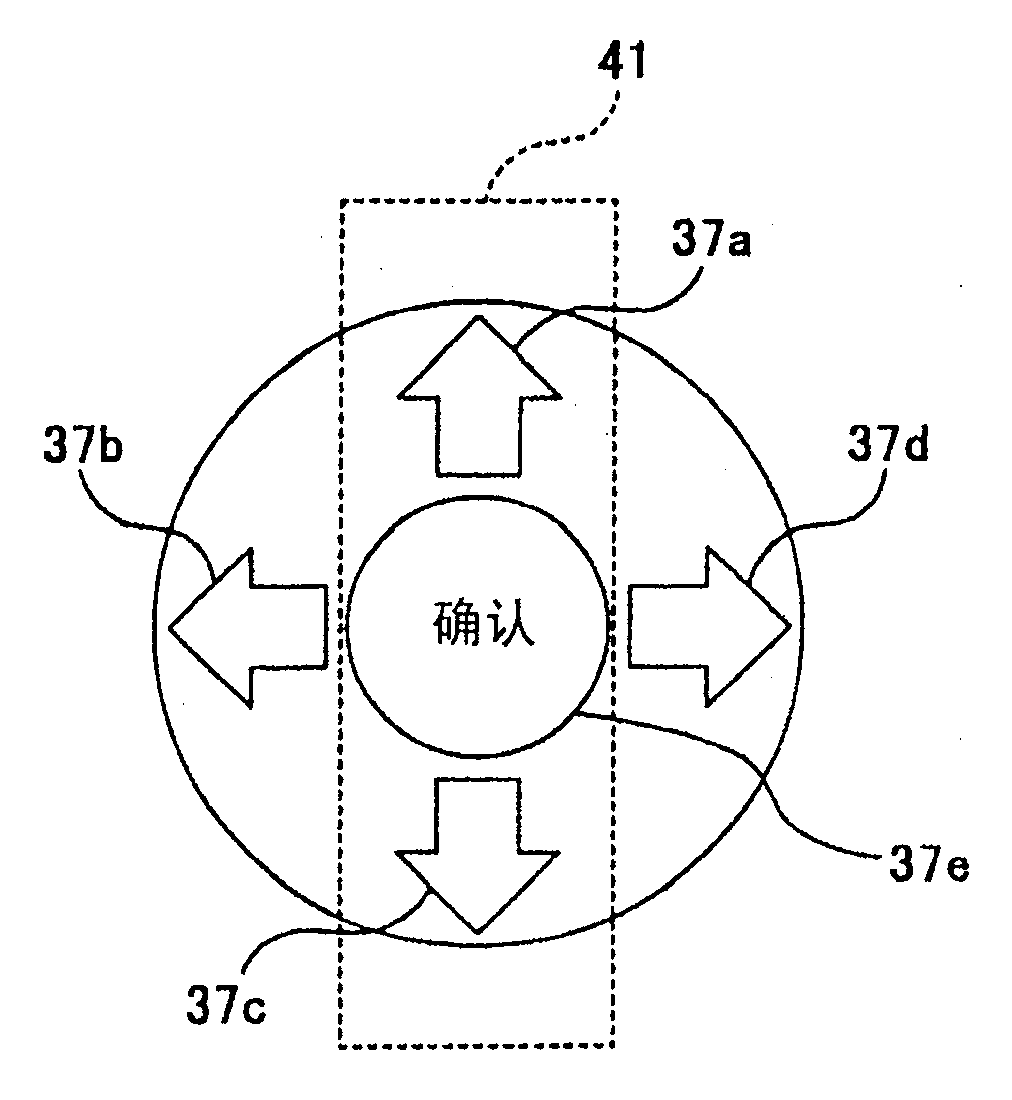
如图3A所示,十字形按钮37包括确定按钮37e以及分别设置在位于中央的确定按钮37e上、下、左、右的向上按钮37a、向下按钮37c、向左按钮37d和向右按钮37d。As shown in Figure 3A, the
在便携式音频播放器1的左表面上,例如如图2A所示,设有耳机终端21和锁机按钮32。On the left surface of the
在便携式音频播放器1的右表面上,例如如图2C所示,设有倒退按钮、播放/暂停按钮35、快进按钮36和音量控制拨盘33。On the right surface of the
此外,在包括向上按钮37a、确定按钮37e和向下按钮37c的按压部分的垂直狭长区域上设有触摸传感器41。在包含倒退按钮部分34、播放/暂停按钮35和快进按钮36的按压部分垂直狭长区域设有触摸传感器42。Furthermore, a
锁机按钮32、音量控制拨盘33、倒退按钮34、播放/暂停按钮35、快进按钮36、十字形按钮37、返回按钮38、观看按钮39、菜单按钮40和触摸传感器41、42是包含在上述输入部分15中的部件。
下面将对根据本实施例的电子设备(便携式音频播放器)的各部件的相应关系以及本实施例的各部件进行说明。The corresponding relationship of the components of the electronic device (portable audio player) according to the present embodiment and the components of the present embodiment will be described below.
包括用户接口处理部分172和输入部分15的单元是本发明的用户接口部分的一个实施例。A unit including the user
包括再现处理部分170和显示处理部分171的单元是本发明实施例的处理部分的一个实施例。A unit including the
触摸传感器41、42分别为本发明触摸检测部分的实施例。The
十字形按钮37、倒退按钮34、播放/暂停按钮35和快进按钮36分别为本发明按压检测部分的实施例。The
HDD13是本发明的存储部分的一个实施例。
显示部分14是本发明显示部分的一个实施例。The
下面将分别对上述部件进行说明。The above-mentioned components will be described respectively below.
USB接口11连接于作为外部设备的例如个人计算机3并与之交换数据。The
RAM12暂存用于控制部分17的处理步骤的数据并存储从ROM16装载的程序代码PRG。The
例如,ROM16存储程序代码PRG,该程序代码PRG调整包含在控制部分17中的计算机处理进程。For example, the
HDD13存储经压缩的音乐数据(音乐数据)。
音乐数据经由USB接口11从个人计算机3被写至HDD13。Music data is written from the
音频输出电路18执行在控制部分17中解码的音乐数据上的信号处理和数字/模拟转换并放大,并将结果作为音频信号输出至耳机终端21。The
USB接口11、RAM12、HDD13、ROM16以及音频输出电路18例如通过共用总线连接于控制部分17。The
显示部分14由例如LCD(液晶显示)面板和有机EL(场致发光)显示面板的显示部分组成,并根据从显示处理部分171提供的图象信号显示图象(静止图象和运动图片)。The
将由显示部分14显示的屏幕页面例如为菜单屏幕、音乐选择屏幕、设置屏幕和播放屏幕等,它们响应用户在输入部分15上的操作而切换。Screen pages to be displayed by the
输入部分15是用于将各种信息输入到便携式音频播放器1的部分。The
当禁用来自输入部分15的按钮或传感器的输入时,则使用锁机按钮32。藉此,在不使用时无意地按压按钮的情况下,可防止便携式音频播放器1工作。The
音量控制拨盘33被用来调整来自耳机21的音频信号输出电平。The
在倒放音乐(返回到前一首曲子)以及降低播放时播放速度的情况下,使用倒退按钮34。The
播放/暂停按钮35用来控制音乐再现的开始和停止。The play/
在快进音乐(前进至下一首曲子)和提高播放时播放速度的情况下,使用快进按钮36。The
在分阶层的屏幕之间移动的情况下使用返回(BACK)按钮38。即,当从较低阶层返回到较高阶层时,按压倒退按钮38。The
当选择屏幕的显示模式或操作模式时,则使用观看(VIEW)按钮39和菜单(MENU)按钮40。When selecting a display mode or an operation mode of the screen, a
十字形按钮37被用来在显示在屏幕上的项(音乐、演唱者和操作菜单等)选择对象之间进行更换。当在将项列表显示在屏幕上的情况下按压向上按钮37a或向下按钮37c时,使屏幕向上或向下滚动。另外,当将向左按钮37b或向右按钮37d同时按压时,所显示的范围跳至列表的上端部分或下端部分。当按压确定按钮37e时,与所选项对应的处理(例如所选音乐的再现处理)被执行。The
触摸传感器41、42检测对便携式音频播放器1的底表面的预设检测区域的物理接触。触摸传感器41、42基于由物体的接触引起的电信号改变(例如电极之间的电容和电阻值的改变)而检测接触。The
触摸传感器41、42将由物体对检测区域的接触位置有关的信息输出至控制部分17的用户接口处理部分172。The
控制部分17包括例如计算机并基于从ROM16读取的程序代码PRG控制便携式音频播放器1的整个操作。The
例如,根据从输入部分15输入的信息而一体地控制各部件,从而在USB接口11处与个人计算计算机3通信,管理和搜索HDD13中的各种数据(例如音乐数据和属性数据,诸如演唱者名和专辑名),基于程序代码PRG的例程而正确执行来自音频输出电路的音频信号的输出以及显示部分14的显示屏幕产生。For example, each component is integrally controlled according to information input from the
再现处理部分170根据经由用户接口处理部分172从输入部分15输入的信息执行再现音乐处理。例如,当在显示部分14显示分别对应于一个或多个音乐数据的项(曲名、演唱者名和专辑名等)列表的情况下按压确定按钮37e或播放/暂停按钮35时,处理读取与当前从HDD13在列表中选择的项对应的读出的音乐数据、执行来自音频输出电路18的音频信号时解码和输出该类数据。当一个项对应于多个音乐时(例如当该项为专辑名时),可连续再现多个音乐或选择其一部分进行再现。The
显示处理部分171根据来自输入部分14的信息输入经由用户接口处理部分172产生显示部分14的显示屏幕,并将其图象信号提供给显示部分14。The
用户接口处理部分172基于由操作按钮(32、34、……40)、传感器(41、42)和拨盘(32)等产生的信号输入而产生由控制部分17的每个处理部分(显示处理部分171和音乐再现部分等)使用的数据。The user
移动方向确定部分172a基于作为由触摸传感器41、42产生的检测结果的接触位置输出的信息而确定接触位置的移动方向。The movement
即,触摸传感器41确定接触位置从向下按钮37c侧往向上按钮37a侧沿向上方向移动还是相反地沿向下方向移动。That is, the
另外,接触传感器42确定接触位置从向下按钮37c侧向向上按钮37a侧沿向上方向移动还是相反地沿向下方向移动。In addition, the
移动距离获得部分172b基于作为触摸传感器42检测结果的接触位置输出信息而获得接触部分的移动距离。例如,移动距离获得部分172b获得从初始接触位置到转变后的接触位置的距离作为上述移动距离从接触传感器42未检测到接触的状态到检测到接触的状态的转变时。The movement
这里将对在根据本实施例具有上述诸部件的便携式音频播放器中的显示部分14的屏幕滚动操作进行说明。Here, the screen scrolling operation of the
首先对十字形按钮37和触摸传感器41实现的屏幕的滚动操作进行说明。First, the scrolling operation of the screen realized by the
如图3A所示,触摸传感器41检测重叠于十字形按钮37的向上按钮37a、确定按钮37e和向下按钮37c的垂直狭长区域上的接触。As shown in FIG. 3A , the
例如,当用户接触他的手指并沿该区域向上移动他/她的手指,则由触摸传感器41检测到接触并且将接触位置上的信息提供给移动方向确定部分172a。在移动方向确定部分172a中,基于所提供的位置信息而确定接触位置向上移动。当在移动方向确定部分172a中确定向上移动时,显示处理部分171响应于此而使屏幕连续向上滚动。For example, when the user contacts his finger and moves his/her finger upward along the area, the contact is detected by the
相反地,当用户接触他的手指并沿该区域向下移动他/她的手指,则显示处理部分171响应于此而使显示部分14的屏幕连续地向下滚动(图3B)。Conversely, when the user touches his finger and moves his/her finger down along the area, the
要注意,“连续滚动”在这里指屏幕连续滚动的状态。It should be noted that "continuous scrolling" here refers to a state in which the screen scrolls continuously.
例如 ,当由触摸传感器41检测到的接触位置移动停止时,显示处理部分171停止连续滚动。在那种情况下,显示部分14的屏幕仅当用户将手指滑过接触传感器41的检测区域时滚动。For example, when the movement of the contact position detected by the
在另一例中,当触摸传感器41无法检测到接触时,显示处理部分171停止滚动。在那种情况下,当用户将他/她的手指移离触摸传感器41的检测区域时,屏幕的滚动停止。当手指处于接触时,即使手指停止滑动屏幕连续滚动。In another example, when the
作为另一例子,当触摸传感器41无法检测到接触后再次检测到接触时,则滚动停止。在那种情况下,即使用户将手指从触摸传感器41的检测区域移去,屏幕照样连续滚动。由于用户再次接触接触传感器41,屏幕滚动停止。As another example, when the
如上所述,当触摸传感器41检测到接触位置的移动时,显示处理部分171使显示部分14的屏幕连续滚动。As described above, when the
另一方面,当不在触摸传感器41上移动手指地按压向上按钮37a或向下按钮37c时,显示处理部分171通过预设宽度(例如显示在屏幕上的列表的一个项的量)使屏幕向上或向下恰当地滚动(图3C)。On the other hand, when the up
由于屏幕响应按钮的按压以预设宽度间断地滚动,这种滚动在下文中被称为“间断滚动”。Since the screen scrolls intermittently with a preset width in response to the pressing of the button, such scrolling is hereinafter referred to as "intermittent scrolling".
图4是解释由十字形按钮37滚动的屏幕的视图。FIG. 4 is a view explaining a screen scrolled by the
例如如图4所示,当按压向上按钮37a一次时,显示处理部分171以预设宽度使屏幕向上滚动;而当按压向下按钮37c一次时,显示处理部分171以预设宽度使屏幕向下滚动。For example, as shown in FIG. 4, when the up
在连续滚动中滚动是连续的并且无需按压任何按钮,因此必须对一个按钮进行多次按压以持续滚动,但相比于间断滚动,这适于在项之间进行高速移动。另一方面可通过间断的滚动确定项的移动量以使滚动速度放慢,然而这样能方便地选择特定项。因此,例如在作为目标的项很远的情况下当对象变得靠近时,通过连续滚动以高速移动并切换至不连续滚动,即使存在大量项也可到达目的,并且能阻止错误地滑过目标。In continuous scrolling the scrolling is continuous and without pressing any button, so multiple presses of a button are necessary to keep scrolling, but this is suitable for high speed movement between items compared to intermittent scrolling. On the other hand, it is possible to determine the amount of movement of items by scrolling intermittently to slow down the scrolling speed, however, it is convenient to select a specific item. Therefore, for example, when the object becomes close in the case where the item as the target is far away, by moving at a high speed with continuous scrolling and switching to discontinuous scrolling, the purpose can be reached even if there are a large number of items, and it is possible to prevent the target from being erroneously swiped .
另外,当在预设时间内按压向上按钮37a或向下按钮37c预设次数时,显示处理部分171使屏幕向上或向下连续滚动。例如如图4所示,当双击向上按钮37a而此后一直按住向下按钮37c,则显示处理部分171使屏幕连续向下滚动。In addition, when the up
即,可通过不在触摸传感器41上滑动手指地双击按钮(37a和37c),即开始连续滚动。That is, continuous scrolling can be started by double-tapping the buttons ( 37 a and 37 c ) without sliding the finger on the
图5是显示部分14的显示屏幕的一个例子的视图。FIG. 5 is a view of an example of a display screen of the
在图5的例子中,多个项(演唱者名)组成的列表向下地延伸于屏幕上。In the example of FIG. 5, a list of items (artist names) extends down the screen.
显示处理部分171显示在屏幕上显示的多个项中与其它项不同的当前选择项。例如,如图5所示,字母的黑和白被颠倒显示以彼此区分。The
当触摸传感器41检测接触位置的移动或检测到向上按钮37a或向下按钮的按压时,显示处理部分171将待选择的项移动至例如列表的上端部分或下端部分。然后,当项移动至列表的上端部分并继续至待选择项达到屏幕的最上端部分的状态,显示处理部分171使屏幕向上滚动,由此显示列表上端部分上未显示出的项。相反地,当列表下端部分的项的移动进一步继续至待选项到达屏幕的最下端部分的状态时,使屏幕向下滚动,从而显示列表下端部分上的当前未显示项。When the
为了结合图5中的例子进行详细说明,当项移动还继续至列表的上端部分并处于屏幕最上端的项“A Beat Power”被选择时,显示处理部分171使屏幕向上滚动而上端项属于A-B的词首的项组。然后,当到达A-B词首的项组的最上端项时,显示处理部分171使屏幕滚动,从而使日语中开始于日文字母“ya-wa行”的项组的最下端项位于所显示字母表之上。To illustrate in detail with reference to the example in FIG. 5, when the item movement continues to the upper part of the list and the item "A Beat Power" at the top of the screen is selected, the
注意在这里位于上端位置的项被解释为在屏幕上“处于上端部分”,但这是为了便于说明。Note that an item at an upper position is here interpreted as "at an upper portion" on the screen, but this is for convenience of explanation.
上面已解释了向上和向下滚动,然而当按压十字形按钮37的向左按钮37b或向右按钮37d时,如上所述的每个项的显示范围的移动是不同的,并且显示范围的移动是每个项组中显示范围的移动。Scrolling up and down has been explained above, but when the
图6是项在演唱者名的列表中分成词首组的情况的一个例子的视图。FIG. 6 is a view of an example of a case where items are divided into prefix groups in the list of artist names.
在图6的例子中,在日语中开始于日文字母(ya-wa行)的组之下,包括词首字母为“A-B”的组,而在词首字母为“A-B”的组之下具有词首字母为“C-D”的组。In the example of FIG. 6, under the group starting with the Japanese alphabet (row ya-wa) in Japanese, the group with the initials "A-B" is included, and under the group with the initials "A-B" there are Groups starting with "C-D".
现在,当显示词首字母为“A-B”的组的状态下按压向左按钮37b,显示处理部分171将显示范围从“A-B”的组移动至“ya-wa行”的组。Now, when the
另外,当在显示组“A-B”的状态下按压向右按钮37d,显示范围移向下端的“C-D”组。Also, when the
图7是将诸项分成乐曲名列表中的专辑组的例子的视图。Fig. 7 is a view of an example of grouping items into album groups in the music title list.
在图7的例子中,在“All Albums”的专辑组下面,跟随专辑组“ComeAway With Me”并且在这之后跟随的是专辑组“Feel Like Home”。In the example of FIG. 7, under the album group of "All Albums", follows the album group "ComeAway With Me" and after that follows the album group "Feel Like Home".
现在,当在显示“Come Away for”组的状态下按压向左按钮37b,显示处理部分171将显示范围移动至位于比“Come Away For”组更上端部分的“Al l Albums”组。Now, when the
另外,当在显示“Come Away for”组的状态下按压向右按钮37d,显示处理部分171将显示范围移动至位于比“Come Away For”组更下端部分的“Fells Like Sea”组。Also, when the
接着,将对由触摸传感器42实现的屏幕滚动操作进行说明。Next, the screen scrolling operation realized by the
通过将手指在接触传感器42上滑动而使显示部分14的屏幕滚动这一点与上述解释的触摸传感器41相同。即,当在触摸传感器42上作出向上滑移时,屏幕连续向上滚动,而当在触摸传感器42上作出向下滑移时,屏幕连续向下滚动。The point that the screen of the
两种触摸传感器的滚动方法中的不同点在于是否提供速度调整功能。即,当触摸传感器42中检测到接触位置移动时,显示处理部分171根据由移动距离获得部分172b获得的移动距离以一速度使显示部分14的屏幕滚动。The difference between the scrolling methods of the two touch sensors is whether or not a speed adjustment function is provided. That is, when a contact position movement is detected in the
图8是移动距离和滚动速度的关系的一个例子的视图。FIG. 8 is a view of an example of the relationship between the moving distance and the scrolling speed.
例如,移动距离获得部分172b输出5级的值(“0”、“1”、“2”、“3”和“4”)作为触摸传感器42上的接触位置的移动距离。值越大,移动距离就越长。For example, the movement
在这种情况下,例如当由移动距离获得部分172b获得的移动距离为“0”时,显示处理部分171最高程度地减少滚动速度,并且以“1”、“2”……的顺序增加滚动速度,另外当移动距离为“4”时,速度变得最快。In this case, for example, when the moving distance obtained by the moving
注意可根据由移动距离获得部分172b获得的移动距离从当前滚动速度中对显示处理部分171设置一增量(减量)。Note that an increment (decrement) can be set to the
为了结合图8中的例子进行解释,例如每当手指接触他的手指并在触摸传感器42上恰好向上移动过“0”移动量,可将向上滚动速度提高一个级,相反地,每当手指接触他的手指并在触摸传感器42上恰好向下移动过“0”移动量,则可将向上滚动速度降低一个级(即将向下滚动提高一个级)。In order to explain in conjunction with the example in FIG. 8 , for example, whenever a finger touches his finger and moves up over the "0" movement amount on the
如上所述,根据本实施例的便携式音频播放器,设有作为接触检测部分以检测预设检测区域上物体的接触的触摸传感器(41、42)以及作为用于检测施加于检测区域中预设位置的按压的按压检测部分的操作按钮(34-37)。因此,相对分别设置这些部分的情况而言,可减少分配给这些部分的装置表面积。另外,由于将操作按钮设置在触摸传感器的检测区域上,用户无需大幅度移动手指就能对这些按钮进行操作,因此提高了可操作性。As described above, according to the portable audio player of the present embodiment, the touch sensors (41, 42) are provided as the contact detection part to detect the contact of the object on the preset detection area and as the touch sensor (41, 42) for detecting the contact applied to the preset detection area. The position of the pressed operation button (34-37) of the pressed detection part. Therefore, the device surface area allocated to these parts can be reduced compared to the case where these parts are provided separately. In addition, since the operation buttons are provided on the detection area of the touch sensor, the user can operate the buttons without greatly moving the finger, thereby improving operability.
另外,根据上面的便携式视频播放器,可根据由触摸传感器(41、42)检测到的接触位置移动而使显示部分14的屏幕连续滚动。另外,每当操作按钮(34-37)检测到按压时,屏幕恰好滚动一个预设宽度。In addition, according to the above portable video player, the screen of the
因此能使手指充分地在接触传感器(41、42)的检测区域上运动以实现连续滚动,并且不需要多次按压操作键(34-37)。另外,当通过按钮操作逐次选择每个项而滚动时,则将操作按钮(34-37)设置在用于高速滚动的相同检测区域上,因此不需要很多的手指移动。Therefore, the finger can be sufficiently moved on the detection area of the contact sensor (41, 42) to realize continuous scrolling, and the operation key (34-37) does not need to be pressed many times. Also, when scrolling by sequentially selecting each item by button operation, the operation buttons (34-37) are placed on the same detection area for high-speed scrolling, so much finger movement is not required.
即,可通过不过多地移动手指的自然操作而实现连续高速滚动和间断的微滚动。因此可通过简单的操作选中所要求的音乐数据并提高可操作性。That is, continuous high-speed scrolling and intermittent micro-scrolling can be realized by a natural operation that does not move the finger too much. Therefore, desired music data can be selected by simple operation and operability can be improved.
此外,根据上述便携式音频播放器,当移动方向确定部分172a确定触摸传感器上的接触位置沿从向下按钮37c至向上按钮37a的方向移动时,显示部分14上的屏幕连续向上滚动。当移动方向确定部分172a确定接触位置改变为沿从向上按钮37a至向下按钮37c的方向移动时,则屏幕连续地向下滚动。当检测到向上按钮37a的按压时,使屏幕仅向上滚动一个预设宽度。当检测到向下按钮的按压时,则使屏幕仅向下滚动一个预设宽度。Further, according to the above-mentioned portable audio player, when the moving
结果,通过使设置在接触传感器41上的触点沿两个操作按钮(37a、37c)的排列而移动以控制屏幕向上和向下移动一预设宽度,则可连续控制屏幕向上和向下。即,由于用来向上和向下滚动的两个操作按钮(37a和37c)的排列方向与用来向上和向下滚动的手指划动方向匹配,因此可本能地感受到按钮操作和划动操作之间的联系并且操作变得更方便。As a result, the up and down of the screen can be continuously controlled by moving the contact point provided on the
当由接触传感器(41、42)检测到的接触位置的移动停止时,通过停止滚动可使屏幕与接触位置的移动一起滚动。When the movement of the contact position detected by the contact sensors (41, 42) stops, the screen can be scrolled together with the movement of the contact position by stopping scrolling.
另外,根据上述便携式音频播放器,当在预设时间内通过双击将操作按钮(37a、37c)按压预设次数时,显示部分14的屏幕连续滚动。结果,仅通过操作按钮(37a、37c)的操作就可在连续滚动和间断滚动进行切换,由此进一步提高可操作性。In addition, according to the above portable audio player, when the operation button (37a, 37c) is pressed a preset number of times by double-tapping within a preset time, the screen of the
另外,根据上述便携式音频播放器,当显示部分14的屏幕显示划分成多个项组的多个项(乐曲名和演唱者名)的列表的一部分时按压向上按钮37a,则对每个项逐次将显示范围从列表的下端部分移动至上端部分;并且当按压向下按钮37c时,则对每个项逐次将显示范围从列表的上端部分移动至下端部分。当按压向左按钮37b时,显示范围移动到列表中比当前显示在屏幕上的项组更上端部分的项组,而当按压向右按钮时,显示范围移动到列表中比当前显示在屏幕上的项组更下端部分的项组。In addition, according to the above-mentioned portable audio player, when the screen of the
如上所述,当按压向上或向下按钮(37a、37c)时,屏幕以列表项的次序作为顺序滚动;并且当按压向左或向右按钮(37b、37d)时,显示范围移动到不同的项组。结果,仅通过对向上、向下、向左和向右按钮(37a-37d)的操作即可切换显示范围的移动量。另外,通过根据预设属性(词首顺序等)分割多个项,能轻易地使搜索范围变窄,由此能提高搜索效率。As described above, when the up or down button (37a, 37c) is pressed, the screen is scrolled in the order of the list items; and when the left or right button (37b, 37d) is pressed, the display range moves to different item group. As a result, the amount of movement of the display range can be switched only by operations of the up, down, left, and right buttons (37a-37d). In addition, by dividing a plurality of items according to preset attributes (word prefix order, etc.), the search range can be easily narrowed, thereby improving search efficiency.
另外,根据上述便携式音频播放器,由触摸传感器42检测到的接触位置的移动距离由移动距离获得部分172b获得,而显示部分14的屏幕根据所获得的移动距离以一速度连续滚动。Also, according to the above portable audio player, the moving distance of the contact position detected by the
其结果是能够不操作按钮地改变滚动速度等。倘若离开触摸传感器42,可操作性提高。此外,上面通过在触摸传感器42上滑移距离而改变速度的操作方法与滑动型音量控制器的方法相同,因此使操作量变得方便和直觉地感知并且速度调整变得非常方便。As a result, the scrolling speed and the like can be changed without operating buttons. Provided that the
另外,在移动距离获得部分172b中可获得当从接触传感器42未检测到任何接触的状态到检测到接触的状态的转变时的初始接触位置到转变后的接触位置之间的距离作为移动距离。因此,使在触摸传感器42的任何位置上都能滑动手指而调整滚动速度,因此相比基于从固定基准位置开始的距离进行调整的情况,速度调整明显变得方便。In addition, the distance between the initial contact position and the transitioned contact position when the
另外,通过当接触传感器(41、42)在屏幕滚动过程中无法检测到接触时停止屏幕滚动,这就不必要麻烦地操作按钮。倘若从触摸传感器(41、42)离开以停止滚动,操作变得简单。通过当由触摸传感器(41、42)在屏幕滚动过程中无法检测到接触后再次检测到接触即停止屏幕滚动,与上述方法相同,操作变得简单。In addition, by stopping screen scrolling when the contact sensors (41, 42) fail to detect contact during screen scrolling, it is unnecessary to operate buttons cumbersomely. The operation becomes simple provided that the touch sensor (41, 42) is moved away to stop scrolling. When the touch sensor (41, 42) fails to detect contact during screen scrolling, screen scrolling is stopped when contact is detected again, which is the same as the above-mentioned method, and the operation becomes simple.
要注意本实施例不局限于上述实施例并且包括各种修正例。It is to be noted that the present embodiment is not limited to the above-described embodiment and includes various modified examples.
在上述实施例中示出了根据触摸传感器(41、42)和操作按钮(34-37)检测结果而控制屏幕滚动的例子,然而本实施例不局限于此。例如可根据触摸传感器(41、42)和操作按钮(34-37)的检测结果而进行乐曲的再现、快进、倒退和音量控制等。In the above-mentioned embodiments, an example of controlling screen scrolling according to the detection results of the touch sensors (41, 42) and the operation buttons (34-37) is shown, but the present embodiment is not limited thereto. For example, music playback, fast forward, rewind, and volume control can be performed based on the detection results of the touch sensors (41, 42) and operation buttons (34-37).
在控制速度时,可通过将手指在触摸传感器(41、42)上滑动而连续执行乐曲的再现、快进和倒退,并且通过按压操作按钮(34-37)而仅在预设时间内(或仅在按压时)间断地执行这些处理。When controlling the speed, the reproduction, fast-forward and rewind of the music can be continuously performed by sliding the finger on the touch sensor (41, 42), and only within the preset time (or Only when pressed) These processes are performed intermittently.
另外在控制音量时,能通过将手指在触摸传感器(41、42)上滑动而连续地改变音量,并且能通过按压操作按钮(34-37)以预设量分散地改变音量。Also when controlling the volume, the volume can be changed continuously by sliding fingers on the touch sensors (41, 42), and the volume can be changed discretely by a preset amount by pressing the operation buttons (34-37).
如上所述,在本实施例中,能根据由接触检测部分(触摸传感器41、42)检测到的接触位置的移动而连续地执行预设处理,并且每当按压检测部分(操作按钮34-37)检测到对预设位置的按压,则间断地执行预设处理。As described above, in the present embodiment, preset processing can be continuously performed in accordance with the movement of the contact position detected by the contact detection section (
此外,在上述实施例中所说明的例子是将显示部分14上屏幕滚动速度设置为与触摸传感器42检测到的接触位置的移动距离对应的值,然而本发明不局限于此。例如,可根据上述接触位置的移动距离而设置乐曲的再现速度、快进和倒退和乐曲的音量的值。Furthermore, the example explained in the above-mentioned embodiment is that the screen scrolling speed on the
即,在本实施例中,与预设处理的执行状态相关的预设值被设置为与移动距离获得部分(移动距离获得部分172b)获得移动距离对应的值,并使用该设置值执行预设处理。That is, in this embodiment, the preset value related to the execution state of the preset processing is set as a value corresponding to the moving distance obtained by the moving distance obtaining section (moving
当设置在触摸传感器(41、42)的检测区域上的操作按钮(34、35、36、37a和37c)被按压时,当由触摸传感器(41、42)检测到的接触位置移动时,还能确定未按下操作按钮并且执行控制部分17的处理。结果,即使当操作按钮被错误地按下、当意图在触摸传感器(41、42)上移动手指时,也能防止不期望操作的发生。When the operation button (34, 35, 36, 37a and 37c) provided on the detection area of the touch sensor (41, 42) is pressed, when the contact position detected by the touch sensor (41, 42) moves, also It can be determined that the operation button is not pressed and the processing of the
在上述实施例中,对根据待选项移动使屏幕滚动的例子进行了说明,然而反过来说,也可根据屏幕滚动而移动待选项。In the above-mentioned embodiments, an example in which the screen is scrolled according to the movement of the candidate items has been described, however, conversely, the candidate items may be moved according to the screen scrolling.
例如,当向上翻滚屏幕后待选项未出现在屏幕下方,屏幕的最下端项被显示为当前选择项,而当向下翻滚屏幕后待选项未出现在屏幕上方,则屏幕上端项被显示为当前选择项。For example, when the option does not appear at the bottom of the screen after scrolling up the screen, the item at the bottom of the screen is displayed as the currently selected item, and when the item to be selected does not appear at the top of the screen after scrolling down the screen, the item at the top of the screen is displayed as the current option options.
另外,通过将待选项固定在屏幕上的预设位置(例如固定在屏幕的中间),显示处理部分171根据向上屏幕滚动而将待选项移动至列表的上端部分或根据向下屏幕滚动而将待选项移动至列表的下端部分。In addition, by fixing the to-be-items at a preset position on the screen (for example, in the middle of the screen), the
在上述实施例中,对将按钮作为按压检测部分的例子进行了说明,然而本发明不局限于此。按压检测部分不局限于机械构件,例如,可使用根据压力改变电阻值的压敏开关或其它通过电气特性检测压力的部件。即,可使用能够检测施加于特定位置压力的多种传感器实现本实施例的按压检测部分。In the above-mentioned embodiments, an example in which a button is used as a pressing detection section has been described, however, the present invention is not limited thereto. The pressing detection part is not limited to mechanical members, for example, a pressure sensitive switch that changes a resistance value according to pressure or other components that detect pressure by electrical characteristics may be used. That is, the press detection portion of the present embodiment can be realized using various sensors capable of detecting pressure applied to a specific position.
本领域内技术人员应当理解根据设计要求和其它因素可产生各种修改、结合、子替代和变换,只要它们落在所附权利要求或其等效物的范围内即可。It should be understood by those skilled in the art that various modifications, combinations, sub-substitutions and transformations may occur depending on design requirements and other factors so long as they fall within the scope of the appended claims or the equivalents thereof.
Claims (13)
Applications Claiming Priority (2)
| Application Number | Priority Date | Filing Date | Title |
|---|---|---|---|
| JP2005146819 | 2005-05-19 | ||
| JP2005146819A JP2006323664A (en) | 2005-05-19 | 2005-05-19 | Electronics |
Publications (2)
| Publication Number | Publication Date |
|---|---|
| CN1869907A CN1869907A (en) | 2006-11-29 |
| CN100541408C true CN100541408C (en) | 2009-09-16 |
Family
ID=36754248
Family Applications (1)
| Application Number | Title | Priority Date | Filing Date |
|---|---|---|---|
| CNB200610084064XA Expired - Fee Related CN100541408C (en) | 2005-05-19 | 2006-05-19 | Electronic equipment |
Country Status (5)
| Country | Link |
|---|---|
| US (1) | US8082522B2 (en) |
| EP (1) | EP1724668A3 (en) |
| JP (1) | JP2006323664A (en) |
| KR (1) | KR20060120447A (en) |
| CN (1) | CN100541408C (en) |
Families Citing this family (65)
| Publication number | Priority date | Publication date | Assignee | Title |
|---|---|---|---|---|
| US7469381B2 (en) | 2007-01-07 | 2008-12-23 | Apple Inc. | List scrolling and document translation, scaling, and rotation on a touch-screen display |
| JP4438733B2 (en) * | 2005-10-26 | 2010-03-24 | ソニー株式会社 | Electronic device and electronic device control method |
| US7844915B2 (en) | 2007-01-07 | 2010-11-30 | Apple Inc. | Application programming interfaces for scrolling operations |
| JP4984950B2 (en) | 2007-02-16 | 2012-07-25 | ソニー株式会社 | REPRODUCTION DEVICE, REPRODUCTION METHOD, AND PROGRAM |
| KR20080079007A (en) * | 2007-02-26 | 2008-08-29 | 삼성전자주식회사 | Electronic device capable of entering user commands |
| JP4711992B2 (en) * | 2007-03-30 | 2011-06-29 | 京セラ株式会社 | Portable information equipment |
| USD628205S1 (en) | 2007-06-23 | 2010-11-30 | Apple Inc. | Graphical user interface for a display screen or portion thereof |
| USD620020S1 (en) * | 2007-06-23 | 2010-07-20 | Apple Inc. | Graphical user interface for a display screen or portion thereof |
| JP4924828B2 (en) * | 2007-07-06 | 2012-04-25 | オンキヨー株式会社 | Content information display device and program thereof |
| JP5010451B2 (en) * | 2007-09-11 | 2012-08-29 | アルプス電気株式会社 | Input device |
| JP5710859B2 (en) * | 2007-09-21 | 2015-04-30 | ソニー株式会社 | Input device and electronic device |
| EP2071443A3 (en) * | 2007-12-12 | 2012-05-30 | Advanced Digital Broadcast S.A. | Method for controlling value of parameter |
| TW200925957A (en) * | 2007-12-14 | 2009-06-16 | Htc Corp | Function switch methods and systems, and machine readable medium thereof |
| CN101539832A (en) * | 2008-03-20 | 2009-09-23 | 达方电子股份有限公司 | Input device with scroll bar function and touch panel and electronic device thereof |
| JP5108602B2 (en) * | 2008-04-16 | 2012-12-26 | 小島プレス工業株式会社 | Car interior lighting system |
| JP2009288882A (en) | 2008-05-27 | 2009-12-10 | Ntt Docomo Inc | Mobile terminal and information display method |
| US8904306B1 (en) * | 2008-06-12 | 2014-12-02 | Sprint Communications Company L.P. | Variable speed scrolling |
| JP4885911B2 (en) * | 2008-06-27 | 2012-02-29 | 京セラ株式会社 | Mobile device |
| US20100058240A1 (en) * | 2008-08-26 | 2010-03-04 | Apple Inc. | Dynamic Control of List Navigation Based on List Item Properties |
| KR101469780B1 (en) * | 2008-09-16 | 2014-12-05 | 엘지전자 주식회사 | A touch scroll device and a laundry processing apparatus |
| US7934167B2 (en) * | 2008-09-30 | 2011-04-26 | Nokia Corporation | Scrolling device content |
| US8365091B2 (en) * | 2009-01-06 | 2013-01-29 | Microsoft Corporation | Non-uniform scrolling |
| US20100214225A1 (en) * | 2009-02-26 | 2010-08-26 | Research In Motion Limited | Method for and apparatus for display scrolling |
| EP2224316A1 (en) * | 2009-02-26 | 2010-09-01 | Research In Motion Limited | Method for and apparatus for display scrolling |
| JP5461035B2 (en) * | 2009-03-05 | 2014-04-02 | アルパイン株式会社 | Input device |
| JP5391917B2 (en) * | 2009-08-10 | 2014-01-15 | 株式会社ニコン | Head mounted display |
| US20110072388A1 (en) * | 2009-09-23 | 2011-03-24 | Thomas Merrell | Method and Apparatus for Altering the Presentation Data Based Upon Displacement and Duration of Contact |
| KR20120031399A (en) * | 2010-09-24 | 2012-04-03 | 엘지전자 주식회사 | Mobile twrminal and playback speed controlling method thereof |
| WO2012117443A1 (en) * | 2011-03-01 | 2012-09-07 | パイオニア株式会社 | Object positioning method, browsing method, display control device, server, user terminal, communication system, object positioning system and program |
| JP5866796B2 (en) * | 2011-05-12 | 2016-02-17 | ソニー株式会社 | Information processing apparatus, information processing method, and computer program |
| WO2013009413A1 (en) | 2011-06-06 | 2013-01-17 | Intellitact Llc | Relative touch user interface enhancements |
| JP2013003718A (en) * | 2011-06-14 | 2013-01-07 | Mitsubishi Electric Information Systems Corp | Information processing device, scroll display method of information processing device, and scroll display program |
| JP5519591B2 (en) * | 2011-07-06 | 2014-06-11 | 株式会社コナミデジタルエンタテインメント | Information display device, information display method, and program |
| WO2013015070A1 (en) * | 2011-07-22 | 2013-01-31 | Kddi株式会社 | User interface device capable of image scrolling not accompanying finger movement, image scrolling method, and program |
| USD688679S1 (en) * | 2011-10-07 | 2013-08-27 | Honda Patents & Technologies North America, Llc | Display screen portion with icon |
| KR101160681B1 (en) | 2011-10-19 | 2012-06-28 | 배경덕 | Method, mobile communication terminal and computer-readable recording medium for operating specific function when activaing of mobile communication terminal |
| US9645724B2 (en) | 2012-02-01 | 2017-05-09 | Facebook, Inc. | Timeline based content organization |
| US9235318B2 (en) | 2012-02-01 | 2016-01-12 | Facebook, Inc. | Transitions among hierarchical user-interface layers |
| US9557876B2 (en) | 2012-02-01 | 2017-01-31 | Facebook, Inc. | Hierarchical user interface |
| JP5994412B2 (en) * | 2012-06-13 | 2016-09-21 | 富士ゼロックス株式会社 | Image display apparatus, image control apparatus, image forming apparatus, and program |
| US9319044B2 (en) | 2012-08-22 | 2016-04-19 | Hyundai Motor Company | Switch system and method for vehicle |
| CN103064596A (en) * | 2012-12-25 | 2013-04-24 | 广东欧珀移动通信有限公司 | Method and device for controlling video playing |
| US10691230B2 (en) | 2012-12-29 | 2020-06-23 | Apple Inc. | Crown input for a wearable electronic device |
| KR102092062B1 (en) * | 2013-04-30 | 2020-03-23 | 인텔렉추얼디스커버리 주식회사 | Input device of display system and input method thereof |
| CN103426458A (en) * | 2013-07-29 | 2013-12-04 | 孙廉杰 | Intelligent key control device and method for multi-media MP3 radio audio device |
| US10503388B2 (en) | 2013-09-03 | 2019-12-10 | Apple Inc. | Crown input for a wearable electronic device |
| USD762680S1 (en) | 2013-12-18 | 2016-08-02 | Apple Inc. | Display screen or portion thereof with graphical user interface |
| JP6299245B2 (en) * | 2014-02-05 | 2018-03-28 | コニカミノルタ株式会社 | Display device, control program, scroll display method, and recording medium |
| USD766318S1 (en) | 2014-03-07 | 2016-09-13 | Apple Inc. | Display screen or portion thereof with animated graphical user interface |
| USD763864S1 (en) * | 2014-04-25 | 2016-08-16 | Huawei Device Co., Ltd. | Display screen with graphical user interface |
| CN104049895A (en) * | 2014-06-13 | 2014-09-17 | 广州金山网络科技有限公司 | Display content switching method and system |
| US10129583B2 (en) * | 2014-06-20 | 2018-11-13 | Verizon Patent And Licensing Inc. | Automated program guide scrolling |
| USD789402S1 (en) | 2014-09-01 | 2017-06-13 | Apple Inc. | Display screen or portion thereof with graphical user interface |
| JP5958524B2 (en) * | 2014-11-25 | 2016-08-02 | カシオ計算機株式会社 | Electronics |
| US20160202865A1 (en) | 2015-01-08 | 2016-07-14 | Apple Inc. | Coordination of static backgrounds and rubberbanding |
| CN105094643B (en) * | 2015-07-30 | 2018-12-21 | 努比亚技术有限公司 | page display control method and device |
| CN105630188B (en) * | 2015-12-24 | 2018-11-27 | 魅族科技(中国)有限公司 | A kind of method and terminal showing character string |
| USD841677S1 (en) | 2017-06-04 | 2019-02-26 | Apple Inc. | Display screen or portion thereof with graphical user interface |
| USD873284S1 (en) | 2017-09-09 | 2020-01-21 | Apple Inc. | Electronic device with graphical user interface |
| USD987669S1 (en) | 2017-09-11 | 2023-05-30 | Apple Inc. | Electronic device with graphical user interface |
| USD928821S1 (en) | 2017-09-29 | 2021-08-24 | Apple Inc. | Display screen or portion thereof with animated graphical user interface |
| WO2019092920A1 (en) * | 2017-11-09 | 2019-05-16 | 株式会社TransRecog | Extra information superposition program, extra information superposition method, and extra information superposition device |
| USD880495S1 (en) | 2018-06-03 | 2020-04-07 | Apple Inc. | Electronic device with graphical user interface |
| USD952661S1 (en) | 2020-10-12 | 2022-05-24 | Apple Inc. | Display screen or portion thereof with animated graphical user interface |
| USD1091605S1 (en) * | 2022-03-10 | 2025-09-02 | Mcmaster-Carr Supply Company | Display screen or portion thereof with graphical user interface |
Family Cites Families (27)
| Publication number | Priority date | Publication date | Assignee | Title |
|---|---|---|---|---|
| US5880411A (en) * | 1992-06-08 | 1999-03-09 | Synaptics, Incorporated | Object position detector with edge motion feature and gesture recognition |
| FR2704671B1 (en) * | 1993-04-30 | 1995-07-28 | Decaux Jean Claude | IMPROVEMENTS IN PORTABLE BOXES FOR THE INFORMATION OF BUS USERS. |
| US5748185A (en) * | 1996-07-03 | 1998-05-05 | Stratos Product Development Group | Touchpad with scroll and pan regions |
| FI115689B (en) * | 1997-05-21 | 2005-06-15 | Nokia Corp | Procedure and arrangement for scrolling information presented on mobile display |
| US5943052A (en) * | 1997-08-12 | 1999-08-24 | Synaptics, Incorporated | Method and apparatus for scroll bar control |
| US8479122B2 (en) * | 2004-07-30 | 2013-07-02 | Apple Inc. | Gestures for touch sensitive input devices |
| US6239803B1 (en) * | 1999-04-14 | 2001-05-29 | Stanley W. Driskell | Method to achieve least effort selection from an item list of arbitrary length |
| JP4538907B2 (en) | 1999-06-29 | 2010-09-08 | ソニー株式会社 | Recording apparatus and reproducing apparatus |
| US6734883B1 (en) * | 2000-05-25 | 2004-05-11 | International Business Machines Corporation | Spinlist graphical user interface control with preview and postview |
| JP2002023928A (en) | 2000-07-03 | 2002-01-25 | Japan Aviation Electronics Industry Ltd | Numeric and character input devices |
| JP3943876B2 (en) * | 2000-08-11 | 2007-07-11 | アルプス電気株式会社 | INPUT DEVICE AND ELECTRONIC DEVICE HAVING THE SAME |
| US6562929B2 (en) * | 2000-08-30 | 2003-05-13 | Jsr Corporation | Conjugated diene-based rubber and method of producing the same, oil extended rubber and rubber composition containing the same |
| US7312785B2 (en) * | 2001-10-22 | 2007-12-25 | Apple Inc. | Method and apparatus for accelerated scrolling |
| US7046230B2 (en) * | 2001-10-22 | 2006-05-16 | Apple Computer, Inc. | Touch pad handheld device |
| US6690387B2 (en) * | 2001-12-28 | 2004-02-10 | Koninklijke Philips Electronics N.V. | Touch-screen image scrolling system and method |
| JP2003296015A (en) * | 2002-01-30 | 2003-10-17 | Casio Comput Co Ltd | Electronics |
| JP4128385B2 (en) | 2002-04-01 | 2008-07-30 | ポリマテック株式会社 | pointing device |
| JP2003323259A (en) * | 2002-05-02 | 2003-11-14 | Nec Corp | Information processing apparatus |
| US20030227406A1 (en) * | 2002-06-05 | 2003-12-11 | Armstrong Brad A. | Remote controller with analog button(s) |
| JP2004310257A (en) * | 2003-04-03 | 2004-11-04 | Nec Corp | Non-contact ic mounted portable information terminal, transaction information transferring method and program |
| JP4057456B2 (en) * | 2003-04-15 | 2008-03-05 | 京セラ株式会社 | Information terminal |
| US6956591B2 (en) * | 2003-04-17 | 2005-10-18 | Nokia Corporation | Smooth scrolling with highlighted navigation and marking of page changes |
| US7281214B2 (en) * | 2003-06-02 | 2007-10-09 | Apple Inc. | Automatically updating user programmable input sensors to perform user specified functions |
| WO2005008444A2 (en) * | 2003-07-14 | 2005-01-27 | Matt Pallakoff | System and method for a portbale multimedia client |
| CN1629880A (en) * | 2003-12-19 | 2005-06-22 | 升达科技股份有限公司 | Touch input module and handheld electronic device with the touch input module |
| US7319457B2 (en) * | 2004-02-12 | 2008-01-15 | Sentelic Corporation | Method of scrolling window screen by means of controlling electronic device |
| US7945452B2 (en) * | 2005-04-11 | 2011-05-17 | Hospira, Inc. | User interface improvements for medical devices |
-
2005
- 2005-05-19 JP JP2005146819A patent/JP2006323664A/en active Pending
-
2006
- 2006-05-18 US US11/435,807 patent/US8082522B2/en not_active Expired - Fee Related
- 2006-05-18 KR KR1020060044539A patent/KR20060120447A/en not_active Ceased
- 2006-05-19 EP EP06252646A patent/EP1724668A3/en not_active Withdrawn
- 2006-05-19 CN CNB200610084064XA patent/CN100541408C/en not_active Expired - Fee Related
Also Published As
| Publication number | Publication date |
|---|---|
| EP1724668A3 (en) | 2012-03-21 |
| EP1724668A2 (en) | 2006-11-22 |
| US20060274053A1 (en) | 2006-12-07 |
| KR20060120447A (en) | 2006-11-27 |
| JP2006323664A (en) | 2006-11-30 |
| CN1869907A (en) | 2006-11-29 |
| US8082522B2 (en) | 2011-12-20 |
Similar Documents
| Publication | Publication Date | Title |
|---|---|---|
| CN100541408C (en) | Electronic equipment | |
| JP4179269B2 (en) | Portable electronic device, display method, program thereof, and display operation device | |
| CN101432681B (en) | System and method for enabling function inspiration and operation of circular touchpad | |
| US8760418B2 (en) | Display control apparatus, display control method and display control program | |
| US9507507B2 (en) | Information processing apparatus, information processing method and program | |
| JP4600548B2 (en) | REPRODUCTION DEVICE, REPRODUCTION METHOD, AND PROGRAM | |
| US9047006B2 (en) | Electronic device system with information processing mechanism and method of operation thereof | |
| JP6077685B2 (en) | Device, method, and graphical user interface for moving current position in content with variable scrub speed | |
| TWI397844B (en) | Apparatus and method for providing side touch panel as part of man-machine interface (mmi) | |
| KR100837283B1 (en) | Handheld terminal with touch screen | |
| US9513791B2 (en) | Electronic device system with process continuation mechanism and method of operation thereof | |
| US9395905B2 (en) | Graphical scroll wheel | |
| CN101630228B (en) | Messaging device, information processing method and message processing program | |
| US20180275818A1 (en) | Information processing device, operation input method and operation input program | |
| KR20070089681A (en) | Content playback device with touch screen | |
| JP2010191892A (en) | Information processing apparatus, display control method, and program | |
| KR20100056639A (en) | Mobile terminal having touch screen and method for displaying tag information therof | |
| JP6758921B2 (en) | Electronic devices and their control methods | |
| CN100432912C (en) | Portable electronic equipment, its display method and graphical user interface device | |
| JP2009164757A (en) | Image display apparatus and imaging apparatus | |
| JP5709206B2 (en) | Touch panel device, processing determination method, program, and touch panel system | |
| US20250343014A1 (en) | Multi-function button module, electronic device comprising same, and operating method thereof | |
| TWI293430B (en) | ||
| CN102262496A (en) | Electronic device and graphical user interface display method thereof |
Legal Events
| Date | Code | Title | Description |
|---|---|---|---|
| C06 | Publication | ||
| PB01 | Publication | ||
| C10 | Entry into substantive examination | ||
| SE01 | Entry into force of request for substantive examination | ||
| C14 | Grant of patent or utility model | ||
| GR01 | Patent grant | ||
| C17 | Cessation of patent right | ||
| CF01 | Termination of patent right due to non-payment of annual fee |
Granted publication date: 20090916 Termination date: 20130519 |